TrailPro - Smartwatch NILOX - Free user manual and instructions
Find the device manual for free TrailPro NILOX in PDF.


User questions about TrailPro NILOX
0 question about this device. Answer the ones you know or ask your own.
Ask a new question about this device
Download the instructions for your Smartwatch in PDF format for free! Find your manual TrailPro - NILOX and take your electronic device back in hand. On this page are published all the documents necessary for the use of your device. TrailPro by NILOX.
USER MANUAL TrailPro NILOX
natural_image
Close-up of a black smartwatch with blue strap and control buttons, no visible text or symbols on the watch face.ENGLISH-EN
User Manual
SMARWATCH
Model: NXSWTRAILPRO
Rev00 - 03.2025
SAFETY INFORMATION FOR SAFE USE OF SMARTWATCH
Please read the safety notes and consult the online user manual carefully before using the product. Keep this information for future reference and include it when passing the product on to third parties. Use the product and its accessories only for their intended use, respecting the indicated electrical specifications and in closed and protected environments, to avoid serious risks. Keep the product away from heat sources, direct sunlight, humidity and liquids. The device must not be used by children or by those who are unable to understand the risks. Do not leave the product charging for too long or connected to the mains when it is not in use or if you suspect a malfunction. Avoid impacts, falls, crushing or rough handling that could cause dangerous situations. Never attempt to disassemble or repair the product in case of defects. If liquid leaks from the product, avoid contact with skin or eyes; in this case, immediately wash the affected area with water and consult a doctor. Keep the box and especially the bags away from children to prevent the risk of suffocation or accidental ingestion. Avoid using the device near electromedical devices, such as pacemakers. For any doubts regarding the operation, safety or connection of the product, contact Esprinet customer service. Do not use the device during activities that require high concentration, to avoid distractions and accidents. The product requires little maintenance and can only be cleaned with a soft, clean cloth, without the use of aggressive detergents or chemicals. This product is not a toy. Keep the device and its accessories out of the reach of children and animals. Do not use the device in hospitals, on airplanes and in environments with electronic instruments that may be subject to interference with radio frequencies.
Unless otherwise specified on the technical data sheet, the product is not suitable for immersion in water or other liquids. Do not touch the product or its accessories with wet or damp hands or other parts of the body. Before each use, it is advisable to fully charge the product. Esprinet S.p.A. will not be liable in any way for injuries or damages caused to people or property resulting from improper use of the product.
PRODUCT
text_image
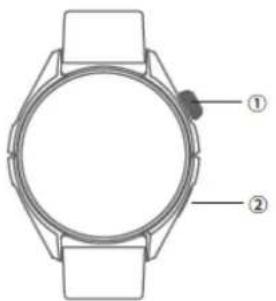
Diagram of a smartwatch with labeled parts, showing front and side views with numbered annotations.- Power button:
Long press to turn on and off the smartwatch; Lock screen state, short press to turn on the screen; Rotate to switch watch faces and pages directly
- Motion buttons:
Short press to enter the function list
text_image
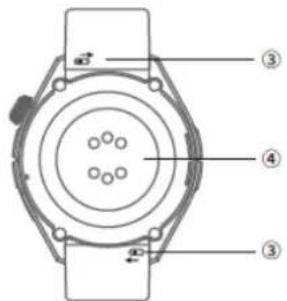
Technical diagram of a circular mechanical component with numbered parts labeled ③, ④, and an arrow indicating direction.- Replacement strap
Slide the spring pin and press it to change strap
- Heart rate sensor area and wireless charging area
HOW TO CHARGE
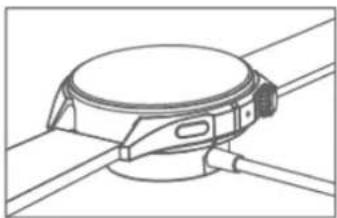
Turn the watch upside down, align the bottom of the watch with the charging base, and the battery icon on the screen will show a full charge status when fully charged. Before charging, dry the watch first to avoid any risk caused by residual sweat.
natural_image
Technical line drawing of a mechanical component with no visible text or symbolsTo achieve maximum charging current and magnetic attraction, please refer to the image above for the correct charging angle (the charging base is aligned with the center line of the button on the watch)
CONNECTING THE SMARTWATCH TO YOUR SMARTPHONE:
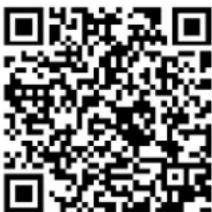
Download the SMART-TIME PRO app via the QR CODE:
text_image
QR code image containing encoded data, no visible human-readable textSMART-TIME PRO is a must-have application for using the watch. You can manage the watch through the App and experience other functions that the watch offers you.
- Press and hold the power button to turn on the watch.
- Scan the QR code on the watch screen with your mobile phone to download the App. You can also scan the QR code Above or download and install the App in the App Store.
- Open the App, click "Device", select "Pair Device" to go to the pairing device page. Click on the T-PRO device.
- After successful pairing, you can start using the watch.
SMARTWATCH MAIN FUNCTIONS:
- GPS: The watch is connected to the phone, in movement mode, the UI shows “GPS synchronization successful, click Start”. GPS connection is successful, the movement can be viewed in the APP movement track.
- AGPS: Choose an open outdoor area. The AGPS file will automatically synchronize with the watch for the first time when it connects to the APP and will be valid for 7 days. Make sure the watch and the APP remain in normal connection to automatically check the validity of the AGPS file. If it exceeds 7 days, the phone APP will resend the AGPS file to the watch.
- Compass: The first time you use the compass function, you need to follow the instructions on the watch interface to calibrate. (Use the function away from external transformers, away from TV, away from microwave ovens and other equipment that may cause a magnetic field environment)
- Altitude: Enter the altitude measurement page to view the current altitude. When the altitude deviates from reality, you can connect the watch to synchronize the APP. After connecting the APP, the smartwatch will automatically calibrate the altitude, which can make the altitude display more accurate
- Barometric pressure: Enter the barometric pressure measurement page, the atmospheric pressure will appear.
• Sports: Support up to 100+ sports modes, fitness, leisure, running, football, dance, etc. - Heart rate: Put the watch close to your wrist. The smartwatch can measure the heart rate value in real time. The normal value of the general population is 60-90 beats/min
- Oxygen: Put the watch close to your wrist: it can measure the oxygen value in the blood.
- Sleep: Open the "Sleep" app in the watch app to record your whole night's sleep conditions
- Blood Pressure: After wearing the watch correctly, open the "Blood Pressure" app in the watch app to manually measure your blood pressure
- Activity: After wearing the watch correctly, open the "Activity" app in the watch app to view the number of steps, calories, distance and other parameters of your daily exercise
- Stress: After wearing the watch correctly, open the "Stress" app in the watch app to see how much mental stress you have
- Stock: APP "Device" - "Stock" - "Add" to go to the search page, click the search icon on the top right and enter the name of the stock to search and add.
- World Time: APP "Device"-"World Time"-"Add", you can scroll down to
- select or click the search icon on the top right to enter the region name to search and add
-
Call Mode: Support calls: users can make, answer and reject calls directly on the watch
-
Notifications: View text messages from the phone and real-time messages sent to the watch
- Camera: Control the mobile phone camera to take photos remotely
- Music: Open the "Music" application in the watch app, you can control the music player of your mobile phone to play music
• Women's Health: Manage your physiological cycle and get an early warning - Sedentary Reminder: Set the sedentary reminder via mobile APP
- Raise the wrist light screen: Via mobile APP you can set this function
- Find phone: When the watch is connected to the APP, the mobile phone will make a sound after clicking on the smartwatch
- Calculator: Enable the calculator function of the watch to make the calculation more convenient and simpler
• Voice assistant: activate the voice assistant of the phone - Alarm clock: you can set the alarm on the watch. You can set up to 5 alarms
- Timer: the watch supports timer
- Weather: connect to the APP to synchronize the real-time weather display on the watch
- Shortcut menu: Do not disturb mode, Settings, QR code, Audio switching, Brightness adjustment, always on screen, Alarm;
- Settings: Adjust brightness, Password, Do not disturb settings, Language change, Menu style, System menu, Standby dial, Raise hand to light up the screen, Screen time, Information
PACKAGE CONTENTS:
- Watch,
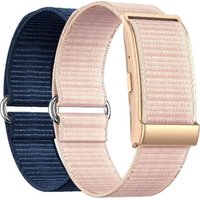
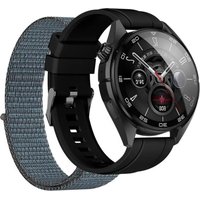
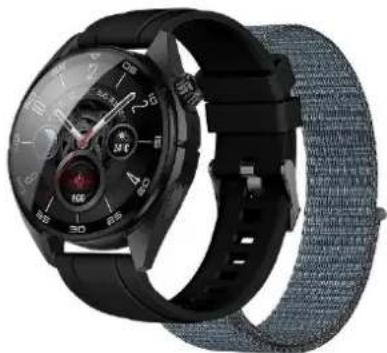
- 2 Straps (Silicone and Nylon)
- Charging cable
- Short user manual
TROUBLESHOOTING
- Missing heart rate signal
The smart watch will continue to pay attention to your heart rate data during exercise and daily life. Sometimes the watch may not receive a correct heart rate signal. At this time, the missing heart rate data will appear on the dotted line. If you can't receive the heart rate signal, you should first check whether you are wearing the watch correctly, adjust it to avoid it being too high or too low, not too tight or too loose on your wrist. After adjustment, turn on real-time heart rate monitoring to get the data. If there is still no heart rate data, check whether the heart rate monitoring function is turned on in the SMART-TIME PRO APP.
- Other problems
If your phone can't pair with the watch, check if there is a signal from the watch in Settings - Bluetooth, if there is, it means there is no problem with the Bluetooth signal. Check if the watch is already paired with another phone and disconnect it.
INFORMATION FOR CORRECT DISPOSAL OF THIS PRODUCT (Directive 2013/56/EU)
This marking on the product or its packaging means that the product, at the end of its life, including the non-removable battery, must be separated from other types of waste for responsible recycling. Safe use of this product is guaranteed by following the online instruction manual, store and use it carefully throughout the life of the product. The lithium-ion/li-ion/polymer battery inside the product is integrated and not
replaceable. Do not attempt to remove it as it may cause risks of overheating, fire and injury. The battery should only be removed by qualified technicians who are able to remove it safely and recycle it in accordance with the law. Users should return the used product free of charge to local separate collection points or to the retailer, on a one-to-one basis or free of charge if the size of the product exceeds 25 cm. Proper waste disposal allows you to recycle the product, treat it with environmentally friendly disposal practices to prevent possible damage to the environment or human health and promote the reuse and/or recycling of product materials. Unauthorized disposal of electronic products, cells and batteries by domestic users involves sanctions provided for by the legislation in force
TECHNICAL SPECIFICATIONS:
• Product Name: TRAILPRO
- Main Body Dimensions: 45.95 x 45.95 x 15.05 mm
• Watch Weight (including strap): 70.5 g
• Resolution: 466x466 (pixels)
• Battery Capacity: 380 mAh, 1.41 Wh
- Battery Life: 4 days
- Battery Type: Li-Polymer
- Charging Time: 3h
- Waterproof: IP68
• Device Requirements: GPS Support
• Supports iOS 12.0 and Android 5.1 or later
- Input: DC 5V/1A
• Maximum Radiated Power: <20mW
• Frequency: 2.402 – 2.480 GHz
- App: Smart-Time Pro
CONVENTIONAL WARRANTY
1. SCOPE OF APPLICATION
1.1. ESPRINET S.p.A., with registered office in Vimercate (MB), Via Energy Park, 20 - hereinafter referred to as ("Esprinet"), offers this conventional warranty for Celly-branded products in favor of both the end-consumer customer ("End-Consumer Customer") and the end-professional customer ("End-Professional Customer") under the terms and conditions set forth herein (the "Conventional Warranty"). The Conventional Warranty applies to:
i. new Celly-branded goods (the "Products");
ii. Products that incorporate or are interconnected with digital content or a digital service in such a way that the absence of such digital content or service would prevent the proper functioning of the Products ("Products with Digital Elements").
1.2. This Conventional Warranty exclusively includes intact Products in their original configuration, including any accessory equipment.
2. CONSUMER RIGHTS
2.1. This Conventional Warranty does not affect the consumer's rights as provided for by national legislative provisions implementing Directive (EU) 2019/771 and subsequent amendments regarding consumer goods warranties ("Legal Warranty").
2.2. The Conventional Warranty does not replace, limit, affect, or exclude the Legal Warranty but rather adds to it. Therefore, the End-Consumer Customer may always exercise the rights under the Legal
Warranty against the seller, under the conditions and terms provided by the aforementioned legislation.
3. SUBJECT OF THE WARRANTY
3.1. Under this Conventional Warranty, Esprinet undertakes, at its discretion, (i) to replace or repair Products or components that are found to be defective due to original manufacturing defects in the materials used or workmanship with identical Products or components, or (ii) where this is not possible, to replace them with a product, product parts, or components of equivalent functionality and economic value.
4. CASES OF WARRANTY EXCLUSION
4.1. This Conventional Warranty does not apply in cases of breakage, malfunction, or defects caused by:
i) installation errors due to negligence, imprudence, inexperience, or carelessness;
ii) failure to follow or incorrect adherence to the instructions and warnings contained in manuals or additional instruction sheets; iii) lack of or incorrect maintenance of the Products as specified by Esprinet; iv) improper storage of the Product; v) tampering, modifications, interventions, or maintenance carried out by the End Customer or by third parties engaged by the End Customer, and in any case not performed by entities authorized by Esprinet; vi) improper use not in accordance with the normal use or intended purpose of the Product; vii) worsening of the damage caused by further use by the End Customer once the possible malfunction or defect has already manifested itself; viii) any external factors during installation or use of the Product that are not attributable to Esprinet; ix) if the model, serial number, or label on the Product has been deliberately counterfeited or removed; x) failure to install the provided update.
4.2. This Conventional Warranty does not cover apparent defects that are immediately recognizable upon delivery of the Product, nor defects or malfunctions caused by deterioration due to normal wear and tear.
4.3. This Conventional Warranty is excluded if breakages, malfunctions, defects, or faults are caused by products, parts, or components manufactured by third parties other than Esprinet to which the Product is connected or with which it is used.
5. WARRANTY CLAIM PROCEDURE
5.1. The Conventional Warranty becomes effective immediately upon the purchase of the respective Product. The End Customer may benefit from this Conventional Warranty by directly contacting Esprinet at the email address garanzia@esprinet.com or warranty@esprinet.com. The Conventional Warranty may also be managed through an Esprinet Authorized Center.
5.2. To benefit from this Conventional Warranty, the End Customer must have the purchase receipt and/or invoice for the Product and/or the delivery document ("DDT"). Esprinet reserves the right to refuse to provide this Conventional Warranty if the End Customer does not provide at least one of these documents.
6. DURATION
6.1. The duration of this Conventional Warranty is equal to that of the Legal Warranty (the "Warranty Period"). Consequently, the End-Professional Customer is also offered a conventional warranty lasting as long as the legal warranty provided for consumers, which is two years.
6.2. The Warranty Period starts from the date of purchase of the Product, i.e., from the date indicated on the purchase receipt and/or invoice and/or delivery document (DDT).
6.3. In the event of repair or replacement, the original Warranty Period continues to run and shall not be considered renewed or extended.
6.4. The right to claim for defects is, in any case, subject to a limitation period of twenty-six months (Warranty Period + two months) from the date of purchase of the Product.
7. TERRITORIAL SCOPE
7.1. This warranty is valid only for warranty services to be provided within the territories of Italy, Spain, and Portugal and applies solely to products marketed under the Celly brand.
8. APPLICABLE LAW AND JURISDICTION
8.1. These General Warranty Conditions are governed by Italian law. Any disputes arising from the interpretation or application of these conditions shall be subject exclusively to the jurisdiction of the Court of Milan.
8.2. The application of any more favorable and mandatory provisions under the law of the country where the End-Consumer Customer has their habitual residence is reserved, particularly in relation to the applicable law, warranty duration, and competent jurisdiction.
CE
This product complies with Directive 2011/65/EU-2015/863/EU (RoHS). The product has the CE marking and therefore complies with the safety standards established by the European Union..
DECLARATION OF CONFORMITY
Esprinet SpA declares that the product complies with Directive 2014/53/EU. The full text of the EU declaration of conformity is available at the following Internet address:
https://xchange.esprinet.com/comp/nilox/nxswtrailpro.pdf
Nilox ^® is a trademark owned by Esprinet S.p.A. All trademarks are registered trademarks of their respective owners. Esprinet S.p.A., via Energy Park 20, 20871 Vimercate (MB) – Italy. Made in China.
www.nilox.com
for info and contacts: contact@esprinet.com
nilox
natural_image
Close-up of a black smartwatch with blue strap and control buttons, no visible text or symbols on the watch face.ITALIANO-IT
text_image
Diagram of a smartwatch with labeled parts, showing front and side views with numbered annotations.text_image
Technical diagram of a circular mechanical component with numbered parts labeled ③, ④, and ③.natural_image
Technical line drawing of a mechanical device with no visible text or symbolstext_image
QR code image containing encoded data, no visible human-readable textnatural_image
Close-up of a black smartwatch with blue strap and control buttons, no visible text or symbolsESPAÑOL - ES
text_image
Diagram of a smartwatch with labeled parts, showing front and side views with numbered annotations.- Botón de encendido:
text_image
Technical diagram of a mechanical or electrical component with numbered parts labeled ③, ④, and ③.- Correa de repuesto
natural_image
Technical line drawing of a mechanical device with no visible text or symbolstext_image
QR code image containing encoded data, no visible human-readable textnatural_image
Close-up of a black smartwatch with blue strap and control buttons, no visible text or symbols on the watch face.FRANÇAIS - FR
text_image
Diagram of a smartwatch with labeled parts, showing front and side views with numbered annotations.text_image
Technical diagram of a mechanical component with numbered parts labeled ③, ④, and a central circular feature.natural_image
Technical line drawing of a mechanical component with no visible text or symbolstext_image
QR code image containing encoded data, no visible human-readable textINFORMATIONS POUR L'ÉLIMINATION CORRECTE DE CE PRODUIT (Directive 2013/56/UE)
1. CHAMP D'APPLICATION
DÉCLARATION DE CONFORMITÉ
natural_image
Close-up of a black smartwatch with blue strap and control buttons, no visible text or symbols on the watch face.DEUTSCH - DE
Bedienungsanleitung
SMARTWATCH
text_image
Diagram of a smartwatch with labeled parts, showing front and side views with numbered annotations.text_image
Technical diagram of a mechanical device with numbered components and directional arrows indicating motion or flow.natural_image
Technical line drawing of a mechanical device with circular top and rectangular base (no text or symbols)text_image
QR code image containing encoded data, no visible human-readable textnatural_image
Close-up of a black smartwatch with blue strap and control buttons, no visible text or symbols on the watch face.ČEŠTINA - CZ
Návod k obsluze
SMARTWATCH
Model: NXSWTRAILPRO
Rev00 - 03.2025
BEZPEČNOSTNÍ INFORMACE PRO BEZPEČNÉ POUŽÍVÁNÍ SMARTWATCH
text_image
Diagram of a smartwatch with labeled parts, showing front and side views with numbered annotations.- Tlačítko napájení:
text_image
Technical diagram of a circular mechanical component with numbered parts labeled ③, ④, and ③.- Náhradní řemínek
natural_image
Technical line drawing of a mechanical device with no visible text or symbolstext_image
QR code image containing encoded data, no visible human-readable textnatural_image
Close-up of a black smartwatch with a blue textured strap, showing both dials and control knobs (no readable text or symbols)SLOVENSKY - SK
Návod na použitie
SMARTWATCH
Model: NXSWTRAILPRO
Rev00 - 03.2025
BEZPEČNOSTNÉ INFORMÁCIE PRE BEZPEČNÉ POUŽÍVANIE SMARTWATCH
text_image
Diagram of a smartwatch with labeled parts, showing front and top views and a sensor icon.text_image
Technical diagram of a circular mechanical device with numbered components and directional arrows indicating motion or force.natural_image
Technical line drawing of a mechanical component with no visible text or symbolstext_image
QR code image containing encoded data, no visible human-readable textnatural_image
Close-up of a black smartwatch with digital display and wrist strap, no visible text or symbols on the watch face.ΕΛΛΗΝΙΚΑ - ΓΡ
Εγχειρίδιο οδηγιών
SMARTWATCH
text_image
Diagram of a wristwatch with labeled parts, showing front and side views with numbered annotations.text_image
Technical diagram of a mechanical component with numbered parts and directional arrows indicating motion or force vectors.natural_image
Technical line drawing of a mechanical device with no visible text or symbolstext_image
QR code image containing encoded data, no visible human-readable textnatural_image
Close-up of a black smartwatch with a blue textured strap and control dial (no visible text or symbols)TÜRKÇE - TR
Kullanım kılavuzu
AKILLI SAAT
Modeli: NXSWTRAILPRO
Rev00 - 03.2025
text_image
Diagram of a wristwatch with labeled parts, showing front and side views with numbered annotations.text_image
Technical diagram of a mechanical device with numbered components and directional arrows indicating motion or force.natural_image
Technical line drawing of a mechanical device with no visible text or symbolstext_image
QR code image containing encoded data, no visible human-readable textnatural_image
Close-up of a black smartwatch with a blue textured strap and control buttons (no visible text or symbols)العربية - SA
التعليمات دليل
zkية ساعة
text_image
Diagram of a smartwatch with labeled parts, showing front and side views with numbered annotations.- الطاقة زر
text_image
Technical diagram of a mechanical component with numbered parts labeled ③, ④, and a central circular feature.- حزام بديل
natural_image
Technical line drawing of a mechanical component with no visible text or symbolstext_image
QR code image containing encoded data, no visible human-readable textnatural_image
Close-up of a black smartwatch with blue strap and control buttons, no visible text or symbols on the watch face.PORTUGUÊS - PT
text_image
Diagram of a smartwatch with labeled parts, showing front and side views with numbered annotations.text_image
Technical diagram of a mechanical component with numbered parts labeled ③, ④, and ③natural_image
Technical line drawing of a mechanical component with no visible text or symbolstext_image
QR code image containing encoded data, no visible human-readable textnatural_image
Close-up of a black smartwatch with a blue textured strap and control buttons (no visible text or symbols)POLSKI - PL
Instrukcja obsługi
SMARTWATCH
Model: NXSWTRAILPRO
Rev00 - 03.2025
INFORMACJE BEZPIECZEŃSTWA DOTYCZĄCE BEZPIECZNEGO UŻYTKOWANIA SMARTWATCHA
text_image
Diagram of a smartwatch with labeled parts, showing front and side views with numbered annotations.- Przycisk zasilania:
text_image
Technical diagram of a circular mechanical component with numbered parts labeled ③, ④, and ③.- Zapasowy pasek
natural_image
Technical line drawing of a mechanical device with no visible text or symbolstext_image
QR code image containing encoded data, no visible human-readable textGŁÓWNE FUNKCJE SMARTWATCHA:
ROZWIĄZANIE PROBLEMÓW
GWARANCJA KONWENCJONALNA
1. ZAKRES ZASTOSOWANIA
OBOWIAZUJĄCE PRAWO I SĄD WŁAŚCIWY
natural_image
Close-up of a black smartwatch with blue strap and control buttons, no visible text or symbols on the watch face.SUOMI - FI
Käyttöohje
ÄLYKELLO
Malli: NXSWTRAILPRO
Rev00 - 03.2025
TURVALLISUUSTIEDOT ÄLYKELLOJEN TURVALLISTA KÄYTTÖÄ VARTEN
text_image
Diagram of a smartwatch with labeled parts, showing front and side views with numbered annotations.text_image
Technical diagram of a mechanical or electrical component with numbered parts labeled ③, ④, and ③.natural_image
Technical line drawing of a mechanical device with no visible text or symbolstext_image
QR code image containing encoded data, no visible human-readable textSMARTWATCH PÄÄTOIMINNOT:
natural_image
Close-up of a black smartwatch with blue strap and control buttons, no visible text or symbols on the watch face.СРПСКИ – РС
text_image
Diagram of a wristwatch with labeled parts, showing two numbered components for identification.text_image
Technical diagram of a circular mechanical component with numbered parts labeled ③, ④, and an arrow indicating direction.natural_image
Technical line drawing of a mechanical device with no visible text or symbolstext_image
QR code image containing encoded data, no visible human-readable textnatural_image
Close-up of a black smartwatch with blue strap and control buttons, no visible text or symbols on the watch face.SVENSKA - IF
Bruksanvisning
SMARTWATCH
text_image
Diagram of a wristwatch with labeled parts, showing two numbered components for identification.text_image
Technical diagram of a mechanical device with numbered components and directional arrows indicating motion or force.natural_image
Technical line drawing of a mechanical device with no visible text or symbolstext_image
QR code image containing encoded data, no visible human-readable textnatural_image
Close-up of a black smartwatch with blue strap and control buttons, no visible text or symbols on the watch face.БЪЛГАРСКИ - БГ
text_image
Diagram of a smartwatch with labeled parts, showing front and side views with numbered annotations.text_image
Technical diagram of a mechanical watch with numbered parts labeled ③, ④, and ③natural_image
Technical line drawing of a mechanical device with no visible text or symbolstext_image
QR code image containing encoded data, no visible human-readable textnatural_image
Close-up of a black smartwatch with blue strap and control buttons, no visible text or symbols on the watch face.ROMÂNĂ-RO
Manual de instructiuni
SMARWATCH
Model: NXSWTRAILPRO
Rev00 - 03.2025
INFORMATII DE SIGURANTĂ PENTRU UTILIZAREA ÎN SIGURANTĂ A SMARTWATCH-ULUI
text_image
Diagram of a smartwatch with labeled parts, showing front and side views with numbered annotations.- Buton de pornire:
text_image
Technical diagram of a circular mechanical component with numbered parts labeled ③, ④, and ③.- Curea de schimb
natural_image
Technical line drawing of a mechanical device with no visible text or symbolsCONECTAREA SMARTWATCH-ULUI LA SMARTPHONE:
text_image
QR code image containing encoded data, no visible human-readable textnatural_image
Close-up of a black smartwatch with blue strap and control buttons, no visible text or symbols on the watch face.NEDERLANDS - NL
Gebruiksaanwijzing
SMARTWATCH
Model: NXSWTRAILPRO
Rev00 - 03.2025
VEILIGHEIDSINFORMATIE VOOR HET VEILIG GEBRUIK VAN SMARTWATCHES
text_image
Diagram of a smartwatch with labeled parts, showing front and side views with numbered annotations.text_image
Technical diagram of a mechanical component with numbered parts and directional arrows indicating motion or force.natural_image
Technical line drawing of a mechanical component with no visible text or symbolstext_image
QR code image containing encoded data, no visible human-readable textCONVENTIONELE GARANTIE
1. TOEPASSINGSGEBIED
natural_image
Close-up of a black smartwatch with blue strap and control buttons, no visible text or symbols on the watch face.РУССКИЙ - RU
text_image
Diagram of a smartwatch with labeled parts, showing front and side views with numbered annotations.text_image
Technical diagram of a mechanical component with numbered parts labeled ③, ④, and ③natural_image
Technical line drawing of a mechanical component with no visible text or symbolstext_image
QR code image containing encoded data, no visible human-readable textnatural_image
Close-up of a black smartwatch with blue strap and control buttons, no visible text or symbols on the watch face.EESTI - EE
Kasutusjuhend
NUTIKELL
Mudel: NXSWTRAILPRO
Rev00 - 03.2025
OHUTUSTEAVE NUTIKELLADE OHUTUKS KASUTAMISEKS
text_image
Diagram of a smartwatch with labeled parts, showing front and side views with numbered annotations.text_image
Technical diagram of a mechanical device with numbered components and directional arrows indicating motion or force.natural_image
Technical line drawing of a mechanical component with no visible text or symbolstext_image
QR code image containing encoded data, no visible human-readable textnatural_image
Close-up of a black smartwatch with blue strap and control buttons, no visible text or symbols on the watch face.LIETUVIŲ - LT
Naudojimo instrukcija
SMARWATCH
Modelis: NXSWTRAILPRO
Rev00 - 03.2025
SAUGOS INFORMACIJA DËL SAUGAUS SMARTWATCH NAUDOJIMO
text_image
Diagram of a smartwatch with labeled parts, showing front and side views with numbered annotations.- Ijungimo mygtukas:
text_image
Technical diagram of a circular mechanical component with numbered parts labeled ③, ④, and an arrow indicating direction.- Atsarginis dirželis
natural_image
Technical line drawing of a mechanical component with no visible text or symbolstext_image
QR code image containing encoded data, no visible human-readable textnatural_image
Close-up of a black smartwatch with blue strap and control buttons, no visible text or symbols on the watch face.LATVIEŠU-LV
Lietošanas instrukcija
SMARWATCH
Modelis: NXSWTRAILPRO
Rev00 - 03.2025
DROŠĪBAS INFORMĀCIJA DROŠAI SMARTWATCH LIETOŠANAI
text_image
Diagram of a smartwatch with labeled parts, showing front and side views with numbered annotations.- leslēgšanas poga:
text_image
Technical diagram of a circular mechanical component with numbered parts labeled ③, ④, and an arrow indicating direction.- Rezerves siksna
Pavelciet atsperes tapu un nospiediet to, lai nomainītu siksnu
- Sirds ritma sensora zona un bezvadu uzlādes zona
KĀ UZLĀDĒT
natural_image
Technical line drawing of a mechanical component with no visible text or symbolstext_image
QR code image containing encoded data, no visible human-readable text3. GARANTIJAS PRIEKŠMETS
natural_image
Close-up of a black smartwatch with blue strap and control buttons, no visible text or symbols on the watch face.MAGYAR - HU
Használati útmutató
SMARTWATCH