CANON i-SENSYS MF287dw - Printer

i-SENSYS MF287dw - Printer CANON - Free user manual and instructions

Find the device manual for free i-SENSYS MF287dw CANON in PDF.
📄 124 pages English EN Download 💬 AI Question
Notice CANON i-SENSYS MF287dw - page 1

User questions about i-SENSYS MF287dw CANON

0 question about this device. Answer the ones you know or ask your own.

Ask a new question about this device

The email remains private: it is only used to notify you if someone responds to your question.

No questions yet. Be the first to ask one.

Download the instructions for your Printer in PDF format for free! Find your manual i-SENSYS MF287dw - CANON and take your electronic device back in hand. On this page are published all the documents necessary for the use of your device. i-SENSYS MF287dw by CANON.

USER MANUAL i-SENSYS MF287dw CANON

• After you finish reading this guide, store it in a safe place for future reference.
- The information in this guide is subject to change without notice.

1 Important Safety Instructions Be sure to read these instructions before using the machine.

2 Setup Guide (this document)

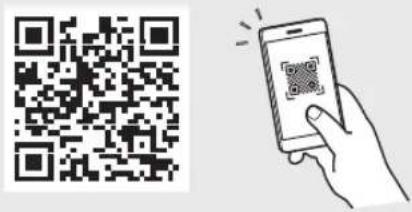
3 User's Guide

This section explains all the ways this machine can be used.
CANON i-SENSYS MF287dw - User's Guide - 1

text_image QR code with a hand holding a smartphone displaying a QR code, likely for mobile payment or scanning.

https://oip.manual.canon/

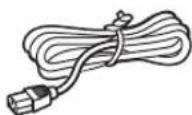
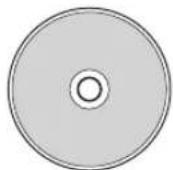
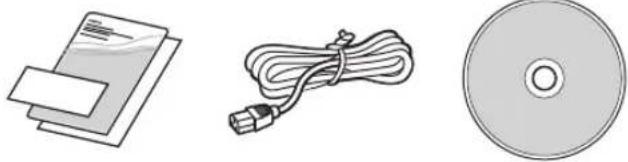
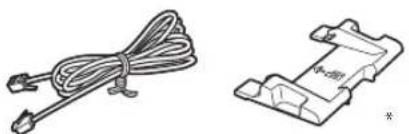
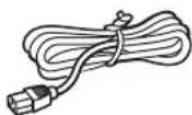
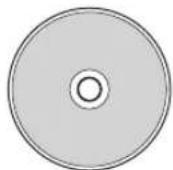
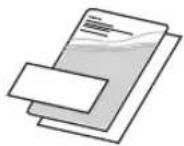
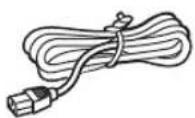
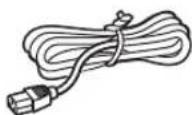
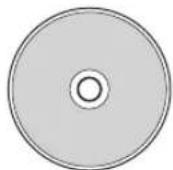
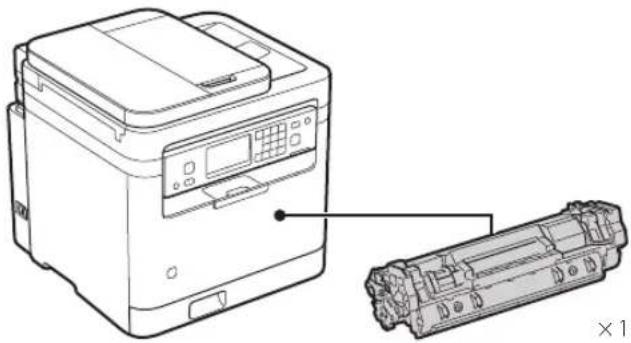
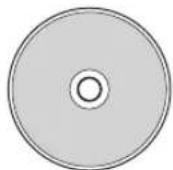
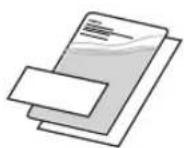
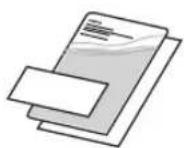
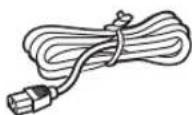
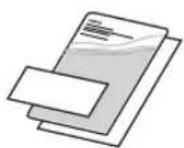
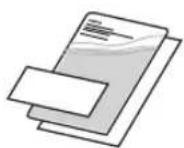
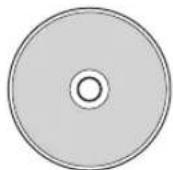
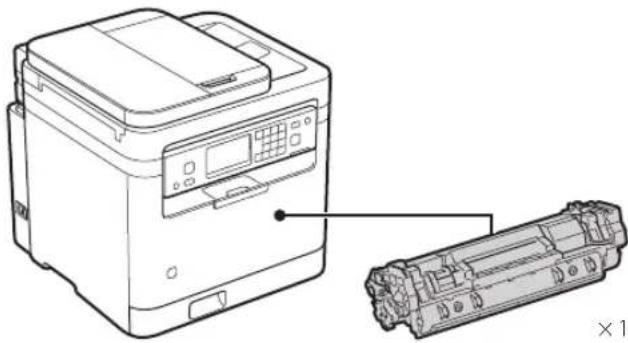
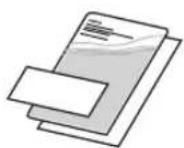
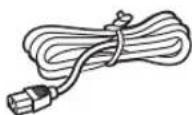
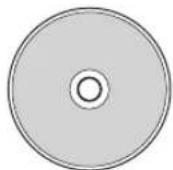
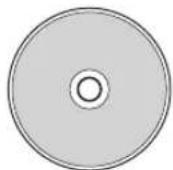
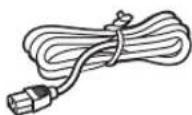
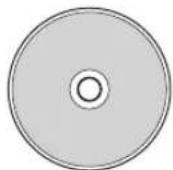
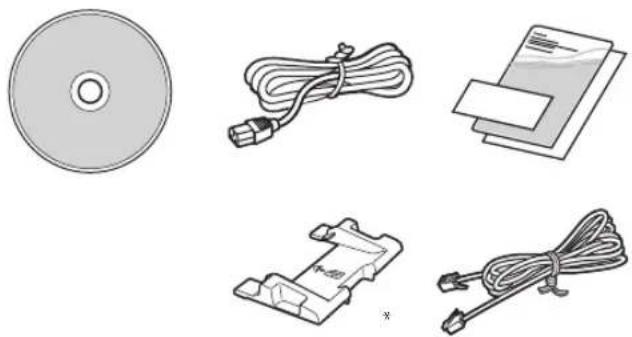
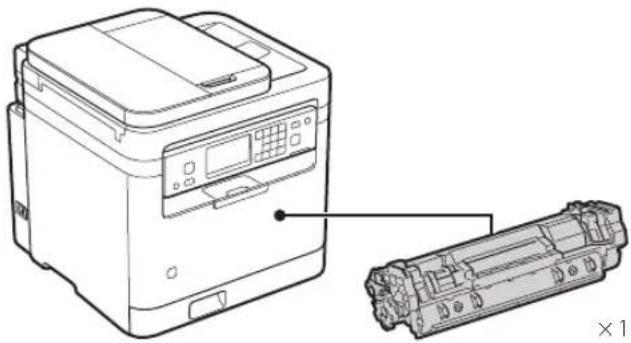
1 Checking the Items Included
CANON i-SENSYS MF287dw - Checking the Items Included - 1

natural_image Line drawing of a printer with a separate close-up of its internal components (no text or symbols)

CANON i-SENSYS MF287dw - Checking the Items Included - 2

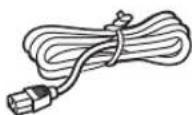
CANON i-SENSYS MF287dw - Checking the Items Included - 3

CANON i-SENSYS MF287dw - Checking the Items Included - 4

CANON i-SENSYS MF287dw - Checking the Items Included - 5

CANON i-SENSYS MF287dw - Checking the Items Included - 6
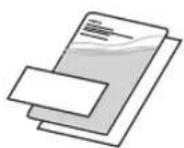
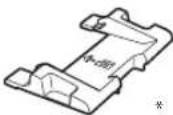
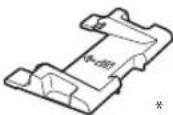
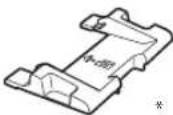
* Use this when scanning A6 size originals with the feeder.
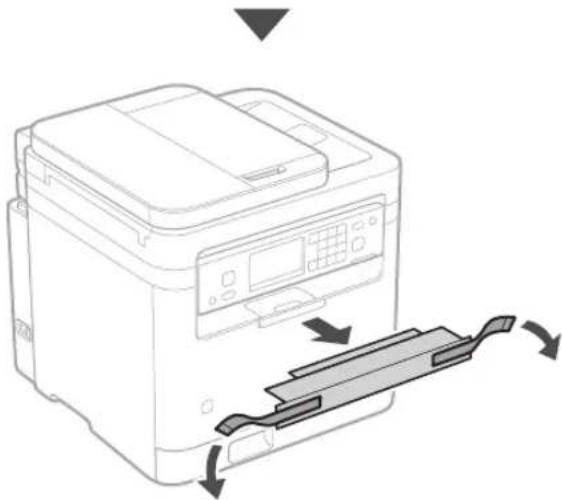
2 Removing the Packing Material

  1. Install the machine in the location where it will be used.
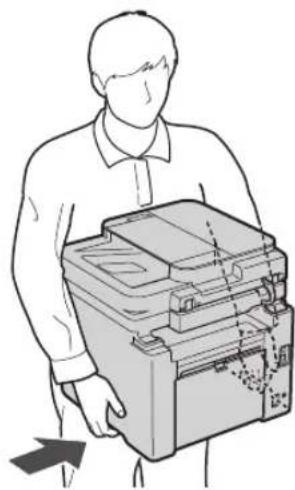
CANON i-SENSYS MF287dw - Removing the Packing Material - 1

natural_image Illustration of a person holding a stacked electronic device (no text or symbols visible)

CANON i-SENSYS MF287dw - Removing the Packing Material - 2
Provide a space of 100 mm or more around the machine when installing.

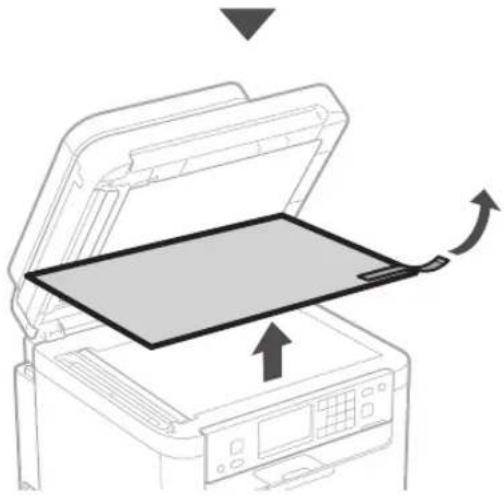
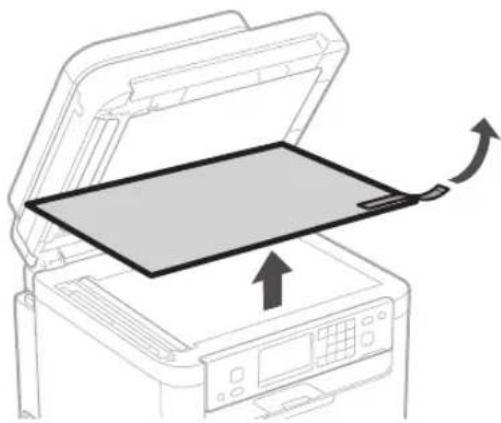
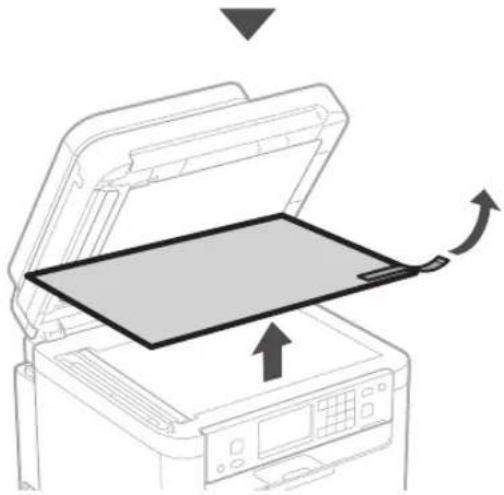
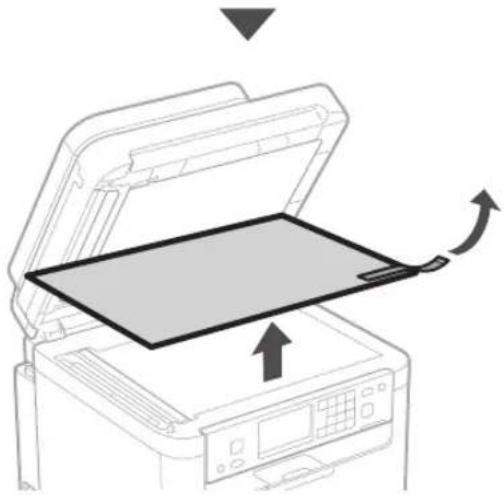
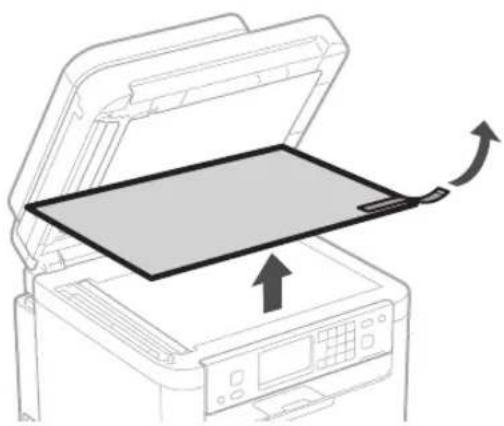
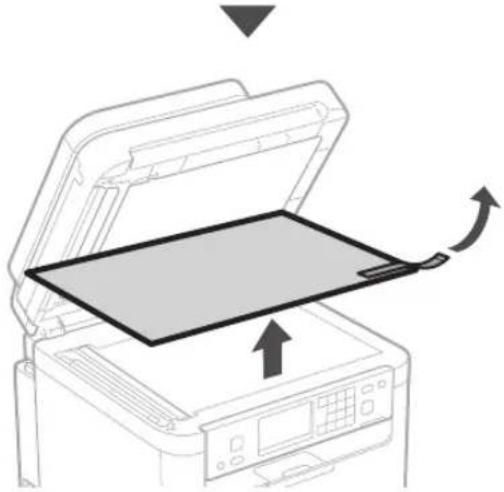
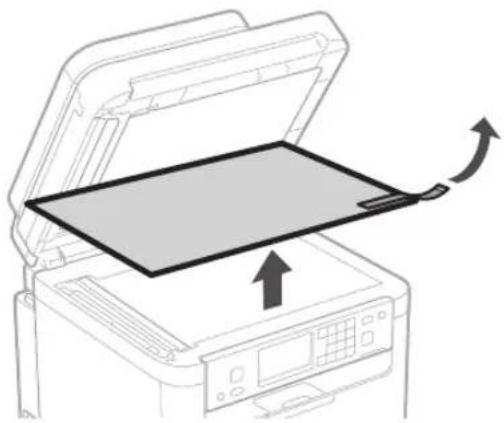
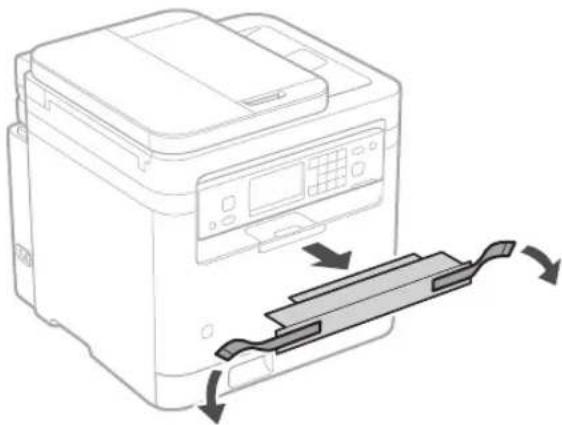
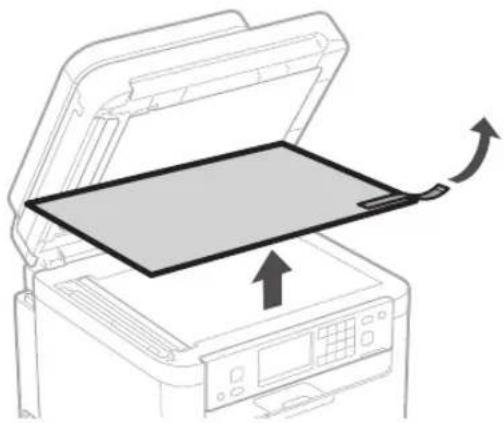
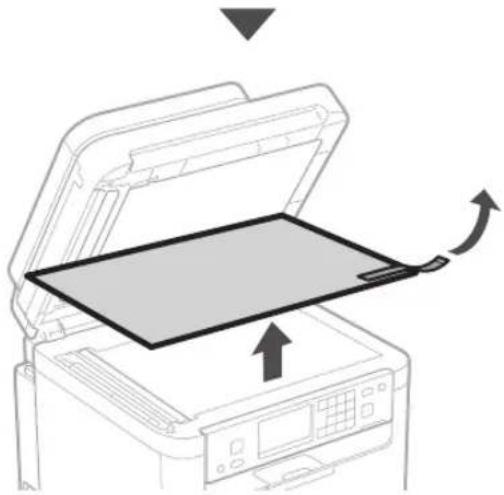
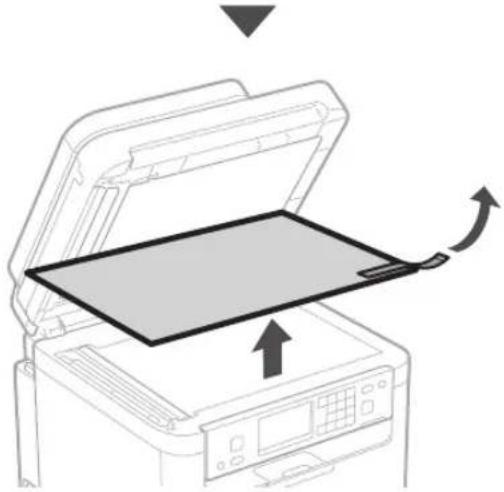
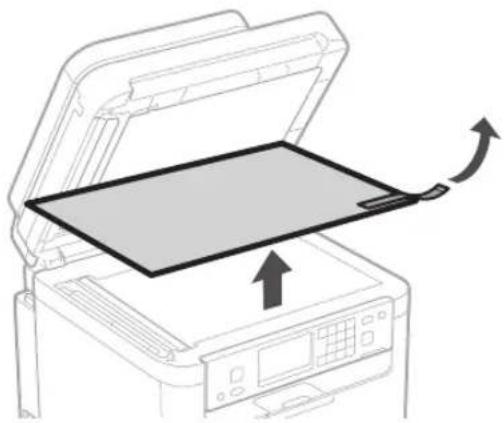
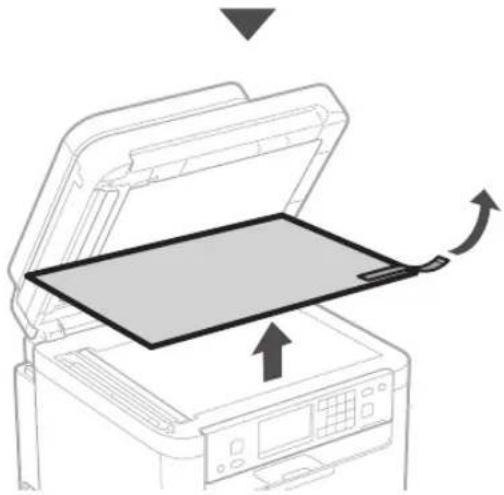
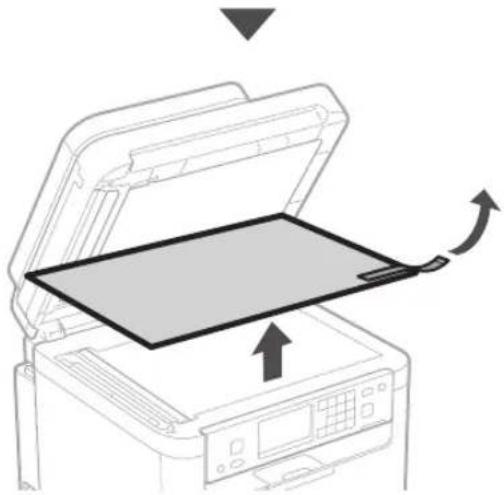
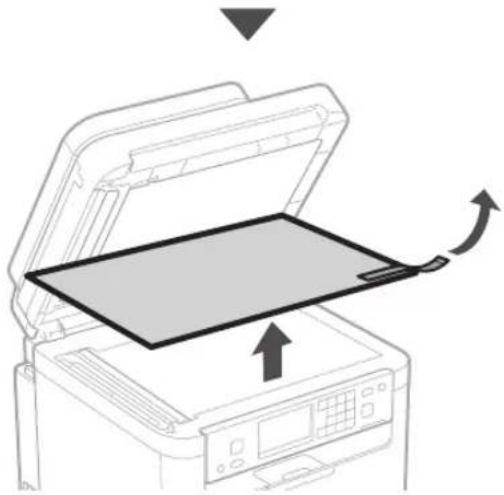
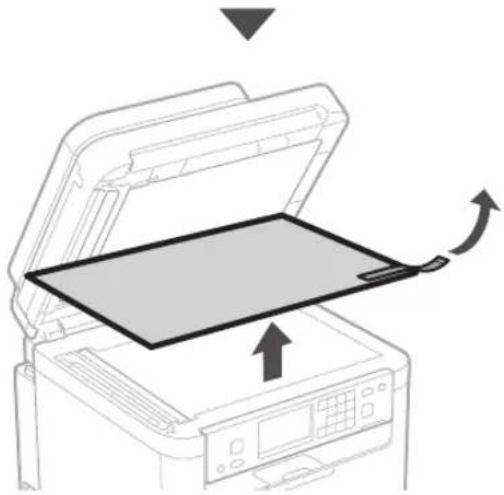
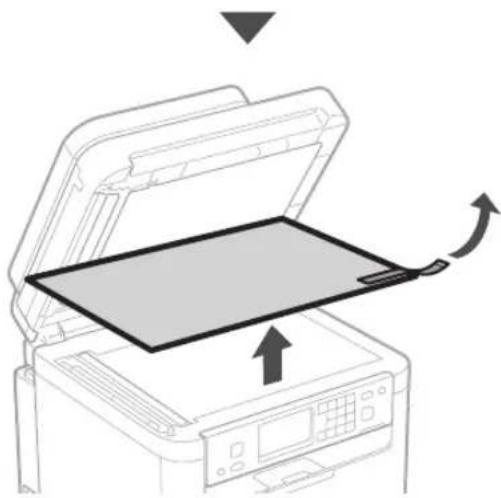
2. Remove all packing material.

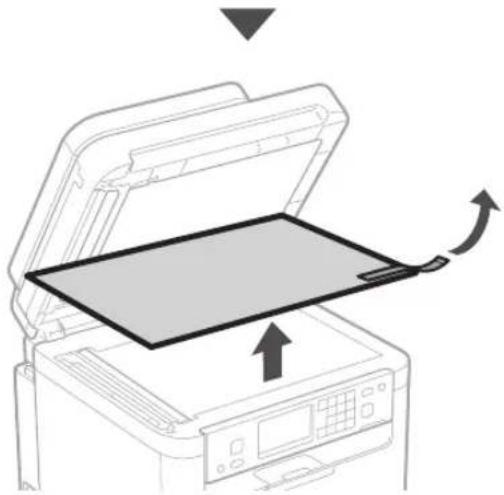
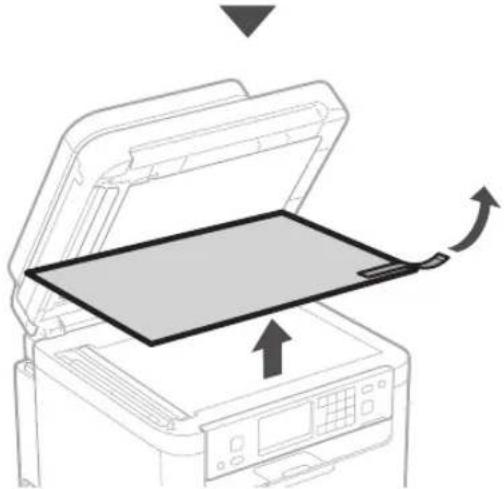
Remove all tapes.

CANON i-SENSYS MF287dw - Remove all packing material. - 1

Do not remove the sticker that covers the USB port until you actually use the USB port.

CANON i-SENSYS MF287dw - Remove all packing material. - 2

text_image Rear

CANON i-SENSYS MF287dw - Remove all packing material. - 3

natural_image Line drawing of a printer with a paper clip inserted, showing mechanical components and directional arrows (no text or symbols)

CANON i-SENSYS MF287dw - Remove all packing material. - 4

natural_image Diagram of an open printer with a blank sheet and directional arrows indicating motion (no text or symbols)

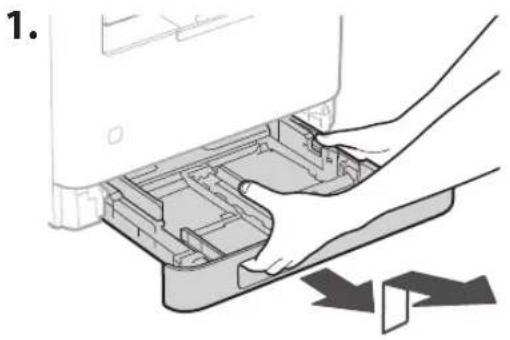
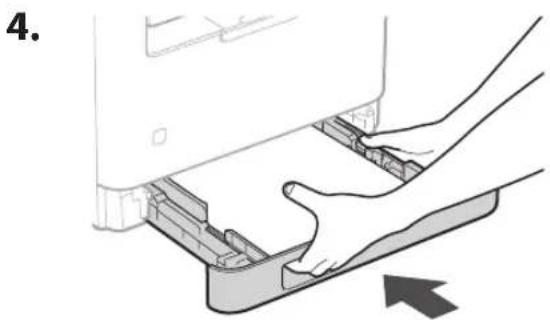
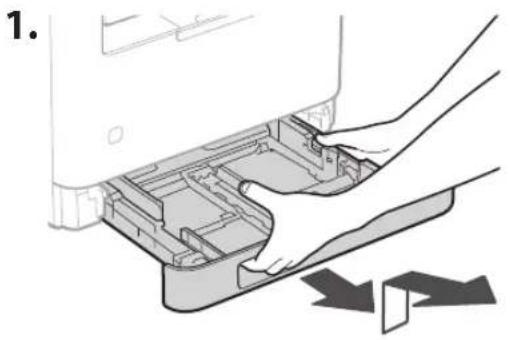
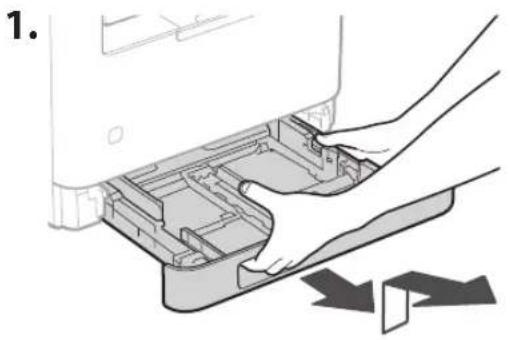
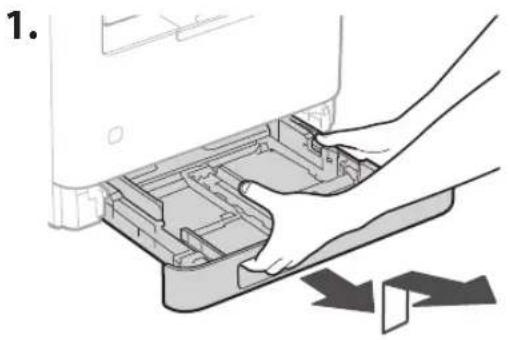
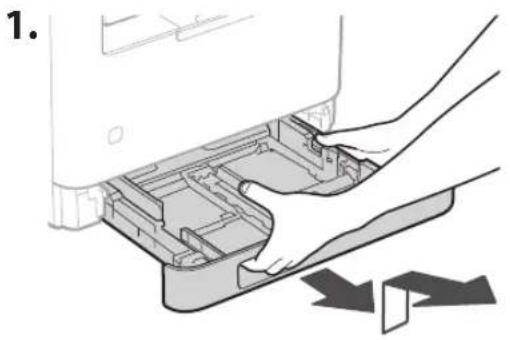
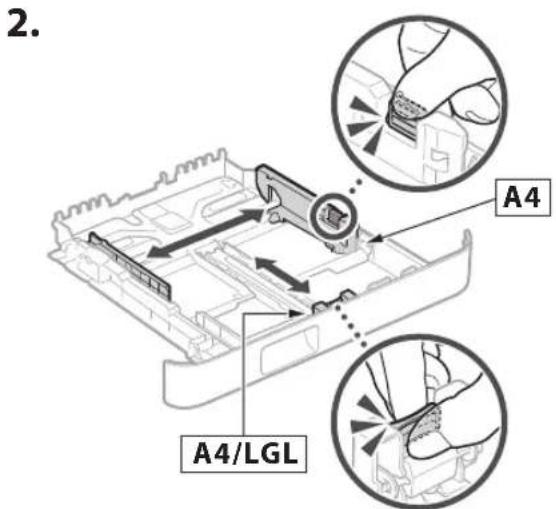
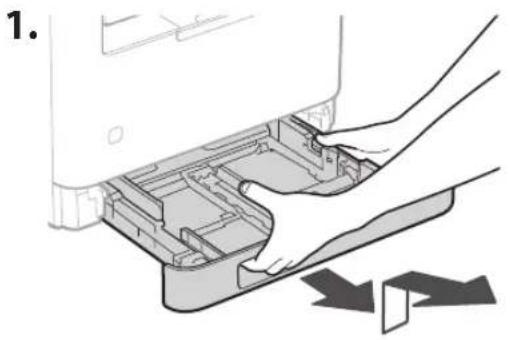
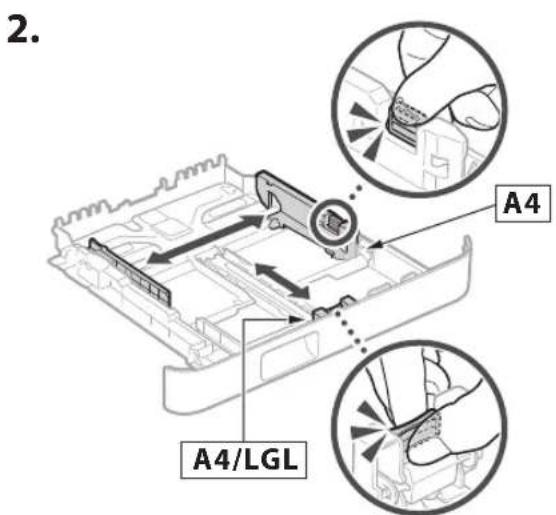
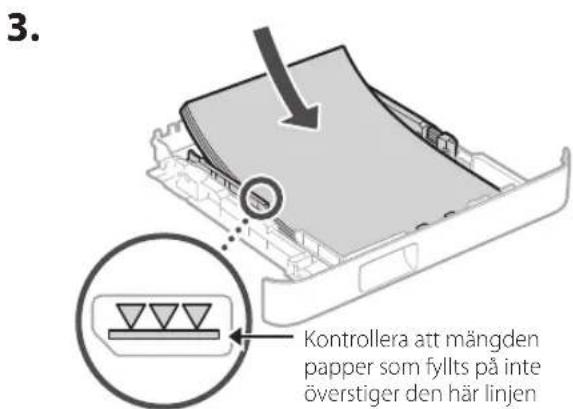
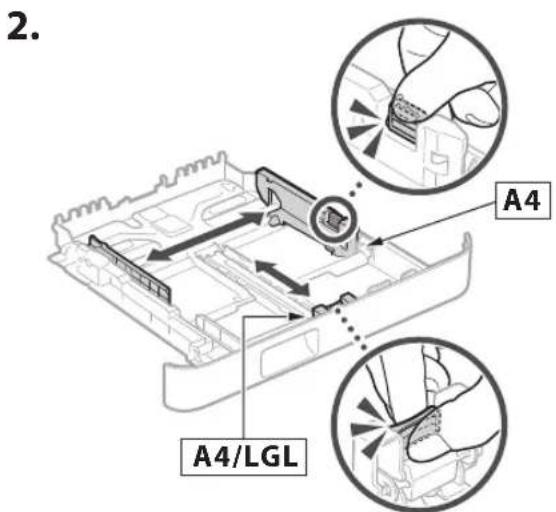
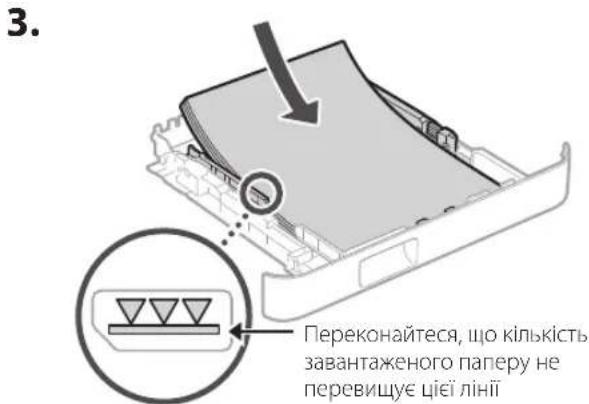
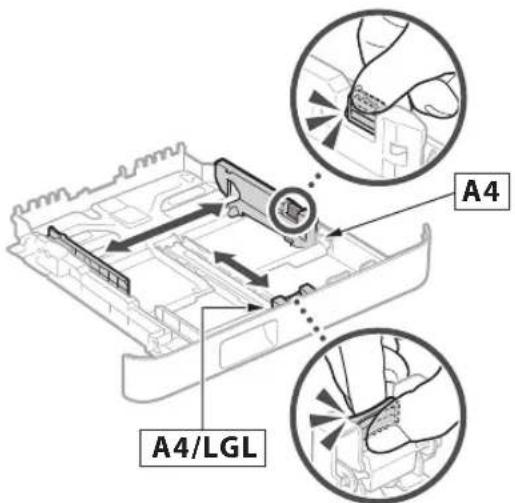
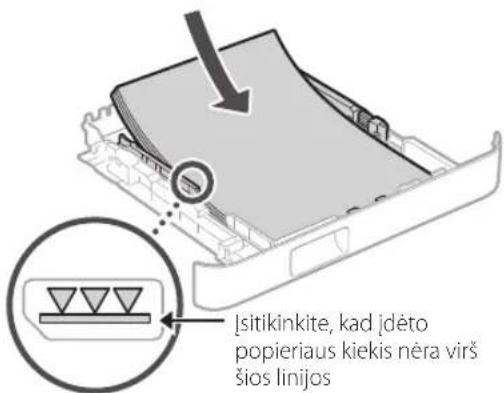
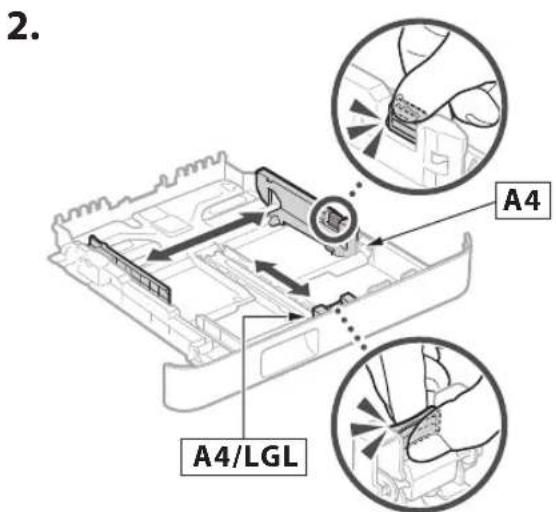
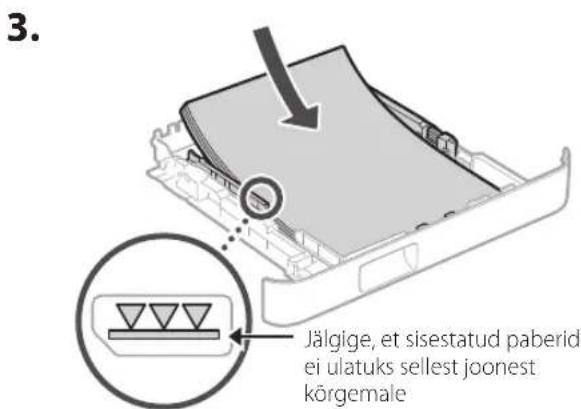
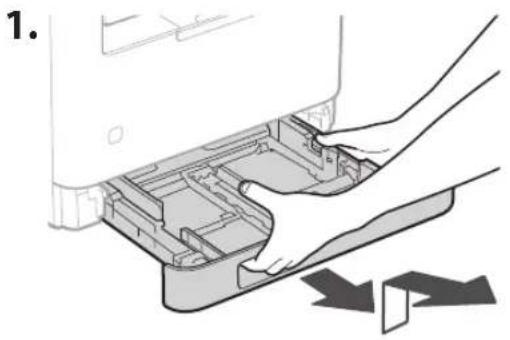
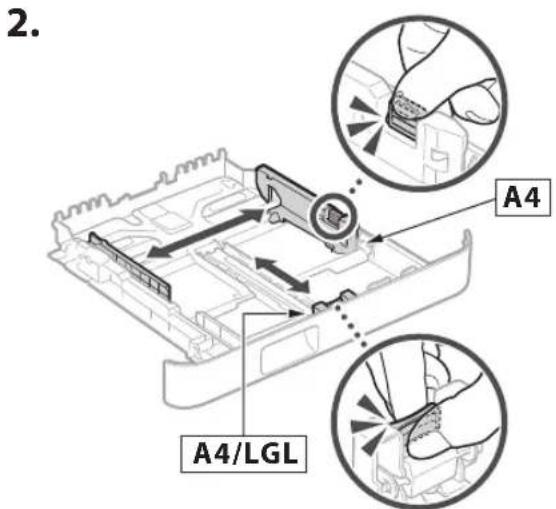
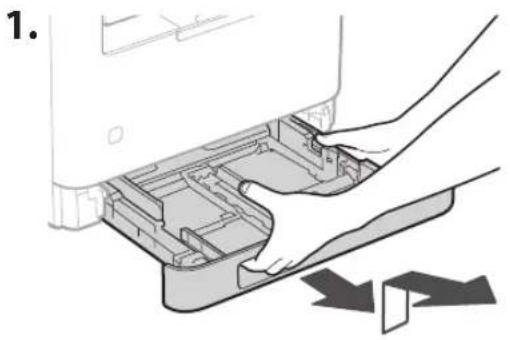
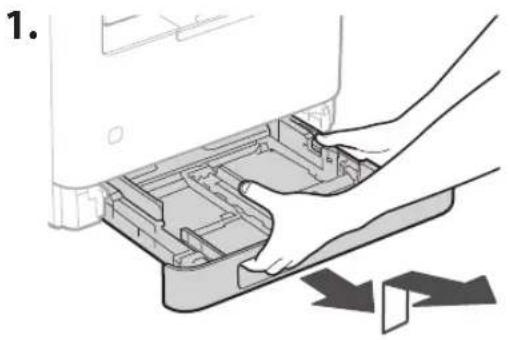
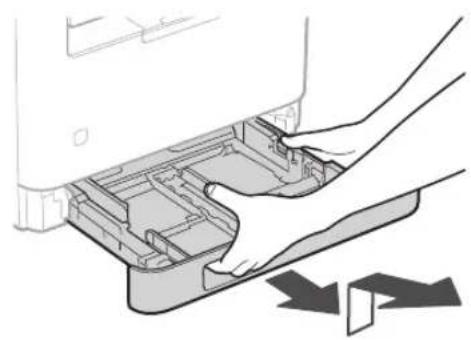
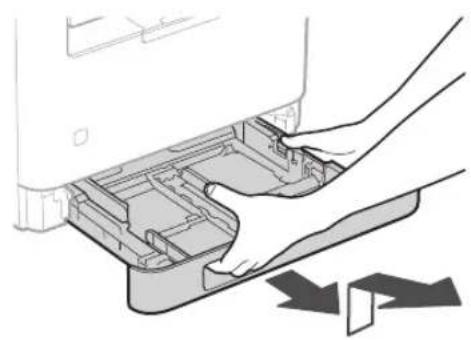
3 Loading Paper

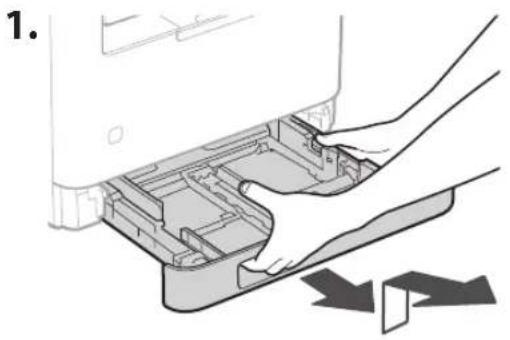
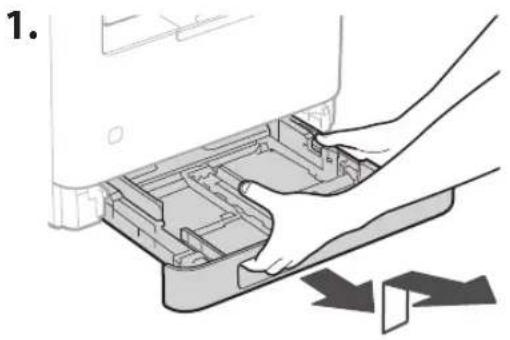
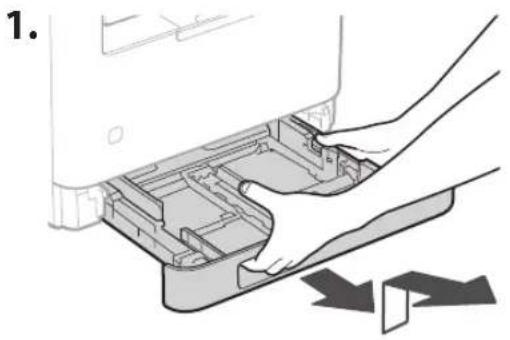
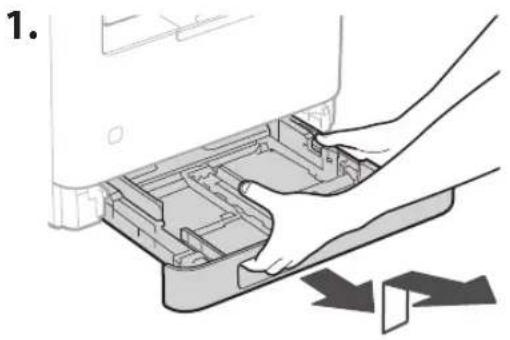
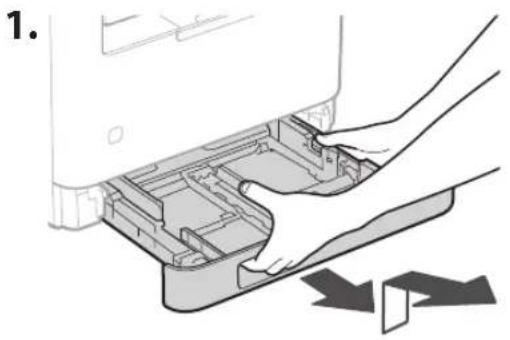
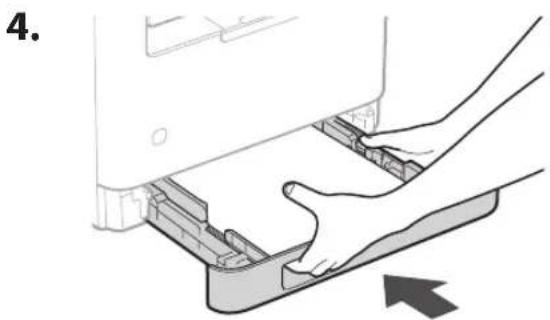
CANON i-SENSYS MF287dw - Loading Paper - 1

natural_image Illustration of hands installing or removing a device into a plastic container (no text or symbols visible)

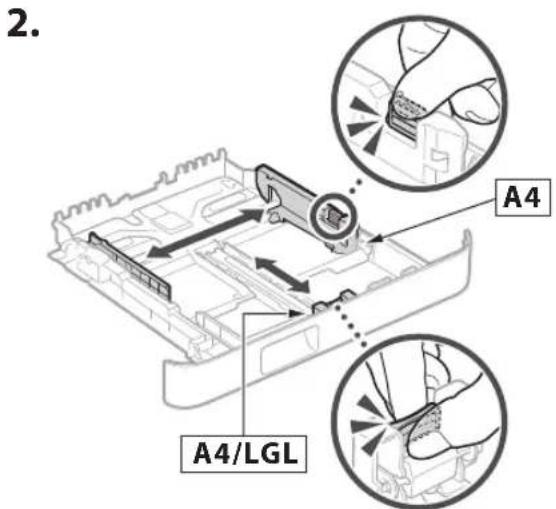
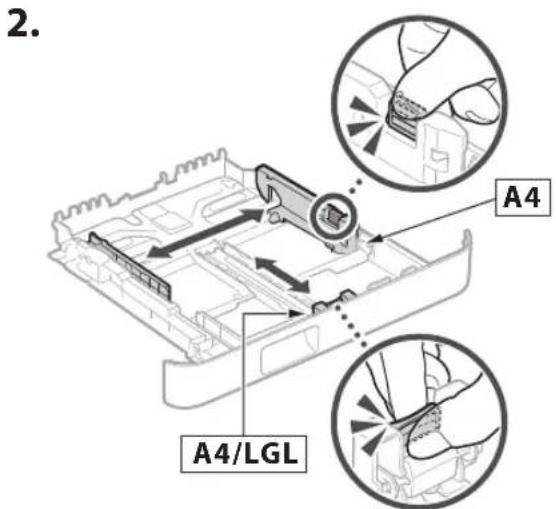
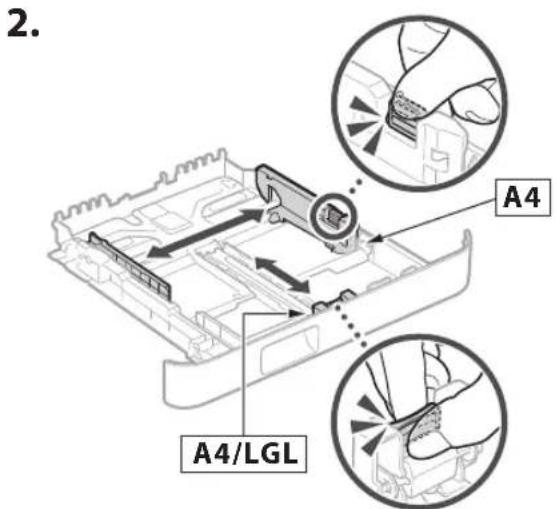
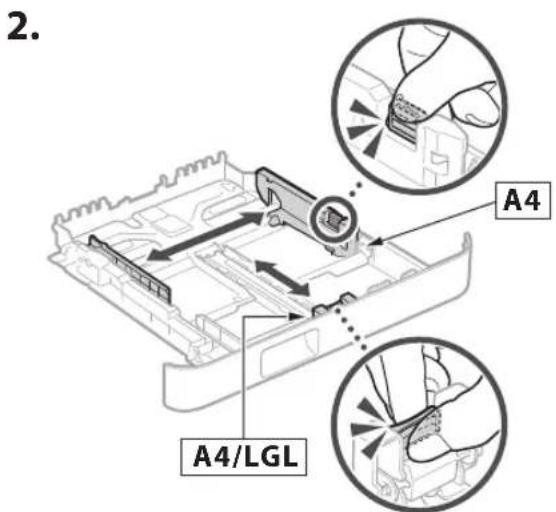
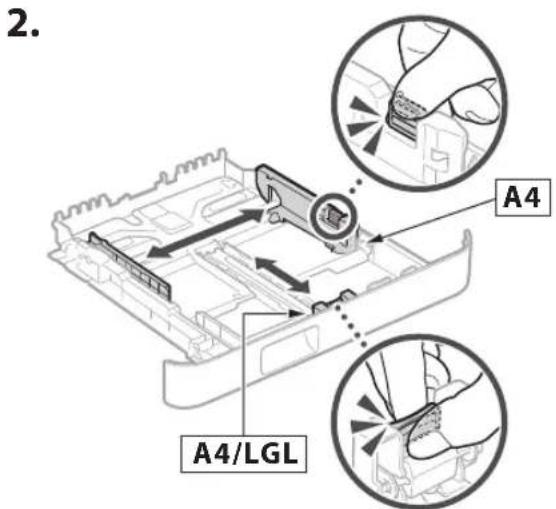
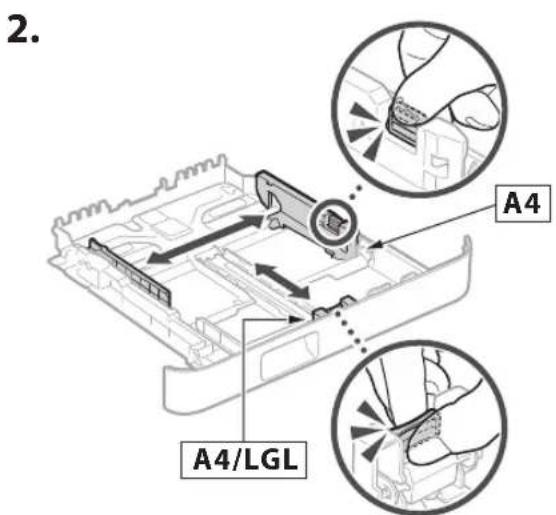
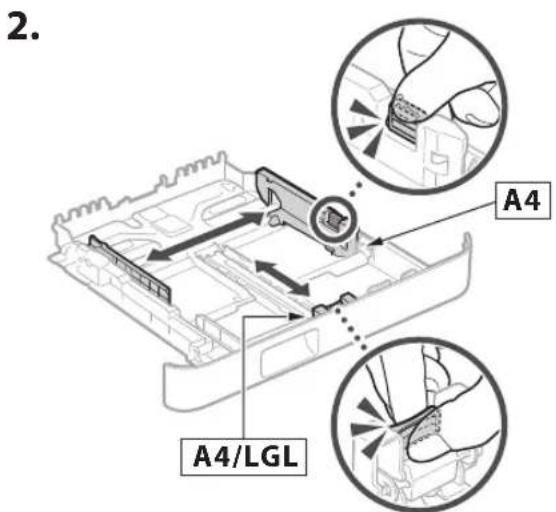
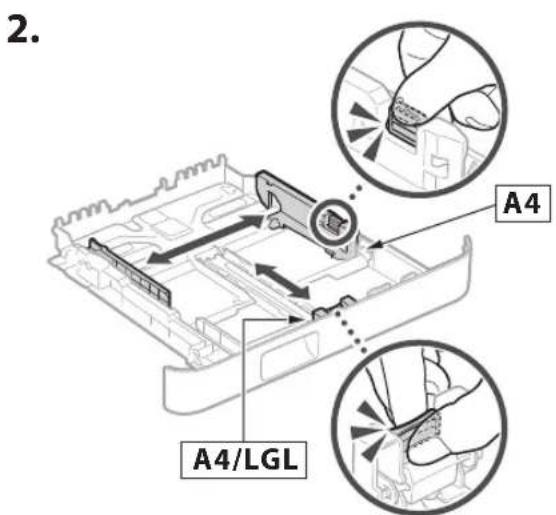
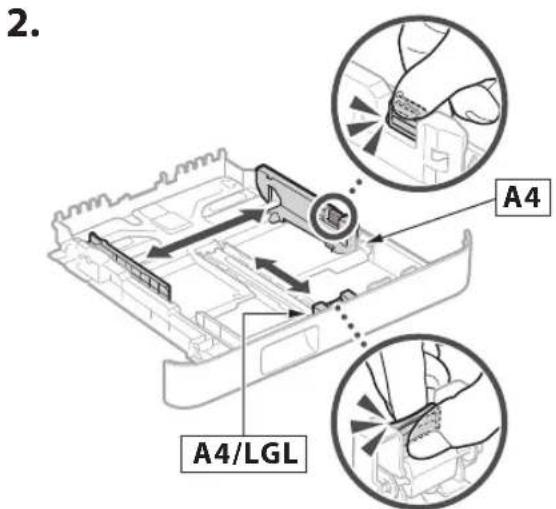
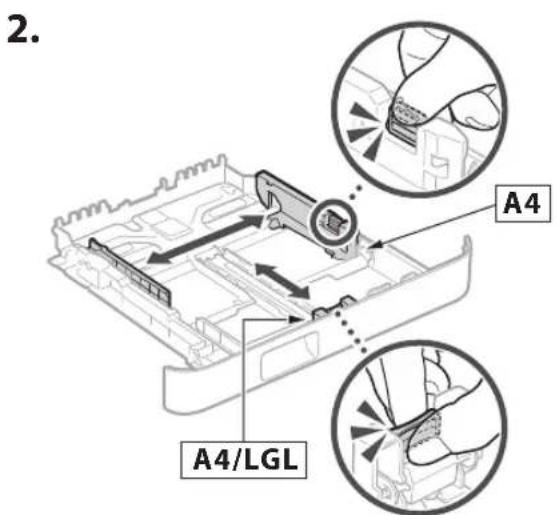
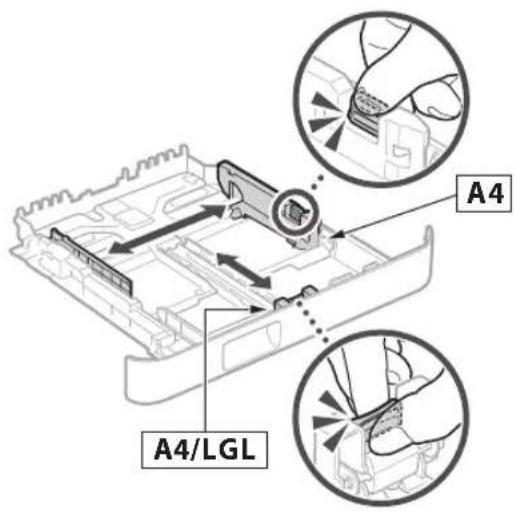
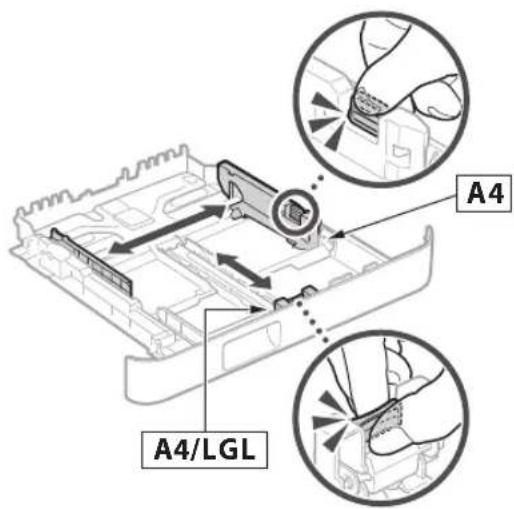
CANON i-SENSYS MF287dw - Loading Paper - 2

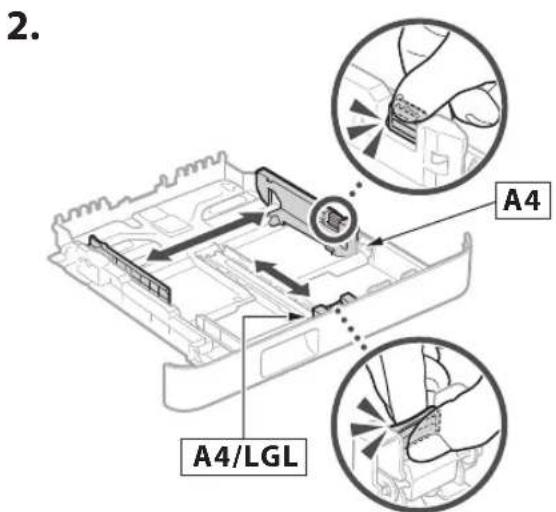
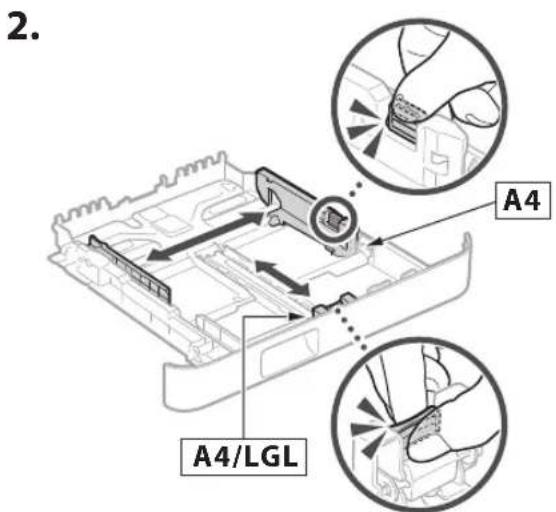
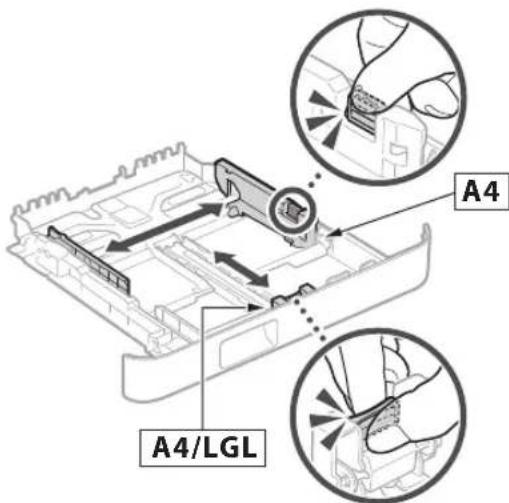
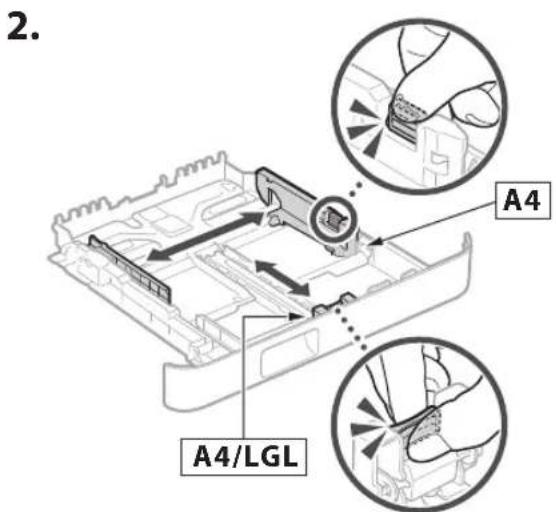
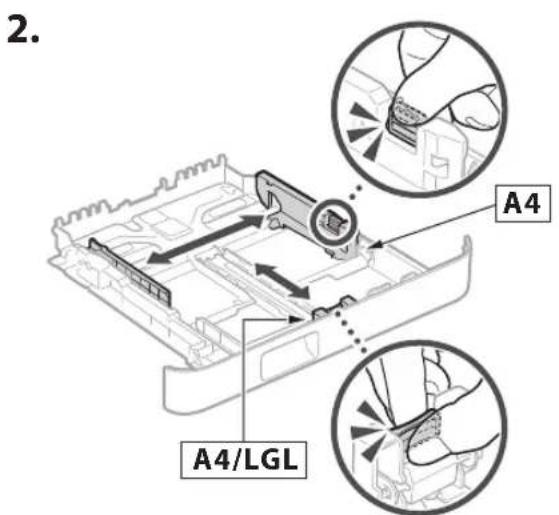
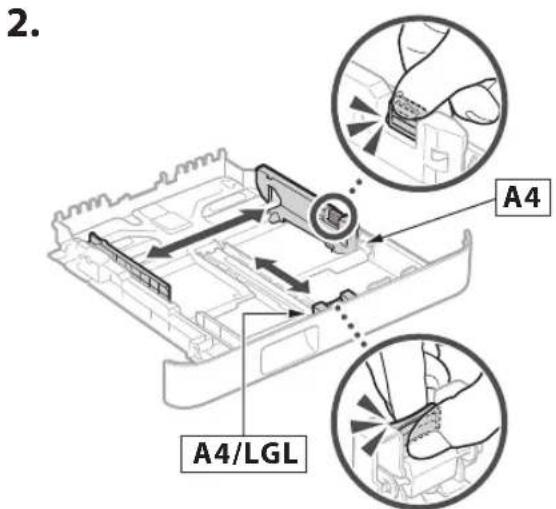
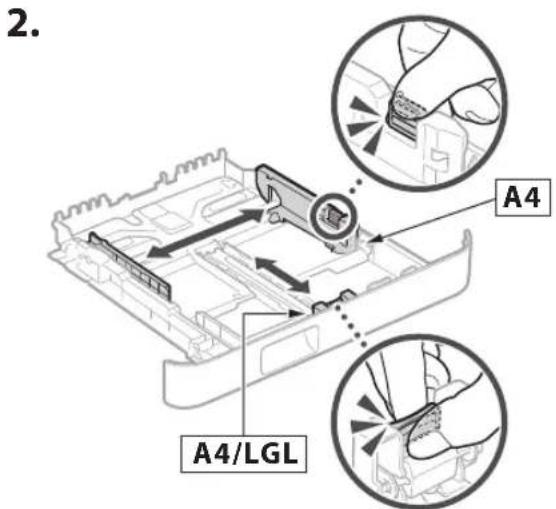
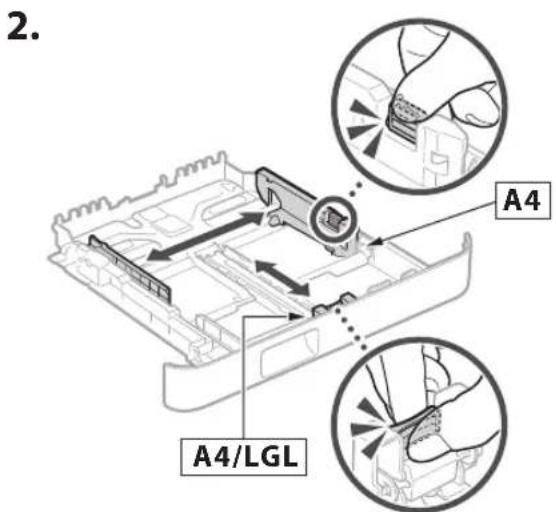
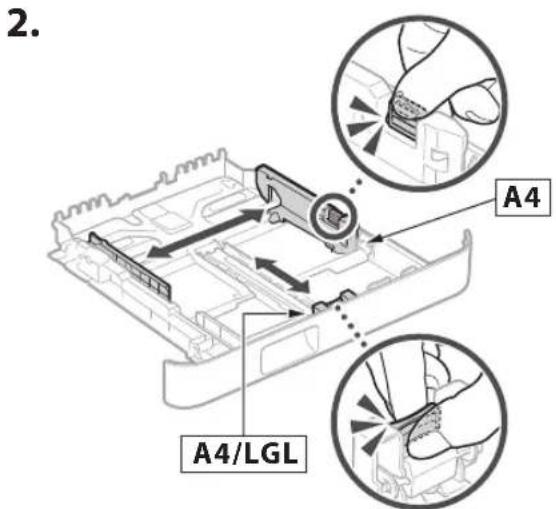
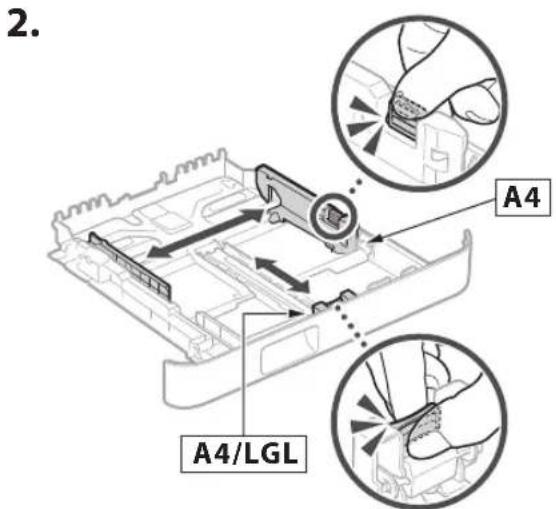
text_image 2. A4 A4/LGL

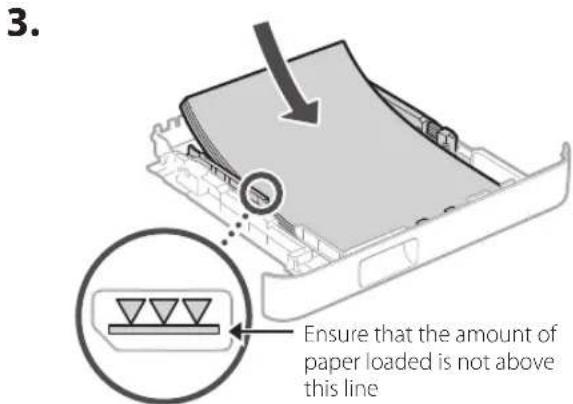
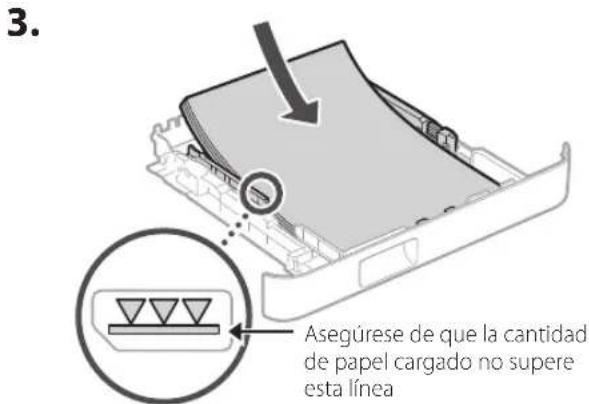
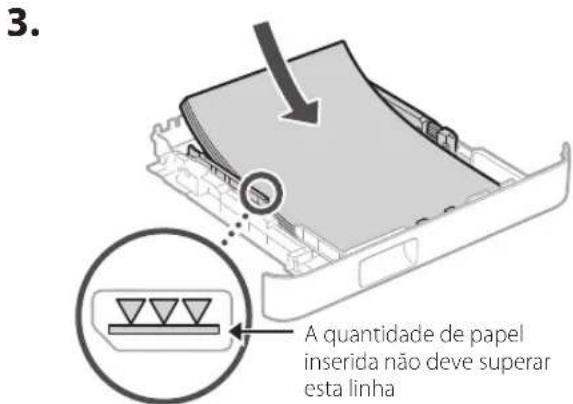
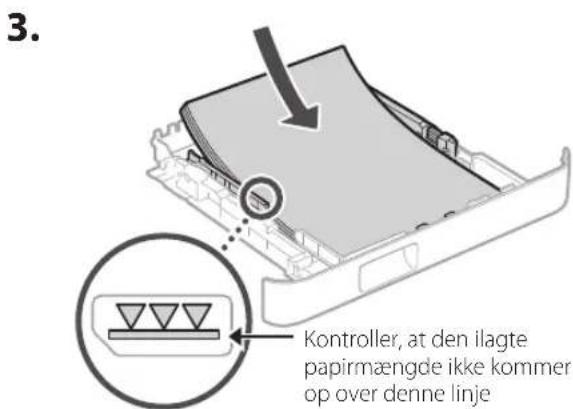
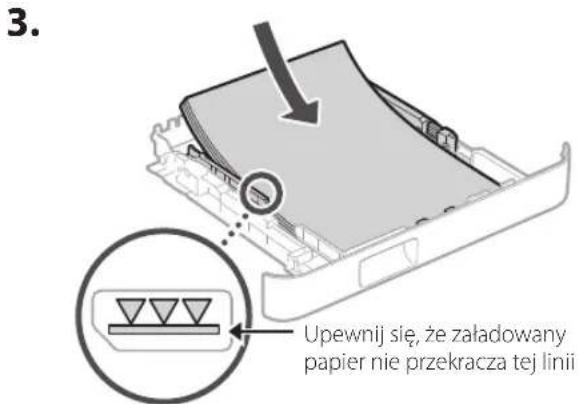
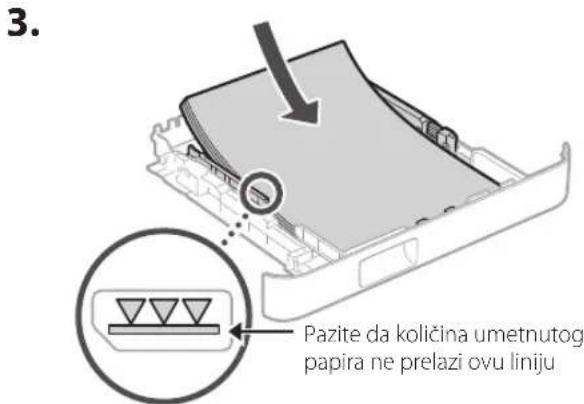
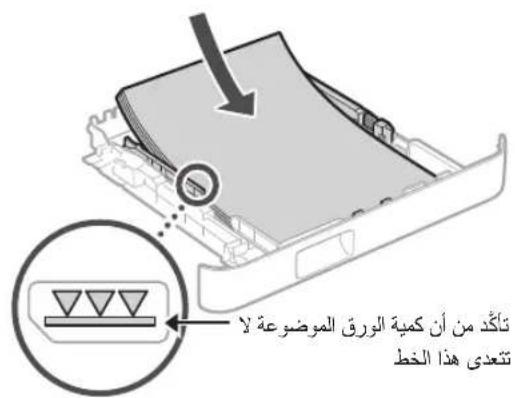
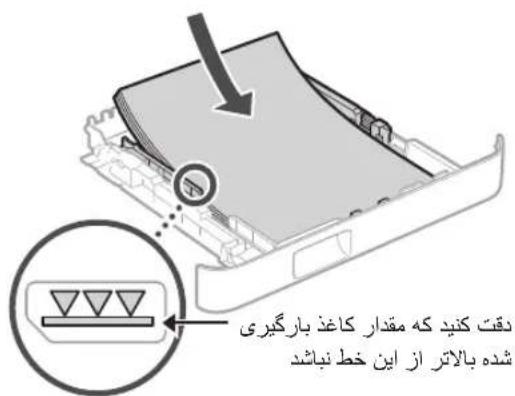
CANON i-SENSYS MF287dw - Loading Paper - 3

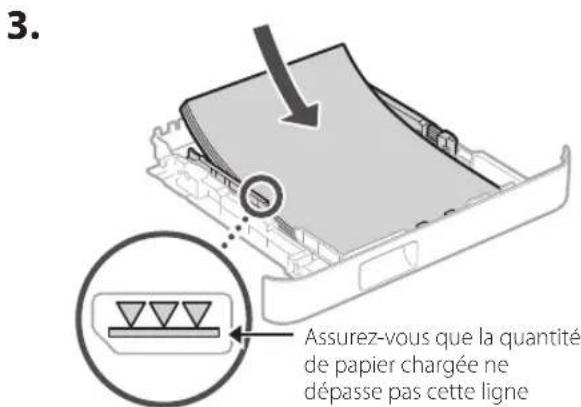
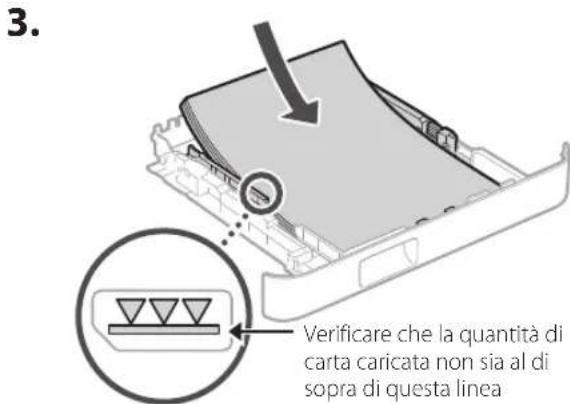
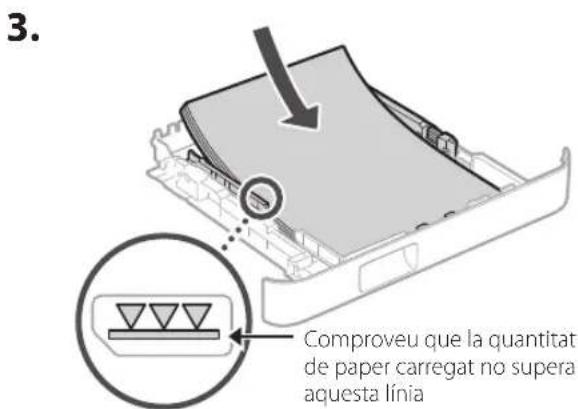
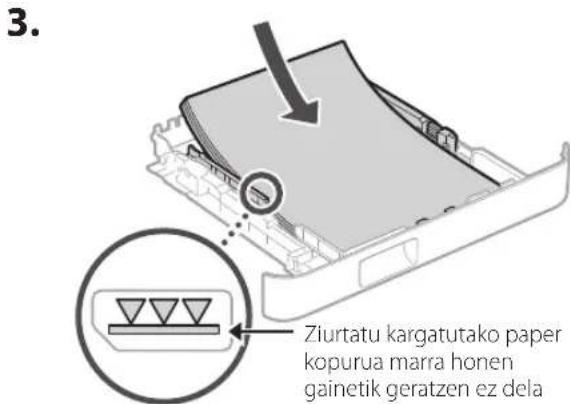
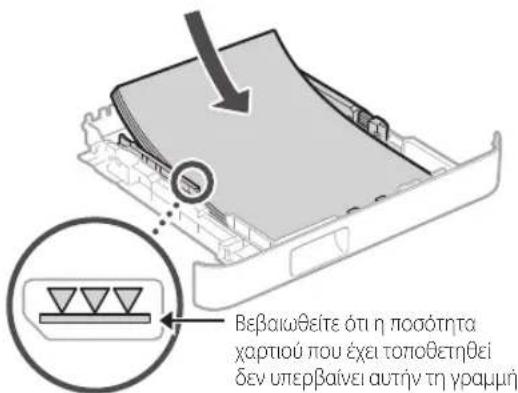
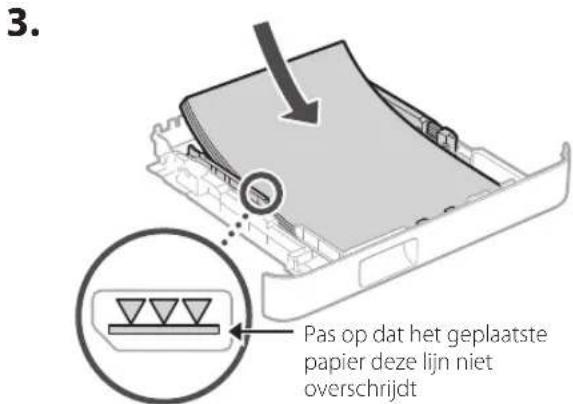
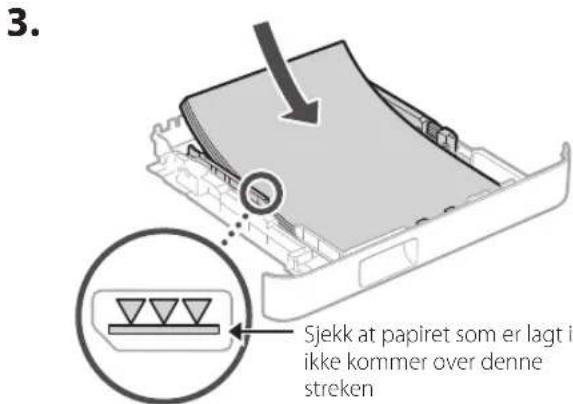
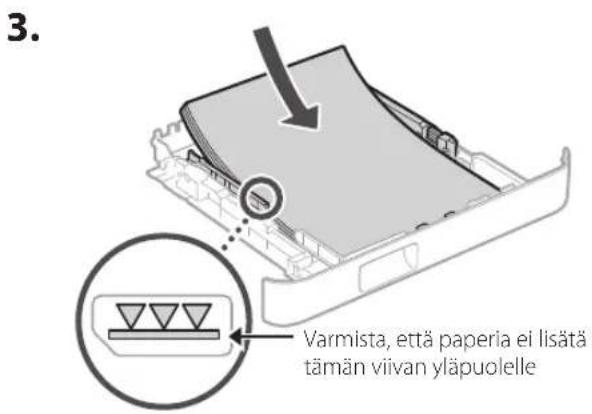
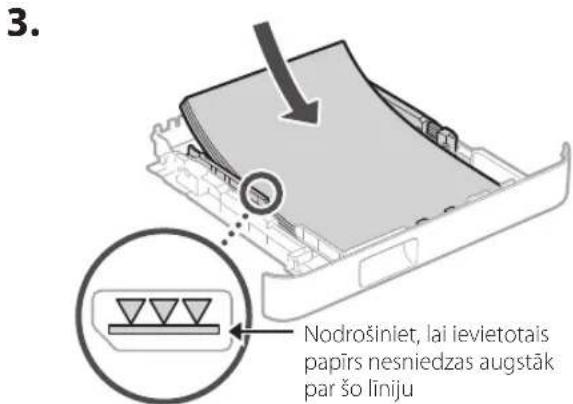
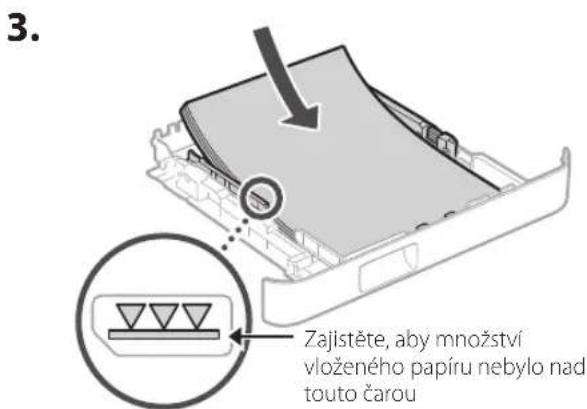
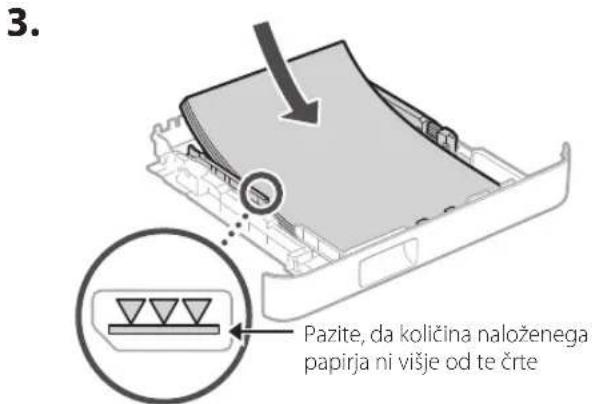
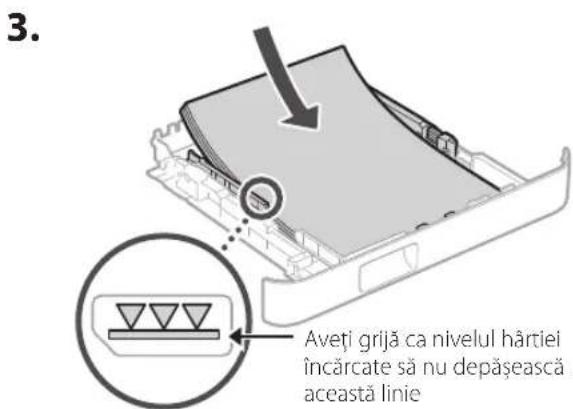
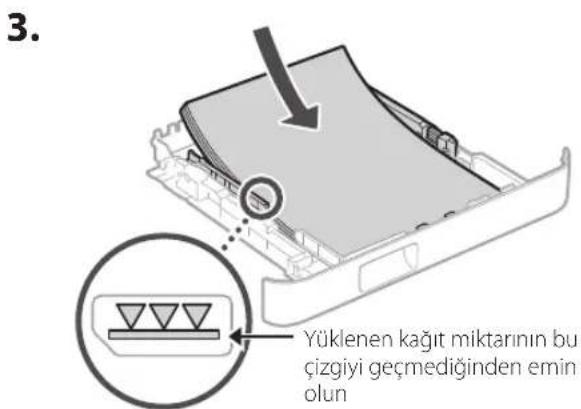
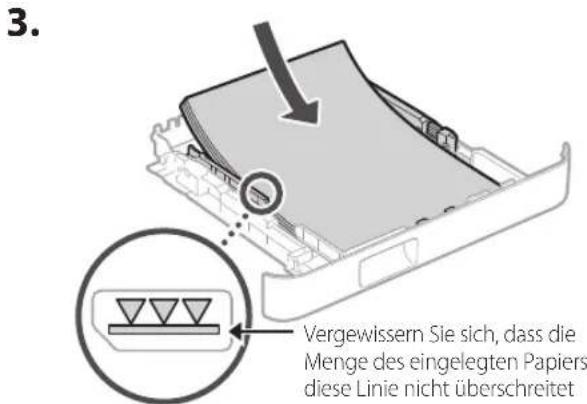
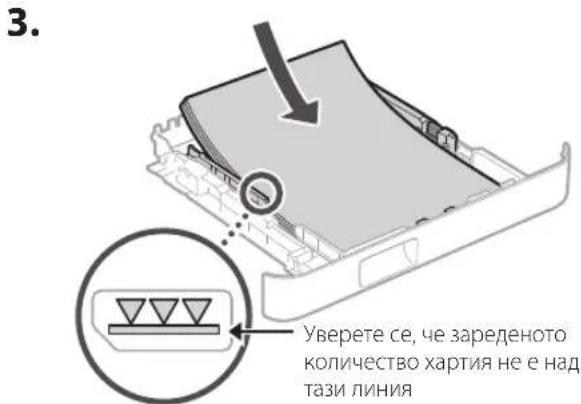
text_image 3. Ensure that the amount of paper loaded is not above this line

CANON i-SENSYS MF287dw - Loading Paper - 4

natural_image Illustration of hands inserting a device into a plastic container (no text or symbols)

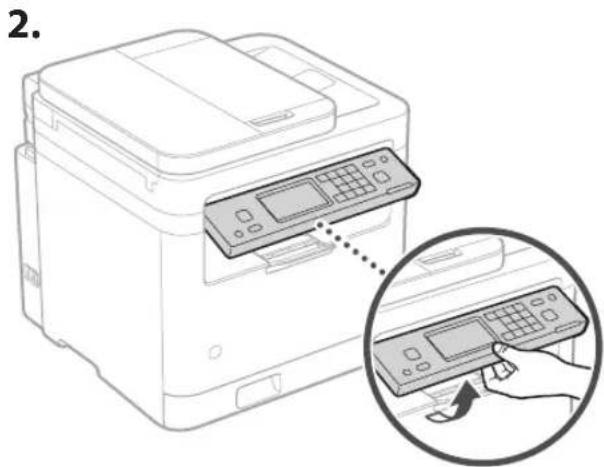
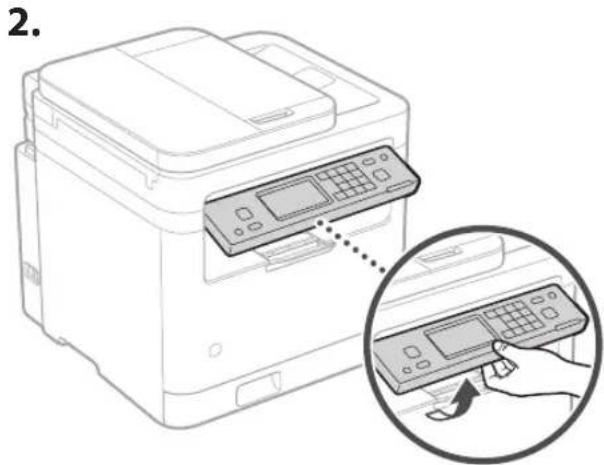
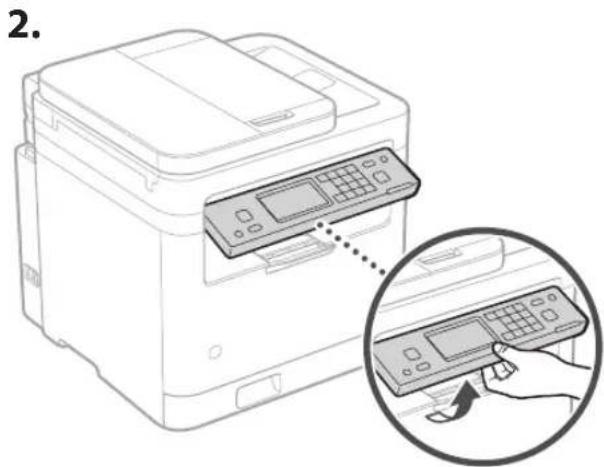
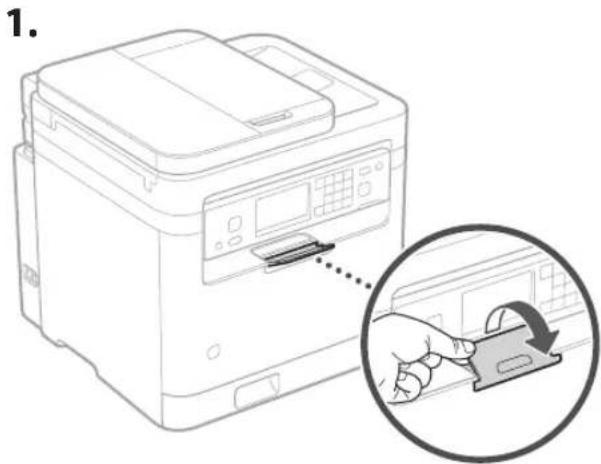
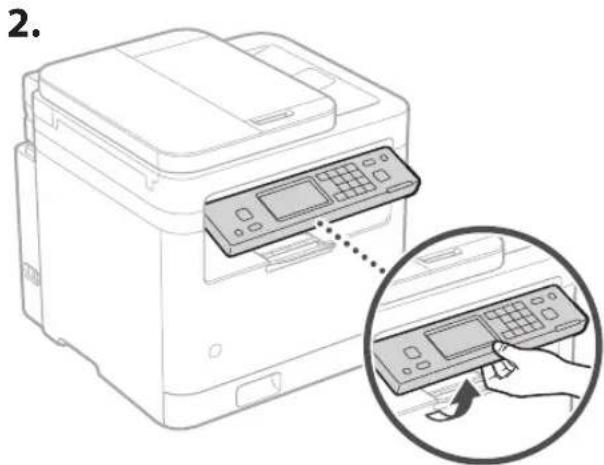
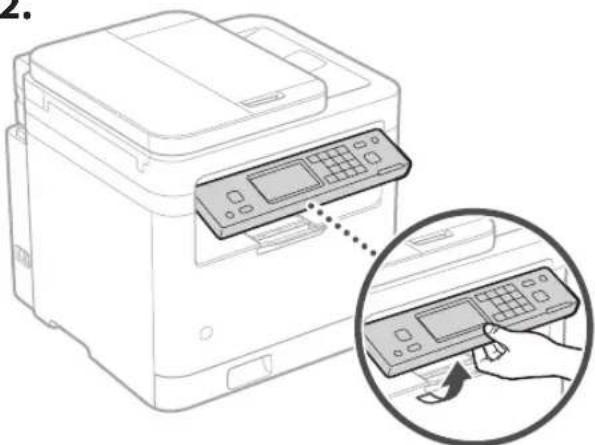
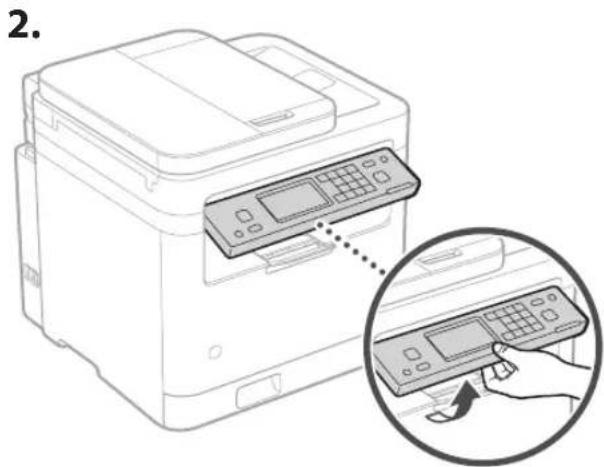
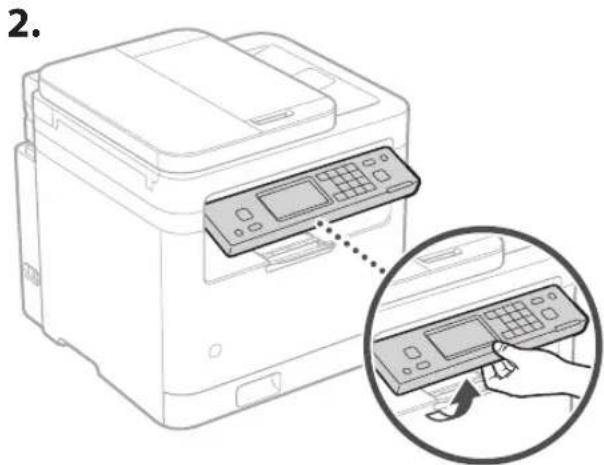
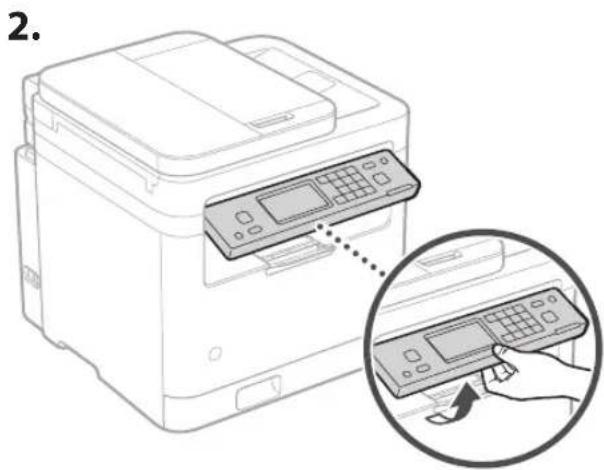
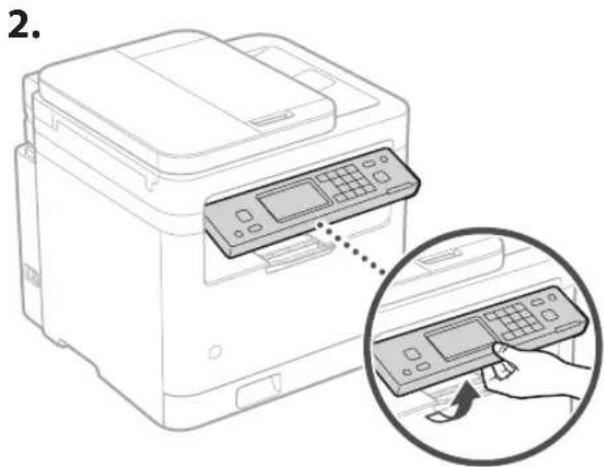
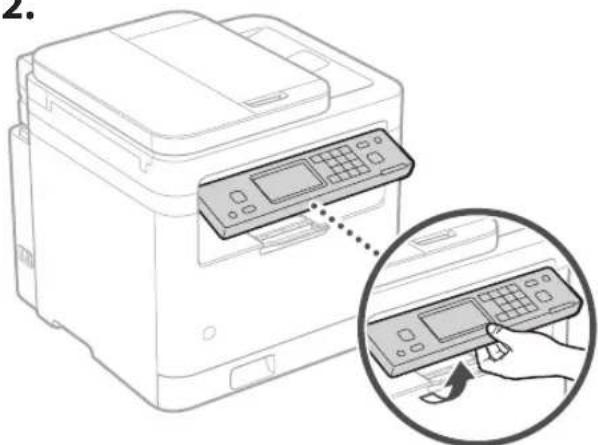
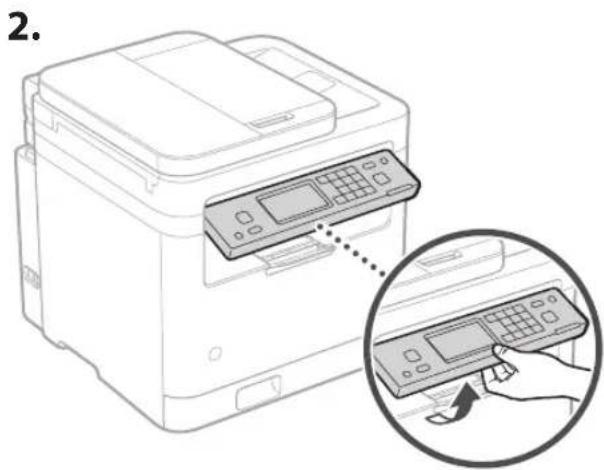
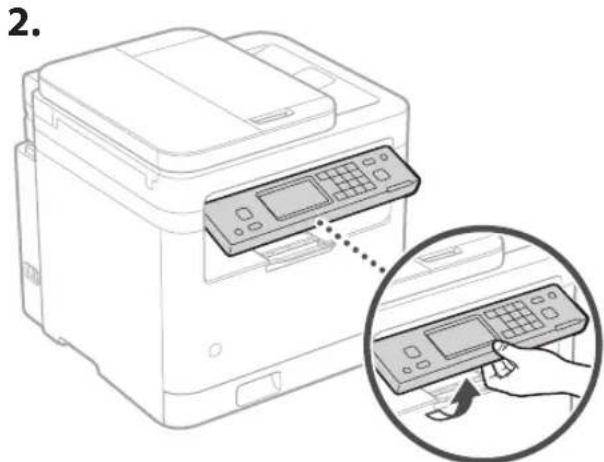
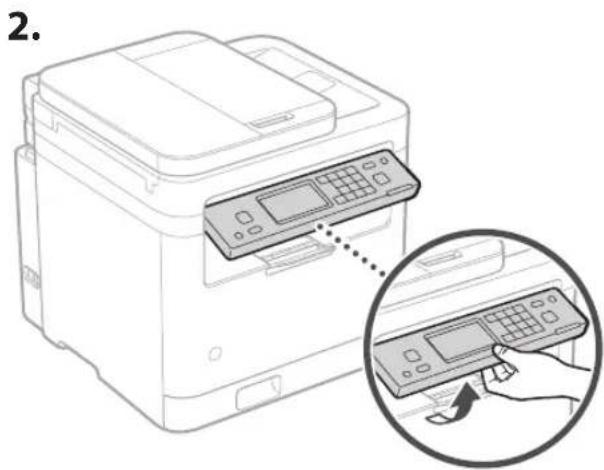
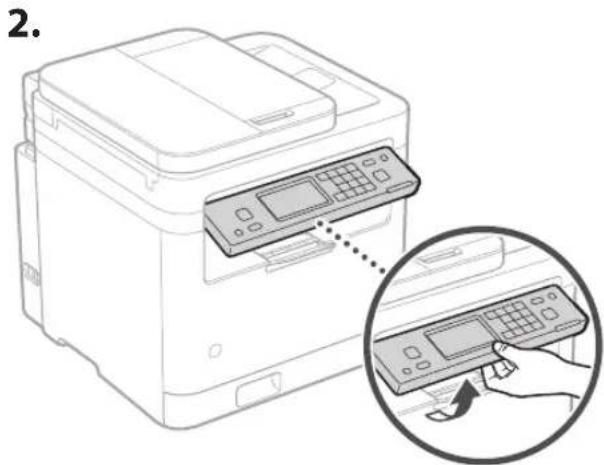
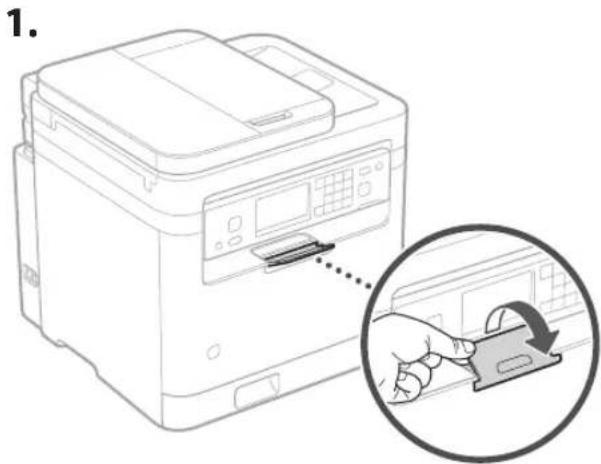
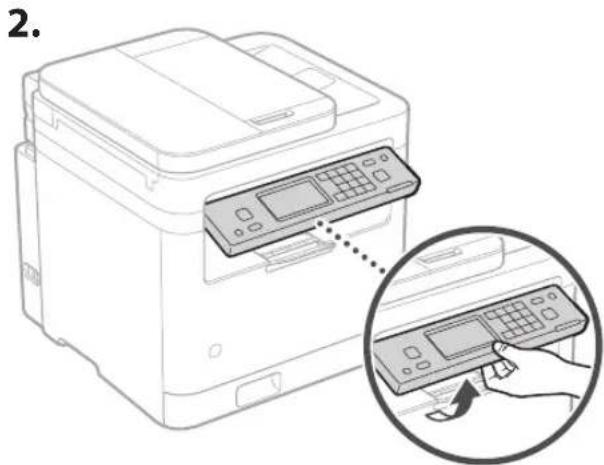
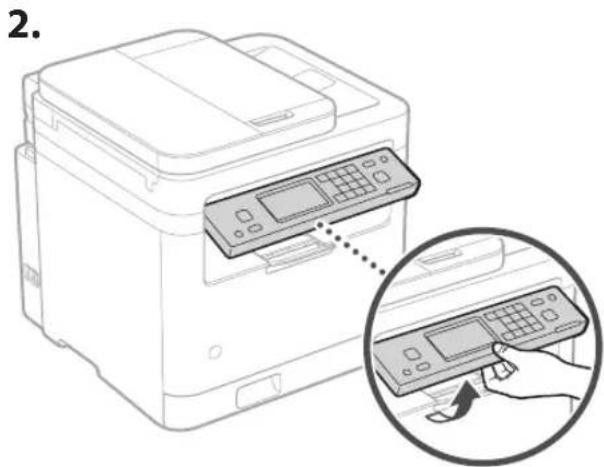
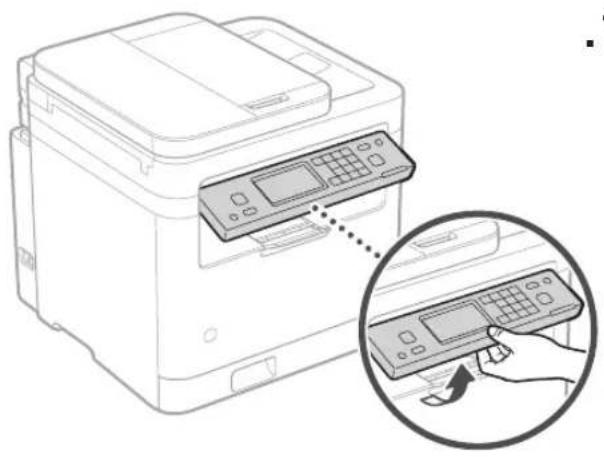
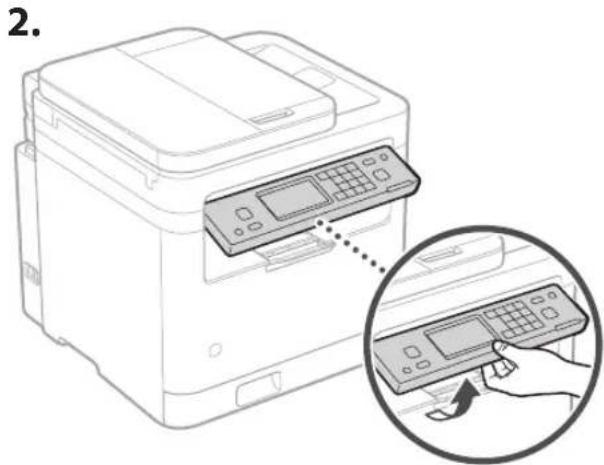
4 Setting Up the Paper Stopper and Control Panel
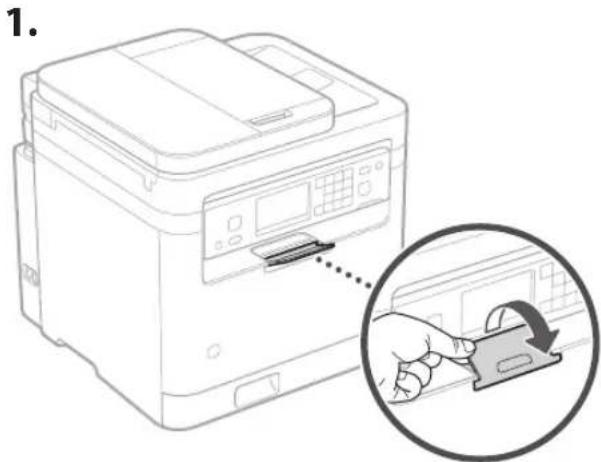
CANON i-SENSYS MF287dw - Setting Up the Paper Stopper and Control Panel - 1
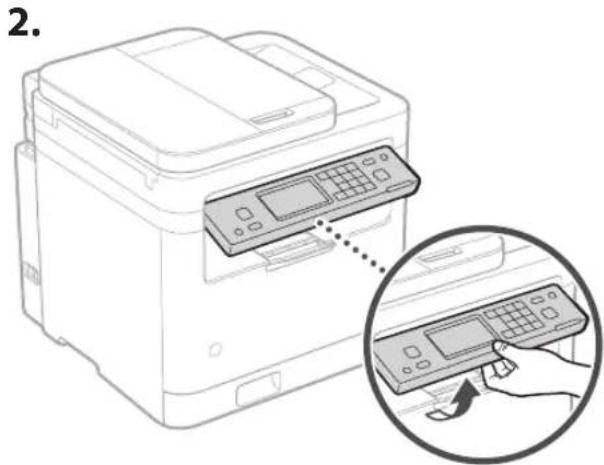
natural_image Line drawing of a printer with a hand inserting a card into the cover (no text or symbols)

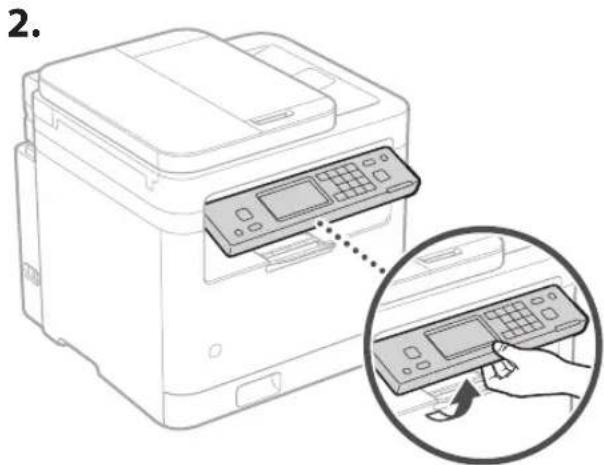
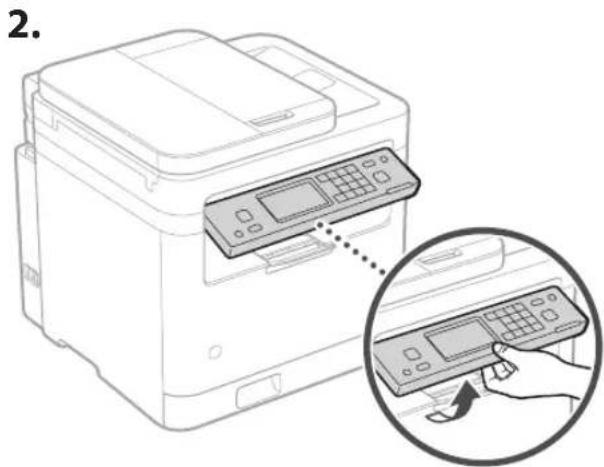
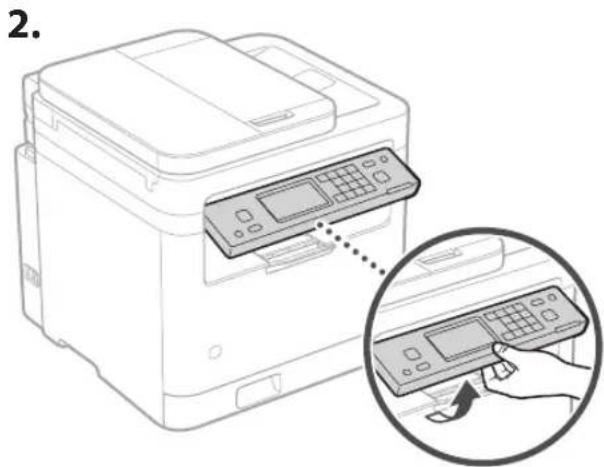
CANON i-SENSYS MF287dw - Setting Up the Paper Stopper and Control Panel - 2

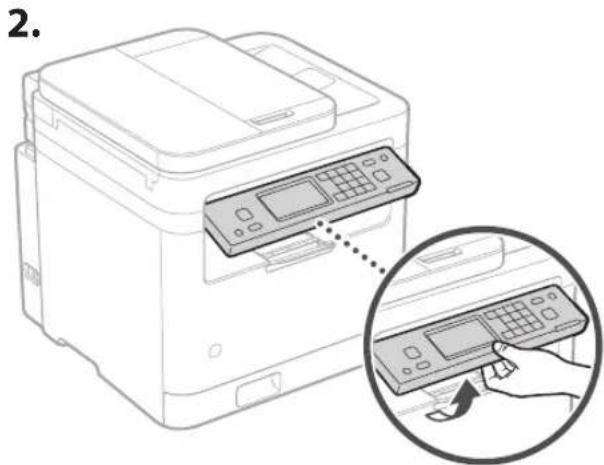
natural_image Line drawing of a printer with a digital display and control panel, showing a hand interacting with the device (no text or symbols present)

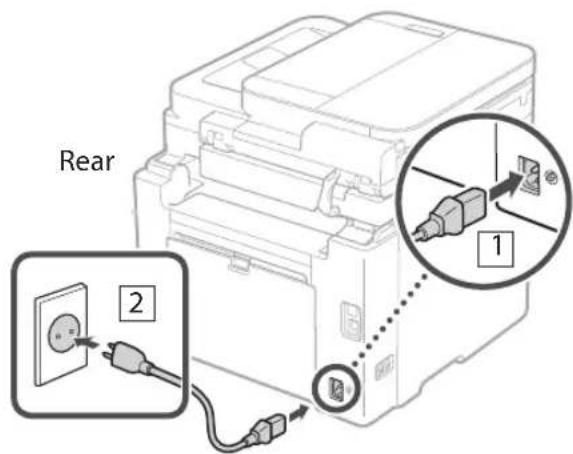
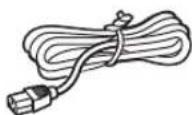
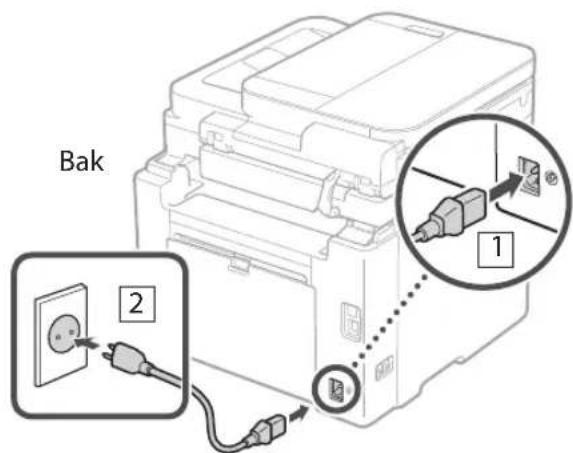
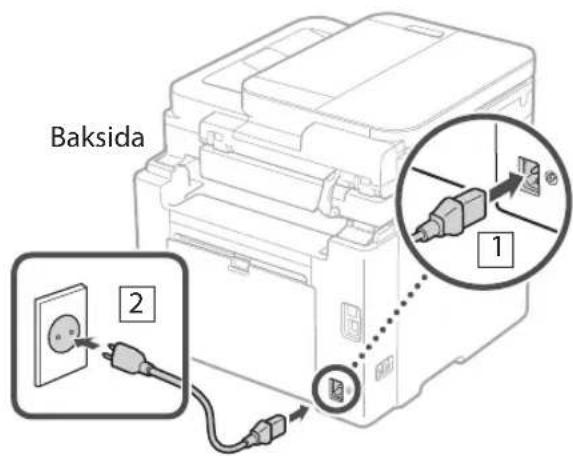
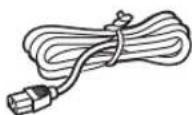
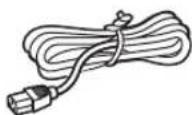
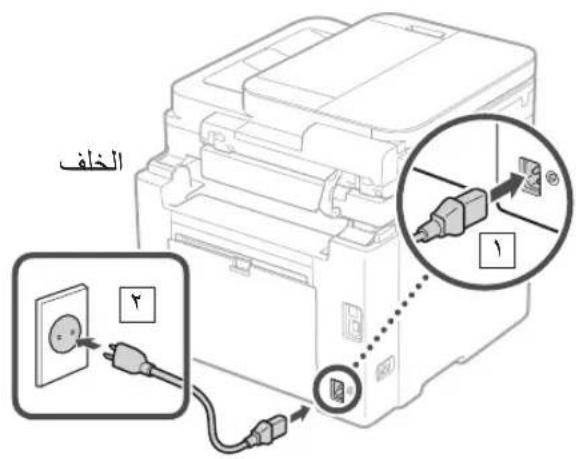
5 Connecting the Power Cord

CANON i-SENSYS MF287dw - Connecting the Power Cord - 1

text_image Rear 1 2

6 Specifying the Basic Settings

When you turn on the machine for the first time, the Setup Guide appears on the control panel. Perform the initial machine setup by following the on-screen instructions.
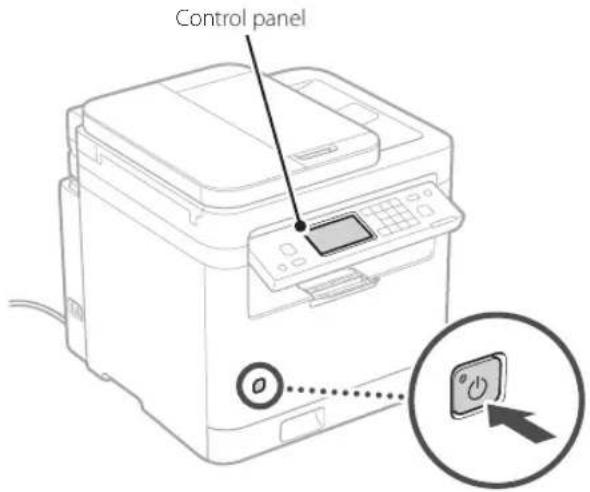
CANON i-SENSYS MF287dw - Specifying the Basic Settings - 1

text_image Control panel
  • Date and Time Settings
    • Security Settings
    • Network Settings
  • Toner Replenishment Service Settings*

After completing the above settings, the or screen will appear on the control panel. Follow the instructions on the screen.

* This service is not available in some countries or regions. To use this service, you must enter into an agreement beforehand. Configurations may be needed after software and driver installation.

7 Installing the Software/Drivers

To use the print, fax, and scan functions of the machine by connecting to a computer or smartphone, you must install the respective drivers.

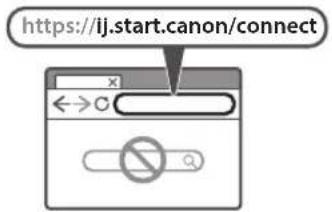
Downloading from the Canon website

  1. Open your web browser and access the Canon website.

CANON i-SENSYS MF287dw - Downloading from the Canon website - 1

CANON i-SENSYS MF287dw - Downloading from the Canon website - 2

text_image https://ij.start.canon/connect
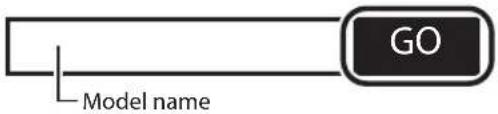
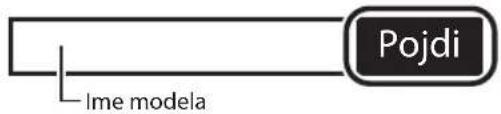
  1. Enter the model name and click Go.

CANON i-SENSYS MF287dw - Downloading from the Canon website - 3

text_image GO Model name
  1. Continue the operations by following the instructions on the screen.

Installing from the Bundled CD/DVD-ROM

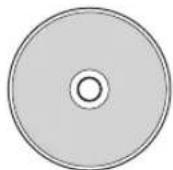
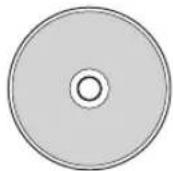
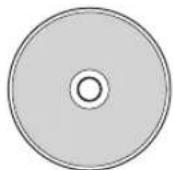
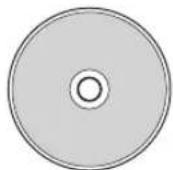
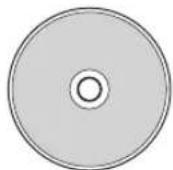
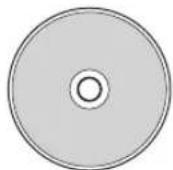
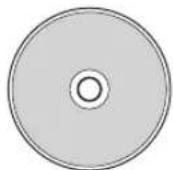
  1. Load the CD/DVD-ROM into your computer, and install the software and drivers.

  2. In an environment connected to the Internet (Windows only), double-click on "Dlmastersetup.url". After that, follow the on-screen instructions.

  3. In an environment not connected to the Internet, install the software/driver you want to use from the CD/DVD-ROM.

Canon

MF287dw

Guide de configuration

text_image QR code and smartphone icon with Chinese text, likely for scanning to access digital content or a payment app

https://oip.manual.canon/
natural_image Line drawing of a printer with a close-up view of its internal components (no text or symbols)

CANON i-SENSYS MF287dw - Guide de configuration - 1

CANON i-SENSYS MF287dw - Guide de configuration - 2

CANON i-SENSYS MF287dw - Guide de configuration - 3

CANON i-SENSYS MF287dw - Guide de configuration - 4

natural_image Line drawing of a person holding an open electronic device (no text or symbols)
natural_image Line drawing of a printer with a paper clip inserted, showing internal components and directional arrows (no text or symbols)

CANON i-SENSYS MF287dw - Guide de configuration - 5

natural_image Line drawing of an open printer with a blank sheet and directional arrows indicating motion (no text or symbols)
natural_image Illustration of hands operating a device with a handle and arrow indicating direction (no text or symbols)

CANON i-SENSYS MF287dw - Guide de configuration - 6

text_image 2. A4 A4/LGL

CANON i-SENSYS MF287dw - Guide de configuration - 7

natural_image Illustration of hands inserting a device into a plastic tray (no text or symbols)
natural_image Line drawing of a printer with a hand inserting a card into the cover (no text or symbols)

CANON i-SENSYS MF287dw - Guide de configuration - 8

natural_image Line drawing of a printer with a digital display and a hand holding a control panel, showing a zoomed-in view (no text or symbols present)
text_image https://ij.start.canon/connect x ←→C
text_image QR code with a hand holding a smartphone displaying a QR code, likely for mobile payment or scanning.

https://oip.manual.canon/
natural_image Line drawing of a printer with a separate close-up of its internal components (no text or symbols)

CANON i-SENSYS MF287dw - Guide de configuration - 9

CANON i-SENSYS MF287dw - Guide de configuration - 10

CANON i-SENSYS MF287dw - Guide de configuration - 11

CANON i-SENSYS MF287dw - Guide de configuration - 12

natural_image Illustration of a person holding a stacked electronic device (no text or symbols visible)
natural_image Line drawing of a printer with a paper strip being inserted, showing no text or symbols

CANON i-SENSYS MF287dw - Guide de configuration - 13

natural_image Line drawing of an open printer with a blank sheet and directional arrows indicating motion (no text or symbols)
natural_image Illustration of hands operating a device with a handle and arrow indicating direction (no text or symbols)

CANON i-SENSYS MF287dw - Guide de configuration - 14

text_image 2. A4 A4/LGL

CANON i-SENSYS MF287dw - Guide de configuration - 15

natural_image Illustration of hands inserting a device into a plastic tray (no text or symbols)
text_image https://ij.start.canon/connect
text_image QR code and smartphone payment interface with hand icon

https://oip.manual.canon/

natural_image Line drawing of a printer with a close-up view of its internal components (no text or symbols)

CANON i-SENSYS MF287dw - Guide de configuration - 16

natural_image Illustration of three electronic components: a stack of documents, a cord with cable, and a CD (no text or symbols)

CANON i-SENSYS MF287dw - Guide de configuration - 17

natural_image Two types of cable connectors shown side by side: a straight cord with connectors and a rectangular connector (no text or symbols)
natural_image Illustration of a person holding a stacked electronic device (no text or symbols visible)
natural_image Line drawing of a printer with a paper clip being inserted, showing no text or symbols

CANON i-SENSYS MF287dw - Guide de configuration - 18

natural_image Diagram of an open printer with a blank sheet and directional arrows indicating orientation (no text or symbols)

3 Caricamento carta

CANON i-SENSYS MF287dw - Caricamento carta - 1

natural_image Illustration of hands operating a device with a tool, showing internal components and a directional arrow (no text or symbols)

CANON i-SENSYS MF287dw - Caricamento carta - 2

text_image 2. A4 A4/LGL

CANON i-SENSYS MF287dw - Caricamento carta - 3

natural_image Illustration of hands inserting a component into a device (no text or symbols visible)
natural_image Line drawing of a printer with a hand inserting a card into the cover (no text or symbols)

CANON i-SENSYS MF287dw - Caricamento carta - 4

natural_image Line drawing of a printer with a digital display and a hand holding a control panel (no text or symbols)
text_image https://ij.start.canon/connect
text_image QR code and smartphone icon with Chinese text, likely for scanning to access a QR code or mobile app

https://oip.manual.canon/
natural_image Line drawing of a printer with a separate close-up of its internal components (no text or symbols)

CANON i-SENSYS MF287dw - Caricamento carta - 5

CANON i-SENSYS MF287dw - Caricamento carta - 6

CANON i-SENSYS MF287dw - Caricamento carta - 7

CANON i-SENSYS MF287dw - Caricamento carta - 8

natural_image Illustration of a person holding a device with arrows indicating direction (no text or symbols)
natural_image Line drawing of a printer with a paper clip inserted, showing mechanical components and directional arrows (no text or symbols)

CANON i-SENSYS MF287dw - Caricamento carta - 9

natural_image Diagram of an open printer with a blank sheet and directional arrows indicating orientation (no text or symbols)

3 Carga de papel

CANON i-SENSYS MF287dw - Carga de papel - 1

natural_image Illustration of hands operating a device with a handle and arrow indicating direction (no text or symbols)

CANON i-SENSYS MF287dw - Carga de papel - 2

text_image 2. A4 A4/LGL

CANON i-SENSYS MF287dw - Carga de papel - 3

natural_image Illustration of hands inserting a component into a device (no text or symbols visible)
natural_image Line drawing of a printer with a close-up inset showing the printer's internal structure (no text or symbols)

CANON i-SENSYS MF287dw - Carga de papel - 4

natural_image Line drawing of a printer with a digital display and a hand inserting a control panel (no text or symbols)
text_image https://ij.start.canon/connect
text_image QR code with a hand holding a smartphone displaying a QR code, likely for mobile payment or scanning.

https://oip.manual.canon/
natural_image Illustration of a printer with attached components including a CD, cable, and accessories (no text or symbols)
natural_image Illustration of a person holding a multi-compartment electronic device (no text or symbols visible)
natural_image Illustration of hands operating a device with a handle and arrow indicating direction (no text or symbols)

CANON i-SENSYS MF287dw - Carga de papel - 5

text_image 2. A4 A4/LGL

CANON i-SENSYS MF287dw - Carga de papel - 6

natural_image Illustration of hands inserting a device into a plastic tray (no text or symbols)
natural_image Line drawing of a printer with a hand inserting a card into the cover (no text or symbols)

CANON i-SENSYS MF287dw - Carga de papel - 7

natural_image Line drawing of a printer with a digital display and a hand inserting a control panel (no text or symbols)
text_image https://ij.start.canon/connect
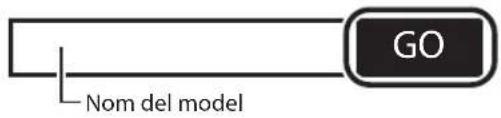
  1. Introduiu el nom del model i feu clic a Anar (Go).

CANON i-SENSYS MF287dw - Carga de papel - 8

text_image Nom del model GO
  1. Continueu les operacions seguint les instruccions en pantalla.
text_image QR code and smartphone icon with Chinese text, likely for scanning to access a QR code or mobile app

https://oip.manual.canon/
natural_image Illustration of a printer with attached components including a CD, cable, and accessories (no text or symbols)
natural_image Illustration of a person holding a stacked electronic device (no text or symbols visible)
text_image Diagram illustrating the process of printer printing and sheeting, showing step-by-step assembly from printer to printer.

3 Papera kargatzea

CANON i-SENSYS MF287dw - Papera kargatzea - 1

natural_image Illustration of hands operating a device with a handle and arrow indicating direction (no text or symbols)

CANON i-SENSYS MF287dw - Papera kargatzea - 2

text_image 2. A4 A4/LGL

CANON i-SENSYS MF287dw - Papera kargatzea - 3

natural_image Illustration of hands inserting a device into a plastic container (no text or symbols)
natural_image Line drawing of a printer with a digital display and a hand inserting a control panel (no text or symbols)
text_image Kontrol-panela
text_image https://ij.start.canon/connect
text_image QR code with a hand holding a smartphone displaying a QR code, likely for mobile payment or scanning.

https://oip.manual.canon/

natural_image Line drawing of a printer with a separate close-up of its internal components (no text or symbols)

CANON i-SENSYS MF287dw - Papera kargatzea - 4

CANON i-SENSYS MF287dw - Papera kargatzea - 5

CANON i-SENSYS MF287dw - Papera kargatzea - 6

CANON i-SENSYS MF287dw - Papera kargatzea - 7

natural_image Illustration of a person carrying a multi-tiered battery pack (no text or symbols visible)
natural_image Line drawing of a printer with a paper clip inserted, showing internal components and directional arrows (no text or symbols)

CANON i-SENSYS MF287dw - Papera kargatzea - 8

natural_image Diagram of an open printer with a blank sheet and directional arrows indicating orientation (no text or symbols)

3 Carregando papel

CANON i-SENSYS MF287dw - Carregando papel - 1

natural_image Illustration of hands operating a device with a handle and arrow indicating direction (no text or symbols)

CANON i-SENSYS MF287dw - Carregando papel - 2

text_image 2. A4 A4/LGL

CANON i-SENSYS MF287dw - Carregando papel - 3

natural_image Illustration of hands inserting a device into a plastic container (no text or symbols)

4 Configurar o batente de papel e o Painel de controle

CANON i-SENSYS MF287dw - Configurar o batente de papel e o Painel de controle - 1

text_image 1.

CANON i-SENSYS MF287dw - Configurar o batente de papel e o Painel de controle - 2

text_image 2.
text_image https://ij.start.canon/connect ←→C
text_image QR code and smartphone icon with Chinese text, likely for scanning to access a QR code or mobile app

https://oip.manual.canon/

natural_image Line drawing of a printer with a separate close-up of its internal components (no text or symbols)

CANON i-SENSYS MF287dw - Configurar o batente de papel e o Painel de controle - 3

CANON i-SENSYS MF287dw - Configurar o batente de papel e o Painel de controle - 4

CANON i-SENSYS MF287dw - Configurar o batente de papel e o Painel de controle - 5

CANON i-SENSYS MF287dw - Configurar o batente de papel e o Painel de controle - 6

natural_image Illustration of a person holding a stacked electronic device (no text or symbols visible)
natural_image Line drawing of a printer with a paper clip being inserted, showing no text or symbols

CANON i-SENSYS MF287dw - Configurar o batente de papel e o Painel de controle - 7

natural_image Diagram of an open printer with a flat sheet being placed, showing directional arrows indicating motion (no text or symbols)
natural_image Illustration of a hand inserting a device into a plastic tray (no text or symbols visible)
  1. CANON i-SENSYS MF287dw - Configurar o batente de papel e o Painel de controle - 8
text_image A4 A4/LGL
  1. CANON i-SENSYS MF287dw - Configurar o batente de papel e o Painel de controle - 9
natural_image Illustration of hands inserting a device into a plastic tray (no text or symbols)
natural_image Line drawing of a printer with a hand inserting a card into the cover (no text or symbols)
  1. CANON i-SENSYS MF287dw - Configurar o batente de papel e o Painel de controle - 10
natural_image Line drawing of a printer with a digital display and control panel, showing a hand inserting a button (no text or symbols present)
text_image https://ij.start.canon/connect
text_image QR code and smartphone payment interface with hand icon

https://oip.manual.canon/

natural_image Line drawing of a printer with a separate close-up of its internal components (no text or symbols)

CANON i-SENSYS MF287dw - Configurar o batente de papel e o Painel de controle - 11

CANON i-SENSYS MF287dw - Configurar o batente de papel e o Painel de controle - 12

CANON i-SENSYS MF287dw - Configurar o batente de papel e o Painel de controle - 13

CANON i-SENSYS MF287dw - Configurar o batente de papel e o Painel de controle - 14

natural_image Illustration of a person holding a stacked electronic device (no text or symbols visible)
natural_image Line drawing of a printer with a paper clip inserted, showing mechanical components and directional arrows (no text or symbols)

CANON i-SENSYS MF287dw - Configurar o batente de papel e o Painel de controle - 15

natural_image Diagram of an open printer with a blank sheet and directional arrows indicating orientation (no text or symbols)

3 Ilægning af papir

CANON i-SENSYS MF287dw - Ilægning af papir - 1

natural_image Illustration of hands operating a device with a handle and arrow indicating direction (no text or symbols)

CANON i-SENSYS MF287dw - Ilægning af papir - 2

text_image 2. A4 A4/LGL

CANON i-SENSYS MF287dw - Ilægning af papir - 3

natural_image Illustration of hands inserting a device into a plastic tray (no text or symbols)
natural_image Line drawing of a printer with a close-up inset showing the printer's internal structure (no text or symbols)

CANON i-SENSYS MF287dw - Ilægning af papir - 4

natural_image Line drawing of a printer with a digital display and control panel, showing a hand inserting a button (no text or symbols present)
text_image Bagside 1 2
text_image https://ij.start.canon/connect
text_image QR code and smartphone icon with Chinese text, likely for scanning to access a QR code or mobile app

https://oip.manual.canon/

1 De meegeleverde items controleren

CANON i-SENSYS MF287dw - De meegeleverde items controleren - 1

natural_image Line drawing of a printer with a separate close-up of its internal components (no text or symbols)

CANON i-SENSYS MF287dw - De meegeleverde items controleren - 2

CANON i-SENSYS MF287dw - De meegeleverde items controleren - 3

CANON i-SENSYS MF287dw - De meegeleverde items controleren - 4

CANON i-SENSYS MF287dw - De meegeleverde items controleren - 5

natural_image Illustration of a person holding a stacked electronic device (no text or symbols visible)
natural_image Line drawing of a printer with a paper clip inserted, showing mechanical components and directional arrows (no text or symbols)

CANON i-SENSYS MF287dw - De meegeleverde items controleren - 6

natural_image Diagram of an open printer with a blank sheet and directional arrows indicating orientation (no text or symbols)

3 Papier laden

CANON i-SENSYS MF287dw - Papier laden - 1

natural_image Illustration of hands operating a device with a handle and arrow indicating direction (no text or symbols)

CANON i-SENSYS MF287dw - Papier laden - 2

text_image 2. A4 A4/LGL

CANON i-SENSYS MF287dw - Papier laden - 3

natural_image Illustration of hands inserting a device into a plastic container (no text or symbols)
natural_image Line drawing of a printer with a hand inserting a card into the cover (no text or symbols)

CANON i-SENSYS MF287dw - Papier laden - 4

text_image 2.
text_image https://ij.start.canon/connect
text_image QR code and smartphone icon with Chinese text, likely for scanning to access a QR code or mobile app

https://oip.manual.canon/

natural_image Line drawing of a printer with a separate close-up of its internal components (no text or symbols)

CANON i-SENSYS MF287dw - Papier laden - 5

CANON i-SENSYS MF287dw - Papier laden - 6

CANON i-SENSYS MF287dw - Papier laden - 7

CANON i-SENSYS MF287dw - Papier laden - 8

natural_image Illustration of a person holding a stacked electronic device (no text or symbols visible)
natural_image Technical line drawing of a printer with a close-up inset showing a close button (no text or symbols)

CANON i-SENSYS MF287dw - Papier laden - 9

natural_image Line drawing of a printer with a paper clip inserted, showing mechanical components and directional arrows (no text or symbols)

CANON i-SENSYS MF287dw - Papier laden - 10

natural_image Diagram of an open printer with a blank sheet and directional arrows indicating orientation (no text or symbols)

3 Legge i papir

CANON i-SENSYS MF287dw - Legge i papir - 1

natural_image Illustration of hands operating a device with a handle and arrow indicating direction (no text or symbols)

CANON i-SENSYS MF287dw - Legge i papir - 2

text_image 2. A4 A4/LGL

CANON i-SENSYS MF287dw - Legge i papir - 3

natural_image Illustration of hands inserting a device into a plastic container (no text or symbols visible)
natural_image Line drawing of a printer with a close-up inset showing the printer's internal structure (no text or symbols)

CANON i-SENSYS MF287dw - Legge i papir - 4

text_image 2.

5 Koble til strømkabelen

CANON i-SENSYS MF287dw - Koble til strømkabelen - 1

text_image Bak 1 2
text_image https://ij.start.canon/connect
text_image QR code with a hand holding a smartphone displaying a QR code, likely for mobile payment or scanning.

https://oip.manual.canon/

natural_image Illustration of a printer with attached components including a CD, cable, and accessories (no text or symbols)
natural_image Illustration of a person holding a stacked electronic device (no text or symbols visible)
text_image Diagram illustrating the process of printer printing and sheeting, showing step-by-step assembly from printer to sheet.

3 Fylla på papper

CANON i-SENSYS MF287dw - Fylla på papper - 1

natural_image Illustration of hands operating a device with a handle and arrow indicating direction (no text or symbols)

CANON i-SENSYS MF287dw - Fylla på papper - 2

text_image 2. A4 A4/LGL

CANON i-SENSYS MF287dw - Fylla på papper - 3

natural_image Illustration of hands inserting a device into a plastic container (no text or symbols)
natural_image Line drawing of a printer with a hand inserting a card into the cover (no text or symbols)

CANON i-SENSYS MF287dw - Fylla på papper - 4

natural_image Line drawing of a printer with a digital display and a magnified inset showing the hand holding a control panel (no text or symbols)

5 Ansluta strömkabeln

CANON i-SENSYS MF287dw - Ansluta strömkabeln - 1

text_image Baksida 1 2
text_image https://ij.start.canon/connect
text_image QR code with a hand holding a smartphone displaying a QR code, likely for mobile payment or scanning.

https://oip.manual.canon/

natural_image Illustration of a printer with attached physical components including a CD, cable, and accessories (no text or symbols)
natural_image Illustration of a person holding a stacked electronic device (no text or symbols visible)
text_image Diagram illustrating the process of printer printing and sheeting, showing steps from printer to sheeting device.
natural_image Illustration of hands operating a device with a handle and arrow indicating direction (no text or symbols)

CANON i-SENSYS MF287dw - Ansluta strömkabeln - 2

text_image 2. A4 A4/LGL

CANON i-SENSYS MF287dw - Ansluta strömkabeln - 3

natural_image Diagram showing hands inserting a device into a container with an arrow indicating direction (no text or symbols)
natural_image Line drawing of a printer with a close-up inset showing the printer's internal structure (no text or symbols)

CANON i-SENSYS MF287dw - Ansluta strömkabeln - 4

text_image 2.
text_image https://ij.start.canon/connect ←→C
natural_image Line drawing of a printer with a close-up view of its internal components (no text or symbols)

CANON i-SENSYS MF287dw - Ansluta strömkabeln - 5

CANON i-SENSYS MF287dw - Ansluta strömkabeln - 6

CANON i-SENSYS MF287dw - Ansluta strömkabeln - 7

CANON i-SENSYS MF287dw - Ansluta strömkabeln - 8

natural_image Illustration of a person holding an open electronic device (no text or symbols visible)
natural_image Line drawing of a printer with a paper clip inserted, showing mechanical components and directional arrows (no text or symbols)

CANON i-SENSYS MF287dw - Ansluta strömkabeln - 9

natural_image Diagram of an open printer with a blank sheet and directional arrows indicating orientation (no text or symbols)

3 Загрузка бумаги

CANON i-SENSYS MF287dw - Загрузка бумаги - 1

natural_image Illustration of hands operating a device with a handle and arrow indicating direction (no text or symbols)

CANON i-SENSYS MF287dw - Загрузка бумаги - 2

text_image 2. A4 A4/LGL

CANON i-SENSYS MF287dw - Загрузка бумаги - 3

natural_image Illustration of hands inserting a device into a plastic tray (no text or symbols)
natural_image Line drawing of a printer with a hand inserting a card into the image (no text or symbols)

CANON i-SENSYS MF287dw - Загрузка бумаги - 4

natural_image Line drawing of a printer with a digital display and a hand holding a control panel, showing a zoomed-in view (no text or symbols present)
text_image https://ij.start.canon/connect ←→C
text_image QR code and smartphone icon with Chinese text, likely for scanning to access digital content or a payment app

https://oip.manual.canon/

natural_image Line drawing of a printer with a close-up view of its internal components (no text or symbols)

CANON i-SENSYS MF287dw - Загрузка бумаги - 5

CANON i-SENSYS MF287dw - Загрузка бумаги - 6

CANON i-SENSYS MF287dw - Загрузка бумаги - 7

CANON i-SENSYS MF287dw - Загрузка бумаги - 8

natural_image Illustration of a person holding a stacked electronic device (no text or symbols visible)
natural_image Line drawing of a printer with a paper clip inserted, showing mechanical components and directional arrows (no text or symbols)

CANON i-SENSYS MF287dw - Загрузка бумаги - 9

natural_image Line drawing of an open printer with a blank sheet and directional arrows indicating motion (no text or symbols)
natural_image Illustration of hands operating a device with a handle and arrow indicating direction (no text or symbols)

CANON i-SENSYS MF287dw - Загрузка бумаги - 10

text_image 2. A4 A4/LGL

CANON i-SENSYS MF287dw - Загрузка бумаги - 11

natural_image Illustration of hands inserting a device into a plastic container (no text or symbols)
natural_image Line drawing of a printer with a digital display and a hand holding a control panel, showing a zoomed-in view (no text or symbols present)
text_image https://ij.start.canon/connect
text_image QR code with a hand holding a smartphone displaying a QR code, likely for mobile payment or scanning.

https://oip.manual.canon/

natural_image Line drawing of a printer with a close-up view of its internal components (no text or symbols)

CANON i-SENSYS MF287dw - Загрузка бумаги - 12

CANON i-SENSYS MF287dw - Загрузка бумаги - 13

CANON i-SENSYS MF287dw - Загрузка бумаги - 14

CANON i-SENSYS MF287dw - Загрузка бумаги - 15

natural_image Illustration of a person holding a stacked electronic device (no text or symbols visible)
natural_image Line drawing of a printer with a paper clip inserted, showing mechanical components and directional arrows (no text or symbols)

CANON i-SENSYS MF287dw - Загрузка бумаги - 16

natural_image Diagram of an open printer with a blank sheet and directional arrows indicating motion (no text or symbols)
natural_image Illustration of hands operating a device with a handle and arrow indicating direction (no text or symbols)

CANON i-SENSYS MF287dw - Загрузка бумаги - 17

text_image 2. A4 A4/LGL

CANON i-SENSYS MF287dw - Загрузка бумаги - 18

natural_image Illustration of hands inserting a device into a plastic tray (no text or symbols)
natural_image Line drawing of a printer with a digital display and control panel, showing a hand inserting a button (no text or symbols present)
text_image https://ij.start.canon/connect
text_image QR code with a hand holding a smartphone displaying a QR code, likely for mobile payment or scanning.

https://oip.manual.canon/

natural_image Line drawing of a printer with a separate close-up of its internal components (no text or symbols)

CANON i-SENSYS MF287dw - Загрузка бумаги - 19

CANON i-SENSYS MF287dw - Загрузка бумаги - 20

CANON i-SENSYS MF287dw - Загрузка бумаги - 21

CANON i-SENSYS MF287dw - Загрузка бумаги - 22

natural_image Illustration of a person carrying a stack of electronic equipment (no text or symbols visible)
natural_image Line drawing of a printer with a paper clip inserted, showing mechanical components and directional arrows (no text or symbols)

CANON i-SENSYS MF287dw - Загрузка бумаги - 23

natural_image Diagram of an open printer with a blank sheet and directional arrows indicating orientation (no text or symbols)
natural_image Illustration of a hand inserting a device into a plastic tray (no text or symbols visible)
  1. CANON i-SENSYS MF287dw - Загрузка бумаги - 24
text_image A4 A4/LGL
  1. CANON i-SENSYS MF287dw - Загрузка бумаги - 25
natural_image Diagram of hands inserting a component into a device, showing internal structure and a directional arrow (no text or symbols)
natural_image Line drawing of a printer with a hand inserting a card into the cover (no text or symbols)
  1. CANON i-SENSYS MF287dw - Загрузка бумаги - 26
natural_image Line drawing of a printer with a digital display and control panel, showing a hand inserting a button (no text or symbols present)

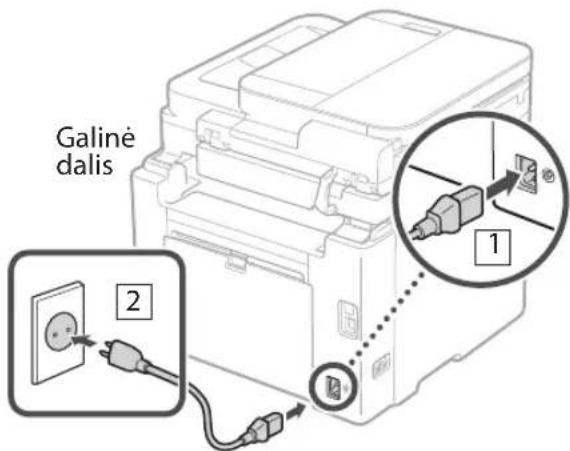
5 Maitinimo laido prijungimas

CANON i-SENSYS MF287dw - Maitinimo laido prijungimas - 1

text_image Galiné dalis 1 2
text_image https://ij.start.canon/connect
natural_image Illustration of a printer with attached components including a CD, cable, and accessories (no text or symbols)
natural_image Illustration of a person holding a stacked electronic device (no text or symbols visible)
natural_image Illustration of hands operating a device with a handle and arrow indicating direction (no text or symbols)

CANON i-SENSYS MF287dw - Maitinimo laido prijungimas - 2

text_image 2. A4 A4/LGL

CANON i-SENSYS MF287dw - Maitinimo laido prijungimas - 3

natural_image Illustration of hands inserting a device into a plastic container (no text or symbols)
natural_image Line drawing of a printer with a hand inserting a card into the cover (no text or symbols)

CANON i-SENSYS MF287dw - Maitinimo laido prijungimas - 4

natural_image Line drawing of a printer with a digital display and a magnified inset showing the hand interacting with a control panel (no text or symbols present)
text_image https://ij.start.canon/connect
text_image QR code with a hand holding a smartphone displaying a QR code, likely for mobile payment or scanning.

https://oip.manual.canon/

natural_image Line drawing of a printer with a separate close-up of its internal components (no text or symbols)

CANON i-SENSYS MF287dw - Maitinimo laido prijungimas - 5

CANON i-SENSYS MF287dw - Maitinimo laido prijungimas - 6

CANON i-SENSYS MF287dw - Maitinimo laido prijungimas - 7

CANON i-SENSYS MF287dw - Maitinimo laido prijungimas - 8

natural_image Illustration of a person holding a large electronic device (no text or symbols visible)
natural_image Technical line drawing of a mechanical device with a magnified inset showing a close-up detail (no text or symbols)

CANON i-SENSYS MF287dw - Maitinimo laido prijungimas - 9

CANON i-SENSYS MF287dw - Maitinimo laido prijungimas - 10

natural_image Line drawing of a printer with a paper clip inserted, showing mechanical components and directional arrows (no text or symbols)

CANON i-SENSYS MF287dw - Maitinimo laido prijungimas - 11

CANON i-SENSYS MF287dw - Maitinimo laido prijungimas - 12

natural_image Diagram of an open printer with a blank sheet and directional arrows indicating orientation (no text or symbols)

3 Ładowanie papieru

CANON i-SENSYS MF287dw - Ładowanie papieru - 1

natural_image Illustration of hands operating a device with a handle and arrow indicating direction (no text or symbols)

CANON i-SENSYS MF287dw - Ładowanie papieru - 2

text_image 2. A4 A4/LGL

CANON i-SENSYS MF287dw - Ładowanie papieru - 3

natural_image Illustration of hands inserting a device into a plastic tray (no text or symbols)
natural_image Line drawing of a printer with a hand inserting a card into the cover (no text or symbols)

CANON i-SENSYS MF287dw - Ładowanie papieru - 4

text_image 2.
text_image https://ij.start.canon/connect ←→C
text_image QR code with a hand holding a smartphone displaying a QR code, likely for mobile payment or scanning.

https://oip.manual.canon/

natural_image Line drawing of a printer with a separate close-up of its internal components (no text or symbols)

CANON i-SENSYS MF287dw - Ładowanie papieru - 5

CANON i-SENSYS MF287dw - Ładowanie papieru - 6

CANON i-SENSYS MF287dw - Ładowanie papieru - 7

CANON i-SENSYS MF287dw - Ładowanie papieru - 8

natural_image Illustration of a person holding a stacked electronic device (no text or symbols visible)
natural_image Line drawing of a printer with a paper clip inserted, showing internal components and directional arrows (no text or symbols)

CANON i-SENSYS MF287dw - Ładowanie papieru - 9

natural_image Diagram of an open printer with a blank sheet being placed, showing paper movement arrows (no text or symbols)

3 Vkládání papíru

CANON i-SENSYS MF287dw - Vkládání papíru - 1

natural_image Illustration of hands operating a device with a handle and arrow indicating direction (no text or symbols)

CANON i-SENSYS MF287dw - Vkládání papíru - 2

text_image 2. A4 A4/LGL

CANON i-SENSYS MF287dw - Vkládání papíru - 3

natural_image Illustration of hands inserting a component into a device (no text or symbols visible)
natural_image Line drawing of a printer with a close-up inset showing the printer's internal structure (no text or symbols)

CANON i-SENSYS MF287dw - Vkládání papíru - 4

natural_image Line drawing of a printer with a digital display and a hand inserting a control panel (no text or symbols)
text_image https://ij.start.canon/connect
text_image QR code and smartphone icon with Chinese text, likely for scanning to access a QR code or mobile app

https://oip.manual.canon/

natural_image Line drawing of a printer with a separate close-up of its internal components (no text or symbols)

CANON i-SENSYS MF287dw - Vkládání papíru - 5

CANON i-SENSYS MF287dw - Vkládání papíru - 6

CANON i-SENSYS MF287dw - Vkládání papíru - 7

CANON i-SENSYS MF287dw - Vkládání papíru - 8

CANON i-SENSYS MF287dw - Vkládání papíru - 9
* Použite ho pri skenovaní originálov formátu A6 pomocou podávača.

natural_image Illustration of a person holding a stacked electronic device (no text or symbols visible)
natural_image Line drawing of a printer with a paper clip and scroll, showing no text or symbols

CANON i-SENSYS MF287dw - Vkládání papíru - 10

natural_image Diagram of an open printer with a blank sheet and directional arrows indicating orientation (no text or symbols)

Vkladanie papiera

text_image https://ij.start.canon/connect
text_image QR code with a hand holding a smartphone displaying a QR code, likely for mobile payment or scanning.

https://oip.manual.canon/

natural_image Illustration of a printer setup with components including a CD, cable, and accessories (no text or symbols)
natural_image Illustration of a person holding a stacked electronic device (no text or symbols visible)
natural_image Illustration of hands operating a device with a handle and arrow indicating direction (no text or symbols)

CANON i-SENSYS MF287dw - Vkladanie papiera - 1

text_image 2. A4 A4/LGL

CANON i-SENSYS MF287dw - Vkladanie papiera - 2

natural_image Illustration of hands inserting a device into a plastic container (no text or symbols)
natural_image Line drawing of a printer with a close-up inset showing the printer's internal structure (no text or symbols)

CANON i-SENSYS MF287dw - Vkladanie papiera - 3

text_image 2.
text_image https://ij.start.canon/connect
  1. Vnesite ime modela in kliknite Pojdi.

CANON i-SENSYS MF287dw - Vkladanie papiera - 4

text_image Pojdi Ime modela
text_image QR code with a hand holding a smartphone displaying a QR code, likely linking to a mobile payment or scanning interface.

https://oip.manual.canon/

natural_image Line drawing of a printer with a close-up view of its internal components (no text or symbols)

CANON i-SENSYS MF287dw - Vkladanie papiera - 5

CANON i-SENSYS MF287dw - Vkladanie papiera - 6

CANON i-SENSYS MF287dw - Vkladanie papiera - 7

CANON i-SENSYS MF287dw - Vkladanie papiera - 8

CANON i-SENSYS MF287dw - Vkladanie papiera - 9
* Upotrijebite kada skenirate originale formata A6 s ulagačem.

natural_image Illustration of a person carrying a multi-tiered battery pack (no text or symbols)

CANON i-SENSYS MF287dw - Vkladanie papiera - 10
Ostavite prostor od 100 mm ili više oko stroja prilikom postavljanja.

2. Uklonite svu ambalažu.

Uklonite sve trake.

CANON i-SENSYS MF287dw - Uklonite svu ambalažu. - 1

natural_image Line drawing of a printer with a paper clip inserted, showing internal components and directional arrows (no text or symbols)

CANON i-SENSYS MF287dw - Uklonite svu ambalažu. - 2

natural_image Line drawing of an open printer with a blank sheet and directional arrows indicating motion (no text or symbols)

3 Umetanje papira

CANON i-SENSYS MF287dw - Umetanje papira - 1

natural_image Illustration of hands operating a device with a handle and arrow indicating direction (no text or symbols)

CANON i-SENSYS MF287dw - Umetanje papira - 2

text_image 2. A4 A4/LGL

CANON i-SENSYS MF287dw - Umetanje papira - 3

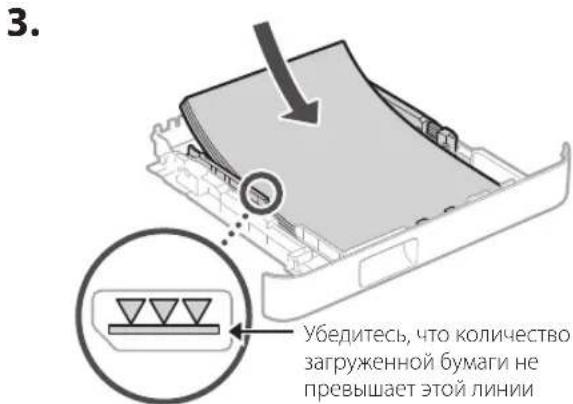
text_image 3. Pazite da količina umetnutog papira ne prelazi ovu liniju

CANON i-SENSYS MF287dw - Umetanje papira - 4

natural_image Illustration of hands inserting a device into a plastic container (no text or symbols)

4 Postavljanje stopera papira i upravljačke ploče

CANON i-SENSYS MF287dw - Postavljanje stopera papira i upravljačke ploče - 1

natural_image Line drawing of a printer with a close-up inset showing the printer's internal structure (no text or symbols)

CANON i-SENSYS MF287dw - Postavljanje stopera papira i upravljačke ploče - 2

text_image 2.
text_image https://ij.start.canon/connect ←→C
  1. Unesite naziv modela i kliknite na Kreni.

CANON i-SENSYS MF287dw - Postavljanje stopera papira i upravljačke ploče - 3

text_image Kreni Naziv modela
  1. Nastavite obavljati radnje pridržavajući se uputa na zaslonu.

Instalacija s isporučenog CD-ROM-a/DVD-ROM-a

  1. Umetnite CD-ROM/DVD-ROM u računalo i instalirajte softver i upravljačke programe.

  2. U okruženju povezanom na internet (samo Windowsi) dvaput kliknite na „Dlmastersetup. url”. Potom slijedite upute na zaslonu.

  3. U okruženju koje nije povezano na Internet, softver / upravljački program koji želite upotrebljavati instalirajte s CD/DVD-ROM-a.

Canon

MF287dw

Beállítási útmutató

text_image QR code and smartphone icon with Chinese text, likely for scanning to access a QR code or mobile app

https://oip.manual.canon/

natural_image Line drawing of a printer with a close-up view of its internal components (no text or symbols)

CANON i-SENSYS MF287dw - Beállítási útmutató - 1

CANON i-SENSYS MF287dw - Beállítási útmutató - 2

CANON i-SENSYS MF287dw - Beállítási útmutató - 3

CANON i-SENSYS MF287dw - Beállítási útmutató - 4

natural_image Illustration of a person holding a large electronic device (no text or symbols visible)
natural_image Line drawing of a printer with a paper clip inserted, showing mechanical components and directional arrows (no text or symbols)

CANON i-SENSYS MF287dw - Beállítási útmutató - 5

natural_image Diagram of an open printer with a blank sheet and directional arrows indicating motion (no text or symbols)

Papír betöltése

text_image https://ij.start.canon/connect
text_image QR code and smartphone payment interface with hand icon

https://oip.manual.canon/

1 Verificarea articolelor livrate

CANON i-SENSYS MF287dw - Verificarea articolelor livrate - 1

natural_image Line drawing of a printer with a close-up view of its internal components (no text or symbols)

CANON i-SENSYS MF287dw - Verificarea articolelor livrate - 2

CANON i-SENSYS MF287dw - Verificarea articolelor livrate - 3

CANON i-SENSYS MF287dw - Verificarea articolelor livrate - 4

CANON i-SENSYS MF287dw - Verificarea articolelor livrate - 5

natural_image Illustration of a person holding a stacked electronic device (no text or symbols visible)
natural_image Line drawing of a printer with a paper clip and scroll, showing mechanical components and motion arrows (no text or symbols)

CANON i-SENSYS MF287dw - Verificarea articolelor livrate - 6

natural_image Diagram of an open printer with a blank sheet and directional arrows indicating motion (no text or symbols)
natural_image Illustration of hands operating a device with a handle and arrow indicating direction (no text or symbols)

CANON i-SENSYS MF287dw - Verificarea articolelor livrate - 7

text_image 2. A4 A4/LGL

CANON i-SENSYS MF287dw - Verificarea articolelor livrate - 8

natural_image Diagram of hands inserting a device into a container with an arrow indicating direction (no text or symbols present)
natural_image Line drawing of a printer with a hand inserting a card into the cover (no text or symbols)

CANON i-SENSYS MF287dw - Verificarea articolelor livrate - 9

natural_image Line drawing of a printer with a digital display and control panel, showing a hand inserting a button (no text or symbols present)
text_image https://ij.start.canon/connect
text_image Image showing a QR code and a hand holding a smartphone displaying a QR code, likely for mobile scanning or linking.

https://oip.manual.canon/

natural_image Line drawing of a printer with a separate close-up of its internal components (no text or symbols)

CANON i-SENSYS MF287dw - Verificarea articolelor livrate - 10

CANON i-SENSYS MF287dw - Verificarea articolelor livrate - 11

CANON i-SENSYS MF287dw - Verificarea articolelor livrate - 12

CANON i-SENSYS MF287dw - Verificarea articolelor livrate - 13

natural_image Illustration of a person carrying a multi-tiered electronic device (no text or symbols visible)
natural_image Line drawing of a printer with a paper clip and scroll, showing mechanical components and motion arrows (no text or symbols)

CANON i-SENSYS MF287dw - Verificarea articolelor livrate - 14

natural_image Diagram of an open printer with a blank sheet and directional arrows indicating motion (no text or symbols)
natural_image Illustration of hands operating a device with a handle and arrow indicating direction (no text or symbols)

CANON i-SENSYS MF287dw - Verificarea articolelor livrate - 15

text_image 2. A4 A4/LGL

CANON i-SENSYS MF287dw - Verificarea articolelor livrate - 16

natural_image Illustration of hands inserting a device into a plastic container (no text or symbols)
natural_image Line drawing of a printer with a hand inserting a card into the cover (no text or symbols)

CANON i-SENSYS MF287dw - Verificarea articolelor livrate - 17

natural_image Line drawing of a printer with a digital display and control panel, showing a hand inserting a button (no text or symbols present)
text_image https://ij.start.canon/connect ←→C
text_image QR code with a hand holding a smartphone displaying a QR code, likely for mobile payment or scanning.

https://oip.manual.canon/

natural_image Line drawing of a printer with a separate close-up of its internal components (no text or symbols)

CANON i-SENSYS MF287dw - Verificarea articolelor livrate - 18

CANON i-SENSYS MF287dw - Verificarea articolelor livrate - 19

CANON i-SENSYS MF287dw - Verificarea articolelor livrate - 20

CANON i-SENSYS MF287dw - Verificarea articolelor livrate - 21

natural_image Illustration of a person holding a stacked electronic device (no text or symbols visible)
text_image Diagram illustrating the process of printer printing and packaging, showing step-by-step assembly from printer to printer.

3 Kağıt Yükleme

CANON i-SENSYS MF287dw - Kağıt Yükleme - 1

natural_image Illustration of hands operating a device with a handle and arrow indicating direction (no text or symbols)

CANON i-SENSYS MF287dw - Kağıt Yükleme - 2

text_image 2. A4 A4/LGL

CANON i-SENSYS MF287dw - Kağıt Yükleme - 3

natural_image Illustration of hands inserting a device into a plastic tray (no text or symbols)
natural_image Line drawing of a printer with a close-up inset showing the printer's internal structure (no text or symbols)

CANON i-SENSYS MF287dw - Kağıt Yükleme - 4

natural_image Line drawing of a printer with a digital display and control panel, showing a hand inserting a button (no text or symbols present)
text_image https://ij.start.canon/connect
natural_image Illustration of a printer with attached cable and accessories, including a CD, connector, and battery pack (no text or symbols)
natural_image Illustration of a person holding an open electronic device (no text or symbols visible)
natural_image Line drawing of a printer with a close-up inset showing a hand inserting a card into a slot (no text or symbols)

CANON i-SENSYS MF287dw - Kağıt Yükleme - 5

natural_image Line drawing of a printer with a digital display and a magnified inset showing the right-hand rule to press a control panel (no text or symbols present)

توصيل سلك الطاقة

The image is too blurry to recognize any text content.

CANON i-SENSYS MF287dw - Kağıt Yükleme - 6

text_image الخلف 1

تحميل الأوراق

CANON i-SENSYS MF287dw - Kağıt Yükleme - 7

CANON i-SENSYS MF287dw - Kağıt Yükleme - 8

natural_image Illustration of a hand inserting a plastic component into a machine (no text or symbols visible)

.

CANON i-SENSYS MF287dw - Kağıt Yükleme - 9

text_image A4 A4/LGL

.

CANON i-SENSYS MF287dw - Kağıt Yükleme - 10

natural_image Diagram of hands operating a mechanical device with a curved component and an arrow indicating motion (no text or symbols present)

.

text_image https://ij.start.canon/connect
natural_image Line drawing of a printer with a separate cylindrical device attached (no text or symbols)

CANON i-SENSYS MF287dw - Kağıt Yükleme - 11

natural_image Illustration of various electronic components including a CD, cable, and connectors (no text or symbols)
natural_image Illustration of a person holding a device with a handle, no text or symbols present
text_image Diagram showing a printer with an electrical outlet connected to a plug, with an inset close-up highlighting the internal components.

بارگذاری کاغذ
CANON i-SENSYS MF287dw - Kağıt Yükleme - 12

CANON i-SENSYS MF287dw - Kağıt Yükleme - 13

natural_image Diagram of a hand inserting or removing a device into a container, with no visible text or symbols.

CANON i-SENSYS MF287dw - Kağıt Yükleme - 14

text_image A4 A4/LGL

CANON i-SENSYS MF287dw - Kağıt Yükleme - 15

natural_image Illustration of hands inserting a device into a plastic tray (no text or symbols)
text_image https://ij.start.canon/connect

30-2, Shimomaruko 3-chome, Ohta-ku, Tokyo 146-8501, Japan

One Canon Park, Melville, NY 11747, U.S.A.

CANON EUROPA N.V.

Bovenkerkerweg 59, 1185 XB Amstelveen, The Netherlands

CANON SINGAPORE PTE LTD

1 Fusionopolis Place, #14-10, Galaxis, Singapore 138522

CANON AUSTRALIA PTY LTD

Building A, The Park Estate, 5 Talavera Road, Macquarie Park, NSW 2113, Australia

CANON GLOBAL WORLDWIDE SITES

https://global.canon/

CANON i-SENSYS MF287dw - Kağıt Yükleme - 16

text_image Black and white barcode image with vertical lines and a small number '1' at the bottom right.

FT6-3291-000

CANON i-SENSYS MF287dw - Kağıt Yükleme - 17

Manual assistant
Powered by Anthropic
Waiting for your message
Product information

Brand : CANON

Model : i-SENSYS MF287dw

Category : Printer