Soundchest - Docking station HAMA - Free user manual and instructions
Find the device manual for free Soundchest HAMA in PDF.


User questions about Soundchest HAMA
0 question about this device. Answer the ones you know or ask your own.
Ask a new question about this device
Download the instructions for your Docking station in PDF format for free! Find your manual Soundchest - HAMA and take your electronic device back in hand. On this page are published all the documents necessary for the use of your device. Soundchest by HAMA.
USER MANUAL Soundchest HAMA
MobileBluetooth® Speaker
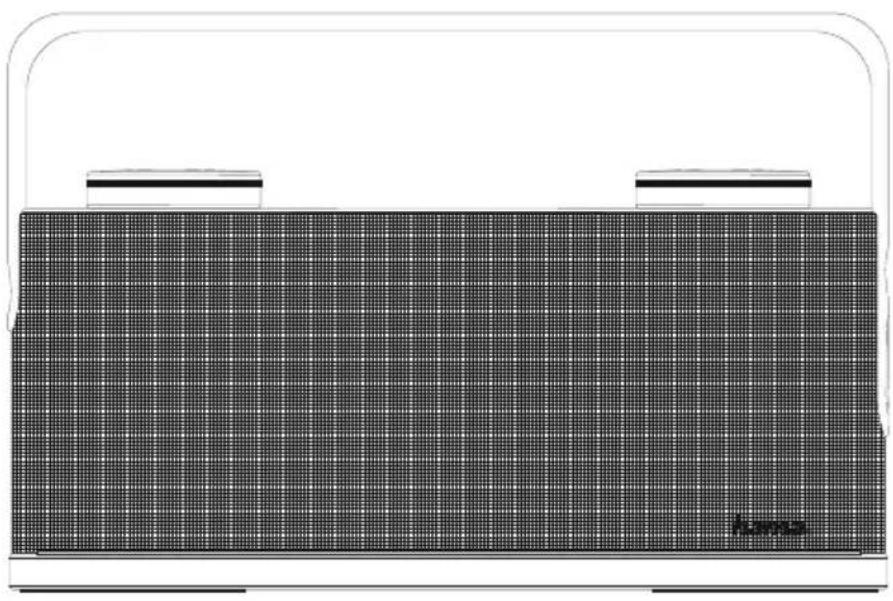
SOUNDCHEST
natural_image
Illustration of a portable electronic device with grid pattern and two side handles (no text or symbols)OperatingInstructions
Bedienungsanleitung
Moded'emploi
Instruccionesdeuso
- On/offswitch
2.AUX-insocket - Micro-USBport
- Bluetooth/StatusLED
- Touchpadcontrol
- Rotary volume control
- Equaliser
8.NFC-NearFieldCommunication

Thankyouforchoosinga H amaproduct.
Takeyourtimeandreadthefollowinginstructionsand informationcompletely. P leasekeeptheseinstructions in a safe place for future reference. If you sell the device,pleasepasstheseoperatinginstructionsonto thenewowner.
1. ExplanationofWarningSymbolsandNotes

Warning
This symbol is used to indicate safety instructions or to draw your attention to specific hazards and risks.

Note
This is used to indicate additional information or important notes.
2.PackageContents
- Mobile Bluetooth® SpeakerSoundchest
- Micro-USBchargingcable
•3.5mmaudiocable
• Theseoperatinginstructions
3.SafetyNotes
- Theproductisintendedforprivate,non-commercial useonly.
- Donotusetheproductintheimmediatevicinity of heatersorotherheatsourcesorindirectsunlight.
- Keep this product, as all electrical products, out of the reachofchildren!
- Donotdropheproductanddonotexposeittoany majorshocks.
- Donotoperatetheproductoutsidethepowerlimits giveninthespecifications.
-
Do not use the product in areas where the use of electronic devices is not permitted.
-
Beconsiderate. Loudvolumescanhavea detrimental effect on your surroundings.
- Donotopenthedeviceorcontinuetooperateitifit becomesdamaged.
- Sincethebatteryisintegratedandcannotbe removed,youwillneedtodisposeoftheproduct asa w hole.Dothisincompliancewiththelegal requirements.
- Keepthepackagingmaterialoutofthereachof childrenduetotheriskofsuffocation.
- Disposeofpackagingmaterialimmediatelyaccording tolocallyapplicableregulations.
- Do not modify the product in any way. Doing so voids the warranty.
4. Getting Started and Operation
4.1 Switching the product on and off
- Pressandholdthefunctionbutton (1)forabout4 secondstoswitchthespeakeronoroff. An acoustic signalwillsoundandthestatusLED(4)willstart flashingorgooff.

Note- A utomaticshutdown
Notethatthespeakerwillautomaticallyswitch ofafter10minuteswithoutaction(noaudio playback/no Bluetooth® function).
4.2 Chargingthebattery

Warning- R echargeablebattery
- Only uses suitable charging devices with USB connections for charging.
- As a rule, do not use charging devices or USB connectionsthatare d effectiveanddonottryto repairthemyourself.
- Avoidstoring, chargingorusingbatteriesin extremetemperatures.
-
When stored for a long period of time, batteries should be charged regularly (at least every three months).
-
Charge the speaker fully before using it for the first time.
- ConnecttheincludedMicro-USBchargingcableto thespeaker's Micro-USBport(3).
- ConnecttheunusedconnectorontheMicro-USB charging cable to a suitable USB charger. Please refer to the operating instructions for the USB charger used.

Note- Charging
- It takes approx. 4 – 5 hours to completely charge the product.
- The speaker's battery can be charged whether the speakerisonoroff.
- If the battery capacity is less than 10%, the speaker will remitt two acoustics signals. You will only receive this information if the speaker is on.
- The actual battery life varies depending on use of the device, the settings and the ambient conditions (rechargeable batteries have a limited servicelife).
4.3 Audioplaybackviatheincludedaudiocable (3.5mmjack)
- Ensure t hatthespeakerisswitchedoff.
- Connectyourmobileterminaldevice(MP3player, smartphone,etc.)andtheAUXinput(2)ofthe speakerusingtheincluded3.5mmaudiocable.
- Set the volume on your terminal device to a low level.
- Switchonthespeakersasdescribedin 4.1, Switchingtheproductionandoff. ThestatusLED (4)isnowgreen.
- Startandcontrolaudioplaybackontheconnected terminaldeviceaccordingly.
- Turntherotarycontroltotheleftorrighttoincrease ordecreasethevolume.
- Pressthefunctionbutton ⏻(1)tomutethespeaker.

Note
Pleasenotethatyoucannotestablish the Bluetooth® connectiondescribedunder4.4and4.5ifanaudio cableisconnected.
4.4 Bluetooth® pairing

Note
- Checkwhetheryourmobiledevice(MP3player, mobilephone,etc.)is Bluetooth® capable.
- Ifnot, you can only us the speaker for playback using the included audiocable.
-
Notethatthemaximumrangefor Bluetooth® is 10metreswithoutobstaclessuchaswalls,people, etc.
-
Makesure that your Bluetooth® capable terminal device is on and Bluetooth® is activated.
- Make sure that the speaker is located within the Bluetooth® rangeofmax.10metres.
- Switchonthespeakersasdescribedin 4.1 Switchingtheproductionandoff.
- ThestatusLED(4)startstoflashinblue.Thespeaker searchesfora c onnection.
- Openthe Bluetooth® settingsonyourterminaldevice andwaituntilHamaSoundchestappearsinthelist of Bluetooth® devicesfound.
- SelectHamaSoundchestandwaituntilthespeaker islistedasconnectedinthe Bluetooth® settingson yourterminaldevice.Anacousticsignalconfirmsthat connectionwassuccessful.
- ThestatusLED(4)nowremainsblue.

Note- Bluetooth® password
- Some terminal devices require a password in order to connect to another Bluetooth® device.
- If your terminal device requests a password for connectiontothespeaker, enter0000.

Note
- Thespeakeralwaysstoresthelasteightterminal devicespaired.
- The speaker will automatically connect to the last terminal device paired when it is switched on the next time.
4.5 Automatic Bluetooth® connection(after successful pairing)
- Makesure that your Bluetooth® capable terminal device is on and Bluetooth® is activated.
- Make sure that the speaker is located within the Bluetooth® rangeofmax.10metres.
- Switchonthespeakersasdescribedin 4.1 Switchingtheproductonandoff.
- Aftersuccessfulconnection, thestatusLED(4)will lightupinblue.Anacousticsignalconfirmsthat connectionwassuccessful.

Note- Connectionimpaired
- Afterthespeakerandterminaldevicehavebeen paired, a connectionisestablishedautomatically. If the Bluetooth® connectionisnotestablished automatically, c heckthefollowing:
- Checkthe Bluetooth® settingsofyourterminal device to see whether HamaSoundchest is connected. If not, repeat the steps listed under Bluetooth® pairing.
- Checkwhetheryourterminaldeviceandthe speakerare lessthan10metresapart.Ifnot,move themclosertogether.
- Check whether obstacles are impairing the range. Ifso, movethedevicesclosertogether.
- Checkwhethertheaudiocableisconnectedtothe speaker. If s o, disconnectit.
4.6 Audioplayback(via Bluetooth®)
Startandcontrolaudioplaybackontheconnected terminal device accordingly. Alternatively, audio playbackcanalsobecontrolledonthespeaker(ifthe connecteddevicesupportsthisfunction).
- Pressthe ⏻functionbutton(1)tostartorpause audioplayback.
- Swipefromlefttorightorrighttoleftonthe touchpadtogotothenextorprevioustrack.
- Turntherotarycontroltotheleftorrighttoincrease ordecreasethevolume.
4.7 Hands-freefunction
You can use the speaker as a hands-free set for your mobile phone. For this function, the mobile phone must beconnectedtothespeakervia Bluetooth®.
- Pressthefunctionbutton (1)oncetoansweran incomingcall.
- Pressandholdthefunctionbutton(1)forapprox. 2 secondstorejectanincomingcall.
- You can put a call on hold by pressing and holding the function button(1) for approx.2 seconds.
- Pressandholdthefunctionbutton(1)again to continuethecall.
- During a call, press the function button ⏻(1) once to endthecall.
- Pressandholdthefunctionbutton(1)forapprox. 2 secondstocallthemostrecentlydiallednumber.

Note- Callquality
To increase the call quality, make sure that you are nearthespeakerwithyourmobilephoneduringthe call.
4.8 Equaliser
Theequaliser(7)enablesoptimumadjustmentof thesoundtosuittherequirementsbothindoorsand outdoors.Pressingthebuttonwillchangethesound mode;theactivemode(Indoor/Outdoor)isdisplayedon thesoundmodestatusLED(5).
5. Care and Maintenance
- Only clean this product with a slightly damp, lint-free clothanddonotuseaggressivecleaningagents.
6.WarrantyDisclaimer
Hama GmbH & Co KG assumes no liability and provides nowarrantyfordamageresultingfromimproper installation/mounting,improperuseoftheproductor fromfailure t o o bservetheoperatinginstructionsand/orsafetynotes.
7. Service and Support
PleasecontactHamaProductConsultingifyouhave anyquestionsaboutthisproduct.
Hotline:+499091502-115(German/English)
Furthersupportinformationcanbefoundhere:
www.hama.com
8.TechnicalData
| Mobile Bluetooth® SpeakerSoundchest | |
| Bluetooth® Technology | Bluetooth® v4.1 |
| Supportedprofiles | A2DPV1.2,AVRCPV1.4,HFPV1.5 |
| Frequencyforthe Bluetooth® transfers | 2400- 2 483.5MHz |
| Bluetooth® transfers power | 4 dBm |
| Frequency180Hz- 2 0 kHz | |
| Range< 1 0 m | |
| Maximumnumberof paireddevices | 8 |
| Max.musicoutput24W | |
| Chargingvoltage~ 5 V | ---1 A |
| SoundSystemStereo | |
| Inpedance4Ω | |
| Distortion(THD)≤1% | |
| Size234x 6 7 x 1 55mm | |
| Weight1090g | |
| Connections | 3.5mmstereoplug AUXinput,Micro-USB for5 V / 1 A charging function |
| Battery | |
| Type | 7.4VLi-lon2000mAh/14.8Wh |
| Chargingtime~ 4 - 5 h | |
| Playback | Via Bluetooth®: ~ 1 0 h ViaAUX:~ 1 2 h (dependingonvolume andaudiocontent) |
9. Recycling Information
Noteonenvironmentalprotection:
AftertheimplementationoftheEuropean Directive2012/19/EUand2006/66/EUinthe nationallegalsystem,thefollowingapplies: Electricandelectronicdevicesaswellas batteriesmustnotbedisposedofwithhousehold waste. Consumers are obligedbylawtoreturnelectrical andelectronicdevicesaswell as batteriesattheend oftheirservicelivestothepubliccollectingpointsset upforthispurposeorpointofsale.Detailstoisare definedbythenationallawoftherespectivecountry. Thissymbolontheproduct, theinstructionmanualor the package indicates that a product is subject to these regulations. Byrecycling,reusingthematerialsorotherforms ofutilisingolddevices/Batteries,youare m akingan importantcontributiontoprotectingourenvironment.
10. Declaration of Conformity
CE Hereby, Hama GmbH & Co KG declares that the radioequipmenttype[00173164]isin compliancewithDirective2014/53/EU. Thefull textoftheEUdeclar ationofconformityisavailableat thefollowinginternetaddress:www.hama.com ->00173164 ->Downloads.
| Frequencyband(s) | 2400- 2 483.5MHz |
| Maximumradio-frequency powertransmitted | 4 dBm |
4.6 Lectureaudio(via Bluetooth®)
concernantl'assistance: w www.hama.com
8.NFC-NearFieldCommunication
8.NFC-NearFieldCommunication
com -> 00173164 -> Downloads.
9. Pokynyk likvidaci
8.NFC-NearFieldCommunication
Ďakujeme,žestesarozhodlipre v ýrobokHama.
8.NFC-NearFieldCommunication
www.hama.com ->00173164 -> Downloads.
86652 Monheim / Germany
www.hama.com
The Bluetooth® word mark and logos are registered trademarks owned by Bluetooth SIG, Inc. and any use of such marks by Hama GmbH & Co KG is under license. Other trademarks and trade names are those of their respective owners.
All listed brands are trademarks of the corresponding companies. Errors and omissions excepted, and subject to technical changes. Our general terms of delivery and payment are applied.