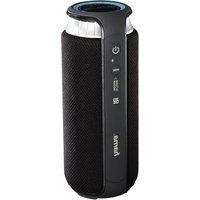
Soundcup-L - Docking station HAMA - Free user manual and instructions
Find the device manual for free Soundcup-L HAMA in PDF.



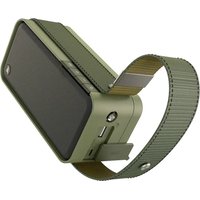
| Product type | Docking station / Portable Bluetooth speaker |
| Brand | Hama |
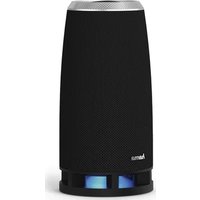
| Model | Soundcup-L |
| Dimensions (W x D x H) | 78 x 74.5 x 191 mm |
| Weight | 580 g |
| Power supply | Li-Ion battery 7.4 V / 2000 mAh (14.8 Wh) |
| Charging voltage | 5 V ⎓ 1.5 A (via micro USB) |
| Charging time | Approximately 4 to 5 hours |
| Battery life (Bluetooth playback) | Approximately 12 hours (depending on volume and audio content) |
| Battery life (AUX playback) | Approximately 16 hours (depending on volume and audio content) |
| Wireless technology | Bluetooth® v4.1 |
| Supported Bluetooth profiles | A2DP V1.2, AVRCP V1.4, HFP V1.5 |
| Bluetooth range | Up to 10 m (without obstacles) |
| Maximum number of paired devices | 8 |
| Maximum music power | 24 W |
| Frequency response | 180 Hz – 20 kHz |
| Impedance | 4 Ω |
| Total harmonic distortion (THD) | ≤ 1 % |
| Splash-proof protection | IPX4 (only when the connector cover is closed) |
| Inputs | 3.5 mm jack (AUX), micro USB (charging) |
| Main functions | Bluetooth playback, AUX, NFC, hands-free kit, touchpad, sound mode (indoor/outdoor) |
| Package contents | Soundcup-L speaker, micro USB cable, 3.5 mm audio cable, instruction manual |
| Care and cleaning | Clean with a slightly damp, lint-free cloth; avoid harsh detergents |
| Safety instructions | Do not expose to heat, water, shocks; keep out of reach of children; do not open |
| Recycling | Do not dispose of with household waste; take to a collection point |
Frequently Asked Questions - Soundcup-L HAMA
User questions about Soundcup-L HAMA
0 question about this device. Answer the ones you know or ask your own.
Ask a new question about this device
Download the instructions for your Docking station in PDF format for free! Find your manual Soundcup-L - HAMA and take your electronic device back in hand. On this page are published all the documents necessary for the use of your device. Soundcup-L by HAMA.
USER MANUAL Soundcup-L HAMA
MobileBluetooth® Speaker
Soundcup-L
natural_image
Illustration of a hama-branded smart air conditioner unit with grid panels and control buttons (no text or symbols on body)OperatingInstructions
Bedienungsanleitung
Moded'emploi
Instruccionesdeuso
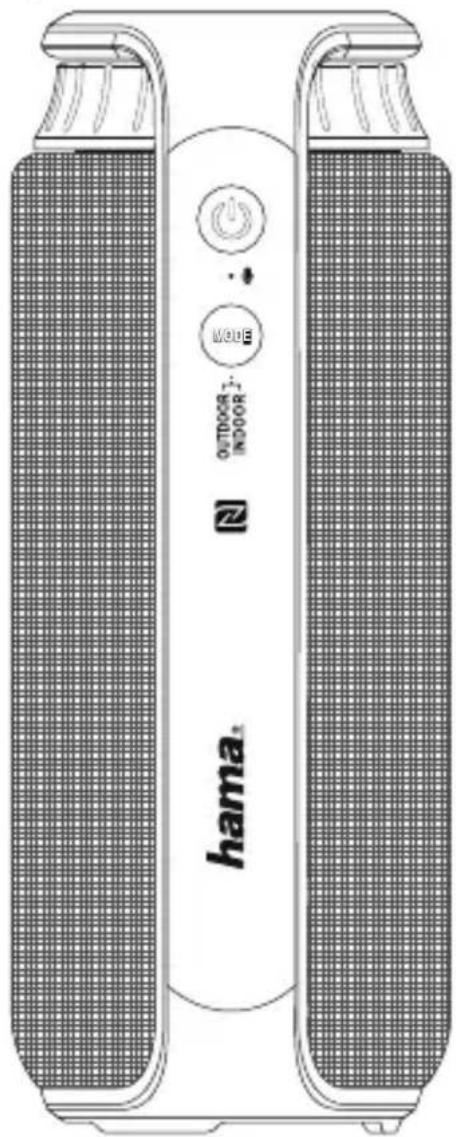
ControlsandDisplays
- On/offswitch
2.AUX-insocket - Micro-USBport
- Bluetooth/StatusLED
5.Touchpadcontrol - Rotary volume control
- SoundmodestatusLED
8.Soundmode
9.NFC- NearFieldCommunication
Thankyouforchoosinga H amaproduct.
Take your time and read the following instructions and information completely. Please keep these instructions in a safe place for future reference. If you sell the device, please passtheseoperatinginstructionsontothenewowner.
1. ExplanationofWarningSymbolsandNotes

Warning
This symbol is used to indicate safety instructions to draw your attention to specific hazards and risks.

Note
This is used to indicate additional information or important notes.
2.PackageContents
- Mobile Bluetooth® SpeakerSoundcup-L
- Micro-USBchargingcable
- 3.5mmaudiocable
• Theseoperatinginstructions
3. SafetyNotes
• The product is intended for private, non-commercial use only.
- Donotusetheproductintheimmediatevicinityofheatersorotherheatsourcesor indirectsunlight.
- Keep this product, as all electrical products, out of the reach of children!
- Donotdroptheproductanddonotexposeittoanymajorshocks.
- Do not operate the product outside the power limits given in the specifications.
- Do not use the product in areas where the use of electronic devices is not permitted.
- Be considerate. Loud volumes can have a detrimental effect on your surroundings.
- Donotopenthedeviceorcontinuetooperateitifitbecomesdamaged.
- Sincethebatteryisintegratedandcannotberemoved,youwillneedtodisposeof the product as a whole. Do this in compliance with the legal requirements.
- Keep the packaging material out of the reach of children due to the risk of suffocation.
- Disposeofpackagingmaterialimmediatelyaccordingtolocallyapplicable regulations.
- Do not modify the product in any way. Doing so voids the warranty.
- Do not throw the battery or the product into fire.
- Donottamperwithordamage/heat/disassemblethebatteries/rechargeable batteries.
4. Getting Started and Operation

Note-s splashproof
- This product is splash proof on all sides as defined in IPX4, meaning that it is ideal for use outdoors or in bathrooms, kitchens, etc.
- This protection only works when the connection cover (7) is closed. If a cable (audio, USB) is connected or the connection cover (7) is not closed properly, splash protection cannot be guaranteed and the device could be damaged.
- Do not use the product in heavy rain, under water, in the shower or for water sports, etc.
4.1 Switching the product on and off
- Pressandholdthefunctionbutton

(1)forabout4 s econdstoswitchthespeaker
on or off. An acoustic signal will sound and the status LED (4) will start flashing or gooff.

Note- A utomaticshutdown
Notethatthespeakerwillautomaticallyswitchoffafter10minuteswithout action(noaudioplayback/no Bluetooth® function).
4.2 Chargingthebattery

Warning— R echargeablebattery
- OnlyusesuitablechargingdeviceswithUSBconnectionsforcharging.
- As a rule, do not use charging devices or USB connections that are defective and donottrytorepairthemyourself.
- Avoid storing, charging or using the device in extreme temperatures and extremely low atmospheric pressure (forexample, athighaltitudes).
-
When stored for a long period of time, batteries should be charged regularly (at least every three months).
-
Charge the speaker fully before using it for the first time.
- Connect the included Micro-USB charging cable to the speaker's Micro-USB port (3).
- Connect the unused connector on the Micro-USB charging cable to a suitable USB charger. Please refer to the operating instructions for the USB charger used.

Note- Charging
- It takes approx. 4 – 5 hours to completely charge the product.
- The speaker's battery can be charged whether the speaker is on or off.
- If the battery capacity is less than 10% , the speaker willemittwoacoustic signals. You will only receive this information if the speaker is on.
- The actual battery life varies depending on use of the device, the settings and the ambient conditions (rechargeable batteries have a limited service life).
4.3 Audioplaybackviatheincludedaudiocable(3.5mmjack)
- Ensure t hatthespeakerisswitchedoff.
- Connect your mobile terminal device (MP3 player, smartphone, etc.) and the AUX input(2)ofthespeakerusingtheincluded3.5mmaudiocable.
- Set the volume on your terminal device to a low level.
- Switchonthespeakersasdescribedin 4.1, Switchingtheproductionandoff. ThestatusLED(4)isnowgreen.
- Start and control audio playback on the connected terminal device accordingly.
- Turn the rotary control to the left or right to increase or decrease the volume.

Note
Pleasenotethatyoucannotestablish the 4.4 and 4.5 if audiocable is connected.
Bluetooth ® connectiondescribedunder
4.4 Bluetooth ® pairing

Note
- Check whether your mobile device (MP3 player, mobile phone, etc.) is Bluetooth® capable.
- Ifnot, you can only use the speaker for playback using the included audioable.
- Notethatthemaximumrangefor Bluetooth® is 10 metres without obstacles such as walls, people, etc.
- Makesure that your Bluetooth® capable terminal device is on and Bluetooth® is activated.
- Make sure that the speaker is located within the Bluetooth® rangeofmax.10 metres.
- Switchonthespeakersasdescribedin 4.1Switchingtheproductionandoff.
- The status LED (4) starts to flash in blue. The speaker searches for a connection.
- Openthe Bluetooth® settingsonyourterminaldeviceandwaituntilHama Soundcup-Lappearsinthelistof Bluetooth® devicesfound.
- Select Hama Soundcup-L and wait until the speaker is listed as connected in the Bluetooth® settingsonyourterminaldevice.Anacousticsignalconfirmsthat connectionwassuccessful.
- ThestatusLED(4)nowremainsblue.

Note- Bluetooth® password
- Some terminal devices require a password in order to connect to another Bluetooth ® device.
- If your terminal device requests a password for connection to the speaker, enter 0000.

Note
- Thespeakeralwaysstoresthelasteightterminaldevicespaired.
- Thespeakerwillautomaticallyconnecttothelastterminaldevicepairedwhenit isswitchedonthenextime.
4.5 Automatic Bluetooth® connection(aftersuccessfulpairing)
- Makesure that your Bluetooth® capable terminal device is on and Bluetooth® is activated.
- Make sure that the speaker is located within the Bluetooth® rangeofmax.10 metres.
- Switchonthespeakersasdescribedin
4.1 Switching the product on and off.
- Aftersuccessfulconnection, thestatusLED(4)willlightupinblue.Anacoustic signalconfirmsthatconnectionwassuccessful.

Note- C onnectionimpaired
- After the speaker and terminal device have been paired, a connection is established automatically. If t h eBluetooth® connectionisnotestablished automatically, c heckthefollowing:
- Checkthe Bluetooth® settingsofyourterminaldevicetoseewhetherHama Soundcup-Lisconnected.Ifnot,repeatthestepslistedunder Bluetooth® pairing.
- Check whether your terminal device and the speaker are less than 10 metres apart. If not, movethemclosertogether.
- Check whether obstacles are impairing the range. If so, move the devices closer together.
- Check whether the audio cable is connected to the speaker. If so, disconnect it.
4.6 Audioplayback(via Bluetooth®)
Startandcontrolaudioplaybackontheconnectedterminaldeviceaccordingly.
Alternatively, audio playback can also be controlled on the speaker (if the connected devicesupportsthisfunction).
- Pressthe ⏻ functionbutton(1)tostartorpauseaudioplayback.
- Swipe from left to right or right to left on the touchpad to go to the next or previous track.
- Turn the rotary control to the left or right to increase or decrease the volume.
4.7 Hands-freefunction
You can use the speaker as a hands-free set for your mobile phone. For this function, themobilephonemustbeconnectedtothespeakervia Bluetooth®.
- Pressthefunctionbutton (1)oncetoansweranincomingcall.
- Pressthebutton(1)twicetorejecttheincomingcall.

Note- Callquality
To increase the call quality, make sure that you are near the speaker with your mobilephoneduringthecall.
4.8Soundmode
The 'Soundmode' button(8) enables optimum adjustment of the soundtosuit the requirements both indoors and outdoors. Pressing the button will change the sound mode; the activemode (Indoor/Outdoor) is displayed on the sound modest status LED (5).
5. Care and Maintenance
- Only clean this product with a slightly damp, lint-free cloth and do not use aggressivecleaningagents.
6.WarrantyDisclaimer
Hama GmbH & Co KG assumes no liability and provides no warranty for damage resulting from improper installation/mounting, improper use of the product from failure to observe the operating instructions and/or safety notes.
7. Service and Support
PleasecontactHamaProductConsultingifyuhaveanyquestionsaboutthisproduct.
Hotline:+499091502-115(German/English)
Furthersupportinformationcanbefoundhere:www.hama.com
8.TechnicalData
| Mobile Bluetooth® SpeakerSoundcup-L | |
| Bluetooth® Technology | Bluetooth® v4.1 |
| SupportedprofilesA2DPV1.2,AVRCPV1.4,HFPV1.5 | |
| FrequencyfortheBluetooth® transfers | 2400- 2 483.5MHz |
| Bluetooth® transferspower4 d B m | |
| Frequency180Hz- 2 0 k Hz | |
| Range< 1 0 m | |
| Maximumnumberofpaired devices | 8 |
| Max.musicoutput24W | |
| Chargingvoltage~ 5 V | --- 1.5A |
| SoundSystemStereo | |
| Impedance4Ω | |
| Distortion(THD)≤1% | |
| Size | 78 x 74.5 x 191 mm |
| Weight | 580g |
| Connections | 3.5mmstereoplugAUXinput,Micro-USBfor5 V / 1.5A charging function |
| IPrating | IPX4 |
| Battery | |
| Type7.4VLi-Ion2000mAh/ 1 4.8Wh | |
| Chargingtime~ 4 – 5 h | |
| Playback | Via Bluetooth®: ~ 1 2 hViaAUX:~ 1 6 h(dependingonvolumeandaudiocontent) |
9. Recycling Information
Noteonenvironmentalprotection:
AftertheimplementationoftheEuropeanDirective2012/19/EUand 2006/66/EUinthenationallegalsystem,thefollowingapplies: Electricandelectronicdevicesaswellasbatteriesmustnotbedisposedof withhouseholdwaste.Consumersare o bligedbylawtoreturnelectrical
andelectronicdevicesaswellasbatteriesattheendoftheirservicelivestothepublic collecting points set up for this purpose or point of sale. Details to this are defined by thenationallawoftherespectivecountry.
This symbol on the product, the instruction manual or the package indicates that a product is subject to the regulations.
Byrecycling, reusing thematerials or other forms of utilising old devices/Batteries, you are making an important contribution to protecting ourenvironment.
10. DeclarationofConformity

Hereby, Hama GmbH & Co KG declares that the radio equipment type [00173163] is in compliance with Directive 2014/53/EU. The full text of the EU declaration of conformity is available at the following internet address: www.hama.com->00173163->Downloads.
| Frequencyband(s)2400- 2 483.5MHz | |
| Maximumradio-frequencypowertransmitted4 d B m |
4.6 Lectureaudio(via Bluetooth®)
9. Pokynyk likvidaci
Hotline:+499091502-115(Alm/Ing)
Hotline:+499091502-115(ty/eng)
Duhittarmersupport-informationhär:www.hama.com
8.Tekniskadata
The Bluetooth® word mark and logos are registered trademarks owned by Bluetooth SIG, Inc. and any use of such marks by Hama GmbH & Co KG is under license. Other trademarks and trade names are those of their respective owners.
All listed brands are trademarks of the corresponding companies. Errors and omissions excepted, and subject to technical changes. Our general terms of delivery and payment are applied.
- MobileBluetooth® Speaker
- Soundcup-L
- ControlsandDisplays
- ExplanationofWarningSymbolsandNotes
- Warning
- Note
- 2.PackageContents
- SafetyNotes
- Getting Started and Operation
- Note-s splashproof
- Switching the product on and off
- Note- A utomaticshutdown
- Chargingthebattery
- Warning— R echargeablebattery
- Note- Charging
- Audioplaybackviatheincludedaudiocable(3.5mmjack)
- Bluetooth ® pairing
- Note- Bluetooth® password
- Automatic Bluetooth® connection(aftersuccessfulpairing)
- Switching the product on and off.
- Note- C onnectionimpaired
- Audioplayback(via Bluetooth®)
- Hands-freefunction
- Note- Callquality
- 4.8Soundmode
- Care and Maintenance
- 6.WarrantyDisclaimer
- Service and Support
- 8.TechnicalData
- Recycling Information
- Noteonenvironmentalprotection:
- DeclarationofConformity
- Lectureaudio(via Bluetooth®)
- Pokynyk likvidaci
- 8.Tekniskadata
Brand : HAMA
Model : Soundcup-L
Category : Docking station