DistanceMaster Pocket - Rangefinder Laserliner - Free user manual and instructions
Find the device manual for free DistanceMaster Pocket Laserliner in PDF.



| Product Type | Compact Laser Distance Meter |
| Brand | Laserliner |
| Model | DistanceMaster Pocket |
| Dimensions (L x H x D) | 48 x 112 x 24 mm |
| Weight (with batteries) | 106 g |
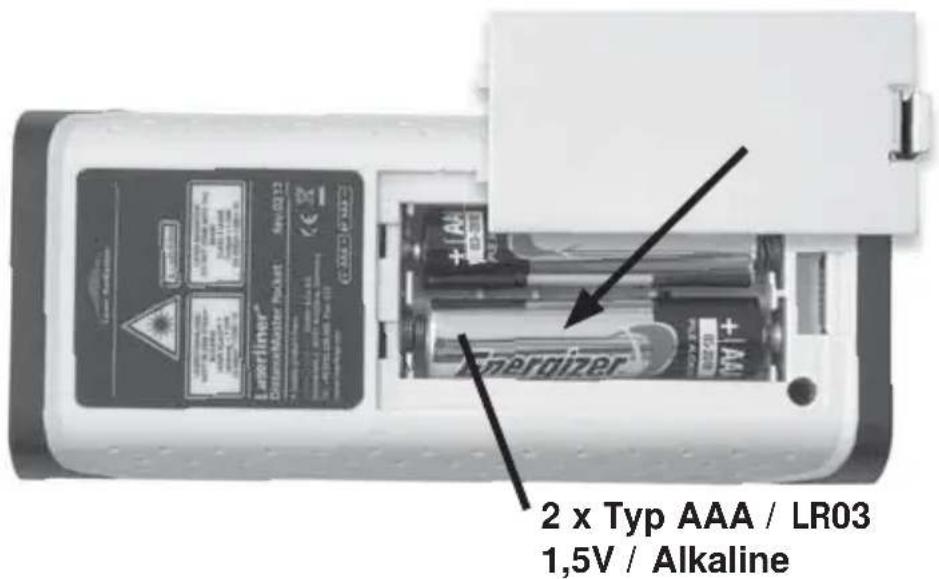
| Power supply | 2 AAA 1.5 V batteries |
| Measuring range (indoor) | 0.05 m - 40 m |
| Typical accuracy | ± 2 mm / 10 m |
| Laser class | 2 (< 1 mW, 650 nm) |
| Measurement functions | Length, area, volume, Pythagoras 1 and 2, addition/subtraction, continuous min/max measurement, reference measurement |
| Measurement units | m, ft, inch, ft/in |
| Memory | Yes (last values) |
| Display illumination | Yes, can be turned on/off |
| Automatic shut-off | Laser: 28 s, Unit: 3 min |
| Operating temperature | -10 °C to 40 °C |
| Storage temperature | -20 °C to 70 °C |
| Maintenance and cleaning | Clean with a soft cloth; avoid moisture in the housing |
| Safety | Laser class 2, do not look into the beam, keep out of reach of children |
| Spare parts and repairability | Standard AAA batteries; for other parts, contact Laserliner customer service |
| General information | Compliant with EU, WEEE recycling, full manual available at laserliner.com/info |
Frequently Asked Questions - DistanceMaster Pocket Laserliner
User questions about DistanceMaster Pocket Laserliner
0 question about this device. Answer the ones you know or ask your own.
Ask a new question about this device
Download the instructions for your Rangefinder in PDF format for free! Find your manual DistanceMaster Pocket - Laserliner and take your electronic device back in hand. On this page are published all the documents necessary for the use of your device. DistanceMaster Pocket by Laserliner.
USER MANUAL DistanceMaster Pocket Laserliner
DistanceMaster Pocket
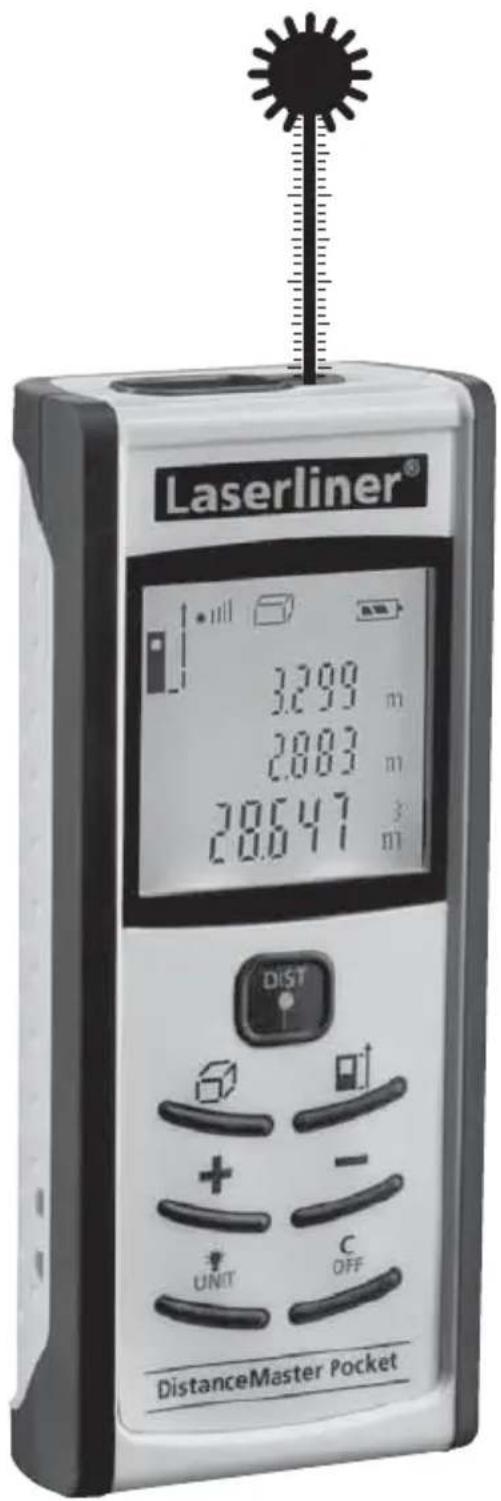

Laser
650 nm
Laserliner®
Innovation in Tools
| DE | 04 |
| GB | 11 |
| NL | 18 |
| DK | 25 |
| FR | 32 |
| ES | 39 |
| IT | 46 |
| PL | 53 |
| FI | 60 |
| PT | 67 |
| SE | 74 |
| NO | 81 |
| TR | 88 |
| RU | 95 |
| UA | 102 |
| CZ | 109 |
| EE | 116 |
| LV | 123 |
| LT | 130 |
| RO | 137 |
| BG | 144 |
| GR | 151 |
DistanceMaster Pocket
natural_image
Architectural sketch of a modern building with diagonal light beams and window grilles, no text or symbols present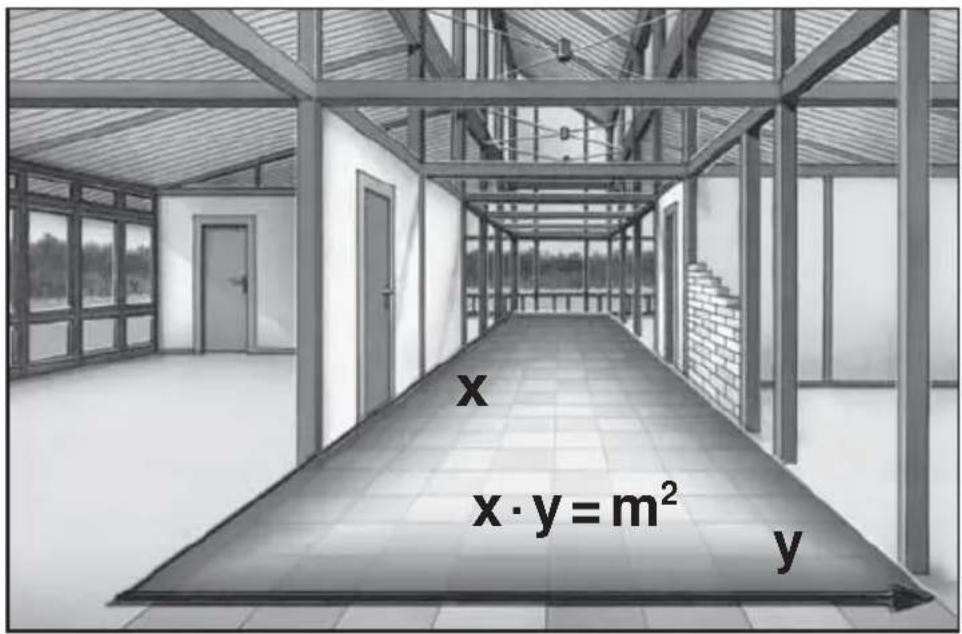

TASTATUR:
-
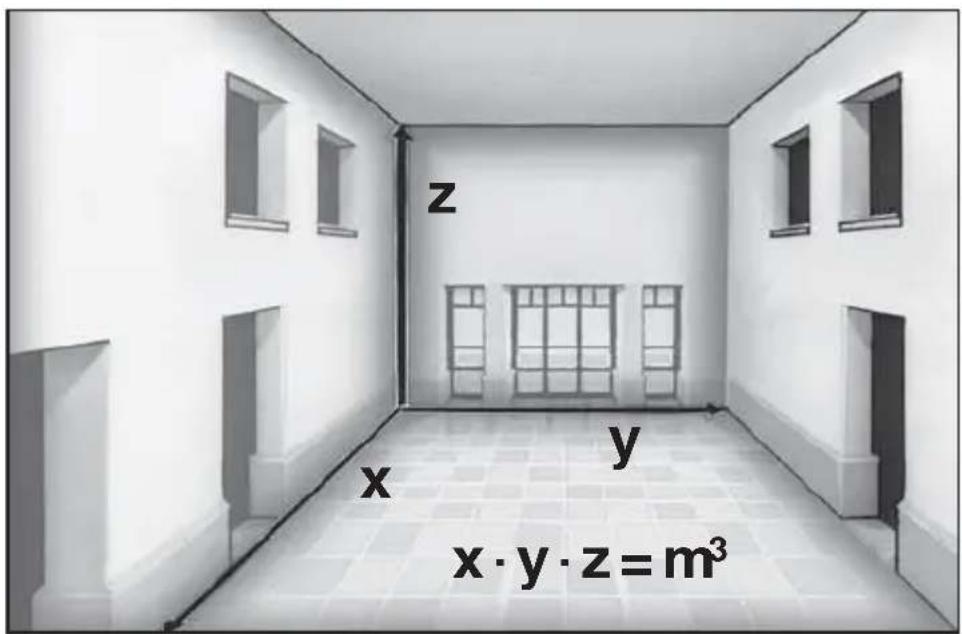
Messung
-
Messung = Fläche 1
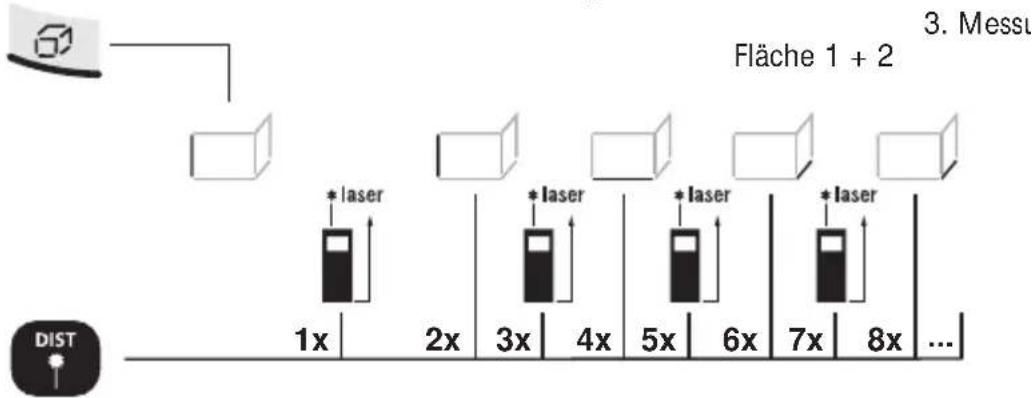
Laser an / ... Messung = Fläche 1 + Fläche 2 + Fläche 3 + ...

Read the operating instructions and the enclosed brochure „Guarantee and additional notices“ completely. Follow the instructions they contain. Safely keep these documents for future reference.
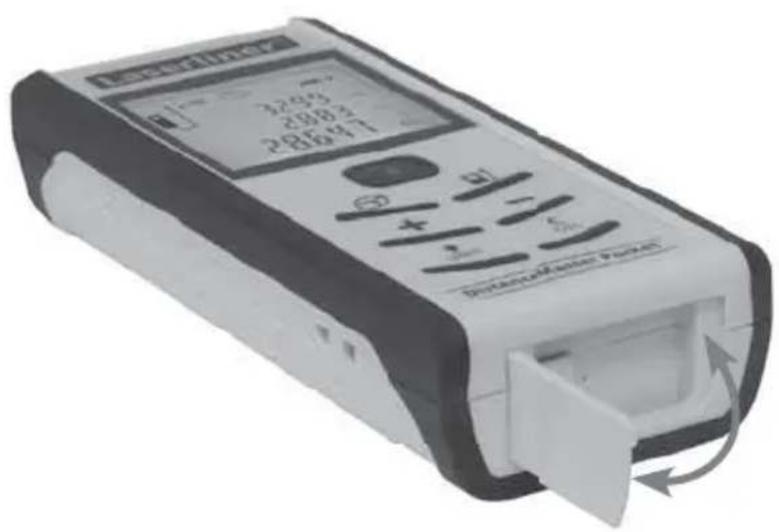
Compact laser distance meter for measuring length, area and volume
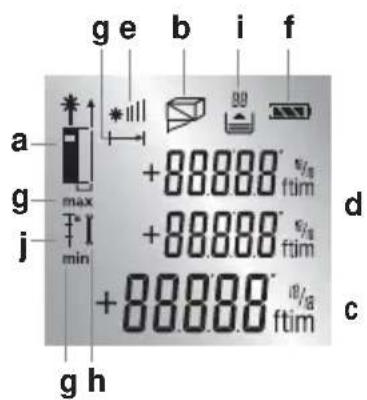
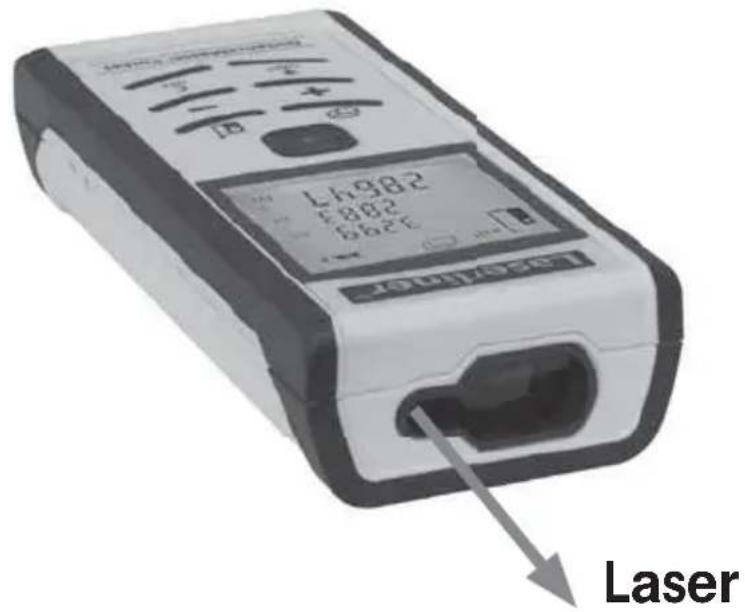
DISPLAY:
a Measurement point (reference) rear / pin / front
b Display length / area / area addition / volume / Pythagoras 1 / Pythagoras 2
c Measurement values / Measurement results Unit m / ft / inch / __“
d Intermediate values / min/max values
e The bar diagram shows how well suited the reflection surface is for measurement. This is particularly useful for measuring over long distances, dark surfaces or bright ambient light.
f Battery symbol
g min/max continuous measurement
h Malfunction / service required
i Memory
j Reference measurement
2.
3.
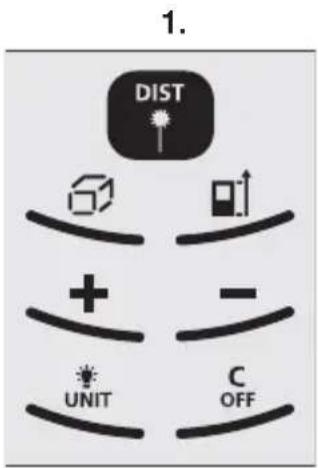
KEYPAD:
- ON / Measure / min/max continuous measurement
- length, area, area addition, volume, Pythagoras, Reference measurement
- Measurement point (reference) rear / pin / front
- addition of lengths, areas, volumes
- subtraction of lengths, areas, volumes
- Display lighting ON/OFF / Unit of measure m / ft / inch / _ ` "
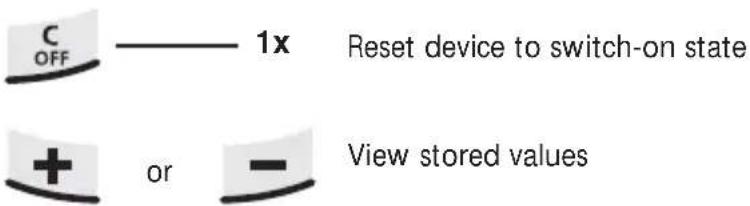
- OFF / delete last measurement values
natural_image
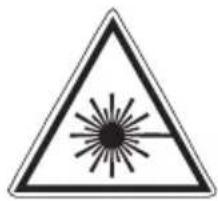
Warning symbol with a sunburst pattern inside a triangle (no text or numbers)Laser radiation! Do not stare into the beam! Class 2 laser < 1 mW · 650 nm EN 60825-1:2007-10

Do not look directly into the beam. Lasers must be kept out of reach of children. Never intentionally aim the device at people.
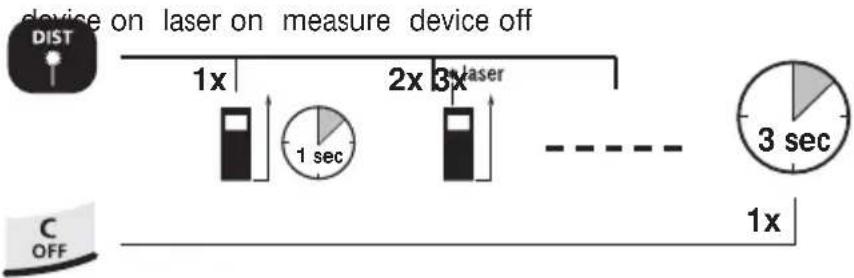
Switch on, measure and switch off:
flowchart
graph LR
    A["device on laser on measure device off"] --> B["1x"]
    B --> C["1 sec"]
    C --> D["2x"]
    D --> E["3x"]
    E --> F["3 sec"]
    G["C OFF"] --> H["1x"]
    style A fill:#f9f,stroke:#333
    style G fill:#ccf,stroke:#333
Change unit of measure:
m / ft / inch / _ "


Delete the last measured value:
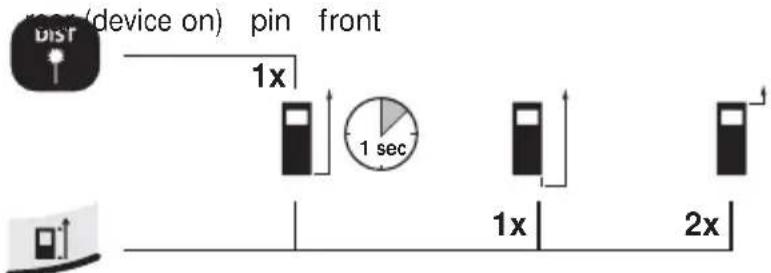
Change measurement point (reference):
flowchart
graph LR
    A["Device 1"] --> B["Pin 1x"]
    B --> C["Clock 1 sec"]
    C --> D["Device 2x"]
    D --> E["Pin 2x"]
    style A fill:#f9f,stroke:#333
    style B fill:#ccf,stroke:#333
    style C fill:#cfc,stroke:#333
    style D fill:#fcc,stroke:#333
    style E fill:#cff,stroke:#333
Change measurement function:
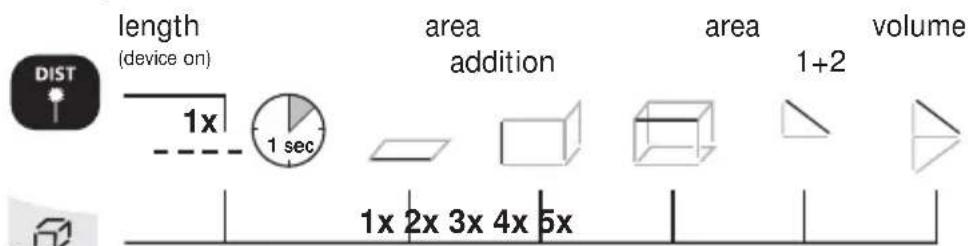
DistanceMaster Pocket
Length measurement:
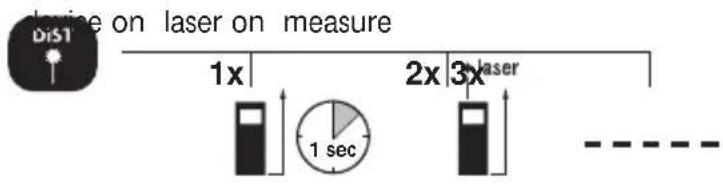
Memory function:
Area measurement:
area laser on 1. measure-laser on 2. measure-
Area addition:
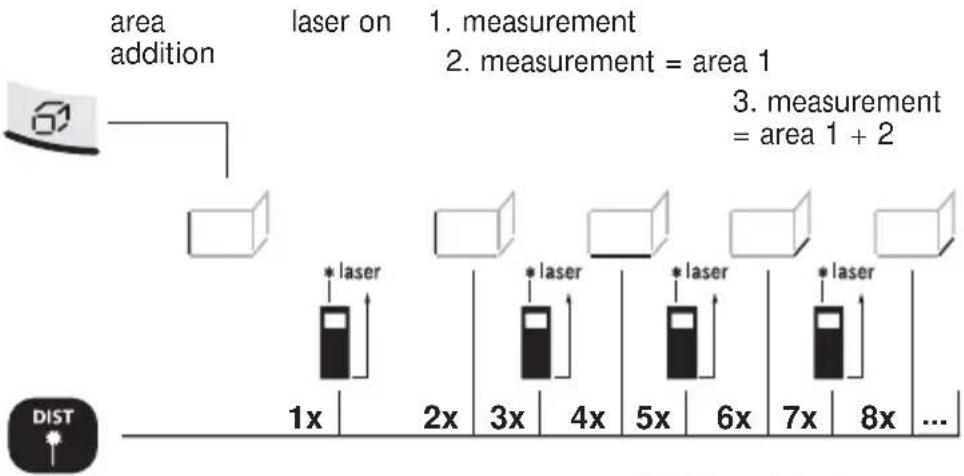
flowchart
graph TD
    A["area addition"] --> B["laser on"]
    B --> C["1x"]
    B --> D["2x"]
    B --> E["3x"]
    B --> F["4x"]
    B --> G["5x"]
    B --> H["6x"]
    B --> I["7x"]
    B --> J["8x"]
    B --> K["..."]
    style A fill:#f9f,stroke:#333
    style B fill:#ccf,stroke:#333
    style C fill:#cfc,stroke:#333
    style D fill:#cfc,stroke:#333
    style E fill:#cfc,stroke:#333
    style F fill:#cfc,stroke:#333
    style G fill:#cfc,stroke:#333
    style H fill:#cfc,stroke:#333
    style I fill:#cfc,stroke:#333
    style J fill:#cfc,stroke:#333
    style K fill:#fcc,stroke:#333
Addition of further areas: Laser active / ... measurement = area 1 + area 2 + area 3 + ...

Linked wall areas are added here. When adding areas, only the length needs to be measured as from the 3rd measurement. The value from the 1st measurement is always used as the height.
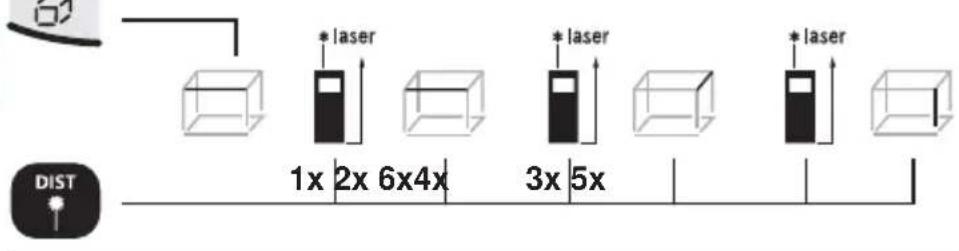
Volume measurement:
volume 1. measurement 2. measurement 3. measurement
Addition and subtraction of lengths:
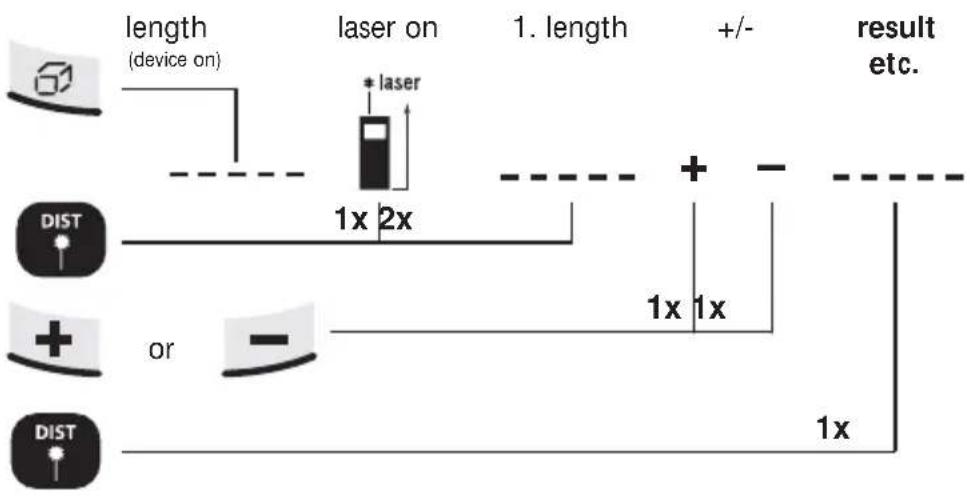
flowchart
graph TD
    A["Device 1"] --> B["Length (device on)"]
    B --> C["laser on"]
    C --> D["+ laser"]
    D --> E["Result etc."]
    F["Dist"] --> G["or"]
    G --> H["1x 2x"]
    H --> I["1x 1x"]
    I --> J["1x"]
    J --> K["1x"]
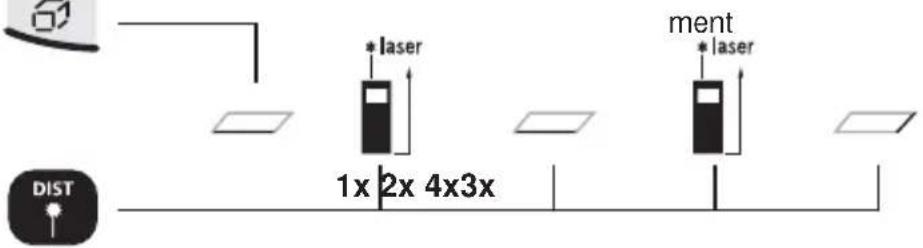
Area calculation:
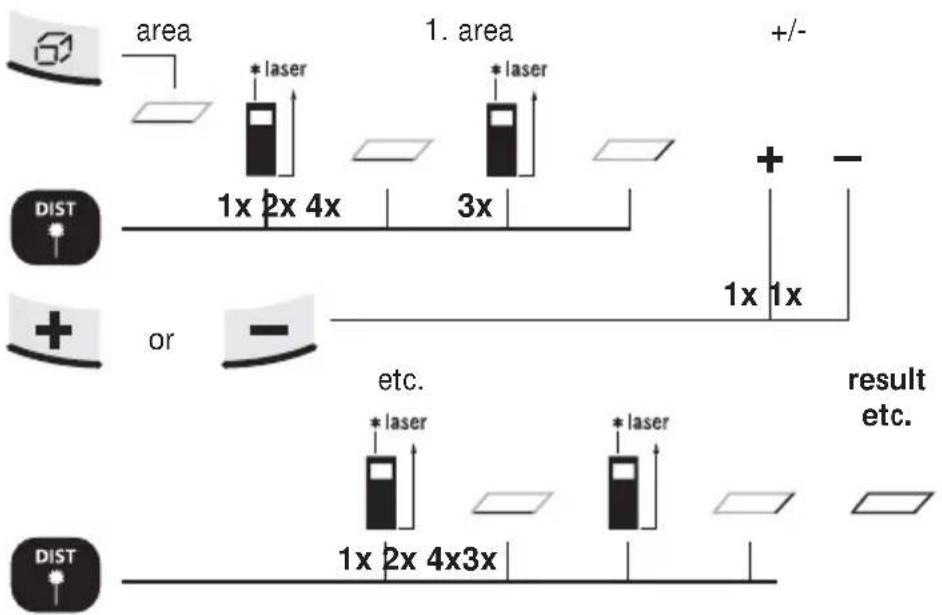
flowchart
graph TD
    A["area"] --> B["1x 2x 4x"]
    B --> C["3x"]
    C --> D["+/-"]
    E["DIST"] --> F["or"]
    F --> G["etc."]
    G --> H["1x 2x 4x3x"]
    H --> I["*laser"]
    J[" result etc. "] --> K["*laser"]
    L[" "] --> M[" "]
DistanceMaster Pocket
Volume calculation:
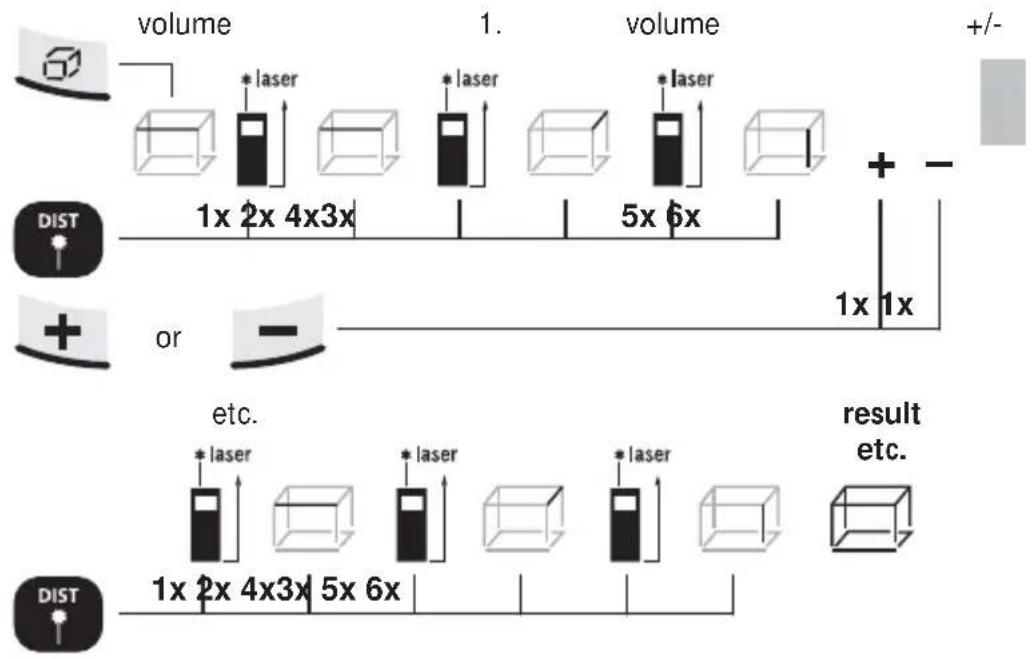
flowchart
graph TD
    A["Input Image"] --> B["Volume 1x 2x 4x3x"]
    B --> C["Volume 5x 6x"]
    C --> D["Result with +/- axis"]
    E["DIST"] --> F["or"]
    F --> G["Volume 1x 2x 4x3x"]
    G --> H["Volume 5x 6x"]
    H --> I["Result with +/- axis"]
    J["etc."] --> K["Output: *laser"]
    K --> L["Result: *laser"]
    L --> M["Result: *laser"]
    M --> N["Result: *laser"]
    N --> O["Result: *laser"]
    O --> P["Result: *laser"]
    P --> Q["Result: *laser"]
    Q --> R["Result: *laser"]
    R --> S["Result: *laser"]
    S --> T["Result: *laser"]
    T --> U["Result: *laser"]
    U --> V["Result: *laser"]
    V --> W["Result: *laser"]
    W --> X["Result: *laser"]
    X --> Y["Result: *laser"]
    Y --> Z["Result: *laser"]
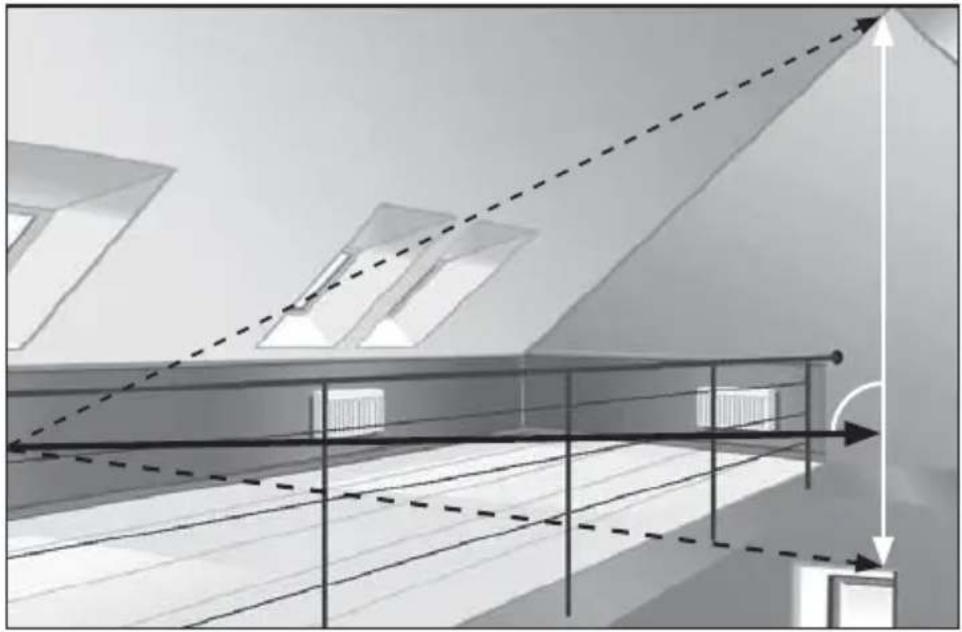
Pythagoras function 1:
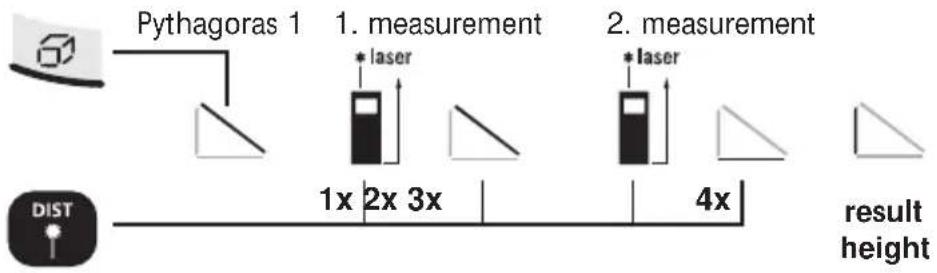
flowchart
graph LR
    A["Pythagoras 1"] --> B["1x"]
    B --> C["2x"]
    C --> D["3x"]
    D --> E["4x"]
    E --> F["result height"]
    G["DIST"] --> H["△"]
    I["laser"] --> J["1x"]
    K["laser"] --> L["2x"]
    M["laser"] --> N["3x"]
    O["laser"] --> P["4x"]
Pythagoras function 2:
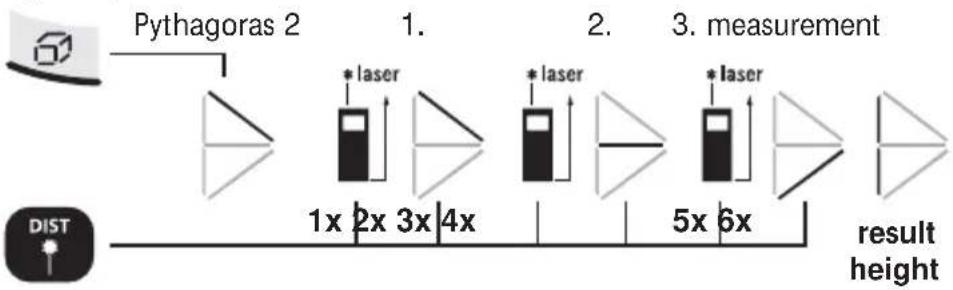
flowchart
graph LR
    A["Input: Pythagoras 2"] --> B["1x"]
    B --> C["2x"]
    C --> D["3x"]
    D --> E["4x"]
    E --> F["5x"]
    F --> G["6x"]
    G --> H["result height"]
    I["DIST"] --> J["Output: *laser"]
    J --> K["Measurement: *laser"]
The 2nd measurement takes place with automatic Min/Max function.
min/max continuous measurement:
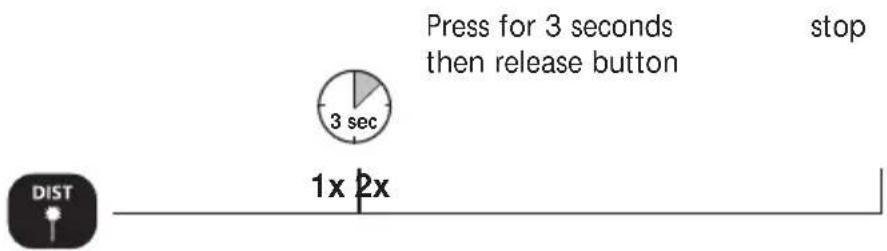
The LC display shows the max value, the min value and the current value.
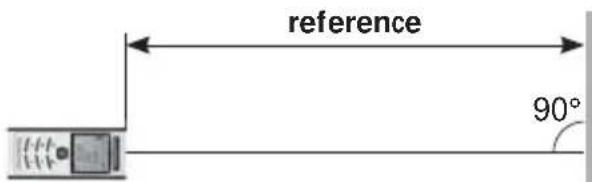
Reference measurement:
Reference length



Set reference length
1a. Selection of 1b. Number 2. Define reference
tens
position
set-up
value



1x
-
Now move the laser forward and back.
-
Rapid beeping: Measured value within reference value of ±1 mm.
Slow beeping: Reference value not yet reached.
Important notices
- The laser points to the location that will be measured. No objects may get into the laser's line of measurement.
- The device compensates the measurement for different room temperatures. Therefore allow the device a brief adaptation period when changing locations with large temperature differences.
- The device is only conditionally useable in outdoor areas and cannot be used in strong sunlight.
- The measurement results of outdoor measurements may be influenced or falsified by rain, fog and snow.
- In unfavourable conditions, e.g. with poorly reflecting surfaces, the maximum deviation may be greater than 3 mm.
- Carpeting, upholstery or curtains will not reflect the laser optimally. Measure to flat surfaces.
- Measurements made through glass (window panes) can falsify measurement results.
- An energy-saving function switches the device off automatically.
- Clean with a soft cloth. Water may not be allowed to penetrate the housing.
Technical Data (Subject to technical changes without notice)
| Inside measurement range 0,05 m - 40 m | |
| Precision (typical)* ± 2 mm / 10 m | |
| Laser class 2 < 1 mW | |
| Laser wavelength 650 nm | |
| Power supply | 2 x AAA 1.5 Volt batteries |
| Dimensions (W x H x D) 48 x 112 x 24 mm | |
| Weight (incl. batteries) 106 g | |
| Automatic switch-off | 28 sec laser / 3 min device |
| Operating temperature -10°C – 40°C | |
| Storage temperature -20°C – 70°C | |
| Article number 080.945A | |
* measuring distance up to 10 m with strongly reflective target surface and at room temperature. The measurement deviation may increase by ± 0.2 mm/m for greater distances and under unfavourable measuring conditions such as strong sunlight or weakly reflective target surfaces.
Error codes:
Err101: Replace the battery
Err104: Calculation error
Err152: Temperature is too high: > 40°C
Err154: Temperature is too low: < 0°C
Err155: Received signal too weak
Err156: Received signal too strong
Err157: Incorrect measurement or background is too bright
Err160: The device is moving too much to measure.
EU directives and disposal
This device complies with all necessary standards for the free movement of goods within the EU.
This product is an electric device and must be collected separately for disposal according to the European Directive on waste electrical and electronic equipment.
Further safety and supplementary notices at:
www.laserliner.com/info


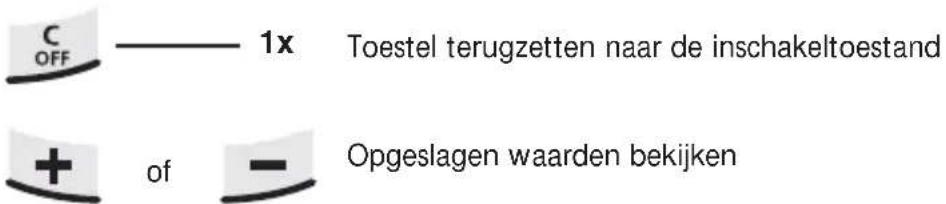
Geheugenfunctie:
3.
5.
7.
TASTATUR:
natural_image
Warning symbol with a triangular triangle and radiating lines, no text or numbers present3.
TECLADO:
Radiação laser! ¡No mire al rayo láser! Láser classe 2 < 1 mW · 650 nm EN 60825-1:2007-10

Err101: Trocar as baterias
- 7.
KNAPPSATS:
Laserstrålning! Titta aldrig direkt in i laserstrålen! Laser klass 2 < 1 mW · 650 nm EN 60825-1:2007-10

3.
TASTATUR:
Laserstråling! Ikke se inn i strålen!
Laser klasse 2
< 1 mW · 650 nm
EN 60825-1:2007-10

Ikke se direkte inn i strålen! Laserinstrumentet må oppbevares utilgjengelig for barn! Ikke rett instrumentet mot personer när det ikke er nødvendig.
1x
Err155: Mottatt signal for svakt
Err156: Mottatt signal for sterkt
- 7.
TUŞ TAKIMI:
natural_image
Warning symbol with a triangular triangle and central starburst (no text or numbers)Önemli Uyarılar
- 7.
КЛАВИАТУРА:
- 7.
КЛАВІАТУРА:
natural_image
Warning symbol with a triangular triangle and central starburst (no text or numbers)3.
KLÁVESNICE:
3.
5.
7.
KLAVIATUUR:
natural_image
Warning symbol with a triangular triangle and radiating lines, no text or numbers presentLaserkiirgus! Mitte vaadata laserikiirt! Laseriklass 2 < 1 mW · 650 nm EN 60825-1:2007-10


natural_image
Warning symbol with a triangular triangle containing a central starburst pattern (no text or numbers)3.
TASTATURĂ:
natural_image
Warning symbol with a sunburst pattern inside a triangle (no text or numbers)Ακτινοβολία λέιζερ!
Λειτουργία μνήμης:
natural_image
Interior view of a modern building hallway with ceiling beams, hanging pendant lights, and a telephone receiver (no text or symbols visible)SERVICE

Umarex GmbH & Co KG
-Laserliner-

- DistanceMaster Pocket
- TASTATUR:
- Compact laser distance meter for measuring length, area and volume
- DISPLAY:
- KEYPAD:
- Switch on, measure and switch off:
- Change unit of measure:
- Delete the last measured value:
- Change measurement point (reference):
- Change measurement function:
- Length measurement:
- Memory function:
- Area measurement:
- Area addition:
- Volume measurement:
- Addition and subtraction of lengths:
- Area calculation:
- Reference measurement:
- Set reference length
- Important notices
- Error codes:
- EU directives and disposal
- Geheugenfunctie:
- TECLADO:
- KNAPPSATS:
- TUŞ TAKIMI:
- Önemli Uyarılar
- КЛАВИАТУРА:
- КЛАВІАТУРА:
- KLÁVESNICE:
- KLAVIATUUR:
- TASTATURĂ:
- Λειτουργία μνήμης:
Brand : Laserliner
Model : DistanceMaster Pocket
Category : Rangefinder