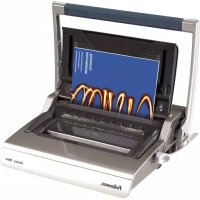
Encuadernadora Galaxy Wire - Binding machine FELLOWES - Free user manual and instructions
Find the device manual for free Encuadernadora Galaxy Wire FELLOWES in PDF.



| Product type | Metal ring binder |
| Brand | Fellowes |
| Model | Galaxy Wire |
| Dimensions (W x D x H) | 530 x 450 x 165 mm |
| Net weight | 12 kg |
| Compatible paper sizes | A4, A5 |
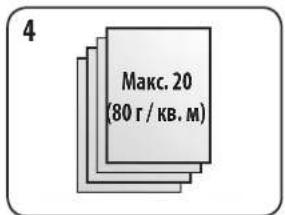
| Punching capacity (80 g/m² paper) | 20 sheets |
| Punching capacity (transparent covers 100-200 microns) | 3 sheets |
| Punching capacity (transparent covers >200 microns) | 2 sheets |
| Punching capacity (other covers 160-270 g/m²) | 3 sheets |
| Punching capacity (other covers >270 g/m²) | 2 sheets |
| Maximum binding capacity | 130 sheets (80 g/m²) with 14 mm ring |
| Maximum ring diameter | 14 mm |
| Number of punching holes | 34 |
| Hole spacing | 2.5 mm |
| Adjustable paper stop | Yes, rotating |
| Waste tray capacity | Approximately 3000 sheets |
| Ring closing methods | Visual graduation and selection wheel |
| Maintenance and cleaning | Empty the waste tray regularly (every 50 uses) |
| Safety | Stable surface, do not exceed maximum capacity, watch out for pinch points |
| Replacement parts | Not specified in instructions; contact Fellowes |
| Repairability | 2-year warranty; repair or replacement by Fellowes |
| Power supply | Manual (manual punching) |
| General information | Designed for desktop use, horizontal storage |
Frequently Asked Questions - Encuadernadora Galaxy Wire FELLOWES
User questions about Encuadernadora Galaxy Wire FELLOWES
0 question about this device. Answer the ones you know or ask your own.
Ask a new question about this device
Download the instructions for your Binding machine in PDF format for free! Find your manual Encuadernadora Galaxy Wire - FELLOWES and take your electronic device back in hand. On this page are published all the documents necessary for the use of your device. Encuadernadora Galaxy Wire by FELLOWES.
USER MANUAL Encuadernadora Galaxy Wire FELLOWES
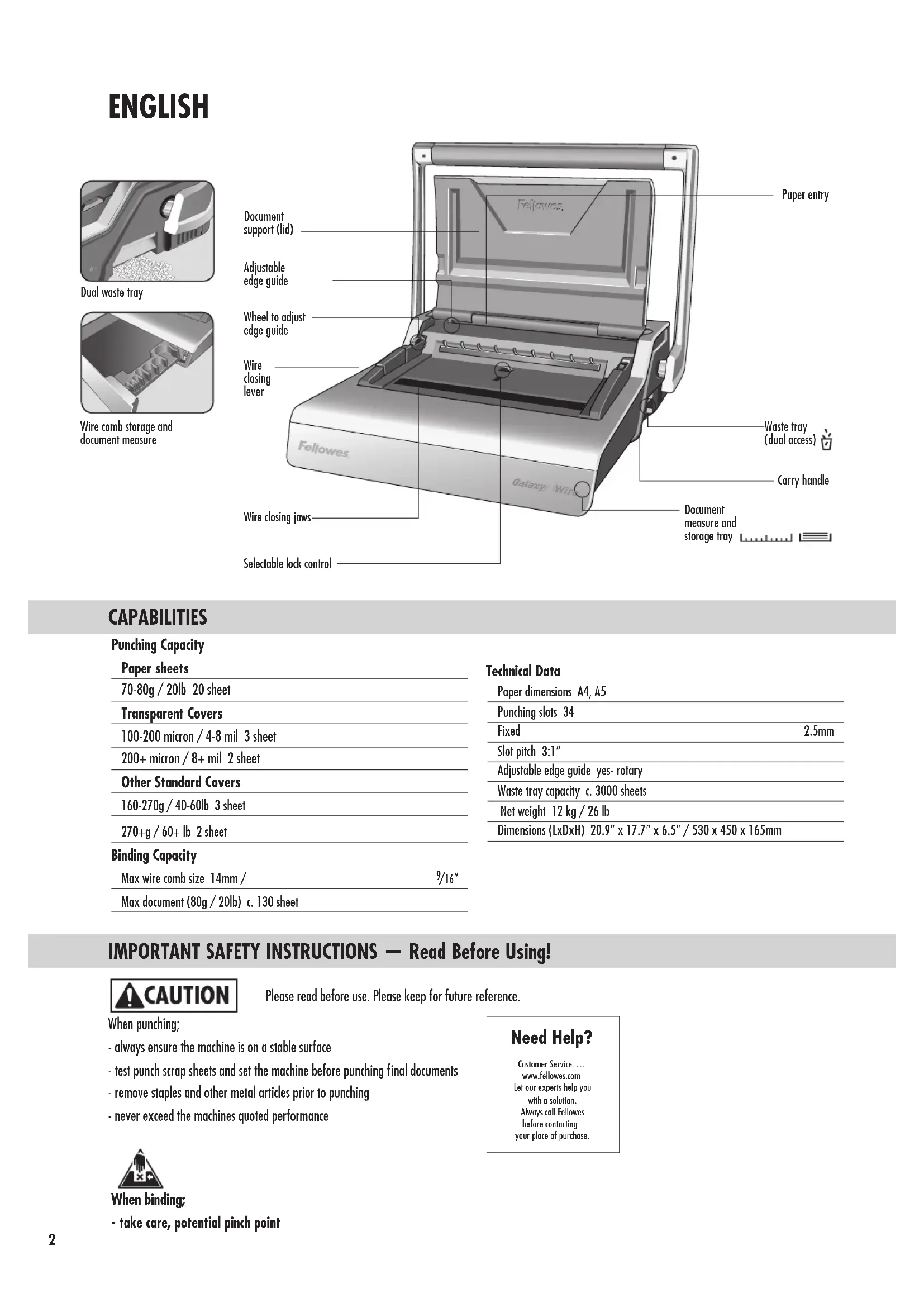
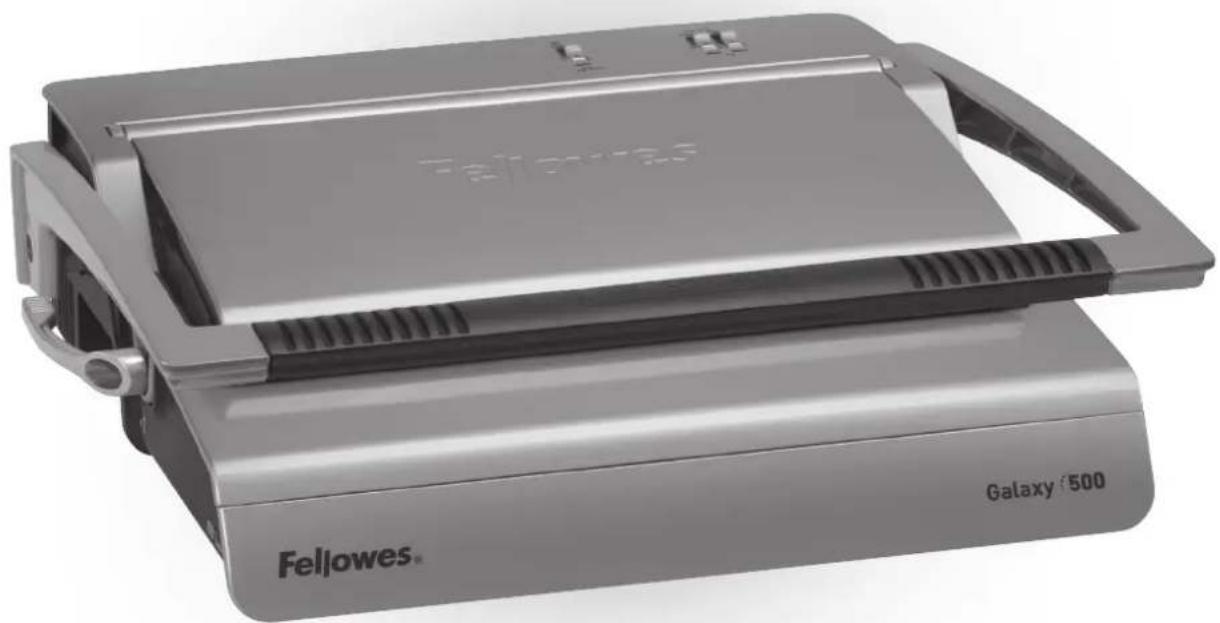
Electric Premium Wire Binder
Galaxy:Wire
Please read these instructions before use. Do not discard: keep for future reference.
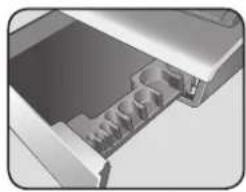
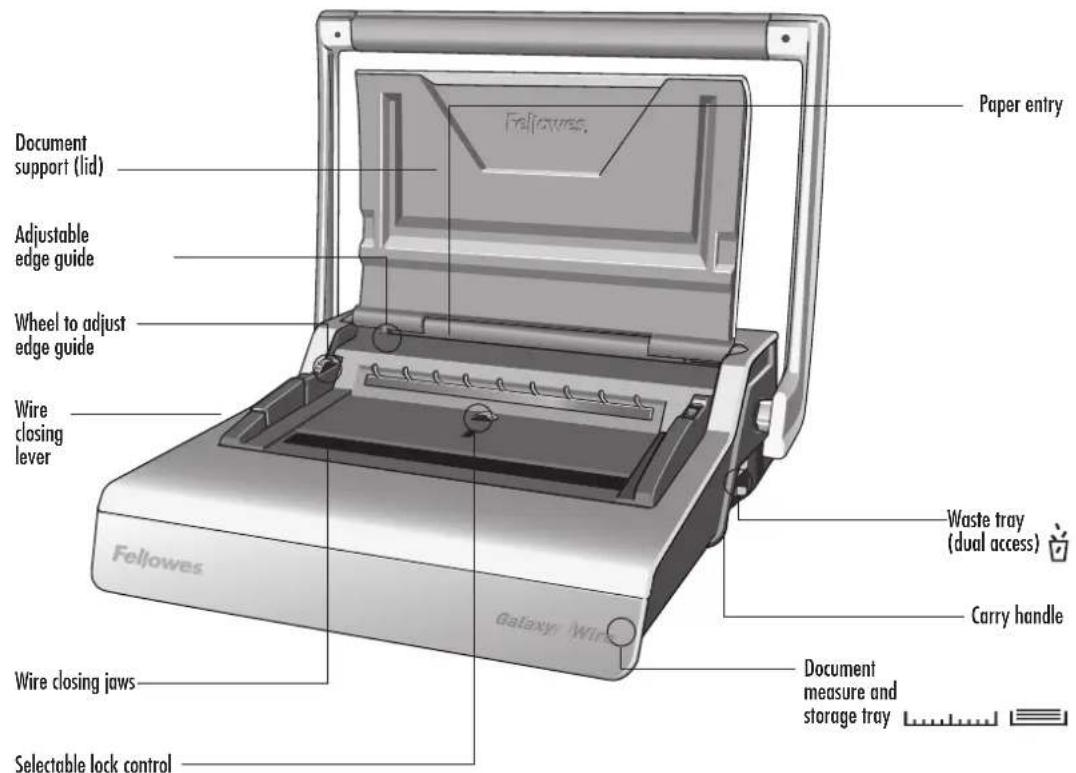
Wire comb storage and document measure
CAPABILITIES
Punching Capacity
| Paper sheets | |
| 70-80g / 20lb 20 sheet | |
| Transparent Covers | |
| 100-200 micron / 4-8 mil 3 sheet | |
| 200+ micron / 8+ mil 2 sheet | |
| Other Standard Covers | |
| 160-270g / 40-60lb 3 sheet | |
| 270+g / 60+ lb 2 sheet | |
| Binding Capacity | |
| Max wire comb size 14mm / | 9/16" |
| Max document (80g / 20lb) c. 130 sheet | |
Technical Data
| Paper dimensions A4, A5 | |
| Punching slots 34 | |
| Fixed | 2.5mm |
| Slot pitch 3:1" | |
| Adjustable edge guide yes- rotary | |
| Waste tray capacity c. 3000 sheets | |
| Net weight 12 kg / 26 lb | |
| Dimensions (LxDxH) 20.9" x 17.7" x 6.5" / 530 x 450 x 165mm | |
IMPORTANT SAFETY INSTRUCTIONS - Read Before Using!
CAUTION
Please read before use. Please keep for future reference.
When punching;
- always ensure the machine is on a stable surface
- test punch scrap sheets and set the machine before punching final documents
- remove staples and other metal articles prior to punching
- never exceed the machines quoted performance

When binding;
- take care, potential pinch point
Need Help?
Customer Service.. www.fellowes.com
Let our experts help you with a solution. Always call Fellowes before contacting your place of purchase.
WIRE COMB DIAMETER & DOCUMENT SIZES
| mm | inch | number of sheets |
| 6mm | 1/4" | 2-35 |
| 8mm | 5/16" | 36-50 |
| 10mm | 3/8" | 51-61 |
| 11mm | 7/16" | 61-80 |
| 12mm | 1/2" | 81-100 |
| 14mm | 9/16" | 100-130 |
Need Help?
Customer Service: ... www.fellowes.com
Let our experts help you with a solution.
Always call Fellowes before contacting your place of purchase.
SET UP
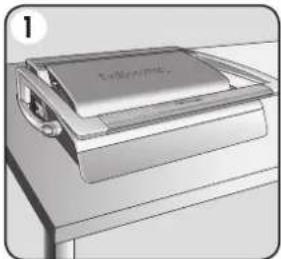
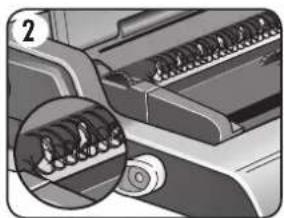
1. Ensure the machine is on a stable surface.
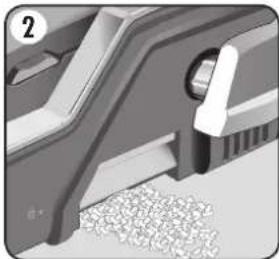
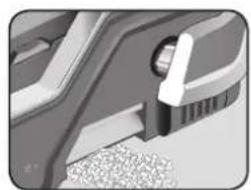
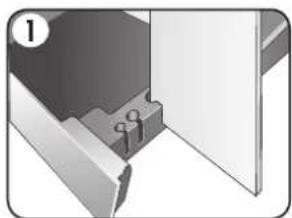
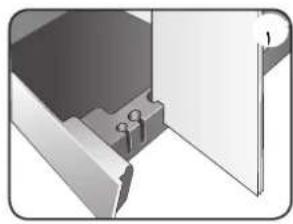
2. Check waste tray is empty and correctly fitted. The tray can be accessed from the left and right sides. The tray has a 'burst feature' that operates when the chip tray is 'over-full'.
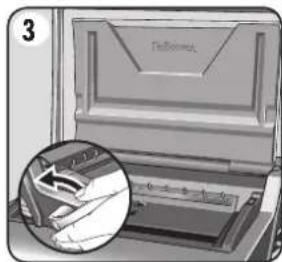
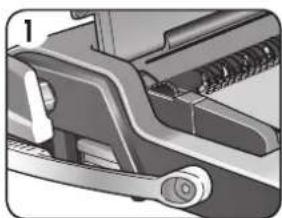
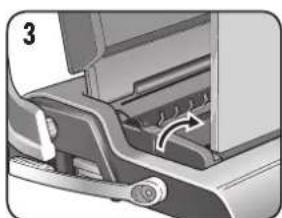
3. Lift the lid. Ensure the wire closing lever is pushed backwards.
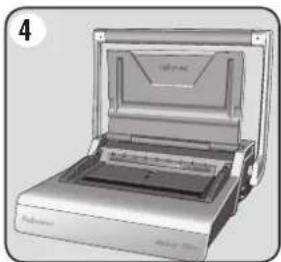
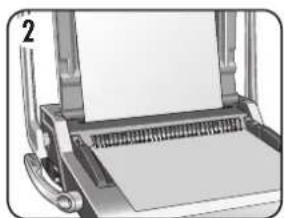
4. Lift the punch handle to its upright position.
ENGLISH
BEFORE YOU BIND
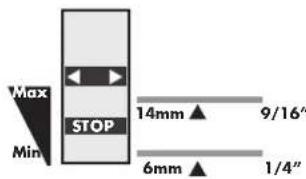
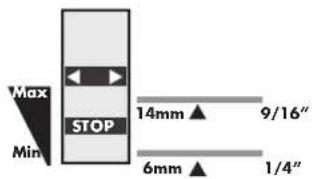
Galaxy includes two methods of wire comb closure, for all sizes of wire comb diameters between 6 and 14mm
1-Visual scale.-ideal for binding single documents.
The moving closing jaw includes an easy to read scale

2- Selectable lock control. - ideal for multiple documents of the same sizes.
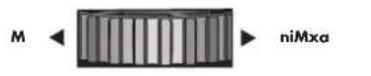
Set the red STOP bar to the preferred position. Turn the control wheel towards MAX or MIN positions as required.
The red stop bar moves up and down within the central window.

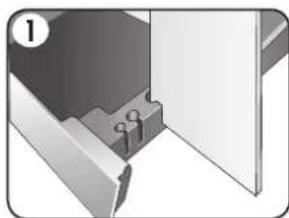
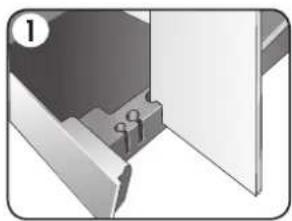
1. Select the correct wire comb diameter using the storage tray guide.
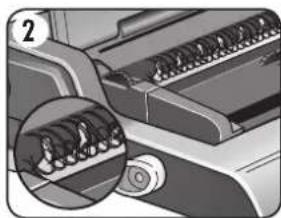
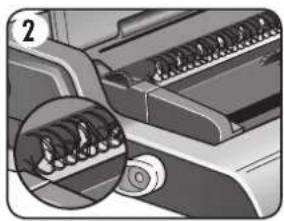
2. Hang the selected wire comb onto wire comb support.
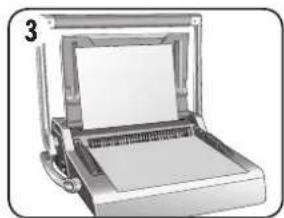
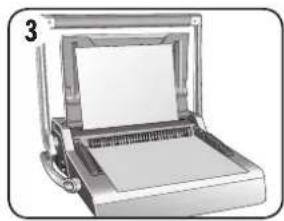
3. Test punch scrap sheets to check edge guide setting.
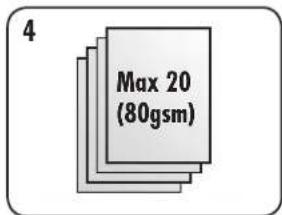
4. Punch sheets in small batches that do not overload the machine or user.
STEPS TO BIND - SINGLE DOCUMENT
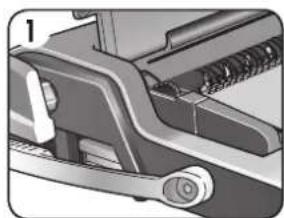
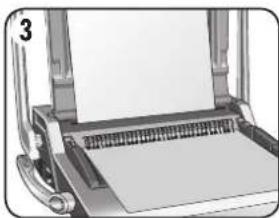
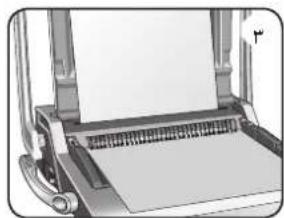
1. Starting with the rear cover. Load punched sheets directly onto the hanging open wire comb.
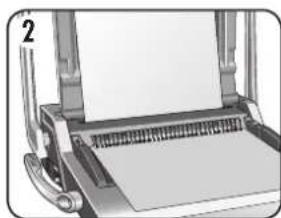
2. Punch and hang the front cover. Punch and hang the remaining sheets.
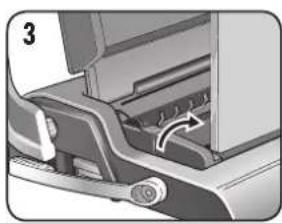
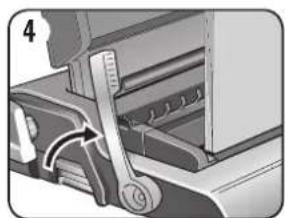
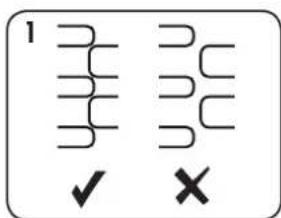
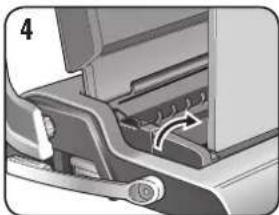
3. Lift the wire comb upwards off the hooks. Carefully place into the open wire dosing jaws. Ensure the wire comb is open and touching the bottom of the mechanism.
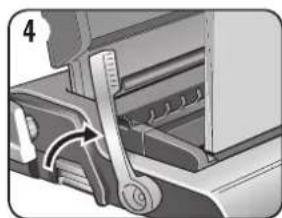
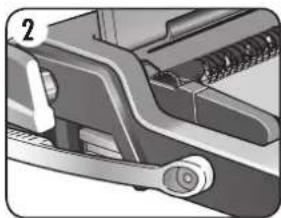
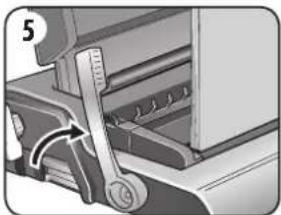
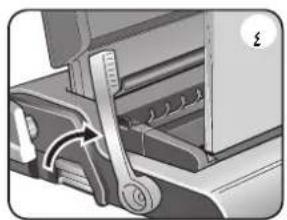
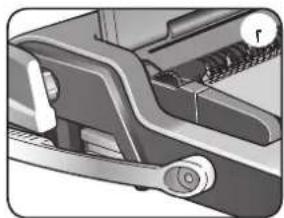
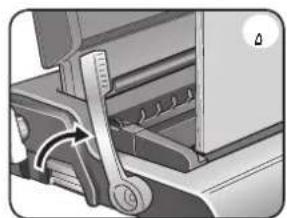
4. Lift the wire closing lever forwards. The closing scale guide is on the moving jaw. Close the jaws until the wire gauge shows the size of wire being closed.
STEPS TO BIND - MULTIPLE DOCUMENTS
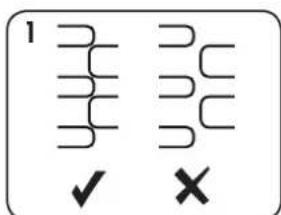
- Test close selected wire comb. Set closure lock as required. Check wire seam closure is complete.
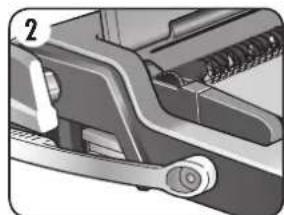
- Starting with the rear cover. Load punched sheets directly onto the hanging open wire comb.
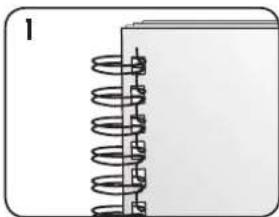
- Punch and hang the front cover. Punch and hang the remaining sheets.
- Lift the wire comb upwards off the hooks. Carefully place into the open wire closing jaws. Ensure the wire comb is open and touching the bottom of the mechanism.
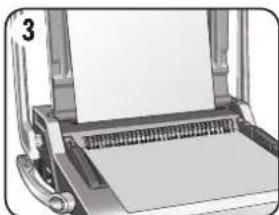
- Lift the wire closing lever. The jaws will close at the pre-selected stop position.
FINISHING THE BINDING
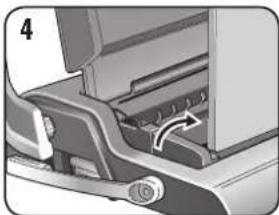
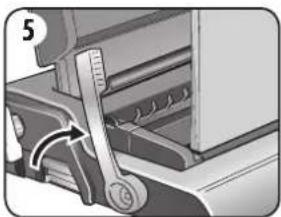
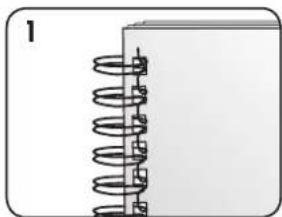
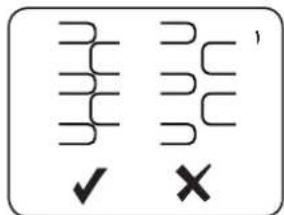
- Check the closed seam. If the seam is not closed correctly, the document can be placed into the jaws and closed again.
- To hide the seam, turn the rear cover backwards. The front cover is now visible. The seam is hidden inside the document.
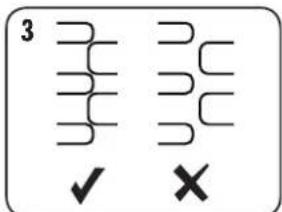
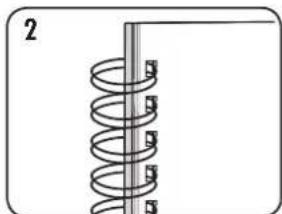
- Check wire seam closure is complete. Loose binding allows sheet loss. Good closure retains all sheets.
CORRECTING A BOUND DOCUMENT
Wire binding is a secure binding system. Additional sheets cannot be added unless the document is disassembled and then re-bound.
REMOVAL OF WASTE CLIPPINGS
The waste tray is located under the machine and is accessed from each side. For best results empty the tray regularly. The tray should be emptied after every 50 operations to ensure no blockages occur.
STORAGE
Lower the lid. The Galaxy wire binder is designed to be stored horizontally on the desk.
TROUBLESHOOTING
| Problem | Cause | Solution |
| Cannot close wire comb tightly enough | Closing jaws set at too large a diameter | Revise closure lock setting to suit smaller diameter as required |
| Damaged hole edges | Possibly overloading the machine | Punch plastic covers with paper sheets. Reduce number of sheets being punched |
| Waste tray leaks | Waste tray is not correctly inserted or ‘burst feature’ has activated | Check waste tray is empty and ‘burst feature’ is closed |
| Punched holes are not central | Edge guide not set | Adjust edge guide until hole pattern is correct |
| Machine will not punch | Blockage | Check waste tray is empty. Check for blockage to paper entry |
| Punch holes are not parallel to edge | Debris is stuck below dies | Take stiff cardboard and slide into the paper entry. Move the cardboard sideways to release any stray clippings into the waste tray |
| Partial hole edges | Sheets not correctly aligned to punch pattern | Adjust edge guide and test punch scrap sheets until correct |
| Sheets fall out of document | Wire comb is not closed enough | Check closure of wire comb. Place into closing mechanism and improve binding closure. Revise closure lock setting to suit smaller diameter as required |
WORLDWIDE WARRANTY
Fellows warrants all parts of the binder to be free of defects in material and workmanship for 2 years from the date of purchase by the original consumer. If any part is found to be defective during warranty period, your sale and exclusive remedy will be repair or replacement, at Fellows' option and expense, of the defective part. This warranty does not apply in cases of abuse, mishandling or unauthorised repair. Any implied warranty, including that of merchantability or fitness for particular purpose, is hereby limited in duration to the appropriate warranty period set forth above. In no event
shall Fellowes be liable for any consequential damages attributable to this product. This warranty gives you specific legal rights. You may have other legal rights that vary from this warranty. The duration, terms and conditions of this warranty are valid worldwide, except where different limitations, restrictions or conditions may be required by local law. For more details or to obtain services under this warranty, please contact Fellowes or your dealer.
FRANÇAIS
Double bac de stockage
Pas de perforation 3:1"
You've asked because?
Service clients... www.fellowes.com
WERELDWIJDE GARANTIE
Iot yiro experter biolog ding
Fellows first innpn du
kontoktor inkopsstille.
TRÄDRYGGSSTORLEK I DIAMETER SAMT DOKUMENTSTORLEKAR
| mm antal ark | 20lb 80g |
| 6 mm 2-35 | |
| 8 mm 36-50 | |
| 10 mm 51-61 | |
| 11 mm 61-80 | |
| 12 mm 81-100 | |
| 14 mm 100-130 |
Behöver du hjälp?
Kundservice....www.fellowes.com
Lat vare expeter hjalpa dig med on losning. Ring alltid Fellowes forst innan du kontaktar inkopsttillet.
INSTÄLLNINGAR
IIPEEDHAYAJOMPA60TbI
ByctpoCTBe Galaxy npedycmptepno Dba cnocoba ckpenneHn npoBOnOuHoi rpe6eKn Ira npoBOnOuHbIX rpe6eHOK Bcex pa3MePoB dmameTpom 6-14 MM.
1-HarnaHnA shkana.-IealbHO noXoDnT nla 6pouipobAHnEHNHnHbIX DOKMeHTOB. POnBnKhbl3aKHM MeETyO6HyIO nay

2-PerynTOp yctaHOBKn FHKcatopa. -IealbHO IOxOHT INHeCKoBKnX DOKyMeHToB OJHO rOpa3Mepa.
YcTaHOBHTe KpaCHb HnDnKaTOp STOP (fHKCuPOBaHHa TOnuHa) B XKeJaEMOM nOIOXeHm. IpOKpyTne peryIaTOp N6o B HanpaBHeHm nOIOXeHm MAX (MaKcMamhBHa TOnuHa), N6o nOIOXeHm MIN (MnHMamhBHa TOnuHa). KpaCHb HnDnKaTOp fHKCuPOBaHHo TOnuHb NepeMeuaetc BBePx N Bn3 B ceHTpaBbHom OKoUke.
1.Bb6epnte npobonoohnyrpe6eHky HxKHO DnaMeTpacnOoBIO 7a6noHa B IOTKeDnXpaHeHH.
2. HadeHbTe Bb6paHHyU rpehenky Ha onopy dny npboOnuHbIX rpe6eHok.
3.утобллроветь yctahOBKnHa npablaIOxKpOMKn,po6eTe HeKoJIbKO HeHyKhbIX NICTOB.
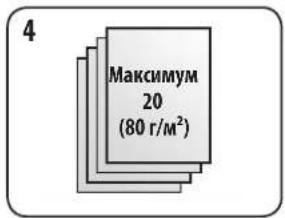
4.IpO6bAaTeJIcTbI NaKAMn He6oJbIoI ToIuINHbI, YTO6bl He nepeTpKyKaTb yCTpoNCTBO nIe onepatopa.
3TANbI BPOUIOPOBAHNA - EINHNUHbIM DOKYMEHT
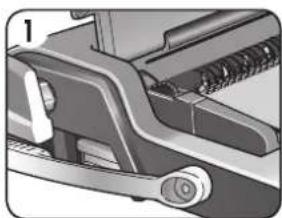
1. HauHnHa c 3aDHei O6IoxKn, 3arpy3nte npo6ntbIe NCTbI HeNocpeIcTBeHHo Ha ydepXKBaEmy poackpbityo npobOIOuHyrpe6eHky.
Iowes npv enkwnnne nre to kooonpaoyep.
IAMETPOZ AKTYAIOY IATPH\SH \& MEFEOH EETPA ON
| mm αριθμός φύλλων | 20lb 80g |
| 6 mm 2-35 | |
| 8 mm 36-50 | |
| 10 mm 51-61 | |
| 11 mm 61-80 | |
| 12 mm 81-100 | |
| 14 mm 100-130 |
XpeiaZeTe BoHcTa;
Tuja eumptponc peatow..www.fellows.com
Aponte tucic uoc puc va ooc Bonpoovu pi tic biac tonc.
Na Kaite niva tvr etapia Fellowes npv enkowwjocte ie to Karutina ayopdc.
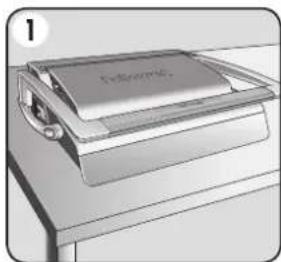
1. Eaaopaiotc ot to mnxavna
Bpioketai o e taepn enipaveia.
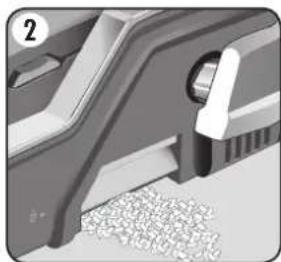
2.BeaiwthetaiOtnnHKn anoppmuatv eivai adea kai exi npoapuotei owot. Mnpoeite vaexte npoaacn otn Hkn ano ta apotepa kai ano ta deia. H Hkn exei leitoupyia 四 diappncNc' Nou evepyonoietai otav n Hkn anokoumatw eivai uep-npnc
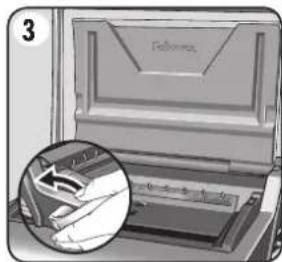
3.Avaonkwote to kalaumua. Beaowte ot ooyloc kaiiatooc opmuoc evai pieouevoc npoc ta niaw.
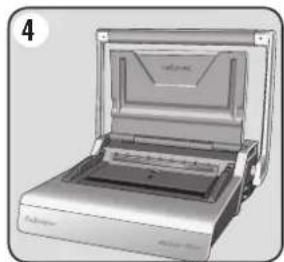
4.Avaonkwote tn laBn diatpnoan otny optheta ontnc.
IPIN TH BIBAOAEDIA
To Galaxy 8o 0e06ouc kEioiatoC 8akTuIwV yOa Ta eYeOth Kai diaepTPOC daKtUOWeTa6 ka14 mm.
1-0ntikkaika. -iavikia 6oivoc yppov.
H Kivoupevnaiyova kleiioiatoacoumpneipauβaveuokn otynavaywnklauka

A NYSEDEKHULLADEK ELTAVOLITASA
BnHaHc e 06aKaJdTe Ha Fellowes,
YIPODAI CA BCKPDEKIE MCAHOTTO HAKOYNKTA.CM
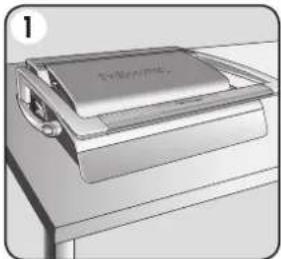
1. NoctabeMaunHataBbpxy CTaBnHa NOBbpxHOCT.
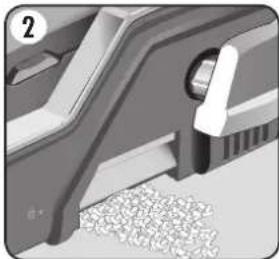
2.Поверете дал Tabata 3a OTnabu e npa3Ha n npabunHO MOHTnpaHa. Tabata MoKe da 6bde OocTHHaT oT JABATA N OT JACHTa CTPaHa. Tabata mMa "fHKnna 3a npenbNaHe", KOrTO ce 3aJeCTBa, KOrato TaBATA 3a N3pe3Kn OT nepoipanaCe npenbHn.
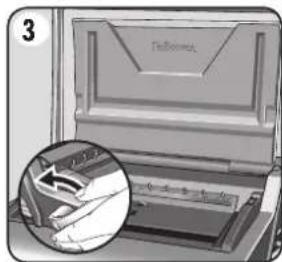
3. NOBINHETe Kanaka.YBepete ce,yeIOCTbT 3a 3aTbapnHe Ha cinnpaata e n36yTuHa3a.
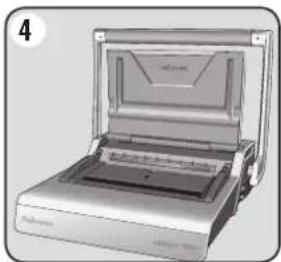
4.BnHrHeTe pkoXbKaTa Ha nepoopatopa I0 3npaBeHTo nnoKeHne.
IPEIN DA IIOYHETE DA IIOIBbP3BATE
Galaxy Bknoya 3a MeToHa Ha rpe6eHa Ha cnpuTn Ta, 3a BCnKu pa3Mepr Ha dAmEtPr Ha rpe6eHa Ha cnpuTn Maekdy 6 n 14 MM.
1-Bn3yHaHaCKana. -noXoJaIO 3a noBbP3BaHe Ha eINHnHn DOKyMeHTN.
IopBnKHaTa 3aTBapraCe yeNIOCT BKNIOUba IeCHa 3paPHTaHe cKaJa

2-N36upaem KOHTpO Ha 3aKnHouBaHaTe. -noXoJIO 3a MHOxEcTBO
DOKyMeHTN cEHaKbPa3Mepn.
HacpoTe YepBeHaTa JeHTa STOP (Cto) Ha npednouHaTa no3nua. 3abbpeTe KOHTpOHTo KoeJIe KbM no3nUte MAX (MaKcImaHa) nn MIN (mHmHa) cnopeH Heo6xOIMOTO.
HepBHeHATA CTOnnpaAaJeHtCa nPnDnKbHaHarOpE HaDoJy B paMKTe Ha CEHTpAlHHI npO3opeu.


1.ИЗбете npавини
ДиamMeТьр 3a Гена Ha
СпмалаТа,КATO ИЗПОЛБАТe
ВODаЧа Ha TabaTа 3a
Сыхра themselves.
2.0kaeTe n36paHna rpe6eh CbC cnnpaBbpxo npopata 3a rpe6eh CbC cnnpa.
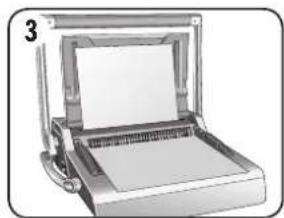
3.Перфорпайтza npobostандчнлстоBE,3a da npOBepTe HAcTpoKaTaHa noDpaHbRaUmaBODaY.
4.Перфорupaite JIuctobete HaMaJIKNnapTuDN,KOITo He npTeOBapBaT MaUNHaTa NIN notpe6nteJ.
CTbIKN PPNIOBbP3BAHE -EDNHUEN DOKYMENT
1.3anouhete CbC 3aHaTa Kopuca.3apekdaite nepoopupaHte nIcTObe DnpeKTHO BbPxy OTBOpEHHa rpe6en CbC cnpana.
2.ПерфорupaTe n okayete npednata Kopuna. ПерфорupaTe n okayete octabaunte ctpaHnU.
3.ПOBdHrHeTe Hn3BaJeTe rpe6eHa CbC cnPana OT KyKHTe.BHmAtenHO nOCTaBeTe BOTBOpHnTE YEnIOCTN 3a 3aTbApHe Ha cnPanaTa.YBepete ce,Ye rpe6eHbT CbC cnPanaTa eOTBOpEH N DOKcBA DhHOTo Ha MexAHn3Ma.
4.ПОВДИНETE NOCTa 3aTbapHe Ha cHnpaIaHa npei.3aTbapAunr BODaC MaIa6a Ce HAMnpa BbpxY NOBnKHaTa YeJIocT. 3aTbapAInTe YeJIocTne Do MOMeHTA, B KOITo CnPAPnHnT KAnbPpNOKaKe pa3Mepa Ha 3aTbapAHaTa CnPana.
CTbIKN IPNIIOBbP3BAHE-MHOXECTBO DOKYMEHTN
1.N3npo6baIte 3aTbapnHeTo Ha
H36paHnI rpe6en Ha cnipana.
HaCtpoTe 3akIOuBaHe Ha
3aTbapnEto,ako e Heo6xOIMo.
PiPoBePeTe DaJIcNpAINHnT
7eB e HAnbHIO 3aTbOpEN.
2.3aOnuHHe TcBc 3aHaTa KOpua.3apeKJaTe nepoopapanHe nIcTObe DInpeKTHO Bbpxy OTbOpEHHrpe6eH CbC cnnpala.
- NepopnpaTe n okayTe npednata Kopua. NepopnpaTe n okayTe octabaunte cpaHn.
4.ПOBUNHHeI H3BaJeTe rpe6eHa cbc cnipana OT KyKITE.BHMATEJIHO NOCTaBeT B OTBOpEHnTE YEJIIOCT 3a 3aTbApAHe Ha cnipanaTa. YBepete Ce,Ye rpe6eHbT cbc cnipanaTa e OTBOpEH N DOKOCBa IbHTo Ha MExAHN3Ma.
5.Повнгете поста 3a 3aTВарян He Na Cnipanata. YeHOCHTe ige ce 3aTBOPaT npn npedBapuTeNHO n36paHaTa no3nua Ha cToInpaHe.
3ABbPbBAHE HA IOBbP3BAHETO
1.ПюветеЗТВОБЕп WEB.AKOWEBHTHe e 3aTBOPE npaBUNHO,ДOKUMeHTbT MoKe NOBTOPHO Da ce NOCTABN B YELIOCTNE N da ce 3aTBOPI.
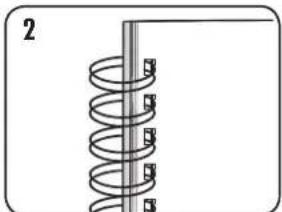
2.3a da 3akpneTe weBa, 3aBbptete 3aHaTa Kopuca Ha3a.Cera npedHata Kopua Buece ce Buxka. WeBbTe cKpNT BbTpe B DOKyMeHTa.
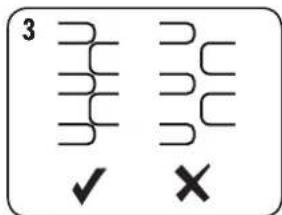
3.Поверете данспрангшт webeHaNbIHO 3aTBopeH. Xla6abOTO noDBbp3BaHe Bodudo 3ary6a Ha NICTOBE.ДбрOTo 3aTbapnE 3aDbpKa BCmKInNICTOBe.
KOPINPAHE HA IOIDbP3AH DOKYMEHT
IIOBbP3BaHTo CbCnnpaI npctablaBa eHa 6e3oNa cHcTeMa 3a NOBbP3BaHe. IOnbNHTeHN NICTOBe He MoRat Da ce DoabT, OCBEN AOKOkyMeNTbT He 6bJe pa3rIo6e H cIe TOBA NOBtOPHO IOBbP3AH.
OTCTPAHRAHE HA OTIIaIb4Hm N3PE3Kn
Tabata 3a OTnabu Ce HAMIPA NOI MaunHATA, KATO DOCTbNT Do He e Bb3MOxE HOT BCRA CTPAHA. 3a da rapaHTnpate MAKCIMALHO DOpn peyntATN, n3npa3BaIte peoBHO Tabata.
Tabata Tp8b6a da ce n3npa3Ba cneB BCEK 50 ynoTpe6n, 3a da ce npedToBpaTn 6oknpahe.
CbXPAHRAHAE
CnycheTe Kanaka. IocBbP3BaAaTa MaMunHa Galaxy e KOHCTpyuPaHa da 6bde cbxpaHraBaHa B XOpIN3OHTaIHO NIOJKeHe N Bbpxy bIpoto.
OTCTPAHBAHE HA IPOBJIEMI
Ipo6nemPnpuHa PepeHne
| Гребени на сириалata не моче на ce Затвори достатуно пьтоho | Затворяшиte се человся са настwoю с тьрдце голам димаMuTbp | П robерете настwoю катуа за зakлочаheadа на затваранeto 3a по-малык димаMuTbp, по e необхомо |
| Пов体现在и рьбове на отворITE визможно петоваране на машината Пегфорирaite пл actмовite Кориссхаритe листove. Habалене бportа на лорфорирaite лістove. | ||
| Издиьаняот tabata за оладыци Tabata за оладыци не правлино постavenи и: "фунckцял'tа при петьлвае" He e akтувирана | П robеряaires дали tabata за оладыци праразни "фунckцял'tа пri петьлвае" e полочemale | |
| Пегфорирaite отвори не са центридан | Плдравлиьшатiodаче не настwoю Вдч, дokato sxemata с otворite заме павлино поожене | |
| Машината не лорфорира 3дрьствае Пrobерете дали tabata за оладыци праразни. Пrobерете за 3дрьствае на BXODа за лортуг�а | ||
| Пегфорирaite отвори не са услордуни наiodаче | Плдравлиьшатiodаче не настwoю Вдч, дokato sxemata с otворite заме павлино поожене | |
| Рьбове на чastучни отвори Лостовete не са цetрирани павлино според схемата на лорфориранe | Perugларite постwoю Вдч и лорфорирaite пльrostую поожене | |
| Лостовete Изадот одокumentа Гребени тсыс сприалata не сDocTaTbUH 3atВорец | П robерете затваранeto на ггебена сьс сприала. Поставete В затваряшия мениз布局 постове до павлино поожене |
CBETOBHATAPAHU
Fellowes rapaHTnpa, ye BcNcuqTn Ha NpOdBp3BaauTa MaunHa ca 6e3 defeKTNa HA MATEPmaHn H3pa6oTKa, KaTO da2-roduHa rapaunr O t daTAt Ha NOKyKtO ptbPOBaHuaHNn KInENT. Ako KOaTo n da e aCt ce OKaKe defeKTTh Pne3 rapaHIOHHNNE PEPNO, BAWeTo eINHCTBeHO IN3KIOUHTenHo 063ueTeHeNe 6bde pemont mnn 3amna Ha DeFeKTHata qact no 36Op n 3a CmTeKa Ha Fellowes. HAcToaata rapaunr He Baxn 3a cnuyante Ha 3noynTope6a, HenpaBUNHO MAHNyIHpae HnN HeynblHomooene H peMOTH. BcKa KocBeHa rapaunr, BkIOUYteHn To3n 3a npOdaeMoCT HnnproDnOCT 3a KOHKpeTHa cen, No CNnA tHa Hactoanu DOKyment e orpanuHcBApAKNTe HA CbOTBeTHn rapaHOnHen nepNo, yka3AH
no-rope.B HnKoI cyuay Fellowes He hoc OTROBOPHcT 3a KaKBHTO n da e noceBaun nobpei, IbJnxauin ce HaTo3n npodyKT. Hactoata rapaun Bu daOpeneHH zakoHOBn npaba.Bne MoeJa pa3nonarate cdpyrn kupdUweckn npaba,KoHTO da ce pa3nHuabat OHaCToAuta rapaunna. IpobJnxntHeNCTTA, npabunata N yCNOBnTa Ha Hactoata rapaunca ca BaUNHN B CEINRA CBAT, C3KNIOueHHe Ha MeCTaT, KbTeO MeCTHO 3aKoHOaTeNCTBO MOe Ja N3NKCBa pa3nHn OrpaHHeHH, pectpHKUnnn nnycNoBn. 3a Nobeue NoDpo6HoCTn nn 3a NoynyAbae Ha o6cnyBahe no Hactoata rapaunca ce CBpKeTe c Fellowes nn CBAunr TBproBeu.
ROMÁNA
1p12081 J-20sLwI aogoo
J 1
focucluae Lio
...ww.fellowes.com
Jl. 1028 1134567890
..115.
Jluaiy jie lai yaoj
L JfFowles 25
Jauu

· = 0
aaiSLLg 10000000000000000000000000000000000000000000000000000000000000000000

:
y
i#
focLomega Clic Jo
www.fellowes.com...slll ois Jauu jie cuiue uogai Ue i 14 Fllowes aJiu Jiu Jiu Jiu Jiu
sWy11 0s11 gic.2
0s11 1c 0s1
111111111111111
1g 100
LALgEj,2.4
Loo pLoU 051
uall yol 3
Jyll Jy
Weyy jSall g
eSll wao sll pLa
aLc! aJI
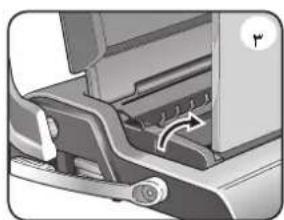
sui 3
aog a.1e1b21 LcU
gLgS g aie
5i aai Sli
S1wJia wJz o
aJai aiwoLog
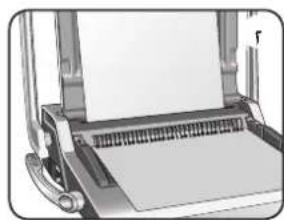
1 2
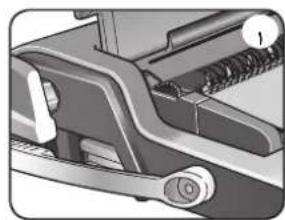
1 1
osio ciiuwo -gacilllglbs
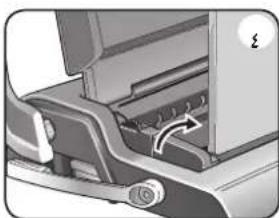
s. wL1 851 g,4
aog a.101 Lb1 1cU
g21 g5 g aie
51 .aogall Slll
S1wll Jaiil jio
.21 Jaiwl aiwoLog
111 3
111 2
111 4
111 6
111 8
131 11102 2
12 aagai 1gjg21 g
29:al 5. wll 5.51
3
511 jLj 1
204 a 5
J L J
J L
J L
J L
J L
J L
5 100
a
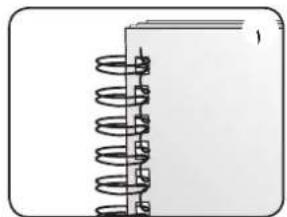
aLac JLa51 0o g3.3
Jig .sLl plI 28 0x1
gaoiia LAc 0
Soo oic 15 (u)
la aall jao 1
!gao 0
la
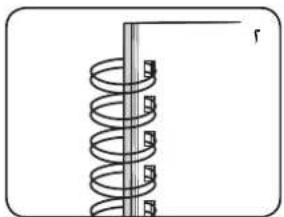
a p1i281 alog flesx.2
a g a131 8eill iJy
sIaell ngS Jg.
aia a.81 Jolb oLo81
.
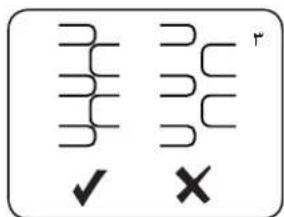
p1iJ21 alog no g3.1
alog glai 121 aIaI
S0o.
paJ5aI g cuiuillg 21
jao jxL21
aai j
a 1
Lalal
1 5
51 52
l_g : y = L g y = L g y = L g
a15 ÷ 11·s + 1 + 1 = 76
Declaration of Conformity
Fellows, Inc.
Unit 2 Ontario Drive, New Rossington, Doncaster, DN11 0BF, England declares that the product model Galaxy Wire conforms with the requirements of the Restriction of Hazardous Substances Directive (2011/65/EU), the Low Voltage Directive (2014/35/EU), the Electromagnetic Compatibility Directive (2014/30/EU), the WEEE directive (2012/19/EU), and below harmonized European EN Standards.
Safety: EN60950-1: 2006/A2:2013
EMC Standard: EN55014-1:2006+A1:2009+A2:2011
EN55014-2:1997+A1:2001+A2:2008
EN61000-3-2:2014
EN61000-3-3:2013
Year Affixed: 16
Itasca, Illinois, USA
July 1, 2016
John Fellowes