
5622101 - Binder FELLOWES - Free user manual and instructions
Find the device manual for free 5622101 FELLOWES in PDF.


| Product Type | Ring Binder |
| Brand | Fellowes |
| Model | 5622101 |
| Dimensions (H x W x D) | 165 x 498 x 451 mm |
| Net Weight | 13.5 kg |
| Power Supply | 220-240 V, 50/60 Hz, 230 W, 1.0 A |
| Punch Capacity (80 g paper) | 28 sheets |
| Punch Capacity (transparent covers 100-200 µm) | 4 sheets |
| Punch Capacity (standard covers 160-270 g) | 4 sheets |
| Maximum Binding Capacity (80 g paper) | 500 sheets |
| Maximum Ring Diameter | 51 mm |
| Adjustable Back Margin | Yes, 2 positions (2.5 mm and 4.5 mm) |
| Number of Punch Holes | 21 |
| Hole Spacing | 14.28 mm |
| Adjustable Paper Stop | Yes |
| Waste Bin Capacity | 3000 sheets |
| Duty Cycle | 30 min on / 30 min off |
| Supported Paper Sizes | A4, A5 |
| Removable Binding Platform | Yes |
| Thermal Cut-out | Yes |
| Warranty | 2 years (parts and labor) |
| Maintenance | Empty the waste bin regularly, avoid jams |
| Safety | Read instructions before use, do not open or repair yourself, use on a stable surface |
| General Information | Compliant with WEEE directive |
Frequently Asked Questions - 5622101 FELLOWES
User questions about 5622101 FELLOWES
0 question about this device. Answer the ones you know or ask your own.
Ask a new question about this device
Download the instructions for your Binder in PDF format for free! Find your manual 5622101 - FELLOWES and take your electronic device back in hand. On this page are published all the documents necessary for the use of your device. 5622101 by FELLOWES.
USER MANUAL 5622101 FELLOWES
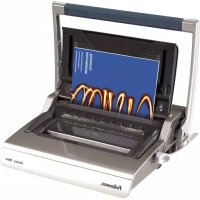
Electric Premium Comb Binder
Galaxy ™ 500

natural_image
Exterior view of a Fiji 500 Galaxy E® printer with visible internal structure and control buttons (no text-heavy elements)Please read these instructions before use. Do not discard: keep for future reference.
CAPABILITIES
Punching Capacity
| Paper sheets |
| 80g / 20lb 28 sheet |
| Transparent Covers |
| 100-200 micron / 4-8 mil 4 sheet |
| 200+ micron / 8+ mil 3 sheet |
| Other Standard Covers |
| 160-270g / 40-60lb 4 sheet |
| 270+g / 60+ lb 3 sheet |
| Binding Capacity |
| Max comb size 51mm |
| Max document (80g / 20lb) 500 sheet |
Technical Data
| Paper dimensions A4, A5 | |
| Punching slots 21 | |
| Adjustable back margin yes - 2 positions(min = 2.5mm, max = 4.5mm) | |
| Slot pitch | 9/16" / 14.28mm |
| Adjustable edge guide yes | |
| Waste tray capacity 3000 sheets | |
| Voltage | 220-240V 50/60 Hz |
| Motor wattage | 230W 1.0A |
| Duty Cycle | 30 mins on / 30 mins off |
| Net weight | 13.5 kg / 29.8 lb |
| Dimensions (HxWxD) | 6.5" x 19.6" x 17.7" / 165 x 498 x 451 mm |
IMPORTANT SAFETY INSTRUCTIONS — Read Before Using!

Please read before use. Please keep for future reference.
When punching;
- always ensure the machine is on a stable surface
- test punch scrap sheets and set the machine before punching final documents
- remove staples and other metal articles prior to punching
- never exceed the machines quoted performance
When binding;
- the removable binding platform can be used away from the punch unit
- always ensure the removable binding platform is on a stable surface
Keep the machine away from heat and water sources.
Never attempt to open or otherwise repair the machine.
Plug the machine into an easily accessible socket.
Note - this machine features a thermal cut-out device which activates when the machine is overheated during use. It will automatically reset when the machine is safe to operate.
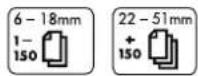
Comb diameter sizes & margin depth adjustments
 mm inch number of sheets mm inch number of sheets |  | Set back margin | |
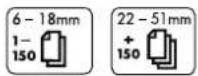
| 6mm | 1/4" | 2-20 |  |
| 8mm | 5/16" | 21-40 | |
| 10mm | 3/8" | 41-55 | |
| 12mm | 1/2" | 56-90 | |
| 16mm | 5/8" | 91-120 | |
| 18mm | 11/16" | 121-150 | |
| 22mm | 7/8" | 151-180 |  |
| 25mm | 1" | 181-200 | |
| 32mm | 1 1/4" | 201-240 | |
| 38mm | 1 1/2" | 241-340 | |
| 45mm | 1 3/4" | 341-410 | |
| 51mm | 2" | 411-500 | |
Need Help?
Customer Service.... www.fellowes.com Let our experts help you with a solution. Always call Fellowes before contacting your place of purchase.
SET UP

natural_image
Illustration of a silver electronic device with a label '1' (no text or symbols on the device itself)- Ensure the machine is on a stable surface.
natural_image
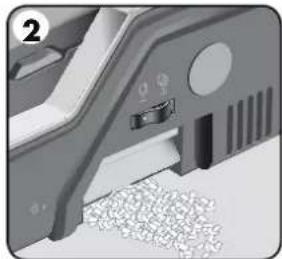
Close-up of a mechanical component with a highlighted section and textured surface (no visible text or symbols)- Check waste tray is empty and correctly fitted. The tray can be accessed from the left and right sides. The tray has a 'burst feature' that operates when the chip tray is 'over-full'.
natural_image
Close-up of a plug inserted into a socket socket (no text or symbols visible)- The machine is supplied with loose power leads. Select the correct lead for appropriate power supply.

natural_image
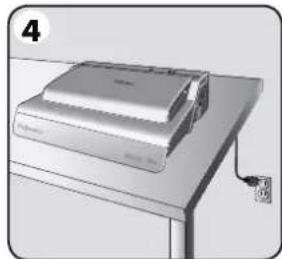
Illustration of a printer on a stand with a paper clip and label '4' (no text or symbols on the device itself)- Plug the lead into grounded socket outlet.

natural_image
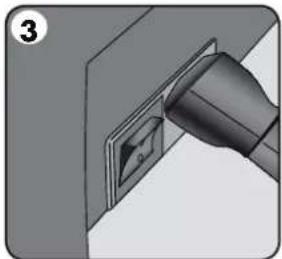
Close-up of a finger pressing a button into a socket (no text or symbols visible)- Switch the machine on (located at the rear of the machine).
natural_image
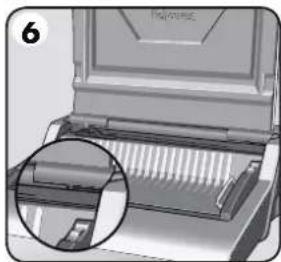
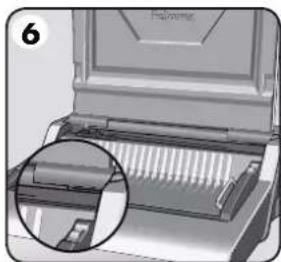
Close-up of a printer's internal structure with a magnified inset showing internal components (no text or symbols visible)- Lift the lid. Check the green power neon is on.

natural_image
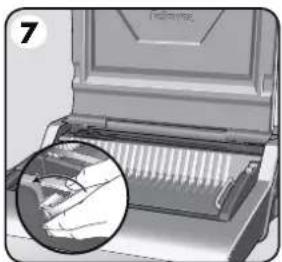
Illustration of a computer with a magnified inset showing a hand pressing down on the screen (no text or symbols visible)- Ensure the comb-opening lever is pushed backwards.
natural_image
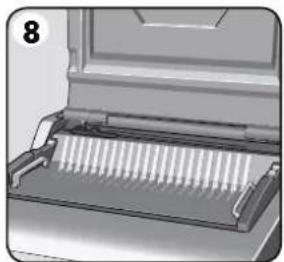
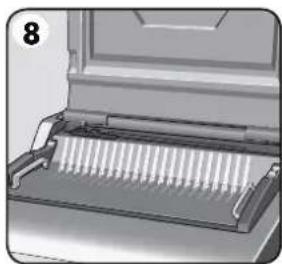
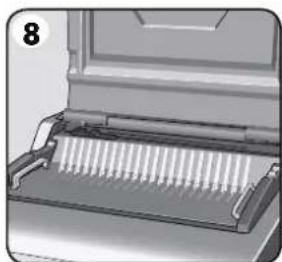
Diagram of a mechanical device with internal components and a numbered label (8), no readable text or symbols present.- Ensure the binding platform is located correctly in the machine.
ENGLISH
STEPS TO BIND
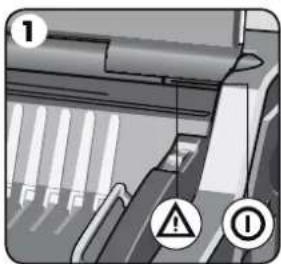
- Check the green power neon is on.
natural_image
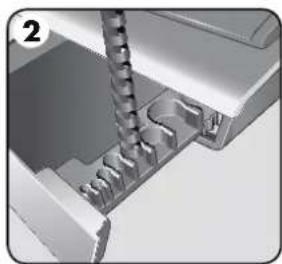
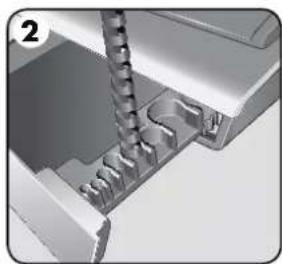
3D mechanical assembly diagram showing a threaded component inserted into a housing (no text or symbols visible)- Select the correct comb diameter using the storage tray.

natural_image
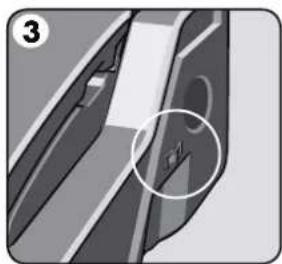
Close-up of a mechanical component with a highlighted section (no text or symbols visible)- Select the correct back margin depth for number of sheets.

natural_image
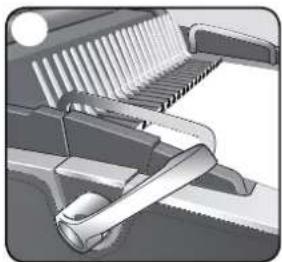
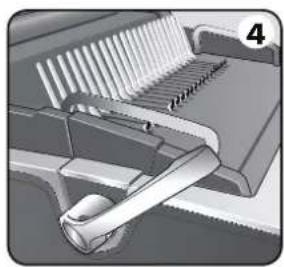
Mechanical assembly diagram showing a lever mechanism with no visible text or symbols- Insert the plastic comb into the opening mechanism. Pull comb-opening lever forward to open the comb.

natural_image
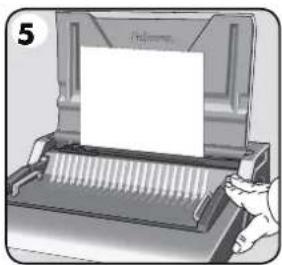
Illustration of a printer with a paper being inserted, showing mechanical components and a hand holding the paper (no text or symbols present)- Test punch scrap sheets to check edge guide setting.

natural_image
Mechanical assembly diagram showing a tool interacting with a rack (no text or symbols visible)- Load punched sheets directly onto the open comb.

natural_image
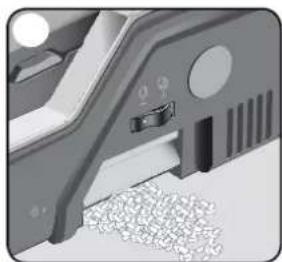
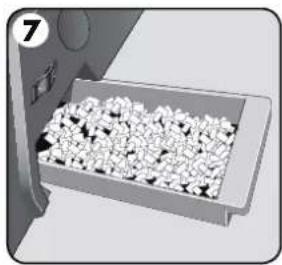
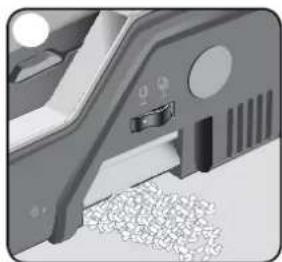
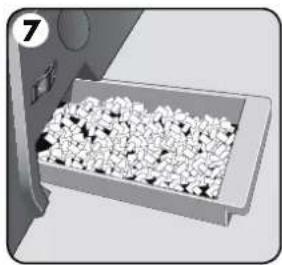
Illustration of a tray holding small white granular material, no text or symbols present- Empty waste tray regularly - ideally after each use.

natural_image
Close-up of a hand inserting a plug into a socket (no text or symbols visible)- Switch off the machine.
DOCUMENT BINDING
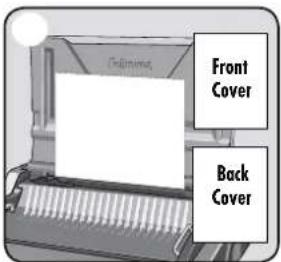
- Ensure edge guide is set to the proper document size. Punch front and back covers first.

- Punch sheets in small batches that do not overload the machine or the user. Adjust edge guide, if necessary.
natural_image
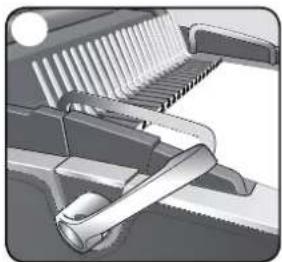
Mechanical assembly diagram showing a sliding mechanism with gears and lever (no text or symbols)- Load punched sheets directly onto the opened comb. Starting with the front of the document.
natural_image
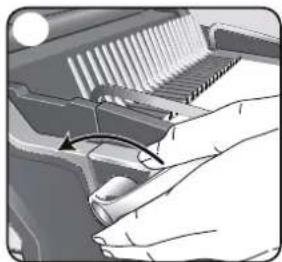
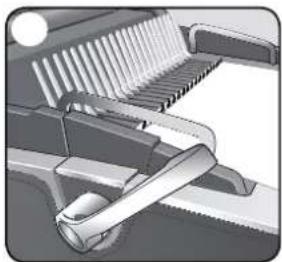
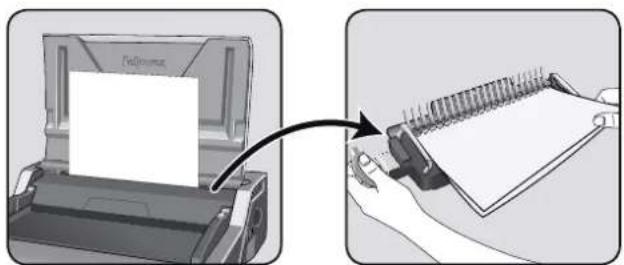
Close-up of hands operating a mechanical component with a curved arrow indicating rotation (no text or symbols visible)- When all punched sheets are loaded onto the comb, push the comb lever backwards to close the comb and remove the bound document.
REMOVABLE BINDING PLATFORM
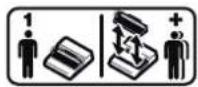
Galaxy has a unique mobile binding platform. The platform can be lifted from the base and used on a stable surface to bind documents using the normal binding procedure and also allows different users to work together. When not in use, the platform should be stored safely in the punch machine.


natural_image
Illustration showing a printer being inserted into a spiral notebook, with no visible text or symbols.CORRECTING A BOUND DOCUMENT
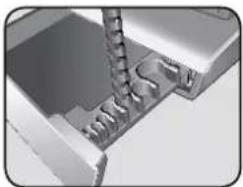
Additional sheets may be included or removed at any time by opening and then closing the comb as previously described.
REMOVAL OF WASTE CLIPPINGS
The waste tray is located under the machine and is accessed from each side. For best results empty the tray regularly. The tray should be emptied after every 50 operations to ensure no blockages occur.
STORAGE
Lower the lid. The Galaxy comb binder is designed to be stored horizontally on the desk.
TROUBLESHOOTING
Problem Cause Solution
| No Green power neon Machine is not switched on Switch on machine at rear next to plug inlet and at the socket | ||
| Red standby neon Machine has overloaded when punching Press the punch button. The machine will withdraw the punchesand re-set itself. Continue this process until the punch cycle is complete | ||
| Punched holes are not central Edge guide not set Adjust edge guide until hole pattern is correct | ||
| Machine will not punch Blockage Check waste tray in empty. Check for blockage to paper entry | ||
| Punch holes are not parallel to edge | Debris is stuck below dies Take stiff cardboard and slide into the paper entry. Move thecardboard sideways to release any stray clippings into thewaste tray | |
| Partial holes Sheets not correctly aligned to punch pattern Adjust edge guide and test punch scrap sheets until correct | ||
| Sheets will not turn on thebound document | Back margin is too large for a smaller comb | Select the smaller margin depth for combs up to 18mm ( ^11/16 )in diameter (2-150 sheets) Select the larger margin depth forcombs larger than 18mm ( ^11/16 ) in diameter (151-500 sheets) |
| Damaged hole edges | Possibly overloading the machine | Punch plastic covers with paper sheets. Reduce number ofsheets being punched |
| Waste tray leaks | Waste tray is not correctly inserted or ‘burst feature’has activated | Check waste tray is empty and ‘burst feature’ is closed |
WORLDWIDE WARRANTY
Fellowes warrants all parts of the binder to be free of defects in material and workmanship for 2 years from the date of purchase by the original consumer. If any part is found to be defective during warranty period, your sale and exclusive remedy will be repair or replacement, at Fellowes' option and expense, of the defective part. This warranty does not apply in cases of abuse, mishandling or unauthorised repair. Any implied warranty, including that of merchantability or fitness for particular purpose, is hereby limited in duration to the appropriate
warranty period set forth above. In no event shall Fellowes be liable for any consequential damages attributable to this product. This warranty gives you specific legal rights. You may have other legal rights that vary from this warranty. The duration, terms and conditions of this warranty are valid worldwide, except where different limitations, restrictions or conditions may be required by local law. For more details or to obtain services under this warranty, please contact Fellowes or your dealer.
Australia Residents Only:
Our goods come with guarantees that cannot be excluded under the Australian Consumer Law. You are entitled to a replacement or refund for a major failure and for compensation for any other reasonably foreseeable loss or damage. You are also entitled to have the goods repaired or replaced if the goods fail to be of acceptable quality and the failure does not amount to a major failure. The benefits under Fellowes' Warranty are in addition to other rights and remedies under a law in relation to the machine.
FRANÇAIS

natural_image
Close-up of a mechanical component with internal parts and mounting holes (no visible text or symbols)natural_image
Close-up of a mechanical assembly with a tool inserted into a component (no visible text or symbols)natural_image
Illustration of a silver electronic device with a label '1' (no text or symbols on the device itself)natural_image
Close-up of a mechanical component with a highlighted section and textured surface (no visible text or symbols)natural_image
Close-up of a plug inserted into a socket socket (no text or symbols visible)natural_image
Illustration of a printer on a stand with a paper clip and label '4' (no text or symbols on the device itself)natural_image
Close-up of a finger pressing a button into a socket (no text or symbols visible)natural_image
Close-up of a mechanical device with a magnified inset showing internal structure (no text or symbols visible)natural_image
Illustration of a mechanical device with a magnified inset showing a hand holding a tool (no text or symbols visible)natural_image
Close-up of a mechanical component with a grid-like structure and handle (no visible text or symbols)natural_image
3D mechanical assembly diagram showing a threaded component inserted into a housing (no text or symbols visible)natural_image
Close-up of a mechanical component with a circled detail (no visible text or symbols)natural_image
Mechanical assembly diagram showing a lever mechanism with no visible text or symbolsnatural_image
Illustration of a printer with a blank paper, no text or symbols presentnatural_image
Close-up of a mechanical device with teeth and lever mechanism (no visible text or symbols)natural_image
Illustration of a tray with granular material inside, no text or symbols presentnatural_image
Close-up of a finger pressing a button on a mechanical component (no text or symbols visible)natural_image
Mechanical assembly diagram showing a sliding mechanism with gears and lever (no text or symbols)natural_image
Close-up of hands operating a mechanical component with a curved arrow indicating rotation (no text or symbols visible)natural_image
Illustration showing a printer being inserted into a notebook, with a hand holding the notebook and a paper holder nearby (no text or symbols visible)CORRECTION D'UN DOCUMENT RELIÉ
natural_image
Close-up of a mechanical component with a threaded rod inserted, showing internal teeth and mounting base (no text or symbols visible)natural_image
Illustration of a desktop computer with a silver case and top panel, no visible text or symbolsnatural_image
Close-up of a mechanical device with granular material inside, no visible text or symbolsnatural_image
Close-up of a hand inserting a plug into a socket (no text or symbols visible)natural_image
Illustration of a desktop computer with a monitor and keyboard (no text or symbols visible)natural_image
Close-up of a hand inserting a plug into a socket (no text or symbols visible)natural_image
Illustration of a computer with a magnified inset showing internal structure (no text or symbols)natural_image
Illustration of a mechanical device with a magnified inset showing internal components (no text or symbols)natural_image
Diagram of a printer or printer with a rack and ventilation slots (no text or symbols visible)natural_image
3D mechanical assembly diagram showing a threaded component inserted into a housing (no text or symbols visible)natural_image
Close-up of a mechanical component with a highlighted section (no visible text or symbols)natural_image
Mechanical assembly diagram showing a lever mechanism with no visible text or symbolsnatural_image
Illustration of a printer with a paper inside, showing mechanical components and a hand operating it (no text or symbols visible)natural_image
Mechanical assembly diagram showing a sliding mechanism with gears and lever (no text or symbols)natural_image
Illustration of a tray with granular material inside, no text or symbols presentnatural_image
Close-up of a finger pressing a button on a mechanical component (no text or symbols visible)- Apague la máquina.
natural_image
Mechanical assembly diagram showing a sliding mechanism with gears and a handle (no text or symbols)natural_image
Close-up of hands operating a mechanical component with a curved arrow indicating rotation (no text or symbols visible)natural_image
Illustration showing a printer being inserted into a spiral notebook, with no visible text or symbols.natural_image
Illustration of a silver electronic device with a label '1' (no text or symbols on the device itself)natural_image
Close-up of a mechanical component with a handle and textured surface (no visible text or symbols)natural_image
Close-up of a plug inserted into a socket socket (no text or symbols visible)natural_image
Illustration of a desktop computer with a monitor and keyboard (no text or symbols visible)natural_image
Close-up of a hand inserting a plug into a socket (no text or symbols visible)natural_image
Close-up of a mechanical device with a magnified inset showing internal structure (no text or symbols visible)natural_image
Close-up of a mechanical device with a magnified inset showing internal components (no visible text or symbols)natural_image
Close-up of a mechanical component with a grid-like structure and lever mechanism (no visible text or symbols)natural_image
Close-up of a mechanical component with warning symbols (no readable text or labels)natural_image
Close-up of a mechanical component with a threaded rod inserted into a housing (no visible text or symbols)natural_image
Close-up of a mechanical component with a circled detail (no visible text or symbols)natural_image
Mechanical assembly diagram showing a lever mechanism with no visible text or symbolsnatural_image
Illustration of a printer with a blank paper inside, being handled by a hand (no text or symbols visible)natural_image
Mechanical assembly diagram showing a sliding mechanism with gears and lever (no text or symbols)natural_image
3D illustration of a tray with granular material inside, no text or symbols visiblenatural_image
Close-up of a finger pressing a button on a mechanical component (no text or symbols visible)natural_image
Mechanical assembly diagram showing a sliding mechanism with gears and a handle (no text or symbols)natural_image
Close-up of hands operating a mechanical component with a curved arrow indicating rotation (no text or symbols visible)ABNEHMBARE BINDEPLATTFORM
KORRIGIEREN EINES GEBUNDENEN DOKUMENTS
natural_image
Illustration of a silver electronic device with a label '1' on the top, placed on a surface (no text or symbols on the device itself)natural_image
Close-up of a mechanical component with a textured surface and a labeled section (no readable text or symbols)natural_image
Close-up of a plug inserted into a socket socket (no text or symbols visible)natural_image
Illustration of a desktop computer with a monitor and keyboard (no text or symbols visible)natural_image
Close-up of a finger pressing a button on a mechanical component (no text or symbols visible)natural_image
Diagram of a printer's internal structure with an inset magnified view showing internal blades (no text or symbols)natural_image
Close-up of a printer's front panel with a magnified inset showing internal structure (no text or symbols visible)natural_image
Illustration of a mechanical device with a rack and handle (no text or symbols visible)natural_image
Close-up of a printer's internal structure with warning symbols (no readable text or labels)natural_image
3D mechanical assembly diagram showing a threaded component inserted into a housing (no text or symbols visible)natural_image
Close-up of a mechanical component with a circled detail (no visible text or symbols)natural_image
Mechanical assembly diagram showing a conveyor belt and internal components (no text or symbols)natural_image
Illustration of a printer with a blank paper, no text or symbols presentnatural_image
Mechanical assembly diagram showing a tool interacting with a rack (no text or symbols visible)natural_image
3D illustration of a tray with granular material inside, no text or symbols visiblenatural_image
Close-up of a finger pressing a button on a mechanical component (no text or symbols visible)natural_image
Mechanical assembly diagram showing a sliding mechanism with gears and a handle (no text or symbols)natural_image
Close-up of hands operating a mechanical component with a curved arrow indicating rotation (no text or symbols visible)natural_image
Illustration showing a printer being placed on top of a notepad, with a hand holding the paper (no text or symbols visible)MODIFICA DI UN DOCUMENTO GIÀ RILEGATO
natural_image
Illustration of a silver electronic device with a label '1' (no text or symbols on the device itself)natural_image
Close-up of a mechanical component with a handle and textured surface (no visible text or symbols)natural_image
Close-up of a plug inserted into a socket socket (no text or symbols visible)natural_image
Illustration of a desktop computer with a monitor and keyboard (no text or symbols visible)natural_image
Close-up of a hand inserting a plug into a socket (no text or symbols visible)natural_image
Close-up of a mechanical device with a magnified inset showing internal structure (no text or symbols visible)natural_image
Close-up of a mechanical device with a magnified inset showing internal components (no visible text or symbols)natural_image
Close-up of a mechanical component with a grid-like structure and handle (no visible text or symbols)natural_image
3D mechanical assembly diagram showing a threaded component inserted into a housing (no text or symbols visible)natural_image
Close-up of a mechanical component with a circled detail (no visible text or symbols)natural_image
Mechanical assembly diagram showing a lever mechanism with no visible text or symbolsnatural_image
Illustration of a printer with a paper inside, being handled by a hand (no text or symbols visible)- Test ponsafvalvellen om de instelling van de randgeleiding te testen.

natural_image
Mechanical assembly diagram showing a sliding mechanism with a handle and roller (no text or symbols)natural_image
3D illustration of a tray with granular material inside, no text or symbols presentnatural_image
Close-up of a finger pressing a button on a surface, no text or symbols visiblenatural_image
Mechanical assembly diagram showing a sliding mechanism with gears and lever (no text or symbols)natural_image
Close-up of hands operating a mechanical component with a curved arrow indicating rotation (no text or symbols visible)natural_image
Illustration showing a printer being inserted into a notebook, with a hand holding the notebook and a paper holder nearby (no text or symbols visible)CORRIGEREN VAN EEN INGEBONDEN DOCUMENT
WERELDWIJDE GARANTIE
natural_image
Illustration of a silver electronic device with a label '1' (no text or symbols on the device itself)natural_image
Close-up of a mechanical component with a handle and textured surface (no visible text or symbols)natural_image
Close-up of a plug inserted into a socket socket (no text or symbols visible)natural_image
Illustration of a desktop computer with a monitor and keyboard (no text or symbols visible)natural_image
Close-up of a hand inserting a plug into a socket (no text or symbols visible)natural_image
Close-up of a printer's internal structure with a magnified inset showing internal components (no text or symbols visible)natural_image
Illustration of a mechanical device with a magnified inset showing a hand holding a tool (no text or symbols visible)natural_image
Close-up of a mechanical component with a grid-like structure and handle (no visible text or symbols)natural_image
Close-up of a printer's internal structure with warning symbols (no readable text or labels)natural_image
3D mechanical assembly diagram showing a threaded component inserted into a housing (no text or symbols visible)natural_image
Close-up of a mechanical component with a circled area highlighting a feature (no text or symbols visible)natural_image
Mechanical assembly diagram showing a lever mechanism with no visible text or symbolsnatural_image
Illustration of a printer with a blank paper, no text or symbols presentnatural_image
Mechanical assembly diagram showing a sliding mechanism with a lever and roller (no text or symbols)natural_image
Illustration of a tray with granular material inside, no text or symbols presentnatural_image
Close-up of a finger pressing a button into a socket (no text or symbols visible)- Slå av maskinen.
DOKUMENTBINDNING

natural_image
Mechanical assembly diagram showing a sliding mechanism with gears and a handle (no text or symbols)natural_image
Close-up of hands operating a mechanical component with a curved arrow indicating rotation (no text or symbols visible)natural_image
Illustration showing a printer being inserted into a notebook, with no visible text or symbols.KORRIGERA ETT BUNDET DOKUMENT
natural_image
Illustration of a silver electronic device with a label '1' (no text or symbols on the device itself)- Kontrollér at maskinen står på en stabil flade.
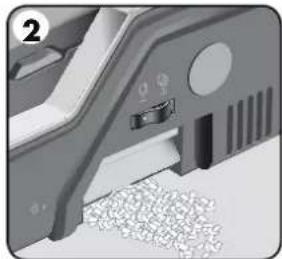
natural_image
Close-up of a mechanical component with a highlighted section and textured surface (no visible text or symbols)natural_image
Close-up of a plug inserted into a socket socket (no text or symbols visible)natural_image
Illustration of a printer on a stand with a paper clip and label '4' (no text or symbols on the device itself)natural_image
Close-up of a finger pressing a button into a socket (no text or symbols visible)natural_image
Close-up of a printer's internal structure with a magnified inset showing internal components (no text or symbols visible)natural_image
Illustration of a computer with a magnified inset showing a hand pressing down on the screen (no text or symbols visible)natural_image
Diagram of a mechanical device with internal components and a numbered label (8), no readable text or symbols present.natural_image
3D mechanical assembly diagram showing a threaded component inserted into a housing (no text or symbols visible)natural_image
Close-up of a mechanical component with a circled detail (no visible text or symbols)natural_image
Mechanical assembly diagram showing a lever mechanism with no visible text or symbolsnatural_image
Illustration of a hand pressing down on a mechanical device with a blank sheet (no text or symbols visible)natural_image
Mechanical assembly diagram showing a sliding mechanism with a handle and roller (no text or symbols)natural_image
3D illustration of a tray with granular material, no text or symbols visiblenatural_image
Close-up of a finger pressing a button on a device (no text or symbols visible)- Sluk for maskinen.
DOKUMENTINDBINDING
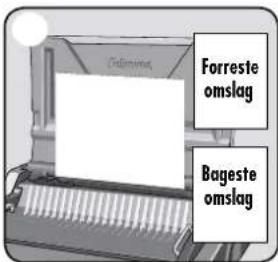
natural_image
Mechanical assembly diagram showing a sliding mechanism with gears and a handle (no text or symbols)natural_image
Close-up of hands operating a mechanical component with a curved arrow indicating rotation (no text or symbols visible)natural_image
Illustration showing a printer being inserted into a notebook, with no visible text or symbols.KORREKTION AF ET INDBUNDET DOKUMENT
natural_image
Illustration of a silver electronic device with a label 'Aldem' on its top, placed on a wooden surface (no text or symbols on the device itself)natural_image
Close-up of a mechanical device with granular material inside, no visible text or symbolsnatural_image
Close-up of a plug inserted into a socket socket (no text or symbols visible)natural_image
Illustration of a desktop computer with a monitor and keyboard (no text or symbols visible)natural_image
Close-up of a hand inserting a plug into a socket (no text or symbols visible)natural_image
Illustration of a printer with a magnified inset showing internal structure (no text or symbols)natural_image
Close-up of a mechanical device with a magnified inset showing internal components (no visible text or symbols)natural_image
Diagram of a printer or printer with a rack and ventilation slots (no text or symbols visible)natural_image
3D mechanical assembly diagram showing a threaded component inserted into a housing (no text or symbols visible)natural_image
Close-up of a mechanical component with a circled detail (no visible text or symbols)natural_image
Mechanical assembly diagram showing a lever mechanism with no visible text or symbolsnatural_image
Illustration of a hand pressing down on a mechanical device with a blank sheet (no text or symbols visible)natural_image
Mechanical assembly diagram showing a sliding mechanism with a handle and roller (no text or symbols)natural_image
3D illustration of a tray with granular material inside, no text or symbols visiblenatural_image
Close-up of a finger pressing a button on a device (no text or symbols visible)- Sammuta laite.
ASIAKIRJAN SITOMINEN

natural_image
Mechanical assembly diagram showing a sliding mechanism with gears and a handle (no text or symbols)natural_image
Close-up of hands operating a mechanical component with a curved arrow indicating rotation (no text or symbols visible)natural_image
Illustration showing a printer being inserted into a notebook, with no visible text or symbols.SIDOTUN ASIAKIRJAN KORJAAMINEN
natural_image
Illustration of a silver electronic device with a label '1' (no text or symbols on the device itself)natural_image
Close-up of a mechanical component with a highlighted section and textured surface (no visible text or symbols)natural_image
Close-up of a plug inserted into a socket socket (no text or symbols visible)- Apparatet leveres med löse nettledninger. Velg riktig nettledning for den aktuelle stikkontakten.

natural_image
Illustration of a printer on a stand with a paper clip and label '4' (no text or symbols on the device itself)natural_image
Close-up of a finger pressing a button into a socket (no text or symbols visible)natural_image
Close-up of a printer's internal structure with a magnified inset showing internal components (no text or symbols visible)natural_image
Illustration of a computer with a magnified inset showing a hand pressing down on the screen (no text or symbols visible)natural_image
Diagram of a mechanical device with internal components and a numbered label (8), no readable text or symbols present.- Sjekk at den grønne nettindikatoren lyser.

natural_image
3D mechanical assembly diagram showing a threaded component inserted into a housing (no text or symbols visible)natural_image
Close-up of a mechanical component with a circled detail (no visible text or symbols)natural_image
Mechanical assembly diagram showing a lever mechanism with no visible text or symbolsnatural_image
Illustration of a hand pressing down on a mechanical device with a blank sheet (no text or symbols visible)- Test hullingen på restark for å kontrollere kantstyringsinnstillingen.

natural_image
Mechanical assembly diagram showing a sliding mechanism with a handle and roller (no text or symbols)natural_image
3D illustration of a tray with granular material inside, no text or symbols visiblenatural_image
Close-up of a finger pressing a button on a surface, no text or symbols visible- Slå av apparatet.
DOKUMENTINNBINDING

natural_image
Mechanical assembly diagram showing a sliding mechanism with gears and a handle (no text or symbols)natural_image
Close-up of hands operating a mechanical component with a curved arrow indicating rotation (no text or symbols visible)natural_image
Illustration showing a printer being inserted into a notebook, with no visible text or symbols.KORRIGERE ET INNBUNDET DOKUMENT
natural_image
Mechanical component diagram showing a car inside a housing (no text or symbols visible)natural_image
Close-up of a mechanical component with threaded fasteners inserted (no visible text or symbols)natural_image
Illustration of a computer monitor with a silver case and top panel, no visible text or symbolsnatural_image
Close-up of a mechanical component with a textured surface and a small inset showing a button or clip (no visible text or symbols)natural_image
Close-up of a mechanical component with a metallic tool inserted into a socket (no visible text or symbols)natural_image
Illustration of a printer on a stand with a paperclip attached (no text or symbols)natural_image
Close-up of a finger pressing a small black plug into a corner socket (no text or symbols visible)natural_image
Close-up of a printer's internal structure with a magnified inset showing internal components (no text or symbols visible)natural_image
Close-up of a mechanical device with a magnified inset showing internal components (no visible text or symbols)natural_image
Illustration of a printer with a rack and spool, no visible text or symbolsnatural_image
3D mechanical assembly diagram showing a threaded component inserted into a housing (no text or symbols visible)natural_image
Close-up of a mechanical component with a circled detail (no visible text or symbols)natural_image
Mechanical assembly diagram showing a lever mechanism with teeth and a shaft (no text or symbols)natural_image
Illustration of a printer with a paper inside, showing mechanical components and a hand operating it (no text or symbols visible)natural_image
Mechanical assembly diagram showing a tool interacting with a rack and shaft (no text or symbols visible)natural_image
3D illustration of a tray with granular material inside, no text or symbols visiblenatural_image
Close-up of a finger pressing a button on a mechanical component (no text or symbols visible)natural_image
Mechanical assembly diagram showing a sliding mechanism with rollers and a handle (no text or symbols)natural_image
Close-up of hands operating a mechanical component with a curved arrow indicating rotation (no text or symbols visible)natural_image
Illustration showing a printer being inserted into a notebook, with no visible text or symbols.KOREKTA OPRAWIONEGO DOKUMENTU
natural_image
Mechanical component diagram showing internal components and mounting holes (no text or symbols)natural_image
Close-up of a mechanical component with a threaded rod inserted, showing internal teeth and mounting base (no text or symbols visible)natural_image
Illustration of a silver electronic device with a label '1' on the top, placed on a stand (no text or symbols on the device itself)natural_image
Close-up of a mechanical component with a textured surface and a small inset showing a pin (no visible text or symbols)natural_image
Close-up of a plug inserted into a socket socket (no text or symbols visible)natural_image
Illustration of a desktop computer with a stand and cable, no visible text or symbolsnatural_image
Close-up of a hand inserting a plug into a socket (no text or symbols visible)natural_image
Diagram of a printer with internal structure and magnified view (no text or symbols)natural_image
Diagram of a mechanical device with a magnified inset showing internal components (no text or symbols)natural_image
Diagram of a printer or printer with a rack and handle, no visible text or symbolsnatural_image
3D mechanical assembly diagram showing a threaded component inserted into a housing (no text or symbols visible)natural_image
Close-up of a mechanical component with a circled detail (no visible text or symbols)natural_image
Mechanical assembly diagram showing a lever mechanism with no visible text or symbolsnatural_image
Illustration of a printer with a blank paper inside, being handled by a hand (no text or symbols visible)natural_image
Mechanical assembly diagram showing a sliding mechanism with a lever and roller (no text or symbols)natural_image
3D illustration of a tray with granular material inside, no text or symbols visiblenatural_image
Close-up of a finger pressing a button on a surface, no text or symbols visiblenatural_image
Mechanical assembly diagram showing a sliding mechanism with gears and lever (no text or symbols)natural_image
Close-up of hands operating a mechanical component with a curved arrow indicating rotation (no text or symbols visible)natural_image
Illustration showing a printer being inserted into a notebook, with a hand holding the notebook and a paper holder nearby (no text or symbols visible)natural_image
Mechanical component diagram showing internal components and mounting holes (no text or symbols)natural_image
Close-up of a mechanical component with threaded fasteners inserted (no visible text or symbols)natural_image
Illustration of a metallic electronic device with a labeled component (no text or symbols visible)natural_image
Close-up of a mechanical component with no visible text or symbolsnatural_image
Close-up of a black plug inserted into a socket (no text or symbols visible)natural_image
Illustration of a desktop computer with a monitor and keyboard (no text or symbols visible)natural_image
Close-up of a finger pressing a button on a wall socket (no text or symbols visible)natural_image
Diagram of a printer with internal structure and magnified view (no text or symbols)natural_image
Diagram of a mechanical device with a magnified inset showing internal components (no text or symbols)natural_image
Close-up of a mechanical device with a rack of blades and a handle (no visible text or symbols)natural_image
3D mechanical assembly diagram showing a threaded component inserted into a housing (no text or symbols visible)natural_image
Close-up of a mechanical component with a circled detail (no visible text or symbols)natural_image
Mechanical assembly diagram showing a lever mechanism with no visible text or symbolsnatural_image
Illustration of a printer with a blank paper, being handled by a hand (no text or symbols visible)natural_image
Mechanical assembly diagram showing a sliding mechanism with a lever and roller (no text or symbols)natural_image
3D illustration of a tray with granular material inside, no text or symbols visiblenatural_image
Close-up of a finger pressing a button on a surface, no text or symbols visiblenatural_image
Mechanical assembly diagram showing a sliding mechanism with gears and lever (no text or symbols)natural_image
Close-up of hands operating a mechanical component with a curved arrow indicating rotation (no text or symbols visible)natural_image
Illustration showing a printer being inserted into a notebook, with a hand holding the notebook and a paper holder nearby (no text or symbols visible)natural_image
Illustration of a desktop computer with a silver case and drive bays (no text or symbols visible)natural_image
Close-up of a mechanical component with no visible text or symbolsnatural_image
Close-up of a plug inserted into a socket socket (no text or symbols visible)natural_image
Illustration of a printer on a stand with a paper clip and cable (no text or symbols)natural_image
Close-up of a finger pressing a button on a mechanical component (no text or symbols visible)natural_image
Diagram of a printer with internal blades and a magnified inset showing blade structure (no text or symbols)natural_image
Close-up of a mechanical device with a magnified inset showing internal components (no visible text or symbols)natural_image
Illustration of a printer with a rack and clamped parts (no text or symbols)natural_image
3D mechanical assembly diagram showing a threaded component inserted into a housing (no text or symbols visible)natural_image
Close-up of a mechanical component with a circled detail (no visible text or symbols)natural_image
Mechanical assembly diagram showing a lever mechanism with no visible text or symbolsnatural_image
Illustration of a printer with a paper inside, showing mechanical components and a hand operating it (no text or symbols visible)natural_image
Mechanical assembly diagram showing a lever mechanism with no visible text or symbolsnatural_image
3D illustration of a tray with granular material inside, no text or symbols visiblenatural_image
Close-up of a finger pressing a button on a device (no text or symbols visible)- Makineyi kapatın.
BELGE CİLTLEME

natural_image
Mechanical assembly diagram showing a sliding mechanism with gears and a handle (no text or symbols)natural_image
Close-up of hands operating a mechanical component with a curved arrow indicating rotation (no text or symbols visible)natural_image
Illustration showing a printer being inserted into a notebook, with no visible text or symbols.natural_image
Close-up of a mechanical component with internal parts and mounting holes (no visible text or symbols)natural_image
Close-up of a mechanical component with threaded fasteners and a metallic housing (no visible text or symbols)natural_image
Illustration of a silver electronic device with a label '1' on the top, placed on a surface (no text or symbols on the device itself)natural_image
Close-up of a mechanical component with no visible text or symbolsnatural_image
Close-up of a plug inserted into a socket socket (no text or symbols visible)natural_image
Illustration of a desktop computer with a monitor and keyboard (no text or symbols visible)natural_image
Close-up of a hand inserting a plug into a socket (no text or symbols visible)natural_image
Illustration of a printer with a magnified inset showing internal structure (no text or symbols)natural_image
Diagram of a mechanical device with a magnified inset showing internal components (no text or symbols)natural_image
Close-up of a mechanical device with a rack and handle (no visible text or symbols)natural_image
Close-up of a mechanical component with warning symbols (no readable text or labels)natural_image
3D mechanical assembly diagram showing a threaded component inserted into a housing (no text or symbols visible)natural_image
Close-up of a mechanical component with a circled detail (no visible text or symbols)natural_image
Mechanical assembly diagram showing a sliding conveyor system with rollers and a handle (no text or symbols)natural_image
Illustration of a printer with a paper inside, showing mechanical components and a hand operating it (no text or symbols visible)natural_image
Mechanical assembly diagram showing a tool interacting with a rack (no text or symbols visible)natural_image
Diagram of a mechanical component with granular material inside a tray (no text or symbols)natural_image
Close-up of a finger pressing a button on a device (no text or symbols visible)- Vypněte stroj.
VÁZÁNÍ DOKUMENTU

natural_image
Mechanical assembly diagram showing a sliding mechanism with gears and a handle (no text or symbols)natural_image
Close-up of hands operating a mechanical component with a curved arrow indicating rotation (no text or symbols visible)natural_image
Illustration showing a printer being inserted into a notebook, with no visible text or symbols.OPRAVA SVÁZANÉHO DOKUMENTU
natural_image
Illustration of a silver electronic device with a label '1' on the top, placed on a surface (no text or symbols on the device itself)- Skontrolujte, či je zariadenie na pevnom povrchu.

natural_image
Close-up of a mechanical component with no visible text or symbolsnatural_image
Close-up of a plug inserted into a socket socket (no text or symbols visible)natural_image
Illustration of a desktop computer with a monitor and keyboard (no text or symbols visible)natural_image
Close-up of a hand inserting a plug into a socket (no text or symbols visible)natural_image
Diagram of a printer with internal structure and magnified view (no text or symbols)natural_image
Diagram of a mechanical device with a magnified inset showing internal components (no text or symbols)- Skontrolujte, či je páčka otvorenia hrebeňa zatlačená dozadu.

natural_image
Close-up of a mechanical device with a rack and handle (no visible text or symbols)natural_image
3D mechanical assembly diagram showing a threaded component inserted into a housing (no text or symbols visible)natural_image
Close-up of a mechanical component with a circled detail (no visible text or symbols)natural_image
Mechanical assembly diagram showing a lever mechanism with no visible text or symbolsnatural_image
Illustration of a printer with a paper inside, showing mechanical components and a hand operating it (no text or symbols visible)natural_image
Mechanical assembly diagram showing a sliding mechanism with a handle and roller (no text or symbols)- Vkladajte perforované hárky priamo na otvorený hreben.

natural_image
3D illustration of a tray with granular material inside, no text or symbols visiblenatural_image
Close-up of a finger pressing a button on a device (no text or symbols visible)- Vypnite zariadenie.
VIAZANIE DOKUMENTU
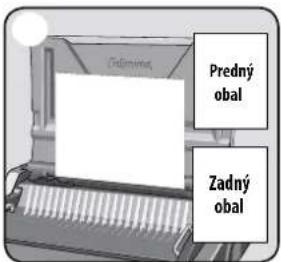
natural_image
Mechanical assembly diagram showing a sliding mechanism with gears and a handle (no text or symbols)natural_image
Close-up of hands operating a mechanical component with a curved arrow indicating rotation (no text or symbols visible)natural_image
Illustration showing a printer being inserted into a notebook, with no visible text or symbols.OPRAVA ZVIAZANÉHO DOKUMENTU
natural_image
Illustration of a desktop computer with a silver case and drive load (no text or symbols visible)- Zagotovite, da se naprava nahaja na stabilni podlagi.

natural_image
Close-up of a mechanical component with a highlighted section and textured surface (no visible text or symbols)natural_image
Close-up of a plug inserted into a socket socket (no text or symbols visible)natural_image
Illustration of a desktop computer with a monitor and keyboard (no text or symbols visible)- Kabel priključite v ozemljeno vtičnico.
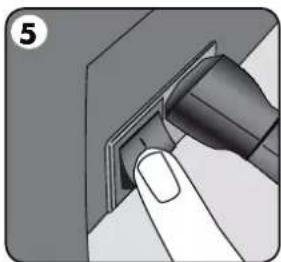
natural_image
Close-up of a finger pressing a button on a device (no text or symbols visible)- Vklopite napravo (stikalo se nahaja na zadnji strani naprave).
natural_image
Diagram of a computer printer with a magnified inset showing internal structure (no text or symbols)- Dvignite pokrov. Preverite, ali je vklopljena zelena lučka za vklop.
natural_image
Close-up of a computer printer with a magnified inset showing internal components (no visible text or symbols)- Prepričajte se, da ste ročico za odpiranje spirale potisnili nazaj.

natural_image
Close-up of a mechanical device with a grid-like internal structure (no visible text or symbols)- Preverite, ali je vklopljena zelena lučka za vklop.

natural_image
Close-up of a mechanical component with a threaded rod inserted into a housing (no visible text or symbols)natural_image
Close-up of a mechanical component with a highlighted section (no visible text or symbols)natural_image
Mechanical assembly diagram showing a lever mechanism with no visible text or symbolsnatural_image
Illustration of a printer with a paper being inserted, showing mechanical components and a hand holding the paper (no text or symbols present)natural_image
Mechanical assembly diagram showing a lever mechanism with no visible text or symbolsnatural_image
Illustration of a tray with granular material inside, no text or symbols presentnatural_image
Close-up of a finger pressing a button on a mechanical component (no text or symbols visible)- Izklopite napravo.
VEZAVA DOKUMENTOV

natural_image
Mechanical assembly diagram showing a piston and crank mechanism (no text or labels)natural_image
Close-up of a hand pressing a button on a mechanical component (no visible text or symbols)natural_image
Illustration showing a printer being inserted into a spiral-bound notebook, with no visible text or symbols.POPRAVLJANJE ZVEZANEGA DOKUMENTA
natural_image
Illustration of a metallic printer or printer on a stand, showing front panel and cover (no text or symbols visible)natural_image
Close-up of a mechanical component with a textured surface and a small inset showing a button (no visible text or symbols)natural_image
Close-up of a plug inserted into a socket socket (no text or symbols visible)natural_image
Illustration of a desktop computer with a monitor and keyboard (no text or symbols visible)natural_image
Close-up of a finger pressing a button on a device (no text or symbols visible)natural_image
Diagram of a printer with internal structure and magnified view (no text or symbols)natural_image
Close-up of a mechanical device with a magnified inset showing internal components (no visible text or symbols)natural_image
Close-up of a mechanical device with a rack of blades and a handle (no visible text or symbols)natural_image
3D mechanical assembly diagram showing a threaded component inserted into a housing (no text or symbols visible)natural_image
Close-up of a mechanical component with a circled detail (no visible text or symbols)natural_image
Mechanical assembly diagram showing a conveyor belt and internal components (no text or symbols)natural_image
Illustration of a printer with a blank paper, no text or symbols presentnatural_image
Mechanical assembly diagram showing a sliding mechanism with a handle and roller (no text or symbols)natural_image
3D illustration of a tray with granular material inside, no text or symbols visiblenatural_image
Close-up of a finger pressing a button on a mechanical component (no text or symbols visible)natural_image
Mechanical assembly diagram showing a sliding mechanism with conveyor belt and housing (no text or symbols)natural_image
Close-up of a hand pressing down on a mechanical component with a curved arrow indicating rotation (no text or symbols visible)natural_image
Illustration of a silver electronic device with a labeled component (no text or symbols visible)natural_image
Close-up of a mechanical component with a textured surface and a labeled section (no readable text or symbols)natural_image
Close-up of a plug inserted into a socket socket (no text or symbols visible)natural_image
Illustration of a desktop computer with a monitor and keyboard (no text or symbols visible)natural_image
Close-up of a hand inserting a plug into a socket (no text or symbols visible)- Ligue a máquina (interruptor situado na parte de trás da máquina).

natural_image
Close-up of a mechanical device with a magnified inset showing internal structure (no visible text or symbols)natural_image
Illustration of a computer with a magnified inset showing a hand placed on the keyboard (no text or symbols visible)natural_image
Close-up of a mechanical device with a rack and handle, no visible text or symbolsnatural_image
Mechanical component with warning symbols (no readable text or labels)natural_image
3D mechanical assembly diagram showing a threaded component inserted into a housing (no text or symbols visible)natural_image
Close-up of a mechanical component with a highlighted section (no visible text or symbols)natural_image
Mechanical assembly diagram showing a lever mechanism with no visible text or symbols- Insira o pente de plástico dentro do mecanismo de abertura. Puxe a alavanca de abertura do pente para abrir o pente.

natural_image
Illustration of a printer with a blank paper inside, being handled by a hand (no text or symbols visible)natural_image
Mechanical assembly diagram showing a sliding mechanism with a handle and roller (no text or symbols)natural_image
Diagram of a tray with granular material inside, no text or symbols presentnatural_image
Close-up of a finger pressing a button on a mechanical component (no text or symbols visible)- Desligue a máquina.
natural_image
Mechanical assembly diagram showing a sliding mechanism with gears and levers (no text or labels)natural_image
Close-up of hands operating a mechanical component with a curved arrow indicating rotation (no text or symbols visible)natural_image
Illustration showing a printer being inserted into a spiral-bound notebook, with no visible text or symbols.RECTIFICAR UM DOCUMENTO ENCADERNADO
natural_image
Illustration of a silver electronic device with labeled parts (no text or symbols on the device itself)- Uvjerite se da je uređaj na stabilnoj površini.
natural_image
Close-up of a mechanical component with no visible text or symbols- Provjerite je li ladica za otpatke prazna i ispravno postavljena. Ladici se može pristupiti s lijeve i desne strane. Ladica ima „funkciju izbacivanja“ koja radi kada je ladica za otpatke „prepuna”.

natural_image
3D illustration of a plug inserted into a socket (no text or symbols visible)natural_image
Illustration of a desktop computer with a monitor and keyboard (no text or symbols visible)natural_image
Close-up of a finger pressing a button on a device (no text or symbols visible)natural_image
Diagram of a mechanical device with a magnified inset showing internal structure (no text or symbols)natural_image
Illustration of a mechanical device with a magnified inset showing internal components (no text or symbols)- Pobrinite se da je poluga za otvaranje zubaca u položaju prema natrag.
natural_image
Illustration of a printer with a rack of blades (no text or symbols visible)natural_image
3D mechanical assembly diagram showing a threaded component inserted into a housing (no text or symbols visible)- Odaberite odgovarajući promjer zubaca koristeći se ladicom za pohranu.
natural_image
Close-up of a mechanical component with a circled detail (no visible text or symbols)natural_image
Mechanical assembly diagram showing a lever mechanism with no visible text or symbols- Umetnite plastične zupce u mehanizam za otvaranje. Povucite polugu za otvaranje zubaca prema naprijed da biste ih otvorili.
natural_image
Illustration of a printer with a paper being inserted, showing mechanical components and a hand holding the paper (no text or symbols present)natural_image
Mechanical assembly diagram showing a tool interacting with a rack (no text or symbols visible)- Postavite izbušene listove izravno na otvoreni zubac.
natural_image
Illustration of a tray with granular material inside, no text or symbols present- Redovito praznite ladicu za otpatke – idealno bi bilo nakon svake upotrebe.

natural_image
Close-up of a finger pressing a button into a socket (no text or symbols visible)- Isključite uređaj.
UVEZIVANJE DOKUMENTA

- Osigurajte da je vodilica za rubove postavljena na odgovarajuću veličinu dokumenata. Probušite prvo prednje i stražnje korice.

- Bušite listove u malim serijama koje ne preopterećuju ni stroj ni korisnika. Podesite vodilicu za rubove, ako je potrebno.
natural_image
Mechanical assembly diagram showing a sliding mechanism with gears and lever (no text or symbols)- Postavite izbušene listove izravno na otvorene zupce. Počnite s prednjom stranom dokumenta.

natural_image
Close-up of hands operating a mechanical component with a curved arrow indicating rotation (no text or symbols visible)- Kada su svi probušeni listovi postavljeni na zupce, gurnite polugu za zatvaranje zubaca prema natrag i uklonite uvezan dokument.
UKLONJIVA PLATFORMA ZA UVEZIVANJE
Galaxy ima jedinstvenu mobilnu platformu za uvezivanje. Platforma se može podići s baze i upotrebljavati na stabilnoj površini za uvezivanje dokumenata s pomoću uobičajenog procesa za uvezivanje, a omogućuje i zajednički rad više korisnika. Kada se ne upotrebljava, platforma se treba sigurno odložiti u stroj za bušenje.

natural_image
Illustration showing a printer being inserted into a spiral-bound notebook, with no visible text or symbols.POPRAVLJANJE UVEZANOG DOKUMENTA
natural_image
Illustration of a desktop computer with a silver case and top panel, no visible text or symbols on the device itself.- Proverite da li je mašina na stabilnoj podlozi.
natural_image
Close-up of a mechanical component with a handle and textured surface (no visible text or symbols)- Proverite da li je fioka za otpad pravilno postavljena. Fioka se može otvoriti sa leve ili desne strane. Fioka poseduje "rafalnu funkciju" koja se aktivira kada je fioka za otpadne konfete prepunjena.

natural_image
3D illustration of a plug inserted into a socket (no text or symbols visible)- Mašina je opremljena nepričvršćenim strujnim kablovima. Odaberite odgovarajući kabl za adekvatno strujno napajanje.
natural_image
Illustration of a printer on a stand with a paperclip and label '4' (no text or symbols on the device itself)natural_image
Close-up of a finger pressing a button on a mechanical component (no text or symbols visible)- Pritisnite dugme za uključivanje (nalazi se na poleđini aparata sa desne strane)

natural_image
Illustration of a printer with a magnified inset showing internal structure (no text or symbols)- Podignite poklopac. Proverite da li je zelena lampica uključena.

natural_image
Close-up of a mechanical device with a magnified inset showing internal components (no visible text or symbols)- Uverite se da je poluga za otvaranje spirale gurnuta unazad.
natural_image
Close-up of a mechanical device with a rack of blades and a handle (no visible text or symbols)- Uverite se da je platforma za koričenje ispravno postavljena u mašinu.

POSTUPAK KORIČENJA

- Proverite da li je zelena lampica uključena.
natural_image
3D mechanical assembly diagram showing a threaded component inserted into a housing (no text or symbols visible)- Izaberite pravilan prečnik spirale pomoću fioke za odlaganje spirala.

natural_image
Close-up of a mechanical component with a highlighted section (no visible text or symbols)- Izaberite odgovarajuću dubinu zadnje margine za broj stranica.


natural_image
Mechanical assembly diagram showing a lever mechanism with no visible text or symbols- Umetnite plastičnu spiralu u mehanizam. Povucite polugu za otvaranje spirale napred da otvorite spiralu.

natural_image
Illustration of a printer with a paper being inserted, showing mechanical components and a hand holding the paper (no text or symbols present)- Ispobajte bušenje na otpadnim listovima da proverite podešenost graničnika.

natural_image
Mechanical assembly diagram showing a tool interacting with a rack (no text or symbols visible)- Probušene listove postavite neposredno na otvorenu spiralu.
natural_image
Illustration of a tray with granular material inside, no text or symbols present- Redovno praznite fioku za otpad, a najbolje nakon svake upotrebe.

natural_image
Close-up of a hand inserting a plug into a socket (no text or symbols visible)- Isključite mašinu.
KORIČENJE DOKUMENTA

- Uverite se da je graničnik podešen na odgovarajuću veličinu dokumenta. Najpre probušite naslovnu i zadnju stranu.

- Probušite listove u malim grupama, tako da se mašina ne optereti, a korisnik da ne primenjuje prevelik pritisak. Ako je potrebno, podesite graničnik.
natural_image
Mechanical assembly diagram showing a sliding mechanism with gears and lever (no text or symbols)- Probušene listove postavite neposredno na otvorenu spiralu. Počnite sa prednjim delom dokumenta.

natural_image
Close-up of hands operating a mechanical component with a curved arrow indicating rotation (no text or symbols visible)- Kada su svi probušeni listovi postavljeni na spiralu, gurnite polugu za spiralu unazad da zatvorite spiralu i izvučete ukoričeni dokument.
PRENOSIVA PLATFORMA ZA KORIČENJE
natural_image
Illustration showing a printer being inserted into a spiral-bound notebook, with no visible text or symbols.POPRAVLJANJE UKORIČENOG DOKUMENTA
Dodatni listovi mogu se dodati ili ukloniti u bilo kom trenutku tako što se spirala otvori ili zatvori, kao što je već objašnjeno.
UKLANJANJE OTPADNIH OSTATAKA
Fioka za otpad smeštena je ispod mašine i otvara se sa obe strane. Fioku redovno praznite da biste postigli najbolje rezultate. Fioku treba prazniti nakon svake 50. upotrebe da ne bi došlo do blokade.
ODLAGANJE
Spustite poklopac. Mašina za koričenje spiralom Galaxy osmišljena je za vodoravno postavljanje na radnu površinu.
REŠAVANJE PROBLEMA
Problem Uzrok Rešenje
| Nema zelene lampice "Uključi" Mašina nije uključena Uključite mašinu na poleđini povezujući ulazni priključak sa utičnicom. | ||
| Crvena lampica "U pripravnosti" | Došlo je do preopterećenja mašine prilikom bušenja | Pritisnite dugme za bušenje. Mašina će prekinuti bušenje i automatski se resetovati. Nastavite sa ovom operacijom dok se proces bušenja ne završi. |
| Probušeni otvori nisu centrirani. Graničnik nije podešen. Podešavajte bočnu vođicu dok šablon rupa ne bude ispravan | ||
| Mašina ne buši. Blokada Proverite da li je fioka za otpad prazna. Proverite da li ima blokade na ulazu za papir. | ||
| Probušeni otvori nisu paralelni sa ivicom. | Nečistoća se nakupila ispod kalupa za bušenje. Uzmite tvrd karton i provucite ga kroz ulaz za papir. Privucite karton sa strane da bi eventualni ostaci pali u fioku za otpad. | |
| Otvori su delimično probušeni. Listovi nisu pravilno poravnani u odnosu na matricu za bušenje. | Podesite graničnik i proverite bušenje na otpadnim listovima dok ne otklonite grešku. | |
| Listovi se ne okreću na ukoričenom dokumentu | Zadnja margina je prevelika za manju spiralu Izaberite marginu manje dubine za spirale do 18 mm ( 1/16") u prečniku (2-150 listova) Izaberite marginu veće dubine za spirale veće od 18 mm (1/16") u prečniku (151-500 listova) | |
| Ivice otvora su oštećene. | Možda je mašina preopterećena. | Probušite plastične korice zajedno sa listovima papira. Smanjite broj listova koje bušite. |
| Ostaci ispadaju iz fioke za otpad. | Fioka za otpad nije pravilno umetnuta ili je aktivirana „rafalna funkcija”. | Proverite da li je fioka za otpad prazna i da li je "rafalna funkcija" isključena. |
GARANTNI LIST
Fellowes daje garanciju na delove mašine za koričenje bez nedostataka što se tiče materijala i izrade u periodu od dve (2) godine od dana nabavke od strane krajnjeg korisnika. Ako se tokom garantnog perioda primete nedostaci na bilo kom delu proizvoda, isključivo i samo u vašoj odgovornosti je da popravite ili zamenite deo sa nedostacima o trošku i po mogućnostima proizvođača Fellowes. Ova garancija ne važi u slučaju zloupotrebe, pogrešnog rukovanja ili neovlašćene popravke. Bilo kakva podrazumevana garancija, uključujući garanciju tržišnosti ili podesnosti za određenu namenu, ovim putem
natural_image
Illustration of a silver electronic device with a label '1' on the top left, no visible text or symbols on the device itself.natural_image
Close-up of a mechanical component with a button and textured surface (no visible text or symbols)natural_image
Close-up of a plug inserted into a socket (no text or symbols visible)natural_image
Illustration of a printer on a stand with a paper clip and label '4' (no text or symbols on the device itself)natural_image
Close-up of a finger pressing a button on a device (no text or symbols visible)natural_image
Illustration of a printer with a magnified inset showing internal structure (no text or symbols)natural_image
Close-up of a mechanical device with a magnified inset showing internal components (no visible text or symbols)natural_image
Close-up of a mechanical device with a rack of blades and a handle (no visible text or symbols)natural_image
3D mechanical assembly diagram showing a threaded component inserted into a housing (no text or symbols visible)natural_image
Close-up of a mechanical component with a highlighted circular area (no text or symbols visible)natural_image
Mechanical assembly diagram showing a lever mechanism with no visible text or symbolsnatural_image
Illustration of a printer with a blank paper inside, being handled by a hand (no text or symbols visible)natural_image
Mechanical assembly diagram showing a tool interacting with a rack (no text or symbols visible)natural_image
Diagram of a tray with granular material inside, no text or symbols presentnatural_image
Close-up of a hand inserting a plug into a socket (no text or symbols visible)- Изключете машината.
natural_image
Mechanical assembly diagram showing a sliding mechanism with gears and shafts (no text or symbols)natural_image
Close-up of hands operating a mechanical component with a curved arrow indicating rotation (no text or symbols visible)natural_image
Illustration showing a printer being inserted into a spiral notebook, with no visible text or symbols.natural_image
Close-up of a mechanical component with internal parts and mounting bracket (no visible text or symbols)natural_image
Close-up of a mechanical component with a threaded rod inserted, showing internal teeth and a base (no text or symbols visible)natural_image
Illustration of a silver electronic device with a label '1' on the top, placed on a stand (no text or symbols on the device itself)natural_image
Close-up of a mechanical component with a button and textured surface (no visible text or symbols)natural_image
Close-up of a mechanical component with a metallic connector inserted into a socket (no visible text or symbols)natural_image
Illustration of a printer on a stand with a paperclip and label '4' (no text or symbols on the device itself)natural_image
Close-up of a finger pressing a button on a device (no text or symbols visible)natural_image
Close-up of a mechanical device with a magnified inset showing internal structure (no visible text or symbols)natural_image
Illustration of a mechanical device with a magnified inset showing internal components (no text or symbols)natural_image
Close-up of a mechanical device with a rack of pins and a handle (no visible text or symbols)natural_image
3D mechanical assembly diagram showing a threaded component inserted into a housing (no text or symbols visible)- Selectati diametrul de pieptene corect folosind tava de depozitare.

natural_image
Close-up of a mechanical component with a highlighted section (no visible text or symbols)natural_image
Mechanical assembly diagram showing a lever mechanism with no visible text or symbolsnatural_image
Illustration of a printer with a paper being inserted, showing mechanical components and a hand holding the paper (no text or symbols present)natural_image
Mechanical assembly diagram showing a tool interacting with a rack and shaft (no text or symbols visible)natural_image
Illustration of a tray with granular material inside, no text or symbols presentnatural_image
Close-up of a finger pressing a button into a socket (no text or symbols visible)- Închideți aparatul.
LEGAREA DOCUMENTELOR

natural_image
Mechanical assembly diagram showing a sliding mechanism with gears and lever (no text or symbols)natural_image
Close-up of hands operating a mechanical component with a curved arrow indicating rotation (no text or symbols visible)natural_image
Illustration showing a printer being inserted into a spiral-bound notebook, with no visible text or symbols.CORECTAREA UNUI DOCUMENT LEGAT
natural_image
Close-up of a mechanical component with internal structure and mounting holes (no visible text or symbols)
natural_image
Close-up of a mechanical component with threaded fasteners inserted (no visible text or symbols)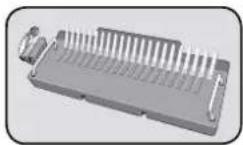
natural_image
Illustration of a desktop computer with a monitor and keyboard (no text or symbols visible)natural_image
Close-up of a plug inserted into a socket socket (no text or symbols visible)natural_image
Close-up of a mechanical component with a textured surface and a labeled section (no readable text or symbols)natural_image
Illustration of a silver electronic device with a lid and base, no visible text or symbolsnatural_image
Close-up of a mechanical device with a grid-like structure inside, no visible text or symbolsnatural_image
Illustration of a printer with a magnified inset showing internal components (no text or symbols)natural_image
Close-up of a printer's internal structure with a magnified inset showing internal components (no text or symbols visible)natural_image
Close-up of a finger pressing a button on a mechanical component (no text or symbols visible)natural_image
Mechanical assembly diagram showing a tool interacting with a rack of blades (no text or symbols visible)natural_image
Close-up of a mechanical component with a circled detail (no visible text or symbols)natural_image
3D mechanical assembly diagram showing a threaded component inserted into a housing (no text or symbols visible)natural_image
Close-up of a mechanical device with warning symbols (no readable text or labels)natural_image
Close-up of a finger pressing a button on a mechanical component (no text or symbols visible)natural_image
Illustration of a tray with granular material inside, no text or symbols presentnatural_image
Mechanical assembly diagram showing a sliding mechanism with a lever and roller (no text or symbols)natural_image
Illustration of a printer with a blank paper inside, showing mechanical components and a hand operating it (no text or symbols)natural_image
Close-up of hands operating a mechanical component with a curved arrow indicating rotation (no text or symbols visible)natural_image
Mechanical assembly diagram showing a sliding mechanism with a handle and roller (no text or symbols)natural_image
Illustration of a printer being inserted into a spiral-bound notebook, showing the process (no text or symbols present)50 engineering personnel, www.12346.com, www.12346.com, www.12346.com, www.12346.com, www.12346.com, www.12346.com, www.12346.com, www.12346.com, www.12346.com, www.12346.com, www.12346.com, www.12346.com
ال tangزين
natural_image
Illustration of a silver electronic device on a stand with a cable, no visible text or symbolsnatural_image
Close-up of a plug inserted into a socket (no text or symbols visible)natural_image
Close-up of a mechanical component with textured surfaces and a numbered label (2), no readable text or symbols present.natural_image
Illustration of a silver electronic device with a label '1' on the top right corner (no other text or symbols visible)natural_image
Close-up of a mechanical device with a grid-like internal structure and a numbered label (8) in the corner (no readable text or symbols)natural_image
Close-up of a printer with a magnified inset showing internal structure (no text or symbols visible)natural_image
Close-up of a printer's internal structure with a magnified inset showing internal components (no text or symbols visible)natural_image
Close-up of a hand inserting a plug into a socket (no text or symbols visible)הכלה (בַרְׁה) 5.

natural_image
Mechanical assembly diagram showing a lever mechanism with teeth and a numbered label (4), no readable text or symbols present.natural_image
Close-up of a mechanical component with a circled area highlighting a feature (no text or symbols visible)3.

natural_image
Close-up of a mechanical component with a threaded rod inserted into a housing (no visible text or symbols)הכלההוּרָהִי, 2.

natural_image
Mechanical assembly diagram showing a roller roller with warning symbols (no readable text or labels)הכלההוּרָהִיַעֹתְבָרָהִיַעֹתְבָרָהִיַעֹתְבָרָהִיַעֹתְבָרָהִיַעֹתְבָרָהִיַעֹתְבָרָהִיַפְרָהִיַפְרָהִיַפְרָהִיַפְרָהִיַפְרָהִיַפְרָהִיַפְרָהִיַפְרָהִיַפְרָ

natural_image
Close-up of a hand inserting a plug into a socket (no text or symbols visible).שְׁרָה אַלְבָא 8

natural_image
Illustration of a tray with granular material inside, no text or symbols present7.

natural_image
Mechanical assembly diagram showing a tool interacting with a rack and handle (no text or symbols visible)natural_image
Close-up of hands operating a mechanical component with a curved arrow indicating rotation (no text or symbols visible)natural_image
Mechanical assembly diagram showing a sliding mechanism with a lever and roller (no text or symbols)natural_image
Illustration of a printer being inserted into a notepad, showing the paper being placed on top (no text or symbols present)This product is classified as Electrical and Electronic Equipment. Should the time come for you to dispose of this product please ensure that you do so in accordance with the European Waste of Electrical and Electronic Equipment (WEEE) Directive and in compliance with local laws relating to this directive.
For more information on the WEEE Directive please visit www.fellowes.com/WEEE
French
(WEEE) (Waste Electrical And Electronic Equipment (WEEE) Directive)
www.fellowes.com/WEEE

CUSTOMER SERVICE & SUPPORT
www.fellowes.com
Europe Freephone: 00800-1810-1810
Benelux: +31-(0)-13-458-0580
Declaration of Conformity
Fellowes, Inc.
Unit 2 Ontario Drive, New Rossington, Doncaster, DN11 0BF, England declares that the product model Galaxy-E 500 conforms with the requirements of the Restriction of Hazardous Substances Directive (2011/65/EU), the Low Voltage Directive (2014/35/EU), the Electromagnetic Compatibility Directive (2014/30/EU), the WEEE directive (2012/19/EU), and below harmonized European EN Standards.
Safety: EN60950-1: 2006/A2:2013
EMC Standard: EN55014-1:2006+A1:2009+A2:2011
EN55014-2:1997+A1:2001+
EN61000-3-2:2014
EN61000-3-3:2013
A2:2008
Year Affixed: 17
Itasca, Illinois, USA
August 1, 2017
John Fellowes


- Electric Premium Comb Binder
- Galaxy ™ 500
- IMPORTANT SAFETY INSTRUCTIONS — Read Before Using!
- When punching;
- When binding;
- Need Help?
- SET UP
- ENGLISH
- STEPS TO BIND
- DOCUMENT BINDING
- REMOVABLE BINDING PLATFORM
- CORRECTING A BOUND DOCUMENT
- REMOVAL OF WASTE CLIPPINGS
- STORAGE
- TROUBLESHOOTING
- WORLDWIDE WARRANTY
- FRANÇAIS
- CORRECTION D'UN DOCUMENT RELIÉ
- ABNEHMBARE BINDEPLATTFORM
- KORRIGIEREN EINES GEBUNDENEN DOKUMENTS
- MODIFICA DI UN DOCUMENTO GIÀ RILEGATO
- CORRIGEREN VAN EEN INGEBONDEN DOCUMENT
- WERELDWIJDE GARANTIE
- DOKUMENTBINDNING
- KORRIGERA ETT BUNDET DOKUMENT
- DOKUMENTINDBINDING
- KORREKTION AF ET INDBUNDET DOKUMENT
- ASIAKIRJAN SITOMINEN
- SIDOTUN ASIAKIRJAN KORJAAMINEN
- DOKUMENTINNBINDING
- KORRIGERE ET INNBUNDET DOKUMENT
- KOREKTA OPRAWIONEGO DOKUMENTU
- BELGE CİLTLEME
- VÁZÁNÍ DOKUMENTU
- OPRAVA SVÁZANÉHO DOKUMENTU
- VIAZANIE DOKUMENTU
- OPRAVA ZVIAZANÉHO DOKUMENTU
- VEZAVA DOKUMENTOV
- POPRAVLJANJE ZVEZANEGA DOKUMENTA
- RECTIFICAR UM DOCUMENTO ENCADERNADO
- UVEZIVANJE DOKUMENTA
- UKLONJIVA PLATFORMA ZA UVEZIVANJE
- POPRAVLJANJE UVEZANOG DOKUMENTA
- POSTUPAK KORIČENJA
- KORIČENJE DOKUMENTA
- PRENOSIVA PLATFORMA ZA KORIČENJE
- POPRAVLJANJE UKORIČENOG DOKUMENTA
- UKLANJANJE OTPADNIH OSTATAKA
- ODLAGANJE
- REŠAVANJE PROBLEMA
- GARANTNI LIST
- LEGAREA DOCUMENTELOR
- CORECTAREA UNUI DOCUMENT LEGAT
- French
- CUSTOMER SERVICE & SUPPORT
- Declaration of Conformity
- Fellowes, Inc.
Brand : FELLOWES
Model : 5622101
Category : Binder