
Metal 100r - Binder FELLOWES - Free user manual and instructions
Find the device manual for free Metal 100r FELLOWES in PDF.


| Product Type | Binding machine |
| Brand | Fellowes |
| Model | Metal 100r |
| Dimensions (LxDxH) | 400 x 390 x 450 mm |
| Net Weight | 9.6 kg |
| Power Supply | 220-240 V AC, 50/60 Hz |
| Current | 0.25 A |
| Punching Capacity (80 gsm paper) | Up to 20 sheets |
| Binding Capacity (80 gsm paper) | Up to 450 sheets |
| Maximum Coil Diameter | 50 mm |
| Hole Pitch | 5.08 mm |
| Adjustable Edge Guide | Yes, rotary |
| Adjustable Back-Stop Margin | 2, 3, 4, or 5 mm |
| Waste Tray | Removable, regular emptying recommended |
| Material | Metal frame |
| Color | Black |
| Warranty | 2 years (parts and labor) |
| Compliance | CE, WEEE, RoHS |
| Accessories Included | Binding pliers |
| Safety Instructions | Use on stable surface; remove staples before punching; turn off after use |
Frequently Asked Questions - Metal 100r FELLOWES
User questions about Metal 100r FELLOWES
0 question about this device. Answer the ones you know or ask your own.
Ask a new question about this device
Download the instructions for your Binder in PDF format for free! Find your manual Metal 100r - FELLOWES and take your electronic device back in hand. On this page are published all the documents necessary for the use of your device. Metal 100r by FELLOWES.
USER MANUAL Metal 100r FELLOWES
CUSTOMER SERVICE & SUPPORT
www.fellowes.com
Europe Freephone: 00800-1810-1810
Benelux: +31-(0)-13-458-0580
United Kingdom: +44 [0] 1302 836836
Declaration of Conformity
Fellowes, Inc.
Unit 2 Ontario Drive, New Rossington, Dancerster, DNI11 OBF, England declares that the product model Metal 100r conforms with the requirements of the Restriction of Hazardous Substances Directive (2011/65/EU), the Low Voltage Directive (2014/35/EU), the Electromagnetic Compatibility Directive (2014/30/EU), the WEEE directive (2012/19/EU), and below harmonized European EN Standards.
Safety: EN60950-1: 2006/A2-2013
EMC Standard: EN55014-1:2006+A1.2009+A2:2011
EN55014-2:1997+AI:2001+
EN610003-2:2014
ENG:0003-3:2013
Year Affixed: 16
basca, Illinois, USA
April 1, 2017
A2:2008
John Fellows
Fellowes
1789 Norwood Avenue, Itasca, Illinois 60143 * 1-800-955-0959 * www.fellowces.com
©2017 Felmore, Inc | Port 4409587 Snow
Metal 100R 402687 ResB 3L D:137Jmod 1-2
[NO TEXT]
Fellowes
natural_image
Exterior view of a black Feissell 1997 printer with metal frame (no visible text or symbols on the device body)CAPABILITIES
| Punching Capacity | |
| 30gm | 20 |
| Transparent covers | |
| 100-200 micron 2 sheets | |
| Up to 700 micron 1 sheet | |
| Other standard covers | |
| 160 250gm | 3 |
| Up to 300gm 2 sheets | |
| Up to 800gm 1 sheet | |
| Binding Capacity | |
| Max binding coil size 50mm | |
| Max document (80gm) approx. 450 sheets | |
Technical Data
| Paper dimensions A-I | |
| Punching holes 59 | sheets |
| Slot pitch 5.08mm | |
| Adjustable edge guide yes- rotary | |
| Voltage: 220 240V AC 50/60Hz | |
| Current: 0.25 Amps | |
| Net weight 9,6 kg | |
| Dimensions (LxDxH): 400 x 390 x 450 mm3 | |
IMPORTANT SAFETY INSTRUCTIONS

Please read before use and keep for future reference.
When punching:
- always ensure the machine is on a stable surface
- test punch scrap sheets and set the machine before punching final documents
- remove staples and other metal articles prior to punching - never exceed the machines quoted performance
Keep the machine away from heat and water sources.
Never attempt to open or otherwise repair the machine.
Plug the machine into an easily accessible socket.
Turn off the machine after each use.
Unplug the machine when not in use for an extended period.
Need Help?
Let our experts help you with a solution.
Customer Service... www.fellowes.com
Always call Fellowes before contacting your place of purchase (see the rear cover for contact details).
©
COIL DIAMETER & DOCUMENT SIZES
Metal coil diameter sizes
To select the correct size metal coil for a document use the document measure card, stored in the storage tray.

bar
Fellowes Tabla Orientativa de Medición Guía de medidas Document Measure | Measurement | Value | |---|---| | 5mm | 650 | | 10mm | 448 | | 15mm | 429 | | 20mm | 403 | | 25mm | 380 | | 30mm | 368 | | 35mm | 348 | | 40mm | 328 | | 45mm | 308 | | 50mm | 288 | | 55mm | 268 | | 60mm | 248 | | 65mm | 228 | | 70mm | 208 | | 75mm | 198 | | 80mm | 188 | | 85mm | 178 | | 90mm | 168 | | 95mm | 158 | | 100mm | 148 | | 105mm | 138 | | 110mm | 128 | | 115mm | 118 | | 120mm | 108 | | 125mm | 98 | | 130mm | 88 | | 135mm | 78 | | 140mm | 68 | Fellowes Tabla Orientativa de Medición Guía de medidas Document MeasureSET UP
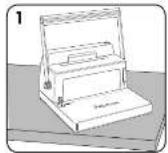
Ensure the machine is on a stable surface.

Check the waste tray is empty and correctly fitted.
BEFORE YOU BIND
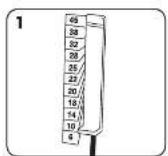
Select the correct coil diameter to suit the document.

Test punch scrap sheets to check edge guide setting.

Adjustable back-stop margin feature. Set the guide to suit the back margin size required (2,3,4 or 5mm) Eg: 2mm suits small documents (2-50 sheets), 5mm suits the largest documents (200-450 sheets)
11
Metal 100R 402687 ReVB 3L 0X137Jncd 11-12
©
12
41817 524 FM
ENGLISH GB
BINDING A DOCUMENT
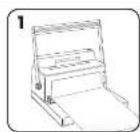
Punch front and back covers first.

Punch sheets in small batches so as not to overload the machine or the user.

Switch the inserting roller on.

Collate the document. Load the coil on to the first 3 holes.

Hold the document in both hands, with the metal coil on the right side. Touch the metal coil against the inserting roller to bind the document.

Use the binding pliers to cut and fold the end of the metal coil. Clip off the excess coil.

Turn the document around.
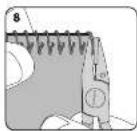
Clip off the excess coil.
CORRECTING A BOUND DOCUMENT
Additional sheets may be included or removed at any time by first removing the old metal coil. Correct document as necessary, then rebind as described.
REMOVAL OF WASTE CLIPPINGS
The waste tray is located in the back of the machine. For best results empty the tray regularly.
©
TROUBLESHOOTING
| Problem | Cause | Solution |
| Punched holes are not control | Edge guide not set | Adjust edge guide until hole pattern is correct |
| Machine will not punch | Blockage | Check waste tray is empty. Check for blockage to paper entry |
| Punch holes are not parallel to edge. | Debris are stuck below dies. | Take stiff cardboard and slide into the paper entry. Move the cardboard sideways to release any stray clippings into the waste tray |
| Partial holes | Sheets not correctly aligned to punch pattern. | Adjust edge guide and test punch scrap sheets until correct |
| Damaged hole edges | Possibly overloading the machine | Punch plastic covers with paper sheets. Reduce number of sheets being punched |
WORLDWIDE WARRANTY
Fellowes warrants all parts of the hinder to be free of defects in material and workmanship for 2 years from the date of purchase by the original consumer. If any part is found to be defective during warranty period, your sole and exclusive remedy will be repair or replacement, at Fellowes' option and expense, of the defective part. This warranty does not apply in cases of abuse, mishandling or unauthorized repair. Any implied warranty, including that of merchantability or fitness for particular purpose, is hereby limited in duration to the appropriate warranty period
set forth above. In no event shall Fellows be liable for any consequential damages attributable to this product. This warranty gives you specific legal rights. You may have other legal rights that vary from this warranty. The duration, terms and conditions of this warranty are valid worldwide, except where different limitations, restrictions or conditions may be required by local law. For more details or to obtain services under this warranty, please contact Fellows or your dealer.
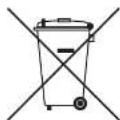
W.E.E.E.
Español
This product is classified as Electrical and Electronic Equipment. Should the time come for you to dispose of this product please ensure that you do so in accordance with the European Waste of Electrical and Electronic Equipment (WEEE) Directive and in compliance with local laws relating to this directive. For more information on the WEEE Directive please visit www.felloweinternational.com/WEEE
©
notas / notes:
[NO TEXT]
中


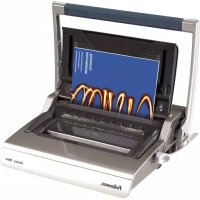
Brand : FELLOWES
Model : Metal 100r
Category : Binder