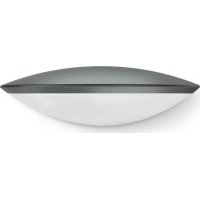
L 825 SC - Lamp STEINEL - Free user manual and instructions
Find the device manual for free L 825 SC STEINEL in PDF.


User questions about L 825 SC STEINEL
0 question about this device. Answer the ones you know or ask your own.
Ask a new question about this device
Download the instructions for your Lamp in PDF format for free! Find your manual L 825 SC - STEINEL and take your electronic device back in hand. On this page are published all the documents necessary for the use of your device. L 825 SC by STEINEL.
USER MANUAL L 825 SC STEINEL
natural_image
Smooth, curved metallic object with a horizontal line inside, resembling a stylized bowl or lens (no text or symbols)L 825 SC

GB.....12 Follow written instructions!
natural_image
Diagram of a device with internal components connected to a cable, showing no text or symbols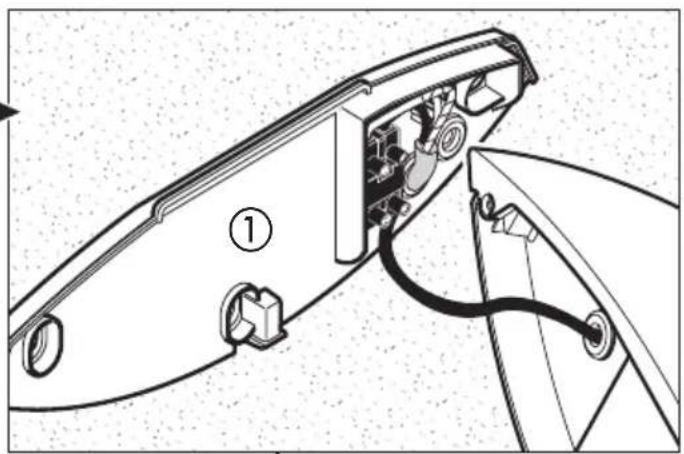
natural_image
Technical diagram of a mechanical assembly with labeled parts (no text or symbols present)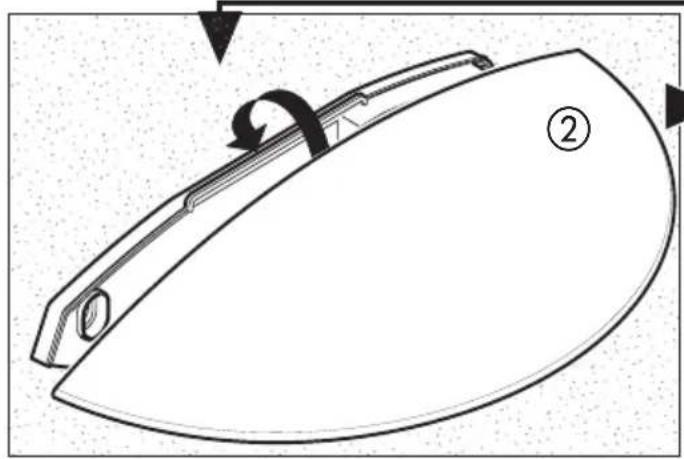
natural_image
Diagram of a curved mechanical component with labeled parts (②), showing internal structure and motion arrows (no text or symbols beyond labels)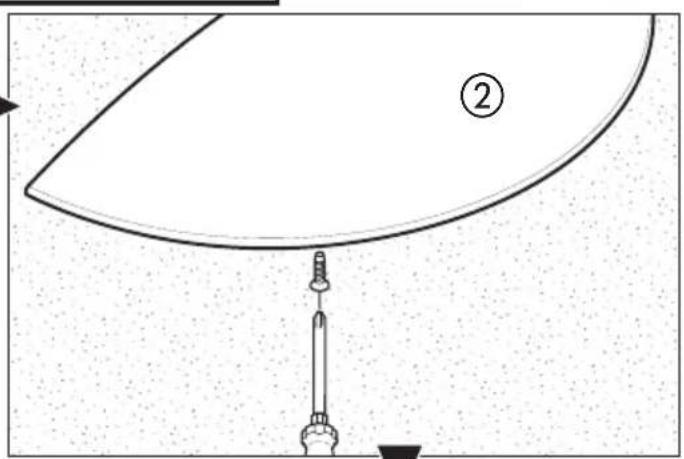
natural_image
Simple line drawing of a bowl-like shape with a horizontal line and number 4 label, no text or symbols present.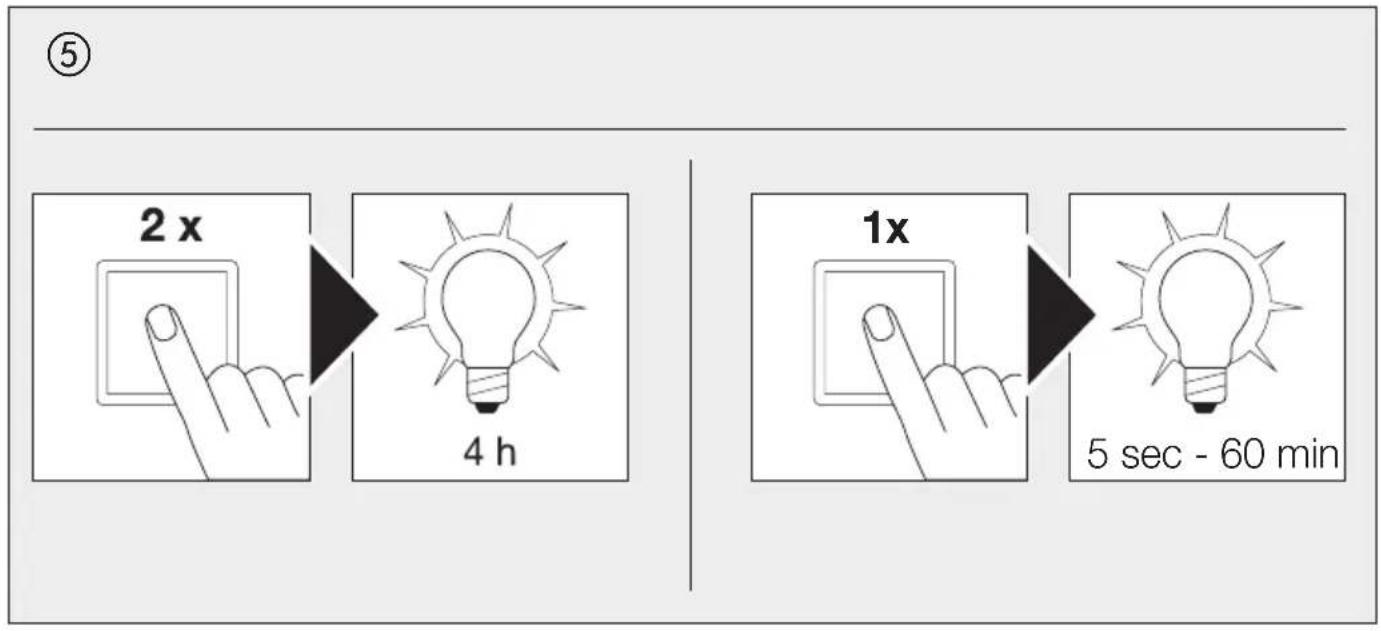
flowchart
graph LR
    A["2x"] --> B["4 h"]
    C["1x"] --> D["5 sec - 60 min"]
⑥
a)
b)
DE
5 sec = minimale Zeit
natural_image
Pure geometric diagram with concentric circles and radial lines, no text or symbols presentPlease read carefully and keep in a safe place.
- Under copyright. Reproduction either in whole or in part only with our consent.
- Subject to change in the interest of technical progress.
Symbols

Hazard warning!

Reference to other information in the document.
2. General safety precautions

Disconnect the power supply before attempting any work on the unit.
- During installation, the electric power cable being connected must not be live being connected must not be live. Therefore, switch off the power first and use a voltage tester to make sure the wiring is off-circuit.
- Installing the sensor-switched light involves work on the mains voltage supply. This work must therefore be carried out professionally in accordance with national wiring regulations and electrical operating conditions. (e.g. DE: VDE 0100,
AT: ÖVE / ÖNORM E8001-1, CH: SEV 1000)
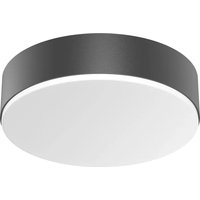
3. L 825 SC
① Wall mount
② Light enclosure
③ Spacer for surface-mounted installation
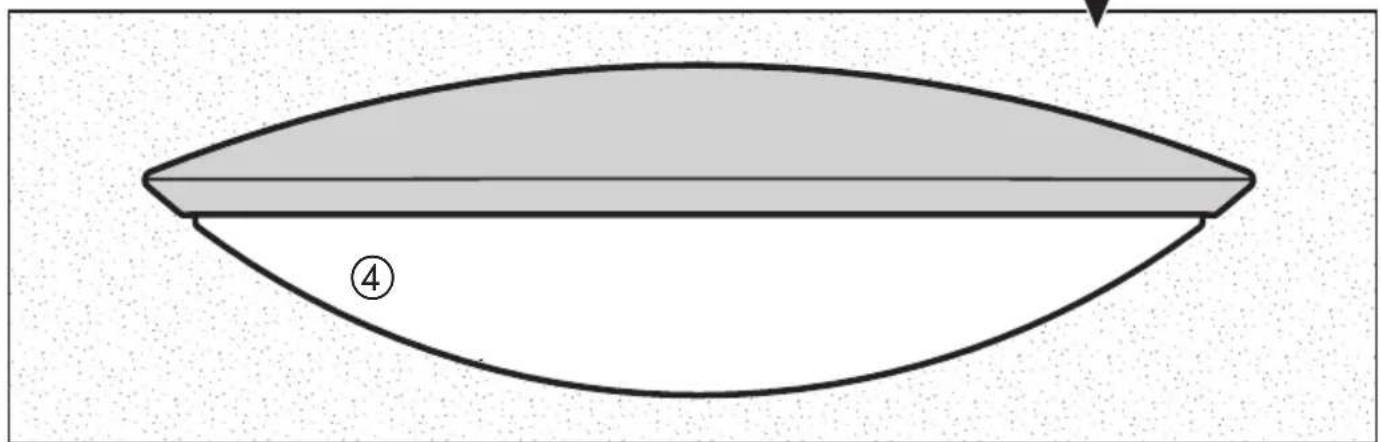
④ Light diffuser
⑤ Manual override
1 Concealed installation
Surface-mounted installation
4. Principle
Sensor-switched light with an active motion detector. The integrated iHF sensor emits high-frequency electromagnetic waves (5.8 GHz) and receives their echo. Any movement by persons in the light's detection zone is noticed by the sensor as a change in echo. A microprocessor then issues the switch command "switch light ON". Detection is possible through doors, panes of glass or thin walls.
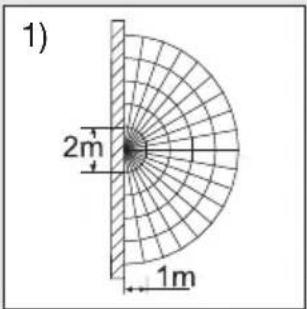
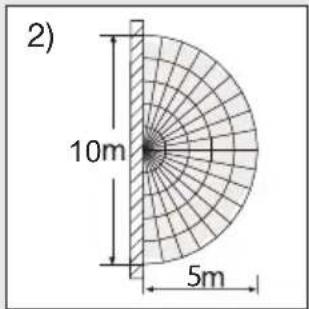
Detection zones for wall mounting:
1) Minimum reach (1 m)
2) Maximum reach (5 m)
Note:
The high-frequency output of the iHF sensor is approx. 1 mW – 1000 times less than the transmission power of a mobile phone or microwave oven.
Note:
The sensor is suitable for switching light on automatically. Note: weather conditions may affect the way the sensor works. Strong gusts of wind, snow, rain or hail may cause the light to come on when it is not wanted.
5. Electrical connection
To achieve the stated reach of 5 m, the light should be mounted at a height of approx. 2 m.
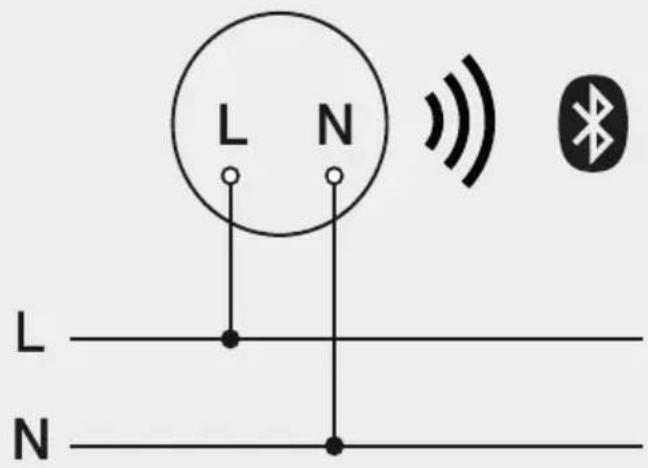
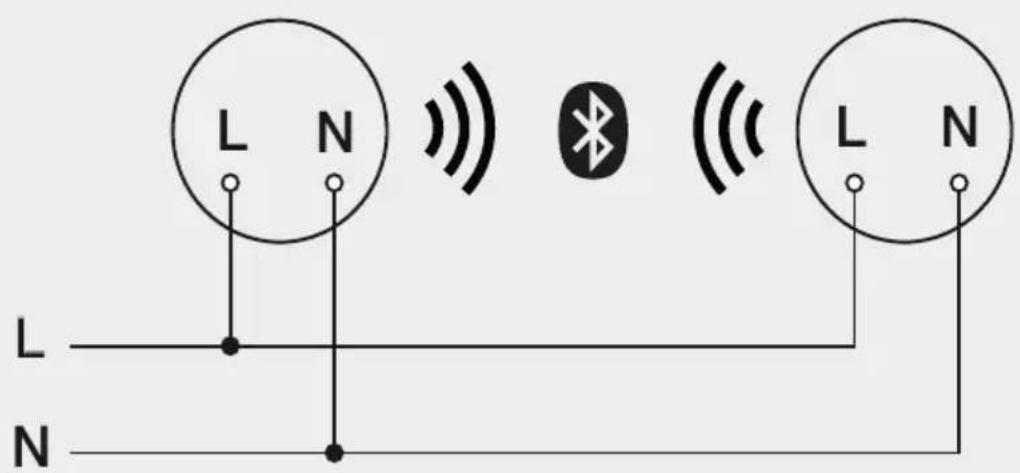
Connecting the mains power supply lead (see diagram ⑥)
a = with Bluetooth - individual connection
b = with Bluetooth - interconnected
The supply lead is a three-core cable:
L = phase conductor (usually black, brown or grey)
N = neutral conductor ( usually blue )
PE = protective-earth conductor (green/yellow)
If you are in any doubt, identify the conductors using a voltage tester; then disconnect
from the power supply again. Phase (L) and neutral conductor (N) are connected to the terminal block.
Important:
Incorrectly wired connections will produce a short circuit later on in the product or your fuse box. In this case, you must identify the individual conductors once again and reconnect them.
Note:
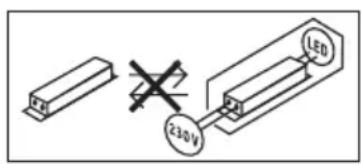
The light source of this luminaire cannot be replaced. If the light source needs to be replaced (e.g. at the end of its service life), the complete luminaire must be replaced.
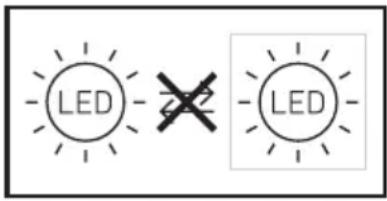
A mains power switch for turning the unit ON and OFF may of course be installed in the mains supply lead.
6. Functions
The sensor-switched light can be put into service after mounting the enclosure ① and connecting to the mains power supply. When putting the light into operation manually at the light switch, it will switch OFF after 1 second for the calibration phase and is then activated for sensor mode.
It is not necessary to operate the light switch a second time.
Functions can be set via Smart Remote app.
Smart Remote app
To configure the light via smartphone or tablet, you must download the STEINEL Smart Remote app from your app store. You will need a Bluetooth-capable smartphone or tablet.
QR codes
Android

iOS

Additional functions only via the Smart Remote app:
- Main light- / basic light level adjustable
- Extended reach adjustment
- Group interconnection
– Twilight setting by teach-in
Reach setting (sensitivity)
Factory setting: 5 m
Reach can be infinitely varied from 1 m to 5 m
Using the app, select any setting between:
max = maximum reach of 5 m
min = minimum reach of 1 m
When setting the detection zone, we recommend selecting the shortest time of 5 seconds.
Reach is the term used to describe the diameter of the detection zone produced on the ground when mounting the light at a height of 2 m.
Time setting ( switch-OFF delay )
Factory setting: 5 s
The light's ON time can be set to any period from approx. 5 s to a maximum of 60 min.
Using the app, select any setting between:
60 min = maximum time
5 sec = minimum time
When setting the detection zone, we recommend selecting the shortest time of 5 seconds.
Any movement detected before this time elapses will restart the timer. The shortest time setting is recommended when adjusting the detection zone and performing the functional test.
Note:
After the light switches OFF, it takes approx. 1 second before it is able to start detecting movement again. The light will only switch ON in response to movement once this period has elapsed.
Twilight setting ( response threshold )
Factory setting: > 2,000 lux
The chosen response threshold can be infinitely varied from approx. 2 to 2,000 lux.
Using the app, select any setting between:
2,000 lux = daylight operation at 2,000 lux
2 lux=night-time operation approx. 2 lux
To adjust the detection zone in daylight, the control dial must be set to 2,000 lux.
Programme setting
Using the app, select any setting between:
Off=nobasiclight
10-30 min = soft start + basic light level
Night = soft start + basic lighting level all night long
Always=soft start, basic light level is only active all the time once movement is detected
Reference mode
Dedicated mode for measuring light level. IHF sensor and temperature control are deactivated, light output is set to 100%. This mode is active for 4 h. Reference mode activation: SC and C version in the Smart Remote app.
7. Manual override function ⑤
If a mains switch is installed in the mains supply lead, the following functions are available in addition to simply switching light ON and OFF:
Manual override
1) Activate manual override:
Switch OFF and ON twice. The light is set to stay ON for 4 hours (blue LED lights up behind the diffuser ④). Then it returns automatically to sensor mode (blue LED OFF).
2) Deactivate manual override:
Switch OFF and ON once. Light goes out or switches to sensor operation. When light is OFF: switch ON and OFF once. Light comes ON for 5 s to 60 min or goes into sensor mode.
Important:
The switch should be actuated in rapid succession (in the 0.2 - 1-second range).
What is soft light start?
The sensor-switched light features a soft light start function. This means that when turned ON, the light is not switched directly to maximum output but gradually builds up brightness to 100% within the space of a second. Brightness is also gradually reduced when the light is switched OFF.
What is basic light level?
The basic light level provides continuous night-time illumination at approx. 10% light output. The light only switches to the maximum output of 100% (for the time selected, see switch-OFF delay) in response to movement in the detection zone. The light then returns to the basic light level (approx. 10%).
Basic light level can be set to between 10% and 50% via the Smart Remote app.
Note:
Depending on the local power grid, the LED's may flicker slightly when dimmed. This is not a product defect and no reason for complaint.
8. Maintenance / care
The product requires no maintenance.
The light can be cleaned with a damp cloth (without detergents) if dirty.
Important note: the control gear cannot be replaced.
9. Disposal
Electrical and electronic equipment, accessories and packaging must be recycled in an environmentally compatible manner.

Do not dispose of electrical and electronic equipment as domestic waste.
EU countries only:
Under the current European Directive on Waste Electrical and Electronic Equipment and its implementation in national law, electrical and electronic equipment no longer suitable for use must be collected separately and recycled in an environmentally compatible manner.
10. Declaration of Conformity
Hereby, STEINEL Vertrieb GmbH declares that the radio equipment type L 825 SC Connect is in compliance with Directive 2014/53/EU. The full text of the EU declaration of conformity is available at the following internet address: www.steinel.de
11. Manufacturer's Warranty
As purchaser, you are entitled to your statutory rights against the vendor. If these rights exist in your country, they are neither curtailed nor restricted by our Warranty Declaration. We guarantee that your STEINEL Professional sensor product will remain in perfect condition and proper working order for a period of 5 years. We guarantee that this product is free from material-, manufacturing- and design flaws. In addition, we guarantee that all electronic components and cables function in the proper manner and that all materials used and their surfaces are without defects.
Making Claims
If you wish to make a claim, please send your product complete and carriage paid with the original receipt of purchase, which must show the date of purchase and product designation, either to your retailer or contact us at STEINEL (UK) Limited, 25 Manasty Road, Axis Park, Orton Southgate, Peterborough, PE2 6UP, for a returns number.
For this reason, we recommend that you keep your receipt of purchase in a safe place until the warranty period expires. STEINEL shall assume no liability for the costs or risks involved in returning a product.
For information on making claims under the terms of the warranty, please go to
www.steinel-professional.de/garantie
If you have a warranty claim or would like to ask any question regarding your product, you are welcome to call us at any time on our Service Hotline 01733 366700.
5 YEAR MANUFACTURER'S WARRANTY
12. Technical specifications
Dimensions (H × W × D) 95 × 331 × 157 mm
Material Light enclosure: aluminium
Light diffuser: plastic
Power supply 220 - 240 V, 50/60 Hz
Colour rendering index R a = 82
Average rated life expectancy >60,000 hours (L70B50) at 25°C
Angle of coverage 160° with Sneak-by guard
Detection reach 1 - 5 m
Twilight setting 2 - 2.000 lux
Time setting 5 s - 60 min
Basic brightness 0%, 10% - 50%
Permanent light selectable (4 h)
IP rating IP44
Protection class II
Ambient temperature -20°C to +40°C
Bluetooth frequency 2.4-2.48 GHz
Bluetooth transmitter power 5 dBm / 3 mW
Sensor frequency 5.8 GHz
iHF sensor system power consumption 0.61 W
Sensor transmitter power < 1 mW
Colour consistency SDCM Starting value: 3
Luminous intensity distribution
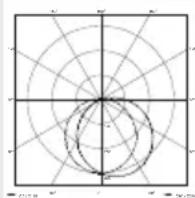
natural_image
Radar chart with concentric circles and radial lines, no text or symbols presentThis product contains an energy efficiency class "E" light source
13. Troubleshooting
Malfunction Cause Remedy
| Sensor-switched light without power | ■ Fuse has tripped, not switched ON, break in wiring■ Short circuit | ■ Activate, change fuse, turn ON mains switch, check wiring with voltage tester■ Check connections |
| Sensor-switched light will not switch ON | ■ Twilight control set to night mode during daytime operation■ Mains switch OFF■ Fuse has tripped■ Detection zone not correctly adjusted | ■ Reset■ Switch ON■ Activate, change fuse, check connection if necessary■ Readjust |
| Sensor-switched light will not switch OFF | ■ Continued movement within the detection zone | ■ Check detection zone and readjust if necessary |
| Sensor-switched light will not switch OFF completely | ■ Basic lighting level selected | ■ Switch OFF basic light level in the app |
| Sensor-switched light switching ON when it should not | ■ Wind is moving trees and bushes in the detection zone■ Cars in the street are detected | ■ Change detection zone■ Change detection zone |
| Large metal objects, such as cars or metal walls, in the detection zone | ■ Change detection zone | ■ e.g. park car somewhere else |
FR
Application Smart Remote
iOS

Dimensions (H × I × P) 95 × 331 × 157 mm
Balisage 0%, 10% - 50%
natural_image
Radar chart with concentric circles and radial lines, no text or symbols presentiOS

natural_image
Pure geometric diagram with concentric circles and radial lines, no text or symbols presentiOS

9. Smaltimento
Dimensioni (A × L × P) 95 × 331 × 157 mm
natural_image
Radar chart with concentric circles and radial lines, no text or symbols presentiOS

natural_image
Radar chart with concentric circles and radial lines, no text or symbols present
Funções adicionais
( só com a Smart Remote App ):
iOS

Ytterligare funktioner endast via Smart Remote App:
9. Avfallshantering
natural_image
Radar chart with concentric circles and radial axes, no text or labels visibleiOS

Flere funktioner kun med Smart Remote-appen:
natural_image
Radar chart with concentric circles and radial lines, no text or symbols presentiOS

natural_image
Pure geometric diagram with concentric circles and radial lines, no text or symbols present
natural_image
Radar chart with concentric circles and radial lines, no text or symbols presentiOS

natural_image
Pure geometric diagram with concentric circles and radial lines, no text or symbols presentiOS

natural_image
Radar chart with concentric circles and radial axes, no text or labels visiblenatural_image
Radar chart with concentric circles and radial lines, no text or symbols presentiOS

natural_image
Radar chart with concentric circles and radial lines, no text or symbols presentiOS

natural_image
Radar chart with concentric circles and radial axes, no text or labels visibleiOS

Dodatne funkcije ponuja samo aplikacija Smart Remote:
natural_image
Pure geometric diagram with concentric circles and radial lines, no text or symbols presentnatural_image
Radar chart with concentric circles and radial axes, no text or labels visiblenatural_image
Radar chart with concentric circles and radial lines, no text or symbols presentiOS

natural_image
Pure geometric diagram with concentric circles and radial lines, no text or symbols presentiOS

natural_image
Radar chart with concentric circles and radial axes, no text or labels visibleiOS

9. Утилизация
iOS

9. Отстраняване
iOS

二维码
9. 废弃物处理
838 Zhangyang Road, 200122 Shanghai,
natural_image
Radar chart with concentric circles and radial lines, no visible text or labels本产品具备一个能效等级为“E”的光源
13. 运行故障
故障 原因 补救办法
natural_image
World map silhouette in grayscale, showing continents and oceans without any text or labelsContact
www.steinel.de/contact

- DE
- Please read carefully and keep in a safe place.
- Symbols
- General safety precautions
- L 825 SC
- Principle
- Detection zones for wall mounting:
- Note:
- Electrical connection
- Important:
- Functions
- Functions can be set via Smart Remote app.
- Smart Remote app
- Reach setting (sensitivity)
- Time setting ( switch-OFF delay )
- Twilight setting ( response threshold )
- Programme setting
- Reference mode
- Manual override function ⑤
- Manual override
- 1) Activate manual override:
- 2) Deactivate manual override:
- What is soft light start?
- What is basic light level?
- Maintenance / care
- Disposal
- EU countries only:
- Declaration of Conformity
- Manufacturer's Warranty
- Making Claims
- Technical specifications
- Troubleshooting
- FR
- Application Smart Remote
- Smaltimento
- Funções adicionais
- ( só com a Smart Remote App ):
- Ytterligare funktioner endast via Smart Remote App:
- Avfallshantering
- Flere funktioner kun med Smart Remote-appen:
- Dodatne funkcije ponuja samo aplikacija Smart Remote:
- Утилизация
- Отстраняване
- 二维码
- 废弃物处理
- 运行故障
- Contact
Brand : STEINEL
Model : L 825 SC
Category : Lamp