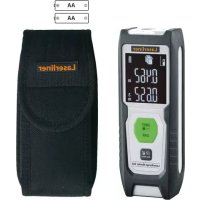
LaserRangeMaster Gi4 - Laser pointer Laserliner - Free user manual and instructions
Find the device manual for free LaserRangeMaster Gi4 Laserliner in PDF.



| Product type | Green laser rangefinder, Class 2 |
| Brand | Laserliner |
| Model | LaserRangeMaster Gi4 |
| Dimensions (L x H x D) | 40 x 110 x 24 mm |
| Weight (batteries included) | 90 g |
| Power supply | 2 AAA 1.5V batteries (LR03) |
| Typical accuracy | ± 2 mm (up to 10 m) |
| Indoor measuring range | 0.3 m - 40 m |
| Laser wavelength | 515 nm |
| Measuring functions | Distance, area, volume, Min/Max |
| Display | Backlit LCD |
| Automatic shut-off | Laser 30 s, device 3 min |
| Laser class | 2 (< 1 mW, EN 60825-1:2014/AC:2017) |
| Operating conditions | -10°C to 40°C, max 85% RH |
| Storage conditions | -20°C to 70°C, max 80% RH |
| Cleaning | Soft damp cloth, no solvents |
| Recommended calibration | Every 1 to 2 years |
| Spare parts / repairability | Contact UMAREX-LASERLINER customer service |
| Safety | Do not look into the laser beam |
Frequently Asked Questions - LaserRangeMaster Gi4 Laserliner
User questions about LaserRangeMaster Gi4 Laserliner
0 question about this device. Answer the ones you know or ask your own.
Ask a new question about this device
Download the instructions for your Laser pointer in PDF format for free! Find your manual LaserRangeMaster Gi4 - Laserliner and take your electronic device back in hand. On this page are published all the documents necessary for the use of your device. LaserRangeMaster Gi4 by Laserliner.
USER MANUAL LaserRangeMaster Gi4 Laserliner
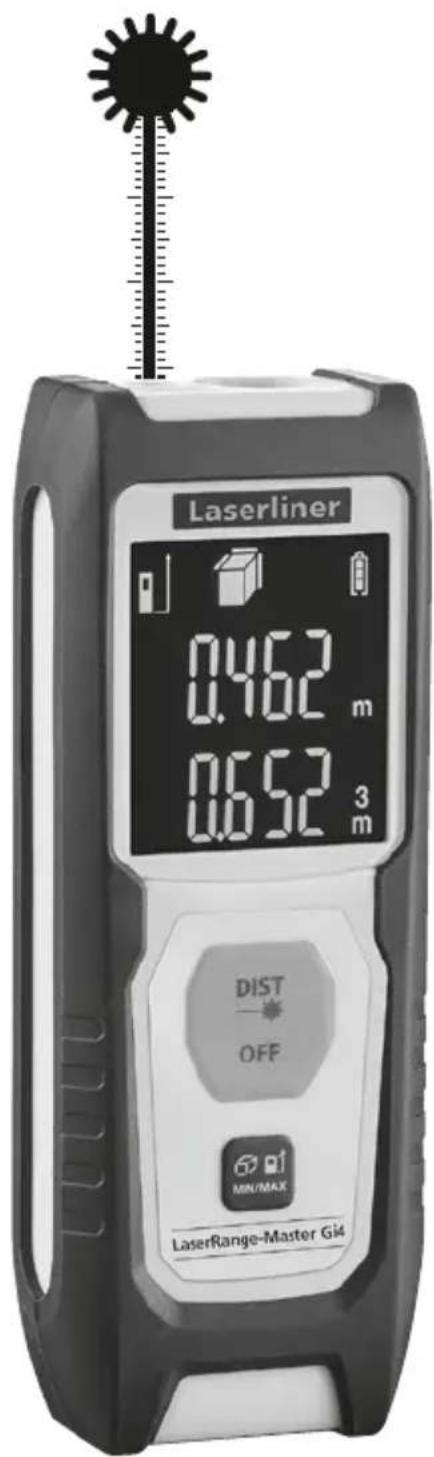
LaserRange-Master Gi4

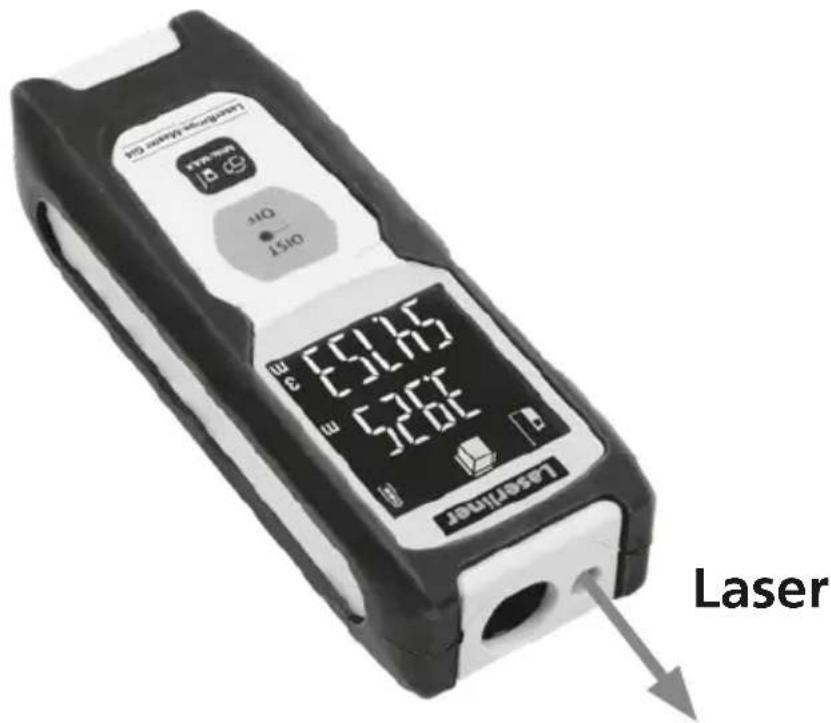
Laser
515 nm
Laserliner
| DE | 04 |
| EN | 09 |
| NL | 14 |
| DA | 19 |
| FR | 24 |
| ES | 29 |
| IT | 34 |
| PL | 39 |
| FI | 44 |
| PT | 49 |
| SV | 54 |
| NO | 59 |
| TR | 64 |
| RU | 69 |
| UK | 74 |
| CS | 79 |
| ET | 84 |
| RO | 89 |
| BG | 94 |
| EL | 99 |
| SL | 104 |
| HU | 109 |
| SK | 114 |
| HR | 119 |
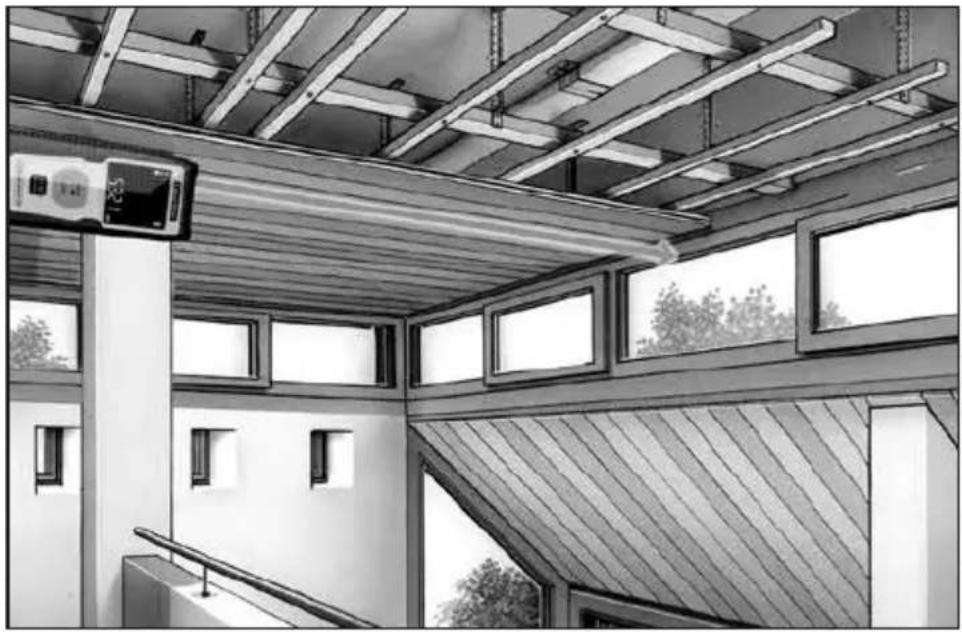

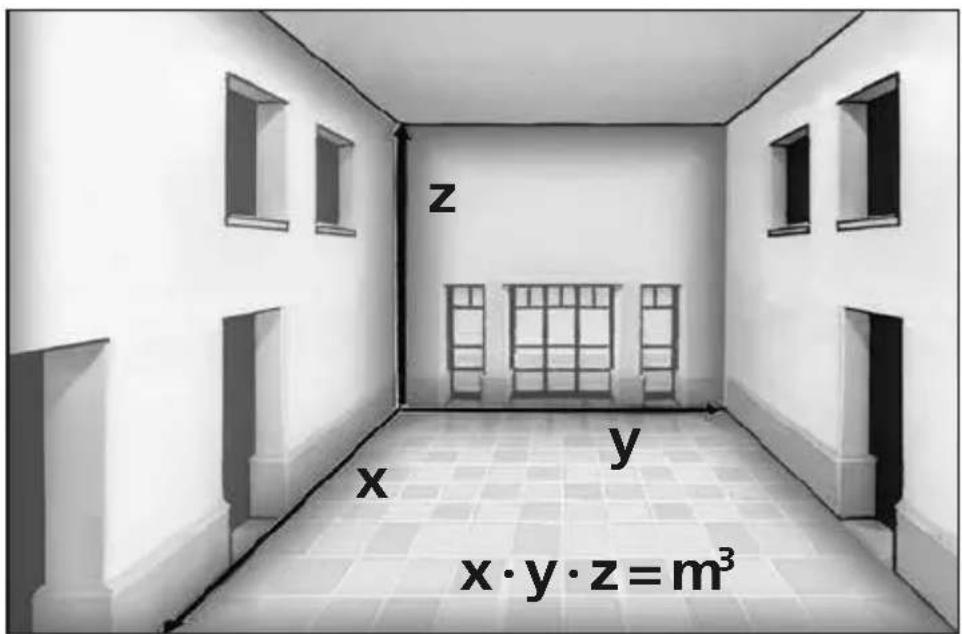
Laserliner
!
Completely read through the operating instructions, the "Warranty and Additional Information" booklet as well as the latest information under the internet link at the end of these instructions. Follow the instructions they contain. This document must be kept in a safe place and if the laser device is passed on, this document must be passed on with it.
Function / Application
Laser distance meter - with green laser technology
- Functions: distances, area, volume, min./max. measurement
General safety instructions
- The device must only be used in accordance with its intended purpose and within the scope of the specifications.
-
The following persons may use the device only when they are either supervised by a person who is responsible for their safety or have received instruction from this person on how to use the device:
-
Persons with restricted physical, sensory or mental abilities
- Persons with no knowledge and/or experience in the use of the device
-
Children (under the age of 14)
-
The device and its accessories are not toys.
- Modifications or changes to the device are not permitted, this will otherwise invalidate the approval and safety specifications.
- Do not expose the device to mechanical stress, extreme temperatures, moisture or significant vibration.
- The device must no longer be used if one or more of its functions fail or the battery charge is weak.
- Please ensure compliance with the safety regulations set out by local and national authorities with regard to the correct and proper use of the device.
Safety instructions
Using class 2 lasers

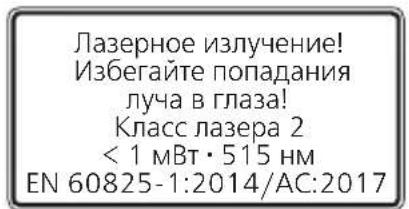
Laser radiation!
Do not stare into the beam!
Class 2 laser
<1 mW·515 nm
EN 60825-1:2014/AC:2017
- Attention: Do not look into the direct or reflected beam.
- Do not point the laser beam towards persons.
- If a person's eyes are exposed to class 2 laser radiation, they should shut their eyes and immediately move away from the beam.
- Tampering with (making changes to) the laser device is not permitted.
- Under no circumstances should optical instruments (magnifying glass, microscope, binoculars)
Laserliner
Safety instructions
Dealing with electromagnetic radiation
- The measuring device complies with electromagnetic compatibility regulations and limit values in accordance with EMC-Directive 2014/30/EU.
- Local operating restrictions – for example, in hospitals, aircraft, petrol stations or in the vicinity of people with pacemakers – may apply. Electronic devices can potentially cause hazards or interference or be subject to hazards or interference.
- The measuring accuracy may be affected when working close to high voltages or high electromagnetic alternating fields.
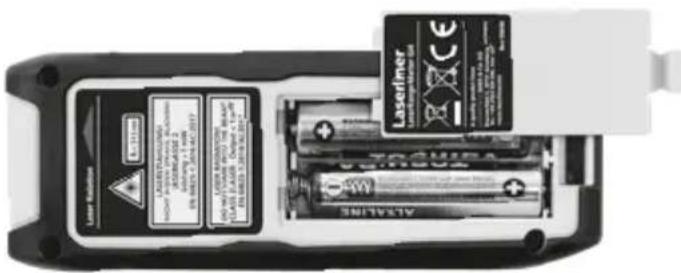
Inserting batteries
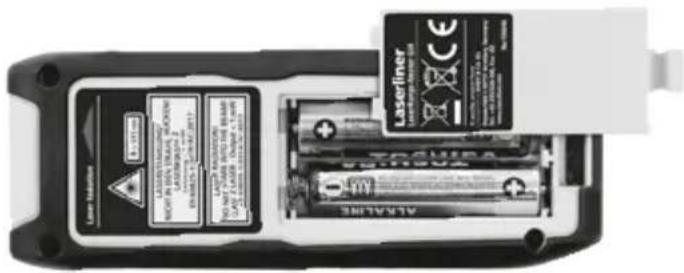
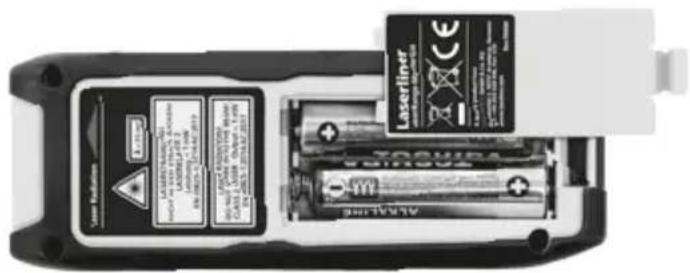
Open the battery compartment and insert batteries (2 x typ AAA) according to the symbols. Be sure to pay attention to polarity.
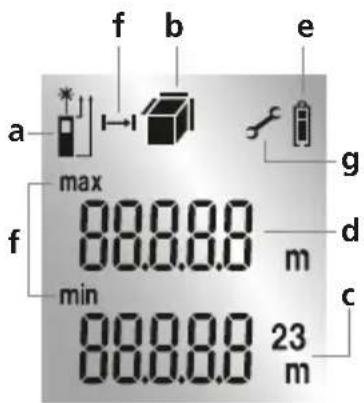
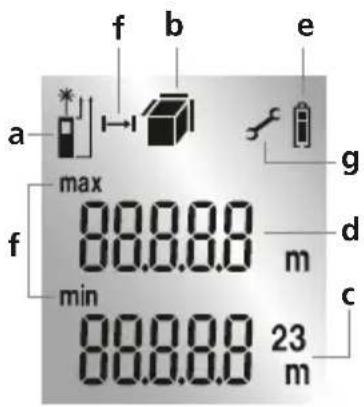
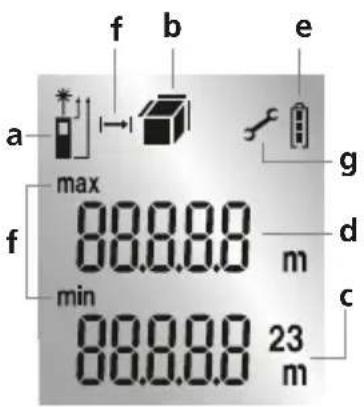
DISPLAY:
a Measurement point (reference) rear / front
b Display length / area / volume
c Measurement values Measurement results Unit m
d Intermediate values / min/max values
e Battery symbol
f Min./max. measurement
g Malfunction / service required
1.
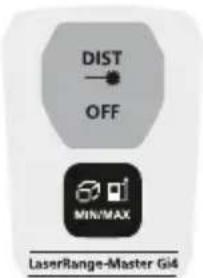
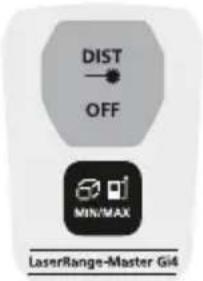
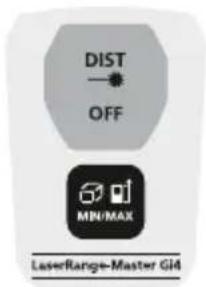
KEYPAD:
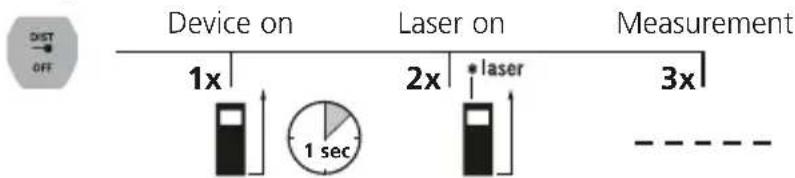
- ON / Measure / OFF
- Length, area, volume, min./max. measurement Measurement point (reference) rear / front
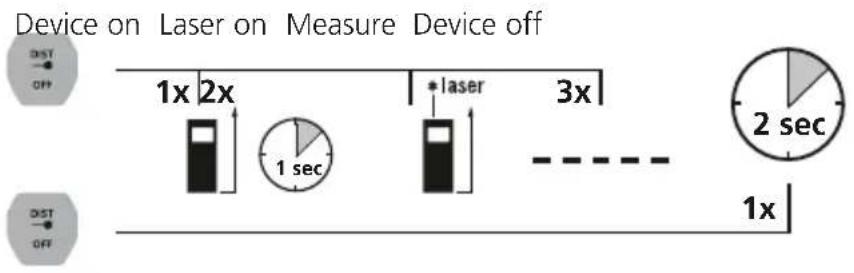
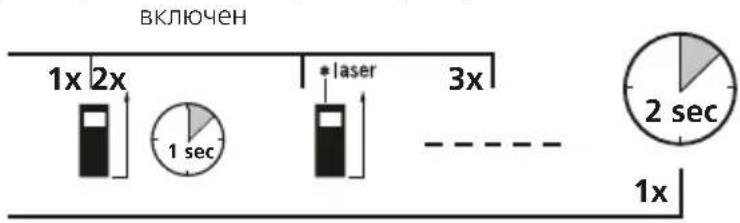
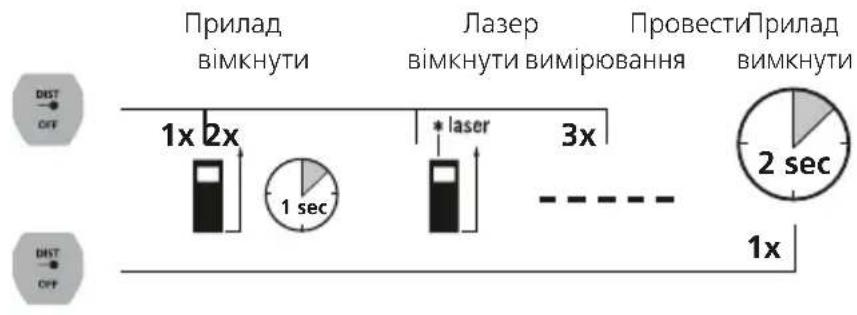
Switch on, measure and switch off:
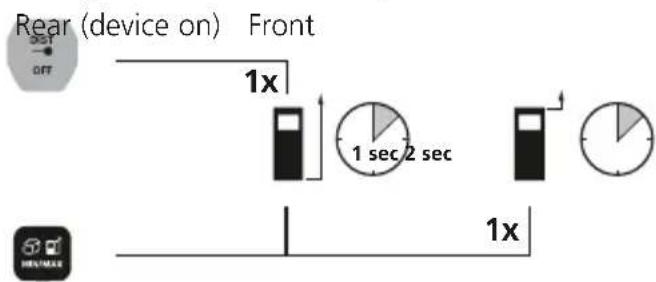
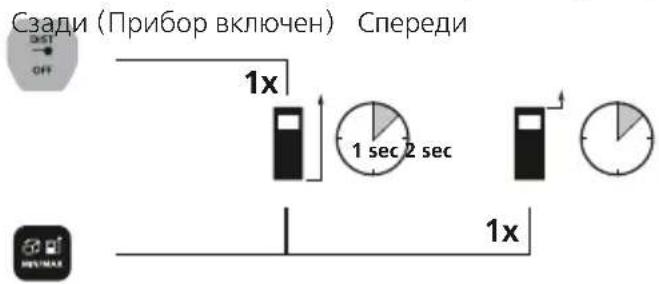
Change measurement point (reference):
Change measurement function:
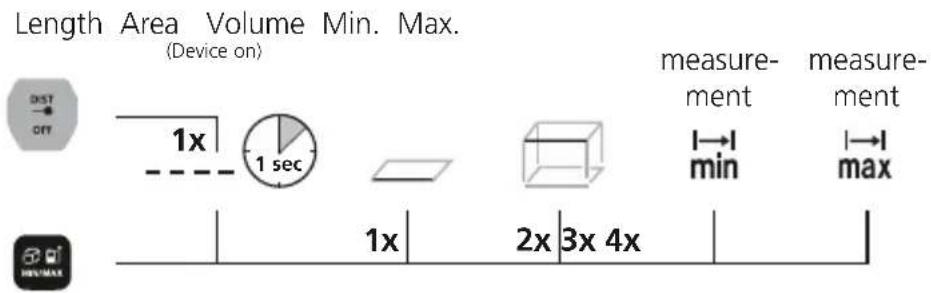
Length measurement:
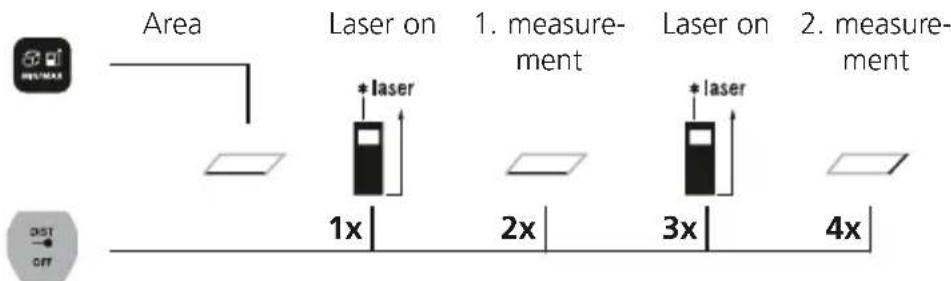
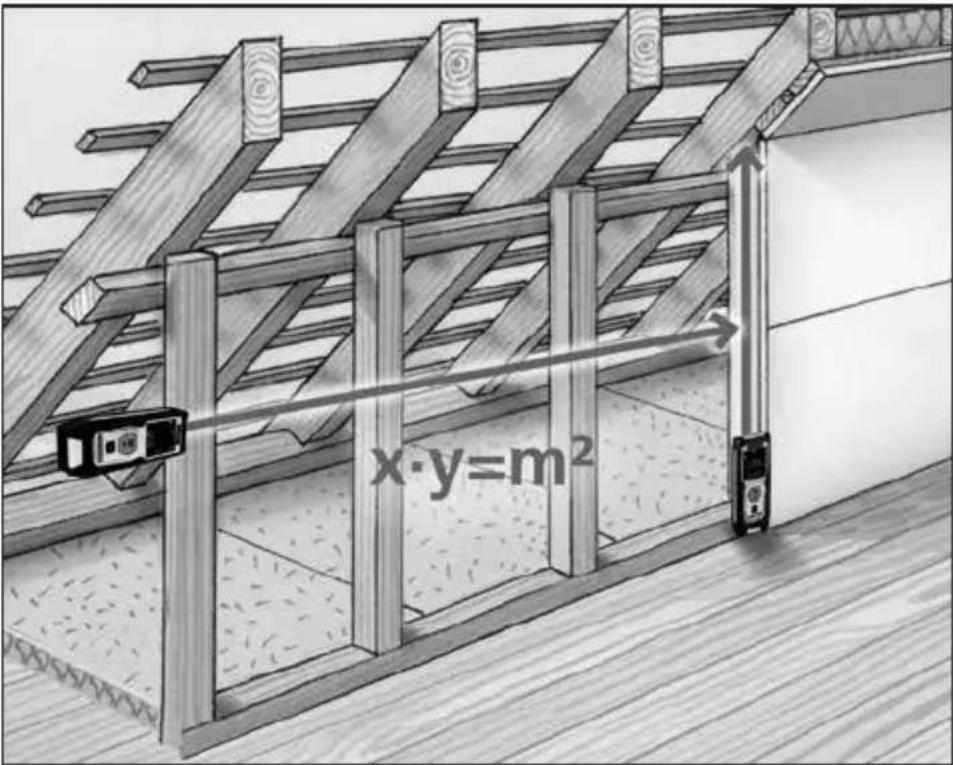
Area measurement:
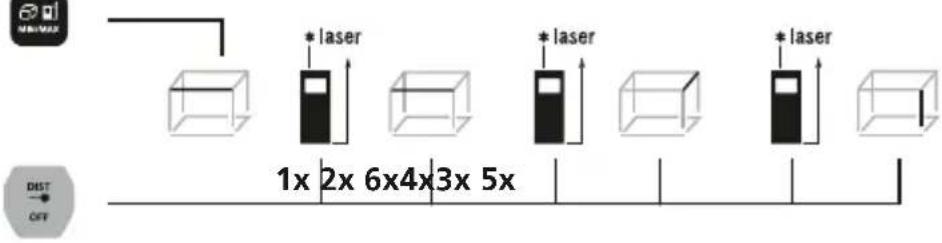
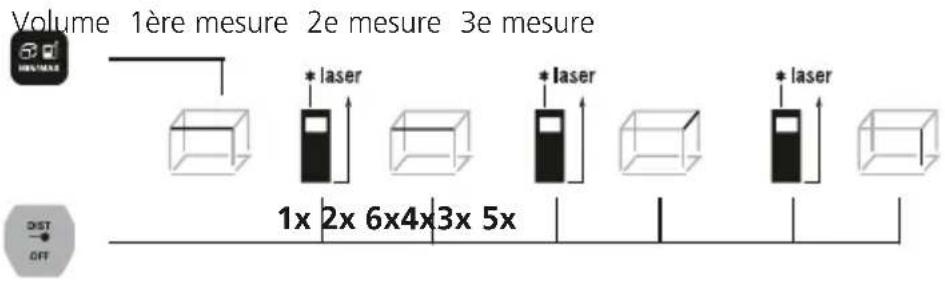
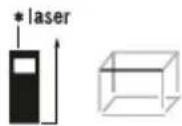
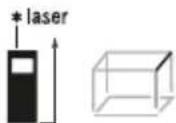
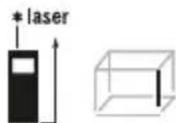
Volume measurement:
Volume 1. Measurement 2. Measurement 3. Measurement
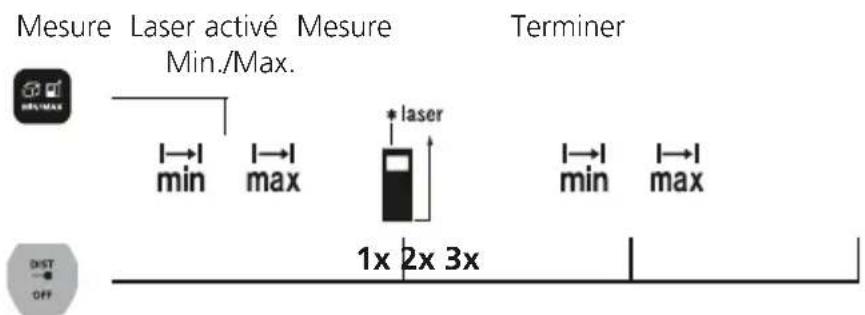
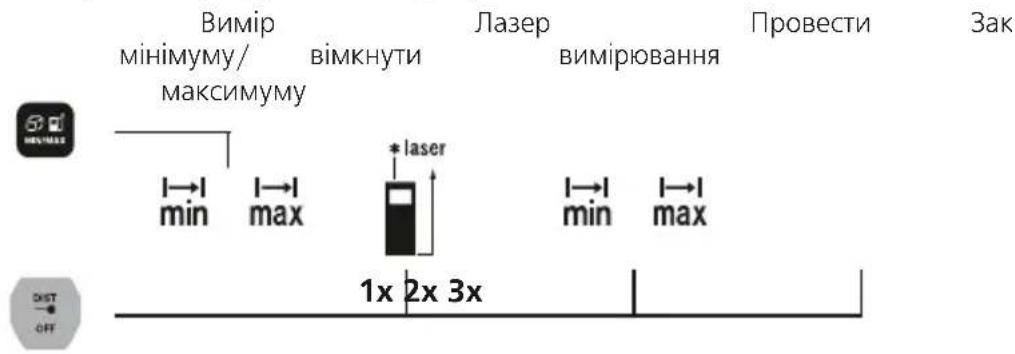
Min./max. measurement:
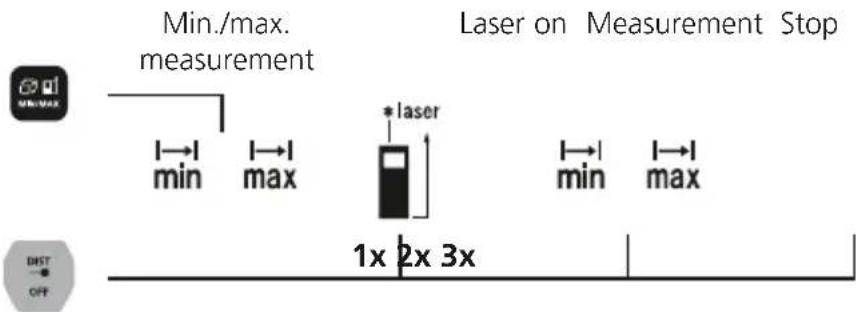
Min. measurement
The LC display shows the lowest value (min.) and the current value.
Max. measurement
The LC display shows the highest value (max.) and the current value.
Important notices
- The laser points to the location that will be measured. No objects may get into the laser's line of measurement
- The device compensates the measurement for different room temperatures. Therefore allow the device a brief adaptation period when changing locations with large temperature differences.
- The device is only conditionally useable in outdoor areas and cannot be used in strong sunlight.
- The measurement results of outdoor measurements may be influenced or falsified by rain, fog and snow.
- In unfavourable conditions, e.g. with poorly reflecting surfaces, the maximum deviation may be greater than 3mm .
- Carpenting, upholstery or curtains will not reflect the laser optimally. Measure to flat surfaces.
- Measurements made through glass (window panes) can falsify measurement results.
- An energy-saving function switches the device off automatically.
- Clean with a soft cloth. Water may not be allowed to penetrate the housing.
Error codes:
Err08: Pythagorean measurement error
Err10: Replace the battery
Err11: Data transfer error
Err14: Calculation error
Err15: Outside the measuring range
Err16: Received signal too weak
Err26: Value outside display range
Information on maintenance and care
Clean all components with a damp cloth and do not use cleaning agents, scouring agents and solvents. Remove the battery(ies) before storing for longer periods. Store the device in a clean and dry place.
Calibration
The measuring device should be calibrated and tested on a regular basis to ensure it is accurate and working properly. We recommend the measuring device is calibrated every 1 - 2 years. If necessary, contact your distributor or the UMAREX-LASERLINER service department.
Technical Data (Subject to technical changes without notice. 21W09)
| Precision (typical)* ± 2 mm | |
| Measurement range (inside)** | 0.3 m - 40 m |
| Laser class 2 / < 1 mW (EN 60825-1:2014/AC:2017) | |
| Laser wavelength 515 nm | |
| Operating conditions | -10°C ... 40°C, max. humidity 20 ... 85% rH, no condensation, max. working altitude 2000 m above sea level |
| Storage conditions | -20°C ... 70°C, max. humidity 80% rH |
| Automatic switch-off 30 sec | laser / 3 min device |
| Power supply 2 x 1.5V LR03 | (AAA) |
| Dimensions (W x H x D) 40 x Weight (incl. batteries) 90 g | 110 x 24 mm |
- measuring distance up to 10 m with strongly reflective target surface and at room temperature. The measurement deviation may increase by ± 0.2 mm/m for weakly reflective target surfaces.
** at max. 5000 lux
EU directives and disposal
This device complies with all necessary standards for the free movement of goods within the EU.
This product is an electric device and must be collected separately for disposal according to the European Directive on waste electrical and electronic equipment.
Further safety and supplementary notices at: http://laserliner.com/info?an=AJJ

Laserliner
!
Err15: Uden for maleomradet
Err16: Modtaget signal for svagt
LaserRange-Master Gi4
Mesure du volume :
Mesure Min./Max.:
Err10: Trocar as pilhas
Err16: Mottatt signal for svakt
Err26: Verdiutenforvisningsområdet
- YepTbI: PacCToHnI, nIoUaIu, oBbeMa, n3MepeHne MIn./MaKc.
06uye kazanno TeXnke 6e3onacHocTn
- Pn6op nCnoB3OBaTb TOnbKO cTporo No Ha3HaueHInu B npEeJax ycNoBn, yKa3aHHbIX B CneunKkaun.
Cneyuoune Jnua Moryr noJb3ObaTcR np6opom TOnkO nOHa3Opom npyoro Jnua,OTBeuauoJero 3a ux 6e3oNaCHOCTb,Nn npu ycNoBn,TO OHn NOJyUIn INCHtpKUn O noJb3OBaHm np6opom OTTOrO Jnua:
JIuca COrpaHnueHHbIMNΦn3nueCKnMn,CEHCOPHBIMN Nm yMCTBeHHbIMN CNOco6HOCTaMn
- nIua, He 3HaIOUne np6Op H/INn He IMeIOUne ONbITa NJIb3OBaHnI M -JeTN (MnaDwe 14 neT).
- PpO6Op n npHnAaNExKHOCTn K HeMy -He nIrpUka.
Bnocntb B npnbop IIO6bIe N3MeHnN nn MoNphiKaun anpeueHo, B npOTNBOM cnyae dOnyck n Tpe6oBaHNr no Texnke 6e30nacHOCTn yTpaHBAOT CBOIO cnly.
- He noDBepratb npi6op MexaHueckn HaRpy3KaM, ype3MePHBIM TeMnepaTypam, BJaXHOCTN UIN CInuKOM CInbHbIM BInbpaunm.
- Pa6oTa C npn6opom B cnyuae OTka3a OndHou HnH HeckOJIbKnx FyHKuIN nn npn Hn3kOM 3apJe 6atapen cTporo 3anpeueHa.
- 063aTeBbHO CO6JIoDaTb MepbI npeIOCTOpOXHOCTH, npedyCMOTpeHHbIe MeCTHbIMN IIN HaCNOHaNbHBiMn OprHaHm HAn3Opa N OTHOcAunec K HAdnEkaSeMy npImeHeHIO npi6opa.
PpabuIaTexnK6e3onacHocTn
06paueHne c na3epamn Knacca 2

-BHIMAHHe:3aIpeuaaetcHnpaBnTb npraMoN nIN OtpaxKeHHb JyB rna3a.
-3anpeaaetcHnpaBbIbIa3epHbI NyHa IIOJe.
- Ecnnaepnoe n3nyehne klacca 2 nonaetaB rna3a, Heo6xoIIMO 3akpbItb rna3a n HEmeHHeHOy6paTb roNoBy n3 30HbI Lyya.
-JIIO6bIeMaHInyJLAnC Jla3epHbIM yCTpoiCTBOM (ero N3MeHeHHa) 3aIpeUeHbI.
- Hn B KOem cIyuae He CMOTpeb B Ia3epHbI Nyu npn NOMOUN ONTNUeCKNX npnbopOB (nybl, MKNPOCKoNa, 6nHOKJI, ...).
Laserliner
PpabnTaTexHnK6e3oNaChOcTn
O6paueHHe c3JIeKtpomamHTbIM n3JnyeHnEM
Bn3MeHnteHbHom np6ope co6IIOJeHb HOpMbI nppeJIbHbIe 3HaueHHy, yCTaHOBneHHbIe npIMeHHTeJbHO K 3NeKtpOMaTHHOTcOBMeCTMOCtN corNaCHO dIpeKTHBe O 3NeKtpOMaTHHAr cOBMeCTMOCtB (EMC) 2014/30/EU.
CneNyETco6IIOdaTb DeIcTByIOUeB KOHKpeTHbIX MeCTAX OrpaHueHnno 3KcNlyatauHN, HAnpIMep, 3aIpeT Ha NCNoJIb3OBAHnE B 60JIbHnuaX, B CamoJetax, Ha aBTO3aIpaBkax IIN prAOM C JIOdbMn C KApDIOCTmYJlraTopaMn. B TaKnx ycNOBnAx CyIeCTByET BO3MOxHOCTb ONaCHO FO3JeICTBnA INN BO3HnKHOBeHn Ionom EX OT IДЯЗЛКТpoHHbIX PnIbOPOB.
-3KcπIyatauŋnoBbICOKIMHaPpXeHEmNJINByCIOBnIX DeICTBnMouhIx 3JIeKTPOMaHTHBix NepemHHbIX NOJENMOxET NOBnIraTbHa ToUHOCTb N3MepeHNI.
UctahOBka 6aTapei
OTkpOte OTeJeHne IJn 6aTapeN u yctaHObITE 6aTapeN (2 1t. Tna AAA) c co6IIOeHNem noka3aHHoN nonpaHocTn. He nepenytaTe noJIpaHocTb.
DNCNJIEN:
aПлоскocьи3мереня(onopна) c3aДИ /cpeDn
b Hnkaa: nHa / nloaaDb/ o6bem
c N3MepeHHbIe 3HaueHnPe3yNbTaTbI N3MepeHnEduHnua:M
d PpomexkytoHbIe 3HaueHnra / MInH./ MaKC. 3HaueHnra
e CnB0J 6aTapeu
f IV3MepeHHe MnH./MaKC.
g HencnpaBHOCTb / Tpe6yeTc8 o6cnyKuBaHne
1.
KJIABNATYPA:
- BKJI./I3MepeHne/BbIKJI.
2.Динан,ПLOUaIb,06bem,ИЗмеренe МИH./MaKc.IIOCKOCTb Измереня (Опогнaya) c3aI / cpepi
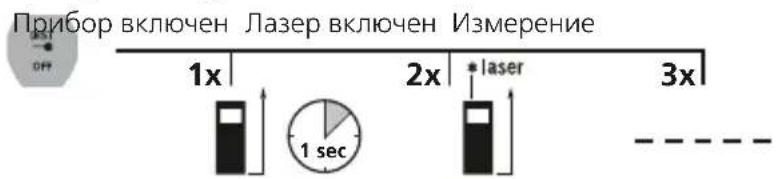
BkJIIOUeHne, n3MepeHne N BbIKIIOUeHne:
Pp60p J3ep BkIoueH N3MepeHne Pp60p

Bbl
I3MeHeHne IIOCKOCTn I3MepeHna (oNOPHOJ):
IpeekJIIOUeHHe ΦyHKcI N3MepeHnA:
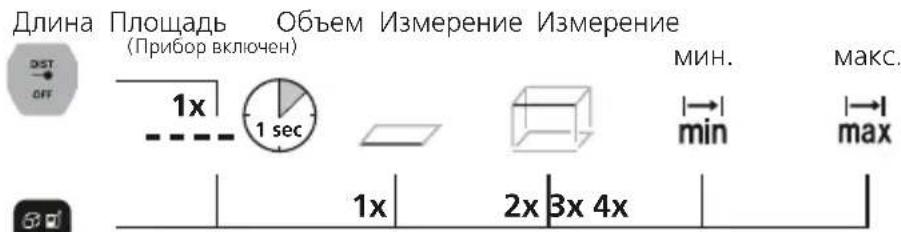
I3MepeHne nnHbI:
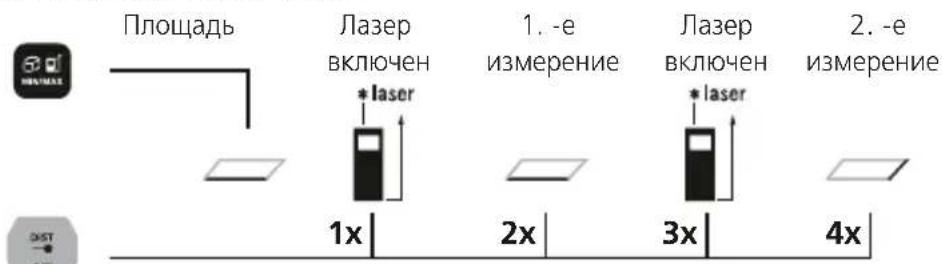
I3mepenHe nlouaa:
Laserliner
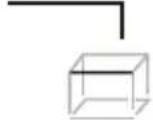
I3mepeHne o6bema:

06bem
1.-e n3mepenne
2.-e n3MepeHne
3.-e n3mepenne

1x2x6x4x3x5x


N3MepeHne MnH./MaKc.:
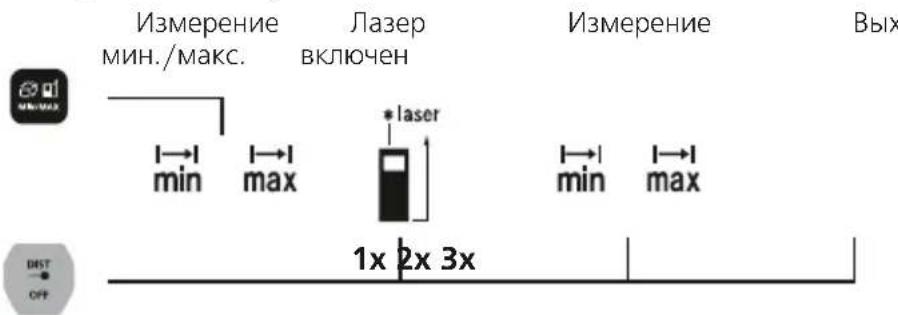
I3MepeHne MnH. Ha KK-DCnNe BbIBOINTCa HAnMeHbJee 3HaYeHne (MnH.) n TeKyuJee 3HaYeHne.
I3mepeHne MaKc. Ha XX-K-DCnJIeBbIBODNTcHaN6OJIbJee 3HaueHne (MaKc.) n TEkyUee 3HaueHne.
Baxkhhe npabuJa
- Na3ep yka3bIbaeT TOky,do KOTopoB BbINOHHeTcN3MepeHne. HJIuHne npedMeTOB Ha nyTu Na3epHO rUyHa He DOnyCKaETcR.
-ПиИЗМерЕнINnpi6Op BHOCIT nonpaBky C yyeTOM pa3NHybIX TemnepaTpВnomeueHnx. NOrTomy Heo6xOIMNo npedycmOTpeTb KOpOTKoe BpemIaAnTaUIN npi6opa npi erO nepeHoce B nomeueHne, TemnepaTpA B KOtOpom 3HaHTenbHO OTnuaeTcR OTeMnepaTpbl npedseCTByIOUeO NOMeueHn.
BHe NOMEUHnC np6opm MOxHO pa6oTaB NUsb OrpaHueHHO; NCNoJIb3OBaHne npu INHTECNBOM COJIHeHOM CBete He DOnyCKaETc.
-Дожд,ТуMaHиСHer BOВБрмИЗМерEHиHa CBexKem BO3dYxE MOryT NOBJNЯrTиI NCKa3NTb pe3yJbTaTbI I3MpeHn.
B He6IaIopnIyTHbIX ycIOBnIX, HApIIMep, npH aHInuH INIOXO OtpaKaIounx NOBepxHOCTe MaKc. OTKnIOHeHne MoKeT COCTaBJIbT 6OJee 3 MM.
-KobpoBbIe NOKpbITnHa NoJax, MmKar OOBKa Me6enN nOpTbePbI He oBeCneuBaIOT ONtMaJIbHOrO OTPaKeHn Ja3epa.CneDyET nCNoB3oBaTb IJaDKHe CBETJIbe NOBepxHOCTN.
-ПиИЗМеренИЧеэзСTeКно (OKOHньсTeKna) BO3MOxHо NCKaЖeHne pe3yЛьТаTOВ ИЗМерehи.
-ФyHKUЯ 3KOHOOMN 3Heprnn aBtOMaTnueckn OTKIIOuayet np6Op.
OuNTKa np60pa npoU3BOUntc MArKo TkaHbIO.He DOnyckaTb nonadaHn BOdb BVHTpb Kopnyca.
KoI own6kn:
Err08: Norpewhoctb n3Mepehen no Npaaropy
Err10: NomeHb6aTapeio
Err11: Own6ka nepedaun daHHbIX
Err14: Own6kaBpacetax
Err15: 3a npedeIamn dnaana3oHa n3MepeHn
Err16: PnHbI CNHAn CNIWKOM Cna6
Err26: 3haeHne 3a npedeJamn dnaanaOHa INndkaun
HOpMaunno 06cnykBaHHIO uXOy
Bce KOMnoHentbO uOuTaB CnErKa BnaXHoC anfoKo; He nCNoJb3OBaTb
YnCTaUne cpeNCTBa, a6pa3NBbIe MaTePnAJIb I pactBOpNTeNI.
IpeE dInnteHbIM xpaHeHem np6opAp o8aTeJIbHO BbHyTb N3 Hero
6atapeo/6atapei. Pnp6Op xpAHHTB b YnCTOM n cyxom MeCTe.
Kann6pOka
Дя obecneeyHЯToHocn pe3yIbTaTOB n3MepeHn IФyHKUHOHaJIbHOCTn CneJyET peryIaRPho npOBoDnTb KaIIb6pOBky n npOBepKy n3MepnteJIbHOrO npIbopa. Mby peKomeHnyem nHTepBaJIb KaIIb6pOBkn 1-2 roJa. Bbl moKeTe noJyHtB KOHCyIbTaCIO NO tOMy BONpOcy y BaIero npOdaBua nIIu cotpydHnKOB cnyXbI noIePxxk UMAREX-LASERLINER.
TexHnueckne xapaKTepeNCTNKI (NoJnxHTexHnueckm I3MeHeHnM6e3 ppeBapnteHoro n3BeUeHn. 21W09)
BcTaHOBuTn aKymyIaTOPn
Bidkpntn Biicik nna 6atapeoik i BknaCTn 6atapeyn (2 x Tnn AAA) 3riH0 3 CmboJamn. CniKyBaTn 3a nonpaHcIIO.
DNCNJIEN:
a IIOUHa BmipiB (nokaxuK) no3aNy / cnepey
b Noka3:IOBxHa /nloa/06'EM
C BeHHHa Bmipib /pe3yIbTaT Bmipib OHNHcM
d PpomixKHe 3HaueHnra / MIH./MaKC.3HaueHHa
e 3NaKaMyJrTOpHoi6BaTapei
f Bumip MihimMy/MakcunMy
9 HecnpaBHicTh / notpi6He 06cnyroByBaHHa
1.
KJIABIATYPA:
1: Ppna yBIMKHeHO / BmipIOBaHHa / PpnaBnMKHyTu
2.ДовхиHA,nloa,o6'EM, Bmip mHIMMy/Makcmy My nOuHa BmipiB (nokaxnk) no3aNy /cpepy
BIMKHyTN, 3aMiprTN, BUMNKHyTN:
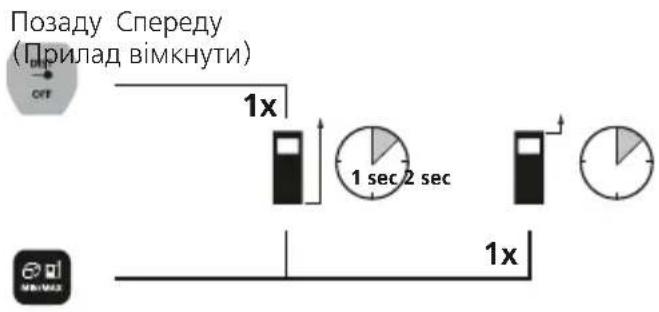
IpeemKHyTn IIOUHNY BImipiB (noKaXyNK):
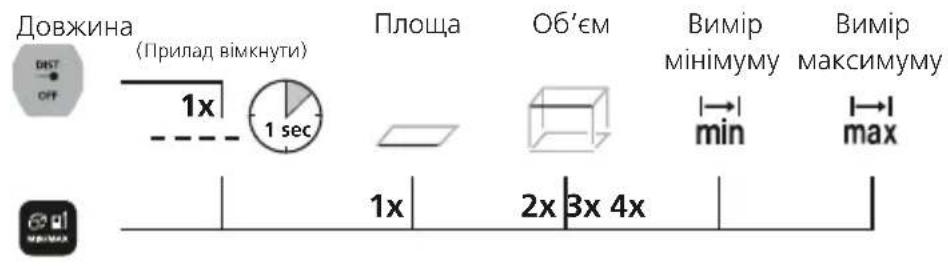
IepemKHyTu ΦyHKuBvMipy:
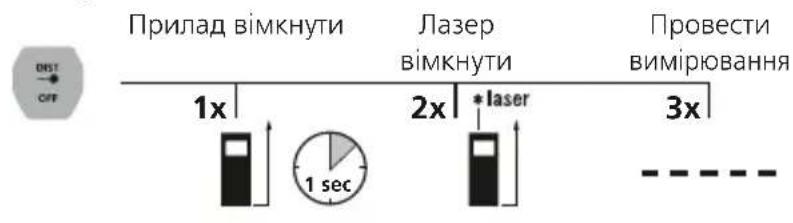
BumipIOBaHHI IOBXINH:

Bumip nlooi:
BnMip o6'emy:
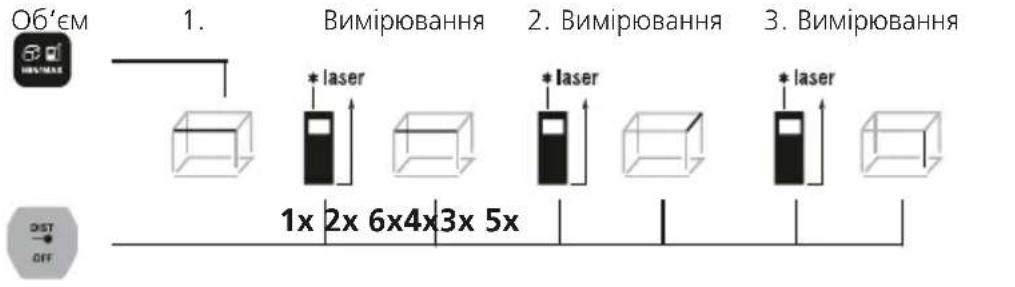
Bumip miHimMy/MakcHmMy:
Bunip miHimMy
PK-dncnne nokaeyHaMeHne 3NaeHHa (M.H.) i paKTnue 3NaeHHa.
Bmip MaKcMMy
Err10: 3amHHT6aTapeKn
Err11: POMnIka nepeaui daHx
Err14: TomnIka o6yncJeHHa
Err15: 3aMexkamn iana3oHy BmipobHH
Err16: 3acJa6Kn npuMaHn cnHaI
Err26: 3haueHHno3a Mexamn o6lacti BiO6paXeHH
Laserliner
Ihctpykuia 3 TexhiuHoro o6cnyroByBaHHa Ta dOrry
Bci KOMnoHENTn CnI, OUYBaTn 3BOJoxeHOIO TKAHNHOIO, yHKnATN 3aCTocyBaHHa MInOuHX a6o YnCTaHx 3acO6IB, a TaKoX pOzHHNKIB. Npeed TpNbAJIIM 36epiraHHaM CnI BnTARHyTN eJeMeHT (-Tn) XnBneHHra. 36epiratn npncTiY uNCTOMy, cyXOMy Micci.
Kaji6pyBaHHa
Дязбетпени.ToHOCI peyntaIB BmipobAbiФункioHaBbHOCTi CnIppeYyRnpoBOAnTu KaI6pyBaHHra Ta nepeBipky BmipOBaHOrO npnAady. Mn peKOMeHnycMo iTePBAHn KaI6pyBaHHra 1-2 pOKn.3 zuoro npnbOdy BN MoXeT3BepHyTncAdo BaWOro npodabua a6o cnibpo6iTHNKIB clyx6nPiDTPmKn UMAREX-LASERLINER.
TexhiHidaiHi (IpaBO Ha texhi 3miHn 36epexeHe.21W09)
Uldised ohutusjuhised
Hnctpykun 3a 6e3oNaCHOCT
Pa6ota c napepi ot knae 2

LaserRange-Master Gi4
SERVICE

Umarex GmbH & Co. KG
-Laserliner
- LaserRange-Master Gi4
- Laserliner
- Function / Application
- General safety instructions
- Safety instructions
- Inserting batteries
- DISPLAY:
- KEYPAD:
- Switch on, measure and switch off:
- Change measurement point (reference):
- Change measurement function:
- Length measurement:
- Area measurement:
- Volume measurement:
- Min./max. measurement:
- Min. measurement
- Max. measurement
- Important notices
- Error codes:
- Information on maintenance and care
- Calibration
- EU directives and disposal
- Mesure du volume :
- Mesure Min./Max.:
- 06uye kazanno TeXnke 6e3onacHocTn
- PpabuIaTexnK6e3onacHocTn
- PpabnTaTexHnK6e3oNaChOcTn
- UctahOBka 6aTapei
- DNCNJIEN:
- KJIABNATYPA:
- BkJIIOUeHne, n3MepeHne N BbIKIIOUeHne:
- I3MeHeHne IIOCKOCTn I3MepeHna (oNOPHOJ):
- IpeekJIIOUeHHe ΦyHKcI N3MepeHnA:
- I3MepeHne nnHbI:
- I3mepenHe nlouaa:
- I3mepeHne o6bema:
- N3MepeHne MnH./MaKc.:
- Baxkhhe npabuJa
- KoI own6kn:
- HOpMaunno 06cnykBaHHIO uXOy
- Kann6pOka
- BcTaHOBuTn aKymyIaTOPn
- KJIABIATYPA:
- BnMip o6'emy:
- Bumip miHimMy/MakcHmMy:
- Bunip miHimMy
- Bmip MaKcMMy
- Ihctpykuia 3 TexhiuHoro o6cnyroByBaHHa Ta dOrry
- Kaji6pyBaHHa
- Uldised ohutusjuhised
- Hnctpykun 3a 6e3oNaCHOCT
- SERVICE
- Umarex GmbH & Co. KG
Brand : Laserliner
Model : LaserRangeMaster Gi4
Category : Laser pointer