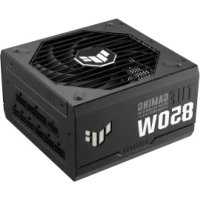
TUF Gaming 850W Gold - Motherboard ASUS - Free user manual and instructions
Find the device manual for free TUF Gaming 850W Gold ASUS in PDF.



User questions about TUF Gaming 850W Gold ASUS
0 question about this device. Answer the ones you know or ask your own.
Ask a new question about this device
Download the instructions for your Motherboard in PDF format for free! Find your manual TUF Gaming 850W Gold - ASUS and take your electronic device back in hand. On this page are published all the documents necessary for the use of your device. TUF Gaming 850W Gold by ASUS.
USER MANUAL TUF Gaming 850W Gold ASUS
TUF GAMING POWER SUPPLY UNIT
Quick Start Guide (English)
快速使用指南(繁體中文)
快速使用指南(简体中文)
ケイクスローカイド(旧日本語)
Conventions used in this guide
To ensure that you perform certain tasks properly, take note of the following symbols used throughout this manual.

DANGER/WARNING: Information to prevent injury to yourself when trying to complete a task.
NOTE: Tips and additional information to help you complete a task.
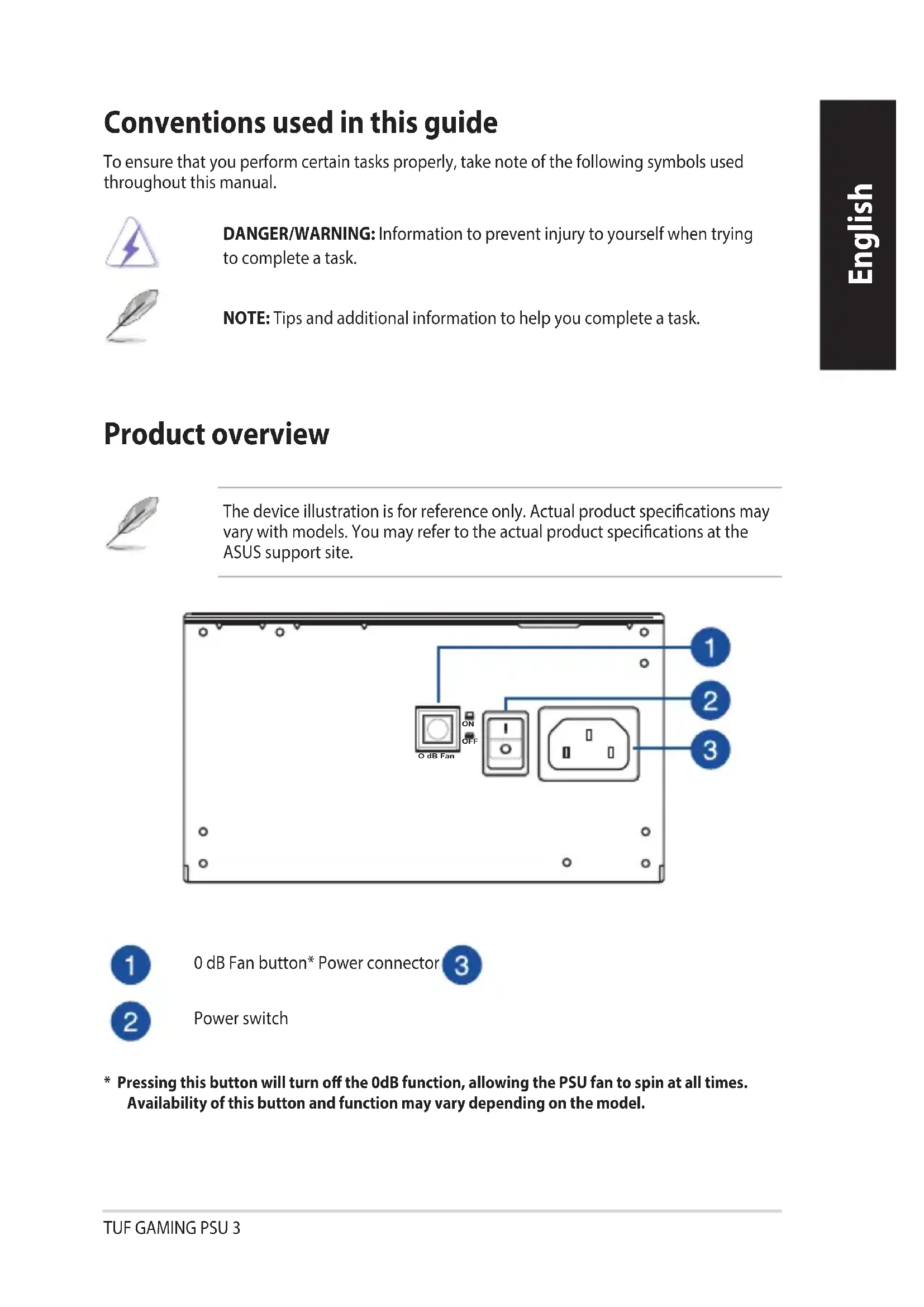
Product overview
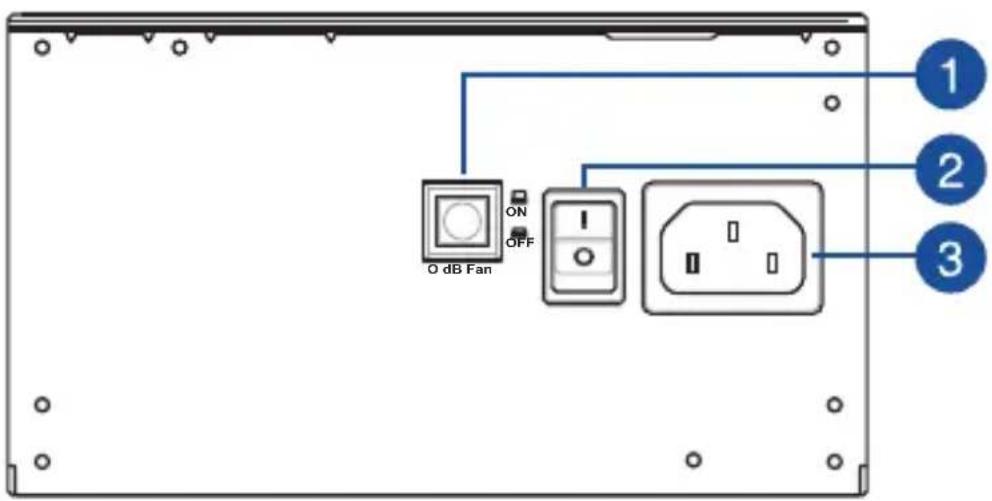
The device illustration is for reference only. Actual product specifications may vary with models. You may refer to the actual product specifications at the ASUS support site.
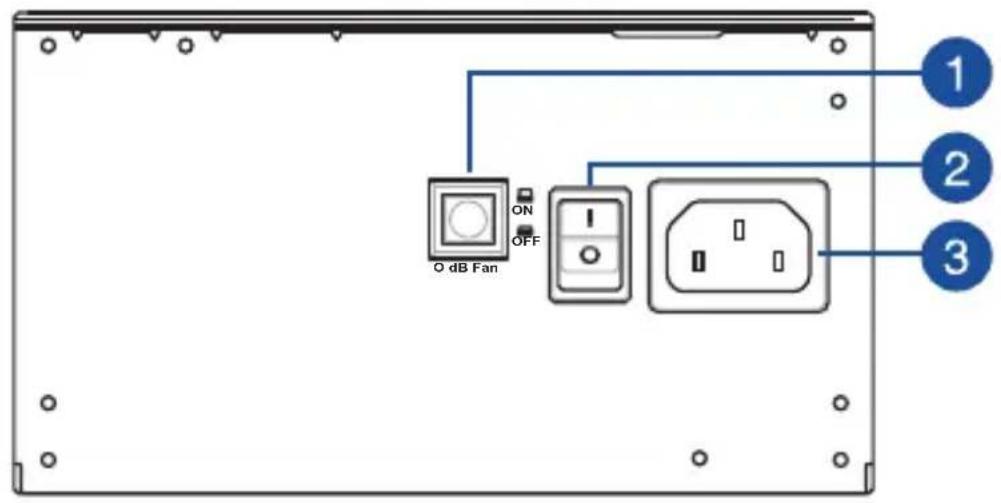

0 dB Fan button* Power connector


Power switch
- Pressing this button will turn off the 0dB function, allowing the PSU fan to spin at all times. Availability of this button and function may vary depending on the model.
Installing your Power Supply Unit

Before installing or removing cables, ensure that the system is turned off, and all power cables for the system and all attached devices are unplugged.
- Follow the directions of your chassis manual and secure your power supply unit into your chassis using the mounting screws.
- Connect the bundled cables to your power supply unit.
- Connect the power connectors to your motherboard and peripheral devices according to your preference. You may refer to the list below to check which devices each power connector can be connected to.
- The power connectors may vary between different models of power supply units.
-
Refer to your motherboard's user manual for more information on the location and connecting the power connectors mentioned below.
-
Connect the 24-pin or 20-pin Main Power Connector to the motherboard's 24-pin or 20-pin power connector.
- Connect the 4+4 pin CPU +12V Power Connector to the CPU power socket on the motherboard.
- Connect the 4-pin Peripheral Power Connector to peripheral devices if needed.
- Connect the 6+2 pin PCI-E +12V Power Connector to the PCI-E graphics card.
-
Connect the SATA Power Connector to devices with a Serial ATA interface.
-
Connect your power supply unit to a power source using the bundled power cord.
-
Flip the Power Switch to the "1" position to turn on your power supply unit
Safety information
- High voltages are present in the power supply unit, it is extremely dangerous to open the power supply case or attempt to repair/clean the power supply unit. You should NEVER, under any circumstances, open the power supply unit.
- The Warranty will become void if the cover of the power supply unit is opened; there are no serviceable components inside the power supply unit.
- DO NOT insert any objects into the power supply unit.
- DO NOT place any objects in front of the fan or the ventilation area of the power supply unit that may obstruct or restrict the airflow.
- USE ONLY the modular cables bundled with the power supply unit.
- DO NOT use the power supply unit near water, or in high temperature or high humidity environments.
- The power supply unit should be operated in suitable environment. (Operating temperature: 0^ to 40^, Relative Humidity: 20% to 80% )
- The power supply unit is for integration into a computer, and not intended for external or outdoor usage.
- Failure to comply with any manufacturer instructions and any of the safety instructions will immediately void all warranties and guarantees.
提示符號
This man has travelled to the surface.
aaiy jlll lal aaii iil lal alal alal alal alal
ASUS

a

LgDgDgDgDgDgDgDgDgDgDgDgDgDgDgDgDgDgDgDgDgDgDgDgDgDgDgDgDgDgDgDgDgDgDgDgDgDgDgDgDgDgDgDgDgDgDgDgDgDgDg
jbj jbj jbj jbj jbj jbj
L 1

1
aBbIyIyI yIyIyIyIyIyIyIyIyIy
aill lglg jll sikay. alaii la aalbll o jy 1 y 1 y 1 y 1 y 1 y 1 y 1 y 1 y 1 y 1 y 1 y 1 y 1 y 1 y
aBbIyI yI yIyIyIyIyIyIyIyIyIyIy
aagg g aagaaagaaagaaagaaagaaagaaagaaagaaagaaagaaagaaagaaagaaagaaagaaagaaagaaagaaagaaagaaagaaagaaagaaagaaagaaagaaagaaagaaagaaagaaagaaagaaagaaagaaagaaagaaagaaagaaagaaagaaagaa
ailllll l 1 ailllll l 1 1 1 1 1 1 1 1 1 1 1 1 1 1 1 1 1 1 1 1 1
40 0 1234567890
Jgill 1000 1000 1000 1000 1000
y,ynn nn nnn nnn nnn nnn nnn nnn nnn nnn nnn nnn nnn nnn nnn nnn nnn nnn nnn nnn nnn nnn nnn nnn nnn nnn nnn nnn nnn nnn nnn nnn nnn nnn nnn nnn nnn
.
n7 w 20 ix 24 nn 20 ix 24 nn nn nn .
n nn nnnnnnnnnnnnnnnnnn +12Vnnnnnnnn
.
.PCI-E 6+2 PCIE+12Vnnnnn
Serial ATA nn nnnn SATA nn nn nn
n nn nnnnnnnnnnnnnnnnnnnnnnnnnnnnnnnnnnnnnnnnnnnnnnnnnnnnnnnnnnnnnnnnnnnnnnnnnnnnnnnnnnnnnnnnnnnnnnnnnnnnnnnnnnnnnnnnnnn
.100 790 nTnN x yyn7 T "I" xyn nynn npn nn .5
NIN'U NTIN yTn
IN NIN 790 TNN NX NIN7 TINN PION p71, DNN DNN NIN 790 TIN
.100 nnnn nn nnnn nn nnnn nn nnnn nn nnnn nn nnnn nn nnnn nn
n nn nnnnnnnnnnnnnnnnnnnnnnnnnnnnnnnnnnnnnnnnnnnnnnnnnnnnnnnnnnnnnnnnnnnnnnnnnnnnnnnnnnnnnnnnnnnnnnnnnnnnnnnnn
.1907
.100 7 Dn nn nnn
y 190 n7n nn nnnn nn nnnn
INN INN IN
.100 90
n 1900 n n n n n n n n n n n n n n n n n n n n n n n n n n n n n n n n n n n n n n
.
nir7,40oC ty 0°:nyon nniin no)nnn nn nnnn nn nnnn nn
YIN IN YIN WEN WEN NNI,UNN ANN NNN NNN NNN
.
n nn nnnn nn nnnnnn nn nnnnnn nn nnnnnn nn nnnnnn
- 24-3n6ns6n 56 20-3n6ns6n Main Power Connector (dsmm3s6n 3m6d8mn) gss3msgnb 24-3n6ns6 56 20-3n6ns6 3m6gd8mnos6.
-
4+4 3n6n5n CPU +12V Power Connector (CPU +12V 3m6gmmn)
-
4-3n6n6n Peripheral Power Connector (3m600000000000000000000000000000000000000000000000000000000000000000000000000000000000000000
-
6+2 3n5n5n PCI-E +12V Power Connector (PCI-E +12V m6m6m6) PCI-E a n5n5n5n5n5n5n5n5n5n5n5n5n5n5n5n5n5n5n5n5n5n5n5n5n5n5n5n5n5n5n5n5n5n5n5n5n5n5n5n5n5
SATA Power Connector (SATA 3m6g) Serial ATA n5000000000000000000000000000000000000000000000000000
4 4320000000000000000000000000000000000000000000000000000000000000000000000
5 80000000000000000000000000000000000000000000000000000000000000000000000000000000000
yus03mmbnol n603moads
- dsomn ds03j on snb 33j on dmmj an, dmnsb bsndns 33j on dmnn yonl asbl6s 56 anbn 33j onds/ a5uyn33ds. n36 NEVER (snsluqnhm), sm y6os asbl6sn 33j on dmnn 62onlqn m agmdoedn.
- ahsbgs asbgds ydm my 330nb dm m3nbu ynn asnbbs; gnabnn sm smnb lgmsnynn 3md66666666.
DO NOT (s) hong mon mondo 360000000000000000000000000000000000000000000000000000000
DO NOT (sh) a6sos3lman mndmngon 36gnmsmnls 36gnssnnu
mbn6, msdandmddgmbml 56 gmygm 36mnls bsogn.
USE ONLY (asamny6bn dbmm) dmuymsmnn 3odgmjon, mmdmgon snlu osdmonn 330ndu mmnsb ms.
DO NOT (sh) aodmny6mm 33jondu dmmn hymnub sbmmu, dsmn g3msymsu 5b dsmn g6nbmdnu agmdjn.
33jnu dmmn y6g ydsmdogu duusmnaa maan. (m3mnsnnn 0o540-40, gssnnon 86nsms: 20%-85 80%- - 5n asdmny6mon dusds absmol sdoymoon 56 aodsaandgmoon 3doymoon 5d dmhymongmsbons5.
- 60nabngnnn aamommoa anannnojdo n yusmmbgonn bghjdo n doyymdo mdo yym36doon3 aoyddo y3o osos