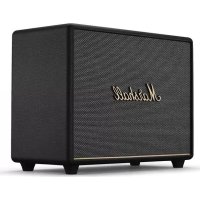
USER MANUAL Woburn III MARSHALL
This is an interactive document, click on the section you are looking for.
LANGUAGES
English....003
Arabic – العربية .....011
Filipino – Wikang Filipino .....071
Finnish – Suomi....079
French – Français .....087
German – Deutsch....097
Greek – Ελληνικά. 107
Hebrew – כְרָה 117
Hungarian – Magyar .....125
Italian – Italiano....144
Japanese – 日本語 .....154
Korean-한국....163
Lithuanian – Lietuvių....180
Norwegian – Norsk .....188
Polish – Polski 196
Slovak – Slovenčina....240
Slovene – Slovenščina .....248
Spanish – Español .....256
Swedish – Svenska 265
Traditional Chinese – 繁體中文 .....281
Turkish – Türkçe .....289
Ukranian – Українська .....297
DEVICE LAYOUT ENGLISH
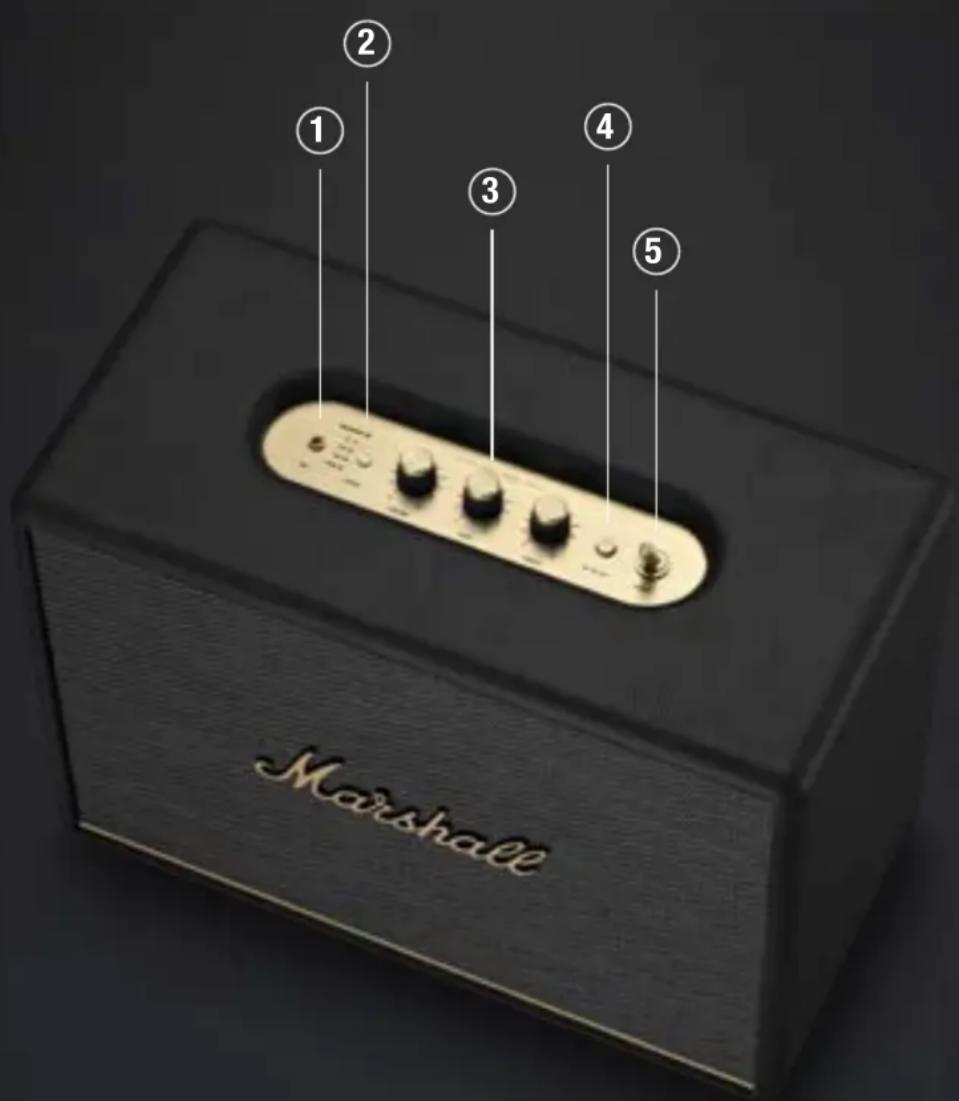
Plug in an analogue audio device with a 3.5 mm stereo jack.
② SOURCE SELECTION
Push the source button to toggle between Bluetooth ^® , AUX, RCA, and HDMI audio sources. A lit indicator shows which source is selected. This can also be selected from the Marshall Bluetooth app.
Caution: Make sure that the volume is set to low on both the speaker and the audio device before using the speaker.
③ AUDIO CONTROLS
Woburn III includes three controls for adjusting the audio.
I. Volume control
II. Bass control
III. Treble control
Control the audio directly from the top panel when playing via Bluetooth.
I. Push to play or pause
II. Push right to skip forward
III. Push left to skip back
IV. Hold left or right to rewind or fast forward
Playback can also be controlled from the Marshall Bluetooth app.
⑤ POWER SWITCH
Use the power switch to turn the speaker on or off.

⑥ RCA INPUT (LEFT AND RIGHT)
Plug in an RCA audio device, such as an RIAA turntable.
⑦ HDMI ARC INPUT
Plug in an HDMI supported TV.
⑧ HEAT SINK
Dissipates heat from the internal power supply.
⑨ POWER INPUT
Use the included mains lead to connect Woburn III to the wall socket.
GETTING STARTED
I. Connect the mains lead to the mains input on your speaker, then connect the mains plug to the wall socket.
II. Use the power switch to turn the speaker on.
III. Download the Marshall Bluetooth app and follow the in-app instructions to set up your speaker.
Important: Always ensure that the mains lead, plug and speaker are compatible with your mains supply and wall socket.
Caution: Always unplug the mains lead from the wall socket before disconnecting it from the speaker.
BLUETOOTH PAIRING
I. Use the source button to select Bluetooth.
II. Push and hold the source button until the Bluetooth LED pulses red.
III. Select WOBURN III from your audio device's Bluetooth list.
Woburn III can be connected to two Bluetooth devices at the same time. If a connected device is playing, a second connected device cannot start playing until the first device is paused.
CONNECTING AN AUX DEVICE
I. Connect a 3.5 mm stereo jack to the AUX input on the top of the speaker.
II. Connect the other end of the lead to the audio output on your audio source.
III. Use the source button to select AUX.
Note: Audio leads are not included.
CONNECTING AN RCA DEVICE
I. Connect a lead with RCA jacks to the RCA input on the back of the speaker.
II. Connect the other end of the lead to the output on your audio source.
III. Use the source button to select RCA.
Note: The turntable must be equipped with an RIAA amplifier or connected via a separate preamplifier. Audio lead and RIAA amplifier are not included.
CONNECTING A TV WITH HDMI
I. Plug an HDMI lead into the HDMI port on the back of Woburn III and the HDMI ARC port on your TV.
II. Turn on the speaker and use the source button to select HDMI.
III. Turn on your TV and select HDMI ARC audio output and choose PCM (2-channel) as format.
If Woburn III is powered on and connected to a TV, turning on the TV will auto-select HDMI as source.
Note: HDMI leads are not included.
For information about your TV's HDMI support, labelling of ports and user instructions, please consult its user manual.

HIGH-DEFINITION MULTIMEDIA INTERFACE
NETWORK STANDBY MODE
Woburn III will go into network standby if left unused for 10 minutes to save energy. Any connected Bluetooth device will be disconnected.
Interact with any control or button on the top panel, reconnect a Bluetooth device or play anything via the physical inputs to wake up the speaker.
A factory reset will return the speaker to its original settings, excluding any firmware updates.
Note: This will delete all user settings and the speaker needs to be set up again.
I. Push and hold the media control for more than 10 seconds and the speaker will reset.
II. Remove WOBURN III from your audio device's Bluetooth list before pairing again.
MARSHALL BLUETOOTH APP
Download the Marshall Bluetooth app to get the most out of your speaker and keep it up to date with the latest software.


| PROBLEM CAUSE ACTION |
| The speaker does not turn on | The speaker is not connected to mains electricity supply. | Connect the mains lead to the speaker and a working wall socket. |
| The speaker is not responding | A software problem has occurred. | Unplug the mains power plug from the wall socket, wait for 15 seconds, then plug it in again. |
| There is no audio or audio is too low | The wrong audio source is selected. | Use the source button to select the audio source. |
| The audio device is not connected. | Ensure that the device is connected to Woburn III. |
| Volume is set too low on either the audio source or the speaker. | Slightly increase the volume on your audio source or the speaker. |
| The audio is distorted | Volume is set too high on the audio source. | Turn down the playback volume on the audio source. |
| The volume, bass, or treble is set too high on the speaker. | Lower the volume, bass, or treble on the speaker. |
| Cannot connect or pair with a Bluetooth device | Bluetooth is not enabled on your device (smartphone, tablet, computer). | Activate Bluetooth on your audio device. |
| A Bluetooth device is already connected to the speaker. | Disconnect the connected Bluetooth audio device before setting the speaker in pairing mode. |
| The speaker is not in pairing mode. | I. Use the source button to select Bluetooth.II. Push the source button until the Bluetooth LED pulses red. |
| Bluetooth connection drops out | The two Bluetooth devices are too far apart, or the connection is affected due to obstacles. | Move the devices closer to each other so that they are unobstructed by obstacles such as walls or doors. |
| The back of the speaker is hot to touch | When playing music on high volume for an extended period, the heat generated by the internal power supply is dissipated via the heat sink on the back of the speaker. | The temperature of the heat sink is well within safety limits and the speaker can be used without any corrective actions. |
PROBLEM CAUSE ACTION
| Bluetooth connection drops out | There is a strong electric field surrounding the speaker. Items such as microwave ovens, wireless network adapters, fluorescent lights and gas cookers use the same frequency range as the Bluetooth device. This may lead to electrical disturbances. | Move the speaker to another spot or turn off or move the interfering electronic device. | |
| Erratic behaviour The speaker is not using the latest firmware version. | Download the Marshall Bluetooth app and connect to the speaker. Follow the in-app instructions to ensure that the speaker has the latest firmware version. | |
| There is a software error. | Perform a factory reset by pressing the media control for more than 10 seconds. The speaker needs to be set up again, see the GETTING STARTED instructions. |
APLIKACE MARSHALL BLUETOOTH
PROBLEEM OORZAAK OPLOSSING
PROBLEEM PÕHJUS TOIMING
PROBLEMA DAHILAN AKSYON
APPLICATION MARSHALL BLUETOOTH
PROBLÈME CAUSE ACTION
.הכלההוּרָהוּרָהוּרָהוּרָהוּרָהוּרָהוּרָהוּרָהוּרָהוּרָהוּרָהוּרָהוּרָהוּרָהוּרָה

TM
HIGH-DEFINITION MULTIMEDIA INTERFACE
APLIKASI MARSHALL BLUETOOTH
PROBLEMA CAUSA AZIONE
TĪKLA GAIDSTĀVES REŽĪMS
⑥ WEJŚCIE RCA (LEWE I PRAWE)
APLIKACJA MARSHALL BLUETOOTH
CONECTAREA UNUI DISPOZITIV AUX
③ ĐIỀU KHIỂN ÂM THANH
KẾT NỐI THIẾT BỊ AUX
KẾT NỐI THIẾT BỊ RCA
MARSHALLHEADPHONES.COM
Design of device and packaging are intellectual properties of Zound Industries International AB and Marshall Amplification Plc. © All Rights Reserved. MARSHALL, Marshall Amps, their respective logos, "Marshall" and "Marshall" trade dress are trademarks and intellectual property of Marshall Amplification Plc and may not be used without permission. Permission granted to Zound Industries International AB. The Bluetooth® wordmark and logos are registered trademarks owned by the Bluetooth SIG, Inc. and any use of such marks by Zound Industries International AB is under license. Google Play is a trademark of Google LLC. App Store is a service mark of Apple Inc., registered in the U.S. and other countries. The terms HDMI, HDMI High-Definition Multimedia Interface, HDMI Trade dress and the HDMI Logos are trademarks or registered trademarks of HDMI Licensing Administrator, Inc. Marshall Group AB, Centralplan 15, 111 20 Stockholm, Sweden. R 1.2