
Action Bluetooth - Speakers MARSHALL - Free user manual and instructions
Find the device manual for free Action Bluetooth MARSHALL in PDF.


| Product Type | Portable Bluetooth Speaker |
| Dimensions (H x W x D) | 105 x 76 x 70 mm |
| Weight | 0.54 kg |
| Power Source | Built-in rechargeable lithium-ion battery (3.7V, 3000mAh) |
| Battery Life | Up to 20 hours (depending on volume and content) |
| Charging Time | Approximately 3 hours (via USB-C) |
| Bluetooth Version | 5.0 |
| Wireless Range | 10 meters (30 ft) |
| Water Resistance | IPX5 (protected against water jets) |
| Output Power | 2 x 10W (stereo) |
| Frequency Range | 60 Hz – 20 kHz |
| Buttons and Controls | Power, volume, Bluetooth pairing, bass boost, multifunction |
| Included Accessories | USB-C charging cable, user manual |
| Recommended Use | Indoor/outdoor, travel, party, home entertainment |
| Care and Cleaning | Wipe with a soft, dry cloth. Do not use abrasive cleaners or immerse in water. |
| Safety Precautions | Do not expose to extreme temperatures. Keep away from direct sunlight and open flames. Use only approved chargers. |
| Spare Parts and Repairability | Contact Marshall support for battery replacement or repairs. Do not disassemble. |
| General Information | Model: Action Bluetooth. Brand: Marshall. Made in China. www.marshallheadphones.com |
Frequently Asked Questions - Action Bluetooth MARSHALL
User questions about Action Bluetooth MARSHALL
0 question about this device. Answer the ones you know or ask your own.
Ask a new question about this device
Download the instructions for your Speakers in PDF format for free! Find your manual Action Bluetooth - MARSHALL and take your electronic device back in hand. On this page are published all the documents necessary for the use of your device. Action Bluetooth by MARSHALL.
USER MANUAL Action Bluetooth MARSHALL
© 2016 Zound Industries International AB. All Rights Reserved. Zound Industries International AB will hereinafter be referred to as "Zound Industries". Marshall, Marshall Amps, their respective logos, "Marshall" trade dress, as well as corporate and product identities used herein, are trademarks and intellectual property of Marshall Amplification PLC and may not be used without permission. The Bluetooth® word mark and logos are registered trademarks owned by Bluetooth SIG, Inc. and any use of such marks by Zound Industries International AB is under license. All other trademarks are the property of their respective owners and may not be used without permission.
For more legal information related to the Marshall product and for information related to Zound Industries, visit the website: http://www.marshallheadphones.com
IMPORTANT SAFETY INSTRUCTIONS

CAUTION
RISK OF ELECTRIC SHOCK DO NOT OPEN

- This lightning flash with arrowhead symbol within an equilateral triangle is intended to alert the user to the presence of non-insulated "dangerous voltage" within the product's enclosure that may be of sufficient magnitude to constitute a risk of electric shock.
- Warning: To reduce the risk of electric shock, do not remove cover (or back) as there are no user-serviceable parts inside. Refer servicing to qualified personnel.
- The exclamation point within an equilateral triangle is intended to alert the user to the presence of important operating and maintenance instructions in the literature accompanying the appliance.
- Read these instructions – All the safety and operating instructions should be read before this product is operated.
- Keep these instructions – The safety and operating instructions should be retained for future reference.
- Heed all warnings – All warnings on the appliance and in the operating instructions should be adhered to.
- Follow all instructions – All operating and use instructions should be followed.
- Do not use this apparatus near water – The appliance should not be used near water or moisture – for example, in a wet basement or near a swimming pool, and the like.
- Clean only with dry cloth.
- Do not block any ventilation openings. Install in accordance with the manufacturer's instructions.
- Do not install near any heat sources such as radiators, heat registers, stoves, or other apparatus (including amplifiers) that produce heat.
- Do not defeat the safety purpose of the polarized or grounding plug. A polarized plug has two blades with one wider than the other. A grounding plug has two blades and a third grounding prong. The wide blade or the third prong is provided for your safety. If the provided plug does not fit into your outlet, consult an electrician for replacement of the obsolete outlet.
- Protect the power cord from being walked on or pinched particularly at the plugs, convenience receptacles, and at the point where they exit from the apparatus.
- Only use attachments/accessories specified by the manufacturer.
- Use only with the cart, stand, tripod, bracket, or table specified by the manufacturer, or sold with the apparatus. When a cart or rack is used, use caution when moving the cart/apparatus combination to avoid injury from tip-over.

- Unplug the apparatus during lightning storms or when unused for long periods of time.
- Refer all servicing to qualified personnel. Servicing is required when the apparatus has been damaged in any way, such as power supply cord or plug is damaged, liquid has been spilled or objects have fallen into the apparatus has been exposed to rain or moisture, does not operate normally, or has been dropped.

This equipment is a Class II or double insulated electrical appliance. It has been designed in such a way that it does not require a safety connection to electrical earth.
WARNING
- To reduce the risk of fire or electric shock, do not expose this apparatus to rain or moisture. The apparatus shall not be exposed to dripping or splashing and that objects filled with liquids, such as vases, shall not be placed on apparatus.
- The mains plug is used as disconnect device, the disconnect device shall remain readily operable.
INSTALLATION & CONNECTION
- Connect the product according to the instructions in this manual.
- Connect the product only to the correct mains voltage as shown on the equipment.
- Protect the power cord from being walked on or pinched particularly at plugs, convenience receptacles, and the point where they exit the apparatus.
- Use only power cables of the type specified in the operating instructions or as marked on the product.
- Do not defeat the safety purpose of the polarized or grounding-type plug. A polarized plug has two blades with one wider than the other. A grounding plug has two blades and a third grounding prong.
- The wide blade or the third prong is provided for your safety. If the provided plug does not fit into your outlet, consult an electrician for replacement of the obsolete outlet.
- Unplug the product during lightning storms or when unused for long periods of time.
- Do not install this equipment in a confined or built-in space. Only install the equipment in a well-ventilated and open location. The ventilation should not be impeded by covering the ventilation openings with items such as newspaper, tablecloths, curtains, etc.
- No naked flame sources, such as lighted candles, should be placed on the apparatus.
CLEANING & MAINTENANCE
Refer all servicing to qualified service personnel. Servicing is required when the apparatus has been damaged in any way, such as power-supply cord or plug is damaged, liquid has been spilled or objects have fallen into the apparatus, the apparatus has been exposed to rain or moisture, does not operate normally, or has been dropped.
Clean only with dry cloth.
For more detailed cleaning and maintenance instructions, visit the website: http://www.marshallheadphones.com
DISPOSAL & RECYCLING INFORMATION

This appliance may not be treated as regular household waste. Management of WEEE (Waste Electrical and Electronic Equipment) is applicable in member states of the European Union and other European countries with individual national policies on the management of WEEE. If you need more information on the collection, reuse and recycling systems, please contact your local or regional waste administration facility.
FCC STATEMENT
This device complies with part 15 of the FCC Rules. Operation is subject to the following two conditions: (1) This device may not cause harmful interference, and (2) this device must accept any interference received, including interference that may cause undesired operation. To comply with FCC's and Industry Canada's RF radiation exposure limits for general population/uncontrolled exposure, this device must be installed to provide a separation distance of at least 20cm from all persons.
This device must not be co-located or operating in conjunction with any other antenna or transmitter.
This equipment has been tested and found to comply with the limits for a Class B digital device, pursuant to part 15 of the FCC Rules. These limits are designed to provide reasonable protection against harmful interference in a residential installation. This equipment generates, uses and can radiate radio frequency energy and, if not installed and used in accordance with the instructions, may cause harmful interference to radio communications. However, there is no guarantee that interference will not occur in a particular installation. If this equipment does cause harmful interference to radio or television reception, which can be determined by turning the equipment off and on, the user is encouraged to try to correct the interference by one or more of the following measures:
- Reorient or relocate the receiving antenna.
- Increase the separation between the equipment and receiver.
- Connect the equipment into an outlet on a circuit different from that to which the receiver is connected.
- Consult the dealer or an experienced radio/TV technician for help.
WARNING: Any changes or modifications to this unit not expressly approved by the party responsible for compliance could void the user's authority to operate the equipment.
IC STATEMENT
This device complies with Industry Canada license-exempt RSS standard(s). Operation is subject to the following two conditions: (1) this device may not cause interference, and (2) this device must accept any interference, including interference that may cause undesired operation of the device.
The device is compliance with RF field strength limits, users can obtain Canadian information on RF exposure and compliance.
DECLARATION OF CONFORMITY

For the declaration of conformity, visit this website: http://www.marshallheadphones.com
Zound Industries International AB, Centralplan 15 111 20 Stockholm Sweden Website: http://www.marshallheadphones.com
The user is recommended to visit the website regularly for up-to-date information.
INDEX
ENGLISH
SECTIONS
PAGE
- LEGAL NOTICE
- IMPORTANT SAFETY INSTRUCTIONS
- INSTALLATION & CONNECTION
- CLEANING & MAINTENANCE
- DISPOSAL & RECYCLING INFORMATION
- FCC STATEMENT
- IC STATEMENT
- DECLARATION OF CONFORMITY
- BOX CONTENTS
- GENERAL DESCRIPTION
- PLUGGING IN THE ACTON BLUETOOTH
- TURNING THE POWER ON/OFF
- USING THE ACTON BLUETOOTH WITH YOUR DEVICES
- CONNECTING VIA BLUETOOTH (PAIRING)
- BLUETOOTH AUTO CONNECTION
- CONNECTING SOUND SOURCE VIA CABLE
- INPUT - 3.5MM STEREO PLUG
- CHOOSING YOUR SOURCE
- ADJUSTING THE VOLUME/BASS/TREBLE SOUND
- TECHNICAL INFORMATION
- TROUBLESHOOTING
BOX CONTENTS
- QUICKSTART MANUAL AND SAFETY INFORMATION
- DOUBLE-ENDED COIL CORD WITH 3.5MM STEREO PLUGS TO CONNECT TO YOUR MUSIC PLAYER
![graph TD A["Device 01"] --> B["Switch"] B --> C["Electrical Cable"] C --> D["Cell"] D --> E["Capacitor"] E --> F["Switch"] style A fill:#f9f,stroke:#333 style B fill:#ccf,stroke:#333 style C fill:#cfc,stroke:#333 style D fill:#fcc,stroke:#333 style E fill:#cff,stroke:#333 style F fill:#ffc,stroke:#3…](/content/2026/06/1311009/images/a8697a56bf78ab1249f94ca3f9171a875526fa48d289a5ae426a319c8bce368a.jpg)
BOX CONTENTS CONTINUED
003. MARSHALL ACTON BLUETOOTH ACTIVE STEREO LOUDSPEAKER
004. POWER CORD
![graph TD A["LOUDSPEAKER"] --> B["NOUOLED LIFT"] B --> C["PROTECTIVE LIFT"] C --> D["RISK OF DROPPING THE PRODUCT."] D --> E["CAUTION LIFT ACTIVE"] style A fill:#f9f,stroke:#333 style B fill:#ccf,stroke:#333 style C fill:#cfc,stroke:#333 style D fill:#fcc,stroke:#333 note right of D: CAUTION LIFT ACT…](/content/2026/06/1311009/images/07dab8afe8e221e5fb87f5384479e9c241df6d1073388e4b9dd498e68cd58e22.jpg)
GENERAL DESCRIPTION
- INPUT FOR 3.5MM STEREO PLUG
- SOURCE INDICATORS
- VOLUME KNOB
- BASS KNOB
- TREBLE KNOB
- PAIR BUTTON
- SOURCE BUTTON
- POWER SWITCH


GENERAL DESCRIPTION CONTINUED
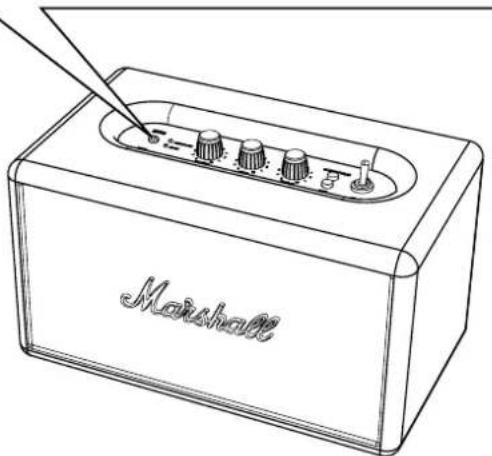
- SWITCH THE ON/OFF SWITCH TO ON TO TURN ON THE ACTON BLUETOOTH.
- THE RED BLUETOOTH INDICATOR STARTS FLASHING AS THE SPEAKER SEARCHES FOR A BLUETOOTH DEVICE.
- TO TURN THE SPEAKER OFF, SWITCH THE ON/OFF SWITCH TO OFF.
- ALL INDICATORS WILL TURN OFF.

USING THE ACTON BLUETOOTH WITH YOUR DEVICES
THERE ARE MANY WAYS TO CONNECT TO YOUR ACTON BLUETOOTH, WHETHER VIA YOUR PHONE, TV OR WIRELESSLY VIA WIRELESS BLUETOOTH® TECHNOLOGY. BELOW YOU WILL FIND MORE DETAILS ABOUT THE CONNECTION SOURCES:
- WIRELESS CONNECTION VIA BLUETOOTH • CONNECTION VIA THE 3.5MM STEREO PLUG


CONNECTING VIA BLUETOOTH (PAIRING)
FOLLOW THESE STEPS TO PAIR THE ACTON BLUETOOTH WIRELESSLY TO YOUR BLUETOOTH DEVICE.
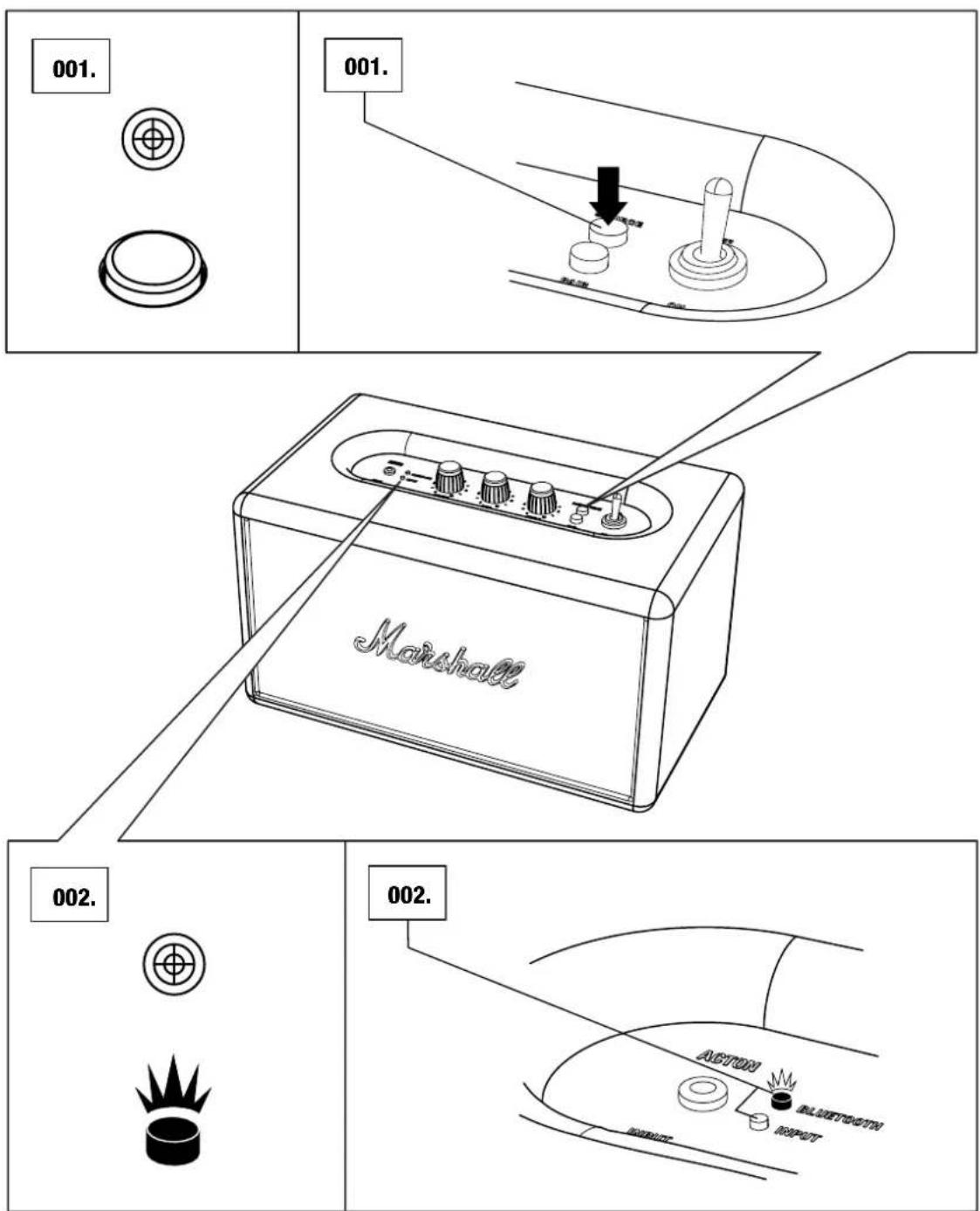
- ENSURE THAT THE SPEAKER IS POWERED ON.
- PUSH THE PAIR BUTTON.
- THE RED BLUETOOTH INDICATOR STARTS TO FLASH RAPIDLY.

CONNECTING VIA BLUETOOTH (PAIRING)
- ENABLE BLUETOOTH FUNCTIONALITY ON YOUR DEVICE.
(SMARTPHONE, TABLET, COMPUTER).
- ON YOUR DEVICE, SELECT ACTON BLUETOOTH FROM THE BLUETOOTH LIST AND ACCEPT PAIRING.
- THE BLUETOOTH INDICATOR ON THE SPEAKER TURNS TO A STEADY RED AND THE UNITS ARE NOW CONNECTED.

BLUETOOTH AUTO CONNECTION
IF A BLUETOOTH CONNECTED DEVICE IS MOVED OUTSIDE THE RANGE OF THE ACTON BLUETOOTH (APPROXIMATELY 10 METRES WITHOUT OBSTACLES), IT IS DISCONNECTED. THE DEVICE IS AUTOMATICALLY CONNECTED AGAIN WHEN IT IS MOVED BACK WITHIN RANGE.
The speaker stores up to six devices and tries to connect to the last connected Bluetooth device first. For example, if the speaker has been connected to the devices: A-B-C-D-E-F, device F is given first priority, while device A is given last priority. Every time the speaker starts up, it will do an auto connection of devices within its range.
![graph TD A["Laptop"] --> B["Music Box"] B --> C["Smartphone"] C --> D["Smartphone"] D --> E["Mobile Device"] E --> F["Laptop"] G["Laptop"] --> H["Music Box"] H --> I["Smartphone"]](/content/2026/06/1311009/images/b4d6b16c781d2d882e5d9f6d56f120f49217d469c345217c3290fd9e739cf4f0.jpg)
Connecting sound source via cable
There is another way to connect to your Acton Bluetooth – the old fashioned way, using the included coil cord and the 3.5mm input.
Use the double-ended coil cord with 3.5mm plugs to connect external audio sources.

Input - 3.5mm stereo plug
- Ensure that the Acton Bluetooth is turned off.
- Connect the cord with the 3.5mm stereo plug to the input labelled INPUT on the speaker.
- Connect the cord with the 3.5mm stereo plug to the music player and turn on the speaker.
- Select INPUT as source by pushing the SOURCE button until the INPUT indicator is lit.

Choosing your source
The input source that is currently selected is shown by a lit indicator. To select a different sound source:
- Push the SOURCE button to choose your source and/or to switch between connected sources.
- A lit indicator shows which source you have selected.
- Bluetooth device • Input - 3.5mm stereo plug
ADJUSTING THE VOLUME/BASS/TREBLE SOUND
THE ACTON BLUETOOTH HAS THREE KNOBS FOR ADJUSTING THE SOUND:
- VOLUME KNOB
- BASS KNOB
- TREBLE KNOB

- 003.
-


TECHNICAL INFORMATION
SOUND SPECIFICATION
• ACTIVE STEREO LOUDSPEAKER WITH BASS REFLEX SYSTEM • DIGITAL CLASS D AMPLIFIER: 2X8W + 1X25W • 3/4" DOME TWEETERS: 2X • 4" WOOFER: 1X • BASS AND TREBLE TONE CONTROLS • FREQUENCY RESPONSE: 50 - 20,000Hz +/-3dB • CROSSOVER FREQUENCY: 2,500Hz - CONNECTIVITY: - BLUETOOTH: STANDARD V4.0 - INPUT - 3.5mm: 1X • MAX POWER OUTPUT: 50W RMS
TECHNICAL INFORMATION
- MAINS INPUT VOLTAGE: 100-240V\~ /200W • NOMINAL RATING: 100-240V\~
- ABSOLUTE MIN/MAX: 90-264V\~ • MAINS FREQUENCY: 50-60Hz • MAX PEAK POWER CONSUMPTION: 70W
- WEIGHT: 3.00kg • SIZE: 265 X 160 X 150mm


NOTE: THE FRONT IS NOT REMOVABLE. THIS ILLUSTRATION INTENDS TO SHOW THE INTERNAL SPEAKER LAYOUT. DO NOT ATTEMPT TO REMOVE THE FRONT FRET FOR RISK OF DAMAGING YOUR SPEAKER.
TROUBLESHOOTING
PROBLEM CAUSE ACTION
| THE ACTON BLUETOOTH DOES NOT TURN ON. | The speaker is not connected to AC mains. | Ensure that the ACTON BLUETOOTH is plugged into a working AC wall socket, see page 010. |
| THERE IS NO SOUND | Wrong input for audio source is selected. | Change the selected sound source, see page 018. |
| Sound source not connected via Bluetooth or cable. | Connect the sound source to the speaker, see page 013. or 016. | |
| Volume is set too low on either the sound source or the ACTON BLUETOOTH. | Slightly increase the volume on your sound source, then slightly increase the volume on the speaker, see 019. | |
| THE SOUND IS TO LOW | The audio cable is not properly connected. | Ensure that the audio cable is properly connected, see page 016. |
| Volume is set too low on either the sound source or the ACTON BLUETOOTH. | Slightly increase the volume on your sound source, then slightly increase the volume on the speaker, see 019. | |
| THERE IS A CRACKLING SOUND | The amplifier is clipping as it has run out of output power. | Decrease the volume on your sound source. Lower the volume or bass on the ACTON BLUETOOTH, see page 019. |
TROUBLESHOOTING
PROBLEM CAUSE ACTION
| THE SOUND IS DISTORTED | Volume is set too high on the sound source. | Turn down the playback volume on the sound source. |
| The sound file (mp3) is of poor quality. | Try another sound file (mp3) or music player. | |
| Volume is set too high on the ACTON BLUETOOTH. | Lower the volume on the speaker, see page 019. | |
| Too much bass/treble on the speaker. | Lower the bass/treble on the speaker, see page 019. | |
| ERRATIC PERFORMANCE | Interference from another electronic device. | Move the ACTON BLUETOOTH to another spot. |
| Turn off or move the interfering electronic device. | ||
| CANNOT CONNECT OR PAIR WITH A BLUETOOTH DEVICE | The two Bluetooth devices are too far apart. | Move the devices closer so that they are within10 metres, and unobstructed by obstacles such as walls or doors. |
| Bluetooth is not enabled on your device. | Ensure that Bluetooth is enabled on your device. | |
| The pairing timed out. | When the pairing button is pressed, the ACTON BLUETOOTH searches for devices for 3 minutes, see page 013. |
TROUBLESHOOTING
PROBLEM CAUSE ACTION
| CANNOT CONNECT OR PAIR WITH A BLUETOOTH DEVICE | Your device prompts you for a pin code. | In most cases, you do not need to enter the pin code when connecting the Bluetooth device to the ACTON BLUETOOTH. |
| If the window for entering the pin code is displayed, use the ACTON BLUETOOTH pin code 0000. | ||
| Your device only supports Bluetooth HF (hands-free) area function. | The speaker cannot connect using Bluetooth HF area function. Try instead to connect using the included coil cord, see page 016. | |
| BLUETOOTH CONNECTION DROPS OUT | The two Bluetooth devices are too far apart or the connection is affected due to obstacles. | Move the devices closer so that they are within10 metres, and unobstructed by obstacles such as walls or doors. |
| There is a strong electric field surrounding the ACTON BLUETOOTH. | Items such as microwave ovens, wireless network adapters, fluorescent lights and gas cookers use the same frequency range as the Bluetooth device. This may lead to electrical disturbances. |

NOTES:
A BLUETOOTH DEVICE COULD CAUSE SOUND-RELATED OR TECHNICAL FAULTS, DEPENDING ON USE, IN THE FOLLOWING CASES:
- WHEN SOME PART OF THE BODY IS IN CONTACT WITH THE RECEIVING/TRANSMITTING SYSTEM FOR THE BLUETOOTH DEVICE OR THE ACTON BLUETOOTH.
• ELECTRICAL VARIATIONS DUE TO OBSTACLES IN THE FORM OF WALLS, CORNERS, ETC.
- EXPOSURE TO ELECTRICAL DISRUPTIONS FROM DEVICES WITHIN THE SAME FREQUENCY BAND, FOR EXAMPLE MEDICAL EQUIPMENT, MICROWAVE OVENS AND WIRELESS NETWORKS.
THIS WIRELESS DEVICE MAY CAUSE ELECTRICAL DISRUPTIONS DURING USE.
WWW.MARSHALLHEADPHONES.COM



- IMPORTANT SAFETY INSTRUCTIONS
- CAUTION
- WARNING
- INSTALLATION & CONNECTION
- CLEANING & MAINTENANCE
- DISPOSAL & RECYCLING INFORMATION
- FCC STATEMENT
- IC STATEMENT
- DECLARATION OF CONFORMITY
- INDEX
- ENGLISH
- SECTIONS
- PAGE
- BOX CONTENTS
- BOX CONTENTS CONTINUED
- MARSHALL ACTON BLUETOOTH ACTIVE STEREO LOUDSPEAKER
- POWER CORD
- GENERAL DESCRIPTION
- GENERAL DESCRIPTION CONTINUED
- USING THE ACTON BLUETOOTH WITH YOUR DEVICES
- CONNECTING VIA BLUETOOTH (PAIRING)
- BLUETOOTH AUTO CONNECTION
- CONNECTING SOUND SOURCE VIA CABLE
- INPUT - 3.5MM STEREO PLUG
- CHOOSING YOUR SOURCE
- ADJUSTING THE VOLUME/BASS/TREBLE SOUND
- THE ACTON BLUETOOTH HAS THREE KNOBS FOR ADJUSTING THE SOUND
- TECHNICAL INFORMATION
- SOUND SPECIFICATION
- TROUBLESHOOTING
- NOTES
Brand : MARSHALL
Model : Action Bluetooth
Category : Speakers