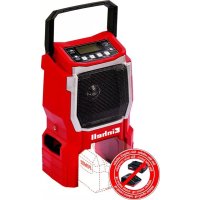
TECR 18 Li - Radio EINHELL - Free user manual and instructions
Find the device manual for free TECR 18 Li EINHELL in PDF.


| Product type | DAB+/FM digital radio with Bluetooth, USB and AUX |
| Brand | Einhell |
| Model | TECR 18 Li |
| Mains power supply | 220-240 V ~ 50 Hz |
| Battery power supply | 18 V d.c. (compatible with Power X-Change) |
| DAB+ frequency range | 174-240 MHz |
| FM frequency range | 87.5-108 MHz |
| Speaker power | 2 x 10 W RMS |
| Connectivity | AUX 3.5 mm, USB 5 V/1 A (charging only) |
| Display | 2.4" colour TFT |
| Weight | 3.1 kg |
| Alarm functions | 2 alarms with snooze |
| Sleep timer | Yes (Sleep and Inactive Standby) |
| Equaliser | Presets (Normal, Rock, Pop, Jazz, Classic) + My EQ |
| Station memory | 30 presets (DAB+ and FM), 4 favourite buttons |
| Bluetooth | Yes (name: Einhell TE-CR 18 Li) |
| USB playback | MP3, WAV, APE, FLAC |
| Maintenance | Clean with a damp cloth and mild soap |
| Safety | Follow the safety instructions in the manual |
| Spare parts | Battery available through after-sales service |
| Warranty | 2 years (according to warranty certificate conditions) |
Frequently Asked Questions - TECR 18 Li EINHELL
User questions about TECR 18 Li EINHELL
0 question about this device. Answer the ones you know or ask your own.
Ask a new question about this device
Download the instructions for your Radio in PDF format for free! Find your manual TECR 18 Li - EINHELL and take your electronic device back in hand. On this page are published all the documents necessary for the use of your device. TECR 18 Li by EINHELL.
USER MANUAL TECR 18 Li EINHELL
GB Original operating instructions Cordless Radio
GR npwotunec Osyiec xphon Paiooawvo matapia
When using the equipment, a few safety precautions must be observed to avoid injuries and damage. Please read the complete operating instructions and safety regulations with due care. Keep this manual in a safe place, so that the information is available at all times. If you give the equipment to any other person, hand over these operating instructions and safety regulations as well. We cannot accept any liability for damage or accidents which arise due to a failure to follow these instructions and the safety instructions.
Explanation of the symbols used (see Fig. 11)
- Danger! - Read the operating instructions to reduce the risk of injury.
- Store the batteries only in dry rooms with an ambient temperature of +10^ to +40^ . Place only fully charged batteries in storage (charged at least 40% ).
1. Safety regulations
The corresponding safety information can be found in the enclosed booklet.
Danger!
Read all safety regulations and instructions.
Any errors made in following the safety regulations and instructions may result in an electric shock, fire and/or serious injury.
Keep all safety regulations and instructions in a safe place for future use.
2. Layout and items supplied
2.1 Layout
- Display
- Favorites buttons P1-P4
- PRESET button
- SCAN button
- INFO/MENU button
- TUNE (-) button
- TUNE (+) button
- STANDBY button (O) (8)
- MODE button
- Volume control
- Power cable connection
- USB charging port (1A/5V)
13.AUX-in - Handle
- Flexible antenna
-
Battery compartment
-
Battery compartment latch
-
Speaker
- USB port
- Battery mount
- Power cable
2.2 Items supplied
Please check that the article is complete as specified in the scope of delivery. If parts are missing, please contact our service center or the sales outlet where you made your purchase at the latest within 5 working days after purchasing the product and upon presentation of a valid bill of purchase. Also, refer to the warranty table in the service information at the end of the operating instructions.
- Open the packaging and take out the equipment with care.
- Remove the packaging material and any packaging and/or transportation braces (if available).
- Check to see if all items are supplied.
- Inspect the equipment and accessories for transport damage.
If possible, please keep the packaging until the end of the guarantee period.
Danger!
The equipment and packaging material are not toys. Do not let children play with plastic bags, foils or small parts. There is a danger of swallowing or suffocating!
Radio
AC Adapter
Original operating instructions
- Safetyinstructions
3. Technical data
Mains power supply 220-240V~50Hz
Power supply 18 V DC
DAB+ frequency range 174-240 MHz
FM frequency range 87.5 - 108 MHz
Speaker output 2x10 W RMS
AUX connection 3.5 mm
USB connection 5V DC 1A
Display 2.4 inch TFT
Weight 3,1 kg
GB
4. Before using for the first time
4.1 Description of the buttons
STANDBY (8):
On/off & standby (press briefly to switch on/standby, press and briefly hold to switch off)
P1-P4 (2):
Preset 4 favorite stations (4 x DAB+, 4 x FM)
MODE (9):
Switch between different modes:
DAB/FM/BT/USB/Aux-in
SCAN (4):
Automatic station scan (DAB+/FM only):
DAB+: Press the SCAN button briefly to start a full station scan.
FM: Press the SCAN button briefly to select the next available station. Press and briefly hold the SCAN button to start a full station scan. The first 30 stations will automatically be stored in the station list.
Note: When scanning for stations, do not press any other buttons on the device. If you press any other buttons while scanning for stations, the scanning process will be interrupted.
INFO/MENU (5):
Display options/ Bring up settings list/Back to previous page:
- Display options: By pressing the INFO/MENU button (5) in DAB+/FM mode, you can access station information such as station name, track information, genre, date, time, etc.
- Bringing up the settings list: To go to the settings list, press the INFO/MENU button (5) for two seconds. Here you can adjust numerous settings.
This includes DAB+/FM settings, time, date, alarm, language, backlight, sleep time, inactive standby, equalizer, clock style / factory reset / software version.
PRESET (3):
Save and access preset stations (in DAB+/FM mode)
- In DAB+ or FM mode, select a radio station.
- Briefly press the PRESET button (3): The PRESET list opens up and a saved station
can be selected by scrolling with the volume control.
Press and briefly hold the PRESET button (3): The current station can be saved in the desired station position (1-30).
TUNE (-) (6):
Go to a lower frequency in DAB+/FM mode, or go back to the previous track in BT/AUX/USB mode.
TUNE (+) (7):
Go to a higher frequency in DAB+/FM mode, or go to the next track in BT/AUX/USB mode.
- DAB+: Press the TUNE (+/-) button (6/7) briefly to scroll through the station list.
FM:
o Press the TUNE (+ / - ) button (6/7) briefly to manually tune the FM radio; each time you press the button, the frequency increases/decreases by 0.05MHz
o Press and briefly hold the TUNE (+ / - ) button (6/7) to automatically tune in the next receivable FM station; it stops when it reaches the last/next available station.
- Bluetooth: Briefly press TUNE (+/-) to skip to the previous/next track.
Volume control (10):
Select/Volume control/Snooze
The radio can be operated by connecting it to mains power using the supplied AC adapter or by using a Power X-Change platform battery.
4.2 Use with Li battery
- Open the battery compartment (16).
- Insert the battery (a) in the battery mount (20) and close the battery compartment (16).
The radio can now be switched on using the STANDBY button (8).
4.3 Use with power cable
Note: Even if a battery is inserted when connected to mains power, the battery will NOT be charged.
- Pull back the cover and insert the power cable (21) plug into the power cable connection (11).
- When the power cable (21) is connected, the battery capacity status will not be shown on the display.
GB
4.4 Battery capacity indicator
Press the button for the battery capacity indicator (d). The battery capacity indicator (e) will indicate the charge status of the battery by means of 3 LEDs.
All 3 LEDs are lit:
The battery is fully charged.
2 or 1 LED(s) are lit:
The battery has an adequate remaining charge.
1 LED fl ashes:
The battery is empty, recharge the battery.
All LEDs blink:
The battery temperature is too low. Remove the battery from the equipment, keep it at room temperature for one day. If the fault reoccurs, this means that the battery has undergone exhaustive discharge and is defective. Remove the battery from the device. Never use or charge a defective battery.
4.5 Charging the Li battery pack
- Remove the battery pack (a) from the device by pressing the pushlock button (b) downwards.
- Check that your mains voltage is the same as that marked on the rating plate of the battery charger. Insert the power plug of the charger (c) into the socket outlet. The green LED will begin to blink.
- Push the battery pack onto the battery charger. In the section entitled "Charger indicator" you will find a table with an explanation of the LED display on the charger.
If the battery pack fails to charge, check for the following:
Is there voltage at the power socket?
Is there good contact at the charger's charging contacts?
If the battery pack still fails to charge, please send the charger and charging adapter
and the battery pack
to our customer service center.
To ensure that items are properly packaged and delivered when you send them to us, please contact our customer service or the point of sale at which the equipment was purchased.
When shipping or disposing of batteries and cordless tools, always ensure that they are packed individually in plastic bags to prevent short circuits and fires.
To ensure that the battery pack provides long service, you should take care to recharge it promptly.
You must recharge the battery pack when you notice that the performance of the device drops.
Never allow the battery pack to become fully discharged. This will cause it to develop a defect.
5. Operation
5.1 Switching on/off
- Press the STANDBY button (8) to switch the device on.
- Press the STANDBY button (8) briefly to activate standby mode.
To switch it off, press and hold the STANDBY button (8) until "Power off" appears on the display (1).
The display (1) will light up briefly again and then switch off.
5.2 Adjusting the volume
You can adjust the volume by turning the volume control (10) knob.
Clockwise: louder
Counter-clockwise: quieter
Note: The radio always uses the latest volume setting when switched on.
5.3 Switching between the available modes
The radio supports both DAB+ and FM radio reception, and can also reproduce music from external media via Bluetooth, USB or AUX.
To select the desired mode, press the MODE button (9) until the desired mode is shown.
- You can also press the MODE button (9) and then use the volume control (10) to scroll to the correct mode.
5.4 Automatically scanning for stations and saving favorites in DAB+ and FM mode
Four preset stations can be saved in DAB+ and in FM mode, respectively, using the favorites buttons (2)
To do this, press the MODE button (9) until DAB+ or FM appears.
- Press and briefly hold the TUNE (+/-) button (6/7).
GB
The radio will search for the next available station
Repeat this step until you have reached the desired station.
Now press and hold the favorite button (2) where you want to save the station until the "Preset stored" message appears.
The station is now saved in the desired memory preset and can be selected by pressing the relevant button.
The same procedure is used to store favorites in both DAB+ and FM modes.
5.5 Changing stations in DAB+ mode
If you have stored the desired station as described in point 5.4, you can press the relevant favorites button (2) to go to the station.
The station list opens up when you press the volume control button (10).
- You can choose from the different stations by turning the volume control (10) knob and confirm your selection by pressing on the knob.
- Or you can press the TUNE (+/-)- button (6/7) to go from one station to the next.
5.6 Changing stations and manual tuning in FM mode
If you have stored the desired station as described in point 5.4, you can press the relevant favorites button (2) to go to the station.
- Otherwise, press and briefly hold the TUNE (+/-) button (6/7) to tune in the next available station.
- In FM mode, you also have the option of manually tuning in stations.
To do this, press the TUNE (+/-) button (6/7) briefly to move the frequency by 0.05 MHz.
- Repeat this step until you have set the desired frequency.
5.7 Bluetooth mode
- Press the MODE button (9) repeatedly until "BLUETOOTH" appears on the display (1) to switch to Bluetooth mode.
Now go to the Bluetooth menu on your Bluetooth device and search for new devices. The radio will be shown as "Einhell TE-CR 18 Li". - Select the radio from the list.
The connection is successful when the name of the Bluetooth device is shown on the display (1).
The radio can now be used as a speaker. - You can pause or resume the medium being played by pressing the volume control (10).
You can adjust the volume from the paired device or by using the volume control (10) on the radio.
- Press the TUNE (+) button (6) to go to the next track.
- Press the TUNE (-) button (7) to repeat the current track or press twice quickly to go to the previous track.
5.8 USB mode (MP3)
- Press the MODE button (9) to switch to USB mode.
- Open the battery compartment (16) and insert a USB stick containing music files in the USB IN (19) port at the back of the housing.
The following audio file formats are supported: MP3/MAV/APE/FLAC.
Use the TUNE (+ / - ) button (6/7) to select the track you want to play.
5.9 AUX mode
- Press the MODE button (9) repeatedly until "AUX" appears on the display (1) to switch to AUX mode.
Pull back the cover and insert an AUX cable into the AUX-in (13) port to create an AUX connection.
The radio can be used as a speaker when it is connected to an AUX-enabled device.
5.10 USB charging port
This option is only available when the radio is switched on.
- Connect a USB cable to the USB charging port on the front of the radio, then plug the other end into the device to be charged.
The device will be charged with up to 5V power at 1A.
5.11 Setup menu
- Switch the radio on by pressing the STANDBY button (8).
- Press and hold the INFO/MENU button (5) until the setup menu appears.
5.11.1 Auto scan (DAB+)
- With this option, an auto scan of the available DAB(+/-) stations will be carried out.
5.11.2 Manual tune (DAB+)
This option is for tuning in the different DAB frequencies (174-240MHz).
GB
5.11.3 DRC (DAB+)
- DRC (Dynamic Range Compression) is a function that certain DAB(+/-) stations use.
It balances the sound range by amplifying quiet sounds and reducing the volume of loud sounds. - Select the "DRC" menu option, then choose the desired setting: o DRC off
o DRC low
o DRC high
5.11.4 Prune (DAB+)
You can use the Prune function to remove from the radio DAB (+ / - ) stations that have a "?" appearing before the name.
- When you have selected a station that you want to remove, choose "Prune" from the menu options.
Here you can choose between "Yes" or "No".
- Select "Yes" to remove the station.
- Preset recall: with this option you can bring up the list of saved stations (1-30).
- Preset store: The currently selected station can be stored in a preset memory position (1-30) with this option. Use the volume control (10) to select the desired preset memory position.
5.11.6 Auto Scanning (FM)
- With this option, an auto scan of the available FM stations will be carried out.
5.11.7 Scan settings (FM)
- All stations: With this option, all the stations found will be shown, regardless of signal quality.
Strong stations only: In this case, only stations with a strong signal will be shown.
5.11.8 Audio settings (FM)
- Stereo allowed: With this option, regardless of the signal received, the audio output will be in stereo sound.
- Forced mono: Here, music will be reproduced in Mono sound.
5.11.9 System (available in all modes)
5.11.9.1 Set time/date
Setting manually
o Use the volume control (10) knob to select the "Time" menu item.
o Select the "Time/Date" menu item.
o Next, using the volume control (10) to set the time and date, and confirm everything by pressing the volume control (10)
Setting automatically:
o Use the volume control (10) knob to select the "Time" menu item.
o Select the "Auto Update" menu item.
o Here you have the possibility to select the source to be used to automatically set the time and date.
o Available options:
- Update from Any (in this case both DAB and FM will be used to set the time and date)
- Update from DAB (in this case only DAB will be used to set the time and date)
- Update from FM (in this case only FM will be used to set the time and date)
- No update (in this case there is no automatic reference to time or date)
Set 12/24 hour:
Under this option you can choose between the 12h or 24h format
Date format:
Here you can adjust the date format.
Available options:
Use the volume control (10) to select the
"Alarm" menu item.
Up to two alarms can be set here:
Alarm 1 Info / Alarm 2 Info
o Alarm
- Alarm off
Alarm on
o Frequency
Daily
Once
Weekends
Weekdays
o Wake up time
The desired wake-up time is set here
o Source
Buzzer
GB
·FM
DAB+
o Duration
15 minutes
30 minutes
- 45 minutes
- 60 minutes
90 minutes
120 minutes
o Volume
The desired volume (6-32) is set here.
- When the alarm has been successfully set, "Alarm saved" will appear on the display and an alarm symbol will be shown in standby mode.
- When the alarm goes off, press the volume control (10) knob to go into snooze mode.
- This will activate a 10-minute countdown for each snooze period.
- Press the volume control (10) knob while the alarm is going off or during the snooze period to switch off the alarm.
5.11.9.3 Language
Use the volume control (10) to select the "Language" menu item.
- In this option you can choose the language in which you want the menu items on the radio to be displayed.
The radio supports a total of 28 languages to choose from.
5.11.9.4 Backlight
- Use the volume control (10) to select the "Backlight" menu item.
o Timeout: Use this option to set the interval after which the display is dimmed. Available options
- On (when this setting is selected, the display will not be dimmed)
10 seconds
20 seconds
30 seconds
45 seconds
60 seconds
90 seconds
120 seconds
180 seconds
o On level: Use this option to set how bright the display is when the device is in use.
Available options:
Low
Medium
High
o Dim level: Use this option to set how bright the display is in dimmed Timeout mode.
Available options:
·Low
Medium
High
5.11.9.5 Sleep off
Use the volume control (10) to select the "Sleep off" menu item.
- You can use this function to switch the radio automatically into standby mode after a set period of time.
- Use the volume control knob to select the desired time after which the radio should automatically switch into standby mode and confirm.
Available options: o Off
o 15 min
o 30 min
o 45 min
o 60 min
o 90 min
o 120 min
5.11.9.6 Inactive standby
Use the volume control (10) to select the "Inactive standby" menu item.
- You can use this function to switch the radio automatically into standby mode after a set period of time.
Use the volume control knob to select the desired time after which the radio should automatically switch into standby mode and confirm.
Available options here are:
o Off
o 2 hours
o 4 hours
o 5 hours
o 6 hours
5.11.9.7 Equalizer
Use the volume control (10) to select the "Equalizer" menu item.
- Use this function to select your preferred audio output. After selecting the system options, you have access to the following equalizers: o Normal
o Rock
o Pop
o Jazz
o Classical
o My EQ
GB
o My EQ Setup
- You can adjust the EQ in the "My EQ Setup" submenu, where you can change the following:
o Treble +/- 7 o Bass +/- 7
Use the volume control (10) knob to scroll through the options and confirm your selection.
5.11.9.8 Clock style
Use the volume control (10) to select the "Clock style" menu item.
There are two different clock style designs to choose from.
- Use the volume control (10) to select one of the two display options.
The chosen clock style will appear in standby mode.
5.11.9.9 Factory reset
Use the volume control (10) to select the "Factory reset" menu item.
- When you select this option, all the saved pre-sets and system settings will be deleted.
- Use this option only if the DAB signal remains poor after a repeated station scan or if an error occurs.
5.11.9.10 Software version
- Use the volume control (10) to select the "Software version" menu item.
The current software version will be shown here.
6. Cleaning, maintenance and ordering of spare parts
Danger!
Always pull out the mains power plug before starting any cleaning work.
6.1 Cleaning
Clean the equipment regularly with a moist cloth and some soft soap. Do not use cleaning agents or solvents; these could attack the plastic parts of the equipment. Ensure that no water can seep into the device. The ingress of water into an electric tool increases the risk of an electric shock.
6.2 Maintenance
There are no parts inside the equipment which require additional maintenance.
6.3 Ordering replacement parts:
Please quote the following data when ordering replacement parts:
Type of machine Article number of
- Identification number of the machine
- Replacement part number of the part req
For our latest prices and information please go to www.isc-gmbh.info
7. Disposal and recycling
The equipment is supplied in packaging to prevent it from being damaged in transit. The raw materials in this packaging can be reused or recycled. The equipment and its accessories are made of various types of material, such as metal and plastic. Never place defective equipment in your household refuse. The equipment should be taken to a suitable collection center for proper disposal. If you do not know the whereabouts of such a collection point, you should ask in your local council offices.
8. Storage
Store the equipment and accessories in a dark and dry place at above freezing temperature. The ideal storage temperature is between 5 and 30^ . Store the electric tool in its original packaging.
9. Charger indicator
| Indicator status Explanations and actions | ||
| Red LED Green LED | ||
| Off | Flashing | Ready for use The charger is connected to the mains and is ready for use; there is no battery pack in the charger |
| On Off Charging | The charger is charging the battery pack in quick charge mode. The charging times are shown directly on the charger. Important! The actual charging times may vary slightly from the stated charging times depending on the existing battery charge. | |
| Off | On | The battery is charged and ready for use. (READY TO GO) The unit then changes over to gentle charging mode until the battery is fully charged. To do this, leave the rechargeable battery on the charger for approx. 15 minutes longer. Action: Take the battery pack out of the charger. Disconnect the charger from the mains supply. |
| Flashing Off | Adapted charging | |
| The charger is in gentle charging mode. For safety reasons the charging is performed less quickly and takes more time. The reasons can be: - The rechargeable battery has not been used for a very long time. - The battery temperature is outside the ideal range. Action: Wait for the charging to be completed; you can still continue to charge the battery pack. | ||
| Flashing Flashing Fault | Charging is no longer possible. The battery pack is defective. Action: Never charge a defective battery pack. Take the battery pack out of the charger. | |
| On On Temperature fault | The battery pack is too hot (e.g. due to direct sunshine) or too cold (below 0°C). Action: Remove the battery pack and keep it at room temperature (approx. 20°C) for one day. | |
GB
Disposal

Power tools, rechargeable batteries, accessories and packaging should be sorted for environmental-friendlyly recycling.
Do not dispose of power tools and batteries/rechargeable batteries into household waste!
Only for EU countries:
According to the Directive 2012/19/EU on waste electrical and electronic equipment and its transposition into national law, power tools that are no longer usable, and, according to the Directive 2006/66/EC, defective or drained batteries must be collected separately and disposed of in an environmentally correct manner.
If disposed incorrectly, waste electrical and electronic equipment may have harmful effects on the environment and human health, due to the potential presence of hazardous substances.
Only for United Kingdom:
According to The Waste Electrical and Electronic Equipment Regulations 2013 (SI 2013/3113) (as amended) and the Waste Batteries and Accumulators Regulations 2009 (SI 2009/890) (as amended), products that are no longer usable must be collected separately and disposed of in an environmentally friendly manner.
The reprinting or reproduction by any other means, in whole or in part, of documentation and papers accompanying products is permitted only with the express consent of the Einhell Germany AG.
Subject to technical changes
GB
Service information
We have competent service partners in all countries named on the guarantee certificate whose contact details can also be found on the guarantee certificate. These partners will help you with all service requests such as repairs, spare and wearing part orders or the purchase of consumables.
Please note that the following parts of this product are subject to normal or natural wear and that the following parts are therefore also required for use as consumables.
| Category Example | |
| Wear parts* Battery | |
| Consumables* | |
| Missing parts |
- Not necessarily included in the scope of delivery!
In the effect of defects or faults, please register the problem on the internet at www.Einhell-Service.com. Please ensure that you provide a precise description of the problem and answer the following questions in all cases:
Did the equipment work at all or was it defective from the beginning?
Did you notice anything (symptom or defect) prior to the failure?
What malfunction does the equipment have in your opinion (main symptom)?
Describe this malfunction.
GB
Warranty certificate
Dear Customer,
All of our products undergo strict quality checks to ensure that they reach you in perfect condition. In the unlikely event that this equipment develops a fault, please contact our service department at the address shown on this guarantee card. You can also contact us by telephone using the service number shown. Please note the following terms under which guarantee claims can be made:
-
These guarantee terms apply solely to consumers, i.e. natural persons, who do not want to use this product in connection with either their commercial or other self-employed activities. These guarantee terms regulate additional guarantee services which the undermentioned manufacturer promises to buyers of its new products in addition to their statutory rights of guarantee. Your statutory rights of guarantee are not affected by this guarantee. Our guarantee is free of charge to you.
-
The guarantee services cover only defects due to material or manufacturing faults on the new product which you have bought in the European Union from the undermentioned manufacturer and are limited to either the rectification of said defects or the replacement of the product, whichever we prefer. Please note that only equipment under the brand name "Professional" has been designed for use in commercial, trade or professional applications. For all other products the guarantee is invalidated if the equipment is used within the guarantee period in commercial, trade or industrial applications or for other equivalent activities.
-
Our guarantee does not cover:
-
Damage to the equipment caused by failure to comply with the installation/assembly instructions or by unprofessional installation; damage caused by failure to comply with the operating instructions (e.g. connection to the wrong mains voltage or current type); damage caused by failure to comply with the maintenance and safety regulations; damage caused by exposing the equipment to abnormal environmental conditions; damage resulting from poor care and maintenance.
- Damage to the equipment caused by misuse or incorrect applications (e.g. overloading the equipment or using non-approved attachments or accessories); damage caused by foreign bodies (e.g. sand, stones, dust, ...) getting inside the equipment. Damage in transit; damage caused by force or external influences (e.g. by dropping the equipment).
-
Damage to the equipment or parts of the equipment which is owed to use-related, normal or otherwise natural wear. For example, batteries and battery packs are manufactured with a cycle limit for design-related reasons. Wear is negatively influenced in particular by load demands and charging speeds as well as exposure to heat, cold, vibration and impact.
-
The guarantee is valid for a period of 2 years starting from the purchase date of the equipment. Guarantee claims must be submitted before the end of the guarantee period and within two weeks of the defect being noticed. No guarantee claims will be accepted after the end of the guarantee period. The original guarantee period remains applicable to the equipment even if repairs are carried out or parts are replaced. In such cases, the work performed or parts fitted will not result in an extension of the guarantee period, and no new guarantee will become active for the work performed or for any replacement parts fitted. This also applies if on-site service is used.
- To assert your guarantee claim, register the defective equipment at: www.Einhell-Service.com. You will need to provide proof of purchase of the new item of equipment. Equipment returned without such proof or without a rating plate are excluded from the guarantee services because of the lack of traceability. If the defect is covered by our guarantee, then either the item in question will be repaired immediately and returned to you or we will send you a new replacement.
- If you have taken the equipment with you to a different EU country than where you bought it, we will arrange for a local service partner to provide the guarantee services. If you take the equipment outside the EU, the guarantee will not apply.
Of course, we are also happy to offer a chargeable repair service for any defects which are not covered or no longer covered by the scope of this guarantee. To take advantage of this service, please send the equipment to our service address. We draw attention to the restrictions of this guarantee concerning wear parts, consumables and missing parts as presented in the service information included in this operating manual.
Warrantor/Service:
Einhell UK Ltd, Unit 10, 1st Floor, Champion's Business Park, Arrowe Brook Road, Upton, Wirral, CH49 0AB
F
Danger!
Chere clientele, cher client.
- MM-DD-RRRR
- DD-MM-RRRR
5.11.9.2 Budik
- Pomoci ovladace hlasitosti (10) vyberte položku nabidky, Budik.
Zde Ize nastavit až dva budíky:
Budik 1 info / budik 2 info
CZ
o Budik
Budik vyp.
Budik zap.
o Frekvence
Denne
Jednou
Vikendy
- Pracovni dny
o Cas buzeni
4.2 Prevadzka s litium-ionovym akumulatorom
- Otvorte priehradku na akumulátor (16).
Vlozte akumulator (a) do ulozenia akumulatora (20) a opat zatvorte priehradku na akumulator (16).
Rádio potom možete zapnú' pomocoutlačidla STANDBY (8).
4.3 Prevadzka so sieovym kablom
Upozornenie: Aj ked je akumulator vlozeny poças sie'tovej prevadzky, NEBUDE sa nabijat.
Zapojtesie'tovy kabel (21) do pripojky siefoveho kábla (11) odklopenim krytu a za-sunutim konektora.
Ak je pripojeny sie'tovy kabel (21), urovenkapacity akumulatora sa na displeji nezobrazije.
4.4 Zobrazenie capacity akumulátora
FM frequentlybereik .87,5-108 MHz
Luidsprekervermogen 2x10 W RMS
4.5 Laden LI-accupack
20 second
30 second
45 second
·60 second
90 second
120 seconden
180 second
20 sec
30 sec
45 sec
·60 sec
90 sec
120 sec
180 sec
4.5 Incarcare set accumulator LI
Stimata clienta, stimate client.
Evaalayn eTaEtu wv eiovwEvwV
AeToupyuW:
DAB/FM/ BT/USB/Aux-In
SCAN (4):
Autouanavaqhtonotatouwv (moDAB+/FM) DAB+:NATWvTACOTiyuaia TOkoumi SCAN, Eekiva ma nnpnO apwn Oaou.
FM: Ntawvta ctiyia ta to koumi SCAN, eiléve tai o entóevoc diaθeouc staohuc. Tatwta napaetateva to koumi SCAN, Eekivia pAnpncsapwn staohu. Oipawto 30 staohoi anothenkeovvtautouata stn aiota staohv.
Enueiwn: Mny natae kaveva koumi otn ouokeun kat a th diapkeia ts oapwons otaou. Eav natne i eva koumi kat a th diapkeia tnc oapwonc otaoou, n avzntno on otaoumuataiwetai.
INFO/MENU (5):
Enuoyec uphiavionc / KAnon mnc liotac puOmuewv/Emiortpoh otnv tEeutaia eAia:
Eunoyec eufavionc: TDO BAD+/ FM, mnpie va avakntoetdeltaopec npoopoe c t a thou nat wvtac to kouini INFO/MENU (5), omupeiaaabavoevou tou ovuato tsou ataou, tou titlou tou kauatou, tou iobuc, tnc neepounviac, tnc wpaK.
Evpyonoin TnC AioTac puthetaoeewv: Ia va mneite oTn AioTa puthetaieewv, natnoTe to koumtI INFO/MENU (5) yia duo deutepoentra. Eedmuopoov va npayatonoanoy noAecputhetaieic.
Autec npiaabavov tic puthetaic DAB+/ FM yia nV npa, nT nuepoynvia, to EunnuNTp, T yawoo, Tov onioTheta wotiuso, Tov xpvovbiakont unvou, Tnv aeveyn kataotaan avoync, Tov 10oatauoi, to otul pooyiou/Tic epyoataiakcsputhetaie/C tnv ekdoon loyiaikou.
PRESET (3):
AnoTheuon kai avaktnon mnuwov taouy (ya Aetoupyia DAB+/FM)
- Σπλειουργία DAB+ ἡ FM, επιλέξτε ἡναν ραδιοφωνικό σταθμό.
Suvtoo natma tou koumiou PRESET (3): Avoyei n PRESET aiota ka mnpel va eunleyei evac anothenkeuevoc otaohoc tov pvthetaivctaoons. - Napateetaevo natau tou koumuo PRESET (3): Otpexuw staohoc miopei va anothenkvei e ia oiaadnote theon staohou (1-30).
TUNE (-) (6):
EnavahepeTe n paiooovvotnae eitoupyia DAB+/FM n eniortpeyote oTo tEeuataio kouaTt otN eitoupyia BT/AUX/USB.
TUNE (+) (7):
5.11.7 Puθμiεεις ὄρωης (FM)
Oloi oi otaoI: Emuaviovra ooi O I Otaooi nou ppeonkav, aveapntana ano Tnv PoiotnTa Tou nmuatoc.
- Móvo ioxuρoi σαθμoi: Eμφaviciovtai μovo σαθμoi με ioxuρο σημa.
5.11.8 Puθμiεις ἡxou (FM)
uvaTOTnTa oTepeoOwviKou hXou: AvaLoya me To lauBavovcna, n Edooc hXou eivai oTepeoOwviKn.
- Móvo móvoΦwviKoc hXoC: H avanapaywyn mouikic yivetai móvoΦwviKa.
Evnpwon yia to epbic
Acendem 2 ou 1 LED(s):
Sve 3 LED lampice svettle:
Świeci 1 dioda LED lub 2 diody LED:
- MM-DD-RRRR
- DD-MM-RRRR
5.11.9.2 Alarm
IorcheHHe K HcNoJIb3ObaHHbIM CHMBOLaM (cm.pnc.11)
- Onachoctb! -ДЯ yEmHeBWeHnO ONACHOCTH NOJyHTb TpaBMy npOHTte pyKOBODCTBO NO 3KCNlyaTaunN.
- XpaHnTe aKHyMylTOpbl TolbKO B cyxHX nOMeUeHNr npm Temnepatye +10^ 0 +40°C. XpaHnTe aKHyMylTOpbl TolbKO B 3apJHEHOM COCTOHN (MHIMMaJIbHO 40% noIHorO 3apJa).
1.Yka3aHnI NO TEXHnKe 6e3OnaCHOCTN
CoOTBETCTByUOuNyeUka3AHnNo TEHXnke 6e3oNaCHOCHT HAXoJrTCB NpINLOKeHHbIX 6poHOPax!
PpeynpeKdene!
O3haHOMbTeCb co BcEMn yHa3aHHaMM NO TExHHe 6e3oNaCHOCTN, HNCTpyKcHMaN, H3o6paHanEHNMMu NTexHHueChHMn XapAHTEpHCTNHAMn, HOtOpBle npHnlaAOTcN K dAHOMy 3JeHTpHcECHOMy HNCTpyMeHTy.
HeToHoe Co6IIODeHne yKa3aHn,
codePkaUxCBA CJeDyUoEe HNCTpyKuHn,
MOJET npBecTn KnpaKeHnHO 3eKTPueCeKM
TOHOM, NOKAPY N (IN) TAnHeLbIM TpaBMam.
CoxpaHnTe Bce yka3aHnNo TExHHne 6e3oNaCHOCTN HnHCTpyHcHn Dn HcNoB3OBaHn B 6yDyem.
2. CoCTaB ycTpoiCTBa n coCTaB ynaHOBHN
2.1 Onncahme ycTpoNCTBa
- Ducnnei
2.нони «ИЗбранhoe» P1-P4 - Khonka PRESET
- Khonka SCAN
- Khonka INFO/MENU
- Khonka TUNE (-)
- Khoonka TUNE (+)
- Khonka STANDBY () (8)
- Khonka MODE
- Perjatop rpoMkoCTN
11.Pa3bemIgKa6eIgNtAHIN - USB-pa3bemДЯЗapdAn (1 A/5 B)
- AUX-IN
- Rykortha
15.нбкаянTeHHa
16.AKKMYJTOPHybO TCEK
17.3amok aKMyTOpHOro OTceKa
18.ДинhamNK - USB-IN
20.KpenneHnEaAkkymyTOpOB - KaebJI pHTaHnJ
2.2 CoCTaB KOMnJIeKta ycTpOuIcTbA
IpoBepbTe KOMnJIeKTHoCtB H3dEINHa OCHOBaHN ONICaHHOrO Obbema NocTabHn.
Pn O6hApyKeHn HEDoCTaTHa KOMNoHeTob
6bpaHTeB B NaW cepBcHbN ceHtp
Hm MaraznB, B KOtOpM Bbl npIObpeHn
ycTroNCTBO, He No3dHee Yem B TeYeHne 5-Tn
paOchUx DneNocle npIObPeTeHN H3dEJIa,
npEdyBnB DeJeCTBHTeBHyIO KBHTaHUNo O
nOKynHe. O6pTaTBe BNMaHne Ha TabJNU cy
yk3aAHnEM rapaHTnHbIX cPoKOB B DOkYMeHTE C
HfOpMaueNe O cepBcHOM OcbLyKuBaHN.
- OTKpOInTe ynaKOBky N BbInbTe OCTOpOXHO n3 ynaKOBKn yCTPOnCTBO.
- YdaJInte ynaKOBOChbI MaTePnAJI, a TaKHeJnpNCNOC6JIeHn 3aIuNTbI yCTPOIcTBA npYnaKOBbIbAHn I TpaHCnOpTnPoBKe (pNHaJIuHn).
PpOBepbTe KOMnJIeKTHOcThy yCTpoNCTBa. - Поберыт ec troс STBOи npнадлжнocTN
На Налчпь BO3нкшnx рп
ТраHCnopTnpOBKe NOBpeKdHn.
CoxpaHnTe ynaKOBHy nO Bo3MOHXoCTn Do nCTeueHnCpoka rapaHTnHbIX 6a3aTeJbCTB.
RUS
Onachoctbl!
YcTpoIcTBo ynaHOBKa He ABJIaOTc
dETCHMM HpyuWkAm! 3anpeueHO detAM
HRpaTb CnAactNHOBBIMn NaKetAmn,
PneHKMn MneHKm DetAjam! OnaHocTb
3aHIOUaETCB TOM, YTO OHN MORYT
nporNoTHb HnN NOrn6HytB OT ydywb!
Paio
BIOKNTAHN
OpnHaJIbHoe pyKOBoDcTBo nO 3KcIyatau
- Yka3aHnI NO TEXHNKe 6e3ONaCHOCTN
3. TexHHuechne xapaHTepnTHH
3NeKtponntaHneBpeXnme pa6oTbIOTceTn..... 220-240B,50T
3NeKtpoNTaHHe. 18B noct.toka
DuaanazonactOT DAB+ 174-240 M
Dnana30H qactOT FM. 87,5-108 M
MoHocTb DnHaMHKOB 2x10 BT (RMS)
Pa3bEm Aux 3,5 MM
USB-pa3bem. 5B noct.Toka1A
Ducnien 2,4IOMaTFT
Macca. 3,1kr
CoxpanenHe 4 n36paHHbIX cTanu (4 wT.DAB+, 4 wT.FM)
MODE (9):
IpeeknueHne MeKdy OTdJIbHbIMn peKImaMn:
DAB/FM/ BT/USB/Aux-In
SCAN (4):
ABTomaTHueckn nonck cTaHcN (ToIbKO DAB+/FM):
DAB+:KpaTko HauKMnte KhoNHy SCAN dIra NOJIHOrO CkaHropoBaHNCTaHcH.
FM:KopoTKnM HaKaTHEm KhoNn SCAN BbIbnaeTc CledyUoJai DoCTynHaa tAnuHa. Haxmnte H ydepNvBaTe KhoNky SCAN dIaNoHoro cKaHIpObaHncaTAnu. NepBBe 30 cTaHn CTAmTuYeckn coXpaHIOTCB CnncKe CTAnu.
Ha3aHHe HaKHMaTe KHOKNHa yCTpoCTBe BO BpemnONcKa CTaHnB. B npTbHOM CUYae 3TO npNBedet K OTMeH e NOncKa cTAHn.
INFO/MENU (5):
BapnAHTbI OTo6paXHeHn/By3OB CnHcKa HAcTPOeK/BO3BpArHa NocJeHIOU CtpaHnU:
BapnAHTbI OTo6paKeHnR: B peKHMe DAB+/FM HAnKaTneM KHOIN INFO/MENU (5)MOHIO Bb3BaTb paJInuHHyIO INΦOpMaunO cTaHn, HApnPmep Ha3BaHnE CTAHn, INΦOpMaunIO DopOckHe, JHaHp, DaTy, BPemrN.T.D.
Bb3OB cncsKa hactpoeK: yTo6bl npeuTn K cnHcy hactpoeK, haxmnte KHONHy INFO/MENU (5) u dePnHBaIe ee B TeueHne DByx cekyHd.3decb doCTynHO MHOKeCTBO HaCtpoeK.
K HMMOTHOCTPOKN DAB+/FM, BpEMa,daTa,6yHnIbHNK,3aBik,NOcCBtKa, TaIMep ABTOMATNueCHORO OTHIOHEnH, HeAKTNBbpeKIM OHNDAH,N KBaIaN3ep,CTNb YacOB/3aBOdChne HAcTPOKN/BepCnnpoPamMHO 0eocneHEnH.
PRESET (3):
CoxpaHHeNHe N BbI3OB CoXpaHEnHbIX CTaHcH (ДЯpeKIMaDAB+/FM)
BpeKIme DAB+ nI FM BbI6epuTe paNIOCTaHIO.
HopoTKe HaaTne KhoNn PRESET (3): OTKpoETc CnICoK PRESET, n c NOMOuBOp epyIaTopa rPOMoCTn MOxHO BbI6paTb coXpaHeHHyIO CTaHcNIO.
ДиTeьhoeHaKaTneKHONKN PRESET(3): TeKyuaa CtaHnmaMOKeT6bItb COxpaHeBa IIO6yIryeHky namrtn (1-30).
TUNE(-)(6):
yMeHbWeHne yAcTOTbI HAcTPOIKN
paanopnemHnkaBpeKHMeDAB+/FMnnIb03bpat K nocneHne npokke B peKHMe BT/AUX/USB.
RUS
TUNE (+) 7
yBEnHHe HAcTbHaCTpOKn paNOpnemHnKa B peKmE DAB+/FM nI npexoK C cJeDyUeJ dopoxHe B peKmE BT/ AUX/USB.
DAB:+KopoTkoHaKMITE KHOHky TUNE (+ / - ) (6/7),TO6bl npOKpyTHTb CnCOK CTAnu.
FM: o KOPOTKO haKMMTE KhoNHy TUNE (+/-) (6/7), yTObI yCTaHOBnTb YACTOTy B FM- dHaana3OHe BpyHnyo; KaHdoe HaKaTHne KhoNKn H3MeHReT YACTOTy Ha 0,05 MfC, b CTOpOHy yBeJIuHEnH Nn IyMehbSeHn. O HaKMMTe n UdepHnBaHTe KhoNHy TUNE (+/-) (6/7), yTObI aBTOMaTHmEckn HAcTPONTb CLeDyUOyipoBtAOUOy FM-CTaHnO; nonCK OCTaHaBnBaETcHa NaocJeHne/ CLeDyUOeJ DoctyHNo CTaHn.
Bluetooth: KopoTHo HaKMITE KONHY TUNE (+ / - ) ,TTO6bI nepeKInouHTbcraHa npdeBdyuO/ClEduOuyoDopOKHy.
PerynTop rpomnoctn (10):
Bb6op/perynipOBKa rpoMkoCTn/nyHKnna NOBTOpeHnCnHaHa
PapnoepMHK MOHET paOToTb KaB peHMe OT cTeN C NMOUb npnlaeraMoro 6NoKa nHTaHn, TAK N OT aKKyMyIaTopa INaTΦOpMb1 Power X-Change.
4.2 Peknma60tbiOTIHTneBoro aKymyTota
- OThpoIe aKMyJrTOpHbI oTceK (16).
BCTaBtBe aHHyMnIaTOp (a) B cneuaJIbHo npEHa3NaeHHeO KpeIeHne (20) n ChOba 3akpoTe aKKMyJrAToPbHbI OTCek (16).
3aTeMa paHOpnemMHK MOxHO BKHIOHTb HauKaTneM KhoNk STANDBY (8).
4.3 Peknma6oTbI OT Ka6eJnTahn
Yha3aHHe! DaKe ecn aKHyMylTOp BCTabLeH, BpeKIme pa60tbi OT cEtOn HE 6yDet 3apKaTbCra.
IopKJIIOUHTe Ka6eBnITAHn (21) K pa3bemy IJRA Ka6eBnITAHn (11),OTKHHyB KpbIuKy N BCTaNB WTEKeP.
EcnnoNIOHIOUeH KabeNb NtAHHa (21),Ha DnCnIee He OTo6paKaetcYpOBeHb 3apra aKkyMylrTopa.
4.4 HndHnatop 3apraaKhynATopa
HaHMMTe KHOHky HINKauzim 3apada
aHHyMnyToppa (d).HNDkaTOp 3apada
aHHyMnyToppa (e) coo6zaet o cTepeHn 3apdkn
aHHyMnyToppa npn nOmoi 3 cbToDIOOB.
ToprBce 3 CBeToaNoa:
aKMyIaTOp NIOHOCtBIO 3apJKeH.
Togrt 1 nnn 2 cbetoanod(-a):
Octatochnyi 3apd aKHyMylTopa doctatoheN.
Muraet 1cbetoNOa
aKHyMylTOp pa3pRKeH, Heo6xOdmo 3apAHTb erO.
MiraotBceCBeToDnOdbI:
TemnepaTypa aKHyMylTopa HnHKe HopMbI.
N3BLeKHTe aKHyMylTOp n3 yCTpoiCTBa
nOCTABBe B NOMeUeHN C KOMHATHOI
TemnpaTPOJ Ha OINH DeH. EcIn OINbKa
IOBTOPITcA, aKHyMylTOp NIOHOCTBu p3pRKeH
n HeNCnPabEn. N3BLeKHTe aKHyMylTOp
n3yCTpoiCTBa. 3AnpeSeHo nPoDoJIHaTb
HCNoB3OBaTb HeNCnPabHbI aKHyMylTOp n
3apRJaTb erO.
4.5 3apnHa 6noHa IHTneBbIX aHHymyIrTopoB
1.N3BLeKHTe aKHyMylTOpHb6Iok(a)N3ycTpOyCTBa,ODHOBPemEHHOHaKMmaΦHKCpuyuoyKlaBnUy(b)BN3.
2. Y6eIITecb TOM, YTO yHa3aHHOe HaФИРМEHON TaBnHHe 3HaueHHe HAnpRHEHN CETN COOTBECTBYET IMeKoUeMyc3HaueHEnIO HanpRHeHN cETN. BCTabBe WtEKeP 3aprHoro ycTpoiCTBa (c) B WtTeNCelbHyIO pO3eTKy.3eJIeHbI CBETODIOd NaHTeMH MRAtb.
3. BctaBtBe aKHyMylTOp B 3aprHoe yctpoIcTBo.B pa3dJe «HnHnKAtopb3aprHoro yctpoIcTBa" npHBoNTcTa Tabuica C yka3aHHeM 3HaHeHn CBeTOmOHOH INHnKaUm 3aprHOrO yctpoIcTBa.
Ecnn AKKyMylTOpHbI 6IOK He 3apJHaeTcA, HEO6XoDIMO npOBepntb CLEdyUoee:
HaJIyHe HaIpyKeHnB BHTeNcIbHOI pO3ETKe.
- HAIJUHNE IIOHTHORO COEINHEHNA HOKHTaKTax 3apdHORO yCTpoiCTBa.
RUS
Ecni ankymylaTOpnb6Iok BCE eue He 3apKaeTc, npoc6a OTnpaBnTb
3apdHoe yctpoiCTBO u 3apdHbI aadantep
aKMyIaTOpHb6IOH BHaWOTdEINObCyKbBaHn.
5.11.7 HactpoHn cHaHnpoBaHn (FM)
Bce cTahn:OTobpaKaIOTcBce HAnDeHHbIe cTahn,He3aBNCmO OT KaeeCTBa CnHaJa.
ToIbKO CnIbHbIe CTaHcIM: OTO6paKaIOTCr ToIbKO CTAHcIM C XOPOuIM KaHeCTBOM CnHaJa.
5.11.8 Hactpoyn3Byka (FM)
CTepeo pa3peSeHo: B 3aBcHmOcTn OT pInHHMaemoro CnHaJa BbIXoHNo ayDnOcRHaJn PoJaetcBpeKHeMe CTepeo.
ToIbKO MOHO:BOCnPOH3BeHeHne My3bIKN BbIOJIHHReTcBpeKHMe MOHO.
5.11.9 CnCTema (OocTyNHO BO BCex peHHmax)
5.11.9.1 Bpem/daTa
PyHnHa HacTpoKa O C nOmoCbIO peryIaTopa rpoMkoCTn (10) BbI6epHTe NyHKT MeHIO «BpeMa'. 03aTe BBI6epHTe NyHKT MeHIO «BpeMa/ data>.
O C nomooubjo peryIaTopra rpmKocTn (10) NaCTpOnTe Bpemr N daty N noDTBepDnte DaHHble HaKaTHem peYIaTopa rpmKocTn (10).
- ABTomatuechna HactpoHa: o C nomoubpopeyIaTopa rpmKoctn (10)
BbIepeTe nyHKT MeHIO «BpeMa」.
O 3aTEM BbIbepnTe NyHKT MeHIO
«ABTOO6HOBJIeHHe»
O3decb MOHHO Bb6paTb CnOCo6 abTomatNueCHO HAcTPOKNBpeMeHN DaTbl.
OIOCTyINHbIE ONUIN:
-06HOBHTB BCE (ДЯн HabToPoiKn BpeMeHи n DaTbI NCNoJIb3yETcKa Kd DAB, TAK n FM)
-ObHOBHeHne DAB (IJIHaCTpoKIN BpeMeHHn DaTbI nCnoJb3yeTcra Tolko DAB)
-06HOBJIeHHe FM (dIa HAcTPOKn BpeMeHH nDaTbI NcNoJIb3yETc TOnbKO FM)
- Het 06HOBJIeHn (Het aBTOMaTNUeCKo
kpINB3KN K0 BpeMeHN n DaTe)
12/24 yaca:
3eBMOHO BbIOJIHrTb NepeKIOUeHHe MEy 12-ycOBbIM 24-ycOBbIM fOpMaTOM BpEMEH.
ΦopMaT DaTbI:
3decb MOKHO HAcTPONTb OOpMaT DaTbI. DocTyNhbIe onuH:
MM-DA-ΓΓΓ
-MM-MM
5.11.9.2 BydnlbHnK
C NOMOJIbIO peyIaTOpa rpoMkoCTn (10) BbI6epHTe nyHKT MeHIO «BydNJIbHNIK
3decb MOxHO 3aTaB Do AByxCnHaNoB6yDnJIbHnKa:
IHHoO6yHn.1/VHnO 6yHn.2 O ByuNbHnK
- BydunlbnHK BbIKI.
-БудиьнвнВ.
Oyactota
EkeHHeBHO
-Одн па з
BbIXoHhie
-Pa6oHne dHn
O Bpem np6yckdenn
3decb 3aadaetc Heknaemoe Bpemr cpa6abaHn6ydnbNka.
O NCTOCHN
-3yMmep
·FM
DAB+
O IpoIOnJHKeJIbHoCTb
15 MNHYT
-30 MHHyT
-45 MmHyt
-60 MmHyT
-90 MmHyT
120 MNHyT
RUS
O POMKOCtB
-3decb 3aadaetca HeJaemb ypoBeHb rpmKoCTn (6-32).
Iocne ycneHnH NoCTPOHn 6yDnBnHa Ha DnCnlee NOABNTc HADNcB ByDnBnKcoxpaHeH, a BpeKnme OXnDaHn6yDetOTo6paKaTbCnMBoN 6yDnBnHKna.
Pocne cpa6aTaBbAHn6 6yDnIbHnHa HaKMnTe Ha peryIaTOp rpmKoCTn (10), yTo6bl OTIOHNb CnHaN 6yDnIbHnKa.
Pn3OM 3anyckaetc10-MmHyTHbI 6paThbI OTCET DO NOBTOpeHnaCnHaHa.
Iocne cpa6aTbIBAHn 6yDnBnHa Ka nn OTHlaDbIBAHn CnHnA HaKMITE Ha peryIaTOp rPOMKoCTn (10), TTO6bl BbIKJUOHTb 6yDnBnK.
5.11.9.3 RaBik
C nomoBHOpeyTOpa rpmKocTN (10) BbI6epNTe NYHKT MeHIO «A3bIK
3decbMOKHO Bbl6paTb Ra3bIK,Ha KOTOPOM OTO6paKaIOTCyHKtbl MEHIO.
PaHIOnpnEMHHK NOdepHNBaET B o6uei CNOXHOCTN 28 RaBIOB, KOtOpbIe DOCTyNHbI DЯ BblOpa.
5.11.9.4 Npcbetka
C nomoBnopeyTota rpoMkoCTn (10) BB6epNTe NYHKT MeHIO «POnCBETKa»
TaM-ayT:3decMoHHO3aDaTbBpEmA, NOICTeueHHN KOTOPORO DNcPJIe 6yDet 3aTeMHHe. IOCTyHbIe ONuHn:
BnI.(npn3toHactpoKe dncnneH 3aTEMHReTc)
-10ceK.
20 cek.
- 30 ceK.
-45ceK.
60ceK.
-90ceK.
120 ceK.
180 ceK.
OJPKoCTb:3deCbMOHNo3aDaTb yPOBeHb JpKoCTn DcNcIeR BO BpeMpa60tbl. DocTyHbIe OOnm:
-MHHHMM
CpeDne
MaKcHMyM
o 3aTeMHENHe: 3decb MOKHO 3aDaTb yPoBeHb IpKoCTn DcIeN BpeHMe 3aTeMHENHO BPEMEn,IOCTynHbe ONuHm:
-MHHHMM
CpeHn
- BbICOKn
5.11.9.5 CnAun peHHM
C nomoubpo peryntopa rpmkoctn (10) BB6epHTe nyHKT MeHIO «Cnauu peKIMM
3TaФyHKUINIOBOLIeAIBOTOMaTHueCKNpepeHIOHaTbpaIIOIpneMHINBpeHMOHNDAHnYepe33aHaHHOE Bpem.
C nomoubky peryIaTopa rPOMKocTn BbIepeITe BpEM, NO IcTeueHm HOTopoRo paAnOpnpeMHN KIOJIeH aBTOMaTHneCHn peEHTN BpeHIM OXINdAHN, INoDTBePdnte BbIeOp.
OocTyNHbIe OuIN: O BvIKn.
015MHHT
030MnHyT
045 MmHyT
060 MmhyT
090 MmhyT
o 120 MmHyT
5.11.9.6 HeaKTHBHyI peHMM OHHaHn
C NOMOJIbIOppeYJITopApromKocTn(10) BbI6epNTe NYHKT MeHIO «HeaKT. peX. OxNID
- Θa ΦyHKUH N03BOJRAET aBtOMaTHUeCKN nepeKHOHaTb paAIOINpHEMHN B peHIM OHNDAHNAYepe3 3aDnHHe BpeM.
C NOMOUsbOp peryIaTopa rPOMKoCTn BbIeBepITe BpEMr, NO IcTeUeHmN KOtOporo paAnOpnpeMHN DJIKeH aBTOMaTHneCHn nepeTN B peXIM OxuHaHn, INoTBePdNTe BbI6Op.
DocTyNHbE OIcHn:
O BbIKJ.
o2yaca
04yaca
05yaca
06yacob
5.11.9.7 3KbanaI3ep
C nomoubpo ergyIaTopar promKocTN (10) Bbl6epNTe nyHKMeHIO «KbaanJ3ep
3TaФуннципоьлгетадвathKelaembblxOHOHcHnL.诺спБубopaONUСТМБIOCTyNHBcIeDyUOuNE3KBAJAN3EpbI:
o HopmaIbHo
o Pok
o Non
0Aha3
OHaaccnKa
o MoE
O HacTpoNkA EQ
MoKHO HaCTpOHTb 3KBaJau3ep Yepe3
IoMmHIO HaCTpOJKN «MoEQ», rJe MoKHO
n3MeHHTb CneDyUOuNe napaMeTpbl:
RUS
O BbICOKHe yactTobl+/-7 O Hn3KHe yactTobl+/-7
IcnoIbaytepeyIaTOprpoMkoCTn (10),TO6blpOkpyTbCINCOKOnu,N IOdTBePdTeBb6op.
3anpeeHOnyTnHnHApOBaTB 3JIeKTPoINHCTpyMeHTbI N AnKHyMnTOpHbIe 6aTapeu/6aTaapeuN C 6bITOBbIM MycOpOM!
ToIbKO dIaIcTpaH-HeHOB EC:
B COOTBETCTBnC eBponeckOd npeKTHBOy 2012/19/EU o6 OTPa6oTahbIX 3JeHTPueeCKHX H 3JIeKTOHbX Ip6OpaX iE nepe6pa3OBAHNEM B HaUMHaIbHOe 3aKHOdaTeJbCTBO BbluDeiune H3 yNtpe6leHnE 3JIeKTPoHnHcTpyMeNTbI H B COOTBETCTBnC eBponeckOd npeKTHBOy 2006/66/EC DeFeHTbHe IIN OTCNyHbWne CBOI cPoK aKHMyIaTOpHbIe 6aTaPeH/6aTaapeHKn DOnKhHbCo6HpTaCbra3deIbHO n CdaBaTbCS HA pepe6toKY.
PnHnPaBnBHoYtunH3aunOtpa6oTaHHbE 3eKtpueckne H3eKtpoHHbIe np60pblMOrty OKa3aTb BpeDHOeBO3dEChTBHe Ha OKpyKaIOUcIcpey H3OpOBBe YelOBeHa H3-3a BO3MOHOro npCycTCTBnB HNX ONaChbIX BeueCTB.
PepeneaTbBaHne INI npOue BnDbl pa3MHOKeHn DOKyMeHTaun IN COpOBoNTeBbIX INCTOB npOdyKuINΦnpMbI, NOJHOCTbIO INI NaCTNuHO, pa3peSeHNO pOn3BOUITb TOLbKO C OdHO3HaHOro pa3peSeHn Einell Germany AG.
CoxpaHReTcR npaBo Ha TexHnueckne n3MeHeHHa.
RUS
HΦopMaζηo cepBnCHOM 6cIyKHBaHH
Bo Bcex ctpaHax, yKa3aHHbIX B rapaHTnHOM CBnTeJIbCTBe, y Hac IMeIOTcKOMNeTeHTHbIE cepBnCHbe napThepbI, KOHTAChBE daHHle KOTOpbIX Bbl HauDeT B rapaHTnHOM CBnTeJIbCTBe. OHN Bcerda B Baewm pacnopJKeHN II peSeHInra IIObIX BonpocOB, CB3aHHbIX C 06cIyKNBaHNEM, HanPIMep, dIrapeMOHaT, NoCTaBN 3aNpacte N b6ICTpon3HaUNBaOuXcx DeTaJe, a TaHOke npno6peTeHN paCXoNDbIX MaTePnaIOB.
CneyetobHbMaHHeHaTo,HTOB3OMn3dEHNcIeDyoUeNE DetAIN NOBepKeHbI cTeCTBeHHOMY H3HOcy NnN H3HOcy B CBA3N C KcNpyataue / cIeDyoUeNe DetAIN Tpe6yOTcB KaeeCTBe paCXoNDhIX MaTePnaNoB.
TapaHTnHoe CBnTeJIbCTBO
YbaKaemnOKyNaTeBnHa, yBaKaemn nOKyNaTeB,
Haan npodykbl npoxoJr taatelbHnKoHTpOJI kaueCTBa.EcJn 3TO yCTpoI BCe He bdyet
fynHIOHOPOBAtb63ynpHeHO, Mbl pOncIM BAC o6PbITCBa Haa cepBCHbN OToJn Oapecy, yha3AHHomByTOM
raPAHTHOM TaHone. Ma TohKe OXoTHO OTBeTM Ha Baun BonPoCbNo TneTeFOHy, Homep KOTporo PnPBedeHN HnKe.
Pn nppeBABHEINrapanrHbHS TpeOBaHn DeiCTBYOT cndyUHme ycNBoH.
- HactoIne npabInra rapaTHn DeCTBYOT hckIOHTeBHO B OTOHoeHN N0b3ObaTeNe, T.e. fN3uecknx IuC, KOtOpBe He HamepeBaTc HcNOb3OBaTb HactoIe e 3dEne B pAMhax CBOe npdeccnHO bHbON mDpyroI camocToTbeHoi dTeBHOCTN. HactoIe npabInra rapaTHn perpyHyTO DOnIOHnTEBHe yCObIN OH2aAHN RApaHTnHbIX ycYr, KOTOpBe HnKeYnOMAnHyTb nPOv3BODntE o6ecnBaTb NOKyNaTeJmCBONX HObIX yCTpoCTB BdoONHeMe KycNoBIM R apaTHn B COOTBCTBn C3aKOHm. 3TN rapaTHnHbJe 6b3aTeBcBA He 3ATpArBaHr Baun 3aOKHbIe rapaTHnHbIe Tpe6oBaHn. Haun rapaTHnHbIe ycynDr IBa Bac 6ecnAatbl.
- TapaHTHnHbIy yCnyr paCnpOcTpaHJrTOc ToIbHO Ha DeFeKbI HOBO, npNo6peTHHO HA TeppITOpHN EbponehCHO rO3a yCTPOCTBa HNKeYpOMNHOToro pON3BODNTeJIa, KOtPOBIE CB3AHIb C HeIOCTATKOM MaTePHNA IIN PON3BODCTBEHbIM 6paHOM, IN OPAHmHbAIoTc NO HAWeM ByBb6Op yCTpaHEHm TAKIX deEeKOB TOI 3aMeOHyUCPToRcTBa.YHTHe, YTO HAuHNyUCPToRcTBa HE npDeHa3AHoeHbI IANICNOJIb3OBAHnB I pONMbUHEnHBx cIeJX, B pEmecEHNM pON3BODCTBe I HA npOeCECCMOHAHbOH OCHOE. PO3OTMY rapaHTHnHbIy DOROBOP CHTaETCR HeJeCTBnTEJIbHM, ECIN YCTPOCTBO HCIOJIb3OBAJIOCB b TEHeHne rapaHTHnHO CpOKA HA KcTaPbHX, NpOMbUHEnHBx npEDPNrTHNX IIN B pEmecEHNM pON3BODCTBe, a TAKKE NoDPBraIocb conOCTABmO Harpy3E. H npOyuHm IOI TopROBo MMapHo Professional He npImeHJrTOc ORpAHHeHn B OTHOHm HcIOJIb3OBAHmIB pOMbUHEnHBx cIeJX, B pEmecEHNM npOn3BODCTBe I HA npOeCECCHOJIbHO OCHOBE.
- Hawa rapaHTnHe pacnpoctpaHreTcHa:
NOBpeHJdHnYcTPOCTBA,BO3HHKUHeBpe3yIbTaTE HeC6JIIODeHnpyHOBOCTBaNoMOHTaHnyHnHepaBnHbHorO MOnTAkA,HEC6JIIODeHnPyHOBOCTBaNO 3KcNLIyTAuCN (HanpIMEP,piPi NOKIIHOeHN K CeTHn C HEPpaBnHbHM HApRJeHHeM N IOpOM ToKA), HeC6JIIODeHn Tpe6oBaHn KacatelbHO TexNHueChOrO 0cbSyHnBaHn IN npAubNTEXHNBe3OanACHOCTNa BCNECTBme BO3EeCTBna HA y cTPOCTBO aHOMaNbHbIX ycIOBN OKpyKaIOSe Cpebl Nl HnHeADNeKaIero YXOda N TeXNHueChORO O6cUYHMBaHn;
NOBpeJHHeNnYcTPOHCTBA,BO3NHUHnBEbpe3yIbTaNE HnpaBnHbHO nHEHaJIeJHuaTeoHCNoJIb3OBAHnna (HapnMep,nepepy3HaYcTPOHCTBAHnnpHMeHOHNEHOyUeHHbIXKNCIOB3OBAHIO HacaDOHN pnnHADJeHXocTe),nonaHnBnYcTPOHCTBO NoctopoHHx npedMeTOB (HapnMep,necka,KamHei,bln H.T.I.N. NOBpeJHHeNp TPAHcNOPtIPoBHe,NpimeHeHnCnblnHnBHeuHHX Bo3dEChBn (HapnMep, NOBpeJHHeNp NaDEHn).
OBpeHJdeHHy yctpoCTBa HnIeroAchTeB,CBA3AHbIE C n3HOCOM B CBA3N C hCkNpyaTaeNe,06bHbIMnIpyrMM cTcETBEHNbHM 3hOcHm. HanpImep, AkMyrNTOpBb I AnKMyrNTOpBb 6NOKn NOBvBPKeHbIecteTBEHOMY 13HOcY bNNdy Oco6eHObTeo KCHOTyPcunPacChTaHbI HaOrpaHHeHHOE KOINcCTBOIKHO.BaHXcPOKcNHy6bHaERaTHBIOBnHApCTHcN, Tpe6yeMbe Hapry3Kn N ChOpocTb 3ap4Kn, aTAHOE BO3dEChTBMe BICoKnx HnH3KHX TMnEPATyp, B6paouny uDapOB.
- RapaHTHnHbI cpoK coCTaBnAeT 2 rOa nHaunHaeTc co Dn HOKyHnYcTPOhCTBa.RapaHTNbIbI npaba Heo6xOIMIOpeIbIbJIbTb IO NCTeEHHeNcPoKa rapaHTnH B TeUeHNm DByX HeJeIb NocLe TOrO KAK 6yDet O6napyHeHa HncnPaBHOCTb.3aBHeHnHa ra paHTnHoe BClyJKBaHne NocLe IcTeEHnHa cpoKa rapaHTnH He npHHMaTOc.PpH pEmOHTe nn 3aMeHe yCtPOIcTBa HE IpOJaEBAeTcN He HcNcIaReTc3 aHOBO rapaHTnHbI cpoK BOTHOWeHN YcPOIcTBa HnYctAHOBeHNbIX 3anaChbIX YacTeE. To yCIObe DeIcTByET TaKHe npB bInOJIHeHN MOCLyJKBaHnHa Ma MeCeT.
5.Длпрдьгнгпретени no rapantHn 3apeHCTpyyTe HeNcPpABHOe yctpoIcTBa Ha caite: www.Einhell-Service.com.PnproToBte KBtAHUO O kNYKHe Nm DpyHne DoKaTaTeJIbCTBa PnO6peTehn BAmu HOBOr YoCTPOINCTBA.OkA3aHne rapaHTnIHbY cJyIr pmpMeTHeIbHO K cyTOPTCBAM, HapraJIeHHbIM Ha pacCMOTpOHHe 6E3 COOTBeTCTBOUxIO JOKa3aTeBcTB INI FNpMHeHON TAbNHN, NKJIIOuaOTC BBAHy HeOcTAHaDAHHbI dIg IeHTnФHauz m TaHIX yctpoITB.EcIn Haawa rapaHTnPaCpncPoCTpaHReTcHa He HcnCPaBHocTb YcTOPTCbBAHemDnHNO NOUYuHTOpTEPMoHTnPoBAHOe HIO HOBOe yctpoITcTB。
6. EcnBbIbBe3HnYcTpoNCTBO B cTpaHy EbponoCHoro COO3a, OTNIHHyO CT pTaBHIp NpHOb6peTHHm, Mbl OcyuieCTBM rapaHTnHIOe 0cbLZHMBAHne 0eep3 ABTopn3OBAHHo CepBNCHOR napTeHepa. Pnp BbIOse e TcPOrTBa 3a npedeJIbEbnOpCHO Rco33A He dIeCTByOT rapaHTnHbIe 068aTeIbCTBa.
Cama co6oB pa3ymeTcA, Mbl MoHem TaKHe yctpaHnTb npn ONlate 3aTpaT HeNCnPabHOCTNb yctpoCTBa, KOtOpbIe He BxOaT B O6bMraPantN HbXycny mnn Pnnc HteCHEN CPOKA rapaHTN. IJr 3TOr Bam He06xOdIMo BbcIaTb YcTPOcCTBO A aqpc Naue cIky6bI cepNba. Yo KacaTeC b6IcTPO3HaWBAIOuXcR, pacOXbHix DetanE n HeoDCtAOuHX COMIOHETOB, Mbl o6paAema BHMaHae H or PrpAHyEnH 3To rapaTmN corLaCHO INHΦopMaunO cepINCHOM O6clYHMBaHN HactOaUe Ro pykoOBcTBNaO NkCNlyatauN.
197022, Saint Petersburg, Professora Popova street 32, Liter D, office 310
EE
Oht!
ABTomatnHToTbpcHeHaCTaHcN (camo DAB+/FM):
DAB+:HaTnchete 3a KpaTko 6yToHa SCAN, 3a Da CTapTnpate UaIocTHo TbpceHe Ha CTaHUn.
FM:Upe3 KpaTko HataNcKaHe Ha 6yToHa SCAN ce n36npa cneBaauata HaIiHa cTaHnHa. HATNCHEte N 3aPbXTe 6yToHa SCAN, 3a da cTapTnpate ZIIOCTHO TbpcHe Ha cTaHnM. PbBNTe 30 cTaHnM ue 6bDat aBTOMaTHNO 3ana3EHn B CnncbHa Cbc cTaHnM.
YhazahnHe HahtchKaTe HnKaBn 6yToHn no ypeA,Horato Ce n3BpWbTa TbpceHe Ha cTahuN.Akno Bpeme Ha TbpceHeTo Ha cTahuN CE HATNCHE HKoI 6yToH,TOBa OTMeHr TbpceHeTo HA cTahuN.
4.2 Pa6oTa c LHTHeB-NoHnHaTa aKymyIaTOpHa 6aTePnI
OTBOpTe OTdElenHeTo 3a akymyIaTopHaTa 6aTePn (16).
IocTaBe6aTePnraTa(a)BdbpKaa(20)H3aTbOpTe OTHOBOOTdJeHeHnTo 3aakymyLaTopHa6aTePna(16).
CneTobpaNIOToMOHe da6bDe BKNIOUeHOOT6yTOHa STANDBY(8).
4.3 Pa6ota c mpeHOB ha6eJ
Yha3aHHe: DOpn aKo NO BpeMe Ha peXHM Ha 3axpaHbAe OTEleKTPuYeCKata MpeKa e noctabeHa aKymLaToPbA 6aTePn, Tl HE ce 3apeJda.
BHKIOUeTe MpeKOBn Ka6eJ (21) BbB Bp3KaTa 3a MpeHOB Ka6eJ (11), KaTO OTBOpHTe KAnaHa NbXHeTe UenCeJa.
Korato mpeHOBnT Ka6e (21) e CbP3aH, KanaHTeTbT Ha aKymnaToPhaTa 6aTeprn He Ce NOKa3Ba Ha dncnner.
4.4MHdHaTop 3a KaNaUTeTa Ha aKymlaToPbHata 6aTePnA
HaTnchTe npeKcbcBau 3a HnDnkaun Ha kanaHTeHa akyMaIaNtOpHata 6aTePna (d).NnKaHApObT 3a KaunaNTeHa akyMaIaNtOpHata 6aTePna (e) Bn CnHnAIn3npa cbCToHNeto Ha 3apJn Ha 6aTePnTa c NOMOuTa Ha 3CBetOnNoDa.
BcN3LED-aCBET:
AkhymyIaTOPHATA 6aTePnE HAnbIHO 3apeDeHa.
CBETAT2HNN1LED:
AkymlyaTophata 6aTePnpa3noIaracdoCTaTbHcN octHaH3apd.
1 LED mura:
Akymnyatopnata 6aTeepna e n3toeHa, 3apepe.
BcHKnLED-ObeMnraT:
Tempepatpata Ha akymyataopnata 6aTePnna oHOPmaJIHaTn.3BaIeTe 6aTePnraOT ypeDa nO octabeTE B npOdbJIkeHHe Ha eINn DeH npn cTaHa TEMPePAtya.AKO rpeWkata Ce noBn OTHOBO, 6aTePnraTe e bJbIOKo pa3peDena H eDeFeHTHa.3BaIeTe 6aTePnraOT ypeDa. DepeHTHa 6aTePnra He Tp8Ba Da ce n3noJ3Ba nn 3apeKda NOBEe.
4.5 3apeKdane Ha NHTeBO-NOHnata akymytaTopha 6aTeprna
- Μιθηλετηνακγμηλαπρησινηρει (a) Θ ηγερει, Κατο Ματικετε 3ακλιουχναυμηδγγθόν (b) Μακόγλ.
- PpOBepTe DaJIH MpeKOBTo HAnpeKeHne, NocOeHO Ha TINOBaTa Ta6EnKa, CbOTBeCTBa Ha HANHIOTo MPeKOBo HAnpeKeHne. BInIOte ⅢeNcEla Ha 3apJdHoto (c) B KOHTaTa. 3eJeHata LED CBETINHa 3aONuBa DA Mnra.
3.ИЗБУТАЕ Akymулароната bateрьиВБРXYЗAPДHOTU yCTPOICTBO.BTOKAJIaUNHa 3aPdHOTO yCTPOICTBO" ueHAMEPHTe TAbNua cBc 3NaueHnTAt Ha LEDINHDAKUNHTe H a3apHDoHOTy CPTOCTBO.
Ako 3apeKdaneTo Ha akyMylatopHaTa 6aTepeHNe e Bb3MOxHo, MoJI, pOBepeTe
ДалнВΚΟHTaKaΤaΗΜΑΗΝρεχΕΝΑ.
JaJI N KOHTaKTNTe 3a 3apeJdaHe Ha 3apJHOTo yCTPOiCTBO ca B Do6po CbCTOAHHe.
Ako anymynatopnata 6aTePnpoDbIJIkaba da He MOKe Da ce 3apeDn, MoJIr, n3npaTeTe
3aρáHóTó yCTpOiCtBO n aαanTepa 3a 3apeKdaHe
H aHymyIaTOPHaTa 6aTePnH B hAinu LcHtbp 3a 06cnyKbHe Ha KIneHTN.
3a npabHnHOTo n3npa7ae ce o6bPheTe KbM Hauinu LcHbP 3a 06cIyKBaHe Ha KIneHTn Nn KbM MCTOHO H npOdaKa,OT KOEt O 3aHyne ypeDbT.
PnH3npaanaHe H3XbPJIne Ha
aKymlaTOPn6BaTePNnIypeN,3axpaHbaHN
CaKymlaTOPn6BaTePNn,ceYBepeTe,YeTe ca
OAnHOBAHN BOTJeHNHaJIOHOBN Top6uKN,3a
da npedotBpATNTe KbCo CbeDInHeHne n noKap!
BG
3a da ce ocnpn DbIbE ecnpnoatauHOHe
JHBOT Ha aKymyIaTOPHaT6BaTePnra, Tpr6Ba da
ocnprte CBOeBpeMeHHo To npEaPeJxHaJe.
BbB BCEHN clyauaToBa e Heo6xOIMo, Ako
yctaHOBITE, Ye MoUHcCTTa Ha ypeDa HaMaJIraBa.
HInkora He pa3peXdaiTe aKymyIaTOPHaT6
6aTePna HantbIHo. Toba Bodn do nobpeDa Ha
6aTePnra!
5. Pa6ota c ypea
5.1 BnIOuBaHe/H3NIOuBaHe
3a da BKNIOHTe ypeia, HATNCHEte 6yTOHa STANDBY (8).
3a da aHTNBpAte peHmHa ha roTOBHOCT, HATNCHeTe 3a KpaTko 6yToHa STANDBY (8).
3a da n3kHIOHTe ypeDa,HaTNCHTe 3aDpBHTe 6yToHa STANDBY (8),doKaTo Ha dncnner (1) ce noBn,Servus"
Icnpert(1) npobnkaaba da cbetnoe KpaTHO BpeMe n cled TOBa ce n3KIOUOBA.
5.2 Perynpahe Ha cnlaTa Ha 3Byka
Mozhe da perynipate cnlaTa Ha 3Byka, KaTo 3aBbptnTe perynaTopa Ha cnlaTa Ha 3Byka (10).
- No nocoka ha yacobnikobata ctpelka: noCNIHO
- No nocoka, obpaTHo Ha yacobnKOBaTa CTpeHa: no-TNXO
Yha3aHHe: PnBKnIOuBaHe Ha paAnoTo BnHaIe aKTHBHa IocLeDHO HactPoeHaTa Cnla Ha 3Byka.
5.3 PpeBKnIOUbaHe MeKdy HAnuHnTe peHHMn
PaHIOTo NOdIbPka npHeMaHe Ha paHIOcBdbPkaHne Ype3 DAB+ n FM, KaHTo N Bb3pOuN3BeJkaHa Ma3nKa OT BbHUn HocHTeJIu Ype3 Bluetooth, USB nIN AUX.
3a da n36pepeTe HeJaHnpeHM,HaTnCHte 6yToHa Mode (9),doKaTo ce noKaHe JeJaHnrt peHM.
AInTePhaTHBHOHaTnChTe6yToHa MODE (9) nCneTTOBaH3nOJI3BaItepepyNaTopa Ha CnIata Ha 3Byka (10),3a Da n36epeTe CbOTBeTHnPeHM.
5.4 ABTomaTHNO TbpceHe Ha cTaHUN H 3anametrahe kaTo paBOpTu B DAB+ FM
PaIIO pa3nOla rCa noYeTIPO nO3nUH 3a DAB+ FM cTAnuN, KOITMOKe Da 6bDat 3anaMeTeHN Ha 6yToHIne 3a foabOpHTN (2)
3a Ta3n 9eH aTnCHte 6yToHa Mode (9), DOkato ce nokae DAB+ Hn FM.
HaTnCHeTe n 3aApbHrTe 3a KpaTHo 6yToHa TUNE (+ / - ) (6/7).
PaoHOToTbpcnCleEBaaTaHaIINHaCTaHcNIA
- NOBTOpeTe Ta3n CTbNkA, DOKaTO HamePHTe JKeJHaHaTa CTAHcN.
CeraHaTnCHeteH3aDpBkTe6bToHa 3aΦabOpHTN(2),HaKoITOnHCkATE da 3anamETITECTAHcIyTA,DOKaTOceNoBb Cbo6uHeHTo,“PresetX3anamTeHo"
CTaHnTtBaBeuee3anametehaHaKeJahOTOMMCTOBnAmETTaNMOHeJa6bdeN36paHaCHaTHCKaHeHaCbOTBETHra6yTOH.
3aIamETBaHToHaΦaBOpHTe n3BbPbBa no eHaKaBb Haun 3a DAB+ FM.
5.5 CmHa Ha cTaHcB DAB+
AHO CTe 3aNaMeTnH JeHaHaTa CTaHcHn KaKTo e OIncaHo B ToYka 5.4, MoKe Da Jn 3BnKaTe, KaTO HaTHcHete CbOTBeTHnR 6yToH 3aΦabOpHTn (2).
HaTnCHETe peryNaTopa Ha cnIata Ha 3ByKa (10), 3a da OTbOpNTe cnncbKa cbc cTaHcN.
3aBbptete peryataopaHa cnIaTaHa 3Byka (10),3a Da n36epete HAnOr pa3InuHnTe CTAHm, Hro HaTnCHete , 3a Da NotBbPdnte n36opa cn.
AInTePHaTHBHO MoKeJa npeBnIOuBaTe MeKdy OTeJIHnTE CTaHcN, KaTO HaTNCHeTe 6yToHa TUNE (+ / -) (6/7).
5.6CMHaHa cTaHn n pBvHa CMHa Ha yectotata B FM
AHOCTe3aNaMeTnIJKeJHaHATACTaHcIua KaKTo e ONiCaHO B ToHka 5.4,MOHe Da Jn3BVKate,KaTO HaTHCHETe CbOTBeTHN8 ByTOH3aΦabOpHTn(2).
-Инане чрз пордлкително натуckан
-пьота TUNE (+/-) (6/7) може за bde
-небрана салда наличесетota.
PnFMIMAbB3MOKHOCTN3aPb4HNO HactpoIBaHeHaYecToTa.
3a ueIHaHTNCHe 3a KpaTHo6yToHa TUNE (+ / -) (6/7), 3a da npomeHnte YecToTa c 0,05 MHz.
- NOBTOpeTe Ta3n CTbIgKa, DOKaTO HaCTpOHTe XeJHaHata YecToTA.
BG
5.7ФункьнBluetooth
HaTnckaHte MHOrOkpaTHo 6yToHa MODE (9),doKato Ha dncnner (1) ce noBn HauNc "BLUETOOTH"3a da npemHeTe B peHIM Bluetooth.
Cera Bne3e B MeHTo Bluetoth Ha BaWeto Bluetooth ycTPOIcTBNOITbpcTe HOBu ycTPOIcTBa.PaHnOTo ce noKa3Ba KaTO ,Ein-hell TE-CR 18 Li.
- 136epete padnoTO OT cncsbka.
Bp3katae6nla ycnewha,aHO mMeTo Ha Bluetooth yctpoiCTBOTO ce nokahe Ha dncnner (1).
Cera paIIMOTo MOKe Da ce H3NoJI3Ba KaTO BNCOKOROBOPHTe.
HaTnCHete peryNaTopa Ha cnNata Ha 3Byka (10), 3a Da cPte NIN Bb3o6HOBNTe Bb3npOn3BeXdHaHrMaYJTHmEiNtA.
CnIaHa 3ByKa MoKe Da ce npOMeHa OT Cbbp3aHOTo yCTpOInCTBO N OT peYlnatopa Ha CnIaHa 3ByKa (10) Ha paAnoto.
HaTnCHete 6yToHa TUNE (+) (6),3a da CTapTnpate CneBaunata neceH.
HaTnCHete 6yToHa TUNE (-) (7), 3a da cTaptnpate OTHOBO TeKyuata NaceH, IINrHO HaTnCHete DBA NbTu 6bp30, 3a da cTaptnpate npeduHaTa NaceH.
5.8 USB ΦyHKUHA (MP3)
HaTnCHeTe 6yToHa MODE (9),3a da npemHeTe B peHm USB.
OTBopete OTeJeHHeNTo 3a aKymyIaTopHaTa 6aTePn (16) nocTabe USB namet C My3nKaJIHn faiNoBe B USB BxOda (19) Ha Tbp6a Ha Kopnyca.
Iodbpxat cceJeHnTe oOpMaTHa ayDnoaJIOBE: MP3/MAV/APE/FLAC.
- N3noI3BaIte 6yToHa TUNE (+/-) (6/7), 3a da
- n36peTe HeJaHaTa neCeH, KOrTO nCKaTe Da
- Bb3npON3BeDeTe.
5.9ФунцЯAUX
HaTnchaiTe MHOrOkpaTHo 6yToHa MODE (9),doKaTo Ha nCInIe(1)ce IOnBn HAdPiN C,AUXa,3a da npemHHe TpeHHM AUX.
CbbpkeTe AUX ka6eI KbM AUX-IN (13), KaTO OTBOPnTE KanaKa IN BkInOHTe AUX Ka6eIa.
PaHNOTo MoKe Da Ce H3NoJ3Ba KaTO BnCOKOrOBOpTeIepe3 Cbbp3BaHe Ha AUXCbBMeCTIMO yCTpoCTBO.
5.10 USB 6yKca 3a 3apeKdAne
Ta3nФyHKnueE DocTbHa cAmO KOraTo paAnOTO e BkIIOyeHO.
Cbpxhe USB ka6eJ KbM USB npTa 3a 3apeKdahe OT npEHaTc TpaHa Ha paNtO, a Dpyrna KpaHn Ka6eJa CbpxHe KbM yctpoiCTBOTo cH, 3a Da ro 3apeJTe.
- UcTpoCTBOTO CE 3apeKda C MaKcHMaJIeH ToK 1 A npn HappeKeHne 5 V.
5.11 MeHIO 3a NaCTPOKa
BhJIOyTe paNIOTo C NMOuTcHa 6yTOHa STANDBY (8).
HaTnchete n 3aDpBHTe 6yToHa INFO/MENU (5),doKaTO ce OTBOpN MeHIO To 3a HAcTpOka.
5.11.1 ΠbIHO cHaHIpaHe (DAB+)
- N3BbPbBaCeIbJIHOcKaHnpaHeHa HauHHHTe DAB(+/-) cTaHmN.
5.11.2 PbHa HAcTpoHa (DAB+)
TyrkMOKeJaI3BnKaTe pa3JIuHHTeYeCTOTHaDAB(174-240MHz).
5.11.3 DRC (DAB+)
DRC (Dynamic Range Compression - Kompècn ha dɪnhamnHnna 0xbaT) e ΦyHKnI, n3nOlaBaHa oT hKoN DAB(+/-) CTaHcN.
ToBaNo3BOJRABaN3paBnHbAbeHa 3Byka Ype3 yBeJIuHaBaHe CInIaTa Ha 3Byka Ha No-TNXHTe 3ByIIN HAmaJIraBe CInIaTa Ha 3Byka Ha NoCNIHNTE 3ByI.
- IV36epeTe, DRC" B onueta Ha MeHIOTo n cnED TOBa IV36epeTe XeJauHnTe HAcTpoKn: o DRC u3Kn. o DRC HnCko o DRC BnCOKO
5.11.4 N3uCTBaHe (DAB+)
MoHe Da H3No3BaTe FyHKuYrTa "H3nCTBaHe" 3a Da npEmaxhTe DAB(+/-) CTAHnIte OT paNtO, KOHTo HmT ppeIMeTO CN CnMBOna, ?".
AkoCTe H36paJIIN CTaHUN, K0rTO NCKATE Da npemaxHete, H36peTe, IN3yNCtBAHeOT ONUHTe Ha MeHIO.
TMy MoHe da n3bnpaTe MeKdy,Ja"n,He".
I36epTe,Ja4,3a da npemaxheTe CTAHUJRA.
BcunCtAnHm:BCnHn HamepeHn CtaHnCe NOKa3BaT,He3aBNCMO OT KaueCTBOTo HaCNHaJa.
- Camo CTaHcN CbC CnJIeH CnIHaI: TyK CE NOKa3BaT CAMO CTaHcNITE CbC CnJIeH CnIHaI.
5.11.8 HacptpoHn Ha 3ByHa (FM)
Bb3MOxH0e cTepeo:B 3aBNCMOCT OT noJyHeHn CnHaI ayDnON3XoDt e cTepeo.
- Camo MOHO: Bb3PON3BHeJdaHeTo Ha My3Nka CE N3lb4Ba MOHOΦOHNo.
5.11.9 CnCTema (HaJIuHNO BbB BCnHn peHHmN)
5.11.9.1 Hacpoika ha vac/daTa
PbUHa HacTpoIka
O H3noJ3BaIe peryIaIopHa cIinaTa Ha 3Byka (10), 3a Da I36epete eIemEHTa OT MeHIOTo BpeMe".
o N36epete enemeHTa OT MEHIOTo ,Ha/daTa.
o Cera n3n03BaIte peYnaTopa Ha cnNata Ha 3Byka (10), 3a Da HAcTPOnte Yaca N daTaTa, INOTBbPdTe BCNUHko, KaTO HaNTCHETe peYnaTopa Ha cnNata Ha 3Byka (10)
- ABTomatnUHa HacTpoHa:
O H3noJ3BaIe peryIaIopHa cHnIaHa 3Byka (10), 3a Da n36epTe eIemEHTa OT MeHIOTo BpeMe".
O N36epete enemehTa OT MeHIOTo, ABTomTuHO aKtyaun3npuHae.
O Tyk HMa Bb3MoXHooCT Da n36epeTe KOI N3TOUHH Da CE n3N013Ba 3a ABTomuTHHO ONPeJeHHe Ha Yaca I datata.
OIMaCNEdHnTe Bb3MOxHOCTn 3a H36Op:
A K TyaIIN3npaHe O T BCnKu (TyK ce n3noI3BaT KaKTo DAB, TaKa n FM cTaHcNtTe, 3a Da ce HAcTpOraT YacBt N daTaTa)
- AKtyaIIN3npaHe ot DAB (TyK ce n3noI3BaT cMo DAB cTaHcNInTe 3a HacTpoNHa Ha Yaca n DaTata)
- AKtyaIIN3npaHe OT FM (TyK ce N3noI3BaT camo FM cTaHcInTe 3a HacTpOHa Ha Yaca n daTata)
- Be3 akTyalnHaZaHna (He ce n3BbPwBa aBTOMaTHUHO HAcTPOBBAHe Ha Yaca N daTaTa)
HactpoiHa 12/24 h: TyK MoKe Da n3bnpaTe MeJdy FOpmat 12h/24h
ΦopMaT Ha DaTaTa: TyK MoHe Da nepcoHaHn3nPaTe φOpMaTa Ha DaTaTa.
Ima CJIeHNHe Bb3MOHHOCTn 3a H36Op:
·MM-DAA-ΓΓΓ
-AA-MM-
5.11.9.2 Anapma
- 3πολθανητεργηλατοραHa Cηλατa Ha 3Byka (10), 3a Da Ι36epeTe eEmeHTo aT MeHIoTo ,AInapMa".
TMy MoKe Da 6bDaT 3aJaEnn Do DBe aIapMn: - INΦopmaζηa aλapMa 1 / INΦopmaζηa aλapMa 2 o AλapMa
-Аларmaикл.
Anapma BkI.
O YecToTa
EeHHeBHO
-EdnokpatHo
-Ппз ункенда
Bpa60THN DHH
o Bpeme 3a cTabaHe
Tukce3aabaKeIahoTOBpeMe3acb6yKdahe
O N3ToHHK
-Будуннник
FM
DAB+
O npobbnHnHnOCT
15 MHHyTN
-30 MHHyTN
45 MInHyTN
·60MHVTHI
90 MInHyTN
120 MHHyTN
O Cnla Ha 3Byka
- Tyk ce 3aaba JeknaHaTa Cnla Ha 3Byka (6-32).
Bedhara cIeK kaTo 6ydnHKnBt 6bJe HacTpoEH ycNeuHo,Ha DCnJcE ce NOBBA cbO6ueHHe,AnapMaTa e 3anaMeTeHa" n B peKHM Ha rTOBHOCT Ce NOKa3Ba CmBOJ ,BydnHKn".
BG
Korato 6yDnHnKbT 3BbHHe,HaTnChTepeYnAtopa Ha cnIaTa Ha 3Byka (10), 3a da npemnHeTe B pexm Ha dpramKa.
3aNoyBa 10-MnHyTHo 6bpaTHo 6poeHe 3a npOdbJHKeTIHOCT Ha BCRAJa DpRMka.
Horato 6yDnHnKbT 3BbHne HnI DOkato dpemete,HaTnchepepyNaTopa Ha cnlaTa Ha 3Byka (10), 3a da n3KnIOHTe 6yDnHnKa.
5.11.9.3 E3NK
- ⅢπολBaHTe peryIaTopa Ha cnIaTa Ha 3Byka (10), 3a da n36epete eIemEHaTo MEHIOTO E3NK.
TMy MoKeJa N36epeTe e3nKa,Ha KOnTo paNtO Da nOKa3Ba ONuINTe Ha MeHtO.
PAnHToNoa28e3nKa,HOTo MoHe Da H36epTe.
5.11.9.4 Ocbetlenne
I3noI3BaIteperyIaTopaHaCnlaTaHa 3Byka(10),3aJaI36peTe eIeMeHTa OT MeHOTO,OCBETLeHne". oBpemeHaI3KnIOuBaHe:TyKMOKeJa 3aJaTeBpemeTo,CNEJKOeTOINcPJIeT Da Ce3aTbMHN.Ima CNeIeHITe Bb3MOHOHOCTH 3a I36Op
BnIIOHeO (npi Ta3n HAcTpOJa DCNJIeT He ce 3aTbMHaBa)
-10ceKyuHn
-20 cekyHdN
-30 cekyHdN
·45ceKHyHn
-60ceKynHn
-90 cekyHdN
-120 cekyndn
180cekyHn
OHaTpoKaBIOUeHO:TyKMOKeJa 3aadaTe KaKaBaJa6bJeAepKocTtHa ⅡnCnIeNoBpeMa pa6oTa.Ima CneHnTe Bb3MOHOCHTNa3u36Op:
HnCKa
-cpeHa
BHCOKA
OHaTpoKa,3aTbMHeHne":TyK MoKe Da 3aadaTe KaKaBa da 6bJe APOcCTTa Ha INcPJIeB 3aTbMHeH peKIM Ha BpeMeTO Ha N3KIOUBAHe. IMa CNeIHNTE BB3MOHXOCTN 3a N36Op:
HnCKa
·cpeHa
BnCOHa
5.11.9.5 PeknHa 3acnBaHe
N3noI3BaItepepyIaTopaHaCnIataHa 3Byka(10),3aJaH36peTe enMeHTaOT MeHIOTo,PeKIM Ha 3acnVbaHe".
Ta3nФyHKuBnI03BOLRA da npEBHIOUHTe paHOTo aBTOMaTHHO BpeKIMHa rotOBHOCt CJeD onpeDeNeHO BpeMe.
I3noI3BaIte peryIaIopHa cIINaTa Ha 3Byka, 3a da I36epete HeJaanHO BpeMe, CLEd KOeTO paIIOTo TpIbBa aBTOMaTHUHO Da IpiemHe BpeKIM Ha rOTOBHOC, INr OITBbPdTe.
- IMa cIeIeHITe Bb3MOxHOCHTn 3a H36Op: O N3KJ.
015 MHHyTN
030MnHyTN
045MNHYTN
060MnHyTN
0 90 MInHyTN
0120 MmHyTN
5.11.9.6 HeaHTnBeH peHHM Ha rTOBHOCT
- N3noI3BaIte peRyIaTopa Ha cnIaTa Ha 3Byka (10), 3a da n36peTe eIeMeHTa OT MeHIOTo ,HeakTINBeH peKIM Ha roTOBHOCT".
Ta3nФyHKnBnno3BOJRA da npEBHIOUHTe paHOTo aBTOMaTHHO BpeKIM Ha rotOBHOC TcIe,ONpeJeHo Bpeme.
H3non3baIte peryIaTopa Ha cnIata Ha 3bYka, 3a Da n36peTe HeJHaHOTo BpeMe, CLEd KOeTO paIHOTo Tp8Ba aBTOMaTHIO Da IpeMHe B pEKIM Ha rOToBHOCT, N rO NOTbPdTe. - Ima cIeIeHInTe Bb3MOxHocCTn 3a I36Op: O N3Kl.
02haca
04yaca
05yaca
o6yaca
5.11.9.7 EKbanaJ3ep
- ɪnəʊlɪsəbʌyɪte pɛrŋlaɪtɒpɑːha Cɪnɪlaɪtə ha 3bɪya (10), 3a ᵷɪnɪsɪbɒpæte eɪnɪmæntə tə mɪeɪkɪto „EKBʌlaɪnɪsɪp".
Mohe da n3no13BaTe Ta3n FyHKu, 3a da npomehHnte PpeDNOHTAHN 3ByK, KOITo ce n3BeKda.CneI kaTO n36peTe cncTeMHNTe OiHN, IMate DoCTbI DO CNEHNTe ekBanaI3epn:
o HopmaJIen
o Pok
o Non
0Джа3
BG
oKlnacnueckn
o MoT EQ
o MoTa EQ HacTpOHa
MoKeJa nepcoHaJIaIImaIpaTe eKBaJIaI3ePa 4pe3 noMeHToB, MoTa EQ" hAcTpoHa, KbTeTo MoKe Da npOMeHnTe cIeHnTO: o CoPpHo +/-7 o Bac+/-7
- N3noI3BaIte peryIaIopHa hCnIaHa 3Byka (10), 3a da npEbPTne Ounnte n da notBbpIne n36opa cn.
5.11.9.8 CTnHa YacOBHHa
- ⅢποιλbaiteperylnatopaHaCnlaTaHa 3Byka(10),3aJaH36peTe eEnMeHTa OT MeHIOTo ,CTnHa YacOBHnKa"
- Ima DaBa pa3JiHn Dn3aHa Ha YacOBHnCi, OT KOnTO MoKe Da n36nPaTe.
I3noI3BaIteperyIaIopHaCINIataHa 3Byka(10),3aDaI36epeTeEHNOTDbata Iu3aHa.
I36paHnT CTIN Ha YAcOBHnKa Ce NOKa3Ba BpeKIM Ha rOTOBHOCT.
5.11.9.9 Bb3ctaHOBAhe Ha φa6pHNTe HactpoKn
I3noJI3BaIte peryIaTopa Ha cINATA Ha 3Byka (10), 3a Da n36epTe eIeMeHTa OT MEHIOTo, Bb3CTaHOBRAHe Ha fAp6pHHTe HAcTpOIKU.
Ako n36peTe Ta3n OOny, BcNHy 3aNaMeTeH NpeBapHTeHN HAcTpoKN CnCTemHN HaCTpOHN 6bDaT H3TpNTN.
I3noI3BaIte Ta3n OnucaMo aKo CnHaJIbT Ha DAB cIeJ HOBO TbpceHe Ha CTaHcIM IpoDbJIkAba Da e loW ININ NMa rpeiKa.
5.11.9.10 Bercna Ha cofoptyepa
I3noI3BaIte perynatopa Ha cnIaTa Ha 3Byka (10), 3a da n36peTe enemEnTa OT MeHIOTo, BepnHa coOfTyepa".
THyCe NOKa3Ba H3NIOJ3BaHata B MOMHTa Bepcna Ha coΦTyepa.
6.ПоунctBaHe,поДрьхHa n порьхHa ha pe3epBHHЧастn
Onachoct!
IpeiBcHKn DeHocTn NoNoCTBaHe 3dbpNaBeTe uencena.
6.1NoHCTBaHe
No Bb3MOHHOCT NOdIbPkaIte 3aunTHHTe yctpoiCTBa, BEHTINaIOHNHTe npope3n I KOpnyca Ha DBirateTEn 6e3 npax n 3ambpcBAHH.NoUcTeTe ypeDa C YnCTa Kbprna HnTo 06dyxaTe CbC CbCTeH Bb3dyx Prn HnCHO HAIraHe.
- PpenopbVbame Bn da noocntBaTe ypeda dIpeKTHO cIeB BCa ya notpe6a.
- NocCTBaIe ypea peoBHO C BlaJHn KaPna I MaIHO KaJIeB canyH. He nIOJ3BaTe NocCTBaIe npenapatn Hn pa3TBOpHTe; Te MOrA da pa3aT PaIacTMcOBnTe qACTn Noypea. BHIMaBaTe 3a TOBA BbB BbTpEshOCTTa Ha ypea Da He noJaDHe Boda. PpOHKBAHeTo Ha BOda B eJeKTPOyPeDa YBeJIuYBa PnCKa OT eJeKTpnueckn ydap.
6.2 PpBkKa
BbB BbTpewHocTt Ha ypeHa Hma dpyr Nactn, KOHTO N3NCHBaT NOdPbKHa.
6.3 Nopbka Ha pe3epBnHaCTn:
Pn npbkaHa nape3epBn yactn Tpa6Ba da ce nocoyat cneHNTe daHHN:
Tnype
ApTNKynenHOMepHa ype
- NdeHTnФИKaUNoHEn HOMep Ha ypeI
Homep Ha Heo6xOdMATA pe3eepBHa qact AkyaIHNu eHn HNΦopMaunye OTKPHeT ha www.Einhell-Service.com
7. EkoIorocbo6pa3Ho
OTCTpaHbAne H peuKlnpaHe
YpeBt e onaKOBan C zel npdeOTbpaTbaHe na nobpeDn npn TpahcnpotnpaHTo. OnaKOBKa c cyobuHa n moKe da ce n3noJ3Ba OTHOBO mIa da ce npepabOn. YpeBt n npHaJdEeHocHTne My Ce cbCToRr OT paJIINH MATEPnAIn, Hapnimep metaN nIaetMaca.He n3XBpbIaTe NOpeDeHNTe ypeDn 3aeHNO C bntOBte OTnAbTu. Tpa6Ba da npedeAte ypeDa B noXoJus npmeH nyHKT, KbTeO ypeBt 6e 6Be dyHHoKEn CboOpa3No n3NCBAHnAra. Ako He 3haTe KbTe IMa npMeH NyHKT, MoKeTa da nOlyuHTE INΦopMaun B oUHNaTata.
BG
8. CbXpaHHe Ha cKnaI
CklaIpaIte ypea I npHaJIeKHOCTte My HA TbMHO, cyxo MCTO, KbTeTo HMa OAnCHOCT OT 3ampb3BaHe n KoTeO da e HeoocTbHNo 3a Deca. OtnImaIHaTate TemepaTypa Ha cKaIpaIe e MeHdy 5n 30^. CbXpaHraBaTe eJeHTpueckna HHCTpyMeHT B opRInHaIHaTAt My OAnOBka.
RuiPalha/Product-Management
First CE:2024
Art-No.:34.079.95
I-No.:21014
Subject to change without notice
Archive-File/Record: NAPR032879
Documents registrar: Christoph Egginger
Wiesenweg 22, D-94405 Landau/Isar
GRI Corrd Srl - Radio snt - Radio a radio - DkW Akku radio - S Uppaidngsber radio - CZ Akumulatotov radio - SK Akumulatotov radio - NL Aci- radio - F Radio cora tator - FN Akurado - SLO Radio na batricle - H Akus-radio - RO Radio zu accumulator - GR Patozvo umapar - P Radio so tem - NRVIR Akumulatotov radio - AS Akumulatotov radio - PL Radio accumulatow - TR Pli radio - RUS Anysyepetuppapereepneprr - EE Akurado LV Radio arakumol - LT Akumulatotov radii BG Footprint papers - UKR Anywepropie

Declaration of conformity
We, Einhell UK Ltd
Champions Business Park, First Floor Unit 10, Arrowe Brook Rd, Upton, Wirral CH49 0AB, United Kingdom
declare the conformity to UK standards and legislation was assessed for:
Cordless Radio TE-CR 18 Li DAB+/FM/BT (Einhell)
UK legislation
Simple Pressure Vessels (Safety) Regulation
Electrical Equipment (Safety) Regulation
X Radio Equipment Regulation
Personal Protective Equipment Regulation
The Ecodesign for Energy-Related Products and Energy Information Regulation
The Restriction of the Use of Certain Hazardous Substances in Electrical and Electronic Equipment Regulation
Nolse Emisslon in the Environment by Equipment for use Outdoors Regulation
Annex V
Annex VI
Noise:measuredL = dB A):guaranteed L_w = dB A
P = kW; L/0 = cm
UK Approved Body:
Supply of Machinery (Safety) Regulation
Annex IV
UK Approved Body:
UKTE Certificat No.:
Standard References: BS EN 301 489-1 V2.2.3:2019; BS EN 301 489-17 V3.2.4:2020; BS EN 55032:2015+A1:2020+A11:2020;
BS EN 55035:2017+A11:2020; BS EN IEC 61000-3-2:2019+A1:2021; BS EN 61000-3-3:2013+A1:2019+A2:2021;
BS EN 300 328 V2.2.2:2019; BS EN 303 345-3 V1.1.1:2021; BS EN 303 345-4 V1.1.1:2021;
BS EN 62479:2010; BS EN 50663:2017; BS EN IEC 62368-1:2020+A11:2020
Wirral, 2024.12.19
Tom Chambers, Managing Director Einhell UK Ltd.
Archive-File/Record: NAPR032879
Article Number:34.079.95 I-No.:21014
Subject to change without notice Wiesenweg 22, 94405 Landau/Isar, Germany
Documents registrar: Christoph Egginger
EH 12/2024 (01)
- Explanation of the symbols used (see Fig. 11)
- Safety regulations
- Danger!
- Layout and items supplied
- Layout
- Items supplied
- Technical data
- GB
- Before using for the first time
- Description of the buttons
- STANDBY (8):
- P1-P4 (2):
- MODE (9):
- SCAN (4):
- INFO/MENU (5):
- PRESET (3):
- TUNE (-) (6):
- TUNE (+) (7):
- FM:
- Volume control (10):
- Use with Li battery
- Use with power cable
- Battery capacity indicator
- All 3 LEDs are lit:
- or 1 LED(s) are lit:
- LED fl ashes:
- All LEDs blink:
- Charging the Li battery pack
- Operation
- Switching on/off
- Adjusting the volume
- Switching between the available modes
- Automatically scanning for stations and saving favorites in DAB+ and FM mode
- Changing stations in DAB+ mode
- Changing stations and manual tuning in FM mode
- Bluetooth mode
- USB mode (MP3)
- AUX mode
- USB charging port
- Setup menu
- Auto scan (DAB+)
- Manual tune (DAB+)
- DRC (DAB+)
- Prune (DAB+)
- Auto Scanning (FM)
- Scan settings (FM)
- Audio settings (FM)
- System (available in all modes)
- Set time/date
- ·FM
- Language
- Backlight
- Sleep off
- Inactive standby
- Equalizer
- Clock style
- Factory reset
- Software version
- Cleaning, maintenance and ordering of spare parts
- Cleaning
- Maintenance
- Ordering replacement parts:
- Disposal and recycling
- Storage
- Charger indicator
- Disposal
- Only for EU countries:
- Only for United Kingdom:
- Service information
- Warranty certificate
- Dear Customer,
- F
- Budik
- CZ
- Prevadzka s litium-ionovym akumulatorom
- Prevadzka so sieovym kablom
- Zobrazenie capacity akumulátora
- Laden LI-accupack
- Incarcare set accumulator LI
- Puθμiεεις ὄρωης (FM)
- Puθμiεις ἡxou (FM)
- Evnpwon yia to epbic
- Acendem 2 ou 1 LED(s):
- Sve 3 LED lampice svettle:
- Świeci 1 dioda LED lub 2 diody LED:
- Alarm
- IorcheHHe K HcNoJIb3ObaHHbIM CHMBOLaM (cm.pnc.11)
- 1.Yka3aHnI NO TEXHnKe 6e3OnaCHOCTN
- CoCTaB ycTpoiCTBa n coCTaB ynaHOBHN
- Onncahme ycTpoNCTBa
- CoCTaB KOMnJIeKta ycTpOuIcTbA
- RUS
- Onachoctbl!
- TexHHuechne xapaHTepnTHH
- TUNE(-)(6):
- TUNE (+) 7
- PerynTop rpomnoctn (10):
- Peknma60tbiOTIHTneBoro aKymyTota
- Peknma6oTbI OT Ka6eJnTahn
- HndHnatop 3apraaKhynATopa
- ToprBce 3 CBeToaNoa:
- Togrt 1 nnn 2 cbetoanod(-a):
- Muraet 1cbetoNOa
- MiraotBceCBeToDnOdbI:
- 3apnHa 6noHa IHTneBbIX aHHymyIrTopoB
- HactpoHn cHaHnpoBaHn (FM)
- Hactpoyn3Byka (FM)
- CnCTema (OocTyNHO BO BCex peHHmax)
- Bpem/daTa
- 12/24 yaca:
- ΦopMaT DaTbI:
- BydnlbHnK
- RaBik
- Npcbetka
- CnAun peHHM
- HeaKTHBHyI peHMM OHHaHn
- 3KbanaI3ep
- ToIbKO dIaIcTpaH-HeHOB EC:
- HΦopMaζηo cepBnCHOM 6cIyKHBaHH
- TapaHTnHoe CBnTeJIbCTBO
- EE
- Oht!
- Pa6oTa c LHTHeB-NoHnHaTa aKymyIaTOpHa 6aTePnI
- Pa6ota c mpeHOB ha6eJ
- 4.4MHdHaTop 3a KaNaUTeTa Ha aKymlaToPbHata 6aTePnA
- BcN3LED-aCBET:
- CBETAT2HNN1LED:
- LED mura:
- BcHKnLED-ObeMnraT:
- 3apeKdane Ha NHTeBO-NOHnata akymytaTopha 6aTeprna
- BG
- Pa6ota c ypea
- BnIOuBaHe/H3NIOuBaHe
- Perynpahe Ha cnlaTa Ha 3Byka
- PpeBKnIOUbaHe MeKdy HAnuHnTe peHHMn
- ABTomaTHNO TbpceHe Ha cTaHUN H 3anametrahe kaTo paBOpTu B DAB+ FM
- CmHa Ha cTaHcB DAB+
- 5.6CMHaHa cTaHn n pBvHa CMHa Ha yectotata B FM
- 5.7ФункьнBluetooth
- USB ΦyHKUHA (MP3)
- 5.9ФунцЯAUX
- USB 6yKca 3a 3apeKdAne
- MeHIO 3a NaCTPOKa
- ΠbIHO cHaHIpaHe (DAB+)
- PbHa HAcTpoHa (DAB+)
- N3uCTBaHe (DAB+)
- HacptpoHn Ha 3ByHa (FM)
- CnCTema (HaJIuHNO BbB BCnHn peHHmN)
- Hacpoika ha vac/daTa
- Anapma
- E3NK
- Ocbetlenne
- PeknHa 3acnBaHe
- HeaHTnBeH peHHM Ha rTOBHOCT
- EKbanaJ3ep
- CTnHa YacOBHHa
- Bb3ctaHOBAhe Ha φa6pHNTe HactpoKn
- Bercna Ha cofoptyepa
- 6.ПоунctBaHe,поДрьхHa n порьхHa ha pe3epBHHЧастn
- Onachoct!
- 6.1NoHCTBaHe
- PpBkKa
- Nopbka Ha pe3epBnHaCTn:
- EkoIorocbo6pa3Ho
- OTCTpaHbAne H peuKlnpaHe
- CbXpaHHe Ha cKnaI
- Declaration of conformity
- Cordless Radio TE-CR 18 Li DAB+/FM/BT (Einhell)
Brand : EINHELL
Model : TECR 18 Li
Category : Radio