TSS Handbrake+ Sparco Mod - Controller THRUSTMASTER - Free user manual and instructions
Find the device manual for free TSS Handbrake+ Sparco Mod THRUSTMASTER in PDF.



| Product Type | Handbrake and sequential gear lever for racing simulation |
| Brand | Thrustmaster |
| Model | TSS Handbrake+ Sparco Mod |
| Compatible Platforms | PC, PlayStation 4, Xbox One |
| Operating Modes | Progressive handbrake, Sequential (+/-) |
| Connection Types | USB (PC) or mini-DIN (compatible Thrustmaster wheel base) |
| Adjustable Lever Height | From 21 cm to 30 cm |
| Materials | Metal and plastic |
| Mounting | M6 screw threads (3 on each side, 8 under the base) |
| Included Accessories | Removable lever, DIN/USB and mini-DIN/DIN cables, 3 mm and 6 mm Allen keys, 13 mm wrench, M8 screws and nuts |
| Calibration | Automatic, advanced calibration software available |
| Firmware Update | Yes via PC |
| Warranty | 2 years (EU), 1 year (other countries) |
| Safety | Warnings included (electric shock, repetitive movements, pinch risk) |
| Maintenance | Clean with a dry cloth, avoid moisture and liquids |
| Storage | Dry place, away from dust and sunlight |
| Certifications | Compliant with Class B (Canada) |
| Ecology | Recyclable at end of life (EU) |
Frequently Asked Questions - TSS Handbrake+ Sparco Mod THRUSTMASTER
User questions about TSS Handbrake+ Sparco Mod THRUSTMASTER
0 question about this device. Answer the ones you know or ask your own.
Ask a new question about this device
Download the instructions for your Controller in PDF format for free! Find your manual TSS Handbrake+ Sparco Mod - THRUSTMASTER and take your electronic device back in hand. On this page are published all the documents necessary for the use of your device. TSS Handbrake+ Sparco Mod by THRUSTMASTER.
USER MANUAL TSS Handbrake+ Sparco Mod THRUSTMASTER
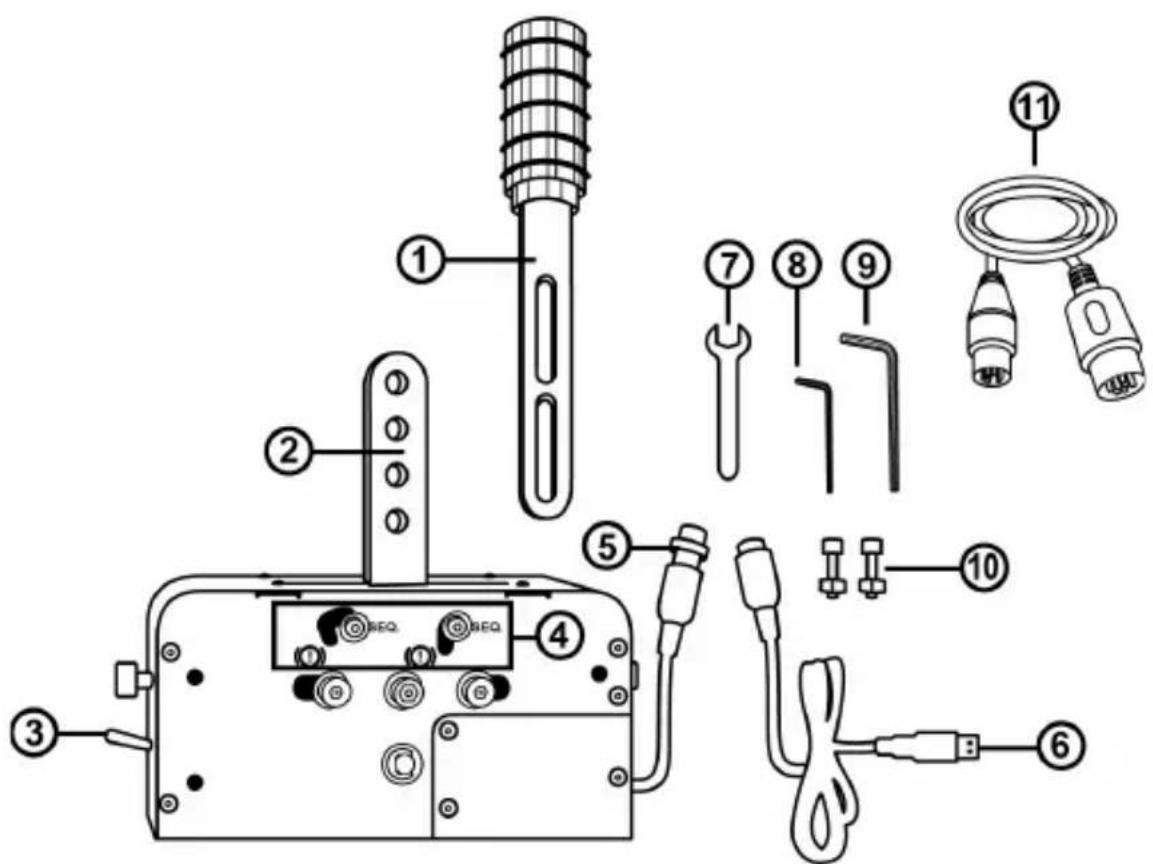
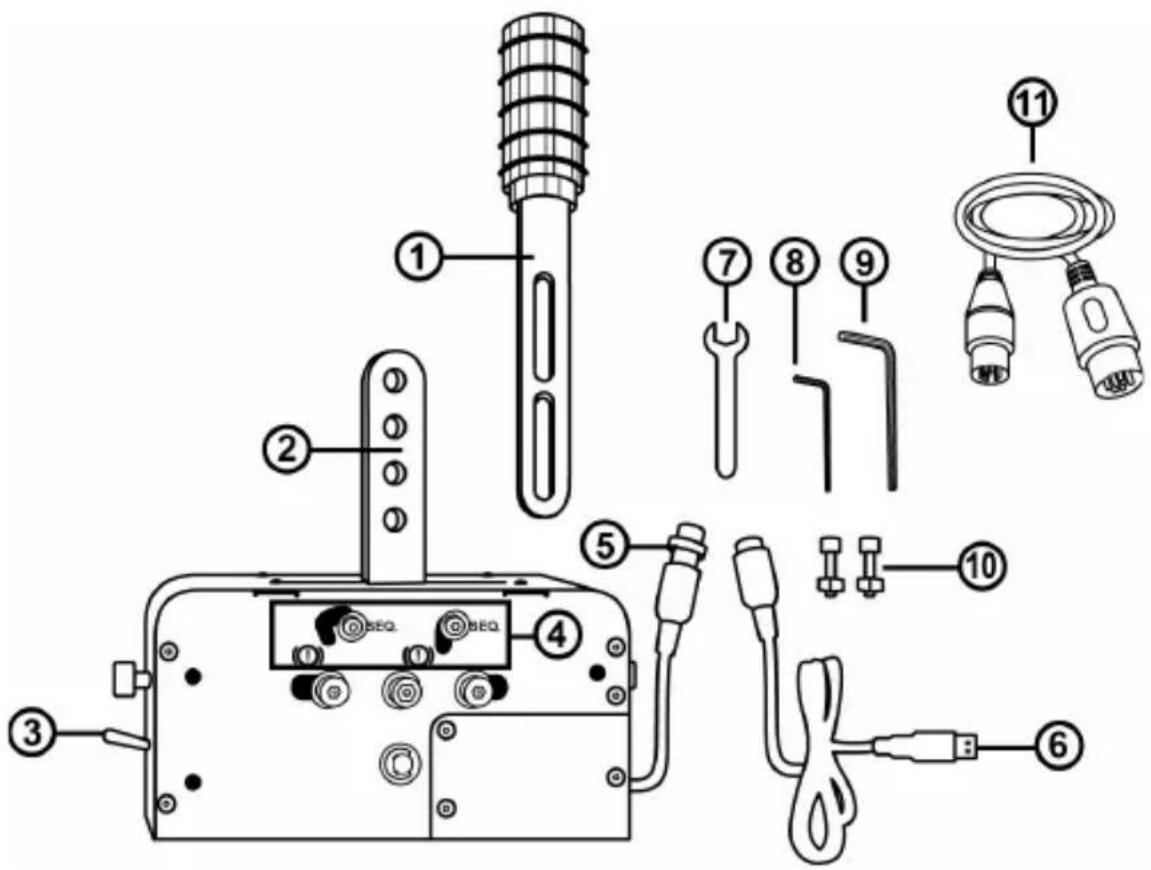
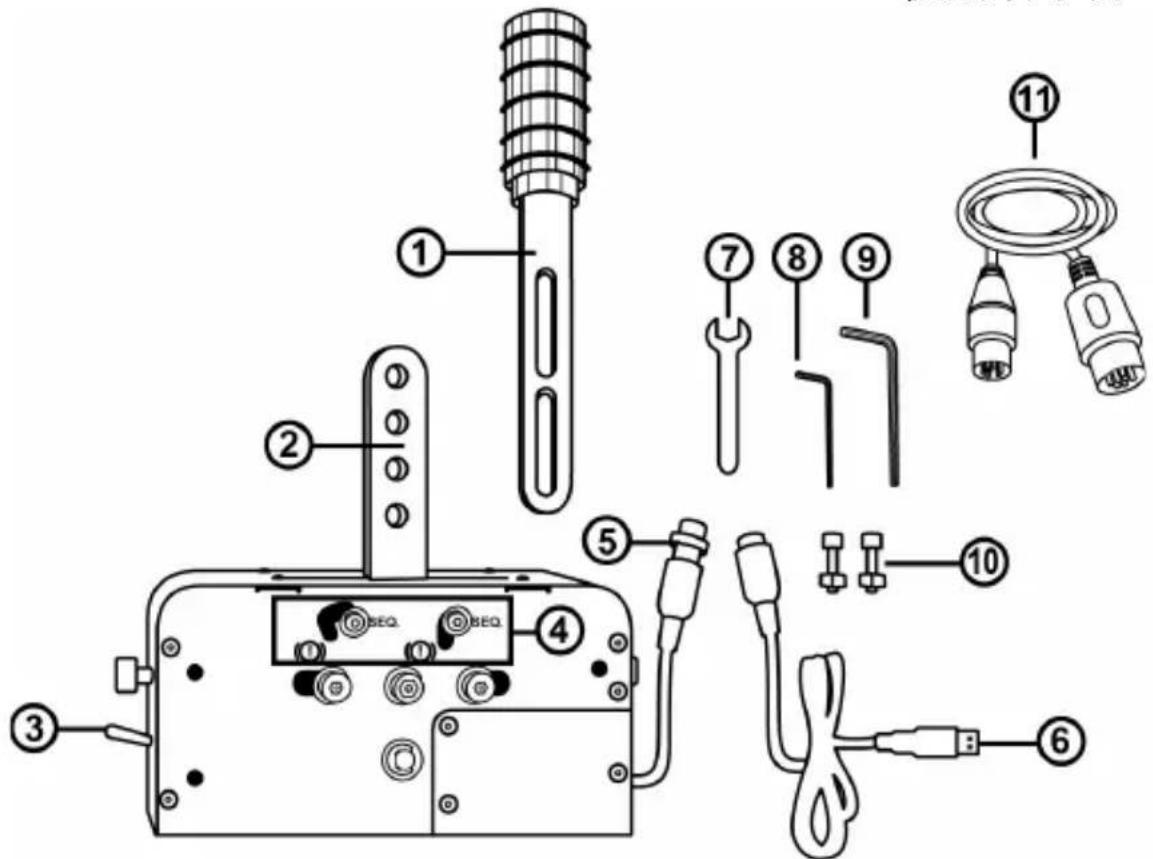
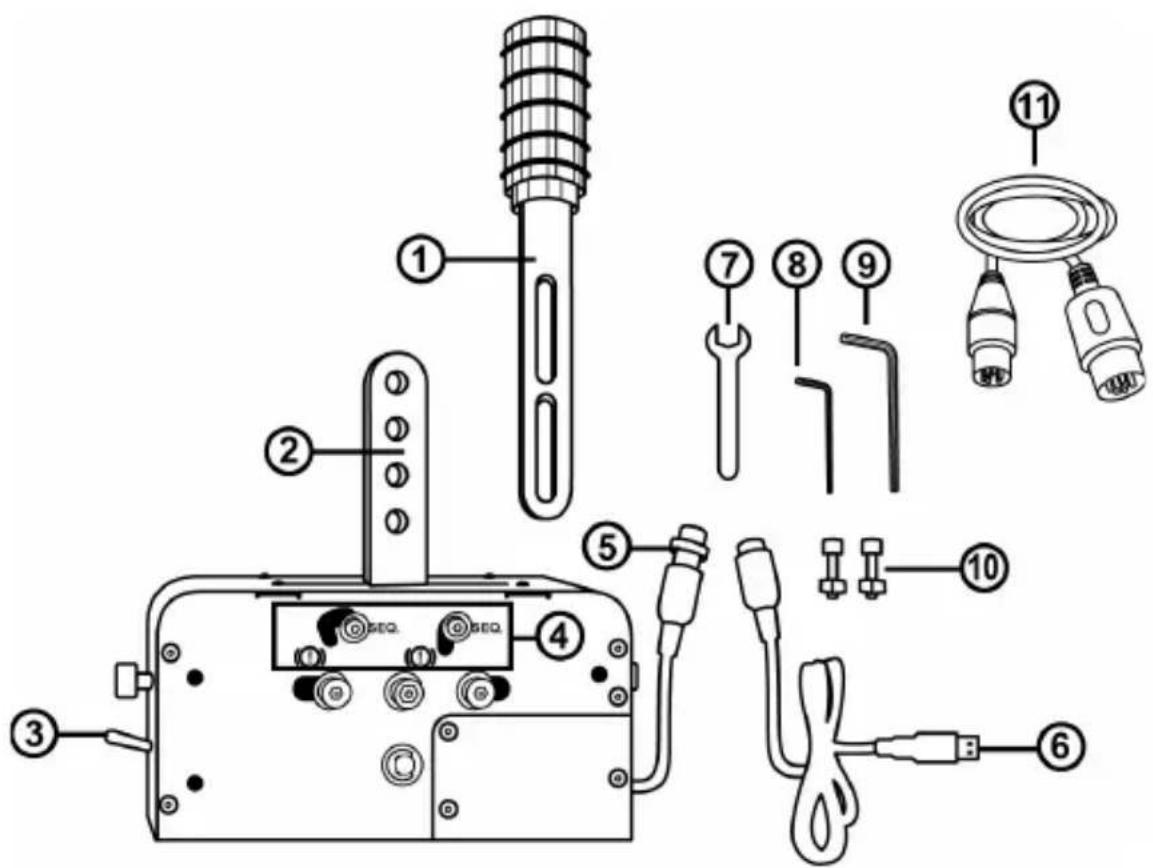
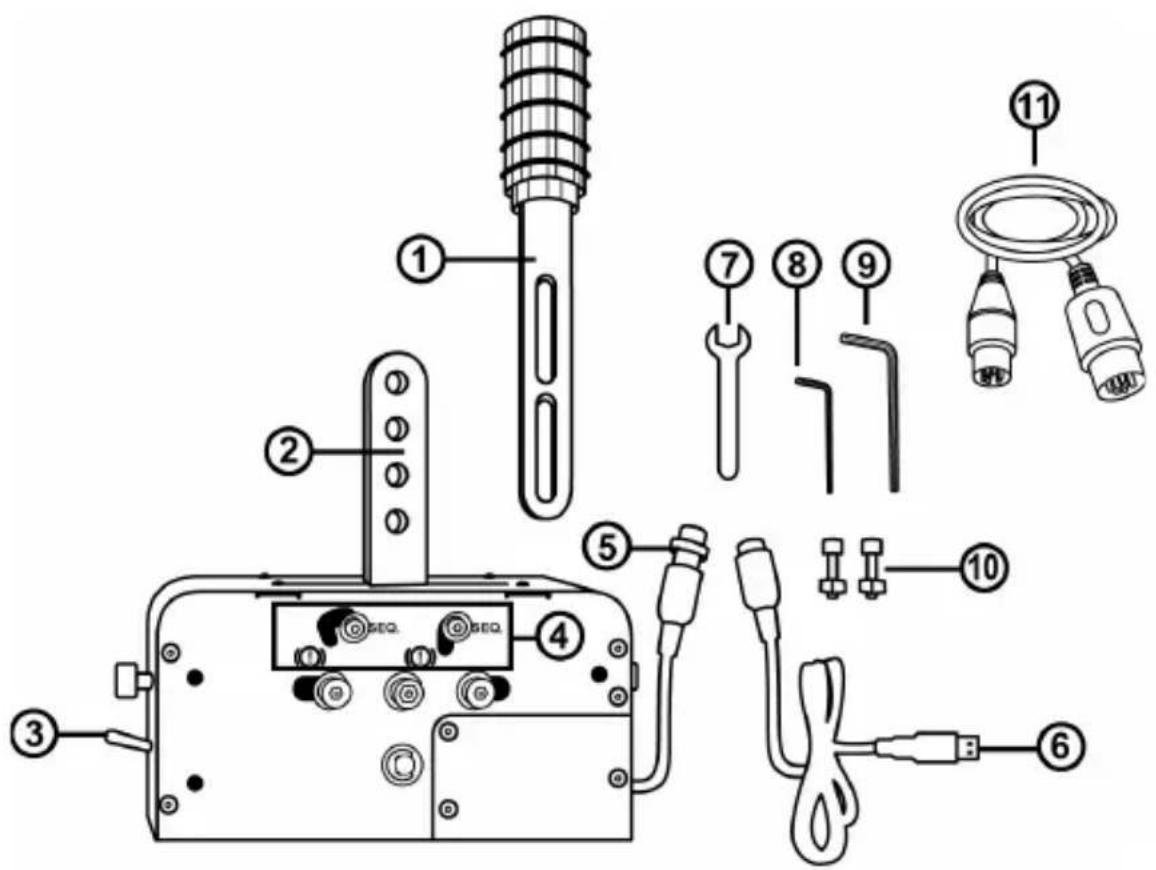
1 Detachable lever (not installed by default)
2 Lever attachment arms
3 HANDBRAKE /SEQUENTIAL SHIFTER selector
4 Mechanical switching system (for switching between the HANDBRAKE and SEQUENTIAL SHIFTER modes)
5 DIN cable and female connector on base
6 Detachable male DIN / USB cable
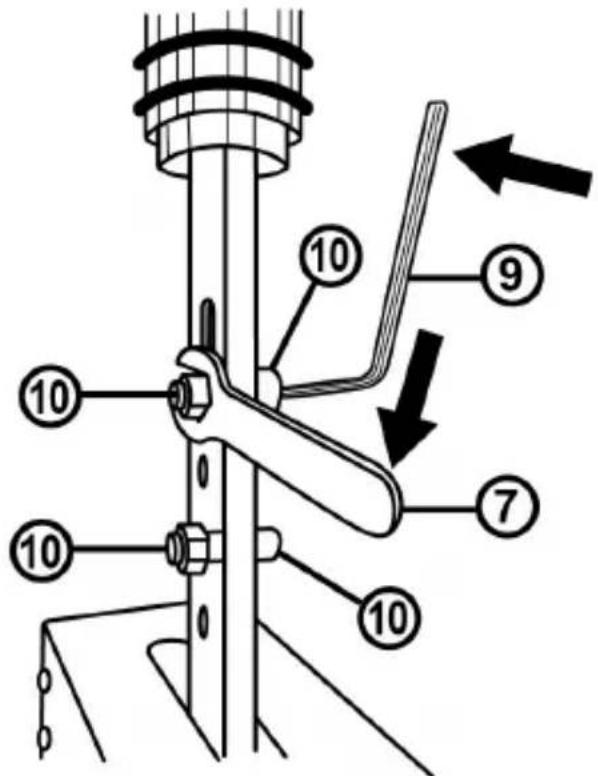
7 13 mm wrench key
8 3 mm Allen wrench
9 6 mm Allen wrench
10 2 BTR M8 screws + 2 M8 nuts
11 Detachable mini-DIN / DIN cable
WARNING
Before using this product, be sure to read through this manual carefully. Retain this manual for future reference.

Warning - Electric shock
- Keep this product in a dry place, and do not expose it to dust or sunlight.
- Respect the direction of insertion for connectors.
- Do not twist or pull on the connectors and cables.
- Do not spill liquid on the product or its connector.
- Do not short-circuit the product.
- Do not dismantle this product (apart from for the possible adjustments described in this manual), do not attempt to burn the product and do not expose the product to high temperatures.

Warning - Injuries due to repetitive movements
Using a shifter or a handbrake may cause muscle and joint pains. In order to avoid any problems:
- Avoid playing for extended periods of time.
- Take a 10 to 15 minute break after each hour of playing.
- Should you experience fatigue or pain in your hands, wrists or arms, stop playing and rest for a few hours before starting to play again.
- If the symptoms or pains described above persist when you resume playing, stop playing and consult your doctor.
- Verify that the base of the TSS HANDBRAKE is properly mounted, as described in the instructions found in this manual.

Warning - Pinching risk in shift plate openings
- Keep out of the reach of children.
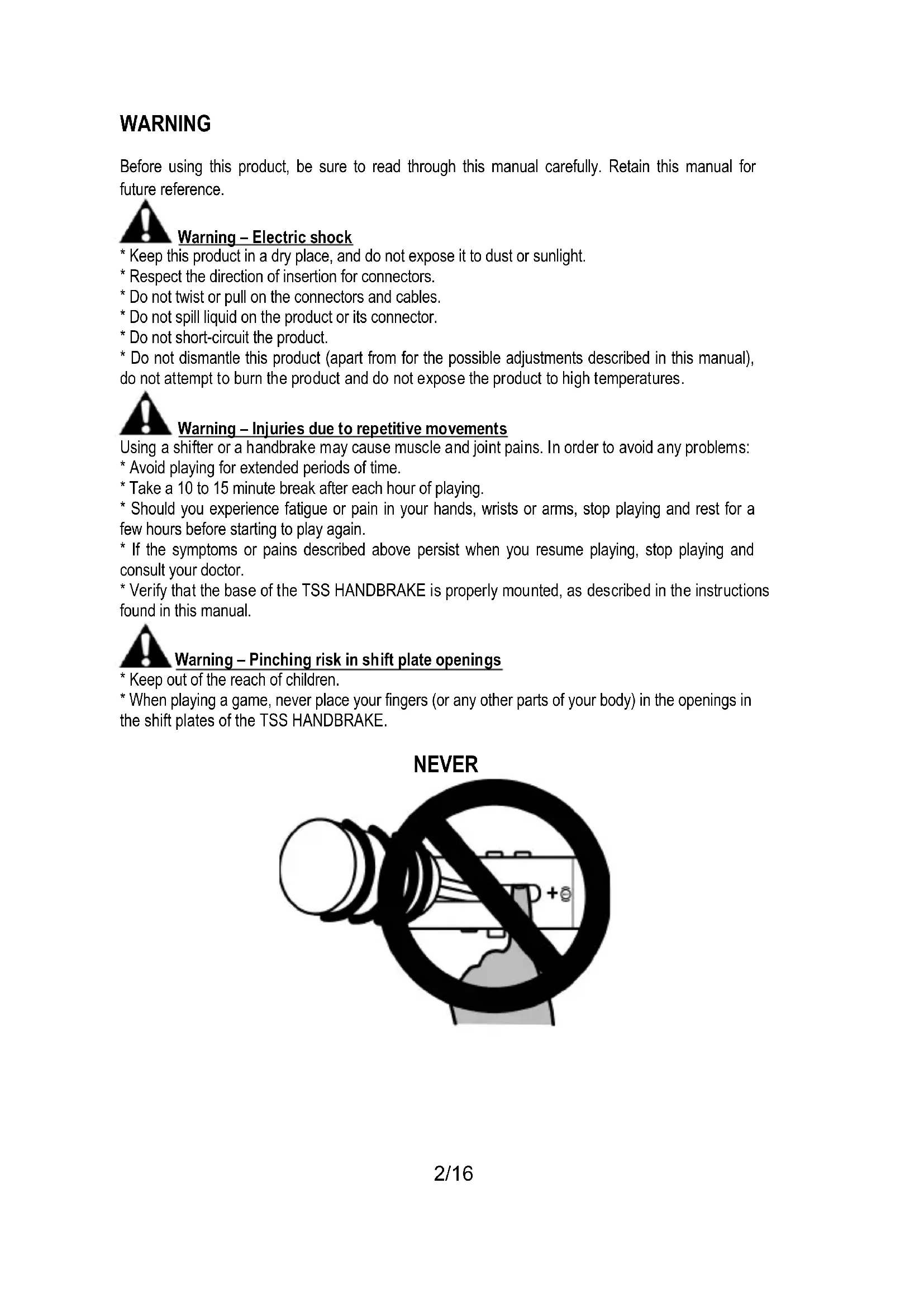
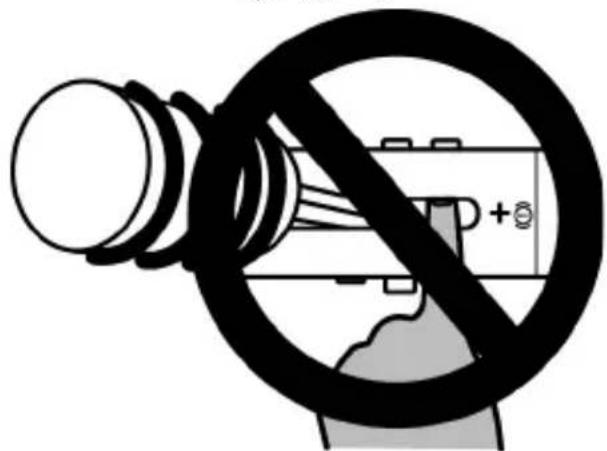
- When playing a game, never place your fingers (or any other parts of your body) in the openings in the shift plates of the TSS HANDBRAKE.
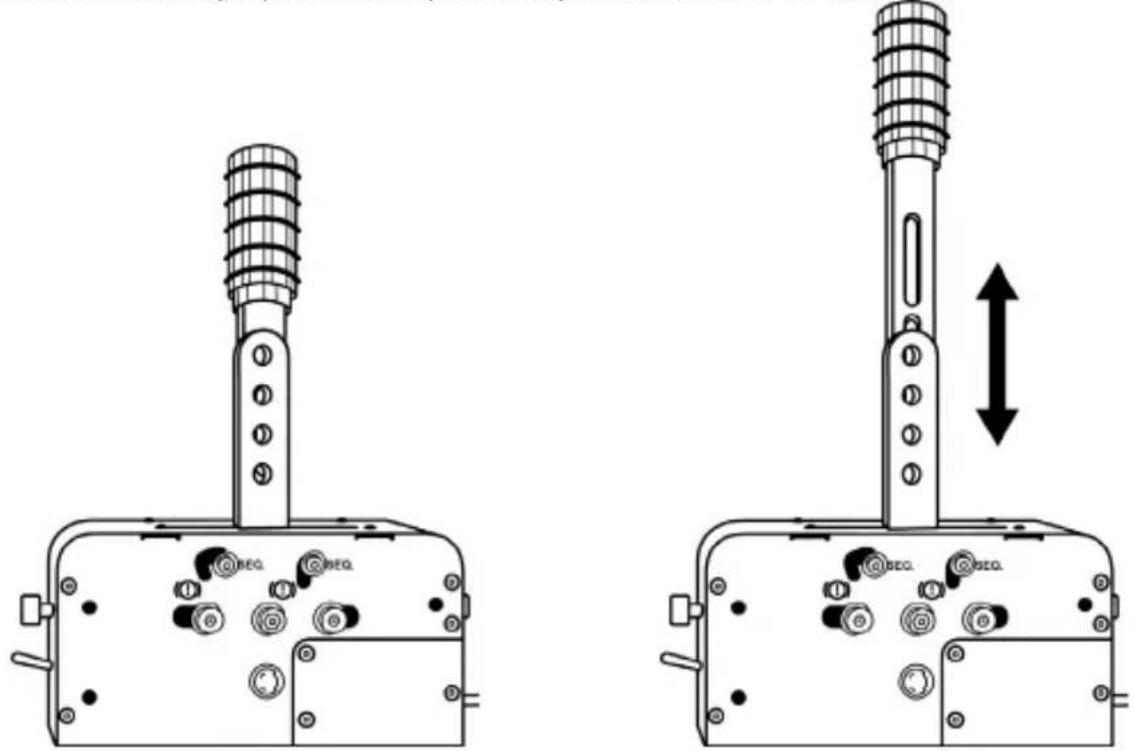
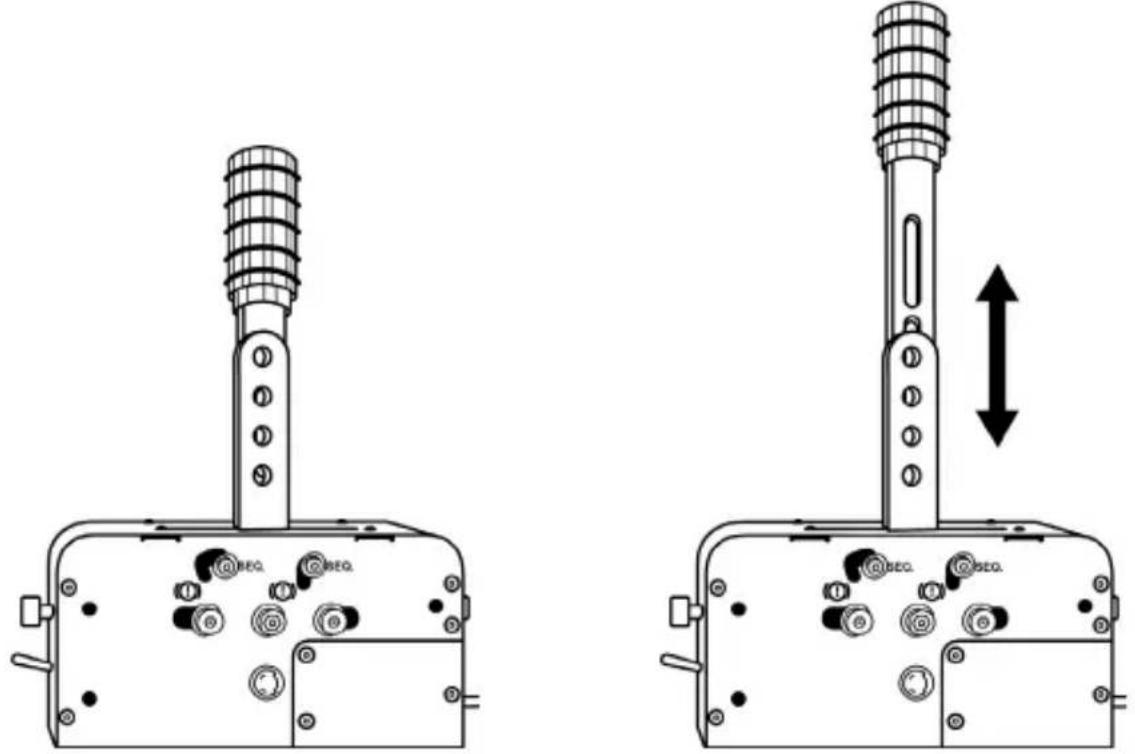
INSTALLING THE DETACHABLE LEVER (1) ON THE ATTACHMENT ARMS (2)
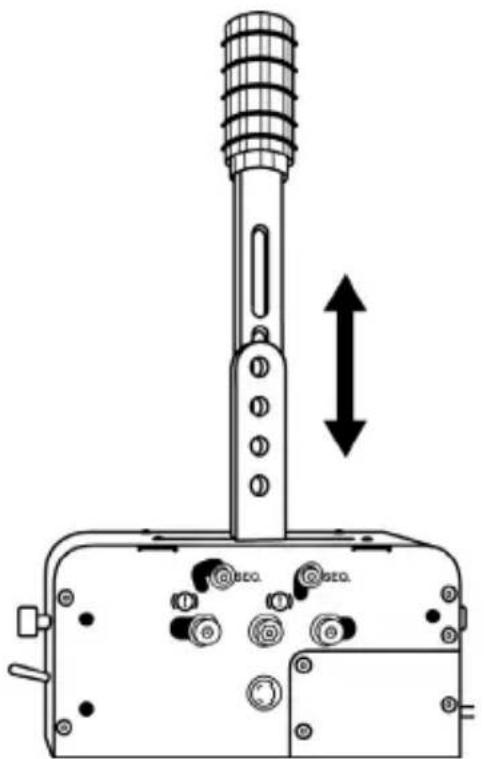
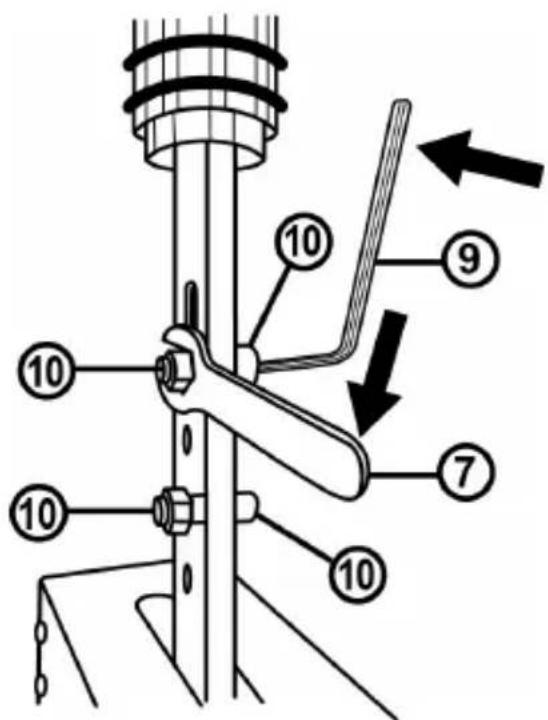
- Slide the detachable lever (1) between the attachment arms (2).
- Adjust the lever at the desired height.
The lever's total height (knob included) can be adjusted between 21 cm and 30 cm.
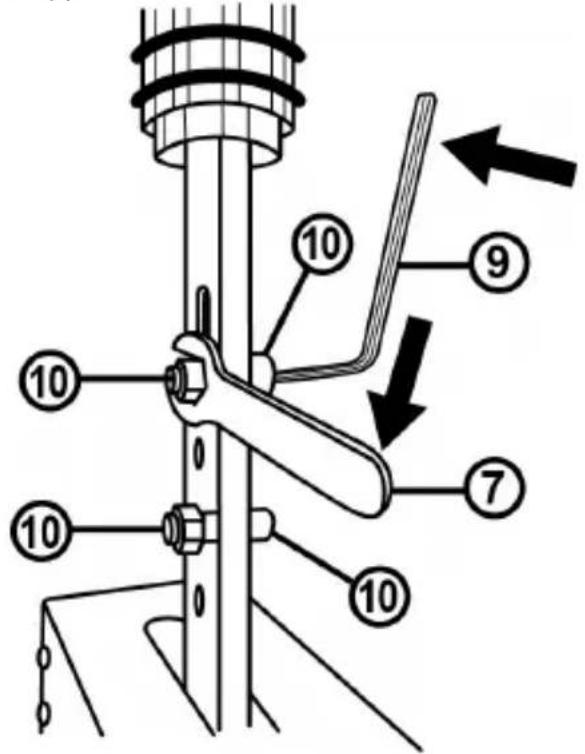
- Attach the lever to the attachment arms using 2 BTR M8 screws (10), 2 M8 nuts (10) and the 6 mm Allen wrench (9).
CONFIGURING THE HANDBRAKE MODE
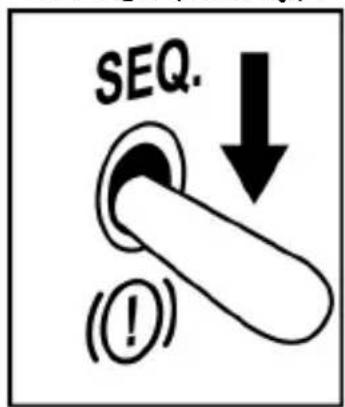
By default (when unboxing the device), the TSS HANDBRAKE is configured in the HANDBRAKE mode.
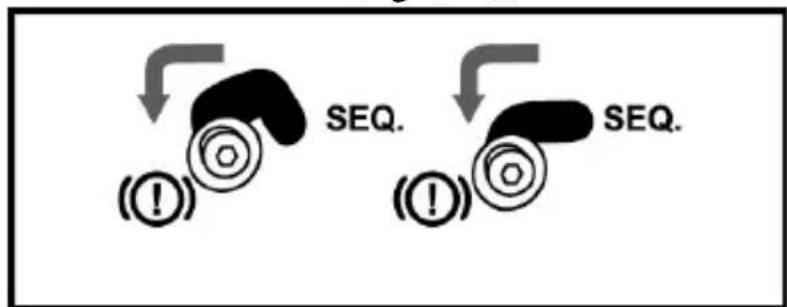
- The HANDBRAKE / SHIFTER selector (3) is lowered in the HANDBRAKE mode position.
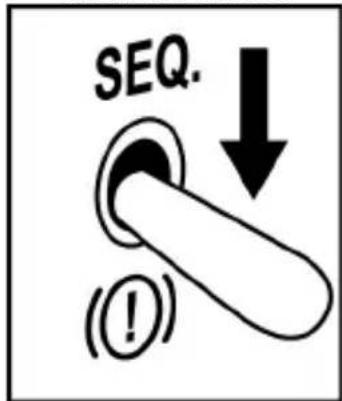
Front face of base
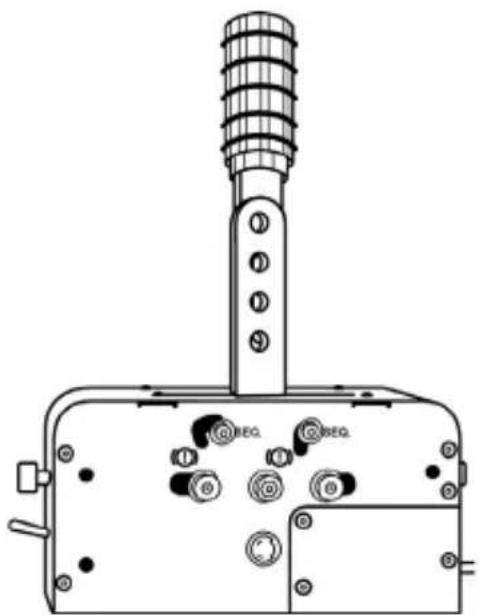
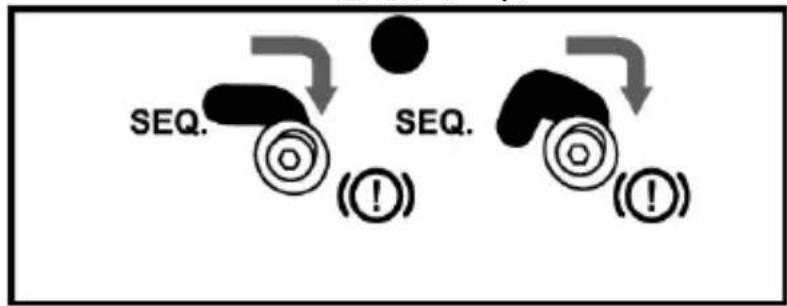
- The mechanical system that lets you switch from the HANDBRAKE mode to theSEQUENTIAL SHIFTER mode (4) is preset in the HANDBRAKE position.
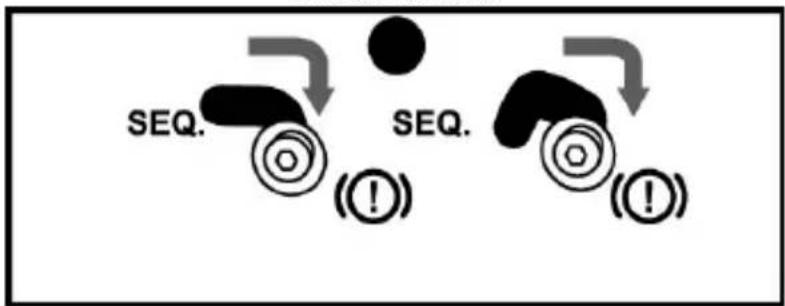
Left side of base
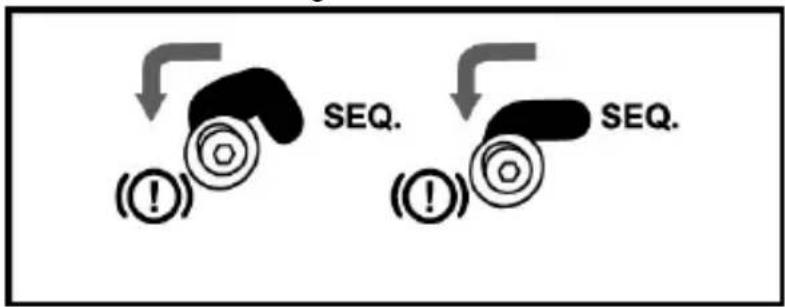
Right side of base
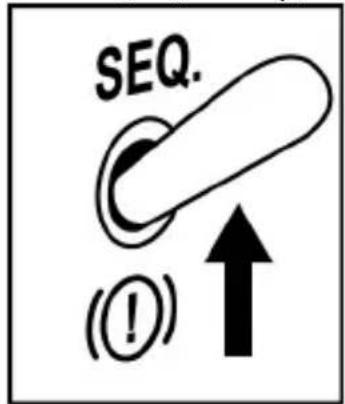
CONFIGURING THESEQUENTIAL SHIFTER MODE
- Raise the HANDBRAKE / SHIFTER selector (3) in theSEQUENTIAL SHIFTER mode position.
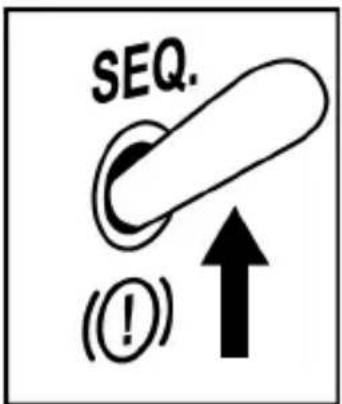
Front face of base
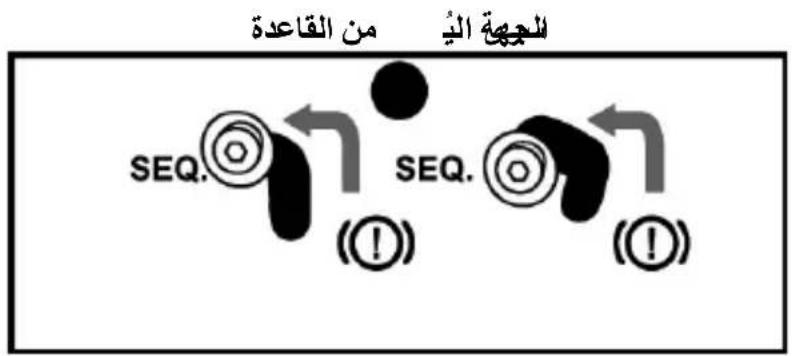
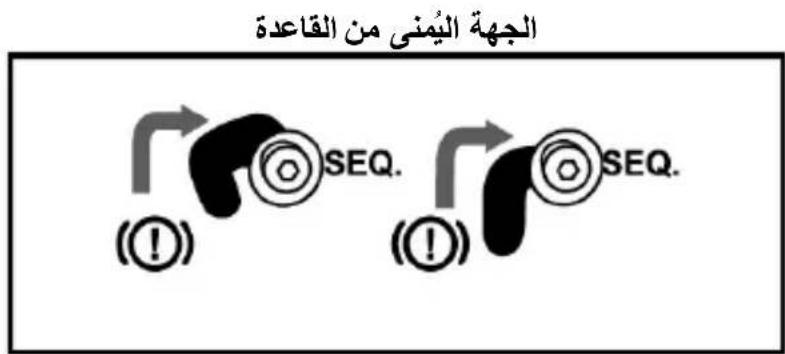
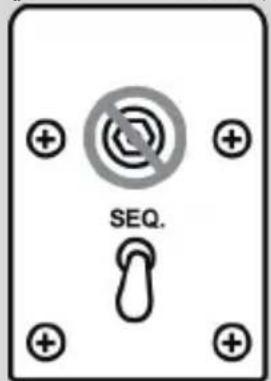
- To switch from the HANDBRAKE mode to the SEQUENTIAL SHIFTER mode (4), use the 3mm Allen wrench (8) to slightly unscrew the mechanical system's screws (2 screws, located to either side of the base).
- Move these 4 screws (2 screws, located on either side of the base) to the SEQ position.
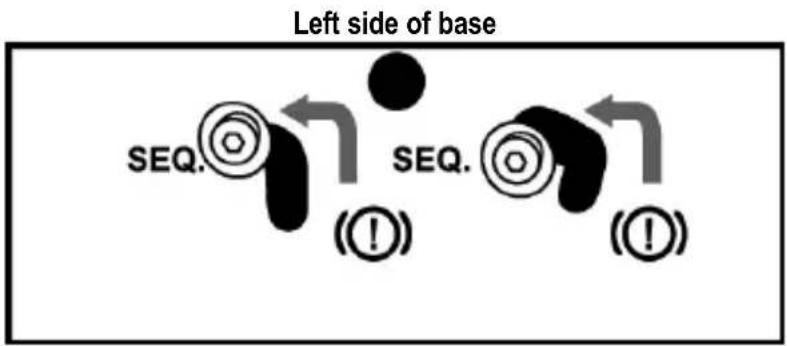
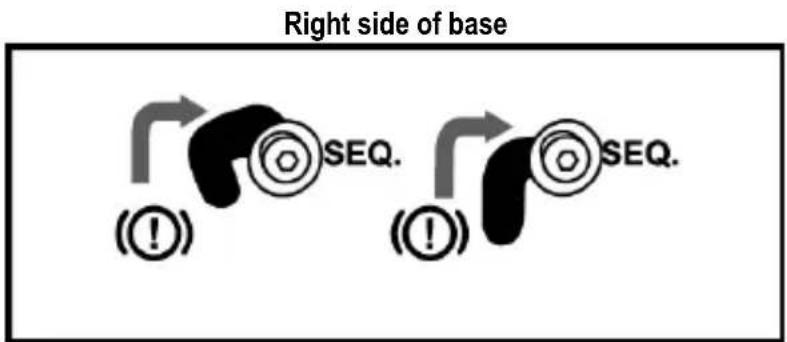
- Check that these 4 screws (2 on either side of the base) are perfectly repositioned, then tighten them using the 3mm Allen wrench (8).
INSTALLING THE TSS HANDBRAKE
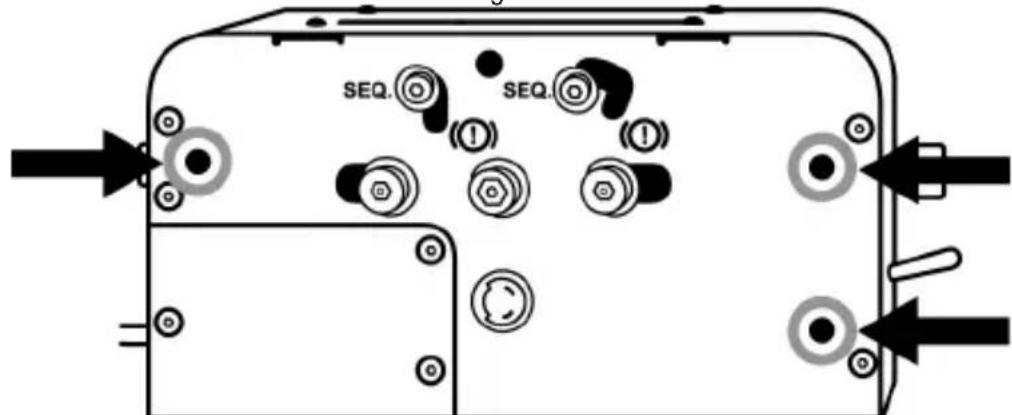
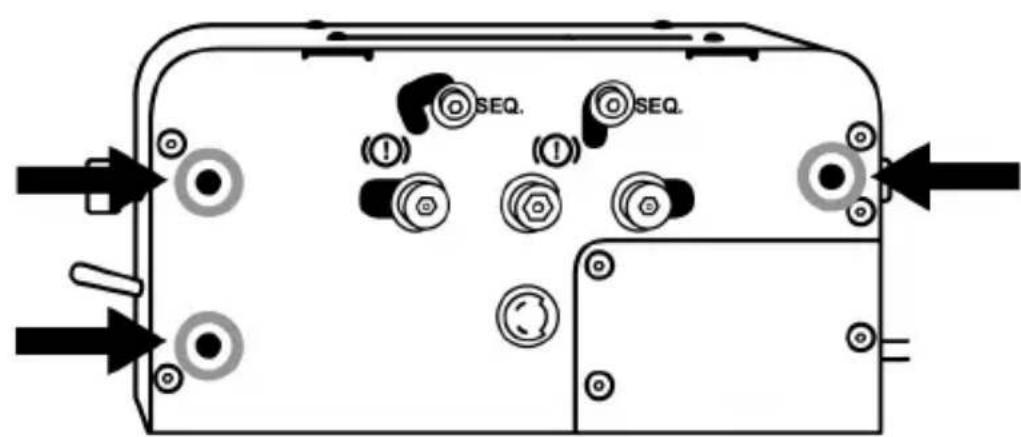
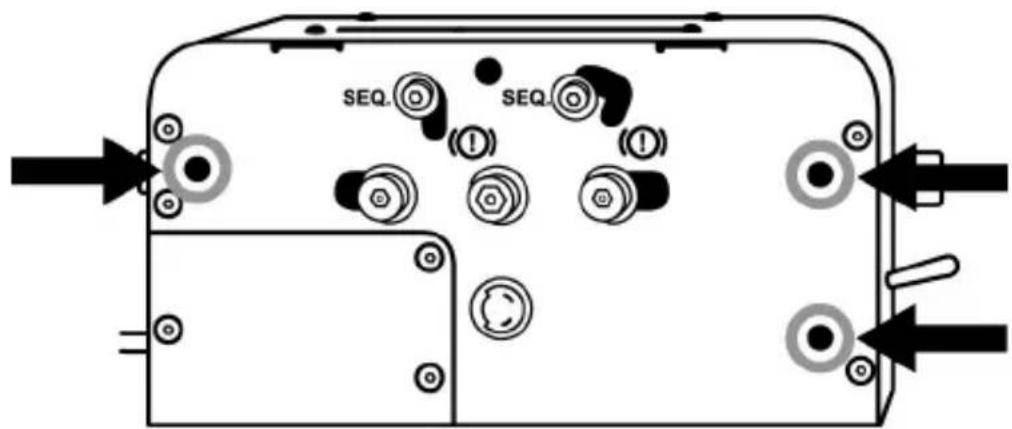
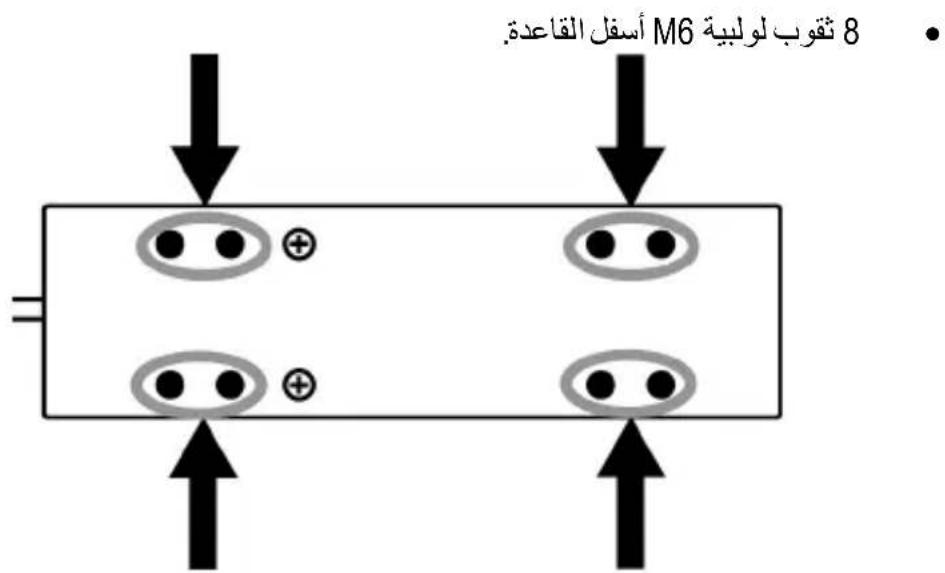
The TSS HANDBRAKE can be attached to a variety of compatible supports (sold separately), using the M6 threaded holes located on either side of the device and under its base:
3 threaded holes are located on the left side of the base.
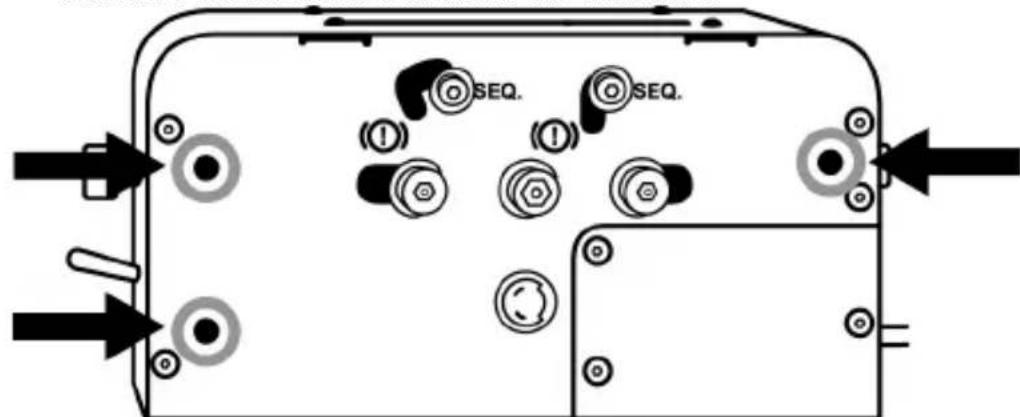
3 threaded holes are located on the right side of the base.
8 threaded holes are located under the base.
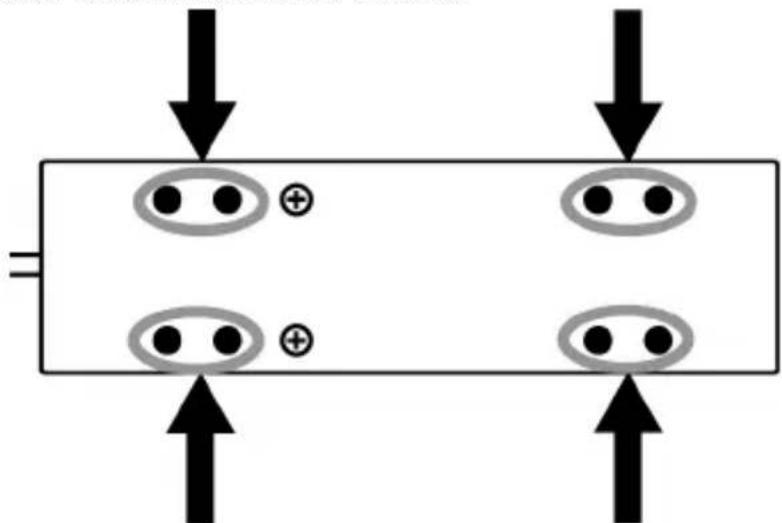
The TSS HANDBRAKE cockpit installation template is available from https://support.thrustmaster.com. Select Racing Wheels / TSS HANDBRAKE, then Template - Cockpit Setup.

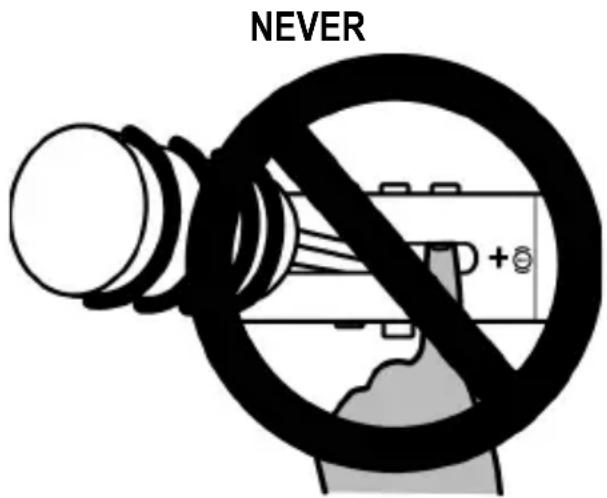
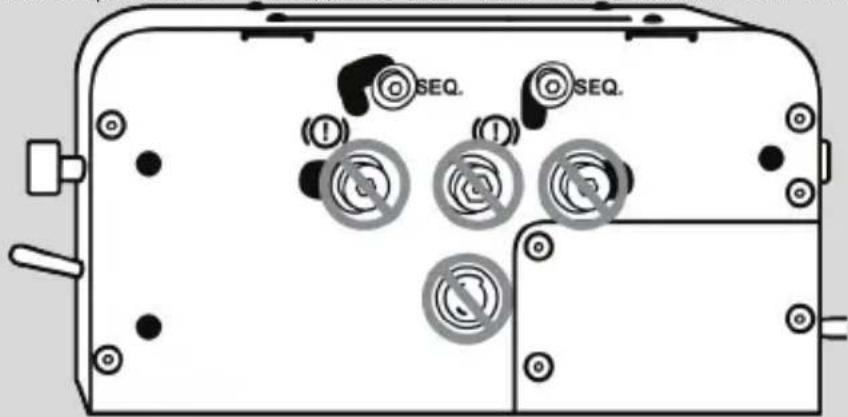
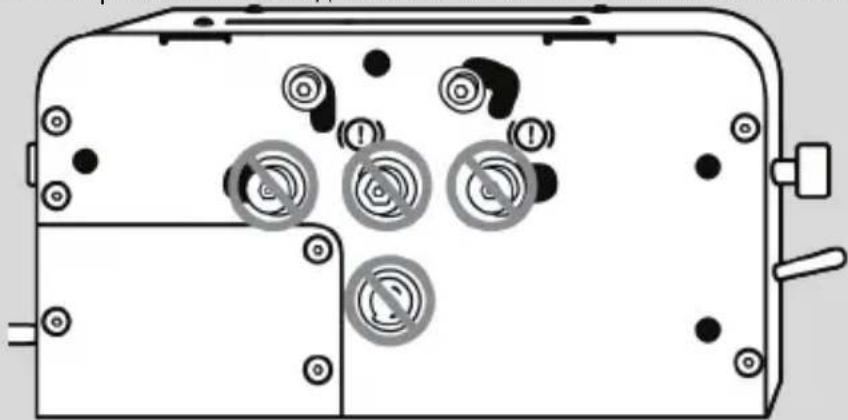
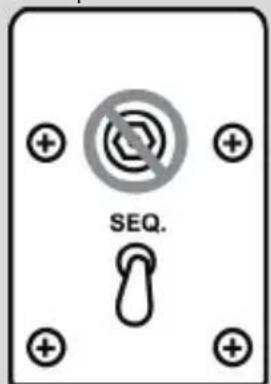
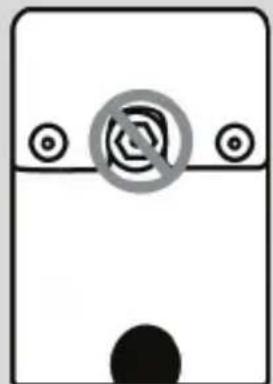
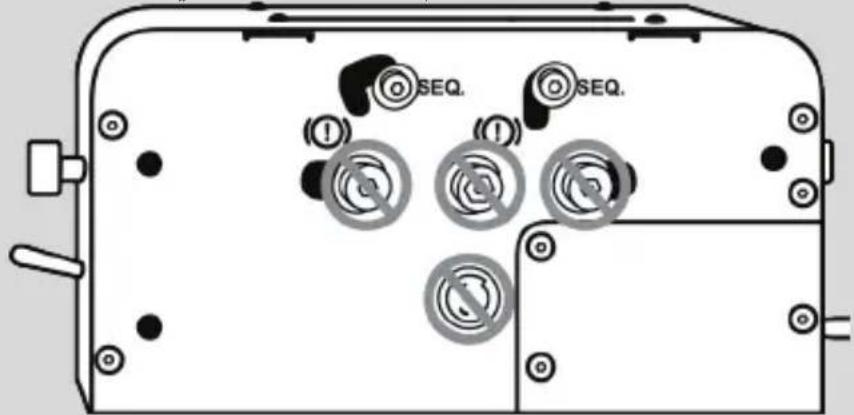
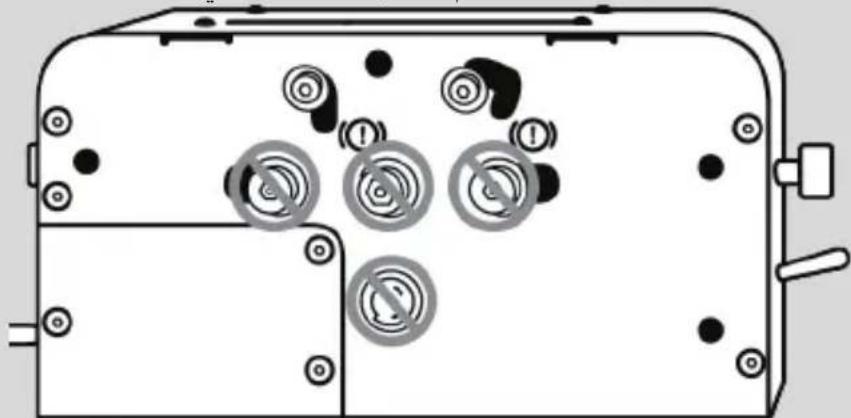
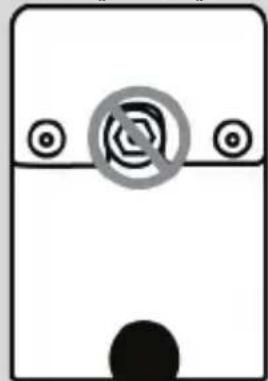
DO NOT TIGHTEN OR LOOSEN THESE SCREWS

With the exception of the screws relating to the mechanical system used to switch from the HANDBRAKE mode the SEQUENTIAL SHIFTER mode (4), never tighten or loosen any screws located on the TSS HANDBRAKE base.
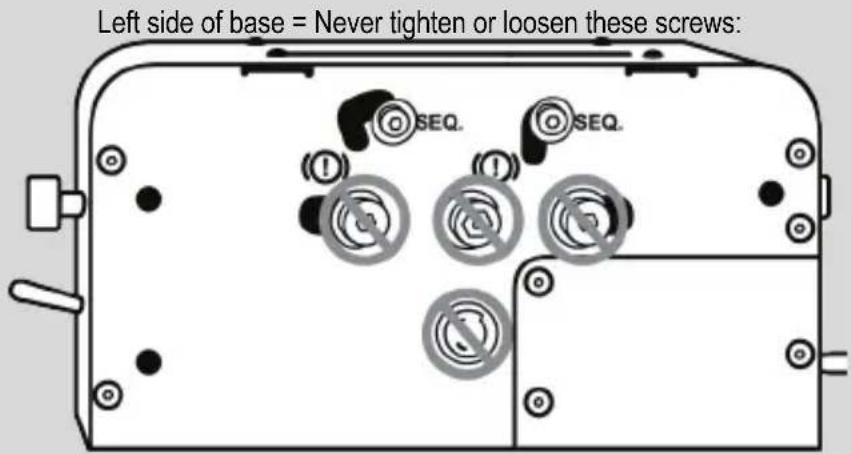

Right side of base = Never tighten or loosen these screws:
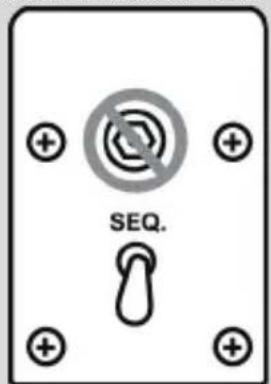
Front and rear sides of base = Never tighten or loosen these screws:
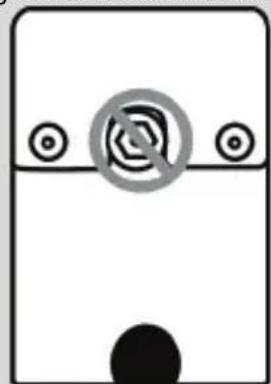
INSTALLATION INSTRUCTIONS FOR PC
- Go to https://support.thrustmaster.com to download the PC drivers.
Select Racing Wheels / TSS HANDBRAKE, then select Drivers. - Once the download is finished, run the installation program, and follow the instructions displayed onscreen.
- When prompted to do so by the installation program, connect the TSS HANDBRAKE to one of your PC's USB ports using the detachable male DIN / USB cable (6), and finish installing the driver.
- Once the installation is finished, click Finish and restart your computer.
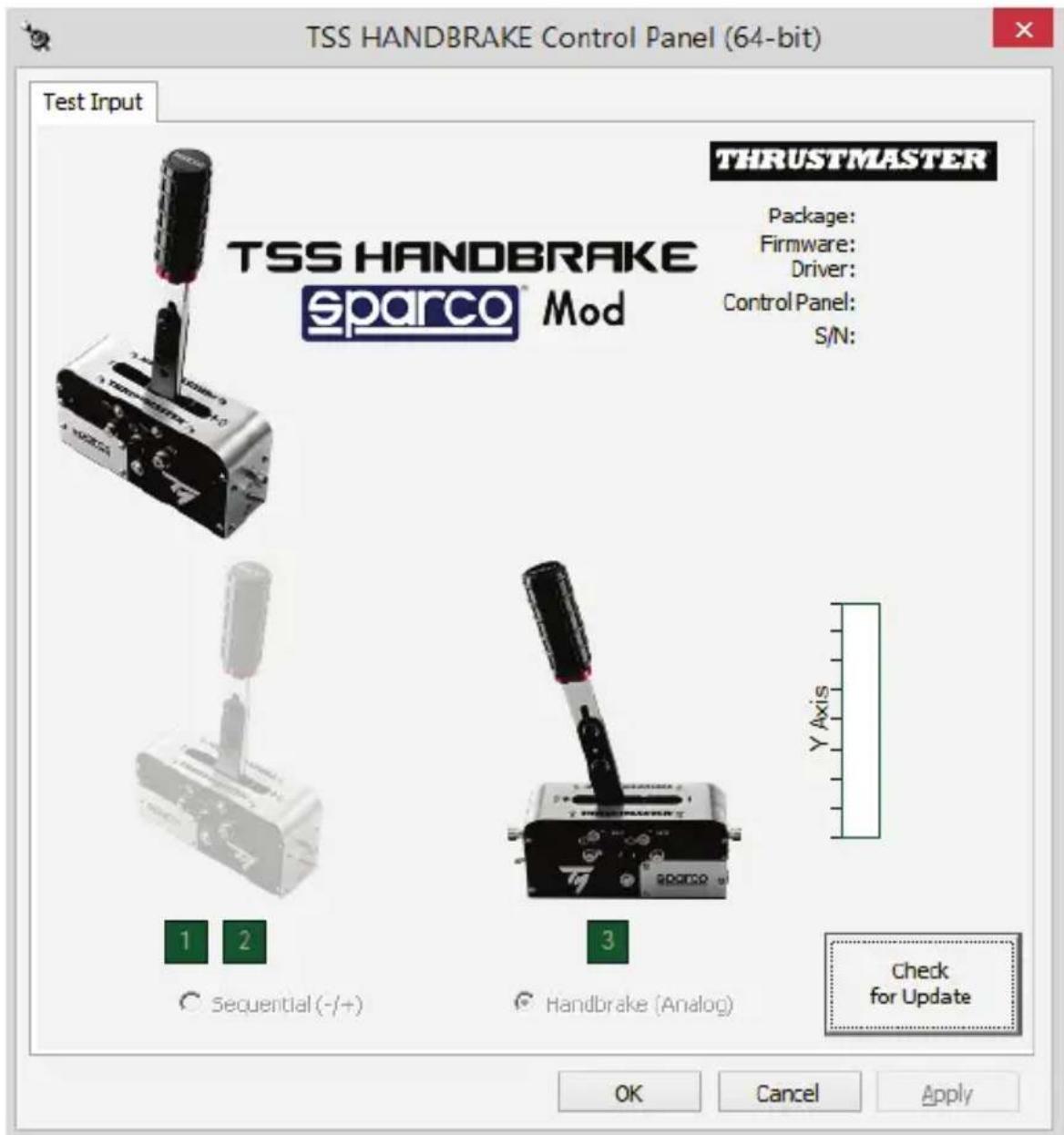
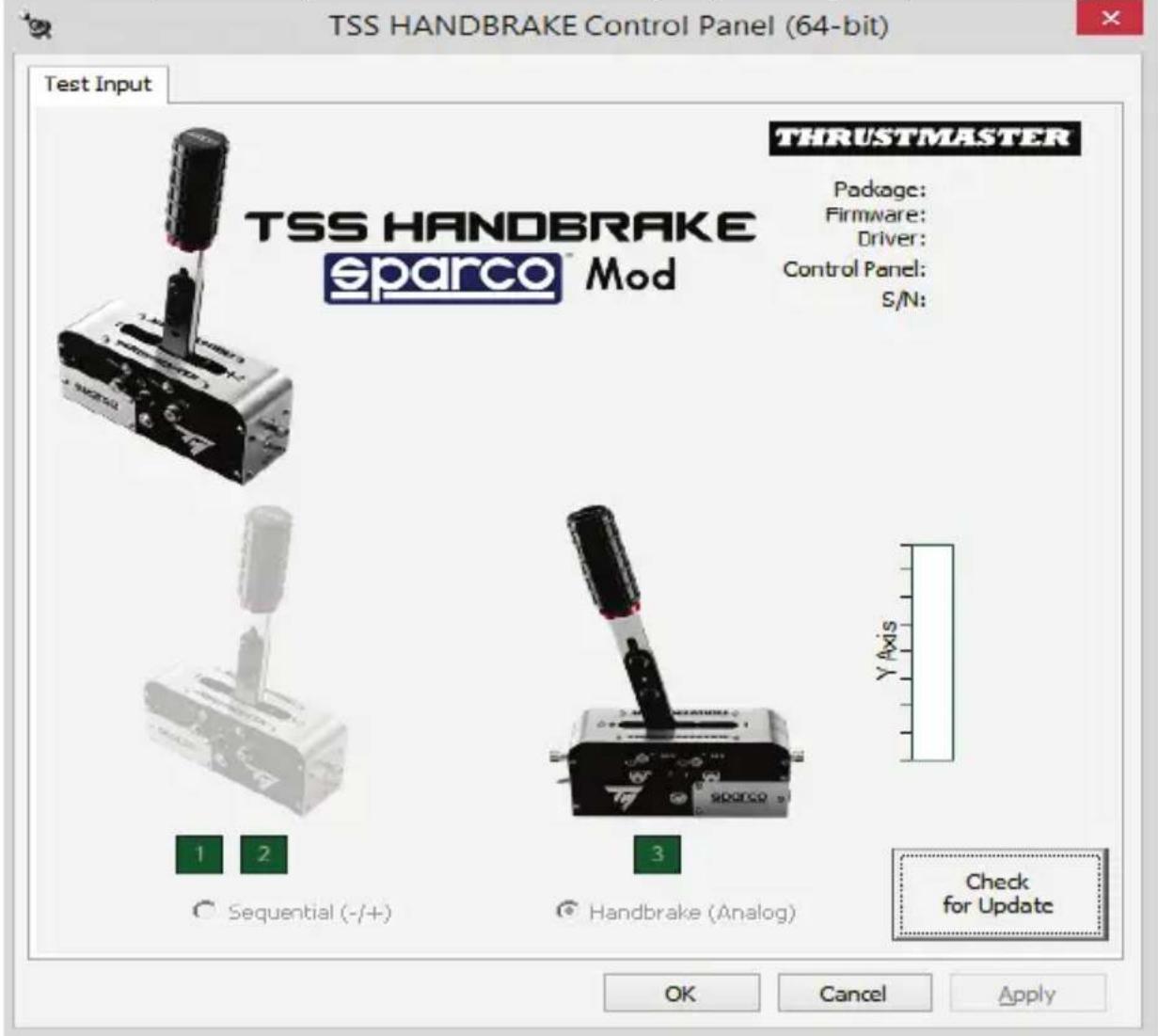
- Select Start / All Programs / Thrustmaster / TH8 Shifter / Control Panel to open the Game Controllers window.
The Game Controllers window displays the name TSS HANDBRAKE Sparco® Mod, with the status OK.
- Click Properties to view the TSS HANDBRAKE in the Windows Control Panel:
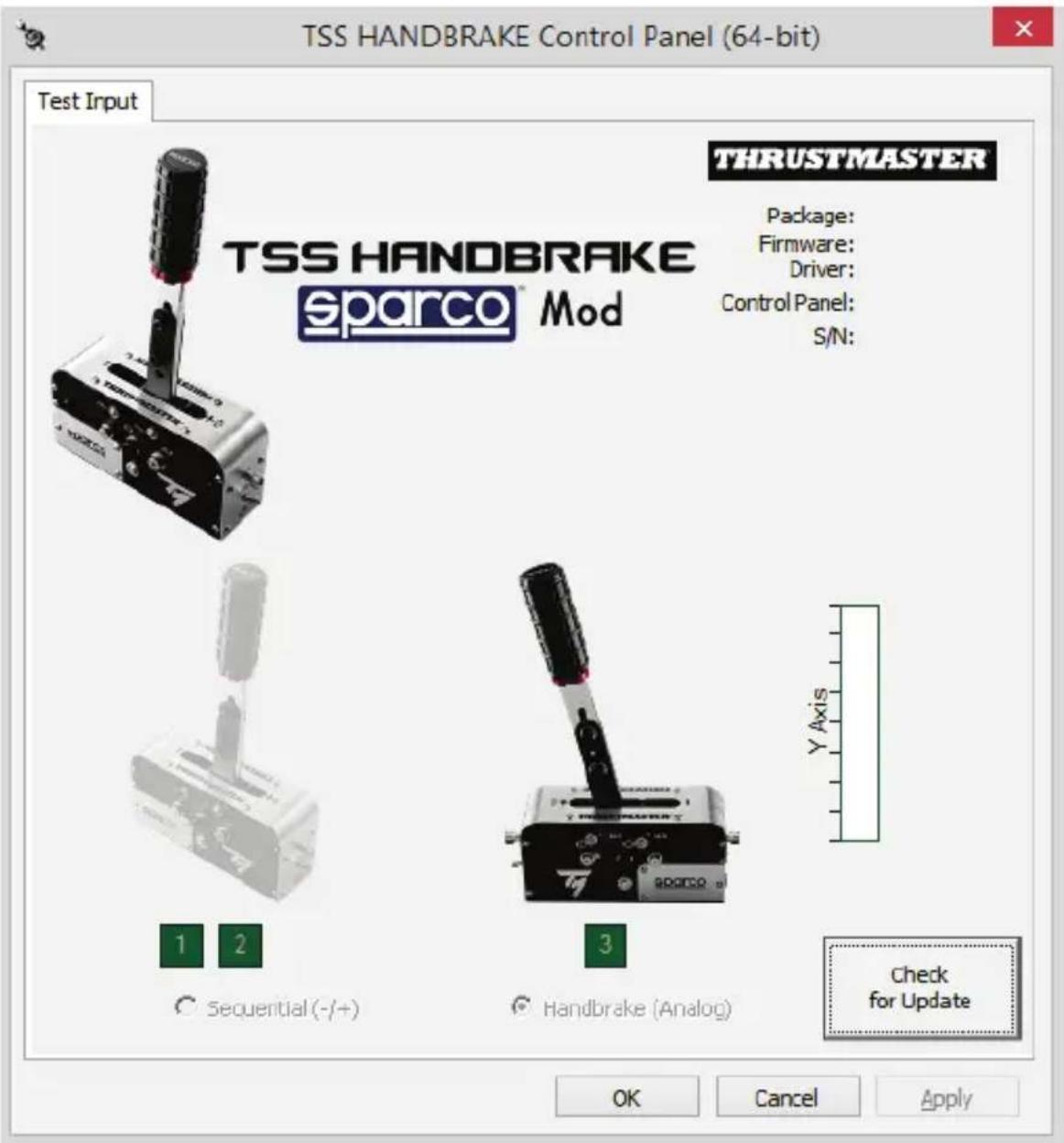
On PC, when the TSS HANDBRAKE is connected to a USB port using the detachable male DIN / USB cable (6), the TSS HANDBRAKE is compatible:
- with HANDBRAKE mode [Progressive] and SEQUENTIAL SHIFTER mode [+/-] ;
- in all games supporting multi-USB, separate handbrakes and shifters;
- with all racing wheels on the market.
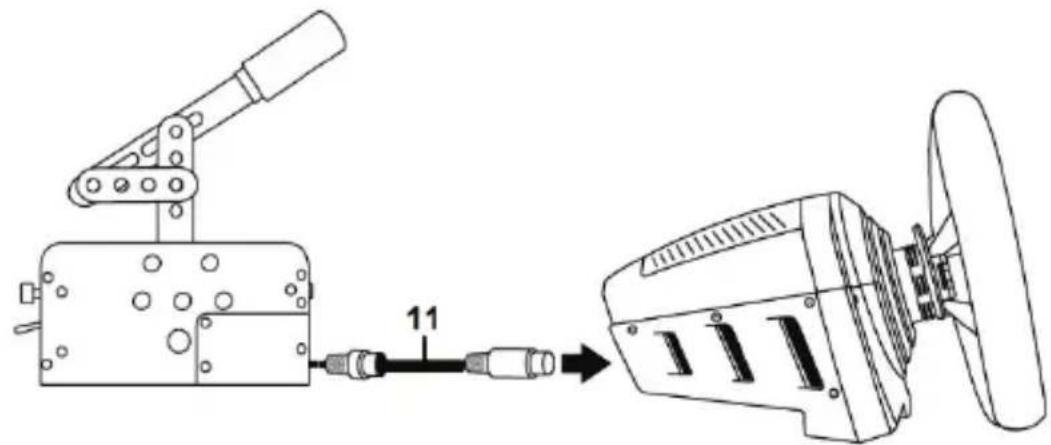
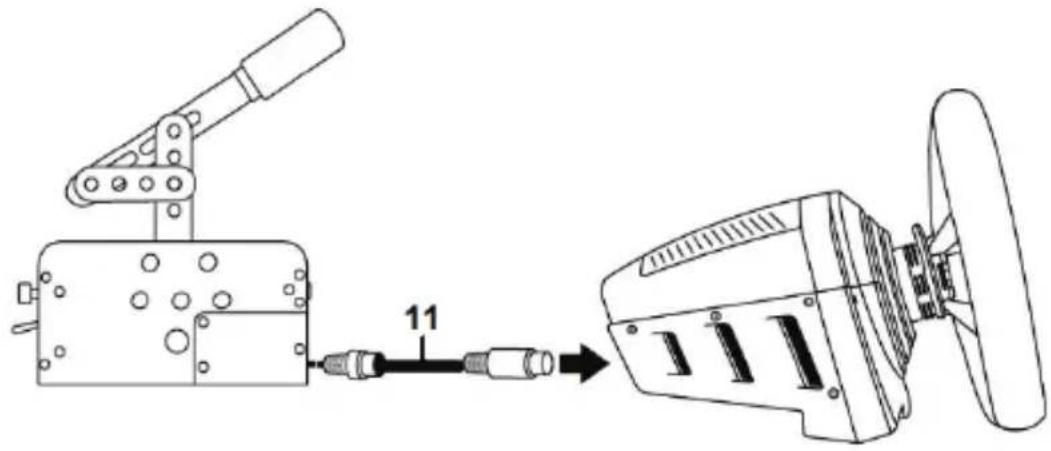
On PC, when the TSS HANDBRAKE is connected to the back of a compatible Thrustmaster racing wheel base using the detachable mini-DIN / DIN cable (11), the TSS HANDBRAKE is compatible:
- withSEQUENTIAL SHIFTER mode [+/-] only;
- in all games (as the TSS HANDBRAKE is combined with the racing wheel's UP and DOWN paddle shifters);
- with compatible Thrustmaster racing wheel bases only (TS-PC Racer, T-GT, T300, TS-XW Racer and TX).

IMPORTANT: you must update the firmware of your racing wheel base
(TS-PC Racer, T-GT, T300, TS-XW Racer and TX) with the latest version available at https://support.thrustmaster.com/ to be able to connect a TSS HANDBRAKE to the racing wheel base.
General notes on PC:
- Remember to always completely close the Game Controllers window by clicking on OK before starting your game.
- The TSS HANDBRAKE's firmware version is displayed in the upper right section of the Control Panel tabs.
- If you choose to use a USB connection, we recommend connecting your racing wheel and the TSS HANDBRAKE directly to the USB 2.0 (not USB 3.0) ports on your PC, without using a hub.
- Some games let you use 2 TSS HANDBRAKE devices simultaneously:
1 TSS HANDBRAKE configured in HANDBRAKE mode;
1 TSS HANDBRAKE in SEQUENTIAL SHifter mode.
INSTALLATION ON PS4TM AND XBOX ONE®
On PS4™ and Xbox One®, the TSS HANDBRAKE is compatible with the following racing wheel bases:
Thrustmaster T-GT and T300 on PS4TM
Thrustmaster TS-XW Racer and TX on Xbox One®

IMPORTANT: in order to ensure optimal performance of the TSS
HANDBRAKE on PS4™ and Xbox One®, you must update the firmware of your racing wheel base (T-GT, T300, TS-XW Racer or TX) with the latest version available at https://support.thrustmaster.com/.
Installation:
- Using the detachable mini-DIN / DIN cable (11), connect the TSS HANDBRAKE directly to the female mini-DIN port located at the back of your racing wheel's base.
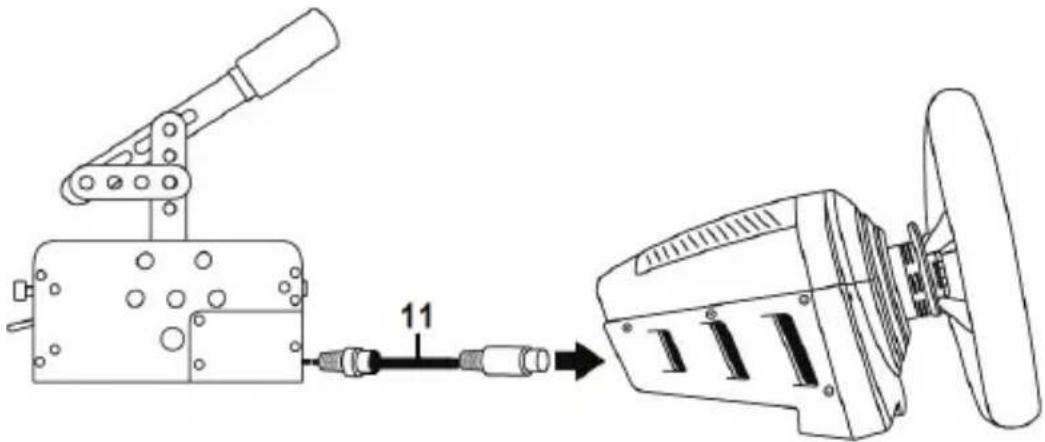
- Connect your racing wheel to the console.
General notes on PS4™ and Xbox One®:
-
Never use and connect the detachable male DIN / USB cable (6) on PS4™ and Xbox One®. The TSS HANDBRAKE must always be connected to a compatible Thrustmaster racing wheel base, and not to the console.
-
When the TSS HANDBRAKE is connected to a compatible Thrustmaster racing wheel base:
-
SEQUENTIAL SHIFTER mode [+/-] works in all games, as it is combined with the racing wheel's UP and DOWN paddle shifters.
-
HANDBRAKE mode [Progressive] works in games that support the handbrake function*.
-
List of PS4™ and Xbox One® games compatible with handbrakes available at https://support.thrustmaster.com/. In the Racing Wheels section, select TM SIM HUB or TSS Handbrake Sparco® Mod.
TSS HANDBRAKE CONNECTION SUMMARY ACCORDING TO THE PLATFORM USED
| TSS HANDBRAKE connection | |
| PC (HANDBRAKE mode and SEQUENTIAL SHIFTER mode) | To the PC, using the detachable male DIN / USB cable (6). Compatible with all racing wheels on the market. |
| PC (SEQUENTIAL SHIFTER mode only) | At the back of a compatible Thrustmaster racing wheel base, using the detachable mini-DIN / DIN cable (11). |
| PS4TM (HANDBRAKE mode and SEQUENTIAL SHIFTER mode) | At the back of a compatible Thrustmaster racing wheel base, using the detachable mini-DIN / DIN cable (11). |
| XBOX ONE® (HANDBRAKE mode and SEQUENTIAL SHIFTER mode) | At the back of a compatible Thrustmaster racing wheel base, using the detachable mini-DIN / DIN cable (11). |
UPDATING THE TSS HANDBRAKE'S FIRMWARE
The firmware included in the TSS HANDBRAKE's base can be updated (meaning that it can be upgraded to a more recent version, featuring product enhancements).
To display the TSS HANDBRAKE's firmware version and update it, if required: on a PC, go to https://support.thrustmaster.com, select Racing wheels / TSS HANDBRAKE, then select Firmware and follow the instructions and the download and installation procedure.
ADVANCED CALIBRATION SOFTWARE
The TSS HANDBRAKE's calibration procedure is automatic.
An advanced calibration software application for PC is also available at https://support.thrustmaster.com: select Racing Wheels / TSS HANDBRAKE, then Software. This software allows you to adjust the following:
- Analog travel in HANDBRAKE mode;
- Analog travel in SEQUENTIAL SHIFTER mode.
Once the settings have been adjusted, they will immediately be saved in the TSS HANDBRAKE's internal memory and will therefore be effective in all of your games, whether on PC, PS4™ or Xbox One®.
TIPS & HINTS (not included in this manual)
Various tips and hints are available from the https://support.thrustmaster.com website; select Racing Wheels / TSS HANDBRAKE.
ECOSYSTEM
The TSS HANDBRAKE is also compatible with other accessories sold separately:
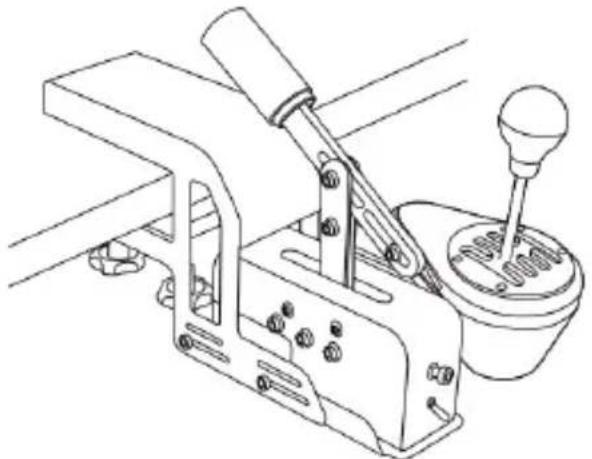
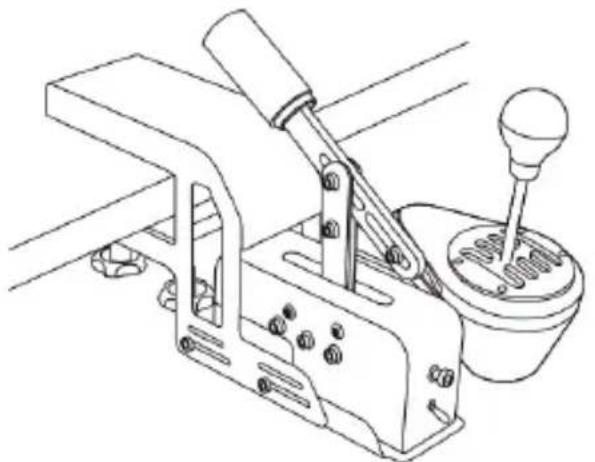
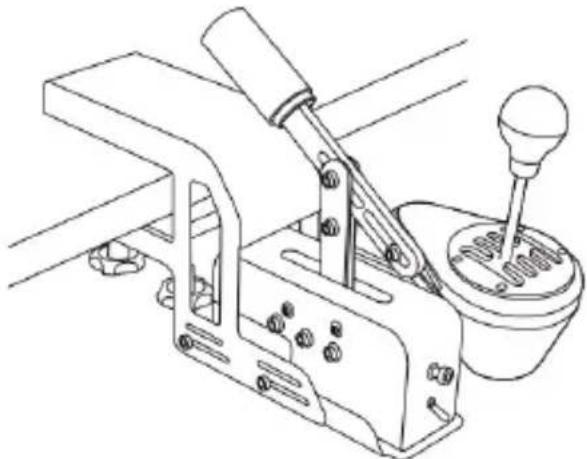
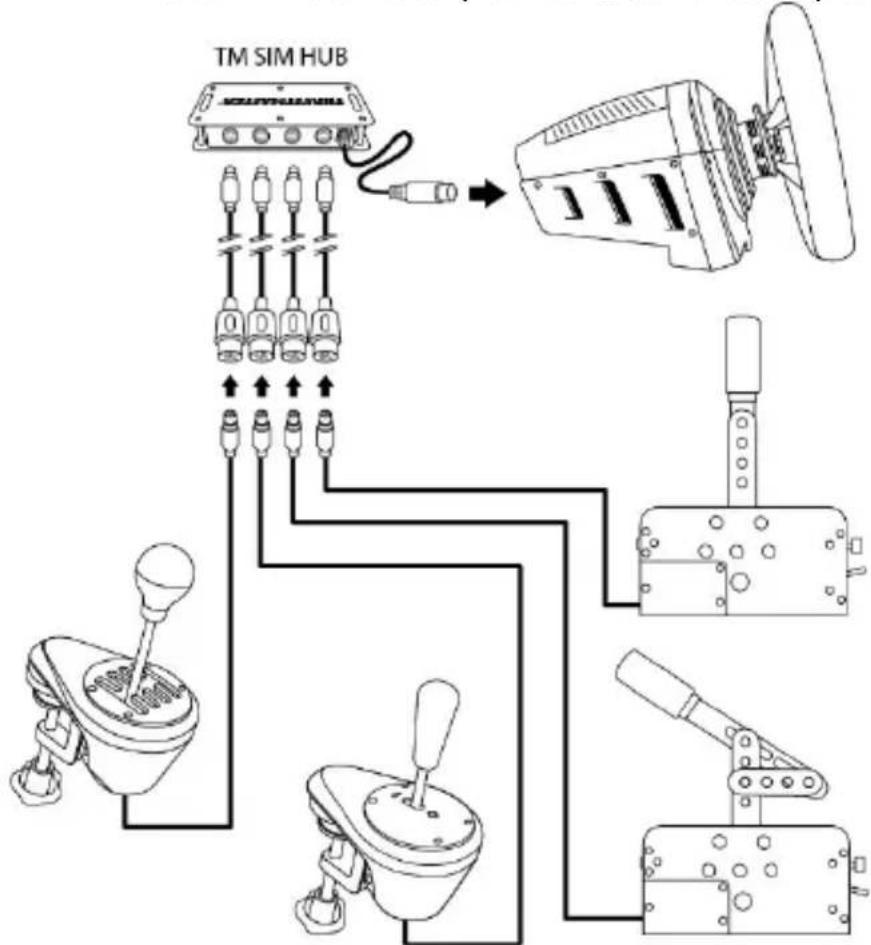
- The TM RACING CLAMP: a sturdy support bracket allowing gamers to securely mount their TSS Handbrake and their TH8A shifter directly on a table or desk, without the need for a cockpit.
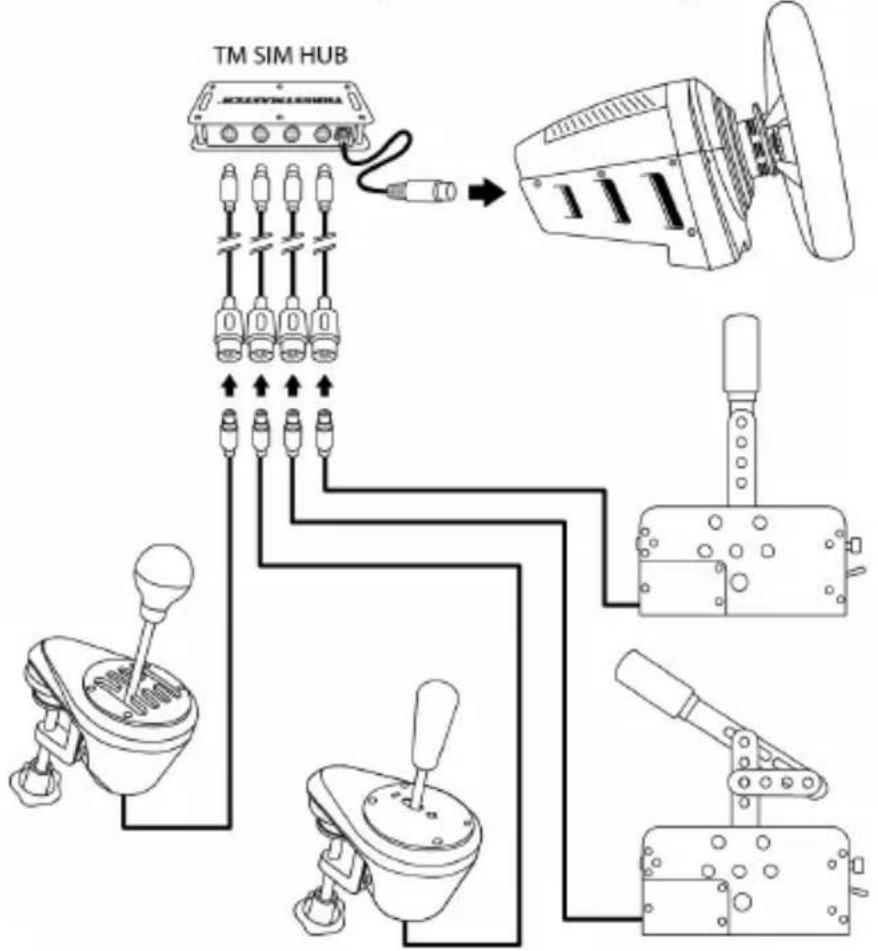
- The TM SIM HUB: a hub allowing users to simultaneously connect up to four accessories directly to the mini-DIN connector located at the back of compatible Thrustmaster racing wheel bases.
CONSUMER WARRANTY INFORMATION
Worldwide, Guillemot Corporation S.A., whose registered office is located at Place du Granier, B.P. 97143, 35571 Chantepie, France (hereinafter "Guillemot") warrants to the consumer that this Thrustmaster product shall be free from defects in materials and workmanship, for a warranty period which corresponds to the time limit to bring an action for conformity with respect to this product. In the countries of the European Union, this corresponds to a period of two (2) years from delivery of the Thrustmaster product. In other countries, the warranty period corresponds to the time limit to bring an action for conformity with respect to the Thrustmaster product according to applicable laws of the country in which the consumer was domiciled on the date of purchase of the Thrustmaster product (if no such action exists in the corresponding country, then the warranty period shall be one (1) year from the original date of purchase of the Thrustmaster product).
Notwithstanding the above, rechargeable batteries are covered by a warranty period of six (6) months from the date of original purchase.
Should the product appear to be defective during the warranty period, immediately contact Technical Support, who will indicate the procedure to follow. If the defect is confirmed, the product must be returned to its place of purchase (or any other location indicated by Technical Support).
Within the context of this warranty, the consumer's defective product shall, at Technical Support's option, be either replaced or returned to working order. If, during the warranty period, the Thrustmaster product is subject to such reconditioning, any period of at least seven (7) days during which the product is out of use shall be added to the remaining warranty period (this period runs from the date of the consumer's request for intervention or from the date on which the product in question is made available for reconditioning, if the date on which the product is made available for reconditioning is subsequent to the date of the request for intervention). If permitted under applicable law, the full liability of Guillemot and its subsidiaries (including for consequential damages) is limited to the return to working order or the replacement of the Thrustmaster product. If permitted under applicable law, Guillemot disclaims all warranties of merchantability or fitness for a particular purpose.
This warranty shall not apply: (1) if the product has been modified, opened, altered, or has suffered damage as a result of inappropriate or abusive use, negligence, an accident, normal wear, or any other cause unrelated to a material or manufacturing defect (including, but not limited to, combining the Thrustmaster product with any unsuitable element, including in particular power supplies, rechargeable batteries, chargers, or any other elements not supplied by Guillemot for this product); (2) if the product has been used for any use other than home use, including for professional or commercial purposes (game rooms, training, competitions, for example); (3) in the event of failure to comply with the instructions provided by Technical Support; (4) to software, said software being subject to a specific warranty; (5) to consumables (elements to be replaced over the product's lifespan: disposable batteries, audio headset or headphone ear pads, for example); (6) to accessories (cables, cases, pouches, bags, wrist-straps, for example); (7) if the product was sold at public auction.
This warranty is nontransferable.
The consumer's legal rights with respect to laws applicable to the sale of consumer goods in his or her country are not affected by this warranty.
Additional warranty provisions
During the warranty period, Guillemot shall not provide, in principle, any spare parts, as Technical Support is the only party authorized to open and/or recondition any Thrustmaster product (with the exception of any reconditioning procedures which Technical Support may request that the consumer carry out, by way of written instructions – for example, due to the simplicity and the lack of confidentiality of the reconditioning process – and by providing the consumer with the required spare part(s), where applicable).
Given its innovation cycles and in order to protect its know-how and trade secrets, Guillemot shall not provide, in principle, any reconditioning notification or spare parts for any Thrustmaster product whose warranty period has expired.
In the United States of America and in Canada, this warranty is limited to the product's internal mechanism and external housing. In no event shall Guillemot or its affiliates be held liable to any third party for any consequential or incidental damages resulting from the breach of any express or implied warranties. Some States/Provinces do not allow limitation on how long an implied warranty lasts or exclusion or limitation of liability for consequential or incidental damages, so the above limitations or exclusions may not apply to you. This warranty gives you specific legal rights, and you may also have other rights which vary from State to State or Province to Province.
Liability
If permitted under applicable law, Guillemot Corporation S.A. (hereinafter "Guillemot") and its subsidiaries declare all liability for any damages caused by one or more of the following: (1) the product has been modified, opened or altered; (2) failure to comply with assembly instructions; (3) inappropriate or abusive use, negligence, an accident (an impact, for example); (4) normal wear; (5) the use of the product for any use other than home use, including for professional or commercial purposes (game rooms, training, competitions, for example). If permitted under applicable law, Guillemot and its subsidiaries declare all liability for any damages unrelated to a material or manufacturing defect with respect to the product (including, but not limited to, any damages caused directly or indirectly by any software, or by combining the Thrustmaster product with any unsuitable element, including in particular power supplies, rechargeable batteries, chargers, or any other elements not supplied by Guillemot for this product).

DECLARATION OF CONFORMITY
CANADIAN COMPLIANCE NOTICE: this Class B digital apparatus meets all requirements of the Canadian Interference-Caising Equipment Regulations.
USA COMPLIANCE NOTICE: this equipment has been tested and found to comply with the limits for a Class B digital device, pursuant to Part 15 of the FCC rules. Operation is subject to the following two conditions:
(1) This device may not cause harmful interference, and
(2) This device must accept any interference received, including interference that may cause undesired operation.
These limits are designed to provide reasonable protection against harmful interference in a residential installation. This equipment generates, uses and can radiate radio frequency energy and, if not installed and used in accordance with the instructions, may cause harmful interference to radio communications. However, there is no guarantee that interference will not occur in a particular installation. If this equipment does cause harmful interference to radio or television reception, which can be determined by turning the equipment on and off, the user is encouraged to try to correct the interference by one or more of the following measures:
-
Reorient or relocate the receiving antenna.
-
Increase the separation between the equipment and receiver.
-
Connect the equipment into an outlet on a circuit different from that to which the receiver is connected.
- Consult the dealer or an experienced radio/TV technician for help.
COPYRIGHT
© 2021 Guillemot Corporation S.A. All rights reserved. Thrustmaster® is a registered trademark of Guillemot Corporation S.A. PlayStation® is a registered trademark of Sony Interactive Entertainment Inc. Windows® is a registered trademark of Microsoft Corporation in the United States and/or other countries. Sparco is a registered trademark of Sparco S.p.A. All other trademarks are the property of their respective owners. Illustrations not binding. Contents, designs and specifications are subject to change without notice and may vary from one country to another. Manufactured and distributed by Guillemot Corporation S.A. under official license from Sparco S.p.A. Made in China.
ENVIRONMENTAL PROTECTION RECOMMENDATION
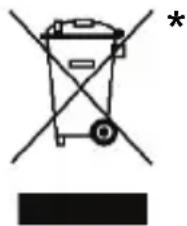
- In the European Union: At the end of its working life, this product should not be disposed of with standard household waste, but rather dropped off at a collection point for the disposal of Waste Electrical and Electronic Equipment (WEEE) for recycling.
This is confirmed by the symbol found on the product, user manual or packaging.
Depending on their characteristics, the materials may be recycled. Through recycling and other forms of processing Waste Electrical and Electronic Equipment, you can make a significant contribution towards helping to protect the environment.
Please contact your local authorities for information on the collection point nearest you.
For all other countries: Please adhere to local recycling laws for electrical and electronic equipment.
Retain this information. Colors and decorations may vary.
Plastic fasteners and adhesives should be removed from the product before it is used.
www.thrustmaster.com
*Applicable to EU, UK and Turkey only



TSS HANDBRAKE
sparco Mod
PC - PS4TM - Xbox One®
www.thrustmaster.com
www.thrustmaster.com
INFORMATIE MET BETREKKING TOT KOPERSGARANTIE
www.thrustmaster.com
https://support.thrustmaster.com/.
https://support.thrustmaster.com

COPYRIGHT
www.thrustmaster.com
www.thrustmaster.com
www.thrustmaster.com
YCTAHOBKA CbEMHOro PbIyArA (1) HA KPEIXKbIX PbIyARAX (2)
- Bctabte cbeHbI pbIar (1) MeKdy KpeNexHbIM npbIyaramn (2).
- Otperyu npyTe pbur no Bbcote.
NoHyBbICOTpypbHara(BmecTe c pyKoTko)MOxHO OtperyJnpoBaTB DnaIa3OHe 21 30 cm.
- ПикpenTe pbIar K kpeJekHbIM pbIyaram c nOmoIb 2 BnHTOB BTR M8 (10), 2 raeK M8 (10) n 6-tpaHHoro knoHa 6 MM (9).
HACTPOIKA PEXIMAPYHOROTOPMO3A
No ymouhanno (npn npodae) ycpoocTBO TSS HANDBRAKE haoonrB pexime PuyHOI TOPMO3.
JIeBa r cToPoHa 6a3bI = HNKoRda He 3aTnBaIte n He ocna6raTe 3TN BnHTbl:
Ppabar cTOpOHa 6a3bI = HNKoRda He 3aTAYBaYte N He OcJa6JIaYte 3TN BHTbl:
IpeenHn 3aHnA CTOPOh6a3b= HNKoTnHe 3aTnBaNte H He OCLa6JnTe 3TN BnHTbl:
HCTPyKcNl NO YCTAHOBKe IJIa PIK
- Перейдente на саит https://support.thrustmaster.com_и загузпг ПК-драиверьл.
BbI6epnte «PyrIeBbIe cNCTEmbl / TSS HANDBRAKE», 3aTeM «ДpaIbEpbI». - Nocne 3aBepseHnna 3arpy3kn 3anycnte nporpaMMy yctaHOBNu BBINOJIHnTe yKa3aHnHa 3KpaHe.
- Korda B nporpaMMe yCTaHOBk OTO6pa3ntc8 COOTBeTCTByOuiee Yka3aHHe, NOKJIIOHTe yCTpoIcTB0 TSS HANDBRAKE K OJHomy n3 USB-nopToB PIK c nOMoUb CbemHoro Ka6eNc pa3bEmAmN DIN/USB (6) n 3aBepuTe yCTaHOBky dpaBepa.
- Nocne 3aBepseHn yCTaHOBKn ΣeKNHTe KONky «FOTOBO» n nepe3anyctnte KOMnbIOTep.
- BbIbePte «ПусK / Bce nporpaMMbl / Thrustmaster / TH8 Shifter / Control Panel», уTo6bl OTKpbITb OKHO «ИрOBble yctpoiCTBa».
B OkHe «Иг poBbIe yCTpoIcTBA» OTO6paJxAeTcY CTpoIcTBO TSS HANDBRAKE Sparco® Mod co cTaTycom OK. - Μεικητε «С党支部», утосы посмOTpeь с党支部 TSS HANDBRAKE на Раену упавлий Windows:
CnCTeMbI Heo6xOaHMo O6HOBuTb IpoUINBky 6a3bl (TS-PC Racer, T-GT, T300, TS-XW Racer n TX), yCTaHOVB IocneHIO BepcHIO IpoUINBKn c caTa https://support.thrustmaster.com/.
06uine npmeaHnaI INK
- Парад зарочим Игры осязателно заково Okно «Итравье устороста» сеничим по Кногке OK.
- Bercsny npoWbKn yctpoiCTBa TSS HANDBRAKE oTo6paxaetcB B bepxhem npabom yIy Ha BknaKax PaneHn ynpablenia.
- Ecnn nCnoNb3yeTc8 USB-nOdknIoucheHne, peKOMeHnyETc8 noDKnIOuTaB pyJleByIO cnCTEmy nycTrooiCTBO TSS HANDBRAKE HENocpeIcTBeHHo K nopTaM USB 2.0 (a He USB 3.0) Na PK, 6e3ncNoIb3OBaHn8 USB-KoHcEHTpaTopa.
- HeKoTOpbIe irpbl noDJIepXINBaHOT oDNHOBpeMeHHoe nCnOJIb3OBaHHe yByx yCTpoiCTB TSS HANDBRAKE:
1 yctpoicTBo TSS HANDBRAKE B pexime PYHIOI TOPMO3;
1 yctpoiCTBO TSS HANDBRAKE B peXmE CEKBEHIOHHbI INPEEKJIIOYATEJIb IEPEDAU.
YCTAHOBKA HA PS4™ IN XBOX ONE®
Ha PS4TM n Xbox One® TSS HANDBRAKE coBmeCTUM CO cJeDyUOuMn 6a3aMn pyIeBbIX CNTTEM:
Thrustmaster T-GT n T300 - Ha PS4™;
Thrustmaster TS-XW Racer n TX — Ha Xbox One®.

https://support.thrustmaster.com

ABTOPCKOE IIPABO
© 2021 Guillemot Corporation S.A. Bce npaba 3aunuehbl. Thrustmaster® JBnEeTc8 3apernctpnpobahnoi Toprobo Mapko Guillmot Corporation. PlayStation® JBnEeTc8 3apernctpnpobahnoi Toprobo Mapko KopnpauuN Sony Interactive Entertainment Inc. Windows® JBnEeTc8 3apernctpnpobahnoi Toprobo Mapko KopnpauuN Microsoft Corporation B CUSA n/nn DpynX cTpaHax. Sparco JBnEeTc8 3apernctpnpobahnoi Toprobo Mapko Mapko Sparco S.p.A. Bce npouhe ToproBbIe Mapkn JBnJIOCTc CO6CTBEHNOCTbU COOTBeTCTByOuNX BnaJeNbCeB. NIIIOCTpauu MoYr He COOTBeTCTBOBaTb BHeUHEmy BnDy/foynKcIyM KOHKpeTHoro N3dJIyN. CoepkaHne pyKOBoIDCTBa, KOHCTpyKcIy N TexHnueckne XapaKTepNCtIKN N3dJIyN N3MeHryOTc8 Be3 npedBapNTbHO r yBeOMNeHn I 3aBNCrT OT cTpaHbI pIno6peTeHnI.
Pn noIb3OBaHm n3dennem yuHTbBaTe cNeDyUoee: UBeTa n dN3aH MOrTy pa3NuHaTbcra.
PiactNKOBbIe CTJKKn I KNeKkyO JeHTy cNeDyeT ChrTb Nepeq NcNoB3OBaHnem N3deJIIna.
www.thrustmaster.com

TSS HANDBRAKE
sparco Mod
PC - PS4TM - Xbox One®
Uživotelský manuál
TECHNICKÁ SPECIFIKACE
TYTO SROUBY NEUTAHUJTE ANI NEPOVOLUJTE

RADY A TIPY (nezahrnute v teto priruce)
Rüzné tipy a rady jsou k dispozici na webovych strankách https://support.thrustmaster.com; zvolte Racing Wheels / TSS HANDBRAKE.
EKOSYSTÉM
www.thrustmaster.com
www.thrustmaster.com
NIE DOKRECAJ ANI NIE ODKRECAJ TYCH SRUB
https://support.thrustmaster.com
PRAWA AUTORSKIE
www.thrustmaster.com
www.thrustmaster.com
Made in China.

:外箱

TSS HANDBRAKE
sparco Mod
TSS 手刹手排二合一模组(全平台版)
PC - PS4™ - PS5™ - Xbox One® - Xbox Series X|S
用户手册
技术规格
www.thrustmaster.com

THRUSTMASTER
技术支持
http://support.thrustmaster.cn

PC - PS4TM - Xbox One®
使用者手册
技術規格
SEQUENTIAL SHIFTER / (
()
1 4
()HANDBRAKE
(1) SEQUENTIAL SHIFTER
(
i
auiy

1
iXgall joljiljill
y
()
aiee eae
y 1
i 1
i j
15 10 10
e
0000000000000000000000000000
111b
TSS HANDBRAKE
- | x - 2| = | x + 3|
山

JlJI Jglioe 1
i 1
TSS HANDBRAKE
J 1
(2) AD = BD = 12AB,AB = AC
(2) (1)
jgl jglll 2
3021 21 (jai)
BTR M8
无
TSS HANDBRAKE 1
()HANDBRAKE
(3) (Jill) SHIFTER / (A yj) HANDBRAKE 1
(山)HANDBRAKE
aalaaalaa
1 (a) HANDBRAKE 2
4) (1) SEQUENTIAL SHIFTER
.()HANDBRAKE
a
a
g (3) (Jal) SHIFTER / (A yj) HANDBRAKE 1.1 .
a
J) SEQUENTIAL SHIFTER (a) (a) HANDBRAKE 2
(4)(20
3 3
()
(8)3j
123 (a) aagaii talee TSS HANDBRAKE 2n
.https://support.thrustmaster.com TSS HANDBRAKE .Template - Cockpit Setup .TSS HANDBRAKE / ( ) Racing Wheels

1

Jal) HANDBRAKE 2. (4) (2) sequential shifter w
:
54 1
: 1g i j 1j 1j 1j 1j 1j 1j 1j 1j
Ji Jn Jn Jn Jn Jn Jn Jn Jn Jn Jn Jn Jn Jn Jn Jn Jn Jn Jn Jn Jn Jn Jn Jn Jn Jn Jn Jn Jn Jn Jn Jn Jn Jn Jn Jn Jn Jn Jn Jn Jn Jn Jn Jn Jn Jn Jn Jn Jn Jn Jn J n J n J n J n J n J n J n J n J n J n J n J n J n J n J n J n J n J n J n J n J n J n J n J n J n J n J n J n J n J n J n J n J n J n J n J n J n
2
DIN/ USB Jk Sb 1 TSS HANDBRAKE .3
Jk Tj
Thrustmaster / TH8 Shifter / Control Panel / (J) All Programs / (J Start .5
.
OK 10 TSS HANDBRAKE Sparco® Mod yaiy
:Windows TSS HANDBRAKE Properties 6
JLSS USB TSS HANDBRAKE jagie jgsi DIN/USB
[-/+] Llill lllg jz g [y] yll ] a 10 - 1111111111111111111111111111111111
.
TSS HANDBRAKE Jd jss 1000000000000000000000000000000000000000000000000000000000000000000000
[+] LdLlI JldIe I 10- (DOWNUP aRJSS HANDBRAKE i jy) TSS-XW Racer, T300T-GT TS-PC Racer) aaii jiaaie
T-GT, TS-PC Racen, c g a c d t t h j 100 TSS HANDBRAKE https://support.thrustmaster.com.
i 1
OK g jll Jx JolK (aill) Game Controllers sdi dI 15i S
TSS HANDBRAKE- (s) Control Panel
TSS. 1111111111111111111111111111111111111111111111111111
TSS HANDBRAKE jgsj TSS HANDBRAKE jg. (J) SEQUENTIAL SHIFTER gTSS HANDBRAKE
TSS HANDBRAKE ,Xbox One® , PS4TM
PS4TM T300T-GT
Xbox One® TS, TS-XW Racer
PS4TM TSS HANDBRAKE JALIIL LALIIL 1A TS-300GT)JLJIaJcJLJIaJbXbox One®
:
DIN TSS HANDBRAKE (11) 1
y
.2
1ll 2
:XBOX ONE®PS4TM Jd
TSS.Xbox One®, PS4TM 6) Jlll DIN/USB
sill sll jilj jilai jilai jilai jilai HANDBRAKE
TSS HANDBRAKE
UP 4eRJL JgE g e 1000 [+] LdI I dI I dI I dI - DOWN
J 1
TSS TM/SIM HUB Racing Wheels /https://support.thrustmaster.com
Handbrake Sparco® Mod
TSS / (العربية) Racing wheels:https://support.thrustmaster.com
y j 1 yj j j j j j j j j j j j j j j j j j j j j j j j j j j j j j j j j j j j j j j j j j j j j j j j j j j j j j j j j j j j j j j
TSS HANDBRAKE 品 Jr! TSS / (c) Racing Wheels :https://support.thrustmaster.com .(J) Software HANDBRAKE 4 (A) HANDBRAKE
TSS HANDBRAKE 1 1 1 1 1 1 1 1 1 1 1 1 1 1 1 1 1 1 1 1 1 1 1 1 1 1 1 1 1 1 1 1 1 1 1
TSS HANDBRAKE 1
Racing : https://support.thrustmaster.com https://support.thrustmaster.com TSS HANDBRAKE / (العربية) Wheels
111
TSS HANDBRAKE
TSS Handbrake :TM RACING CLAMP *
TH8A
www.thrustmaster.com
1a 1
CE
THRUSTMASTER
https://support.thrustmaster.com

TSS HANDBRAKE
sparco Mod
PC - PS4™ - Xbox One®
Bruksanvisning
TEKNISKA SPECIFICATIONER
www.thrustmaster.com
https://support.thrustmaster.com

COPYRIGHT
© 2021 Guillemot Corporation S.A. Vsetky prava vyhradené. Thrustmaster® je registrovanou ochrannou známkou spolocnosti Guillemot Corporation S.A. PlayStation® ar ett registrarat varumärke som tillhör Sony Interactive Entertainment Inc. Windows® ar ett registrarat varumärke som tillhör Microsoft Corporation i USA och/eller andra länder. Sparco je registrovanou ochrannou známkou spolocnosti Sparco S.p.A. Kaźde dalsie registrované ochranné známky su majetkom ich prisluśnych vlastnikov. Obrázky nie są zavázné. Obsah, dizajn a spefikacja sa moź zmenit bez predchódzajuceho upozernenia a moźu sa v Jednotlivych krajinach liśit. Vyrobené a distribuované spolocnostou Guillemot Corporation S.A. pod oficialnou licenciou od spolocnosti Sparco S.p.A. Vyrobené v Čine.
ODPORUCANIE PRE OCHRANU ZIVOTNEHO PROSTREDA
V Europskej unii: Na konci svojejŽivotnosti by sa nemal tento produkt vyhodit's beznám domovým odpadom, ale mal byt' odovzdaný na recykláciu v zbernom miesto na likvidáciu odpadu z elektrických a elektronickích zariadení. Potvrduzujúc symbol o recyklácii najdete na produkte, na návode na použitie alebo na obale. V závislosti od ich vastností, možu byt'materialy recyklované. Prostrednictvom recyklácie a iních foriem spracovania odpadu z elektrickích a elektronickích zariadení možete vyznamne prispiét' k ochraneŽivotného prostredia. Pre ziskanie informácie o pre vás majbližšom možnom miesto odovzdia, kontaktujte miestne orgány.
www.thrustmaster.com
*Pouziténlé pre EU, UK a Turecko


TSS HANDBRAKE
sparco Mod
PC-hez - PS4™-hez - Xbox One®-hoz
Használati Ütmutató
TECHNIKAI LEIRAS
A KÉZIFÉK MOD BEÁLLITÁSA
A TSS HANDBRAKE (a kicsomagolast kovetoen) alapertelmezettkent KEZIFEK hasznalati modban van.
www.thrustmaster.com
Xbox One®-TX-Thrustmaster TS-XW Racer
TSS HANDBRAKE-n w d'wnn n nn nnnn 10wn A
Dw ynnn nn o'nnn nn X, Xbox One®-IPS4TM-2
-ww nn nn no (TX IN TS-XW Racer ,T300 ,T-GT)
https://support.thrustmaster.com/
n
TSS HANDBRAKE-n (11) mini-DIN/DIN 1
.0y ynn nn o'oo nn nnn mini-DIN
.2
jnu7nnn7 00n nn y
XBOX ONE®-PS4™-nppnn
TSS -n. Xbox One®-1 PS4™-2 (6) nnnn DIN/USB nnnn nn nnnn nn nnnn nn nnnn nn nnnn nn nnnn nn nnnn nn nnnn nn nnnn nn nnnn nn nnnn nn nnnn nn nnnn nn nnnn nn nnnn nn nnnn nn nnnn nn nnnn nn nnnn nn nnnn nn nnnn nn nnnn nn nnnn nn nnnn nn nnnn nn nnnn
.770177
: thrustmaster nn nnn TSS HANDBRAKE -
. DOWN-1 UP
TSS TM SIM HUB- n, /https://support.thrustmaster.com
.HANDBRAKE Sparco® Mod
TSS HANDBRAKE
| הכלה TSS HAND | BRAKE | |
| (.75mm (6) DIN/USB 4.0 PC-7 .80mm (7) mini-DIN/DIN 3.9 GHz Thrustmaster. (11)mm | PC (11)mm (11)mm (11)mm (11)mm (11)mm (11)mm (11)mm (11)mm (11)mm (11)mm (11)mm (11)mm (11)mm (11)mm (11)mm (11)mm (11)mm (11)mm (11)mm (11)mm | |
| (.75mm (6) mini-DIN/DIN 3.9 GHz Thrustmaster. (11)mm | PC (11)mm (11)mm (11)mm (11)mm (11)mm (11)mm (11)mm (11)mm (11)mm (11)mm (11)mm (11)mm (11)mm (11)mm | |
| (.75mm (6) mini-DIN/DIN 3.9 GHz Thrust master. (11)mm | PS4TM (11)mm (11)mm (11)mm (11)mm (11)mm (11)mm (11)mm (11)mm (11)mm (11)mm (11)mm (11)mm (11)mm (11)mm (11)mm (11)mm (11)mm (11)mm | XBOX ONE® (11)mm (11)mm (11)mm (11)mm (11)mm (11)mm (11)mm (11)mm |
TSS HANDBRAKE-nnnwip|DTy
nno nnnn nn nnnn) TSS HANDBRAKE o' no nnnn.
- PC-PC-PC-PC-TSS HANDBRAKE nn nnnn nn TSS HANDBRAKE/nn nn,https://support Thrustmaster.com/ .nnnnnnnnnnnnnnnnnnnnnnnnnnnn
TSS HANDBRAE-
:https://support.thrustmaster.com-PC-7 nnnn nn nnnn nn nn nnnn nn
Rn (Racing Wheels / TSS HANDBRAKE) TSS HANDBRAKE/
DxN Dn N x Dy7 0wn n nn
T
XIOIOIOIOIOIOIOIOIOIOIOIOIOIOIOIOIOIOIOIOIOIOIOIOIOIOIOIOIOIOIOIOIOIOIOIOIOIOIOIOIOIOIOIOIOIOIOIOIOIOIOIOIOIOIOIOIOIOIO
In pTSS HANDBRAKE-n y nnnn nn nnnnnn nnnnnn
Xbox One® IX PS4™,PC- 一 × 12,0000000000000000
(πγπα x) nixnni 90
TSS / yin' xin nn;https://support.thrustmaster.com-
.(Racing Wheels / TSS HANDBRAKE) .HANDBRAKE
TSS HANDBRAKE-n
TSS HANDBRAKE-n n nn nnnn nn nnnn nnnn nnnn nnnn nnnn nnnn nnnn nnnn nnnn nnnn nnnn nnnn nnnn nnnn nnnn nnnn nnnn nnnn nnnn nnnn nnnn nnnn nnnn nnnn nnnn nnnn nnnn nnnn nnnn nnnn nnnn nnnn nnnn nnnn
nnn nnnn nn nnnn nn nnnn nn nnnn nn nnnn nn nnnn nn nnnn nn nnnn nn nnnn nn nnnn nn nnnn nn nnnn nn nnnn nn nnnn nn nnnn nn nnnn nn nnnn nn nnnn nn nnnn nn nnnn nn nnnn nn nnnn nn nnnn nn nnnn nn nnnn nn nnnn
TINn (2) nnn nn nnn nnn nnn nnn nnn nnn nnn nnn nnn
nynnn nnnnnnnnnnnnnnnnnnnn nn nnnnnnnnnnnnnnnnnnnnnnnnnnnnnnnnnnnnnnnnnnnnnnnnnnnnnnnnnnnnnnnnnnnnnnnnnnnnnnnnnnnnnnnnnnnnnnnnnnnnnnnnnnnnnnnnnnnnnnnnnnnnnn nn nannn nn nannn nn nannn nn nannn nn nannn nn nannn nn nannn nn nannn nn nannn nn nannn nn nannn nn nannn nn nannn nn nannn nn nannn nn nannn nn nannn nn nannn nn nannn nn nannn nn nannn nn nannn nn nannn nn nannn nn nannn nn nennn nn nannn nn nannn nn nannn nn nannn nn nannn nn nannn nn nannn nn nannn nn nannn nn nannn nn nannn nn nannn nn nannn nn nannn nn nannn nn nannn nn nannn nn nannn nn nannn nn nannn nn nannn nn nannn nn nannn nn
(Thrustmaster-nn n nn nn (1)nn nn nn nn (6) nn nn nn nn nn nn nn nn nn nn nn nn nn nn nn nn nn nn nn nn nn nn nn nn nn nn nn nn nn nn nn nn nn nn nn nn nn nn nn nn nn nn nn nn nn nn nn nn nn nn nn nn nn nn nn nn nn nn nn nn nn nn nn nn nn nn nn nn nn nn nn nn nn nn nn nn nn nn nn nn nn nn nn nn
n nn
X, nnnn nn nnnn nn nnnn nn nnnn nn nnnn nn nnnn nn nnnn nn nnnn nn nnnn nn nnnn nn nnnn nn nnnn nn nnnn nn nnnn nn nnnn nn nnnn nn nnnn nn nnnn nn nnnn nn nnnn nn nnnn nn nnnn nn nnnn nn nnnn nn nnnn nn nnnn
(wnnnnnn nn nnnnnnnnnnnnnnnnnnnnnnnnnnnnnnnnnnnnnnnnnnnnnnnnnnnnnnnnnnnnnnnnnnnnnnnnnnnnnnnnnnnnnnnnnnnnnnnnnnnnn
(7) 7777777777777777777777777777777777777777777777777777777777
nnnn n nn nnnn nnnn nnnn nnnn nnnn nnnn nnnn nnnn nnnn nnnn nnnn nnnn nnnn nnnn nnnn nnnn nnnn nnnn nnnn nnnn nnnn nnnn nnnn nnnn nnnn nnnn nnnn nnnn nnnn nnnn nnnn nnnn nnnn nnnn nn
, nnnn nn nnnn nn nnnn nn nnnn nn nnnn nn nnnn nn nnnn nn nnnn nn nnnn nn nnnn nn nnnn nn nnnn nn nnnn nn nnnn nn nnnn nn nnnn nn nnnn nn nnnn nn nnnn nn nnnn nn nnnn nn nnnn nn nnnn nn nnnn nn nnnn nn nnnn
wnn nn nnnn nn (2);(Guillemot ynrnnn pion nynx
nx nnnn (3) ;nnnn ,nnn ,nnnn ,nnn (5) ;nnnnn nn nnnn nn nn (4) ;nnnn nn nn nn nn nn nn nn nn nn nn nn nn nn nn nn nn nn nn nn nn nn nn nn nn nn nn nn nn nn nn nn nn nn nn nn nn nn nn nn nn nn nn nn nn nn nn nn nn nn nn nn nn nn nn nn nn nn nn nn nn nn nn nn nn nn nn nn nn nn nn nn nn nn
(7) (niv, n, nn, nn) (6)
nynnnnnnnnn
n nn nnn nn nnn nnn nnn nnn nnn nnn
.
NIGOHINXIN
xnnn nn nnnn pynnnn nn gnon n7 Guillemot, nnnn nn nnnn nn nnnn nn nnnn nn nnnn nn nnnn nn nnnn nn nnnn nn nnnn nn nnnn nn nnnn nn nnnn nn nnnn nn nnnn nn nnnn nn nnnn nn nnnn nn nnnn nn nnnn nn nnnn nn nnnn nn nnnn nn nnnn nn nnnn nn nnnn nn nnnn
ynnn nn nnnn nn nnnn nn nnnnn
(1)7n 90Xn -
Guillemot, n nnonn niony n y nnnn nnnnnnnnnnn nnnn nnnn nnnn nnnn nnnn nnnn nnnn nnnn nnnn nnnn nnnn nnnn nnnn nnnn nnnn nnnn nnnn nnnn nnnn nnnn nnnn nnnn nnnn nnnn nnnn nnnn nnnn nnnn nnnn nnnn nnnn nnnn nnnn nannn nnnn nnnn nnnn nnnn nnnn nnnn nnnn nnnn nnnn nnnn nnnn nnnn nnnn nnnn nnnn nnnn nnnn nnnn nnnn nnnn nnnn nnnn nnnn nnnn nnnn nnnn
.7y79
nannn Guillemot. nn nn nnn nn nn nn nn nn nn nn nn nn nn nn nn nn nn nn nn nn nn nn nn nn nn nn nn nn nn nn nn nn nn nn nn nn nn nn nn nn nn nn nn nn nn nn nn nn nn nn nn nn nn nn nn nn nn nn nn nn nn nn nn nn nn nn nn nn nn nn nn nn nn nn nn nn nn nn nn nn nn nn nn nn nn nn nn nn nn nn nn nn nn nn nn nn nn nn nn nn nn nn nn
"pn" p7, n 1X Dn nn nnn nnn nnn nnn nnn nnn nnn nnn nnn nnn nnn nnn nnn nnn nnn nnn nnn nnn nnn nnn nnn nnn nnn nnn nnn nnn nnn nnn nnn nnn nnn nnn nnn nnn nnn nnn nnn nnn nnn nnn nnn nnn nnn
non
n nn nnn (Guillemot):.Guillemot Corporation S.A, n n nn nn nn nn nn nn nn nn nn nn nn nn nn nn nn nn nn nn nn nn nn nn nn nn nn nn nn nn nn nn nn nn nn nn nn nn nn nn nn nn nn nn nn nn nn nn nn nn nn nn nn nn nn nn nn nn nn nn nn nn nn nn nn nn nn nn nn nn nn nn nn nn nn nn nn nn nn nn nn nn nn nn nn nn nn nn nn nn nn nn nn nn nn nn nn nn nn nn nn nn nnnnnnnnnnnnnnnnnnnnnnnnnnnnnnnnnnnnnnnnnnnnnnnnnnnnnnnnnnnnnnnnnnnnnnnnnnnnnnnnnnnnnnnnnnnnnnnnnnnnnnnnnnnnnnnnnnnnnnnnnnnnnnnnnnnnennn nannn nannn nannn nannn nannn nannn nannn nannn nannn nannn nannn nannn nannn nannn nannn nannn nannn nannn nannn nannn nannn nannn nannn nannn nannn nannn nannn nannn nannn nannn nannn nannn nannn nann nannn nannn nannn nannn nannn nannn nannn nannn nannn nannn nannn nannn nannn nannn nannn nannn nannn nannn nannn nannn nannn nannn nannn nannn nannn nannn nannn nannn nannn nannn nannn nannn nannn
THRUSTMASTER
nDn
https://support.thrustmaster.com

non no xin Thrustmaster. guillemot Corporation S.A 2021
Sony w no nno xin PlayStation.Guillemot Corporation S.A. Microsoft w no nno Windows. Interactive Entertainment Inc. Sparco S.p.A w no non no xin Sparco .nncn nn Corporation
nnnn nn nn nn nn nn nn nn nn nn nn nn nn nn nn nn nn nn nn nn nn nn nn nn nn nn nn nn nn nn nn nn nn nn nn nn nn nn nn nn nn nn nn nn nn nn nn nn nn nn nn nn nn nn nn nn nn nn nn nn nn nn nn nn nn nn nn nn nn nn nn nn nn nn nn nn nn nn nn nn nn nn nn nn nn nn nn nn nn nn nn gn
nONNINXnn
n n 10000000000000000000000000000000000000000000000000000000000000
INVINn,INNnNnINnNnNnNnNnNn
nioi iin nni nn nnn nnn nnn nnn nnn nnn nnn nnn nnn nnn nnn nnn nnn nnn nnn nnn nnn nnn nnn nnn nnn nnn nnn nnn nnn nnn nnn nnn nnn nnn nnn nnn nnn nnn nnn nnn nnn nnn nnn nnn nnn nnn
17Xn nnnn nn nnnnnnnnnnnnnnnnnnnnnnnnnnnnnnnnnnnnnnnnnnnnnnnnnnnnnnnnnnnnnnnnnnnnnnnnnnnnnnnnnnnnnnnnnnnnnnnnnnnnnnnnnnnnnnnnnnnnn
Jnnn nn nnnnnnnnnnnnnnnnnnnnnnnnnnnnnnnnnnnnnnnnnnnnnnnnnnnnnnnnnnnnnnnnnnnnnnnnnnnnnnnnnnnnnnnnnnnnnnnnnnnnnnnnnnnnnnnnn
www.thrustmaster.com
Tn 1000000000000000000000000000