
TH8A Add-On Shifter - Controller THRUSTMASTER - Free user manual and instructions
Find the device manual for free TH8A Add-On Shifter THRUSTMASTER in PDF.


| Product Type | Gear shifter for driving simulation |
| Brand | Thrustmaster |
| Model | TH8A Add-On Shifter |
| Dimensions (L x W x H) | 25 cm x 15 cm x 10 cm |
| Weight | 1.5 kg |
| Power | USB (5V, 500 mA) |
| Compatibility | PC (Windows), PlayStation 4, Xbox One, PlayStation 3, Xbox 360 |
| Shift modes | H-pattern (7+1 speeds) and sequential |
| Main material | Metal and ABS plastic |
| Cable length | 2 m |
| Main functions | Realistic gear shifting, sequential mode by pressing, stable mounting |
| Care and cleaning | Clean with a soft, dry cloth. Do not use abrasive products. |
| Safety | Use on a flat and stable surface. Avoid violent shocks. |
| Spare parts and repairability | Parts available via Thrustmaster after-sales service (button, spring, USB cable). |
| Warranty | 2 years |
| Box contents | TH8A shifter, USB cable, user manual |
| Operating temperature | 10°C to 35°C |
| Operating humidity | 20% to 80% (without condensation) |
Frequently Asked Questions - TH8A Add-On Shifter THRUSTMASTER
User questions about TH8A Add-On Shifter THRUSTMASTER
0 question about this device. Answer the ones you know or ask your own.
Ask a new question about this device
Download the instructions for your Controller in PDF format for free! Find your manual TH8A Add-On Shifter - THRUSTMASTER and take your electronic device back in hand. On this page are published all the documents necessary for the use of your device. TH8A Add-On Shifter by THRUSTMASTER.
USER MANUAL TH8A Add-On Shifter THRUSTMASTER
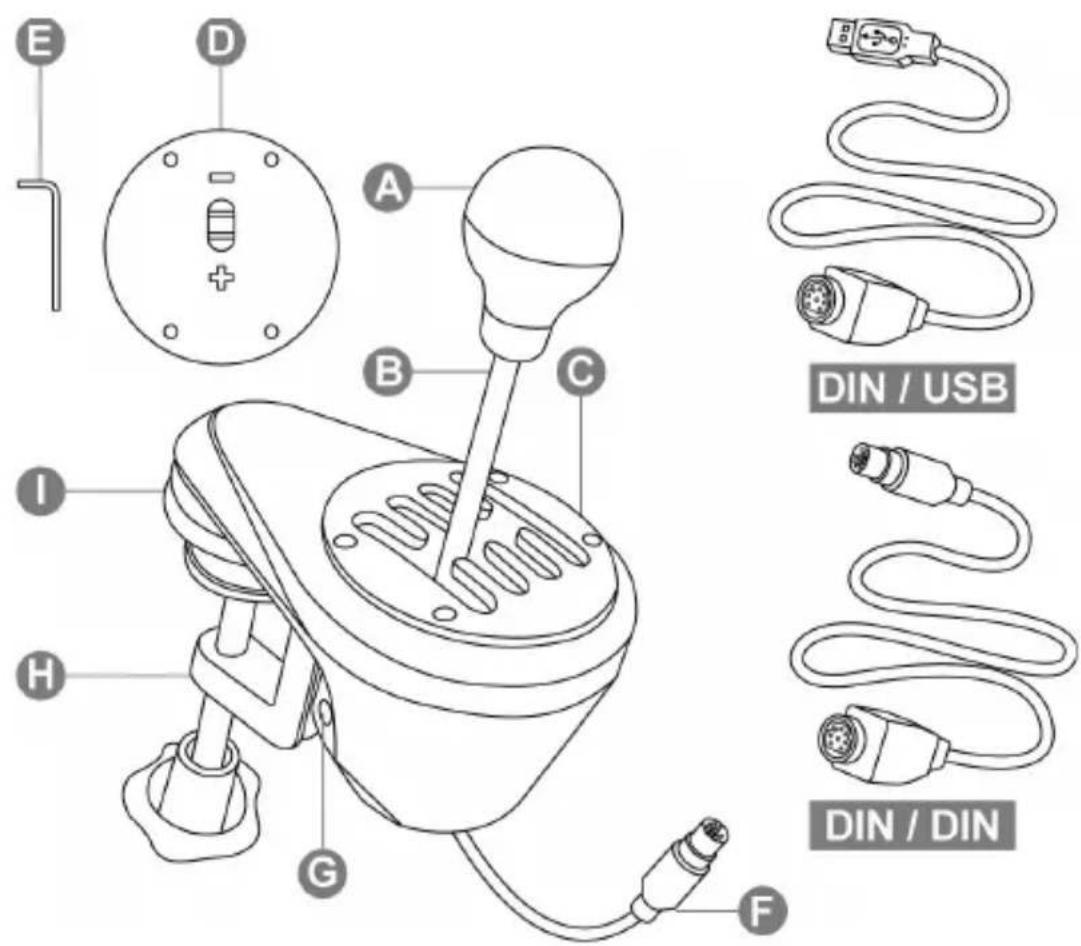
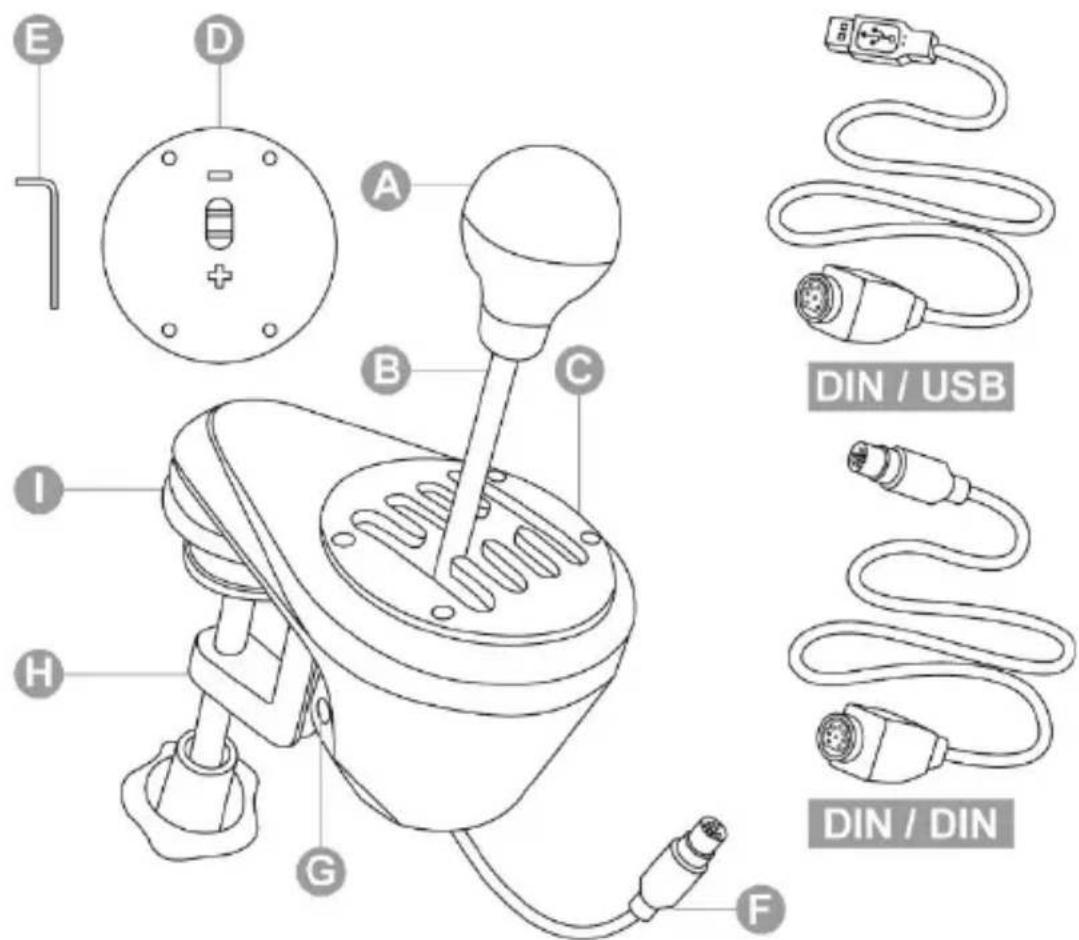
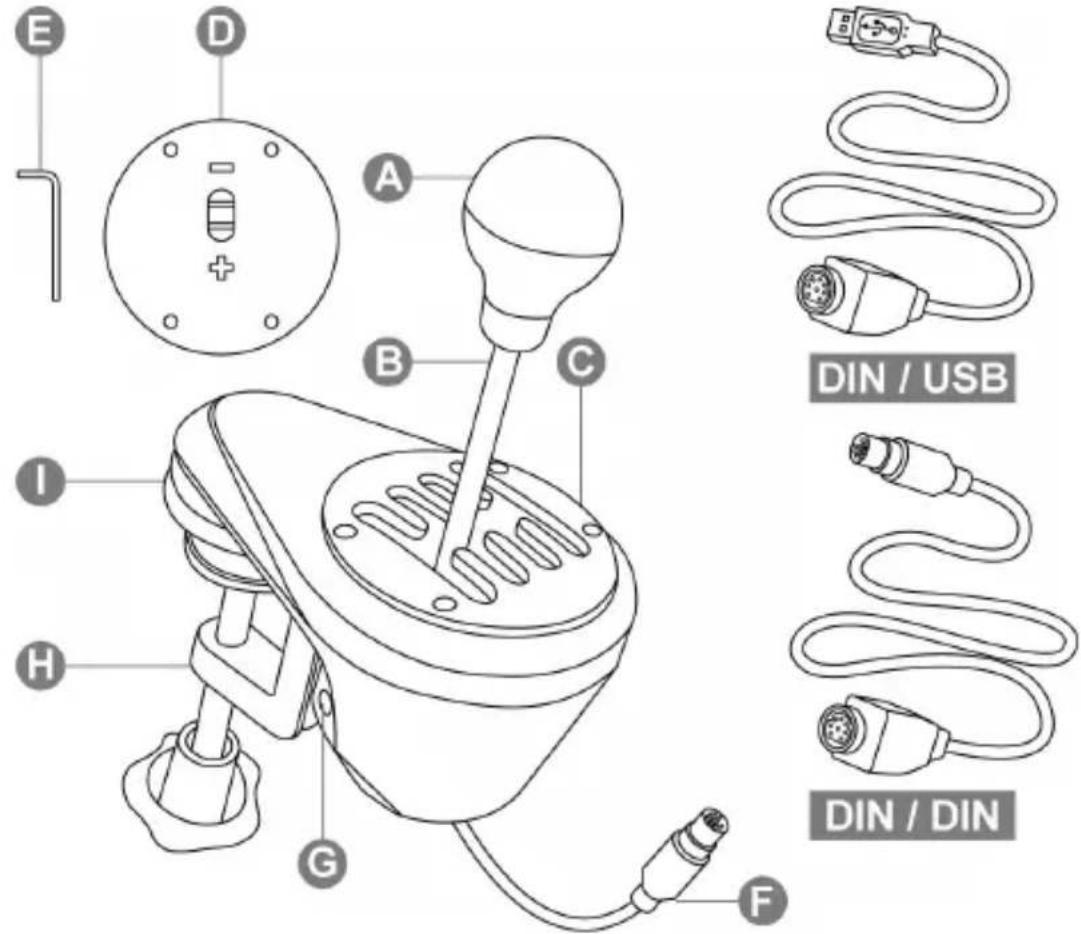
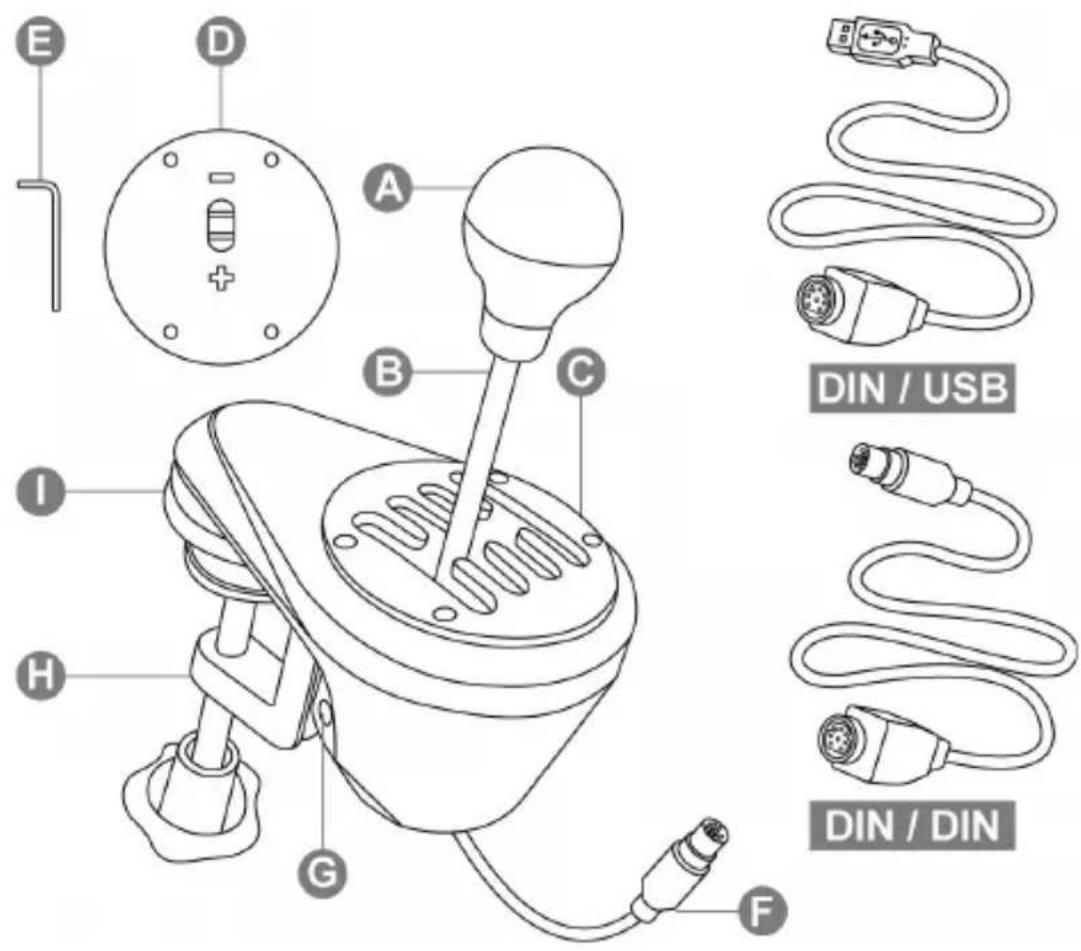
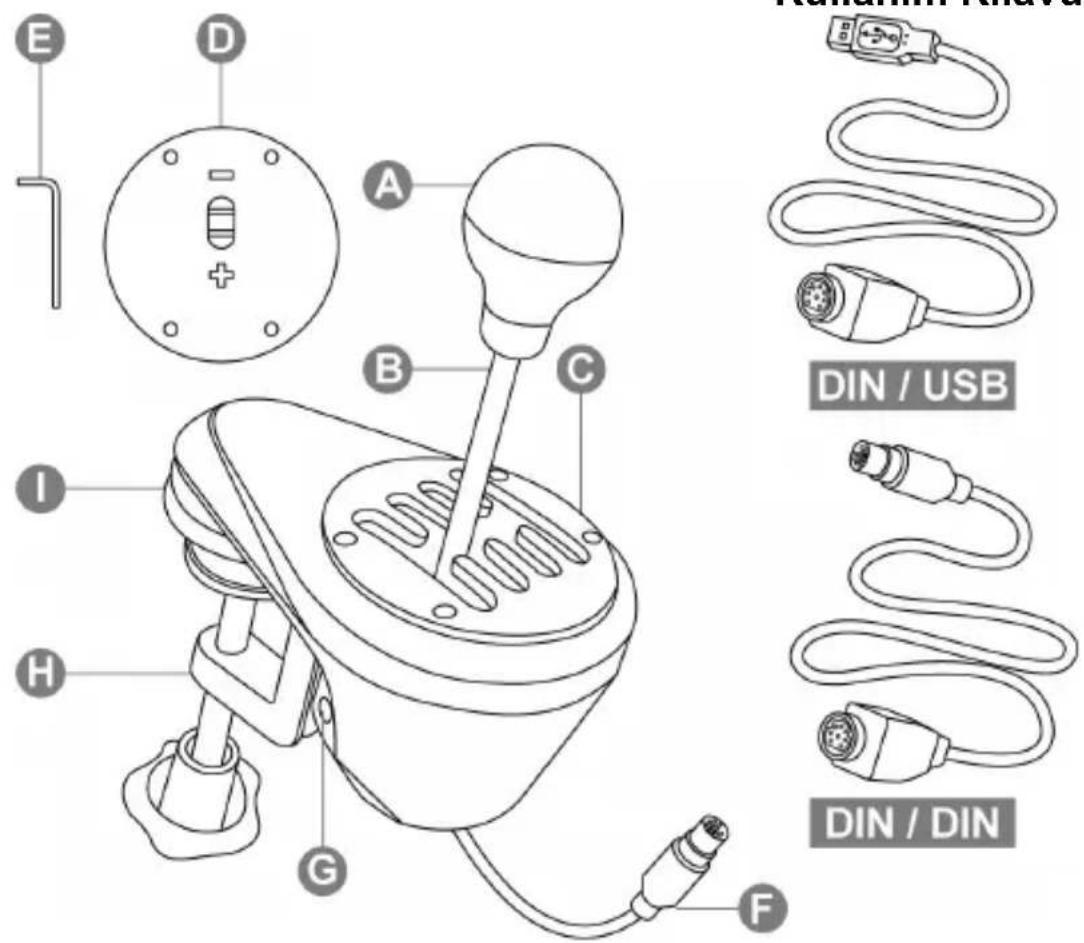
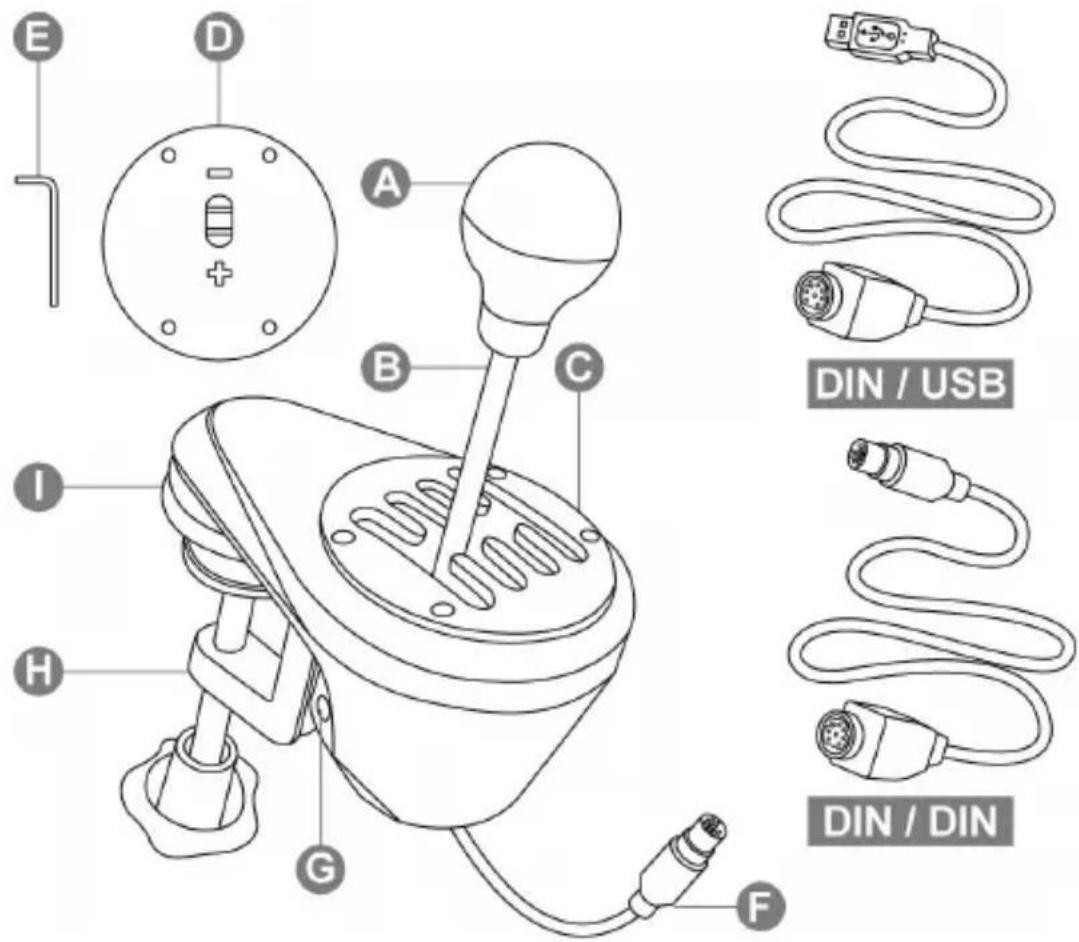
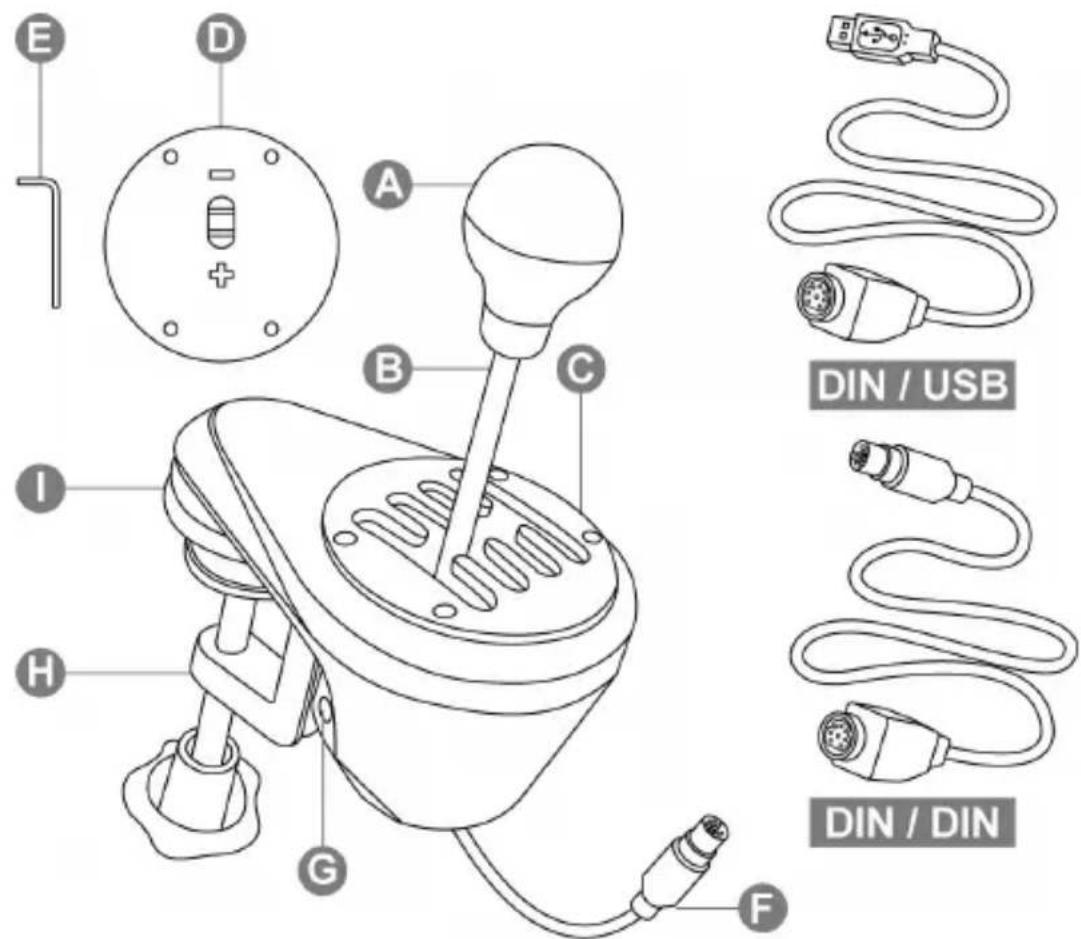
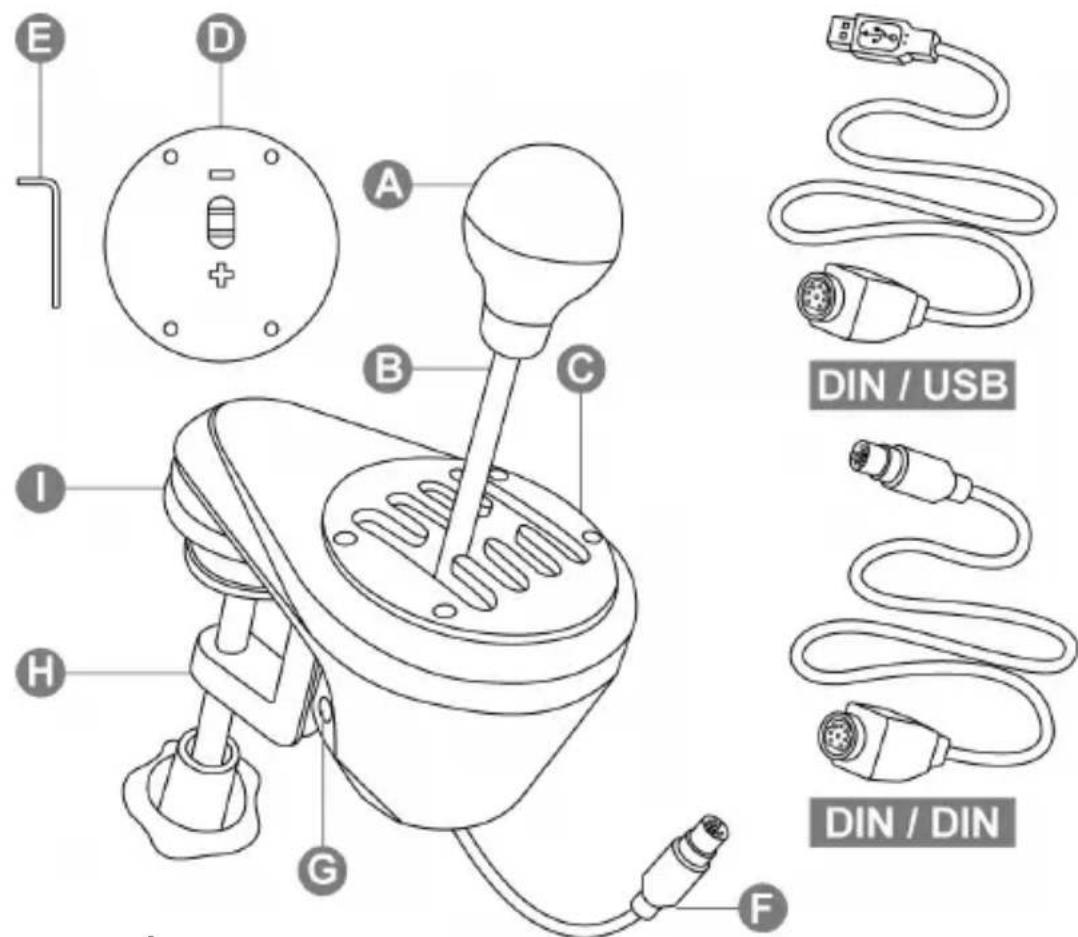
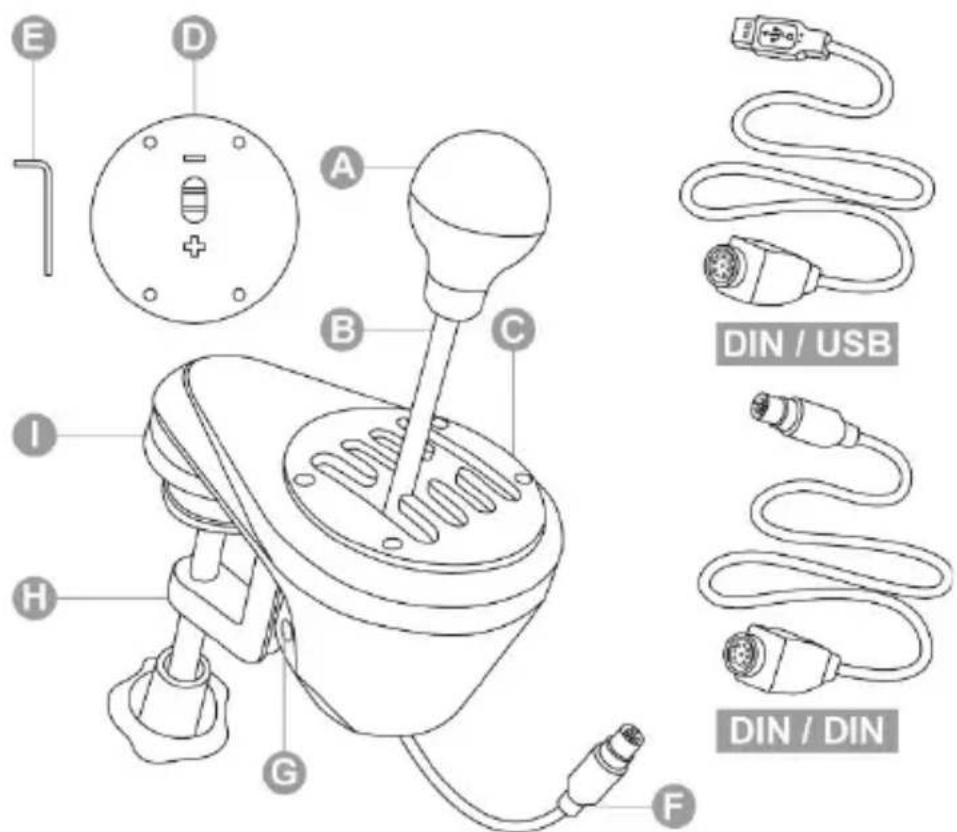
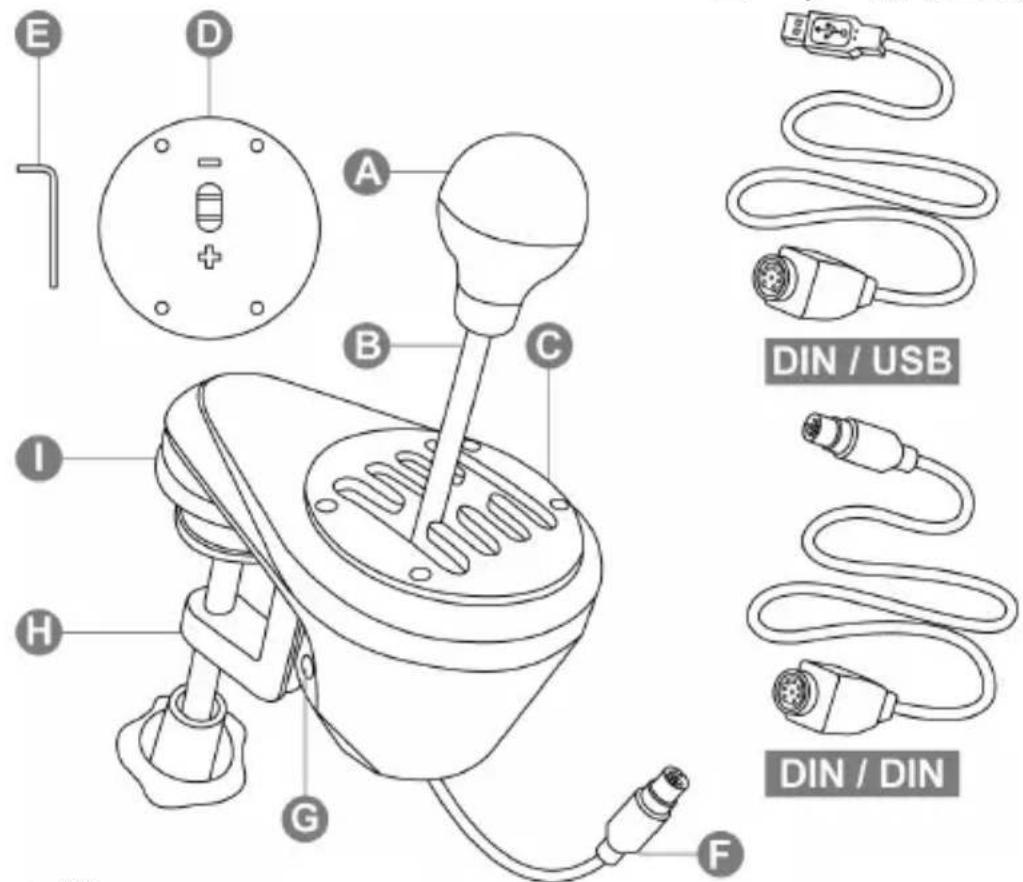
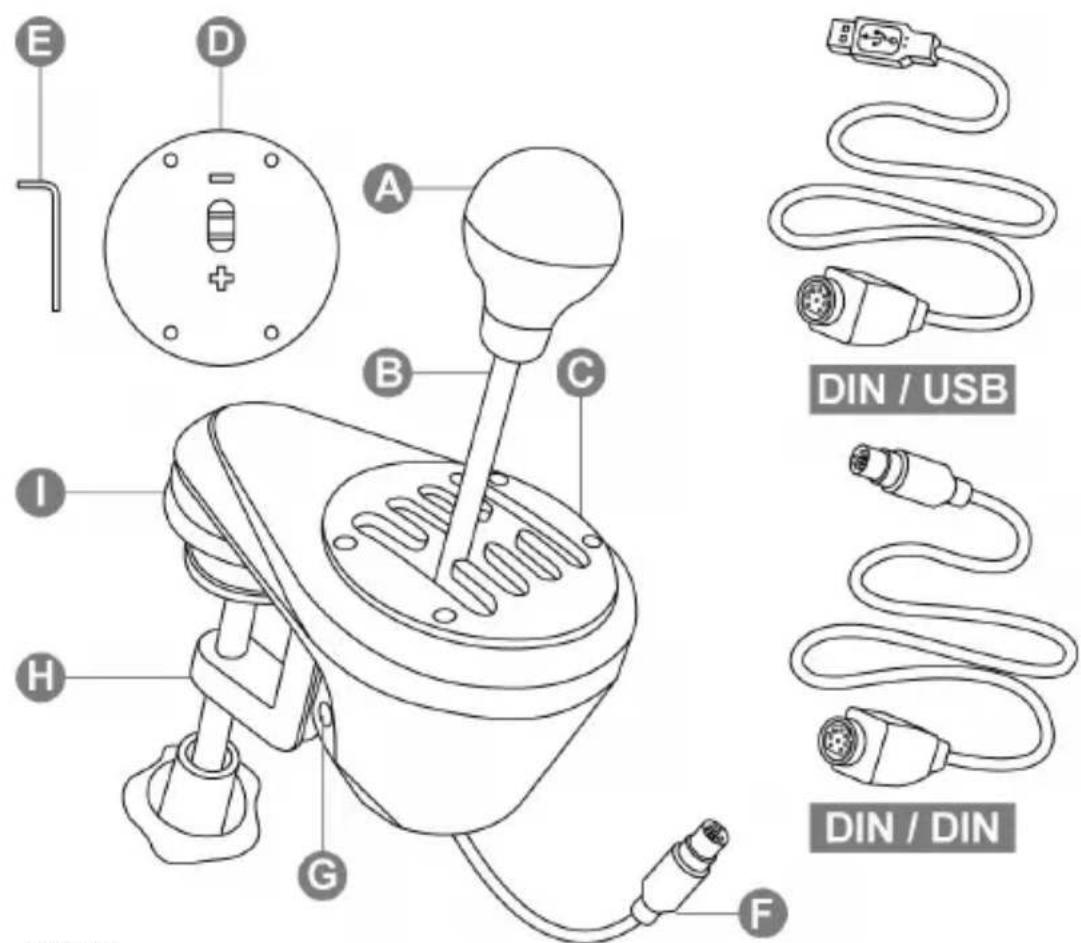
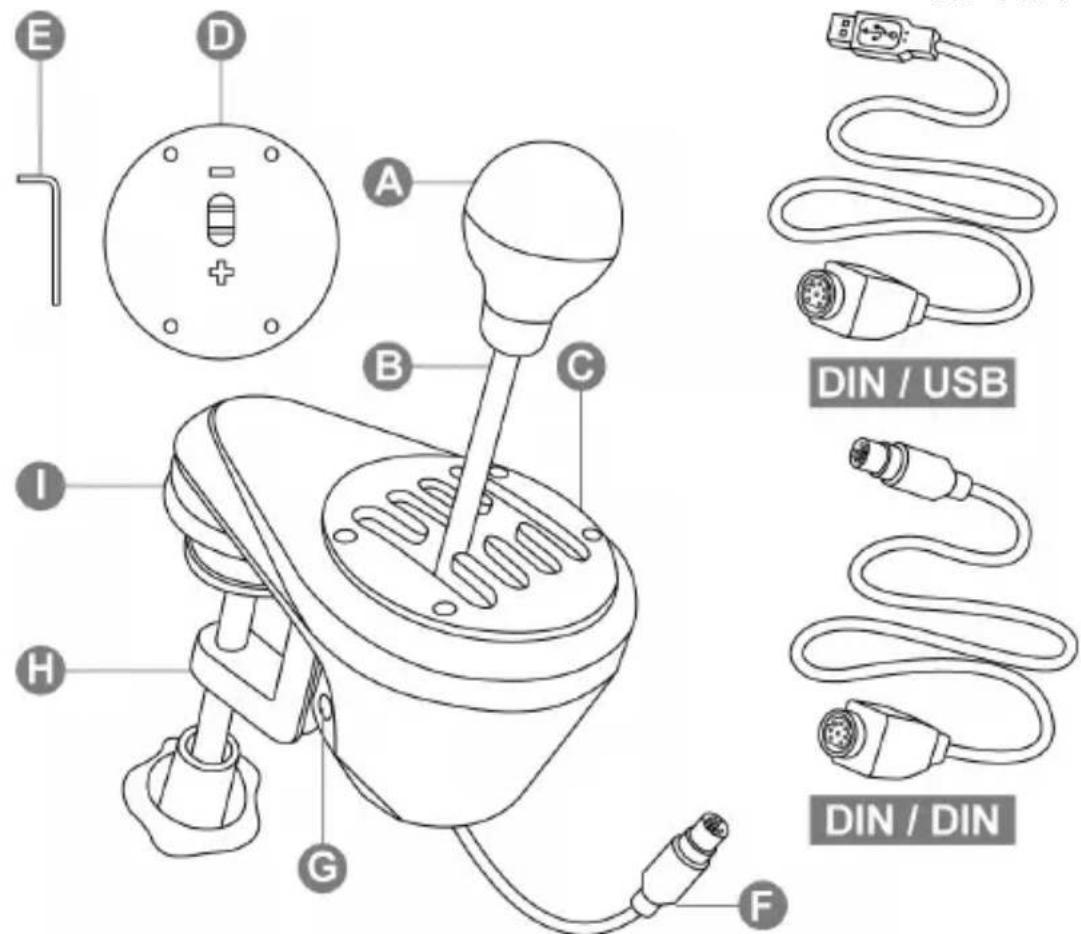
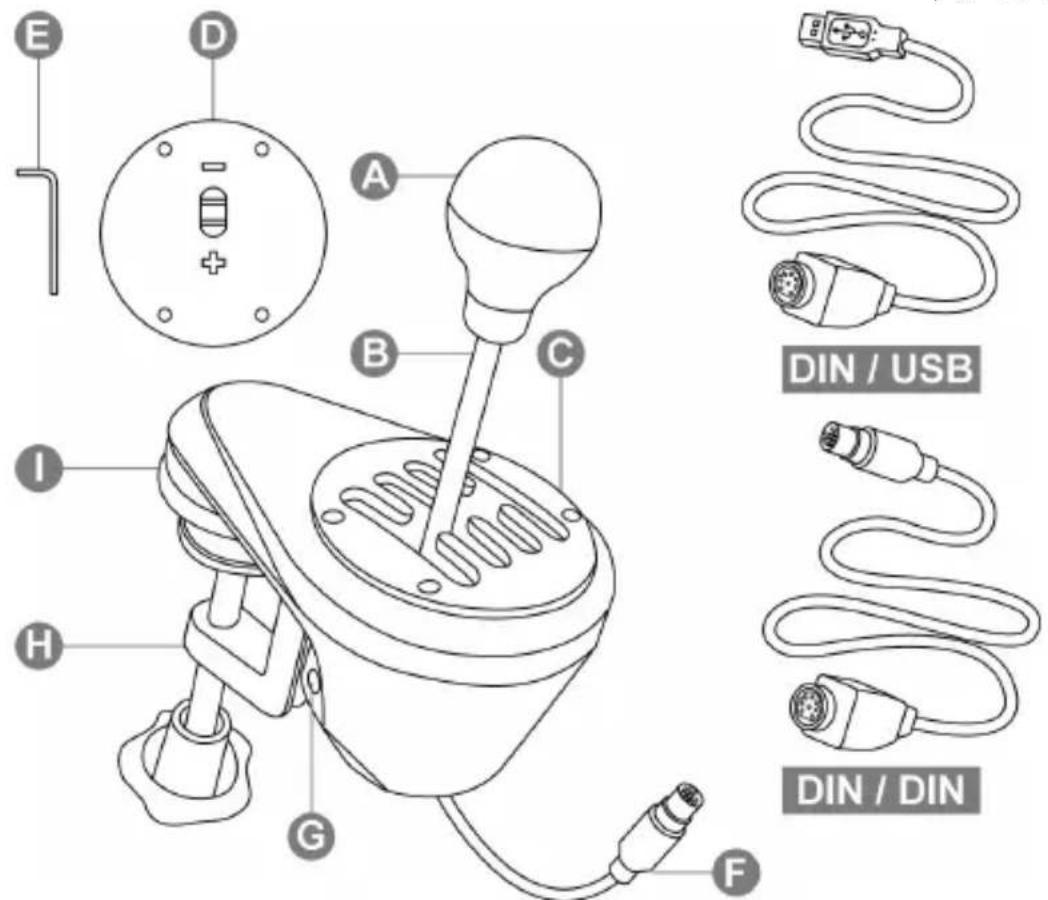
A Removable gear shift knob (not installed by default)
B Stick
C Adjustable "H-pattern (7+1)" shift plate (installed by default)
D Adjustable "Sequential (+/-)" shift plate (not installed by default)
E 2.5 mm Allen key (included)
F Cable and DIN connector
G Internal tensioning screw
H Adjustable clamping system
I "Screw threads" for cockpit mounting
DIN / USB
Detachable DIN / USB cable
DIN / DIN
Detachable DIN / DIN cable
WARNING
Before using this product, be sure to read through this manual carefully. Retain this manual for future reference.

Warning – Electric shock
* Keep this product in a dry place, and do not expose it to dust or sunlight.
* Respect the direction of insertion for connectors.
* Do not twist or pull on the connectors and cables.
* Do not spill liquid on the product or its connector.
* Do not short-circuit the product.
* Do not dismantle this product (apart from for the possible adjustments described in this manual), do not attempt to burn the product and do not expose the product to high temperatures.

Warning – Injuries due to repetitive movements
Playing with a shifter may result in muscle and joint pains. To avoid any problems:
* Avoid playing for extended periods of time.
* Take a 10 to 15 minutes break after each hour of playing.
* Should you experience fatigue or pain in your hands, wrists or arms, stop playing and rest for a few hours before starting to play again.
* If the symptoms or pains described above persist when you resume playing, stop playing and consult your doctor.
* Verify that the base of the shifter is properly mounted, as described in the instructions found in this manual.

Warning – Pinching risk in shift plate openings
* Keep out of the reach of children.
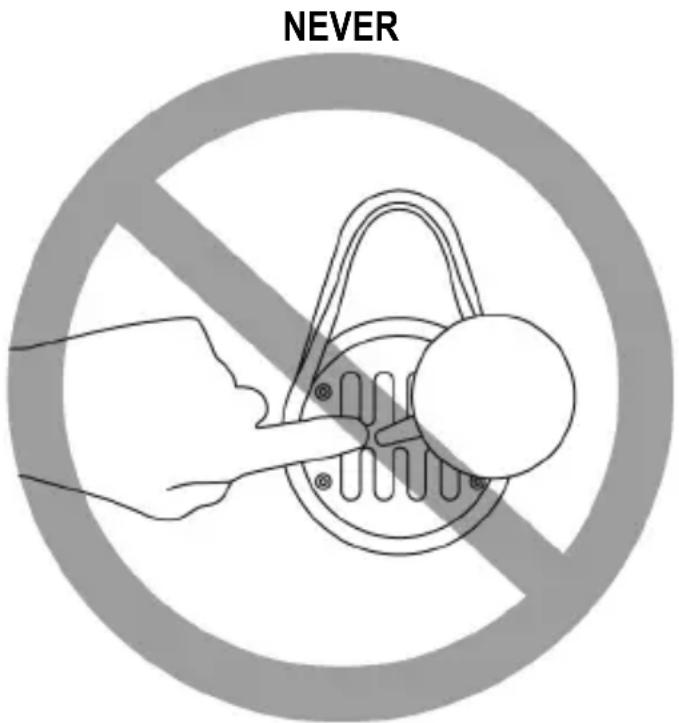
* When playing a game, never place your fingers (or any other parts of your body) in the openings in the shift plates.
INSTALLING THE GEAR SHIFT KNOB
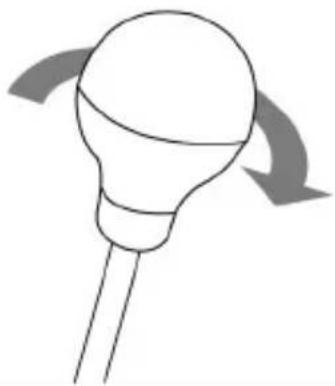
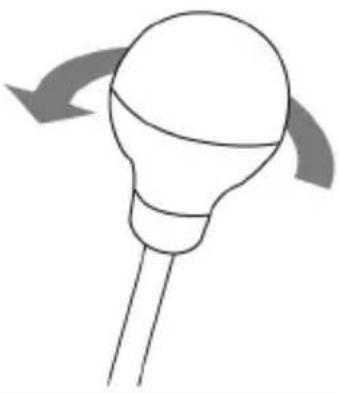
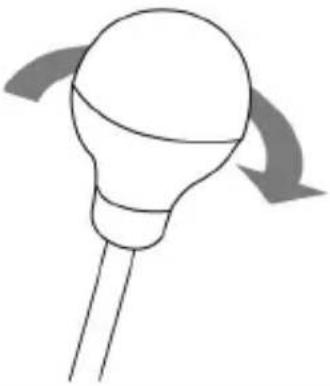
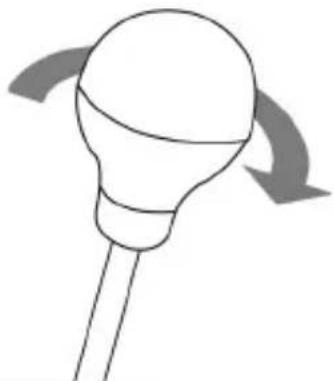
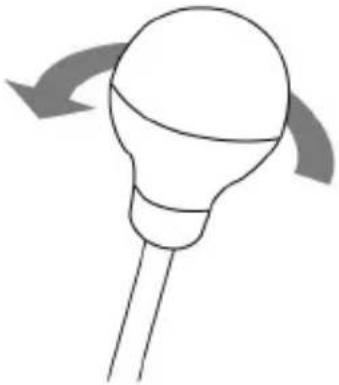
- To screw the gear shift knob (A) onto its stick (B): turn the gear shift knob clockwise.
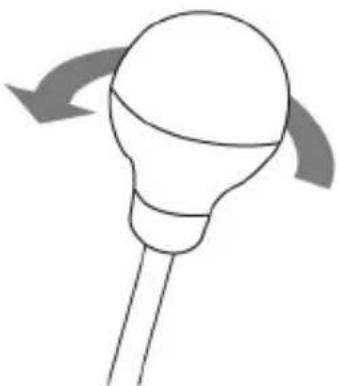
- To unscrew the gear shift knob: turn the knob counterclockwise.
| TIGHTEN | UNTIGHTEN |
 |  |
MOUNTING THE SHIFTER
Mounting is optimized for any type of support:
- Tables, desks or shelves from 1 to 55 mm in thickness, via the clamping system (H).
- Cockpits, via the built-in "screw threads" (the clamping system is removable).
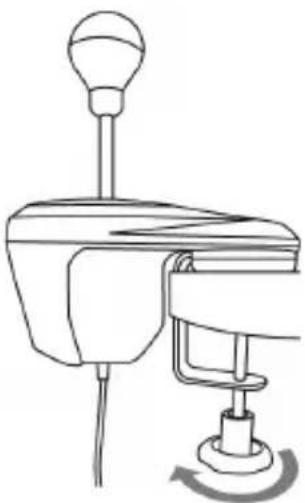
Mounting the shifter on a table or desk
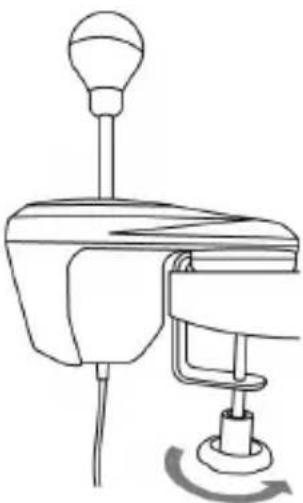
- Place the nose of the shifter on a table or other flat surface.
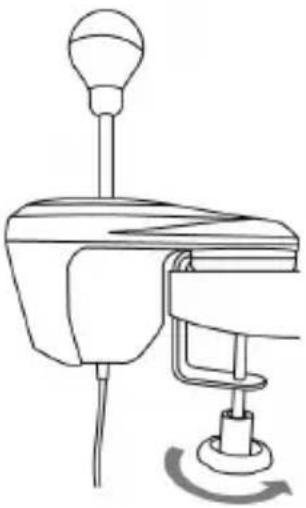
- To tighten: turn the clamping wheel counterclockwise.
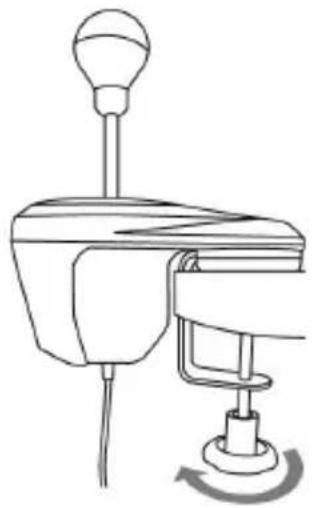
- To untighten: turn the clamping wheel clockwise.
| TIGHTEN | UNTIGHTEN |
 |  |
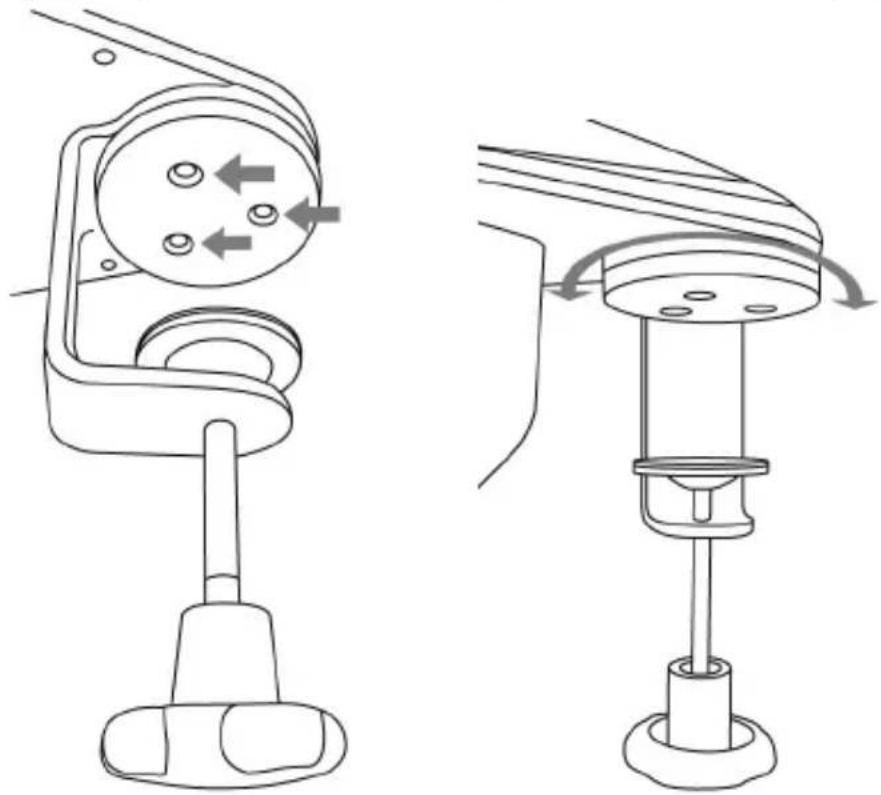
Positioning and rotating the clamping system (can be adjusted by 360°)
- Using the included 2.5 mm Allen key (E), very slightly unscrew the 3 screws holding the clamping system (H) in place.
The clamping system (and therefore the entire shifter) can now be rotated manually by 360^ .
natural_image
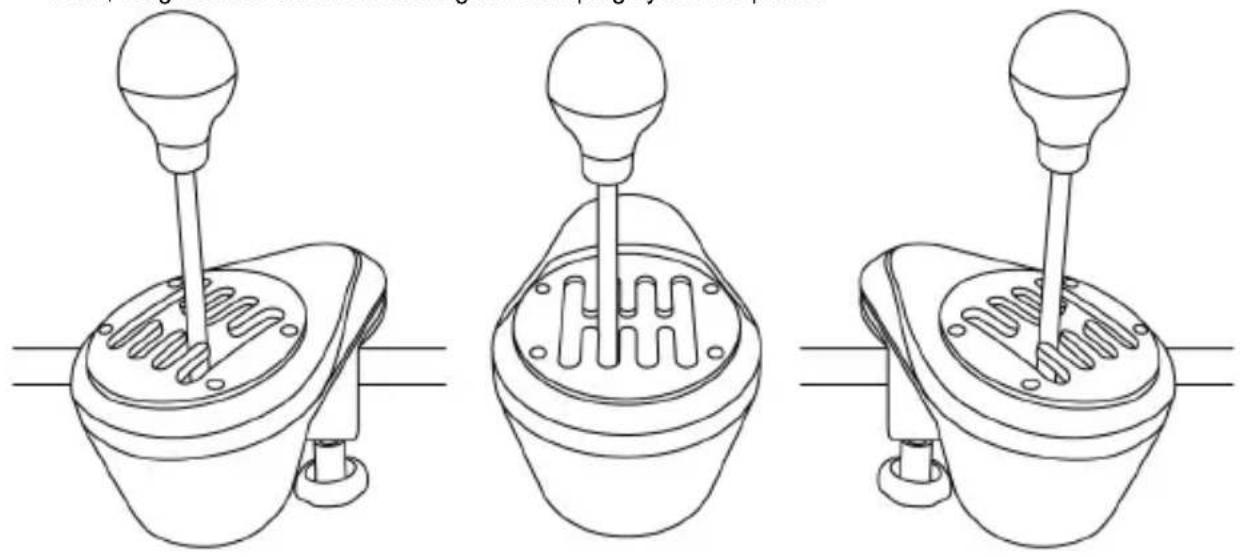
Technical line drawing of a mechanical device with two views showing internal components and directional arrows (no text or symbols)- Select your preferred position along the 360^ of rotation (3 examples are shown below, among the many other possibilities available).
Next, retighten the 3 screws holding the clamping system in place.
natural_image
Three technical line drawings of a mechanical lever mechanism, showing different angles and shaft positions (no text or symbols present)Mounting the shifter in a cockpit
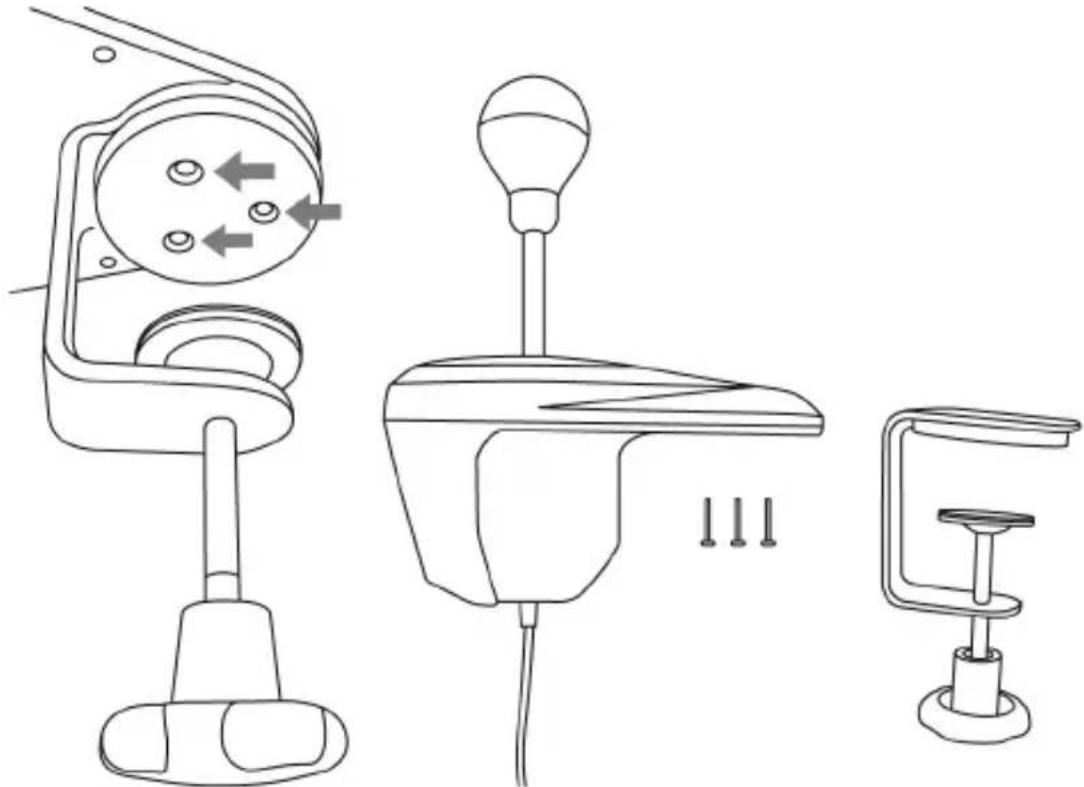
- Using the included 2.5 mm Allen key (E), completely unscrew and remove the 3 screws holding the clamping system (H) in place. Detach the clamping system from the shifter.
natural_image
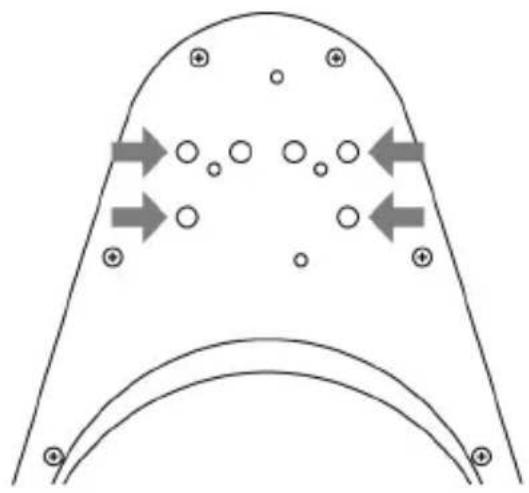
Line drawings of three different mechanical devices with directional arrows indicating motion (no text or symbols)- Once the clamping system has been removed, screw 2 "M6" screws (not included) into the cockpit shelf, and into 2 of the 4 small "screw threads" (I) located on the underside of the shifter's nose.
natural_image
Diagram of a curved channel with circular elements and directional arrows indicating flow or movement (no text or symbols)Be sure not to use "M6" screws that are too long, which may pierce and damage the upper part of the shifter's nose.
A shifter mounting template for cockpits is available at
https://support.thrustmaster.com. Click Racing Wheels / TH8A Shifter, and then select Manual.
POSITIONING AND ROTATING THE SHIFT PLATES (CAN BE ADJUSTED BY 360°)
- Using the included 2.5 mm Allen key (E), slightly unscrew the 4 screws holding the shift plate (C or D) in place.
The shift plate can now be rotated manually by 360^ .
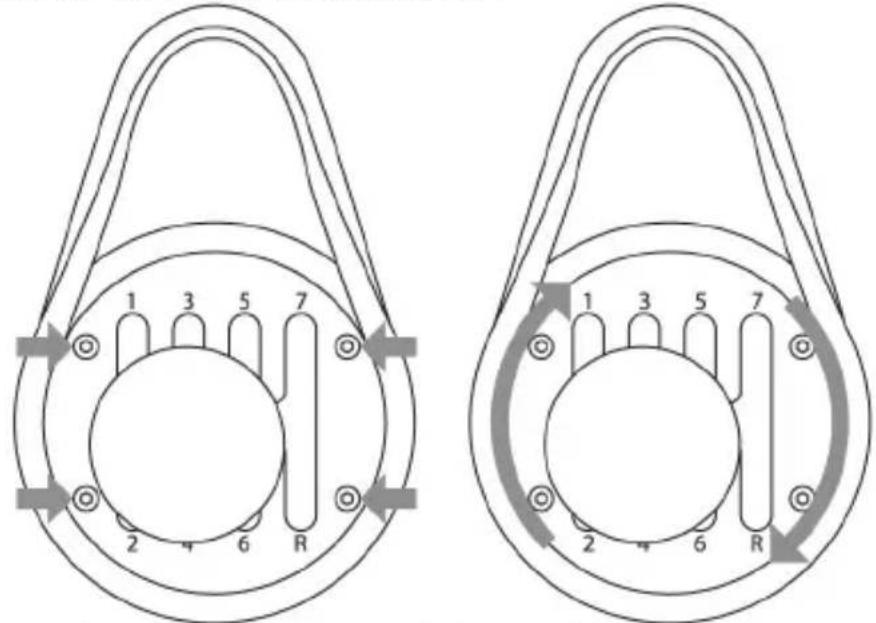
- Select your preferred position along the 360^ of rotation (3 examples are shown below, among the many other possibilities available).
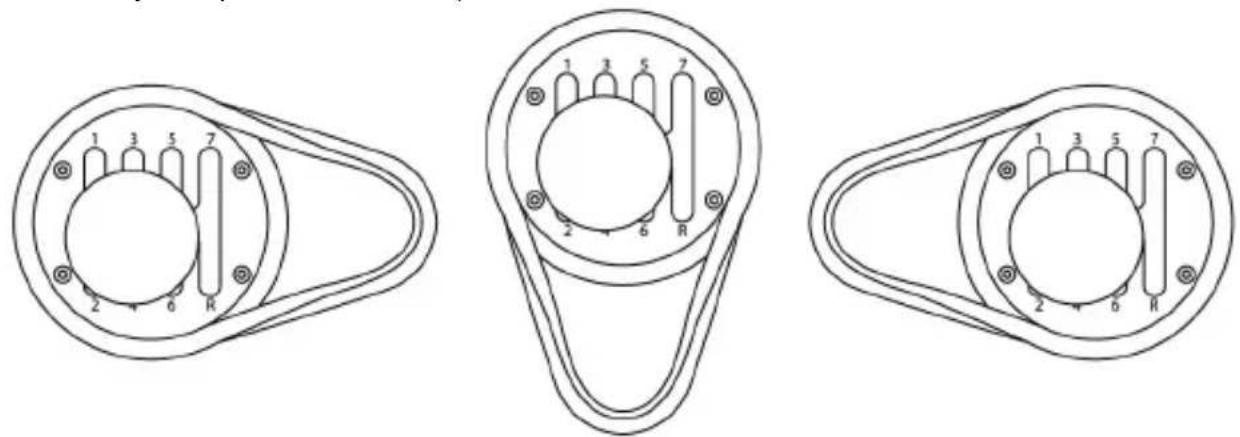
- Retighten the 4 screws holding the shift plate in place.
SWITCHING FROM THE "H-PATTERN (7+1)" SHIFT PLATE TO THE "SEQUENTIAL (+/-)" SHIFT PLATE
- Unscrew (counterclockwise) and remove the gear shift knob (A).
- Using the included 2.5 mm Allen key (E), completely unscrew and remove the 4 screws holding the "H-pattern (7+1)" shift plate in place. Remove the shift plate.
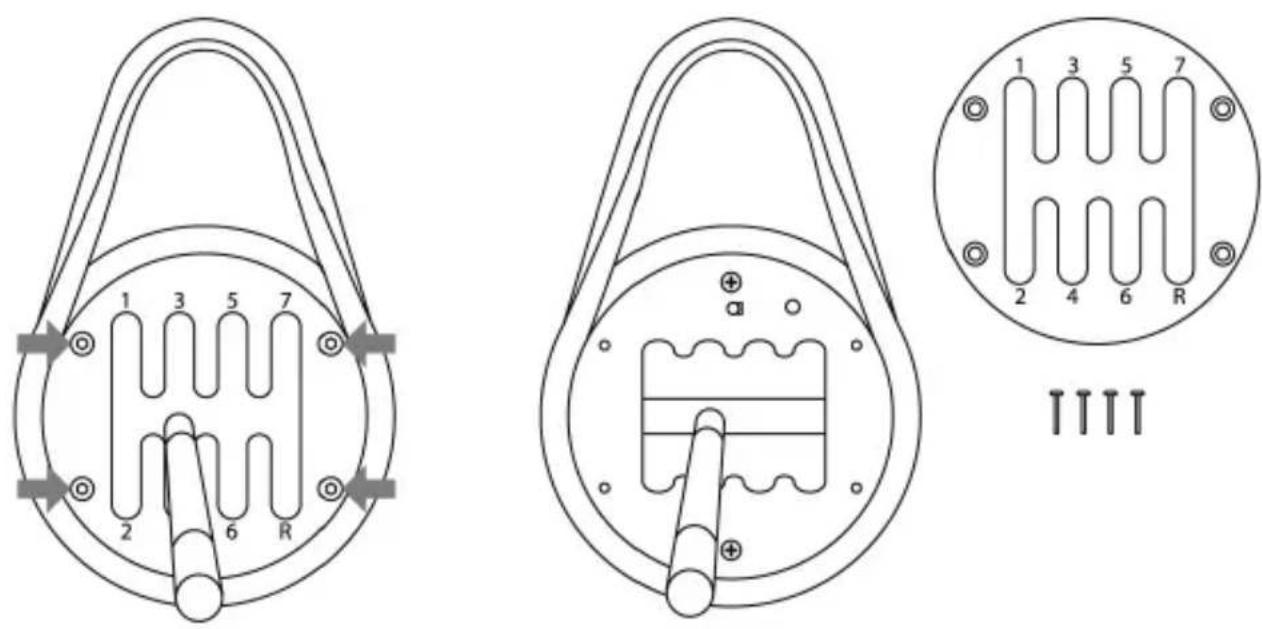

During this procedure, take care not to accidentally let any of the screws fall inside the internal mechanism.
- Manually rotate the internal structure 90^ to the right (clockwise). Next, install the “Sequential (+/-)” shift plate.
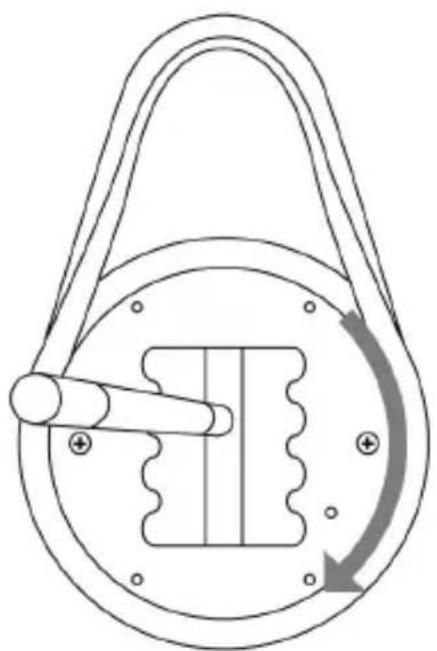
natural_image
Diagram of a mechanical pulley system with a rotating arrow indicating clockwise motion (no text or labels)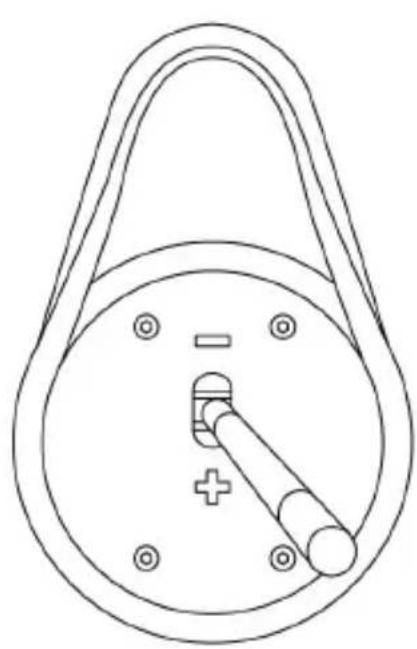
natural_image
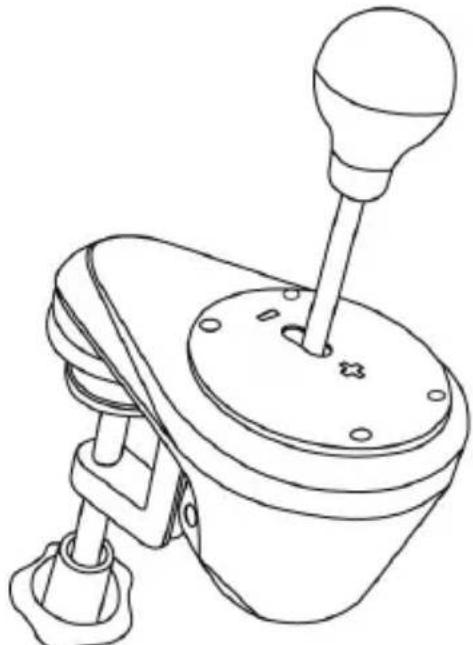
Technical line drawing of a mechanical component with a circular body, handle, and central pin (no text or symbols)- Using the included 2.5 mm Allen key (E), replace and completely retighten the 4 screws holding the "Sequential (+/-)" shift plate in place. Screw the gear shift knob back on (clockwise).
natural_image
Line drawing of a mechanical lever mechanism (no text or symbols)Carry out this procedure in reverse to replace the "H-pattern (7+1)" shift plate.
Notes regarding the internal structure's top cover:
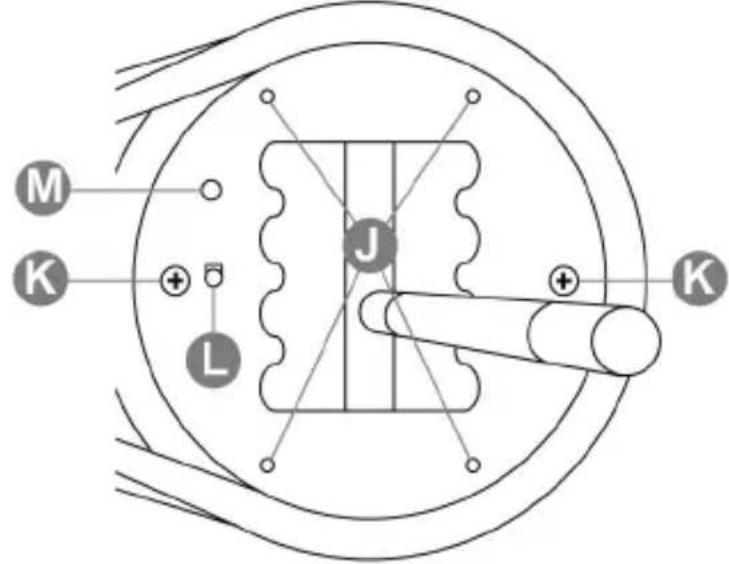
J: 4 "screw threads" to attach the shift plates (C or D).
K: 2 screws which hold the internal structure in place (do not unscrew).
L: Button which automatically detects the type of shift plate used (C or D). Is pressed automatically when the "Sequential (+/-)" shift plate is installed. Keep this area clean in order to avoid any detection problems.
M: Slot for easier positioning of the shift plates.
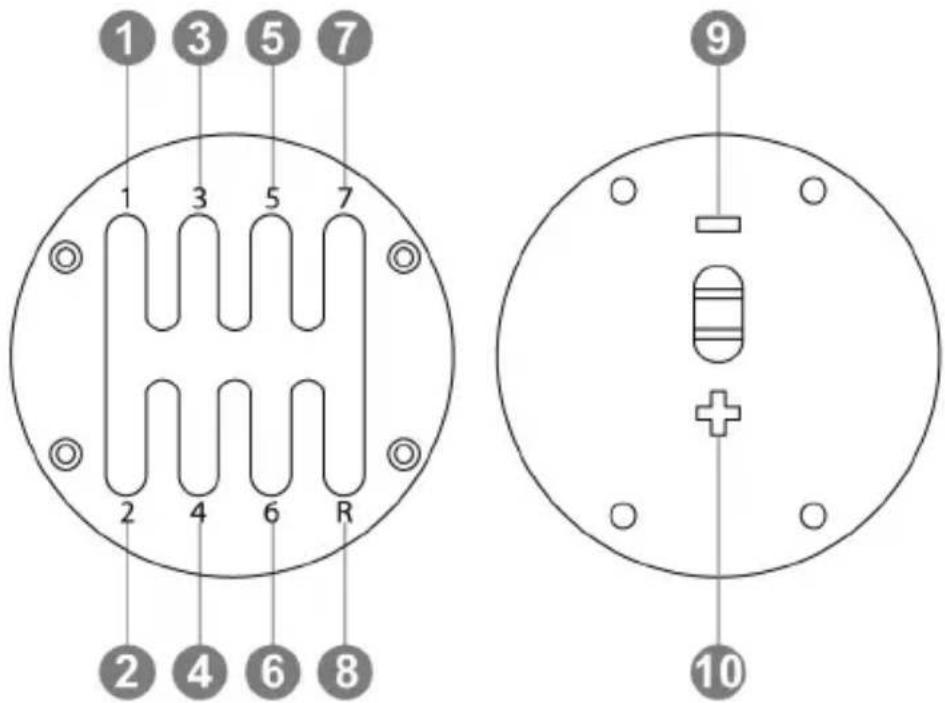
* Only applies to the "H-pattern (7+1)" shift plate.
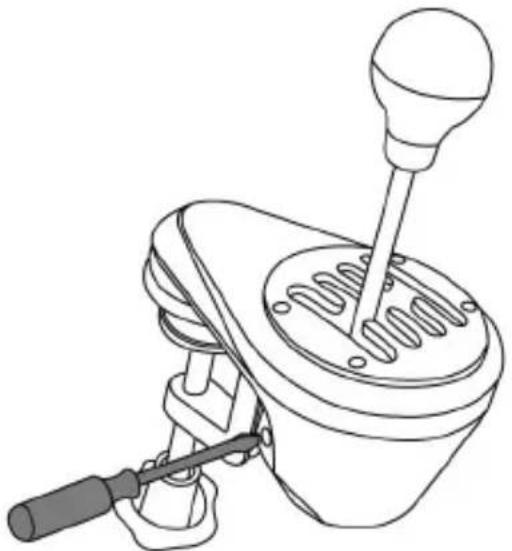
* Before making any adjustments, the "H-pattern (7+1)" shift plate must be installed in its original position (please see the diagram below).
natural_image
Line drawing of a mechanical lever mechanism (no text or symbols)- Using a large flat head screwdriver, place the screwdriver in the head of the internal tensioning screw (G) located in the lower left section of the shifter's housing.
- To slightly increase the resistance: turn the screw clockwise.
- To slightly decrease the resistance: turn the screw counterclockwise.
| INCREASING THE RESISTANCE | DECREASING THE RESISTANCE |
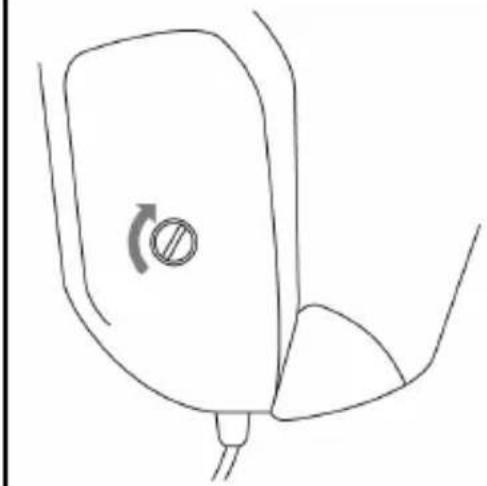 | 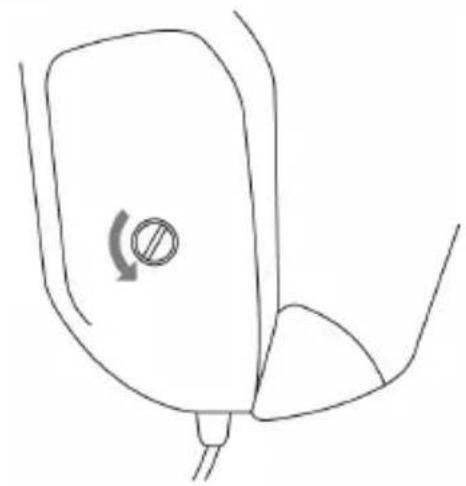 |
2 full turns are enough to go from one extreme to the other.

To avoid damaging the system:
- Stop tightening the screw when you feel strong resistance.
- Stop untightening the screw if the stick becomes loose and wobbly.
SETUP INSTRUCTIONS FOR GAME CONSOLES
PLAYSTATION®4/PLAYSTATION®5
According to the PS4 ^TM /PS5 ^TM game or the racing wheel that you are using:
PS4 ^TM = Connect(*) the TH8A shifter directly to the PS4 ^TM 's USB port
- Connect the TH8A shifter's DIN connector to the DIN / USB cable.
- Connect the TH8A shifter to one of your PS4 ^TM 's USB ports.
- Start the game.
The TH8A shifter can then operate with either the H-PATTERN (7+1) or SEQUENTIAL (+/-) shift plates.
Or
PS4™/PS5™ = Connect(*) the TH8A shifter directly to the Thrustmaster racing wheel's base
(only applicable if your Thrustmaster racing wheel features a built-in shifter connector)
- Connect the TH8A shifter's DIN connector to the DIN / DIN detachable cable.
- Connect the TH8A shifter to the shifter connector located at the back of the racing wheel's base.
- Connect your racing wheel, then start the game.
The TH8A shifter can then operate with either the H-PATTERN (7+1) or SEQUENTIAL (+/-) shift plates.
(*) Important recommendations for the PS4™/PS5™ system (applicable only if using a Thrustmaster racing wheel featuring a built-in shifter connector)
- PS4™/PS5™ : When using the TH8A shifter's SEQUENTIAL (+/-) shift plate, you can also connect the shifter at the back of the racing wheel using the detachable DIN / DIN cable. The TH8A shifter is then connected to the racing wheel's UP (= R1) and DOWN (= L1) paddle shifters.
With this racing wheel, the TH8A shifter's SEQUENTIAL (+/-) shift plate functions with 100% of racing games for PS4 ^TM /PS5 ^TM that are compatible with the racing wheel.
- PS4™: Some games enable you to use two TH8A shifters simultaneously:
One TH8A shifter with an H-PATTERN (7+1) shift plate, connected to the PS4™'s USB port + One TH8A shifter with a SEQUENTIAL (+/-) shift plate, connected to the back of the racing wheel
* A list of games for PS4™/PS5™ that are compatible with the TH8A shifter and the relevant connection instructions(*) (which vary according to games) are available here: https://support.thrustmaster.com Click Racing Wheels / TH8A Shifter, and then select Games settings. This list is updated regularly.
* On PS4™ systems, we recommend that you do not use a USB hub when connecting the racing wheel or the TH8A shifter; connect the device directly to the PS4™'s USB ports.
* Some games require that you install the latest available updates for the TH8A shifter to function correctly (your games console must be connected to the internet).
XBOX ONE/XBOX SERIES
= With all Xbox One/Xbox Series games, always connect the TH8A shifter directly to the Thrustmaster racing wheel's base (NEVER to the game console's USB port).
- Connect the TH8A shifter's DIN connector to the DIN / DIN detachable cable.
- Connect the TH8A shifter to the shifter connector located at the back of the racing wheel's base.
- Connect your racing wheel, then start the game.
The TH8A shifter can then operate with either the H-PATTERN (7+1) or SEQUENTIAL (+/-) shift plates.
Important note about the Xbox One/Xbox Series:
When using the TH8A shifter's SEQUENTIAL (+/-) shift plate, the shifter is connected to the racing wheel's UP (= RB) and DOWN (= LB) paddle shifters.
When using the TH8A shifter's SEQUENTIAL (+/-) shift plate, the TH8A shifter functions with 100% of racing games for Xbox One/Xbox Series that are compatible with the Thrustmaster racing wheel for Xbox One/Xbox Series.
* A list of games for Xbox One/Xbox Series that are compatible with the TH8A shifter is available here:
https://support.thrustmaster.com. Click Racing Wheels / TH8A Shifter, and then select Games settings. This list is updated regularly.
* Some games require that you install the latest available updates for the TH8A shifter to function correctly (your games console must be connected to the internet).

To ensure compatibility of your Thrustmaster racing wheel for Xbox One/Xbox Series with the TH8A shifter, you may be required to update the racing wheel's firmware with the latest version available via PC here: https://support.thrustmaster.com. Click Racing Wheels / TH8A Shifter, and then select Firmware.
SETUP INSTRUCTIONS FOR PC
= With all PC games(*), always connect the TH8A shifter directly to one of the PC's USB ports.
- Connect the TH8A shifter's DIN connector to the DIN / USB cable.
- Connect the TH8A shifter to one of your PC's USB ports.
- When connected to a PC, the TH8A shifter is a Plug & Play device and is automatically detected and installed.
- The device then appears as 'T500 RS Gear Shift' in the Windows® Control Panel.
- Click Properties to test and view the device's features.
- Start the game.
You are now ready to race!
(*) Important recommendations for PCs (applicable only if using a Thrustmaster racing wheel featuring a built-in shifter connector)
- When using the TH8A shifter's SEQUENTIAL (+/-) shift plate, you can also connect the shifter at the back of the racing wheel using the detachable DIN / DIN cable. The TH8A shifter is then connected to the racing wheel's UP (= 2) and DOWN (= 1) paddle shifters.
With this racing wheel, the TH8A shifter's SEQUENTIAL (+/-) shift plate functions with 100% of racing games for PC that are compatible with the racing wheel.
- Some games enable you to use two TH8A shifters simultaneously:
One TH8A shifter with an H-PATTERN (7+1) shift plate, connected to the PC's USB port
+ One TH8A shifter with a SEQUENTIAL (+/-) shift plate, connected to the back of the racing wheel
* On PC, the Thrustmaster shifter is compatible with:
- all games supporting MULTI-USB and shifters.
- all wheels on the market.
* We recommend connecting your racing wheel and TH8A shifter directly to your PC's USB 2.0 (not USB 3.0) ports, without using a hub.
* For some PC games, you must install the latest available game updates in order for the TH8A shifter to function properly.
* For some PC games (in order to avoid any conflicts between the wheel and the TH8A shifter), it may be necessary:
- not to map anything onto the wheel's gear shift paddles.
- to enable the "Hold button for gear" function.
MAPPING ON PC
SOFTWARE PACKAGE
A software package for PC is available here:
https://support.thrustmaster.com. Click Racing Wheels / TH8A Shifter, and then select Drivers.
- After installing the software package, you will be able to:
* check your TH8A shifter's firmware version.
* update the firmware (if necessary) with the latest available version.
* use the "BOOTLOADER Method" (to restore your shifter, in the event of loss of firmware).
* access a customized Control Panel (game controller) on PC.
* on PC, enjoy the ANALOG mode (handbrake)
ADVANCED CALIBRATION SOFTWARE
The TH8A gear shift calibration is automatically carried out.
An advanced calibration software application for PC is also available here: https://support.thrustmaster.com. Click Racing Wheels / TH8A Shifter, and then select Software. It allows you to adjust the gear shift travel to your convenience.
When the settings are complete, they are instantly saved into the internal gear shift memory (and can be used on PS4™/PS5™, Xbox One/Xbox Series and PC).
SUMMARY INSTRUCTIONS FOR CONNECTING THE TH8A SHIFTER TO VARIOUS SYSTEMS
| Connect the TH8A shifter | |
| PS4TM | According to the game or racing wheel (*) :- Either directly to the PS4TM/PS5TMSystem (USB)- Or at the back of the racing wheel (DIN) |
| PS5TM | Always at the back of the racing wheel(DIN) |
| XBOX ONE/XBOX SERIES | Always at the back of the racing wheel(DIN) |
| PC | Always(*) directly to the PC (USB) |
(*) For more information regarding any exceptions, please refer to the Important recommendations sections on the manual's relevant pages.
WARNING
* Never connect the TH8A shifter directly to any device other than a Thrustmaster racing wheel, even if the device features an identical DIN connector. This could cause damage to the TH8A shifter or the other device.
TROUBLESHOOTING
* My shifter is not functioning correctly, or seems to be improperly calibrated:
- Turn off your computer or console, disconnect your shifter, reconnect it and then restart your game.
- In your game, under "Options/Controller", select or set up the most appropriate configuration.
- Refer to your game's user manual or online help for more information.
- Various help topics and tips (not included in this manual), a list of compatible games, etc. are available on the https://support.thrustmaster.com website. Click Racing Wheels / TH8A Shifter.
- On Xbox One/Xbox Series, to ensure compatibility of your Thrustmaster racing wheel for Xbox One/Xbox Series with the TH8A shifter, you may be required to update the racing wheel's firmware with the latest version available via PC here: https://support.thrustmaster.com. Click Racing Wheels / TH8A Shifter, and then select Firmware.
CONSUMER WARRANTY INFORMATION
Worldwide, Guillemot Corporation S.A., whose registered office is located at Place du Granier, B.P. 97143, 35571 Chantepie, France (hereinafter "Guillemot") warrants to the consumer that this Thrustmaster product shall be free from defects in materials and workmanship, for a warranty period which corresponds to the time limit to bring an action for conformity with respect to this product. In the countries of the European Union, this corresponds to a period of two (2) years from delivery of the Thrustmaster product. In other countries, the warranty period corresponds to the time limit to bring an action for conformity with respect to the Thrustmaster product according to applicable laws of the country in which the consumer was domiciled on the date of purchase of the Thrustmaster product (if no such action exists in the corresponding country, then the warranty period shall be one (1) year from the original date of purchase of the Thrustmaster product).
Notwithstanding the above, rechargeable batteries are covered by a warranty period of six (6) months from the date of original purchase.
Should the product appear to be defective during the warranty period, immediately contact Technical Support, who will indicate the procedure to follow. If the defect is confirmed, the product must be returned to its place of purchase (or any other location indicated by Technical Support).
Within the context of this warranty, the consumer's defective product shall, at Technical Support's option, be either replaced or returned to working order. If, during the warranty period, the Thrustmaster product is subject to such reconditioning, any period of at least seven (7) days during which the product is out of use shall be added to the remaining warranty period (this period runs from the date of the consumer's request for intervention or from the date on which the product in question is made available for reconditioning, if the date on which the product is made available for reconditioning is subsequent to the date of the request for intervention). If permitted under applicable law, the full liability of Guillemot and its subsidiaries (including for consequential damages) is limited to the return to working order or the replacement of the Thrustmaster product. If permitted under applicable law, Guillemot disclaims all warranties of merchantability or fitness for a particular purpose.
This warranty shall not apply: (1) if the product has been modified, opened, altered, or has suffered damage as a result of inappropriate or abusive use, negligence, an accident, normal wear, or any other cause unrelated to a material or manufacturing defect (including, but not limited to, combining the Thrustmaster product with any unsuitable element, including in particular power supplies, rechargeable batteries, chargers, or any other elements not supplied by Guillemot for this product); (2) if the product has been used for any use other than home use, including for professional or commercial purposes (game rooms, training, competitions, for example); (3) in the event of failure to comply with the instructions provided by Technical Support; (4) to software, said software being subject to a specific warranty; (5) to consumables (elements to be replaced over the product's lifespan: disposable batteries, audio headset or headphone ear pads, for example); (6) to accessories (cables, cases, pouches, bags, wrist-straps, for example); (7) if the product was sold at public auction.
This warranty is nontransferable.
The consumer's legal rights with respect to laws applicable to the sale of consumer goods in his or her country are not affected by this warranty.
Additional warranty provisions
During the warranty period, Guillemot shall not provide, in principle, any spare parts, as Technical Support is the only party authorized to open and/or recondition any Thrustmaster product (with the exception of any reconditioning procedures which Technical Support may request that the consumer carry out, by way of written instructions – for example, due to the simplicity and the lack of confidentiality of the reconditioning process – and by providing the consumer with the required spare part(s), where applicable).
Given its innovation cycles and in order to protect its know-how and trade secrets, Guillemot shall not provide, in principle, any reconditioning notification or spare parts for any Thrustmaster product whose warranty period has expired.
In the United States of America and in Canada, this warranty is limited to the product's internal mechanism and external housing. In no event shall Guillemot or its affiliates be held liable to any third party for any consequential or incidental damages resulting from the breach of any express or implied warranties. Some States/Provinces do not allow limitation on how long an implied warranty lasts or exclusion or limitation of liability for consequential or incidental damages, so the above limitations or exclusions may not apply to you. This warranty gives you specific legal rights, and you may also have other rights which vary from State to State or Province to Province.
Liability
If permitted under applicable law, Guillemot Corporation S.A. (hereinafter “Guillemot”) and its subsidiaries disclaim all liability for any damages caused by one or more of the following: (1) the product has been modified, opened or altered; (2) failure to comply with assembly instructions; (3) inappropriate or abusive use, negligence, an accident (an impact, for example); (4) normal wear; (5) the use of the product for any use other than home use, including for professional or commercial purposes (game rooms, training, competitions, for example). If permitted under applicable law, Guillemot and its subsidiaries disclaim all liability for any damages unrelated to a material or manufacturing defect with respect to the product (including, but not limited to, any damages caused directly or indirectly by any software, or by combining the Thrustmaster product with any unsuitable element, including in particular power supplies, rechargeable batteries, chargers, or any other elements not supplied by Guillemot for this product).
FCC STATEMENT
- This device complies with Part 15 of the FCC Rules. Operation is subject to the following two conditions:
(1) This device may not cause harmful interference, and
(2) This device must accept any interference received, including interference that may cause undesired operation.
- Changes or modifications not expressly approved by the party responsible for compliance could void the user's authority to operate the equipment.
COPYRIGHT
© 2021 Guillemot Corporation S.A. All rights reserved. Thrustmaster® is a registered trademark of Guillemot Corporation S.A. PlayStation® is a registered trademark of Sony Interactive Entertainment, Inc. Windows® is a registered trademark of Microsoft Corporation in the United States and/or in other countries. All other trademarks are the property of their respective owners. Illustrations not binding. Contents, designs and specifications are subject to change without notice and may vary from one country to another. Made in China.
ENVIRONMENTAL PROTECTION RECOMMENDATION

* In the European Union: At the end of its working life, this product should not be disposed of with standard household waste, but rather dropped off at a collection point for the disposal of Waste Electrical and Electronic Equipment (WEEE) for recycling.
This is confirmed by the symbol found on the product, user manual or packaging. Depending on their characteristics, the materials may be recycled. Through recycling and other forms of processing Waste Electrical and Electronic Equipment,
you can make a significant contribution towards helping to protect the environment.
Please contact your local authorities for information on the collection point nearest you.
For all other countries: Please adhere to local recycling laws for electrical and electronic equipment.
Retain this information. Colours and decorations may vary.
Plastic fasteners and adhesives should be removed from the product before it is used.
www.thrustmaster.com
*Applicable to EU, UK and Turkey only




THRUSTMASTER®
TECHNICAL SUPPORT
https://support.thrustmaster.com




ADD-ON SHIFTER
PlayStation®4/PlayStation®5 – Xbox One/Xbox Series – PC
natural_image
Technical line drawing of a mechanical device with two views showing internal components and directional arrows (no text or symbols)natural_image
Three technical line drawings of a mechanical lever mechanism, showing different angles and shaft positions (no text or symbols present)natural_image
Line drawings of three different mechanical device components with arrows indicating motion or force directions (no text or symbols present)natural_image
Diagram of a curved channel with directional arrows indicating flow or movement, no text or symbols presentnatural_image
Pure mechanical diagram of a pulley system with a handle and arrow indicating rotational motion (no text or symbols)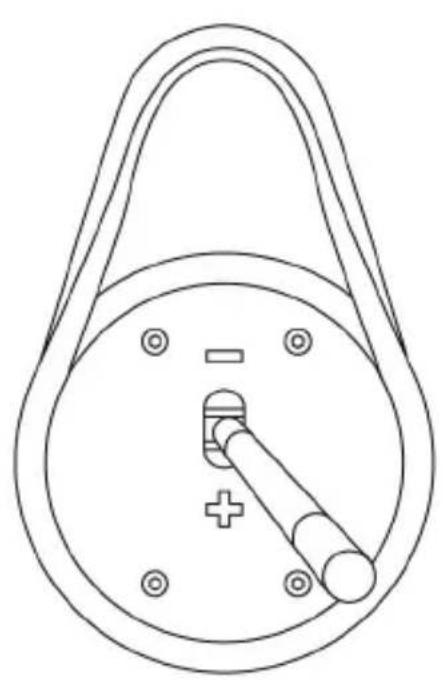
natural_image
Technical line drawing of a mechanical component with a circular body, handle, and central shaft (no text or symbols)natural_image
Line drawing of a mechanical lever mechanism (no text or symbols)natural_image
Line drawing of a mechanical lever mechanism (no text or symbols)INFORMATIONS RELATIVES A LA GARANTIE AUX CONSOMMATEURS
natural_image
Symbol of a trash bin crossed with two crossed lines, no text or labels presentwww.thrustmaster.com
https://support.thrustmaster.com



ADD-ON SHIFTER
PlayStation®4/PlayStation®5 – Xbox One/Xbox Series – PC
Benutzerhandbuch
TECHNISCHE FEATURES
natural_image
Prohibition sign showing a hand using a switch to clean a circular device (no text or symbols)MONTIEREN DES SCHALTKOPFES
| ANSCHRAUBEN | ABSCHRAUBEN |
 |  |
| ANSCHRAUBEN | ABSCHRAUBEN |
 |  |
natural_image
Technical line drawing of a mechanical device with two views showing internal components and directional arrows (no text or symbols)natural_image
Three technical line drawings of a mechanical lever mechanism, showing different angles and shaft positions (no text or symbols present)natural_image
Line drawings of three different mechanical devices with directional arrows indicating motion (no text or symbols)natural_image
Diagram of a curved channel with directional arrows indicating flow or movement, no text or symbols presentnatural_image
Three technical line drawings of a mechanical component with numbered pins (1-7) and mounting holes, shown from different angles (no text or symbols present)natural_image
Pure mechanical diagram of a pulley system with no text or symbols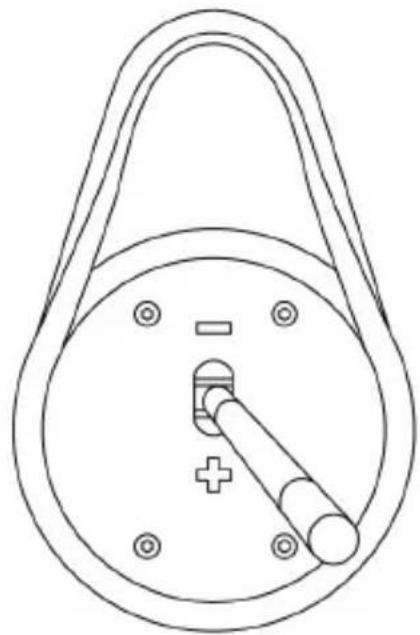
natural_image
Technical line drawing of a mechanical component with a circular body, handle, and central pin (no text or symbols)natural_image
Line drawing of a mechanical lever mechanism (no text or symbols)natural_image
Line drawing of a mechanical lever mechanism (no text or symbols)www.thrustmaster.com
https://support.thrustmaster.com


THA
ADD-ON SHIFTER
PlayStation®4/PlayStation®5 - Xbox One/Xbox Series - PC
Handleiding
natural_image
Technical line drawing of a mechanical device with two views showing rotational and linear motion (no text or symbols)natural_image
Three technical line drawings of a mechanical lever mechanism, showing different angles and shaft positions (no text or symbols present)natural_image
Line drawings of three different mechanical devices with directional arrows indicating motion (no text or symbols)natural_image
Diagram of a curved channel with circular elements and directional arrows indicating flow or movement (no text or symbols)natural_image
Technical line drawing of a mechanical component with a circular housing and internal structure (no text or symbols)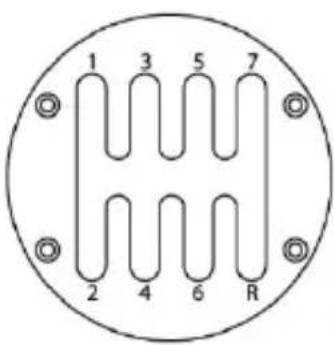
TTTT

natural_image
Technical line drawing of a mechanical component with a curved arrow indicating rotation or motion (no text or symbols)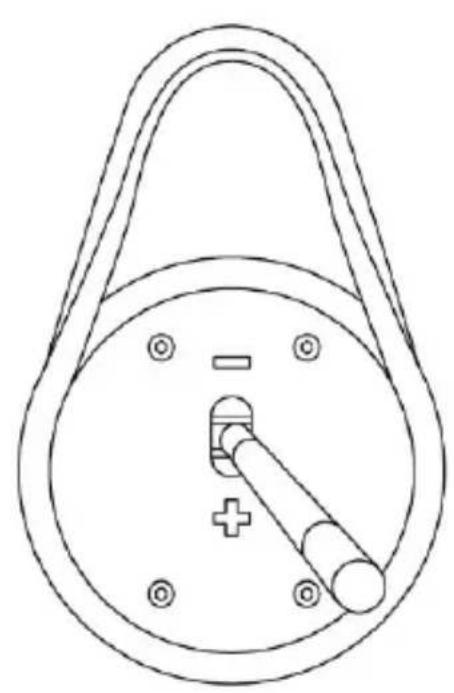
natural_image
Technical line drawing of a mechanical component with a circular body, handle, and central shaft (no text or symbols)natural_image
Line drawing of a mechanical lever mechanism (no text or symbols)natural_image
Line drawing of a mechanical lever mechanism (no text or symbols)natural_image
Symbol of a trash bin crossed with no visible text or labelswww.thrustmaster.com
natural_image
Technical line drawing of a mechanical device with two views showing internal components and directional arrows (no text or symbols)natural_image
Three technical line drawings of a mechanical lever mechanism, showing different angles and shaft positions (no text or symbols present)natural_image
Line drawings of three different mechanical device components with directional arrows indicating motion (no text or symbols)natural_image
Diagram of a curved channel with circular elements and directional arrows indicating flow or movement (no text or symbols)natural_image
Three technical line drawings of a mechanical component with numbered pins (1-7) and mounting holes, shown from different angles (no text or symbols)natural_image
Technical line drawing of a mechanical component with a circular housing and central internal structure (no text or symbols)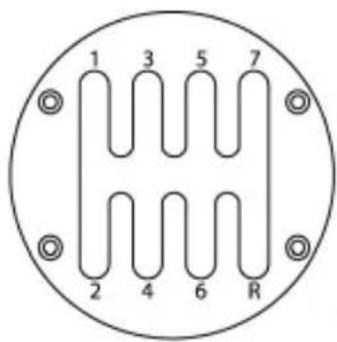
TTTT

natural_image
Pure mechanical diagram of a pulley system with no text or symbols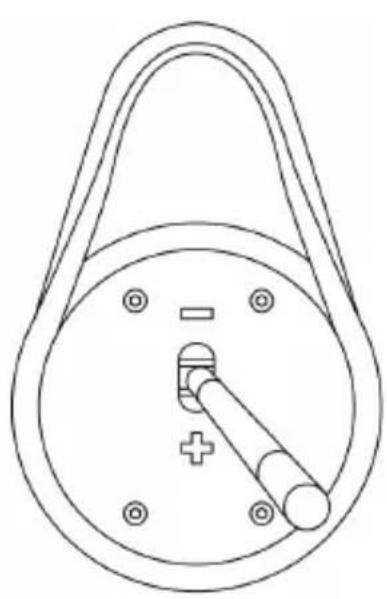
natural_image
Technical line drawing of a mechanical component with a circular body and attached rod (no text or symbols)natural_image
Line drawing of a mechanical lever mechanism (no text or symbols)natural_image
Line drawing of a mechanical lever mechanism with a handle and shaft (no text or symbols)natural_image
Symbol of a trash bin with no text or labels, crossed by diagonal lines and a solid black rectangle below (no text or symbols present)www.thrustmaster.com
https://support.thrustmaster.com


ADD-ON SHIFTER
Manual del usuario
PlayStation®4/PlayStation®5 – Xbox One/Xbox Series – PC
CARACTERÍSTICAS TÉCNICAS
natural_image
Technical line drawing of a mechanical device with two views showing internal components and directional arrows (no text or symbols)natural_image
Three technical line drawings of a mechanical lever mechanism, showing different angles and shaft positions (no text or symbols present)natural_image
Line drawings of three different mechanical devices with directional arrows indicating motion (no text or symbols)natural_image
Diagram of a curved structure with arrows indicating directional movement or flow, no text or symbols presentnatural_image
Technical line drawing of a mechanical component with a circular housing and internal structure (no text or symbols)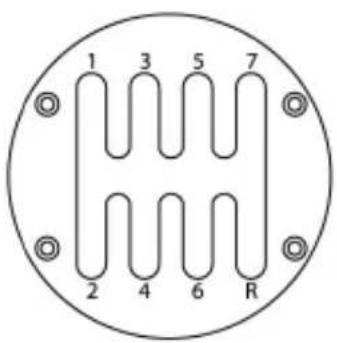
TTTT

natural_image
Diagram of a mechanical pulley system with a rotating arrow indicating clockwise motion (no text or labels)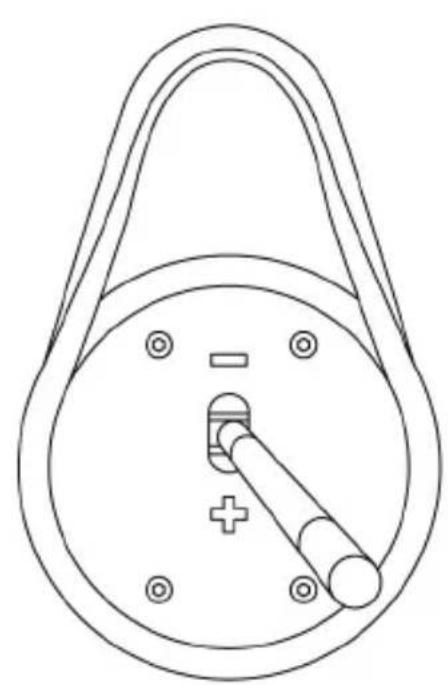
natural_image
Technical line drawing of a mechanical component with a circular body, handle, and central pin (no text or symbols)natural_image
Line drawing of a mechanical lever mechanism (no text or symbols)natural_image
Line drawing of a mechanical lever mechanism with a handle and shaft (no text or symbols)natural_image
Simple line drawing of a trash bin with no text or symbolswww.thrustmaster.com
https://support.thrustmaster.com

natural_image
Three black-and-white icons: a lowercase 'i' in a circle, an envelope symbol, and a telephone handset (no text or labels)THA
ADD-ON SHIFTER
PlayStation®4/PlayStation®5 – Xbox One/Xbox Series – PC Manual do Utilizador
CARACTERÍSTICAS TÉCNICAS
natural_image
Technical line drawing of a mechanical device with two views showing internal components and directional arrows (no text or symbols)natural_image
Three technical line drawings of a mechanical lever mechanism, showing different angles and shaft positions (no text or symbols present)Montar a alavanca de velocidades num cockpit
natural_image
Line drawings of three different mechanical devices with directional arrows indicating motion (no text or symbols)natural_image
Diagram of a curved channel with directional arrows indicating flow or movement, no text or symbols presentnatural_image
Three technical line drawings of a mechanical component with numbered pins (1-7) and mounting holes, shown from different angles (no text or symbols)natural_image
Pure mechanical diagram of a pulley system with a rotating arrow and circular housing (no text or symbols)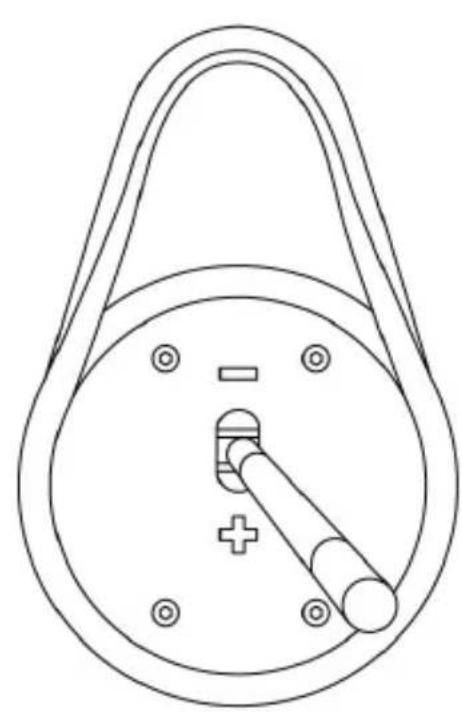
natural_image
Line drawing of a mechanical component with a circular body, handle, and central shaft (no text or symbols)natural_image
Line drawing of a mechanical lever mechanism (no text or symbols)natural_image
Line drawing of a mechanical lever mechanism with a handle and shaft (no text or symbols)www.thrustmaster.com
https://support.thrustmaster.com

natural_image
Three black icons: a lowercase 'i' in a circle, an envelope symbol, and a telephone handset (no text or labels)THA
ADD-ON SHIFTER
natural_image
Prohibition sign showing a hand using a device to stop a seatbelt, no text or symbols presentnatural_image
Technical line drawing of a mechanical device with two views showing internal components and directional arrows (no text or symbols)natural_image
Three technical line drawings of a mechanical lever mechanism, showing different angles and shaft positions (no text or symbols present)natural_image
Line drawings of three different mechanical devices with directional arrows indicating motion (no text or symbols)natural_image
Diagram of a curved channel with directional arrows indicating flow or movement, no text or symbols presentnatural_image
Technical diagram of a mechanical pulley or clamp mechanism with a circular housing and directional arrow (no text or symbols)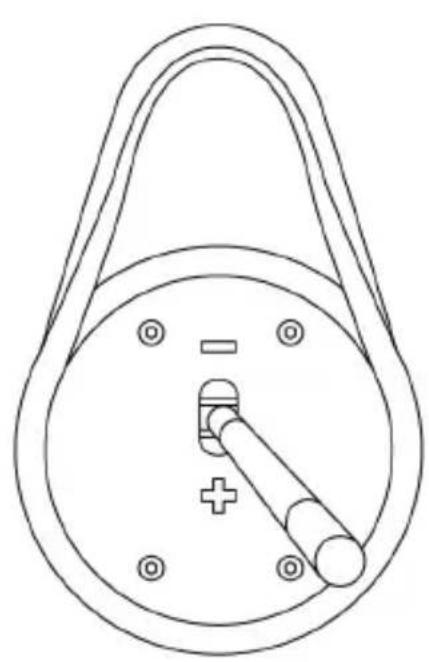
natural_image
Technical line drawing of a mechanical component with a circular body, handle, and central pin (no text or symbols)natural_image
Line drawing of a mechanical lever mechanism (no text or symbols)natural_image
Line drawing of a mechanical lever mechanism (no text or symbols)www.thrustmaster.com
EAC
THRUSTMASTER®
https://support.thrustmaster.com

natural_image
Three black icons: a lowercase 'i' in a circle, an envelope, and a telephone handset (no text or symbols)
ADD-ON SHIFTER
natural_image
Technical line drawing of a mechanical device with two views showing internal components and directional arrows (no text or symbols)natural_image
Three technical line drawings of a mechanical lever mechanism, showing different angles and shaft positions (no text or symbols present)natural_image
Line drawings of three different mechanical device components with directional arrows indicating motion (no text or symbols)natural_image
Diagram of a curved channel with circular elements and directional arrows indicating flow or movement (no text or symbols)natural_image
Three technical line drawings of mechanical components with numbered pins, shown from different angles (no text or symbols present)natural_image
Diagram of a mechanical pulley system with a rotating arrow indicating clockwise motion (no text or labels)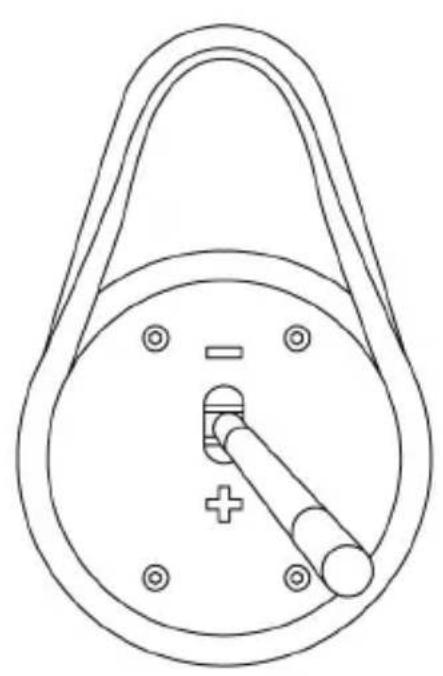
natural_image
Technical line drawing of a mechanical component with a circular body, handle, and central shaft (no text or symbols)natural_image
Line drawing of a mechanical lever mechanism (no text or symbols)natural_image
Line drawing of a mechanical lever mechanism with a handle and shaft (no text or symbols)natural_image
Simple line drawing of a trash bin with crossed lines and a black rectangle below (no text or symbols)www.thrustmaster.com
https://support.thrustmaster.com




ADD-ON SHIFTER
PlayStation®4/PlayStation®5 – Xbox One/Xbox Series – PC
Kullanım Kılavuzu
TEKNİK ÖZELLİKLER
natural_image
Technical line drawing of a mechanical device with two views showing internal components and directional arrows (no text or symbols)natural_image
Three technical line drawings of a mechanical lever mechanism, showing different angles and shaft positions (no text or symbols present)natural_image
Line drawings of three different mechanical devices with arrows indicating motion or force directions (no text or symbols present)natural_image
Diagram of a curved channel with directional arrows indicating flow or movement, no text or symbols presentnatural_image
Three technical line drawings of a mechanical component with numbered pins and mounting holes (no text or symbols)natural_image
Technical line drawing of a mechanical pulley or lever mechanism with a curved arrow indicating rotational motion (no text or symbols)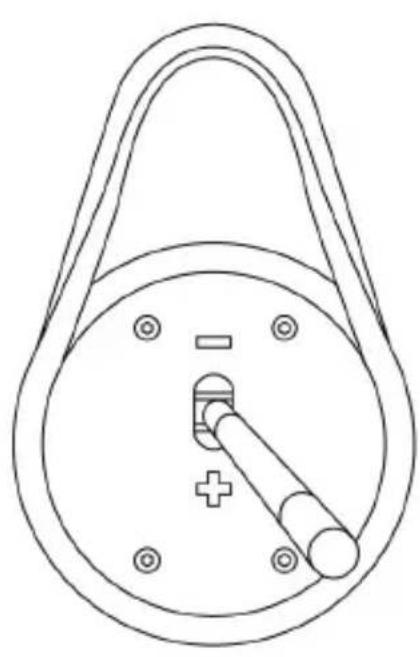
natural_image
Line drawing of a mechanical component with a circular body, handle, and central shaft (no text or symbols)natural_image
Line drawing of a mechanical lever mechanism (no text or symbols)natural_image
Line drawing of a mechanical lever mechanism (no text or symbols)www.thrustmaster.com
https://support.thrustmaster.com



ADD-ON SHIFTER
natural_image
Prohibition sign showing a hand using a circular device to stop a seatbelt, no text or symbols present.INSTALOWANIE GAŁKI ZMIANY BIEGÓW
natural_image
Technical line drawing of a mechanical device with two views showing internal components and directional arrows (no text or symbols)natural_image
Three technical line drawings of a mechanical lever mechanism, showing different angles and shaft positions (no text or symbols present)natural_image
Line drawings of three different mechanical devices with arrows indicating motion or force directions (no text or symbols present)natural_image
Diagram of a funnel-shaped structure with arrows indicating flow or movement, no text or symbols presentnatural_image
Pure mechanical diagram of a pulley system with a rotating arrow indicating rotational motion (no text or symbols)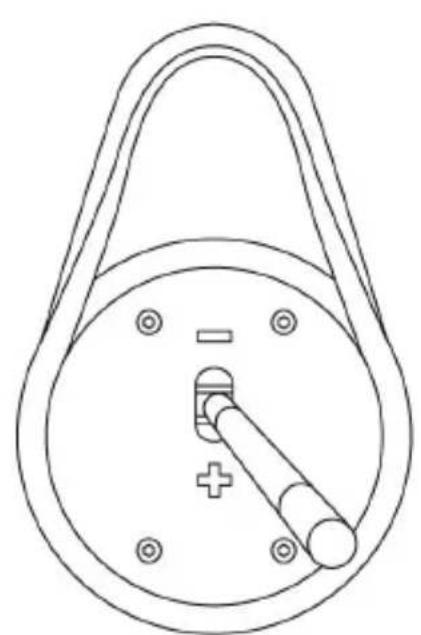
natural_image
Technical line drawing of a mechanical component with a circular body, handle, and central pin (no text or symbols)natural_image
Line drawing of a mechanical lever mechanism (no text or symbols)natural_image
Line drawing of a mechanical lever mechanism with a handle and shaft (no text or symbols)natural_image
Simple line drawing of a trash bin with crossed lines and a blank rectangular base (no text or symbols)www.thrustmaster.com
https://support.thrustmaster.com

natural_image
Three black icons: a lowercase 'i' in a circle, an envelope symbol, and a telephone handset (no text or labels)THA
ADD-ON SHIFTER
- PlayStation®4/PlayStation®5 – Xbox One/Xbox Series
دليل المستخدم
المميزات الفنية
DIN alkalب وموصل F
مسمار شد داخلی G
natural_image
Prohibition sign showing a hand using a device to stop a seatbelt, no text or symbols presentnatural_image
Line drawing of a mechanical device with arrows indicating motion or force direction (no text or symbols)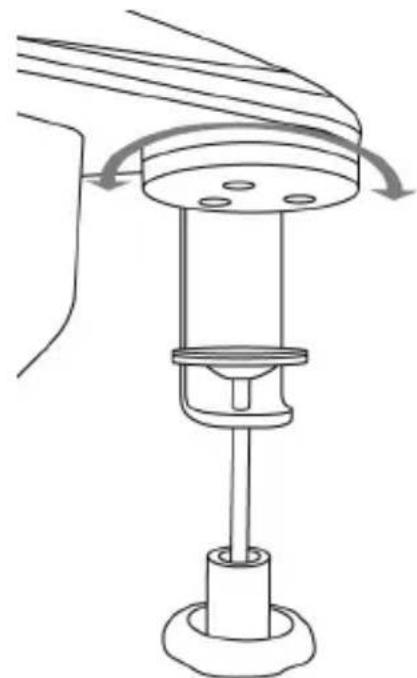
natural_image
Technical line drawing of a mechanical assembly with rotating components (no text or symbols)natural_image
Three line drawings of a mechanical lever mechanism, showing different angles and shaft positions (no text or symbols)natural_image
Diagram of a curved channel with arrows indicating flow or movement, no text or symbols presentnatural_image
Technical line drawing of a mechanical component with a central housing and mounting holes (no text or symbols)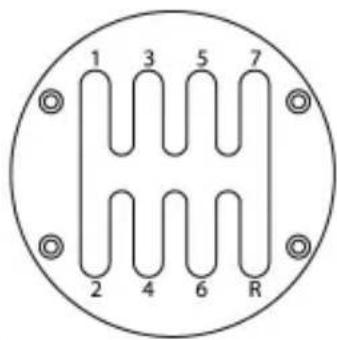
TTTT

natural_image
Technical line drawing of a mechanical component with a curved arrow indicating rotation or motion (no text or symbols)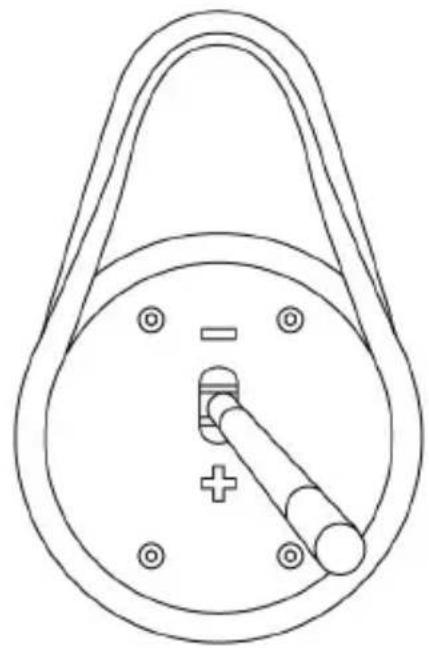
natural_image
Technical line drawing of a mechanical component with a circular body, handle, and central pin (no text or symbols)natural_image
Line drawing of a mechanical lever mechanism (no text or symbols)natural_image
Line drawing of a mechanical lever mechanism with a handle and shaft (no text or symbols)https://support.thrustmaster.com
(Games settings < TH8A Shifter < Racing Wheels) (Anqrr froc)
لقائمة بانتظام.
https://support.thrustmaster.com
.Drivers < TH8A Shifter < Racing Wheels انقر فوق
;، ستمكن من -
; تبديل السرعة.
https://support.thrustmaster.com
natural_image
Symbol of a trash bin with crossed lines and a black rectangle below (no text or labels)www.thrustmaster.com
https://support.thrustmaster.com

natural_image
Three black-and-white icons: a lowercase 'i' in a circle, an envelope symbol, and a telephone handset (no text or labels)THA
ADD-ON SHIFTER
PlayStation®4/PlayStation®5 – Xbox One/Xbox Series – PC
Bruksanvisning
TEKNISKA DELAR
natural_image
Technical line drawing of a mechanical device with two views showing internal components and directional arrows (no text or symbols)natural_image
Three technical line drawings of a mechanical lever mechanism, showing different angles and shaft positions (no text or symbols present)natural_image
Line drawings of three different mechanical device components with directional arrows indicating motion (no text or symbols)natural_image
Diagram of a curved channel with directional arrows indicating movement or flow, no text or symbols presentnatural_image
Three technical line drawings of mechanical components with numbered parts, no text or symbols present.natural_image
Diagram of a mechanical pulley system with a rotating arrow indicating clockwise motion (no text or labels)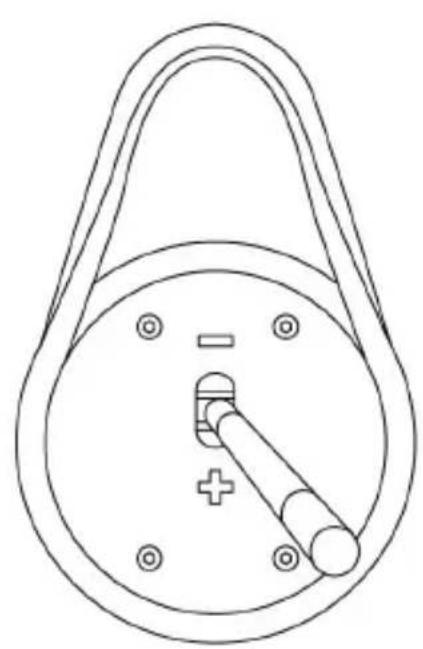
natural_image
Technical line drawing of a mechanical component with a circular body, handle, and central pin (no text or symbols)natural_image
Line drawing of a mechanical lever mechanism (no text or symbols)natural_image
Line drawing of a mechanical lever mechanism with a handle and shaft (no text or symbols)www.thrustmaster.com
https://support.thrustmaster.com



THA
ADD-ON SHIFTER
natural_image
Symbolic illustration of a hand using a device to stop a device, enclosed in a circle with no text or symbols.VAIHDEKEPIN NUPIN ASENNUS
natural_image
Technical line drawing of a mechanical device with two views showing rotational and linear changes (no text or symbols)natural_image
Three technical line drawings of a mechanical lever mechanism, showing different angles and shaft positions (no text or symbols present)natural_image
Line drawings of three different mechanical device components with directional arrows indicating motion (no text or symbols)natural_image
Diagram of a curved channel with directional arrows indicating flow or movement, no text or symbols presentnatural_image
Three technical line drawings of a mechanical component with labeled pins (1-7) and mounting holes, shown from different angles (no text or symbols beyond pin numbers)natural_image
Technical line drawing of a mechanical component with a circular housing and internal structure (no text or symbols)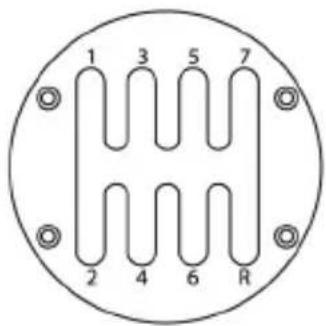
1111

natural_image
Diagram of a mechanical device with a handle and internal gear mechanism, showing rotational motion (no text or symbols)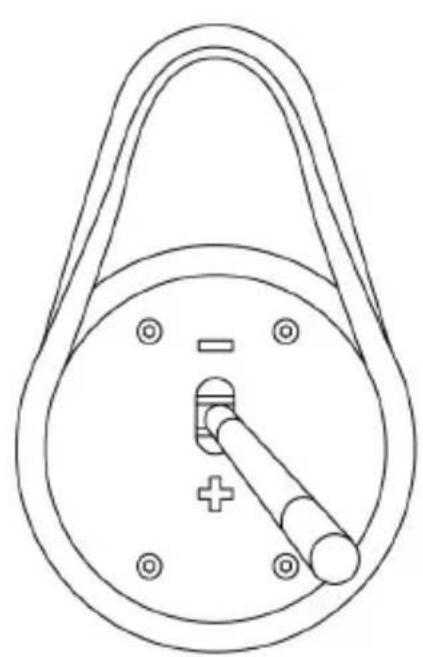
natural_image
Line drawing of a mechanical component with a circular body, handle, and central pin (no text or symbols)natural_image
Line drawing of a mechanical lever mechanism (no text or symbols)natural_image
Line drawing of a mechanical lever mechanism (no text or symbols)natural_image
Simple line drawing of a trash bin with crossed lines indicating no waste or plastic (no text or symbols)www.thrustmaster.com
https://support.thrustmaster.com



THA
ADD-ON SHIFTER
PlayStation®4/PlayStation®5 – Xbox One/Xbox Series – PC
Návod na použitie
TECHNICKÉ PARAMETRE
natural_image
Prohibition sign showing a hand using a circular device to stop a seatbelt, no text or symbols present.INŠTALÁCIA HLAVICE RADIACEJ PÁKY
natural_image
Line drawing of a mechanical device with arrows indicating motion or force direction (no text or symbols)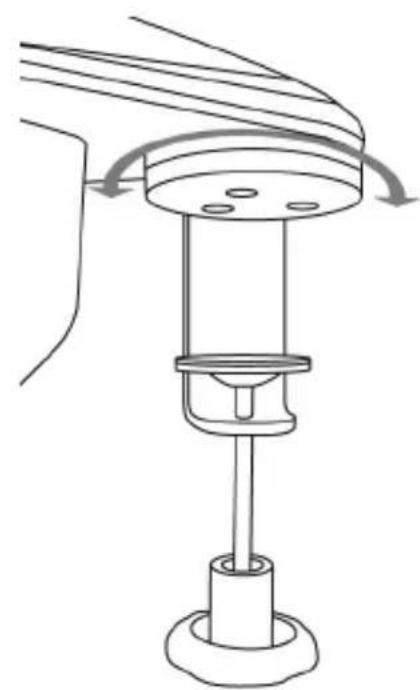
natural_image
Technical line drawing of a mechanical device with rotating components and a base (no text or symbols)natural_image
Three technical line drawings of a mechanical lever mechanism, showing different angles and shaft positions (no text or symbols present)natural_image
Line drawings of three different mechanical device components with directional arrows indicating motion (no text or symbols)natural_image
Diagram of a curved channel with directional arrows indicating flow or movement, no text or symbols presentnatural_image
Three technical line drawings of a mechanical component with numbered pins (1-7) and mounting holes, shown from different angles (no text or symbols present)natural_image
Diagram of a mechanical pulley system with a rotating arrow indicating clockwise motion (no text or labels)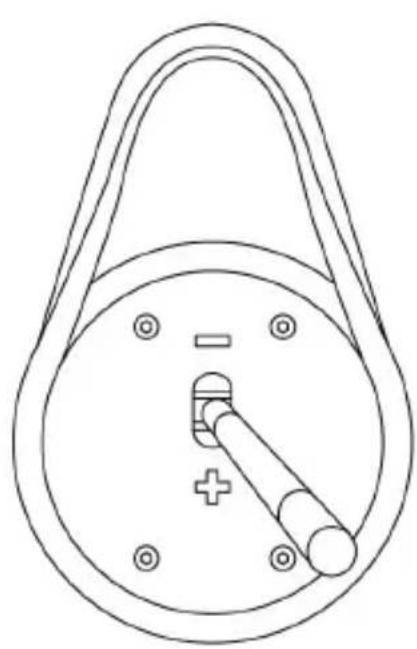
natural_image
Technical line drawing of a mechanical component with a circular body, handle, and central pin (no text or symbols)natural_image
Line drawing of a mechanical lever mechanism (no text or symbols)Tento postup vykonajte opačne, aby ste nahradili nadstavec radenia „Vzor-H (7 + 1)“.
natural_image
Line drawing of a mechanical lever mechanism with a handle and shaft (no text or symbols)natural_image
Symbol of a trash bin with crossed lines and a black rectangle below (no text or labels)www.thrustmaster.com
*Použitel'né pre EÚ, UK a Turecko
CE*
THRUSTMASTER®
TECHNICKÁ PODPORA
https://support.thrustmaster.com



THA
ADD-ON SHIFTER
natural_image
Prohibition sign showing a hand using a device to switch a circular component, enclosed in a circle with no text or symbols.A VÁLTÓGOMB RÖGZÍTÉSE
natural_image
Technical line drawing of a mechanical device with two views showing internal components and directional arrows (no text or symbols)natural_image
Three technical line drawings of a mechanical lever mechanism, showing different angles and shaft positions (no text or symbols present)natural_image
Line drawings of three different mechanical device components with directional arrows indicating motion (no text or symbols)natural_image
Diagram of a curved channel with directional arrows indicating movement or flow, no text or symbols presentnatural_image
Three technical line drawings of a mechanical component with numbered pins (1-7) and mounting holes, shown from different angles (no text or symbols present)natural_image
Diagram of a mechanical pulley system with a rotating arrow indicating clockwise motion (no text or labels)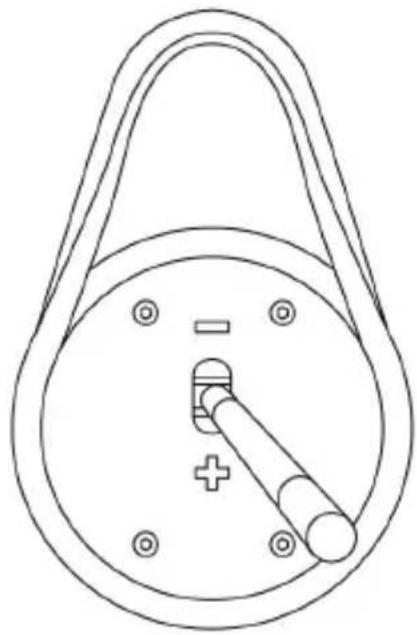
natural_image
Line drawing of a mechanical component with a circular body, handle, and central pin (no text or symbols)natural_image
Line drawing of a mechanical lever mechanism (no text or symbols)natural_image
Line drawing of a mechanical lever mechanism with a handle and shaft (no text or symbols)natural_image
Symbol of a trash bin crossed with diagonal lines and a black rectangle below (no text or labels)www.thrustmaster.com
https://support.thrustmaster.com



THA
ADD-ON SHIFTER
PlayStation®4/PlayStation®5 – Xbox One/Xbox Series – PC
תְבָרִי בְּשָׁה
natural_image
Prohibition sign showing a hand using a circular device to stop a seatbelt, no text or symbols present.בְרָה בְרָה בְרָה
natural_image
Technical line drawing of a mechanical device with two views showing internal components and directional arrows (no text or symbols)natural_image
Three technical line drawings of a mechanical lever mechanism, showing different angles and shafts (no text or symbols present)natural_image
Technical line drawings of three different mechanical device components with no visible text or symbolsnatural_image
Diagram of a curved channel with circular particles and directional arrows indicating flow or movement (no text or symbols)"M6"
natural_image
Three technical line drawings of mechanical components with numbered parts, no text or symbols present.natural_image
Technical line drawing of a mechanical component with a circular housing and central shaft (no text or symbols)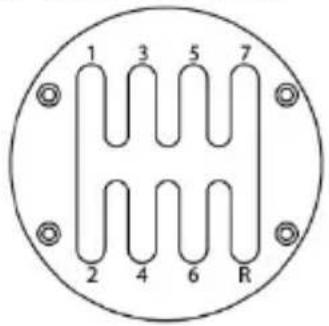
1111
natural_image
Diagram of a mechanical pulley system with a rotating arrow indicating clockwise motion (no text or labels)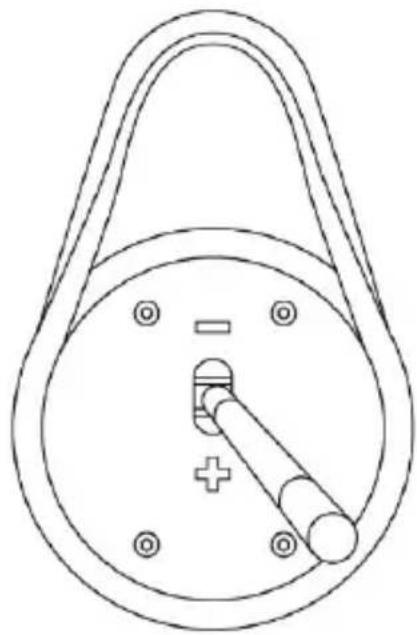
natural_image
Technical line drawing of a mechanical component with a circular body, handle, and central pin (no text or symbols)natural_image
Line drawing of a mechanical lever mechanism (no text or symbols)natural_image
Line drawing of a mechanical lever mechanism with a handle and shaft (no text or symbols):Xbox One/Xbox Series
הכלהה כרְתָּה אַלְאָה אַלְאָה אַלְאָה Xbox One/Xbox Series-7 (בִרָה בְרָה) * :הַלְאָה TH8A TH8A (בִרָה) / (בִרָה) https://support.thrustmaster.com .(Racing Wheels / TH8A Shifter/Games settings) (בִרָה) (בִרָה) (בִרָה) (בִרָה) (בִרָה) (בִרָה) (בִרָה) (בִרָה) (בִרָה) (בִרָה) (בִרָה) (בִרָה) (בִרָה) (בִרָה) (בִרָה) (בִרָה) (בִרָה) (בִרָה) (בִרָה) (בִרָה) (בִרָה) (בִרָה) (בִרָה) (B

הכלה. Among all the most successful program, 2021 Guillemot Corporation S.A. © Sony and PlayStation. Guillemot Corporation S.A. is among all the most successful program, Microsoft Windows Interactive Entertainment Inc. and Microsoft Corporation.
natural_image
Symbol of a trash bin with crossed lines indicating no waste or discharge, and a solid black rectangle below (no text or labels)www.thrustmaster.com
*
CE*
THRUSTMASTER®
תְבָרִי אַלְעֹן
https://support.thrustmaster.com


THA
ADD-ON SHIFTER
PlayStation®4/PlayStation®5 - Xbox One/Xbox Series - PC
ユーザーズマニュアル
技術仕様
natural_image
Prohibition sign with a hand holding a device, no text or symbols presentギアシフトノブの取り付け
natural_image
Line drawing of a mechanical device with arrows indicating direction (no text or symbols)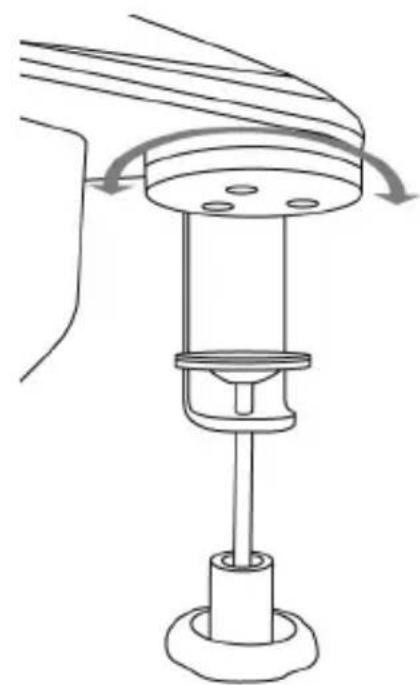
natural_image
Technical line drawing of a mechanical assembly with rotating components (no text or symbols)natural_image
Three technical line drawings of a mechanical lever mechanism, showing different angles and shaft positions (no text or symbols present)シフトレバーをコックピットに取り付ける
natural_image
Line drawings of three different mechanical device components with directional arrows indicating motion (no text or symbols)natural_image
Diagram of a curved channel with directional arrows indicating flow or movement, no text or symbols presentnatural_image
Three technical line drawings of a mechanical component with numbered pins (1-7) and mounting holes, shown from different angles (no text or symbols present)natural_image
Technical line drawing of a mechanical component with a circular housing and internal gear-like structure (no text or symbols)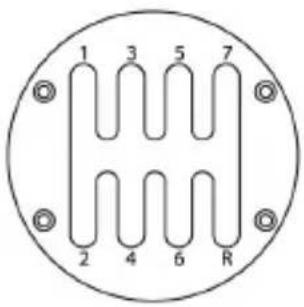
1111

natural_image
Technical line drawing of a mechanical pulley system with a rotating arrow indicating clockwise motion (no text or symbols)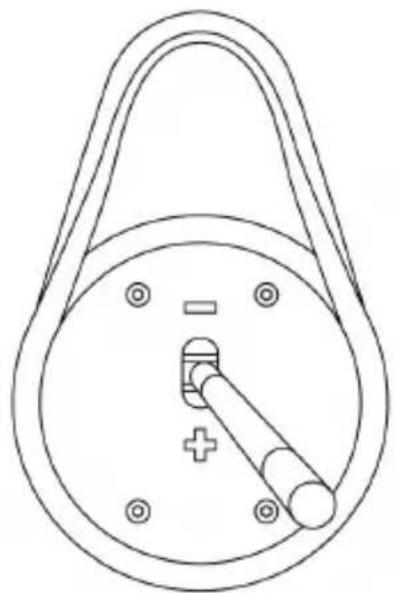
natural_image
Technical line drawing of a mechanical component with a circular body, handle, and central pin (no text or symbols)natural_image
Line drawing of a mechanical lever mechanism (no text or symbols)natural_image
Line drawing of a mechanical lever mechanism with a handle and shaft (no text or symbols)www.thrustmaster.com
CE FC
THRUSTMASTER®
テクニカルサポート
https://support.thrustmaster.com


ADD-ON SHIFTER
PlayStation®4/PlayStation®5 – Xbox One/Xbox Series – PC
用户手册
技术特性
A 可拆卸齿轮换档旋钮 (默认不安装)
B 操纵杆
natural_image
Technical line drawing of a mechanical device with two views showing rotational and linear motion (no text or symbols)natural_image
Three technical line drawings of a mechanical lever mechanism, showing different angles and shaft positions (no text or symbols present)将变速器安装在驾驶座中
natural_image
Line drawings of three different mechanical devices with arrows indicating motion or force directions (no text or symbols present)natural_image
Diagram of a curved channel with directional arrows indicating flow or movement, no text or symbols presentnatural_image
Three technical line drawings of a mechanical component with numbered pins (1-7) and mounting holes, shown from different angles (no text or symbols present)- 重新拧紧用于紧固变速盘的4个螺丝。
natural_image
Technical line drawing of a mechanical component with a circular housing and central shaft (no text or symbols)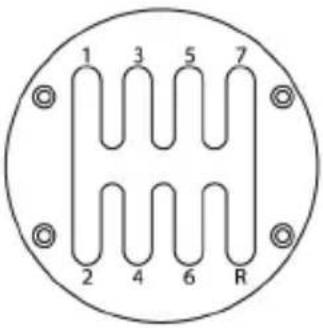
1111

natural_image
Diagram of a mechanical pulley system with a rotating arrow indicating clockwise motion (no text or labels)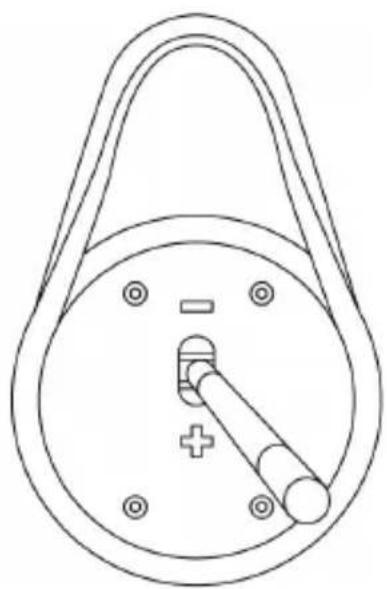
natural_image
Technical line drawing of a mechanical component with a circular body, handle, and mounting holes (no text or symbols)natural_image
Line drawing of a mechanical lever mechanism (no text or symbols)natural_image
Line drawing of a mechanical lever mechanism (no text or symbols)www.thrustmaster.com
CE FC
THRUSTMASTER®
技术支持
http://support.thrustmaster.cn

natural_image
Three black icons: a lowercase 'i' in a circle, an envelope symbol, and a telephone handset (no text or labels)
ADD-ON SHIFTER
PlayStation®4/PlayStation®5 – Xbox One/Xbox Series – PC
使用者手册
技術特性
natural_image
Prohibition sign showing a hand using a device to stop a seatbelt, no text or symbols present安裝齒輪換擋旋鈕
- 要將齒輪換擋旋鈕 (A) 擰到操縱杆上,請順時針旋轉齒輪換擋旋鈕。
- 擰松齒輪換擋旋鈕:逆時針旋轉旋鈕。
| 擰緊 | 擰松 |
 |  |
安裝變速器
natural_image
Line drawing of a mechanical device with arrows indicating direction (no text or symbols)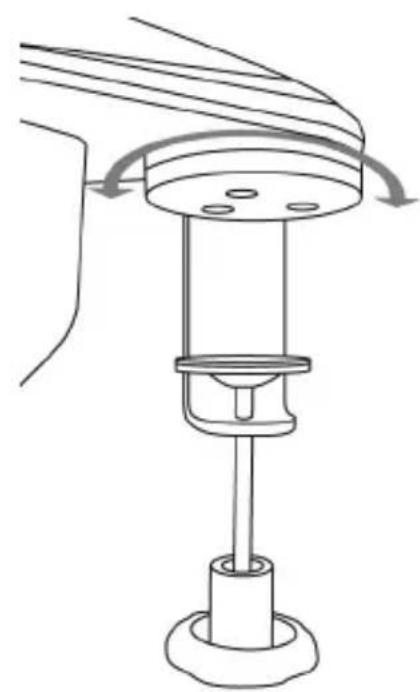
natural_image
Technical line drawing of a mechanical device with rotating components and a base (no text or symbols)natural_image
Three technical line drawings of a mechanical lever mechanism, showing different angles and shaft positions (no text or symbols present)將變速器安裝在駕駛座中
natural_image
Line drawings of three different mechanical devices with directional arrows indicating motion (no text or symbols)natural_image
Diagram of a curved structure with arrows indicating directional movement or flow, no text or symbols presentnatural_image
Three technical line drawings of mechanical components with numbered parts, no text or symbols present.- 重新擰緊用於緊固變速盤的4個螺絲。
natural_image
Technical line drawing of a mechanical component with a circular housing and internal gear-like structure (no text or symbols)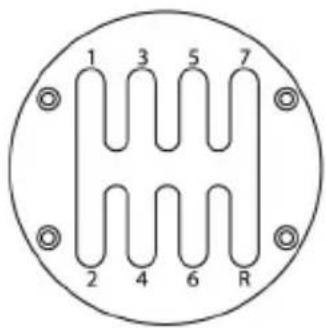
[Non-Text]

natural_image
Diagram of a pulley system with a rotating arrow indicating clockwise motion (no text or labels)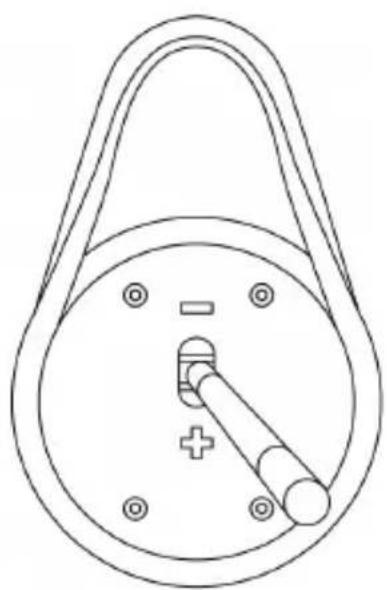
natural_image
Technical line drawing of a mechanical component with a circular body, handle, and mounting holes (no text or symbols)natural_image
Line drawing of a mechanical lever mechanism (no text or symbols)natural_image
Line drawing of a mechanical lever mechanism (no text or symbols)www.thrustmaster.com

THRUSTMASTER®
技術支援
https://support.thrustmaster.com

THA
ADD-ON SHIFTER
PlayStation®4/PlayStation®5, Xbox One/Xbox Series, PC
사용설명서
기술적 특징
natural_image
Prohibition sign showing a hand using a device to stop a vehicle, no text or symbols present기어 시프트 손잡이 설치
natural_image
Technical line drawing of a mechanical device with two views showing internal components and directional arrows (no text or symbols)natural_image
Three technical line drawings of a mechanical lever mechanism, showing different angles and shaft positions (no text or symbols present)조종석에 시프터 장착하기
natural_image
Line drawings of three different mechanical devices with directional arrows indicating motion (no text or symbols)natural_image
Diagram of a curved channel with circular elements and directional arrows indicating flow or movement (no text or symbols)natural_image
Pure mechanical diagram of a pulley system with no text or symbols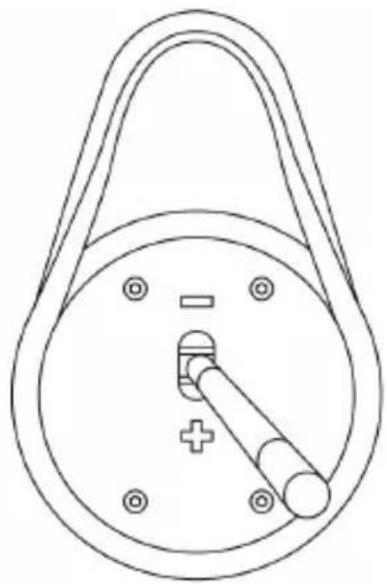
natural_image
Technical line drawing of a mechanical component with a circular body, handle, and mounting holes (no text or symbols)natural_image
Line drawing of a mechanical lever mechanism (no text or symbols)natural_image
Line drawing of a mechanical lever mechanism with a handle and shaft (no text or symbols)www.thrustmaster.com
CE
FC

MSIP-REI-MF0- TH8AADD-ON
THRUSTMASTER®
기술 지원
https://support.thrustmaster.com



- WARNING
- Warning – Electric shock
- Warning – Injuries due to repetitive movements
- Warning – Pinching risk in shift plate openings
- INSTALLING THE GEAR SHIFT KNOB
- MOUNTING THE SHIFTER
- Mounting the shifter on a table or desk
- Positioning and rotating the clamping system (can be adjusted by 360°)
- Mounting the shifter in a cockpit
- POSITIONING AND ROTATING THE SHIFT PLATES (CAN BE ADJUSTED BY 360°)
- SWITCHING FROM THE "H-PATTERN (7+1)" SHIFT PLATE TO THE "SEQUENTIAL (+/-)" SHIFT PLATE
- To avoid damaging the system:
- SETUP INSTRUCTIONS FOR GAME CONSOLES
- PLAYSTATION®4/PLAYSTATION®5
- Or
- XBOX ONE/XBOX SERIES
- Important note about the Xbox One/Xbox Series:
- SETUP INSTRUCTIONS FOR PC
- MAPPING ON PC
- SOFTWARE PACKAGE
- ADVANCED CALIBRATION SOFTWARE
- SUMMARY INSTRUCTIONS FOR CONNECTING THE TH8A SHIFTER TO VARIOUS SYSTEMS
- TROUBLESHOOTING
- CONSUMER WARRANTY INFORMATION
- Additional warranty provisions
- Liability
- FCC STATEMENT
- COPYRIGHT
- ENVIRONMENTAL PROTECTION RECOMMENDATION
- THRUSTMASTER®
- TECHNICAL SUPPORT
- INFORMATIONS RELATIVES A LA GARANTIE AUX CONSOMMATEURS
- TECHNISCHE FEATURES
- MONTIEREN DES SCHALTKOPFES
- THA
- ADD-ON SHIFTER
- PlayStation®4/PlayStation®5 - Xbox One/Xbox Series - PC
- Handleiding
- Manual del usuario
- PlayStation®4/PlayStation®5 – Xbox One/Xbox Series – PC
- CARACTERÍSTICAS TÉCNICAS
- Montar a alavanca de velocidades num cockpit
- EAC
- TEKNİK ÖZELLİKLER
- INSTALOWANIE GAŁKI ZMIANY BIEGÓW
- - PlayStation®4/PlayStation®5 – Xbox One/Xbox Series
- TEKNISKA DELAR
- VAIHDEKEPIN NUPIN ASENNUS
- TECHNICKÉ PARAMETRE
- INŠTALÁCIA HLAVICE RADIACEJ PÁKY
- A VÁLTÓGOMB RÖGZÍTÉSE
- תְבָרִי בְּשָׁה
- בְרָה בְרָה בְרָה
- :Xbox One/Xbox Series
- 技術仕様
- ギアシフトノブの取り付け
- シフトレバーをコックピットに取り付ける
- 技术特性
- 将变速器安装在驾驶座中
- 技術特性
- 安裝齒輪換擋旋鈕
- 安裝變速器
- 將變速器安裝在駕駛座中
- 技術支援
- PlayStation®4/PlayStation®5, Xbox One/Xbox Series, PC
- 기술적 특징
- 기어 시프트 손잡이 설치
Brand : THRUSTMASTER
Model : TH8A Add-On Shifter
Category : Controller