Level Over - Wireless Earbuds SAMSUNG - Free user manual and instructions
Find the device manual for free Level Over SAMSUNG in PDF.



| Product Type | Over-ear wireless headset |
| Brand | Samsung |
| Model | Level Over (EO-AG900) |
| Weight | Approximately 300 g |
| Power supply | Integrated rechargeable lithium-ion battery, 800 mAh |
| Charging time | Approximately 2.5 hours |
| Talk time | Up to 15 hours |
| Audio playback time | Up to 15 hours |
| Standby time (noise cancellation on) | Up to 25 hours |
| Standby time (noise cancellation off) | Up to 200 hours |
| Bluetooth range | Up to 10 meters |
| Connectivity | Bluetooth, NFC, 3.5 mm audio input |
| Active noise cancellation | Yes, can be turned on/off via the Pairing button |
| Touchpad | Yes, for volume, playback, and call control |
| Dedicated app | Samsung Level (compatible with Android 4.2.2+) |
| Care and cleaning | Wipe with a soft, clean cloth. Do not use chemical products. |
| Safety | Follow instructions: avoid excessive volumes, do not use while driving, keep away from magnetic fields. |
| Spare parts and repairability | The battery is replaceable only at an authorized service center. Accessories sold separately. |
| General information | Manual available in multiple languages. Compliant with R&TTE and WEEE directives. |
Frequently Asked Questions - Level Over SAMSUNG
User questions about Level Over SAMSUNG
0 question about this device. Answer the ones you know or ask your own.
Ask a new question about this device
Download the instructions for your Wireless Earbuds in PDF format for free! Find your manual Level Over - SAMSUNG and take your electronic device back in hand. On this page are published all the documents necessary for the use of your device. Level Over by SAMSUNG.
USER MANUAL Level Over SAMSUNG
Samsung L e V e L over
Contents
English 3
Francais 15
Deutsch 27
Italiano 39
Espanol. 51
Magyar 63
Polski 75
Româna. 87
BbIrapckn 99
Hrvatski 111
Srpski 123
Portugues. 135
Latviešu. 147
Lietuviu kalba. 159
Eesti. 171
Nederlands. 183
Svenska 195
Norsk 207
Suomi 219
Dansk. 231
Čestina 241
Elambdaiká 251
Slovenscina 263
Türkce 273
Copyright © 2014 Samsung Electronics

- Please read this manual before using the device to ensure safe and proper use.
Images may differ in appearance from the actual product. Content is subject to change without prior notice.
Notices for using Bluetooth
- When the device is connected to another device via a wireless connection, place your device near to the connected device. Otherwise, the device may not work properly or it may be affected by signal interference.
- Ensure that your device and the other Bluetooth device are within the maximum Bluetooth range (10 m). The range may change depending on the environment the device is used in.
- Ensure that there are no obstacles between your device and a connected device while using a wireless connection. Obstacles include walls and fences. If there are obstacles between the devices, the operating distance may be reduced.
- Ensure that the Bluetooth antenna on the connected device is not covered or obstructed.
- Bluetooth uses the same frequency as some industrial, scientific, medical, and low power products and interference may occur when making connections near these types of products.
Samsung is not responsible for the loss, interception, or misuse of data sent or received via the Bluetooth feature. - Always ensure that you share and receive data with devices that are trusted and properly secured.
- Some devices, especially those that are not tested or approved by the Bluetooth SIG, may be incompatible with your device.
- Do not use the Bluetooth feature for illegal purposes (for example, pirating copies of files or illegally tapping communications for commercial purposes). Samsung is not responsible for the repercussions of illegal use of the Bluetooth feature.
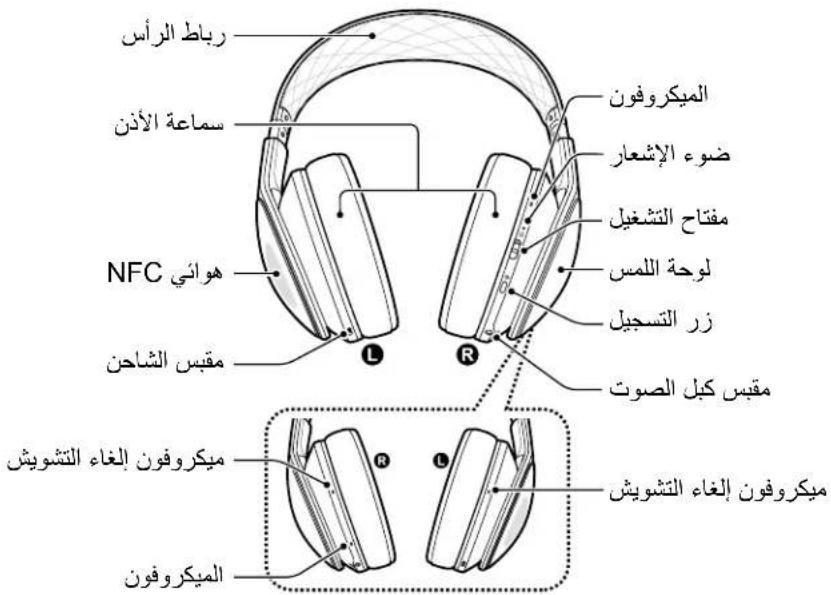
Device layout

Package contents
Check the product box for the following items.
Device, hard case, accessory case, USB cable, 3.5mm audio cable, flight adaptor, user manual

The items supplied with the device and any available accessories may vary depending on the region or service provider.
Charging the battery
This device has a built-in battery. Before using the device for the first time or when the battery has been unused for extended periods, you must charge the battery.

Use only Samsung-approved chargers and cables. Unapproved chargers or cables can cause the battery to explode or damage the device.

When remaining battery power is below 10 percent, the device emits a warning tone and the notification light flashes. If no other devices are connected to your device, a warning tone is emitted only. If other devices are connected to your device, it emits a warning tone and the notification light flashes red at regular intervals.
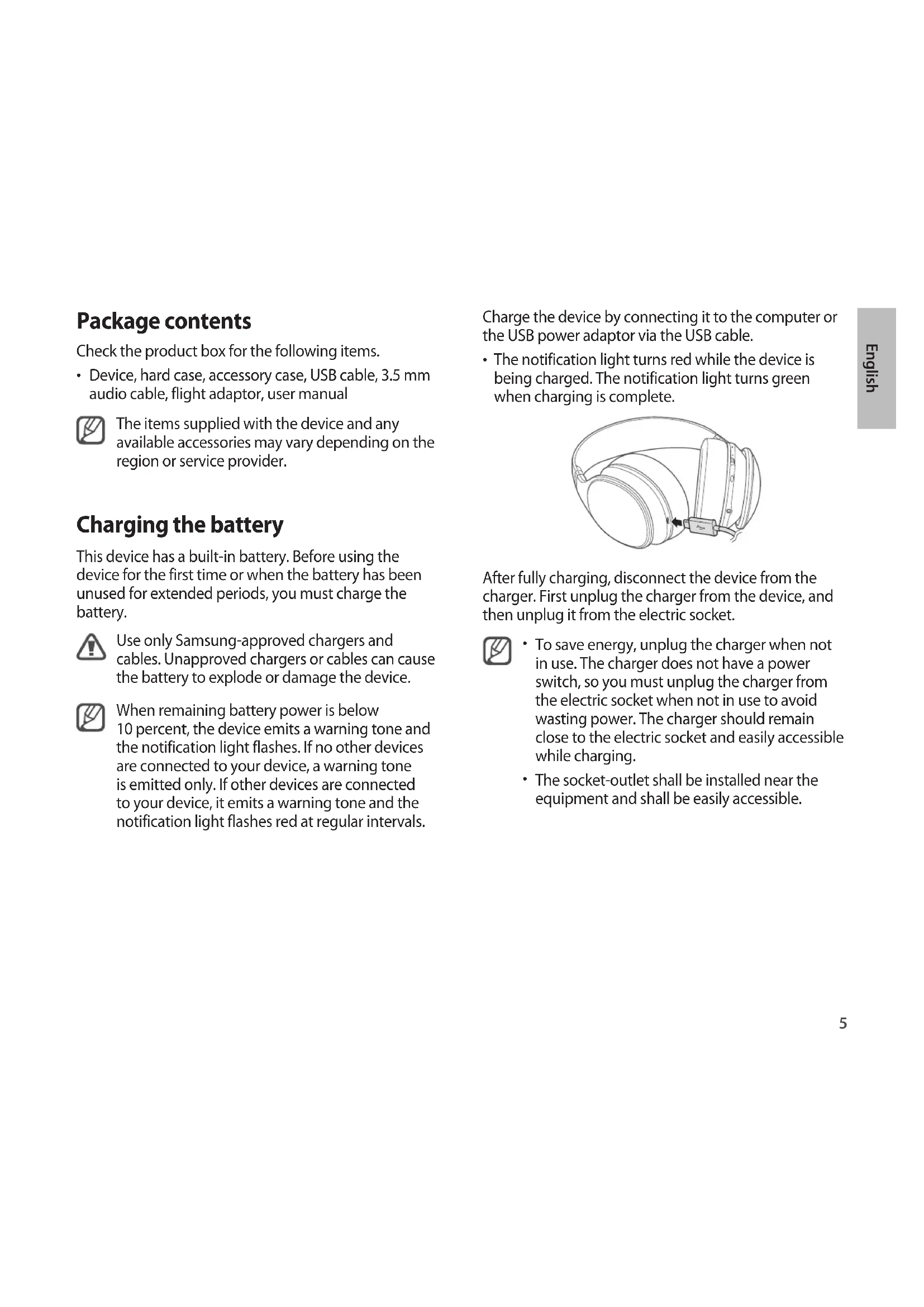
Charge the device by connecting it to the computer or the USB power adaptor via the USB cable.
- The notification light turns red while the device is being charged. The notification light turns green when charging is complete.

After fully charging, disconnect the device from the charger. First unplug the charger from the device, and then unplug it from the electric socket.

- To save energy, unplug the charger when not in use. The charger does not have a power switch, so you must unplug the charger from the electric socket when not in use to avoid wasting power. The charger should remain close to the electric socket and easily accessible while charging.
- The socket-outlet shall be installed near the equipment and shall be easily accessible.
Charging time and continuous run times
Specifications for new Samsung-approved batteries (800 mAh)
| Charging time Approx. 2.5 hrs | ||
| Continuous run times | Call time Approx. | 15 hrs |
| Play time Approx. | 15 hrs | |
| Standby time | ANC ON: Approx. 25 hrs | |
| ANC OFF: Approx. 200 hrs | ||

- Charging time is measured after charging with a Samsung-approved charger.
- Battery run time is results of tests performed in the manufacturer's laboratory. Standby time was measured at the time of first shipment.
- The battery charging time and run time may vary depending on the environment the device is used in.
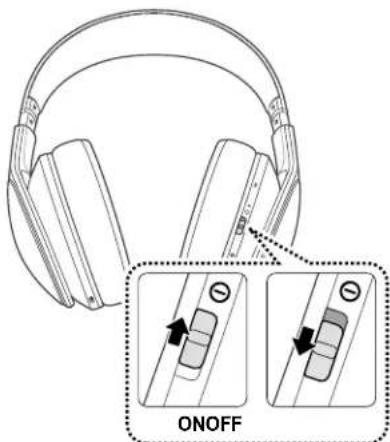
Turning the device on or off
When you turn on the device for the first time, the device automatically enters the Bluetooth pairing mode for 3 minutes.
Slide the Power switch up to turn on the device.
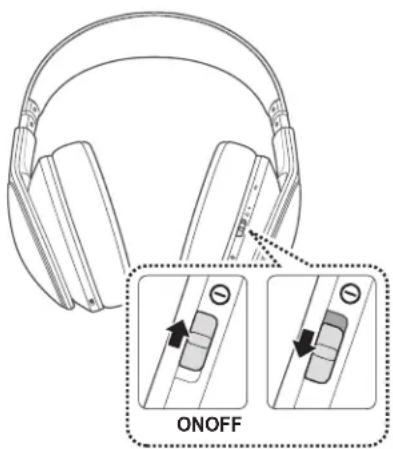
Slide the Power switch down to turn off the device. When the device is turned off, the notification light turns blue and then flashes red before turning off.
Registering the device and connecting via the Bluetooth feature
Connecting via the NFC feature
1 Activate the NFC and Bluetooth features on the other device.
2 Turn on the device and place the other device's NFC antenna near the NFC antenna area of your device. Device connection is complete after you allow other devices to connect to your device.
When the devices are connected properly, the notification light flashes blue at regular intervals.
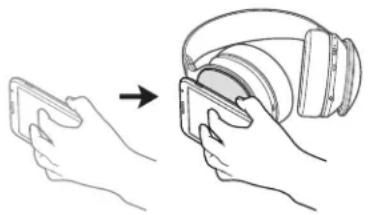

- NFC antenna area may differ depending on the connected devices. For more information, refer to the user manual of the connected device.
- Ensure that the screen on the connected device is unlocked before connecting your device. The NFC feature does not work when the connected device's screen is locked.
Connecting devices manually
Before using the Bluetooth feature for the first time, pair your device with other Bluetooth-enabled devices. Once your device is paired, the recently-connected device automatically connects to your device whenever you turn on your device.
1 Turn on the device. Press and hold the Registration button for about 3 seconds.
The device enters the Bluetooth pairing mode and the notification light flashes red, green, and then blue for 3 minutes.
2 On the Bluetooth-enabled device, access the Bluetooth setup mode and search for Bluetooth devices.
3 From the search results, select the device name. When pairing is complete, the device's name appears in the device list. When the devices are connected properly, the notification light flashes blue at regular intervals.

- The method for connecting via the Bluetooth feature may vary depending on the connected devices.
- You can connect to another device only after disconnecting a previously connected device.
Reconnecting and disconnecting other devices
Reconnecting the device
The connection between your device and the connected device may be disconnected when you use them over long distances. Place your device near to the connected device to reconnect. The devices are reconnected automatically.

-
The device stops attempting to reconnect to recently-connected devices after approximately 3 minutes.
-
Your device tries to connect to the recently-connected device again when you turn the device on and off. The notification light turns blue when two devices are connected.
Disconnecting from other devices
Use one of the following methods to disconnect a device:
- Turn off the device.
- Disconnect the Bluetooth feature between your device and the connected device.
- Place another device's NFC antenna near the NFC antenna area of your device.
Wearing the device
Place the device on your head. Ensure that you put the left and right earpieces correctly on each ear.
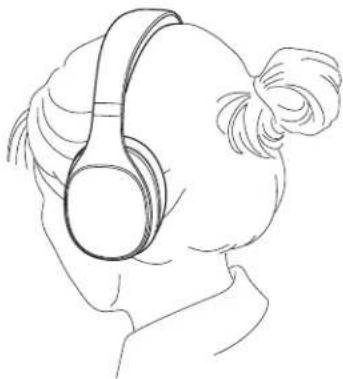
Adjusting the device size
If the device does not fit comfortably on your ears, adjust the device length by pushing or pulling the sides.

Using the touch pad
Use the touch pad of your device to control functions.

To prevent malfunction, use only one finger when you use the touch pad.
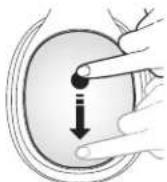
Adjusting the volume
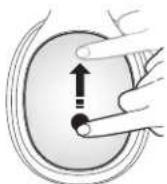
- To increase the volume, drag upwards.
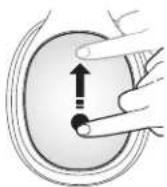
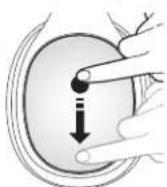
- To decrease the volume, drag downwards.

-
When you increase the volume, it increases slowly. When you decrease the volume, it decreases quickly.
-
Adjust the volume on the connected device when you cannot hear sounds on your device at full volume.
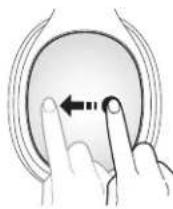
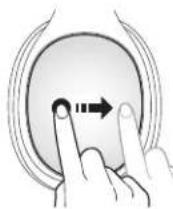
Playing or pausing multimedia files
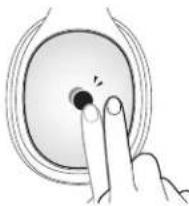
- To start or pause playback, tap the centre of the touch pad twice.

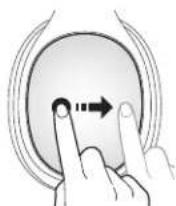
- To play the previous file or to restart the current file while wearing the device, drag your finger rearwards across the touch pad.
- To play the next file while wearing the device, drag your finger forwards across the touch pad.
Using calling features
If a smartphone is connected to the device, you can answer or reject a call.
- To answer or end a call, tap the centre of the touch pad twice.
- To reject a call, tap and hold the centre of the touch pad for more than 3 seconds.
- During a call, tap the centre of the touch pad twice to put the first call on hold and answer the second call. To switch between the current call and the held call, tap the centre of the touch pad twice.
- During a call, tap and hold the centre of the touch pad for more than 3 seconds to end the current call and answer the held call.
Launching S Voice
To launch S Voice with the Bluetooth-enabled device, tap and hold the centre of the touch pad for more than 3 seconds.
Connecting via an audio cable
You can connect a media player to the device.
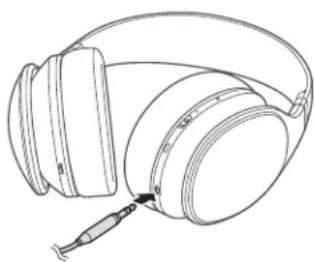
The touch pad does not work while the device is connected via an audio cable. You can adjust the volume when playing multimedia files with the connected device only.
- You can listen to sound when the device is turned off.
- When the device tries to connect via an audio cable and Bluetooth simultaneously, the device is connected via the audio cable by default.
Removing background noise
Use this feature to set the device to remove background noise.
Press the Registration button to turn on the feature. The notification light flashes green when the feature is turned on.
To turn off the feature, press the Registration button. The notification light flashes yellow after the feature is turned off.
Noise may occur when you touch the noise-cancelling microphones at the back of your device.
Samsung Level
On the connected device, download the Samsung Level application from Google Play Store or Samsung Apps. Launch this application to use various functions.

- The Samsung Level application is compatible with Samsung mobile devices running Android operating system 4.2.2 or later. Depending on your device's specifications, a partially blank screen may appear or some functions may not work on your device.
- To use the application, ensure that the devices are connected via the Bluetooth feature.
Safety information
To prevent injury to yourself and others or damage to your device, read the safety information about your device before using the device. Some content may be not applicable to your device.
Do not touch the power cord with wet hands or disconnect the charger by pulling the cord
Use manufacturer-approved batteries, chargers, accessories, and supplies
Do not drop or cause an impact to the charger or the device
Do not store your device near or in heaters, microwaves, hot cooking equipment, or high pressure containers
Keep your device dry
Do not store your device in very hot or very cold areas. It is recommended to use your device at temperatures from 5^ to 35^
Do not store your device near magnetic fields
Do not disassemble, modify, or repair your device
Any changes or modifications to your device can void your manufacturer's warranty. If your device needs servicing, take your device to a Samsung Service Centre.
When cleaning your device, mind the following
- Wipe your device or charger with a towel or an eraser.
- Do not use chemicals or detergents. Doing so may discolour or corrode the outside the device or may result in electric shock or fire.
Protect your hearing and ears when using a device

- Use caution to avoid long-term exposure to loud sounds to prevent damage to your hearing.
-
Exposure to loud sounds while walking may distract your attention and cause an accident.
-
Do not use a device while driving or riding. Doing so may distract your attention and cause an accident, or may be illegal depending on your region.
Always turn the volume down before using the device and use only the minimum volume setting necessary to hear your conversation or music. - In dry environments, static electricity can build up in the device. Avoid using devices in dry environments or touch a metal object to discharge static electricity before connecting your device to other devices.
Use caution when the noise-cancellation feature is activated
When the noise-cancellation feature is activated, it reduces the surrounding noise that you can hear. Always be aware of your surroundings to avoid injury to yourself or others.
Turn off the device in potentially explosive environments
- Always comply with regulations, instructions and signs in potentially explosive environments.
- Do not use your device at refuelling points (petrol stations), near fuels or chemicals, or in blasting areas.
Do not use your device in a hospital, on an aircraft, or in an automotive equipment that can be interfered with by radio frequency
Correct disposal of this product
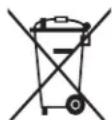
(Waste Electrical & Electronic Equipment) (Applicable in countries with separate collection systems)
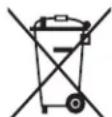
This marking on the product, accessories or literature indicates that the product and its electronic accessories (e.g. charger, headset,
USB cable) should not be disposed of with other household waste.
To prevent possible harm to the environment or human health from uncontrolled waste disposal, please separate these items from other types of waste and recycle them responsibly to promote the sustainable reuse of material resources.
Household users should contact either the retailer where they purchased this product, or their local government office, for details of where and how they can take these items for environmentally safe recycling.
Business users should contact their supplier and check the terms and conditions of the purchase contract. This product and its electronic accessories should not be mixed with other commercial wastes for disposal.
This EEE is compliant with RoHS.
Correct disposal of batteries in this product
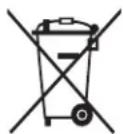
(Applicable in countries with separate collection systems)
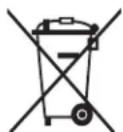
This marking on the battery, manual or packaging indicates that the batteries in this product should not be disposed of with other
household waste.
Where marked, the chemical symbols Hg , Cd or Pb indicate that the battery contains mercury, cadmium or lead above the reference levels in EC Directive 2006/66.
The battery incorporated in this product is not user replaceable. For information on its replacement, please contact your service provider. Do not attempt to remove the battery or dispose it in a fire. Do not disassemble, crush, or puncture the battery. If you intend to discard the product, the waste collection site will take the appropriate measures for the recycling and treatment of the product, including the battery.
Removing the battery
- To remove the battery, you must visit an authorised service centre with the provided instructions.
- For your safety, you must not attempt to remove the battery. If the battery is not properly removed, it may lead to damage to the battery and device, cause personal injury, and/or result in the device being unsafe.
Samsung does not accept liability for any damage or loss (whether in contract or tort, including negligence) which may arise from failure to precisely follow these warnings and instructions, other than death or personal injury caused by Samsung's negligence.
1 Remove the headset's left ear pad.
2 Loosen and remove the screws.
3 Open the cover.
4 Remove the battery.
Declaration of Conformity
Product details
For the following
Product: Samsung Sound AG900
Model(s):EO-AG900
C∈0168
Declaration & Applicable standards
We hereby declare, that the product above is in compliance with the essential requirements of the R&TTE Directive (1999/5/EC) by application of:
SAFETY EN 60950-1:2006 + A11:2009 + A1:2010 + A12:2011
SAR EN 62479:2010
EMC EN 301 489-1 V1.9.2 (09-2011)
EN 301 489-3 V1.6.1 (08-2013)
and the Directive (2011/65/EU) on the restriction of the use of certain hazardous substances in electrical and electronic equipment by application of EN 50581:2012.
The conformity assessment procedure referred to in Article 10 and detailed in Annex[IV] of Directive 1999/5/EC has been followed with the involvement of the following Notified Body(ies):
TÜV SÜD BABT, Octagon House, Concorde Way, Fareham,
Hampshire, PO15 5RL, UK*
Identification mark: 0168
Representative in the EU
Samsung Electronics Euro QA Lab.
Blackbushe Business Park
Saxony Way, Yateley, Hampshire
GU46 6GG, UK*
2014.08.08 Stephen Colclough / EU Representative
(Place and date of issue) (Name and signature of authorised person)
Sllldolog
- This is not the address of Samsung Service Centre. For the address or the phone number of Samsung Service Centre, see the warranty card or contact the retailer where you purchased your product.
Copyright © 2014 Samsung Electronics

TUV SUD BABT, Octagon House, Concorde Way, Fareham,
Hampshire, PO15 5RL, UK*
Blackbushe Business Park
Saxony Way, Yatesley, Hampshire
GU46 6GG, UK *
2014.08.08 Stephen Colclough / Representant de l'UE
Copyright © 2014 Samsung Electronics

TÜV SÜD BABT, Octagon House, Concorde Way, Fareham,
Hampshire, PO15 5RL, UK*
Kennzeichen:0168
Vertreter in der EU
Samsung Electronics Euro QA Lab.
Blackbushe Business Park
Saxony Way, Yateley, Hampshire
GU46 6GG, UK *
Copyright © 2014 Samsung Electronics

TÜV SÜD BABT, Octagon House, Concorde Way, Fareham,
Hampshire, PO15 5RL, UK*
Blackbushe Business Park
Saxony Way, Yateley, Hampshire
GU46 6GG, UK *
2014.08.08 Stephen Colclough / Rappresentante UE
Copyright © 2014 Samsung Electronics

TÜV SÜD BABT, Octagon House, Concorde Way, Fareham,
Hampshire, PO15 5RL, UK*
Marca de identificacion: 0168
Blackbushe Business Park
Saxony Way, Yatesley, Hampshire
GU46 6GG, UK *
2014.08.08 Stephen Colclough / Representante UE
Copyright © 2014 Samsung Electronics

Samsung Electronics Co., Ltd. Gumi City, Korea
TÜV SÜD BABT, Octagon House, Concorde Way, Fareham, Hampshire, PO15 5RL, UK*
Azonosító je: 0168
Blackbushe Business Park
Saxony Way, Yateley, Hampshire
GU46 6GG, UK *
Copyright © 2014 Samsung Electronics

TÜV SÜD BABT, Octagon House, Concorde Way, Fareham,
Hampshire, PO15 5RL, UK*
Identityfikator:0168
Przedstawiciel w UE
Samsung Electronics Euro QA Lab.
Blackbushe Business Park
Saxony Way, Yateley, Hampshire
GU46 6GG, UK *
Specifications - Specifications are provided by Samsung (800 mAh)
TÜV SÜD BABT, Octagon House, Concorde Way, Fareham,
Hampshire, PO15 5RL, UK*
Marcaj de identificare: 0168
Representant in UE
Samsung Electronics Euro QA Lab.
Blackbushe Business Park
Saxony Way, Yatesley, Hampshire
GU46 6GG, UK *
2014.08.08 Stephen Colclough / Representant UE
Copyright © 2014 Samsung Electronics

- MoJIy, npOeTeToBA pBkoBOcTBo BHIMaTeJHO npEiJa n3nON3BaTe yCTpoIcTBOTo Cn, 3a da OCNpyPte 6e3onacha n npabINHa yNtpe6a.
- I3o6paKeHnraTa moKe da ce pa3InuaBaT OT DeIcTBInHnI npOdyKT. CbIbpxKaHneTo nOpIeKn Ha npomHa 6e3 npEiN3BeCTne.
PbUHO CBBp3BaHe Ha yCTpoIcTBA
IpeiJa n3non3BaTe Bluetooth fynKcunra 3a npbVBnT, CBOeTe CBOeTO yCTPOINCTBO CdpyH uCTPOINCTBaCBluetooth.CneCBOBAnHe Ha BaWETo yCTPOINCTBO, HACKOPO CBp3aHOTo yCTPOINCTBO ABTomATuHOCeCBbp3Ba KbM BaWETo yCTPOINCTBO,KORA TO BKJIOHTe yCTPOINCTBO.
1 BkIoueTe yCTpoiCTBOTO.HaTNCHeTe n 3aIpBXTe 6yToHa 3a peNCTpaunia 3a OKOIO 3cekyHn. YcTPOIcTBOTO HABIN3a BpeKIM Ha CDBoRAhe C Bluetooth n lamnnuKaTa 3a yBeDMJeHn 3aNoUBa Da npncBETBA B cepBeHo, 3eNeHO n CneT TOBa BV CNHbO 3a MInHyTu.
2 Ha yctpoiCTBOTo c Bluetooth ndeTe do pexima 3a hactpoiKa Ha Bluetooth n noTbpcTe Bluetooth yctpoiCTBa.
3 OT pe3yIaTnTe OT TbpcHeTo n36epeTe NMeTo Ha yCTpOJCTBOTO.
Cnei 3aBpWbHe Ha cDBoBaHTo IMeTo Ha yCTpoiCTBOTo Ce NOBBA B CnncbKa C yCTPOIcTBa. Korato yCTpoiCTbata ca npabuHIO CBbp3aHn, lamnukkata 3a yBeDomJeHn npUCBeTBA B CnHbO npn paBHn INTEpBaHn.

MeToBt Ha Cbbp3BaHe Upe3 Bluetooth yHKUraTa MoKe Da ce pa3nuaBa B 3aBnCmOCT OT Cbbp3aHnte yctpoiCTBa.
- MoxeTe Da CbPjKeTe Dpyro yCTpoiCTBO cMo CneI npeKpaTBAHe Ha Bpb3KaTa C npeDnHc CBp3aHO yCTpoiCTBO.
PerylnpaeHa pa3MepaHa yCTpoIcTBOTO
Ako yctpoiCTBOTO He nacBa ydo6HO Ha yuHTe BN, peryInpaTe IbJIkHHaTa Ha yctpoiCTBOTO, KaTO 6yTHete NnI dpbHHeTe cTpaHnte.

I3noJ3BaHe Ha ceH3OpHaTa IoJIOJka
N3non3BaIte ceH3OpHaT aNoIIOXka Ha yCTpoINCTBOTO, 3a da KOHTpOInpuTe YHKUIN.

3a da npedotBpaTne HnnpaBnHNO
fynKuOHnPaHe, n3noJ3BaIte cAmO eINH npbCT
Pp6opabeHe cbc ceH3OpHaTa noJIOxKa.
PerylupaHe Ha cnlaTaHa 3ByKa
3a da yBenuHTe cNlaTa Ha 3Byka, nIb3HeTe Harope.
3a da HaMaJIte cINlata Ha 3Byka, nIb3HeTe HaIoNy.

Korato yBelenuabaTe cnlaTa Ha 3Byka, Ta Ce yBelenuaba 6abHo. Korato HamaIbAte cnlaTa Ha 3Byka, Ta ce HamaIbBa 6bp30.
- PerylnpaTe CnIaTa Ha 3Byka Ha CBbp3aHOTO yCTPOINCTBO, KOrato He MoKeTe Da ChyeTe 3ByuHa CBOETo YCTPOINCTBO pN PbInHa CnJa Ha 3ByKa.
Bb3npoN3BexKaHe n nay3a B myTmEduHn foAIOBe
3a da 3anoHe Te nn Hapabnte nay3a BbB Bb3Pon3BexJaHeTo, yKHeTe ueHTbpa Ha ceH3OpHaTa NOIOKka Dba Tn.
3a da Bb3npo3BedeTe npednHnna fai n nn da pectaptnape Tekyuua fai,doKaTO Hocnte yctpoiCTBOTo,PiB3HeTe npbCTa CN Ha3ad npe3 ceH3OpHaTa NOJIOXka.

3a da Bb3npoN3BeTe CneBaaunia faan,doKaTO HOCHTe yCTPOINCTBOTo, nIb3HeTe npbCTa cn Hapei npesceH3OpHaTa noDIOKka.
I3noJI3BaHe Ha yHKcH 3a NOBnKBaHnA
Ako KbmyCtpoiCTBOToe Cbbp3aH CmApTfoH,MOKeTe Da OTROBOpNTe Nn da OTXBbPInTe NOBnKBaHe.
3a da ocbueCTBnTE nn npekpaTne NOBnKbaHe, yKHeTe ueHbpa Ha ceH3OpHaTa NoIIOKka DBA nTtN.
3a da OTXBbPnIte NOBnKBaHe, yKHeTe n 3aIpbXkTe ceHTbpa Ha cEH3OpHaTa NpIIOxka 3a IOBeue OT 3cekyHn.
- По врeme Ha NOBINKBaHe ChKHeTe cENTbpa Ha TbUpNAda Dba NbTN, 3a Да 3aДьрКITE pBpBOTO NOBINKBaHc I Da OTROBOpHTe Ha BTOPO TNOBINKBaHc. 3a Да пeВКIOUHTe MEXdY TeKUTo NOBINKBaHc I aDbPkaHOT ONoBINKBaHc, YUKHeTe cEHTbpa Ha TbUpNAda Dba NbTN.
- По Врeme Ha NOBUKBaHe ChyKHeTe 3aIpbjXTe
UeHTbpa Ha TbYnJa 3a NObYe ot 3 ceKyHn, 3a da
NpeKpaTne TeKyUTo NOBUKBaHe n Da OTROBOpNTe
Ha 3aIbPxAHOTO NOBUKBaHe.
CtapTupaHe Ha S Voice
3aДастарate S Voice c yctpoiCTBO c Bluetooth,ук overheи 3aДрьжTe ue Tbpa Ha ceH3OpHaTaполжka 3a NOBue ot 3ceKHydN.
Cbbp3BaHe ype3 aydno ka6eI
MoKTe Da CBbPKeTe MeDneH PnEynBp KbM yCTpoiCTBOTo.

-
Cen3opHaTaNoJnoKHe pa6To,doKaTo yCTPOINCTBOTo e Cbbp3aHO upe3 ayDnO Ka6eJI. MoXeTe Da perynipate Ha cnIata Ha 3Byka, KOraTO Bb3npOn3BExkDaTe MyNTmEiHn H aaiIOBe, cMo CbC Cbbp3aHOTo yCTPOINCTBO.
-
MojkeTe da cnyuatae 3Byk, KOraTo yCTpoiCTBOTo e N3KlnOueHo.
Korato yctpoiCTBOTO onnTa da ce Cbpxe ue3 ayno Ka6en n Bluetooth eHOBpemEnHo, ycTPOIcTBo Ce CbP3Ba c ayno Ka6ena no npda3bnpaHe.
OtctpaHЯBaHe Ha φOHOB wym
N3noI3BaIeTa3nФyHKUa,3aDaHaCTpOnTe yCTpoIcTBOTO DaOTCPaHbAfoHOBmIyM.
HaTnChHe6byToHa 3a pernctpaun,3a Da BkIIOUHTe yHKuYra. lamnnukata 3a yBeOMneHn npNCBETBa B 3eJeHO,doKaTO fHKuYra e BkIoUeHa.
3a da n3KIOUHTe fHyKcIyTa,HaTnCHete 6yToHa 3a pernctpaun. lamnnkata 3a yBeDOMJIeHnI npNCBETBa B KbJTO CneI n3KIOUvBaHe Ha fHyKcIyTa.
Mozhe da ce noIyuI yM, KOraTo IOKoCHeTe yMOnOTnCKaUInTe MmKpOfoHn Ha 3aHaTa cTpaHa Ha yCTpoINCTBOTO.
Samsung Level
Ha Cbbp3aHOTO yCTpOJCTBO n3TerIeTe npInIOxHeHneTo Samsung Level ot Google Play mara3n nn Samsung Apps. CtapTnpaIte ToBa npINOxKeHne, 3a da n3PON3BaTe pa3NIuHnTe fYHKUIN.

-ПрилобжениTo Samsung Level e cьвмecтимoc mбину устpoиста Samsung c onepaционна систema Android 4.2.2 по-HobA.ВзависимоCT OT cneцфпкалnte Ha Baшeto uysto CTBO MOKe Да ce NOЯВИ чASTУНО празен ekpaH,ИИ НяКОД ФУнкцип може Да He pa6OTЯн Baшeto uysto CTBO.
3a da n3no3BaTe TOBa npuNoxHne, notBbpeTe, ye yctpoiCTBaTa ca CBbp3aHn Upe3 Bluetooth fynKcIyra.
HΦopMaζηa 3a 6e3oNaCHOCT
3a da npedotbpaTne HapaHbAHeTo Ha ce6e cn
mnn dpyrnte, KaKTo n NOBpeDaTa Ha yCTpoiCTBOTo,
npoyeTe BnImateNHO uHOpMaunraTa 3a 6e3onacOCT
3a BaWeTo yCTpoiCTBO, npEdu Da ro u3NoI3BaTe. Yact
OT cBdbpXaHMeTo MOKe Da He e npuJoxMmo 3a BaWeTo
yCTpoiCTBO.
He doKocBaIte 3axpaHbauia Ka6e c MOKpn Pbue nnu n3KnIOBaIte 3apdHOTo yCTpOcTBo, dbpnaKn Ka6ena
I3no3BaTe 6aTeHH,3apAHN yCTpOHTBa,akcecoan n pe3epBn qactn, oO6peHOn OT npOn3BOoNTeTn
He n3nyckaIte nn noJnaraIte 3apAnHOTo yCTpoiCtBO ha ydap
He octabrayte yctpoiCTBOTO B 6n3oCT do HarpeBaTeN, MKNPOBbHOBu FyPHu, ropeun DoMaKUnHcKn Upeu nn KOHTeHepu NOD BUCOKO HanaRaHe
PanaTe yCtpoNCTBOTo cyxo
He cbxpanhaBae yctpoNCTBOTo Ha MHORO TOnnn nn nnn CTyden Mecta. IpenopbYBaMe da N3non3BaTe CBOeTO yctpoNCTBO npu TemnepaTpyo 5 ^ C do 35^
He octabrayte yctpoiCTBOTO B 6n30cT do MaHHTN noleta
He pa3rno6raBaiTe, He moDnHnCupaTne HpeMOHTnpaIte camu yCTpOcTBOTo cn
BcHKn npomeHnIIN3MeHeHnHa yCTpoiCTBOTo MOraT da eIIMHHnpat rapaHunraHa IPOUN3BOJNTeJI.AKO BAWeTO yCTpOiCTBO Ce HxJaAoe OT NOpPbKa, 3aHeCeTe Ro B cepBn3EH ueHTbp Ha Samsung.
Korato nouCTBaTe yCTpoiCTBOTO, o6bphete BHMaHne Ha cIeHOTO
3a6bpcbaTe yctpoiCTBOTo nnn 3apAINDOTO yctpoiCTBO C Kbpna nnI r6a.
He n3no3BaIte xHmUeCKn BeueCTBa nn nouchTaun npenapatn. Toba moKe da o6e3uBET nn pa3Je Kopnyca Ha yctpoiCTBOTO, KaKTo nn da npedeN3BnKa TOKOB ydap nn noxap.
3aunTeCe cnYxa n yuNTe cn, KOrato n3non3BaTe yCTpOInCTBO

- 1368BaIte npOdbJnxTeHNO 3nlaHaHe Ha BnCOK 3ByK, 3a da ppeIoTbpaTnte yBpeXdaHETo Ha cnYxa cN.
- I3naIaHeTo Ha BnCOKn 3Byu nO BpeMe Ha XoJeHe MoKe Ja OTBneue BnImaHHeTO Bu N Da IOBeJe Do INCuJeHT.
He n3noJ3BaIte yCTpoIcTBO,doKaTO ynpaBIABe TpeBO3HO cpeDCTBO.ToBa MoKe Da OTBLeYe BHNMaHneTo BN I Da npeDiN3BnKa 3NoOnOlyKa, KaKTo MoKe N da e He3aKOHHO CtpaHaTa, KbDeTo Ce HAMnPaTe.
BnHaHn HamaJbAaTe CunTa Ha 3Byka, npedn da n3NOJ3BaTe yCTPOIcTBOTo N3NOJ3BaIe CaMO mHmAlHaTa HAcTPOJa Ha CUnHa 3ByKa,IOCTaTbUHa 3a Da CyYe Ta3ROBopa nn My3Nkata.
B cyxa cpea B yctpoiCTBOTo MOKe Ja ce HaTpyna CTaTnHOb eJektpuueCTBO. N36aRbAInTe N3NON3BaHeTO Ha yctpoiCTBA B cyxa cpea nnN DOKoCHeTe MeTaIeH npedMeT, 3a Da OCBo6OOnTe CTAtHuHOTe eJektpuueCTBO, npedJa CBpXeTe CBOeTO yCTpoiCTBa KbM dpyrN yCTpoiCTBa.
БьдeTe BHHMaTeJIHn, KOraTo e aKTHBnUpaHa ΦyHKuIraTa 3a WymONOTnCKaHe
KoratoФункцята3aшуmonOTUCKaHeeakTNBupaHa,Ta HamaJIyBaO6KpIbKaBaUHn3ByK,KoITOMoKeTeJaUyeTe. BInHaNcIeTeOkONHaTObCTAHOBka,3aJaN36ErHete HapaHЯBaHeHaCe6eCINIIINDpyrYOBek.
N3KIOUBAIte yCTPOIcTBOTO CN, KORAto CeHAMnPate B paOH CNOTEHUNHO EKCNI03NBHa aTMOCepa
BnHaHn npnilaraiTe pa3nope6nte, HCTpykunTe n 3HaUNTE B NOTEHuaJIHO EKCNIO3NBHN CpeN.
He n3noJ3BaIte yCTpoINCTBOTo Ha 6eH3nHOCTaHcIM, 6JI3O Do rOpNBa INN XIMNKaIN INB O6NaCTn HA EKCNIO3NN.
He n3noJIbAaIte yCTpoIcTBOTOB6oJIHnU, B cAMOneTNnn aBtOMo6mHNO 6OpydBaHe, KOeTo MoKe da 6bDe NOBnIAHO OT paIIO ueCTOTN
IpaBnHtpeTnpaHe Ha n3denneto cIeKpaaHa eKcnnoTaunOHnMy XNBOT
(OTnabTu, npedTbnaBaun eNeKtpueecko n eNeKtpoHNO o6OpyDbaHe)
(HaIInuHO B CTpaHn CbC CNCTeMn 3a pa3JeHNO cmEtoc6bupaHe)

Ta3n MapKnpOBKa Ha npOyKta, npHaJneXHOCHTe HIN JInTepaTpya yKa3Ba,
Ye npOyKbTn HEROBnTe eNkTpOHn NpHnAdnEeKHOCTn (HaNPmep 3apJdHo yCtpoiCTBO, CnyuAaKn, USB ka6en) He Tpa6Ba da 6bDaT n3XbBpJHn C dpYn 6ntOBn OTNaIbU.
3a da He n3naIarate Ha onaCHOCT QOBeWKOTO 3dpaBe H da npedn3nte OKONHaTa CpeDa OT 3aMbpcBaHe, npedn3BnKaHO OT 6e3KoHTpOInHO n3XbBpLnHe Ha OTnAbu, OTdenTte Te3n elemENTN OT dpyrnte BnIOBE OTnAdbuN rH peunKnipaTe OTROBOPHO, 3a Da Cb3daTe Bb3MOxHOCT 3a ekOJOrNuHOcbo6pa3Ho n3No13BaHe Ha MaTePnAnHInTe pecypcn.
Domaunnte notpe6nten Tp86ba da ce CbbpkaT c TbproBaHa npe6ho,OT KOROTO ca 3aKynnn nn3denneto,nnn CbO TBHTaMeCTHa DbpKaBnA areHcNn,3a da NOnyuaT NOp06Hn INCHpyKcNn Kbde N Kora Morat Da 3aHecaT Te3NuCTpoiCTBa 3a peuKnnpaHe,6e2onacHO 3a OkonHata CpeDa.
KopnpaTHBnHTe NOTpe6HtEni CJIeBa Da Ce CBbpXaT C DOCTABuNka CN I Da NPOBeprT YCIOBnTa Ha DOrOBopa 3a NOKyNk. TOBa n3dEInne HcEROBITE eJeKtpoHHn PpHaadJExHOctn He 6bNA Da Ce CMeCTBaT CdpYrnte OTNaDbuHa TbPBOBCKOTO ppeIpnTne.
IpaBnHNo n3XBbPnaHe Ha 6aTepuNTe B To3n npOdyKT
(HaIInuHOBCTpaHn CbC cnCTeMn 3a pa3JeHOn cmTeoc6bnpahe)
ToBa 06O3HaueHHe Bbpxy 6aTepyra, pbKOBOIDCTBOTO nINn ONAKOBkata, NOKa3Ba, ye 6aTeepnte B To3n npOdyKT He 6Nba Da ce
I3XbPnT C npynte 6NTOBN OTnaDbuN B KpaHa TexHn Ione3eH XNBOT.
KbTeTo ca MapKnpaHn, XMMuecknte cmmBoJn Hg, Cd nJn Pb noka3BaT, ye 6aTepeyTa CbIbpxka JxNBak, KaDMn nn OJNOBO NaKD KOHTpOJIHnTE HnBA B DnpekTnBa 2006/66 Ha EO.
BrpaedetaBTo3n npOyKT 6aTePnHe CneDbA da ce
NoDMeHr OT Notpe6nten.3a HOpMaCnry OTHOCHO
NoMHaTa N,MOJI, CbPKeTe Ce CbC CBOJIOCTaBvNK Ha
ycnyra.He ce onNTBaIte Da OTCTpaHITe 6aTePnTa IIN Da J
n3xBpInTe BOrh. He pa3rIo6BaIte, yHniOxKaBaIte IIN
npo6NaIte 6aTePnTa.AKO Bb3HaMePraBe Da n3XBpInTe
npOyKTA, o6eKbT NO Cb6InaHe Ha OTNAbuN Ie B3eme
Heo6XoDmInTe MepKn 3a peunKlnpaHeto N 6pa6OTKaTa Ha
npOyKTA,BKNIOHTeJIHO 6aTePnTa.
OtctpaHЯBaHe Ha 6aTePnIaTa
3a da OTcpaHnte 6aTepeHraTa, Tp6Ba Da noceHte yIbHOMOeH cepBn3eH c npEoCTaBeHnte INHCTpyKlUn.
3a Bawa 6e3oNaCHOCT He Tp86Ba Da ONNTBaTe da OTCTpaHbAte Camn 6atepyra.Ako 6atepyra He ce otCTpaHn npaBnHO,TOBa MoKe Da npuynn NOBpeHa 6atepyra n yCTPOIcTBOTO,da NpeDn3BnuKa fN3UeCKO HapaHbAHe N/nn Da DOBeDe Do LNnca Ha 6e3oNaCHOCT Ha yCTPOIcTBOTO.
- Samsung He HOCN OTROBOPHOCT 3a ueTN IIN 3ary6n (He3aBNCIMO daIIN Ca BCNECDTBne Ha IOROBOP IIN Ha IpaBOHApUWeHne, B TOBa YncNo I He6peXHOCT), KONTO MOrat Da Bb3HNKHAT OT HeTOUHOTo Cna3BaHe Ha Te3N IpeDynpExdHn INHCTpyKUn, C N3KIOUeHne Ha CnyaHTe Ha CMBpT IN ΦN3NUeCKO HapaHBAHe, IpeDn3BVKAHN OT He6peXHOCTTa Ha Samsung.
1 OToTpaHete JbBaTa CnyaJka.
2 Pa3xna6eTe nOTCTpaHHe TBnHTOBeTe.
3 OTbopeTe kanaka.
4 OCTpaHete 6aTePnIra.
Декларачnia 3a CbOTBETCTBNE
Hfopmaun3a npodykTa
3a cneHn
Пюдукт: Samsung Sound AG900
Moden (n): EO-AG900
C∈0168
Deklaapua n npnloxmm CTaHapTu
C. NaTOO DeKJIAPnPame, Ye rOpHnT npoDyKT e B CbOTBeTCTBne C OCHOBHnTe N3NCKBaHn Ha DInpeKtNBata 3a R&TTE (1999/5/EO) Upe3 npunaraHe Ha:
Be3onachocCT EN 60950-1:2006+A11:2009+A1:2010+A12:2011
SAR EN 62479:2010
EneKtpomarHHTHa EN 301489-1 V1.9.2 (09-2011)
CbbMecTMMOCT EN 301 489-3 V1.6.1 (08-2013)
TÜV SÜD BABT, Octagon House, Concorde Way, Fareham,
Hampshire, PO15 5RL, UK*
UdENTnФикauZMOHeH 3HaK:0168
PpectabntenBEC
Samsung Electronics Euro QA Lab.
Blackbushe Business Park
Saxony Way, Yateley, Hampshire
GU46 6GG, UK *
2014.08.08 Stephen Colclough / Претсавел Ha EC
(MACTO IN DaTa Ha N3daBaHe) (IMe IN NOINc Ha yTbHOMOeHOTO NIIe)
Sclldoloy
- ToBa He e aIpecbt Ha LcIehtbpa 3a o6cIyKbahe Ha Samsung. 3a aIpeca IIN TenefoHa Ha LcIeHbpa 3a o6cIyKbahe Ha Samsung BnKte rapaHIOHHATA KapTa IIN Ce CbPKeTe C TbProBeua Ha Ipe6HO, OT KOrOTo CTe 3aKynII INpOdyKTA.
Copyright © 2014 Samsung Electronics

TÜV SÜD BABT, Octagon House, Concorde Way, Fareham,
Hampshire, PO15 5RL, UK*
Identifikacijska oznaka: 0168
Predstavnik u EU
Samsung Electronics Euro QA Lab.
Blackbushe Business Park
Saxony Way, Yateley, Hampshire
GU46 6GG, UK *
2014.08.08 Stephen Colclough / Predstavnik EU
Copyright © 2014 Samsung Electronics

- PreNgu sto pochnete da koristite uredaj procitajte ovo uputstvo kako biste bili sigurni da ga koristite na bezbedan i ispravan način.
- Slike mogu odstupati od stvarnog proizvoda. Sadržaj je podložan promenama bez prethodnog obaveštenja.
Napomene u vezi korišćenja Bluetooth funkcjije
- Kada je ureðaj bežicnom vezom povezan sa drugim ureðajem, stavite ureðaj pored povezanog ureðaja. U suprotnom, ureðaj moðda nece raditi ispravno ili na njega mogu uticati smetnje signala.
- Obezbedite da su vaš urežaj i drugi Bluetooth urežaj unutar maksimalnog dometa Bluetooth veze (10 m). Domet se može promeniti u zavisnosti od okruženiya u kome se urežaj koristi.
- Uverite se da izmeu vaseg uredaja i povezanog uredaja nema prepreka dok koristite bezićnu vezu. Prepreke ukljućuju zidove i ograde. Ako izmeu uredaja postoj prepreke, radno rastojanje se moze smanjiti.
- Uverite se da Bluetooth antenna na povezanom uredaju nodsPokrivena ili zaprecena.
- Bluetooth tehnologija koristi istu frekvenciju kao i neki industrijski, naučni, medicinski i niskonaponski proizvodi, takdo da se prilikom povezivanja u blizini ovih tipova proizvoda mogu javiti smetnje.
Samsung nje odgovoran za gubitak, prekid ili nepravalno korišćenje podataka koji su poslati ili primljeni putem Bluetooth funkcjie. - Uvek proverite da li delite i primate podatke sa uredajima koji su pouzdani i propisno zašićeni.
- Neki urežaji, a posebno oni koji nisu ispitani ili odobreni od kompanije Bluetooth SIG, ne moraju biti kompatibilni sa vašim urežajem.
- Ne koristite Bluetooth funkciju za nezakonite svrhe (na primer, kreiranje piratskih kopija datoteka ili nezakonito prisluškivanje komunikacija u komercijalne svrhe). Samsungijke odgovoran za posledice nezakonitog korićenja Bluetooth funkcije.
Raspored uredaja
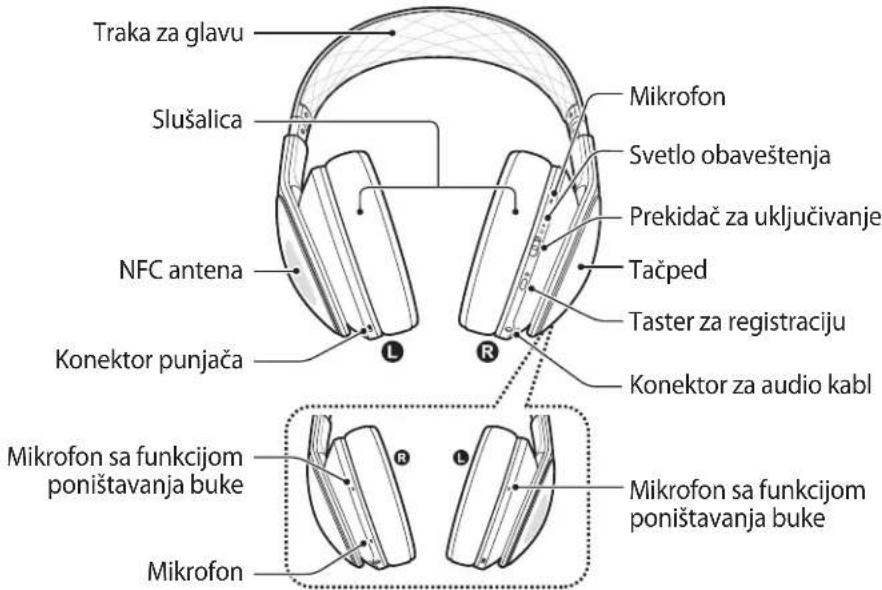
Sadržaj pakovanja
Proverite da li se u kutiji proizvoda nalaze sledece stavke.
- Urečaj, tvrda kutija, kutija sa priborom, USB kabl, 3,5 mm audio kabl, adapter za avion, uputstvo za upotrebu

Stavke koje se isporucuju sa proizvodom i dostupni dodatni proibor se mogu razlikovati u zavisnosti od regiona ili dobavljača usluge.
Punjenje baterije
Ovaj uredaj ima ugradenu bateriju. PreNgu sto uredaj koristite po prvi put ili kada baterija nods korijscena u duzim periodima, morate da napunite bateriju.

Koristite samo punjače i kablove koje je odobrila kompanija Samsung. Neodobreni punjači ili kablovi mogu dovesti do eksplozije baterije ili oštećenja urežaja.

Kada preostala energia baterije opadne ispod 10 procenata, uredaj emituje ton upozorenja i treperi svetlo obavestanja. Ako na vaš uredaj nisu povezani drugi uredaji, emituje se samton upozorenja. Ako su na vaš uredaj povezani drugi uredaji, on emituje ton upozorenja i svetlo obavestanja treperi crveno u redovnim intervalima.
Punite uredaj povezujuci ga sa računarom ili USB adapterom za napajanje preko USB kabla.
TÜV SÜD BABT, Octagon House, Concorde Way, Fareham,
Hampshire, PO15 5RL, UK*
Oznaka identifikacione: 0168
Predstavnik u EU
Samsung Electronics Euro QA Lab.
Blackbushe Business Park
Saxony Way, Yateley, Hampshire
GU46 6GG, UK *
2014.08.08 Stephen Colclough / Predstavnik za EU
(mesto i datum izdavanja) (ime i potpis ovlascene osobe)
shlco
- Ovo nije adresa Samsung servisnog centra. Adresu ili broj Telefona Samsung servisnog centra potrazite garantnoj kartici ili se obratite prodavcu k od kojeg ste kupili proizvod.
Copyright © 2014 Samsung Electronics

TÜV SÜD BABT, Octagon House, Concorde Way, Fareham,
Hampshire, PO15 5RL, UK*
Blackbushe Business Park
Saxony Way, Yateley, Hampshire
GU46 6GG,UK*
2014.08.08 Stephen Colclough / Representante UE
TÜV SÜD BABT, Octagon House, Concorde Way, Fareham,
Hampshire, PO15 5RL, UK*
Identifikacijas zime: 0168
Pärstävis ES
Samsung Electronics Euro QA Lab.
Blackbushe Business Park
Saxony Way, Yateley, Hampshire
GU46 6GG, UK *
2014.08.08 Stephen Colclough / ES pärstāvis
(izdoanas vieta un datumus) (pilnvarotas personas vards, uzvards un paraksts)
shldogh
TÜV SÜD BABT, Octagon House, Concorde Way, Fareham,
Hampshire, PO15 5RL, UK*
Blackbushe Business Park
Saxony Way, Yatesley, Hampshire
GU46 6GG, UK *
2014.08.08 Stephen Colclough / ES atstovas
Copyright © 2014 Samsung Electronics

Toode: Samsung Sound AG900
Mudel(id):EO-AG900
C∈0168
TÜV SÜD BABT, Octagon House, Concorde Way, Fareham,
Hampshire, PO15 5RL, UK*
Blackbushe Business Park
Saxony Way, Yateley, Hampshire
GU46 6GG, UK*
2014.08.08 Stephen Colclough / EL-i volinik
Copyright © 2014 Samsung Electronics

TÜV SÜD BABT, Octagon House, Concorde Way, Fareham,
Hampshire, PO15 5RL, UK*
Identificatie: 0168
Blackbushe Business Park
Saxony Way, Yatesley, Hampshire
GU46 6GG, UK *
2014.08.08 Stephen Colclough / EU-vertegenwoordiger
Copyright © 2014 Samsung Electronics

TÜV SÜD BABT, Octagon House, Concorde Way, Fareham,
Hampshire, PO15 5RL, UK*
ID-markning:0168
Gäller inom EU
Samsung Electronics Euro QA Lab.
Blackbushe Business Park
Saxony Way, Yateley, Hampshire
GU46 6GG, UK *
2014.08.08 Stephen Colclough / EU-representant
Copyright © 2014 Samsung Electronics

TÜV SÜD BABT, Octagon House, Concorde Way, Fareham,
Hampshire, PO15 5RL, UK*
Identifikasjonsmerke: 0168
Representant i EU
Samsung Electronics Euro QA Lab.
Blackbushe Business Park
Saxony Way, Yateley, Hampshire
GU46 6GG, UK *
2014.08.08 Stephen Colclough / EU-representant
Copyright © 2014 Samsung Electronics

TÜV SÜD BABT, Octagon House, Concorde Way, Fareham,
Hampshire, PO15 5RL, UK*
Tunniste: 0168
Edustaja EU:ssa
Samsung Electronics Euro QA Lab.
Blackbushe Business Park
Saxony Way, Yateley, Hampshire
GU46 6GG, UK *
TÜV SÜD BABT, Octagon House, Concorde Way, Fareham,
Hampshire, PO15 5RL, UK*
Blackbushe Business Park
Saxony Way, Yateley, Hampshire
GU46 6GG, UK *
2014.08.08 Stephen Colclough / EU-representant
Copyright © 2014 Samsung Electronics

TÜV SÜD BABT, Octagon House, Concorde Way, Fareham,
Hampshire, PO15 5RL, UK*
Identifikačni značka 0168
Zastupci v EU
Samsung Electronics Euro QA Lab.
Blackbushe Business Park
Saxony Way, Yateley, Hampshire
GU46 6GG, UK *
2014.08.08 Stephen Colclough / Zastupce pro EU
TÜV SÜD BABT, Octagon House, Concorde Way, Fareham,
Hampshire, PO15 5RL, UK*
Avayvwoptikó otoixio: 0168
Avtinpoosnooc otnv EE
Samsung Electronics Euro QA Lab.
Blackbushe Business Park
Saxony Way, Yateley, Hampshire
GU46 6GG, UK *
2014.08.08 Stephen Colclough / Avtiπροσωπος E.E.
(ToNcKai nepoynvia ekdoanC) (Ovoa Kai uoypapn Eoiodotnevou atouou)
sHldo
Avtorske pravice © 2014 Samsung Electronics

TÜV SÜD BABT, Octagon House, Concorde Way, Fareham,
Hampshire, PO15 5RL, UK*
Identifikacijska oznaka: 0168
Predstavnik v EU
Samsung Electronics Euro QA Lab.
Blackbushe Business Park
Saxony Way, Yateley, Hampshire
GU46 6GG, UK *
Telif hakki © 2014 Samsung Electronics

TUV SUD BABT, Octagon House, Concorde Way, Fareham,
Hampshire, PO15 5RL, UK*
Tanimlama iṣareti: 0168
AB'deki temsilci
Samsung Electronics Euro QA Lab.
Blackbushe Business Park
Saxony Way, Yateley, Hampshire
GU46 6GG, UK *
2014.08.08 Stephen Colclough / AB Temsilcisi
R&TTE Directive (1999/5/EC)
EN 60950-1:2006 +A11:2009 +A1:2010 +A12:2011
EN 62479:2010 SAR
EN 301 489-1 V1.9.2 (09-2011) EMC
EN 301 489-3 V1.6.1 (08-2013)
TÜV SÜD BABT, Octagon House, Concorde Way, Fareham,
Hampshire, PO15 5RL, UK*
0168:
1
shldodoy
1 1 1 1 1 1 1 1 1 1 1 1
(2011)
Samsung Electronics Euro QA Lab
Blackbushe Business Park
Saxony Way, Yateley, Hampshire
GU46 6GG, UK *
2014.08.08
(Jz
y
iiaai iiaaa aai
(
J 1 J 1 J 1 J 1 J 1 J 1 J 1 J 1 J 1 J 1 J 1 J 1 J 1 J 1 J 1 J 1 J 1 J 1 J 1 J 1 J 1 J 1 J 1 J 1 J 1 J 1 J 1 J 1 J 1 J 1 J 1 J 1 J 1 J 1 J
i 1
()
Pb 1 Cd 1 Hg a y l l l l l l l l l l l l l l l l l l l l l l l l l l l l l l l l l l l l l l l l l l l l l l l l l l l l l l l l l l l l l l l l l l l l l l l l l l l l l l l l l l l l l l l l l l l l l l l l
aee aee
y 1 y

g wall bao boa jiaaiu g jiaaiu laiai g wall iaai
Samsung Level
Android 4.2.2 J
J Lai jia jia jia jia jia jia jia jia jia jia jia jia jia jia jia jia jia jia jia jia jia jia jia jia jia jia jia jia jia jia jia jia jia jia jia jia jia jia jia jia jia

JUaJI 1 JuaI a
ailllgl 111 111 111 111 111 111
aill aol aaiia 1c baiai laoai y aiollal
J 1
jia jiaai jia jia jia jia
Jgai Aai jgi jglai Jgai p gai Lao gai
Jusu Jusu Looie jrrnll
12 = 12
s
j: j
jgl 1
Jiaaiall jie gao jie jie jie jie jie jie jie jie jie
gaiabia jyjally jalal NFC
NFC
y
j 1 j 1 j 1 j 1 j 1 j 1 j 1 j 1 j 1 j 1 j 1 j 1 j 1 j 1 j 1 j 1 j 1 j 1 j 1 j 1 j 1 j 1 j 1 j 1 j 1 j 1 j 1 j 1 j 1 j 1 j 1 j 1 j 1 j 1 j
JbIy 10000000000000000000000000000000000000000000000000000000000000000000000000000
aaii 1
J 1
#
NFC
J 1
JGLALN FNC Jg jLj
JGLALN NFC g aag
JGLALN fag
JGLALN fag
JGLALN fag
JGLALN fag
JGLALN fag
JGLALN fag
JGLALN fag
JGLALN fag
JGLALN fag
JGLALN fag
JGLALN fag
JGLALN fag
JGLALN fag
JGLALN fag
JGLALN fag

NFC 1000000000000000000000000000000000000000000000000000000000000000000000000000000

aiee eae 1
e 15i jie jie jie jie jie jie
a
jll jil 1
Lj 1 j 1
j 1
y
j
aal aal
()
Jalil jll jll Jaiy Jll Jaijll Jai jll
- alalil p 111 jn Jnll Jnll Jnll Jnll Jnll Jnll Jnll Jnll Jnll Jnll Jnll Jnll Jnll Jnll Jnll Jnll Jnll Jnll Jnll Jnll Jnll Jnll Jnll Jnll Jnll Jnll Jnll Jnll Jnll Jnll Jnll Jnll Jnll Jnll

g
jlll aie Jda aill l 1g j g j 10 r, o USB L5, ciaaall aie g aai all aal . pssuall JdJg jn Jgag g gaaall J5g
J 1. J 1 J 1 J 1 J 1 J 1 J 1 J 1 J 1 J 1 J 1 J 1 J 1 J 1 J 1 J 1 J 1 J 1 J 1 J 1 J 1 J 1 J 1 J 1 J 1 J 1 J 1 J 1 J 1 J 1 J 1 J 1 J 1 J 1 J 1


#
y j 1j 2 2 2 2 2 2 2 2 2 2 2 2 2 2 2 2 2 2 2 2 2 2 2
iJ 1
jglal plaiy gill aiei (p1) 0gll gai jg jg jg jg jg jg jg
a. 1
Jai 1 Jia 11 11 11 11 11 11 11
a la 2y j bia yjuaial jgall gglal glg jsl
a a a a a a a a a a a a a a a a a a a a a a a a a a a a a a a
e 1
j 1
gjglj jzglj gilal jz glaill jz jz algwa zgawal.