
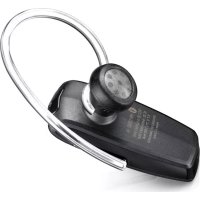
AURICULAR MONO BLUETOOTH HM1500 - Wireless Earbuds SAMSUNG - Free user manual and instructions
Find the device manual for free AURICULAR MONO BLUETOOTH HM1500 SAMSUNG in PDF.



| Product Type | Mono Bluetooth Headset |
| Brand | Samsung |
| Model | HM1500 |
| Bluetooth Version | 2.1 + EDR |
| Supported Profiles | Headset Profile, Hands-free Profile |
| Operating Range | Up to 10 meters |
| Standby Time | Up to 250 hours |
| Talk Time | Up to 6 hours |
| Charging Time | Approximately 2 hours |
| Power Supply | Internal rechargeable battery, charging via AC adapter (5V) |
| Operating Temperature | 5 °C to 35 °C |
| Key Features | Answer/end calls, last number redial, voice dialing, volume control, microphone mute, vibrate mode, multipoint pairing (2 phones) |
| LED Indicator | Red (charging, low battery), blue (fully charged, pairing), purple (battery level 20-80%) |
| Cleaning and Care | Soft, clean, dry cloth |
| Safety | Do not disassemble, do not expose to moisture, do not use while driving without respecting regulations |
| Box Contents | Headset, charger, earpiece, user manual |
| Warranty | 1 year (material and manufacturing defects) |
Frequently Asked Questions - AURICULAR MONO BLUETOOTH HM1500 SAMSUNG
User questions about AURICULAR MONO BLUETOOTH HM1500 SAMSUNG
0 question about this device. Answer the ones you know or ask your own.
Ask a new question about this device
Download the instructions for your Wireless Earbuds in PDF format for free! Find your manual AURICULAR MONO BLUETOOTH HM1500 - SAMSUNG and take your electronic device back in hand. On this page are published all the documents necessary for the use of your device. AURICULAR MONO BLUETOOTH HM1500 by SAMSUNG.
USER MANUAL AURICULAR MONO BLUETOOTH HM1500 SAMSUNG
Printed in Korea
GH68-27479A Rev.1.1
EU A. 10/2013
SAMSUNG
Stylish Clip-on
Mono Headset
HM1500

Bluetooth®
English....1
Français....27
Italiano....53
Ελληνικά....79
Nederlands....105
Contents
Getting started
Your headset overview ....4
Button functions....5
Charging the headset....6
Wearing the headset....8
Using your headset
Turning the headset on or off 10
Activate Vibration mode 10
Pairing and connecting the headset....11
Pairing via the Active pairing feature....14
Using call functions....16
Appendix
Frequently asked questions....20
Warranty and parts replacement....22
Correct disposal of this product 23
Correct disposal of batteries in this product....24
Specifications....25
Safety information
To prevent injury to yourself and others or damage to your device, read the safety information about your device before using the device.
- Comply with all safety warnings and regulations regarding mobile device usage while operating a vehicle.
- Do not disassemble, modify, or repair your device. Any changes or modifications to your device can void your manufacturer's warranty. If your device needs servicing, take your device to a Samsung Service Centre.
- Do not bite or suck the device. Children or animals can choke on small parts.
- Do not store your device in very hot or very cold areas. It is recommended to use your device at temperatures from 5 °C to 35 °C. Extreme temperatures can damage the device and reduce the charging capacity and life of your device and battery.
- Do not use your device while it is charging or touch your device with wet hands.
- Keep your device dry. Humidity and liquids may damage the parts or electronic circuits in your device. Water damage to your device can void your manufacturer's warranty.
- Do not use your device outdoor during a thunderstorm. Doing so may result in electric shock or device malfunction.

Excessive exposure to loud sounds can cause hearing damage. Exposure to loud sounds while walking may distract your attention and cause an accident.
Getting started
This section explains what to remember for the proper use of your Bluetooth headset.
Your headset overview


- Make sure you have the following items with your headset: Travel adapter, Ear rubbers, User manual
- The items supplied with your headset may vary depending on your region.
Button functions

Power switch
Slide up or down to turn the headset on or off.

Talk button
- Press and hold to enter Pairing mode.
- Press to make or answer a call.
- Press to end a call.

Volume up or down button
- Press to adjust the volume.
- Press and hold at the same time to check the battery life time.
- Press and hold to turn the microphone on or off.

You can hear a beep when the volume level of the headset reaches to the lowest or highest level.
Charging the headset
This headset has a rechargeable internal battery which is non-removable. Ensure that you fully charge the battery before using the headset for the first time.
1 Plug the small end of the travel adapter into the charger jack.

natural_image
Line drawing of a device with an attached cable and connector (no text or symbols)2 Plug the large end of the travel adapter into a power outlet. During charging, the indicator light will turn red. If charging does not begin, unplug the travel adapter and plug it in again.
3 When the headset is fully charged, the indicator light changes to blue. Unplug the travel adapter from the power outlet and the headset.

- Use only a Samsung-approved travel adapter. Unauthorised travel adapters may cause an explosion or damage to the headset.
- The battery will gradually wear out while charging or discharging because it is a consumable part.
- When a call comes in while charging, disconnect your headset from the travel adapter and answer the call.
- To save energy, unplug the charger when not in use. The charger does not have a power switch, so you must unplug the charger from the electric socket when not in use to avoid wasting power. The charger should remain close to the electric socket and easily accessible while charging.
- The socket-outlet shall be installed near the equipment and shall be easily accessible.
When the battery charge gets low
The headset beeps and the indicator light flashes red. Recharge the battery. If the headset powers off during a call, the call will be automatically transferred to the phone.
Checking the battery level
At the same time, press and hold the Volume up and down buttons.
Depending on the battery level, the indicator light flashes 5 times in one of the following colours:
| Battery level | Indicator light colour |
| Above 80% | Blue |
| 80 ~20% | Violet |
| Below 20% | Red |
Wearing the headset
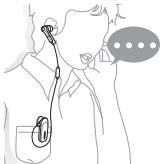
Insert the earpiece in your ear and clip the headset to your clothes.
natural_image
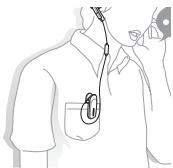
Line drawing of a person wearing earphones with a medical device attached, no text or symbols presentWhen you are not using the headset, you can clip the earpiece to your clothes.
natural_image
Line drawing of a person wearing a short-sleeve shirt with a medical device attached (no text or symbols)Using your headset
This section explains how to turn the headset on, pair and connect to the phone, and use various functions

- Activated functions and features may differ depending on the phone type.
- Some devices, especially those that are not tested or approved by Bluetooth SIG, may be incompatible with your headset.
Turning the headset on or off
- To turn the headset on, slide up the power switch. The blue indicator light flashes 4 times.
- To turn the headset off, slide down the power switch. The indicator light turns off after the blue indicator light changes to red.
Activate Vibration mode
You can activate Vibration mode to receive a vibration alert when a call comes in.
Press and hold the Talk button and the Volume up button at the same time.
To deactivate Vibration mode, press and hold the Talk button and the Volume down button at the same time.
Pairing and connecting the headset
Pairing will create a unique and encrypted wireless link between two Bluetooth enabled devices, such as a Bluetooth phone and a Bluetooth headset.
To use the headset with other Bluetooth devices, the devices must be paired. When trying to pair the two devices, keep the headset and the phone reasonably close together. After pairing, you can connect the two devices.
Pairing and connecting the headset with a phone
1 Enter pairing mode.
- Turn on your headset and press and hold the Talk button until the blue indicator light stays lit.
- If you turn the headset on for the first time, it proceeds into Pairing mode immediately.
2 Activate the Bluetooth feature on your phone and search for the headset (see your phone's user manual).
3 Select the headset (HM1500) from the list of devices found by your phone.
4 Enter the Bluetooth PIN (0000, 4 zeros) to pair and connect the headset to your phone.

Your headset supports the Simple Pairing feature which allows the headset to be paired with a phone without requesting a PIN. This feature is available for phones that are compliant with Bluetooth version 2.1 or higher.
The headset also can be paired via the Active pairing feature, see page 14.
Connecting with two Bluetooth phones
With the Multi-point feature activated, your headset can be connected with two Bluetooth phones at the same time.
1 After connecting with the first Bluetooth phone, press and hold the Talk button until the blue indicator light stays lit.
2 Press and hold the Volume up button to activate the Multi-point feature.
3 Activate the Bluetooth feature on the second Bluetooth phone and search for the headset (see your phone's user manual).
4 Select the headset (HM1500) from the list of devices found by the second Bluetooth phone.
5 Enter the Bluetooth PIN (0000, 4 zeros) to connect the headset to the phone.
6 Reconnect to the headset from the first Bluetooth phone.

- You can set the headset automatically to reconnect to the recently connected phones each time you turn it on.
- To reconnect to the two most recently connected phones, activate the Multi-point feature. Press and hold the Volume up button in Pairing mode until the blue indicator light flashes twice.
- To reconnect to only the most recently connected phone, deactivate the Multi-point feature. Press and hold the Volume down button in Pairing mode until the red indicator light flashes twice.
- When the headset connects to two Bluetooth phones, some phones may not connect to the headset as the second Bluetooth phone.
Disconnecting the headset
To disconnect the headset from your phone,
- Turn off the headset.
- Use the Bluetooth menu on your phone.
Reconnecting the headset
When the headset is paired with a phone, it will attempt to automatically reconnect each time you turn it on.
If the headset does not automatically attempt to reconnect,
- Press the Talk button.
- Use the Bluetooth menu on your phone.
Pairing via the Active pairing feature
With the Active pairing feature, your headset can automatically search for a Bluetooth phone and try to make a connection with it.
1 Turn on the headset.
2 Press and hold the Talk button to enter Pairing mode.
3 Press and hold the Talk button until the violet indicator light turns on. The headset will switch to Active Pairing mode, search a Bluetooth phone within range, and attempt to pair with it.

- Ensure the phone you wish to connect to is within range of the headset. Place the headset and phone close to each other to avoid pairing with other devices.
- The headset will attempt Active pairing for up to 20 seconds.
- The Bluetooth phone you want to connect with must not be paired with other devices. If the phone is already connected to another device, end the connection and restart Active pairing feature.
- This feature is available for mobile phones, but the phone's Bluetooth visibility option must be set to on.
- This feature may be unavailable depending on the some PDAs.
Using call functions
Making a call
Redialling the last number
Press the Talk button to redial the last number of the most recently connected phone.
Press the Talk button twice to redial the last number of the other phone.
Dialling a number by voice
Press and hold the Talk button to dial a number of the first phone by voice, and say a name.

Available call functions may vary by the phone.
Answering a call
Press the Talk button to answer a call when you hear incoming call tones.
When two calls from the two connected phones come in, you can answer the call of the first phone.
Ending a call
Press the Talk button to end a call.
Rejecting a call
Press and hold the Talk button to reject a call when a call comes in.
When two calls from the two connected phones come in, you can reject the call of the first phone.
Using options during a call
You can use the following functions to control your call during a call.
Adjusting the volume
Press the Volume up or down button to adjust the volume.
Muting the microphone
Press and hold the Volume up or down button to turn the microphone off so that the person with whom you are speaking cannot hear you. When the microphone is turned off, the headset beeps at regular intervals. Press and hold the Volume up or down button again to turn the microphone back on.
Transferring a call from the phone to the headset
Press the Talk button to transfer a call from the phone to the headset.
Placing a call on hold
Press and hold the Talk button to place the current call on hold.

When the headset is connected with two phones, this function is not available.
Answering a second call
- Press the Talk button to end the first call and answer a second call of the same phone when you hear call waiting tones.
- Press and hold the Talk button to place the first call on hold and answer a second call of the same phone when you hear call waiting tones.
- To switch between the current call and the held call, press and hold the Talk button.

When the headset is connected with two Bluetooth phones, you cannot answer a second call of the same phone.
Answering a new call of the second phone
- Press the Talk button to end the first call and answer a second call of the other phone when you hear call waiting tones.
- Press and hold the Talk button to place the first call on hold and answer a second call of the other phone when you hear call waiting tones.
- To switch between the current call and the held call, press and hold the Talk button.
Appendix
Frequently asked questions
| Will my headset work with laptops, PCs, and PDAs? | Your headset will work with devices that support your headset's Bluetooth version and profiles. For specifications, see page 25. |
| Why do I hear static or interference while on a call? | Appliances such as cordless phones and wireless networking equipment may cause interference, which usually sounds like static. To reduce any interference, keep the headset away from other devices that use or produce radio waves. |
| Will my headset interfere with my car's electronics, radio, or computer? | Your headset produces significantly less power than a typical mobile phone. It also only emits signals that are in compliance with the international Bluetooth standard. Therefore, you should not expect any interference with standard consumer-grade electronics equipment. |
| Can other Bluetooth phone users hear my conversation? | When you pair your headset to your Bluetooth phone, you are creating a private link between only these two Bluetooth devices. The wireless Bluetooth technology used in your headset is not easily monitored by third parties because Bluetooth wireless signals are significantly lower in radio frequency power than those produced by a typical mobile phone. |
| Why do I hear an echo while on a call? | Adjust the headset volume, or move to another area and try again. |
| How do I clean my headset? | Wipe it with a soft dry cloth. |
| The headset does not fully charge. | The headset and the travel adapter may not have been connected properly.Separate the headset from the travel adapter, reconnect, and charge the headset. |
Warranty and parts replacement
Samsung warrants this product as free of defects in material, design and workmanship for the period of one year from the original date of purchase.* If during the period of warranty this product proves defective under normal use and service you should return the product to the retailer from whom it was originally purchased or qualified service centre. The liability of Samsung and its appointed maintenance company is limited to the cost of repair and/or replacement of the unit under warranty.
- The warranty is limited to the original purchaser
- A copy of your receipt or other proof of purchase is required for a proper warranty service
- The warranty is void if the serial number, date code label or product label is removed, or if the product has been subject to physical abuse, improper installation, modification, or repair by unauthorised third parties
- Specifically exempt from any warranty are limited-life consumable components such as batteries and other accessories
- Samsung will not assume any responsibility for any loss or damage incurred in shipping. All repair work on Samsung products by unauthorised third parties voids any warranty
Correct disposal of this product

natural_image
Symbol of a trash bin crossed out by a diagonal line, representing no waste or elimination (no text or numbers present)(Waste Electrical & Electronic Equipment)
(Applicable in countries with separate collection systems)
This marking on the product, accessories or literature indicates that the product and its electronic accessories (e.g. charger, headset, USB cable) should not be disposed of with other
household waste.
To prevent possible harm to the environment or human health from uncontrolled waste disposal, please separate these items from other types of waste and recycle them responsibly to promote the sustainable reuse of material resources.
Household users should contact either the retailer where they purchased this product, or their local government office, for details of where and how they can take these items for environmentally safe recycling.
Business users should contact their supplier and check the terms and conditions of the purchase contract. This product and its electronic accessories should not be mixed with other commercial wastes for disposal. This EEE is compliant with RoHS.
Correct disposal of batteries in this product

natural_image
Symbol of a trash bin crossed out by two crossed lines (no text or numbers present)(Applicable in countries with separate collection systems)
The marking on the battery, manual or packaging indicates that the battery in this product should not be disposed of with other household waste. Where mark ed, the chemical symbols Hg, Cd or Pb indicate that the battery contains mercury, cadmium or lead above the reference levels in EC Directive 2006/66.
The battery incorporated in this product is not user replaceable. For information on its replacement, please contact your service provider.
Do not attempt to remove the battery or dispose it in a fire. Do not disassemble, crush, or puncture the battery. If you intend to discard the product, the waste collection site will take the appropriate measures for the recycling and treatment of the product, including the battery.
Specifications
| Item | Specifications and description |
| Bluetooth version | 2.1+EDR |
| Support profile | Headset Profile, Hands-Free Profile |
| Operating range | Up to 33 feet (10 metres) |
| Standby time | Up to 250 hours* |
| Talk time | Up to 6 hours* |
| Charging time | Approximately 2 hours* |
* Depending on the phone type and usage, the actual time may vary.
Declaration of Conformity
Product details
For the following
Product : Bluetooth Headset
Model(s) : HM1500

Declaration & Applicable standards
We hereby declare, that the product above is in compliance with the essential requirements of the R&TTE Directive (1999/5/EC) by application of:
and the Directive (2011/65/EU) on the restriction of the use of certain hazardous substances in electrical and electronic equipment.
Representative in the EU
Samsung Electronics Euro QA Lab.
Blackbushe Business Park, Saxony Way,
Yateley, Hampshire, GU46 6GG, UK
2013.09.25
(Place and date of issue)
natural_image
Abstract line drawing with intersecting curves and a wavy base (no text or symbols)Joong-Hoon Choi / Lab. Manager
(Name and signature of authorised person)
* This is not the address of Samsung Service Centre. For the address or the phone number of Samsung Service Centre, see the warranty card or contact the retailer where you purchased your product.
Table des matières
Préparation
natural_image
Line drawing of a device with an attached cable, showing no text or symbolsnatural_image
Line drawing of a person wearing earphones with a speech bubble (no text or symbols)natural_image
Illustration of a medical or dental procedure showing two clips inserted into a patient's neck area, with no visible text or symbols.natural_image
Symbol of a trash bin crossed out by two diagonal lines (no text or numbers present)natural_image
Symbol of a trash bin crossed out by two crossed lines (no text or numbers present)Blackbushe Business Park, Saxony Way,
Yateley, Hampshire, GU46 6GG, UK
2013.09.25
natural_image
Abstract line drawing with intersecting curves and a wavy base (no text or symbols)natural_image
Line drawing of a device with an attached cable and connector (no text or symbols)natural_image
Line drawing of a person wearing earphones with a speech bubble (no text or symbols)natural_image
Illustration of a person's head with two clips, one magnified and one closed, showing anatomical positioning (no text or symbols)natural_image
Symbol of a trash bin crossed out by two diagonal lines (no text or numbers present)natural_image
Symbol of a trash bin crossed out by two crossed lines (no text or numbers present)Blackbushe Business Park, Saxony Way,
Yateley, Hampshire, GU46 6GG, UK
2013.09.25

natural_image
Abstract line drawing with intersecting curves and a wavy base (no text or symbols)Joong-Hoon Choi / Lab. Manager
natural_image
Line drawing of a device with an attached cable and connector (no text or symbols)natural_image
Line drawing of a person wearing earphones with a medical device attached, no text or symbols presentnatural_image
Illustration of a medical or dental procedure showing two clips inserted into a patient's neck area, with no visible text or symbols.natural_image
Symbol of a trash bin crossed with no text or numbers, representing waste sorting or disposal (no text present)natural_image
Symbol of a trash bin crossed out by two diagonal lines (no text or numbers present)Blackbushe Business Park, Saxony Way,
Yateley, Hampshire, GU46 6GG, UK
2013.09.25
natural_image
Abstract line drawing with intersecting curves and a wavy base (no text or symbols)natural_image
Line drawing of a device with an attached cable and connector (no text or symbols)natural_image
Line drawing of a person wearing earphones with a speech bubble (no text or symbols)natural_image
Illustration of a medical or dental procedure showing two clips inserted into a patient's neck area, with no visible text or symbols.natural_image
Symbol of a trash bin crossed out by two crossed lines (no text or numbers present)(Elektrische & elektronische afvalapparatuur)
natural_image
Symbol of a trash bin crossed out by two crossed lines (no text or numbers present)Blackbushe Business Park, Saxony Way,
Yateley, Hampshire, GU46 6GG, UK
2013.09.25
natural_image
Abstract black ink brushstroke design on white background (no text or symbols)Joong-Hoon Choi / Lab. Manager
- SAMSUNG
- Stylish Clip-on
- Mono Headset
- Contents
- Getting started
- Using your headset
- Appendix
- Safety information
- Button functions
- Power switch
- Talk button
- Volume up or down button
- Charging the headset
- When the battery charge gets low
- Checking the battery level
- Wearing the headset
- Turning the headset on or off
- Activate Vibration mode
- Pairing and connecting the headset
- Pairing and connecting the headset with a phone
- Connecting with two Bluetooth phones
- Disconnecting the headset
- Reconnecting the headset
- Pairing via the Active pairing feature
- Using call functions
- Making a call
- Redialling the last number
- Dialling a number by voice
- Answering a call
- Ending a call
- Rejecting a call
- Using options during a call
- Adjusting the volume
- Muting the microphone
- Transferring a call from the phone to the headset
- Placing a call on hold
- Answering a second call
- Answering a new call of the second phone
- Warranty and parts replacement
- Correct disposal of this product
- Correct disposal of batteries in this product
- Specifications
- Declaration of Conformity
- Product details
- Declaration & Applicable standards
- Representative in the EU
- Table des matières
- Préparation
Brand : SAMSUNG
Model : AURICULAR MONO BLUETOOTH HM1500
Category : Wireless Earbuds