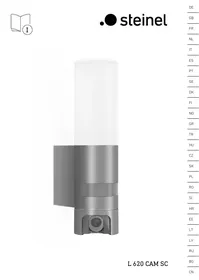
L620 - Surveillance Camera STEINEL - Free user manual and instructions
Find the device manual for free L620 STEINEL in PDF.



| Product type | Outdoor surveillance camera with LED floodlight and intercom |
| Brand | STEINEL |
| Model | L620 CAM SC |
| Dimensions (H × W × D) | 305 × 77 × 131 mm |
| Power supply | 220 – 240 V, 50/60 Hz |
| Power consumption (on) | 14 W |
| Standby power consumption | 0.50 W (detector) / 0.50 W (network) |
| Luminous flux | 925 lm |
| Color temperature | 3000 K (warm white) |
| Color rendering index (CRI) | 80 |
| Average lifespan (LED) | 36,000 hours (L70B50 at 25 °C) |
| Detection technology | Passive infrared detector |
| Detection angle | 180° with 45° angular aperture |
| Detector range | 10 m (tangential) |
| Camera resolution | 1920 × 1080 px |
| Camera opening angle | 110° horizontal / 90° vertical |
| Storage | microSD memory card max. 128 GB (16 GB included) |
| Connectivity | WiFi 2.4 GHz (2400 – 2483.5 MHz) |
| Protection rating | IP44 |
| Protection class | I |
| Main functions | Motion detection, LED lighting, HD camera, two-way intercom, mobile app, memory card recording |
| Maintenance and cleaning | Clean the lenses with a damp cloth, without detergent |
| Safety | Disconnect power before any intervention; installation according to NF C 15-100 standard |
| Spare parts and repairability | Use only genuine parts; repairs by a specialized workshop |
| Warranty | 36 months (material or manufacturing defects) |
Frequently Asked Questions - L620 STEINEL
User questions about L620 STEINEL
0 question about this device. Answer the ones you know or ask your own.
Ask a new question about this device
Download the instructions for your Surveillance Camera in PDF format for free! Find your manual L620 - STEINEL and take your electronic device back in hand. On this page are published all the documents necessary for the use of your device. L620 by STEINEL.
USER MANUAL L620 STEINEL
Please read carefully and keep in a safe place.
- Under copyright. Reproduction either in whole or in part only with our consent.
- Subject to change in the interest of technical progress.
Symbols

Hazard warning!

Reference to other information in the document.
2. General safety precautions

Disconnect the power supply before performing any work on the unit.
- During installation, the electric power cable being connected must not be live. Therefore, switch off the power first and use a voltage tester to make sure the wiring is off-circuit.
- Installing the camera light involves work on the mains voltage supply. This work must therefore be carried out professionally in accordance with national wiring regulations and electrical operating conditions. (e.g. DE-VDE 0100, AT-ÖVE / ÖNORM E8001-1, CH-SEV 1000)
- Only use genuine replacement parts.
- Repairs may only be made by specialist workshops.
3. L 620 CAM SC
Proper use
- Sensor-switched light with integrated camera and intercom system for installing on outdoor walls
The L 620 CAM SC features a camera with memory card and intercom system. Both functions can also be controlled via an app.
A passive motion detector is integrated in the L 620 CAM SC. The integrated high-performance infrared sensor detects the invisible heat radiated from moving objects (people, animals, etc.). The heat detected in this way is converted electronically into a signal that switches the light ON automatically. Heat is not detected through obstacles, such as walls or panes of glass. Heat radiation of this type will, therefore, not trigger the sensor.
Important:
The most reliable way of detecting motion is to install the camera light with the sensor aimed across the direction in which a person would walk and by ensuring that no obstacles (such as trees and walls, for example) obstruct the line of sensor vision. Reach is limited when walking directly towards the light.
Package contents (Fig. 3.1)
- Camera light
Four screws
Four wall plugs - Reset key
- Torx spanner
Product dimensions (Fig. 3.2)
Product components (Fig. 3.3)
A Camera light
B Lock
C Connecting terminal
D Wall mount
E Sensor unit
F Camera
G Reset button
H Status LED
Slot for memory card
Luminous intensity distribution (Fig. 3.4)
4. Electrical connection
- Switch OFF power supply (Fig. 4.1)
Wiring diagram (Fig. 4.1)
The supply lead consist of three wires:
L = phase conductor (usually black, brown or grey)
N = Neutral conductor (usually blue)
12 = protective-earth conductor (green/yellow)
If you are in any doubt, identify the conductors using a voltage tester; then disconnect from the power supply again. Connect phase, neutral and protective-earth conductor to the terminal.
Important: Incorrectly wired connections will produce a short circuit later on in the product or your fuse box. In this case, you must identify the individual conductors once again and reconnect them. A mains power switch for turning the unit ON and OFF may of course be installed in the mains supply lead.
The light source of this luminaire cannot be changed. If the light source needs to be replaced (e.g. at the end of its service life), the complete luminaire must be replaced.
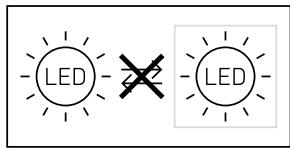
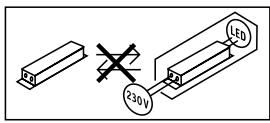
Connection to a dimmer will result in damage to the camera light.
5. Mounting
- Check all components for damage.
- Do not use the product if it is damaged.
- When installing the camera light, make sure the installation site is not exposed to vibration.
- Select an appropriate mounting location, taking the reach and motion detection into consideration. (Fig. 5.1)
- Select an appropriate mounting location, taking the WLAN speed into consideration. A minimum of 2 Mbps must be available for operation.
Mounting procedure
- Undo retaining screw, detach camera light from wall mount. To do this, press lock (Fig. 5.2)
Mark drill holes (Fig. 5.3) - Drill holes and insert wall plugs (Fig. 5.4)
- Screw down wall mount (Fig. 5.5)
- Connect conductors (Fig. 5.6)
- Fit camera light on wall mount and tighten retaining screw (Fig. 5.7)
- Switch ON power supply (Fig. 5.7)
Make settings "6. Function"
The camera can be aligned by hand.
(Fig. 5.8)
6. Function
Factory settings
Twilight level: 10,000 lux
Time setting: 1 minute
Basic light level: 40%

Android

iOS
Note:
The camera light needs a stable Wi-Fi connection. The smartphone or tablet used must have access to the Internet and be connected to the same Wi-Fi network as the camera light for the installation process.
Installation
- Download app.
- The camera light is ready for configuration as soon as the power supply is switched ON. A signal sounds every 4 seconds during configuration.
- The signal sounds once a second while the camera light is being connected to the smartphone or tablet.
- Now enter the network name and password of the Wi-Fi router into your app.
Camera function
- As soon as the camera has been set up from a smartphone or tablet, it can only be shared with other devices from that device via QR code/serial number.
- Once the sensor has triggered, you will receive a push notification via the app.
- Open the app. You can now use the image display and intercom system.
- The camera films a sequence when the sensor has been triggered. The filmed sequence is saved on the memory card and can be retrieved at any time. The recorded data is only saved on the camera light's memory card.
Note:
You will find further information on the functions and setting options in the app.
Twilight setting
The chosen response threshold can be infinitely varied from 10 to 10,000 lux.
Time setting
The time you wish light to stay ON for can be set to 1 minute, 3 minutes, 10 minutes or 15 minutes. Any movement detected before this time elapses will restart the timer.
Basic light level
The basic light level function provides illumination at approx. 0% to 40% light output when light level falls below the light-level setting.
Changing the memory card
- Undo retaining screw and remove cover (Fig. 6.1)
- Changing memory card (Fig. 6.2)
- Fit cover and tighten retaining screw (Fig. 6.4)
Restoring factory settings
- Press the reset button for approx. 7 seconds (Fig. 6.3)
Note:
Pressing the reset button with the key will return the camera light to factory settings.
Once the light has been reset, an acoustic signal will sound every 4 seconds.
- Fit cover and tighten retaining screw (Fig. 6.4)
7. Maintenance and care
The camera light requires no maintenance.
Weather conditions may affect the way the camera light functions. Strong gusts of wind, snow, rain or hail may cause the light to come ON when it is not wanted because the sensor is unable to distinguish sudden changes of temperature from sources of heat. Detector lens and camera lens may be cleaned with a damp cloth if they get dirty (do not use cleaning agents).
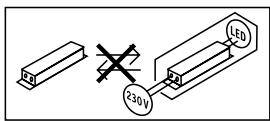
Important note: the control gear cannot be replaced.
8. Disposal
Electrical and electronic equipment, accessories and packaging must be recycled in an environmentally compatible manner.

Do not dispose of electrical and electronic equipment as domestic waste.
EU countries only:
Under the current European Directive on Waste Electrical and Electronic Equipment and its implementation in national law, electrical and electronic equipment no longer suitable for use must be collected separately and recycled in an environmentally compatible manner.
9. Declaration of Conformity
Hereby, STEINEL Vertrieb GmbH declares that the radio equipment type L 620 CAM SC is in compliance with Directive 2014/53/EU. The full text of the EU declaration of conformity is available at the following internet address:
www.steinel.de
10. Manufacturer's warranty
This STEINEL product has been manufactured with great care, tested for proper operation and safety in accordance with applicable regulations and then subjected to random sample inspection. STEINEL guarantees that it is in perfect condition and proper working order. The warranty period is 36 months, starting from the date of sale to the consumer. We will remedy defects caused by material flaws or manufacturing faults. The warranty will be met by repair or replacement of defective parts at our own discretion. The warranty shall not cover damage to wear parts, damage or defects caused by improper treatment or maintenance. Further consequential damage to other objects shall be excluded.
Claims under warranty shall only be accepted if the product is sent fully assembled and well packed complete with receipt or invoice (date of purchase and dealer's stamp) to the appropriate service centre or handed in to the dealer within the first 6 months.
Repair service:
Please ask your nearest service centre how to proceed for repairing faults not covered by the warranty or occurring after the warranty expires.

11. Legal Notes
Privacy
The L 620 CAM SC has been developed for outdoor use. Laws in your country may restrict the observation of areas outside your home or property. Please familiarise yourself with local legislation. To protect the privacy of others, install the camera so that it is unable to film public places, roads or your neighbour's property.
We also recommend that you inform relatives, visitors and household employees about the L 620 CAM SC and its function.
Safety
Please note that the app will not automatically inform you if the L620 CAM SC is activated in emergencies or, for instance, in the event of burglaries. If necessary, you must always make an emergency call. STEINEL Vertrieb GmbH will not accept any liability for lacking or incorrect notification or film sequences.
12. Technical specifications
| Dimensions (H × W× D) | 305 × 77 × 131 mm |
| Power supply | 220 - 240 V, 50 / 60 Hz |
| Power consumption (Pon) | 14 W |
| Sensor on standby (Psp) | 0.50 W |
| Standby network (Pnet) | 0.50 W |
| Luminous flux (360°) | 925 lm |
| Efficiency | 66 lm/W |
| Colour temperature | 3,000 K (warm white) |
| Colour rendering index | Ra=80 |
| Average rated life expectancy | 36,000 hours (L70B50 at 25°C) |
| Colour consistency SDCM | Starting value: 6 |
| Luminous intensity distribution | |
| Communication | Wi-Fi 2400-2483.5 MHz |
| Transmitter power | < 100 mW |
| Sensor technology | Passive infrared |
| Angle of coverage | 180° with 45° angle of aperture |
| Mounting height | 1.8 - 2 m |
| Detection reach | 10 m tangential |
| Light-level setting | 10 - 10,000 lux |
| Basic light level | 0-0-40% |
| Time setting | 1 min, 3 min, 10 min, 15 min |
| Temperature range | -10°C to 40°C |
| IP rating: | IP44 |
| Protection class | I |
| Energy efficiency class | This product contains an energy efficiency class "E" light source. |
Camera
| Resolution | 1920 x 1080 px, dazzle guard |
| Angle of aperture | 110° horizontally / 90° vertically |
| Setting angle | 90° horizontally to either side / 20° to 30° vertically |
| Memory card. | Max. 128 GB (16 GB memory card is included) |
| Power consumption | 1.53 W |
- Troubleshooting
| Malfunction | Cause | Remedy |
| Camera light without power | ■ Fuse has tripped, not switched ON, break in wiring | ■ Activate, change fuse, turn ON power switch, check wiring with voltage tester |
| ■ Short circuit in mains power supply lead | ■ Check connections | |
| ■ Mains switch OFF | ■ Switch on mains switch | |
| Camera light not switching ON | ■ Incorrect twilight setting selected | ■ Readjust |
| ■ Mains switch OFF | ■ Switch ON | |
| ■ Fuse has tripped | ■ Activate, change fuse, check connection if necessary | |
| Camera light not switching OFF | ■ Continued movement within the detection zone | ■ Check detection zone |
| Camera light switches ON without obvious movement | ■ Camera light not mounted for detecting movement reliably | ■ Securely mount enclosure |
| ■ Movement occurred, but not identified by the observer (movement behind wall, movement of a small object in immediate lamp vicinity etc.) | ■ Check detection zone | |
| Camera light not switching ON despite movement | ■ Rapid movements are suppressed to minimise malfunctioning or detection zone set too small | ■ Check detection zone |
| ■ Incorrect twilight setting selected | ■ Readjust | |
| No access to camera light via app | ■ Wi-Fi router is too far from the camera light or building elements, such as walls, are obstructing transmission | ■ Use repeater |
| Smartphone/tablet cannot be connect- ed to camera light | ■ A terminal device is already connected | ■ Press reset button or scan QR code from connected terminal device |
| No live image transmission | ■ Temperature too high | ■ If necessary, deactivate manual override and let cool down |
FR
3 ANI GARANTIA PRODUCTORULU
11. Informatii de natura juridica
Sfera privata
3amraHa Ka KapTaTc nAmet
- OBe3OpaCteJIHnHT BnHT Da ce OTbHTnI KApAkbT Da CE CBaJI (puc.6.1)
3amHa Ha KapTa C nAmet (pnc. 6.2)
KanakbTJaCeNoCTaBnN06e3oNacNTeJIHmRt BnHT Da Ce 3aBnHTn(puc.6.4)
Bpbuahe Ha 3aOdcn HacTroKn
- Pecet 6byToHa Tpr6Ba Da ce HaTncHe 3a OKoI0 7 CekyHn (puc.6.3)
CbeHne:
KORAto HATINCHETe 6yToHa 3a pectarpTIPaHene C KIOHua, JAMnPaTa Ce BpIa Ha 3aBODCKN HaCTPOIKN.
CneiH3BbPbBaHeHapecT,Ha BCEKn 4KeynIpO3Byaba CnHnA.
- KanakbT Da ce Noctabu M 06e3oNanCTeJIHNT BHT Da ce 3aBHTN (puc. 6.4)
7. Frpka n noDprbXkKa
JaMnata He NoJIeKn Ha noIIpBjKna.
KImmatuHne ycNobMa MOrat Da
BInrAHT Ha cyHkUInTe Ha JAmnTa.
Pnp YparAHn BETPOBe, CHR, DxKd
mnnr radyuHa, 6n MoJIIO da CE CTINHe
do HHexeJALHO BKLIIOHBAHe, Tb KATO
pa3JINKtte B TEMpePaTypTa He Morat
da 6bDat OTNIUEHNOT ITOUHNI HA
tonlina. Pnp ZAMbPCraBaHe, O6eKTNUBi-
te Ha cEH3Opa N HA KAMEpTa MOrat
da 6bDat NOCHCTEN C BlaJXHa KbpNa
(6e3 noHcTbaa npenapat).
Baxho: ypeT He MoKe da 6bJe 3aMeHnH.
8. OtrpaHbAhe
EInkToPoyepdi,PiNaHdNeXHOCTN OAnokBKn Tpr6Ba Da 6bDat peZKmPnAHI, CcIeOna3BaHe Ha OKonHaTa cpeA.

He n3xbpnae eeneKtpoype- cn c oBunTe domaunH ortnaDbIy!
Camo 3a ctpaHn ot EC:
CnpoeJeCTBaUaTda DnpeKtnBaHa EC 3a cTAPe enEeKtpoHNu n EeKtpoypeDuN u TpaHcNoHrAteHo N b HauMoHAnHO npAo, eEKeTpOpyDn, KOtTO noBueHe Me Morat da sbDat yNtpe6BaHn, Tp8bDa abdpat pa3deHIO cb6upAhn u peLmKnIPaHn, c cen OanaBaHne Ha OKoJHATA cpeda.
9.ДeКларацяза cBJTBTCTBNE
C hactoTo STEINEL Vertrieb GmbH deKnapura, ye To3n Ttin paanocboptjxehme L 620 CAM SC B CsbOTBETCTBNE C NipeKtNbA 2014/53/EC. LAnocTnHrT Tekc H EC deKnapuraTa 3a cbOTBETCTBNE MoKeJa ca Ce HAmepn Ha CneDnHn INTePHT aDPEC: www.steinel.de

- Please read carefully and keep in a safe place.
- Symbols
- General safety precautions
- L 620 CAM SC
- Proper use
- Important:
- Package contents (Fig. 3.1)
- Product components (Fig. 3.3)
- Electrical connection
- - Switch OFF power supply (Fig. 4.1)
- Wiring diagram (Fig. 4.1)
- Mounting
- Mounting procedure
- Function
- Note:
- Installation
- Camera function
- Twilight setting
- Time setting
- Basic light level
- Changing the memory card
- Restoring factory settings
- Maintenance and care
- Disposal
- EU countries only:
- Declaration of Conformity
- Manufacturer's warranty
- Repair service:
- Legal Notes
- Privacy
- Safety
- Technical specifications
- FR
- Informatii de natura juridica
- Sfera privata
- 3amraHa Ka KapTaTc nAmet
- Bpbuahe Ha 3aOdcn HacTroKn
- CbeHne:
- Frpka n noDprbXkKa
- OtrpaHbAhe
- Camo 3a ctpaHn ot EC:
- 9.ДeКларацяза cBJTBTCTBNE
Brand : STEINEL
Model : L620
Category : Surveillance Camera