HS-060A-25 - HS-060A-80 - Electronic installation kit ROTHENBERGER - Free user manual and instructions
Find the device manual for free HS-060A-25 - HS-060A-80 ROTHENBERGER in PDF.

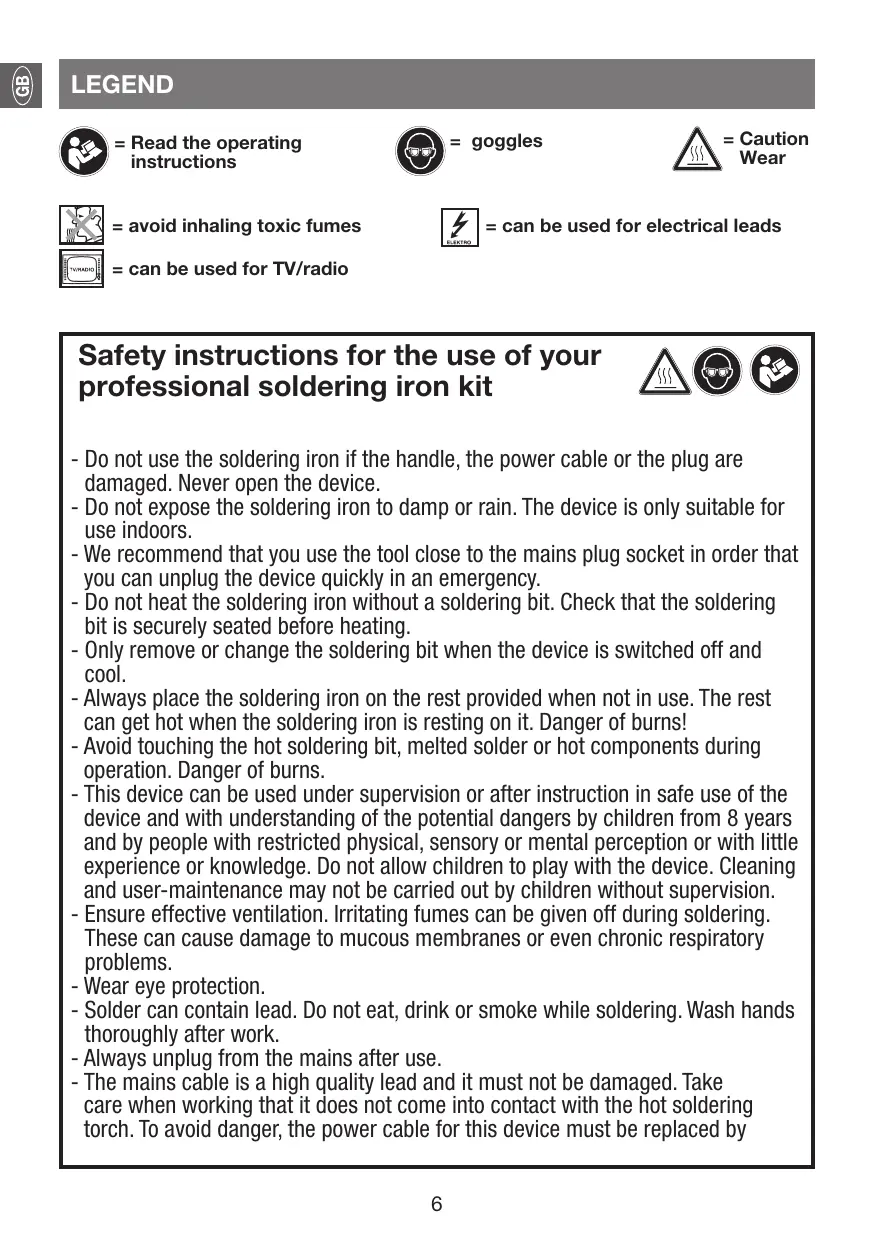


| Product type | Professional soldering iron |
| Models | HS-060A-25 (25 W) and HS-060A-80 (80 W) |
| Power consumption | 25 W (model HS-060A-25) / 80 W (model HS-060A-80) |
| Rated voltage | 230-240 V~, 50 Hz |
| Protection class | I |
| CE marking | Yes |
| Heating time | 3 to 5 minutes |
| Included accessories | Solder wire, soldering grease, desoldering wick, stand |
| Tip | Interchangeable tip, secured by screw |
| Use | Soldering on wires, printed circuit boards, modeling, electronics |
| Safety instructions | Do not use if cable damaged; wear safety glasses; do not inhale fumes; unplug after use; place on stand; do not touch hot tip |
| Maintenance | Clean and tin the tip regularly; replace worn tip |
| Recycling | Do not dispose of with household waste; take to collection center (Directive 2012/19/EU) |
| Soldering temperature | Approximately 185°C (electronics) / 235°C (radio) |
| Filler metals | Flux-cored wire or plain wire with flux paste |
| Desoldering | Use desoldering wick to absorb solder |
Frequently Asked Questions - HS-060A-25 - HS-060A-80 ROTHENBERGER
User questions about HS-060A-25 - HS-060A-80 ROTHENBERGER
0 question about this device. Answer the ones you know or ask your own.
Ask a new question about this device
Download the instructions for your Electronic installation kit in PDF format for free! Find your manual HS-060A-25 - HS-060A-80 - ROTHENBERGER and take your electronic device back in hand. On this page are published all the documents necessary for the use of your device. HS-060A-25 - HS-060A-80 by ROTHENBERGER.
USER MANUAL HS-060A-25 - HS-060A-80 ROTHENBERGER
= Read the operating instructions

= goggles

=Caution Wear


= avoid inhaling toxic fumes
= can be used for TV/radio

= can be used for electrical leads
Safety instructions for the use of your professional soldering iron kit


- Do not use the soldering iron if the handle, the power cable or the plug are damaged. Never open the device.
- Do not expose the soldering iron to damp or rain. The device is only suitable for use indoors.
- We recommend that you use the tool close to the mains plug socket in order that you can unplug the device quickly in an emergency.
- Do not heat the soldering iron without a soldering bit. Check that the soldering bit is securely seated before heating.
- Only remove or change the soldering bit when the device is switched off and cool.
- Always place the soldering iron on the rest provided when not in use. The rest can get hot when the soldering iron is resting on it. Danger of burns!
- Avoid touching the hot soldering bit, melted solder or hot components during operation. Danger of burns.
- This device can be used under supervision or after instruction in safe use of the device and with understanding of the potential dangers by children from 8 years and by people with restricted physical, sensory or mental perception or with little experience or knowledge. Do not allow children to play with the device. Cleaning and user-maintenance may not be carried out by children without supervision.
- Ensure effective ventilation. Irritating fumes can be given off during soldering. These can cause damage to mucous membranes or even chronic respiratory problems.
- Wear eye protection.
- Solder can contain lead. Do not eat, drink or smoke while soldering. Wash hands thoroughly after work.
- Always unplug from the mains after use.
- The mains cable is a high quality lead and it must not be damaged. Take care when working that it does not come into contact with the hot soldering torch. To avoid danger, the power cable for this device must be replaced by
the manufacturer, its customer service or a similarly qualified person if it is damaged.

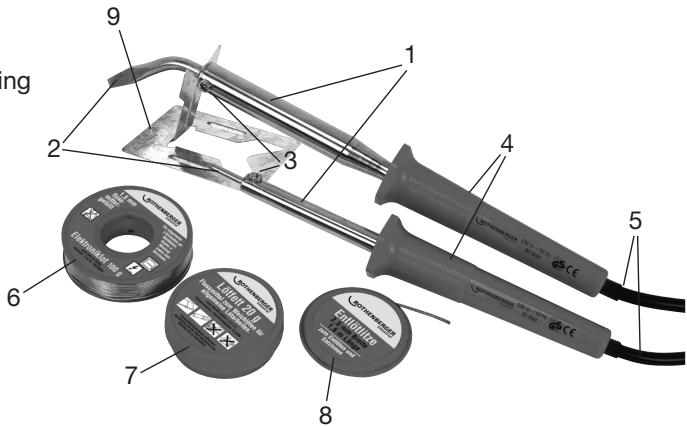
PART NAMES
1 Soldering iron
2 Soldering bit
3 Retaining screw for soldering bit
4 Handle
5 Cable with mains plug
Accessories:
6 Electronic solder
7 Soldering grease
8 Solder wick
9 Rest
INTENDED USE
The soldering iron kit is designed for soldering e.g. wires and circuit boards. It may only be used for these purposes. All other uses are expressly forbidden and do not apply as the intended use.
TECHNICAL DATA
| Model HS-060A-25 | Model HS-060A-80 | |
| Rated voltage: | 230 – 240 V~ / 50 Hz | 230 – 240 V~ / 50 Hz |
| Power input: | 25 W | 80 W |
| CE Protection class I | ||
COMMISSIONING
POWER SUPPLY
The device is designed for use with a single phase AC 230-240 V~ / 50 Hz power supply. Check that your mains voltage coincides with the details on the device's rating plate.
SWITCHING ON/OFF
- Plug (5) into the mains to switch on the device.
- Unplug (5) from the mains to switch off the device.
USE
- Plug the device into a suitable socket and place the soldering iron onto the rest.
- Let the soldering iron heat up for approx. 3-5 minutes. The working temperature is reached when the solder starts to melt immediately on contact with the soldering bit.
- Tin the soldering bit before starting to solder. To do this, heat the unused or cleaned soldering bit and touch with solder. There should be a thin layer of solder covering the bit.
- Before starting work on your planned join or material, check the function on a similar piece of material or waste.
- Clean the parts to be soldered before soldering.
- Touch flux-filled soldering wire to the outer edge of the soldering bit and melt off the soldering wire. This ensures that soldering joint is wetted with the flux which allows the solder to bond to the metal.
- For extensive soldering work, it is a good idea to clean and re-tin the soldering bit regularly.
MORE SOLDERING TIPS
Solders and fluxes
Soft solder for DIY use is nearly always produced in wire form.
There are two kinds of soldering wire.
- Simple un-filled soldering wire.
- Flux-filled soldering wire.
| Electronic solder | Melting point approx. 185°C. For use in electronics. |
| Radio solder | For use in model making etc. and for fine soldering. Melting point approx. 235°C. |
| Soft solder | For all soldering work |
| Ammoniac block | For cleaning soldering bits |
| Soldering grease | Flux in paste form |
| Soldering fluid | Flux for hard-to-access soldering points |
SOLDER REMOVAL WITH SOLDER WICK
- Heat soldering join with soldering iron, hold soldering wick onto the melted solder.
- The soldering wick absorbs the solder.
- Cut off used soldering wick.
MAINTENANCE
REplacement of CONNECTION CABLE
The mains cable is a high quality lead and it must not be damaged. Take care when working that it does not come into contact with the hot soldering torch. To avoid danger, the power cable for this device must be replaced by the manufacturer, its customer service or a similarly qualified person if it is damaged.
MAINTENANCE
The bit (2) will wear out after a time and must be replaced.
To do this, unscrew the screw (3) on the metal shaft of the soldering iron, pull out the old bit and replace with a new one. Re-tighten the screw (3).
RECYCLING

This symbol indicates that the product cannot be disposed of as domestic waste according to the electrical- and electronic waste regulations (2012/19/EU) and national legislation. This product must be delivered to a designated collection point. This may be e.g. exchange when purchasing a similar product or delivery to an authorised collection point for the recycling of electrical- and electronic waste. Incorrect disposal of used items, due to the potentially hazardous materials which are often used in electrical- and electronic waste, can have negative effects on the environment and health. Correct disposal of this product also contributes to the effective use of natural resources. Information about collection points for used items can be obtained from your local authority, the public waste management authorities, an authorised electrical- and electronic waste disposal point or your refuse collection team.

REPLACEMENT DU CÂBLE D'ALIMENTATION
= undgå at inhalere giftige dampe
=kan anvendestil TV/radio

A CSATLAKOZÓ KÁBEL CSERÉJE
=HeBbIXaTbJIOBUTbie napbl
= npimehmO dny TeIeBnIeHnI/ paImo

= NOxOaNT IJIЯ 3JIeKTpWuecknx npoBOHnKOB
Yka3aHnno TpoTexnke 6e30napChOCTn npnNCNoIb3OBaHm npoΦecCNOHaJIbHOrO naJIbHnka


- He nCnOJIb3OBAtB naJIbHnK npu haJIuHnIOBpeJdeHn Ha pykoTKe, ceTeBOM Ka6eIe IINCeTeBOI BUNke. He BCKpbIBaTb npi6Op!
-Bepeyb naJIbHnK OT BlaIg n IdoJx. Pnp6Op npEHa3HaueH dIy IcNoIb3OBAHnB 3aKpbTbIX NOMeUeHnx.
-MbI peKOMeHnyem nCnOJIb3OBAHne npi6opa B HENOCpeJCTBeHHoN 6JI3OCTNoT cTeBOB pO3eTKu, UTo6bl B CIIyae KpaIHeN HeO6XODIMOCTn IMETb BO3MOxHOCTb 6bICTpo BBITAHyTB cTeBYIO BNIJKy I3 pO3eTKu. - He harpeBaIte naJIbHnK 6e3 naJIbHOrO hakoHeuHnKa. Ipeed harpeBOM npOBepbTe MeCTO KpePJIeHnI naJIbHOrO hakoHeuHnKa.
- ydaJIeHHe IINI 3aMeHny paJIbHOro HakoHEuHka IpOIN3BOIDITb TOJIbKO Iprn BbIKJIIOUeHHOM paJIbHKe INB XOJIOHOM COCTOHN.
- Ecnn naJIbHnK He nCnOJb3yeTcR, BcerDa yKNaIbIbAaTe ero Ha cneuaJIbHyIO NOCTaBky, noCTaBIAReMyIO BMeTe C npIbOpom. IOnCTaBka MoXeT CInbHO HArpeBaTbcra OTTO, YTO Ha He JLeKNT naJIbHnK. OAnchocTb NolUyehna Oxora!
- Bo BpemЯЗкплуатуmicи пьбора He рпнікасітсь к roрачMuHaKонeчніку, PACnlaBleHOMy npinIO uINI ropaymɪənlmeHTaM,—ecTB onaCHOCTb nOlyeHnɪ OXoRa.
-3Tmnp60pomMoryTpoB3oBaTc8TeTOn8Je,ataKkeIucaCOrpaHnueHHbIMN fU3nuecknMI,ceHCOPbIMN UINyUMCTBeHHbIMN cNoO6HOCTaMNI UIN C HeIOCTaTKOM ONbTa 3HaHIn,ecnOHN HaxOJATcPOI pncMOtPOM INI POnyUIN INCHpyKcNIO6e3ONaChOMY nCpOBaHIO np6oPA IOcO3HaOT OnaCHOCTb,KOTopAR MoKET BO3HKnA Tb IpoEcCe EKcnPyatau. He N03BoJrTe Detam mRpaTB Cp6pobom. YnctKa u O6cnyXnBaHne np6oBaHe DOnxhbl IpOnzBODITc4TeTbMn 6e3 HaNdexkaUero Ha3Opa. - P03a60bTeCb O haIeJaSeB eHTnlauun. B pOuece C naKu MOryT bIeJraTcB aB1BaIOUne pa3dpaKeHne napbl, cNooc6hBe I npVBecTu K npopaeHHo CnI3NCTO 060IoUKN, BnIObdo BO3HKnHOBeHHna XPOHmuecknx 3a60JeBaHm DbIXaTeJIbHbIX nyTei.
-Исповьут ecpeдства 3ацитblгз. - OIOBAAHbI npInoM moKet coepeKaTb CBUHeuC. B npOceCe naIKn HeJIb3a HN eCTb, HN nITb, HN Kypntb. Pocne pa60tby TuaTeNbHO BbIMOnTe pyKn!
-Поссеипспьзовая рпбоба ораза teьно OTOceДИнITE cTeByIO BnIKY!
-Испόньзуемы се teвои Кабелялгса ВсICOKOKaYeCEtBeHHbIM ПpoBoDnHkOM, NOВржденHe КOTOPOrO HeOnyctmO. Bo BpeMЯ pa60tby cIeДITE 3a Tem, YTO6bl OH He coPnKacalc C
pa30rpebIM naJIbHnKOM. EcII JHe Na CeTeBOM Ka6eJe IMeIOTc NOBpeXdEHHa, To dIa Co6JIIODeHnI npABIN 6e3OJaNACHOtOn OH DoJIKeH 6bITb 3aMeHEn pON3BOJNTeHem, erO cepBnCHoC nJyXbOHI INI DpyrIM KBaIIuIuPObAHbIM nepCOHaIOM.
HANMEHOBAHNE 3JEMEHTOB
1 PaJIbHnK
2 NaJIbHbI HaKOHeuHnK
3 BInr KpeJIeHnnaJIbHOro NaKOHeuHnka
4 PykorTka
5 Ka6eB c ceTeBOB BuNKoI
DOnonHnTeIbHbIe
npiHaDJIeXHoCTN:
6 Празнодя пайки
эльектpoHHbIX KOMNOHEHTOB
7 PaJIbHaJa nacta
8「n6kaJxJaIJIyBbIaNbaHna
9 PoiCTaBka

NCSIOJIb3OBAHHe IHO HA3HAUeHNIO
KomnkeT naJIbHnka npedHa3Haueh nIy BbIIOJIHeHnnaJIbHbIx pa6oT, HapnpMe pI naIKn npOBOOB n 3NeKToHHbIX nIaT, n OJKeH nCNoJIb3OBAtCBs ICKNIOHTeJIbHO NO yKa3aHHOMy Ha3HaueHIO. IIO6oe dpyroE npImeHne KaTeOpUeCKs NCKLIOaETcN i KNaaccnOuNPuyETc Ka NCNoJIb3OBAHnE He nO HA3HaueHIO.
TEXHNUECKNE DAHHbIE
IcnoJb3ObaHHyIO qacTb JxNbl o6pe3aTb.
yXoI
3AMEHA CETEBORO SHHYPA
IcnoJb3yeMbI cTeBOI Ka6eJIb YBIIaTcR BbICOKoKaueCTBeHHbIM nPoBOdHkOM, NOBpeKJeHne KOtOPO HeOnyctmIO. Bo Bpemra pa6OtbI CLeDITe 3a TeM, UTo6bl OH He CoPnKacanC cpa3OrpeTbIM pAnlbHnKOM. Ecnn Jke Ha cTeBOM Ka6eNe IMeUOTc NOBpeKJeHn, TO dJa co6NIODeHn IpaBnIb 6e3ONaCHOCTOn OH OJKeH 6bITb 3aMeHeN Ipn3BOdHTeJIeM, erO cepBnCHoI cJyK60I nn DpyrIM KBaJIuΦuNupOBaHHbIM nepCOHaIOM.
yXoI
HaKoHeuHnK (2) n3HaIINBaETCa CO BpeMeHem n OJXeH 6bITb 3aMeHEn.
ДлэТOrO Heo6xOДИМо OTKpyTntb BnHT (3)HaMeTALIynchecKOM CtepXHe NaJIbHnKa, BbITryHtB nCNoIb3OBaHbI HakoHeuHnK I 3aMeHnTb erO Ha HObI. 3aTeM cHObA 3aKpyTnte BnHT (3).
YTNJIIN3AUÇNIA

3TOT CIMBOL yka3bIBAeT Ha TO, YTO daHbI npOyKT corlaacHO DInpeKTHBE o6 yTuIN3aCnIO OTPa6oTaHHORO 3NeKTPnueeCKoro n 3NeKTPoHNO O6OpUOBAHnra (2012/19/EU) n HauNoHbIbM 3aKOHAM He DOJIKeH yTuIN3NIOBaTbcraYe3 CnCTMeY uTuIN3aCnIM 6bITOBbIX OTXODOB. DaHbII pOyKT HeO6xOJIMO cDaBaTb B ppeDyCMOTpeHHBe dJa 3TNX ueNe ToCKn Pnpema. 3To MoKET bbl, HApnpimep, BO3Bpat ppi NOKyIke NpOoBHOrO TObapa NIIcAaB v AByTOPIN3OBAHNy TOky Pnpema dN B TOpuHNO nepepa6oTKI OTPa6oTaHHORO 3NeKTPnueeCKoro n 3NeKTPoHNO O6OpUOBAHn. HeHaNDJeAaee O6paSeHne C OTPa6oTaHHBM O6OpUOBAHnem MOKeT OKa3aTb HeraTNBHOE Bo3DeIeCTBHe Na OkpykaIoUy cpeyu I 3DopOBBe cheLOBeka PO npuHHe NpTeHuaJIbHO ONaChbIX MaTePnaIbON, KOTOpBle 3aCaCTyo COdRpKaTcR B CTapBX 3NeKTPnueeCKnx N 3NeKTPoHbIX np6opax. OcyueCTBnRA NaIeJkaUy yTuIN3aCnIO pOdyKTa, Bbl BHOCITE CBOI BKNaI B 3ΦeKTHBOHe iCnOJIb3OBAHnne pnpOndHy pecypcoB. IHΦOpMaunio O MeCTax pInema OTPa6oTaHHORO O6OpUOBAHnra Bbl MOpKeTe NOnyUHTB B opRaHx MeCTHO rYpabLnHen, B O6eCTBeHHoN OprAHaN3aUnn PO JIKKBnDAaUN OTXoDB, B AByTPOIN3OBaHHO TOnKe yTuIN3aCnN CTAPRO 3NeKTPnueeCKoro n 3NeKTPoHNO O6OpUOBAHnra NNl NBpaBUNCb B cnjXb6y BvIBO3a Mycopa.

= Läss
bruksanvisingen

= Använd
skyddsglasogon

=Observera, encheten ar varm


