
Proteus A3/125 - Laminating machine FELLOWES - Free user manual and instructions
Find the device manual for free Proteus A3/125 FELLOWES in PDF.


| Product type | Hot and cold laminating machine |
| Brand | Fellowes |
| Model | Proteus A3/125 |
| Maximum pouch size | A3 (297 x 420 mm) |
| Laminating width | 125 mm (for documents up to 125 mm wide) |
| Recommended pouch thickness | From 75 to 125 microns (2 x 75 to 2 x 125) |
| Adjustable temperature | Yes, with 6 positions |
| Laminating speed | 330 mm/min |
| Warm-up time | Approximately 3 minutes |
| Auto on/off function | Yes, after 30 minutes of inactivity |
| Cold lamination | Yes, with self-adhesive pouch |
| Temperature ready indicator | Status LED |
| Power supply | 230 V, 50 Hz, 1.2 A |
| Power consumption | 280 W |
| Dimensions (W x D x H) | 490 x 150 x 100 mm |
| Weight | 2.5 kg |
| Housing material | ABS plastic |
| Laminating rollers | Silicone, 4 rollers |
| Cleaning | Use a Fellowes cleaning sheet or a soft, dry cloth |
| Maintenance | Regularly dust the rollers with a cleaning sheet |
| Safety | Automatic shutdown in case of overheating or jam |
| Spare parts | Replacement rollers available (ref. 12345) |
| Repairability | Repairability index: 8.2/10 (according to the French scale) |
| Warranty | 2 years |
Frequently Asked Questions - Proteus A3/125 FELLOWES
User questions about Proteus A3/125 FELLOWES
0 question about this device. Answer the ones you know or ask your own.
Ask a new question about this device
Download the instructions for your Laminating machine in PDF format for free! Find your manual Proteus A3/125 - FELLOWES and take your electronic device back in hand. On this page are published all the documents necessary for the use of your device. Proteus A3/125 by FELLOWES.
USER MANUAL Proteus A3/125 FELLOWES
natural_image
Line drawing of a Fellowes printer with control panel and ventilation slots (no text or symbols on device body)GB Please read these instructions before use.
Performance LED interface Yes
Format A3 Photo capable Yes
Entry width 320mm Carrier-free Yes
Pouch thickness (min) 75 microns External cooling plate Yes
Pouch thickness (max) 250 microns
Technical Data
| Estimated heat-up time | 3 minutes | Voltage / Frequency / Current(Amps) | 220-240V AC, 50/60Hz, 5A |
| Cool down time | 30-60 minutes | Wattage | 1000 Watts |
| Lamination speed | Variable speed (0-95 cm/min) | Dimensions (HxWxD) | 58 x 30 x 14 cm |
| Number of rollers | 6 Net weight | 15 kg | |
| Ready indication | Light | Laminating capacity | Max document thickness = 2mm (0.08") |
| Reverse function | Yes | Min pouch = 75 micron | |
| Soft touch buttons + beep | Yes | Max pouch = 250 micron | |
| LED interface | Yes |
Maximum recommended usage: Heavy Use, 200 laminations per day. Heavier paper materials may have an effect on quoted usage.

IMPORTANT SAFETY INSTRUCTIONS - KEEP FOR FUTURE USE
- Plug the machine into an easily accessible socket.
- To prevent electrical shock - do not use the appliance close to water, do not spill water on to the appliance, power cord or wall socket.
- Keep away from moving parts.
- This equipment is not suitable for use in locations where children are likely to be present.
- This laminator has a Disconnect Power Switch that must be in the ON (1) position to operate laminator. In case of emergency, move switch to OFF (0) position. This action will stop laminator immediately.
DO ensure the machine is on a stable surface.
DO test laminate scrap sheets and set the machine before final laminations.
DO remove staples and other metal articles prior to laminating.
DO keep the machine away from heat and water sources.
DO turn off the machine after each use.
DO unplug the machine when not in use for an extended period.
DO use pouches designed for use at the appropriate settings.
DO keep away from pets, while in use.
DO ensure self-adhesive pouches are only used with the cold setting.
DO NOT leave the power cord in contact with hot surfaces.
DO NOT leave power cord hanging from cupboards or shelves.
DO NOT use appliance if the power cord is damaged.
DO NOT attempt to open or otherwise repair the machine.
DO NOT exceed the machines quoted performance.
DO NOT allow children to use this machine without adult supervision.
DO NOT laminate sharp or metal objects (eg: staples, paper clips).
DO NOT laminate heat-sensitive documents (eg: tickets, ultrasounds etc) on hot settings.
DO NOT laminate with self-adhesive pouches on hot settings.
DO NOT laminate an empty pouch.
FEATURES & TIPS
Auto Shut Off
Auto Shut Off
If temperature is selected and then machine is inactive for 30 minutes, the Auto Shut off function will place the machine into standby mode. The heat will turn off and machine will power down. The machine will beep and green ready light will flash. To operate the machine press any button or cycle the power switch.
• Always put item into the appropriate sized pouch.
- Always test laminate with a similar size and thickness before final process.
- If required, trim excess material from around the item after lamination and cooling.
• For best results, use Fellowes ® brand pouches.
- When working with different pouch thickness' (temperature settings) it is recommended to start first with the thinnest pouches.
- Prepare pouch and item for lamination. Place item within pouch centred and touching the leading sealed edge. Ensure the pouch is not too large for the item.
LAMINATOR CONTROLS


NEED HELP?
Let our experts help you with a solution.
Customer Service... www.fellowes.com
Always call Fellowes before contacting your place of purchase, see the rear cover for contact details.
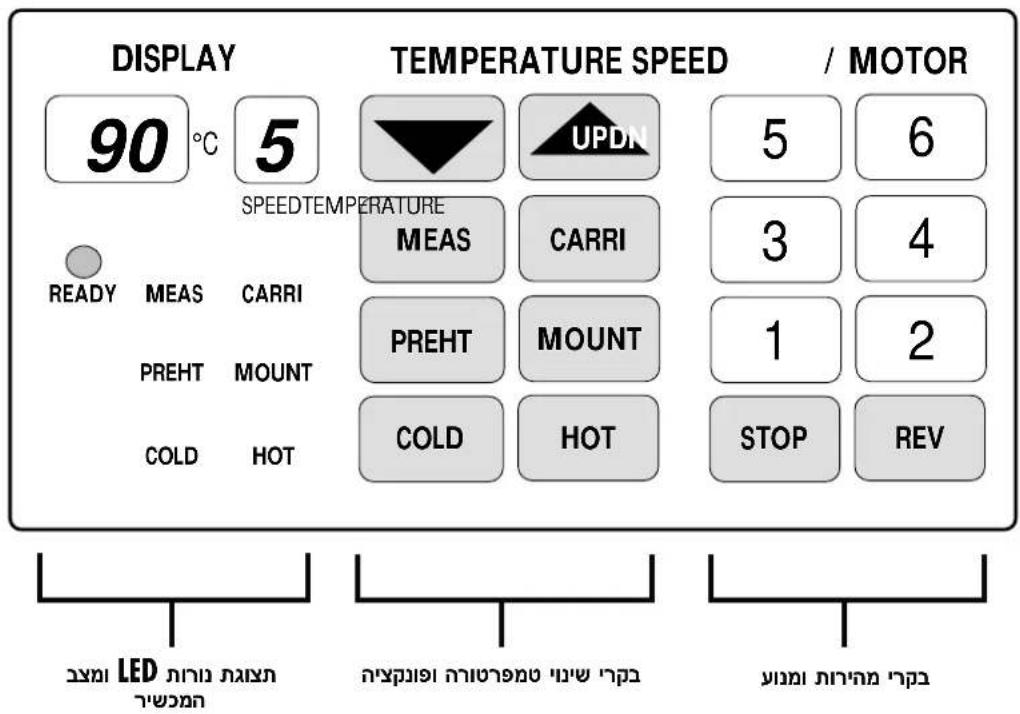
LED & STATUS DISPLAY
| 90°C | Indicates roller temperature (pre-set and actual). | READY | "READY" LED switches to show the roller temperature is ready to laminate. |
 | Indicates running speed of the rollers. | MEAS CARRIPREHT MOUNTCOLD HOT | Function LED displays showing the selected function in operation. |
TEMPERATURE ADJUSTMENT & FUNCTION CONTROLS
  | Select "UP" or "DOWN" controls to adjust the roller laminating temperature.Manually adjust the roller temperatures to suit the thickness of laminating stock. |  | Select function to laminate with 'MOUNT BOARD'.A function for laminating hard board more than 1mm thickness. The function selects temperature 130°C and motor speed "1". |
| MEAS | Select function to 'MEASURE' the actual temperature of rollers.The button can be pressed anytime for an immediate read out in the temperature display. |  | Select function for 'COLD' or no-heat lamination.Cold lamination automatically selects temperature and motor speed of "0". If roller temperature is above 60°C, motor speed of "2" will operate until rollers have cooled safely. This action will prevent heat damage to the rollers. |
| CARRI | Select function for laminating with 'CARRIER'.The function for laminating pouches with Carriers. The function selects 100°C and motor speed "2". |  | Select function for 'PRE-HEAT'.Pre-Heat can be selected as a 'Stand-By' function ideal for extended periods of use. The function operates at 80°C and motor speed "2", until another function is selected. |
| HOT | Select function for 'HOT' lamination. Hot lamination for normal hot pouch films. For 75mic pouch, the machine will select temperature of 90°C and motor speed of "5". This is ideal for 80g copy paper and 75mic pouch. For thicker pouches, select the corresponding engine speed followed by temperature adjustment. Adjustment to temperature using "UP" and "DN" buttons to suit the thickness of paper as required.EG:250 micron = motor speed 2200 micron = motor speed 3175 micron = motor speed 3150 micron = motor speed 3125 micron = motor speed 5100 micron = motor speed 575 micron = motor speed 5 | ||
SPEED & MOTOR CONTROLS
| STOP | "STOP" function.Press and hold to stop the rollers running. Do not use for long periods especially when the roller temperature is above 90°C. | REV | "Reverse" function.Press and hold to reverse the rollers. This will help remove mis-fed pouches. |
| 5 63 41 2 | Select the motor speed to suit the chosen pouch thickness. Then adjust temperature to suit paper thickness if required.EG:motor speed 1 = mounting boardmotor speed 2 = 250 micron & carriersmotor speed 3 = 200, 175, 150 micromotor speed 5 = 125, 100, 75 micron | ||
BEFORE LAMINATING
- Ensure the machine is on a stable surface.
- Check there is enough clear space (min 50cm) behind the machine to allow items to pass through freely.
-
Select the correct power lead for the appropriate power supply. Fit the lead to the machine (the socket is at the rear of the machine).
-
Plug the machine into an easily accessible wall socket. Switch the mains supply on.
- Ensure the 'Cooling Plate' is fitted correctly with the graphics "Top Side" visible.
STEPS TO COLD LAMINATE
Cold lamination is the default function setting when power is switched on. Cold lamination can only operate when the rollers run at a temperature below 30^ C. Press the "MEAS" button to measure the roller temperature.
- Switch the power on (located at the rear of the machine).
-
Select the "COLD" function. Wait for roller temperature to fall below 30°C.
-
When "COLD" & "READY" lamp is on, select speed 2 or 3 and laminate cold pouches.
STEPS TO HOT LAMINATE
- Switch the power on (located at the rear of the machine). Cold lamination is the default function setting when power is switched on.
-
Select the "HOT" function. The temperature will automatically select 90^ . The rollers will start turning when the temperature is above 60^ .
-
When "READY" lamp is on, the machine is ready to start laminating.
- Select the motor speed best suited to the pouch thickness (see graph on machine) EG: 80 micron pouch = motor speed 5 / 90°C. The machine will automatically select the optimum laminating temperature. Laminating temperatures can also be adjusted manually as required.
STEPS TO SWITCH OFF THE MACHINE
To preserve the rollers, do not switch off the machine when it is hot.
- Select "COLD" function. The machine will set temperature at 0°C and motor speed at "2". When the roller temperature has cooled to below 60°C, the rollers will stop automatically.
-
Switch off the power using the switch at the back of the machine.
-
Unplug the power cord.
STORAGE & CLEANING
Unplug the machine. Allow the machine to cool. The outside of the machine can be cleaned with a damp cloth. Do not use solvents or flammable materials to polish the machine. Cleaning sheets can be used with the machine. When the machine is warm — run the sheets through the machine to clean any residue off the rollers. For optimum performance, it is recommended that cleaning sheets are used with the machine regularly. (Cleaning sheet order code #5320604).
REPLACING THE FUSE

This machine is fitted with a fuse, located between the main switch and the wall socket on the rear of the machine. To replace the fuse:
• Order Fellowes #207786.
• Unplug the machine from the main supply.
- Open the fuse holder with a screwdriver blade.
- Insert a new fuse in the holder and replace the holder into the machine.
Note: Always use the recommended fuse (Fellowes #207786, 5 Amps) and DO NOT replace it with one of a different rating. Fuse can be ordered by calling Fellowes Customer Service.

The machine is supplied with a thermal re-set switch. The switch will activate when the machine becomes too hot. This condition should not occur during normal use. To re-set the switch:
- Allow the machine to cool down for 30-60 minutes.
• Unplug the machine from the main supply.
• Safely support the machine - to access the underside.
• Using a Phillips screwdriver, open the cover plate. - Using a pen, insert the pen through the hole and press the metal switch until it snaps closed.
- Replace the cover plate and screws.
• Power-on the machine.
TROUBLESHOOTING
| Problem Possible cause Solution | ||
| No power | Machine not switched on Switch on machine | at rear next to plug inlet and at the wall socket |
| Main fuse failure Replace fuse | ||
| Power cord not fitted correctly Check power | cord in receptacle on unit | |
| Ready light does not come on after a long period | Machine is not heating up Contact service dealer | |
| Pouch does not completely seal the item | Item may be too thick to laminate Pass through the machine again | |
| Temperature setting may be incorrect Check | pouch thickness is correctly selected and pass through again | |
| Pouch has waves or bubbles | Temperature setting may be incorrect | Check pouch thickness is correctly selected and pass through again |
| Pouch is lost in the machine Pouch is jammed | Select reverse button and pull out the item by hand | |
| Jamming | Pouch was inserted 'open end' first | |
| Pouch was not centred on entry | ||
| Pouch was not straight upon entry | ||
| Empty pouch was used | ||
| Pouch is damaged after lamination | Damaged rollers or adhesive on rollers | Pass cleaning sheets through the machine to test and clean rollers |
| Curled or burnt laminations Too hot | Reduce temperature | or increase speed |
| Soft or poor lamination | Too cold | Increase temperature or reduce speed |
| Rollers not running | Rollers too cold (< 60°C) | Wait for rollers to warm-up |
| "STOP" button may be pressed Press "MOTOR" or "SPEED" button | ||
| Unstable lamination temperature | Roller electric brush may be broken | Contact service dealer |
| Cannot select any Mode | Circuit board error | |
| Rollers not running & motor is running | Loose circuit bolts on gear | |
| Excessive noise | Gears worn or damaged | |
| Repeated faint line on lamination | Roller damaged | |
| Laminator will not reset | Too hot | Allow laminator to cool down |
CAPACITÉS
Performance Interface DEL Oui
Format A3 Plastification de photos Oui
Cold lamination requires the rollers to run at a temperature below 30^ c. Press the "MEAS" button to measure the roller temperature. Cold lamination is the default function setting when power is switched on.
Cold lamination requires the rollers to run at a temperature below 30^ C. Press the "MEAS" button to measure the roller temperature. Cold lamination is the default function setting when power is switched on.
VOORDAT U GAAT LAMINEREN
Denne maskinen er utstyrt med en sikring som er plassert mellom hovedbryteren og stikkontakten bak på maskinen. Skifte sikringen:
TILBAKESTILLING AV TERMISK UTKOBLING

Denne maskinen er utstyrt med en bryter for termisk utkobling. Bryteren vil bli aktivert när maskinen blir for varm. Denne tilstanden skal ikke forekomme under normal bruk. For å tilbakestille bryteren for termisk utkobling:
natural_image
Diagram showing two devices connected by a cable, one with a magnified inset (no text or symbols)DÔLEŽITÉ BEZPEČNOSTNÉ POKYNY – USCHOVAJTE NA POUŽITIE V BUDÚCNOSTI
PAŞII PENTRU LAMINAREA LA RECE
PAŞII PENTRU LAMINAREA LA CALD
RECONFIGURAREA TERMICĂ

Ovaj stroj opremljen je osiguračem koji se nalazi između glavne sklopke i zidne utičnice na stražnjoj strani stroja. Kako biste zamijenili osigurač:
• Naručite artikal Fellowes kat. br.207786.
• Iskopčajte stroj iz napajanja.
- Otvorite držač osigurača oštricom odvijača.
• Umetnite novi osigurač u držač i ponovno stavite držač u stroj.
POTREBNA VAM JE POMOĆ?
Mašina je opremljena sklopkom za uspostavljanje početne vrednosti temperature. Sklopka će se aktivirati. Ovo stanje ne bi smelo da se pojavi tokom uobičajene upotrebe. Da uspostavite početno stanje sklopke:
- ostavite mašinu da se ohladi tokom 30 do 60 minuta;
- isključite mašinu sa mreže napajanja;
- mašinu bezbedno postavite tako da možete da pristupite donjoj strani;
- pomoću odvijača Phillips otvorite poklopac;
- upotrebite olovku i umetnite je kroz otvor, a zatim pritisnite metalnu sklopu dok ne škljocne i zatvori se;
• vratite poklopac i zavrtnje na mesto; - uključite mašinu.
REŠAVANJE PROBLEMA
| Problem Mogući uzrok Rešenje | ||
| Nema napajanja. | Mašina nije uključena. | Na poleđini uključite mašinu tako što ćete povezati ulazni priključak sa utičnicom. |
| Kvar na glavnom osiguraču Zamenite osigurač. | ||
| Kabl za napajanje nije pravilno pričvršćen. Proverite kab | za napajanju na priključnici jedinice. | |
| Svetlo koje označava spremnost za rad ne svetli duže vreme. | Mašina se ne zagreva. Obratite se ovlašćenom serviseru. | |
| Folija ne oblaže predmet u celosti. | Možda je predmet previše tanak za laminaciju. Provucite | ga još jednom kroz mašinu. |
| Temperatura možda nije pravilno podešena. | Proverite da li je debljina folije pravilno izabrana i ponovo je provucite. | |
| Folija je naborana ili je ispod nje dopreo vazduh. | Temperatura možda nije pravilno podešena. | Proverite da li je debljina folije pravilno izabrana i ponovo je provucite. |
| Folija je nestala u mašini. Folija je izgužvana. | Izaberite dugme za provlačenje u suprotnom smeru i predmet izvucite ručno. | |
| Gužvanje | Folija je postavljena tako da prvo uvlači „otvoreni deo“. | |
| Folija nije bila centrirana na ulazu. | ||
| Folija nije postavljena pravo na ulazu. | ||
| Korišćena je prazna folija. | ||
| Folija je oštećena nakon laminacije. Valjci su oštećeni ili je na valjcima lepljiva materija. | Provucite listove za čišćenje kroz mašinu da proverite i očistite valjke. | |
| Umotana ili izgorela laminacija Previsoka temperatura Smanjite temperaturu ili povećajte brzinu. | ||
| Meka ili nekvalitetna laminacija | Preniska temperatura | Povećajte temperaturu ili smanjite brzinu |
| Valjci ne rade | Temperatura valjaka je preniska (< 60 °C) | Sačekajte da se valjci zagreju. |
| Dugme „STOP“ (ZAUSTAVLJANJE) je možda pritisnuto. | Pritisnite dugme „MOTOR“ ili „SPEED“ (BRZINA). | |
| Promenljiva temperatura laminacije | Možda je slomljena električna četkica za valjke. | Obratite se ovlašćenom serviseru. |
| Nije moguće biranje nijednog načina. | Greška na kolnoj ploči | |
| Valjci ne rade, a motor radi. | Olabavite zavrtnje kola na zupčaniku. | |
| Prekomerna buka | Zupčanici su pohabani ili oštećeni. | |
| Dve ili više bledih linija na laminaciji | Valjak je oštećen. | |
| Laminator ne može da se podesi na početnu vrednost. | Previsoka temperatura Sačekajte da se laminator ohladi | |
القدرات

?תְרָה בַרִי אַלְא
| "הכלה" (MOUNT) "הכלה" (MOUNT) 130°הכלה" (MOUNT) 130° |  | (UP)הכלה" (DN)הכלה" (DN) |  | |  |
| .(COLD)הכלה" (COLD) 60°הכלה" (COLD) 60° |  | "MEAS"הכלה" (MEAS)הכלה" (MEAS) |  |
| (PREHT)הכלה" (PREHT) 275°הכלה" (PREHT) 275° |  | (CARRIER)"" (CARRIER)"" (CARRIER)"" (CARRIER)"" (CARRIER)"" (CARRIER)"" (CARRIER)"" (CARRIER)"" (CARRIER)"" (CARRIER)"" (CARRIER)"" (CARRIER)"" (CARRIER)"" (CARRIER)"" (CARRIER)"" (CARRIER)"" (CARRIER)"" (CARRIER)"" (CARRIER)"" (CARRIER)"" (CARRIER)"" (DGT3G) |  |
| 75°הכלה" (HOT) 75°הכלה" (HOT) 75°הכלה" (HOT) 75°הכלה" (HOT) 75°הכלה" (HOT) 75°הכ throughput" (DN) 75°הכ throughput" (DN) 75°הכ throughput" (DN) 75°הכ throughput" (DN) 75°הכ throughput" (DN) 75°הכ throughput" (DN) 75°הכ throughput" (DN) 75°הכ throughput" (DN) 75°הכ throughput" (DN) 75°הכ throughput" (DN), 75°הכ throughput" (DN), 75°הכ throughput" (DN), 75°הכ throughput" (DN), 75°הכ throughput" (DN), 75°הכ throughput" (DN), 75°הכ throughput" (DN), 75°הכ throughput" (DN), 75°הכ throughput" (DN), 75°הכ throughput" (DN), and 75°הכ throughput" (DN), 75°הכ throughput" (DN), 75°הכ throughput" (DN), 75°הכ throughput" (DN), 75°הכ throughput" (DN), 75°הכ throughput" (DN), 75°הכ throughput" (DN), 75°הכ throughput" (DN), 75°הכ throughput" (DN), |
בְרָה בְרָה בְרָה
.3 .(הכלההוּרָהוּרָהוּרָהוּרָהוּרָהוּרָהוּרָהוּרָהוּרָהוּרָהוּרָהוּרָהוּרָהוּרָהוּרָה): .1 . .2
תְרָה בְּרָה
GB Thank you for purchasing a Fellowes product. Please visit www.fellowes.com/register to register your product and benefit from product news, feedback and offers. Product details can be found listed on the rating plate positioned on the rear side or underside of the machine.
Fellowes warrants all parts of the laminator to be free of defects in material and workmanship for 1 year from the date of purchase by the original consumer. If any part is found to be defective during warranty period, your sole and exclusive remedy will be repair or replacement, at Fellowes' option and expense, of the defective part. This warranty does not apply in cases of abuse, mishandling or unauthorised repair. Any implied warranty, including that of merchantability or fitness for particular purpose, is hereby limited in duration to the appropriate warranty period set forth above. In no event shall Fellowes be liable for any consequential damages attributable to this product. This warranty gives you specific legal rights. You may have other legal rights that vary from this warranty. The duration, terms and conditions of this warranty are valid worldwide, except where different limitations, restrictions or conditions may be required by local law. For more details or to obtain services under this warranty, please contact Fellowes or your dealer.
Australia Residents Only:
Our goods come with guarantees that cannot be excluded under the Australian Consumer Law. You are entitled to a replacement or refund for a major failure and for compensation for any other reasonably foreseeable loss or damage. You are also entitled to have the goods repaired or replaced if the goods fail to be of acceptable quality and the failure does not amount to a major failure. The benefits under Fellowes' Warranty are in addition to other rights and remedies under a law in relation to the machine.
ال Connectivity. والrealizations,文化和RESICS،等各种 Educational Relations (International Relations)
FELLOWES INC (הכלה) "הכלה" – "הכלה" – "הכלה" – "הכלה" – "הכלה" – "הכלה" – "הכלה" – "הכלה" – "הכלה" – "הכלה" – "הכלה" – "הכלה" – "הכלה" – "הכלה" – "הכלה" – "הכלה" – "הכלה" – "הכ NCAA Division of the United States, United Kingdom, United States, United Kingdom, United States, United Kingdom, United States, United Kingdom, United States, United Kingdom, United States, United Kingdom, United States, United Kingdom, United States, United Kingdom, United States, United Kingdom, United States, United Kingdom, United States, United Kingdom, United States, United Kingdom, United States, United Kingdom, United States, United Kingdom, United States, United Kingdom, United States, United Kingdom, United States, United Kingdom, United States,
03-5761600 08:00-16:30
GB This product is classified as Electrical and Electronic Equipment. Should the time come for you to dispose of this product please ensure that it is not mixed with general household waste. For proper treatment, recovery and recycling, please take this product to a designated collection point. Please contact your local authority for further details of your nearest designated collection point.
Declaration of Conformity
Fellowes, Inc.
Unit 2 Ontario Drive, New Rossington, Doncaster, DN11 0BF, England declares that the product model Proteus A3 conforms with the requirements of the Restriction of Hazardous Substances Directive (2011/65/EU + 2015/863/EU), the Low Voltage Directive (2014/35/EU), the Electromagnetic Compatibility Directive (2014/30/EU), the WEEE directive (2012/19/EU), and below harmonized European EN Standards.
Safety: EN 62368-1:2014/A11:2017
EMC Standard: EN55014-1:2006+A1:2009+A2:2011
EN55014-2:2015
EN61000-3-2:2014
EN61000-3-3:2013
Year Affixed: 20
Itasca, Illinois, USA
October 1, 2020

John Fellowes President & CEO


- IMPORTANT SAFETY INSTRUCTIONS - KEEP FOR FUTURE USE
- FEATURES & TIPS
- Auto Shut Off
- LAMINATOR CONTROLS
- NEED HELP?
- BEFORE LAMINATING
- STEPS TO COLD LAMINATE
- STEPS TO HOT LAMINATE
- STEPS TO SWITCH OFF THE MACHINE
- STORAGE & CLEANING
- REPLACING THE FUSE
- CAPACITÉS
- VOORDAT U GAAT LAMINEREN
- TILBAKESTILLING AV TERMISK UTKOBLING
- DÔLEŽITÉ BEZPEČNOSTNÉ POKYNY – USCHOVAJTE NA POUŽITIE V BUDÚCNOSTI
- PAŞII PENTRU LAMINAREA LA RECE
- PAŞII PENTRU LAMINAREA LA CALD
- RECONFIGURAREA TERMICĂ
- POTREBNA VAM JE POMOĆ?
- Australia Residents Only:
- Declaration of Conformity
- Fellowes, Inc.
Brand : FELLOWES
Model : Proteus A3/125
Category : Laminating machine