
L125-A4 - Laminating machine FELLOWES - Free user manual and instructions
Find the device manual for free L125-A4 FELLOWES in PDF.


| Product type | Laminating machine |
| Brand | Fellowes |
| Model | L125-A4 |
| Maximum laminating format | A4 (210 mm width) |
| Laminating type | Hot and cold |
| Recommended pouch thickness | Up to 125 microns |
| Warm-up time | Approximately 3 minutes |
| Laminating speed | 300 mm/min |
| Number of rollers | 2 |
| Automatic shut-off | Yes, after 30 minutes of inactivity |
| Power supply | 220-240 V, 50/60 Hz |
| Dimensions (L × W × H) | 400 × 150 × 100 mm |
| Weight | 1.8 kg |
| Cleaning | Use a recommended cleaning sheet |
| Safety | Overheating protection |
| Spare parts | Available from the manufacturer |
| Repairability | Repairability index not specified |
| Warranty | 2 years |
Frequently Asked Questions - L125-A4 FELLOWES
User questions about L125-A4 FELLOWES
0 question about this device. Answer the ones you know or ask your own.
Ask a new question about this device
Download the instructions for your Laminating machine in PDF format for free! Find your manual L125-A4 - FELLOWES and take your electronic device back in hand. On this page are published all the documents necessary for the use of your device. L125-A4 by FELLOWES.
USER MANUAL L125-A4 FELLOWES
GB Please read these instructions before use.
QUICK START GUIDE
natural_image
Illustration of a desktop computer with a monitor and keyboard (no text or symbols visible)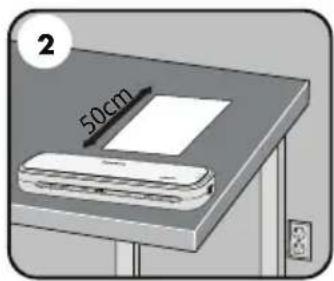

natural_image
Diagram showing a wall-mounted electrical socket connected to an electrical outlet with a plug inserted (no text or symbols present)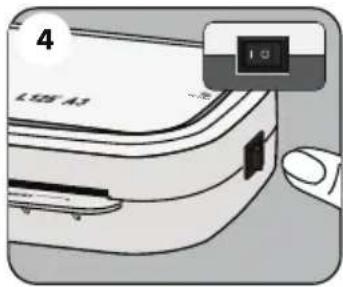


natural_image
Diagram of a folded paper or sheet with arrows indicating direction, no text or symbols present
natural_image
Illustration of a printer with an arrow indicating print direction (no text or symbols)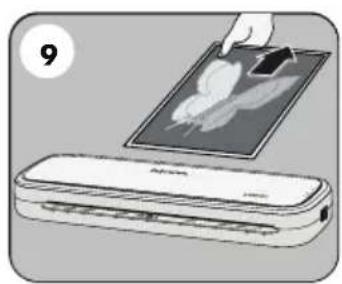
natural_image
Illustration of a hand placing a digital tablet onto a printer (no text or symbols visible)LAMINATOR CONTROLS
A On / off switch
B Ready LED (Green)
C Release lever (

D Pouch / document entry slot
E Pouch / document exit
F Power on LED (Red)
CAPABILITIES
Performance
| Format A3 / A4 | |
| Entry width A3 = 318mmA4 = 241mm | |
| Pouch thickness (min) 75 microns | |
| Pouch thickness (max) 125 microns | |
| Warm up time (estimate) 4 minutes | |
| Lamination speed approx. 30cm/min(+/- 5%) (fixed speed) | |
| Number of rollers 2 | |
| Ready indication Light (Green) | |
| Release lever | Yes |
| Auto Shut Off | Yes |
Technical Data
| Voltage / Frequency / Current(Amps) | 220-240V AC, 50/60Hz, 1.5A |
| Wattage | 300 Watts |
| Dimensions (HxWxD) | |
| A3 | 66mm x 450mm x 158mm |
| A4 | 66mm x 356mm x 158mm |
| Net weight: | |
| A3 | 1,75 Kg |
| A4 | 1,3 Kg |
| Max document thickness (laminating capacity) | 0.4mm |

IMPORTANT SAFETY INSTRUCTIONS - KEEP FOR FUTURE USE
- The machine is for indoor use only. Plug the machine into an easily accessible mains socket.
- To prevent electrical shock - do not use the appliance close to water, do not spill water on to the appliance, power cord or wall socket.
DO ensure the machine is on a stable surface.
DO test laminate scrap sheets and set the machine before final laminations.
DO remove staples and other metal articles prior to laminating.
DO keep the machine away from heat and water sources.
DO turn off the machine after each use.
DO unplug the machine when not in use for an extended period.
DO use pouches designed for use at the appropriate settings.
DO keep away from pets, while in use.
DO NOT leave the power cord in contact with hot surfaces.
DO NOT leave power cord hanging from cupboards or shelves.
DO NOT use appliance if the power cord is damaged.
DO NOT attempt to open or otherwise repair the machine.
DO NOT exceed the machines quoted performance.
DO NOT allow children to use this machine without adult supervision.
DO NOT laminate sharp or metal objects (eg: staples, paper clips).
DO NOT laminate heat-sensitive documents (eg: tickets, ultrasounds etc) on hot settings.
DO NOT laminate with self-adhesive pouches on hot settings.
DO NOT laminate an empty pouch.
FEATURES & TIPS

'Release' function
To remove or re-align a pouch during lamination, activate the release lever located on the back of the machine. The pouch can only be removed from the entry slot when the lever is activated.

Auto Shut Off
After 30 minutes the machine will automatically go in to Auto Shut Off mode. The Power LED will flash red for 5 minutes and then turn off. The ready LED will turn off. To continue using the machine press the ON/OFF switch. The machine will reset itself.
- For best results, use Fellowes ® brand pouches: 80 - 125 micron.
- This machine does not need a carrier to laminate. It is a carrier-free mechanism.
- Always put the item to be laminated into the appropriate sized pouch.
- Always test laminate with a similar size and thickness before final process.
- Prepare pouch and item for lamination. Place item within pouch centred and touching the leading sealed edge. Ensure the pouch is not too large for the item.
- If required, trim excess material from around the item after lamination and cooling.
SETTING UP THE LAMINATOR
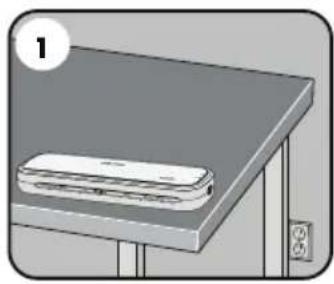
- Ensure the machine is on a stable surface.
-
Check there is enough clear space (min 50cm) behind the machine to allow items to pass through freely.
-
Plug the machine into an easily accessible mains socket.
HOW TO LAMINATE
- Switch the power on (located at the side of the machine).
- The red 'Power on' lamp will light up. The machine is now heating up.
- When the machine is ready, the green 'Ready' lamp will remain on.
-
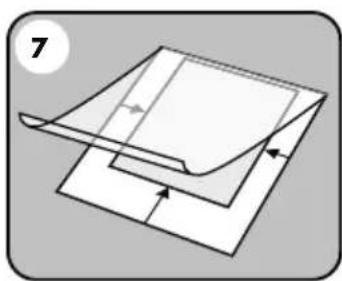
Place the document into the open pouch. Ensure the document is centred against the sealed edge. Use the appropriate pouch size for the document.
-
Ensure the pouch enters the machine sealed edge first. Keep the pouch straight and central within the slot, not on an angle. Use the entry markings as a guide.
- Upon exit, the laminated pouch may be hot and sof To prevent jamming remove the pouch immediately. Place pouch on to a flat surface to cool. Take care when handling a hot pouch.
NEED HELP?
Let our experts help you with a solution.
Customer Service... www.fellowes.com
Always call Fellowes before contacting your place of purchase, see the rear cover for contact details.
Consider registering your machine at www.fellowes.com/register to receive updates and additional information.
TROUBLESHOOTING
| Problem Possible cause Solution | ||
| No ‘power on’ lamp (red LED) Machine not switched on | Switch on the machine at the side and at the mains socket | |
| No ‘ready’ lamp after a long period (green LED) | Machine is in a hot or humid area Move the machine to a cooler and dry area | |
| The Power LED is flashing red and the Ready LED (green) has turned off | The laminator has gone in to Auto Shut Off mode | Press the ON/OFF switch. The machine will reset itself |
| The ready lamp (green) and the Power LED (red) have turned off | The laminator is in Auto Shut Off mode Press the ON/OFF switch. The machine will reset itself | |
| Pouch does not completely seal the item Item | may be too thick to laminate Maximum document thickness equals 0.4mm | |
| Pouch has waves or bubbles Pouch thickness | may be incorrect Laminator accepts 75 - 125 micron pouches | |
| Pouch is lost in the machine Pouch is jammed | Press release lever and pull out the item by hand | |
| Jamming | Pouch was used ‘open end’ first | |
| Pouch was not centred on entry | ||
| Pouch was not straight upon entry | ||
| Empty pouch was used | ||
| Pouch is damaged after lamination Damaged | rollers or adhesive on rollers | Pass cleaning sheets through the machine to test and clean rollers |
| ImageLast logo did not disappear Heavier material thickness Pass pouch through laminator a second time | ||
STORAGE & CLEANING
Turn power switch to "OFF" and unplug at wall. Allow the machine to cool. The outside of the machine can be cleaned with a damp cloth. Do not use solvents or flammable materials to polish the machine. Cleaning sheets can be purchased for use with the machine. When the machine is warm — run the sheets through the machine to clean any residue off the rollers. For optimum performance, it is recommended that cleaning sheets are used with the machine regularly. (Cleaning sheet order code #5320604).
PRODUCT REGISTRATION / WORLDWIDE WARRANTY
Thank you for purchasing a Fellowes product. Please visit www.fellowes.com/register to register your product and benefit from product news, feedback and offers. Product details can be found listed on the rating plate positioned on the rear side or underside of the machine. Fellowes warrants all parts of the laminator to be free of defects in material and workmanship for 1 year from the date of purchase by the original consumer. If any part is found to be defective during warranty period, your sole and exclusive remedy will be repair or replacement, at Fellowes' option and expense, of the defective part. This warranty does not apply in cases of abuse, mishandling or unauthorised repair. Any implied warranty, including that of merchantability or fitness for particular purpose, is hereby limited in duration to the appropriate warranty period set forth above. In no event shall Fellowes be liable for any consequential damages attributable to this product. This warranty gives you specific legal rights. You may have other legal rights that vary from this warranty. The duration, terms and conditions of this warranty are valid worldwide, except where different limitations, restrictions or conditions may be required by local law. For more details or to obtain services under this warranty, please contact Fellowes or your dealer.
Australia Residents Only:
Our goods come with guarantees that cannot be excluded under the Australian Consumer Law. You are entitled to a replacement or refund for a major failure and for compensation for any other reasonably foreseeable loss or damage. You are also entitled to have the goods repaired or replaced if the goods fail to be of acceptable quality and the failure does not amount to a major failure. The benefits under Fellowes' Warranty are in addition to other rights and remedies under a law in relation to the machine.
W.E.E.E.

This product is classified as Electrical and Electronic Equipment. Should the time come for you to dispose of this product please ensure that you do so in accordance with the European Waste of Electrical and Electronic Equipment (WEEE) Directive and in compliance with local laws relating to this directive.
For more information on the WEEE Directive please visit www.fellowes.com/WEEE
COMMANDES DE LA PLASTIFIEUSE
A Interruptor On/off
B Luz LED de listo (verde)
D Invoeropening lamineerhoes/document
E Uitvoeropening lamineerhoes/document
F LED 'Power' (rood)
OVERZICHT
Prestatie
DÔLEŽITÉ BEZPEČNOSTNÉ POKYNY – USCHOVAJTE NA POUŽITIE V BUDÚCNOSTI
POTREBNA VAM JE POMOĆ?
www.fellowes.com/WEEE

CUSTOMER SERVICE & SUPPORT
www.fellowes.com
Europe Freephone: 00800-1810-1810
Benelux: +31-(0)-13-458-0580
Declaration of Conformity
Fellowes Ltd.
Unit 2 Ontario Drive, New Rossington, Doncaster, DN11 0BF, England declares that the product model L125-A4-A3 conforms with the requirements of the Restriction of Hazardous Substances Directive (2011/65/EU), the Low Voltage Directive (2014/35/EU), the Electromagnetic Compatibility Directive (2014/30/EU), the WEEE directive (2012/19/EU), and below harmonized European EN Standards.
Safety: EN60950-1: 2006/A2:2013
EMC Standard: EN55014-1:2006+A1:2009+A2:2011
EN55014-2:1997+A1:2001+
EN61000-3-2:2014
EN61000-3-3:2013
A2:2008
John Fellowes
Year Affixed: 17
Itasca, Illinois, USA
August 1, 2017


- QUICK START GUIDE
- LAMINATOR CONTROLS
- CAPABILITIES
- IMPORTANT SAFETY INSTRUCTIONS - KEEP FOR FUTURE USE
- FEATURES & TIPS
- 'Release' function
- Auto Shut Off
- SETTING UP THE LAMINATOR
- HOW TO LAMINATE
- NEED HELP?
- STORAGE & CLEANING
- PRODUCT REGISTRATION / WORLDWIDE WARRANTY
- W.E.E.E.
- COMMANDES DE LA PLASTIFIEUSE
- OVERZICHT
- DÔLEŽITÉ BEZPEČNOSTNÉ POKYNY – USCHOVAJTE NA POUŽITIE V BUDÚCNOSTI
- POTREBNA VAM JE POMOĆ?
- CUSTOMER SERVICE & SUPPORT
- Declaration of Conformity
- Fellowes Ltd.
Brand : FELLOWES
Model : L125-A4
Category : Laminating machine