
RP-N12 - Access Point ASUS - Free user manual and instructions
Find the device manual for free RP-N12 ASUS in PDF.


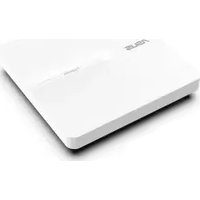
| Product type | WiFi access point / Repeater |
| Brand | Asus |
| Model | RP-N12 |
| Dimensions (L x W x H) | 65 x 65 x 25 mm |
| Weight | 50 g |
| Power supply | 5 V / 1 A via mains adapter or USB port |
| Power consumption | 5 W (max) |
| WiFi frequencies | 2.4 GHz (802.11 b/g/n) |
| Maximum speed | Up to 300 Mbit/s |
| Antennas | 2 internal antennas |
| Operating modes | Repeater, access point, media bridge, WiFi client |
| Wireless security | WPA2-PSK, WPA-PSK, WEP 64/128-bit |
| Ports | 1 RJ45 Ethernet port 10/100 Mbit/s |
| Buttons | WPS, Reset |
| Operating temperature | 0 °C to 40 °C |
| Operating humidity | 10% to 90% (non-condensing) |
| Maintenance and cleaning | Unplug before cleaning. Wipe with a soft dry cloth. Do not use chemicals. |
| Spare parts and repairability | The device contains no user-serviceable parts. Contact Asus support in case of failure. |
| Warranty | 2 years (depending on country) |
| Package contents | Mains adapter, Ethernet cable, quick start guide |
Frequently Asked Questions - RP-N12 ASUS
User questions about RP-N12 ASUS
0 question about this device. Answer the ones you know or ask your own.
Ask a new question about this device
Download the instructions for your Access Point in PDF format for free! Find your manual RP-N12 - ASUS and take your electronic device back in hand. On this page are published all the documents necessary for the use of your device. RP-N12 by ASUS.
USER MANUAL RP-N12 ASUS
Quick Start Guide
U10206 / First Edition / March 2015
English 8
Български....14
Hrvatski....20
Čeština....26
Dansk 32
Nederlands 38
Eesti 44
Suomi....50
Français 56
Deutsch....62
Ελληνικά......68
Magyar 74
Italiano 79
Latviski 85
Lietuvių 91
Norsk....97
Polski....103
Português....109
Română 115
Русский....121
Srpski 127
Slovensky....133
Slovenščina 139
Español....145
Svenska 151
Türkçe 157
Українська....163
- For more details, refer to the user manual included in the support CD.
- За повече информация, вижте ръководството на потребителя, намиращо се на помощния CD диск.
Podrobnější informace viz uživatelská příručka na podpůrném disku CD. - Dodatne pojedinosti potražite u korisničkom priručniku na CD-u podrške.
- For yderligere oplysninger herom, bedes du venligst se i brugervejledningen på den medfulgte cd.
- Voor meer details raadpleegt u de handleiding bij de ondersteunings-cd
- Täpsemat teavet leiate seadmega kaasnenud tugijuhendi CD-It.
- Katso lisätietoja tuki-CD-levyllä olevasta käyttöoppaasta.
- Pour plus de détails, consultez le manuel de l'utilisateur contenu dans le CD de support.
- Für weitere Details beziehen Sie sich auf das Handbuch auf der Support-CD.
• Για περισσότερες λεπτομέρειες, ανατρέξτε στο εγχειρίδιο χρήστη που περιλαμβάνεται στο CD υποστήριξης. - A további részleteket illetően tekintse meg a támogató CD-n lévő felhasználói útmutatót.
- Per approfondimenti. consultare il manuale utente nel CD di supporto.
- Detalizētāku informāciju meklējiet atbalsta CD esošajā lietotāja rokasgrāmatā.
- Išsamiau žr. vartotojo vadovą, esantį šiame pagalbos kompaktiniame (CD) diske.
- For mer detaljert informasjon, se brukerveiledningen som fulgte med på støtte CD-en.(Norwegian)
- Dalsze szczegółowe informacje znajdują się w podręczniku użytkownika na pomocniczym dysku CD
- Para mais detalhes, consulte o manual do utilizador incluído no CD de suporte.
- Pentru mai multe detalii, consultați manualul de utilizare inclus pe CD-ul suport.
- Для получения дополнительной информации обратитесь к руководству пользователя на компакт-диске.
- Za više detalja, pogledajte uputstvo za korišćenje koje se nalazi na CD-u za podršku.
- Viac podrobností nájdete v návode na obsluhu na CD s podporou.
- Za več podrobnosti glejte uporabniški priročnik na priloženem CD-ju.
- Para obtener más detalles, consulte el manual del usuario incluido en el CD de soporte.
- För ytterligare detaljer, se bruksanvisningen på support-CD:n.
- Daha fazla ayrıntı için destek CD'sinde bulunan kullanıcı kılavuzuna bakın.
- Для получения подробной информации. обратитесь к руководству пользователя на компакт-диске.
Package contents
√ Range Extender
Quick Start Guide
√ Warrenty Card
NOTE: If any of the items is damaged or missing, please contact your retailer.
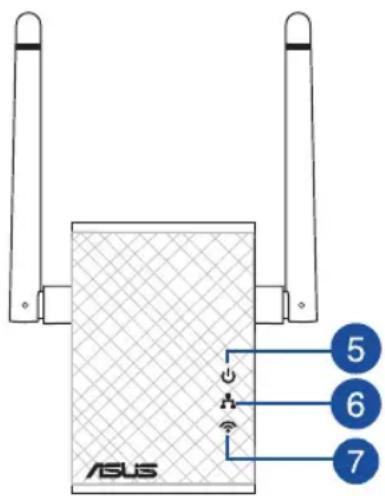
A quick look
1) Reset button
2) Power On/Off button
3) WPS button
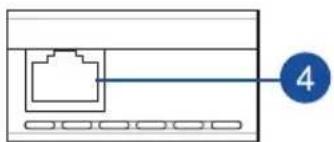
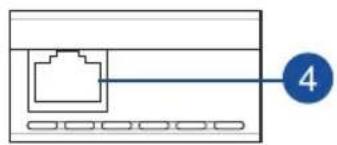
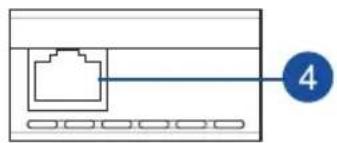
4) Ethernet port
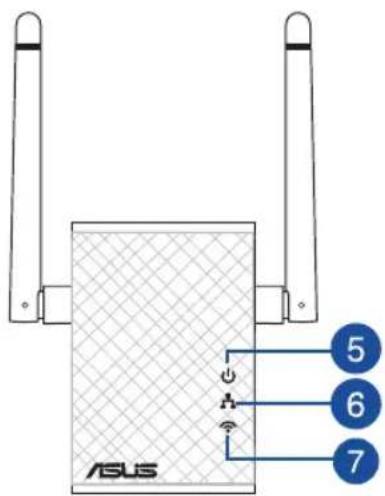
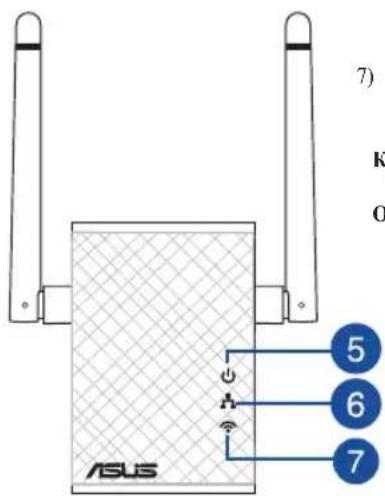
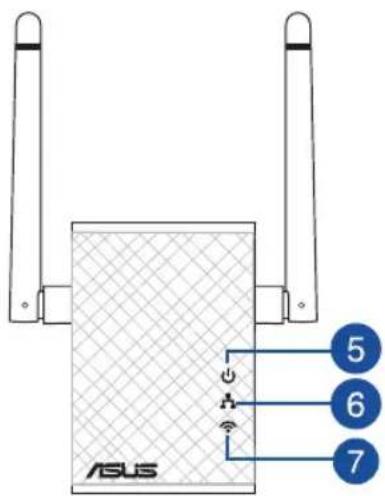
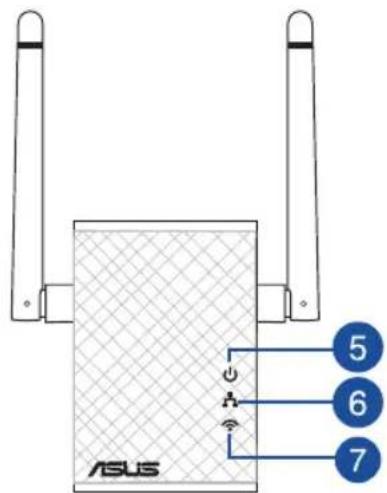
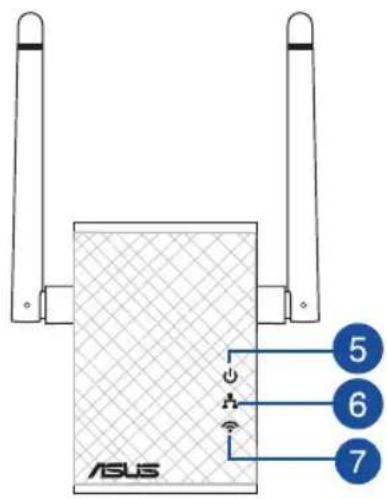
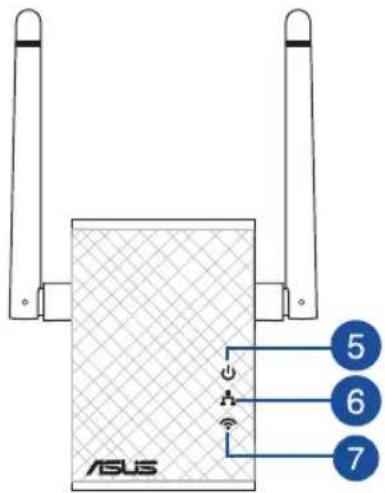
5) Power LED
On: RP-N12 is on.
Off: RP-N12 is off.
6) Ethernet LED
On: Device is connected to the Ethernet port.
Off: Device is not connected to the Ethernet port.


7) Wi-Fi LED
Green: RP-N12
provides the best
Wi-Fi extender
performance.
Red: RP-N12
provides poor
Wi-Fi extender
performance.
Off: RP-N12 is not
connected to a
router/AP.
Setting up the Range Extender
Turning the Range Extender on
- Place RP-N12 near your Router/AP.
- Plug RP-N12 to a power outlet, wait for one (1) minute until the Wi-Fi LED starts to blink.

Connecting to a network
Select one of the following ways to connect the Range Extender to a network.
Option A: Connecting through GUI
- Use a Wi-Fi enabled device, such as your desktop PC/note-book/tablet, to find and connect to ASUS_RPN12 wireless network.
- Launch a web browser and enter http://repeater.asus.com in the address bar to access the Range Extender.
- Enter the default login name and password, which are admin/admin.
-
Follow the Quick Internet Setup steps below to set up the Range Extender:
-
Connect to a Wi-Fi network and when prompted, enter the security key. If your Wi-Fi network is hidden, click Manual setting.
- You can either tick "Use default setting" or enter the SSID and security key/password for your extended network. When done, click Next.
NOTE: The Range Extender's wireless network name (SSID) changes to your existing Wi-Fi network name, ending with _RPT and shares your router/AP's Wireless Password. - Connect your wireless devices to the new Extender network.
Option B: Using WPS (Wi-Fi Protected Setup)
- Press the WPS button on the router/AP.
- Press the WPS button on the side of the RP-N12 for more than two (2) seconds, until the Wi-Fi LED starts to blink.
NOTE: Refer to the router's manual for the location of the WPS button.

- Check if RP-N12's Wi-Fi indicator turns solid light, which indicates that the Range Extender has connected to the wireless network successfully. The Range Extender's wireless network name (SSID) changes to your existing Wi-Fi network name, ending with _RPT. For example:
Existing Wi-Fi network name: existing NetworkName
New Extender network name: existing NetworkName_RPT
To connect an additional Wi-Fi device to your Extender network, use the same network password as that of your existing wireless router.
Move the Range Extender
When the connection is complete, locate the Range Extender between the router/AP and the wireless device to get better performance. After placing your RP-N12 in an ideal location, RP-N12 connects to your router/AP in about one (1) minute.
NOTES:
- Place your RP-N12 between your router/AP and wireless device to get the best extender performance.
- Place your RP-N12 in a location where you can get green Wi-Fi LED.
IMPORTANT!
• To minimize interference, keep RP-N12 away from devices like cordless phones, Bluetooth devices and microwave ovens.
• We recommend that you place your RP-N12 in open or spacious location.

Signal Indicator
• To get the best performance, place the Range Extender between your router/AP and wireless device.
- The Wi-Fi signal indicator indicates the connection performance from the Range Extender to the router/AP. Refer to the Wi-Fi LED indicator in section A Quick Look.
Frequently Asked Questions
Q1: What should I do if my router does not support WPS?
- You can use Option A to set up RP-N12.
Q2: Why is that the Wi-Fi LED does not light up after completing Method Two?
- You may have entered the wrong router SSID and password. Reset your RP-N12, double check your router SSID/password, and set up RP-N12 again.
Q3: Why is it that I cannot see the login page after entering http://repeater.asus.com in the browser?
- Ensure that your computer is connected to the extender network only, and set your computer to Obtain an IP address automatically.
Q4: My router security is WEP, and I entered a wrong passphrase or security key on the extender. Now I cannot access the Extender any more. What can I do?
- The Range Extender cannot check whether the WEP passphrase is correct or not. When entered a wrong passphrase, your wireless device cannot get the correct IP address from the Range Extender. Please reset the Range Extender to its factory defaults to get the IP address back.
Q5: How do I reset RP-N12?
- Using a pin, press the RESET button for about two (2) seconds. Wait for about five (5) seconds until the Wi-Fi LED flashes red.
Q6: I cannot access the web GUI to configure the RP-N12 settings.
- Close all running web browsers and launch again.
- Follow the steps below to configure your computer settings based on its operating system.
Windows 7
A. Disable the proxy server, if enabled.
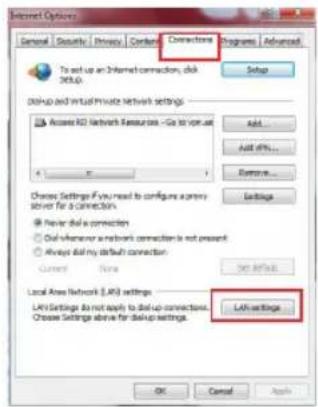
- Click Start > Internet Explorer to launch the web browser.
- Click Tools > Internet options > Connections tab > LAN settings.
- From the Local Area Network (LAN) Settings screen, untick Use a proxy server for your LAN.
- Click OK when done.

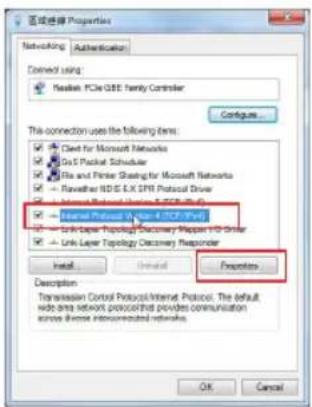
B. Set the TCP/IP settings to automatically obtain an IP address.
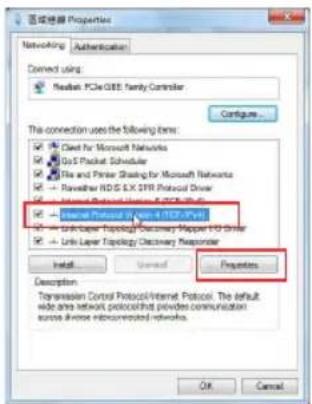
- Click Start > Control Panel > Network and Internet > Network and Sharing Center > Manage network connections.
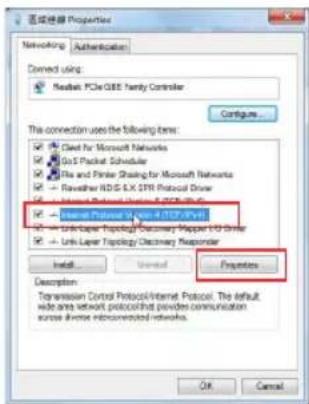
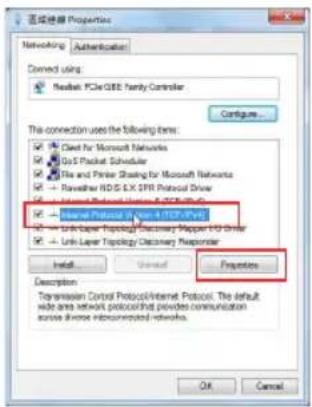
- Select Internet Protocol Version 4 (TCP/IPv4), then click Properties.
- Tick Obtain an IP address automatically.
- Click OK when done.

Mac 10.5.8
A. Disable the proxy server, if enabled.
- From the menu bar, click Safari > Preferences... > Advanced tab.
- Click Change Settings... in the Proxies field.
- From the list of protocols, deselect FTP Proxy and Web Proxy (HTTP).
- Click OK when done.

B. Set the TCP/IP settings to automatically obtain an IP address.
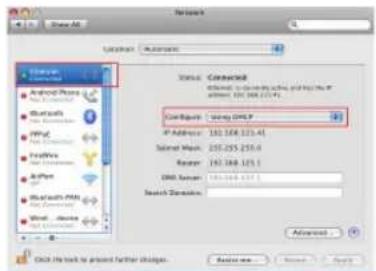
- Click the Apple icon 🎧 > System Preferences > Network.
- Select Ethernet and select Using DHCP in the Configure field.
- Click Apply when done,
| Manufacturer ASUSTeK Computer Inc.Tel: +886-2-2894-3447Address: No. 150, LI-TE RD., PEITOU, TAIPEI 112, TAIWAN | |||
| Authorised representative in Europe | ASUS Computer GmbHAddress: HÄRKORT STR. 21-23, 40880 RATINGEN, GERMANY | ||
| Authorised distributors in Turkey | BOGAZICI BIL GISAYAR SAN. VE TIC. A.S.Tel: +90 212 3311000Address: AYAZAGA MAH. KEMERBURGAZ CAD. NO.10AYAZAGA/ISTANBUL | CIZGI Elektronik San. Tic. Ltd. Sti.Tel: +90 212 3567070Address: CEMAL SURURI CD. HALIM MERIC IS MERKEZINo: 15/C D:5-6 34394 MECIDIYEKOY/ISTANBUL | KOYUNCU ELEKTRONiK BiLGI iSLEM SiST. SAN. VE DIS TIC. A.S.Tel: +90 216 5288888Address: EMEK MAH.ORDU CAD. NO:18, SARIGAZI, SANCAKTEPE ISTANBUL |

Свързване към мрежа
Frequently Asked Questions

Mac 10.5.8
| Manufacturer ASUSTeK Computer Inc.Tel: +886-2-2894-3447Address: No. 150, LI-TE RD., PEITOU, TAIPEI 112, TAIWAN | |||
| Authorised representative in Europe | ASUS Computer GmbHAddress: HARKORT STR. 21-23, 40880 RATINGEN, GERMANY | ||
| Authorised distributors in Turkey | BOGAZICI BIL GISAYAR SAN. VE TIC. A.S.Tel: +90 212 3311000Address: AYAZAGA MAH. KEMERBURGAZ CAD. NO.10AYAZAGA/ISTANBUL | CIZGI Elektronik San. Tic. Ltd. Sti.Tel: +90 212 3567070Address: CEMAL SURURI CD. HALIM MERIC IS MERKEZINo: 15/C D:5-6 34394 MECIDIYEKOY/ISTANBUL | KOYUNCU ELEKTRONiK BiLGi iSLEM SiST. SAN. VE DIS TIC. A.S.Tel: +90 216 5288888Address: EMEK MAH.ORDU CAD. NO:18, SARIGAZI, SANCAKTEPE ISTANBUL |

7) LED za Wi-Fi
Zeleno: RP-N12 pruža najbolje performanse proširivača Wi-Fi opsega.
Crveno: RP-N12 pruža loše performanse proširivača Wi-Fi opsega.
Spajanje na mrežu
Odaberite jedan od sljedećih načina za spajanje Proširivača opsega na mrežu.
Mogućnost A: Spajanje putem GUI
- Koristite uređaj s omogućenom Wi-Fi mrežom, kao što je stolno/prijenosno računalo/tablet za nalaženje i spajanje na ASUS_RPN12 bežičnu mrežu.
- Pokrenite web preglednik i unesite http://repeater.asus.com u traku za adrese, za pristup Proširivaču opsega.
- Unesite zadani naziv i lozinku prijave, a to je admin/admin.
-
Slijedite korake u Quick Install Setup (Postava brze instalacije) za postavljanje Proširivača opsega.
-
Spojite se na Wi-Fi mrežu i kod upita unesite sigurnosni ključ. Ako je Wi-Fi mreža skrivena, kliknite Manual setting (Ručno podešavanje).
- Možete označiti "Use default setting" (Koristi zadanu postavku) ili unijeti SSID i sigurnosni ključ/lozinku za proširenu mrežu. Po završetku kliknite Next (Dalje).
- Provjerite svijetli li neprekidno indikator Wi-Fi mreže uređaja RP-N12, što označuje da je proširivač opsega uspješno spojen na bežičnu mrežu. Naziv bežične mreže Proširivača opsega (SSID) mijenja se na naziv postojeće Wi-Fi mreže, završava na _RPT. Primjerice:
Naziv postojeće Wi-Fi mreže: postojeći NetworkName
Naziv nove mreže Proširivača 2,4 GHz: postojeći NetworkName_RPT
Za spajanje dodanog Wi-Fi uređaja na proširenu mrežu, koristite istu lozinku mreže kao i za postojeći bežični usmjerivač.
Indikatori signala
- Za najbolje performanse Proširivač opsega postavite između usmjerivača i bežičnog uređaja.
- Indikator Wi-Fi signala pokazuje performanse veze od Proširivača opsega do usmjerivača/pristupne točke. Pogledajte LED indikatore za Wi-Fi u odjeljku Brzi pogled.
Često postavljana pitanja (ČPP)

Mac 10.5.8
B. Postavite TCP/IP postavke tako da automatski dohvaćaju IP adresu.
- Kliknite ikonu Apple 📄 > System Preferences (Postavke sustava) > Network (Mreža).
- Odaberite Ethernet i odaberite Using DHCP (Upotreba DHCP) u polju Configure (Konfiguriraj).
- Kliknite Apply (Primijeni) kada ste gotovi.

| Manufacturer ASUSTeK Computer Inc.Tel: +886-2-2894-3447Address: No. 150, LI-TE RD., PEITOU, TAIPEI 112, TAIWAN | |||
| Authorised representative in Europe | ASUS Computer GmbHAddress: HARKORT STR. 21-23, 40880 RATINGEN, GERMANY | ||
| Authorised distributors in Turkey | BOGAZICI BIL GISAYAR SAN. VE TIC. A.S.Tel: +90 212 3311000Address: AYAZAGA MAH. KEMERBURGAZ CAD. NO.10AYAZAGA/ISTANBUL | CIZGI Elektronik San. Tic. Ltd. Sti.Tel: +90 212 3567070Address: CEMAL SURURI CD. HALIM MERIC IS MERKEZINo: 15/C D:5-6 34394 MECIDIYEKOY/ISTANBUL | KOYUNCU ELEKTRONiK BiLGi iSLEM SiST. SAN. VE DIS TIC. A.S.Tel: +90 216 5288888Address: EMEK MAH.ORDU CAD. NO:18, SARIGAZI, SANCAKTEPE ISTANBUL |

7) LED indikátor Wi-Fi
Připojení k síti
Mac 10.5.8
A. Deaktivujte server proxy, je-li aktivován.
| Manufacturer ASUSTeK Computer Inc.Tel: +886-2-2894-3447Address: No. 150, LI-TE RD., PEITOU, TAIPEI 112, TAIWAN | |||
| Authorised representative in Europe | ASUS Computer GmbHAddress: HARKORT STR. 21-23, 40880 RATINGEN, GERMANY | ||
| Authorised distributors in Turkey | BOGAZICI BIL GISAYAR SAN. VE TIC. A.S.Tel: +90 212 3311000Address: AYAZAGA MAH. KEMERBURGAZ CAD. NO.10AYAZAGA/ISTANBUL | CIZGI Elektronik San. Tic. Ltd. Sti.Tel: +90 212 3567070Address: CEMAL SURURI CD. HALIM MERIC IS MERKEZINo: 15/C D:5-6 34394 MECIDIYEKOY/ISTANBUL | KOYUNCU ELEKTRONiK BiLGi iSLEM SiST. SAN. VE DIS TIC. A.S.Tel: +90 216 5288888Address: EMEK MAH.ORDU CAD. NO:18, SARIGAZI, SANCAKTEPE ISTANBUL |
7) Wi-Fi-indikatoren
Grøn: RP-N12
giver den bedste
Wi-Fi-udvidelse.
Rød: RP-N12 giver
en dårlig Wi-Fi-
udvidelse.
Lyserikke: RP-
N12 ikke er sluttet
en router/AP.
VIGTIGT!
Mac 10.5.8
A. Deaktiver proxyserveren, hvis den er aktiveret.
| Manufacturer ASUSTeK Computer Inc.Tel: +886-2-2894-3447Address: No. 150, LI-TE RD., PEITOU, TAIPEI 112, TAIWAN | |||
| Authorised representative in Europe | ASUS Computer GmbHAddress: HARKORT STR. 21-23, 40880 RATINGEN, GERMANY | ||
| Authorised distributors in Turkey | BOGAZICI BIL GISAYAR SAN. VE TIC. A.S.Tel: +90 212 3311000Address: AYAZAGA MAH. KEMERBURGAZ CAD. NO.10AYAZAGA/ISTANBUL | CIZGI Elektronik San. Tic. Ltd. Sti.Tel: +90 212 3567070Address: CEMAL SURURI CD. HALIM MERIC IS MERKEZINo: 15/C D:5-6 34394 MECIDIYEKOY/ISTANBUL | KOYUNCU ELEKTRONiK BiLGi iSLEM SiST. SAN. VE DIS TIC. A.S.Tel: +90 216 5288888Address: EMEK MAH.ORDU CAD. NO:18, SARIGAZI, SANCAKTEPE ISTANBUL |


7) Wifi-LED
Groen: RP-N12
BELANGRIJK!
Mac 10.5.8
| Manufacturer ASUSTeK Computer Inc.Tel: +886-2-2894-3447Address: No. 150, LI-TE RD., PEITOU, TAIPEI 112, TAIWAN | |||
| Authorised representative in Europe | ASUS Computer GmbHAddress: HARKORT STR. 21-23, 40880 RATINGEN, GERMANY | ||
| Authorised distributors in Turkey | BOGAZICI BIL GISAYAR SAN. VE TIC. A.S.Tel: +90 212 3311000Address: AYAZAGA MAH. KEMERBURGAZ CAD. NO.10AYAZAGA/ISTANBUL | CIZGI Elektronik San. Tic. Ltd. Sti.Tel: +90 212 3567070Address: CEMAL SURURI CD. HALIM MERIC IS MERKEZINo: 15/C D:5-6 34394 MECIDIYEKOY/ISTANBUL | KOYUNCU ELEKTRONiK BiLGi iSLEM SiST. SAN. VE DIS TIC. A.S.Tel: +90 216 5288888Address: EMEK MAH.ORDU CAD. NO:18, SARIGAZi, SANCAKTEPE ISTANBUL |


7)Wi-FiLED indikaator
Ühendumine vörku
OLULINE!
K6: I cannot access the web GUI to configure the RP-N12 settings.
- Close all running web browsers and launch again.
- Follow the steps below to configure your computer settings based on its operating system.
Windows 7
A. Disable the proxy server, if enabled.
- Click Start > Internet Explorer to launch the web browser.
- Click Tools > Internet options > Connections tab > LAN settings.
- From the Local Area Network (LAN) Settings screen, untick Use a proxy server for your LAN.
- Click OK when done.
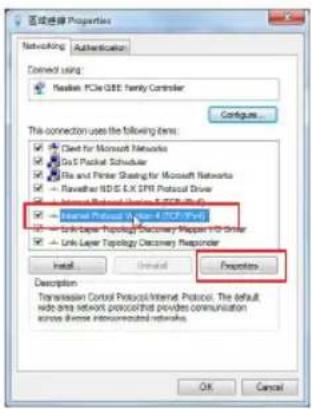
B. Set the TCP/IP settings to automatically obtain an IP address.
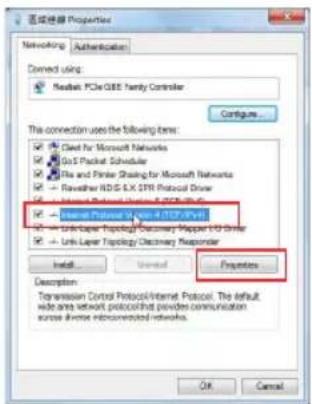
- Click Start > Control Panel > Network and Internet > Network and Sharing Center > Manage network connections.
- Select Internet Protocol Version 4 (TCP/IPv4), then click Properties.
- Tick Obtain an IP address automatically.
- Click OK when done.

Mac 10.5.8
A. Disable the proxy server, if enabled.
- From the menu bar, click Safari > Preferences... > Advanced tab.
- Click Change Settings... in the Proxies field.
- From the list of protocols, deselect FTP Proxy and Web Proxy (HTTP).
- Click OK when done.
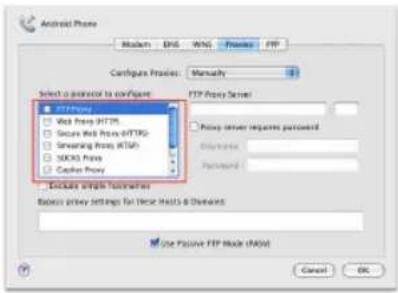
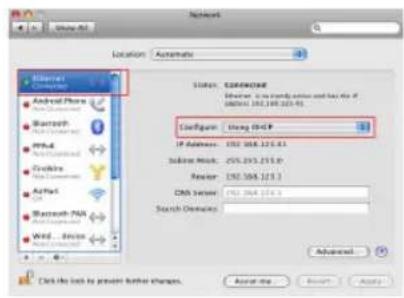
B. Set the TCP/IP settings to automatically obtain an IP address.
- Click the Apple icon 🎧 > System Preferences > Network.
- Select Ethernet and select Using DHCP in the Configure field.
- Click Apply when done,
| Manufacturer ASUSTeK Computer Inc.Tel: +886-2-2894-3447Address: No. 150, LI-TE RD., PEITOU, TAIPEI 112, TAIWAN | |||
| Authorised representative in Europe | ASUS Computer GmbHAddress: HARKORT STR. 21-23, 40880 RATINGEN, GERMANY | ||
| Authorised distributors in Turkey | BOGAZICI BIL GISAYAR SAN. VE TIC. A.S.Tel: +90 212 3311000Address: AYAZAGA MAH. KEMERBURGAZ CAD. NO.10AYAZAGA/ISTANBUL | CIZGI Elektronik San. Tic. Ltd. Sti.Tel: +90 212 3567070Address: CEMAL SURURI CD. HALIM MERIC IS MERKEZINo: 15/C D:5-6 34394 MECIDIYEKOY/ISTANBUL | KOYUNCU ELEKTRONiK BiLGi iSLEM SiST. SAN. VE DIS TIC. A.S.Tel: +90 216 5288888Address: EMEK MAH.ORDU CAD. NO:18, SARIGAZI, SANCAKTEPE ISTANBUL |

7) Témoin Wi-Fi
Vert: signal sans optimal.
IMPORTANT!

Mac 10.5.8
| Fabricant ASUSTeK Computer Inc.Tél: +886-2-2894-3447Adresse: No. 150, LI-TE RD., PEITOU, TAIPEI 112, TAIWAN | |||
| Représentant légal en Europe | ASUS Computer GmbHAddress: HARKORT STR. 21-23, 40880 RATINGEN, GERMANY | ||
| Distributeurs agréés en Turquie | BOGAZICI BIL GISAYAR SAN. VE TIC. A.S.Tél: +90 212 3311000Adresse: AYAZAGA MAH. KEMERBURGAZ CAD. NO.10AYAZAGA/ISTANBUL | CIZGI Elektronik San. Tic. Ltd. Sti.Tél: +90 212 3567070Adresse: CEMAL SURURI CD. HALIM MERIC IS MERKEZINo: 15/C D:5-6 34394 MECIDIYEKOY/ISTANBUL | KOYUNCU ELEKTRONiK BiLGi iSLEMSiST. SAN. VE DIS TIC. A.S.Tél: +90 216 5288888Address: EMEK MAH.ORDU CAD. NO:18, SARIGAZi, SANCAKTEPE ISTANBUL |
7) Wi-Fi-LED
TÄRKEÄÄ!

Mac 10.5.8
| Manufacturer ASUSTeK Computer Inc.Tel: +886-2-2894-3447Address: No. 150, LI-TE RD., PEITOU, TAIPEI 112, TAIWAN | |||
| Authorised representative in Europe | ASUS Computer GmbHAddress: HARKORT STR. 21-23, 40880 RATINGEN, GERMANY | ||
| Authorised distributors in Turkey | BOGAZICI BIL GISAYAR SAN. VE TIC. A.S.Tel: +90 212 3311000Address: AYAZAGA MAH. KEMERBURGAZ CAD. NO.10AYAZAGA/ISTANBUL | CIZGI Elektronik San. Tic. Ltd. Sti.Tel: +90 212 3567070Address: CEMAL SURURI CD. HALIM MERIC IS MERKEZINo: 15/C D:5-6 34394 MECIDIYEKOY/ISTANBUL | KOYUNCU ELEKTRONiK BiLGi iSLEM SiST. SAN. VE DIS TIC. A.S.Tel: +90 216 5288888Address: EMEK MAH.ORDU CAD. NO:18, SARIGAZI, SANCAKTEPE ISTANBUL |


7) Wi-Fi-LED
Variante B: WPS verwenden (Wi-Fi Protected Setup)
Existing Wi-Fi network name: existing NetworkName New Extender network name: existing NetworkName_RPT
WICHTIG!

Mac 10.5.8
| Manufacturer ASUSTeK Computer Inc.Tel: +886-2-2894-3447Address: No. 150, LI-TE RD., PEITOU, TAIPEI 112, TAIWAN | |||
| Authorised representative in Europe | ASUS Computer GmbHAddress: HARKORT STR. 21-23, 40880 RATINGEN, GERMANY | ||
| Authorised distributors in Turkey | BOGAZICI BIL GISAYAR SAN. VE TIC. A.S.Tel: +90 212 3311000Address: AYAZAGA MAH. KEMERBURGAZ CAD. NO.10AYAZAGA/ISTANBUL | CIZGI Elektronik San. Tic. Ltd. Sti.Tel: +90 212 3567070Address: CEMAL SURURI CD. HALIM MERIC IS MERKEZINo: 15/C D:5-6 34394 MECIDIYEKOY/ISTANBUL | KOYUNCU ELEKTRONiK BiLGI iSLEM SiST. SAN. VE DIS TIC. A.S.Tel: +90 216 5288888Address: EMEK MAH.ORDU CAD. NO:18, SARIGAZI, SANCAKTEPE ISTANBUL |


Σύνδεση σε δίκτυο
ΣΗΜΑΝΤΙΚΟ!
Mac 10.5.8
| Manufacturer ASUSTeK Computer Inc.Tel: +886-2-2894-3447Address: No. 150, LI-TE RD., PEITOU, TAIPEI 112, TAIWAN | |||
| Authorised representative in Europe | ASUS Computer GmbHAddress: HARKORT STR. 21-23, 40880 RATINGEN, GERMANY | ||
| Authorised distributors in Turkey | BOGAZICI BIL GISAYAR SAN. VE TIC. A.S.Tel: +90 212 3311000Address: AYAZAGA MAH. KEMERBURGAZ CAD. NO.10AYAZAGA/ISTANBUL | CIZGI Elektronik San. Tic. Ltd. Sti.Tel: +90 212 3567070Address: CEMAL SURURI CD. HALIM MERIC IS MERKEZINo: 15/C D:5-6 34394 MECIDIYEKOY/ISTANBUL | KOYUNCU ELEKTRONiK BiLGi iSLEM SiST. SAN. VE DIS TIC. A.S.Tel: +90 216 5288888Address: EMEK MAH.ORDU CAD. NO:18, SARIGAZI, SANCAKTEPE ISTANBUL |

7) Wi-Fi LED
Hibaelhárítás
Mac 10.5.8
| Manufacturer ASUSTeK Computer Inc.Tel: +886-2-2894-3447Address: No. 150, LI-TE RD., PEITOU, TAIPEI 112, TAIWAN | |||
| Authorised representative in Europe | ASUS Computer GmbHAddress: HARKORT STR. 21-23, 40880 RATINGEN, GERMANY | ||
| Authorised distributors in Turkey | BOGAZICI BIL GISAYAR SAN. VE TIC. A.S.Tel: +90 212 3311000Address: AYAZAGA MAH. KEMERBURGAZ CAD. NO.10AYAZAGA/ISTANBUL | CIZGI Elektronik San. Tic. Ltd. Sti.Tel: +90 212 3567070Address: CEMAL SURURI CD. HALIM MERIC IS MERKEZINo: 15/C D:5-6 34394 MECIDIYEKOY/ISTANBUL | KOYUNCU ELEKTRONiK BiLGi iSLEM SiST. SAN. VE DIS TIC. A.S.Tel: +90 216 5288888Address: EMEK MAH.ORDU CAD. NO:18, SARIGAZI, SANCAKTEPE ISTANBUL |


7) LED Wi-Fi
Domande frequenti

Mac 10.5.8
7)Wi-Figaismas diode
SVARİGI!

Mac 10.5.8
| Manufacturer ASUSTeK Computer Inc.Tel: +886-2-2894-3447Address: No. 150, LI-TE RD., PEITOU, TAIPEI 112, TAIWAN | |||
| Authorised representative in Europe | ASUS Computer GmbHAddress: HARKORT STR. 21-23, 40880 RATINGEN, GERMANY | ||
| Authorised distributors in Turkey | BOGAZICI BIL GISAYAR SAN. VE TIC. A.S.Tel: +90 212 3311000Address: AYAZAGA MAH. KEMERBURGAZ CAD. NO.10AYAZAGA/ISTANBUL | CIZGI Elektronik San. Tic. Ltd. Sti.Tel: +90 212 3567070Address: CEMAL SURURI CD. HALIM MERIC IS MERKEZINo: 15/C D:5-6 34394 MECIDIYEKOY/ISTANBUL | KOYUNCU ELEKTRONiK BiLGi iSLEM SiST. SAN. VE DIS TIC. A.S.Tel: +90 216 5288888Address: EMEK MAH.ORDU CAD. NO:18, SARIGAZI, SANCAKTEPE ISTANBUL |

7)„Wi-Fi“šviesos diodas
SVARBI INFORMACIJA!

Mac 10.5.8
| Manufacturer ASUSTeK Computer Inc.Tel: +886-2-2894-3447Address: No. 150, LI-TE RD., PEITOU, TAIPEI 112, TAIWAN | |||
| Authorised representative in Europe | ASUS Computer GmbHAddress: HARKORT STR. 21-23, 40880 RATINGEN, GERMANY | ||
| Authorised distributors in Turkey | BOGAZICI BIL GISAYAR SAN. VE TIC. A.S.Tel: +90 212 3311000Address: AYAZAGA MAH. KEMERBURGAZ CAD. NO.10 AYAZAGA/ISTANBUL | CIZGI Elektronik San. Tic. Ltd. Sti.Tel: +90 212 3567070Address: CEMAL SURURI CD. HALIM MERIC IS MERKEZINo: 15/C D:5-6 34394 MECIDIYEKOY/ ISTANBUL | KOYUNCU ELEKTRONiK BiLGi iSLEM SiST. SAN. VE DIS TIC. A.S.Tel: +90 216 5288888Address: EMEK MAH.ORDU CAD. NO:18, SARIGAZI, SANCAKTEPE ISTANBUL |
Koble til et nettverk
VIKTIG!
Mac 10.5.8
A. Deaktiver proxyserveren, hvis denne er aktivert.
- Fra menylinjen, klikpå Safari > Preferences... (Valg...) > Kategorien Advanced (Avansert).
- Klikk på Change Settings... (Endre innstillinger...) i feltet Proxies (Proxyer).
- Fra listen over protokoller, fravelg FTP Proxy og Web Proxy (HTTPS).
- Klikk på OK när du er ferdig.

| Manufacturer ASUSTeK Computer Inc.Tel: +886-2-2894-3447Address: No. 150, LI-TE RD., PEITOU, TAIPEI 112, TAIWAN | |||
| Authorised representative in Europe | ASUS Computer GmbHAddress: HARKORT STR. 21-23, 40880 RATINGEN, GERMANY | ||
| Authorised distributors in Turkey | BOGAZICI BIL GISAYAR SAN. VE TIC. A.S.Tel: +90 212 3311000Address: AYAZAGA MAH. KEMERBURGAZ CAD. NO.10AYAZAGA/ISTANBUL | CIZGI Elektronik San. Tic. Ltd. Sti.Tel: +90 212 3567070Address: CEMAL SURURI CD. HALIM MERIC IS MERKEZINo: 15/C D:5-6 34394 MECIDIYEKOY/ISTANBUL | KOYUNCU ELEKTRONiK BiLGi iSLEM SiST. SAN. VE DIS TIC. A.S.Tel: +90 216 5288888Address: EMEK MAH.ORDU CAD. NO:18, SARIGAZI, SANCAKTEPE ISTANBUL |
Łączenie z siecią
Wskaźniki sygnału

Mac 10.5.8
Ligar a uma rede

Mac 10.5.8
A. Desactive o servidor proxy, caso esteja activado.
| Manufacturer ASUSTeK Computer Inc.Tel: +886-2-2894-3447Address: No. 150, LI-TE RD., PEITOU, TAIPEI 112, TAIWAN | |||
| Authorised representative in Europe | ASUS Computer GmbHAddress: HARKORT STR. 21-23, 40880 RATINGEN, GERMANY | ||
| Authorised distributors in Turkey | BOGAZICI BIL GISAYAR SAN. VE TIC. A.S.Tel: +90 212 3311000Address: AYAZAGA MAH. KEMERBURGAZ CAD. NO.10AYAZAGA/ISTANBUL | CIZGI Elektronik San. Tic. Ltd. Sti.Tel: +90 212 3567070Address: CEMAL SURURI CD. HALIM MERIC IS MERKEZINo: 15/C D:5-6 34394 MECIDIYEKOY/ISTANBUL | KOYUNCU ELEKTRONiK BiLGi iSLEM SiST. SAN. VE DIS TIC. A.S.Tel: +90 216 5288888Address: EMEK MAH.ORDU CAD. NO:18, SARIGAZI, SANCAKTEPE ISTANBUL |

7) LED Wi-Fi
Verde:
Conectarea la o retea
NOTE:
Mac 10.5.8
| Manufacturer ASUSTeK Computer Inc.Tel: +886-2-2894-3447Address: No. 150, LI-TE RD., PEITOU, TAIPEI 112, TAIWAN | |||
| Authorised representative in Europe | ASUS Computer GmbHAddress: HÄRKORT STR. 21-23, 40880 RATINGEN, GERMANY | ||
| Authorised distributors in Turkey | BOGAZICI BIL GISAYAR SAN. VE TIC. A.S.Tel: +90 212 3311000Address: AYAZAGA MAH. KEMERBURGAZ CAD. NO.10AYAZAGA/ISTANBUL | CIZGI Elektronik San. Tic. Ltd. Sti.Tel: +90 212 3567070Address: CEMAL SURURI CD. HALIM MERIC IS MERKEZINo: 15/C D:5-6 34394 MECIDIYEKOY/ISTANBUL | KOYUNCU ELEKTRONiK BiLGi iSLEM SiST. SAN. VE DIS TIC. A.S.Tel: +90 216 5288888Address: EMEK MAH.ORDU CAD. NO:18, SARIGAZi, SANCAKTEPE ISTANBUL |
7) Индикатор Wi-Fi
Подключение к сети
ВАЖНО!

Mac 10.5.8

| Производитель | ASUSTeK Computer Inc.Тел: +886-2-2894-3447 Адрес: No. 150, LI-TE RD., PEITOU, TAIPEI 112, TAIWAN | ||
| Официальный представитель в Европе | ASUS Computer GmbHАдрес: HARKORT STR. 21-23, 40880 RATINGEN, GERMANY | ||
| Официальный представитель в Турции | BOGAZICI BIL GISAYAR SAN. VE TIC. A.S.Тел: +90 212 3311000 Адрес: AYAZAGA MAH. KEMERBURGAZ CAD. NO.10 AYAZAGA/ISTANBUL | CIZGI Elektronik San. Tic. Ltd. Sti.Тел: +90 212 3567070 Адрес: CEMAL SURURI CD. HALIM MERIC IS MERKEZI No: 15/C D:5-6 34394 MECIDIYEKOY/ISTANBUL | KOYUNCU ELEKTRONiK BiLGi iSLEM SiST. SAN. VE DIS TIC. A.S.Тел: +90 216 5288888 Адрес: EMEK MAH. ORDU CAD. NO:18, SARIGAZI, SANCAK - TEPE ISTANBUL |
Sadržaj paketa
Proširivač raspona
Garanciji


7) Wi-Fi lampica
- Proverite da li Wi-Fi indikator RP-N12 uređaja gori postojanim svetlom, što ukazuje da je proširitelj opsega povezan na bežičnu mrežu. Ime bežične mreže (SSID) proširitelja opsega se menja u ime vaše postojeće Wi-Fi mreže i završava se sa _RPT. Na primer:
Ime postojeće bežične mreže: postojeće Mrežnolme
Ime nove mreže proširivača od: postojeće ImeMreže_RPT
Da povežete dodatni bežični uređaj za mrežu vašeg proširivača, upotrebite istu mrežnu lozinku koju ste upotrebili za svoj postojeći bežični ruter.
VAŽNO!

Mac 10.5.8
B. Podesite TCP/IP podešavanja da automatski dobijete IP adresu.
- Kliknite na Apple ikonicu 📄 > System Preferences (Sisitemska preferiranja) > Network (Mreža).
- Odaberite Ethernet i potom Using DHCP (Korišćenje DHCP-a) u polju Configure (Konfiguriši).
- Kliknite na Apply(Primeni) kada završite.

| Manufacturer ASUSTeK Computer Inc.Tel: +886-2-2894-3447Address: No. 150, LI-TE RD., PEITOU, TAIPEI 112, TAIWAN | |||
| Authorised representative in Europe | ASUS Computer GmbHAddress: HARKORT STR. 21-23, 40880 RATINGEN, GERMANY | ||
| Authorised distributors in Turkey | BOGAZICI BIL GISAYAR SAN. VE TIC. A.S.Tel: +90 212 3311000Address: AYAZAGA MAH. KEMERBURGAZ CAD. NO.10AYAZAGA/ISTANBUL | CIZGI Elektronik San. Tic. Ltd. Sti.Tel: +90 212 3567070Address: CEMAL SURURI CD. HALIM MERIC IS MERKEZINo: 15/C D:5-6 34394 MECIDIYEKOY/ISTANBUL | KOYUNCU ELEKTRONiK BiLGi iSLEMSiST. SAN. VE DIS TIC. A.S.Tel: +90 216 5288888Address: EMEK MAH.ORDU CAD. NO:18, SARIGAZI, SANCAKTEPE ISTANBUL |

7) LED indikátor Wi-Fi
Pripojenie k sieti
DÔLEŽITÉ!

Mac 10.5.8
A. Ak je povolený, zakážte server Proxy.
- V paneli s ponukami kliknite na Safari > Preferences... (Preferencie...) > karta Advanced (Rozšírené).
- V políčku Proxies (Servery Proxy) kliknite na Change Settings... (Zmenit nastavenia...).
- V rámci zoznamu protokolov zrušte volbu FTP Proxy a Web Proxy (HTTPS).
- Po dokončení kliknite na OK.

B. Nastavte nastavenia protokolu TCP/IP pre automatické získanie IP adresy.

7) Lučka LED za Wi-Fi Zelena: RP-N12
POMEMBNO!
Mac 10.5.8
B. Nastavite TCP/IP tako, da boste samodejno prejeli naslov IP.
- Kliknite na ikono Apple 📄 > System Preferences (Sistemske možnosti) > Network (Omrežje).
- Izberite Ethernet in Using DHCP (Uporaba DHCP) v polju Configure (Konfiguriraj).
- Ko končate, kliknite Apply (potrdi).

| Manufacturer ASUSTeK Computer Inc.Tel: +886-2-2894-3447Address: No. 150, LI-TE RD., PEITOU, TAIPEI 112, TAIWAN | |||
| Authorised representative in Europe | ASUS Computer GmbHAddress: HARKORT STR. 21-23, 40880 RATINGEN, GERMANY | ||
| Authorised distributors in Turkey | BOGAZICI BIL GISAYAR SAN. VE TIC. A.S.Tel: +90 212 3311000Address: AYAZAGA MAH. KEMERBURGAZ CAD. NO.10AYAZAGA/ISTANBUL | CIZGI Elektronik San. Tic. Ltd. Sti.Tel: +90 212 3567070Address: CEMAL SURURI CD. HALIM MERIC IS MERKEZINo: 15/C D:5-6 34394 MECIDIYEKOY/ISTANBUL | KOYUNCU ELEKTRONiK BiLGi iSLEMSiST. SAN. VE DIS TIC. A.S.Tel: +90 216 5288888Address: EMEK MAH.ORDU CAD. NO:18, SARIGAZI, SANCAKTEPE ISTANBUL |
7) LED Wi-Fi
¡IMPORTANTE!
Mac 10.5.8
| Manufacturer ASUSTeK Computer Inc.Tel: +886-2-2894-3447Address: No. 150, LI-TE RD., PEITOU, TAIPEI 112, TAIWAN | |||
| Authorised representative in Europe | ASUS Computer GmbHAddress: HÄRKORT STR. 21-23, 40880 RATINGEN, GERMANY | ||
| Authorised distributors in Turkey | BOGAZICI BIL GISAYAR SAN. VE TIC. A.S.Tel: +90 212 3311000Address: AYAZAGA MAH. KEMERBURGAZ CAD. NO.10 AYAZAGA/ISTANBUL | CIZGI Elektronik San. Tic. Ltd. Sti.Tel: +90 212 3567070Address: CEMAL SURURI CD. HALIM MERIC IS MERKEZINo: 15/C D:5-6 34394 MECIDIYEKOY/ ISTANBUL | KOYUNCU ELEKTRONiK BiLGi iSLEM SiST. SAN. VE DIS TIC. A.S.Tel: +90 216 5288888Address: EMEK MAH.ORDU CAD. NO:18, SARIGAZI, SANCAKTEPE ISTANBUL |
7) Wi-Fi-indikator
Grön: RP-N12
VIKTIGT!

Mac 10.5.8
| Manufacturer ASUSTeK Computer Inc.Tel: +886-2-2894-3447Address: No. 150, LI-TE RD., PEITOU, TAIPEI 112, TAIWAN | |||
| Authorised representative in Europe | ASUS Computer GmbHAddress: HARKORT STR. 21-23, 40880 RATINGEN, GERMANY | ||
| Authorised distributors in Turkey | BOGAZICI BIL GISAYAR SAN. VE TIC. A.S.Tel: +90 212 3311000Address: AYAZAGA MAH. KEMERBURGAZ CAD. NO.10 AYAZAGA/ISTANBUL | CIZGI Elektronik San. Tic. Ltd. Sti.Tel: +90 212 3567070Address: CEMAL SURURI CD. HALIM MERIC IS MERKEZINo: 15/C D:5-6 34394 MECIDIYEKOY/ ISTANBUL | KOYUNCU ELEKTRONiK BiLGi iSLEM SiST. SAN. VE DIS TIC. A.S.Tel: +90 216 5288888Address: EMEK MAH.ORDU CAD. NO:18, SARIGAZi, SANCAKTEPE ISTANBUL |


7) Wi-Fi LED'i
Bir ağa bağlanma
ÖNEMLİ!

Mac 10.5.8
| Manufacturer ASUSTeK Computer Inc.Tel: +886-2-2894-3447Address: No. 150, LI-TE RD., PEITOU, TAIPEI 112, TAIWAN | |||
| Authorised representative in Europe | ASUS Computer GmbHAddress: HARKORT STR. 21-23, 40880 RATINGEN, GERMANY | ||
| Authorised distributors in Turkey | BOGAZICI BIL GISAYAR SAN. VE TIC. A.S.Tel: +90 212 3311000Address: AYAZAGA MAH. KEMERBURGAZ CAD. NO.10AYAZAGA/ISTANBUL | CIZGI Elektronik San. Tic. Ltd. Sti.Tel: +90 212 3567070Address: CEMAL SURURI CD. HALIM MERIC IS MERKEZINo: 15/C D:5-6 34394 MECIDIYEKOY/ISTANBUL | KOYUNCU ELEKTRONiK BiLGi iSLEM SiST. SAN. VE DIS TIC. A.S.Tel: +90 216 5288888Address: EMEK MAH.ORDU CAD. NO:18, SARIGAZI, SANCAKTEPE ISTANBUL |
7) Світлодіод Wi-Fi
ВАЖЛИВО!

Mac 10.5.8
Federal Communications Commission Statement
This device complies with Part 15 of the FCC Rules. Operation is subject to the following two conditions:
- This device may not cause harmful interference.
- This device must accept any interference received, including interference that may cause undesired operation.
This equipment has been tested and found to comply with the limits for a class B digital device, pursuant to part 15 of the FCC Rules. These limits are designed to provide reasonable protection against harmful interference in a residential installation.
This equipment generates, uses and can radiate radio frequency energy and, if not installed and used in accordance with the instructions, may cause harmful interference to radio communications. However, there is no guarantee that interference will not occur in a particular installation. If this equipment does cause harmful interference to radio or television reception, which can be determined by turning the equipment off and on, the user is encouraged to try to correct the interference by one or more of the following measures:
- Reorient or relocate the receiving antenna.
- Increase the separation between the equipment and receiver.
- Connect the equipment into an outlet on a circuit different from that to which the receiver is connected.
- Consult the dealer or an experienced radio/TV technician for help.

Warning: Any changes or modifications not expressly approved by the party responsible for compliance could void the user's authority to operate the equipment. Prohibition of Co-location This device and its antenna(s) must not be co-located or operating in conjunction with any other antenna or transmitter.
FCC Mark Warning
This equipment must be installed and operated in accordance with provided instructions and the antenna(s) used for this transmitter must be installed to provide a separation distance of at least 20cm from all persons and must not be co-located or operated in conjunction with any other antennas or transmitters. End users and installers must be provided with antenna installation instructions and transmitter operating conditions for satisfying RF exposure compliance.
Prohibition of Co-location
This device and its antenna(s) must not be co-located or operating in conjunction with any other antenna or transmitter.
IMPORTANT NOTE:
Radiation Exposure Statement: This equipment complies with FCC radiation exposure limits set forth for an uncontrolled environment. End users must follow the specific operating instructions for satisfying RF exposure compliance. To maintain compliance with FCC exposure compliance requirement, please follow operation instruction as documented in this manual.
Declaration of Conformity for R&TTE directive 1999/5/EC
Essential requirements – Article 3
Protection requirements for health and safety – Article 3.1a
Testing for electric safety according to EN 60950-1 has been conducted. These are considered relevant and sufficient.
Protection requirements for electromagnetic compatibility – Article 3.1b
Testing for electromagnetic compatibility according to EN 301 489-1 and EN 301 489-17 has been conducted.
These are considered relevant and sufficient.
Effective use of the radio spectrum - Article 3.2
Testing for radio test suites according to EN 300 328-2 has been conducted. These are considered relevant and sufficient.
CE Mark Warning
This is a Class B product, in a domestic environment, this product may cause radio interference, in which case the user may be required to take adequate measures. Operation Channels: CH1\~11 for N. America; Ch1\~13 for Japan; CH1\~13 for Europe (ETSI)
Canada, Industry Canada (IC) Notices
This Class B digital apparatus complies with Canadian ICES-003 and RSS-210.
Operation is subject to the following two conditions: (1) this device may not cause interference, and (2) This device must accept any interference, including interference that may cause undesired operation of the device.
Radio Frequency (RF) Exposure Information
The radiated output power of the ASUS Wireless Device is below the Industry Canada (IC) radio frequency exposure limits. The ASUS Wireless Device should be used in such a manner such that the potential for human contact during normal operation is minimized.
This device has been evaluated for and shown compliant with the IC Specific Absorption Rate ("SAR") limits when installed in specific host products operated in portable exposure conditions (antennas are less than 20 centimeters of a person's body).
This device has been certified for use in Canada. Status of the listing in the Industry Canada's REL (Radio Equipment List) can be found at the following web address: http://www.ic.gc.ca/app/sitt/reltel/srch/nwRdSrch.do?lang=eng
Additional Canadian information on RF exposure also can be found at the following web address: http://www.ic.gc.ca/eic/site/smt-gst.nsf/eng/sf08792.html
Canada, avis d'Industry Canada (IC)
Industry Canada Statement
This device complies with RSS-210 of the industry Canada Rules. Operation is subject to the following two conditions:
- This device may not cause harmful interference.
- This device must accept any interference received, including interference that may cause undesired operation.
IMPORTANT NOTE:
Radiation Exposure Statement: This equipment complies with IC radiation exposure limits set forth for an
uncontrolled environment. End users must follow the specific operating instructions for satisfying RF exposure compliance. To maintain compliance with IC RF exposure compliance requirement, please follow operation instruction as documented in this manual.
NCC 警語
Complying with the REACH (Registration, Evaluation, Authorisation, and Restriction of Chemicals) regulatory framework, we published the chemical substances in our products at ASUS REACH website at http://csr.asus.com/english/REACH.htm
ASUS Recycling/Takeback Services
ASUS recycling and takeback programs come from our commitment to the highest standards for protecting our environment. We believe in providing solutions for you to be able to responsibly recycle our products, batteries, other components, as well as the packaging materials. Please go to http://csr.asus.com/english/Takeback.htm for the detailed recycling information in different regions.
This equipment may be operated in AT, BE, CY, CZ, DK, EE, FI, FR, DE, GR, HU, IE, IT, LU, MT, NL, PL, PT, SK, SL, ES, SE, GB, IS, LI, NO, CH, BG, RO, TR.
Networks Global Hotline Information
| Area Hotline Number | Support Languages Availability | ||
| Australia 1300-2787-88 | English Mon. to Fri.8:00-20:00 | ||
| Austria 0043-820240513 | German Mon. to Fri.9:00-18:00 | ||
| Belgium 0032-78150231 | Dutch /French Mon. to Fri.9:00-17:00 | ||
| China 400-620-6655 | Simplified Chinese Mon. to Sun.9:00-18:00 | ||
| Denmark 0045-3832-2943 | Danish/English Mon. to Fri.9:00-17:00 | ||
| Finland 00358-9693-7969 | Finnish/English/Swedish Mon. to Fri.10:00-18:00 | ||
| France 0033-170949400 | French Mon. to Fri.9:00-17:45 | ||
| Greece 00800-44-14-20-44 | Greek Mon. to Fri. | 9:00-13:00/14:00-18:00 | |
| Hong Kong | 3582-4770 | Cantonese/Chinese/English | Mon. to Fri.10:00-20:00Sat.10:00-17:00 |
| Indonesia | +62-21-500128 | Indonesia, English | Mon. to Fri9:30 - 17:00 |
| Ireland | 0035-31890719918 | English Mon. to Fri.9:00-17:00 | |
| Italy | 199-400089 | Italian | Mon. to Fri.9:00-13:00/14:00-18:00 |
| Japan | 0800-123-27870081-570-783-886 | Japanese | Mon. to Fri.9:00-18:00Sat. to Sun.9:00-17:00 |
Networks Global Hotline Information
| Malaysia +603 | 2148 0827 (Check Repair Detail Status Only)/ +603-6279-5077 | Bahasa Melayu/ English | Mon. to Fri.10:00-19:00 |
| Netherlands / Luxembourg | 0031-591-570290 Dutch / | English Mon. to Fri.9:00-17:00 | |
| New Zealand | 0800-278-788/ 0800-278-778 | English Mon. to Fri.9:00-17:00 | |
| Norway 0047-2 | 316-2682 Norwegian | /English | Mon. to Fri.9:00-17:00 |
| Philippines +63 | 2-636 8504/ 180014410573 | English Mon. to Fri.9:00-18:00 | |
| Poland 00225- | 718-033/ 00225-718-040 | Polish Mon. to Fri. | 9:00-17:008:30-17:30 |
| Portugal 707-500-310 Portuguese Mon. to Fri.9:00-17:00 | |||
| Russia +8-800- | 100-ASUS/ +7-495-231-1999 | Russian/ English | Mon. to Fri.9:00-18:00 |
| Singapore +65 | -6720-3835 (Check Repair Detail Status Only)/ +65-66221701 | English Mon. to Fri. | 11:00-19:00 |
| Slovak 00421-232-162-621 Czech | Mon. to | Fri.8:00-17:00 | |
Networks Global Hotline Information
| Spain 902-88-96-88 Spanish Mon. to Fri.9:00-18:00 | |||
| Sweden | +46-858769407 | Swedish/English Mon. to Fri.9:00-17:00 | |
| Switzerland | 0041-848111010 German/French Mon. to Fri.9:00-18:00 | ||
| 0041-848111014 French Mon. to Fri.9:00-17:45 | |||
| 0041-848111012 Italian Mon. to Fri.9:00-17:00 | |||
| Taiwan 0800-093-456/02-81439000 | Traditional Chinese Mon. to Fri.9:00-12:00/13:30-18:00 | ||
| Thailand +662-679-8367 -70/001 800 852 5201 | Thai/English Mon. to Fri.9:00-18:00 | ||
| Turkey +90-216-524-3000 Turkish Mon. to Fri.09:00-18:00 | |||
| United Kingdom | +44-844-800-8340 | English Mon. to Fri.9:00-17:00 | |
| USA/Canada 1-812-282-2787 English Mon. to Fri. | 8:30am-12:00am EST (5:30am-9:00pm PST)Sat .to Sun.9:00am-6:00pm EST (6:00am-3:00pm PST) | ||
| Manufacturer ASUSTeK Computer Inc. | Tel: +886-2-2894-3447Address: No. 150, LI-TE RD., PEITOU, TAIPEI 112, TAIWAN | ||
| Authorised representative in Europe ASUS Computer GmbHAddress: HARKORT STR. 21-23, 40880 RATINGEN, GERMANY | |||
| Authorised distributors in Turkey BOGAZICI BIL GISAYAR SAN. VE TIC. A.S.Tel: +90 212 3311000Address: AYAZAGA MAH. KEMERBURGAZ CAD. NO.10 AYAZAGA/ISTANBUL | |||
This product must not be disposed together with the domestic waste. This product has to be disposed at an authorized place for recycling of electrical and electronic appliances. By collecting and recycling waste, you help save natural resources, and make sure the product is disposed in an environmental friendly and healthy way.
"\~" for the identification of alternating current symbol

for the identification of CLASS II EQUIPMENT only.


- PACKAGE CONTENTS
- A QUICK LOOK
- SETTING UP THE RANGE EXTENDER
- TURNING THE RANGE EXTENDER ON
- CONNECTING TO A NETWORK
- OPTION A: CONNECTING THROUGH GUI
- OPTION B: USING WPS (WI-FI PROTECTED SETUP)
- MOVE THE RANGE EXTENDER
- NOTES
- IMPORTANT
- SIGNAL INDICATOR
- FREQUENTLY ASKED QUESTIONS
- Q6: I CANNOT ACCESS THE WEB GUI TO CONFIGURE THE RP-N12 SETTINGS
- WINDOWS 7
- DISABLE THE PROXY SERVER, IF ENABLED
- SET THE TCP/IP SETTINGS TO AUTOMATICALLY OBTAIN AN IP ADDRESS
- MAC 10.5.8
- СВЪРЗВАНЕ КЪМ МРЕЖА
- SPAJANJE NA MREŽU
- MOGUĆNOST A: SPAJANJE PUTEM GUI
- INDIKATORI SIGNALA
- ČESTO POSTAVLJANA PITANJA (ČPP)
- PŘIPOJENÍ K SÍTI
- VIGTIGT
- BELANGRIJK
- ÜHENDUMINE VÖRKU
- OLULINE
- K6: I CANNOT ACCESS THE WEB GUI TO CONFIGURE THE RP-N12 SETTINGS
- TÄRKEÄÄ
- WI-FI-LED
- VARIANTE B: WPS VERWENDEN (WI-FI PROTECTED SETUP)
- WICHTIG
- ΣΎΝΔΕΣΗ ΣΕ ΔΊΚΤΥΟ
- ΣΗΜΑΝΤΙΚΟ
- HIBAELHÁRÍTÁS
- DOMANDE FREQUENTI
- SVARİGI
- SVARBI INFORMACIJA
- KOBLE TIL ET NETTVERK
- VIKTIG
- ŁĄCZENIE Z SIECIĄ
- WSKAŹNIKI SYGNAŁU
- LIGAR A UMA REDE
- VERDE
- CONECTAREA LA O RETEA
- NOTE
- ПОДКЛЮЧЕНИЕ К СЕТИ
- ВАЖНО
- SADRŽAJ PAKETA
- VAŽNO
- PRIPOJENIE K SIETI
- DÔLEŽITÉ
- POMEMBNO
- ¡IMPORTANTE
- VIKTIGT
- BIR AĞA BAĞLANMA
- ÖNEMLİ
- ВАЖЛИВО
- FEDERAL COMMUNICATIONS COMMISSION STATEMENT
- FCC MARK WARNING
- PROHIBITION OF CO-LOCATION
- IMPORTANT NOTE
- DECLARATION OF CONFORMITY FOR R&TTE DIRECTIVE 1999/5/EC
- CE MARK WARNING
- CANADA, INDUSTRY CANADA (IC) NOTICES
- RADIO FREQUENCY (RF) EXPOSURE INFORMATION
- CANADA, AVIS D'INDUSTRY CANADA (IC)
- INDUSTRY CANADA STATEMENT
- NCC 警語
- ASUS RECYCLING/TAKEBACK SERVICES
Brand : ASUS
Model : RP-N12
Category : Access Point