aquaAlert+e - Measuring equipment EHEIM - Free user manual and instructions
Find the device manual for free aquaAlert+e EHEIM in PDF.


User questions about aquaAlert+e EHEIM
0 question about this device. Answer the ones you know or ask your own.
Ask a new question about this device
Download the instructions for your Measuring equipment in PDF format for free! Find your manual aquaAlert+e - EHEIM and take your electronic device back in hand. On this page are published all the documents necessary for the use of your device. aquaAlert+e by EHEIM.
USER MANUAL aquaAlert+e EHEIM
natural_image
Illustration of a scientific instrument with a coiled cable and connector, labeled 'aqua' in the corner (no other text or symbols)
text_image
QR code image containing encoded data, no visible human-readable text
| de | Bedienungsanleitung |
| en | Operating manual |
| fr | Mode d'emploi |
| it | Istruzioni per l'uso |
| es | Manual de instrucciones |
| pt | Manual de instruções |
| nl | Bedieningshandleiding |
| da | Betjeningsvejledning |
| sv | Bruksanvisning |
| no | Bruksanvisning |
| fi | Käyttöohje |
| tr | Kullanma kılavuzu |
| pl | Instrukcja obsługi |
| cs | Návod k obsluze |
| sk | Návod na obsluhu |
| hu | Használati utasítás |
| sl | Navodilo za upravljanje |
| sr | Uputstvo za upotrebu |
| ro | Manual de utilizare |
| bg | Инструкция за експлоатация |
| ru | Руководство по обслуживанию |
| el | Обнгієх хрінс |
| ko | 사용 설명서 |
| zh | 操作说明书 |
de Bedienungsanleitung (Original)
Aquarium wifi-Leitwert-Controller aquaAlert+e....6
en Operating manual (translation)
aquaAlert+e WiFi conductance controller for aquariums ....15
fr Mode d'emploi (traduction)
Contrôleur de conductivité WiFi pour aquarium aquaAlert+e ....27
it Istruzioni per l'uso (traduzione)
Conduttimetro WiFi per acquari aquaAlert+e....41
es Manual de instrucciones (traducción)
Controlador Wifi del valor guía para acuarios aquaAlert+e....50
pt Manual de instruções (Tradução)
Controlador de condutividade Wi-Fi para aquário aquaAlert+e ....59
nl Gebruiksaanwijzing (vertaling)
Aquarium Wi-Fi Conduciviteitscontroller aquaAlert+e....68
da Betjeningsvejledning (oversættelse)
akvarium wi-fi-ledningsevne-controller aquaAlert+e....77
SV Bruksanvisning (översättning)
Akvarium wifi-konduktivitet-kontroller aquaAlert+e....85
no Bruksanvisning (oversettelse)
WiFi konduktans-controller aquaAlert+e for akvarium....93
fi Käyttöohje (käännös)
Akvaarion WiFi-johtokykyohjain aquaAlert+e 102
tr Kullanım kılavuzu (çeviri)
Akvaryum iletkenlik değeri kontrol cihazı aquaAlert+e....110
pl Instrukcja obsługi (tłumaczenie)
Kontroler przewodności WiFi do akwarium aquaAlert+e....118
cs Návod k obsluze (překlad)
Wifi regulátor vodivosti pro akvária aquaAlert+e....127
sk Návod na obsluhu (preklad)
Akvarijný wifi regulátor vodivosti aquaAlert+e 135
hu Használati utasítás (fordítás)
AquaAlert+e wifis vezetőképesség-vezérlő akváriumhoz ....143
sl Navodila za uporabo (prevod)
Aquarium WiFi krmilnik priporočene vrednosti aquaAlert+e....152
sr Uputstvo za upotrebu (prevod)
WiFi kontroler provodljivosti aquaAlert+e za upotrebu u akvarijumima ....160
ro Manual de utilizare (traducere)
Controller de conductivitate WiFi aquaAlert+e pentru acvarii....169
bg
Ръководство за експлоатация (превод)
WiFi контролер на проводимостта за аквариум aquaAlert+e ....178
ru
Руководство по эксплуатации (перевод)
Аквариумный контроллер проводимости aquaAlert+e с поддержкой Wi-Fi......187
el
Εγχειρίδιο οδηγιών (μετάφραση)
Ελεγκτής αγωγιμότητας aquaAlert+e με λειτουργία Wi-Fi για ενυδρεία....197
ko 사용 설명서(번역)
수족관 와이파이 전도도 컨트롤러 aquaAlert+e 206
zh 鱼缸 wifi 连接电导率控制器 aquaAlert+e
操作说明书(翻译件)....214

text_image
7622378 6065030 7675878 4014100 4015150 7271100 7341218 (EUR) 7341248 (USA) 7341358 (JPN) 7341438 (AUS) 7341448 (CN) 7341458 (UK) 7341468 (KOR)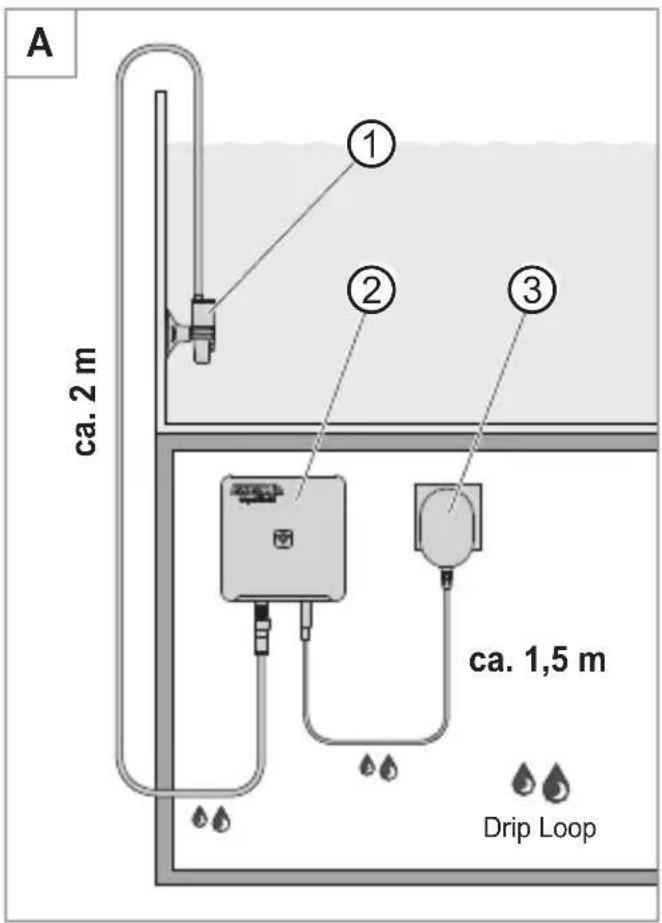
text_image
A ca. 2 m ① ② ③ ca. 1,5 m Drip Loop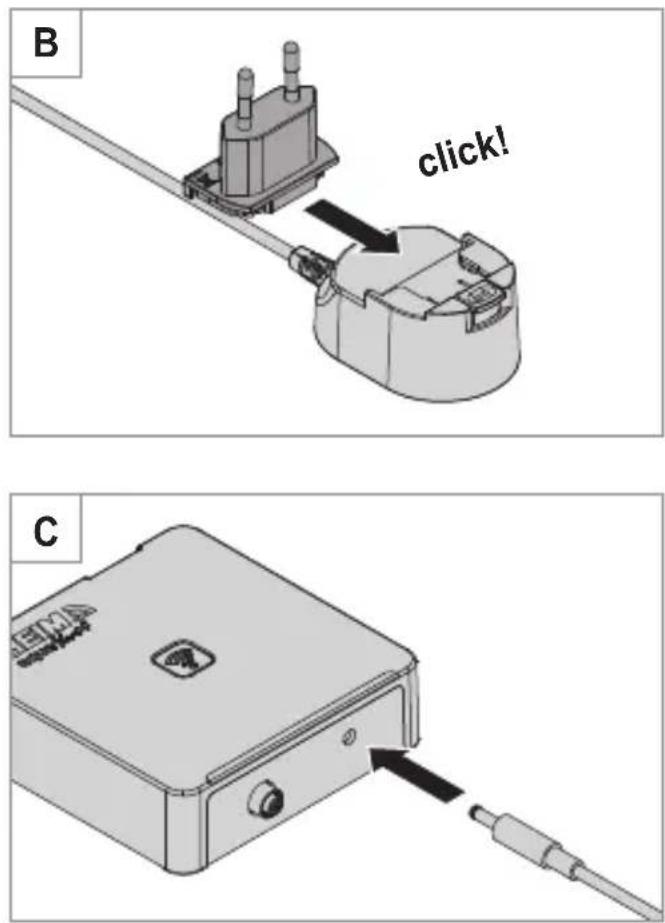
text_image
B click! C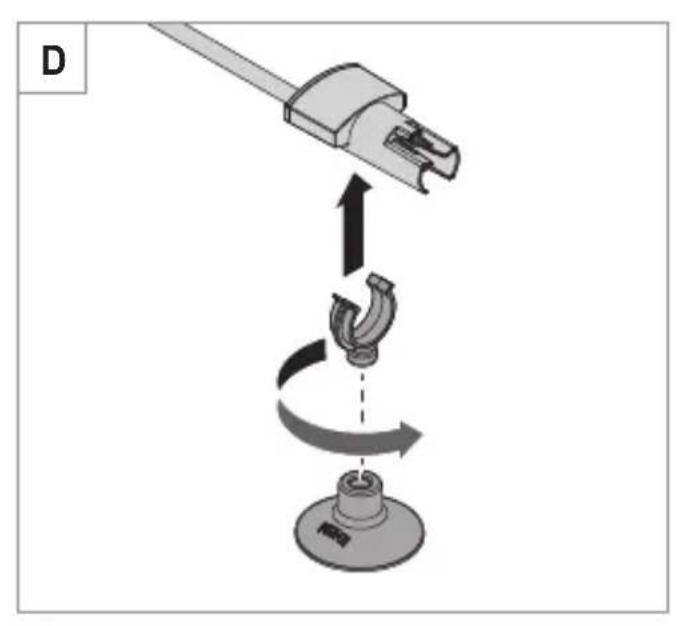
text_image
D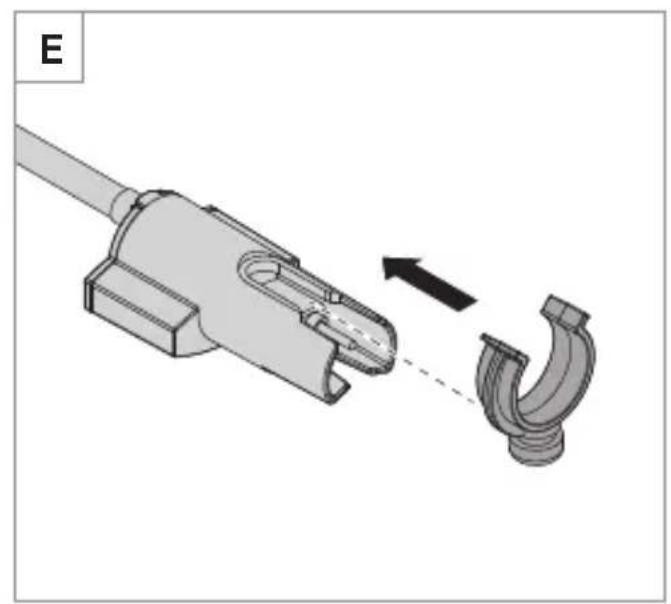
natural_image
Mechanical component diagram showing a pipe fitting with a curved hook, no text or symbols present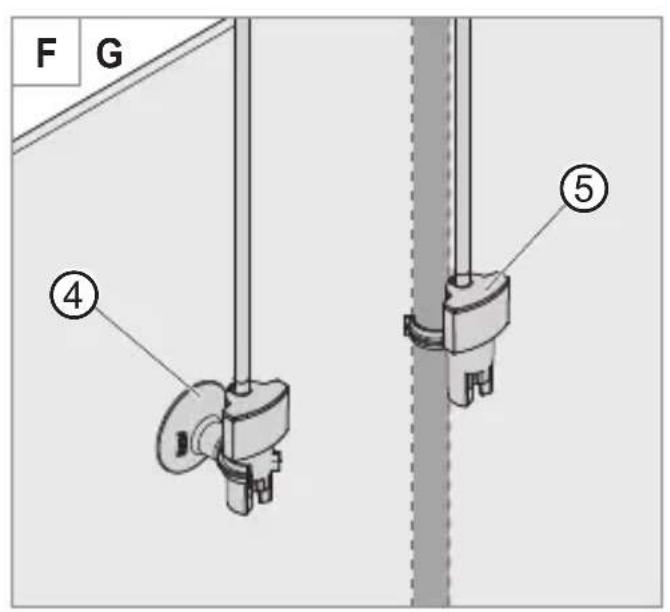
text_image
F G ④ ⑤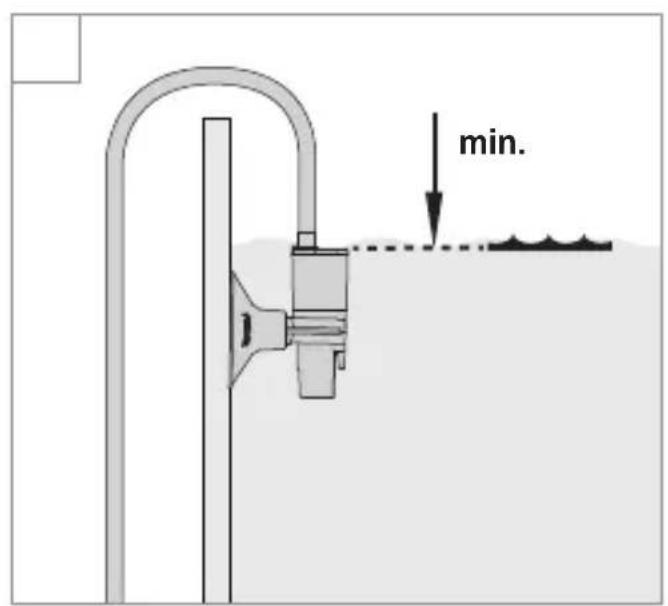
text_image
min.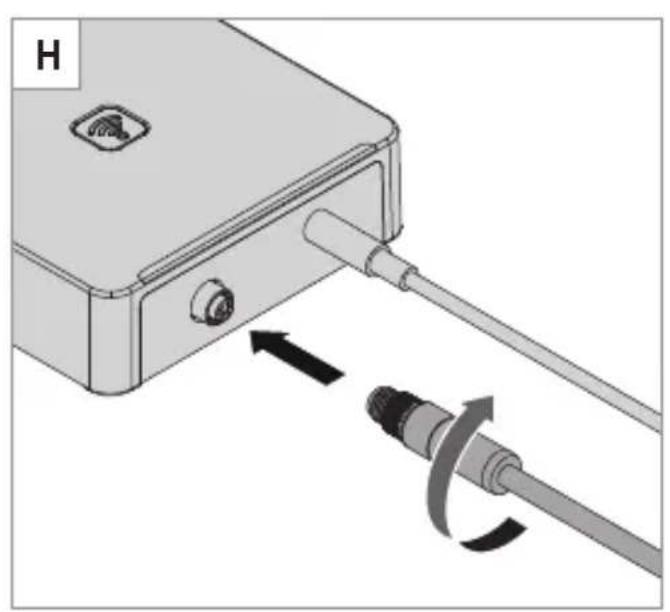
natural_image
Diagram of a mechanical device with a cable and connector, showing directional arrows indicating movement (no text or symbols)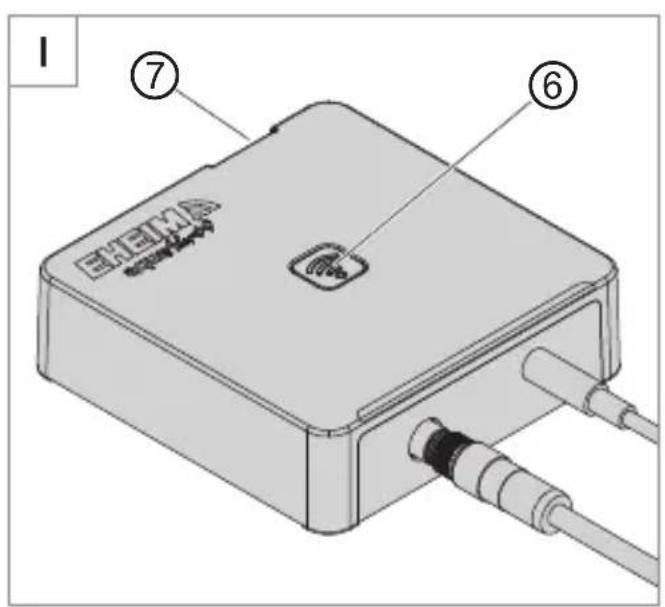
text_image
EHEMA ⑦ ⑥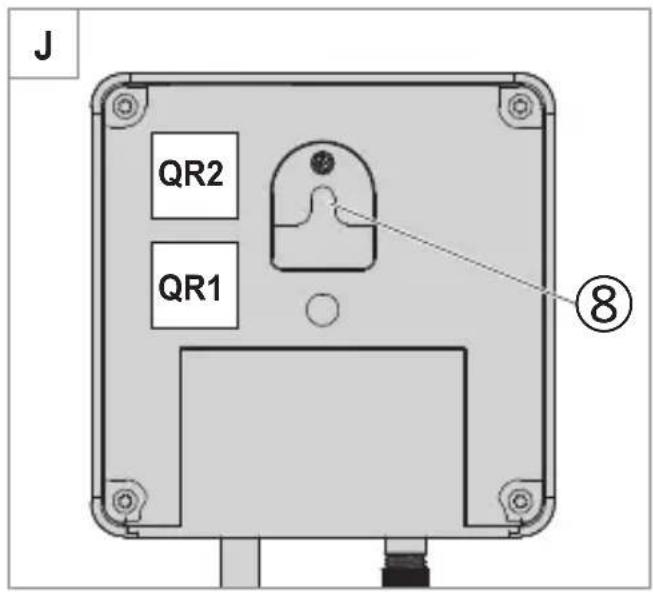
text_image
J QR2 QR1 ⑧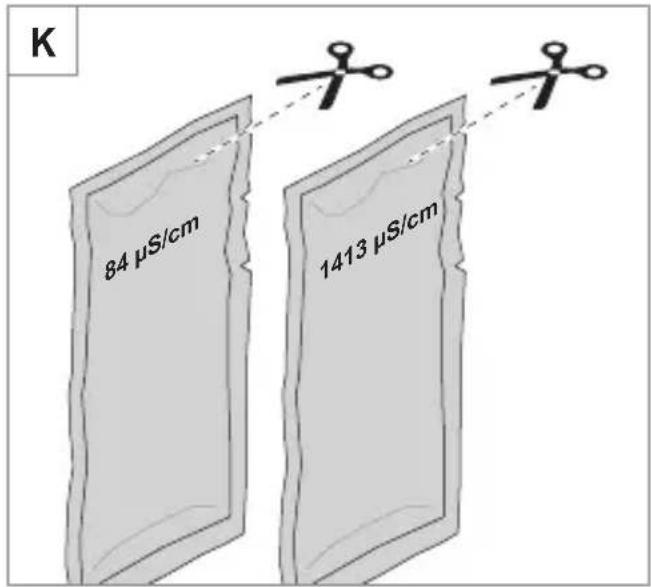
text_image
K 84 µS/cm 1413 µS/cmIMPORTANT SAFETY INSTRUCTIONS
WARNING- To guard against injury, basic safety precautions should be observed, including the following.
· FOR HOUSEHOLD USE ONLY
· WARNING! RISK OF ELECTRIC SHOCK!
READ AND FOLLOW ALL SAFETY INSTRUCTIONS.
- DANGER – To avoid possible electric shock, special care should be taken since water is employed in the use of aquarium equipment. For each of the following situations, do not attempt repairs by yourself. Return the appliance to an authorized service facility for service or discard the appliance.
- If the appliance falls into the water, DON'T reach for it! First unplug it and then retrieve it. If electrical components of the appliance get wet, unplug the appliance immediately.
- Carefully examine the appliance after installation. It should not be plugged in if there is water on parts not intended to be wet.
- Unplug the appliance from the socket outlet to disable any remote command.
- Do not operate any appliance if it has a damaged cord or plug, or if it is malfunctioning or has been dropped or damaged in any manner.
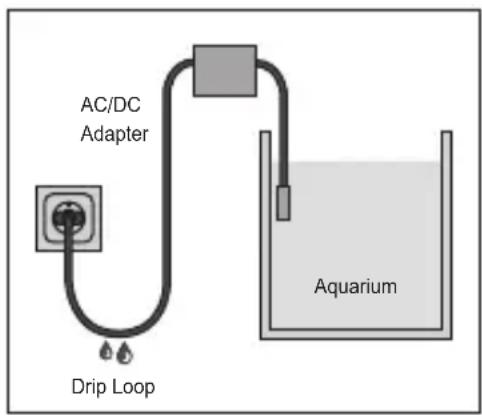
- To avoid the possibility of the appliance plug or receptacle getting wet, position aquarium stand and tank to one side of a wall-mounted receptacle to pre-vent water from dripping onto the receptacle or plug. A "drip loop", shown in the figure, should be arranged by the user for each cord connecting an aquarium appliance to a receptacle. The "drip loop" is that part of
the cord below the level of the receptacle, or the connector if an extension cord is used, to prevent water traveling along the cord and coming in contact with the receptacle. If the plug or socket does get wet, DON'T unplug the cord. Disconnect the fuse or circuit breaker that supplies power to the appliance. Then unplug and examine for presence of water in the receptacle.
text_image
AC/DC Adapter Drip Loop Aquarium- Close supervision is necessary when any appliance is used by or near children.
- To avoid injury, do not touch moving parts or hot parts such as heaters, reflectors, lamp bulbs, and the like.
- Always unplug an appliance from an outlet when not in use, before putting on or taking off parts, and before cleaning. Never yank cord to pull plug from outlet. Grasp the plug and pull to disconnect.
- Do not use an appliance for anything other than its intended use. The use of attachments not recommended or sold by the appliance manufacturer may cause an unsafe condition.
- Do not install or store the appliance where it will be exposed to the weather or to temperatures below freezing.
- Make sure an appliance mounted on a tank is securely in stalled before operating it.
- Read and observe all the important notices on the appliance.
- If an extension cord is necessary, a cord with a proper rating should be used. A cord rated for less amperes or watts than the appliance rating may
overheat. Care should be taken to arrange the cord so that it will not be tripped over or pulled.
- Disconnect all electrical appliances from the mains before placing hands in the water.
- Use only the AD/DC adapter supplied with the automatic feeder. If it is to be used as a spare part, you must specify the EHEIM order number 7341248 for replacement.

WARNING
- INGESTION HAZARD: This product contains a button cell or coin battery.
- DEATH or serious injury can occur if ingested.
- DEATH A swallowed button cell or coin battery can cause Internal Chemical Burns in as little as 2 hours.
- KEEP new and used batteries OUT OF REACH of CHILDREN
- Seek immediate medical attention if a battery is suspected to be swallowed or inserted inside any part of the body.

SAVE THESE INSTRUCTIONS
FCC WARNING STATEMENT (US only)

FCC CAUTION
- This device complies with part 15 of the FCC Rules. Operation is subject to the following two conditions:
(1) This device may not cause harmful interference, and (2) this device must accept any interference received, including interference that may cause undesired operation.
- Any changes or modifications not expressly approved by the party responsible for compliance could void the user's authority to operate the equipment.
- This equipment complies with FCC radiation exposure limits set forth for an uncontrolled environment. This equipment should be installed and operated with a minimum distance of 20 cm between the radiator and your body.
NOTE:
This equipment has been tested and found to comply with the limits for a Class B digital device, pursuant to Part 15 of the FCC Rules. These limits are designed to provide reasonable protection against harmful interference in a residential installation. This equipment generates, uses and can radiate radio frequency energy and, if not installed and used in accordance with the instructions, may cause harmful interference to radio communications. However, there is no guarantee that interference will not occur in a particular installation. If this equipment does cause harmful interference to radio or television reception, which can be determined by turning the equipment off and on, the user is encouraged to try to correct the interference by one or more of the following measures:
- Reorient or relocate the receiving antenna.
· Increase the separation between the equipment and receiver. - Connect the equipment into an outlet on a circuit different from that to which the receiver is connected.
- Consult the dealer or an experienced radio/TV technician for help.
Operating manual (translation)
aquaAlert+ ^e WiFi conductance controller for aquariums
General user instructions
Information on using the operating manual
▶ Before using the appliance for the first time, the operating manual must be read fully and understood.
- Consider the operating manual as part of the product and keep in a safe and accessible location.
- Enclose this operating manual if passing the appliance on to a third party.
Symbol explanation
The following symbols are used on the appliance.

The appliance must only be used indoors, and exclusively for aquariums.

The appliance is of protection class III.

The appliance is certified according to the relevant national regulations and directives, and conforms to EU standards
The following symbols and signal words are used in this operating manual.

DANGER!
Risk of serious personal injury or death from a general source of danger.
DANGER!
Danger of electric shock with the risk of serious personal injury or death.

WARNING!
Danger of serious personal injury or health hazard.

CAUTION!
Note on the risk of material damage.

Note with useful information and tips.
Typographical conventions:
☒A Reference to a figure, in this case, reference to figure A.
▶ You are prompted for an action.
Application
The EHEIM aquaAlert ^+e is a conductance controller for aquariums. It is used to detect the salt content of aquarium water while also monitoring the water quality and temperature with an electronic sensor. It informs you when the water must be changed. The conductance can be adjusted and monitored via a WLAN-capable terminal device (smartphone, tablet, laptop etc.) connected to a WiFi system.
The appliance and all parts included in the scope of delivery are intended for private use and must only be used:
· for aquarium-related purposes
· indoors
· in compliance with the technical data
The following limitations apply to the appliance:

· do not use for commercial or industrial purposes
- do not use together with caustic, inflammable, aggressive or explosive substances, food or drinking water
Safety
Risks for persons and property can arise from this appliance if the appliance is improperly used or not used as intended or if the safety instructions are not heeded.
For your safety

- Do not let the appliance packaging and small parts get into the hands of children or people who are unaware of how to handle them, as hazards can arise (danger of suffocation!). Keep away from animals.
English
- This appliance is not intended for use by persons (including children) with reduced physical, sensory or mental capabilities, or lack of experience and knowledge, unless they are under the supervision of someone responsible for their safety or have received instruction on usage of the appliance from said person. Children should be supervised to ensure that they do not play with the appliance.
· Only for European markets:
This appliance can be used by children from the age of 8 and by persons with reduced physical, sensory or mental capabilities or lack of experience and/or knowledge if they are supervised and have been instructed in the safe use of the appliance and have understood the resulting dangers. Children must not play with the appliance. Cleaning and user maintenance must not be carried out by children unless they are supervised.
- The calibration solution must not be accessible to children or any persons with reduced physical, sensory or mental capabilities or a lack of experience and/or knowledge.
- Before use, carry out a visual inspection to ensure that the appliance, especially the cables, power supply unit and plug, are undamaged.
- Do not use the appliance if it is not working properly or is damaged.
· Never use the appliance with a damaged power supply unit.
- The cable of the power supply unit cannot be replaced. If the cable is damaged, the power supply unit must be scrapped.
- Only carry out the work described in these instructions.
- Protect the cable of the power supply unit against heat, oil and sharp edges.
- Never make technical modifications to the appliance.
· Only use original EHEIM spare parts and accessories for the device.
· Repairs must only be carried out by an EHEIM service centre.
- This product contains a non-rechargeable CR2032 (3 V nominal voltage) button cell battery that cannot be replaced by the user and must be disposed of correctly.
- The button cell battery must not be force-discharged, charged, disassembled, heated above the temperature specified by the manufacturer or burned. There is a risk of poisoning, leaking and explosion, which could lead to chemical burns. Even used batteries can cause severe injury or death. Call a local poison centre for information on treatment.
- We recommend protecting all electrical aquarium appliances via a residual current protective device with a rated residual current of 30 mA maximum.
- If they are not being used, always disconnect all devices in the aquarium from the power supply before you install/remove any parts and before all cleaning and maintenance work.
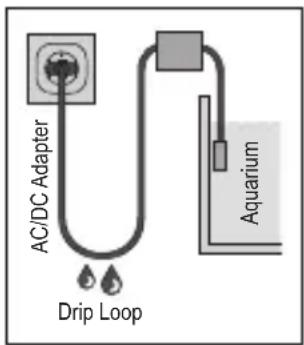
- Protect the mains socket and power supply unit against moisture and wetness. A drip loop must be formed with the cable of the power supply unit. This prevents any water running along the cable to the mains socket, which would result in a short-circuit.
- The electrical data of the power supply unit must match the data of the power mains. This data is found on the type plate, the packaging and in these instructions.
· This appliance is operated without an earth connection.
- Only use the power supply unit that has been supplied with the appliance. If it needs to be replaced, then an original EHEIM power supply unit has to be used.
text_image
AC/DC Adapter Drip Loop AquariumAssembly and installation
Mounting the plug-in power supply unit
- Slide the mains plug adapter into the power supply unit until it audibly snaps into place (☒B).
Controller placement

CAUTION! Material damage due to moisture.
▶ The controller must not be placed underneath the aquarium cover.
- Choose a suitable place for the controller ② (☒A). Keep the following cable lengths in mind here: Controller to power supply unit: approx. 1.5 m Controller to sensor: approx. 2 m

A mounting tab ⑧ can be found on the back of the controller (☒J).
- Insert the plug of the power supply unit into the socket of the controller (☒C).

CAUTION! Material damage.
- DO NOT insert the plug of the power supply unit ③ (☒A) into the mains outlet. When installing the sensor ① (☒A), there is a risk that a reset could accidentally be triggered at the touch panel ⑦ (☒I). When this happens, a WLAN connection with the specified SSID and network security key, as well as the QR codes, is no longer possible.
Installing the sensor
- Connect the suction cup to the clamping bracket (☒D).
- Connect the clamping bracket to the sensor.
Alternative:
- Slide the clamping bracket into the sensor housing (☒E).
- Connect the sensor with the clamping bracket to the suction tube of the external filter, for example.
- Rinse the sensor tip under cold tap water.
- Secure the sensor to the inside of your aquarium below the surface of the water using the suction cup ④ or to the suction tube of the external filter ( × F) with the clamping bracket ⑤. Make sure that the water is at or above the minimum water level ( × G).

Do not place the sensor directly next to a CO_2 or air diffuser, but instead choose an area in the aquarium with minimal water flow to avoid incorrect measurement values.
- Insert the plug of the sensor into the socket of the controller (☒H).
Operation
System requirement
WLAN-enabled terminal device (smartphone, tablet, notebook etc.)
Creating the network
- Insert the power supply unit in the mains socket. The status LED ⑥ illuminates (☒I).

- The status LED flashes white: The network is being searched for or created.
- The status LED illuminates blue: A new network has been created (master mode)
Connecting to the WLAN network
- Open the network settings of your terminal device (smartphone, tablet, notebook etc.).
-
Connect the terminal device to the WLAN network (SSID) EHEIM aquaAlert XXXXXXXX.
-
Enter the network security key.

You can and the security key of the network on the back of the controller. Alternatively, you can also scan the QR code 1 (see label) to establish the connection for the rst time (☒J).
Calling up the website
- Open your web browser and enter the following address: http://192.168.1.1

Alternatively, you can also scan the QR code 2 (see label) to open the software in the browser.
Initial configuration
- Select the desired language from the language selection and follow the instructions for the initial con guration.
Meaning of the status LED
- The status LED ashes white: The network is being searched for or created
- The status LED illuminates blue: The controller is in master mode
- The status LED illuminates green: The controller is connected to another EHEIM digital device
Resetting the controller
- Touch the touch panel ⑦ with your nger for approx. 8–10 seconds until the status LED ⑥ illuminates in alternating colours (☒I).

- When the status LED illuminates green, the reset is complete. The controller re-establishes the network.
- The network security key and QR code 1 are invalid. The network can be connected to without the network security key.
Calibrating the sensor ( K )

- A calibration solution is used to calibrate the sensor. Observe the temperature range information on the package to ensure proper calibration of the sensor.
· Follow the instructions on the website for calibrating the sensor.
Maintenance
DANGER! Electric shock!
Before carrying out any maintenance work, unplug the power supply unit of the controller from the mains outlet.

CAUTION! Material damage.
- Do not use hard objects or aggressive cleaning agents for cleaning.
The sensor and installation material must not be cleaned in a dishwasher.
Cleaning
- Remove the power supply unit from the mains socket.
- Take the sensor out of the aquarium.
- Clean the sensor shaft with a soft, damp cloth.
- Clean the sensor tip under cold, running tap water.
- Mount the sensor in the reverse order.
Decommissioning and disposal
Storage
- Take the sensor out of the aquarium.
- Clean the sensor.
- Remove the controller.
- Store the controller, sensor and calibration solution in a dry, frost-proof place.
Disposal
When disposing of the appliance, pay attention to the relevant statutory regulations. Information on the disposal of electrical and electronic appliances in the European Union: Within the European Union, disposal of electrically operated appliances is governed by national regulations that are based on the EU Directive 2012/19/EU on waste electrical and electronic equipment (WEEE). The appliance may no longer be disposed of with the municipal or household waste. The appliance will be accepted free of charge at municipal collection points or recycling centres. The product packaging is made up of recyclable materials. Dispose of them in an environmentally responsible manner and take them for recycling.
Technical data
| Controller | |||||||
| Type 6065 | |||||||
| Wireless data trans-mission | WiFi 2.4GHz - IEEE802.11 b/g/n | ||||||
| Safety key WPA, WPA2, W | WPA/WPA2 | ||||||
| Emitted transmission power | ≤ 20 dBm | ||||||
| Frequency bands Channel | 1 - 11 / 2412 MHz - 2462 MHz | ||||||
| Dimensions (W×H×D)98× | 116×28 mm | ||||||
| Sensor | |||||||
| Type 7675878 (electrical conductance sensor) | |||||||
| Cable length approx. 2 m | |||||||
| Measurement range 0-3,000 μS/cm @ 25 °C | |||||||
| Reaction time < 1 minute | |||||||
| Dimensions (W×H×D) Approx. 28.0×46.8×18.1 mm | |||||||
| Power supply unit | |||||||
| Type 7341218 7341358 73 | 41438 7341 | 448 734145 | 8 7341468 | 7341248 | |||
| Plug EUR JAP AUS CN | UK | KOR | USA | ||||
| Input | 100 - 240 V / 50/60 Hz / 0.4 A | 100 - 240 V / 50/60 Hz / 0.5 A | |||||
| Output | 5 V DC / 1 A / 5 W | ||||||
| Cable length | approx. 1.5 m | ||||||
EHEIM GmbH & Co. KG hereby declare that the EHEIM aquaAlert+ ^e wireless system complies with Directive 2014/53/EU. The full text of the EU declaration of conformity is available online here: www.eheim.com
Spare parts
See page 3.
CONSIGNES DE SÉCURITÉ ÉLÉMENTAIRES
Terminal compatible WiFi (smartphone, tablette, notebook, etc.)
Connexion au réseau
Controller – sensor ca. 2 m

Controller – sensor ca. 2 m

Controller – sensor ca. 2 m

Reproduction or copying – even parts thereof – only with the express permission of the producer.