
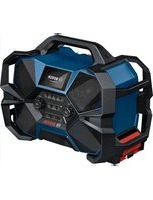
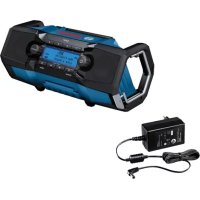
GPB 18V-6 C Professional - Radio BOSCH - Free user manual and instructions
Find the device manual for free GPB 18V-6 C Professional BOSCH in PDF.
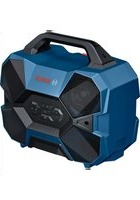


| Product type | Bluetooth® portable speaker |
| Brand | Bosch Professional |
| Model | GPB 18V-6 C Professional |
| Weight (without battery) | 5.2 kg |
| Protection rating | IP54 (with covers closed) |
| Power supply | Lithium-Ion battery 18 V (GBA 18V…, ProCORE18V…) or 10.8/12 V (GBA 10.8V…, GBA 12V…); USB-C PD mains charger (20 V, 5 A min.) |
| Rated power (bass) | 40 W |
| Rated power (mids) | 2 × 24 W |
| Bluetooth® version | 5.4 |
| USB port | 1 × USB-C Input (mains charger), 1 × USB-C Output (charge external devices, max 3 A) |
| Connectivity | Bluetooth®, USB port (MP3 playback), Multi-Speaker Sound function (transmit/receive) |
| Control functions | On/Off, volume, play/pause, search, Bluetooth®, Multi-Speaker Sound |
| Operating temperature range | -20 °C to +40 °C |
| Cleaning | Soft damp cloth, no detergents or solvents |
| Safety | Instructions: do not open the speaker, use only Bosch/AMPShare batteries, water and dust protection |
| Spare parts | Available via Bosch after-sales service (10-digit reference) |
| Repairability | Repair by qualified professional using original parts |
Frequently Asked Questions - GPB 18V-6 C Professional BOSCH
User questions about GPB 18V-6 C Professional BOSCH
0 question about this device. Answer the ones you know or ask your own.
Ask a new question about this device
Download the instructions for your Radio in PDF format for free! Find your manual GPB 18V-6 C Professional - BOSCH and take your electronic device back in hand. On this page are published all the documents necessary for the use of your device. GPB 18V-6 C Professional by BOSCH.
USER MANUAL GPB 18V-6 C Professional BOSCH
Read all the safety information and instructions. Failure to observe the safety information and follow instructions may result in electric shock, fire and/or serious injury.
Save all warnings and instructions for future reference.
▶ Always check the speaker before using it. Do not use it if you discover any damage. Do not open the speaker yourself. It should be repaired exclusively by a qualified professional using only genuine spare parts. Damaged speakers increase the risk of an electric shock. ▶ When using it for an extended period of time, set the speaker to a medium volume. A loud volume can cause hearing damage over an extended period of time. ▶ Do not modify or open the battery. There is a risk of short-circuiting. In case of damage and improper use of the battery, vapours may be emitted. The battery can set alight or explode. Ensure the area is well ventilated and seek medical attention should you experience any adverse effects. The vapours may irritate the respiratory system. If used incorrectly or if the battery is damaged, flammable liquid may be ejected from the battery. Contact with this liquid should be avoided. If contact accidentally occurs, rinse off with water. If the liquid comes into contact with your eyes, seek additional medical attention. Liquid ejected from the battery may cause irritation or burns. The battery can be damaged by pointed objects such as nails or screwdrivers or by force applied externally. An internal short circuit may occur, causing the battery to burn, smoke, explode or overheat. When the battery is not in use, keep it away from paper clips, coins, keys, nails, screws or other small metal objects that could make a connection from one terminal to another. A short circuit between the battery terminals may cause burns or a fire. ▶ Only use the battery in the manufacturer's products or those of the AMPShare partners. This is the only way in which you can protect the battery against dangerous overload. ▶ Only charge the batteries using chargers recommended by the manufacturer. A charger that is suitable for one type of battery may pose a fire risk when used with a different battery.


Protect the rechargeable battery against heat, e.g. including prolonged sun exposure, fire, water, and moisture. There is a risk of explosion and short circuit.
▶ Products sold in GB only:
Your product is fitted with a BS 1363/A approved electric plug with internal fuse (ASTA approved to BS 1362). If the plug is not suitable for your socket outlets, it should be cut off and an appropriate plug fitted in its place by an authorised customer service agent. The replacement plug should have the same fuse rating as the original plug. The severed plug must be disposed of to avoid a possible shock hazard and should never be inserted into a mains socket elsewhere.
The Bluetooth® word mark and logos are registered trademarks owned by Bluetooth SIG, Inc. Any use of such marks by Robert Bosch Power Tools GmbH is under license.
Product Description and Specifications
Please observe the illustrations at the beginning of this operating manual.
Intended Use
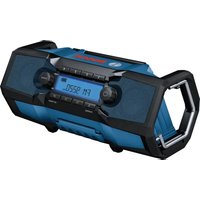
The speaker is intended for playing audio signals from connected sources or sources connected via Bluetooth®.
Product Features
The numbering of the product features refers to the diagram of the speaker on the graphics page.
(1) Carrying handle (2) Speaker (3) Volume down button (4) Volume up button (5) Bluetooth® button (6) On/off button (7) Multi-Speaker Sound button (8) Seek button (scan down) (9) Seek button (scan up) (10) Playback/pause button (11) Status indicator (12) Power supply rubber mount (13) Battery compartment cover (17) Connector compartment (18) 10.8 V/12 V battery holder (19) Battery release button a) (20) Rechargeable battery a) (21) 18 V battery holder (22) Battery unlocking handle
(14) Battery compartment cover locking lever
(15) USB Input Type C port for power supply
(16) USB Output Type C port for external devices
a) This accessory is not part of the standard scope of delivery.
Technical Data
| Bluetooth® speaker | GPB 18V-6 C | |
| Article number | 3 601 DA6 000 | |
| Nominal output per mid-range speaker | W | 24 |
| Nominal output of bass speaker W 40 | ||
| Bluetooth® | ||
| - Compatibility Bluetooth® 5.4 | ||
| - Operating frequency range MHz 2402-2480 | ||
| - Max. transmission power mW 8 | ||
| Cordless power supply | ||
| - Li-ion rechargeable battery V 18 | ||
| - Li-ion rechargeable battery V 10.8/12 | ||
| Max. charging current (power-ing external devices via the USB port) | A | 3 |
| Weight a) | kg 5.2 | |
| Protection rating b) | IP54 | |
| Recommended ambient tem-perature during charging | °C 0 to +35 | |
| Permitted ambient temperature during operation | °C -20 to +40 | |
| Permitted ambient temperature during storage | °C -20 to +50 | |
| Compatible 18 V batteries GBA18V... | GBA 18V...ProCORE18V...EXPERT18V...EXBA18V...CORE18V... | |
| Recommended chargers for 18 V batteries | GAL18...GAL 18...GAL 36...GAL12V/18...GAL 12V/18...GAX 18...EXAL18... | |
| Compatible 10.8 V/12 V batter-ies | GBA 10,8V...GBA 12V... | |
| Recommended chargers for 10.8 V/12 V batteries | GAL 12...GAX 18... | |
| USB Type C power supply with Power Delivery (USB-PD,commercially available) | ||
| Output voltage V 20 | ||
| Minimum output current A 5 | ||
12 | English
| Bluetooth® speaker | GPB 18V-6 C |
| Recommended output power for full functionality c) | W 100 |
A) Without rechargeable battery (you can find the battery weight at www.bosch-professional.com.) B) When in battery operation and when the battery compartment cover (13) and connector compartment (17) are closed C) If the power supply provides insufficient power, the speaker will switch itself off.
Values can vary depending on the product, scope of application and environmental conditions. To find out more, visit www.bosch-professional.com/wac.
Power Supply
Power can be supplied to the speaker via the following:
- Bosch 18 V Li-ion rechargeable battery,
- Bosch 10.8 V/12 V Li-ion battery,
- Commercially available USB Type C power supply with Power Delivery (USB-PD).
As soon as the speaker is connected to the mains via the power supply (including if a rechargeable battery is inserted), energy will be supplied via the power supply.
Operation with lithium-ion rechargeable battery pack (see figure A)
Bosch sells some cordless speakers without a rechargeable battery. You can tell whether a rechargeable battery is included with the speaker by looking at the packaging.
▶ Use only the chargers listed in the technical data. Only these chargers are compatible with the lithium-ion batteries that can be used in your speaker.
Note: Lithium-ion rechargeable batteries are supplied partially charged according to international transport regulations. To ensure full rechargeable battery capacity, fully charge the rechargeable battery before using your tool for the first time.
Disengage the locking lever (14) of the battery compartment cover and open the battery compartment cover (13).
If you are using an 18 V rechargeable battery, push the charged battery into the battery holder (21) until it clicks into place. To remove the 18 V rechargeable battery, pull the battery unlocking handle (22) so that the battery is unlocked and pushed out. Do not use force to do this.
If you are using a 10.8 V or 12 V rechargeable battery, push the charged battery into the battery holder (18) until it clicks into place. To remove the 10.8 V or 12 V rechargeable battery, press the battery release buttons (19) and pull the battery out of the battery holder. Do not use force to do this.
Close the battery compartment cover (13) and lock it.
Battery Charge Indicator
When the rechargeable battery is inserted, you can see the state of charge of the battery (20) on the status indicator (11).
If the 18 V battery is removed from the speaker, you can also have the state of charge indicated on the battery.
Battery Charge Indicator on the Speaker
If the speaker is not connected to the mains via a power supply, the status indicator (11) will briefly indicate the battery state of charge after the speaker has been switched on and each time a button is pressed.
LED Capacity
| 5 × continuous green light 80–100 % |
| 4 × continuous green light 60–80 % |
| 3 × continuous green light 40–60 % |
| 2 × continuous green light 20–40 % |
| 1 × continuous green light 5–20 % |
| 1 × flashing green light 0–5 % |
Battery Charge Indicator on the 18 V Rechargeable Battery
If the 18 V rechargeable battery is removed from speaker, its state of charge may be indicated by the green LEDs of the battery charge indicator on the battery.
Press the button for the battery charge indicator ☐ or to show the state of charge.
If no LED lights up after pressing the button for the battery charge indicator, the rechargeable battery is defective and must be replaced.
Note: Not all battery types have a battery charge indicator.
Rechargeable battery type GBA 18V... | GBA18V...

LED Capacity
| 3× continuous green light 60–100 % |
| 2× continuous green light 30–60 % |
| 1× continuous green light 5–30 % |
| 1× flashing green light 0–5 % |
Battery model ProCORE18V... | EXPERT18V... | EXBA18V... | CORE18V...

LED Capacity
| 5 × continuous green light 80–100 % |
| 4 × continuous green light 60–80 % |
| 3 × continuous green light 40–60 % |
| 2 × continuous green light 20–40 % |
| 1 × continuous green light 5–20 % |
| 1 × flashing green light 0–5 % |
Battery defect risk detection
EXPERT18V... | EXBA18V...
In addition to the state of charge of the rechargeable battery, the LEDs on the battery charge indicator can also indicate the risk of a battery defect.
To activate the function, press and hold the button for the battery charge indicator for 3 seconds. The analysis of the battery is signalled by a moving light on the battery charge indicator. The result is shown on the battery charge indicator.
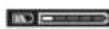
1 LED: The rechargeable battery has a high defect risk. Performance and runtime may already be reduced. Replacing the rechargeable battery is recommended.
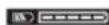
5 LEDs: The rechargeable battery is in good condition and has a low defect risk.
Please note: The rechargeable battery defect risk assessment works in a binary manner and offers a simplified status assessment, indicating either that the rechargeable battery is in good condition or that the rechargeable battery has an increased defect risk. A percentage of the battery status is not shown.
Recommendations for Optimal Handling of the Battery
Protect the battery against moisture and water.
Only store the battery within a temperature range of -20 to 50°C. Do not leave the battery in your car in the summer, for example.
Occasionally clean the ventilation slots on the battery using a soft brush that is clean and dry.
A significantly reduced operating time after charging indicates that the battery has deteriorated and must be replaced. Follow the instructions on correct disposal.
Operation with Power Supply (accessory) (see figure B)
Pay attention to the mains voltage. The voltage of the power source must match the voltage specified on the type plate of the power supply.
For mains operations, use only a USB Type C power supply with Power Delivery (USB-PD). Its output voltage, minimum output current and output power must comply with the requirements in the "Technical Data" section. Consult the operating instructions for the power supply. Using different power supplies can damage the speaker. If the power supply provides insufficient power, the speaker will switch itself off.
Open the protective cap of the connector compartment (17). Connect the power supply to the input port (15) of the speaker via a suitable cable. Connect the power supply to the mains supply.
After removing the cable for the power supply, reattach the protective cap of the connector compartment (17) to protect against dirt/debris.
If it fits, you can secure the power supply to the speaker with the rubber mount (12) to store it.
Operation
▶ Protect the speaker against direct water contact. Water entering the speaker increases the risk of electric shock.
- Keep the battery compartment cover and the protective cap of the connector compartment closed if possible. The closed covers protect the speaker against water and dust.
Audio Operation
Switching On/Off and Controlling the Volume
To switch on the speaker, press and hold the on/off button (6) until the LEDs of the status indicator (11) light up briefly in succession. If power is supplied via a rechargeable battery, the battery state of charge is briefly indicated.
To switch off the speaker, press and hold the on/off button (6) until the LEDs of the status indicator (11) light up briefly in succession and then go out.
The speaker will switch off automatically after 20 min if no connection can be established via Bluetooth® or Multi-Speaker Sound in this time and there is no playback via other media (or playback is paused).
You can control the volume by pressing the Volume up (4) or Volume down (3) buttons. When the speaker is switched on, the volume is always set to low.
Overview of Audio Features
The speaker has the following audio features:
- Playback of devices connected via Bluetooth® (set by default)
- Playback of a USB storage medium via the output port for external devices (16)
- Playback via Multi-Speaker Sound
- Transmission of the current playback (Bluetooth® or USB) via Multi-Speaker Sound to other devices with this feature. If it fits, you can store the connected device (e.g., a smartphone) in the cavity of the carrying handle (1).
Note: Please note that devices that are too small or too large may fall out of the cavity.
You can identify the current audio feature by looking at the middle LED on the status indicator (11):
- Blue: Playback of a Bluetooth® signal
- Light blue: Playback of a Multi-Speaker Stream
- Purple: Transmission of the current playback via Multi-Speaker Sound
- LED off: Playback of a USB storage medium
Playing Back/Controlling External Audio Sources via Bluetooth®
When the speaker is switched on, playback via Bluetooth® is set by default. To switch from another audio feature to Bluetooth®, briefly press the Bluetooth® button (5).
- To establish a new connection: Start a search for a connection if no saved audio source is available or an available connection to an audio source via Bluetooth® needs to be ended and a new connection needs to be searched for. To do so, press and hold the Bluetooth® button (5) for longer than 0.5 s.
During the search, the middle LED of the status indicator (11) will quickly flash blue.
Activate the new connection via the external audio source. For smartphones, that is generally possible via the settings in the Bluetooth® menu. The speaker will appear as an available device under the name
GPB 18V-6 C xxxx. Please observe the operating instructions for your audio source/smartphone.
- To reconnect: If the speaker has already been connected to an external audio source (e.g., a smartphone) via Bluetooth® and if this audio source is available, a connection to this audio source will automatically be established. While a connection is being established, the middle LED of the status indicator (11) will slowly flash blue. If the saved audio source is unavailable, a search for a connection will start automatically after 2 minutes.
If the connection has been established successfully, a rising audio signal will sound and the middle LED of the status indicator (11) will light up continuously.
If the connection is interrupted or ended, a falling audio signal will sound. The speaker switches off automatically after a total of 20 minutes.
The audio source connected via Bluetooth® can also be controlled via the speaker:
- To select a track, briefly press the seek button (scan up) (9) or the seek button (scan down) (8) until the required track has been reached.
- To start, interrupt, or continue playback, press the relevant playback/pause button (10).
- To fast-forward or rewind within a track, press and hold the seek (scan up) button (9) or the seek (scan down) button (8) until the required place in the track has been reached.
Playing/Controlling External Audio Sources via the USB Port
For playback via the USB port, open the protective cap of the connector compartment (17). Insert the USB medium (e.g., stick) into the output port for external devices (16) on the speaker.
When you insert the USB storage medium, an audio signal will sound. If the storage medium cannot be read, the speaker will switch to the default audio feature (playback via Bluetooth®).
The audio source connected via USB can also be controlled via the speaker:
- To select a track, briefly press the seek button (scan up) (9) or the seek button (scan down) (8) until the required track has been reached.
- To start, interrupt, or continue playback, press the relevant playback/pause button (10).
- To fast-forward or rewind within a track, press and hold the seek (scan up) button (9) or the seek (scan down) button (8) until the required place in the track has been reached.
- To start or end Shuffle, press the seek button (scan up) (9) and the seek button (scan down) (8) simultaneously.
Note: By default, MP3 files from the top file level or the top folder of the storage medium are read and played. It may not be possible to read files stored in sub-folders. File formats other than MP3 will not play.
After removing the USB storage medium, reattach the protective cap of the connector compartment (17) to protect against dirt/debris.
Playing External Audio Sources via Multi-Speaker Sound
To switch from another audio source to playback via Multi-Speaker Sound, briefly press the Multi-Speaker Sound button (7). During the search for a connection, the middle LED of the status indicator (11) will flash light blue. If the connection has been established successfully, a rising audio signal will sound and the middle LED will light up bright blue continuously.
The volume between the audio source and the speaker will be synchronised (the audio source determines the volume) until the volume is changed on the speaker. To restore the volume synchronisation, restart the connection via Multi-Speaker Sound. To do this, briefly press the Multi-Speaker Sound button (7).
If the connection is interrupted or ended, a falling audio signal will sound. The speaker switches off automatically after a total of 20 min.
Transmitting the Current Playback via Multi-Speaker Sound
If an audio source is being played via Bluetooth® or the USB connection, this playback can be retransmitted to additional devices with the Multi-Speaker Sound feature (e.g. GPB 18VH-6 SRC). To do this, press and hold the Multi-Speaker Sound button (7) for longer than 0.5 s. As confirmation, the middle LED of the status indicator (11) will light up purple and an audio signal will sound.
To end transmission via Multi-Speaker Sound, press and hold the Multi-Speaker Sound button (7) for longer than 0.5 s. As confirmation, an audio signal will sound. Multi-Speaker Sound is also ended if the audio source for playback is changed (e.g. from Bluetooth® to a USB storage medium).
Power Supply of External Devices
Charging External Devices Via the USB Port
The USB port can be used to charge devices that can be powered via USB (e.g. various mobile phones). The maximum charging current is 3 A.
Open the protective cap of the connector compartment (17). Connect the external device to the output port for external devices (16) on the speaker.
In order to charge external devices, the speaker must be switched on.
After removing the charging cable, reattach the protective cap of the connector compartment (17) to protect against dirt/debris.
Maintenance and Service
Maintenance and Cleaning
Keep the speaker clean to ensure effective, safe operation. Wipe off any dirt using a damp, soft cloth. Do not use any detergents or solvents.
After-Sales Service and Application Service
Great Britain
Tel. Service: (0344) 7360109
You can find our service addresses and links to the repair service and spare parts ordering at www.bosch-pt.com/serviceaddresses
In all correspondence and spare parts orders, please always include the 10-digit article number given on the nameplate of the product.
Disposal
Electrical and electronic equipment, batteries, accessories and packaging should be sorted for environmentally friendly recycling.
Do not dispose of electrical and electronic equipment and batteries in the household waste!
Only for EU countries and United Kingdom:
Electrical and electronic equipment or used batteries that are no longer suitable for use must be collected separately and disposed of in an environmentally friendly manner. Use the designated collection systems. Incorrect disposal may cause harmful effects on the environment and human health, due to the potential presence of hazardous substances.
Français
Reading/controlling external audio sources via Bluetooth®
Calle Robert Bosch No. 405
C.P. 50071 Zona Industrial,
Toluca - México, RFC: RBO910102QJ9
Tel.: (52) 55 528430-62
Tel.: 800 6271286
Spain
www.bosch-pt.com/serviceaddresses
www.bosch-pt.com/serviceaddresses
www.bosch-pt.com/serviceaddresses
Risk recognition of battery defect
EXPERT18V... | EXBA18V...
Tlf. Service Center: 44898855
You can find our service addresses and links to repair service and ordering spare parts at: www.bosch-pt.com/serviceaddresses
www.bosch-pt.com/serviceaddresses
www.bosch-pt.com/serviceaddresses
When making inquiries or ordering spare parts, please always specify the 10-digit catalog number from the product's rating plate.
Disposal
Power tools, rechargeable batteries/batteries, accessories, and packaging should be brought to an environmentally friendly recycling facility.
Do not dispose of power tools and rechargeable batteries/batteries in household waste!
Only for EU countries:
Electrical and electronic devices or used accumulators/batteries that are no longer usable must be collected separately and disposed of in an environmentally friendly manner. Use the designated waste collection systems. Improper disposal can be harmful to the environment and health due to hazardous substances that may be contained.
Estonian
Safety instructions

www.bosch-pt.com/serviceaddresses
www.bosch-pt.com/serviceaddresses
| 100-80 | |
| 80-60 | |
| 60-40 | |
| 40-20 | |
| 20-5 | |
| 5-0 |
| 100-80 | |
| 80-60 | |
| 60-40 | |
| 40-20 | |
| 20-5 | |
| 5-0 |
| LED | |
| 5% 100-80 | |
| 4% 80-60 | |
| 3% 60-40 | |
| 2% 40-20 | |
| 1% 20-5 | |
| 1% 5-0 | |
| LED | |
| 3% 100-60 | |
| 2% 60-30 | |
| 30-5 | |
| 5-0 | |
Declaration of Conformity
Hereby, Robert Bosch Limited as authorised representative acting on behalf of Robert Bosch Power Tools GmbH declares that the radio equipment type GPB 18V-6 C is in compliance with the Radio Equipment Regulations 2017. The full text of the declaration of conformity is available at the following internet address:


- PRODUCTS SOLD IN GB ONLY
- PRODUCT DESCRIPTION AND SPECIFICATIONS
- INTENDED USE
- PRODUCT FEATURES
- ENGLISH
- POWER SUPPLY
- OPERATION WITH LITHIUM-ION RECHARGEABLE BATTERY PACK (SEE FIGURE A)
- BATTERY CHARGE INDICATOR
- BATTERY CHARGE INDICATOR ON THE SPEAKER
- BATTERY CHARGE INDICATOR ON THE 18 V RECHARGEABLE BATTERY
- BATTERY DEFECT RISK DETECTION
- EXPERT18V... | EXBA18V
- RECOMMENDATIONS FOR OPTIMAL HANDLING OF THE BATTERY
- OPERATION WITH POWER SUPPLY (ACCESSORY) (SEE FIGURE B)
- OPERATION
- AUDIO OPERATION
- SWITCHING ON/OFF AND CONTROLLING THE VOLUME
- OVERVIEW OF AUDIO FEATURES
- PLAYING BACK/CONTROLLING EXTERNAL AUDIO SOURCES VIA BLUETOOTH®
- PLAYING/CONTROLLING EXTERNAL AUDIO SOURCES VIA THE USB PORT
- PLAYING EXTERNAL AUDIO SOURCES VIA MULTI-SPEAKER SOUND
- TRANSMITTING THE CURRENT PLAYBACK VIA MULTI-SPEAKER SOUND
- POWER SUPPLY OF EXTERNAL DEVICES
- CHARGING EXTERNAL DEVICES VIA THE USB PORT
- MAINTENANCE AND SERVICE
- MAINTENANCE AND CLEANING
- AFTER-SALES SERVICE AND APPLICATION SERVICE
- GREAT BRITAIN
- DISPOSAL
- ONLY FOR EU COUNTRIES AND UNITED KINGDOM
- FRANÇAIS
- READING/CONTROLLING EXTERNAL AUDIO SOURCES VIA BLUETOOTH®
- SPAIN
- RISK RECOGNITION OF BATTERY DEFECT
- ONLY FOR EU COUNTRIES
- ESTONIAN
- SAFETY INSTRUCTIONS
- DECLARATION OF CONFORMITY
Brand : BOSCH
Model : GPB 18V-6 C Professional
Category : Radio