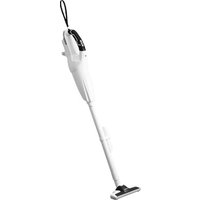
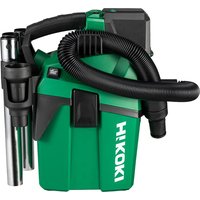
R36DB - Vacuum Cleaner HiKOKI - Free user manual and instructions
Find the device manual for free R36DB HiKOKI in PDF.



| Brand | HiKOKI |
| Model | R36DB |
| Type | Cordless vacuum cleaner (bagless) |
| Usage | Dry vacuuming (dry surfaces) |
| Voltage | 36 V (multi-volt battery) |
| Compatible batteries | BSL36A18, BSL36B18 (sold separately) |
| Tank capacity | 560 mL |
| Runtime (with BSL36A18) | High mode ~15 min / Medium mode ~30 min / Low mode ~60 min |
| Suction power | High mode ~155 W / Medium mode ~65 W / Low mode ~35 W |
| Dimensions (L × D × H) | 476 × 112 × 169 mm |
| Weight | 1.6 kg (with BSL36A18) |
| Filter | Washable filter with cold or lukewarm water |
| Battery level indicator | LED indicator (4 levels + alert) |
| Lighting | Built-in LED (LED indicator) |
| Speed modes | 3: High (3), Medium (2), Low (1) |
| Charger | UC18YSL3 (sold separately) with USB port 5V/2A |
| Included accessories | Floor nozzle, crevice nozzle, extension hose, strap |
| Safety | Automatic shut-off in case of overheating or blockage |
| Filter cleaning | Remove, wash with water, dry in shade |
| Storage | Temperature < 40°C, out of reach of children |
Frequently Asked Questions - R36DB HiKOKI
User questions about R36DB HiKOKI
0 question about this device. Answer the ones you know or ask your own.
Ask a new question about this device
Download the instructions for your Vacuum Cleaner in PDF format for free! Find your manual R36DB - HiKOKI and take your electronic device back in hand. On this page are published all the documents necessary for the use of your device. R36DB by HiKOKI.
USER MANUAL R36DB HiKOKI
natural_image
Line drawing of a handheld vacuum cleaner (no text or symbols present)
en Handling instructions
de Bedienungsanleitung
fr Mode d'emploi
it Istruzioni per l'uso
nl Gebruiksaanwijzing
es Instrucciones de manejo
pt Instruções de uso
sv Bruksanvisning
da Brugsanvisning
no Bruksanvisning
fi Käyttöohjeet
el Οδηγίες χειρισμού
pl Instrukcja obsługi
hu Kezelési utasítás
cs Návod k obsluze
tr Kullanım talimatları
ro Instructiuni de utilizare
s| Navodila za rokovanje
⑥sk Pokyny na manipuláciu
bg Инструкция за експлоатация
sr Uputstvo za rukovanje
hr Upute za rukovanje
1

2
natural_image
Diagram of a hand washing machine with a box inside, showing internal components and a directional arrow (no text or symbols)3

4


5


6

7



8

natural_image
Diagram of a hand tool with labeled parts, showing two views (a and b) with no text or symbols beyond labels.
9

flowchart
graph TD
    A["8"] --> B["9"]
    B --> C["3"]
    C --> D["2"]
    D --> E["1"]
    E --> F["0"]
    F --> G["O"]
    G --> H["O"]
    H --> I["2"]
    I --> J["1"]
    J --> K["2"]
    K --> L["1"]
    L --> M["2"]
    M --> N["1"]
    N --> O["2"]
    O --> P["1"]
    P --> Q["2"]
    Q --> R["1"]
    R --> S["2"]
    S --> T["1"]
    T --> U["2"]
    U --> V["1"]
    V --> W["2"]
    W --> X["1"]
    X --> Y["2"]
    Y --> Z["1"]
10

11





C

17

18
19
natural_image
Diagram of a device with a plug connected to an open circuit board, showing internal components and wiring (no text or symbols)
20 21


SAFETY PRECAUTIONS FOR THE CORDLESS CLEANER
○ In order to prevent accidents, such as fires, electric shock, and injuries, be sure to follow the “Safety Precautions” stated below.
Before use, read all of the "Safety Precautions" and use the appliance correctly according to the instructions.
- Be sure to keep this instructions manual in the where it can be consulted by the user at any time.
WARNING
- Keep the workplace clean. Littered place or workbench may cause accidents.
- Pay attention to the situation around the workplace as well. Make the workplace bright enough. Do not use the appliance in places with infl ammable liquid or gas.
- Keep children away. Do not let other persons than the operator touch the cleaner or the cord. Keep persons other than the operator away from the workplace.
- Use the cleaner suitable for the work. Use the appliance only for the specified applications.
- Do not handle the power cord roughly.
- Do not carry the charger with only the power cord or pull the plug from the socket while holding the power cord.
- Keep the power cord away from heat, oil and sharp corners.
- The cleaner should be maintained carefully. Replacement of accessories should follow the instructions manual. Regularly check the power cord of the charger and ask your local retailer or authorized servicing agent for repairs in the event of it being damaged. If an extension cord is used, check it periodically, and when damaged, replace it.
- In the following cases, switch off the cleaner and disconnect the battery from the cleaner: The cleaner is not used or it is sent for repair. Accessories, such as an extension pipe and a filter, are replaced. Danger is expected.
- Avoid sudden starting. Do not carry the appliance which is connected to the power supply with your finger placed on the switch. Confirm that the switch is off before insert the battery.
- Do the work with enough care. When you use the cleaner, pay attention to the handling method, how to do the work, the surrounding situation, etc. and perform the operation in a cautious manner.
- Check for any damaged part.
Before use, check for any damages in the protective cover or other parts and confi rm whether the appliance operates normally and performs specifi ed functions.
☐ Check for any abnormalities in all places that may affect the operation, the position adjustment and clamping state of movable portions, damaged parts or attachment state.
○ Replacement and repair of damaged protective cover and other parts should follow the provisions of the handling instructions. If there are no such provisions in the manual, please request repair from your local retailer or authorized servicing agent.
☐ If the switch fails, please request repair from your local retailer or authorized servicing agent. Avoid using the cleaner which cannot be started or stopped by the switch. -
Contact the specialty store for repair of the cleaner.
○ Since this cleaner conforms to the corresponding safety standard, do not modify it.
○ Be sure to request repair from your local retailer or authorized servicing agent. Self-repair may cause accidents or injuries. -
This appliance can be used by children aged from 8 years and above and persons with reduced physical, sensory or mental capabilities or lack of experience and knowledge if they have been given supervision or instruction concerning use of the appliance in a safe way and understand the hazards involved. Children shall not play with the appliance. Cleaning and user maintenance shall not be made by children without supervision. e place
PRECAUTIONS FOR USE OF THE CORDLESS CLEANER
The precautions common to the cleaners have been described. For the cleaners for electric tools, follow further precautions described below:
WARNING
- Prevent the appliance from sucking in the following:
○ Liquids (e.g., water, oil) or damp debris.
○ Generated spark during metal grinding or cutting.
○ High temperature things, such as lighted cigarette.
○ Inflammable substances (gasoline, thinner, benzine, kerosene, paint, etc.), explosive substances (nitroglycerine, etc.), combustible substances (aluminum, zinc, magnesium, titanium, red phosphorus, yellow phosphorus, celluloid, etc.) - Sharp things, such as nails, razors or glass.
Solidification materials, such as cement powder and toner, and conductive fine dusts, such as metal powder and carbon powder. - Set the fi lter correctly before use. Do not use the appliance without the fi lter or with it set in a wrong position, or do not use a torn fi lter. May cause failures, such as motor burnout.
- Do not use the appliance with its suction opening, air inlet or exhaust opening obstructed. The temperature of the motor may rise abnormally, causing troubles such as deformation of parts or motor burnout.
- Do not operate the appliance when its intake port or flooring nozzle, etc. is clogged with foreign matter. The temperature of the motor may rise abnormally, causing troubles such as deformation of parts or motor burnout.
- Do not give a strong shock to the switch panel or break it. It may lead to a trouble.
- Do not look directly into the light. Such actions could result in eye injury.
Wipe off any dirt or grime attached to the lens of the LED light with a soft cloth, being careful not to scratch the lens.
Scratches on the lens of the LED light can result in decreased brightness.
- When you drop or bump the appliance accidentally, check for breakage, crack, or deformation in the appliance. Breakage, crack or deformation may cause injuries.
- When the appliance is out of condition or emits abnormal sound during use, immediately turn off the switch and request repair from your local retailer or authorized servicing agent. If you continue to use the appliance as it is, it may lead to injuries.
- This appliance is only used indoors. Never use it outdoors. Do not use in the rain. Keep away from water or oil.
Malfunction may result as this appliance is not waterproof.
ADDITIONAL SAFETY WARNINGS
-
Always charge the battery at a temperature of 0^ C– 40^ C. A temperature of less than 0^ C will result in over charging which is dangerous. The battery cannot be charged at a temperature higher than 40^ C.
The most suitable temperature for charging is that of 20^ C– 25^ C. -
Do not use the charger continuously.
When one charging is completed, leave the charger for about 15 minutes before the next charging of battery.
-
Do not allow foreign matter to enter the hole for connecting the rechargeable battery.
-
Never disassemble the rechargeable battery and charger.
-
Never short-circuit the rechargeable battery. Shortcircuiting the battery will cause a great electric current and overheat. It results in burn or damage to the battery.
-
Do not dispose of the battery in fire. If the battery is burnt, it may explode.
-
Bring the battery to the shop from which it was purchased as soon as the post-charging battery life becomes too short for practical use. Do not dispose of the exhausted battery.
-
Do not insert object into the air ventilation slots of the charger. Inserting metal objects or inflammables into the charger air ventilation slots will result in electrical shock hazard or damaged charger.
-
When using this unit continuously, the unit may overheat, leading to damage in the motor and switch. Therefore, whenever the housing becomes hot, give the tool a break for a while.
-
Make sure that the battery is installed firmly. If it is at all loose it could come off and cause an accident.
-
Do not use the product if the tool or the battery terminals (battery mount) are deformed.
Installing the battery could cause a short circuit that could result in smoke emission or ignition.
- Keep the tool's terminals (battery mount) free of swarf and dust.
- Prior to use, make sure that swarf and dust have not collected in the area of the terminals.
○ During use, try to avoid swarf or dust on the tool from falling on the battery.
When suspending operation or after use, do not leave the tool in an area where it may be exposed to falling swarf or dust.
Doing so could cause a short circuit that could result in smoke emission or ignition.
- Always use the tool and battery at temperatures between -5^ and 40^ .
CAUTION ON LITHIUM-ION BATTERY
To extend the lifetime, the lithium-ion battery equips with the protection function to stop the output.
In the cases of 1 to 3 described below, when using this product, even if it is switched on, the motor may stop. This is not the trouble but the result of protection function.
- When the battery power remaining runs out, the motor stops.
In such a case, charge it up immediately.
-
If the tool is overloaded, the motor may stop. In this case, switch the tool off and eliminate causes of overloading. After that, you can use it again.
-
If the battery is overheated under overload work, the battery power may stop.
In this case, stop using the battery and let the battery cool. After that, you can use it again.
Furthermore, please heed the following warning and caution.
WARNING
In order to prevent any battery leakage, heat generation, smoke emission, explosion and ignition beforehand, please be sure to heed the following precautions.
- Make sure that swarf and dust do not collect on the battery.
During work make sure that swarf and dust do not fall on the battery.
○ Make sure that any swarf and dust falling on the power tool during work do not collect on the battery.
○ Do not store an unused battery in a location exposed to swarf and dust.
Before storing a battery, remove any swarf and dust that may adhere to it and do not store it together with metal parts (screws, nails, etc.).
-
Do not pierce battery with a sharp object such as a nail, strike with a hammer, step on, throw or subject the battery to severe physical shock.
-
Do not use an apparently damaged or deformed battery.
-
Do not use the battery for a purpose other than those specified.
-
If the battery charging fails to complete even when a specified recharging time has elapsed, immediately stop further recharging.
-
Do not put or subject the battery to high temperatures or high pressure such as into a microwave oven, dryer, or high pressure container.
-
Keep away from fire immediately when leakage or foul odor are detected.
-
Do not use in a location where strong static electricity generates.
-
If there is battery leakage, foul odor, heat generated, discolored or deformed, or in any way appears abnormal during use, recharging or storage, immediately remove it from the equipment or battery charger, and stop use.
-
Do not immerse the battery or allow any fluids to flow inside. Conductive liquid ingress, such as water, cause damage resulting in fire or explosion. Store your battery in a cool, dry place, away from combustible and flammable items. Corrosive gas atmospheres must be avoided.
CAUTION
- If liquid leaking from the battery gets into your eyes, do not rub your eyes and wash them well with fresh clean water such as tap water and contact a doctor immediately.
If left untreated, the liquid may cause eye-problems.
- If liquid leaks onto your skin or clothes, wash well with clean water such as tap water immediately.
There is a possibility that this can cause skin irritation.
- If you find rust, foul odor, overheating, discolor, deformation, and/or other irregularities when using the battery for the first time, do not use and return it to your supplier or vendor.
WARNING
If a conductive foreign matter enters in the terminal of lithium ion battery, the battery may be shorted, causing fi re. When storing the lithium ion battery, obey surely the rules of following contents.
○ Do not place conductive debris, nail and wires such as iron wire and copper wire in the storage case.
To prevent shorting from occurring, load the battery in the tool or insert securely the battery cover for storing until the ventilator is not seen.
REGARDING LITHIUM-ION BATTERY TRANSPORTATION
When transporting a lithium-ion battery, please observe the following precautions.
WARNING
Notify the transporting company that a package contains a lithium-ion battery, inform the company of its power output and follow the instructions of the transportation company when arranging transport.
○ Lithium-ion batteries that exceed a power output of 100 Wh are considered to be in the freight classification of Dangerous Goods and will require special application procedures.
☐ For transportation abroad, you must comply with international law and the rules and regulations of the destination country.
☐ If the BSL36B18 is installed in the power tool, the power output will exceed 100 Wh and the unit will be classified as Dangerous Goods for freight classification.

USB DEVICE CONNECTION PRECAUTIONS (UC18YSL3)
When an unexpected problem occurs, the data in a USB device connected to this product may be corrupted or lost. Always make sure to back up any data containing USB device prior to use with this product.
Please be aware that our company accepts absolutely no responsibility for any data stored in a USB device that is corrupted or lost, nor for any damage that may occur to a connected device.
WARNING
- Prior to use, check the connecting USB cable for any defect or damage.
Using a defective or damaged USB cable can cause smoke emission or ignition.
When the product is not being used, cover the USB port with the rubber cover.
Buildup of dust etc. in the USB port can cause smoke emission or ignition.
NOTE
- There may be an occasional pause during USB recharging.
When a USB device is not being charged, remove the USB device from the charger.
Failure to do so may not only reduce the battery life of a USB device, but may also result in unexpected accidents.
- It may not be possible to charge some USB devices, depending on the type of device.
NAMES OF PARTS (Fig. 1–Fig. 21)
| 1 | LED light Protruding mark | ||
| 2 | Name plate | 18 | Filter |
| 3 | Motor | 19 | Filter holder |
| 4 | Housing | 20 | Projection |
| 5 | Dust Case | 21 | Housing grooves |
| 6 | Battery | 22 | Dust |
| 7 | Strap | 23 | Dust Removal Blades (3 pcs)(Fixed to the inside of the dust case) |
| 8 | Switch panel | 24 | Air gun |
| 9 | Indicator Lamp | 25 | Fan filter |
| 10 | Extension Pipe | 26 | Also clean dust on rail |
| 11 | Crevice Nozzle | 27 | Notch |
| 12 | Flooring Nozzle | 28 | Groove of rail |
| 13 | Nozzle Holder | 29 | Blade |
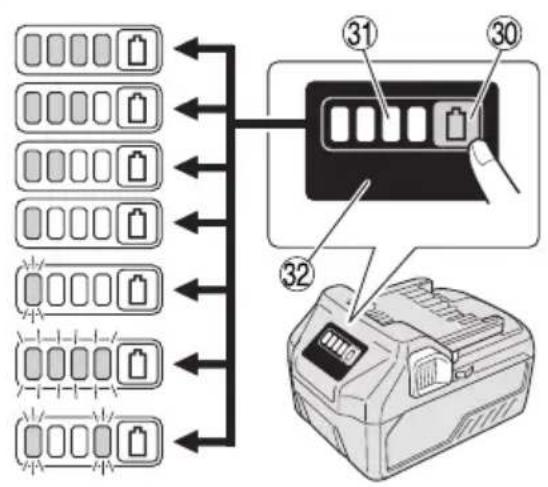
| 14 | Intake port | 30 | Remaining battery indicator switch |
| 15 | Latch | 31 | Remaining battery indicator lamp |
| 16 | Charge indicator lamp | 32 | Display panel |
SYMBOLS
WARNING
The following show symbols used for the machine. Be sure that you understand their meaning before use.
| R36DB: Cordless Cleaner | |
 | To reduce the risk of injury, user must read instruction manual. |
 | Only for EU countriesDo not dispose of electric tools together with household waste material!In observance of European Directive 2012/19/EU on waste electrical and electronic equipment and its implementation in accordance with national law, electric tools that have reached the end of their life must be collected separately and returned to an environmentally compatible recycling facility. |
| [80WT] | Warning |
 | Switching ON |
| O | Switching OFF |
 | Disconnect the battery |
 | Prohibited action |
 | HIGH mode |
 | MID/LOW mode |
 | OFF button |
Battery
| Lights;The battery remaining power is over 75% | |
| Lights;The battery remaining power is 50%-75%. | |
| Lights;The battery remaining power is 25%-50%. | |
| Lights;The battery remaining power is less than 25% | |
| Blinks;The battery remaining power is nearly empty.Recharge the battery soonest possible. | |
| Blinks;Output suspended due to high temperature.Remove the battery from the tool and allow it to fully cool down. | |
| Blinks;Output suspended due to failure or malfunction. The problem may be the battery so please contact your dealer. |
STANDARD ACCESSORIES
In addition to the main unit (1 unit), the package con the accessories listed on page 219.
Battery and battery charger are not included with this product.
Standard accessories are subject to change without notice.
APPLICATIONS
○ Light-duty vacuuming of dry surfaces
SPECIFICATIONS
- Power tool
| ModelItem | R36DB | |
| Voltage | 36 V | |
| Application Dry type | ||
| Continuous operating time (Battery: using BSL36A18) | 3 (HIGH) | Approx. 15 min |
| 2 (MID) | Approx. 30 min | |
| 1 (LOW) | Approx. 60 min | |
| Suction Work Rate | 3 (HIGH) : Approx. 1552 (MID) : Approx. 65 V1 (LOW) : Approx. 35 | |
| Dust collecting capacity 560 mL | ||
| Battery available for this tool* | Multi volt battery | |
| Dimensions (W × D × H) 47 | 6 mm × 112 mm × 169 mm | |
| Weight** | 1.6 kg (BSL36A18)1.9 kg (BSL36B18) | |
* Existing batteries (BSL3660/3626X/3626/3625/3620, BSL18.... and BSL14.... series) cannot be used with this tool.
** According to EPTA-Procedure 01/2014 The weight does not include accessories.
NOTE
Due to HiKOKI's continuing program of research and development, the specifications herein are subject to change without prior notice.
- Battery (sold separately)
| Model | BSL36A18 |
| Voltage | 36 V / 18 V (Automatic Switching*) |
| Battery capacity | 2.5 Ah / 5.0 Ah(Automatic Switching*) |
| Available cordless products** | Multi volt series, 18 V product |
| Available charger gains | Sliding charger for lithium ion batteries |
* The tool itself will automatically switch over.
** Please see our general catalogue for details.
CHARGING
Before using the power tool, charge the battery as follows.
- Connect the charger's power cord to the receptacle.
When connecting the plug of the charger to a receptacle, the charge indicator lamp will blink in red (At 1-second intervals).
- Insert the battery into the charger.
Firmly insert the battery into the charger as shown in Fig. 3 (on page 2).
- Charging
When inserting a battery in the charger, the charge indicator lamp will blink in blue.
When the battery becomes fully recharged, the charge indicator lamp will light up in green. (See Table 1)
(1) Charge indicator lamp indication
The indications of the charge indicator lamp will be as shown in Table 1, according to the condition of the charger or the rechargeable battery.
Table 1
| Indications of the charge indicator lamp | ||||
| Charge indicator lamp (RED / BLUE / GREEN / PURPLE) | Before charging | Blinks (RED) | Lights for 0.5 seconds. Does not light for 0.5 seconds. (off for 0.5 seconds) | Plugged into power source |
| While charging | Blinks (BLUE) | Lights for 0.5 seconds. Does not light for 1 second. (off for 1 second) | Battery capacity at less than 50% | |
| Blinks (BLUE) | Lights for 1 second. Does not light for 0.5 seconds. (off for 0.5 seconds) | Battery capacity at less than 80% | ||
| Lights (BLUE) | Lights continuously | Battery capacity at more than 80% | ||
| Charging complete | Lights (GREEN) | Lights continuously(Continuous buzzer sound: about 6 seconds) | ||
| Overheat standby | Blinks (RED) | Lights for 0.3 seconds. Does not light for 0.3 seconds. (off for 0.3 seconds) | Battery overheated. Unable to charge. (Charging will commence when battery cools) | |
| Charging impossible | Flickers (PURPLE) | Lights for 0.1 seconds. Does not light for 0.1 seconds. (off for 0.1 seconds)(Intermittent buzzer sound: about 2 seconds) | Malfunction in the battery or the charger | |
(2) Regarding the temperatures and charging time of the rechargeable battery The temperatures and charging time will become as shown in Table 2.
Table 2
| Charger | UC18YSL3 | |||||||
| Battery | Type of battery Li-ion | |||||||
| Temperatures at which the battery can be recharged | 0°C-50°C | |||||||
| Charging voltage V | 14.4 18 | |||||||
| Charging time, approx. (At 20°C) | BSL14xx series BSL18xx series | Multi volt series | ||||||
| (4 cells) (8 cells) (5 cells) (10 cells) (10 cells) | ||||||||
| min | BSL1415S: 15BSL1415 : 15BSL1415X: 15BSL1420 : 20BSL1425 : 25BSL1430C: 30 | BSL1430 : 20BSL1440 : 26BSL1450 : 32BSL1460 : 38 | BSL1815S : 15BSL1815 : 15BSL1815X : 15BSL1820 : 20BSL1820M: 20BSL1825 : 25BSL1830C: 30BSL1850C: 32 | BSL1830 : 20BSL1840 : 26BSL1850 : 32BSL1860 : 38 | BSL36A18 : 32BSL36B18 : 52 | |||
| USB | Charging voltage V | 5 | ||||||
| Charging current | A | 2 | ||||||
NOTE
The recharging time may vary according to the ambient temperature and power source voltage.
English
-
Disconnect the charger's power cord from the receptacle.
-
Hold the charger firmly and pull out the battery. NOTE
Be sure to pull out the battery from the charger after use, and then keep it.
Regarding electric discharge in case of new batteries, etc.
As the internal chemical substance of new batteries and batteries that have not been used for an extended period is not activated, the electric discharge might be low when using them the first and second time. This is a temporary phenomenon, and normal time required for recharging will be restored by recharging the batteries 2–3 times.
How to make the batteries perform longer.
(1) Recharge the batteries before they become completely exhausted.
When you feel that the power of the tool becomes weaker, stop using the tool and recharge its battery. If you continue to use the tool and exhaust the electric current, the battery may be damaged and its life will become shorter.
(2) Avoid recharging at high temperatures.
A rechargeable battery will be hot immediately after use. If such a battery is recharged immediately after use, its internal chemical substance will deteriorate, and the battery life will be shortened. Leave the battery and recharge it after it has cooled for a while.
CAUTION
☐ If the battery is charged while it is heated because it has been left for a long time in a location subject to direct sunlight or because the battery has just been used, the charge indicator lamp of the charger lights for 0.3 seconds, does not light for 0.3 seconds (off for 0.3 seconds). In such a case, first let the battery cool, then start charging.
When the charge indicator lamp flickers (at 0.2-second intervals), check for and take out any foreign objects in the charger's battery connector. If there are no foreign objects, it is probable that the battery or charger is malfunctioning. Take it to your Center.
MOUNTING AND OPERATION
| Action | Figure | Page |
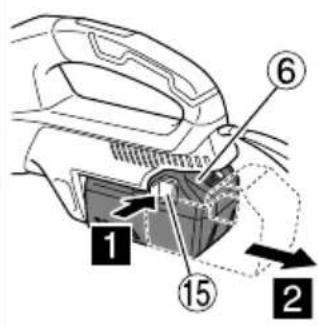
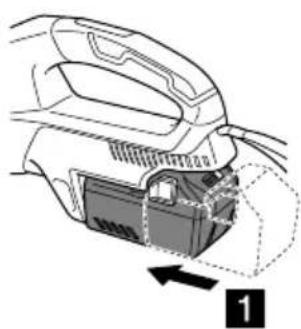
| Removing and inserting the battery (sold separately) | 2 | 2 |
| Charging | 3 | 2 |
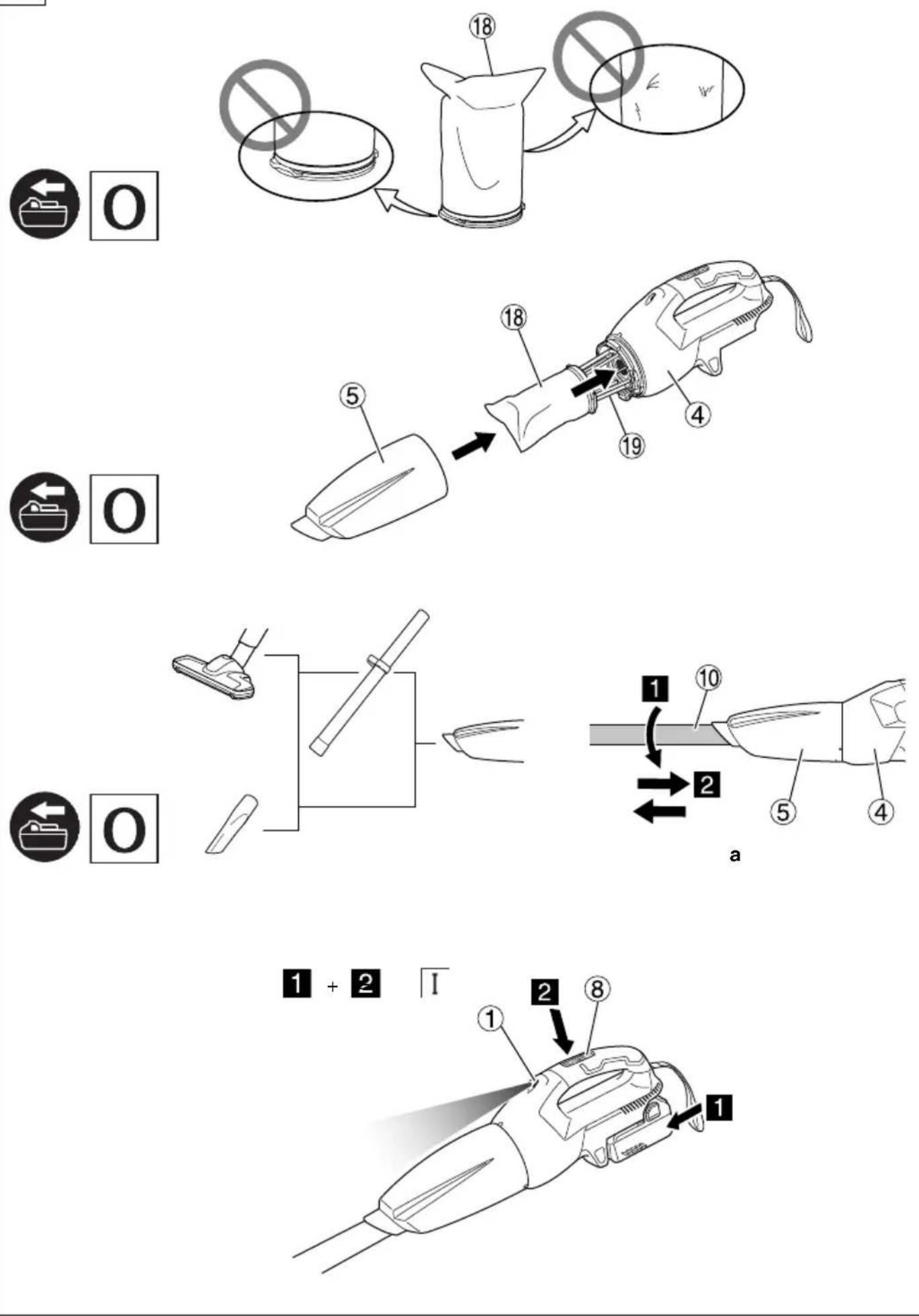
| Dismounting the dust case | 4 | 2 |
| Dismounting the filter | 5 | 2 |
| Check the fi Iter*1 | 6 | 3 |
| Mounting the fi Iter*2 | 7 | 3 |
| Mounting the dust case* 3 | 8 | 3 |
| Switch operation*4 | 9 | 4 |
| How to use*5 | 11 | 5 |
| Emptying the dust case* 6 | 12 | 6 |
| Eff ectively removing dust*7 | 13 | 6 |
| Remaining battery indicator | 18 | 7 |
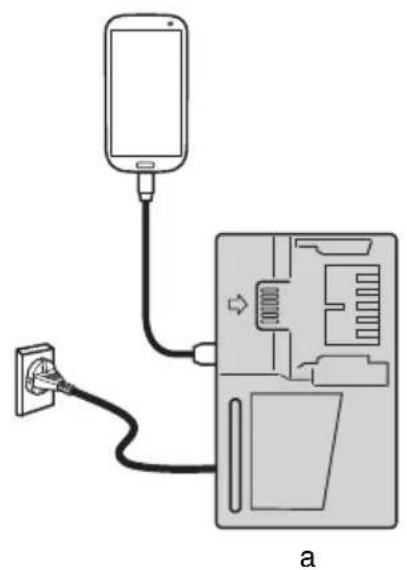
| Charging a USB device from a electrical outlet | 19-a | 7 |
| Charging a USB device and battery from a electrical outlet | 19-b | 7 |
| How to recharge USB device | 20 | 8 |
| When charging of USB device is completed | 21 | 8 |
| Selecting accessories | — | 220 |
*1 a. Filter free of debris and dust
b. Rubber not deteriorated
c. Connector free of damage
*2 If the filter is not properly fitted, dirt or grime can enter the fan unit and cause damage or malfunction.
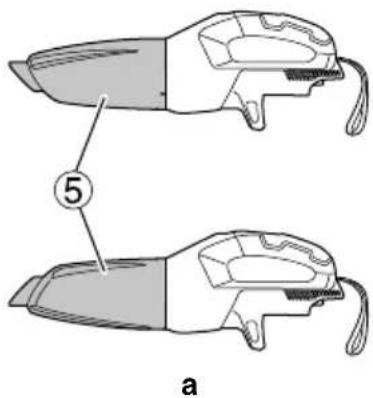
*3 The dust case can also be installed with the nozzle facing upwards. (Fig. 8-a)
*4
| Mode | Continuous operating time |
| BSL36A18 | |
| 3 (HIGH) | Approx. 15 min |
| 2 (MID) | Approx. 30 min |
| 1 (LOW) | Approx. 60 min |
* Continuous operating time will vary according to battery condition. Please use the table as a guideline.
NOTE
○ To suppress noise when using the appliance, switch to 1 mode.
○ When using 3 mode on certain surfaces, the suction force may make the action feel heavy. If this occurs, switch to 2 or 1 mode instead.
*5 When attaching the nozzle or extension pipe, insert as you twist in the direction indicated by the arrow.
Twist in the direction indicated by the arrow when detaching as well. (Fig. 11-a)
Twisting in the opposite direction could result in detaching the dust case from the housing.
*6 NOTE
a u t h p r i z e d S e r v i c e Point the intake port downward as dust can spill when removing the dust case.
☐ If the suction does not recover after disposing the dust, clean the filter. (See “Cleaning the filter” on page 15.)
*7 The appliance has a built-in mechanism for scraping off dust attached to the filter when removing the dust case.
To even more effectively scrape off the dust, repeatedly turn the dust case back and forth (2 to 3 times or more). Holding the unit so that the dust case does not detach from the housing, slightly and repeatedly turn the dust case in the indicated directions.
THE INDICATOR LAMP (Fig. 10)
Notice about fi Iter cleaning
If the filter becomes clogged and suction power decreases, the indicator lamp will flash.
And the main unit will make a pulsing sound.
However, this is not a sign of a fault.
If this happens, promptly empty the dust case and clean the filter. (See Fig. 12, Fig. 13, and “MAINTENANCE AND INSPECTION” on page 15.)
Notice about intake port blockage
If the intake port becomes blocked during use - for example while vacuuming carpets - the main unit will make a pulsing sound, the indicator lamp will flash. However, this is not a sign of a fault.
Clear the blockage from the intake port if this happens.
NOTE
If running continuously when the filter becomes clogged or the intake port becomes blocked, the appliance will stop running by temperature protection of the motor.
MAINTENANCE AND INSPECTION
WARNING
☐ For inspection and maintenance, be sure to turn off the switch and disconnect the battery.
○ Do not work with wet hands. May cause electric shock or injuries.
1. Cleaning the filter
If the vacuuming efficiency is poor even when the dust case has been emptied, remove the filter and wash it in cold or warm water. (The water should to the touch.) After washing, dry out of direct sunlight.
(Fig. 14-a)
Alternatively, blow off any debris attached to the filter from the inside toward the outside with an air gun or something similar. (Fig. 14-b)
Air pressure: General pressure (about 0.6 MPa)
NOTE
○ Do not wash the filter in a washing machine.
○ Do not wash the filter in hot water or dry it by fire.
○ Do not detach the fan filter and the filter holder.
○ Do not use an air gun or similar tool to clean the filter, fan filter or the appliance itself. (Fig. 14-c)
Doing so could push dirt into the appliance and cause malfunction.
If there is dust on the fan filter, hold the cleaner with the fan fi Iter pointing downwards to keep dust from entering the motor and lightly clean with a small brush such as a used toothbrush. Do not brush vigorously. (Fig. 15)
3. Inspecting the flooring nozzle
Inspect the flooring nozzle to confirm that its blade is not dislodged. If the blade is dislodged, press it in until it catches on the projection.
Using with the blade dislodged may cause stains.
When replacing the blade, insert it starting notch in the rail, and thread it along the groove. Ensure there is no sagging throughout. (Fig. 16)
4. Inspecting the mounting screws
Regularly inspect all mounting screws and ensure that they are properly tightened. Should any of the screws be loose, retighten them immediately. Failure to do so could result in serious hazard.
5. Maintenance of the motor
The motor unit winding is the very "heart" of the power tool.
Exercise due care to ensure the winding does not become damaged and/or wet with oil or water.
6. Inspection of terminals (tool and battery)
Check to make sure that swarf and dust have not collected on the terminals.
On occasion check prior, during and after operation.
CAUTION
Remove any swarf or dust which may have collected on the terminals.
Failure to do so may result in malfunction.
7. Cleaning of the outside
When the tool is stained, wipe with a soft dry cloth or a cloth moistened with soapy water. Do not use chloric solvents, gasoline or paint thinner, as they melt plastics.
8. Storage
Store the power tool and the battery in a place in which the temperature is less than 40^ C and out of reach of children.
When storing the appliance in a vertical position, hook the strap to a hanger.
NOTE
- Do not store in a location where children can easily reach or take out the appliance.
- Do not store in a damp location or in an area exposed to rainfall.
○ Do not store in direct sunlight or in a location where temperatures may suddenly change
○ Do not store in a location with volatile materials that could ignite or explode.
Do not stand the appliance against a wall without using the strap to fix it in place. (Fig. 17)
Failure to do so may result in damage from a fall.
○ Storing lithium-ion batteries.
Make sure the lithium-ion batteries have been fully charged before storing them.
Prolonged storage (3 months or more) of batteries with a low charge may result in performance deterioration, significantly reducing battery usage time or rendering the batteries incapable of holding a charge.
However, significantly reduced battery usage time may be recovered by repeatedly charging and using the batteries two to five times.
If the battery usage time is extremely short despite repeated charging and use, consider the batteries dead and purchase new batteries.
CAUTION
In the operation and maintenance of power tools, the safety regulations and standards prescribed in each country must be observed.
Important notice on the batteries for the HiKOKI cordless power tools
Please always use one of our designated genuine batteries. We cannot guarantee the safety and performance of our cordless power tool when used with batteries other than these designated by us, or when the battery is disassembled and modified (such as disassembly and replacement of cells or other internal parts).
GUARANTEE
We guarantee HiKOKI Power Tools in accordance with statutory/country specific regulation. This guarantee does not cover defects or damage due to misuse, abuse, or normal wear and tear. In case of complaint, please send the Power Tool, undismantled, with the GUARANTEE CERTIFICATE found at the end of this Handling instruction, to a HiKOKI Authorized Service Center.
TROUBLESHOOTING
Use the inspections in the table below if the tool does not operate normally. If this does not remedy the problem, consult your dealer or the HiKOKI Authorized Service Center.
- Power tool
| Symptom Possible cause Remedy | ||
| Tool doesn’t run No remaining | battery power Charge the battery. | |
| Tool suddenly stopped | Fan clogged with dust, causing overload | Contact place of purchase and arrange for dismantling and cleaning. |
| The battery is overheated. Let the battery cool down. | ||
| The motor is overheated. | Dispose the dust and clean the filter. And then let the motor cool down. | |
| Poor suction Dust case is full. | Dispose the dust. | |
| Nozzle is plugged. | Remove the obstruction. | |
| Nozzle or extension pipe is loose. | Firmly tighten the unit. | |
| Nozzle or extension pipe is cracked or damaged. | Exchange the unit with a new one. | |
| Filter is clogged. | Turn the dust case and scrape off dust with dust removal blade, or remove the filter and lightly strike it or wash with water. | |
| Exhaust or the main unit is hot | The motor is overheating because the dust case is full, or the filter is clogged. | Dispose the dust. Or else, clean the filter. |
| Abnormal noise/foul odor | Filter in not properly installed, resulting in foreign matter getting into the motor. | Remove the dust case, point the intake port downward and gently shake to remove foreign matter and dust.Should abnormal noise/foul odor persist, the motor may be damaged. Immediately discontinue use and arrange for repairs. |
| Battery cannot be installed | Attempting to install a battery other than that specified for the tool. | Please install a multi volt type battery. |
- Charger
| Symptom Possible | cause Remedy | |
| The charge indicator lamp rapidly flickers purple, and battery charging doesn't begin. | The battery is not inserted all the way. | Insert the battery firmly. |
| There is foreign matter in the battery terminal or where the battery is attached. | Remove the foreign matter. | |
| The charge indicator lamp blinks red, and battery charging doesn't begin. | The battery is not inserted all the way. | Insert the battery firmly. |
| The battery is overheated. If left alone, the battery will automatically begin charging if its temperature decreases, but this may reduce battery life. It is recommended that the battery be cooled in a well-ventilated location away from direct sunlight before charging it. | ||
| Battery usage time is short even though the battery is fully charged. | The battery's life is depleted. Replace the battery with a new one. | |
| The battery takes a long time to charge. | The temperature of the battery, the charger, or the surrounding environment is extremely low. | Charge the battery indoors or in another warmer environment. |
| The charger's vents are blocked, causing its internal components to overheat. | Avoid blocking the vents. | |
| The cooling fan is not running. Contact a HiKOKI Authorized Service Center for repairs. | ||
| The USB power lamp has switched off and the USB device has stopped charging. | The battery's capacity has become low. Replace the battery with one that has capacity remaining. | |
| USB power lamp does not switch off even though the USB device has fi nished charging. | The USB power lamp lights up green to indicate that USB charging is possible. | This is not a malfunction. |
| It is unclear what the charging status of a USB device is, or whether its charging is complete. | The USB power lamp does not switch off even when charging is complete. | Examine the USB device that is charging to confi rm its charging status. |
| Charging of a USB device pauses midway. | The charger was plugged into an electrical socket while the USB device was being charged using the battery as the power source. | This is not a malfunction. The charger pauses USB charging for about 5 seconds when it is differentiating between power sources. |
| A battery was inserted into the charger while the USB device was being charged using a power socket as the power source. | ||
| Charging of the USB device pauses midway when the battery and the USB device are being charged at the same time. | The battery has become fully charged. This is not a malfunction. The charger pauses USB charging for about 5 seconds while it checks whether the battery has successfully completed charging. | |
| Charging of the USB device doesn't start when the battery and the USB device are being charged at the same time. | The remaining battery capacity is extremely low. | This is not a malfunction. When the battery capacity reaches a certain level, USB charging automatically begins. |
VEDLIKEHOLD OG INSPEKSJON
ADVARSEL
Siemensring 34, 47877 willich, Germany
Tel: +49 2154 49930
Fax: +49 2154 499350
URL: http://www.hikoki-powertools.de
Hikoki Power Tools Netherlands B.V.
Brabanthaven 11, 3433 PJ Nieuwegein, The Netherlands
Tel: +31 30 6084040
Fax: +31 30 6067266
URL: http://www.hikoki-powertools.nl
Hikoki Power Tools (U.K.) Ltd.
25 Majestic Road, Southampton, SO16 OYT,
United Kingdom
Tel: +44 1908 660663
Fax: +44 1908 606642
URL: http://www.hikoki-powertools.uk
Hikoki Power Tools France S.A.S.
Hikoki Power Tools Belgium N.V./S.A.
Koningin Astridlaan 51, B-1780 Wemmel, Belgium
Tel: +32 2 460 1720
Fax: +32 2 460 2542
URL http://www.hikoki-powertools.be
Hikoki Power Tools Italia S.p.A
Via Piave 35, 36077, Altavilla Vicentina (VI), Italy
Tel: +39 0444 548111
Fax: +39 0444 548110
URL: http://www.hikoki-powertools.it
Hikoki Power Tools Ibérica, S.A.
C/ Puigbarral, 26-28, Pol. Ind. Can Petit, 08227 Terrassa
(Barcelona), Spain
Tel: +34 93 735 6722
Fax: +34 93 735 7442
URL: http://www.hikoki-powertools.es
Kjeller Vest 7, N-2007 Kjeller, Norway
Tel: (+47) 6692 6600
Fax: (+47) 6692 6650
URL: http://www.hikoki-powertools.no
Hikoki Power Tools Sweden AB
Rotebergsvagen 2B SE-192 78 Sollentuna, Sweden
Tel: (+46) 8 598 999 00
Fax: (+46) 8 598 999 40
URL: http://www.hikoki-powertools.se
Hikoki Power Tools Denmark A/S
Lillebaeltsvej 90, 6715 Esbjerg N, Denmark
Tel: (+45) 75 14 32 00
Fax: (+45) 75 14 36 66
URL: http://www.hikoki-powertools.dk
Hikoki Power Tools Finland Oy
Tupalankatu 9, 15680 Lahti, Finland
Tel: (+358) 20 7431 530
Fax: (+358) 20 7431 531
URL: http://www.hikoki-powertools.fi
Hikoki Power Tools Hungary Kft.
Hikoki Power Tools Romania S.R.L.
Ring Road, No. 66, Mustang Traco Warehouses, Warehouse
No.1, Pantelimon City, 077145, Ilfov County, Romania
natural_image
Line drawing of a quill pen in an inkwell (no text or symbols)| English Nederlands | ||
| EC DECLARATION OF CONFORMITYWe declare under our sole responsibility that Cordless Cleaner, identified by type and specific identification code *1), is in conformity with all relevant requirements of the directives *2) and standards *3). Technical fi le at *4) – See below.The European Standard Manager at the representative office in Europe is authorized to compile the technical fi le.The declaration is applicable to the product affi xed CE marking. | EC VERKLARING VAN CONFORMITEITWij verklaren onder onze eigen verantwoordelijkheid dat de Snoerloze stofzuiger, geidentificeerd door het type en de specifieke identificatiecode*1), voldoet aan alle relevante bepalingen van de richtlijnen *2) en normen *3). Technische documentatie bij *4) – zie onder.De Europese Normen Manager bij de vertegenwoordiging in Europa is gemachtigd om het technisch dossier samen te stellen.Deze verklaring is van toepassing op producten voorzien van de CE-markeringen. | |
| Deutsch Español | ||
| EG-KONFORMITÄTSERKLÄRUNGWir erklären in alleiniger Verantwortung, dass der durch den Typ und den spezifischen Identifizierungscode *1) bezeichnete Akku-Staubsauger allen einschlägigen Bestimmungen der Richtlinien *2) und Normen *3) entspricht. Technische Unterlagen unter *4) – Siehe unten.Die Leitung der repräsentativen Behörde für europäische Normen und Richtlinien ist berechtigt, die technischen Unterlagen zusammenzustellen.Die Erklärung gilt für die an dem Produkt angebrachte CE-Kennzeichnung. | DECLARACIÓN DE CONFORMIDAD DE LA CEDeclaramos bajo nuestra única responsabilidad que el Aspirador a batería, identificado por tipo y por código de identificación específico *1), está en conformidad con todas las disposiciones correspondientes de las directivas *2) y de las normas *3). Documentación técnica en *4) – Ver a continuación.El Director de Normas Europeas en la oficina de representación en Europa está autorizado para elaborar el expediente técnico.La declaración se aplica al producto con marcas de la CE. | |
| Français PortuguêsDECLARATION DE CONFORMITE CENous déclarons sous notre seule responsabilité que l'aspirateur sans fil, identifié par le type et le code d'identification spécifique *1) est en conformité avec toutes les exigences applicables des directives *2) et des normes *3). Dossier technique en *4) - Voir ci-dessous.Le Gestionnaire des normes européennes du bureau de représentation en Europe est autorisé à constituer le dossier technique.Cette déclaration s'applique aux produits désignés CE. | DECLARAÇÃO DE CONFORMIDADE CEDeclaramos, sob nossa única e inteira responsabilidade, que o Aspirador a batería, identificado por tipo y por código de identificação específico *1), está em conformidade com todos os requisitos relevantes das diretivas *2) e normas *3). Ficheiro técnico em *4)– Consulte abaixo.O Gestor de Normas Europeias no escritório de representação na Europa está autorizado a compilar o fi cheiro técnico.A declaração aplica-se aos produtos com marca CE. | |
| Italiano SvenskaDICHIARAZIONE DI CONFORMITÀ CEDichiariamo sotto la nostra esclusiva responsabilità che l'Aspiratore manuale, identificato dal tipo e dal codice identificativo specifico *1), è conforme a tutti i requisiti pertinenti delle direttive *2) e degli standard *3). Documentazione tecnica presso *4) – Vedere sotto.Il gestore delle norme europee presso l'ufficio di rappresentanza in Europa è autorizzato a compilare il fascicolo tecnico.La dichiarazione è applicabile ai prodotti cui sono applicati i marchi CE. | EG-DEKLARATION BETRÄFFANDE LIKFORMIGHETVi förklarar på eget ansvar att denna batteridrivna dammsugare, identifierad enligt typ och särskild identifikationskod *1), överensstämmer med alla relevanta krav i direktiven *2) och standarderna *3). Teknisk fi l enligt *4) – Se nedan.Den europeiska standardansvariga på representationskontoret i Europa är auktoriserad att sammanställa den tekniska fi len.Denna försåkran gäller för produkten med tillhörande CE-märkning. | |
| *1) R36DB C362756S*2) 2014/35/EU, 2014/30/EU, 2011/65/EU*3) EN60335-1:2012+A11:2014EN60335-2-2:2010+A1:2013EN60335-2-29:2004+A2:2010EN55014-1:2006+A1:2009+A2:2011EN55014-2:1997+A1:2001+A2:2008 | ||
| *4) Representative office in EuropeHikoki Power Tools Deutschland GmbHSiemensring 34, 47877 Willich, GermanyHead office in JapanKoki Holdings Co., Ltd.Shinagawa Intercity Tower A, 15-1, Konan 2-chome, Minato-ku, Tokyo, Japan | 31. 8. 2022Akihisa YahagiEuropean Standard Manager 31. 8. 2022 31. 8. 2022 Osamu KawanobeGeneral Manager,Quality Assurance Division Osamu KawanobeGeneral Manager,Quality Assurance Division | |
| Dansk Polski | ||
| EF-OVERENSSTEMMELSESERKLÆRINGVi erklærer os fuldstændigt ansvarlige for, at Ministøvsuger batt., identificeret ved type og specifik identifikationskode *1), er i overensstemmelse med alle relevante krav i direktiverne *2) og standarderne *3). Teknisk fi i *4) – Se nedenfor.Lederen af europæiske standarder på repræsentationskontoret i Europa er bemyndiget til at kompilere den tekniske fil.Erklæringen gælder produktet, der er mærket med CE. | DEKLARACJA ZGODNOŚCI Z WEOświadczamy na własną wyłączną odpowiedzialność, że odkurzacz bezprzewodowy podanego typu i oznaczony unikalnym kodem identyfikacyjnym *1) jest zgodny z wszystkimi właściwymi wymogami dyrektyw *2) i norm *3). Dokumentacja techniczna w – Patrz poniżej.Menedzer Norm Europejskich przedstawicielstwa firmy w Europie jest upoważniony do sporządzania dokumentacji technicznej.Niniejsza deklaracja ma zastosowanie do produktu opatrzonego znakiem CE. | |
| Norsk Magyar | ||
| EF'S ERKLÆRING OM OVERENSSTEMMELSEVi erklærer på eget ansvar at trådlos støvsuger, identifisert etter type og spesifikk identifikasjonskode *1), er i samsvar med alle relevante krav i direktiver *2) og standarder *3). Teknisk fil under *4) - Se nedenfor.Styreren for europeiske standarder ved representantkontoret i Europa er autorisert til å kompilere den tekniske filen.Erklæringen gjelder for CE-merket på produktet. | EK MEGFELELŐSÉGI NYILATKOZATA kizárólagos felelősségünkre kijelentjük, hogy az Akkumulátoros tisztitó, mely típus és egyedi azonosító kód *1) alapján azonosított, megfelel az irányelvek *2) és szabványok *3) vonatkozó követelményeinek. Müszaki fájl a *4) - Lásd alább.AZ EU képviseleti iroda európai szabványúgyi menedzsere jogosult a müszaki dokumentáció összeállítására.Jelen nyilatkozat a terméken feltüntetett CE jelzésre vonatkozik. | |
| Suomi Češtiħa | ||
| EY-ILMOITUS YHDENMUKAISUUDESTAVakuutamme yksinomaisella vastuullamme, että tyypin ja erityisen tunnistuskoodin *1) perusteella tunnistettava akku toiminen imuri on kaikkien direktiivien *2) ja standardien *3) asiaankuuluvien vaatimusten mukainen. Tekninen tiedosto kohdassa *4) – katso alta.Eurooppalaisten standardien hallintaelin Euroopan edustustossa on valtuutettu kokoamaan teknisen tiedoston.limoitus on sovellettavissa tuotteeseen kiinnitettyyn CE-merkintään. | PROHLÁŠENÍ O SHODĚ S ESProhlašujeme na svou výhradní odpovědnost, že Akku vysavač identifikovaný podle svého typu a specifického identifikačního kódu *1) splňuje všechny příslušné požadavky těchto směrnic *2) a standardů *3). Technický soubor *4) - viz niže.K sestavení technické dokumentace je oprávněn manažer pro evropské standardy v evropském obchodním zastupení.Toto prohlášení platí pro výrobek označený značkou CE. | |
| Ελληνικά Türkçe | ||
| ΕΚ ΔΗΛΩΣΗ ΕΝΑΡΜΟΝΙΣΜΟΥΔηλώνουμε με αποκλειστική μας ευθύνη ότι το Σκουπάκι Μπαταρίας, το οποίο προσδιορίζεται από τον τύπο και ειδικό αναγνωριστικό κυδικό *1), είναι σύμφωνο με όλες τις σχετικές απαιτήσεις των Οδηγιών *2) και με τα σχετικά πρότυπα *3). Τεχνικό Άρχείο στο *4) – Δείτε παρακάτω.Ο Διαχειριστής Ευρωπαϊκών Προτύπων στο γραφείο εκπροσώπησης στην Ευρώπη είναι εξουσιοδοτημένος για τη σύνταξη του τεχνικού φακέλου.Η δήλωση ισχύει μόνο για το προϊόν που είναι τοποθετημένη σήμανση CE. | AT UYGUNLUK BEYANITip ve özel taním koduyla *1) tanımlı Akülü Temizleyici’nin direktiflerin *2) ve standartlarín *3) ilgili tüm gereksinimlerine uygun olduğunu tamamen kendi sorumluluğumuz altında beyan ederiz. Teknik dosya *4)dedir – Aşağıya bakın.Avrupa’daki temsilcilik ofisindeki Avrupa Standartları Yöneticisi, teknik dosyayi derlemek için yetkilendirilmiştir.Beyan, üzerinde CE işareti bulunan urünler için geçerlidir. | |
| *1) R36DB C362756S*2) 2014/35/EU, 2014/30/EU, 2011/65/EU*3) EN60335-1:2012+A11:2014EN60335-2-2:2010+A1:2013EN60335-2-29:2004+A2:2010EN55014-1:2006+A1:2009+A2:2011EN55014-2:1997+A1:2001+A2:2008 | ||
| *4) Representative office in EuropeHikoki Power Tools Deutschland GmbHSiemensring 34, 47877 Willich, GermanyHead office in JapanKoki Holdings Co., Ltd.Shinagawa Intercity Tower A, 15-1, Konan 2-chome,Minato-ku, Tokyo, Japan | 31. 8. 2022Akihisa YahagiEuropean Standard Manager31. 8. 2022 Osamu KawanobeGeneral Manager,Quality Assurance Division Osamu KawanobeGeneral Manager,Quality Assurance Division | |
| Română | Български | ||
| DECLARATIE DE CONFORMITATE CEDeclarăm pe propria răspundere că Aspiratorul cu accumulator, identificat după tipul și codul de identificare specific *1), este în conformitate cu toate cerințele relevante ale directivelor *2) și ale standardelor *3). Fișier tehnic la *4) – Vezi mai jos.Managerul standardelor europene de la biroul reprezentanței din Europa este autorizat să întocmească dosarul tehnic.Declarația se referă la produsul pe care este aplicat semnul CE. | EO ДЕНЛАРАЦИЯ ЗА СЪОТВЕТСТВИЕДекларираме на своя собствена отговорност, че Акумулаторната прахосмукачка, идентифицирана по тип и специален идентификационен код *1), е в съответствие с всички съответни изисквания на директивите *2) и стандартите *3). Техническо досие в *4) - Вижте по-долу.Мениджърът по европейските стандарти в представителния офис в Европа е упълномощен да съставя техническото досие.Декларацията е приложима за продукта, който има поставена CE маркировка. | ||
| Slovenščina | Srpski | ||
| ES IZJAVA O SKLADNOSTINa lastno odgovornost izjavljamo, da je Akumulatorski sesalnik, označen z vrsto in posebno identifikacijsko kodo *1), v skladu z vsemi ustreznimi zahtevami direktiv *2) in standardov *3). Tehnična dokumentacija pod *4) – glejte spodaj.Upravitelj evropskih standardov na predstavništvu v Evropi je pooblaščen za pripravo tehnične dokumentacije.Deklaracija je označena na izdelku s pritrjeno oznako CE. | EZ DEKLARACIJA O USAGLAŠENOSTIPod punom odgovornošću izjavljujemo da je Bežični čistač, identifikovan prema tipu i specifičnom identifikacionom kodu *1), u skladu sa svim relevantnim zahtevima direktiva *2) i standardima *3). Tehnička datoteka pod *4) - Pogledajte dole.Direktor za evropske standarde u kancelariji predstavništva u Evropi je odgovoran za sastavljanje tehničke dokumentacije.Deklaracija je primenjiva na proizvod na koji je stavljena CE oznaka | ||
| Slovenčina | Hrvatski | ||
| ES VYHLÁSENIE O ZHODETýmto vyhlasujeme na vlastnú zodpovednosť, že výrobok Akumulátorový vysávač identifikovaný podľa typu a špecifického identifikacného kódu *1) je v zhode so všetkými prislušnými požiadavkami smerníc *2) a noriem *3). Technicky súbor v *4) – Pozrite nižšie.Manažér európskych noriem na zastupujúcom úrade v Európe má oprávnenie na zostavovanie technickej dokumentácie.Toto vyhlásenie sa vzťahuje na výrobok označený značkou CE. | EZ IZJAVA O SUKLADNOSTIIZjavljujemo pod vlastitom odgovornošću da je Akumulatorski čistač, identificiran prema vrsti i posebnom identifikacijskom kodu *1), u skladu sa svim relevantnim zahtjevima direktiva *2) i standarda *3). Tehnička dokumentacija na *4) - Vidi dolje.Menadžer za europske standarde u europskom predstavništvu tvrtke ovlašten je za sastavljanje tehničke dokumentacije.Izjava se primjenjuje na proizvod na kojem je stavljena CE oznaka. | ||
| *1) R36DB C362756S*2) 2014/35/EU, 2014/30/EU, 2011/65/EU*3) EN60335-1:2012+A11:2014EN60335-2-2:2010+A1:2013EN60335-2-29:2004+A2:2010EN55014-1:2006+A1:2009+A2:2011EN55014-2:1997+A1:2001+A2:2008 | |||
| *4) Representative office in EuropeHikoki Power Tools Deutschland GmbHSiemensring 34, 47877 Willich, GermanyHead office in JapanKoki Holdings Co., Ltd.Shinagawa Intercity Tower A, 15-1, Konan 2-chome, Minato-ku, Tokyo, Japan | 31. 8. 2022Akihisa YahagiEuropean Standard Manager31. 8. 2022 Osamu KawanobeGeneral Manager,Quality Assurance Division Osamu KawanobeGeneral Manager,Quality Assurance Division | ||
DECLARATION OF CONFORMITY
We declare under our sole responsibility that Cordless Cleaner, identified by type and specific identification code *1), is in conformity with all relevant requirements of the UK regulations *2) and Designated standards *3). Technical file at *4) – See below.
This declaration is applicable to the product affixed UKCA marking.
*1) R36DB C362756S
*2) S.I. 2016/1091, S.I. 2016/1101, S.I. 2012/3032
*3) EN60335-1:2012+A11:2014 EN60335-2-2:2010+A1:2013 EN60335-2-29:2004+A2:2010 EN55014-1:2006+A1:2009+A2:2011 EN55014-2:1997+A1:2001+A2:2008
*4) Importer and authorized person to compile the technical file
Hikoki Power Tools (U.K.) Ltd.
25 Majestic Road, Southampton, SO16 OYT, United Kingdom
Head office in Japan
Koki Holdings Co., Ltd.
Shinagawa Intercity Tower A, 15-1, Konan 2-chome,
Minato-ku, Tokyo, Japan

31.8.2022

Osamu Kawanobe
General Manager,
Quality Assurance Division

- SAFETY PRECAUTIONS FOR THE CORDLESS CLEANER
- WARNING
- PRECAUTIONS FOR USE OF THE CORDLESS CLEANER
- ADDITIONAL SAFETY WARNINGS
- CAUTION ON LITHIUM-ION BATTERY
- CAUTION
- REGARDING LITHIUM-ION BATTERY TRANSPORTATION
- USB DEVICE CONNECTION PRECAUTIONS (UC18YSL3)
- NOTE
- SYMBOLS
- STANDARD ACCESSORIES
- APPLICATIONS
- SPECIFICATIONS
- CHARGING
- English
- Regarding electric discharge in case of new batteries, etc.
- How to make the batteries perform longer.
- MOUNTING AND OPERATION
- THE INDICATOR LAMP (Fig. 10)
- Notice about fi Iter cleaning
- Notice about intake port blockage
- MAINTENANCE AND INSPECTION
- Cleaning the filter
- (Fig. 14-a)
- Inspecting the flooring nozzle
- Inspecting the mounting screws
- Maintenance of the motor
- Inspection of terminals (tool and battery)
- Cleaning of the outside
- Storage
- Important notice on the batteries for the HiKOKI cordless power tools
- GUARANTEE
- TROUBLESHOOTING
- VEDLIKEHOLD OG INSPEKSJON
- ADVARSEL
- Hikoki Power Tools Netherlands B.V.
- Hikoki Power Tools (U.K.) Ltd.
- Hikoki Power Tools France S.A.S.
- Hikoki Power Tools Belgium N.V./S.A.
- Hikoki Power Tools Italia S.p.A
- Hikoki Power Tools Ibérica, S.A.
- Hikoki Power Tools Sweden AB
- Hikoki Power Tools Denmark A/S
- Hikoki Power Tools Finland Oy
- Hikoki Power Tools Hungary Kft.
- Hikoki Power Tools Romania S.R.L.
- DECLARATION OF CONFORMITY
- Koki Holdings Co., Ltd.
Brand : HiKOKI
Model : R36DB
Category : Vacuum Cleaner