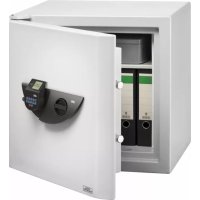
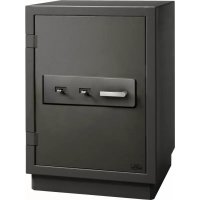
USER MANUAL MTD 760 Burg Wächter
text_image
BURG
MACUTER
[1, 1] [2, 3] [4, 5]
[6, 7] [8, 9] [10, 11]
[12, 13] [14, 15]
BURG-WÄCHTER KG
Altenhofer Weg 15
58300 Wetter
Germany
Language
de Deutsch 2
en English 9
fr Français 16
nl Nederlands 23
it Italiano 30
cs Česky 37
sk Slovenský 44
hu Magyar 51
ro Românesc 58
pt Português 65
dk Dansk 72
fi Suomalainen 79
no Norsk 86
sv Svenska 93
p! Polski 100
sl Slovensko 107
es Espanol 114
bg български 121
hr Hrvatski 128
ru русский 135
el ελληνικά 142
et Eestlane 149
IV Latvietis 156
tr Türk 163
It Lietuvis 170
| USER.0002 CD |
| Kombination: [ ] |
| FUNC: M |
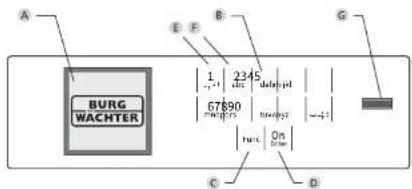
The numbers "1" - "0" are used for input e.g. when entering the code.
© "Func" key
Multifunction key which adapts to perform several functions, including: Go back one menu level, delete a entered character, show the Main menu. The display shows the current function of the key (see section 3).
D "On/Enter" key
The "On/Enter" key starts the system or selects the current menu item.
E "1" key
The key can be used to scroll up if there are several menu options. If this is possible, the display shows this (see section 3).
E "2" key
The key can be used to scroll down if there are several menu options. If this is possible, the display shows this (see section 3).
G Fingerprint sensor
Fingerprints can be stored via the fingerprint sensor and used to open the safe.
Dear customer,
Thank you for choosing a safe with a BURG-WÄCHTER SecuTronic lock. This electronic lock is certified according to ECB-S Class B.
You have purchased a product that meets extremely high security requirements and was developed and produced according to current technical standards. This lock is certified according to EN 1300: 2018. (Classification of high-security locks according to their resistance to unauthorised opening).
Important: Please read the entire instruction manual before programming and keep this manual safe so that you can revisit it at a later date.
We hope you enjoy your new BURG-WÄCHTER safe.
Your Burg-Wächter KG
Activation
The electronics are switched on using the 12 key on the keyboard. This then lights up. At the same time, the display shows the BURG-WÄCHTER logo for a moment before the input graphic for the pin code or fingerprint appears.
Languages
The menu navigation in the display is available in twelve languages and can be set via the "Languages" menu. Please refer to chapter "Menu Language" for a detailed explanation.
Authorisation request
A valid pin code must also be entered to open the door with a fingerprint.
Background:
Fingerprints do not receive full access rights in the current software version. Full access rights are required to authorise the opening and unlock the safe. Consequently, a valid pin code of a second user is required. During the process of creating a user pin code, a prompt asks whether the access right should also require a fingerprint. If the user selects yes, the pin code is automatically downgraded to a half-access right. This pin code now requires a pin code or fingerprint from a different authorised user. A pin code and fingerprint from the same user will not be accepted. If you choose not to require a fingerprint when creating a pin code, it will keep full access rights and a second user is not required to open the safe.
Blocking times
To protect against tampering, the lock electronics block access to the safe for five minutes if an incorrect pin code has been entered three times in succession. Then, for every further incorrect entry, ten minutes. During this blocking time, the remaining time on the display runs countdown. It is not possible to open the safe during this period, even with a valid user or administrator code.
Increasing burglary protection
Please take care to ensure codes do not fall into the wrong hands. Therefore, store the codes in a safe location so that they can only be accessed by authorised persons. In the event you lose a code, the lock must be set to a new code.
• The factory code must be changed as soon as the lock is commissioned
- Codes that are easy to guess (e.g. 1, -2, -3, -4, -5, -6) must not be used
• Personal data (e.g. birthdays) or other data that may be guessed with knowledge of the soda owners must not be used at a soda
- After changing the code, the lock must be checked several times with the safety door opened
Attention: All changes to the administrator code, the factory code and the user code must be carried out with the safe door open! After changing a code, the lock must be operated several times with the new code with the safe door open.
Number keys:
The numbers "1" - "0" are used for input e.g. when entering the code.
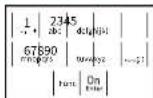
"Func" key:
Multifunction key which adapts to perform several functions, including: Go back one menu level,
delete a entered character, show the Main menu. The display shows the current function of the key.
"On/Enter" key:
The "On/Enter" button starts the system or selects the current menu item.
Keys "1" and "2":
In menus, you can scroll up and down using these keys.
If this is possible, the display shows this with the corresponding arrows.
Fingerprint sensor:
Fingerprints can be stored via the fingerprint sensor or used to open the safe

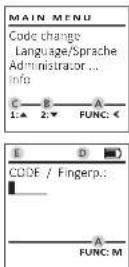
Display
A Specifies whether you can use the ^13c key to cancel the last entry (◀) or switch to the main menu (M).
B (2▼) appears when you can scroll down using the "2" key.
C (1:▲) appears when you can scroll up using the "1" key.
D ( ■ ) indicates the battery level.
E (☐/☐) indicates whether the locking mechanism has released the lock and the safe can be opened.
Opening
Opening with PIN code
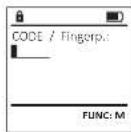
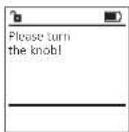
- Switch on the lock using the 2n key.
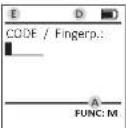
- Enter the 6-digit PIN code (factory setting *1-2-3-4-5-6*).
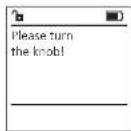
• "Please turn the know" appears in the display
• Turn the knob.
Opening with fingerprint
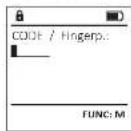
- Switch on the lock using the 92 key.
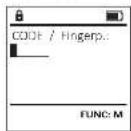
- Move a programmed finger from the top to bottom centrally over the sensor.
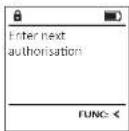
• The message "Validity not achieved" appears on the display.
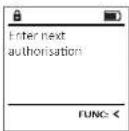
- Enter a valid 6-digit pin code (factory setting "1-2-3-4-5-6") of another user.
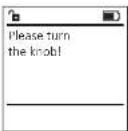
• "Please turn the knob" appears in the display
- Turn the knob.
- Change code
- Language
- Administrator
1/10%
Create
Create code
Create fingerprint
Assign
Assign code
Assign fingerprint
Delete
Time functions
Set time
Set date
Automatic ST/WT
Delay time
Programming
Database update
Firmware update
Reorganise
Processes
Display
Save
Setup
Register
FP reset
Generate AES key
- Info
System Info
System check
Change the administrator code and the user codes. We would like to point out that, for security reasons, the factory-set administrator code must be changed to an individually set code.
- Switch on the lock using the ☑ - key.
- Then press Fork,
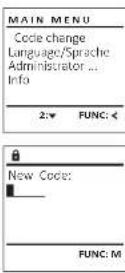
• The "Mainman" appears.
- Confirm with
- You can use the keys 1 or 2 to scroll until the administrator/user is displayed and you wish to change the code for.
- Confirm with On.
- Enter the old or factory code that was previously valid using the keypad and press ^2n .
- Enter the new code using the keypad and confirm with ^6e .
- Repeat your entry and confirm it again with 95.
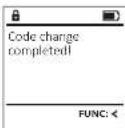
- "Code mange completed" is displayed after a correct entry.
- Press any key.
Note: When a safe lock is first started up, additional information on the current date and time are requested:
• Enter the day (2 digits)
• Enter the month (2 digits)
- Enter the year (2 digits)
• Enter the hour (2 digits)
• Enter the minutes (2 digits)
- Enter the day (2 digits)
- Enter the month (2 digits)
- Enter the year (2 digits)
- Enter the hour (2 digits)
- Enter the minutes (2 digits)
- Switch on the lock using the On key.
- Then press Func.
- The "Main menu" appears.
- Scroll with the 1 or 2 key until the "Language"
menu item is highlighted.
- Confirm with
- "Main menu / language" appears.
- Use keys 1 or 2 to scroll until the desired
language is marked.
- Confirm with
• "Data has been saved" appears in the display
- Press any key.
| MAIN MENU |
| Code changeLanguage/SpracheAdministrator...Info |
| 1:▲ 2:▼ FUNC: < |
| LANGUAGE |
| ČeštinaDeutschEnglishEspañol |
| 1:▲ 2:▼ FUNC: < |
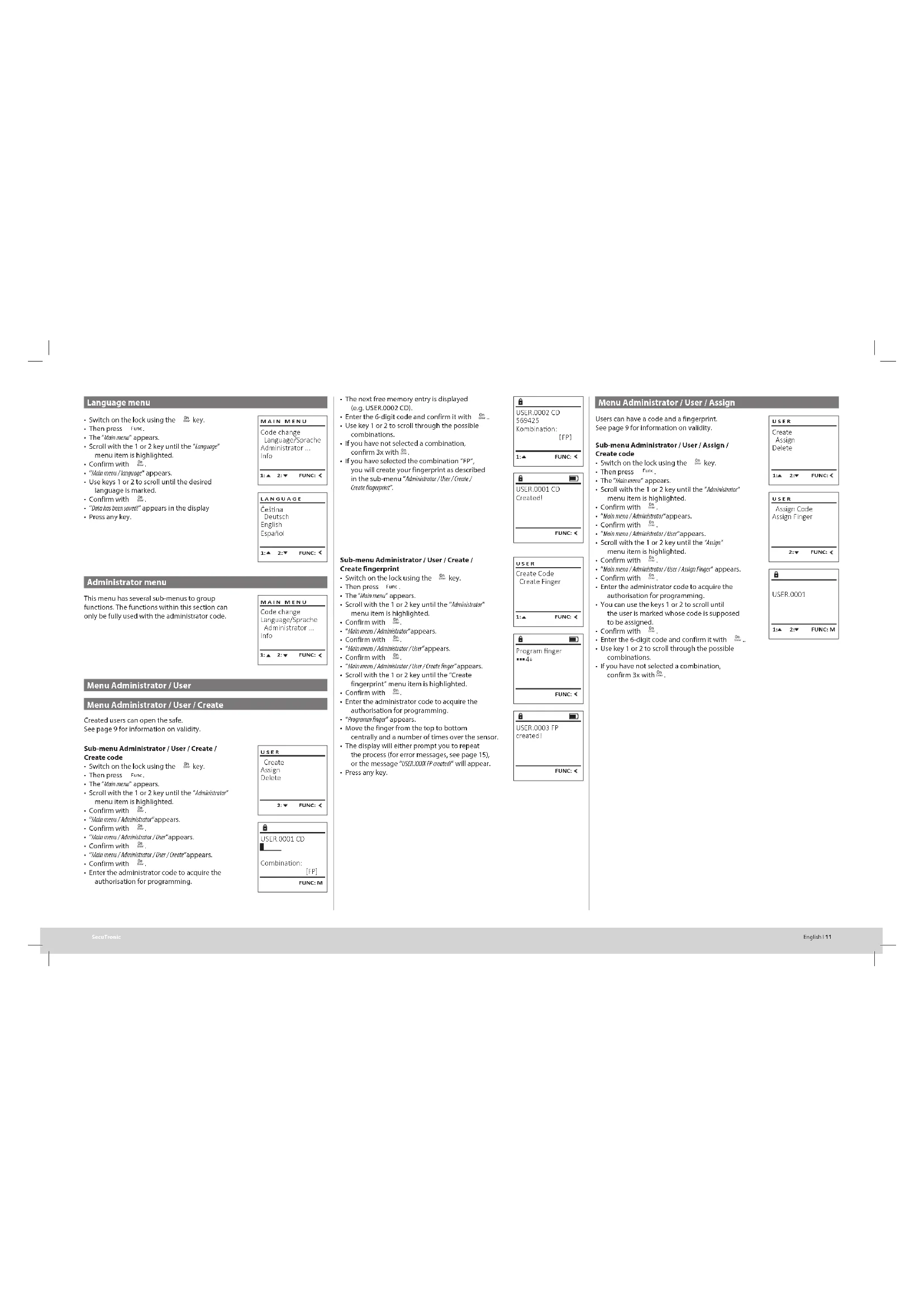
This menu has several sub-menus to group functions. The functions within this section can only be fully used with the administrator code.
| MAIN MENU |
| Code changeLanguage/SpracheAdministrator ...Info |
| 1:▲ 2:▼ FUNC: < |
Created users can open the safe.
See page 9 for information on validity.
Create code
- Switch on the lock using the 24 key.
- Then press Fure.
• The "Main menu" appears.
- Scroll with the 1 or 2 key until the "Administrator" menu item is highlighted.
- Confirm with
• "Main menu / Adminishats" appears.
- Confirm with
• "Main menu / Administrator / user" appears.
- Confirm with
- "Main menu / Administrator / User / Create" appears.
- Confirm with
- Enter the administrator code to acquire the authorisation for programming.
| USER.0001 CD |
| Combination: [FP] |
| FUNC: M |
- The next free memory entry is displayed (e.g. USER.0002 CD).
- Enter the 6-digit code and confirm it with On
- Use key 1 or 2 to scroll through the possible combinations.
• If you have not selected a combination,
confirm 3x with 20.
- If you have selected the combination "FP", you will create your fingerprint as described in the sub-menu "Administrator / User / Create / Create fingerprint".
Create fingerprint
- Switch on the lack using the 0 key.
- Then press Full
- The "Main menu" appears.
- Scroll with the 1 or 2 key until the "Administrator"
menu item is highlighted.
- Confirm with
• "Main menu / Administrator" appears.
- Confirm with
- "Main menu /Administrator /User" appears.
- Confirm with
- "Main menu /Administrator /User /Create finger" appears
- Scroll with the 1 or 2 key until the "Create
fingerprint men
Confirm with
- Confirm with ____. Enter the administrator code to acquire the
- Enter the administrator code to acquire the authorisation for programming.
authorisation for programming.
• "Program files" appears
- Move the finger from the top to bottom
- Move the finger from the top to bottom
centrally and a number of times over the sensor
• The display will either prompt you to reheat.
the display will either prompt you to repeat the process (for error messages, see page 15), or the message "USfi.037.1p create" will appear.
- Press any key.
| USR.L0002 CD569425Kombination:[FP] |
| 1:▲ | FUNC: < |
| USER.0001 CDCreated: |
| FUNC: < |
| USER |
| Create CodeCreate Finger |
| 1:▲ | FUNC: < |
| Program finger |
| ···▲ |
| FUNC: < |
| USER,0003 FPcreated! |
| FUNC: < |
Users can have a code and a fingerprint.
See page 9 for information on validity.
Create code
- Switch on the lock using the On key.
- Then press
• The "Main men" appears.
- Scroll with the 1 or 2 key until the "Administrator" menu item is highlighted.
- Confirm with
- "Main menu / Administrator" appears.
- Confirm with
- "Main menu / Administrator / User" appears.
- Scroll with the 1 or 2 key until the "Assign" menu item is highlighted.
- Confirm with
- "Main menu / Administrator / User / Assign Finger" appears.
- Confirm with
- Enter the administrator code to acquire the
authorisation for programming.
- You can use the keys 1 or 2 to scroll until the user is marked whose code is supposed to be assigned.
- Confirm with
- Enter the 6-digit code and confirm it with
- Use key 1 or 2 to scroll through the possible combinations.
- If you have not selected a combination, confirm 3x with 0n10 ,
| USER |
| Create Assign Delete |
| 1:2:2:7 FUNC: < |
| USER |
| Assign Code Assign Finger |
| 2:7 FUNC: < |
- Switch on the lock using the On key.
- Then press Func.
• The "Main menu" appears.
- Scroll with the 1 or 2 key until the menu
- Scrif with the "102 key until the item "Ménici/sater" is highlighted
Item Alphasised
Confirmed with
- Confirm with 102.
• "Mood menu / Administrative" appears.
- Confirm with
- "Main menu / Administrator / User" appears.
- Scroll with the 1 or 2 key until the "Assai"
menu item is highlighted.
- Confirm with On
- Scroll with the 1 or 2 kear until the
- Scrap with the 1 OF 2 key until the
"Actions finea", menu item is highlighted.
Assign/Agg There
- Confirm with On.
- Enter the administrator code to acquire
the authorisation for programming.
- "Main menu / Administrator / User / Assign Finger" appears.
- You can use the keys 1 or 2 to scroll until
the user is marked whose fingerprint is
supposed to be assigned
- Suppressed to be
- Confirm with
- "create.hinger.pmlr" appears.
- Move the finger from the top to bottom
centrally and a number of times over the sensor.
• The display will either prompt you to repeat the
process (for error messages, see page 15), or the message "USERXLOGI Pcrested" will appear.
- Press any key.
| USER |
| Create Assign Delete |
| 1:▲ 2:▼ FUNC: < |
| USER |
| Assign Code Assign Finger |
| 3:▲ | FUNC: < |
| USER.0003 FPcreated! |
| FUNC: < |
Deleted users no longer have access to the safe. However, these remain in the history.
- Switch on the lock using the On key.
- Then press Fum.
• The "Main menu" appears.
- Scroll with the 1 or 2 key until the menu
- "Main menu /Administrator/User" appears.
- Confirm with
• "Main menu /Administrator /User /Delete" appears.
• Scroll with the 1 or 2 key until the menu
Item "20bits" is highlighted.
term beef is big
Conform with
- Confirm with .
- Enter the administrator code to acquire the authorisation for programming.
- You can use the keys 1 or 2 to scroll until the
user is marked whose code is supposed to
be deleted
be deleted.
Confirm with 0s
- Confirm with
- "Data has been deleted" appears.
- Press any key.
Time and date can be set, as well as whether the system should automatically switch between Central European Summer/Winter Time. The delay time prevents quick opening in the event of a robbery.
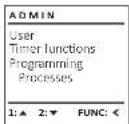
| ADMIN |
| UserTimer functionsProgrammingProcesses |
| 1:▲ | 2:▼ | FUNC: < |
- Switch on the lock using the On key.
- Then press.
• The "Rainbow" appears.
• Scroll with the 1 or 2 key until the menu
Item "Adminiketart" is highlighted.
Kem Halasalak is highlighted.
• Confirm with
• "Main menu/Administrator" appears.
- Scroll with the 1 or 2 key until the menu
item "Timer functions" is highlighted.
- Confirm with
• "Administrator /Type entry" appears.
- Confirm with 0+
- Enter the administrator code to acquire
the authorisation for programming
the authorisation for programming.
• The time (24-hour format) can be set via
the keypad
- Confirm with On
• "Data has been saved!" appears.
- Press any key.
| TIMER FUN ... |
| Time entryDate entryAutom. ST/WTDelay time |
| 2:▼ | FUNC: < |
| Time entryH.M 0.00 |
| FUNC: M |
- Switch on the lock using the On key.
- Then press Func,
• The "Main menu" appears.
- Scroll with the 1 or 2 key until the menu
item "Administrator" is highlighted.
- Confirm with 2
- "Main menu / Administrator" appears.
- Scroll with the 1 or 2 key until the menu
item "Time functions" is highlighted
- Confirm with
- "Other functions" appears.
- Scroll with the 1 or 2 key until the "Date entry"
menu item is highlighted.
- Confirm with
- Enter the administrator code to acquire the
authorisation for programming.
• The date can be set via the keypad.
- Confirm with 2
- "Data has been saved" appears.
- Press any key.
| TIMER FUN ... |
| Time entryDate entryAutorn. ST/WTDelay time |
| 1:▲ 2:▼ FUNC: < |
| Date entryD.M.Y ■0.00.00 |
| FUNC: M |
Automatic update between Central European
Summer/Winter Time.
- Switch on the lock using the On key.
- Then press Fune,
• The "Mainnew" appears.
- Scroll with the 1 or 2 key until the menu
Item "Administrator" is highlighted.
- Confirm with
• "Administrator" appears.
- Scroll with the 1 or 2 key until the menu
item "time/hindows" is highlighted
- Confirm with
• "Time functions" appears.
- Scroll with the 1 or 2 key until the
- menu item "Autom. SI/MT" is highlighted
- Confirm with
- Enter the administrator code to acquire the
authorisation for programming.
• The automatic time changeover can be
switched on or off via key 1 or 2.
- Confirm with
• "Data has been saved!" appears.
- Press any key.
| Time entryDate entryAutom. ST/WTDelay time |
| 1:▲ 2:▼ FUNC: < |
|
| Autom. ST/WT[ON] |
| 1:▲ FUNC: M |
tor / Delay time
The delay time sets up a required waiting time before a function is performed and can consequently prevent quick opening in the event of a robbery. After the delay time has elapsed, a valid and fully authorised entry must be repeated in order to gain access.
- Switch on the lock using the 0x key.
- The press
- The "Milk menu" appears.
- Scroll with the 1 or 2 key until the menu
item "Administrator" is highlighted.
- Confirm with
- "Administrator" appears.
- Scroll with the 1 or 2 key until the menu item
"Time functions" is highlighted.
- Confirm with
• "melondians" appears.
• Scroll with the 1 or 2 key until the
- Menu item "delay time" is highlighted.
- Confirm with
- Enter the administrator code to acquire the authorising transcommencing. Where a drive
authorisation for programming. Where a delay time has already been set, it must first be run
time has already been set, it must first be run through.
through
The delay time (0
- The delay time (0-99 minutes) can be set via the keyboard.
- Confirm with
• "Data has been saved" appears.
- Press any key.
| TIMER FUN ... |
| Time entryDate entryAutom. ST/WTDelay time |
| 1:▲ | FUNC: < |
|
| Delay time[00] min |
| FUNC: M |
A firmware update installs the latest software version. Reorganise sorts the database.
| ADMIN |
| User |
| Timer functions |
| Programming |
| Processes |
This function is not enabled at present.
| PROGRAMMING |
| Databaseupdate |
| Firmwareupdate |
| Restructure |
| 2:▼ | FUNC: < |
- Please ensure that the batteries are full before updating the firmware.
- Please copy the new firmware version to a FAT-32 formatted microSD card and insert it
into the microSD card slot.
- Switch on the lock using the On key.
• The press Fund
- The "Mainmen" appears.
- Scroll with the 1 or 2 key until the menu item "Administrator" is highlighted.
- Confirm with
• "Administrator" appears.
- Scroll with the 1 or 2 key until the
"Programming" menu item is highlighted.
• Confirm with
- Programming appears
- Scroll with the 1 or
• Scroll with the 1 or 2 key under the menu item "Figuremate" is highlighted.
Item HLM30496: IS Highlighted.
a. Confirm with . 8s
• Enter the administ
• Enter the administrator code to acquire the authorisation for programming.
- The message "Confirm current aviation"
Бутичные version using Enter' appears
• Confirm with On Thereafter the
need to do anything further in the proc
• The message "Do not internal power" appears.
• The message on the display disappears
some time.
- When the update is complete, the message
"Firmwareupdate completed" appears.
PROGRAMMING
| Databaseupdate |
| Firmwareupdate |
| Restructure |
| Confirm current original firmware version with Enter |
| 2017 | 2016 |
| EBITDA | 3,458 | 3,394 |
| EBITDA margin | 1.4% | 1.4% |
FUNC: M
| Firmwareupdate completed |
| FUNC: < |
- 5 switch on the lock using the 0# key
• The press Func.
- The "Mannem" appears.
- Scroll with the 1 or 2 key until the menu
item "Administrator" is highlighted.
- Confirm with
• "Administrator" appears.
- Scroll with the 1 or 2 key until the
"Programming" menu item is highlighted.
- Confirm with
- "Programming" appears.
• Scroll with the 1 or 2 key until the menu
item "Restructuring" is highlighted.
- Confirm with
- Enter the administrator code to acquire
the authorisation for programming.
- "Restructuring in progress" appears.
PROGRAMMING
| Databaseupdate
Firmwareupdate
Restructure |
| 1:▲ | FUNC: + |
[Non-Text]
| Restructuringin progress! |
| — |
It is possible to store the history on an inserted microSD card or to output it directly on the display.
The system must be registered for communication within the device.
FP-reset removes all fingerprints.
This function is not enabled at present.
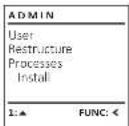
In this menu, you can have several pieces of information of the system displayed.
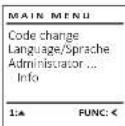
- Switch on the lock using the key.
- The press Fark.
• The "Main menu" appears.
- Scroll with the 1 or 2 key until the menu
item "Administrator" is highlighted.
- Confirm with
• "Administrator" appears.
- Scroll with the 1 or 2 key until the menu
item "Processes" is highlighted.
- Confirm with
- Enter the administrator code to acquire
the authorisation for programming.
- Scroll with the 1 or 2 key through the
data records.
- Confirm with
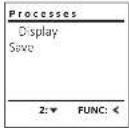
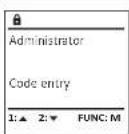
In the event of a complete system failure, the electronic control panel may have to be registered again with the locking mechanism.
- Switch on the lock using the _0 key.
- The press Func.
• The "Main menu" appears.
- Scroll with the 1 or 2 key until the menu item
"Administrator" is highlighted.
- Confirm with
• "Administrator" appears.
- Scroll with the 1 or 2 key until the menu item
"Setup" is highlighted.
- Confirm with
- Enter the administrator code to acquire the
authorisation for programming.
- "base has been stored" appears in the display
- Press any key.
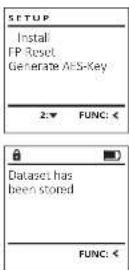
After registering, the administrator code must be changed as described in the Code Change menu.
- Switch on the lock using the key.
- The press Func_
• The "Main menu" appears.
- Scroll with the 1 or 2 key until the menu
item *info* is highlighted.
- Confirm with
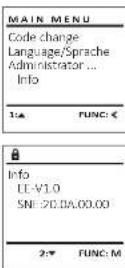
- "info" appears
- Confirm with On
- Enter the administrator code to acquire
the authorisation for programming.
• The system information is displayed.
- Scroll with key 1 or 2 to view the information.
- Use the time key to return.
- Please insert a FAT-32 formatted microSD card into the microSD card slot.
- Switch on the lock using the On key.
- The press 100c.
- The "Main menu" appears.
- Scroll with the 1 or 2 key until the menu
item "Administrator" is highlighted.
- Confirm with
• "Administrator" appears.
- Scroll with the 1 or 2 key until the menu
Item Processes is highlighted.
- Confirm with
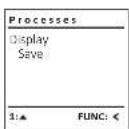
• Axtese appears.
Scall with the 1 or 2
- Scroll with the 1 of 2 key until the menu item "for" is highlighted.
Item Sale is highlighted.
• Confirm with De
- Enter the administrator code to acquire
- Enter the administrator code to bequi
the authorisation for programming.
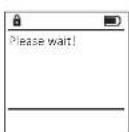
- "Please me!" appears.
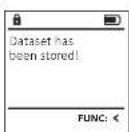
- "Datuet has been stated!" appears.
- Press any key.
- Switch on the lock using the key.
- The press Func.
- The "Main menu" appears.
- Scroll with the 1 or 2 key until the menu
item "Administrator" is highlighted
- Confirm with
• "Administrator" appears.
- Scroll with the 1 or 2 key until the menu
item "Setup" is highlighted.
- Confirm with 28.
- Scroll with the 1 or 2 key until the menu
item "T-leser" is highlighted.
- Confirm with
- Enter the administrator code to acquire the authorization for programming.
the authorisation for program
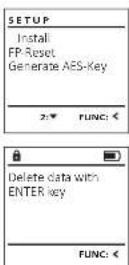
- Delelic and More Extermy appears.
- Confirm with 0s
• "Bioscoco" ADDRESS
- Press any key.
- Switch on the lock using the on key.
• The press
• The "Main menu" appears.
- Scroll with the 1 or 2 key until the menu item
"info" is highlighted.
- Confirm with
• "info" appears
- Scroll with the 1 or 2 key until the menu item
"Systemic" is highlighted.
• Confirm with
• Enter the administrator code to acquire the authorization for programming.
authorisation for programming.
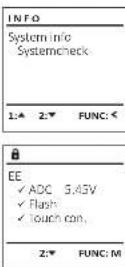
• The system check information is displayed.
• Scroll with key 1 or 2 to view the information
• Scroll with key 1 of 2 to view the information.
• Use the ____ key to return.
Error messages
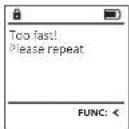
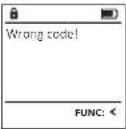
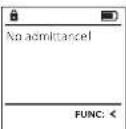
The illustration below describes the error messages on the display when a fingerprint is created is or when the safe is opened.
Error message Solution
| Too fast! Please repeat | Move your finger slowly across the sensor. |
| Too tilted! Please repeat | Move your finger flat across the sensor. |
| Too short! Please repeat | Move your finger across the sensor so that more area of your fingerprint can be read. |
| Position in the middle and repeat! | Position your finger in the middle of the sensor. |
| Wrong code! Enter a valid code. |
| No admittance! An unsaved fingerprint has been used. Repeat with a fingerprint that has already been created. |
Technical details
| Number of administrator codes: | 1 |
| Number of user codes: 9 (max.) |
| Number of fingerprint codes: | 20 (max.) |
| Blocking times: After an incorrect code is entered 3x, 5 minutes,thereafter always 10 minutes |
| Power supply: 4x AA MIGNON LR6 ALKALINE |
| Date/time: | √ |
| Updatable (firmware): | √ |
| History number: 2,000 | |
Battery replacement
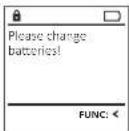
You can see the battery status at any time using the battery level indicator at the top right of the display. If the battery capacity is running low, a corresponding message appears on the display: When this notice appears, change the batteries as soon as possible.
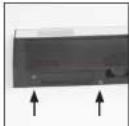
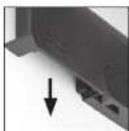
Remove the two screws on the underside of the lock electronics. This will require a Torx T B screw-driver.
Let the cover slide out together with the batteries.
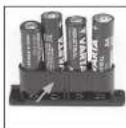
Remove the old batteries and dispose of them according to the disposal instructions on page 15. Replace the batteries with four new 1.5 V AA Mignon batteries and according to the correct polarity. For this purpose, illustrations are shown on the battery holder. Please use branded batteries and no rechargeable batteries.
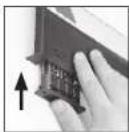
Push the cover and batteries back into the locking electronics and screw them tight.
Warranty
BURG WACHTER products comply with the technical standards at the time of production and adhere to our own quality standards. The guarantee only covers defects which can be proved to have resulted from production or material defects at the time of purchase. The warranty ends after two years, further claims are excluded. Defects and damage caused by e.g. transport, incorrect operation, improper use, wear etc. are excluded from the warranty. The batteries are not included in the guarantee. A short description of any defects identified must be made in writing and the device returned to the place it was purchased, together with the original packaging. After the device has been tested, and within a appropriate period of time, the guarantor will decide whether or not to repair or exchange the item.
Attention:
In order to deliver a flawless and high quality product to you and to better assist you in case of service or repair, it is necessary that faulty or defective devices along with the valid administrator code be presented to your dealer together with the original documentation.
For returns, all undamaged device parts must furthermore be in the factory setting due to your right of revocation. Failure to comply with this will invalidate the warranty.
Disposal of the device
Dear customer.
please help us avoid unnecessary waste. Should you intend to dispose of this device at any time, please remember that many components of this device contain valuable materials that can be recycled.

Please be aware that electrical and electronic equipment and batteries marked in this way must not be disposed of with household waste but collected separately. Please obtain information on the collecting points for electrical waste from the responsible authority of your city/municipality.

BURG-WÄCHTER KG hereby declares that this device complies with the Directives 2014/30/EU, (EMC) and 2011/65/EU (RoHS).
The complete text of the EU Declaration of Conformity is available at the following Internet address: www.burg.biz
Safety recommendation
Please clean the keyboard operating surface periodically with a microfibre cloth (e.g. glasses cleaning cloth for spectacles) to remove any fingerprints on the keyboard surface.
Printing and typesetting errors as well as technical changes reserved.
tr Mode d'emploi
Montage
text_image
A
B
E F
B
G
BURG
WACHTER
1 2345
67890
on
On
C D
A Écran
B Touchesnumériques
| MAIN MENU |
| Code changeLanguage/SpracheAdministrator ...info |
| LANGUAGE |
| ČeštinaDeutschEnglishEspañol |
| USER |
| Create Assign Delete |
| 2:▼ | FUNC: < |
| USER.0001 CD |
| Combination: [FP] |
| FUNC: M |
| Program finger |
| ...4 |
| FUNC: < |
| USERLOOD3 IPcreated! |
| FUNC: < |
| USER |
| Create Assign Delete |
| 1:▲ 2:▼ FUNC: < |
| USER |
| Assign Code Assign Finger |
| 1:▲ | FUNC: < |
| USER.0003 FPcreated! |
| FUNC: < |
| USER |
| Create Delete |
| 1:▲ | FUNC: < |
|
| Dataset has been deleted? |
| ADMIN |
| UserTimer functionsProgrammingProcesses |
| 1:▲ | 2:▼ | FUNC: < |
| TIMER FUN ... |
| Time entry |
| Date entry |
| Autumn. ST/WT |
| Delay time |
| 1:▲ 2:▼ FUNC: < |
|
| Autorn. ST/WT[ON] |
| 1:▲ | FUNC: M |
| ADMIN |
| User Timer functions Programming Processes |
| 1:▲ | 2:▼ | FUNC: < |
ase de données
| Confirm current original firmware version with Enter |
| FUNC: M |
| Firmwareupdate completel |
| FUNC: < |
| ADMIN |
| User |
| Timer functions |
| Programming |
| Processes |
| Dataset has been stored! |
| FUNC: < |
| ADMIN |
| User |
| Restructure |
| Processes |
| Install |
| 1:▲ | FUNC: < |
| SETUP |
| InstallFP ResetGenerate AES-Key |
| 2:▼ | FUNC: < |
|
| Dataset has been stored |
| FUNC: < |
| SETUP |
| InstallFP-ResetGenerate AES-Key |
| 2:▼ | FUNC: < |
|
| Delete data with ENTER key |
| FUNC: < |
| USER |
| Create |
| Assign |
| Delete |
| 2:▼ | FUNC: < |
| USFR.0002 CD569425Kombination:[FP] |
| 1:▲ | FUNC: < |
| USFR.0001 CDCreated: |
| FUNC: < |
| USER |
| Create CodeCreate Finger |
| 1:▲ | FUNC: < |
| USER,0003 FPcreated! |
| FUNC: < |
| USER |
| Create Assign Delete |
| 1:▲ 2:▼ FUNC: < |
| USER |
| Assign Code Assign Finger |
| 1:▲ | FUNC: < |
| USER.0003 FPcreated! |
| FUNC: < |
The Ground Truth image displays a single, solid horizontal line. According to Rule 2 (UNDERSCORE & LINE RULES), this is a stylistic or background line, not a placeholder underscore. Therefore, the OCR result must ignore it and output nothing or only meaningful text. The provided OCR content is "____", which consists of four underscores. This is an incorrect interpretation of the line as a placeholder, violating the rule that stylistic lines must be ignored. The OCR has hallucinated underscores where none should exist based on the GT's visual context. Hence, the OCR result is inconsistent with the Ground Truth.
|
| 3+1=2=5=6=7=8=9=10=11=12=13=14=15=16=17=18=19=20=21=22=23=24=25=26=27=28=29=30=31=32=33=34=35=36=37=38=39=40=41=42=43=44=45=46=47=48=49=50=51=52=53=54=55=56=57=58=59=60=61=62=63=64=65=66=67=68=69=70=71=72=73=74=75=76=77=78=79=80=81=82=83=84=85=86=87=88=89=90=91=92=93=94=95=96=97=98=99=100 |
1:2 2:4 FUNC IM
| Dataset has been deleted |
| FUNC: < |
| ADMIN |
| UserTimer functionsProgrammingProcesses |
| 1:▲ | 2:▼ | FUNC: < |
| ADMIN |
| User |
| Timer functions |
| Programming |
| Processes |
| 1:▲ | 2:▼ | FUNC: < |
| Confirm current original firmware version with Enter) |
| FUNC: M |
| Firmwareupdate completed |
| FUNC: < |
| PROGRAMMING |
| Databascupdate Firmwareupcate Restructure |
| 1:▲ | FUNC: < |
| Restructuringin progress! |
|
Menu Administrator / Handelingen
| ADMIN |
| User |
| Timer functions |
| Programming |
| Processes |
| 1:▲ 2:▼ FUNC: < |
| ADMIN |
| User |
| Restructure |
| Processes |
| Install |
| 1:▲ | FUNC: < |
Menu Administrator / Handelingen / Weergeven
| Processes |
| Display |
| Save |
| 2:▼ | FUNC: < |
| Dataset has been stored! |
| FUNC: < |
MAIN MENU
Code change
Language/Sprache
Administrator ...

Aprire
Opening with fingerprint
| USER |
| Create Assign Delete |
| 2:▼ | FUNC: < |
| USER.0001 CD |
| Combination: [FP] |
| FUNC: M |
| USER,0003 FPcreated! |
| FUNC: < |
| USER |
| Create Assign Delete |
| 1:▲ 2:▼ FUNC: < |
| USER |
| Assign Code Assign Finger |
| 1:▲ | FUNC: < |
| USER.0003 FPcreated! |
| FUNC: < |
| USER |
| Create Delete |
| 1:▲ | FUNC: < |
|
| USER.0001 CD |
| 1:▲ | 2:▼ FUNC:M |
|
| Dataset has been deleted! |
| FUNC: < |
| ADMIN |
| UserTimer functionsProgrammingProcesses |
| 1:▲ | 2:▼ | FUNC: < |
| ADMIN |
| User |
| Timer functions |
| Programming |
| Processes |
| 1:▲ 2:▼ FUNC: < |
| Confirm current original firmware version with Enter! |
| FUNC: M |
| Firmwareupdate complete! |
| FUNC: < |
| ADMIN |
| User |
| Timer functions |
| Programming |
| Processes |
| Processes |
| Display |
| Save |
| 2:▼ | FUNC: < |
| Processes |
| DisplaySave |
| 1:▲ | FUNC: < |
|
| Please wait! |
|
|
| Dataset has been stored! |
|
| FUNC: < |
| ADMIN |
| User |
| Restructure |
| Processes |
| Install |
| 1:▲ | FUNC: < |
| SETUP |
| InstallFP ResetGenerate AFS-Key |
| 2:▼ | FUNC: < |
|
| Dataset has been stored |
|
| USER |
| Create Assign Delete |
| 2:▼ | FUNC: < |
|
| USER.0001 CD |
| Combination: [FP] |
| FUNC: M |
| USER,0003 TPcreated! |
| FUNC: < |
| USER |
| Create Assign Delete |
| 1:▲ 2:▼ FUNC: < |
| USER |
| Assign Code Assign Finger |
| 1:▲ | FUNC: < |
| USER.0003 FPcreated! |
| FUNC: < |
| Dataset has been deleted |
| FUNC: < |
| ADMIN |
| UserTimer functionsProgrammingProcesses |
| 1:▲ | 2:▼ | FUNC: < |
| 2017 |
| | |
| (in millions) |
| Carrying value | Carrying value | Carrying value |
| 3,654 | 3,654 | $3,654 |
| 2017 | 2016 |
| Cost of sales | 3.4 | 3.5 |
| Gross margin | 1.9% | 1.8% |
| Year Ended December 31, |
| 2018 | 2017 |
| (in millions) |
| Revenues | 1,465 | 1,395 |
| Costs and expenses | (1,048) | (1,013) |
| Net income | 1,465 | 1,395 |
| 2017 | 2016 |
| Cost of sales | 3.4 | 3.5 |
| Gross margin | 1.9% | 1.8% |
| 2017 | 2016 |
| Cost of sales | 3.4 | 3.5 |
| Gross profit | (1.8) | (1.9) |
| 2017 | 2016 |
| Cost of sales | 3.4 | 3.5 |
| Gross profit | (1.8) | (1.9) |
| Year Ended December 31, |
| 2018 | 2017 |
| (in millions) |
| Revenues | 1,465 | 1,394 |
| Costs and expenses | (1,028) | (1,008) |
| Net income | 1,465 | 1,394 |
| Year Ended December 31, |
| 2018 | 2017 |
| (in millions) |
| Revenues | 1,465 | 1,395 |
| Costs and expenses | (1,048) | (1,013) |
| Net income | 1,465 | 1,395 |
| 2017 | 2016 |
| Cost of sales | 3.4 | 3.5 |
| Gross profit | (1.8) | (1.9) |
| Year Ended December 31, |
| 2018 | 2017 |
| (in millions) |
| Revenues | 1,465 | 1,394 |
| Costs and expenses | (1,028) | (1,008) |
| Net income | 1,465 | 1,394 |
| Year Ended December 31, |
| 2018 | 2017 |
| (in millions) |
| Revenues | 1,465 | 1,395 |
| Costs and expenses | (1,048) | (1,013) |
| Net income | 1,465 | 1,395 |
| Year Ended December 31, |
| 2018 | 2017 |
| (in millions) |
| Revenues | 1,465 | 1,394 |
| Costs and expenses | (1,028) | (1,008) |
| Net income | 1,465 | 1,394 |
| 2017 | 2016 |
| Cost of sales | 3.4 | 3.5 |
| Gross profit | (1.8) | (1.9) |
| 2017 | 2016 |
| Cost of sales | 3.4 | 3.5 |
| Gross profit | (1.8) | (1.9) |
| ADMIN |
| User |
| Timer functions |
| Programming |
| Processes |
| 1:▲ | 2:▼ | FUNC: < |
áze
| PROGRAMMING |
| DatabaseupdateFirmwareupdateRestructure |
| 2:▼ | FUNC: < |
| ADMIN |
| User |
| Timer functions |
| Programming |
| Processes |
| 1:▲ 2:▼ FUNC: < |
| ADMIN |
| User |
| Restructure |
| Processes |
| Install |
| 1:▲ | FUNC: < |
| SETUP |
| InstallFP ResetGenerate AFS-Key |
| 2:▼ | FUNC: < |
|
| Dataset has been stored |
|
| Processes |
| DisplaySave |
| 1:▲ | FUNC: < |
|
| Please wait! |
|
|
| Dataset has been stored! |
|
| FUNC: < |
| SETUP |
| InstallFP-ResetGenerate AES-Key |
| 2:▼ | FUNC: < |
|
| Delete data with ENTER key |
| FUNC: < |
Opening with fingerprint
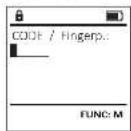
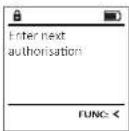
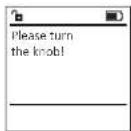
- Zapnite funkciu zámku pomocou tlačidla 0m.
• Potlahnite uložený prst zhora nadol cez stred snímača.
- Na displeji sa zobrazi upozornenie "validity not achieved" (Priorita sa nedosiahla).
- Zadajte platný 6-miestny PIN kód (naprogramovaný kód z výroby
„1-2-3-4-5-6“ineho uzivatela.
- Na displeji sa zobrazi hlásenie "Please turn the klob" (Použite otočný gombiki)
- Pootočte gombik,
Štruktúra ponuky
| USER |
| Create | |
| Assign | |
| Delete | |
| 2:▼ | FUNC: < |
| USER.0001 CD |
| Combination: [FP] |
| FUNC: M |
| USER,0003 TPcreated! |
| FUNC: < |
| USER |
| Create Assign Delete |
| 1:★ 2:▼ FUNC: < |
| USER |
| Assign Code Assign Finger |
| 2:▼ FUNC: < |
| USER |
| Create Assign Delete |
| 1:▲ 2:▼ FUNC: < |
| USER |
| Assign Code Assign Finger |
| 3:▲ FUNC: < |
| USFR.0003 FP created! |
| FUNC: < |
| USER |
| CreateDelete |
| 1:▲ | FUNC: < |
|
| USER.0001 CD |
| 1:▲ | 2:▼ FUNC:M |
|
| Dataset has been deleted! |
|
| ADMIN |
| UserTimer functionsProgrammingProcesses |
| 1:▲ | 2:▼ | FUNC: < |
| ADMIN |
| User |
| Timer functions |
| Programming |
| Processes |
| 1:▲ | 2:▼ | FUNC: < |
izácia databázy
| Confirm current original firmware version with Enter |
| FUNC: M |
| Firmwareupdate completed |
| FUNC: < |
| ADMIN |
| User |
| Timer functions |
| Programming |
| Processes |
Ponuka Administrátor / Prehlad udalosti/Zobrazit
- Zapnite funkciu zámku pomocou tlačidla
- Následne stlačte Fum.
- Zobrazi sa "Maw menu" (Hlavná ponuka).
- Pomocou llačidla 1, resp. 2 sa posůvajte dovtedy, kým sa neoznačí volba "Administrator" (Administrátor)
• Potvrdte prostrednictvom
• Zobrazí sa "Administrator" (Administrator).
- Pomocou tlačidla 1, resp. 2 sa posúvajte dovtedy, kým sa neoznači volba "Processes" (Prehlad udalosti)
• Potyrdte prostrednictvom
- Zadajte administrátorský kód, na základe
ktorého získate potrebné oprávnenie.
• Pomocou tlačidla 1, resp. 2 sa posúvajte
medzi záznamami.
• Potvrdte prostrednictvom
| Processes |
| Display |
| Save |
| 2:▼ | FUNC: < |
| Processes |
| DisplaySave |
| 1:▲ | FUNC: < |
|
| Please wait! |
|
|
| Dataset has been stored! |
|
| FUNC: < |
Ponuka Administrátor/Setup
| ADMIN |
| User |
| Restructure |
| Processes |
| Install |
| 1:▲ | FUNC: < |
Ponuka Administrátor/Setup/Prihlásít sa
| SETUP |
| InstallFP-ResetGenerate AES Key |
| 2:▼ | FUNC: < |
|
| Delete data withENTER key |
| FUNC: < |
| MAIN MENU |
| Code changeLanguage/SpracheAdministrator ...Info |
| 1: | FUNC: < |
| InfoEE-V1.0SNI:70.0A.00.00 |
| 2: | FUNC: M |
| USER.0002 CD |
| Kombination: [-] |
| FUNC: M |
| INFO |
| System Info Systemcheck |
| 2:▼ | FUNC: < |
| Info |
| EE-V1.0 |
| SNE:20.0A.00.00 |
| 2:▼ | FUNC: M |
| USER |
| Create Assign Delete |
| 2:▼ | FUNC: < |
| Program finger |
| ◆◆◆◆41 |
| FUNC: < |
| USER,0003 FPcreated! |
| FUNC: < |
| USER |
| Create Assign Delete |
| 1:▲ 2:▼ FUNC: < |
| USER |
| Assign Code Assign Finger |
| 1:▲ | FUNC: < |
| USER.0003 FPcreated! |
| FUNC: < |
Meniul Administrator / Utilizator / Stergere
- Apare "Data has been deleted" (Set de date sters).
| USER |
| Create |
| Delete |
| 1:▲ | FUNC: < |
| Dataset has been deleted |
| FUNC: < |
| ADMIN |
| UserTimer functionsProgrammingProcesses |
| 1:▲ | 2:▼ | FUNC: < |
- Apare "Data has been saved" (Datele au fost salvate!).
- Apare "Sota has been saved" (Datele au fost salvatel).
- Apare "Data has been saved" (Datele au fost salvatel)
Meniul Administrator / Programare
| ADMIN |
| User |
| Timer functions |
| Programming |
| Processes |
| 1:▲ 2:▼ FUNC: < |
| Confirm current original firmware version with Enter! |
| FUNC: M |
| Firmwareupdatecomplete |
| FUNC: < |
Meniul Administrator / Programare / Reorganizare
| ADMIN |
| User |
| Timer functions |
| Programming |
| Processes |
| 1:▲ 2:▼ FUNC: < |
Meniul Administrator / Setup
| ADMIN |
| User |
| Restructure |
| Processes |
| Install |
| 1:▲ | FUNC: < |
Meniul Administrator / Setup / Generare AES-Key
| Processes |
| Display |
| Save |
| 2:▼ | FUNC: < |
Meniul Administrator / Setup / Autentificare
| SETUP |
| Install |
| FP Reset |
| Generate AES-Key |
| 2:▼ | FUNC: < |
|
| Dataset has been stored |
|
Meniul Info / Info sistem
| Processes |
| DisplaySave: |
| 3:▲ | FUNC: < |
|
| Please wait! |
|
|
| Dataset has been stored! |
| FUNC: < |
| USER |
| Create Assign Delete |
| 2:▼ | FUNC: < |
| USER.0001 CD |
| Combination: [FP] |
| FUNC: M |
| USER,0003 TPcreated! |
| FUNC: < |
- Surge "Main menu / Administrator / User" (Menu principal
| USER |
| Create Assign Delete |
| 1:▲ 2:▼ FUNC: < |
| USER |
| Assign Code Assign Finger |
| 3:▲ | FUNC: < |
| USER.0003 FPcreated! |
| FUNC: < |
- Surge "Kai miu/Amwahao" (Menu principal)
Administrador).
- Confirme com
- Surge "Main menu/Administrator/User" (Menu principal
- Euro "Main mass / Administrative / low / high" (Menu)
• Surge - kiv/menu/Alembioles / 10/12/2017
- surge "2000" was added (Registro eliminado).
| ADMIN |
| UserTimer functionsProgrammingProcesses |
| 1:▲ | 2:▼ | FUNC: < |
- Surge "Boto has been saved!" (Os dados foram
armazenados!).
| ADMIN |
| User |
| Timer functions |
| Programming |
| Processes |
| 1:▲ 2:▼ FUNC: < |
| PROGRAMMING |
| Databaseupdate
Firmwareupdate
Restructure |
| 1:▲ 2:▼ FUNC: € |
| Confirm current
original firmware
version with Enterl |
| FUNC: M |
| Firmwareupdate completed |
| FUNC: < |
| PROGRAMMING |
| Databaseupdate |
| Firmwareupdate |
| Restructure |
| 1:▲ | FUNC: < |
|
| Restructuringin progress! |
|
text_image
Processes
Display
Save
1:▲ FUNC:
Please wait!
Dataset has
been stored!
FUNC:
- Nu vises "Main menu/Administrator/User" (Hovedmenu/
Administrator / Bruger).
• Bekräft med
- Nu vises "Main menu/Administrator/User/Create" (Hoved-
menu / Administrator / Bruger / Opret).
• Bekræft med
- Indtast administratorkoden for at få den
| USER |
| Create Assign Delete |
| 2:▼ | FUNC: < |
| USER,0003 FPcreated! |
| FUNC: < |
- Nu vises "Main menu/Administrator/User" (Hovedmenu
/ Administrator / Bruger)
| USER |
| Create Assign Delete |
| 1:▲ 2:▼ FUNC: < |
| USER |
| Assign Code Assign Finger |
| USER.0003 FPcreated! |
| FUNC: < |
"Administrative" [Ach
- Bekræft med
- No Vises "Main menu/Administrator" (Hovedmenu)
Administrator).
• Bekræft med
- Nu vises "Main menu / Administrator / User" (Hovedmenu
/Administrator / Bruger)
• Bekræft med
- Nu vises "Main menu/Administrator/User/Delete" (Hoved-
menu / Administrator / B
- Nu vises "Data has been deleted" (Dataset slettet).
- Tryk på en vilkárlig tast.
| Dataset has been deleted |
| FUNC: < |
| ADMIN |
| UserTimer functionsProgrammingProcesses |
| 1:▲ | 2:▼ | FUNC: < |
- Nu vises "Administrator" (Administrator).
- Nu vises "Data has been saved!" (Data er gemt!).
- Tryk på en vilkårlig tast.
| TIMER FUN ... |
| Time entry |
| Date entry |
| Autom. ST/WT |
| Delay time |
| 1:▲ 2:▼ FUNC: < |
| Autom. ST/WTON| |
| 1:▲ FUNC: M |
strator / Tidsfunktioner / Forsinkelsestid
| PROGRAMMING |
| Databaseupdate
Firmwareupdate
Restructure |
| 1:▲ 2:▼ FUNC: < |
|
| Confirm current
original firmware
version with Enter! |
| FUNC: M |
| Firmwareupdate completed |
| FUNC: < |
| ADMIN |
| User |
| Timer functions |
| Programming |
| Processes |
| 1:▲ 2:▼ FUNC: < |
Menu Administrator / Handlinger / Vis
| Processes |
| DisplaySave: |
| 3:▲ | FUNC: < |
|
| Please wait! |
|
|
| Dataset has been stored! |
| FUNC: < |
| ADMIN |
| User |
| Restructure |
| Processes |
| Install |
| 1:▲ | FUNC: < |
- Nu vises "Administrator" (Administrator).
| SETUP |
| InstallFP ResetGenerate AFS-Key |
| 2:▼ | FUNC: < |
|
| Dataset has been stored |
| FUNC: < |
D "On/Enter"-painike
| USER |
| Create |
| Assign |
| Delete |
| 2:▼ | FUNC: < |
| USER,0003 FPcreated: |
| FUNC: < |
Assign Higer (Aseta sommi, on merkitty.
| USER |
| Create Assign Delete |
| 1:▲ 2:▼ FUNC: < |
| USER |
| Assign Code Assign Finger |
| 1:▲ | FUNC: < |
| USER.0003 FPcreated! |
| FUNC: < |
The following table is in English:
• Näkyviin tulee "Data has been deleted" (Tietue
noistettu
| USER |
| Create Delete |
| 1:▲ | FUNC: < |
|
| USER.0001 CD |
| 1:▲ | 2:▼ FUNC:M |
|
| Dataset has been deleted |
|
| ADMIN |
| UserTimer functionsProgrammingProcesses |
| 1:▲ | 2:▼ | FUNC: < |
• Nakyvinn (the "Ammishator" only entry
(Jarjesteimanvalvoja / Alkatolminhot).
• Nakovjin tulee "Data has been saved" (Tiedot
- NERKYHIT LIME - SHIMAVEL/STATE. (TREBOX: tallenpettiin)
tallernechtin?
• Paina mita tanansa painiketta.
| TIMER FUN ... |
| Time entryDate entryAutom. ST/WTDelay time |
| 2: FUNC: < |
| Time entryH.M 0.00 |
| FUNC: M |
- Nakyvlin tulee "Data has been saved!" (Tiedot
tallennettiin!
| ADMIN |
| User |
| Timer functions |
| Programming |
| Processes |
| Confirm current original firmware version with Enter! |
| FUNC: M |
| Firmwareupdate complete! |
| FUNC: < |
| ADMIN |
| User |
| Timer functions |
| Programming |
| Processes |
| 1:▲ 2:▼ FUNC: < |
| ADMIN |
| User |
| Restructure |
| Processes |
| Install |
| 1:▲ | FUNC: < |
| Processes |
| Display |
| Save |
| 2:▼ | FUNC: < |
| Processes |
| DisplaySave |
| 1:▲ | FUNC: < |
|
| Please wait! |
|
|
| Dataset has been stored! |
|
| FUNC: < |
Alternativer for inntasting
Talltaster:
Meny Administrator/Bruker
Meny Administrator / Bruker / Opprette
| USER |
| Create Assign Delete |
| 2:▼ | FUNC: < |
| USER |
| Create CodeCreate Finger |
| I:▲ | FUNC: < |
|
| Program finger****41 |
|
| FUNC: < |
| USER,0003 TPcreated! |
| FUNC: < |
Meny Administrator / Bruker / Tilordne
| USER |
| Create Assign Delete |
| 1:★ 2:▼ FUNC: < |
| USER |
| Assign Code Assign Finger |
| 2:▼ FUNC: < |
Undermeny Administrator / Bruker / Tilordne / Tilordne finger
• Sávises - Maú men / Administrative / Houed men /
• Sa Visas de laumina, nana/Inves (PANETRITERY)
Administrators)
Administrator.
• Bekreft med on
- Sá vises «Main menu / Administrator / User» (Hovedmeny
/ Administrator / Bruker)
- Scroll med tast 1 eller 2 til menypunktet
«Assians (Tilordne) er markert
- Bekreft med. On
- Scroll mod fast 1 eller 2 til menwpunktet
| USER |
| Create Assign Delete |
| 1:▲ 2:▼ FUNC: < |
| USER |
| Assign Code Assign Finger |
| 3:▲ FUNC: < |
| USFR.0003 FP created! |
|
Meny Administrator / Bruker / Slette
• Suisse's media / Administrator / User / Series | Hoved
meny / Administrator / Bruker / Slette).
- Scroll med tast 1 eller 2 til menypunktet
«Deiste» (Slette) er markert.
• Bekreft med On
| USER |
| Create Delete |
| 1:▲ | FUNC: < |
|
| USER.0001 CD |
| 1:▲ | 2:▼ FUNC:M |
|
| Dataset has been deleted |
|
| ADMIN |
| UserTimer functionsProgrammingProcesses |
| 1:▲ | 2:▼ | FUNC: < |
• administration (Administrator) or markert
Vestational» (Administrator) El Market.
+ Bekreit med.
• Sá vises «Mav menu/Administrator» (Hovedmeny)
Administrator).
- Scroll med tast 1 eller 2 til menypunktet
«Tiner funktiva» (Tidsfunksjoner) er markert.
• Bekreft med
• 5ã vises «Administrator /Tine entro» (Administrator /
Tidsfunksloneri
- Eksoft maci. 0a
+ BERTIEM
| ADMIN |
| User |
| Timer functions |
| Programming |
| Processes |
| 1:▲ 2:▼ FUNC: < |
Meny Administrator / Programmering> Databankoppdatering
| PROGRAMMING |
| Databaseupdate
Firmwareupdate
Restructure |
| 1:▲ 2:▼ FUNC: < |
| Confirm current
original firmware
version with Enter! |
| FUNC: M |
| Firmwareupdatecomplete |
| FUNC: < |
Meny Administrator / Programming> Reorganisering
• 5lå på lásen med -tasten.
• Trykk deretter på Func
+ Så vises «Mav menu» (Hovedmeny).
• Scroll med tast 1 eller 2 til menypunktet
«Administrator» (Administrator) er markert.
• Bekreft med On
- Sá vises «Administrator» (Administrator).
- Scroll med tast 1 eller 2 til menypunktet
«Programmanging» (Programmering) er markert.
• Bekreft med
• Så vises «Programming» (Programmering)
• Scroll med tast 1 eller 2 til menypunktet
«Restructure!» (Reorganisering) er markert.
• Bekreft med On
• Tast inn administratorkoden for å få de
nødvendige rettighetene.
- Så vises aflestrudering in progress ^10 (Reorganisering pågår).
| PROGRAMMING |
| Databaseupdate Firmwareupdate Restructure |
| 1:▲ | FUNC: < |
| Restructuringin progress! |
|
| ADMIN |
| User |
| Timer functions |
| Programming |
| Processes |
| Processes |
| Display |
| Save |
| 2:▼ | FUNC: < |
| Dataset has been stored! |
| FUNC: < |
Meny Administrator / Oppsett
| ADMIN |
| User |
| Restructure |
| Processes |
| Install |
| 1:▲ | FUNC: < |
Meny Administrator / Oppsett / Registrerer
| SETUP |
| InstallFP ResetGenerate AFS-Key |
| 2:▼ | FUNC: < |
|
| Dataset has been stored |
|
Meny Administrator / Oppsett> FP-tilbakestilling
• Slå på lásen med 96 -taster
• Trykk deretter på Func.
- Så vises «Main menu» (Hovedmeny).
- Scroll med tast 1 eller 2 til menypunktet
«Administrator» er markert.
• Bekreft med
- 5ª vises « Administrata»
- Scroll med tast 1 eller 2 til menypunktet
×Setup× (Oppsett) er markert.
• Bekreft med 9n.
- Scroll med tast 1 eller 2 til menypunktet
«FP-Reset» (FP-tilbakestilling) er markert.
• Bekreft med
• Tast Inn administratorkoden for å få de
nødvendige rettighetene.
- Så vises «Delete data with ENTER key» (Slette data med
ENTER-tasten).
• Bekreft med On
- Så vises «Please mail» (Vennligst vent)
D "On/Enter"-knappen
On/Enter" - knappen startar systemet eller väljer den aktuella menyposten.
E "1"-knappen
| USER |
| Create Assign Delete |
| 2:▼ | FUNC: < |
|
| USER.0001 CD |
| Combination: [FP] |
| FUNC: M |
| USFR,0002 CD569425Kombination:[FP] |
| 1:▲ | FUNC: < |
| USFR,0001 CDCreated: |
| FUNC: < |
| USER |
| Create Code:Create Finger. |
| 1:▲ | FUNC: < |
| USER,0003 FPcreated! |
| FUNC: < |
• "May menu /Administrator/User" (Huvudmeny/Admi-
nistratör/Anyândare! visas.
• Bulla med knapp 1, resp. 2, tills menvposten
| USER |
| Create Assign Delete |
| 1:▲ 2:▼ FUNC: < |
| USER |
| Assign Code Assign Finger |
| 1:▲ | FUNC: < |
| USER.0003 FPcreated! |
| FUNC: < |
- "Data has been deleted" (Dataposten raderades) visas.
| ADMIN |
| UserTimer functionsProgrammingProcesses |
| 1:▲ | 2:▼ | FUNC: < |
• "late has been saved" (1)
- Tavsk osyulfris knap
• hyck pa valm knapp.
| TIMER FUN ... |
| Time entry |
| Date entry |
| Autom. ST/WT |
| Delay time |
| 2:▼ | FUNC: < |
| Time entryH.M 0.00 |
| FUNC: M |
• "Bato has been saved" (Uppgifterna sparades!) visas.
| ADMIN |
| User |
| Timer functions |
| Programming |
| Processes |
| 1:▲ 2:▼ FUNC: < |
| as uppdatering |
| PROGRAMMING |
| Databaseupdate |
| Firmwareupdate |
| Restructure |
| 2:▼ FUNC: < |
| Firmwareupdate completed |
| FUNC: < |
Meny Administratör / Programmering / Omorganisering
| ADMIN |
| User |
| Timer functions |
| Programming |
| Processes |
Meny Administratör / Procedurer / Visa
| Processes |
| Display |
| Save |
| 2:▼ | FUNC: < |
Meny Administratör / Procedurer / Spara
| Processes |
| DisplaySave: |
| 3:▲ | FUNC: < |
|
| Please wait! |
|
|
| Dataset has been stored! |
| FUNC: < |
| ADMIN |
| User |
| Restructure |
| Processes |
| Install |
| 1:▲ | FUNC: < |
| USER |
| Create Assign Delete |
| 2:▼ | FUNC: < |
| USER,0003 FPcreated! |
| FUNC: < |
| USER |
| Create Assign Delete |
| 1: 2: FUNC: < |
| USER |
| Assign Code Assign Finger |
| 3: FUNC: < |
| USFR.0003 FP created! |
| FUNC: < |
| USER |
| Create Delete |
| 1:▲ | FUNC: < |
|
| USER.0001 CD |
| 1:▲ | 2:▼ FUNC: M |
|
| Dataset has been deleted |
|
| ADMIN |
| UserTimer functionsProgrammingProcesses |
| 1:▲ | 2:▼ | FUNC: < |
| Year Ended December 31, |
| 2018 | 2017 |
| (in millions) |
| Revenues | 1,465 | 1,395 |
| Costs and expenses | (1,038) | (1,018) |
| Net income | 1,465 | 1,395 |
| Year Ended December 31, |
| 2018 | 2017 |
| Revenues | 1,465 | 1,395 |
| Costs and expenses | (1,465) | (1,395) |
| Net income | 1,465 | 1,395 |
| Year Ended December 31, |
| 2018 | 2017 |
| (in millions) |
| Revenues | 1,465 | 1,394 |
| Costs and expenses | (1,028) | (1,008) |
| Net income | 1,465 | 1,394 |
| Year Ended December 31, |
| 2018 | 2017 |
| Revenues | 1,465 | 1,395 |
| Costs and expenses | (1,465) | (1,395) |
| Net income | 1,465 | 1,395 |
| Year Ended December 31, |
| 2018 | 2017 |
| Revenues | 1,465 | 1,395 |
| Costs and expenses | (1,048) | (1,018) |
| Net income | 1,465 | 1,395 |
| Year Ended December 31, |
| 2018 | 2017 |
| Revenues | 1,465 | 1,395 |
| Costs and expenses | (1,048) | (1,018) |
| Net income | 1,465 | 1,395 |
| Year Ended December 31, |
| 2018 | 2017 |
| Revenues | 1,465 | 1,395 |
| Costs and expenses | (1,465) | (1,395) |
| Net income | 1,465 | 1,395 |
| Year Ended December 31, |
| 2018 | 2017 |
| (in millions) |
| Revenues | 1,465 | 1,394 |
| Costs and expenses | (1,028) | (1,008) |
| Net income | 1,465 | 1,394 |
| Year Ended December 31, |
| 2018 | 2017 |
| Revenues | 1,465 | 1,395 |
| Costs and expenses | (1,048) | (1,018) |
| Net income | 1,465 | 1,395 |
| Year Ended December 31, |
| 2018 | 2017 |
| Revenues | 1,465 | 1,395 |
| Costs and expenses | (1,465) | (1,395) |
| Net income | 1,465 | 1,395 |
| Year Ended December 31, |
| 2018 | 2017 |
| (in millions) |
| Revenues | 1,465 | 1,394 |
| Costs and expenses | (1,028) | (1,008) |
| Net income | 1,465 | 1,394 |
| Year Ended December 31, |
| 2018 | 2017 |
| Revenues | 1,465 | 1,395 |
| Costs and expenses | (1,465) | (1,395) |
| Net income | 1,465 | 1,395 |
| Year Ended December 31, |
| 2018 | 2017 |
| Revenues | 1,465 | 1,395 |
| Costs and expenses | (1,465) | (1,395) |
| Net income | 1,465 | 1,395 |
| Year Ended December 31, |
| 2018 | 2017 |
| (in millions) |
| Revenues | 1,465 | 1,394 |
| Costs and expenses | (1,028) | (1,008) |
| Net income | 1,465 | 1,394 |
| 2017 | 2016 |
| EBITDA | 3,458 | 3,458 |
| EBITDA margin | 1.9% | 1.9% |
| Confirm current original firmware version with Enter! |
| FUNC: M |
| Firmwareupdate completed |
| FUNC: < |
| PROGRAMMING |
| Databaseupdate |
| Hirmwareupdate |
| Restructure |
| 1:▲ | FUNC: ← |
| RestructuringIn progress! |
|
| ADMIN |
| User |
| Timer functions |
| Programming |
| Processes |
| Dataset has been stored! |
| FUNC: < |
| ADMIN |
| User |
| Restructure |
| Processes |
| Install |
| 1:▲ | FUNC: < |
| SETUP |
| Install |
| FP-Reset |
| Generate AES-Key |
| 2:▼ | FUNC: < |
|
| Dataset has been stored |
|
| SETUP |
| InstallFP-ResetGenerate AES Key |
| 2:▼ | FUNC: < |
| USER |
| Create | |
| Assign | |
| Delete | |
| 2:▼ | FUNC: < |
| USER.0001 CD |
| Combination: [FP] |
| FUNC: M |
| USER,0003 FPcreated! |
| FUNC: < |
Meni Administrator / Uporabnik / Dodeli
Podmeni Administrator / Uporabnik / Dodeli / Dodeli prst
• Vklopite ključavnico s tipko
• Nato pritisnite Fun:
| USER |
| Create Assign Delete |
| 1:▲ 2:▼ FUNC: < |
| USER |
| Assign Code Assign Finger |
| 1:▲ | FUNC: < |
| USER.0003 FPcreated! |
| FUNC: < |
| Dataset has |
| Is not displayed |
Meni Administrator / Časovne funkcije
| ADMIN |
| UserTimer functionsProgrammingProcesses |
| 1:▲ | 2:▼ | FUNC: < |
| ADMIN |
| User |
| Timer functions |
| Programming |
| Processes |
| 1:▲ | 2:▼ | FUNC: < |
| PROGRAMMING |
| Databaseupdate |
| Firmwareupdate |
| Restructure |
| 2:▼ | FUNC: < |
Meni Administrator / Programiranje / Posodobitev strojne programske opreme
- Pred posodobljanjem strojne programske opreme se prepričajte, da so baterije v napravi polne.
- Kopirajte novo različico strojne programske opreme na kartico microSD, ki je formatirana z obliko zapisa FAT32, in jo vstavite v režo za kartico microSD.
• Vklopite ključavnico s tipko
• Nato pritisnite
• Prikaže se «Mān meni» (Glavni meni).
| Confirm current original firmware version with Enter! |
| FUNC: M |
| Firmwareupcate complete! |
| FUNC: < |
Meni Administrator / Programiranje / Reorganizacija
| ADMIN |
| User |
| Timer functions |
| Programming |
| Processes |
| 1:▲ 2:▼ FUNC: < |
| Processes |
| Display |
| Save |
| 2:▼ | FUNC: < |
Meni Administrator / Postopki / Shrani
| Processes |
| DisplaySave: |
| 1:▲ | FUNC: < |
|
| Please wait! |
|
|
| Dataset has been stored! |
|
| FUNC: < |
| ADMIN |
| User |
| Restructure |
| Processes |
| Install |
| 1:▲ | FUNC: < |
Meni Administrator / Nastavitve / Prijava
| SETUP |
| Install |
| IP-Reset |
| Generate AES-Key |
| 2:▼ | FUNC: < |
|
| Dataset has been stored |
|
Menl Administrator / Nastavitve / Ponastavitev FP
• Vklapite kliučavnico s tiopu 0m.
• Nato pritisnite Func
- Prkaže se aškručenav (Glavní menil.
- Stipko 1 oz. 2 se tako dolgo pomikajte po zaslonu, da se oznaci menijska točka všdavivstatory (Administrator)
• Potrditez 91
- Prikaže se »Administrator« (Administrator).
- S tipko 1 oz. 2 se tako doligo pomikajte po zaslonu,
da se označi monijska točka >Setap< (Nastavitve)
• Potrditez
- 5 tipko 1 oz. 2 se tako dolgo pomikajte po zaslonu, da se označi menijska točka s šr.šeic
(Ponastavitev FP).
• Potrdite z
- Vrhesite administratorsko kodo, da prejmete
potreona po
- Na zasiloriu se izpise «sorello odo 100100234»
, 2016.
- Podolite 2 –.
- Na zaslonu se izpise «Please wit» (Proslmo, počakajtel).
• Pritisnite poljubno tipko.
| SETUP |
| InstallFP-ResetGenerate AES-Key |
| 2:▼ | FUNC: < |
|
| Delete data with ENTER key |
| FUNC: < |
Meni Administrator / Nastavitve / Ustvari ključ AES
| USER |
| Create Assign Delete |
| 2:▼ | FUNC: < |
| USFR,0002 CD569425Kombination:[FP] |
| 1:▲ | FUNC: < |
| USFR,0001 CDCreated: |
| FUNC: < |
| USER |
| Create CodeCreate Finger |
| 1:▲ | FUNC: < |
| Program finger |
| ◆◆◆◆41 |
| FUNC: < |
| USER,0003 FPcreated! |
| FUNC: < |
| USER |
| Create Assign Delete |
| 1:▲ 2:▼ FUNC: < |
| USER |
| Assign Code Assign Finger |
| 1:▲ | FUNC: < |
| USER.0003 FPcreated! |
| FUNC: < |
| USER |
| Create Delete |
| 1:▲ | FUNC: < |
| Dataset has been deleted |
| FUNC: < |
| ADMIN |
| UserTimer FunctionsProgrammingProcesses |
| 1:▲ | 2:▼ | FUNC: < |
| Delay time[00] min |
| FUNC: M |
| ADMIN |
| User |
| Timer functions |
| Programming |
| Processes |
| 1:▲ 2:▼ FUNC: < |
zación de la
| PROGRAMMING |
| DatabaseupdateFirmwareupdateRestructure |
| 2:▼ | FUNC: < |
| Confirm current original firmware version with Enter ! |
| FUNC: M |
| Firmwareupcate completel |
| FUNC: < |
text_image
Processes
Display
Save
3:▲ FUNC: €
Please wait!
Dataset has
been stored!
FUNC: €
| USER |
| Create |
| Assign |
| Delete |
| 2:▼ | FUNC: < |
| USER.0001 CD |
| Combination: |FP| |
| FUNC: M |
| USER,0003 FPcreated! |
| FUNC: < |
| USER |
| Create Assign Delete |
| 1:▲ 2:▼ FUNC: < |
| USER |
| Assign Code Assign Finger |
| 1:▲ | FUNC: < |
| USER.0003 FPcreated! |
| FUNC: < |
| Dataset has been deleted |
| FUNC: < |
| ADMIN |
| UserTimer functionsProgrammingProcesses |
| 1:▲ | 2:▼ | FUNC: < |
| Confirm current original firmware version with Enter! |
| FUNC: M |
| Firmwareupdate completel |
| FUNC: < |
| ADMIN |
| User |
| Timer functions |
| Programming |
| Processes |
| Processes |
| Display |
| Save |
| 2:▼ | FUNC: < |
| Dataset has been stored! |
| FUNC: < |
| ADMIN |
| User |
| Restructure |
| Processes |
| Install |
| 1:▲ | FUNC: < |
| ADMIN |
| User Restructure Processes Install |
| 1.▲ | FUNC: < |
text_image
MAIN MENU
Code change
Language/Sprache
Administrator ...
Info
2: FUNC:
New Code:
FUNC: M
Code change
completed!
FUNC:
Izbornik Jezik/Language
- Uključite bravu pomoću tipke
• Nakon toga pritisnite Funz.
- Pojavljuje se tekst "Main menu" (Glavni izbornik).
- Pomičite se pomoću tipke 1 odnosno 2 dok
ne bude oznaćena točka izbornika "Language" (Jezik).
- Potvrdite pomoću
- Pojavljuje se tekst "Mali menu/language" (Glavni
izbornik/Jezik)
- Pomičite se pomoću tipke 1 odnosno 2 dok
ne bude označen željeni jezik.
• Potvrdite pomoću 22.
- Pojavljuje se tekst "Sura has been saved" (Podaci
su pohranjeni!)
- Pritisnite bilo koju tipku.
| MAIN MENU |
| Code changeLanguage/SpracheAdministrator ...info |
| 1:▲ 2:▼ FUNC: < |
| LANGUAGE |
| ČoštinaDeutschEnglishEspañol |
| 1:▲ 2:▼ FUNC: < |
Izborník Administrator
Ovaj izbornik sadržava više podizbornika kako bi se funkcije grupirale. Funkcije unutar ovog odlomka mogu se potpuno koristiti samo uz kod administratora.
| MAIN MENU |
| Code changeLanguage/SpracheAdministrator ...Info |
| 1:▲ 2:▼ FUNC: < |
Izbornik Administrator / Korisnik
Izbornik Administrator / Korisnik / Kreiranje
Registrirani korisnici mogu otvoriti trezor.
Za informacije o valjanosti vidi stranicu 128.
Podizbornik Administrator / Korisnik / Kreiranje /
Kreiranje koda
• Uključite bravu pomoću tipke
• Nakon toga pritisnite Func.
- Pojavljuje se tekst "Main menu" (Glavni izbornik).
- Pomičite se pomoću tipke 1 odnosno 2 dok ne bude oznaćena točka izbornika "Administrator" (Administrator).
• Potvrdite pomoću
- Pojavljuje se tekst "Main menu / Administrator" (Glavni izbomik / Administrator).
- Potvrdite pomoću
- Pojavljuje se tekst "Main menu / Administrator / User" (Glavni izbornik / Administrator / Korisnik).
• Potvrdite pomocu
- Pojavljuje se tekst "Main menu / Administrator / User / Create" (Glavni izbornik / Administrator / Korisnik / Kreiranje).
• Potvrdite pomoću
| USER |
| Create Assign Delete |
| 2: ▼ FUNC: < |
- Unesite kod administratora kako biste dobili potrebno ovlaštenje.
- Pnikazuje se najbliže slobodno mjesto u memoriji (npr. USER.0002 CD).
- Unesite šesteroznamenkasti kod i potvrdite pomoću 0s.
- Pomičite se pomoću tipke 1 odnosno 2 kroz mogućnosti kombinacije.
- Ako niste odabrali kombinaciju, potvrdite 3x pomoću ^0n .
- Ako ste odabrali kombinaciju „Otisak prsta“, registrirajte svoj otisak prsta kako je opisano u podizborniku "Administrator / User / Create / Create finger-priat" (Administrator / Korisnik / Kreiranje / Kreiranje prsta),
Podizbornik Administrator / Korisnik /
Kreiranje / Kreiranje prsta
• Uključite bravu pomoću tipke
• Nakon toga pritisnite Funx.
- Pojavljuje se tekst "Main menu" (Glavni izbornik).
- Pomičite se pomoću tipke 1 odnosno 2 dok ne bude oznaćena točka izbornika "Administrator" (Administrator).
• Potvrdite pomoću
- Pojavljuje se tekst "Main menu / Administrator" (Glavnizbomik / Administrator).
• Potvrdite pomoću
- Pojavljuje se tekst "Main menu/Administrator/User" (Glavni izbornik / Administrator / Korisnik).
• Potvrdite pomocu
- Pojavljuje se tekst "Main menu / Administrator / User / Create" (Glavni izbomik / Administrator / Korisnik / Kreiranje).
- Pomičite se pomoću tipke 1 odnosno 2 dok ne bude oznaćena točka izbornika „Kreiranje prsta”.
• Potvrdite pomoću
- Unesite kod administratora kako biste dobili potrebno ovlaštenje.
- Pojavljuje se tekst "Create Niger" (Registriranje prsta).
- Više puta povucite prst odozgo prema dolje i preko sredine senzora.
- Ili će se od vas zahtijevati da ponovite postupak (u slučaju obavijesti o grešci vidi stranicu 134) ili ćete dobiti obavijest "USER.XXX.FP createn" (USER.XXX.FP uspjetno je registran).
- Pritisnite bilo koju tipku.
| USR.L0002 CD569425Kombination:[F2] |
| 1:▲ | FUNC: < |
| USR.L0001 CDCreated: |
| FUNC: < |
| USER |
| Create CodeCreate Finger |
| 1:▲ | FUNC: < |
| USER,0003 FPcreated: |
| FUNC: < |
| USER |
| Create Assign Delete |
| 1:▲ 2:▼ FUNC: < |
| USER |
| Assign Code Assign Finger |
| 1:▲ | FUNC: < |
| USER.0003 FPcreated! |
| FUNC: < |
Izbornik Administrator / Korisnik / Brisanje
Izbrisani korisnici više nemaju pristup trezoru.
| USER |
| Create Delete |
| 1:▲ | FUNC: < |
| USER.0001 CD |
| 1:▲ | 2:▼ | FUNC: M |
| Dataset has been deleted |
| FUNC: < |
Izbornik Administrator / Vremenske funkcije
Osim sata i datuma moguće je postaviti i je li potrebno automatsko prebacivanje između srednjoeuropskog ljetnog i zimskog vremena. Vrijeme odgode sprječava brzo otvaranje u slučaju napada.
| ADMIN |
| UserTimer functionsProgrammingProcesses |
| 1:▲ | 2:▼ | FUNC: < |
Izbornik Administrator / Vremenske funkcije / Postavljanje sata
| ADMIN |
| User |
| Timer functions |
| Programming |
| Processes |
| 1:▲ 2:▼ FUNC: < |
Izbornik Administrator / Programiranje / Firmwareupdate
- Uvjenite se da su baterije pune prije nego što pokre-
nete Firmwareupdate.
• Kopirajte novu verziju Firmware na FAT-32 forma-
tiranu microSD karticu i uvedite je u slot microSD
kartica.
• Uklučite bravu pomoću tipke.
• Nakon toga pritisnite. Fun:
- Pojavljuje se tekst "Kojugemi" (Glavni izborniki).
- Pemijita sa napaću tička 1 odnospo 2 dok
na hrda camafna lorka jedovnik a "adminisat"
The Dodge certificate
(Administrator).
• Potravite polnica
• Pojavuje se tekst Administrat (Administrator).
- Pomičite se pomoću tipke 1 odnosno 2 dok ne bude
označena točka izbornika "Pajamnani"
(Programming).
• Potvrdite pomoću tipke
- Polavljuje se tekst "Programming" (Programming)
• Pomičite se pomoću tipke 1 odnosno 2 dok ne bude
označena točka izbornika "Firmwareupdate" (Firmware
update
• Polyridite pomocy
• Ungesite kod administratura jako biste debili
potrebno ovlastenie.
- Polavljuje se tekst "Confinu sarestj ekladat Fornare kerslan
wăl čte (Aktualnu originalnu proizvođačevu vězliu
Firmyar, potyrdite pomoću tinko Enter!
- Poturdite gomévu. On. Nazken toca vić
• Porvate pomocu – 25. Nekon toga vise nije podred
No da se upicete u proces.
- Pojavljuje se tekst "Dovorninjuprav" (Ne preklajte
strujul.
- Prikaz na zasionu gasl se na neko vrijeme.
• Nakon završetka ažuriranja pojavljuje se
napomena "FirmwareUpdate completed" (Firmware Update
provedenl.
| PROGRAMMING |
| DatabaseupdateFirmwareupdateRestructure |
| 1:▲ | 2:▼ | FUNC: < |
| Confirm current original firmware version with Enter) |
| FUNC: M |
| Firmwareupdate completed |
| FUNC: < |
Izbornik Administrator / Programiranje / Reorganizacija
• Ukliučite bravu pomoću tipke.
• Nakon toga pritisnite . Func .
- Poiaujiie se tekst "Kajuw" | Glaupi izbornik)
• Pomičite se nogoću tipke 1 odnospo 2 dok
- Partite a. patnica spiked + danbim z dok
- brkudu venačina tavica jednostika - Abinistovia
He DOCE OZNALENA TUCKA IZLOFNIKA „JAKKUNARBI”,
• Potvidite pomnica
• Pojavljuje se tekst „amikator”.
• Pamicite se pomocu tipke 1 odnosno 2 dok ne bude
oznacena tocka izoornika 10jatimikj
(Programming).
• Potvidite pomocu tipke
- Pojavljuje se tekst "Programming" (Programming)
• Pomičite se pomoću tipke 1 odnosno 2 dok
ne bude oznaćena točka izbornika „Pengniakis“.
• Potvrdite pomocu
• Unesite kod administratora kako biste dobili
patrebno vplaštenje.
- Pojavljuje se tekst „Neogoviačnja a tijena“.
| PROGRAMMING |
| Databaseupdate |
| Firmwareupdate |
| Restructure |
| 1:▲ | FUNC: < |
| Restructuringin progress! |
|
Izbornik Administrator / Procesi
| ADMIN |
| User |
| Timer functions |
| Programming |
| Processes |
Izbornik Administrator / Procesi / Prikazivanje
• Uključite bravu pomoću tipke
• Nakon toga pritisnite Func.
- Pojavljuje se tekst "Klimero" (Glavni izbornik).
- Pomičite se pomoću tipke 1 odnosno 2 dok ne bude označena točka izbornika "Administrat" (Administrator).
• Potvrdite pomoću
- Pojavljuje se tekst "Administrator" (Administrator).
- Pomicite se pomoću tipke 1 odnosno 2 dok ne bude označena točka izbornika "Prossos" (Proce
• Potvrdite pomoću
- Unesite kod administratora kako biste dobili
potrebno oviastenje,
- Pomicite se pomocu tipke 1 odnosno 2 kroz podstko
- Potvrdite pomoću
| Processes |
| Display |
| Save |
| 2:▼ | FUNC: < |
Izbornik Administrator / Procesi / Pohranjivanje
• Uvedite FAT-32 formatiranu microSD karticu u slot microSD kartica.
- Uključite bravu pomoću tipke
- Nakon toga pritisnite 1unc.
- Pojavljuje se tekst "Mihmen" (Glavni izbornik).
- Pomičite se pomoću tipke 1 odnosno 2 dok ne bude oznaćena točka izbornika "Administrat" (Administrator).
- Potvrdite pomoću 90.
- Pojavljuje se tekst "Administrator" (Administrator).
- Pomicite se pomoću tipke 1 odnosno 2 dok ne bude oznaćena točka izbornika "naccess" (Procesi)..
• Potvrdite pomocu.
- Pojavljuje se tekst "Processes"(Procesi)..
- Pomicite se pomoću tipke 1 odnosno 2 dok ne bude oznaćena točka izbornika "Sare" (Pohranjivanje).
• Potvrdite pomocu
- Unesite kod administratora kako biste dobili
potrebno ovlaštenje.
- Pojavljuje se tekst "Please watt" (Pricekajtel).
- Pojavljuje se obavljest "Datozer has been stored" (Podaci su pohranjeni!).
- Pritisnite bilo koju tipku.
| Processes |
| DisplaySave |
| 1:▲ | FUNC: < |
| Dataset has been stored! |
| FUNC: < |
Izbornik Administrator / Postavke
| ADMIN |
| User |
| Restructure |
| Processes |
| Install |
| 1:▲ | FUNC: < |
Izbornik Administrator / Postavke / Prijava
| SETUP |
| InstallFP ResetGenerate AES-Key |
| 2:▼ | FUNC: < |
|
| Dataset has been stored |
|
| USER.0001 CD |
| Combination: [FP] |
| FUNC: M |
| USER,0003 FPcreated! |
| FUNC: < |
| USER |
| Create Assign Delete |
| 1:▲ 2:▼ FUNC: < |
| USER |
| Assign Code Assign Finger |
| 1:▲ | FUNC: < |
| USER.0003 FPcreated! |
| FUNC: < |
| USER |
| Create Delete |
| 1:▲ | FUNC: < |
| Dataset has been deleted |
| FUNC: < |
| ADMIN |
| UserTimer FunctionsProgrammingProcesses |
| 1:▲ | 2:▼ | FUNC: < |
| ADMIN |
| User |
| Timer functions |
| Programming |
| Processes |
| 1:▲ | 2:▼ | FUNC: < |
| PROGRAMMING |
| Databaseupdate Firmwareupdate Restructure |
| 2:▼ | FUNC: < |
| Confirm current original firmware version with Enter! |
| FUNC: M |
| Firmwareupdate completed |
| FUNC: < |
| ADMIN |
| User |
| Timer functions |
| Programming |
| Processes |
| 1:▲ 2:▼ FUNC: < |
| Processes |
| Display |
| Save |
| 2:▼ | FUNC: < |
| Dataset has been stored! |
| FUNC: < |
| ADMIN |
| User |
| Restructure |
| Processes |
| Install |
| 1:▲ | FUNC: < |
| SETUP |
| Install |
| FP Reset |
| Generate AES-Key |
| 2:▼ | FUNC: < |
|
| Dataset has been stored |
|
text_image
Too fast!
Please repeat
FUNC: <
Wrong code!
FUNC: <
No admittance!
FUNC:
Технические данные
Code change Language/Sprache Administrator ...










Ανοιγμα
| USER |
| Create |
| Assign |
| Delete |
| 2:▼ | FUNC: < |
| Program finger |
| ◆◆◆41 |
| FUNC: < |
| USER,0003 TPcreated! |
| FUNC: < |
| USER |
| Create Assign Delete |
| 1:▲ 2:▼ FUNC: < |
| USER |
| Assign Code Assign Finger |
| 1:▲ | FUNC: < |
| USER.0003 FPcreated! |
| FUNC: < |
| USER |
| Create | |
| Delete | |
| 1:▲ | FUNC: < |
| USER.0001 CD |
| 1:▲ | 2:▼ | FUNC: M |
| Dataset has been deleted |
| FUNC: < |
| ADMIN |
| User Timer functions Programming Processes |
| 1:▲ | 2:▼ | FUNC: < |
| ADMIN |
| UserTimer functionsProgrammingProcesses |
| 1:▲ 2:▼ FUNC: < |
| Firmwareupdate completed |
| FUNC: < |
| PROGRAMMING |
| Databaseupdate |
| Firmwareupdate |
| Restructure |
| 1:▲ | FUNC: < |
|
| Restructuringin progress! |
|
text_image
MAIN MENU
Code change
Language/Sprache
Administrator ...
Info
2:▼ FUNC:
New Code:
FUNC: M
Code change
completed!
FUNC:
Menüü Keel
| USER |
| Create Assign Delete |
| 2: ▼ FUNC: < |
| USER.0001 CD |
| Combination: [FP] |
| FUNC: M |
| USER,0003 FPcreated! |
| FUNC: < |
Axxgri-Myer (Dumijaye omecamite) on Margistatuda
• Kinnitage nupuga
| USER |
| Create Assign Delete |
| 1:▲ 2:▼ FUNC: < |
| USER |
| Assign Code Assign Finger |
| 1:▲ | FUNC: < |
| USER.0003 FPcreated! |
| FUNC: < |
- Ekraanile ilmub "Data has been deleted" (Kirje kustu-
tatud.
• Vajutage suvalist nuppu.
| USER |
| Create | |
| Delete | |
| 1:▲ | FUNC: < |
| Dataset has been deleted |
| FUNC: < |
| ADMIN |
| User |
| Timer functions |
| Programming |
| Processes |
| 1:▲ | 2:▼ | FUNC: < |
• Ekraanje Ilmub "Sata has been saved" (Andmed)
salvestatud!!
• Vajutage suvalist nuppu.
| TIMER FUN ... |
| Time entryDate entryAutom. ST\WTDelay time |
| 2:▼ | FUNC: < |
| Time entryH.M 0.00 |
| FUNC: M |
- Ekraanile ilmub "Data has been saved" (Andmed
salvestatud!!.
• Vajutage suvalist nuppu.
| TIMER FUN ... |
| Time entryDate entryAutom. ST/WTDelay time |
| 1:▲ 2:▼ FUNC: < |
|
| Autom. ST/WT[ON] |
| 1:▲ FUNC:M |
- Ekraanile ilmub "Data has been saved" (Andmed
salvestatud).
• Vajutage suvalist nuppu.
| TIMER FUN ... |
| Time entryDate entryAutom. ST/WTDelay time |
| 1:▲ | FUNC: < |
|
| Delay time[00] min |
|
| FUNC: M |
Menüü Administraator / Programmeirimine
| ADMIN |
| User |
| Timer functions |
| Programming |
| Processes |
| 1:▲ | 2:▼ | FUNC: < |
| Confirm current original firmware version with Enter | |
| FUNC: M |
| Firmwareupdate complete! |
| FUNC: < |
| ADMIN |
| User |
| Timer functions |
| Programming |
| Processes |
| 1:▲ 2:▼ FUNC: < |
| Processes |
| DisplaySave |
| 3:▲ | FUNC: < |
|
| Please wait! |
|
|
| Dataset has been stored! |
|
| FUNC: < |
| ADMIN |
| User |
| Restructure |
| Processes |
| Install |
| 1:▲ | FUNC: < |
| SETUP |
| InstallFP ResetGenerate AES-Key |
| 2:▼ | FUNC: < |
|
| Dataset has been stored |
|
| SETUP |
| InstallFP-resetGenerate AES-Key |
| 2:▼ | FUNC: < |
|
| Delete data withENITR key |
| FUNC: < |
August godatais klient!
| USER |
| Create Assign Delete |
| 2:▼ | FUNC: < |
| USCR,0003 FPcreated: |
| FUNC: < |
| USER |
| Create Assign Delete |
| 1:▲ 2:▼ FUNC: < |
| USER |
| Assign Code Assign Finger |
| USER.0003 FPcreated! |
| FUNC: < |
Izvelnes punkts 2
Anatinist as 0t
| USER |
| Create Delete |
| 1:▲ | FUNC: < |
|
| USER.0001 CD |
| 1:▲ | 2:▼ FUNC: M |
|
| Dataset has been deleted |
|
Izvělne „Administrators/Laika funkcijas”
| ADMIN |
| UserTimer functionsProgrammingProcesses |
| 1:▲ | 2:▼ | FUNC: < |
| ADMIN |
| User |
| Timer: functions |
| Programming |
| Processes |
| 1:▲ | 2:▼ | FUNC: < |
| Confirm current original firmware version with Enter! |
| FUNC: M |
| Firmwareupdate completed |
| FUNC: < |
| ADMIN |
| User |
| Timer functions |
| Programming |
| Processes |
| 1:▲ 2:▼ FUNC: < |
Izvēlne „Administrators/Procesi/Indikatori”
| Processes |
| DisplaySave |
| 1:▲ | FUNC: < |
|
| Please wait! |
|
|
| Dataset has been stored! |
|
| FUNC: < |
Izvělne „Administrators/lestatīšana”
| ADMIN |
| User |
| Restructure |
| Processes |
| Install |
| 1:▲ | FUNC: < |
| SETUP |
| Install |
| IP-reset |
| Generate AES-Key |
| 2:▼ | FUNC: < |
|
| Delete data with ENTER key |
|
| FUNC: < |
August godatais klient!
| USER |
| Create Assign Delete |
| 2:▼ | FUNC: < |
| USER,0003 FPcreated! |
| FUNC: < |
| USER |
| Create Assign Delete |
| 1:▲ 2:▼ FUNC: < |
| USER |
| Assign Code Assign Finger |
| 1:▲ | FUNC: < |
| USER.0003 FPcreated! |
| FUNC: < |
- Ekranda "Dota has been deleted" (Kayıt silindi) iletisi
görüntülenir.
| USER |
| Create Delete |
| 1:▲ | FUNC: < |
|
| USER.0001 CD |
| 1:▲ | 2:▼ FUNC: M |
|
| Dataset has been deleted |
| FUNC: < |
| ADMIN |
| UserTimer functionsProgrammingProcesses |
| 1:▲ | 2:▼ | FUNC: < |
| ADMIN |
| User |
| Timer functions |
| Programming |
| Processes |
| 1:▲ 2:▼ FUNC: < |
| Firmwareupdate completed |
| FUNC: < |
| PROGRAMMING |
| Databaseupdate |
| Firmwareupdate |
| Restructure |
| 1:★ | FUNC: < |
|
| Restructuringin progress! |
|
| ADMIN |
| User |
| Timer functions |
| Programming |
| Processes |
| 1:▲ 2:▼ FUNC: < |
| ADMIN |
| User |
| Timer functions |
| Programming |
| Processes |
| 1:▲ 2:▼ FUNC: < |
| Processes |
| Display |
| Save |
| 2:▼ | FUNC: < |
| Processes |
| DisplaySave |
| 3.▲ | FUNC: < |
|
| Please wait! |
|
|
| Dataset has been stored! |
|
| FUNC: < |
| ADMIN |
| User |
| Restructure |
| Processes |
| Install |
| 1:▲ | FUNC: < |
| SETUP |
| InstallFP ResetGenerate AES-Key |
| 2:▼ | FUNC: < |
|
| Dataset has been stored |
|
| SETUP |
| InstallFP-ResetGenerate AES-Key |
| 2:▼ | FUNC: < |
|
| Delete data with ENTER key |
| FUNC: < |
| USER |
| Create Assign Delete |
| 2:▼ | FUNC: < |
| USER,0003 FPcreated! |
| FUNC: < |
Meniu Administratorius / Naudotojas / Priskirti
| USER |
| Create Assign Delete |
| 1:2:2:▼ FUNC: < |
| USER |
| Assign Code Assign Finger |
| 2:▼ FUNC: < |
moniu punkt as "Administrativ" (Administrativus)
Mentu punkadas Almabibar (Administraciones).
• Patvirtinkite 29.
• Pasirodo "Mam menu / Amanistato" (Pagrindinis
moniu (Administraetovius)
MENIO AD
- Patvirtinkite
- Pasirodo "Nav menu / Administratex / l'icer" / Paogrindinis
Intra-particles, “Bolgi” is 15Km³.
• Patvirtunkite
In the past year, the company's share of net assets was increased by 10% from the prior year.
• Patvirtinkite
• Iveskite administratoriaus koda, kad gautumete
zeikalinga boise
Teikating, tels.
- Pasirodo "Main menu / Administrator / User / Assign Finger"
(Padrindinis meniu / Administratorius / Naudo-
*plus / (Dividut)
tujas / Priskinti.
• Dabar mygtuku 1 arba 2 Jús galite slinkti tol,
ne bts puy, rates made
priskiri pirsto atspauda.
• Patvirtinkite
• Pasirando "Create Financiera" (I/Ensigniuntici inizi)
Kaliakvatu (1987)
- Kelis kartus is virsaut | apacia perbraukite pirstu
| USER |
| Create Assign Delete |
| 1:▲ 2:▼ FUNC: < |
| USER |
| Assign Code Assign Finger |
| 3:▲ FUNC: < |
| USFR.0003 FP created! |
|
Meniu Administratorius / Naudotojas / Pašalinti
Pasalinti paudotoiai pebeturi prieios pris seifo
- Pushcode: max/mental, hambulator, etc., (e.g. hambio)
meniu/Admini
- Patvirtinkite On
• Pasirola, Paniniolais meniu / Administratoreius / Bovototales
| USER |
| Create Delete |
| 1:▲ | FUNC: < |
|
| USER.0001 CD |
| 1:▲ | 2:▼ FUNC:M |
|
| Dataset has been deleted |
|
| ADMIN |
| UserTimer functionsProgrammingProcesses |
| 1:▲ | 2:▼ | FUNC: < |
• Turipal no to naspauskite.
- Taoj pat po to paspausice
- Pasirodo "Mam men" (Pagrindinis meniu).
| ADMIN |
| User |
| Timer functions |
| Programming |
| Processes |
| 1:▲ 2:▼ FUNC: < |
Meniu Administratorius / Programavimas /
| Confirm current original firmware version with Enter! |
| FUNC: M |
| Firmwareupdate completel |
| FUNC: < |
Meniu Administratorius / Programavimas / Reorganizavimas
| ADMIN |
| User |
| Timer functions |
| Programming |
| Processes |
| 1:▲ 2:▼ FUNC: < |
Meniu Administratorius / Veiksmai / Rodyti
| Processes |
| Display |
| Save |
| 2:▼ | FUNC: < |
| Processes |
| DisplaySave |
| 1:▲ | FUNC: < |
| Please wait! |
| Dataset has been stored! |
| FUNC: < |
Meniu Administratorius / Saranka
| ADMIN |
| User |
| Restructure |
| Processes |
| Install |
| 1:▲ | FUNC: < |
Meniu Administratorius / Sąranka / Prijungti
| SETUP |
| InstallFP ResetGenerate AFS-Key |
| 2:▼ | FUNC: < |
|
| Dataset has been stored |
|
Meniu Administratorius / Saranka / FP atstata
• Junkite spyną 01 mygtuku.
• Tuoj pat po to paspauskite Func.
- Pasirodo "Mavmmu" (Pagrindinis meniu).
- Slinkite mygtuku 1 arba 2, kol bus pażymétas
meniu punktas "Administrator" (Administratorius).
- Patvirtinkite
- Pasirodo "Administrator" (Administratorius).
- Slinkite mygtuku 1 arba 2, kol bus pażymėtas
meniu punktas "Setup" (Saranka).
• Patvirtinkite
- Slinkite mygtuku 1 arba 2, kol bus pażymėtas
meniu punktas "TP-Perse" (FPahtab).
- Patvirtinkite
- Iveskite administratorlaus kodą, kad gautumėte reikalinga teisę.
- Pasirodo "Delete data with ENTER key" (Pasalinkite duo-
menis ENTER mygtuku).
• Patvirtinkite
- Pasirodo "Please wait" (Prašome palaukti)
- Paspauskite bet kur[ mygtuka.
| SETUP |
| InstallFP-ResetGenerate AES-Key |
| 2:▼ | FUNC: < |
Meniu Administratorius / Saranka / Generuoti AES rakta