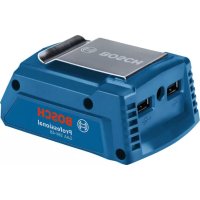
GAA 18V48 Professional - Battery charger BOSCH - Free user manual and instructions
Find the device manual for free GAA 18V48 Professional BOSCH in PDF.



| Product type | Battery adapter |
| Brand | Bosch |
| Model | GAA 18V48 Professional |
| Supply voltage | 18 V (via Bosch battery) |
| Compatible battery type | Lithium-Ion 18 V (GBA 18V... and ProCORE18V...) |
| USB ports | 2 USB type A ports, 5 V, 2.4 A (max total) |
| Output for heating element | 12 V, 1.2 A |
| Operating temperature | -20 to +50 °C |
| Recommended charging temperature | 0 to +35 °C |
| Max USB cable length | 1.5 m |
| Charge level indicator | LED on battery |
| Belt clip | Yes |
| Maintenance | Clean ventilation slots with a soft, dry and clean brush |
| Safety | Do not open the battery, avoid short circuits, protect from moisture and heat |
| Spare parts | Available through Bosch after-sales service (reference 1 600 A02 C..) |
| Repairability | Repair possible by Bosch customer service |
| Power supply | Bosch 18V battery (not included) |
| Activation | Via Power button (5) |
Frequently Asked Questions - GAA 18V48 Professional BOSCH
User questions about GAA 18V48 Professional BOSCH
0 question about this device. Answer the ones you know or ask your own.
Ask a new question about this device
Download the instructions for your Battery charger in PDF format for free! Find your manual GAA 18V48 Professional - BOSCH and take your electronic device back in hand. On this page are published all the documents necessary for the use of your device. GAA 18V48 Professional by BOSCH.
USER MANUAL GAA 18V48 Professional BOSCH
GAA 18V-48 Professional
Robert Bosch Power Tools GmbH
70538 Stuttgart
GERMANY
www.bosch-pt.com
1609 92A 7F7 (2022.06) O/244

1 609 92A 7F7
natural_image
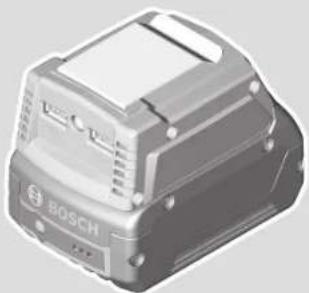
Illustration of a Bosch industrial sensor device (no text or symbols visible)natural_image
3D diagram of a mechanical component with labeled parts (1) and (6), showing internal structure without any text or symbols beyond labels.A2
1 609 92A 7F7 | (28.06.2022) Bosch Power Tools
Bosch Power Tools 1 609 92A 7F7 | (28.06.2022)
Deutsch
Sicherheitshinweise

Akku-Adapter GAA 18V-48
www.bosch-pt.com/serviceaddresses
Transport
Read all the safety information and general instructions. Failure to observe the safety information and general instructions may result in electric shock, fire and/or serious injury.
Keep all the safety information and general instructions for future reference.
▶ Use only the rechargeable batteries listed in the technical data. Using other batteries can lead to injuries and pose a fire hazard.
▶ Do not insert the battery into the battery adapter if the release buttons are broken or faulty. The battery may fall out during operation.
▶ Do not open the battery. There is a risk of short-circuiting.
In case of damage and improper use of the battery, vapours may be emitted. The battery can set alight or explode. Ensure the area is well ventilated and seek medical attention should you experience any adverse effects. The vapours may irritate the respiratory system.
If used incorrectly or if the battery is damaged, flammable liquid may be ejected from the battery. Contact with this liquid should be avoided. If contact accidentally occurs, rinse off with water. If the liquid comes into contact with your eyes, seek additional medical attention. Liquid ejected from the battery may cause irritation or burns.
The battery can be damaged by pointed objects such as nails or screwdrivers or by force applied externally. An internal short circuit may occur, causing the battery to burn, smoke, explode or overheat.
When the battery is not in use, keep it away from paper clips, coins, keys, nails, screws or other small metal objects that could make a connection from one terminal to another. A short circuit between the battery terminals may cause burns or a fire.

Protect the battery against heat, e.g. against continuous intense sunlight, fire, dirt, water and moisture. There is a risk of explosion and short-circuiting.
Product Description and Specifications

Read all the safety and general instructions. Failure to observe the safety and general instructions may result in electric shock, fire and/or serious injury.
Please observe the illustrations at the beginning of this operating manual.
Intended Use
The battery adapter is intended for use with a Bosch 18 V lithium-ion rechargeable battery as the power source. The battery adapter can be used to power a maximum of two USB devices and one heating element for the heated jacket at any one time.
Product Features
The numbering of the product features refers to the diagram of the power tool on the graphics page.
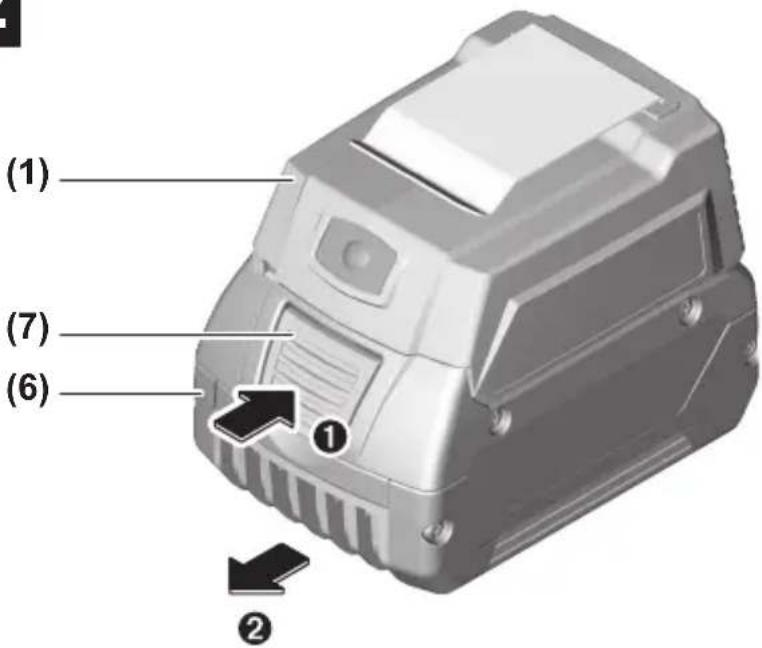
(1) Battery adapter
(2) USB port
(3) Socket for connector plug of heating element for heated jacket
(4) Belt clip
(5) "On" button for switching on the battery adapter
(6) Rechargeable battery ^a)
(7) Rechargeable battery release button
a) Accessories shown or described are not included with the product as standard. You can find the complete selection of accessories in our accessories range.
Technical Data
| Battery adapter GAA 18V-48 | |
| Article number | 1 600 A02 C.. |
| USB port 2 x type A | |
| - Output voltage V=5 | |
| - Output current ^A) with 1 USB device connected | A 2.4 |
| - Output current ^A) per USB device with 2 USB devices connected | A 2.4 |
Bosch Power Tools 1 609 92A 7F7 | (28.06.2022)
16 | English
Battery adapter GAA 18V-48
| Connection for heating element Heated workwear | |
| - Output voltage V= 12 | |
| - Output current B) | A 1.2 |
| Max. permitted length of USB cable m 1.5 | |
| Recommended ambient temperature during charging | °C 0 to +35 |
| Permitted ambient temperature during operation C) and during storage | °C -20 to +50 |
| Recommended rechargeable batteries D) | GBA 18V...ProCORE18V... |
| Recommended chargers GAL 18... | GAX 18...GAL 36... |
A) The actual output current depends on the USB device connected.
B) The actual output current depends on the configuration of the heated workwear.
C) Limited performance at temperatures < 0 °C
D) The following rechargeable batteries must not be used with the battery adapter:
-1607A350BG
- 1 607 A35 0MA
- 1 607 A35 0MR
- 1 607 A35 0M0
-2607336815
-2607337069
-1607A350AN
-1607A350ET
Rechargeable battery
Inserting and Removing the Battery (see figures A1-A2)
▶ Do not use force to insert the battery. The battery is designed in such a way that it can only be inserted into the battery adapter when it is in the right position.
To insert the battery (6), push it all the way into the battery adapter (1).
To remove the battery (6), press the release buttons (7) on the battery and pull it out of the battery adapter (1).
Battery charge indicator
The green LEDs on the battery charge indicator indicate the state of charge of the battery. For safety reasons, it is only possible to check the state of charge when the power tool is not in operation.
Press the button for the battery charge indicator or to show the state of charge.
This is also possible when the battery is removed.
If no LED lights up after pressing the button for the battery charge indicator, then the battery is defective and must be replaced.
Battery model GBA 18V...

LED Capacity
| 3× continuous green light 60–100 % |
| 2× continuous green light 30–60 % |
| 1× continuous green light 5–30 % |
| 1× flashing green light 0–5 % |
Battery model ProCORE18V...

LED Capacity
| 5 × continuous green light 80–100 % |
| 4 × continuous green light 60–80 % |
| 3 × continuous green light 40–60 % |
| 2 × continuous green light 20–40 % |
| 1 × continuous green light 5–20 % |
| 1 × flashing green light 0–5 % |
Recommendations for Optimal Handling of the Battery
Protect the battery against moisture and water.
Only store the battery within a temperature range of -20 to 50 °C. Do not leave the battery in your car in the summer, for example.
18 | English
Occasionally clean the ventilation slots on the battery using a soft brush that is clean and dry.
A significantly reduced operating time after charging indicates that the battery has deteriorated and must be replaced.
Follow the instructions on correct disposal.
Operation
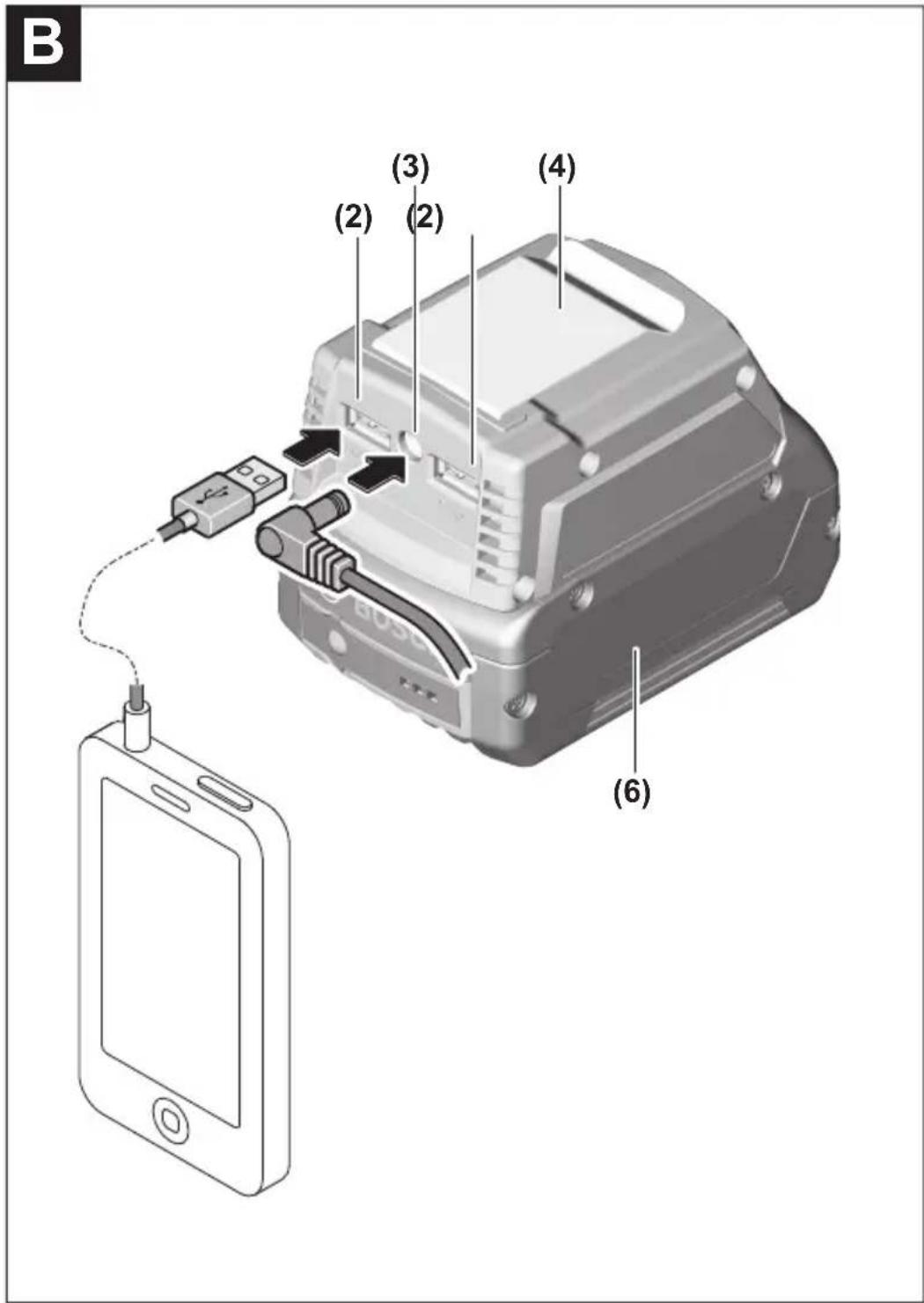
Charging External USB Devices (see figure B)
You can use the USB port on the battery adapter (1) to increase the battery runtime of various battery-operated USB devices, e.g. mobile phones, MP3 players or tablets.
▶ Ensure that your external USB device can be charged using the USB port on the battery adapter. Refer to the specifications related to this topic in "Technical data".
- Plug the charging cable of your USB device into the USB socket (2) on the battery adapter (1).
- Press the "on" button (5) to switch on the battery adapter. The "on" button (5) will light up. If no charging cable is connected, the USB ports are automatically deactivated after 30 seconds. The "on" button (5) light will go out.
To save energy, the USB ports are automatically deactivated upon completion of the charging process.
Connecting the Heating Element (see figure B)
- Plug the connector plug of the heating element into the socket (3) on the battery adapter (1).
- Press the "on" button (5) to switch on the battery adapter. The "on" button (5) will light up.
Select the setting on the heated workwear. Follow the operating instructions for heated workwear.
- Slide the battery adapter (1) into the pocket provided in the garment or attach the battery adapter to your belt using the belt clip (4).
Rectifying Faults
| Problem Corrective measures | |
| External USB device cannot be charged using the USB port. | Charge the battery |
| Connect the charging cable of the external USB device to the USB port (2) on the battery adapter (1). Switch on the battery adapter (1) with the "on" button (5). | |
| The external USB device cannot be charged using the USB port on the battery adapter (refer to specifications in "Technical data" A). | |
| Heating element does not warm up. | Charge the battery |
| Connect the cable of the heating element to the port (2) on the battery adapter (1). Switch on the battery adapter (1) with the "on" button (5). | |
| Garment is not being heated and external USB device is not being charged. | Remove the rechargeable battery from the adapter. |
| Wait 10 seconds | |
| Insert the rechargeable battery in the adapter again. | |
A) Some external USB devices cannot be charged with this battery adapter despite being consistent with the technical data.
Maintenance and Service
After-Sales Service and Application Service
Our after-sales service responds to your questions concerning maintenance and repair of your product as well as spare parts. You can find explosion drawings and information on spare parts at: www.bosch-pt.com
The Bosch product use advice team will be happy to help you with any questions about our products and their accessories.
In all correspondence and spare parts orders, please always include the 10-digit article number given on the nameplate of the product.
Great Britain
Robert Bosch Ltd. (B.S.C.)
P.O. Box 98
Broadwater Park
North Orbital Road
20 | English
Denham Uxbridge
UB 9 5HJ
At www.bosch-pt.co.uk you can order spare parts or arrange the collection of a product in need of servicing or repair.
Tel. Service: (0344) 7360109
E-Mail: boschservicecentre@bosch.com
You can find further service addresses at:
www.bosch-pt.com/serviceaddresses
Transport
Lithium-ion batteries are subject to the Dangerous Goods Legislation requirements. The batteries are suitable for road-transport by the user without further restrictions.
When shipping by third parties (e.g.: by air transport or forwarding agency), special requirements on packaging and labelling must be observed. For preparation of the item being shipped, consulting an expert for hazardous material is required.
Dispatch battery packs only when the housing is undamaged. Tape or mask off open contacts and pack up the battery in such a manner that it cannot move around in the packaging. Please also observe the possibility of more detailed national regulations.
Disposal

Electrical and electronic equipment, batteries, accessories and packaging should be sorted for environmentally friendly recycling.
Do not dispose of electrical and electronic equipment and batteries in the household waste!
Only for EU countries:
According to the Directive 2012/19/EU on waste electrical and electronic equipment and its transposition into national law, electrical and electronic equipment that are no longer usable, and, according to the Directive 2006/66/EC, defective or drained batteries must be collected separately and disposed of in an environmentally correct manner.
If disposed incorrectly, waste electrical and electronic equipment may have harmful effects on the environment and human health, due to the potential presence of hazardous substances.
Only for United Kingdom:
According to The Waste Electrical and Electronic Equipment Regulations 2013 (SI 2013/3113) (as amended) and the Waste Batteries and Accumulators Regulations 2009 (SI 2009/890) (as amended), products that are no longer usable must be collected separately and disposed of in an environmentally friendly manner.
Battery packs/batteries:
Li-ion:
Please observe the notes in the section on transport (see "Transport", page 20).
Français
Robert Bosch (France) S.A.S.
Bosch Power Tools 1 609 92A 7F7 | (28.06.2022)
28 | Français
www.bosch-pt.com/serviceaddresses
Transport
www.bosch-pt.com/serviceaddresses
Transporte
www.bosch-pt.com/serviceaddresses
Transporte
www.bosch-pt.com/serviceaddresses
Trasporto
Accu-adapter GAA 18V-48
Aanbevolen oplaadapparaten GAL 18...
GAX 18...
GAL 36...
www.bosch-pt.com/serviceaddresses
Vervoer
Akku-adapter GAA 18V-48
Bosch Service Center
Telegrafvej 3
2750 Ballerup
På www.bosch-pt.dk kan der online bestilles reservedele eller oprettes en reparations ordre.
Tlf. Service Center: 44898855
Fax: 44898755
E-Mail: vaerktoej@dk.bosch.com
www.bosch-pt.com/serviceaddresses
1 609 92A 7F7 | (28.06.2022) Bosch Power Tools
Transport
Batteriadapter GAA 18V-48
Bosch Service Center
Telegrafvej 3
2750 Ballerup
Danmark
Tel.: (08) 7501820 (inom Sverige)
Fax: (011) 187691
www.bosch-pt.com/serviceaddresses
Transport
Batteriadapter GAA 18V-48
Anbefalte ladere GAL 18...
GAX 18...
GAL 36...
www.bosch-pt.com/serviceaddresses
Transport
Akkuadapteri GAA 18V-48
www.bosch-pt.com/serviceaddresses
Kuljetus
www.bosch-pt.com/serviceaddresses
Μεταφορά
www.bosch-pt.com/serviceaddresses
Nakliye
Adapter do akumulatora GAA 18V-48
Robert Bosch Sp. z o.o.
www.bosch-pt.com/serviceaddresses
Transport
Bosch Service Center PT
K Vápence 1621/16
692 01 Mikulov
www.bosch-pt.com/serviceaddresses
Přeprava
www.bosch-pt.com/serviceaddresses
Transport
www.bosch-pt.com/serviceaddresses
Szállítás
www.bosch-pt.com/serviceaddresses
Транспортировка
www.bosch-pt.com/serviceaddresses
Транспортування
www.bosch-pt.com/serviceaddresses
Тасымалдау
Service scule electrice
Strada Horia Măcelariu Nr. 30–34, sector 1
013937 Bucureşti
www.bosch-pt.com/serviceaddresses
Transport
Service scule electrice
Strada Horia Măcelariu Nr. 30–34, sector 1
013937 Bucureşti, România
www.bosch-pt.com/serviceaddresses
Транспортиране
www.bosch-pt.com/serviceaddresses
Транспорт
Akumulatorski adapter GAA 18V-48
www.bosch-pt.com/serviceaddresses
Transport
Litijum-jonski akumulatori podležu propisima koji važe za opasne materije. Korisnik može transportovati akumulatore na drumu bez drugih pakovanja.
Kod slanja preko trećih lica (npr. vazdušnim transportom ili špedicijom) mora se obratiti pažnja na posebne zahteve u pogledu pakovanja i označavanja. Tada se kod pripreme paketa za slanje mora pozvati stručnjak za opasne materije.
Akumulatorske baterije šaljite samo ako kućište nije oštećeno. Odlepite otvorene kontakte i upakujte akumulatorsku bateriju tako, da se ne pokreće u paketu. Molimo da obratite pažnju na eventualne dalje nationalne propise.
Uklanjanje dubreta

Električne uređaje, akumulatorske baterije/akumulatore, pribor i pakovanja treba predati na reciklažu koja je u skladu sa zaštitom životne sredine.
Električne uređaje i akumulatorske baterije/baterije nemojte da bacate u kućno smeće!
Samo za EU-zemlje:
Prema evropskoj direktivi 2012/19/EU o starim električnim i elektronskim uređajima i njenoj primeni u nacionalnom pravu, električni uređaji koji se više ne mogu koristiti, a prema evropskoj direktivi 2006/66/EC akumulatori/baterije koje su u kvaru ili istrošene moraju se odvojeno sakupljati i uključiti u reciklažu koja ispunjava ekološke uslove.
www.bosch-pt.com/serviceaddresses
Transport
www.bosch-pt.com/serviceaddresses
Transport
Litij-ionske aku-baterije podliježu zakonu o transportu opasnih tvari. Korisnik bez ikakvih preduvjeta može transportirati aku-baterije cestovnim transportom.
Akuadapter GAA 18V-48
www.bosch-pt.com/serviceaddresses
Transport
Akumulatora adapters GAA 18V-48
www.bosch-pt.com/serviceaddresses
216 | Latviešu
Transportēšana
www.bosch-pt.com/serviceaddresses
Transportavimas
www.bosch-pt.com/serviceaddresses
Bosch Power Tools 1 609 92A 7F7 | (28.06.2022)
230|한국어
운반
يلزم ذكر رقم presentsPreference zum Questions of the English and France for the purpose of the Internet. Except from the Internet, it is an important reason for the use of the Internet.
Robert Bosch Morocco SARL
www.bosch-pt.com/serviceaddresses
النقل
| 5% 100-80 | |
| 4% 80-60 | |
| 3% 60-40 | |
| 2% 40-20 | |
| 1% 20-5 | |
| 1% 5-0 |
www.bosch-pt.com/serviceaddresses
CALL DSTKAW



- GAA 18V-48 Professional
- Deutsch
- Sicherheitshinweise
- Transport
- Product Description and Specifications
- Intended Use
- Product Features
- Rechargeable battery
- Inserting and Removing the Battery (see figures A1-A2)
- Battery charge indicator
- Battery model GBA 18V...
- Battery model ProCORE18V...
- Recommendations for Optimal Handling of the Battery
- | English
- Operation
- Charging External USB Devices (see figure B)
- Connecting the Heating Element (see figure B)
- Maintenance and Service
- After-Sales Service and Application Service
- Great Britain
- | English
- You can find further service addresses at:
- Disposal
- Only for EU countries:
- Only for United Kingdom:
- Battery packs/batteries:
- Français
- | Français
- Transporte
- Trasporto
- Accu-adapter GAA 18V-48
- Vervoer
- Batteriadapter GAA 18V-48
- Akkuadapteri GAA 18V-48
- Kuljetus
- Μεταφορά
- Nakliye
- Adapter do akumulatora GAA 18V-48
- Přeprava
- Szállítás
- Транспортировка
- Транспортування
- Тасымалдау
- Транспортиране
- Транспорт
- Akumulatorski adapter GAA 18V-48
- Uklanjanje dubreta
- Samo za EU-zemlje:
- | Latviešu
- Transportēšana
- Transportavimas
- 230|한국어
- 운반
- النقل
Brand : BOSCH
Model : GAA 18V48 Professional
Category : Battery charger