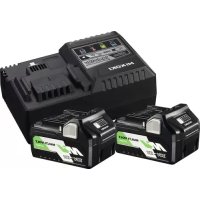
UC18YSL3WEZ - Battery HiKOKI - Free user manual and instructions
Find the device manual for free UC18YSL3WEZ HiKOKI in PDF.



| Product type | Battery charger |
| Brand | HiKOKI |
| Model | UC18YSL3WEZ |
| Charging voltage | 14.4 V - 18 V |
| Weight | 0.6 kg |
| Compatible battery type | Li-ion (BSL14, BSL18, MV series) |
| Power supply | Mains (power cord) |
| USB port | Yes (USB device charging) |
| Charge indicator | Red/blue/green/purple LED |
| Audible signal | Yes (continuous or intermittent) |
| Charging temperature | -10 °C to 50 °C |
| Charging time (example) | 5.0 Ah: 32 min |
| Protections | Overheating, short circuit, overcharge |
| Maintenance | Clean with dry or slightly damp cloth (soapy water) |
| Safety | Do not expose to rain, do not use with other chargers |
| Storage | Dry location, elevated or locked, out of reach of children |
Frequently Asked Questions - UC18YSL3WEZ HiKOKI
User questions about UC18YSL3WEZ HiKOKI
0 question about this device. Answer the ones you know or ask your own.
Ask a new question about this device
Download the instructions for your Battery in PDF format for free! Find your manual UC18YSL3WEZ - HiKOKI and take your electronic device back in hand. On this page are published all the documents necessary for the use of your device. UC18YSL3WEZ by HiKOKI.
USER MANUAL UC18YSL3WEZ HiKOKI
- Keep work area clean. Cluttered areas and benches invite accidents.
- Avoid dangerous environment. Don't expose power tools and charger to rain. Don't use power tools and charger in damp or wet locations. And keep work area well lit.
Never use power tools and charger near fl ammable or explosive materials.
Do not use tool and charger in presence of flammable liquids or gases. - This appliance is not intended for use by persons (including children) with reduced physical, sensory or mental capabilities, or lack of experience and knowledge, unless they have been given supe or instruction concerning use of the appliance by a person responsible for their safety.
Children should be supervised to ensure that they not play with the appliance. - Store idle tools and charger. When not in use, tools and charger should be stored in dry, high or up place — out of reach or children. Store tools and charger in a place in which the temperature is less than 40^ .
- Don't abuse cord. Never carry charger by cord or yank it to disconnect from receptacle. Keep cord from heat, oil and sharp edges.
- When the charger is not in use or when being maintained and inspected, disconnect the power cord of the charger from the receptacle.
- To avoid danger, always use only the specified charger.
- Use only genuine HiKOKI replacement parts.
- Do not use power tools and charger for applications other than those specified in the Handling Instructions.
- To avoid personal injury, use only the accessories or attachment recommended in these handling instructions or in the HiKOKI catalog.
- If the supply cord is damaged, it must be replaced by the manufacture or its service agent or a similarly qualified person in order to avoid a hazard.
Let only the authorized service center do the repairing. The Manufacture will not be responsible for any damages or injuries caused by repair by the unauthorized persons or by mishandling of the tool.
- To ensure the designed operational integrity of power tools and charger, do not remove installed covers or screws.
- Always use the charger at the voltage specified on the nameplate.
- Always charge the battery before use.
- Never use a battery other than that specified. Do not connect a usual dry cell, a rechargeable battery other than that specified or a car battery to the power tool.
- Do not use a transformer containing a booster.
- Do not charge the battery from DC power supply.
- Always charge indoors. Because the charger and battery heat slightly during charging, charge the battery in a place not exposed to direct sunlight; where the humidity is low and the ventilation is good.
- Use the exploded assembly drawing on this handling instructions only for authorized servicing.
PRECAUTIONS FOR CHARGER
- Always charge the battery at an ambient temperature of -10 - 40^ . A temperature of less than -10^ will result in over charging which is dangerous. The battery cannot be charged at a temperature greater than 40^ .
The most suitable temperature for charging is that of 20 - 25^ - Do not use the charger continuously.
When one charging is completed, leave the charger for about 15 minutes before the next charging of battery.
- Do not allow foreign matter to enter the hole for connecting the rechargeable battery.
- Never disassemble the rechargeable battery or charger.
- Never short-circuit the rechargeable battery.
Short-circuiting the battery will cause a great electric
do current and overheat. It results in burn or damage to the battery.
6. Do not dispose of the battery in fire. If the battery is burnt, it may explode.
7. Using an exhausted battery will damage the charger.
8. Bring the battery to the shop from which it was purchased as soon as the post-charging battery life becomes too short for practical use. Do not dispose of the exhausted battery.
9. Do not insert objects into the air ventilation slots of the charger.
Inserting metal objects or flammable into the charger air ventilation slots will result in an electrical shock hazard or damage to the charger.
USB DEVICE CONNECTION PRECAUTIONS
When an unexpected problem occurs, the data in a USB device connected to this product may be corrupted or lost. Always, make sure to back up any data contained in the USB device prior to use with this product.
Please be aware that our company accepts absolutely no responsibility for any data stored in a USB device that is corrupted or lost, nor for any damage that may occur to a connected device.
SPECIFICATION
| Model | UC18YSL3 |
| Charging voltage | 14.4 V – 18 V |
| Weight | 0.6 kg |
APPLICATION
For charging the HiKOKI BATTERY BSL14 series, BSL18 series, and MV series.
CHARGING
Before using the power tool, charge the battery as follows.
- Connect the charger's power cord to the receptacle.
When connecting the plug of the charger to a receptacle, the charge indicator lamp will blink in red (At 1-second intervals).
- Insert the battery into the charger.
Firmly insert the battery into the charger as shown in Fig. 1.
3. Charging
When inserting a battery in the charger, the charge indicator lamp will blink in blue.
When the battery becomes fully recharged, the charge indicator lamp will light up in green. (See Table 1)
(1) Charge indicator lamp indication
The indications of the charge indicator lamp will be as shown in Table 1, according to the condition of the charger or the rechargeable battery.
Table 1
| Indications of the charge indicator lamp | ||||
| Charge indicator lamp (RED / BLUE / GREEN / PURPLE) | Before charging | Blinks (RED) | Lights for 0.5 seconds. Does not light for 0.5 seconds. (off for 0.5 seconds) | Plugged into power source |
| While charging | Blinks (BLUE) | Lights for 0.5 seconds. Does not light for 1 second. (off for 1 second) | Battery capacity at less than 50% | |
| Blinks (BLUE) | Lights for 1 second. Does not light for 0.5 seconds. (off for 0.5 seconds) | Battery capacity at less than 80% | ||
| Lights (BLUE) | Lights continuously | Battery capacity at more than 80% | ||
| Charging complete | Lights (GREEN) | Lights continuously (Continuous buzzer sound: about 6 seconds) | ||
| Overheat standby | Blinks (RED) | Lights for 0.3 seconds. Does not light for 0.3 seconds. (off for 0.3 seconds) | Battery overheated. Unable to charge. (Charging will commence when battery cools) | |
| Charging impossible | Flickers (PURPLE) | Lights for 0.1 seconds. Does not light for 0.1 seconds. (off for 0.1 seconds) (Intermittent buzzer sound: about 2 seconds) | Malfunction in the battery or the charger | |
(2) Regarding the temperatures and charging time of the rechargeable battery The temperatures and charging time will become as shown in Table 2.
Table 2
| Charger Battery | UC18YSL3 | ||
| Charging voltage V 14.4 18 | |||
| Type of battery Li-ion | |||
| Temperatures at which the battery can be recharged | -10°C - 50°C | ||
| Charging time for battery capacity, approx. (At 20°C) | |||
| 1.3 Ah | min. | 15 (4 cells) | 15 (5 cells) |
| 1.5 Ah | min. | 15 (4 cells) | 15 (5 cells) |
| 2.0 Ah | min. | 20 (4 cells) | 20 (5 cells) |
| 2.5 Ah | min. | 25 (4 cells) | 25 (5 cells) |
| 3.0 Ah | min. | 20 (8 cells) | 20 (10 cells) |
| 4.0 Ah | min. | 26 (8 cells) | 26 (10 cells) |
| 5.0 Ah | min. | 32 (8 cells) | 32 (10 cells) |
| 6.0 Ah | min. | 38 (8 cells) | 38 (10 cells) |
| 8.0 Ah | min. | — | 52 (10 cells) |
NOTE
The recharging time may vary according to the ambient temperature and power source voltage.
-
Disconnect the charger's power cord from the receptacle.
-
Hold the charger firmly and pull out the battery.
NOTE
Be sure to pull out the battery from the charger after use, and then keep it.
Regarding electric discharge in case of new batteries, etc.
As the internal chemical substance of new batteries and batteries that have not been used for an extended period is not activated, the electric discharge might be low when using them the first and second time. This is a temporary phenomenon, and normal time required for recharging will be restored by recharging the batteries 2-3 times.
How to make the batteries perform longer.
(1) Recharge the batteries before they become completely exhausted.
When you feel that the power of the tool becomes weaker, stop using the tool and recharge its battery. If you continue to use the tool and exhaust the electric current, the battery may be damaged and its life will become shorter.
(2) Avoid recharging at high temperatures.
A rechargeable battery will be hot immediately after use. If such a battery is recharged immediately after use, its internal chemical substance will deteriorate, and the battery life will be shortened. Leave the battery and recharge it after it has cooled for a while.
CAUTION
If the battery is charged while it is heated because it has been left for a long time in a location subject to direct sunlight or because the battery has just been used, the charge indicator lamp of the charger lights for 0.3 seconds, does not light for 0.3 seconds (off for 0.3 seconds). In such a case, first let the battery cool, then start charging.
- When the charge indicator lamp flickers (at 0.2-second intervals), check for and take out any foreign objects in the charger's battery connector. If there are no foreign objects, it is probable that the battery or charger is malfunctioning. Take it to your authorized Service Center.
Since the built-in micro computer takes about 3 seconds to confirm that the battery being charged with UC18YSL3 is taken out, wait for a minimum of 3 seconds before reinserting it to continue charging. If the battery is reinserted within 3 seconds, the battery may not be properly charged.
HOW TO RECHARGE USB DEVICE
WARNING
Prior to use, check the connecting USB cable for any defect or damage.
Using a defective or damaged USB cable can cause smoke emission or ignition.
Use a connecting USB cable of less than 2m
- When the product is not being used, cover the USB port with the rubber cover.
Buildup of dust etc. in the USB port can cause smoke emission or ignition.
NOTE
There may be an occasional pause during USB recharging.
- When a USB device is not being charged, remove the USB device from the charger.
Failure to do so may not only reduce the battery life of a USB device, but may also result in unexpected accidents.
(1) Select a charging method
Depending on the charge method selected, either the battery is inserted into the charger or the power cord is plugged into an outlet.
O Charging a USB device from a electrical outlet (Fig. 2-a)
- Charging a USB device and battery from a electrical outlet (Fig. 2-b)
(2) Connect the USB cable. (Fig. 3)
Pull back the rubber cover and firmly plug in a commercially available USB cable (appropriate to the device being charged) into the USB port.
(3) When charging is completed
To verify charge status, check the USB device.
- Unplug the power cord from the electrical outlet.
Place the rubber cover over the USB port.
MAINTENANCE AND INSPECTION
1. Inspecting the mounting screws
Regularly inspect all mounting screws and ensure that they are properly tightened. Should any of the screws be loose, retighten them immediately. Failure to do so could result in serious hazard.
2. Cleaning of the charger
When the charger is stained, wipe with a soft dry cloth or a cloth moistened with soapy water. Do not use chloric solvents, gasoline or paint thinner, for they melt plastics.
3. Store idle charger
When not in use, the charger should be stored in dry, high or locked-up place — out of reach of children.
CAUTION
In the operation and maintenance of power tools, the safety regulations and standards prescribed in each country must be observed.
NOTE
Due to HiKOKI's continuing program of research and development, the specific cations herein are subject to change without prior notice.
ALLGEMEINE
VORSICHTSMASSNAHMEN
VOORZORGSGMAATREGELEN AANSLUITING USB-APPARAAT
VEDLIKEHOLD OG INSPEKSJON
1. Inspisere monteringsskruene
Introduci corect accumulatorul in incarcator, conform Fig.1.
3. Incarcare
Cand introduci un accumulator in incarcator, indicatorul luminos de incarcare va clipi inculoare albastra.
1.ИHCNEKцHA MOHTaHHNTe BnHTOBe
PeIOBHO HNCNEKTHnpaHTe BCNUHMOHTaHH BnHTOBe n ce yBpTe, ye ca do6pe 3aTeHnat. Ako YCTaHObTE pa3XJIa6EH BnHT, He3a6abHO r0 3aTeHHe. Hecna3BaHTo Ha rOpHTo Kpne pncObe OT cepno3Ha onaCHOCT.
2.ПоунICTBaHеHa3apAДHOTyoyCTpoIcTBO
Pn 3aMbpCBAHe Ha 3apJHOTO yCTPOIcTBO, N36bPWeTe C MeKO u cyxo Napye PnAT nIN KbPna, HABJIaXHeHa B CanyHeHa BODa. He n3No13BaIte pa3TBOpHTeNn Ha XLOpHa OCHOba, 6eHNn INn pa3peDHTe 3a 6oN, TbN KaTO Te ue pa3raTn IIACTMacata.
3. CbXpaHbAhe Ha 3apAnHO yCTpOcTBO, HoETo He ce H3NoJ3Ba
Korato He ce n3noJ3Ba, 3apAnHOTo yCTpoNCTBO Tpr6Ba Da 6bDe cbxpaHraBaHo Ha cyxo, BnCOKO MRCTO -n3BbH DoCTbHa Ha Deua.
BHIMAHNE
IIO BpeMe Ha pa6oTa n NODpBxKHa Ha eEKeTpueeCKn ypeDn Tpr6Ba Da ce Cna3Bat pa3npoe6nte n CTaHdaptnte 3a 6e30NaCHOCT 3a BC8Ka CtpaHa.
3ABEJIEXKA
B pe3yIaT ha nporpaMaTa 3a HenpeKbChaToTo pa3BHTne Ha HayNo-pa3BOiHaTa DeHocT Ha HiKOKI, daHeHITe Tyk CneuФnKaun ca npedMeT Ha npomHa 6ez yBeDOMJIeHne.
OPSTE MERE PREDOSTROZNOSTI TOKOM UPOTREBE
3ACTEPEKHEHNAO3APADHOIPINCTPOIO
- 3aBxHn 3apJHkaIte 6aTapeo 3a HABKOLHbOITempepatyn -10-40°C.Tempepatya, HxHcy -10°C, npn3BeDe do nepeBaHTaKeHH, uO e He6e3neHnM. He 3apJHkaIte 6aTapeo 3a Tempepatyn noHaD 40^ Haikpaae dIy 3apJHkaHHnPiXoHnTb Tempepatya 20-25°C.
- He BHKOPNCOTByTe 3apAHHn npHCTpiB6e3nepepBHO. HoN 3apAHa oDHei 6bataei 6yde NOBHicTIO 3aBepSeHa, Heo6xIHHO 3aINuHTn 3apAHHn npCTpiY BVMKHeHOMy CTaHI np6IIN3HO Ha 15 XBNH, nepeTm JIK pNCTUYNTn Do 3apAHHn HAcTyHNOi 6bataei.
- He do3boJrte cToPOHHim peOBOHnAM nOTpAnJIrtn B OTBip Ira niHIOUeHHa kMyIyrTopHOi 6aTapei.
- Hikoli He po3bnpaTe aKymyIaTOpHy 6aTaapeIO Ta 3apdHn npCTpii.
- HikoJI He 3aMKaITe aKymyIaTOpHy 6aTapeo HAKOPOTKO. 3aMKaHHa 6aTapei HaKOPOTKO npu3Bede do pi3Koro 36ilbweHHa cTpyM i neperpiBy. Y pe3yIbTaTi 6aTaper 3rOpHTb a6o bye NoWkoJKeHa.
- He KndaaTe 6aTapeo y BOroHb. PdnaIeHa 6aTaper MOKe BHyHTN.
- BnKOpncTaHHB iDnpaCboBaHOi 6atapei npn3Bepe do nOuHKoJKeHH 3apdHOro npncTpoIO.
- BiHecitb BnKOpNCTaHI 6aTapei B Mara3HN, De BOHn 6yIn npuD6aHI, RaIO TepMn CnyK6n 6aTapei nicna 3apJKn cTaHe 3aHaTO KOpOTKm DnI x npaHTNuHO BnKOpNCTaHH. He JIKBiYnTe BiINpaCbObaHi 6aTapei camocTiHo.
9.He BCTaBIAIte 6yDb-RAKIN CTOpOHHIN ppeIMET B UINHN NOBITpHOI BEHTNIAJI 3apADnHO rnpCTPOIO. IonaAanHH MeTaeBnx npEIMeTIB a60 IerKO3aMnCtHX MaTePiaJIB B UINHN NOBITpHOI BEHTNIAJI 3apADnHO rnpCTPOIO MOKe PnVBecTH N pe3yIbTaTI Do ypaKeHH EJeKTPnHm CTrpyMOM a6o Do nOwKOJHeHH 3apADnHO pnpCTPOIO.
3ACTEPEKHEHNAOIOIINJIIOUHNEHPNCTPOIOUSB
PnBHHKHeHHI Henepe6aHcHIO npo6JIemN, IHOpMaJia, 3no 3NaXoJaTbcB npncTpoi USB, nIKHOyeHomy do cyboro npOdyHTy, moKe 6yTu noWkoJxHa a60 BtpaHeA.ObOB'3KOBO 3pO6Itb pe3epBHy konio daHNx, 3o MCTaTBcRa Ha cBOMy USB npncTpoi, nepeD TmM RA BHKOPNCTOByBaTH 3UIM npOdyKTOM.
3ayBaKTe, 0o Hawa KomnaHie He 6epe Ha ce6e JKOHOI BiINOBiAaBHoCTI 3a 6yDb-9nIOwKOJKeHi a6o BTPaChi dani, 0o 36epiraObCBy nPncTpoi USB, a TAOX 3a 6yDb-9ky WKODY, Jka MoKe 6yTN 3aBdaHa NiNlHouChyOMy PnncTPOI.
TEXHIYHI XAPARTEPHCTIKH
| Моdenь | UC18YSL3 |
| Зар每一天на нарува | 14,4 B - 18 B |
| Bara | 0,6 кг |
OBJACTI 3ACTOCYBAHH
ДяЗарднБATAPEI HiKOKI cepii BSL14,cepii BSL18 i cepii MV.
3APRAHKA
Ipeed BnKOpncTaHHm eJeKtpoiHcTpymEnty 3apJITb 6aTapeIO HAcTyNHIM YINHOM.
1.ПдклочьshypнвлеснгзaprdHOropnucpoI0doMepeKeBoi po3etkn.
Ppi NiDJIIOHHeHHI Hhypa KINBLeHHa 3apdHorO
IpnctpoI Do MepeKeBoi po3eTKn IHdNHaTOp
3apdKaHH 6yde 6nMaTH YepBOHIM
(31-ceHyHdHMn iHTepBaIaMn).
- BcTaBTe 6aTapeo B 3apAHH npucTpii.
IIO KINU BCTaBTe 6aTapeIO B 3apHn NpncTpI, RK 3aHaueHO Ha Man.1.
- 3apdHa
PnBCTaHOBHeHHi 6aTaapei B 3apAHN npncTpi INdkaTop 3apAHHaHH 6yde 6bnmatu CnHIM.
Koln 6aTapei NOBHCIO 3aprntbcr, iHdkatop 3apxHHN IOyHe CBIITNC3eJIeHM. (INB. Ta6n101)
(1)Poka3aHHI INdIKaToppa 3apJxKaHH
Iokaahn H iHdkaTopa 3apJkaHH HaHaHO B
Ta6nci 1, BiINObIDHO DO CTaHy 3aprHOro npncTroIO n aKymyIaTOpHoI 6atapei.
Ta6n1a 1
- 36epiraHnHa 3apdHoro npncToPO, 0 He BHKOpNCTOBycTbC
JaHIO 3apAHHN npnCTpi He BHKOPNCOTByOTbC, Ioro cIiD 36epiratyn y cyxomy Micui Ha BnCOTi aOo B 3aKpNTOMy npmiiueHHi, Kdyi DiTIHe MOHyT bIcTaN.
OBEPEKHO
IiHacpo6oTuIDor7yC1iD6paTnDoYbarrMiCuEbi HOpMnIcTaHdapTN.
NPMMITHA
Yepe3 noctiHi DocJIiDHeHH i po3BnTOK, Rki 3diHIOE KOMnaHHiKOKI, TexHicHi xapaHTepnCTnKn MoKyTb 3MIHOBaTnC6e3 nonepeJKeHH.
OBUHE MEPbI INPEAOCTOPOXHOCTN PPN PA6OTE
- PndepHnBaIe YNCTOy B pa6oey o6laCTn. 3axJaMeHHbIe O6laCTn N CTOJIbI MOYr CTaTb npuHHO npONcUeCTBNI.
2.И36eAHTe onachoro OKpyxHnHa. He donyckaHTe nonadaHnna 3JeKTPoHnCTpymeHTOB n 3apJHOrO yctpoiCTBa noDdoJb.He nCnoJIb3yHTe 3JeKTPoHnCTpymeHTbl n 3apJdHoe ycTPOIcTB0 B cbIpBx INM MOKpbix MeCTax.A TaKHe o6ecneYbTe xopoUee ocBeueHne paBOe O6laCTn. HIKoRda He nCnoJIb3yHTe 3JeKTPoHnCTpymeHTbl n 3apJdHoe ycTPOIcTB0 B6JIIN3n ORHeONaChbIX INN B3PbIBOONaChbIX MaTePnAIOB. He nCnoJIb3yHTe INcTpymeHT n 3apJdHoe ycTPOIcTB0 npn HaInuHn ORHeONaChbIX JNDKOcTe INN rA3OB.
3.Данhoe yctpoiCTBO He npedHa3NaeHcIy IcNoIb3OBAHnJIuamn(B TOM YHCNE DeTbMn)C HeIOCTaTOUHbIMN fH3NueCKHMn,ceHCOPHBIMn IINYMCTBEHHbIMN cNOOC6HOCTAMn,a TaKHe JInzAMn, He IMEIOUHMn aDEKBaTHORO ONbITa NIN 3HaHN, 3a INCHIOUHEHem ClyaEB,KOrda IcNoIb3OBAHne yCTpOHTBa IPOHCxODNT IOd H6JIoDEHem IIN B COOTBETCTBNn C INHCTpyKJIAmN B OTHOJEHN IcNoIb3OBAHnY yCTpOHTBa,KOTOpBIE OBeCENeuBaOTcR JInzAMn, HecyUHMn HENOCpeDCTBeHHyO OTBETCTBEHHOCtB 3a 6e3ONaCHOCTb NOJb3OBaTeJeI. C ZeIbIoo HeOnyUeHnI HcSeJIeBOrO O6paUeHnI C yCTpOHTBOM Heo6XoDMo ObecneHTb COOTBETCTBYUoIee Ha6JIoDEHnE 3a DEtBMn. - Y6epnTe HEnCnOJIb3yEmbIe INHCTpyMeHTbl I 3apJHOe yCTpOInCTBO. HEnCnOJIb3yEmbIe INHCTpyMeHTbl I 3apJHOe yCTpOInCTBO CNEyET XpaHITb B CYXOM BbicOKom NIN 3aNepTOM MecTe -BHe DOctTyNa DeTeN. XpaHITe INHCTpyMeHTbl I 3apJHOe yCTpOInCTBO B MecTe, Tne TEMnepaTypa He npeBbIwaet 40^
- He donyuchai Te rpy6oro o6paueHn co shypom. Hn B KOem cIyuae He depKHTe 3apdHoe yCTpOcTBO 3a uHyp, a TaKHe He depraite 3a Hero, YTO6b1 OTcoEHNHTb OT po3eKn. depKHTe uHyp Ha ydaJeHn OT hctOuHHKO TBJIa, MaJia n OCTpbIX yIIOB.
- Korda 3aprHoe yCTPOcTBo He nCnOJIb3yETcH NIN BO BpemraeroTexHnueChoro O6ClyKnBaHnN IN PNOBepKn, OTcoeDInHnte cTeBOu WHyP 3aprHOrO yCTPOcTBA OT PO3eTKn.
7.Bo n36eKaHne onaChocTn nCNoJIb3yIte TOnbKO yKa3aHHoe 3apAHHoe yCTpoNCTBO. - Испόлььзун Te Tольно opигинальные заим chaстни HiKOKI.
9.He nCnoJb3yIte 3JIeKtpOnHCTpyMeHTbI 3aPAnHOe yCTpoiCTBO Hn Dnla KaHnx DpyrNx ceJe, KpOme yKa3aHHbIX B INHCTpyKcNn NO 3KcNlNyatauN.
10.Bo n36eKaHHe TpaBM NcNoJIb3yIe ToJIbKO npncnOco6JeHHN HJIN PpHnAdJeXHOCTN, peKOMeHNIOBaHHbIE B DaHHo INcTpyKcHn No 3KcPnyataun nnB KaTalore HiKOKl. - EcInn Hpy nntaHn NOBpeJdeH, erO Heo6xOIM0 3AmEHt b npOn3BOUNTeJI, ppeCTabNTeJI IO TexHnueckOMy o6cIyJHBaHHIO nn y NDo6HOK KBaIIuNtupOBaHHORO nepcoHaJa BO n36eKaHHe onacHOCTn. Pemont DoJIkeH BbINOpHTbcra TOfkO BYNOJHOMOeHHOM ueHTpe TexHnueckoro 6cIyJHBaHHI. PpOn3BOUNTeJI He HeceT OTBeTCTBEHHOCTH 3a NOBpeJDeHn I TpaBMbl, BbI3BaHHbIe peMOHTm HeyIOJHOMOeHHbIMn JInCaMn IIN HEnpaBnIbHbIM O6paUeHNEM C INHCTpyMeHTom.
12.ДЯ obecneuehenpa cachTHo pa60TOcNOcObOCTN 3JIeKTPoHnHCTpyMeHTOBI 3aprHOrO yCTpoHCTBa He ydaJrTe yCTaHOBLeHHbIe KpbIuKN IN BHTbl.
13.063aTeJbHo HcNoJIb3yIte 3apdHoe yCTpoiCTBO cHa npRKeHHeM, Yka3aAHbIM Ha 3aBODCHO TaBnUHe.
14.ObraTeIbHo 3apAnTe 6aTapeo nepei NCIOJIb3OBAHHeM.
15.He nCnoB3yIe 6aTapeo, OTnUauOuYIOc O T yKa3aHHo. He noDcoEINHJTe K 3JeKTPoINHCTpyMeHTy 0bHuHbI cyXHe 3JIeMeHTbl, nepe3apRJaEMbIe 6aTapeN, OTnUauOuNEcER OT yKa3aHHbIX, IJI aBTOMoNBHbIe aKHMyJrTOpbl.
16.He nCnoB3yTe TpaHcΦopMaTOp, coDepeKaun yCTpoNCTBO DnI NOd3apAJa.
17. He 3apjaKaIte 6aTapeHO OT NcToUHnKa NITaHnN NOCTOHHORo TOKa.
18. BbIIOJIHnIte 3apJky ToIbKO B nomeueHH. TaK KaK 3apJdHOe yCTpoiCTBO N 6aTape HEMHOro HarpeBaIOrC BO BpemN HCNoJIb3OBAHH, 3apJKaIte 6aTapeB MecTe, He NOdBepKeHHOMy BO3DeIcTBIO npAmoro CoJIHeuHOrO CBeTa, C Hn3KoN BlaXHOCTbIO N C XopoWe BEHTINIAUne.
19. IcnoIb3yIte DeTaIbHbI c6OpOHyIepeTeK B DaHHoI HnCTpyKuIN NO 3KcnIyatauIN ToJIbKO dJa yNoJHOMOeHHORo TEXHueCKOrO o6ClyKuBaHNIA.
MEPbI INPEdoCTOPOXHHOCHTI JIA 3APrHOrO YCTPOiCTBA
- 3apKaIte 6aTapeo npn OkpyKaIOSei Tempeatype -10-40°C.Tempepatya HnKe -10°C npnbEdet K Upe3MepHOH 3apJNe, YTO pPeCTaBJIeT ONaCHOCTb. BaTapeIO HeBO3MOHIO 3apKaTb npn Tempeatype, npeBbIaHOseY 40^ HAn6Olee 6laIaropnTHaIy Tempepatya IJa 3apKn 6aTapeu coCTaBJIeT OT 20^ Do 25^
- He nCnoIb3yIte 3apJdHoe yCTpoiCTBO HeNpepbIBHO. KOrda 3apJdka OJHOJ 6bATApEN 6yDet NOLHOCTbIO 3aBepseHa, HEo6xOJIMO OCTaBHTb 3apJdHoe yCTpoiCTBO B BBIKIOHeHHOM COCTOHNn PpIMePHo Ha 15 MInHT, nepeD TEM KAK pNcTynITb K 3apJdKe CNeDuOJe 6bATApEN.
- He no3BolnTe NoctopOHnM BeueCTbAM nonaTaB B OTBepCTne dIy NOKIIIOUeHnA KKKMyIaTOpHoi BaTapeN.
- HnKoIa He pa3bnpaIte aKKyMyJIrTOpHyIO 6aTapeHIO 3apJHOe yCTpoiCTBO.
- HnKorda He 3aMbIkaTe aKHyMylrTopHyIO 6atapeHO hakopOTko. 3aMbIkaHne 6atapeu HAKOPOTHO npBBeTe K pe3KOMy yBeJIueHHIO TOKa I nepeRpeBy. B pe3yIbTaTe 6atape rCropNT NIN 6yDet NOBpeKDeHa.
6.He 6pocaiTe 6atapeIO B oroHb. IdoXHeHHa 6atapeMOnHeB3OpBaTbcra. - NcnoIb3OBAHHe Otpa6oTaHHo 6bTapeu npBBeTe K NOBpeKDeHnIO 3apAHO VCTPOJCTBa.
- Othecnte nCnoB3OBAHHbIe 6atapen B Maraun, rJe OHn 6bln npNo6peTeHbI, ecIn cPOK cnYK6bl 6atapen Nocne 3apAKn CTaHET CImWKOM KOpOTHM dJa IN npakTtueckoro nCnoB3OBAHHa. He yTnln3npyte OTPa6oTaHHbIe 6atapen CAMOCToTeNbHO.
9.He BCTabJHnTe KaKo-JIN6O NoCTOpOHnI npEeMetB ⅢeJIbBO3dyuHON BeHTnlaUcN3aprHOrO yCTpOnCTBa. IonaDahne MeTaNlHuCcknx npEeMeTOB NII IeRHOBCnJIaMeHHIOUxxCra MaTePnaIIOB B ⅢeJIb BO3dyuHOBeHTnlaUcN3aprHOrO yCTpOnCTBa MOKeT npNBecTn K IopAkeHnIO 3JeKtpnueCKm TOHOM NII K NOBpeKdEHNIO 3aprHOrO yCTpOnCTBa.
MEPbI INPEAOCTOPOXHOCTN IPNIoDCOEdINHEHNN YCTPOIcTBAUSB
Pn BO3HKnHOBeHn HcHuaHnHa yCTpoNCTBE USB, NOCoEINHeHHOM K 3TOMy N3deJIIO, MOrY T 6bITb NOBpeKdEhbl NIn yTePraHbI. O6aTeJIbHO Bcerda DeJaiTe pe3epBHyO KOHIIO IIO6bIX daHHbIX, KOToPiie CoepKHT yCTpoNCTBO USB, nepeD NCNoJIb3OBaHNEM C 3TmM N3deJIHem.
PnIMnte K CBeHeHIO, YTO HaHa KOMNaHnI He Hecet a6COJIOTHO HnKaKoI OTBETCTBEHHOCTN 3a IIObIe DaHHbIe, COxpaHeHHbIe Ha yCTpOJCTBE USB, KOtOpbIe RaBJIOTcR NOBpeXdEHbIMn IIN yTePraHHbIM, a TaKHe 3a IIOboy uIep6, KOtOpbI MOKeT pOn30rN C NoDKJIuOeHHbIM yCTPOJCTBOM.
TEXHNUECHNE XAPAHTEPNCNTHK
1. Ocmotp KpeenKhbIX BnHTOB
PeryIpaHb BbINOJIHnIte OCMOpT BcEx KpeIeJHHbIX BNHTOB IN PPOBepaIte INx HAdJIeHaUyO 3aTARKHy. IpiN ocIa6JIeHNn KaIKX-JIn6o BNHTOB HEmedJIeHHO 3aTARHTE INX NOBTOpHO. HeBbINOJIHeHne 3TORO Tpe6ObaHnMoKeT npNBecrN K cepBe3HOOnaCHOCTN.
2. OuHCTKa 3aapdHoro yctpoiCTBa
Korda 3apndhoe yctpoicTB 3arpn3HtC, Bbltpnte ero MmRHO cyxON TkAhbIO nIN TkAhbIO, CMOeHHO mblbHO BDOI. He nCnoNb3yIte pactBopNTeIN, coedepeaune Xlop, 6eH3HN nIN pactBopNTeB dJRA Kpackn, TAK KaK OHMORYT pactBopNTb NJaCTMaCCy.
3. XpaHeHne
HEnCNoJIb3yEmoro
3apdHoro
HeicnoBayemoe 3apraHnoe yCTpoNCTBO CneJyET XpaHHTb B cyXOM BbICOKOM HIN 3aNEpTOM MecTe - BHE DOctyna dete.
OCTOPOXHO
Pn HcNoIb3OBAHn nn Texo6ClyKHBaHn HNCTpyMeHTa Bcerda CNeIHe 3a BblNOJIHeHnEM BCEX npaBnI n Hopm 6e3OnaCHOCTn.
ПРИМЕЧАНЕ
Ha OCHOBAHIN NOCTOHHbIX NporpAMM NCCLEIOBAHIN Hpa3BHTNn HAOMaHnHiKOKI OCTabJIaOT 3a cO6o npaBO Ha IImMeHeHne yKa3aHHbIX 3Decb TEXHnuecknx DaHHbIX 6e3 npeBaPHTeJbHOrO yBeDOMJeHnR.
| English Dansk Română | |||
| GARANTIE CERTIFICATE 1 Model No. 2 Serial No. 3 Date of Purchase 4 Customer Name and Address 5 Dealer Name and Address (Please stamp dealer name and address) | GARANTIBEVIS 1 Modelnummer 2 Serienummer 3 Kebsdato 4 Kundes navn og adrasse 5 Forhandlers navn og adrasse (Indsæt stempel med forhandlers navn og adrasse) | ||
| Deutsch Norsk Sloveněna | |||
| GARANTIESCHEIN 1 Modell-Nr. 2 Serien-Nr. 3 Kaufdatum 4 Name und Anschrift des Kunden 5 Name und Anschrift des Handliers (Bitte mit Namen und Anschrift des Handler abstempelin) | GARANTISERTIFIKAT 1 Modelln. 2 Serienr. 3 Kjepsdato 4 Kundens navn og adrasse 5 Forhandlers navn og adrasse (Vennligst stemple forhandlerens navn og adrasse) | ||
| Français Suomi Slovenčina | |||
| CERTIFICATE DE GARANTIE 1 No. de série 2 No de série 3 Date d'achat 4 Nom et adresse du client 5 Nom et adresse du revendeur (Cachet portant le nom et l'adresse du revendeur) | TAKUUTODISTUS 1 Malli nro 2 Sarja nro 3 Ostopävamārā 4 Asiakkaan nimi ja osoite 5 Myjiān nimi ja osoite (Leimaa myjiān nimi ja osoite) | ||
| Italiano Eλλινίκα Βυρarcsκη | |||
| CERTIFICATE DI GARANZIA 1 Modelo 2 N"di série 3 Data di acquirevo 4 Nome e indirizzo dell'acquirente 5 Nome e indirizzo del rivenditore (Si prega di apporre il timbro con quosti dati) | ΠΙΤΟΙΟΙHTΙΚΟ ΕΥΓΗΝΕΗ 1 Ap. Mòvtéλου 2 Aùξων Ap. 3 Hμερούνινa αγοράς 4 Ovoja kai δειδύνινη πελάτη 5 Ovoja kai δειδύνινη μετατιλήτη (Πρακαλούμe va χρησμοτοιηβει σφραγδα) | ||
| Nederland Polski Srpski | |||
| GARANTIEBEWIJS 1 Modelonummer 2 Serienummer 3 Datum van aankoop 4 Naam en adres van de gebruiker 5 Naam en adres van de handelaar (Stempel a.u.b. naam en adres vande de handelaar) | GWARANCJA 1 Model 2 Numer seryjny 3 Data zakupu 4 Nazwaclienta i adres 5 Nazwa dealer i adres (Pieczęc punktu sprozdaź) | ||
| Espanol Magyar Hrvatski | |||
| CERTIFICADO DE GARANTÍA 1 Número de modelos 2 Número de série 3 Fecha de acquisión 4 Nombre y direccion del cliente 5 Nombre y direccion del distribuidor (Se ruega poner el sello del distribuidor con su nome y direccion) | GARANCIA BIZONYLAT 1 Tipusszám 2 Sorozatszám 3 A vasafrásá datuma 4 A Vázario neve és cime 5 A Kereskedő neve és cime (Kárjúk ide elihelyezni a Keroskedő nevenék és cimének pecsétjét) | ||
| Portugues Cesina Yürscheinény | |||
| CERTIFICADO DE GARANTIA 1 Número do modelos 2 Número do série 3 Data de compra 4 Nome e morada do cliente 5 Nome e morada do distribuidor (Per favor, carimbe o nome e morada do distribuidor) | ZÁRUÇNI LIST 1 Model c. 2 Série c. 3 Datum nukupu 4 Mýnéo a adress zákována 5 Mýnéo a adress prodejece (Prosimo o razitko se jmídem a adressou prodejece) | ||
| Svenska Türke | Rüsskni | ||
| GARANTICERTI KAT 1 Modellnr 2 Serienr 3 Inkópsdatum 4 Kundens numm och adress 5 Försäljarens numm och adress (Stámpia fórsäljarens numm och adress) | GARANTISERTIFIKASI 1 Model No. 2 Seri No. 3 Satun Alma Tarihi 4 Müşteri Advi ve Adresi 5 Bayi Advi ve Adresi (Lütfen bayi adini ve adresini kaçé olarak basin) | ||
HiKOKI
| ① | |
| ② | |
| ③ | |
| ④ | |
| ⑤ |
Siemensring 34, 47877 willich, Germany
Tel: +49 2154 49930
Fax: +49 2154 499350
URL: http://www.hikoki-powertools.de
Hikoki Power Tools Norway AS
Kjeller Vest 7, N-2007 Kjeller, Norway
Tel: (+47) 6692 6600
Fax: (+47) 6692 6650
URL: http://www.hikoki-powertools.no
Hikoki Power Tools Netherlands B.V.
Brabanthaven 11, 3433 PJ Nieuwegein, The Netherlands
Tel: +31 30 6084040
Fax: +31 30 6067266
URL: http://www.hikoki-powertools.nl
Hikoki Power Tools Sweden AB
Rotebergsvagen 2B SE-192 78 Sollentuna, Sweden
Tel: (+46) 859899900
Fax: (+46) 859899940
URL: http://www.hikoki-powertools.se
Hikoki Power Tools (U.K.) Ltd.
Precedent Drive, Rooksley, Milton Keynes, MK 13, 8PJ,
United Kingdom
Tel: +44 1908 660663
Fax: +44 1908 606642
URL: http://www.hikoki-powertools.uk
Hikoki Power Tools Denmark A/S
Lillebaeltsvej 90, 6715 Esbjerg N, Denmark
Tel: (+45) 75 14 32 00
Fax: (+45) 75 14 36 66
URL: http://www.hikoki-powertools.dk
Hikoki Power Tools France S.A.S.
Hikoki Power Tools Belgium N.V./S.A.
Koningin Astridlaan 51, B-1780 Wemmel, Belgium
Tel: +32 2 460 1720
Fax: +32 2 460 2542
URL http://www.hikoki-powertools.be
Hikoki Power Tools Italia S.p.A
Via Piave 35, 36077, Altavilla Vicentina (VI), Italy
Tel: +39 0444 548111
Fax: +39 0444 548110
URL: http://www.hikoki-powertools.it
Hikoki Power Tools Ibérica, S.A.
C/ Puigbarral, 26-28, Pol. Ind. Can Petit, 08227 Terrassa
(Barcelona), Spain
Tel: +34 93 735 6722
Fax: +34 93 735 7442
URL: http://www.hikoki-powertools.es
Hikoki Power Tools Romania S.R.L.
Ring Road, No. 66, Mustang Traco Warehouses, Warehouse
No.1, Pantelimon City, 077145, Ilfov County, Romania
- PRECAUTIONS FOR CHARGER
- USB DEVICE CONNECTION PRECAUTIONS
- APPLICATION
- CHARGING
- Charging
- NOTE
- How to make the batteries perform longer.
- CAUTION
- HOW TO RECHARGE USB DEVICE
- WARNING
- MAINTENANCE AND INSPECTION
- Inspecting the mounting screws
- Cleaning of the charger
- Store idle charger
- ALLGEMEINE
- VORSICHTSMASSNAHMEN
- VOORZORGSGMAATREGELEN AANSLUITING USB-APPARAAT
- VEDLIKEHOLD OG INSPEKSJON
- Inspisere monteringsskruene
- Incarcare
- 1.ИHCNEKцHA MOHTaHHNTe BnHTOBe
- 2.ПоунICTBaHеHa3apAДHOTyoyCTpoIcTBO
- CbXpaHbAhe Ha 3apAnHO yCTpOcTBO, HoETo He ce H3NoJ3Ba
- BHIMAHNE
- 3ABEJIEXKA
- OPSTE MERE PREDOSTROZNOSTI TOKOM UPOTREBE
- 3ACTEPEKHEHNAO3APADHOIPINCTPOIO
- 3ACTEPEKHEHNAOIOIINJIIOUHNEHPNCTPOIOUSB
- OBJACTI 3ACTOCYBAHH
- 3APRAHKA
- OBEPEKHO
- NPMMITHA
- OBUHE MEPbI INPEAOCTOPOXHOCTN PPN PA6OTE
- MEPbI INPEdoCTOPOXHHOCHTI JIA 3APrHOrO YCTPOiCTBA
- MEPbI INPEAOCTOPOXHOCTN IPNIoDCOEdINHEHNN YCTPOIcTBAUSB
- TEXHNUECHNE XAPAHTEPNCNTHK
- Ocmotp KpeenKhbIX BnHTOB
- OuHCTKa 3aapdHoro yctpoiCTBa
- XpaHeHne
- HEnCNoJIb3yEmoro
- 3apdHoro
- OCTOPOXHO
- ПРИМЕЧАНЕ
- HiKOKI
- Hikoki Power Tools Norway AS
- Hikoki Power Tools Netherlands B.V.
- Hikoki Power Tools Sweden AB
- Hikoki Power Tools (U.K.) Ltd.
- Hikoki Power Tools Denmark A/S
- Hikoki Power Tools France S.A.S.
- Hikoki Power Tools Belgium N.V./S.A.
- Hikoki Power Tools Italia S.p.A
- Hikoki Power Tools Ibérica, S.A.
- Hikoki Power Tools Romania S.R.L.
Brand : HiKOKI
Model : UC18YSL3WEZ
Category : Battery