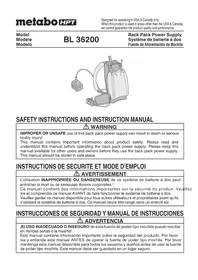
BL36200 - Battery HiKOKI - Free user manual and instructions
Find the device manual for free BL36200 HiKOKI in PDF.

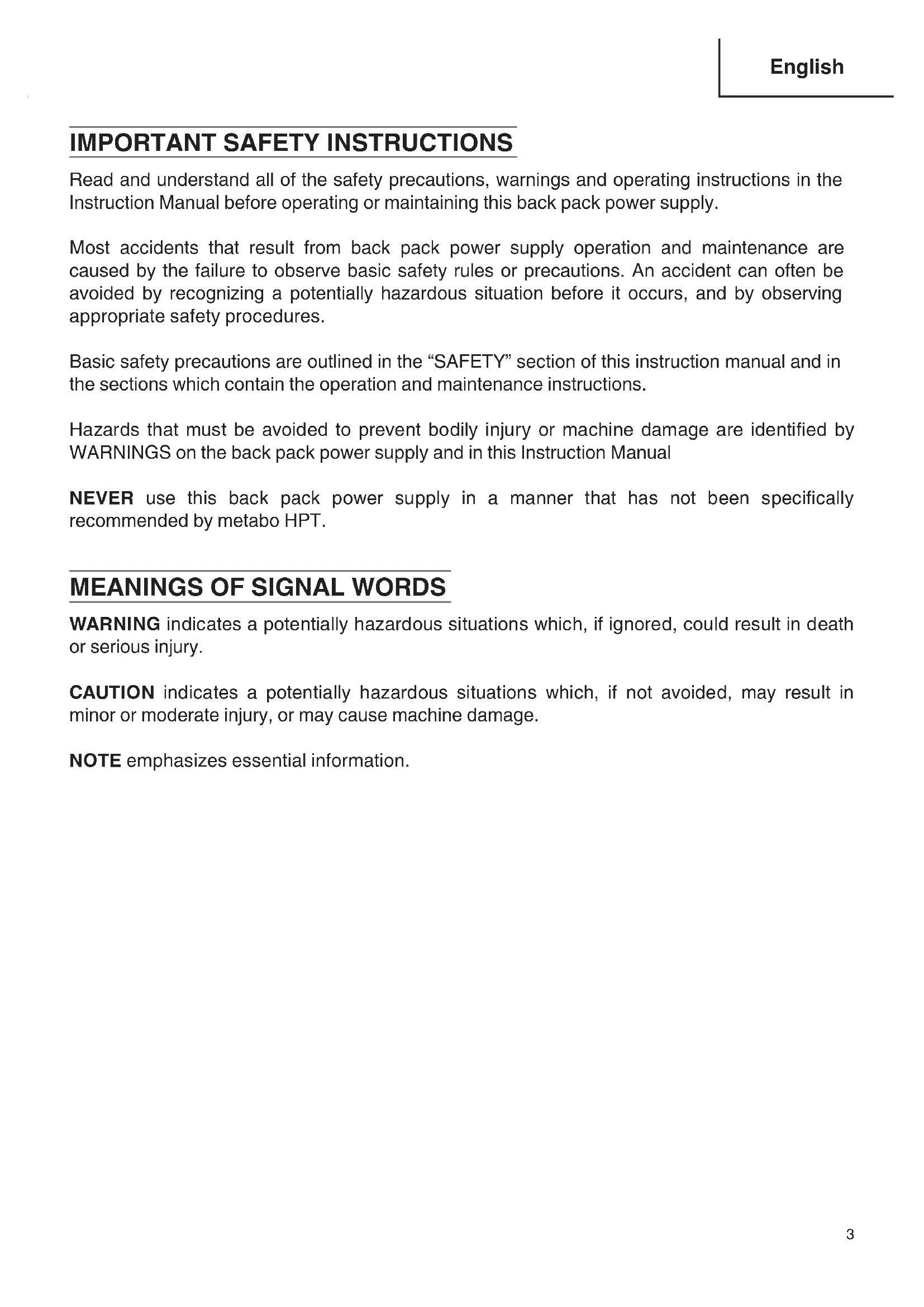


| Product type | Backpack battery system |
| Brand | HiKOKI (metabo HPT) |
| Model | BL36200 |
| Battery capacity | Lithium-ion 36 V DC, 21 Ah (21000 mAh), 80 cells |
| Adapter output voltage | 36 V DC (max 50 A) |
| USB output | 5 V DC, 0.5 A |
| Total weight (battery + adapter + harness) | Approx. 7.8 kg (battery 6.3 kg, adapter 0.5 kg, harness 1.0 kg) |
| High capacity battery dimensions | 330 × 250 × 109 mm |
| Operating temperature | 0 °C to 40 °C |
| Charging temperature | 0 °C to 50 °C |
| Compatible charger | UC36YRSL (14.4 V – 36 V) |
| Typical charging time | Approximately 10 hours at 20 °C |
| Runtime (indicative) | Varies depending on the tool used |
| Built-in protection | Automatic shutdown in case of overload, overheating, undervoltage; stops after 5 h of inactivity |
| Intended uses | Power supply for 36 V metabo HPT cordless tools and 5 V USB devices |
| Maintenance and cleaning | Clean with a damp cloth and soapy water; do not use solvents, diesel, thinner, benzene |
| Storage | Dry place, frost-free, temperature < 40 °C, protected from dust and humidity |
| Spare parts and repairability | Have all repairs carried out by an authorized metabo HPT service center; do not disassemble |
| Safety | Read the manual before use; do not expose to water or fire; use only the designated charger |
| Warranty | Refer to the manufacturer's terms and conditions |
Frequently Asked Questions - BL36200 HiKOKI
User questions about BL36200 HiKOKI
0 question about this device. Answer the ones you know or ask your own.
Ask a new question about this device
Download the instructions for your Battery in PDF format for free! Find your manual BL36200 - HiKOKI and take your electronic device back in hand. On this page are published all the documents necessary for the use of your device. BL36200 by HiKOKI.
USER MANUAL BL36200 HiKOKI
Back Pack Power Supply
natural_image
Illustration of a medical or scientific device with attached tubing and a small device (no text or symbols visible)SAFETY INSTRUCTIONS AND INSTRUCTION MANUAL
WARNING
IMPROPER OR UNSAFE use of this back pack power supply can result in death or serious bodily injury!
This manual contains important information about product safety. Please read and understand this manual before operating the back pack power supply. Please keep this manual available for other users and owners before they use the back pack power supply. This manual should be stored in safe place.
INSTRUCTIONS DE SECURITE ET MODE D'EMPLOI
AVERTISSEMENT
IMPORTANT SAFETY INSTRUCTIONS .... 3
MEANINGS OF SIGNAL WORDS 3
SAFETY 4
SAFETY PRECAUTIONS WHEN USING THE BACK PACK POWER SUPPLY 4
CAUTION ON LITHIUM-ION BATTERY 7
DISPOSAL OF THE EXHAUSTED BACK PACK POWER SUPPLY 8
ATTACHING AND DETACHING THE CARRIER..... 14
USED AS A POWER SUPPLY FOR CORDLESS POWER TOOLS (DC 36V) 14
SWITCH PANEL DISPLAYS 15
USED AS A USB POWER SUPPLY (DC 5V) ...... 16
MAINTENANCE AND INSPECTION 17
SERVICE AND REPAIRS 18
PARTS LIST......55
TABLE DES MATIÈRES
Français
Page Page
CONSIGNES DE SÉCURITÉ IMPORTANTES ..... 19
SIGNIFICATION DES MOTS D'AVERTISSEMENT....19
SÉCURITÉ 20
PRÉCAUTIONS DE SÉCURITÉ POUR L'UTILISATION DU SYSTÈME DE BATTERIE À DOS.... 20
PRÉCAUTIONS RELATIVES A LA BATTERIE AU LITHIUM ION 23
ÉLIMINATION DU SYSTÈME DE BATTERIE À DOS UNE FOIS QU'IL EST ÉPUISÉ ...... 25
UTILISATION ET ENTRETIEN....26
NOM DES PARTIES 26
SPÉCIFICATIONS....27
UTILISATIONS 27
ASSEMBLAGE DU SYSTÈME DE BATTERIE À DOS .... 27
MÉTHODE DE RECHARGE 29
ATTACHER ET DÉTACHER LE SUPPORT ...... 31
USED AS A POWER SUPPLY FOR CORDLESS POWER TOOLS (DC 36V) 32
INDICATEURS DU TABLEAU DE COMMANDE .... 33
UTILISATION COMME ALIMENTATION USB (5 V CC) 34
ENTRETIEN ET INSPECTION 34
SERVICE APRÈS-VENTE ET RÉPARATIONS ..... 36
LISTE DES PIÈCES ....55
ÍNDICE
Español
Página Página
IMPORTANT SAFETY INSTRUCTIONS
Read and understand all of the safety precautions, warnings and operating instructions in the Instruction Manual before operating or maintaining this back pack power supply.
Most accidents that result from back pack power supply operation and maintenance are caused by the failure to observe basic safety rules or precautions. An accident can often be avoided by recognizing a potentially hazardous situation before it occurs, and by observing appropriate safety procedures.
Basic safety precautions are outlined in the “SAFETY” section of this instruction manual and in the sections which contain the operation and maintenance instructions.
Hazards that must be avoided to prevent bodily injury or machine damage are identified by WARNINGS on the back pack power supply and in this Instruction Manual
NEVER use this back pack power supply in a manner that has not been specifically recommended by metabo HPT.
MEANINGS OF SIGNAL WORDS
WARNING indicates a potentially hazardous situations which, if ignored, could result in death or serious injury.
CAUTION indicates a potentially hazardous situations which, if not avoided, may result in minor or moderate injury, or may cause machine damage.
NOTE emphasizes essential information.
SAFETY
SAFETY PRECAUTIONS WHEN USING THE BACK PACK POWER SUPPLY

WARNING: Death or serious bodily injury could result from improper or unsafe use of back pack power supply. To avoid these risks, follow these safety instructions:
READ ALL INSTRUCTIONS
-
Do not use the back pack power supply for anything other than metabo HPT 36V cordless power tools or USB-connection products (DC5V).
Use with products other than those specified may result in damage to or malfunctions with the back pack power supply or the equipment to which it is connected, leading to accidents.
metabo HPT cannot be held responsible for any damages incurred through using the back pack power supply with unspecified products. -
Make sure that the locations in which the back pack power supply is stored and in which it is used are kept neat and tidy.
-
Sawdust and other foreign matter entering the terminals may result in short-circuits and the outbreak of smoke or fire.
-
Storing or using the back pack power supply in untidy locations may result in accidents.
-
Check the back pack power supply for damage, cracks or malformation in the event of it being accidentally dropped or subject to impact.
Damage, cracks and malformation may result in injury.
- Do not place heavy objects on or cover the back pack power supply, and do not use it in unstable locations where it may fall.
Failure to observe this may result in injury, electric shock or the outbreak of fire.
- Do not stand underneath when cleaning high areas.
If the main unit or other equipment falls, it may result in accidents.
- Do not use any connection cables other than those specified.
Failure to observe this may result in overheating, the outbreak of fire, electric shocks or injury.
- The back pack power supply must be used within a temperature range of 0 to 40°C.
Failure to observe this may result in deteriorated performance of the back pack power supply, leading to overheating and damage.
- Do not store the back pack power supply in locations subject to high temperatures, such as on the dashboard, in the trunk or in cargo areas of unventilated cars or trucks, or where it is subject to direct sunlight.
Failure to observe this may result in damage or reduced battery capacity, leading to overheating or the outbreak of fire.
- Do not allow the back pack power supply to get wet. Also, do not use it in the rain or in damp or wet locations.
Failure to observe this may result in electric shocks, the outbreak of fire or malfunctions.
- Make sure the area in which the back pack power supply is used is well lit.
Using the back pack power supply in dark locations may result in accidents.
- When working without holding the back pack power supply, make sure it is placed sideways on a stable surface to prevent it from falling or toppling over.
Failure to observe this may result in damage.
- Work carried out with cordless equipment attached to the back pack power supply must be carried out by only one person.
Two people holding different items of equipment may result in unexpected accidents.
- Do not recharge or use the back pack power supply near to wood shavings, inflammable gas, oil, gasoline or other combustible substances.
Failure to observe this may result in explosions, the outbreak of fire, or other accidents.
- Do not use the back pack power supply in locations where it may be subject to salt damage or chemical gas damage, or in locations where it may be subject to sand, dirt or dust.
Failure to observe this may result in overheating, the outbreak of fire, damage or injury.
-
Do not use a battery pack or appliance that is damaged or modified. Damaged or modified batteries may exhibit unpredictable behavior resulting in fire, explosion or risk of injury.
-
Do not expose a battery pack or appliance to fire or excessive temperature. Exposure to fire or temperature above 265^ F ( 130^ C) may cause explosion.
-
Do not dismantle, repair or modify the back pack power supply.
Failure to observe this may result in overheating, the outbreak of fire, electric shocks or injury.
- Do not insert needles, hair-pins or any other metal object in the back pack power supply.
Failure to observe this may result in overheating, the outbreak of fire, electric shocks or injury.
- Do not swing, throw, drop or otherwise subject the back pack power supply to powerful shocks.
Failure to observe this may result in overheating, the outbreak of fire, electric shocks or injury.
- In the event of abnormalities or malfunctions occurring with the back pack power supply during usage, place it on the ground, switch off the power immediately. Contact metabo HPT Authorized Service Center for inspections and repairs.
Failure to observe this may result in damage, the outbreak of fire or injury.
- Make sure that only specified accessories and attachments are used.
Use only the accessories and attachments specified in the instruction manual or metabo HPT catalogs.
- Use the special battery recharger.
Use only the battery recharger specified in the instruction manual or metabo HPT catalogs. The use of unspecified rechargers may result in the battery bursting, leading to injury or damage.
- Recharge the battery correctly.
- Use a power supply that conforms to the rating listed on the recharger. Do not use the recharger with direct current power supplies, engine generators, boosters or any other type of transformer.
Failure to observe this may result in overheating or the outbreak of fire.
- Do not recharge the back pack power supply in ambient temperatures lower than 32 °F (0 °C) or higher than 122 °F (50 °C). Failure to observe this may result in the back pack power supply not being recharged correctly, which will shorten life expectancy.
It may also result in bursting or the outbreak of fire.
- Recharge the back pack power supply in a well-ventilated environment. Do not cover the back pack power supply or the recharger during recharging. Failure to observe this may result in it bursting or the outbreak of fi re.
• Unplug the recharger from the power supply when not in use.
Failure to observe this may result in electric shocks or the outbreak of fire.
- Beware of electric shocks
Do not touch the recharger's power plug or the connector terminals on the back pack power supply with wet hands. Failure to observe this may result in electric shocks.
- Do not place the back pack power supply near to heaters or other equipment that emits high temperatures.
Failure to observe this may result in electric shocks, the outbreak of fire or accidents.
- Lengthy use of the back pack power supply may result in physical fatigue. Avoid uncomfortable stances and rest regularly. Also, cease work immediately and rest in the event of fatigue building up in the fingers, hand, arms, shoulders and back, etc., even if only working for short periods of time.
Elderly people and other people not accustomed to physical labor must take particular care over fatigue.

CAUTION:
- People not involved in the work must stay away from the work area.
Make sure that people not involved in the work do not come into contact with the back pack power supply, the power cable, the adapter cable, the switch cable or the recharger cable.
Failure to observe this may result in injury.
- Store away neatly when not in use.
- Store away in a dry, high location out of the reach of children, or under lock and key.
Failure to observe this may result in accidents.
- Do not store the back pack power supply in locations that may be subject to temperatures exceeding 104 °F (40 °C) (inside metal boxes or automobiles during summer, etc.) Failure to observe this may result in deterioration, or the outbreak of smoke or fire.
-
Carry out maintenance carefully.
-
Inspect the power cable, the adapter cable, the switch cable or the recharger cable regularly, and contact metabo HPT Authorized Service Center for repairs in the event of damage being discovered.
-
If extension cords are in use, inspect them regularly and replace them in the event of damage being discovered.
Failure to observe this may result in electric shocks or short-circuits, leading to the outbreak of fire. -
Do not handle the power cable, the adapter cable, the switch cable or the recharger cable roughly.
-
Do not carry the back pack power supply holding only the power cable, the adapter cable, the switch cable or the recharger cable, and do not pull any of the cables.
- Do not place the power cable, the adapter cable, the switch cable or the recharger cable near heat, oil or sharp edges.
-
Select the location for recharging carefully to ensure that the power cable, the adapter cable, the switch cable or the recharger cable are not stepped on, pulled or otherwise damaged through excessive force. Failure to observe this may result in electric shocks or short-circuits, leading to the outbreak of fire.
-
Use extension cords in accordance with outdoor situations.
Use cab-tire extension cords or cab-tire extension cables when recharging outdoors.
-
All repairs to be requested to metabo HPT Authorized Service Center.
-
Do not modify the back pack power supply.
- All repairs must be requested to metabo HPT Authorized Service Center.
Failure to observe this may result in accidents or injury.
- In the event of malformation or damage being observed on the outside of the recharger, cease operations immediately and contact metabo HPT Authorized Service Center.
CAUTION ON LITHIUM-ION BATTERY
The back pack power supply is equipped with a protection function to halt output extend the life expectancy of the built-in lithium-ion battery.
There are cases in which operations will be halted even when the power switch to the back pack power supply is on in the following three cases, but this is caused by the protection function and is not a malfunction.
- Output is halted when the remaining battery capacity is low (drops to a battery voltage of 27.5 V).
In this event, recharge the battery immediately.
-
There are cases in which output is halted if an excessive load is applied to the back pack power supply. In this event, switch off the power and resolve the problem of the excessive load.
-
There are cases in which output is halted if the back pack power supply overheats. In this event, cease use and place in a well-ventilated location away from direct sunlight until it has cooled down sufficiently. Operations may be resumed after it has cooled down.
Also observe the following precautions.

WARNING: Observe the following without fail to prevent battery leakages, overheating and the outbreak of smoke and fire before they happen.
-
Make sure shavings and dust do not accumulate on the back pack power supply.
-
Make sure shavings to not fall onto the back pack power supply during operations.
- Do not leave the back pack power supply in locations in which shavings or dust may accumulate.
-
Do not store the back pack power supply in locations in which shavings or dust may accumulate, and separate it from metal objects (screws, nails, etc.)
-
Do not drive nails into the back pack power supply, hit it with hammers, step on it, throw it or otherwise subject it to powerful impact.
- Do not use Back Pack Power Supplies that are severely damaged or malformed.
- Do not use the back pack power supply with the [+] and [-] poles reversed.
- Do not plug the back pack power supply directly into power sockets or cigarette lighter sockets in vehicles.
- Do not use the back pack power supply with any equipment other than that specified.
- In the event of the recharger not being fully recharged despite the recommended recharging time being greatly exceeded, cease use immediately.
- Do not insert the back pack power supply in microwave ovens, high-pressure containers or otherwise subject it to excessive heat or pressure.
- Do not short-circuit the terminals on the back pack power supply.
Storing it in bags together with nails, etc., may result in short-circuits, leading to the outbreak of smoke or fire, or damage, etc.
-
In the event of the back pack power supply leaking liquid or emitting foul odors, cease use immediately and place it well away from naked flames.
-
Do not use the back pack power supply in locations subject to powerful levels of static electricity.
-
In the event of foul odors, overheating, discoloring, malformation or other abnormalities not previous noticed being apparent when the back pack power supply is in use, being recharged or being stored, immediately disconnect the equipment or recharger connected to it and do not use it again.
- Do not place the back pack power supply in regular trash or fire.
Failure to observe this may result in it bursting or releasing toxic substances.

CAUTION:
- In the event of liquid leaking from the back pack power supply entering the eye, rinse it thoroughly with clean water without rubbing it, and then contact your doctor immediately.
Leaving it unattended may result in damage to the eye. - In the event of liquid leaking from the back pack power supply coming into contact with skin or clothes, rinse it thoroughly with clean water.
Leaving it unattended may result in skin irritation. - In the event of rust, foul odors, overheating or other abnormalities being apparent when using the back pack power supply for the first time after purchase, contact your dealer or metabo HPT Authorized Service Center without using it.
- Store the back pack power supply in a location out of reach of children.
- Use the back pack power supply in accordance with the displayed specifications.
DISPOSAL OF THE EXHAUSTED BACK PACK POWER SUPPLY

WARNING:
Do not dispose of the exhausted back pack power supply. The back pack power supply must explode if it is incinerated. That you have purchased contains a back pack power supply. The back pack power supply is recyclable. At the end of it's useful life, under various state and local laws, it may be illegal to dispose of this back pack power supply into the municipal waste stream. Check with your local solid waste officials for details in your area for recycling options or proper disposal.
SAVE THESE INSTRUCTIONS
AND
MAKE THEM AVAILABLE TO
OTHER USERS
AND
OWNERS OF THIS TOOL!
The information contained in this instruction manual is designed to assist you in the safe operation and maintenance of the back pack power supply.
NEVER operate, or attempt any maintenance on the back pack power supply unless you have first read and understood all safety instructions contained in this manual.
Some illustrations in this instruction manual may show details or attachments that differ from those on your own back pack power supply.
NAME OF PARTS
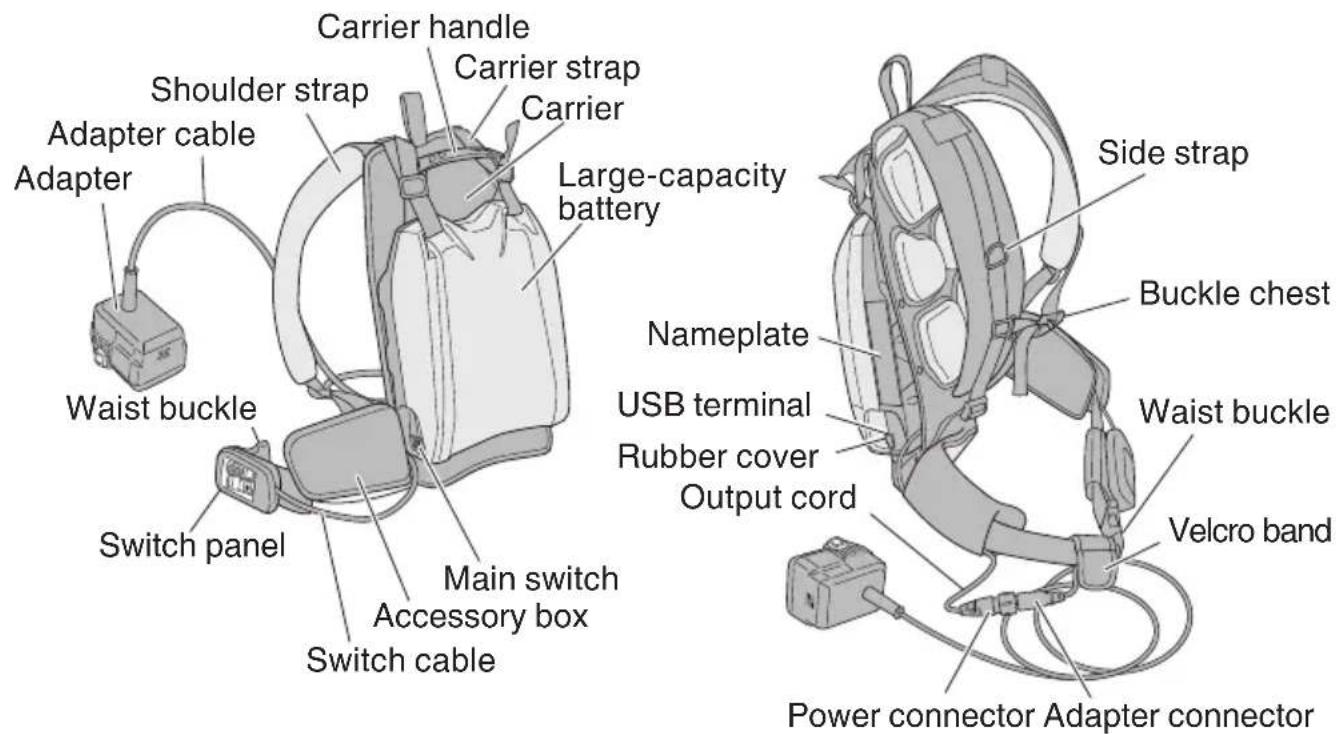
Fig. 1
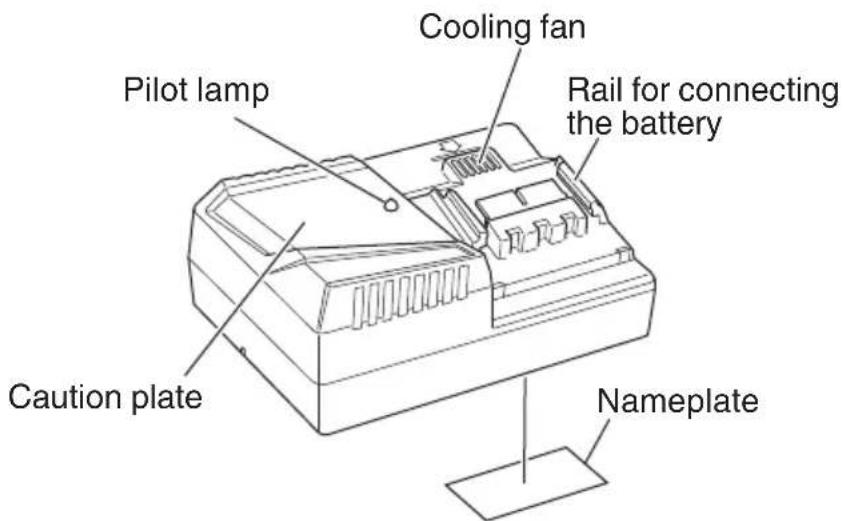
Fig. 2 Battery charger (UC36YRSL)
SPECIFICATIONS
| Model BL36200 | ||
| Battery capacity Li-ion DC 36 V 21 Ah (21000 mAh) 80 cells | ||
| Adapter output | Output voltage DC 36 V | |
| Maximum output current 50 A | ||
| USB output terminal | Output voltage DC 5 V | |
| Maximum output current | 0.5 A | |
| Operating temperature range 32 °F – 104 °F (0 °C – 40 °C) | ||
| Adapter cable length 5 ft (1.5 m) | ||
| Large-capacity power dimensions | 13" × 4-19/64" × 9-27/32"(330 mm × 250 mm × 109 mm) | |
| Weight | Large-capacity power 13.9 | Ibs. (6.3 kg) |
| Power adapter 1.1 Ibs. (0.5 kg) | ||
| Carrier 2.2 Ibs. (1.0 kg) | ||
CHARGER
| Model UC36YRSL | |
| Recharging time(at an ambient temperature of 68 °F (20 °C)) | BSL3620: Approximately 60 minutesBSL3626: Approximately 80 minutesBL36200: Approximately 10 hours |
| Recharge voltage 14.4 V – 36 V | |
| Weight | 1.5 lbs. (0.7 kg) |
APPLICATIONS
Power Supply for metabo HPT Cordless Power Tools (DC36V)
Power Supply for USB-Connection Equipment (DC5V).
ASSEMBLING THE BACK PACK POWER SUPPLY
- The large-capacity power output cable can be withdrawn from either side.
Decide on the best side for operations, and then insert the output cable into the cable groove.
The direction of the cable can be easily amended after it has been set in position. (Fig. 3)
- Attach the carrier to the large-capacity power supply with the four M5 screws supplied with the use of a Phillips screwdriver.
Tighten the two knob bolts by hand to stabilize the position of the output cable.
The knob bolts can be removed by hand so that the direction of the output cable can easily be changed at any time. (Fig. 4)
- Pass the carrier strap through the attachment hole on the large-capacity power supply from the back, and fix it in place in two locations as shown in the illustration. (Fig. 5)

Fig. 3

Large-capacity battery
Fig. 4

CAUTION:
Check to make sure the M5 screws and knob bolts for attaching the carrier are not loose. Also check to confirm that the carrier strap has been firmly attached.
Failure to observe this may result in the back pack power supply being dropped, leading to injury or damage.
- Pass the switch panel through the rear of the accessory box and store it in the panel case. (Fig. 6)
- Align the power connector and adapter connector with the respective ○ marks, push them into place and rotate the rings to secure them. (Fig. 7)
- If the cable gets in the way, adjust its position with the waist band or Velcro band. (Fig. 8)
- Adjust the bands and strap in consideration of the job in hand and ease-of-movement. Also make the most efficient use of the armband supplied in accordance with the characteristics of the cordless power tool being used.
NOTE
Use the arm band when using cordless bush trimmers to prevent the adapter cable from being accidentally severed. (Fig. 8)
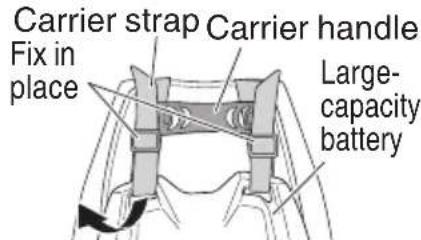
Pass through from the back
Fig. 5
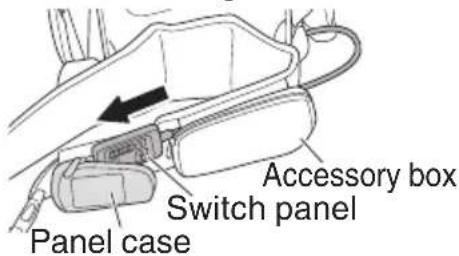
Fig. 6
Power connector Ring Adapter connector
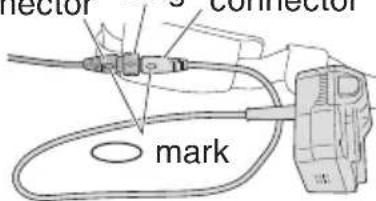
Fig. 7
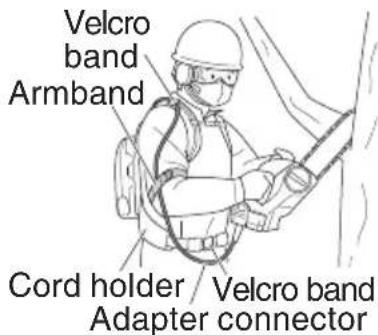
Fig. 8
CHARGING METHOD
NOTE: Before plugging into the receptacle, make sure the following points.
○ The power source voltage is stated on the nameplate.
○ The cord is not damaged.

WARNING: Do not charge at voltage higher than indicated on the nameplate.
If charged at voltage higher than indicated on the nameplate, the charger will burn up.

natural_image
Black and white illustration of a hand with a lightning bolt symbol, no text or labels present
WARNING: Do not use the electrical cord if damaged. Have it repaired immediately.
- Connect the charger's power cord to the receptacle.
When connecting the plug of the charger to a receptacle, the pilot lamp will blink in red. (At 1-second intervals)
- Insert the adaptor of back pack power supply into the charger.
Place the back pack power supply in a horizontal position and turn it on by the switch on the side. Firmly insert the adaptor into the charger until the line is visible, as shown in Fig. 9.

Fig. 9
NOTE:
If the pilot lamp of the charger lights in green (high temperature standby status) when the adaptor is inserted into the charger, check that the battery status lamp on the back pack power supply control panel is lit in red.
If the battery status lamp is OFF, the back pack power supply switch may be turned OFF.
If the back pack power supply switch is turned OFF, disconnect the adaptor and turn on the switch before reinserting the adaptor.
3. Charging
When inserting an adaptor of back pack power supply in the charger, the pilot lamp will light up continuously in red.
When the back pack power supply becomes fully recharged, the pilot lamp will blink in red. (At 1-second intervals.) (See Table 1)
(1) Lamp indication
The indications of the pilot lamp will be as shown in Table 1, according to the condition of the charger or the back pack power supply.
Table 1
| Indications of the pilot lamp | ||||
| The pilot lamp lights or blinks in red. | Before charging | Blinks | Lights for 0.5 seconds. Does not light for 0.5 seconds. (off for 0.5 seconds) | |
| While charging | Lights | Lights continuously | ||
| Charging complete | Blinks | Lights for 0.5 seconds. Does not light for 0.5 seconds. (off for 0.5 seconds) | ||
| Charging impossible | Flickers | Lights for 0.1 seconds. Does not light for 0.1 seconds. (off for 0.1 seconds) | Malfunction in the back pack power supply or the charger | |
| The pilot lamp lights in green. | Overheat standby | Lights | Lights continuously | Back pack power supply overheated. Unable to charge. (Charging will commence when back pack power supply cools) |
NOTE: The cooling fan does not rotate while the back pack power supply is charging.
(2) Regarding the temperature of the back pack power supply.
The temperature for back pack power supply are as shown in the Table 2, and back pack power supply that have become hot should be cooled for a while before being recharged.
Table 2
| Back Pack Power Supply | Temperature which the back pack power supply can be recharged |
| BL36200 | 32^ - 122^ (0^ - 50^) |
(3) Regarding recharging time
Table 3 shows the recharging time required according to the type of back pack power supply.
Table 3 Charging time (At 68°F (20°C))
| Back Pack Power Supply\Charger | UC36YRSL |
| BL36200 Approx. 10 hours |
NOTE:
The recharging time may vary according to the ambient temperature.
- Disconnect the charger's power cord from the receptacle.
- Hold the charger firmly and pull out the adaptor of back pack power supply.
NOTE:
Be sure to pull out the adaptor of back pack power supply from the charger after use, and then keep it.
When the back pack power supply is not in use, switch it OFF.
How to make the back pack power supply perform longer.
(1) Recharge the back pack power supply before they become completely exhausted.
When you feel that the power of the tool becomes weaker, stop using the tool and recharge its back pack power supply.
If you continue to use the tool and exhaust the electric current, the back pack power supply may be damaged and its life will become shorter.
(2) Avoid recharging at high temperatures.
A back pack power supply will be hot immediately after use. If such a back pack power supply are recharged immediately after use, its internal chemical substance will deteriorate, and the back pack power supply life will be shortened. Leave the back pack power supply for a while, and recharge them after they have cooled.
CAUTION:
- If the back pack power supply are charged while it is heated because it has been left for a long time in a location subject to direct sunlight or because the back pack power supply have just been used, the pilot lamp of the charger lights up green. In such a case, first let the back pack power supply cool, then start charging.
- When the charge status flickers in red (at 0.2-seconds intervals), check for and take out any foreign objects in the charger's battery connector. If there are no foreign objects, it is probable that the back pack power supply or charger is malfunctioning. Take it to your authorized Service Center.
- Since the built-in microcomputer takes about 3 seconds to confirm that the back pack power supply being charged with UC36YRSL is taken out, wait for a minimum of 3 seconds before reinserting it to continue charging.
If the adapter of back pack power supply is reinserted within 3 seconds, the back pack power supply may not be properly charged.
ATTACHING AND DETACHING THE CARRIER
Attaching the Carrier (Fig.10)
- Put on the carrier.
- Adjust the length of the belt so that the waist buckle is fixed in place on your waist.
- Pull the side straps downward to adjust the height.
- Adjust the check buckle so that the side straps lie in a comfortable position.
Detaching the Carrier (Fig.11)
- Press the buttons on both sides of the buckle chest simultaneously to release it.
- Press the buttons on both sides of the waist buckle simultaneously to release it.
- Take off the carrier.
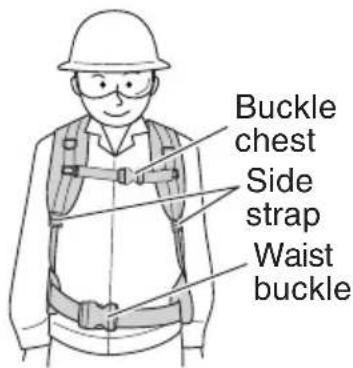
Fig. 10
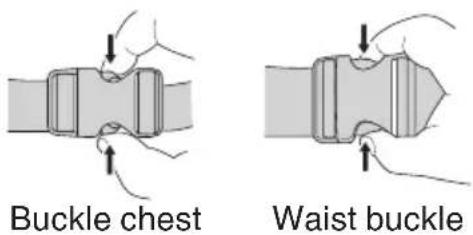
Fig. 11
USED AS A POWER SUPPLY FOR CORDLESS POWER TOOLS (DC 36V)
WARNING:
- Read the instruction manuals for power tools that are to be connected beforehand.
● Always check to confirm that cordless power tools are switched off before connecting them to the Back Pack Power Supply adapter.

Fig. 12
- Plug the adapter into the cordless power tool. (Fig. 12)
Insert the adapter firmly until it clicks into place in the same way as the battery.
- Switch on the main switch and power switch to the Back Pack Power Supply.
Switch on the Back Pack Power Supply's main switch. Then switch on the power switch on the switch panel to illuminate the power indicator and supply DC 36V of electrical current to the cordless power tool connected.
- Switch on the cordless power tool and begin work.
Carry out the required work in accordance with the details provided in the instruction manual for the cordless power tool in use.
- Check the remaining capacity of the battery.
Press the remaining battery capacity switch on the switch panel periodically and check the indicator to avoid the power tool from stopping midway through the work in hand.
- Terminating electricity supply.
Switch off the cordless power tool in use, and then switch off the power switch and main switch to the Back Pack Power Supply.
AUTOMATIC POWER OFF FUNCTION (POWER SWITCH ON THE SWITCH PANEL)
To prevent the wasteful use of the Back Pack Power Supply, the power will be automatically switched off after five hours elapses without it being used with the power switch on the switch panel left in the on position.
If the main switch is left on, check to confirm that the power to the cordless power tool or USB device being used is switched off before pressing the power switch on the switch panel to resume work.
SWITCH PANEL DISPLAYS (FIG. 13)
Power Switch
The power indicator will be illuminated in green and DC 36V of electrical current will be supplied to the adapter when the power switch is pressed with the main switch to the Back Pack Power Supply at the on position.
Remaining Battery Capacity Switch
Press the remaining capacity switch to discover the remaining capacity with the indicator that is illuminated in red through fi ve stages.
If the indicator on the right blinks, it means the battery has run out and output has ceased. Recharge the battery in this event.
Warning Indicator
Notifies the user that output has been halted owing to a problem arising.

Fig. 13

(Continual illumination in red)
Carrying out work that constantly requires large amounts of electrical current and that involves continual use under harsh conditions, such as high-temperature environments, will cause the temperature inside the Back Pack Power Supply to rise. Output will be halted in this event to prevent high-temperature damage.
Wait until the Back Pack Power Supply cools down before resuming work.

(Blinking in red)
Output will be halted to prevent damage in the event of overloaded operations caused by the blades in cordless power tools, etc., continuing. Resolve the reason for the overload, and then press the power switch to resume operations.

(Swift blinking in red)
There is a possibility that damage has occurred. Cease operations immediately and request inspections or repairs.
USED AS A USB POWER SUPPLY (DC 5V)

WARNING:
- Read the instruction manual for the USB device to be connected beforehand.
- Check to confirm that the USB cable to be connected is not damaged before using it.
Failure to observe this may result in the outbreak or smoke or fire.
- Seal the USB terminal with a rubber cover when not in use.
If dust or other matter adheres to the USB terminal, it may result in the outbreak of smoke or fire.
NOTE:
Note that there are USB devices that cannot be used.
- Check to confirm that the power switch is off.
Check to confirm that the power switch on the switch panel is not illuminated. -
Check to confirm that the switch on the USB device to be connected is off.
Plugging the USB device in adapter with the switch set at on may result in unexpected operations, leading to injury. -
Connect the USB cable. (Fig. 14)
Peel back the rubber cover and plug a USB cable that matches the device and is available on the open market as far as it will go into the USB terminal.
- Switch on the main switch to the Back Pack Power Supply and the power switch.
Switch on the main switch to the Back Pack Power Supply. Then switch on the power switch on the switch panel to illuminate the power indicator in green and commence supplying DC5V power to the USB device connected.
- Removing the USB cable.
Disconnect the USB cable from USB terminal after use and then seal the USB terminal with the rubber cover.

Fig. 14
MAINTENANCE AND INSPECTION

WARNING:
Always make sure that the power switch is off and that the adapter is disconnected from the cordless power tool and the main switch turned off when carrying out inspections and cleaning, and when storing the Back Pack Power Supply.
1. Transport (Fig. 15)
Either loop the shoulder strap over your shoulder, place the Back Pack Power Supply on your back, or use the carrier handle when moving the Back Pack Power Supply from place to place.
Do not carry the Back Pack Power Supply with the adapter, adapter cable or switch cable wrapped around the legs.

Fig. 15

CAUTION:
- When picking up the Back Pack Power Supply, hold it by the shoulder strap or carrier handle and lift it up gently. Never pick it up with any of the cables.
Failure to observe this may result in it being dropped, leading to injury or damage. - Check to confirm that the M5 screws (4 screws) and the knob bolts (2 bolts) that attach the carrier are not loose before transporting or moving the Back Pack Power Supply. Also make sure that the carrier strap is firmly attached.
Failure to observe this may result it in being dropped, leading to injury or damage.
2. Inspecting the mounting screws
Regularly inspect all mounting screws and ensure that they are properly tightened. Should any of the screws be loose, retighten them immediately. Failure to do so could result in serious hazard.
3. Cleaning
NOTE:
Do not use a washing machine.
Failure to observe this may result in damage and color fading.
Soak a cloth in soapy water, wring out all excess moisture and then wipe it.
Never use gasoline, thinner, benzene or kerosene as this may dissolve the plastic.
4. Storing the Back Pack Power Supply after use

WARNING:
- Attach the cover to the adapter when storing it to prevent short circuits. (Fig. 16)
Short circuits caused by conductive objects coming into contact with the adapter terminals may result in overheating or the outbreak of smoke or fi re.
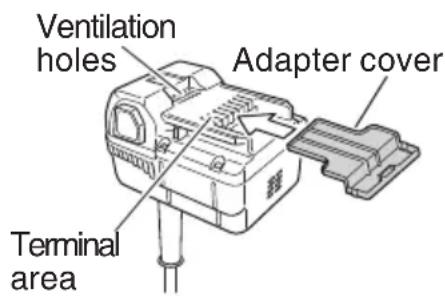
Fig. 16
- Do not store the Back Pack Power Supply close to naked flames.
Failure to observe this may result in overheating or the outbreak of fire. - Do not store in front of the house or in other locations where it may be subject to rain, or in locations with high humidity.
- Do not store in locations containing volatile substances that have the risk of igniting or exploding.

CAUTION:
- Do not store within easy reach of children or where it can be easily removed.
- Do not store in locations subject to drastic temperature changes or in direct sunlight.
Fully recharge the Back Pack Power Supply if it is to be stored for long periods (three or more months.)
Also, recharge it once every year if it is to be stored for more than one year.
If the Back Pack Power Supply is stored for long periods of time w capacity, it may result in it being impossible to recharge it or in reduced life expectancy.
Disconnect all cordless power tools from the Back Pack Power Supply.
When storing cordless power tools and accessories, store them in a safe, dry location.
- Service parts list

CAUTION:
Repair, modification and inspection of metabo HPT power tools must be carried out by a metabo HPT Authorized Service Center.
This Parts List will be helpful if presented with the tool to the metabo HPT Authorized Service Center when requesting repair or other maintenance. In the operation and maintenance of power tools, the safety regulations and standards prescribed in each country must be observed.
MODIFICATIONS
metabo HPT power tools are constantly being improved and modified to incorporate the latest technological advancements.
Accordingly, some parts (i.e. code numbers and/or design) may be changed without prior notice.
SERVICE AND REPAIRS
All quality power tools will eventually require servicing or replacement of parts because of wear from normal use. To assure that only authorized replacement parts will be used, all service and repairs must be performed by a metabo HPT AUTHORIZED SERVICE CENTER, ONLY.
NOTE: Specifications are subject to change without any obligation on the part of the metabo HPT.
CONSIGNES DE SÉCURITÉ IMPORTANTES
natural_image
Black-and-white icon of a hand with a lightning bolt symbol, no text or numbers present
natural_image
Black and white icon of a hand with a lightning bolt symbol, no text or numbers present
Please contact Koki Holdings America Ltd. at 1-800-59-TOOLS (toll free), or metabo HPT AUTHORIZED POWER TOOL SERVICE CENTER regarding COLLECTION.

Pour le RAMASSAGE, contacter Koki Holdings America Ltd. au 1-800-59-TOOLS (appel gratuit), ou UN SERVICE APRÈS-VENTE D'OUTILS ÉLECTRIQUE AGRÉÉ PAR metabo HPT.

Minato-ku, Tokyo 108-6020, Japan
Distributed by
Koki Holdings America Ltd.
1111 Broadway Ave,
Braselton, Georgia, 30517
Koki Holdings America Ltd. Canadian Branch
3405 American Drive, Units 9-10,
Mississauga, ON, L4V 1T6
- SAFETY INSTRUCTIONS AND INSTRUCTION MANUAL
- WARNING
- INSTRUCTIONS DE SECURITE ET MODE D'EMPLOI
- AVERTISSEMENT
- TABLE DES MATIÈRES
- Français
- ÍNDICE
- Español
- IMPORTANT SAFETY INSTRUCTIONS
- MEANINGS OF SIGNAL WORDS
- SAFETY
- SAFETY PRECAUTIONS WHEN USING THE BACK PACK POWER SUPPLY
- READ ALL INSTRUCTIONS
- CAUTION:
- CAUTION ON LITHIUM-ION BATTERY
- WARNING: Observe the following without fail to prevent battery leakages, overheating and the outbreak of smoke and fire before they happen.
- DISPOSAL OF THE EXHAUSTED BACK PACK POWER SUPPLY
- WARNING:
- SAVE THESE INSTRUCTIONS
- AND
- MAKE THEM AVAILABLE TO
- OTHER USERS
- OWNERS OF THIS TOOL!
- NAME OF PARTS
- SPECIFICATIONS
- APPLICATIONS
- ASSEMBLING THE BACK PACK POWER SUPPLY
- NOTE
- CHARGING METHOD
- NOTE:
- Charging
- Lamp indication
- How to make the back pack power supply perform longer.
- ATTACHING AND DETACHING THE CARRIER
- USED AS A POWER SUPPLY FOR CORDLESS POWER TOOLS (DC 36V)
- AUTOMATIC POWER OFF FUNCTION (POWER SWITCH ON THE SWITCH PANEL)
- SWITCH PANEL DISPLAYS (FIG. 13)
- Power Switch
- Remaining Battery Capacity Switch
- Warning Indicator
- (Continual illumination in red)
- USED AS A USB POWER SUPPLY (DC 5V)
- MAINTENANCE AND INSPECTION
- Transport (Fig. 15)
- Inspecting the mounting screws
- Cleaning
- Storing the Back Pack Power Supply after use
- MODIFICATIONS
- SERVICE AND REPAIRS
- CONSIGNES DE SÉCURITÉ IMPORTANTES
- Koki Holdings America Ltd.
- Koki Holdings America Ltd. Canadian Branch
Brand : HiKOKI
Model : BL36200
Category : Battery