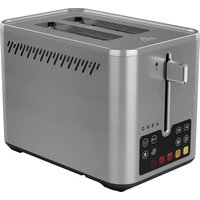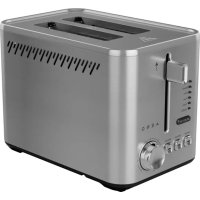
TS3 - Toaster AENO - Free user manual and instructions
Find the device manual for free TS3 AENO in PDF.



| Product type | Toaster |
| Brand | AENO |
| Model | TS3 (ATS0003) |
| Power supply | 220–240 V ~, 4 A, 800–950 W |
| Number of slots | 2 |
| Cooking modes | Browning, Defrosting, Reheating |
| Programs (bread types) | White, Whole wheat, Rye, Fruit cake, Grain, Waffle |
| Browning levels | 7 (1 to 7) |
| Browning time | 30 to 250 seconds |
| Dimensions (W × D × H) | 265 × 180 × 155 mm |
| Slot dimensions | 100 × 20 × 100 mm |
| Net weight | 1.06 kg |
| Power cord length | 0.75 m |
| Housing material | Stainless steel and ABS plastic |
| Color | Silver gray or black |
| Crumb tray | Removable |
| Cleaning | Removable washable tray; wipe housing with a damp cloth |
| Safety | Automatic shutdown after 20 min of inactivity; hot surface; do not immerse |
| Plug type | E/F (Schuko) |
Frequently Asked Questions - TS3 AENO
User questions about TS3 AENO
0 question about this device. Answer the ones you know or ask your own.
Ask a new question about this device
Download the instructions for your Toaster in PDF format for free! Find your manual TS3 - AENO and take your electronic device back in hand. On this page are published all the documents necessary for the use of your device. TS3 by AENO.
USER MANUAL TS3 AENO
text_image
Wine Blower Rye Fruit Grain Waffle BREAD TYPE A E N O Cansal Def/Ind. RefreshQuick Start Guide
Toaster
TS3
(Model: ATS0003)
v 1.0.2 | 22.01.2025
ENG....8
ARA....13
BOS....16
BUL....21
CES 26
DEU....31
ELL....36
EST 40
FRA....45
HRV 50
HUN 55
HYE....60
ITA....65
KAT 70
KAZ....76
LAV 81
LIT 86
NLD....91
POL....96
POR....101
RON....106
RUS....111
SLK....116
SLV....121
SPA....126
SRP 131
UKR....136
UZB....141
aeno.com/documents 3
A
text_image
AEOQ ① ② ③ ④ ⑤4 aeno.com/documents

text_image
6 7 8 White Brown Rye Fruit Grain Waffle BREAD TYPE A E N O Cancel Defrost Reheat 9 10 11 12C

natural_image
Line drawing of a AENO toaster with two slices, showing front panel and control buttons (no text or symbols on main device)6 aeno.com/documents
D

natural_image
Line drawing of a toaster with cooling fins and a separate card slot, showing no text or symbols on the device itself.aeno.com/documents 7
ENG The ATS0003 Toaster is designed for reheating and toasting baked goods.
Technical Specifications
Power supply (input): 220–240 V (AC), 4.0 A (max.), 50–60 Hz, 800.0–950.0 W (≤ 0.5 W in off mode *). Number of toasting slots: 2. Control: manual. Number of modes: 3. Number of programs: 6. Number of browning levels: 7. Cooking time: 30–250 s. Removable crumb tray. Plug type: E/F. Power cord length: 0.75 m. Color: Silver, Black. Material: stainless steel, ABS plastic. Toasting slot dimensions (L×W×H): 100×20×100 mm. Device dimensions (L×W×H): 265×180×155 mm. Net weight: 1.06 kg. Operating conditions: temp. +10...+45 °C, RH 25–70 % (non-condensing). Storage conditions: temp. +10...+45 °C, RH 25–70 % (non-condensing).
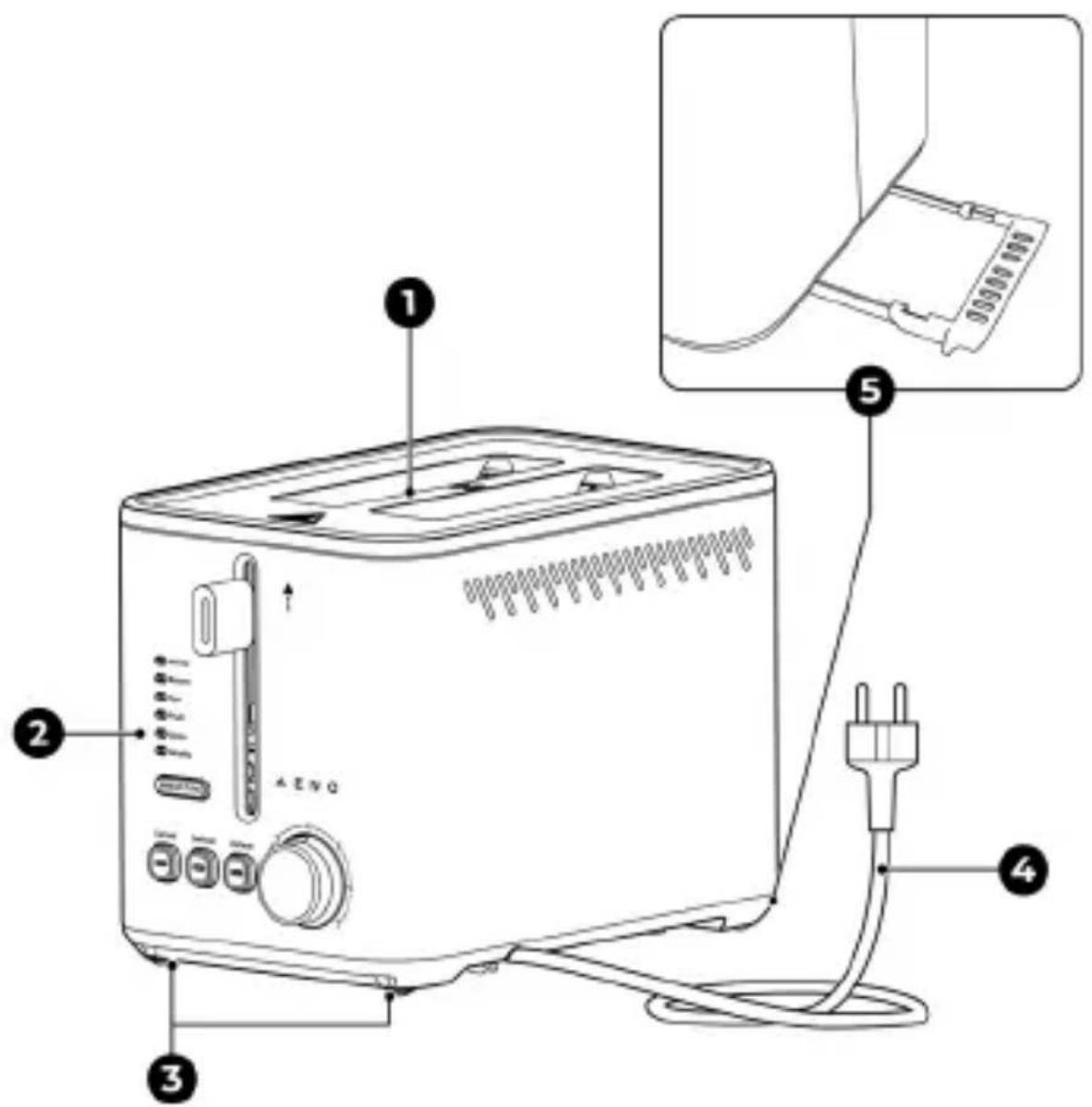
Package Contents (see Fig. A)
ATS0003 Toaster, removable crumb tray, Quick Start Guide.
Device Elements (see Fig. A, B)
1 – toasting slots, 2 – control panel, 3 – anti-slip feet, 4 – power cord, 5 – removable crumb tray, 6 – lever, 7 – program indicators, 8 – “Bread type” button, 9 – “Cancel” button, 10 – “Defrost” button, 11 – “Reheat” button, 12 – browning level adjustment knob.
Limitations and Warnings
Read this document thoroughly before using the device. Save these instructions for future reference.
ATTENTION! Hot surface. Danger of burns from contact with a heated surface. Do not touch the device's casing during operation and until it has cooled down completely.
If you experienced any issues or difficulties while using your AENO™ device, please e-mail support at support@aeno.com or chat with us online at aeno.com/service-and-warranty. Our specialists will help you solve the problem, and you will not have to spend time and effort visiting the store.
* This mode activates automatically within 20 minutes if the device is not in use.
8 aeno.com/documents
ATTENTION! Always place the device at least 1 meter away from any fabrics, decor and other flammable objects.
ATTENTION! Do not use metal objects (knives, forks, spoons, etc.) to remove the toast.
The device is not intended for use by children under 14 or persons with physical, mental or intellectual disabilities unless they have sufficient experience or knowledge of how to use the device and are supervised by a person responsible for their safety. The device is for household use only. Do not use the device outdoors. The device is not designed to work with an external timer or remote-control system. Do not let children play with the device and its accessories. Do not use a damaged device. Do not drop or throw the device. Make sure that the voltage and frequency specified in the technical documentation are the same as your power supply parameters. Handle the device with dry hands only. Use the toaster only for baked goods. Do not use bread that is deformed or has any spreads on it. Do not leave the device running unattended. Unplug the device after use and before cleaning. Unplug the device by holding the plug, not the power cord. Do not immerse the device or its elements in water or put them under running water. Always make sure that the power cord is not twisted, kinked, pinched, or in contact with hot, sharp objects or heat sources. Keep the device out of the reach of children. Do not use chemically aggressive detergents, abrasive pastes, products containing acids and solvents, or metal scourers to clean the device. For a detailed description of the device, its modes and features, see the full User Manual available at aeno.com/documents.
Device Controls (see Fig. B)
To select a mode/program, press the corresponding button.
To select a browning level, turn the adjustment knob.
aeno.com/documents 9
| Control | Function |
| Adjustment knob (12) | Select browning level * |
| Button | |
| “Bread type” (8) | Select program * |
| “Cancel” (9) | Stop the device |
| “Defrost” (10) | Set the device to toast with defrost mode |
| “Reheat” (11) | Set the device to reheat mode |
* For more information, see "Using the Device"
Control Panel Light Indication (see Fig. B)
The selected operating mode and program, as well as the toasting and reheating processes, are always indicated by a blue indicator light.
Preparing the Device for Use
- Carefully open the packaging and take out the device. Remove packing materials.
- Place the toaster on a flat, dry, horizontal surface at least 1 meter away from any fabrics, decor or other flammable objects.
- Connect the device to a power supply using the power cord (4). All indicators and buttons will flash blue three times.
- Run a test warm-up of the device:
a. Set the browning level to "7" by turning the adjustment knob (12) all the way clockwise.
b. Push the lever (6) down until you hear a click.
Note. A distinctive odor and a small amount of smoke are normal during the first use.
- Wait for the lever to automatically pop up. The toaster is ready for use.
10 aeno.com/documents
Using the Device
ATTENTION! Hot surface. Danger of burns from contact with a heated surface. Do not touch the device's casing during operation and until it has cooled down completely.
-
Set the toaster to one of the operating modes:
-
Toast mode. With presses of button (8), select a program that suits the type of bread you want to toast: "White" (default), "Brown", "Rye", "Fruit", "Grain", or "Waffle". Select a browning level using the adjustment knob (12): from "1" (lowest) to "7" (highest).
- Toast with defrost mode. Press button (10), then select a suitable program and browning level (see “Toast mode” above).
-
Reheat mode. Press button (11).
-
Put bread slices into the slots (1) and push the lever down until you hear a click.
ATTENTION! The bread slices must not be thicker than 2 cm. Do not use bread that is deformed or has any spreads on it.
- Wait for the toast to automatically pop up.
- Push the lever all the way up (see Fig. C) and remove the toast with silicone or plastic kitchen tongs.
ATTENTION! Do not use metal objects (knives, forks, spoons, etc.) to remove the toast.
- If necessary, toast/reheat the slices again, having first adjusted the toaster settings (see Step 1).
- Repeat Steps 2–5 for the next servings of bread.
- Unplug the device and wait for it to cool down completely.
- Clean the device (see "Cleaning and Maintenance").
aeno.com/documents 11
Cleaning and Maintenance
ATTENTION! Clean the device only after it has been unplugged and has cooled down completely.
ATTENTION! Do not immerse the device in water or put it under running water.
- Slide out the crumb tray as shown in Fig. D.
- Clean the tray with a soft, damp cloth, then wipe it dry.
- Turn the toaster upside down and shake it to remove any remaining crumbs. Turn the device back to its normal position.
- Slide the crumb tray back into place.
- Clean the device's casing with a slightly damp cloth, then wipe it dry.
Troubleshooting
The device is not working. Possible cause: faulty electrical socket; faulty power cord. Solution: check if the electrical socket is working properly; contact an authorized service center.
The lever is not latching in the down position. Possible cause: the device is not connected to a power supply. Solution: connect the device to a power supply.
The bread burns. Possible causes: the wrong program or browning level was selected; the bread slice is deformed or has spreads on it; the crumb tray is full. Solution: select a suitable program using button (7) or the browning level using the adjustment knob (12); do not use bread that is deformed or has any spreads on it; clean the crumb tray (see “Cleaning and Maintenance”).
The toast is stuck. Possible reason: the bread slice is too big. Solution: unplug the device and remove the toast with silicone or plastic kitchen tongs.
ATTENTION! Do not use metal objects (knives, forks, spoons, etc.) to remove the toast.
ATTENTION! If none of the suggested solutions helped you eliminate the problem, contact the supplier or an authorized service center. Do not disassemble the device or attempt to repair it yourself.
12 aeno.com/documents
Uwnph distinguwnwnwnwnwnwnwnwnwnwnwnwnwnwnwnwnwnwnwnwnwnwnwnwnwnwnwnwnwnwnwnwnwnwnwnwnwnwnwnwnwnwnwnwnwnwnwnwnwnwnwnwnwnwnwnwnwnwnwnwnwnwnwnwnwnwnwnwnwnwnwnwnwnwnwnwnwnwnwnwnwnwnwnwnwnwnwnwnwnwnwnwnwnwnwnwnwnwnwnwnnn
- 2qn12nptü puugtp yhwətprəwɪlnpnluŋ li huiutp uwnpn: <tinwɡntip yhwətprəwɪlnpnfuŋ ljuynrətnp:
- Snuuntppn untnuunppp hwnpe, znp, hnphqnawluwü üwultptuh ynw, gwifiqugwö qnpduiwodphg, ntlynpwnnhul hntphg ywwü wyl nynlpwulwn hntphg wnfuulwqü 1 ütunn htinwulnpnlpajwü ynw:
- Uwnpn uhwgntip hnuwúph wnpjniphú oqnwnqnpndtɪnul hnuwúph iwnpn (4): Fnnpn gnighsútnp l u lynówuhútnp tntip wúquvi lhywniún jhəwnjətiú:
- Utluwnltp uwnph johnduwlywu unwpugnlup:
a. Uwhuwrp unwwuwrwui wunh6wup «7» 'wnuntlnul lwnqwulnph (12) dwuwrgnjgh uwrph nlnnnlajwup, uhlusl wja hn untnu puluh:
b. Lôwú (6) hôtgntp útnpl, uħu̅u wjū hn untnū núyūh:
support@aeno.com 56 mbmsob-bsgoo 398-839mq6j aeno.com/service-and-warranty.
y_6z_0o s_m g_0y_0m_0g_0d_5 d_3y_5 z_mb_0g_0s_0 . y_1s_0m d_0y_0b_0 : d_my_md_0m_0d_5 s_m s_0b_0 d_0y_0m_0d_0y_0m_0 33g_0b_5 f_ys_mm_0s_5 . z_mb_0m_0d_0b z_sp_0s_f_5 : d_0y_0m_0g_0 d_my_md_0m_0d_5 33g_0b_5 f_ys_mm_5 .
ЗУМО ОФЗДЫ. ДГЛУДЧИМ ДОФЬДГО: ЗМНЖУЧИОМ СМЛУФИМО ЗМНЖИСДЫ 56 ЧОДБИЗДОЛ ВЫМОЛОВО; ЗУМОЛО БЫЗДИМО ЧОЖЗМФДОМДУДУЧИОМ 56 ДЫЛЪГ НЬДЯ СМОЛ ЧСРОЛДУЧИО; БЫДЗВЗДОЛ ФЗДО ЗСРОЗЛДУДУЧИОМ. ЗМНДЧИДОЛ ЧСРОЗФИС: СОМБОГОМ ЛЫМОЛБСРОМ ЗМНЖИСДЫ ПОМЭЗОЛ (7) ДГДЗЧИДОМ 56 ЧОДБИЗДОЛ ВЫМОЛОВО ЧЖЗЧИСДИММОЛ (12) ДГДЗЧИДОМ; СМ ЗАДМОУГБМОМ ЗУМО, НМДЧИЗДОЛ ФЗДЯ СМОЛ ФЫЛДУЧИО М 56 ОТУ ОЛ ЧРЖЗМФДОМДУДУЧИОМ; ЗАСМОЗОЛЧИЗДОЛ ФЗДО БЫДЗЧИДОЛУЗБ (0B. "ЗАФДЯБРОS ЧОДМЗИС").
QmUgdo Qsoqps. glsdmm do bgn: 3gmou bsfmo bgnodgssq qonos. 3mmdgdo u zqosfs: 3sdmsgmo gom dmhymdomms 3zgoi bysmqosb qs sdmogom QmUgdo usdbsngymmlu loomzmbgno sb 3msujsblou dsdgoi qssdsmgdoom.
ENG ASBISC reserves the right to modify the device and to make changes and additions to this document without prior notice to users.
The warranty period and service life is 2 years from the date of retail sale of the device.
Manufacturer: ASBISC Enterprises PLC, Iapetou, 1, Agios Athanasios, 4101, Limassol, Cyprus.
Made in China. All trademarks and brands mentioned herein are the property of their respective owners. The date of manufacture is indicated on the package.
Up-to-date information and a detailed description of the device, as well as connection instructions, certificates, information on companies that accept quality claims and warranties is available at aeno.com/documents. This device complies with applicable safety requirements.
RoHS Directive. The device complies with the requirements of the Directive 2011/65/EU on the Restriction of Hazardous Substances (RoHS), including the requirements of the RoHS Directive 2015/863/EU.
ENG Recycling information. This symbol indicates that you must follow the Waste Electrical and Electronic Equipment (WEEE) and Waste Battery and Battery Regulations when disposing of the device, its batteries and accumulators, and its electrical and electronic accessories. According to the rules, this equipment must be disposed of separately at the end of its service life. Do not dispose of the device, its batteries and accumulators, or its electrical and electronic accessories together with unsorted municipal waste, as this will harm the environment. To dispose of this equipment, it must be returned to the point of sale or turned in to a local recycling facility. You should contact your local household waste disposal service for details.
text_image
C E EAC © [REDACTED] [REDACTED] [REDACTED] [REDACTED]Please contact our online support team if you have any questions or issues with your AENO device.
This is a better option than visiting the store and will save you time and effort

text_image
QR code image containing encoded data, no visible human-readable textGet support


aeno.com/service-and-warranty
UKR Отримати підтримку BOS Dobijte podršku BUL Получаване на поддрыкка CES Ziskejte podporu DEU Support erhalten ELL Λήψη υποστήριξης EST Saama toetuse FRA Obtenir de l'aide HRV Tražite pomoć na HUN Támogatás megszerzése HYE Ugwulgnipiniu unwuhu ITA Ottieni supporto KAT ăbəfiqədʒfniu ănngða KAZ Kolday any LAV Sanemt atbalstu LIT Gauti palaikymą NLD Ondersteuning krijgen POL Uzyskaj pomoc POR Obter apoio RON Obtineți asistență RUS Получить поддержку SLK Ziskat podporu SLV Pridobite podporo SPA Obtener apoyo SRP Tražite pomoć na UZB Qo'llab quvatlash xizmatidan foydalanish الحصول على الدعم ARA