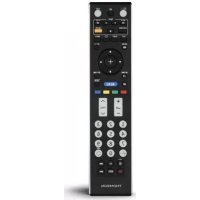
ROC1128SON - Remote control THOMSON - Free user manual and instructions
Find the device manual for free ROC1128SON THOMSON in PDF.



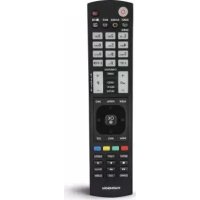
| Product type | Universal replacement remote control |
| Brand | Thomson |
| Model | ROC1128SON |
| Compatibility | Sony televisions (TV/LCD/LED/HDTV) - about 90% of models |
| Power supply | 2 LR03/AAA batteries (included) |
| Dimensions (approx.) | 20 x 5 x 2 cm |
| Weight (approx.) | 100 g (with batteries) |
| Infrared range | Approximately 10 meters |
| Code memory | Retains settings even when batteries are replaced |
| Number of keys | 34 function keys |
| Configuration methods | Direct code entry (25 predefined codes), automatic code search |
| Learning function | Yes - transfer functions from an original remote control |
| SIMPLE mode | Yes - limits functions to essential keys to prevent accidental changes |
| Display of current code | Yes - via LED flashes |
| Reset | Yes - return to default settings (RETURN + 0 keys) |
| Maintenance | Clean with a dry, soft cloth |
| Safety | Observe battery polarity, do not mix new and old batteries, keep out of reach of children |
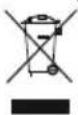
| Recycling | Do not dispose of with household waste - follow WEEE European directives |
| Warranty | Warranty void if used improperly |
| Customer service | Hama GmbH - +49 9091 502-115 (German/English) |
Frequently Asked Questions - ROC1128SON THOMSON
User questions about ROC1128SON THOMSON
0 question about this device. Answer the ones you know or ask your own.
Ask a new question about this device
Download the instructions for your Remote control in PDF format for free! Find your manual ROC1128SON - THOMSON and take your electronic device back in hand. On this page are published all the documents necessary for the use of your device. ROC1128SON by THOMSON.
USER MANUAL ROC1128SON THOMSON
GB OperatingInstructions....02
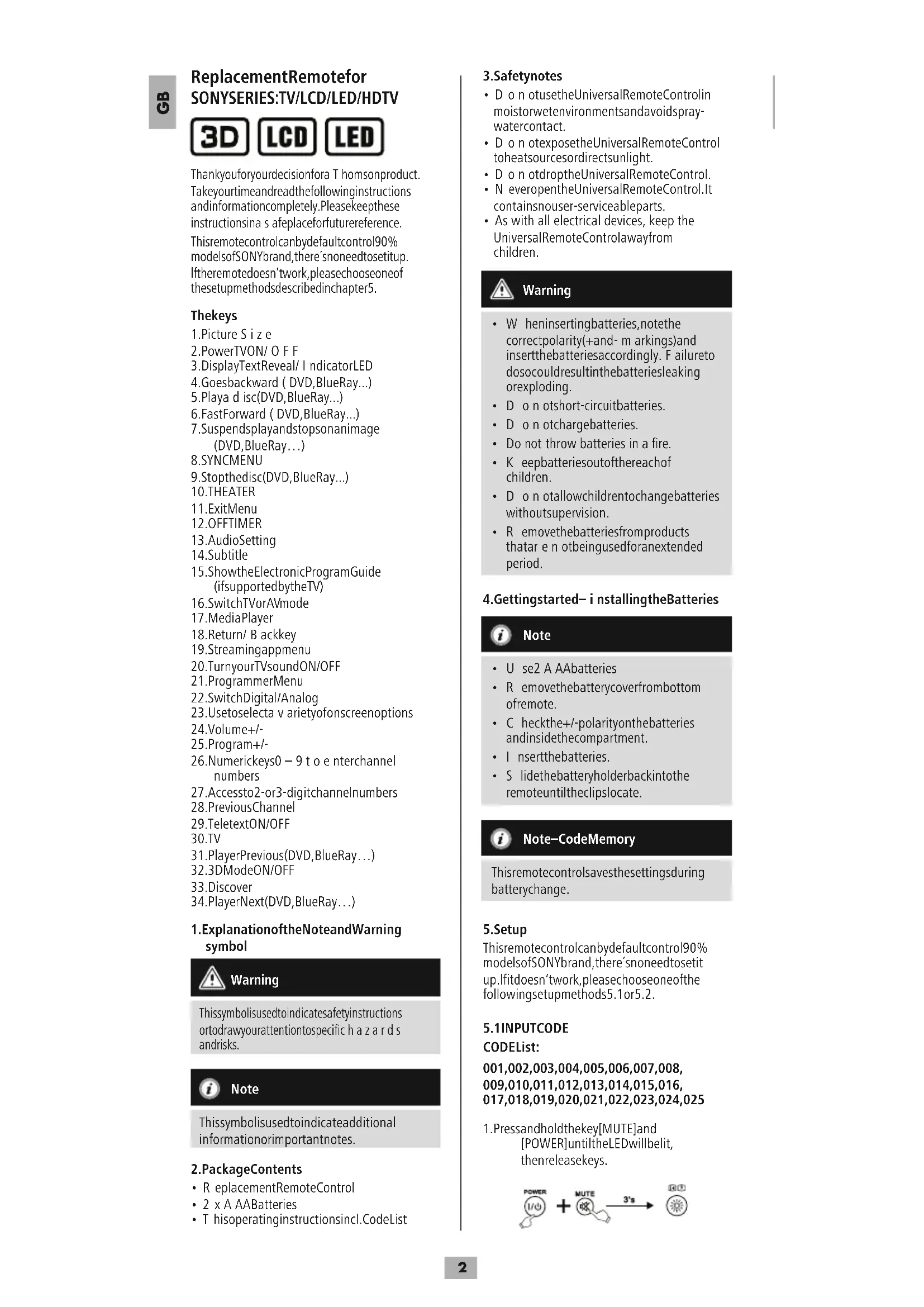
Thankyouforyourdecisionfora T homsonproduct. Takeyourtimeandreadthefollowinginstructions andinformationcompletely.Pleasekeepthese instructionsina safeplaceforfuturereference. Thisremotecontrolcanbydefaultcontrol90% modelsofSONYbrand,there'snoneedtosetitup. Iftheremotedoesn'twork,pleasechooseone of thesetupmethodsdescribedinchapter5.
Thekeys
1.Picture Size
2.PowerTVON/OFF
3.DisplayTextReveal/IndicatorLED
4.Goesbackward ( DVD,BlueRay...)
5.Playa d isc(DVD,BlueRay...)
6.FastForward ( DVD,BlueRay...)
7. Suspendsplayandstopsonanimage (DVD, BlueRay...)
8.SYNCMENU
- Stophedisc(DVD, BlueRay...)
10.THEATER
11.ExitMenu
12.OFFTIMER
13.AudioSetting
- Subtitle
15.ShowtheElectronicProgramGuide (ifsupportedbytheTV)
16.SwitchTVorAVmode
17.MediaPlayer
- Return/ Backkey
19.Streamingappmenu
20.TurnyourTVsoundON/OFF
21.ProgrammerMenu
22.SwitchDigital/Analog
23.Usetoselecta v arietyofonscreenoptions
24.Volume+/-
25.Program+/-
- Numerickeys0 - 9 to enterchannel numbers
27.Accessto2-or3-digitchannelnumbers
28.PreviousChannel
29.TeletextON/OFF
30.TV
31.PlayerPrevious(DVD,BlueRay...)
32.3DModeON/OFF
33.Discover
34.PlayerNext(DVD,BlueRay...)
1. Explanation of the Note and Warning symbol

Warning
This symbolised to indicate safety instructions ortodraw your attention specific hazards and risks.

Note
This symbol is used to indicate additional information or important notes.
2.PackageContents
- ReplacementRemoteControl
- 2 x A AABatteries
- T hisoperatinginstructionsincl.CodeList
3.Safetynotes
- Do not usetheUniversalRemoteControlin moistorwetenvironmentsandavoidspray- watercontact.
- D o n otexposetheUniversalRemoteControl toheatsourcesordirectsunlight.
• D o n otdroptheUniversalRemoteControl. - N everopentheUniversalRemoteControl.It containsnouser-serviceableparts.
- As with all electrical devices, keep the UniversalRemoteControlawayfrom children.

Warning
- W heninsertingbatteries,notethe correctpolarity(+and-m arkings)and insertthebatteriesaccordingly. Failureto dosocouldresultinthebatteriesleaking orexploding.
• D o n otshort-circuitbatteries.
• D o n otchargebatteries. - Do not throw batteries in a fire.
- Keepbatteriesoutofthereachof children.
• D o n otallowchildrentochangebatteries withoutsupervision. - R emovethebatteriesfromproducts thatar e n otbeingusedforanextended period.
4. Gettingstarted- i nstallingtheBatteries

Note
• U se2 A AAbatteries
- R emovethebatterycoverfrombottom ofremote.
- Checkthe+/-polarityonthebatteries andinsidethecompartment.
- Inserthebatteries.
- S lidethebatteryholderbackintothe remoteuntiltheclipslocate.

Note—CodeMemory
Thisremotecontrolsavesthesettingsduring batterychange.
5.Setup
Thisremotecontrolcanbydefaultcontrol90% modelsofSONYbrand,there'snoneedtosetit up.lfitdoesn'twork,pleasechooseoneofthe followingsetupmethods5.1or5.2.
5.1 INPUTCODE
CODEList:
001,002,003,004,005,006,007,008, 009,010,011,012,013,014,015,016, 017,018,019,020,021,022,023,024,025
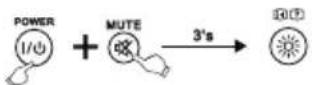
- Pressandholdthekey[MUTE] and [POWER] until the LED will belit, then release keys.
- Enterthethreecodesfromcodelist. Whenthecodeinputisfinished, the LEDwillturnoff.
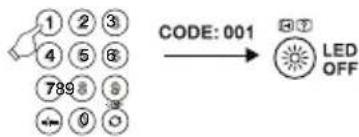
- Pleasetrytousetheremotecontrol. Ifitdoesn'tworkwell, pleasetryother codes:[002],[003],[004]...

Note
Ifthecodeisinvalid,theLEDflashestwice andthenlightsuppermanently. To exit the setup,pleasepress[MUTE].
5.2FASTSEARCH
- Pressandholdthekey[MUTE] and [POWER] until the LED will bel it, then release keys.
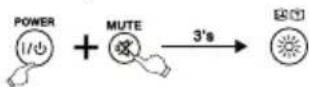
-
Pressthekey[CH+]. Eachtimeyou press, theremotewillsearchonce. Whenthecodechanges, youcantest if[POWER], [VOL+], [MENU], [0-9]keys workwell. Ifok, pleasepress[ M UTE] to savethecodeandexit.
-
If it doesn't work well, repeat the fast search by pressing [CH+].
5.3CODEINQUIRY
Usethefollowingmethodtofindoutwhich codeiscurrentlyset:
- Pressandhold[MUTE], then press [POWER] until the LED will belit, then release keys.
2.Input[9].[9].[0]withnumberkeys.The LEDwillflashtwiceandgoesoff.
3.Pressthenumberkey1 f orthe1stdigit ofthecode.TheLEDwillstarttoflash. CounttheLEDflashes.Thenumberof flashesresemblethecode'sfirstdigit. Repeatthisprocedure f orthe2ndand 3rd d igitofthecode: 2nddigit->enter2 - > countLED flashes 3rd digit -> enter 3 -> count LED flashes Ifcodenumberis[0]theLEDwillnot flash.
5.4 CompatibleRemoteControlModel
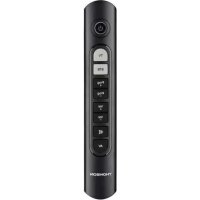
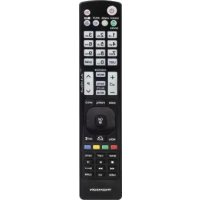
DuetotoomanyRemoteControlmodels,weonly listsomeofthembelow. Ifyourremotecontrolissimilartothedrawing,the replacementremotecancontrolyourTV(Page74)
5.5 Resetting to factory settings
Pressandholdthe[RETURN]and[0]buttonsfor about5 secondsuntilthestatusLEDflashesthree timesandthengoesout.Theremotecontrolis nowsuccessfullyresettothefactorysettings.

Note
Allkeyswithlearntcodesorallcopiedkeys, aswellasallremotecontrolsettingswill bedeleted.
6.LEARNMODE
Thisremotecontrolisequippedwitha learning function. Thus, you could learn functions of your original remoteto this remote control.
6.1 BEFORE STARTING LEARN MODE
- Thebatteriesinthetworemotecontrols havetobeingoodcondition.Replacethem ifnecessary.
- P lacetheremotecontrolswiththeinfrared diodessothattheypointtowardseach other.
- W here n eccessaryadjusttheheightofboth remotessothatinfrareddiodesare p properly aligned.
• T hedistancebetweentheremotecontrols shouldbeabout3 c m.
ROC1128SON


Note
• D o n otmovetheremotecontrolsduring thelearningprocedure.
- Ensure that the room is not lit by fluorescents tubes or low energy consumption lamps since such light sources could interfere with the copying.
- The 2 remote controls must be at least 1 m eterawayfromanylightsource.
- D uringlearningmode,ifnokeyis selectedformore than15seconds,the learningmodewillexitautomaticallyor ifnootherremotesignalisreceived.
- E achfunctionkeywillholdonlyone command.A newcommandtobelearned willautomaticallyreplacethepreviousone.
6.2 ENTERLEARNMODE
- Pressandholdthe[MUTE] and [VOL+] keysforapprox.5 seconds until the LED will belit.
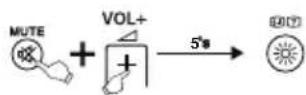
-
Enterthecode[9][8][0], theLEDwillflash 2 timesandthenremainon.
-
Theremote control is now ready to learn new commands.
6.3LEARNINGOFKEYS
- Pressandreleasethedesiredkeyonthe originalremotecontrolwhichyouwantthe commandtobelearned.TheLEDatyour replacement remote will flash to confirm thattheinformationhasbeenreceived.
- Then press and releas the target key on theremote control you want learned.
- If the LED flashes 3 times and then remain on, the command has been learned successfully.
B
- Repeat these step to learn other key functions.
5.Pressthe[MUTE]and[VOL-]buttonsto savealllearntfunctionsandtoexitthe learningmode.

Note
Whilereplacingthebatteries,theremotecontrol willkeepthefunctionsofthelearnedkeys.
6.4 CLEARINGOFLEARNEDKEYS
6.4.1 CLEARINGOFONELEARNEDKEY
- Pressandhold[MUTE]and[VOL+]keys for5 secondsuntiltheLEDwillbelit.
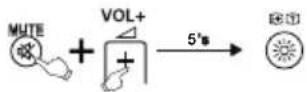
2.Enterthecode[9][8][1],theLEDwill flash2 timesandthenremainon.
3. Pressandreleasethedesiredkeyatthe replacementremotecontrolwhichyou wanttoclearthelearnedcommand.Ifthe LEDflashes3 times,thelearnedcommand hasbeenclearedsuccessfully.
6.4.2 CLEARINGOFALLLEARNEDKEYS
- Pressandhold[MUTE] and [VOL+] keys for 5 seconds until the LED will belit.
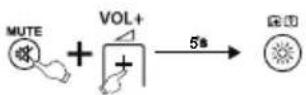
2.Enterthecode[9][8][2],theLEDwillflash 2 timesandthenremainon.
3. Pressandreleasethe[OK]keyatthe replacementremotecontrol.IftheLED flashes3 times, allcommandshavebeen clearedsuccessfully.
7.SIMPLEMode
ThisremotecontrolisequippedwithanSIMPLE Mode. Thusyoucouldreducethefunctionality of theremotecontroltoitsbasicfunctions.Itavoids thattheTVSettingsare c hangedbymistake.
During the SIMPLE Mode you still could use following keys:

PowerTVON/OFF

Volume+/-

TurnyourTVsoundON/OFF
PROGProgram+/-
0-9 Numerickeys0 - 9 to enterchannel numbers

TEXT TeletextON/OFF

Usetoselecta v arietyofonscreen options

ShowtheElectronicProgramGuide
GUIDE(ifsupportedbytheTV)

SwitchTVorAVmode
EXITExitMenu
TVTV
7.1 EnterSIMPLEMode
- Pressandhold[MUTE] and [VOL+] keys for 5 seconds until the LED will belit.
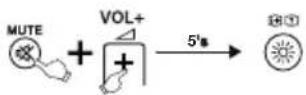
- Enterthecode[9][7][0], theLEDwillflash twotimesandthenremainon.
- Pressandreleasethe[OK]key, if L EDflash 3 times, you have entered the SIMPLE Modesuccessfully
7.2ExitSIMPLEMode
- Pressandhold[MUTE] and [VOL+] for 5 seconds until the LED will belit.
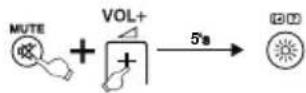
- Enterthecode[9][7][0], theLEDwillflash twotimesandthenremainon.
- Press and release the [EXIT] key, if LED flash 3 times, you have exit the SIMPLE Mode.

Note
While the SIMPLE Mode is activated only the keys mentioned in chapter 7 will work. If one of these keys is pressed the LED will belit until the key is released. If one key is pressed during then normal mode, the LED will flash.
8. Maintenance
- Do not mix new and used batteries for powering the Universal Remote Control, as old batteriest end to leak and may cause powerdrain.
- Do not use corrosive or abrasive cleanserson your Universal Remote Control.
- KeeptheUniversalRemoteControldustfree bywipingitwitha s oft,drycloth.
9.Troubleshooting
Q.MyUniversalRemoteControldoesnot workatall!
A. Check your TV. If the TV mains switch is turned off, your Remotec cannot operate your TV.
A. Checkwhetheryourbatteriesareinserted properlyandareinthecorrect+/-position.
A. Checkwhetheryouhavepressedthe correspondingdevicemodekeyforyour device.
A. If the batteries are low, replace the batteries.
Q. MyTVrespondsonlytosomeofthe commands.
A. Tryothercodesuntilmostkeyswork properly.
Q. Some key so the Remote Control on work anymore?
A. Maybe the SIMPLE Mode had been activated. Deactivatethe SIMPLE Mode as explained in chapter 7.2.
10.WarrantyDisclaimer
Themanufacturerassumesnoliabilityand providesnowarrantyfordamageresulting fromimproperinstallation/mounting,improper useoftheproductorfromfailuretoobserve theoperatinginstructionsand/orsafetynotes.
11. Service and Support
PleasecontactHamaProductConsultingifyou haveanyquestionsaboutthisproduct. Hotline:+499091502-115(German/English) Furthersupportinformationcanbefoundhere: www.hama.com
12.RecyclingInformation
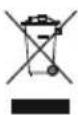
Noteonenvironmental protection:
Aftertheimplementationofthe EuropeanDirective2012/19/EUand 2006/66/EUinthenationallegal system, the following applies: Electric and electronic devices as well as batteries must not be disposed of with household waste. Consumers are obliged by law to return electrical and electronic devices as well as batteries at the end of their service to the public collecting points setup forth this purpose or point of sale. Detail to this are defined by thenation allawoftherespective country. This symbol on the product, the instruction manual or the package indicates that a product is subject to these regulations. By recycling, reusing thematerials or other forms of utilising old devices/Batteries, you are making an important contribution to protecting our environment.

TEXT TeletextoON/OFF
29.Liqar/desligarteletexto
30.TV
31.Cenaanterior(DVD,Blu-ray...)
32.Ligar/desligarmodo3D
33.DISCOVER
12.Pokynyk likvidaci
Hotline:+499091502-115(ty/eng)
Duhittarmersupport-informationhär: www.hama.com
29.TeletextPORNIT/OPRIT
30.TV
TeletextPORNIT/OPRIT

017,018,019,020,021,022,023,024,025

- Thekeys
- Explanation of the Note and Warning symbol
- Warning
- Note
- 2.PackageContents
- 3.Safetynotes
- Gettingstarted- i nstallingtheBatteries
- Note—CodeMemory
- 5.Setup
- INPUTCODE
- CODEList:
- 5.2FASTSEARCH
- 5.3CODEINQUIRY
- CompatibleRemoteControlModel
- Resetting to factory settings
- 6.LEARNMODE
- BEFORE STARTING LEARN MODE
- ENTERLEARNMODE
- 6.3LEARNINGOFKEYS
- B
- CLEARINGOFLEARNEDKEYS
- CLEARINGOFONELEARNEDKEY
- CLEARINGOFALLLEARNEDKEYS
- 7.SIMPLEMode
- EnterSIMPLEMode
- 7.2ExitSIMPLEMode
- Maintenance
- 9.Troubleshooting
- 10.WarrantyDisclaimer
- Service and Support
- 12.RecyclingInformation
- Noteonenvironmental protection:
- 12.Pokynyk likvidaci
Brand : THOMSON
Model : ROC1128SON
Category : Remote control