
KM 105180 R Bp Pack Classic - Sweeper Kärcher - Free user manual and instructions
Find the device manual for free KM 105180 R Bp Pack Classic Kärcher in PDF.
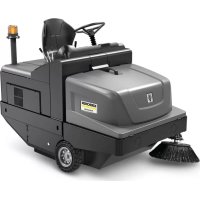



| Product Type | Self-propelled sweeper |
| Brand | Kärcher |
| Model | KM 105/180 R Bp Pack Classic |
| Power supply | Battery 36 V, 240 Ah, low maintenance |
| Dimensions (L × W × H) | 1847 × 1065 × 1388 mm |
| Weight (with batteries) | 860 kg |
| Sweeping width (with 1 side broom) | 1050 mm |
| Dust bin capacity | 180 L |
| Max. unloading height | 1340 mm |
| Forward speed | 6 km/h |
| Max. gradient (driving direction) | 14 % |
| Runtime (full battery) | 2.5 h |
| Protection type | IPX3 |
| Filtration system | Fine dust filter (5.2 m²) |
| Main functions | Sweeping, fine dust vacuuming, edge cleaning |
| Maintenance and cleaning | Manual filter cleaning, regular maintenance by customer and after-sales service |
| Safety | Contact seat, parking brake, slope protection, protective roof (option) |
| Spare parts and repairability | Kärcher authorized accessories and spare parts |
| General information | Industrial and commercial use, indoor/outdoor |
Frequently Asked Questions - KM 105180 R Bp Pack Classic Kärcher
User questions about KM 105180 R Bp Pack Classic Kärcher
0 question about this device. Answer the ones you know or ask your own.
Ask a new question about this device
Download the instructions for your Sweeper in PDF format for free! Find your manual KM 105180 R Bp Pack Classic - Kärcher and take your electronic device back in hand. On this page are published all the documents necessary for the use of your device. KM 105180 R Bp Pack Classic by Kärcher.
USER MANUAL KM 105180 R Bp Pack Classic Kärcher
Czech 200
Slovenian 212
Polish 224
Romanian 236
Slovak 248
Croatian 260
Serbian 272
Bulgarian 284
Estonian 297
Latvian 309
Lithuanian 321
Ukrainian 333
Chinese 346
Arabic 365
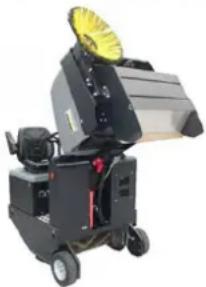
18 keys for reversing roller access
1 Sight glass
1 Dirt container
2 Safety bar
3 Sweeping roller
Chairman of the Board of Management
Director Regulatory Affairs & Certification
71364 Winnenden (Germany)
Tel.: +49 7195 14-0
Fax: +49 7195 14-2212
Winnenden, 2020/01/01
Help with malfunctions
General notes ..... EN 1
Environmental protection EN 1
Warranty ..... EN 1
Accessories and Spare Parts....EN 1
Symbols in the operating instructions ..... EN 1
Symbols on the machine EN 1
Proper use.....EN 2
Foreseeable misuse....EN 2
Suitable surfaces ..... EN 2
Safety instructions ..... EN 2
Safety instructions concerning the operation ..... EN 2
Safety information concerning the driving operation. EN 2
Safety instructions for battery-operated devices .. EN 3
Appliances with high emptying system ....EN 3
Devices with overhead guard....EN 3
Safety information concerning the transport of the appliance ..... EN 3
Safety information concerning maintenance and care EN 3
Function.....EN 3
Unloading tips ..... EN 3
Operating and Functional Elements
EN 4
Illustration of sweeper EN 4
Operating elements EN 4
Before Startup EN 5
Lock/release parking brake EN 5
Start up EN 5
General notes EN 5
Inspection and maintenance work EN 5
Safety notes regarding the batteries EN 5
Charge the batteries EN 5
Operation EN 6
Adjusting driver's seat EN 6
Starting the machine EN 6
Drive the machine EN 6
Sweeping mode ..... EN 6
Emptying waste container EN 7
Turn off the appliance .. EN 7
Transport......EN 7
Storage/decommissioning .... EN 7
Care and maintenance ..... EN 7
General notes ..... EN 7
Cleaning.....EN 7
Maintenance intervals .. EN 7
Maintenance Works .... EN 8
EU Declaration of Conformity. EN 10
Troubleshooting..... EN 11
Technical specifications.....EN 11

Please read and comply with these original instructions prior
to the initial operation of your appliance and store them for later use or subsequent owners.
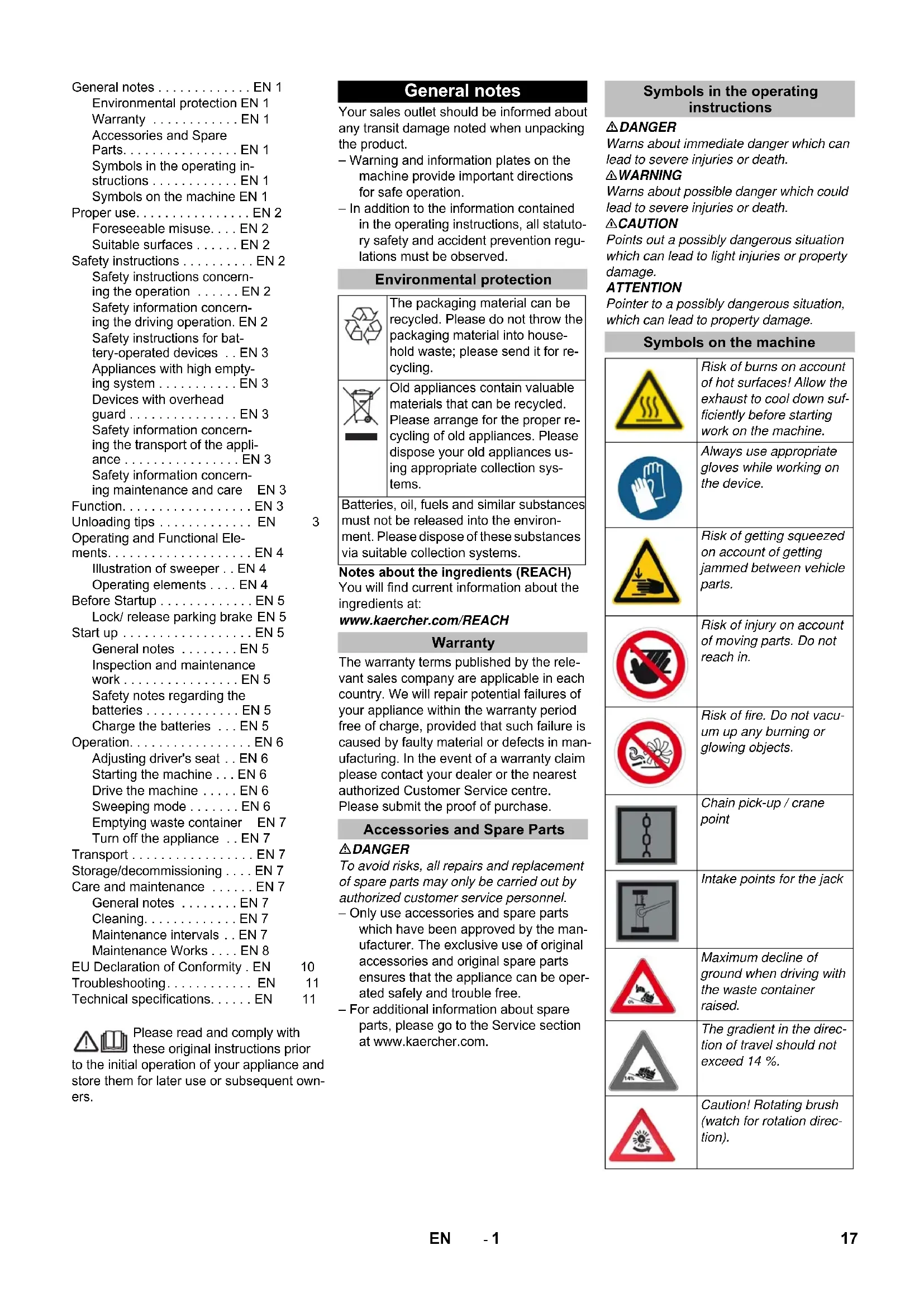
General notes
Your sales outlet should be informed about any transit damage noted when unpacking the product.
- Warning and information plates on the machine provide important directions for safe operation.
– In addition to the information contained in the operating instructions, all statutory safety and accident prevention regulations must be observed.
Environmental protection
| The packaging material can be recycled. Please do not throw the packaging material into household waste; please send it for recycling. | |
| Old appliances contain valuable materials that can be recycled. Please arrange for the proper recycling of old appliances. Please dispose your old appliances using appropriate collection systems. |
Batteries, oil, fuels and similar substances must not be released into the environment. Please dispose of these substances via suitable collection systems.
Notes about the ingredients (REACH)
You will find current information about the ingredients at:
www.kaercher.com/REACH
Warranty
The warranty terms published by the relevant sales company are applicable in each country. We will repair potential failures of your appliance within the warranty period free of charge, provided that such failure is caused by faulty material or defects in manufacturing. In the event of a warranty claim please contact your dealer or the nearest authorized Customer Service centre. Please submit the proof of purchase.
Accessories and Spare Parts
△DANGER
To avoid risks, all repairs and replacement of spare parts may only be carried out by authorized customer service personnel.
- Only use accessories and spare parts which have been approved by the manufacturer. The exclusive use of original accessories and original spare parts ensures that the appliance can be operated safely and trouble free.
- For additional information about spare parts, please go to the Service section at www.kaercher.com.
Symbols in the operating instructions
△DANGER
Warns about immediate danger which can lead to severe injuries or death.
⚠ WARNING
Warns about possible danger which could lead to severe injuries or death.
△CAUTION
Points out a possibly dangerous situation which can lead to light injuries or property damage.
ATTENTION
Pointer to a possibly dangerous situation, which can lead to property damage.
Symbols on the machine
 | Risk of burns on account of hot surfaces! Allow the exhaust to cool down sufficiently before starting work on the machine. |
 | Always use appropriate gloves while working on the device. |
 | Risk of getting squeezed on account of getting jammed between vehicle parts. |
 | Risk of injury on account of moving parts. Do not reach in. |
 | Risk of fire. Do not vacuum up any burning or glowing objects. |
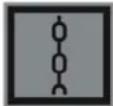 | Chain pick-up / crane point |
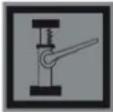
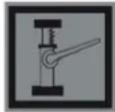 | Intake points for the jack |
 | Maximum decline of ground when driving with the waste container raised. |
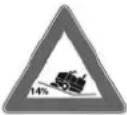 | The gradient in the direction of travel should not exceed 14 %. |
 | Caution! Rotating brush (watch for rotation direction). |
| Beware of dangerous electrical current! | |
| Pay attention to the instruction. | |
| Steer slowly! | |
| Please read the operating instructions and act accordingly! | |
| Risk of damage!Do not wash the fine dust filter. |
Proper use
The sweeper is intended for cleaning floor surfaces for commercial use and e.g. for the following fields of application:
Car parks ■ Production facilities ■ Logistics areas Hotel ■ Retail industry ■ Storage areas ■ Walkways
- This sweeper has been designed to sweep dirt and debris from indoor as well as outdoor surfaces.
- The machine with working equipment must be checked to ensure that it is in proper working order and is operating safely prior to use. Otherwise, the appliance must not be used.
- Use this sweeper only as directed in these operating instructions. – The machine may not be modified.
- The machine is only suitable for use on the types of surfaces specified in the operating instructions. – The machine may only be operated on the surfaces approved by the company or its authorised representatives.
- The following applies in general: Keep highly-flammable substances away from the appliance (danger of explosion/fire).
Foreseeable misuse
→ Never vacuum up explosive liquids, combustible gases or undiluted acids and solvents. This includes petrol, paint thinner or heating oil which can generate explosive fumes or mixtures upon contact with the suction air. Acetone, undiluted acids and solvents must also be avoided as they can harm the materials on the machine. → Never sweep/vacuum up reactive metal dusts (e.g. aluminium, magnesium, zinc), as they form explosive gases when they come in contact with highly alkaline or acidic detergents. → Do not sweep/vacuum up any burning or glowing objects. → The appliance is not suitable for sweeping off hazardous substances. → The machine may not be used or stored in hazardous areas. It is not allowed to use the appliance in hazardous locations. → It is strictly prohibited to take co-passengers. → Pushing/pulling or transporting objects by means of this appliance is prohibited.
Suitable surfaces
- Asphalt
- Industrial floor
- Screed
- Concrete
- Paving stones
Safety instructions
Safety instructions concerning the operation
→ In order to maintain clearance and creepage distances, the device may not be operated over 2000 metres above sea level. → (Applicable for Finland only) The device may not be used at low ambient temperatures (below 0°C) if it is equipped with a PVC hose line. Contact Kärcher if should have questions regarding your device. → The machine with working equipment must be checked to ensure that it is in proper working order and is operating safely prior to use. Otherwise, the appliance must not be used. → If the appliance is used in hazardous areas (e.g. filling stations) the corresponding safety provisions must be observed. It is not allowed to use the appliance in hazardous locations.
△DANGER
Risk of injury!
→ Do not use the appliance without an overhead guard in areas where the operator might get hit by falling objects. → The operator must use the appliance properly. The person must consider the local conditions and must pay attention to third parties, in particular children, when working with the appliance.
→ It is important to follow all safety instructions, rules and regulations applicable for driving motor vehicles. → Prior to starting work, the operator must ensure that all protective devices are properly installed and function correctly. → The operator of the appliance is liable for accidents with other individuals or their property. → Ensure that the operator wears tight-fitting clothes. Wear sturdy shoes and avoid wearing loose-fitting clothes. → Check the immediate vicinity prior to starting (e.g. children). Ensure sufficient visibility! → Never leave the machine unattended so long as the engine is running. The operator may leave the appliance only when the engine has come to a standstill, the appliance has been protected against accidental movement, and the key has been removed. → Please remove the key, when not in use, to avoid unauthorised use of the appliance. The appliance may only be used by persons who have been instructed in handling the appliance or have proven qualification and expertise in operating the appliance or have been explicitly assigned the task of handling the appliance. → This appliance is not intended for use by persons (including children) with limited physical, sensoric or mental capacities or lack of experience and/or skills, unless such persons are accompanied and supervised by a person in charge of their safety or if they received precise instructions on the use of this appliance. → Children should be supervised to prevent them from playing with the appliance.
CAUTION
Risk of damage! Do not sweep up straps, strings or wires as these may wrap around the brush roller.
Safety information concerning the driving operation
△DANGER
Risk of injury! Verify the stability of the ground prior to driving on it.
△DANGER
Risk of accident, risk of injury!
Danger of tipping if gradient is too high.
– The gradient in the direction of travel should not exceed 14 %. Danger of tipping over when taking bends at high speed (particularly left-hand bends). - Drive slowly when cornering. Danger of tipping on unstable ground. - Only use the machine on sound surfaces. Danger of tipping with excessive sideways tilt. - The gradient perpendicular to the direction of travel should not exceed 10%.
Safety instructions for battery-operated devices
Note: Warranty claims will be entertained only if you use batteries and chargers recommended by Kärcher.
- Always follow the instructions of the battery manufacturer and the charger manufacturer. Please follow the statutory requirements for handling and disposing batteries. – Never leave the batteries in a discharged state; recharge them as soon as possible.
- Always keep the batteries clean and dry to avoid creep currents. Protect the batteries and avoid contact with impurities such as metal dust.
- Do not place tools or similar items on the battery. Risk of short-circuit and explosion.
- Do not work with open flames, generate sparks or smoke in the vicinity of a battery or a battery charging room. Danger of explosion.
- Do not touch hot parts of the machine such as the drive motor (risk of burns).
- Be careful while handling battery acid. Follow the respective safety instructions! – Used batteries are to be disposed according to the EC guideline 91/157 EWG in an environment-friendly manner.
Appliances with high emptying system
△DANGER
Risk of injury!
→ When working on the high emptying system, completely lift and secure the waste container. → Perform the safeguarding only from outside the hazard zone.
Devices with overhead guard
NOTICE
The overhead guard (optional) protects the driver against larger falling objects. However, it does not provide rollover protection!
→ Check the overhead guard for damage daily. → If the overhead guard, as well as individual elements, should be damaged, replace the entire overhead guard. → Any modification of the overhead guard and installation of elements, components and assemblies other than those approved by Kärcher is not permitted and may limit the function of the overhead guard.
Safety information concerning the transport of the appliance
→ Observe the net weight (transport weight) of the device during transport on trailers or vehicles. → To transport the device, unplug the battery plug and securely fasten the device.
Safety information concerning maintenance and care
→ First switch off the appliance and remove the key before performing any cleaning or maintenance tasks on the appliance, replacing parts or switching over to another function. → When performing any service and maintenance work on devices with a traction battery, the battery must be disconnected from the electrical system of the device via the battery isolation point (battery plug). → Always disconnect the battery when working on the electrics. To do this, first disconnect the negative terminal and then the positive terminal. Reconnection is performed in reverse sequence. Connect the positive terminal first, then connect the negative terminal. Do not clean the appliance with a water hose or high-pressure water jet (danger of short circuits or other damage). → Maintenance work may only be carried out by approved customer service outlets or experts in this field who are familiar with the respective safety regulations. → Please observe the local safety regulations regarding portable commercially used appliances. → Always use appropriate gloves while working on the device.
Function
The sweeper operates using the sweep-shovel principle.
- The rotating roller brush moves the dirt directly into the waste container.
- The side brush cleans the corners and edges of the surface and moves dirt and debris into the path of the roller brush.
- The fine dust is sucked in via the dust filter through the suction blower.
Unloading tips
⚠ Danger
Risk of injury, risk of damage! Observe the weight of the appliance when you load it!
| Weight (without batteries) 560 kg* | |
| Weight (with batteries) 860 kg* | |
| * If upgrade kits are installed, the weight is respectively higher. | |
→ Do not use a forklift.
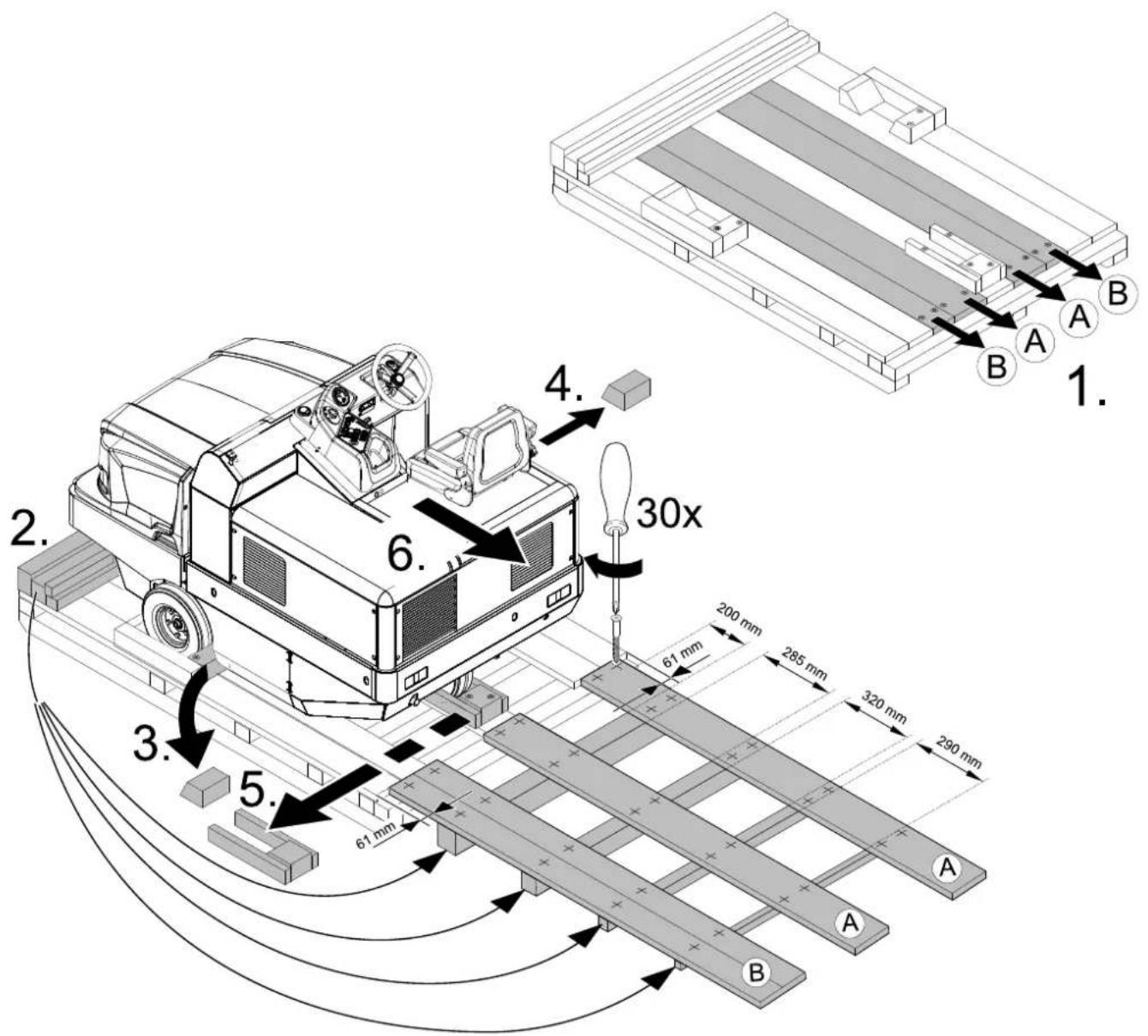
→ Use a suitable ramp or a crane to load the appliance! → Observe when using a ramp: Ground clearance 70 mm. → If the machine is delivered on a pallet, you must create an unloading ramp using the boards provided. You will find the instructions for this procedure on page 2 (inside of cover).
Important instruction: every board must be attached with at least 2 screws.
Operating and Functional Elements
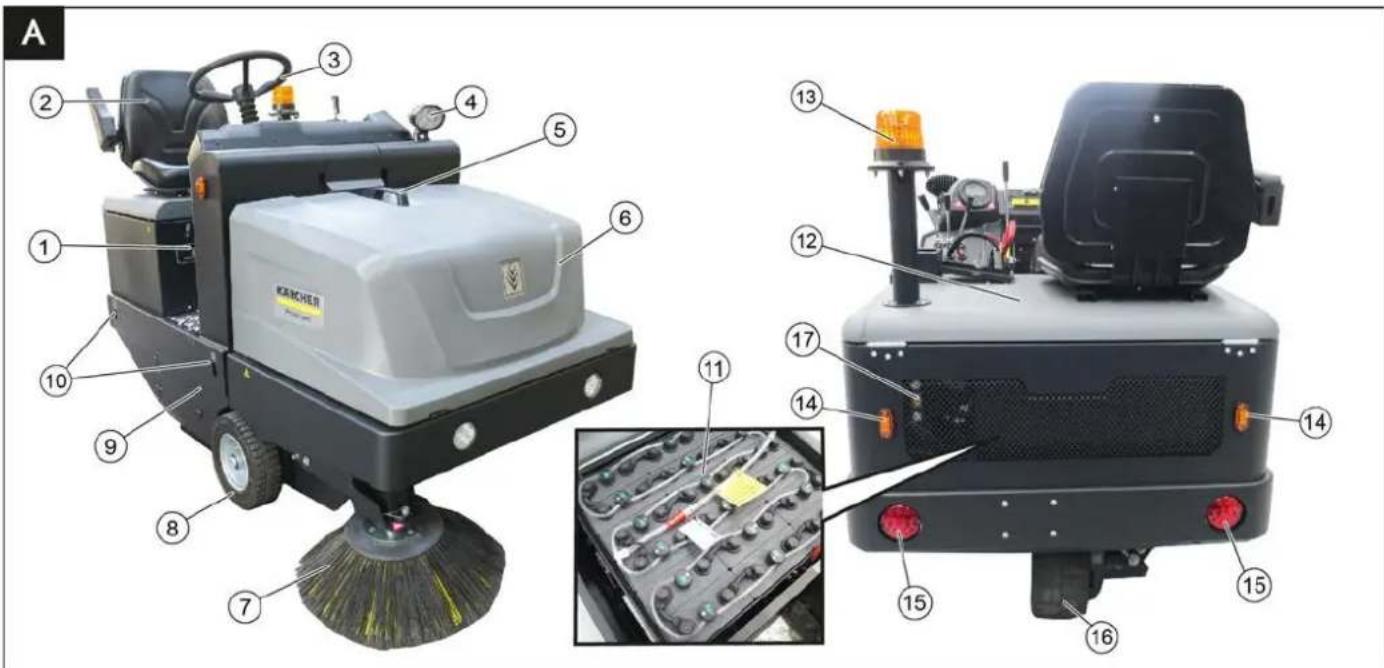
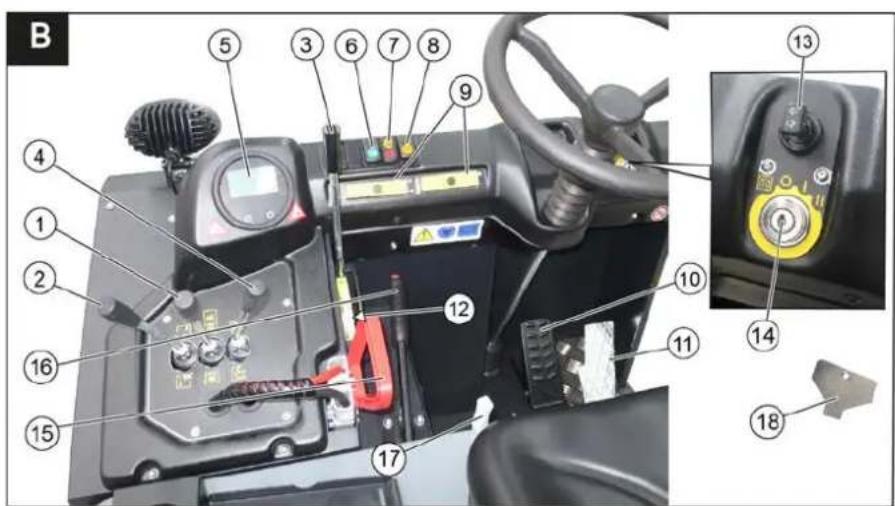
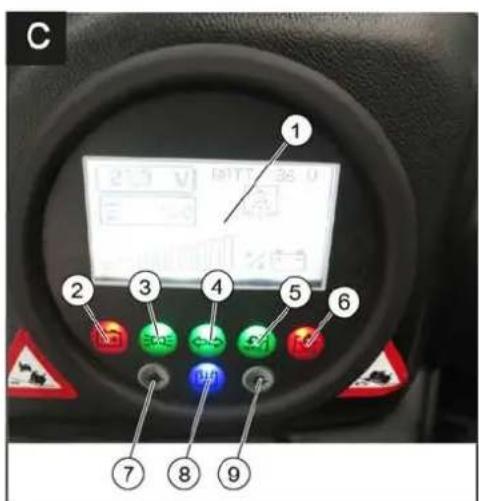
Illustration of sweeper Operating elements
Illustration A
1 Nameplate 2 Seat (with seat contact switch) 3 Steering wheel 4 Blue Spot (option) 5 Handle with locking button 6 Cover 7 Side brush, right 8 Front wheel 9 Roller brush access 10 Lashing point 11 Battery set (only included with the scope of delivery for the KM 105/180 R Bp Pack) 12 Engine bonnet 13 Beacon lamp 14 Blinker (option) 15 Taillights (option) 16 Drive wheel 17 Sight glass hydraulic oil
Illustration B
1 Roller brush and side brush control lever Lever forwards: Switches the roller brush on and lowers and switches the side brushes on. Lever backwards: Switches the roller brush on
2 Control lever waste container Raise/lower waste container
3 Roller brush control lever Raises and lowers the roller brush
4 Control lever container flap Open/close container lid
5 Indicator lamps and display
6 Switch for lights (option)
7 Switch blower and filter cleaning Position centred: Filter cleaning and blower off
Front position: Blower on Rear position: Filter cleaning on
8 Horn switch
9 Fuses
10 Brake pedal
11 Accelerator pedal forward / reverse
12 Roller brush wear adjustment / sweeping area setting 13 Turn signal switch (option) 14 Ignition lock Position 0: Switch off engine Position 1: Ignition on Position 2: Start the engine 15 Battery socket 16 Parking brake 17 Lever for seat adjustment 18 Key for roller brush access
Indicator lamps and display
Illustration ©
1 Display (battery capacity) 2 Battery charger control 3 Working light indicator light 4 Indicator lamp for direction indicator 5 Indicator light flap waste container open 6 Warning light flap waste container closed 7 not assigned 8 Filter cleaning display active 9 not assigned
Before Startup
Lock/ release parking brake
→ Loosen parking brake; press brake pedal at the same time. → Activate the parking brake; press brake pedal at the same time.
Start up
General notes
→ Park the sweeper on an even surface. → Remove ignition key. → Lock parking brake.
Inspection and maintenance work
Daily before starting operations
→ Check battery charging status; charge batteries it if required (see Chapter "Charging the batteries"). → Check the sweeping roller and the side brush for wear and wrapped belts. → Check the wheels for tied up belts. → Check function of all operator control elements. → Check appliance for damages.
Note: For description, see section on Care and maintenance.
Safety notes regarding the batteries
Please observe the following warning notes when handling batteries:
| Observe the directions on the battery, in the instructions for use and in the vehicle operating instructions! | |
| Wear an eye shield! | |
| Keep away children from acid and batteries! | |
| Risk of explosion! | |
| Fire, sparks, open light, and smoking not allowed! | |
| Danger of causticization! | |
| First aid! | |
| Warning note! | |
| Disposal! |
Pb
Do not throw the battery in the dustbin!

Beware of dangerous electrical current!
Danger
Risk of explosion! Do not put tools or similar on the battery, i.e. on the terminal poles and cell connectors.
⚠ Danger
Risk of injury! Ensure that wounds never come into contact with lead. Always clean your hands after having worked with batteries.
△DANGER
Risk of fire and explosion!
- Smoking and naked flames are strictly prohibited.
- Rooms where batteries are charged must have good ventilation because highly explosive gas is emitted during charging.
⚠ Danger
Danger of causticization!
- Rinse thoroughly with plenty of clear water if acid gets into the eye or comes into contact with the skin.
- Then consult a doctor immediately.
- Wash off the acid if it comes into contact with clothing.
Charge the batteries
CAUTION
Charge the batteries before commissioning the machine.
DANGER
Risk of injury! Observe the safety instructions on the handling of batteries. Follow the instructions of the charger manufacturer.
Please read and follow the included operating instructions by the battery manufacturer and follow them.
Charge the battery only with an appropriate charger.
DANGER
Risk of acid burns. Refilling water when the battery is in the discharged state can lead to acid leakage! When handling battery acid, use safety goggles and observe regulations to prevent injury and destruction of clothing. Immediately rinse off any splashed acid from the skin or clothing using copious amounts of water.
CAUTION
Risk of damage. Use only distilled or desalinated water (VDE 0510) for filling the battery. Do not add any substances (so-called performance improving agents), else warranty claims will not be entertained.
Park the device safely in dry rooms with adequate ventilation. Open the engine hood.
Note: The cover must remain open during the charging process.
Pull the battery plug from the machine and connect it to the plug of the charger.
Connect the plug of the charger to a proper socket of 16 A, the charger will charge automatically. Execute the charging process according to the information in the operating instructions of the charger. The recommended chargers (suitable for the batteries used) are regulated electronically and will automatically terminate the charging process. Note: When the batteries are charged, first remove the charger from the mains and then disconnect it from the batteries.
Recommended batteries, chargers
Note
The 105/180 R Bp Pack sweeper variant (1.186-051.0) is already supplied with batteries and charger.
The 105/180 R Bp sweeper variant (1.186-050.0) is supplied without batteries and charger.
We recommend the following batteries and chargers:
| Order number | |
| Battery pack 36 V, 240 Ah, (in the trough, low maintenance) * | 6,981-067.0 |
| Charger 36 V, 40 A 6,981-066.0 | |
| * Appliance requires 1 battery pack | |
The use of other batteries and chargers is not recommended and should be discussed with Kärcher customer service.
Check fluid level in the battery and adjust if required
CAUTION
Be sure to observe the battery manufacturer's instructions and then act accordingly.
Check charging status of battery
The charging state of the battery is shown on the sweeper display.
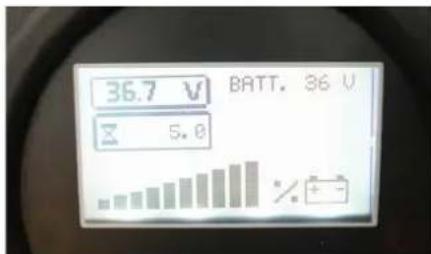
If the battery charge indicator light is red:
→ Battery is discharged. The sweeping mode will be terminated automatically (the sweeping aggregates cannot be taken into operation until the battery is charged). → Drive the machine directly to the charging station; avoid any steep gradients in the process. → Charge battery.
Operation
Adjusting driver's seat
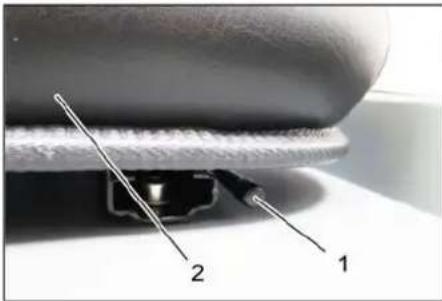
1 Lever for seat adjustment
2 Driver seat
→ Pull seat adjustment lever outwards. → Slide seat, release lever and lock in place. → Check that the seat is properly locked in position by attempting to move it backwards and forwards.
Starting the machine
Note: The machine is equipped with a seat contact switch. If the driver's seat is vacated, the machine is switched off.
Note: The fine dust filter is automatically cleaned when the device is started.
→ Sit on the driver's seat. → Lock parking brake. → Insert the ignition key into the ignition switch. → Turn the ignition key to position "I". The appliance is now ready for operation. → Turn the ignition key to position "II". The appliance can now be driven. Note: The display of the battery capacity will show the actual charge status after about 10 seconds.
Drive the machine
→ Press brake pedal and keep it depressed. → Release parking brake.
Drive forward
→ Slowly press the accelerator pedal to the front.
Reverse drive
⚠ Danger
Risk of injury! While reversing, ensure that there is nobody in the way, ask them to move if somebody is around.
→ Slowly press the accelerator pedal backwards.
Driving method
→ The accelerator pedal can be used to vary the driving speed infinitely. → Avoid jerking the pedal.
Brakes
→ Release the accelerator pedal, the machine brakes automatically and stops.
Note: The braking effect can be supported by pressing the brake pedal.
Driving over obstacles
Driving over fixed obstacles which are 70 mm high or less:
→ Drive forwards slowly and carefully. Driving over fixed obstacles which are more than 70 mm high: → Only drive over these obstacles using a suitable ramp.
Sweeping mode
ATTENTION
Do not sweep up packing strips, wire or similar objects as this may damage the sweeping mechanism.
Note: To achieve an optimum cleaning result, the driving speed should be adjusted to take specific situations into account.
Note: The fine dust filter is automatically cleaned every 10 minutes during operation.
Note: For increased work in the fine dust area, the filter must also be cleaned by pressing the filter cleaning switch.
Cleaning the fine dust filter manually
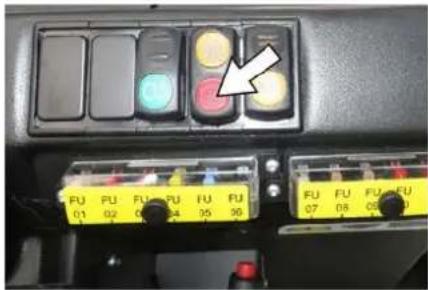
→ Clean the fine dust filter with the filter cleaning button.
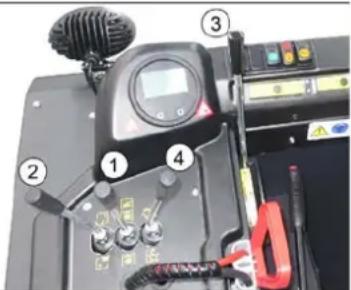
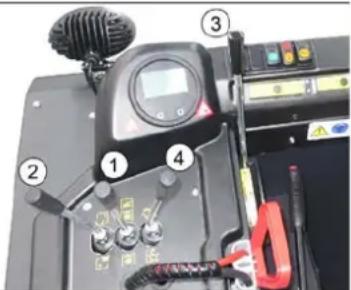
Control lever
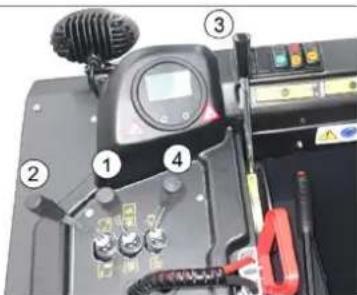
1 Roller brush and side brush control lever
2 Control lever waste container 3 Roller brush control lever 4 Control lever container flap
Roller brush and side brush control lever
ver
→ Control lever (1) forwards: Switches the roller brush on and lowers and switches the side brushes on. → Control lever (1) backwards: Switches the roller brush on.
Control lever waste container
→ Control lever waste container (2) to the front: Waste container is lowered. → Control lever waste container (2) to the back: Waste container is raised.
Control lever roller brush
→ Roller brush control lever (3) forwards: Raises the roller brush. → Roller brush control lever (3) backwards: Lowers the roller brush.
Control lever container flap
→ Control lever container flap (4) to the front: The container flap of the waste container opens. Note: The green indicator lamp must light up. → Control lever container flap (4) to the back: The container flap of the waste container closes. Note: The red indicator lamp must light up.
Sweeping dry floors
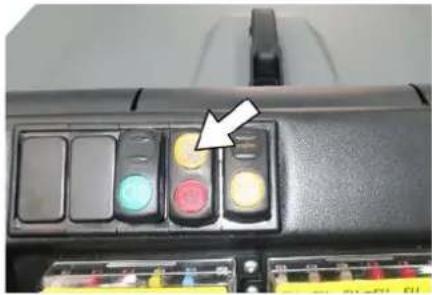
→ Switch on the blower. → With surface cleaning:
Roller brush and side brush control lever (1) backwards: Switches the roller brush on.
Roller brush control lever (3) backwards: Lowers the roller brush.
→ Control lever container flap (4) to the front: Container flap opens.
Note: The green indicator lamp must light up.
→ With cleaning of side edges:
Roller brush and side brush control lever (1) forwards: Switches the roller brush on, switches the side brushes on and lowers them.
Roller brush control lever (3) backwards: Lowers the roller brush.
Sweeping damp or wet floors
→ Switch off the blower. → With surface cleaning:
Roller brush and side brush control lever (1) backwards: Switches the roller brush on.
Roller brush control lever (3) backwards: Lowers the roller brush.
→ Control lever container flap (4) to the front: Container flap opens.
Note: The green indicator lamp must light up.
→ When cleaning the side edges:
Roller brush and side brush control lever (1) forwards: Switches the roller brush on, switches the side brushes on and lowers them.
Roller brush control lever (3) backwards: Lowers the roller brush.
Emptying the waste container
△DANGER
Risk of injury!
→ During the emptying process, persons and animals must not stay within the swivelling range of the waste container. Danger of tipping!
→ Place the device on an even surface during the emptying process.
⚠ WARNING
Risk of crushing!
→ Never reach into the rod assembly for the drainage mechanism. Do not stay under the raised container.
ATTENTION
Risk of personal injury or damage!
→ Material of the rotating roller brush may be catapulted off during the emptying process. Keep an appropriate distance.
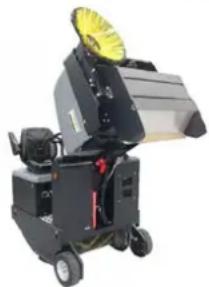
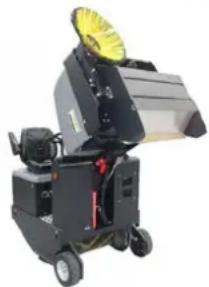
Raise the roller brush and side brushes using the control levers: move control lever 1 to the middle position and control lever 3 forwards. Close the container flap by moving control lever (4) to the back.
Note: The green indicator lamp must light up.
Raise the container flap by moving the waste container control lever (2) to the back. Slowly drive towards the collection container. Lock the parking brake. Open the container flap by pushing the container flap operating lever (4) to the front and empty the waste container.
Note: The red indicator lamp must light up.
Close the container flap by pushing the container flap operating lever (4) to the back until it is tipped inwards in the end position.
Note: The green indicator lamp must light up.
Release the parking brake. Slowly drive the collection container away.
Lower the waste container into the end position by moving the waste container control lever (2) to the front.
Turn off the appliance.
Press the brake pedal and keep it depressed. Lock the parking brake. Turn the ignition key to "0" and remove it.
Transport
DANGER
Transport damage!
Observe the net weight (transport weight) of the device during transport on trailers or vehicles. When transporting in vehicles, secure the appliance according to the guidelines from slipping and tipping over. Turn the ignition key to "0" and remove it. Lock the parking brake. Secure the appliance at the lashing points (4x) using tension belts, ropes, or chains. Secure the wheels of the machine with wheel chocks. Disconnect the battery of the sweeper during transport.
Storage/decommissioning
△DANGER
Risk of injury and damage! Note the weight of the appliance in case of storage.
→ Park the sweeper on a level surface in a dry, frost protected area. Protect it against dust by means of covering material. → Raise the roller brush and the side-brushes to prevent the bristles from being damaged. → Close the container flap. → Turn ignition key to "0" and remove it. → Lock parking brake. → Lock the sweeper to ensure that it does not roll off.
Additionally observe the following points if the sweeper is not used over a longer period of time:
→ Clean the inside and outside of the sweeper. → Remove the battery plug from machine. → Charge battery and recharge it approx. every 2 months.
Care and maintenance
△CAUTION
Risk of damage due to short circuit!
→ When working on the electrical system or before opening electrical covers, the battery must be disconnected or the battery connector disconnected.
ATTENTION
Risk of damage!
→ Do not wash the fine dust filter. → Maintenance work may only be carried out by approved customer service outlets or experts in this field who are familiar with the respective safety regulations.
→ Mobile appliances used for commercial purposes are subject to safety inspections according to VDE 0701.
General notes
→ Park the sweeper on an even surface. → Turn ignition key to "0" and remove it. → Lock parking brake.
Cleaning
CAUTION
Risk of damage!
Do not clean the appliance with a water hose or high-pressure water jet (danger of short circuits or other damage).
Cleaning the inside of the machine
⚠️ DANGER
Risk of injury!
→ Wear dust mask and protective goggles. → Clean machine with a cloth. → Blow through machine with compressed air.
External cleaning of the appliance
→ Clean the machine with a damp cloth which has been soaked in mild detergent.
Note: Do not use aggressive cleaning agents.
Maintenance intervals
Note: The elapsed-time counter shows the timing of the maintenance intervals.
Maintenance by the customer
Note: Where maintenance is carried out by the customer, all service and maintenance work must be undertaken by a qualified specialist. If required, a specialised Kärcher dealer may be contacted at any time.
Daily maintenance:
→ Check battery charging status; charge batteries if required (see Chapter "Charging the batteries"). → Check the sweeping roller and the side brush for wear and wrapped belts. → Check the wheels for tied up belts. → Check function of all operator control elements. → Check appliance for damages. → Clean the dust filter with the filter cleaning button.
Weekly maintenance:
→ Check hydraulic unit. → Check the hydraulic oil level. → Check brake fluid status. → Check the pad for wear, replace if required. → Check the container lid and lubricate it.
Maintenance following wear:
→ Replace sealing strips. → Readjust the side seals or replace them. → Replace roller brush. → Replace side brush.
Note: For description, see section on Maintenance work.
Maintenance by Customer Service
Maintenance to be carried out after 50 operating hours:
→ Have the first maintenance performed by the customer service in accordance with the inspection check list.
Maintenance to be carried out after 250 operating hours:
→ Have the maintenance performed by the customer service in accordance with the inspection check list.
In order to safeguard warranty claims, all service and maintenance work during the warranty period must be carried out by the authorised Kärcher Customer Service in accordance with the maintenance booklet.
Maintenance Works
Preparation:
→ Park the sweeper on an even surface. → Turn ignition key to "0" and remove it. → Lock parking brake.
Securing the raised waste container ⚠️DANGER
Risk of injury! Always apply the safety bar when the waste container is raised. Perform the safeguarding only from outside the hazard zone.
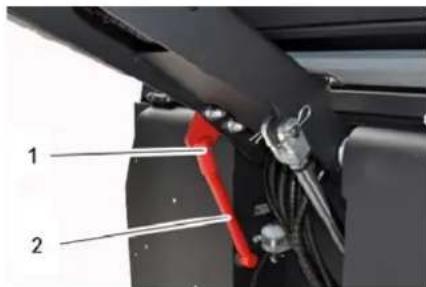
1 Holder of safety rod 2 Safety rod → Fold the safety rod for the high emptying up and insert it into the holder (secured).
Replace batteries
ATTENTION
Observe the orientation of the battery terminals when installing the batteries. Battery terminals are installed on the left in the direction of travel.
The batteries can only be exchanged as a set. The exchange has to be performed by trained personnel.
→ Due to the heavy weight (300 kg), the batteries must be exchanged using a crane.
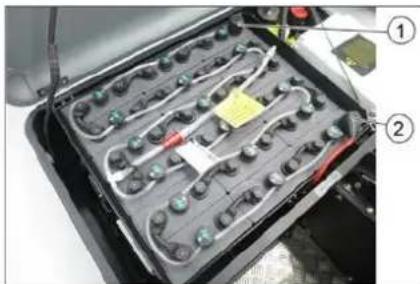
Battery terminals - travel direction left
1 Negative terminal 2 Positive terminal
→ When removing the battery, disconnect the negative terminal wire first. → Fasten the crane chains in the four eyelets of the battery set and carefully lift out the batteries.
Check hydraulic oil level and refill hydraulic oil
NOTICE
The waste container must not be raised.
→ Open the engine hood.
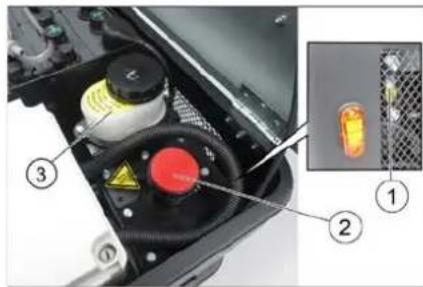
1 Looking glass
2 Screw cap, oil fill opening
3 Container (without function)
→ Check hydraulic oil level in the looking glass. - The oil level must lie between "MIN" and "MAX" marking. - Add hydraulic oil if the oil level is below the "MIN" marking. → Loosen the closing cap of the oil filling opening. → Clean the filling area. → Refill hydraulic oil.
Oil grade: see Technical Data
→ Replace and tighten the closing cap of the oil filling opening.
Check hydraulic unit
→ Lock parking brake. → Start the motor.
Only the authorised customer service is permitted to carry out maintenance tasks on the hydraulic unit.
→ Check all hydraulic hoses and connections and ensure that they are leak-proof.
Checking roller brush
△DANGER
Risk of injury! Always apply the safety bar when the waste container is raised.
Perform the safeguarding only from outside the hazard zone.
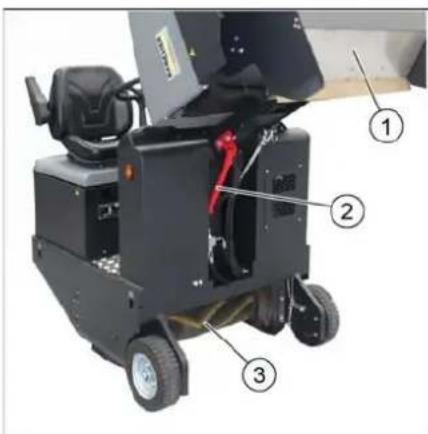
1 Waste container
2 Safety rod
3 Roller brush
→ Switch off device. → Lift the emptied waste container to the end position. The roller brush is visible. Secure the waste container. See chapter "Securing the raised waste container". → Turn ignition key to "0" and remove it. → Check the roller brush for damage, remove wrapped tapes or cords. → Fold the safety rod down into the receptacle (raised waste container is unsecured). → Lower the waste container up to the end-position.
Replacing roller brush
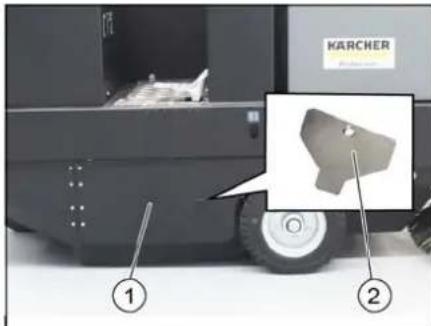
1 Side panel, right 2 Key for roller brush access → Lift the emptied waste container to the end position. Secure the waste container. See chapter "Securing the raised waste container". → Open the side covers using a key.
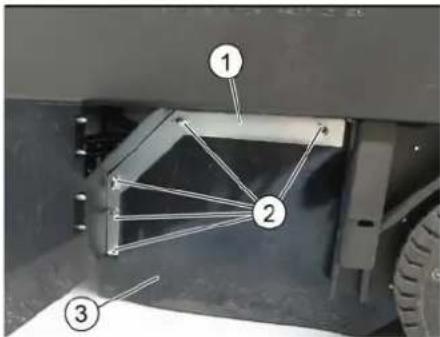
1 Holding bow
2 Wing nut
3 Side seal
→ Unscrew the wing nuts. → Remove the retaining clamp. → Flip the side seal out. → Uncscrew the retaining screw of the roller brush intake, and swing the intake to the outside. → Pull out roller brush.
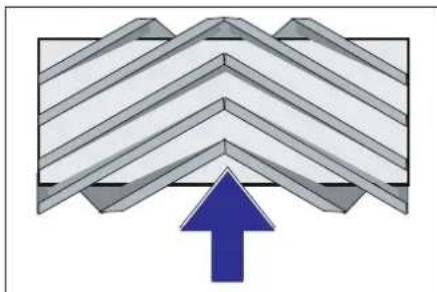
Installation position of roller brush in direction of travel (top view)
Note: When installing the new roller brush, ensure correct positioning of the bristle assembly.
→ Install new roller brush. The nuts of the roller brush must be inserted on the notches of the opposite crank.
Note: Once the new roller brush has been installed, the sweeping track must readjusted.
Check and adjust roller brush sweeping track
Note: The sweeping track is factory-set to 80 mm; it is steplessly adjustable if the brush roller wears down.
→ Switch off suction blower. → Drive sweeper onto a smooth, even surface covered with a visible layer of dust or chalk. → Roller brush and side brush control lever (1) backwards: Switches the roller brush on. Roller brush control lever (3) backwards: Lowers the roller brush. → Allow the roller brush to run for approx. 10 seconds. → Roller brush and side brush control lever (1) to middle position. Roller brush control lever (3) forwards: Raises the roller brush. → Raise waste container. → Drive machine backwards. → Check sweeping mirror.
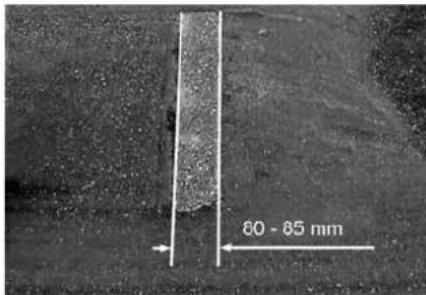
The sweeping track should have an even rectangular shape which is 80-85 mm wide.
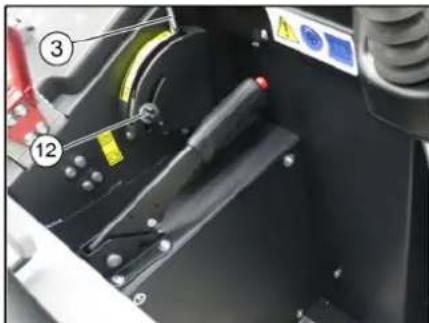
→ Undo and adjust the stop screw for wear adjustment (12). Stop screw at the top: narrow sweeping area. Stop screw at the bottom: broad sweeping area. → Tighten the stop screw again. → Check the sweeping area of the roller brush again as described.
Check and adjust sweeping track of the side-brush
→ The side-brushes lift up. → Drive sweeper onto a smooth, even surface covered with a visible layer of dust or chalk. → Lower the side brushes using the control lever and allow them to run for approx. 10 seconds. → The side-brushes lift up. → Drive machine backwards. → Check sweeping mirror.
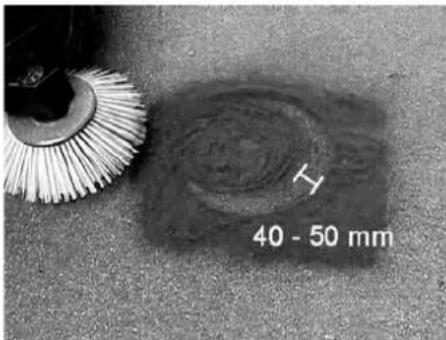
The width of the sweeping track should lie between 40-50 mm.
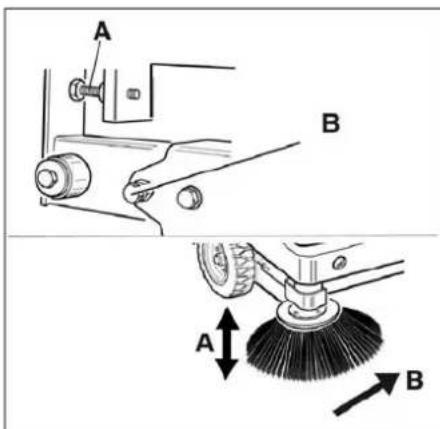
→ Set the sweeping track using the two adjusting screws. → Check sweeping mirror.
Adjust the side seals
△DANGER
Risk of injury! Always apply the safety bar when the waste container is raised.
→ Lift the emptied waste container to the end position. Secure the waste container. See chapter "Securing the raised waste container". → Open the side cover as described in Chapter "Replace brush roller". → Release the 6 wing nuts on the side holding plate. → Loosen 3 nuts (SW 13) on the front holding plate. → Press the side seal down (elongated hole) until it is about 1 to 3 mm to the floor. → Screw in the holding plates. → Repeat the procedure on the other side of the appliance.
Checking/changing the fine dust filter ⚠ WARNING
Risk of injury!
→ Wear a dust mask when working around the dust filter. Observe safety regulations on the handling of fine particles. → Clean the fine dust filter with the filter cleaning button. → Empty waste container.
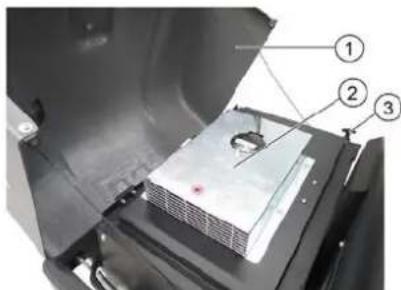
1 Cover
2 Filter cover (vibrator system)
3 Lock, filter cover (2x)
→ Fold cover forwards.
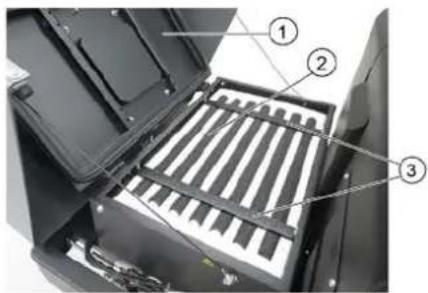
1 Cover
2 Fine dust filter
3 Cross struts
→ Open the lock. → Open filter cap. → Check the fine dust filter, clean or replace if necessary.
Note
Exchanging the fine dust filter may only be done by Kärcher Customer Service.
→ Insert and lock the filter cover.
Replacing fuses
△CAUTION
Risk of damage!
→ Make sure that the covers of the fuse boxes are not interchanged.
ATTENTION
Only use fuses with identical safety ratings.
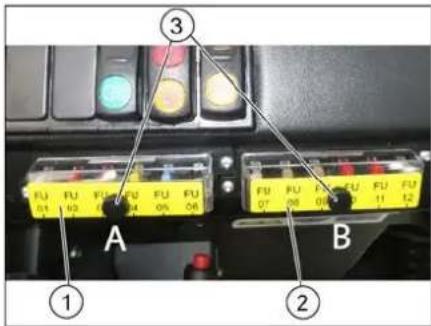
1 Fuse box A
2 Fuse box B
3 Lock nut
→ Unscrew the knurled nut. → Open the cover on the fuse box. → Check the fuses. → Replace defective fuses.
Fuse box A
| FU01 Safety relayStart up | 5 A |
| FU02 Enable DC / DC 10 A | |
| FU03 Beacon lampHorn | 10 A |
| FU04 Suction blower 20 A | |
| FU05 Vibrator system 15 A | |
| FU06 DC / DC input 20 A |
Fuse box B
| FU07 Multifunction display 5 A | |
| FU08 Reverse warning signalFlap indicator | 7.5 A |
| FU09 Safety relaySuction blowerVibrator system | 5 A |
| FU10 Water pump (option) 10 A | |
| FU11 Lighting system (optional)Blinker (option)Blue Spot (option) | 10 A |
| FU12 Shaking system flat fold filter and round filter (option) | 15 A |
Main relay fuse
| FU 13* Main relay 125 A |
* These fuses may only be changed by Customer Service, as it is necessary to check the device for potential faults.
EU Declaration of Conformity
We hereby declare that the machine described below complies with the relevant basic safety and health requirements of the EU Directives, both in its basic design and construction as well as in the version put into circulation by us. This declaration shall cease to be valid if the machine is modified without our prior approval.
Product: Ride-on vacuum sweeper
Type: KM 105/180 R Bp 1,186-050.0 KM 105/180 R Bp Pack 1,186-051.0
Relevant EU Directives
2006/42/EC (+2009/127/EC)
2014/30/EU
2000/14/EC
Applied harmonized standards
EN 60335-1
EN 60335-2-72
EN 55012: 2007 + A1: 2009
EN 61000-6-2: 2005
EN 62233: 2008
Applied conformity evaluation method
2000/14/EC: Appendix V
Sound power level dB(A)
Measured: 90
Guaranteed: 93
The signatories act on behalf of and with the authority of the company management.
Chairman of the Board of Management
S. Reiser
Director Regulatory Affairs & Certification
Documentation supervisor:
S. Reiser
Alfred Kärcher SE & Co. KG
71364 Winnenden (Germany)
Tel.: +49 7195 14-0
Fax: +49 7195 14-2212
Winnenden, 2020/01/01
Troubleshooting
| Fault Remedy | |
| Device does not drive or drives only slowly | Sit on the driver seat, the seat contact switch gets activated. |
| Have the drive motor fuse, FU 13, checked by Customer Service | |
| Charging or replacing battery | |
| Release parking brake | |
| Check for trapped ribbons and strings. | |
| Inform Kärcher Customer Service. | |
| Whistling sound in the hydraulic system | Refill hydraulic fluid |
| Inform Kärcher Customer Service. | |
| Brushes are rotating slowly or not at all | Check for trapped ribbons and strings. |
| Inform Kärcher Customer Service. | |
| Too little or no suction power in the brush area | Clean dust filter |
| Inform Kärcher Customer Service. | |
| Dust gathers in the machine Adjust | the side seals |
| Switch on blower | |
| Clean dust filter | |
| Replace filter washers | |
| Inform Kärcher Customer Service. | |
| Sweeping unit does not pick up waste | Empty waste container |
| Clean dust filter | |
| Replacing roller brush | |
| Adjust sweeping track | |
| Replace sealing strips of the waste container | |
| Remove the blocking of the brush roller | |
| Inform Kärcher Customer Service. | |
| Waste container does not raise or lower | Check the fuses. |
| Remove the locking support from the waste container | |
| Inform Kärcher Customer Service. | |
| Waste container is rotating slowly or not at all | Inform Kärcher Customer Service. |
| Operation problems with hydraulic movement parts | Inform Kärcher Customer Service. |
Technical specifications
| KM 105/180 R Bp Classic | KM 105/180 R Bp Pack Classic | ||
| Machine data | |||
| Drive speed, forward km/h 6 6 | |||
| Drive speed, reverse km/h 3 3 | |||
| Climbing capability (max.) -- 14% 14% | |||
| Surface cleaning performance without side brushes m | 2/h 4680 4680 | ||
| Surface cleaning performance with 1 side brushes m | 2/h 6300 6300 | ||
| Working width without side brushes mm 780 | 780 | ||
| Working width with 1 side brushes | mm 1050 1050 | ||
| Protection type, drip-proof | -- IPX 3 | IPX 3 | |
| Usage duration with battery fully charged | h | 2.5 | 2.5 |
| Electrical system | |||
| Battery capacity | V, Ah | --- | 36, 240 |
| Battery set | kg | --- | 300 |
| Hydraulic system | |||
| Hydraulic oil type | -- HV 46 | HV 46 | |
| Waste container | |||
| Max. unloading height | mm 1340 1340 | ||
| Volume of waste container | I | 180 | 180 |
| Roller brush | |||
| Roller brush diameter mm 280 280 | |||
| Roller brush width mm 780 780 | |||
| Speed 1/min 360 360 | |||
| Sweeping track mm 80 80 | |||
| Side brushes | |||
| Side brush diameter mm 580 580 | |||
| Speed 1/min 80 80 | |||
| Solid rubber tyres | |||
| Size, front -- 4.00-6 4.00-6 | |||
| Size, rear -- 300 x 145 - 6 300 x 145 - 6 | |||
| Brake | |||
| Front wheels -- mechanical mechanical | |||
| Rear wheel | -- Electrical | Electrical | |
| Filter and vacuum system | |||
| Type | -- Pocket filter | Optionally available: Flat fold filters and round filters | Pocket filterOptionally available: Flat fold filters and round filters |
| Speed 1/min 2600 2600 | |||
| Filter surface area, fine dust filter | m2 | 5.2 | 5.2 |
| Nominal vacuum, suction system | mbar | 6 | 6 |
| Nominal volume flow, suction system | m3/h | 600 600 | |
| Vibrator system | -- Electric motor | Electric motor | |
| Working conditions | |||
| Temperature °C -5 and +40 | -5 and +40 | ||
| Air humidity, non-condensing | % | 0 - 90 | 0 - 90 |
| Values determined as per EN 60335-2-72 | |||
| Noise emission | |||
| Sound pressure level LpA | dB(A) | 70 70 | |
| Uncertainty KpA | dB(A) | 3 | 3 |
| Sound power level LWA + Uncertainty KWA | dB(A) | 93 93 | |
| Machine vibrations | |||
| Hand-arm vibration value | m/s2 | 0.7 | 0.7 |
| Seat | m/s2 | 0.5 | 0.5 |
| Uncertainty K | m/s2 | 0.1 | 0.1 |
| Dimensions and weights | |||
| Length x width x height | mm 1847 x 1065 x 1388 | 1847 x 1065 x 1388 | |
| Right turning radius | mm 2470 | 2470 | |
| Left turning radius mm 2470 2470 | |||
| Unladen weight (with/ without battery) | kg | 560/860 | 560/860 |
| Permissible overall weight | kg | 1224 | 1224 |
| Permissible front axle load | kg | 734 734 | |
| Permissible rear axle load | kg | 490 490 | |
| Subject to technical modifications! | |||
General notes ..... EN 1
Environmental protection EN 1
Warranty ..... EN 1
Accessories and Spare Parts....EN 1
Symbols in the operating instructions ..... EN 1
Symbols on the machine EN 1
Proper use.....EN 2
Foreseeable misuse....EN 2
Suitable surfaces ..... EN 2
Safety instructions ..... EN 2
Safety instructions concerning the operation ..... EN 2
Safety information concerning the driving operation. EN 2
Safety instructions for battery-operated devices .. EN 3
Appliances with high emptying system ....EN 3
Devices with overhead guard....EN 3
Safety information concerning the transport of the appliance ..... EN 3
Safety information concerning maintenance and care EN 3
Function.....EN 3
Unloading tips ..... EN 3
Operating and Functional Elements
Table of Contents
Illustration of sweeper
Operating elements
Before Startup
Lock/Release Parking Brake
Start Up
General Notes
Inspection and Maintenance Work
Safety Notes Regarding the Batteries
Charge the Batteries
Operation
Adjusting Driver's Seat
Starting the Machine
Drive the Machine
Sweeping mode ..... EN 6
Emptying waste container EN 7
Turn off the appliance .. EN 7
Transport......EN 7
Storage/decommissioning .... EN 7
Care and maintenance ..... EN 7
General notes ..... EN 7
Cleaning.....EN 7
Maintenance intervals .. EN 7
Maintenance Works .... EN 8
EU Declaration of Conformity. EN 10
Troubleshooting..... EN 11
Technical specifications.....EN 11

Please read and comply with these original instructions prior
to the initial operation of your appliance and store them for later use or subsequent owners.
General notes
Your sales outlet should be informed about any transit damage noted when unpacking the product.
- Warning and information plates on the machine provide important directions for safe operation.
– In addition to the information contained in the operating instructions, all statutory safety and accident prevention regulations must be observed.
Environmental protection
| The packaging material can be recycled. Please do not throw the packaging material into household waste; please send it for recycling. | |
| Old appliances contain valuable materials that can be recycled. Please arrange for the proper recycling of old appliances. Please dispose your old appliances using appropriate collection systems. |
Batteries, oil, fuels and similar substances must not be released into the environment. Please dispose of these substances via suitable collection systems.
Notes about the ingredients (REACH)
You will find current information about the ingredients at:
www.kaercher.com/REACH
Warranty
The warranty terms published by the relevant sales company are applicable in each country. We will repair potential failures of your appliance within the warranty period free of charge, provided that such failure is caused by faulty material or defects in manufacturing. In the event of a warranty claim please contact your dealer or the nearest authorized Customer Service center. Please submit the proof of purchase.
Accessories and Spare Parts
△DANGER
To avoid risks, all repairs and replacement of spare parts may only be carried out by authorized customer service personnel.
- Only use accessories and spare parts which have been approved by the manufacturer. The exclusive use of original accessories and original spare parts ensures that the appliance can be operated safely and trouble free.
- For additional information about spare parts, please go to the Service section at www.kaercher.com.
Symbols in the operating instructions
△DANGER
Warns about immediate danger which can lead to severe injuries or death.
⚠ WARNING
Warns about possible danger which could lead to severe injuries or death.
△CAUTION
Points out a possibly dangerous situation which can lead to light injuries or property damage.
ATTENTION
Pointer to a possibly dangerous situation, which can lead to property damage.
Symbols on the machine
 | Risk of burns on account of hot surfaces! Allow the exhaust to cool down sufficiently before starting work on the machine. |
 | Always use appropriate gloves while working on the device. |
 | Risk of getting squeezed on account of getting jammed between vehicle parts. |
 | Risk of injury on account of moving parts. Do not reach in. |
 | Risk of fire. Do not vacuum up any burning or glowing objects. |
 | Chain pick-up / crane point |
 | Intake points for the jack |
 | Maximum decline of ground when driving with the waste container raised. |
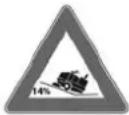 | The gradient in the direction of travel should not exceed 14 %. |
 | Caution! Rotating brush (watch for rotation direction). |
| Beware of dangerous electrical current! | |
| Pay attention to the instruction. | |
| Steer slowly! | |
| Please read the operating instructions and act accordingly! | |
| Risk of damage!Do not wash the fine dust filter. |
Proper use
The sweeper is intended for cleaning floor surfaces for commercial use and e.g. for the following fields of application:
Car parks ■ Production facilities ■ Logistics areas Hotel ■ Retail industry ■ Storage areas ■ Walkways
- This sweeper has been designed to sweep dirt and debris from indoor as well as outdoor surfaces.
- The machine with working equipment must be checked to ensure that it is in proper working order and is operating safely prior to use. Otherwise, the appliance must not be used.
- Use this sweeper only as directed in these operating instructions. – The machine may not be modified.
- The machine is only suitable for use on the types of surfaces specified in the operating instructions. – The machine may only be operated on the surfaces approved by the company or its authorised representatives.
- The following applies in general: Keep highly-flammable substances away from the appliance (danger of explosion/fire).
Foreseeable misuse
→ Never vacuum up explosive liquids, combustible gases or undiluted acids and solvents. This includes petrol, paint thinner or heating oil which can generate explosive fumes or mixtures upon contact with the suction air. Acetone, undiluted acids and solvents must also be avoided as they can harm the materials on the machine. → Never sweep/vacuum up reactive metal dusts (e.g. aluminium, magnesium, zinc), as they form explosive gases when they come in contact with highly alkaline or acidic detergents. → Do not sweep/vacuum up any burning or glowing objects. → The appliance is not suitable for sweeping off hazardous substances. → The machine may not be used or stored in hazardous areas. It is not allowed to use the appliance in hazardous locations. → It is strictly prohibited to take co-passengers. → Pushing/pulling or transporting objects by means of this appliance is prohibited.
Suitable surfaces
- Asphalt
- Industrial floor
- Screed
- Concrete
- Paving stones
Safety instructions
Safety instructions concerning the operation
→ In order to maintain clearance and creepage distances, the device may not be operated over 2000 metres above sea level. → (Applicable for Finland only) The device may not be used at low ambient temperatures (below 0°C) if it is equipped with a PVC hose line. Contact Kärcher if should have questions regarding your device. → The machine with working equipment must be checked to ensure that it is in proper working order and is operating safely prior to use. Otherwise, the appliance must not be used. → If the appliance is used in hazardous areas (e.g. filling stations) the corresponding safety provisions must be observed. It is not allowed to use the appliance in hazardous locations.
△DANGER
Risk of injury!
→ Do not use the appliance without an overhead guard in areas where the operator might get hit by falling objects. → The operator must use the appliance properly. The person must consider the local conditions and must pay attention to third parties, in particular children, when working with the appliance.
→ It is important to follow all safety instructions, rules and regulations applicable for driving motor vehicles. → Prior to starting work, the operator must ensure that all protective devices are properly installed and function correctly. → The operator of the appliance is liable for accidents with other individuals or their property. → Ensure that the operator wears tight-fitting clothes. Wear sturdy shoes and avoid wearing loose-fitting clothes. → Check the immediate vicinity prior to starting (e.g. children). Ensure sufficient visibility! → Never leave the machine unattended so long as the engine is running. The operator may leave the appliance only when the engine has come to a standstill, the appliance has been protected against accidental movement, and the key has been removed. → Please remove the key, when not in use, to avoid unauthorised use of the appliance. The appliance may only be used by persons who have been instructed in handling the appliance or have proven qualification and expertise in operating the appliance or have been explicitly assigned the task of handling the appliance. → This appliance is not intended for use by persons (including children) with limited physical, sensoric or mental capacities or lack of experience and/or skills, unless such persons are accompanied and supervised by a person in charge of their safety or if they received precise instructions on the use of this appliance. → Children should be supervised to prevent them from playing with the appliance.
CAUTION
Risk of damage! Do not sweep up straps, strings or wires as these may wrap around the brush roller.
Safety information concerning the driving operation
△DANGER
Risk of injury! Verify the stability of the ground prior to driving on it.
△DANGER
Risk of accident, risk of injury!
Danger of tipping if gradient is too high.
– The gradient in the direction of travel should not exceed 14 %. Danger of tipping over when taking bends at high speed (particularly left-hand bends). - Drive slowly when cornering. Danger of tipping on unstable ground. - Only use the machine on sound surfaces. Danger of tipping with excessive sideways tilt. - The gradient perpendicular to the direction of travel should not exceed 10%.
Safety instructions for battery-operated devices
Note: Warranty claims will be entertained only if you use batteries and chargers recommended by Kärcher.
- Always follow the instructions of the battery manufacturer and the charger manufacturer. Please follow the statutory requirements for handling and disposing batteries. – Never leave the batteries in a discharged state; recharge them as soon as possible.
- Always keep the batteries clean and dry to avoid creep currents. Protect the batteries and avoid contact with impurities such as metal dust.
- Do not place tools or similar items on the battery. Risk of short-circuit and explosion.
- Do not work with open flames, generate sparks or smoke in the vicinity of a battery or a battery charging room. Danger of explosion.
- Do not touch hot parts of the machine such as the drive motor (risk of burns).
- Be careful while handling battery acid. Follow the respective safety instructions! – Used batteries are to be disposed according to the EC guideline 91/157 EWG in an environment-friendly manner.
Appliances with high emptying system
△DANGER
Risk of injury!
→ When working on the high emptying system, completely lift and secure the waste container. → Perform the safeguarding only from outside the hazard zone.
Devices with overhead guard
NOTICE
The overhead guard (optional) protects the driver against larger falling objects. However, it does not provide rollover protection!
→ Check the overhead guard for damage daily. → If the overhead guard, as well as individual elements, should be damaged, replace the entire overhead guard. → Any modification of the overhead guard and installation of elements, components and assemblies other than those approved by Kärcher is not permitted and may limit the function of the overhead guard.
Safety information concerning the transport of the appliance
→ Observe the net weight (transport weight) of the device during transport on trailers or vehicles. → To transport the device, unplug the battery plug and securely fasten the device.
Safety information concerning maintenance and care
→ First switch off the appliance and remove the key before performing any cleaning or maintenance tasks on the appliance, replacing parts or switching over to another function. → When performing any service and maintenance work on devices with a traction battery, the battery must be disconnected from the electrical system of the device via the battery isolation point (battery plug). → Always disconnect the battery when working on the electrics. To do this, first disconnect the negative terminal and then the positive terminal. Reconnection is performed in reverse sequence. Connect the positive terminal first, then connect the negative terminal. Do not clean the appliance with a water hose or high-pressure water jet (danger of short circuits or other damage). → Maintenance work may only be carried out by approved customer service outlets or experts in this field who are familiar with the respective safety regulations. → Please observe the local safety regulations regarding portable commercially used appliances. → Always use appropriate gloves while working on the device.
Function
The sweeper operates using the sweep-shovel principle.
- The rotating roller brush moves the dirt directly into the waste container.
- The side brush cleans the corners and edges of the surface and moves dirt and debris into the path of the roller brush.
- The fine dust is sucked in via the dust filter through the suction blower.
Unloading tips
⚠ Danger
Risk of injury, risk of damage!
Observe the weight of the appliance when you load it!
| Weight (without batteries) 560 kg* | |
| Weight (with batteries) 860 kg* | |
| * If upgrade kits are installed, the weight is respectively higher. | |
→ Do not use a forklift.
→ Use a suitable ramp or a crane to load the appliance! → Observe when using a ramp: Ground clearance 70 mm. → If the machine is delivered on a pallet, you must create an unloading ramp using the boards provided. You will find the instructions for this procedure on page 2 (inside of cover).
Important instruction: every board must be attached with at least 2 screws.
Operating and Functional Elements
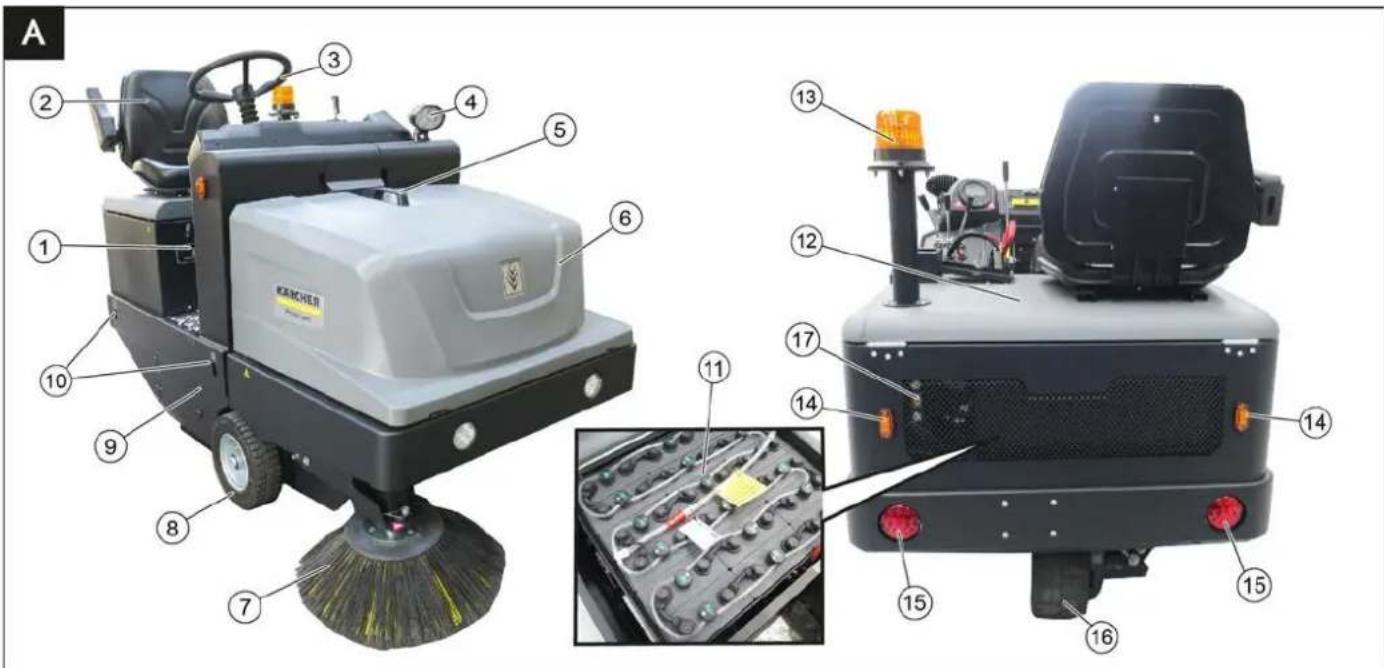
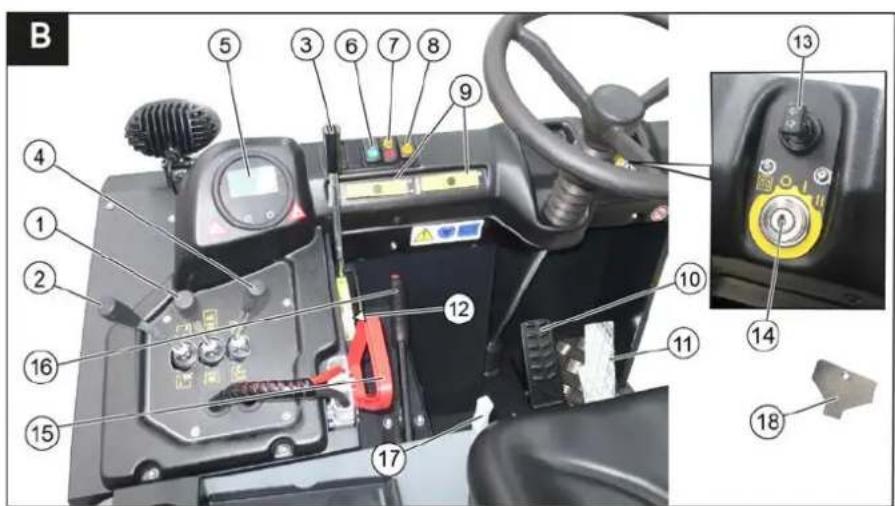
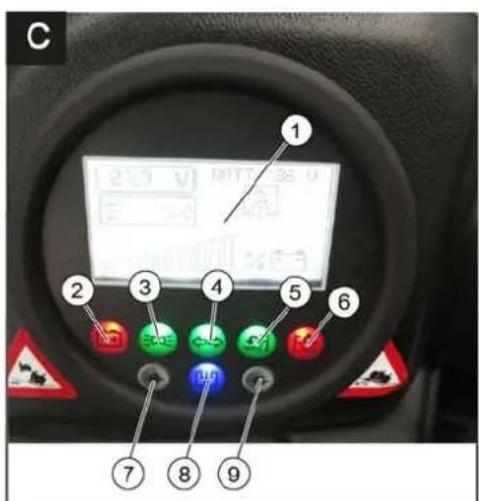
Illustration of sweeper Operating elements
Illustration A
1 Nameplate 2 Seat (with seat contact switch) 3 Steering wheel 4 Blue Spot (option) 5 Handle with locking button 6 Cover 7 Side brush, right 8 Front wheel 9 Roller brush access 10 Lashing point 11 Battery set (only included with the scope of delivery for the KM 105/180 R Bp Pack) 12 Engine bonnet 13 Beacon lamp 14 Blinker (option) 15 Taillights (option) 16 Drive wheel 17 Sight glass hydraulic oil
Illustration B
1 Roller brush and side brush control lever Lever forwards: Switches the roller brush on and lowers and switches the side brushes on. Lever backwards: Switches the roller brush on
2 Control lever waste container Raise/lower waste container
3 Roller brush control lever Raises and lowers the roller brush
4 Control lever container flap Open/close container lid
5 Indicator lamps and display
6 Switch for lights (option)
7 Switch blower and filter cleaning Position centred: Filter cleaning and blower off Front position: Blower on Rear position: Filter cleaning on
8 Horn switch
9 Fuses
10 Brake pedal
11 Accelerator pedal forward / reverse
12 Roller brush wear adjustment / sweeping area setting 13 Turn signal switch (option) 14 Ignition lock Position 0: Switch off engine Position 1: Ignition on Position 2: Start the engine 15 Battery socket 16 Parking brake 17 Lever for seat adjustment 18 Key for roller brush access
Indicator lamps and display
Illustration ©
1 Display (battery capacity) 2 Battery charger control 3 Working light indicator light 4 Indicator lamp for direction indicator 5 Indicator light flap waste container open 6 Warning light flap waste container closed 7 not assigned 8 Filter cleaning display active 9 not assigned
Before Startup
Lock/ release parking brake
→ Loosen parking brake; press brake pedal at the same time. → Activate the parking brake; press brake pedal at the same time.
Start up
General notes
→ Park the sweeper on an even surface. → Remove ignition key. → Lock parking brake.
Inspection and maintenance work
Daily before starting operations
→ Check battery charging status; charge batteries it if required (see Chapter "Charging the batteries"). → Check the sweeping roller and the side brush for wear and wrapped belts. → Check the wheels for tied up belts. → Check function of all operator control elements. → Check appliance for damages.
Note: For description, see section on Care and maintenance.
Safety notes regarding the batteries
Please observe the following warning notes when handling batteries:
| Observe the directions on the battery, in the instructions for use and in the vehicle operating instructions! | |
| Wear an eye shield! | |
| Keep away children from acid and batteries! | |
| Risk of explosion! | |
| Fire, sparks, open light, and smoking not allowed! | |
| Danger of causticization! | |
| First aid! | |
| Warning note! | |
| Disposal! |

Do not throw the battery in the dustbin!

Beware of dangerous electrical current!
Danger
Risk of explosion! Do not put tools or similar on the battery, i.e. on the terminal poles and cell connectors.
⚠ Danger
Risk of injury! Ensure that wounds never come into contact with lead. Always clean your hands after having worked with batteries.
△DANGER
Risk of fire and explosion!
- Smoking and naked flames are strictly prohibited.
- Rooms where batteries are charged must have good ventilation because highly explosive gas is emitted during charging.
⚠ Danger
Danger of causticization!
- Rinse thoroughly with lots of clear water if acid gets into the eye or comes in contact with the skin.
- Then consult a doctor immediately.
- Wash off the acid if it comes in contact with the clothes.
Charge the batteries
CAUTION
Charge the batteries before commissioning the machine.
△DANGER
Risk of injury! Observe the safety instructions on the handling of batteries. Follow the instructions of the charger manufacturer.
Please read and follow the included operating instructions by the battery manufacturer and follow them.
Charge the battery only with an appropriate charger.
△DANGER
Risk of acid burns. Refilling water when the battery is in the discharged state can lead to acid leakage! When handling battery acid, use safety goggles and observe regulations to prevent injury and destruction of clothing. Immediately rinse off any splashed acid from the skin or clothing using copious amounts of water.
CAUTION
Risk of damage. Use only distilled or desalinated water (VDE 0510) for filling the battery. Do not add any substances (so-called performance improving agents), else warranty claims will not be entertained.
→ Park the device safely in dry rooms with adequate ventilation. → Open the engine hood.
Note: The cover must remain open during the charging process.
Pull the battery plug from the machine and connect it to the plug of the charger.
Connect the plug of the charger to a proper socket of 16 A, the charger will charge automatically. Execute the charging process according to the information in the operating instructions of the charger. The recommended chargers (suitable for the batteries used) are regulated electronically and will automatically terminate the charging process. Note: When the batteries are charged, first remove the charger from the mains and then disconnect it from the batteries.
Recommended batteries, chargers
Note
The 105/180 R Bp Pack sweeper variant (1.186-051.0) is already supplied with batteries and charger.
The 105/180 R Bp sweeper variant (1.186-050.0) is supplied without batteries and charger.
We recommend the following batteries and chargers:
| Order number | |
| Battery pack 36 V, 240 Ah, (in the trough, low maintenance) * | 6.981-067.0 |
| Charger 36 V, 40 A 6.981-066.0 | |
| * Appliance requires 1 battery pack | |
The use of other batteries and chargers is not recommended and should be discussed with Kärcher customer service.
Check fluid level in the battery and adjust if required
CAUTION
Be sure to observe the battery manufacturer's instructions and then act accordingly.
Check charging status of battery
The charging state of the battery is shown on the sweeper display.
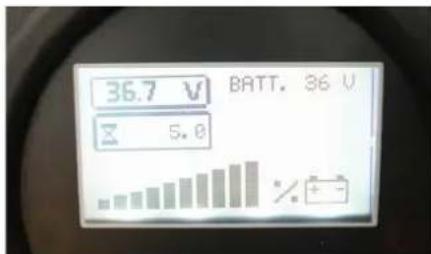
If the battery charge indicator light is red:
Battery is discharged. The sweeping mode will be terminated automatically (the sweeping aggregates cannot be taken into operation until the battery is charged). Drive the machine directly to the charging station; avoid any steep gradients in the process. Charge battery.
Operation
Adjusting driver's seat
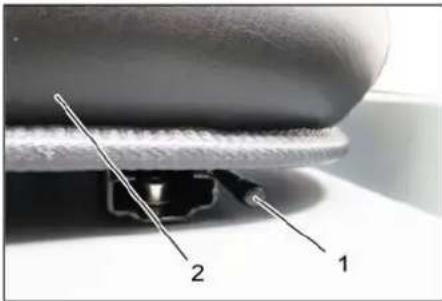
1 Lever for seat adjustment
2 Driver seat
Pull the seat adjustment lever outwards. Slide the seat, release the lever, and lock it in place. Check that the seat is properly locked in position by attempting to move it backwards and forwards.
Starting the machine
Note: The machine is equipped with a seat contact switch. If the driver's seat is vacated, the machine is switched off.
Note: The fine dust filter is automatically cleaned when the device is started.
Sit on the driver's seat. Lock the parking brake. Insert the ignition key into the ignition switch. Turn the ignition key to position "I". The appliance is now ready for operation. Turn the ignition key to position "II". The appliance can now be driven. Note: The display of the battery capacity will show the actual charge status after about 10 seconds.
Drive the machine
Press the brake pedal and keep it depressed. Release the parking brake.
Drive forward
Slowly press the accelerator pedal to the front.
Reverse drive
Danger
Risk of injury! While reversing, ensure that there is nobody in the way, ask them to move if somebody is around.
→ Slowly press the accelerator pedal backwards.
Driving method
→ The accelerator pedal can be used to vary the driving speed infinitely. → Avoid jerking the pedal.
Brakes
→ Release the accelerator pedal, the machine brakes automatically and stops.
Note: The braking effect can be supported by pressing the brake pedal.
Driving over obstacles
Driving over fixed obstacles which are 70 mm high or less:
→ Drive forwards slowly and carefully.
Driving over fixed obstacles which are more than 70 mm high:
→ Only drive over these obstacles using a suitable ramp.
Sweeping mode
ATTENTION
Do not sweep up packing strips, wire or similar objects as this may damage the sweeping mechanism.
Note: To achieve an optimum cleaning result, the driving speed should be adjusted to take specific situations into account.
Note: The fine dust filter is automatically cleaned every 10 minutes during operation.
Note: For increased work in the fine dust area, the filter must also be cleaned by pressing the filter cleaning switch.
Cleaning the fine dust filter manually
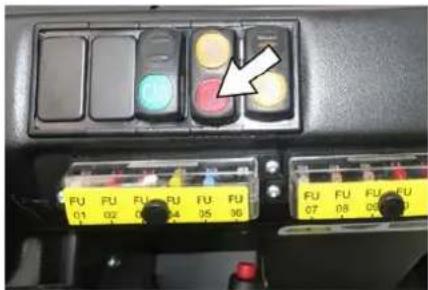
→ Clean the fine dust filter with the filter cleaning button.
Control lever
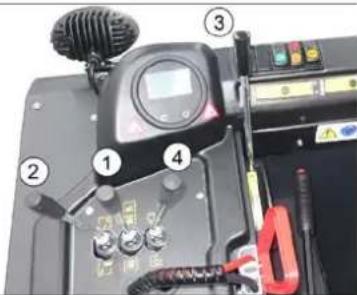
1 Roller brush and side brush control lever
2 Control lever waste container 3 Roller brush control lever 4 Control lever container flap
Roller brush and side brush control lever
→ Control lever (1) forwards: Switches the roller brush on and lowers and switches the side brushes on. → Control lever (1) backwards: Switches the roller brush on.
Control lever waste container
→ Control lever waste container (2) to the front: Waste container is lowered. → Control lever waste container (2) to the back: Waste container is raised.
Control lever roller brush
→ Roller brush control lever (3) forwards: Raises the roller brush. → Roller brush control lever (3) backwards: Lowers the roller brush.
Control lever container flap
→ Control lever container flap (4) to the front: The container flap of the waste container opens.
Note: The green indicator lamp must light up.
→ Control lever container flap (4) to the back: The container flap of the waste container closes. Note: The red indicator lamp must light up.
Sweeping dry floors
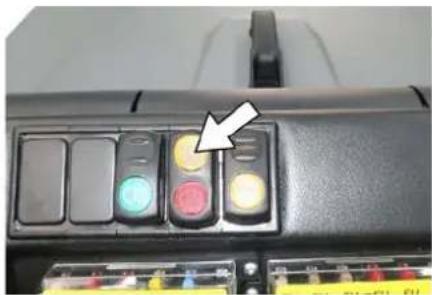
→ Switch on the blower. → With surface cleaning:
Roller brush and side brush control lever (1) backwards: Switches the roller brush on.
Roller brush control lever (3) backwards: Lowers the roller brush.
→ Control lever container flap (4) to the front: Container flap opens.
Note: The green indicator lamp must light up.
→ With cleaning of side edges:
Roller brush and side brush control lever (1) forwards: Switches the roller brush on, switches the side brushes on and lowers them.
Roller brush control lever (3) backwards: Lowers the roller brush.
Sweeping damp or wet floors
→ Switch off the blower. → With surface cleaning:
Roller brush and side brush control lever (1) backwards: Switches the roller brush on.
Roller brush control lever (3) backwards: Lowers the roller brush.
→ Control lever container flap (4) to the front: Container flap opens.
Note: The green indicator lamp must light up.
→ With cleaning of side edges:
Roller brush and side brush control lever (1) forwards: Switches the roller brush on, switches the side brushes on and lowers them.
Roller brush control lever (3) backwards: Lowers the roller brush.
Emptying waste container
△DANGER
Risk of injury!
→ During the emptying process, persons and animals must not stay within the swivelling range of the waste container. Danger of tipping!
→ Place the device on an even surface during the emptying process.
⚠ WARNING
Risk of crushing!
→ Never reach into the rod assembly for the drainage mechanism. Do not stay under the raised container.
ATTENTION
Risk of personal injury or damage!
→ Material from the rotating roller brush may be thrown off during the emptying process. Keep a safe distance.
→ Raise the roller brush and side brushes using the control levers: Move control lever 1 to the middle position and control lever 3 forward. → Close the container flap by moving control lever (4) to the back.
Note: The green indicator lamp must light up.
→ Raise the container flap by moving the waste container control lever (2) to the back. → Slowly drive towards the collection container. → Engage the parking brake. → Open the container flap by pushing the container flap operating lever (4) to the front and empty the waste container.
Note: The red indicator lamp must light up.
→ Close the container flap by pushing the container flap operating lever (4) to the back until it tips inward into the end position.
Note: The green indicator lamp must light up.
→ Release the parking brake. → Slowly drive away from the collection container.
→ Lower the waste container to the end position by moving the waste container control lever (2) to the front.
Turn off the appliance
→ Press the brake pedal and keep it depressed. → Engage the parking brake. → Turn the ignition key to "0" and remove it.
Transport
△DANGER
Transport damage!
Observe the net weight (transport weight) of the device during transport on trailers or vehicles. When transporting in vehicles, secure the appliance according to the guidelines to prevent slipping and tipping over. Turn ignition key to "0" and remove it. Lock parking brake. Secure the appliance at the lashing points (4x) using tension belts, ropes, or chains. Secure the wheels of the machine with wheel chocks. Disconnect the battery of the sweeper during transport.
Storage/Decommissioning
DANGER
Risk of injury and damage! Note the weight of the appliance in case of storage.
Park the sweeper on a level surface in a dry, frost-protected area. Protect it against dust by means of covering material. Raise the roller brush and the side brushes to prevent the bristles from being damaged. Close the container flap. Turn ignition key to "0" and remove it. Lock parking brake. Lock the sweeper to ensure that it does not roll off.
Additionally observe the following points if the sweeper is not used over a longer period of time:
Clean the inside and outside of the sweeper. Remove the battery plug from the machine. Charge the battery and recharge it approximately every 2 months.
Care and Maintenance
CAUTION
Risk of damage due to short circuit!
When working on the electrical system or before opening electrical covers, the battery must be disconnected or the battery connector disconnected.
ATTENTION
Risk of damage!
Do not wash the fine dust filter. Maintenance work may only be carried out by approved customer service outlets or experts in this field who are familiar with the respective safety regulations.
Mobile appliances used for commercial purposes are subject to safety inspections according to VDE 0701.
General notes
Park the sweeper on an even surface. Turn the ignition key to "0" and remove it. Engage the parking brake.
Cleaning
CAUTION
Risk of damage!
Do not clean the appliance with a water hose or high-pressure water jet (danger of short circuits or other damage).
Cleaning the inside of the machine
DANGER
Risk of injury!
Wear a dust mask and protective goggles. Clean the machine with a cloth. Blow through the machine with compressed air.
External cleaning of the appliance
Clean the machine with a damp cloth that has been soaked in mild detergent.
Note: Do not use aggressive cleaning agents.
Maintenance intervals
Note: The elapsed-time counter shows the timing of the maintenance intervals.
Maintenance by the customer
Note: Where maintenance is carried out by the customer, all service and maintenance work must be undertaken by a qualified specialist. If required, a specialised Kärcher dealer may be contacted at any time.
Daily maintenance:
→ Check battery charging status; charge batteries if required (see Chapter "Charging the batteries"). → Check the sweeping roller and the side brush for wear and wrapped belts. → Check the wheels for tied up belts. → Check function of all operator control elements. → Check appliance for damages. → Clean the dust filter with the filter cleaning button.
Weekly maintenance:
→ Check hydraulic unit. → Check the hydraulic oil level. → Check brake fluid status. → Check the pad for wear, replace if required. → Check the container lid and lubricate it.
Maintenance following wear:
→ Replace sealing strips. → Readjust the side seals or replace them. → Replace roller brush. → Replace side brush.
Note: For description, see section on Maintenance work.
Maintenance by Customer Service
Maintenance to be carried out after 50 operating hours:
Have the first maintenance performed by the customer service in accordance with the inspection check list.
Maintenance to be carried out after 250 operating hours:
Have the maintenance performed by the customer service in accordance with the inspection check list.
In order to safeguard warranty claims, all service and maintenance work during the warranty period must be carried out by the authorised Kärcher Customer Service in accordance with the maintenance booklet.
Maintenance Works
Preparation:
Park the sweeper on an even surface. Turn ignition key to "0" and remove it. Lock parking brake.
Securing the raised waste container ⚠️DANGER
Risk of injury! Always apply the safety bar when the waste container is raised. Perform the safeguarding only from outside the hazard zone.
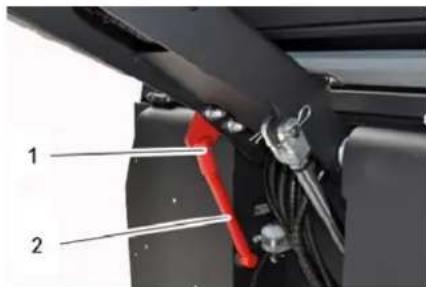
1 Holder of safety rod 2 Safety rod
Fold the safety rod for the high emptying up and insert it into the holder (secured).
Replace batteries
ATTENTION
Observe the orientation of the battery terminals when installing the batteries. Battery terminals are installed on the left in the direction of travel.
The batteries can only be exchanged as a set. The exchange has to be performed by trained personnel.
Due to the heavy weight (300 kg), the batteries must be exchanged using a crane.
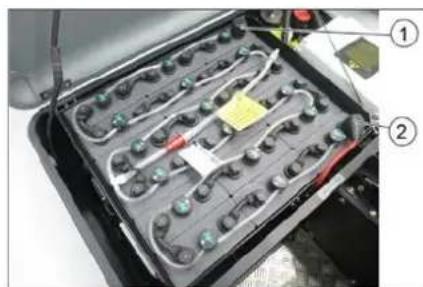
Battery terminals - travel direction left
1 Negative terminal 2 Positive terminal
When removing the battery, disconnect the negative terminal wire first.
Fasten the crane chains in the four eyelets of the battery set and carefully lift out the batteries.
Check hydraulic oil level and refill hydraulic oil
NOTICE
The waste container must not be raised. Open the engine hood.

1 Looking glass 2 Screw cap, oil fill opening 3 Container (without function) Check hydraulic oil level in the looking glass. - The oil level must lie between "MIN" and "MAX" marking. - Add hydraulic oil if the oil level is below the "MIN" marking.
Loosen the closing cap of the oil filling opening.
Clean the filling area.
Refill hydraulic oil.
Oil grade: see Technical Data
Replace and tighten the closing cap of the oil filling opening.
Check hydraulic unit
Lock parking brake.
Start the motor.
Only the authorised customer service is permitted to carry out maintenance tasks on the hydraulic unit.
Check all hydraulic hoses and connections and ensure that they are leak-proof.
Checking roller brush
△DANGER
Risk of injury! Always apply the safety bar when the waste container is raised.
Perform the safeguarding only from outside the hazard zone.
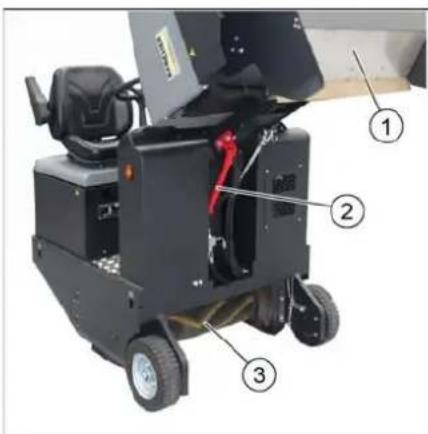
1 Waste container 2 Safety rod
3 Roller brush
Switch off device.
Lift the emptied waste container to the end position. The roller brush is visible. Secure the waste container. See chapter "Securing the raised waste container".
Turn ignition key to "0" and remove it.
Check the roller brush for damage, remove wrapped tapes or cords.
Fold the safety rod down into the receptacle (raised waste container is unsecured).
Lower the waste container up to the end-position.
Replacing roller brush
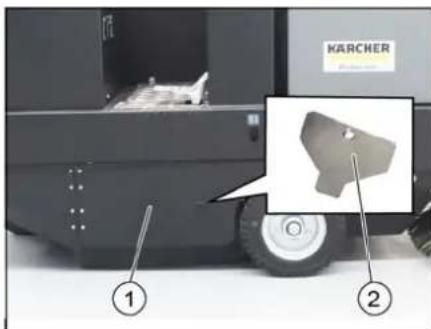
1 Side panel, right 2 Key for roller brush access
Lift the emptied waste container to the end position.
Secure the waste container. See chapter "Securing the raised waste container".
Open the side covers using a key.
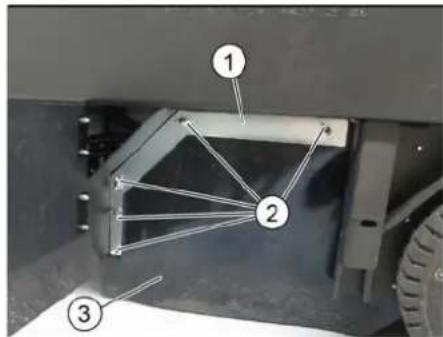
1 Holding bow 2 Wing nut 3 Side seal
Unscrew the wing nuts.
Remove the retaining clamp.
Flip the side seal out.
Unscrew the retaining screw of the roller brush intake, and swing the intake to the outside.
Pull out roller brush.
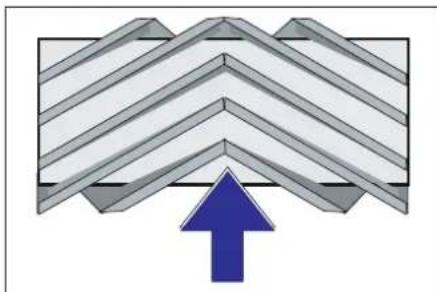
Installation position of roller brush in direction of travel (top view)
Note: When installing the new roller brush, ensure correct positioning of the bristle assembly.
Install new roller brush. The nuts of the roller brush must be inserted on the notches of the opposite crank.
Note: Once the new roller brush has been installed, the sweeping track must be readjusted.
Check and adjust roller brush sweeping track
Note: The sweeping track is factory-set to 80 mm; it is steplessly adjustable if the brush roller wears down.
Switch off suction blower. Drive sweeper on to a smooth, even surface covered with a visible layer of dust or chalk. Roller brush and side brush control lever (1) backwards: Switches the roller brush on. Roller brush control lever (3) backwards: Lowers the roller brush. Allow the roller brush to run for approx. 10 seconds. Roller brush and side brush control lever (1) to middle position. Roller brush control lever (3) forwards: Raises the roller brush. Raise waste container. Drive machine backwards. Check sweeping mirror.
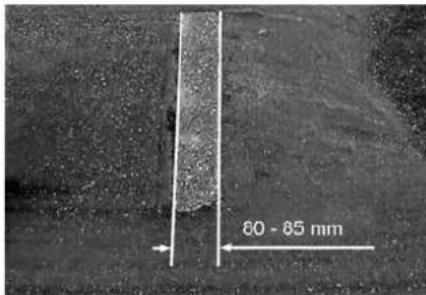
The sweeping track should have an even rectangular shape which is 80-85 mm wide.
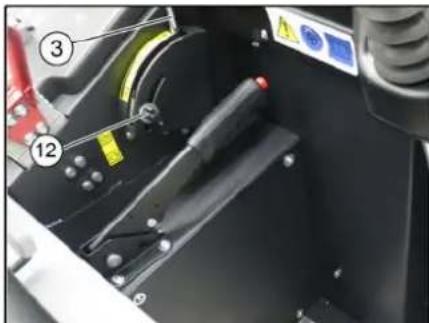
→ Undo and adjust the stop screw for wear adjustment (12). Stop screw at the top: narrow sweeping area. Stop screw at the bottom: broad sweeping area. → Tighten the stop screw again. → Check the sweeping area of the roller brush again as described.
Check and adjust sweeping track of the side-brush
→ The side-brushes lift up. → Drive sweeper on to a smooth, even surface covered with a visible layer of dust or chalk. → Lower the side brushes using the control lever and allow them to run for approx. 10 seconds. → The side-brushes lift up. → Drive machine backwards. → Check sweeping mirror.
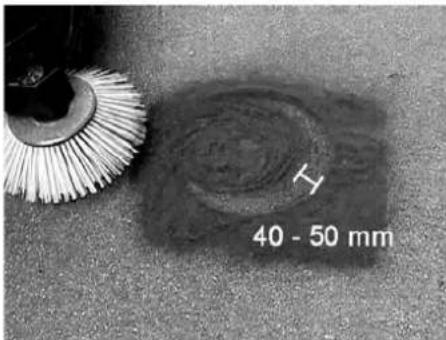
The width of the sweeping track should lie between 40-50 mm.
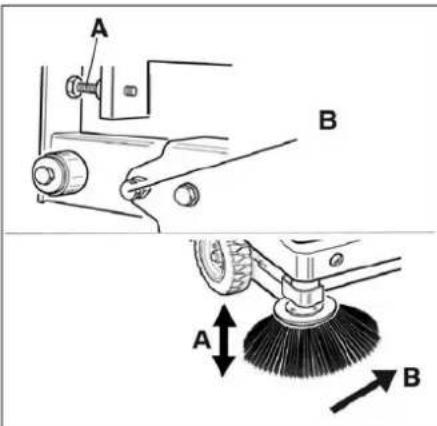
→ Set the sweeping track using the two adjusting screws. → Check sweeping mirror.
Adjust the side seals
△DANGER
Risk of injury! Always apply the safety bar when the waste container is raised.
→ Lift the emptied waste container to the end position. Secure the waste container. See chapter "Securing the raised waste container". → Open the side cover as described in Chapter "Replace brush roller". → Relase the 6 wing nuts on the side holding plate. → Loosen 3 nuts (SW 13) on the front holding plate. → Press the side seal down (elongated hole) until it is about 1 to 3 mm to the floor. → Screw in the holding plates. → Repeat the procedure on the other side of the appliance.
Checking/changing the fine dust filter ⚠ WARNING
Risk of injury!
→ Wear a dust mask when working around the dust filter. Observe safety regulations on the handling of fine particles.
→ Clean the fine dust filter with the filter cleaning button.
→ Empty waste container.
→ Wear a dust mask when working around the dust filter. Observe safety regulations on the handling of fine particles. → Clean the fine dust filter with the filter cleaning button. → Empty waste container.
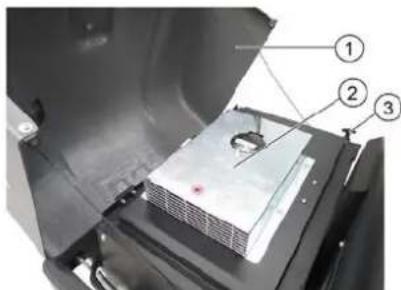
1 Cover 2 Filter cover (vibrator system) 3 Lock, filter cover (2x) → Fold cover forwards.
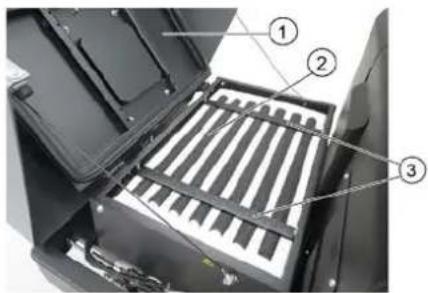
1 Cover
2 Fine dust filter
3 Cross struts
→ Open the lock. → Open filter cap. → Check the fine dust filter, clean or replace if necessary.
Note
Exchanging the fine dust filter may only be done by Kärcher Customer Service.
→ Insert and lock the filter cover.
Replacing fuses
△CAUTION
Risk of damage!
→ Make sure that the covers of the fuse boxes are not interchanged. ATTENTION
Only use fuses with identical safety ratings.
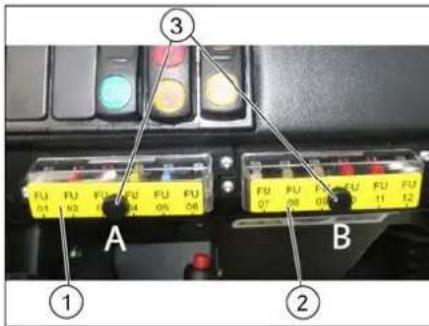
1 Fuse box A
2 Fuse box B
3 Lock nut
→ Unscrew the knurled nut. → Open the cover on the fuse box. → Check the fuses. → Replace defective fuses.
Fuse box A
| FU01 Safety relayStart up | 5 A |
| FU02 Enable DC / DC 10 A | |
| FU03 Beacon lampHorn | 10 A |
| FU04 Suction blower 20 A | |
| FU05 Vibrator system 15 A | |
| FU06 DC / DC input 20 A |
Fuse box B
| FU07 Multifunction display 5 A | |
| FU08 Reverse warning signalFlap indicator | 7.5 A |
| FU09 Safety relaySuction blowerVibrator system | 5 A |
| FU10 Water pump (option) 10 A | |
| FU11 Lighting system (optional)Blinker (option)Blue Spot (option) | 10 A |
| FU12 Shaking system flat fold filter and round filter (option) | 15 A |
Main relay fuse
| FU 13* Main relay 125 A |
* These fuses may only be changed by Customer Service, as it is necessary to check the device for potential faults.
EU Declaration of Conformity
We hereby declare that the machine described below complies with the relevant basic safety and health requirements of the EU Directives, both in its basic design and construction as well as in the version put into circulation by us. This declaration shall cease to be valid if the machine is modified without our prior approval.
Product: Ride-on vacuum sweeper
Type: KM 105/180 R Bp 1.186-050.0 KM 105/180 R Bp Pack 1.186-051.0
Relevant EU Directives
2006/42/EC (+2009/127/EC)
2014/30/EU
2000/14/EC
Applied harmonized standards
EN 60335-1
EN 60335-2-72
EN 55012: 2007 + A1: 2009
EN 61000-6-2:2005
EN 62233: 2008
Applied conformity evaluation method
2000/14/EC: Appendix V
Sound power level dB(A)
Measured: 90
Guaranteed: 93
The signatories act on behalf of and with the authority of the company management.

Documentation supervisor:
S. Reiser
Alfred Kärcher SE & Co. KG
71364 Winnenden (Germany)
Tel.: +49 7195 14-0
Fax: +49 7195 14-2212
Winnenden, 2020/01/01
Troubleshooting
| Fault Remedy | |
| Device does not drive or drives only slowly | Sit on the driver seat, the seat contact switch gets activated. |
| Have the drive motor fuse, FU 13, checked by Customer Service | |
| Charging or replacing battery | |
| Release parking brake | |
| Check for trapped ribbons and strings. | |
| Inform Kärcher Customer Service. | |
| Whistling sound in the hydraulic system | Refill hydraulic fluid |
| Inform Kärcher Customer Service. | |
| Brushes are rotating slowly or not at all | Check for trapped ribbons and strings. |
| Inform Kärcher Customer Service. | |
| Too little or no suction power in the brush area | Clean dust filter |
| Inform Kärcher Customer Service. | |
| Dust gathers in the machine Adjust | the side seals |
| Switch on blower | |
| Clean dust filter | |
| Replace filter washers | |
| Inform Kärcher Customer Service. | |
| Sweeping unit does not pick up waste | Empty waste container |
| Clean dust filter | |
| Replacing roller brush | |
| Adjust sweeping track | |
| Replace sealing strips of the waste container | |
| Remove the blocking of the brush roller | |
| Inform Kärcher Customer Service. | |
| Waste container does not raise or lower | Check the fuses. |
| Remove the locking support from the waste container | |
| Inform Kärcher Customer Service. | |
| Waste container is rotating slowly or not at all | Inform Kärcher Customer Service. |
| Operation problems with hydraulic movement parts | Inform Kärcher Customer Service. |
Technical specifications
| KM 105/180 R Bp Classic | KM 105/180 R Bp Pack Classic | ||
| Machine data | |||
| Drive speed, forward km/h 6 6 | |||
| Drive speed, reverse km/h 3 3 | |||
| Climbing capability (max.) -- 14% 14% | |||
| Surface cleaning performance without side brushes m | 2/h 4680 4680 | ||
| Surface cleaning performance with 1 side brushes m | 2/h 6300 6300 | ||
| Working width without side brushes mm 780 | 780 | ||
| Working width with 1 side brushes | mm 1050 1050 | ||
| Protection type, drip-proof | -- IPX 3 | IPX 3 | |
| Usage duration with battery fully charged | h | 2.5 | 2.5 |
| Electrical system | |||
| Battery capacity | V, Ah | --- | 36, 240 |
| Battery set | kg | --- | 300 |
| Hydraulic system | |||
| Hydraulic oil type | -- HV 46 | HV 46 | |
| Waste container | |||
| Max. unloading height | mm 1340 1340 | ||
| Volume of waste container | I | 180 | 180 |
| Roller brush | |||
| Roller brush diameter mm 280 280 | |||
| Roller brush width mm 780 780 | |||
| Speed 1/min 360 360 | |||
| Sweeping track mm 80 80 | |||
| Side brushes | |||
| Side brush diameter mm 580 580 | |||
| Speed 1/min 80 80 | |||
| Solid rubber tyres | |||
| Size, front -- 4.00-6 4.00-6 | |||
| Size, rear -- 300 x 145 - 6 300 x 145 - 6 | |||
| Brake | |||
| Front wheels -- mechanical mechanical | |||
| Rear wheel | -- Electrical | Electrical | |
| Filter and vacuum system | |||
| Type | -- Pocket filter | Optionally available: Flat fold filters and round filters | Pocket filterOptionally available: Flat fold filters and round filters |
| Speed 1/min 2600 2600 | |||
| Filter surface area, fine dust filter | m2 | 5.2 | 5.2 |
| Nominal vacuum, suction system | mbar | 6 | 6 |
| Nominal volume flow, suction system | m3/h | 600 600 | |
| Vibrator system | -- Electric motor | Electric motor | |
| Working conditions | |||
| Temperature °C -5 and +40 | -5 and +40 | ||
| Air humidity, non-condensing | % | 0 - 90 | 0 - 90 |
| Values determined as per EN 60335-2-72 | |||
| Noise emission | |||
| Sound pressure level LpA | dB(A) | 70 70 | |
| Uncertainty KpA | dB(A) | 3 | 3 |
| Sound power level LwA + Uncertainty KwA | dB(A) | 93 93 | |
| Machine vibrations | |||
| Hand-arm vibration value | m/s2 | 0.7 | 0.7 |
| Seat | m/s2 | 0.5 | 0.5 |
| Uncertainty K | m/s2 | 0.1 | 0.1 |
| Dimensions and weights | |||
| Length x width x height | mm 1847 x 1065 x 1388 | 1847 x 1065 x 1388 | |
| Right turning radius | mm 2470 | 2470 | |
| Left turning radius mm 2470 2470 | |||
| Unladen weight (with/ without battery) | kg | 560/860 | 560/860 |
| Permissible overall weight | kg | 1224 | 1224 |
| Permissible front axle load | kg | 734 734 | |
| Permissible rear axle load | kg | 490 490 | |
| Subject to technical modifications! | |||
www.kaercher.com/REACH
Garantie
Weight (without batteries) 560 kg*
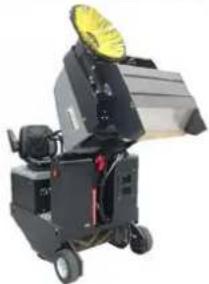
1 Hood
1 Hood
2006/42/EC (+2009/127/EC)
2014/30/EU
2000/14/EC
71364 Winnenden (Germany)
Tel.: +49 7195 14-0
Fax: +49 7195 14-2212
Winnenden, 2020/01/01
www.kaercher.com/REACH
Warranty
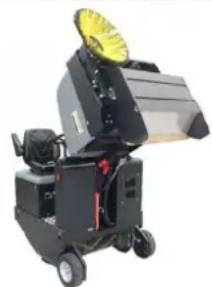
1 C of a n o
1 C o f a n o
2006/42/EC (+2009/127/EC)
2014/30/EU
2000/14/EC
71364 Winnenden (Germany)
Tel.: +49 7195 14-0
Fax: +49 7195 14-2212
Winnenden, 2020/01/01
www.kaercher.com/REACH
Warranty
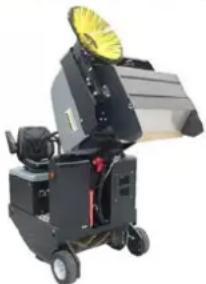
Battery terminals - on the left side in the direction of travel
1 Negative terminal
2 Positive terminal
1 Sight glass
1 Device cover
2 Filter cover (vibration system)
3 Lock, filter cover (2x)
1 Device cover
2 Fine dust filter
3 Crossbar
→ Open the lock.
→ Open the filter cover.
Chairman of the Board of Management
S. Reiser
Director Regulatory Affairs & Certification
71364 Winnenden (Germany)
Tel.: +49 7195 14-0
Fax: +49 7195 14-2212
Winnenden, 2020/01/01
Troubleshooting assistance
www.kaercher.com/REACH
Warranty
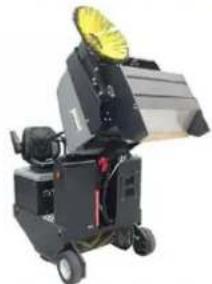
1 Appliance hood 2 Fine dust filter 3 Crossbars
2006/42/EC (+2009/127/EC)
2014/30/EU
2000/14/EC
Chairman of the Board of Management
S. Reiser Director Regulatory Affairs & Certification
71364 Winnenden (Germany)
Tel.: +49 7195 14-0
Fax: +49 7195 14-2212
Winnenden, 2020/01/01
Charging the batteries ... PT 5
www.kaercher.com/REACH
Warranty
Charging the batteries
CAUTION
1 Sweeping brush and side brush control lever 2 Swept dirt collector control lever 3 Sweeping brush control lever 4 Container lid control lever
Sweeping brush and side brush control lever
→ Control lever (1) forward: Sweeping brush on, lower side brush and switch on. → Control lever (1) backward: Sweeping brush on.
Swept dirt collector control lever
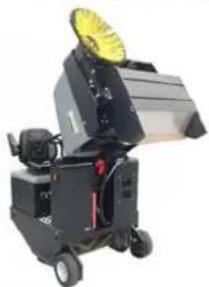
1 Swept dirt container
1 Machine cover
2 Filter cover (vibrator system)
3 Clasp, filter cover (2x)
1 Machine cover
2 Fine dust filter
3 Crossbars
→ Open the clasp.
2006/42/EC (+2009/127/EC)
2014/30/EU
2000/14/EC
H. Jenner Chairman of the Board of Management
S. Reiser Director Regulatory Affairs & Certification
71364 Winnenden (Germany)
Tel.: +49 7195 14-0
Fax: +49 7195 14-2212
Winnenden, 2020/01/01
www.kaercher.com/REACH
Warranty
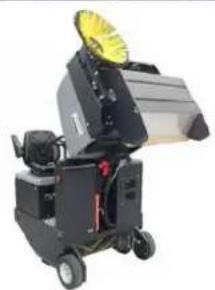
1 Dirt container 2 Locking bar 3 Sweeping roller
1 Mounting bracket 2 Wing nut 3 Side seal
1 Shield
2 Fine dust filter
3 Cross members
2006/42/EC (+2009/127/EC)
2014/30/EU
2000/14/EC
Chairman of the Board of Management
S. Reiser
Director Regulatory Affairs & Certification
71364 Winnenden (Germany)
Tel.: +49 7195 14-0
Fax: +49 7195 14-2212
Winnenden, 2020/01/01
Troubleshooting
Troubleshooting....NO 11
Technical data ..... NO 11
www.kaercher.com/REACH
Warranty
1 Seat adjustment lever
2 Driver's seat
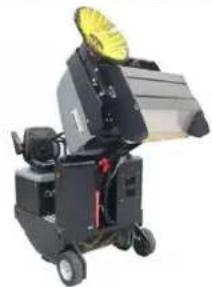
→ Lift the sweeping roller and side brush with the control levers: Operate control lever 1 in the middle and control lever 3 forward.
→ Close the container flap by pulling the control lever (4) backward.
1 Sight glass
1 Sweeping waste container 2 Locking bar 3 Sweeping roller
1 Holding bracket
2 Wing nut
1 Machine hood 2 Filter cover (vibration system) 3 Lock, filter cover (2x) → Tilt the machine hood forward.
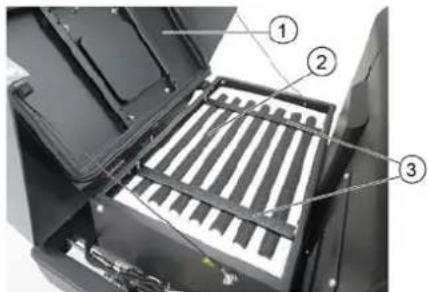
2006/42/EC (+2009/127/EC)
2014/30/EU
2000/14/EC
2000/14/EC: Annex V
Sound power level dB(A)
Measured: 90
Guaranteed: 93
Chairman of the Board of Management
S. Reiser Director Regulatory Affairs & Certification
71364 Winnenden (Germany)
Tel.: +49 7195 14-0
Fax: +49 7195 14-2212
Winnenden, 2020/01/01
Correction
www.kaercher.com/REACH
Warranty
Start the fan.
For external cleaning
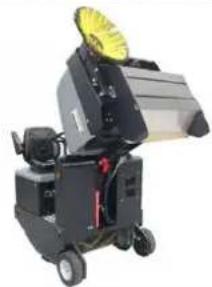
1 Dust container
2 Locking rod
3 Brush roller
1 Holder bracket
2 Wing nut
3 Side seal
Chairman of the Board of Management
S. Reiser
Director Regulatory Affairs & Certification
71364 Winnenden (Germany)
Tel.: +49 7195 14-0
Fax: +49 7195 14-2212
Winnenden, 2020/01/01
www.kaercher.com/REACH
Takuu
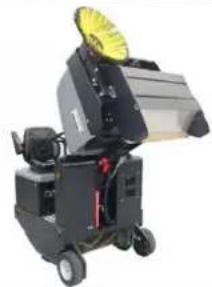
1 Waste container
2 Safety bar
3 Sweeping roller
Chairman of the Board of Management
S. Reiser Director Regulatory Affairs & Certification
71364 Winnenden (Germany)
Tel.: +49 7195 14-0
Fax: +49 7195 14-2212
Winnenden, 2020/01/01
Troubleshooting
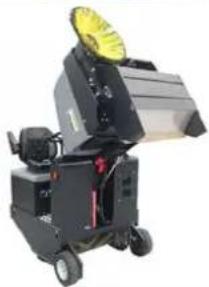
1 Indicator light
1 Engine cover
Chairman of the Board of Management
S. Reiser
Director Regulatory Affairs & Certification
71364 Winnenden (Germany)
Tel.: +49 7195 14-0
Fax: +49 7195 14-2212
Winnenden, 2020/01/01
Troubleshooting
www.kaercher.com/REACH
Warranty
1 Seat adjustment lever
2 Driver's seat
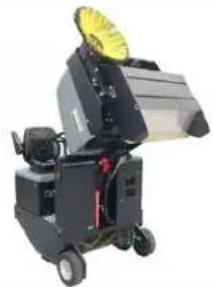
1 Handle
2 Wing nut
3 Side seal
1 Device cover
2 Fine dust filter
3 Cross member
→ Unlock.
Chairman of the Board of Management
Director Regulatory Affairs & Certification
71364 Winnenden (Germany)
Tel.: +49 7195 14-0
Fax: +49 7195 14-2212
Winnenden, 2020/01/01
Help in case of malfunctions
www.kaercher.com/REACH
Warranty
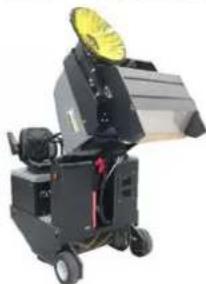
1 Sight glass
1 Bracket
2 Wing nut
Chairman of the Board of Management
S. Reiser
Director Regulatory Affairs & Certification
71364 Winnenden (Germany)
Tel.: +49 7195 14-0
Fax: +49 7195 14-2212
Winnenden, 2020/01/01
www.kaercher.com/REACH
Warranty
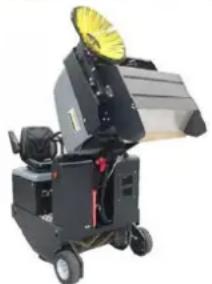
Chairman of the Board of Management
S. Reiser Director Regulatory Affairs & Certification
71364 Winnenden (Germany)
Tel.: +49 7195 14-0
Fax: +49 7195 14-2212
Winnenden, 2020/01/01
www.kaercher.com/REACH
Warranty

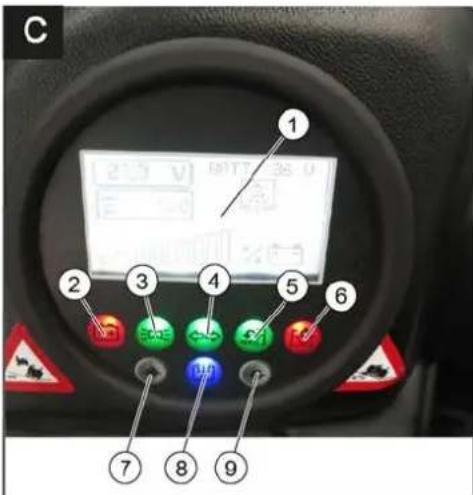
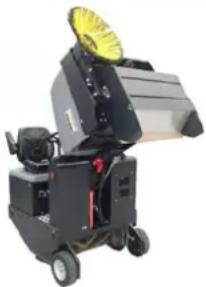
1 O k é n k o
2006/42/ES (+2009/127/ES)
2014/30/EU
2000/14/ES
Chairman of the Board of Management
Director Regulatory Affairs & Certification
71364 Winnenden (Germany)
Tel.: +49 7195 14-0
Fax: +49 7195 14-2212
Winnenden, 2020/01/01
Troubleshooting assistance
www.kaercher.com/REACH
Warranty
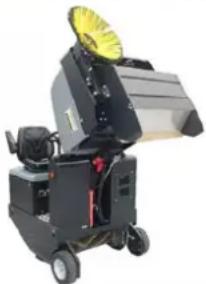
Battery pole – on the left side in the direction of travel
1 Minus pole
2 Plus pole
→ When removing the battery, be careful to disconnect the negative terminal first. → Attach the crane cable to the 4 rings of the battery set and carefully lift the batteries.
1 Waste container 2 Safety bar 3 Sweeping roller
1 Holding rod 2 Wing nut 3 Side seal
→ Unscrew the wing nuts. → Remove the holding rod. → Fold the side seal outward. → Unscrew the mounting screw of the sweeping roller bracket and swivel the bracket outward. → Pull out the sweeping roller.
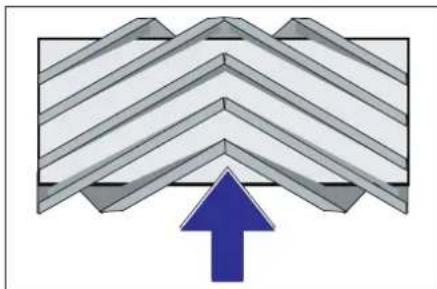
Installation position of the sweeping roller in the direction of travel (top view)
Warning: When installing a new sweeping roller, pay attention to the position of the brush insert.
→ Insert the new sweeping roller. The notches of the sweeping roller must be fitted onto the grooves of the opposite pendulum.
Warning: After installing a new sweeping roller, the sweeping area must be readjusted.
Checking and adjusting the sweeping area of the sweeping roller
Warning: The sweeping area is factory-set to 80 mm; it can be adjusted continuously as the sweeping rollers wear.
→ Open and adjust the limit screw for resetting wear (12). Push upward: narrower sweeping area. Push downward: wider sweeping area.
→ Retighten the limit screw.
1 Device cover 2 Filter cover (shaking system) 3 Filter cover latch (2x) → Fold the machine cover forward.
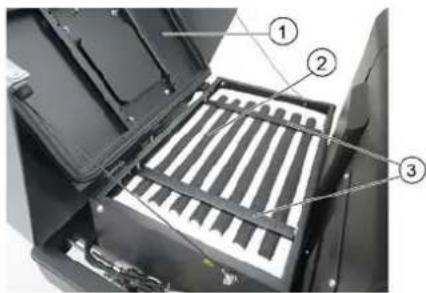
1 Device cover 2 Fine dust filter 3 Cross supports → Open the latch. → Open the filter cover. → Check the fine dust filter; clean or replace it if necessary.
Napotek
The fine dust filter may only be replaced by Kärcher service personnel.
→ Attach the filter cover and lock it.
Changing the fuse
CAUTION
Risk of injury!
2006/42/EC (+2009/127/EC)
2014/30/EU
2000/14/EC
H. Jenner Chairman of the Board of Management
S. Reiser Director Regulatory Affairs & Certification
71364 Winnenden (Germany)
Tel.: +49 7195 14-0
Fax: +49 7195 14-2212
Winnenden, 2020/01/01
Assistance with disorders
www.kaercher.com/REACH
Warranty

1 Sight glass
1 Waste container
1 Stirrup
2006/42/EC (+2009/127/EC)
2014/30/EU
2000/14/EC
Chairman of the Board of Management
Director Regulatory Affairs & Certification
71364 Winnenden (Germany)
Tel.: +49 7195 14-0
Fax: +49 7195 14-2212
Winnenden, 2020/01/01
Troubleshooting
www.kaercher.com/REACH
Warranty
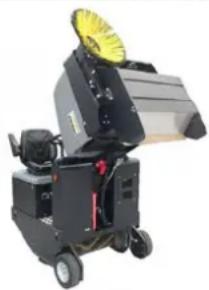
1 Visor
1 Collar
2 Wing nut
Applicable EU Directives:
2006/42/EC (+2009/127/EC)
2014/30/EU
2000/14/EC
Harmonized standards used:
EN 60335-1
EN 60335-2-72
EN 55012: 2007 + A1: 2009
EN 61000-6-2: 2005
EN 62233: 2008
71364 Winnenden (Germany)
Tel.: +49 7195 14-0
Fax: +49 7195 14-2212
Winnenden, 2020/01/01
1 Seat adjustment lever
2 Driver's seat
→ Pull the seat adjustment lever outwards. → Slide the seat, release the lever and let it engage in place. → Check that it is locked by moving the seat forward and backward.
Starting the machine
→ Switch on the blowers.
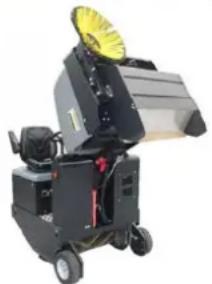
Battery poles - on the left in the direction of travel
1 Negative pole
2 Positive pole
1 Viewing window
2 Closing cover, oil filler opening
1 Clamping stirrup
2 Wing nut
3 Side seal
1 Device cover
2 Fine dust filter
3 Partition
2006/42/EC (+2009/127/EC)
2014/30/EU
2000/14/EC
Harmonized standards applied:
EN 60335-1
EN 60335-2-72
EN 55012: 2007 + A1: 2009
EN 61000-6-2: 2005
EN 62233: 2008
Chairman of the Board of Management
S. Reiser
Director Regulatory Affairs & Certification
71364 Winnenden (Germany)
Tel.: +49 7195 14-0
Fax: +49 7195 14-2212
Winnenden, 2020/01/01
Troubleshooting
www.kaercher.com/REACH
Warranty
1 Seat adjustment lever
2 Driver's seat
→ Switch on the fan. → For surface cleaning:

→ Raise the sweeping roller and side brush using the control levers: Control lever 1 to the middle and control lever 3 forward. → Close the container lid by moving control lever (4) backward. Note: The green indicator light must be lit. → Raise the dirt container by moving control lever (2) backward. → Slowly drive the device to the collection container. → Apply the parking brake. → Open the container lid by pressing control lever (4) forward and empty the dirt container.
Note: The red indicator light must be lit.
→ Close the container lid by pulling control lever (4) backward until it engages in the end position.
Note: The green indicator light must be lit.
→ Release the parking brake. → Slowly move the device away from the collection container. → Lower the dirt collection container to the end position by moving the control lever (2) forward.
1 Safety bar holder 2 Safety bar → Fold the safety bar for high dumping upward and insert it into the holder (this secures it).
Replacing the battery
CAUTION
1 Inspection window
1 Dirt collection container 2 Safety bar 3 Sweeping roller → Switch off the device. → Raise the dirt collection container to the end position. The sweeping roller becomes visible.
Secure the dirt collection container. See chapter "Securing the raised dirt collection container".
→ Turn the ignition key to position "0" and remove the key. → Inspect the sweeping roller for damage and remove any wound tapes or cords. → Fold the safety bar downward into the holder (the raised dirt collection container is now unsecured). → Lower the dirt container to the end position.
1 Fastening bracket 2 Wing nut 3 Side seal → Unscrew the wing nuts. → Remove the fastening bracket. → Fold the side seal outward. → Unscrew the fastening screw of the sweeping roller holder and swing the holder outward. → Remove the sweeping roller.
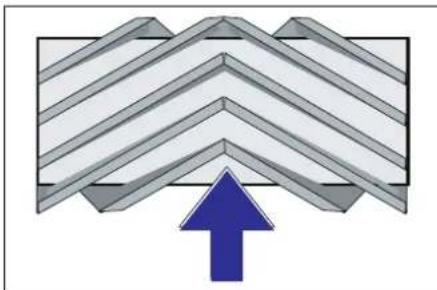
→ Unscrew the wear limit stop screw (12) and adjust it.
1 Device cover 2 Filter cover (vibrator system) 3 Closure, filter cover (2x) → Fold the device cover forward.
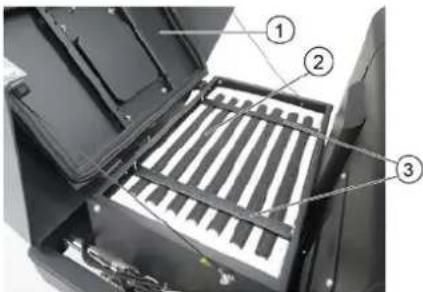
1 Device cover 2 Fine dust filter 3 Cross holder
→ Open the closure. → Open the filter cover. → Check the fine dust filter, clean or replace it if necessary.
Note
2006/42/EC (+2009/127/EC)
2014/30/EU
2000/14/EC
Applied harmonized standards:
EN 60335-1
EN 60335-2-72
EN 55012: 2007 + A1: 2009
EN 61000-6-2: 2005
EN 62233: 2008
H. Jenner Chairman of the Board of Management
S. Reiser Director Regulatory Affairs & Certification
Authorized for documentation: S. Reiser
Alfred Kärcher SE & Co. KG
71364 Winnenden (Germany)
Tel.: +49 7195 14-0
Fax: +49 7195 14-2212
Winnenden, 2020/01/01
Troubleshooting
www.kaercher.com/REACH
Warranty
In every country, the warranty conditions issued by our responsible distribution organization apply. We will rectify any faults on the device free of charge during the warranty period, provided that the cause is a material or manufacturing defect. In the event of a warranty claim, please contact your dealer or the nearest authorized service center with your proof of purchase.
Accessories and spare parts
⚠ DANGER
To prevent hazards, repairs and the installation of spare parts may only be carried out by an authorized service center.
1 Lever for operating the sweeping roller and side broom 2 Control lever for the dirt collection container 3 Lever for operating the sweeping roller 4 Control lever for the container lid
Lever for operating the sweeping roller and side broom
→ Switch on the fans. → For surface cleaning:
Lever for operating the sweeping roller and side broom (1) backwards: sweeping roller engaged. Lever for operating the sweeping roller (3) backwards: sweeping roller lowers.
→ Control lever for the container lid (4) forwards: container lid opens.
Note: The green indicator light must be lit.
→ When cleaning the side edges:
Sweeping roller and side brush operating lever (1) forward: sweeping roller on, side brush on and lowering. Sweeping roller operating lever (3) backward: sweeping roller lowers.
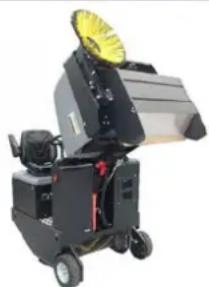
→ Raise the sweeping roller and side brush using the operating levers: operating lever 1 to the middle, and operating lever 3 forward.
→ To close the dirt container lid, move the control lever (4) backward.
Note: The green indicator light must be on.
→ To raise the dirt container, move the control lever (2) backward.
→ Slowly drive the machine to the collection container.
1 Safety lever holder 2 Safety lever → Fold the safety lever for high dumping upward and insert it into the holder (this locks it in place).
Battery replacement
CAUTION
When installing batteries, pay attention to the polarity of the battery terminals. Install the terminals on the left side in the direction of travel. Batteries should only be replaced in pairs. Replacement should only be performed by qualified technicians.
Battery terminals - on the left side in the direction of travel
1 Negative terminal 2 Positive terminal → When removing the batteries, make sure to disconnect the cable from the negative terminal first. → Attach the crane hook to the 4 lifting eyes of the complete battery set and carefully lift out the batteries.
Checking and topping up hydraulic oil TIP
The dirt container must not be raised.
Open the engine cover.
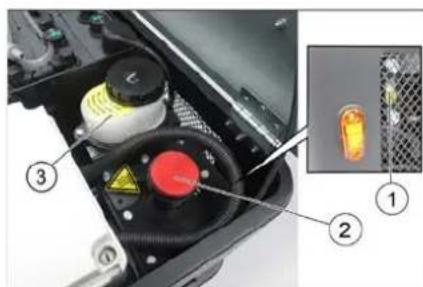
1 Sight glass 2 Oil filler cap 3 Container (without function) → Check the hydraulic oil level at the sight glass. – The oil level must be between the "MIN" and "MAX" marks. – If the level has dropped below the "MIN" mark, add hydraulic oil. → Unscrew the oil filler cap. → Clean the filling area. → Add hydraulic oil.
For the oil type, see the technical data.
Screw the oil filler cap back on.
Checking the hydraulic unit
→ Apply the parking brake. → Start the engine. Maintenance of the hydraulic system must be carried out exclusively by an authorized service center. → Check all hydraulic hoses and connections for leaks.
Checking the sweeping roller
△DANGER
Risk of injury! Always engage the safety lever when the dirt container is raised.
1 Dirt container 2 Safety lever 3 Sweeping roller → Switch off the device. → Raise the empty dirt container to the end position. The sweeping roller becomes visible. Secure the dirt container. See chapter "Securing the raised dirt container". → Turn the ignition key to position "0" and remove the key. → Check the sweeping roller for damage, remove any wrapped tapes or ribbons. → Fold the safety lever down into the holder (the raised dirt container is not protected). → Lower the dirt container to the end position.
Replacing the sweeping roller
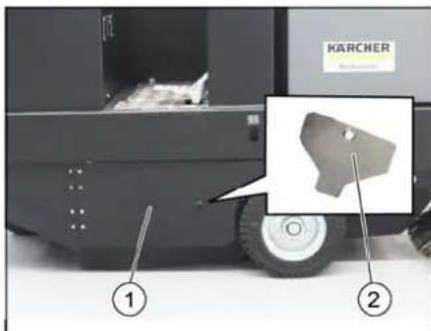
1 Right side panel 2 Key for accessing the sweeping roller → Raise the empty dirt container to the end position. Secure the dirt container. See chapter "Securing the raised dirt container".
1 Holding hook
2 Wing nut
3 Side seal
→ Unscrew the wing nuts. → Remove the holding hook. → Fold the side seal outward. → Unscrew the fastening screw of the sweeping roller holder and swing the holder outward. → Remove the sweeping roller.
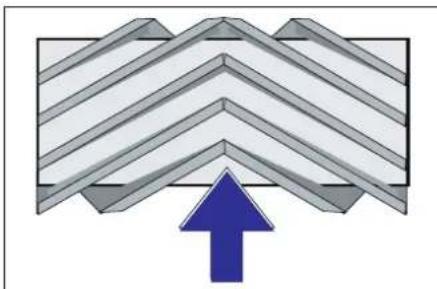
Installation position of the sweeping roller in the direction of travel (view from above)
Note: When installing a new sweeping roller, pay attention to the position of the bristle set.
→ Install the new sweeping roller. The grooves of the sweeping roller must be fitted onto the lugs of the opposite holders.
Note: After installing a new sweeping roller, the sweeping profile must be readjusted.
Checking and adjusting the sweeping profile of the sweeping roller
Note: The sweeping profile is factory-set to 80 mm, and in case of wear of the sweeping roller, it can be adjusted continuously.
→ Switch off the suction fan. → Drive the sweeping device onto a flat and smooth surface that is visibly covered with dust or crushed chalk. → Lever for sweeping roller and side broom (1) to the rear: sweeping roller engaged. Lever for sweeping roller (3) to the rear: sweeping roller lowers. → Let the sweeping roller run for about 10 seconds. → Lever for sweeping roller and side broom (1) to the middle. Lever for sweeping roller (3) to the front: sweeping roller raises.
→ Lift the dirt collection container. → Move the device backward. → Check the sweeping profile.
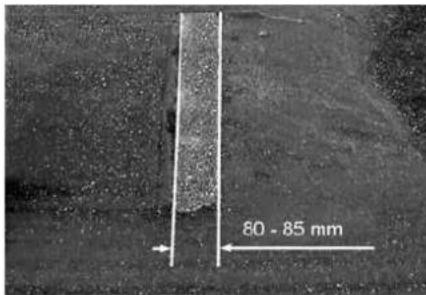
The swept area should have the shape of a regular rectangle with a width between 80 and 85 mm.
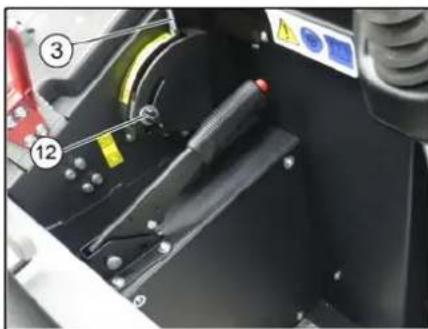
→ Open and adjust the limit screw for wear adjustment (12). Limit stop upward: narrower sweeping profile. Limit stop downward: wider sweeping profile. → Retighten the limit screw firmly. → Recheck the sweeping profile of the sweeping roller as already described.
Checking and adjusting the sweeping profile of the side broom
→ Raise the side broom. → Drive the sweeping device onto a flat and smooth surface that is visibly covered with dust or crushed chalk. → Lower the side broom with the lever and let it run for about 10 seconds. → Raise the side broom. → Move the device backward. → Check the sweeping profile.
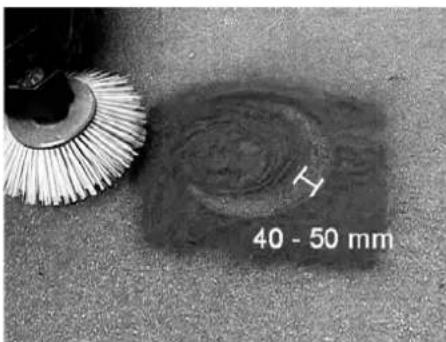
1 Device cover 2 Filter cover (vibrator system) 3 Latch, filter cover (2x)
1 Device cover 2 Fine dust filter 3 Cross bracket → Open the latch. → Open the filter cover. → Check the fine dust filter and clean or replace it if necessary.
Note
The fine dust filter may only be replaced by the Kärcher service department.
→ Attach and secure the filter cover.
Replacing the fuse
△CAUTION
Risk of damage!
→ Make sure that the fuse box covers are not installed upside down.
ATTENTION
2006/42/EEC (+2009/127/EC)
2014/30/EU
2000/14/EC
Applied harmonized standards:
EN 60335-1
EN 60335-2-72
EN 55012: 2007 + A1: 2009
EN 61000-6-2: 2005
EN 62233: 2008
71364 Winnenden (Germany)
Tel.: +49 7195 14-0
Fax: +49 7195 14-2212
Winnenden, 2020/01/01
Interference Suppression
| Smetnja Otklanjanje | |
| Uređaj se ne kreće ili vozi sasvim polako. | Sedite na sedište vozača, kontaktni prekidača sedišta vozača se aktivira. |
| Osigurač voznog motora FU 13 treba da proveri servisna služba | |
| Punjenje ili zamena akumulatora | |
| Otkočite pozicionu kočnicu | |
| Proverite da nema upletenih traka ili petlji. | |
| Obavestite Kärcher servisnu službu. | |
| Pišteći zvuk u hidraulici Sipajte hidrauličku tečnost | |
| Četke se vrte polako ili se uopšte ne vrte | Proverite da nema upletenih traka ili petlji. |
| Obavestite Kärcher servisnu službu. | |
| U prostoru četki je usisna snaga mala ili je uopšte nema | Očistite filter za prašinu |
| Obavestite Kärcher servisnu službu. | |
| Uređaj diže prašinu Podešavanje bočnih zaptivki | |
| Jedinica za čišćenje ostavlja prljavštinu da leži | Ispraznite posudu za nakupljenu prljavštinu |
| Očistite filter za prašinu | |
| Zamenite valjak za metenje. | |
| Naknadno podesite profil metenja | |
| Zamenite zaptivne trake na posudi za prljavštinu | |
| Uklonite strana tela koja blokiraju valjak za metenje | |
| Obavestite Kärcher servisnu službu. | |
| Posuda za prljavštinu ne može da se podigne ili spusti | Proverite osigurače. |
| Ukloniti saigurnosni podupirač sa posude za nakupljenu prljavštinu | |
| Obavestite Kärcher servisnu službu. | |
| Posuda za prljavštinu se vrti presporo ili se uopšte ne vrti | Obavestite Kärcher servisnu službu. |
| Smetnje u radu s hidrauličkim pokretnim delovima | Obavestite Kärcher servisnu službu. |
Technical Data
| KM 105/180 R Bp Classic | KM 105/180 R Bp Pack Classic | ||
| Podaci uređaja | |||
| Brzina vožnje prema napred km/h 6 6 | |||
| Brzina vožnje unazad km/h 3 3 | |||
| Savladavanje uspona (maks.) -- 14% 14% | |||
| Površinski učinak bez bočnih metli m | 2/h 4680 4680 | ||
| Površinski učinak sa 1 bočnom metlom m | 2/h 6300 6300 | ||
| Radna širina bez bočne metle | mm | 780 | 780 |
| Radna širina sa 1 bočnom metlom | mm | 1050 1050 | |
| Stepen zaštite, zaštićeno od kapajuće vode | -- | IPX 3 | IPX 3 |
| Trajanje primene pri napunjenom akumulatoru h | 2,5 | 2,5 | |
| Električne komponente | |||
| Kapacitet akumulatora | V, Ah | --- | 36, 240 |
| Akumulatorski set | kg | --- | 300 |
| Hidrauličke komponente | |||
| Tip hidrauličkog ulja | -- HV 46 | HV 46 | |
| Posuda za nakupljenu prljavštinu | |||
| Maksimalna visina pražnjenja mm 1340 1340 | |||
| Zapremina posude za prljavštinu | I | 180 | 180 |
| Valjak za metenje | |||
| Prečnik valjka za metenje mm 280 280 | |||
| Širina valjka za metenje mm 780 780 | |||
| Broj obrtaja 1/min 360 360 | |||
| Profil metenja mm 80 80 | |||
| Bočna metla | |||
| Prečnik bočnih metli mm 580 580 | |||
| Broj obrtaja 1/min 80 80 | |||
| Pneumatici od pune gume | |||
| Veličina napred -- 4.00-6 4.00-6 | |||
| Veličina pozadi -- 300 x 145 - 6 300 x 145 - 6 | |||
| Kočnica | |||
| Prednji točkovi -- mehanička mehanička | |||
| Zadnji točak | -- Električno | Električno | |
| Filterski i usisni sistem | |||
| Tip | -- Vrećasti filter | Vrećasti filter | |
| Opciono dostupno: Pljosnati naborani filter i okrugli filter | |||
| Broj obrtaja 1/min 2600 2600 | |||
| Površina filtera za finu prašinu | m2 | 5,2 | 5,2 |
| Nominalni podpritisak usisnog sistema | mbar | 6 | 6 |
| Nominalni zapreminski protok usisnog sistema | m3/h | 600 600 | |
| Vibracioni sistem | -- Elektromotor | Elektromotor | |
| Okolni uslovi | |||
| Temperatura | °C | -5 do +40 | -5 do +40 |
| Vlažnost vazduha, bez stvaranja kondenzata | % | 0 - 90 | 0 - 90 |
| Izračunate vrednosti prema EN 60335-2-72 | |||
| Emisija buke | |||
| Nivo zvučnog pritiska LpA | dB(A) | 70 70 | |
| Nepouzdanost KpA | dB(A) | 3 | 3 |
| Nivo zvučne snage LwA + nepouzdanost KwA | dB(A) | 93 93 | |
| Vibracije uređaja | |||
| Vrednost vibracije na ruci | m/s2 | 0,7 | 0,7 |
| Sedište | m/s2 | 0,5 | 0,5 |
| Nepouzdanost K | m/s2 | 0,1 | 0,1 |
| Dimenzije i težine | |||
| Dužina x širina x visina | mm | 1847 x 1065 x 1388 | 1847 x 1065 x 1388 |
| Poluprečnik okretanja udesno | mm 2470 | 2470 | |
| Poluprečnik okretanja ulevo | mm 2470 | 2470 | |
| Prazna težina (bez/sa akumulatorom) | kg | 560/860 | 560/860 |
| Dozvoljena ukupna težina | kg | 1224 | 1224 |
| Dozvoljeno opterećenje prednje osovine | kg | 734 734 | |
| Dozvoljeno opterećenje zadnje osovine | kg | 490 | 490 |
| Zadržavamo pravo na tehničke promene! | |||
General instructions.....BG 1
Environmental protection.....BG 1
Warranty.....BG 1
Accessories and spare parts.....BG 1
www.kaercher.com/REACH
Warranty
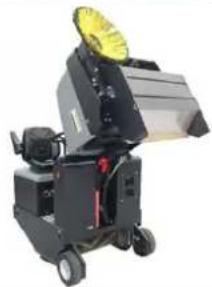
Chairman of the Board of Management
Director Regulatory Affairs & Certification
71364 Winnenden (Germany)
Tel.: +49 7195 14-0
Fax: +49 7195 14-2212
Winnenden, 2020/01/01
www.kaercher.com/REACH
Warranty
1 Adjustment lever
2 Guide rails
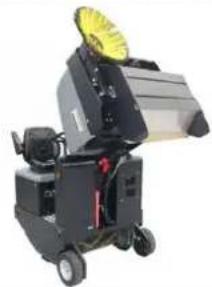
1 Fastening clamp
1 Device cover 2 Filter cover (shaking system) 3 Lock, filter cover (2x) → Turn the device cover to the front.
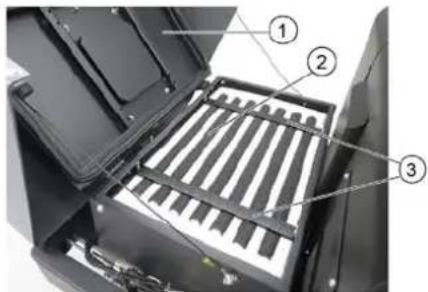
1 Device cover
2 Fine dust filter
3 Cross supports
→ Open the lock.
Replace filter cartridge.
Product: Vacuum cleaner with seat
Type: KM 105/180 R Bp 1.186-050.0 KM 105/180 R Bp Pack 1.186-051.0
Chairman of the Board of Management
Director Regulatory Affairs & Certification
71364 Winnenden (Germany)
Tel.: +49 7195 14-0
Fax: +49 7195 14-2212
Winnenden, 2020/01/01
Help in case of malfunctions
www.kaercher.com/REACH
Warranty
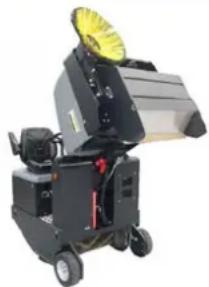
1 L o d z i n š
1 Device cover
2 Fine dust filter
3 Škērsspraišli
Chairman of the Board of Management
S. Reiser Director Regulatory Affairs & Certification
Authorized to prepare documentation: S. Reiser
Alfred Kärcher SE & Co. KG
71364 Winnenden (Germany)
Tel.: +49 7195 14-0
Fax: +49 7195 14-2212
Winnenden, 2020/01/01
www.kaercher.com/REACH
Warranty
1 Seat adjustment lever 2 Driver's seat
→ Connect the blower. → When cleaning areas:
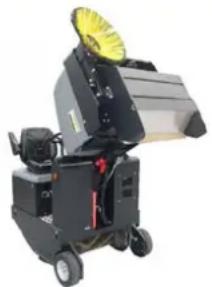
1 Dust bag
2 Protective bar 3 Rotating brush
1 Bracket
2 Wing nut
3 Side gasket
1 Device cover 2 Filter cover (vibrator system) 3 Filter cover latch (2x) → Tilt the device cover forward.
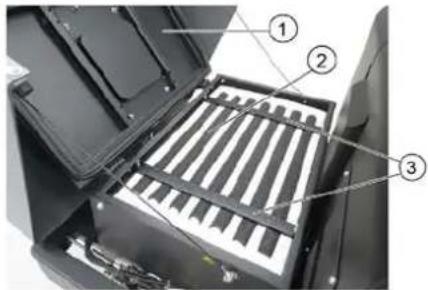
1 Device cover
71364 Winnenden (Germany)
Tel.: +49 7195 14-0
Fax: +49 7195 14-2212
Winnenden, 2020/01/01
www.kaercher.com/REACH
Warranty
1 Sight glass
1 Support
2 Slotted nut
3 Side seal
1 Device cover
71364 Winnenden (Germany)
Tel.: +49 7195 14-0
Fax: +49 7195 14-2212
Winnenden, 2020/01/01
www.kaercher.com/REACH
Quality assurance
1 Seat adjustment lever
2 Driver's seat
→ Switch on the blower. → When sweeping flat surfaces:
Sweeping roller and side brush lever (1) backward: sweeping roller starts.
Sweeping roller lever (3) backward: sweeping roller lowers.
1 Bumper bracket
2 Bumper
Battery electrodes - along the left side in the direction of travel
1 Dust bin 2 Bumper 3 Sweeping roller
→ Switch off the device.
1 Bracket 2 Wing nut
3 Side sealing plate
1 Device cover 2 Micro dust filter 3 Cross member
H. Jenner Chairman of the Board of Management
S. Reiser Director Regulatory Affairs & Certification
Authorized representative for documentation:
S. Reiser
Alfred Kärcher SE & Co. KG
71364 Winnenden (Germany)
Tel.: +49 7195 14-0
Fax: +49 7195 14-2212
Winnenden, 2020/01/01
Troubleshooting
1 Device cover
1 Device cover
1 Adjustment lever
2 Expected Audience
THANK YOU!
THANK YOU! THANK YOU! THANK YOU!
Register your product and benefit from many advantages. Register your product and benefit from many advantages. Register your product and benefit from many advantages. Register your product and benefit from many advantages.
www.kaercher.com/welcome

Rate your product and tell us your opinion. Rate your product and tell us your opinion. Rate your product and tell us your opinion. Rate your product and tell us your opinion.

www.kaercher.com/dealersearch
Alfred Kärcher SE & Co. KG
Alfred-Kärcher-Str. 28-40
71364 Winnenden (Germany)
Tel.: +49 7195 14-0
Fax: +49 7195 14-2212

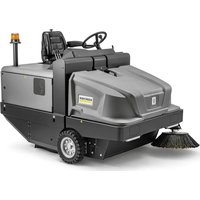
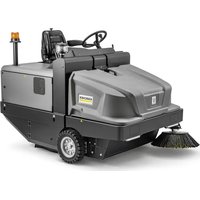
- SWEEPING ROLLER
- GENERAL NOTES
- WARRANTY
- ACCESSORIES AND SPARE PARTS
- △DANGER
- SYMBOLS IN THE OPERATING INSTRUCTIONS
- ⚠ WARNING
- △CAUTION
- ATTENTION
- PROPER USE
- FORESEEABLE MISUSE
- SUITABLE SURFACES
- SAFETY INSTRUCTIONS
- SAFETY INSTRUCTIONS CONCERNING THE OPERATION
- CAUTION
- SAFETY INFORMATION CONCERNING THE DRIVING OPERATION
- SAFETY INSTRUCTIONS FOR BATTERY-OPERATED DEVICES
- APPLIANCES WITH HIGH EMPTYING SYSTEM
- DEVICES WITH OVERHEAD GUARD
- NOTICE
- SAFETY INFORMATION CONCERNING THE TRANSPORT OF THE APPLIANCE
- SAFETY INFORMATION CONCERNING MAINTENANCE AND CARE
- FUNCTION
- UNLOADING TIPS
- ⚠ DANGER
- OPERATING AND FUNCTIONAL ELEMENTS
- ILLUSTRATION OF SWEEPER OPERATING ELEMENTS
- ILLUSTRATION A
- ILLUSTRATION B
- INDICATOR LAMPS AND DISPLAY
- ILLUSTRATION ©
- BEFORE STARTUP
- LOCK/ RELEASE PARKING BRAKE
- START UP
- INSPECTION AND MAINTENANCE WORK
- DAILY BEFORE STARTING OPERATIONS
- SAFETY NOTES REGARDING THE BATTERIES
- DANGER
- CHARGE THE BATTERIES
- RECOMMENDED BATTERIES, CHARGERS
- NOTE
- CHECK FLUID LEVEL IN THE BATTERY AND ADJUST IF REQUIRED
- CHECK CHARGING STATUS OF BATTERY
- OPERATION
- ADJUSTING DRIVER'S SEAT
- STARTING THE MACHINE
- DRIVE THE MACHINE
- DRIVE FORWARD
- REVERSE DRIVE
- DRIVING METHOD
- BRAKES
- DRIVING OVER OBSTACLES
- SWEEPING MODE
- CLEANING THE FINE DUST FILTER MANUALLY
- CONTROL LEVER
- ROLLER BRUSH AND SIDE BRUSH CONTROL LEVER
- VER
- CONTROL LEVER WASTE CONTAINER
- CONTROL LEVER ROLLER BRUSH
- CONTROL LEVER CONTAINER FLAP
- SWEEPING DRY FLOORS
- SWEEPING DAMP OR WET FLOORS
- EMPTYING THE WASTE CONTAINER
- TURN OFF THE APPLIANCE
- TRANSPORT
- STORAGE/DECOMMISSIONING
- CARE AND MAINTENANCE
- CLEANING
- CLEANING THE INSIDE OF THE MACHINE
- ⚠️ DANGER
- EXTERNAL CLEANING OF THE APPLIANCE
- MAINTENANCE INTERVALS
- MAINTENANCE BY THE CUSTOMER
- DAILY MAINTENANCE
- WEEKLY MAINTENANCE
- MAINTENANCE FOLLOWING WEAR
- MAINTENANCE BY CUSTOMER SERVICE
- MAINTENANCE TO BE CARRIED OUT AFTER 50 OPERATING HOURS
- MAINTENANCE TO BE CARRIED OUT AFTER 250 OPERATING HOURS
- MAINTENANCE WORKS
- PREPARATION
- SECURING THE RAISED WASTE CONTAINER ⚠️DANGER
- REPLACE BATTERIES
- CHECK HYDRAULIC OIL LEVEL AND REFILL HYDRAULIC OIL
- OIL GRADE: SEE TECHNICAL DATA
- CHECK HYDRAULIC UNIT
- CHECKING ROLLER BRUSH
- REPLACING ROLLER BRUSH
- CHECK AND ADJUST ROLLER BRUSH SWEEPING TRACK
- CHECK AND ADJUST SWEEPING TRACK OF THE SIDE-BRUSH
- ADJUST THE SIDE SEALS
- CHECKING/CHANGING THE FINE DUST FILTER ⚠ WARNING
- REPLACING FUSES
- EU DECLARATION OF CONFORMITY
- RELEVANT EU DIRECTIVES
- APPLIED HARMONIZED STANDARDS
- APPLIED CONFORMITY EVALUATION METHOD
- SOUND POWER LEVEL DB(A)
- EMPTYING WASTE CONTAINER
- GARANTIE
- WWW.KAERCHER.COM/REACH
- CHARGING THE BATTERIES
- SWEPT DIRT COLLECTOR CONTROL LEVER
- FOR EXTERNAL CLEANING
- CHECKING AND ADJUSTING THE SWEEPING AREA OF THE SWEEPING ROLLER
- NAPOTEK
- CHANGING THE FUSE
- SIGHT GLASS
- APPLICABLE EU DIRECTIVES
- HARMONIZED STANDARDS USED
- POSITIVE POLE
- REPLACING THE BATTERY
- LEVER FOR OPERATING THE SWEEPING ROLLER AND SIDE BROOM
- BATTERY REPLACEMENT
- CHECKING AND TOPPING UP HYDRAULIC OIL TIP
- FOR THE OIL TYPE, SEE THE TECHNICAL DATA
- CHECKING THE HYDRAULIC UNIT
- CHECKING THE SWEEPING ROLLER
- REPLACING THE SWEEPING ROLLER
- CHECKING AND ADJUSTING THE SWEEPING PROFILE OF THE SWEEPING ROLLER
- CHECKING AND ADJUSTING THE SWEEPING PROFILE OF THE SIDE BROOM
- REPLACING THE FUSE
- QUALITY ASSURANCE
- BUMPER BRACKET
- BUMPER
- AUTHORIZED REPRESENTATIVE FOR DOCUMENTATION
- THANK YOU
- THANK YOU! THANK YOU! THANK YOU
Brand : Kärcher
Model : KM 105180 R Bp Pack Classic
Category : Sweeper