Pocket 2.0 - Speaker HAMA - Free user manual and instructions
Find the device manual for free Pocket 2.0 HAMA in PDF.



| Product type | Portable Bluetooth speaker |
| Brand | Hama |
| Model | Pocket 2.0 |
| Dimensions (L x H x D) | 84 x 84 x 38 mm |
| Weight | 180 g |
| Bluetooth technology | Bluetooth v5.0 |
| Supported Bluetooth profiles | A2DP V1.2, AVRCP V1.4, HFP V1.5 |
| Max. music power | 3.5 W |
| Frequency response | 180 Hz – 20 kHz |
| Distortion (THD) | ≤ 1 % |
| Audio system | Mono |
| Battery life (Bluetooth playback) | ~ 14 h |
| Battery life (AUX playback) | ~ 16 h |
| Charging time | ~ 3 h |
| Battery | Lithium-polymer, 3.7 V, 1050 mAh / 3.89 Wh |
| Power supply | 5 V max. 1 A (micro-USB) |
| Protection rating | IPX7 (immersion up to 1 m, 30 min) |
| Bluetooth range | < 10 m |
| Connectivity | Bluetooth, AUX input 3.5 mm, micro-USB (charging) |
| Hands-free kit | Yes (call, reject, end, redial) |
| Package contents | Speaker, micro-USB cable, carabiner, manual, specification sheet |
| Care and cleaning | Lint-free cloth slightly damp, without harsh detergent |
| Safety instructions | Do not expose to heat, do not open, use appropriate charger, keep out of reach of children |
Frequently Asked Questions - Pocket 2.0 HAMA
User questions about Pocket 2.0 HAMA
0 question about this device. Answer the ones you know or ask your own.
Ask a new question about this device
Download the instructions for your Speaker in PDF format for free! Find your manual Pocket 2.0 - HAMA and take your electronic device back in hand. On this page are published all the documents necessary for the use of your device. Pocket 2.0 by HAMA.
USER MANUAL Pocket 2.0 HAMA
natural_image
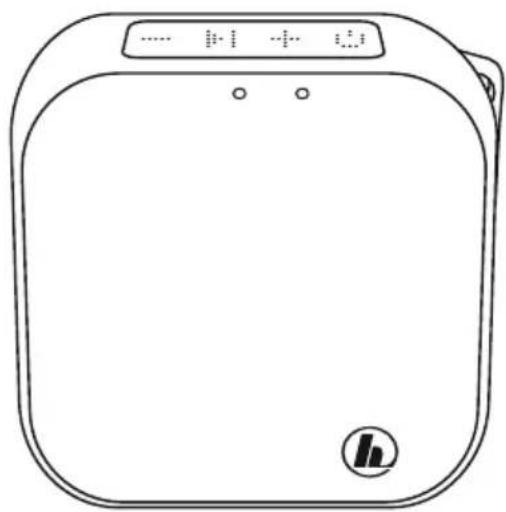
Line drawing of a square electronic device with control panel and buttons (no text or symbols)GB OperatingInstructions
Thankyouforchoosinga H amaproduct.
Takeyourtimeandreadthefollowinginstructions andinformationcompletely. P leasekeepthese instructions in a safe place for future reference. If yousellthedevice,pleasepasstheseoperating instructionsontothenewowner.
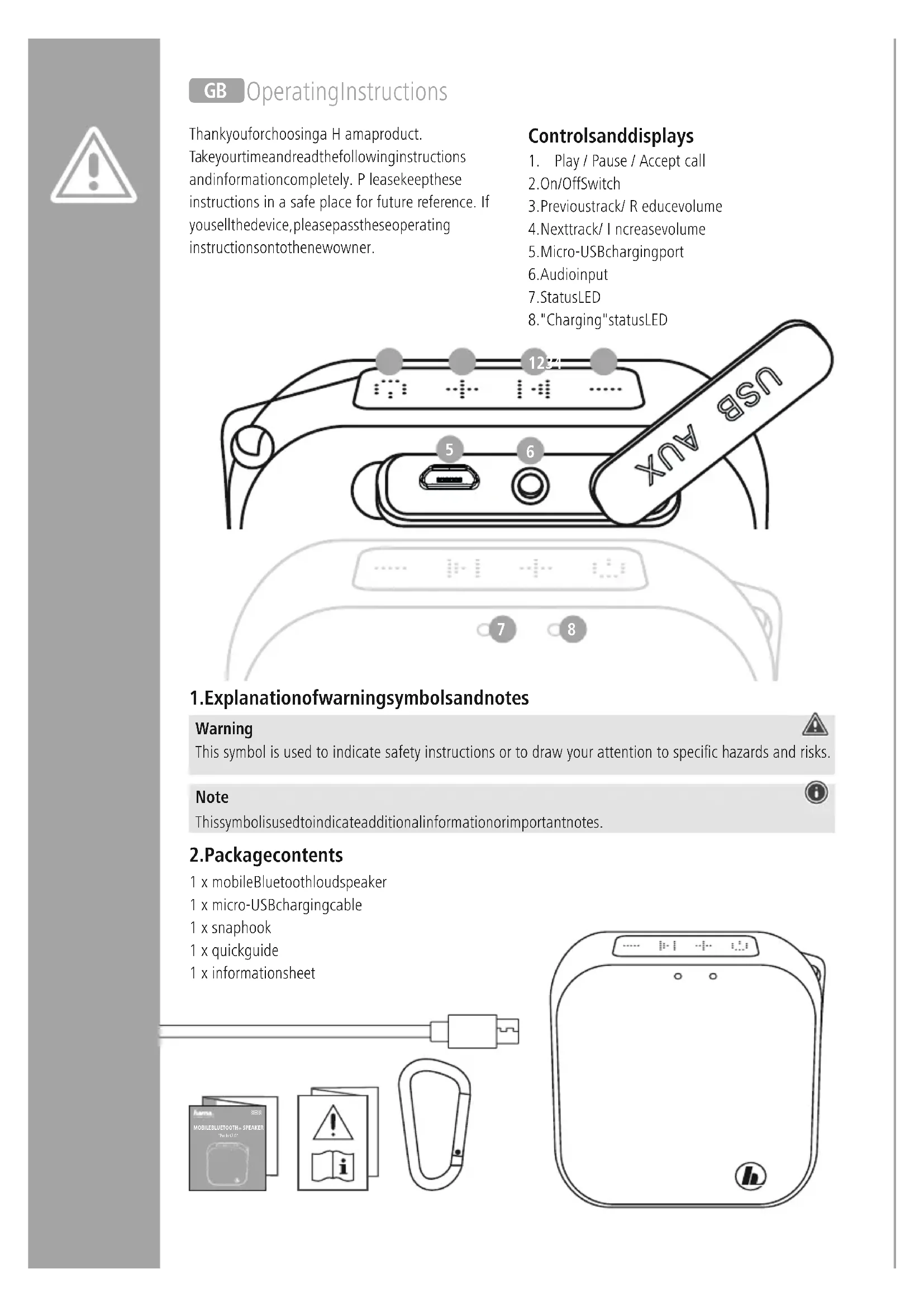
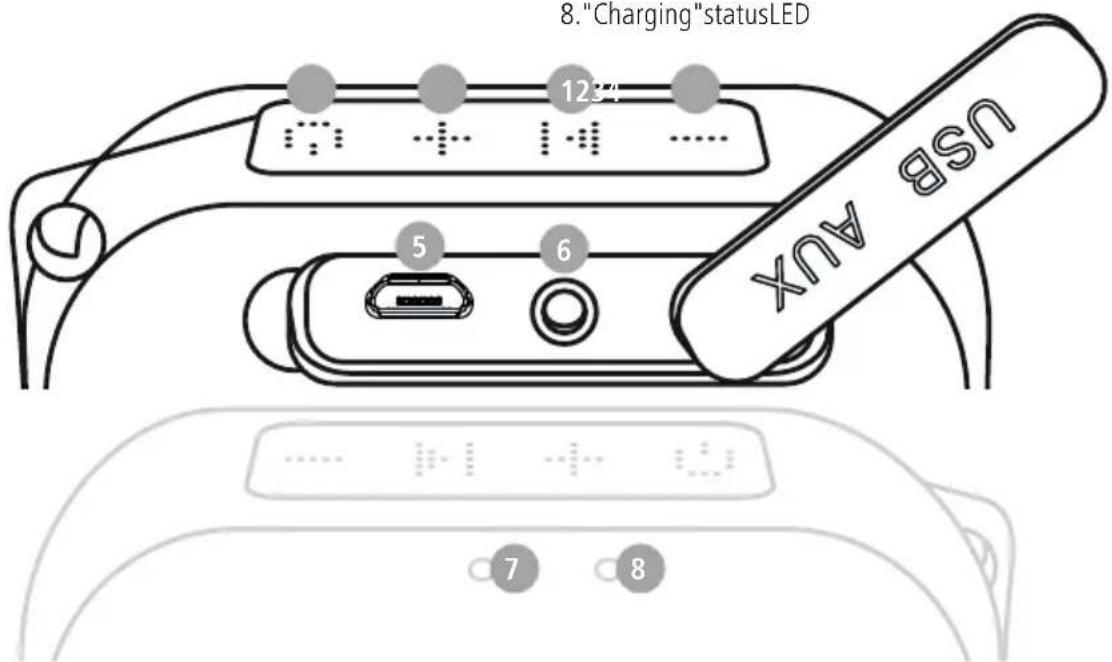
Controlsanddisplays
- Play / Pause / Accept call
2.On/OffSwitch - Previousstrack/ Reducevolume
- Nexttrack/ Increasevolume
- Micro-USBchargingport
- Audioinput
- StatusLED
8."Charging"statusLED
1. Explanationofwarningsymbolsandnotes
Warning

This symbol is used to indicate safety instructions or to draw your attention to specific hazards and risks.
Note

This symbol is used to indicate additional information or important notes.
2.Packagecontents
1 x mobileBluetoothloudspeaker
1 x micro-USBchargingcable
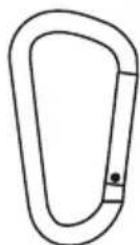
1 x snaphook
1 x quickguide
1 x informationsheet
natural_image
Line drawing of a square electronic device with a digital display and circular button (no text or symbols)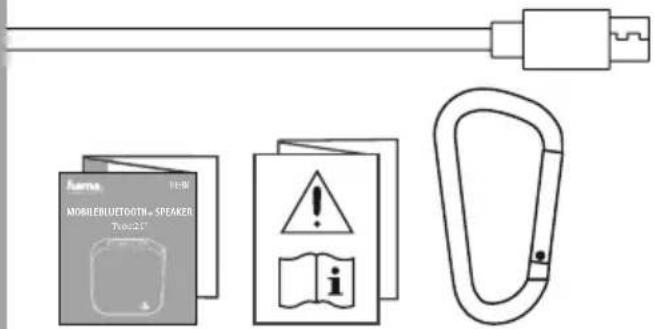

3. Safetyinstructions
• The product is intended for private, non-commercial use only.
- Usetheproductonlyfortheintendedpurpose.
- Do not use the product in the immediate vicinity of heaters, other heat sources or in direct sunlight.
- Do not use the product in areas in which electronic products are not permitted.
- Onlyusethearticleundermoderateclimaticconditions.
- Do not operate the product outside the power limits specified in the technical data.
- The battery is permanently installed and cannot be removed; dispose of the product as a whole in accordance with the statutory regulations.
- Donotbendorcrushthecable.
- Donotdropheproductanddonotexposeittoanymajorshocks.
- Do not attempt to service or repair the product yourself. Leave any and all service work to qualified experts.
- Donotopenthedeviceorcontinuetooperateitifitbecomesdamaged.
- Keep the packaging material out of the reach of children due to the risk of suffocation.
- Be considerate. High volumes can disturb or interfere with your surroundings.
- Dispose of packaging material immediately in accordance with the locally applicable regulations.
- Do not modify the product in any way. Doing so voids the warranty.
- As with all electrical products, this device should be kept out of the reach of children.
- While driving a car or using sports equipment, do not allow yourself to be distracted by your product and keep an eye on the traffic situation and your surroundings.
- Donotincineratethebatteryortheproduct.
- Donottamperwithordamage/heat/disassemblethebatteries/rechargeablebatteries.
4.Switchingon/off
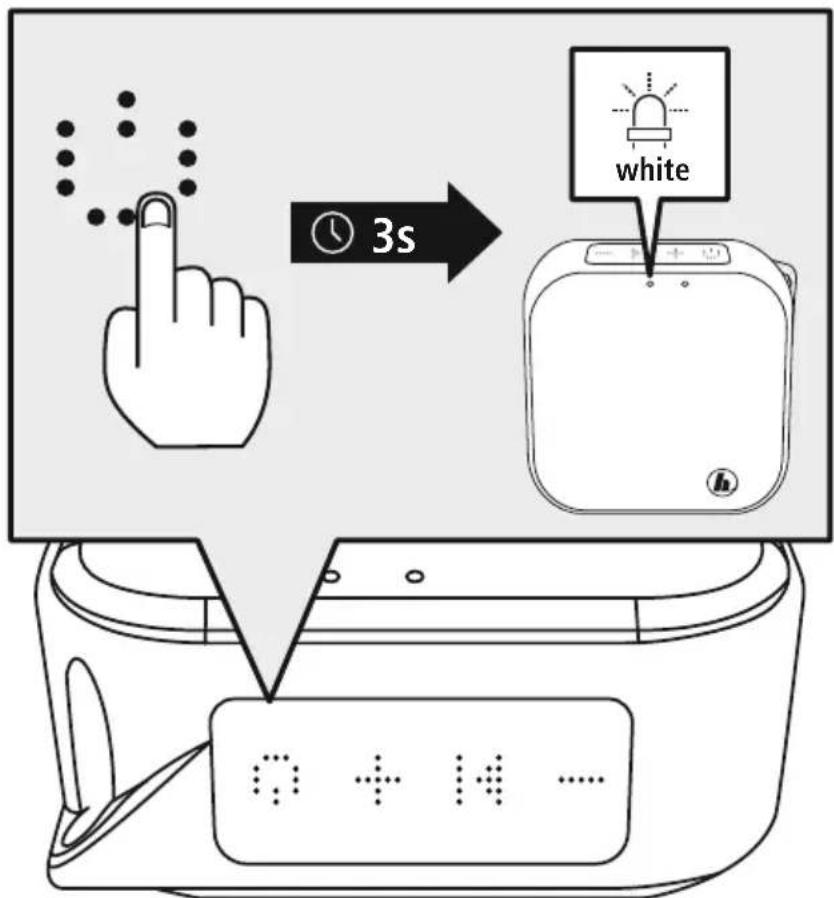
- Press and hold the function key (2) for approximately 3 seconds to switch the loudspeaker on / off.
• AnaudiblesignalsoundsandthestatusLED(1)startstoflash.
Note- A utomaticswitch-off

Please note that the loudspeaker will switch itself off after 8 minutes of inactivity (no audio playback / noBluetoothfunction).
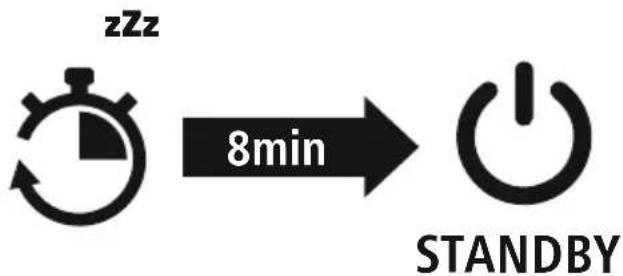
flowchart
graph LR
    A[" stopwatch"] -->|8min| B["Power Symbol"]

5.Charging
Warning – rechargeable battery

- OnlyusesuitablechargingdevicesorUSBconnectionstochargetheproduct.
- DonotusedefectivechargersorUSBportsanddonotattempttorepairthem.
- Donotoverchargetheproductorallowittocompletelydischarge.
- Avoid storing, charging and using in extreme temperatures and at extremely low atmospheric pressures(suchasathighaltitudes).
- Chargeregularly(atleastquarterly)duringperiodsofprolongedstorage.
Note- Waterproofproperties

- Carefully seal the micro-USB port after the charging process to ensure that the product is waterproof.
- Be aware that water can influence the range and sound of the loudspeaker.
Note

- Do not charge the product on your PC / laptop USB port. This can cause damage to the USB port.
- Use the enclosed USB charging cable only for this loudspeaker - not for other devices.
Fully charge the loudspeaker once before using it for the first time.
1 Openthecoverandconnecttheloudspeaker
Opentesealonthemicro-USBport.
Connect the supplied micro-USB charging cable to themicro-USB port (5) on the loud speaker.
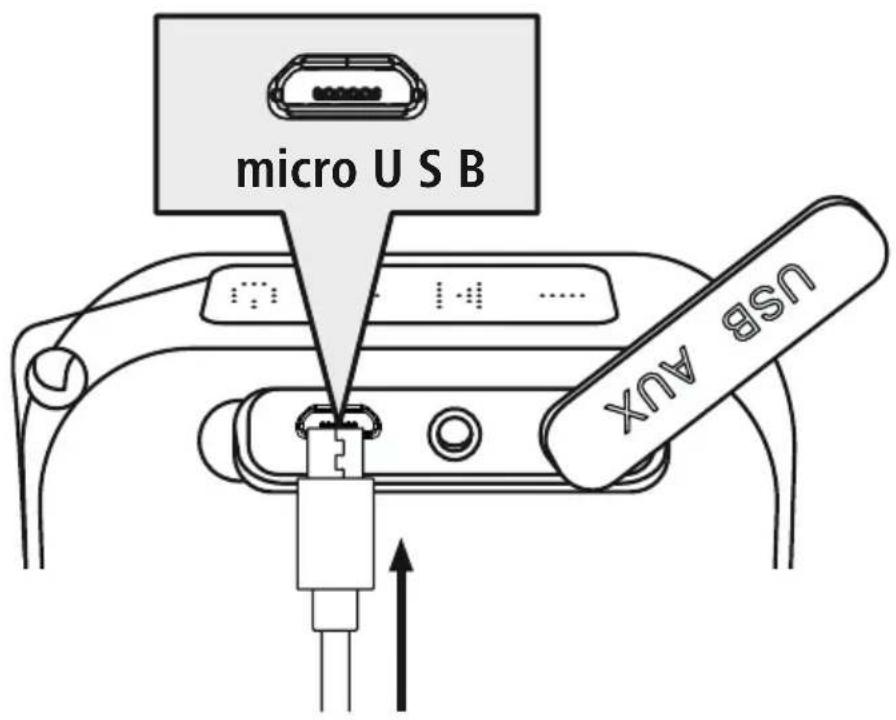
Connect the free plug on the micro-USB charging cable to a suitable USB charger. To do this, consulttheoperatinginstructionsfortheUSBchargeryouare u sing.

2
Chargingprocess
The"Charging"statusLED(8)startstolightupred.
Oncethebatteryisfullycharged,thestatusLED(8)willgoout.
The actual battery lifewill vary depending on how you set the device, the settings and the ambient temperatures (rechargeable batteries have a limited life).
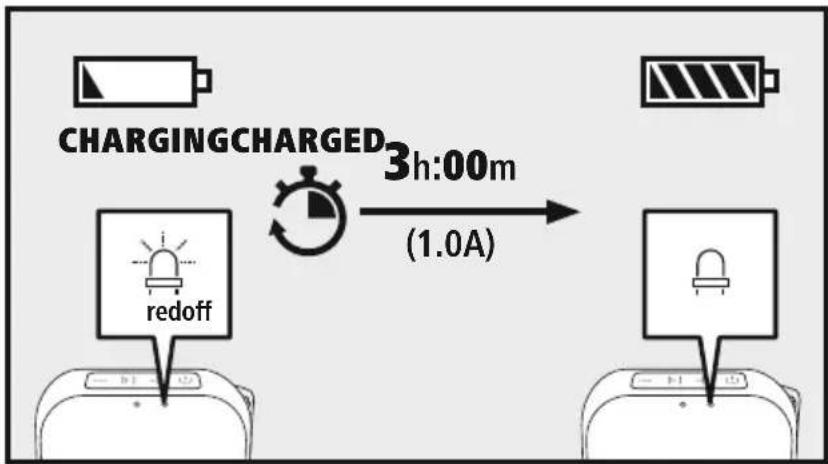
flowchart
graph LR
    A["Charging Charge"] --> B["Redoff Device"]
    B --> C["3h:00m Time"]
    C --> D["1.0A Battery Supply"]
Note- c hargingprocess

• A complete charging cycle takes about 3 hours.
- The loudspeaker's rechargeable battery can be charged both when it is switched on and off.
- If the battery capacity is less than 10%, a warning sound is heard twice. This information is only provided if the loudspeaker is switched on.

6. Waterproof properties
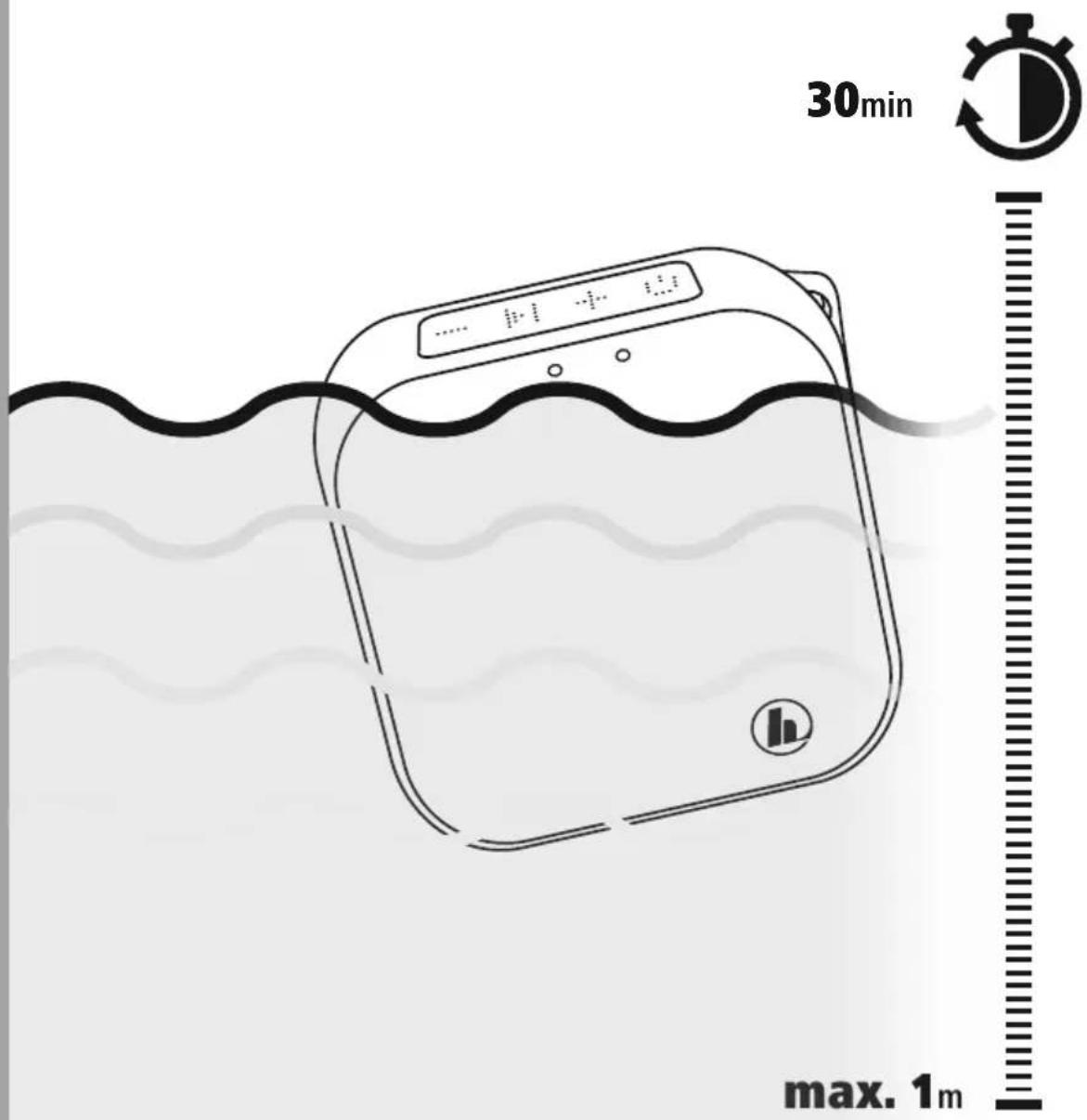
The loudspeaker has been tested to ensure it is waterproof according to IPX7 and therefore maintains its functions even if immersed in water up to 1 m deep for up to 30 minutes.
Liquidsagainstwhichthedeviceiswaterproofasspecified:
| √ | fresh water, tap water, water from a swimming pool, sea water |
| X | Liquids other than those specified above (soapy water, water containing cleaning agents or bathadditives, shampoo/conditions,waterfromhotsources,etc.) |
Note- Waterproofproperties

Be aware that, on contact with water, all charging ports must be sealed.
7.Operation
7.1 Bluetooth
Note

- Check whether your mobile device (MP3 player, mobile phone, etc.) is Bluetooth-capable.
- Note that the maximum range for Bluetooth is 10 metres without obstacles such as walls, people, etc.
- Ensure your Bluetooth-enabled device is switched on and that Bluetooth is activated.
- Ensure that the loudspeaker is within the Bluetooth range of max. 10 metres.
Ensure thattheloudspeakerisswitchedon.
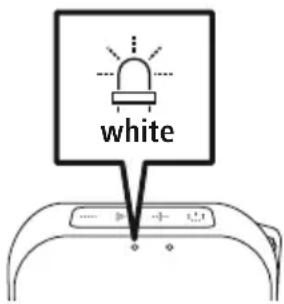
CheckthestatusofthestatusLED(7)
IfthestatusLED(7)isflashingquickly, theloudspeakerissearchingfora c onnection.
IfthestatusLED(7)isflashingslowly, theloudspeakerisalreadypairedwitha B luetoothdevice.
2 Useyourdevicetosearchfortheloudspeaker.
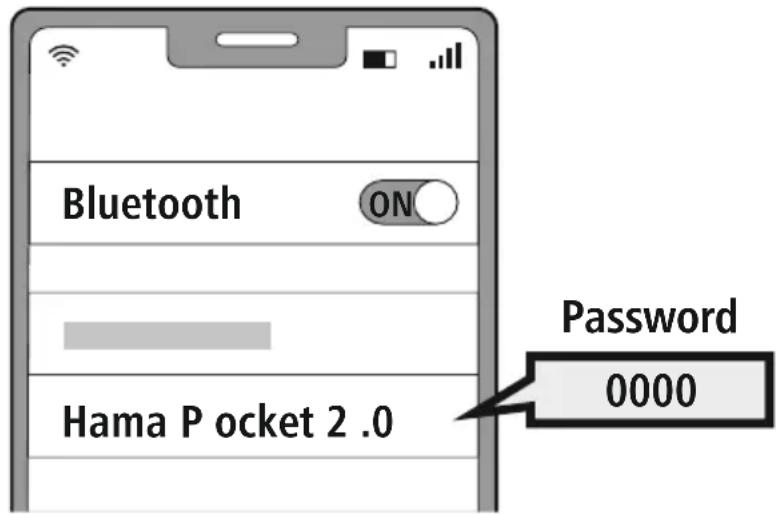
OpentheBluetoothsettingsonyourdeviceandwaituntilthelistoffoundBluetoothdevicesshows HamaPocket2.0.
SelectHamaPocket2.0andwaituntiltheloudspeakerisshownasconnectedintheBluetooth settingsofyourdevice.Anaudiblesignalconfirmsthesuccessfulconnection.
Note-B Iuetoothpassword

- Some terminal devices require a password in order to connect to another Bluetooth device.
- If your device requests a password to connect to the loudspeaker, enter 0000.
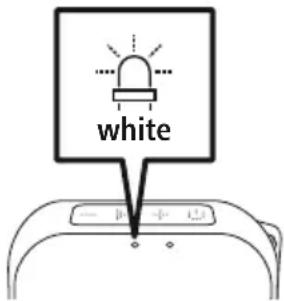
3 TheBluetoothconnectionisestablished
Anaudiblesignalconfirmsthesuccessfulconnection.
ThestatusLED(7)flashesslowlywhite.
4 AutomaticBluetoothconnection(aftersuccessfulpairing)
- Ensure your Bluetooth-enabled device is switched on and that Bluetooth is activated.
- Ensure that the loudspeaker is within the Bluetooth range of max. 10 metres.
- Switchtheloudspeakeron.
- After a successful automatic connection, the status LED (7) flashes slowly. An audible signal confirmsthesuccessfulconnection.
Note- c onnectionimpaired

After the loudspeaker and device have been paired, a connection is established automatically. If the Bluetooth connection is not established automatically, check the following:
- In your device's Bluetooth settings, check that Hama Pocket 2.0 is connected. If not, repeat the steps listed underpoints 1 and 2.
- Check that your device and the loudspeaker are less than 10 metres apart. If not, move them closertogether.
- Check whether obstacles are impairing the range. If so, move the devices closer together.
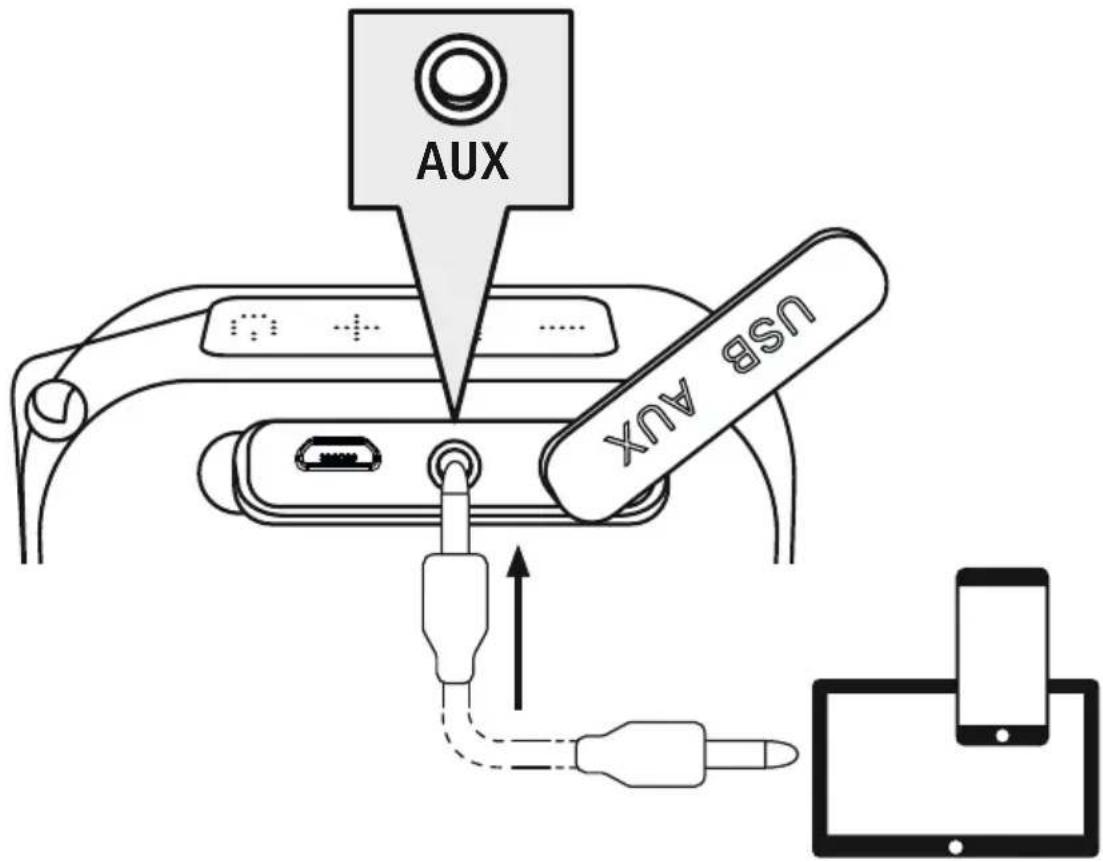
7.2 Audioplayback via aanaudiocable (3.5mmjack)
Ensure thattheloudspeakerisswitchedoff.
Connectionwiththeaudiocable
Connect your mobile device (MP3 player, smartphone, etc.) and the AUX input (6) on the loudspeaker using an audiocable with a 3.5mm jack plug.
Setthevolumeonyourdevicetoa I owlevel.
2 Switchtheloudspeakeron
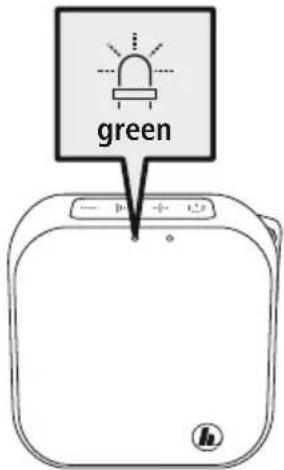
Switch the loudspeaker on. A signal tone and the green status LED (7) confirm the readiness for operation.
Start audio playback on the connected device. The music playback can also be controlled from the speaker(providedtheconnecteddevicesupportsthis).
8. Audioplayback
Start and control audio playback accordingly on the connected device. Alternatively, the audio playback can also be controlled from the loudspeaker (provided the connected devices support this).
1 Startplaybackonyourdevice
2 Volume
Briefly press the function key (4) to increase the volume.

Briefly press the function key (3) to reduce the volume.

3 Play/ Pause
Pressthefunctionkey(1)tostartorstoptheaudioplayback.
4 Skip
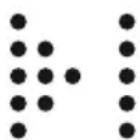
Makealong pressofthefunctionkey(4)toskiptothenexttrack.

Makealong pressofthefunctionkey(3)toskiptotheprevioustrack.


9.Hands-freesystem
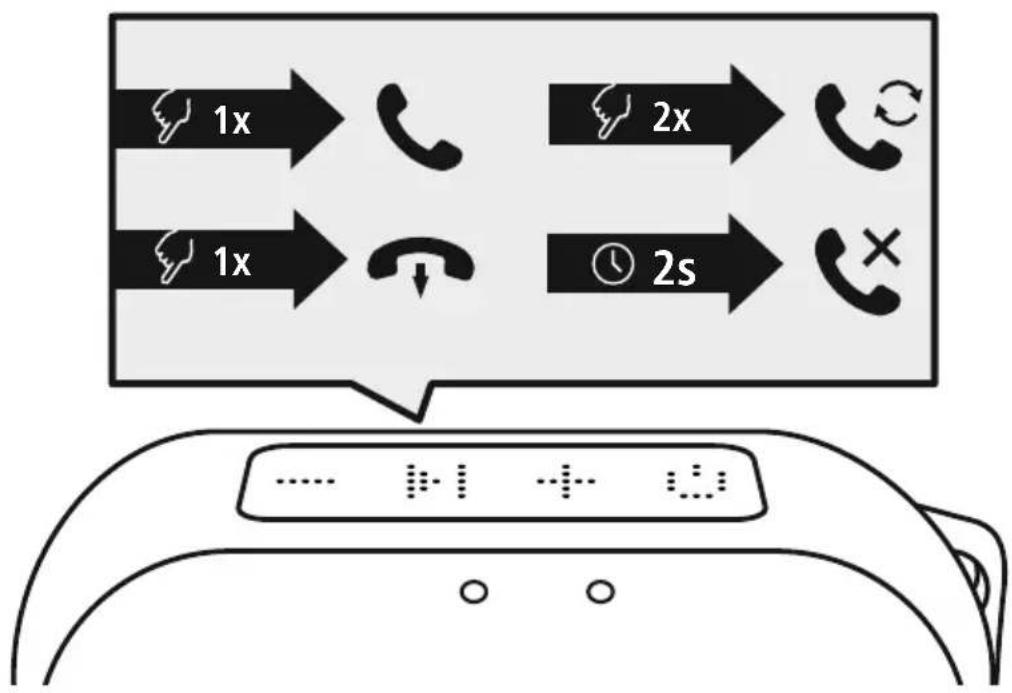
It is possible to use the loudspeaker like a hands-free facility for your mobile phone. The mobile phone must be paired via Bluetooth with the loudspeaker for this function.
1 Acceptcall
Pressthefunctionkey(1)oncetoacceptanincomingcall.
Rejectcall
Pressandhold the function key(1) for approx. 2 seconds to reject an incoming call.
Endcall
Duringthecall, pressthefunctionkey(1)oncetoendthe call.
Lastnumberredial

Pressthefunctionkey(1)twiceinsuccessiontore-dialthe lastnumber.
flowchart
graph TD
    A["1x"] --> B["Phone"]
    C["1x"] --> D["Phone"]
    E["2x"] --> F["Phone"]
    G["2s"] --> H["Phone"]
Note- callquality

- Please ensure you are near the loudspeaker during a call on your mobile phone in order to increase the quality of the call.

10.Technicaldata
| MobileBluetoothloudspeaker | |
| BluetoothtechnologyBluetoothv5.0 | |
| ProfilessupportedA2DPV1.2,AVRCPV1.4,HFPV1.5 | |
| Frequency180Hz- 2 0 k Hz | |
| Range< 1 0 m | |
| Maximummusicpower3.5W | |
| ChargingvoltageMax.5V1000mA | == |
| SoundsystemMono | |
| DistortionTHD≤1% | |
| Dimensions84x38x84mm | |
| Weight180g | |
| Connections3.5mmAUX, micro-USB | |
| Rechargeable battery | |
| Type | Lithium polymer rechargeable battery, 3.7 V, 1050 mAh/3.89Wh |
| Charging Time | ~ 3 h |
| Operating time | Via Bluetooth:~ 1 4 hVia AUX:~ 1 6 h(depending onvolumeand audiocontent) |

11. Care and Maintenance
Only clean this product with a slightly damp, lint-free cloth and do not use aggressive cleaning agents.
12.WarrantyDisclaimer
Hama GmbH & Co KG assumes no liability and provides no warranty for damage resulting from improper installation/mounting, improper use of the product or from failure to observe the operating instructions and/orsafetynotes.
13. Service and Support
PleasecontactHamaProductConsultingifyuhaveanyquestionsaboutthisproduct.
Hotline:+499091502-0(German/English)
Furthersupportinformationcanbefoundhere:www.hama.com
14. Recycling Information
Noteonenvironmentalprotection:
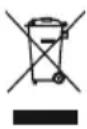
AftertheimplementationoftheEuropeanDirectives2012/19/EUand2006/66/EUinthe nationallegalsystem, the following applies:
electrical and electronic devices as well as batteries must not be disposed of with household waste. Consumers are obliged by law to return electrical and electronic devices as well as batteriestothedesignatedpubliccollectionpointsortothepointofsaleattheendoftheirservicelives.
Detailed information on this topic is defined in the national laws of the respective country. This presence of the above symbol on the product, operating instructions or package indicates that the product is
subject to these regulations. By recycling, reusing the materials or other forms of utilising old devices/batteries, you are making an important contribution to protecting our environment.
15. Declaration of Conformity
CE Hama GmbH & Co KG hereby declares that the radio equipment type [00173193, 00173194] is in compliance with Directive 2014/53/EU. The full text of the EU declaration of conformity is available at the following internet address:
www.hama.com->00173193,00173194->Downloads.
Frequencyband(s)2402-2 480MHz
Maximumradio-frequencypowertransmitted3.18dBm

natural_image
Line drawing of a square electronic device with a digital display and circular button (no text or symbols)
7.Betrieb
7.1 Bluetooth
Hinweis

natural_image
Line drawing of a square electronic device with a digital display and control knob (no text or symbols)
7.Fonctionnement
7.1 Bluetooth
Remarque

2 Allumezl'enceinte
natural_image
Line drawing of a square electronic device with a digital display and circular button (no text or symbols)
flowchart
graph TD
    A["Hand with dots and finger icon"] -->|3s| B["White device with light bulb"]
    B --> C["8min stopwatch with clock icon"]
    C --> D["STANDBY button with power symbol"]

5.Carga
Aviso:batería

7. Funcionamiento
7.1 Bluetooth
Nota

2 Enciendaelaltavoz
natural_image
Line drawing of a square electronic device with a digital display and a circular button (no text or symbols)
flowchart
graph LR
    A["8min"] --> B["STANDBY"]

5.Зарядка
7. Эксплуатация
7.1 Bluetooth
Примечание

2 Включениеколонки
natural_image
Line drawing of a square electronic device with a digital display and circular button (no text or symbols)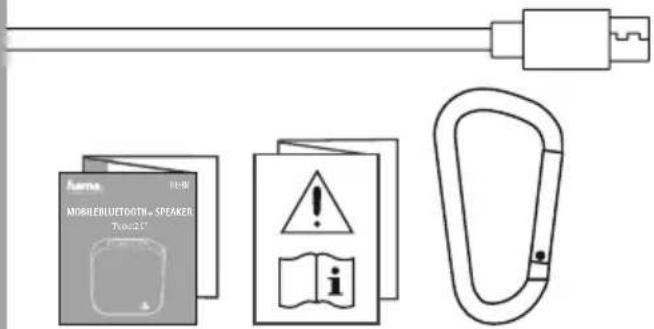

flowchart
graph LR
    A["8min"] --> B["STANDBY"]

7. Funzionamento
7.1 Bluetooth
Nota

3 Concluderelechiamate

natural_image
Line drawing of a square electronic device with a digital display and control knob (no text or symbols)

flowchart
graph LR
    A[" stopwatch"] -->|8min| B["STANDBY"]

5.Opladen
flowchart
graph LR
    A["Charging Charge"] --> B["Device 1: Redoff icon"]
    B --> C["Device 2: Battery icon"]
    D["Charging Charge"] --> E["Device 1: Redoff icon"]
    E --> F["Device 2: Battery icon"]
    G["Charging Charge"] --> H["Device 1: Redoff icon"]
    H --> I["Device 2: Battery icon"]
    J["Charging Charge"] --> K["Device 1: Redoff icon"]
    K --> L["Device 2: Battery icon"]
    M["Charging Charge"] --> N["Device 1: Redoff icon"]
    N --> O["Device 2: Battery icon"]
    P["Charging Charge"] --> Q["Device 1: Redoff icon"]
    Q --> R["Device 2: Battery icon"]
    S["Charging Charge"] --> T["Device 1: Redoff icon"]
    T --> U["Device 2: Battery icon"]
    V["Charging Charge"] --> W["Device 1: Redoff icon"]
    W --> X["Device 2: Battery icon"]
    Y["Charging Charge"] --> Z["Device 1: Redoff icon"]
    Z --> AA["Device 2: Battery icon"]
    AB["Charging Charge"] --> AC["Device 1: Redoff icon"]
    AC --> AD["Device 2: Battery icon"]
    AE["Charging Charge"] --> AF["Device 1: Redoff icon"]
    AF --> AG["Device 2: Battery icon"]
    AH["Charging Charge"] --> AI["Device 1: Redoff icon"]
    AI --> AJ["Device 2: Battery icon"]
    AK["Charging Charge"] --> AL["Device 1: Redoff icon"]
    AL --> AM["Device 2: Battery icon"]
    AN["Charging Charge"] --> AO["Device 1: Redoff icon"]
    AO --> AP["Device 2: Battery icon"]
    AQ["Charging Charge"] --> AR["Device 1: Redoff icon"]
    AR --> AS["Device 2: Battery icon"]
    AT["Charging Charge"] --> AU["Device 1: Redoff icon"]
    AU --> AV["Device 2: Battery icon"]
    AW["Charging Charge"] --> AX["Device 1: Redoff icon"]
    AX --> AY["Device 2: Battery icon"]
7. Gebruikenwerking
7.1 Bluetooth
Aanwijzing

natural_image
Line drawing of a square electronic device with a digital display and circular button (no text or symbols)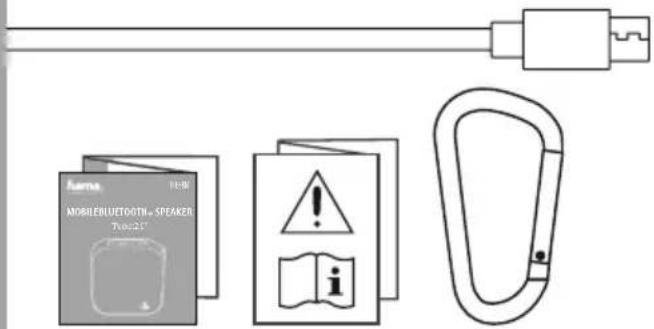

flowchart
graph TD
    A["Hand with dots"] --> B["3s"]
    B --> C["White device with indicator light icon"]
    C --> D["8min battery usage"]
    D --> E["STANDBY"]

5.Φόρτιση
natural_image
Line drawing of a digital water heater with wavy liquid and control panel (no text or symbols)max. 1m
7.Λειτουργία
7.1 Bluetooth
Υπόδειξη

natural_image
Line drawing of a square electronic device with a digital display and circular button (no text or symbols)
flowchart
graph LR
    A[" stopwatch"] -->|8min| B["STANDBY"]

5.Ładowanie
7.Eksploatacja
7.1 Bluetooth
Wskazówka

2 Włączaniegłośnika
natural_image
Line drawing of a square electronic device with a digital display and circular button (no text or symbols)
flowchart
graph LR
    A[" stopwatch"] -->|8min| B["STANDBY"]

5.Töltés
7.Használat
7.1. Bluetooth
Megjegyzés

natural_image
Line drawing of a square electronic device with a digital display and circular button (no text or symbols)
flowchart
graph LR
    A["8min"] --> B["STANDBY"]

5.Nabíjení
7.Provoz
7.1 Bluetooth
Upozornění

14. Pokynyk likvidaci
natural_image
Line drawing of a square electronic device with a digital display and circular button (no text or symbols)
flowchart
graph LR
    A[" stopwatch"] -->|8min| B["STANDBY"]

5.Nabíjanie
Výstraha- b atéria

flowchart
graph LR
    A["Charging Charge"] --> B["Device 1: Redoff icon"]
    B --> C["Device 2: Battery icon"]
    D["Charging Charge"] --> E["Device 1: Redoff icon"]
    E --> F["Device 2: Battery icon"]
    G["Charging Charge"] --> H["Device 1: Redoff icon"]
    H --> I["Device 2: Battery icon"]
    J["Charging Charge"] --> K["Device 1: Redoff icon"]
    K --> L["Device 2: Battery icon"]
    M["Charging Charge"] --> N["Device 1: Redoff icon"]
    N --> O["Device 2: Battery icon"]
    P["Charging Charge"] --> Q["Device 1: Redoff icon"]
    Q --> R["Device 2: Battery icon"]
    S["Charging Charge"] --> T["Device 1: Redoff icon"]
    T --> U["Device 2: Battery icon"]
    V["Charging Charge"] --> W["Device 1: Redoff icon"]
    W --> X["Device 2: Battery icon"]
    Y["Charging Charge"] --> Z["Device 1: Redoff icon"]
    Z --> AA["Device 2: Battery icon"]
    AB["Charging Charge"] --> AC["Device 1: Redoff icon"]
    AC --> AD["Device 2: Battery icon"]
    AE["Charging Charge"] --> AF["Device 1: Redoff icon"]
    AF --> AG["Device 2: Battery icon"]
    AH["Charging Charge"] --> AI["Device 1: Redoff icon"]
    AI --> AJ["Device 2: Battery icon"]
    AK["Charging Charge"] --> AL["Device 1: Redoff icon"]
    AL --> AM["Device 2: Battery icon"]
    AN["Charging Charge"] --> AO["Device 1: Redoff icon"]
    AO --> AP["Device 2: Battery icon"]
    AQ["Charging Charge"] --> AR["Device 1: Redoff icon"]
    AR --> AS["Device 2: Battery icon"]
    AT["Charging Charge"] --> AU["Device 1: Redoff icon"]
    AU --> AV["Device 2: Battery icon"]
    AW["Charging Charge"] --> AX["Device 1: Redoff icon"]
    AX --> AY["Device 2: Battery icon"]
    AZ["Charging Charge"] --> BA["Device 1: Redoff icon"]
    BA --> BB["Device 2: Battery icon"]
    BC["Charging Charge"] --> BD["Device 1: Redoff icon"]
    BD --> BE["Device 2: Battery icon"]
    BF["Charging Charge"] --> BG["Device 1: Redoff icon"]
    BG --> BH["Device 2: Battery icon"]
    BI["Charging Charge"] --> BJ["Device 1: Redoff icon"]
    BJ --> BK["Device 2: Battery icon"]
    BL["Charging Charge"] --> BM["Device 1: Redoff icon"]
    BM --> BN["Device 2: Battery icon"]
    BO["Charging Charge"] --> BP["Device 1: Redoff icon"]
    BP --> BQ["Device 2: Battery icon"]
7. Prevádzka
7.1 Bluetooth
Upozornenie

2 Zapnutiereproduktora
natural_image
Line drawing of a square electronic device with a digital display and circular button (no text or symbols)
flowchart
graph LR
    A["Charging State"] --> B{Redoff}
    B --> C["Charging State"]
    D["Charging State"] --> E["Charging State"]
    style A fill:#f9f,stroke:#333
    style E fill:#f9f,stroke:#333
    note right of B "3h:00m (1.0A)"
Nota-Carregamento

7.Operação
7.1 Bluetooth
Observação

2 Ligaro a ltifalante.
Ligue o altifalante. Um sinal sonoro e o LED de estado (7) aceso, verde, confirmam que o altifalante estáprontopara funcionar.
natural_image
Line drawing of a square electronic device with a digital display and circular button (no text or symbols)
flowchart
graph LR
    A[" stopwatch"] -->|8min| B["STANDBY"]

5.Şarj
Uyarı- P il

7.İşletim
7.1 Bluetooth
Açıklama

2 Hoparlörüaçın
natural_image
Line drawing of a square electronic device with a digital display and circular button (no text or symbols)
flowchart
graph LR
    A[" stopwatch"] -->|8min| B["STANDBY"]

5.Încărcare
Avertizare – A cumulator

flowchart
graph LR
    A["Charging Charge"] --> B["Device 1: Redoff icon"]
    B --> C["Device 2: Battery icon"]
    D["Charging Charge"] --> E["Device 1: Redoff icon"]
    E --> F["Device 2: Battery icon"]
    G["Charging Charge"] --> H["Device 1: Redoff icon"]
    H --> I["Device 2: Battery icon"]
    J["Charging Charge"] --> K["Device 1: Redoff icon"]
    K --> L["Device 2: Battery icon"]
    M["Charging Charge"] --> N["Device 1: Redoff icon"]
    N --> O["Device 2: Battery icon"]
    P["Charging Charge"] --> Q["Device 1: Redoff icon"]
    Q --> R["Device 2: Battery icon"]
    S["Charging Charge"] --> T["Device 1: Redoff icon"]
    T --> U["Device 2: Battery icon"]
    V["Charging Charge"] --> W["Device 1: Redoff icon"]
    W --> X["Device 2: Battery icon"]
    Y["Charging Charge"] --> Z["Device 1: Redoff icon"]
    Z --> AA["Device 2: Battery icon"]
    AB["Charging Charge"] --> AC["Device 1: Redoff icon"]
    AC --> AD["Device 2: Battery icon"]
    AE["Charging Charge"] --> AF["Device 1: Redoff icon"]
    AF --> AG["Device 2: Battery icon"]
    AH["Charging Charge"] --> AI["Device 1: Redoff icon"]
    AI --> AJ["Device 2: Battery icon"]
    AK["Charging Charge"] --> AL["Device 1: Redoff icon"]
    AL --> AM["Device 2: Battery icon"]
    AN["Charging Charge"] --> AO["Device 1: Redoff icon"]
    AO --> AP["Device 2: Battery icon"]
    AQ["Charging Charge"] --> AR["Device 1: Redoff icon"]
    AR --> AS["Device 2: Battery icon"]
    AT["Charging Charge"] --> AU["Device 1: Redoff icon"]
    AU --> AV["Device 2: Battery icon"]
    AW["Charging Charge"] --> AX["Device 1: Redoff icon"]
    AX --> AY["Device 2: Battery icon"]
7.Utilizarea
7.1 Bluetooth
Indicatie

2 Porniți difuzorul
natural_image
Line drawing of a square electronic device with a digital display and circular button (no text or symbols)
3.Säkerhetsanvisningar
flowchart
graph LR
    A["8min"] --> B["STANDBY"]

5.Laddning
Varning-batteri

7.Handhavande
7.1 Bluetooth
Information

2 Sättapåhögtalaren
natural_image
Line drawing of a square electronic device with a digital display and circular button (no text or symbols)
flowchart
graph TD
    A["Hand with dots"] -->|3s| B["White device"]
    B --> C["Stability Check: 0 + 14 - ..."]
    C --> D["8min battery usage: stopwatch, icon clock"]
    D --> E["STANDBY"]

5.Lataaminen
Varoitusakusta

flowchart
graph LR
    A["Charging Charge"] --> B["Device 1: Redoff icon"]
    B --> C["Device 2: Battery icon"]
    D["Charging Charge"] --> E["Device 1: Redoff icon"]
    E --> F["Device 2: Battery icon"]
    G["Charging Charge"] --> H["Device 1: Redoff icon"]
    H --> I["Device 2: Battery icon"]
    J["Charging Charge"] --> K["Device 1: Redoff icon"]
    K --> L["Device 2: Battery icon"]
    M["Charging Charge"] --> N["Device 1: Redoff icon"]
    N --> O["Device 2: Battery icon"]
    P["Charging Charge"] --> Q["Device 1: Redoff icon"]
    Q --> R["Device 2: Battery icon"]
    S["Charging Charge"] --> T["Device 1: Redoff icon"]
    T --> U["Device 2: Battery icon"]
    V["Charging Charge"] --> W["Device 1: Redoff icon"]
    W --> X["Device 2: Battery icon"]
    Y["Charging Charge"] --> Z["Device 1: Redoff icon"]
    Z --> AA["Device 2: Battery icon"]
    AB["Charging Charge"] --> AC["Device 1: Redoff icon"]
    AC --> AD["Device 2: Battery icon"]
    AE["Charging Charge"] --> AF["Device 1: Redoff icon"]
    AF --> AG["Device 2: Battery icon"]
    AH["Charging Charge"] --> AI["Device 1: Redoff icon"]
    AI --> AJ["Device 2: Battery icon"]
    AK["Charging Charge"] --> AL["Device 1: Redoff icon"]
    AL --> AM["Device 2: Battery icon"]
    AN["Charging Charge"] --> AO["Device 1: Redoff icon"]
    AO --> AP["Device 2: Battery icon"]
    AQ["Charging Charge"] --> AR["Device 1: Redoff icon"]
    AR --> AS["Device 2: Battery icon"]
    AT["Charging Charge"] --> AU["Device 1: Redoff icon"]
    AU --> AV["Device 2: Battery icon"]
    AW["Charging Charge"] --> AX["Device 1: Redoff icon"]
    AX --> AY["Device 2: Battery icon"]
    AZ["Charging Charge"] --> BA["Device 1: Redoff icon"]
    BA --> BB["Device 2: Battery icon"]
    BC["Charging Charge"] --> BD["Device 1: Redoff icon"]
    BD --> BE["Device 2: Battery icon"]
    BF["Charging Charge"] --> BG["Device 1: Redoff icon"]
    BG --> BH["Device 2: Battery icon"]
    BI["Charging Charge"] --> BJ["Device 1: Redoff icon"]
    BJ --> BK["Device 2: Battery icon"]
    BL["Charging Charge"] --> BM["Device 1: Redoff icon"]
    BM --> BN["Device 2: Battery icon"]
natural_image
Line drawing of a digital water heater with wavy liquid and control panel (no text or symbols)max. 1m
7.Käyttö
7.1 Bluetooth
Huomautus

natural_image
Line drawing of a square electronic device with a digital display and a circular button (no text or symbols)
natural_image
Line drawing of a digital water heater with wavy liquid and control panel (no text or symbols)max. 1m
7. Режимнаработа
7.1 Bluetooth
Указание