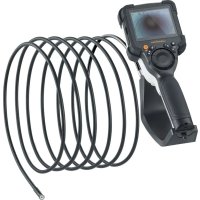
VideoInspector XXL - Video camera Laserliner - Free user manual and instructions
Find the device manual for free VideoInspector XXL Laserliner in PDF.



| Product type | Professional inspection video camera |
| Brand | Laserliner |
| Model | VideoInspector XXL |
| Screen | 3.5" TFT color, resolution 640 x 480 pixels |
| Image / video resolution | 1280 x 720 pixels |
| Recording formats | JPEG (photo), MJPG/AVI (video) |
| Storage media | micro SD card up to 32 GB (not included) |
| Protection rating | IP54 (splash and dust proof) |
| Connectivity | USB type C (charging and data transfer) |
| Power supply | Li-ion battery 3.7 V / 2.8 Ah, recharge via USB-C 5 V / 2 A |
| Battery life / Charging time | Approx. 5 hours / approx. 3 hours |
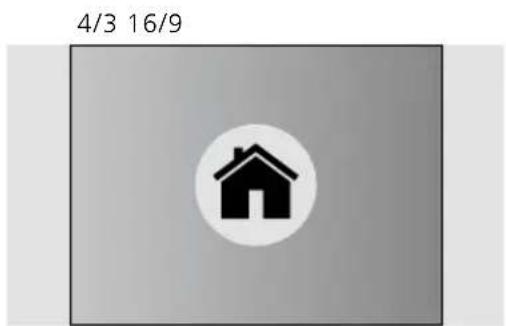
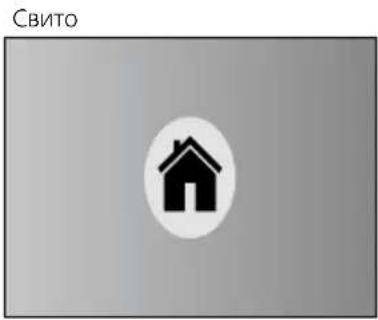
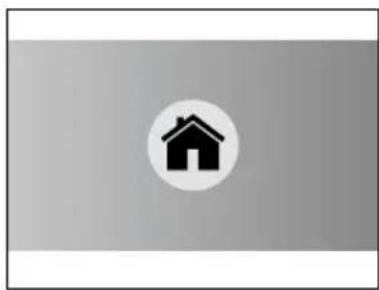
| Main functions | 4-level LED lighting, 2x digital zoom in 10 steps, image rotation/flip (4 positions), photo and video capture, media gallery, auto-off, real-time clock, aspect ratio setting (4:3, 16:9, compressed) |
| Dimensions (L x H x D) | 108 x 260 x 110 mm (mount included) |
| Weight | 650 g (battery included) |
| Operating conditions | 0 °C to 45 °C, max. relative humidity 80% (non-condensing), max. altitude 2000 m |
| Storage conditions | -10 °C to 60 °C, max. relative humidity 80% (non-condensing) |
| Maintenance and cleaning | Clean with a slightly damp cloth, without solvents or abrasive products. Store in a dry and clean place. |
| Safety | Do not use near dangerous voltages. Do not expose to moisture or rain. Use only original accessories. Do not modify the device. Keep out of reach of children. |
| Spare parts and repairability | Replaceable battery (contact customer service). Use only original accessories. The warranty expires if inappropriate accessories are used. |
| General information | Compliant with EU and UK directives. Mandatory recycling (device, accessories, packaging). Do not dispose of with household waste. |
Frequently Asked Questions - VideoInspector XXL Laserliner
User questions about VideoInspector XXL Laserliner
0 question about this device. Answer the ones you know or ask your own.
Ask a new question about this device
Download the instructions for your Video camera in PDF format for free! Find your manual VideoInspector XXL - Laserliner and take your electronic device back in hand. On this page are published all the documents necessary for the use of your device. VideoInspector XXL by Laserliner.
USER MANUAL VideoInspector XXL Laserliner
2x = Drehung 180^
3x = horizontale
Spiegelung
4x=Ausgangsbild
4x
1x



3x
2x
https://packd.li/II/ALL/in
Laserliner
!
Completely read through the operating instructions, the „Warranty and Additional Information" booklet as well as the latest information under the internet link at the end of these instructions. Follow the instructions they contain. These documents must be kept in a safe place and passed on together with the device.
Intended use
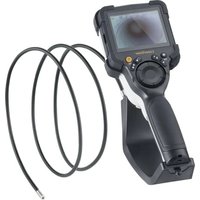
This professional video inspection system Videolnspector combined with an exchangeable camera unit is suitable for easy visual inspection of hard-to-reach places in pipes, cavities, shafts, masonry and motor vehicles. Images and videos can be stored on the Micro-SDHC memory card for analysis and documentation.
General safety instructions
- The device must only be used in accordance with its intended purpose and within the scope of the specifications.
- This product and its accessories are not toys. Keep out of reach of children.
- The structure of the device must not be modified in any way.
- Do not expose the device to mechanical stress, extreme temperatures, moisture or significant vibration.
- The device must not be used if one or a number of its functions fails, or if the housing or connecting cables are damaged.
- When using the device outdoors, make sure that the weather conditions are appropriate and/or that suitable protection measures are taken.
- Charge the device's battery completely prior to use.
- Charging is completed when the LED indicator lights green.
- The battery can also be charged while using the device.
- Use only genuine accessories. Use of inappropriate accessories will invalidate the warranty.
- The base unit must not come in contact with liquids.
- It is absolutely vital to ensure that the Videolnspector does not come into contact with chemicals, voltage, moving or hot objects. This can damage the device and put its user at risk of serious injury.
The Videolnspector must not be used for medical examinations / examining people. - To maintain the IP 54 protection class, the caps on the connections must be firmly locked in.
- Please ensure compliance with the safety regulations set out by local and national authorities with regard to the correct and proper use of the device.
- The unit is not suitable for taking measurements close to dangerous voltages. Therefore always makes sure that conductive parts are at zero potential when carrying out measurements in the vicinity of electrical systems. Safe isolation from the power supply and precautions to prevent systems being switched on again must be ensured by implementing suitable measures.
Safety instructions
Dealing with electromagnetic radiation and electromagnetic disruptions
- The measuring device complies with safety and electromagnetic compatibility regulations and limit values in accordance with Directive 2014/35/EU (Low Voltage Directive / LVD) and 2014/30/EU (Electromagnetic Compatibility Directive / EMC).
- Local operating restrictions – for example, in hospitals, aircraft, petrol stations or in the vicinity of people with pacemakers – may apply. Electronic devices can potentially cause hazards or interference or be subject to hazards or interference.
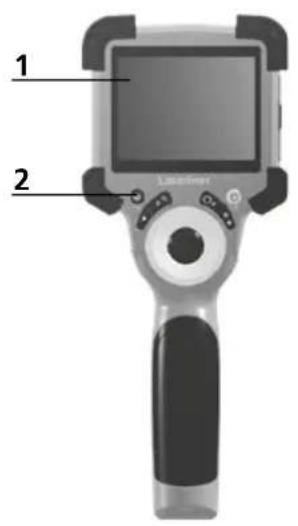
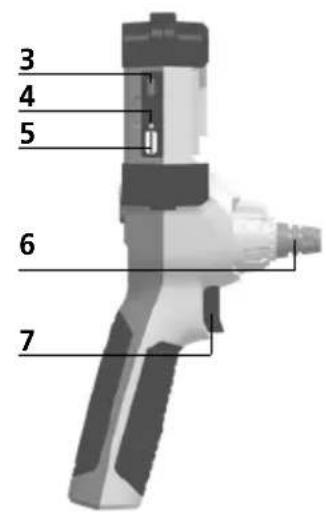
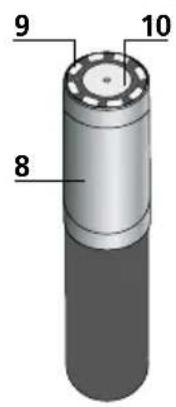
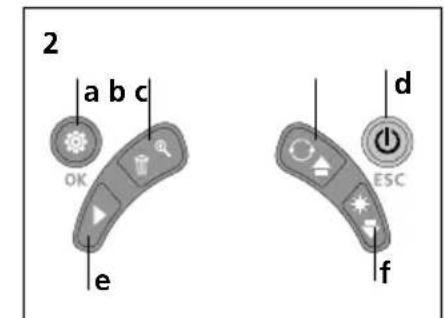
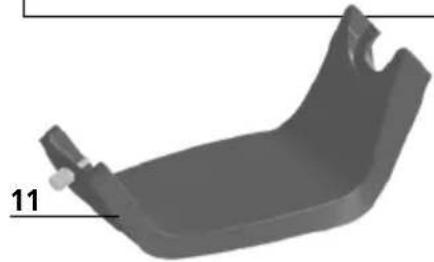
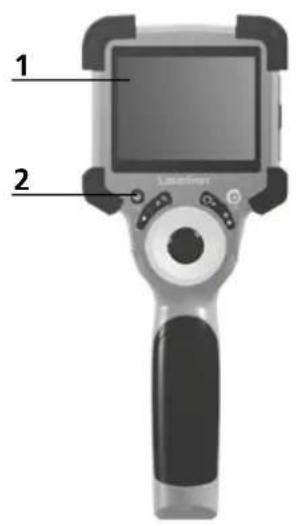
1 LcD
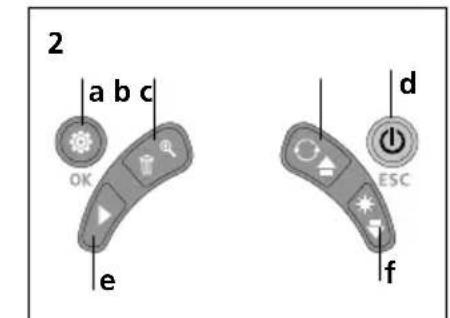
2 Hot keys
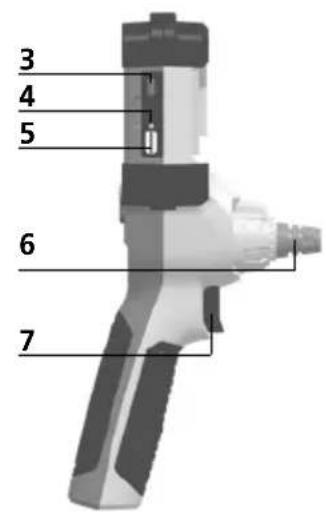
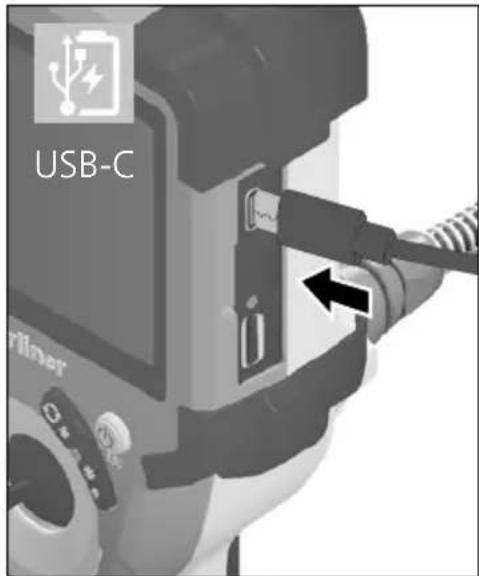
3 Type C USB interface / Charging port
4 Charge status indicator
5 Micro SD card slot
6 Camera unit lock
7 Trigger
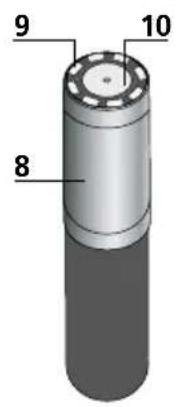
8 Camera head
9 LED lighting
10 Optics
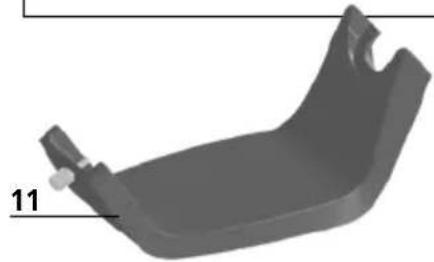
11 Magnetic holder 1 / 4'' tripod thread (underside)
a Settings mode / Confirm
b Zoom/Delete recording
Rotation 180^ / Mirroring / Menu control
d ON/OFF / Cancel
e Media gallery
f LED lighting / Menu control
Using the power supply / lithium-ion rechargeable battery
- Use the power supply/charger unit only in closed rooms; do not expose to moisture or rain otherwise risk of electric shock.
- Charge the device's battery completely prior to use.
- Connect the power pack/charger to the mains power supply and the socket in the battery pack. Please only use the power pack/charger supplied. Using any other power pack/charger will invalidate the warranty.
- The LED lights up red while the device is charging.
The LED changes to green when charging is complete. - Remove the charging cable after charging and disconnect the power pack from the mains.
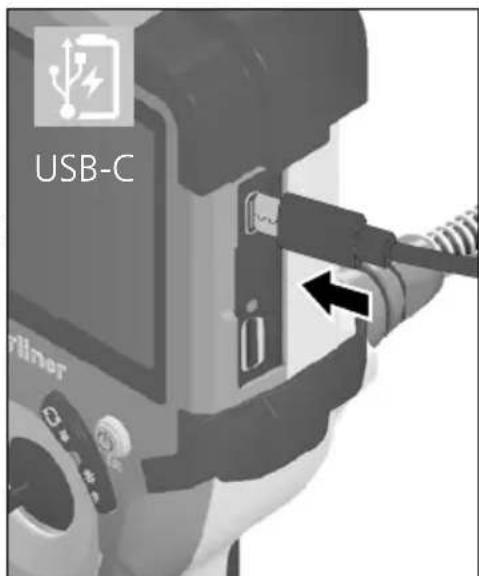
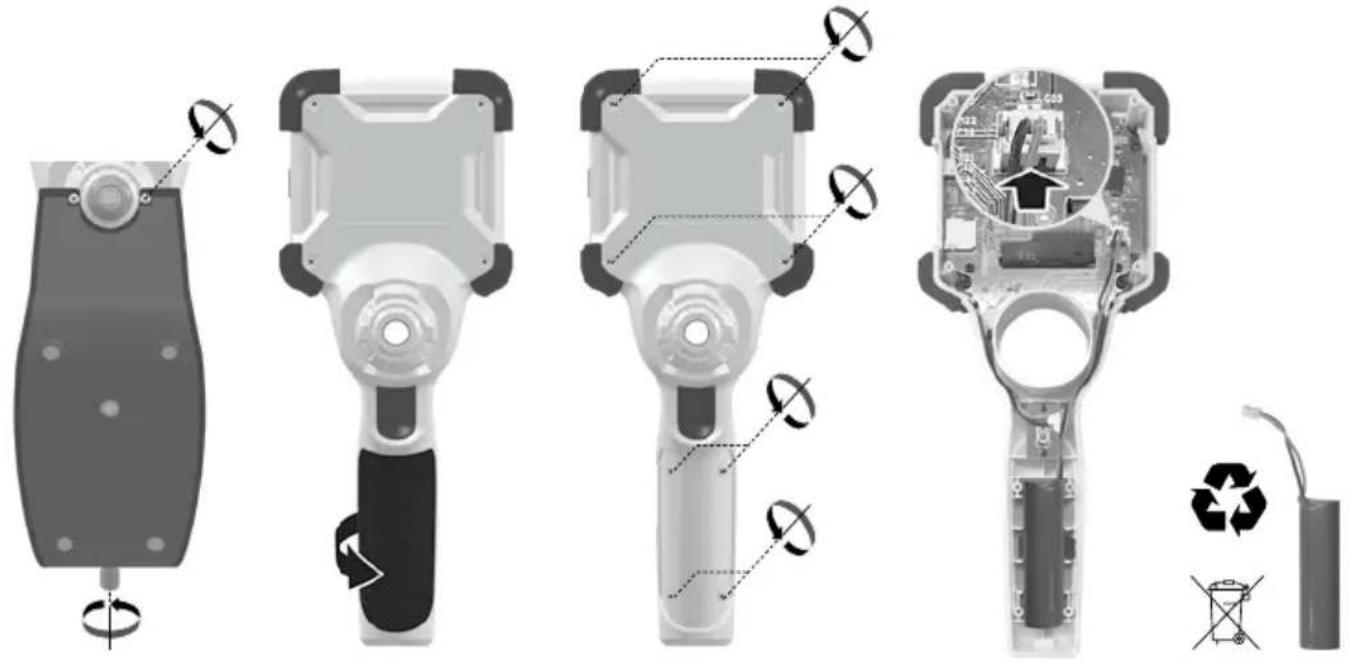
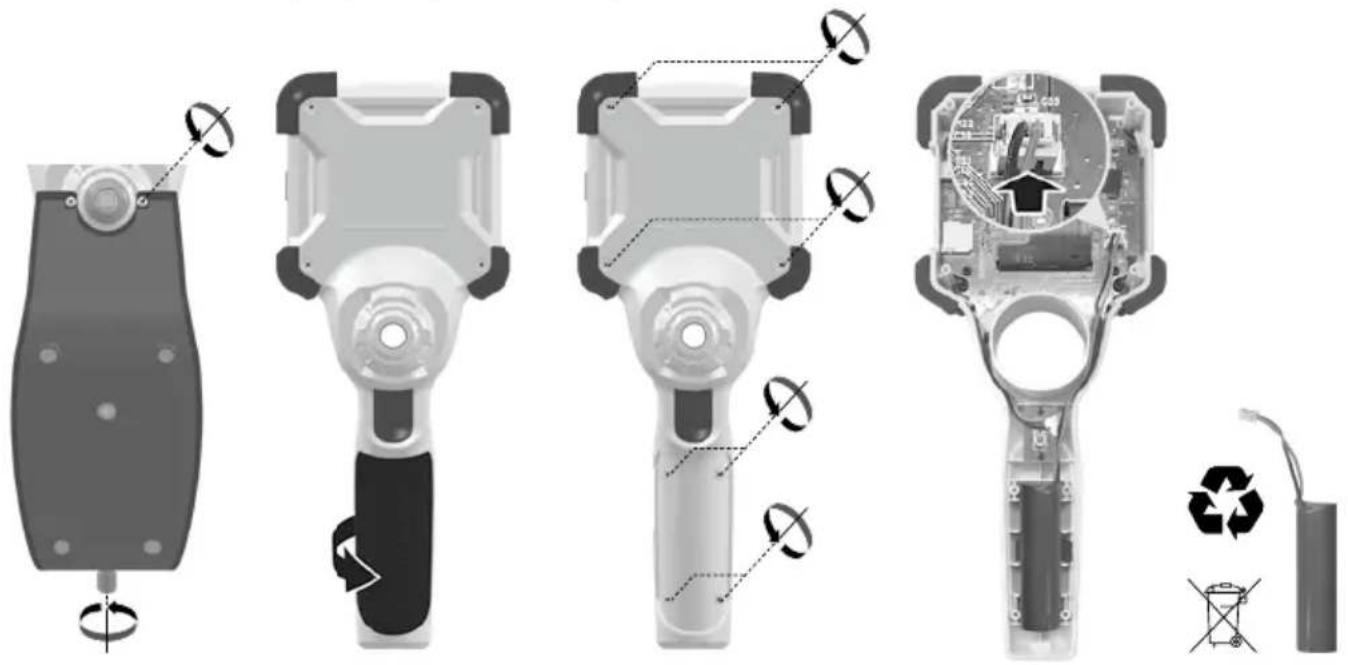
The device has a replaceable battery. Contact your distributor or the UMAREX-LASERLINER service department.
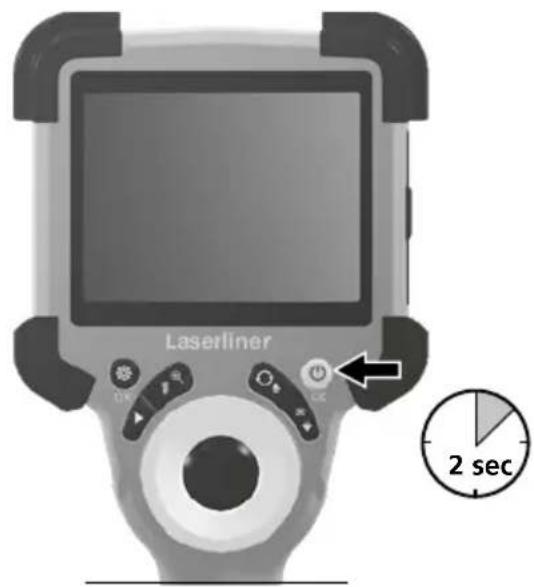
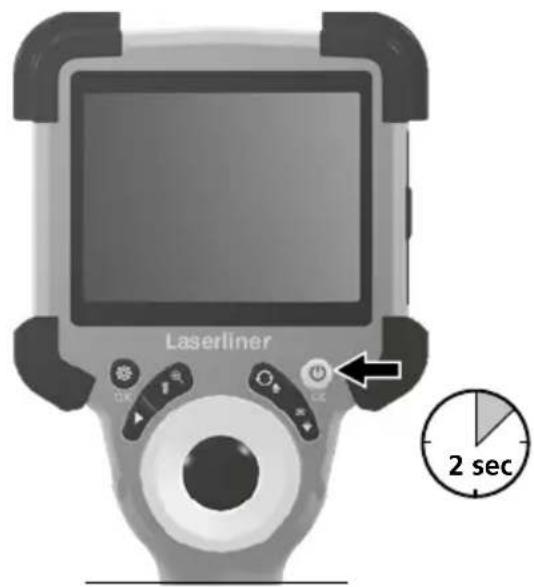
ON/OFF
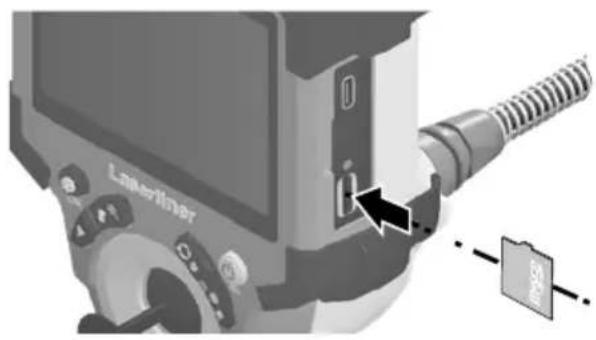
3 Inserting micro-SD card
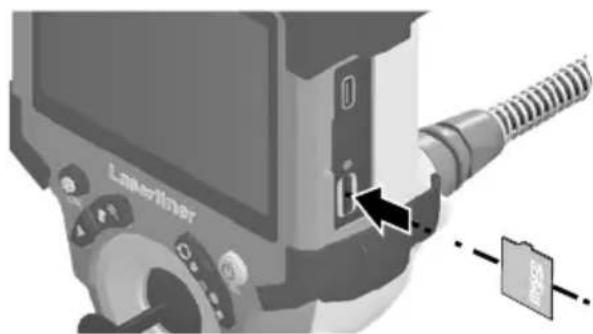
To insert a micro-SD card, first open the rubber cover and then insert the memory card as illustrated. You cannot record anything without a storage medium.
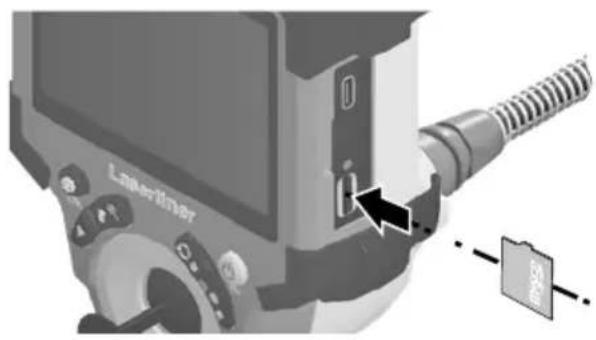
The device must be switched off before removing the micro-SD.
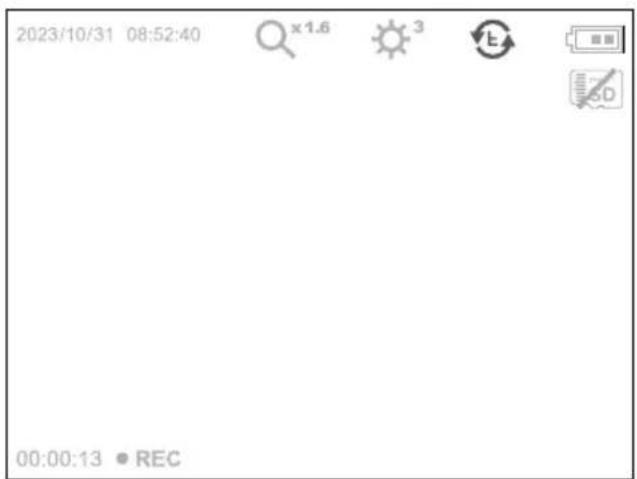
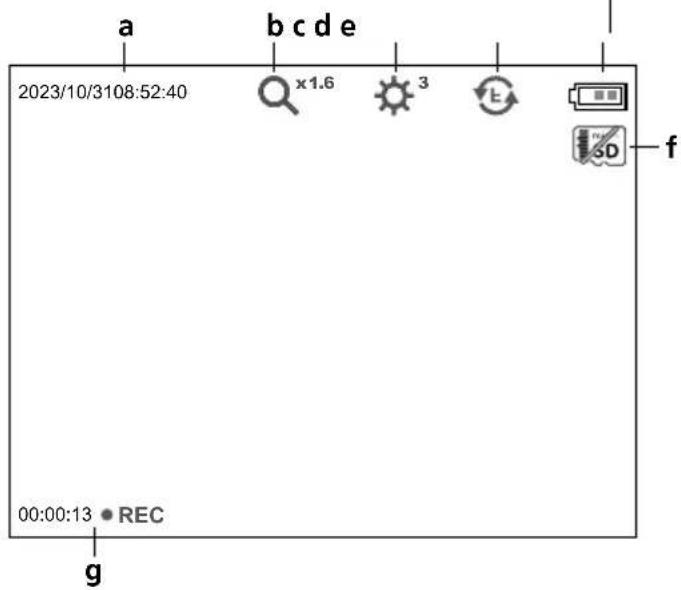
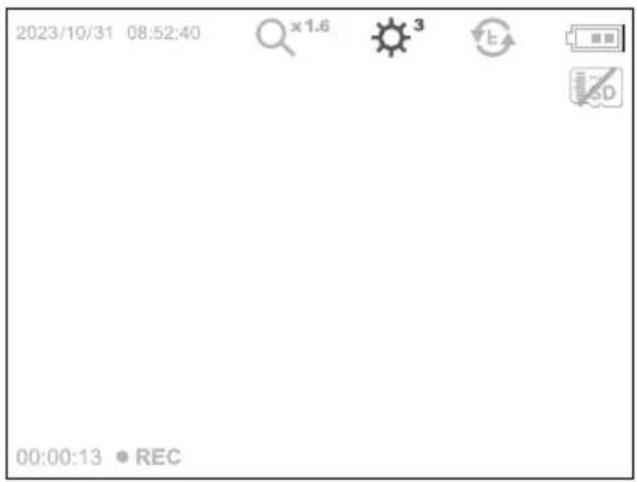
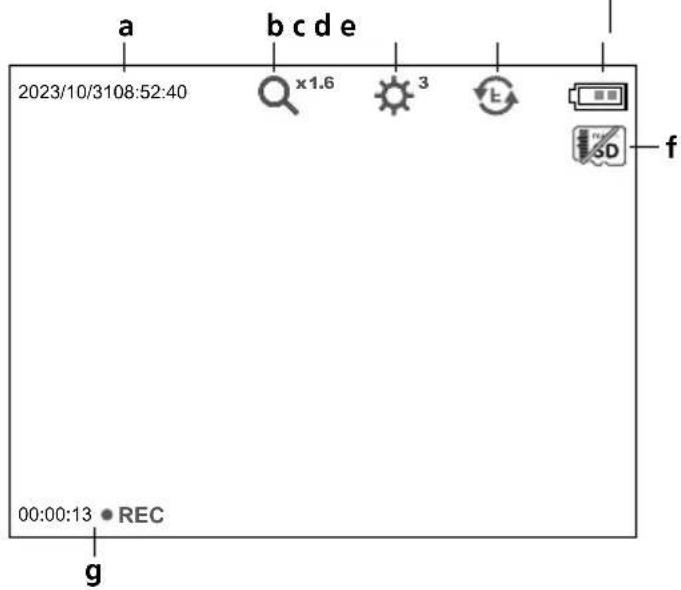
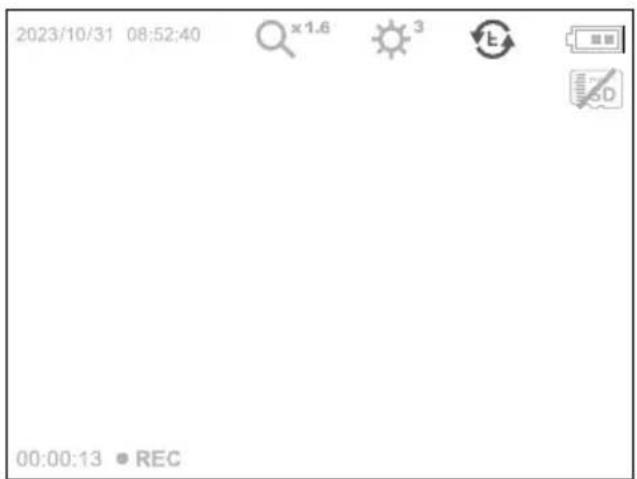
4.0 Record mode
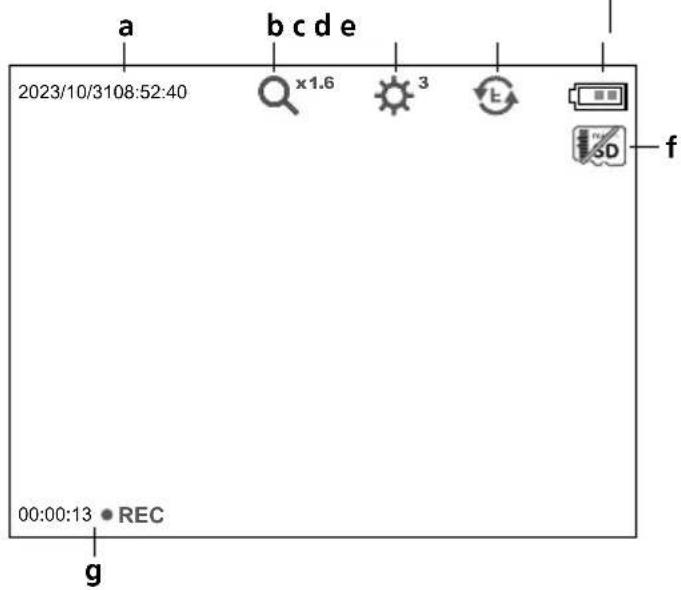
a Current date / time
b Zoom
c LED lighting
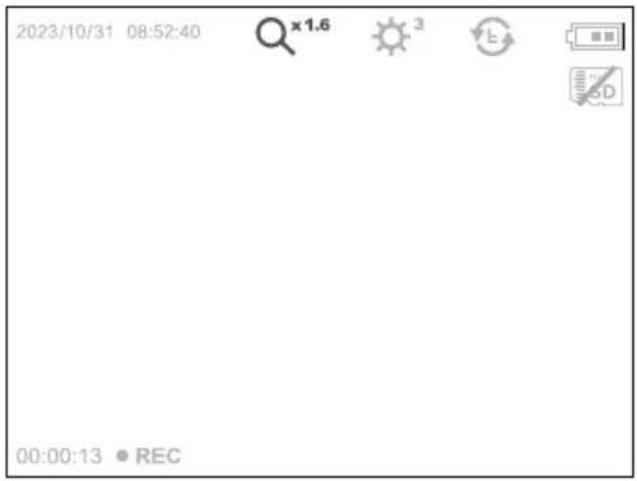
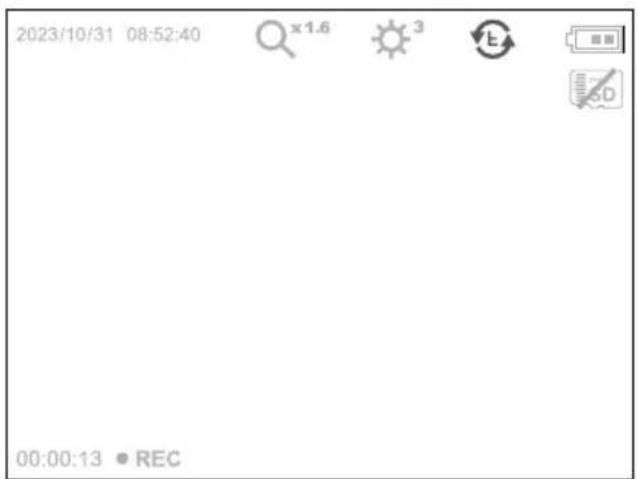
d Rotation 180^ / mirroring
e Battery status
f Insert SD card
g REC: Recording
4.1 Record mode: Image / video recording
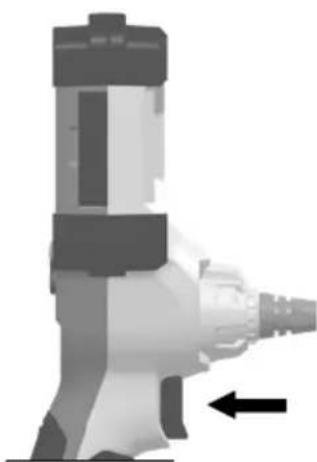
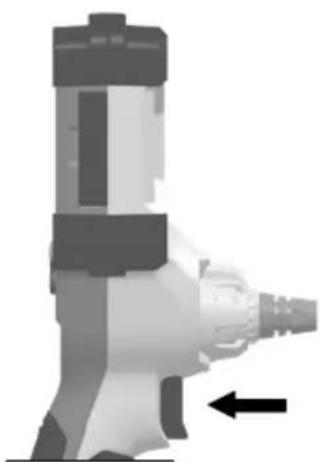
Move the camera head on the camera probe to the desired position and align. If lighting conditions are poor, switch on the LED lighting. Zoom in on distant or small objects. For optimal visibility of the inspected object, the manual image rotation function allows the original image to be rotated by 180^ and mirrored horizontally and vertically. By pressing the trigger (8) quickly an image is taken and saved to the SD card while pressing it for longer records and saves a video.
Press the button again to stop recording.
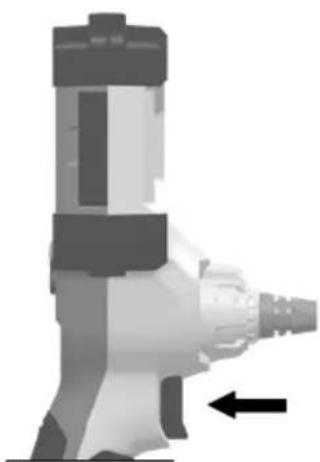
4.2 Record mode: LED lighting
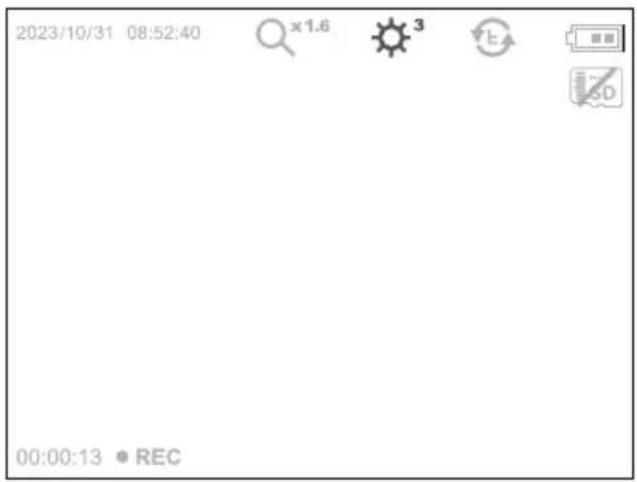

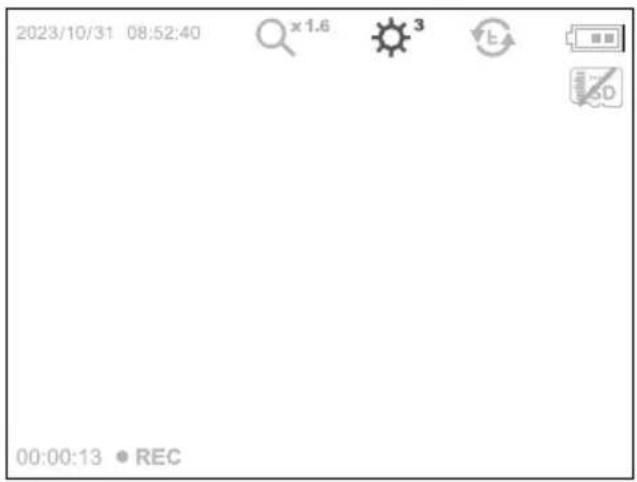
$$ \begin{array}{l} 1 x = 25 \% \ 2x = 50\% \ 3 x = 75 \% \ 4 x = 100 \% \ \end{array} $$
4.3 Record mode:Zoom
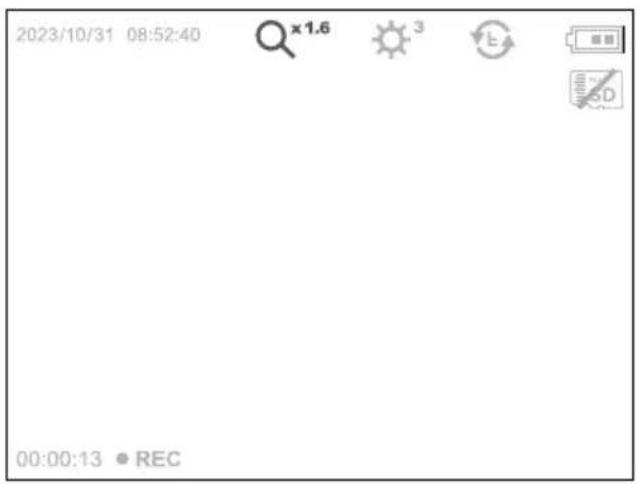


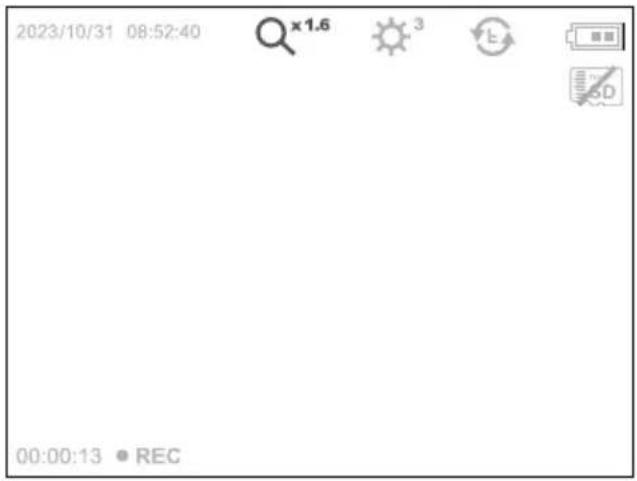
$$ \begin{array}{l} \times 1.1 = 110\% \ \times 1.2 = 120\% \ x 1.3 = 130 \% \ x 1.4 = 140 \% \ x 1.5 = 150 \% \ x 1.6 = 160 \% \ \times 1.7 = 170 \% \ x 1.8 = 180 \% \ x 1.9 = 190 \% \ \times 2.0 = 200\% \ \end{array} $$
4.4 Record mode: Image rotation / Mirroring


From the original image
$$ \begin{array}{l} 1 x = v e r t i c a l \quad m i r r o r i n g \ 2 x = \text {R o t a t i o n} 1 8 0 ^ {\circ} \ 3 x = \begin{array}{c} \text {h o r i z o n t a l} \ \text {m i r r o r i n g} \end{array} \ 4 x = \text {O r i g i n a l} \ \end{array} $$
4x
1x



3x
2x
Laserliner
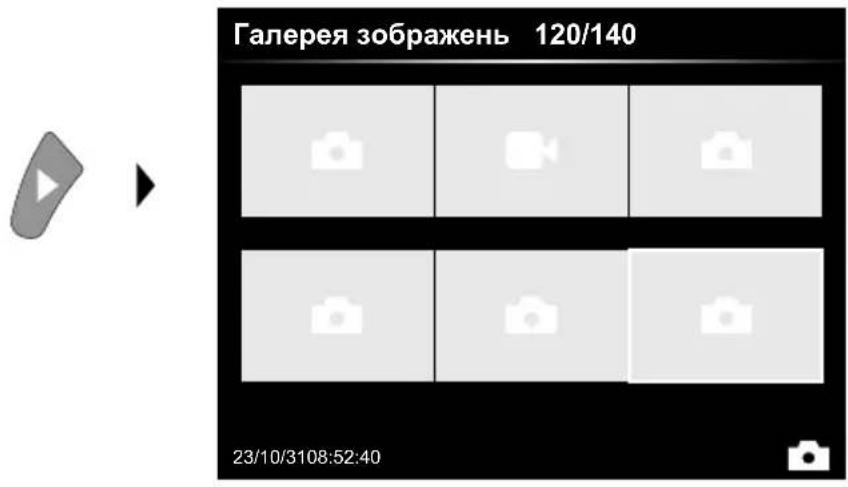
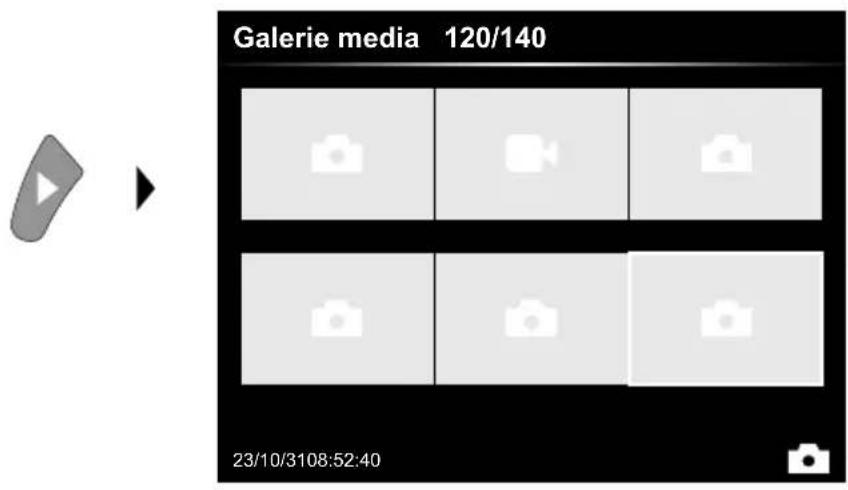
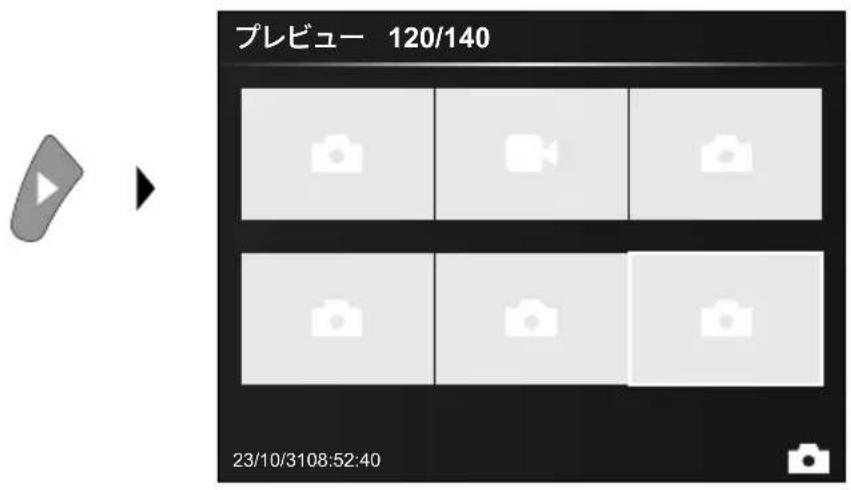
5.0Playback mode:Playback image/video recordings
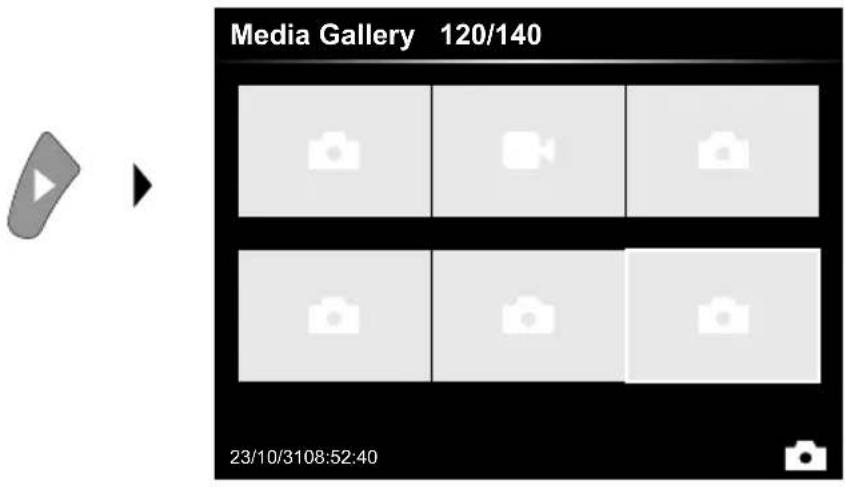
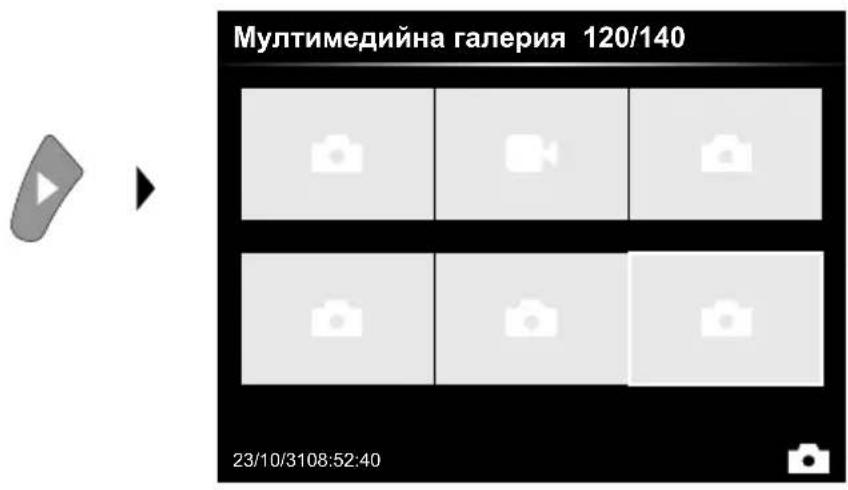
Press the "e" button to call up the media gallery. Confirm with OK to show the selected image or video in full screen mode. Use the arrow keys to navigate in the media gallery and full screen mode. Press the "d" button to exit playback mode.
5.1Playback mode:Delete recording
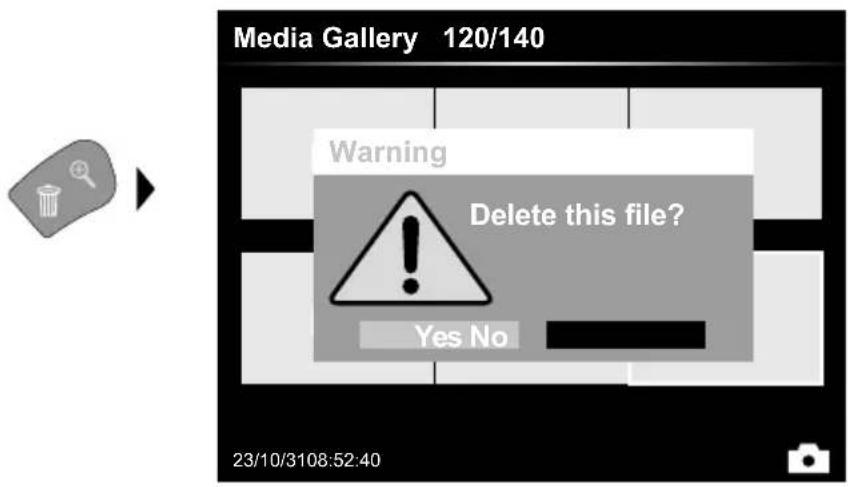
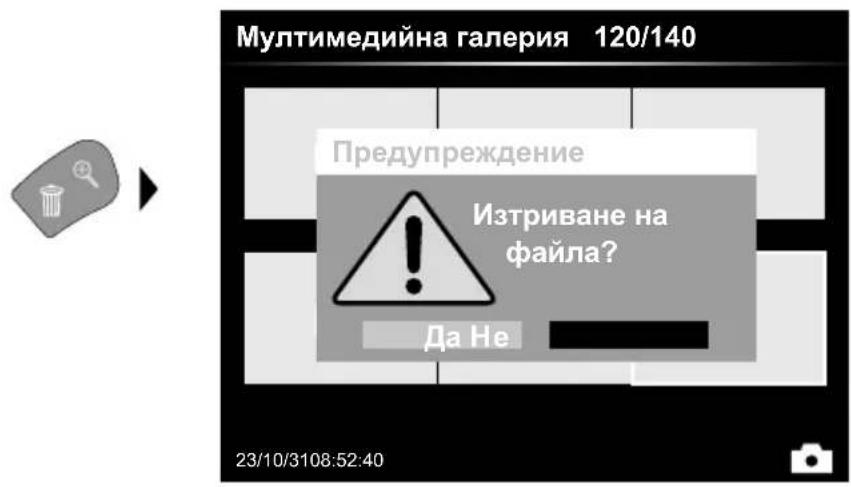
Images can be deleted from the image itself and in the gallery.
Deleting cannot be undone.
All files and folders can be deleted by reformatting the data medium.
Refer to "6.4.1 System settings".
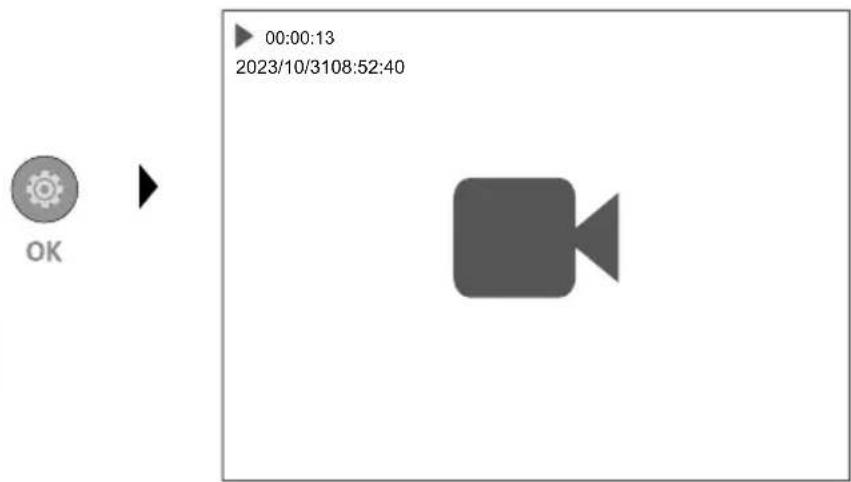
5.2Playback mode:Playback
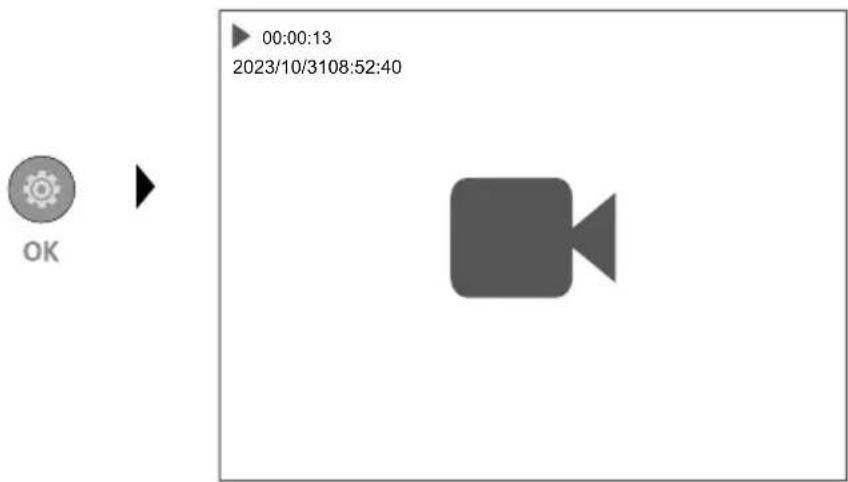
Press the "a" button to stop playback.
6.0 Settings mode
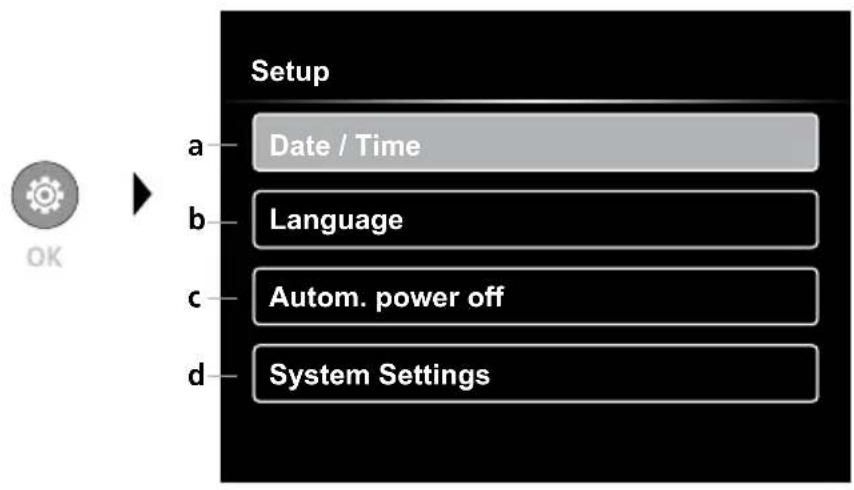
a Time stamp ON/OFF / Set date / time
b Select language (EN, DE, JP, FR, IT, PT, ES, NL)
c Set automatic power off
d System settings Firmware/hardware version
! To return to recording mode, press the ESC button several times.
6.1 Settings mode: Set date / time

Select from here whether to include date/time information in the photo. The time and date can be adjusted using the arrow buttons.
6.2 Settings mode: Select language (EN, DE, JP, FR, IT, PT, ES, NL)
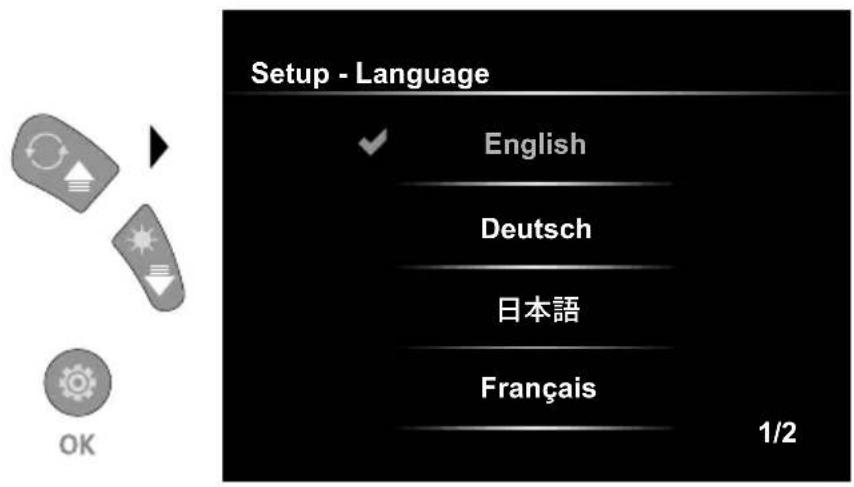
The preferred language can be set in this menu.
6.3 Settings mode: Automatic power off
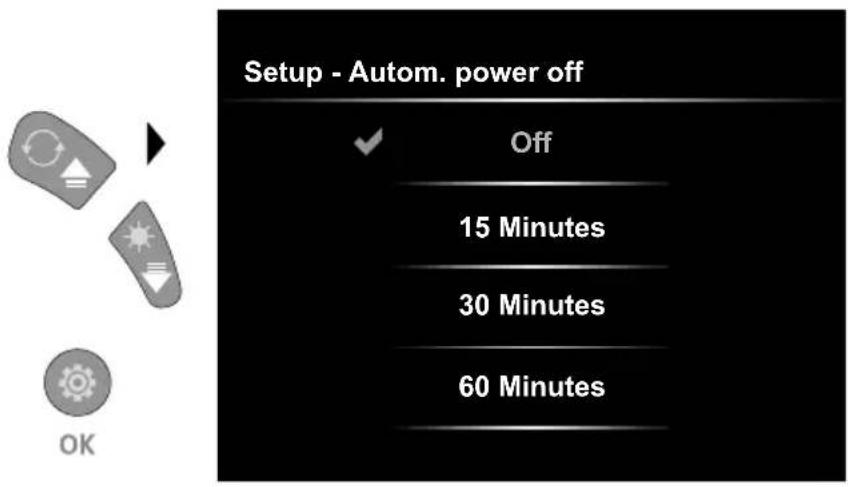
The automatic power off time can be set here.
6.4.0 Settings mode: System Settings
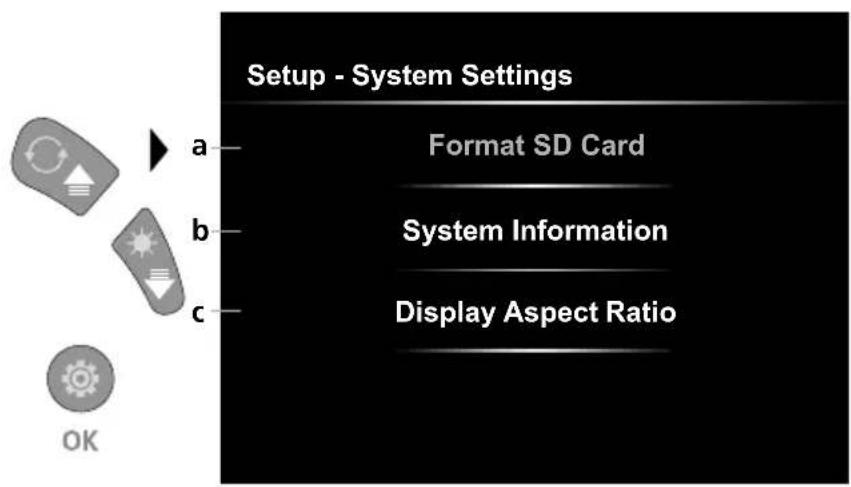
a Format SD card
b Software / hardware version
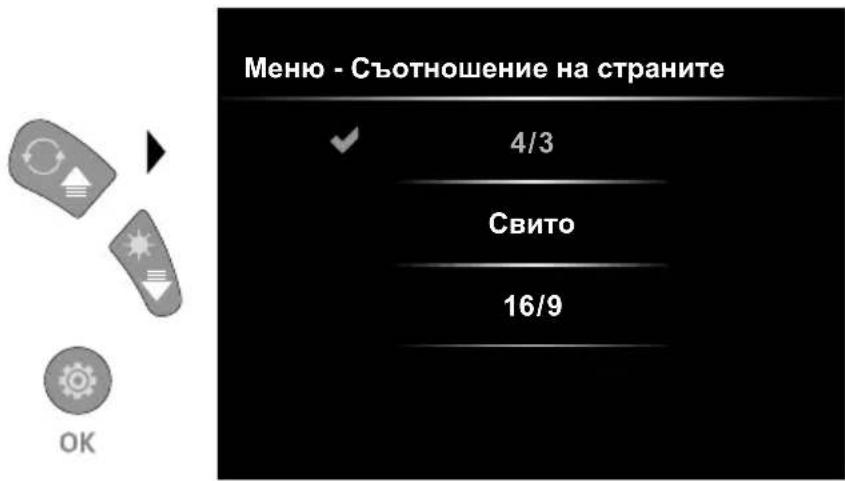
Adjust aspect ratio of the camera image
6.4.1 Settings mode: Format SD Card
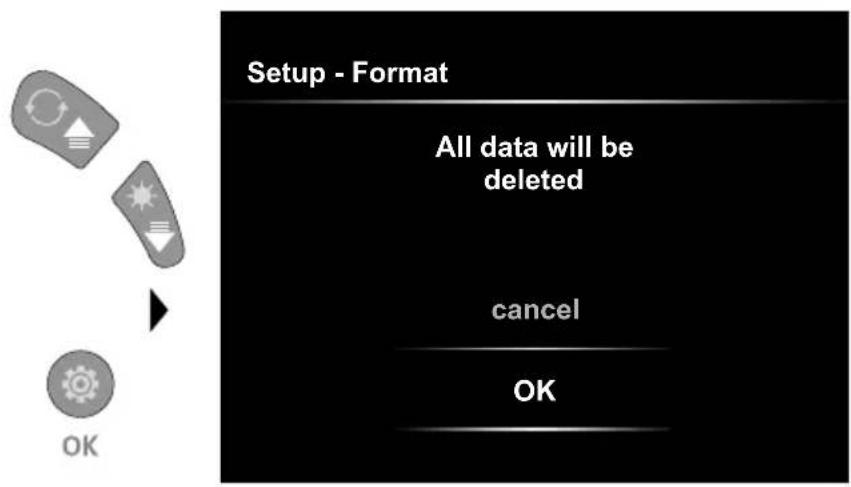
All data on the SD card will be deleted. This procedure cannot be undone.
6.4.2 Settings mode: System Information
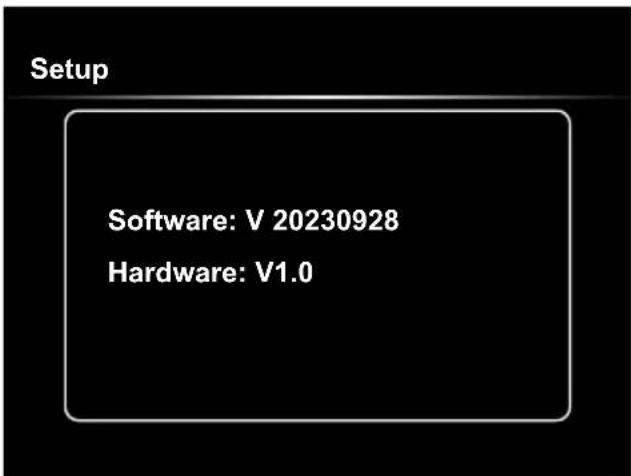
6.4.3 Settings mode: Display Aspect Ratio
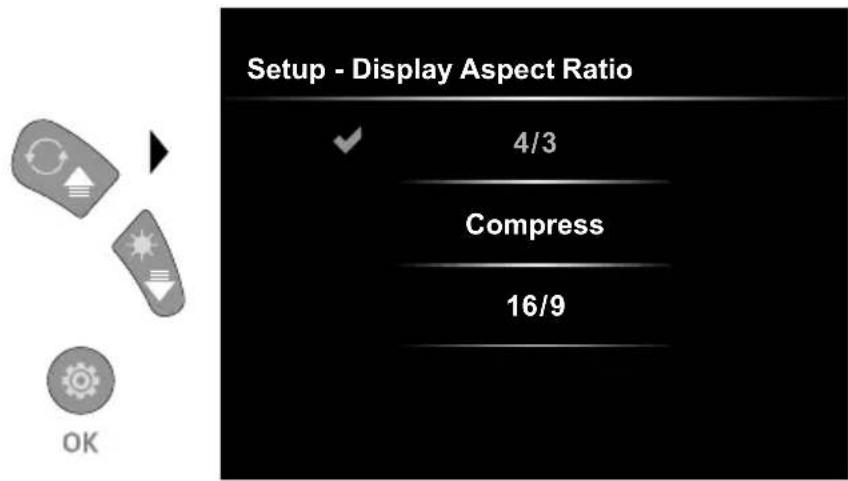
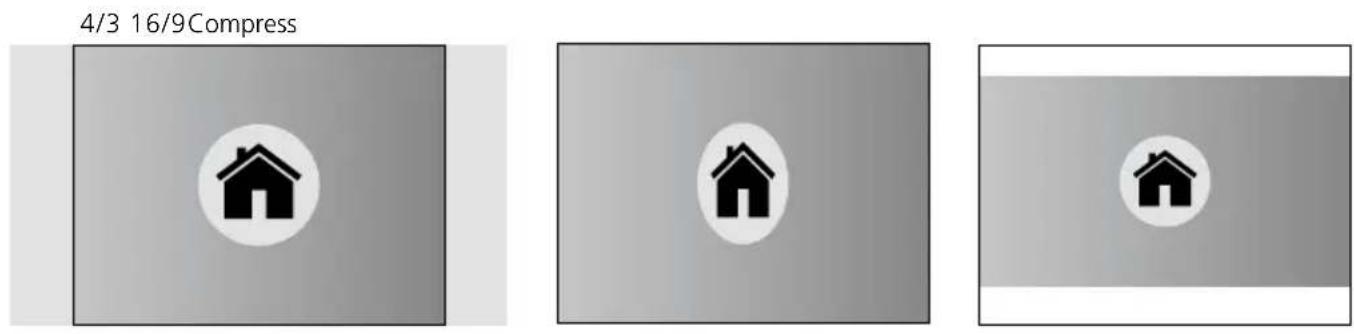
USB data transfer
Data saved on the SD card can be transferred to PC either with a suitable card reader or directly via the USB port. Please refer to the manual supplied with your card reader for information about connecting your card adapter or card reader to a PC.
Laserliner
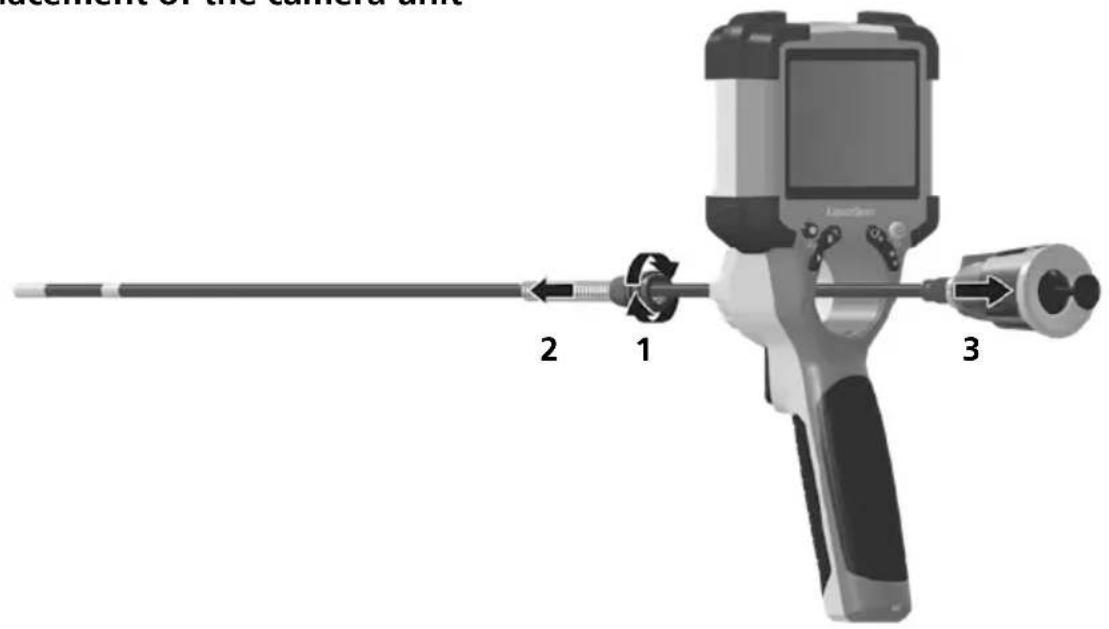
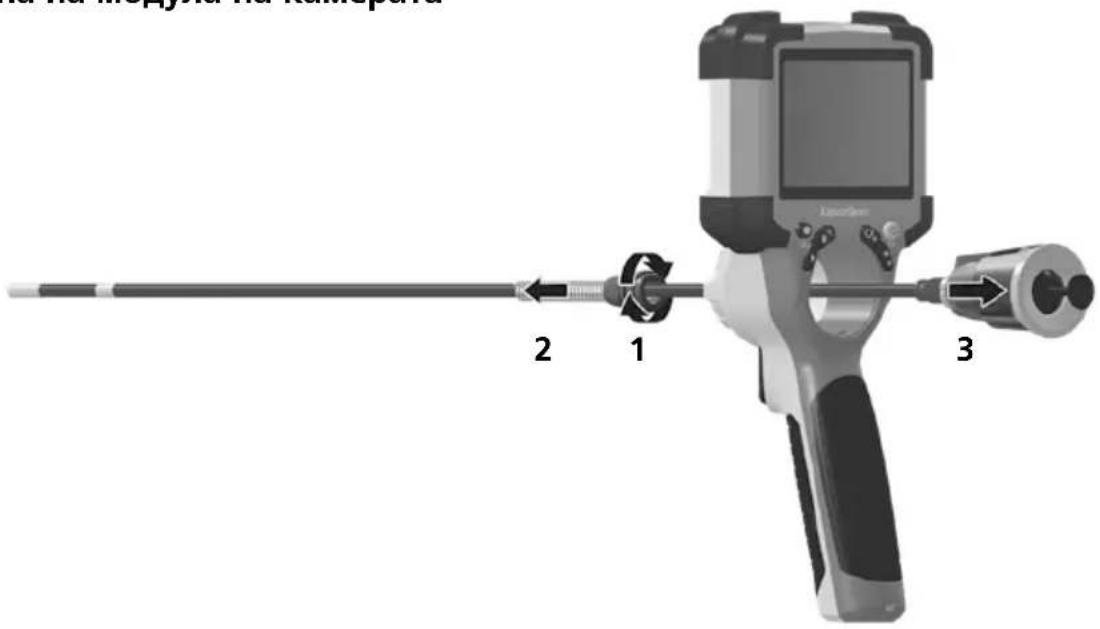
Replacement of the camera unit
Removal of the battery
Information on maintenance and care
Clean all components with a damp cloth and do not use cleaning agents, scouring agents and solvents. Store the device in a clean and dry place.
| Technical Data Technical revisions reserved. 24W07 | |
| Screen type 3,5" Colour TFT | |
| Display resolution 640 x 480 pixels | |
| Image/Video resolution 1280 x 720 pixels | |
| Image/Video format JPEG, MJPG (AVI) | |
| Memory Micro-SD memory card up to 32 GB | |
| Protection class IP 54 | |
| Connections USB type C | |
| Menu language EN, DE, JA, FR, IT, PT, ES, NL | |
| Functions | 4-step illumination, digital zoom 2x in 10 increments, image rotation / mirroring (4*F), image and video recording, media gallery, automatic power off, real-time clock, SD card, selectable aspect ratio, soft reset |
| Mains operation yes | |
| Power supply | Li-ion battery pack 3,7V / 2,8Ah USB type C 5V / 2A |
| Operating time approx. 5 hours | |
| Charging time approx. 3 hours | |
| Operating conditions | -10°C ... 45°C, max. humidity 80% rH, no condensation, max. working altitude 2000 m above sea level |
| Storage conditions -10°C ... 60°C, max. humidity 80% rH, no condensation | |
| Dimensions (W x H x D) 108 x 260 x 110 mm (incl. holder) | |
| Weight | 650 g (incl. battery pack) |
EU and UK directives and disposal
This device complies with all necessary standards for the free movement of goods within the EU and the UK. This product, including accessories and packaging, is an electrical appliance that must be recycled in an environmentally appropriate manner in accordance with European and UK directives on waste electrical and electronic equipment, batteries and packaging, in order to recover valuable raw materials. Electrical devices, batteries and packaging do not belong in household waste. Users are obliged by law to surrender used batteries or battery packs to a public collection point, to sales outlets, or to technical customer services, free of charge. Remove the battery pack from the device without damaging it using standard tools and a separate collection arranged before returning the device for disposal. Please do not hesitate to contact the UMAREX-LASERLINER service department if you have any queries regarding removing the battery. Look for information on local disposal facilities and note the relevant disposal and safety information at the collection points.
Further safety and supplementary notices at:
https://packd.li/II/ALL/in
!
https://packd.li/ll/ALL/in
Laserliner
!
https://packd.li/ll/ALL/in
!
https://packd.li/II/ALL/in
Laserliner
!
https://packd.li/II/ALL/in
!
https://packd.li/II/ALL/in
!
https://packd.li/ll/ALL/in
!
| x 1.1 = 110% |
| x 1.2 = 120% |
| x 1.3 = 130% |
| x 1.4 = 140% |
| x 1.5 = 150% |
| x 1.6 = 160% |
| x 1.7 = 170% |
| x 1.8 = 180% |
| x 1.9 = 190% |
| x 2.0 = 200% |

https://packd.li/II/ALL/in
Laserliner
!
https://packd.li/II/ALL/in
!
https://packd.li/II/ALL/in
Laserliner
!
$$ 2 x = 1 8 0 ^ {\circ} $$
$$ \text {d o n d u r u l e b i l i r} $$
$$ 3 x = y a t a y \text {y a n s i m a} $$
$$ 4 x = \zeta i k i s \text {r e s m i} $$
4x
1x



3x
2x
https://packd.li/II/ALL/in
Laserliner
IOnHocTbIO npOHTe HNCTpyKcIIO NO 3KnLyaTaCNI, npnlaeraMbl npocneKT ,INHOpMaCnO rapaHTm N DOONHITeJIbHbIe CBeDeHnA," a TAKKe IocNeIHO INHOpMaCIIO u Yka3aHnA, KOToPbIE MOxHO HaHTn NO CbInke Ha caNT, npNBEdEHNO B KOHcE 3TOI INCTpyKcIM. Co6JIbAdT coJepKaUmeC B 3TNX DOKyMeHTax yka3aHnA. 3TOI DOKyMeHT cJeDyET xpaHtB n npi nepeDaue npnbopa dpyrIM noJIb3OBaTeJAM NepeDaBaTb BMECTe C Hm.
IcnoJb3OBAHne no Ha3HaueHIO
PpOeCCNoHaJIbHnCnCTema BnIeOKeHTpoJI VideoInspector B KOMbHauCn CO CMeHHo KaMepo NIOxOHT dJI npocTOro BN3yAJIbHOrO OCMOTpa TpydHOIOCTyINbIX MecT B Tpybax, NOIOCTx, IaxTx, CTehAX IIN TpaHCnOpTHbIX cpeCTbax.ДЯ pOBeDEHnI NOCJeDyUOJero aHaJIIn3a I DOKyMeHTnpOBaHnI FOTo- IN BVideOMaTePnaJIb MoXHo coXpaHnTb Ha KapTe nAmrTn SDHC.
10 ONTNuHa CnCTema
11 MaHHTHe KpINJIeHHa HApI3b IJNA U7aTnBa 1/4" (Ha HxKHi CTOpOH)
a Pexm HanaTbAHn/ niTBePdTu
b 3ym/BuJaJIeHHa3annciB
c IOBOPOT 180^ / BiIO6paXeHHa/ CnCTema MeHIO
d ON/OFF/ПпннHeHHa
e TaJIepaJXb
f CbitIOioHne oCBiTJHeHHa/Cntema MeHIO
1 BnKOpNCTaHHa 6JOky KInBJIeHHa / Jitii-OIHHO aKyMylrTopa
B BctaHOBLeHnKaPTn Micro-SD
ДлЯ BCTaHOBJIeHЯ KapTu Micro-SD 3HЯТу rMyOBy 3aIlyuKy i BCTaBHTu KapTu nAm'ЯTi, k306paxeHo Ha pncyHky. 3a BiDCyTHocTi Hocia nAm'ЯTi 3aInc DaHnx E HEMOXJINbIM.
I IepH HIX BnHnTn KApTKy nam'ATi MicroSD cnID BmKHyTN npncptpi.
4.0 PeKIM 3aIncy
a NToOHa dAta/ NToOChn Yac
b 3ym
C BcITIOIOHHe OCBITNEHHA
d NobopoT 180°/BiDObpaXeHHa
e CtaH 6atapei
f BCTabJIeHHa SD-KapTu
g REC: Tpmbae 3nOMka
4.1 Pekim 3aIscy: 3annci foTo/Bideo
BctaHObit roJIOBky kAmepy Ha 30Hdi KaMepy y notpi6he noJooKeHHia BupiBHaIte II. 3a noraHx yMOB OCBITJeHHa BBIMKHyTcBITIOIDHe OCBIJIeHHa. CkOpIcTaTnca 3yMOM dIpaObOTn 3 BiJaJIeHHm N MaJIIMn O6'KTAMn. IAn oTtImi3aui BVdIMOCti 06'ekTa, kN Heo6XiHo nepeBipuTn, BIXiDHe 3o6paXeHHa MoXHa NOBepHyTu BpyHu Ha 180°, a TAKOX BiIN3epKaJITn Ioro no Ropn3oHTani Ta BepTKaJI. Picra KOPOTKOro HAtnCKAHn CnyCKOBoi KHOPIK (8) BN OTPMaTe 3HIMOK, nicla 6JbU TpNBaJLOrO HATNCKaHHa NOHAcTBcR BiDeO3anC, kN 36epiraetbcra Ha KapTi SD. HactynHe HATnCKaHHa 3aBepuNTb 3aNNCyBaHHa.
4.2 Pekim 3auncy: CbitnoioDhe ocbitneHHA


$$ 1 x = 25 \% $$
$$ 2x = 50\% $$
$$ 3 x = 75 \% $$
$$ 4 x = 100 \% $$
4.3 Pekim 3aIncy: 3ym


$$ \times 1.1 = 110\% $$
$$ x 1.2 = 120 \% $$
$$ x 1.3 = 130 \% $$
$$ \times 1.4 = 140\% $$
$$ x 1.5 = 150 \% $$
$$ x 1.6 = 160 \% $$
$$ \times 1.7 = 170 \% $$
$$ x 1.8 = 180 \% $$
$$ x 1.9 = 190 \% $$
$$ \times 2.0 = 200\% $$
4.4 Pekim 3aIncy: NobopoT / BiO6paXeHHa



Bid noaTkoBoro 3o6paJKeHHA
1x = BepTnKaJIbHe 3epeKaJIbHe BiO6paJKeHHa
2x = 06epTaHHHa 180°
3x = ropi3oHTaJIbHoeДзеркальнeВidO6paXeHHa
5.0 Pexim BiTbopeHraone: BiTbopeHHa 3HIMKIB/BiJeO
Tanepe 306paxeHb BnKlnKaetbcra HatackaHm KnaBii, e". HatackaHn KnaBii , OK"do3BOJe neperJHyTu 6pahe 306paxeHHa 6o BiJeO B NOBHOeKpaHHOMy pexM. KnaBiAmi 3i CTpiKamN 3diChIOeTbcra HabiraqBa ranepei 306paxeHb Ta nobHOeKpaHHOMy pexM.IIBAHXOy 3 pexMy BiITBOpEHHaTHCHYt KNOHKy d".
5.1 Pekim BiTbopeHhone: BuaNTn 3aNc
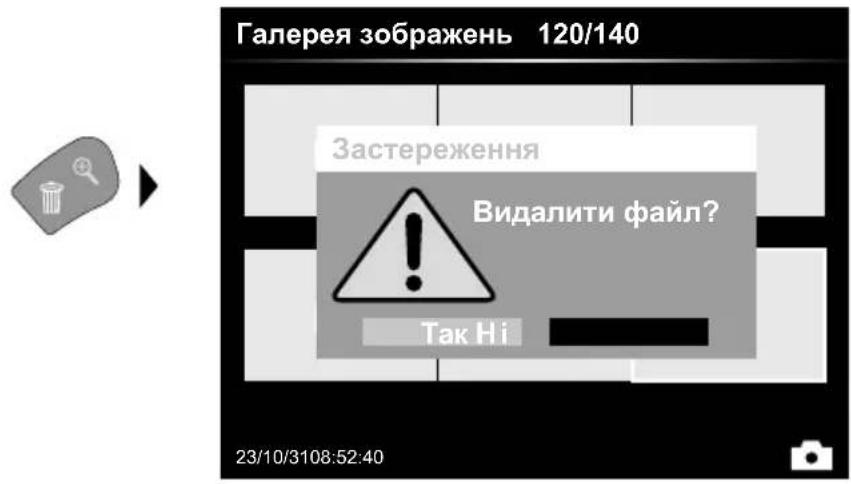
3o6paKeHHMOxHa BnJaTn
B NOBHOeKpaHOMy pexMIta B
peXmI ranepei. BnDaJIeHH He
MOke 6Ty cKaObaHo. Niac
fOpMaTyBaHHH Hocia DaHnx Bci paJnTa TeKn MoKyt b 6Ty BnDaJIeHo. NVB. NyHK,6.4.1HaJaTuBaHHcNCTEm".
5.2 Pexim BiTbopeHHone: BiTbopeHH
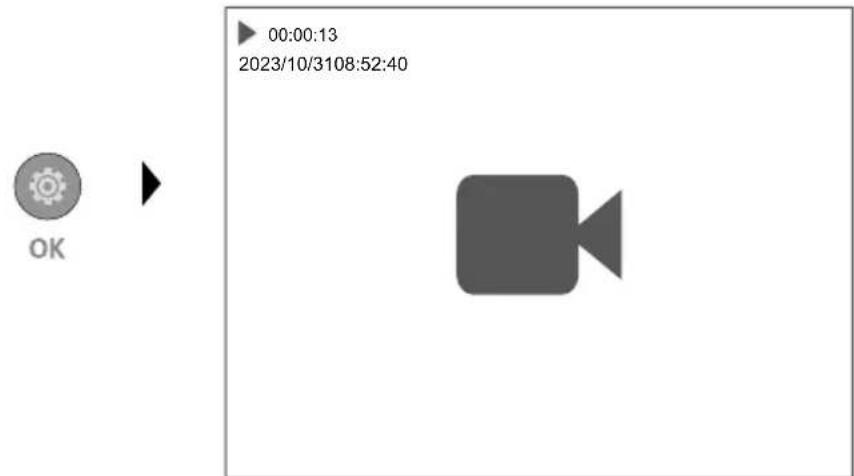
HaTnCKaHHaM KnaBiiu,“a" 3yHnHReTbcra BiIbTOpeHHa.
6.0 PeKIM HanaTsyBaHHa
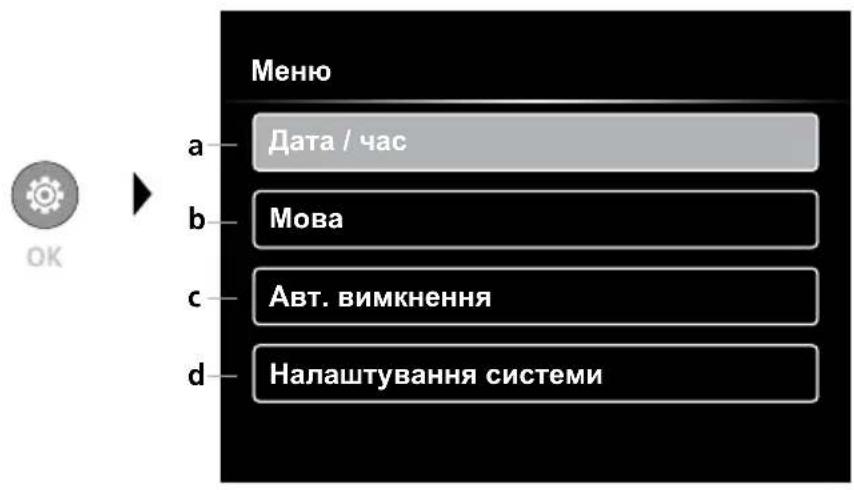
a YBIMK/BIMK yacoby miKy / HanaatyBaTu daty/uc
b 3MiHa MOBu (EN, DE, JP, FR, IT, PT, ES, NL)
c HanaHTyBaHHa ABTomAtuHoro BIMKHeHHA
d HanaTbyBAtn cnCTemy Bepcia npoWNbKn / anapaTHoro 3a6e3neueHH

LIO6 NOBepHyTnCnDo peKmMy 3anCy, KInbKa pa3iB HAtncHytn KnaBiuy ESC.
6.1 PeKIM HalaWtYBaHHa: DaTa / yac
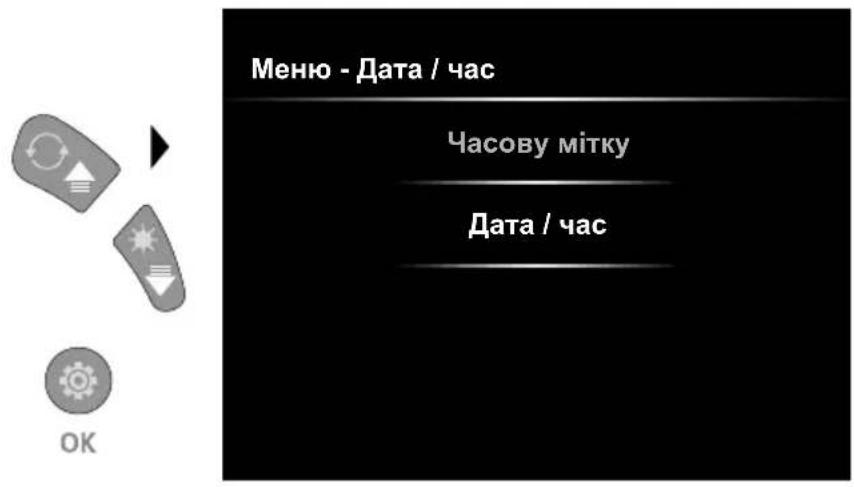
Tyt Bn MoKTe Bn6paTu, YN NOBHHa Ha 3HIMkax BiO6paKaTnc MItka Yacy. HanaStyBaTu Yac i DaTy MOxHa 3a DOnOMOrOHO KHOONK 3I CTPIIKAMN.
6.2 Pexim HanaWtYBaHHa: 3MiHa MoBu (EN, DE, JP, FR, IT, PT, ES, NL)
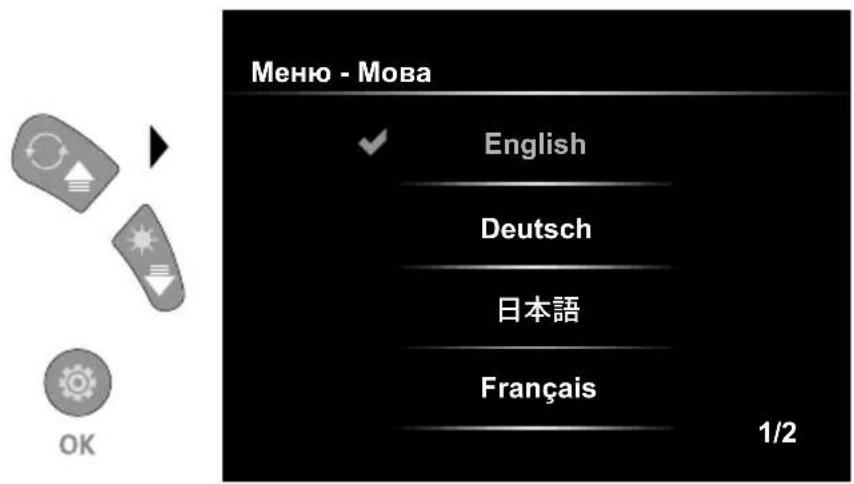
Y cIbOMy MeHIO MOXHa HalaaHTyBaTn notpi6Hy MOBy.
6.3 Pekim HanaWtYBaHH: ABTomaTHO BIMKHeHH
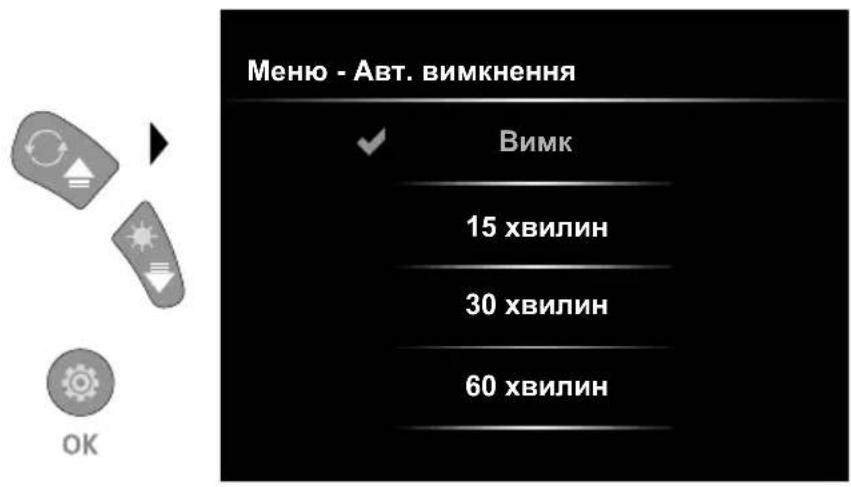
Tyt MoXHa HalaIyBaTu Yac abTomatuHoro BmKHeHHa.
6.4.0 Pekim HalaTuBaHHa: HalaTuBaHHa CnCTeM
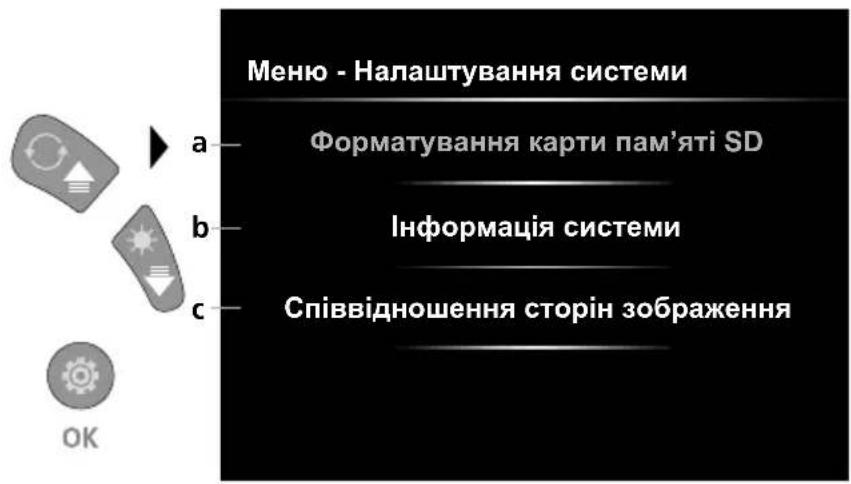
a ΦopMaTyBaHHa KapTu SD
b Bepcia nporpamHoro / anapathoro
3a6e3neueHHA
HaanuTybaHHcniBBiDHOweHHCTopiH y 306paKeHHI 3 kamepu
6.4.1 Pexim HalaatyBaHHa: OopMaTyBaHHa KapTu NaM'ayi SD
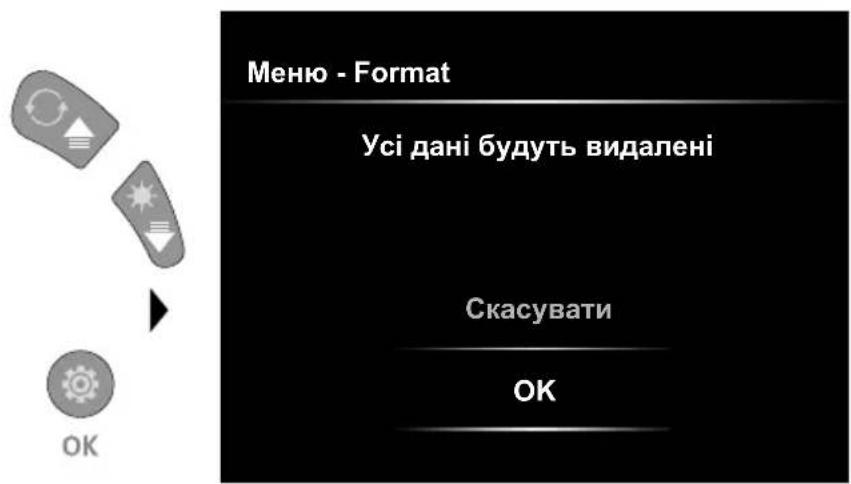
Bci dani Ha SD-kaTci 6yde BnuJaleHo.
LpOueDpya He MoKe 6yTu BdknKaHa.
Hema3aannTuHaDnDaTKOBe NiTBepeJKeHH npouecy.
6.4.2 Pekim HanaWtBuHn: HopMaui CntemN
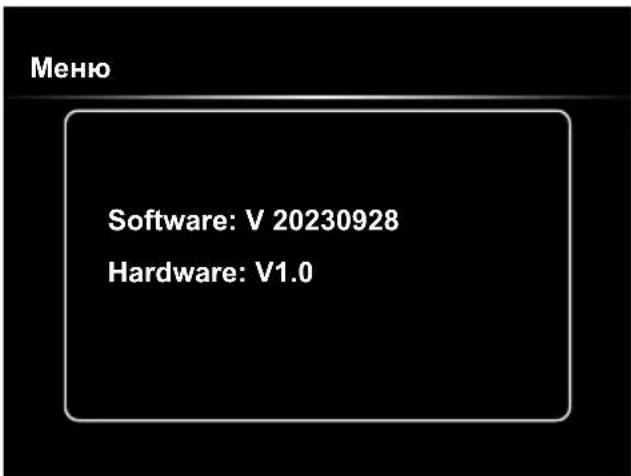
6.4.3 Pexm HalaTyBaHHa: CnIBBiHoueHHa cToPiH 3o6paXeHHa
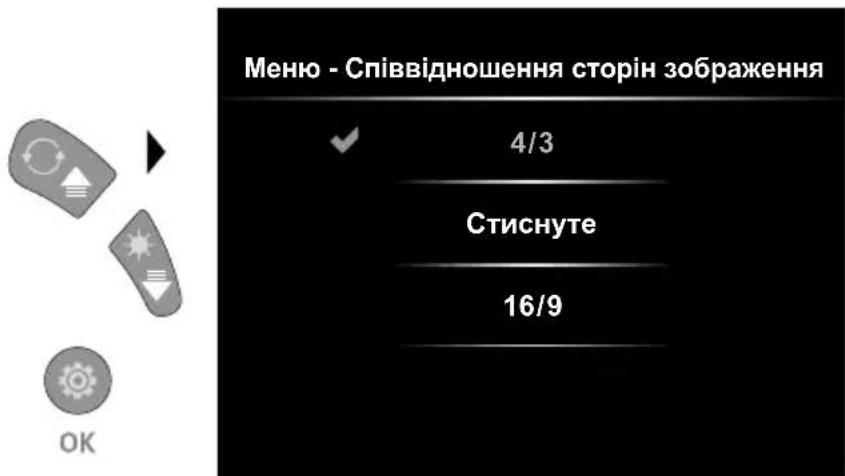
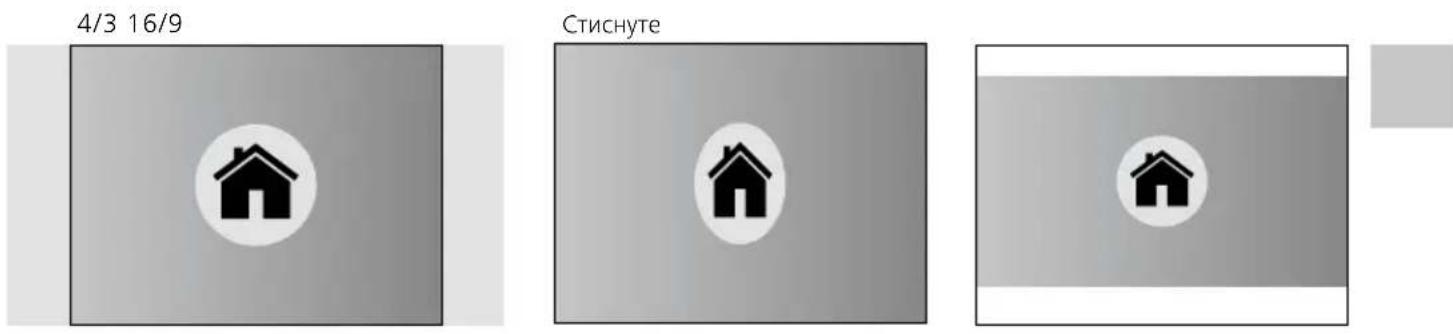
Ipepaa daHnx uee3 USB
36epexehi Ha SD-kapti daHIMoxyt 3uHTyBaTnC3B DOnOMOIO BIINOBiHOrO Kapt-pipepa HnepeaBaTnCHa KOMI'OTep 6e3nocepEnhbo uee3 USB-iHTepceic. IInOpMaio npo 3'cHaHHKOMN'OTepa i aanTepa dna Kaptn Cu KapT-pipepa DnB. B INCTpykui do KapT-pipepa.
Laserliner
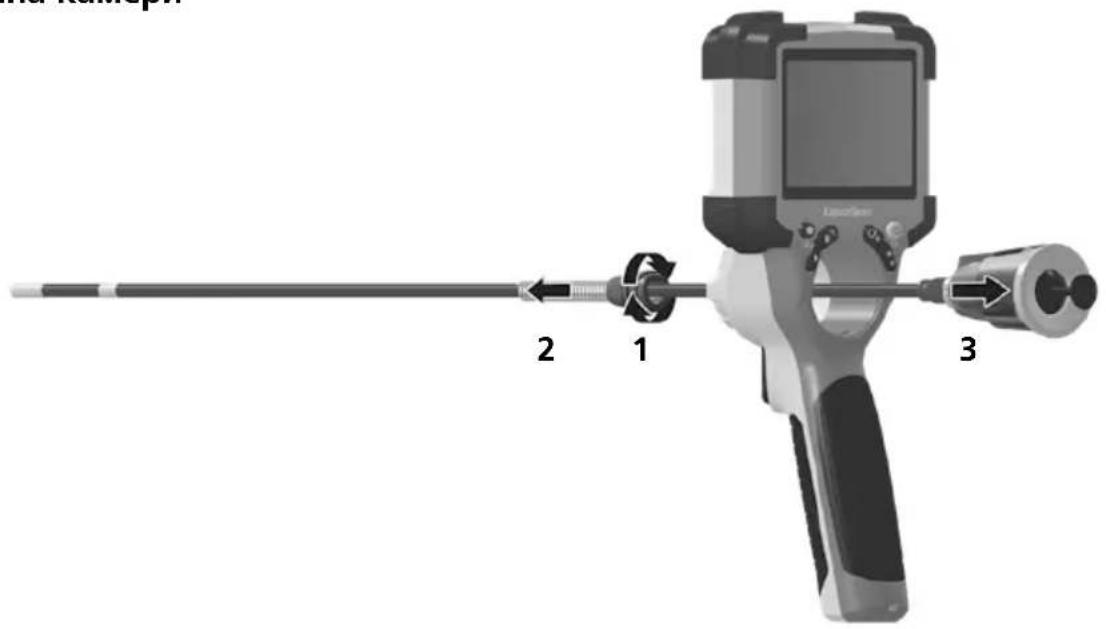
3aMiHa KaMepn
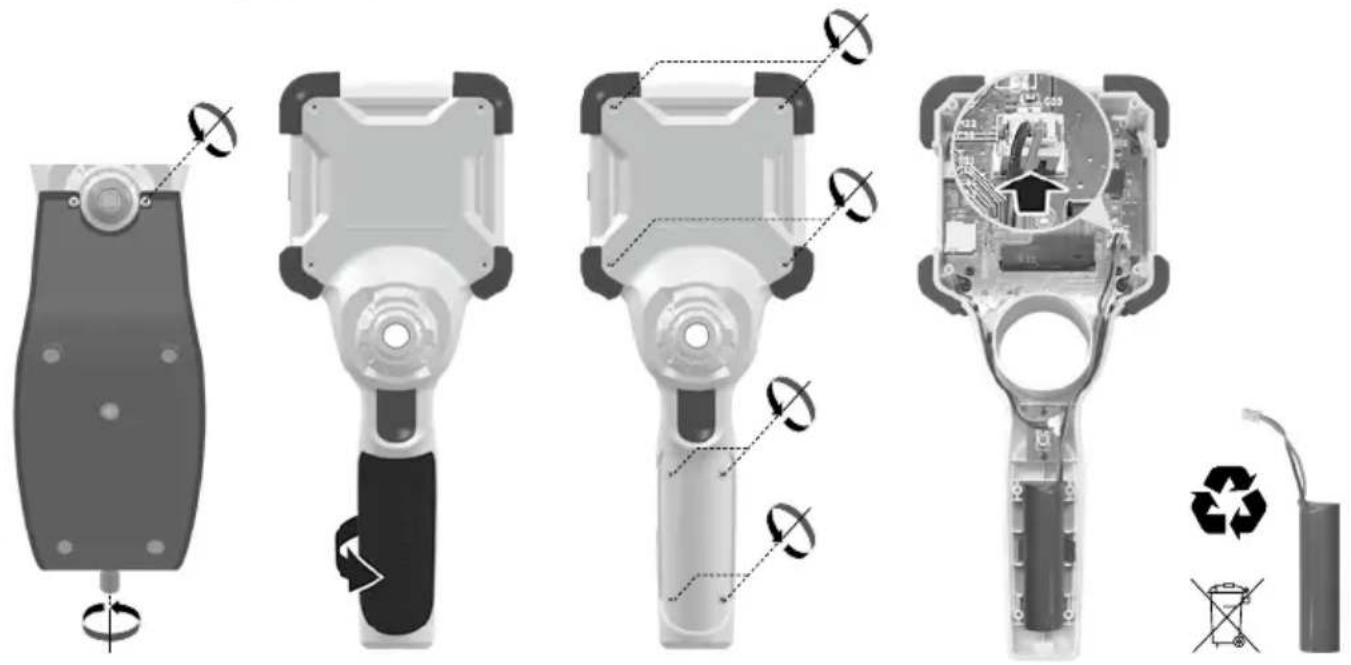
Демонох akумлаятора
Ihctpykci3 texhiHoro o6cnyroByBaHHa Ta dOgrJy
Bci KOMnoHeHTn CIId OUYUByaTn 3BOJIOKeHO TKAHHHO, yHkATn 3aCTOCyBaHHa MIOUHX a6o YnCTaHX 3ac06iB, a TaKoX po3HHNKIB. 36epiraTn pnpctpiy uNCTOMy, cyxomy Micu.
https://packd.li/II/ALL/in
!
$$ x 1.1 = 110 \% $$
$$ \times 1.2 = 120\% $$
$$ x 1.3 = 130 \% $$
$$ \times 1.4 = 140\% $$
$$ \times 1.5 = 150 \% $$
$$ \times 1.6 = 160 \% $$
$$ \times 1.7 = 170 \% $$
$$ \times 1.8 = 180\% $$
$$ \times 1.9 = 190\% $$
$$ \times 2.0 = 200\% $$
https://packd.li/II/ALL/in
Uldised ohutusjuhised
2x = Pooe 180^
3x = horisontaalne peegeldus
https://packd.li/ll/ALL/in
!
1x = oglindire in plan vertical
$$ 2 x = \text {R o t a t i e} 1 8 0 ^ {\circ} $$
3x = oglindire in plan horizontal
$$ 4 x = \begin{array}{c} \text {o g l i n d r e} \ \text {n p l a n v e r t i c a l} \end{array} $$
4x
1x



3x
2x
5.0 Modul de redare: Redarea inregistrarilor de imagini/video
https://packd.li/II/ALL/in
Laserliner
!
Ipooyete n3aJno pkoOoCTBOTO 3a ekCnloataa, npInloxehata 6poWypa ,rapaHcnoHNn IOnbJIHTeJIHn IHCTpyKcun", KaTOn u aKtuaHATA HNΦopMaucn yka3aHnra T B npenpaTKaTa KbM INHTepHET B KpA Ha TOBa pkoBOoCTBO. CneBaIte CbIbPkaUITE CE B TAX IHCTpyKcun. To3n DOKyMeHT Tp8Ba Da 6bJe cbXpaHeH n da 6bJe npedaen Ppi npedaabaHTo Ha yCTPOiCTBOTO.
Ynotpe6a no npedHa3HaueHne
IpopecnoHaHaTa CnCTema 3a BIndeOnHcneKzna VideoInspector, B KOMbHaCnBa Cbc CMeHReM Moyn Ha KaMepaTa, e NODxoJaUa 3a IecHa BN3yaJHa IPOBepKa Ha TpydNHOCTbHN MeCTa B Tpb6n, KyxHn, XaXtN, 3uapn H MToPpH NpeBO3Hn CpeDCTBa. 3a OueHka N DOKyMeHTnpaHe CHIMKNTe N BIndeO3aPiNCITE Moat Da ce 3anaMetraBt Ha SDHC KapTa c NaMeT.
06uHnHctpyKuH 3a 6e3oNaCHOCT
- I3noI3BaIte ypeJa eINHCTBeHO cBflaCHO npeHa3HaueHneTo 3a yNoTpe6a B paMKITE Ha cneuΦnkaUInTe.
IpoNyKtTn HerOBiTnpHaJnxKHOCTn He ca nrrpaKn 3a neua. Na ce cBxpaHbAT Ha MRCTO, HeIOCTbIIHO 3a neua.
-Пибовт HeТгба Да се поменя KOHCTpyKTNBHO. - He u3JIaraIe Te ypeHa MExaHnUHO HaTOBapBaHe, ekCTpeMn TEmnepaTpyn, BlaRa IIN npeKaJIeHO BnCOKN Bn6paun.
- YpeIbT He MoKe Da ce n3NoJ3Ba NOBeYe, aKO eJHa uJn NOBHe yHKcJH He pa6OaT, aKO KOpNycbT uJN CBbp3BaUHTe Ka6eJI Ca NOBpeJeH uJn aKO 3apJbT Ha baTepyTa e HNCbk.
- Pn n3noJ3BaHe Ha oKpnto o6pbuaTe BnHMaHne, ye cypeJa moKe Ja ce pa6OTn caMo npn CbOTBETHM MeTEOPOJIoRTHN YCLOBn, CbOTB. Pn IOxOJUa 3aUHTH MepKn.
Ipei Da n3no13BaTe ypea, 3apeTe n3uNo aKymlaTOpHata 6atepna.
-Korato pa60THNAT INDNKATOP CBtHe B3eJeHo, pOuecBt Ha 3apexKahe e 3aBbPseH. - AkymylaTophata 6aTepeHn MoKe Na Ce 3apexJa n No BpeMe Ha pa6ota.
- I3noJI3BaIte cAmO opnHnHaIIHHe npHaIeXHOCTN. Ako ce nIIOJ3BaT HeIpaBUNHn npHaIeXHOCTN, rapaHcIra T Otnada.
- OCHOBHOTo yCTpOInCTBO He TpR6Ba Da BJIN3a B KOHTaKT C TeHOctn.
- HenpemeHno Tpr6Ba da ce ima npedBnD VideoInspector da He Bn3a B KOHTaKT C xIMKakn, en. HapexHne, noDbXKn nnr ropeu npedMeTn. ToBa moKe da IOBeJe Do nobpeHa ypeDa n TeKKn HapaHbAHn Ha onepaTopa.
- Videolnspector He Tp8Ba Da ce n3noJ3Ba 3a MeuHcNn I3CJeBaNHa / n3CJeBaNHa Ha Xopa.
- 3a da ce ocnrypn Klaac Ha 3aunTa IP 54, KaapanbT Ha Bpb3knte Tp86Ba Da e PnBTHO 3aTBOpeH.
- MoJI npIbpxaIte ce KbM MepKIne 3a 6e3ONaCHOCT Ha MeCTHn HauNoHaJIHN OprAHN 3a IpaBnIHOTo N3IOJ3BaHe Ha yCTPOINCTBOTO.
- UcpoNCTBOTO He e noxOJIO 3a n3MepBaHe B 6nI3OCT Do onaCHO HapxeHne. Iopan ToBa npn N3MepBaHnB 6nI3OCT Do eIeKtpnueckn INCTaJIaun BNHaRn CJeDeTe TOKOpBOJaNTe YaCTn Da He ca NoI HaPexHne. HeaJIuHneTo Ha HapxeHne i Obe3oNaCBAHeTo CpeUy NOBTOpHO BKIOUbaHe Tpa6Ba Da Ce rapaHTnpa C noXODJIM MepKn.
Hnctpykun 3a 6e3onacnoct
Pa6oTa c eJekTpomarHHTHO JbueHne H eJekTpomarHHTHN CMyUeHnA
-ИзмерваеленяурдсбOTBEТСВаHaпpeДиcaHЯТигранчHITe CTOnHOCr 3a 6e3OanachOCTи eJekTpomarHHTHa cBbMeCTnMOCT cBflacHOДиpeKTnBa 2014/35/EC (ниско habржень/LVD)иДиpeKtNBA 2014/30/EC (eJekTpomarHHTHa cBbMeCTnMOCT/EMC).
- Tp6Ba Da ce cna3BaT IokaHnIte OpaHnueHn B pa6OtaT, KaTo HAp. B 6oHnU, B CaMOJTeN, Ha 6eH3nHOCTaHn NnB 6bI3OcT Do Iua C neiCMeKbpr. CbIeCTByBa BB3MOxHOCT 3a ONaCHO BIIHHe nI IN CMuSeHnEOT eJIeKTPoHHn UpeDn.
1 LC-ducnnne
2 DnapeKTHN 6yToHn
3 INTEpeic USB, TnC/ CbeHInTeJ 3a 3apeKdaHe
4 INnkaun Ha cctoHneTo Ha 3apeKdaHe
5 Cnot 3a Micro SD Kapta
6 3aKpenBaHe Ha MoDyJa Ha KaMepata
7 3akpenBaHe Ha MoNyHa KaMepaTa
8 Kamepa - ochobha qact
9 LED-ocBETneHne
10 OnTuKa
11 MaHHTeN DbpxaPe36a 3a cTATNB 1/4" (OTdoHaTaCTpHa)
a Pekim HacpoiKa/ NotBpKdHne
b PpomHa Ha Maa6a / 13tpnBaHe Ha 3aChemaHnraTa
c Potaun 180/OrneJaHa yHKnur /YnpaBHeHne Ha MeHIO TO
d ON/OFF /Ппекьсанe
e MyIITmEiHa rAJIepnIa
f LED-OCBETJeHne/ YnpaBHeHne Ha MeHIOTo
1 BopabeHe c MpeXOBn aadntep / IHTneBOHOHaTa aKymylaTopHa 6aTePnA
- 3aTbOpEn NomeHn, He rNlae Hn Bna n nn TbN KATO B npOTnBEN Cnya n cbueCTByBa ONaCHOCT OT eNEKtpneckn ynap.
- Ppei Da n3noI3BaTe ypea, 3apeTe n3uJIo aKymyIaTOPHaTa 6aTePnHa ypea.
Cbpxe3axpaHbaa 6IOK/3apnHOTO yCTPOIcTBO c eIektpo3axpaHbaHeTo n CbeDINHTeHaTa 6yKca Ha akymlaTopHaTa 6atepnaHa ypeJa. MoJ, n3noJ3BaIte Camo npInloKeHH 3axpaHba 6IOK/3apnHO yCTPOIcTBO. N3noJ3BaHeTo Ha He npabInJeH 3axpaHba 6IOK 3apnHO yCTPOIcTBO aHyJnpa rapaHcIraTa.
-Дokato ce 3apekka ypeNbT, CBETOINObT CBETN B cepBeHo. Korato CBETOIOBbT CBETHe B 3eJeHO, 3apeXdaHTo e npNKlOuHNo. - Cnéд пиключbaHe Ha 3apeждаHeTo n3BaTe Ka6eNa 3a 3apeждaHe И n3KЛЮчete МржOBnЯ aДaNTep OT eNeKTpnuYeCKaTa Mpeka.
YpeBt pa3noIara cbc cmHema akymyIaTOPha 6aTePN. BJe3Te BB Bpb3Ka C BaUNr nnbp nNce o6bphete KbM cepBn3HnO TdEHa UMAREX-LASERLINER.
ON/OFF
3 NocTaBЯHe Ha Micro-SD-KapTa
3a noctabYe Ha Micro-SD-kapTa nbpBO OTBopete rymenKaapanK nCneT ToBa noCTabeTe KapTa Ta naMe TcBlaacHO 3o6paXeHneTo. Be3 HocnteJ naMeT He ca BB3MOxHN 3aInCBaHn.
I Ipei Da ce n3BaDi MicroSD KapTaTa, ypeBt Tp6Ba Da ce n3KJIouH.
4.0 PeXm 3aChemaHe
a Tekyuza data / Tekyu zac
b PpomraHa Ha Maaasa
c LED-OCBETJHeHne
d Potaun 180°/OrneJaHaФyHKnA
e CtaTyc Ha 6aTepeyra
f NocTaBnHe SD-KapTa
g REC: IVBbPwBa ce 3aChemaHe
4.1 Pekim 3aChemaHe: 3aChemaHnHa n3o6paXeHnBnDeo
Hacouete rlaBaTa Ha coHaTa Ha KaMepaTa KbM KeJaHaTa No3uNnI opHeHTnpaTe. Pn looCBeTlnHHn ycIOBn BkIOUeTWOCBETJeHneTo. Pnp6JxKte C Maaaba Ha daJeuHn nnMaKn OBeKn. 3a ONTMaJIe H3rJeD Ha npOBepaBAHn OeKT opunHaJIHO TO 3O6paXeHne MOKe da ce 3aBbP Ta PbUHO Ha 180^ n da Ce noka3Ba OrJeDaHn BO XOpN3OHTaHa n BEpTKaJIHa NocKa. Ype3 KpaTKo HAtNcKaHe Ha NyCKOBn 6yTOH (8) ce 3aChema N3O6paXeHne, a Ype3 npOdbJnxTeJIHO HAtNcKaHe ce CTapTnpa BVdeO3anC n Ce n3BbPwBa 3aInc Ha SD KapTa. IOBtopHo HATNcKaHe npNKlIOvBa CHImaHTo.

4.2
Pexm 3aChemaHe:LED-ocBeTneHne

1 = 25%
2 = 50%
3 = 75%
4 = 100%

4.3
PexkIm 3aChemaHe: PpOMraHa Ha MaUa6a


x1.1 = 110%
x1.2 = 120%
× 1.3 = 130%
× 1.4 = 140%
x1.5=150%
x1.6 = 160%
x1.7 = 170%
x1.8=180%
x1.9 = 190%
× 2.0 = 200%

4.4
Pexm 3aChemaHe: Potaun / OrpeanHa cyHKua


OTn3XoJHOTo n3o6paJxHne
1x = BepTnKaJIHo orIeJaIHO n306paJxKeHne
2x = 3aBbptTaHe 180°
3x = xopn3oHTaJIHo orIeJaIHO n3o6paXKeHne
4x = Μ3xοДнΟ Μ3o6paЖeΗne
4x
1x




3x
2x
5.0 Pekim Bb3npoN3BOdCTBO: Bb3npoN3BexJaHe Ha 3aChemaHnHa n3o6paXeHne/BndeO
Upe3 HaTnCKaHe Ha 6yToHa ,e" ce n3BnKbMa MyIITmEiHnHaTa ralepna. IOTBbPjXdAbaHeTO c,OK" noka3Ba n36paHn N3o6paXeHn Hn BnDeo B pexIM Ha zJl ekpan. C 6byToHnTe Cbc CTpeKN MoKeTe Da Habnupate B MyIITmEiHnHaTa ralepna n B pexim Ha zJl ekpan. Upe3 HaTnCKaHe Ha 6yToHa ,d" pexImbT Ha Bb3npOu3BexJaHe ce n3KJIIOUBa.
5.1 PeXIM Bb3npOn3BOXdTO: N3TpNbHe Ha 3aChemaHe
3aCHETNTe MaTePnAn MoRat Da Ce n3TpNBaT Ha cIaI ekpaH N B n3rJeHa rAnepeYra. IpoecbT Ha n3TpNbAHe He MoKe Da ce BB3CTaHOBn. 4pe3 fOpMaTHpAHeTo Ha HocHTeY Ha daHHN MoKTe Da n3TpNeTe BCNUKn paJIOBe n NaKN. 3a CEJIa BNXTe ToUka,6.4.1 HAcTPOiKn Ha CnCTeMaTa".
5.2 PeKIM Bb3npOn3BOIDCTBO: Bb3npOn3BexJaHe
Upe3 HATnCKaHe Ha 6yToHa "a"Bb3npOn3BExKaHEno Ce npeyCTaHOBra.
6.0 Pekim HacTroika
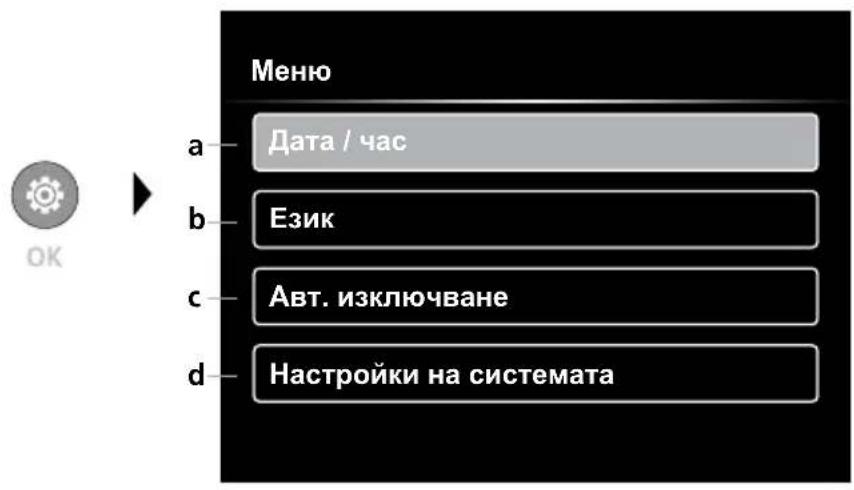
a BKJ./N3KJI. Ha MapKnipOBKaTa Ha BpeMeTo /3aJaBaHe Ha daTa/uaC
b CmHa Ha e3nka (EN, DE, JP, FR, IT, PT, ES, NL)
3aIaBaHe Ha aBTOMaTnUHO 13KJIIOUbaHe
d HacpoiKa Ha cnCTeMaTa BepnHa 6bpmyepa/xapnyepa

3aДапгемнелу OTHOBOBpeхинHaЗсимHe,HaTUCHEmMHorokpaTHO6yToHa ESC.
6.1 Pexim HacptpoJa: Data / yac
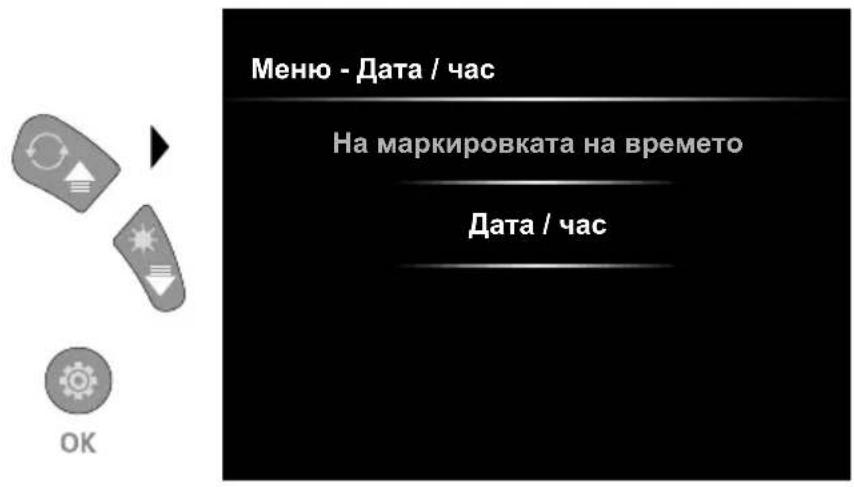
Tyk moke da ce n3bpa daHnHa 3aChETnte n3o6paxeHna daCe noka3Ba nechat CBpeMeTo Ha3aChemaHe,nn He.
YacbT n daTata Morat da Ce 3aDaBaT
4pe3 KlaBnHTe CbC CTpeJIKN.
6.2 Pekim hactpoika: CmHa Ha e3nka (EN, DE, JP, FR, IT, PT, ES, NL)
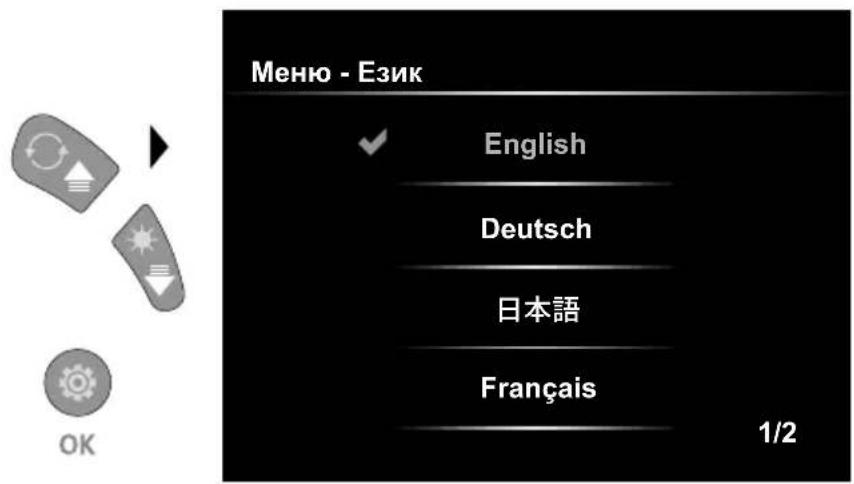
B TOBa MeHIO MOKe Ia Ce HAcTpoIbA Heo6xOIMnIe3NK.
6.3 Pekim Hacrpoika: ABTomatNHO N3KJIIOUBaHe
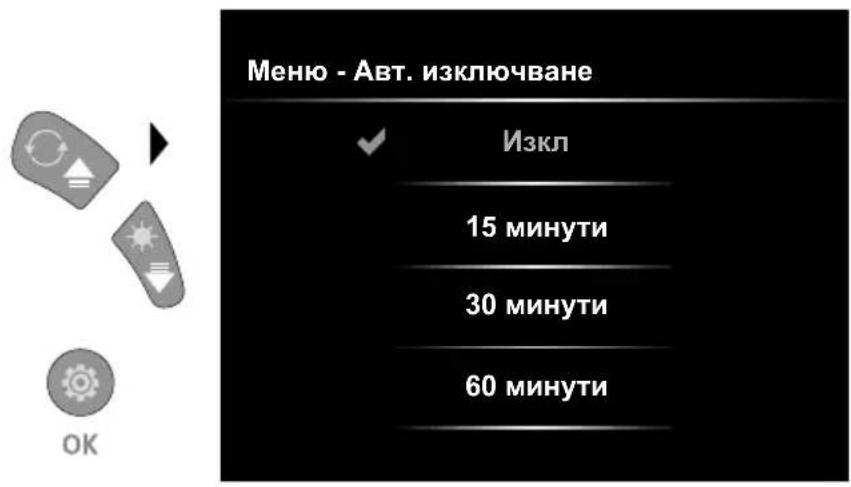
Tук може да ce 3ададe abTomatnHOn ИЗКЛЮЧБАн.
6.4.0 Pekim HacpoiKa: HacpoiHa cnCTeMaTa
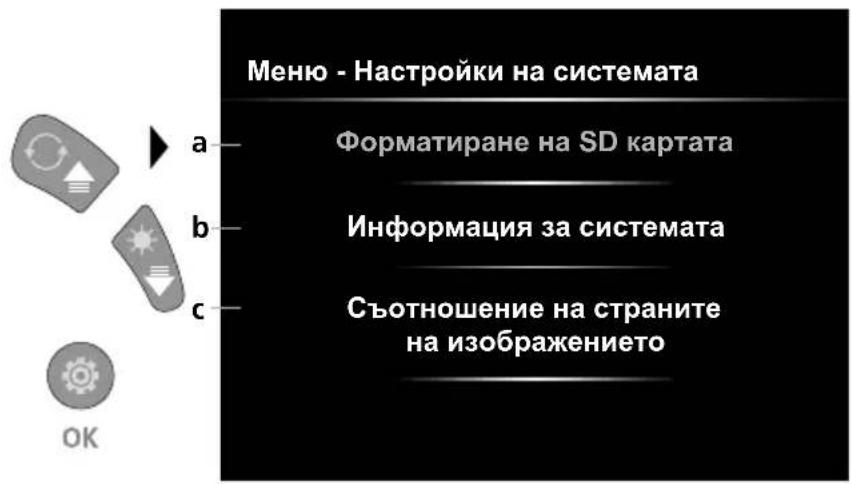
aΦopMaTnpaHe Ha SD KapTa
bBercnHa coΦTyepa/xapnyepa
c Perynupahe Ha cboTHoWeHneTo Ha cTpaHnTe Ha n3O6paXeHneTo Ha KaMepata
6.4.1 Pekim hactpoika: OpMaTupaHe Ha SD KapTaTa
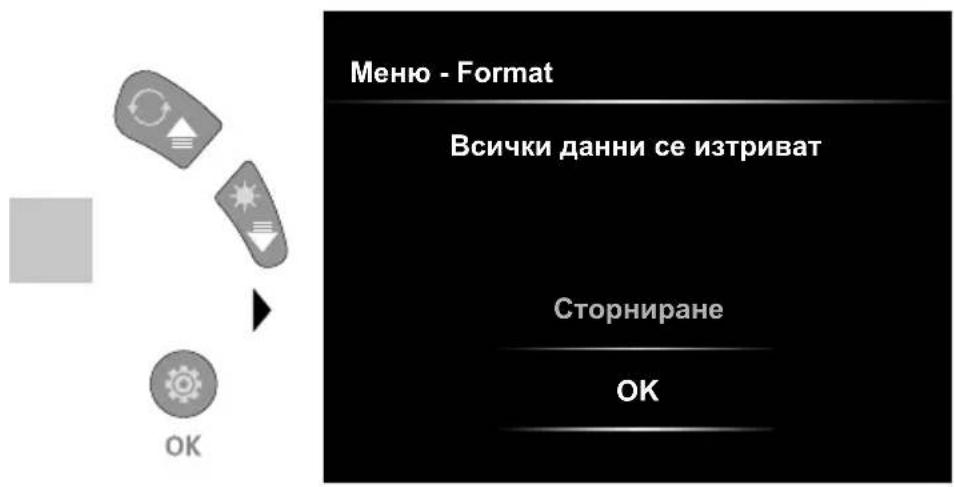
LsE 6bDat n3TpNTn BCNUKn DaHHN ot SD KapTata. To3n npoec e Heo6paTM.
HЯma da ce nokaxkT nobue 3aNTBaHn 3a NOTBbpxKdAbaHe Ha npoueca.
6.4.2 PexnM HacrpoKa: HOpMaun 3a cnTeMaTa
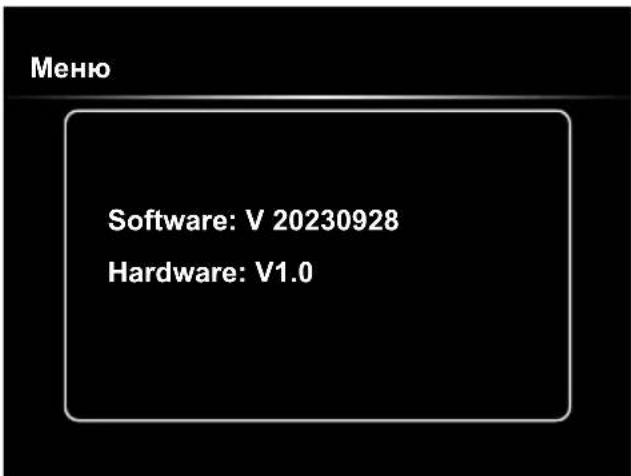
6.4.3 Pexm HacpoJa: CbOTHoWeHne Ha cTpaHnte Ha n3o6paXeHneTo
USB-пренoc Ha данн.
3anameteHnTe Bbpxy SD-kapTaTdaaHHMoKe da ce nphecaT Bbpyx KOMIOIbpa IIN C NOXODa, KapTOB cheu nn DnpeKTHO npe3 USB-nHTeppeica. DaHH 3a Bpb3kata Mejdy KOMIOITbp n KapTOB aAnTep, cBoTB. KapTOB cheTu e HaMePnTE B HApBuHnka KbM Baunr KapTOB yeTeu.
Laserliner
CmHa Ha Modyla Ha KaMepaTa
I3BaXdAHe Ha akymylaTOpHaTa 6aTepe
Yka3aHn 3a TexHnuecko o6cnyKbaHe n npdpbXkKa
IOnuCTBaHrTe BCnKn KOMNoHEnTn CJeKO HABJaxHeHa Kbpna n 36aRbAte N3NOJ3BaHeTo Ha NoUcTBAUIn a6pa3nBHN npenapatn n pa3TBOpnteN. CxbpaHraBte ypeDa Ha uCTO n cyxo MRCTO.
https://packd.li/II/ALL/in
Laserliner
!
AiaBaote npooektikac tic obnyiec xponc, to ouvnmuevo teuxoc ,Eyyunon kai npoothetaec unodxiic" kaowc kai tic tpexouoe cnilnpoopiec kai unodxiic otov ouvdeoio diaiktuov oto teloac autw vtw odnyiw. Tpeite tic avaepoovec obnyiec.Autec oi obnyiec th a npenla va pfalaaoovtai kai va napadibovtai mazi me tn ouokeun otov enoEvxo notn.
Evδεδειγμένη χρήση
To eayeaiok ootma eni0ewponnc me bivteo Videoinspector evdeltauaoo iiaovada kapeac me duvatotnta avikataotaonc yia tov ekofo ontiko elkyo dooka anoeiw oneiw osnvec, koiotntec, ppeatia, toixoia kal oxnata. Tn a nioynon ktnv teknpiwn npopuv va anohtkeuvtai ol nieic eikovw kai bivteo otnv kapta mvnuc SDHC.
Tevikec unodeciic aocpaiaac
Xpnooite tn oukeun anoklaotika oufova e tv oko noc vtov npoiaypaowv.
To npoiov kai ta aEosouap dev evia naiyvi yi naiia. Na pfalaooetai paikla ano naiia.
- επιρεπελίη κατακεναστική τροποποίηση της ὄνόκεύς.
Mnv ekTeTe Tn oukeun oe unxavikk katanovnon, nou uynlnc 0epukpaiec, ypaia n evtovouc kpaaouc.
- H ouakeun ev επιρεπειαν αχρομοηοειαι πλέου, ὄταν δεν μπορουν vα εκτελεσούν μία ἡπεροδερες λειουργες καθως και σε ζημες του περιβλήματος ὃτων καλωδιων συνδεός ὅταν εἶνα xαμηλή φόρτιοη της μπατapiac.
- PpooEeKataTn xPonOe EwTeipKouc Xwpouc wote n oukeun va xpooiopoieitai movo uno kataaanee Kaipkeoc uovtkec kui e katalna maetpa npootaoiac.
- Pniv tn xipon tnC ouokue ncoptiote nnpwctnv enavaoeptioevn mntatapia.
-H diaikacia optionc exolokpwoi olic n evdeltaa avapei npaoivn.
-H eTavafopticouevn unatapia nopei va optioe i kal kata tn diapkeia tnc Ieitoupyiac.
- Xpnoiopoieite anokkietia wnoio npooetoo eoiano. Av xpnoiopoioitheta i athetaoc npooetoc eoianooc, toe nauei va ioxei n eyyunon.
-Hbaoikn ouokneun 6ev eitpenei tva eAeI Oe enaon uypa.
- Ppenei va dothei onwohntne npoox, wote n ouokeun Videolnspector va uny eptheta oE enaan e xnukec ouoic, duvaikó, kivoumeva n zetota avtkeiemeva. Ze avtiotn nepintwn opoei va untoei znua n ouokueu n kai va tpaumatiotei bapi o xepiotnc.
H oukeun Videolnspector devi npntepenai va xnpoiopoinei yia iatpikec eEetaoeic/eEetaoeic atoovv.
Tia va δiaoφaλiotei n katnyopia npoostaiac IP 54, to kaluμa twv ouvδεων πéπi va εival ερμntika kλeioτó.
TnpetTa maetpa aoaiaac tonikw kai eovikw apxw yia tvv evdeeiyev n xpon tnC ouokevnc
H ouakeun dev npoBentai yia metpnoic kovta oe enikivouc taoeic. Tia auto otav kave tepnoic kovta oe nEeKtpiKec eYkataotaoei npooexte, wote va unapxouv oTov nepiBalovta xwpo aywmu epn unio taon. H anouoia taonc kal aofalie avavI enaveyponoinc npenla v Eaopalizetai mE tn katallnawv metpov.
Ynoδεiεις ασφαλεία
Avtietwnion tnc nektpoayvntikc aktivo0lia cai twv nektpoayvntikwv npae0aaw
https://packd.li/II/ALL/in
!
https://packd.li/II/ALL/in
2x = 180^ 回軀
3x = 水平方向反転
4x = 通常の状態に居る
4x
1x



3x
2x
5.0 フレ bj—一
- Laserliner
- Intended use
- General safety instructions
- Safety instructions
- Using the power supply / lithium-ion rechargeable battery
- ON/OFF
- Inserting micro-SD card
- Record mode
- Record mode: Image / video recording
- Record mode: LED lighting
- Record mode:Zoom
- Record mode: Image rotation / Mirroring
- 5.0Playback mode:Playback image/video recordings
- 5.1Playback mode:Delete recording
- 5.2Playback mode:Playback
- Settings mode
- Settings mode: Set date / time
- Settings mode: Select language (EN, DE, JP, FR, IT, PT, ES, NL)
- Settings mode: Automatic power off
- Settings mode: System Settings
- Settings mode: Format SD Card
- Settings mode: System Information
- Settings mode: Display Aspect Ratio
- USB data transfer
- Information on maintenance and care
- EU and UK directives and disposal
- IcnoJb3OBAHne no Ha3HaueHIO
- BnKOpNCTaHHa 6JOky KInBJIeHHa / Jitii-OIHHO aKyMylrTopa
- B BctaHOBLeHnKaPTn Micro-SD
- PeKIM 3aIncy
- Pekim 3aIscy: 3annci foTo/Bideo
- Pekim 3auncy: CbitnoioDhe ocbitneHHA
- Pekim 3aIncy: 3ym
- Pekim 3aIncy: NobopoT / BiO6paXeHHa
- Bid noaTkoBoro 3o6paJKeHHA
- Pexim BiTbopeHraone: BiTbopeHHa 3HIMKIB/BiJeO
- Pekim BiTbopeHhone: BuaNTn 3aNc
- Pexim BiTbopeHHone: BiTbopeHH
- PeKIM HanaTsyBaHHa
- PeKIM HalaWtYBaHHa: DaTa / yac
- Pexim HanaWtYBaHHa: 3MiHa MoBu (EN, DE, JP, FR, IT, PT, ES, NL)
- Pekim HanaWtYBaHH: ABTomaTHO BIMKHeHH
- Pekim HalaTuBaHHa: HalaTuBaHHa CnCTeM
- Pexim HalaatyBaHHa: OopMaTyBaHHa KapTu NaM'ayi SD
- Pekim HanaWtBuHn: HopMaui CntemN
- Pexm HalaTyBaHHa: CnIBBiHoueHHa cToPiH 3o6paXeHHa
- Ipepaa daHnx uee3 USB
- Ihctpykci3 texhiHoro o6cnyroByBaHHa Ta dOgrJy
- Uldised ohutusjuhised
- Modul de redare: Redarea inregistrarilor de imagini/video
- Ynotpe6a no npedHa3HaueHne
- 06uHnHctpyKuH 3a 6e3oNaCHOCT
- Hnctpykun 3a 6e3onacnoct
- BopabeHe c MpeXOBn aadntep / IHTneBOHOHaTa aKymylaTopHa 6aTePnA
- NocTaBЯHe Ha Micro-SD-KapTa
- PeXm 3aChemaHe
- Pekim 3aChemaHe: 3aChemaHnHa n3o6paXeHnBnDeo
- Pekim Bb3npoN3BOdCTBO: Bb3npoN3BexJaHe Ha 3aChemaHnHa n3o6paXeHne/BndeO
- PeXIM Bb3npOn3BOXdTO: N3TpNbHe Ha 3aChemaHe
- PeKIM Bb3npOn3BOIDCTBO: Bb3npOn3BexJaHe
- Pekim HacTroika
- Pexim HacptpoJa: Data / yac
- Pekim hactpoika: CmHa Ha e3nka (EN, DE, JP, FR, IT, PT, ES, NL)
- Pekim Hacrpoika: ABTomatNHO N3KJIIOUBaHe
- Pekim HacpoiKa: HacpoiHa cnCTeMaTa
- Pekim hactpoika: OpMaTupaHe Ha SD KapTaTa
- PexnM HacrpoKa: HOpMaun 3a cnTeMaTa
- Pexm HacpoJa: CbOTHoWeHne Ha cTpaHnte Ha n3o6paXeHneTo
- USB-пренoc Ha данн.
- Yka3aHn 3a TexHnuecko o6cnyKbaHe n npdpbXkKa
- Evδεδειγμένη χρήση
- Tevikec unodeciic aocpaiaac
- Ynoδεiεις ασφαλεία
- フレ bj—一
Brand : Laserliner
Model : VideoInspector XXL
Category : Video camera