
SU40NX1 - TV Stand SONY - Free user manual and instructions
Find the device manual for free SU40NX1 SONY in PDF.
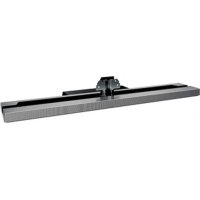



| Product Type | TV Cabinet (TV stand) |
| Brand | Sony |
| Model | SU40NX1 |
| Compatible TV Models | KDL-40NX70☐, KDL-40NX80☐ (as of January 2010) |
| Dimensions (A x B x C x D x F x G) | A: 410 mm, B: 130 mm, C: 180 mm, D: 994 mm, F: 45 mm, G: 310 mm |
| Height with angle (E) - 0° | 670 mm |
| Height with angle (E) - 6° | 667 mm |
| Stand weight | 5.5 kg |
| Power supply | No power supply (passive stand) |
| Adjustable viewing angle | 0° or 6° tilt |
| Material | Metal and plastic (estimate) |
| Anti-tip wall attachment | Yes, hole provided for attachment |
| Recommended number of people for installation | At least 2 people |
| Screws provided | 4 black TV bracket fixing screws (PSW5×16), 1 black bracket cover screw (PSW5×16), 1 silver angle adjustment screw (PSW5×10), 2 pads (for models 40/46/52NX80) |
| Maintenance and cleaning | Dry soft cloth; for stubborn stains, cloth lightly soaked in neutral soap, then wipe with dry cloth. Do not use thinner, gasoline. |
| Safety | Stand designed only for specified models. Do not modify. Install on a flat, solid surface. Do not cover the TV ventilation openings. Do not lean on the TV. |
| Country of origin / Manufacturer | Sony Corporation, 1-7-1 Konan Minato-ku Tokyo, Japan |
| Warranty | Not specified, refer to the TV warranty |
Frequently Asked Questions - SU40NX1 SONY
User questions about SU40NX1 SONY
0 question about this device. Answer the ones you know or ask your own.
Ask a new question about this device
Download the instructions for your TV Stand in PDF format for free! Find your manual SU40NX1 - SONY and take your electronic device back in hand. On this page are published all the documents necessary for the use of your device. SU40NX1 by SONY.
USER MANUAL SU40NX1 SONY
Thank you for purchasing this product. Products by Sony are designed with safety in mind. Incorrect use may result in serious injury through fire, electric shock, the product toppling over, or the product being dropped. Be sure to observe the safety precautions to prevent such accidents.
This instruction manual explains the correct handling of the product and important precautions necessary to prevent accidents. Be sure to read this manual thoroughly and use the product correctly. Keep this manual available for future reference.
The manufacturer of this product is Sony Corporation, 1-7-1 Konan Minato-ku Tokyo, 108-0075 Japan. The Authorized Representative for EMC and product safety is Sony Deutschland GmbH, Hedelfinger Strasse 61, 70327 Stuttgart, Germany.
CAUTION
Specified products
This stand is designed for use with the Sony products specified below. Do not install other than the specified products.
The following products are subject to change without notice, may be out of stock, or discontinued. Also, certain models are sold in some regions.
| LCD color TV | |
| SU-52NX1 | KDL-52NX80☐* |
| SU-46NX1 | KDL-46NX70☐*/46NX80☐* |
| SU-40NX1 | KDL-40NX70☐*/40NX80☐* |
As of Jan 2010 * In the actual model names, the “□” indicates numbers and/or characters specific to each model.
WARNING
If the following precautions are not observed, serious injury or death can result through fire, electric shock, or the product toppling over.
Be sure to take measures to prevent the TV Stand from toppling over.
If you fail to do so, the TV may topple over and cause injury. Anchor the TV Stand and the rack, etc., to prevent toppling over.
Be sure to install the TV Stand on a solid and flat floor.
Do not install the TV Stand so that it leans in one direction. If you do so, the TV Stand may topple over or the TV may fall. This may cause injury or damage.
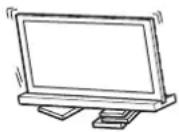
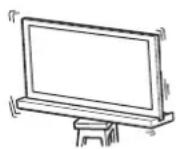
Be sure to install the TV Stand on a stable surface.
If you install the TV Stand on an unstable surface, it may lose its balance and topple over or fall off. This may cause injury or property damage.
Do not lean on or hang from the TV with the TV installed on the TV Stand.
The TV Stand may topple over, or the TV may fall and cause serious injury or death.
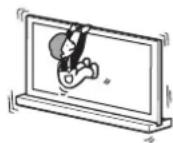
Do not cover the ventilation holes of the TV.
If you cover the ventilation holes (with a cloth, etc.), heat may build up inside and cause fire.
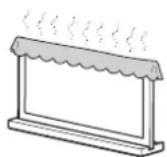
Do not allow the AC power cord or the connecting cable to be pinched.
- Do not allow the AC power cord or the connecting cable to be pinched when you install the TV on the TV Stand. If the AC power cord or the connecting cable is damaged, this may result in fire or electric shock.
- Do not step on the AC power cord or the connecting cable when you carry the TV Stand. The AC power cord or the connecting cable may be damaged, and this may result in fire or electric shock.
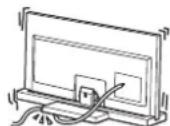
Do not stumble over the AC power cord or the connecting cable.
If you stumble over the AC power cord or the connecting cable, the TV Stand may topple over and cause injury.
CAUTION
If the following precautions are not observed, injury or property damage may occur.
Do not install any equipment other than the specified product.
This TV Stand is designed for use with the specified product only. If you install equipment other than specified, it may fall or break, and cause injury. Illustrations used in this manual show of the KDL-40NX80, unless otherwise stated.
Be sure to secure the TV.
Secure the TV to the TV Stand using the supplied screws. If the TV is not installed securely, it may fall, or the TV Stand may topple over, and cause injury.
Notes on installation
Install the TV Stand on a solid and flat floor. Do not allow the TV Stand to be installed at an angle or incline. To avoid this, observe the following precautions.
If you install the TV Stand on a soft surface such as a mat or a carpet, lay a board over the designated location beforehand.
- Do not install the TV Stand in a place subject to direct sunlight or near a heater.
- Do not install the TV Stand in a hot or humid place, or outdoors.
Note on use
Cleaning
To keep the TV Stand clean, occasionally wipe it with a dry soft cloth. Stubborn stains may be removed by wiping with a cloth slightly dampened with mild soap. Be sure to dry the area afterwards with a dry soft cloth. Do not use chemicals, such as thinner or benzine, as they damage the finish of the TV Stand.
Be sure that two or more persons do the installation work.
Be sure that two or more persons install the TV on the TV Stand. If one person does the installation work alone, this may result in an accident or injury.
Do not modify the TV Stand.
It may fall and cause injury.
Be sure to install the TV securely following the instructions.
Tighten the screws securely. If the TV is not installed securely, it may fall and cause injury.
Be careful not to injure your hands or fingers while assembling.
- Do not move the TV Stand while holding the Neck section.
- Be careful not to hurt your fingers or hands when installing the TV.
Note on taking the TV Stand out from the carton
Be sure to hold the TV Stand and handle it carefully.
Step 1: Checking the parts
| Name Quantity | |
| Stand | 1 |
| Rear Cover | 1 |
| Neck Cover | 1 |
| TV Neck Attachment Screw (PSW5 × 16) black (× 4) Neck Cover Screw (PSW5 × 16) black (× 1) | 5 |
| Angle Adjustment Screw (PSW5 × 10) silver | 1 |
| TV Support Pad* | 2 |
- For KDL-40NX80□/KDL-46NX80□/KDL-52NX80□ only.
WARNING
If you allow the AC power cord to be pinched under or between pieces of equipment, this may result in a short circuit or an electric shock. If you stumble over the AC power cord or the connecting cable, the TV Stand may topple over and cause injury.
- Decide on the installation location and lay the TV Stand down before installing the TV.
Since the TV is heavy, it is recommended that you decide on the installation location beforehand, and assemble the TV Stand on site.
Refer to the operating instructions supplied with your TV for information on how to remove the Table-Top Stand and the Bottom Cover (KDL-40NX80/ KDL-46NX80/ KDL-52NX80 only) from the TV.
Step 2: Installing the TV
Before assembling
- Be sure to have a Phillips screwdriver that fits the screws prior to the assembly.
- When using an electric screwdriver, set the torque setting to approximately 1.5N· m {15 kgf·cm}.
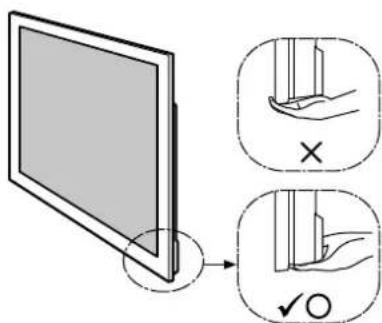
Hold the TV at the specified point when moving the TV.
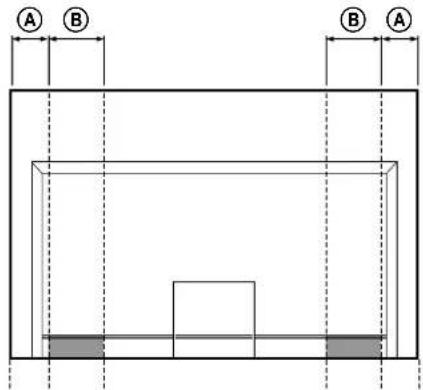
Refer to the chart and measure lengths A and B from the top edge of the TV, as shown in the illustration below. Hold the TV at the specified point of the measured length B (I).
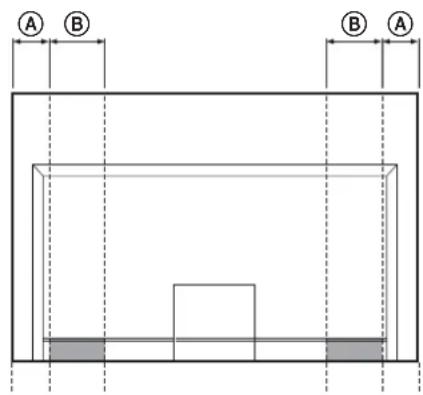
Unit: mm (inches)
| TV size | Length A | Length B |
| 40" 110 (4 | 3/8) 170 (6 3/4) | |
| 46" 170 (6 | 3/4) 170 (6 3/4) | |
| 52" 170 (6 | 3/4) 170 (6 3/4) |

- Hold at the specified point to avoid injuring your fingers. Make sure to hold the TV as shown:
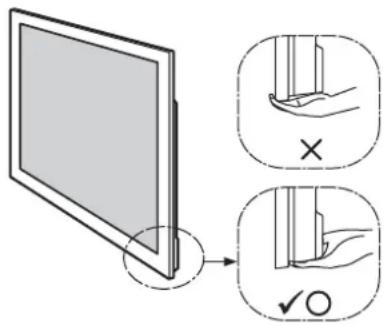

- When transporting the TV set by hand, hold it as shown above. Do not put stress on the LCD panel and the frame around the screen.
2 Install the TV onto the TV Stand.
The TV is installed by placing it in the groove of the TV Stand.
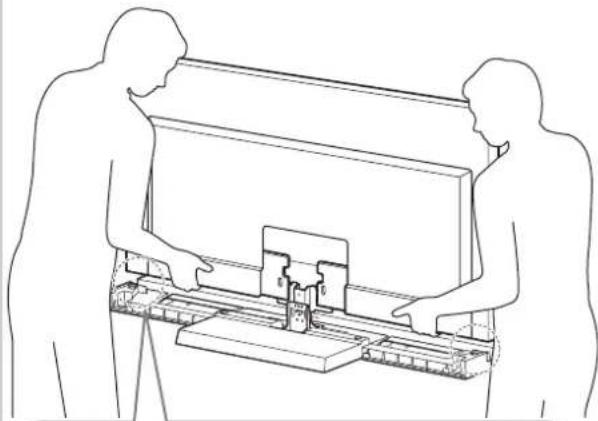
Attach the TV Support Pads to both sides of the TV Stand.
(The TV Support Pads have double-faced tape on the
downside.)
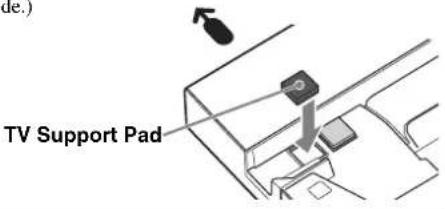

Arrow direction shows front of the TV Stand.

- Be careful not to pinch your fingers when installing the TV.
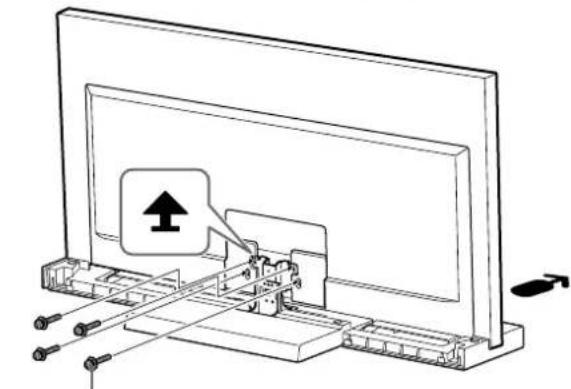
3 Secure the TV and the TV Stand with the four TV Neck Attachment Screws (PSW5 × 16) black (supplied).
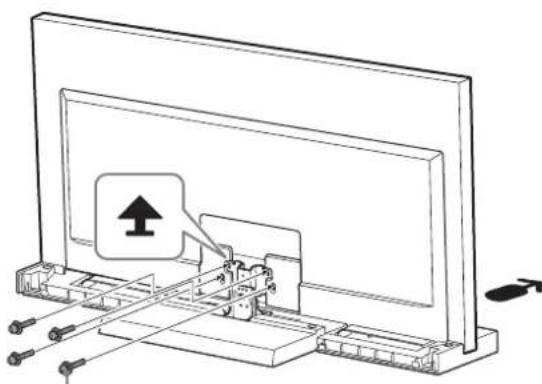
TV Neck Attachment Screw
(PSW5 × 16) black
4 Attach the Bottom Cover to the TV set. (KDL-40NX80□/KDL-46NX80□/ KDL-52NX80□ only)
Before attaching the Bottom Cover, connect the AC power cord. For details on the procedure, refer to the instruction manuals supplied with the TV. 2 When attaching the Bottom Cover, tilt the TV forward, and then after attaching, tilt the TV back.
Bottom cover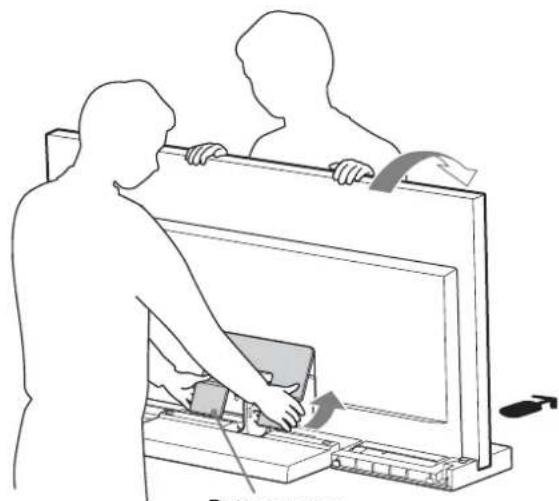
5 Secure the TV and the TV Stand with the Angle Adjustment Screw (PSW5 × 10) silver (supplied).
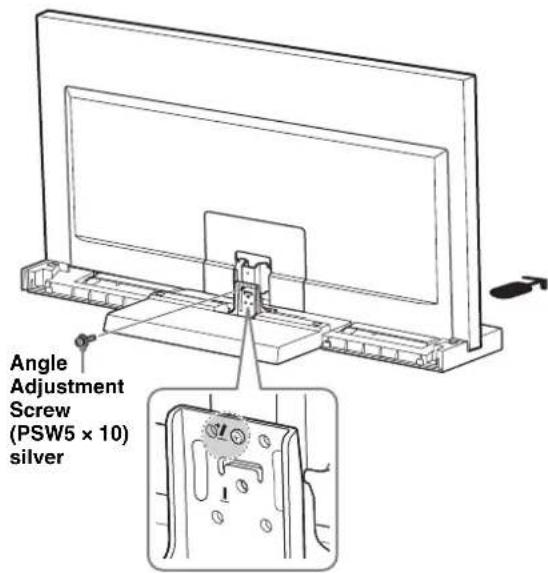
6
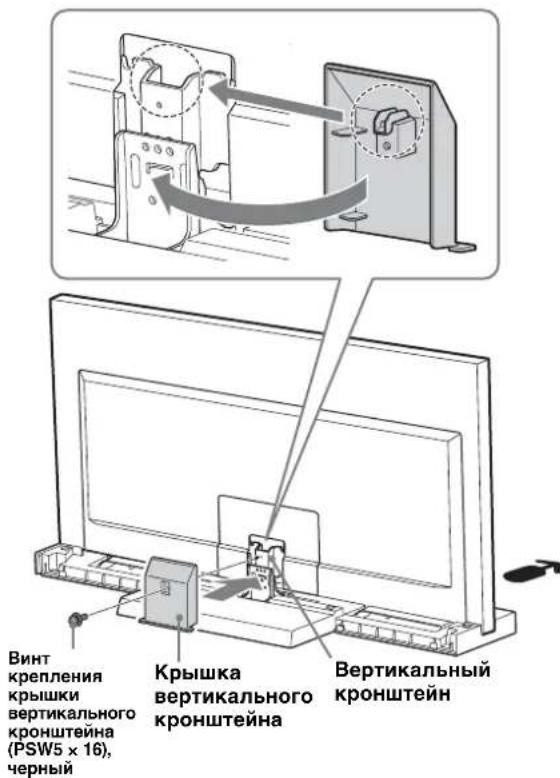
Attach the Neck Cover to the Neck.
Align the Neck Cover with the Neck and slide it down as shown in the illustration below. Secure the Neck Cover and Neck with the Neck Cover Screw (PSW5 × 16) black (supplied).
If you want to adjust the viewing angle of the TV, adjust the angle before attaching the Neck Cover. Refer to Step 2 of "Adjusting the viewing angle of the TV" on page 7.
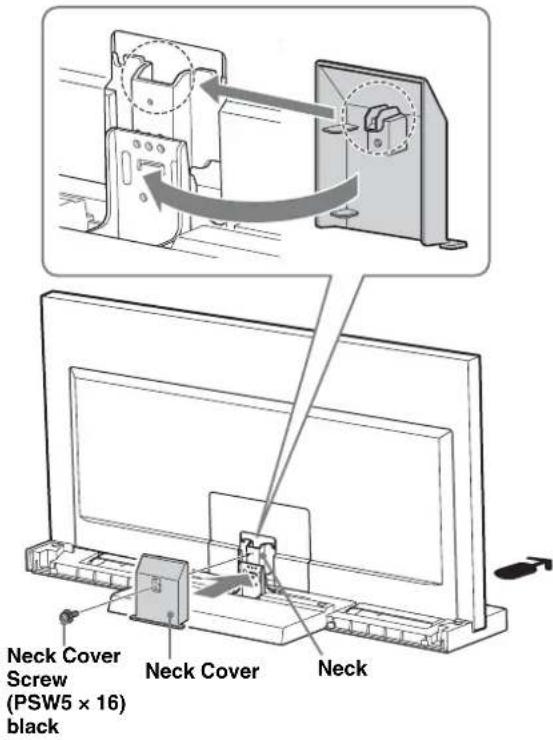
7
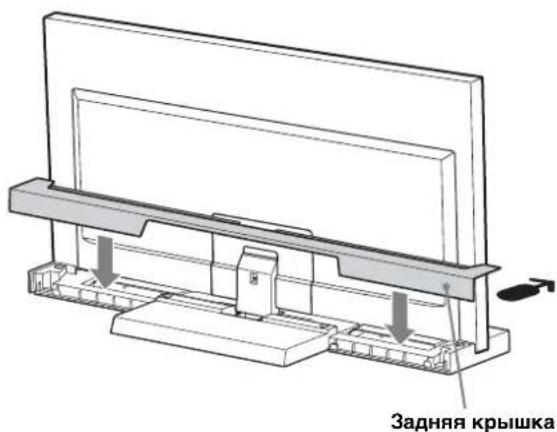
Attach the Rear Cover to the TV Stand.
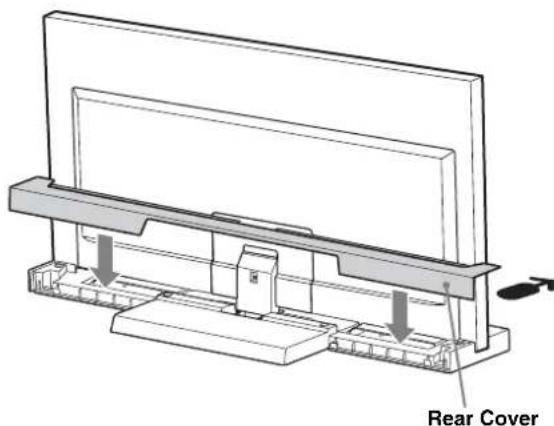
Step 3: Safety measures to prevent toppling over
WARNING
Be sure to take measures to prevent the TV Stand from toppling over, and causing possible injury and damage.
There is a hole to allow you to take measures to prevent the TV Stand from toppling over, as shown in the illustration below.
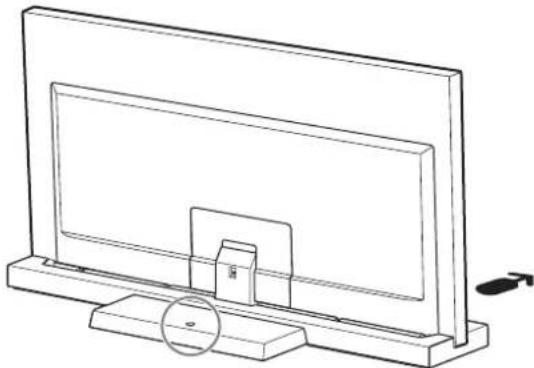
For details on the procedure, refer to the instruction manual supplied with the TV.
Specifications
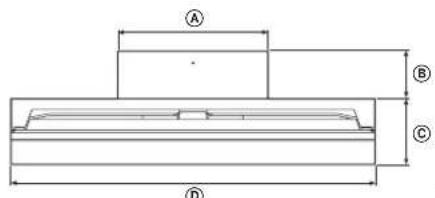
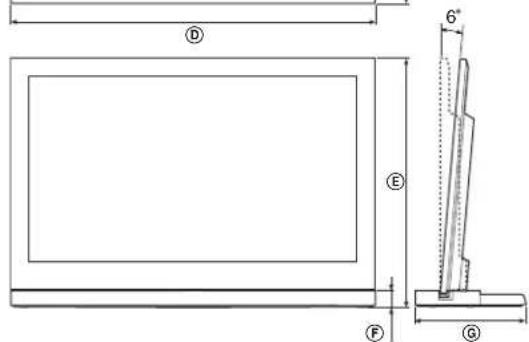
| SU-52NX1 | SU-46NX1 | SU-40NX1 | |||
| Dimensions: mm (inches) | A | 410 (16 1/4) | 410 (16 1/4) | 410 (16 1/4) | |
| B | 125 (5) | 140 (5 5/8) | 130 (5 1/8) | ||
| C | 225 (8 7/8) | 190 (7 1/2) | 180 (7 1/8) | ||
| D | 1,261 (49 3/4) | 1,127 (44 3/8) | 994 (39 1/4) | ||
| E | 0° | 822 (32 3/8) | 745 (29 3/8) | 670 (26 1/2) | |
| 6° | 818 (32 1/4) | 741 (29 1/4) | 667 (26 3/8) | ||
| F | 45 (1 13/16) | 45 (1 13/16) | 45 (1 13/16) | ||
| G | 350 (13 7/8) | 330 (13) | 310 (12 1/4) | ||
| Stand Weight: 7.7 kg | (17 lb) | 6.8 kg (15 lb) | 5.5 kg (12 lb 2 oz) | ||
Design and specifications are subject to change without notice.
Adjusting the viewing angle of the TV
1
Detach the Rear Cover and Neck Cover.
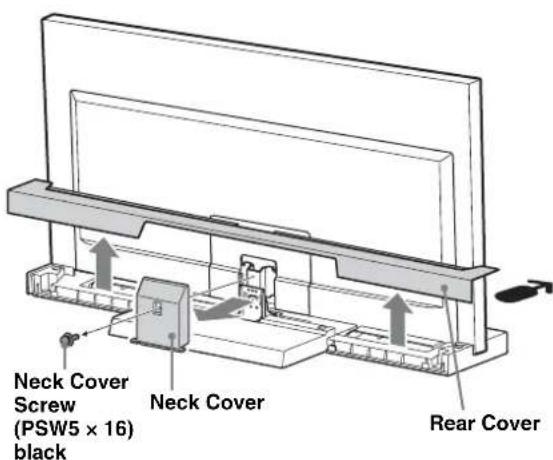
2
Remove the screws.
Remove the three screws from the Neck.
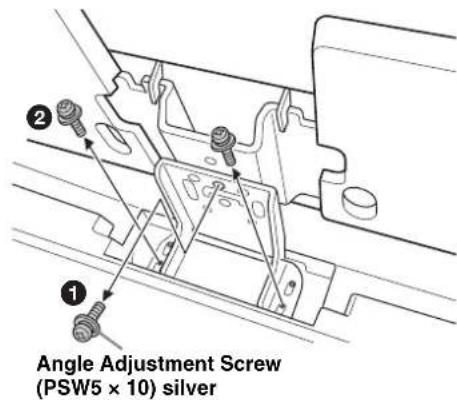
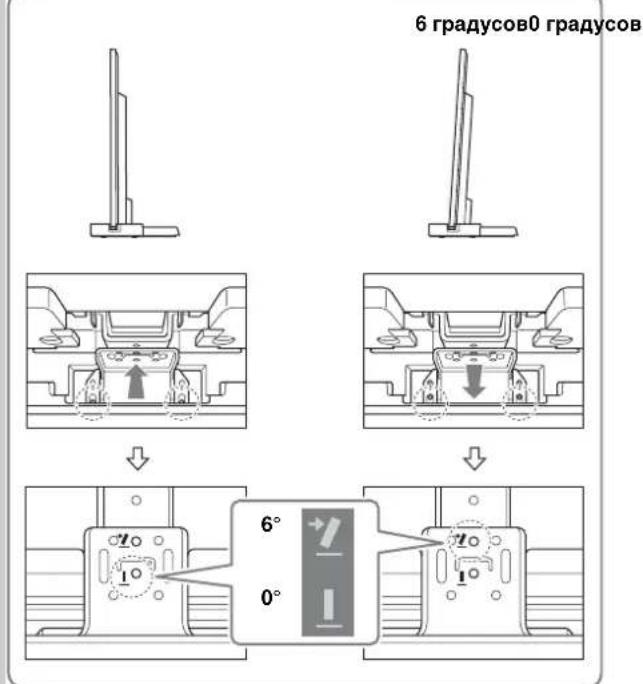
3 Adjust the angle.
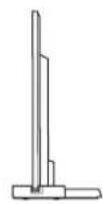
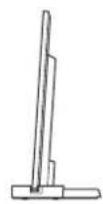
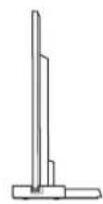
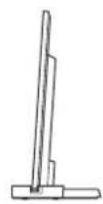
Tilt the TV forwards. Set the Adjuster at the required angle (forward for 0; back for 6 degrees). Position the TV back again.

Factory setting is 6 degrees. - When positioning the TV back, support the Adjuster with a hand. (In the case of setting to 0 degrees only.)
6 degrees0 degrees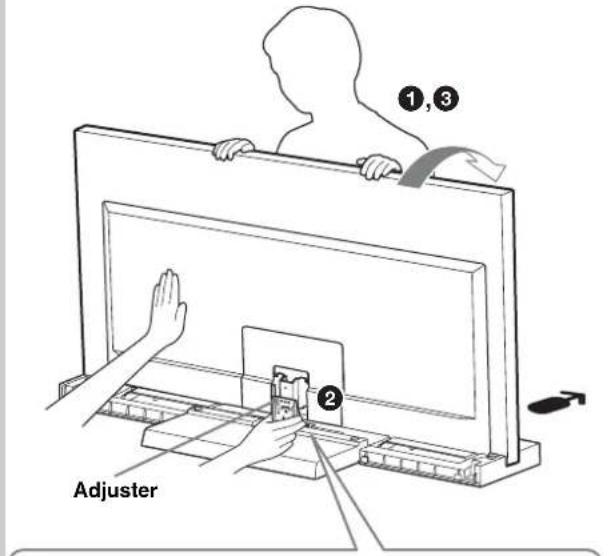
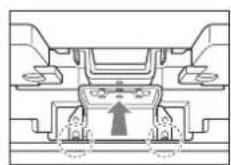
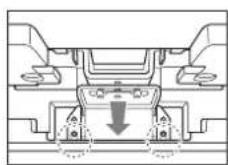
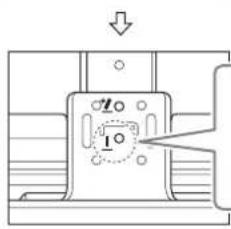

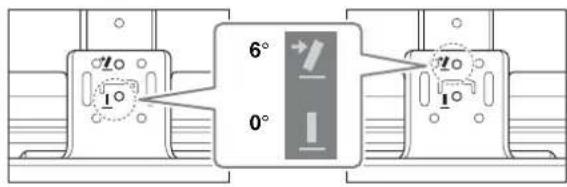
4 Secure the screws.
Firstly, secure the Adjuster and the Neck with the Angle Adjustment Screw (PSW5 × 10) silver (1), then two screws (2) (using the three screws removed in step 2).
Angle Adjustment Screw (PSW5 × 10) silver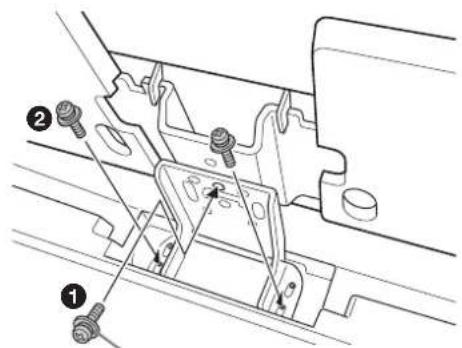
Make sure to secure the TV.
tape on the underside.)
Tilt the TV forward. Adjust the adjustment mechanism to the desired angle (forward for 0 degrees, backward for 6 degrees). 3 Set the TV back.

- The factory setting is 6 degrees. Support the adjustment mechanism with one hand when setting the TV back. (Only when setting the 0 degree angle.)
6 degrees 0 degrees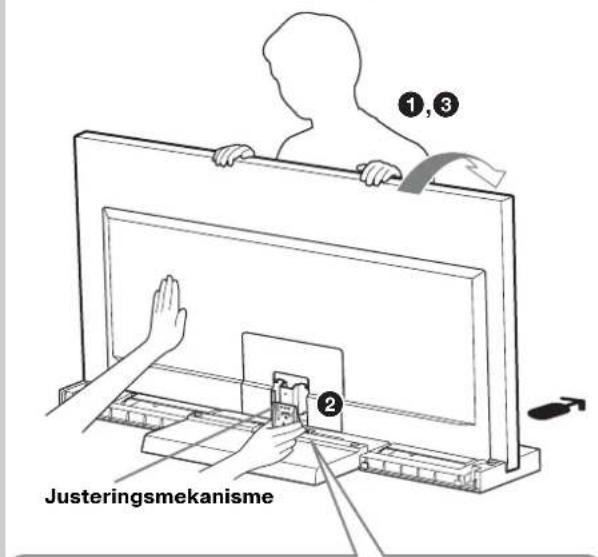
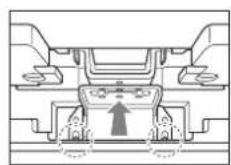
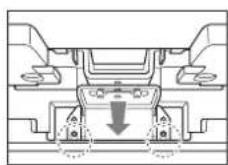
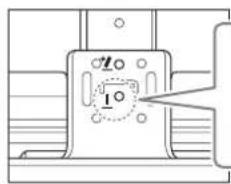
4 Tighten the screws.
Do not lean on or hang on the TV when it is installed on the stand.
The stand may tip over, the TV may fall and cause serious injury or death.

Do not block the ventilation openings of the TV.
If the ventilation openings are blocked (with cloth, etc.) inside the device, the temperature may rise, which may lead to fire.

Do not allow the power cord and connecting cables to be pinched.
- When installing the TV on the stand, do not allow the power cord and connecting cables to be pinched. Damage to the power cord or connecting cable may cause fire or electric shock.
Do not step on the power cord or connecting cables when moving the stand.
This can cause damage to the AC power cord or the connecting cable, which may lead to fire or electric shock.
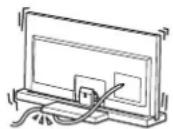
Do not pull on the AC power cord or the connecting cable.
If the AC power cord or the connecting cable is pulled, the TV stand may tip over and cause injury.
CAUTION
If the following precautions are not observed, there is a possibility of injury or property damage.
Do not install any equipment other than the specified one on the stand.
This stand is intended for use only with the specified product. If you install equipment other than the specified one, it may fall or be damaged, and may also cause injury. The illustrations in this manual refer to the KDL-40NX80□ model, unless otherwise noted.
Securely attach the TV.
Attach the TV to the TV stand using the supplied screws. If the TV is not installed securely, it may fall or the stand may tip over and cause injury.
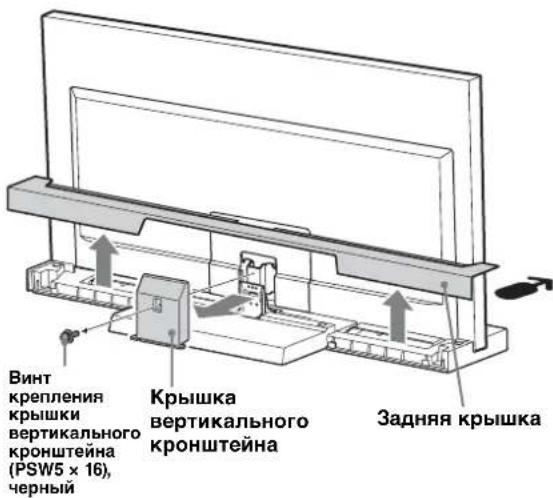
Attach the cover to the vertical stand.
Align the cover with the vertical stand and install it by sliding it down, as shown in the figure below. Secure the cover and the vertical stand with the screw for the vertical stand (PSW5×16), black (supplied).
If you need to adjust the viewing angle of the TV, do so after installing the cover of the vertical stand. See Step 2 in the "Adjusting the viewing angle of the TV" section on page 7.
7
Install the rear cover of the TV stand.
Step 3: Precautions to prevent tipping over
IMPORTANT SAFETY INSTRUCTIONS To prevent the TV stand from tipping over and possible injury or damage, the following precautions must be taken.
The TV stand has a hole (shown in the figure below) that allows you to take the necessary measures to prevent tipping.
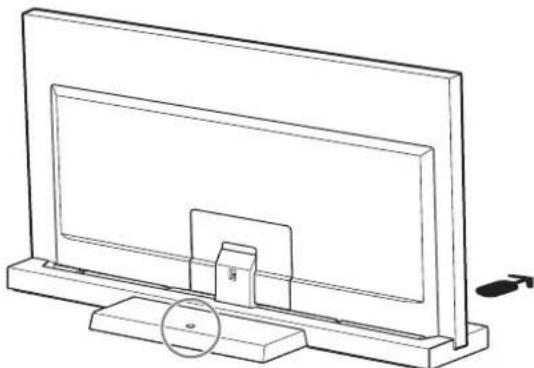
For more detailed information on performing these operations, see the operating instructions supplied with the TV.
Technical specifications
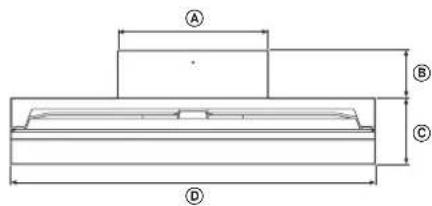
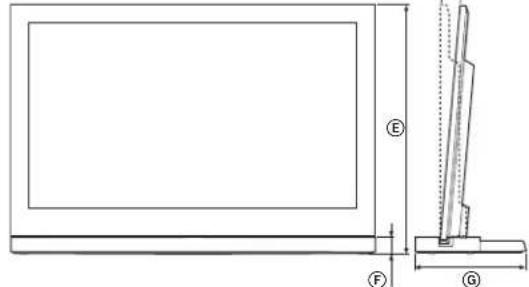
| SU-52NX1 | SU-46NX1 SU-40NX1 | |||
| Размеры: MM | A | 410 410 | 410 | |
| B | 125 140 | 130 | ||
| C | 225 190 | 180 | ||
| D | 1261 112 | 27 994 | ||
| E | 0° | 822 745 | 670 | |
| 6° | 818 741 | 667 | ||
| F | 45 45 45 | |||
| G | 350 330 | 310 | ||
| Вес所产生的: 7,7 кг 6,8 кг 5,5 кг | ||||
Design and specifications are subject to change without prior notice.
Adjusting the viewing angle of the TV
1 Remove the rear cover and the vertical bracket cover.
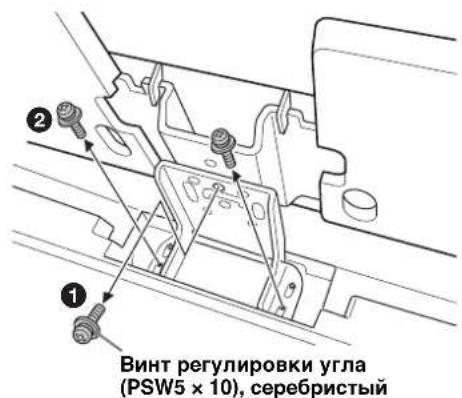
2 Remove the screws.
Remove the three screws from the vertical bracket.
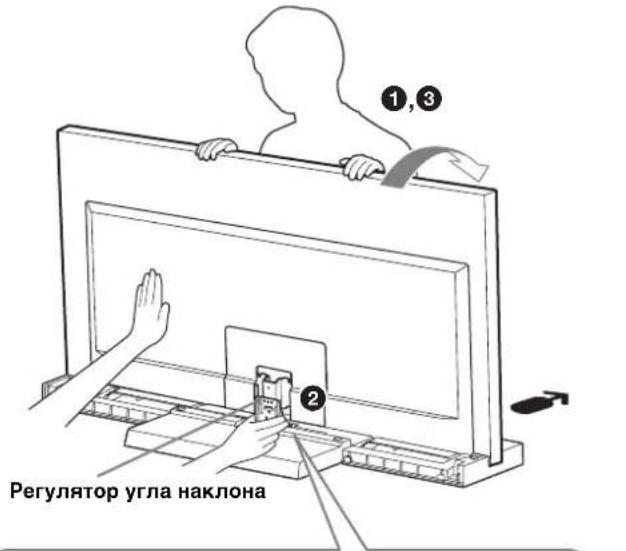
3 Adjust the tilt angle.
Tilt the TV forward. Set the tilt adjuster to the initial position (forward - 0 degrees; backward - 6 degrees). Set the TV to the initial position.

The backward position is set at 6 degrees. When setting the TV to the initial position, hold the tilt adjuster with your hand (only when setting the position to 0 degrees).
4 Tighten the screws.
First, secure the tilt adjuster and the vertical bracket with the angle adjustment screw (PSW5 x 10), washers (1), then with the two screws (2) (using the three screws removed in step 2).
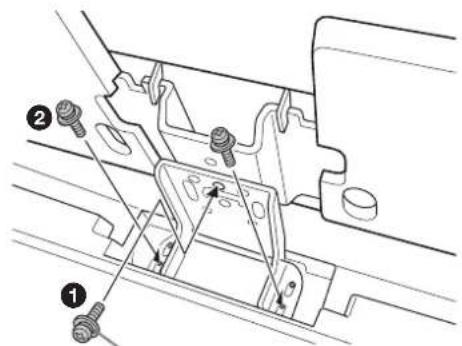
(PSW5×10), silver
Safety instructions
We thank you for purchasing our product. During the development of our products, safety is our top priority. Incorrect use may lead to serious injury or damage due to electric shock, fire, or product damage. Please follow the safety instructions carefully.
This manual describes the correct use of the product and provides important safety measures necessary to prevent dangerous situations. Please read this manual carefully and use the product properly. Keep this manual for future reference.
WARNING
Intended use
This stand is intended for use with the products listed below. Do not install any other products on it.
| К一步一步оровий PK-ТСДСВИЗОР | |
| SU-52NX1 | KDL-52NX80☐* |
| SU-46NX1 | KDL-46NX70☐*/46NX80☐* |
| SU-40NX1 | KDL-40NX70☐*/40NX80☐* |
(As of 2010)
*The model names and/or symbols indicated are specific to each model.
CAUTION
Failure to follow the safety measures described below may result in serious injury or death due to electric shock, fire, product tipping over, or product damage.
Be sure to take measures to prevent the stand or TV from tipping over.
If you do not do this, the TV may tip over, which could cause injury.
Attach the stand to the TV using the screws provided to prevent tipping.
Be sure to install the TV stand on a solid, flat surface.
Do not install the TV stand on a soft surface. This could cause the stand or the TV to fall and result in serious injury or death.
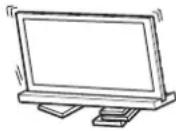
Be sure to install the TV stand on a hard surface.
If installed on a soft surface, the stand may tip over or fall. This could cause serious injury or death.
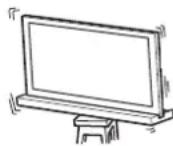
Do not place the TV on the stand and do not walk on it at any time.
The stand may tip over or the TV may fall, resulting in serious injury or death.
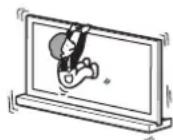
Do not cover the ventilation openings of the TV.
If the ventilation openings are covered (for example, with cloth), heat may build up inside, which could cause a fire.
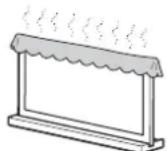
Be careful not to pinch the power cord or the HDMI cable.
Be careful not to pinch the power cord or the HDMI cable when installing the TV on the stand. If the power cord or the HDMI cable is damaged, it could cause a fire or electric shock.
Do not step on the power cord or the HDMI cable when moving the stand or the TV. The power cord or the HDMI cable could be damaged, which could cause a fire or electric shock.
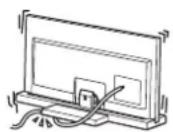
Be careful not to trip over the power cord or the HDMI cable.
If you trip over the power cord or the HDMI cable, the stand or the TV may fall and cause injury.
WARNING
If the safety instructions below are not followed, it could result in serious injury or death.
The installation of the stand must be done by qualified personnel, except for the specified test.
The TV stand is intended for use only with the specified TV model. If you need to install it on a TV not specified here, it may fall and cause injury. The instructions given in this manual apply to the KDL-40NX80□ model, unless otherwise specified.
Be sure to securely attach the TV.
Attach the TV to the stand using the screws provided in the stand package. If the TV is not installed correctly, it may fall and cause injury.
Installation precautions
Install the stand on a flat, stable surface. Do not install the stand on a slope or incline. To avoid injury, follow the safety precautions listed below.
When installing the stand on a soft surface, such as a carpet or rug, place it on a hard, flat surface.
- Do not install the stand in a place exposed to direct sunlight, or near a heat source. - Do not install the stand in a place with high humidity or temperature.
Usage precautions
UH
To clean the stand, wipe it with a dry, soft cloth. Stubborn stains can be wiped with a cloth slightly dampened with a mild soap solution. After cleaning, be sure to wipe the area with a dry, soft cloth. Do not use chemicals, such as thinner or benzene, as they may damage the stand's finish.
Installation must be performed by two or more people.
Installing the TV on the stand must be done by two or more people. If installation is done by one person, it may lead to an accident or injury.
Do not modify the stand's structure.
Otherwise, it may fall and injure people nearby.
Be sure to install the TV according to the instructions.
Tighten the screws firmly. If the TV is installed incorrectly, it may fall and cause injury.
Be careful not to injure your hands or fingers during assembly.
Do not move the TV stand by holding the TV. Be careful during installation to avoid pinching your fingers or hands.
Removing the TV stand from the box
Be sure to hold the TV stand and carry it with care.
Screw for securing the TV (PSW5×16)
Do not install any device other than the specified product.
This TV stand is designed for use with the specified product. If you install a device other than the specified product, it may fall or tip over and cause injury. The illustrations used in this manual illustrate the KDL-40NX80□, unless otherwise noted.
Make sure to securely attach the TV.
Secure the TV to the TV stand using the provided screws. If the TV is not installed securely, it may fall or the TV stand may tip over and cause injury.
Notes on installation
Install the TV stand on a solid, flat floor. Do not install the TV stand on a slope or uneven surface. To avoid this, follow the warnings below.
If you install the TV stand on a soft surface such as a rug or carpet, place a piece of wood on the designated position first.
-Do not install the TV stand in direct sunlight or near a heater. -Do not install the TV stand in hot, humid, or outdoor locations.
Caution when using
Cleaning
- Be careful not to pinch your fingers when installing the TV.
2007
| LCD | |
| SU-52NX1 | KDL-52NX80* |
| SU-46NX1 | KDL-46NX70*/46NX80* |
| SU-40NX1 | KDL-40NX70*/40NX80* |
| ### | |
| ### | 1 |
| ### | 1 |
| ### | 1 |
| ### | 5 |
| ### | 1 |
| ### | 2 |
150 150 150 150 150 150 150 150
4j0slaa11r jyjgl 4u g yjgl
(PSW5×16)
sosoo(o)
j00
(PSW5×16)
∴ DE = 2
L
13 13 13 13 13 13 13 13 13
Lg 1000000000000000000000000000000
4uai jui
CwI wio lo y jy dS Phillips wg g jj j
1.5 15 jyj 1 yjg 1 g j 10a
15 kgf·cm
a
Therefore, 400 = a + b + c
a
Therefore, 1θ2 = θ1 + 1/2π
| B\( {}^{1} \) | \( {}^{2} \) | \( {}^{3} \) |
| 170110 | 40" | |
| 17017046" | ||
| 17017052" |
a 1000
- CAUTION
- SPECIFIED PRODUCTS
- WARNING
- BE SURE TO TAKE MEASURES TO PREVENT THE TV STAND FROM TOPPLING OVER
- BE SURE TO INSTALL THE TV STAND ON A SOLID AND FLAT FLOOR
- BE SURE TO INSTALL THE TV STAND ON A STABLE SURFACE
- DO NOT LEAN ON OR HANG FROM THE TV WITH THE TV INSTALLED ON THE TV STAND
- DO NOT COVER THE VENTILATION HOLES OF THE TV
- DO NOT ALLOW THE AC POWER CORD OR THE CONNECTING CABLE TO BE PINCHED
- DO NOT STUMBLE OVER THE AC POWER CORD OR THE CONNECTING CABLE
- DO NOT INSTALL ANY EQUIPMENT OTHER THAN THE SPECIFIED PRODUCT
- BE SURE TO SECURE THE TV
- NOTES ON INSTALLATION
- NOTE ON USE
- CLEANING
- BE SURE THAT TWO OR MORE PERSONS DO THE INSTALLATION WORK
- DO NOT MODIFY THE TV STAND
- BE SURE TO INSTALL THE TV SECURELY FOLLOWING THE INSTRUCTIONS
- BE CAREFUL NOT TO INJURE YOUR HANDS OR FINGERS WHILE ASSEMBLING
- NOTE ON TAKING THE TV STAND OUT FROM THE CARTON
- STEP 1: CHECKING THE PARTS
- DECIDE ON THE INSTALLATION LOCATION AND LAY THE TV STAND DOWN BEFORE INSTALLING THE TV
- STEP 2: INSTALLING THE TV
- BEFORE ASSEMBLING
- HOLD THE TV AT THE SPECIFIED POINT WHEN MOVING THE TV
- INSTALL THE TV ONTO THE TV STAND
- SECURE THE TV AND THE TV STAND WITH THE FOUR TV NECK ATTACHMENT SCREWS (PSW5 × 16) BLACK (SUPPLIED)
- ATTACH THE BOTTOM COVER TO THE TV SET. (KDL-40NX80□/KDL-46NX80□/ KDL-52NX80□ ONLY)
- SECURE THE TV AND THE TV STAND WITH THE ANGLE ADJUSTMENT SCREW (PSW5 × 10) SILVER (SUPPLIED)
- ATTACH THE NECK COVER TO THE NECK
- ATTACH THE REAR COVER TO THE TV STAND
- STEP 3: SAFETY MEASURES TO PREVENT TOPPLING OVER
- SPECIFICATIONS
- ADJUSTING THE VIEWING ANGLE OF THE TV
- ADJUST THE ANGLE
- SECURE THE SCREWS
- MAKE SURE TO SECURE THE TV
- TIGHTEN THE SCREWS
- DO NOT LEAN ON OR HANG ON THE TV WHEN IT IS INSTALLED ON THE STAND
- DO NOT BLOCK THE VENTILATION OPENINGS OF THE TV
- DO NOT ALLOW THE POWER CORD AND CONNECTING CABLES TO BE PINCHED
- DO NOT PULL ON THE AC POWER CORD OR THE CONNECTING CABLE
- DO NOT INSTALL ANY EQUIPMENT OTHER THAN THE SPECIFIED ONE ON THE STAND
- SECURELY ATTACH THE TV
- ATTACH THE COVER TO THE VERTICAL STAND
- INSTALL THE REAR COVER OF THE TV STAND
- STEP 3: PRECAUTIONS TO PREVENT TIPPING OVER
- TECHNICAL SPECIFICATIONS
- ADJUST THE TILT ANGLE
- SAFETY INSTRUCTIONS
- INTENDED USE
- BE SURE TO TAKE MEASURES TO PREVENT THE STAND OR TV FROM TIPPING OVER
- BE SURE TO INSTALL THE TV STAND ON A SOLID, FLAT SURFACE
- BE SURE TO INSTALL THE TV STAND ON A HARD SURFACE
- DO NOT PLACE THE TV ON THE STAND AND DO NOT WALK ON IT AT ANY TIME
- DO NOT COVER THE VENTILATION OPENINGS OF THE TV
- BE CAREFUL NOT TO PINCH THE POWER CORD OR THE HDMI CABLE
- BE CAREFUL NOT TO TRIP OVER THE POWER CORD OR THE HDMI CABLE
- THE INSTALLATION OF THE STAND MUST BE DONE BY QUALIFIED PERSONNEL, EXCEPT FOR THE SPECIFIED TEST
- BE SURE TO SECURELY ATTACH THE TV
- INSTALLATION PRECAUTIONS
- USAGE PRECAUTIONS
- UH
- INSTALLATION MUST BE PERFORMED BY TWO OR MORE PEOPLE
- DO NOT MODIFY THE STAND'S STRUCTURE
- BE SURE TO INSTALL THE TV ACCORDING TO THE INSTRUCTIONS
- BE CAREFUL NOT TO INJURE YOUR HANDS OR FINGERS DURING ASSEMBLY
- DO NOT INSTALL ANY DEVICE OTHER THAN THE SPECIFIED PRODUCT
- MAKE SURE TO SECURELY ATTACH THE TV
- CAUTION WHEN USING
- THEREFORE, 1Θ2 = Θ1 + 1/2Π
Brand : SONY
Model : SU40NX1
Category : TV Stand