
SUFL61 - TV Stand SONY - Free user manual and instructions
Find the device manual for free SUFL61 SONY in PDF.
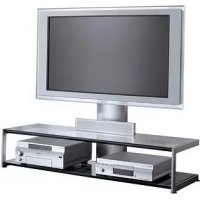



| Product type | TV cabinet with glass shelves |
| Brand | Sony |
| Model | SUFL61 |
| Overall dimensions (W x H x D) | 1425 x 1451 x 616 mm (56 1/8 x 57 1/4 x 24 3/8 inches) |
| Net weight | 48 kg (105 lb 14 oz) |
| Maximum load per shelf | 48 kg (distributed over the whole) |
| Materials | Steel (frame and pillar), tempered glass (shelves) |
| Compatible TVs | Sony KDL-52X2000, KDL-46X2000, KDL-40X2000 (LCD 40-52 inches) |
| Mounting type | On stand, with anti-tip wall anchor recommended |
| Number of shelves | 2 glass shelves |
| Tools required for assembly | Phillips screwdriver (recommended torque 1.5 N·m) |
| Number of people for installation | At least 2 people |
| TV fixation | Hooks and fixing studs (included) |
| Safety instructions | Do not exceed load, use on a flat surface, secure to wall to prevent tipping |
| Maintenance and cleaning | Soft dry cloth, mild detergent if necessary; avoid solvents |
| User manual | Available for free download at notice-facile.com |
Frequently Asked Questions - SUFL61 SONY
User questions about SUFL61 SONY
0 question about this device. Answer the ones you know or ask your own.
Ask a new question about this device
Download the instructions for your TV Stand in PDF format for free! Find your manual SUFL61 - SONY and take your electronic device back in hand. On this page are published all the documents necessary for the use of your device. SUFL61 by SONY.
USER MANUAL SUFL61 SONY
Printed on 100% recycled paper.
Printed in Japan
2009 Sony Corporation
Thank you for purchasing this product.
For customers
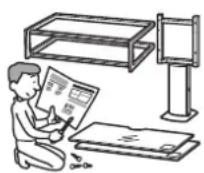
This product should only be installed by qualified Sony service representatives, as it requires at least two people, special care, safety, and technique.
WARNING
If the safety precautions are not observed or the product is used incorrectly, it may result in serious injury or fire.
This instruction manual shows the correct handling of the product and important precautions necessary to prevent accidents. Be sure to read this manual thoroughly and use the product correctly. Keep this manual available for future reference.
For Sony dealers
Installation of a TV requires two people, special care and technique. When installing a TV, refer to this manual carefully. Sony is not liable for any accidents or damages caused by incorrect installation or handling. Please give this manual to the customer after installation.
On Safety
Products by Sony are designed with safety in mind. If the products are used incorrectly, however, it may result in a serious injury through fire, electric shock, the product toppling over, or the product dropping. Be sure to observe the precautions for safety to prevent such accidents.
CAUTION
This TV Stand is intended for use only with the following products. Use with other apparatus is capable of resulting in instability causing possible injury.
Specified products (As of July 2006)
| LCD color TV | KDL-52X2000 |
| KDL-46X2000 | |
| KDL-40X2000 | |
| KLV-52X200A | |
| KLV-46X200A | |
| KLV-40X200A |
For other TVs, refer to their operating instructions to check if this TV Stand can be used.
WARNING
If the following precautions are not observed, serious injury or death through fire, electric shock, the product toppling over, or the product dropping can result.
This product should only be installed by qualified Sony service representatives.
Installation by other, non-qualified persons may result in serious injury, as the TV and the TV Stand are very heavy.
Be sure to take measures to prevent the TV Stand from toppling over.
If you fail to do so, the TV may topple over and cause injury. Anchor the TV to a wall, pillar, etc., to prevent toppling over.
Be sure to install the TV Stand on a solid and flat floor.
Do not install the TV Stand so that it leans in one direction. If you do so, the TV Stand may topple over or the TV may fall. This may cause injury.
If you install the TV Stand on a soft surface such as a mat or a carpet, lay a board over the designated location beforehand.
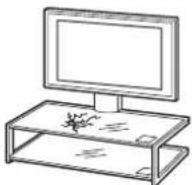
Do not use a cracked TV Stand.
Do not use the TV Stand if any cracks appear in it.
The glass may break and the TV may fall, or the TV Stand may topple over. This may cause injury. Cracked TV Stand
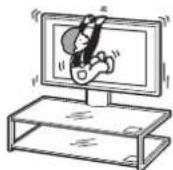
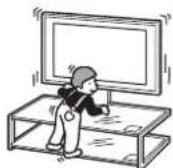
Do not lean on or hang from the TV when it is attached to the TV Stand.
The TV Stand may topple over, or the TV may fall and cause serious injury or death.
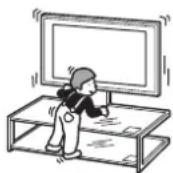
Do not allow children to climb on the TV Stand or crawl between the shelves.
If children climb on the TV Stand or get between the shelves, serious injury or death can result by the glass breaking, the TV Stand toppling over, or the TV falling.
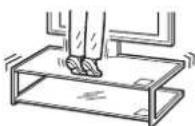
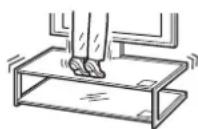
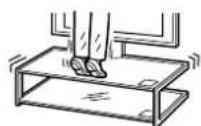
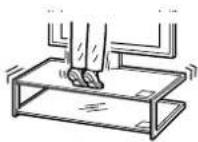
Do not step on the TV Stand.
You may fall, or break the glass and cause injury.
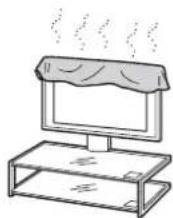
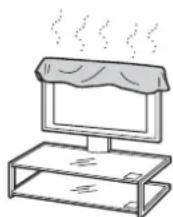
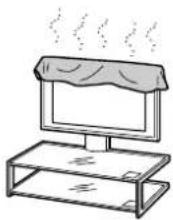
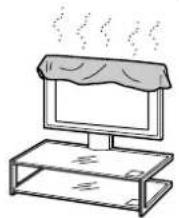
Do not cover the ventilation hole of the TV.
If you cover the ventilation hole (with a cloth, etc.), heat may build up inside and cause fire.
Do not allow the AC power cord or the connecting cable to be pinched.
- Do not allow the AC power cord or the connecting cable to be pinched when you install the TV on the TV Stand. If the AC power cord or the connecting cable is damaged, this may result in fire or electric shock.
- Do not step on the AC power cord or the connecting cable when you carry the TV Stand. The AC power cord or the connecting cable may be damaged, and this may result in fire or electric shock.
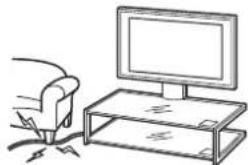
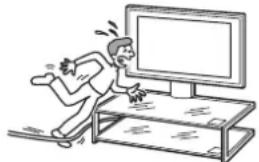
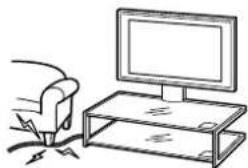
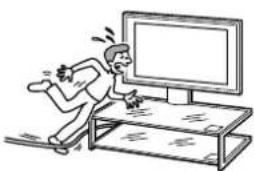
Do not stumble over the AC power cord or the connecting cables.
You may trip, or the TV Stand may topple over and cause injury.
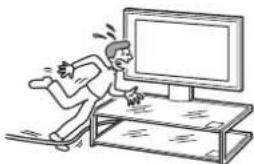
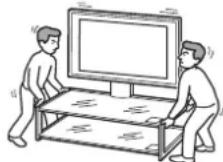
Do not move the TV Stand with the TV attached or with connected equipment inside.
If you move the TV Stand with the TV attached, it may hurt your back, or the TV Stand may topple over and cause serious injury. Also, any connected equipment within may drop, causing the glass shelf to break or other property damage.
CAUTION
If the following precautions are not observed, injury or property damage may occur.
Do not install any equipment other than the specified product.
- This TV Stand is designed for use with the specified product only. If you install equipment other than specified, it may fall or break and cause injury.
- Do not place objects such as vases, pottery, etc., on the TV Stand.
- Do not modify the TV Stand.
- Do not place anything hot directly on the TV Stand. The heat may cause discoloration or deformation of the TV Stand.
- Do not place anything directly on the TV Stand that may damage the glass.
Be sure to secure the TV.
Secure the TV to the TV Stand using the supplied anchor attachments. If the TV is not installed securely, it may fall, or the TV Stand may topple over and cause injury.
Do not apply weight to the glass or subject it to any kind of impact.
Do not apply weight to the TV Stand with your hand when installing the TV. Do not hit the TV Stand with hard objects, such as a screwdriver, etc. The glass may break and cause injury.
When carrying the TV Stand
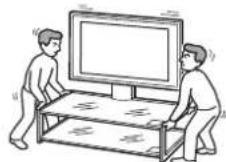
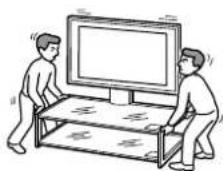
Trying to move the TV Stand alone, or without following the proper procedures, may cause injury. To avoid this, be sure to follow the advice given below.
- Be sure that two or more persons carry the TV Stand, and only after removing the TV, connected equipment and glass shelves.
- Do not drag the TV Stand. The base parts of the TV Stand may come off and damage the floor.
- Be careful not to allow your hands or feet to be pinched under the bottom plate.
- Do not grab the glass shelf when carrying the TV Stand.
Do not subject the glass to excessive shock.
This TV Stand is made of tempered glass, but care should be taken.
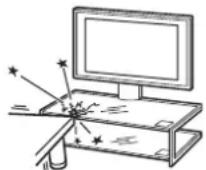
If the glass breaks, glass fragments could cause injury, so observe the precautions below.
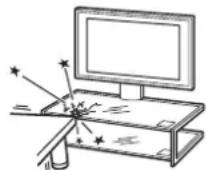
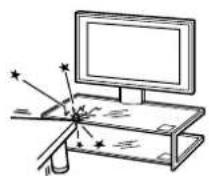
- Do not hit the glass or drop sharp-pointed objects on the glass. Avoid excessive shock.
- Do not scratch or poke the glass with sharp-pointed objects.
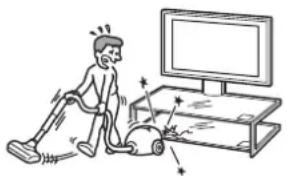
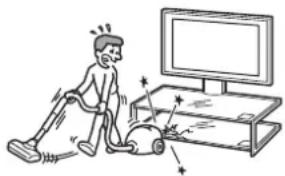
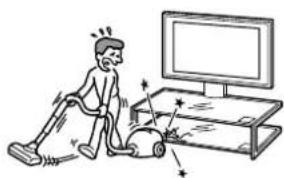
- Do not let hard objects such as a vacuum cleaner hit the edges of the glass.
Note on carrying capacity
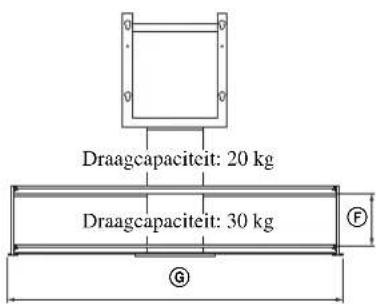
Do not place any equipment which exceeds the maximum weight for each shelf as indicated in the illustration. Otherwise, the shelves may break.
SU-FL61:48 kg (105 lb 14 oz)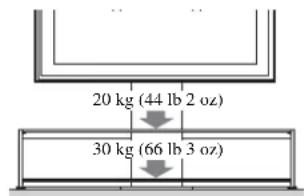
Notes on installation
- When assembling, lay the packing materials on the floor to avoid damage to the floor.
- Install the TV Stand on a solid and flat floor. Do not allow the TV Stand to be installed at an angle or incline. To avoid this, observe the following precautions.
- If you install the TV Stand on a soft surface such as a mat or a carpet, lay a board over the designated location beforehand.
- Do not install the TV Stand in a place subject to direct sunlight or near a heater.
- Do not install the TV Stand in a hot or humid place, or outdoors.
Note on use
To keep the TV Stand clean, occasionally wipe the TV Stand with a dry soft cloth. Stubborn stains may be removed with a cloth slightly dampened with diluted detergent. Then wipe the area with a dry soft cloth. Do not use chemicals, such as thinner or benzine, as they damage the finish of the TV Stand.
To Sony dealers
Be sure to thoroughly read the safety precautions described previously and pay special attention to safety during the installation, maintenance, checking, and repair of this product.
Be sure that two or more persons do the installation work.
Be sure that two or more persons install the TV on the TV Stand. If one person does the installation work alone, this may result in an accident or injury. Be sure to keep children away during the installation.
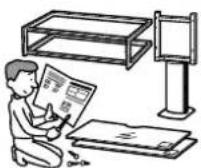
Be sure to assemble the TV Stand securely following the instructions.
If a screw is not tightened securely, or it is dropped, the TV Stand may topple over. This may cause damage or injury.
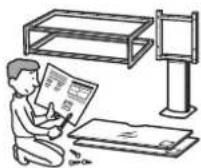
Be careful not to injure your hands or fingers during installation.
Be careful not to pinch your fingers or hands when assembling the TV Stand and installing the TV.
Be sure to install the TV securely following the instructions.
Tighten the screws securely. If the TV is not installed securely, it may fall and cause injury.
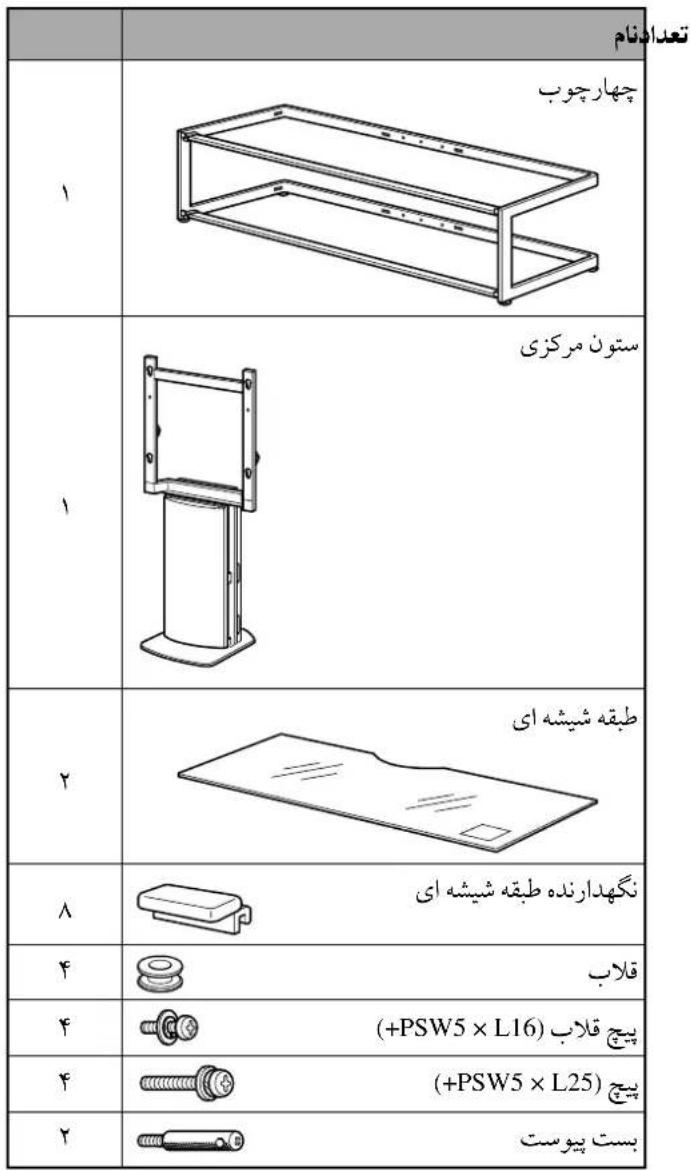
Check the parts
| Name Quantity | |
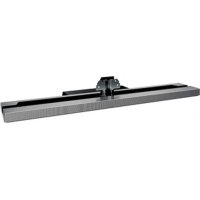
| Frame | 1 |
| Center pillar | 1 |
| Glass shelf | 2 |
| Glass shelf support | 8 |
| Hook | 4 |
| Hook screw (+PSW5 × L16) | 4 |
| Screw (+PSW5 × L25) | 4 |
| Anchor attachment 2 |
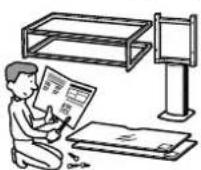
Be sure to have a Phillips screwdriver that fits the screws indicated above prior to the assembly.
Assemble the TV Stand
WARNING
If you allow the AC power cord to be pinched under or between pieces of equipment, this may result in a short circuit or an electric shock. If you stumble over the AC power cord or the connecting cable, the TV Stand may topple over and cause injury.
Decide on the installation location and lay the TV Stand down before installing the TV.
Since the TV is heavy, it is recommended that you decide on the installation location and lay the TV Stand down before installing the TV.
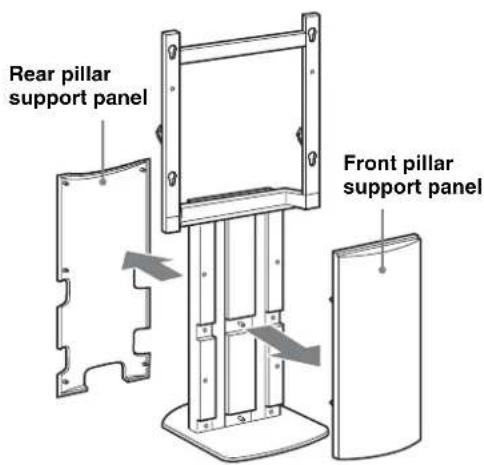
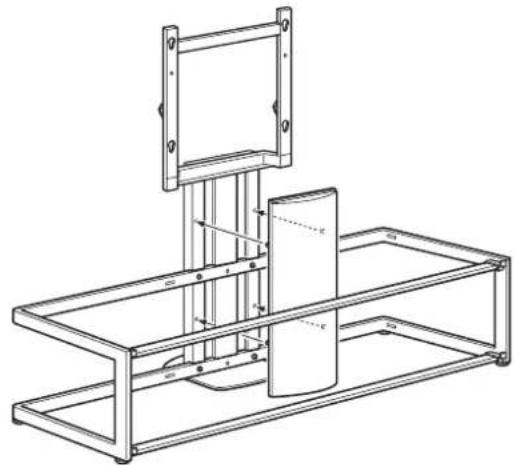
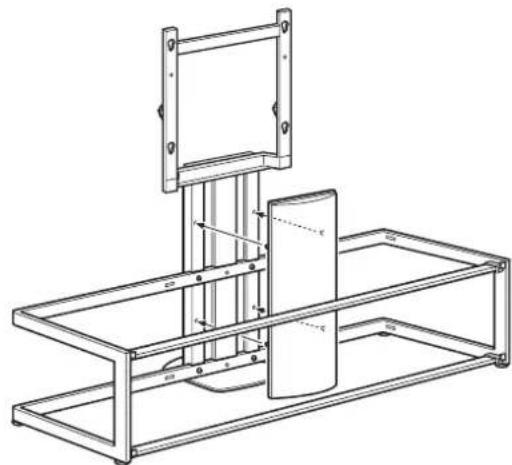
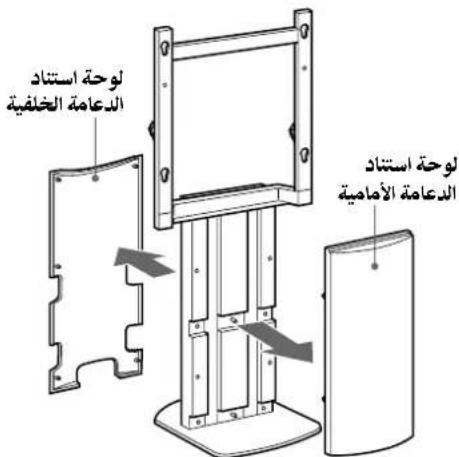
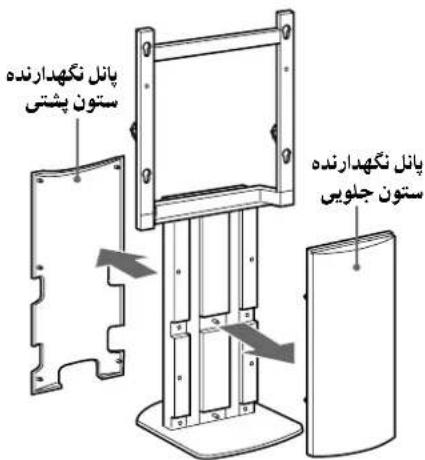
1 Detach the front and rear pillar support panels from the center pillar.
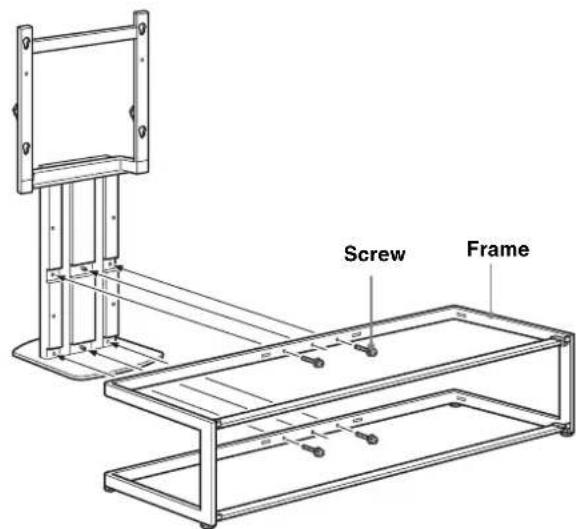
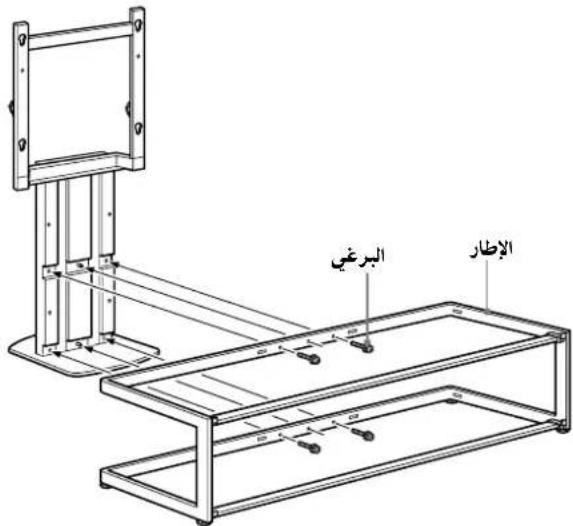
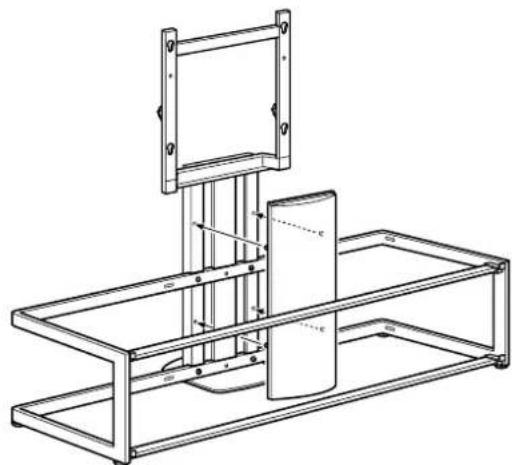
2 Attach the center pillar to the frame.
Secure the center pillar to the frame with the four screws.
Notes
- Be sure that two or more persons assemble the TV Stand.
- Loosely attach the center pillar to the frame with the four screws, then tighten all screws sufficiently.
- When using an electric screwdriver, set the torque setting to approximately 1.5 N·m (15 Kgf·cm).
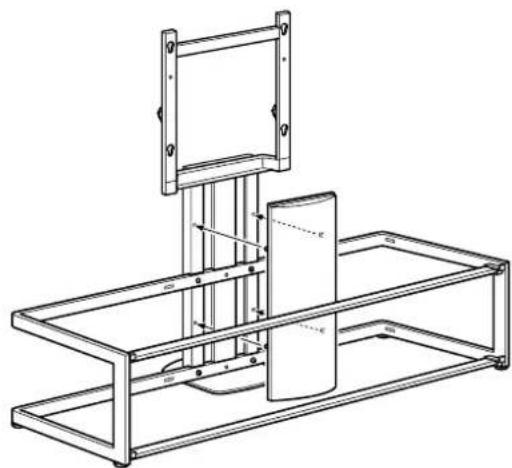
3 As shown below, attach the front pillar support panel.
Note
Before attaching the front pillar support panel, check that the four screws are firmly tightened.
Install the TV
1 Prepare for the installation of the TV.
Detach the Table-Top Stand (if attached) and remove the two screws from the rear of the TV. For details, refer to the leaflet supplied with the TV.
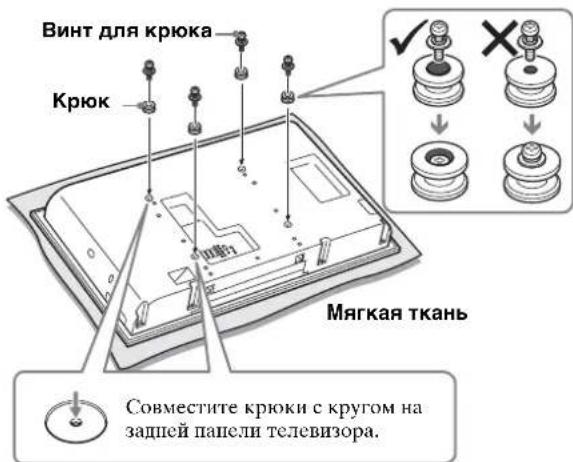
2 Attach the four hooks on the rear of the TV.
Place the TV with its screen facing down on a stable cloth-covered work surface. Attach the four hooks with the four hook screws.
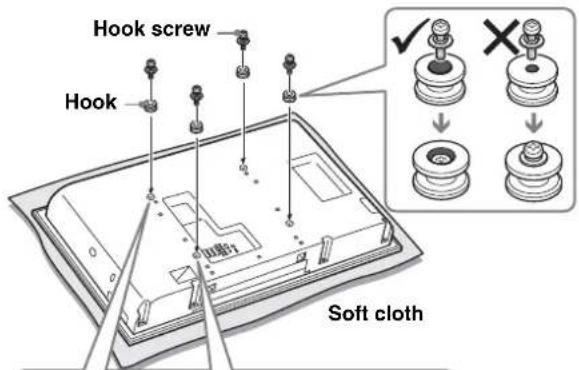

Align the hook with the circle on the rear of the TV.
Notes
- When using an electric screwdriver, set the torque setting to approximately 2 N·m (20 Kgf·cm).
- Be sure not to use any screws other than the supplied ones (PSW5 × L16) when attaching the hooks.
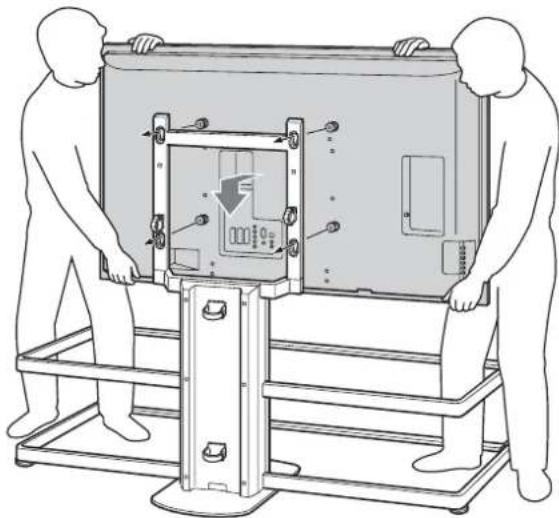
3 Attach the TV to the TV Stand.
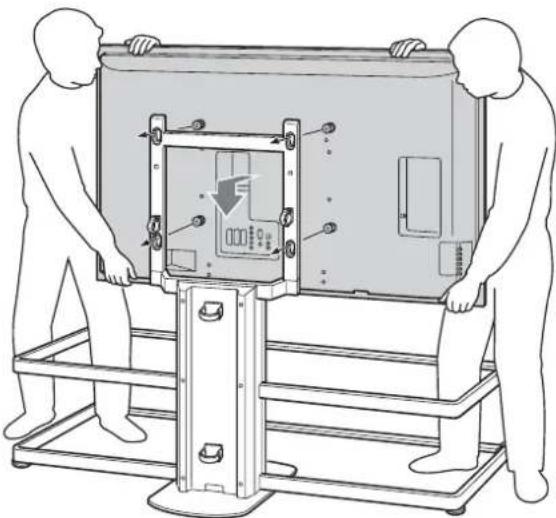
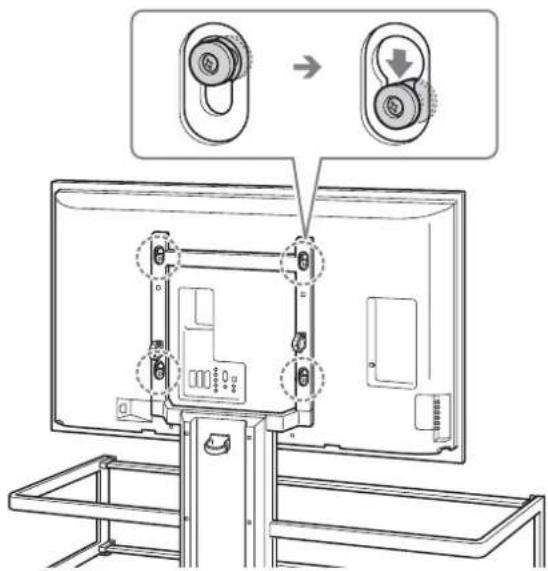
Hold the TV as illustrated below, and insert the four hooks on the rear of the TV into the top portion of the holes of the center pillar. Check that all four hooks are firmly secured in the four holes.
Note
Be careful not to topple the TV Stand when attaching the TV to the TV Stand.
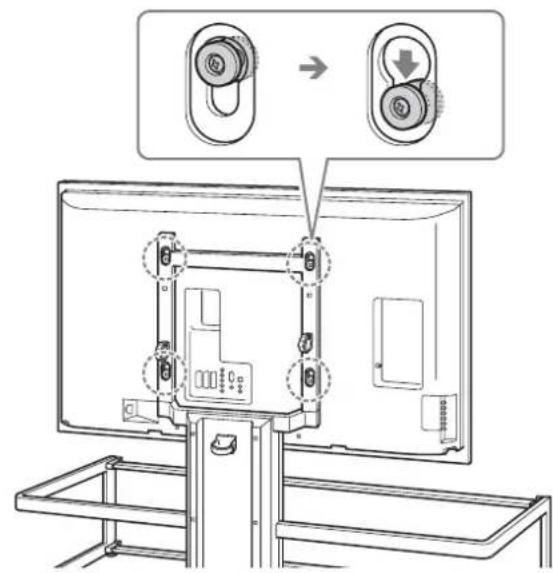
Push the TV straight down to securely seat the hooks into the TV Stand as shown.
Notes
- Confirm the hooks are firmly seated into the bottom of the holes, then check that the TV hangs parallel level.
- Be careful not to move the TV Stand while attaching the TV.
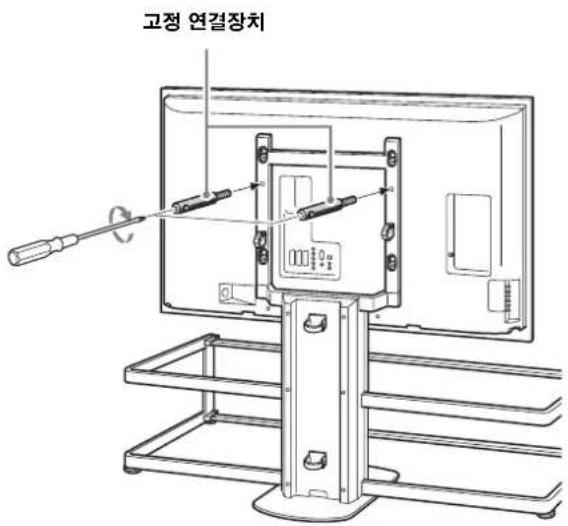
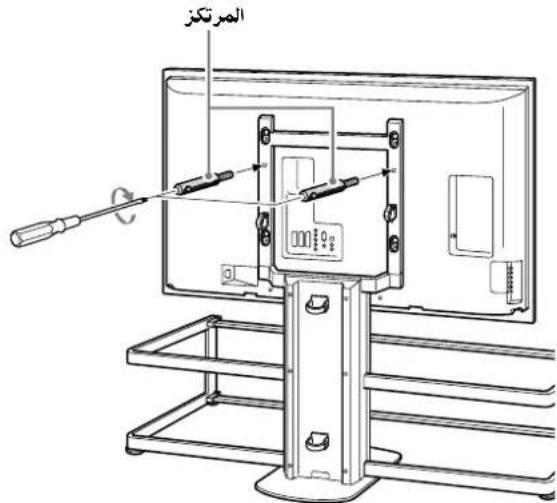
4 Secure the TV and the TV Stand with the two anchor attachments.
Be sure to tighten the attachments with a screwdriver.
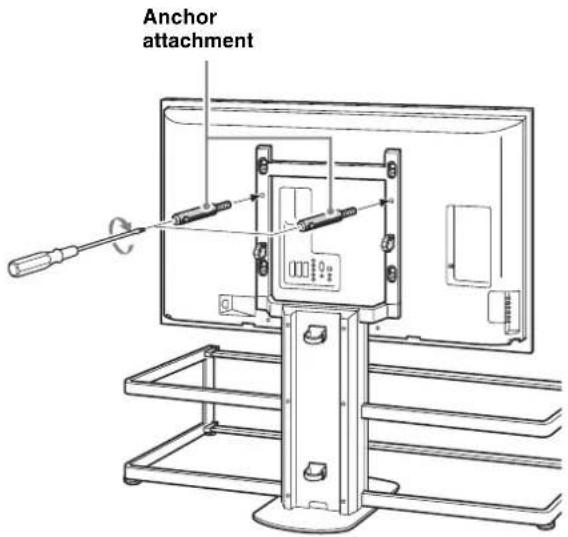
Notes
If the two anchor attachments are not used to secure the TV, it may fall and cause injury. - When using an electric screwdriver, set the torque setting to approximately 1.5 N·m (15 Kgf·cm).
Attach the glass shelves
1 Attach the eight glass shelf supports to the frame.
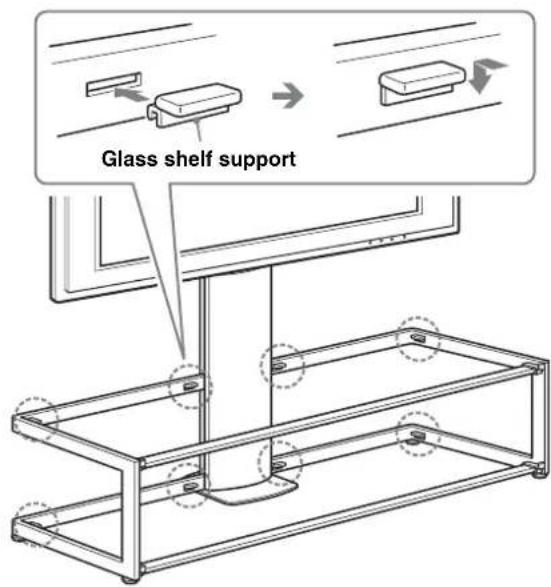
Note
Insert the glass shelf supports into the holes of the frame, checking that they are parallel and level.
2 Install the lower glass shelf first, and then install the upper glass shelf.
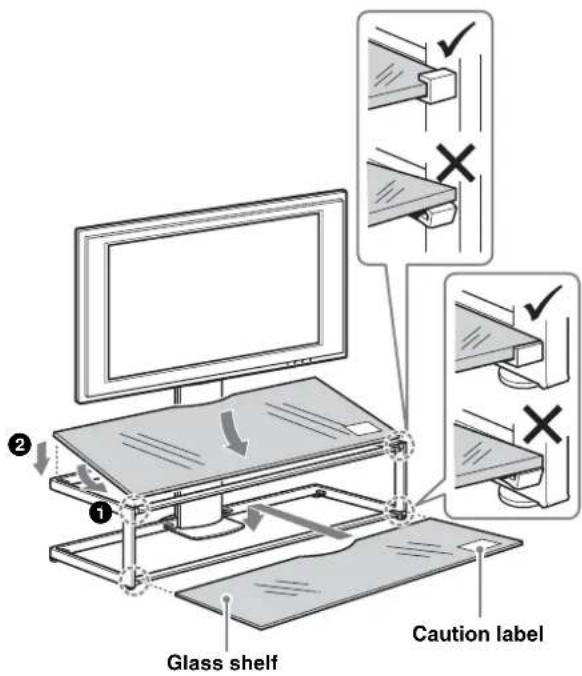
Notes
- Be careful not to pinch your fingers between the frame and glass shelves when installing the glass shelves.
- Insert the glass shelf after installing the TV on the TV Stand, otherwise, you may hit the glass with the TV during installation and product damage or personal injury may result.
- Attach the glass shelves to the TV Stand with the "caution" label at front right, as shown in the illustration.
Connect the cables
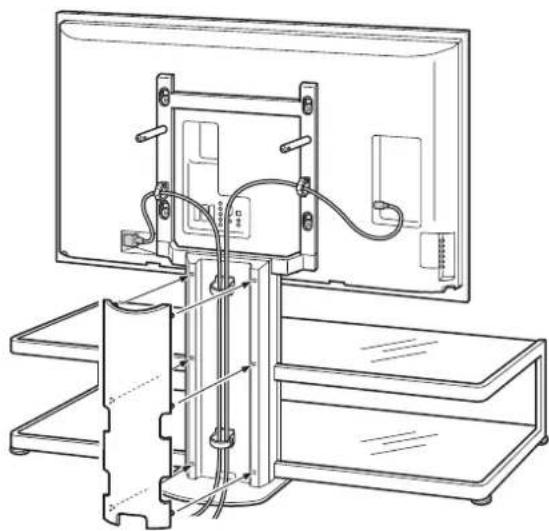
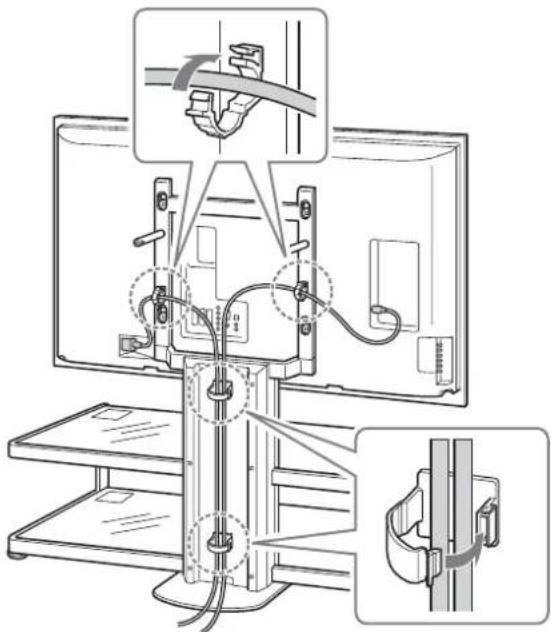
1 Connect the AC power cord and other cables to the TV.
Attach the cables and run them through the cable holders, and down the rear of the center pillar.
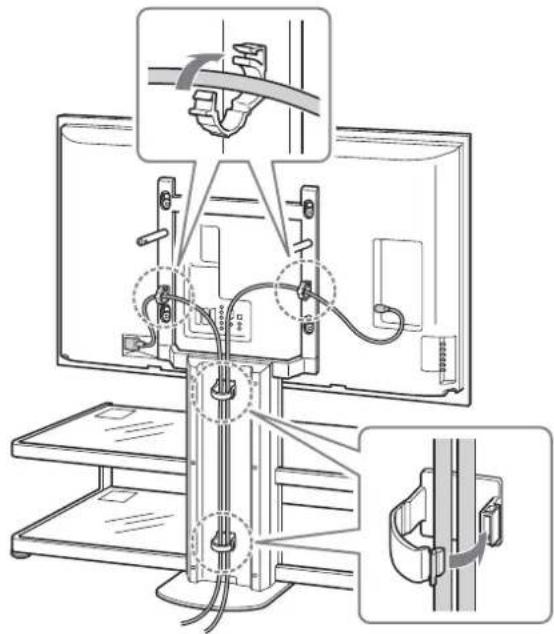
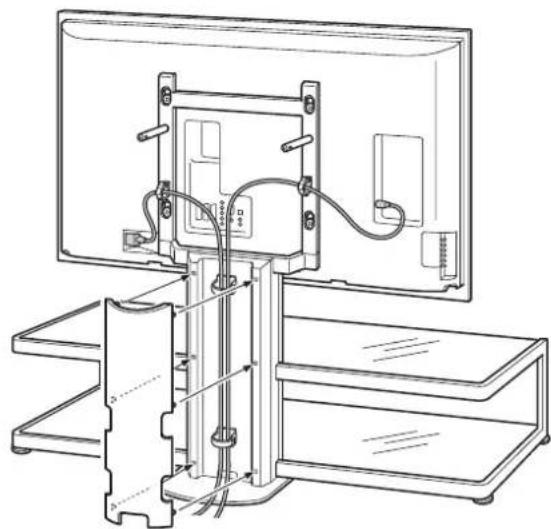
2 Attach the rear pillar support panel.
Safety measures to prevent toppling over
WARNING
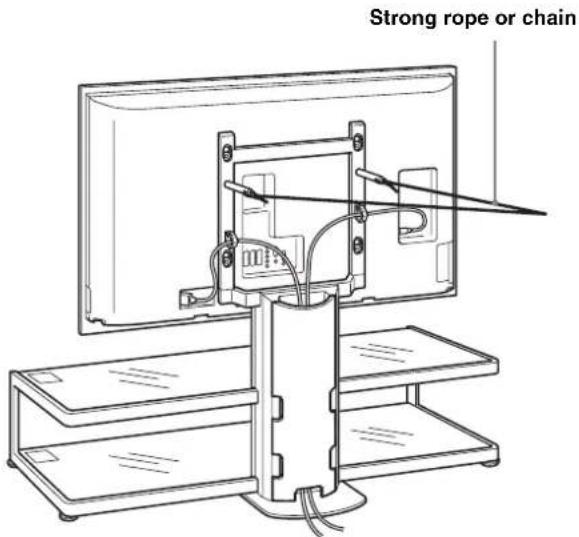
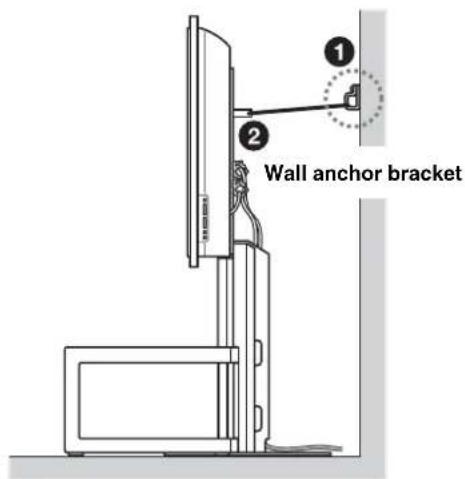
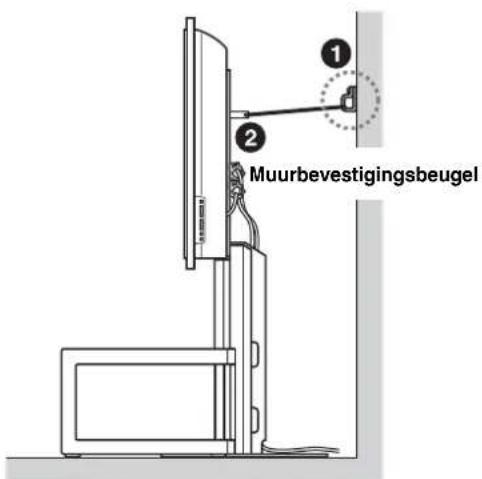
Be sure to take measures to prevent the TV Stand from toppling over, otherwise, the TV may topple over and cause injury. Anchor the TV to a wall, pillar, etc.
Prepare a strong, commercially-available rope or chain and wall anchor bracket for this purpose.
Secure the wall anchor bracket to a solid wall or pillar. Pass the rope or chain through both holes of the anchor attachments and then tighten the other end of the rope or chain to the wall anchor bracket.
Specifications

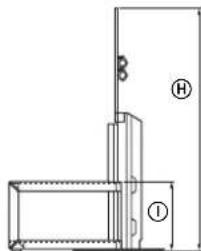
Note on carrying capacity
Do not place any equipment which exceeds the maximum weight of the glass shelves as it may break and cause injury.
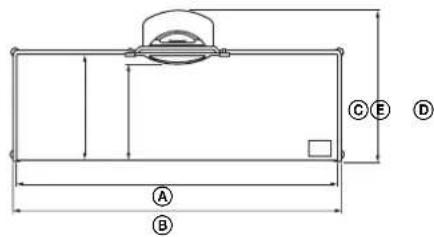
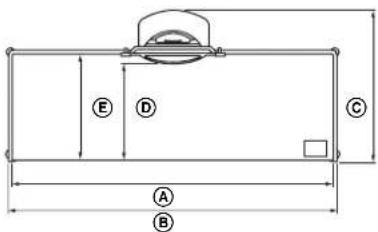
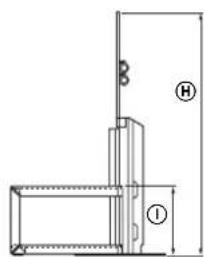
| Dimensions: mm (inches) | A | 1,393 (54 7/8) |
| B | 1,425 (56 1/8) | |
| C | 616 (24 3/8) | |
| D | 419 (16 1/2) | |
| E | 462 (18 1/4) | |
| F | 220 (8 3/4) | |
| G | 1,451 (57 1/4) | |
| H | 1,045 (41 1/4) | |
| I | 297 (11 3/4) | |
| Weight: 48 kg (105 lb 14 oz) | ||
Design and specifications are subject to change without notice.
Fix the glass shelves
Make sure to secure the TV.
Strong rope or cable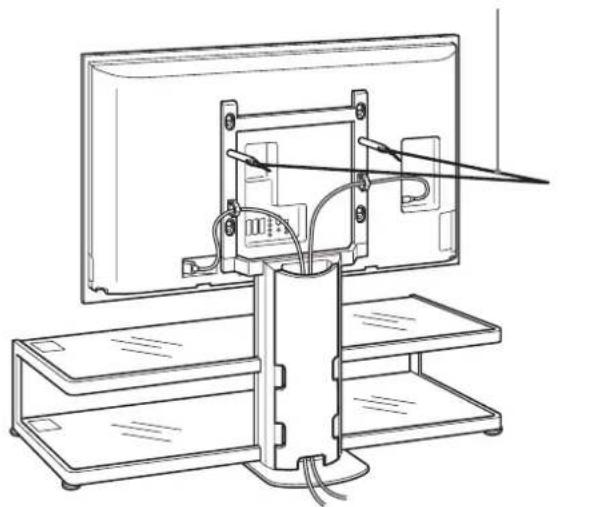
Technical data
Install the stand only on a solid and level floor.
Install the stand so that it is not tilted to any side. If it is tilted, the stand may tip over and the TV may fall. This may result in injury.
When installing the stand on a soft surface, such as a carpet or rug, place a hard board under it in advance.
Do not use a cracked stand.
Do not use the stand if cracks appear on it.
The glass may break, which may cause the TV to fall or the stand to tip over. This may result in injury.
Typical installation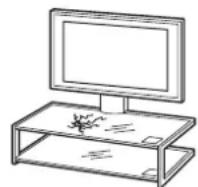
Do not lean on the TV or hang on it if it is installed on a stand.
The stand may tip over, the TV may fall and cause serious injury or death.
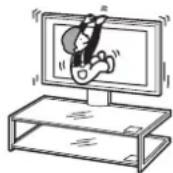
Do not allow children to climb on the stand or on the TV.
If children climb on the stand or on the TV, the glass may break, the stand may tip over, and the TV may fall, which could cause serious injury or death.
Do not stand on the stand.
You may fall or break the glass, and get injured.
Do not cover the ventilation opening on the TV.
If the ventilation opening is covered (with cloth, etc.), the temperature inside the device may rise, which could lead to fire.
Do not allow the power cord and connecting cable to be pinched.
Do not allow the power cord and connecting cable to be pinched when installing the TV on the stand. If the power cord or connecting cable is damaged, fire or electric shock may occur.
- When moving the stand, be careful not to step on the power cord or connecting cable. The power cord or connecting cable may be damaged, which could lead to fire or electric shock.
Be careful not to trip over the power cord or connecting cables.
You may fall or tip over the stand and get injured.
Do not place the stand with the TV installed and equipment connected on an interior floor.
If you attempt to move the stand with the TV installed, you may damage the TV, or the stand may tip over and cause serious injury.
In addition, any attached equipment on the internal shelf may fall and break the glass shelf or damage other property.
WARNING
If the following precautions are not observed, there is a risk of injury or property damage.
This stand is intended for use only with the specified product.
- If you install equipment other than the specified one, it may fall or break, and may also cause injury. Do not place foreign objects on the stand, such as vases, ceramics, etc. Do not modify the stand structure.
- Do not place hot objects on the stand. High temperatures may cause burns or deformation of the stand. Do not place objects on the stand that could break the glass.
Be sure to secure the TV.
Secure the TV to the stand using the provided anchor screws. If this is not done, the TV may fall or the stand may tip over, which could cause injury.
Do not subject the glass to excessive weight or any impacts.
Do not subject the glass to excessive weight, lean on it with your hands during TV installation, or strike the stand with hard objects such as screwdrivers. The glass may break and cause injury.
When moving the stand
Attempting to move the stand alone and without following proper procedures may result in injury. To prevent this, be sure to follow the instructions below.
The stand must be moved by two or more people, and only after removing the TV, attached equipment, and glass shelves. Do not drag the stand. The base components may detach and damage the floor. Make sure that hands or feet are not caught under the base. - When carrying the stand, do not hold onto the glass shelf.
Do not subject the glass to strong impacts.
Tempered glass is used, but caution is still required. If the glass breaks, its fragments may cause injury, so the precautions described below must be observed.
Do not hit the glass or drop sharp objects on it. Avoid strong impacts. Do not scrape or hit the glass with sharp objects. Do not allow impacts to the edges of the glass with hard objects, such as a vacuum cleaner.
Load capacity
Do not place equipment on the shelves whose total weight exceeds the maximum permissible weight, as shown in the figure.
Otherwise, the shelves may break.
SU-FL61:48 kg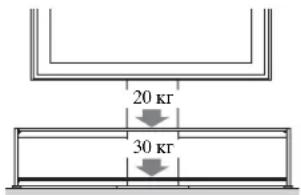
At least two people must participate in the installation.
At least two people must participate in installing the TV on the stand. If only one person performs the installation, an accident or injury may occur. Do not allow children to be nearby during installation.
Be sure to securely fasten the stand, following the instructions.
If the screws are not tightened completely, the stand may tip over. This may cause injury or property damage.
Be careful not to injure your hands or fingers during installation.
Be careful not to injure your hands or fingers when assembling the stand and installing the TV.
Be sure to securely install the TV, following the instructions.
Tighten the screws securely. If the TV is installed improperly, it may fall and cause injury.
Before attaching the rear cover of the stand, make sure that all four screws are securely tightened.
TV stand installation
1 Prepare for TV installation.
Disconnect the tabletop stand (if it is attached) and remove the two screws on the back panel of the TV. More detailed information can be found in the brochure included with the TV.
2 Attach the four brackets to the back panel of the TV.
Place the TV screen down on a soft cloth on a stable surface. Attach the four brackets with the special screws.
Note
- If using an electric screwdriver, the tightening torque should be approximately 2 N·m {20 kgf-cm}. - Only the supplied screws (+PSW5× L16) may be used for bracket installation.
3 Secure the TV on the stand.
Holding the TV as shown in the figure below, insert the four brackets on the back panel of the TV into the holes on the stand column. Make sure that all four brackets are firmly secured in the four holes.
Note
Be careful not to drop the stand while the TV is attached. Press down on the TV from top to bottom to lock the brackets onto the stand, as shown in the figure below.
Note
- Make sure that the brackets are fully inserted into the holes, and then check that the TV is positioned horizontally. Be careful not to move the stand during TV installation.
4 Attach the TV to the stand using the two anchor screws.
Be sure to tighten the screws with a screwdriver.
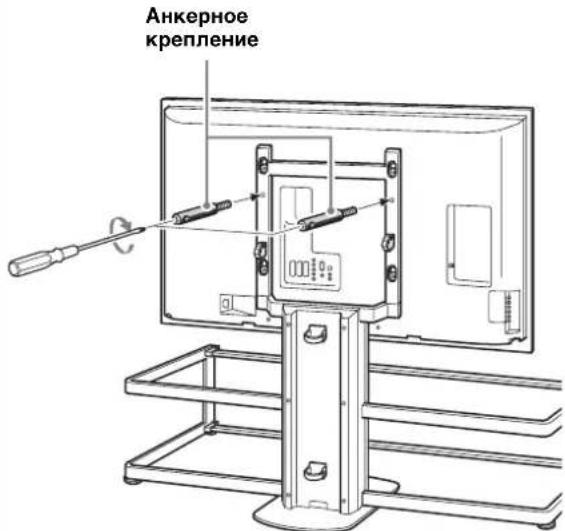
If using two anchor fasteners for the TV stand, it may fall and cause injury. - If using an electric screwdriver, the tightening torque should be approximately 1.5 N·m {15 Kgf·cm}.
Installation
Glass shelves
1 Attach the eight supports for the glass shelves to the frame.
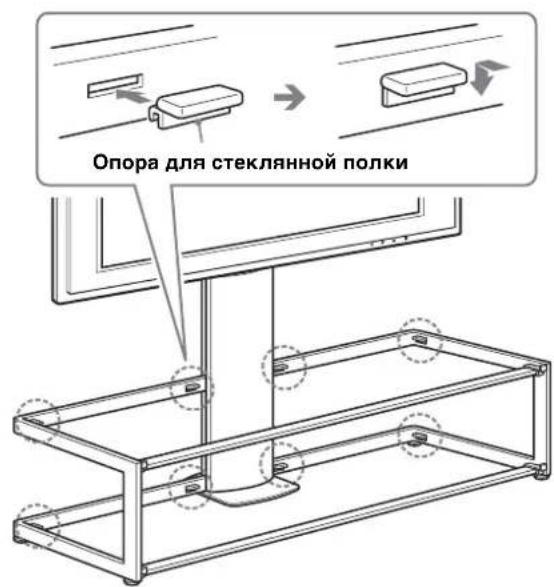
Note
Insert the glass shelf supports into the frame holes, making sure they are positioned horizontally.
2 First install the lower glass shelf, then the upper one.
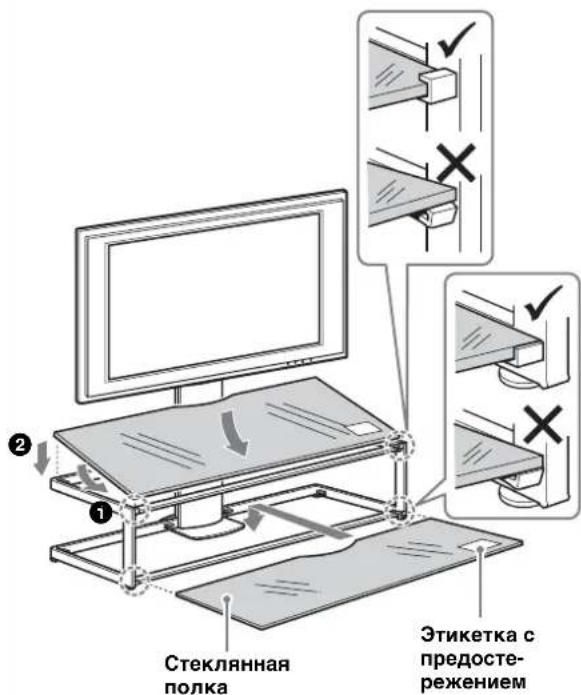
Note
Be careful not to pinch your fingers with the glass shelves during installation. Install the glass shelf after the TV is placed on the stand; otherwise, you may damage the glass or injure yourself or others. When installing the glass shelf with the TV, hold it so that the label with "Caution" is on the front and right, as shown in the figure.
Cable connection
1 Connect the power cable and other cables to the TV.
Connect the cables, routing them through the cable holders and guiding them along the back of the stand.
2 Install the back cover of the stand.
2
∴ S ΔOBC = S ΔCOD + SΔBOC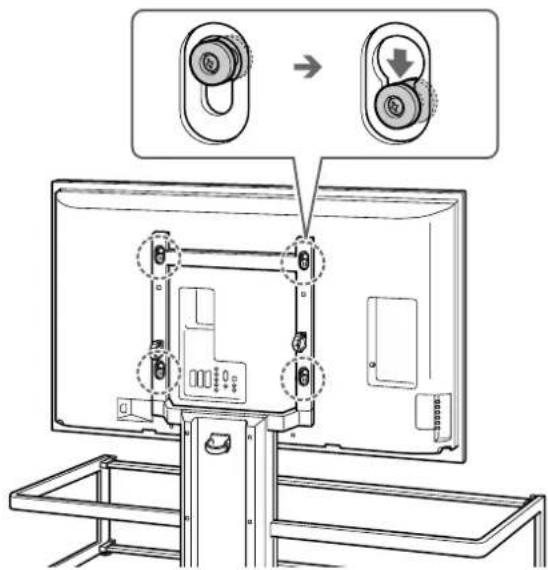
.
∴ S ΔOBC = S ΔCOD + SΔBOC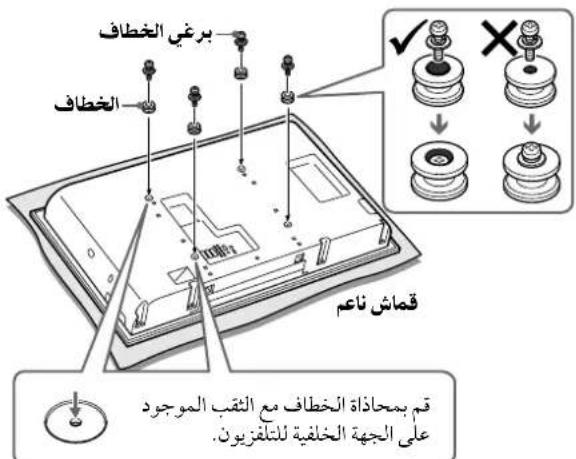
1
∴ BAC = 90 °
1
2
joo
J 10000000000000000000000000000000000000000000
aolalolull 1g Jd
1
e ball
Sony
a 10000000000000000000000000000000000000000000000000000
aagg g gaaalla
.
λ :SU-FL61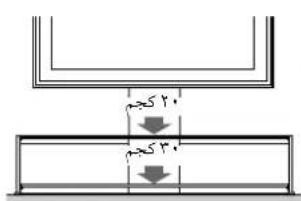

Therefore, a_i = 40%
A
5 15
1 1 j 1000000000000000000000000000000000000000000
1
i5
Sony
gaiy Ss y 45 jolol jinabol Jol5 gj r0d0o0g jd 45 (Sjg, cui jLg g uig G iaiygo 4uugao 1jnnn g.
aai j5 jai gdo 5 joljnlab
1 1 1 1 1 1 1 1 1 1 1 1 1 1 1 1 1 1 1 1 1 1 1 1 1 1 1 1 1 1 1 1 1 1 1
Jaaalrgd jSgryb45 Jus Joljiaab 1. gaooszo ayjogjgl aIyla
L 1uLuluiuuiuue uuuuue uuuuue uuuuue uuuuue uuuuue uuuuue uuuuue uuuuue uuuuue uuuuue uuuuue uuuuue uuuuue uuuuue uuuuue uuuuue uuuuue uuuuue uuuuue uuuuue uuuuue uuuuue uuuuue uuuuue uuuuue uuuuue u
y 45
a 1
Jaaalrgd jSgryb45 JisLoljlaab1
0000 4 00001. 15 c 000000001, 15
- THANK YOU FOR PURCHASING THIS PRODUCT
- FOR CUSTOMERS
- WARNING
- FOR SONY DEALERS
- ON SAFETY
- CAUTION
- SPECIFIED PRODUCTS (AS OF JULY 2006)
- THIS PRODUCT SHOULD ONLY BE INSTALLED BY QUALIFIED SONY SERVICE REPRESENTATIVES
- BE SURE TO TAKE MEASURES TO PREVENT THE TV STAND FROM TOPPLING OVER
- BE SURE TO INSTALL THE TV STAND ON A SOLID AND FLAT FLOOR
- DO NOT USE A CRACKED TV STAND
- DO NOT LEAN ON OR HANG FROM THE TV WHEN IT IS ATTACHED TO THE TV STAND
- DO NOT ALLOW CHILDREN TO CLIMB ON THE TV STAND OR CRAWL BETWEEN THE SHELVES
- DO NOT STEP ON THE TV STAND
- DO NOT COVER THE VENTILATION HOLE OF THE TV
- DO NOT ALLOW THE AC POWER CORD OR THE CONNECTING CABLE TO BE PINCHED
- DO NOT STUMBLE OVER THE AC POWER CORD OR THE CONNECTING CABLES
- DO NOT MOVE THE TV STAND WITH THE TV ATTACHED OR WITH CONNECTED EQUIPMENT INSIDE
- DO NOT INSTALL ANY EQUIPMENT OTHER THAN THE SPECIFIED PRODUCT
- BE SURE TO SECURE THE TV
- DO NOT APPLY WEIGHT TO THE GLASS OR SUBJECT IT TO ANY KIND OF IMPACT
- WHEN CARRYING THE TV STAND
- DO NOT SUBJECT THE GLASS TO EXCESSIVE SHOCK
- NOTE ON CARRYING CAPACITY
- NOTES ON INSTALLATION
- NOTE ON USE
- TO SONY DEALERS
- BE SURE THAT TWO OR MORE PERSONS DO THE INSTALLATION WORK
- BE SURE TO ASSEMBLE THE TV STAND SECURELY FOLLOWING THE INSTRUCTIONS
- BE CAREFUL NOT TO INJURE YOUR HANDS OR FINGERS DURING INSTALLATION
- BE SURE TO INSTALL THE TV SECURELY FOLLOWING THE INSTRUCTIONS
- CHECK THE PARTS
- ASSEMBLE THE TV STAND
- DECIDE ON THE INSTALLATION LOCATION AND LAY THE TV STAND DOWN BEFORE INSTALLING THE TV
- DETACH THE FRONT AND REAR PILLAR SUPPORT PANELS FROM THE CENTER PILLAR
- ATTACH THE CENTER PILLAR TO THE FRAME
- NOTES
- AS SHOWN BELOW, ATTACH THE FRONT PILLAR SUPPORT PANEL
- NOTE
- INSTALL THE TV
- PREPARE FOR THE INSTALLATION OF THE TV
- ATTACH THE FOUR HOOKS ON THE REAR OF THE TV
- ATTACH THE TV TO THE TV STAND
- SECURE THE TV AND THE TV STAND WITH THE TWO ANCHOR ATTACHMENTS
- ATTACH THE GLASS SHELVES
- ATTACH THE EIGHT GLASS SHELF SUPPORTS TO THE FRAME
- CONNECT THE CABLES
- CONNECT THE AC POWER CORD AND OTHER CABLES TO THE TV
- ATTACH THE REAR PILLAR SUPPORT PANEL
- SAFETY MEASURES TO PREVENT TOPPLING OVER
- SPECIFICATIONS
- FIX THE GLASS SHELVES
- MAKE SURE TO SECURE THE TV
- TECHNICAL DATA
- INSTALL THE STAND ONLY ON A SOLID AND LEVEL FLOOR
- DO NOT USE A CRACKED STAND
- DO NOT LEAN ON THE TV OR HANG ON IT IF IT IS INSTALLED ON A STAND
- DO NOT ALLOW CHILDREN TO CLIMB ON THE STAND OR ON THE TV
- DO NOT STAND ON THE STAND
- DO NOT COVER THE VENTILATION OPENING ON THE TV
- DO NOT ALLOW THE POWER CORD AND CONNECTING CABLE TO BE PINCHED
- BE CAREFUL NOT TO TRIP OVER THE POWER CORD OR CONNECTING CABLES
- DO NOT PLACE THE STAND WITH THE TV INSTALLED AND EQUIPMENT CONNECTED ON AN INTERIOR FLOOR
- THIS STAND IS INTENDED FOR USE ONLY WITH THE SPECIFIED PRODUCT
- DO NOT SUBJECT THE GLASS TO EXCESSIVE WEIGHT OR ANY IMPACTS
- WHEN MOVING THE STAND
- DO NOT SUBJECT THE GLASS TO STRONG IMPACTS
- LOAD CAPACITY
- AT LEAST TWO PEOPLE MUST PARTICIPATE IN THE INSTALLATION
- BE SURE TO SECURELY FASTEN THE STAND, FOLLOWING THE INSTRUCTIONS
- BE SURE TO SECURELY INSTALL THE TV, FOLLOWING THE INSTRUCTIONS
- TV STAND INSTALLATION
- PREPARE FOR TV INSTALLATION
- ATTACH THE FOUR BRACKETS TO THE BACK PANEL OF THE TV
- SECURE THE TV ON THE STAND
- ATTACH THE TV TO THE STAND USING THE TWO ANCHOR SCREWS
- INSTALLATION
- GLASS SHELVES
- ATTACH THE EIGHT SUPPORTS FOR THE GLASS SHELVES TO THE FRAME
- FIRST INSTALL THE LOWER GLASS SHELF, THEN THE UPPER ONE
- CABLE CONNECTION
- CONNECT THE POWER CABLE AND OTHER CABLES TO THE TV
- INSTALL THE BACK COVER OF THE STAND
- ∴ BAC = 90 °
- JOO
- E BALL
- SONY
- A
Brand : SONY
Model : SUFL61
Category : TV Stand