
GCL 250 Professional - Laser pointer BOSCH - Free user manual and instructions
Find the device manual for free GCL 250 Professional BOSCH in PDF.
 FR
FR
 BG
BG
 CS
CS
 DA
DA
 DE
DE
 EL
EL
 EN
EN
 ES
ES
 ET
ET
 FI
FI
 HU
HU
 ID
ID
 IT
IT
 JA
JA
 KK
KK
 KO
KO
 LT
LT
 LV
LV
 MK
MK
 NL
NL
 NO
NO
 PL
PL
 PT
PT
 RO
RO
 RU
RU
 SK
SK
 SL
SL
 SV
SV
 TH
TH
 TR
TR
 UK
UK
 VI
VI
 ZH
ZH
| Product Type | Point and Line Laser |
| Model | GCL 2-50 Professional (Article Number 3 601 K66 F00) |
| Laser Class | 2 |
| Laser Type | 630-650 nm, < 1 mW |
| Working Range (Standard) | 15 m (laser lines) |
| Working Range with Receiver | 5-50 m (laser lines) |
| Levelling Accuracy (Lines) | ±0.3 mm/m |
| Levelling Accuracy (Points) | ±0.7 mm/m |
| Self-Levelling Range | ±4° |
| Levelling Time | < 4 s |
| Operating Temperature | -10°C to +50°C |
| Storage Temperature | -20°C to +70°C |
| Batteries | 3 × 1.5 V LR6 (AA) |
| Operating Duration (Cross-line + Point) | 6 h |
| Weight (EPTA) | 0.49 kg |
| Dimensions (without rotating mount) | 112 × 55 × 106 mm |
| Dimensions (with rotating mount) | 132 × 81 × 163 mm |
| Protection Rating | IP54 (dust and splash-proof) |
| Operating Modes | Cross-line + point, Horizontal line, Vertical line, Point (with automatic levelling or pendulum lock) |
| Receiver Mode | Yes, for use with laser receiver (accessory) |
| Mounting Options | 1/4" and 5/8" tripod mount, rotating mount RM 1, universal holder BM 1 |
| Maintenance | Clean with damp cloth; store in protective bag or case |
| Safety | Laser warning label; do not stare into beam; keep away from children |
Frequently Asked Questions - GCL 250 Professional BOSCH
User questions about GCL 250 Professional BOSCH
0 question about this device. Answer the ones you know or ask your own.
Ask a new question about this device
Download the instructions for your Laser pointer in PDF format for free! Find your manual GCL 250 Professional - BOSCH and take your electronic device back in hand. On this page are published all the documents necessary for the use of your device. GCL 250 Professional by BOSCH.
USER MANUAL GCL 250 Professional BOSCH
GCL 2-50 Professional
Robert Bosch Power Tools GmbH
70538 Stuttgart
GERMANY
www.bosch-pt.com
1 609 92A 7LR (2022.05) TAG / 303

1 609 92A 7LR
natural_image
Technical illustration of a Bosch 3D printer with mounting base and internal components (no text or symbols)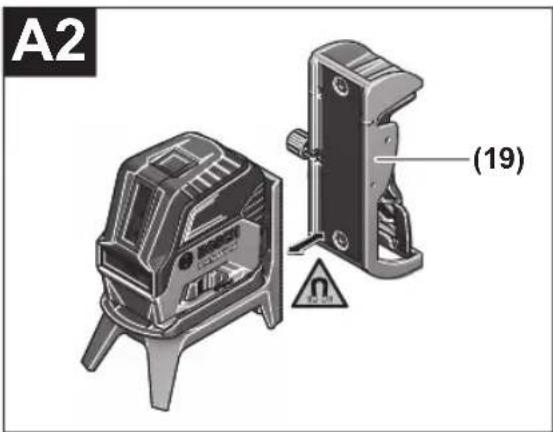
natural_image
3D rendering of a Bosch radar device with four legs and a central display (no text or symbols visible)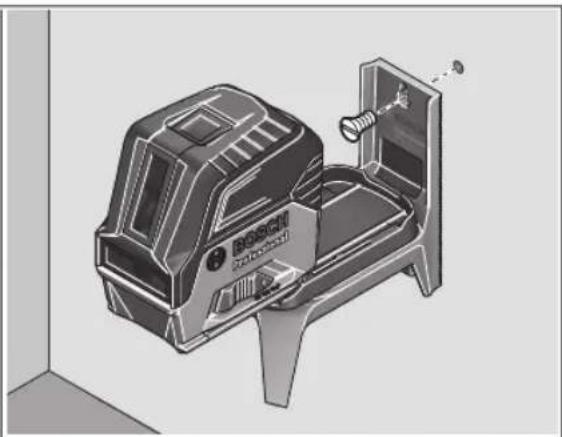
natural_image
3D technical illustration of a Bosch Ultrasonic vacuum cleaner with mounting bracket (no text or symbols)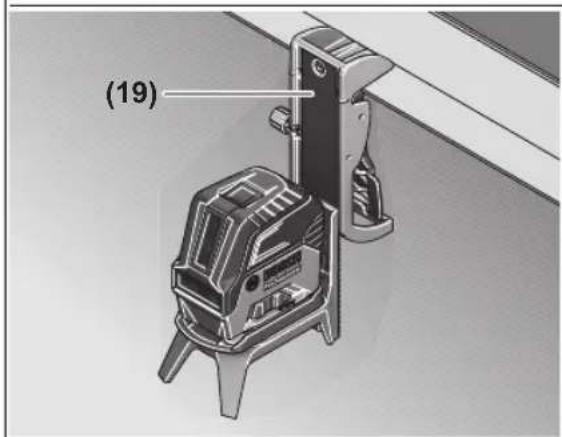
natural_image
Illustration of a 3D printer with warning symbol and logo (no readable text or symbols)5
natural_image
Diagram showing a camera on a tripod in a room with dashed lines indicating perspective projection (no text or symbols)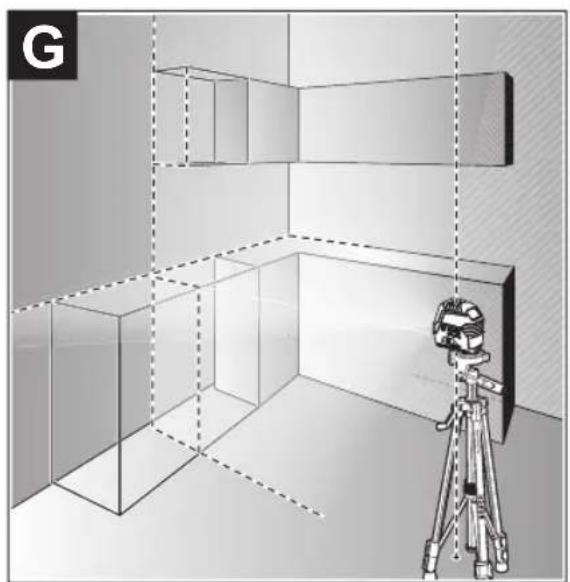
natural_image
3D perspective diagram of a room with shelves and a camera on a tripod, no text or symbols present6
natural_image
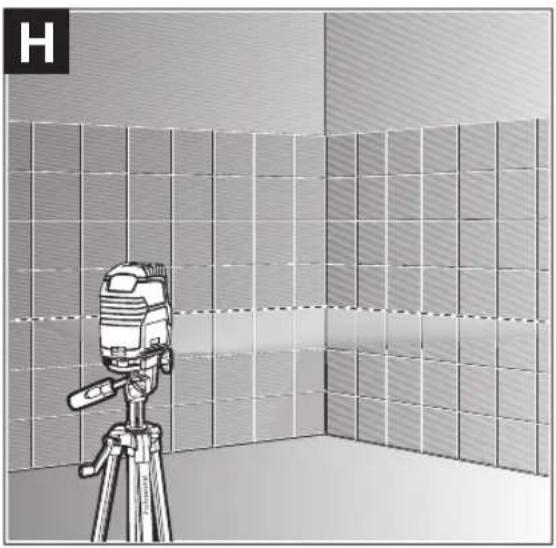
Illustration of a camera setup with a tripod and grid-patterned wall, no text or symbols present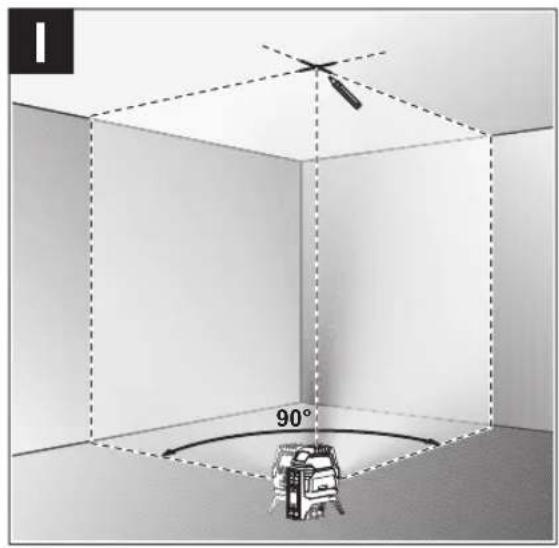
natural_image
Interior corner of a room with a ceiling-mounted device and a wall-mounted sensor, no visible text or symbols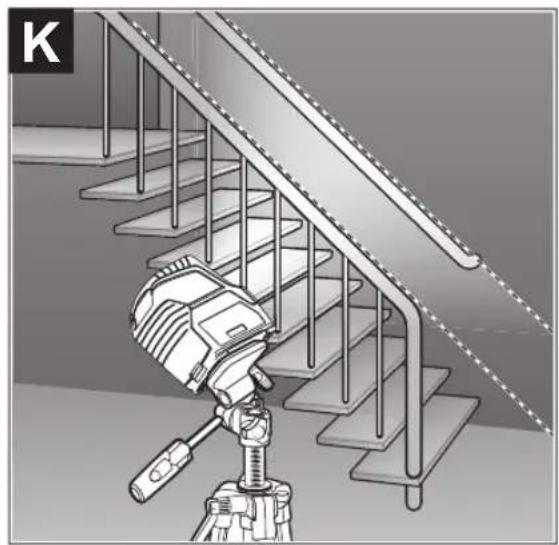
natural_image
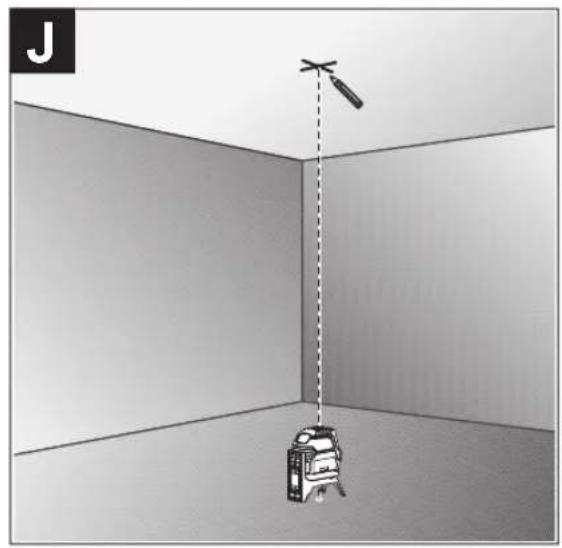
Illustration of a camera setup on a tripod-mounted staircase with metal railings (no text or symbols visible)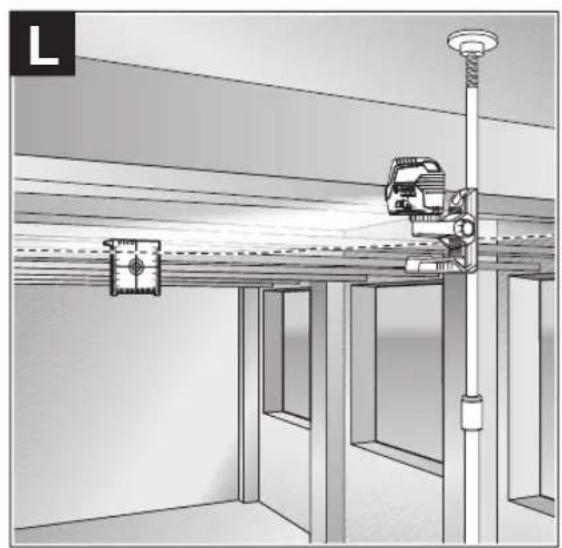
natural_image
Interior view of a room with ceiling-mounted equipment and a vertical pole, no visible text or symbols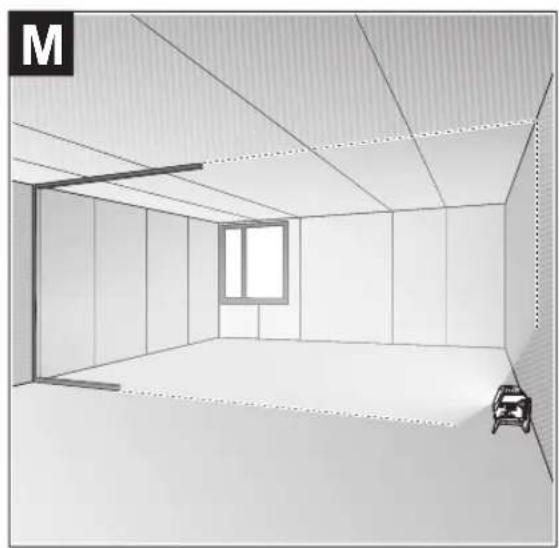
natural_image
Interior view of a room with ceiling panels, a window, and a small car (no text or symbols)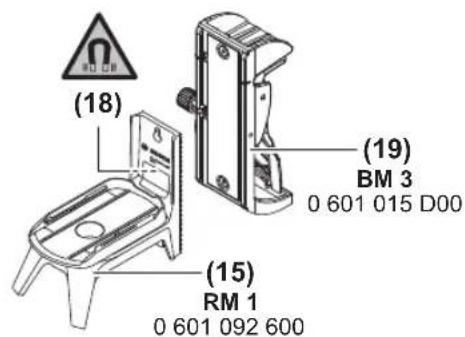
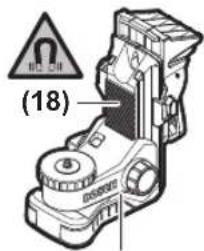
(20) BM 1 0 601 015 A01
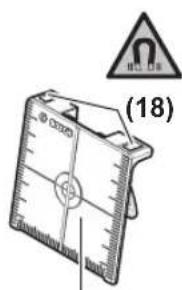
(21)
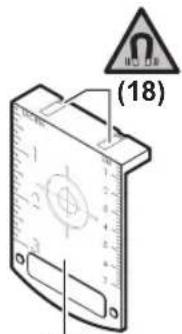
(21) 1 608 M00 05C

(22)
1 608 M00 05B
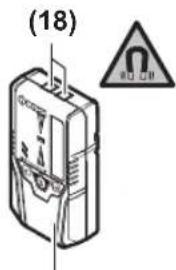
(23) LR 6 0 601 069 H00
(23) LR 7 0 601 069 J00
natural_image
Technical line drawing of a tripod with adjustable legs and a handle, labeled (24) (no text or symbols on the diagram itself)BT 150 0 601 096 B00
natural_image
Isometric line drawing of a Bosch plastic connector (no text or symbols)(26) 1 608 M00 C1R
natural_image
Isometric line drawing of a multi-compartment container or storage unit (no text or symbols)(27) 1 608 M00 C1Z
(28)
Deutsch
Sicherheitshinweise

14 | Deutsch
www.bosch-pt.com/serviceaddresses
Entsorgung
All instructions must be read and observed in order for the measuring tool to function safely. The safeguards integrated into the measuring tool may be compromised if the measuring tool is not used in accordance with these instructions. Never make warning signs on the measuring tool unrecognisable. SAVE THESE INSTRUCTIONS FOR FUTURE REFERENCE AND INCLUDE THEM WITH THE MEASURING TOOL WHEN TRANSFERRING IT TO A THIRD PARTY.
▶ Warning! If operating or adjustment devices other than those specified here are used or other procedures are carried out, this can lead to dangerous exposure to radiation.
The measuring tool is delivered with a laser warning sign (marked in the illustration of the measuring tool on the graphics page).
▶ If the text of the laser warning label is not in your national language, stick the provided warning label in your national language over it before operating for the first time.

Do not direct the laser beam at persons or animals and do not stare into the direct or reflected laser beam yourself. You could blind somebody, cause accidents or damage your eyes.
▶ If laser radiation hits your eye, you must close your eyes and immediately turn your head away from the beam.
▶ Do not make any modifications to the laser equipment.
▶ Do not use the laser goggles (accessory) as protective goggles. The laser goggles make the laser beam easier to see; they do not protect you against laser radiation.
▶ Do not use the laser goggles (accessory) as sunglasses or while driving. The laser goggles do not provide full UV protection and impair your ability to see colours.
▶ Have the measuring tool serviced only by a qualified specialist using only original replacement parts. This will ensure that the safety of the measuring tool is maintained.
▶ Do not let children use the laser measuring tool unsupervised. They could unintentionally blind themselves or other persons.
▶ Do not use the measuring tool in explosive atmospheres which contain flammable liquids, gases or dust. Sparks may be produced inside the measuring tool, which can ignite dust or fumes.

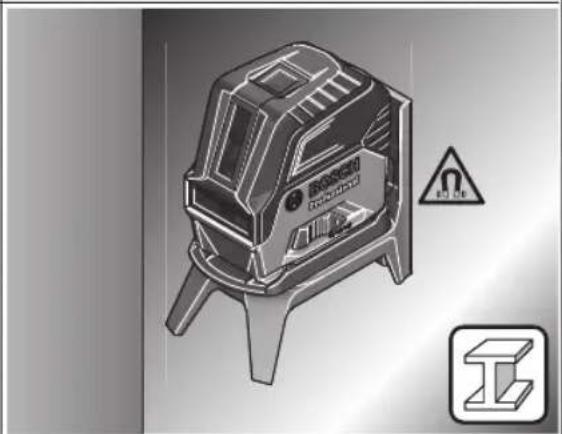
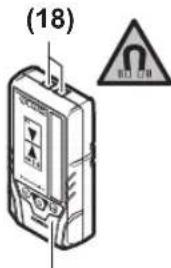
Keep the measuring tool and the magnetic accessories away from implants and other medical devices, e.g. pacemakers or insulin pumps. The magnets inside the measuring tool and accessories generate a field that can impair the function of implants and medical devices.
▶ Keep the measuring tool and the magnetic accessories away from magnetic data storage media and magnetically sensitive devices. The effect of the magnets inside the measuring tool and accessories can lead to irreversible data loss.
Product Description and Specifications
Please observe the illustrations at the beginning of this operating manual.
Intended Use
The measuring tool is intended for determining and checking horizontal and vertical lines and plumb points.
The measuring tool is suitable for indoor and outdoor use.
Product Features
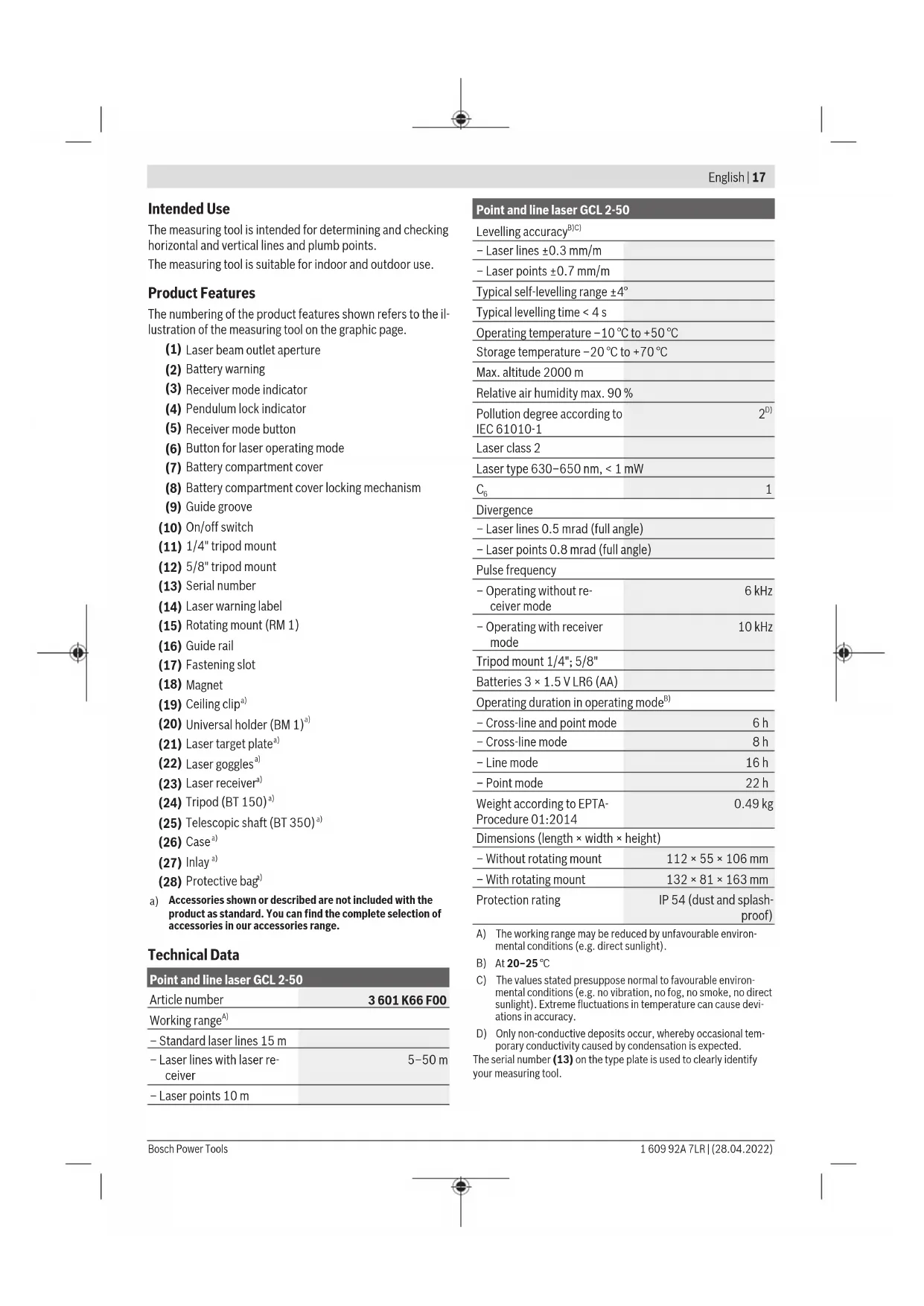
The numbering of the product features shown refers to the illustration of the measuring tool on the graphic page.
(1) Laser beam outlet aperture
(2) Battery warning
(3) Receiver mode indicator
(4) Pendulum lock indicator
(5) Receiver mode button
(6) Button for laser operating mode
(7) Battery compartment cover
(8) Battery compartment cover locking mechanism
(9) Guide groove
(10) On/off switch
(11) 1/4" tripod mount
(12) 5/8" tripod mount
(13) Serial number
(14) Laser warning label
(15) Rotating mount (RM 1)
(16) Guide rail
(17) Fastening slot
(18) Magnet
(19) Ceiling clip ^a)
(20) Universal holder (BM 1) ^a)
(21) Laser target plate ^a)
(22) Laser goggles ^a)
(23) Laser receiver ^a)
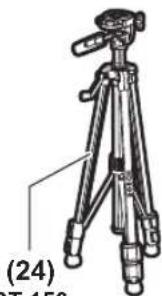
(24) Tripod (BT 150) ^a)
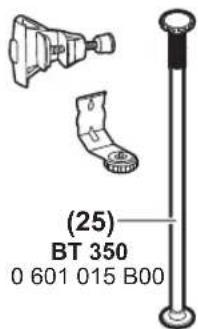
(25) Telescopic shaft (BT 350) ^a)
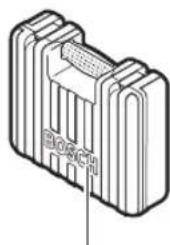
(26) Case ^a)
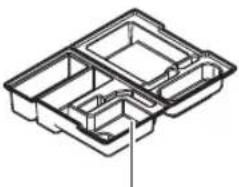
(27) Inlay ^a)
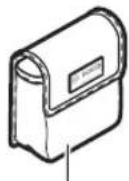
(28) Protective bag ^a)
a) Accessories shown or described are not included with the product as standard. You can find the complete selection of accessories in our accessories range.
Technical Data
| Point and line laser GCL 2-50 | |
| Article number | 3 601 K66 F00 |
| Working range ^A) | |
| – Standard laser lines 15 m | |
| – Laser lines with laser receiver | 5–50 m |
| – Laser points 10 m | |
Point and line laser GCL 2-50
| Levelling accuracy ^B)C) | |
| – Laser lines ±0.3 mm/m | |
| – Laser points ±0.7 mm/m | |
| Typical self-levelling range ±4° | |
| Typical levelling time < 4 s | |
| Operating temperature -10 °C to +50 °C | |
| Storage temperature -20 °C to +70 °C | |
| Max. altitude 2000 m | |
| Relative air humidity max. 90 % | |
| Pollution degree according to IEC 61010-1 | 2D) |
| Laser class 2 | |
| Laser type 630-650 nm, < 1 mW | |
| C_6 | 1 |
| Divergence | |
| – Laser lines 0.5 mrad (full angle) | |
| – Laser points 0.8 mrad (full angle) | |
| Pulse frequency | |
| – Operating without receiver mode | 6 kHz |
| – Operating with receiver mode | 10 kHz |
| Tripod mount 1/4"; 5/8" | |
| Batteries 3 × 1.5 V LR6 (AA) | |
| Operating duration in operating mode ^B) | |
| – Cross-line and point mode | 6 h |
| – Cross-line mode | 8 h |
| – Line mode | 16 h |
| – Point mode | 22 h |
| Weight according to EPTA-Procedure 01:2014 | 0.49 kg |
| Dimensions (length × width × height) | |
| – Without rotating mount | 112 × 55 × 106 mm |
| – With rotating mount | 132 × 81 × 163 mm |
| Protection rating | IP 54 (dust and splash-proof) |
A) The working range may be reduced by unfavourable environmental conditions (e.g. direct sunlight).
B) At 20-25°C
C) The values stated presuppose normal to favourable environmental conditions (e.g. no vibration, no fog, no smoke, no direct sunlight). Extreme fluctuations in temperature can cause deviations in accuracy.
D) Only non-conductive deposits occur, whereby occasional temporary conductivity caused by condensation is expected.
The serial number (13) on the type plate is used to clearly identify your measuring tool.
18 | English
Assembly
Inserting/Changing the batteries
It is recommended that you use alkaline manganese batteries to operate the measuring tool.
To open the battery compartment cover (7), press the locking mechanism (8) and lift open the battery compartment cover. Insert the batteries.
When inserting the batteries, ensure that the polarity is correct according to the illustration on the inside of the battery compartment.
If the batteries become weak, the battery warning indicator (2) will flash green. The laser lines will also flash for approximately five seconds every ten minutes. The measuring tool can still be operated for approximately one hour after the first flash. If the batteries drain completely, the laser lines will flash one more time just before automatic shut-off.
Always replace all the batteries at the same time. Only use batteries from the same manufacturer and which have the same capacity.
▶ Take the batteries out of the measuring tool when you are not using it for a prolonged period of time. The batteries can corrode and self-discharge during prolonged storage in the measuring tool.
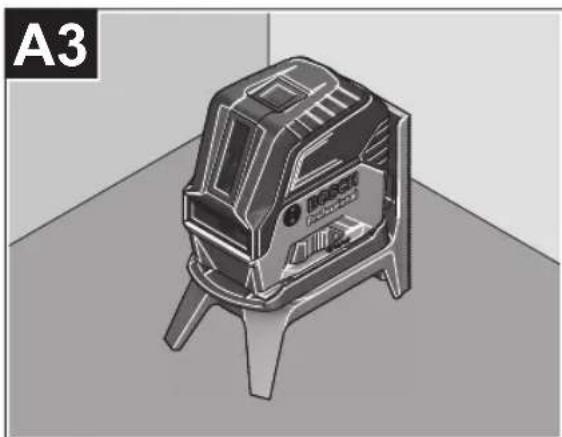
Working with the RM 1 rotating mount (see figures A1–A3)
You can use the rotating mount (15) to rotate the measuring tool 360° around a central, always visible plumb point. This enables you to set up the laser lines without having to change the position of the measuring tool.
Place the measuring tool with the guide groove (9) on the guide rail (16) of the rotating mount (15) and slide the measuring tool all the way onto the platform.
To disconnect the measuring tool, pull it off the rotating mount in the opposite direction.
Rotating mount positioning options:
- Standing on a flat surface,
- Screwed to a vertical surface,
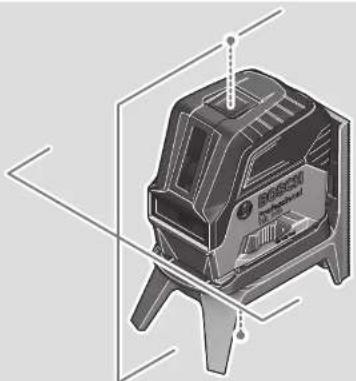
- On metallic ceiling strips using the ceiling clip (19),
- On metallic surfaces using the magnets (18).
Operation
Starting Operation
▶ Protect the measuring tool from moisture and direct sunlight.
Do not expose the measuring tool to any extreme temperatures or fluctuations in temperature. For example, do not leave it in a car for extended periods of time. If it has been subjected to significant fluctuations in temperature, first allow the measuring tool to adjust to the ambient temperature and then always carry out an accuracy check before continuing work (see "Accuracy Check of
the Measuring Tool", page 20).
The precision of the measuring tool may be compromised if exposed to extreme temperatures or fluctuations in temperature.
▶ Avoid substantial knocks to the measuring tool and avoid dropping it. Always carry out an accuracy check before continuing work if the measuring tool has been subjected to severe external influences (see "Accuracy Check of the Measuring Tool", page 20).
▶ Switch the measuring tool off when transporting it.
The pendulum unit is locked when the tool is switched off, as it can otherwise be damaged by big movements.
Switching On/Off
To switch on the measuring tool, slide the on/off switch (10) to the on position (for working with the pendulum lock) or to the on position (for working with automatic levelling). As soon as it is switched on, the measuring tool emits laser beams from the outlet apertures (1).
▶ Do not direct the laser beam at persons or animals and do not stare into the laser beam yourself (even from a distance).
To switch off the measuring tool, slide the on/off switch (10) to the Off position. The pendulum unit is locked when the tool is switched off.
▶ Never leave the measuring tool unattended when switched on, and ensure the measuring tool is switched off after use. Others may be blinded by the laser beam.
If the maximum permitted operating temperature of 50^ C is exceeded, the tool shuts down to protect the laser diode. Once it has cooled down, the measuring tool is operational again and can be switched back on.
Automatic shut-off
If no button on the measuring tool is pressed for approx. 120 min, the measuring tool will automatically switch itself off to preserve battery life.
To switch the measuring tool back on after it has been automatically switched off, you can either slide the on/off switch (10) to the "Off" position first and then switch the measuring tool back on, or press either the laser mode button (6) or the receiver mode button (5) once.
Temporarily Deactivating Automatic Shut-Off
To deactivate the automatic shut-off function, hold down the laser mode button (6) for at least 3 s (with the measuring tool switched on). If the automatic shut-off function is deactivated, the laser beams will flash briefly as confirmation.
Note: If the operating temperature exceeds 45 °C, automatic shut-off can no longer be deactivated.
To activate the automatic shut-off function, switch the measuring tool off and on again.
Setting the Operating Mode
The measuring tool has several operating modes, which you can switch between at any time:
- Cross-line and point mode: The measuring tool generates a horizontal and a vertical laser line as well as two vertical laser points, one facing up, the other down. The laser lines cross at a 90^ angle.
- Horizontal line mode: The measuring tool generates a horizontal laser line in front of it.
- Vertical line mode: The measuring tool generates a vertical laser line in front of it.
Positioning the measuring tool in the room displays the vertical laser line on the ceiling beyond the top laser point.
If the measuring tool is positioned directly against a wall, the vertical laser line almost encircles the entire space (360° line).
- Point mode: The measuring tool generates two vertical laser points, one facing up, the other down.
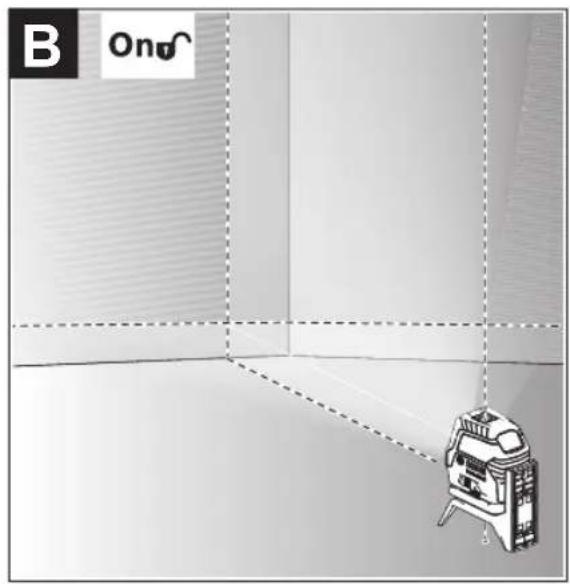
All operating modes, apart from point operation, can be selected with both automatic levelling or the pendulum lock. To change the operating mode, press the laser mode button (6).
Working with Automatic Levelling
| Sequence of actions Horizontal line | Vertical line mode | Point mode Pendulum lock indicator (4) | Figure | |
| mode | ||||
| On/off switch (10) in position "On" | ●●● | ☐ | B | |
| Cross-line mode | ||||
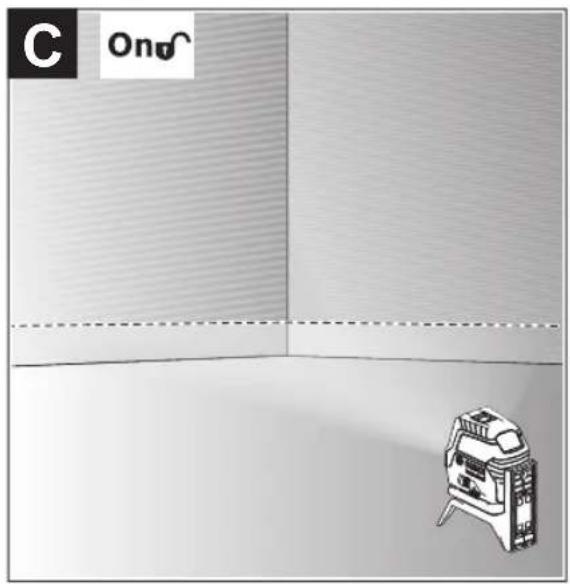
 | Press the laser operating mode button (6) once | ●-- | ☐ | C |
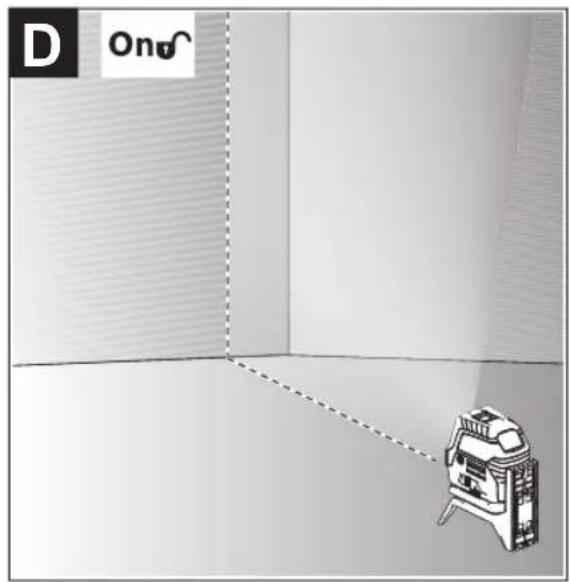
 | Press the laser operating mode button (6) twice | -●- | ☐ | D |
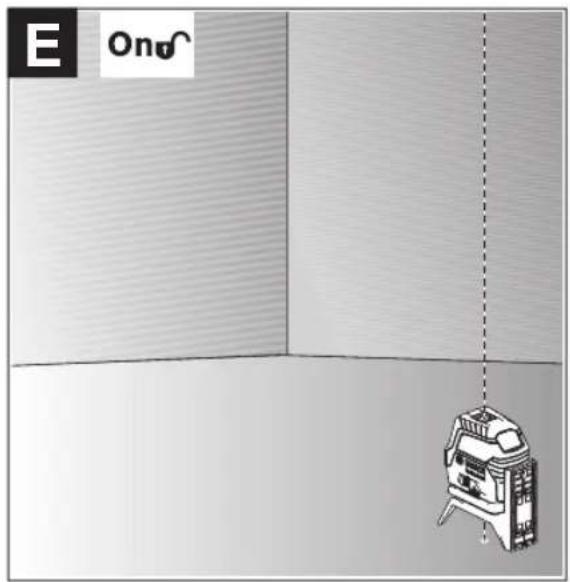
 | Press the laser operating mode button (6) three times | --● | ☐ | E |
 | Press the laser operating mode button (6) four times | ●●● | ☐ | B |
| Cross-line mode | ||||
If, during work with automatic levelling, you switch to "working with pendulum lock" mode (on/off switch (10) in posi-
tion (on), the first combination option of this mode's indicators is always activated.
Working with the pendulum lock
| Sequence of actions Horizontal line | Vertical line mode | Point mode Pendulum lock indicator (4) | Figure | |
| mode | ||||
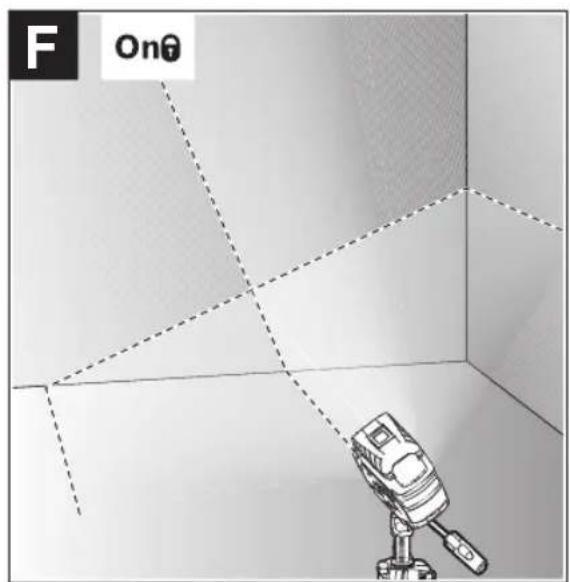
| On/off switch (10) in position "On" | ●●- | F | ||
| Cross-line mode | ||||
 | Press the laser operating mode button (6) once | ●-- | Red | |
 | Press the laser operating mode button (6) twice | -●- | Red | |
 | Press the laser operating mode button (6) three times | ●●- | F | |
| Cross-line mode | ||||
If, during work with pendulum lock, you switch to "working with automatic levelling" mode (on/off switch (10) in position 2n), the first combination option of this mode's indicators is always activated.
Receiver Mode
Receiver mode must be activated when working with the laser receiver (23), regardless of which operating mode is selected.
In receiver mode, the laser lines flash at a very high frequency, enabling them to be detected by the laser receiver (23).
To switch on receiver mode, press the receiver mode button (5). The receiver mode indicator (3) will light up green.
When receiver mode is switched on, the laser lines are less visible to the human eye. Therefore, switch receiver mode off by pressing the receiver mode button (5) again to work
20 | English
without a laser receiver. The receiver mode indicator (3) will go out.
Automatic Levelling
Working with Automatic Levelling (see figures B–E)
Position the measuring tool on a level, firm surface or attach it to the rotating mount (15).
For work with automatic levelling, slide the on/off switch (10) to the "bn" position.
The automatic levelling function automatically levels irregularities within the self-levelling range of ±4^ . The measuring tool has been levelled as soon as the laser beams stop flashing.
If automatic levelling is not possible, e.g. because the surface on which the measuring tool stands deviates by more than 4^ from the horizontal plane, the laser beams will flash quickly.
If this is the case, set up the measuring tool in a level position and wait for the self-levelling to take place. As soon as the measuring tool is within the self-levelling range of ±4^ , the laser beams will light up continuously.
In case of ground vibrations or position changes during operation, the measuring tool is automatically levelled again. Upon levelling, check the position of the laser beams with regard to the reference points to avoid errors arising from a change in the measuring tool's position.
Working with a pendulum lock (see figure F)
For work with the pendulum lock, slide the on/off switch (10) to the "On" position. The pendulum lock indicator (4) lights up red and the laser lines continuously flash slowly.
For work with the pendulum lock, automatic levelling is switched off. You can hold the measuring tool freely in your hand or place it on a sloping surface. This means that the laser beams are no longer levelled and no longer necessarily run perpendicular to one another.
Accuracy Check of the Measuring Tool
Influences on Accuracy
The largest influence is exerted by the ambient temperature. In particular, temperature differences that occur from the ground upwards can refract the laser beam.
Since the temperature stratification is greatest at ground level, you should mount the measuring tool on a tripod and position it in the centre of the work surface, wherever this is possible.
In addition to external influences, device-specific influences (e.g. falls or heavy impacts) can also lead to deviations. For this reason, check the levelling accuracy each time before beginning work.
First check the height accuracy and levelling accuracy of the horizontal laser line, then the levelling accuracy of the vertical laser line and the plumb accuracy.
Should the measuring tool exceed the maximum deviation during one of the tests, please have it repaired by a Bosch after-sales service.
Checking the Height Accuracy of the Horizontal Line
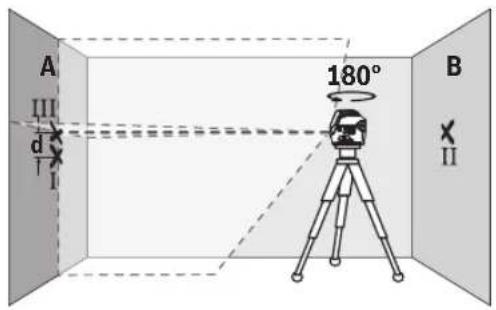
For this check, you will need a free measuring distance of 5 m on firm ground between two walls (designated A and B).
- Mount the measuring tool close to wall A on a tripod, or place it on a firm, level surface. Switch on the measuring tool. Select cross-line mode with automatic levelling.
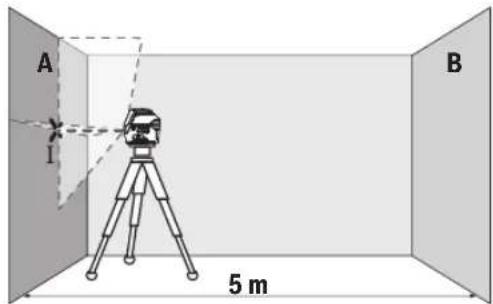
- Aim the laser at the closer wall A and allow the measuring tool to level in. Mark the middle of the point at which the laser lines cross on the wall (point I).
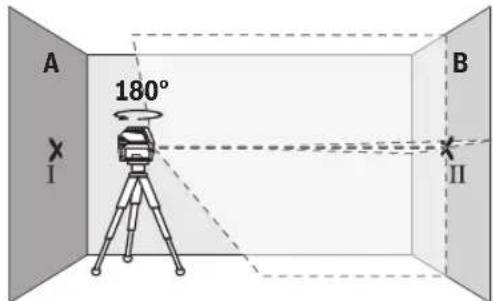
- Turn the measuring tool 180^ , allow it to level in and mark the point where the laser lines cross on the opposite wall B (point II).
- Position the measuring tool – without rotating it – close to wall B, switch it on and allow it to level in.
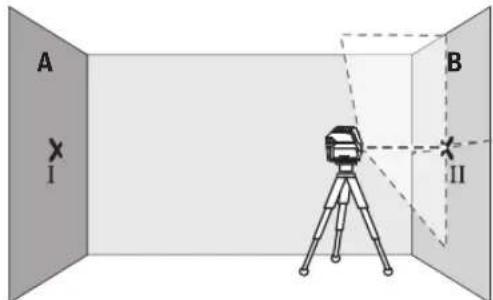
- Align the height of the measuring tool (using the tripod or by placing objects underneath as required) so that the point where the laser lines cross exactly hits the previously marked point II on wall B.
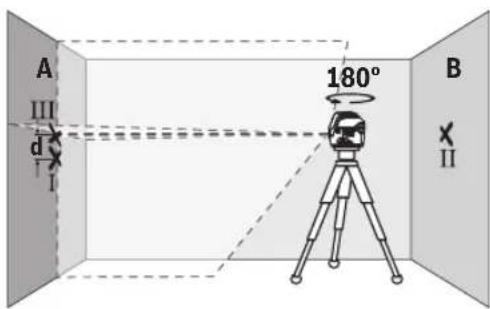
- Turn the measuring tool 180^ without adjusting the height. Aim it at wall A such that the vertical laser line runs through the already marked point I. Allow the measuring tool to level in and mark the point where the laser lines cross on wall A (point III).
- The discrepancy d between the two marked points I and III on wall A reveals the actual height deviation of the measuring tool.
The maximum permitted deviation on the measuring distance of 2 × 5 m = 10 m is as follows:
10 m × ±0.3 mm/m = ±3 mm. The discrepancy d between points I and III must therefore amount to no more than 3 mm.
Checking the Level Accuracy of the Horizontal Line
For this check, you will need a free area of 5 × 5 m.
- Mount the measuring tool in the middle between walls A and B on a tripod, or place it on a firm, level surface. Select horizontal line mode with automatic levelling and allow the measuring tool to level in.
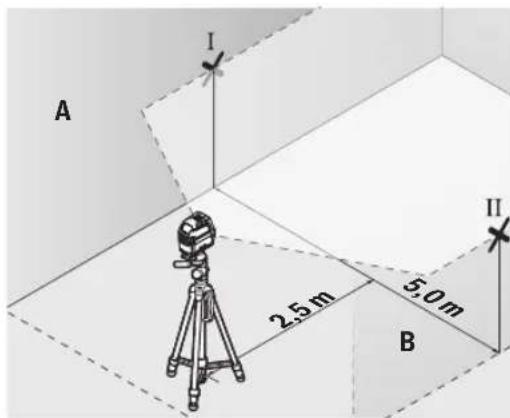
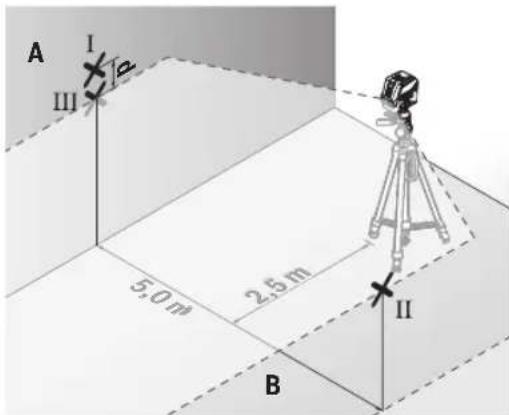
- At a distance of 2.5 m from the measuring tool, mark the centre of the laser line on both walls (point I on wall A and point II on wall B).
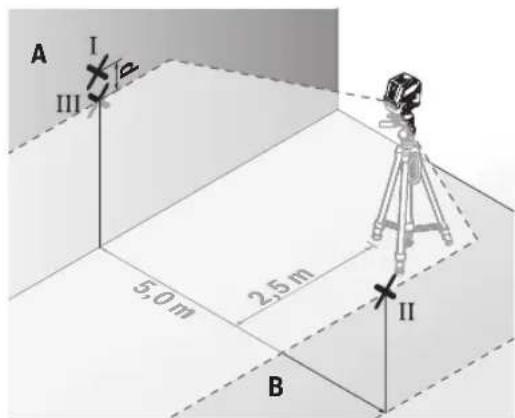
- Set up the measuring tool at a 5 m distance and rotated by 180^ and allow it to level in.
- Align the height of the measuring tool (using the tripod or by placing objects underneath as required) so that the centre of the laser line exactly hits the previously marked point II on wall B.
- Mark the centre of the laser line on wall A as point III (vertically above or below point I).
- The discrepancy d between the two marked points I and III on wall A reveals the actual horizontal deviation of the measuring tool.
The maximum permitted deviation on the measuring distance of 2 × 5 m = 10 m is as follows:
10 m × ±0.3 mm/m = ±3 mm. The discrepancy d between points I and III must therefore amount to no more than 3 mm.
Checking the Level Accuracy of the Vertical Line
For this check, you will need a door opening (on solid ground) which has at least 2.5 m of space either side of the door.
- Place the measuring tool 2.5m away from the door opening on a firm, flat surface (not on a tripod). Select vertical line mode with automatic levelling. Aim the laser line at the door opening and allow the measuring tool to level in.
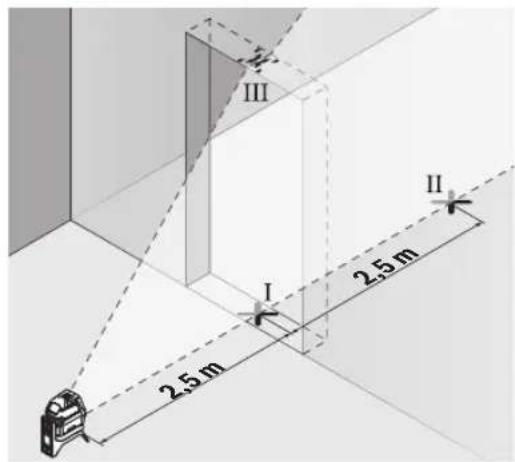
22 | English
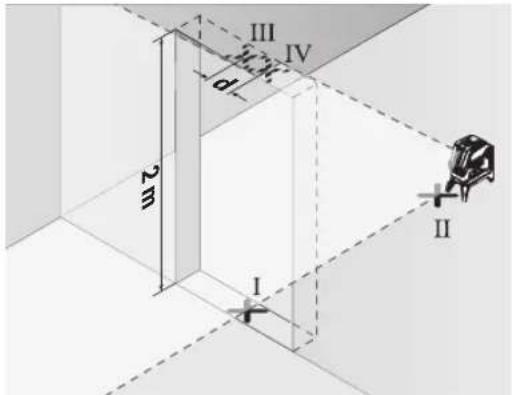
- Mark the centre of the vertical laser line on the floor of the door opening (point I), 5 m away on the other side of the door opening (point II) and on the upper edge of the door opening (point III).
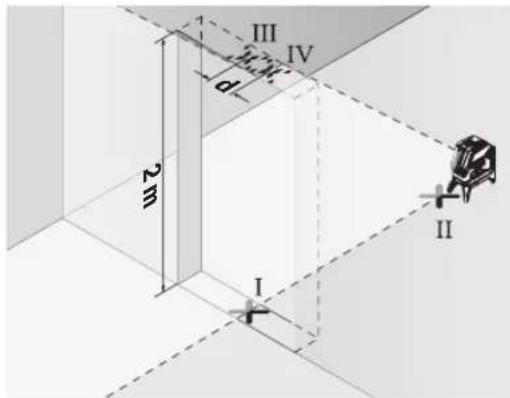
- Rotate the measuring tool 180^ and position it on the other side of the door opening, directly behind point II. Allow the measuring tool to level in and align the vertical laser line in such a way that its centre passes through points I and II exactly.
- Mark the centre of the laser line on the upper edge of the door opening as point IV.
- The discrepancy d between the two marked points III and IV reveals the actual vertical deviation of the measuring tool.
- Measure the height of the door opening.
You can calculate the maximum permitted deviation as follows:
Doubled height of the door opening × 0.3 mm/m
Example: At a door opening height of 2 m, the maximum deviation amounts to
2 × 2 m × ± 0.3 mm/m = ± 1.2 mm . The points III and IV must therefore be no further than 1.2 mm from each other.
Checking Plumb Accuracy
For this check, you will need a clear measuring space on firm ground with a distance of approx. 5 m between the floor and the ceiling.
- Mount the measuring tool onto the rotating mount (15) and place it on the floor. Select point mode and allow the measuring tool to level in.
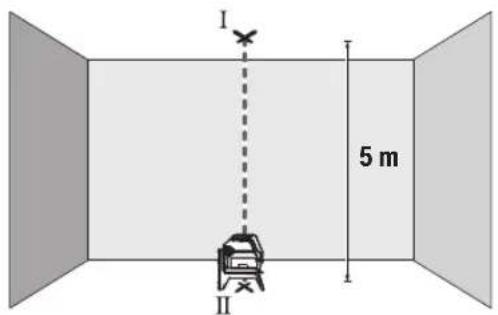
- Mark the centre of the top laser point on the ceiling (point I). Also mark the centre of the bottom laser point on the floor (point II).
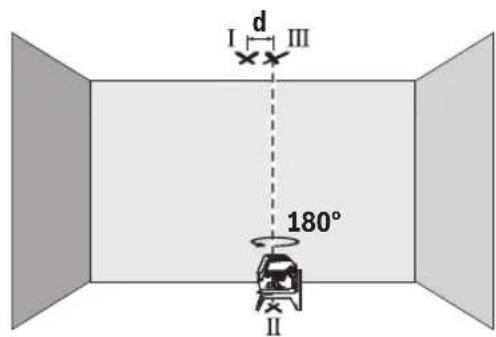
- Turn the measuring tool by 180^ . Position it so that the centre of the bottom laser point falls onto the marked point II. Allow the measuring tool to level in. Mark the centre of the top laser point (point III).
- The discrepancy d between the two marked points I and III on the ceiling reveals the actual deviation of the measuring tool from the vertical plane.
You can calculate the maximum permitted deviation as follows:
Doubled distance between floor and ceiling × 0.7 mm/m Example: At a floor-to-ceiling distance of 5 m, the maximum deviation amounts to
2 × 5 m × ± 0.7 mm/m = ± 7 mm . The points I and III must therefore be no further than 7 mm from each other.
Working Advice
▶ Only the centre of the laser point or laser line must be used for marking. The size of the laser point/the width of the laser line changes depending on the distance.
Working with the Laser Target Plate (see figure L)
The laser target plate (21) improves visibility of the laser beam in unfavourable conditions and at greater distances. The reflective surface of the laser target plate (21) improves visibility of the laser line. The transparent surface enables the laser line to be seen from behind the laser target plate.
Working with the Tripod (Accessory)
A tripod offers a stable, height-adjustable support surface for measuring. Place the measuring tool with the 1/4" tripod mount (11) on the thread of the tripod (24) or a conventional camera tripod. Use the 5/8" tripod mount (12) to secure the measuring tool on a conventional building tripod. Tighten the measuring tool using the locking screw of the tripod.
Roughly align the tripod before switching on the measuring tool.
Securing with the universal holder (accessory) (see figure L)
Using the universal holder (20), you can secure the measuring tool on vertical surfaces, pipes or magnetizable materials, for example. The universal holder is also suitable for use
as a floor stand and facilitates height adjustment of the measuring tool.
Roughly align the universal holder (20) before switching on the measuring tool.
Working with the laser receiver (accessory)
Use the laser receiver (23) to improve detection of the laser lines in adverse lighting conditions (bright environment, direct sunlight) and over greater distances. When working with the laser receiver, switch on receiver mode (see "Receiver Mode", page 19).
Laser Goggles (Accessory)
The laser goggles filter out ambient light. This makes the light of the laser appear brighter to the eye.
▶ Do not use the laser goggles (accessory) as protective goggles. The laser goggles make the laser beam easier to see; they do not protect you against laser radiation.
▶ Do not use the laser goggles (accessory) as sunglasses or while driving. The laser goggles do not provide full UV protection and impair your ability to see colours.
Example applications (see figures G-M)
Examples of possible applications for the measuring tool can be found on the graphics pages.
Always place the measuring tool close to the surface or edge that needs to be checked, and allow it to level in before the beginning of any measurement.
Always measure the distances between the laser beam and a surface or edge at two points that are as far from each other as possible.
Maintenance and Service
Maintenance and Cleaning
Keep the measuring tool clean at all times.
Never immerse the measuring tool in water or other liquids. Wipe off any dirt using a damp, soft cloth. Do not use any detergents or solvents.
The areas around the outlet aperture of the laser in particular should be cleaned on a regular basis. Make sure to check for lint when doing this.
Only store and transport the measuring tool in the protective bag (28) or the case (26).
If the measuring tool needs to be repaired, send it off in the protective bag (28) or the case (26).
After-Sales Service and Application Service
Our after-sales service responds to your questions concerning maintenance and repair of your product as well as spare parts. You can find explosion drawings and information on spare parts at: www.bosch-pt.com
The Bosch product use advice team will be happy to help you with any questions about our products and their accessories.
In all correspondence and spare parts orders, please always include the 10-digit article number given on the nameplate of the product.
Malaysia
Robert Bosch Sdn. Bhd.(220975-V) PT/SMY
No. 8A, Jalan 13/6
46200 Petaling Jaya
Selangor
Tel.: (03) 79663194
Toll-Free: 1800 880188
Fax: (03) 79583838
E-Mail: kiathoe.chong@my.bosch.com
www.bosch-pt.com.my
Great Britain
Robert Bosch Ltd. (B.S.C.)
P.O. Box 98
Broadwater Park
North Orbital Road
Denham Uxbridge
UB 9 5HJ
At www.bosch-pt.co.uk you can order spare parts or arrange the collection of a product in need of servicing or repair.
Tel. Service: (0344) 7360109
E-Mail: boschservicecentre@bosch.com
You can find further service addresses at:
www.bosch-pt.com/serviceaddresses
Disposal
Measuring tools, accessories and packaging should be recycled in an environmentally friendly manner.

Do not dispose of measuring tools or batteries with household waste.
Only for EU countries:
According to the Directive 2012/19/EU on waste electrical and electronic equipment and its transposition into national law, measuring tools that are no longer usable, and, according to the Directive 2006/66/EC, defective or drained batteries must be collected separately and disposed of in an environmentally correct manner.
If disposed incorrectly, waste electrical and electronic equipment may have harmful effects on the environment and human health, due to the potential presence of hazardous substances.
Only for United Kingdom:
According to Waste Electrical and Electronic Equipment Regulations 2013 (2013/3113) and the Waste Batteries and Accumulators Regulations 2009 (2009/890), measuring tools that are no longer usable must be collected separately and disposed of in an environmentally friendly manner.
Français
(15) Support pivotant (RM 1)
(16) Rail de guidage
(17) Trou oblong de fixation
(18) Aimant
Robert Bosch Morocco SARL
- Rue Lieutenant Mahroud Mohamed
20300 Casablanca
Tel.: +212 5 29 31 43 27
E-Mail : sav.outillage@ma.bosch.com
France
Robert Bosch (France) S.A.S.
www.bosch-pt.com/serviceaddresses
38 | Español
Calle Robert Bosch No. 405
www.bosch-pt.com/serviceaddresses
Eliminación
www.bosch-pt.com/serviceaddresses
Eliminação
www.bosch-pt.com/serviceaddresses
Smaltimento
www.bosch-pt.com/serviceaddresses
Afvalverwijdering
(11) Stativholder 1/4"
(12) Stativholder 5/8"
(13) Serienummer
(14) Laser-advarselsskilt
(15) Drejeholder (RM 1)
(16) Føringsskinne
(17) Monteringslanghul
(18) Magnet
(19) Loftsklemme ^a)
(20) Universalholder (BM 1) ^a)
(21) Laser-måltavle ^a)
(22) Laserbriller ^a)
(23) Lasermodtager ^a)
(24) Stativ (BT 150) ^a)
(25) Teleskopstang (BT 350) ^a)
(26) Kuffert ^a)
(27) Indlæg ^a)
(28) Beskyttelsestaske ^a)
Bosch Service Center
Telegrafvej 3
2750 Ballerup
På www.bosch-pt.dk kan der online bestilles reservedele eller oprettes en reparations ordre.
Tlf. Service Center: 44898855
Fax: 44898755
E-Mail: vaerktoej@dk.bosch.com
www.bosch-pt.com/serviceaddresses
Bortskaffelse
Bosch Service Center
Telegrafvej 3
2750 Ballerup
Danmark
Tel.: (08) 7501820 (inom Sverige)
Fax: (011) 187691
www.bosch-pt.com/serviceaddresses
Avfallshantering
www.bosch-pt.com/serviceaddresses
Kassering
www.bosch-pt.com/serviceaddresses
Hävitys
www.bosch-pt.com/serviceaddresses
Απόσυροη
(15) Dönen platform (RM 1)
(16) Kilavuz ray
(17) Tespit deligi
(18) Miknatis
(19) Üst braket ^a)
102 | Türkçe
(20) Universal tutucu düzeneği (BM 1) ^a)
(21) Lazer hedef tahtasi ^a)
(22) Lazer gözlüğü ^a)
(23) Lazer alici ^a)
(24) Tripod (BT 150) ^a)
(25) Teleskopik çubuk (BT 350) ^a)
(26) Çanta ^a)
(27) Ek parça ^a)
(28) Koruma çantası ^a)
www.bosch-pt.com/serviceaddresses
Tasfiye
Robert Bosch Sp. z o.o.
www.bosch-pt.com/serviceaddresses
Utylizacja odpadów
Bosch Service Center PT
K Vápence 1621/16
692 01 Mikulov
www.bosch-pt.com/serviceaddresses
Likvidace
www.bosch-pt.com/serviceaddresses
Likvidácia
www.bosch-pt.com/serviceaddresses
Hulladékkezelés
www.bosch-pt.com/serviceaddresses
Утилизация
www.bosch-pt.com/serviceaddresses
Кәдеге жарату
Service scule electrice
Strada Horia Măcelariu Nr. 30-34, sector 1
013937 Bucureşti
www.bosch-pt.com/serviceaddresses
Eliminarea
Service scule electrice
Strada Horia Măcelariu Nr. 30–34, sector 1
013937 Bucureşti, România
www.bosch-pt.com/bg/bg/
www.bosch-pt.com/serviceaddresses
Бракуване
www.bosch-pt.com/serviceaddresses
Отстранување
- Usmerite laser na bliski zid A i pustite da se merni alat niveliše. Označite sredinu tačke na kojoj se laserske linije na zidu ukrštaju (tačka I).

- Okrenite merni alat za 180°, pustite da se niveliše i označite tačku ukrštanja laserskih linija na suprotnom zidu B (tačka II).
- Stavite merni alat - bez okretanja - blizu zida B, uključite ga i pustite da se niveliše.
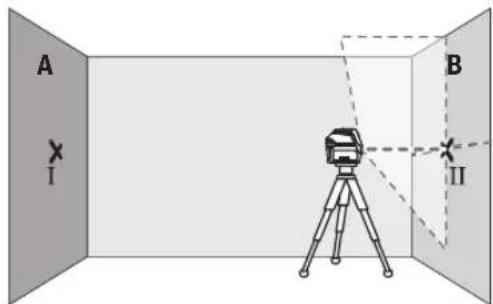
- Merni alat usmerite u vis tako (pomoću stativa ili po potrebi podmetanjem), da tačka ukrštanja laserskih linija tačno pogađa prethodno označenu tačku II na zidu B.
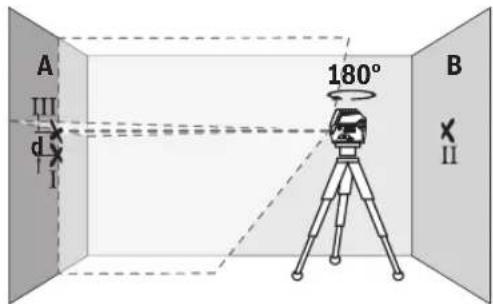
- Merni alat okrenite za 180°, a da ne pomerate visinu. Usmerite ga prema zidu A, tako da vertikalna laserska
linija prolazi kroz već označenu tačku I. Pustite merni alat da se niveliše i označite tačku ukrštanja laserskih linija na zidu A (tačka III).
- Označite na 2,5 m udaljenosti od mernog alata na oba zida sredinu laserske linije (tačka I na zidu A i tačka II na zidu B).
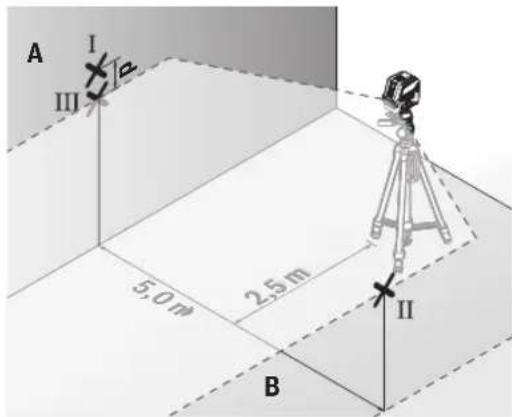
- Postavite merni alat za 180° okrenut na 5 m udaljenosti i iznivelišite ga.
- Merni alat usmerite uvis tako (pomoću stativa ili po potrebi podmetanjem) da sredina laserske linije tačno pogađa prethodno označenu tačku II na zidu B.
- Označite na zidu A sredinu laserske linije kao tačku III (vertikalno iznad odn. ispod tačke I).
- Razlika d između obe označene tačke I i III na zidu A predstavlja stvarno odstupanje mernog alata od horizontale.
Na mernoj deonici od 2 × 5 m = 10 m maksimalno dozvoljeno odstupanje iznosi:
10 m × ±0,3 mm/m = ±3 mm. Razlika d između tačaka I i III prema tome sme da iznosi maksimalno 3 mm.
Kontrola tačnosti nivelisanja vertikalne linije
Za kontrolu potreban Vam je otvor od vrata, kod kojih (na čvrstoj zemlji) sa svake strane vrata ima najmanje 2,5 m prostora.
- Postavite merni alat na 2,5 m rastojanja od otvora vrata na čvrstu radnu podlogu (ne na stativ). Izaberite vertikalni linijski režim rada sa automatskim nivelisanjem. Usmerite lasersku liniju na otvor vrata i iznivelišite merni alat.
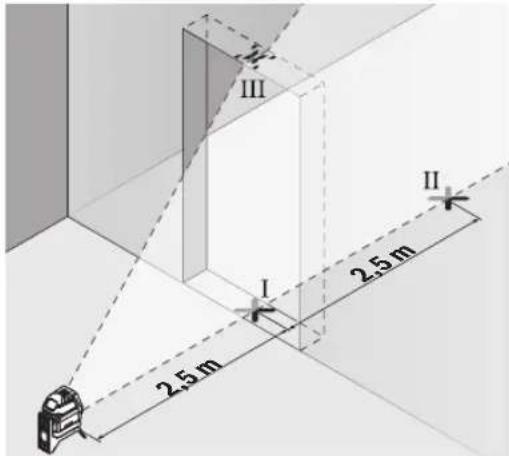
- Označite sredinu vertikalne laserske linije na podu otvora za vrata (tačka I), na razdaljini od 5 m od druge strane otvora za vrata (tačka II) kao i na gornjoj ivici otvora za vrata (tačka III).
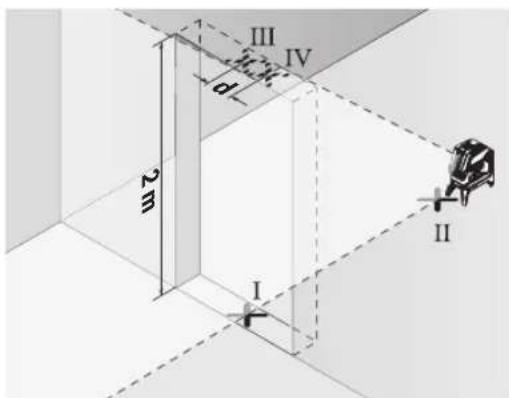
- Okrenite merni alat za 180° i stavite ga na drugu stranu otvora za vrata direktno iza tačke II. Pustite merni alat da se niveliše i vertikalnu lasersku liniju usmerite tako da njena sredina tačno kroz tačke I i II.
- Označite sredinu laserske linije na gornjoj ivici otvora za vrata kao tačku IV.
196 | Srpski
www.bosch-pt.com/serviceaddresses
Uklanjanje dubreta
Merni alati, pribor i ambalaža treba da se uključe u reciklažu koja odgovara zaštiti čovekove okoline.

Merne alate i baterije nemojte bacati u kućni otpad!
Samo za EU-zemlje:
Prema evropskoj direktivi 2012/19/EU o starim električnim i elektronskim uređajima i njenoj primeni u nacionalnom pravu, merni alati koji se više ne mogu koristiti, a prema evropskoj direktivi 2006/66/EC akumulatori/baterije koje su u kvaru ili istrošene moraju se odvojeno sakupljati i uključiti u reciklažu koja ispunjava ekološke uslove.
- Na oddaljenosti 2,5 m od merilne naprave na obeh stenah označite sredino laserske linije (točka I na steni A in točka II na steni B).
www.bosch-pt.com/serviceaddresses
Odlaganje
Merilne naprave, pribor in embalažo oddajte v okolju prijazno recikliranje.
- Na udaljenosti 2,5 m od mjernog alata označite na oba zida sredinu linije lasera (točka I na zidu A i točka II na zidu B).
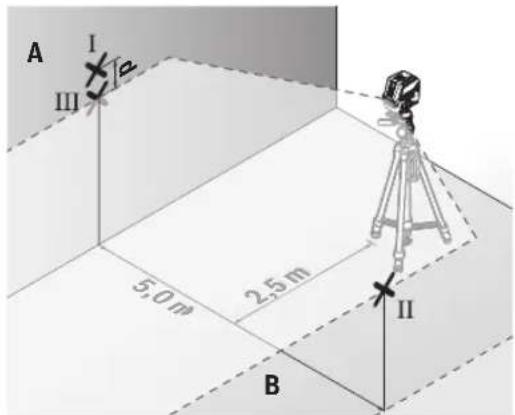
- Postavite mjerni alat okrenut za 180° na udaljenosti 5 m i iznivelirajte ga.
- Mjerni alat usmjerite po visini (pomoću stativa ili eventualno podlaganjem) tako da sredina linije lasera točno udara na prethodno označenu točku II na zidu B.
- Na zidu A označite sredinu linije lasera kao točku III (okomito iznad odn. ispod točke I).
- Razlika d obje označene točke I i III na zidu A daje stvarno odstupanje mjernog alata od horizontale.
- Označite sredinu okomite linije lasera na dnu otvora vrata (točka I), na udaljenosti 5 m na drugoj strani otvora vrata (točka II) kao i na gornjem rubu otvora vrata (točka III).
- Okrenite mjerni alat za 180°. Pozicionirajte ga tako da sredina donje točke lasera pada na već označenu točku II. Iznivelirajte mjerni alat. Označite sredinu gornje točke lasera (točka III).
- Razlika d obje označene točke I i III na stropu daje stvarno odstupanje mjernog alata od okomice.
www.bosch-pt.com/serviceaddresses
Zbrinjavanje
Mjerne alate, pribor i ambalažu treba dovesti na ekološki prihvatljivo recikliranje.

Mjerne alate i baterije ne bacajte u kućni otpad!
Samo za zemlje EU:
U skladu s europskom Direktivom 2012/19/EU o električnim i elektroničkim starim uređajima i njihovom provedbom u nacionalno pravo neupotrebljivi mjerni alati i u skladu s europskom Direktivom 2006/66/EZ neispravne ili istrošene aku-baterije/baterije moraju se odvojeno sakupljati i dovesti na ekološki prihvatljivo recikliranje.
www.bosch-pt.com/serviceaddresses
Jäätmekäitlus
www.bosch-pt.com/serviceaddresses
www.bosch-pt.com/serviceaddresses
Šalinimas
www.bosch-pt.com/serviceaddresses
廃棄
www.bosch-pt.com/serviceaddresses
废弃处理
www.bosch-pt.com/serviceaddresses
廢棄物處理
www.bosch-pt.com/serviceaddresses
처리
270|ไทย
www.bosch-pt.com/serviceaddresses
การกําจัดขยะ
(15) Tripod putar (RM 1)
(16) Rel pemandu
Palma Tower 10th Floor
Jalan RA Kartini II-S Kaveling 6
Pondok Pinang, Kebayoran Lama
www.bosch-pt.com/serviceaddresses
Cara membuang
www.bosch-pt.com/serviceaddresses
Sự thải bổ
Robert Bosch Morocco SARL
www.bosch-pt.com/serviceaddresses
(G-MAmetha Shgll (anjrralpsor)
(aseyir w i a dr mtn amd)
