TCA Quadrant Airbus Edition - Controller THRUSTMASTER - Free user manual and instructions
Find the device manual for free TCA Quadrant Airbus Edition THRUSTMASTER in PDF.



| Product Type | Throttle for flight simulation |
| Brand | Thrustmaster |
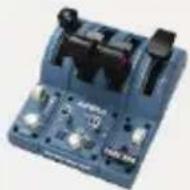
| Model | TCA Quadrant Airbus Edition |
| Compatibility | PC (Windows 10 / 8.1 / 8) |
| Connectivity | USB type B (cable included) |
| Axes | 2 main axes with detents and thrust reversers |
| Number of buttons | 8 action buttons + 8 virtual buttons (4 per axis) |
| Engine selector | Positions 1&2 or 3&4 |
| Extension connectors | 2 SATA ports for Airbus Edition Add-On modules (sold separately) |
| Rudder pedal connector | RJ12 port for TFRP rudder pedals (sold separately) |
| Thrust reverser mechanism | Yes, Airbus replica, can be deactivated via selector |
| Detent mechanism | Deactivatable for smooth or notched axis |
| Friction adjustment | Adjustment screw (screwdriver or link bar) |
| Link bar | Included to connect two quadrants together |
| Programming software | Compatible with T.A.R.G.E.T. (free download) |
| PC driver | Required (download from support.thrustmaster.com) |
| Automatic calibration | Yes, of axes after a few movements |
| Main material | ABS plastic |
| Power supply | Via USB (5V DC) |
| Weight (estimated) | Approximately 1.5 kg |
| Dimensions (estimated) | Approximately 30 x 20 x 15 cm |
| Included accessories | USB cable, link bar, mounting screws, manual |
| Warranty | 2 years (EU), 1 year (other countries) |
| Usage | Entertainment only, not for professional training |
| Cleaning | Soft dry cloth, avoid solvents |
Frequently Asked Questions - TCA Quadrant Airbus Edition THRUSTMASTER
User questions about TCA Quadrant Airbus Edition THRUSTMASTER
0 question about this device. Answer the ones you know or ask your own.
Ask a new question about this device
Download the instructions for your Controller in PDF format for free! Find your manual TCA Quadrant Airbus Edition - THRUSTMASTER and take your electronic device back in hand. On this page are published all the documents necessary for the use of your device. TCA Quadrant Airbus Edition by THRUSTMASTER.
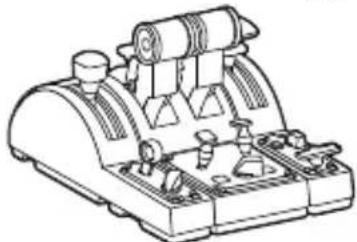
USER MANUAL TCA Quadrant Airbus Edition THRUSTMASTER
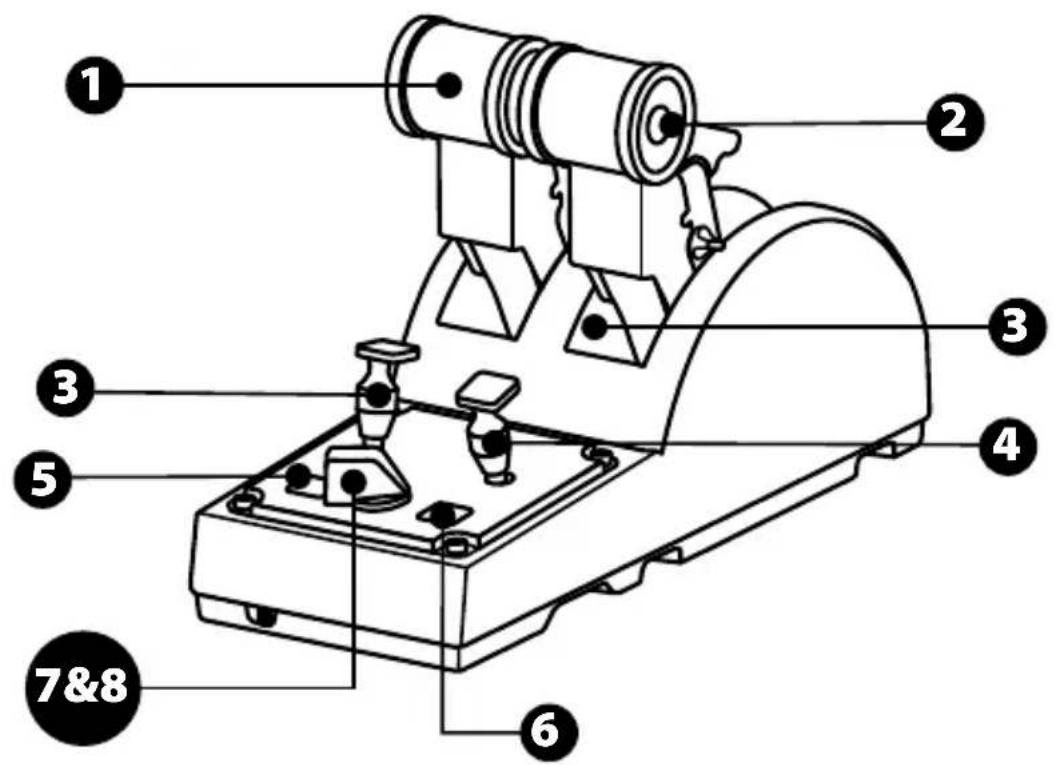
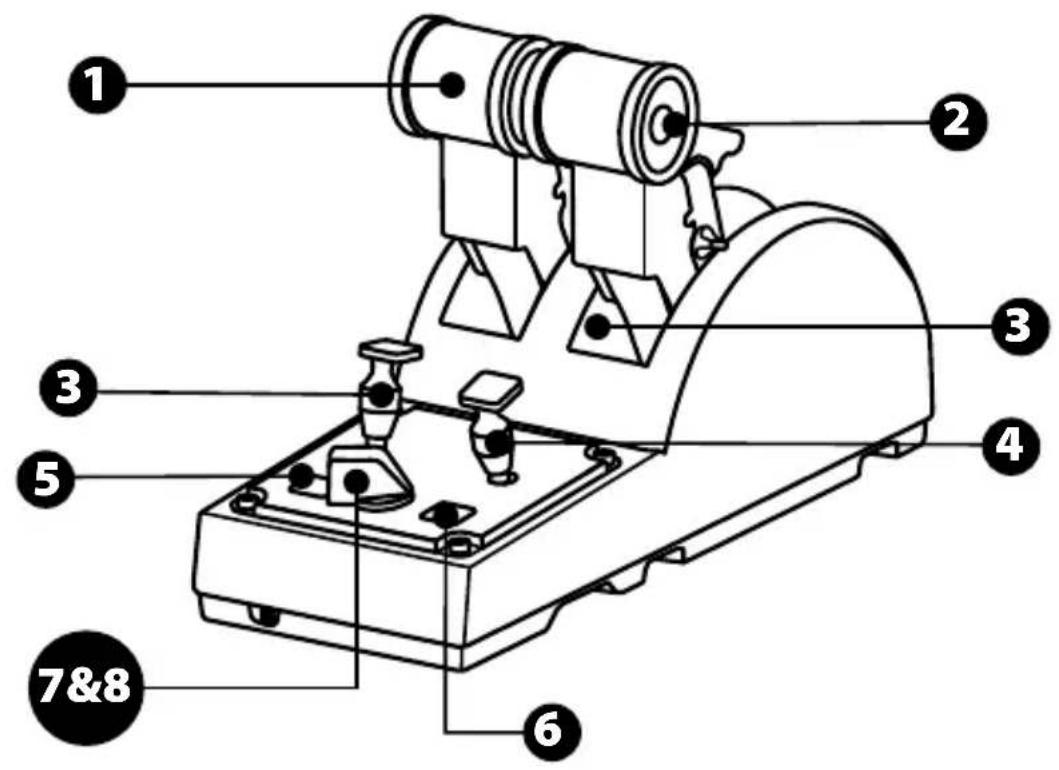
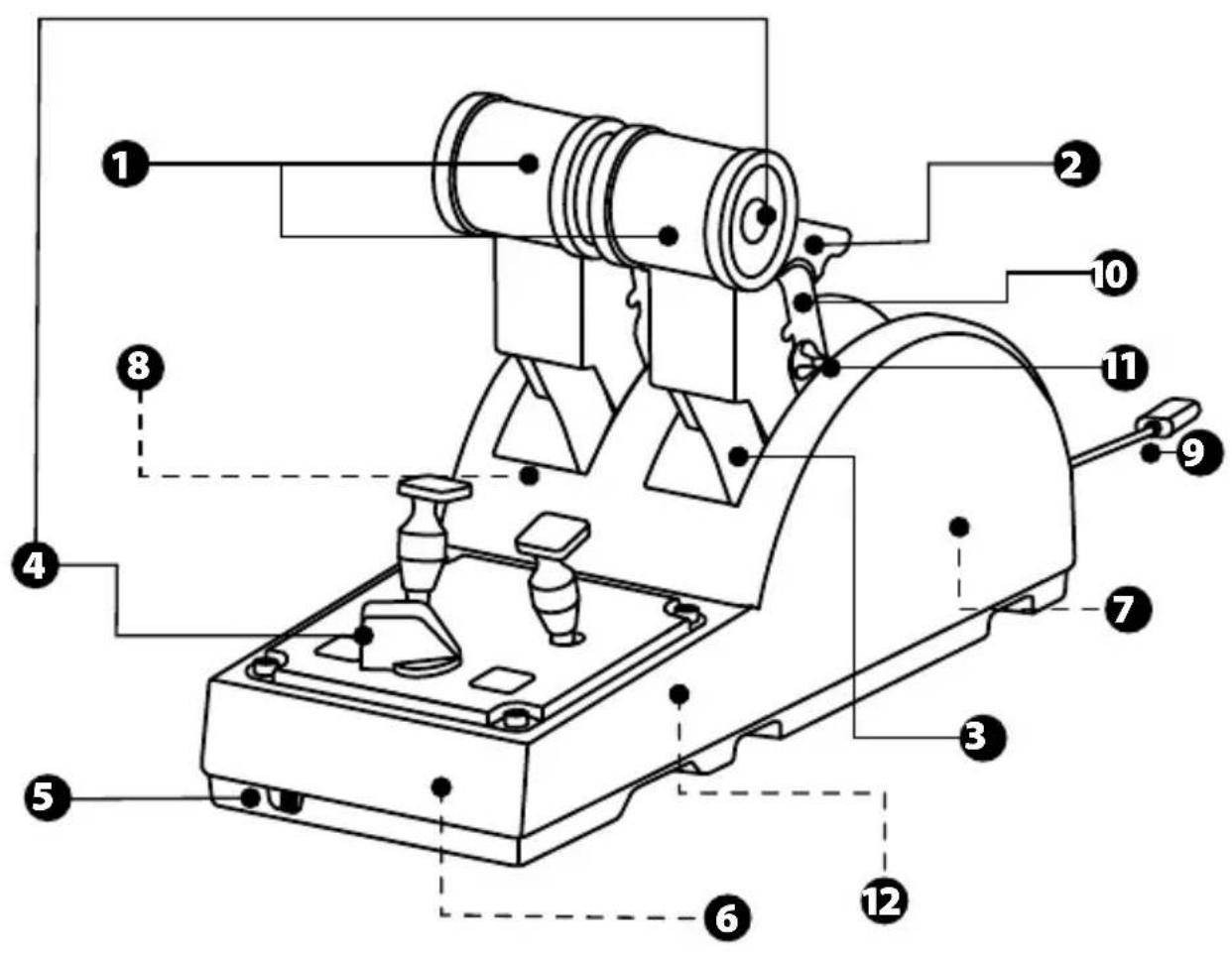
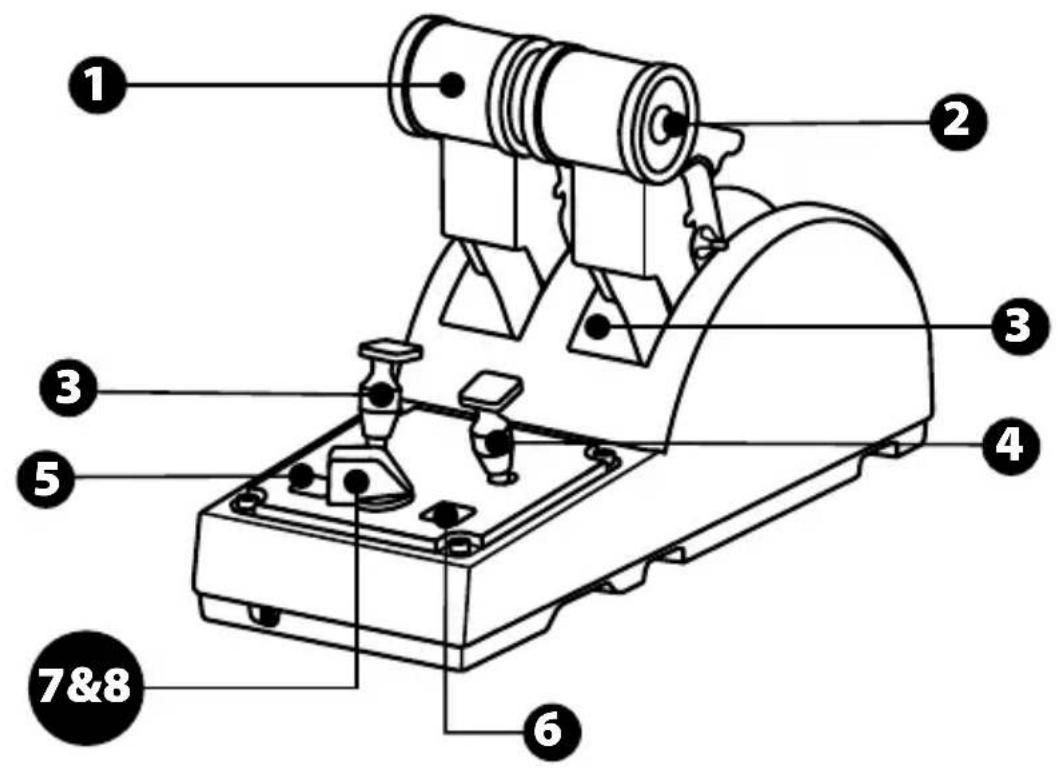
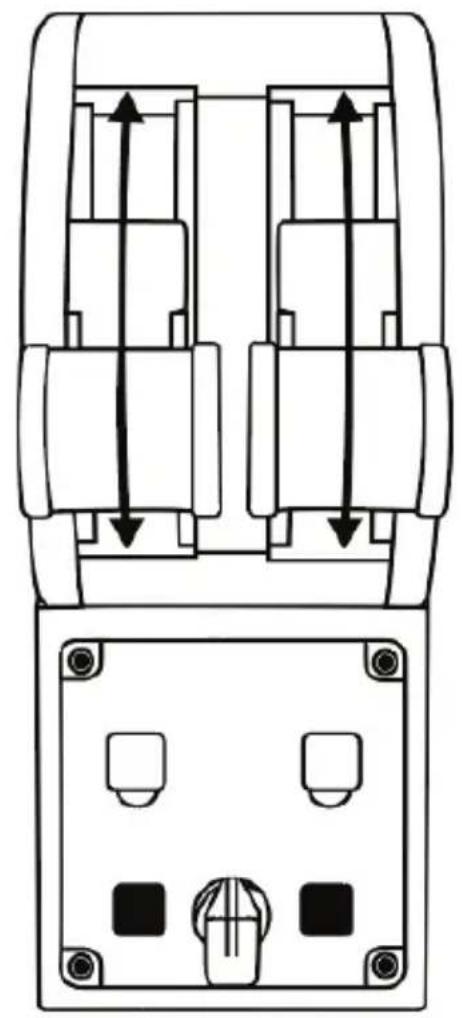
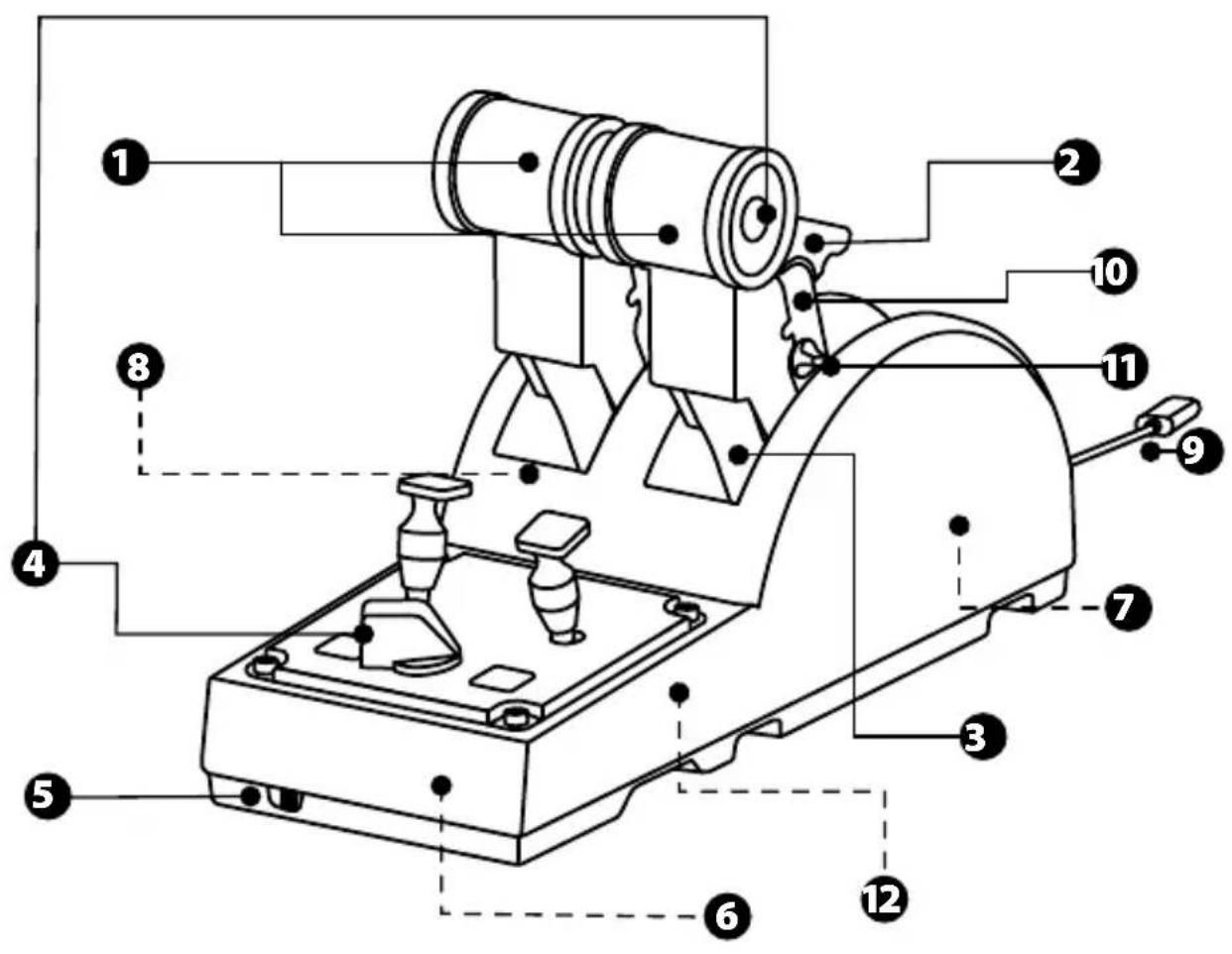
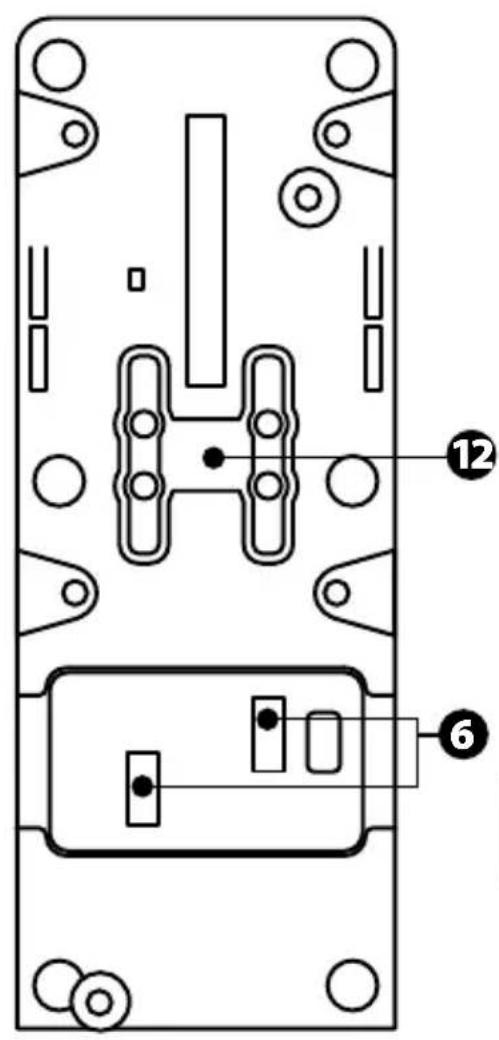
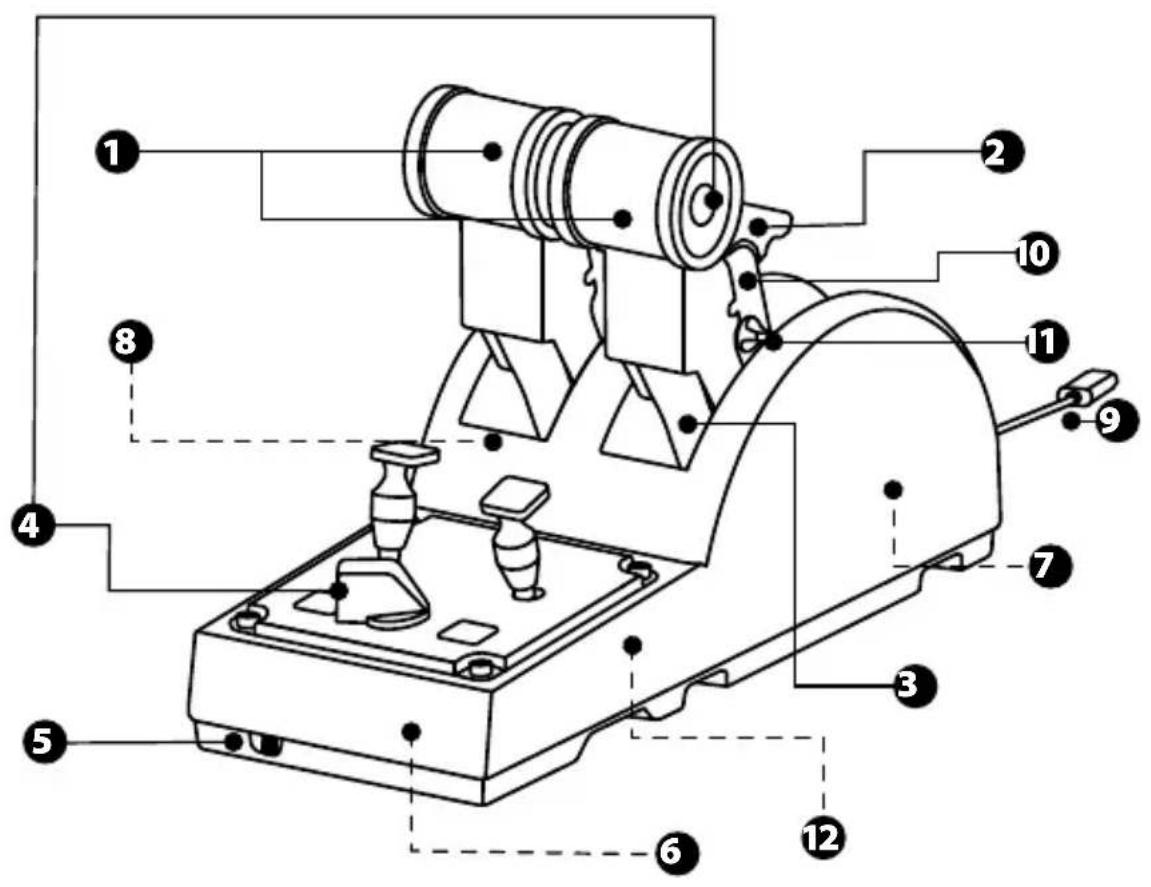
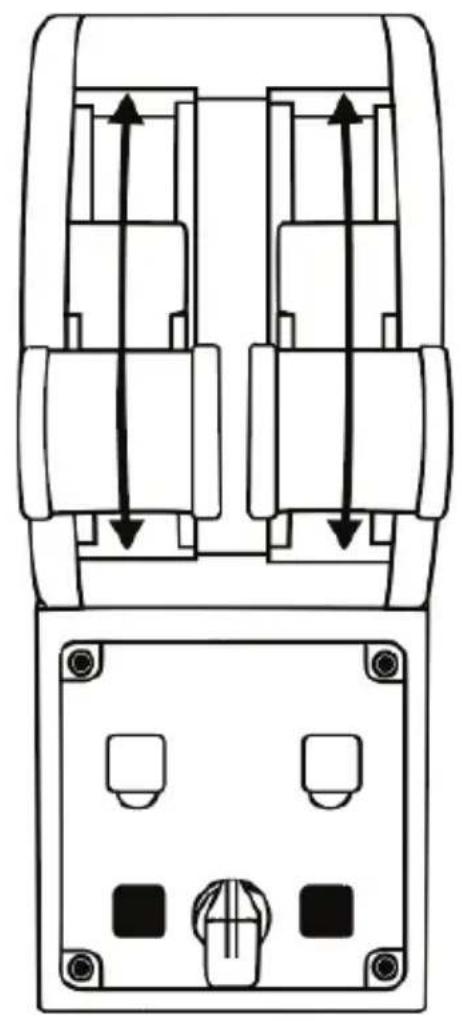
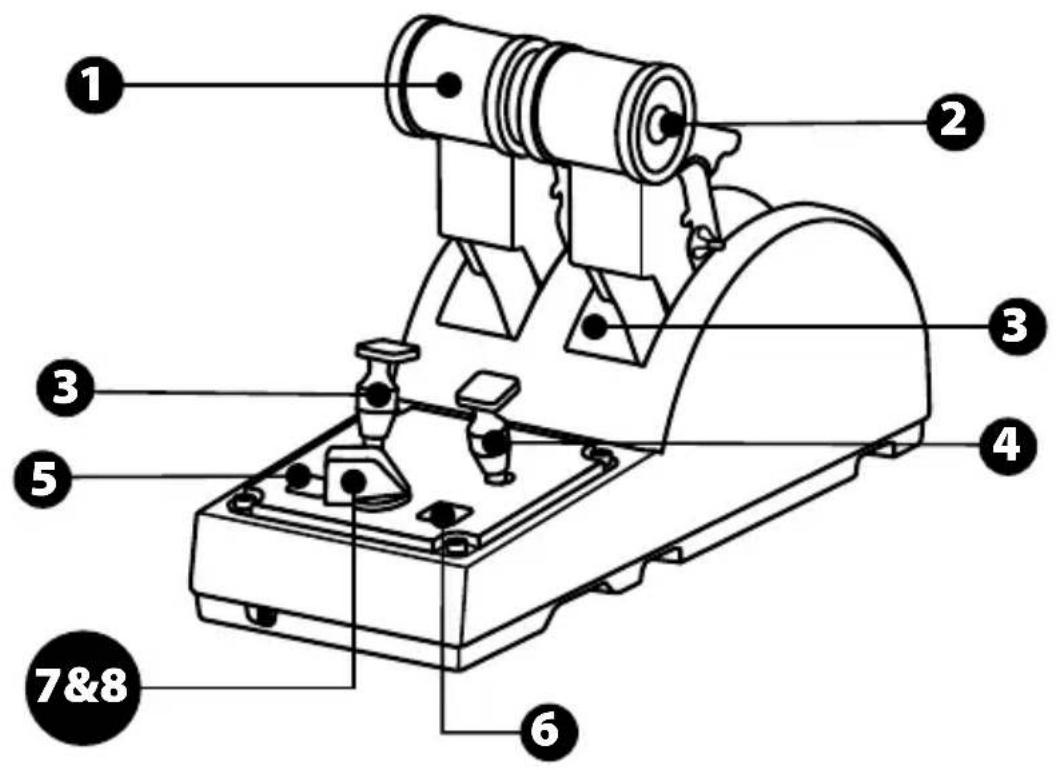
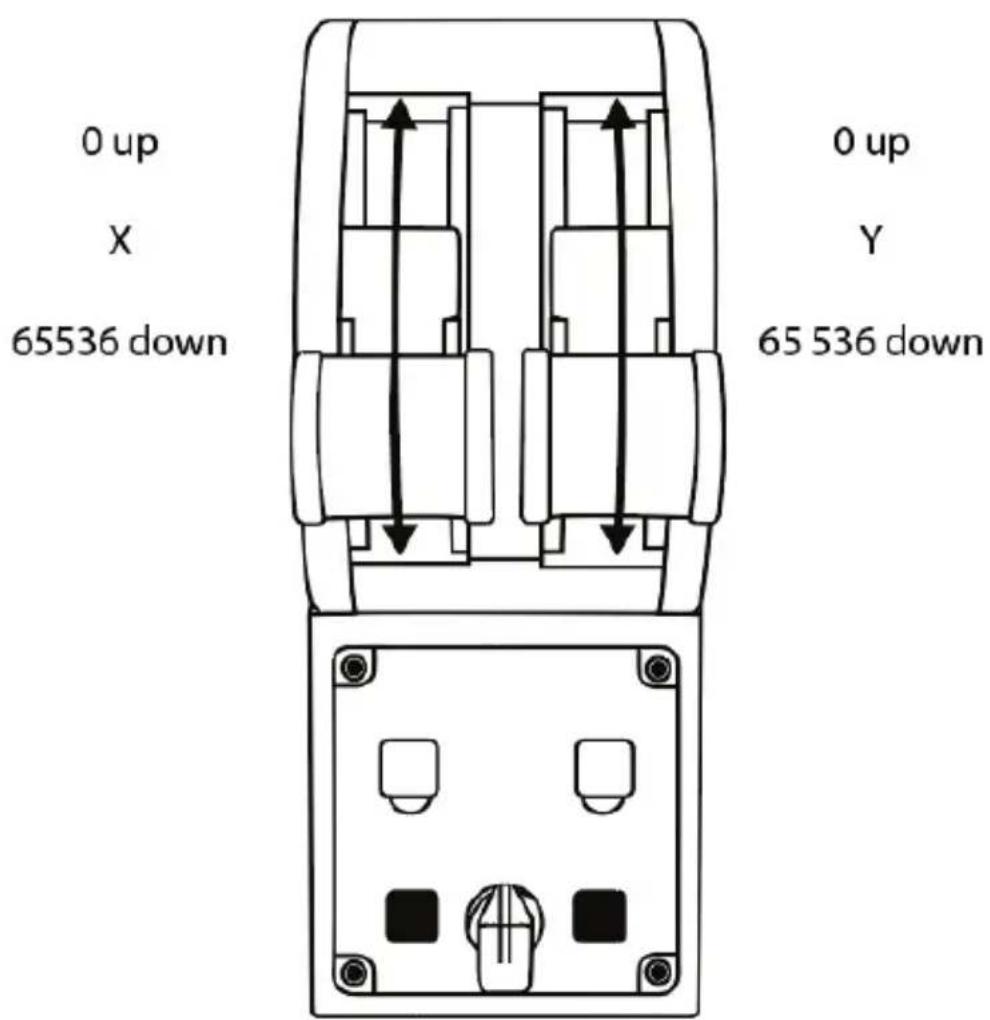
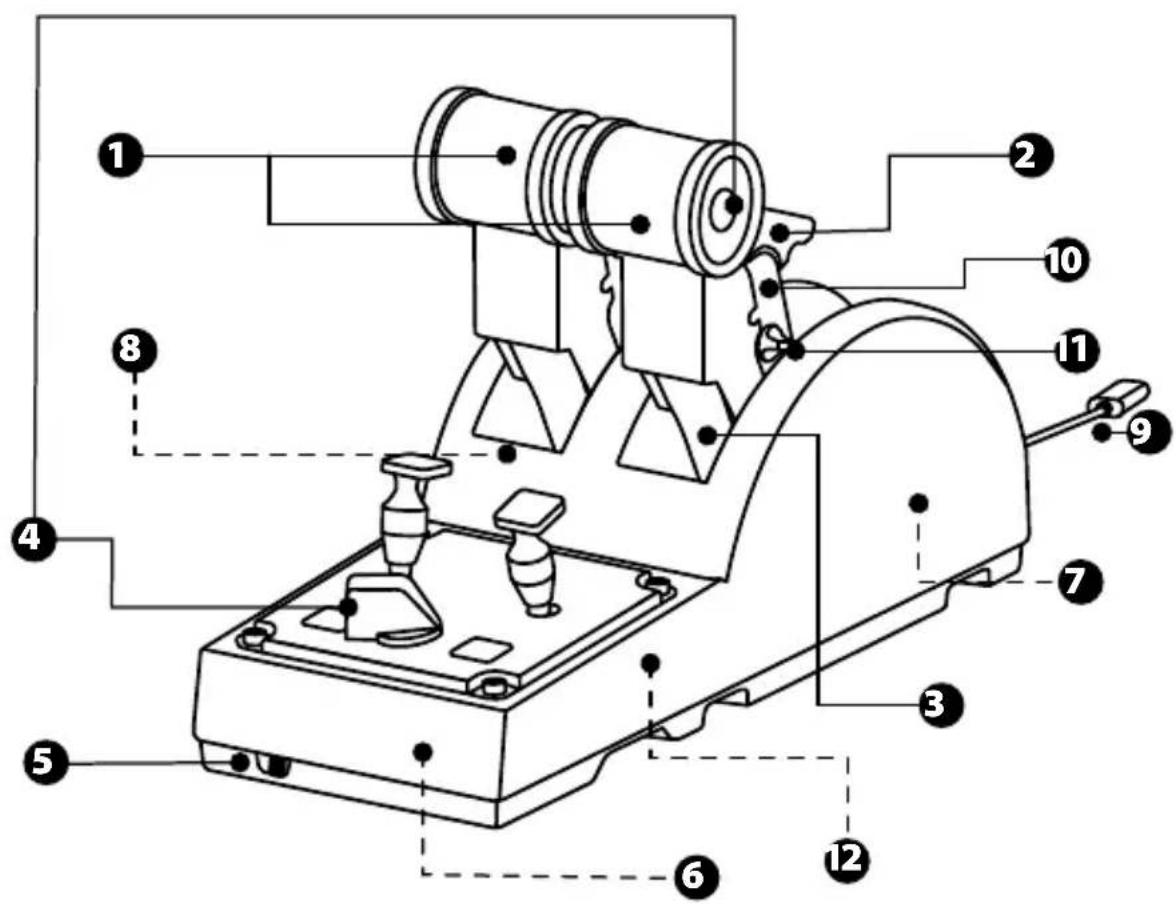
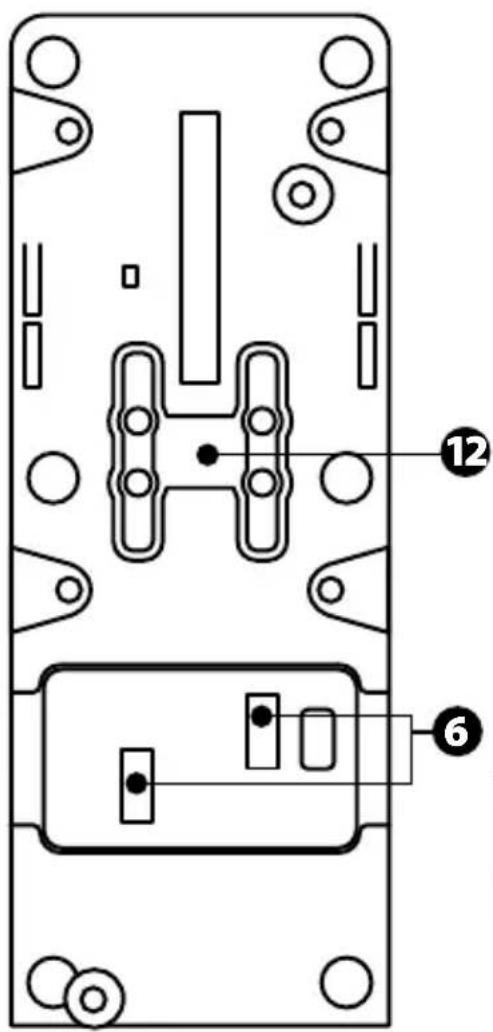
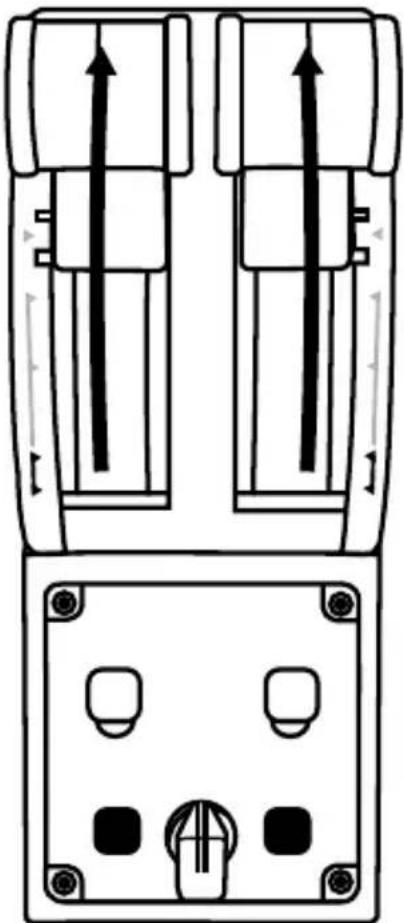
- X and Y axes for throttle
- Thrust reverser mechanism on each axis
- 4 detents per axis -4 virtual buttons per axis
- 8 action buttons
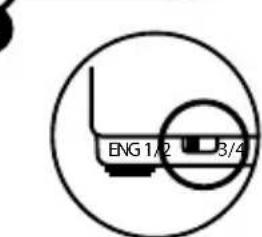
- Selector switch forengine: 1/2 or 3/4
-
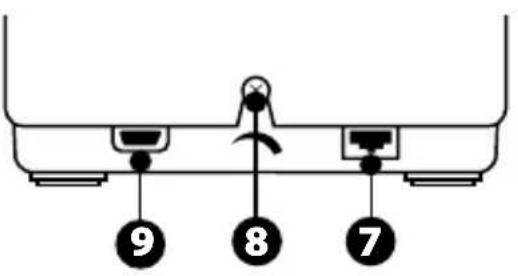
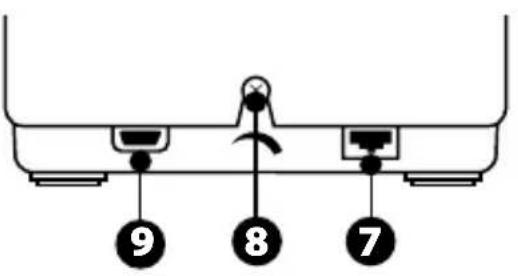
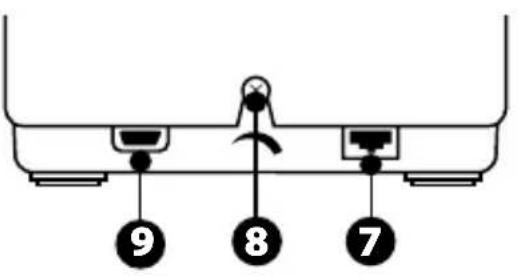
SATA connectors for external TCA Quadrant Add-On Airbus Edition modules (add-on sold separately)
-
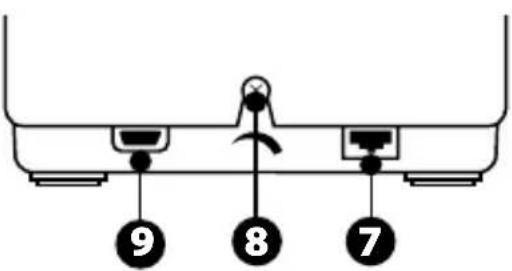
Connector for TFRP rudder system (sold separately)
- Friction adjustment screw
- USB connector (type B)
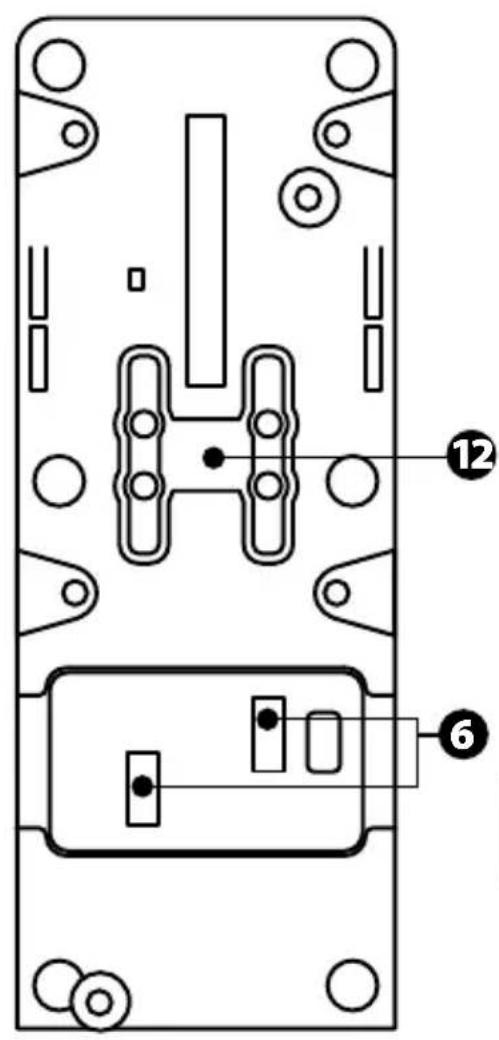
- Crossbar location
- Mechanism for enabling/disabling thrust reverser on each axis
- Mechanism for enabling/disabling detents on each axis
INSTALLATION ON PC
- Please visit https://support.thrustmaster.com/. Click Joysticks / TCA Quadrant Airbus Edition, and select Drivers. Download and install the PC driver and its customized interface for the Windows Control Panel.
- Once the PC driver has been installed, connect the device's USB connector to one of the USB ports on your PC.
- To access the Control Panel, click Start / Apps/ Thrustmaster / Control Panel (in Windows® 10 / 8.1 / 8).
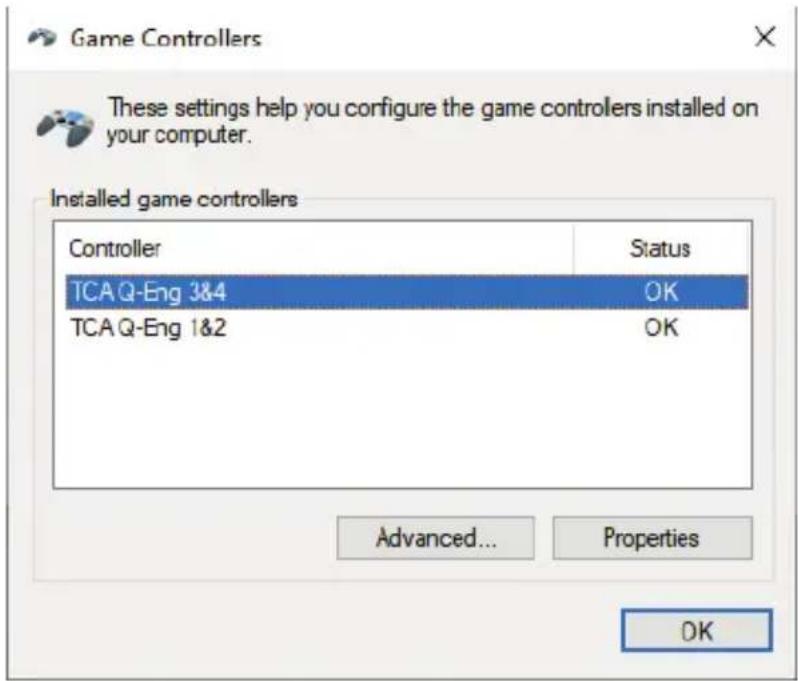
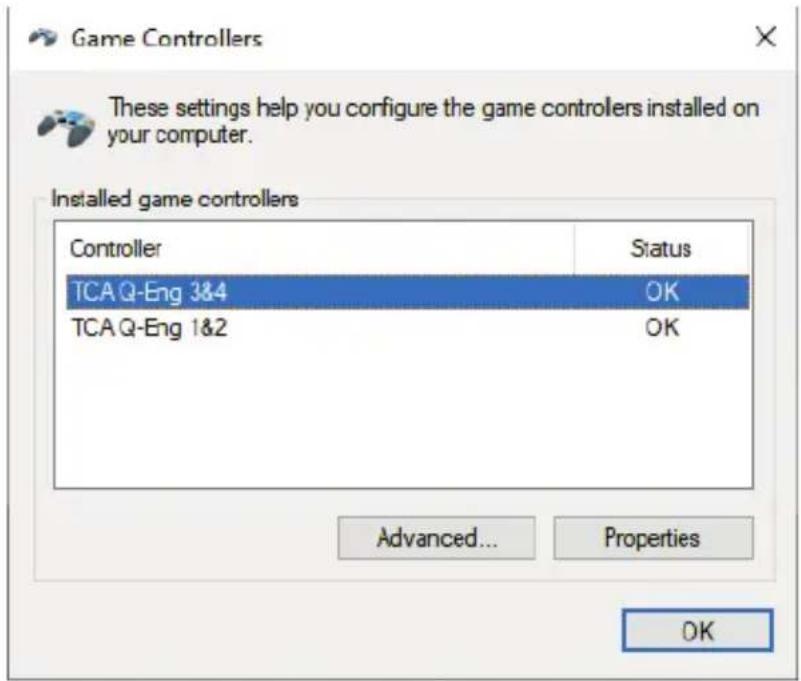
The Game Controllers dialog box appears.
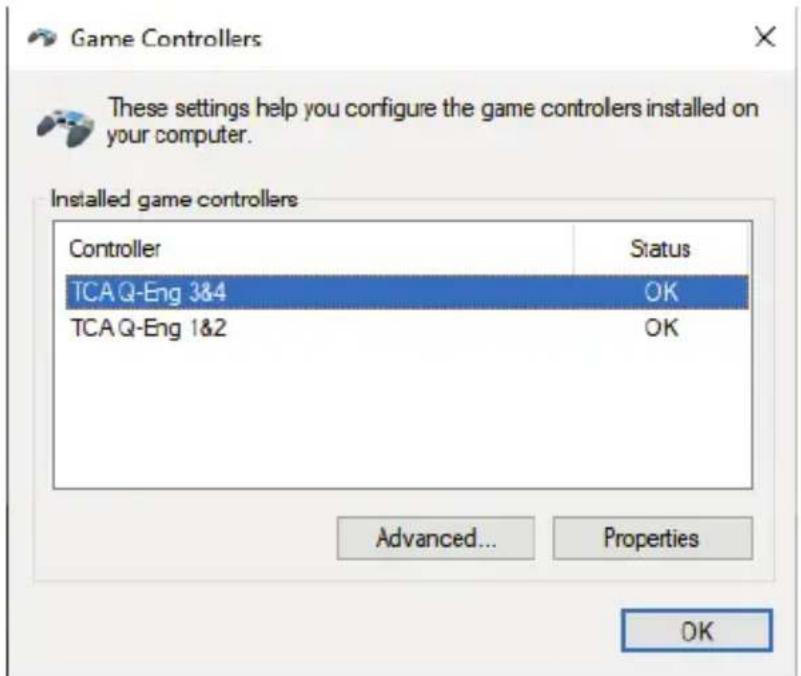
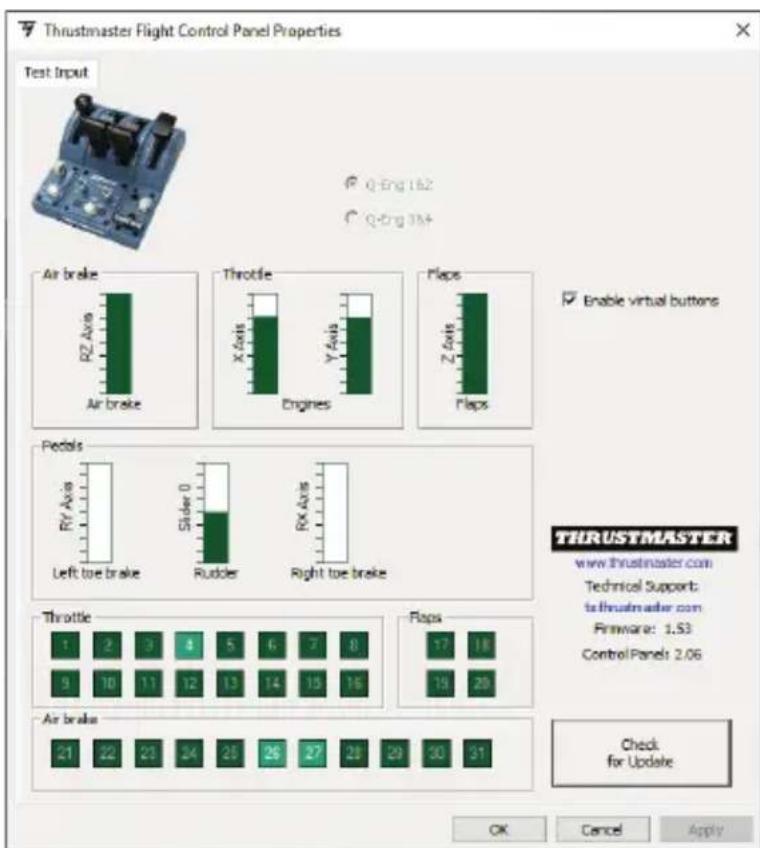
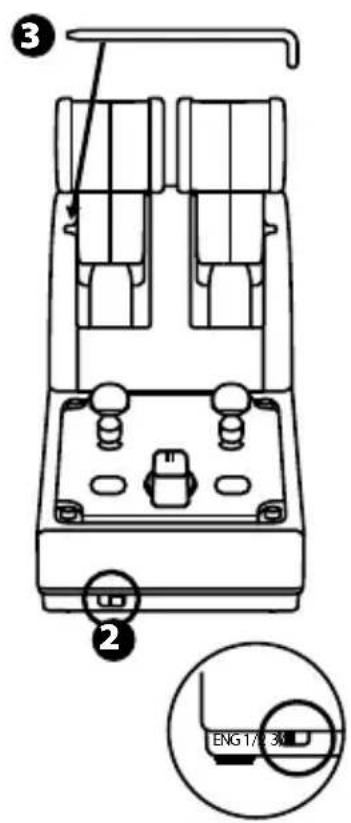
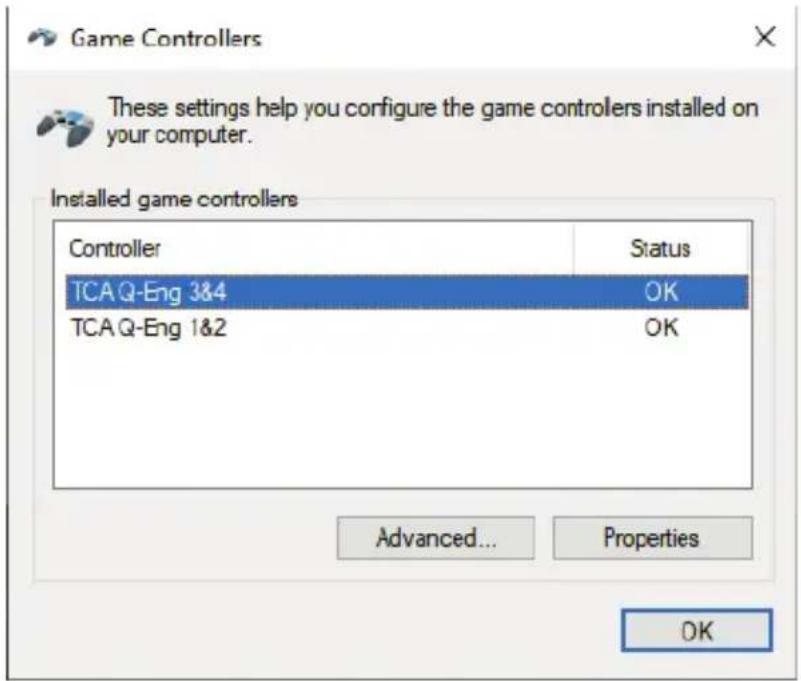
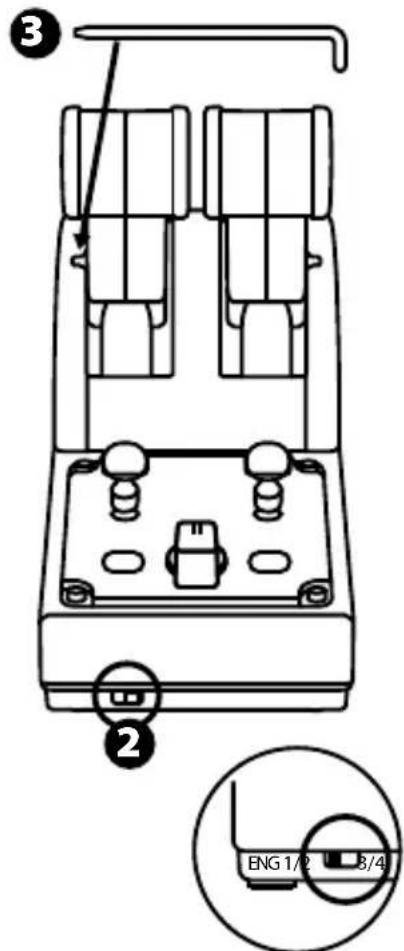
The accessory is listed on screen with the name TCA Q-Eng 1&2 (or TCA Q-Eng 3&4, depending on the position of the selector switch for the engines [5]), along with OK status.
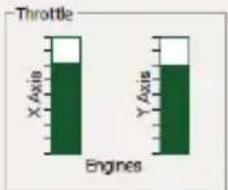
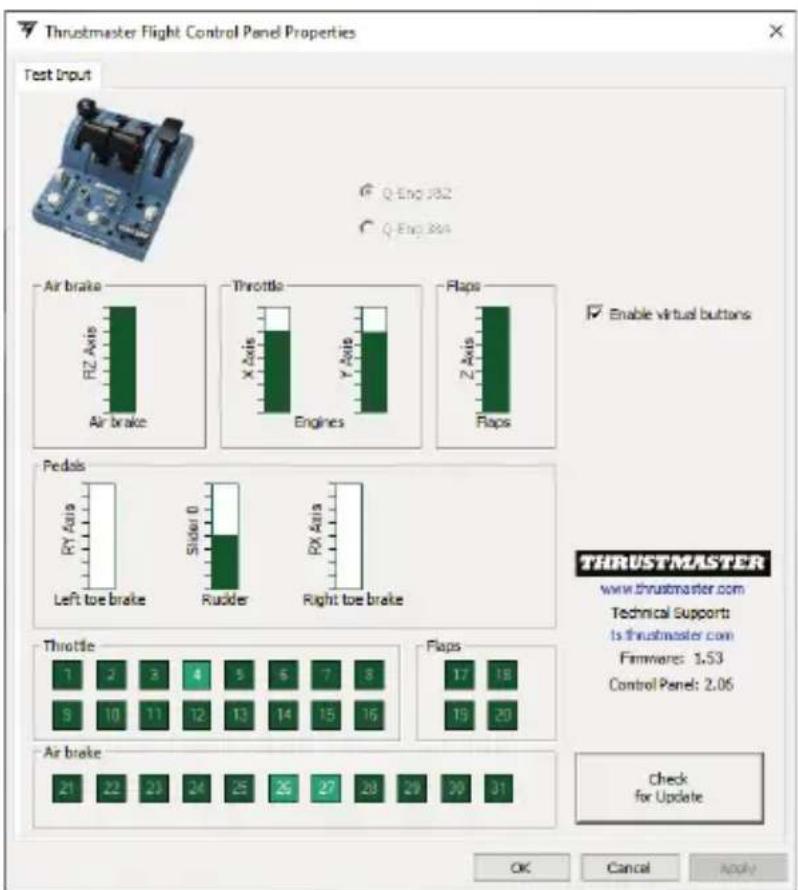
- In the Game Controllers dialog box, click Properties to test and view all features.
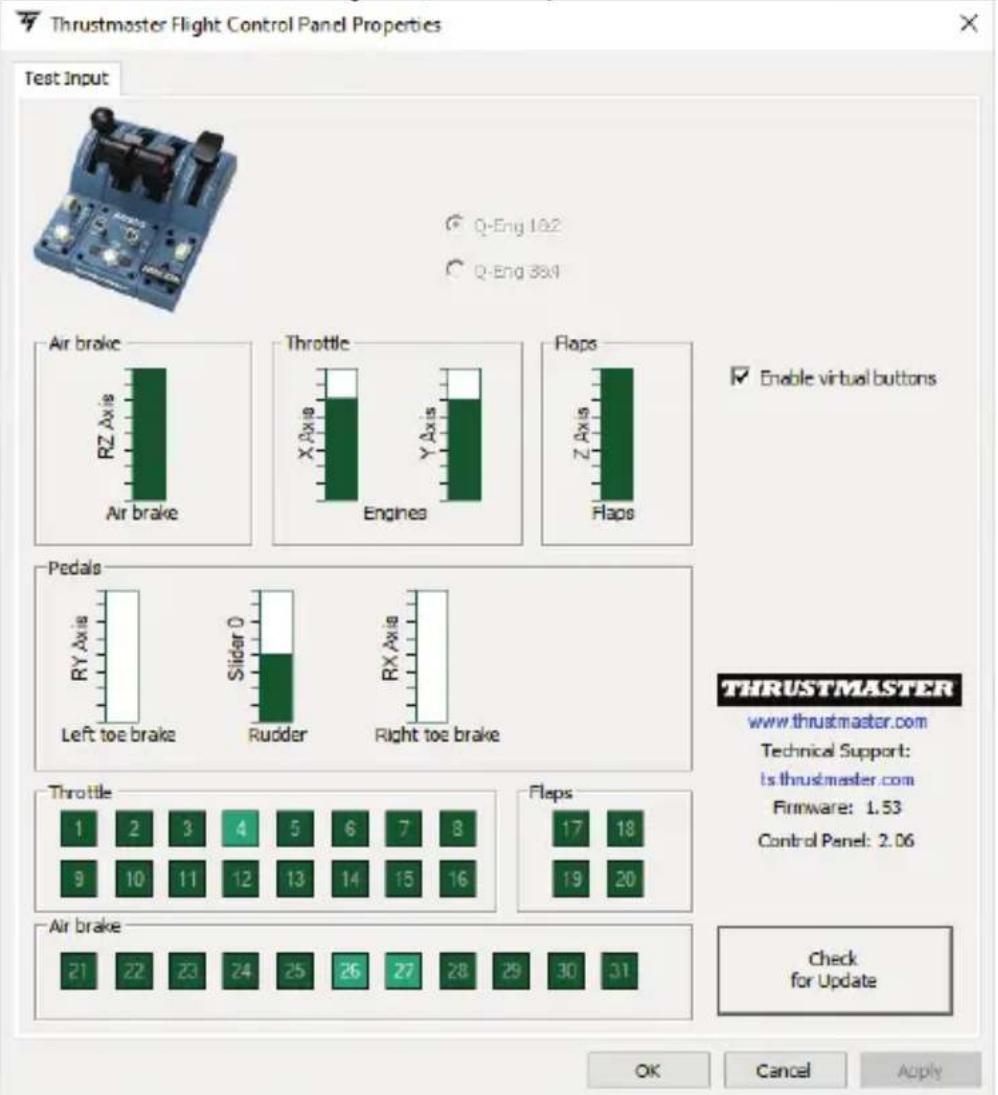
Enable virtual buttons: This feature allows to enable or disable the virtual buttons on the throttle's axes. Click Apply once you've selected your mode.
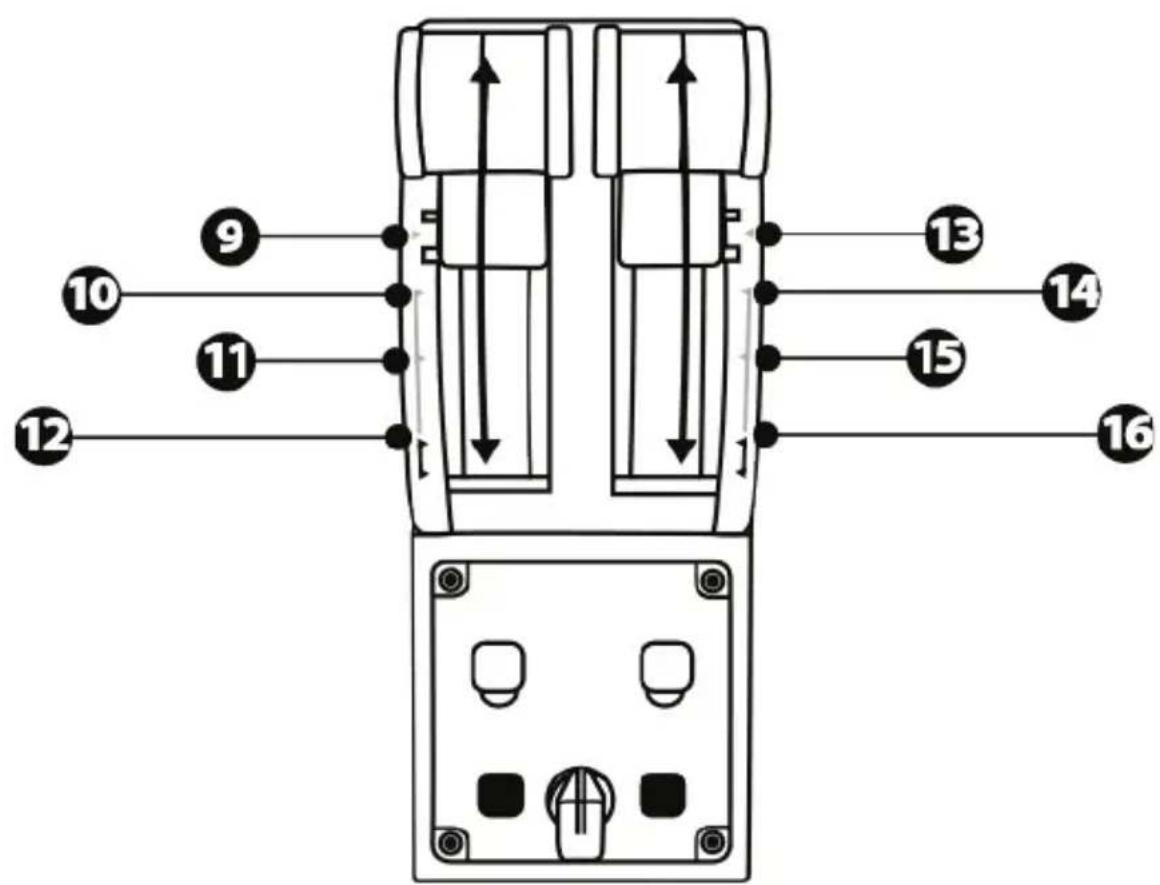
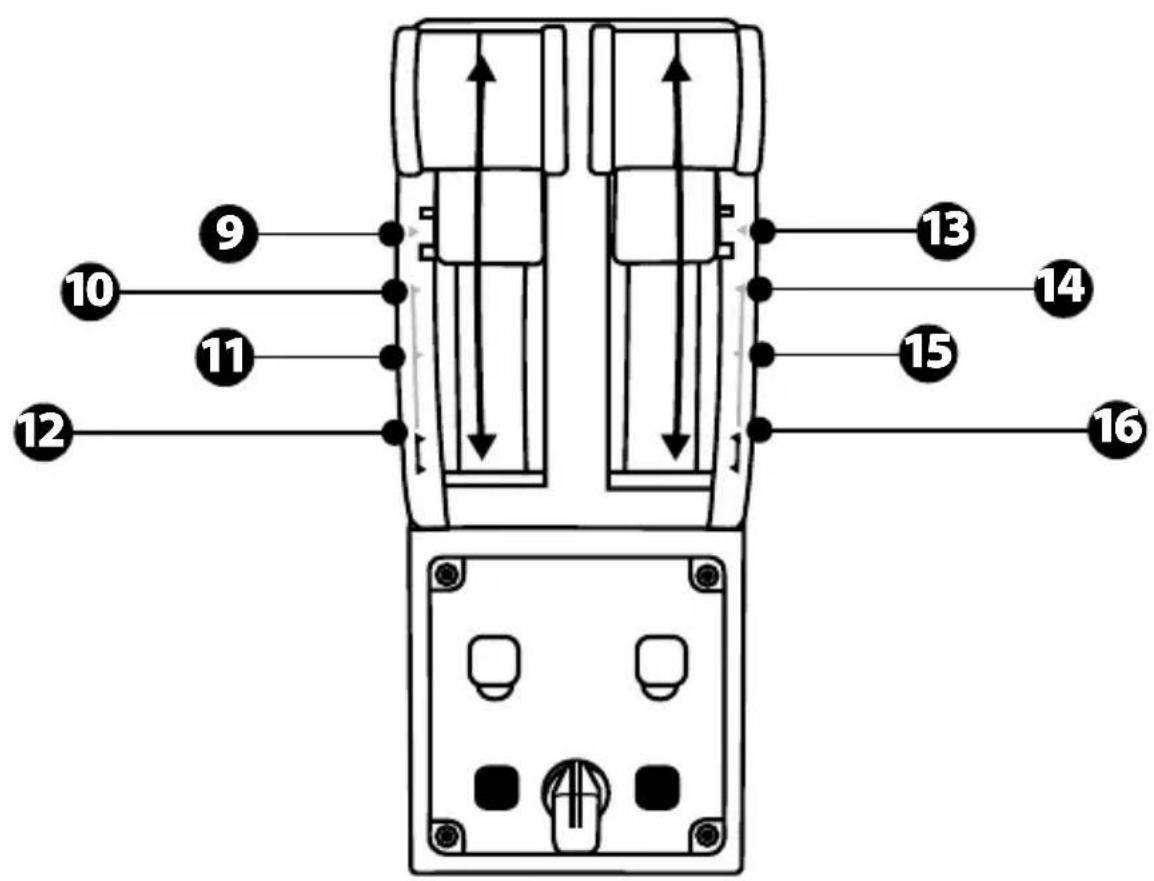
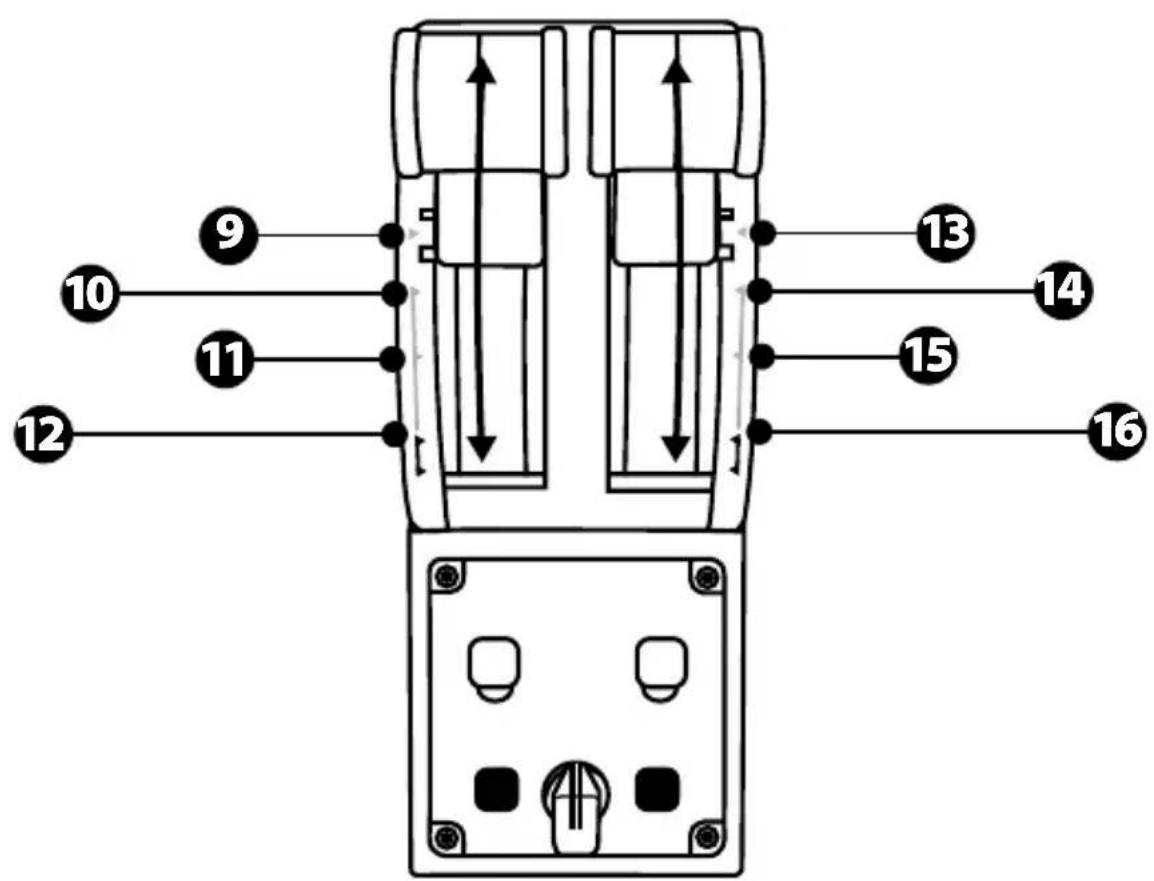
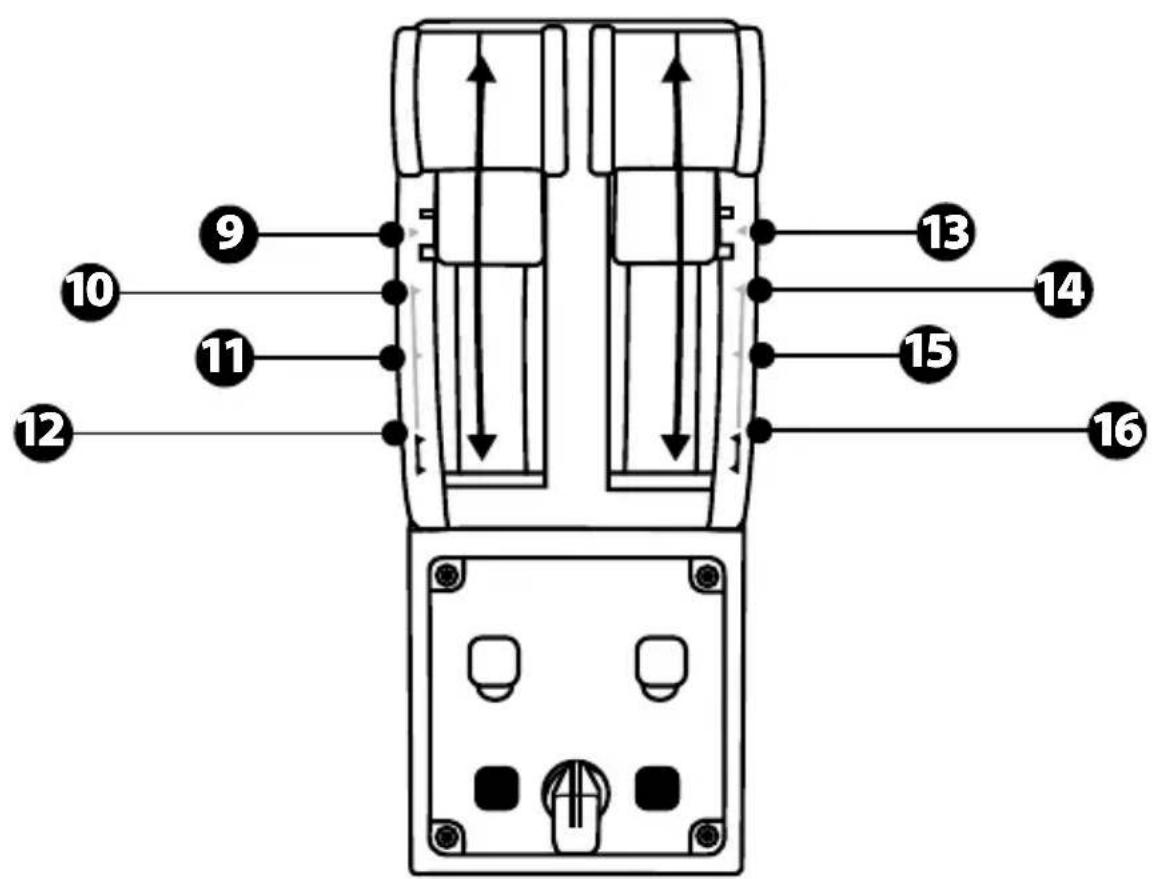
MAPPING FOR THE 16 BUTTONS AND 2 AXES
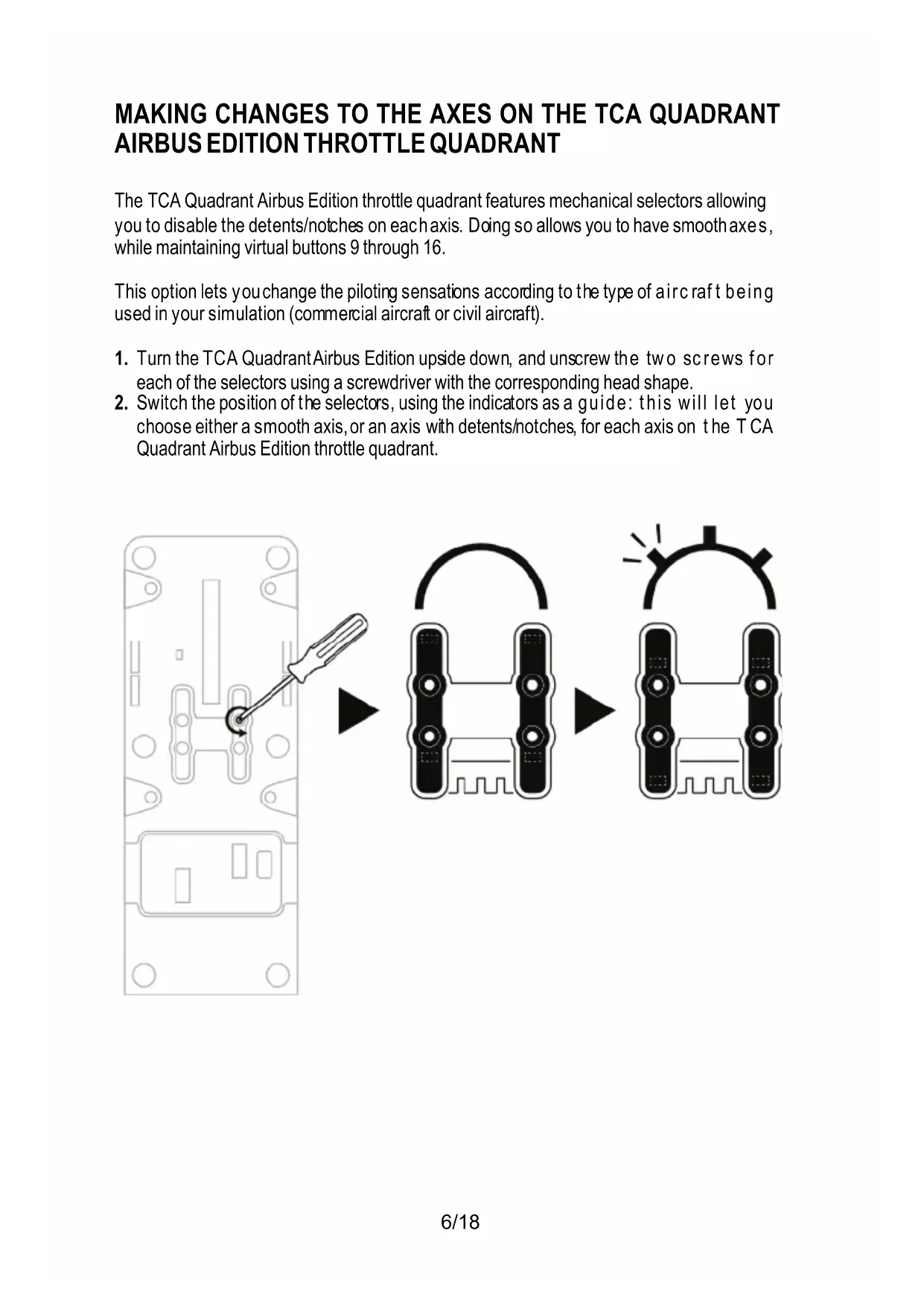
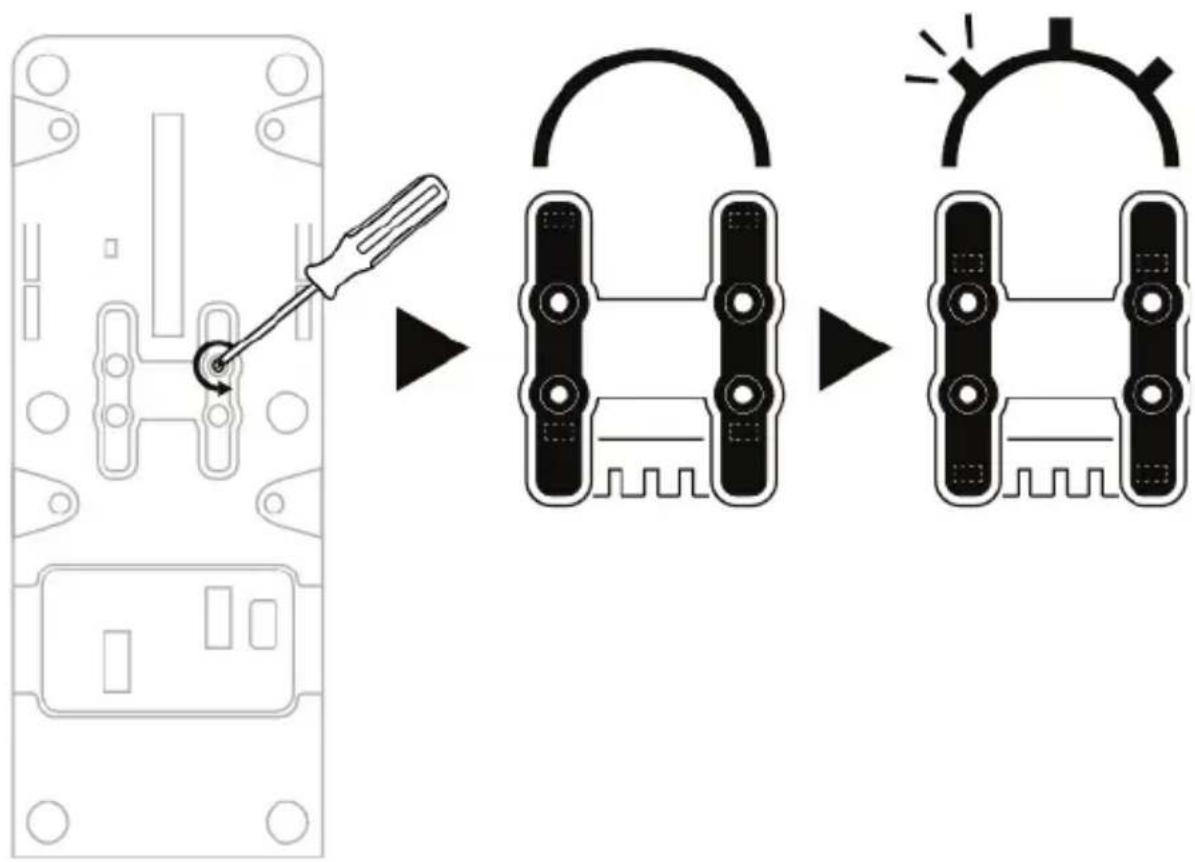
MAKING CHANGES TO THE AXES ON THE TCA QUADRANT AIRBUS EDITION THROTTLE QUADRANT
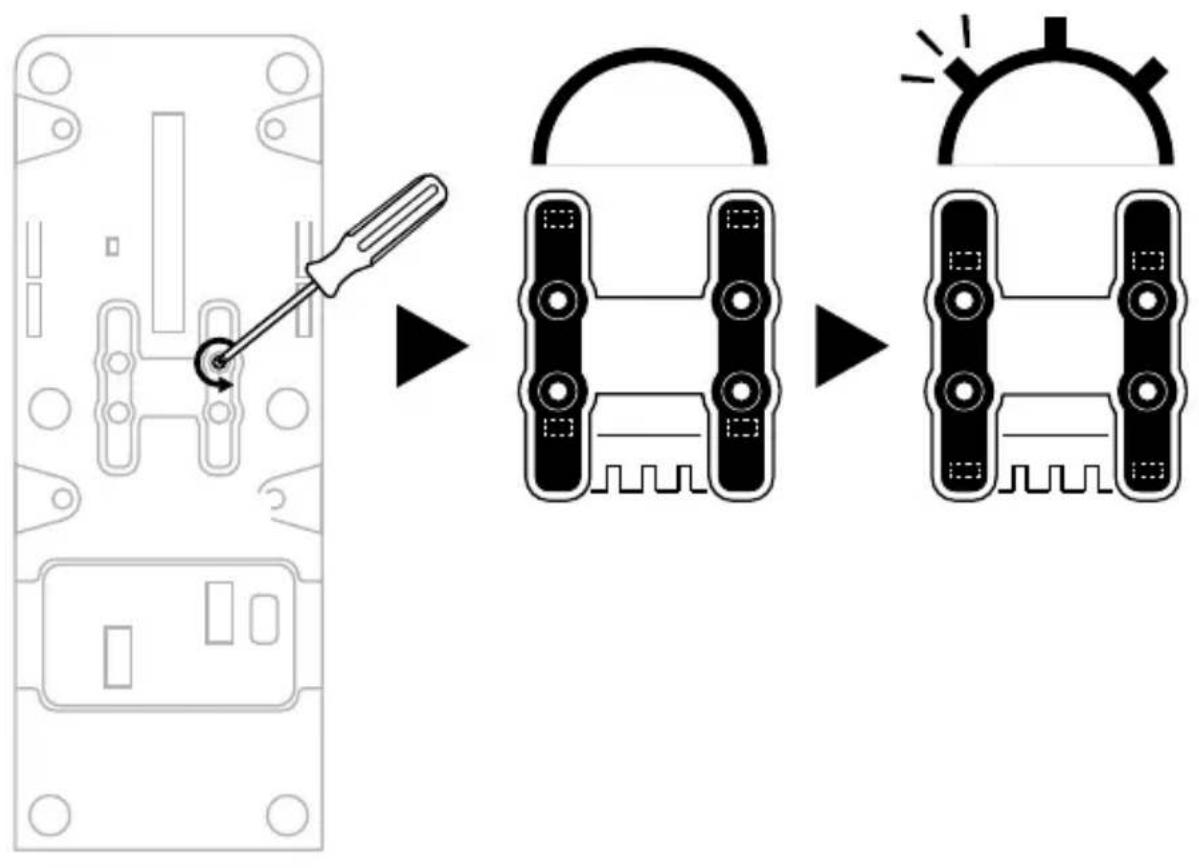
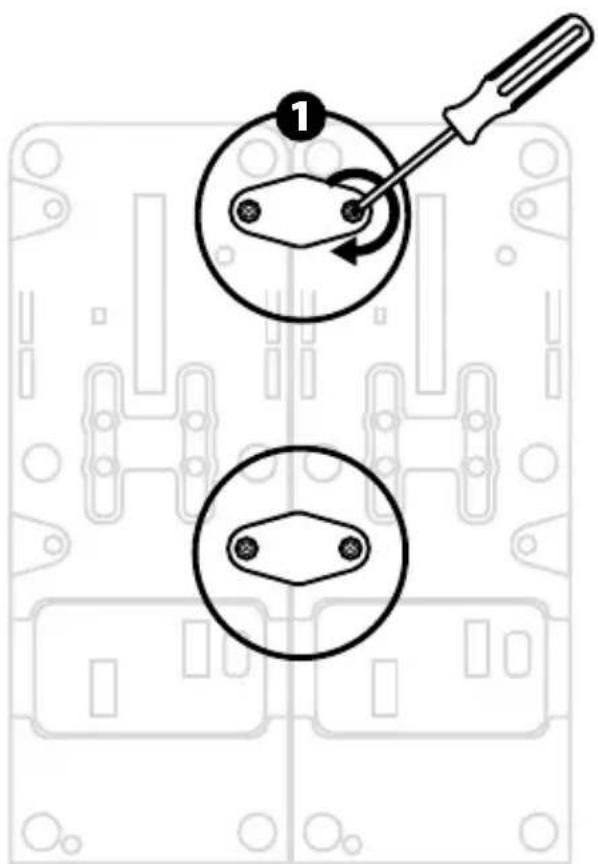
The TCA Quadrant Airbus Edition throttle quadrant features mechanical selectors allowing you to disable the detents/notches on each axis. Doing so allows you to have smooth axes, while maintaining virtual buttons 9 through 16.
This option lets you change the piloting sensations according to the type of aircraft being used in your simulation (commercial aircraft or civil aircraft).
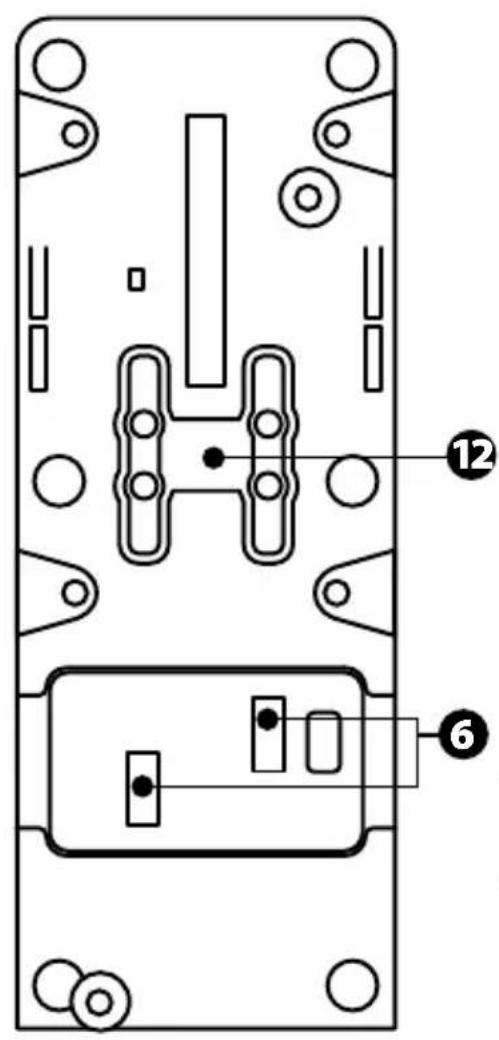
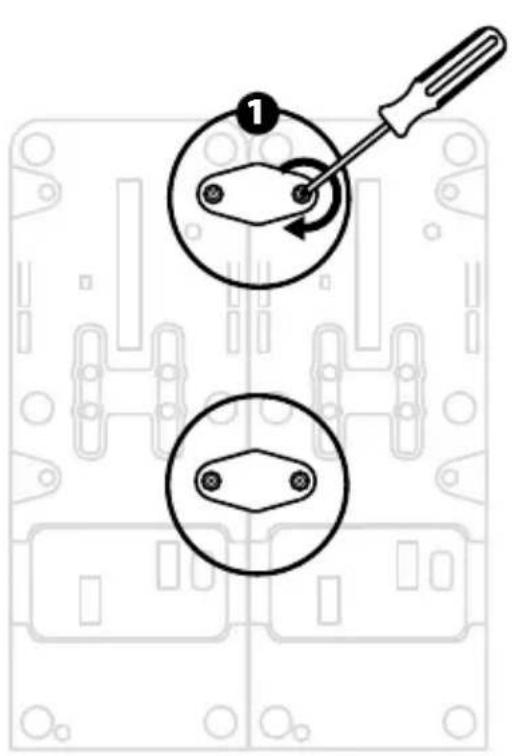
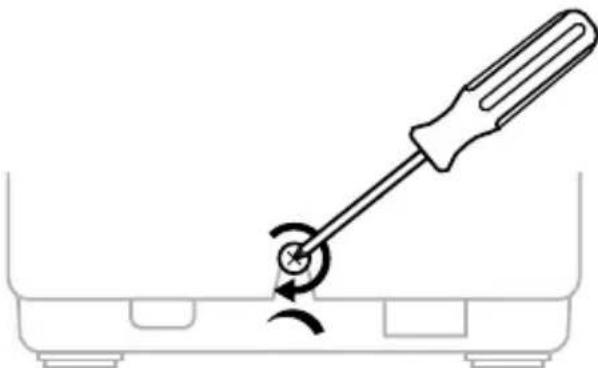
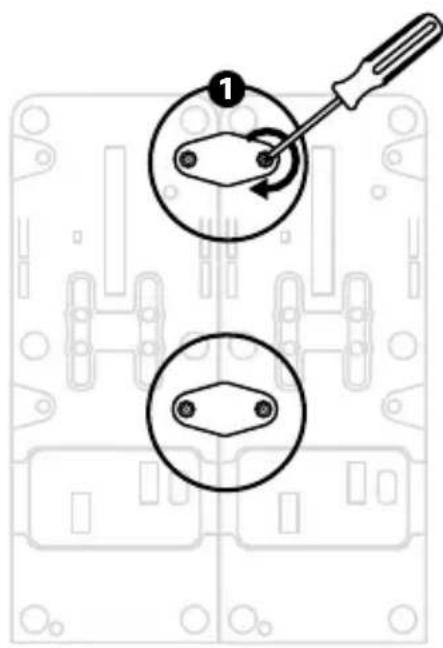
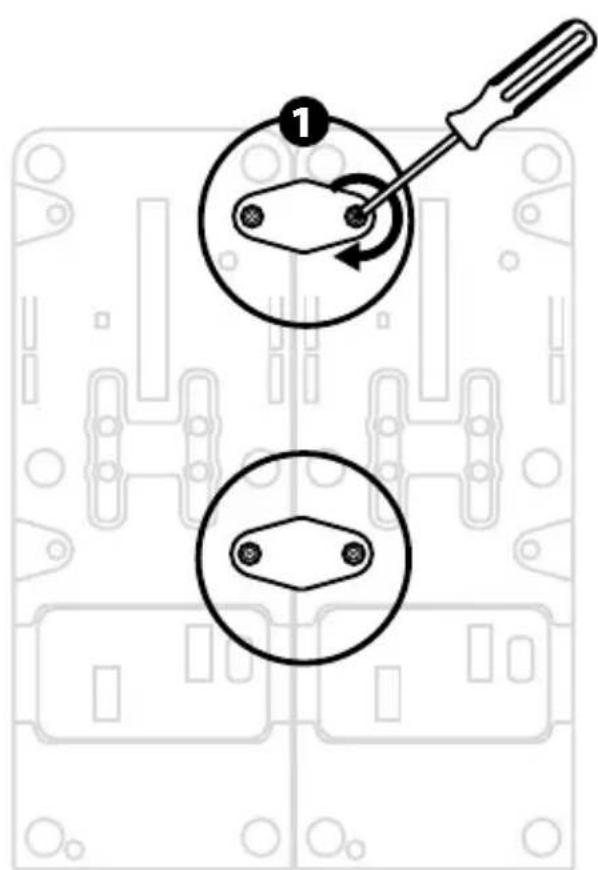
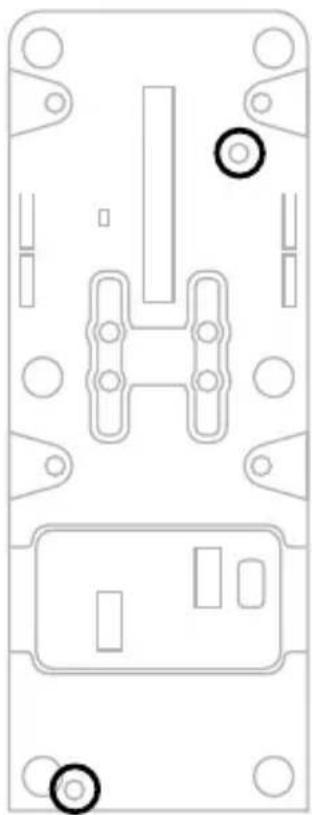
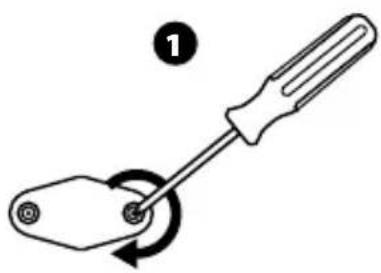
- Turn the TCA QuadrantAirbus Edition upside down, and unscrew the two screws for each of the selectors using a screwdriver with the corresponding head shape.
- Switch the position of the selectors, using the indicators as a guide: this will let you choose either a smooth axis, or an axis with detents/notches, for each axis on the TCA Quadrant Airbus Edition throttle quadrant.
DISABLING THE THRUST REVERSERS ON THE TCA QUADRANT AIRBUS EDITION THROTTLE QUADRANT
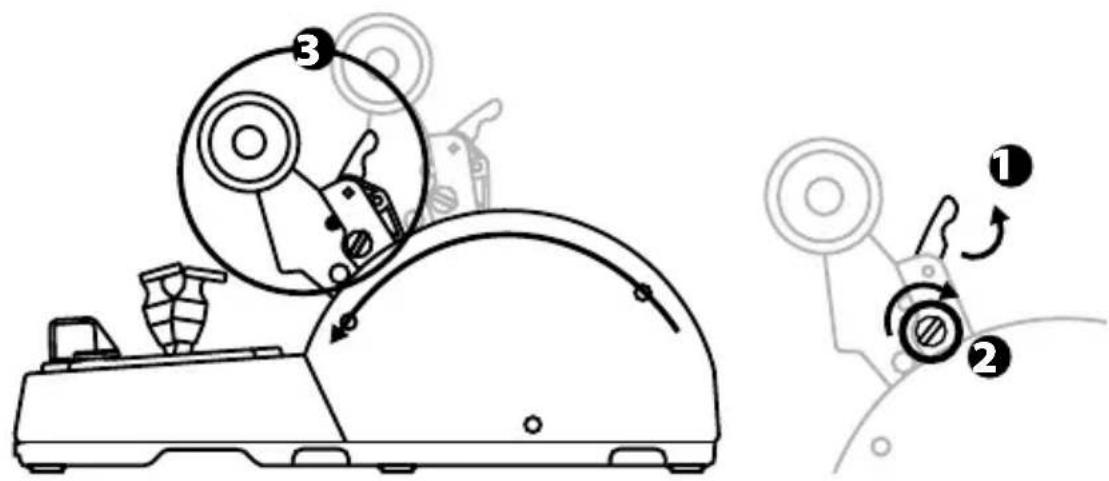
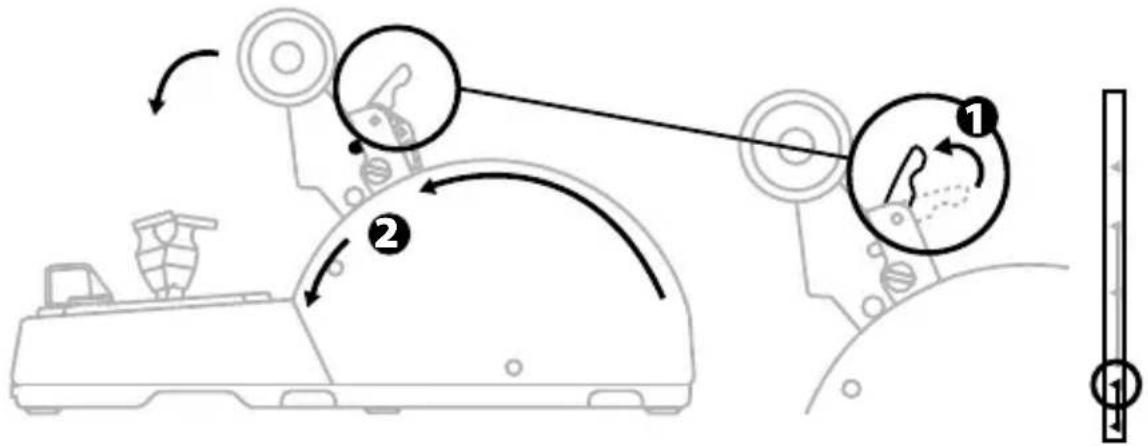
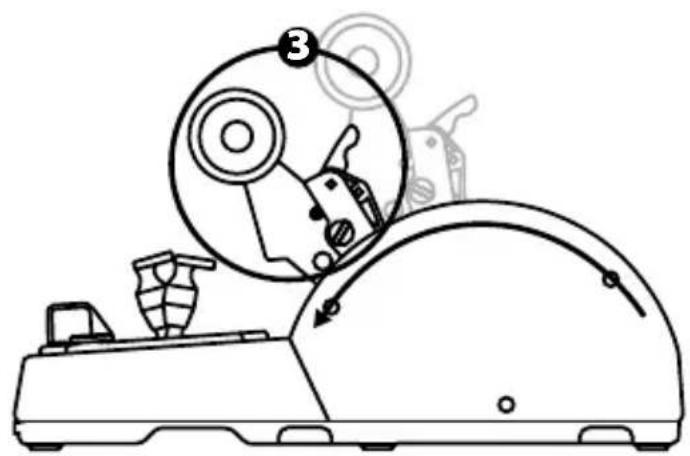
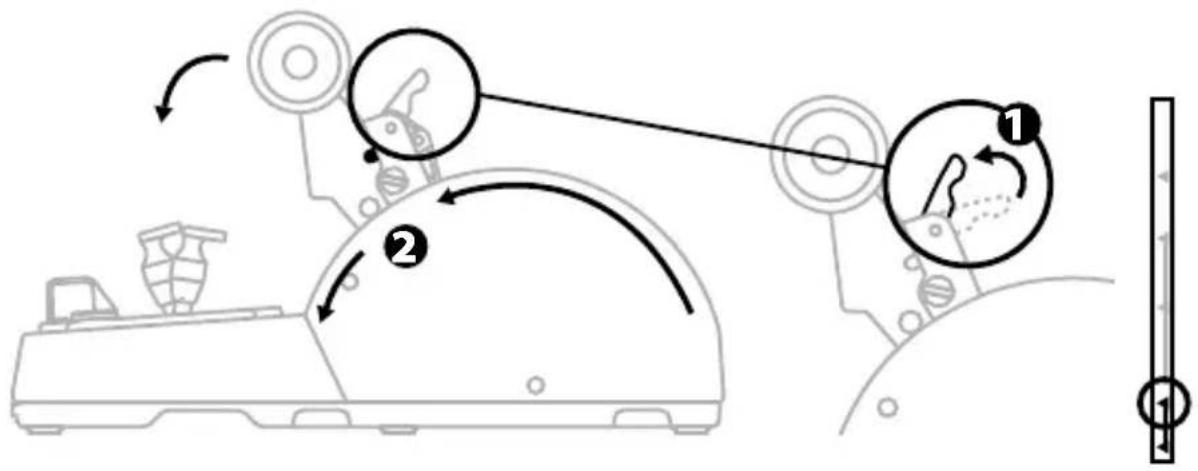
The TCA Quadrant Airbus Edition throttle quadrant features functional thrust reversers, replicating those found on Airbus commercial aviation throttles. You can disable the thrust reverser mechanism, for piloting better suited to civil aviation.
Commercial airliner mode:
- At the stop, lift up the thrust reverser mechanism.
- Moving past the stop lets you use the thrust reverser.
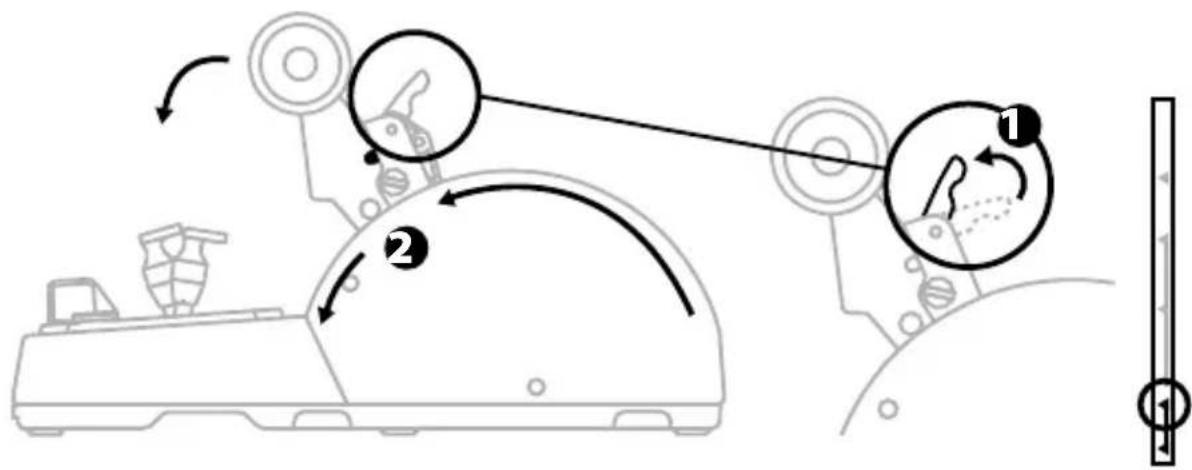
General and civil aviation mode:
- Lift up the thrust reverse mechanism.
- Turn the selector to position 0 to disable the thrust reverse mechanism.
- The thrust lever can now move through the entire axis.
CONNECTING TWO TCA QUADRANT AIRBUS EDITION THROTTLEQUADRANTS
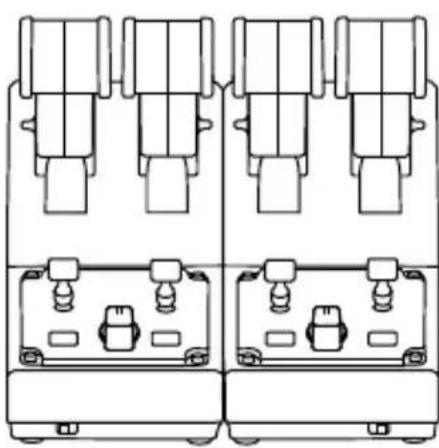
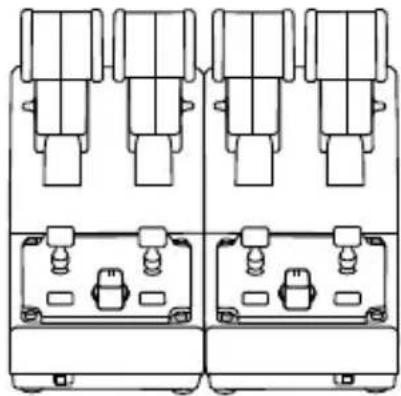
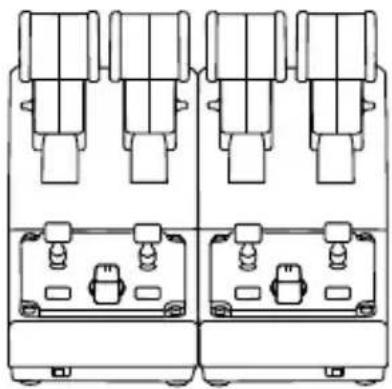
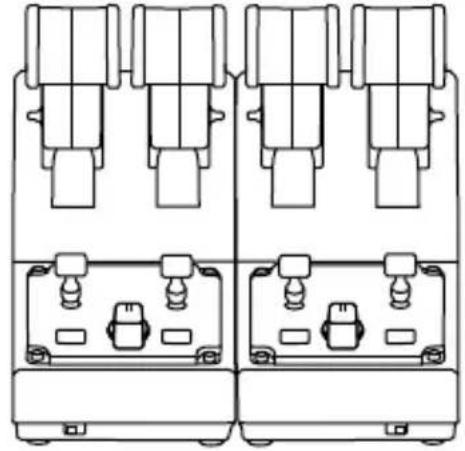
You can connect a second TCA Quadrant Airbus Edition throttle quadrant (sold separately): this will allow you to use 4 axes in total, simulating a four-engine commercial airliner, for example.
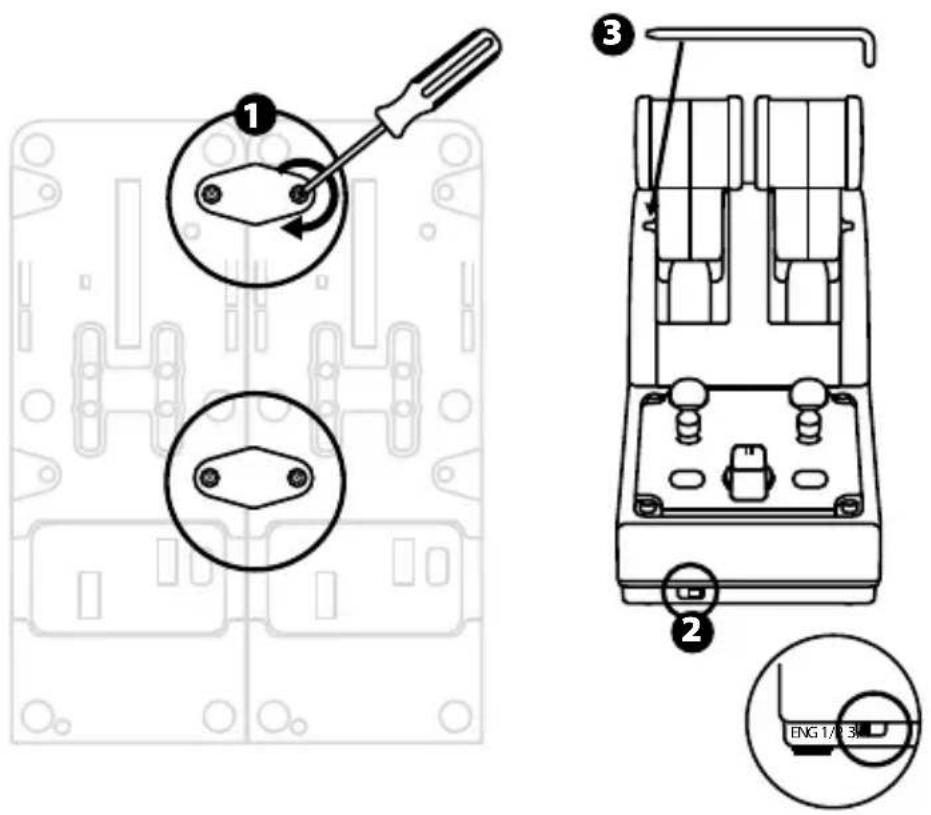
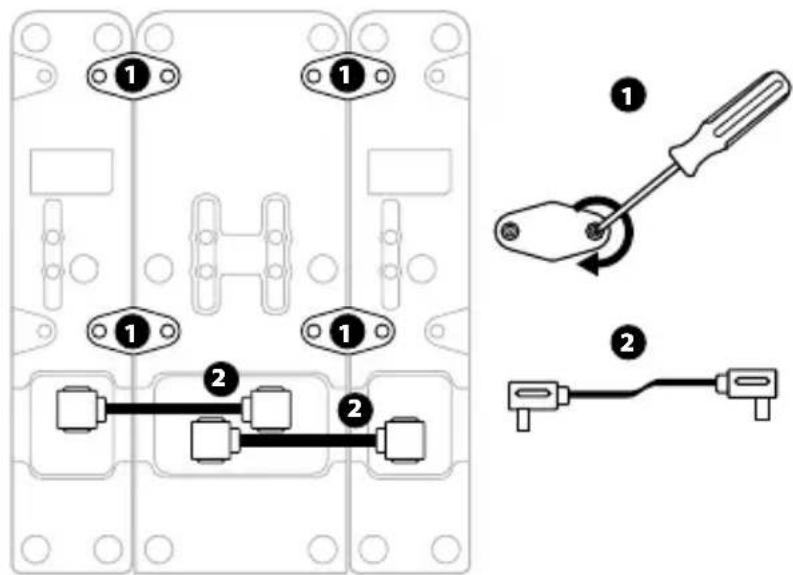
- Turn both TCA Quadrant Airbus Edition throttle quadrants upside down, and screw on the two attachment pieces included with the TCA Quadrant Airbus Edition to attach the two devices together.
- On the second throttle quadrant, physically set the selector switch to 3/4 in order to associate engines 3 and 4 with the second throttle quadrant (in the Control Panel on PC).
- Connect the axes together by pair (1/2 and 3/4) to make them easier to move in unison, using the crossbar included with each TCA Quadrant Airbus Edition.
- When both devices are connected to your PC via USB, they appear independently in the Game Controllers dialog box:
CONNECTING THE TCA QUADRANT AIRBUS EDITION THROTTLE QUADRANT TO THE TCA QUADRANT ADD-ON AIRBUS EDITION*
- Sold separately
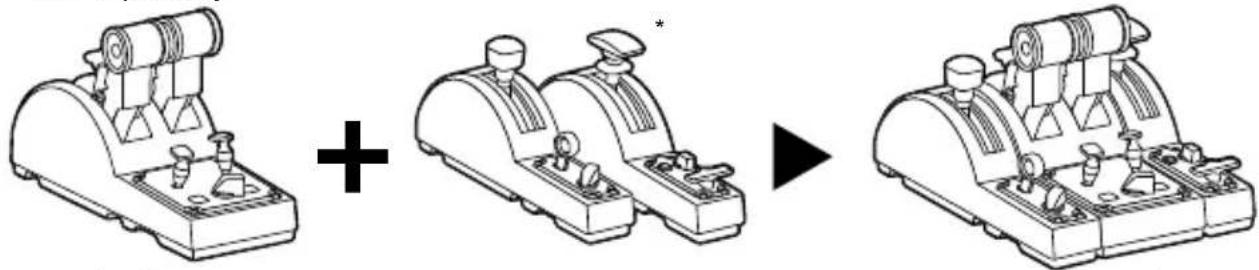
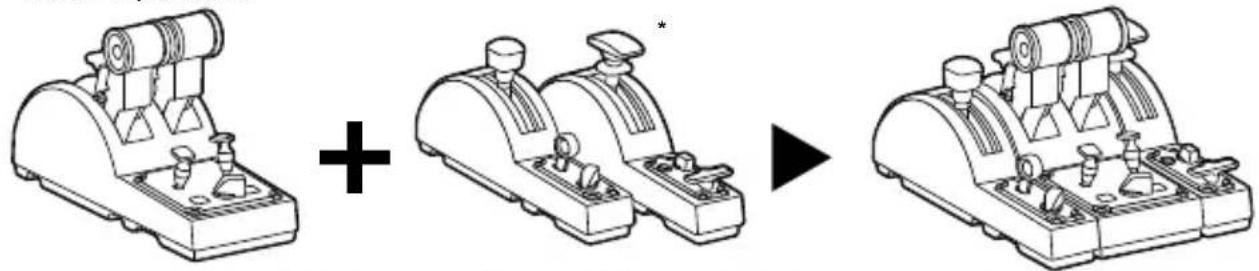
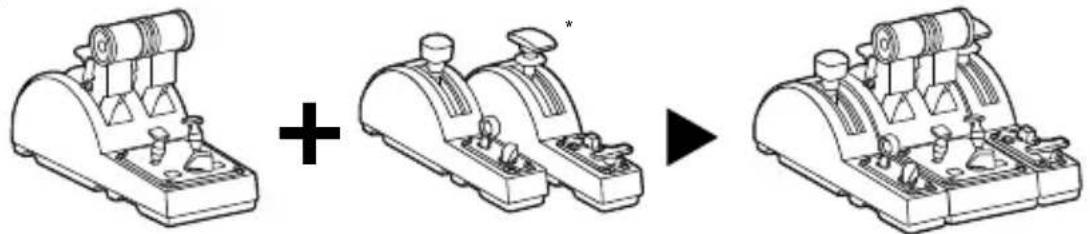
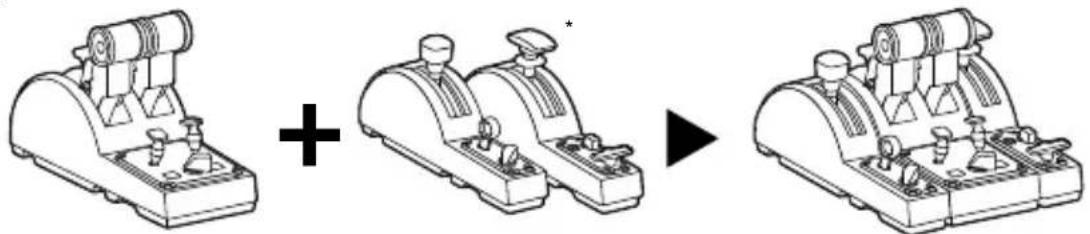
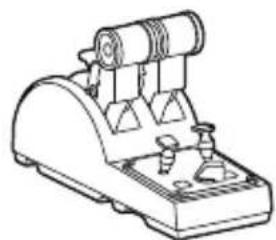
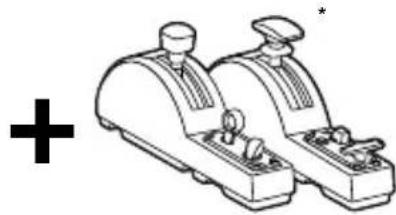
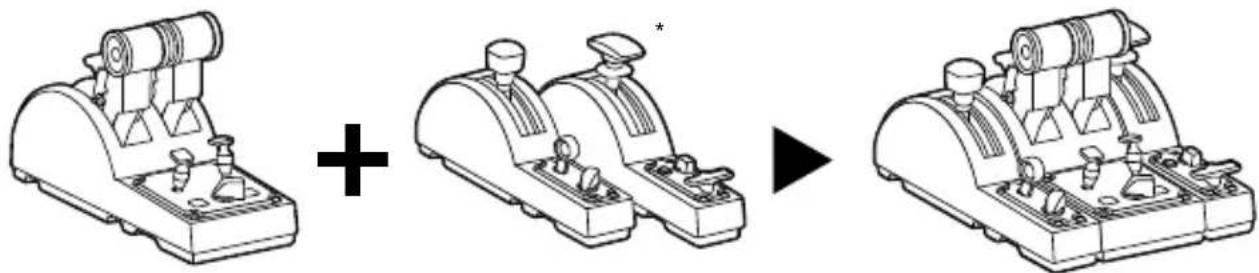
The TCA Quadrant Airbus Edition throttle quadrant lets you connect the additional TCA Quadrant Add-On Airbus Edition modules (sold separately) on both sides of the TCA Quadrant Airbus Edition.
This modularity adds new axes and action buttons and lets you expand the takeoff, in-flight and landing kinematics for the TCA Quadrant Airbus Edition throttle quadrant.
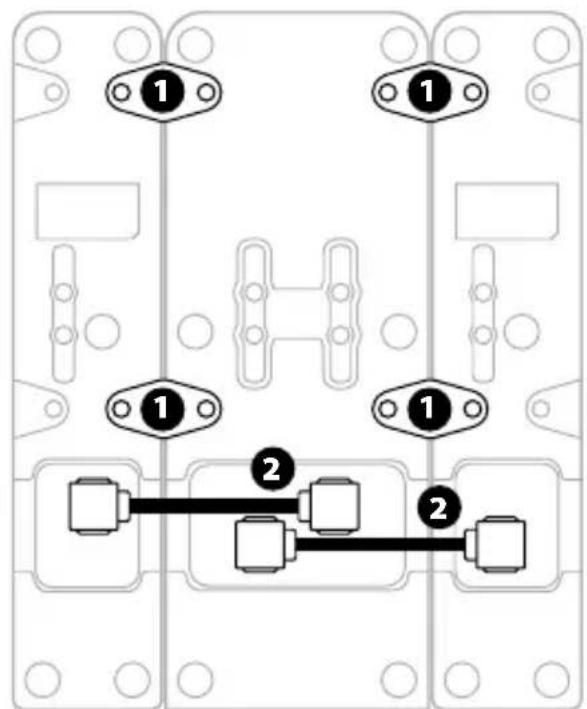
- Turn the TCA Quadrant Airbus Edition throttle quadrant and the two additional TCA Quadrant Add-On Airbus Edition modules upside down, and (using a screwdriver with the corresponding head shape) screw on the four attachment pieces included with the T CA Quadrant Airbus Edition throttle quadrant and the TCA Quadrant Add-On Airbus Edition, attaching all three devices together: the Speed brake module to the left of the TCA Quadrant Airbus Edition, and the Flaps module to the right.
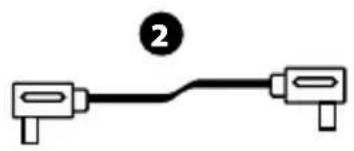
- Connect the SATA cables included with the TCA Quadrant Add-On Airbus Edition to the SATA connectors on the TCA Quadrant Airbus Edition.
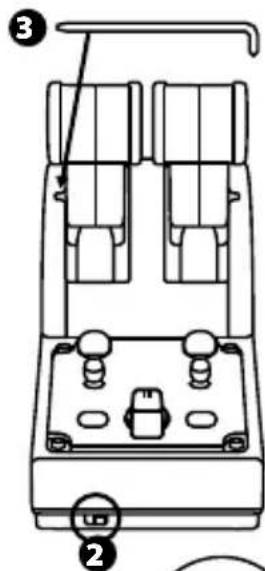
3.
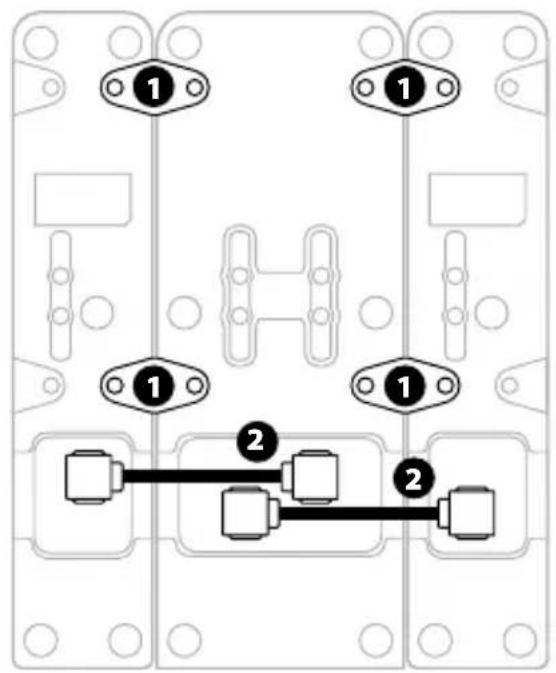
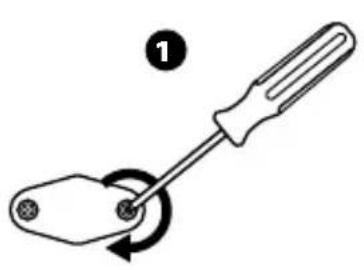
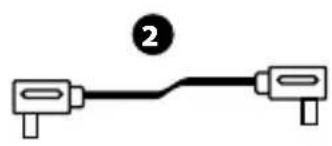

- To avoid damaging the products, use a screwdriver with the corresponding head shape to tighten/untighten the screws.
- Only use the official cables provided by Thrustmaster.
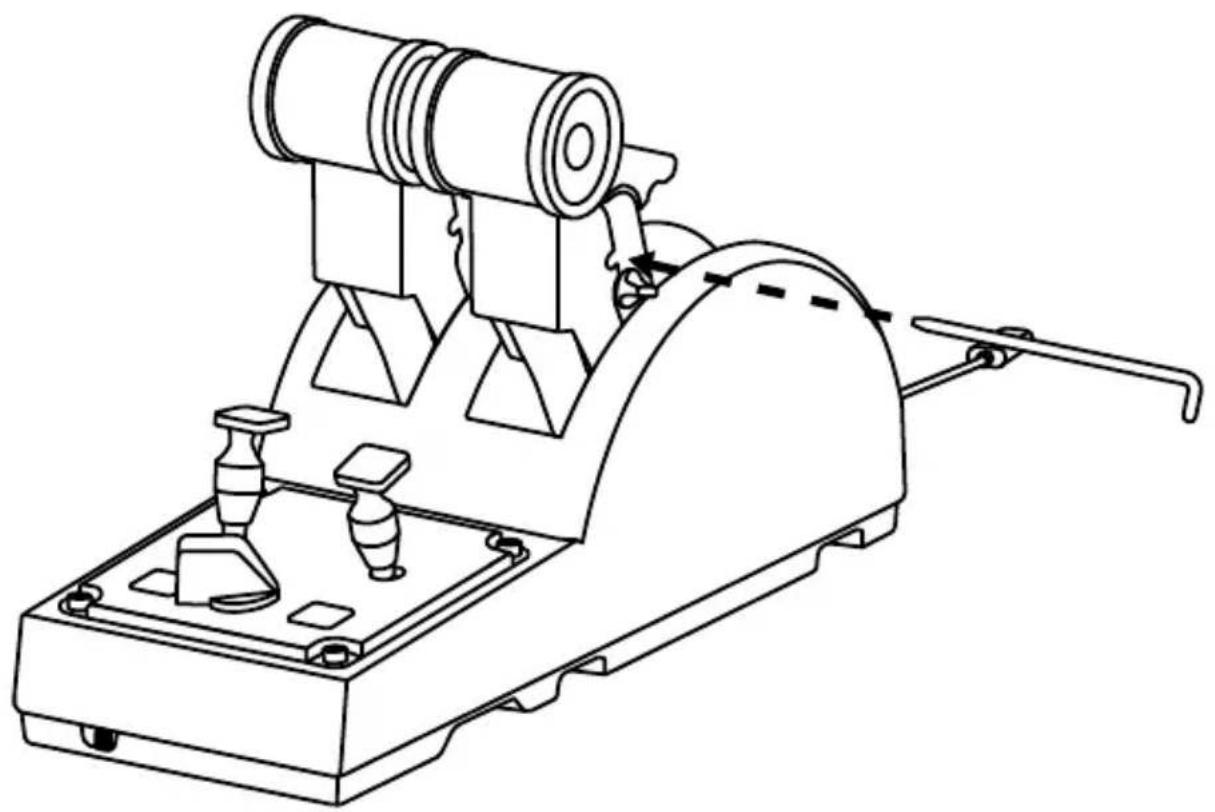
ATTACHING/SEPARATING THE TWO THRUST LEVERS
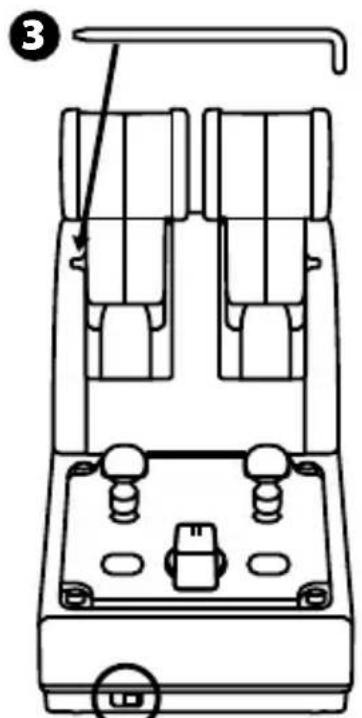
Use the crossbar included with the TCA Quadrant Airbus Edition throttle quadrant to connect the two thrust levers together.
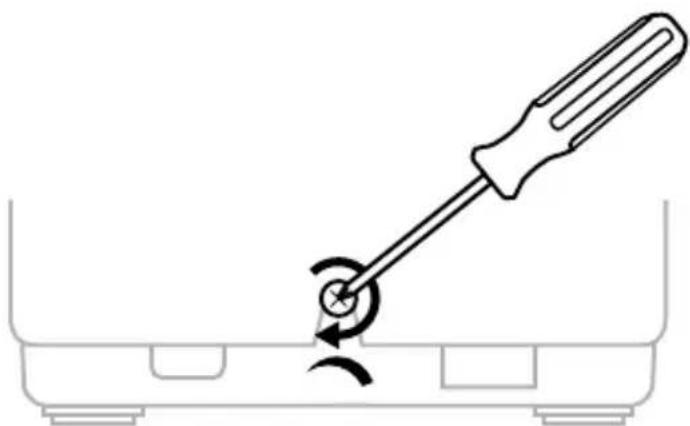
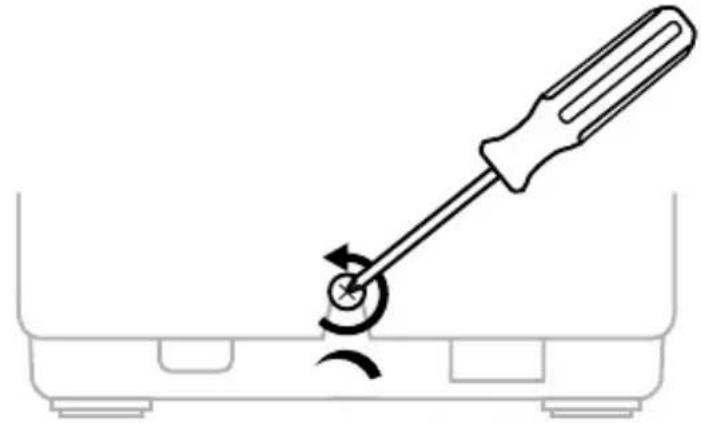
ADJUSTING THE FRICTION
IMPORTANT NOTES:
-
The friction for the two thrust levers is set to 50% by default.
-
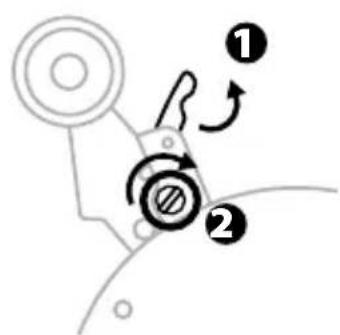
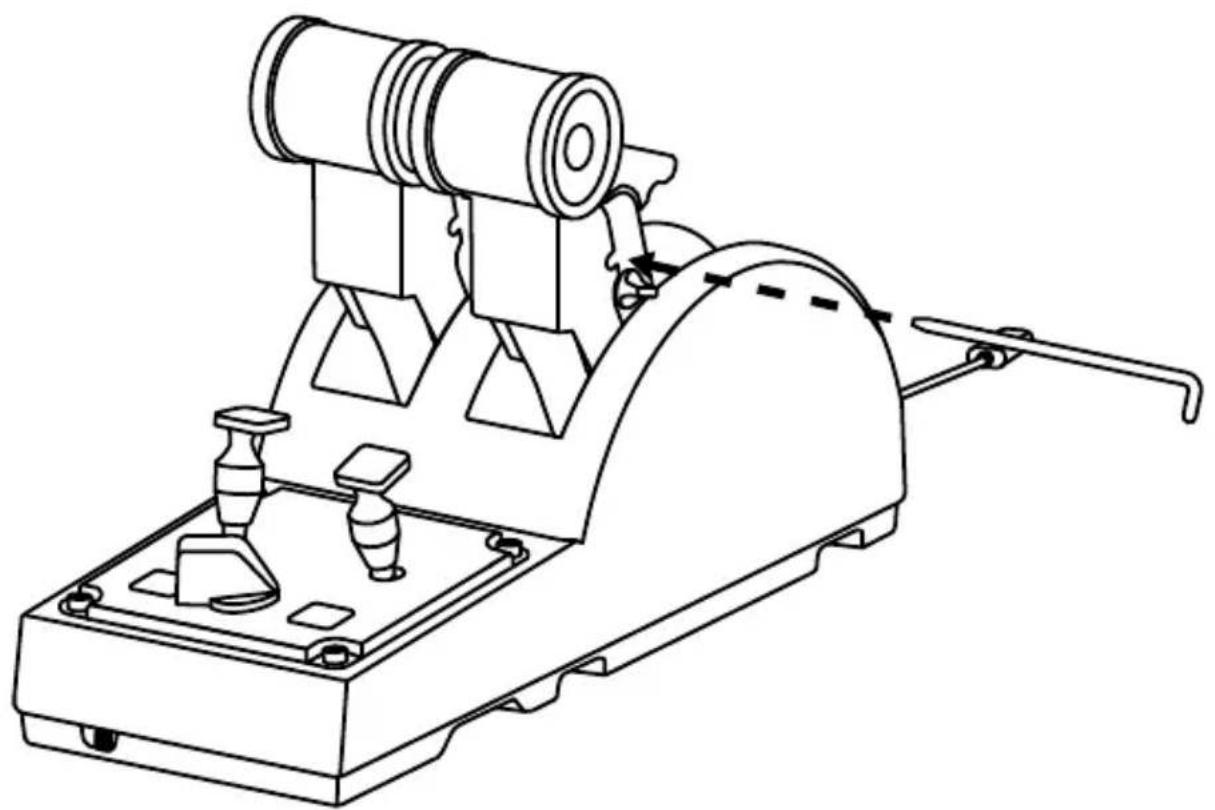
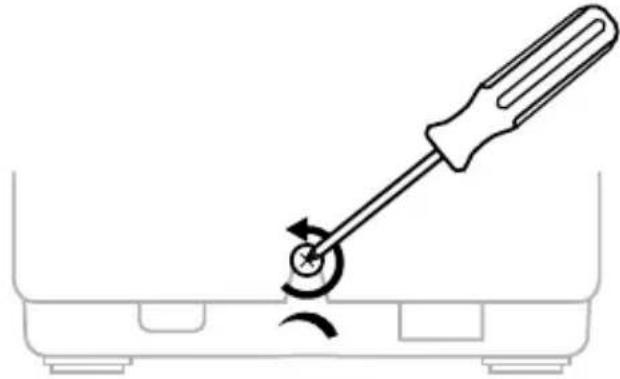
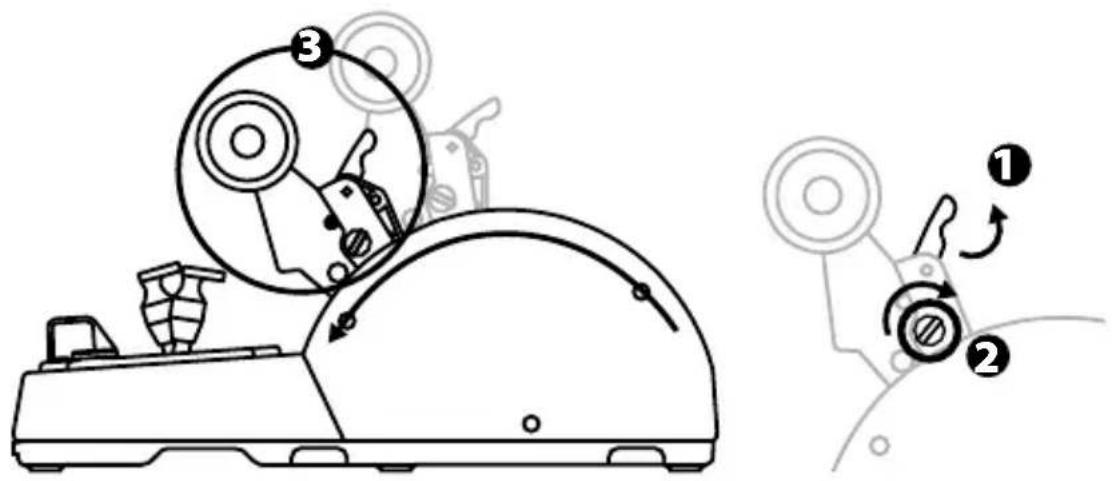
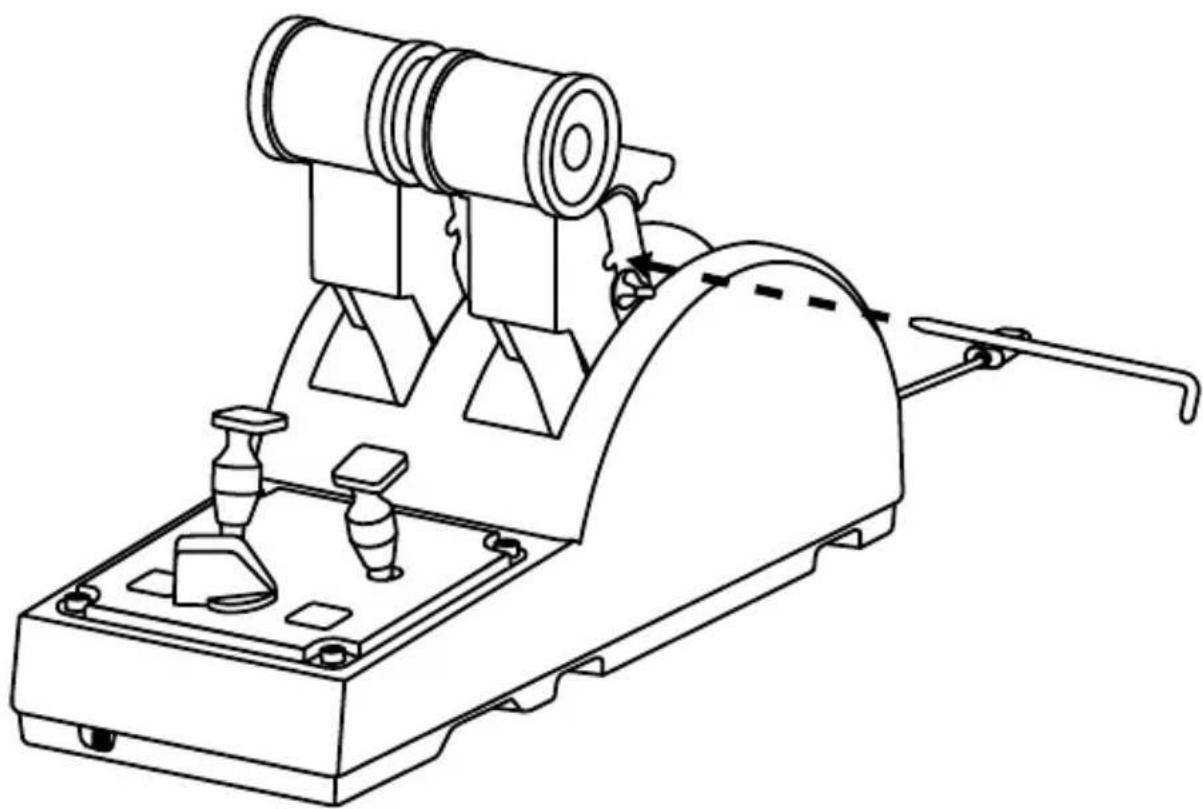
In order to allow for precise adjustment according to your preferences, you can use a screwdriver with the corresponding head shape—or the included crossbar—to turn the friction adjustment screw.
-
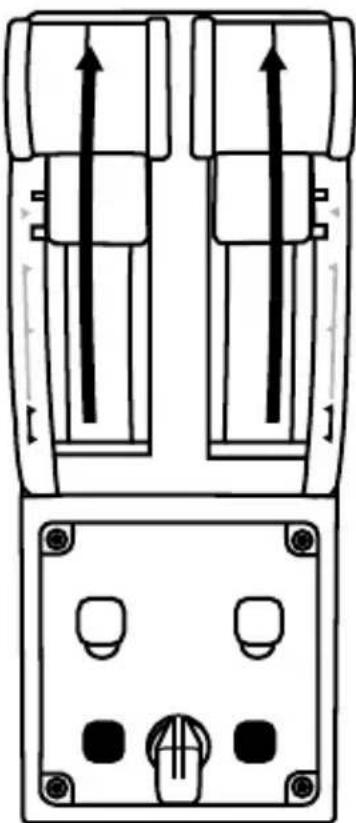
Push both thrust levers forward to their maximum values, and then access the friction adjustment screw at the back of the TCA Quadrant Airbus Edition.
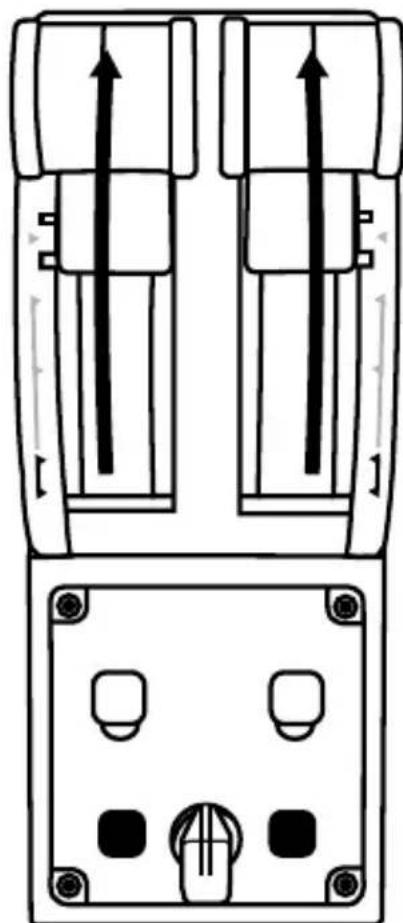
- To increase the friction, turn the friction adjustment screw clockwise.
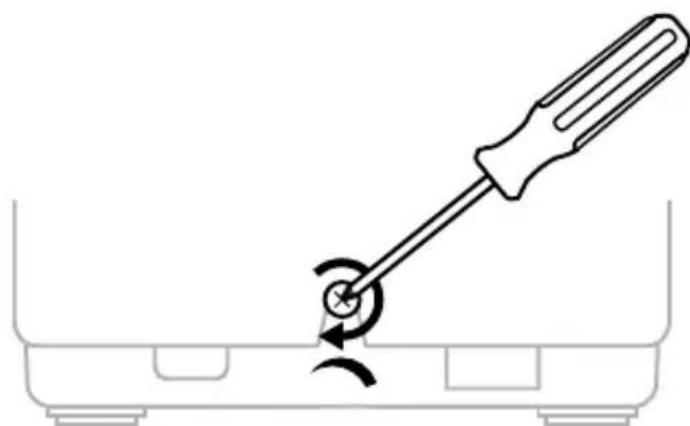
- To decrease the friction, turn the friction adjustment screw counterclockwise.
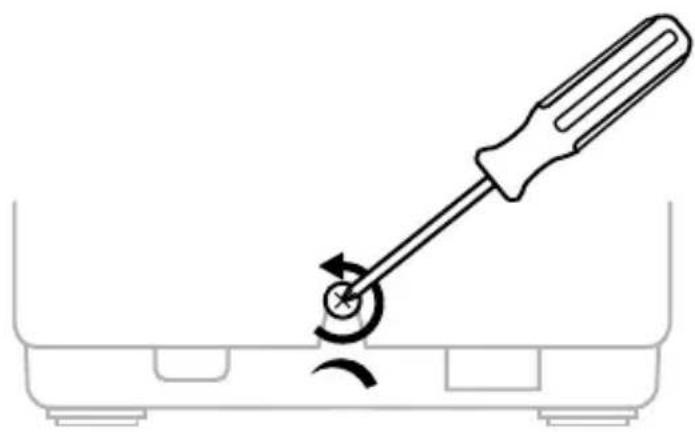

- To avoid damaging the friction system, be careful not to over-tighten the adjustment screw: stop turning the screw when you feel resistance.
- Never completely unscrew the adjustment screw, to avoid the screw falling inside the body of the TCA Quadrant Airbus Edition.
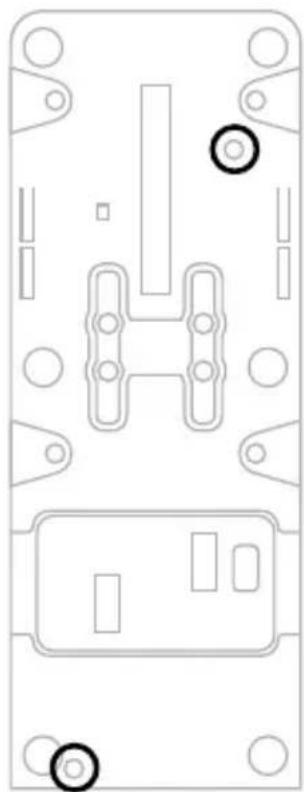
ATTACHING THE TCA QUADRANT AIRBUS EDITION THROTTLE QUADRANT TO A COCKPIT OR OTHER STATIONARY SURFACE
You can use the two perforations located on the underside of the TCA Quadrant Airbus Edition to attach it to a cockpit or other stationary surface, using M6 screws (not included).
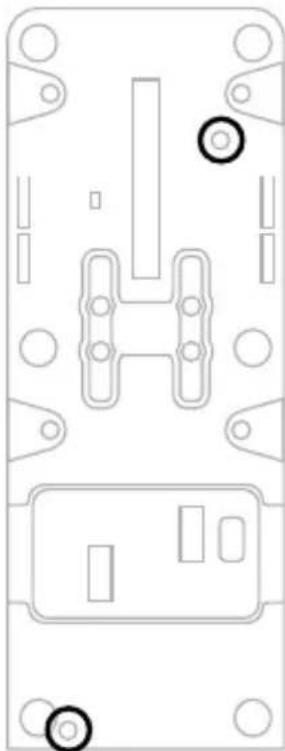
13/18
CONNECTING THE TFRP* RUDDER SYSTEM TO THE TCA QUADRANT AIRBUS EDITION THROTTLE QUADRANT
- Sold separately
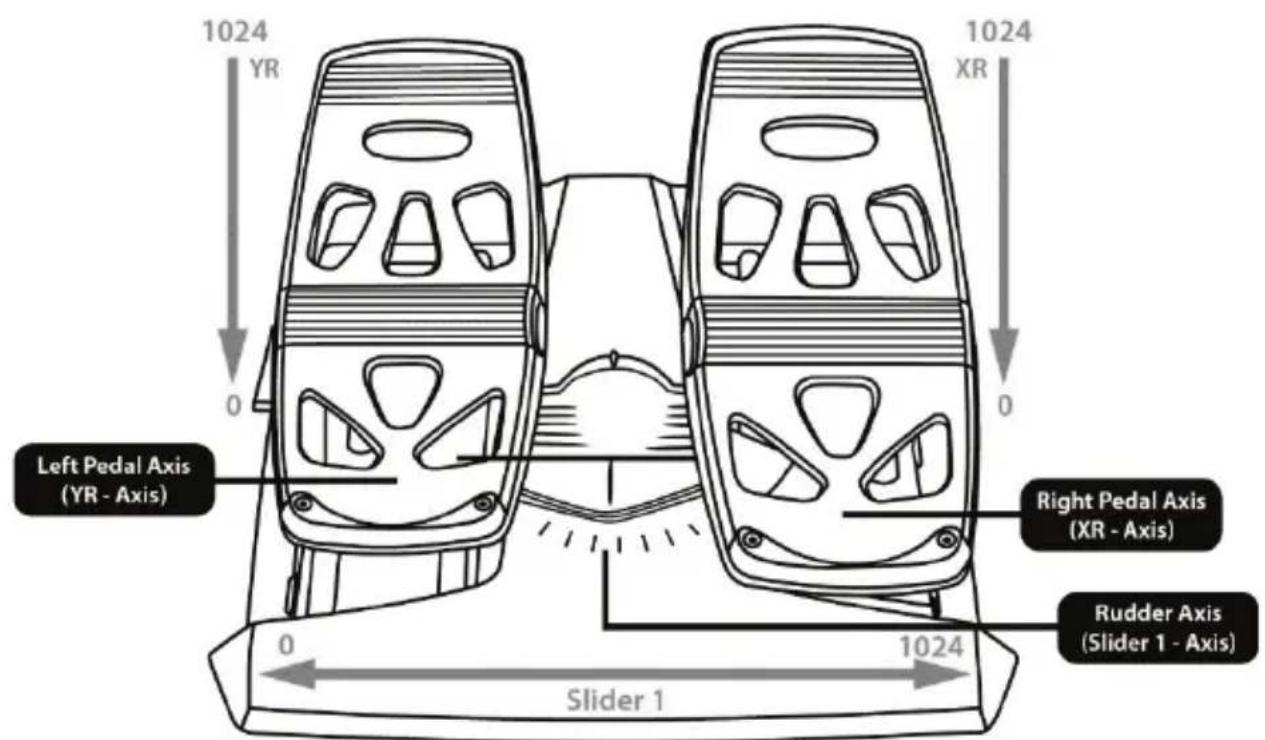
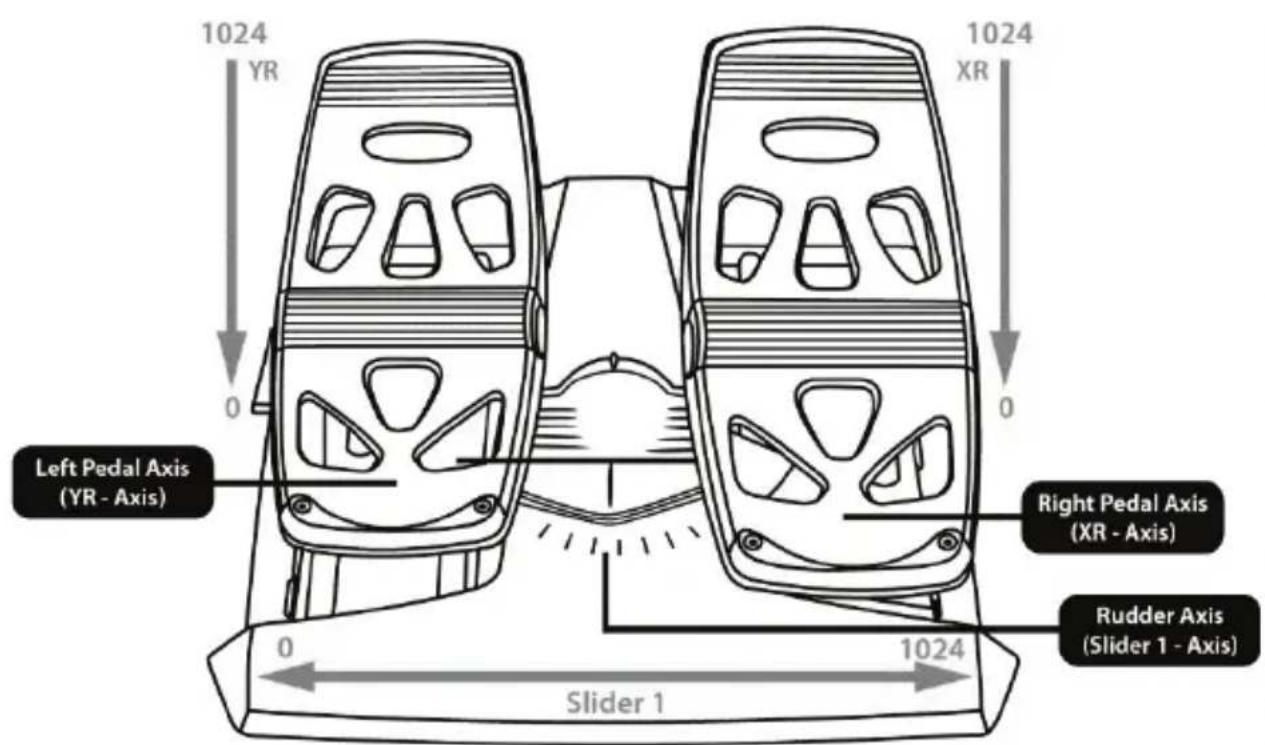
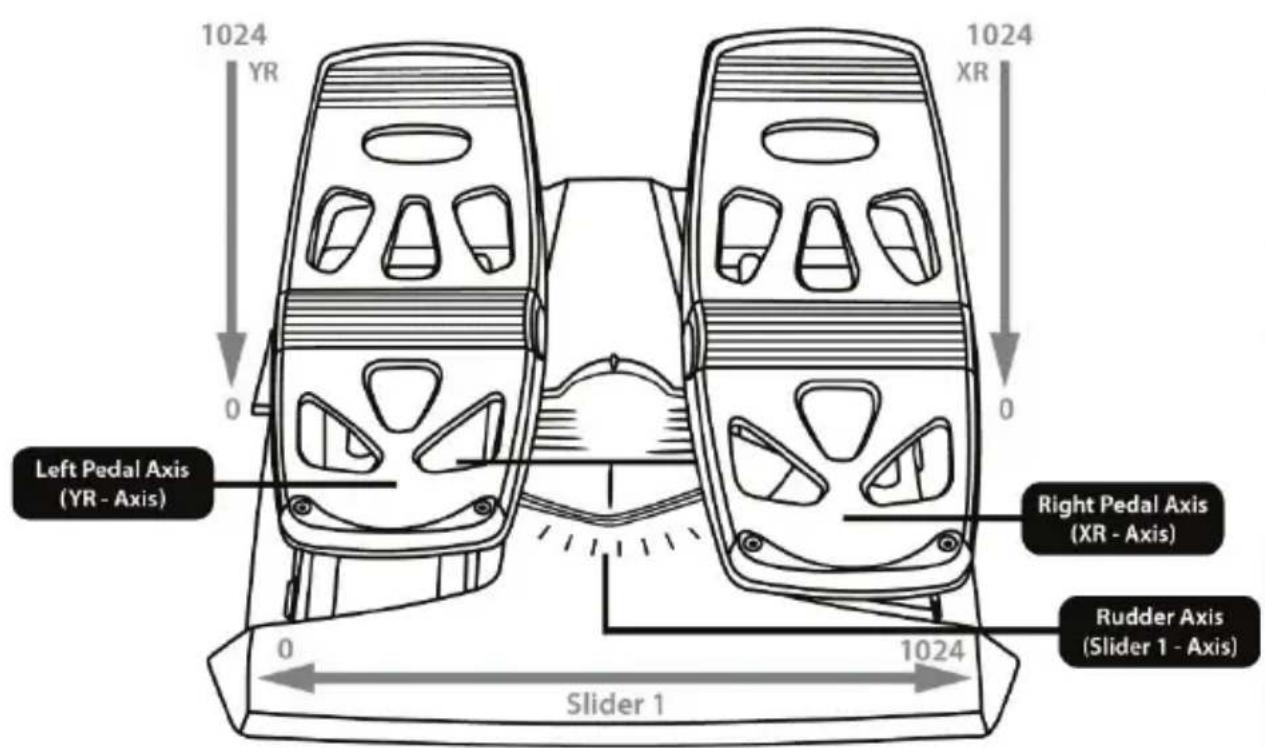
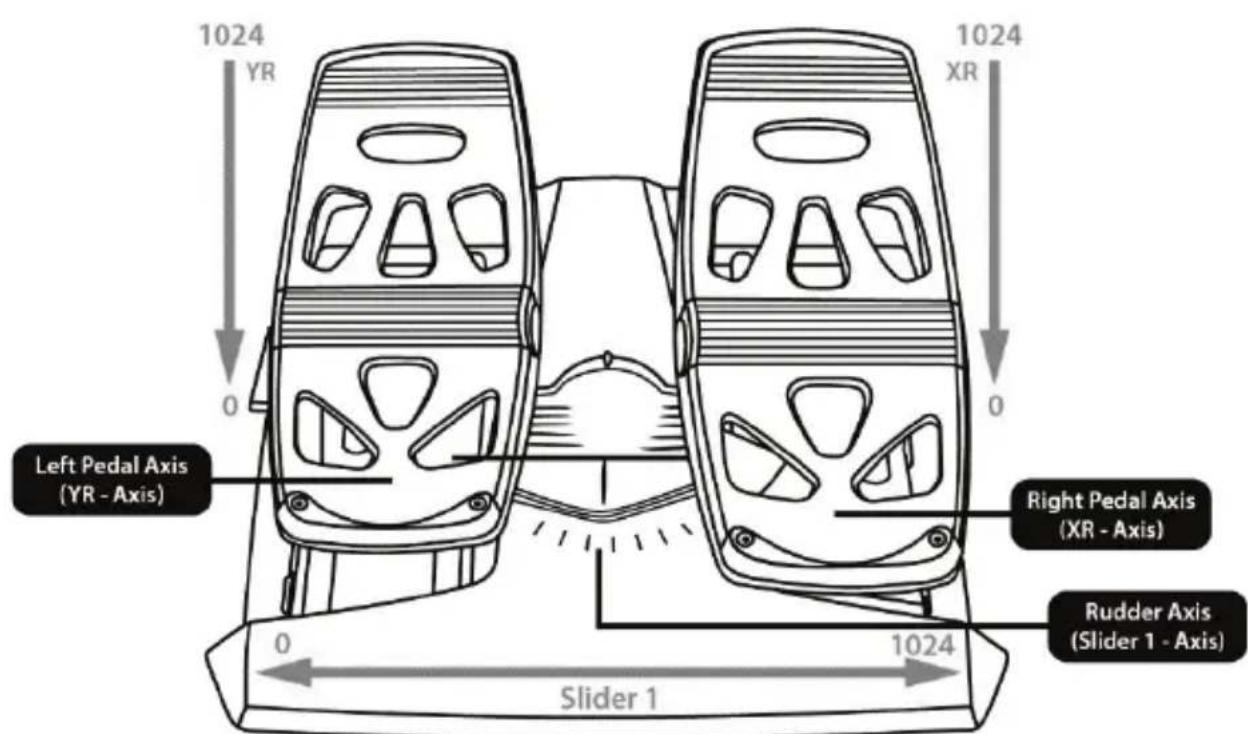
The TCA Quadrant Airbus Edition throttle quadrant has 7 axes, with 3 of these axes being reserved for the TFRP rudder system.
The TFRP rudder system connects directly to the TCA Quadrant Airbus Edition t throttle quadrant.
- Connect the male RJ12 connector for the TFRP rudder system to the female RJ12 connector located at the back of the TCA Quadrant Airbus Edition throttle quadrant.
- Connect the USB connector for the TCA Quadrant Airbus Edition throttle quadrant to one of the USB ports on your PC.
Important notes regarding automatic calibration of axes:
- Always leave the rudder axis centered when connecting the TFRP rudder system to the TCA Quadrant Airbus Edition throttle quadrant: never put your feet on the TFRP rudder system's pedals when doing so.
- The pedals' 3 axes automatically calibrate themselves after a few movements, and after having reached the physical stops for the rudder axis and the 2 differential brake axes.
T.A.R.G.E.T ADVANCED PROGRAMMING SOFTWARE
(Thrustmaster Advanced pRogramming Graphical EdiTor)
Please visit https://support.thrustmaster.com. Click Joysticks / TCAQuadrant Airbus Edition, then select Software. Download and install the T.A.R.G.E.T advanced programming software.
Main features of T.A.R.G.E.T:
- Different possible configurations for the axes.
- Different possible programming levels: Basic, Advanced and Script.
- Use of the Drag and Drop principle.
- Ability to combine the TCA Quadrant Airbus Edition throttle quadrant with various Thrustmaster joysticks (HOTAS Cougar, HOTAS Warthog, T. 16000M, MFD Cougar Pack, all of which are also compatible with T.A.R.G.E.T), allowing them to be recognized as a single USB device.
- Access to advanced profiles created by the Thrustmaster community.
TROUBLESHOOTING AND WARNING
-
My TCA Quadrant Airbus Edition throttle quadrant isn't working properly, or seems to be improperly calibrated.
-
Power off your PC, and disconnect the USB connector for the TCA Quadrant Airbus Edition throttle quadrant. Then reconnect the USB connector, power on your PC again, and restart your game.
-
When connecting the USB connector for the TCA Quadrant Airbus Edition throttle quadrant, always leave the rudder axis centered if you are using the T FRP rudder system (sold separately): never put your feet on the TFRP rudder's system's pedals when doing so.
-
I can't configure my TCA QuadrantAirbus Edition throttle quadrant.
-
In your game's Options / Controller / Gamepad or Joystick menu, select the appropriate configuration or completely reconfigure the controller's options.
- For more information, please refer to yourgame's user manual or online help.
-
Use the T.A.R.G.E.T (Thrustmaster Advanced pRogramming Graphical EdiTor) advanced programming software.
-
My TCA Quadrant Airbus Edition throttle quadrant is too sensitive, or not sensitive enough.
-
The axes for the TCA Quadrant Airbus Edition throttle quadrant automatically calibrate themselves after a few movements, and after having reached the physical stop for the axes.
- In your game's Options / Controller / Gamepad or Joystick menu, adjust the sensitivity and dead zones for your controller (if these options are available).
- Use the T.A.R.G.E.T (Thrustmaster Advanced pRogramming Graphical EdiTor) advanced programming software.

This device is intended for use with respect to gaming entertainment purposes only. It is strictly forbidden to use this device for professional training activities.
CONSUMER WARRANTY INFORMATION
Worldwide, Guillemot Corporation S.A., whose registered office is located at Place du Granier, B.P. 97143, 35571 Chantepie, France (hereinafter "Guillemot") warrants to the consumer that this Thrustmaster product shall be free from defects in materials and workmanship, for a warranty period which corresponds to the time limit to bring an action for conformity with respect to this product. In the countries of the European Union, this corresponds to a period of two (2) years from delivery of the Thrustmaster product. In other countries, the warranty period corresponds to the time limit to bring an action for conformity with respect to the Thrustmaster product according to applicable laws of the country in which the consumer was domiciled on the date of purchase of the Thrustmaster product (if no such action exists in the corresponding country, then the warranty period shall be one (1) year from the original date of purchase of the Thrustmaster product).
Notwithstanding the above, rechargeable batteries are covered by a warranty period of six (6) months from the date of original purchase.
Should the product appear to be defective during the warranty period, immediately contact Technical Support, who will indicate the procedure to follow. If the defect is confirmed, the product must be returned to its place of purchase (or any other location indicated by Technical Support).
Within the context of this warranty, the consumer's defective product shall, at Technical Support's option, be either replaced or returned to working order. If, during the warranty period, the Thrustmaster product is subject to such reconditioning, any period of at least seven (7) days during which the product is out of use shall be added to the remaining warranty period (this period runs from the date of the consumer's request for intervention or from the date on which the product in question is made available for reconditioning, if the date on which the product is made available for reconditioning is subsequent to the date of the request for intervention). If permitted under applicable law, the full liability of Guillemot and its subsidiaries (including for consequential damages) is limited to the return to working order or the replacement of the Thrustmaster product. If permitted under applicable law, Guillemot disclaims all warranties of merchantability or fitness for a particular purpose.
This warranty shall not apply: (1) if the product has been modified, opened, altered, or has suffered damage as a result of inappropriate or abusive use, negligence, an accident, normal wear, or any other cause unrelated to a material or manufacturing defect (including, but not limited to, combining the Thrustmaster product with any unsuitable element, including in particular power supplies, rechargeable batteries, chargers, or any other elements not supplied by Guillemot for this product); (2) if the product has been used for any use other than home use, including for professional or commercial purposes (game rooms, training, competitions, for example); (3) in the event of failure to comply with the instructions provided by Technical Support; (4) to software, said software being subject to a specific warranty; (5) to consumables (elements to be replaced over the product's lifespan: disposable batteries, audio headset or headphone ear pads, for example); (6) to accessories (cables, cases, pouches, bags, wrist-straps, for example); (7) if the product was sold at public auction.
This warranty is nontransferable.
The consumer's legal rights with respect to laws applicable to the sale of consumer goods in his or her country are not affected by this warranty.
Additional warranty provisions
During the warranty period, Guillemot shall not provide, in principle, any spare parts, as Technical Support is the only party authorized to open and/or recondition any Thrustmaster product (with the exception of any reconditioning procedures which Technical Support may request that the consumer carry out, by way of written instructions - for example, due to the simplicity and the lack of confidentiality of the reconditioning process - and by providing the consumer with the required spare part(s), where applicable).
Given its innovation cycles and in order to protect its know-how and trade secrets, Guillemot shall not provide, in principle, any reconditioning notification or spare parts for any Thrustmaster product whose warranty period has expired.
In the United States of America and in Canada, this warranty is limited to the product's internal mechanism and external housing. In no event shall Guillemot or its affiliates be held liable to any third party for any consequential or incidental damages resulting from the breach of any express or implied warranties. Some States/Provinces do not allow limitation on how long an implied warranty lasts or exclusion or limitation of liability for consequential or incidental damages, so the above limitations or exclusions may not apply to you. This warranty gives you specific legal rights, and you may also have other rights which vary from State to State or Province to Province.
Liability
If permitted under applicable law, Guillemot Corporation S.A. (hereinafter "Guillemot") and its subsidiaries disclaim all liability for any damages caused by one or more of the following: (1) the product has been modified, opened or altered; (2) failure to comply with assembly instructions; (3) inappropriate or abusive use, negligence, an accident (an impact, for example); (4) normal wear, (5) the use of the product for any use other than home use, including for professional or commercial purposes (game rooms, training, competitions, for example). If permitted under applicable law, Guillemot and its subsidiaries disclaim all liability for any damages unrelated to a material or manufacturing defect with respect to the product (including, but not limited to, any damages caused directly or indirectly by any software, or by combining the Thrustmaster product with any unsuitable element, including in particular power supplies, rechargeable batteries, chargers, or any other elements not supplied by Guillemot for this product).

DECLARATION OF CONFORMITY
CANADIAN COMPLIANCE NOTICE: this Class B digital apparatus meets all requirements of the Canadian Interference-Causing Equipment Regulations.
USA COMPLIANCE NOTICE: this equipment has been tested and found to comply with the limits for a Class B digital device, pursuant to Part 15 of the FCC rules. Operation is subject to the following two conditions:
(1) This device may not cause harmful interference, and
(2) This device must accept any interference received, including interference that may cause undesired operation.
These limits are designed to provide reasonable protection against harmful interference in a residential installation. This equipment generates, uses and can radiate radio frequency energy and, if not installed and used in accordance with the instructions, may cause harmful interference to radio communications. However, there is no guarantee that interference will not occur in a particular installation. If this equipment does cause harmful interference to radio or television reception, which can be determined by tuming the equipment on and off, the user is encouraged to try to correct the interference by one or more of the following measures:
- Reorient or relocate the receiving antenna.
- Increase the separation between the equipment and receiver.
- Connect the equipment into an outlet on a circuit different from that to which the receiver is connected.
- Consult the dealer or an experienced radio/TV technician for help.
COPYRIGHT
© 2020 Guillemot Corporation S.A. All rights reserved. Thrustmaster® is a registered trademark of Guillemot Corporation S.A. Windows® is a registered trademark of Microsoft Corporation in the United States and/or other countries.
AIRBUS, its logo and product and service marks are registered trademarks of Airbus. All rights reserved. © Airbus 2020. All rights reserved. Officially licensed by Airbus.
All other trademarks and brand names are hereby acknowledged and are property of their respective owners. Illustrations not binding. Contents, designs and specifications are subject to change without notice and may vary from one country to another. Made in China.
ENVIRONMENTAL PROTECTION RECOMMENDATION
In the European Union: At the end of its working life, this product should not be disposed of with standard household waste, but rather dropped off at a collection point for the disposal of Waste Electrical and Electronic Equipment (WEEE) for recycling.
This is confirmed by the symbol found on the product, user manual or packaging. Depending on their characteristics, the materials may be recycled. Through recycling and other forms of processing Waste Electrical and Electronic Equipment, you can make a significant contribution towards helping to protect the environment.
Please contact your local authorities for information on the collection point nearest you.
For all other countries: Please adhere to local recycling laws for electrical and electronic equipment.
Retain this information. Colors and decorations may vary.
Plastic fasteners and adhesives should be removed from the product before it is used.
This product conforms to all standards regarding children 14 years of age and older. This product is not suitable for use by children less than 14 years of age.
www.thrustmaster.com
*Applicable to EU and Turkey only


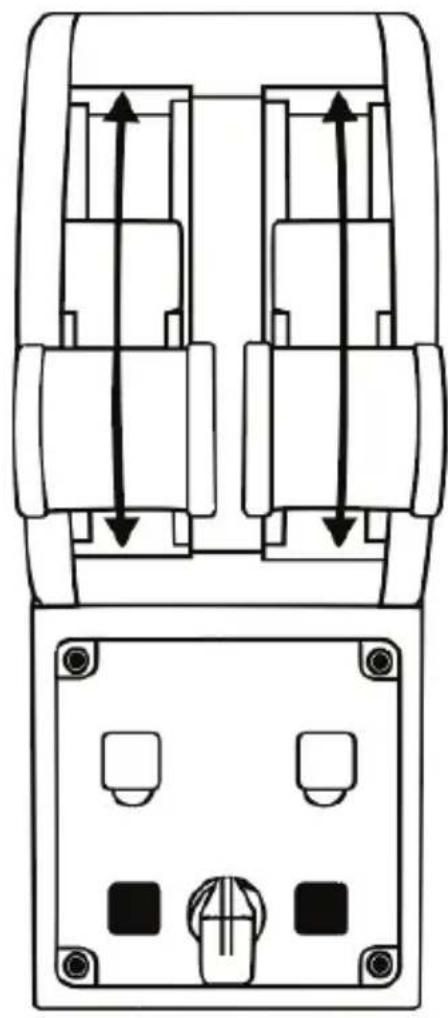
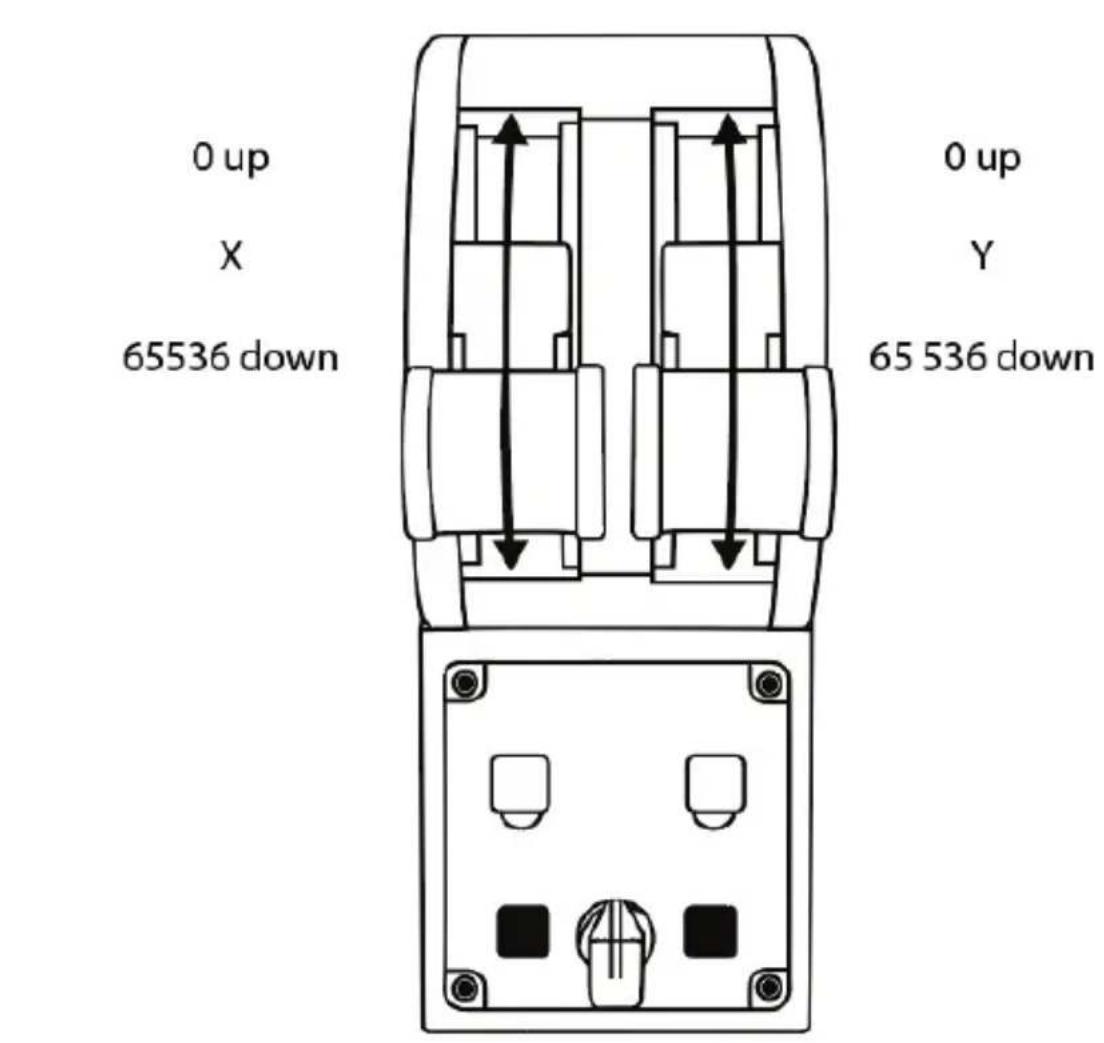
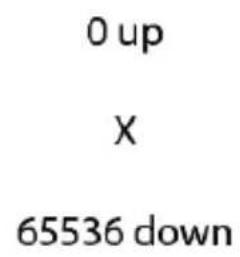
0 up X 65536 down
65 536 down
0 up
Y
MODIFICATION DES AXES SUR LA MANETTE DES GAZ TCA QUADRANT AIRBUS EDITION
CONNECTER LA MANETTE DES GAZ TCA QUADRANT AIRBUS EDITION AU TCA QUADRANT ADD-ON AIRBUS EDITION*
*Vendu séparément
(Thrustmaster Advanced pRogramming Graphical EdiTor)
INFORMATIONS RELATIVES A LA GARANTIE AUX CONSOMMATEURS
www.thrustmaster.com
https://support.thrustmaster.com



COPYRIGHT
www.thrustmaster.com
T.A.R.G.E.T GEAVANCEERDE PROGRAMMEERSOFTWARE (Thrustmaster Advanced pRogramming Graphical EdiTor)
Ga waar https://support.thrustmaster.com. Klik op Joysticks / TCA Quadrant Airbus Edition en selecteer Software. Download en installer de T.A.R.G.E.T geavanceerde programmeersoftware.
www.thrustmaster.com
MAPPATURA DEI 16 PULSANTIE DEI 2 ASSI
MODIFICARE GLI ASSI DEL QUADRANTE MANETTA TCA QUADRANT AIRBUS EDITION
www.thrustmaster.com
0 up X 65536 down
65 536 down
0 up
Y
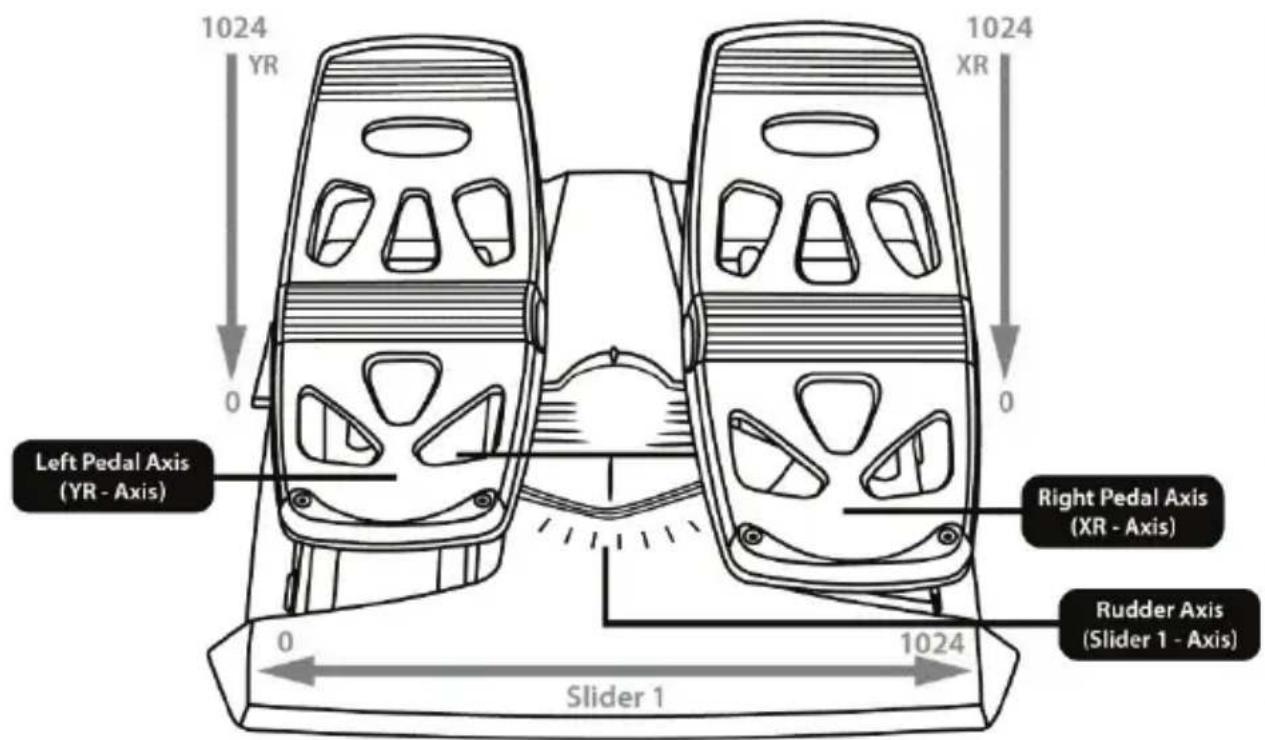
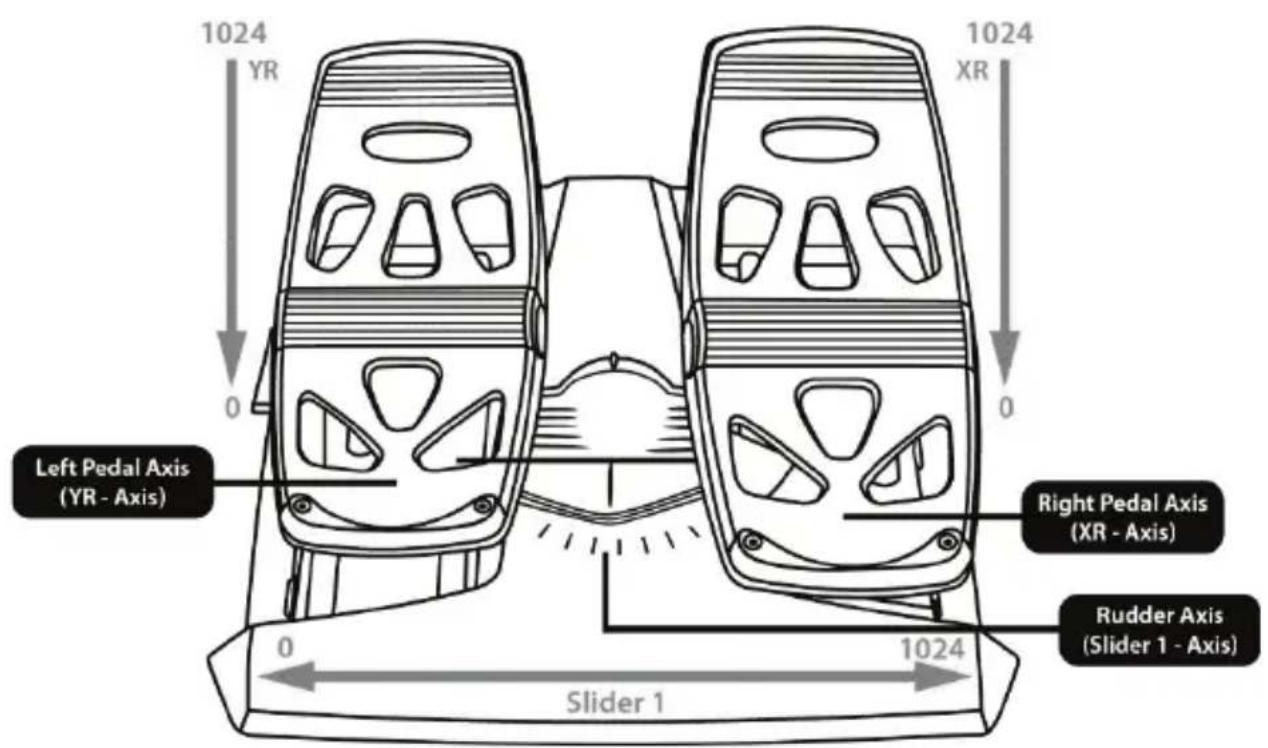
Right Pedal Axis (XR - Axis)
Rudder Axis (Slider 1 - Axis)
CÓMOC HACER CAMBIOS A LOS EJES DEL CUADRANTE DE ACELERACION TCA QUADRANT AIRBUS EDITION
(Thrustmaster Advanced pRogramming Graphical EdiTor)
Visita https://support.thrustmaster.com. HazREEN Joysticks / TCA Quadrant Airbus Edition, ydesques selecciona Software.Descarga e instalal esoftware de programacion avanzadaT.A.R.G.E.T.
Characteristicas principalaes de T.A.R.G.E.T:
www.thrustmaster.com
(Thrustmaster Advanced pRogramming Graphical EdiTor)
Visite https://support.thrustmaster.com. Clique em Joysticks / TCA Quadrant Airbus Edition e em seguida selecione Software. Transfira e instale o software de programacao avancada T.A.R.G.E.T.
Principais caractéristicas do software T.A.R.G.E.T:
www.thrustmaster.com
PykoBoDCTBO noIb3OBaTeJIa
TEXHNUECKNE XAPAKTEPNUCTUKN
- Ocn X n Y dIpa pIyIa ynpabneHnI
- MexAHm3M peBepca Tn Ha KaXdoN OCN
3.4ФИКСИРУЕМБИ X NOLOXKeHЯДЯ KaKdoN OcN-4BnPtyaJIbHbIe KHOJKN Ha OCb - 8 KOMaHdHbIX KHONOK
- IpeeknoyateIb Iy DvIraTeIe: 1/2 nn 3/4
-
Pa3bembl SATA nnoKIOUeHn BHeuHX MOyIeN TCA Quadrant Add-On Airbus Edition (DOnONHITeJIbHbIe MOyI INpOdaOTc r OTdJIbHO)
-
Pa3bEmДЯСИСТeMbIpynHaNpaBJIeHnTFRP(npoJaTecYOTdENo)
- BnHT peryJInpOBKn TpeHna
- USB-ka6eB (TnB)
- MecTo yCTaHOBKn nonepeHuoro CTePxHn
- MexaHn3M nBkIIOueHn/OTKIOueHn peBepca TnHa KaXdoN OCN
- MexaHn3M dIy BKNIOUeHn/OTKIOUeHn 0fIKCnpyEmbIX NOIOKeHn Ha KaXdoi OCN
YCTAHOBKA HA ПК
- Перейдente на Be6-caT https://support.thrustmaster.com/ru. ZeKKHTe pa3deIДжоCTик, 3aTeM ueKNHTe TCA Quadrant Airbus Edition n BbIbePteДpaBEBpyI. 3aRpy3nte u yctahOBITE ДраВЕр дЯ ПК сero cpeuaJIbHbIM nHTeppeiCOM dЯ панelli npablenna Windows.
- После установки драиьера подкючente USB-кабел устороства к USB-nорту komпьютepа.
3.ДЯdoCTynaKnaHEnuypaBHeHnHaXmTe KHOIky Pnyck/ПрnoKeHn/Thrustmaster/PaHEnb ynpaBHeHn(BWindows®8,8.1 n10).
Omkpoemc oKHO Napoobie ycmpoucmaa.
B cnucke ycmpooume nooknueHb uKceccyap omobpaXaemcKa TCA Q-Eng 1&2 (Unu TCA Q-Eng 3&4, 3abucumocmu om noLoXeHna nepeKnUohameJra dra deuaameJ [5], u da n Hezo 6ydem yka3an cmamyc OK
4. BOKHe IrpoBbIe yCTpoNcTBA ⅢeJIKNHTe NyHKT CBoNcTBA IINI pOcmOTpa INpOBepKNCBXex XapaKTepNCTNK yCTpoNcTBA.
Enable virtual buttons (BkIIOHTb BnPTyaJIbHbIE KHOIIK): 3TOT napaMetp NO3BOJREt BKIOHTb INI OTKIOHTb BnPTyaJIbHbIE KHOIIK Ha oCax pbIyara ynpabJIeHna. HaxMITE Apply (PpIMeHTb) nocTe TOrO, kAc Bbl6peTe Heo6xOdImbI pexIM.
HA3HAUHNAДJI 16 KHOPOK N 2 OCEI
65 536 down
ИЗMEHEHNE XAPAKTEPNUCTNK OCEн HA БLOKE Рыагов TCA QUADRANT AIRBUS EDITION
Ha 6noke pbuaroB TCA Quadrant Airbus Edition mmeotc mexaHueckne nepeKnUoateN, n03BOJHOUIe OTKIOUATb fIKCnpyEmbIe NOIOXeHr/CTynHn Ha KaKdoi OCN. BnaOapra 3tOMy Bbl MoXeTe 3aJeCTBOBaTb POHBleOCN, PnI 3TOM COxpaHra BnptyAIBhble HOnKn9-16.
Takoi BapnaHT No3BOJareKoppeKTHPOBaTcTnIb NIIOTnPOBaHnB 3aBNCIMOCTN OT TUNA BO3DyUHoro CydHa, NcNoJIb3yeMOro BIrpe (KOMMepueckn INI rpaXdaHckn cAmOJeT).
- NpeBepHnTe 6nok TCA Quadrant Airbus Edition BBepx n c nomoubcoOTBcTCTByuOeN OTBeptKn OTkpyTnTe DBA BNHTa nkaKdoRo nepeKlouateJIa.
2.ИЗмЕнITE NOLOXGEHne NepeKJIQUaTeNei, NcIb3yЯ yka3aTeJI B KaueCTBe opHeTnpa: 3TO N03BOJNT BbI6paTb Jn6o POBHyIO Ocb, Jn6O OCB CФNKCnpyEmbIMN NOLOXeHnMn/CTynEHaMnДЯ kaxdoJ ocN Ha 6Noke pbIarOB TCA Quadrant Airbus Edition.
OTKJIIOUYEHNE PEBEPCOB TЯГИ HA BLOKE PbIyAROB TCA QUADRANT AIRBUS EDITION
Блok рыагов TCA Quadrant Airbus Edition ochaшие Функционьнburnim peверсан.Tяги, КOTорbie TOUHO NOBTOPIT OPGINHAJIHBHIE KOMNHOENTbl, yCTaHOBJENHbIe Ha pbIyarax упраBERHЯ KOMMepuecknx camoJETOB Airbus. MexAHn3M peBepca TЯг можно OTKJIQUHTb Дд ИСПОЛБ3OBAHЯ CTINЯ ПИNotupOBAHЯ, boJe IOxODJaero ДЯ ГраЖДанckо ABnauци.
PexMM KOMMepueckoro abnanaHepa:
- Y orpaHnUHTeJ noDHNMTe MexaHn3M peBepcaTarn.
- NepemeHne MMo orpaHnHTeJI NO3BOJAEI NCNoB3OBaTpeBepc TAn.
ObenupeKIMnpexMMrpaXdAnckoabnaun:
1.ПОДнIMITE MEXaHn3M peBepca TЯг.
2. Nobeprhnte nepekniouateIb nnooxeHne 0 dny OTKJIoueHmexaH3Ma peBepca Tarn.
3. Tenepb pbIur ynpabJeHn MOKeT nepeMeaTbcra NO BCeN OCN.
ПОДКЛЮЧЕНЕ ДВУХ БLOKOB РБИАГОВ TCA QUADRANT AIRBUS EDITION
BbI moKTe IODKnHouTb BToPOI 6nok pbUarOB TCA Quadrant Airbus Edition (npOdaetc OTeJIbHO): 3TO IO3BOJNT B COBOKyHIOCTN IcNoJIb3OBAtB 4 OCN, HApPIMep, IJa MOeJIIpOBaHnY npaBJIeHn YeTbIPExMOTOpHbIM KOMMepeCKm ABnaIaNHePOM.
- IpeBepHnTe 6ka pbyarOB TCA Quadrant Airbus Edition Bbepx HOM n C NOMOu BnHTOB npKpyTte Dba CoeINHtJeHbIX 3JIeMeHTa, BXoJuxx B KOMnIeKT 6ka TCA Quadrant Airbus Edition, yTo6bl npKpeNtB OHO yCTpoiCTBO K dpyromy.
- Ha BTOPO6I0Ke pbIyArOB nepEMecHTe nepeKIOUaTeJIb B NOIOXeHne 3/4, YTO6bI COIOCTABNT bBnraTeJI N 3 I 4 co BTOpbIM 6JLOKOM pbIyAROB (Ha nAHeJIynpabNEnn KOMNbIoTEpa).
- UTo6bI ynpocTntb CnHxpoHHoe nepemeueHne ocei, coeHNHTe nx nonapHo (1/2 n 3/4) c nOmoIbIO nonepeuHoro cTejKHe, BxoJaIeRo B KOMnIeKr kaxdOro 6Joka TCA Quadrant Airbus Edition.
- Nocne nodknueHn o60nx 6koB K USB-nopTy KOMnbItepa B OKHe NrpobbIe yctpoNCTBa OHN OTO6paxkaOTc KaK DBA He3aBNCIMbIX YCTPONCTBa:
ПОДКЛIOЧЕНЕ БLOKA РБИАГ罗В TCA QUADRANT AIRBUS EDITION K MOДУЛМ TCA QUADRANT ADD-ON AIRBUS EDITION*
- Ppodaicomcr omdeIbHo
Дяблoka рыагов TCA Quadrant Airbus Edition npeducmoTpeHa BO3MOxHocTb NOdklOueHn AnyonHntelhblx moynei TCA Quadrant Add-On Airbus Edition (npoiaOTcra OTdIbHo), yctanabnBaembx c obex cstopn 6loka TCA Quadrant Airbus Edition.
Takay MoDyIbHaj KOHCTpyKzIa N03BOJnE TIO6aBHTb HOBbIe OCh I KOMaHdHbIe KHOpKn I paCUnpITb KInHeMaTnKy BO BpeM B3JeTa, B nonete n npn noCaIke dIy 6Ioka TCA Quadrant Airbus Edition.
- IpeBepnre 6nok pbHarOB TCA Quadrant Airbus Edition n Dba npnoHnTeNbHbIX MOnyTA TCA Quadrant Add-OnAirbus Edition BBePx DHom (NcNoB3ycoOTBE TCTByOuSyIO TBe pTKy) C NOMOuB BVHTOB npKpyTIne Yetbipe CoedHnTeNbHbIX 3JeMeHTa, BXoJuxB KOMnEKT 6noka pbHarOB TCA Quadrant Airbus Edition n Moyné TCA Quadrant Add-On Airbus Edition, npKpEnB dpyr Kdpuy BCE Tpr yctpoiCTBa: MoynB Bo3DyUHOro TopMo3a cneDuYt yCTaHOBVt C JbeBoI CTopohbl 6Loka TCA Quadrant Airbus Edition, a Moynb 3akpbInOB-C npabOi.
- Побклочи Кабен SATA, Вхаяшев Компгтmoун TCA Quadrant Add-On Airbus Edition, Кразьемam SATA на блoke TCA Quadrant Airbus Edition.

-Bo n36eXaHne noBpeXdEHHy yCTpOInCTB IJIa 3akpyuINBaHHaNn IINI OTkpyuINBaHHaBNHTOB NCNoJIb3yIte OTBepTKY C COOTBeTCTBYUINM HAKOHeuHkOM.
- IcnoJb3yIte TOLbKO OoHuaJIbHbIe Ka6JI, NocTAbJIeMbIe KOMnHaHne Thrustmaster.
COEINHEHNE IN PA3bEINHEHNE DBYX PbIyAROB UYPABJIENIA
Дя-coeINHeHЯ dByx pbIarOB ynpaBHeHЯ nCNoIb3yIte nonepeuHbI cTepeXeHb, BXOJaI B KOMnJIeKr 6Ioka pbIarOB TCA Quadrant Airbus Edition.
PEYUNPOBKA TPEHNA
BAXHbIE 3AMEUAHNIA:
- No ymouhanu 3haueHne TpeHnI dIyBx pbIarOB ynpabHeHnY yCTaHaBnBaETcKaK 50%.
-ДяTOUHONHACTPOINB COOTBETCTBnC JINuHbIMN PpeIIOYTeHNyAMn HEO6XODIMO NOBOPaUNBaTb BnHT peRyIINPOBKN TpeHnra—3TO MOxHO CdeJaTb C NOMOUsIO OTBePTM C COOTBETCTBYUcIM HaKOHeuHkOM IIN NOpEpuHOrO CTepxHry, BXoJzeroB KOMPJIeKT IOCTABKn.
- Перемecтenteоба рычara упраьеня вореддо IX MaKcmaIbHbIX 3нayehи, a 3aTeM BCTaBbTe OTBepTKy (ил nonepeuHbI CTepKeHb)ВВHT peYIpOBKn TpeHn, paCnoJoxeHHb IHa 3aHneЯн PaHEn 6JloKa pbyarOB TCA Quadrant Airbus Edition.
2.Дяувелочи Трени IOBOPaUNBaIte BnHT NO yacOBO CTpeJIke.
3.ДЯумehbweHnTpeHnIOBopauBaIe BnHT npOTvBaacBOB CTpeKN.

- YTO6bI He NOBpeiNb CnCTeMy TpeHna, Co6JIIOaJTe OCTOpOxHOcTb H He 3aTARBaIte BnHT peRyIINPOBKn CInuKOM CnIbHo: PpeKpaTInTe NOBOPaUHbA Tb erO, KaK ToJIbKO NouyBCTByeTe COnpOTnBJIeHne.
- He BBikpyuBaIte BnHT peryInpOBKn NOJIHOCbIO, NCKOJIbKy OH MOxET yNaCTb BOBHyTp6Ioka TCA Quadrant Airbus Edition.
KPEIIJIeHne BLOKA PbIyAroB TCA QUADRANT AIRBUS EDITION B KABINHE IJN HA DpyrOHNEOIDBXHOI IOBEPXHOCTN
(Thrustmaster Advanced pRogramming Graphical EditTor)
IpeennteHaBe6-caTt https://support.thrustmaster.com/ru. ⅢeKHTe pa3dien JxOyctnK n, 3aTeM uEKNHTE TCA Quadrant Airbus Edition, noCne yero Bb6epnte Pporpamm Hoe oBecneHne. 3aRpy3nTe uYcAHOBte pacupeHoe IIO drr nporpaMMPOBaHnT.A.R.G.E.T. OCHOBhIE ocO6EHOCTHn PporpAMMbTI.A.R.G.E.T:
- Pa3JIuHbIe BO3MOxHbIe KOHΦnHypaun nn oceJ.
- Pa3IuHbIe BO3MOxHbIe yObHn IporpaMMIpOBaHn: Basic (6a3oBbI), Advanced (pacupeHHbI) n Script (cUeHapn).
- Póndeppka MeToa nepeTaryBaHnA.
-Bo3MOxHocTb KOM6HnHPOBaHn8 6Ioka pbUarOB TCA Quadrant Airbus Edition c pa3NIuHbIMn IJKOJCTNkAmn Thrustmaster (HOTAS Cougar, HOTAS Warthog, T.16000M, MFD Cougar Pack, KaJdbI n3 KOToPbIX TaKKe COBMeCTnM C npOrpaMMoT A.R.G.E.T), 6IarOdaRyEmV OHI paCNO3HaIOTCaK OJHO USB-vCTpOiCTBO. - Ooctyn KpacupeHHbIM npocnIaM, C03daHbIMnOJIb3OBaTeJMaM COo6ueCTBa Thrustmaster.
YCTPAHEHNE HENCPABHOCTE IN PPEyPEXDEHNA
-
Блok рьчaroB TCA Quadrant Airbus Edition pa6oTaET He npaBnIbHo nI, BO3MOxHOb, HeKOppeKTHO OTKaJIb6pOBaH.
-
BbIKIIOHTe KOMNBJTEP IN 3BnEKeTc USB-Ka6eJIb, NIOJb3yEmbl dIra NOKIOUeHIN 6Ioka pbIarOB TCA Quadrant Airbus Edition. 3aTeM cHOBa BCTaBBte USB-Ka6eJIb, BKIOHTe KOMNBJTEp IN 3aNyCTInTe nRpy.
-
Пи подкноуну USB-кабеляблoka рьчагов TCA QuadrantAirbus Edition BCerda octabлие ось рун Ha npавlenя Вьіровній NO ueHTpy, ecn Bbl nCnoJb3yeTe cnCTemу рун Ha npавlenя TFRP (npodaetcЯ OTdJIbHo): BO BpemЯ 3TOI onepaunu HN B KOEM clyuae He CTabte HOrn Ha nepaIIc StcTeMbI рун Ha npavlenja TFRP.
-
He ydaetca HacptponTb 6Iok pbharOB TCA Quadrant Airbus Edition.
-ПерейдenteВMeHIOIrgbIПapametpbI/KoHTpoJIpep/TeMnaIиNДжоICTNKИ Bbl6epnte IOdXODaIyU KOHФnIguraIu IIN 3aHOBO HAcTpoIte NapametpbI KOHTPOIepa.
-Дя полуеня дононтьноги Инфорmaци CM. руковдъп NOЛьб3OBATEЯ ИИОнлайн-cрравку дя сбоe ngрbl.
- BocnoIb3yItec b paCUnpeHbIM IO dny nporpaMMnpoBaHn T.A.R.G.E.T (Thrustmaster Advanced pRogramming Graphical EdiTor).
-
Блok рьшагов TCA Quadrant Airbus Edition сншков по недостаточно увостBUITEЛен.
-
Ocn 6noka pbIyarOB TCA Quadrant Airbus Edition aBtOMaTnueckn KaJIb6pyoTc npocne HeCKOJbKnx DmXKeHn n Pocne nepemEeHnK KΦn3NuecknM OrpaHnHTeJMa dIra ocei.
-перейдente в MeHоIrры ПаразмТь/КоHTpoTлпeр/TeeMnaДиДжоICTNK Ин actpoIte ChBtBNTeJIbHOCt b I МepTBblE 3Ohbl ДЯДжоICTNka (ecIn 3TN napamTpbl DOCTyINbI). - BocnoIb3yItec b paCUnpeHbIM IO dny nporpaMMnpoBaHn T.A.R.G.E.T (Thrustmaster Advanced pRogramming Graphical EdiTor).

Данhoe устюп STBO npedha3HaueHo ДЯ ИСПОЛБ3OBaHЯ NCKIQUHTeNBHO B INrpoBbIX Zeя. Kateropueckn 3anpeuaetc ИСПОЛБ3OBaTb erO ДЯ профecCNoHaJIbHOn IODrTOBKN ПИNOTOB.
CbeHnO nOTope6nteBcko rapaHTn
Kopnpaun Guillemot Corporation S.A., 3apemtpobanha no aepcy Placedu Granier, B.P. 97143, 35571 Chantepie, Phanua, (daee - «Guillemot») rapaHTpyet cboim klneHtam BO BCEM mpe, TTO B daHHOM n3dennn Thrustmaster He 6ydt BbIbneHO HkaKnx defeKTOB MaTePnaIOB I npoN3BOODCTBA B TeueHne rapaHTnHoro nepnoDA, KOtopbI paBeH cpoky npedbAeHnna npTeH3nNo COOTBETCTBnO dJa daHHoro n3dennr. B cTpaHax Ebponeckoro Co03a 3OT cPOK COOTBETCTByET DBym (2) rOdAm C MOMeHaTOcTabKn n3dennr Thrustmaster. B dpynx cTpaHax rapaHTnHbI nepNOd paBeH cPOkY npedbAeHnna npTeH3nNo COOTBETCTBnO dJa n3dennr Thrustmaster, onpeJeMaEMomy COOTBETCTByUoUIM 3akOHoDaTeNbCTBOM cTpaHbI, B KOTOPo npoxBaI notpe6ntel Na MOMENT pno6peHnna n3dennr Thrustmaster (ecnn POno6hble npTeH3nHe DeiCTByOT B COOTBETCTByUoUeI cTpaHe, rapaHTnHbI nepNOd paBHReTcO ODHOMy (1) rOdy C nepBOHaalbHoN DaIb pnpO6peHnna n3dennr Thrustmaster).
B cnyae obnapykeHnIeFekTOB n3dJIbN BO BpeM rapaHTnHOro nepnoDa He3aMeIITeJbHO
obpatntecb B cny6by texHnueckOIOdepKKn, cotpydHKn KOTopoI ONpeDeT aIbHeNUp
npoedpy. Ecnn deFek 6ydet IOdTBePckDeH, n3dJIne CNeDyET BepHytbo No MeCTy
npno6pTeHn (nII N B IIOBoe dpyroE MeCTo, yka3aHHoe clyj60I TexHnueckOIOndepKKn).
B pamkax DeIcTBnIraPANTn DEFekTHOE IVDEJe 6yDet, NO yCMOTpeHIO cny6blTexHnECKO
IOndepKKn, 3aMeHEn OII NBO3BpaUeHO B pa6Oee COCToRHe. EcIn B TeueHnre rapaHTnHORO
cPOka n3dJIne Thrustmaster 6ydet IOdBpeKHeO TAKOMY BOCCTaHOBLeHIO, K OCTaBWeMycs
rapaHTnHOMy cPOky npnbabIeTcRApeNOBpeMeHN, HO He MeHee cEMN (7) dHeN, BO BpeM
KOTOPoro n3dJIne HaxoDnIOcb BHe yNtpe6JIeHN (HaaylOM 3TOrO nePpoNoa CHTaETcra DaTa
3aNPocA NOKyNaTeIg O BMeWateJIbCTBe IIN DaTa IpeOCTaBLeHnE DeFekTHORo n3dJIIna DJI
BOcCTaHOBLeHn, ecnn n3dJIne 6blIO npdeOCTaBLeHO IIN BOCCTaHOBLeHn ION3DHee, Yem 6blN
CdeIah 3aNPoc O BMeWateJIbCTBe). B Mepe, pa3peSeHHo II pIMeHMbIM 3aKOHOaTeJIbCTBOM,
IOnHaa OTBETCTBEHHOCb KOMnHGuillemot I ee DoOpEHIX KOMnH (B TOM YNCJIe KOCBEHHb
yIep6) ORpanuHBAeTcB OBCtAHOBHeHEm pa6OyeO CoCToHnI INI 3aMeHOh n3dJIIna
Thrustmaster. B Mepe, pa3peSeHHo II pIMeHMbIM 3aKOHOaTeJIbCTBOM, KOMnHnGuillemot
OTKa3bBaetc OI IIObIX rapaHTN KOmMEpueCKO IIpINOHOCTN INI INpINOHOCTN dJI
onpeDeJIeHHoI ceIi.
Hactoia rapaHTn He paCnpocTpaHreTc: (1) Ha cnTyauu, KOrda n3deJeue 6bIbO BINO3MeHNO,OTKpbITo,MOINOnpOBaHO INI NOLyUIno NOBpeXDeHnB Pe3yJbTaTe HeONyCTUMO INI HnepaBnIbHO INCnOJIb3OBAHnE,He6peXHOCTN INI HecuaCTHO CnyAe, ECTBeHHoro n3HOCA INI NIO6oB npuO npuHbI,He CBz3aHHo C DeΦeKToM MaTePnaIOB INI INPOINBODCTBA (BKlIOUaY, NOMMO npOyeo,NCNoIb3OBAHne n3dEINr Thrustmaster COBMeCTHO C IIObIMn HnOxOJaUMn 3JeMeNTAMn, B YACTHOCTN-C6IOKAMn PITAHN,AKKymyIraTO pAmN, 3apRdHbIMN yCTPoIcTBAMn INIO6bIMn DpyrIMN 3JeMeNTAMn,He BXODaUImN B KOMnLEKaTHGuILmot dIaHHoro n3dEINr; (2) Ha cnyan NCnoIb3OBAHnR npOdykTa B IIO6bIX c9eJx, KpOME 6bITOBbIX, B TOM YHCsJe Ha cnyaun IpOceCCNOHaIBHO rNJ KOMMepueCKTO npIMeHnR (Haipmep,BIrpoBbIX 3aJax, dJI npOBeDEHne oByeHnR copEBHOBaHN);(3) Ha cNYaUIN, KOrda yka3AHn Cny6bI TexHnuecko NOpdepKKn He 6blN BblNOJIHeB; (4) Ha IIO, TaK kAk Ha TakoE IIO paCnpocTpaHreTc OTdJIbHaR rapaHTnR; (5) Ha pacxoNDhie MaTePnaJIbI (3JeMeHTbl, IpeDa Yka3AHn Cny6bI TeXHueCKo NOpdepKKn He 6blN BblNOJIHeB; (4) Ha IIO, TaK kAk Ha TakoE IIO paCnpocTpaHreTc OTdJIbHaR rapaHTnR; (5) Ha pacxoNDhie MaTePnaJIbI (3JeMeHTbl, IpeDa Yka3AHn Cny6bI DJI rAPHTyp INI HayShNKOB); (6) Ha akceccyapbl (Haipmep, Ka6bl, Yexbl, cyMKn,ФуTЯрbl, hapyHbIe peMeUKN); (7) Ha cnyaun npOdaJN n3dEINr C OTKpbITOrO ayKZUNoHa. DaHHa rapaHTn He noLNeJnt nepeDAye.
Hactoia rapaHTn He yuemnE npab notpe6nte, npedocTabreMbIX emy npmeHmblIM 3aKohm B OTHoWeHn IpodaXn Notpe6nteBcknx TOBapOB B COOTBETCTByUcien CTpaHe.
DononHnteIbHbIe ycNoBra rapaHTn
B TeueHne rapaHTnHoro cPoka KompanHa Guillemot, B obSeM n ceIom, He npedocTabnEeT HnKaKx 3aIacbix YAcTei, Ta K KaK BCKpbITneu/IIIN MoNΦnKaCnIO IIObIX N3denn Thrustmaster Bnpabe OcyUeCTBnAeTb TOJIbKO Cnyk6a TexHnueckO NoDepKKN (3a NcKluyeHem KaKnx-Jn6o IpoJeyp Po MOnΦnKaCUn, KOtOpBe Cnyk6a TexHnueckO NoDepKKN MoKeT npedJIoXntb BblONHtB KIneHTy NytEm NcBMeHHbIX INHCTpyKUn i npedocTabNeHnra, pni HeobXoDnMoCTn, Tpe6yEmbIX 3aIacbIX YAcTei: HapnPmep, B CBa3N C OTCyTCTBnEM CTatYca CNoXHoCTN IIIN KOHΦnDeHnauNbHOCTN y TakoBBOcCTaHOBNTbHOH IpOceDypbl).
C yuetom nepnooda ocboehnHOBbIX n3deHn BcIeJx 3aIHTbICBOX HOy-xay n KOMMepecknx TaH KOMraHnGuillemot, B o6IeM n cIeJOM, He npedocTabJeT KaKx-ln6o yBeDMJeHn O BOCCTaHOBHeHn nn 3anachbIX qacteJ dIy IIObIX n3deHn Thrustmaster c nCTekHm rapaHTnHBIM cPOKom.
OTBetCTBeHHOCTb
B Mepe, pa3peSeHNoI npimEnHbIM 3aKoHDoTeNbCTBOM, KOMnHaNJa Guillemot Corporation S.A. (daJeE--《Guillemot》) n ee doUeHne IpeIpnTnIOTka3bBAIOCTcOT IIO6oIOTBeTCTBeHHOC Tn 3a IIO6oYueP6, Bbl3BaHbI OndHM IIN HeCKOJIbKIMN I3 CNeDyOuXx PaKTOpOB: (1) BVdoOn3MeHeHne, BCKpbITHe NII MoINΦnKaUZn I3DeJInr; (2) HecO6JIooHeNHe IHCTpyKUnn IIO c6OpKe; (3) HeOnOyCTmOe IIN HeNPaBnIbHOe INCNOJB3OBAHne, He6peXHoCTb, HeCuaCTHbI CNyauh (HaNPmEp, Pn3NuCeCKoe BO3DeiCTBne); (4) ECTeCTBeHHbI IN3Hoc; (5) INCnoJIb3OBaHne IPOdykTA B IIO6bIX ZeJax, KpOME 6bITOBbIX, B TOM YncIe IpoΦeCCnHOaJIbHOe IIN KOMMepueckoe npimEnHne (HaNPmEp, B INrPoBbIX 3aJax, dIy npOBeHne oByeHnI COpeBHOBaHn). B Mepe, pa3peSeHNoI npimEnHbIM 3aKoHOdAteJIbCTBOM, KOMnHaNJa Guillemot n ee DoUeHne IpeIpnTnI OTka3bBAIoTcR O T IIO6oI OTBeTCTBeHHOCtN 3a IIO6oI yueP6, He CBz3aHHbI C DeΦeKTAMMaTEpnaJIOB IIN IN3rTOBJIeHnR, B OTHOseHN DaHHOrO IN3DeJInra (BKlIOUaY, NOMMo npOyeO, IIO6oYueP6, Bbl3BaHbI prrMO IIN ONOCpeDobAHNO IIO6bIM IporpaMMhbIM ObecneueHem IIN INCNOJIb3OBaHnEM IN3DeJInr Thrustmaster C IIO6bIMn HenoDxoJzmmN 3JeMeHTAmN, B VAcTHOCTN--6bnokAMnPiTaHnA, AKKymJrTopAmN, 3apRnHBIMuYCTPoIcTBaMn IN IIO6bIMn DpyImN 3JeMeHTAmN, He BxODaUHMn B KomnNeKtaUHO Guillemot dny daHHoro IN3DeJIny).
THRUSTMASTER
TEXHNUECKOI NOIDEPKKN https://support.thrustmaster.com


ABTOPCKOE IPABO
© 2020 Guillemot Corporation S.A. BCE npaba 3aunuhenbI. Thrustmaster®явлaretcaЗарпстрпюванно Торвов Марков Guillemot Corporation.
AIRBUS, IOROTIN, a TAKKHe 3NaKn npOdyKuN n O6cnyXbAHnRA BJIaOTc 3apeHCTpnpOBaHHbIMN TOBAPbIMN 3NaKaMn KOpnapaun Airbus. Bce npaba 3aunuehbl.
© Airbus, 2020. Bce npaba 3aunuenebl. PpodykT, oounaIbHO IunueHnpoBaHHbIK Kopnpaunei Airbus.
Bce npoue TOproBbIe Mapkn AIBnAOTc co6CTBeHHOCTbH COOTBeTCTByHOuNX BnaJeJIbcE.
IJIIOCTpaun MOyT He COOTBeTCTBOBaTb BHeUHEmy BnDy/ФуHKuYAM KOHKpeTHORO n3dEInna.
CoepeKHaHne pyKOBoDCTBa, KOHCTpyKUIn I TexHNHeCKNe XapakTeepnCTNKn N3DeJIIn N3MeHraOTc 6e3 npedBapntbHOrO yBeOMIeHnN I 3aBnCt OT cTpaHbI npno6peTeHnN.
Pn noJb3OBaHm n3dennem yuHTbBaIte CneDyUoJee: CBeta n dN3aMH MOryt pa3JIuaTbcra.
IJIaCTIKOBbIe CTJKKN KJIeKyIOJeHTy CJIeDyET CHrTb NepeN IcNoB3OBAHnEM N3dJIINr.
HactoI npOyKT COOTBETCTByET BcEM CTaHdApTAM B OTHoSeHn DeTeB BO3pAcTe 14 JeT n CTapSe. IcNoIb3OBAHne DaHHoro npOyKTa DeTbMn MJaDHe 14 JeT HeOnyCTmO.
www.thrustmaster.com
EAC
Uživatský manuál
TECHNICKE VLASTNOSTI
(Thrustmaster Advanced pRogramming Graphical EdiTor)
Prosim navstivte https://support.thrustmaster.com. Klikněte na Joysticks / TCA Quadrant Airbus Edition, pak vyberte Software. Stáhnětea naintalujte siPokroćily programovaci software T.A.R.G.E.T.
www.thrustmaster.com
IKI TCA QUADRANT AIRBUS EDITION GAZ KOLU KADRANINI BAGLAMA
TCA QUADRANT AIRBUS EDITION GAZ KOLU KADRANINI TCA QUADRANT ADD-ON AIRBUSEDITION\*A BAGLAMA
- Ayri olarak satilir
TCA Quadrant Airbus Edition gaz kolu kadrani, TCA Quadrant Airbus Edition'in her iki tarafina ek TCA Quadrant Add-On Airbus Edition modulleri (ayr olarak satilir) baglayabilmenizi saglar.
https://support.thrustmaster.com

TELIF HAKKI
www.thrustmaster.com
ZAAWANSOWANA APLIKACJA DO PROGRAMOWANIA T.A.R.G.E.T (Thrustmaster Advanced pRogramming Graphical EdiTor)
www.thrustmaster.com
(Thrustmaster Advanced pRogramming Graphical Editor)
[shtps://support.thrustmaster.com]
(Thrustmaster Advanced programming Graphical EdiTor)
请访问https://support.thrustmaster.com。点击Joysticks(摇杆)/TCA
www.thrustmaster.com


使用者手册
技術特性
0 up X 65536 down
65536 down
0 up
Y
(Thrustmaster Advanced pRogramming Graphical EdiTor)
請瀏覽https://support.thrustmaster.com。按一下Joysticks(搖桿)/TCA
TCA Quadrant Airbus Edition S-10000145683297000000000000000000000000000000000000000000000000000000000000000000000000000000000000000000000000
- 天棚のTCA Quadrant Airbus Editionスローテサイド Laurenthelらじ層TCA QuadrantAirbus Edition電通絡端の連続用図斯の乗車を予予はみ状態をはらむかうに。
- 这个3号4号的串行串行链路器,可以用来连接到PC机上。
- 썡TCA Quadrant Airbus Edition에등ighbêt의 키드라비를 사용해 기을 하상으로结局해(1/2 && 3/4)한 기재에 odds이기 출개 기다.
AIRBUS, 哉國國國國國國國國國國國國國國國國國國國國國國國國國國國國國國國國國國國國國國國國國國國國國國國國國國國國國國國國國國國國國國國國國國國國國國國國國國國國國國國國國國國國國國國國國國國國國國國國國國國國国国国国国国国国国国国国国国国国国国国国国国国国国国国国国国国国国国国国国国国国国国国国国国国国国国国国国国国国国国国国国国国国国国国国国国国国国国国国国国国国国国国国国国国国国国国国国国国国国国国国
Joystickshttps://supportthrustmaster.com/
JDR 2TCA Quadrant Airbus Editio
y
Windows
J 2
jssy1 jgsggy88 2
Thrustmaster/1
Thrustmaster Flight Control Panel Properties
Test Input
G-8g182

CQEGSH

Enable virtual buttons
Pedal

THRUSTMASTER
www.thrustmaster.com
Technical Support:
ts thnastmaster.com
Firmware: 1.53
Control Panel: 2.06
Throttle






Airbrake


Check
for Update
Cancel


Enablevirtualbuttons
E E E E E E E E E E E E E E E E E E E E E E E E E E E E E E E E E E E E E E E E E E E E E E E E E E E E E E E E E E E E E E E
Lslal lalai slaia jia gao JCA Quadrant Airbus Edition
g 1111111111111111111111111
Jdall jybuuaia jisi aai jj xu
yjll jllg
a
-3
-2
A. x1,y1
-4
TCA QUADRANT AIRBUS EDITION
: (A) TCA Quadrant Airbus Edition
J 4
TCA Quadrant Airbus Edition
TCA Quadrant Airbus Edition
43 4/3
()
3
TCA Quadrant Airbus Edition
TCA QUADRANT AIRBUS EDITION TCA QUADRANT ADD-ONAIRBUSEDITION
4Lioe
TCA Quadrant Add-On TCA Quadrant Airbus Edition. Airbus Edition
TCA QUADRANT AIRBUS EDITION
TCA Quadrant Airbus Edit i 111111111111111111111111111111111111111
()
TCAQUADRANTAIRBUS
EDITION
Lio
a 1
TFRPgillpil jgsnss
TCA Quadrant Airbus Edition TFRP
RJ12TFRPg jll JRRJ200
. TCA Quadrant Airbus Edition
USB TCA Quadrant Airbus Edition USB
j1 = - 35j2
jglalilalil 1gagagc
TCA TFRP 4
Juaiaiei:IFRj:clwglxle jilqgQaardantAirbus Edition
a
T.A.R.G.E.Ta
(Thrustmaster Advanced pRogramming Graphical EdiTor)
E) JoystickShttps://support thrustmaster.com:https://support thrustmaster.com
J Software TCA Quadrant Airbus Edition/
A. 与 T.A.R.G.E.Flooding
:T.A.R.G.E.
S ACD = S COD + S BDO - S CFD
.(20)Scriptg(pL)Advancedg(w)Basic:
-
Thrustmaster TCA Quadrant Airbus Edition
MFD Cougar Pack9.T.16000Mg.HOTAS Warthog9.HOTAS Cougar)
(T.A.R.G.E.Taoaolaoolololololololol
l_a = | | L - S
. Thrustmaster
TCA Quadrant Airbus Edition
.
TCA Quadrant Airbus SB
21 1
a_i Q j
4g 1
LjIeJg:()TFRP 1yplbi pddi
Juaaia JFAIpaIbI cIwIg 50
TCA Quadrant Airbus Edition
(1) Gamepad (2) Controller (3) Options
saiyia 1 1
[\text{. 求出}]
y 1
yL
Thrustmaster Advanced pRogramming ) T.A.R.G.E.
.(Graphical Editor
TCA Quadrant Airbus Edition
TCA Quadrant Airbus Edition
y 1 1 1 1 1 1 1 1
(1)
Guillemot, Placedu Granier, B.P. 97143, 35571 Chantepie, France (2008)
(Thrustmaster)
(2008)
(Thrustmaster)
(2008)
(Thrustmaster)
(2008)
(Thrustmaster)
(2008)
(Thrustmaster)
(2008)
(Thrustmaster)
(2008)
(Thrustmaster)
(2008)
(Thrustmaster)
(2008)
(Thustmaster)
(2008)
(Thustmaster)
(2008)
(Thustmaster)
(2008)
(Thustmaster)
(2008)
(Thustmaster)
(2008)
(Thustmaster)
(2008)
(Thustmaster)
(2008)
(Thustmaster)
(2008)
gss
2 1
1aJrJgjNlpcuYcXuIeJg!fThnstmaTeo 1x
y 1
yJ 1
Gulilepeet 2y 1y
Thrustmaster 5
y y 1
y 1 y
.
2.5g
Gg (Guillethe! 1y Jillemot Corporation S.A
Jiai jie 1jie i (jies x (p) ) dai y jai y jaoy
y
Gille 1
https://support.thrustmaster.com

gao y
Thrustmaster 2020 Guillemot Corporation S.A.
.Guillemot Corporation S.A. 45
AihBus
a上gao gao
J 2020
.Airbus
g j 15
aaiiiaaiiaai
1
aaii i 1
.(WEEE)
J1S21g yjyjj 1000x 11gall jydd sdc!
a 1
aillal aylas 6e oec wail
gaiiia jao Jao Jao Jao Jao Jao Jao Jao Jao Jao Jao Jao Jao Jao
1
a
a
14
i j 1
aaii jia iiaai 10 aai g aiaai all gall all j
Joo JooJeBnAeBaid gddg 50
140 Jl 15
www.thrustmaster.com
MAPPING AV DE 16 KNAPPARNA OCH TVÅ AXLARNA
ÄNDRA PÅ GASREGLAGEKVADRANTEN TCA QUADRANT AIRBUS EDITIONS AXLAR
KOPPLAIHOP/SEPARERADETVAGASSPAKARNA
www.thrustmaster.com
TEKNISETOMINAISUUDET
www.thrustmaster.com
(Thrustmaster Advanced pRogramming Graphical EdiTor)
Navstivte stränku https://support.thrustmaster.com Kliknite na Joysticks / TCA Quadrant Airbus Edition, potom vyberte Software. Stiahnite a nainstalujtePokrociy programovaci softver T.A.R.G.E.T.
www.thrustmaster.com
(Thrustmaster Advanced pRogramming Graphical EdiTor)
www.thrustmaster.com
TCA / Joysticks 們 yin7.https://support.thrustmaster.com/ 1
n nn nnnn nn .Drivers nn nn nnnn nnnn nnnn nnnn nnnn nnnn nnnn nnnn nnnn nnnn nnnn nnnn nnnn nnnn nnnn nnnn nnnn nnnn nnnn nnnn nnnn nnnn nnnn nnnn nnnn nnnn nnnn nnnn nnnn nnnn nnnn nnnn nnnn nnnn nn
nnx7 wonn w USB-n nn n n,PC-7 nnnn nn n n 2 nn n w USB-n n
n/Thrustmaster/niXyN/nnnyyin7y,(Windows®10/8.1/8nyn)
y9n nn n-1nnn 17nTCAQ-Eng3&4x)TCAQ-Eng1&2nnnnonynin
n nn nnnn nn nnnn nn nnnn
T T T T T T T T T T T T T T T T T T T T T T T T T T T T T T T T T T T T T T T T T T T T T T T T T T T T T T T T T T T T T T T T T T T T T T T T T T T T
TCA Quadrant Airbus Edition 17
4-130ywnnyn 3/4-7nnnnnnnynny,ynnnyn.2 (PC nnna nna) nnnnyn
19x nn nnnn nn (3/4-1 1/2) nnnn nn nn .3 TCA Quadrant Airbus Edition 7nnnnnnnnnnnnn
-17n nnnn nn,USB nynnnn nninnn nn.5 7nun n
TCA - TCA QUADRANT AIRBUS EDITION *QUADRANT ADD-ON AIRBUS EDITION
77917707*
TCA TON 000 TCA Quadrant Airbus Edition TCA Quadrant Airbus (On) Quadrant Add-On Airbus Edition. Edition
TCA Quadrant Airbus Edition myx ynn noyn, nn nnynn
TCA Quadrant Airbus Edition 1 TCA Quadrant Add-On Airbus Edition TCA QuadrantAdd-OnAirbus Edition (DINX TCA QuadrantAdd-OnAirbus Edition-QuadrantAirbus Edition TCA Quadrant Airbus
TCA QuadrantAdd-OnAirbusEdition-7SATA-n 2
. TCA Quadrant Airbus Edition w SATA-n
7 77 77 77 77 77 77 77 77 77 77 77 77
.ThrustmasterT'yD'ionno"nuD'zwnnu7
nntnnn nnnn nn
TCA Quadrant Airbus Edition-7 19nnnnnnn nn
1.17 19nT nT"
nian nyan:
7nnn n 50%-7nnn nn n n - 7y 7n nn nn n n n n n n n n n n n n n n n n n n n n n n n n n n n n n n n n n n n n n n n n n n n n n
n 1
. TCA Quadrant Airbus Edition nnnnnn nn
11111111111111111111111111111111111111111
11nn nn nnnn nn nnnn nn nnnn nn nn 3

y 107 097 TCA Quadrant Airbus Edition y
IX O'U XnTCA QUADRANT AIRBUS EDITION nnyn nwn
TCA Quadrant Airbus Edition nnnnn nn nnnn nn nn nn nn nn nn nn nn nn nn nn nn nn nn nn nn nn nn nn nn nn nn nn nn nn nn nn nn nn nn nn nn nn nn nn nn nn nn nn nn nn nn nn nn nn nn nn nn nn nn nn nn nn nn nn nn nn nn nn nn nn nn nn nn nn nn nn nn nn nn nn nn nn nn nn nn nn nn nn nn nn nn nn nn nn nn nn nn nn nn nn nn nn nn nn
TCA QUADRANT AIRBUS TFRP 117
77917707*
TCA Quadrant Airbus Edition
.TFRP
. TCAQuadrant Airbus Edition mnnn nnnn TFRP
RJ12 nnTFRP nyn Rj12 nnn .1
TCA Quadrant Airbus Edition
TCA Quadrant Airbus Edition USB-USB
.wnnnw USB-n
(Thrustmaster Advanced programming Graphical EdiTor)
TCA / Joysticks 們 yin7.https://support.thrustmaster.com
nX | nXn7 nXn7 .Sfowware nnXn7 nXn7 ,QuadrantAirbus Edition
.
T.A.R.G.E. nnnn
-
Script-Advanced,Basic:niwnnnn
"nnnna"
TCA Quadrant Airbus Edition nynn nn
MFD Cougar Pack, T.16000M, HOTAS Warhog, HOTAS Cougar) Thrustmaster
.1NNSUBWONNNWNN,(T.A.R.G.E.TOnDnDNIN
.Thrustmastern
nnu nnu in,nuu nu nnu TCA Quadrant Airbus Edition nn
n
TCA QuadrantAirbus USB- n nn nn nn nn
,unnnn nn nnnn,USB-nnnnn nn nn nn nn nn nn. Edition
.
TCA Quadrant Airbus Edition USB- n nn ny
n) TFRP n nn nn nn nn nn nn nn nn nn nn nn nn nn nn nn nn nn nn nn nn nn nn nn nn nn nn nn nn nn nn nn nn nn nn nn nn nn nn nn nn nn nn nn nn nn nn nn nn nn nn nn nn nn nn nn nn nn nn nn nn nn nn nn nn nn nn nn nn nn nn nn nn nn nn
yixnnyTFRPnnynnnn nnnn nn nnnn:
.
.TCA Quadrant Airbus Edition nyn nn nn nn nn nn nn nn nn nn
IX (7nwn w) Gamepad / (72) Controller / (nwnx) Options
Tn7 nnnnnnnnnnnn nn nnnn nn (nnnn) Joystick
7n n nn nn
.7wnnn nn nnnn nn nn nn nn nn nn nn nn nn nn nn nn nn nn nn nn nn nn nn nn nn nn nn nn nn nn nn nn nn nn nn nn nn nn nn nn nn nn nn nn nn nn nn nn nn nn nn nn nn nn nn nn nn nn nn nn nn nn nn nn nn nn nn nn nn nn nn nn nn nn nn nn nn nn nn nn nn nn nn nn nn nn nn nn nn nn nn nn nn nn nn nn nn nn nn nn nn
Thrustmaster Advanced pRogramming ) T.A.R.G.E Tnnn nn
Tnn (Graphical Editor
.ONNNTNIX, TCA Quadrant Airbus Edition
onix TCA Quadrant Airbus Edition
.77777777777777
IX (πnun u) Gamepad / (η) Controller / (πuωx) Options u
O) 7n nn nn nn nn nn nn nn nn nn nn nn nn nn nn nn nn nn nn nn nn nn nn nn nn nn nn nn nn nn nn nn nn nn nn nn nn nn nn nn nn nn nn nn nn nn nn nn nn nn nn nn nn nn nn nn nn nn nn nn nn nn nn nn nn nn nn nn nn nn nn nn nn nn nn nn nn nn nn nn nn nn nn nn nn nn nn nn nn nn nn nn nn nn nn nn nn nn nn nn nn
()
Thrustmaster Advanced pRogramming ) T.A.R.G.E Tnnn nn nnn
Tnn (Graphical Editor
wnnnn nn nnnn .n nn nn nnnn nn nnnn
nynnnnnnnnnnnnnnnnn
JNN 079
-Place du Granier, B.P. 97143 0000000000000000000000000000000000000000000000000000000000000000000000000000000000000000000000000000 -35571, Chantepie, France (2) 111111111111111111111111111111111111111111111111111111111111111111111111111
TIN (6) nnnn nn nnnn nn nnnn nn nnnn nn nnnn nn nnnn nn
Nn nn nnnnnnnnnnnnnnnnnnnnnnnnnnnnnnnnnnnnnnnnnnnnnnnnnnnnnnnnnnnnnnnnnnnnnnnnnnnnnnnnnnnnnnnnnnnnnnnnnnnnnnnnnnnnnnnnnnnnnnnnnnnnn
(nnnnnnnnnnnnnnnnnnnnnnnnnnnnnnn
n nn nnn nnn nnn nnn nnn nnn nnn nnn nnn nnn nnn nnn nnn nnn nnn nnn nnn nnn nnn nnn nnn nnn nnn nnn nnn nnn nnn nnn nnn nnn nnn nnn nnn nnn nnn nnn nnn nnn nnn nnn nnn nnn nnn nnn nnn nnn nnn nnn nnn nnn nenn nnn nnn nnn nnn nnn nnn nnn nnn nnn nnn nnn nnn nnn nnn nnn nnn nnn nnn nnn nnn nann nn nn nn nn nn nn nn nn nn nn nn nn nn nn nn nn nn nn nn nn nn nn nn nn nn nn nn nn nn nn nn nn nn nn nn nn nn nn nn nn nn nn nn nn nn nn nn nn nn nn nn nn nn nn nn nn nn nn nn nn nn nn nn nn nn nn nn nn nn nn nn nn nn nn nn nn nn nn nn nn nn nn nn nn nn nn nn nn nn nn nn nn nn nn nn nn nn nn nn nn.
Jnno nn no nnnn no no
, nnnn nn (1) nnnn nn nnnn nn nnnn nn nnnn nn nnnn nn nnnn nn nnnn nn nnnn nn nnnn nn nnnn nn nnnn nn nnnn nn nnnn nn nnnn nn nnnn nn nnnn nn nnnn nn nnnn nn nnnn nn nnnn nn nnnn nn nnnn nn nnnn nn nnnn nn nnnn nn nnnn nnnn nn nnnn nn nnnn nn nnnn nn nnnn nn nnnn nn nnnn nn nnnn nn nnnn nn nnnn nn nnnn nn nnnn nn nnnn nn nnnn nn nnnn nn nnnn nn nnnn nn nnnn nn nnnn nn nnnn nn nnnn nn nnnn nn nnnn nn nnnn nn nnnn nee e ee e ee ee ee ee ee ee ee ee ee ee ee ee ee ee ee ee ee ee ee ee ee ee ee ee ee ee ee ee ee ee ee ee ee ee ee ee ee ee ee ee ee ee ee ee ee ee ee ee ee ee ee ee ee ee ee ee ee ee ee ee ee ee ee ee ee ee ee ee ee ee ee ee ee ee ee ee ee ee ee ee ee ee ee ee ee ee ee ee ee ee ee ee ee ee ee ee ee ee ee ee
n
nnnnnnnnn
n nn nnnnnnnnnnnnnnnnnnnnnnnnnnnnnnnnnnnnnnnnnnnnnnnnnnnnnnnnnnnnnnnnnnnnnnnnnnnnnnnnnnnnnnnnnnnnnnnnnnnnnnnnnnnnn
NIOIOIINNXINXIN
nnnnn nnnn nn nnnn nnnn nnnn nnnn nnnn nnnn nnnn nnnn nnnn nnnn nnnn nnnn nnnn nnnn nnnn nnnn nnnn nnnn nnnn nnnn nnnn nnnn nnnn nnnn nnnn nnnn nnnn nnnn nnnn nnnn nnnn nnnn nnnn nnnn nnne
, nnnn nn nnnn nn nnnn nnnn nnnn nnnn nnnn nnnn nnnn nnnn nnnn nnnn nnnn nnnn nnnn nnnn nnnn nnnn nnnn nnnn nnnn nnnn nnnn nnnn nnnn nnnn nnnn nnnn nnnn nnnn nnnn nnnn nnnn nnnn nnnn nnnn nn. Gillemot nn nn nn nn nn nn nn nn nn nn nn nn nn nn nn nn nn nn nn nn nn nn nn nn nn nn nn nn nn nn nn nn nn nn nn nn nn nn nn nn nn nn nn nn nn nn nn nn nn nn nn nn nn nn nn nn nn nn nn nn nn nn nn nn nn nn nn nn nn nn nn nn nn nn nn nn nn nn.
. tinnn nn
#
nT: "Guillemot") n, Guillemot Corporation S.A. (in y nn nnnn nn nnnn nn nnnn nn nnnn nn nnnn nn nnnn nn nnnn nn nnnn nn nnnn nn nnnn nn nnnn nn nnnn nn nnnn nn nnnn nn nnnn nn nnnn nn nnnn nn nnnn nn nnnn nn nnnn nn nnnn nn nnnn nn nnnn nn nnnn nn nnnn nn nnnnn nn nnnn nn nnnn nn nnnn nn nnnn nn nnnn nn nnnn nn nnnn nn nnnn nn nnnn nn nnnn nn nnnn nn nnnn nn nnnn nn nnnn nn nnnn nn nnnn nn nnnn nn nnnn nn nnnn nn nnnn nn nnnn nn nnnn nn nnnn nn nnnn nn nnn
JnXn. Thrustmaster nnnn nn 2020 Guillemot Corporation S.A. Guillemot Corporation S.A.. nonAirbus. nnnon nnAirBUS,
Airbus. 10000000000000000000000000000000000000000000000000000000000000000
NnN NnnN nNnN nNnN nNnN nNnN nNnN nNnN nNnN nNnN nNnN nNnN nNnN nNnN nNnN nNnN nNnN nNnN nNnN nNnN nNnN nNnN nNnN nNnN nNnN nNnN nNnN nN
mionn nynnn
www.thrustmaster.com
yD17N7TIN7 7