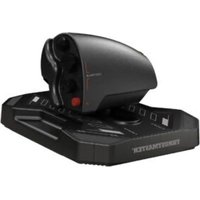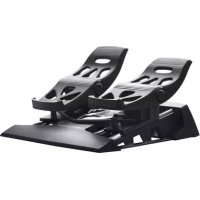
TFRP TFlight Rudder Pedals - Controller THRUSTMASTER - Free user manual and instructions
Find the device manual for free TFRP TFlight Rudder Pedals THRUSTMASTER in PDF.



| Product Type | Pedals (rudder) for flight simulation |
| Brand | Thrustmaster |
| Model | TFRP TFlight Rudder Pedals |
| Connectivity | RJ12 (integrated cable) + RJ12/USB adapter included; directly compatible with certain Thrustmaster joysticks (T.Flight Hotas 4/One, TWCS, TCA Quadrant) |
| Axes | 3: 1 rudder axis + 2 independent differential brake axes |
| Power | Via USB port (5V, 500mA max) |
| Dimensions (approx.) | 30 x 25 x 15 cm (L x l x H) |
| Weight (approx.) | 1.5 kg |
| Materials | ABS plastic, rubber heel rests, metal connectors |
| Box contents | TFRP pedals, RJ12/USB adapter, RJ12 cable, Allen key, 2 removable heel rests, quick start guide |
| Key features | Rudder and differential brake control; automatic calibration; adjustable dead zones via dedicated software |
| Compatible software | T. RJ12 USB Adapter Calibration Tool, T.A.R.G.E.T. (Thrustmaster Advanced Programming Graphical Editor) |
| Platform compatibility | PC (Windows 7/8/8.1/10), PlayStation 4 (via HOTAS 4), Xbox One (via HOTAS One) |
| Installation | Connect RJ12 to adapter or compatible joystick; plug USB into PC; selector on AIRCRAFT position; drivers available at support.thrustmaster.com |
| Advanced settings | Adjustment of dead zones and sensitivity via Calibration Tool; advanced programming via T.A.R.G.E.T. (Drag and Drop, scripts) |
| Maintenance and cleaning | Disconnect before cleaning; use a soft, dry cloth; do not use abrasive products |
| Safety | Do not open the product: opening voids warranty; avoid exposure to moisture and shocks |
| Spare parts and repairability | Parts not provided separately; any repairs must be performed by Thrustmaster technical support |
| Warranty | 2 years in the European Union (legal compliance); 1 year in other countries; extension possible according to local legislation |
| General information | Made in China; registered trademark of Guillemot Corporation; illustrations not contractual; specifications subject to change without notice |
Frequently Asked Questions - TFRP TFlight Rudder Pedals THRUSTMASTER
User questions about TFRP TFlight Rudder Pedals THRUSTMASTER
0 question about this device. Answer the ones you know or ask your own.
Ask a new question about this device
Download the instructions for your Controller in PDF format for free! Find your manual TFRP TFlight Rudder Pedals - THRUSTMASTER and take your electronic device back in hand. On this page are published all the documents necessary for the use of your device. TFRP TFlight Rudder Pedals by THRUSTMASTER.
USER MANUAL TFRP TFlight Rudder Pedals THRUSTMASTER
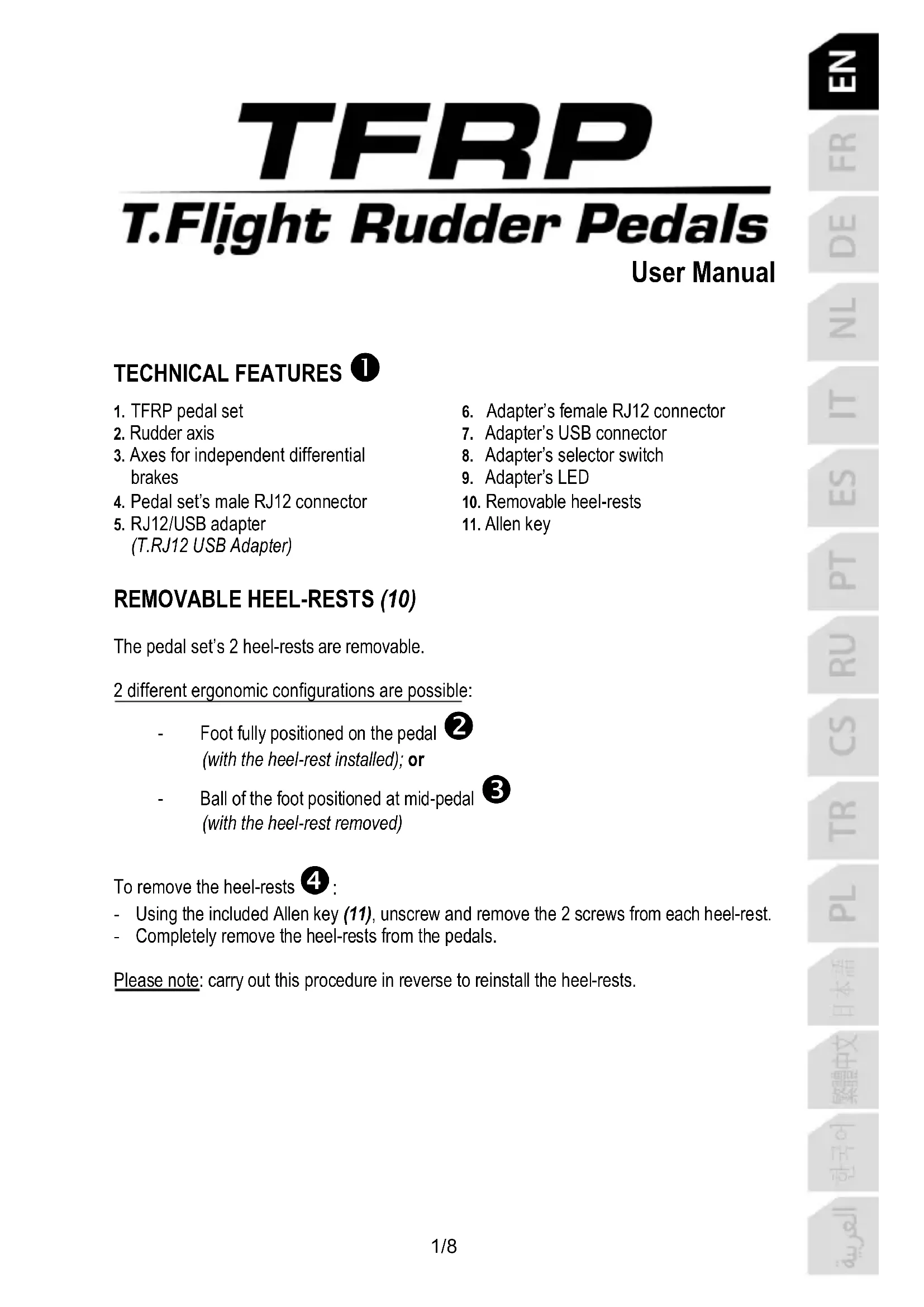
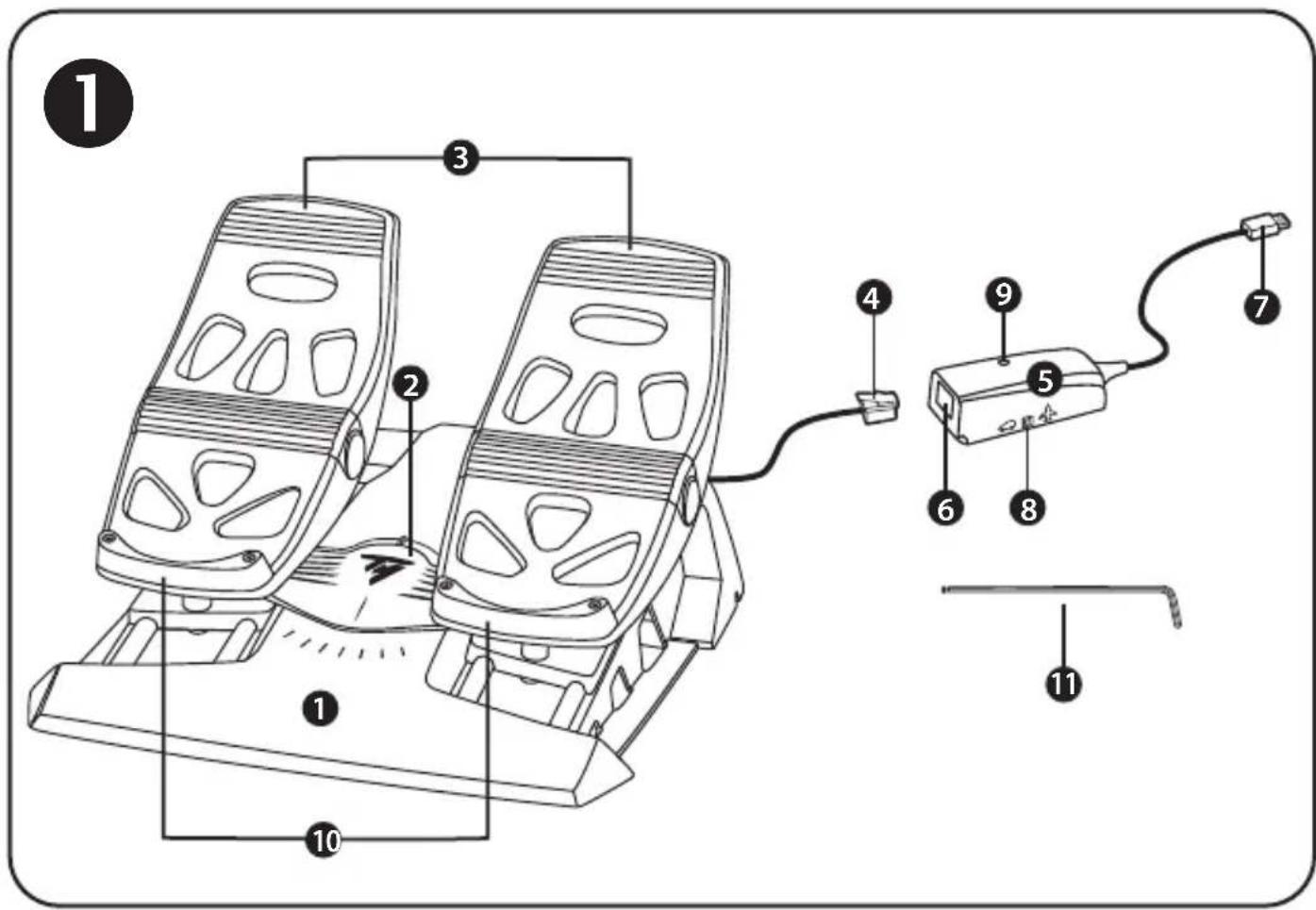
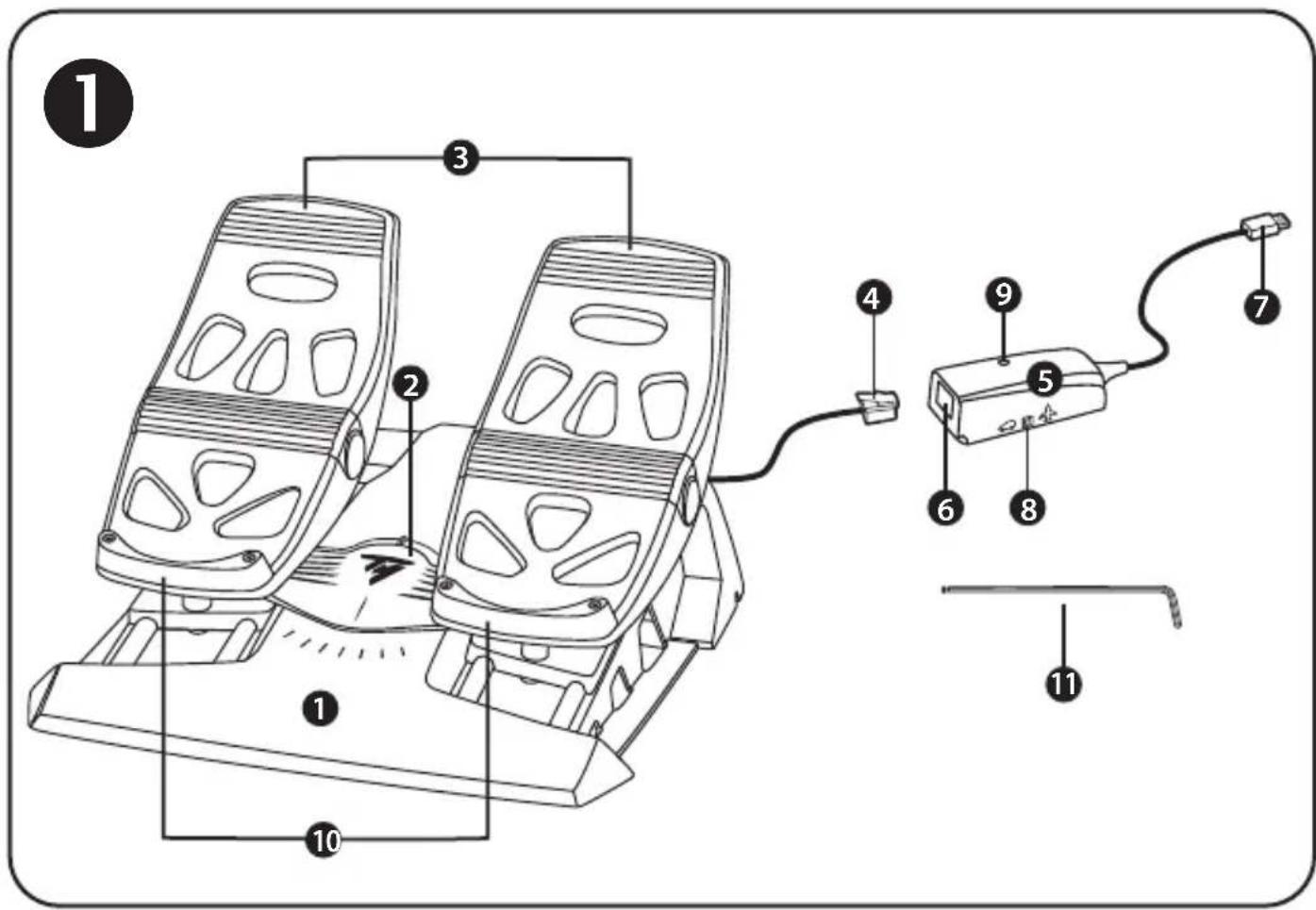
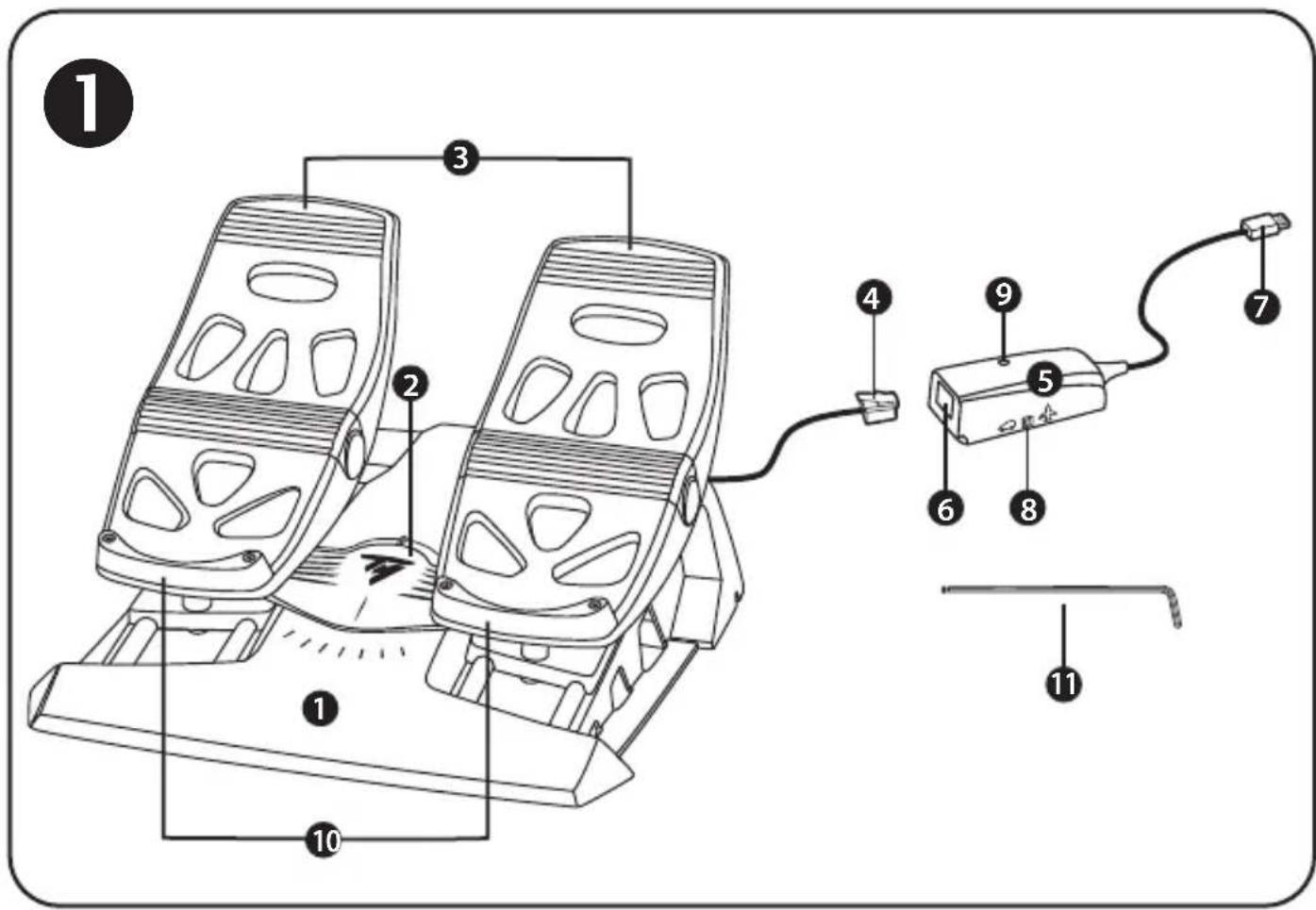
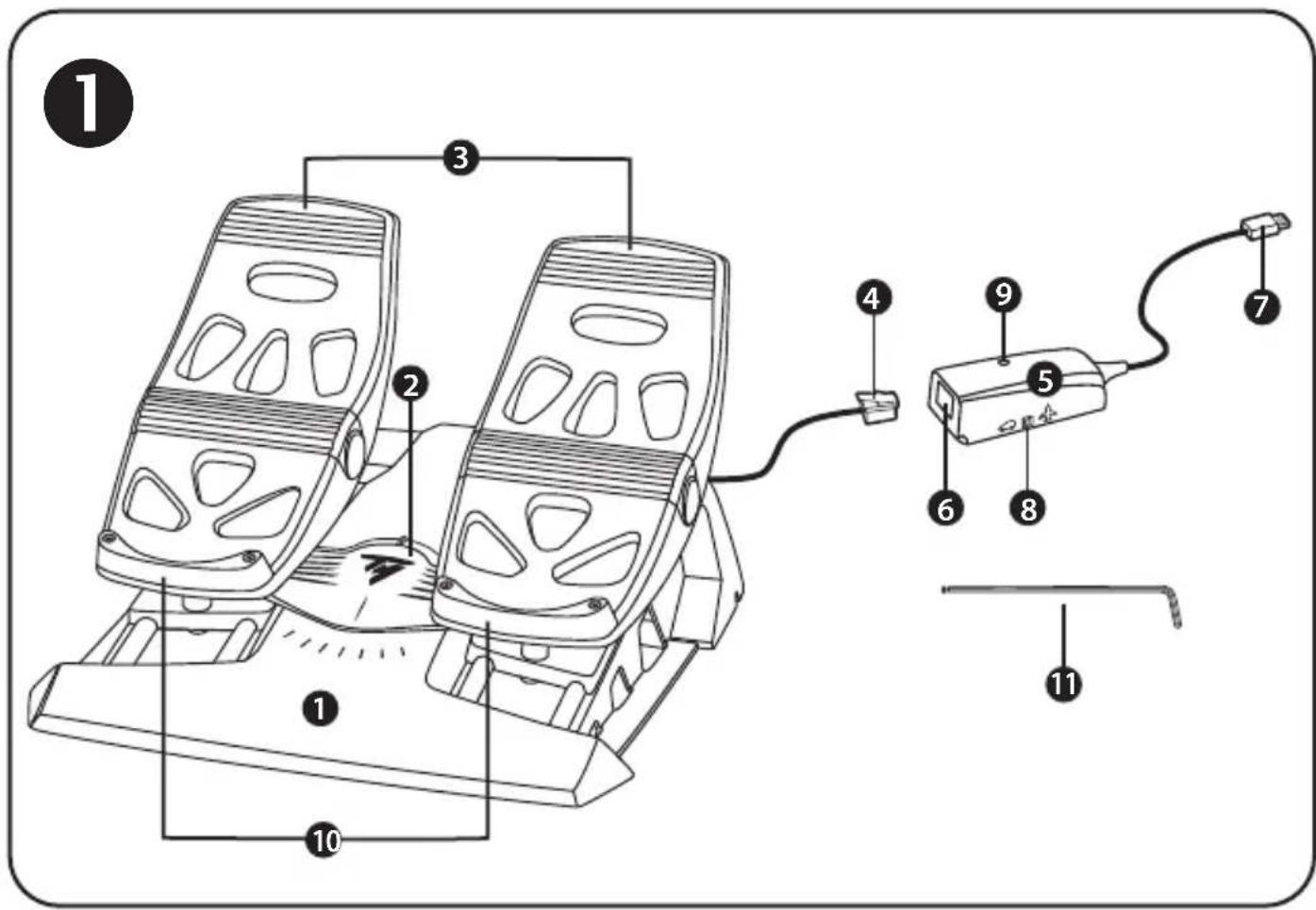
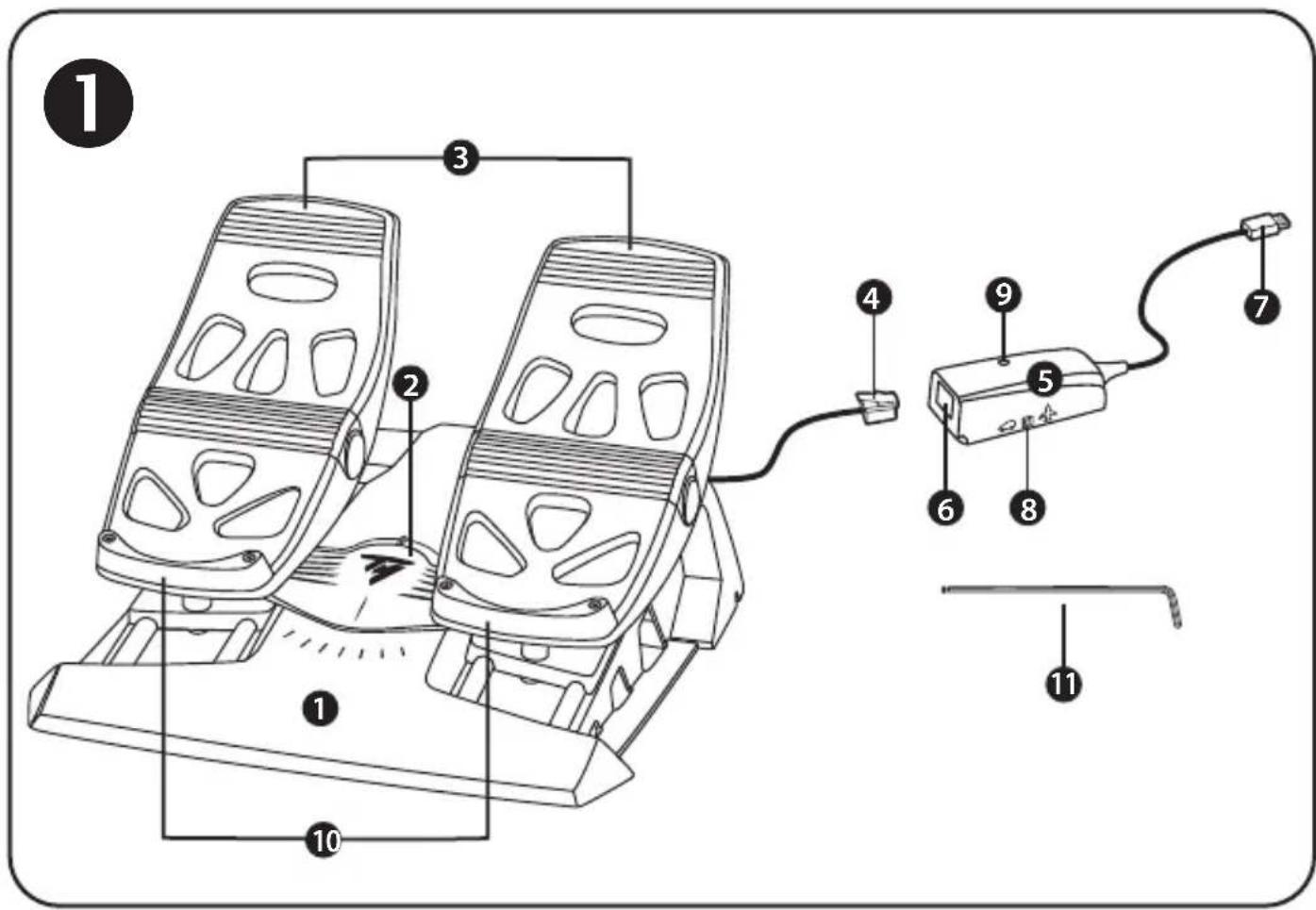
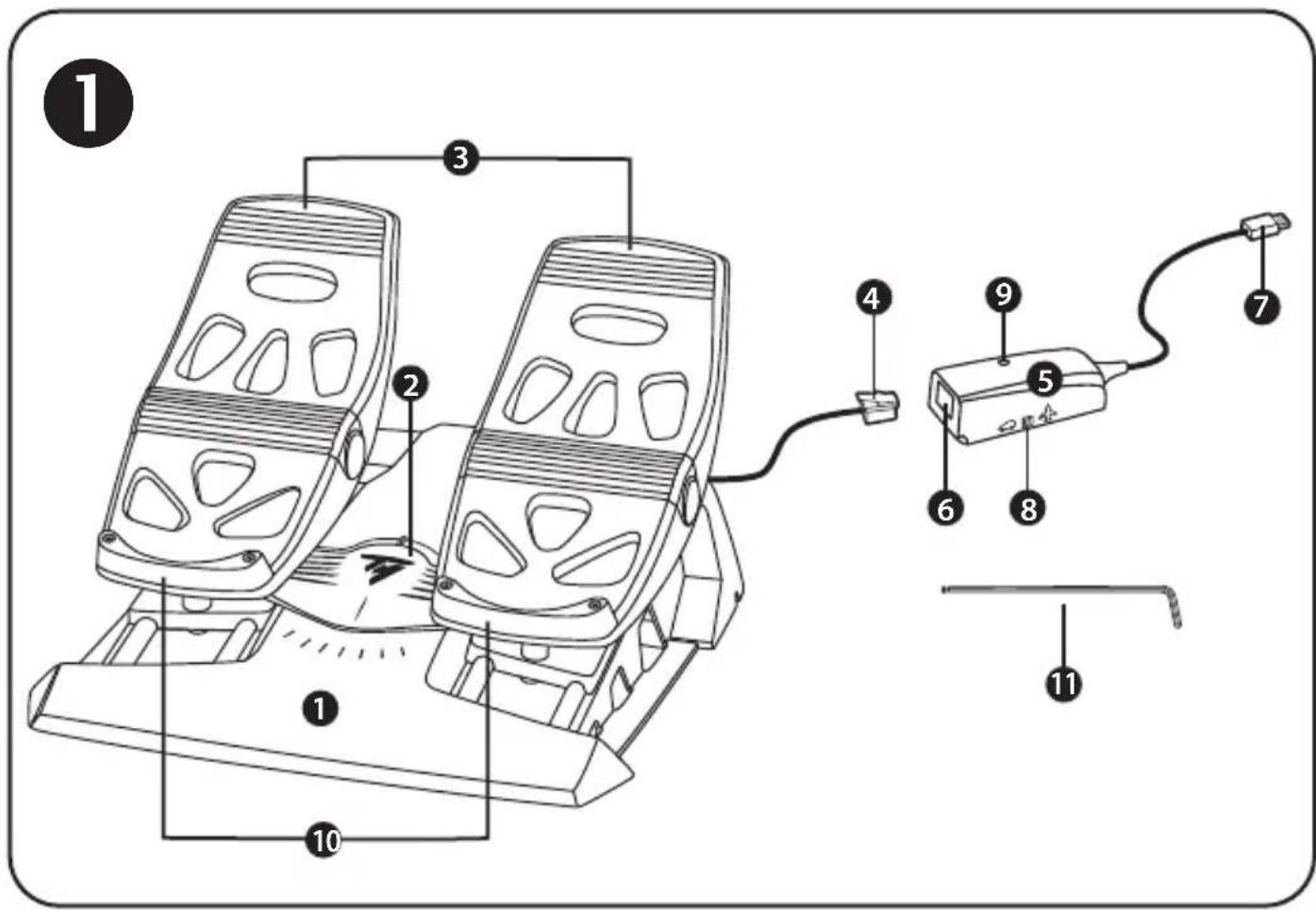
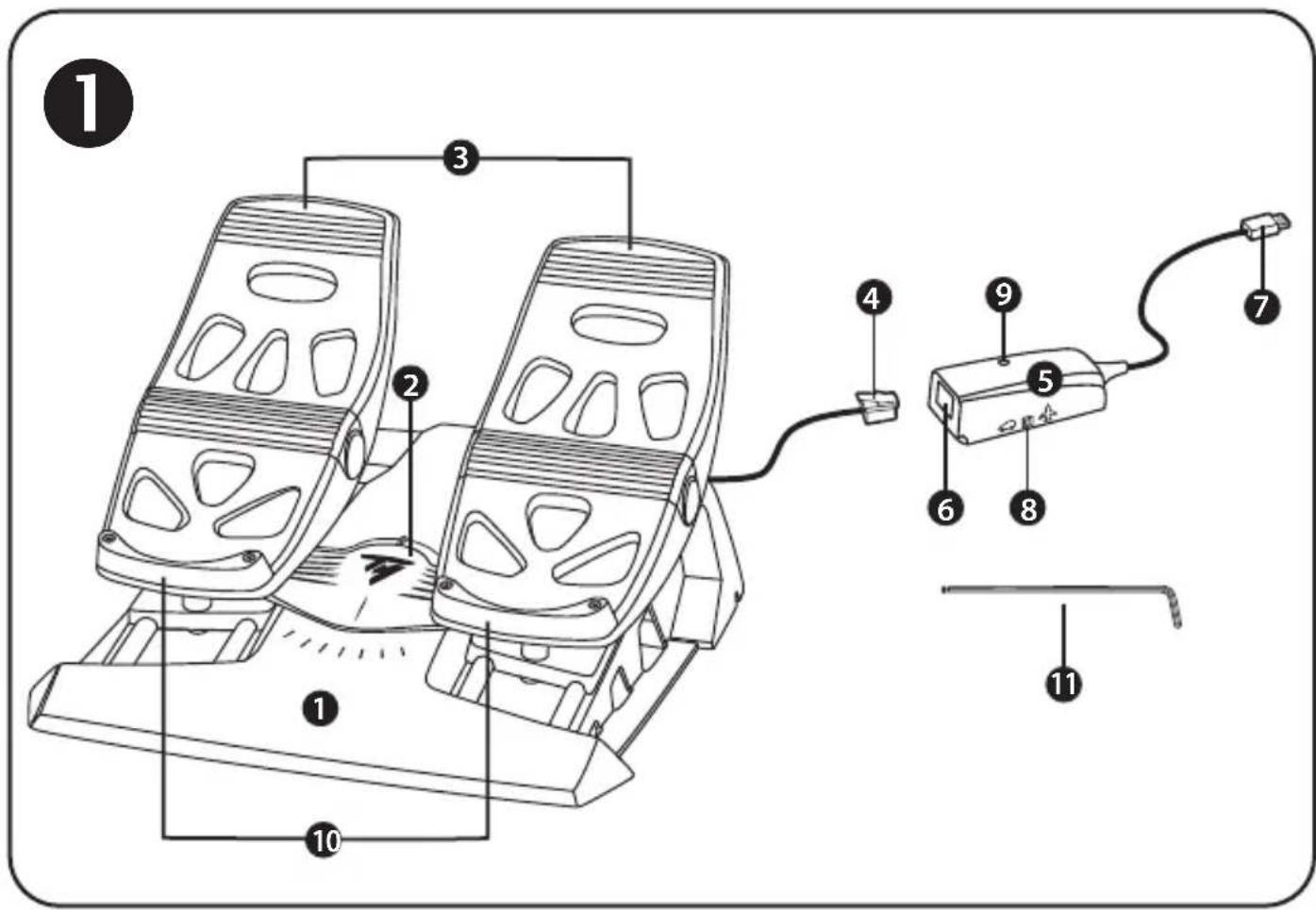
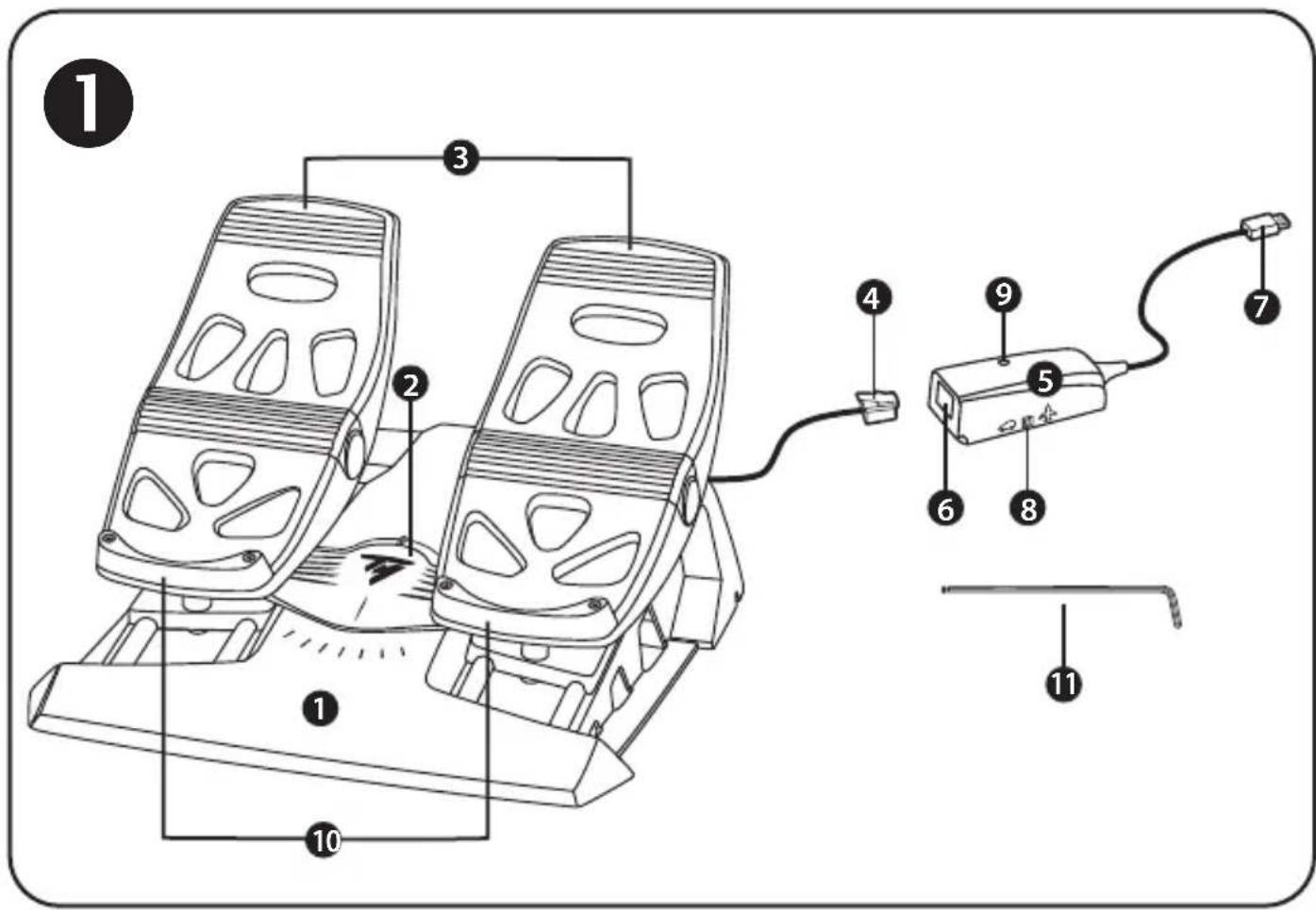
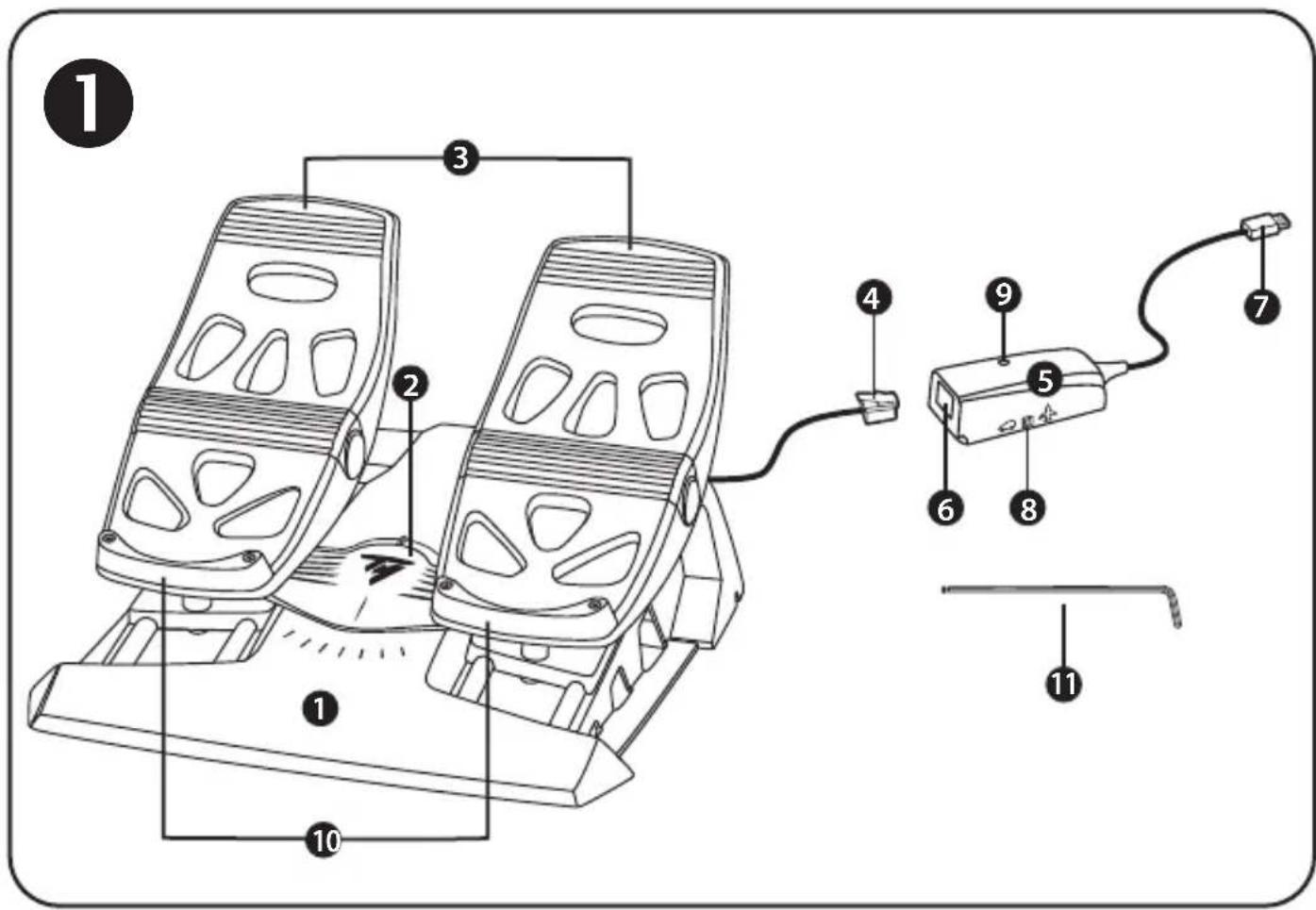
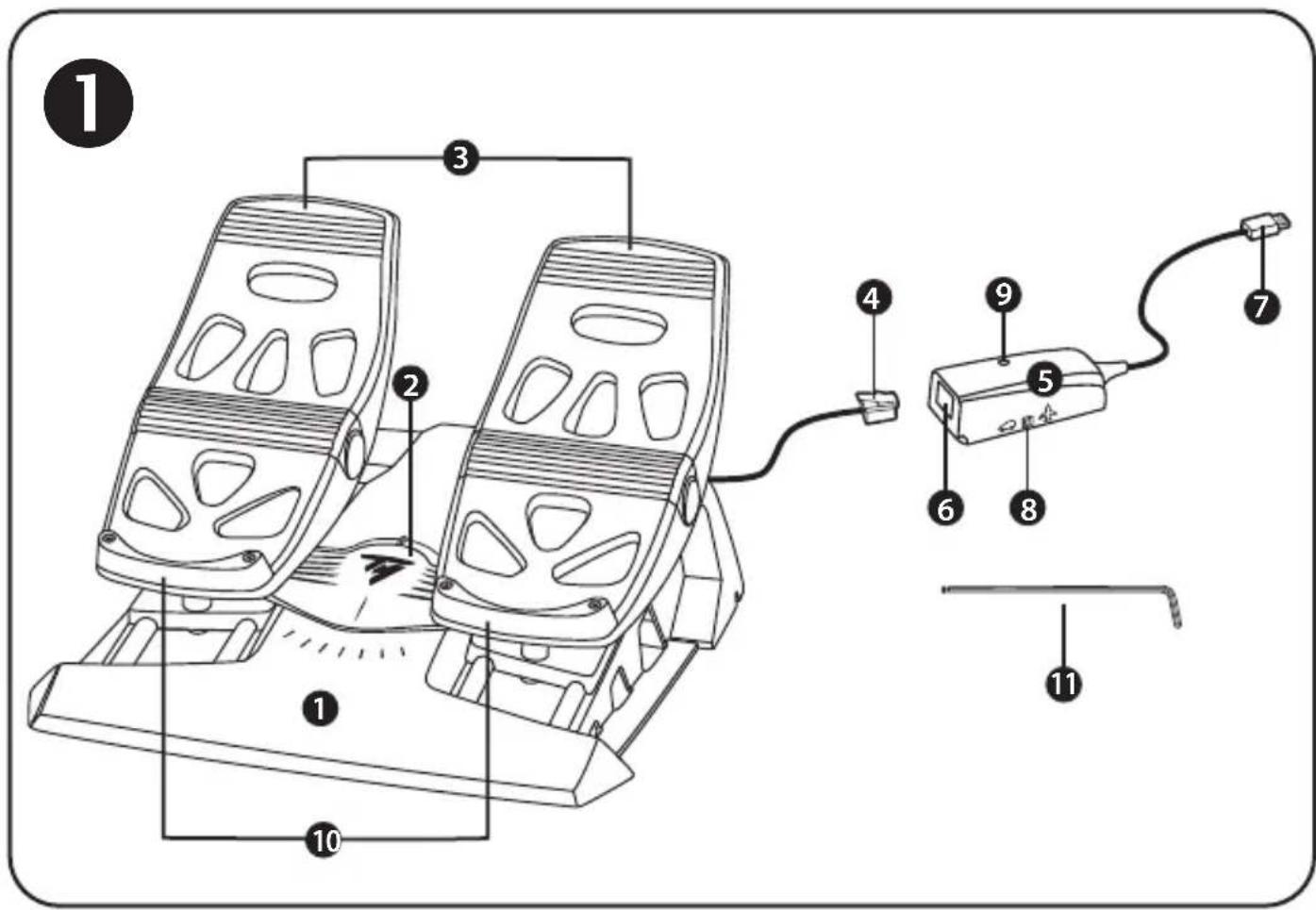
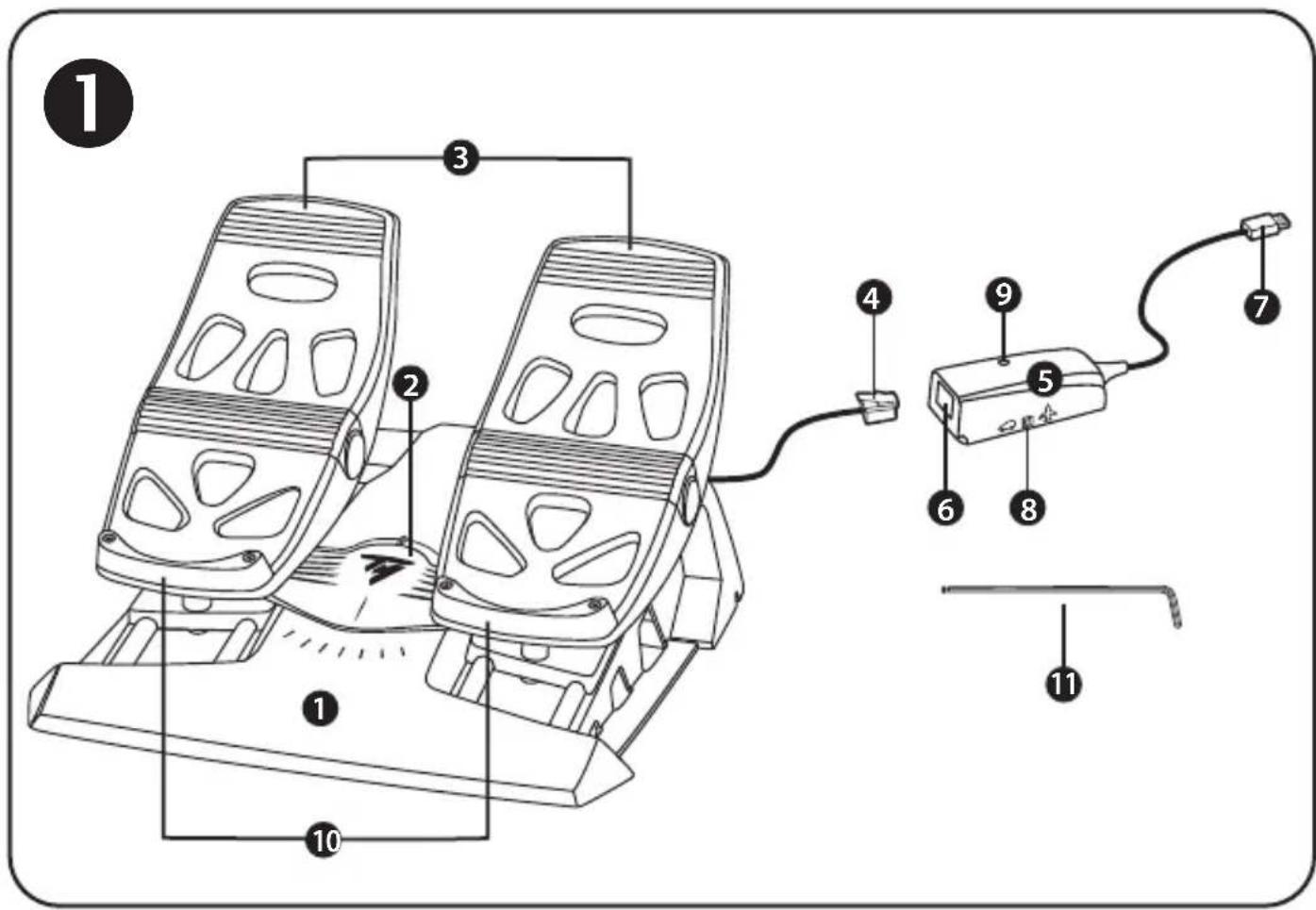
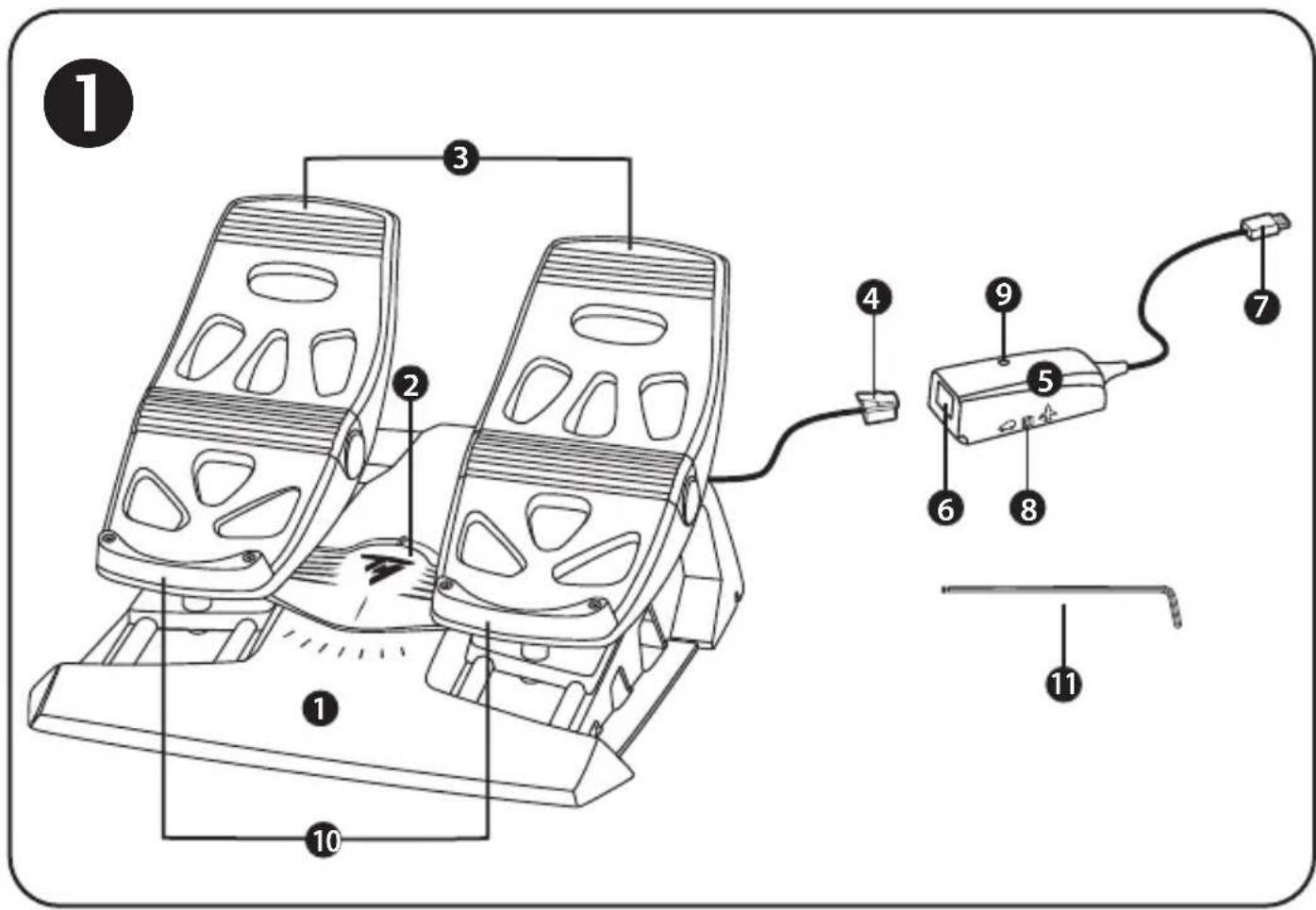
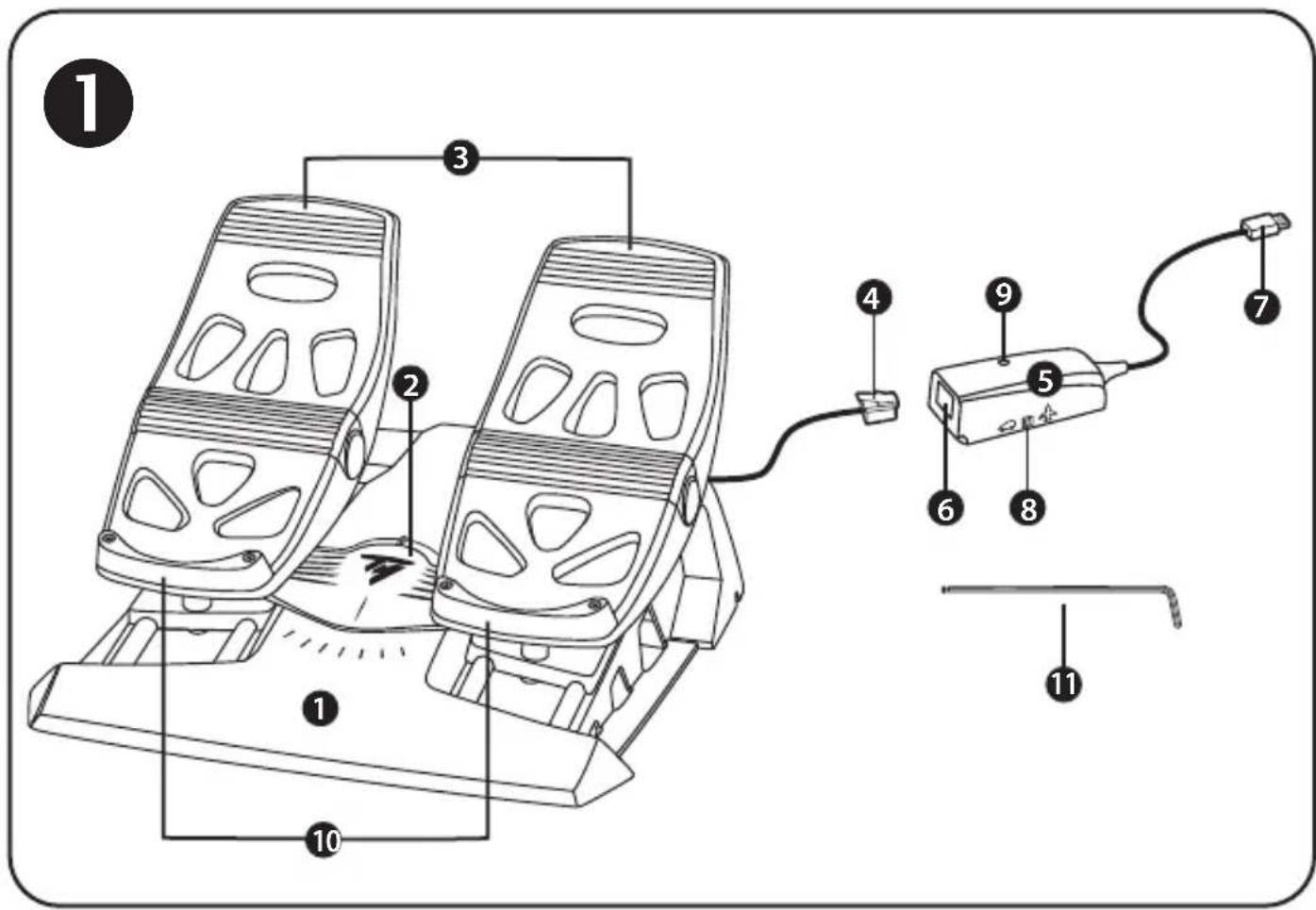
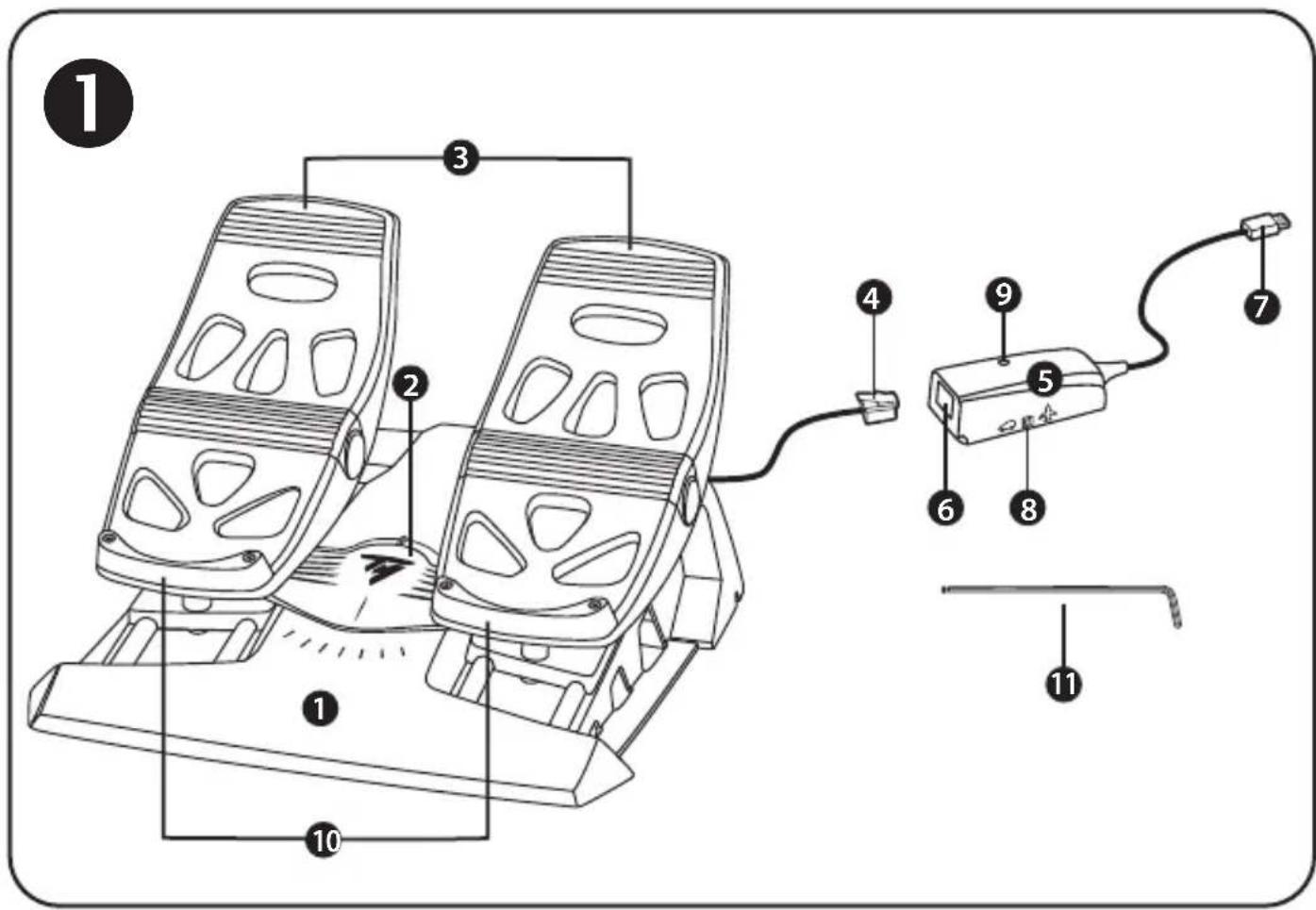
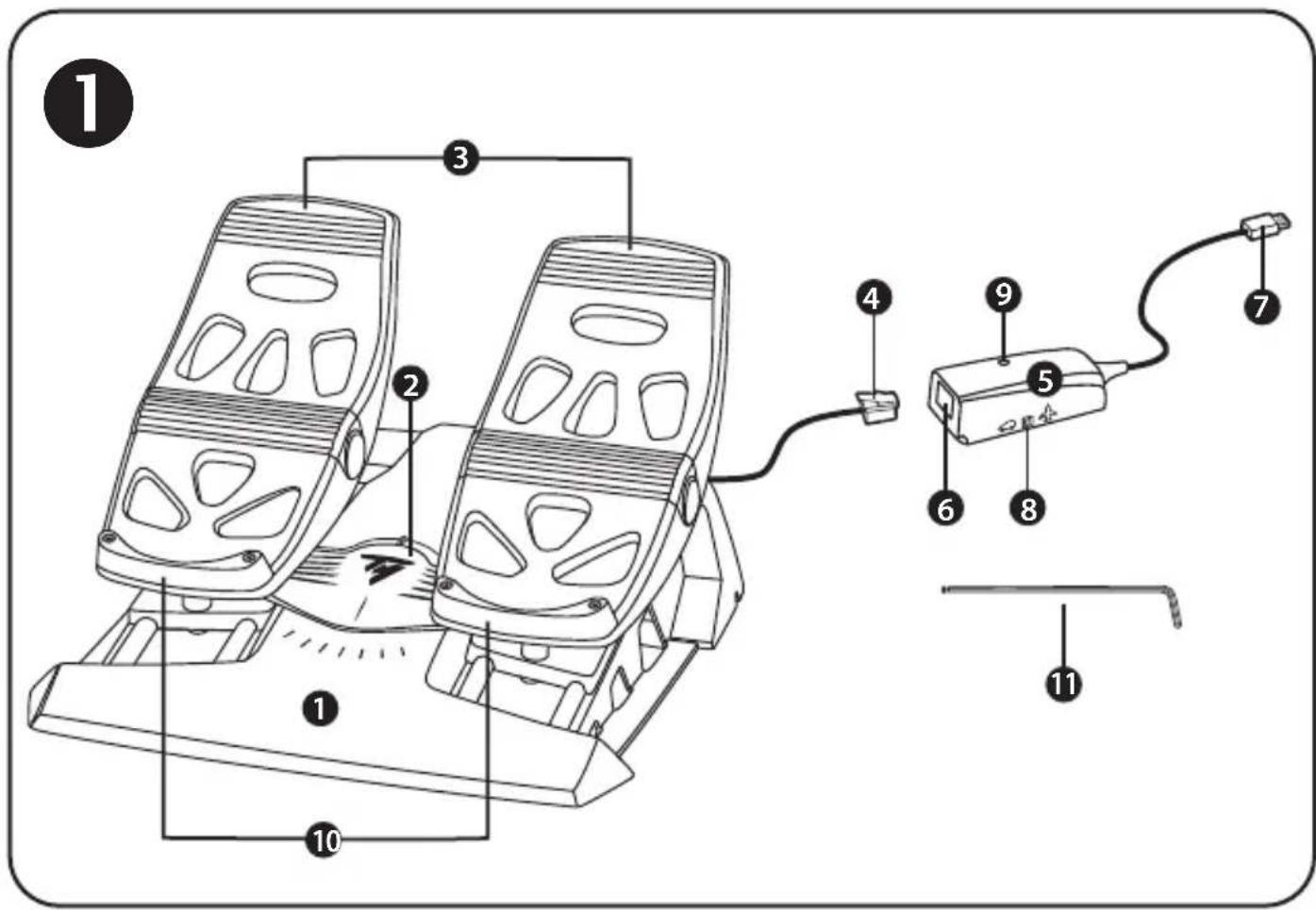
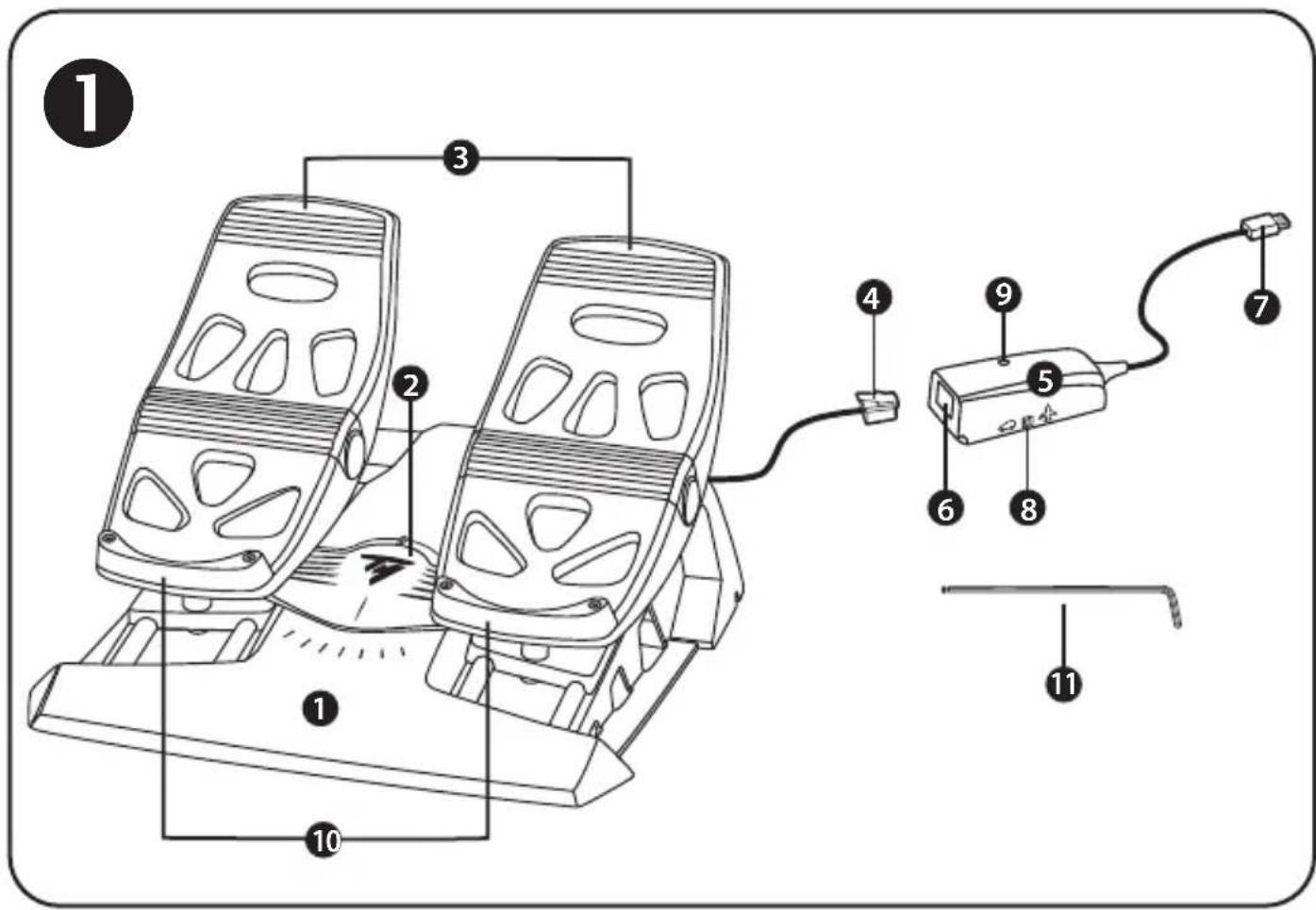
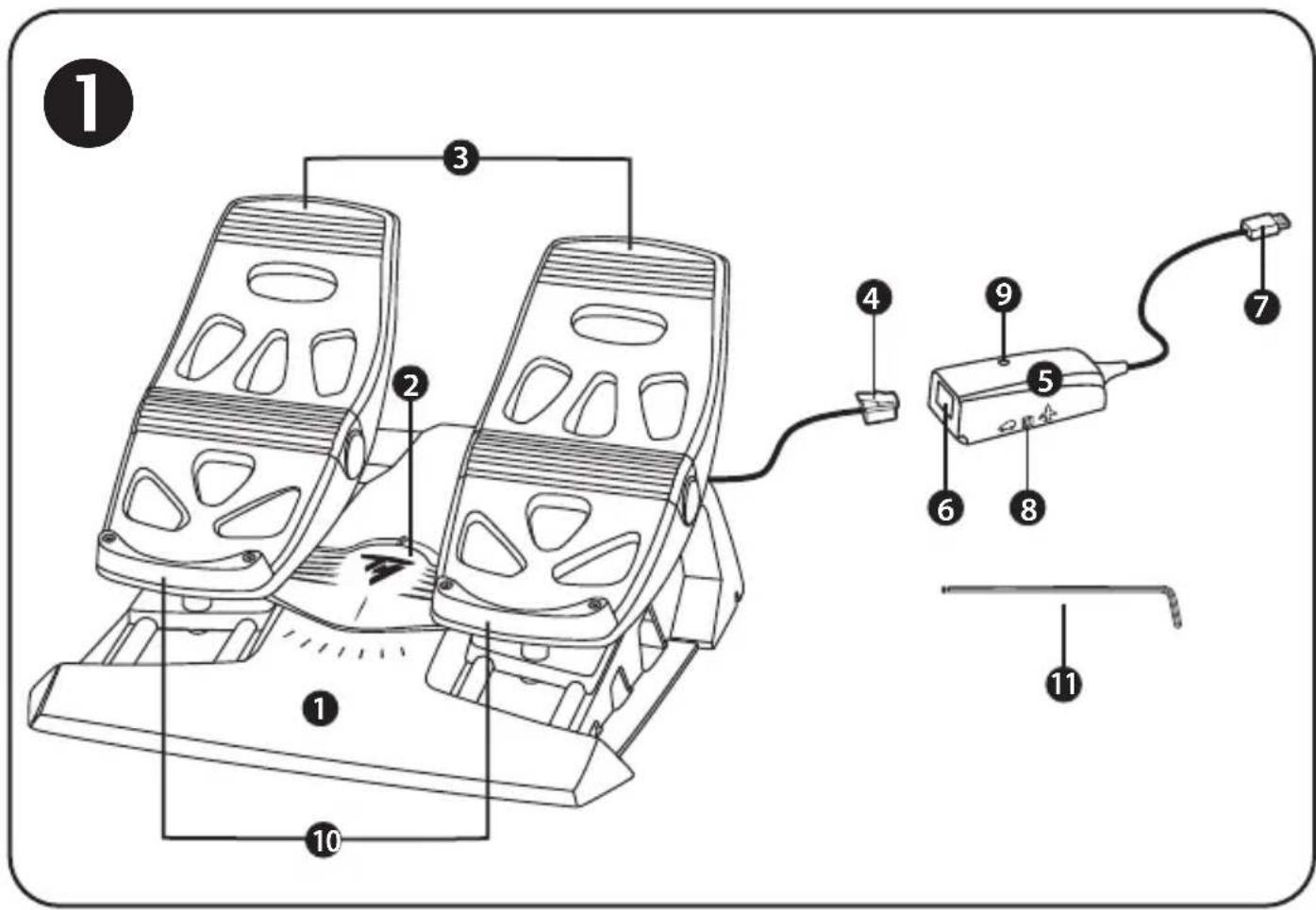
- TFRP pedal set
- Rudder axis
- Axes for independent differential brakes
-
Pedal set's male RJ12 connector
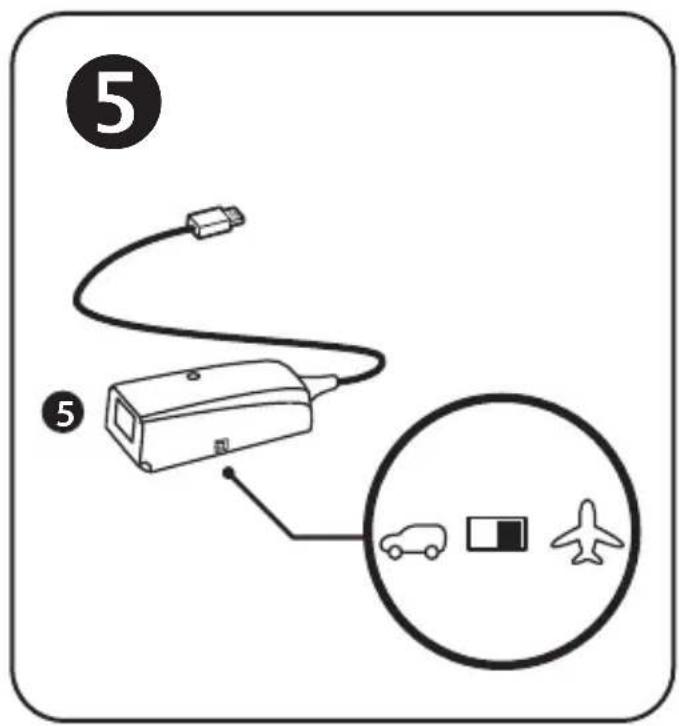
5.RJ12/USB adapter (T.RJ12 USB Adapter) -
Adapter's female RJ12 connector
- Adapter's USB connector
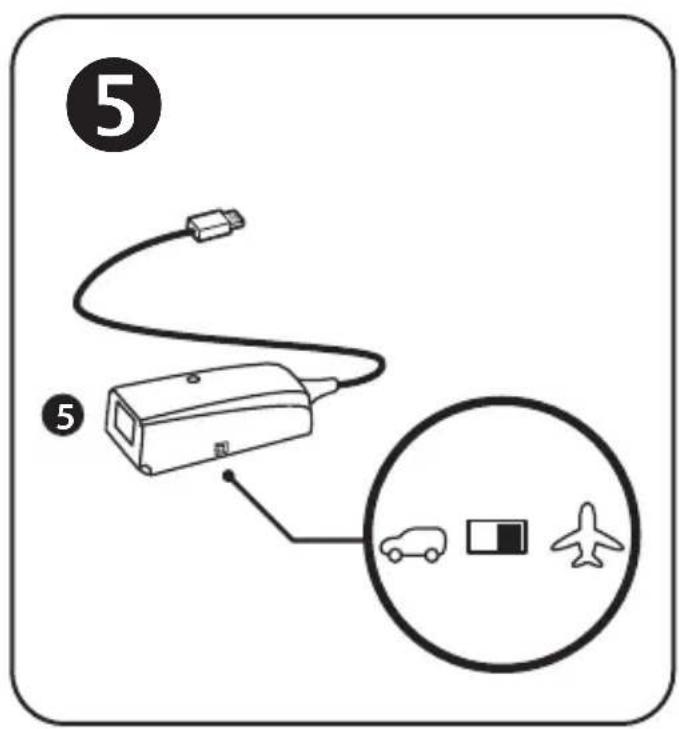
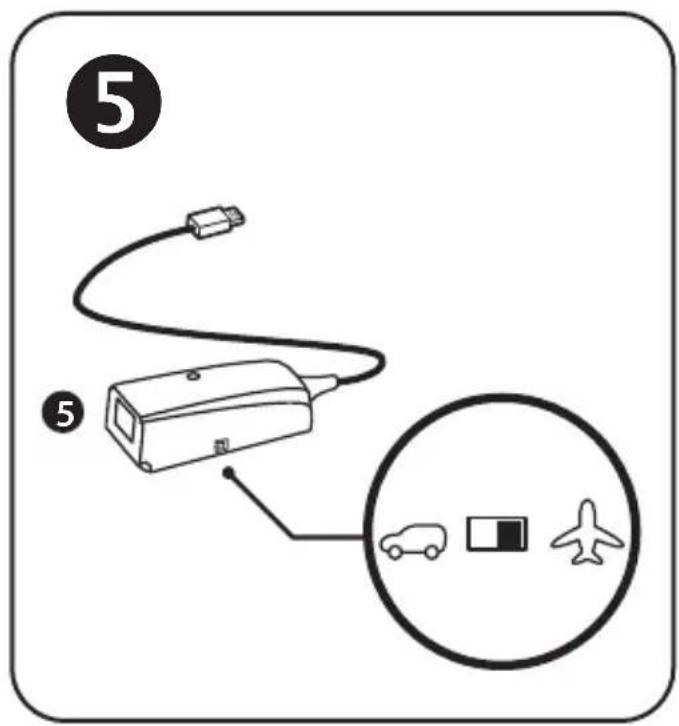
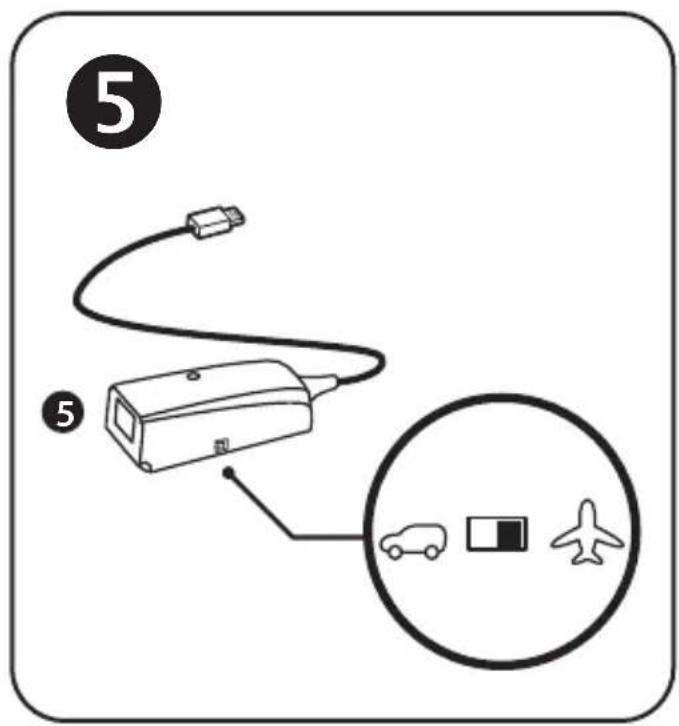
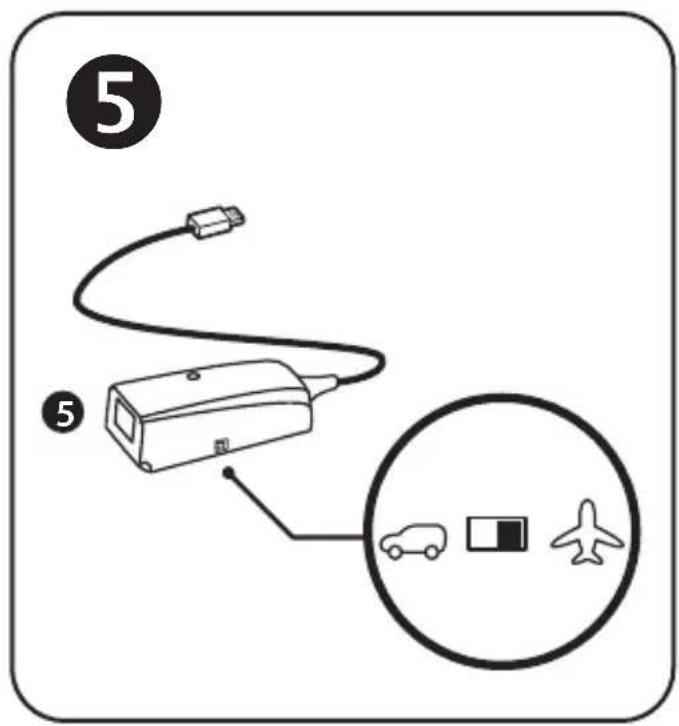
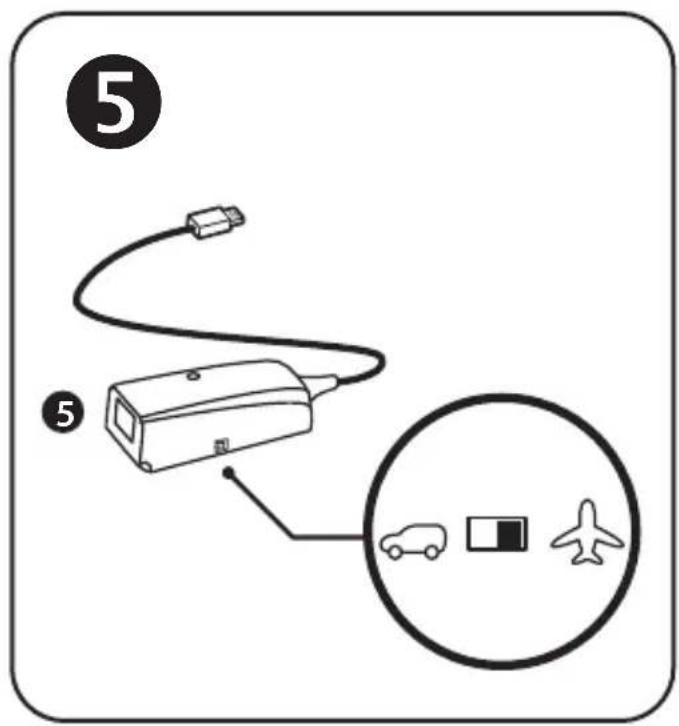
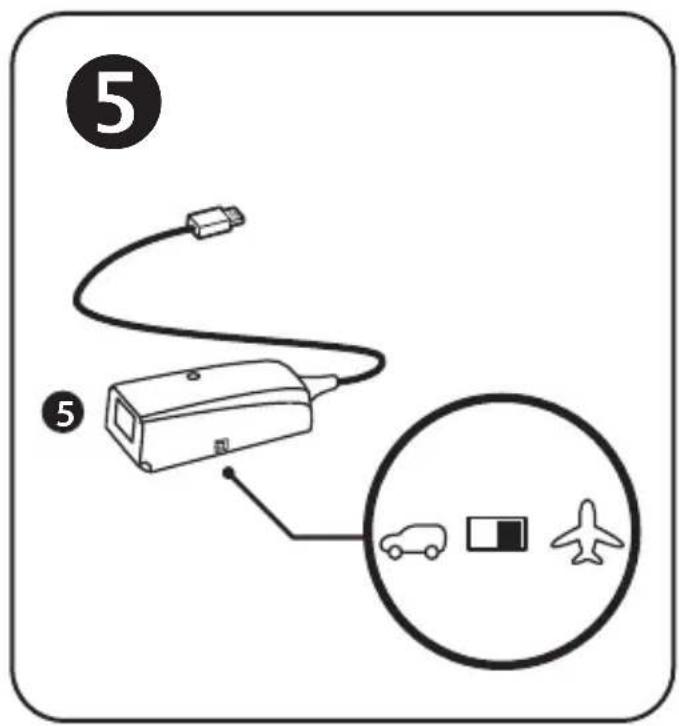
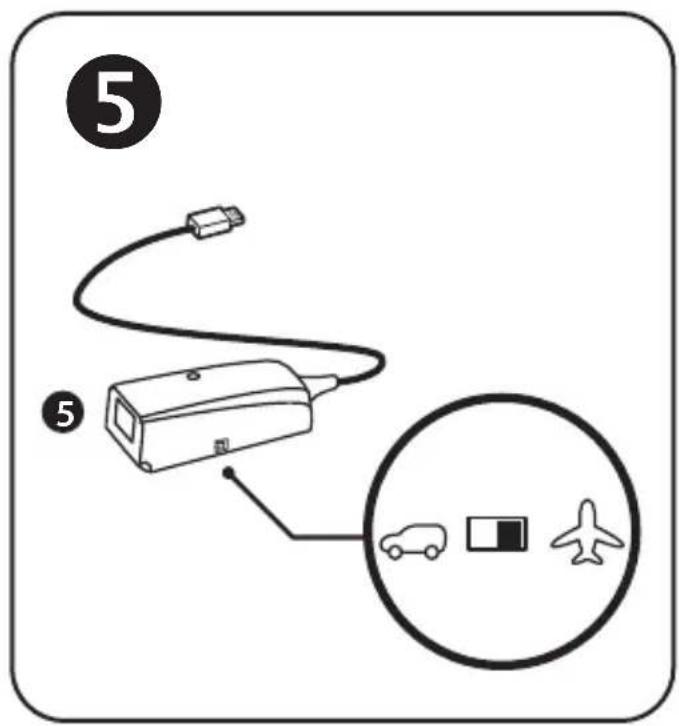
- Adapter's selector switch
- Adapter's LED
- Removable heel-rests
- Allen key
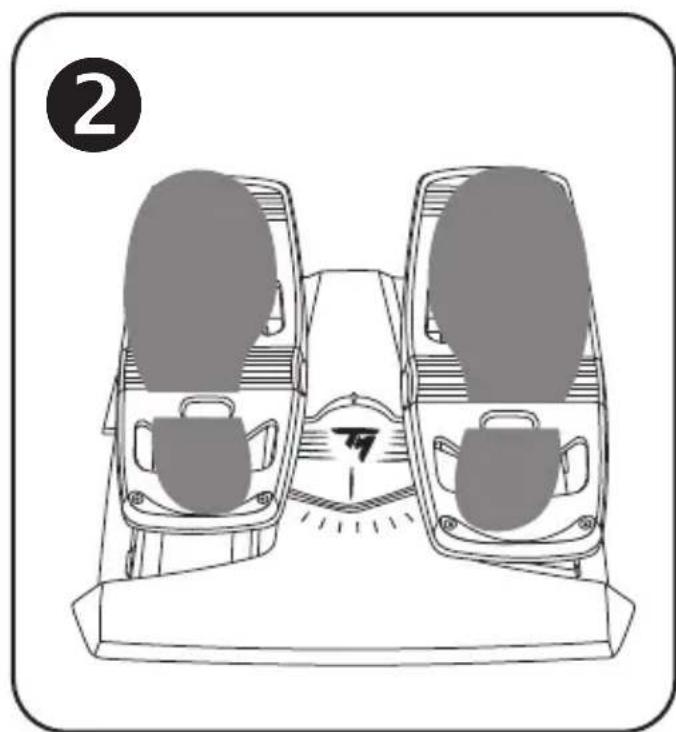
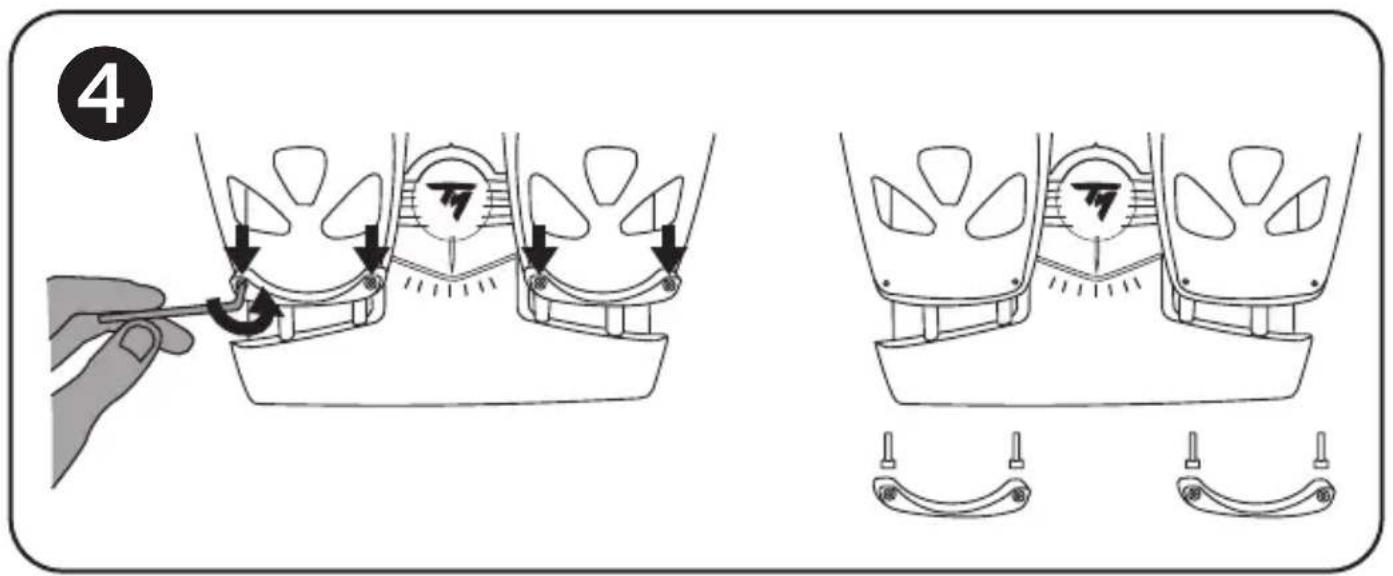
REMOVABLE HEEL-RESTS (10)
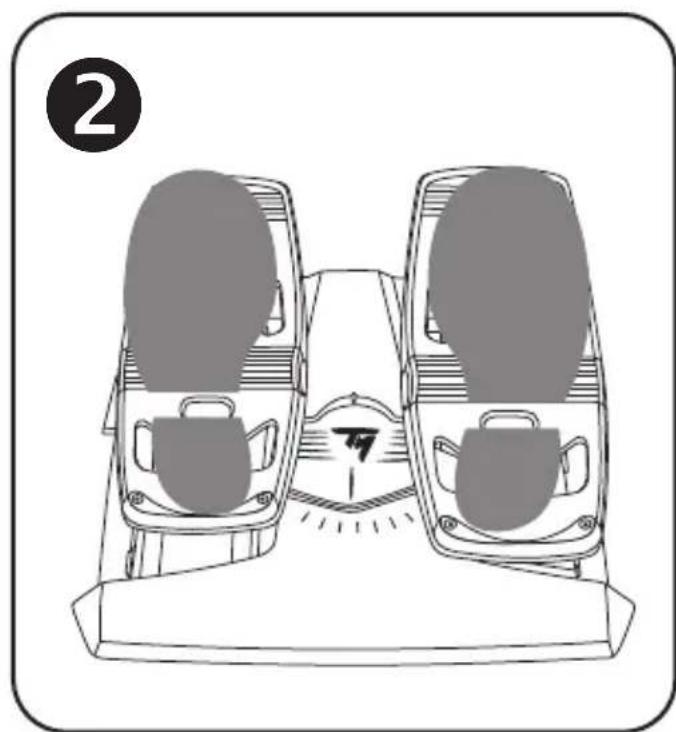
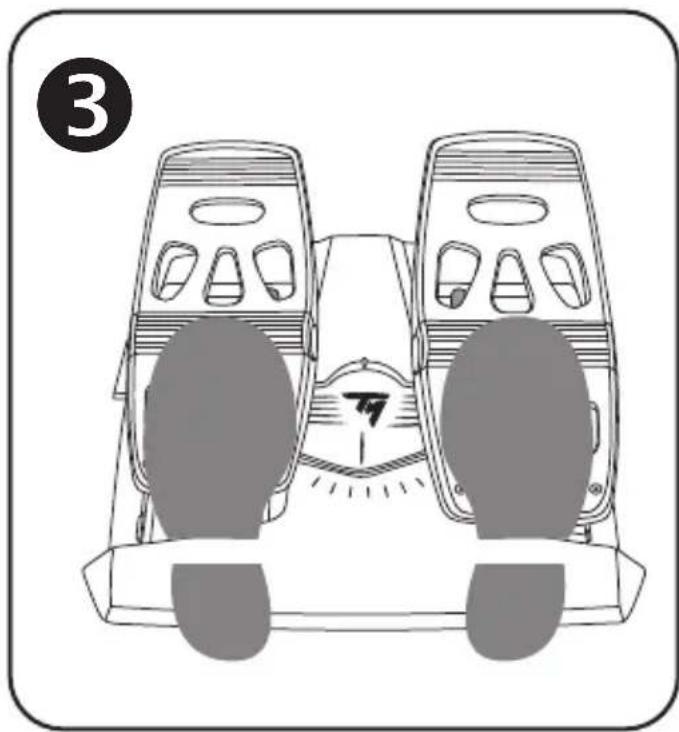
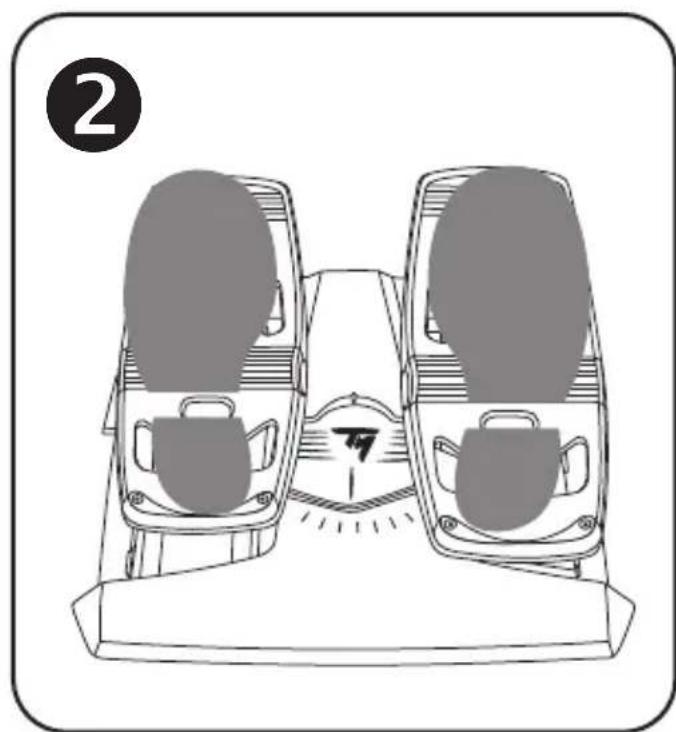
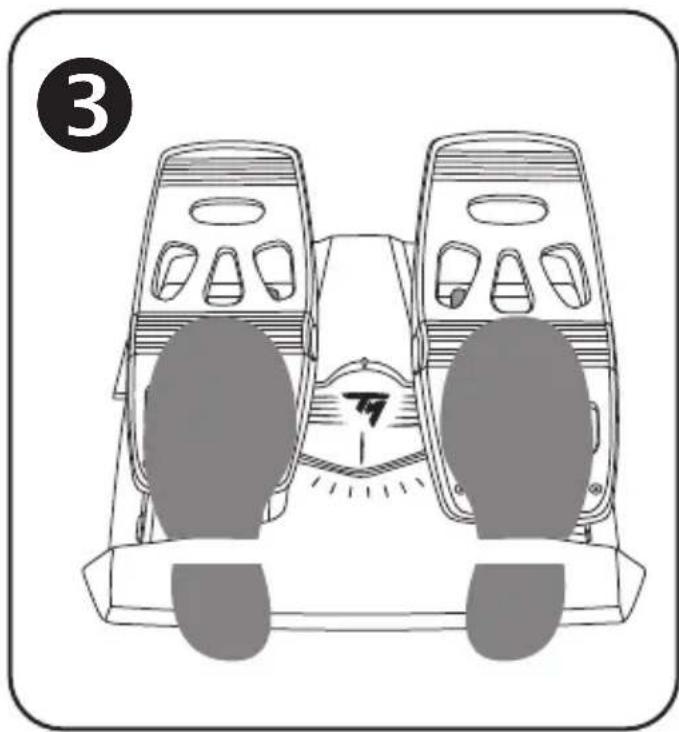
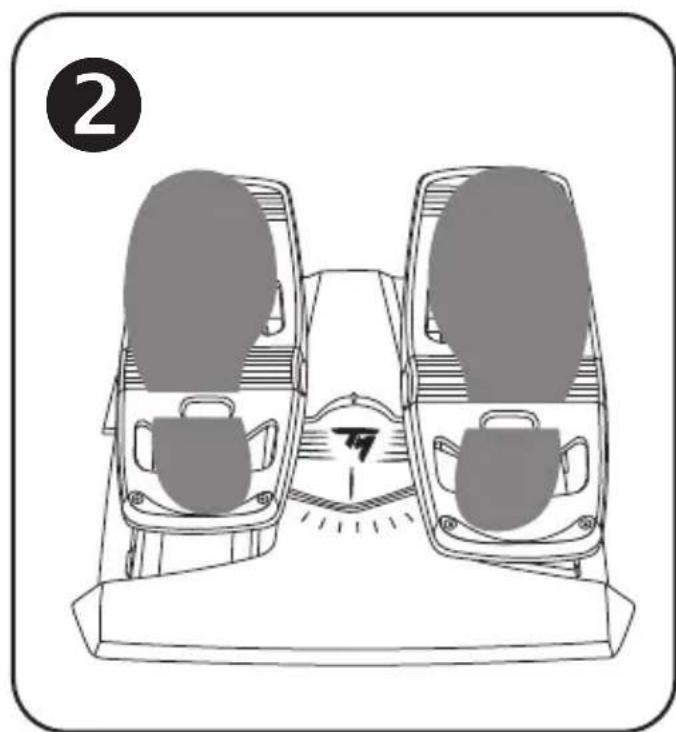
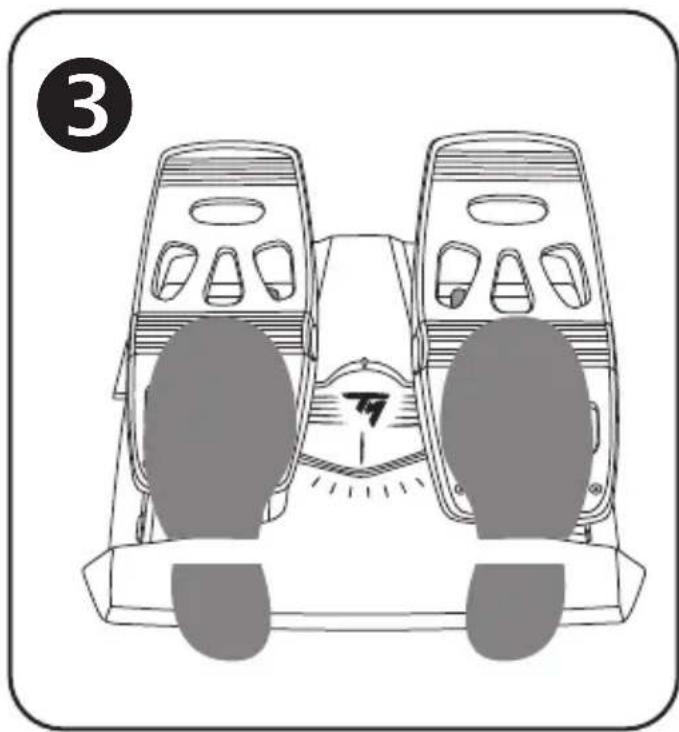
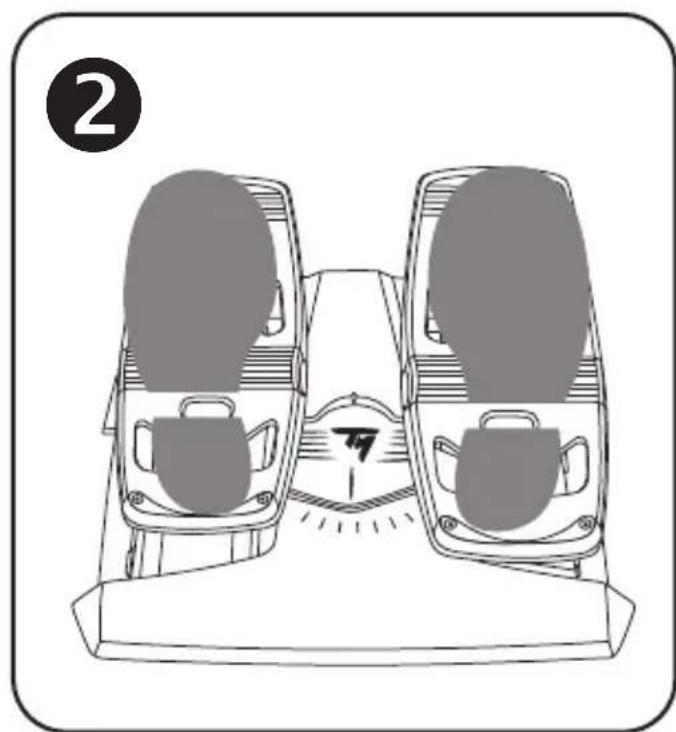
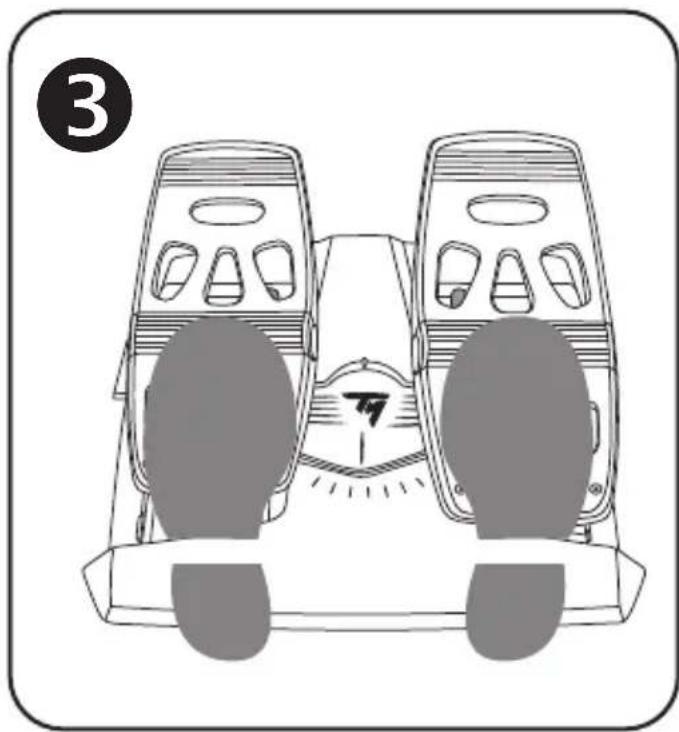
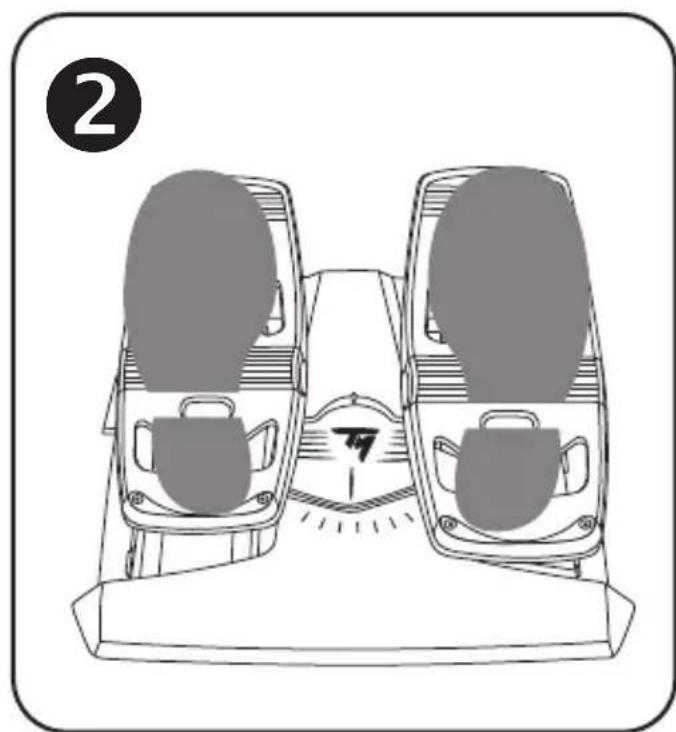
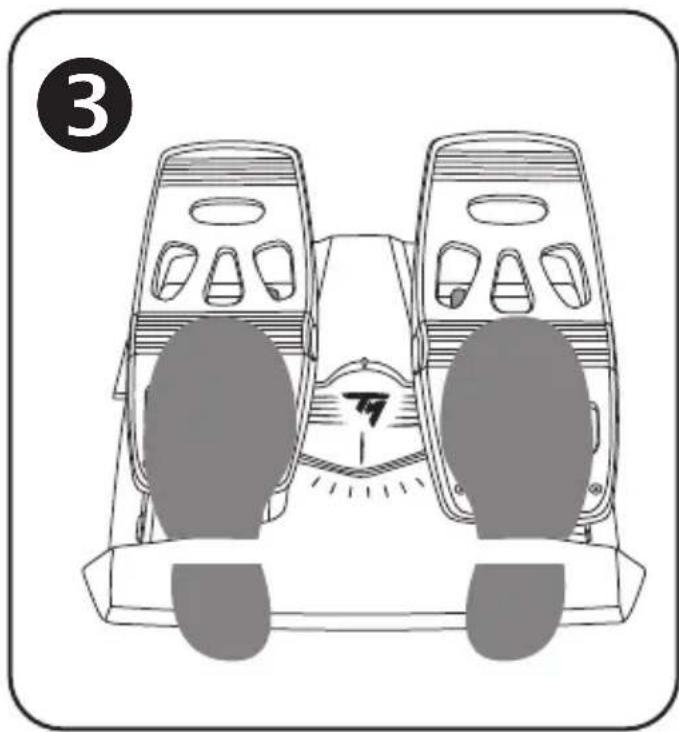
The pedal set's 2 heel-rests are removable.
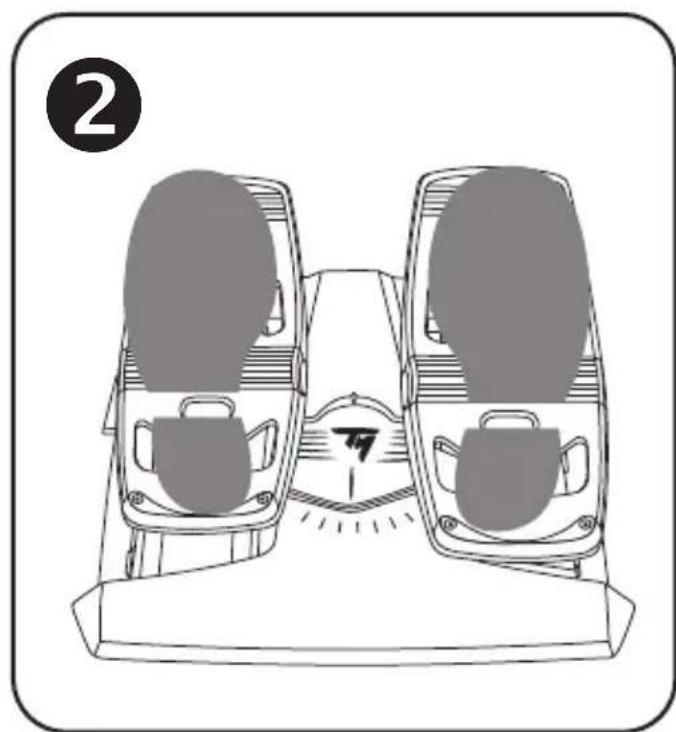
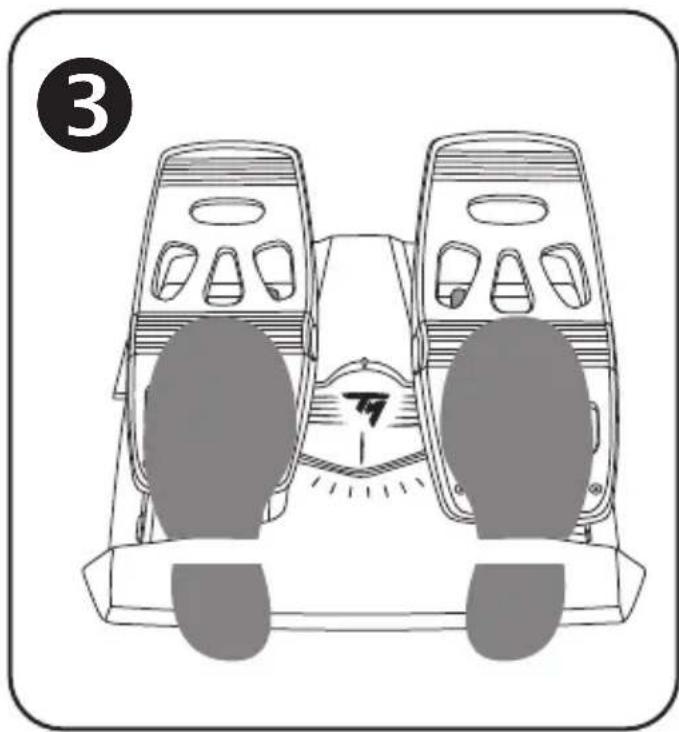
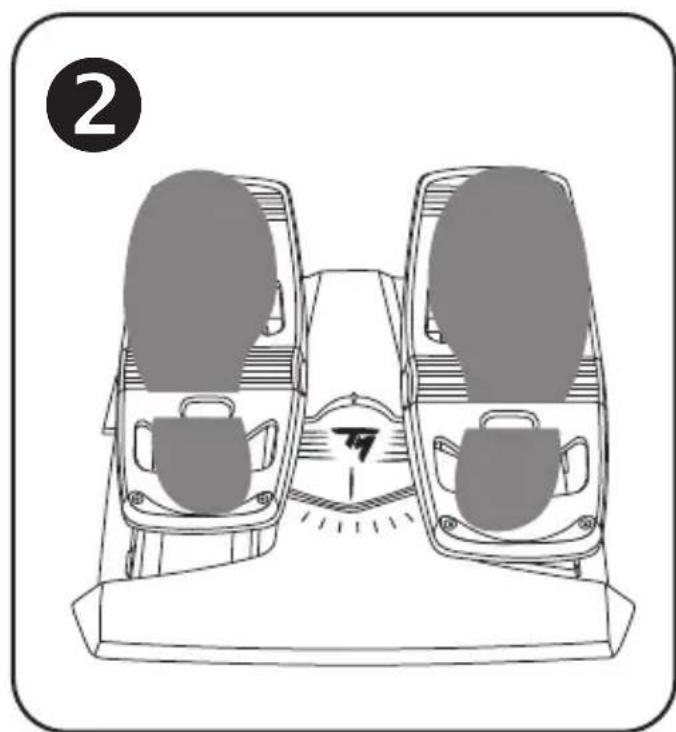
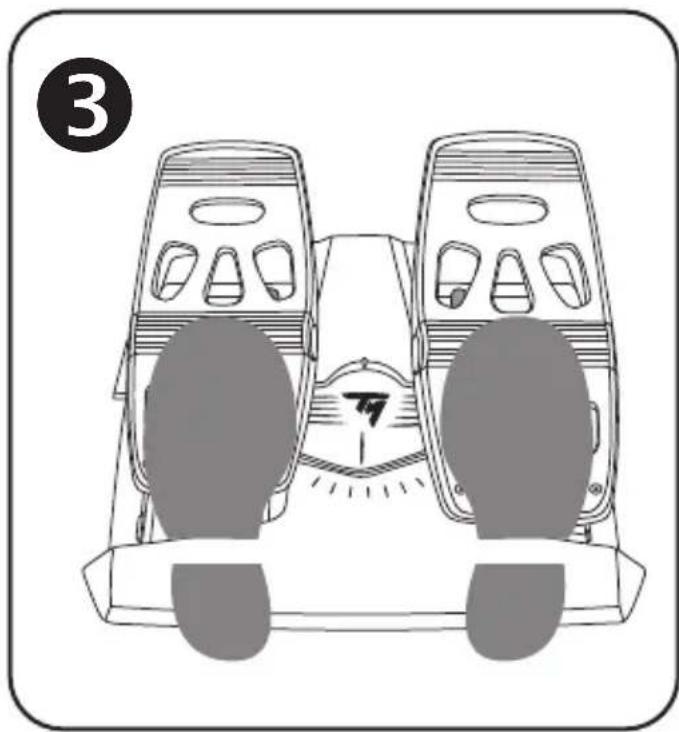
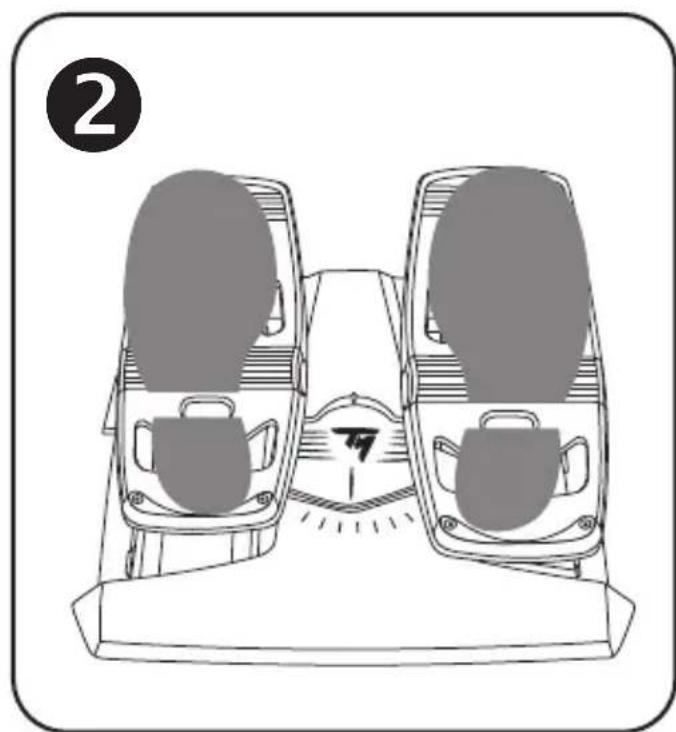
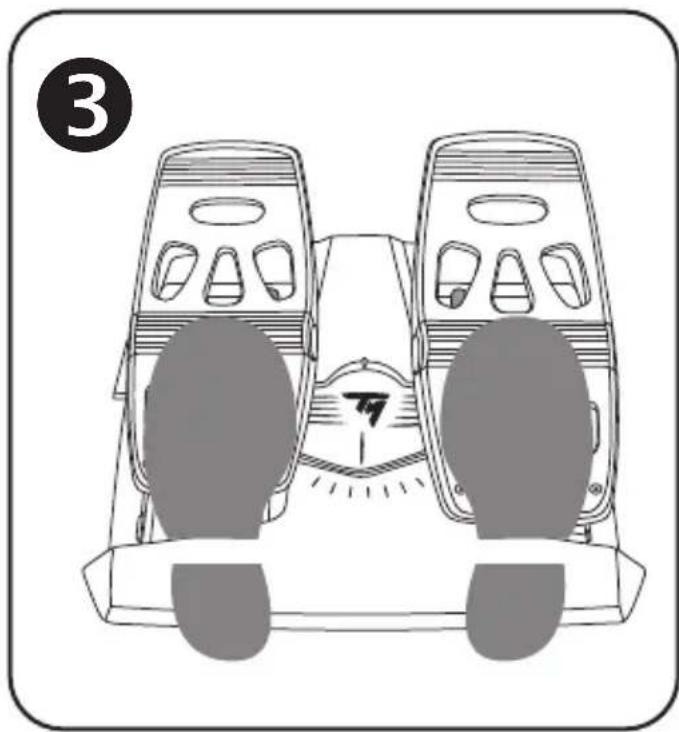
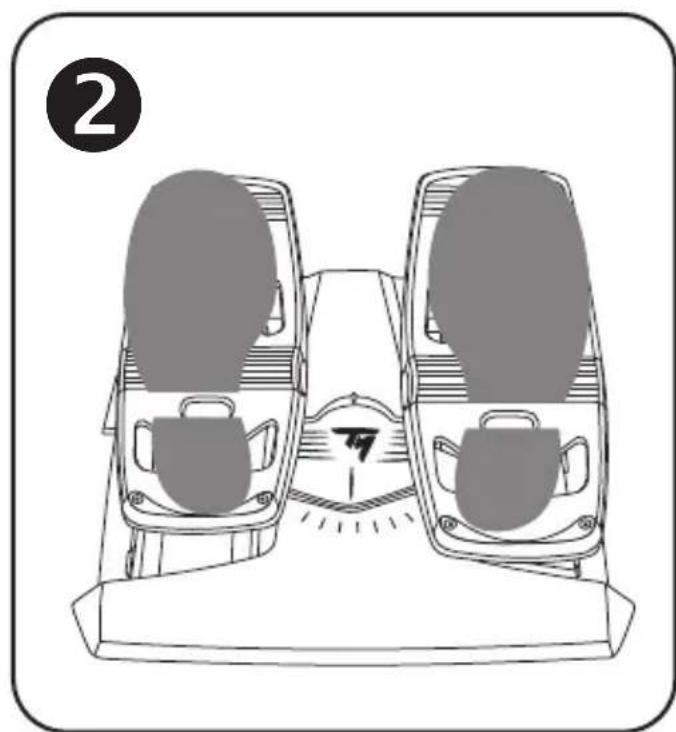
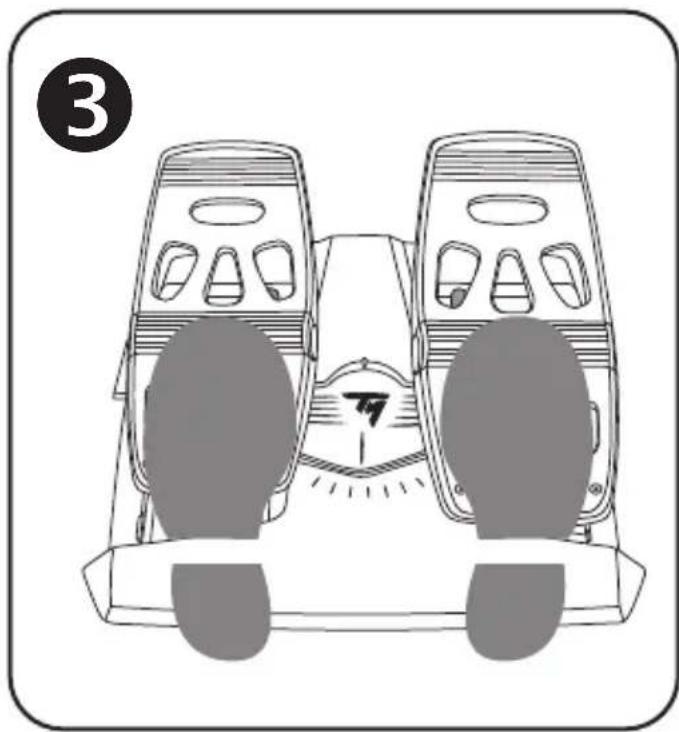
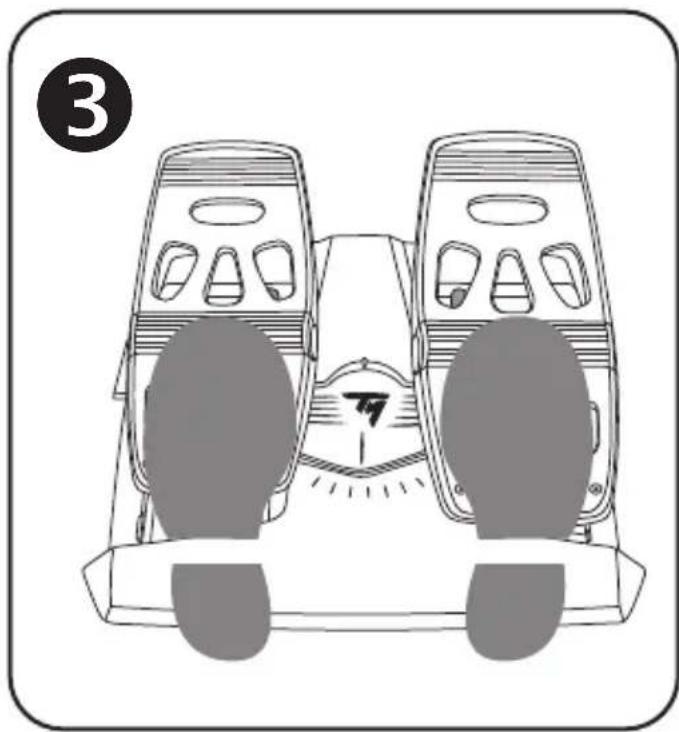
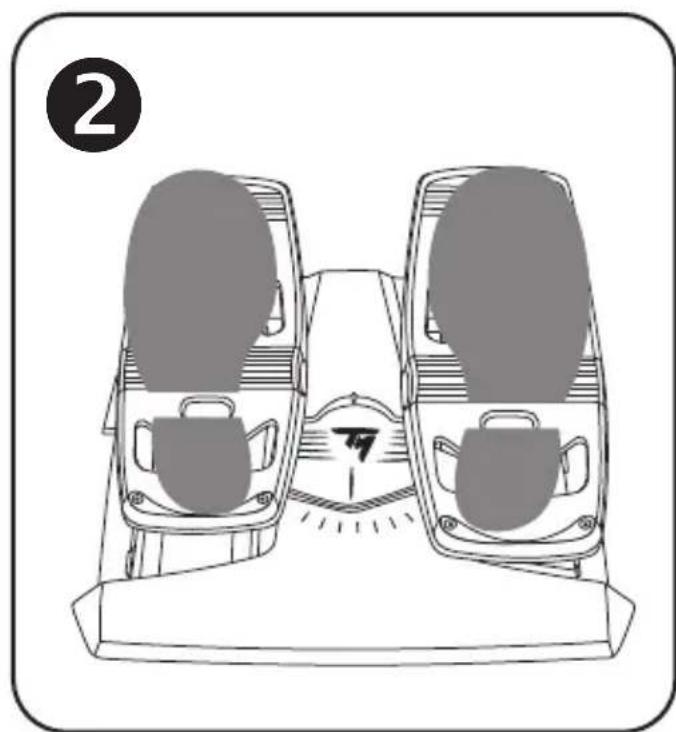
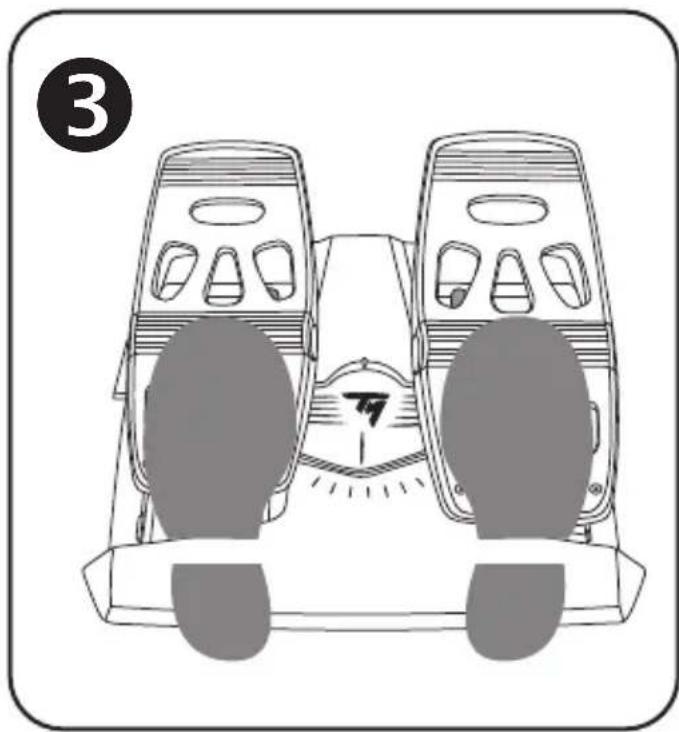
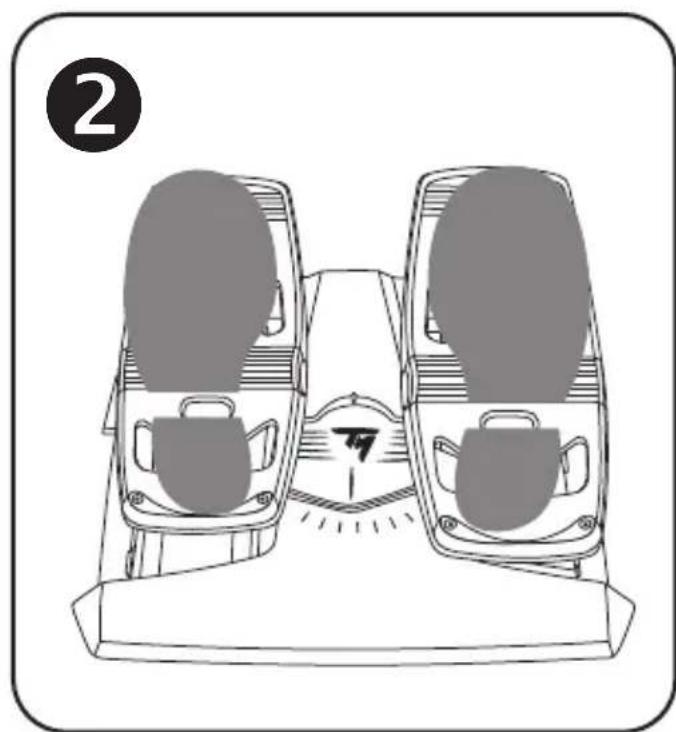
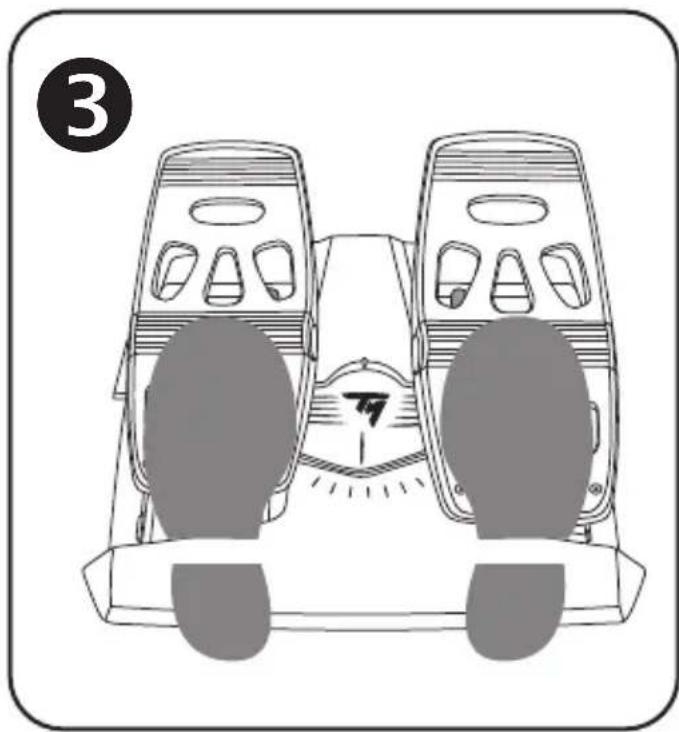
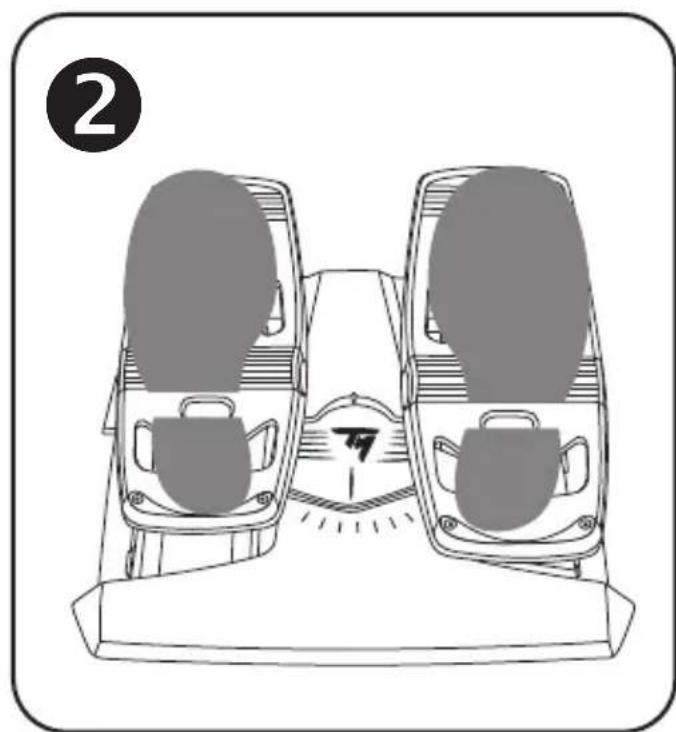
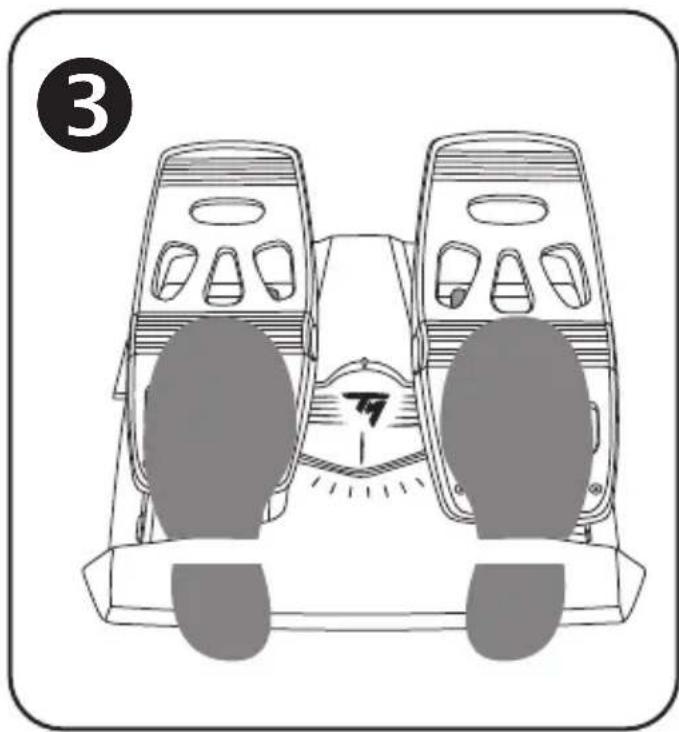
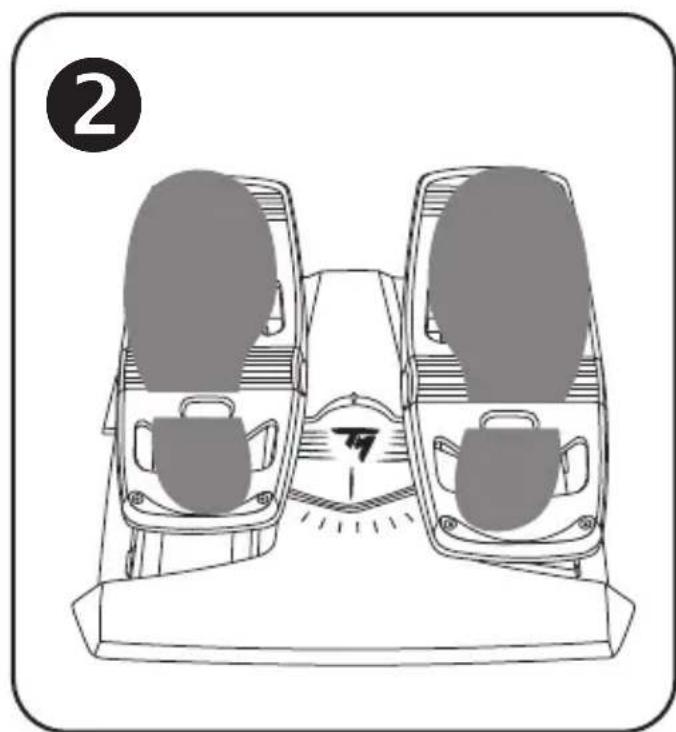
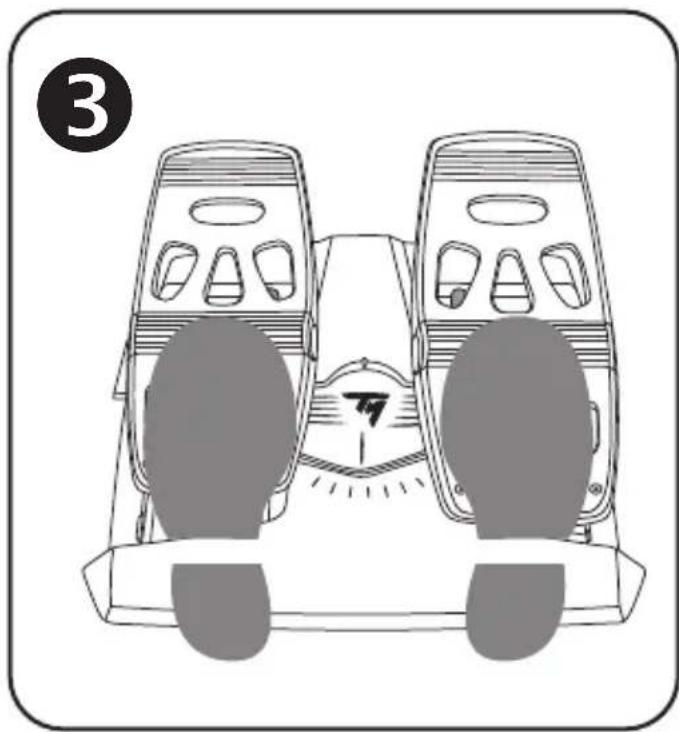
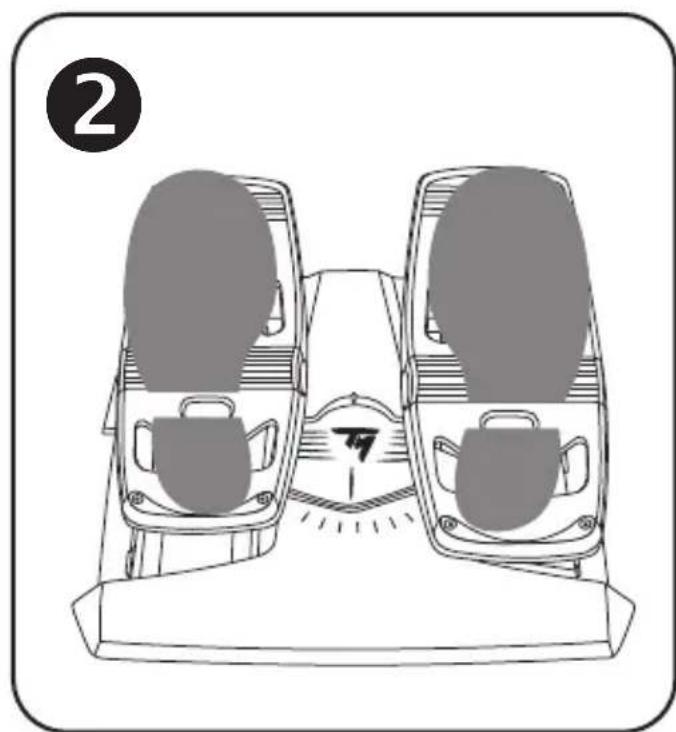
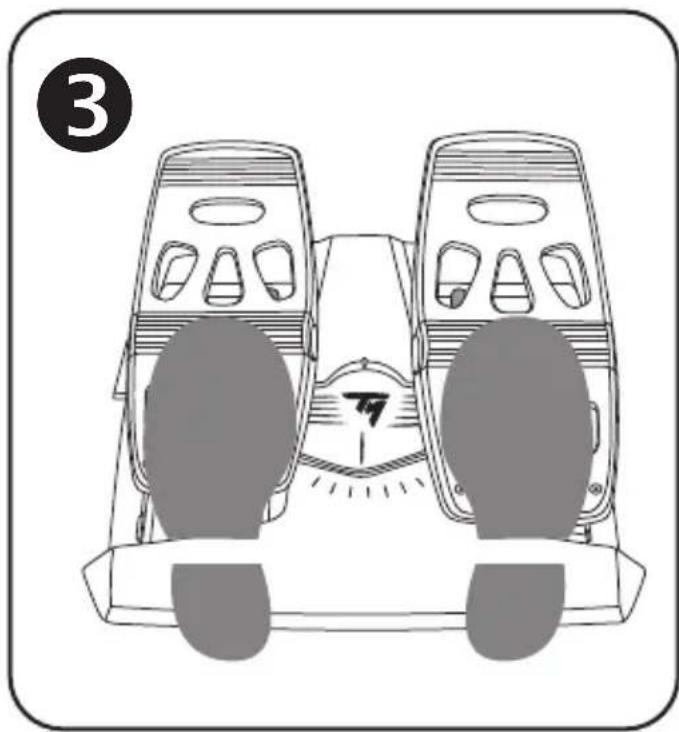
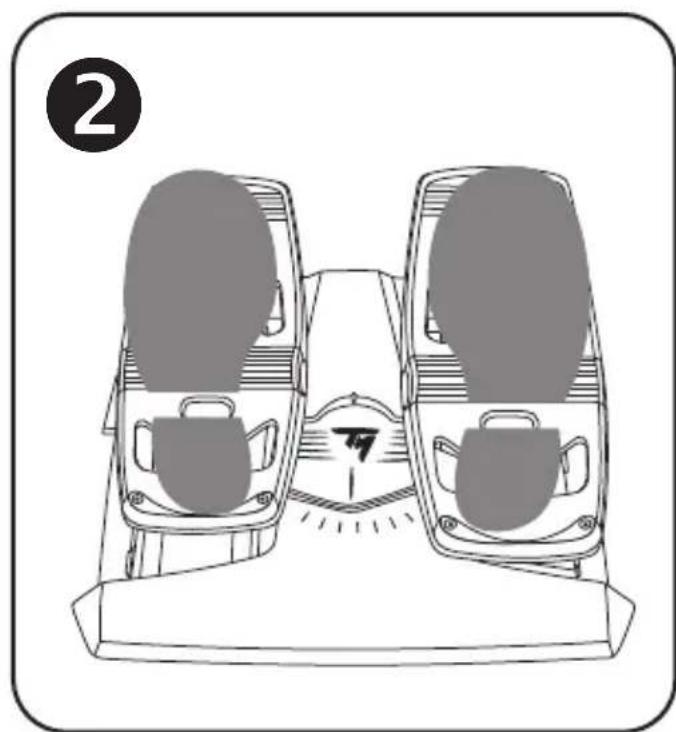
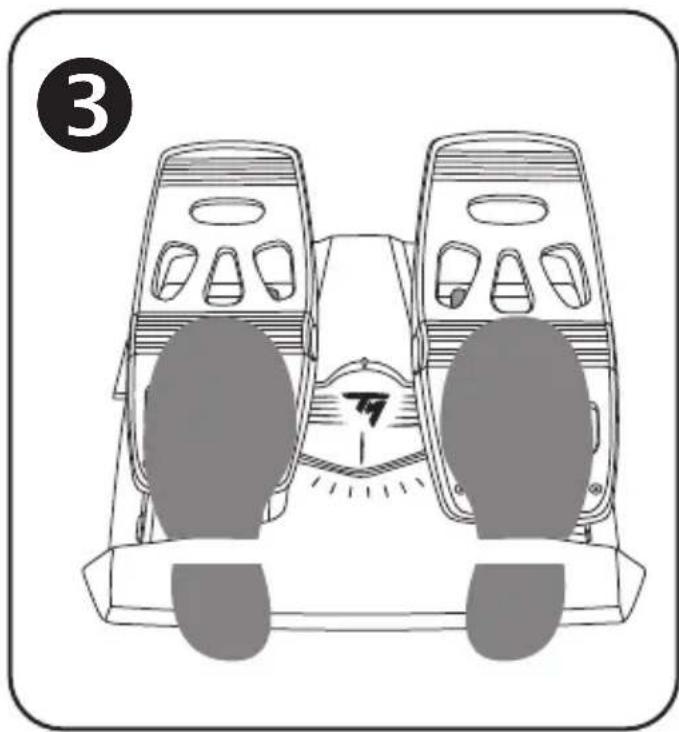
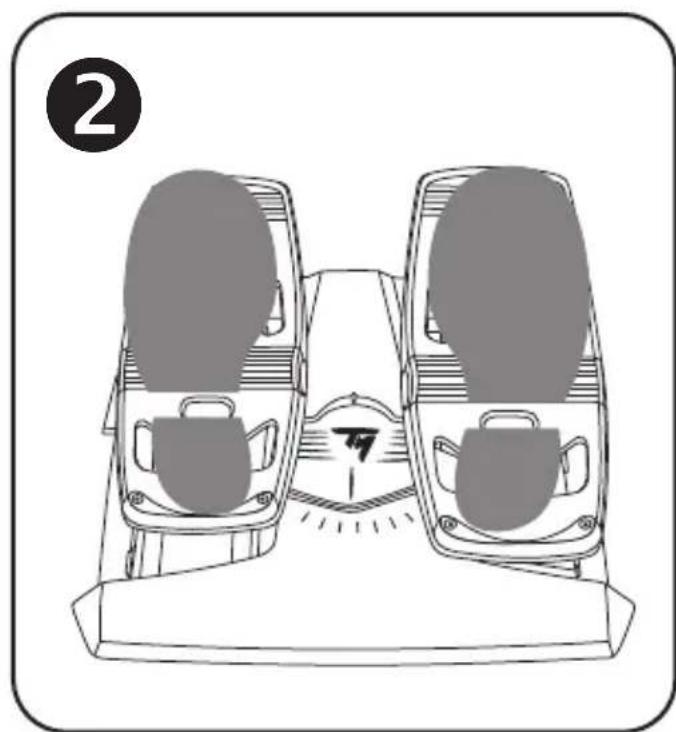
2 different ergonomic configurations are possible:
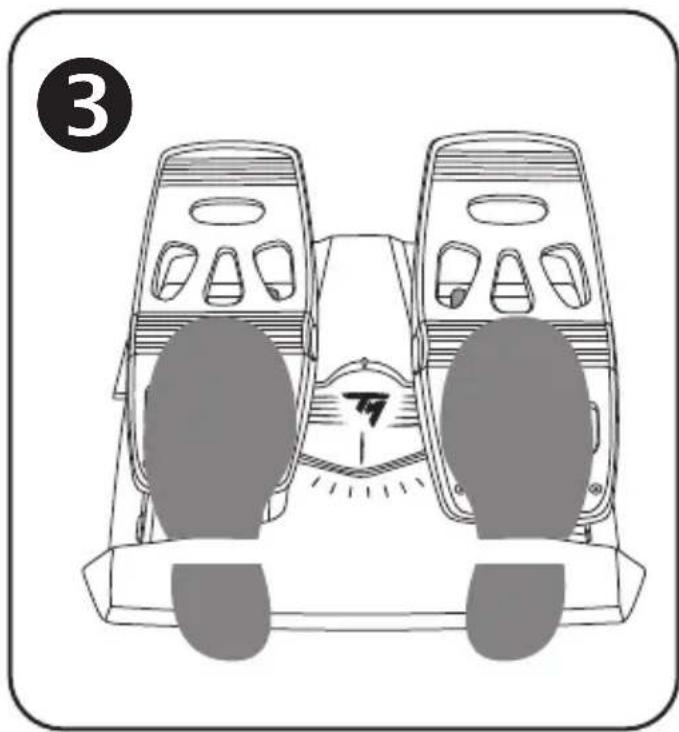
- Foot fully positioned on the pedal (with the heel-rest installed); or

Ball of the foot positioned at mid-pedal (with the heel-rest removed)

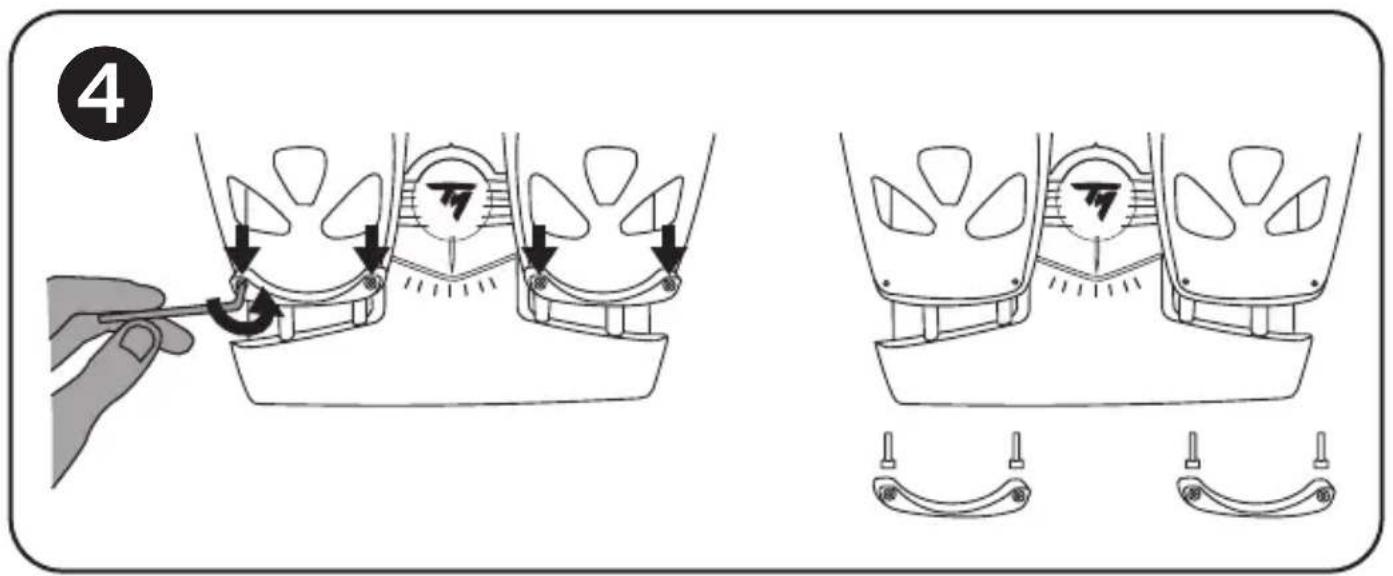
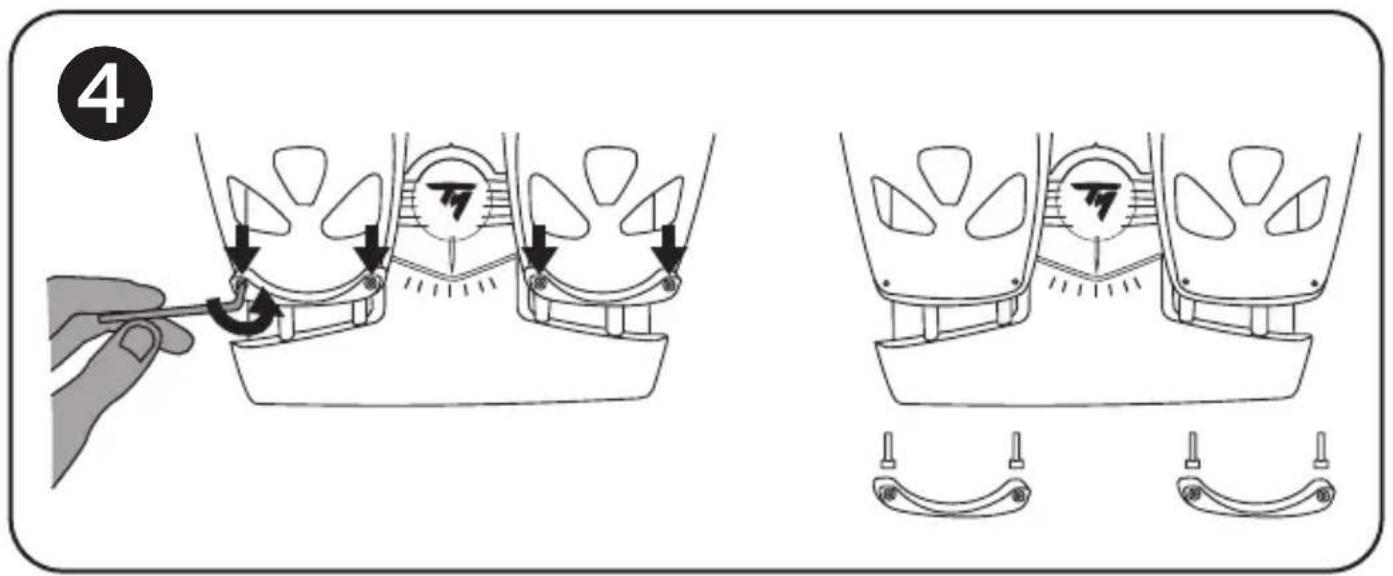
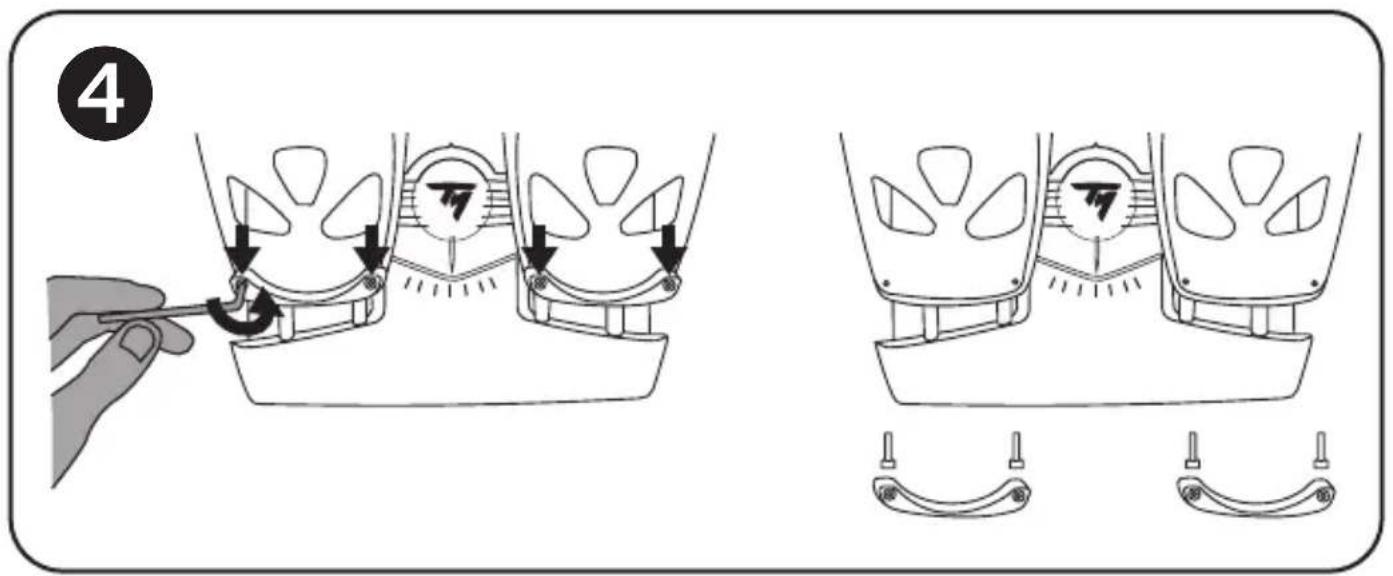
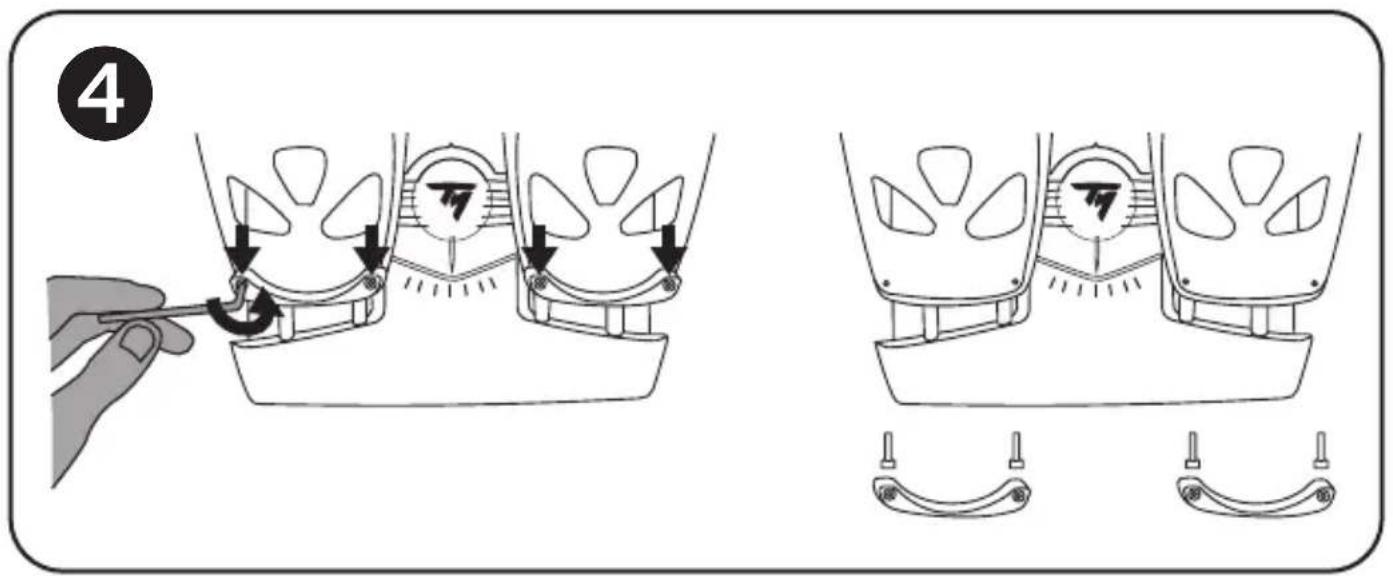
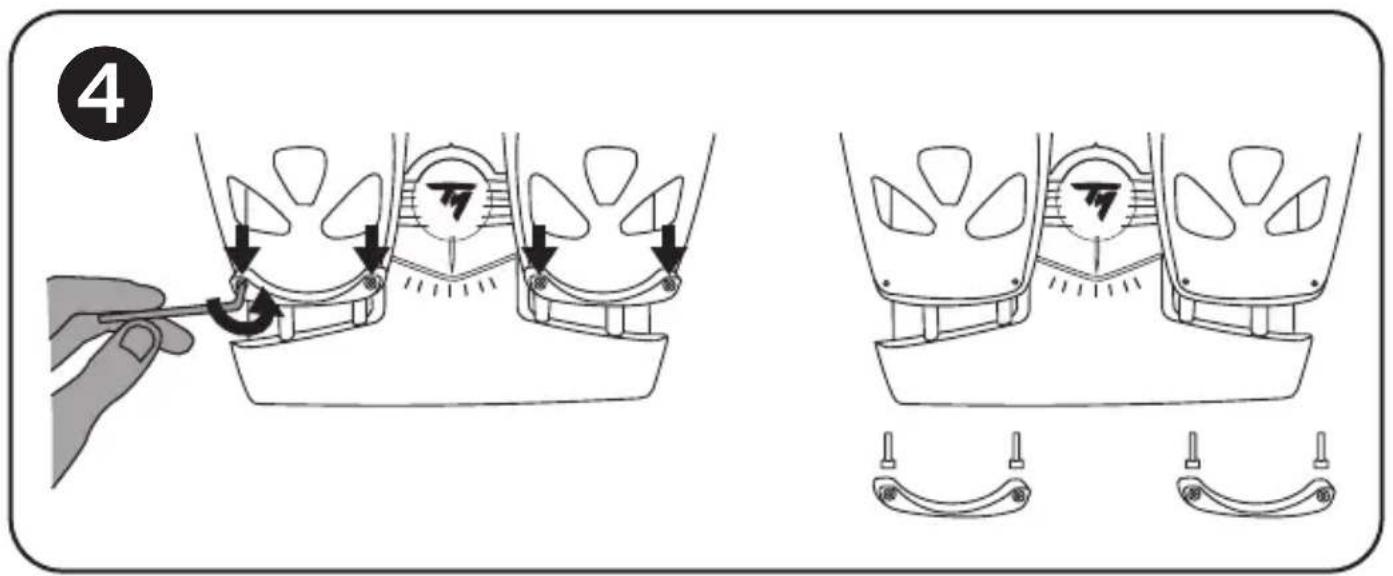
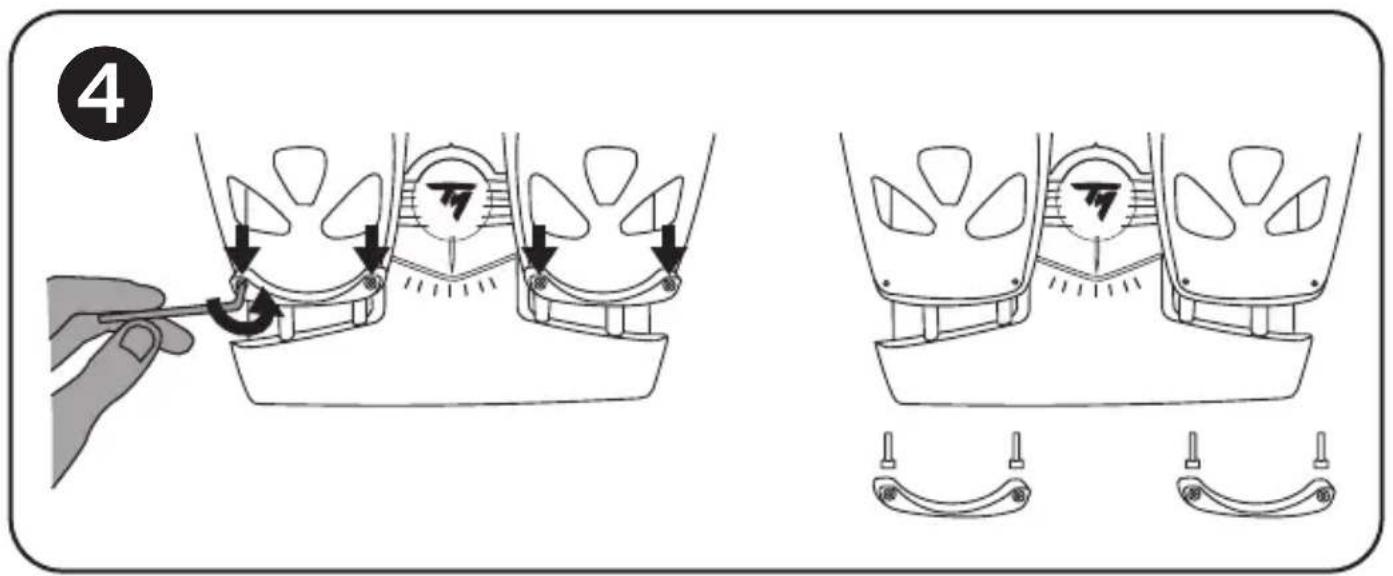
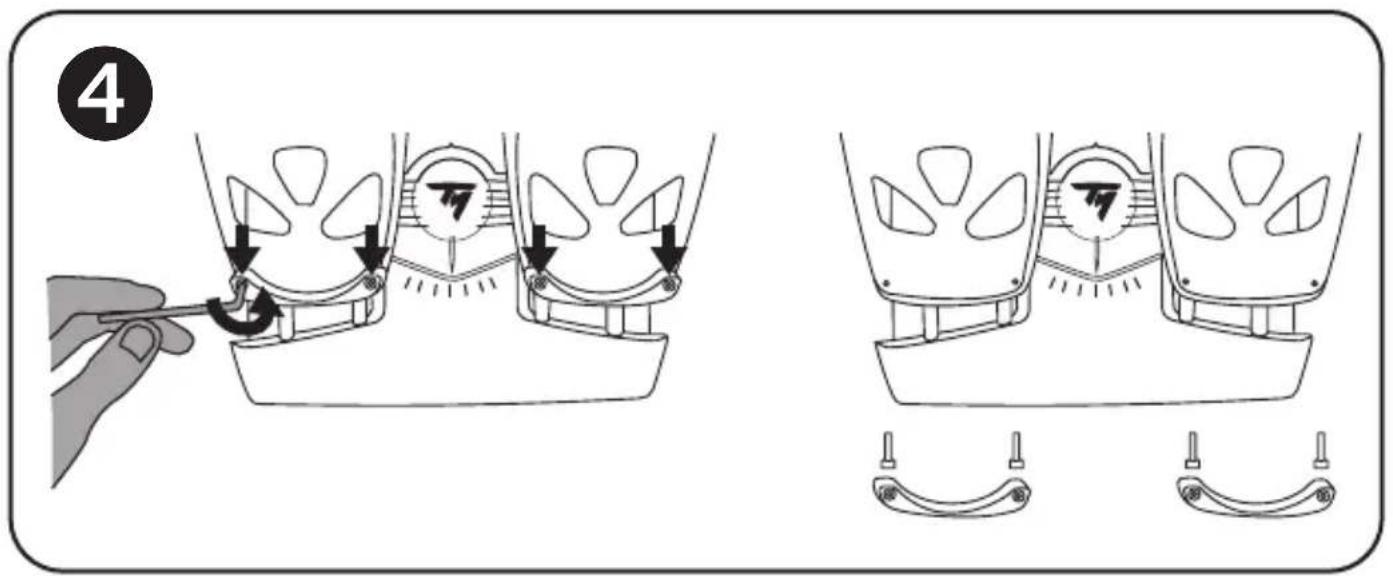
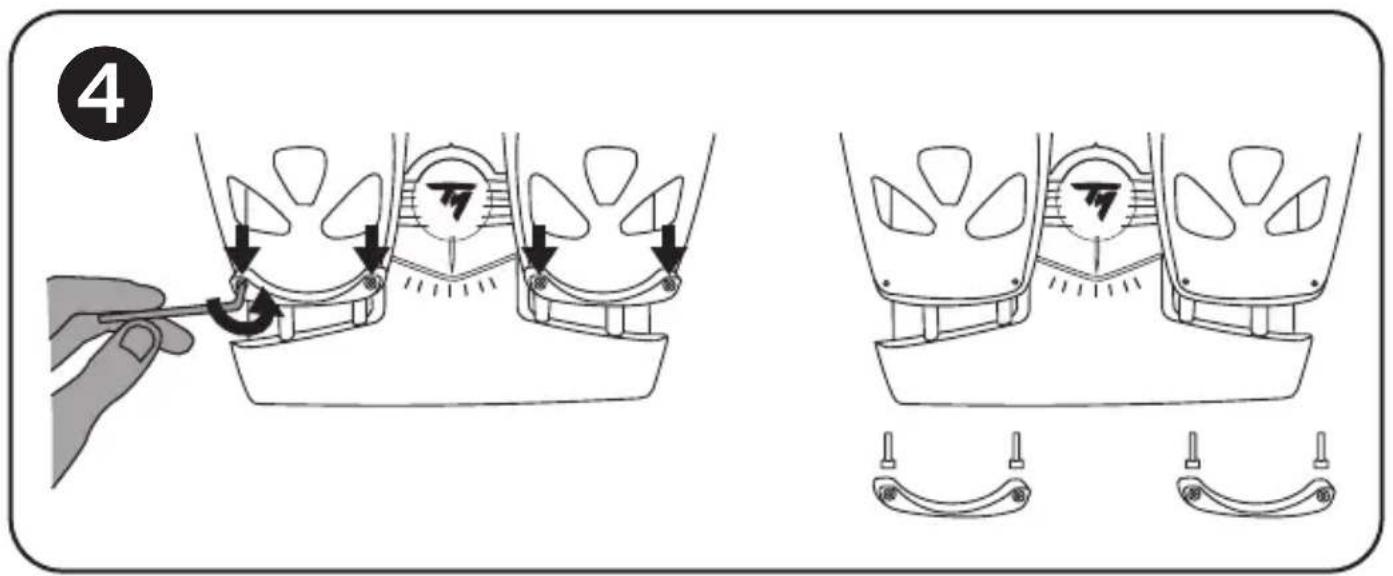
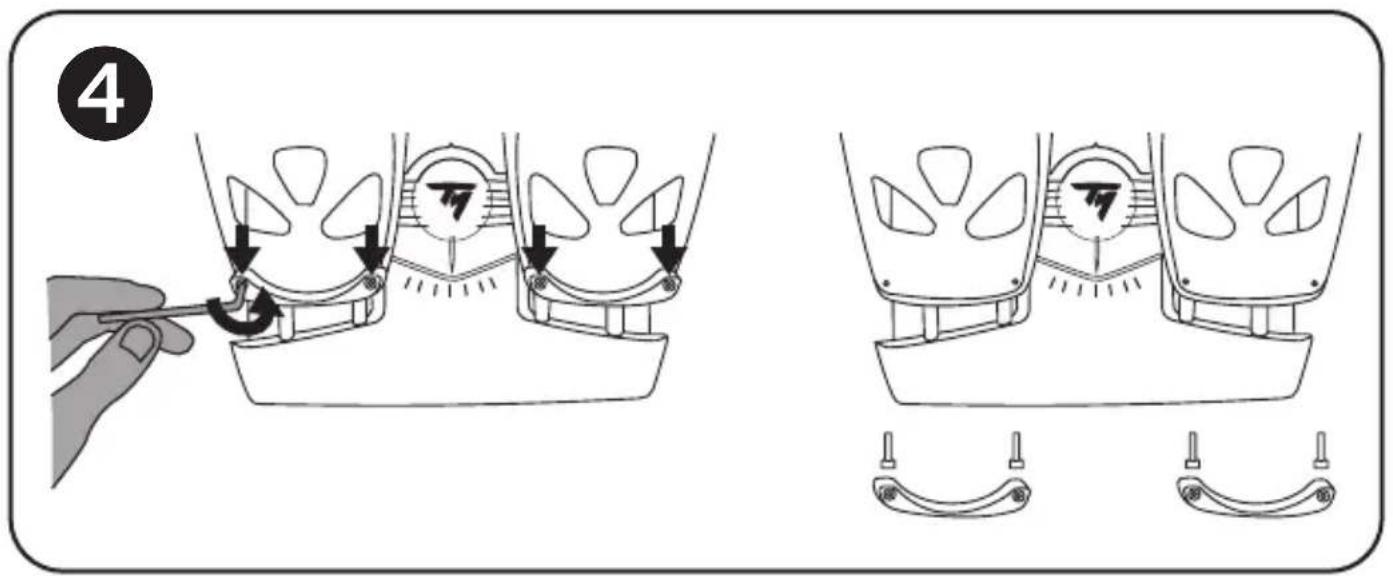
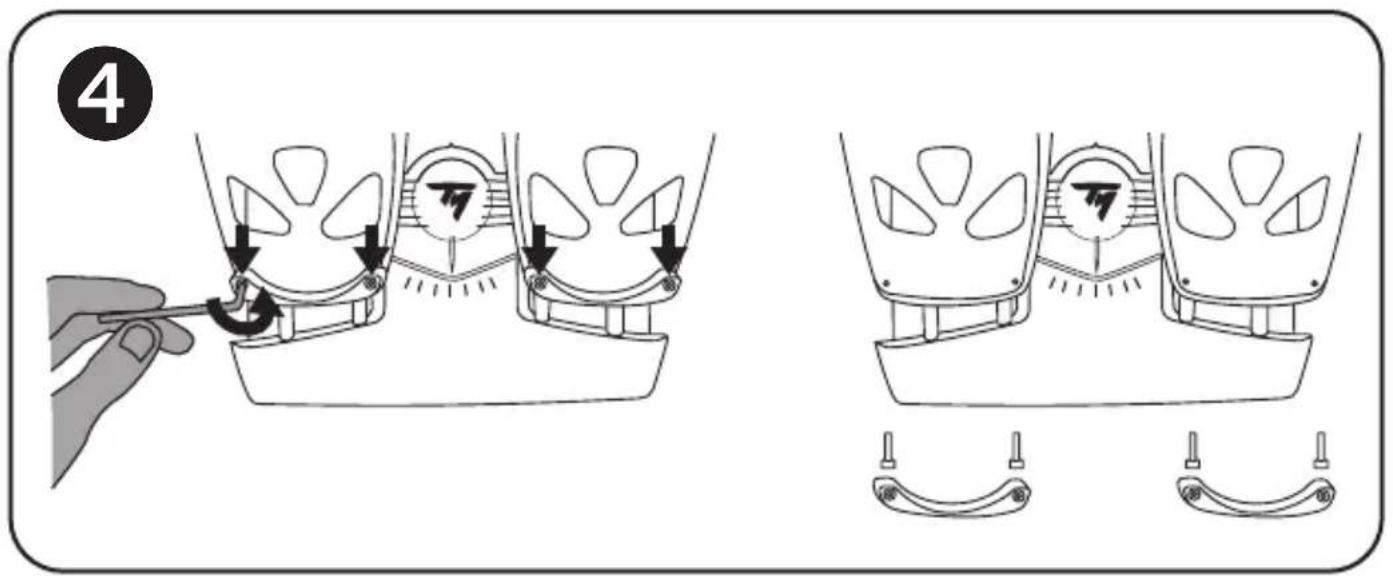
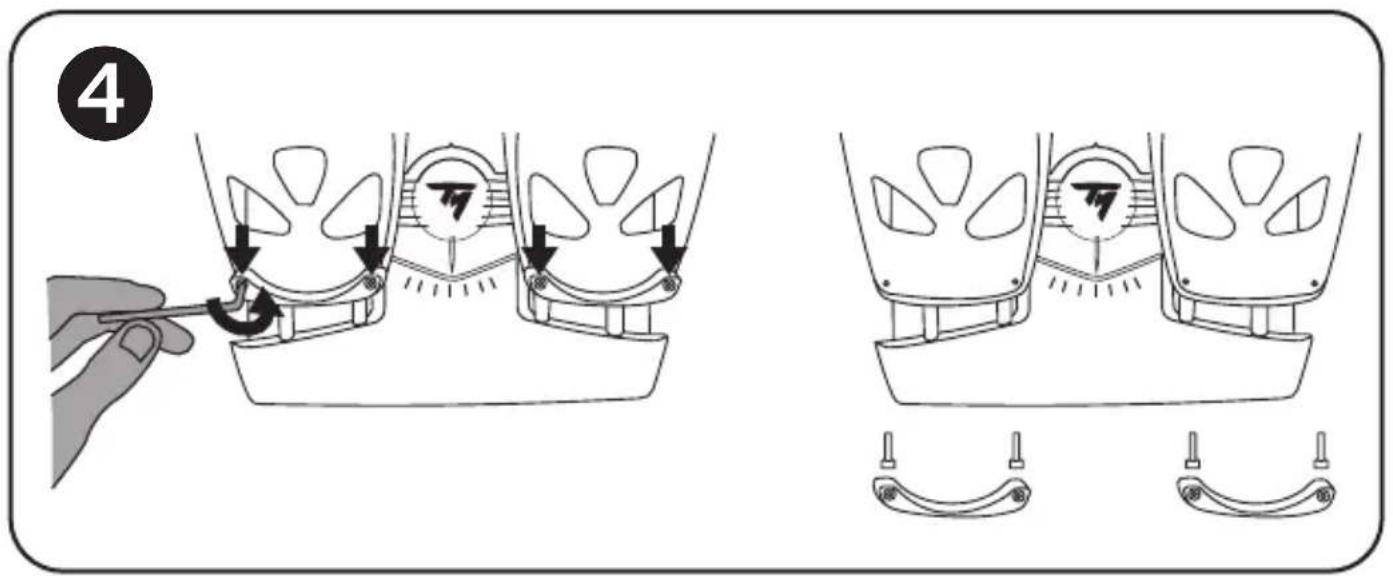
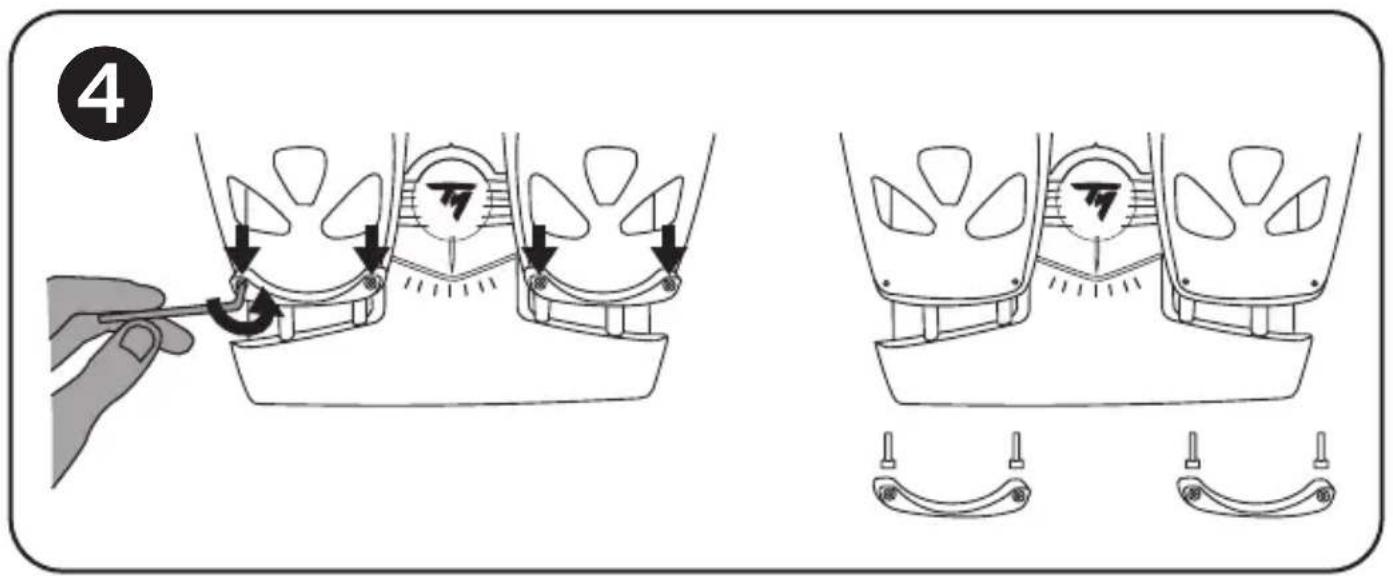
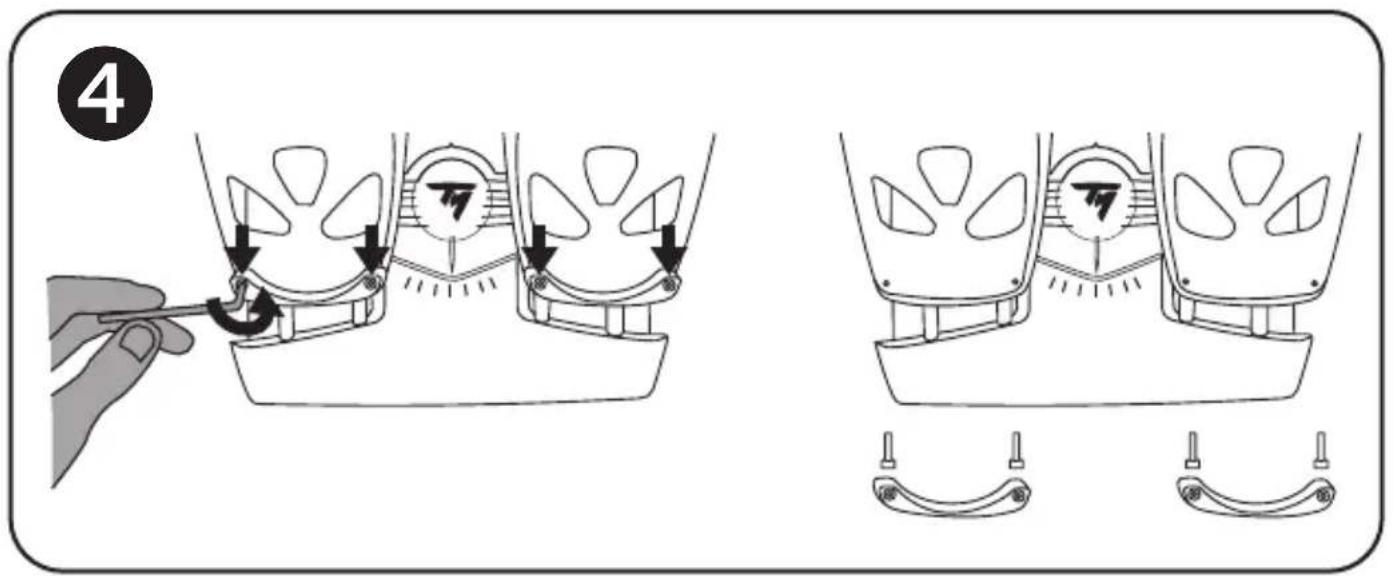
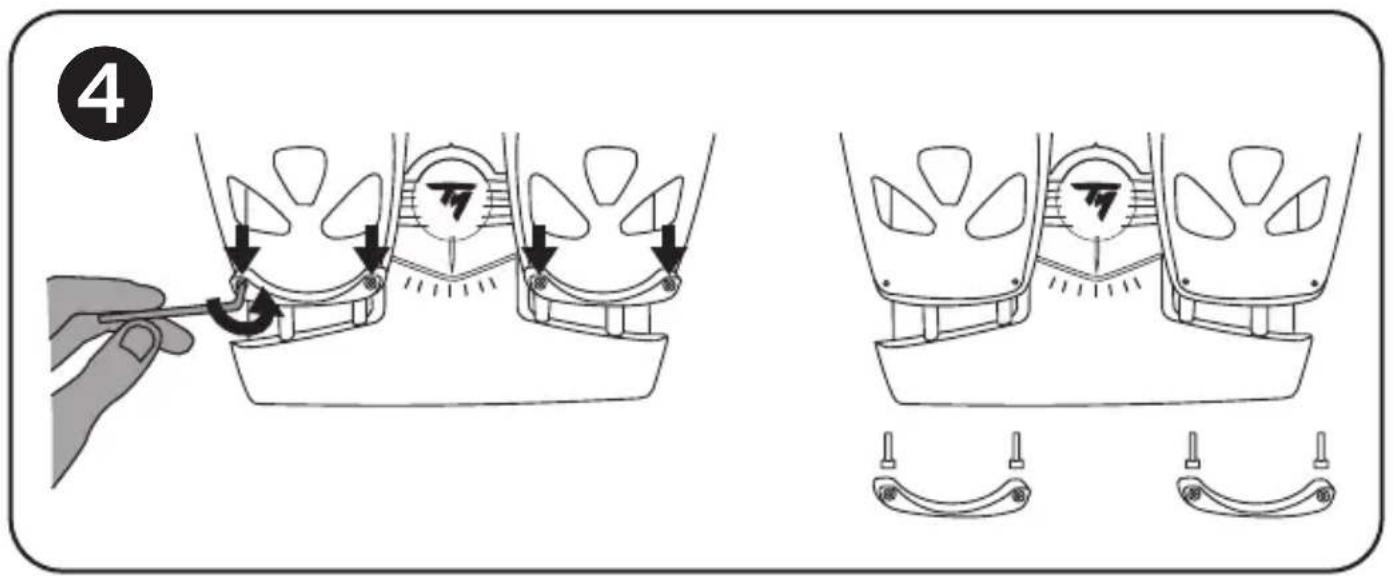
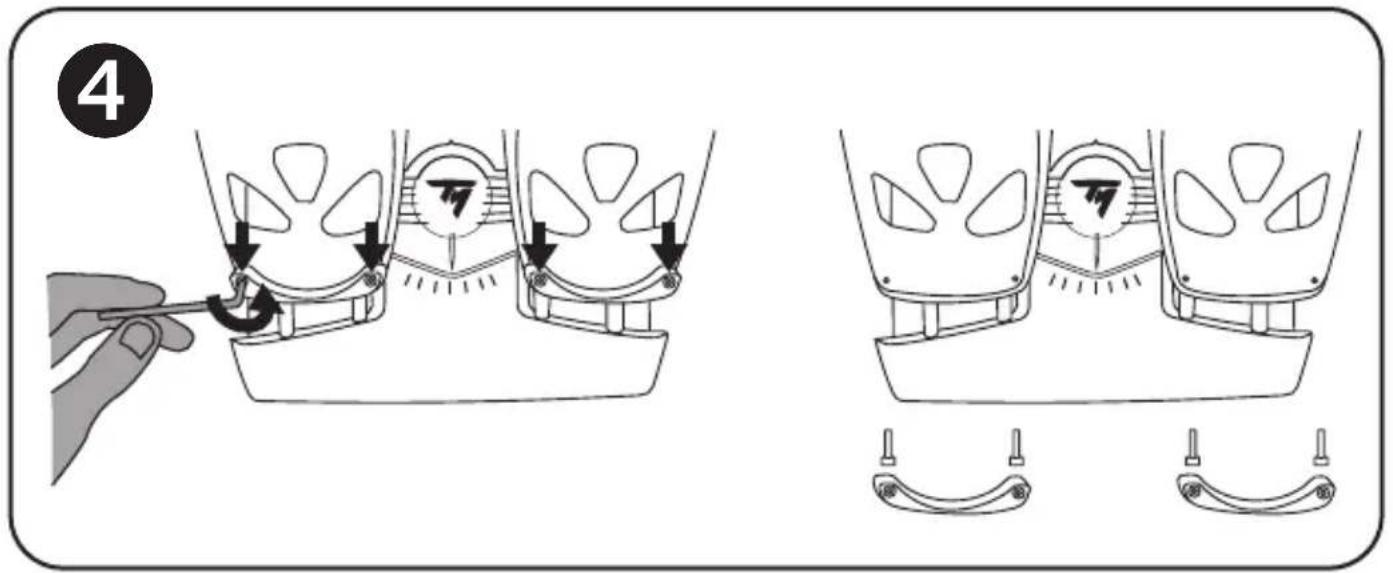
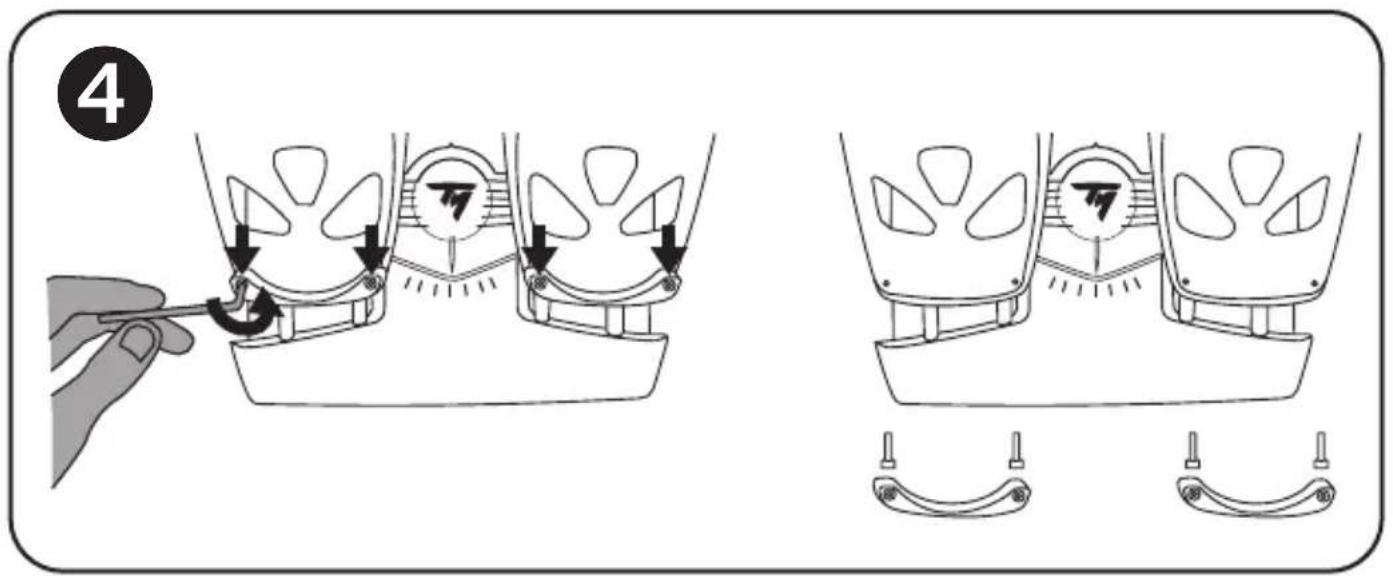
To remove the heel-rests 4
Using the included Allen key (11), unscrew and remove the 2 screws from each heel-rest.
- Completely remove the heel-rests from the pedals.
Please note: carry out this procedure in reverse to reinstall the heel-rests.
INSTALLATION ON PC ⑥ USING THE RJ12/USB ADAPTER
- Connect the TFRP pedal set's male RJ12 connector (4) to the female RJ12 connector (6) on the adapter (5).
Otherwise, directly connect the male RJ12 connector (4) to the Thrustmaster product featuring a female RJ12 connector (TWCS, TCA Quadrant range or T.Flight Hotas range).
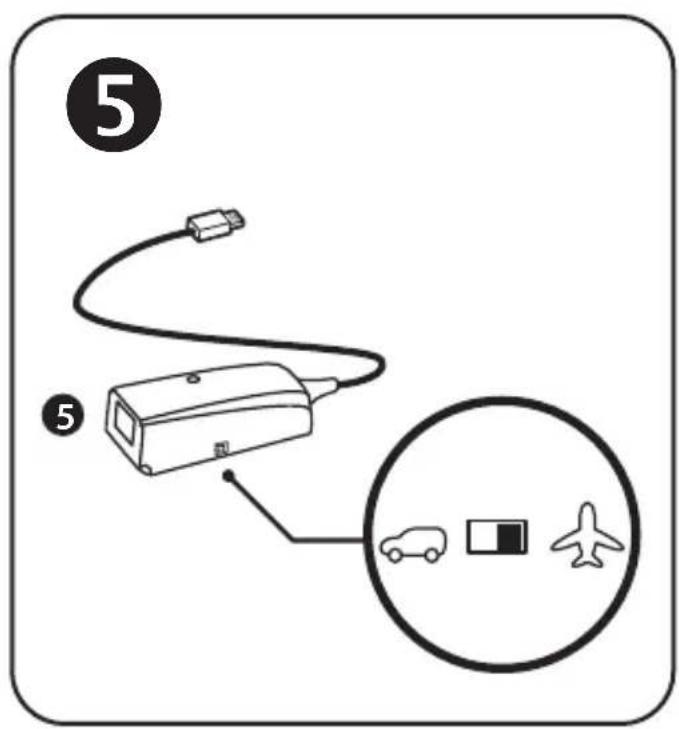
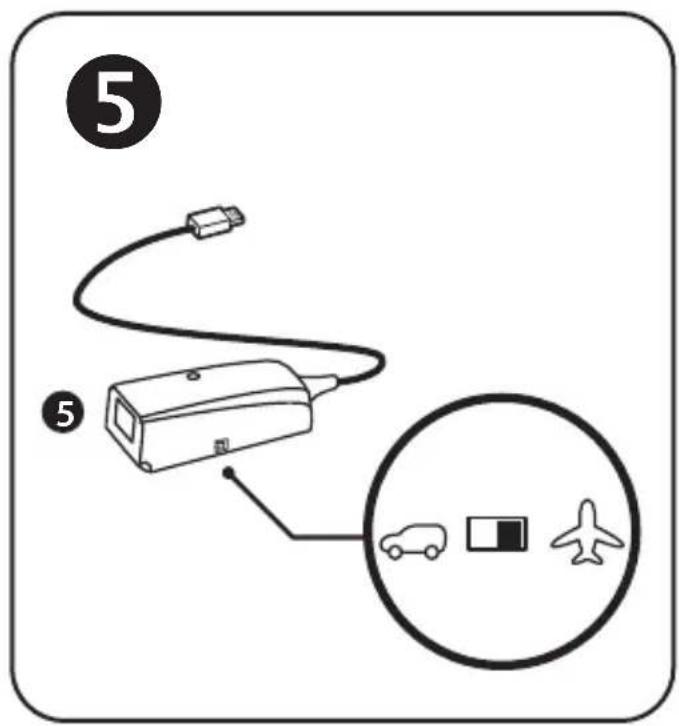
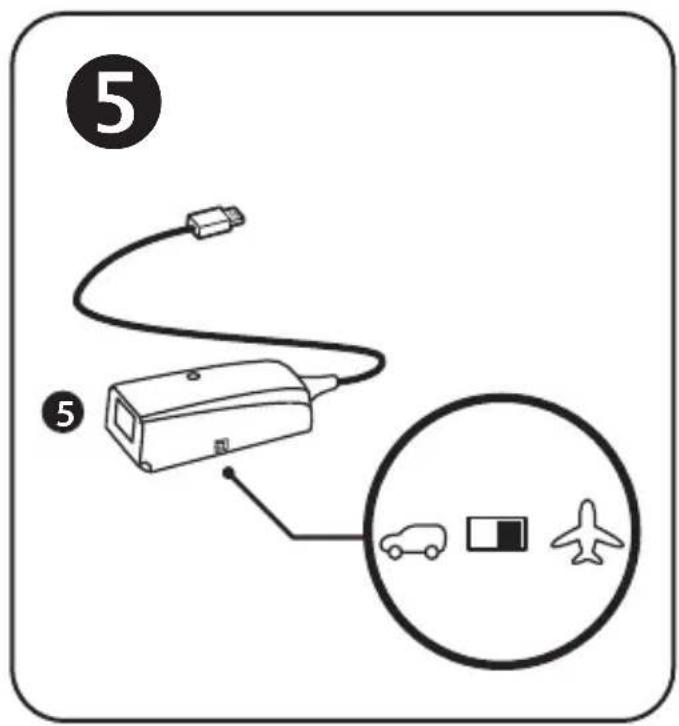
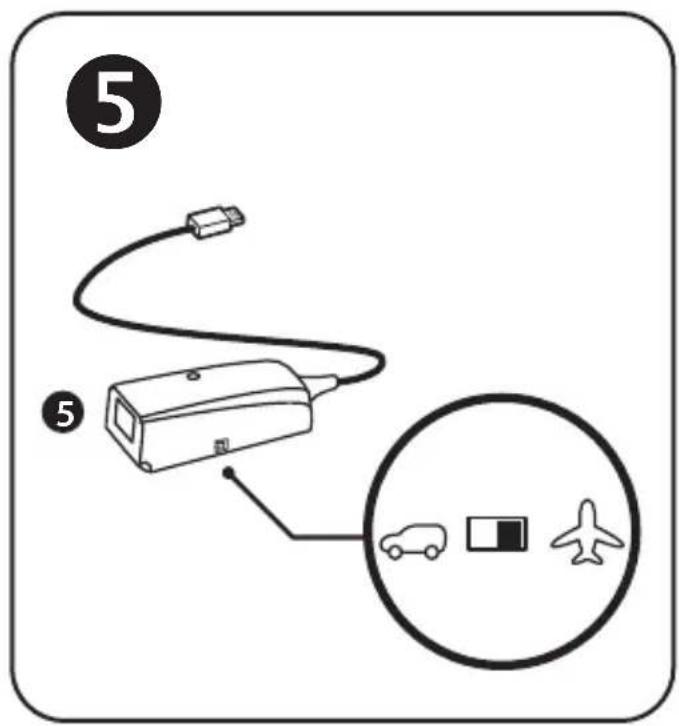
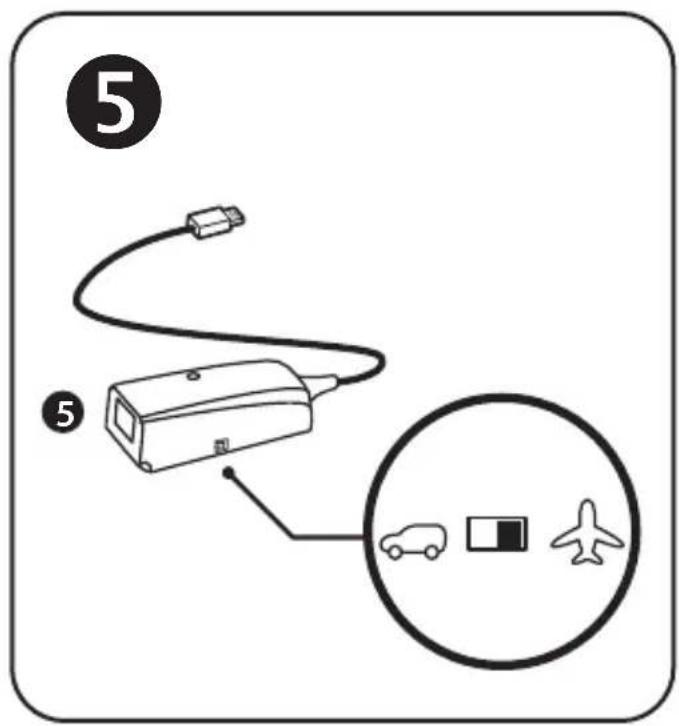
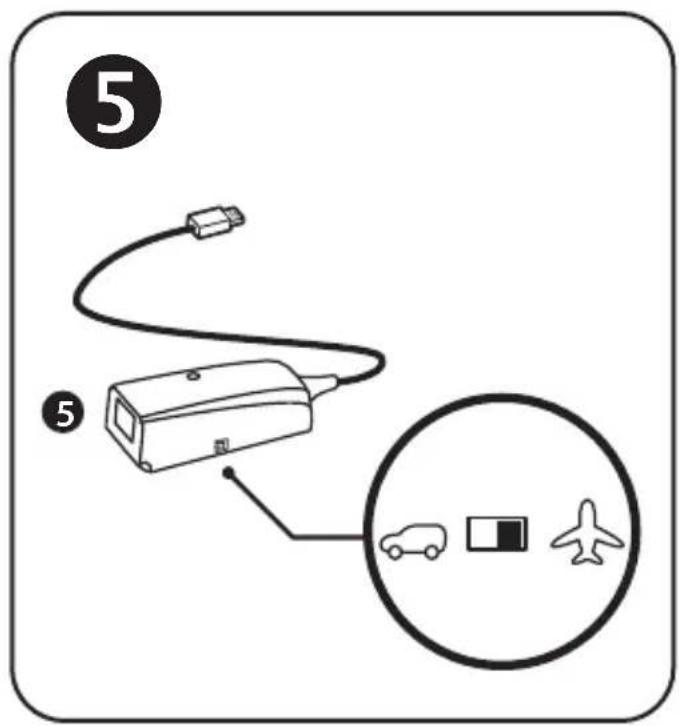
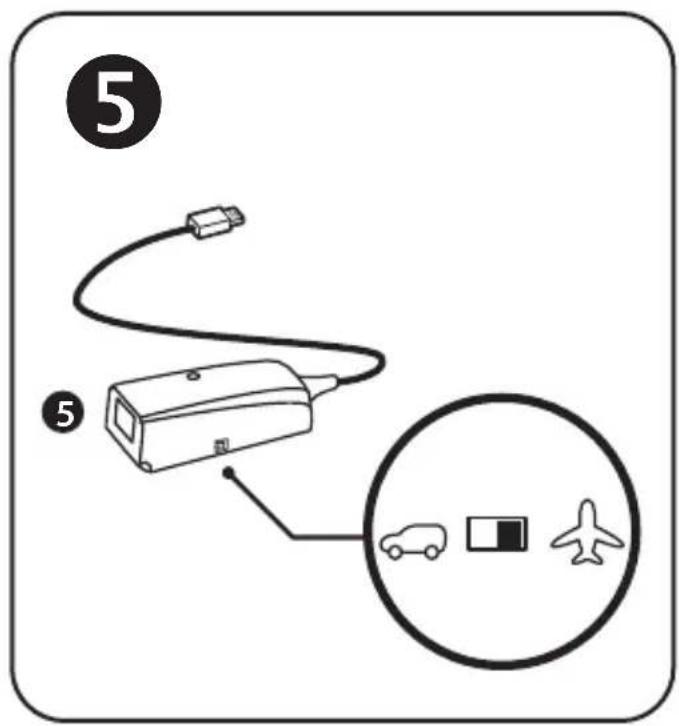
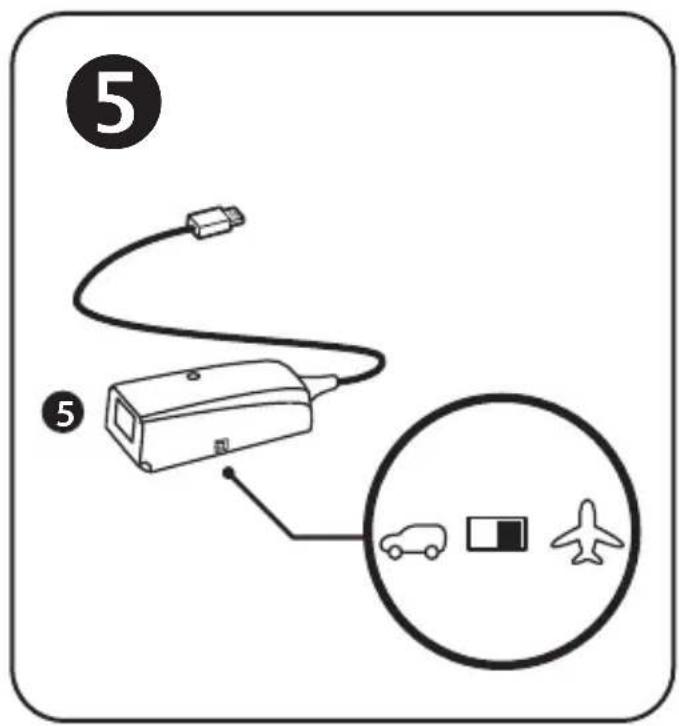
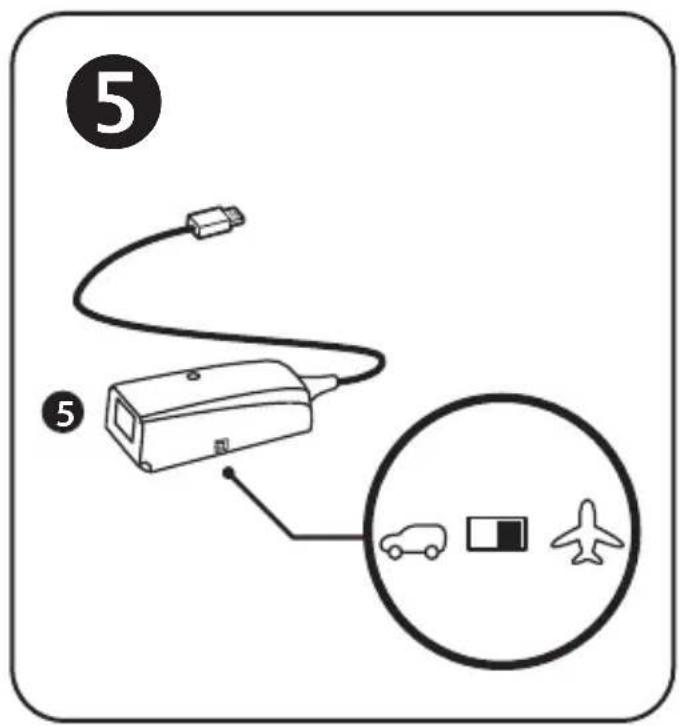
- Set the adapter's selector switch (8) to the AIRPLANE position 5
- Go to https://support.thrustmaster.com/. Select Joysticks / TFRP T.Flight Rudder Pedals, then select Drivers. Download and install the PC driver and its custom Windows Control Panel-based interface.
- Once the PC driver has been installed, connect the adapter's USB connector (7) to one of the USB ports on your PC.
- The adapter's LED (9) lights up in GREEN.
-
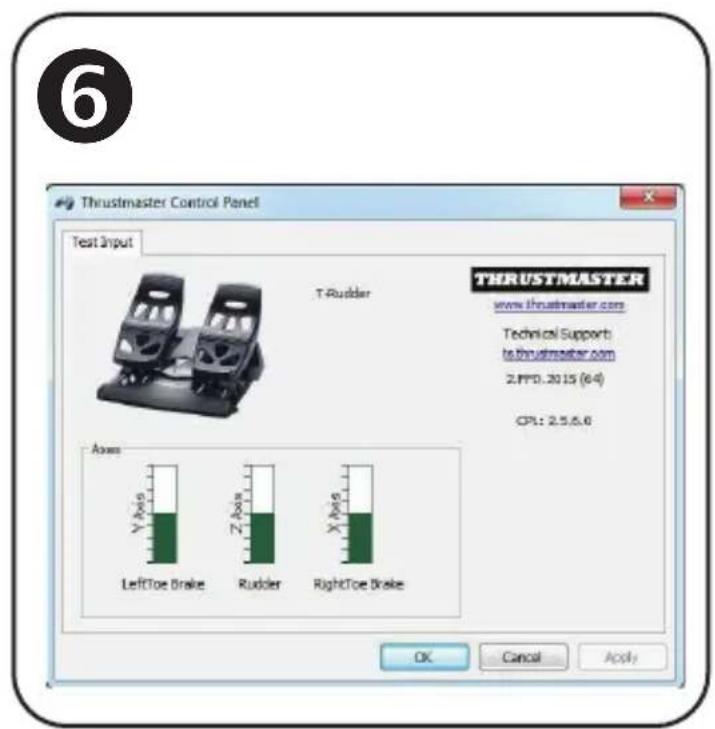
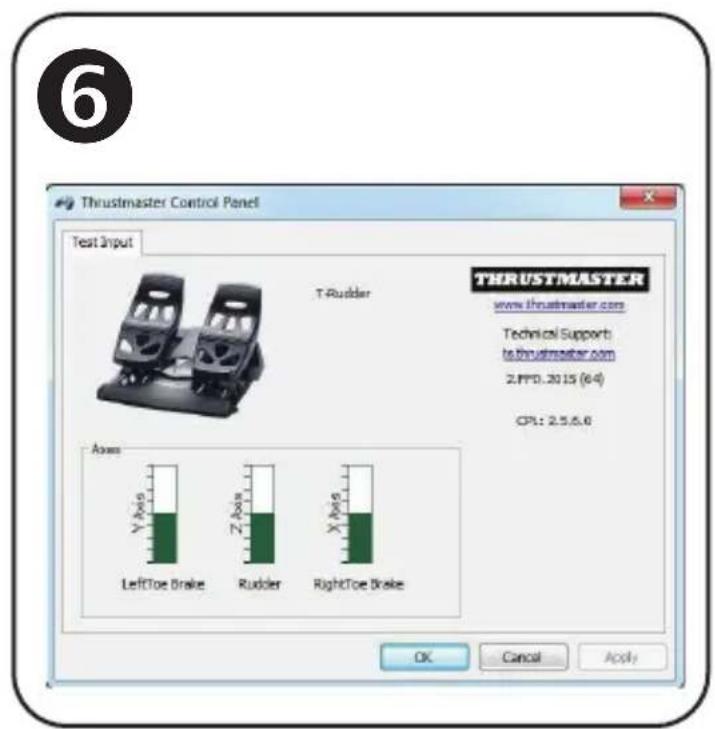
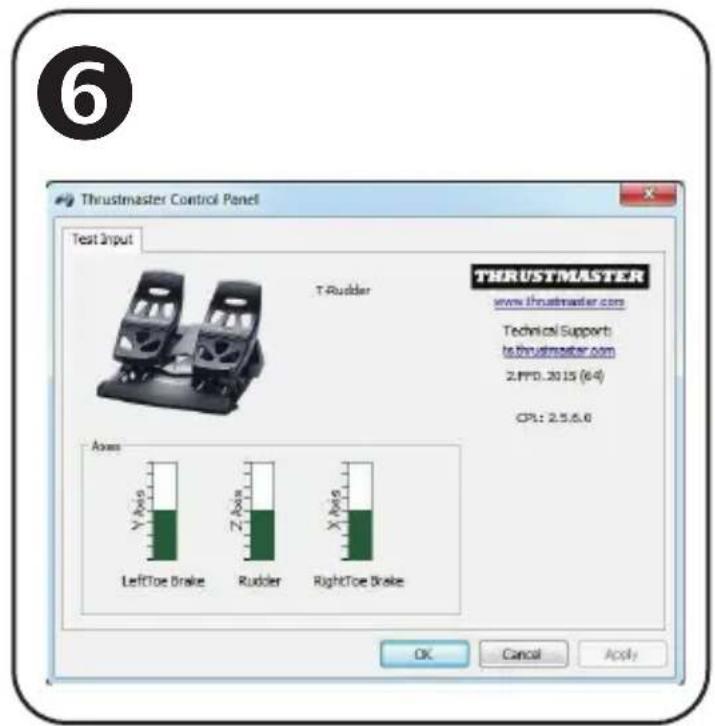
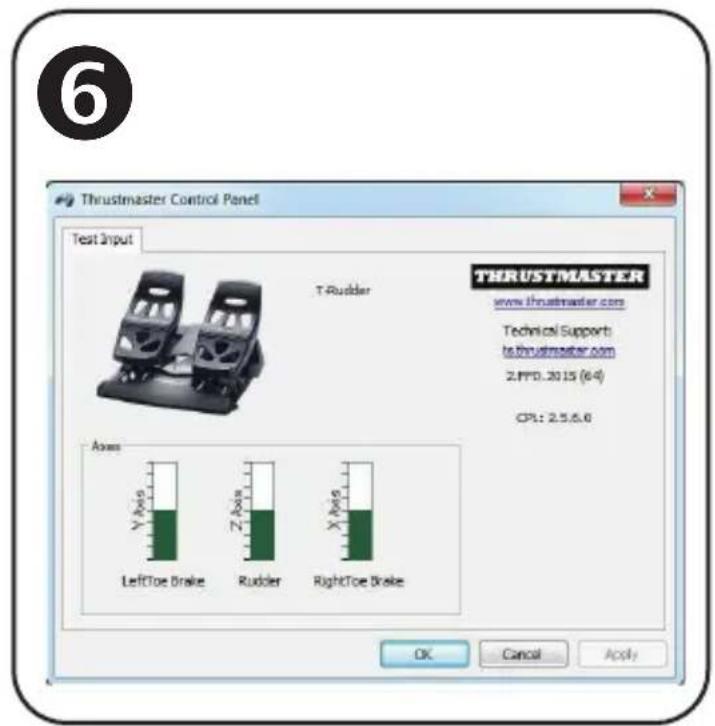
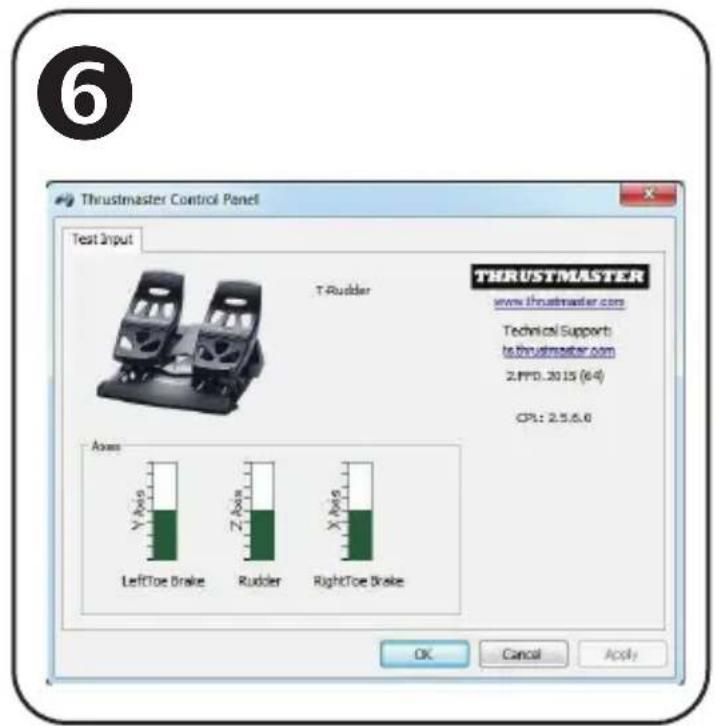
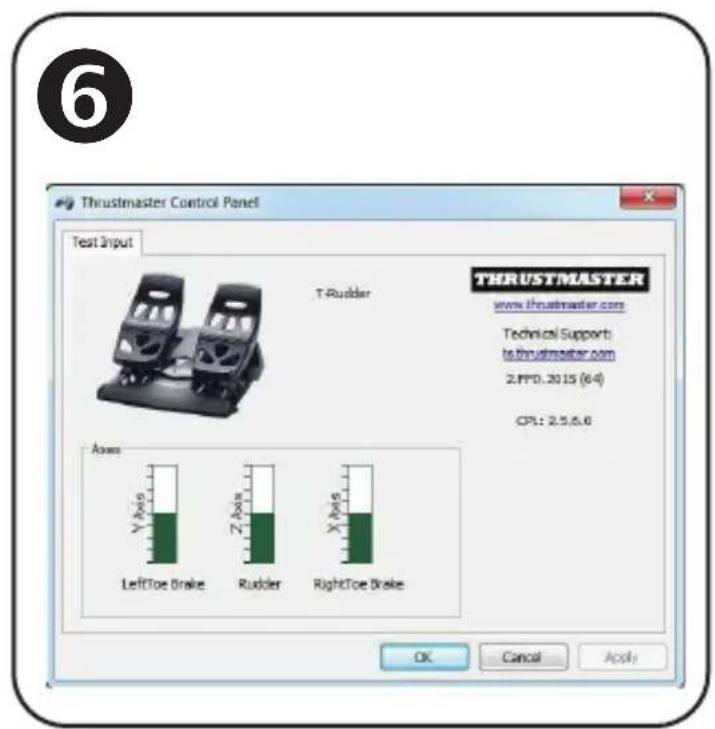
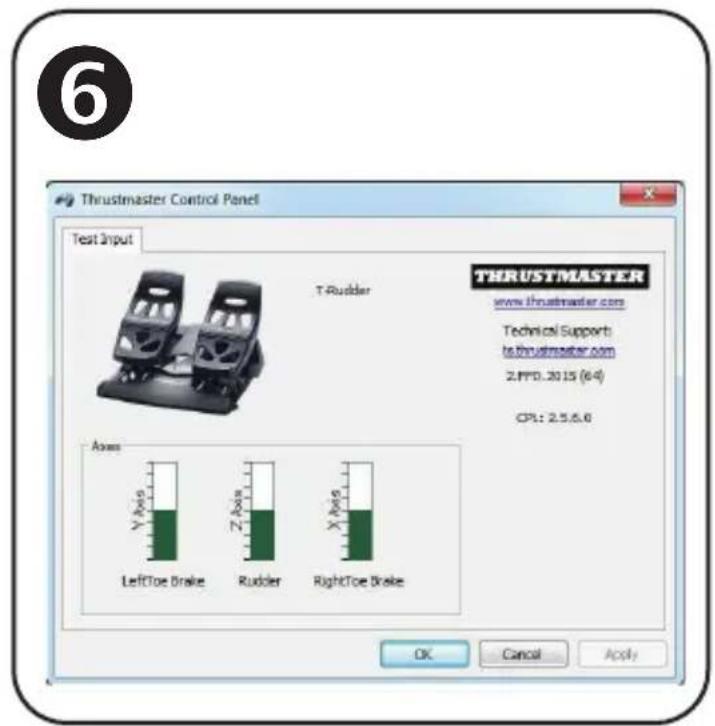
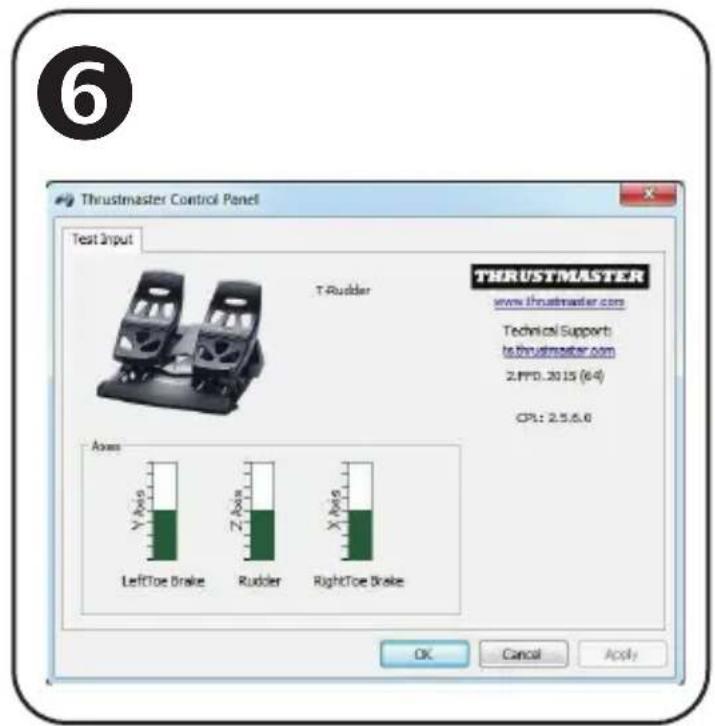
To access the Control Panel, select:
-
Start / All Apps / Thrustmaster / Control Panel or Control Panel (in Windows® 10 / 8.1 / 8); or
- Start / All Programs / Thrustmaster / Control Panel or Control Panel (in Windows® 7)
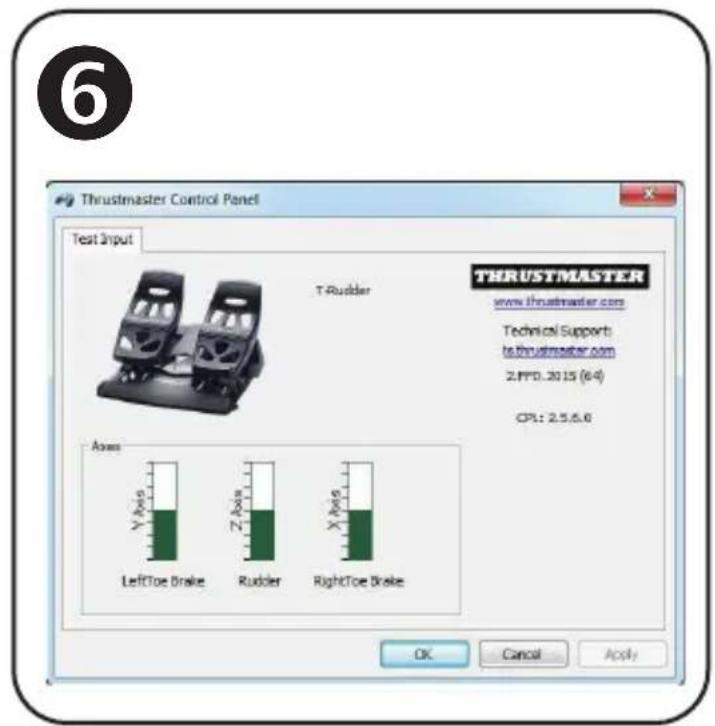
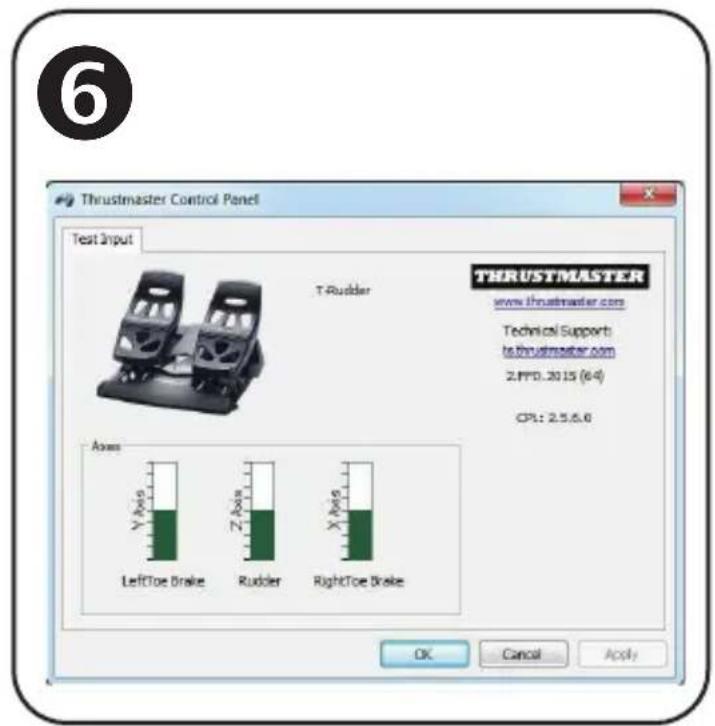
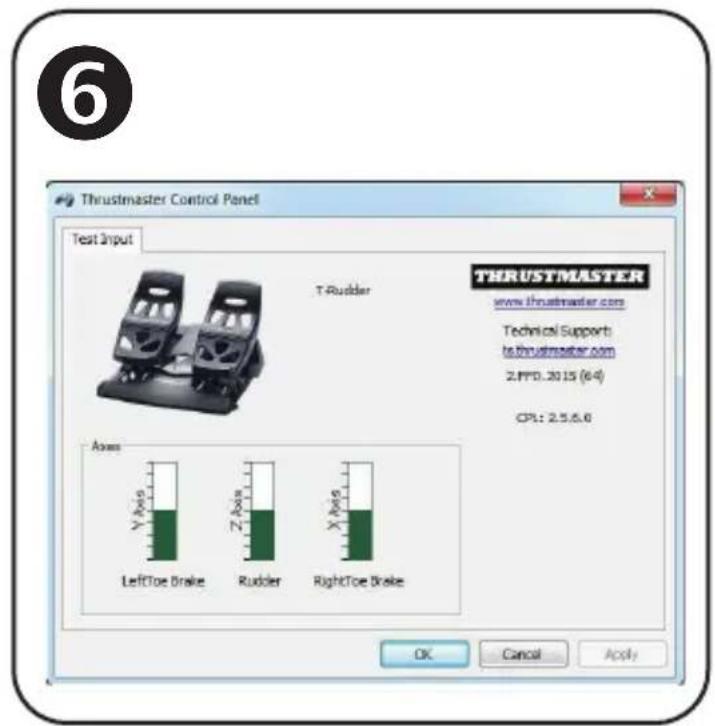
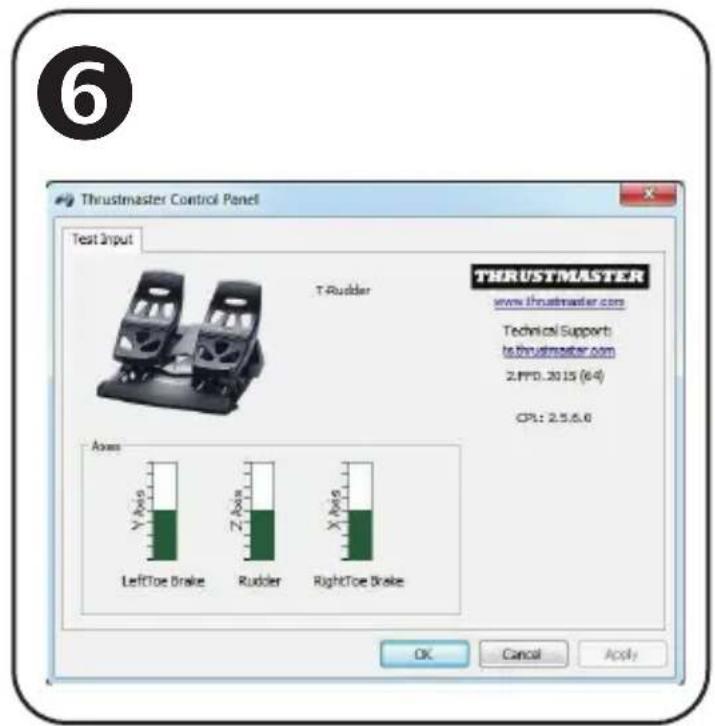
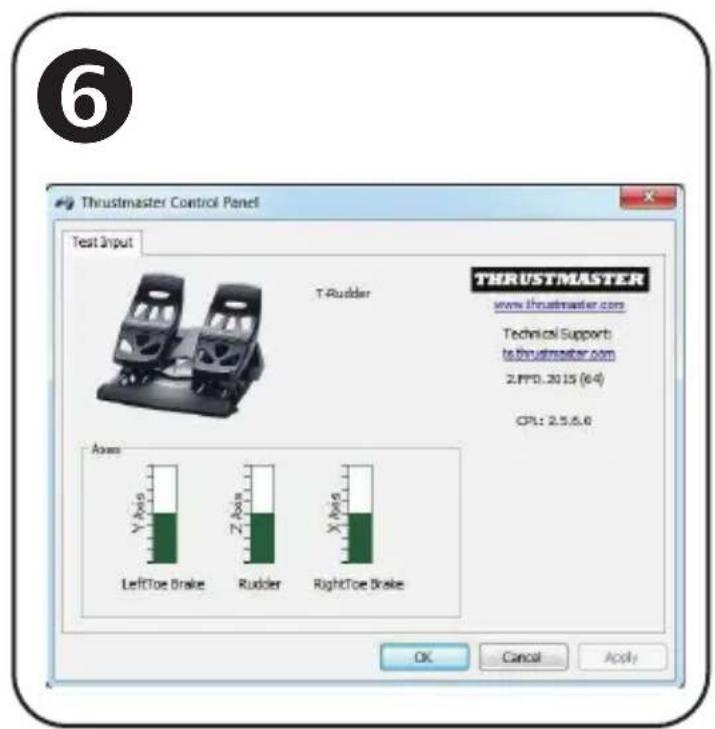
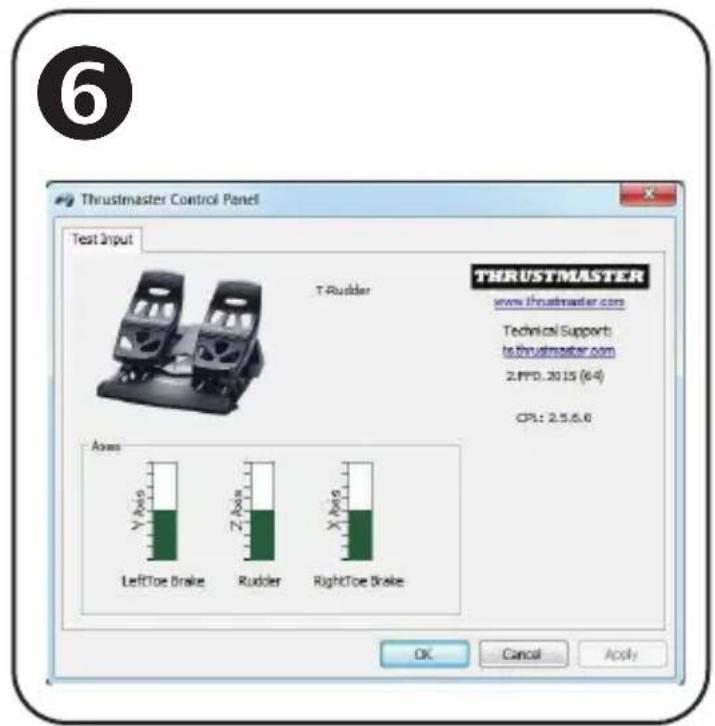
The Game Controllers dialog box is displayed.
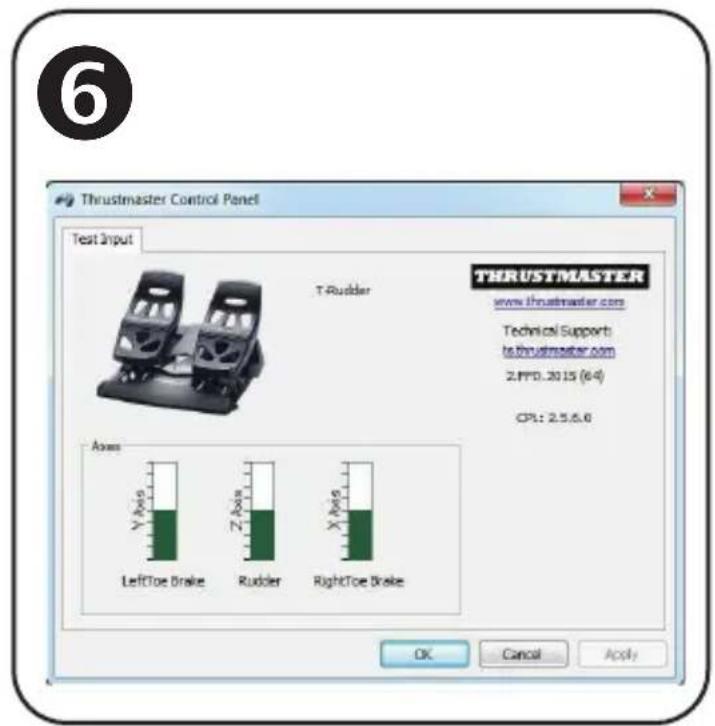
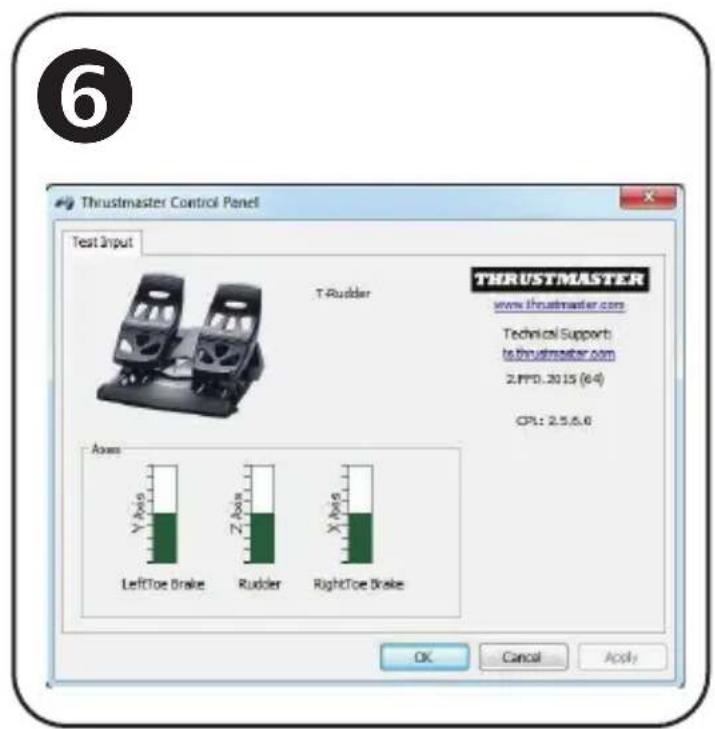
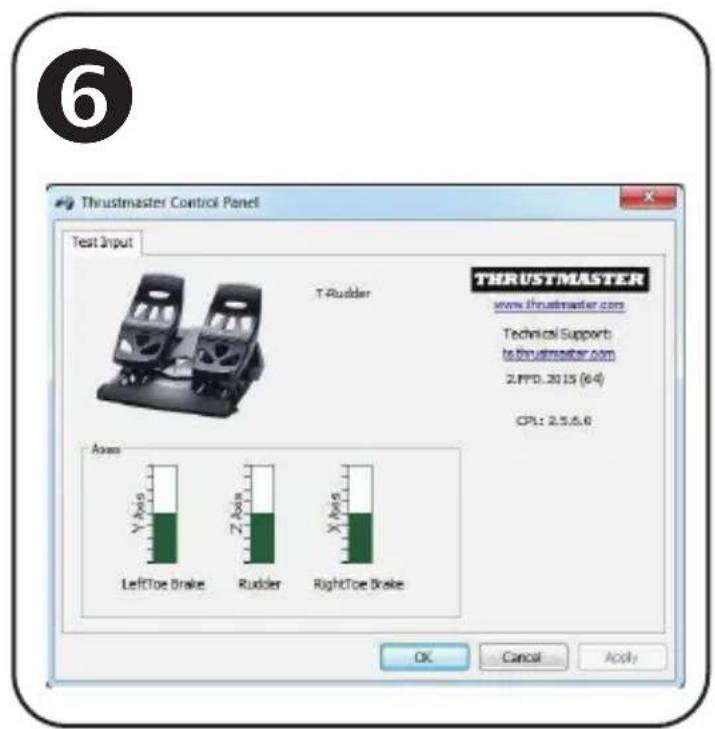
The accessory appears onscreen with the name T-Rudder and OK status.
- In the Game Controllers dialog box, click Properties to test and view all functions.
You are now ready to play!
INSTALLATION ON THE T.FLIGHT HOTAS 4 OR T.FLIGHT HOTAS ONE USB JOYSTICK
(do not use the RJ12/USB adapter in this setup)
The TFRP (T.Flight Rudder Pedals) connects directly to the Thrustmaster T.FLIGHT HOTAS 4 and T.FLIGHT HOTAS ONE joysticks.
- Connect the TFRP pedal set's male RJ12 connector (4) to the female RJ12 connector located at the back of the T.FLIGHT HOTAS 4 or T.FLIGHT HOTAS ONE joystick.
- Next, connect the T.FLIGHT HOTAS 4 or T.FLIGHT HOTAS ONE joystick's USB connector to one of the USB ports on your PC or game console.
The T.FLIGHT HOTAS 4 joystick is compatible with PC and PlayStation®4 and features 8 axes, 3 of which are reserved for the TFRP pedal set.
The T.FLIGHT HOTAS ONE joystick is compatible with PC and Xbox One® and features 8 axes, 3 of which are reserved for the TFRP pedal set.
AVAILABLE AND COMPATIBLE ADVANCED SOFTWARE APPLICATIONS
(only with the TFRP pedal set, when connected to the RJ12/USB adapter)
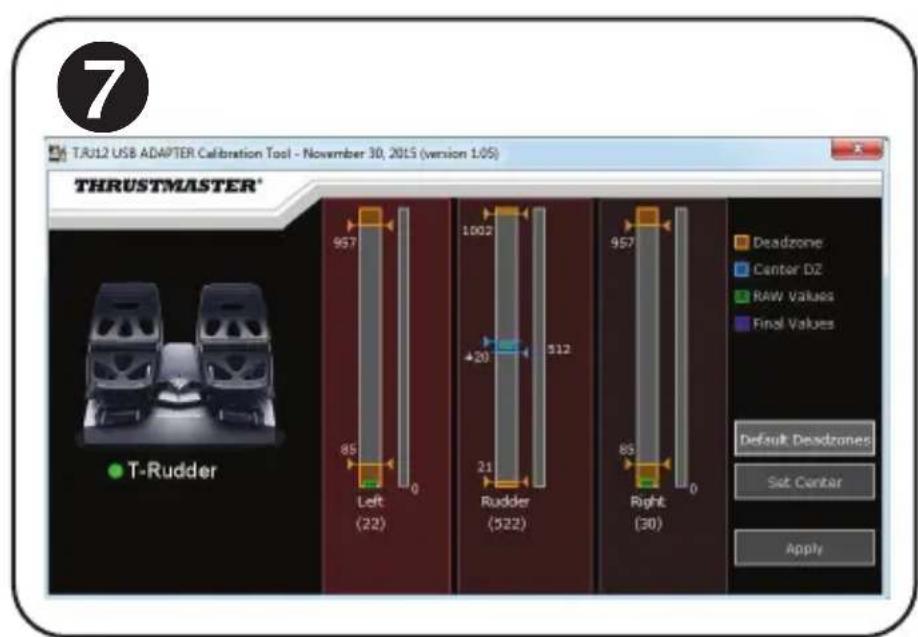
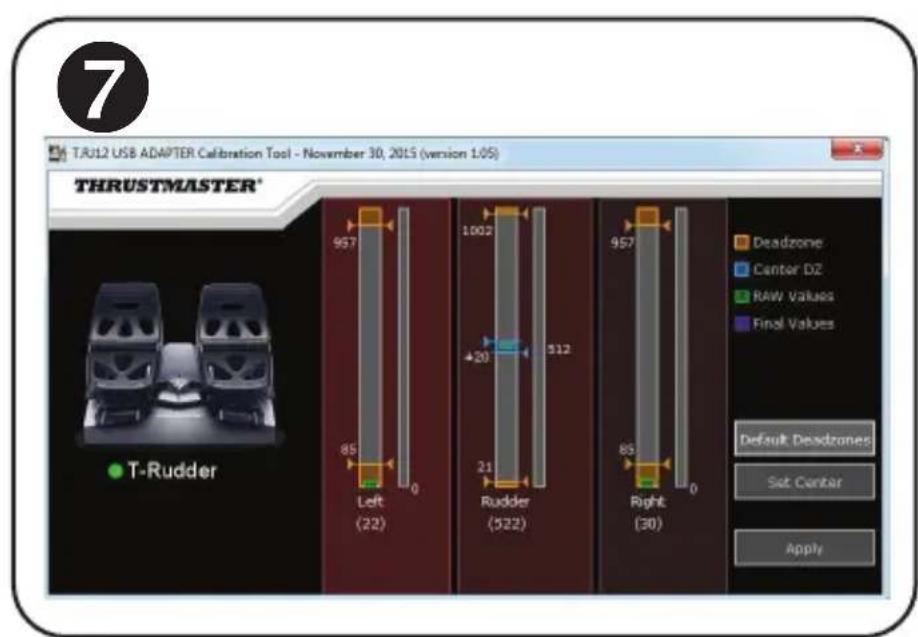
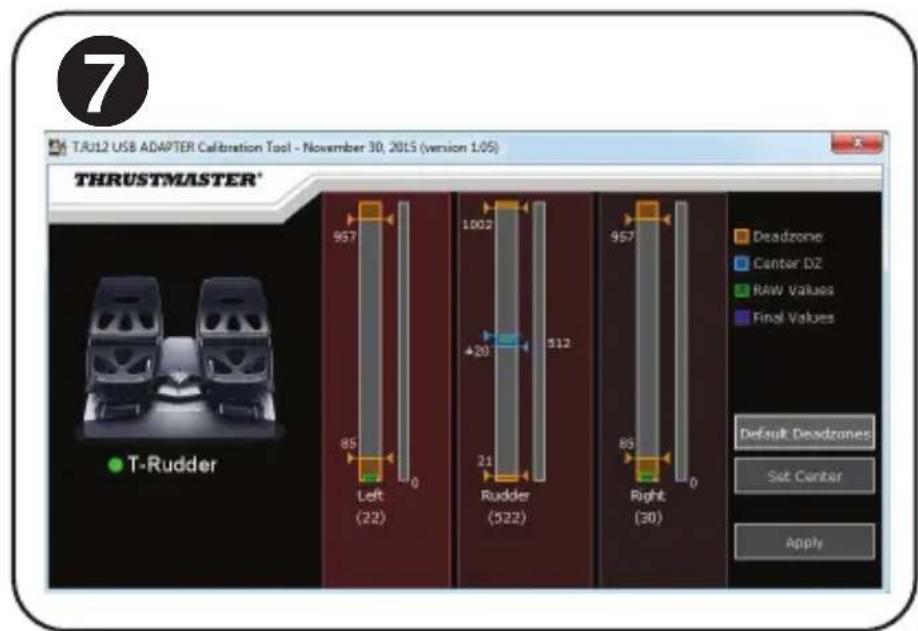
ADVANCED CALIBRATION SOFTWARE
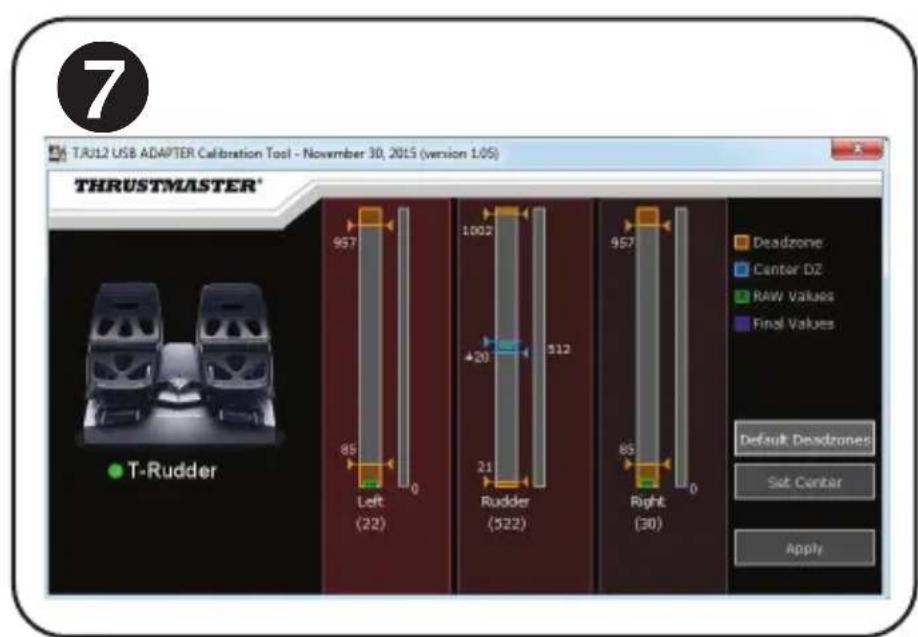
(T.RJ12 USB ADAPTER Calibration Tool)
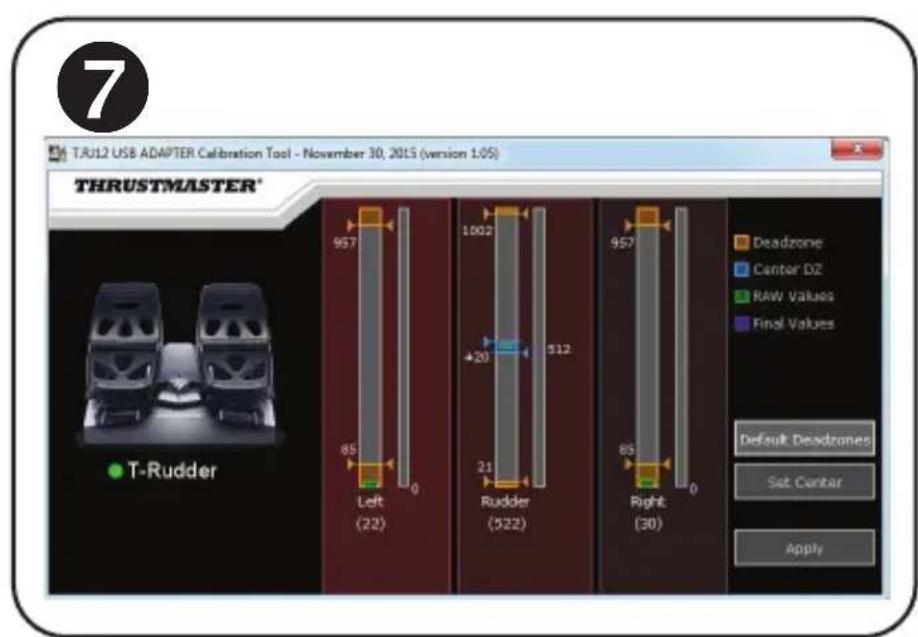
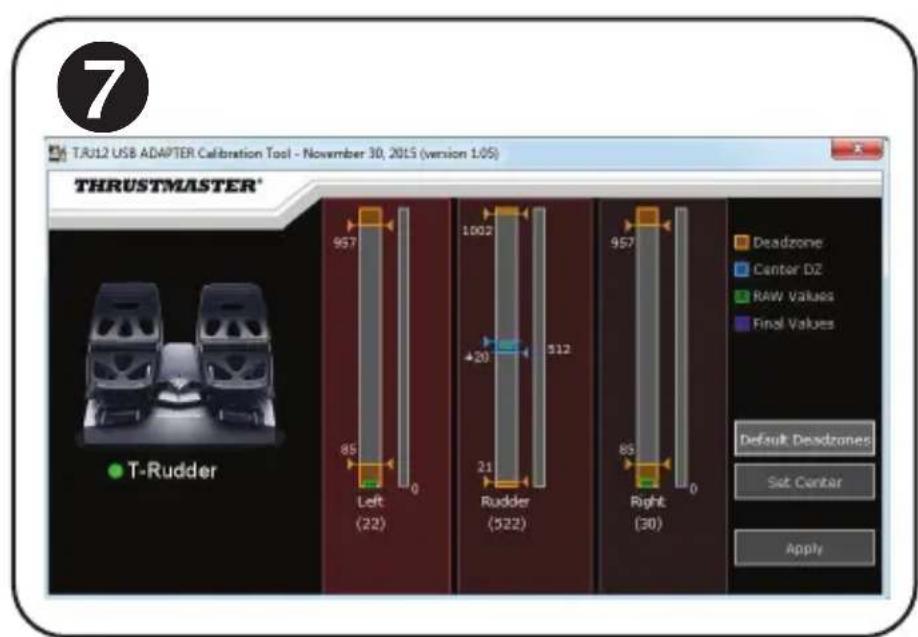
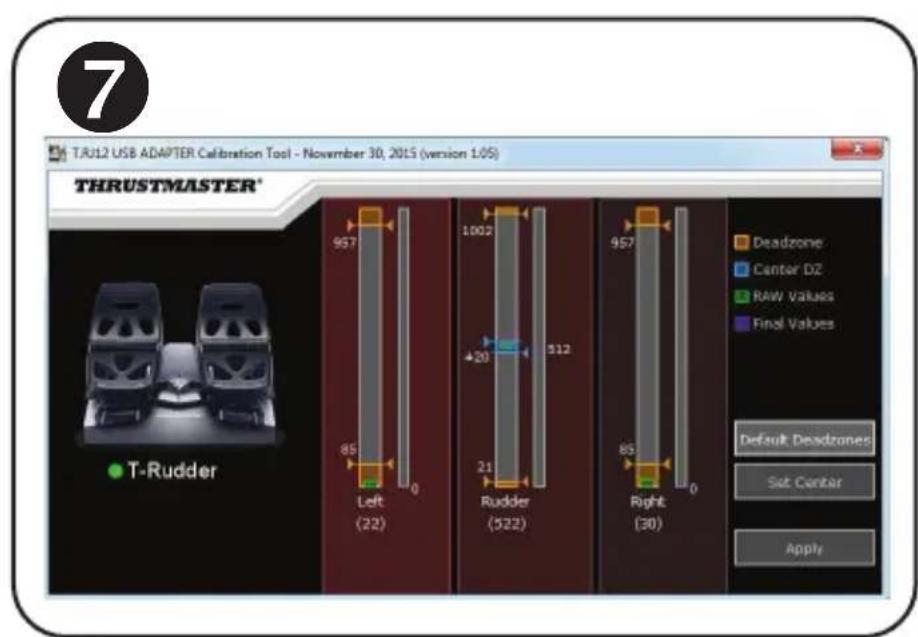
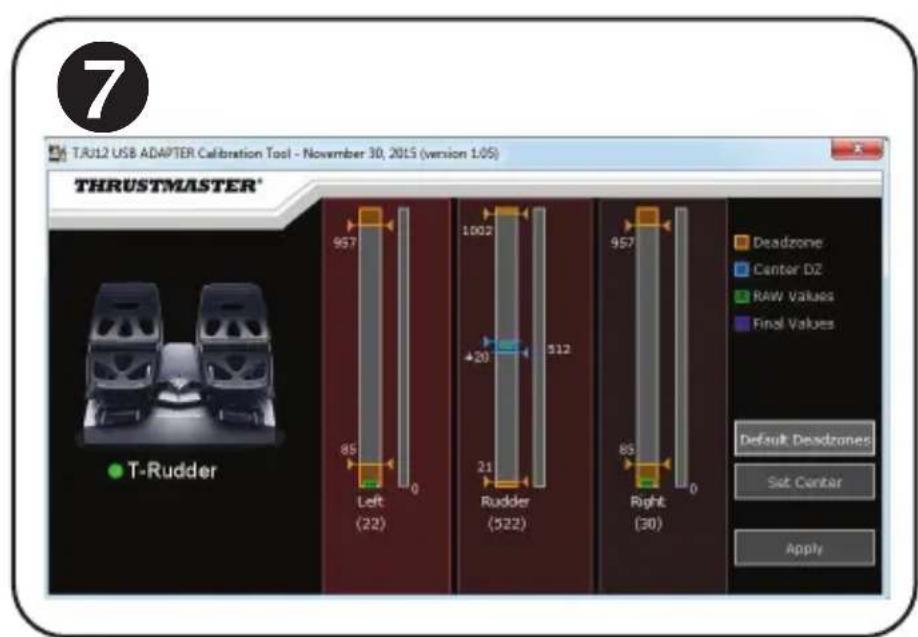
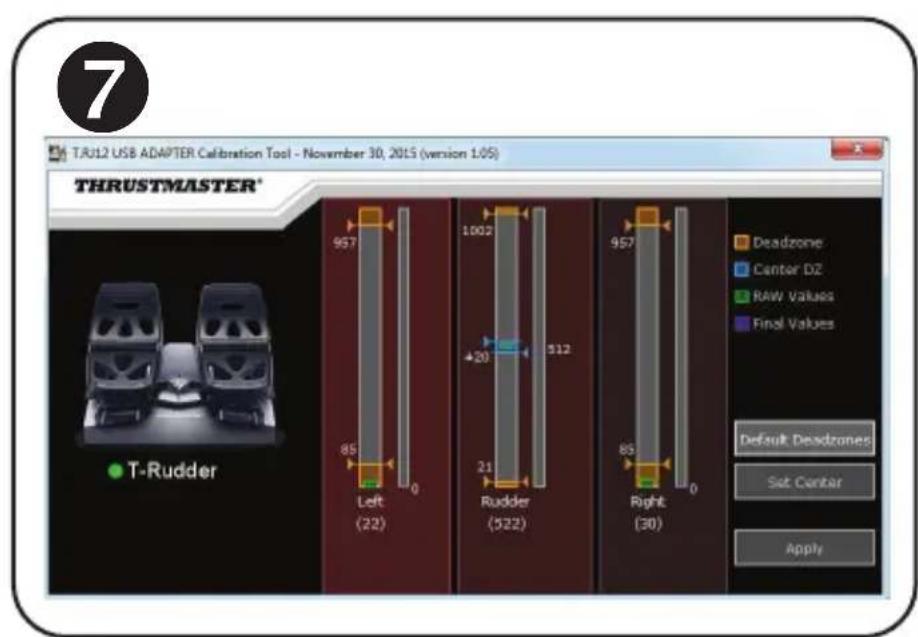
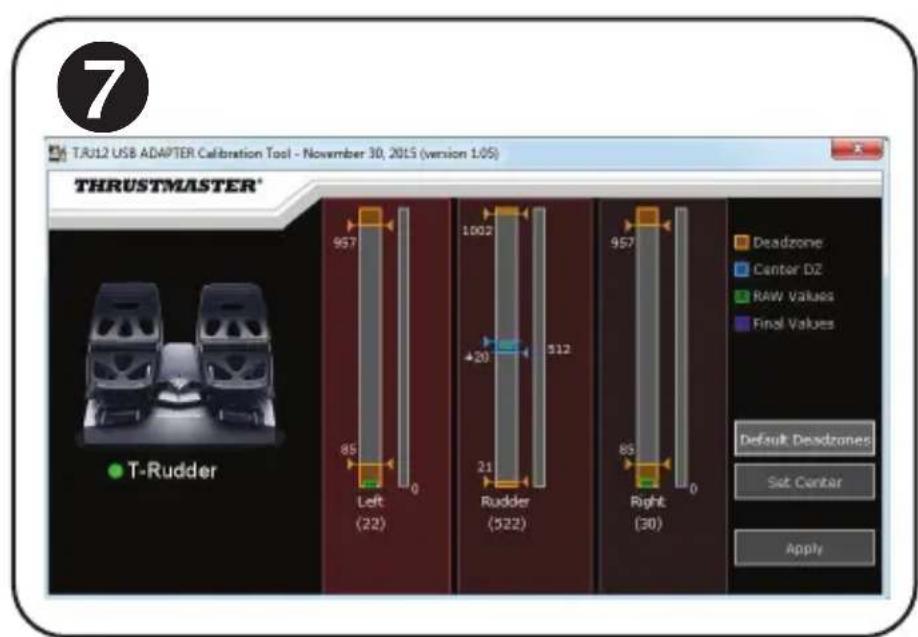
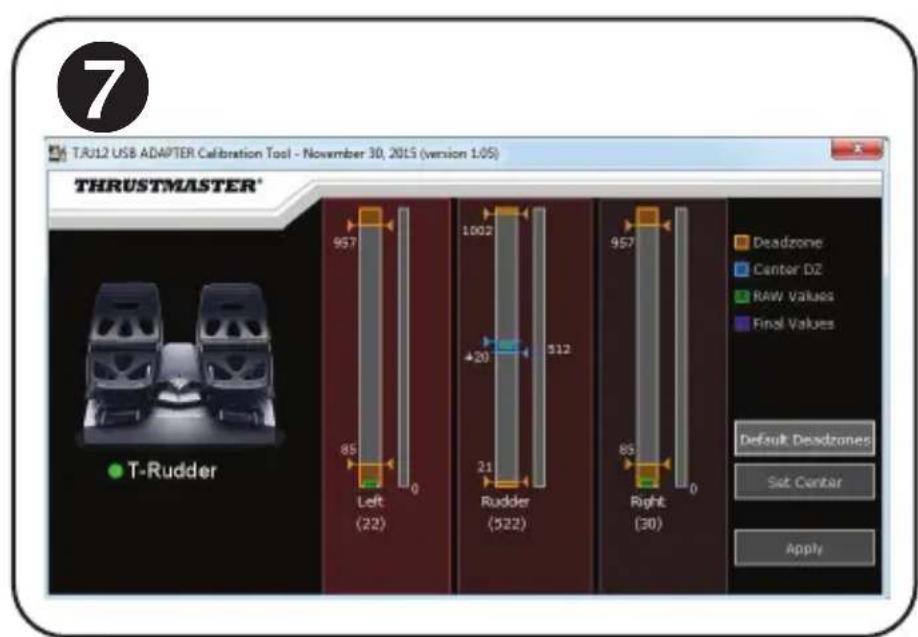
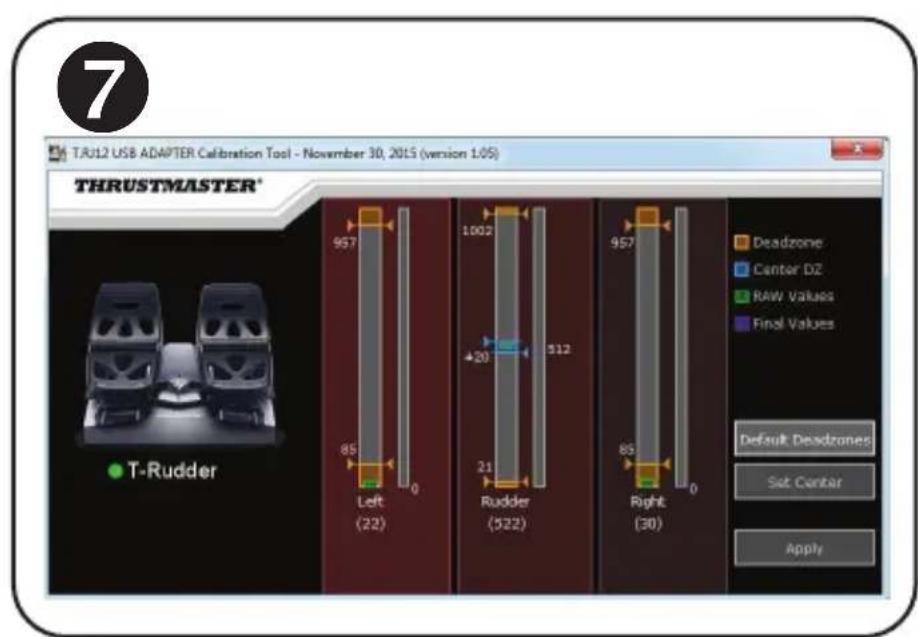
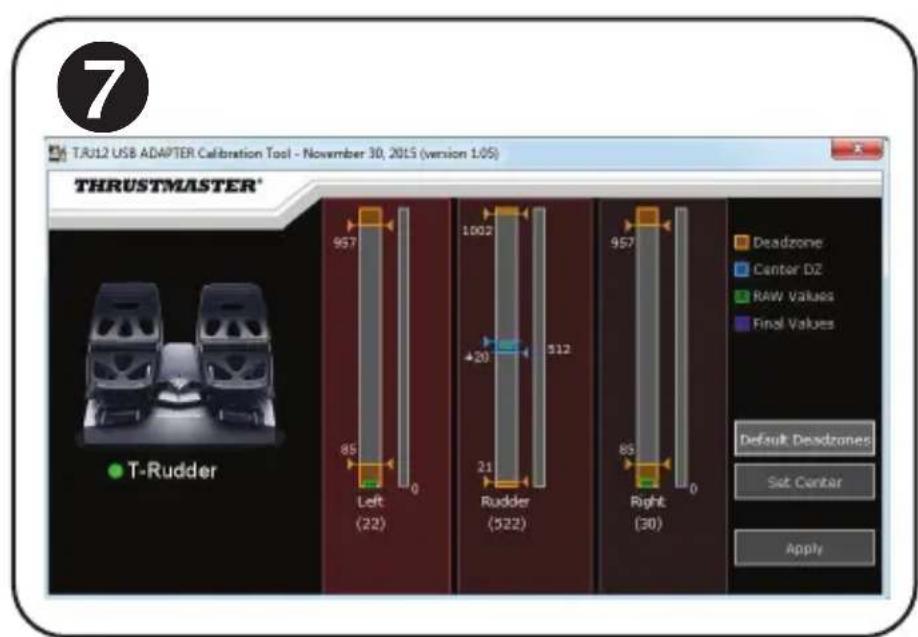
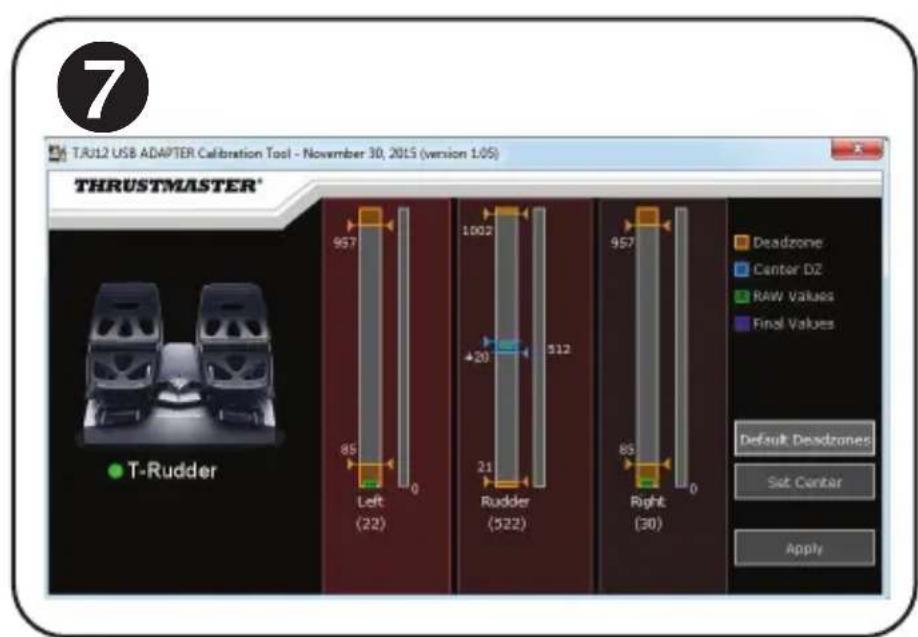
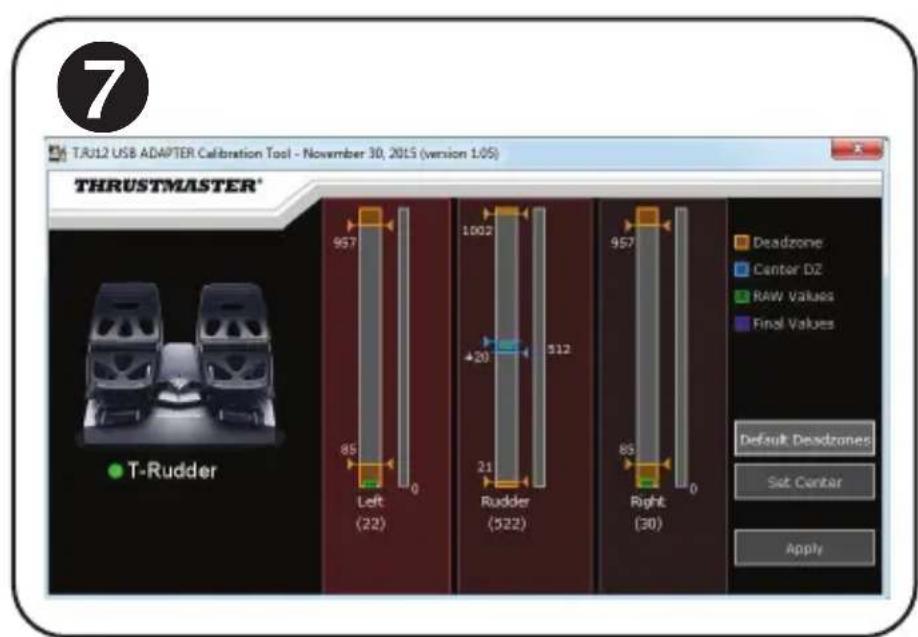
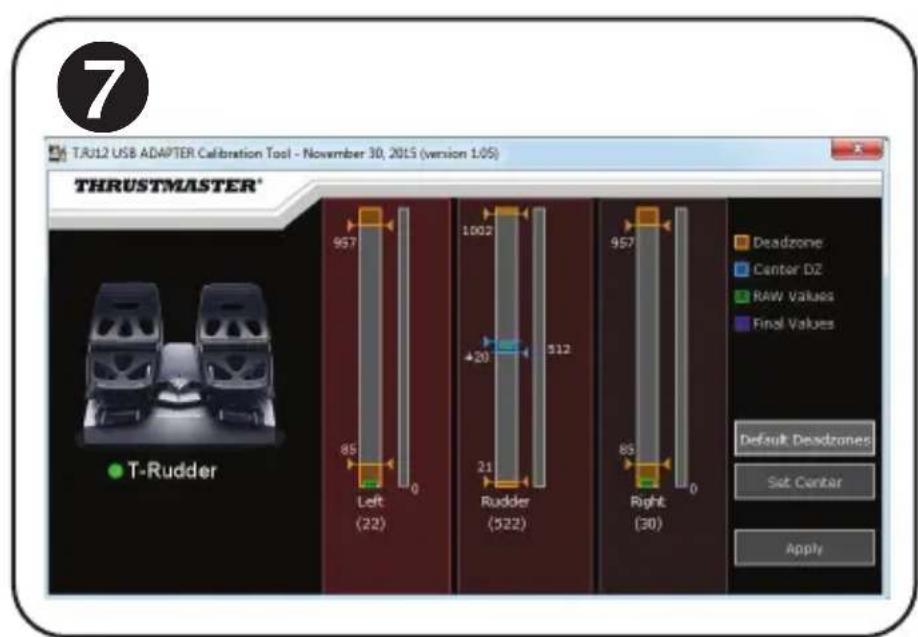
Go to https://support.thrustmaster.com. Select Joysticks / TFRP T.Flight Rudder Pedals, then select Utilities. Download and install the advanced calibration software, which lets you:
- Adjust the dead zones to your liking at the beginning and end of the range of travel on the rudder axis, and on the 2 differential brake axes.
- Adjust the central dead zone to your liking on the rudder axis.
- Save these adjustments directly in the internal memory of the adapter (5).
T.A.R.G.E.T ADVANCED PROGRAMMING SOFTWARE 8
(Thrustmaster Advanced programming Graphical Editor)
Go to https://support.thrustmaster.com. Select Joysticks / TFRP T.Flight Rudder Pedals, then select Software. Download and install the T.A.R.G.E.T advanced programming software.
Main features of T.A.R.G.E.T:
- A variety of configurations are available for the axes of the rudder and differential brakes.
Different programming levels are available: Basic, Advanced and Script. - Uses the Drag and Drop principle.
- The TFRP pedal set can be used in conjunction with a variety of Thrustmaster controllers (Hotas Cougar, Hotas Warthog, T.16000M, MFD Cougar Pack, also compatible with T.A.R.G.E.T), allowing for them to be recognized as a single USB device.
- Advanced profiles are available, created by members of the Thrustmaster community.
IMPORTANT NOTES REGARDING AUTOMATIC CALIBRATION OF AXES
To avoid any calibration problems:
- Always leave the rudder axis centered (without placing your feet on the rudder) when connecting the TFRP pedal set using the adapter's USB connector.
- Never connect the pedal set to the adapter when the adapter is connected to a PC or during a game.
- Never disconnect the pedal set from the adapter when the adapter is connected to a PC or during a game. Power off the PC first.
- Always connect the pedal set to the adapter before connecting the adapter's USB connector to the PC.
The pedals' 3 axes automatically calibrate themselves after a few movements, and after having reached the physical stops for the rudder axis and the 2 differential brake axes.
TROUBLESHOOTING AND WARNING
My pedal set is not working properly, or seems to be improperly calibrated.
- Power off your PC and disconnect the adapter's USB connector. Then reconnect the USB connector, power on your PC again, and restart your game.
- Make sure that the adapter's selector switch (8) is set to the AIRPLANE position, and that the LED is lit up in GREEN.
- When connecting the adapter's USB connector, always leave the rudder axis centered (without placing your feet on the rudder).
-
I can't configure my pedal set.
-
In your game's Options / Controller / Gamepad or Joystick menu, select the appropriate configuration or completely reconfigure the controller's options.
- For more information, please refer to your game's user manual or online help.
- Use the T.A.R.G.E.T (Thrustmaster Advanced pRogramming Graphical EdiTor) advanced programming software.
My pedal set is too sensitive, or not sensitive enough.
- Your pedal set automatically calibrates itself after a few movements, and after having reached the physical stops for the rudder axis and the 2 differential brake axes.
- In your game's Options / Controller / Gamepad or Joystick menu, adjust the sensitivity and dead zones for your controller (if these options are available).
- Use the T.RJ12 USB ADAPTER Calibration Tool advanced calibration software.
- Use the T.A.R.G.E.T (Thrustmaster Advanced pRogramming Graphical EdiTor) advanced programming software.
CONSUMER WARRANTY INFORMATION
Worldwide, Guillemot Corporation S.A., whose registered office is located at Place du Granier, B.P. 97143, 35571 Chantepie, France (hereinafter "Guillemot") warrants to the consumer that this Thrustmaster product shall be free from defects in materials and workmanship, for a warranty period which corresponds to the time limit to bring an action for conformity with respect to this product. In the countries of the European Union, this corresponds to a period of two (2) years from delivery of the Thrustmaster product. In other countries, the warranty period corresponds to the time limit to bring an action for conformity with respect to the Thrustmaster product according to applicable laws of the country in which the consumer was domiciled on the date of purchase of the Thrustmaster product (if no such action exists in the corresponding country, then the warranty period shall be one (1) year from the original date of purchase of the Thrustmaster product).
Notwithstanding the above, rechargeable batteries are covered by a warranty period of six (6) months from the date of original purchase.
Should the product appear to be defective during the warranty period, immediately contact Technical Support, who will indicate the procedure to follow. If the defect is confirmed, the product must be returned to its place of purchase (or any other location indicated by Technical Support).
Within the context of this warranty, the consumer's defective product shall, at Technical Support's option, be either replaced or returned to working order. If, during the warranty period, the Thrustmaster product is subject to such reconditioning, any period of at least seven (7) days during which the product is out of use shall be added to the remaining warranty period (this period runs from the date of the consumer's request for intervention or from the date on which the product in question is made available for reconditioning, if the date on which the product is made available for reconditioning is subsequent to the date of the request for intervention). If permitted under applicable law, the full liability of Guillemot and its subsidiaries (including for consequential damages) is limited to the return to working order or the replacement of the Thrustmaster product. If permitted under applicable law, Guillemot disclaims all warranties of merchantability or fitness for a particular purpose.
This warranty shall not apply: (1) if the product has been modified, opened, altered, or has suffered damage as a result of inappropriate or abusive use, negligence, an accident, normal wear, or any other cause unrelated to a material or manufacturing defect (including, but not limited to, combining the Thrustmaster product with any unsuitable element, including in particular power supplies, rechargeable batteries, chargers, or any other elements not supplied by Guillemot for this product); (2) if the product has been used for any use other than home use, including for professional or commercial purposes (game rooms, training, competitions, for example); (3) in the event of failure to comply with the instructions provided by Technical Support; (4) to software, said software being subject to a specific warranty; (5) to consumables (elements to be replaced over the product's lifespan: disposable batteries, audio headset or headphone ear pads, for example); (6) to accessories (cables, cases, pouches, bags, wrist-straps, for example); (7) if the product was sold at public auction.
This warranty is nontransferable.
The consumer's legal rights with respect to laws applicable to the sale of consumer goods in his or her country are not affected by this warranty.
Additional warranty provisions
During the warranty period, Guillemot shall not provide, in principle, any spare parts, as Technical Support is the only party authorized to open and/or recondition any Thrustmaster product (with the exception of any reconditioning procedures which Technical Support may request that the consumer carry out, by way of written instructions - for example, due to the simplicity and the lack of confidentiality of the reconditioning process - and by providing the consumer with the required spare part(s), where applicable).
Given its innovation cycles and in order to protect its know-how and trade secrets, Guillemot shall not provide, in principle, any reconditioning notification or spare parts for any Thrustmaster product whose warranty period has expired.
In the United States of America and in Canada, this warranty is limited to the product's internal mechanism and external housing. In no event shall Guillemot or its affiliates be held liable to any third party for any consequential or incidental damages resulting from the breach of any express or implied warranties. Some States/Provinces do not allow limitation on how long an implied warranty lasts or exclusion or limitation of liability for consequential or incidental damages, so the above limitations or exclusions may not apply to you. This warranty gives you specific legal rights, and you may also have other rights which vary from State to State or Province to Province.
Liability
If permitted under applicable law, Guillemot Corporation S.A. (hereinafter "Guillemot") and its subsidiaries disclaim all liability for any damages caused by one or more of the following: (1) the product has been modified, opened or altered; (2) failure to comply with assembly instructions; (3) inappropriate or abusive use, negligence, an accident (an impact, for example); (4) normal wear; (5) the use of the product for any use other than home use, including for professional or commercial purposes (game rooms, training, competitions, for example). If permitted under applicable law, Guillemot and its subsidiaries disclaim all liability for any damages unrelated to a material or manufacturing defect with respect to the product (including, but not limited to, any damages caused directly or indirectly by any software, or by combining the Thrustmaster product with any unsuitable element, including in particular power supplies, rechargeable batteries, chargers, or any other elements not supplied by Guillemot for this product).
FCC STATEMENT
- This device complies with Part 15 of the FCC Rules. Operation is subject to the following two conditions:
(1) This device may not cause harmful interference, and
(2) This device must accept any interference received, including interference that may cause undesired operation.
2. Changes or modifications not expressly approved by the party responsible for compliance could void the user's authority to operate the equipment.
COPYRIGHT
© 2022 Guillemot Corporation S.A. All rights reserved. Thrustmaster® is a registered trademark of Guillemot Corporation S.A. Windows® is a registered trademark of Microsoft Corporation in the United States and/or other countries. All other trademarks are the property of their respective owners. Illustrations not binding. Contents, designs and specifications are subject to change without notice and may vary from one country to another. Made in China.

WARNING: this product can expose you to chemicals including Bisphenol A (BPA), is known to the State of California to cause birth defects or other reproductive harm.
For more information go to www.P65Warnings.ca.gov
ENVIRONMENTAL PROTECTION RECOMMENDATION
- In the European Union: At the end of its working life, this product should not be disposed of with standard household waste, but rather dropped off at a collection point for the disposal of Waste Electrical and Electronic Equipment (WEEE) for recycling.
This is confirmed by the symbol found on the product, user manual or packaging.
Depending on their characteristics, the materials may be recycled. Through recycling and other forms of processing Waste Electrical and Electronic Equipment, you can make a significant contribution towards helping to protect the environment.
Please contact your local authorities for information on the collection point nearest you.
For all other countries: Please adhere to local recycling laws for electrical and electronic equipment.
Retain this information. Colours and decorations may vary.
Plastic fasteners and adhesives should be removed from the product before it is used.
www.thrustmaster.com
*Applicable to EU, UK and Turkey only


THRUSTMASTER
TECHNICAL SUPPORT
https://support.thrustmaster.com

TFRP
T.Flight Rudder Pedals

TFRP
T.Flight Rudder Pedals
REPOSE-TALONS AMOVIBLES (10)
(Thrustmaster Advanced pRogramming Graphical EdiTor)
INFORMATIONS RELATIVES A LA GARANTIE AUX CONSOMMATEURS
www.thrustmaster.com
https://support.thrustmaster.com


TFRP
T.Flight Rudder Pedals

TFRP
T.Flight Rudder Pedals
Benutzerhandbuch
TECHNISCHE MERKMALE
www.thrustmaster.com
https://support.thrustmaster.com

TFRP
T.Flight Rudder Pedals

TFRP
T.Flight Rudder Pedals
Handleiding
TECHNISCHE SPECIFICATIES
T.A.R.G.E.T GEAVANCEERDE PROGRAMMEERSOFTWARE (Thrustmaster Advanced pRogramming Graphical EdiTor)
Ga waar https://support.thrustmaster.com. Selecteer Joysticks / TFRP T.Flight Rudder Pedals enervoigens Software. Download en installeer de T.A.R.G.E.T geavanceerde programmeersoftware.
INFORMATIE MET BETREKKING TOT KOPERSGARANTIE
www.thrustmaster.com
(Thrustmaster Advanced pRogramming Graphical EdiTor)
www.thrustmaster.com
(Thrustmaster Advanced pRogramming Graphical Editor)
Dirigete a https://support.thrustmaster.com. SeLECTIONA Joysticks / TFRP T.Flight Rudder Pedals, y bajo selecciona Software. Descarga e instala el software de programacion avanzada T.A.R.G.E.T.
\section*{Characteristicas principales de T.A.R.G.E.T.}
www.thrustmaster.com
https://support.thrustmaster.com


TFRP
T.Flight Rudder Pedals

TFRP
T.Flight Rudder Pedals
Manual do Utilizador
CHARACTERISTICAS TECNICAS
(Thrustmaster Advanced programming Graphical EdiTor)
Aceda a https://support.thrustmaster.com. Selecione Joysticks / TFRP T.Flight Rudder Pedals e em seguida Software. Transfira e instale o software de programacao avançada T.A.R.G.E.T.
Principais funcionalesdo T.A.R.G.E.T:
www.thrustmaster.com
*Aplicável apenas à Unión Europeia e Turquía
THRUSTMASTER
SUPORTE TECNICO
https://support.thrustmaster.com

TFRP
T.Flight Rudder Pedals

TFRP
T.Flight Rudder Pedals
Инструкция по заци.
TEXHnueCKNE XAPAKTEPNCIKN 1
- Пенильский TFRP
2.OcbpynaHappaBHeHn
3.OcIДЯ He3aBnCmblx DnΦΦepeHuaJIbHbIX TopMO3OB - Μτεκερ Μιηα RJ12 πεδαβνόθο 6ποka
-
AdaanTep RJ12/USB (T.RJ12 USB Adapter)
-
THe3do Tnna RJ12 aanTepa
- USB-pa3bem aanTepa
- IpepeKIOUOaTeIb aIaIaTePa
9.ИндикатopадаNTepa - CbemHbIe ynpblnT
- WecTnnpaHbI KJIIOU
CbEMHbIE yNOPbI dIJI PAnTKN (10)
IeanaBbI 6IOK OCHaueH DByM CbeMHbIMN ynpamn IJIaTKn.
Bo3MoXHbI 2 proHOMuHbIX KOHpUpyaun:
- CTOna noJIHoCTbIO onnpaetcHa neJaIb (ynop dny narnku ycmahOBJeH) nn
- noyuweka cTOnbI paCnoJaraetcB ceHTpe neJaJI (ynop dna narmku cHm).

Демонтajуноровдяптк 4
C nomoiu wecntirpaHHoro knoua (11) nonHOCTbIO BbIKpyTnte 2 BNHTa c KaKdoRo ynpa IJI INrK.
- ChHmnte ynpbI dnn pTkn c neJaJe.
O6paTnte BnMaHne: yCTaHOBKn ynopOB dIyET BbINOnHtB 3TN DeICTBnB O6paTHOM nopAKe.
YCTAHOBKA HA PIK C NOMOUI O ADAIPTEA RJ12/USB
1.Подкючiteштөр RJ12 (4)падьногблoka TFRP кгнэду RJ12 (6)Ha aanntepe (5).
Inn noiknouite wTekep RJ12 (4) napmyo K yctpoiCTBy Thrustmaster, ochaueHHomy rhe3dom RJ12 (TWCS, cepra TCA Quadrant nn cepra T.Flight Hotas).
(Thrustmaster Advanced pRogramming Graphical EdiTor)
OtkoIe: https://support.thrustmaster.com. BbI6epTe «ДжоICTnK / TFRP T.Flight Rudder Pedals», 3aTeM BbI6epTe «Прогамнhoe обеспец". 3arpy3nte n yctahOBHT npodBHyToe ПО прогамmarpoBaHЯТ.A.R.G.E.T.
OCHOBHbIE Oco6eHHoCTn IOT.A.R.G.E.T:
- pяд rOTOBbIX KOHФИгурази Дпя осeн рул nHaPpAblneHЯ nДnФфepeHuaNbHbIX TOPMO3OB;
- Haneluhe HeckolbIX yOboHne nporpaMMnpoBaHn: Basic, Advanced n Script;
- pa6oTa no npinHciny nepetacknBaHnra «Drag and Drop»;
- peДаьньй 6лOK TFRP мохно Использовать B COчЕТани C сambIM pa3ныIM контрелорам Thrustmaster (Hotas Cougar, Hotas Warthog, T.16000M, MFD Cougar Pack, тоkee coВмecтUMblc T.A.R.G.E.T), И onи 6удут распоЗнаваься кak edinhoe USB-устpoиCTBO;
-DocTyHbIpacuHpeHHbIe npoФnN,co3aHHbIe YJIeHaMn coo6ueCTBa Thrustmaster.
BAXHBIE 3AMEUHNA OTHOCNTBHO ABTOMATUeCKOJ KAJIIBPOBKN OCEI
CobetbI no npedotBpaueHIO npo6Jem c KaJIbpoBkoJ.
- Пи подклоченп падального 6лoka TFRP сnomoцью USB-кавеля addanterpa ocbyruя habравлия BCERda DoJIXHa HaxOДИТбСВ B ceHTpaJIbHOM nOLOXKeHn (He CTaBBTeHOrn Ha peDani).
- HeIb3a nodknIOuATb neaIbHbI 6nok K aIaIaTepy, ecnn aIaIaTeP noDKnIOueH K Pk, a TAKKe BO BpeM Irpbl.
- Henb3a OTKIouaTb neaIbHbI 6nok OT aIantepa, ecn aIantep noKIOueH K PIK, a TAKKe BO BpMa Irpbl. Chayana BbIKIOUHTe PIK.
-
- 063aTeNbHO NOkHouaTe neJaHbI K aAnTepy nepd noKluueHnem USBKa6eJra aanTepa K KOHcOnJ.
KanibpoBka Tpex ocei neaen BbINOJIHReTcA bTOMaTnueckn nocne HeCKoJIbKnx DnIXeHm I nocIe DoCTNXeHnq Hn3Nuecknx CToOpOB dIra OcI pyIa HappaBHeHnI N ocei DByx DnOfpeHcnuaNbHbIX TOPMO3OB.
YCTPAHEHNE HENCNPABHOCTEIN I PEPDUNPEKDEHNA
- Педальньий 6лok He pa6oTaETdoJxHbIM o6pa30m nIи kaxeTcЯ HeBepHo OTKaJIu6poBaHHbIM.
- BbiknIOHTe PIK n oTcoeHNHte USB-Ka6eJIb aanTepa. 3aTeM cHOBa noDKIIOHTe USBKa6eJIb, BkIOHTe PIK n nepe3anyctnte irpy.
- Y6eHntecb, yTo nepeKIOuATEnb aAnTepa (8) haoNTcB nNoJxHn CAMOJET n yTo INdkatop rOpIT 3EJIeHbIM.
- Пи подкючени USB-kaбеляадапета оьязателно deprхи te ocby hyapablenenB ceHTpaJbHOM noLOxehn (He cTaBbTe HOrn Ha neJaI pyra).
He ydaetca hactpontb neaibhbi 6nok. - B irpe, B pa3dene «Iapametpb/ KoHTpOJIpep/MrpoBoN pybT» nII N «ДJOCTnK», Bbl6epnte onTImaJIbHyIO KOHcHpyaCNUO nII N OJHOCbIO nepeHaCTpOITe napametpbI KOHTpOJIpepa.
-Дя поученя дононтельнix С蜱едни образипесь к руховдъу пььбатя поигрся К INHTepHET-CnpaBke. - BocnoIb3yITeCb paSCHpeHNbIM IO dIy nporpaMMnpoBaHnT.A.R.G.E.T (Thrustmaster Advanced pRogramming Graphical EdiTor).
CnIshKOM BbICOKa HJN HeIOCTaTOHNa YyBCTBNTbHOCTb neJaIbHorO 6noka. - KaIIb6pOBKa neIaIbHOrO 6Ioka BblIOJIHReTcA bTOMaTHueCKn NocJe HeCKoJIbKnx DBIXeHm I NOcIe DOCTNXeHnI qN3NUeCKNX CTOpOPB DJIa OCNpyJHaNPaBHeHnI Ocei DByx dNΦΦepeHcuaNbHbIX TOPMO3OB.
- B irpe, B pa3dene «Iapametpb/ KoHTpOJIep/UrpOBoI nybT» nIN «ДжоICTNK», OtpeRyInpuYte ChvBCTBNTeJIbHOCTb I «MePTBbIe 3OHbI» KOHTpOJIpepa (ecnN 3TN BO3MOXHOCTH IOCTUHNbl).
- BocnoIb3yItecB paCUnpeHNoI npOrpAMMo KAnIbPoBKn T.RJ12 USB ADAPTER Calibration Tool.
- BocnoJIb3yITeCb paCUnpeHbIM IO dIy nporpaMMnpoBaHn T.A.R.G.E.T (Thrustmaster Advanced pRogramming Graphical EdiTor).
CbeHnO nOteBcKo rapaHTmN
Kopnpaun Guillemot Corporation S.A., 3aperncpobanha no apcye Place du Granier, B.P. 97143, 35571 Chantepie, Phanu, (daee - «Guillemot») rapaHTpyeT CBOIM KIneHTAM BO BCEM Mipe, TTo B daHOM n3dJIIN Thrustmaster He 6ydt BbIbNeHO HnKaHX DepeKTOB MaTePnaIOB IN pOn3BOODCTBA B TeueHne rapaHTnHoro nepnoDA, KOtbpI paBeH cPOky PpeJbAVeHn IpeTeHsN IO COOTBeTCTBNO dJa daHORo n3dJIIN. B cTpaHax Ebroneckoro CoO3a 3OT cPOK COOTBeTCTByeT DByM (2) roDAM C MOMENT aocTabKn n3dJIIN Thrustmaster. B dpynx cTpaHax rapaTHnHbI nepNoD paBeH cPOky npDeJbAVeHn npTeHsN NO COOTBeTCTBNO dJa n3dJIIN Thrustmaster, onpeJeMaEMomy COOTBeTCTBYUOUM 3aKOHOaTeNbCTBOM cTpaHbI, B KOTopoI npoxBaI nOpTeBnHa HA MOMENT npNo6peHn N3dJIIN Thrustmaster (ecnn noo6hble npTeHsN He DeiCTByOt B COOTBeTCTByUOSeI cTpaHe, rapaHTnHbI nepNoD paBHReTcO NHOMY (1) rOdy c neBoHaJbHoN DaTbI npNo6peHn n3dJIIN Thrustmaster).
B cnyuae obnapyekhenia dephiKTOB n3dennn BO Bpemra rapaHTnHoro nepnoJa He3ameNITeNbHO 6bpaTntecb B cnYk6by TexHnuecko NODepxKn, COTpydHnKn KOtopoN ONpeDeIaNHeNHyIO npocedpy. Ecn ndephiKT 6ydt NODTBePckDeH, n3dne NcElyET BepHyTb NO MeCTy npno6peTeHna (nnn B IIOBOe dpyrOe MeCTO, yka3aHHe cnyk6o TExHnuecko NODepxKn).
B pamkax DeiCTBnraPANTN DepeKTHoe N3dene 6ydt, No yCMOTpeHIO cIyKbI TEXHuecko IODepKKn, ZAMHeHO nII BO3BpaSeHO B pa6Oee coCToHne. EcnB TeueHne rapaHTnHorO cPoka N3dene Thrustmaster 6ydt IOBepKeHO TAKOMY BOCCTAHOBNEHIO, K OCTABWeMcyr rapaHTnHOMy CPOky npnbabJnTcR nepnoD BpemHn, HO He MeHee cEMN (7) dHe, BO BpemK KOtOpORIO N3dene HAXOINOCB BHE yNtpe6bJIeHn (HaaylOM 3TOrO nepNoDA CHTaETcRA DaTA 3Anpoca NOKyNaTeJr O BMeWATENbCTBE nII DATA PpeOCTaBNeHn DEeKTHoro N3dEINr IIN BOCCTAHOBNEHn, eCNI N3dEIne 6blNO PpeOCTaBNeHO nIg BOCCTaHOBLeHn NO3dHee, Yem 6bln CdeNAh 3Anpoc O BMeWATeNBCTBe). B Mepe, pa3peSEHHo INPIMeHMbIM 3aKOHOaTeJIbCTBOM, ONHAR OTBETCTBEHHOCb KOMNaHNGuILlemot I ee DoUePHNX KOMNaHn (B TOM YNCLe KOCBeHHbI yUep6) ORPAHNUBaETcR BOCCTAHOBNEHm EpaOero CoCToHn IINI ZAMeHOH N3dEINr Thrustmaster. B Mepe, pa3peSEHHo INPIMeHMbIM 3aKOHOaTeJIbCTBOM, KOMNaHn GuILlemot OTKa3bBAeTcR OT JIObIX rapaHTN KOMMepueCKO INPIROHDCHN IINI PnIROHOCTN IINI PnIROHOCTN IINI ONpeDEENHOHOn CEJI.
Hactoa rapaHTn He paocTpaHreTc: (1) Ha cTuau, KOrda n3dene 6bIIO BINOIme HIOHeO, OKpbTO, MoDnqunpoBaHO uNn noJyHIO NOBpeXDeHn B pe3yIbTaTe HeOnyCTMOrO uNn HEnpabInbHorO NCNoB3OBAHn, He6peXHoCTu Nn HeCuaCTHO CnyAra, ECTeCTBeHHoro n3HOca uNn IIOboi npUHyBn, He CBz3AHNO C DeEeKToMaTePnaIOB uNn PPOIN3BODcTBa (BKnIOuay, NOMMO npOeyo, NCNoB3OBAHne n3denn Thrustmaster CoBMeCTHO C No6bIMn HeNDxOJaUMm 3JeMeHTAMn, B YAcTHOCn — C bLOkAmn pNTAHN, AkymyIaTopAMn, 3apAnHbIMn yCTPoIcTBAMn N IObIMn DpyHMn 3JeMeHTAMn, He BXoJaUmm B KomNeKtaUguillemot dNn DaHHoro n3denn); (2) Ha cUYaN cNoJIb3OBAHn npOdyKTa B IIObIX cEJAX, KpOME 6bITobix, B TOM YNCNE Ha cUYaN PPOPeCCHOHaIBHO rNn KOMMepeCKOro npImeHn (HaNPmep, B INrpoBbIX 3aJax, dNn PPOBeHne oBuHn e OceBHOBaHn); (3) Ha cTuau, KOrda yka3AHN cNyXbI TexNuueckoi NDepKKn He 6bln BblONHeHb; (4) Ha IIO, TAK kak Ha taKoe IIO paocPocTpaHreTc OTdEBNaR aPaHTn; (5) Ha pacxoJNbIE MaTePnaIb (3JeMeHTbl, PpeHa3HaueHHble dNn 3aMeHbI B TeueHne cPoka cNyXbI n3denn: HaNPmep, BaTapeKn UShbIe NDOyHKn dNra raphHTyp nN HayUnNKOB); (6) Ha akCEccyApbl (HaNPmep, Ka6en, Yexbl, cyMKn, fytIpaBl, hapYhble pemeWK); (7) Ha cUYaN pOdaXn n3denn C OTKpbIToro ayKcuioHa.
www.thrustmaster.com
EAC
THRUSTMASTER
TEXHnueCKa IODePjKKa https://support.thrustmaster.com

TFRP
T.Flight Rudder Pedals

TFRP
T.Flight Rudder Pedals
Uživatský manuál
TECHNICKE VLASTNOSTI
- TFRP pedálová souprava
2.Osy smerovsky
3.Osy nezavirusch diferencialnich brzd -
M konektor RJ12 pedalové soupravy
5.RJ12/USB adaptor (T.RJ12 USB Adapter) -
F konektor RJ12 adaptéru
- USB konektor adaptéru
- Přepinací volic adaptéru
- LED adaptoru
- Odnimatelepatni operky
- Imbusovy klič
ODNÍMATELNÉ PATNI OPÉRKY (10)
(Thrustmaster Advanced pRogramming Graphical EdiTor)
Zadejte https://support.thrustmaster.com. Zvolte Joysticks / TFRP T.Flight Rudder Pedals, a pak vyberte sekci Software. Stáhněte a nainstalujtePokroćí programováci software T.A.R.G.E.T.
Hlavni vlastosti programu T.A.R.G.E.T:
www.thrustmaster.com
https://support.thrustmaster.com

TFRP
T.Flight Rudder Pedals

TFRP
T.Flight Rudder Pedals
Kullanma Kilavuzu
TEKNIK ÖZELLLIKLER ①
www.thrustmaster.com
https://support.thrustmaster.com

TFRP
T.Flight Rudder Pedals

TFRP
T.Flight Rudder Pedals
Instrukcja obstugi
ELEMENTY ①
ZAAWANSOWANA APLIKACJA DO PROGRAMOWANIA T.A.R.G.E.T (Thrustmaster Advanced pRogramming Graphical EdiTor)
www.thrustmaster.com
https://support.thrustmaster.com

TFRP
T.Flight Rudder Pedals

TFRP
T.Flight Rudder Pedals
一-一斯卡二一
技術仕樣
T.A.R.G.E.T 3 (Thrustmaster Advanced pRogramming Graphical EdiTor)
www.thrustmaster.com
Made in China.
TFRP
T.Flight Rudder Pedals

TFRP
T.Flight Rudder Pedals
用户手册
技术特性 1
(Thrustmaster Advanced pRogramming Graphical EdiTor)
www.thrustmaster.com

THRUSTMASTER
技術支援
https://support.thrustmaster.com


TFRP
T.Flight Rudder Pedals

TFRP
T.Flight Rudder Pedals
音皂
吉
1.TFRP 田
(Thrustmaster Advanced programming Graphical EdiTor)
https://support.thrustmaster.com 二我同中,TFRP T.Flight Rudder Pedals / 五五三三三三三三三三三三三三三三三三三三三三三三三三三三三三三三三三三三三三三三三三三三三三三三三三三三三三三三三三三三三三三三三三三三
T.A.R.G.E.T的孕豆
© 2021 Guillemot Corporation S.A. All rights reserved.
© 2021 Guillemot Corporation S.A.
© 2021 Guillemot Corporation S.A.
© 2021 Guillemot Corporation S.A.
© 2021 Guillemot Corporation S.A.
© 2021 Guillemot Corporation S.A.
© 2021 Guillemot Corporation S.A.
© 2021 Guillemot Corporation S.A.
© 2021 Guillemot Corporation S.A.
© © © © © © © © © © © © © © © © © © © © © © © © © © © © © © © © © © © © © © © © © © © © © © © © © © © © © © © © © © © © © © © © © © © © © © © © © © © © © © © © © © © © © © © © © © © © © © © © © © © © ©
© 2021 Guillemot Corporation S.A.
© 2021 Guillemot Corporation S.A.
© 2021 Guillemot Corporation S.A.
© 2021 Guillemot Corporation S.A.
© 2021 Guillemot Corporation S.A.
© 2021 Guillemot Corporation S.A.
© 2021 Guillemot Corporation S.A.
©
韓道保爲觀業社會
a.
i 1
www.thrustmaster.com

MSIP-REI-MF0-TFRP-RUDDER
THRUSTMASTER
기捨지원
https://support.thrustmaster.com

TFRP
T.Flight Rudder Pedals


TFRP
T.Flight Rudder Pedals
P
aaii 1
TFRP 1
- gill 20.2
aaii aaiiaai iai jai jao 3
calglalge gajl SjRj12 Jgao .4
RJ12/USB .5
(T.RJ12 USB Adapter)
(10)
a 1
5 jilbglg (8)jallylal 2
FRP T.Flight /.https://support.thrustmaster.com/ 3
Rudder Pedals
. Windows
USB 7 USB
j(9)LED 5
:"g 6
Control Panel / Thrustmaster /
Windows 10/8.1/8
C 1
(Windows® 7
y
OK alllll 1 T-Rudder
1 7
1
J 1 J 1 J 1 J 1 J 1 J 1 J 1 J 1 J 1 J 1 J 1 J 1 J 1 J 1 J 1 J 1 J 1 J 1 J 1 J 1 J 1 J 1 J 1 J 1 J 1 J 1 J 1 J 1 J 1 J 1 J 1 J 1 J 1 J 1 J
-
- PlayStation®4, T.FLIGHT HOTAS 4
TFRP CwJgJgJgJgJgJg
Xbox One®& T.FLIGHT HOTAS ONE
.TFRP 1000000000000000000000000000000000000000000
aaiiie 1
(RJ12/USB iLg jic TFRP
)
7
(T.RJ12 USB ADAPTER Calibration Tool)
TFRP T.Flight Rudder / abg) https://support.thrustmaster.com/
(Utilities Pedals
1 1
aaiiaai jaiy
aagaae aee
(5) 2y1y2y3y4y5y6y7y8y9
T.A.R.G.E.T 8
(Thrustmaster Advanced programming Graphical Editor)
TFRP T.Flight Rudder / https://support.thrustmaster.com/
T.A.R.G.E.T. T. Software Pedals
:T.A.R.G.E.T
aiee eae eae eae eae eae eae eae eae eae eae eae eae eae eae eae eae eae eae eae eae eae eae eae eae eae eae eae eae eae eae eae eae eae eae eae eae eae eae eae eae eae eae eae eae eae eae eae eae eae eae eee
Script Advanced Basic
1
F TFRP 1
MFD Cougar T.16000M Hotas WarthogHotas Cougar (a) Thrustmaster
LgSgSgSgSgSgSgSgSgSgSgSgSgSgSgSgSgSgSgSgSgSgSgSgSgSgSgSgSgSgSgSgSgSgSgSgSgSgSgSgSgSgSgSgSgSgSgSgSgSgSg
USB
.Thrustmaster
Jn
ylyally jdi 15s i ydaiil
ie (gill gge g 1000
Igaleally Jalal USB Juaa ydu wdy cuiu gao
aai jg jgsj gaaiaagalln kys laie gally cllgall aegaaas y
A
J 1
jgl jgssll jge Jiee aee
1 1
jiesai jie
Jai j 3 Jai j
aalalalalalalalalalalalalalal
J 1
Jg 11111111111111111111111111
A 1
LED 8 (8)
"jiaai" jglil ciia
)gill ggy 1 aalulus USB
(1) g( x) = 1xg( 1)
i#
i 1
JSS
i 1
T.A.R.G.E.T (Thrustmaster Advanced programming aolal aegl jolai -
. Graphical Editor)
aill aag laaeww cun gai yll aawu wulgall agao
J 1
aaiiaill jai jall gai gail aai yaiyai bai
aalllbanypa aaylll aalll"gl g aallg / pssg / jlaaia
6g 1
T.RJ12 USB ADAPTER Calibration Tool
T.A.R.G.E.T (Thrustmaster Advanced pRogramming
. Graphical Editor)
Place, g Gullemot Corporation S.A. 3571 Chantepie, France
Thrustmaster.
Gullam Bally Bally Bally Bally Bally Bally Bally Bally Bally Bally Bally Bally Bally Bally Bally Bally Bally Bally Bally Bally Bally Bally Bally Bally Bally Bally Bally Bally Bally Bally Bally Bally Bally Bally Bally Bally Bally Bally Bally Bally Bally Bally Bally Bally Bally Bally Bally Bally Bally Bally BALLY
Thrustmaster.
Bally Bally Bally Bally Bally Bally Bally Bally BALLY
Thrustmaster.
Bally BALLY
Thrustmaster.
BALLY
Thrustmaster.
BALLY
Thrustmaster.
BALLY
Thrustmaster.
BALLY
Thrustmaster.
BALLY
Thrustmaster.
BALLY
Thrustmaster.
BALLY
Thrustmaster.
BALLY
Thrustmaster.
BALLY
Thrustmaster.
BALLY
Thrustmaster.
BALLY
Thrustmaster.
BALLY
Thrustmaster.
BALLY
Thustmaster.
BALLY
Thrustmaster.
BALLY
Thrustmaster.
BALLY
Thrustmaster.
BALLY
Thrustmaster.
BALLY
Thrustmaster.
BALLY
J 1 J 1 J 1 J 1 J 1 J 1 J 1 J 1 J 1 J 1 J 1 J 1 J 1 J 1 J 1 J 1 J 1 J 1 J 1 J 1 J 1 J 1 J 1 J 1 J 1 J 1 J 1 J 1 J 1 J 1 J 1 J 1 J 1 J 1 J
aaiiaaa aai
Gullemot (1) 2005
Guillemot (4) 2005
Lai (2) 2005
Lai (4) 2005
Lai (2) 2005
Lai (4) 2005
Lai (2) 2005
Lai (4) 2005
ailll llll llll g aia aalil lpc jy jyllall ylae algll ilc . (WEEE) aaiy iayi yiyaiyaiyaiyaiyaiyaiyaiyaiyaiyaiyaiyaiyaiyaiyaiyaiyaiyaiyaiyaiyaiyaiyaiyaiyaiyaiyaiyaiyaiyaiyaiyaiyaiyaiyaiyaiyaiyaiyaiyaiyaiyaiyaiyaiyaiyaiyaiyaiyaiyaiyai
aaiy
i j 1
aaii iiaaiia aiaaaia gaiiaaiiaai
www.thrustmaster.com
1

THRUSTMASTER
()
https://support.thrustmaster.com

TFRP
T.Flight Rudder Pedals

TFRP
T.Flight Rudder Pedals
Bruksanvisning
TEKNISKA DELAR
- Pedalsetet TFRP
- Roderaxel
- Axlar for fristående differentialbromsär
-
Pedalsetets RJ12-kontakt (hane)
5.RJ12/USB-adapter (T.RJ12 USB Adapter) -
Adapterns RJ12-kontakt (hona)
- Adapters USB-kontakt
- Adapterns vaxlingsknapp
- Adapters LED
- Lõstagbar halstöd
- Insexnyckel
LOSTAGBARA HÄLSTÖD (10)
www.thrustmaster.com
https://support.thrustmaster.com

TFRP
T.Flight Rudder Pedals

TFRP
T.Flight Rudder Pedals
Käyttoohje
TEKNISET OMINAISUUDET
(Thrustmaster Advanced programming Graphical EdiTor)
www.thrustmaster.com
https://support.thrustmaster.com

TFRP
T.Flight Rudder Pedals

TFRP
T.Flight Rudder Pedals
Návod na použitie
TECHNICKÉ PARAMETRE ①
- Pedálová sada TFRP
2.Os kormidla -
Osi pre nezávislé diferencialne brzdy
4.RJ12 zasuvny konektor pedalovej sady
5.RJ12/USB adaptor (T.RJ12 USB Adapter) -
RJ12 zástrčka konektora adaptéra
- USB konektor adapéra
- Prepinač vyberu na adapéri
- LED svetlo adaptéra
- Odnimatefné opierky páty
- Imbusovy k'uc
ODNIMATEL'NE OPIERKY PATY (10)
(Thrustmaster Advanced pRogramming Graphical EdiTor)
Prejdite na stränku https://support.thrustmaster.com. Vyberte Joysticky / TFRP T.Flight Rudder Pedals, potom vyberte Softvér. Stiahnite a nainštalujtePokročíly programováci softvér T.A.R.G.E.T.
Hlavne vlastnosti T.A.R.G.E.T:
- Pre osi kormidla a diferencialnych brzd su k disposzicij rozne konfiguracia.
- K disposzicii su rozne urovne programovania: Basic, Advanced a Script.
- Používa原則 Drag and Drop.
- Sada pedálov TFRPmöze byt použitá v spojení s radom ovládačov Thrustmaster (Hotas Cougar, Hotas Warthog, T.16000M, MFD Cougar Pack, tiež kompatibilny s T.A.R.G.E.T), co umoznuje ich Rozpoznanie ako jeder USB zariadenie.
- K disposzicii su rozsirené profily, ktoré su vytvorené chlenmi komunity Thrustmaster.
DOLEZITÉ POZNÁMKY K AUTOMATICKEJ KALIBRÁCII OSÍ
www.thrustmaster.com
https://support.thrustmaster.com


TFRP
T.Flight Rudder Pedals

TFRP
T.Flight Rudder Pedals
Használati Ütmutató
TECHNIKAI LEÍRÁS
(Thrustmaster Advanced programming Graphical Editor)
Menjen a https://support.thrustmaster.com webboldalra. Valassza ki a Joysticks / TFRP T.Flight Rudder Pedals opciot, majd a Software-t. Toltse le es telepitse a T.A.R.G.E.Tspecialis programoz szoftvert.
A T.A.R.G.E.T fòbb jellemzǒi:
www.thrustmaster.com
https://support.thrustmaster.com

TFRP
T.Flight Rudder Pedals

TFRP
T.Flight Rudder Pedals
annnnn
nDnDn

xnn7 nRJ12 nn .6
nnn USB nnn .7
Xnnn nn .8
ONNNLED.9
n nn n nn nn nn .10
7n nn n .11
TFRPniuiTnV.1
11nnn7.2
177777777.3
[T79]
niunrnoyRJ12nnn.4
RJ12/USB nnn.5
(T.RJ12 USB Adapter)
(10) niiin noiy niyuon
.
nni nnnn nn nnnn nnnn
2
IX;(yynnyunnnn)
3
(17y nnyn 77)
4
2 n nonn (11) nn nn
.
n nn nnnnnnnnnnnnnnnnnnnnnnnnnnnnnnnnnnnnnnnnnnnnnnnnnnnnnnnnnnnnnnnnnnnnnnnnnnnnnnnnnnnnnnnnnnnnnnnnnnnnnnnnnnnnn
(6) nRJ12 nnTFRP niunn noy w (4) nRJ12 nn nn nn .1 (5)
RJ12 777 Thrustmaster (4) RJ12-777777777777777777. (T.Flight Hotas TCA Quadrant, TWCS)
5 now (8) 2
TFRP T.Flight /njuoo/ nna /https://support.thrustmaster.com-7 100 .3
wnn PC-7 nn nn nn nn ,Rudder Pedals .Windows wnn nn nn nn nn
- n nn nn nn (7) nn nn nn USB-n nn nn nn nn,PC-n nn nn nn nn .4 PC-USB
nTn (9) nn n w LED-n n .5
nna,naan n7y.6
(Windows® 10/8.1/8-) nivnThrustmaster/nuuyn - (Windows® 7-) nivnThrustmaster/nnuyn
.7nun n nn nn nn nn nnnn .OK T-Rudder nn nn nn nn
n nn nnnn nn nnnn nnnn nnnn nnnn nnnn nnnn nnnn nnnn nnnn nnnn nnnn nnnn nnnn nnnn nnnn nnnn nnnn nnnn nnnn nnnn nnnn nnnn nnnn nnnn nnnn nnnn nnnn nnnn nnnn nnnn nnnn nnnn nnnn nnnn nn
jnuhnnnnaonnxny
D'NNINI D'INT NIN 'NIV
(RJ12/USB axnnn TFRP nniT noy y)
nnnn nn
(T.RJ12 USB ADAPTER Calibration Tool)
(Thrustmaster Advanced pRogramming Graphical EditTor)
TFRP T.Flight Rudder /n7001 nnhttps://support.thrustmaster.com- n7
.T.A.R.G.E.T nnnnnnnnnn nn nn nn nn,Pedals
:T.A.R.G.E.T yu nn
D7N7T D7N1111 1111
Script -1 Basic, Advanced :nni nnn ninn
.Drag and Drop nwnn
Thrustmaster TFRP nwnn
MFD Cougar Pack, T. 16000M, Hotas Warthog, Hotas Cougar)
.1nUSBnnn nn nwn (T.A.R.G.E.T-
. Thrustmaster nnnn nn nnnnnnnnnnnnnnnnnnnnnnnnnnnnnnnnnnnnnnnnnnnnnnnnnnnnnnnnnnnnnnnnnnnnnnnnnnnnnnnnnnn
univix onnniun nyn
:n
n7)nn nn nn nn n nn,TFRP niinn noynn
onnnn w USB-n nn nniin (iinnn nn y
PC-7 1
PPC-7 100000000000000000000000000000
PC-n nn DTIP 17Tn
-7 0nnn nn USB-n nnnn nn nnnn nn nnnn nn
.PC
y 3
2-1 11n nn nnnn nn
:11n nn nnnn nn nnnn nn nnnn nn nnnn nn
- n nn n nn nn nn nn nn nn nn nn nn nn nn nn nn nn nn nn nn nn nn nn nn nn nn nn nn nn nn nn nn nn nn nn nn nn nn nn nn nn nn nn nn nn nn nn nn nn nn nn nn nn nn nn nn nn nn nn nn nn nn nn nn nn nn nn nn nn nn nn nn nn nn nn nn nn nn nn nn nn nn nn nn nn nn nn nn nn nn nn nn nn nn nn nn nn nn nn nn nn nn nn
nwnnn nn nni PC-n nXP,USB
LED- no 8)
n7)11n n nn n nn n nn n nn n nn n nn
(nn nn ynnn
n 17
IN nnnn nn nn nn nnnn nn nnnn nn nnnn nn nnnn nn nnnn nn nnnn nn nnnn nn nnnn nn nnnn nn nnnn nn nnnn nn nnnn nn nnnn nn nnnn nn nnnn nn nnnn nn nnnn nn nnnn nn nnnn nn nnnn nn nnnn nn nnnn nn nnnn nn nnnn nn nnnn nn nnnnn nn nnnn nn nnnn nn
n nn nnnn nn nn nnn
.11n n 19 IN DOWI WNNN NNTN ,01Y
T.A.R.G.E.T (Thrustmaster nnnnnn nnnnn nnnnnn -
. Advanced programming Graphical EdiTor)
.90nXuNn
yynnnn nn nnnn nn nnnn nn nnnnnnnnnnnnnnnnnnnnnnnnnnnnnnnnnnnnnnnnnnnnnnnnnnnnnnnnnnnnnnnnnnnnnnnnnnnnnnnnnnnnnnnnnnnnn
2-1 1
DnN DnNn Nnn nn nnn nnn nnn nnn nnn nnn nnn nnn nnn nnn nnn nnn nnn nnn nnn nnn nnn nnn nnn nnn nnn nnn nnn nnn nnn nnn nnn nnn nnn nnn nnn nnn nnn nnn nnn nnn nnn nnn nnn nnn nnn nnn nnn nnn nnn nnn
(n)
T.RJ12 USB ADAPTER Calibration -
. Tool
T.A.R.G.E.T (Thrustmaster nnnn nn nn nn nn nn -
. Advanced programming Graphical EdiTor)
JINX 19
Place du Granier, B.P. - Guillemot Corporation S.A "n7 nnn (Guillemot" 97143 35571, Chantepie, France nThrustmaster zv n n n n n n n n n n n n n n n n n n n n n n n n n n n n n n n n n n n n n n n n n n n n n n n n n n n n n n n n n n n n n n n n n n nn. Thrustmaster nx npox tynn (2) npnx npnx npnx npnx npnx npnx npnx npnx npnx npnx npnx npnx npnx npnx npnx npnx npnx npnx npnx npnx npnx npnx npnx npnx npnx npnx npnx npnx npnx npnx npnx npnx npnx npnx npnx npnx npnx npnx npnx npnx npnx npnx npnx npnx npnx npnx npnx npnx npnx npnx npyx) Thrustmaster
(Thrustmaster-n nn nnnnnn (1) nn nnnn (6) nnnnnnnnnnnnnnnnnnnnnnnnnnnnnnnnnnnnnnnnnnnnnnnnnnnnnnnnnnnnnnnnnnnnnnnnnnnnnnn
n nn nnnn nnnn nnnn nnnn nnnn nnnn nnnn nnnn nnnn nnnn nnnn nnnn nnnn nnnn nnnn nnnn nnnn nnnn nnnn nnnn nnnn nnnn nnnn nnnn nnnn nnnn nnnn nnnn nnnn nnnn nnnn nnnn nnnn nnnn nn
n nn nnn nnn nnn nnn nnn nnn nnn nnn nnn nnn nnn nnn nnn nnn nnn nnn nnn nnn nnn nnn nnn nnn nnn nnn nnn nnn nnn nnn nnn nnn nnn nnn nnn nnn nnn nnn nnn nnn nnn nnn nnn nnn nnn nnn nnn nnn nnn nnn nnn nnn nann nann nann nann nann nann nann nann nann nann nann nann nann
n nn nnnnnnnnnnnnnnnnnnnnnnnnnnnnnnnnnnnnnnnnnnnnnnnnnnnnnnnnnnnnnnnnnnnnnnnnnnnnnnnnnnnnnnnnnnnnnnnnnnnnnnnnnnnnnnnnnnnnnnnnnnnnnnnnnnnnnnnnnnnnnnnnnnnnnnnnnnnnnnnnnnnnnn nn nn nn nn nn nn nn nn nn nn nn nn nn nn nn nn nn nn nn nn nn nn nn nn nn nn nn nn nn nn nn nn nn nn nn nn nn nn nn nn nn nn nn nn nn nn nn nn nn nn nn nn nn nn nn nn nn nn nn nn nn nn nn nn nn nn nn nn nn nn nn nn nn nn nn nn nn nn nn nn nn nn nn nn nn nn nn nn nn nn nn nn nn nn nn nn nn nn nn nn nrnne nannn nannn nannn nannn nannn nannn nannn nannn nannn nannn nannn nannn nannn nannn nannn nannn nannn nannn nannn nannn nannn nannn nannn nannn nannn nannn nannn nannn nannn nannn nannn nannn nannn nannn
nnonnnn nn nnnn nn no
, nnn nn (1) nn nn nn nn nn nn nn nn nn nn nn nn nn nn nn nn nn nn nn nn nn nn nn nn nn nn nn nn nn nn nn nn nn nn nn nn nn nn nn nn nn nn nn nn nn nn nn nn nn nn nn nn nn nn nn nn nn nn nn nn nn nn nn nn nn nn nn nn nn nn nn nn nn nn nn nn nn nn nn nn nn nn nn nn nn nn nn nn nn nn nn nn nn nn nn nn nn nn nn nn. (2); (Guillemot T y n n n n n n n n n n n n n n n n n n n n n n n n n n n n n n n n n n n n n n n n n n n n n n n n n n n n n n n n n n n n n. (3); (nnnn, no, no, no, no, no, no, no, no, no, no, no, no, no, no, no, no, no, no, no, no, no, no, no, no, no, no, no, no, no, no, no, no, no, no, no, no, no, no, no, no, no, no, no, no, no, no, no, no, no, no,
n nn nn nn nn nn nn (7);(nnn, nnn, nnn, nnn) nn
nynnnnnnnnnnn
n nn nnn nnn nnn nn nnn nn nnn nn nnn nn nnn nn nnn nn
NIOOININ
nnnnn nnnn nn nnnn nn nnnn nn nnnn nn nnnn nn nnnn nn nnnn nn nnnn nn nnnn nn nnnn nn nnnn nn nnnn nn nnnn nn nnnn nn nnnn nn nnnn nn nnnn nn nnnn nn nnnn nn nnnn nn nnnn nn nnnn nn nnnn nn nnnn nn nnnn nn nnnn nnnn nn nnnn nn nnnn nn nnnn nn nnnn nn nnnn nn nnnn nn nnnn nn nnnn nn nnnn nn nnnn nn nnnn nn nnnn nn nnnn nn nnnn nn nnnn nn nnnn nn nnnn nn nnnn nn nnnn nn nnnn nn nnnn nn nnnn nn nnnn nn nnnn
Thrustmaster 7 guillemot
y
Guillemot. w nn nnnn nn nnnn nn nnnn nn nnnn nn nnnn nn nnnn nn nnnn nn nnnn nn nnnn nn nnnn nn nnnn nn nnnn nn nnnn nn nnnn nn nnnn nn nnnn nn nnnn nn nnnn nn nnnn nn nnnn nn nnnn nn nnnn nn nnnn nn nnnn nn nnnn nn nnnnn nn nnnn nn nnnn nn nnnn nn nnnn nn nnnn nn nnnn nn nnnn nn nnnn nn nnnn nn nnnn nn nnnn nn nnnn nn nnnn nn nnnn nn nnnn nn nnnn nn nnnn nn nnnn nn nnnn nn nnnn nn nnnn nn nnnn nn nnnn nn nnnn nn nnn
TINN TINN IN NTTN
#
(Guillemot): (1) . Guillemot Corporation S.A, 9 y nnnn nn (2) , nnnn nn (4) (nnnn nn) nnnn nn (5) nnnn nn (6) nnnn nn (7) nnnn nn (8) nnnn nn (9) nnnn nn (10) nnnn nn (11) nnnn nn (12) nnnn nn (13) nnnn nn (14) nnnn nn (15) nnnn nn (16) nnnn nn (17) nnnn nn (18) nnnn nn (19) nnnn nn (20) nnnn nn (21) nnnn nn (22) nnnn nn (23) nnnn nn (24) nnnn nn (25) nnnn nn (26) nnnn nn (27) nnnn nn (28) nnnn nn (29) nnnn nn (30) nnnn nn (31) nnnn nn (32) nnnn nn (33) nnnn nn (34) nnnn nn (35) nnnn nn (36) nnnn nn (37) nnnn nn (38) nnnn nn (39) nnnn nn (40) nnnn nn (41) nnnn nn (42) nnnn nn (43) nnnn nn (44) nnnn nn (45) nnnn nn (46) nnnn nn (47) nnnn nn (48) nnnn nn (49) nnnn nn (50) nnnn nn (51) nnnn nn (52) nnnn nn (53) nnnn nn (54) nnnn nn (55) nnnn nn (56) nnnn nn (57) nnnn nn (58) nnnn nn (59) nnnn nn (60)
(Guillemot n nn nn)
JinXn Thrustmaster® .ninnu nnnn 2021 Guillemot Corporation S.A © Microsoft .w n nn Windows® .Guillemot Corporation S.A. w n nn n nn nn nn nn nn nn nn nn nn nn nn nn nn nn nn nn nn nn nn nn nn nn nn nn nn nn nn nn nn nn nn nn nn nn nn nn nn nn nn nn nn nn nn nn nn nn nn nn nn nn nn nn nn nn nn nn nn nn nn nn nn nn nn nn nn nn nn nn nn nn nn nn nn nn nn nn nn nn nn nn nn nn nn nn nn nn nn nn nn nn nn nn nn nn nn nn nnnn
n 109 D n iin jy, xinn "n oD y: 11x n X
X n nn n 109 noyn 10x nn7 nixion 7x, nnn.
n nn (WEEE) nn np
IX inn n , xinn y sinn n on nynx n nn
Tiy iinn nynn nn nnnn nn nnnn nn nnnn nn nnnn nn nnnn nn nnnn nn nnnn nn nnnn nn nnnn nn nnnn nn nnnn nn nnnn nn nnnn nn nnnn nn nnnn nn nnnn nn nnnn nn nnnn nn nnnn nn nnnn nn nnnn nn nnnn nn nnnn nn nnnn nn nnnn nn nannn nn nnnn nn nnnn nn nnnn nn nnnn nn nnnn nn nnnn nn nnnn nn nnnn nn nnnn nn nnnn nn nnnn nn nnnn nn nnnn nn nnnn nn nnnn nn nnnn nn
nON NIN nn
.
107X 100X 100X 100X 100X 100X 100X 100X 100X 100X 100X 100X 100X 100X 100X 100X 100X 100X 100X 100X 100X 10
Jnun7 yuy uyni yyn .nynn nyny .inn 197 xinnn nn 007 nn ony
www.thrustmaster.com
n7107 19nn TIN77 n 111
THRUSTMASTER
https://support.thrustmaster.com