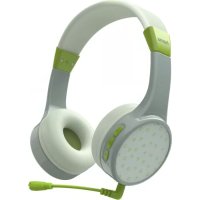
Teens Guard 00184112 - Bluetooth Headset HAMA - Free user manual and instructions
Find the device manual for free Teens Guard 00184112 HAMA in PDF.



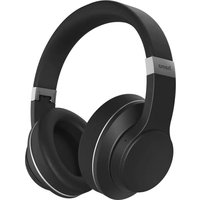
| Product Type | Bluetooth over-ear headset |
| Weight | 90 g |
| Bluetooth Technology | Bluetooth v5.1 |
| Bluetooth Profiles | HFP V1.6, A2DP V1.3, AVRCP V1.5 |
| Bluetooth Range | < 10 m |
| Impedance (headphone / microphone) | 32 Ω / < 2.2 kΩ |
| Frequency response (headphone / microphone) | 20 Hz – 20 kHz / 100 Hz – 10 kHz |
| Sensitivity (headphone / microphone) | 85 dB / -38 dB |
| Battery | Li-Po 3.7 V, 345 mAh |
| Power Consumption | 5 V, 300 mA max. |
| Charging Time | Approximately 2 hours |
| Battery life (music / talk) | 23 h / 25 h |
| Standby time | Up to 200 h |
| Main features | Play/Pause, volume, track skipping, hands-free calls, voice assistant (Siri/Google), multipoint |
| Package contents | Headset, USB cable, plug-in microphone 3.5 mm, manuals |
| Care and cleaning | Clean with a slightly damp lint-free cloth; no harsh detergents |
| Safety | Do not use while charging; maximum volume limited to 85 dB; automatic shut-off after 5 minutes without connection |
| General information | Brand Hama, model Teens Guard 00184112, non-commercial domestic use |
| Repairability / Spare parts | Non-removable battery; do not open or repair yourself |
Frequently Asked Questions - Teens Guard 00184112 HAMA
User questions about Teens Guard 00184112 HAMA
0 question about this device. Answer the ones you know or ask your own.
Ask a new question about this device
Download the instructions for your Bluetooth Headset in PDF format for free! Find your manual Teens Guard 00184112 - HAMA and take your electronic device back in hand. On this page are published all the documents necessary for the use of your device. Teens Guard 00184112 by HAMA.
USER MANUAL Teens Guard 00184112 HAMA
GB Operating Instructions
BG Pa60tha Hnctpykunia
FIN Käyttoöhje



GB Operating instructions 3
D Bedienungsanleitung 14
F Mode d'emploi 25
E Manual de instrucciones 36
NL Gebruiksaanwijzing 47
Istruzioni d'uso 58
PL Instrukcja obslugi 69
H Hasznalati utmutato 80
RO Instrueti deutilizare. 91
CZ Navod k pouziti 102
SK Navod na obsluhu 113
P Manual de instruções. 124
S Bruksanvisning. 135
RUS RykoBoDCTBO IO 3KcPnyatau. 146
BG PbKOBOIDCTBO3aekCnIooatau .157
GR Euyxepiδio o8nyiw 168
TR Kullanim kilavuzu 179
FIN Kayttöohje 190

GB Operating instructions
Thank you for choosing a Hama product.
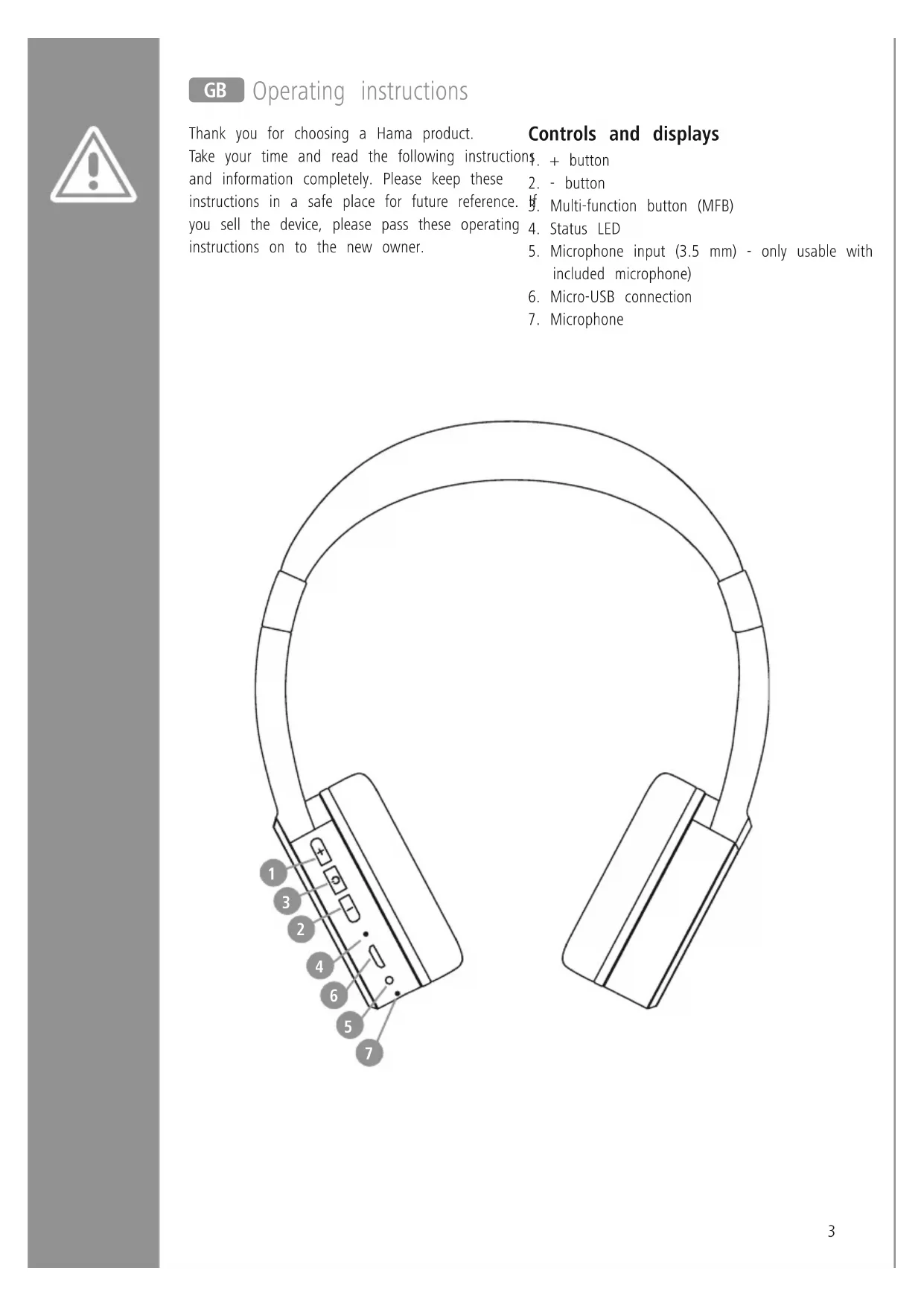
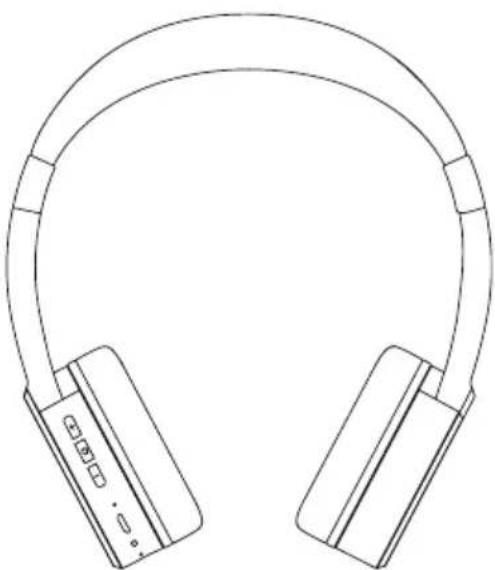
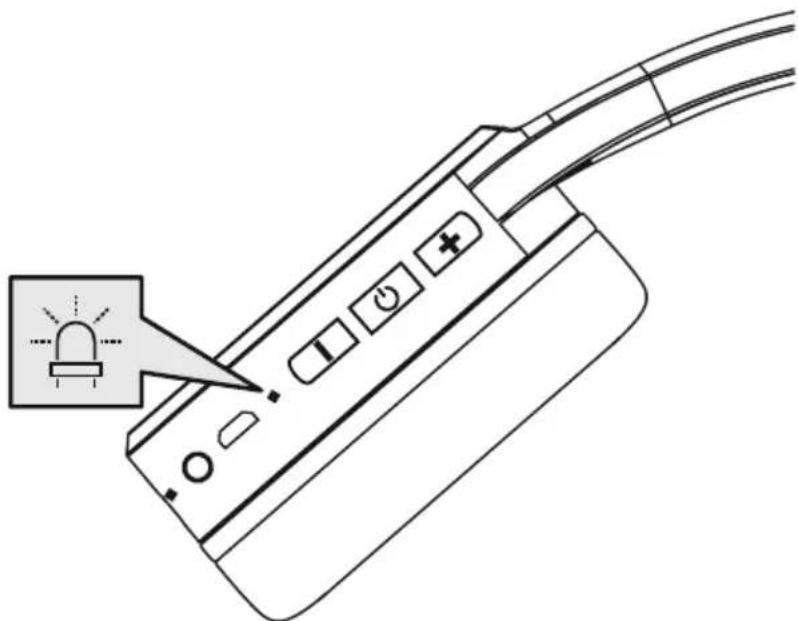
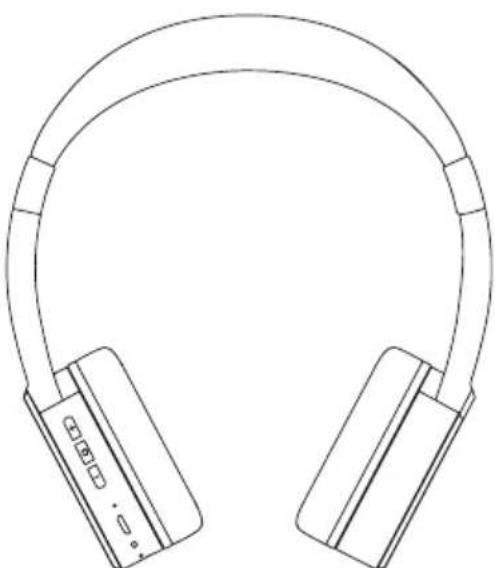
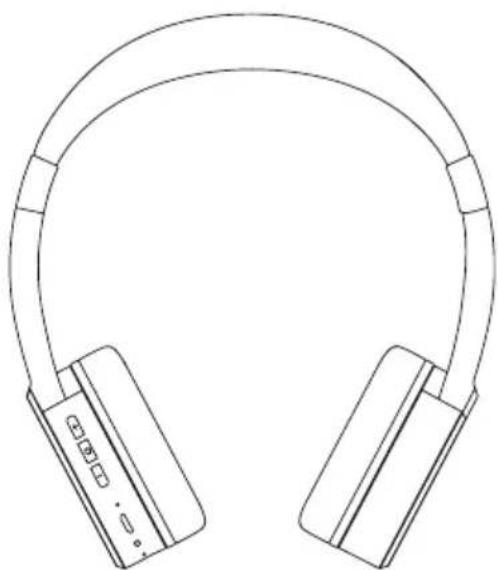
Controls and displays
Take your time and read the following instructions, and information completely. Please keep these 2. instructions in a safe place for future reference. 3. you sell the device, please pass these operating 4. instructions on to the new owner. 5.
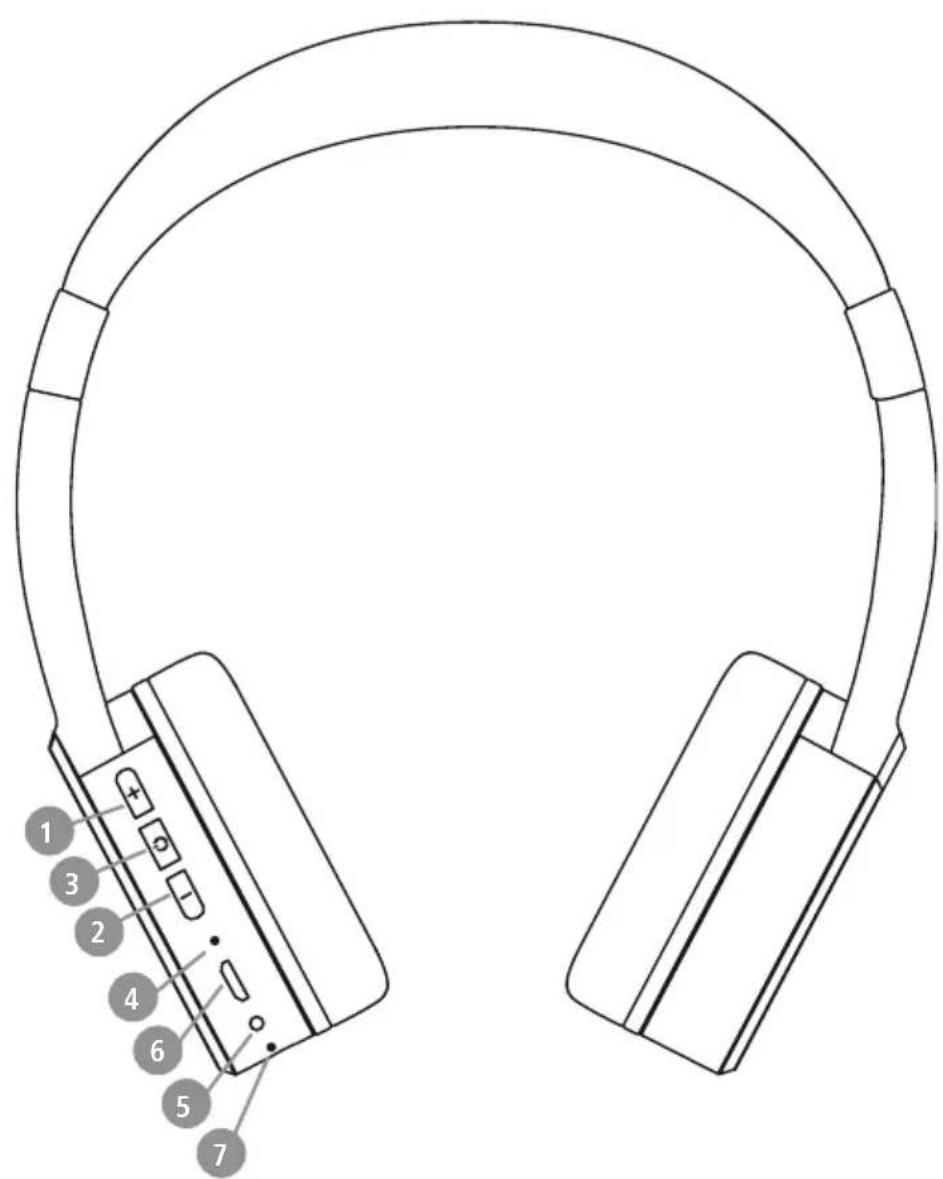
$ . + button
2. - button
Multi-function button (MFB)
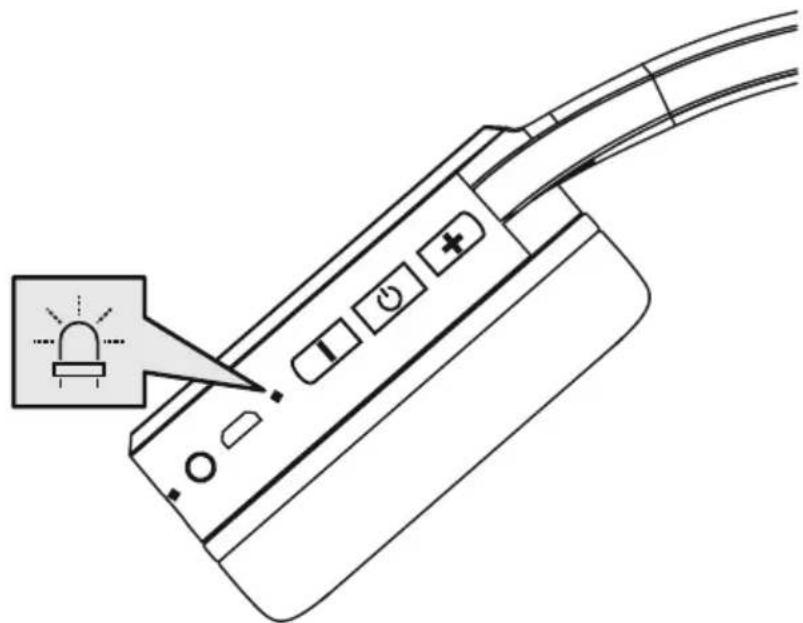
4.StatusLED
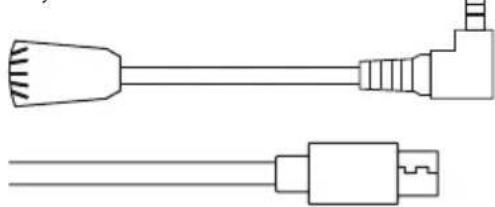
5. Microphone input (3.5 mm) - only usable with included microphone)
6. Micro-USB connection
7. Microphone

1. Explanation of warning symbols and notes
Warning

This symbol is used to indicate safety instructions or to draw your attention hazards and risks.
o specific
Note

This symbol is used to indicate additional information or important notes.
2. Package contents
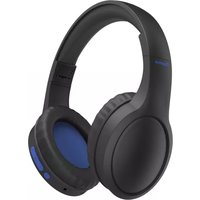
1x Bluetooth® On-Ear Stereo Headphones "Teens Guard"
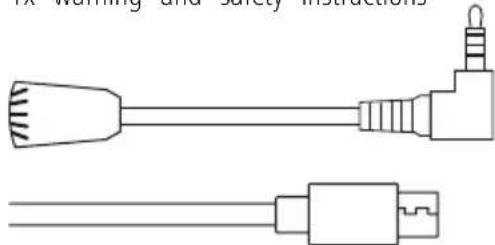
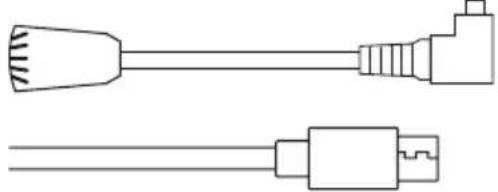
1x USB charging cable
1x attachable microphone (3.5mm)
1x quick guide
1x warning and safety instructions
3. Safety instructions
The product is intended for private, non-commercial use only.
- Use the product only for the intended purpose.
- Do not use the product in areas in which electronic products are not permitted.
- Do not attempt to service or repair the product yourself. Leave any and all service work to qualified experts.
- Do not open the device or continue to operate it if it becomes damaged.
- Do not bend or crush the cable.
- Do not drop the product and do not expose it to any major shocks.
- Dispose of packaging material immediately in accordance with the locally applicable regulations.
- Do not modify the product in any way. Doing so voids the warranty.
- Protect the product from dirt, moisture and overheating and use it in dry environments only.
- Do not use the product in the immediate vicinity of heaters, other heat sources or in direct sunlight.
- Only use the article under moderate climatic conditions.
- Do not operate the product outside the power limits given in the specifications.
- Do not use the product in a damp environment and avoid splashing water
While driving a car or using sports equipment, do not allow yourself to be distracted by your product and keep an eye on the traffic situation and your surroundings.
- The battery is permanently installed and cannot be removed; dispose of the product as a whole in accordance with the statutory regulations.
- Do not incinerate the battery or the product.
- Do not tamper with or damage/heat/disassemble the batteries/rechargeable batteries.
- Do not use the product during the charging process!
Warning - rechargeable battery

- Only use suitable charging devices or USB ports to charge the product.
- Do not use defective chargers or USB ports and do not attempt to repair them.
- Do not overcharge the product or allow the battery to completely discharge.
- Avoid storing, charging and using in extreme temperatures and at extremely low atmospheric pressures (such as at high altitudes).
- When stored over a long period of time, batteries should be charged regularly (at least every three months).
Warning - magnets

- This product generates magnetic fields. Individuals with cardiac pacemakers should consult a doctor before using this product as may affect the pacemaker's proper function.
- Do not store bank or similar cards with magnetic strips near the charging box or earphones. The data on the cards could be damaged or completely deleted.
Warning - high volume

High sound pressure!
- There is a risk of hearing damage.
- To prevent any loss of hearing, avoid listening at loud volumes for prolonged periods.
- Always keep the volume at a reasonable level. Loud volumes can damage hearing - even over short periods.
- Using this product limits your perception of ambient noise. For this reason, do not operate any vehicles or machines while using this product.
- Children's hearing is still developing and is much more sensitive than adult hearing. For this reason, make sure that children from the age of 10 do not use this full volume for long periods of time, despite the volume restriction to 85dB, and that smaller children under the age of 10 in particular also listen much more quietly.
- Please note that the product is intended for listening to music from mobile sources (MP3 player, mobile phone, etc.). When connected to stationary, powerful HiFi
components, the 85dB limitation may possibly be exceeded.

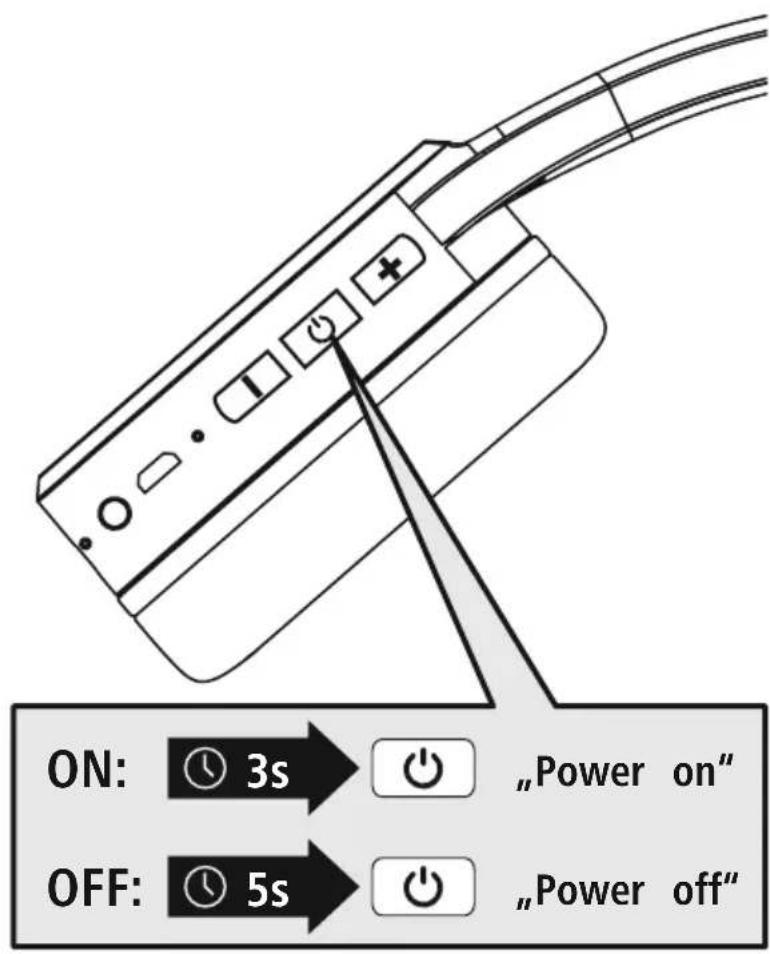
4. Switching on/off
ON
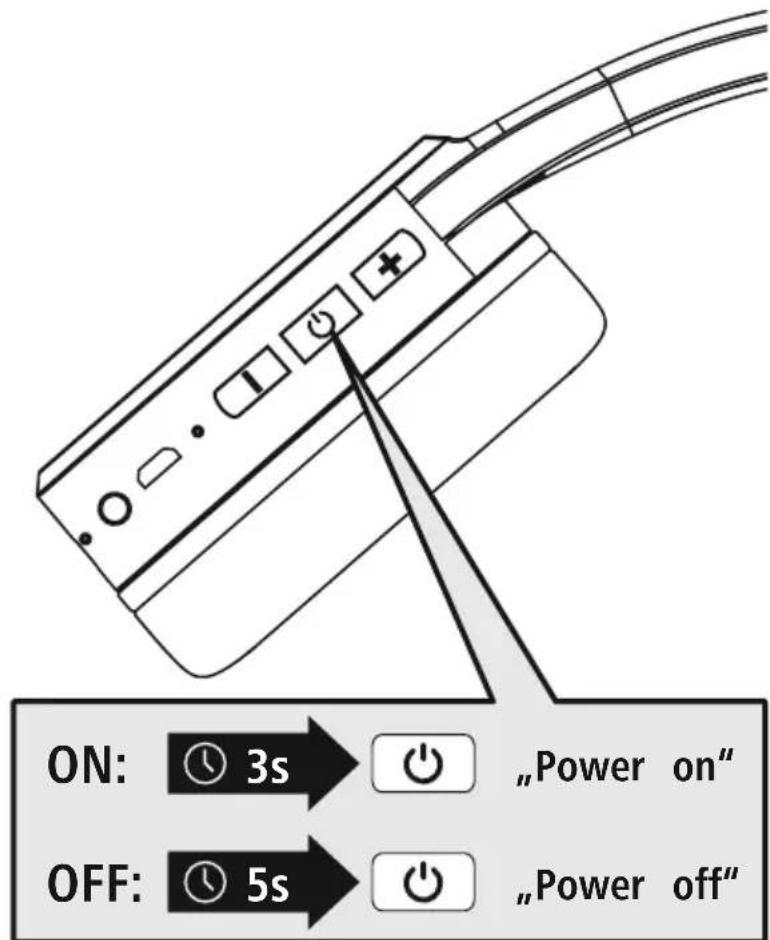
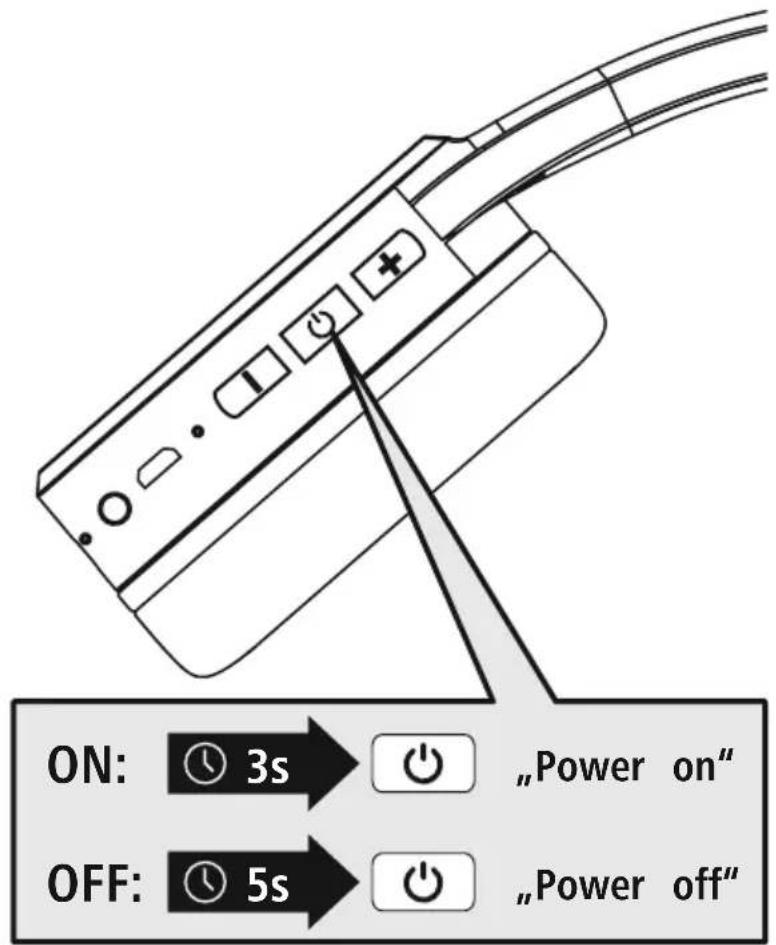
Press the MFB key (3) for approx. 3 seconds until the announcement "Power on" is heard and the LED (4) flashes blue.
OFF
To switch off, press the MFB key (3) for approx. 5 seconds until the announcement "Power OFF" is heard, the LED (4) flashes red and then goes out.
Note - Automatic switch-off of the headphones

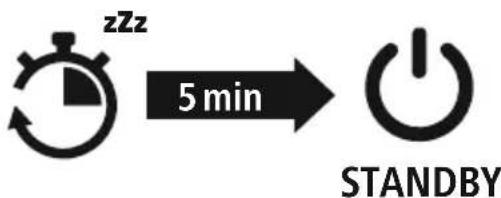
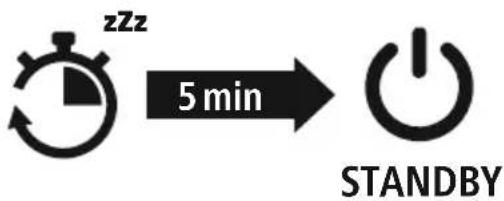
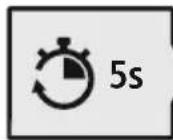
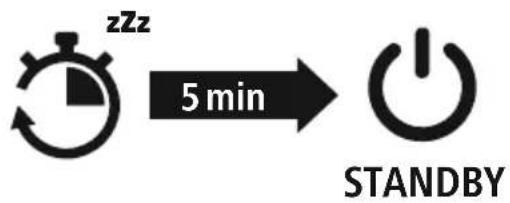
The headphones are equipped with an automatic switch-off mechanism. If there is no connection to your device within 5 minutes, they switch off automatically.

5. Charging
Fully charge the headphones once before using them for the first time.
Switch off the headphones and connect them
Ensure that the headphones are switched off before charging them.
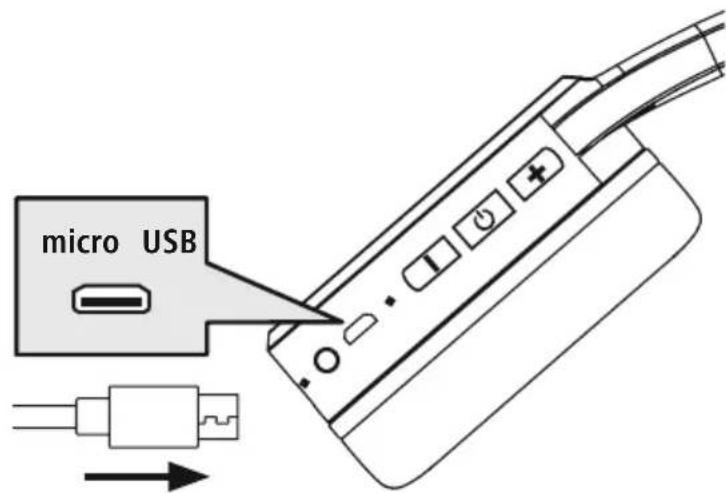
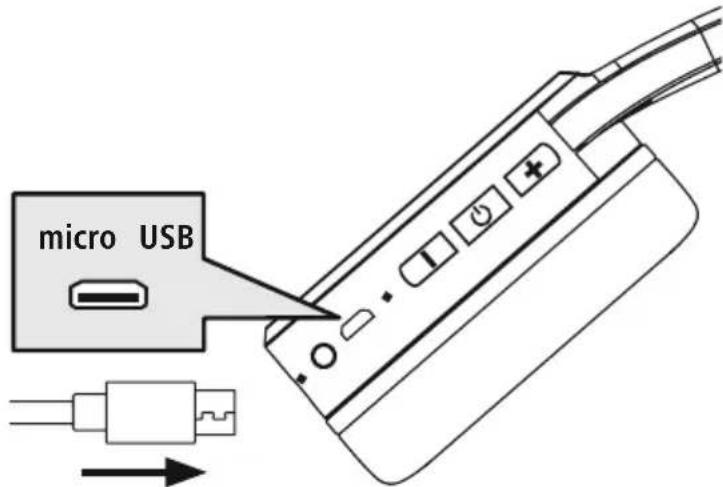
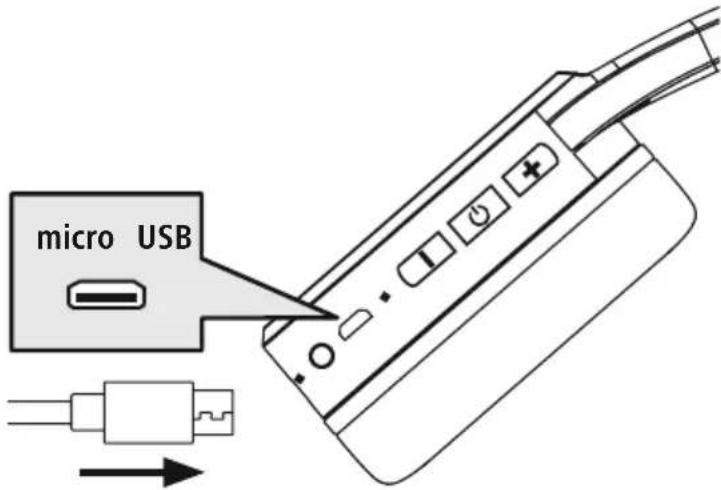
Connect the USB charging cable included to the charging socket (6). Connect the free plug on micro-USB charging cable to a suitable USB charger. To do this, consult the operating instructions for the USB charger you are using.
2 Charging process for the headphones
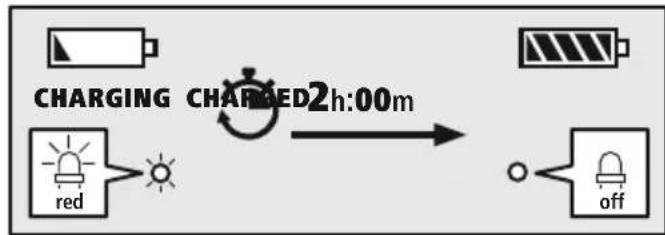
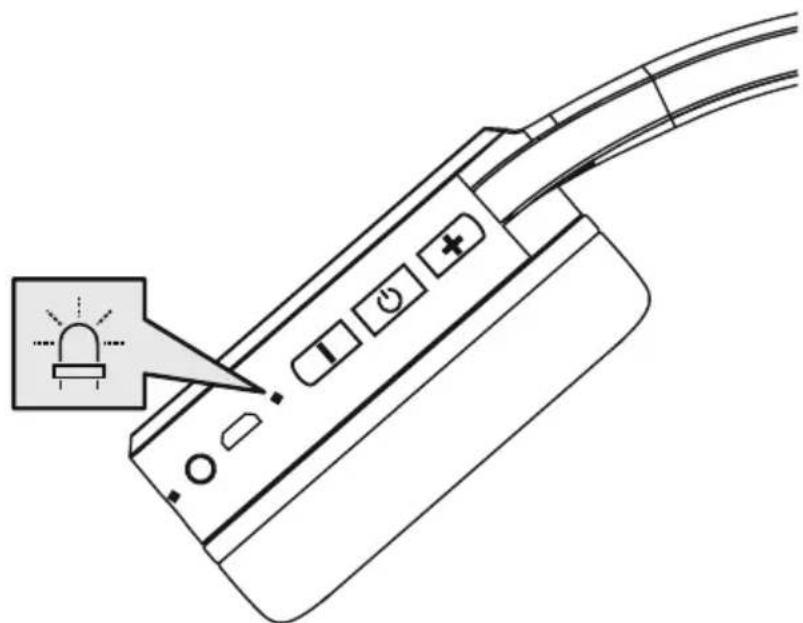
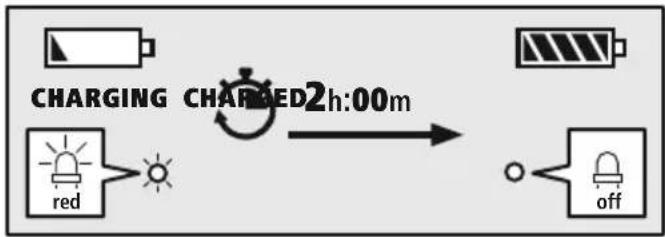
The LED (4) lights up solid red during the charging process.
Once the charging process is complete, the LED (4) goes out.
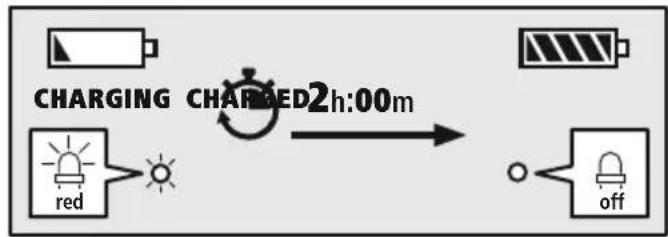
It can take up to 2 hours for the battery to be fully charged.
3 Battery capacity
When the headphone battery capacity is low, the LED (4) flashes red and the announcement "Battery Low" is heard.
Note

During the charging process, the Bluetooth connection is automatically disconnected.
6. Bluetooth pairing
Note - pairing

- Ensure that the Bluetooth-enabled device is switched on and that the Bluetooth® function is activated.
- Please refer to the operating instructions of your device for more information.
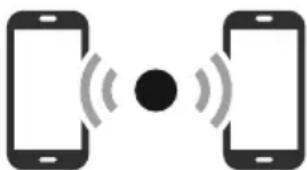
The headphones and the device should not be more than 1 metre apart. The shorter the distance, the better.
Switch the headphones on using the MFB key (3).
1 Check the status of the status LED (4) and the announcements
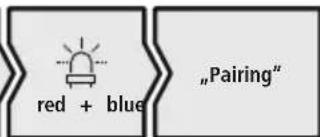
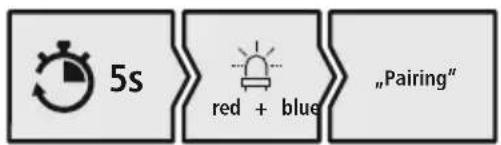
If the LED (4) is flashing alternately and the announcement is:
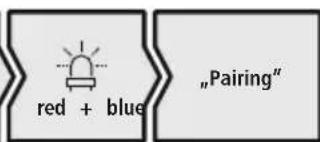
Headphones searching for a Bluetooth connection.
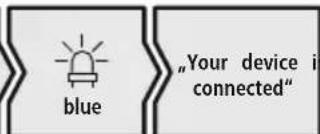
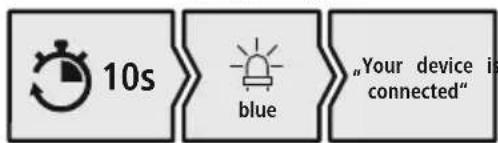
If the LED (4) is flashing and the announcement is:
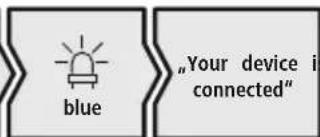
The headphones are already paired with a Bluetooth device.
Search using your device for the headphones (only required on the first connection)
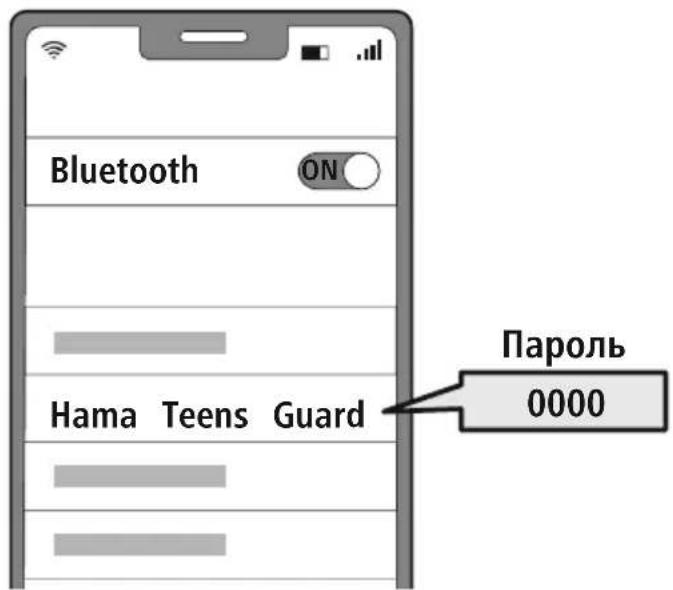
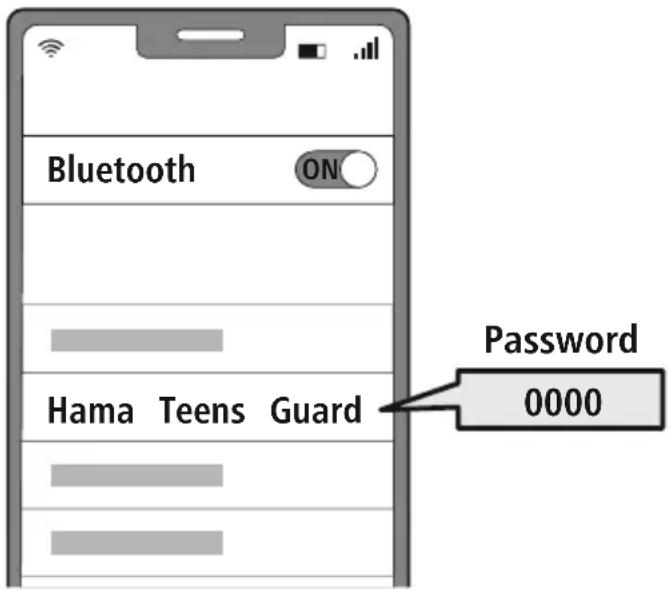
Open the Bluetooth settings on your device and wait until the list of found Bluetooth shows Hama Teens Guard.
Select Hama Teens Guard and wait until the headphones are shown as connected in your device's Bluetooth® settings.
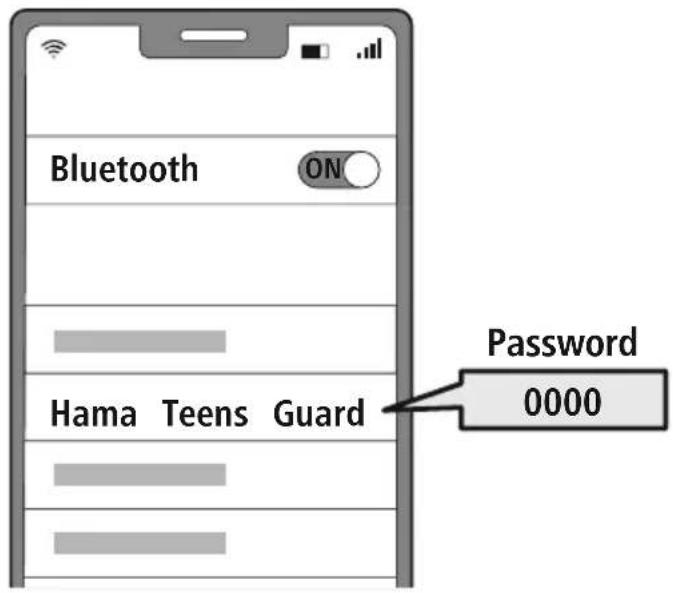
Note - Bluetoothpassword

Some devices require a password in order to connect to another
- If your device requests a password to connect to the headphones, enter 0000.
3 Multi-point technology
These headphones can connect to two Bluetooth-bleed devices simultaneously (multi-point).
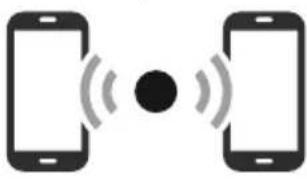
- First connect the first device to the headphones.
- Then deactivate the Bluetooth function on this device.
- Then connect the second device to the headphones.
- Activate the Bluetooth function on the first device again. The headphones then connect to this device too
4 Disconnecting the Bluetoothconnection
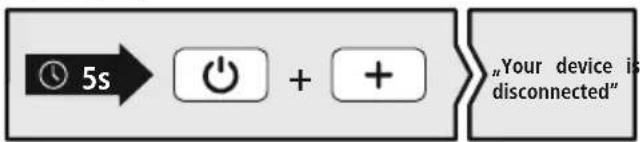
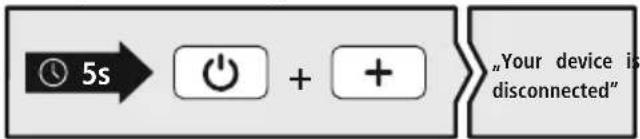
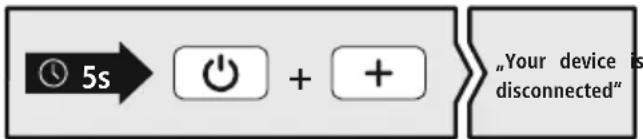
Disconnect the headphones via your device's Bluetooth® settings. The announcement "Your device is disconnected" will be heard.
Alternative:
7. Control elements
Note

- Please be aware that your terminal device must support some functions if they are to be used.
- Please refer to the operating instructions of your device for more information.
7.1 Voice assistant function
Siri/ Google
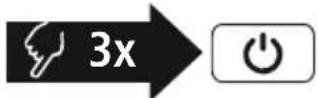
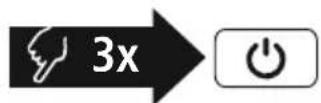
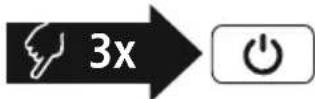
Press the MFB key (3) three times to initiate communication with your Siri or Google Assistant. As soon as you hear a signal tone, your voice assistant is ready to help you.
Note - Siri

Siri is only available on suitable devices running iOS 5 (iPhone 4s or later) or higher.
Note - Google Assistant

- The Google Assistant is only available on suitable devices running Android 5.0 or higher with Google Play Services, >1.5 GB of free memory and a minimum screen resolution of 720P.
- The Google Assistant App must be available on your device and be set as the default voice assistant.
7.2 Hands-free function
It is possible to use the earphones like a hands-free facility for your device.
Make a call
Dial the number directly via your device to make a call.
2 Accept a call
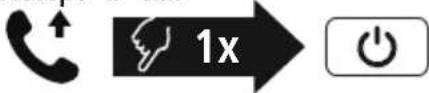
Press the MFB key (3) to accept an incoming call.
3 Reject a call
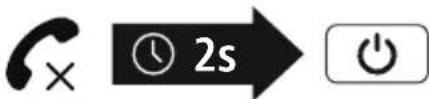
Press and hold the MFB key (3) for around 1 seconds or use your device to reject an incoming call.
4 End a call
During the call, press the MFB key (3) once to end the call.
5 Last number media
Press the MFB key (3) twice to redial the last number.
Note

The "Last number radial" function is only available for the device which was paired first in a multi-pairing situation.


7.3 Audio playback
Note

Please note that this function is only possible when a Bloch condition is active.
1 Start playback on your device.
2 Play / Pause

Press the MFB key (3) once to pause or start audio playback.
3 Next track

Press and hold the + key (1) for around 2 seconds to skip to the next track.
4 Previous track
Press and hold the -key (2) for around 2 seconds to skip to the previous track.
7.4 Volume control
1 Increase volume
Press the ^+ button (1) once to increase the volume. Once the maximum volume is reached, the announcement "Maximum volume" is heard.
2 Reduce volume

Press the -key (2) once to reduce the volume.
8. Technical data
| Bluetooth® headphones | |
| Impedance headphones / microphone | 32Ω / < 2.2kΩ |
| Frequency headphones / microphone | 20Hz - 20kHz / 100 Hz - 10 kHz |
| Sensitivity Headphones / microphone | 85 dB / -38 dB |
| Range < 10 m | |
| Bluetooth® technology Bluetooth® v5.1 | |
| Profiles HFP V1.6 / A2DP V1.3 / AVRCP V1.5 | |
| Transmission frequency 2.4 - | 2.48GHz |
| Battery Li-Po 3.7V | |
| Min. capacity 345 mAh | |
| Current consumption max. 5V | 300 mA-- |
| Total weight 90g | |
| Standby / music / talk time | max. 200 h / 23h / 25h |
9. Care and maintenance
Only clean this product using a lint-free, slightly damp cloth and do not use any harsh cleaners.
10. Warranty disclaimer
Hama GmbH & Co KG assumes no liability and provides no warranty for damage resulting from improper installation/mounting, improper use of the product or from failure to observe the operating instructions and/or safety notes.
11. Service and support
Please contact Hama Product Consulting if you have any questions about this product.
Hotline: +49 9091 502-0 (German/English)
Further support information can be found here: www.hama.com
12. Disposal instructions
Note on environmental protection:
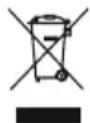
Following the implementation of European Directives 2012/19/EU and 2006/66/EU into the national legal systems, the following applies:
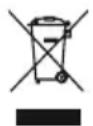
Electrical and electronic devices as well as batteries must not be disposed of with household waste. Consumers are obliged by law to return electrical and electronic devices as well as
batteries to the designated public collection points or to the point of sale at the end of their service. Detailed information on this topic is defined in the national laws of the respective country. This preses of the above symbol on the product, operating instructions or package indicates that the product is subject to these regulations. By recycling, reusing the materials or other forms of utilising old devices, batteries, you are making an important contribution to protecting our environment.
13. Declaration of conformity
Hama GmbH & Co KG hereby declares that the radio equipment type [00184111, 00184112] is in compliance with Directive 2014/53/EU. The full text of the EU declaration of conformity available at the following Internet address:
www.hama.com->00184111, 00184112-> Downloads.
Frequency band(s) 2402MHz - 2480MHz
Maximum radio-frequency power transmitted 2.5mW E.I.R.P.

6. Bluetooth Verbinding (Pairing)
Hinweis - Pairing

Remarque - Assistant Google
3 Multipoint technology
7.1 Funcão Voice Assistant
Siri/ Google
He crn6aute He nepexkmaTe Ka6eIb.
-ИЗбeraite падени Издени и He noДвергай Teero CnIbHbIM Bv6paunM.
Cpa3y yTnIIN3npyTe ynaKOBOHybIM MaTePnA1 CORlaCHO DeNCTByUOuM MeCTHbIM npEaHm NO yTnIIN3aUN.
He BHOCTeB 3dJIe KOHcTpyKTHBbIe n3MeHeHn. B pe3yIbTaTe 3TOrO IIO6bIe rapaHTnHbIe 063aTeJIbCTBa TepaOT CBOIO CNly.
He onyckaIte 3aarp3HHeHHn 3dennn, 3aunuainTe ero ot BnaH n neperpeBa. He nCnoJb3yIne n3dennne npn BbICOKO BnaXHOCTN
He nCnoJb3yIte n3dJIeB HEnocpeIcTBeHHoB 6n3OCTn OT CnCTEm OTONJIeHn, Dpynx NCTOuHnKOB TENJa NN NOI pPmblM COJIHeHbIMN Jyamn.
- INcnoIb3yIte n3dJIeNHe TOnbKO npn npneMJIeMbIX KJIMMATUeCKNX yCIOBnX.
-П ри Испоьзовани Издени He Дonyckай Te npeБышениnpedela MOцноTN,уka3aHHORO BTEXHnueCKNX XapakTepnCTNKax.
He nCnoJIb3yIte n3dJIeNIE BO BlaJxHoi cpeJe, n36eraIte 6pbI3r.
Bo BpemHa ABTomO6nJe JIn 3aHHTn aKTHBbIMN BuJaMn CnOpTa He OTBneKaITeCb, a CLeIte 3a DopoXHO N OcCTaHOBKO IN OKpyKeHHem.
- Akkymylantop yBnIeTcra TauHOapHbIM n He IoJIeXNT DeMOHTaKy, yTuIN3NpyTe N3JeJIne UeNIKOM B COOTBeTCTBUN C 3aKOHOdaTeJIbHbIMn IpeDnicaHnAMN.
He 6pocaIte aKKyMylarOpHyIO 6atapeIO nnNn3dJIne B OROHb.
He n3meHnTe, He neOpMpyuTe, He HArpeBaIe, He pa3bnpaIte aKKymyIaTOpbl/ 6aTaepKn.
He nCnoJb3yIe 3dJeIe BO BpeM 3apAdkn!
PpmeaHne

IcnoJb3yETc IJIa DOnoJIHnTeJIbHOro 0603HaueHn HΦopMaun Nn BaXhBix yKa3aHm.
2. Komnnekt noctabkn
1 HaKaJaIHbIe CTepeoHayuHNKn On-Ear
c Bluetooth
Teens Guard
1 3apdHbI USB-ka6ebIb
1 BCTABHO MKNKPOOH (3,5 MM)
1 KpaTKoe pyKOBOCTBO
16pouopa c npdeynpeinteHbIMyka3aHnA
n yka3aHnma n no Texhne 6e3oNachoE n
Ipeynpexdene - aKKymyTOp

Pa3peaetcncnOlb30BaTbIpyAKn TOnbKO COBMeCTMble 3apAnHbe yctpoiCTBa n USB-pa3bembl.
He nCnoIb3yIe HeucnPabHbIe 3apAHyIe yCTpOuCTBa IIN USB-pa3bEmbl H He nbITaNTECb IN peMOHTnPOBaTb.
He onyckaIte n36bItoHoi 3apJkn I rny6oko pa3pJkn n3dennia.
He xpaHnte, He 3apJxAte n He nCnoJIb3yIyTe yCTpOHTBO npn OueHb Hn3Knx N OueHb BbICOKNX TeMnepaTypax N OueHb Hn3KOM aTMocΦepHom DaBJeHn (HaNPmep, Ha 60nbux BbcOTax).
- Пи дитьном xpaheHn nperylaHpo 3apxkaTe n3dJIne (He pexe oNHoro pa3a B KBaptan).
IpeDynpexdeneHne BBICOKa rpoMkoCTb

- BbICOKa 3ByKOba Harpy3Ka!
CyuieCTByeT pnck yxuienycnya. - TTo6bI He DoIyCTnTb Notepn Cnyxa, He nCNoJIb3yIe HayUHNI npN BbICOKOM ypOBHe rPOMKoCTn B TeueHne IInTeJIbHOrO BpeMeHN.
IopdepxnbTe HopMaJIbHyIO rPOMKoCTb. Bo3deIcTBne rPOMKOro 3ByKa, B T.Y. B TeueHnE KOpOTkoRo BpeMeHN, MoXeT npNBecTN K NOBpeJDeHIO OpraHOB Cnyxa.
Bo Bpem EKcnnyatauun N3dennn CHNxaetc nTeeneHb BocnpnTnOkpykaUx 3BykoB n WymOB. 3aPpeaaetc nCNoIb3OBaTb N3denn Bo Bpem BoXdEHn ABTOMO6nna ynpabNeHn MaunHaMn. - OprahbI cnyxa DeTee eue pactyT n 06naaHT 3NaHTeBHO 60JIbWe BOCpnnMnHBOCTbHO, yem y B3POcJIbIX. IIO3OMy I03a6ObTecb O TOM, YTO6bI DeTn CTapwe 10 JET N3-3a ORpaHnueHn rPOMKoCTn Ha yPobHe 85 d5 He IcNoJIb3OBaJIe ee B TeueHne IINTEJbHOrO BpeMeHn, a DeTn IpexJe BCero Do 10 JET CNYsAJn Ha 3NaHTeBHO MehBSeM yPobHe rPOMKOCTn.
-ПOMHHTe O TOM,ЧTO ИЗДЕЛппедназнayeho ДЯ ПОССУWIBAHИМу3bIKN C MO6иьны ИСТОЧНКOB(MP3-Плeep,MO6иьны Телфон T.Д.).При подклчeyн К STaцноHapHBIM,MOUHBM HiFi-
PpeynpeKdeneHne

MaHHTbl
- N3dJIne co3daet MaHHTbIe noJI. PpU nCNoJIb3OBAHn KApDIOCTMMyJrTOPOB npOKOHcyJIbTupyITeCb C BpaOH MHa npEIMET COBMecTUMOCTN 3dJIIN C TaKIMN yCTPOICTBAMN.
He xpaHnTe 6aHKOBCKne nn anHaJoruHbIe KapTb C MaHHTHOI NOLOCOI PdOM C 3apAHyIM 6OKCOM Nn HayuHnKaMn. 3TO MoKET npNBecTN K NobpeXJeHIO KapT nn ydaJIeHIO COxpaHeHHo HnHX nHΦopMaun.

4. BkJIOueHne/BBIKJIOueHne
ON
Haxmte Khonky MFB (3) uyepxuBaTe ee haxaToB TeueHne npImepHo 3 c, noka He pa3daCTcay yCTHOe ONOBeUeHne "Power on" H He 3amraet CnHn CBToNDoD (4).
OFF
Дя Вькюченин НжмITE KhoNY MFB (3) и уdeckхиBaHTe ee HaxaToB TteHene 5 c, noka He pa3dactc yCTHOe onOBeSHeNe "Power off"и He 3amnraet KpaChbI CBTeOJIOd (4), KOTOpBiy 3aTEM NorachET.

5.Заряда
Ipei nepBbIM npmHeHnEM Heo6xOJIMO NOJHOCTbIO 3apJITb HayuHnK.
1 BbIKIOUeHne n noKIOUeHne HayuHnKOB
Y6eIntecb TOM, YTO pepe3aprkoHayuHnKn BbIKIOueHbI.
IopKnIOHnTe npnilaraemb 3apndhB USB-ka6eB K 3apndHomy rHe3dy (6). IopKnIOHnTe Cbo6oHbI uTKepe 3apndHoro Ka6eMa Micro-USB K COOTBeTCTByOuEMy 3apndHomy yCTpoiCTBy c USB-pa3bEmom. Co6nJaTe pykoBocTBo no ekCnpyataun nCnoNb3yeMOro 3apndHoro USB-yCTpOietBA.
2 Ipocecc 3apdKn HayuHnKOB
Bo Bpem3apdkn CBeToHNO4 (4) NOCTOHHO rOpNT KpaCHbIM CBeTOM. Pocne 3aBepWeHn3apdkn CBeToHNO4 (4) rachet.
Длг поног зараздкakkyмлгота можетnotpe60BaTbсdo2acob.
3 EMKoctb aKKyMyJrTopa
Ipn Hn3kOM ypOBHe 3apraJa aKKyMylTopa HayuHnKOB CBeToNDoD, (4) Mrraet KpaChbIM n pa3daetc yCTHOe ONOBSeHne "Battery Low".
PpimmeaHne

Bo BpeMa 3apAaKn CoeHHeHne BluetoBbTOMaTuYeCK N BbIKHOaETcA.
6. CoeHHHeHne Bluetooth(conpJxKeHne)
Yka3aHne — coppXeHne

- Y6eIInTeCb, yTO OKOHeHoe yCTpOiCTBO C BO3MOxHOCTbIO COeINHeHnAYepe3 Bluetooth® BKNIOueHo n Bluetooth®-coeINHeHne yCTaHOBJIeHo.
CobnDae cooTBeCTByuOuye yka3aHn pyKOBoCTBa no KcNpyataun BaIero OKoHeHoro yctpoiCTBa.
HayuHnKu N OKOHeuHoe yCTpOInCTBO DOJXHbI HaxoDHTbcra Ha paCToaHn He 60JIbSe 1 M npyr ot npyra. Yem MeHbSe pacCToHne, Tem lyUhe.
BkIIOHnTe HayuHnKn HaxKaTneM KhoNk MFB (3).
1 PpOBepbTe cTaTc CBeToaNoIHO rHmKAtopa CoCTOHHN (4) uYCTHbIe onoBeeHn.
Pn nonepemehHom mraHn CBeToNDoA (4) n yCTHom onOBeueHN:
HayuHnKn nbIaOTc yCTaHOBNTb CoeINHeHne Bluetooth®.
Pn Mrran CBeToAno4 (4) n yCTHom onOBeueHN:
HayuHnKnyxye yctaHOBnIcoeINHeHne c OKoHcHbIM yCTpOINCTBOM C Bluteoth
HaIInTe Ha BaWeM OKOHeHOM yCTpOiCTBe HayuHNKn (Tpe6yETc TOnbko npn nepBOM coeINHeHn).
OTkpOte MeHIO HAcTpoe BluetoHa BaWem OKOHeuHom yCtpoiCTBe n NOJoxDnTe, NOKA B CnICKe HauDeHHbIX yCtpoiCTB C BluetooHa noaBNTcHama Teens Guard.
Bb6epTe Hama Teens Guard n noOxDte, noka HayuHnKn He OTo6pa3rTa B KaueCTBe nokKnoueHHoro yctpoiCTBa B NaCTpoiKaX BluteoBawero OkoneHoro ycTpoiCTBa.
PnmuMeaHne -napoB Bluetooth

IJIa HeKOTOpbIX OKOHeuHbIX yCTpOInCTB npn yCTaHOBJeHN CoeINHeHn C pyrIM BHTooth yCTpOInCTBOM Tpe6yEtca napoJb.
- EcnB Baae okoheHoe yctpoiCTBO Tpe6yET erO BBoDa, BBeIte IIN CoeHNHeHn C HayuHKam npoNb 0000.
TexHOrIgM Multipoint
3TN HayuHKn MoXHO CnHXPOHn3NPOBaTb OINHO BEmHo C DByMa OKOHeYhIMN yCTpOcTBaMn, NOePxxBaHouMMn dyHKnIO Bluetooth (TexHONor Mulpoint).
- Chaujana cHxpoHn3npyTe c HayuHnKaMn nepBoe oKOHeuHoe
YCTPOINCTBO.
3aTeM DeaKTbPyIe FyHKuHo BluetOHa 3TOM OKOHeYHom yCTpOcTBe.
- Pocne 3TOO CnHXPOHN3NpyNe C HayuHKaMn BTOPOE OKoHeHoe yCTpoNCTBO.
- ChoBa aKTHBnpyIte ΦyHKzIIO BluetoothHa nepBOM OKOHeHOM yCTpOJCTBe. Tenepb HayShnKn CnHXPOHN3npyIOTcN C 3TNM OKOHeHbIM yCTpOJCTBOM
Pa3beINHeHne coeINHeHn Bluetooth
Pa3beHnHte HayuHnK B HacTpoKax Bluetobauero OKoHeuHoro yCTpoNCTBa - pa3daCTcaycthoe onOBeueHne "Your device is disconnected".
AblepHaTbHbI BapnHT:
7. ΘνημεMeHTbI ynpaBJIeHn
PpimueaHne

- 06paTHTe BHMaHHe, yTO NOIepKKa HeKOToPbIX ΦyHKcN 3aBcNt OT BaUero OKoHeuHOYCTPOINCTBa.
CobIIOaIe COOTBeTCTByIOUne yKa3aHn pyKOBoDCTBa nO kCNpyatauIN BaWero OKoHeHOrO yCTPOIcTBa.
7.1ФункциИнтелктуальHoro roJocOBOrO nOMouHnka
Siri/ Google

Tpnxbl Haxmte MHorofoyHKUHOHaIbHyO KhoKy MFB (3), 706bl 3anyCTnTB 6MeH daHHbIMN C Siri nn Google AccnteHTOM. KaK ToIbKO pa3dactc 3BykoBOu CnHa, BaW roLOCOBNIOMOUnk 6yDet rOtOB K pa6ote.
PpmeaHne — Siri

CepBc Siri doctyhen ToIbKO Ha COOTBeTCTByOuXx OKoHeHbIX ycTpoiCTbax c iOS 5 (HaunHa c iPhone 4s) nn60nee no3dHe BepCne.
Приимechахе — Google Assistant

CepBc Google Assistant IOCTyIeH TOJIbKO Ha COOTBeTCTByOIIux OKOHeuHbIX yCTpoIcTBax C Android 5.0 mnn 6oJee no3dne BepCne c cepBncamn Google Play Services, >1,5 T6 CBO6OHDn nAMrN mMHmAlhBbIM pa3peWeHem kpaHa 720 nIKceJe.
- PnpnoxkeHne Google Assistant DOJXHO 6bTb DOCTyHNO Ha BaIeM OKOHeuHOM yCTpOINCTBe HAcTpoEHO B KaueCTBe CTaHApTHOrO rONOCOBORI NOMUHNka.
7.2ФункцягромковCBЯЗN
Bb TaKke MoKeTe NcNoJIb3OBAbH HayUHnKu B KaueCTBe yCTpoNCTBa IJIra TpOMKO TeJeΦOHHO CBa3I Uepe3 OKoHeuHoe yCTpoNCTBO.
CobepuNTb Bbl3OB
BbIepeHHeMep HEnocpeDCTBeHHHO HA OKOHeuHOM yCTpoNCTBE, YTO6bl COBepWHTb BbI3OB.
IipHHATb Bbl30B

OДнOKpaTHo HaxMnte KHONKy MFB (3), yTo6bl npnHrTb BXODIaN Bbl0B.
OTKJIOHHTb Bbl3OB


HaXmTe n ydepXnBaIte KhONky MFB (3) HaxaToB TeueHne npImepHo 1 c nnncnoJb3yIte BaIe OKOHeuHoe yCTpOInCTBO, YTO6bl OTKIOHNb BXOJaun BbI3OB.
3aBepwnb Bbl0B


Bo BpeMa pa3roBopa OndHOKpaTHo HaxMITE KhoNky MFB (3),TO6bl 3aBepuNTb Bbl3OB.
IobTOpHbI Ha6Op

Двжды НжмITE KнОКу MFB (3),ЧTo6bl HabpaTb NocJeHn HabpaHHbH Homep.
Примechане

Функши NOBTOpHOro Ha6opa DoCTynHa TOnbKO IIn OKOHeuHOrO yCTpoiCTBa, KOtOpoe 6blno Chauana CnHXPOHN3IpOBaHo.
7.3 Bocnpo3BeDeHne aydno3aNcei
PpimeeaHne

Uyntte, yTo 3a fynkunna octynha toIbko npn aKtubHom Bluoteoth-oeinHeHH.
1 BkIIOUHTe BocnpoIN3BeDeHne Ha OKOHeuHOM yCTpoINCTBE.
2 Bocnpoun3BedeHne/ny3a
Ondokpatno haxmte KhoNky MFB (3), 4to6bl npnoctaHOBNTb nn 3anyCTnTb npoIrpblBaHne My3bIKn.
3 Cnedyuou n Tpek

Для nepexoda K cneDyIOUeMy Tpeky HaxMITE uYdepxHbAte KhONKy + (1)В TeueHne npIMepHo 2 c.
4 PpebIyuun TpeK
IJIa nepexoda K npedbyuemy Tpeky Haxmnte u ydepXnBaTe KhoNkY - (2) B TeueHne npimepHo 2 c.
7.4 PerynipoBka rpoMkoCTN
1 YBeIuHHe rPOMKocTn
Для NOвьшени ГомКОCTи OДнOKpaTHO HaxMITE KHOПу + (1). Пп доctижени МAKСмальнoi ГOMKОCTи pa3daetcЯ cTHoe onOBeшени "Maximum Volume".
2 yMeHbWeHne rpOMKoCTn

Дя yMeHbWeHn rPOMKoCTn OdHOKpaTHO HaxMnte KhoNky - (2).
8. Texhnueckne xapaKTePnCTnKn
10. NCKJIIOUeHHe OTBetCTBeHHOCTn
Hama GmbH & Co. KG He HeceT OTBeTCTBHeHOCTn 3a NOBpeXJeHHNRA, BO3HNKUne B pe3yJIbTaTe HeHaJNeJaIeYcTaHOBKn, MOHTaKa I HeHaJNeJaIeero NcNoJIb3OBAHn I3JeIIra NIn HecO6JIIODeHHr Tpe6oBaHn pykoBOdCTBa n O KcJIpyatauIN n/nn yka3AHn no TexHKe 6e3OnaCHOCTn.
11. CepBnchoe 06cnyKbAHne n noDnepKka
PnB03HKnHOBeHH BONpocOB nO n3dennIO oBaPsauTecb Cnyx6y noDepKk Hama.
Topyaa: +49 9091 502-0 (Hem./aHrn.)
IOnonHnTeJIbHyIO INΦOpMaUIO NO TexHnueckO NODepXke CM. Ha caTte www.hama.com
12. Yka3aHn no ytnln3aun
OxpaHa OkpykaIouei cpebl:
C MOMeHTa nepexoHa NaHOnHaJIbHOrO 3aKHOJaTeIbCTBa Ha eBponeNCKne HOpMaTINBbl 2012/19/EU n 2006/66/EC DeiCTByET cJeNyUoUee npabnlo:
Ytun3aunna 3neKtpnuecknx n 3neKtpoHHbIX npnbopOB, a TAKKe 6aTapeB BmecTe C 6bITOBIM Mycopom He pa3pe7aetc. NToPebntel no 3akOHy 083an Ytun3npOBaTB 3neKtpnueckne
иэлкгоньпprборы,a taKxe 6aTapeи NO nCTeHEnn Cpoka nx rOndocTN B CneuaJIbHO npedHa3NaueHHbIXДЯ 3TOrO O6UeCTBeHHbIXpyHKtax c6opa nIN BnyHKTe npodax.ДeTaJIbHaerperIaMeHTaцяг STHX Tpe6OBaHIn OcyuSceTBJAEcTcAOTBETCTByUOUM MeCThIM 3aKOHOdaTeJIbCTBOM. Ha Heo6xOImocTb co6IIODeHn DaHHbIX npednicaHn yka3bIbaet Oco6bI 3NaQOK Ha n3dJIHn, HNCTpykCnno EKcnIyatauHn IIN ynaKOBKe.CdaBaR 6bIBWe B ynpTope6JIeHN npi6Opbl/6atapen Ha nepepa60Ky,BtopuHyIO nepepa60Ky IIN Ha yTuIN3aUIO B dpyor fOpMe,Bbl BVOCITE BaXHbIB BKlad B Oxpahy OkpyxaUoIe Cpebl.
13. CeptnФнкaT COOTBETCTBna
HactoHamaGmbH&CoKG3aBnAeT,TOpaNoo6OpyOBAHne Tnna[00184111, 00184112]coOTBeTCTByeT Tpe6oBaHnM DInpeKTHBbI 2014/53/EC.CNoJIhBM TeKCTOM DeKlapaunO COOTBeTCTBnTpe6oBaHnM EC MoXHO O3HaKOMMTbc 3Decb:
www.hama.com->00184111, 00184112-> Downloads.
Диana3OH/Диana3OHBIчacToT 2402 Mf-2480 Mf
MaKcImaJIbHaI n3Nyuaemra MoUHocTb 2,5 MBT E.I.R.P.

BG PbKOBOJCTBO 3a ekCnIooatauia
Blaorodapm Bn, ye cte n36paann npoynk Ha Hama!
OTdene Bpeme n npoote n3uio CneBaunTe HnCTpyKnnn uka3aHn. Cne TOBa 3ana3eTo BA pkoBOcTBO 3a ekCnloatauaHa cnypHO MRCTO, 3a da MoXete Da npaBnte cnpaBKn B H npn Hxnda.AkO npoandaTe ypea, PpeaTe TOBA pkoBOcTBO 3a ekCnloatauaHa HOBnA CO6CTBeHnK.
Elenentn 3a ynpabIeHne m HdkaTopn
- ByTOH +
-
- 6yToH
- MyIITnФункиоHAJIeH 6yToH (MFB) 20 LED 3a cTaTyc
- Bxod 3a Mnkpofoh (3,5 mm - moxe da ce n3noJ3Ba cmo 3a npIoXeHnra Mnkpofoh)
- Micro USB nopT
- Minkpooh

1. 06aCHeHne Ha npEynpeDnteHn CmBOLN n yKa3aHna
PpeynpexkdeHne

I3noJI3Ba ce, 3a Da o6o3HaUaBA yka3aHne 3a 6e3oNaCHOCT nIN 3a Da HAcOu BHIMaHNeTO KbM KOHKpeTHn ONaCHOCTN n PnCKOBe.
Yka3aHne

H3noJ3Ba ce, 3a da 06o3Haayaba DonbHnTeHa HhOpMaunu nn Baxn yka3aHn.
2. CbIbpxKaHne Ha onaKOBkata
1 x Bluetooth On-Ear ctepeo cnyuwaikn "Teens Guard"
1xUSB3apekdaa ka6eI
1X BKNIOUVAu Ce MUKPOΦoH (3,5 mm)
1XKpaTKaNHCTpyKLUN
1x INHCTpykun 3a npedynpexdHne OcNrypaBHe Ha 6e0nacHOCTTa
3. Yukazannha 3a 6e3onacnoct
-П рожукът e предвидан 3a Лучна, HectonaHCKa 6ntoBa ynotpe6a.
- N 3noJ3BaIte npOyKta cMo 3a npeBnIeHaTa ceI.
- He n3noJ3BaIte npOdyKta B 30Hn, B KOnTo He ca pa3peuEHN eNeKtpoHn ypei.
He ce onntBaIte camn da o6cnyxBate nnn peMOHTnpaTe npOyKaTa. OCTabete BCaKaBa texHuecka NpDpBxka Ha KOMneTeHTHIne CNeuaJIuCTn.
He OTBapnTe npOdykTa n npn nobpea He npoBjXaBaTe da ro n3NON3BaTe.
He npueynbaute He npntnckaite Ka6eJa.
- He no3BoJyBaIte Ha npOdyKta da naDa n He ro n3JaarTe Ha cnHn Bn6paun.
- N3xBpIeTe ONaKOBbHnMaTePnAJI BeDHaRa CbJlacHO DeiCTBaUnte Ha MrcTo pa3nope6n 3a N3XBpJIHe Ha OTnAduN.
He npabete npomEn B ypea. Taka ue 3ary6nte npabo Ha BCaKaBn rapaHnOHH npetehnn.
- Pa3ete npOdykTa OT 3aMbpcBaHe, Bnara n npperpaBaHe n ro n3noJ3BaIte cMo B cyxN NOMeUeHn.
He n3noI3BaIte npOdykTa B HEnocpeIcTBeHa 6nI3OCT Do OTOnJIteJHn ypei, DpyrN N3TOUHnHa Ha TOnIIHa IJI Na HApUpeKTHa CJIbHuYeBa CBETJInHa.
- N 3noJI3BaIte npOyKta cAmo npn yMepeHn KInMaTUnHn ycNoBn.
He n3no3BaIte npOyKta n3BbH HerOBnTe rpaHnHa MoUHOCTTa, NOCOeHN B TexHueCKnte daHHN.
He n3noJ3BaIte npOdykTa BbB BnaJHa CpeJa m 368raIte BoDn npbckn
- ПО Време На nbTyBaHTo C MПС ИИспорTeурд. He pa3peшаВaIte Дa 6bIeTe OTKIOHЯBAHOT Baшия поДуКТ И BHMaBaIte 3aПОLOXeHNeTO рп ДвIXeHne И BaшаТа OKOLHa cpeDA.
- AkymylatopHaTa 6aTePnE HeNoDbNxHo BrpaJeHa H He MoKe Da Ce Maxa, N3XbPJIeTe npOdyKaTo CnopeD 3aKOHOBtpe pa3nopeD6n.
-HeXBbPJIaIe6aTepeTAtnnnpOdykTaBOrbH.
He npomehnTe n/nnn He dephiopmnpaTe/ HarpBaIe/pa3rno6baIte akyMylatOpHnTe 6atepn/6atepnnte.
He n3noJ3BaIte npOdykTa no BpeMe Ha 3apeXdaHe!
Ipeynpexdene - BaTePn

- 3a 3apejdahe n3noJ3BaIte caMo noJxOJaU 3apJHn yCTpoJcTba nn USB n3B0dn.
- No npHnHe n3no3BaTe deeKTHn 3apAnu yctpoNCTBa nn USB n3bOu n He onNTbaTe da rN nonpaBte.
He no3B0JBAIte npOyKta da ce 3apeXda NOBEue ot Heo6xOIMOTO nIa ce pa3peXda HnblHo. - 368raBae cBxaHene, 3apeXdaHe n 3n0n3BaHe npE kCTpeMn Tempeatypn n 3KIOUHTeHNO HnCKO HaIraHe Ha Bb3dYxa (kato HapnpMeP Ha rOJIemn BvCOuHN).
- Ppi no-npOdbIjxNteJHo cbXpaHeHne I03apExJaIte nepNoDnUHO (noHe BeHbX Ha Tprn Meceua).
PpeynpekdeHne -MaHNTu

- PpOdykTbT reHepnpa MaHnHTn noJeta. JIuata CbC cbPdChn CTmMyNatOp n Tpr6Ba Da ce KOHCyUInpat C nekap npedn ynoTppe6a Ha npOdyKTA, Tb' KATO cyHKnraHa cbPdChn CTmMyNatOp MoKe da 6bJe HApyuSha.
- EC Адруг Рдобн Картс Магншп Ленти He БИВа Да СьхаяВВ ББИЗСТ До ЗардНОТ YСТРОДСТВО ИИСУWAДКITE. ДаHHNTe OT KAPТАТа могат Да БДдТ ПОВрededн ИИ N3ТРИТN.
PpeynpeXdHne - cIneH 3ByK

- TOnrMo aKcTnH0 HaJIraHaIe!
CbueCTByBa onaCHOCT OT yBpeKdaHe Ha cnlya.
3a Na 6bNe ppeoTbpateHa 3ary6a Ha cnyxa, e n36yraTe CnyuHaHeTo Ha cnJeH 3ByK 3a Dblr nepnoD OT Bpeme. - PoiDbpkaTe CnIata Ha 3ByKa BnHaN Ha pa3ymHO HNO. TOnMaTa Cnla Ha 3ByKa MoXe -Dopn npMakn pOobJnxTeHocT - Da IOBede Do yBpeKDaHn Ha Cnyxa.
- Ynotpe6ata Ha npodykta orpaHnUaBa Bb3npneMaHTo Bn Ha shymoBe ot OkonHaTa cpea. 3aToBa no Bpeme Ha ynoTpe6ata He ynpabJaBaTe aBtOMOuN nn MaunHn.
CnyxbHa Deata BCE Oe E B npocc Ha pa3Bntne H e MHoro N0-ycbCTBNTeH, OTKoIKOto T03n Ha Bb3pactHnte. No Ta3n npuHa Tpa6Ba Da ce norgxnte Deata Hnd 10 roHHa He n3no3Bat npoDbjXnteJHO PbHata Cnna Ha 3Byka, Bbnpek OrpaHueHneto ot 85 dB, a Deata no10 roHH da cnywat n ooe no-TnxO. - 06bρhe TBHIMaHne, Ye n3dJIeNo e npedHa3NaueHo 3a CnyuAHe Ha My3nKa OT MO6nHN yCTpOyCTBa (MP3 nnEynp, Mo6nJeH TeleΦoH n dp.). PnCbP3BaHe KbM
CTaUHOHApHn,MOuHN HiFi KOMNoHEHTn e Bb3MOxHo Da 6bJe npeBnueHo orpaHnueHneTo ot 85dB.

4. BkIIOUbaHe/ɪnKJIIOUbaHe
ON
HaTnchete 6yToH MFB (3) 3a okono 3 cekyn,doKaTo cyyeTe CboBseHneTo "Power On" n CBeToNDoBt (4) 3anOHe da Mrra B CnHbO.
OFF
3a n3KlIOUBaHe HATnCHTe 6yToH MFB (3) 3a OKoNo 5 cekyni, dOKaTo yyeTe Cbo6ueHneTo "Power off" n CBETOAnOdbT (4) 3anOuHe da mRa B cepBeHo, cIeN KoETo n3raCba.
Yka3aHne - aBTOMaTmUHO n3KJIouyBaHe Ha cnyuajknte

Cnyuankne pa3nojarat c yHKnna 3a aBTOMaTHNO nKIOUbaHe. Ako B paMKnte Ha 5 MInyTu He ce OcbIeCTBn CBbp3BaHe C KpaHOTO yCTPOINCTBO, Cnyuankne aBTOMaTHNo Ce nKIOUbaT.

5. 3apexkahe
Ppei npbpaTa ynoTpe6a 3apeTe HnblHo CnyuAknTe.
1 N3KIOUOBAHe n Cbbp3BaHe Ha CnywaJKNITE
Ipeu 3apekdahe Tpa6ba da ce yBepnte, ye CnywaalKNTe ca n3KnHouen.
BknIOueTe npnIOxKeHn USB ka6eJ 3a 3apeXdaHe Kb m rHe3d0To 3a 3apeXdaHe (6).CbpxKeTe
Cbo6oHnHa 3eep Ha Micro USB Ka6ena 3a 3apeXdahe KbM noDxOJaIO USB 3apAHO
yctpoiCTBO.3a ceIta cna3BaIte nHcTpyKuIra 3a o6ClyXbaHe Ha n3noJ3BaHOTo USB 3apJdHO yctpoiCTBO.
2 3apexkahe Ha cnyuwaanKnTe
CBeToOnoBt (4) CBETI NOCTOHHO B UepBeHO NO BpeMe Ha 3apexJaHeto. Cnei 3aBbPbBaHe Ha 3apeXdaHeto CBeToOnoBt (4) n3ragBa.
IbHTo 3apexKaHe Ha akymlyaTopHaTa 6aTepy MoKe Da OTHEme Do 2 Yaca.
3 KanaunTeHa akymylaTophata 6aTePnA
Ipn HnCKo HnBO Ha 3apraHa aKymyIaTOPHaTa 6aTepeHr Ha CnyuJaNKte CBeToNIOdbT (4) Mna B cepBeHO n Ce YBa CbOSeHneTo "Battery Low".
yka3aHne
No Bpeme Ha 3apeKdaHTo Bluetobpb3kata ce n3KnIOyBa ABTomaTHNO.
6. Bluetooth® Bpb3ka (CDBOBAHe)
Yka3aHne 3a cDBoBaHe

- YBepete ce, Ye BaSeTe noDlbpxaIo Bluetooth® kpaHNo yCTpOietBO e BKnIOyeHO n Ye BluTooth aKTNbPapH.
- 3a Ta3n cIeN C7BaIte yKa3aHnIaT O pBkoBOIDCTBOTo 3a yNoTp6ea Ha BaIeTo KpaHo yCtpoIcTBO.
Cnyuankte n KpaHOTO yCTPOIcTBo Tp86Ba Da 6bDaT Ha pa3CTOAHne Iod 1 MeTbp. KonKOTO no-MaIKo e TOBa pa3CTOAHne, ToNKOBa No-Do6pe.
BkHouTe cIywaKnTe C 6yToH MFB (3).
1 PpOBepTe CbCToHHeTo Ha CBeToaNoDa 3a CTaTyc (4) n rIacobite Cbo6eHnA
Korato cbetodnobt (4) mra nocledoBaTeHOn H ce yBa cbo6eHne:
Cnywankte Tbpcr BluetoothBpb3ka.
Korato cBeToaNoDbT (4) Mra n ce yBa cbo6ueHne:
Cnyuapanke Buee ca Cbbp3aHn c KpaHno yctpoiCTBO c Bluetooth
2 Tbpcete cnyuwaalknte c BaeweTo KpaHOb yctpoNCTBO (Heo6xOIMo e camo npn nbpBo yctaHOBAHe Ha Bpb3Ka)
OTBopeTe HacTpoKInTe 3a Bluetootha BaWeTo KpaHNo yCTpoNCTBO n N3uKaJaTe, DOKaTO B cnncbKa Ha HamepeHInTe BluetoothyCTpoNCTBa ce nokaxe Hama Teens Guard.
I36epete Hama Teens Guard n 34aKaTe, dKaTo cLy7aKnTe ce nokKaTa KaTo Cbbp3aHn B NaTpoKnTe 3a Bluetooth Ha BaWeTo KpaHNo yCTpOCTBO.
Yka3aHne - Bluetooth napola

HЯко Краину устюп CTBA ce hyждяг OT napona 3a Habстюкata Ha Bpb3kaTc npуro Bluetooth® устюCTBO.
- 3a CBbp3BaHe CbC CnyuJaKIne BbBedeTe napOnaTa 0000, KOrato 6bJeTe noJkaHeH/a 3a ToBa ot BaWeTo KpaHNo yCTpOiCTBO.
3 TexHonorma Multipoint
Te3n cnyuwaJIKN MoIa Tda Ce CbByPxaT eHOBpeMeHHO C DBe KpaHn yCTpoiCTBa c Bluetooth® (Multipoint).
CbpxTe npBtO KpaHNO yTPOINCTBO Cbc CnywaKnTe.
- Cnéi TOBA De3aKTbBpaIe BluteoohpyHKcIyra Ha TOBa KpaHNO yCTpOuCTBO.
CbpxkTe BTOPOTo KpaHNo yCTpOcTBO cbc CnyuAknTe.
- AKTINBIPaIte OTHOBO Bluetooth ΦyHKUraTa Ha NpPBOTo KpaHOn yCTPOInCTBO. Cera cnlyuajknte ce cBbp3Bat n C TOBa KpaHOn yCTPOInCTBO.
4 PpeKbcBaHe Ha BluetoothBpb3kata
Pazhenete cnuankte ue3 nactpoikte 3a Bluetto Bauteo kpaHno yctpoictBO, noBra ce cboeHnTo "Your device is disconnected".
AntepHaTmbHO:
7. Elenentn 3a ynpableneHne
Yka3aHne
- 06bpeBnMaHne, Ye noDbpxaHeTo Ha HraKoN OT cyHKunTe 3aBnCn OT BaJeTo KpaHNo yCTpoIcTBO.
- 3a Ta3n Cen Cna3BaIe Yka3aHnIa T O pBkoBOcTBoTo 3a yNtpe6a Ha BaIeTo KpaH No yCtpoNCTBO.
7.1ФункцязглacOB acnCTeHT
Siri/ Google
HaTnCHeTe TpN nBtN 6yToHa MFB (3), 3a da cTapTnpate KOMyHkaunc BaaNsi Siri nn Google AcnteHT. Korato yyeTe 3ByKOB cnHan, Baanr rnaCob acnCTeHT e roTOB da Bn nomara.
Yka3aHne - Siri

Siri ce npednara cmo Ha noDxOJaun KpaHn ycTpoiCTBa ciOS 5 (ot iPhone 4s) nui no-Bucoka.

Yka3aHne - Google AcnCTeHT
Google Assistant ce npedna cmo Ha noxonu KpaHn yctpoCTBa C Android 5.0 mnoBucoka c ycyra Google Play, > 1.5 GB cboodha naMet n MHHMaHa pa3dneHtHa cnoc6HocHa ekpHa 720P.
- PpnoJoxeHneTo Google Assistant Tpa6Ba Da e HauuH Ho Ha BaWeTo KpaHo yCTpoiCTBO n da e NaHCTpoEHO KaTO CTaHdApTeH rIacOB acnCTeHT.
7.2Функця "cbo6oDn npue"
CbueCTByBa B3MOxHocTtA da n3noJ3BaTe CnyuJaKnte KaTO yCTPOIcTBO "CBO6oHn Pbue" 3a BaWeTo KpaHNO yCTPOIcTBO.
1 06axdane
Habepete Homepa Hapabo ot Baewe Kpauho yctpoNCTBO, 3a da Hapabnte obaXdahe.
2 PnpemaHe Ha NOBnKBaHe

HaTnCHTe BeHbX 6yToH MFB (3), 3a da npneMeTe BXOJaIIO NOBnKBaHe.
3 OTkaBaHe Ha NOBnKBaHe


HaTnCHete n 3aDpBxTe 6yToH MFB (3) 3a OkoI0 1 cekyHn nn nnnoJ3BaIe BaIeTO KpaHNo yCTPOINCTBO, 3a da OTkaxTe npHeMaHTo Ha BXOJaIO o6aXdaHe.
4 PnKIOUbaHe Ha NOBkBaHe

IIO Bpeme Ha pa3roBopa HATnCHeTe BeINbX 6yToH MFB (3), 3a Da npKJIouHTe obaxdaHeTo.
5 NobTapAne Ha ha6upaHeto


HaTnCHete IBa nBtN 6yToH MFB (3), 3a da HabepeTe OTHOBO NocJeHnra HApunH Homep.
Yka3aHne

Функцята "Повторан ha habира themselves" моxeда се ИЗползba camo 3a Кразно устор STBO, koeto e 6ино CBbp3ано nbpBO ри Multipairing.

7.3 Bb3npo3Bexkahe Ha aydno
Yka3aHne

06bphTe BHMmaHne, ye Ta3n cyHKun e Bb3MOxHa cAmo npn aKTHBHa Blaepsooth
1 CtrpnpaTe Bb3npoN3BexKaHTo Ha aydno Ha BaWeTo KpaHNo yctpoNCTBO.
2 Bb3npoN3BekDaHe/Na3a


HaTnchete BeHbX 6yToH MFB (3), 3a da cnpTe nn 3a Da CTaptnpate Bb3npOn3BexJaHeTo Ha aydno.
3 CnepBaio 3aRnaBne


HaTnchete n 3aIpbjXte 6yToH + (1) 3a Okono 2 cekyni, 3a Da npceKoUTe KbM CneDbaUTo 3aRnaBVE.
4 Ппсишо 3аглаве

HaTnchHeTe n 3aIpbXte 6yToH - (2) 3a OKoNo 2 cekyni, 3a Da Ce BbpHeTe KbM npEiNshOTo 3aIaNBe.
7.4 Perynupahe Ha cnlaTa Ha 3Byka
1 yBeJIuHaBaHe Ha cHJaTa Ha 3ByKa

HaTnchete BeHbX 6yToH + (1), 3a Da yBEnuHte CnIata Ha 3Byka. Ipn DoCTnraHe Ha MaKcImaJIHATA Cnla Ha 3Byka ce CyBa cBo6UeHMeTO "Maximum Volume".
2 HaMaJIbAbe Ha cnJaTa Ha 3ByKa

HaTnchete BeHbX 6yToH - (2), 3a Da HamaInTe CnIata Ha 3Byka.
8. TexHnueckn daHHN
| Bluetooth® с unlалки | |
| Импedingс с unlалки/ Мнкрфон | 32 Ω/< 2,2 kΩ |
| Чебта с unlалки/ Мнкрфон | 20 Hz - 20 kHz/100 Hz - 10 kHz |
| Чьвст BVтелност С unlалки/Мнкрфон | 85 dB/-38 dB |
| ОьхваТ < 10 m | |
| Bluetooth® Т电商логияBluetooth® v5.1 | |
| Прфим HFP V1.6/A2DP V1.3/AVRCP V1.5 | |
| Чебота наprevious 2.4 - | 2.48GHz |
| Батерия Li-Po 3,7 V | |
| Мин. калачтET 345 mAh | |
| Консу мачаю на ТOK макс. 5V | 300 mA--- |
| Тergло обшо 90g | |
| Реким на говност- / Вре'mе на музika/телфочни разrostори | мakc. 200 у/23 у/25 у |
9. TexHnuecko obcnykBaHe n noDpBxKka
IOnuCTBaIe To3n npOyKT cAmO C Jeko HABJaxHeHa Kbpna 6e3 BlnaCInHKn He n3PON3BaIe arpeCnB noUcTBAu npenapatn.
10.ИЗкlioчвае Ha OTROBOPHOCT
Hama GmbH & Co KG He noema OTROBOPHOCT uIraHua 3a NOBpeNi, KOITo ca pe3yIiTAT OTHepaBnHa INCTaJIaUa, MOHTaX uYnoTpe6a Ha npOdyKaTa uNl OT HcNa3BaHe Ha pbKOBOdCTBOTO 3aEKCnloatauHa /uNl Ha yka3aHnTa 3a 6e30NaCHOCT.
11. CepBn3 n noDnpbXka
PnBbnpocn OTHOCHO npOyKTA,MOJI,OBbpHeTe Ce KbM npOyKTOBtKe KOHCytTaHTn Ha Hama.
TopeuJnHn: +49 9091 502-0 (HeMckn/aHrlnckn)
Допьнітелна Информача 3a подрьжкata можete на Намерпіte Тук: www.hama.com
12. Yka3aHnna 3a n3XbpynHe
Yka3aHne OTHoCHO 3aunTaHa Ha OKoJHaTa CpeJa:
OT MOMENTa Ha npnilaraheTo Ha ebponecknte dinpekTnBn 2012/19/EC n 2006/66/EO B HauNoHaJIHOTO npaBO Ha CbOTBeHTnTe CTpaHn Baxn CJeIHOTo: EneKtpuecknte n eNeKtpoHHte ypei n batepnite He bBa da ce n3xBbpIaT c bHTOBnTe OTnaDbu. Iotpe6nteJrT e nnBxhen no 3akOH da BbpHe eNeKtpuecknte n eNeKtpoHHnTe
ypei n 6bapeinTe B kpa Ha texnHa eKcnloataaOnHe Cpok Ha n3rpaedHte 3a ceIa o6eCTBeHn
nykTObe 3a cbbpane Ha OTnAbuN uJn Ha TbproBckn O6ekt. Ioppo6HocHTe no Bbnpoca ca
perIamentupanB 3aKOHOaTeJIcTBOTo Ha CbOTBETHATA CTpHa.CmBOJbT Bbpx npOdykTa, ynbTbaHeTo
3a ynoTpe6a uJn OnakOBkata HacOyBa KbM Te3n pa3nope6n. Ype3 peuKlnpaHeto, npepa60Tkata Ha
MaTePnaIte uJn dpyn fOpMn Ha ONoJ3OTBOPraBaHe Ha cTapnte ypei/6aTePnn Bne DOnpnHacTe 3a
3aunlata Ha Na7aTa OKolHa Cpea.
13.ДeКларачnia 3a CbOTBETCTBnE
C hactoTo Hama GmbH & Co KG deKnapupa, ye TnBt Ha paIIO o6OpyDbaHeTO [00184111, 00184112] cbOTBeTCTBa Ha IInpeKTbBa 2014/53/EC. IIbIHHrT TeKcT Ha EC deKnapaunTa 3a CbotBeTCTBne e Ha pa3NoJoxHne Ha cIeHNr INThepHrT aDpec:
www.hama.com->00184111, 00184112-> Downloads.
YeCToTHa JeHTa/YeCToTHn JeHTn 2402MHz - 2480MHz
MaKcImMaHa n3IbYBaTeJIHa MoUHocT 2.5mW E.I.R.P.

GR Eyxεipidio oδnyiow
Ynóδειξη - Google Assistant
- GB Operating instructions
- Controls and displays
- Explanation of warning symbols and notes
- Warning
- Note
- Package contents
- Safety instructions
- Warning - rechargeable battery
- Warning - magnets
- Warning - high volume
- Switching on/off
- Note - Automatic switch-off of the headphones
- Charging
- Switch off the headphones and connect them
- Charging process for the headphones
- Battery capacity
- Bluetooth pairing
- Note - pairing
- Check the status of the status LED (4) and the announcements
- If the LED (4) is flashing alternately and the announcement is:
- If the LED (4) is flashing and the announcement is:
- Search using your device for the headphones (only required on the first connection)
- Note - Bluetoothpassword
- Multi-point technology
- Disconnecting the Bluetoothconnection
- Alternative:
- Control elements
- Voice assistant function
- Siri/ Google
- Note - Siri
- Note - Google Assistant
- Hands-free function
- Make a call
- Accept a call
- Reject a call
- End a call
- Last number media
- Audio playback
- Volume control
- Technical data
- Care and maintenance
- Warranty disclaimer
- Service and support
- Disposal instructions
- Note on environmental protection:
- Declaration of conformity
- Bluetooth Verbinding (Pairing)
- Hinweis - Pairing
- Remarque - Assistant Google
- Multipoint technology
- Funcão Voice Assistant
- PpmeaHne
- Komnnekt noctabkn
- Ipeynpexdene - aKKymyTOp
- IpeDynpexdeneHne BBICOKa rpoMkoCTb
- PpeynpeKdeneHne
- MaHHTbl
- BkJIOueHne/BBIKJIOueHne
- 5.Заряда
- BbIKIOUeHne n noKIOUeHne HayuHnKOB
- Ipocecc 3apdKn HayuHnKOB
- EMKoctb aKKyMyJrTopa
- PpimmeaHne
- CoeHHHeHne Bluetooth(conpJxKeHne)
- Yka3aHne — coppXeHne
- PnmuMeaHne -napoB Bluetooth
- TexHOrIgM Multipoint
- Pa3beINHeHne coeINHeHn Bluetooth
- AblepHaTbHbI BapnHT:
- ΘνημεMeHTbI ynpaBJIeHn
- PpimueaHne
- 7.1ФункциИнтелктуальHoro roJocOBOrO nOMouHnka
- PpmeaHne — Siri
- Приимechахе — Google Assistant
- 7.2ФункцягромковCBЯЗN
- CobepuNTb Bbl3OB
- IipHHATb Bbl30B
- OTKJIOHHTb Bbl3OB
- 3aBepwnb Bbl0B
- IobTOpHbI Ha6Op
- Примechане
- Bocnpo3BeDeHne aydno3aNcei
- PerynipoBka rpoMkoCTN
- Texhnueckne xapaKTePnCTnKn
- NCKJIIOUeHHe OTBetCTBeHHOCTn
- CepBnchoe 06cnyKbAHne n noDnepKka
- Yka3aHn no ytnln3aun
- OxpaHa OkpykaIouei cpebl:
- CeptnФнкaT COOTBETCTBna
- BG PbKOBOJCTBO 3a ekCnIooatauia
- Elenentn 3a ynpabIeHne m HdkaTopn
- 06aCHeHne Ha npEynpeDnteHn CmBOLN n yKa3aHna
- PpeynpexkdeHne
- Yka3aHne
- CbIbpxKaHne Ha onaKOBkata
- Yukazannha 3a 6e3onacnoct
- Ipeynpexdene - BaTePn
- PpeynpekdeHne -MaHNTu
- PpeynpeXdHne - cIneH 3ByK
- BkIIOUbaHe/ɪnKJIIOUbaHe
- Yka3aHne - aBTOMaTmUHO n3KJIouyBaHe Ha cnyuajknte
- 3apexkahe
- N3KIOUOBAHe n Cbbp3BaHe Ha CnywaJKNITE
- 3apexkahe Ha cnyuwaanKnTe
- KanaunTeHa akymylaTophata 6aTePnA
- Bluetooth® Bpb3ka (CDBOBAHe)
- Yka3aHne 3a cDBoBaHe
- Tbpcete cnyuwaalknte c BaeweTo KpaHOb yctpoNCTBO (Heo6xOIMo e camo npn nbpBo yctaHOBAHe Ha Bpb3Ka)
- Yka3aHne - Bluetooth napola
- TexHonorma Multipoint
- PpeKbcBaHe Ha BluetoothBpb3kata
- AntepHaTmbHO:
- Elenentn 3a ynpableneHne
- 7.1ФункцязглacOB acnCTeHT
- 7.2Функця "cbo6oDn npue"
- Bb3npo3Bexkahe Ha aydno
- Perynupahe Ha cnlaTa Ha 3Byka
- TexHnueckn daHHN
- TexHnuecko obcnykBaHe n noDpBxKka
- 10.ИЗкlioчвае Ha OTROBOPHOCT
- CepBn3 n noDnpbXka
- Yka3aHnna 3a n3XbpynHe
- Yka3aHne OTHoCHO 3aunTaHa Ha OKoJHaTa CpeJa:
- 13.ДeКларачnia 3a CbOTBETCTBnE
- GR Eyxεipidio oδnyiow
- Ynóδειξη - Google Assistant
Brand : HAMA
Model : Teens Guard 00184112
Category : Bluetooth Headset