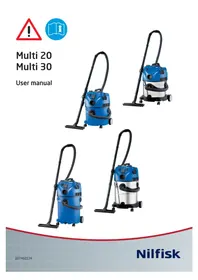
Multi 30 - Vacuum Cleaner NILFISK - Free user manual and instructions
Find the device manual for free Multi 30 NILFISK in PDF.



| Brand | Nilfisk |
| Model | Multi 30 |
| Category | Wet and dry vacuum cleaner |
| Supply voltage | 220-240 V ~ 50/60 Hz |
| Nominal power (PIEC) | 1350 W |
| Maximum power (Pmax) | 1800 W |
| Protection rating | IP X4 |
| Tank capacity | Not specified (estimated 20-30 L) |
| Main functions | Dry and wet vacuuming, blowing, automatic start for power tools, filter cleaning, cable rewind, speed adjustment |
| Filter type | Wet/dry filter (washable) |
| Dust bag | Disposable filter bag (recommended for fine dust) |
| Cable length | Not specified (estimated 5-10 m) |
| Power tool socket | Yes (max. according to model: EU 2000 W, GB 1800 W, CH 1100 W) |
| Blowing function | Yes (only with cleaning hose) |
| Safety | Anti-overflow float, automatic shut-off in case of foam, short-circuit protection, use by children >8 years under supervision |
| Regular maintenance | Filter cleaning (compressed air or rinsing), replacement of filter bag |
| Recycling | Compliant with WEEE 2002/96/EC, recyclable packaging |
| Warranty | Manufacturer's warranty on defects (excluding batteries, lamps, wear parts) |
| Included accessories | Hose, nozzles (stored on the device), quick parking |
Frequently Asked Questions - Multi 30 NILFISK
User questions about Multi 30 NILFISK
0 question about this device. Answer the ones you know or ask your own.
Ask a new question about this device
Download the instructions for your Vacuum Cleaner in PDF format for free! Find your manual Multi 30 - NILFISK and take your electronic device back in hand. On this page are published all the documents necessary for the use of your device. Multi 30 by NILFISK.
USER MANUAL Multi 30 NILFISK
Dear Nilfi sk customer


Congratulations on the purchase of your new Nilfi sk vacuum cleaner.
Prior to using the appliance for the first time, be sure to read this document through and keep it ready to hand.
Purpose and intended use
The vacuum cleaner is suitable for private use, e.g. for household, hobby workshops, car cleaning - sucking up non-hazardous dust and non-flammable liquids.
Symbols used to mark instructions
WARNING

Danger that can lead to serious injuries and damage.
Important warnings
WARNING

- No changes to the mechanical, electrical or thermal safety devices must be made.
- This appliance can be used by children aged from 8 years and above and persons with reduced physical, sensory or mental capabilities or lack of experience and knowledge if they have been given supervision or instruction concerning use of the appliance in a safe way and understand the hazards involved.
Children shall be supervised to make sure that they do not play with the appliance. - Cleaning and user maintenance shall not be made by children without supervision.
- Never spray water on the upper section of the vacuum cleaner. Danger for persons, risk or short-circuiting.
- Never use the vacuum cleaner if the filter is damaged.
The vacuum cleaner features a blow function. Do not blow the air out in the open space. Only use the blow function with a clean tube. Dust may be harmful to health.
Hazardous materials
WARNING

Vacuuming up hazardous materials can lead to serious or even fatal injuries.
The following materials must not be picked up
by the vacuum cleaner:
- hazardous dust
- hot materials (burning cigarettes, hot ashes etc.)
- flammable, explosive, aggressive liquids (e.g. petrol, solvents, acids, alkalis, etc.)
- flammable, explosive dust (e.g. magnesium or aluminium dust etc.)
Electrical connection
WARNING

- Before using the vacuum cleaner make sure that the voltage shown on the rating plate of the vacuum cleaner corresponds to the voltage of the local mains power supply.
- It is recommended that the vacuum cleaner should be connected via a residual current circuit breaker.
- The vacuum cleaner must not be used if the electrical cable or plug shows any sign of damage. Regularly inspect the cable and the plug for damage. If the power cord is damaged, it must be replaced by Nilfi sk Service or an electrician to avoid danger before use of the vacuum cleaner is continued.
- Do not handle the electrical cable or plug with wet hands.
- Do not unplug by pulling on cable. To unplug, grasp the plug, not the cable. The plug must always be removed from the socket outlet before starting any service or repair work of the machine or cable.
Maintenance
Always remove the electric plug from the socket before carrying out maintenance work on the machine.
Recycling the vacuum cleaner
The packaging materials can be recycled. Please recycle the components instead of throwing them in your household rubbish. You can also leave the packaging directly at your Nilfi sk location to be properly recycled from there.
As specified in European Directive 2002/96/EC on old electrical and electronic appliances, used electrical goods must be collected separately and recycled ecologically. Contact your local authorities or your nearest dealer for further information.
Warranty
Nilfisk warranties apply for the duration specified, calculated from the time of handover of the product to the customer. The warranty guarantees that the product is free from defects.
Batteries, lamps and wearing parts are excluded from the warranty.
In the event of defects arising during the duration of the warranty and of which Nilfi sk is given notice, Nilfi sk will, of their own choice, either repair the defects, replace the unit or refund the purchase price upon return of the unit. Excluded from this warranty are defects, disorders and wearing effects that can be attributed to wearing from normal use, improper handling or faulty maintenance. Opening the unit housing causes the warranty to become void. Further claims may not be made on the basis of the warranty. The statutory warranty rights of the customer remain unaffected. Warranties can be claimed upon presentation of the product and sales receipt. Manufacturer warranty claims shall be made to the manufacturer. Statutory warranty rights also remain unaffected in this case.
Picking up liquids
Before liquids are picked up, always remove the filter bag. Insert filter for wet operation. Check that the fl oat works properly. If foam develops or liquid emerges from the machine, stop work immediately and empty the dirt tank.
Connecting electrical appliances
Use the socket on the vacuum cleaner for the purpose defi ned in the operating instructions only. Before plugging an appliance into the appliance socket:
- Switch off the vacuum cleaner.
- Switch off the appliance to be connected. CAUTION! Follow the operating instructions and safety instructions for appliances connected to the power tool socket. Always unwind the cable of the vacuum cleaner completely before use.
The power consumption of the connected appliance must never exceed the value stated on the type plate of the vacuum cleaner.
The operating voltage shown on the rating plate must correspond to the voltage of the mains power supply.
Parts identificaiton (ref. illu. 1&2, page 4)
A. On/off switch
B. Filter cleaning
C. Cable rewind
D. Speed regulation
E. Connection of powertool
F. Connection of suction hose
G. Connection to blow function
H. Water drain
I. Accessory storage
J. Hose and cable storage
K. Quick park
- Varies depending on model.
Technical specifications
| Model | Multi 20 Multi 30 | |||
| CR T (CR / Inox) | CR T (CR / INOX) | |||
| INOX | TVSC (CR / INOX) | INOX | TVSC (CR / INOX) | |
| Voltage (V) | 220 - 240 | |||
| PIEC (W) | 1150 (ZA 1200) | 1350 | ||
| Pmax (W) | 1400 | 1800 | ||
| Power socket max (W) | NA | EU, AU/NZ: 2000 GB: 1800 CH: 1100 | NA | EU, AU/NZ: 2000 GB: 1600 CH: 900 |
| IP | X4 | |||
Operation instructions
Switching on the vacuum cleaner
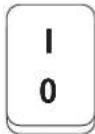
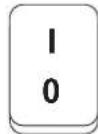
On/Off - position "A" (ref. page 7)
Switch "0-1"
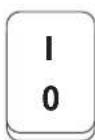
| Switch position | Function |
| 1 On | |
| 0 Off |
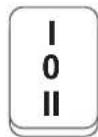
Switch "I-0-II", auto function
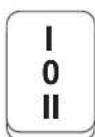
| Switch position | Function |
| 1 On | |
| 0 Off | |
| II | Powertool Auto on/Off |
Filter Clean (ref. illu. 3, page 4)
When the suction performance drops:
- Connect the power supply.
- Turn the speed regulation to "max" (ref. page 7) (depending on model).
- Close the suction hose opening with the palm of your hand.
- Make a hard/fast push to the Filter clean button (ref. pos. "B" page 7). Repeat pushing 3 times. The resulting stream of air cleans the fi liter.
Cable rewind function
- Disconnect the power supply. Always clean cable before rewind using a wet/damp cloth.
- Rewind the cable using the cable rewind button (ref. pos. "C" page 7).
WARNING

When activating the automatic cord rewind, care must be taken as the plug at the end of the cord can swing during the last part of the rewinding. It is recommended that you hold on to the plug while rewinding.
Filter change (ref. illu. 4, page 4)
- Disconnect the power supply.
- Turn the fi iter disc counter-clockwise. Carefully remove the fi iter and check it for damages. Replace the filter if necessary and dispose the filter according to legal regulations. Using wet and dry fi iter, clean the fi iter by compressed air (keep proper
distance in order not to damage the fi liter with the air stream) or rinse in water. Dry fi liter before use.
- Carefully clean the fi Iter sealing areas, mount the fi Iter and tighten the fi Iter clockwise.
Changing fi Iter bag
- Disconnect the power supply.
- Carefully remove the fi Iter bag from the container and close the small slider in the top of the fi Iter bag. Dispose the fi Iter bag in accordance with legal regulations.
- Insert the new filter bag in the container and press it gently on the inlet fitting using both hands. Nilfisk always recommends the use of a filter bag for fine dust.
CE Declaration of Conformity
| Product: | Vacuum cleaner for wet and dry operation |
| Model: Multi 20, Multi | 30 |
| Description: | 230 V 1~, 50 Hz, 1150 W 220-240 V 1~, 50/60 Hz, 1150 W/1350W IP X4 |
| The design of the appliance corresponds to the following pertinent regulations: | EC Low Voltage Directive 2006/95/EC EC EMC Directive 2004/108/EC |
| Applied harmonized standards: | EN ISO 12100-1 (2004), EN ISO 12100-2 (2004) EN 60335-2-2 (2006) EN 55014-1 (2006), EN 55014-2 (2001), EN 612000-3-2 (2006) |
| Applied national standards and technical specifications: | DIN EN 60335-2-2 (2007) |
| Anton Sørensen General Manager, Technical Operations EAPC | Nilfi sk Division of Nilfi sk-Advance A/S Industrivej 1 DK-9560 Hadsund Hadsund, 01.12.2010 |
Optionales Zubehör


Marche/arret - position "A" (ref. page 13)
Commutateur "0-1"
Av/pa -stilling "A" (ref. side 31)
Bryter "0-1"
Taend/sluk -stilling "A" (ref. side 34)
Kontakt "0-I"
| Kontakposition | Funktion |
| 1 Til | |
| 0 Fra |
Kontakt"I-0-II", autofocusion
NouctBaHe Ha qntbpa (BnKTe nIOcTpaun 3, cTpaHua 4)
Pn HamaIbAHe Ha MOUHOCTTa Ha 3acMyKBaHeTo:
- IopaiTe HappeKeHne.
- 3abptete peryntopa Ha ckopocTHa "max" (BnKTe ctpaHua 58) (B 3abncmoCT OT moEena).
- 3akpiTe OTbopa Ha 3acMyKbaUmaPkyC dHaHTa Ha pKaTa Cn.
- Hatnche TcHNO/pa3ko 6yToHa Filter clean (BnKTe nO3nUra "B" cTpaHua 58). NOBTOpeTe HATNCKaHeTo 3 nbTu. NOnyuHeHa Ta Bb3dUHa CTpyr noCtBa qntbpa.
Функцяза HabNVBaHe Ha Ka6eJa
- IpeycTaHOBeTe NOdaBaHTo Ha HAnpeXeHne. NocCTBaIte Ka6ena npedn HabuBaHTo My C MOKpa/BnaJxHa KbPna.
- HambaiTe Ka6ena C nOmoTa Ha 6yToHa 3a HambBaHe (BnKTe No3nue "C" cTpaHnca 58)
PPEyPPEKDEHNE
IpnakTNBnPaHeHaABTomuHOToHabBaHe Ha Ka6ena Tpa6Ba Da 6bTepeDna3nBuN nopaH B3MOxHocTta OT BbPteHe Ha uencela B KpaHa Ka6ena B KpaHa npouceHa HauBnBaHeTo. IpenOpbUba Ce uencelbT da ce npudbpka no Bpeme Ha HauBnBaHeTo.
CmHa HaФнтьpa(BnxTe nIIOCTpaun4, cTpaHnua 4)
- IpeyctaHOBeTe noDaBaHEnTo Ha HAnpexKeHne.
2.3aBbptTeФnITbPnHnДnCK B nocOKa,6paTHa Ha NOCOKaTa Ha DnKHe Hn YacOBaTa CtpenKa.CBaIeTe BnMAtEnHOΦnTbPa n npOBepTe DaHn CbUyRr He e NobpeDen.Ako e Heo6xOJIMo,N3BbPwTe CmHaN TpEtnpaTe CTapnФnITbP B CbOTBeTCTBnE C DeiCTBaUTo 3aKHOdaTeNCtBO.N3NoJI3BaIKN MOkbpN cyx ΦnITbp, NOuNCTeФnITbPa CbC CrbCTeH Bb3dYx(TpETnpaTe OT NODXODApo pa3CTOraHne, 3a Da He NOBpeDnTEФnITbPa C Bb3dyuHaTa ctpy) INn IN3IIaKHeTe C BODa.N3CyWte ΦnITbpnapen ynotpe6a.
3. Nocntete BnMaTeHNo yactbnte Ha yNtBTHraBaHe Ha qNITbpa, NOCTaBeTe qNITbpa I TO 3aTeHete B NOCOKaTa Ha BbpTeHe Ha YacOBaTa CTpeJkA.
CmHa HaΦnITbPHaTa TOp6nka
1.Пустановete noДаВанTo Ha HanpeхеHne.
2.CBaJIeTe BHNMaTeIHO fHNTbPHTa TOp6Nka OT KOHTeINHePa N 3aTbOpeTe MaIKnA PIIb3rau B TropHaTa YacT Ha fHNTbPHTa TOp6Nka. TpeTnpaIte fHNTbPHTa TOp6Nka B CbOTBcTCTBne CbC 3aKOHOBIne pa3nopeD6n.
3. IocTabete HObata fHNTbPha TOp6nUka B KOHTeHepa I a npTncHeTe Neko Bbpxv BXOHNr FHTnHr, KaTO cNcnyKeTe CDbTe pue. Nilfisk BINHarnpenOpbYBa Da ce n3non3Ba fHNTbPha TOp6nUka 3a CInTeH npax.
CE deknapaun3a cbotBeTCTBHe
| Изdenne: | ПрaxOSCукчka за работа с мokри и сухи MaTeрnaли |
| Моden: Multi 20, Multi | 30 |
| Опсанne: | 230 V 1~, 50 Hz, 1150 W 220-240 V 1~, 50/60 Hz, 1150 W/1350W - IP X4 |
| Конструкциета на урEDA удовлесворява следни: сьOTHOCIMN разнореш: | Ди配电ТиВа 3a НИСКОВЛТВОТО оборUDВаHe 2006/95/EO Ди配电ТиВа 3a еLEKТРOMагНИТHaTа СьВМecтUMоCT 2004/108/EO |
| Приложенихарmonиизрани Стандэрп: | EN ISO 12100-1 (2004), EN ISO 12100-2 (2004) EN 60335-2-2 (2006) EN 55014-1 (2006), EN 55014- 2 (2001), EN 612000-3-2 (2006) |
| Приложенинанцюнин Стандэрп иТechи ueckи спецфигаци | DIN EN 60335-2-2 (2007) |
| Anton SørensenGeneral Manager,Technical Operat- tions EAPC | Nilfi sk Division of Nilfi sk-Advance A/S Industrivej 1 DK-9560 Hadsund Hadsund, 01.12.2010 |
Szanowny Kliencie,


6pa60ky, a He 6pocaIte INx B 6ak dIy 6bITOBbIX OTXoIOB. YnakOBky MOxHO OCTaBtB nprMo B MeCTHOM PpeCTaBtEnbCTBe Nilfisk, yTO6bl OTyda OHa OTnpabuIacb Ha HndIeKaUyO nepepa60Ky.
CornacHo Ebponecko DnpeKtBte 2002/96/EC 06 yctapeBwix 3neKtpueecknx u 3neKtpoHHbIX ycTpoiCTbax NcNoJIb3OBAHHbIe 3neKtpOTOBapbl cNeDyET coBupaTb OTdEInbHO n PpeDaBaTb 3KOJOrnuecko nepepa6OTe. JnI NOJyHnI DOJONHtElbHO INHOpMaUIN CBXkITecb C MeCThBM IpeDCTaBtIELCBOM IIN DNJIepOM.
TapaHTnHbIe 06a3aTeJIbCTBa
TapaHTnI Nilfisk DeiCTByET B TeueHne yKa3aHHoro
BpeMeHN, KOtOpoe OTCuHTbIBaETC C MOMeHTa
pepeaHn n3dEInna NOKyNaTeJIIO. DaHHoe
o6ra3ateJIbCTBO rapaHTnpuyET OTCytCTBNE DeΦeKTOB
B n3dEJIIN.
TapaHTnI He pacnpoctpaHReTc H a 6atapeIO,
JaMnbl N3HaWNBaEMbIe DetAII.
Ecnn B TeueHne rapaHTnHOrO nepnoDa
OBapxkNABaETc DeΦeKT, O KOTOpOM YBeDOMnRETC
Nilfisk, To cneuaJIncTb Nlffsk Ha CBOE yCMOTpeHne
JIb6o yCTpaHrT DeΦeKtbl, JIb6o 3aMeHrT
ycTropoICTBO, Ib6o N3bIMyT yCTpOJCTBO, BO3MeCTNB
ero CTOnMOCTb. TapaHTn He pacnpoctpaHReTc
Ha DeΦeKtbl, HEnOJaDKN N 3HaWNBAHn, KOTOpblE
BO3HnKAIoT BCJeCDTBHe HOPMaJIbHOrO n3HOCA
n3dEInN, HeHaNDexKaUeTo ObpaUeHnN IINI
HeKoppeKTHOrO o6cnyXnBAHn N3dEInN. BCKpbITNe
kopnyca yCTpOJcTBa aHHyIpuyet rapaHTnHBle
ob3aTeJIbCTBa. IIO daHHbIM rapaHTnHbIM
ob3aTeJIbCTBam 60JIbSe XaNo6bl npNHmAtbcR
He 6yDyT. 3aKOHbIe npaba NOKyNaTeJIHa
rapaHTnIO octaIOTc B cIne. RapaHTnHbIe 3aRBKn
PpNHMaIOTc NO npedocTabLeHn NpOdyKta
I TOBAPHOrO ueKa. XaNo6bl no rapaHTn
n3ROTOBNTeJI ppeBraBIAOTc N3ROTOBNTeJIIO. B
DaHHOM clyuae 3aKOHbIe npaba NOKyNaTeJIHa
rapaHTnIO TAKKe OCTaIOTc B cIIe.
C6op xudkocTei
Ipeed c6opom XnDkocte Bcerda CHImaIte
pInbTp/MeWok-NbIneyNoBHTen. BCTabTe pInbTp
Ira pa6oTbIC Bnaor. Y6eHntecb NpaBnHoh
pa6ote nonJaBka. PnBbITEkAHN n3 MaunHbI
neHb Inn XnDkoCTn eCneyET HeMeDneHHO
BbIKIOHTb I ONOpOxHNb 6ak-NbIEc6OpHNK.
IopKJIIOUeHHe 3JIeKTpNueCKNX yCTpOJCTB
THe3Do Ha nbIneOce cNeIyET NcNoIb3OBaTb TOJIbKO dIra uei, ONIcaHbIX B pyKOBoDCTBe nO 3KcNJIyatauIN. IpePe IIOdkIIOUeHHeM yCTpoIcTBaB THe3Do dIra yCTpOJCTB:
- BbIKJIIOHTe nbIeOC.
- BbIKIOHHTe NOKJIIOHaEMoe yCTPOINCTBO. BHIMAHNE! CneIyIte HNCTpyKcnnn no 3KcIIpyatauN co6JIIOaIte MepeI npEOCTOPoJXHOCTn npi pa6Ote c yCTPOINCTBaMn, NOKJIIOUeHHbIMN K IHe3dy dJa 3JIeKTPoINHCTpymENTOB. PepeI nCNoJIb3OBAHNem BCERda NOJIHOCTbIO pa3MaTbIBaInTe UHyp nbJIecoca.
Notpe6JIeHHe 3Heprnn NpOKnIIOueHHbIM ycTpoiCTBOM He DoJXHO pReBbIaTb 3HaueHne, yka3aHHoe Ha npIbke nbIeNecoca. HanpJxKeHne nCTOChnKa NiTaHn DaONKHO COOTBeTCTBOBaTb pa6ooyMe HapJxKeHIO, yka3aHHOMy Ha npIbke.
Onncahne deTaJe (cm.pnc.1n2,ctp.4)
A. BbIKIOUOATenB
B. OuInCTkaФиЛьТра
C. CmTaBbAHe uHypa
D. PerjTOp ckopocTn
E. Подклочене злжтponнстумента
F. NpoknueHne BcscbBaioe Ro nHaHa
G.ПоdkюченефункиNBiyBa
H.CJIIB BOdBi
I. OTdeneHne dny npnHaNexKHOCTe
J. OTeIeHne In IuHaHra n Hypa
K. БыICTрая napkoVBka
* OTnHaeTcB 3aBnCmOCTN OT MoJeIN.
TexHnueckneXapakTepncNTKIN
| Мо德尔 | Multi 20 Multi 30 | |||
| CRT (CR /Inox) CR T (CR /INOX) | ||||
| INOXT VSC | (CR / INOX) | INOX | TVSC(CR / INOX) | |
| Наръжени (В) | 220 - 240 | |||
| Мошисть васываня IEC,ВТ | 1150 (ZA 1200) | 1350 | ||
| Мakсимальnam мошисть васываня,ВТ | 1400 | 1800 | ||
| Разъем макс.,ВТ | - | EU, AU/NZ:2000GB:1800CH:1100 | - | EU, AU/NZ: 2000GB: 1600CH: 900 |
| IP | X4 | |||
PykoBoDcTBo no 3KcnNyaTaun
BknoueHne nbcneocca
Bkn/Bbikn -no3nna“A”(cm. ctp. 67)
IpeeknouateIb "0-I"
Division of Nilfi sk-Advance A/S
Industrivej 1
DK-9560 Hadsund
tel.: (+45) 7218 2100


- DEAR NILFI SK CUSTOMER
- PURPOSE AND INTENDED USE
- SYMBOLS USED TO MARK INSTRUCTIONS
- WARNING
- IMPORTANT WARNINGS
- HAZARDOUS MATERIALS
- ELECTRICAL CONNECTION
- MAINTENANCE
- RECYCLING THE VACUUM CLEANER
- WARRANTY
- PICKING UP LIQUIDS
- CONNECTING ELECTRICAL APPLIANCES
- PARTS IDENTIFICAITON (REF. ILLU. 1&2, PAGE 4)
- OPERATION INSTRUCTIONS
- FILTER CLEAN (REF. ILLU. 3, PAGE 4)
- CABLE REWIND FUNCTION
- FILTER CHANGE (REF. ILLU. 4, PAGE 4)
- CHANGING FI ITER BAG
- CE DECLARATION OF CONFORMITY
- OPTIONALES ZUBEHÖR
- NOUCTBAHE HA QNTBPA (BNKTE NIOCTPAUN 3, CTPAHUA 4)
- ФУНКЦЯЗА HABNVBAHE HA KA6EJA
- PPEYPPEKDEHNE
- CMHA HAФНТЬPA(BNXTE NIIOCTPAUN4, CTPAHNUA 4)
- CMHA HAΦNITBPHATA TOP6NKA
- CE DEKNAPAUN3A CBOTBETCTBHE
- SZANOWNY KLIENCIE
- TAPAHTNHBIE 06A3ATEJIBCTBA
- C6OP XUDKOCTEI
- IOPKJIIOUEHHE 3JIEKTPNUECKNX YCTPOJCTB
- ONNCAHNE DETAJE (CM.PNC.1N2,CTP.4)
- PYKOBODCTBO NO 3KCNNYATAUN
- BKNOUEHNE NBCNEOCCA
Brand : NILFISK
Model : Multi 30
Category : Vacuum Cleaner