
GCY 42 Professional - Drill/Driver BOSCH - Free user manual and instructions
Find the device manual for free GCY 42 Professional BOSCH in PDF.


 FR
FR
 BG
BG
 CS
CS
 DA
DA
 DE
DE
 EL
EL
 EN
EN
 ES
ES
 ET
ET
 FI
FI
 HU
HU
 IT
IT
 KK
KK
 KO
KO
 LT
LT
 LV
LV
 MK
MK
 NL
NL
 NO
NO
 PL
PL
 PT
PT
 RO
RO
 RU
RU
 SK
SK
 SL
SL
 SV
SV
 TR
TR
 UK
UK
| Product type | Bluetooth Low Energy module |
| Brand | Bosch |
| Model | GCY 42 Professional |
| Category | Drill/driver |
| Dimensions | 7 x 30 x 30 mm |
| Weight | 0.01 kg |
| Power supply | CR2032 lithium button cell, 3 V |
| Battery life | Approximately 24 months |
| Wireless technology | Bluetooth 4.2 (Low Energy) |
| Maximum range | 30 m |
| Frequency range | 2402 – 2480 MHz |
| Output power | < 1 mW |
| Operating temperature | -10 °C to +40 °C |
| Storage temperature | -20 °C to +70 °C |
| Compatibility | Android 5.1+ / iOS 10+ |
| Main functions | Customization, state check, data transfer, location |
| Mobile app | Bosch Toolbox, TrackMyTools |
| Cleaning | Brush, no solvents or detergents |
| Safety | Button cell: do not swallow, do not expose to heat, do not recharge |
| Repairability | Bosch after-sales service, spare parts available |
| General information | Reference: 1 600 A01 3WF |
Frequently Asked Questions - GCY 42 Professional BOSCH
User questions about GCY 42 Professional BOSCH
0 question about this device. Answer the ones you know or ask your own.
Ask a new question about this device
Download the instructions for your Drill/Driver in PDF format for free! Find your manual GCY 42 Professional - BOSCH and take your electronic device back in hand. On this page are published all the documents necessary for the use of your device. GCY 42 Professional by BOSCH.
USER MANUAL GCY 42 Professional BOSCH

GCY 42 Professional

BOSCH
English ...... page 25
Bosch Power Tools 1 609 92A 4BA | (11.06.2018)
6
1 609 92A 4BA | (11.06.2018) Bosch Power Tools
Bosch Power Tools 1 609 92A 4BA | (11.06.2018)
8
B2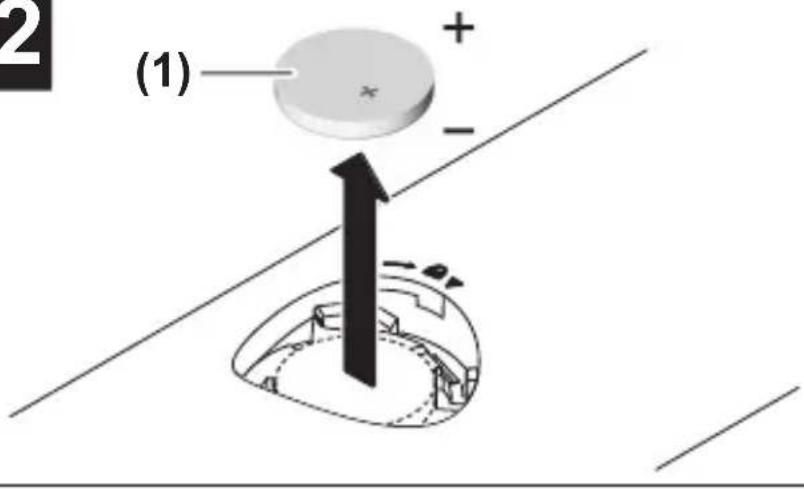
Bosch Power Tools 1 609 92A 4BA | (11.06.2018)
10
C2
German
Safety instructions

| Bluetooth® Bluetooth® 4.2 (Low Energy) | A) |
Bosch Power Tools 1 609 92A 4BA | (11.06.2018)
All instructions must be read and observed in order for work with the GCY 42 to be carried out safely and reliably. Store these instructions in a safe place and provide them when passing the GCY 42 or any power tool equipped with it on to a third party.
▶ Only use batteries listed in this operating manual. Do not use any other button cells or other forms of electrical power supply. ▶ Ensure that battery replacement is carried out properly. There is a risk of explosion. ▶ Please note that the Bluetooth® module is powered by a button cell. Never swallow button cells. Swallowing button cells can
result in severe internal burns within two hours and can cause death.

Ensure that the button cell is kept out of the reach of children. If you suspect that someone has swallowed a button cell or that a button cell has entered the body in another way, seek medical attention immediately.
If you cannot close the cover, stop using the Bluetooth® module, remove the button cell and have the module repaired. ▶ Do not attempt to recharge the button cell and do not short circuit the button cell. The button cell may leak, explode, catch fire and cause personal injury. ▶ Remove and dispose of drained button cells correctly. Drained button cells may leak and damage the product or cause personal injury. ▶ Protect any object marked with GCY 42 against heat and fire. Prolonged exposure to sunlight and high temperatures (>70 °C) may cause the battery to leak, explode, catch fire and cause personal injury
▶ Do not damage the button cell and or take the button cell apart. The button cell may leak, explode, catch fire and cause personal injury. ▶ Do not allow damaged button cells to come into contact with water. Leaking lithium may mix with water to create hydrogen, which could cause a fire, an explosion, or personal injury. The Bluetooth® Low Energy Module GCY 42 is equipped with a wireless interface. Local operating restrictions, e.g. in aircraft or hospitals, must be observed. ▶ Only use the Bluetooth® Low Energy Module GCY 42 in power tools in which it is intended to be used. Read the operating manual of the power tool you are using. ▶ Do not overheat the button cell or throw it into fire. The button cell may leak, explode, catch fire and cause personal injury.
Product description and specifications
The Bluetooth® word mark and logos are registered trademarks owned by Bluetooth SIG, Inc. and any use of such
marks by Robert Bosch Power Tools GmbH is under license.
Intended Use
The Bluetooth® Low Energy Module GCY 42 enables users to personalise a power tool and check its status, as well as transfer settings and data, using wireless Bluetooth® technology. The data transfer must be approved by the user.
Information about the connectivity functions offered can be found in the Bosch Toolbox application (app) or in the operating manual of the power tool you are using.
Product Features
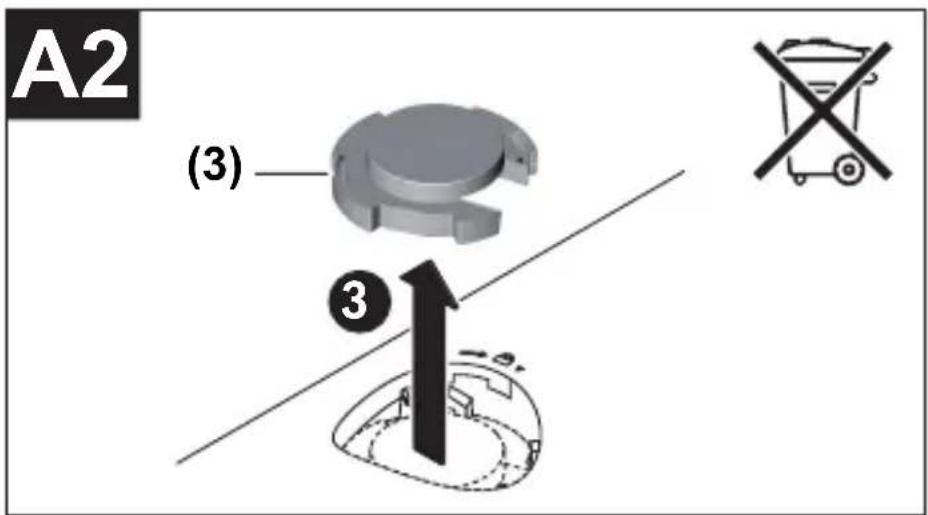
The numbering of the components shown refers to the illustrations on the graphic pages.
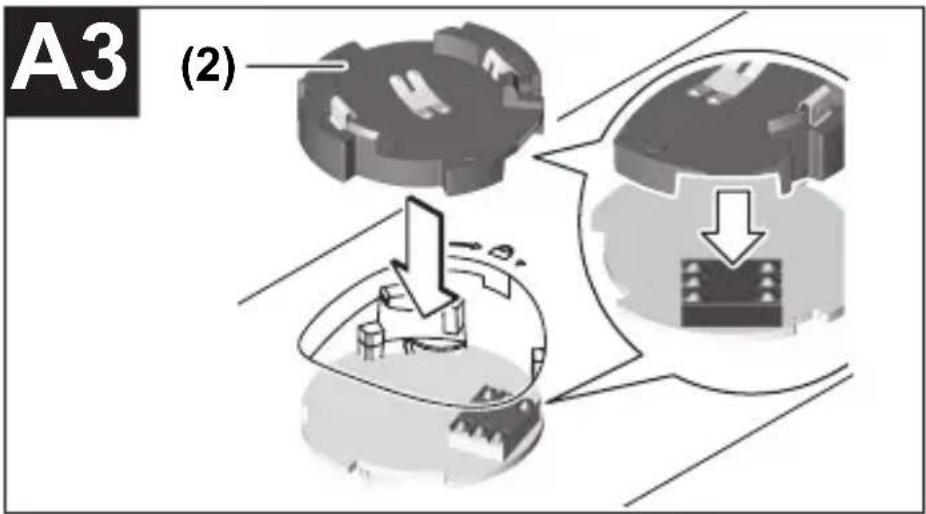
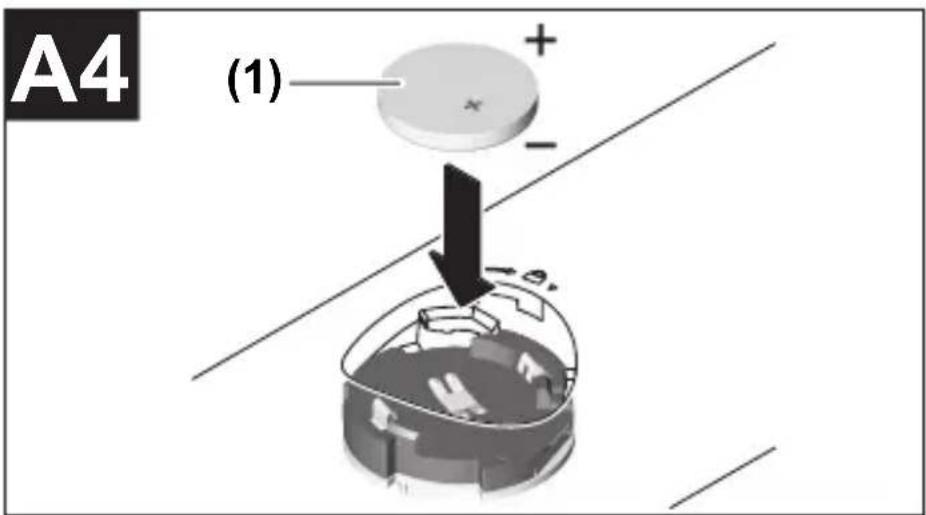
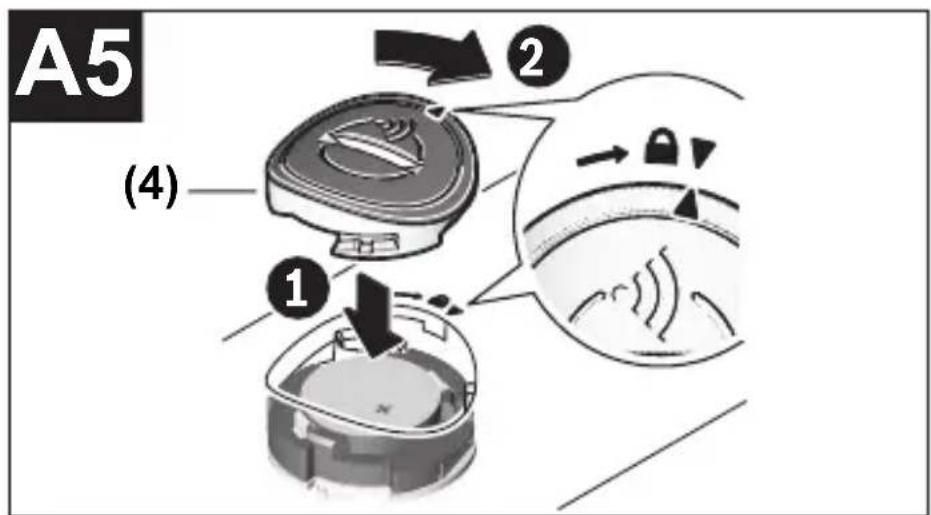
(1) Button cell (2) Bluetooth® Low Energy Module GCY 42 (3) Placeholder A) (4) Cover for the Bluetooth® Low Energy Module GCY 42 A)
English
A) Accessories shown or described are not included with the product as standard. You can find the complete selection of accessories in our accessories range.
Technical Data
| Bluetooth®Low Energy Module | GCY 42 | |
| Article number | 1 600 A01 3WF | |
| Operating temperature -10 °C to +40 °C | ||
| Storage temperature -20 °C to +70 °C | ||
| Dimensions 7 x 30 x 30 mm | ||
| Weight according to EPTA Procedure01:2014 | 0.01 kg | |
| Data transmission | ||
| Bluetooth® Bluetooth® 4.2 (Low Energy) | A) | |
| Signal range Max. 30 m | B) | |
| Frequency range used 2402–2480 MHz | ||
| Output power < 1 mW | ||
Bosch Power Tools 1 609 92A 4BA | (11.06.2018)
30 | English
Bluetooth®
GCY 42
Low Energy Module
Power supply
Battery Button cell (3 V lithium battery,
CR 2032)
Battery life approx. 24 months
A) The mobile terminal devices must be compatible with Bluetooth® Low Energy devices (version 4.2) and support the Generic Access Profile (GAP). B) The signal range may vary greatly depending on external conditions, including the receiving device used. The Bluetooth® range may be significantly weaker inside closed rooms and through metallic barriers (e.g. walls, shelving units, cases, etc.).
System requirements GCY 42
| Mobile device (tablet, smartphone) | Android 5.1 (and newer) |
| iOS 10 (and newer) |
Assembly and Operation
Power Supply
Remove the cover for the Bluetooth® Low Energy Module GCY 42 on the power tool, e.g. using a screwdriver or a large coin. Using unsuitable objects can damage the electronics or the cover.
- To start using the product after purchasing it or to change the battery (1), follow the illustrations on the graphics pages. Observe the following advice when doing so.
Initial Starting Operation
(see figures A1-A5)
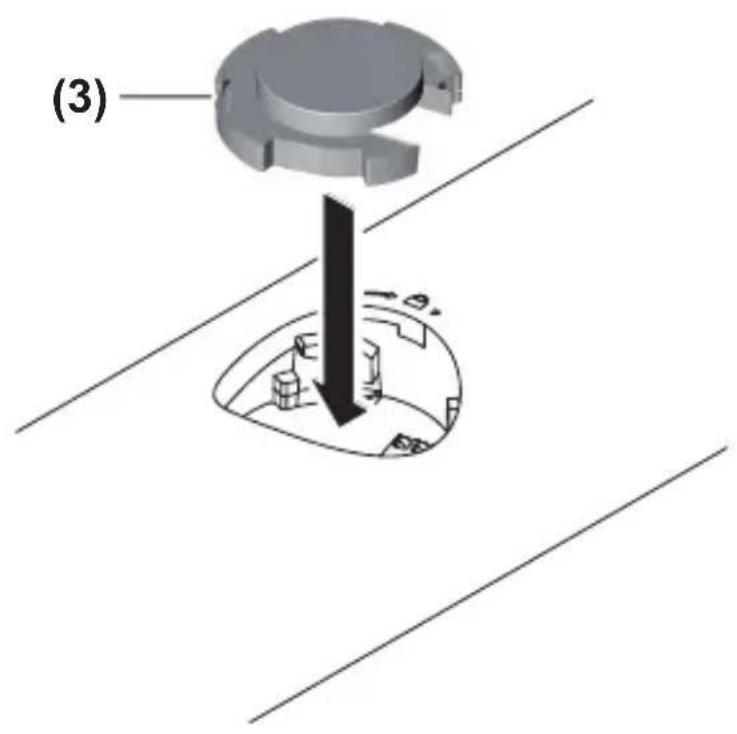
Note: Store the placeholder (3) of the GCY 42 in a safe place. Refit the placeholder when passing the power tool on without the GCY 42.
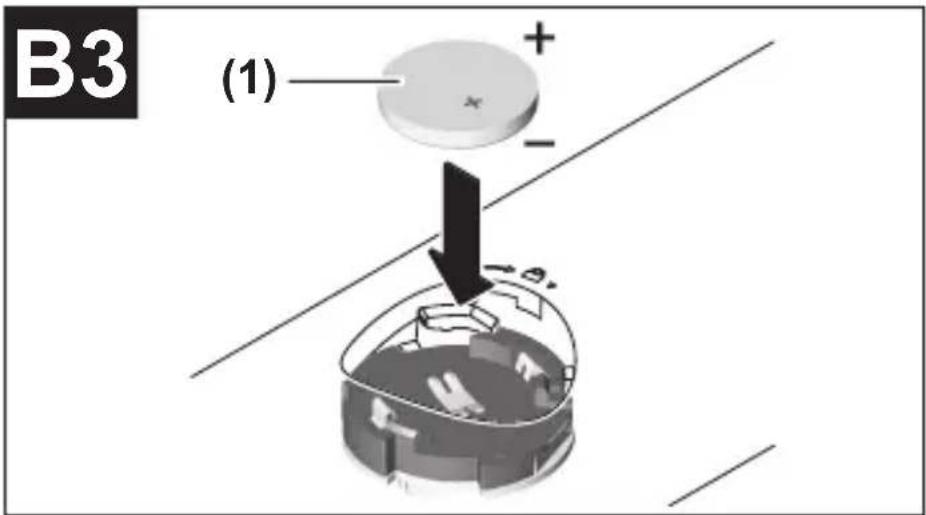
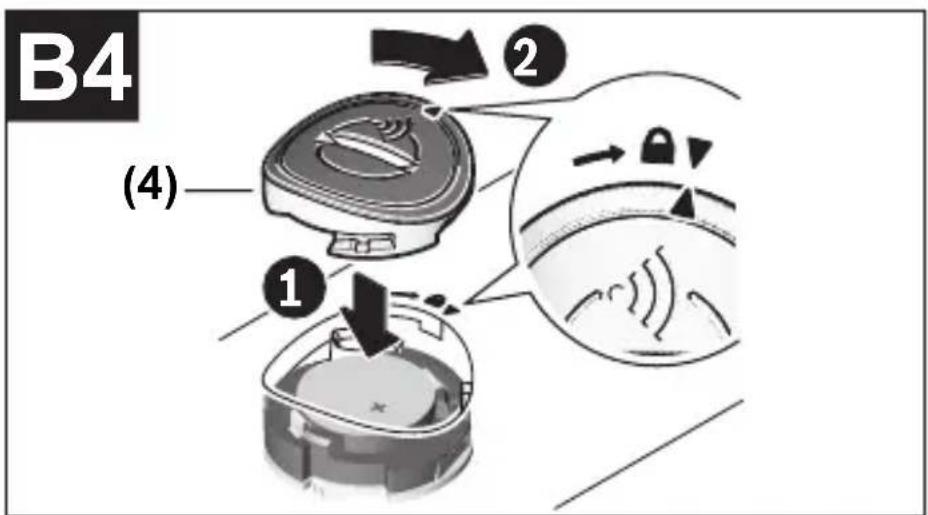
Place the battery (1) in the GCY 42 (2) with the plus terminal facing upwards. You do not need to push the battery in as the battery does not engage. It is simply secured in the correct position when you close the cover.
To initialise the GCY 42 after inserting the battery, press the on/off switch of the power tool.
32 | English
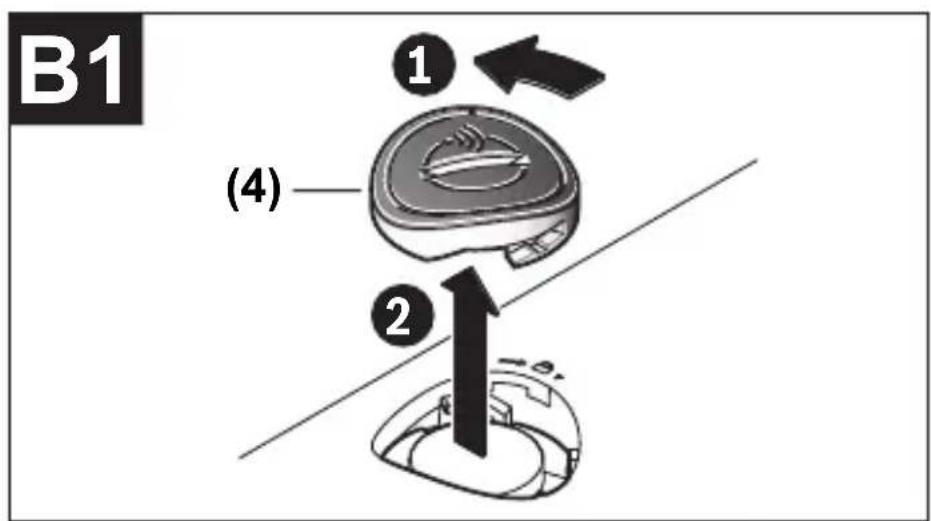
Changing the Battery
(see figures B1-B4)
Only remove the used battery (1) with your fingers.
A warning will be displayed in the app before the battery is fully used up.
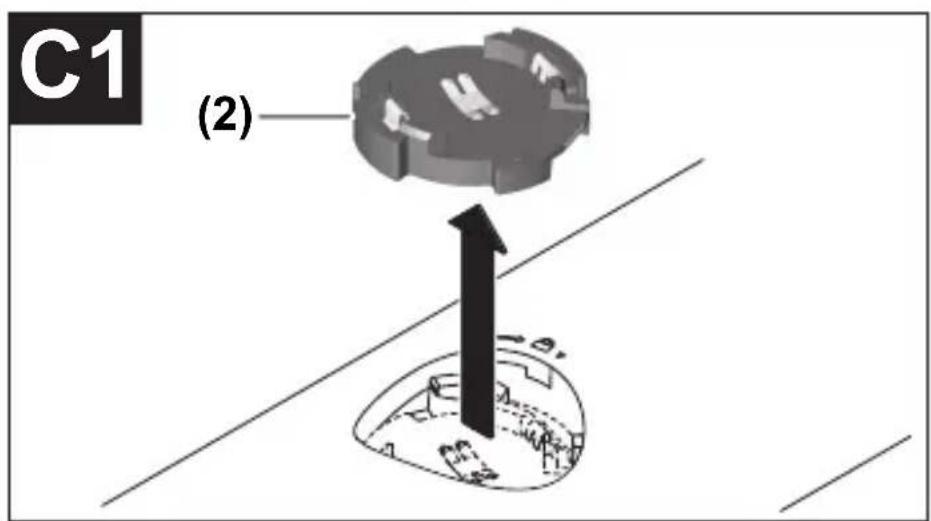
Removing the GCY 42
(see figures C1-C2)
Do not use force to remove the GCY 42 (2). Do not use any sharp or pointed tools.
Note: Turning the power tool over may make it easier to remove the GCY 42.
Starting operation
Once you have inserted the battery (1) and pressed the on/off switch on the power tool, the GCY 42 will transmit a signal continuously. The Bluetooth® signal will only stop when the battery is drained or faulty, or if the battery is removed.
You can find further information directly in the app from Bosch.
Installing and Setting up the App
You will need to install the Bosch Toolbox app before you can use the GCY 42.
- Download the Bosch Toolbox app from the relevant app store (Apple App Store, Google Play Store). Note: You will need to have a user account with the relevant app store to do this.
- Then select the MyTools sub-item in the app.
- The display of your mobile terminal device will show you all subsequent steps required to connect the power tool to the terminal device.
Bosch offers a special application (app) for managing the GCY 42 modules being used and determining their location.
- Go to www.bosch-trackmytools.com and register online.
You will receive your login details once you have registered.
- Download the TrackMyTools app/web-based application from the relevant app store (Apple App Store, Google Play Store) and log in with your login details.
You can now create and manage your inventory using the app/web-based application.
Note: You will need to have a user account with the relevant app store to do this.
Note: Work through the app tutorial in full first. This will give you a better overview of how the connection is made and how the connectivity functions are used.
Data Transfer via Bluetooth®
The GCY 42 transmits a signal at regular intervals. The ambient conditions may mean it takes several transmission intervals for the GCY 42 to be detected. If the GCY 42 is not detected, check the following:
- Is the distance to the mobile terminal device too great? Reduce the distance between the mobile device and the GCY 42.
- Is the battery too low or drained? Change the battery.
- Switch Bluetooth® off and on again on your mobile device. Check whether the GCY 42 has now been detected.
Maintenance and Service
Maintenance and Cleaning
Remove any dirt using a brush. Do not use any detergents or solvents.
After-sales service and advice on using products
Our after-sales service responds to your questions concerning maintenance and repair of your product as well as spare parts. You can find explosion drawings and information on spare parts at: www.bosch-pt.com
The Bosch product use advice team will be happy to help you with any questions about our products and their accessories. In all correspondence and spare parts orders, please always include the 10-digit article number given on the nameplate of the product.
Great Britain
Robert Bosch Ltd. (B.S.C.)
P.O. Box 98
Broadwater Park
North Orbital Road
Denham Uxbridge
UB 9 5HJ
At www.bosch-pt.co.uk you can order spare parts or arrange the collection of a product in need of servicing or repair.
Tel. Service: (0344) 7360109
E-Mail: boschservicecentre@bosch.com
Ireland
Origo Ltd.
Unit 23 Magna Drive
Magna Business Park
City West
Dublin 24
Tel. Service: (01) 4666700
Fax: (01) 4666888
Australia, New Zealand and Pacific Islands
Robert Bosch Australia Pty. Ltd.
Power Tools
Locked Bag 66
Clayton South VIC 3169
Customer Contact Center
Inside Australia:
Phone: (01300) 307044
Fax: (01300) 307045
English | 37
Inside New Zealand:
Phone: (0800) 543353
Fax: (0800) 428570
Outside AU and NZ:
Phone: +61 3 95415555
www.bosch-pt.com.au
www.bosch-pt.co.nz
Republic of South Africa
Customer service
Hotline: (011) 6519600
Gauteng - BSC Service Centre
35 Roper Street, New Centre
Johannesburg
Tel.: (011) 4939375
Fax: (011) 4930126
E-Mail: bsctools@icon.co.za
KZN - BSC Service Centre
Unit E, Almar Centre
143 Crompton Street
Pinetown
Tel.: (031) 7012120
Fax: (031) 7012446
E-Mail: bsc.dur@za.bosch.com
Bosch Power Tools 1 609 92A 4BA | (11.06.2018)
38 | English
Western Cape – BSC Service Centre
Democracy Way, Prosperity Park
Milnerton
Tel.: (021) 5512577
Fax: (021) 5513223
E-Mail: bsc@zsd.co.za
Bosch Headquarters
Midrand, Gauteng
Tel.: (011) 6519600
Fax: (011) 6519880
E-Mail: rbsa-hq.pts@za.bosch.com
Disposal
GCY 42 modules, accessories and packaging should be recycled in an environmentally friendly manner.
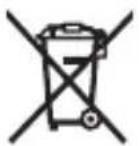
Do not dispose of electronic components and batteries into household waste!
Only for EU countries:
According to the Directive 2012/19/EU, power tools that are no longer usable, and according to the Directive 2006/66/EC, defective or used battery packs/batteries, must be collected
1 609 92A 4BA | (11.06.2018) Bosch Power Tools
separately and disposed of in an environmentally correct manner.
Robert Bosch (France) S.A.S.
Calle Robert Bosch No. 405
Bosch Service Center
Telegrafvej 3
2750 Ballerup
Bosch Power Tools 1 609 92A 4BA | (11.06.2018)
On www.bosch-pt.dk you can order spare parts online or create a repair order.
Service Center phone: 44898855
Fax: 44898755
E-mail: vaerktoej@dk.bosch.com
Disposal
Bosch Service Center
Telegrafvej 3
2750 Ballerup
Denmark
Tel.: (08) 7501820 (within Sweden)
Fax: (011) 187691
Waste management
Battery Button cell (3-V lithium battery,
CR 2032)
Mobile device (Tablet, Smartphone)
Robert Bosch Sp. z o.o.
Bosch Service Center PT
K Vápence 1621/16
692 01 Mikulov
Electric tool service
Strada Horia Măcelariu Nr. 30–34, sector 1
013937 Bucharest
Electric tool service
Strada Horia Măcelariu Nr. 30–34, sector 1
1 609 92A 4BA | (11.06.2018) Bosch Power Tools
Български | 305
013937 Bucharest, Romania
www.bosch-pt.com/bg/bg/
Disposal
You must read and follow all instructions to work with GCY 42 without risk and safely. Keep these instructions safe and pass them on together with GCY 42 or the power tool it is equipped with.
▶ Use only batteries listed in these operating instructions. Do not use other button batteries or other power source. When changing batteries, make sure you change them correctly. Otherwise there is a risk of explosion. ▶ Please note that the Bluetooth® module requires a button battery. Never swallow button batteries. Swallowing a button battery within 2 hours can lead to serious internal burns and death.
Bosch Power Tools 1 609 92A 4BA | (11.06.2018)
320 | Serbian

Make sure that the button battery is out of reach of children. If you suspect that the button battery has been swallowed or is in other body openings, seek medical attention immediately.
If the cover can no longer be closed, do not use the Bluetooth® module anymore, remove the button cell and have it repaired. ▶ Do not attempt to recharge the button cell and do not short-circuit it. The button cell may leak, explode, catch fire, and cause injury. Dispose of exhausted button cells according to regulations. Exhausted button cells may leak and thus damage the product or cause injury. ▶ Protect the item marked GCY 42 from heat and fire. Due to prolonged exposure to sunlight, high temperatures (>70 °C), and fire, the battery may leak, explode, catch fire, and cause injury. Do not damage or disassemble the button cell. The button cell may leak, explode, catch fire, and cause injury.
Serbian | 321
A damaged button cell must not come into contact with water. Leaked lithium with water can form hydrogen and thus cause fire, explosion, or injury. The Bluetooth® Low Energy Module GCY 42 is equipped with a radio interface. You must observe local restrictions on operation, e.g., in airplanes or hospitals. - Use the Bluetooth® Low Energy Module GCY 42 only in the power tool intended for it. Read the operating instructions of the power tool used. Do not overheat the button cell or throw it into fire. The button cell may leak, explode, catch fire, and cause injury.
Product description and specifications
The Bluetooth® name and the trademark (logo) are registered trademarks and property of Bluetooth SIG, Inc. Robert Bosch Power Tools GmbH holds a license for any use of this name/trademark.
322 | Serbian
Intended use
The Bluetooth® Low Energy Module GCY 42 enables personalization and status checking of the power tool, as well as the transfer of settings and data via Bluetooth® radio technology. The user must approve the data transfer.
Information on the offered connectivity functions can be found in the Bosch Toolbox app or in the operating instructions of the power tool used.
Components shown
All instructions must be read and followed to work safely and without danger with the GCY 42. Keep these instructions in a safe place and hand them over to the next user together with the GCY 42 or the power tool equipped with it.
equipped.
▶ Use only the batteries specified in these operating instructions. Do not use other button cells or any other power supply. When replacing the battery, ensure that the battery is replaced professionally. Otherwise there is a risk of explosion. - Note that the Bluetooth® module operates with a button cell. Never swallow button cells. Swallowing
Croatian | 345
button cells can cause severe internal burns and death within 2 hours.

42 GCY (2)
Hereby, Bosch Power Tools GmbH declares that the radio equipment type GCY 42 is in compliance with Directive 2014/53/EU. The full text of the EU declaration of conformity is available at the following internet address:


- GCY 42 PROFESSIONAL
- BOSCH
- C
- GERMAN
- SAFETY INSTRUCTIONS
- PRODUCT DESCRIPTION AND SPECIFICATIONS
- INTENDED USE
- PRODUCT FEATURES
- ENGLISH
- BLUETOOTH®
- GCY
- LOW ENERGY MODULE
- POWER SUPPLY
- ASSEMBLY AND OPERATION
- INITIAL STARTING OPERATION
- CHANGING THE BATTERY
- REMOVING THE GCY
- STARTING OPERATION
- INSTALLING AND SETTING UP THE APP
- DATA TRANSFER VIA BLUETOOTH®
- MAINTENANCE AND SERVICE
- MAINTENANCE AND CLEANING
- AFTER-SALES SERVICE AND ADVICE ON USING PRODUCTS
- GREAT BRITAIN
- IRELAND
- AUSTRALIA, NEW ZEALAND AND PACIFIC ISLANDS
- REPUBLIC OF SOUTH AFRICA
- CUSTOMER SERVICE
- GAUTENG - BSC SERVICE CENTRE
- KZN - BSC SERVICE CENTRE
- WESTERN CAPE – BSC SERVICE CENTRE
- BOSCH HEADQUARTERS
- DISPOSAL
- ONLY FOR EU COUNTRIES
- WASTE MANAGEMENT
- SERBIAN
- COMPONENTS SHOWN
- EQUIPPED
- CROATIAN
Brand : BOSCH
Model : GCY 42 Professional
Category : Drill/Driver