
T-LCM Pedals - Joystick THRUSTMASTER - Free user manual and instructions
Find the device manual for free T-LCM Pedals THRUSTMASTER in PDF.


| Product Type | Simulation Pedals |
| Brand | Thrustmaster |
| Model | T-LCM Pedals |
| Category | Joystick |
| Dimensions (approx.) | 30 x 20 x 15 cm |
| Weight | 2.5 kg |
| Power Supply | USB (bus power) |
| Sensor | Magnetic load cell sensor (T-LCM) |
| Main Features | Accelerator, brake and clutch pedals; adjustable resistance; multi-platform compatibility |
| Compatibility | PC (Windows), PlayStation 4, PlayStation 5, Xbox One, Xbox Series X|S |
| Software | Thrustmaster Control Panel (PC) |
| Materials | Metal and reinforced plastic |
| Maintenance and cleaning | Clean with a soft, dry cloth; avoid liquids |
| Safety | Use on a stable, flat surface; do not expose to moisture |
| Spare parts and repairability | Springs, USB cable, and pads available on the Thrustmaster website |
| Box contents | T-LCM pedals, USB cable, set of additional springs, user manual |
Frequently Asked Questions - T-LCM Pedals THRUSTMASTER
User questions about T-LCM Pedals THRUSTMASTER
0 question about this device. Answer the ones you know or ask your own.
Ask a new question about this device
Download the instructions for your Joystick in PDF format for free! Find your manual T-LCM Pedals - THRUSTMASTER and take your electronic device back in hand. On this page are published all the documents necessary for the use of your device. T-LCM Pedals by THRUSTMASTER.
USER MANUAL T-LCM Pedals THRUSTMASTER
T-LCM PEDALS LOAD CELL & MAGNETICS
PC – PlayStation®4 – Xbox One®
User Manual

Before using this product, please read this user manual carefully and save it for later reference.
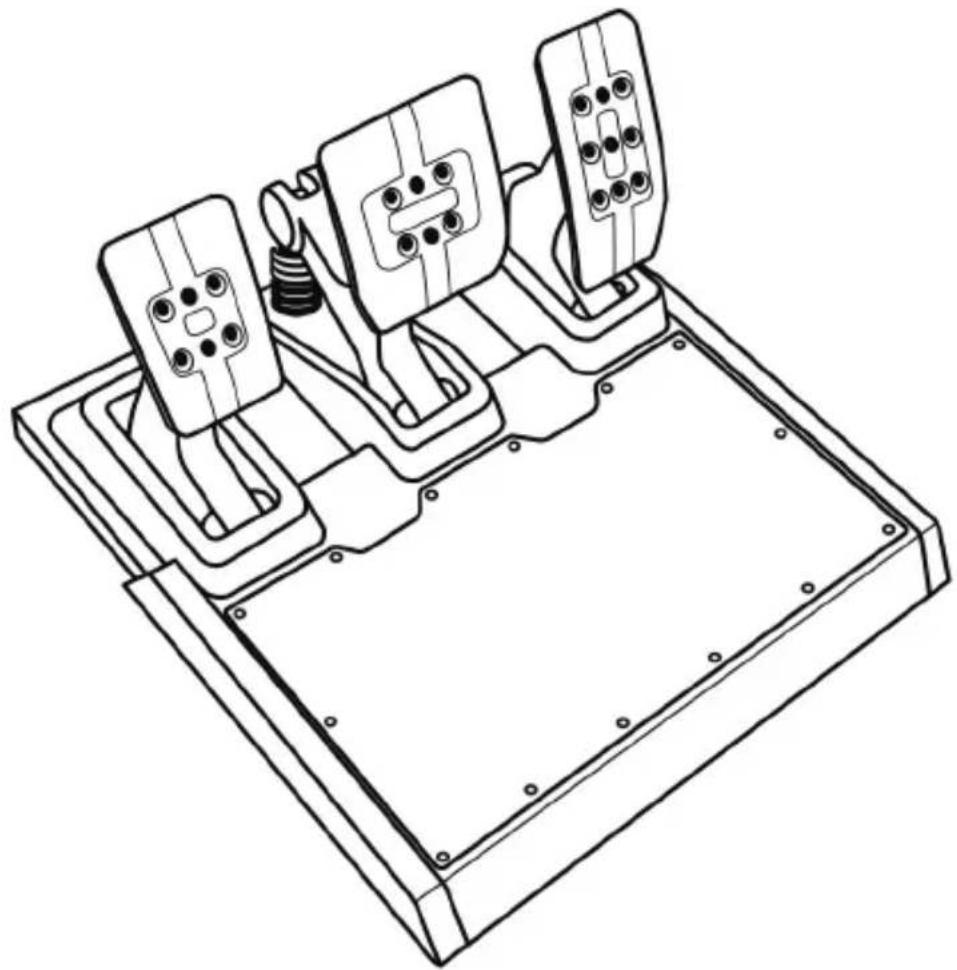
natural_image
Technical line drawing of a mechanical device with three mounted components and mounting base (no text or symbols)TECHNICAL FEATURES
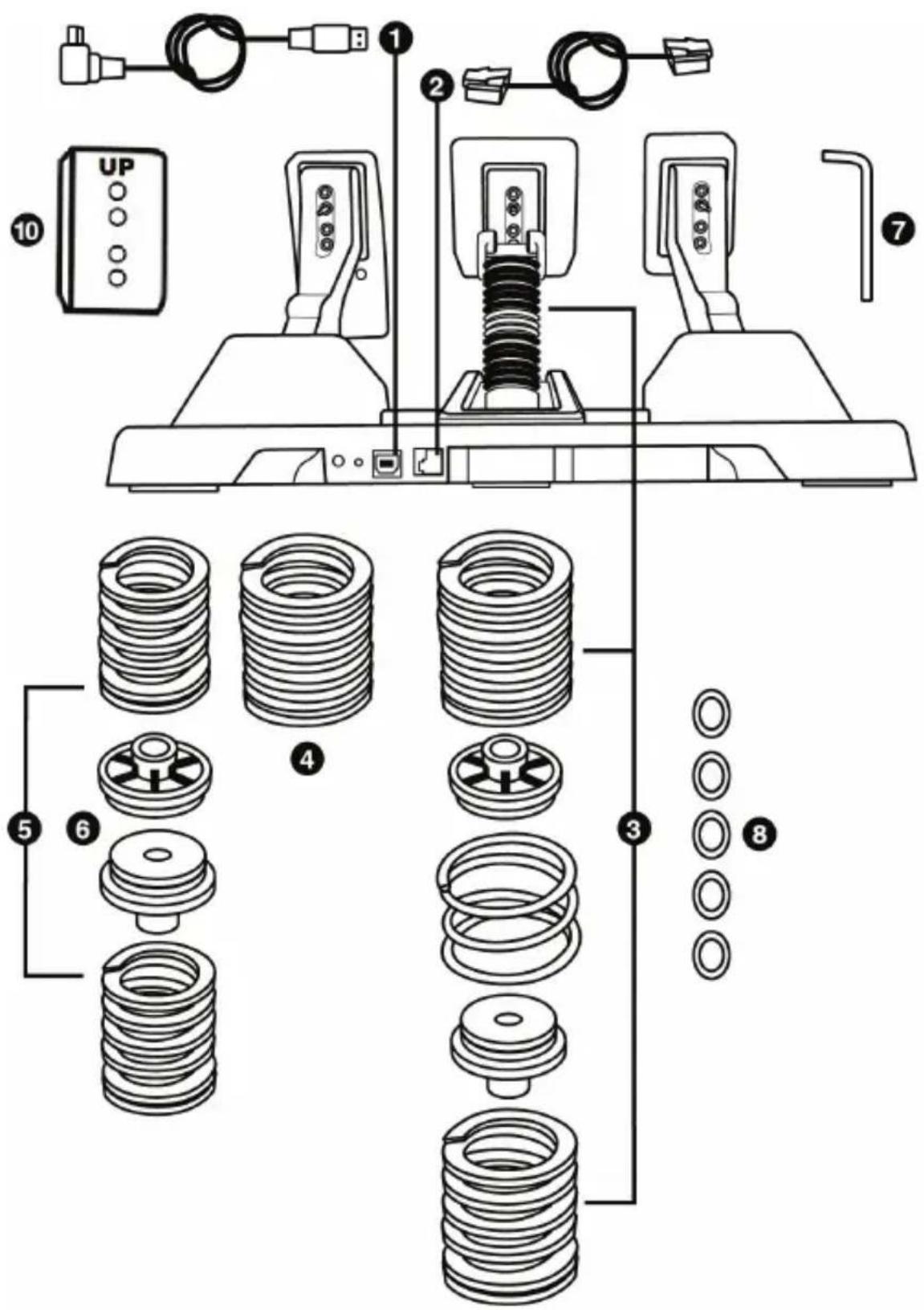
General overview
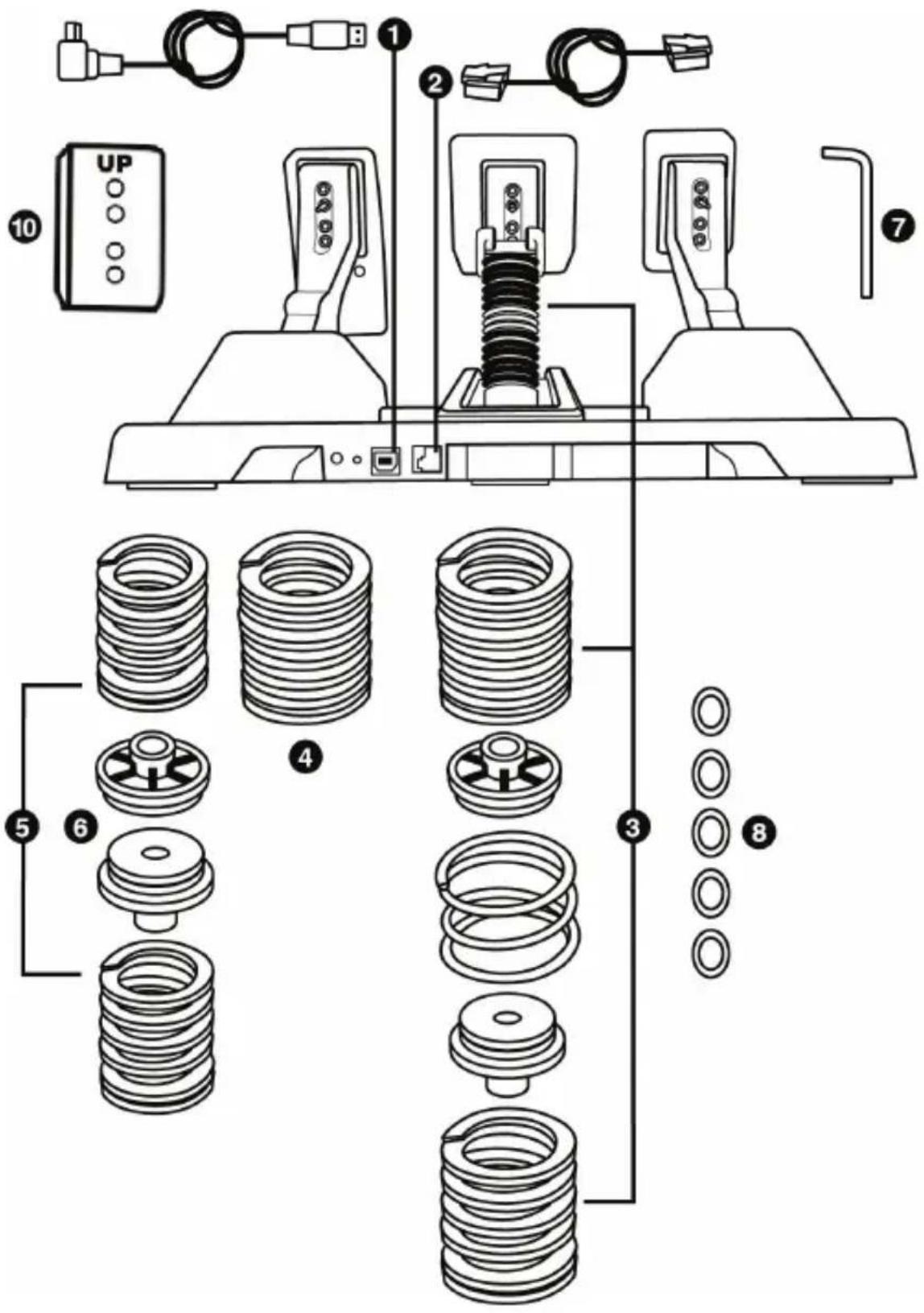
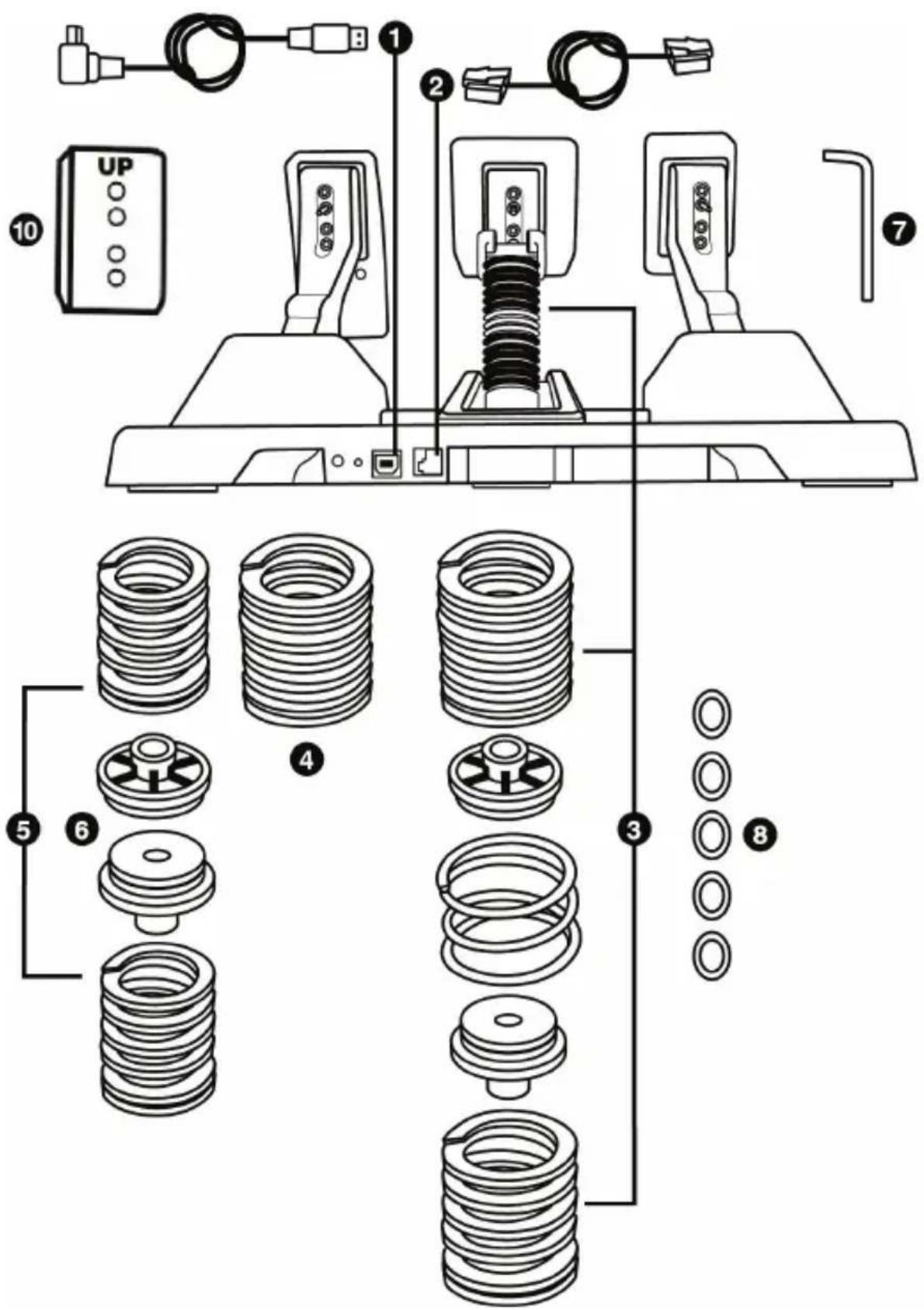
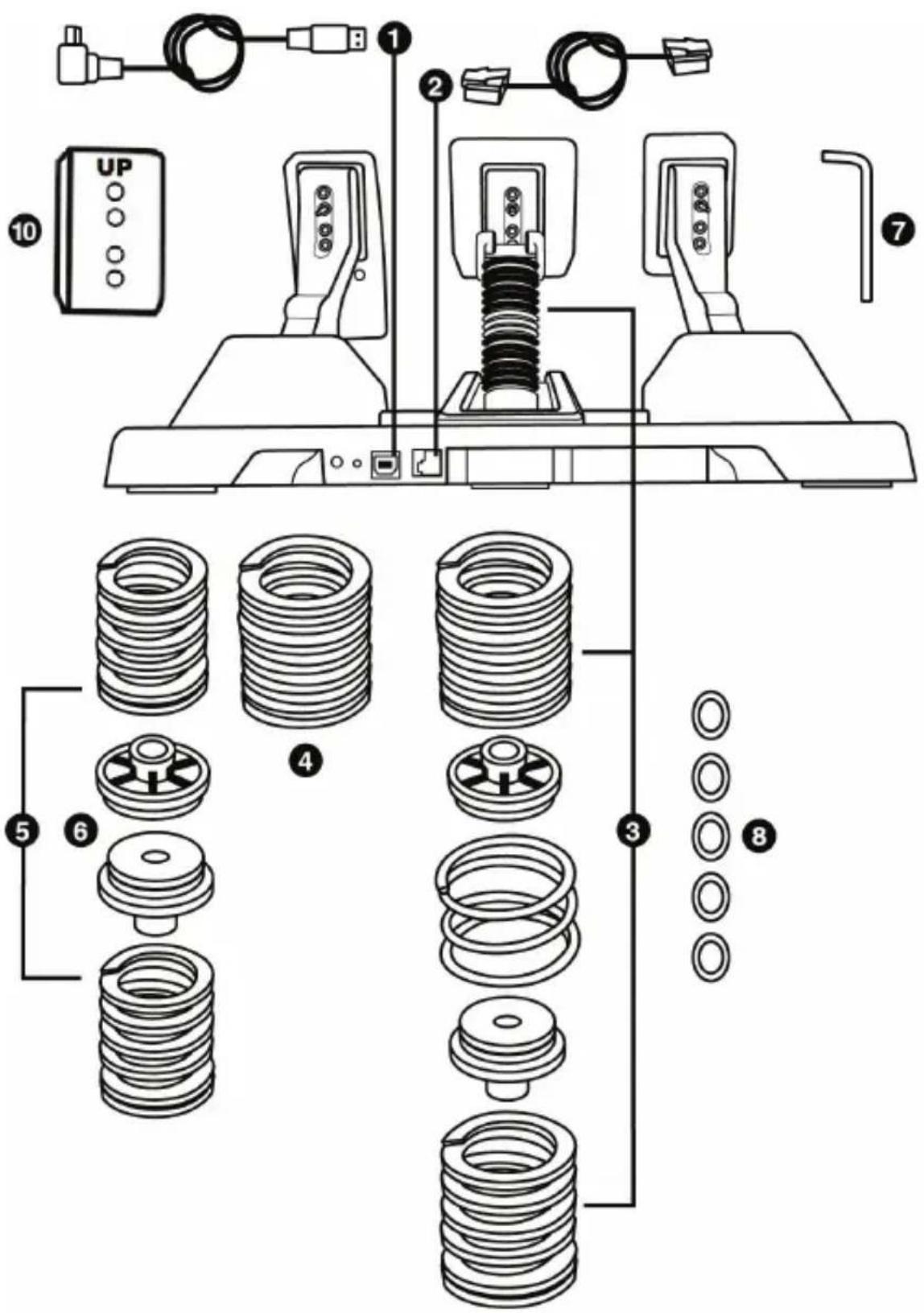
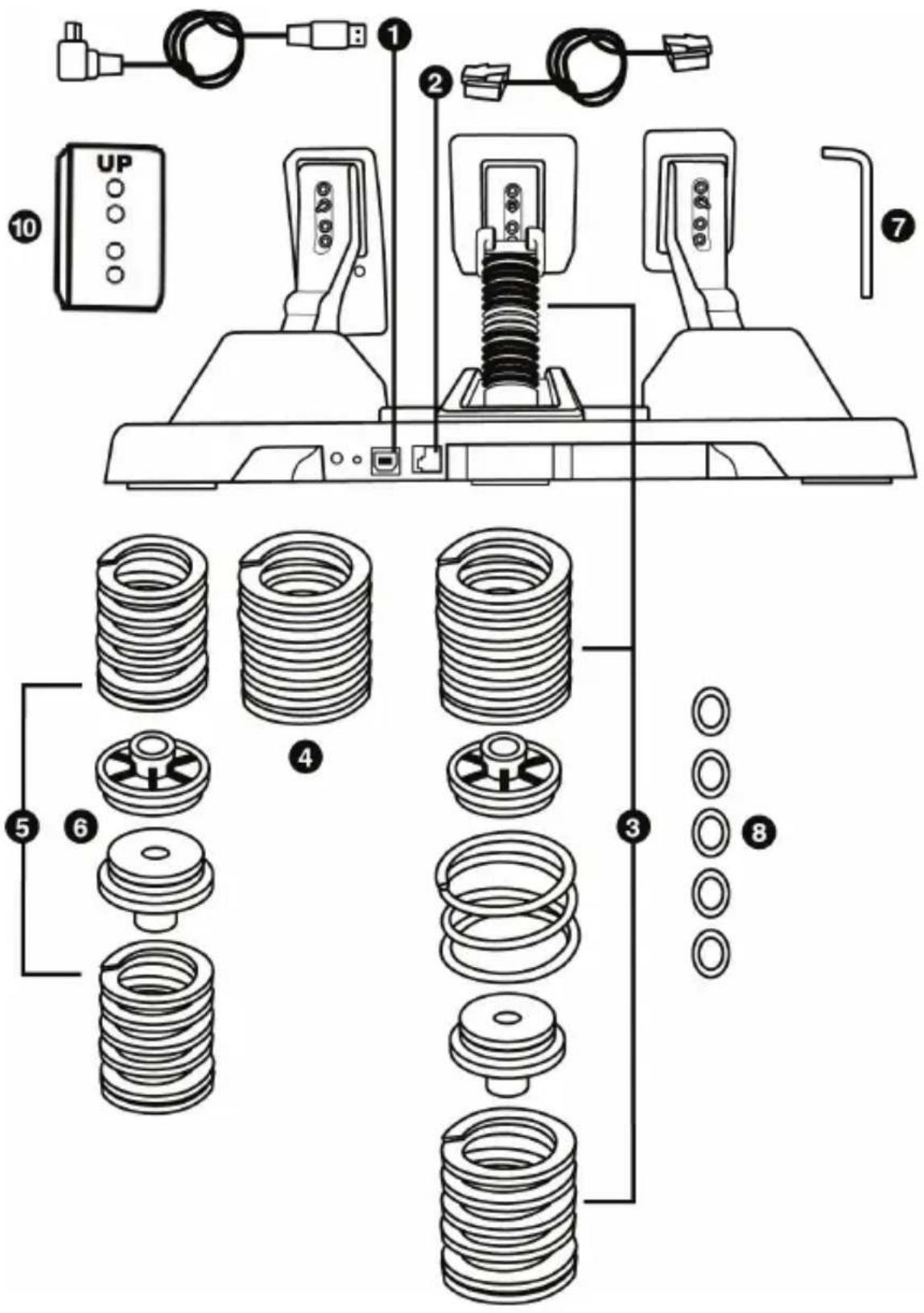
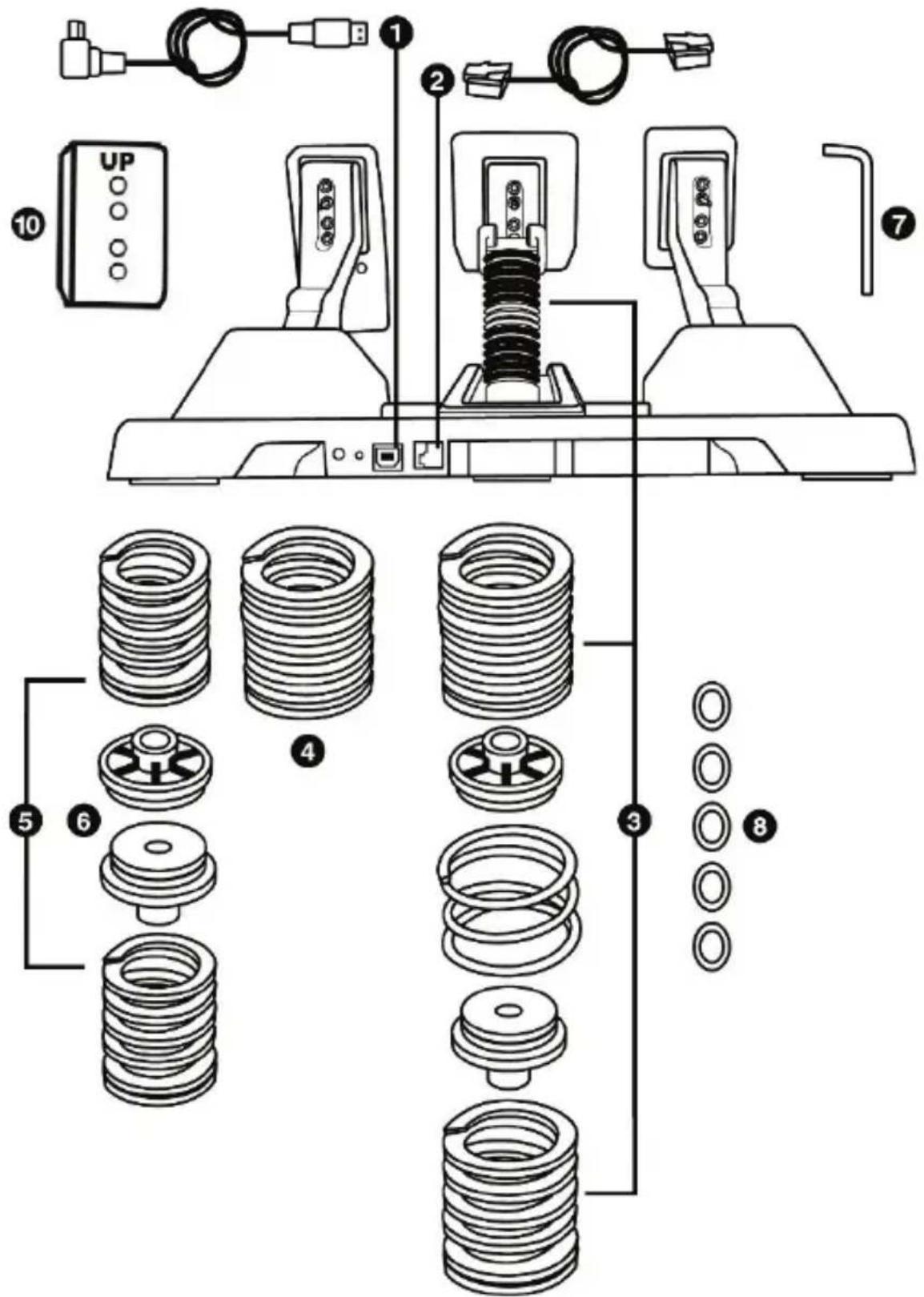
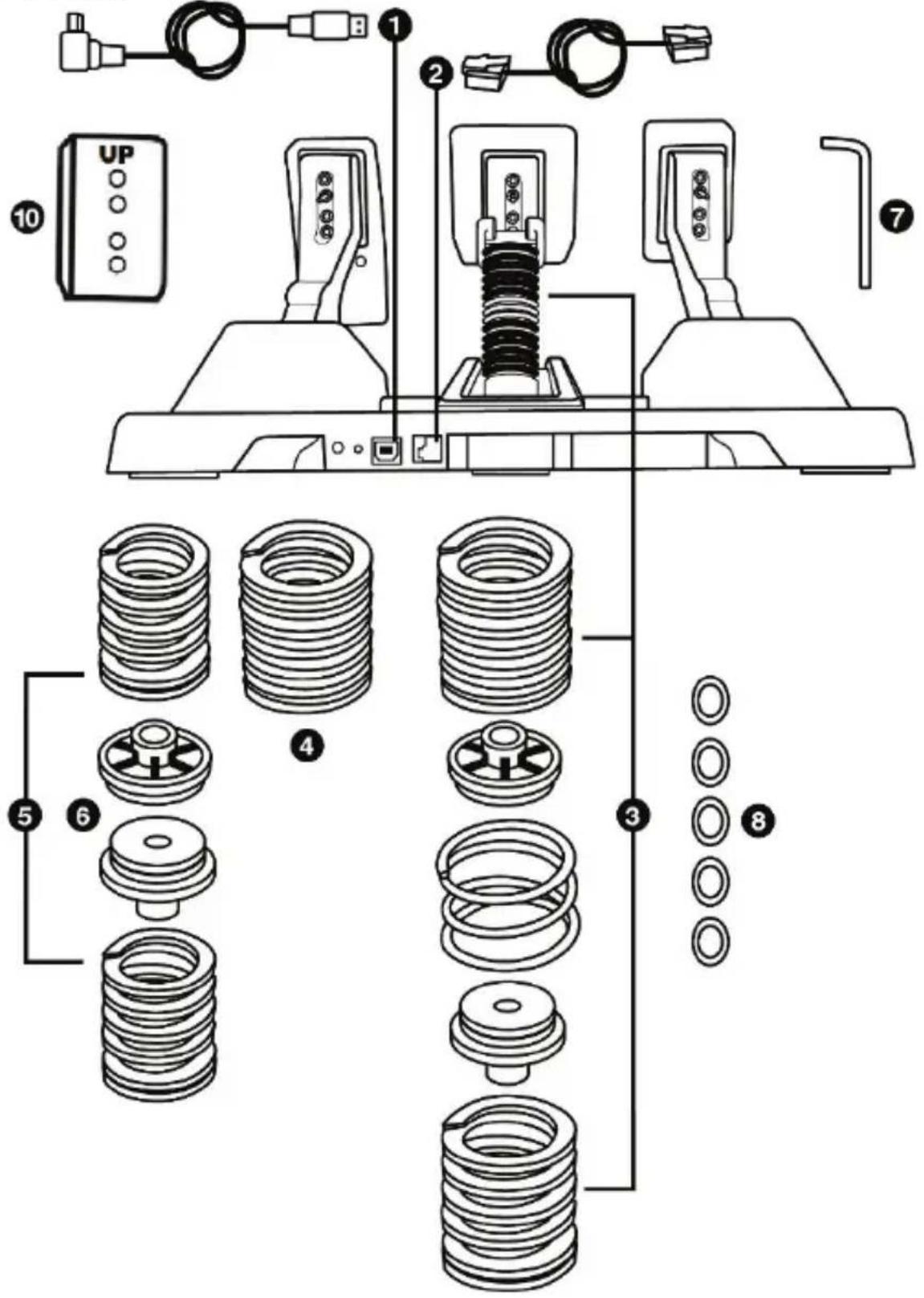
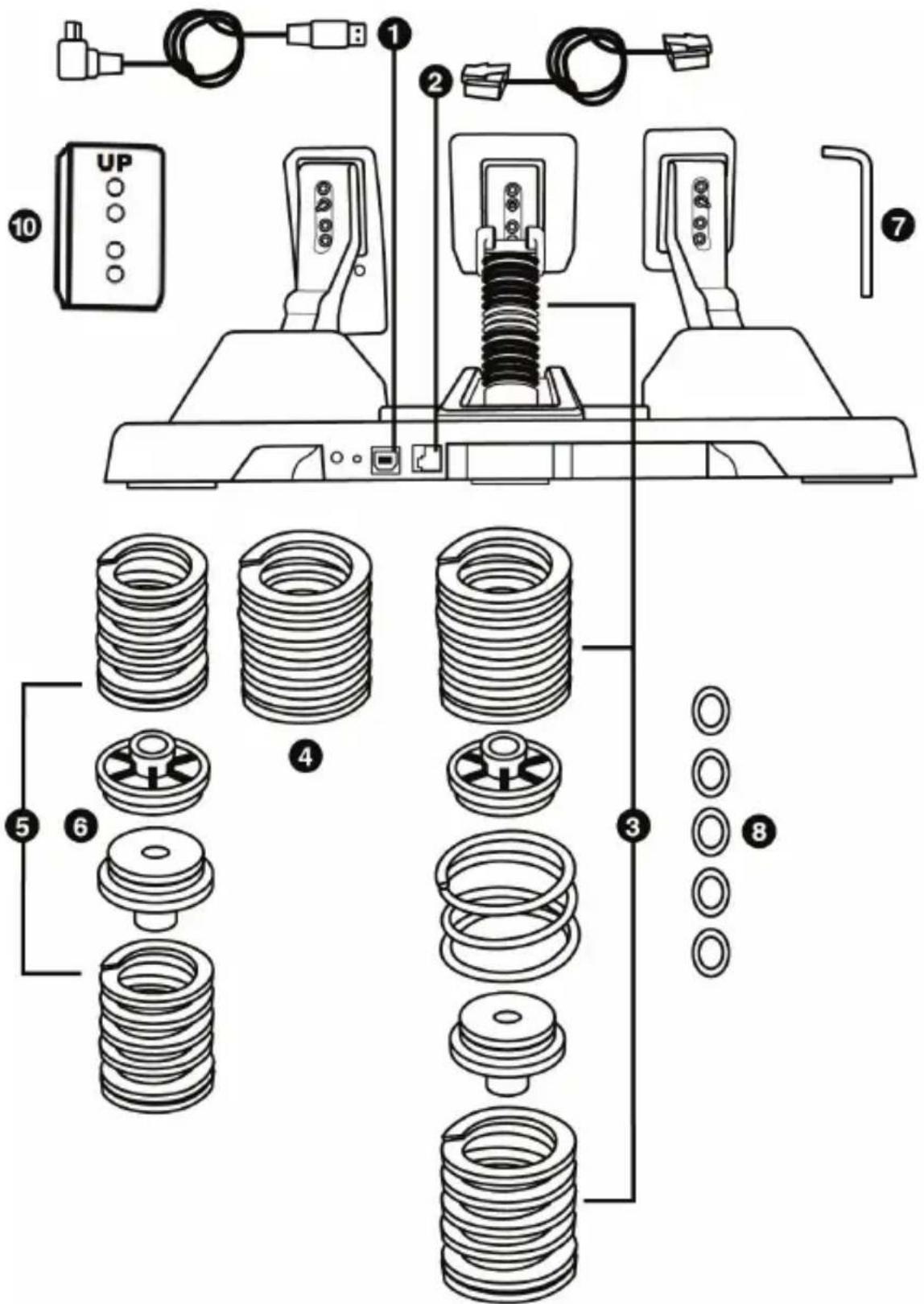
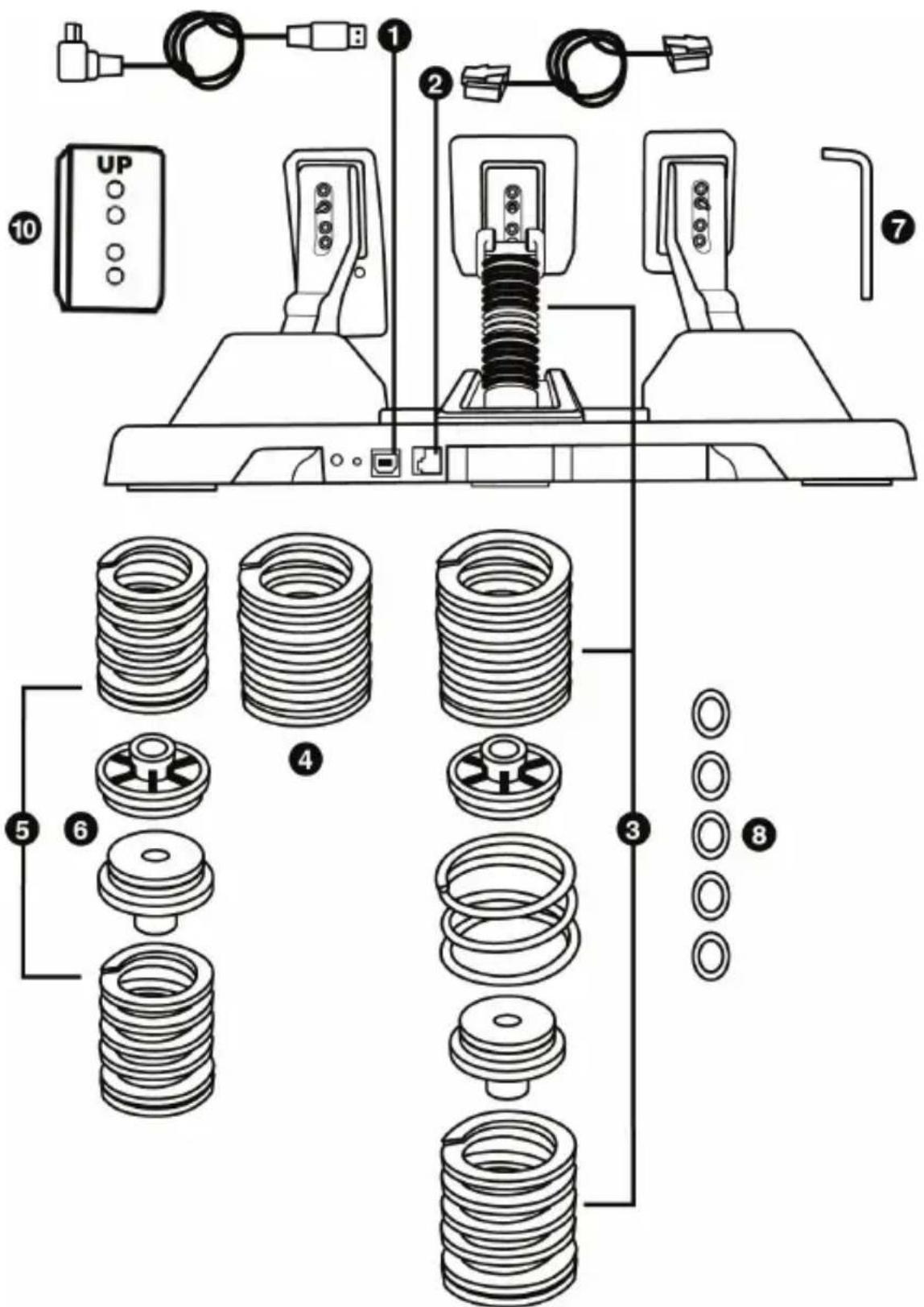
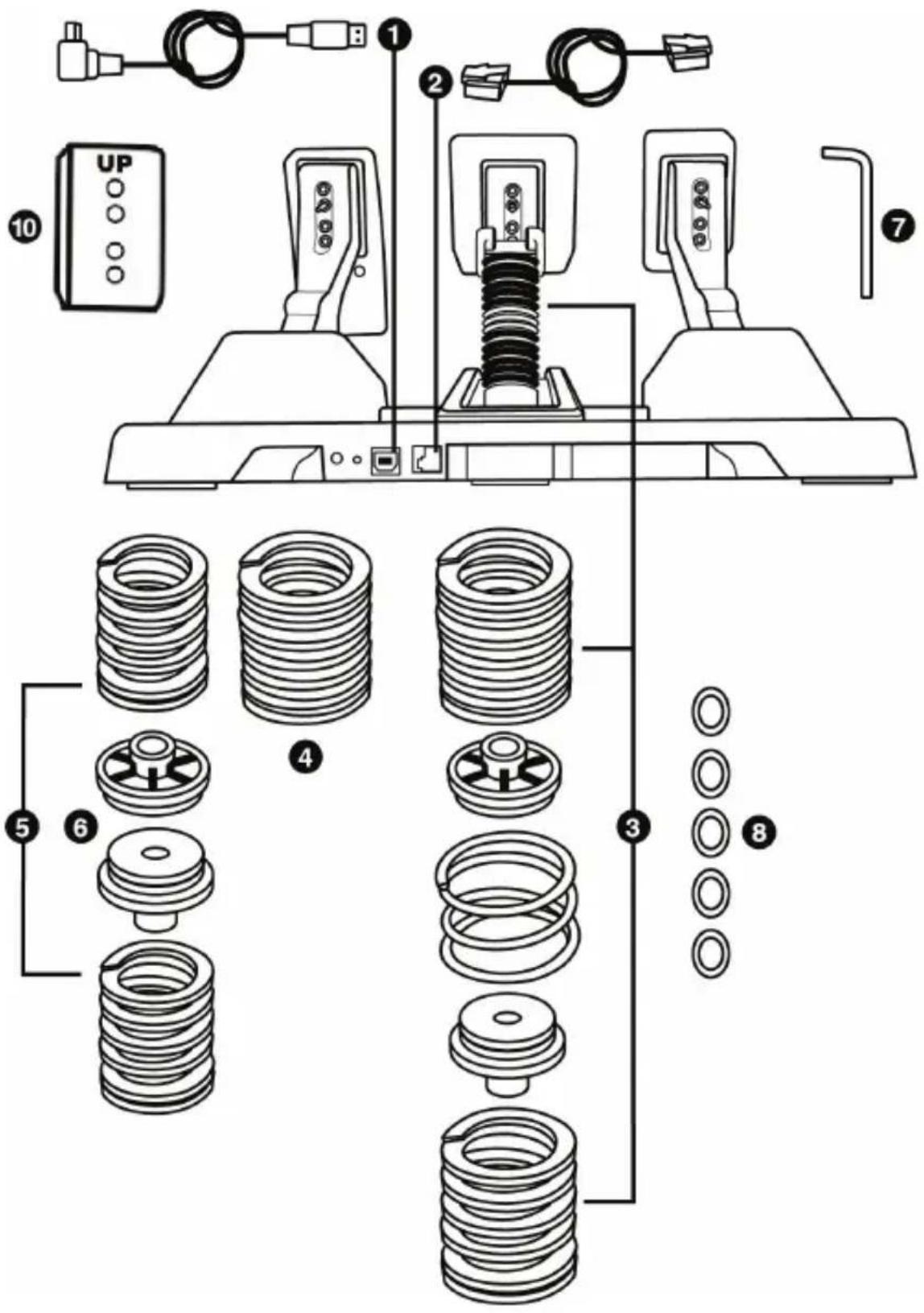
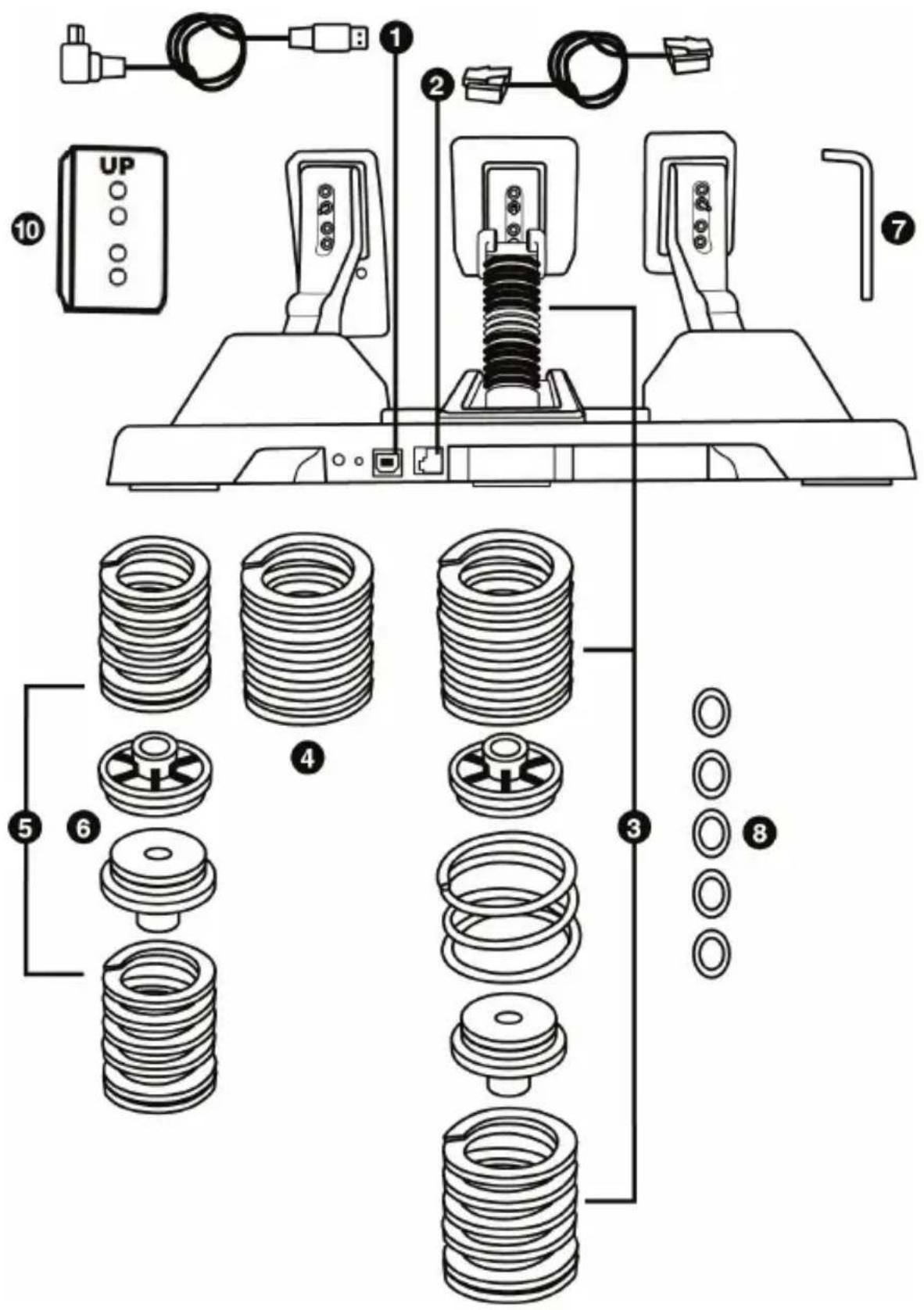
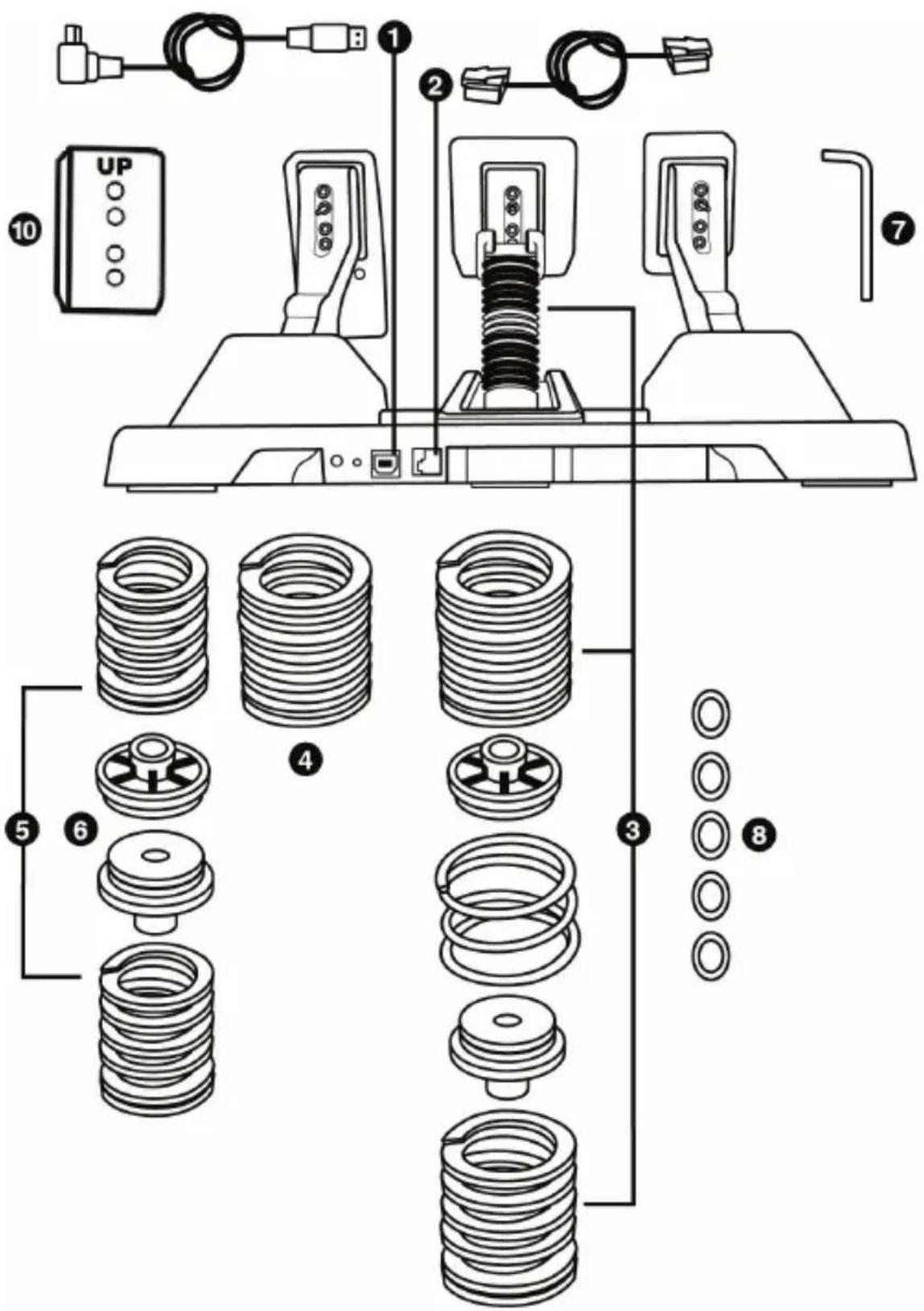
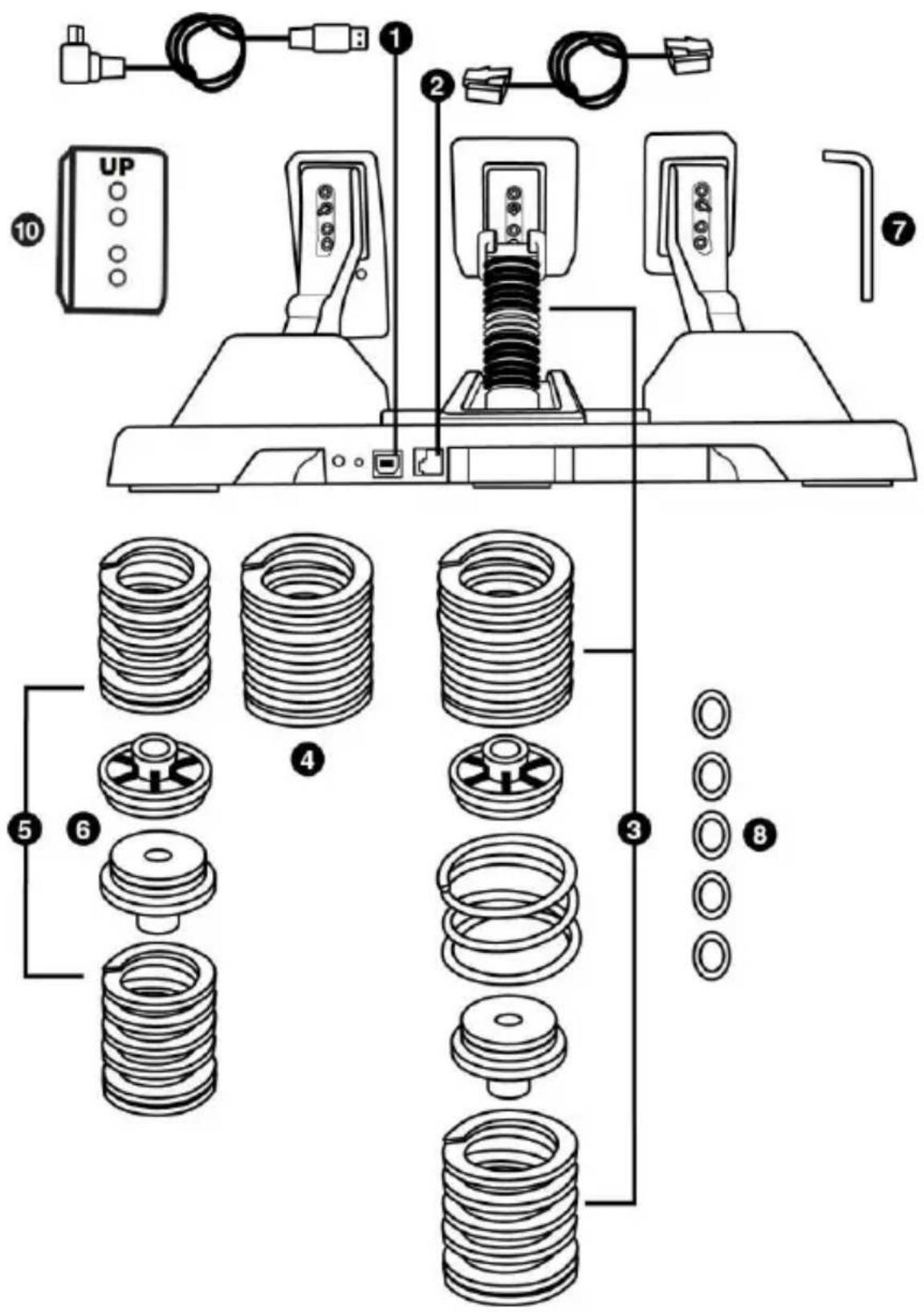
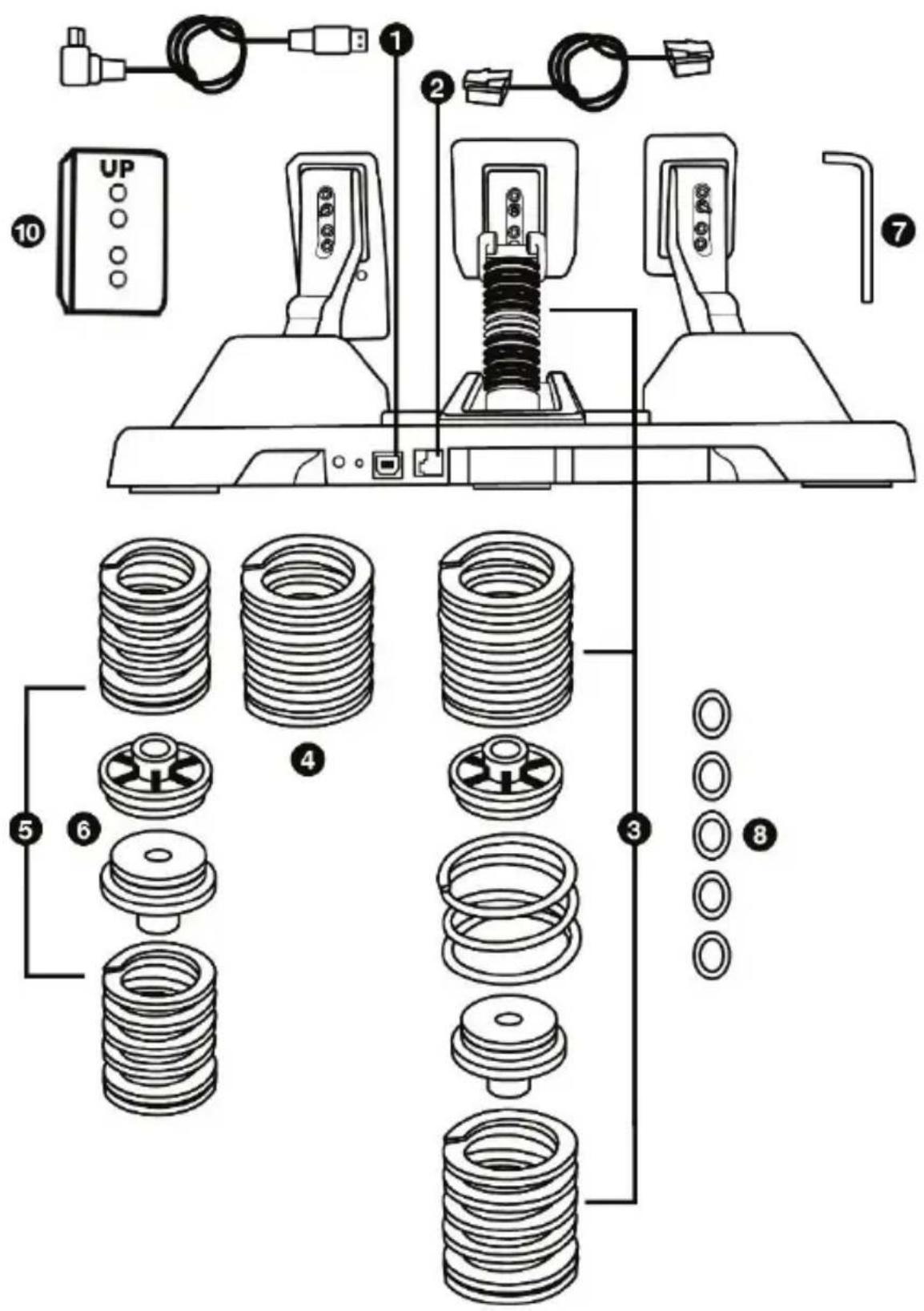
1 Removable USB cable; USB connector on the back of the pedal set
2 Removable RJ12 cable; RJ12 connector on the back of the pedal set
3 Medium resistance, preinstalled by default (1 black F20 spring + 1 grey F15 spring) (+ 1 central chrome-plated preloading spring) (+ 2 spacers without markings)
4 1 white F10 spring
5 2 red F30 springs
6 2 spacers with red markings
(specifically designed for use with the red F30 springs)
7 2.5 mm Allen key
8 5 flat washers (to decrease or eliminate the preloading of the central chrome-plated spring)
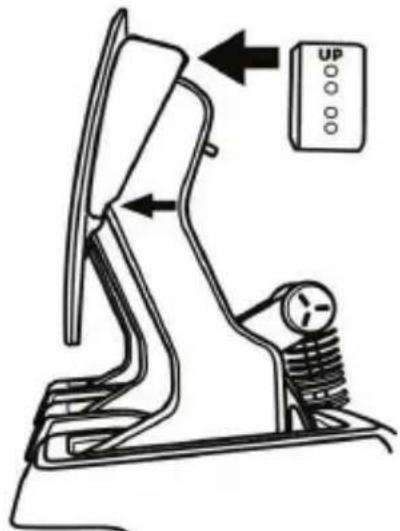
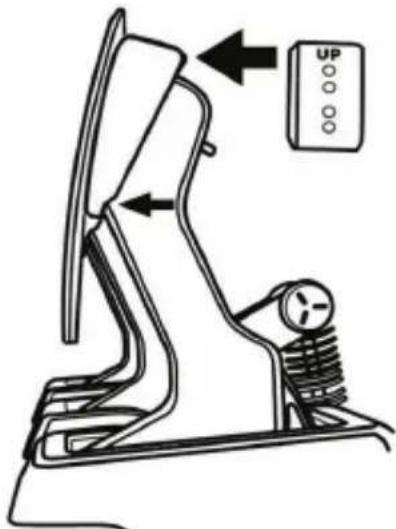
10 Plastic pedal head support for vertical inclination of pedals
Spacers
2 types of spacers are included. It is important to use the proper type of spacer, depending on the type of spring selected.
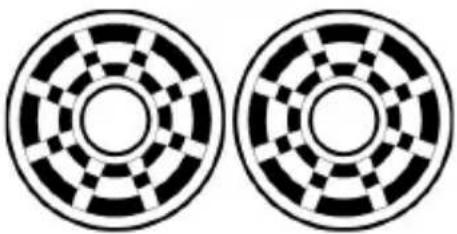 | Spacers without color markings(and with grooves)For use with the following springs:White F10Grey F15Black F20 |
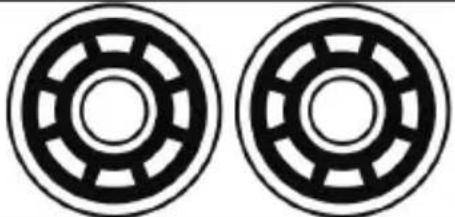 | Spacers with red markings(and without grooves)Specifically designed for use with the following springs:Red F30 |
Pedal arms and heads
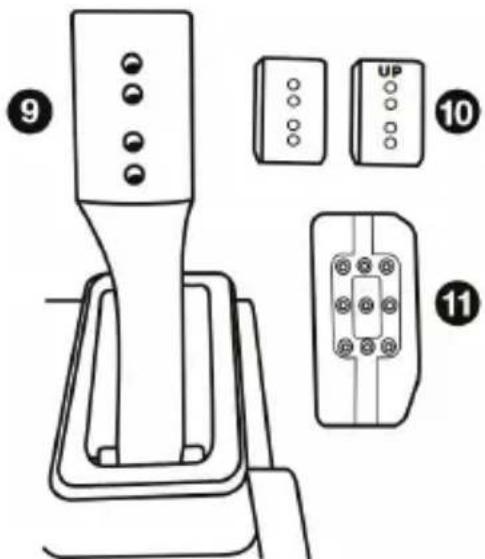
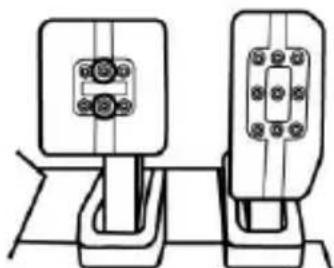
9 Metal pedal arm with 4 holes
10 Plastic pedal head support (to be positioned between the pedal head and arm) with 4 holes
11 Metal pedal heads (with different numbers of holes: 9 for the accelerator pedal; 6 for the brake pedal; 6 for the clutch pedal)
VERY IMPORTANT
This procedure must be followed when changing the brake pedal's resistance.
Connect the pedal set to a PC using the removable USB cable (1).
The removable RJ12 cable (2) must not be connected to the pedal set during this procedure.
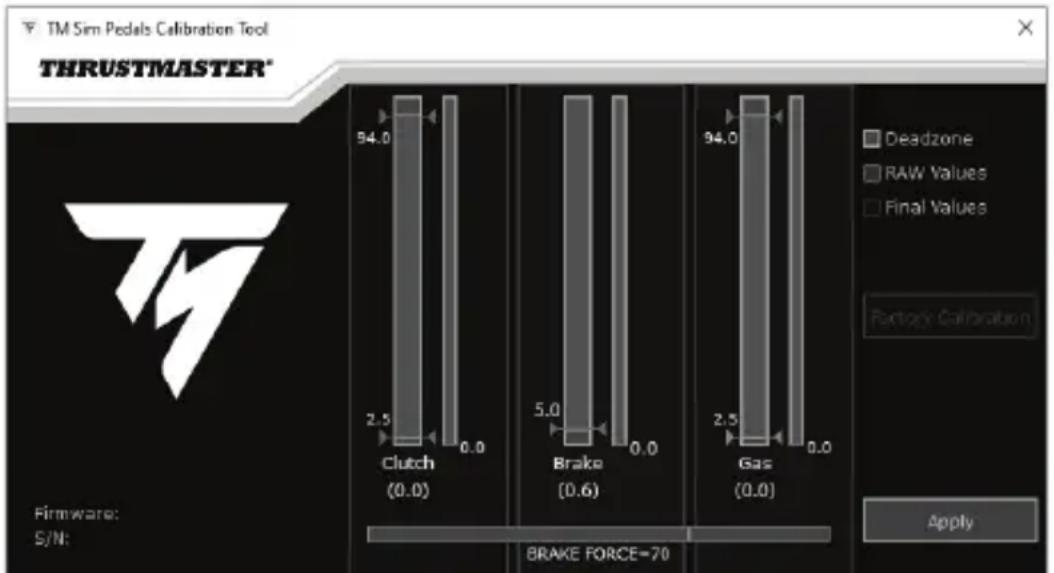
Visit https://support.thrustmaster.com. Click Racing Wheels / T-LCM Pedals, then select Software.
Download and install the calibration software:
- To adjust the dead zones at the beginning of the range of travel on all three pedals to your liking.
- To adjust the dead zones at the end of the range of travel on the accelerator pedal and clutch pedal to your liking.
- To adjust the electronic force (Brake Force) on the brake pedal to your liking.
bar
TM Sim Pedals Calibration Tool | Condition | Deadzone | RAW Values | Final Values | | :--- | :--- | :--- | :--- | | Clutch (0.0) | 94.0 | 2.5 | 0.0 | | Brake (0.6) | 5.0 | 0.0 | 0.0 | | Gas (0.0) | 94.0 | 2.5 | 0.0 | Firmware: S/N: BRAKE FORCE=70 ApplyOnce the different settings have been properly configured, click APPLY, and then disconnect the removable USB cable (1). The settings are saved in the pedal set's internal memory: they will be effective in all of your games, on PC and game consoles.
UPDATING THE PEDAL SET'S FIRMWARE
In order to update the firmware, the pedal set must be connected to a PC via the removable USB cable (1).
The firmware included in the pedal set can be updated with more recent versions allowing for product improvements.
The firmware version is displayed in the lower left-hand corner of the calibration software.
To update the pedal set's firmware: on PC, visit https://support.thrustmaster.com, click Racing Wheels / T-LCM Pedals, then select Firmware and follow the download and installation instructions and procedure.
ATTACHING THE PEDAL SET TO A SUPPORT OR COCKPIT
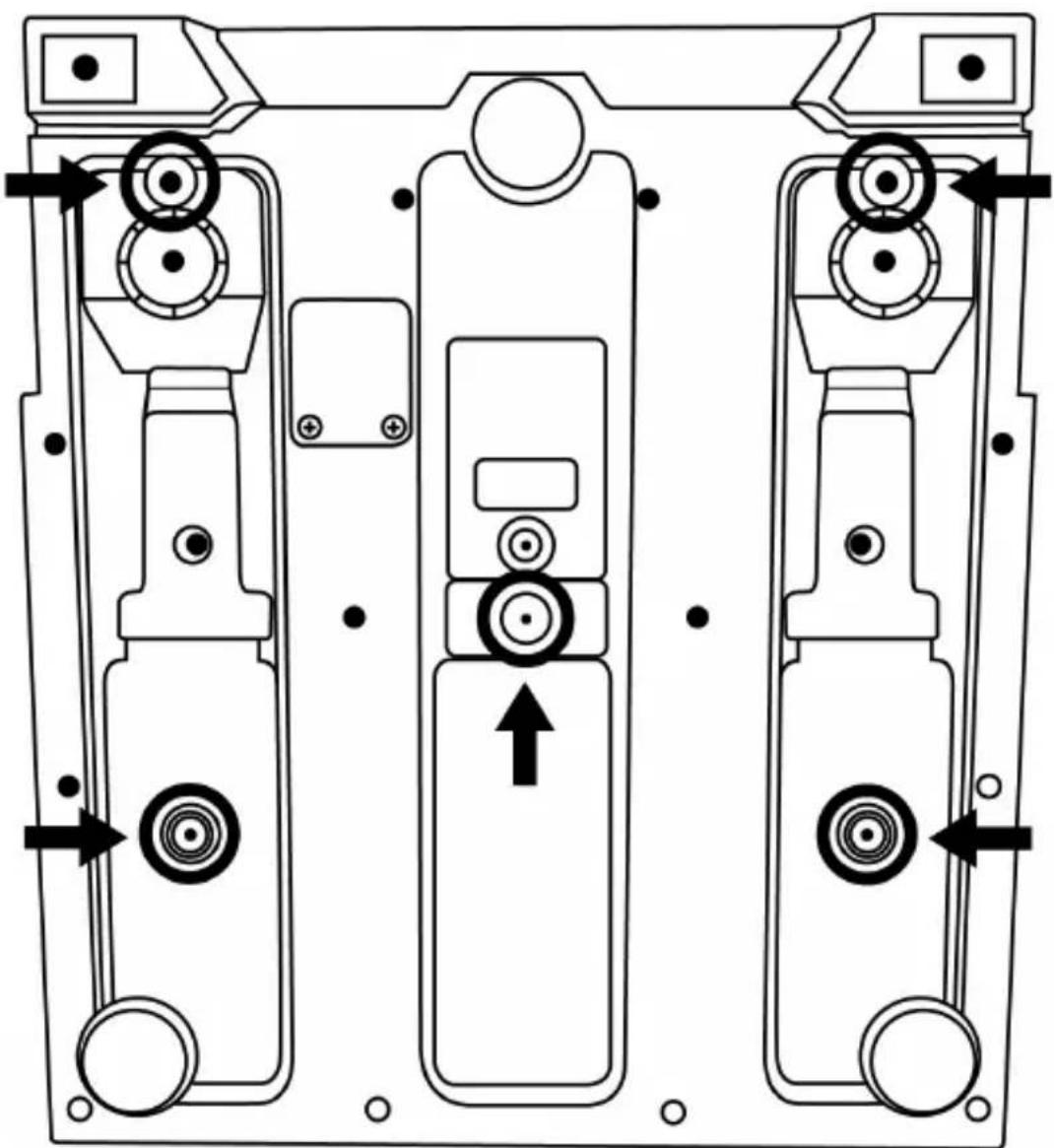
The pedal set can be attached to a variety of different compatible supports (sold separately) using the five M6-type screw threads located underneath the base. To do so, screw at least two M6 screws (not included) through the support shelf, and into the screw threads on the underside of the pedal set's base.

Important: the length of the M6 screws must not exceed the thickness of your support by more than 0.47 inches/12 mm, so as not to risk damaging the pedal set's internal components.
natural_image
Technical line drawing of a mechanical device with three vertical ports and directional arrows indicating movement or force (no text or symbols)The pedal set's setup diagrams for cockpits and other supports are available at https://support.thrustmaster.com: click Racing Wheels / T-LCM Pedals, and then Template - Cockpit setup.
MECHANICAL SETTINGS FOR THE PEDAL SET
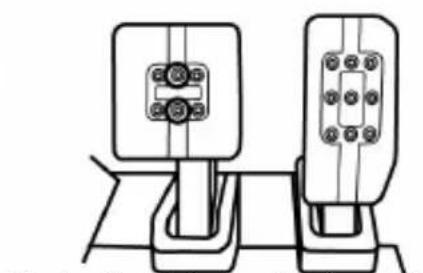
Adjusting the height of the pedals
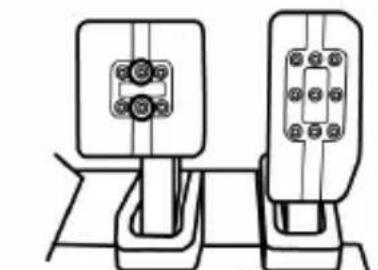
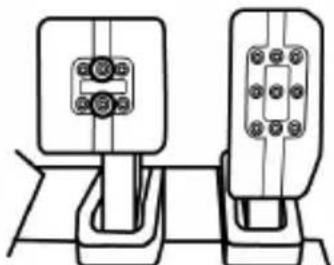
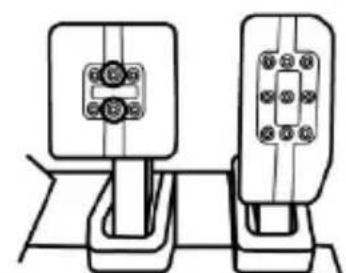
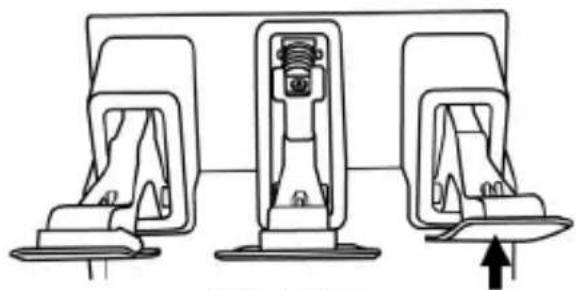
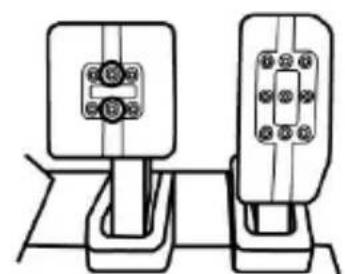
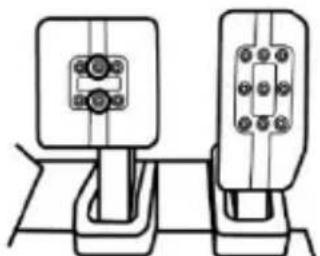
- Using the included 2.5 mm Allen key (7), unscrew the two screws holding the metal pedal head (11) and its plastic support (10) in place.
- Choose your preferred position in terms of height, and then fasten everything together again using the screws.
Examples with the accelerator pedal:
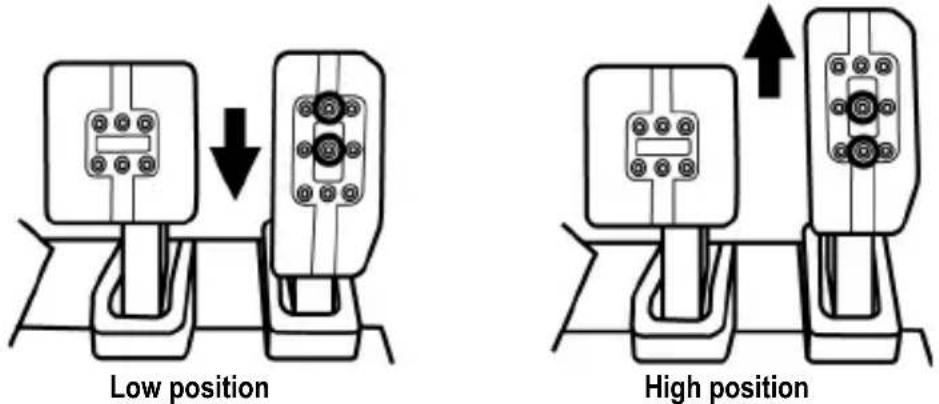
Number of different height positions per pedal:
- 3 for the accelerator pedal
- 2 for the brake pedal
- 2 for the clutch pedal
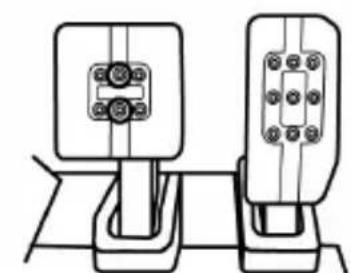
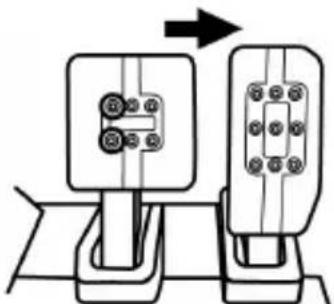
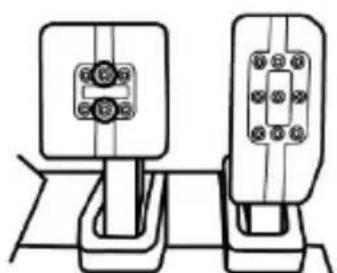
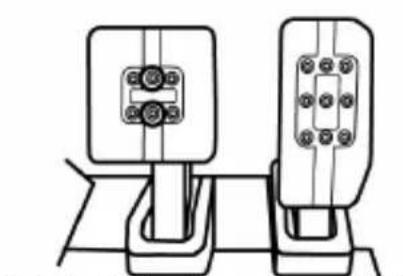
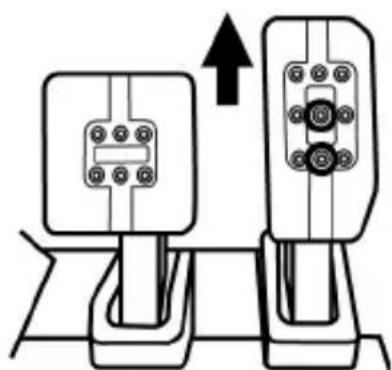
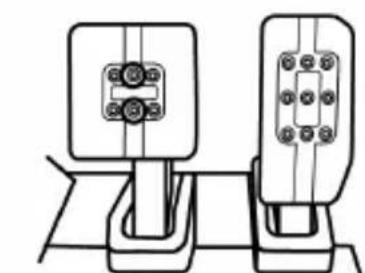
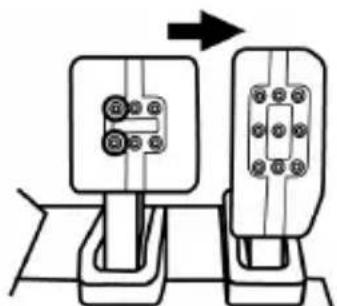
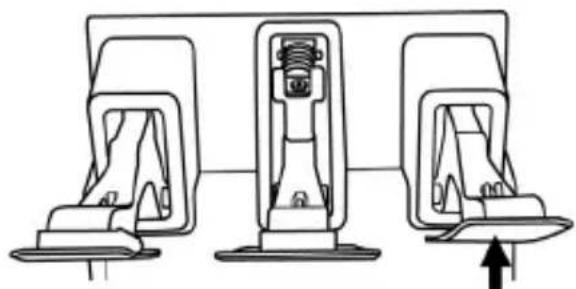
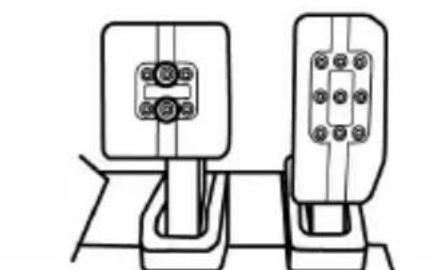
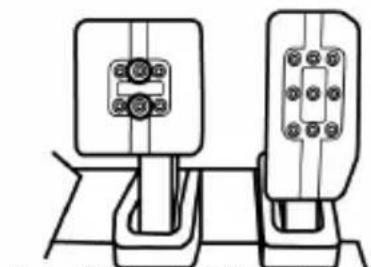
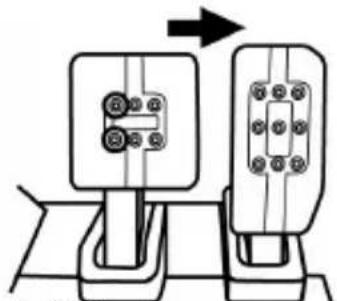
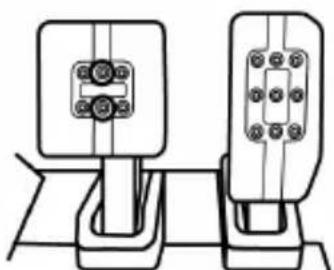
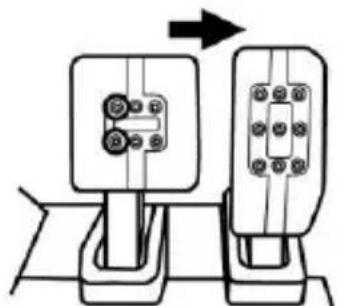
Adjusting the spacing of the three pedals
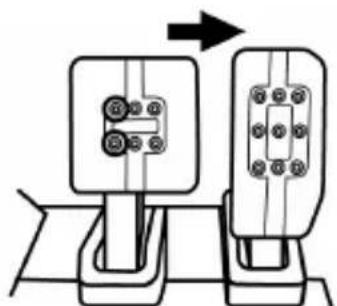
- Using the included 2.5 mm Allen key (7), unscrew the two screws holding the metal pedal head (11) and its plastic support (10) in place.
- Choose your preferred position (to the left, centered or to the right), and then fasten everything together again using the screws.
Examples with the brake pedal:
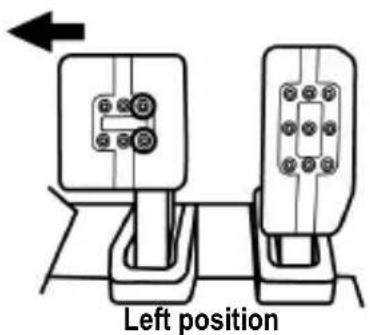
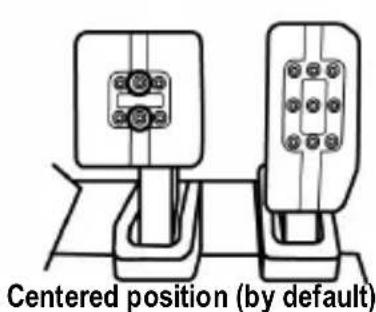
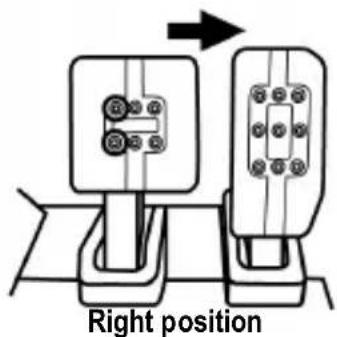
Number of different spacing positions per pedal:
- 3 for the accelerator pedal
- 3 for the brake pedal
- 3 for the clutch pedal
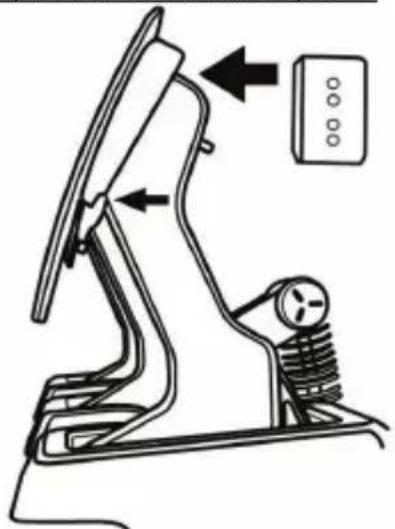
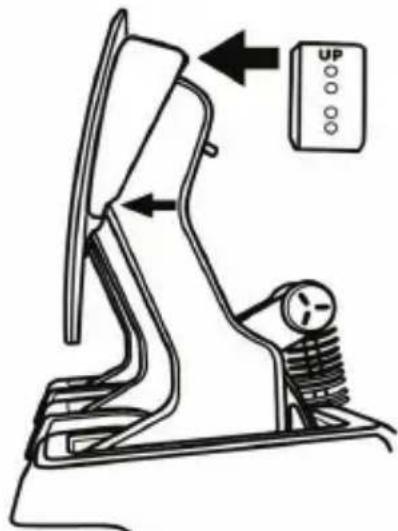
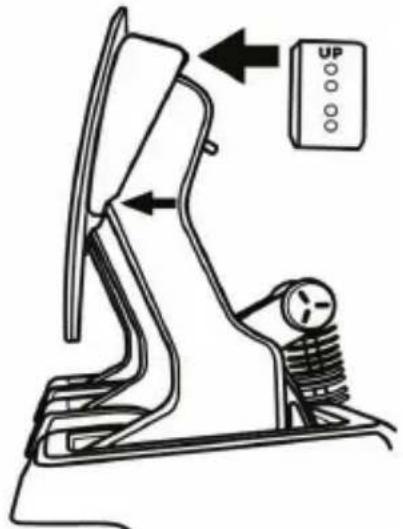
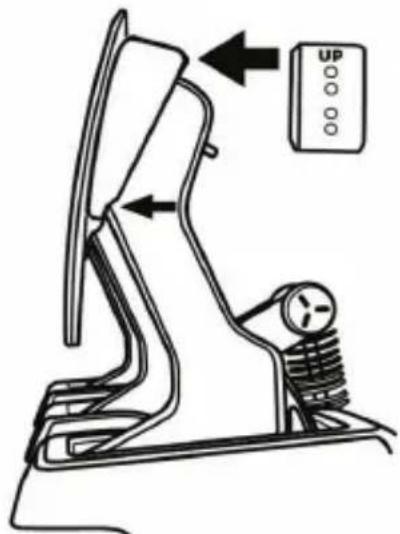
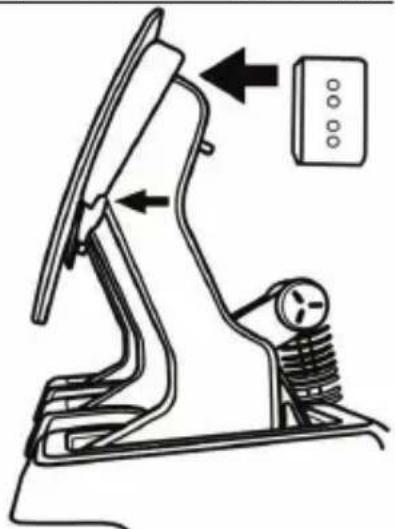
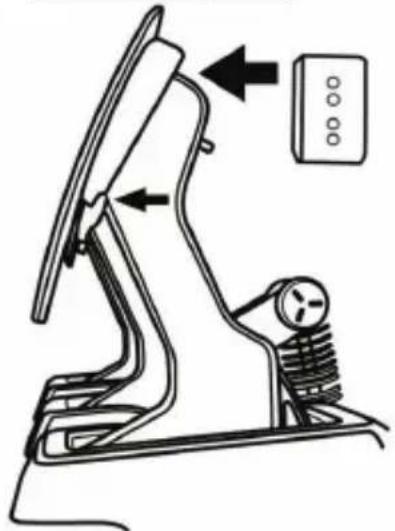
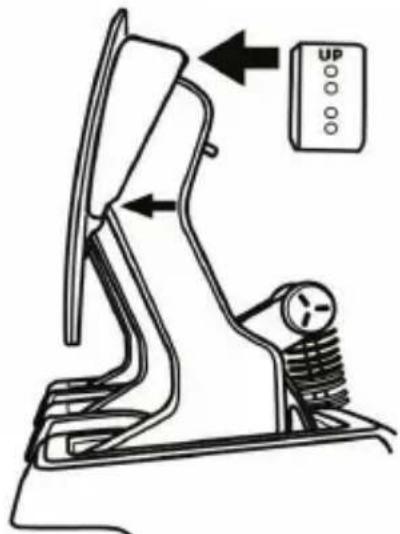
Adjusting the inclination of the pedals
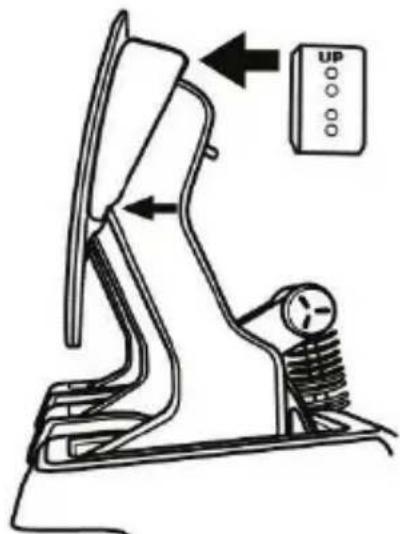
- Using the included 2.5 mm Allen key (7), unscrew the two screws holding the metal pedal head (11) and its plastic support (10) in place.
- Next, rotate the plastic pedal head support (10) 180^ (or change it), and then fasten everything together again using the screws.
Examples with the accelerator pedal:
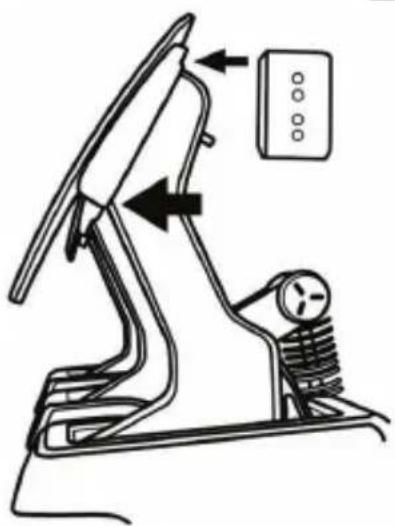
natural_image
Technical line drawing of a mechanical device with directional arrows indicating movement or force (no text or symbols present)Less inclined position (by default)
natural_image
Technical line drawing of a mechanical device with directional arrows indicating movement or force (no text or symbols present)More inclined position
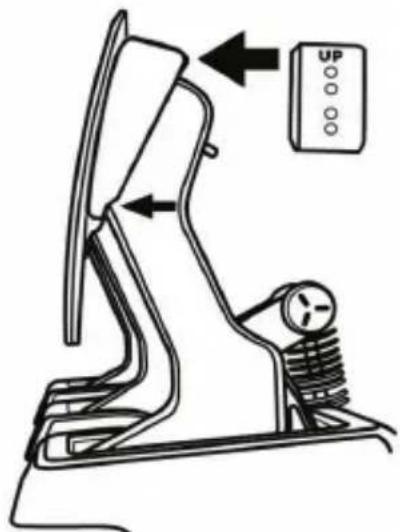
Vertical position
Number of different inclination positions per pedal:
- 3 for the accelerator pedal
- 3 for the brake pedal
- 3 for the clutch pedal
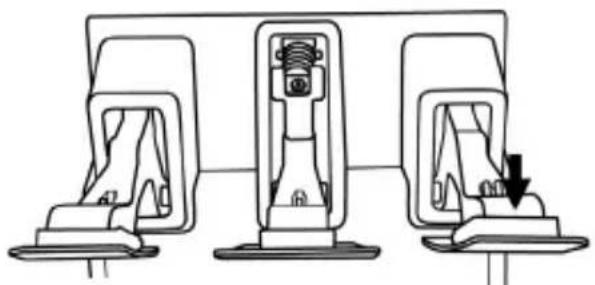
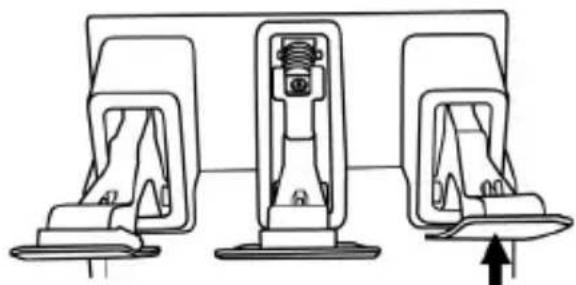
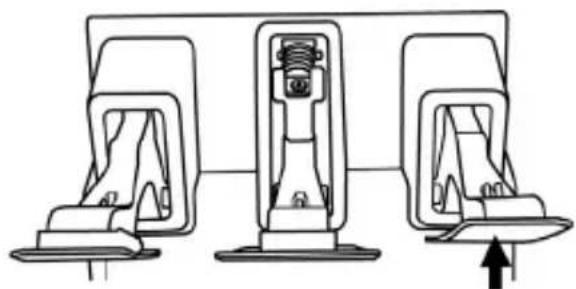
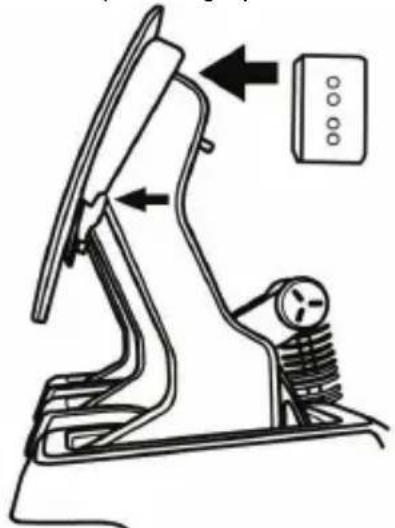
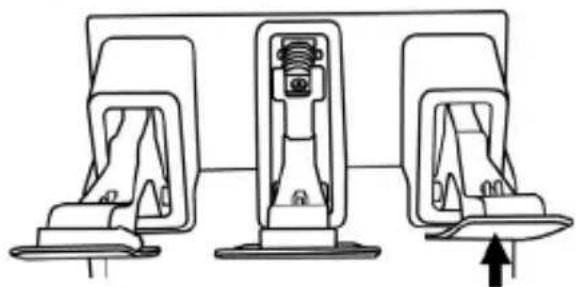
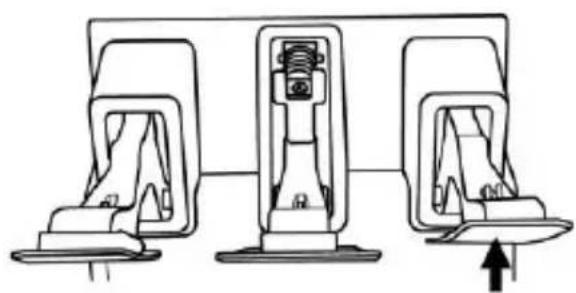
Adjusting the alignment of the pedals
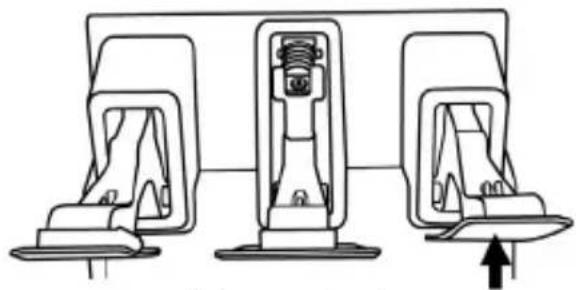
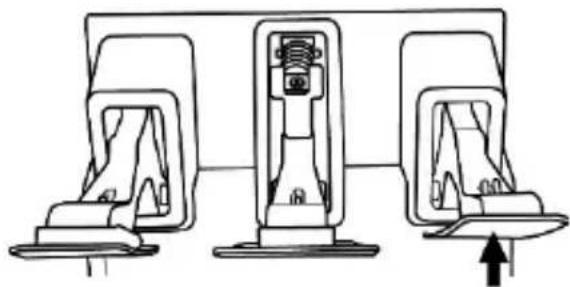
- Install the plastic pedal head support (10) to move a pedal forward.
- Remove the plastic pedal head support (10) to move a pedal back.
Examples with the accelerator pedal:
natural_image
Diagram of three car seat lockers with a downward arrow indicating a drop or adjustment (no text or symbols present)Forward position (by default)
natural_image
Diagram of three car seat lockers with a directional arrow indicating movement (no text or symbols)Back position
Changing the brake pedal's resistance
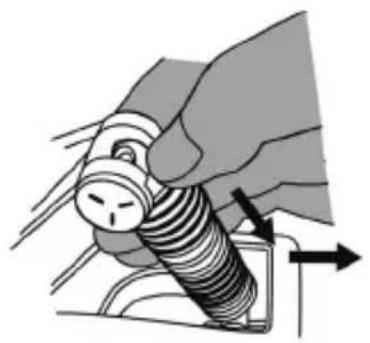
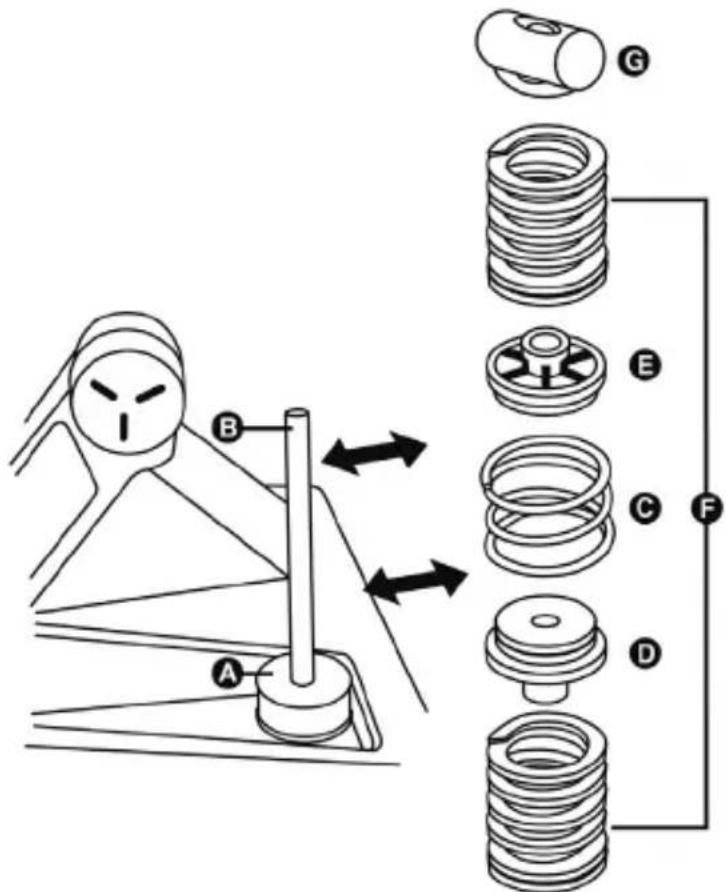
- Disconnect the pedal set from the PC or game console and push down firmly on the washer of the upper retaining head (G) (located at the back of the pedal), and then pull this component backward to free it from the metal arm.
natural_image
Illustration of a hand using a threaded screw to press or install a component, with directional arrows indicating motion (no text or symbols)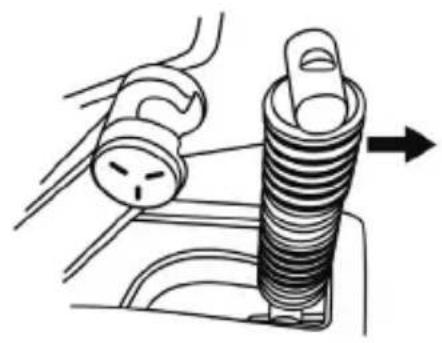
natural_image
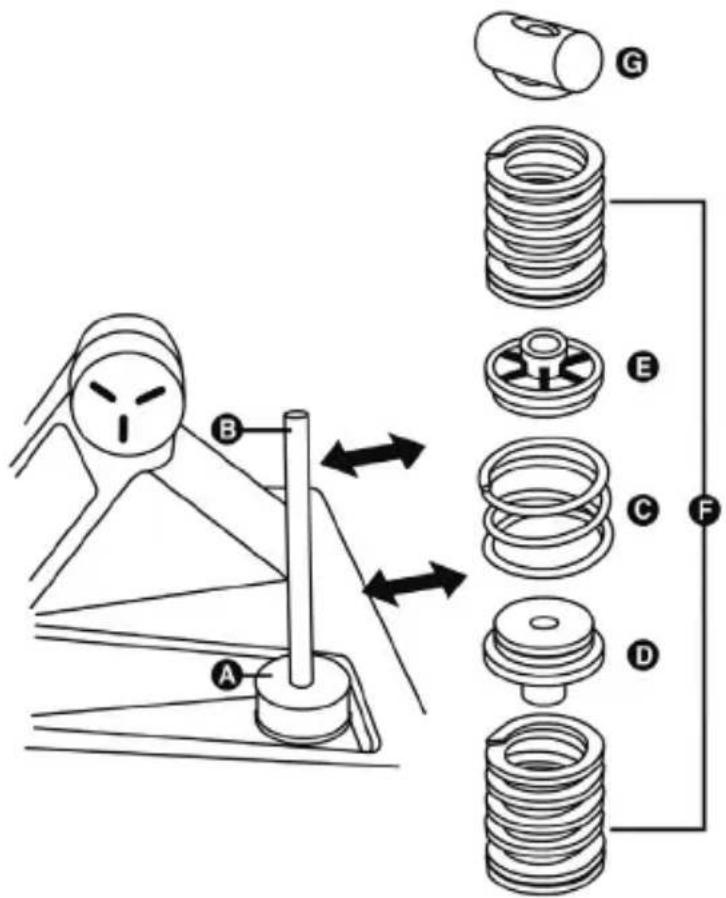
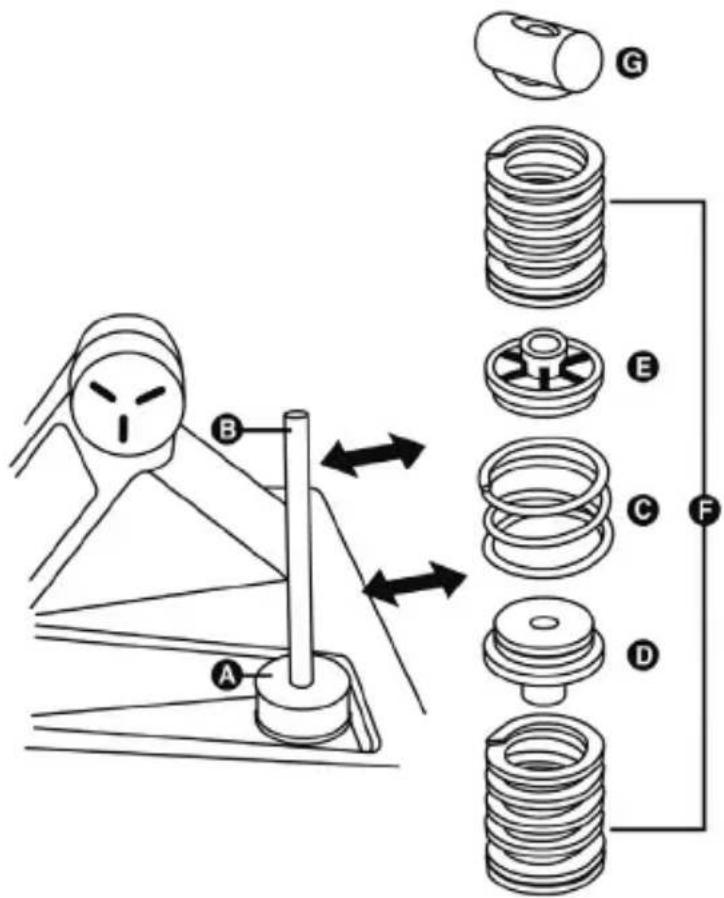
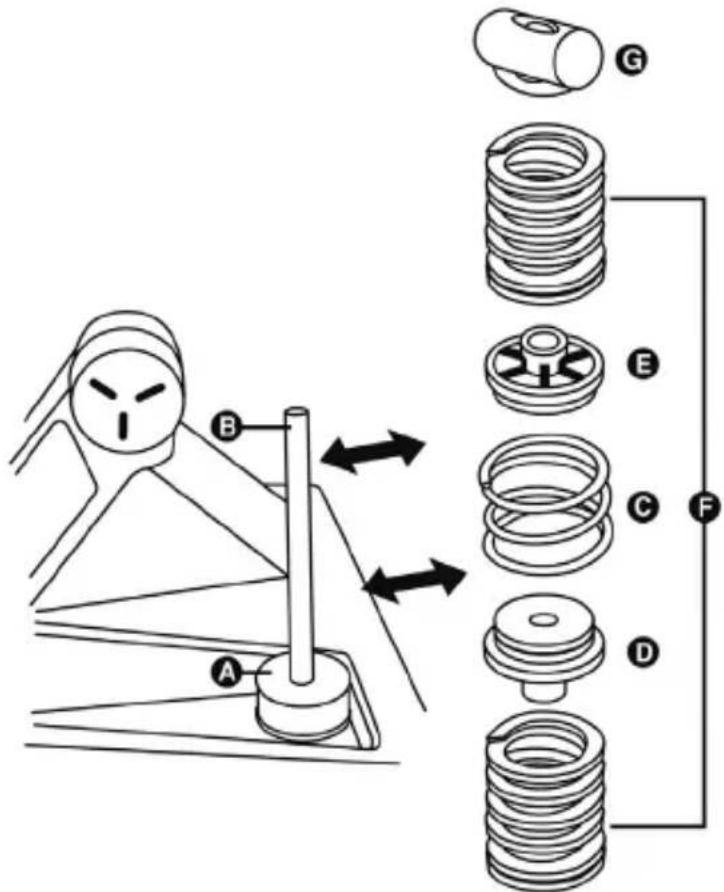
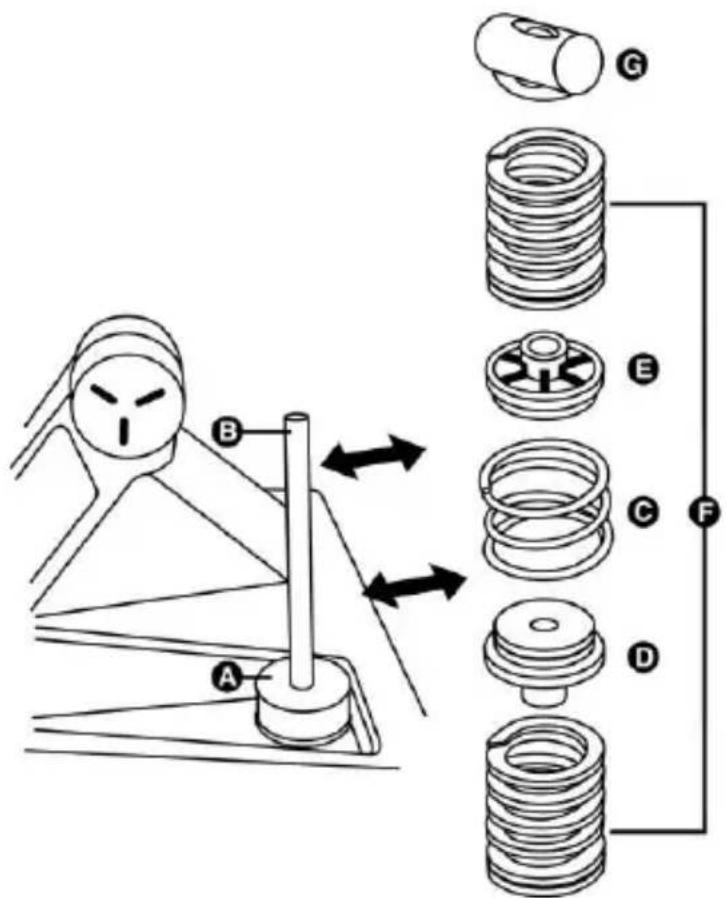
Diagram of a car interior showing a valve and a spring component with an arrow indicating direction (no text or symbols)- Remove the different elements from the holding rod (B).
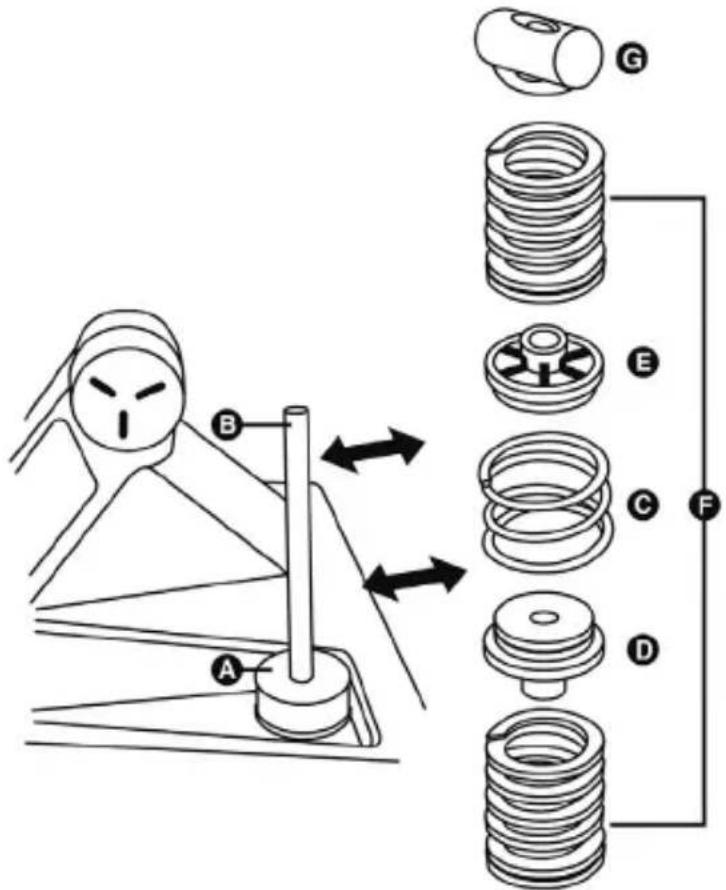
A Load Cell force sensor
A Never to be removed from the holding rod!
B Holding rod for springs column
C Central 4-spiral chrome-plated preloading spring
D Rubber spacer
E Plastic spacer
F Main 7-spiral springs
(F10, F15, F20, F30)
G Upper retaining head with washer
The brake pedal's resistance can be adjusted by replacing or mixing the main F springs:
| F spring color | Spring resistance |
| WHITE (1 included) | F10 |
| GREY (1 included) | F15 |
| BLACK (1 included) | F20 |
| RED (2 included) | F30 |
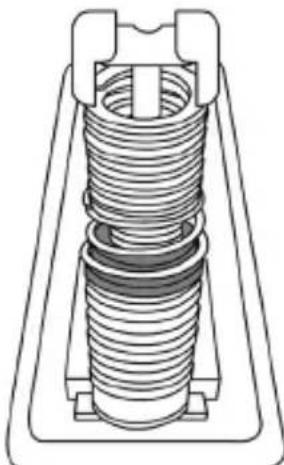
- Reposition the different elements and the main springs (F10, F15, F20 or F30) of your choice (along with the appropriate spacers) on the holding rod.
| Example | Resistance |
| 1 white F10 spring+ 1 grey F15 spring | Weak resistance |
| 1 grey F15 spring+ 1 black F20 spring(installed by default) | Medium resistance |
| 2 red F30 springs | Strong resistance |
natural_image
Technical line drawing of a mechanical spring assembly (no text or symbols)Don't hesitate to mix and test out the different springs (a variety of different combinations are possible) in order to find the level of resistance that suits you best.
Once you have modified the resistance, connect the pedal set to a PC via the removable USB cable (1), then carry out a new calibration of the brake pedal via the calibration software. This new calibration (corresponding to the new brake pedal resistance) will automatically be saved in the pedal set's internal memory, and will be effective in all of your games on PC and game consoles.
VERY IMPORTANT
The pedal set's default calibration at the factory is carried out with one grey F15 spring and one black F20 spring (medium resistance). In the event that you change the springs (and therefore the brake pedal's resistance), you must recalibrate the brake pedal using the calibration software on PC: should you fail to do so, the brake pedal will not function properly on PC or game consoles.
Decreasing or eliminating the brake pedal's preloading effect
For users who prefer more linear braking resistance, it is also possible to decrease or eliminate the preloading effect of the central chrome-plated preloading spring (C).
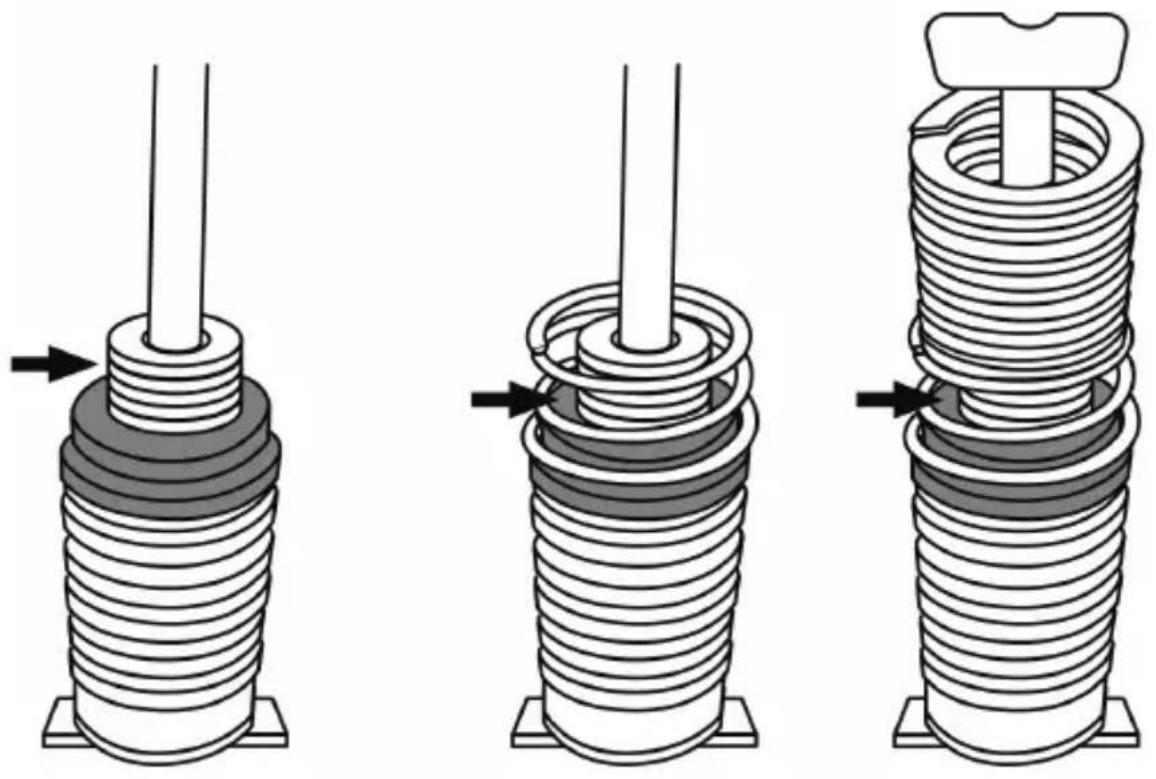
To do so, slide 1 to 5 flat washers (8) onto the holding rod, in the middle of the central chrome-plated preloading spring (C).
Please note: The more flat washers you add, the more the preloading effect will be decreased (or eliminated altogether, in the event that you use all 5 flat washers).
Example of eliminating the preloading effect by using all 5 flat washers:
natural_image
Three technical illustrations of a coiled spring or solenoid assembly with arrows indicating force direction (no text or symbols present)
Important:
Adding these flat washers will also have the effect of reducing the brake pedal's mechanical travel.
USING THE PEDAL SET WITH A THRUSTMASTER RACING WHEEL BASE = REMOVABLE RJ12 CABLE (2) REQUIRED
(The removable USB cable (1) must not be connected to the pedal set during this type of use.)
COMPATIBILITY: PC AND GAME CONSOLES
VERY IMPORTANT
In order to ensure optimal operation of the pedal set connected directly to a Thrustmaster racing wheel base (TS-PC Racer, T-GT, T300, T150, TS-XW, TX and TMX), you must update the racing wheel base's firmware with the latest version available at https://support.thrustmaster.com. This new firmware will let you get the most out of the T-LCM Pedals pedal set's high level of precision, and use your personal settings made via the calibration software.
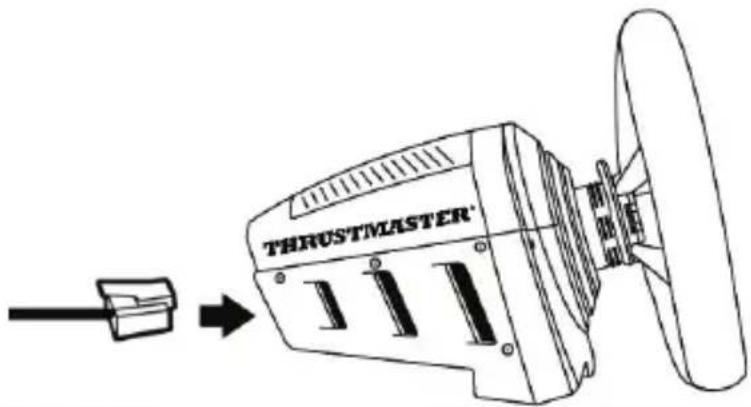
- Once the Thrustmaster racing wheel base's firmware has been updated, connect the pedal set at the back of the racing wheel base using the removable RJ12 cable (2).
- Connect the racing wheel to your PC or game console.
- The MODE LED on the base of your racing wheel flashes 5 times to indicate that the pedal set is properly recognized, for optimal operation.
In the event that the MODE LED does not flash as indicated above, this indicates that the base of your racing wheel has not been updated with the latest available firmware, and that the pedal set is not recognized as a high-precision T-LCM Pedals pedal set, but rather as a standard T3PA or T3PA PRO-type pedal set.
Please note: In this configuration, an official Thrustmaster wheel rim must be installed on the base of your racing wheel. Failure to do so will result in the pedal set not being recognized as a high-precision T-LCM Pedals pedal set.
USING THE PEDAL SET WITH A NON-THRUSTMASTER RACING WHEEL (ALSO POSSIBLE WITH A THRUSTMASTER RACING WHEEL BASE) = REMOVABLE USB CABLE (1) REQUIRED
COMPATIBILITY: PC ONLY
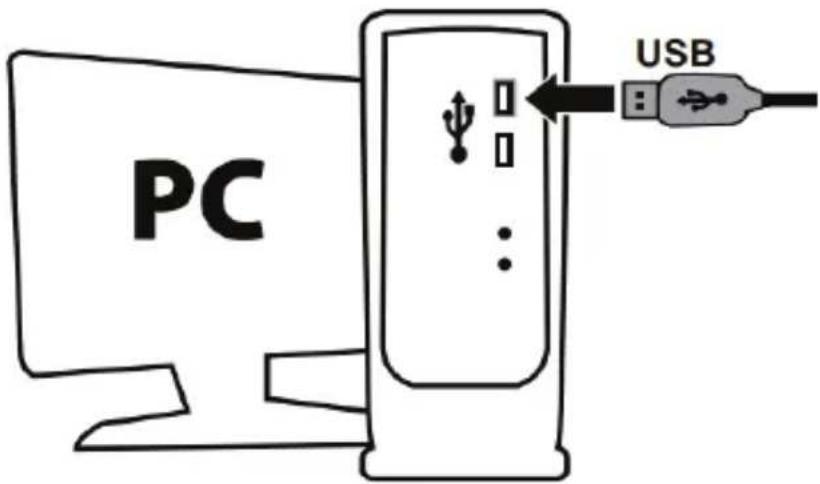
- Connect the pedal set to one of your PC's USB ports using the removable USB cable (1), and finish installing the drivers.
- When installation of the drivers is complete, click Finish and restart your computer.
Notes for PC when the pedal set is connected via the USB cable:
- The pedal set is compatible with all racing wheels on the market in games supporting multi-USB connection and separate pedal sets.
- Remember to always completely close the Game Controllers window (by clicking OK), as well as the pedal set's calibration software, before starting your game.
- The pedal set's firmware version is displayed in the lower left-hand corner of the calibration software.
OVERVIEW OF HOW TO CONNECT THE PEDAL SET ACCORDING TO THE RACING WHEEL AND PLATFORM BEING USED
| Pedal set connection | |
| On GAME CONSOLE with THRUSTMASTER RACING WHEEL | Removable RJ12 cable (2) |
| On PC with THRUSTMASTER RACING WHEEL | Removable RJ12 cable (2) or removable USB cable (1) |
| On PC with non-Thrustmaster racing wheel | Removable USB cable (1) |
WARNING

For safety reasons, never use the pedal set with bare feet or while wearing only socks on your feet.
THRUSTMASTER® DISCLAIMS ALL RESPONSIBILITY IN THE EVENT OF INJURY RESULTING FROM USE OF THE PEDAL SET WITHOUT SHOES.

Warning – Electrical shock
* Keep the product in a dry location and do not expose it to dust or sunlight.
* Respect the connection polarities.
* Do not twist or pull on the connectors and cables.
* Do not spill any liquid on the product or its connectors.
* Do not short-circuit the product.
* Never dismantle the product (apart from any adjustments outlined in this user manual). Do not throw it onto a fire, and do not expose it to high temperatures.

Warning – Injuries due to repeated movements
Playing with a pedal set may cause muscle or joint pain. To avoid any problems:
* Avoid lengthy gaming periods (take 10 to 15-minute breaks after each hour of play).
* If you feel any fatigue or pain in your legs or feet, stop playing and rest for a few hours before you start playing again.
* If the symptoms or pain indicated above persist when you start playing again, stop playing and consult your doctor.

Warning – Pedal set pinching hazard during gaming sessions
* Keep the pedal set out of the reach of children.
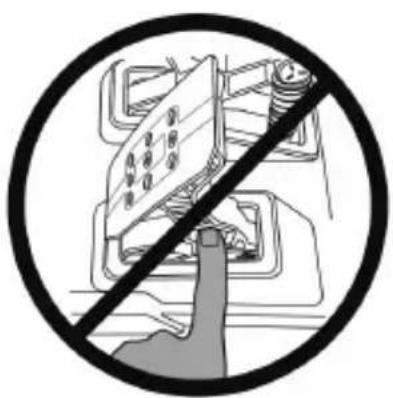
* During gaming sessions, never place your fingers (or other parts of your body) on or near the pedal arms.
NEVER
natural_image
Prohibition sign showing a hand pressing a device component, no text or symbols presentVARIOUS TIPS AND TRICKS (not included in this manual)
Various tips and tricks are available at https://support.thrustmaster.com: click Racing Wheels / T-LCM Pedals.
CONSUMER WARRANTY INFORMATION
Worldwide, Guillemot Corporation S.A., whose registered office is located at Place du Granier, B.P. 97143, 35571 Chantepie, France (hereinafter "Guillemot") warrants to the consumer that this Thrustmaster product shall be free from defects in materials and workmanship, for a warranty period which corresponds to the time limit to bring an action for conformity with respect to this product. In the countries of the European Union, this corresponds to a period of two (2) years from delivery of the Thrustmaster product. In other countries, the warranty period corresponds to the time limit to bring an action for conformity with respect to the Thrustmaster product according to applicable laws of the country in which the consumer was domiciled on the date of purchase of the Thrustmaster product (if no such action exists in the corresponding country, then the warranty period shall be one (1) year from the original date of purchase of the Thrustmaster product).
Notwithstanding the above, rechargeable batteries are covered by a warranty period of six (6) months from the date of original purchase.
Should the product appear to be defective during the warranty period, immediately contact Technical Support, who will indicate the procedure to follow. If the defect is confirmed, the product must be returned to its place of purchase (or any other location indicated by Technical Support).
Within the context of this warranty, the consumer's defective product shall, at Technical Support's option, be either replaced or returned to working order. If, during the warranty period, the Thrustmaster product is subject to such reconditioning, any period of at least seven (7) days during which the product is out of use shall be added to the remaining warranty period (this period runs from the date of the consumer's request for intervention or from the date on which the product in question is made available for reconditioning, if the date on which the product is made available for reconditioning is subsequent to the date of the request for intervention). If permitted under applicable law, the full liability of Guillemot and its subsidiaries (including for consequential damages) is limited to the return to working order or the replacement of the Thrustmaster product. If permitted under applicable law, Guillemot disclaims all warranties of merchantability or fitness for a particular purpose.
This warranty shall not apply: (1) if the product has been modified, opened, altered, or has suffered damage as a result of inappropriate or abusive use, negligence, an accident, normal wear, or any other cause unrelated to a material or manufacturing defect (including, but not limited to, combining the Thrustmaster product with any unsuitable element, including in particular power supplies, rechargeable batteries, chargers, or any other elements not supplied by Guillemot for this product); (2) if the product has been used for any use other than home use, including for professional or commercial purposes (game rooms, training, competitions, for example); (3) in the event of failure to comply with the instructions provided by Technical Support; (4) to software, said software being subject to a specific warranty; (5) to consumables (elements to be replaced over the product's lifespan: disposable batteries, audio headset or headphone ear pads, for example); (6) to accessories (cables, cases, pouches, bags, wrist-straps, for example); (7) if the product was sold at public auction.
This warranty is nontransferable.
The consumer's legal rights with respect to laws applicable to the sale of consumer goods in his or her country are not affected by this warranty.
Additional warranty provisions
During the warranty period, Guillemot shall not provide, in principle, any spare parts, as Technical Support is the only party authorized to open and/or recondition any Thrustmaster product (with the exception of any reconditioning procedures which Technical Support may request that the consumer carry out, by way of written instructions – for example, due to the simplicity and the lack of confidentiality of the reconditioning process – and by providing the consumer with the required spare part(s), where applicable).
Given its innovation cycles and in order to protect its know-how and trade secrets, Guillemot shall not provide, in principle, any reconditioning notification or spare parts for any Thrustmaster product whose warranty period has expired.
In the United States of America and in Canada, this warranty is limited to the product's internal mechanism and external housing. In no event shall Guillemot or its affiliates be held liable to any third party for any consequential or incidental damages resulting from the breach of any express or implied warranties. Some States/Provinces do not allow limitation on how long an implied warranty lasts or exclusion or limitation of liability for consequential or incidental damages, so the above limitations or exclusions may not apply to you. This warranty gives you specific legal rights, and you may also have other rights which vary from State to State or Province to Province.
Liability
If permitted under applicable law, Guillemot Corporation S.A. (hereinafter “Guillemot”) and its subsidiaries disclaim all liability for any damages caused by one or more of the following: (1) the product has been modified, opened or altered; (2) failure to comply with assembly instructions; (3) inappropriate or abusive use, negligence, an accident (an impact, for example); (4) normal wear; (5) the use of the product for any use other than home use, including for professional or commercial purposes (game rooms, training, competitions, for example). If permitted under applicable law, Guillemot and its subsidiaries disclaim all liability for any damages unrelated to a material or manufacturing defect with respect to the product (including, but not limited to, any damages caused directly or indirectly by any software, or by combining the Thrustmaster product with any unsuitable element, including in particular power supplies, rechargeable batteries, chargers, or any other elements not supplied by Guillemot for this product).

DECLARATION OF CONFORMITY
CANADIAN COMPLIANCE NOTICE: this Class B digital apparatus meets all requirements of the Canadian Interference-Causing Equipment Regulations.
USA COMPLIANCE NOTICE: this equipment has been tested and found to comply with the limits for a Class B digital device, pursuant to Part 15 of the FCC rules. Operation is subject to the following two conditions:
(1) This device may not cause harmful interference, and
(2) This device must accept any interference received, including interference that may cause undesired operation.
These limits are designed to provide reasonable protection against harmful interference in a residential installation. This equipment generates, uses and can radiate radio frequency energy and, if not installed and used in accordance with the instructions, may cause harmful interference to radio communications. However, there is no guarantee that interference will not occur in a particular installation. If this equipment does cause harmful interference to radio or television reception, which can be determined by turning the equipment on and off, the user is encouraged to try to correct the interference by one or more of the following measures:
- Reorient or relocate the receiving antenna.
- Increase the separation between the equipment and receiver.
- Connect the equipment into an outlet on a circuit different from that to which the receiver is connected.
- Consult the dealer or an experienced radio/TV technician for help.
COPYRIGHT
© 2019 Guillemot Corporation S.A. All rights reserved. Thrustmaster® is a registered trademark of Guillemot Corporation S.A. PlayStation® is a registered trademark of Sony Interactive Entertainment Inc. Windows® is a registered trademark of Microsoft Corporation in the United States and/or other countries. All other trademarks and brand names are hereby acknowledged and are property of their respective owners. Illustrations not binding. Contents, designs and specifications are subject to change without notice and may vary from one country to another. Made in China.
ENVIRONMENTAL PROTECTION RECOMMENDATION
natural_image
Simple line drawing of a trash bin with no text or symbolsIn the European Union: At the end of its working life, this product should not be disposed of with standard household waste, but rather dropped off at a collection point for the disposal of Waste Electrical and Electronic Equipment (WEEE) for recycling.
This is confirmed by the symbol found on the product, user manual or packaging.
Depending on their characteristics, the materials may be recycled. Through recycling and other forms of processing Waste Electrical and Electronic Equipment, you can make a significant contribution towards helping to protect the environment.
Please contact your local authorities for information on the collection point nearest you.
For all other countries: Please adhere to local recycling laws for electrical and electronic equipment.
Retain this information. Colours and decorations may vary.
Plastic fasteners and adhesives should be removed from the product before it is used.
www.thrustmaster.com
*Applicable to EU and Turkey only

T-LCM PEDALS LOAD CELL & MAGNETICS
PC – PlayStation®4 – Xbox One®
natural_image
Technical line drawing of a mechanical device with three mounted components and mounting base (no text or symbols)CARACTÉRISTIQUES TECHNIQUES
Vue d'ensemble
natural_image
Technical line drawing of a three-view mechanical device with no visible text or symbolsnatural_image
Diagram of two electronic device components with pins and connectors, no text or symbols presentPosition à gauche
natural_image
Pure electrical circuit lines without any symbolsnatural_image
Diagram of two electronic device components with pins and a directional arrow, no text or symbols presentPosition à droite
natural_image
Technical line drawing of a mechanical device with directional arrows indicating motion or force (no text or symbols present)natural_image
Technical line drawing of a mechanical device with directional arrows indicating movement or force (no text or symbols present)Position verticale
natural_image
Diagram of three car seat lockers with a downward arrow indicating a drop or adjustment (no text or symbols present)natural_image
Diagram of three car seatbelt components with a directional arrow indicating movement (no text or symbols)Position reculée
Modifier la RÉSISTANCE DE LA PÉDALE DE FREIN
natural_image
Illustration of a hand holding a threaded bolt with directional arrows indicating force or movement (no text or symbols)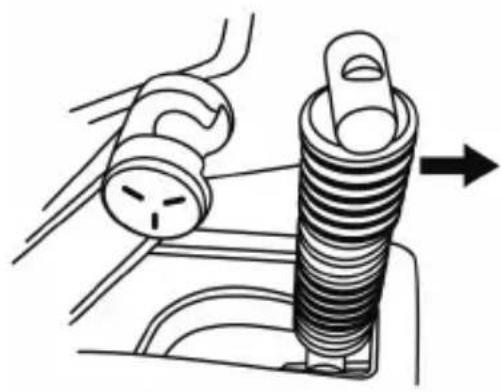
natural_image
Diagram of a mechanical component with a spring and threaded end, showing a force application (no text or symbols)(F10, F15, F20, F30)
natural_image
Technical line drawing of a mechanical spring assembly (no text or symbols)natural_image
Three mechanical diagrams showing a coiled spring assembly with arrows indicating force direction (no text or symbols present)Attention :
natural_image
No sign depicting a device with a diagonal line crossing through it, no text or symbols present.INFORMATIONS RELATIVES A LA GARANTIE AUX CONSOMMATEURS
https://support.thrustmaster.com

natural_image
Simple line drawing of a trash bin with cross-bracing and a black rectangle below (no text or symbols)www.thrustmaster.com
T-LCM PEDALS LOAD CELL & MAGNETICS
PC – PlayStation®4 – Xbox One®
Benutzerhandbuch

natural_image
Technical line drawing of a mechanical device with three mounted components and mounting base (no text or symbols)TECHNISCHE MERKMALE
natural_image
Technical line drawing of a mechanical device with three vertical arms and circular components, no text or symbols present.natural_image
Diagram of two electronic devices with labeled ports and a directional arrow (no text or symbols)Linke Position
natural_image
Pure electrical circuit lines without any symbolsMittige Position (Standard)
natural_image
Diagram of two electronic devices with labeled pins and an arrow indicating direction (no text or symbols present)Rechte Position
natural_image
Line drawing of a mechanical device with directional arrows indicating movement or force (no text or symbols)natural_image
Line drawing of a mechanical device with directional arrows indicating movement or force (no text or symbols)Senkrechte Position
natural_image
Diagram of three car seat lockers with a downward arrow indicating a motion or change (no text or symbols present)Position vorne (Standard)
natural_image
Diagram of three car seat lockers with a directional arrow indicating movement (no text or symbols)Position hinten
natural_image
Two technical illustrations showing a hand holding a threaded bolt, with arrows indicating direction of movement (no text or symbols present)A Load Cell-Drucksensor
(F10, F15, F20, F30)
natural_image
Technical line drawing of a mechanical spring assembly (no text or symbols)natural_image
Three technical illustrations of a coiled spring or solenoid assembly with arrows indicating force direction (no text or symbols present)
WICHTIG
natural_image
Prohibition sign showing a hand pressing a device component, no text or symbols presentnatural_image
Symbol of a trash bin crossed with a cross, no text or labels presentwww.thrustmaster.com
T-LCM PEDALS LOAD CELL & MAGNETICS
PC – PlayStation®4 – Xbox One®
Handleiding

natural_image
Technical line drawing of a mechanical device with three mounted components and mounting base (no text or symbols)natural_image
Technical line drawing of a mechanical device with three vertical ports and directional arrows indicating movement or assembly (no text or symbols present)natural_image
Line drawing of a mechanical device with arrows indicating motion or force, no text or symbols presentnatural_image
Technical line drawing of a mechanical device with directional arrows indicating motion or assembly (no text or symbols)Grote hoek
Verticale stand
natural_image
Diagram of three car seat lockers with a downward arrow indicating a drop or change (no text or symbols present)Voorste stand (standard)
natural_image
Diagram of three car seat lockers with a directional arrow indicating movement (no text or symbols)Achterste stand
natural_image
Illustration of a hand holding a threaded bolt with directional arrows indicating movement (no text or symbols)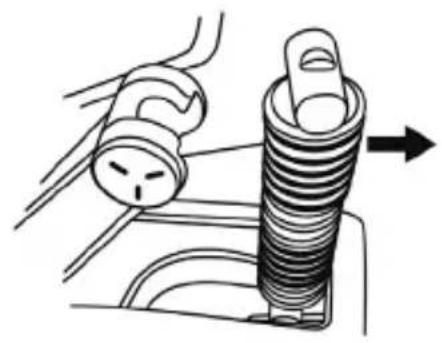
natural_image
Diagram of a car door handle assembly with a spring and valve (no text or labels)A Load Cell krachtsensor
natural_image
Technical illustration of a mechanical spring assembly (no text or symbols)natural_image
Three mechanical diagrams showing a coiled spring assembly with arrows indicating force direction (no text or symbols present)
Belangrijk:
⚠ UITERST BELANGRIJK ⚠
natural_image
Prohibition sign showing a hand pointing at a device component, enclosed in a circle (no text or symbols)https://support.thrustmaster.com

natural_image
Three black icons: a lowercase 'i' in a circle, an envelope symbol, and a telephone handset (no text or labels)COPYRIGHT
natural_image
Symbol of a trash bin crossed with a diagonal line and a black rectangular block below (no text or labels)www.thrustmaster.com
T-LCM PEDALS LOAD CELL & MAGNETICS
PC – PlayStation®4 – Xbox One®
Manuale d'uso

natural_image
Technical line drawing of a mechanical device with three actuators and mounting base (no text or symbols)CARATTERISTICHE TECNICHE
Visione d'insieme
natural_image
Technical line drawing of a mechanical device with three vertical ports and directional arrows indicating movement or assembly (no text or symbols present)natural_image
Diagram of two electronic devices with labeled ports and a directional arrow (no text or symbols)natural_image
Two identical electrical connectors with terminal blocks and screw holes, mounted on a base (no text or symbols visible)natural_image
Diagram of two electronic devices with labeled pins and an arrow indicating direction (no text or symbols present)Posizione a destra
natural_image
Technical line drawing of a mechanical device with directional arrows indicating motion or force (no text or symbols)natural_image
Line drawing of a mechanical device with directional arrows indicating movement or force (no text or symbols)Posizione verticale
natural_image
Diagram of three car seat lockers with a downward arrow indicating a drop or change (no text or symbols present)natural_image
Diagram of three car seatbelt components with a directional arrow indicating movement (no text or symbols)Posizione arretrata
natural_image
Illustration of a hand using a threaded screw to press or install a component (no text or symbols visible)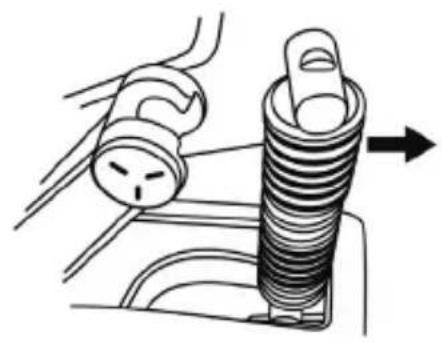
natural_image
Diagram of a car interior showing a valve and a spring component with an arrow indicating direction (no text or symbols)F Molle principali a 7 spire (F10, F15, F20, F30)
natural_image
Technical line drawing of a mechanical spring assembly (no text or symbols)natural_image
Three mechanical diagrams showing a coiled spring or solenoid assembly with arrows indicating force direction (no text or symbols present)
Importante:
MOLTO IMPORTANTE
natural_image
No sign depicting a device with a hand pointing at it, crossed out by a diagonal line (no text or symbols)https://support.thrustmaster.com

natural_image
Three black-and-white icons: a lowercase 'i' in a circle, an envelope symbol, and a telephone handset (no text or labels)COPYRIGHT
natural_image
Symbol of a trash bin with crossed lines indicating no waste or restriction, plus a solid black rectangle below (no text or labels)www.thrustmaster.com
T-LCM PEDALS LOAD CELL & MAGNETICS
PC – PlayStation®4 – Xbox One®
Manual del usuario

natural_image
Technical line drawing of a mechanical device with three mounted components and mounting base (no text or symbols)CARACTERÍSTICAS TÉCNICAS
Descripción general
bar
TM Sim Pedals Calibration Tool | Category | Value | |---|---| | Clutch (0.0) | 94.0 | | Brake (0.6) | 5.0 | | Gas (0.0) | 94.0 | Firmware: S/N: BRAKE FORCE=70 Factory Calibration Applynatural_image
Technical line drawing of a mechanical device with three vertical views and directional arrows indicating movement or assembly (no text or symbols present)natural_image
Technical line drawing of a mechanical device with directional arrows indicating motion or force (no text or symbols)natural_image
Line drawing of a mechanical device with directional arrows indicating motion or force (no text or symbols)Posición vertical
natural_image
Diagram of three car seat lockers with a downward arrow indicating a load or adjustment (no text or symbols present)natural_image
Diagram of three car seatbelt components with a directional arrow indicating movement (no text or symbols)natural_image
Illustration of two mechanical components with arrows indicating assembly or movement (no text or symbols present)(F10, F15, F20, F30)
natural_image
Technical illustration of a mechanical spring assembly (no text or symbols)natural_image
Three mechanical diagrams showing a coiled spring assembly with arrows indicating force direction (no text or symbols present)
Importante:
MUY IMPORTANTE
natural_image
Prohibition sign showing a hand pressing a component on a device, enclosed in a circle (no text or symbols)COPYRIGHT
natural_image
Symbol of a trash bin with crossed lines and a black rectangle below (no text or labels)www.thrustmaster.com
T-LCM PEDALS LOAD CELL & MAGNETICS
PC – PlayStation®4 – Xbox One®
Manual do Utilizador

natural_image
Technical line drawing of a mechanical device with three mounted components (no text or symbols)CARACTERÍSTICAS TÉCNICAS
Vista geral
FIXAR O CONJUNTO DE PEDAIS A UM SUPORTE OU COCKPIT
natural_image
Technical line drawing of a mechanical device with three vertical arms and circular components, no text or symbols present.natural_image
Line drawing of a mechanical device with directional arrows indicating movement or force (no text or symbols)natural_image
Line drawing of a mechanical device with directional arrows indicating movement or force (no text or symbols)Posição vertical
natural_image
Diagram of three car seat lockers with a downward arrow indicating a motion or change (no text or symbols present)natural_image
Diagram of three car seat lockers with a directional arrow indicating movement (no text or symbols)natural_image
Two technical illustrations showing a hand holding a threaded bolt, with arrows indicating direction of movement (no text or symbols present)- Remova os diferentes elementos da haste de suporte (B).
A Sensor de força Load Cell
natural_image
Technical illustration of a mechanical spring assembly (no text or symbols)natural_image
Three mechanical diagrams showing a cylindrical component being inserted into a spring, with arrows indicating force direction (no text or symbols present)
Importante:
MUITO IMPORTANTE
natural_image
Prohibition sign showing a hand pointing at a device component, no text or symbols presentDIREITOS DE AUTOR
www.thrustmaster.com
T-LCM PEDALS LOAD CELL & MAGNETICS
PC – PlayStation®4 – Xbox One®
natural_image
Technical line drawing of a mechanical device with three mounted components (no text or symbols)natural_image
Technical line drawing of a mechanical device with three vertical components and directional arrows indicating movement or assembly (no text or symbols present)natural_image
Diagram of two electronic device components with labeled pins, no text or symbols presentЛевое положение
natural_image
Two identical electrical contactor devices with three terminal blocks and a grid of pins (no text or symbols visible)natural_image
Diagram of two electronic devices with pins and a directional arrow, no text or symbols presentПравое положение
natural_image
Technical line drawing of a mechanical device with directional arrows indicating motion or force (no text or symbols)natural_image
Technical line drawing of a mechanical device with directional arrows indicating movement or force (no text or symbols present)natural_image
Diagram of three car seat lockers with a downward arrow indicating a drop or movement (no text or symbols present)natural_image
Diagram of three car seatbelt components with a directional arrow indicating movement (no text or symbols)Заднее положение
natural_image
Illustration of a hand using a threaded screw to press or install a component, with directional arrows indicating motion (no text or symbols)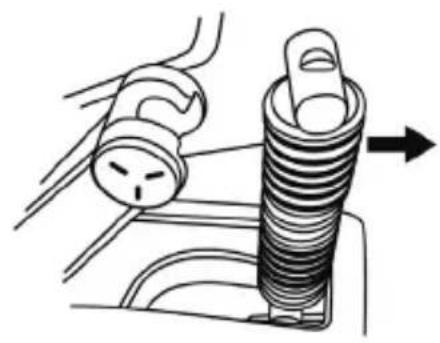
natural_image
Diagram of a mechanical assembly with a spring-loaded component and a tool, showing no text or symbols.natural_image
Technical illustration of a mechanical spring assembly (no text or symbols)natural_image
Three technical illustrations of a coiled spring or solenoid assembly with arrows indicating force direction (no text or symbols present)
Важная информация.
ВАЖНАЯ ИНФОРМАЦИЯ
natural_image
Black and white prohibition symbol over a vehicle battery, no text or symbols presenthttps://support.thrustmaster.com

natural_image
Three black icons: a lowercase 'i' in a circle, an envelope, and a telephone handset (no text or symbols)АВТОРСКИЕ ПРАВА
www.thrustmaster.com
EAC
T-LCM PEDALS LOAD CELL & MAGNETICS
PC – PlayStation®4 – Xbox One®
Uživatelský manuál

natural_image
Technical line drawing of a mechanical device with three mounted components and mounting base (no text or symbols)TECHNICKÉ PARAMETRY
Obecný přehled
natural_image
Technical line drawing of a mechanical device with three vertical arms and circular components, no text or symbols present.natural_image
Diagram of two identical electronic devices with labeled pins, connected by a line (no text or symbols present)Pozive vlevo
natural_image
Technical line drawing of two mechanical components with mounting holes (no text or symbols)natural_image
Diagram of two electronic device components with labeled pins and an arrow indicating direction (no text or symbols present)Pozice vpravo
natural_image
Technical line drawing of a mechanical device with directional arrows indicating motion or force (no text or symbols)natural_image
Technical line drawing of a mechanical device with directional arrows indicating movement or force (no text or symbols present)Svislá pozice
natural_image
Diagram of three car seat lockers with a downward arrow indicating a drop or adjustment (no text or symbols present)natural_image
Diagram of three mechanical device components with no visible text or symbolsZadní pozice
natural_image
Illustration of a hand holding a threaded bolt with directional arrows indicating movement (no text or symbols)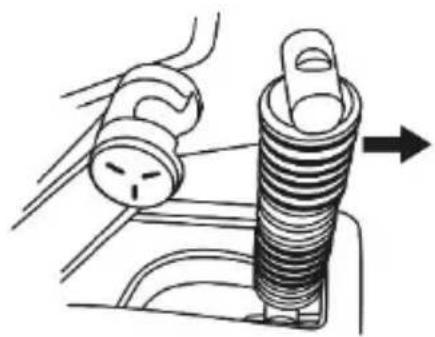
natural_image
Mechanical diagram showing a spring being inserted into a housing (no text or symbols present)A Load Cell senzor síly

(F10, F15, F20, F30)
natural_image
Technical line drawing of a mechanical spring assembly (no text or symbols)natural_image
Three technical illustrations of a coiled spring or solenoid assembly with arrows indicating force direction (no text or symbols present)Důležité:
▲ VELMI DÜLEŽITÉ ▲
natural_image
Symbolic illustration of a hand pressing a device into a circular frame, no text or symbols presentCOPYRIGHT
natural_image
Symbol of a trash bin with crossed lines indicating no waste, and a solid black rectangle below (no text or labels)www.thrustmaster.com
T-LCM PEDALS LOAD CELL & MAGNETICS
PC – PlayStation®4 – Xbox One®
Kullanma Kılavuzu

natural_image
Technical line drawing of a mechanical device with three actuators and mounting base (no text or symbols)TEKNİK ÖZELLİKLER
Genel bakış
natural_image
Technical line drawing of a mechanical device with three vertical components and directional arrows indicating movement or force (no text or symbols)natural_image
Diagram of two electronic device components with pins, no text or symbols presentSol pozisyon
natural_image
Two identical electrical contactor devices with buttons and connectors, mounted on a base (no text or symbols visible)Sağ pozisyon
natural_image
Line drawing of a car interior showing steering wheel, dashboard, and control panel (no text or symbols)natural_image
Technical line drawing of a mechanical device with directional arrows and a control panel (no text or symbols)Çok eğimli pozisyon
Dikey pozisyon
natural_image
Diagram of three car seat lockers with a downward arrow indicating a drop or adjustment (no text or symbols present)natural_image
Diagram of three car seatbelt components with a directional arrow indicating movement (no text or symbols)natural_image
Illustration of a hand using a threaded screw to adjust a component (no text or symbols present)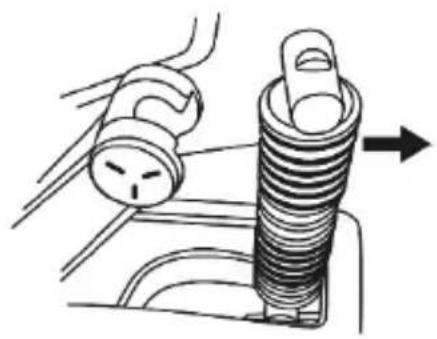
natural_image
Diagram of a mechanical component with a spring and handle, showing a force application (no text or symbols)F Ana 7 sarımlı yay (F10, F15, F20, F30)
natural_image
Technical line drawing of a mechanical spring assembly (no text or symbols)natural_image
Three technical illustrations of a coiled spring or solenoid assembly with arrows indicating force direction (no text or symbols present)
ÇOK ÖNEMLİ
https://support.thrustmaster.com

natural_image
Three black icons: a lowercase 'i' in a circle, an envelope symbol, and a telephone handset (no text or labels)TELİF HAKKI
www.thrustmaster.com
T-LCM PEDALS LOAD CELL & MAGNETICS
PC — PlayStation®4 — Xbox One®
Instrukcja obsługi
natural_image
Technical line drawing of a mechanical device with three mounted components and mounting base (no text or symbols)ELEMENTY
Informacje ogólne
natural_image
Technical line drawing of a mechanical device with three vertical components and directional arrows indicating movement or force (no text or symbols)natural_image
Diagram of two electronic devices with labeled ports and a directional arrow (no text or symbols)Położenie lewe
natural_image
Pure electrical circuit lines without any symbolsnatural_image
Diagram of two mechanical components with pins and a directional arrow, no text or symbols presentPołożenie prawe
natural_image
Technical line drawing of a mechanical device with directional arrows indicating motion or force (no text or symbols)natural_image
Technical line drawing of a mechanical device with directional arrows indicating motion or assembly (no text or symbols)Większe nachylenie
Położenie pionowe
natural_image
Diagram of three car seat lockers with a downward arrow indicating a motion or change (no text or symbols present)natural_image
Diagram of three car seat lockers with a directional arrow indicating movement (no text or symbols)Położenie tylne
natural_image
Technical line drawing of a mechanical spring assembly (no text or symbols)natural_image
Three mechanical diagrams showing a coiled spring assembly with arrows indicating force direction (no text or symbols present)
BARDZO WAŻNE
natural_image
Prohibition sign showing a hand pointing at a vehicle battery with no text or symbolshttps://support.thrustmaster.com



PRAWA AUTORSKIE
natural_image
Symbol of a trash bin with crossed lines and a black rectangle below (no text or labels)www.thrustmaster.com
T-LCM PEDALS LOAD CELL & MAGNETICS
PC – PlayStation®4 – Xbox One®
Bruksanvisning

natural_image
Technical line drawing of a mechanical device with three mounted components and mounting base (no text or symbols)TEKNISKA DELAR
Allmän översikt
MONTERA PEDALSETET PÅ ETT STÖD ELLER EN COCKPIT
natural_image
Technical line drawing of a mechanical device with three vertical components and directional arrows indicating movement or force (no text or symbols present)natural_image
Diagram showing two electrical components with a downward arrow indicating a transformation or change (no text or symbols present)Låg position
natural_image
Diagram of two mechanical components with mounting holes and a directional arrow (no text or symbols)Hög position
natural_image
Diagram of two electronic devices with labeled ports and a directional arrow (no text or symbols)Vänster position
natural_image
Technical line drawing of two mechanical components with mounting holes (no text or symbols)Central position (standard
natural_image
Diagram of two mechanical components with circular elements, one with an arrow indicating direction (no text or symbols)Höger position
natural_image
Technical line drawing of a mechanical device with directional arrows indicating motion or force (no text or symbols)Mindre lutad position (standard)
natural_image
Line drawing of a mechanical device with directional arrows indicating motion or force (no text or symbols)Mer lutad position
Vertikal position
natural_image
Diagram of three car seat lockers with a downward arrow indicating a drop or adjustment (no text or symbols present)Främre position (standard)
natural_image
Diagram of three car seatbelt components with a directional arrow indicating movement (no text or symbols)Bakre position
natural_image
Illustration of a hand using a threaded screw to adjust a component (no text or symbols visible)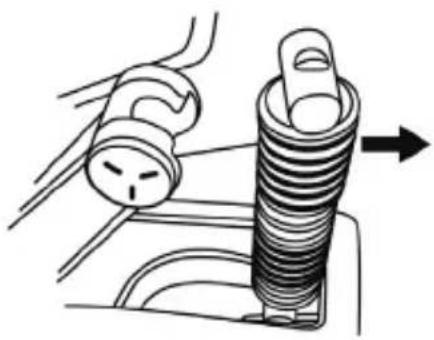
natural_image
Diagram of a mechanical component with a spring and handle, showing a tool interacting with a sink (no text or symbols present)A Load Cell-trycksensor
natural_image
Technical line drawing of a mechanical spring assembly (no text or symbols)natural_image
Three technical illustrations of a coiled spring or solenoid assembly with arrows indicating force direction (no text or symbols present)
MYCKET VIKTIGT
natural_image
No sign depicting a vehicle battery with a diagonal line crossing through it, no text or symbols present.UPPHOVSRÄTTSSKYDD
natural_image
Simple line drawing of a trash bin with crossed lines indicating no waste or discharge (no text or symbols)www.thrustmaster.com
T-LCM PEDALS LOAD CELL & MAGNETICS
PC – PlayStation®4 – Xbox One®
Käyttöohje

natural_image
Technical line drawing of a mechanical device with three mounted components and mounting base (no text or symbols)TEKNISET OMINAISUUDET
Yleiskatsaus
natural_image
Technical line drawing of a mechanical device with three vertical components and directional arrows indicating movement or force (no text or symbols)natural_image
Line drawing of a car dashboard with directional arrows indicating movement, no text or symbols presentnatural_image
Line drawing of a mechanical device with directional arrows indicating movement or force (no text or symbols)natural_image
Diagram of three car seat lockers with a downward arrow indicating a load or adjustment (no text or symbols present)Etuasento (oletus)
natural_image
Diagram of three car seatbelt components with a directional arrow indicating movement (no text or symbols)Taka-asento
natural_image
Illustration of a hand using a threaded screw to press or install a component, with directional arrows indicating motion (no text or symbols)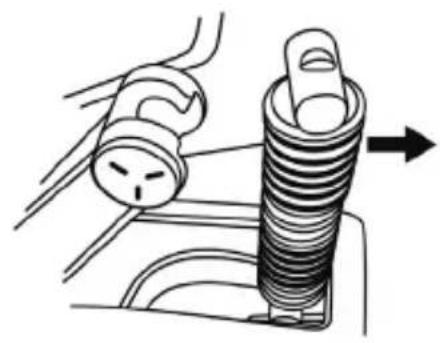
natural_image
Diagram of a car dashboard with a spring and handle, showing mechanical components (no text or symbols)- Irrota eri osat kiinnitystangosta (B).
A Load Cell -voima-anturi
natural_image
Technical illustration of a mechanical spring assembly (no text or symbols)natural_image
Three technical illustrations of a coiled spring or solenoid assembly with arrows indicating force direction (no text or symbols present)
Tärkeää:
TODELLA TÄRKEÄÄ
natural_image
Prohibition sign showing a hand pointing at a device component, no text or symbols presentTEKIJÄNOIKEUS
natural_image
Symbol of a trash bin crossed out by two crossed lines, with a black rectangle below (no text or labels)www.thrustmaster.com
T-LCM PEDALS LOAD CELL & MAGNETICS
PC – PlayStation®4 – Xbox One®
Návod na použitie

natural_image
Technical line drawing of a mechanical device with three mounted components and mounting base (no text or symbols)TECHNICKÉ VLASTNOSTI
Všeobecný prehl'ad
natural_image
Technical line drawing of a three-view mechanical assembly with no visible text or symbolsnatural_image
Diagram of two electronic device components with labeled pins, no text or symbols presentL'avá pozícia
natural_image
Pure electrical circuit lines without any symbolsnatural_image
Diagram of two electronic components with pins, one showing a right-pointing arrow (no text or symbols)Pravá pozícia
natural_image
Diagram of three car seat lockers with a downward arrow indicating a drop or adjustment (no text or symbols present)natural_image
Diagram of three mechanical components with a directional arrow indicating movement or force (no text or symbols present)Zadná pozícia
natural_image
Illustration of a hand using a threaded screw to press or install a component, with directional arrows indicating motion (no text or symbols)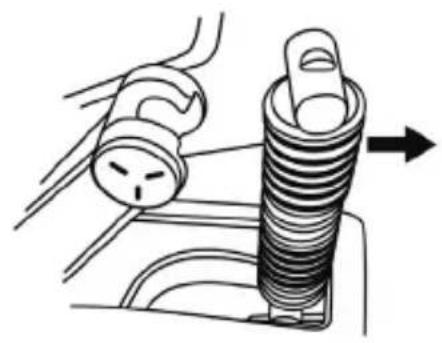
natural_image
Diagram of a car interior showing a valve and a spring component with an arrow indicating direction (no text or symbols)A Snímač sily Load Cell
⚠ Nikdy ho nevyberajte z pridržiavacej tyče!
B Pridržiavacia tyč pre rad pružín
C Stredná 4-špirálová chrómová predpínacia pružina
natural_image
Technical line drawing of a mechanical spring assembly (no text or symbols)natural_image
Three technical illustrations of a coiled spring or solenoid assembly with arrows indicating force direction (no text or symbols present)
VEL'MI DÔLEŽITÉ
natural_image
No sign depicting a device with a hand pointing at it, crossed out by a diagonal line (no text or symbols)COPYRIGHT
natural_image
Symbol of a trash bin with crossed lines indicating no waste or restriction, plus a solid black rectangle below (no text or symbols)www.thrustmaster.com
T-LCM PEDALS LOAD CELL & MAGNETICS
PC – PlayStation®4 – Xbox One®
Használati Útmutató

natural_image
Technical line drawing of a mechanical device with three mounted components and mounting base (no text or symbols)MÜSZAKI LEÍRÁS
9 Fém pedálkar 4 lyukkal
natural_image
Technical line drawing of three mechanical components with directional arrows indicating movement or force (no text or symbols)natural_image
Diagram of two electronic devices with labeled ports and a directional arrow (no text or symbols)Bal pozíció
natural_image
Technical line drawing of two mechanical components with mounting holes (no text or symbols)natural_image
Diagram of two mechanical components with pins and a directional arrow, no text or symbols presentJobb pozíció
natural_image
Line drawing of a car interior showing steering wheel, dashboard, and control panel (no text or symbols)natural_image
Technical line drawing of a mechanical device with directional arrows indicating motion or assembly (no text or symbols)Jobban dôl
Függőleges pozíció
natural_image
Diagram of three car seatbelt lockers with a downward arrow indicating a load or adjustment (no text or symbols present)natural_image
Diagram of three mechanical components with a central valve and directional arrow, no text or symbols present.Hátsó helyzet
natural_image
Illustration of a hand holding a threaded bolt with directional arrows indicating movement (no text or symbols)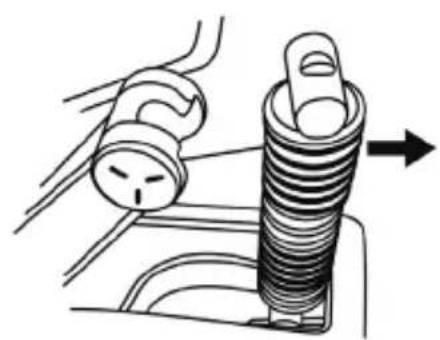
natural_image
Diagram of a mechanical assembly showing a spring-loaded component being inserted into a housing (no text or symbols present)(F10, F15, F20, F30)
natural_image
Technical line drawing of a mechanical spring assembly (no text or symbols)natural_image
Three mechanical diagrams showing a coiled spring or solenoid assembly with arrows indicating force direction (no text or symbols present)
NAGYON FONTOS
natural_image
Prohibition sign showing a hand pressing a device component, no text or symbols presentSZERZÓI JOG
natural_image
Symbol of a trash bin crossed with a diagonal line and a black rectangle below (no text or labels)www.thrustmaster.com
T-LCM PEDALS LOAD CELL & MAGNETICS
PC® - PlayStation®4 – Xbox One
בַרְשָׁה בִרְשָׁה
natural_image
Technical line drawing of a mechanical device with three actuators and mounting base (no text or symbols)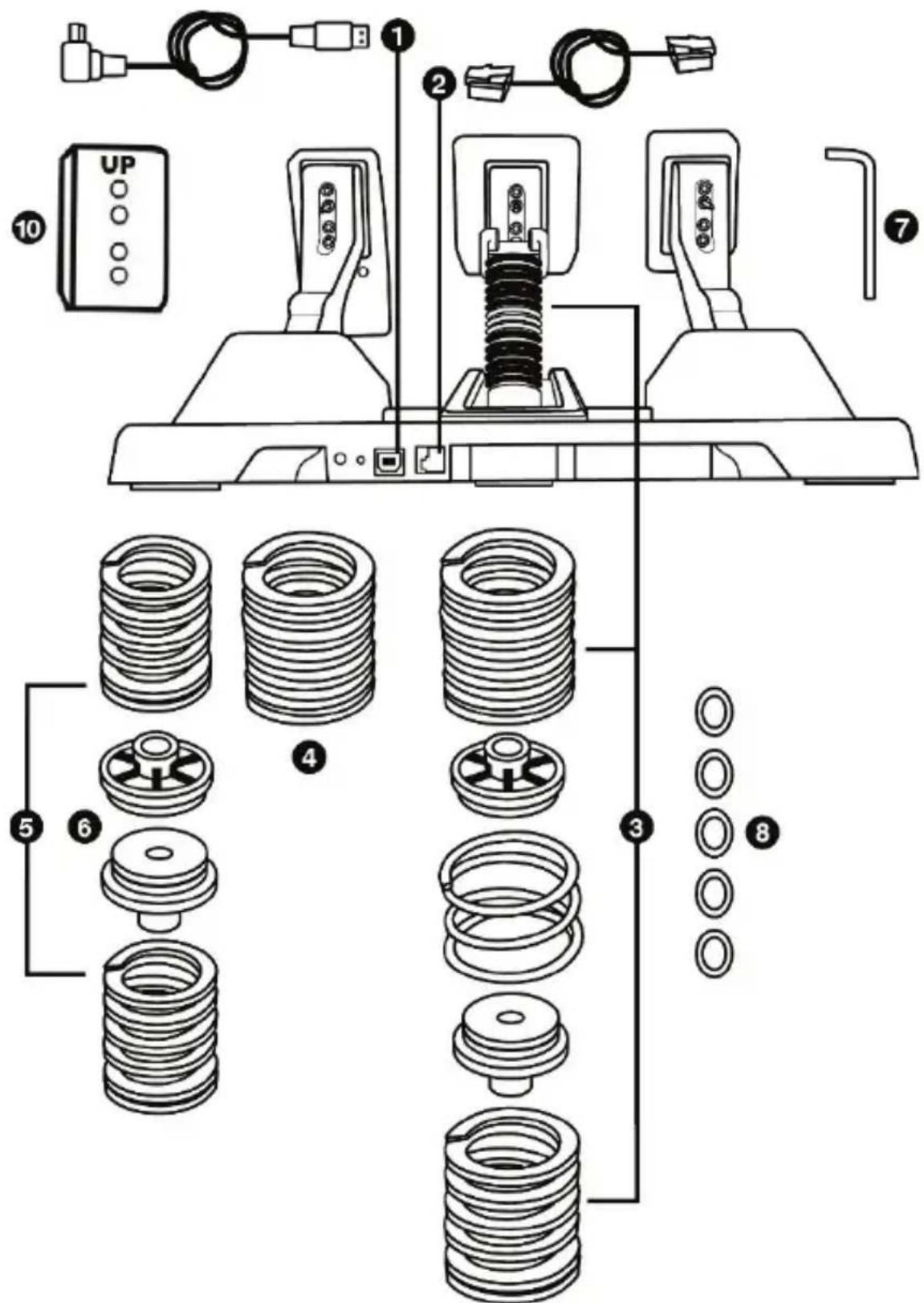
| 1 | 4 |
| 2 | 5 |
| 3 | 6 |
| (###) | |
| 7 | 8 |
| 10 | 10 |
| 1 | 2 | 3 |
| 21RJ | 2 | 3 |
| הכלה | (בַרְׁעֹל F15 γ'g7 1 + γ'g7 F20 γ'g7 1) | |
| (בַרְׁעֹל γ'g7 γ'g7 1+) | ||
| (בַרְׁעֹל γ'g7 γ'g7 2+) | ||
תְאָהִי
natural_image
Technical line drawing of a mechanical device with three vertical ports and directional arrows indicating movement or force (no text or symbols present)natural_image
Diagram of two electronic device components with labeled pins, no text or symbols presentבַרְשָׁה
natural_image
Two identical electrical connectors with buttons and a grid, mounted on a base (no text or symbols visible)natural_image
Diagram of two electronic device components with pins and a directional arrow (no text or symbols)בִרְשָׁה
הכלהה
הכלה 3 -
בְרָה אַרִי 3 -
הכלה 3 -
natural_image
Diagram of three car seatbelt lockers with a downward arrow indicating a drop or change (no text or symbols present)(תַעָה בְרִי) לַעָה
natural_image
Diagram of three mechanical device components with no visible text or symbolsתַעָה בְרִי
natural_image
Illustration of two mechanical assembly steps showing a hand turning a spring-loaded component into a housing (no text or symbols present)natural_image
Technical line drawing of a mechanical spring assembly (no text or symbols)⚠️ ⚠️ ⚠️ ⚠️ ⚠️ ⚠️ ⚠️ ⚠️ ⚠️ ⚠️ ⚠️ ⚠️ ⚠️ ⚠️ ⚠️ ⚠️ ⚠️ ⚠️ ⚠️ ⚠️ ⚠️ ⚠️ ⚠️ ⚠️ ⚠️ ⚠️ ⚡
natural_image
Three technical illustrations of a coiled spring or solenoid assembly with arrows indicating force direction (no text or symbols present)
:בְרָה
.https://support.thrustmaster.com
https://support.thrustmaster.com

natural_image
Three black icons: a lowercase 'i' in a circle, an envelope symbol, and a telephone handset (no text or labels)natural_image
Symbol of a trash bin with crossed lines and a black rectangular block below (no text or labels)www.thrustmaster.com
natural_image
Technical line drawing of a mechanical device with three mounted components and mounting base (no text or symbols)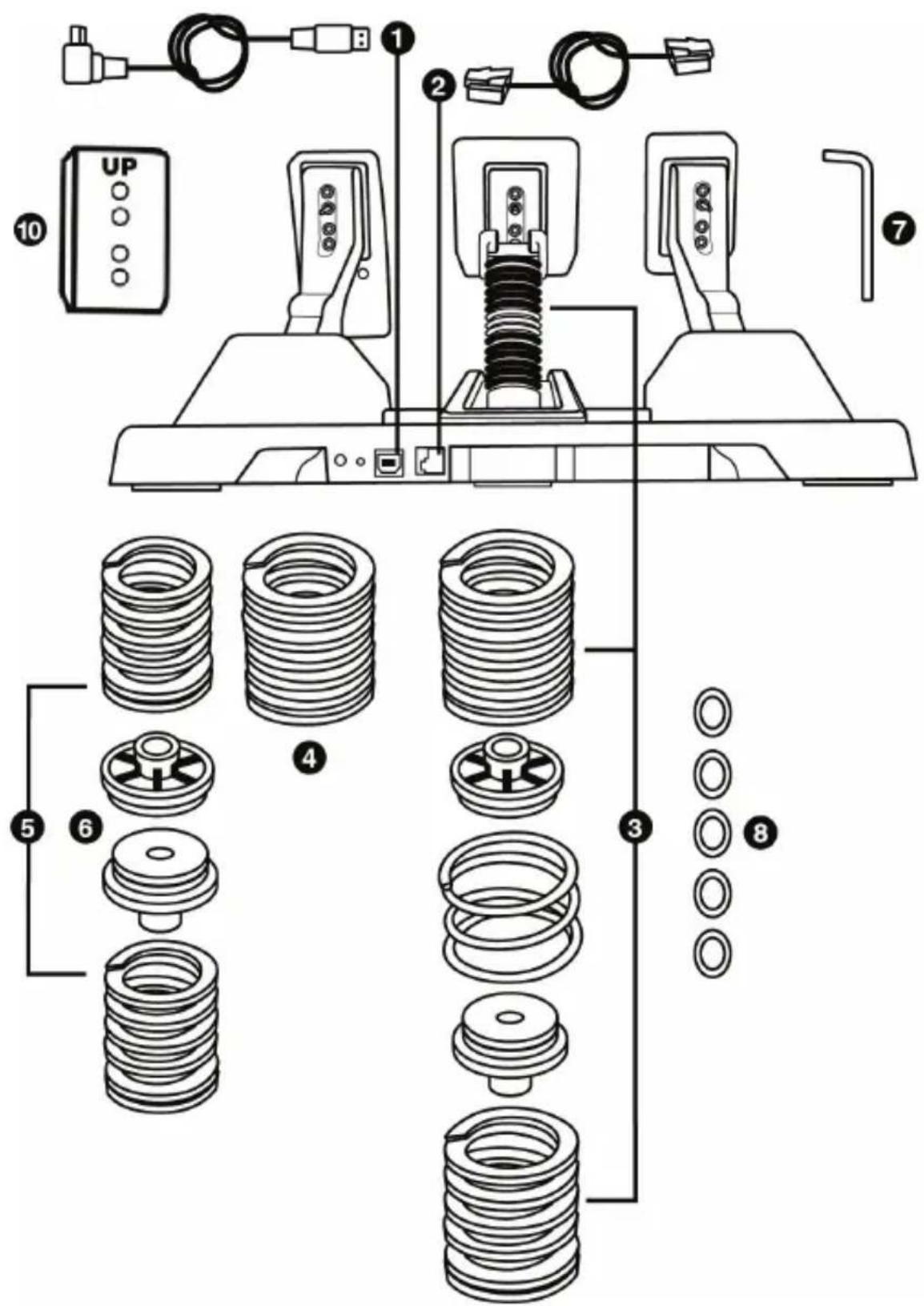
11
bar
TM Sim Pedals Calibration Tool | Category | Value | |---|---| | Clutch (0.0) | 94.0 | | Brake (0.6) | 5.0 | | Gas (0.0) | 94.0 | Firmware: S/N; BRAKE FORCE=70 Factory Calibration Applynatural_image
Technical line drawing of a mechanical device with three vertical arms and circular components, no text or symbols present.natural_image
Line drawing of a car interior showing steering wheel, dashboard, and control panel (no text or symbols)natural_image
Line drawing of a mechanical device with directional arrows indicating movement or force (no text or symbols)الوضع الرأسي
عدد Cordos Verla, Verla, Verla, Verla, Verla, Verla, Verla, Verla, Verla, Verla, Verla, Verla, Verla, Verla, Verla, Verla, Verla, Verla, Verla, Verla, Verla, Verla, Verla, Verla, Verla, Verla, Verla, Verla, Verla, Verla, Verla, Verla, Verla, Verla,
natural_image
Diagram of three car seat lockers with a downward arrow indicating a drop or change (no text or symbols present)natural_image
Diagram of three car seat lockers with a directional arrow indicating motion (no text or symbols)موضع خلفي
natural_image
Illustration showing two mechanical assembly steps: one with threaded spring and arrow, the other with a hand adjusting a bolt (no text or symbols).(B)
natural_image
Technical line drawing of a mechanical spring assembly (no text or symbols)natural_image
Three technical illustrations of a coiled spring or solenoid assembly with arrows indicating force direction (no text or symbols present)
مهم جدا
,TS-XW, T150, T300, T-GTTS-PC Racer) Thrustmaster
. https://support.thrustmaster.com
natural_image
Prohibition sign showing a hand pointing at a vehicle interior with no text or symbols
www.thrustmaster.com
https://support.thrustmaster.com

natural_image
Three black icons: a lowercase 'i' in a circle, an envelope, and a telephone handset (no text or symbols)T-LCM PEDALS LOAD CELL & MAGNETICS
PC - PlayStation®4 - Xbox One®
ユーザーズマニュアル
natural_image
Technical line drawing of a mechanical device with three mounted components and mounting base (no text or symbols)技術仕様
一般概要
9 金属製ペダルアーム (穴 4 個)
natural_image
Technical line drawing of a three-view mechanical device with no visible text or symbolsnatural_image
Diagram of two electronic devices with labeled ports and a directional arrow (no text or symbols)左ポジション
natural_image
Pure electrical circuit lines without any symbols中央ポジション (デフォルト)
natural_image
Diagram of two electronic devices with pins and a directional arrow, no text or symbols present右ポジション
natural_image
Technical line drawing of a mechanical device with directional arrows indicating motion or force (no text or symbols)傾きの少ないポジション (デフォルト)
natural_image
Line drawing of a mechanical device with directional arrows indicating movement or force (no text or symbols)傾きの大きいポジション
縦ポジション
natural_image
Illustration of a hand holding a threaded bolt with directional arrows indicating movement (no text or symbols)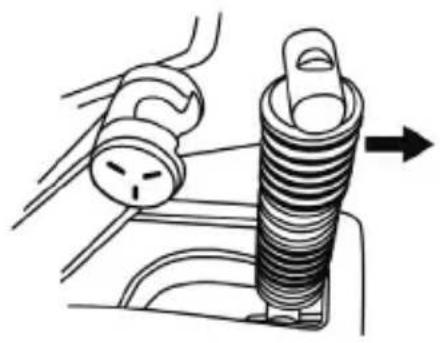
natural_image
Diagram of a car engine component with a spring and handle, showing motion direction (no text or symbols)(F10, F15, F20, F30)
G 上部固定ヘッド (ワッシャー付き)
natural_image
Technical line drawing of a mechanical spring assembly (no text or symbols)natural_image
Three mechanical diagrams showing a cylindrical spring assembly with arrows indicating force direction (no text or symbols present)
重要:
超重要
natural_image
Prohibition sign showing a hand pointing at a device component, no text or symbols presentwww.thrustmaster.com
Made in China.

:外箱


T-LCM PEDALS LOAD CELL & MAGNETICS
T-LCM 踏板-荷重元和磁性元件
PC - PlayStation®4 - Xbox One®
用户手册
natural_image
Technical line drawing of a mechanical device with three actuators and mounting base (no text or symbols)技术特性
概览
natural_image
Technical line drawing of a three-view mechanical device with no visible text or symbolsnatural_image
Diagram of two electronic devices with labeled ports and a directional arrow (no text or symbols)靠左位置
natural_image
Two identical mechanical or electrical components with mounting brackets and circular connectors (no text or symbols visible)居中位置(默认)
natural_image
Diagram of two electronic devices with pins and a directional arrow, no text or symbols present靠右位置
每个踏板不同间距位置数:
- 油门踏板 3 个
- 刹车踏板 3 个
- 离合器踏板 3 个
调节踏板的倾角
natural_image
Line drawing of a car dashboard and steering wheel assembly (no text or symbols)倾角较小的位置
natural_image
Line drawing of a mechanical device with directional arrows indicating movement or force (no text or symbols)倾角较大的位置
(默认)
natural_image
Line drawing of a mechanical device with directional arrows and a control panel (no text or symbols)垂直位置
每个踏板不同倾角位置数:
- 油门踏板 3 个
- 刹车踏板 3 个
- 离合器踏板 3 个
调节踏板的前后位置
natural_image
Diagram of three car seat lockers with a downward arrow indicating a drop or adjustment (no text or symbols present)前端位置(默认)
natural_image
Diagram of three vehicle seat lockers with a directional arrow indicating movement (no text or symbols)后端位置
改变刹车踏板的阻力
natural_image
Illustration of a hand using a threaded screw to press or install a component (no text or symbols visible)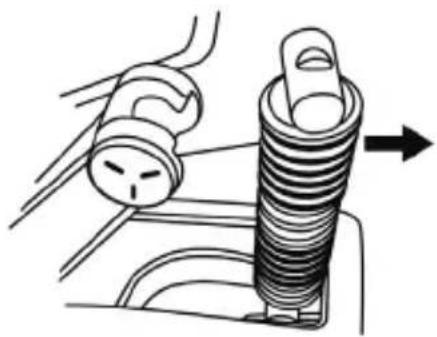
natural_image
Diagram of a mechanical component with a spring and handle, showing a force or motion direction (no text or symbols)- 从支撑杆 (B) 上卸下不同组件。
A Load Cell 力传感器
切勿从支撑杆上卸下此传感器!
B 弹簧柱支撑杆
C 中央 4 螺旋镀铬预紧弹簧
D 橡胶隔套
E 塑料隔套
F 主7螺旋弹簧
(F10、F15、F20、F30)
G 带垫圈的上固定压头
natural_image
Technical illustration of a mechanical spring assembly (no text or symbols)natural_image
Three technical illustrations of a coiled spring or solenoid assembly with arrows indicating force direction (no text or symbols present)
重要提示:
重要提醒
natural_image
No sign depicting a device with a diagonal line crossing through it, no text or symbols present.各种技巧和提示(本手册中未含)
www.thrustmaster.com
THRUSTMASTER®
技术支持
https://support.thrustmaster.com

natural_image
Three black-and-white icons: a lowercase 'i' in a circle, an envelope, and a telephone handset (no text or symbols)
T-LCM PEDALS LOAD CELL & MAGNETICS
PC – PlayStation®4 – Xbox One®
使用者手册

natural_image
Technical line drawing of a mechanical device with three mounted components and mounting base (no text or symbols)技術特性
概覽
natural_image
Technical line drawing of a mechanical device with three vertical arms and circular components, no text or symbols present.natural_image
Diagram of two electronic device components with pins, no text or symbols present靠左位置
natural_image
Technical line drawing of two mechanical components with mounting holes (no text or symbols)居中位置(默認)
natural_image
Diagram of two electronic components with pins and a directional arrow, no text or symbols present靠右位置
每個踏板不同間距位置數:
natural_image
Technical line drawing of a car intake manifold with control panel and motor (no text or symbols)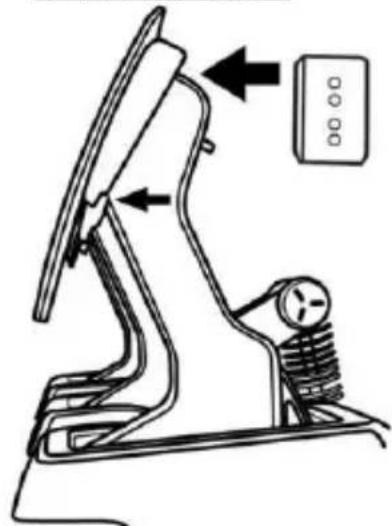
natural_image
Line drawing of a mechanical device with directional arrows indicating movement or force (no text or symbols)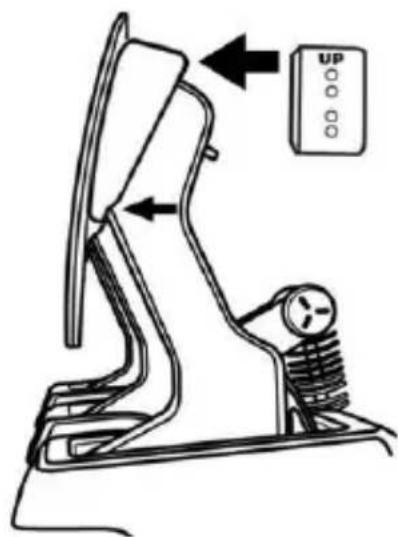
natural_image
Diagram of three mechanical components with a downward arrow indicating a force or movement (no text or symbols present)前端位置(默認) 後端位置
natural_image
Diagram of three car seatbelt lockers with a directional arrow indicating movement (no text or symbols)改變煞車踏板的阻力
natural_image
Illustration of a hand using a threaded screw to adjust a component (no text or symbols present)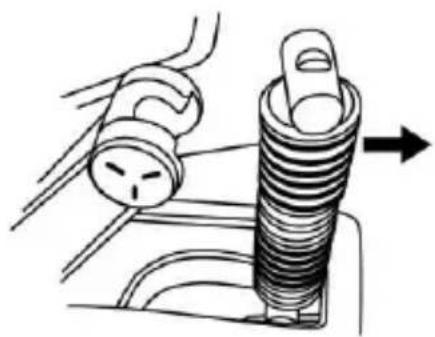
natural_image
Diagram of a mechanical assembly showing a spring-loaded component with a tool and directional arrow (no text or symbols)- 從支撐杆 (B) 上卸下不同元件。
A Load Cell 力感測器
切勿從支撐杆上卸下此感測器!
B 弾簧柱支撑杆
C 中央 4 螺旋鍍鉻預壓彈簧
D 橡膠隔套
E 塑膠隔套
F 7 螺旋主彈簧
(F10、F15、F20、F30)
G 帶墊圈的上固定壓頭
natural_image
Technical line drawing of a mechanical spring assembly (no text or symbols)natural_image
Three mechanical diagrams showing a coiled spring or solenoid assembly with arrows indicating force direction (no text or symbols present)
重要提示:
重要提醒
各種技巧和提示(本手冊中未含)
T-LCM PEDALS LOAD CELL & MAGNETICS
PC – PlayStation®4 – Xbox One®
사용설명서

natural_image
Technical line drawing of a mechanical device with three mounted components (no text or symbols)기술적 특징
전반적인 개요
bar
TM Sim Pedals Calibration Tool | Category | Value | |---|---| | Clutch (0.0) | 94.0 | | Brake (0.6) | 5.0 | | Gas (0.0) | 94.0 | Firmware: S/N: BRAKE FORCE=70 Factory Calibration Applynatural_image
Technical line drawing of a mechanical device with three vertical arms and circular components, no text or symbols present.natural_image
Diagram of two identical electrical connectors with labeled terminals and a directional arrow (no text or symbols)왼쪽 위치
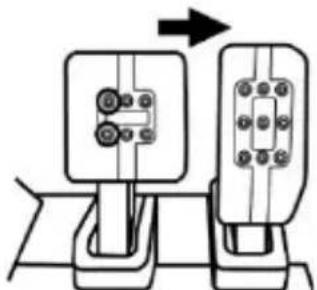
브레이크 페달 예:
natural_image
Pure electrical circuit lines without any symbols중앙 위치(기본)
natural_image
Diagram of two mechanical components with pins and a directional arrow, no text or symbols present오른쪽 위치
페달에 따른 간격 위치 수:
-가속 폐달:3개
-브레이크 폐달:3개
-클러치 폐달:3개
페달 경사 조절하기
natural_image
Line drawing of a car interior with directional arrows indicating movement or force, and a control panel on the right (no text or symbols)덜 경사진 위치
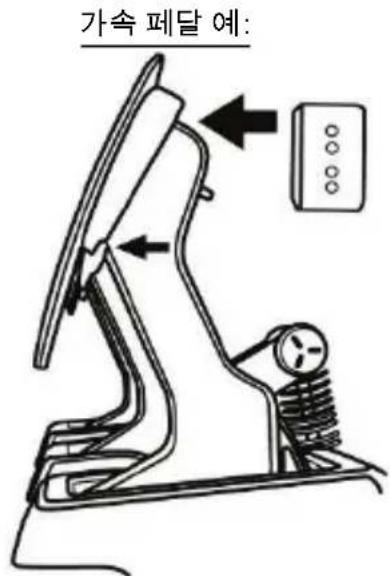
더 경사진 위치
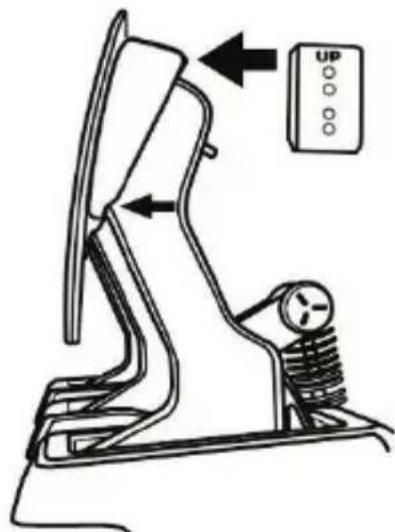
수직 위치
(
기본)
페달에 따른 경사 위치 수:
-가속 폐달:3개
-브레이크 폐달:3개
-클러치 페달:3 개
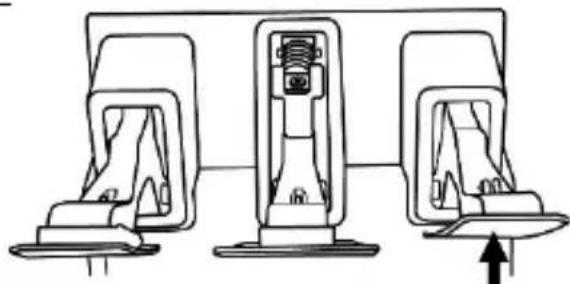
페달 배열 조절하기
natural_image
Diagram of three car seatbelt components with a downward arrow indicating a motion or change (no text or symbols present)전방 위치(기본)
natural_image
Diagram of three car seat lockers with a directional arrow indicating movement (no text or symbols)후방 위치
브레이크 폐달 저항 변경하기
natural_image
Illustration of a hand using a threaded bolt to adjust a component (no text or symbols visible)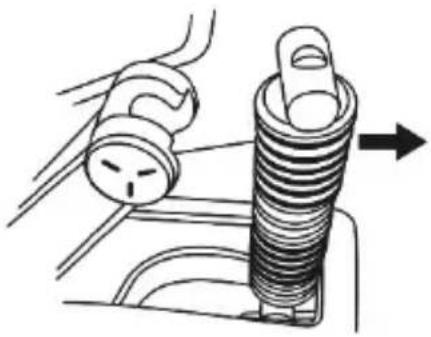
natural_image
Diagram of a mechanical component with a spring and threaded end, showing a force application (no text or symbols)A Load Cell 역각 센서
지지대에서 절대 분리하지 않습니다!
B 기둥처럼 세우는 스프링용 지지대
natural_image
Technical line drawing of a mechanical spring assembly (no text or symbols)natural_image
Three technical illustrations of a mechanical assembly with threaded components and arrows indicating motion (no text or symbols)
중요: