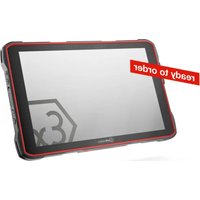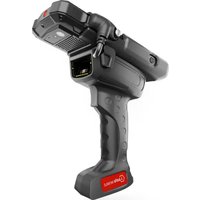
IS-TH2ER.M1 - Barcode scanners i.safe Mobile - Free user manual and instructions
Find the device manual for free IS-TH2ER.M1 i.safe Mobile in PDF.


User questions about IS-TH2ER.M1 i.safe Mobile
0 question about this device. Answer the ones you know or ask your own.
Ask a new question about this device
Download the instructions for your Barcode scanners in PDF format for free! Find your manual IS-TH2ER.M1 - i.safe Mobile and take your electronic device back in hand. On this page are published all the documents necessary for the use of your device. IS-TH2ER.M1 by i.safe Mobile.
USER MANUAL IS-TH2ER.M1 i.safe Mobile
text_image
IS-TH SAFE MOBILE OPERATINGIS-TH2ER.M1
OPERATING MANUAL
i.safe MOBILE
IS-TH2ER.M1 | MODEL MTH2ERA01
Document No. 1105MM01REV00
Version: 2025-12-04
i.safe MOBILE GmbH
i_Park Tauberfranken 10
97922 Lauda-Koenigshofen
Germany
Tel.+49 9343 60148-0
info@isafe-mobile.com
www.isafe-mobile.com
(c) 2025 i.safe MOBILE GmbH
Template: TEMPMM01REV10
CONTENTS
English. 4
Deutsch....12
Česky 20
Dansk 28
Español....36
Suomi 44
Français....52
Magyar 60
Italiano 68
Nederlands 76
Norsk 84
Polski 92
This Operating Manual complies with these standards:
IEC 60079, IEC 82079, ANSI Z535.6
IEC 60079, IEC 82079, ANSI Z535.6
ENGLISH

PROTECT YOUR LIFE AND READ THE OPERATING MANUAL
This Operating Manual is part of the device IS-TH2ER.M1 (model MTH2ERA01).
This Operating Manual provides important information for safe use of the device.
» Before using the device, read this Operating Manual carefully and pay particular attention to the „Ex-relevant Safety Regulations“ section and the warnings highlighted with the warning symbol. If you do not follow these instructions or do not understand them, this could lead to death, severe injuries and damage to the device.
» Make sure you have access to this Operating Manual when you need it. You can find the current Operating Manual at www.isafe-mobile.com/en/support/downloads
» Follow all instructions given on the device and on the packaging.
»Follow local safety regulations.
» Only use the device in explosion hazardous areas of zones 1/21, 2/22, M1 and M2 or outside of explosion hazardous areas.
» Only connect the device outside explosion hazardous areas to the ISM interface of the IS540.M1.
» Before entering an explosion hazardous area with the device,
- make sure that the device is securely fastened to the ISM interface of the IS540.M1,
- make sure that no gap can be seen between the two halves of the device,
- make sure the device is not damaged,
- make sure that all the labels on the device are readable.
» If you use the device in an explosion hazardous area,
- do not loosen the screws on the device,
- do not connect any accessories to the device,
- do not open any interface cover,
- do not charge the IS540.M1,
- do not open the device,
- do not damage the device.
» Switch off the device immediately and leave the explosion hazardous area without delay if
- malfunctions occur on the device,
- you have damaged the housing of the device,
- you have exposed the device to excessive loads,
- the device has been stored improperly,
- the labels on the device are no longer readable.
» Laser Light. Do not stare into beam class 2 laser product 510 - 530 nm, 1 mW.
» Do not modify the device structurally.
» Do not expose the device to high temperatures.
» Do not expose the device to strong UV radiation.
» Do not expose the device to processes with high electrical charges.
» Do not expose the device to aggressive acids or bases.
» Protect the device from oils, greases and hydraulic fluids.
» Protect the device from high mechanical hazards, strong UV radiation and highly electrically charging processes.
» Do not open the device or carry out any repairs yourself.
EX-RELEVANT SAFETY REGULATIONS
Use of this device assumes that the operator observes the conventional safety regulations and has read and understood Operating Manual, Safety Instructions and certificate.
When used in explosion hazardous areas, the following Safety Instructions must also be complied with:
CONNECTIONS
» The device may be connected only outside ex-hazardous areas to the IS540.M1 via the ISM interface.
» The device must be securely fastened to the ISM interface when used in ex-hazardous areas.
IP-PROTECTION
» To ensure the IP-protection, it has to be ensured that all gaskets are present and functional. There must be no large gap between the two halves of housing and between the battery and housing.
CHARGING
» The IS540.M1 may only be charged outside explosion hazardous areas via the IS-DCTH1.1.
IMPACTS
» The device may not be exposed to any aggressive acids or alkalis.
»The device must be protected from impacts with high impact energy, against excessive UV light emission and high electrostatic charge processes.
» The device shall be protected from the exposure of oils, greases and hydraulic fluids.
CONDITIONS OF USE
» The permitted ambient temperature range is -20 °C to +55 °C (-4 °F to +131 °F).
» The device may only be used in zones 1, 2, 21, 22, M1, or M2.
FAULTS AND DAMAGES
If there is any reason to suspect that the safety of the device has been compromised, it must be withdrawn from use and removed from any ex-hazardous areas immediately.
Measures must be taken to prevent any accidental restarting of the device. The safety of the device may be compromised, if, for example:
» Malfunctions occur.
» The housing of the device shows damage.
» The device has been exposed to excessive loads.
» The device has been stored improperly
» Markings or labels on the device are illegible.
We recommend that a device displaying errors or in which an error is suspected be sent back to i.safe MOBILE GmbH to be checked.
INTENDED USE
The device IS-TH2ER.M1 is used for scanning barcodes. It is suitable for use in explosion hazardous areas of Zone 1/21, 2/22, M1 and M2, in accordance with Directives 2014/34/EU, 1999/92/EC and the IECEx system, among others.
Only use the device as described in this Operating Manual. Any other use is considered improper and can lead to death, severe injuries and damage to the device.
The manufacturer i.safe MOBILE GmbH does not assume any liability for damage caused by improper use. The warranty expires in the event of improper use.
USER
Only trained users who are qualified in the use of Ex devices in explosion hazardous areas and who have read and understood this Operating Manual may use this device.
WARRANTY
You can find the warranty conditions at www.isafe-mobile.com/en/support/service
EU DECLARATION OF CONFORMITY
You will find the EU declaration of conformity at www.isafe-mobile.com/en/support/downloads
EX MARKINGS
> ATEX:
⑫ I M1 Ex ia op is I Ma
Ex II 2G Ex ib op is IIC T4 Gb
⑥ II 2D Ex ib op is IIIC T135°C Db
EU Type Examination Certificate:
EPS 25 ATEX 1 205 X
CE-designation: 2004
>IECEx:
Ex ia op is I Ma
Ex ib op is IIC T4 Gb
IECEx Certificate: IECEx EPS 25.0053X
> Temperature range:
-20 °C ≤ Ta ≤ +55 °C (EN/IEC 60079-0) -10 °C ... +55 °C (EN/IEC 62368-1)
Manufactured by:
i.safe MOBILE GmbH
i_Park Tauberfranken 10
97922 Lauda-Koenigshofen
Germany
>SCOPE OF DELIVERY
Your device packaging contains the following:
> 1 x IS-TH2ER.M1
1 x Safety Instructions
1 x Screwdriver
1 x Lanyard IS-TH
1 x Pre-installed NFC extension
>DEVICE OVERVIEW/FUNCTIONS
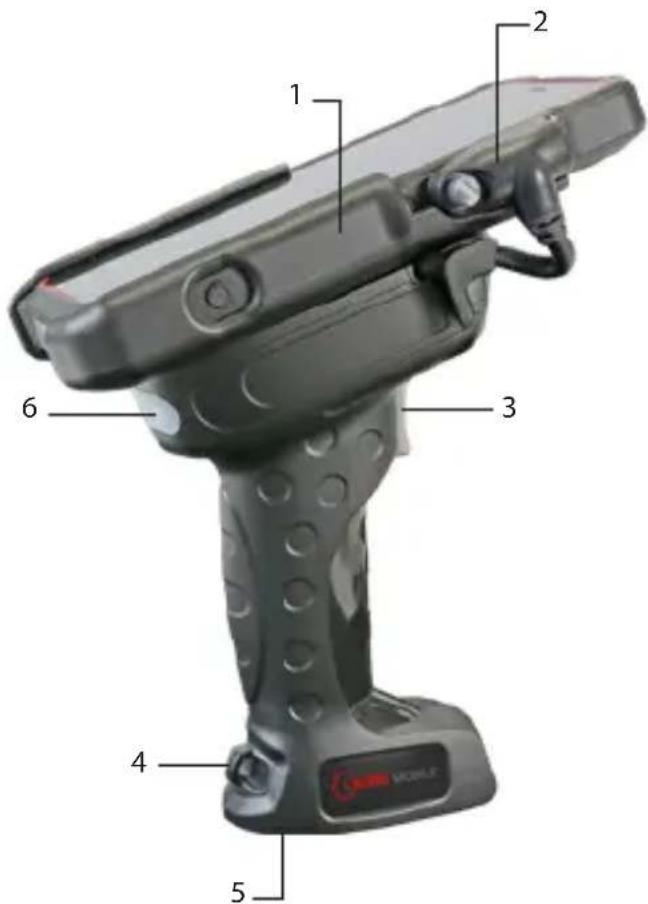
text_image
1 2 3 4 5 6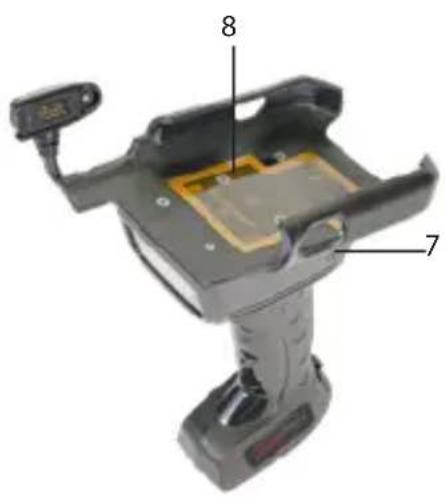
text_image
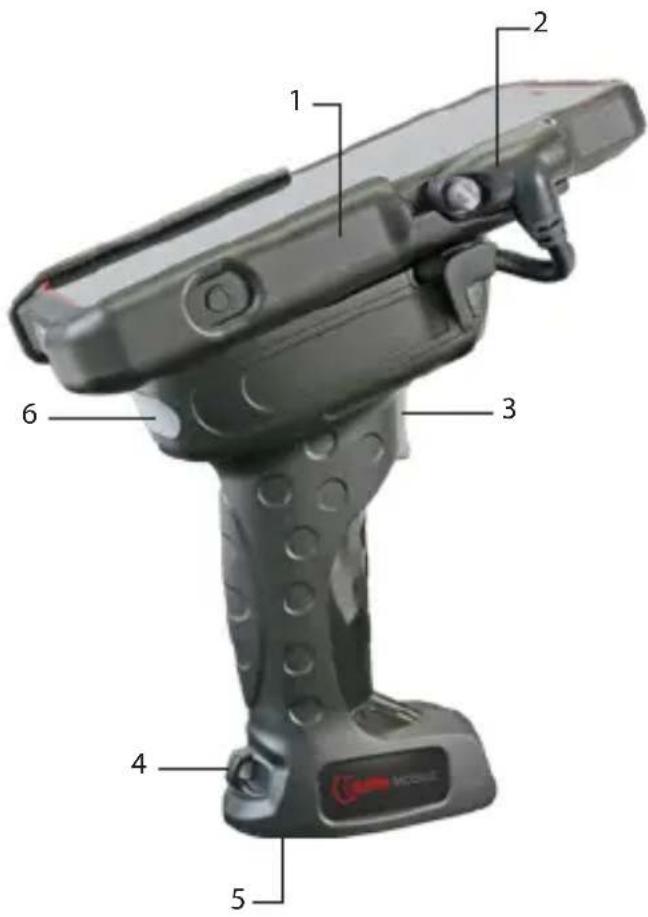
Labeled diagram of a device showing internal components with numbered annotations1> HOLDER: Holder for IS540.M1
2> PLUG: Connecting IS540.M1
3> TRIGGER: Scanning barcodes
4) EYELET: Eyelet for Lanyard IS-TH
5> CHARGING CONTACTS: Charging the IS540.M1 via the IS-DCTH1.1
6) INDICATOR LED (GREEN): Barcode decoded successfully
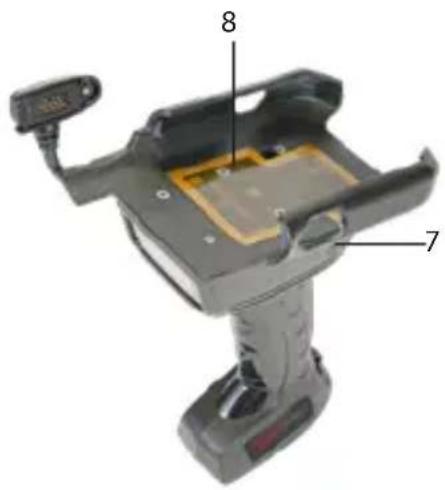
7> ELECTRONIC BUZZER
8) PRE-INSTALLED NFC EXTENSION
NOTICE
The IS-TH2ER.M1 is powered via the connected IS540.M1. To protect the IS540.M1 from overload and data loss, the IS540.M1 switches off the power supply to the IS-TH2ER.M1 when the battery charge level falls below 15%.
» Charge the IS540.M1 to continue operating the IS-TH2ER.M1.
INSTALLATION

DANGER
Improper use can result in death or severe injuries! Only connect the device outside explosion hazardous areas to the ISM interface of the IS540.M1.
text_image
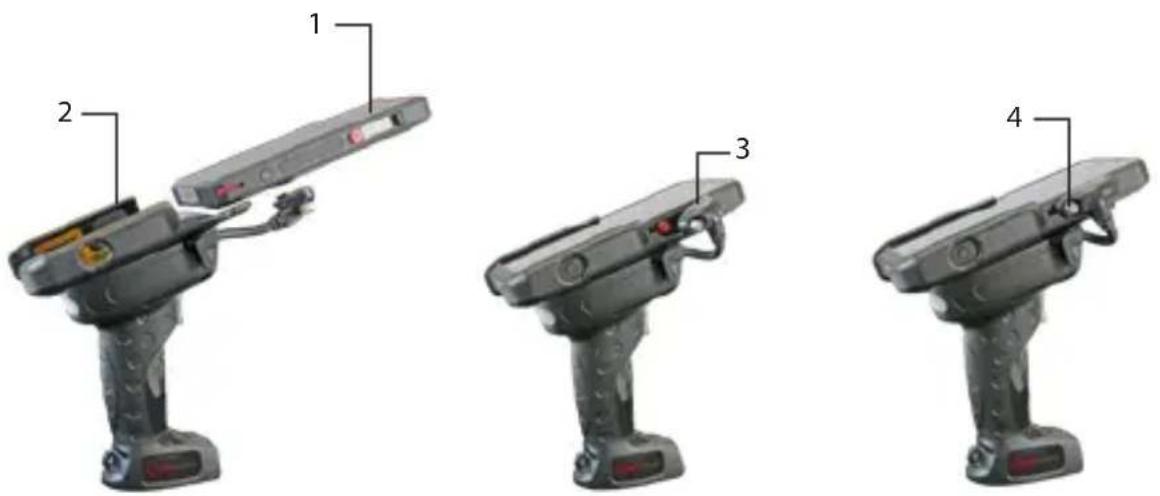
Diagram showing three views of a handheld device with labeled parts 1, 2, 3, and 4.» Remove the ISM interface cover on the IS540.M1 (1).
» Push the IS540.M1 completely into the holder (2) of the device.
» Connect the plug (3) to the ISM interface as shown.
» Tighten the screw (4) using the slotted screwdriver provided.
» Check that the plug is correctly and firmly attached to the ISM interface.
» Open the „Function keys“ App on the IS540.M1 and go to „External keys“.
» Set the „External function key 1“ to „No action“.
» You can optionally activate or deactivate the „Wake device“ function.
The device can now be used together with the IS540.M1 in explosion hazardous areas.
> SCANNING BARCODE

CAUTION
Laser Light. Do not stare into beam class 2 laser product 510 - 530 nm, 1 mW.
» Only use the device at ambient temperatures between -20 °C to +55 °C (-4 °F to +131 °F).
» Press trigger to scan a barcode.
When the scan was successfully completed the green LED lights up, the electronic buzzer beeps and the vibration motor vibrates.
Further information on operating the device can be found at www.isafe-mobile.com/en/support/service under the menu item "FAQ".
>CHARGING IS540.M1

DANGER
An incorrect procedure in explosion hazardous areas poses risk of death or severe injuries! Only charge the IS540.M1 outside of explosion hazardous areas via the IS-DCTH1.1 or IS-MCTH1.1.
POSSIBLE DEVICE PROBLEMS
You can find information on possible device problems and how to rectify them at www.isafe-mobile.com/en/support/service under the menu item "FAQ".
If you have any further questions, please contact the i.safe MOBILE GmbH repair service at www.isafe-mobile.com/en/support/service
MAINTENANCE/REPAIR
The device itself has no serviceable parts.

WARNING
Incorrect repairs present a risk of explosion or fire, which can result in death or severe injuries! Do not open the device or carry out any repairs yourself.
» Contact the i.safe MOBILE GmbH repair service at
www.isafe-mobile.com/en/support/service if the device is not working normally, if the device needs to be repaired or if a replacement part is required.
RETURN SHIPMENT
Contact the i.safe MOBILE GmbH repair service at www.isafe-mobile.com/en/support/service
DISTRIBUTION PARTNER
You can find the specialist distribution partner responsible for your country at www.isafe-mobile.com/en/contact
>CLEANING
NOTICE
Incorrect cleaning can cause damage to the device. Please note the following when cleaning:
» Turn off the device before cleaning.
» Do not use chemical agents for cleaning.
» Clean the device with a soft, moistened antistatic cloth.
STORAGE
NOTICE
Incorrect storage can cause damage to the device.
» Store the device at a humidity of 10 % to 60 % at the following ambient temperatures:
Up to one month: -20 °C to +45 °C (-4 °F to +113 °F)
Up to 3 months: -10 °C to +35 °C (+14 °F to +95 °F)
Over 3 months: -10 °C to +25 °C (+14 °F to +77 °F)
» Disconnect the IS540.M1 from the IS-TH2ER.M1.
» For longer storage without use, remove the battery from the IS540.M1.
RECYCLING
NOTICE
Incorrect disposal of electronic products, batteries and packaging material puts the environment at risk. Please note the following when disposing of items:
»DO NOT throw away batteries with household waste.
» Always dispose electronic products, batteries and packaging material at the appropriate collection points. This way, you prevent uncontrolled waste disposal and promote the recycling of material resources.
You can obtain further information from regional waste disposal companies, state authorities or the i.safe MOBILE GmbH service centre responsible for your country or region at www.isafe-mobile.com/en/support/service
TRADEMARKS
i.safe MOBILE GmbH and the i.safe MOBILE GmbH logo are registered trademarks of the i.safe MOBILE GmbH.
All other trademarks and copyrights are the properties of their respective owners.
DEUTSCH

Ex1 M1 Ex ia op is I Ma
① II 2G Ex ib op is IIC T4 Gb
II 2D Ex ib op is IIIC T135°C Db
text_image
Labeled diagram of a device with numbered parts 7 and 8, showing internal components and a scroll wheel.text_image
Diagram of four different types of handheld devices with numbered labels pointing to each component.www.isafe-mobile.com/en/support/downloads
ZNAČENÍ SOUVISEJÍCÍ S NEBEZPEČÍM VÝBUCHU
ATEX:
Ex I M1 Ex ia op is I Ma
① II 2G Ex ib op is IIC T4 Gb
II 2D Ex ib op is IIIC T135°C Db
text_image
Labeled diagram of a handheld device with numbered parts for identification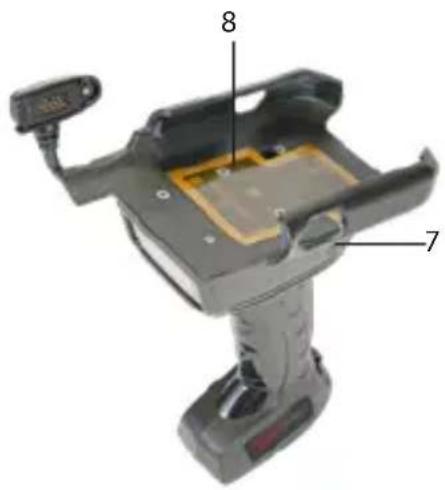
text_image
Labeled diagram of a device showing internal components with numbered annotationstext_image
Diagram of four different types of handheld devices with numbered labels pointing to each component.www.isafe-mobile.com/en/support/downloads
www.isafe-mobile.com/en/support/downloads
TIDLIGERE MærKNINGER
> ATEX:
Ex I M1 Ex ia op is I Ma
① II 2G Ex ib op is IIC T4 Gb
II 2D Ex ib op is IIIC T135°C Db
text_image
Labeled diagram of a handheld device with numbered parts for identification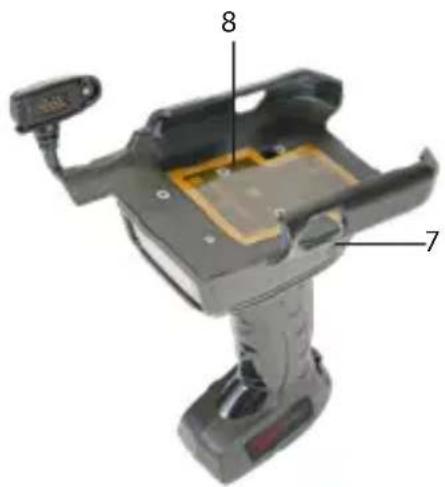
text_image
Labeled diagram of a device showing internal components with numbered annotations1) BESLAG: Beslag til IS540.M1
2) STIK: Tilslut IS540.M1
3) UDL∅SER: Scanning af stregkoder
4) ∅SKEN: ∅sken til strop IS-TH
5> LADEKONTAKTER: Opladning af IS540.M1 via IS-DCTH1.1
6) LED-INDIKATOR (GR∅N): Stregkoden blev afkodet
7) ELEKTRONISK SUMMER
8> FORHÅNDSINSTALLERET NFC-UDVIDELSE
BEMÄRK
text_image
Diagram of four different types of handheld devices with numbered labels pointing to each component.www.isafe-mobile.com/en/support/service
DETAILPARTNER
Du kan finde den specialiserede detailpartner med ansvar for dit land på www.isafe-mobile.com/en/contact
RENG∅RING
BEMÄRK
www.isafe-mobile.com/en/support/service
www.isafe-mobile.com/en/support/downloads
Ea I M1 Ex ia op is I Ma
① II 2G Ex ib op is IIC T4 Gb
II 2D Ex ib op is IIIC T135°C Db
text_image
Labeled diagram of a handheld device with numbered parts for identification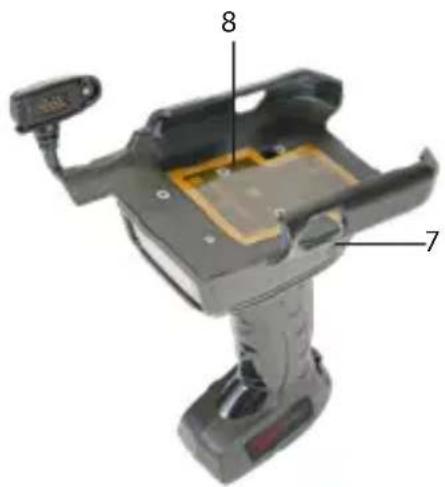
text_image
Labeled diagram of a device with numbered parts, showing internal components and a scroll-like extension.text_image
Diagram of four different types of handheld devices with numbered labels pointing to each component.www.isafe-mobile.com/en/support/downloads
EX-MERKINNÄT
> ATEX:
Ea I M1 Ex ia op is I Ma
① II 2G Ex ib op is IIC T4 Gb
Ea II 2D Ex ib op is IIIC T135°C Db
text_image
Labeled diagram of a handheld device with numbered parts for identification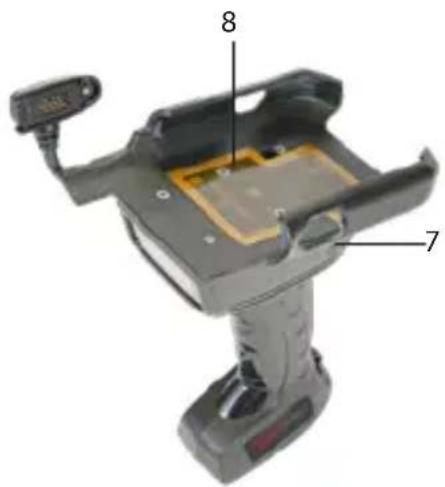
text_image
Labeled diagram of a device with numbered parts 7 and 8, showing internal components and a scroll wheel.text_image
Diagram of four different types of handheld devices with numbered labels pointing to each component.DÉCLARATION DE CONFORMITÉ UE
I M1 Ex ia op is I Ma
II 2G Ex ib op is IIC T4 Gb
II 2D Ex ib op is IIIC T135°C Db
Certification CE: 2004
IECEx:
Ex ia op is I Ma
Ex ib op is IIC T4 Gb
text_image
Labeled diagram of a handheld device with numbered parts for identification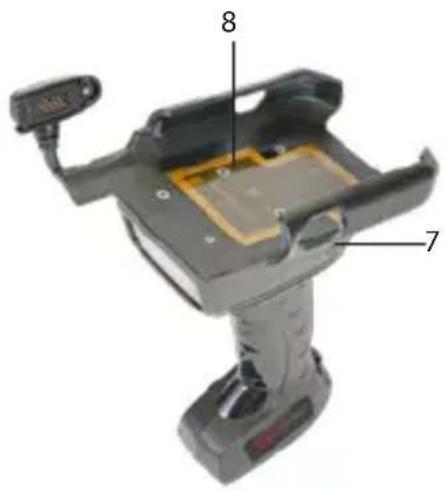
text_image
8 7text_image
Diagram of four different types of handheld devices with numbered labels pointing to each component.Ea I M1 Ex ia op is I Ma
① II 2G Ex ib op is IIC T4 Gb
Ea II 2D Ex ib op is IIIC T135°C Db
text_image
Labeled diagram of a handheld device with numbered parts for identification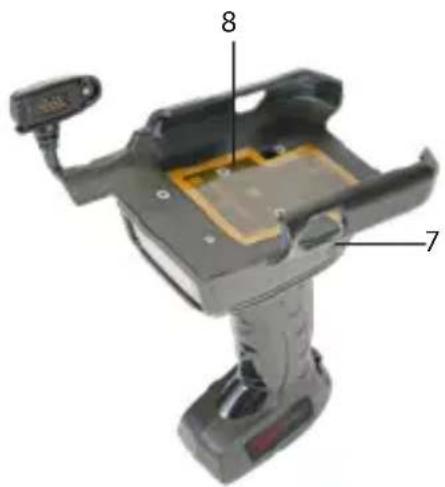
text_image
Labeled diagram of a device showing internal components with numbered annotationstext_image
Diagram of four different types of handheld devices with numbered labels pointing to each component.www.isafe-mobile.com/en/support/service
www.isafe-mobile.com/en/support/downloads
Ea I M1 Ex ia op is I Ma
① II 2G Ex ib op is IIC T4 Gb
II 2D Ex ib op is IIIC T135°C Db
text_image
Labeled diagram of a handheld device with numbered parts for identification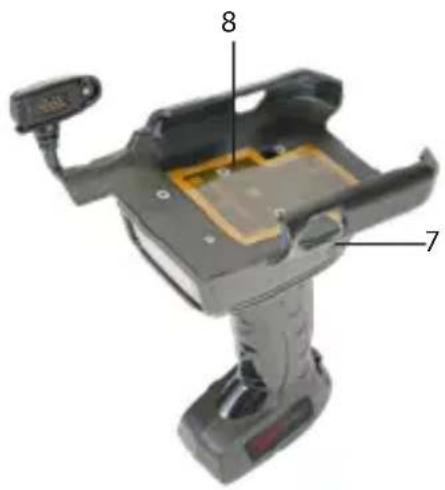
text_image
8 7text_image
Diagram of four different types of handheld devices with numbered labels pointing to each component.www.isafe-mobile.com/en/support/downloads
EX-MARKERINGEN
ATEX:
Ea I M1 Ex ia op is I Ma
① II 2G Ex ib op is IIC T4 Gb
II 2D Ex ib op is IIIC T135°C Db
text_image
Labeled diagram of a handheld device with numbered parts for identification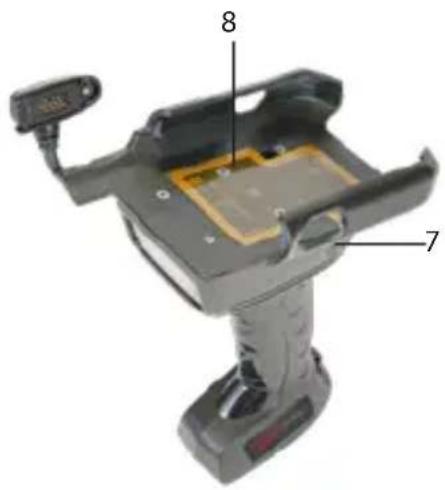
text_image
8 7text_image
Diagram showing three views of a handheld device with labeled parts 1, 2, 3, and 4www.isafe-mobile.com/en/support/downloads
EX-MERKING
> ATEX:
Ex I M1 Ex ia op is I Ma
① II 2G Ex ib op is IIC T4 Gb
II 2D Ex ib op is IIIC T135°C Db
text_image
Labeled diagram of a handheld device with numbered parts for identification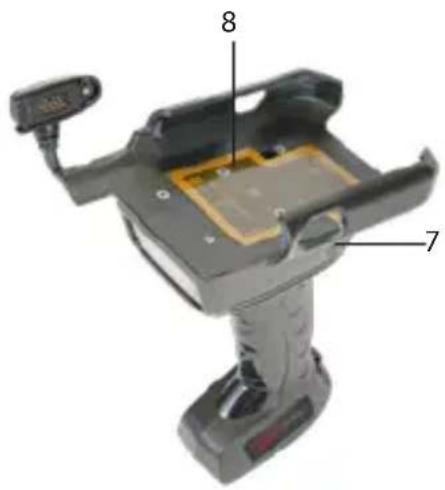
text_image
8 71> BRAKETT: Brakett til IS540.M1
2> PLUG: Koble til IS540.M1
3) UTL∅SER: Skanner strekkoder
4>∅YE: ∅ye for festesnor IS-TH
5> LADEKONTAKTER: Lader IS540.M1 via IS-DCTH1.1
6) INDIKATOR-LED (GR∅NN): Vellykket lesing av strekkode
7) ELEKTRONISK SUMMER
8) FORHÅNDSINSTALLERT NFC-UTVIDELSE
MERK
text_image
Diagram showing three views of a handheld device with labeled parts 1, 2, 3, and 4» Fjern ISM-grensesnittdekselet på IS540.M1 (1).
» Skyv IS540.M1 helt inn i holderen (2) på enheten.
» Koble til pluggen (3) til ISM-grensesnittet som vist.
»Stram skruen (4) med den medfølgende flatskrutrekkeren.
» Sjekk om kontakten er riktig og godt festet til ISM-grensesnittet.
» Åpne appen «Function keys» på IS540.M1, og gå til «External keys».
» Sett «External function key 1» til «No action».
» Du kan eventuelt aktivere eller deaktivere funksjonen «Wake device».
VEDLIKEHOLD/REPARASJON
www.isafe-mobile.com/en/support/service
DETALJHANDELSPARTNER
Ea I M1 Ex ia op is I Ma
① II 2G Ex ib op is IIC T4 Gb
Ea II 2D Ex ib op is IIIC T135°C Db
text_image
Labeled diagram of a handheld device with numbered parts for identification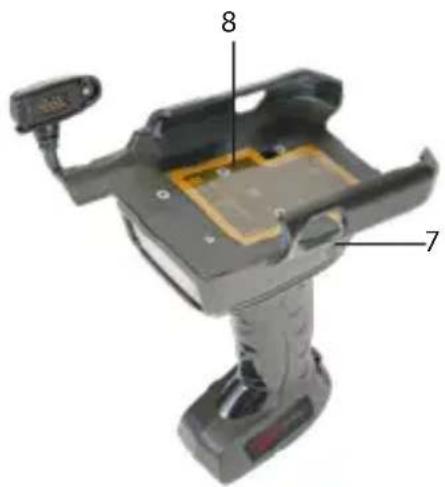
text_image
8 7text_image
Diagram of four different types of handheld devices with numbered labels pointing to each component.text_image
Labeled diagram of a handheld device with numbered parts for identification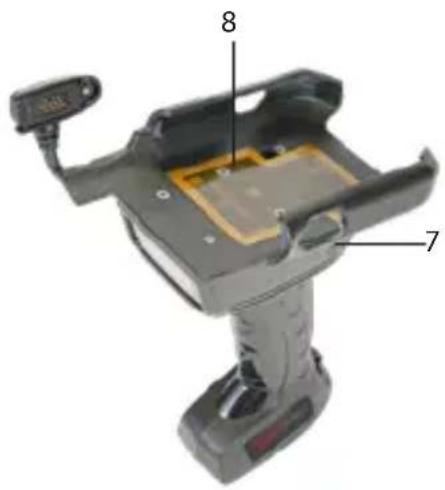
text_image
8 7text_image
Diagram showing three views of a handheld device with labeled parts 1, 2, 3, and 4www.isafe-mobile.com/en/support/downloads
www.isafe-mobile.com/en/support/service
www.isafe-mobile.com/en/support/downloads
MARCAS
> ATEX:
Ea I M1 Ex ia op is I Ma
① II 2G Ex ib op is IIC T4 Gb
II 2D Ex ib op is IIIC T135°C Db
text_image
Labeled diagram of a handheld device with numbered parts for identification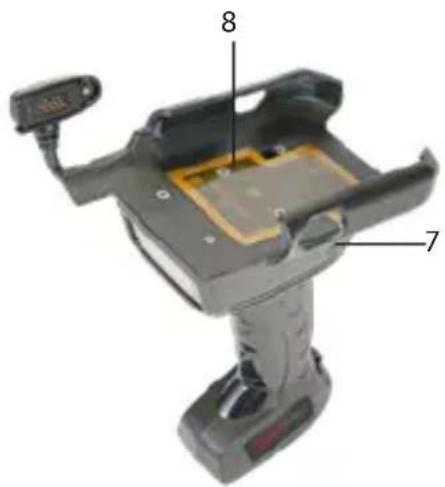
text_image
Labeled diagram of a device showing internal components with numbered annotations1) SUPORTES: Suportes para o IS540.M1
2) CONECTOR: Conectando o IS540.M1
3) GATILHO: Leitura de códigos de barras
4) ILHÓS: Ilhós para cordão de segurança IS-TH
5) CONTATOS DO CARREGADOR: Carregamento do IS540.M1 por meio do IS-DCTH1.1
6) LED INDICADOR (VERDE): Código de barras decodificado com êxito
7) CAMPAINHAELETRÔNICA
8) EXTENSÃO NFC PRÉ-INSTALADA
OBSERVAÇÃO
text_image
Diagram of four different types of handheld devices with numbered labels pointing to each component.»Remova a tampa da interface ISM do IS540.M1 (1).
Ea I M1 Ex ia op is I Ma
① II 2G Ex ib op is IIC T4 Gb
II 2D Ex ib op is IIIC T135°C Db
text_image
Diagram of four different types of weapon devices with numbered labels pointing to each component.Ea I M1 Ex ia op is I Ma
① II 2G Ex ib op is IIC T4 Gb
Ea II 2D Ex ib op is IIIC T135°C Db
EU-typintyg:
EPS 25 ATEX 1 205 X
CE-märkning: 2004
>IECEx:
Ex ia op is I Ma
Ex ib op is IIC T4 Gb
text_image
Labeled diagram of a handheld device with numbered parts for identification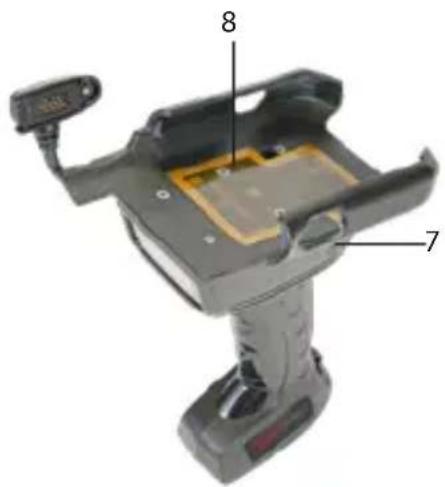
text_image
Labeled diagram of a device showing internal components with numbered annotations1 FÄSTE: FÄSTE FÖR IS540.M1
2>PLUG: ANSLUT IS540.M1
3) UTLÖSARE: SKANNA STRECKKODER
4>ÖGLA: ÖGLA FÖR SNÖRE IS-TH
5) LADDNINGSKONTAKTER: LADDA IS540.M1 VIA IS-DCTH1.1
6) INDIKERINGS-LED (GRÖN): STRECKKODEN HAR AVKODATS
7) ELEKTRONISK SUMMER
8) FÖRINSTALLERAD NFC-FÖRLÄNGNING
OBSERVERA
text_image
Diagram showing three views of a handheld device with labeled parts 1, 2, 3, and 4Ea I M1 Ex ia op is I Ma
① II 2G Ex ib op is IIC T4 Gb
Ea II 2D Ex ib op is IIIC T135°C Db
Certifikat o ispitivanju EU tipa:
EPS 25 ATEX 1 205 X
Oznaka CE: 2004
>IECEx:
Ex ia op is I Ma
Ex ib op is IIC T4 Gb
text_image
Labeled diagram of a handheld device with numbered parts for identificationMontaža
text_image
8 71> DRŽAČ: Držač za IS540.M1
2) UTIKAČ: Spajanje na IS540.M1
3) POKRETAČ: Skeniranje bar-koda
4>UŠICA: Ušica za Lanyard IS-TH
5) KONTAKTI ZA PUNJENJE: Punjenje IS540.M1 preko IS-DCTH1.1
6) LED INDIKATOR (ZELENI): Bar-kod uspješno dekodiran
7) ELEKTRONIČKOZUJALO
8) PREDINSTALIRANO NFC PROŠIRENJE
NAPOMENA
IS-TH2ER.M1 se napaja putem spojenog IS540.M1. Kako bi zaštitio IS540.M1 od preopterećenja i gubitka podataka, IS540.M1 isključuje napajanje IS-TH2ER.M1 kada razina napunjenosti baterije padne ispod 15 %.
» Napunite IS540.M1 kako biste nastavili s radom IS-TH2ER.M1.
MONTAŽA

OPASNOST
Neodgovarajuća uporaba može dovesti do smrti ili teških ozljeda!
text_image
Diagram of four different types of handheld devices with numbered labels pointing to each component.» Skinite poklopac ISM sučelja na IS540.M1 (1).
» Gurnite IS540.M1 do kraja u držač (2) uređaja.
www.isafe-mobile.com/en/support/service
MALOPRODAJNI PARTNER
Možete pronaći stručnog maloprodajnog partnera odgovornog za svoju državu na www.isafe-mobile.com/en/contact
ČIŠĆENJE
NAPOMENA
Ea I M1 Ex ia op is I Ma
① II 2G Ex ib op is IIC T4 Gb
II 2D Ex ib op is IIIC T135°C Db
text_image
Labeled diagram of a handheld device with numbered parts for identification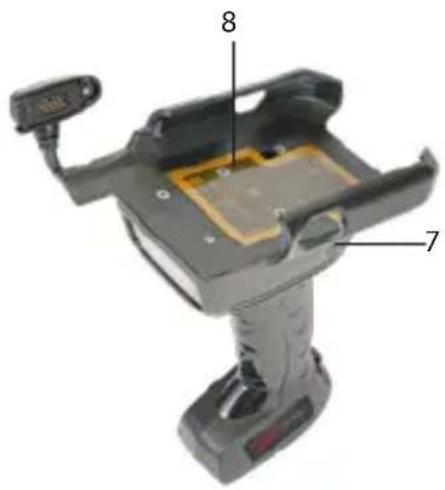
text_image
8 7text_image
Diagram of four different types of handheld devices with numbered labels pointing to each component.» Odstráňte kryt rozhrania ISM na IS540.M1 (1).
» IS540.M1 úplne zasuňte do držiaka (2) zariadenia.
» Pripojte zástrčku (3) k rozhraniu ISM tak, ako je zobrazené.
www.isafe-mobile.com/en/support/downloads
EX O3HAKE
ATEX:
Ea I M1 Ex ia op is I Ma
① II 2G Ex ib op is IIC T4 Gb
II 2D Ex ib op is IIIC T135°C Db
text_image
Labeled diagram of a handheld device with numbered parts for identification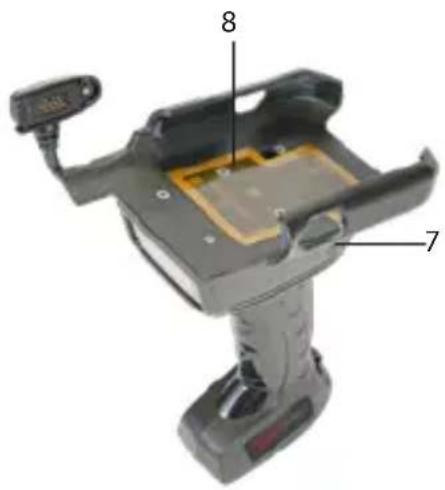
text_image
8 71>ДРЖАЧ: ДРЖАЧ ЗА IS540.M1
2) УТИКАЧ: ПОВЕЗИВАЊЕ НА IS540.M1
3) ОКИДАЧ: СКЕНИРАЊЕ БАР-КОДОВА
4) УШИЦА: УШИЦА ЗА LANYARD IS-TH
5) КОНТАКТИ ЗА ПУЊЕЊЕ: ПУЊЕЊЕ IS540.M1 ПРЕКО IS-DCTH1.1
6) LED ИНДИКАТОР (ЗЕЛЕНА): БАР-КОД УСПЕШНО ДЕКОДИРАН
7) ЕЛЕКТРОНСКАЗУЛАЛИЦА
8) УНАПРЕД ИНСТАЛИРАНО NFC ПРОШИРЕЊЕ
НАПОМЕНА
text_image
Diagram of four different types of handheld devices with numbered labels pointing to each component.Ex I M1 Ex ia op is I Ma
① II 2G Ex ib op is IIC T4 Gb
II 2D Ex ib op is IIIC T135°C Db
EU 유형 시험 인증서:
EPS 25 ATEX 1 205 X
CE 마크:2004
IECEx:
Ex ia op is I Ma
Ex ib op is IIC T4 Gb
Ex ib op is IIIC T135°C Db
IECEx 인증서:IECEx EPS 25.0053X
>공급 범위
장치 포장은 다음을 포함합니다.
1 x IS-TH2ER.M1
text_image
Labeled diagram of a device showing numbered components, likely a sensor or scanner assembly.text_image
Diagram of four different types of handheld devices with numbered labels pointing to each component.Ex I M1 Ex ia op is I Ma
① II 2G Ex ib op is IIC T4 Gb
II 2D Ex ib op is IIIC T135°C Db
EUタイプ試験証明書:
EPS 25 ATEX 1 205 X
CE認定: 2004
IECEx:
Ex ia op is I Ma
Ex ib op is IIC T4 Gb
text_image
Labeled diagram of a device with numbered parts, likely an electronic or mechanical component.text_image
Diagram of four different types of electronic devices with labeled parts, showing exploded and assembled views.① I M1 Ex ia op is I Ma
II 2G Ex ib op is IIC T4 Gb
II 2D Ex ib op is IIIC T135° C Db
欧盟型式检验证书:
EPS 25 ATEX 1 205 X
CE-名称:004
IECEx:
Ex ia op is I Ma
Ex ib op is IIC T4 Gb
Ex ib op is IIIC T135° C Db
IECEx 证书: IECEx EPS 25.0053X
温度范围:
-20^≤slant Ta≤slant +55^ (EN/IEC 60079-0)
-10^·s +55^ (EN/IEC 62368-1)
制造商:
i.safe MOBILE GmbH
i_Park Tauberfranken 10
97922 Lauda-Koenigshofen
Germany
>标准配置
您的设备包装包含以下内容:
1 x IS-TH2ER.M1
1x安全说明
1x螺丝刀
1x挂绳IS-TH
1x预装NFC扩展
设备总览/功能
text_image
1 2 3 4 5 6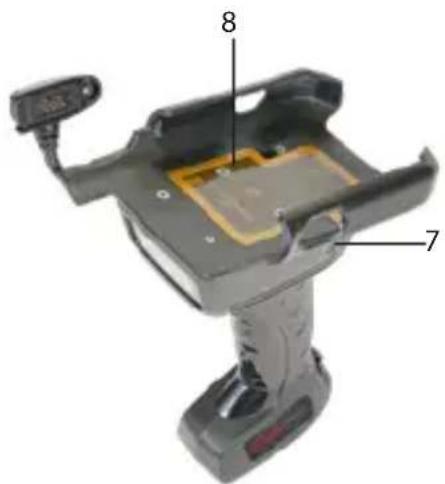
text_image
8 7text_image
Diagram showing three views of a handheld device with labeled parts 1, 2, 3, and 4.www.isafe-mobile.com/en/support/service
④ I M1 Ex ia op is I Ma
II 2G Ex ib op is IIC T4 Gb
II 2D Ex ib op is IIIC T135°C Db
text_image
Labeled diagram of a device showing internal components and parts with numbered labelsIS540.M1 : كتيفة ٔ
text_image
Diagram showing four views of a handheld device with labeled parts 1, 2, 3, and 4.FOR FURTHER QUESTIONS PLEASE CONTACT OUR SERVICE CENTRE:
»i.safe MOBILE GmbH, i_Park Tauberfranken 10, 97922 Lauda-Koenigshofen, Germany
» support@isafe-mobile.com
» https://support.isafe-mobile.com
ISAFE-MOBILE.COM