IS320.1 - Mobile Phone i.safe Mobile - Free user manual and instructions
Find the device manual for free IS320.1 i.safe Mobile in PDF.


User questions about IS320.1 i.safe Mobile
0 question about this device. Answer the ones you know or ask your own.
Ask a new question about this device
Download the instructions for your Mobile Phone in PDF format for free! Find your manual IS320.1 - i.safe Mobile and take your electronic device back in hand. On this page are published all the documents necessary for the use of your device. IS320.1 by i.safe Mobile.
USER MANUAL IS320.1 i.safe Mobile
> KEYS AND SPECIAL FEATURES
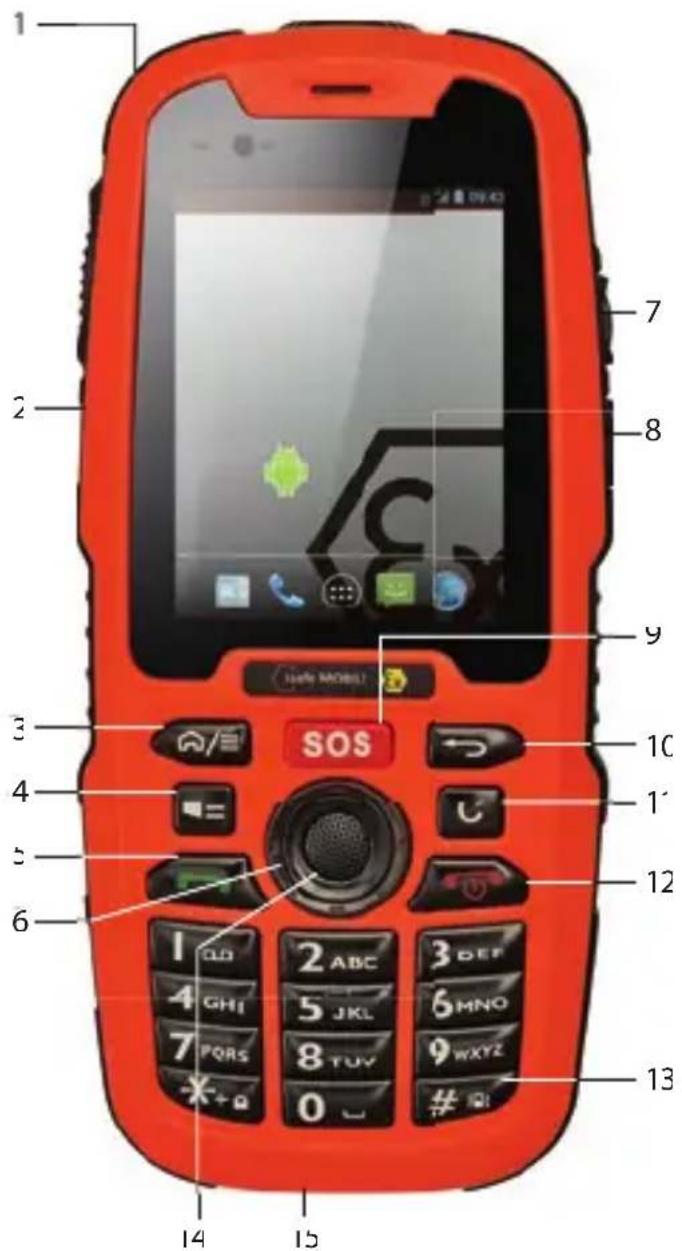
text_image
1 2 7 8 9 SOS 10 1' 12 13 14 15Document No. 1014DI02REV0
Version: 2017-07-13
(c) 2017 I.sate MOBILE GmbH
i.safe MOBILE GmbH
i Park Tauberfranken 10
97922 Lauda-Koenigshofer
Germany
Tel. +49 9343/60148-0
info@isafe-mobile.com
www.isafe-mobile.com
CONTENTS
English 4
Deutsch....9
Česky 15
Dansk 20
Españo 26
Suomi....31
Français 37
Magyar 42
Italiano 48
Nederlands 54
Norsk 59
Polski 665
Portuguesa 71
Русский 76
Svenska 83
ENGLISH
INTRODUCTION
This document contains information and safety regulations which are to be observed without fail for safe operation of the device IS320.1 under the described conditions Non-observance of this information and instructions can have serious consequence and / or may violate regulations.
Please read the manual and these safety instructions before using the device.
In case of contradicting information, the text of these safety instructions shall apply.
In case of any doubt, the German version shall apply.
The current EU-declaration of conformity, certifi cates, safety instructions and manuals can be found at www.isafe-mobile.com, or requested from i.safe MOBILE GmbH.
RESERVATION
Technical Data is subject to change without notice. Changes, errors and misprints may not be used as a basis for any claim for damages. All rights reserved.
i.safe MOBILE GmbH cannot be held responsible for any data or other loss and direct or indirect damages caused by any improper use of this phone.
EX-SPECIFICATIONS
The IS320.1 device is suitable for industrial use in potentially explosive atmospheres under zones 1, 2, 21 and 22 in accordance with directives 2014/34/EU and 2014/53/EU as well as the IECEx scheme.
EX-MARKINGS
» ATEX:
II 2G Ex ib IIC T4 Gb
II 2D Ex ib IIIC T135°C Db IP6X
EU Type Examination Certifi cate:
EPS 16 ATEX 1 144 X
CE-designation: € 2004
IECEx:
Ex ib IIC T4 Gb
Ex ib IIIC T135°C Db IP6X
IECEx Certifi cate: IECEx EPS 16.0060X
» Temperature range:
-20°C ... +60°C
» Manufactured by:
i.safe MOBILE GmbH
i_Park Tauberfranken 10
97922 Lauda-Koenigshofer
Germany
EU-DECLARATION OF CONFORMITY
The EU-declaration of conformity can be found at the end of this manual.
> FAULTS AND DAMAGES
If there is any reason to suspect that the safety of the device has been compromised, it must be withdrawn from use and removed from any ex-hazardous areas immediately.
Measures must be taken to prevent any accidental restarting of the device.
The safety of the device may be compromised, if, for example:
» Malfunctions occur.
» The housing of the device shows damage.
» The device has been exposed to excessive loads.
» The device has been stored improperly.
» Markings or labels on the device are illegible.
We recommend that a device displaying errors or in which an error is suspected be sent back to i.safe MOBILE GmbH to be checked.
EX-RELEVANT SAFETY REGULATION
Use of this device assumes that the operator observes the conventional safety regulations and has read and understood manual, safety instructions and certifi cate.
The following safety regulations must also be complied with:
» The telephone must be shut down completely during use in potentially explosive areas. The battery compartment cover must be properly secured with the two screws and the USB interface cover must be closed.
» To ensure the IP-protection, it has to be ensured that all gaskets are present and functional. There must be no large gap between the two halves of the housing.
» The battery may only be changed or charged outside potentially explosive areas.
» The telephone may only be charged outside potentially explosive areas using the I.safe PROTECTOR USB cable or another accessory authorised by I.sate MOBILE GmbH.
» USB data connections are only permitted via the i.safe PROTECTOR USB cable or another accessory authorised by i.safe MOBILE GmbH.
» Use only the appropriate battery type BPIS320.1A
» It is not allowed to carry spare batteries into ex-hazardous areas.
» The telephone may only be charged at ambient temperatures between +5°C ... +35°C.
» The telephone may not be exposed to any aggressive acids or alkalis.
» The telephone may not be taken into zones 0 and 20.
» Only accessories approved by i.safe MOBILE GmbH may be used.
FURTHER SAFETY ADVISES
» Do not touch the screen of the device with sharp objects. Dust particles and nails may scratch the screen. Please maintain the screen clean. Remove dust on the screen with a soft cloth gently, and do not scratch the screen.
» Charge the device under indoor conditions only
» Do not put the device in environments with excessive temperatures, as this could lead to heating of the battery, resulting in fire or explosion.
» Do not charge the device near any fl ammable or explosive substances
» Do not charge the device in environments with much dust, humidity, or excessively high or low temperatures (the permitted charging temperature range is +5°C ... +35°C).
» Do not use the telephone in places where the use of mobile telephones is prohibited
» Do not expose the device or charger to strong magnetic fi elds, such as are emitted from induction ovens or microwaves.
» Do not attempt to open or repair the device. Improper repair or opening can lead to the destruction of the device, fire or explosion. Only authorized personnel are allowed to repair the device.
» Only use accessories approved by i.safe MOBILE GmbH
» Power off the device in hospitals or other places where the use of mobile phones is prohibited. This device may affect proper work of medical equipment, such as pacemakers, so always keep a distance of at least 15 cm between the device and these devices.
» Observe all corresponding laws that are in force in the respective countries regarding the use of devices while operating a vehicle.
» Please power off the device and disconnect the charging cable before cleaning the device.
» Do not use any chemical cleaning agents to clean the device or the charger. Use a damp and anti-static soft cloth for cleaning.
» Do not discard old and abandoned lithium batteries into the trash, send them to designated waste disposal locations.
» The user alone is responsible for any and all damages and liabilities caused by malware downloaded when using the network or other data-exchange functions of the device. i.safe MOBILE GmbH cannot be held responsible for any of those claims.
WARNING
i.safe MOBILE GmbH will not assume any liability for damages caused by disregarding any of these advices or by any inappropriate use of the device.
MAINTENANCE / REPAIF
Please note any legal requirements for periodic inspection.
The device itself has no user-serviceable parts. It is recommended to perform inspections according to the safety regulations and advises.
If there is a problem with the device, please contact your vendor or consult the service center. If your device is in need of repair, you can either contact the service center or your vendor
BATTERY
The battery is not fully charged when the device is purchased, but it contains enough energy to power on the device. To obtain best battery performance and battery life, let the battery discharge completely before charging it completely for the first three charging cycles.
CHARGING THE BATTERY
Connect the i.safe PROTECTOR to the USB port on the device. Then connect the i.safe PROTECTOR to the power adapter. After charging, please disconnect the i.safe PROTECTOR from the power adapter.
BATTERY USE
In actual use the run time of the device varies with the network status, working environment and usage.
When the power of the battery is lower than normal, the device will prompt you to charge it. Please charge the battery; otherwise you may lose any fi les which are not saved. If you do not charge for a long time, the device will be powered off automatically
WARNING
The device battery may only be charged within a temperature range of +5^ C +35^ C . Never charge the battery outside this temperature range.
INSTALLATION OF THE SIM CARD
The device has a slot for a micro SIM card. This is located in the battery compartment under the battery.
WARNING
Do only change the SIM card when the device is switched off.
Do not try to insert or remove the SIM card when any external power supply is connected, otherwise the SIM card may be damaged.
INSTALLATION OF THE MICRO SD CARD
The device has another slot for a micro SD card (up to 32 GB). This is located in the battery compartment under the battery. If you want to remove the micro SD card, make sure the card is not being used by the device by selecting:
WARNING
Do only change the micro SD card when the device is switched off.
Do not try to insert or remove the micro SD card when any external power supply is connected, otherwise the micro SD card may be damaged.
POWERING ON YOUR DEVICE
Press the [Red Key] until the screen lights up.
Depending on the security settings of your SIM card, the device may ask you for your personal identification number (PIN) before starting up. The first time you power on your device, you may be prompted to assign a language, date and time zone and entete your personal information
You will also be asked to sign in or set up your Google™ account. You can do this later er but please note that some of the functions of the device like the Google Play™ Store depend on a Google account.
> KEYS AND SPECIAL FEATURES (see illustration on page 2)
1> EARPHONE JACK The the earphone built-in speaker will be shut down automatically when is plugged in. Do not open the earphone jack in hazardous areas.
2) SIDE KEY: Optional button that can be used by apps (PTT).
3> HOME KEY/OPTION KEY Press and hold to return to the main screen. Press briefly to enable access to different options while performing a number of basic functions.
4) TORCH: Long press to turn on/off the torch.
5> GREEN KEY: To dial up; Call log.
6> NAVIGATION RING: To control the curser for different functions.
7> LOUDNESS CONTROL Volume up.
8> LOUDNESS CONTROL Volume down.
9) SOS KEY: Prolonged pressing automatically selects an emergency number stored by you. N.B.: This function can only be used in conjunction with an optionally available LWP app
10> BACK KEY: back to previous screen mask.
11> CLEAR KEY: To delete characters entered incorrectly
12> RED KEY: Prolonged pressing to switch the telephone on and of press briefly to end a call.
13> HASH KEY Long press to set the phone on vibration.
14> CONFIRMATION KEY To confirm the chosen window.
15> MICRO USB: Connect to external USB device or charging cable. Do not open the USB in hazardous areas!
> PIN CODE FOR SETTING MENU
The setting menu is protected with the factory set PIN code "1234". In Settings → Security → Modify setting menu password you can change, or turn OFF/ON this PIN code.
RECYCLING
The crossed-out wheeled-bin symbol on your product, battery, literature, or packaging reminds you that all electrical and electronic products, batteries, and accumulators must be taken to separate collection at the end of their working life. This requirement applies in the European Union. Do not dispose of these products as unsorted municipal waste. Always return your used electronic products, batteries, and packaging materials to dedicated collection points. This way you help prevent uncontrolled waste disposal and promote the recycling of materials. More detailed information is available from the product retailer, local waste authorities, national producer responsibility organisations, or your local i.safe MOBILE GmbH representative.
The content of this document is presented as it currently exists. i.safe MOBILE GmbH
does not provide any explicit or tacit guarantee for the accuracy or completeness of the content of this document, including, but not restricted to, the tacit guarantee of market suitability or fitness for a specific purpose unless applicable laws or court decisions make liability mandatory. i.safe MOBILE GmbH reserves the right to make changes to this document or to withdraw it any time without prior notice.
> SPECIFIC ABSORPTION RATE (SAR) CERTIFICATION INFORMATION
Maximum SAR for this model and conditions under which it was recorded
SAR (head) 0.434 W/kg
SAR (body - worn) 0.498 W/kg
TRADEMARKS
» i.safe MOBILE and the i.safe MOBILE logo are trademarks of the i.safe MOBILE GmbH.
» Google, Google Play and Android are trademarks of Google Inc.
» The Android robot is reproduced or modified from work created and shared by Google and used according to terms described in the Creative Commons 3.0 Attribution License.
» All other trademarks and copyrights are the properties of their respective owners.
DEUTSCH
EINFÜHRUNG
> DÉCLARATION DE CONFORMITÉ CI
HET APPARAAT INSCHAKELEN
VEDLIKEHOLD / REPARASJON
Ta hensyn til eventuelle lovmessige direktiver i forbindelse med periodiske kontroller, som f.eks. driftssikkerhetsdirektivet (et direktiv som gjelder i Tyskland)!
EU – Declaration of Conformity
according to directive 2014/34/EU (ATEX) and 2014/53/EU
» www.isafe-mobile.com/service