USER MANUAL Arra next Nuna
natural_image
Stylized illustration of a baseball helmet with a sword, no text or symbols present
IMPORTANT! KEEP THESE INSTRUCTIONS FOR FUTURE REFERENCE:
READ CAREFULLY

natural_image
Line drawing of a chair seat with a flat top and side seat (no text or symbols)

natural_image
Line drawing of a car with two people inside, one holding a box (no text or symbols)
natural_image
Diagram showing two directional arrows pointing to a rectangular object on a curved surface, with no text or symbols present.


natural_image
Illustration of hands using a hairdryer to lift a small object, with a blue arrow indicating the motion (no text or symbols)




natural_image
Line drawing of a person wearing a cap and seatbelt, with a downward arrow indicating motion (no text or symbols)


natural_image
Illustration of a baby wearing a seatbelt in a car seatbelt (no text or symbols)

natural_image
Anatomical diagram of a biological structure with a central arrow indicating a specific region (no text or labels present)


natural_image
Line drawing of a person's head in a seated posture with hands placed on the shoulder area (no text or symbols)

natural_image
Line drawing of a mechanical component with a central bracket and upward arrow, no text or symbols present

natural_image
Line drawing of a mechanical device with directional arrows indicating rotation or movement (no text or symbols)

natural_image
Illustration of hands adjusting a seatbelt with arrows indicating movement (no text or symbols)

natural_image
Illustration of a baby in a car seatbelt with a blue arrow indicating the belt (no text or symbols)

natural_image
Illustration of a baby seated in a car seat with a hand adjusting the seatbelt, showing a downward arrow (no text or symbols present)

natural_image
Line drawing of a mechanical device with a knob and arrow indicating rotation (no text or symbols)

natural_image
Illustration of a person wearing a hard hat with arrows indicating movement or force (no text or symbols)


natural_image
Line drawing of a baby seat with a curved arm and seatbelt, no text or symbols present

natural_image
Illustration of a person wearing a hard hat with an arrow indicating direction (no text or symbols)


natural_image
Line drawing of a person's seat with an arrow indicating upward motion (no text or symbols)
natural_image
Mechanical component diagram showing a lever mechanism with an arrow indicating motion (no text or symbols)

natural_image
Anatomical diagram of a human head and neck region with a black arrow indicating a specific area (no text or labels present)

natural_image
Anatomical line drawing of a human pelvic region with arrows indicating specific structures (no text or labels present)


natural_image
Top-down diagram of a car seat with an arrow indicating upward motion (no text or symbols)
natural_image
Illustration of a hand holding a light bulb with an arrow indicating upward motion (no text or symbols)

natural_image
Technical line drawing of a mechanical component with an arrow indicating direction (no text or symbols)
natural_image
Line drawing of a mechanical component with a curved arrow indicating direction (no text or symbols)
Designed around your life

Contents
Product Information 3
Product Registration
Warranty
Contact
Child Usage Requirements 4
Warning 5
Parts List 7
Product Use 9
Cleaning and Maintenance 12
Français (FR) 13
Deutsch (DE) 27
Nederlands (NL) 41
Italiano (IT) 55
Español (ES) 67
Português (PT) 81
Polski (PL) 95
Čeština (CZ) 109
Slovenčina (SK) 123
Hrvatski (HR) 135
Manufactured in (date):
Product Registration
Please fill in the above information. The model number and the manufactured in date are located on the back and bottom of the Enhanced Child Restraint and base.
To register your product please visit:
www.nunababy.com
Click the "Register Gear" link on the homepage.
Warranty
We have purposely designed our high-quality products so that they can grow with both your child and your family. Because we stand by our product, our gear is covered by a custom warranty per product, starting from the day it was purchased. Please have the proof of purchase, model number and manufactured in date available when you contact us.
For warranty information please visit:
www.nunababy.com
Click the "Warranty" link on the homepage.
For replacement parts, service, or additional warranty questions, please contact our customer service department.
info@nunababy.com
www.nunababy.com
NUNA International B.V.
In the United Kingdom:
infouk@nunababy.com
www.nunababy.com
Child Usage Requirements
This product is suitable for use with children who meet the following requirements:
| Figure for Installation Suitable for | |
 | Child height 40cm-85cm/Child weight≤13kg(approximately 1.5 years old or under) |
1 - This is an "i-Size" Enhanced Child Restraint System. It is approved according to UN Regulation No.129, for use in, i-Size compatible vehicle seating positions as indicated by vehicle manufacturers in the vehicle users' manual.
2 - If in doubt, consult either the Enhanced Child Restraint System manufacturer or the retailer.
3 - ARRA next child restraint is compatible with BASE next / ARRA base. Please refer to ARRA base instruction manual for the installation of ARRA base.
WARNING
Failure to follow these warnings and instructions could result in serious injury or death.
The rigid items and plastic parts of a enhanced child restraint systems shall be so located and installed that they are not liable to become trapped by a moveable seat or in a door of the vehicle.
DO NOT use the rearward facing enhanced child restraint systems in seating positions where there is an active frontal airbag installed.
To use this enhanced child restraint according to the UN Regulation No.129, your child must meet the following requirements.
Child height 40cm-85cm / Child weight≤13kg (approximately 1.5 years old or under).
Any support-leg should be in contact with the vehicle floor and any straps restraining the child should be adjusted to the child's body. The straps should not be twisted.
This enhanced child restraint should be replaced when it has been subject to violent stresses in an accident. An accident can cause damage to it that you cannot see.
Concern the danger of making any alterations or additions to the device without the approval of the competent authority, and a danger of not following closely the installation instructions provided by the enhanced child restraint manufacturer.
Please keep this enhanced child restraint away from sunlight, because it may be too hot for child's skin. Always touch the enhanced child restraint before placing child in it.
Children are not left in their enhanced child restraint system unattended.
Any luggage or other objects liable to cause injuries in the event of a collision shall be properly secured.
The enhanced child restraint system shall not be used without the soft goods.
The soft goods should not be replaced with any other than the one recommended by the manufacturer, because the soft goods constitutes an integral part of the restraint performance.
The instructions should be retained on the enhanced child restraint for its life period.
For an i-Size Enhanced Child Restraint System, the user shall also be referred to the vehicle manufacturer's handbook.
Parts List
Make sure all parts are available before assembly.
If any part is missing, please contact Nuna. No tools are required for assembly.
1 Handle
2 Canopy
3 Instruction Manual Storage Compartment (between seat pad and plastic)
4 Seat Pad
5 Infant Insert
6 Webbing Adjustment Button
7 Adjustment Webbing
8 Shoulder Harness Covers
9 Stroller Fix Releasing Button
10 Crotch Harness Cover
11 Harness Connector
12 Buckle
13 Handle Adjustment Button
14 Backrest Adjustment Button
15 ISOFIX Adjustment Button
16 Releasing Button
17 Load Leg
18 Load Leg Adjustment Button
19 ISOFIX Guides
20 Infant Carrier Rotating Button
21 Instruction Manual Storage Compartment
22 ISOFIX Connector

Product Use
Installation Concerns
This enhanced child restraint is suitable for vehicle seats with i-Size ISOFIX anchor points with the Base.(1)
DO NOT use the rearward facing enhanced child restraint systems in seating positions where there is an active frontal airbag installed. (2) Death or serious injury may occur. Please reference vehicle owner's manual for more information.
DO NOT install this enhanced child restraint on vehicle seats that face sideways or rearward with respect to the moving direction of the vehicle.
Please refer to your vehicle owner's manual forecommended or suggested installation positions.(3)
It is recommended to install this enhanced child restraint on the rear vehicle seat. (4)
DO NOT install this enhanced child restraint on vehicle seats movable during installation.
Handle Adjustment
1 - The handle of the infant carrier can be adjusted to 2 positions. (5) Position for car, hand or stroller transportation. (5)-1 Baby chair position. (5)-2
2 - To adjust the handle, squeeze handle adjustment buttons on both sides to release it (6)-1, and then rotate the handle until it clicks into any of the 2 positions. (6)-2
Base Installation
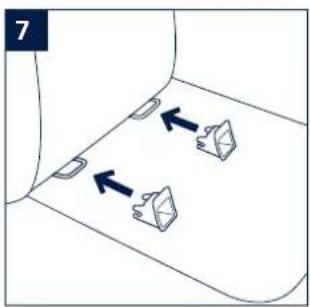
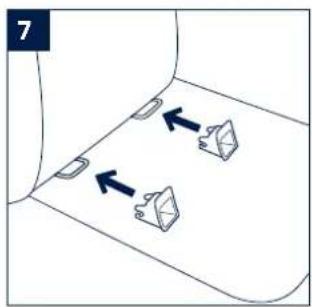
1 - Attach the ISOFIX guides to the vehicle's ISOFIX anchor bars (see vehicle owner's manual). (7) The ISOFIX guides can protect the surface of the vehicle seat from being torn. They can also guide the ISOFIX connectors.
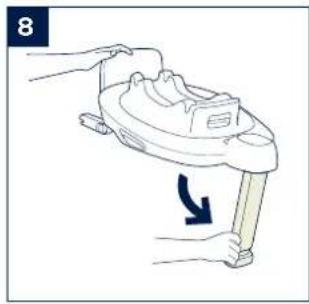
2 - Unfold the load leg from storage compartment. (8)
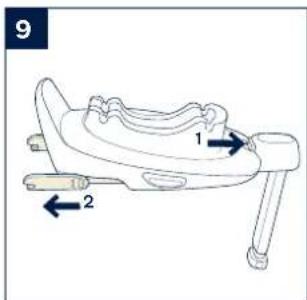
3 - Extend the ISOFIX connectors by pressing the ISOFIX adjustment button while pulling on the connector. (9)
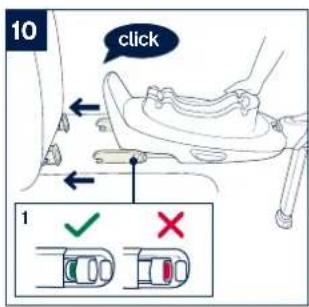
4 - Press the ISOFIX adjustment button to adjust the ISOFIX connectors. Line up the ISOFIX connectors with the ISOFIX guides, and then click both ISOFIX connectors into the ISOFIX anchor bars. (10)
9 ARRA next instruction ARRA next instruction
! Make sure that both ISOFIX connectors are securely attached to the vehicle's ISOFIX anchor bars. There should be two audible clicks and the colors of the indicators on the both ISOFIX connectors should be completely green. (10)-1
! Check to make sure the base is securely installed by pulling on the both ISOFIX connectors.
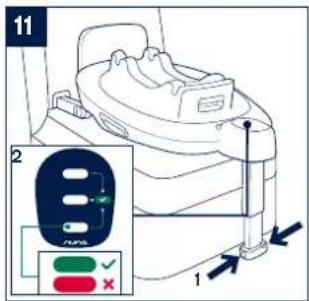
5 - After placing the base on the vehicle seat, extend the load leg to floor (11). When the load leg is installed correctly, the load leg indicator will show green. Red will be shown when installed incorrectly. (11)-2
! The load leg has multiple positions. When the load leg indicator shows red this means the load leg is in the wrong position.
! Make sure the load leg is in full contact with the vehicle floor pan.
! Squeeze the load leg adjustment button, then shorten the load leg upwards. (11)-1
The completely assembled base is shown as (12).
! The ISOFIX connectors must be attached and locked onto the ISOFIX anchor bars. (12)-1
! The load leg must be installed correctly with green indicator. (12)-2
Attaching Infant Carrier to the Base
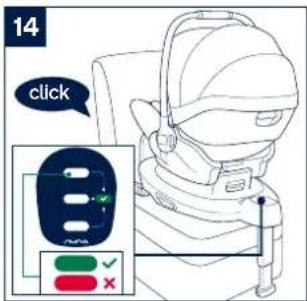
1 - Push the infant carrier down into the base (13), if the infant carrier is secure, the shell indicator will show green. (14)
! Check that the infant carrier is locked onto the base by pulling up on the handle.
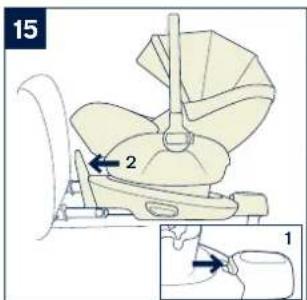
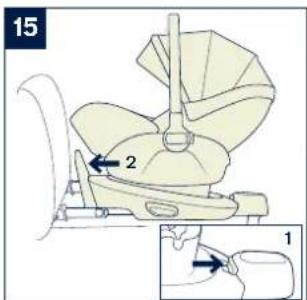
2 - Press the ISOFIX adjustment button, and push the base back until it comes in contact with the vehicle seat back. (15)
3 - To release the infant carrier, squeeze the infant carrier release button (16)-1, then lift the infant carrier up. (16)-2
Uninstalling the Base
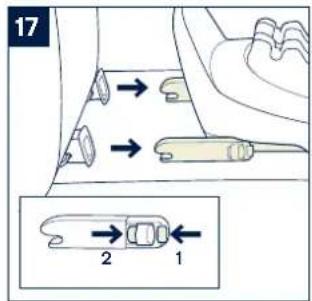
1 - To remove the base, press the secondary lock button (17)-1 first, followed by the button (17)-2 on the ISOFIX connectors before removing the base from the vehicle seat. (17)
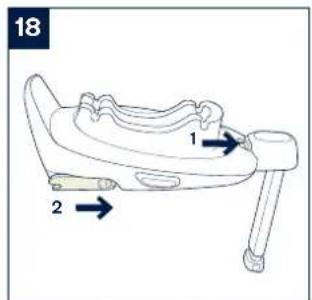
2 - For transporting, press ISOFIX Adjustment button and move back ISOFIX connectors back into the storage position. (18)
Height Adjustment
for Head Support and Shoulder Harnesses
Check that shoulder harness straps are set at the proper height. Please choose the proper height of shoulder harness.
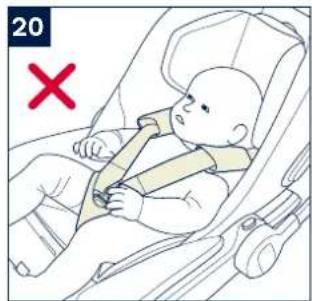
! Shoulder harness straps must be nearest to your child's shoulders (19), but not above the shoulder line. (20)
! If the Shoulder harness straps are not at proper height, the child might be ejected from the enhanced child restraint if there is a crash.
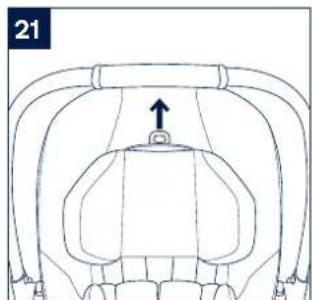
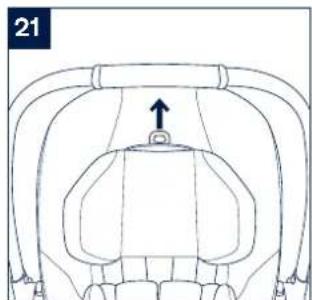
Pull the head support adjustment lever (21), meanwhile pull up or down the head support until it snaps into one of the 10 positions. The head support positions are shown as (22).
Backrest Adjustment
There are 3 angles for the backrest.
Please press backrest adjustment button (23) to heighten or lower the backrest. (24)
Securing Child
1 - Press the rotating button to rotate for easier side loading/unloading of the child. (25)
2 - Use Infant Insert.
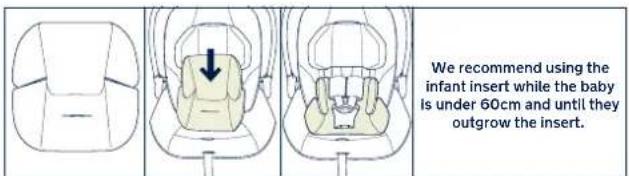
After the child is placed in the enhanced child restraint, check whether the shoulder harness straps are set to the proper height.
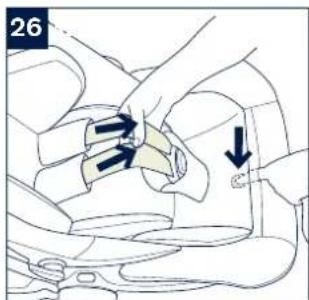
3 - While pressing the webbing adjustment button, pull completely the two shoulder harness straps of the enhanced child restraint. (26)
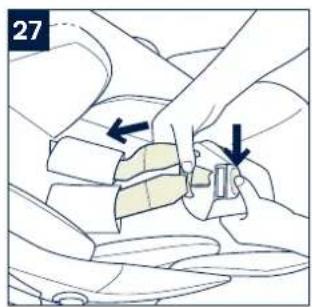
4 - Unlock the buckle by pressing the red button. (27)
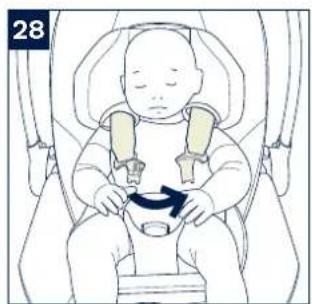
5 - Place child into the enhanced child restraint and lock the buckle. (28)(29)
11 ARRA next instruction ARRA next instruction
6 - Tighten the shoulder harness straps by pulling the adjustment webbing. (30)
! Make sure the space between the child and the shoulder harness straps is about the thickness of one hand.
Canopy
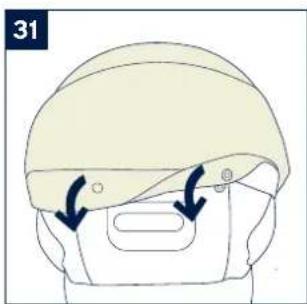
1 - To assemble the canopy, snap the canopy to the rear of seat. (31)
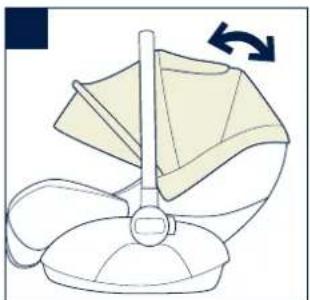
2 - To open the canopy, pull the canopy toward, and to close the canopy, push it back. (32)
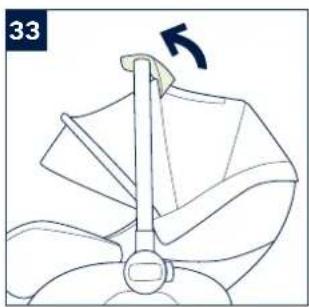
3 - The canopy window can be opened for ventilation. (33)
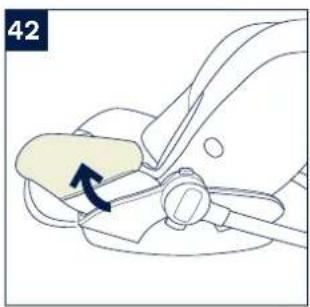
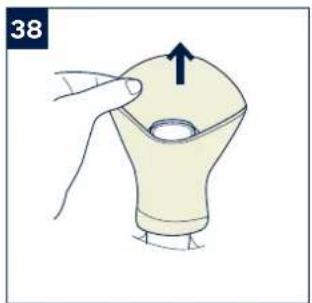
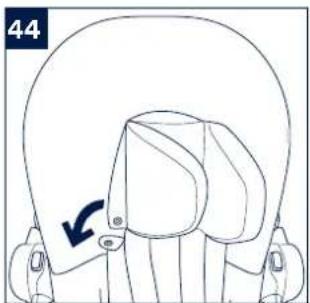
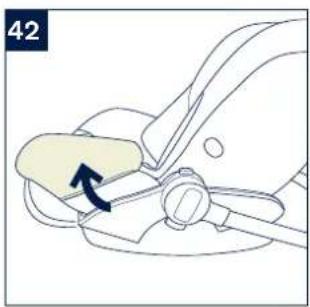
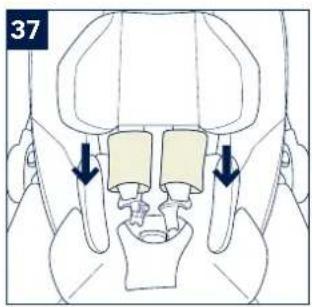
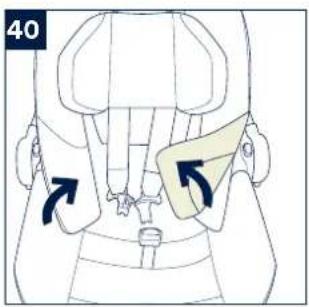
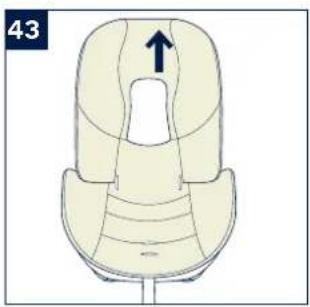
Detach & Assemble Soft Goods
see images (34)-(45)
To re-assemble the soft goods, reverse the aforementioned steps.
Cleaning and Maintenance
Clean the frame, plastic parts, and fabric with a damp cloth, but do not use abrasives or bleach. Do not use silicon lubricants as they will attract dirt and grime.
To ensure long-lasting use, wipe this product off with a soft, absorbent cloth after using it in rainy weather.
Refer to the care labels attached to the soft goods for washing and drying instructions.
It is normal for fabric to color from sunlight and to show wear and tear after a long period of use, even when used normally.
For reasons of safety, only use original Nuna parts.
Check regularly if everything functions properly. If any parts are torn, broken, or missing, stop using this product.
NUNA International B.V. Nuna and all associated logos are trademarks.
IMPORTANT! CONSERVEZ CES INSTRUCTIONS POUR RÉFÉRENCE ULTÉRIEURE :
LIRE ATTENTIVEMENT
Sommaire
Gebruik product
Uso del prodotto
IMPORTANT! KEEP THESE INSTRUCTIONS FOR FUTURE REFERENCE:
READ CAREFULLY

natural_image
Line drawing of a chair seat with a flat top and side seat (no text or symbols)

natural_image
Line drawing of a car with two people inside, one seated and one standing, no text or symbols present
natural_image
Diagram showing two directional arrows pointing to a 3D object on a curved surface (no text or symbols)


natural_image
Illustration of a hand using a tool to lift a small object, with a blue arrow indicating rotation (no text or symbols)


natural_image
Line drawing of a person wearing a cap and seatbelt, with a downward arrow indicating motion (no text or symbols)


natural_image
Illustration of a baby wearing a seatbelt in a car seatbelt (no text or symbols)

natural_image
Anatomical diagram of a biological structure with a central arrow indicating a specific region (no text or labels present)

natural_image
Line drawing of a person's head in a seated posture with hands placed on the shoulder area (no text or symbols)
natural_image
Diagram of a mechanical or anatomical structure with no visible text, numbers, or symbols

natural_image
Line drawing of a mechanical device with directional arrows indicating rotation or movement (no text or symbols)


natural_image
Illustration of hands adjusting a car seatbelt with arrows indicating movement (no text or symbols)
natural_image
Illustration of a baby in a seatbelt with a belt buckle, no text or symbols present

natural_image
Illustration of a baby seated in a car seat with a hand adjusting the seatbelt, showing a downward arrow (no text or symbols present)
natural_image
Line drawing of a mechanical device with a lever and curved arrow indicating motion (no text or symbols)
natural_image
Illustration of a person wearing a helmet with arrows indicating movement or force (no text or symbols)



natural_image
Line drawing of a baby seat with a curved arm and base, no text or symbols present

natural_image
Illustration of a person wearing a hard hat with an arrow indicating direction (no text or symbols)


natural_image
Line drawing of a person's seat with an arrow indicating upward motion (no text or symbols)
natural_image
Diagram of a mechanical component with an arrow indicating a specific part (no text or symbols present)

natural_image
Anatomical diagram of a human torso showing internal organs with a directional arrow indicating movement (no text or labels)
natural_image
Anatomical line drawing of a pelvic region with arrows indicating specific structures (no text or labels)
natural_image
Top-down diagram of a car seat with an arrow indicating upward motion (no text or symbols)

natural_image
Illustration of a hand holding a light bulb with an arrow indicating upward motion (no text or symbols)

natural_image
Technical line drawing of a mechanical component with an arrow indicating direction (no text or symbols)

natural_image
Line drawing of a mechanical component with a curved arrow indicating direction (no text or symbols)
Designed around your life

Contents
Product information 3
Product Registration
Warranty
Contact
Child Usage Requirements 4
Warning 5
Parts List 7
Product Use 9
Cleaning and Maintenance 12
Français (FR) 13
Deutsch (DE) 27
Nederlands (NL) 41
Italiano (IT) 55
Español (ES) 67
Português (PT) 81
Polski (PL) 95
Čeština (CZ) 109
Slovenčina (SK) 123
Hrvatski (HR) 135
Používání produktu
Používanie výrobku
Upotreba proizvoda
O čemu voditi računa prilikom postavljanja
Uporaba izdelka
Χρήση προϊόντος