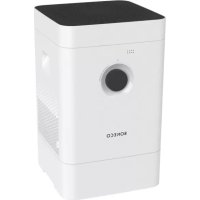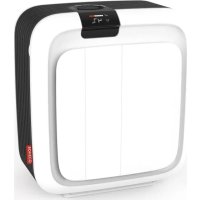
H700 - Humidifier BONECO - Free user manual and instructions
Find the device manual for free H700 BONECO in PDF.



User questions about H700 BONECO
0 question about this device. Answer the ones you know or ask your own.
Ask a new question about this device
Download the instructions for your Humidifier in PDF format for free! Find your manual H700 - BONECO and take your electronic device back in hand. On this page are published all the documents necessary for the use of your device. H700 by BONECO.
USER MANUAL H700 BONECO
natural_image
White square-shaped device with black handle and red button, no visible text or symbolsRead and save these instructions
EN Always observe all safety notes (included separately in delivery).
natural_image
Illustration of a rectangular electronic device with a black tab and grid lines (no text or symbols)natural_image
Simple line drawing of a plug connected to a cord and cable (no text or symbols)Netzteil
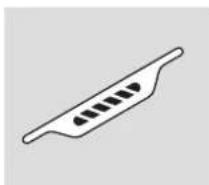
A7017 Ionic Silver Stick®
Quick Manual
Sicherheitshinweise
text_image
Exploded view diagram of a smart air conditioner system with labeled componentsnatural_image
Simple diagram of a circular structure with a red light source and green dot at the top (no text or symbols)natural_image
Close-up of a finger pressing down on a black circular component (no text or symbols visible)natural_image
Circular dark object with a bright horizontal line and a small dot at the top, set against a textured dark background (no text or symbols visible)natural_image
Close-up of a hand pressing a black circular button on a dark surface (no text or symbols visible)natural_image
Close-up of a hand pressing down on a black circular device dial (no text or symbols visible)natural_image
Close-up of a black circular object with a white horizontal line and dot, resembling a mechanical or architectural component (no text or symbols visible)text_image
AIR 88h WATERtext_image
9:41 ZORISH, OH 80% HH Beauts 6.9 °C H200 H200 + - SSLeistungsumfang
natural_image
Close-up of a finger pressing down on a black circular component (no text or symbols visible)natural_image
Close-up of hands installing or adjusting a white electronic device casing with a red arrow indicating the component (no text or symbols visible)natural_image
Close-up of a hand holding a yellow cylindrical tool next to a red curved object, possibly a fan or mechanical component (no visible text or symbols)natural_image
Close-up of hands installing or adjusting a wall-mounted device with a red arrow pointing to the component (no visible text or symbols)REINIGUNGSHINWEISE
ÜBER DIE REINIGUNG
natural_image
Close-up of hands installing or adjusting a wall-mounted device component (no visible text or symbols)natural_image
Close-up of a hand pressing a red arrow on a mechanical component with a white fan (no visible text or symbols)natural_image
Close-up of a white plastic tray with a red arrow pointing to a small electronic component (no visible text or symbols)natural_image
Person using a tool to clean or wash a plastic cup in a stainless steel kitchen (no text or symbols visible)natural_image
Person washing a cup in a stainless steel kitchen sink with a brush (no visible text or symbols)WASSERWANNE
natural_image
Close-up of a hand holding a white plastic container with red lid, placed on wooden surface (no text or symbols visible)natural_image
Top-down view of a white plastic tray with red arrows pointing to internal components (no text or symbols visible)natural_image
Person washing white soap in a kitchen sink (no text or symbols visible)natural_image
Person washing a large glass dish with water, no visible text or symbolsnatural_image
Person washing a white cloth on a kitchen sink (no text or symbols visible)natural_image
Person installing or adjusting a white electronic device with a red arrow pointing to the component (no text or symbols visible)natural_image
Person cleaning a white disposable drawer with a blue cloth (no text or symbols visible)VORFILTER
natural_image
Person using a brush to clean or wash a small white object on a grid-lined surface (no text or symbols visible)natural_image
Close-up of a solar panel with visible grid lines and metallic contacts (no text or symbols)FILTERHALTERUNG
natural_image
Person installing or adjusting a device panel into a black appliance (no visible text or symbols)natural_image
Close-up of a hand cleaning a white toilet with a blue cloth (no text or symbols visible)LÜFTERFLÜGEL
natural_image
Close-up of a hand using a tool to adjust a red turbine fan inside a machine (no text or symbols visible)natural_image
Person cleaning a red and blue plastic fan on a wooden surface (no text or symbols visible)GEHÄUSE
natural_image
Close-up of a hand cleaning a red fan with a blue cloth on a wooden surface (no text or symbols visible)PFLEGE DER ROLLEN
natural_image
Close-up of a hand placing a yellow object into a white plastic container with a black lid (no text or symbols visible)natural_image
Close-up of a hand pouring liquid into a white container with black contents (no text or symbols visible)PARTIKELSENSOR
natural_image
Hand inserting a cable into an electrical outlet (no text or symbols visible)GERÄT ZUSAMMENSETZEN
natural_image
Close-up of a white curved object on a wooden surface, with a green checkmark in the corner (no text or symbols visible)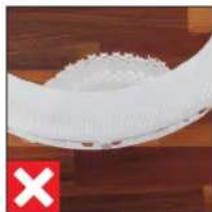
natural_image
Close-up of a white plastic object with a red 'X' mark on the left (no text or symbols on the object itself)TAUSCH DES ZUBEHÖRS
ÜBER DEN A681 HYBRID-FILTER
natural_image
Person installing or adjusting a device into a black box (no visible text or symbols)natural_image
Close-up of a hand holding a small white object with red components, next to a white circular device (no visible text or symbols)natural_image
Interior view of a white plastic tray with a red arrow pointing to a small white object on the side (no text or symbols visible)Relief from allergies 40
Valuable information about humidity 40
Items included 40
Overview and part names 41
Technical data 42
Starting up 43
Manual handling 46
About manual handling 46
AUTO mode 46
Adapted AUTO mode 46
Switching on and off 46
Manual control 47
Indicators on the display 48
The benefits of the BONECO app 49
About the BONECO app 49
Additional functions via app 50
Manual dimming 50
Calendar 50
Progress 50
Download 51
BONECO app for iOS 51
BONECO app for Android 51
Pairing with the BONECO H700 52
Getting ready 52
Pairing 52
The various operating modes 53
Hybrid mode ("Hybrid") 53
Humidification only ("Humidifier") 53
Purification only ("Purifier") 53
The various comfort modes 54
Comfort modes 54
AUTO mode 54
SLEEP mode 54
BABY mode 54
Child-safety lock 54
Defining the desired humidity 55
Perfect humidity 55
Controlling humidity 55
Regulating the fan level 55
Using fragrances 56
Using fragrances 56
Adding fragrances 56
Notes on cleaning 57
About cleaning 57
Recommended cleaning intervals 57
Descaling
About descaling 58
Getting ready 58
Starting the descaling 59
Cleaning the interior parts 60
Important notes 60
Water tank 60
Water base 60
Drum 61
AH700 evaporator mat (handwashing) 61
AH700 evaporator mat (washing machine) 61
General cleaning 62
Cover 62
Pre-filter 62
A681 HYBRID filter 62
Filter holder 63
Fan blade 63
Housing 63
Caring for the rollers 64
Particle sensor 64
Assembling the appliance 64
Replacing the accessories
About the A681 HYBRID filter 65
Replacing the A681 HYBRID filter 65
Deleting a notice in the app 65
Deleting a notice on the appliance 65
About the A7017 Ionic Silver Stick ^® 66
Replacing the A7017 Ionic Silver Stick® 66
Deleting a notice in the app 66
Deleting a notice on the appliance 66
Malfunctions and troubleshooting
Factory default settings and Bluetooth
About the factory default settings 68
Resetting the appliance 68
Switching Bluetooth on and off 68
ITEMS INCLUDED
DEAR CUSTOMER,
Congratulations on your purchase of the BONECO H700. Its hybrid design cleans and humidifies room air in one step. Its smart control system keeps operating noise level to a minimum, even allowing you to use the BONECO H700 in a bedroom or baby's room.
The BONECO H700 is designed for convenient, fully automated operation. However, you can adjust all of its features according to your preferences and requirements. This manual shows you how you can create your own comfortable climate.
RELIEF FROM ALLERGIES
The BONECO H700 is equipped with a triple filter system that rids the air of odors as well as dust, pollen and contaminants. The A681 HYBRID filter also effectively alleviates many forms of discomfort caused by allergies, such as hay fever or allergic reactions to dust mites and household dust.
VALUABLE INFORMATION ABOUT HUMIDITY
The right humidity is very important for our health. Dry room air in winter leads to skin that cracks and itches. It makes your eyes and throat feel dry while significantly affecting physical comfort. Not only does this affect adults, it is especially true for babies, small children and even pets. Dry mucous membranes in winter also make us more prone to colds and other infections.
The BONECO H700 makes these problems a distant memory. Its intelligent automatic controls always keep the air clean and the humidity at the ideal level, even in large rooms with an area of up to 150 square meters (1615 square feet).
Regardless of whether it is summer or winter: Once you've experienced this new level of comfort, you'll never want to go back.
ITEMS INCLUDED
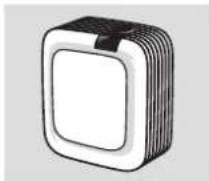
BONECO H700
with A681 HYBRID filter
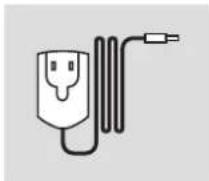
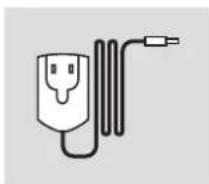
Power supply
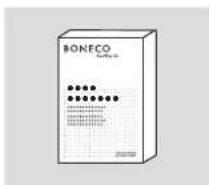
A7417 "CalcOff" cleaning and descaling powder
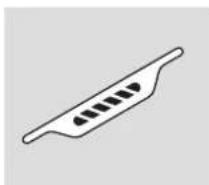
A7017 Ionic Silver Stick®
Quick Manual
Safety instructions
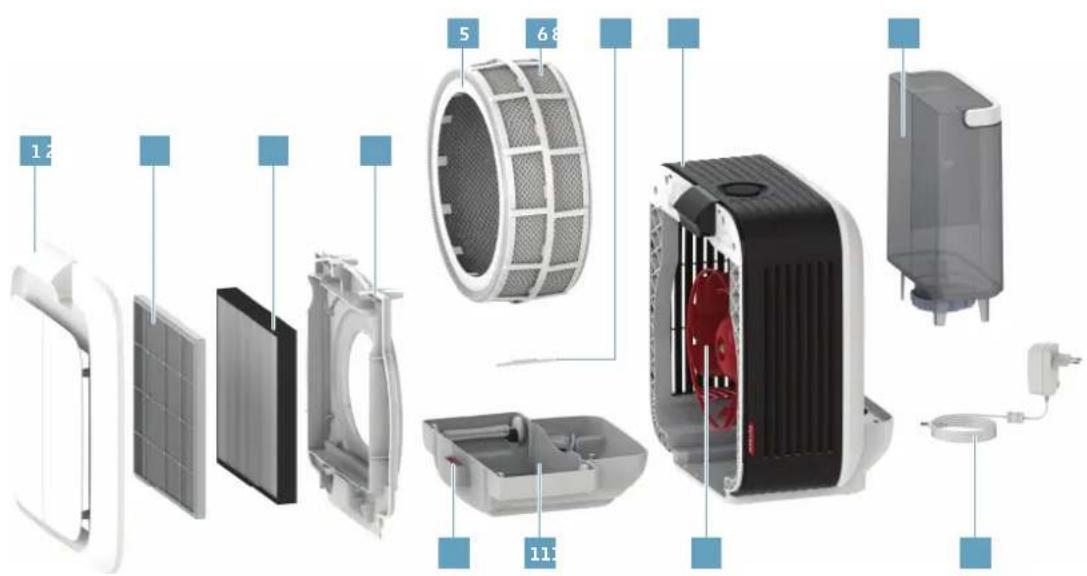
OVERVIEW AND PART NAMES
text_image
Exploded view diagram of a smart air conditioner system with labeled components and numbered parts1 Front cover
2 Pre-filter
3 A681 HYBRID filter
4 Filter holder
5 Drum
6 AH700 evaporator mat
7 A7017 Ionic Silver Stick®
8 BONECO H700
9 Water tank
10 Fragrance container
11 Water base
12 Fan blade
13 Power supply
TECHNICAL DATA
Type designation BONECO H700
Power supply voltage 100-240 V \~ 50/60 Hz
Power consumption Standby: < 0.5 W
Level 1: 2.6 W
Level 6: 26.5 W
Humidity output Up to 1010 g/h (6.4 gal/day) ^*
Air purification performance 190 m ^3/h (112 CFM) (CADR)
For rooms up to 150 m ^2 (1615 sq ft)
Water capacity 10 l (2.64 US gal)
Dimensions L × W × H 448 × 347 × 490 mm (17.6 × 13.7 × 19.3 in)
Operation noise level 25-47 dB(A)
Weight (empty) 10.7 kg (23.6 lbs)
Accessories A7017 Ionic Silver Stick®, A681 HYBRID filter
^a For operation without A681 HYBRID filter depending on temperature and humidity
STARTING UP
text_image
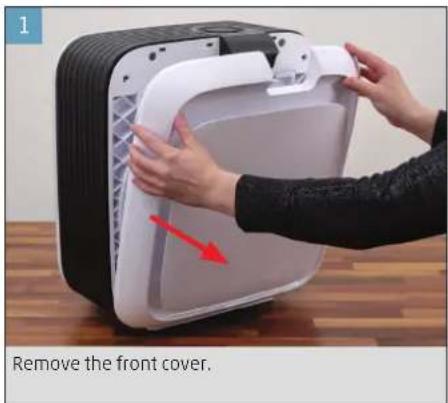
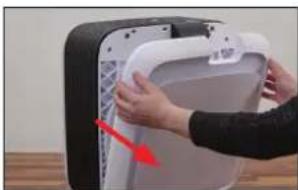
1 Remove the front cover.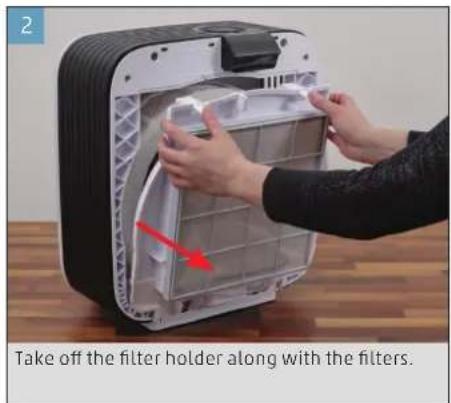
text_image
Take off the filter holder along with the filters.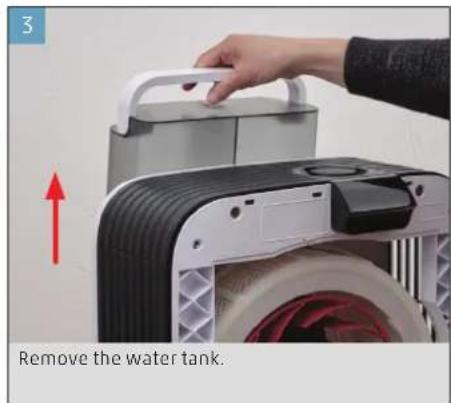
text_image
3 Remove the water tank.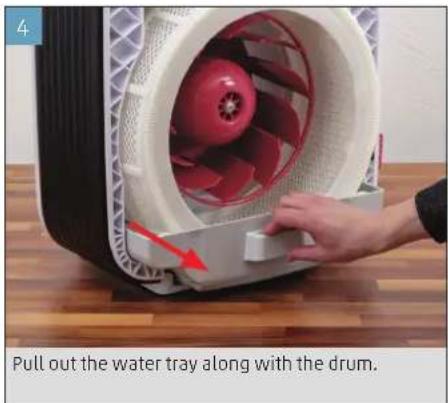
text_image
Pull out the water tray along with the drum.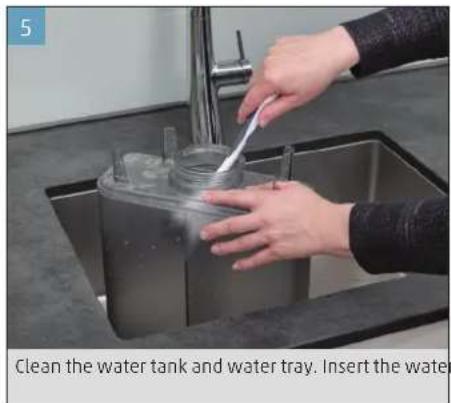
text_image
Clean the water tank and water tray. Insert the water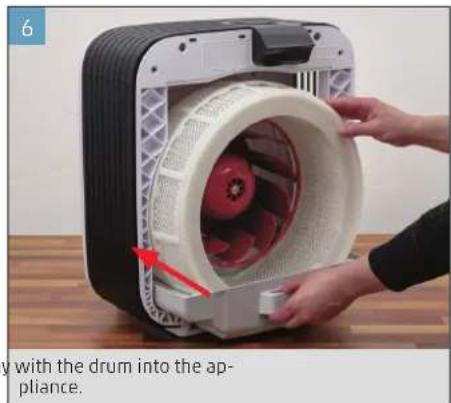
natural_image
Close-up of hands installing a device into a appliance with a drum (no text or symbols visible)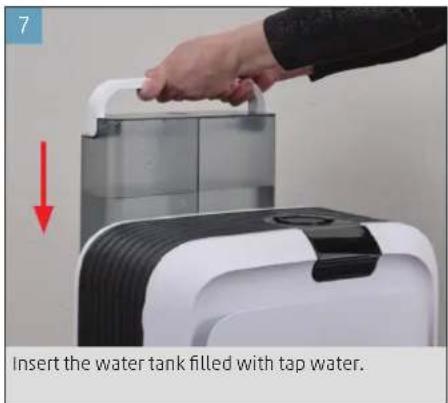
text_image
Insert the water tank filled with tap water.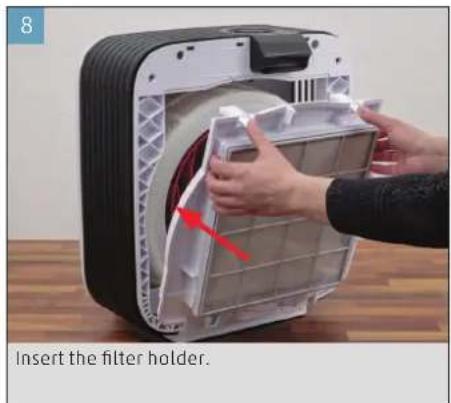
text_image
8 Insert the filter holder.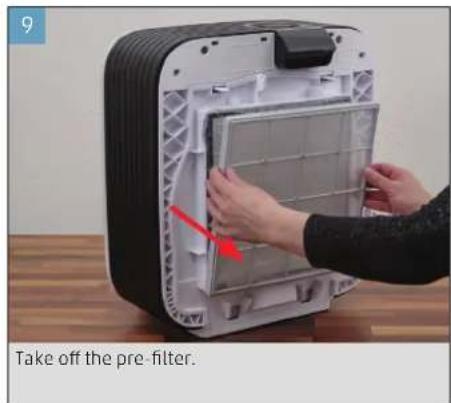
text_image
Take off the pre-filter.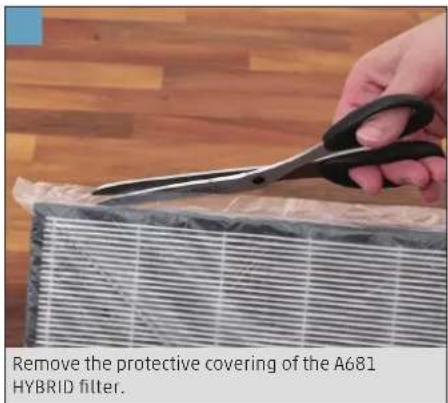
text_image
Remove the protective covering of the A681 HYBRID filter.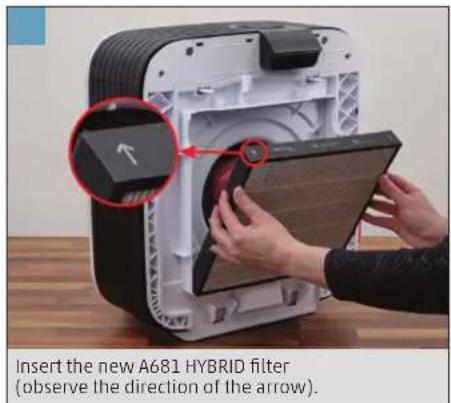
text_image
Insert the new A681 HYBRID filter (observe the direction of the arrow).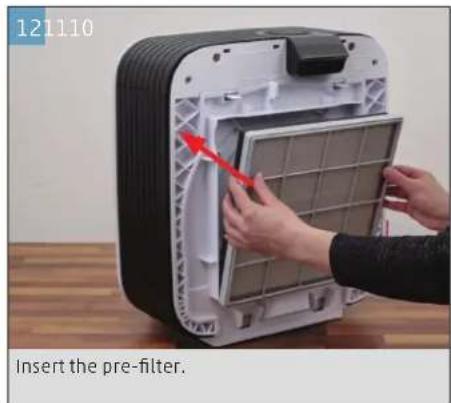
text_image
121110 Insert the pre-filter.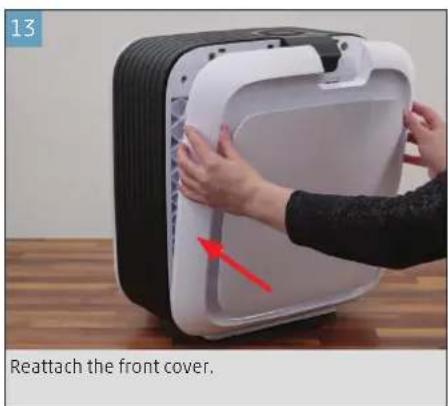
text_image
13 Reattach the front cover.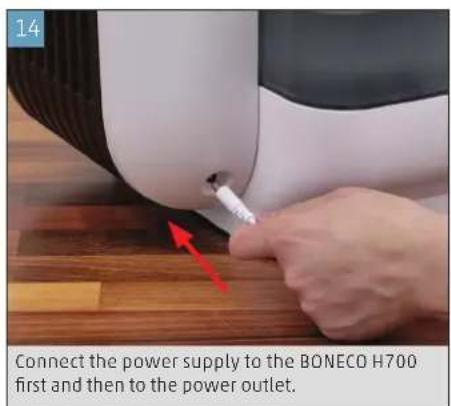
text_image
14 Connect the power supply to the BONECO H700 first and then to the power outlet.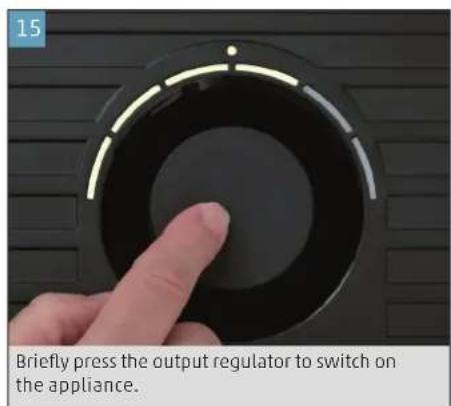
text_image
15 Briefly press the output regulator to switch on the appliance.MANUAL HANDLING
ABOUT MANUAL HANDLING
Manual handling works conveniently with the output regulator. The BONECO app offers additional, extensive options for control and automation of the BONECO appliance.
AUTO MODE
If you have never operated the BONECO appliance with the BONECO app and switch it on for the first time, it starts up in AUTO mode. The appliance is preset to a target relative humidity of 50 percent. The performance level is automatically adapted to the current humidity and air pollution: The drier or more polluted the air, the higher the performance level.
When the preset humidity is achieved and the air is purified, the appliance switches to standby mode, which is indicated by the pulsing LED:
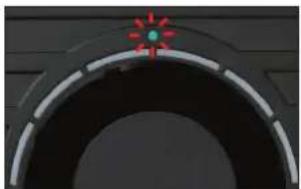
natural_image
Close-up of a circular mechanical component with a red crosshair and green indicator light (no text or symbols visible)If the humidity drops below the set level or the air quality decreases, the BONECO appliance resumes operation.
ADAPTED AUTO MODE
If you have already operated the BONECO appliance with the BONECO app and set a different humidity, that value is automatically taken over when the appliance is switched on.
SWITCHING ON AND OFF
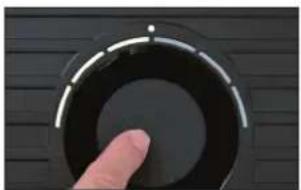
- Briefly press the output regulator once to switch on the BONECO appliance.
natural_image
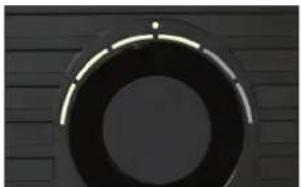
Close-up of a finger pressing a circular button on a dark surface (no text or symbols visible)The appliance is always in AUTO mode when it is switched on. You can identify active AUTO mode by the small LED that lights up above the output regulator.
natural_image
Circular dark object with a bright horizontal line and a small dot at the top, set against a textured dark background (no text or symbols visible)- To switch off the BONECO appliance while it is in AUTO mode, briefly press the output regulator once.
MANUAL CONTROL
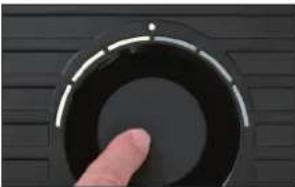
- Briefly press the output regulator once to switch on the BONECO appliance.
natural_image
Close-up of a finger pressing a circular button on a dark surface (no text or symbols visible)The appliance is always in AUTO mode when it is switched on.
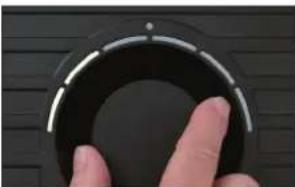
- Adjust the output to your needs by setting the output regulator to the desired level from 1 to 6. This action exits AUTO mode (AUTO LED is off).
natural_image
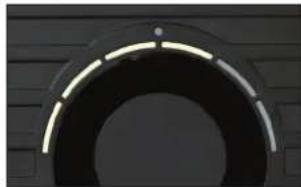
Close-up of a finger pressing down on a black circular device dial (no text or symbols visible)The selected performance level is indicated by the number of LEDs that light up above the output regulator.
natural_image
Close-up of a curved black arch or pipe segment against a dark textured wall (no text or symbols visible)-
Briefly press the output regulator once to exit manual mode and to reactivate AUTO mode.
-
Briefly press the output regulator once more to switch off the BONECO appliance.
If you exit AUTO mode, the BONECO appliance will continue at the selected performance level until the water base is empty, regardless of what the current level of humidity is.
INDICATORS ON THE DISPLAY
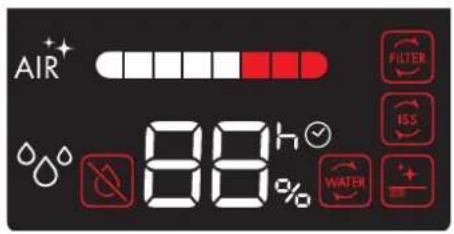
text_image
AIR 88h WATER FILTER ISS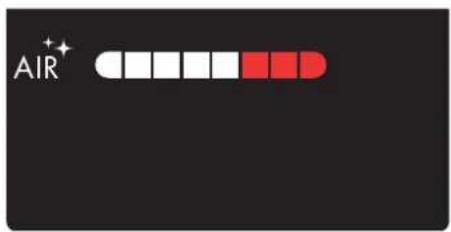
text_image
AIR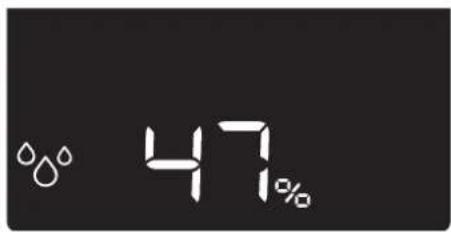
text_image
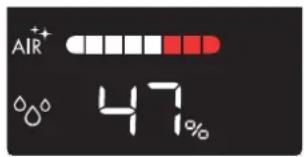
47%Overview of all indicators on the display Indicator for air purity Indicator for humidity
Indicator Meaning
i
| 47% | Current humidity 55 |
| 4^th | Indicator for duration of descaling 59 |
| AIR^+ | "Air purification" mode is active 53 |
| ^00 | "Humidification" mode is active 53 |
| ^0 | Calender is activated 53 |
| LC | Output regulator is locked 53 |
| bt | Bluetooth* pairing 52 |
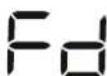
| Fd | Factory default settings 68 |
Indicator Required action
i
| Refill the water 44 | ||
| Change the water in the appliance 43 | ||
| Replace A7017 Ionic Silver Stick* | 65 | |
| A681 HYBRID filter used up, replace | 65 | |
| A681 HYBRID filter missing, insert | 62 | |
| Cleaning required | 58 | |
| Cleaning mode active | 59 | |
| Activate calendar in the app | 50 | |
THE BENEFITS OF THE BONECO APP
ABOUT THE BONECO APP
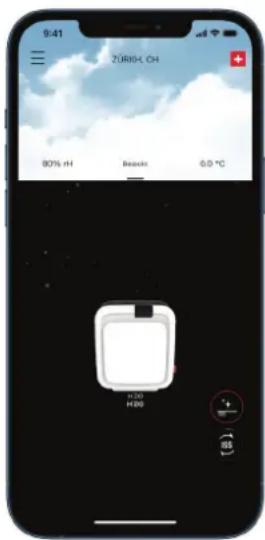
The "BONECO healthy air" app is used for enhanced control of the BONECO appliance and lets you take full advantage of its potential. The app includes functions such as a timer, a humidity preset and the option to switch between various programs. In addition, it provides reminders for the cleaning intervals and other recurring tasks.
text_image
9:41 Zürich, OH 80% RH Beauti 6.0 °C H200 H200 + - SSScope of services
| Operating modes | "Hybrid" The air is cleaned and humidifi ed at the same time | |
| "Purifier" | The air is cleaned, but not humidified | |
| "Humidifi er" | The air is humidifi ed, but not cleaned | |
| Selecting modes | Predefi ned settings for frequent situations | |
| AUTO mode The appliance uses all fan levels from 1 to 5 and has a preset target humidity of 50% | ||
| SLEEP mode The appliance uses fan level 1 only and increases the target humidity to 45% | ||
| BABY mode The appliance uses fan level 1 through 4 and increases the humidity to 60% | ||
| Hygrostat Defi ning the desired humidity | ||
| Manual dimming | Setting the brightness of the display and of the LEDs on the output regulator | |
| Calendar Defi ne up to 12 individual timers | ||
| Progress Overview of measured data at various time periods | ||
| Accessories and consumables | Provides support in replacement orders and further information | |
ADDITIONAL FUNCTIONS VIA APP
MANUAL DIMMING
The brightness of the display automatically adapts to the ambient light. If necessary, the brightness can be regulated manually through the BONECO app.
CALENDAR
In the BONECO app you can store up to 12 timers. These can be set individually with regard to comfort mode, operating mode and the desired target humidity and performance level.
PROGRESS
The appliance stores the average measured temperature, air quality and humidity over a predefined time. This data can be retrieved in the BONECO app.
DOWNLOAD
BONECO APP FOR IOS
Search the App Store for "BONECO healthy air" or scan the QR code below.
Search the Google Play Store for "BONECO healthy air" or scan the QR code below.

PAIRING WITH THE BONECO H700
GETTING READY
Make sure that Bluetooth ^2 is activated on your smartphone. During pairing, make sure that the smartphone is in the same room as the BONECO appliance.
Once paired successfully, you can control the BONE - CO appliance with your smartphone from the same room or even from an adjacent room. However, the maximum distance between smartphone and BONECO appliance depends on the specific structural conditions.
PAIRING
- Make sure that Bluetooth ^® is activated on your smartphone.
- Switch on the BONECO appliance.
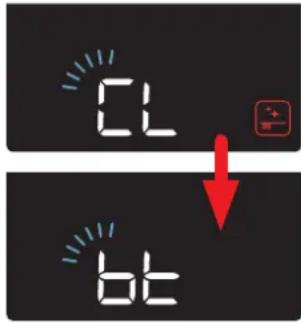
- Press and hold the output regulator for about 5 seconds, until "CL" and then "bt" flashes on the display.
text_image
CL bt- Start the BONECO app.
- Follow the instructions in the app.
The BONECO appliance combines two functions.
- The A681 HYBRID filter cleanses breathing air of pollen, household dust and fine particles.
- The AH700 evaporator mat humidifies the room air.
You achieve the best results when the BONECO appliance is humidifying and purifying the air at the same time. Nevertheless it is possible to use just one of the two functions.
HUMIDIFICATION ONLY ("HUMIDIFIER")
text_image
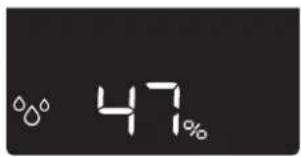
47%Use of the A681 HYBRID filter is optional in the "Air humidification" operating mode.
The BONECO H700 can also be used without an A681 HYBRID filter in the "Air humidification" operating mode. When you switch to the "Hybrid" or "Air purification" operating mode, the following symbol flashes on the display if an A681 HYBRID filter is not inserted:

PURIFICATION ONLY ("PURIFIER")
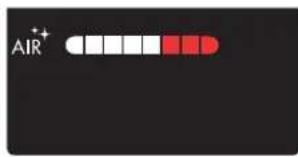
text_image
AIRThe air is not humidified in the "Air purification" operating mode.
The BONECO H700 can also be used without water in the "Air purification" operating mode. When you switch to the "Hybrid" or "Air humidification" operating mode, the following symbol flashes on the display if the water tank is empty:

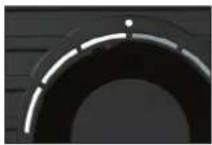
In "Hybrid" mode the LEDs are lit white
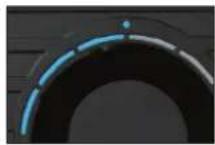
In "Humidifier" mode the LEDs are lit blue
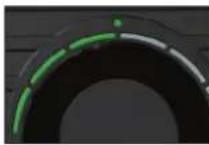
In "Purifier" mode the LEDs are lit green
THE VARIOUS COMFORT MODES
COMFORT MODES
There are three different comfort modes available in each of the three "Hybrid", "Air purification" and "Air humidification" operating modes: AUTO, SLEEP and BABY.
AUTO MODE
In AUTO mode, the BONECO H700 uses all of the fan levels between 1 and 5. The preset humidity is 50%.
SLEEP MODE
In SLEEP mode, the BONECO H700 can even be used in a bedroom at night. The appliance automatically operates at the lowest fan level of 1 to keep operating noise to a minimum. The preset humidity is 45%.
BABY MODE
The BABY mode uses fan levels 1 through 4 and increases the humidity to 60% . This value is ideal for use in a nursery or baby's room since higher humidity is recommended for babies and small children. The fan also operates quietly enough that it will not trigger a baby monitor.
CHILD-SAFETY LOCK
The BONECO H700 can be set to prevent accidental adjustments. Use this function to prevent unintentional input, for example, from children playing near the appliance.
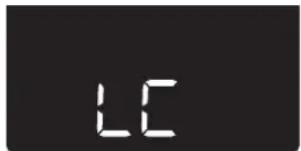
The child-safety lock is switched on and off using the BONECO app. The display flashes an "LC" (LOCK) notice for a few seconds and then returns to the original displayed content.
text_image
LCIf the output regulator is operated after the LOCK function has been activated through the BONECO app, the LEDs and the display flash 3× in quick succession. If the appliance has been switched off through the BONECO app, the "LC" notice flashes 3× on the display.
DEFINING THE DESIRED HUMIDITY
PERFECT HUMIDITY
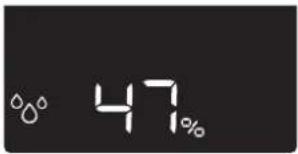
The recommended humidity level is between 40% and 60%. The default setting is 50%.
The humidity you set then stays saved if you switch off the appliance.
text_image
47%The humidity can be adjusted through the BONECO app.
REGULATING THE FAN LEVEL
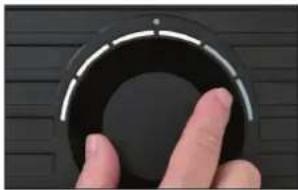
The fan level can be regulated in two ways:
- Use the output regulator.
natural_image
Close-up of a hand pressing a circular button on a dark surface (no text or symbols visible)- Adjust the fan level in the BONECO app.
USING FRAGRANCES
USING FRAGRANCES
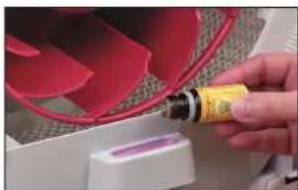
Inside the BONECO H700 there is a fragrance container for adding fragrances in the form of essential oils.
This fragrance container is made of a special material. Never add essential oils and other fragrances directly into the water tank or water base. It only takes a small amount to damage the appliance irreparably. Such damage is not covered by the warranty.
ADDING FRAGRANCES
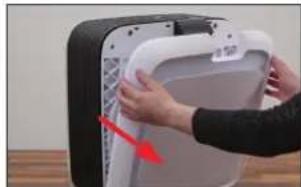
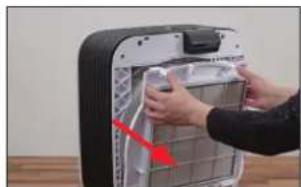
- Remove the front cover.
natural_image
Close-up of hands installing or adjusting a white electronic device component with a red arrow indicating the part (no text or symbols visible)- Remove the filter holder along with the filter.
natural_image
Close-up of hands installing or adjusting a wall-mounted device with a red arrow pointing to the component (no visible text or symbols)- Insert the fragrance into the fragrance container provided for this.
natural_image
Close-up of a hand holding a yellow tool next to a red fan-shaped object (no visible text or symbols)- Insert the filter holder and front cover.
NOTES ON CLEANING
ABOUT CLEANING
Regular maintenance and cleaning are necessary for trouble-free and hygienic operation.
Recommended cleaning and maintenance intervals vary depending on air quality, water quality and operating time.
A soft cloth, dish detergent and a scrub brush are recommended for cleaning by hand.
An upcoming need for cleaning is indicated on the display with this symbol:

RECOMMENDED CLEANING INTERVALS
| Interval Action | |
| After the third day without operation | Empty water base and water tank and fill with fresh water |
| Every 2 weeks Clean water base, drum and AH700 evaporator mat | |
| Clean the pre-filter | |
| Annually Replace A7017 Ionic Silver Stick ^® | |
| Clean the fan and the inner area of the appliance | |
DESCALING
ABOUT DESCALING
The default setting for the descaling time is 4 hours. In most cases, you can achieve very good results in this time. The maximum duration of descaling is 12 hours.
- Shorten the duration of descaling if the BONECO H700 is only slightly dirty.
- Lengthen the duration of descaling if the BONECO H700 is very dirty.
• After each descaling, it is absolutely necessary to clean the interior parts (see the next page).

Be sure to remove the A7017 Ionic Silver Stick ^® before the descaling process.
GETTING READY
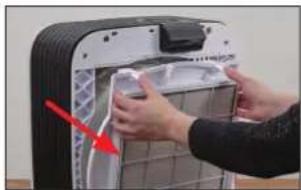
- Remove the front cover and the water tank on the rear side.
- Remove the filter holder together with the filter.
natural_image
Person installing or adjusting a device into a large appliance (no visible text or symbols)- Pull the water base out and remove the drum with the AH700 evaporator mat.

natural_image
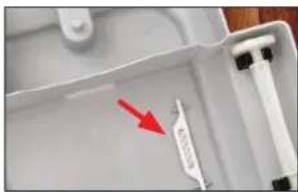
Close-up of a hand holding a small mechanical component with a red arrow indicating force (no visible text or symbols)- Empty the water base and water tank and remove the AH700 Ionic Silver Stick®.
natural_image
Close-up of a white plastic tray with a red arrow pointing to a small label, no visible text or symbols.- Set the drum back into the water base and put the appliance back together by following the steps in reverse order.
STARTING THE DESCALING
- Fill the tank halfway with hot tap water and add two packets of A7417 CalcOff. Insert the water tank and wait until the water base is full.
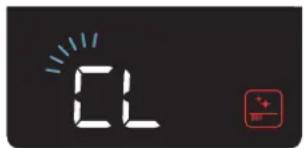
- Start the descaling mode by pressing and holding the output regulator for 3 seconds until the "CL" symbol is flashing on the display.
text_image
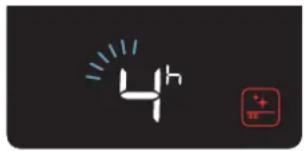
02- Briefly press the output regulator once. The duration of descaling is displayed.
- Change the duration of descaling as needed using the output regulator.
text_image
4h- Briefly press the output regulator again to start the descaling process.
The appliance then descales itself automatically. The remaining duration of descaling is shown on the display. During the cleaning process, this icon is also shown:

After descaling has finished, the cleaning symbol on the display goes away automatically.
Then a flashing symbol indicates that the water in the appliance has to be replaced:

- Change the water in the water tank and in the water base.
The symbol will automatically go out as soon as the water has been replaced.
CLEANING THE INTERIOR PARTS
IMPORTANT NOTES
Use a cleaning brush and a damp cloth for cleaning. Always add a small amount of dishwashing detergent to the hot water.
Always unplug the BONECO H700 from the power outlet before you start cleaning or doing maintenance! Failure to do so can result in electric shock and fatal injury!
Clean the inside of the BONECO H700 regularly; otherwise mold can form, which is harmful to health.
Do not use alcohol or corrosive cleaning agents for cleaning.
Do not clean the BONECO H700 in a dishwasher. High temperatures can deform the parts and make them unusable. This damage is not covered by the warranty.
WATER TANK
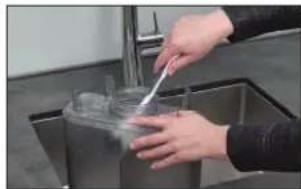
- Fill the water tank halfway with hot water and add a small amount of dishwashing detergent.
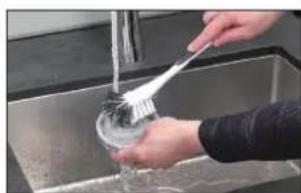
- Thoroughly clean the inside of the water tank by hand or with a suitable cleaning brush.
natural_image
Person using a tool to clean or wash a plastic cup in a stainless steel kitchen (no visible text or symbols)- Also clean the cover.
natural_image
Person washing a sink with a brush (no visible text or symbols)WATER BASE
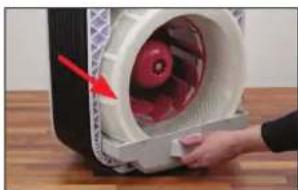
- Pull the water base out of the BONECO H700.
natural_image
Close-up of a hand opening a white plastic device with red liquid, no visible text or symbols- Remove the drum with the AH700 evaporator mat.
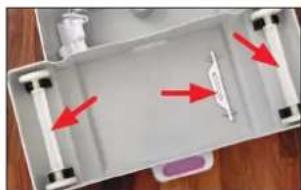
- Remove the A7017 Ionic Silver Stick® and the rollers.
natural_image
Top-down view of a white plastic tray with red arrows pointing to internal components (no text or symbols visible)- Clean the water base and all of the parts inside. These can be removed for cleaning.
CLEANING THE INTERIOR PARTS
DRUM
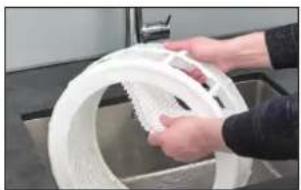
- Take the AH700 evaporator mat out of the drum.
natural_image
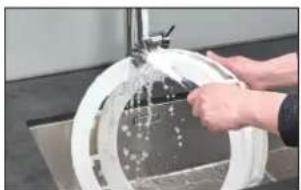
Person washing a white plastic ring in a kitchen sink (no text or symbols visible)- Wash the drum with detergent and a cleaning brush.
natural_image
Close-up of hands cleaning a circular glass dish with a water droplet (no text or symbols visible)- Thoroughly rinse the drum with hot water.
AH700 EVAPORATOR MAT (HANDWASHING)
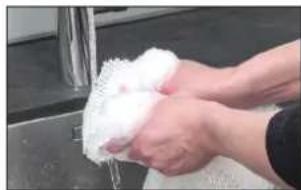
- Thoroughly wash and tumble the AH700 evaporator mat with hot water and dishwashing detergent.
natural_image
Close-up of hands washing white fluffy material from a metal sink (no text or symbols visible)-
Continue to rinse out the AH700 evaporator mat in clean hot water until foam no longer forms.
-
Right after the washing cycle, insert the washed AH700 evaporator mat into the cleaned drum.
AH700 EVAPORATOR MAT (WASHING MACHINE)
The AH700 evaporator mat can be cleaned in the washing machine. Uses any commercially available detergent. We recommend putting the AH700 evaporator mat into a laundry bag or washing it separately because it will collect loose fibers from other pieces of laundry otherwise.

The AH700 evaporator mat may not be washed at a temperature higher than 40 °C (°F).

Do not dry the AH700 evaporator mat in the clothes dryer.
When inserting the AH700 evaporator mat into the drum after cleaning, make sure it is positioned correctly.
GENERAL CLEANING
COVER
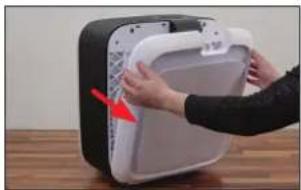
- Remove the cover.
natural_image
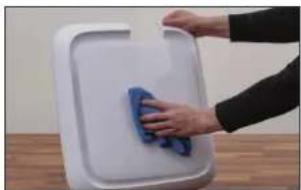
Close-up of hands installing or adjusting a white plastic device into a black box (no text or symbols visible)- Clean the cover with a damp cloth.
natural_image
Hand cleaning a white plastic tray with a blue cloth (no text or symbols visible)PRE-FILTER
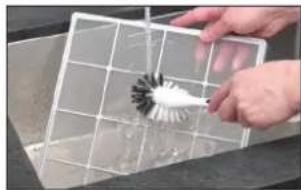
Clean the pre-filter using a vacuum cleaner or wash it under running water with a cleaning brush.
natural_image
Person using a brush to clean or store contents in a grid (no visible text or symbols)Do not put the pre-filter back in until it is dry. Humidity can have an adverse effect on the quality of the A681 HYBRID filter beneath it.
A681 HYBRID FILTER
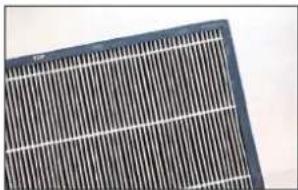
The A681 HYBRID filter cannot be cleaned. Dirt is normal and shows that the filter is working.
natural_image
Close-up of a solar panel with grid lines (no text or symbols visible)FILTER HOLDER
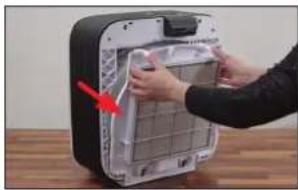
- Remove the filter holder.
natural_image
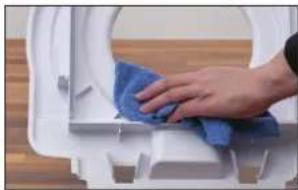
Person installing or adjusting a device panel into a black appliance (no visible text or symbols)- Clean the filter holder with a damp cloth.
natural_image
Close-up of a hand cleaning a white toilet with blue cloth (no text or symbols visible)FAN BLADE
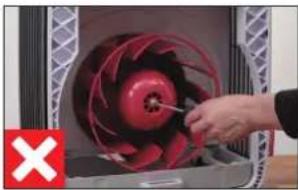
Never remove the retaining screw in order to take off the fan blade! A weight imbalance during reassembly could cause excessive noise or could even damage the motor.
natural_image
Close-up of a hand operating a red industrial fan blade with a tool, no visible text or symbols- Clean the fan blades with a damp cloth.
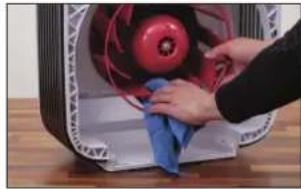
natural_image
Close-up of hands cleaning a red circular object with a blue cloth, placed on a wooden surface (no text or symbols visible)HOUSING
- Clean the inside of the housing with a damp cloth, hot water and dishwashing detergent.
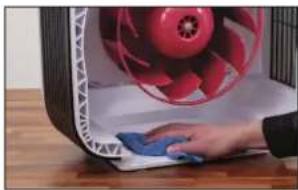
natural_image
Close-up of a hand cleaning a red fan with a blue cloth (no text or symbols visible)CARING FOR THE ROLLERS
After an extended period of operation, you may start hearing unwanted noise created by the rollers in the water base. Use the provided care oil to lubricate the rollers as needed.
- Take off the front cover.
- Remove the care oil in the cover.
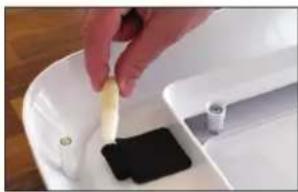
natural_image
Close-up of a hand pouring liquid into a white plastic container with a black sample (no text or symbols visible)- Apply 1 drop of care oil directly to each of the holders.
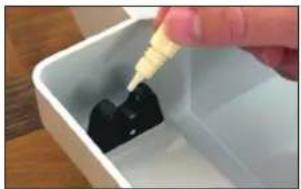
natural_image
Close-up of a hand pouring liquid into a white plastic container with black contents (no text or symbols visible)PARTICLE SENSOR
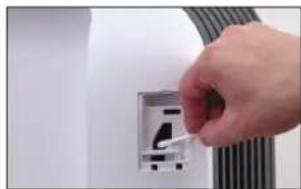
The particle sensor detects the amount of dirt in the air in the room by analyzing a passing air flow. Over time, dirt can accumulate and affect measuring accuracy.
The flap over the particle sensor has to be closed during operation to ensure the measurement is correct. It should only be opened to clean the sensor.
- Clean the sensor lens using a damp cotton swab.
natural_image
Hand inserting a small cable into an electrical outlet (no text or symbols visible)- Dry the sensor with a dry cotton swab.
ASSEMBLING THE APPLIANCE
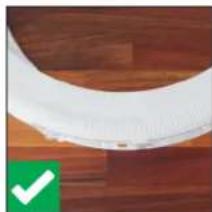
Once cleaning is complete, you can put the BONECO H700 back together. When doing so, pay attention to how the AH700 evaporator mat fits.
natural_image
Close-up of a white curved object on a wooden surface, with a green checkmark in the corner (no text or symbols visible)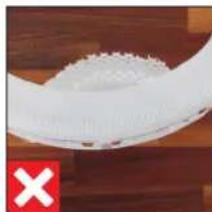
natural_image
Close-up of a white textured object on a wooden surface, with a red 'X' symbol in the corner (no text or symbols on the object itself)REPLACING THE ACCESSORIES
ABOUT THE A681 HYBRID FILTER
The A681 HYBRID filter has to be changed after about one year to ensure that dirt and pollen continue to be filtered from the air.
The display indicates a pending need to replace the A681 HYBRID filter with the following symbol:

The A681 HYBRID filter is replaced according to the figures on pages 44 and 45.
You can obtain an A681 HYBRID filter from your BONECO specialist dealer or the BONECO online store at www.shop.boneco.com.
REPLACING THE A681 HYBRID FILTER
- Remove the front cover of the BONECO H700.
- Take off the pre-filter.
- Remove the used A681 HYBRID filter and dispose of it with your regular household waste.
- Remove the protective foil from the new A681 HYBRID filter.
- Insert the A681 HYBRID filter into the holder as shown on the label.
- Reinsert the pre-filter and the front cover.
DELETING A NOTICE IN THE APP
The ☑ notice can be deleted from the display in the BONECO app.
DELETING A NOTICE ON THE APPLIANCE
The ☐ notice can also be deleted on the appliance.
- Press and hold the output regulator for three seconds until the "CL" notice flashes on the display.
- Use the output regulator to select the symbol.
- Briefly press the output regulator to confirm the selection.
The notice is deleted.
REPLACING THE ACCESSORIES
ABOUT THE A7017 IONIC SILVER STICK®
The A7017 Ionic Silver Stick® uses the antimicrobial effect of silver for a significant improvement of water hygiene. It is effective as soon as water comes into contact with it – even if the BONECO appliance is switched off.
Replace the A7017 Ionic Silver Stick® annually to guarantee antimicrobial effectiveness. The display indicates a pending need to replace the A7017 Ionic Silver Stick® with the following symbol:

You can obtain an A7017 Ionic Silver Stick® from your BONECO specialist dealer or the BONECO online store at www.shop.boneco.com.
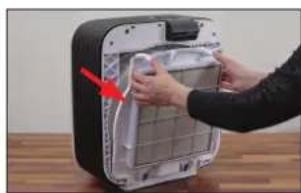
REPLACING THE A7017 IONIC SILVER STICK®
-
Take off the front cover.
-
Remove the water tank on the rear side.
-
Remove the filter holder.
natural_image
Person installing or adjusting a device into a black box with a red arrow pointing to the panel (no text or symbols visible)- Pull the water base out and remove the drum.
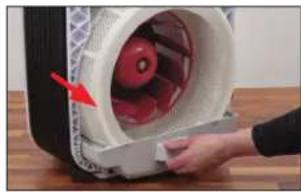
natural_image
Close-up of a hand holding a white plastic device with red internal components, no visible text or symbols- Remove the used A7017 Ionic Silver Stick® and dispose of it with your regular household waste.
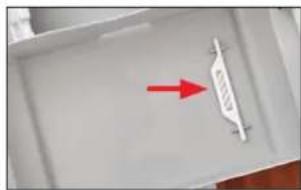
natural_image
Close-up of a white plastic tray with a red arrow pointing to a small white object, no visible text or symbols.-
Insert the new A7017 Ionic Silver Stick ^4 .
-
Put the parts back together by following the steps in reverse order.
DELETING A NOTICE IN THE APP
The ☑ notice can be deleted from the display in the BONECO app.
DELETING A NOTICE ON THE APPLIANCE
The ☐ notice can also be deleted on the appliance.
-
Press and hold the output regulator for three seconds until the "CL" notice flashes on the display.
-
Use the output regulator to select the symbol.
-
Briefly press the output regulator to confirm the selection.
The notice is deleted.
MALFUNCTIONS AND TROUBLESHOOTING
Problem Possible cause Action
| Air has an unpleasant odor | Stagnant water in the tank and water base Empty and thoroughly clean the appliance | |
| No improvement in air quality | Particle sensor is dirty Clean the particle sensor | |
| Open windows or doors Close windows and doors | ||
| Display shows Error E2 | Fan blade blocked or motor is defective | Unplug the appliance, check that the fan blade can turn freely, plug the appliance back in; contact a service center if the problem persists |
| Display shows Error E3 | Drum blocked or motor is defective | Unplug the appliance, check that the drum can turn freely, plug the appliance back in; contact a service center if the problem persists |
| Display more frequently shows symbol for water change | Water has been in the water base for more than 4 days without operation | Empty the appliance if it is only operating in the air purification mode |
| Water was not changed after cleaning (see page 59) | Change water after each cleaning (see page 59) | |
FACTORY DEFAULT SETTINGS AND BLUETOOTH
ABOUT THE FACTORY DEFAULT SETTINGS
If your BONECO appliance control system does not function the way you are expecting, or if you would like to delete all adjustments, you can reset the appliance to the factory settings. This deletes all adjustments and settings.

After the reset, the BONECO appliance has to be paired with the smartphone again so that control system can continue working with the see page 52).
RESETTING THE APPLIANCE
Press and hold the output regulator until the "Fd" (Factory default) notice appears on the display. Now the BONECO appliance is in the same state as when it was first started.
SWITCHING BLUETOOTH ON AND OFF
Switching Bluetooth off:
- Press and hold the output regulator for about 5 seconds until the "bt" notice flashes on the display.
- Turn the output regulator until the display shows "--" and confirm your selection by briefly pressing the output regulator again.
- Now Bluetooth is switched off.

To reactivate Bluetooth, you have to have the smartphone paired again (see page 52).
fr
MODE D'EMPLOI
SOMMAIRE
Graduation manuelle 82
Ionic Silver Stick® A7017
Manuel simplifié
text_image
Exploded view diagram of a smart air conditioner system with labeled components and numbered partsnatural_image
Close-up of a circular mechanical component with a red indicator light and a small green dot at the top (no text or symbols visible)natural_image
Close-up of a finger pressing a black circular button on a dark surface (no text or symbols visible)natural_image
Close-up of a dark circular object with a bright horizontal line and a small dot at the top (no text or symbols visible)natural_image
Close-up of a finger pressing down on a black circular component (no text or symbols visible)natural_image
Close-up of a finger pressing down on a black circular component (no text or symbols visible)natural_image
Close-up of a black circular mechanical component with a white radial line, mounted on a dark surface (no text or symbols visible)text_image
AIR 88h WATER FILTER ISS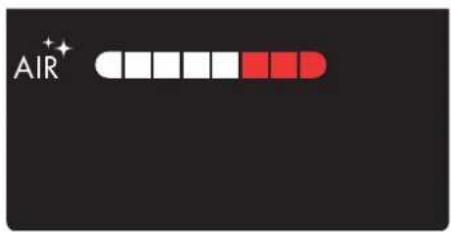
text_image
AIR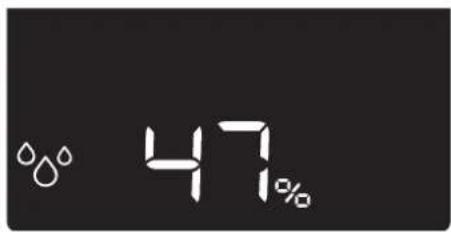
text_image
47%text_image
9:41 ZÖRIN, OH 80% HH Beacht 6.0 °C H200 H200 + - SSFonctionnalités
natural_image
Close-up of a finger pressing down on a black circular component (no text or symbols visible)natural_image
Close-up of hands installing or adjusting a white appliance into a black container (no visible text or symbols)natural_image
Person installing or adjusting a wall-mounted device with a red arrow pointing to the component (no visible text or symbols)natural_image
Close-up of a hand holding a yellow bottle next to a red curved object, possibly a fan or mechanical component (no visible text or symbols)natural_image
Person installing or adjusting a device into a rack (no visible text or symbols)natural_image
Close-up of a hand pressing a small component into a white fan on a wooden surface (no visible text or symbols)natural_image
Close-up of a white plastic tray with a red arrow pointing to a small white object, no visible text or symbols.natural_image
Person using a tool to clean or wash a plastic cup in a stainless steel kitchen (no visible text or symbols)natural_image
Person washing dishes in a stainless steel kitchen sink using a brush (no visible text or symbols)BAC À EAU
natural_image
Close-up of a hand pressing a white cylindrical device with red and black components, no visible text or symbolsnatural_image
Interior view of a white plastic tray with red arrows pointing to internal components (no text or symbols visible)natural_image
Person handling a white plastic reel in a kitchen setting (no visible text or symbols)natural_image
Person washing a white circular object with water spray, no visible text or symbolsnatural_image
Person washing white soap on a stainless steel sink (no text or symbols visible)natural_image
Person installing or adjusting a white electronic device with a red arrow pointing to the component (no text or symbols visible)natural_image
Person cleaning a white plastic tray with a blue cloth (no text or symbols visible)PRÉFILTRE
natural_image
Person using a brush to clean or store items in a grid (no visible text or symbols)natural_image
Close-up of a solar panel with visible grating and grid lines (no text or symbols)PORTE-FILTRE
natural_image
Person installing or adjusting a device into a black appliance panel (no visible text or symbols)natural_image
Close-up of a hand cleaning a white toilet with blue cloth (no text or symbols visible)PALES DU VENTILATEUR
natural_image
Close-up of a hand using a screwdriver to adjust a red mechanical fan inside a machine (no text or symbols visible)natural_image
Close-up of hands cleaning a red industrial fan with a blue cloth (no visible text or symbols)BOÎTIER
natural_image
Close-up of a hand cleaning a red fan with a blue cloth (no text or symbols visible)natural_image
Close-up of a hand pouring liquid into a white plastic basin with a black square on the side (no text or symbols visible)natural_image
Close-up of a hand pouring liquid into a white container with black contents (no text or symbols visible)CAPTEUR DE PARTICULES
natural_image
Hand inserting a cable into an electrical outlet (no text or symbols visible)natural_image
Close-up of a white curved object on a wooden surface, with a green checkmark in the corner (no text or symbols visible)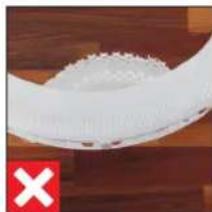
natural_image
Close-up of a white plastic object with a red 'X' mark on a wooden surface (no text or symbols visible)REPLACEMENT DES ACCESSOIRES
INFORMATIONS CONCERNANT LE FILTRE HYBRID A681
REPLACEMENT DES ACCESSOIRES
INFORMATIONS CONCERNANT LE IONIC SILVER STICK® A7017
natural_image
Person installing or adjusting a device into a black appliance panel (no visible text or symbols)natural_image
Close-up of a hand holding a white plastic device with red internal components, no visible text or symbols
Ionic Silver Stick® A7017
Quick Manual
text_image
Exploded view diagram of a smart air conditioner system with labeled components and numbered partsnatural_image
Close-up of a circular mechanical component with a red indicator light and a small green cross at the top (no text or symbols visible)natural_image
Close-up of a finger pressing down on a black circular dial (no text or symbols visible)natural_image
Circular object with a bright horizontal line and a small dot, set against a dark textured background (no text or symbols visible)natural_image
Close-up of a finger pressing down on a black circular component (no text or symbols visible)natural_image
Close-up of a finger pressing down on a black circular component (no text or symbols visible)natural_image
Close-up of a circular mechanical component with a central hole, mounted on a dark surface (no text or symbols visible)text_image
AIR 88h WATER FILTER ISS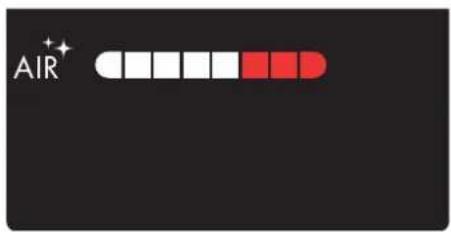
text_image
AIR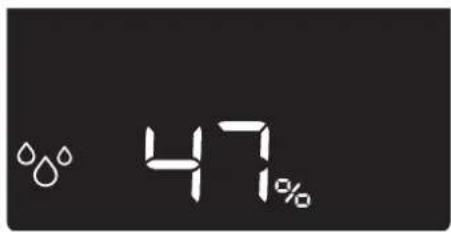
text_image
47%natural_image
Close-up of a finger pressing down on a black circular component (no text or symbols visible)natural_image
Close-up of hands installing or adjusting a white plastic bag with a red arrow pointing to the component (no text or symbols visible)natural_image
Close-up of hands installing or adjusting a device into a black appliance with a red arrow pointing to the interior (no visible text or symbols)natural_image
Close-up of a hand holding a yellow cylindrical object with a red curved line above, next to a white plastic container (no visible text or symbols)natural_image
Close-up of hands installing or adjusting a white plastic bag on a kitchen appliance (no text or symbols visible)natural_image
Close-up of a hand holding a small electronic device with a red lightning bolt, next to a white fan or fan assembly (no visible text or symbols)natural_image
Close-up of a white plastic tray with a red arrow pointing to a small white object, no visible text or symbols.natural_image
Person using a tool to clean or wash a glass in a stainless steel kitchen sink (no visible text or symbols)natural_image
Person washing a cup in a stainless steel kitchen sink with a hand using a tool (no visible text or symbols)VASCHETTA DELL'ACQUA
natural_image
Close-up of a hand holding a white plastic container with red internal components, placed on a wooden surface (no text or symbols visible)natural_image
Top-down view of a white plastic tray with red arrows pointing to internal components (no text or symbols visible)natural_image
Person washing white plastic in a kitchen sink (no text or symbols visible)natural_image
Person cleaning a circular glass dish with a water droplet on top (no text or symbols visible)natural_image
Person washing a white cloth on a stainless steel sink (no text or symbols visible)natural_image
Person installing or adjusting a white plastic device into a black box (no text or symbols visible)natural_image
Hand cleaning a white plastic tray with a blue cloth (no text or symbols visible)PREFILTRO
natural_image
Hand using a brush to clean or store floor tiles (no visible text or symbols)natural_image
Close-up of a grid-patterned solar panel with no visible text or symbolsPORTAFILTRO
natural_image
Person installing or adjusting a device into a black appliance with a red arrow pointing to the panel (no visible text or symbols)natural_image
Close-up of a hand cleaning a blue towel on a white toilet (no text or symbols visible)ALETTE VENTILATORE
natural_image
Close-up of a hand operating a red industrial fan inside a machine (no visible text or symbols)natural_image
Close-up of hands cleaning a red and white fan with a blue cloth (no text or symbols visible)ALLOGGIAMENTO
natural_image
Close-up of a hand cleaning a red and white fan with a blue cloth (no text or symbols visible)natural_image
Close-up of a hand pouring liquid into a white plastic container with a black plastic sample (no text or symbols visible)natural_image
Close-up of a hand pouring liquid into a white plastic container with black contents (no text or symbols visible)SENSORE PARTICELLE
natural_image
Hand inserting a wall-mounted socket into a wall, with coiled cable visible (no text or symbols)natural_image
Close-up of a white curved object on a wooden surface, with a green checkmark in the corner (no text or symbols visible)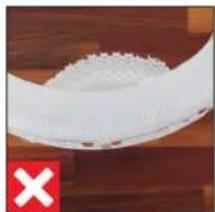
natural_image
Close-up of a white plastic bowl with a red X symbol on the bottom left (no text or symbols on the bowl itself)natural_image
Person installing or adjusting a device panel into a black box (no visible text or symbols)natural_image
Close-up of a hand holding a small object through a white cylindrical device with red contents, placed on a wooden surface (no text or symbols visible)natural_image
Interior view of a white plastic drawer with a red arrow pointing to a small object on the side (no text or symbols visible)
Ionic Silver Stick® A7017
Quick Manual
text_image
Exploded view diagram of a smart air conditioner system with labeled components and numbered parts1 Frontafdekking
2 Voorfilter
3 HYBRID-filter A681
4 Filterhouder
5 Trommel
6 Verdampermat AH700
7 Ionic Silver Stick® A7017
8 BONECO H700
9 Waterreservoir
10 Geurstofhouder
11 Waterbak
12 Ventilatorblad
13 Stroomvoorziening
TECHNISCHE GEGEVENS
Typeaanduiding BONECO H700
Netspanning 100-240 V \~ 50/60 Hz
natural_image
Close-up of a circular mechanical component with a red light source and green indicator lights (no text or symbols visible)natural_image
Close-up of a finger pressing a circular button on a dark surface (no text or symbols visible)natural_image
Circular dark object with a bright horizontal line and small dots, set against a textured dark background (no text or symbols)natural_image
Close-up of a finger pressing a circular button on a dark surface (no text or symbols visible)natural_image
Close-up of a hand pressing down on a black circular device dial (no text or symbols visible)natural_image
Close-up of a black circular object with a white horizontal line and small dots, resembling a mechanical or architectural component (no text or symbols visible)text_image
AIR 88h WATERnatural_image
Close-up of a finger pressing down on a black circular component (no text or symbols visible)natural_image
Close-up of hands installing or adjusting a white electronic device component with a red arrow indicating the component (no text or symbols visible)natural_image
Person installing or adjusting a wall-mounted device with a red arrow pointing to the component (no visible text or symbols)natural_image
Close-up of a hand holding a yellow tool next to a red fan-shaped object (no visible text or symbols)natural_image
Close-up of hands installing or adjusting a device panel with a red arrow pointing to the component (no visible text or symbols)natural_image
Close-up of a hand pressing a small component on a white fan-like device (no visible text or symbols)natural_image
Close-up of a white plastic tray with a red arrow pointing to a small object, no visible text or symbols.text_image
4h t+ /80natural_image
Person using a tool to clean or wash a plastic cup in a kitchen sink (no visible text or symbols)natural_image
Person washing a sink with a brush and water filter (no text or symbols visible)WATERBAK
natural_image
Close-up of a hand opening a white cylindrical device with red internal components, placed on a wooden surface (no visible text or symbols)natural_image
Top-down view of a white plastic tray with red arrows pointing to internal components (no text or symbols visible)natural_image
Person washing white plastic film in a kitchen sink (no text or symbols visible)natural_image
Person washing a circular white object with a glass lid, no visible text or symbolsnatural_image
Close-up of hands washing white cloth on a metal surface (no text or symbols visible)natural_image
Close-up of hands installing or adjusting a white electronic device casing (no visible text or symbols)natural_image
Hand cleaning a white plastic tray with a blue cloth (no text or symbols visible)VOORFILTER
natural_image
Person using a brush to clean or wash a white plastic swab inside a metal grid (no text or symbols visible)natural_image
Close-up of a solar panel with visible grating and grid lines (no text or symbols)FILTERHOUDER
natural_image
Person installing or adjusting a device panel into a black appliance (no visible text or symbols)natural_image
Close-up of a hand cleaning a white toilet with a blue cloth (no text or symbols visible)VENTILATORBLAD
natural_image
Close-up of a hand using a screwdriver to adjust a red industrial fan component (no text or symbols visible)natural_image
Close-up of hands cleaning a red and blue plastic fan component on a wooden surface (no text or symbols visible)BEHUIZING
natural_image
Close-up of a hand cleaning a red fan with a blue cloth on a wooden surface (no text or symbols visible)VERZORGING VAN DE ROLLEN
natural_image
Close-up of a hand placing a small object into a white basin with a black plastic block nearby (no text or symbols visible)natural_image
Close-up of a hand pouring liquid into a white plastic container with black contents (no text or symbols visible)DEELTJESSENSOR
natural_image
Hand inserting a cable into an electrical outlet (no text or symbols visible)APPARAAT IN ELKAAR ZETTEN
natural_image
Close-up of a white curved object on a wooden surface, with a green checkmark icon in the corner (no text or symbols visible)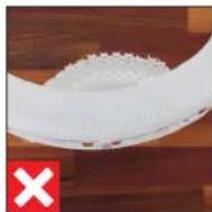
natural_image
Close-up of a white textured surface with a red 'X' symbol at the bottom left (no text or symbols on the surface)ACCESSOIRES VERVANGEN
OVER HET HYBRID-FILTER A681
natural_image
Person installing or adjusting a device into a black box (no visible text or symbols)natural_image
Close-up of a hand opening a white cylindrical device with red internal components, no visible text or symbolsnatural_image
Illustration of a rectangular electronic device with a black tab and grid lines (no text or symbols)natural_image
Simple line drawing of a plug connected to a multi-wire cable with a terminal connector (no text or symbols)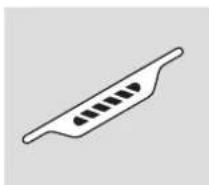
Ionic Silver Stick® A7017
Guía rápida
text_image
Exploded view diagram of a smart air conditioner system with labeled components and numbered partsnatural_image
Close-up of a circular mechanical component with a red indicator light and a green dot at the top (no text or symbols visible)natural_image
Close-up of a finger pressing a black circular button on a dark surface (no text or symbols visible)natural_image
Circular dark object with a bright horizontal line and a small dot at the center, set against a textured dark background (no text or symbols visible)natural_image
Close-up of a finger pressing a circular button on a dark surface (no text or symbols visible)natural_image
Close-up of a hand pressing down on a black circular component (no text or symbols visible)natural_image
Close-up of a black circular object with a white horizontal line and small dots, resembling a mechanical or architectural component (no text or symbols visible)text_image
AIR 88h WATER FILTER ISStext_image
9:41 ZORIN, OH 80% HH Beachin 6.9 °C H20 H20Funciones
natural_image
Close-up of a finger pressing down on a black circular component (no text or symbols visible)natural_image
Close-up of hands installing or adjusting a white electronic device casing with a red arrow indicating the component (no text or symbols visible)natural_image
Person installing or adjusting a device panel with a red arrow pointing to the component (no visible text or symbols)natural_image
Close-up of a hand holding a yellow cylindrical object with a red curved component, next to a white base (no visible text or symbols)natural_image
Close-up of hands installing or adjusting a device panel with a red arrow pointing to the component (no visible text or symbols)natural_image
Close-up of a hand holding a small electronic device with a red arrow pointing to the speaker grille (no visible text or symbols)natural_image
Close-up of a white plastic tray with a red arrow pointing to a small white object on the side (no text or symbols visible)natural_image
Person using a tool to clean or wash a plastic container in a stainless steel kitchen sink (no visible text or symbols)natural_image
Person washing a sink with a brush and water, no visible text or symbolsPLACA PARA EL AGUA
natural_image
Close-up of a hand opening a white cylindrical device with red and black components, placed on a wooden surface (no visible text or symbols)natural_image
Interior view of a gray plastic tray with red arrows pointing to internal components (no text or symbols visible)natural_image
Person washing a white plastic hose in a kitchen setting (no visible text or symbols)natural_image
Close-up of hands washing a white circular object with a water droplet on top (no text or symbols visible)natural_image
Close-up of hands washing white cloth on a kitchen sink (no text or symbols visible)natural_image
Person installing or adjusting a white plastic device into a black casing (no text or symbols visible)natural_image
Person cleaning a white plastic tray with a blue cloth (no text or symbols visible)FILTRO PREVIO
natural_image
Hand cleaning a clean grid with a brush (no text or symbols visible)natural_image
Close-up of a solar panel with grid lines (no text or symbols visible)SOPORTE DEL FILTRO
natural_image
Person installing or adjusting a device into a black electronic device with a red arrow pointing to the component (no text or symbols visible)natural_image
Close-up of a hand cleaning a white toilet with a blue cloth (no text or symbols visible)natural_image
Close-up of a red and black fan inside a computer drive, with a hand adjusting the fan (no visible text or symbols)natural_image
Close-up of hands cleaning a red and blue plastic fan inside a computer tower (no visible text or symbols)CARCASA
natural_image
Close-up of a hand cleaning a red fan with a blue cloth on a wooden surface (no text or symbols visible)natural_image
Close-up of a hand pouring liquid into a white container with a black plastic sample (no text or symbols visible)natural_image
Close-up of a hand pouring liquid into a white container with dark material (no text or symbols visible)SENSOR DE PARTÍCULAS
natural_image
Hand inserting a cable into an electrical outlet (no text or symbols visible)natural_image
Close-up of a white curved object on a wooden surface, with a green checkmark in the corner (no text or symbols visible)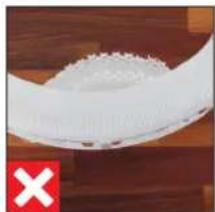
natural_image
Close-up of a white plastic bag with a red 'X' mark on the left, against a wooden background (no text or symbols)natural_image
Person installing or adjusting a device into a black appliance panel (no visible text or symbols)natural_image
Close-up of a hand opening a white plastic fan with red filter blades, placed on a wooden surface (no text or symbols visible)natural_image
White plastic tray with a red arrow pointing to a small white object, no visible text or symbolsnatural_image
Illustration of a rectangular electronic device with a black tab and grid lines (no text or symbols)BONECO H700 com filtro HÍBRIDO A681
natural_image
Simple line drawing of a plug connected to a multi-wire cable with a terminal connector (no text or symbols)
Ionic Silver Stick® A7017
Guía rápido
text_image
Exploded view diagram of a smart air conditioner system with labeled components and numbered partstext_image
1 Retire a tampa frontal.
natural_image
Close-up of a dark circular object with a red starburst at the top (no text or symbols visible)natural_image
Close-up of a finger pressing a black circular button on a dark surface (no text or symbols visible)natural_image
Circular object with a bright horizontal line and a small dot, set against a dark textured background (no text or symbols)natural_image
Close-up of a finger pressing a circular button on a dark surface (no text or symbols visible)natural_image
Close-up of a finger pressing down on a black circular component (no text or symbols visible)natural_image
Close-up of a black circular object with a white horizontal line and dot, against a dark textured background (no text or symbols visible)INDICAÇÕES NO DISPLAY
text_image
AIR 88h WATER FILTER ISS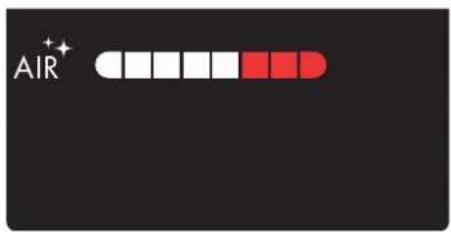
text_image
AIR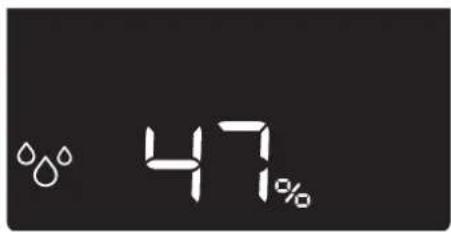
text_image
47%natural_image
Close-up of a finger pressing down on a black circular component (no text or symbols visible)- Retire a tampa frontal.
natural_image
Person installing or adjusting a white electronic device with a red arrow pointing to the component (no text or symbols visible)natural_image
Close-up of hands installing or adjusting a wall-mounted device with a red arrow pointing to the component (no visible text or symbols)natural_image
Close-up of a hand holding a yellow bottle next to a red plastic fan (no visible text or symbols)natural_image
Person installing or adjusting a wall-mounted device component with a red arrow indicating the component (no text or symbols visible)natural_image
Close-up of a hand pressing a small electronic component with a red lightning bolt on the fan (no visible text or symbols)natural_image
Close-up of a white plastic tray with a red arrow pointing to a small white object on the side (no text or symbols visible)INDICAÇÕES IMPORTANTES
natural_image
Person using a tool to clean or wash a small container in a stainless steel kitchen (no visible text or symbols)natural_image
Person washing a stainless steel sink with a hand holding a tool (no visible text or symbols)TINA DE ÁGUA
natural_image
Close-up of a hand opening a white cylindrical device with red internal components, placed on a wooden surface (no text or symbols visible)natural_image
Interior view of a white plastic tray with red arrows indicating direction, no visible text or symbolsnatural_image
Person handling a white plastic ring on a kitchen sink (no visible text or symbols)natural_image
Person washing a large white circular object with bubbles, viewed from above (no text or symbols visible)natural_image
Person washing white soap on a stainless steel sink (no text or symbols visible)natural_image
Person installing or adjusting a device into a black and white container (no visible text or symbols)natural_image
Hand cleaning a white plastic tray with a blue cloth (no text or symbols visible)PRÉ-FILTRO
natural_image
Hand using a brush to clean or store floor tiles (no visible text or symbols)natural_image
Close-up of a solar panel with grid lines and metallic contacts (no text or symbols visible)SUPORTE DO FILTRO
natural_image
Person installing or adjusting a device panel on a wooden surface (no visible text or symbols)natural_image
Close-up of a hand cleaning a white toilet with a blue cloth (no text or symbols visible)PÁS DO VENTILADOR
natural_image
Close-up of a hand operating a red and black fan-shaped device with a screwdriver, no visible text or symbolsnatural_image
Close-up of hands cleaning a red and blue plastic fan inside a white industrial machine (no visible text or symbols)CAIXA
natural_image
Close-up of a hand cleaning a red and white fan with a blue cloth (no visible text or symbols)natural_image
Close-up of a hand pouring liquid into a white container with a black plastic sample (no text or symbols visible)natural_image
Close-up of a hand piping a small object into a white container (no text or symbols visible)SENSOR DE PARTÍCULAS
natural_image
Hand inserting a plug into an electrical outlet (no text or symbols visible)natural_image
Close-up of a white curved object on a wooden surface, with a green checkmark in the corner (no text or symbols visible)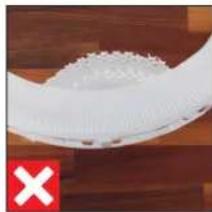
natural_image
Close-up of a white plastic object with a red 'X' symbol on the left (no text or symbols on the object itself)natural_image
Person installing or adjusting a device panel into a black box (no visible text or symbols)natural_image
Close-up of a hand opening a white plastic fan with red components, placed on a wooden surface (no text or symbols visible)text_image
Image showing a white container with a red arrow pointing to a small label, possibly indicating a measurement or annotation.
A7017 Ionic Silver Stick®
Rövid útmutató
text_image
Exploded view diagram of a smart air conditioner system with labeled components and numbered partsMANUÁLIS ÜZEMELTETÉS
A MANUÁLIS ÜZEMELTETÉSRÓL
natural_image
Close-up of a dark circular object with a red starburst symbol at the top (no text or symbols visible)natural_image
Close-up of a finger pressing a circular button on a dark surface (no text or symbols visible)natural_image
Circular object with a bright horizontal line and a small dot, set against a dark textured background (no text or symbols visible)natural_image
Close-up of a finger pressing a black circular button on a dark surface (no text or symbols visible)natural_image
Close-up of a hand pressing down on a black circular device dial (no text or symbols visible)natural_image
Close-up of a black circular object with a white horizontal line and small dots, resembling a mechanical or architectural component (no text or symbols visible)text_image
AIR 88h WATER FILTER ISStext_image
9:41 ZORIN, OH 80% HH Beauts 6.0 °C H200 H200 + - SSSzolgáltatások
natural_image
Close-up of a hand pressing down on a black circular component (no text or symbols visible)natural_image
Close-up of hands installing or adjusting a white appliance into a black casing (no text or symbols visible)natural_image
Person installing or adjusting a wall-mounted device with a red arrow pointing to the component (no visible text or symbols)natural_image
Close-up of a hand holding a yellow cylindrical tool next to a red curved object, possibly a fan or mechanical component (no visible text or symbols)natural_image
Close-up of hands installing or adjusting a device panel with a red arrow pointing to the component (no visible text or symbols)natural_image
Close-up of a hand pressing a small component on a car wheel, with a red arrow indicating the motion (no text or symbols visible)natural_image
Close-up of a white plastic tray with a red arrow pointing to a small label (no readable text or symbols)natural_image
Person using a tool to clean or wash a water bottle in a stainless steel kitchen sink (no visible text or symbols)natural_image
Person washing a stainless steel sink with a brush (no visible text or symbols)VÍZTÁLCA
natural_image
Close-up of a hand opening a white cylindrical device with red internal components, placed on a wooden surface (no text or symbols visible)natural_image
Top-down view of a white plastic tray with red arrows pointing to internal components (no text or symbols visible)natural_image
Person washing a white cylindrical soap dispenser in a kitchen (no text or symbols visible)natural_image
Person washing a large white circular object with water, viewed from above (no text or symbols visible)natural_image
Close-up of hands washing white cloth on a kitchen sink (no text or symbols visible)natural_image
Person installing or adjusting a white electronic device with a red arrow pointing to the component (no text or symbols visible)natural_image
Person cleaning a white plastic tray with a blue cloth (no text or symbols visible)ELŐSZÚRŐ
natural_image
Person using a brush to clean or store items in a grid (no visible text or symbols)natural_image
Close-up of a grid-patterned solar panel with uniform white lines (no text or symbols visible)SZÜRÖTARTÓ
natural_image
Person installing or adjusting a device panel on a black electronic device (no visible text or symbols)natural_image
Close-up of a hand cleaning a white toilet with a blue cloth (no text or symbols visible)VENTILÁTOR
natural_image
Close-up of a hand operating a red industrial fan inside a machine (no visible text or symbols)natural_image
Close-up of hands cleaning a red industrial fan with a cloth (no visible text or symbols)KÉSZÜLÉKHÁZ
natural_image
Close-up of a hand cleaning a red fan with a blue cloth, placed on a wooden surface (no visible text or symbols)ÁLTALÁNOS TISZTÍTÁS
A GÖRGÖK ÁPOLÁSA
natural_image
Close-up of a hand pouring liquid into a white plastic container with a black plastic sample (no text or symbols visible)natural_image
Close-up of a hand pouring liquid into a white container with black contents (no text or symbols visible)RÉSZECSKEÉRZÉKELŐ
natural_image
Hand inserting a cable into an electrical outlet (no text or symbols visible)natural_image
Close-up of a white curved object on a wooden surface, with a green checkmark in the corner (no text or symbols visible)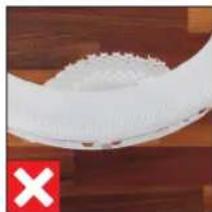
natural_image
Close-up of a white textured object on a wooden surface, with a red 'X' symbol in the corner (no text or symbols on the object itself)A TARTOZÉKOK CSERÉJE
natural_image
Person installing or adjusting a device into a black appliance panel (no visible text or symbols)natural_image
Close-up of a hand holding a white fan blade with red blades, placed on a wooden surface (no text or symbols visible)natural_image
Top-down view of a white plastic drawer with a red arrow pointing to a small white object on the side (no text or symbols visible)
A7017 Ionic Silver Stick®
Skrócona instrukcja
text_image
Exploded view diagram of a smart air conditioner system with labeled components and numbered partsnatural_image
Close-up of hands installing a circular device with a red arrow indicating rotation (no text or symbols on the device itself)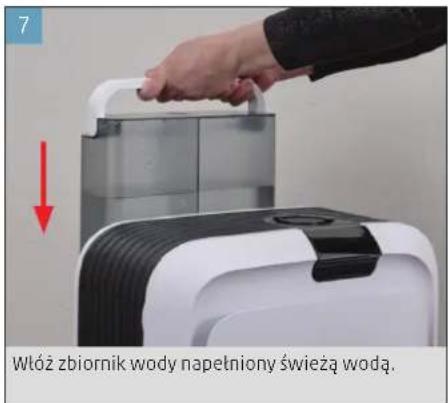
natural_image
Close-up of a circular mechanical component with a red indicator light at the top (no text or symbols visible)natural_image
Close-up of a finger pressing a black circular button on a dark surface (no text or symbols visible)natural_image
Close-up of a circular mechanical component with a bright center and dashed outline (no visible text or symbols)natural_image
Close-up of a finger pressing a circular button on a dark surface (no text or symbols visible)natural_image
Close-up of a hand pressing down on a black circular dial (no text or symbols visible)natural_image
Close-up of a dark circular mechanical component with a bright curved edge, mounted on a textured surface (no text or symbols visible)text_image
AIR 88h WATER FILTER ISSTO ZAPEWNIA APLIKACJA BONECO
O APLIKACJI BONECO
text_image
9:41 ZÖRIN, OH 80% HH Beacht 6.0 °C H200 H200 + - SSZakres mocy
DODATKOWE FUNKCJE W APLIKACJI
REÇZNE PRZYCIEMNIANIE
HYBRYDOWY SPOSÓB PRACY ("HYBRID")
text_image
AIR 47%natural_image
Close-up of a finger pressing down on a black circular component (no text or symbols visible)natural_image
Close-up of hands installing or adjusting a white electronic device casing with a red arrow indicating the component (no text or symbols visible)natural_image
Person installing or adjusting a wall-mounted device with a red arrow pointing to the component (no visible text or symbols)natural_image
Close-up of a hand holding a yellow bottle with red tubing, next to a white plastic component (no visible text or symbols)natural_image
Person installing or adjusting a wall-mounted device component with a red arrow indicating the component (no text or symbols visible)natural_image
Close-up of a hand pressing a small electronic component with a red lightning bolt on the fan (no visible text or symbols)natural_image
Close-up of a white plastic tray with a red arrow pointing to a small white object on the side (no text or symbols visible)text_image
4h t+ /80natural_image
Person using a tool to clean or wash a glass in a kitchen sink (no visible text or symbols)natural_image
Person using a tool to clean or wash a bowl in a stainless steel kitchen sink (no text or symbols visible)WANIENKA NA WODE
natural_image
Close-up of a hand holding a white plastic device with a red arrow pointing to the interior (no visible text or symbols)natural_image
Top-down view of a white plastic tray with red arrows pointing to internal components (no text or symbols visible)natural_image
Person washing a white plastic hose in a kitchen (no text or symbols visible)natural_image
Person washing a large white circular object with bubbles, no visible text or symbolsnatural_image
Person washing white foam on a stainless steel sink (no text or symbols visible)MATA NAWILŻAJĄCA AH700 (PRANIE W PRALCE)
natural_image
Person installing or adjusting a white electronic device with a red arrow pointing to the component (no text or symbols visible)natural_image
Person cleaning a white plastic tray with a blue cloth (no text or symbols visible)FILTR WSTEPNY
natural_image
Close-up of a hand using a tool to clean or store contents in a transparent container (no visible text or symbols)natural_image
Close-up of a solar panel with grid lines (no text or symbols visible)UCHWYT FILTRA
natural_image
Person installing or adjusting a device panel into a black appliance (no visible text or symbols)natural_image
Close-up of a hand cleaning a white toilet seat with blue cloth (no text or symbols visible)ŁOPATKI WENTYLATORA
natural_image
Close-up of a hand using a tool to drive a red and black fan inside a machine casing (no visible text or symbols)natural_image
Close-up of hands cleaning a red circular object with a blue cloth (no visible text or symbols)OBUDOWA
natural_image
Close-up of a hand cleaning a red fan with a blue cloth on a wooden surface (no text or symbols visible)PIELEGNACJA ROLEK
natural_image
Close-up of a hand pouring liquid into a white container with a black plastic sample (no text or symbols visible)natural_image
Close-up of a hand using a pipette to apply black plastic into a white container (no text or symbols visible)CZUJNIK CZASTEK
natural_image
Hand inserting a cable into an electrical outlet (no text or symbols visible)natural_image
Close-up of a white curved object on a wooden surface, with a green checkmark in the corner (no text or symbols visible)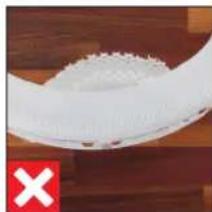
natural_image
Close-up of a white textured object on a wooden surface, with a red 'X' symbol in the corner (no text or symbols on the object itself)WYMIANA OSPRZĘTU
INFORMACJE NA TEMAT FILTRA A681 HYBRID
SKASOWANIE SYMBOLU W APLIKACJI
natural_image
Person installing or adjusting a device into a black box (no visible text or symbols)natural_image
Close-up of a hand holding a small object with red arrows pointing to a red mechanical component inside a white cylindrical housing (no text or symbols visible)SKASOWANIE SYMBOLU W APLIKACJI
INNEHÅLLSFÖRTECKNING
A7017 Ionic Silver Stick®
Snabbanvisning
Säkerhetsinformation
ÖVERSIKT OCH BENÄMNING PÅ DELAR
297

text_image
Exploded view diagram of a smart air conditioner system with labeled components and numbered partsnatural_image
Person washing a glass bottle in a stainless steel kitchen sink (no text or symbols visible)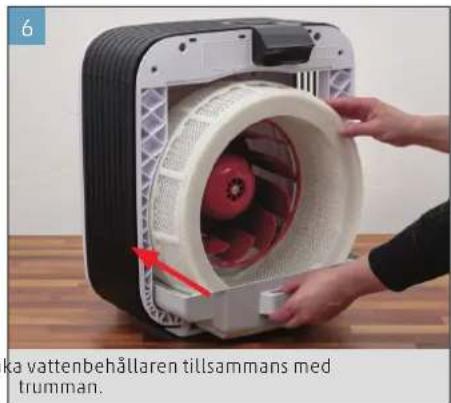
natural_image
Close-up of hands installing a vattenbehållaren tillsammans device into a plastic housing (no text or symbols visible)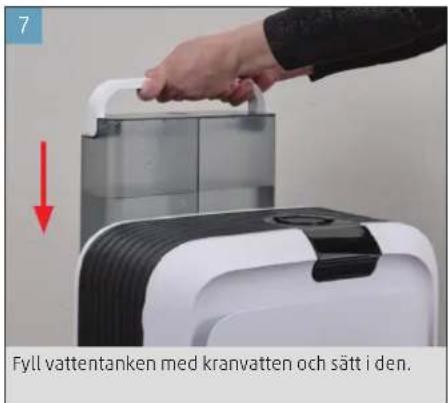
natural_image
Close-up of hands installing a plastic filter component into a device casing (no text or symbols visible)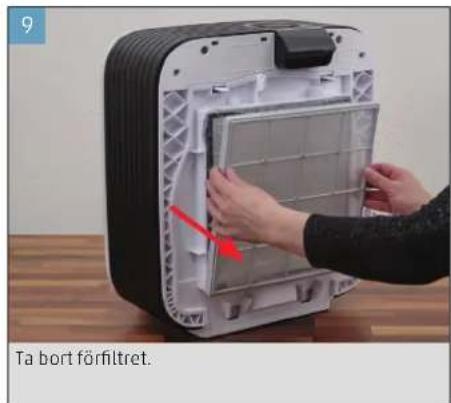
natural_image
Close-up of a circular mechanical component with a red starburst symbol on top (no text or symbols visible)natural_image
Close-up of a finger pressing a circular button on a dark surface (no text or symbols visible)natural_image
Circular object with a bright horizontal line and a small dot, set against a dark textured background (no text or symbols)natural_image
Close-up of a finger pressing down on a black circular button (no text or symbols visible)natural_image
Close-up of a finger pressing down on a black circular component (no text or symbols visible)natural_image
Close-up of a black circular object with a white highlight on its edge, against a dark textured background (no text or symbols visible)text_image
AIR 88h WATER FILTER ISS +text_image
9:41 ZORIN, OH 80% RH Beautir 6.0 °C H200 H200 + - S5Funktioner
KOPPLA UPP BONECO H700
FÖRBEREDELSER
natural_image
Close-up of a hand pressing a circular button on a dark surface (no text or symbols visible)• Med anpassning i BONECO-appen.
ANVÄNDNING AV DOFTÄMNEN
ANVÄNDNING AV DOFTÄMNEN
natural_image
Close-up of hands installing or adjusting a white appliance component with a red arrow indicating the motion (no text or symbols visible)natural_image
Close-up of hands installing or adjusting a device panel with a red arrow pointing to the component (no visible text or symbols)natural_image
Close-up of a hand holding a yellow cylindrical object with a red plastic component, next to a white base (no visible text or symbols)natural_image
Person installing or adjusting a device into a black appliance panel (no visible text or symbols)natural_image
Close-up of a hand pressing a red lightning bolt on a white industrial fan component (no text or symbols visible)natural_image
Close-up of a white appliance tray with a red arrow pointing to a small white object (no visible text or symbols)natural_image
Person using a tool to clean or wash a glass bowl in a stainless steel kitchen sink (no text or symbols visible)- Rengör även locket.
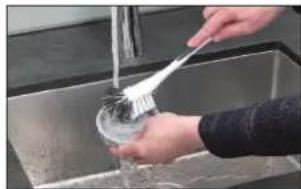
natural_image
Person washing a small bowl in a stainless steel kitchen sink (no text or symbols visible)VATTENKAR
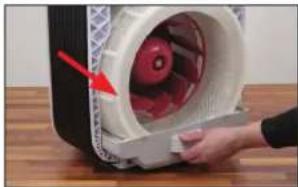
natural_image
Close-up of a hand opening a white plastic device with red arrow pointing to the lid (no visible text or symbols)natural_image
Interior view of a medical or laboratory device with red arrows pointing to internal components (no visible text or symbols)natural_image
Person washing a white plastic ring on a kitchen sink (no text or symbols visible)natural_image
Person washing a large white circular object with water flowing from a glass bowl (no text or symbols visible)natural_image
Person washing white cloth from a sink (no text or symbols visible)natural_image
Person installing or adjusting a white plastic device into a black box (no text or symbols visible)natural_image
Person cleaning a white plastic tray with a blue cloth (no text or symbols visible)FÖRFILTER
natural_image
Person using a brush to clean or wash a white plastic swab inside a transparent grid (no text visible)natural_image
Close-up of a solar panel with grid lines (no text or symbols visible)FILTERHÅLLARE
natural_image
Person installing or adjusting a device into a black appliance with a red arrow pointing to the panel (no visible text or symbols)natural_image
Close-up of a hand cleaning a white toilet with blue cloth (no text or symbols visible)FLÄKTBLAD
natural_image
Close-up of a hand using a screwdriver to adjust a red-handled fan inside a fan-shaped device (no text or symbols visible)natural_image
Close-up of hands cleaning a red circular object with a cloth, placed on a wooden surface (no text or symbols visible)FLÄKTHUS
natural_image
Close-up of a hand cleaning a red fan with a blue cloth (no text or symbols visible)SKÖTSEL AV RULLARNA
natural_image
Close-up of a hand placing a yellow object into a white plastic container with a black plastic clip nearby (no text or symbols visible)- Applicera en droppe direkt i vardera hållare.
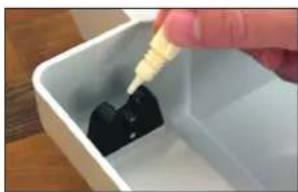
natural_image
Close-up of a hand using a pipette to add black liquid into a white container (no text or symbols visible)PARTIKELSENSOR
natural_image
Hand inserting a cable into an electrical outlet (no text or symbols visible)- Torka sensorn med en torr bomullstopp.
MONTERA IHOP APPARATEN
natural_image
Close-up of a white curved object on a wooden surface, with a green checkmark in the corner (no text or symbols visible)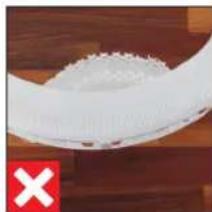
natural_image
Close-up of a white plastic object with a red 'X' mark on the left (no text or symbols on the object itself)BYTE AV TILLBEHÖR
OM A681 HYBRIDFILTRET
RADERA INFORMATION PÅ APPARATEN
natural_image
Person installing or adjusting a device into a black box (no visible text or symbols)natural_image
Close-up of a hand holding a white plastic device with red internal components, no visible text or symbolsnatural_image
Interior view of a white plastic drawer with a red arrow pointing to a small white object on the side (no text or symbols visible)RADERA INFORMATION PÅ APPARATEN
A7017 Ionic Silver Stick®
Quick Manual
Turvallisuusohjeet
YLEISKUVA JA OSIEN NIMET
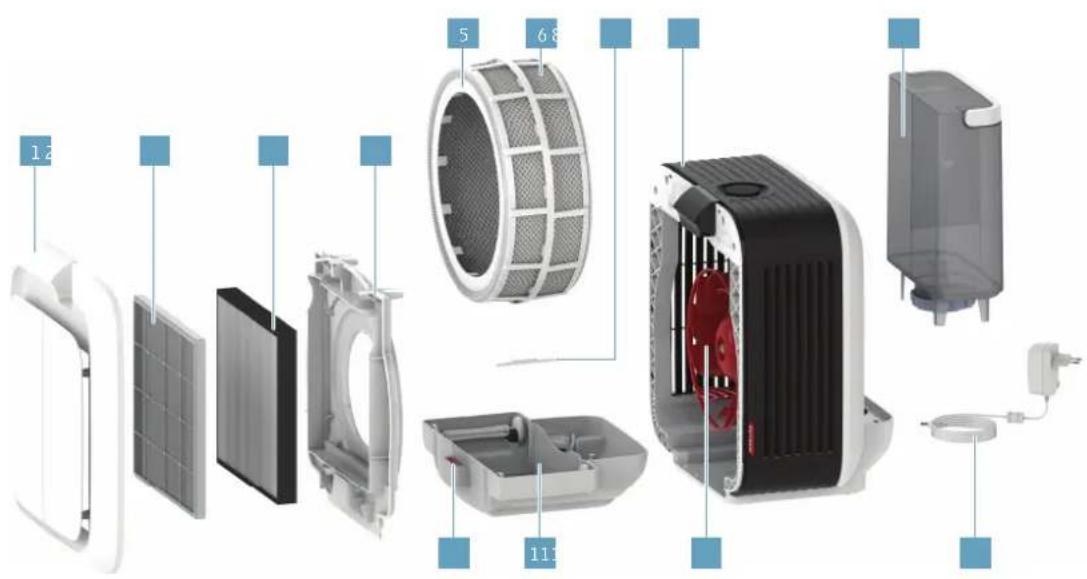
text_image
Exploded view diagram of a smart air conditioner system with labeled components and numbered partsnatural_image
Person assembling a white electronic device with a red arrow indicating the component (no text or symbols on the device itself)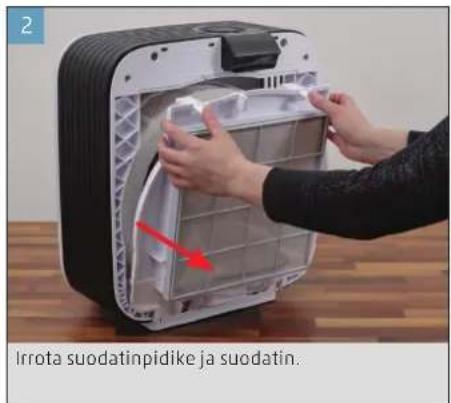
natural_image
Close-up of a dark circular object with a red starburst symbol at the top (no text or symbols visible)natural_image
Close-up of a finger pressing a circular button on a dark surface (no text or symbols visible)natural_image
Circular object with a bright horizontal line and a small dot, set against a dark textured background (no text or symbols visible)natural_image
Close-up of a finger pressing a circular button on a dark surface (no text or symbols visible)natural_image
Close-up of a finger pressing down on a black circular component (no text or symbols visible)natural_image
Close-up of a dark circular mechanical component with a bright end, mounted on a textured surface (no visible text or symbols)text_image
AIR 88h WATER FILTER ISS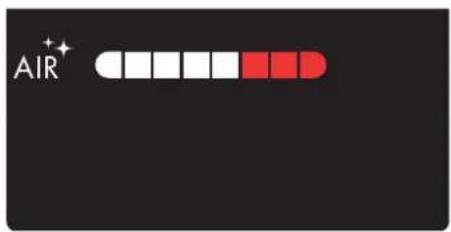
text_image
AIR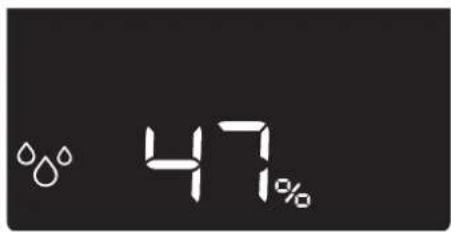
text_image
47%text_image
9:41 ZORIN, OH 80% HH Beauts 6.0 °C H200 H200 + - SSSisältö
LISÄTOIMINNOT SOVELLUKSEN KAUTTA
MANUAALINEN HIMMENTÄMINEN
natural_image
Close-up of a hand pressing down on a black circular component (no text or symbols visible)natural_image
Close-up of hands installing or adjusting a white appliance component with a red arrow indicating the part (no text or symbols visible)natural_image
Close-up of hands installing or adjusting a device into a rack (no visible text or symbols)natural_image
Close-up of a hand holding a yellow cylindrical object next to a red fan-shaped component (no visible text or symbols)PUHDISTUSTA KOSKEVAT OHJEET
PUHDISTUSTA KOSKEVIA TIETOJA
natural_image
Close-up of hands installing or adjusting a white plastic appliance into a black tray (no text or symbols visible)natural_image
Close-up of a hand pressing a small electronic device with a red arrow indicating compression (no text or symbols visible)natural_image
Close-up of a white plastic tray with a red arrow pointing to a small white object on the tray (no text or symbols visible)text_image
4h t+ 10-natural_image
Person using a tool to clean or wash a water bottle on a stainless steel kitchen sink (no text or symbols visible)natural_image
Person washing a sink with a plastic brush (no text or symbols visible)VESIASTIA
natural_image
Close-up of a hand pressing down on a white plastic container with red contents, placed on a wooden surface (no visible text or symbols)natural_image
Top-down view of a white plastic tray with red arrows indicating directional movement or force (no text or symbols visible)natural_image
Person washing a white plastic ring in a kitchen sink (no text or symbols visible)natural_image
Person washing a circular white object with a glass cap (no visible text or symbols)natural_image
Person washing white cloth from a sink (no text or symbols visible)natural_image
Person installing or adjusting a white plastic device into a black box (no text or symbols visible)natural_image
Person cleaning a white plastic tray with a blue cloth (no text or symbols visible)ESISUODATIN
natural_image
Hand using a brush to clean or store contents in a transparent grid (no visible text or symbols)natural_image
Close-up of a solar panel with grid lines (no text or symbols visible)SUODATINPIDIKE
- Poista suodatinpidike.
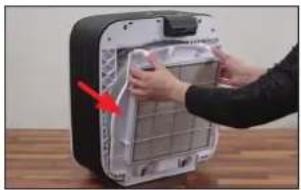
natural_image
Person installing or adjusting a device panel into a black electronic device (no visible text or symbols)natural_image
Close-up of a hand cleaning a white toilet with blue cloth (no text or symbols visible)SIIPIPYÖRÄ
natural_image
Close-up of a red and black fan inside a computer tower, with a hand adjusting the fan (no visible text or symbols)natural_image
Close-up of hands cleaning a red and white fan with a cloth (no text or symbols visible)KOTELO
natural_image
Close-up of a hand cleaning a red and white fan with a blue cloth (no visible text or symbols)RULLIEN HOITO
natural_image
Close-up of a hand pouring liquid into a white basin with a black plastic container nearby (no text or symbols visible)natural_image
Close-up of a hand pouring liquid into a white container with black contents (no text or symbols visible)HIUKKASTUNNISTIN
natural_image
Hand inserting a plug into an electrical outlet (no text or symbols visible)natural_image
Close-up of a white curved object on a wooden surface, with a green checkmark in the corner (no text or symbols visible)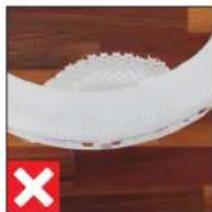
natural_image
Close-up of a white textured surface with a red 'X' marker on the left (no text or symbols on the surface)LISÄVARUSTEIDEN VAIHTAMINEN
TIETOJA A681 HYBRID -SUODATTIMESTA
natural_image
Person installing or adjusting a device casing with a red arrow pointing to the part (no visible text or symbols)natural_image
Close-up of a hand holding a small white plastic device with red internal components, placed on a wooden surface (no text or symbols visible)natural_image
Interior view of a white plastic tray with a red arrow pointing to a small white object on the side (no text or symbols visible)
A7017 Ionic Silver Stick®
Kort manual
text_image
Exploded view diagram of a smart air conditioner system with labeled components and parts1 Frontafdækning
2 Forfilter
3 A681 HYBRID-filter
4 Filterholder
5 Tromle
6 AH700 fordampermåtte
7 A7017 Ionic Silver Stick®
8 BONECO H700
9 Vandtank
10 Duftstofbeholder
11 Vandkar
12 Ventilatorhjul
13 Strømforsyning
TEKNISKE DATA
Typebetegnelse BONECO H700
natural_image
Close-up of a hand placing a component into a battery pack, with a red arrow indicating upward motion (no text or symbols on the device itself)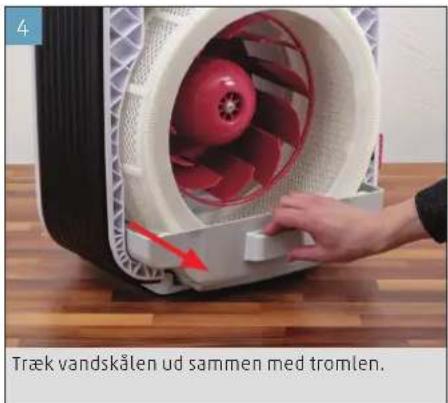
natural_image
Close-up of a red-handled fan with a hand adjusting its side panel, showing internal blades and a red arrow indicating motion (no text or symbols on the fan itself)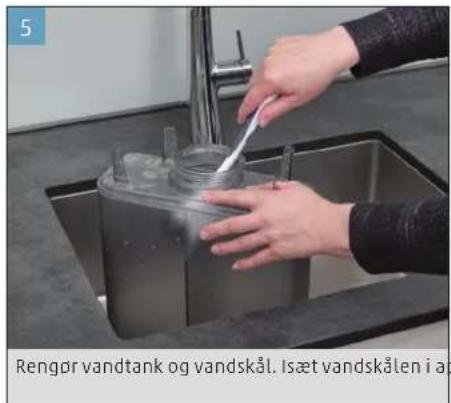
natural_image
Person washing a glass container in a stainless steel kitchen sink (no text or symbols visible)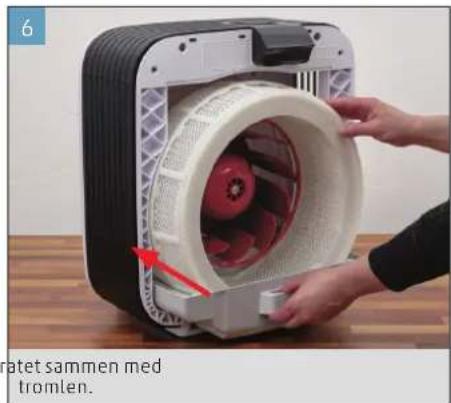
natural_image
Close-up of hands installing a white plastic fan into a black industrial machine (no text or symbols visible)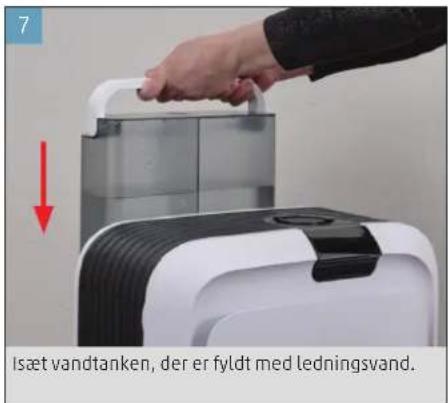
natural_image
Close-up of a circular mechanical component with a red indicator light at the top (no visible text or symbols)natural_image
Close-up of a finger pressing a circular button on a dark surface (no text or symbols visible)natural_image
Circular object with a bright horizontal line and a dark center, set against a textured dark background (no text or symbols visible)natural_image
Close-up of a hand pressing a black circular button on a dark surface (no text or symbols visible)natural_image
Close-up of a finger pressing down on a black circular component (no text or symbols visible)natural_image
Close-up of a black circular mechanical component with a white accent line (no text or symbols visible)text_image
AIR 88h WATER FILTER ISS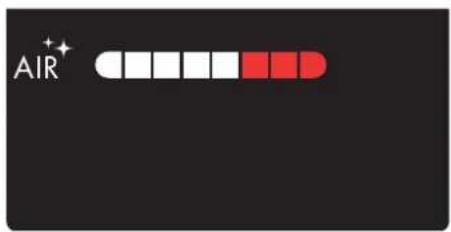
text_image
AIR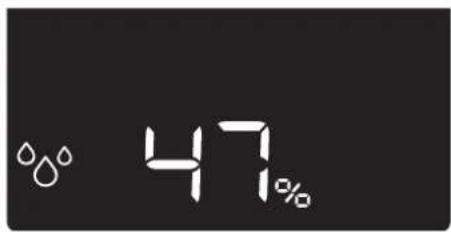
text_image
47%text_image
9:41 ZORIN, OH 80% HH Beauts 6.0 °C H20 H20Ydelsesomfang
OPTIMAL LUFTFUGTIGHED
natural_image
Close-up of a hand pressing down on a black circular component (no visible text or symbols)- Tilpas ventilatortrinnet i BONECO-appen.
ANVENDELSE AF DUFTSTOFFER
ANVENDELSE AF DUFTSTOFFER
natural_image
Person installing or adjusting a white appliance into a black casing, with a red arrow indicating the component (no text or symbols visible)natural_image
Person installing or adjusting a device into a black industrial machine (no visible text or symbols)- Kom duftstoffet i den dertil beregnede duftstof- beholder.
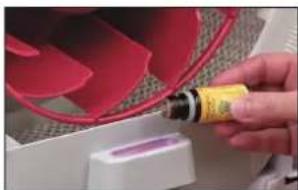
natural_image
Close-up of a hand holding a yellow bottle next to a red fan-shaped object (no visible text or symbols)natural_image
Close-up of hands installing or adjusting a device inside a black appliance (no visible text or symbols)natural_image
Close-up of a hand pressing down on a white fan with a red lightning bolt, no visible text or symbolsnatural_image
Close-up of a white plastic tray with a red arrow pointing to a small white object, no visible text or symbols.natural_image
Person using a tool to clean or wash a small container on a stainless steel kitchen sink (no text or symbols visible)natural_image
Person washing dishes in a stainless steel kitchen sink (no visible text or symbols)VANDKAR
natural_image
Close-up of a hand pressing a white plastic container with red contents, placed on a wooden surface (no visible text or symbols)- Fjern tromlen med AH700 fordampermåtten.
- Tag og A7017 Ionic Silver Stick® og rullerne ud.
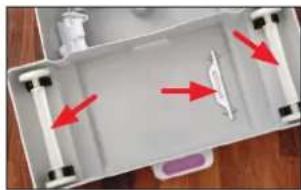
natural_image
White plastic tray with red arrows pointing to a white object, no visible text or symbolsnatural_image
Person washing a large white circular object with water spray, no visible text or symbolsnatural_image
Person washing white cloth on a kitchen sink (no text or symbols visible)natural_image
Person installing or adjusting a white plastic device into a black box (no text or symbols visible)natural_image
Person cleaning a white plastic tray with a blue cloth (no text or symbols visible)FORFILTER
natural_image
Hand cleaning a white plastic grid with a brush (no text or symbols visible)natural_image
Close-up of a solar panel with grid lines (no text or symbols visible)FILTERHOLDER
- Fjern filterholderen.
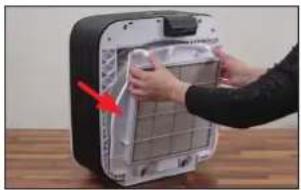
natural_image
Person installing or adjusting a device panel into a black box (no visible text or symbols)natural_image
Close-up of a hand cleaning a white toilet with a blue cloth (no text or symbols visible)VENTILATORHJUL
Fjern aldrig holdeskruen for at afmontere ventilatorhjulet! Ved ny montering kan en ubalance medføre generende støj og tilmed beskadige motoren.
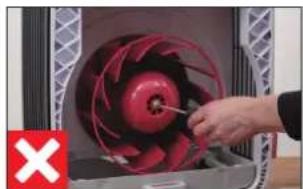
natural_image
Close-up of a hand operating a red-handled fan inside a machine (no visible text or symbols)natural_image
Close-up of hands cleaning a red industrial fan with a blue cloth (no visible text or symbols)HUS
natural_image
Close-up of a hand cleaning a red fan with a blue cloth (no visible text or symbols)PLEJE AF RULLERNE
natural_image
Close-up of a hand placing a small object into a white basin with a black plastic block nearby (no text or symbols visible)natural_image
Close-up of a hand pouring liquid into a white container with black contents (no visible text or symbols)PARTIKELSENSOR
natural_image
Hand inserting a wall-mounted electrical socket into a wall, with no visible text or symbolsnatural_image
Close-up of a white curved object on a wooden surface, with a green checkmark icon in the corner (no text or symbols on the object itself)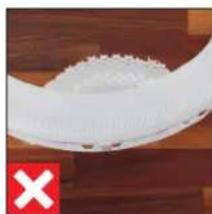
natural_image
Close-up of a white textured object with a red 'X' mark on the left (no text or symbols on the object itself)UDSKIFTNING AF TILBEH∅R
VIA A681 HYBRID-FILTERET
natural_image
Person installing or adjusting a device into a black appliance panel (no visible text or symbols)natural_image
Close-up of a hand holding a white plastic device with a red arrow pointing to the interior (no visible text or symbols)natural_image
Interior view of a white plastic container with a red arrow pointing to a small white object on the side (no text or symbols visible)NULSTILLING AF APPARAT
natural_image
Illustration of a rectangular electronic device with a black tab and grid lines (no text or symbols)BONECO H700 med A681 HYBRID-filter
natural_image
Simple line drawing of a plug connected to a multi-wire cable with a terminal connector (no text or symbols)Strømadapter
A7017 Ionic Silver Stick®
Hurtigveiledning
text_image
Exploded view diagram of a smart air conditioner system with labeled components and numbered parts1 Frontdeksel
2 Forfilter
3 A681 HYBRID-filter
4 Filterholder
5 Trommel
6 AH700 fordunstermatte
7 A7017 Ionic Silver Stick®
8 BONECO H700
9 Vanntank
10 Duftstoff beholder
11 Vannkar
12Vifte
13 Strømforsyning
TEKNISKE DATA
Typebetegnelse Boneco H700
Nettspenning 100-240 V \~ 50/60 Hz
Effektopptak Standby: < 0.5 W
Nivå 1: 2.6 W
Nivå 6: 26.5 W
natural_image
Person assembling a white electronic device with a red arrow indicating the component (no text or symbols on device)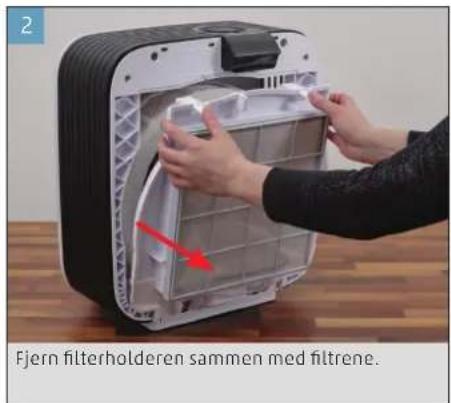
natural_image
Close-up of a hand placing a component into a battery pack, with a red arrow indicating upward motion (no text or symbols on the device itself)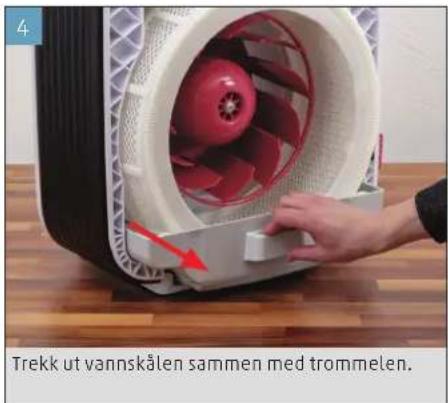
natural_image
Person washing a glass container in a stainless steel kitchen sink (no text or symbols visible)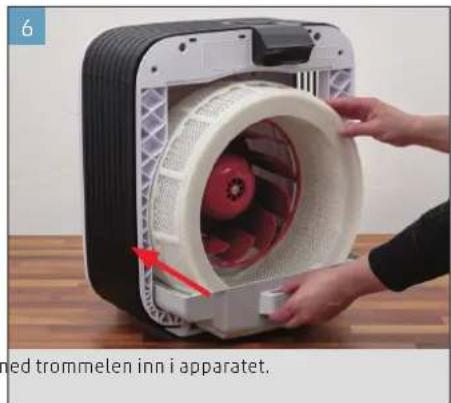
natural_image
Close-up of hands installing a trommelen inverter into a device (no text or symbols visible)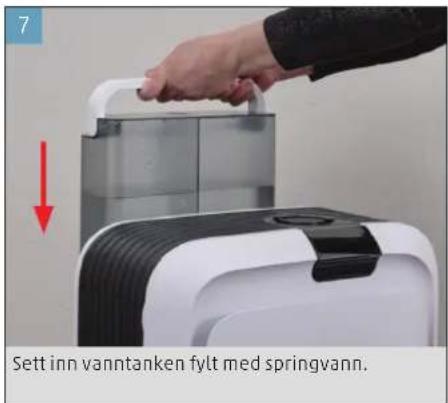
text_image
7 Sett inn vanntanken fylt med springvann.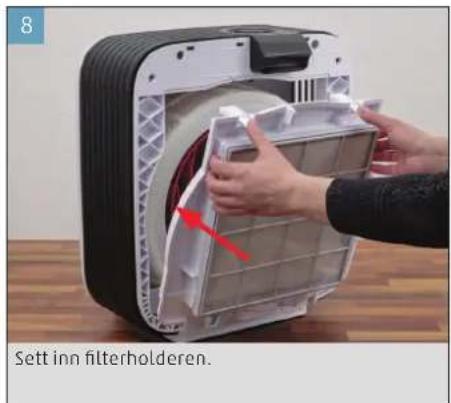
text_image
8 Sett inn filterholderen.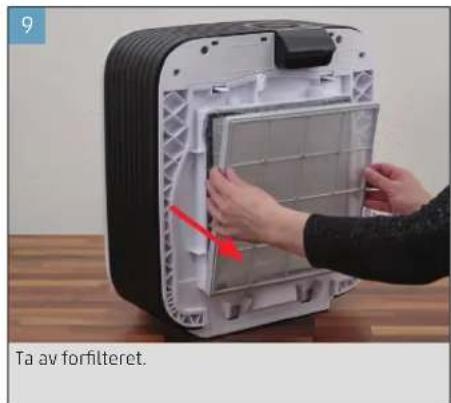
natural_image
Person assembling a white plastic device with a red arrow indicating assembly (no text or symbols on the device itself)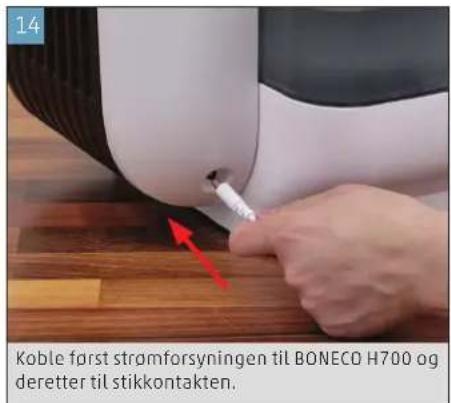
natural_image
Close-up of a dark circular object with a red starburst at the top (no text or symbols visible)natural_image
Close-up of a finger pressing a circular button on a dark surface (no text or symbols visible)Apparatet er alltid i AUTO-modus när det slås på. Du ser at AUTO-modus er aktiv ved den lille opplyste lysdioden over styrkeregulatoren.
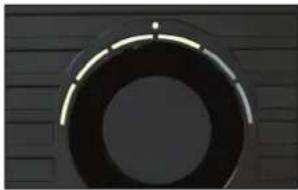
natural_image
Close-up of a circular mechanical component with a bright center and dark outer ring (no visible text or symbols)natural_image
Close-up of a finger pressing a black circular button on a dark surface (no text or symbols visible)natural_image
Close-up of a hand pressing down on a black circular dial (no text or symbols visible)natural_image
Close-up of a circular mechanical component with evenly spaced teeth, mounted on a dark surface (no text or symbols visible)text_image
AIR 88h WATER FILTER ISS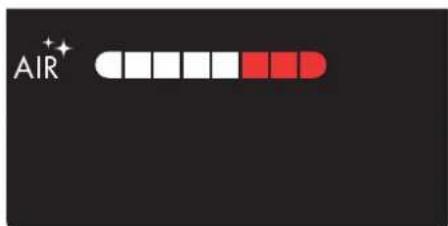
text_image
AIR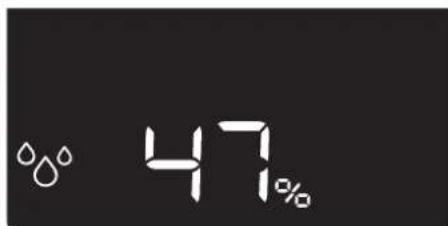
text_image
47%text_image
9:41 ZORIN, OH 80% HH BeKeze 6.0 °C H20 H20natural_image
Close-up of a finger pressing down on a black circular component (no text or symbols visible)- Du kan tilpasse viftetrinnet i BONECO-appen.
BRUK AV DUFTSTOFFER
BRUK AV DUFTSTOFFER
natural_image
Person installing or adjusting a white electronic device with a red arrow indicating the component (no text or symbols visible)natural_image
Person installing or adjusting a device into a black appliance with a red arrow pointing to the component (no visible text or symbols)- Tilsett duftstoffet i duftstoffbeholderen.
- Sett filterholderen og frontdekselet på igjen.
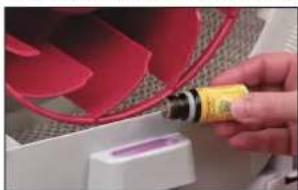
natural_image
Close-up of a hand holding a yellow cylindrical tool next to a red curved object, with no visible text or symbols.RENGJÖRINGSANVISNINGER
OM RENGJÖRINGEN
natural_image
Close-up of hands installing or adjusting a device panel with a red arrow pointing to the component (no visible text or symbols)natural_image
Close-up of a hand pressing a red arrow on a white mechanical component (no text or symbols visible)- Tøm vannkaret og vanntanken, og ta ut A7017 I o - nic Silver Stick ^8 .
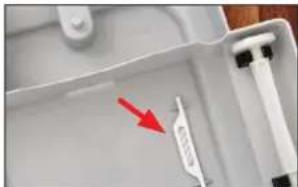
natural_image
Close-up of a white plastic tray with a red arrow pointing to a small white object on the side (no text or symbols visible)natural_image
Person using a tool to clean or wash a glass bowl in a kitchen sink (no visible text or symbols)natural_image
Person washing a water bottle from a stainless steel kitchen sink (no text or symbols visible)VANNKAR
natural_image
Close-up of a hand holding a white plastic device with a red arrow pointing to the interior (no visible text or symbols)natural_image
Top-down view of a white plastic tray with red arrows indicating directional movement or force (no text or symbols visible)natural_image
Person washing a white plastic ring on a kitchen sink (no text or symbols visible)natural_image
Person washing a circular white object with a handle, no visible text or symbols- Skyll trommelen grundig under varmt vann.
AH700 FORDUNSTERMATTE (HÄNDVASK)
- Vask og valk AH700 fordunstermatten grundig med varmt vann og oppvaskmiddel.
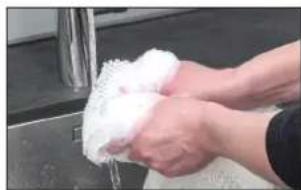
natural_image
Close-up of hands washing white cloth over a metal sink (no text or symbols visible)natural_image
Person installing or adjusting a device into a black and white container (no visible text or symbols)natural_image
Person cleaning a white plastic tray with a blue cloth (no text or symbols visible)FORFILTER
natural_image
Hand cleaning a clean glass dish with a brush (no text or symbols visible)natural_image
Close-up of a black rectangular solar panel with vertical grating lines (no text or symbols visible)FILTERHOLDER
- Ta ut filterholderen.
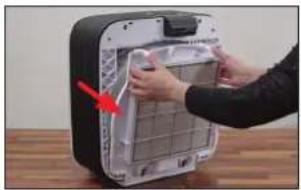
natural_image
Person installing or adjusting a device into a black appliance panel (no visible text or symbols)natural_image
Close-up of a hand cleaning a white toilet with blue cloth (no text or symbols visible)VIFTE
natural_image
Close-up of a hand using a red-handled tool to adjust a red-handled fan inside a machine (no text or symbols visible)natural_image
Close-up of hands cleaning a red and blue plastic fan on a wooden surface (no text or symbols visible)HUS
natural_image
Close-up of a hand cleaning a red fan with a blue cloth, next to a white fan (no text or symbols visible)VEDLIKEHOLD AV RULLENE
natural_image
Close-up of a hand placing a small object into a white plastic container with a black plastic sample (no text or symbols visible)- Påfor én dråpe pleieolje direkte på hver av hol - derne.
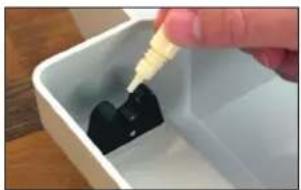
natural_image
Close-up of a hand pouring liquid into a white plastic container with black contents (no text or symbols visible)PARTIKKELSENSOR
natural_image
Hand inserting a wall-mounted electrical socket into a white panel (no text or symbols visible)- Tørk sensoren med en tørr bomullspinne.
SETTE SAMMEN APPARATET
natural_image
Close-up of a white curved object on a wooden surface, with a green checkmark in the corner (no text or symbols visible)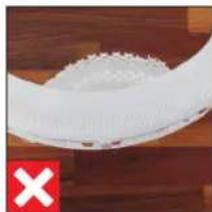
natural_image
Close-up of a white plastic object with a red 'X' mark on the left, against a wooden background (no text or symbols)BYTTE AV TILBEH∅R
OM A681 HYBRID-FILTERET
SLETTE MERKNADEN I APPEN
Merknaden 📋 kan slettes fra displayet i BONE-CO-appen.
SLETTE MERKNADEN PÅ APPARATET
natural_image
Person installing or adjusting a device into a black box (no visible text or symbols)natural_image
Close-up of a hand holding a small electronic device with a red arrow pointing to the interior (no visible text or symbols)- Ta ut den gamle A7017 Ionic Silver Stick ^2 , og kast den med husholdningsavfallet.

natural_image
Close-up of a white plastic container with a red arrow pointing to a small white object on the side (no text or symbols visible)SLETTE MERKNADEN I APPEN
Merknaden 📄 kan slettes fra displayet i BONE-CO-appen.
SLETTE MERKNADEN PÅ APPARATET
TILBAKESTILLE APPARATET
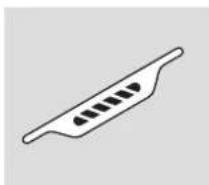
A7017 Ionic Silver Stick®
Isa lietošanas instrukcija
Drošibas noradijumi
DALU PĀRSKATS UN NOSAUKUMI
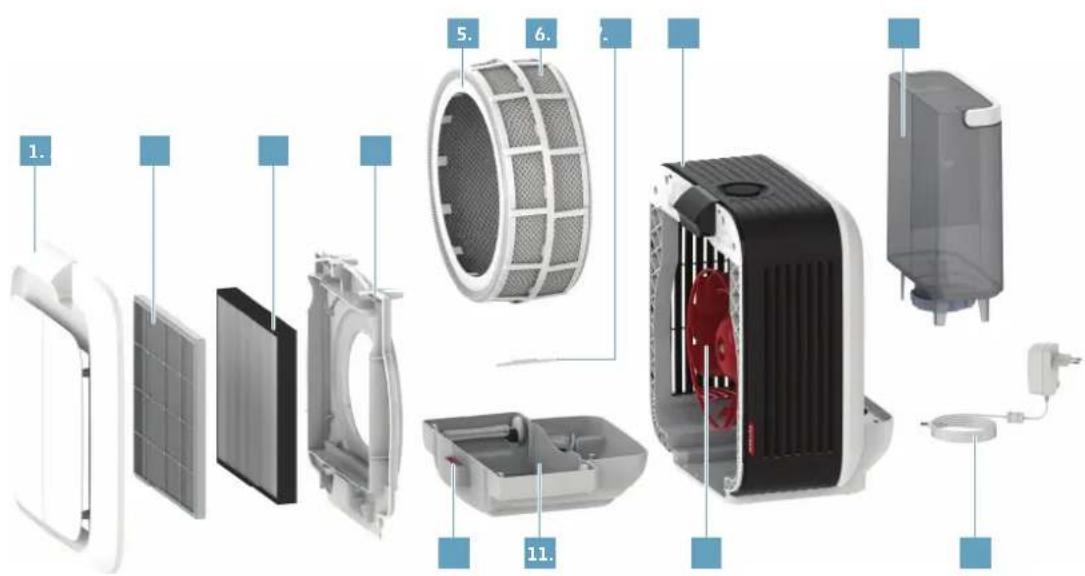
text_image
Exploded view diagram of a smart air conditioner system with labeled components in Chinesenatural_image
Close-up of hands installing a mechanical component with a red arrow indicating rotation (no text or symbols visible)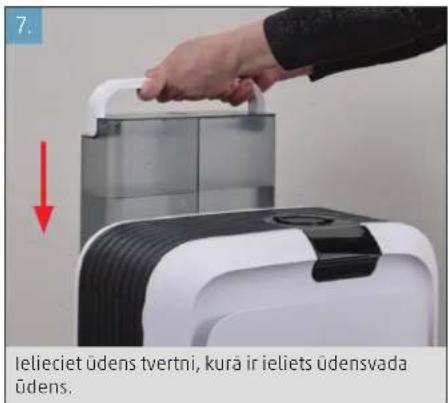
text_image
7. Ielieciet üdens tvertni, kurä ir ieliets üdensvada üdens.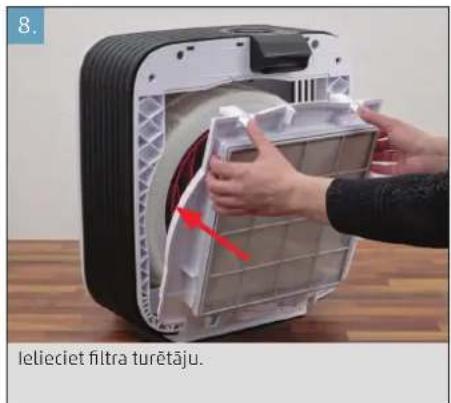
natural_image
Close-up of a dark circular object with a red starburst at the top (no text or symbols visible)natural_image
Close-up of a finger pressing down on a black circular button (no text or symbols visible)natural_image
Close-up of a circular mechanical component with a bright end, set against a dark textured background (no text or symbols visible)- Lai BONECO ierici izslęgtu, kad tā darbojas režimā "AUTO", vienreiz nospiediet jaudas regulatoru.
MANUĀLĀ VADĪBA
- Lai BONECO ierici ieslēgtu, vienreiz nospiediet jaudas regulatoru.
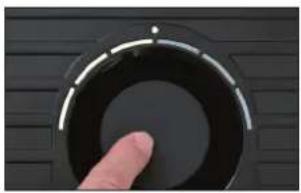
natural_image
Close-up of a hand pressing a black circular button on a dark surface (no text or symbols visible)natural_image
Close-up of a finger pressing down on a black circular component (no text or symbols visible)natural_image
Close-up of a circular mechanical component with evenly spaced teeth, mounted on a dark surface (no text or symbols visible)DISPLEJA INDIKĀCIJAS
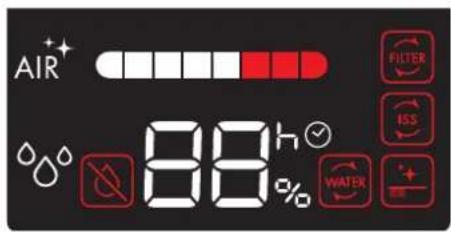
text_image
AIR 88h WATER FILTER ISSHIBRĪDA DARBĪBAS VEIDS ("HYBRID")
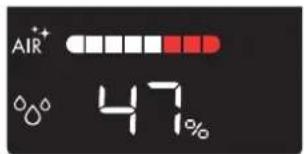
text_image
AIR 47%REŽIMS "SLEEP" (MIEGS)
natural_image
Close-up of a hand pressing down on a black circular component with white markings (no text or symbols visible)natural_image
Close-up of hands installing or adjusting a white appliance into a black casing (no visible text or symbols)natural_image
Person installing or adjusting a device with a red arrow pointing to the component (no visible text or symbols)natural_image
Close-up of a hand holding a yellow tool next to a red fan-shaped object (no visible text or symbols)natural_image
Close-up of hands installing or adjusting a device panel with a red arrow pointing to the component (no visible text or symbols)natural_image
Close-up of a hand pressing a small component into a white fan with red filter, no visible text or symbolsnatural_image
Close-up of a white appliance with a red arrow pointing to a small white object on the side (no visible text or symbols)natural_image
Person using a tool to clean or wash a glass container in a stainless steel kitchen sink (no visible text or symbols)natural_image
Person washing dishes in a stainless steel kitchen sink using a brush (no text or symbols visible)ÜDENS VÄCELE
- Izvelciet üdens väceli no BONECO H700.
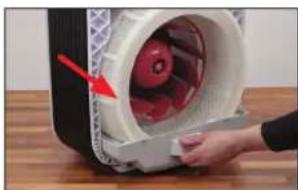
natural_image
Close-up of a hand opening a white cylindrical device with red internal components, placed on a wooden surface (no visible text or symbols)natural_image
Top-down view of a white plastic tray with red arrows pointing to internal features (no text or symbols visible)natural_image
Person washing a white plastic hose in a kitchen setting (no visible text or symbols)natural_image
Person washing a circular white object on a kitchen sink (no visible text or symbols)natural_image
Close-up of hands washing white foam on a stainless steel sink (no text or symbols visible)natural_image
Person installing or adjusting a device into a black box with a red arrow pointing to the lid (no text or symbols visible)natural_image
Person cleaning a white plastic tray with a blue cloth (no text or symbols visible)PRIEKŠFILTRS
natural_image
Person using a brush to clean or wash a white plastic tray (no text or symbols visible)natural_image
Close-up of a grid-patterned solar panel with uniform white lines (no text or symbols visible)FILTRA STIPRINÄJUMS
natural_image
Person installing or adjusting a device into a black box (no visible text or symbols)natural_image
Close-up of a hand cleaning a white toilet with a blue cloth (no text or symbols visible)VENTILATORA LÄPSTINAS
natural_image
Close-up of a red and black fan inside a machine, with a hand adjusting the blade (no visible text or symbols)natural_image
Close-up of hands cleaning a red and blue plastic fan component (no text or symbols visible)KORPUSS
natural_image
Close-up of a hand cleaning a red fan with a blue cloth on a wooden surface (no text or symbols visible)VELTNĪŠU KOPŠANA
natural_image
Close-up of a hand placing a small object into a white plastic container with a black plastic sample (no text or symbols visible)natural_image
Close-up of a hand pouring liquid into a white container with black contents (no text or symbols visible)DALINU SENSORS
natural_image
Hand inserting a small electronic component into a wall-mounted socket (no text or symbols visible)- Nosusiniet sensoru ar sausu vates kocinu.
IERİCES SALIKŠANA
natural_image
Close-up of a white curved object on a wooden surface, with a green checkmark in the corner (no text or symbols visible)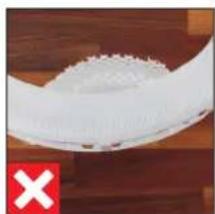
natural_image
Close-up of a white textured object on a wooden surface with a red 'X' symbol in the corner (no text or symbols on the object itself)PIEDERUMU NOMAINA
PAR FILTRU A681 HYBRID
natural_image
Person installing or adjusting a device panel into a black box (no visible text or symbols)natural_image
Close-up of a hand opening a white cylindrical device with red internal components, no visible text or symbols.natural_image
Interior view of a white plastic container with a red arrow pointing to a small white object on the side (no text or symbols visible)text_image
Exploded view diagram of a smart air conditioner system with labeled components in Chinesenatural_image
Close-up of a hand pressing down on a mechanical fan component (no text or symbols visible)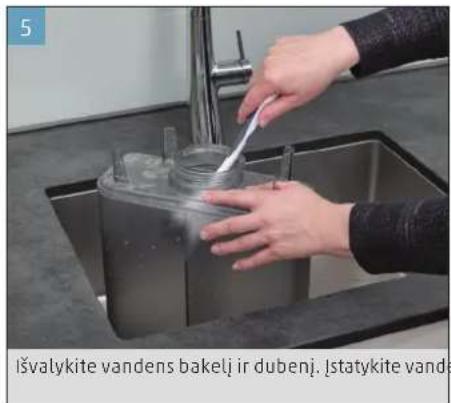
natural_image
Close-up of hands installing a circular device into a plastic housing, showing internal components and a red arrow indicating rotation (no text or symbols on the device itself)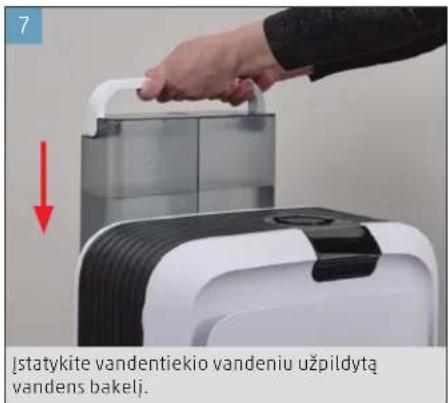
natural_image
Close-up of hands installing a mechanical component into a plastic housing (no visible text or symbols)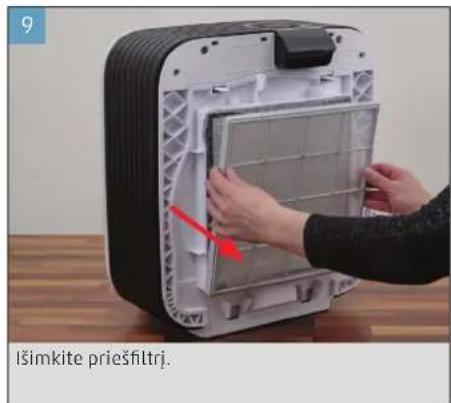
natural_image
Close-up of a dark circular object with a red light source and a small green cross at the top (no text or symbols visible)natural_image
Close-up of a finger pressing down on a black circular dial (no text or symbols visible)natural_image
Circular object with a bright horizontal line and a small dot, set against a dark textured background (no text or symbols visible)natural_image
Close-up of a finger pressing a black circular button on a dark textured surface (no text or symbols visible)natural_image
Close-up of a hand pressing down on a black circular component with a metallic ring (no text or symbols visible)natural_image
Close-up of a circular mechanical component with evenly spaced teeth, mounted on a dark surface (no text or symbols visible)text_image
AIR 88h WATER FILTER ISS +text_image
9:41 ZURIN, OH 80% RH Breake 6.0 °C H200 H200 + - SSSavybès
JVAIRÜS DARBO REŽIMAI
natural_image
Close-up of a finger pressing down on a black circular component (no text or symbols visible)natural_image
Close-up of hands installing or adjusting a white electronic device component with a red arrow indicating the component (no text or symbols visible)- Nuimkite filtro laikiklj kartu su filtru.
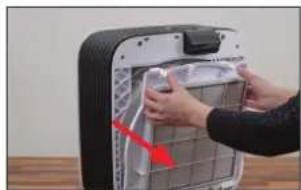
natural_image
Close-up of hands installing a wall-mounted device with a red arrow pointing to the component (no visible text or symbols)natural_image
Close-up of a hand holding a yellow bottle next to a red fan-shaped object (no visible text or symbols)natural_image
Person installing or adjusting a device panel with a red arrow indicating the component (no visible text or symbols)natural_image
Close-up of a hand pressing a small electronic component with a red arrow indicating motion (no visible text or symbols)natural_image
Close-up of a white plastic tray with a red arrow pointing to a small white object on the side (no text or symbols visible)natural_image
Person using a tool to clean or wash a glass bowl in a stainless steel kitchen sink (no visible text or symbols)- Taip pat nuvalykite ir dangtj.
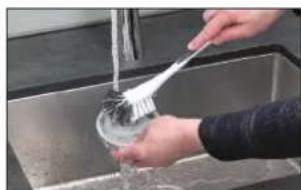
natural_image
Person washing a sink with a brush (no visible text or symbols)VANDENS VONELÉ
natural_image
Close-up of a hand opening a white cylindrical device with red internal components, no visible text or symbolsnatural_image
Top-down view of a white plastic tray with red arrows pointing to internal components (no text or symbols visible)natural_image
Person washing a white plastic hose in a kitchen sink (no text or symbols visible)natural_image
Person washing a large white circular object with bubbles, viewed from above (no text or symbols visible)natural_image
Person washing white soap on a kitchen sink (no text or symbols visible)AH700 GARINTUVO AUDINYS (SKALBYKLÉ)
natural_image
Close-up of hands installing or adjusting a white electronic device component (no visible text or symbols)natural_image
Person cleaning a white plastic tray with a blue cloth (no text or symbols visible)PRIEŠFILTRIS
natural_image
Hand using a brush to clean or store floor tiles (no visible text or symbols)natural_image
Close-up of a solar panel with grid lines and metallic casing (no text or symbols visible)FILTRO LAIKIKLIS
- Nuimkite filtro laikiklj.
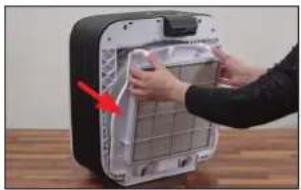
natural_image
Person installing or adjusting a device panel into a black appliance (no visible text or symbols)- Nuvalykite filtro laikiklj drėgna šluoste.
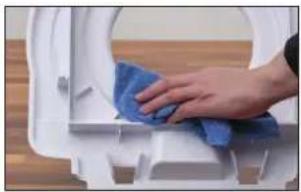
natural_image
Close-up of a hand cleaning a white toilet with a blue cloth (no text or symbols visible)VENTILIATORIAUS SPARNUOTÉ
natural_image
Close-up of a hand using a screwdriver to adjust the red turbine blade (no text or symbols visible)natural_image
Close-up of hands cleaning a red industrial fan with a blue cloth (no text or symbols visible)KORPUSAS
natural_image
Close-up of a hand cleaning a red fan-shaped object with a blue cloth (no text or symbols visible)RATUKU PRIEŽIURA
natural_image
Close-up of a hand using a pipette to add a small black object into a white container (no text or symbols visible)natural_image
Close-up of a hand using a pipette to apply black plastic into a white container (no text or symbols visible)DALELIŲ JUTIKLIS
natural_image
Hand inserting a small electrical socket into a white wall (no text or symbols visible)- Jutiklj nusausinkite sausu vatos tamponu.
PRIETAISO SURINKIMAS
natural_image
Close-up of a white curved object on a wooden surface, with a green checkmark in the corner (no text or symbols visible)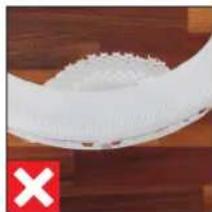
natural_image
Close-up of a white textured surface with a red 'X' marker on the left (no text or symbols on the surface)REIKMENS KEITIMAS
natural_image
Person installing or adjusting a device into a black box with a red arrow pointing to the interior (no text or symbols visible)natural_image
Close-up of a hand holding a small electronic device with a red arrow pointing to the interior (no visible text or symbols)natural_image
Illustration of a rectangular electronic device with a black tab and grid lines (no text or symbols)BONECO H700 A681 HYBRID-filtriga
natural_image
Simple line drawing of a plug connected to a multi-wire cable with a terminal connector (no text or symbols)Toiteplokk
A7017 Ionic Silver Stick®
Lühijuhend
Ohutusjuhised
ÜLEVAADE JA OSADE NIMETUSED
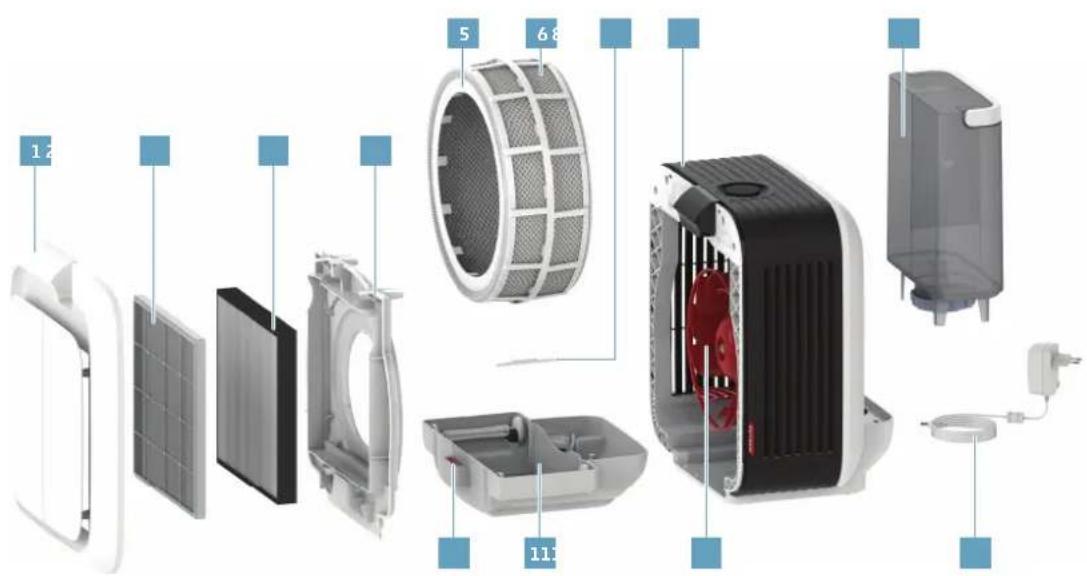
text_image
Exploded view diagram of a smart air conditioner system with labeled components and numbered parts1 Esikate
2 Eelfilter
3 A681 HYBRID-filter
4 Filtrihoidik
5 Trummel
6 AH700 aurustusmatt
7 Ionic Silver Stick® A7017
8 BONECO H700
9 Veepaak
10 Löhnaaine anum
11 Veevann
12 Ventilaatori tiivik
13 Toitejuhe
TEHNILISED ANDMED
natural_image
Close-up of a person adjusting a red-handled industrial fan component on a wooden surface (no text or symbols visible)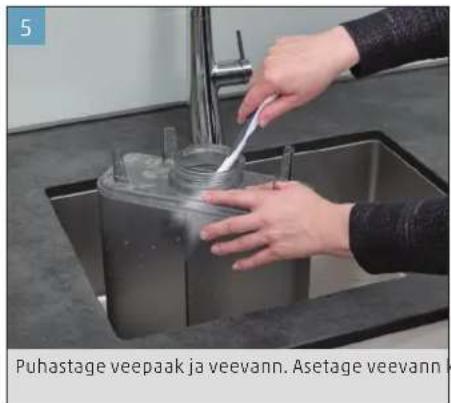
natural_image
Interior view of a Trumliga seadmesse air purifier with hands installing components (no text or symbols visible)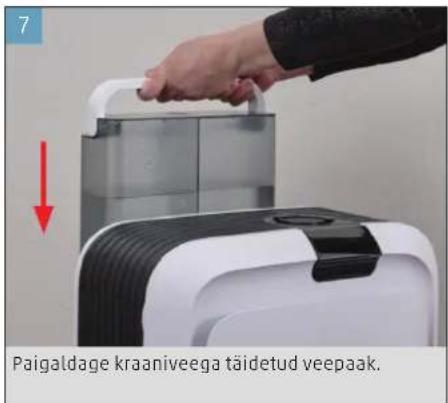
natural_image
Close-up of a circular mechanical component with a red indicator light and a teal mark (no text or symbols visible)natural_image
Close-up of a finger pressing a circular button on a dark surface (no text or symbols visible)natural_image
Circular dark object with a bright horizontal line and a small dot, set against a textured dark background (no text or symbols visible)natural_image
Close-up of a finger pressing a circular button on a dark surface (no text or symbols visible)Seade on sisselülitamisel alati AUTO-laadis.
natural_image
Close-up of a finger pressing down on a black circular component (no text or symbols visible)natural_image
Close-up of a curved black arch or pipe segment with white markings, no visible text or symbolstext_image
AIR 88h WATER FILTER ISS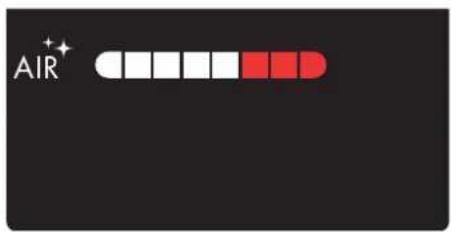
text_image
AIR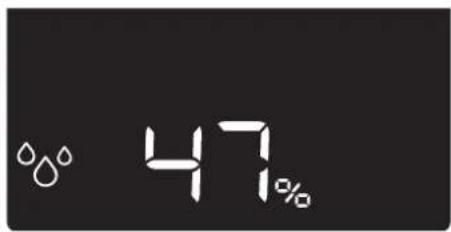
text_image
47%text_image
8:41 ZORIN OH 90% H1 Resist 6.5 °C H20 H20Jõudlusmäär
natural_image
Close-up of a hand pressing a black circular button on a dark surface (no text or symbols visible)- sobitage ventilaatori aste rakendusega BONECO.
LÕHNAAINETE KASUTAMINE
LÖHNAAINETE KASUTAMINE
natural_image
Person installing or adjusting a white appliance into a black casing, with a red arrow indicating the component (no text or symbols visible)- Eemaldage filtrihoidik koos filtriga.
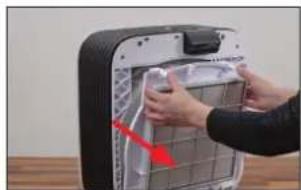
natural_image
Person installing or adjusting a device into a black industrial machine (no visible text or symbols)natural_image
Close-up of a hand holding a yellow bottle next to a red fan-shaped object, with no visible text or symbols.natural_image
Person installing or adjusting a device panel with a red arrow pointing to the component (no visible text or symbols)natural_image
Close-up of a hand pressing a red lightning bolt on a white fan-shaped object (no text or symbols visible)natural_image
Close-up of a white plastic tray with a red arrow pointing to a small label (no readable text or symbols)natural_image
Person using a tool to clean or wash a small container on a stainless steel kitchen sink (no visible text or symbols)- Puhastage ka kaas.
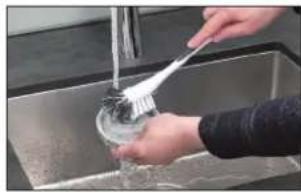
natural_image
Person washing dishes in a stainless steel kitchen sink (no visible text or symbols)VEEVANN
natural_image
Close-up of a hand opening a white plastic container with red liquid, placed on a wooden surface (no text or symbols visible)natural_image
Top-down view of a white plastic tray with red arrows pointing to internal components (no text or symbols visible)natural_image
Person washing a white plastic ring on a kitchen sink (no text or symbols visible)natural_image
Person washing a large white circular object with water, no visible text or symbolsnatural_image
Person washing white foam on a kitchen sink (no text or symbols visible)natural_image
Person installing or adjusting a white plastic device into a black casing (no text or symbols visible)natural_image
Person cleaning a white plastic dish with a blue cloth (no text or symbols visible)EELFILTER
natural_image
Hand using a brush to clean or store items in a grid (no visible text or symbols)natural_image
Close-up of a solar panel with grid lines and metallic contacts (no text or symbols visible)FILTRIHOIDIK
- Eemaldage filtrihoidik.
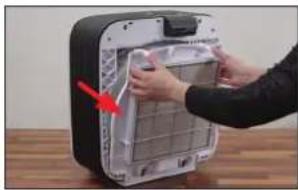
natural_image
Person installing or adjusting a device panel into a black appliance (no visible text or symbols)natural_image
Close-up of a hand cleaning a white toilet with a blue cloth (no text or symbols visible)VENTILAATORI THIVIK
natural_image
Close-up of a red and black fan inside a machine casing, with a hand adjusting the blade (no visible text or symbols)natural_image
Close-up of hands cleaning a red circular object with a blue cloth, placed on a wooden surface (no text or symbols visible)KORPUS
natural_image
Close-up of a hand cleaning a red fan with a blue cloth on a wooden surface (no text or symbols visible)RULLIDE HOOLDAMINE
natural_image
Close-up of a hand placing a small object into a white container with a black plastic clip nearby (no text or symbols visible)natural_image
Close-up of a hand pouring liquid into a white plastic container with black contents (no text or symbols visible)KÜBEMEANDUR
natural_image
Hand inserting a small cable into an electrical outlet (no text or symbols visible)- Kuivatage andur kuiva vatipulgaga.
SEADME KOKKUPANEK
natural_image
Close-up of a white curved object on a wooden surface, with a green checkmark in the corner (no text or symbols visible)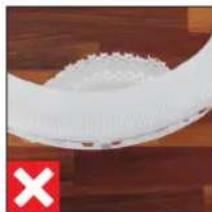
natural_image
Close-up of a white plastic bag attached to a wooden surface, with a red 'X' symbol in the corner (no text or symbols on the bag itself)TARVIKUTE VAHETAMINE
A681 HYBRID-FILTRIST
natural_image
Person installing or adjusting a device into a black appliance panel (no visible text or symbols)natural_image
Close-up of a hand holding a small electronic device with a red arrow pointing to the interior (no visible text or symbols)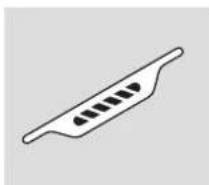
A7017 Ionic Silver Stick®
Stručný návod
Bezpečnostní pokyny
PŘEHLED A NÁZVY DÍLŮ
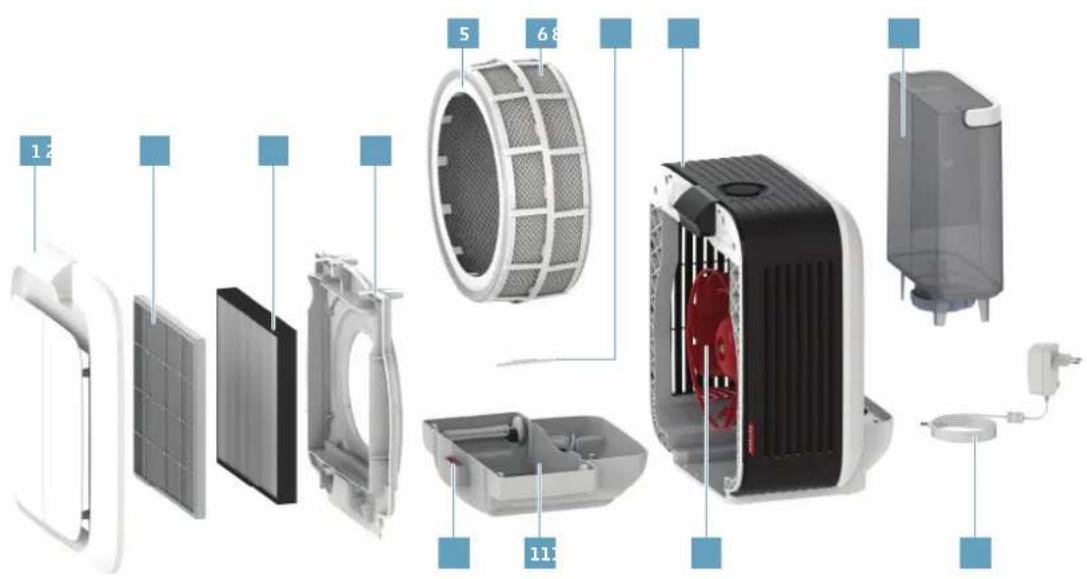
text_image
Exploded view diagram of a smart air conditioner system with labeled components and numbered partsnatural_image
Close-up of hands installing a circular fan component into a device, with a red arrow indicating the part's direction (no text or symbols on the device itself)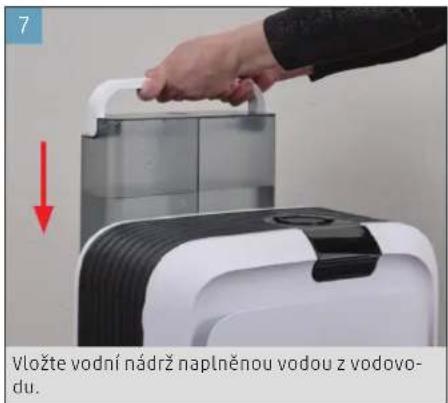
O MANUÁLNÍM OVLÁDÁNÍ
natural_image
Close-up of a circular mechanical component with a red indicator light at the top (no text or symbols visible)natural_image
Close-up of a finger pressing a black circular button on a dark surface (no text or symbols visible)natural_image
Circular object with a bright horizontal line and a small dot, set against a dark textured background (no text or symbols)natural_image
Close-up of a finger pressing down on a black circular dial (no text or symbols visible)natural_image
Close-up of a finger pressing down on a black circular component (no text or symbols visible)natural_image
Close-up of a circular mechanical component with evenly spaced teeth, no visible text or symbolstext_image
AIR 88h WATER FILTER ISS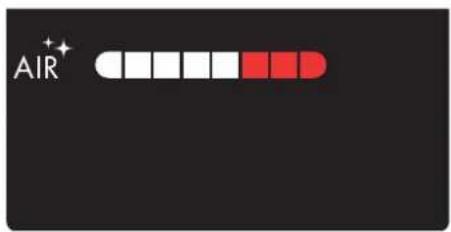
text_image
AIR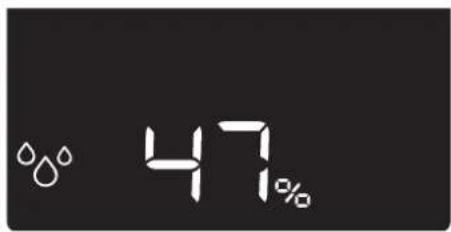
text_image
47%text_image
8:41 ZORIN OH 90% H1 Resist 6.5 °C H20 H20Rozsah funkcí
natural_image
Close-up of a hand pressing down on a black circular component (no text or symbols visible)- Nastavte stupeň ventilátoru v aplikaci BONECO.
POUŽITÍ AROMATICKÝCH LÁTEK
POUŽITÍ AROMATICKÝCH LÁTEK
natural_image
Close-up of hands installing or adjusting a white electronic device casing with a red arrow indicating the component (no text or symbols visible)natural_image
Person installing or adjusting a device panel with a red arrow pointing to the component (no visible text or symbols)natural_image
Close-up of a hand holding a yellow cylindrical tool next to a red fan-shaped object (no visible text or symbols)POKYNY K ČIŠTĚNÍ
O ČIŠTĚNÍ
natural_image
Close-up of hands installing or adjusting a mechanical component with a red arrow pointing to the part (no visible text or symbols)natural_image
Close-up of a hand pressing down on a car wheel component with a red arrow indicating downward motion (no text or symbols visible)natural_image
Close-up of a white plastic tray with a red arrow pointing to a small white object, no visible text or symbols.natural_image
Person using a tool to clean or wash a glass in a stainless steel kitchen sink (no visible text or symbols)natural_image
Person washing a basin drain with a brush (no visible text or symbols)NÁDOBA NA VODU
natural_image
Close-up of a hand opening a white cylindrical device with red indicator arrow, no visible text or symbolsnatural_image
Top-down view of a white plastic tray with red arrows indicating directional movement or flow, no visible text or symbols.natural_image
Person handling a white plastic hose in a kitchen sink (no visible text or symbols)natural_image
Close-up of hands washing a white circular object with water droplets (no text or symbols visible)natural_image
Person washing white cloth on a kitchen sink (no text or symbols visible)natural_image
Person installing or adjusting a white electronic device component with a red arrow pointing to the part (no text or symbols visible)natural_image
Person cleaning a white plastic tray with a blue cloth (no text or symbols visible)PŘEDFILTR
natural_image
Hand using a brush to clean or store contents in a metal container (no visible text or symbols)natural_image
Close-up of a black rectangular panel with white grid lines, no visible text or symbolsDRŽÁK FILTRU
natural_image
Person installing or adjusting a device panel into a black appliance (no visible text or symbols)natural_image
Hand cleaning a white toilet with blue cloth (no text or symbols visible)LOPATKY VENTILÁTORU
natural_image
Close-up of a hand operating a red turbine fan inside a machine (no visible text or symbols)natural_image
Close-up of hands cleaning a red and blue plastic fan on a wooden surface (no text or symbols visible)SKRÍN
natural_image
Close-up of a hand cleaning a red fan with a blue cloth (no text or symbols visible)PÉČE O VÁLEČKY
natural_image
Close-up of a hand using a pipette to apply liquid onto a white plastic tray (no text or symbols visible)natural_image
Close-up of a hand pouring liquid into a white container with black contents (no text or symbols visible)SNÍMAČ ČÁSTIC
natural_image
Hand inserting a cable into an electrical outlet (no text or symbols visible)natural_image
Close-up of a white curved object on a wooden surface, with a green checkmark in the corner (no text or symbols visible)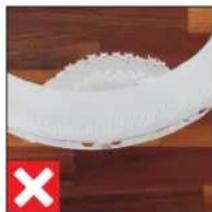
natural_image
Close-up of a white textured object on a wooden surface, with a red 'X' symbol in the corner (no text or symbols on the object itself)VÝMĚNA PŘÍSLUŠENSTVÍ
O HYBRIDNÍM FILTRU A681
natural_image
Person installing or adjusting a black electronic device into a grid panel (no visible text or symbols)natural_image
Close-up of a hand opening a white plastic fan with red filter blades, placed on a wooden surface (no text or symbols visible)natural_image
Interior view of a plastic tray with a white plastic sheet and a red arrow pointing to it (no text or symbols visible)text_image
Exploded view diagram of a smart air conditioner system with labeled components and numbered parts1 Čelný kryt
2 Predradeny filter
3 Filter A681 HYBRID
4 Držiak filtra
5 Bubon
6 Vložka AH700
odparovacieho zvlhčovača
7 Antibakteriálna tyčinka A7017 Ionic Silver Stick*
8 BONECO H700
9 Nádržka na vodu
10 Nádobka na aromatickú látku
11 Vanička na vodu
12 Lopatky ventilátora
13 Napájanie
TECHNICKÉ ÚDAJE
Typové označenie BONECO H700
Napájacie napätie 100 - 240 V \~ 50/60 Hz
natural_image
Close-up of a dark circular object with a red starburst on top (no text or symbols visible)natural_image
Close-up of a finger pressing down on a black circular button (no text or symbols visible)natural_image
Circular dark object with a bright horizontal line and small dots, set against a textured gray background (no text or symbols)natural_image
Close-up of a finger pressing a black circular button on a dark surface (no text or symbols visible)natural_image
Close-up of a finger pressing down on a black circular device dial (no text or symbols visible)natural_image
Close-up of a dark circular object with a light-colored outline, possibly a mechanical or electronic component (no visible text or symbols)text_image
AIR 88h WATER FILTER ISS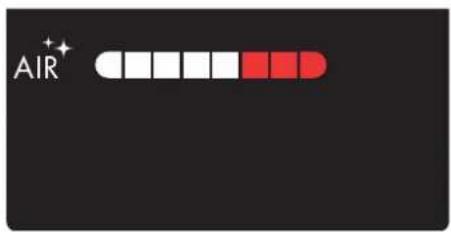
text_image
AIR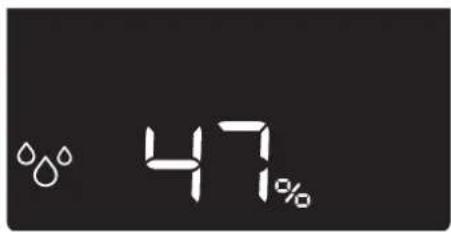
text_image
47%natural_image
Close-up of a hand pressing down on a black circular component, no visible text or symbolsnatural_image
Close-up of hands installing or adjusting a white appliance into a black casing (no visible text or symbols)- Odstráňte držiak filtra spolu s filtrom.
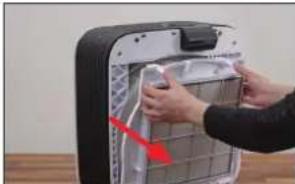
natural_image
Close-up of hands installing or adjusting a wall-mounted device with a red arrow pointing to the component (no visible text or symbols)natural_image
Close-up of a hand holding a yellow tool next to a red fan-shaped object (no visible text or symbols)natural_image
Person installing or adjusting a wall-mounted device with a red arrow pointing to the component (no visible text or symbols)natural_image
Close-up of a hand pressing a small component on a white fan (no visible text or symbols)- Vyprázdnite vaničku na vodu, ako aj nádržku na vodu a odoberte tyčinku A7017 Ionic Silver Stick ^8 .
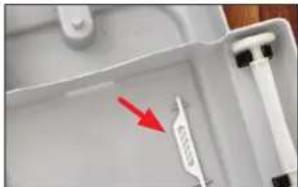
natural_image
Close-up of a white plastic tray with a red arrow pointing to a small label (no readable text or symbols)text_image
4h t+ /80- Znovu nakrátko stlačte regulátor výkonu a spus títe odvápňovanie.
natural_image
Person using a tool to clean or wash a plastic cup on a stainless steel kitchen sink (no text or symbols visible)- vyčistite aj veko.
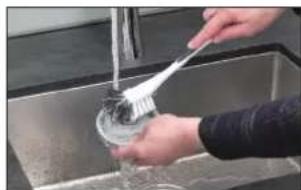
natural_image
Person washing a sink with a brush and water filter (no text or symbols visible)VANIČKA NA VODU
natural_image
Close-up of a hand opening a white plastic device with red and black components, placed on a wooden surface (no text or symbols visible)- odstráňte bubon s vložkou ah700 odparovacieho zvlhčovača.
- vyberte a antibakteriálnu tyčinku a7017 ionic sil - ver stick ^® .
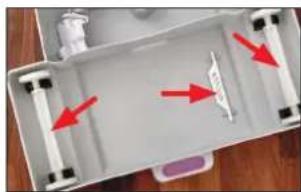
natural_image
Top-down view of a white plastic tray with red arrows pointing to internal components (no text or symbols visible)natural_image
Person washing a white cylindrical soap dispenser in a kitchen sink (no text or symbols visible)natural_image
Person washing a large white circular object with a water droplet on the surface (no text or symbols visible)natural_image
Person washing white soap on a sink (no text or symbols visible)natural_image
Person installing or adjusting a white electronic device component with a red arrow pointing to the part (no text or symbols visible)- Kryt vyčistite vlhkou handričkou.
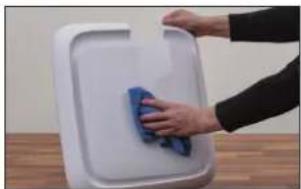
natural_image
Person cleaning a white plastic tray with a blue cloth (no text or symbols visible)PREDRADENÝ FILTER
natural_image
Hand using a brush to clean or store contents in a metal container (no visible text or symbols)natural_image
Close-up of a black rectangular panel with white grid lines, no visible text or symbolsDRŽIAK FILTRA
natural_image
Person installing or adjusting a device panel into a black appliance (no visible text or symbols)- Držiak filtra vyčistite vlhkou handričkou.
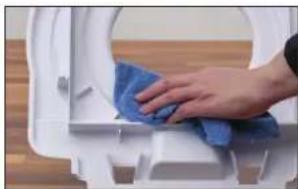
natural_image
Close-up of a hand cleaning a white toilet with a blue cloth (no text or symbols visible)LOPATKY VENTILÁTORA
natural_image
Close-up of a hand operating a red and black fan-shaped device with a screwdriver, no visible text or symbolsnatural_image
Close-up of hands cleaning a red circular object with a blue cloth (no visible text or symbols)KRYT
- Vnútro krytu vyčistite vlhkou handričkou, teplou vodou a prostriedkom na čistenie riadu.
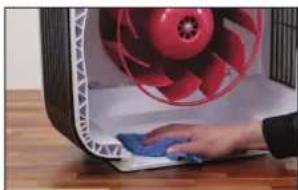
natural_image
Close-up of a hand cleaning a red fan with a blue cloth on a wooden surface (no visible text or symbols)STAROSTLIVOST O KOLIESKA
natural_image
Close-up of a hand pouring liquid into a white plastic container with a black sample (no text or symbols visible)- Aplikujte po 1 kvapke priamo na držiaky.
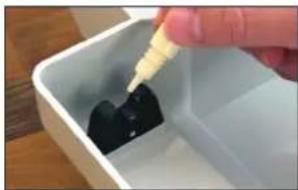
natural_image
Close-up of a hand pouring liquid into a white container with dark contents (no text or symbols visible)ČASTICOVÝ SENZOR
natural_image
Hand inserting a plug into an electrical outlet (no text or symbols visible)- Senzor vysušte pomocou suchej vatovej tyčinky.
ZMONTOVANIE PRÍSTROJA
natural_image
Close-up of a white curved object on a wooden surface, with a green checkmark in the corner (no text or symbols visible)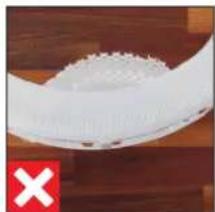
natural_image
Close-up of a white plastic bowl with a red X symbol on the bottom left (no text or symbols on the bowl itself)VÝMENA PRÍSLUŠENSTVA
O FILTRIA681 HYBRID
natural_image
Person installing or adjusting a device panel with a red arrow pointing to the component (no text or symbols visible)- Vytiahnite vaničku na vodu a odstráňte bubon.
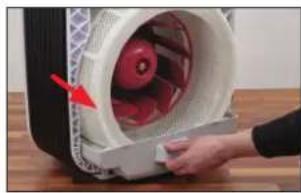
natural_image
Close-up of a hand holding a white plastic container with red internal components, no visible text or symbolsnatural_image
White plastic tray with a white handle and a red arrow pointing to it, no visible text or symbols.-
Nasadte novú antibakteriálnu tyčinku A7017 lo - nic Silver Stick ^8 .
-
Diely nasadte v opačnom poradí.
VYMAZANIE UPOZORNENIA V APLIKÁCII
natural_image
Illustration of a rectangular electronic device with a black tab and grid lines (no text or symbols)BONECO H700
s filtrom A681 HYBRID
natural_image
Simple line drawing of a plug connected to a cord and cable (no text or symbols)Napajalnik
A7017 Ionic Silver Stick®
Hitri priračnik
Varnostna navodila
PREGLED IN POIMENOVANJE DELOV
585
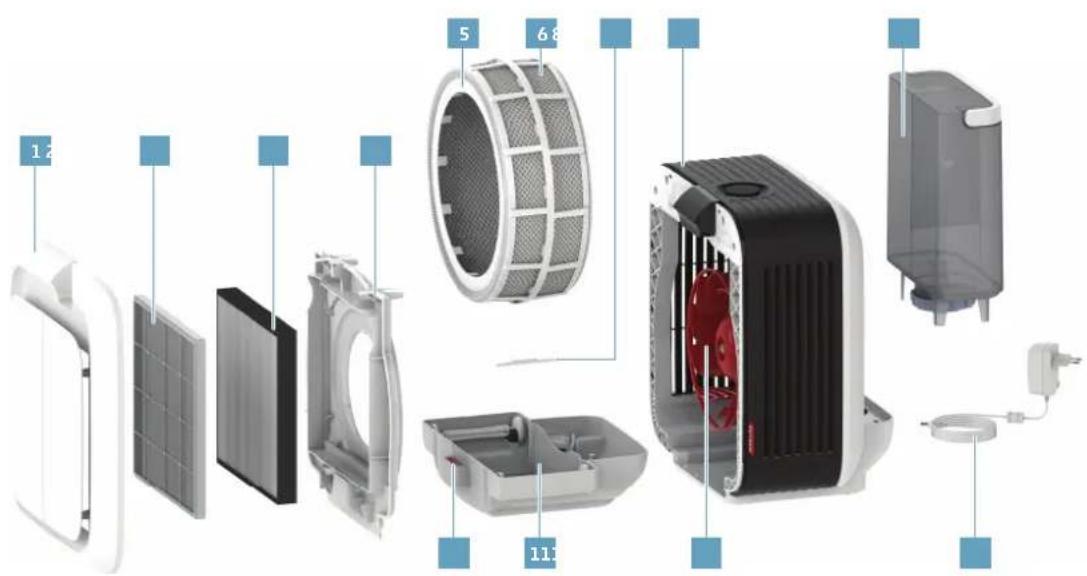
text_image
Exploded view diagram of a smart air conditioner system with labeled components and numbered parts1 Sprednji pokrov
2 Predfilter
3 Filter A681 HYBRID
4 Držalo filtra
5 Boben
6 Vlažilna obloga AH700
7 A7017 Ionic Silver Stick*
8 BONECO H700
9 Posoda za vodo
10 Posoda za dišave
11 Vodno korito
12 Lopatica ventilatorja
13 Napajalnik
TEHNIČNI PODATKI
Tipska oznaka BONECO H700
Omrežna napetost 100-240 V \~ 50/60 Hz
natural_image
Close-up of a dark circular object with a red star-like symbol at the top (no text or symbols visible)natural_image
Close-up of a finger pressing a black circular button on a textured surface (no text or symbols visible)natural_image
Close-up of a circular mechanical component with a bright center and dashed outline, set against a dark textured background (no text or symbols visible)natural_image
Close-up of a finger pressing a black circular button on a textured surface (no text or symbols visible)natural_image
Close-up of a hand pressing down on a black circular device dial (no text or symbols visible)natural_image
Close-up of a circular mechanical component with segmented edges, no visible text or symbolstext_image
AIR 88h WATER FILTER ISS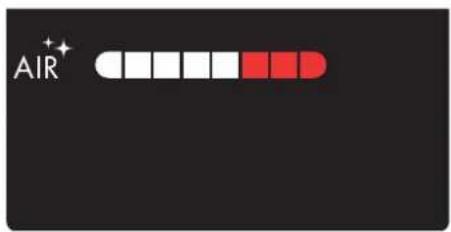
text_image
AIR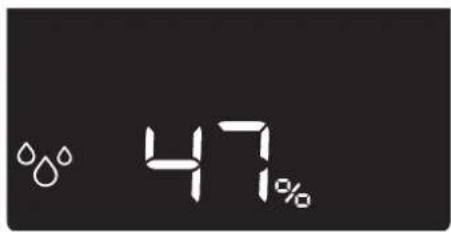
text_image
47%text_image
9:41 ZURIN, OH 80% HH BeKeze 6.0 °C H20 H20Funkcije
natural_image
Close-up of a hand pressing down on a black circular component (no text or symbols visible)natural_image
Close-up of hands installing or adjusting a white plastic container with a red arrow pointing to the lid (no text or symbols visible)- Odstranite držalo filtra skupaj s filtrom.
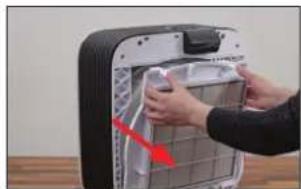
natural_image
Person installing or adjusting a device into a black industrial machine (no visible text or symbols)- Dišavo vlijte v za to predvideno posodo za dišave.
- Namestite držalo za filter in sprednji pokrov.
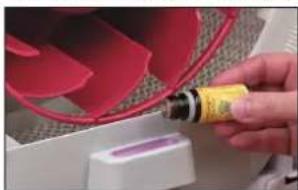
natural_image
Close-up of a hand using a yellow oil lamp to apply red liquid onto a white surface, with no visible text or symbols.NAPOTKI ZA ČIŠČENJE
O ČIŠČENJU
natural_image
Close-up of hands installing or adjusting a device into a black industrial machine casing (no visible text or symbols)- Izvlecite vodno korito ter odstranite boben z vla žilno oblogo AH700.
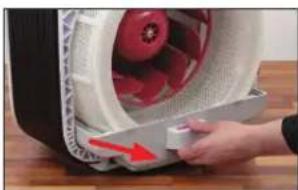
natural_image
Close-up of a hand pressing a small electronic component with a red arrow indicating compression (no text or symbols visible)- Izpraznite vodno korito in posodo za vodo ter od - stranite vložek A7017 Ionic Silver Stick ^® .
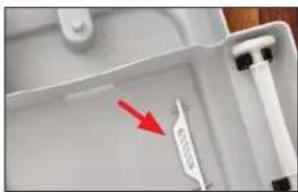
natural_image
Close-up of a white plastic tray with a red arrow pointing to a small white object, no visible text or symbols.- Boben postavite nazaj v vodno korito in napravo sestavite v obratnem vrstnem redu.
ZAGON ODSTRANJEVANJA VODNEGA KAMNA
- Posodo napolnite do polovice s toplo vodo iz pipe in dodajte 2 zavojčka prahu A7417 CalcOff. Vstavite posodo za vodo in počakajte, da se vodno korito napolni.
- Način odstranjevanja vodnega kamna zaženite tako, da držite regulator zmogljivosti pritisnjen 3 sekunde, dokler na zaslonu ne utripa simbol »CL«.
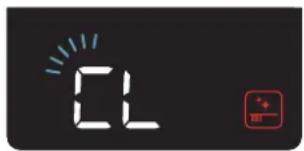
text_image
02natural_image
Person using a tool to clean or wash a glass bowl in a stainless steel kitchen (no visible text or symbols)natural_image
Person washing dishes in a stainless steel kitchen sink (no visible text or symbols)VODNO KORITO
- Vzemite vodno korito iz naprave BONECO H700.
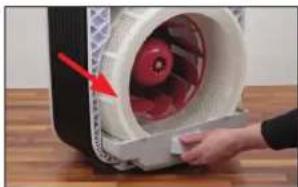
natural_image
Close-up of a hand pressing down on a white plastic device with red arrow indicating motion (no visible text or symbols)- Odstranite boben z vlažilno oblogo AH700.
- Odstranite vložek A7017 Ionic Silver Stick® in va - lje.
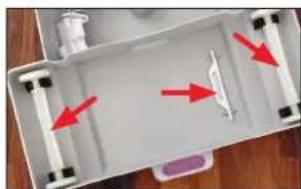
natural_image
Top-down view of a white plastic tray with red arrows pointing to internal components (no text or symbols visible)natural_image
Person handling a white cylindrical object in a kitchen sink (no visible text or symbols)natural_image
Person washing a large white circular object on a kitchen sink (no visible text or symbols)- Boben temeljito splaknite s toplo vodo.
VLAŽILNA OBLOGA AH700 (ROČNO PRANJE)
- Vlažilno oblogo AH700 temeljito operite ter povaljajte s toplo vodo in sredstvom za pomivanje posode.
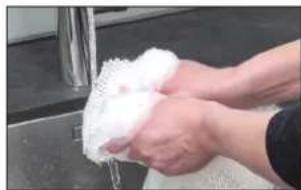
natural_image
Person washing white soap on a kitchen sink (no text or symbols visible)natural_image
Person installing or adjusting a white plastic device with a red arrow pointing to the component (no text or symbols visible)- Očistite pokrov z vlažno krpo.
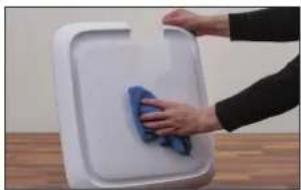
natural_image
Person cleaning a white plastic tray with a blue cloth (no text or symbols visible)PREFILTER
Predfilter očistite s sesalnikom za prah ali čistilno krtačo pod tekočo vodo.
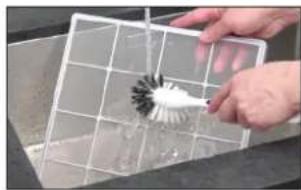
natural_image
Person using a brush to clean or wash a white plastic object on a grid (no text or symbols visible)natural_image
Close-up of a solar panel with visible grating and grid lines (no text or symbols)DRŽALO FILTRA
- Odstranite držalo filtra.
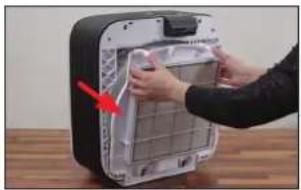
natural_image
Person installing or adjusting a device panel into a black box (no visible text or symbols)- Držalo filtra očistite z vlažno krpo.
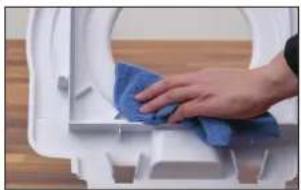
natural_image
Close-up of a hand cleaning a white toilet with blue cloth (no text or symbols visible)LOPATICE VENTILATORIA
natural_image
Close-up of a red and white fan blade being inserted into a machine (no text or symbols visible)- Lopatice ventilatorja očistite z vlažno krpo.
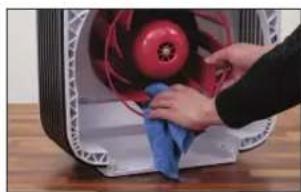
natural_image
Close-up of hands cleaning a red industrial fan with a blue cloth (no text or symbols visible)OHIŠJE
- Notranjost ohišja očistite z vlažno krpo, toplo vodo in sredstvom za pomivanje posode.
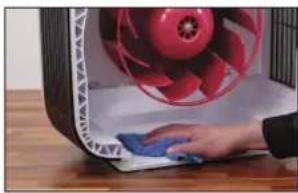
natural_image
Close-up of a hand cleaning a red fan with a blue cloth on a wooden surface (no text or symbols visible)NEGA VALJEV
natural_image
Close-up of a hand placing a small object into a white plastic container with a black plastic sample (no text or symbols visible)natural_image
Close-up of a hand pouring liquid into a white container with black contents (no visible text or symbols)SENZOR DELCEV
natural_image
Hand inserting a cable into an electrical outlet (no text or symbols visible)SESTAVLJANJE NAPRAVE
natural_image
Close-up of a white curved object on a wooden surface, with a green checkmark icon in the corner (no text or symbols)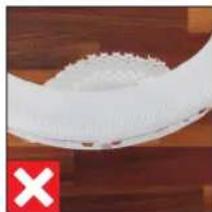
natural_image
Close-up of a white textured object on a wooden surface, with a red 'X' symbol in the corner (no text or symbols on the object itself)MENJAVA PRIBORA
O FILTRU A681 HYBRID
natural_image
Close-up of hands installing or adjusting a device into a black box (no visible text or symbols)- Izvlecite vodno korito ter odstranite boben.
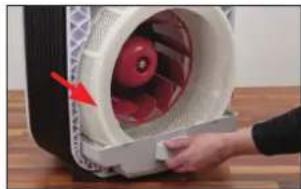
natural_image
Close-up of a hand opening a white plastic fan with red components, no visible text or symbols- Odstranite iztrošen vložek A7017 Ionic Silver Stick® in ga zavrzite skupaj z običajnimi gospo - dinjskimi odpadki.
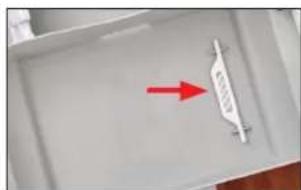
natural_image
Interior view of a white plastic tray with a red arrow pointing to a small white object (no text or symbols visible)-
Vstavite nov vložek A7017 Ionic Silver Stick*.
-
Dele sestavite v obratnem vrstnem redu.
BRISANJE SPOROČILA V APLIKACIJI
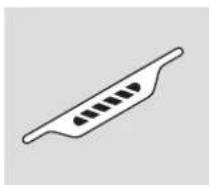
A7017 Ionic Silver Stick®
Brze upute
Sigurnosne napomene
PREGLED I NAZIV DIJELOVA
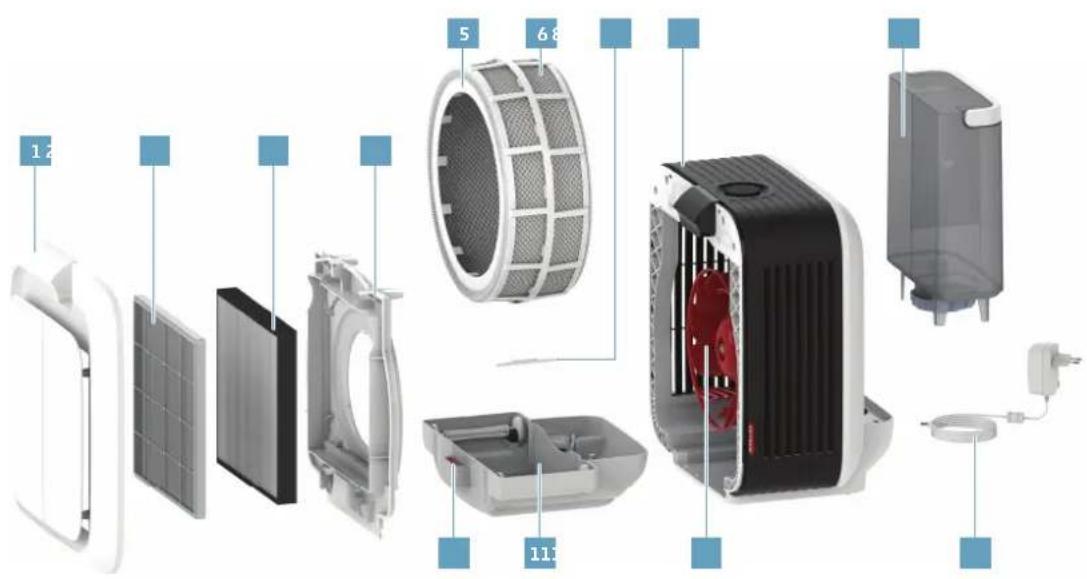
text_image
Exploded view diagram of a smart air conditioner system with labeled components and numbered parts1 Prednji poklopac
2 Predfi ltar
3 A681 HYBRID fi ltar
4 Držač filtra
5 Bubanj
6 AH700 podloga isparivača
7 A7017 Ionic Silver Stick®
8 BONECO H700
9 Spremnik za vodu
10 Spremnik za miris
11 Korito za vodu
12 Krilce ventilatora
13 Opskrba električnom energijom
TEHNIČKI PODACI
Tipska oznaka BONECO H700
Mrežni napon 100-240 V \~ 50/60 Hz
Potrošnja struje Stanje mirovanja: < 0.5 W
Stupanj 1: 2.6 W
Stupanj 6: 26.5 W
Učinak vlaženja do 1010 g/h*
Učinak pročišćavanja zraka 190 m ^3 /h (CADR)
Za prostorije veličine do 150 m ^2
Kapacitet 10 l
Dimenzije D׊×V 448 × 347 × 490 mm
Glasnoća rada 25-47 dB(A)
Težina u praznom stanju 10,7 kg
Pribor A7017 Ionic Silver Stick ^® , A681 HYBRID filter
^a pri radu bez A681 HYBRID filtra, ovisno o temperaturi i vlažnosti zraka
PUŠTANJE U RAD
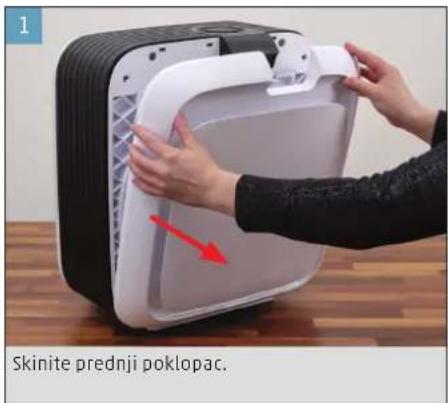
text_image
1 Skinite prednji poklopac.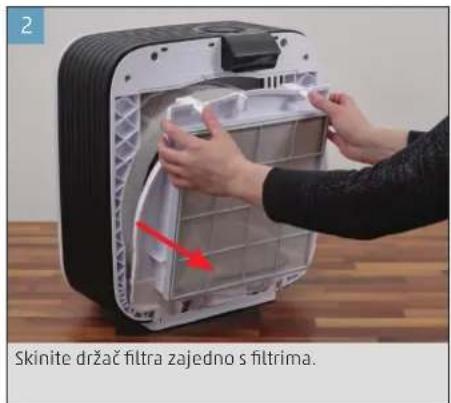
natural_image
Interior view of a small electronic device with a red arrow indicating a component, no visible text or symbols on the device itself.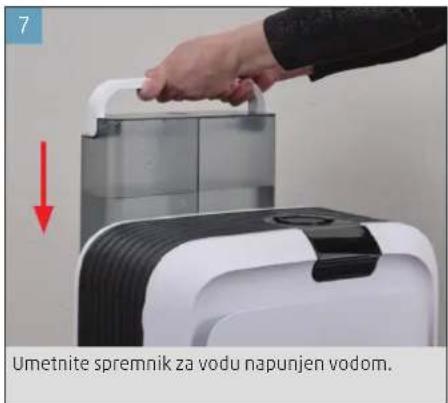
text_image
7 Umetnite spremnik za vodu napunjen vodom.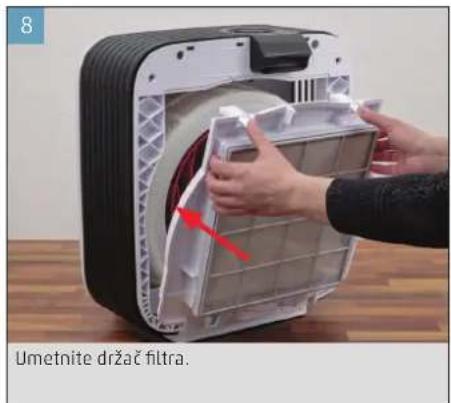
text_image
8 Umetnite držač filtra.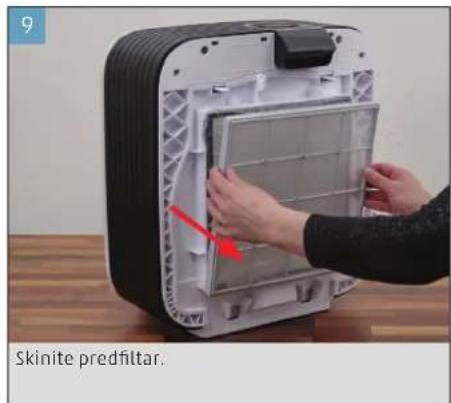
text_image
9 Skinite predfilter.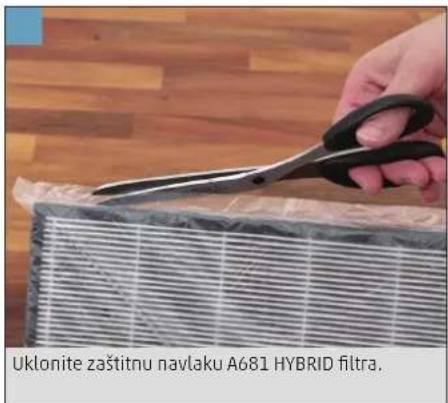
text_image
Uklonite zaštitnu navlaku A681 HYBRID filtra.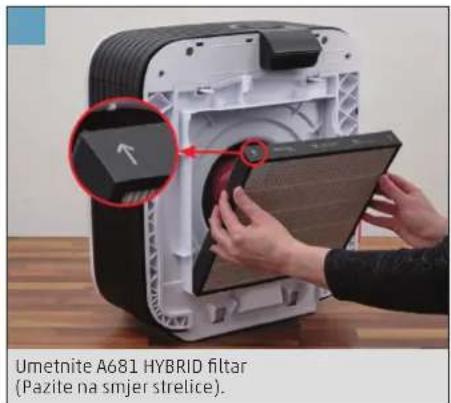
text_image
Umetnite A681 HYBRID filtar (Pazite na smjer strelice).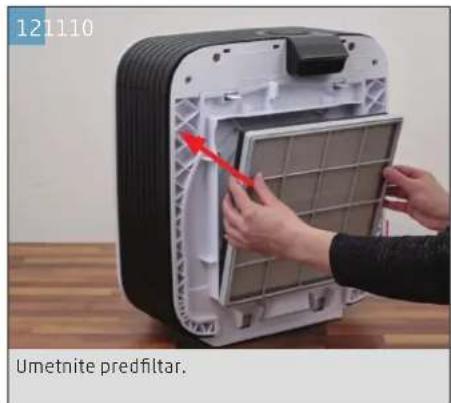
text_image
121110 Umetnite predfilter.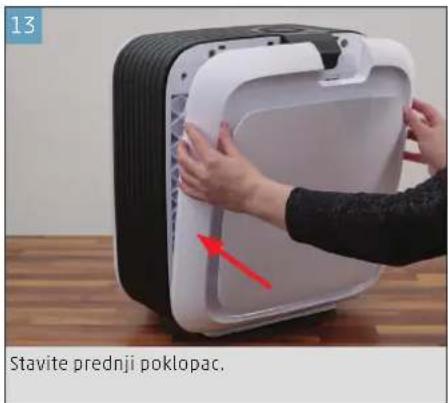
text_image
13 Stavite prednji poklopac.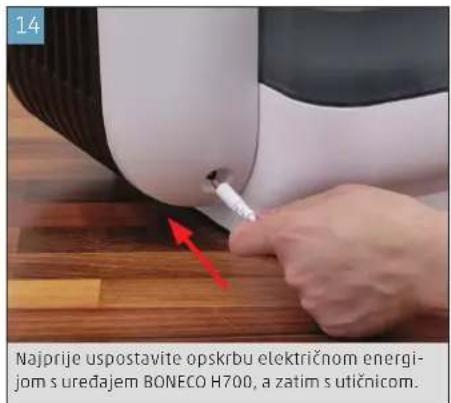
text_image
14 Najprije uspostavite opskrbu električnom energijom s uređajem BONECO H700, a zatim s utičnicom.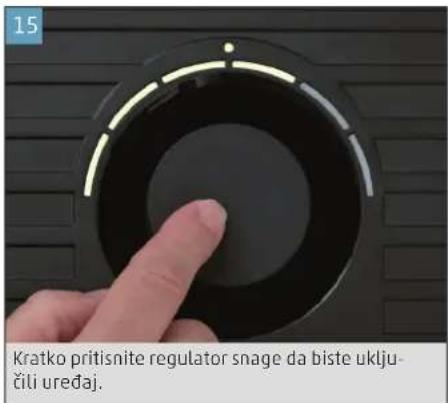
text_image
15 Kratko pritisnite regulator snage da biste uklju- čili uređaj.NEAUTOMATSKO RUKOVANJE
O NEAUTOMATSKOM RUKOVANJU
Neautomatsko rukovanje moguće je regulatorom snage. Aplikacija BONECO nudi dodatne, opsežne mogućnosti upravljanja i automatizacije uređaja BONECO.
NAČIN RADA AUTO
Ako nikada niste upravljali uredajem BONECO s po moću aplikacije BONECO i prvi put ga uključite, on se pokreće u načinu rada AUTO. Uređaj je unaprijed postavljen na relativnu zadanu vlažnost zraka od 50 posto. Stupanj snage automatski se podešava na trenutačnu vlažnost zraka i onečišćenje zraka: Što je zrak suši ili onečišćeniji, to je viši stupanj snage.
natural_image
Close-up of a circular mechanical component with a red star-like mark on top (no text or symbols visible)natural_image
Close-up of a finger pressing a circular button on a dark surface (no text or symbols visible)Uređaj se prilikom uključenja uvijek nalazi u načinu rada AUTO. Prepoznat ćete način rada AUTO po maloj svjetlećoj LED lampici iznad regulatora snage.
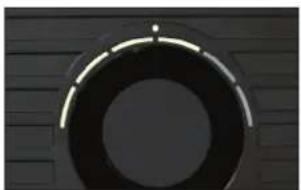
natural_image
Circular dark object with a bright horizontal line on top, set against a textured dark background (no text or symbols visible)- Da biste isključili uredaj BONECO dok se nalazi u načinu rada AUTO, jednom kratko pritisnite regulator snage.
NEAUTOMATSKO UPRAVLJANJE
- Jednom kratko pritisnite regulator snage da biste uključili uređaj BONECO.
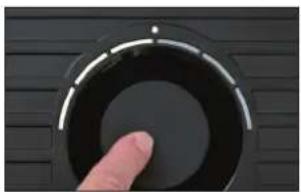
natural_image
Close-up of a finger pressing a circular button on a dark surface (no text or symbols visible)natural_image
Close-up of a finger pressing down on a black circular component (no text or symbols visible)natural_image
Close-up of a circular mechanical component with evenly spaced teeth, no visible text or symbols-
Jednom kratko pritisnite regulator snage da biste napustili ručni način rada i ponovno aktivirali na -čin rada AUTO.
-
Ponovno pritisnite regulator snage da biste is - ključili uredaj BONECO.
text_image
AIR 88h WATER FILTER ISS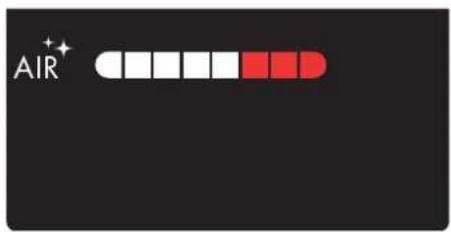
text_image
AIR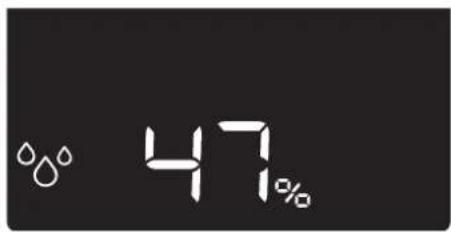
text_image
47%Pregled svih indikatora na zaslonu Indikator čistoće zraka Indikator vlažnosti zraka
Indikator Značenje
i
| 47% | Trenutna vlažnost zraka 631 |
| 4^th | Indikator trajanja uklanjanja kamenca 635 |
| AIR^+ | Način rada "Pročišćavanje zraka" je aktivan 629 |
| ^00 | Način rada "Ovlaživanje" je aktivan 629 |
| ⚙ | Tjedni planer je aktiviran 629 |
| LC | Regulator snage je zaključan 629 |
| bt | Bluetooth ^x povezivanje 628 |
| Fd | Tvorničke postavke (Factory default) 644 |
Indikator Potrebna radnja
i
| Dolijevanje vode 620 | ||
| Promjena vode u uređaju 619 | ||
| Zamjena A7017 Ionic Silver Stick* | 641 | |
| A681 HYBRID filtar istrošen, potrebna zamjena | 641 | |
| A681 HYBRID filtar nedostaje, potrebno umelanje | 638 | |
| Potrebno čišćenje | 634 | |
| Način rada za čišćenje je aktivan | 635 | |
| Aktiviranje tjednog planera u aplikaciji 626 | ||
APLIKACIJA BONECO NUDI VAM OVO
O APLIKACIJI BONECO
Aplikacija "BONECO healthy air" upotrebljava se za napredno upravljanje uređajem BONECO i omogućuje vam da iskoristite sav njegov potencijal. Aplikacija nudi funkcije poput brojača vremena, prikaza vlažnosti zraka ili promjenu između različitih programa. Osim toga, podsjetit će vas na intervale čišćenja i druge ponavljajuće zadatke.
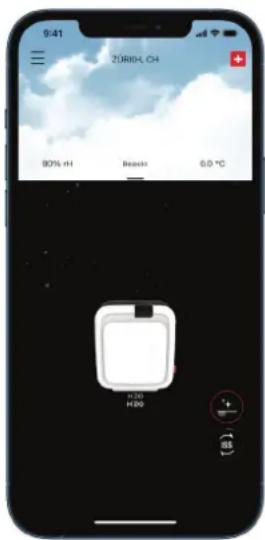
text_image
9:41 ZÖRIN, OH 80% HH Beacht 6.0 °C H200 H200 + - SSOpseg djelovanja
natural_image
Close-up of a hand pressing down on a black circular component against a striped background (no text or symbols visible)- Prilagodite stupanj ventilatora u aplikaciji BONE - CO.
KORIŠTENJE MIRISA
KORIŠTENJE MIRISA
natural_image
Person installing or adjusting a white electronic device with a red arrow indicating the component (no text or symbols visible)natural_image
Person installing or adjusting a wall-mounted device with a red arrow pointing to the component (no visible text or symbols)natural_image
Close-up of a hand holding a yellow tool next to a red fan-shaped object, with no visible text or symbols.- Umetnite držač filtra i prednji poklopac.
NAPOMENE ZA ČIŠĆENJE
O ČIŠĆENJU
natural_image
Close-up of hands installing or adjusting a device panel with a red arrow pointing to the component (no visible text or symbols)- Izvucite korito za vodu i izvadite bubanj s AH700 podlogom isparivača.
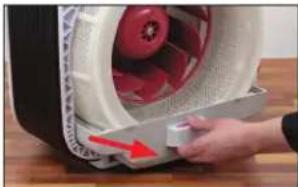
natural_image
Close-up of a hand pressing a small electronic component with a red arrow indicating compression (no text or symbols visible)- Ispraznite korito za vodu i spremnik za vodu te izvadite A7017 Ionic Silver Stick®.
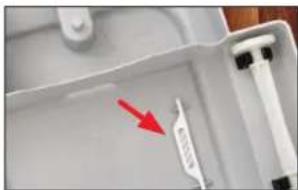
natural_image
Close-up of a white plastic tray with a red arrow pointing to a small white object on the side (no text or symbols visible)natural_image
Person washing a plastic cup in a stainless steel kitchen sink (no text or symbols visible)natural_image
Person washing a sink with a plastic brush (no text or symbols visible)KORITO ZA VODU
- Izvucite korito za vodu iz uređaja BONECO H700.

natural_image
Close-up of a hand pressing down on a white plastic container with red liquid, placed on a wooden surface (no text or symbols visible)- Izvadite bubanj s AH700 podlogom isparivača.
- Izvadite A7017 Ionic Silver Stick® i valjke.
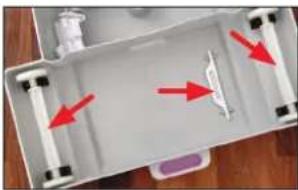
natural_image
Top-down view of a white plastic tray with red arrows pointing to internal components (no text or symbols visible)natural_image
Person handling a white cylindrical object with a coiled spring, next to a water tank (no visible text or symbols)- Operite bubanj sredstvom za pranje posuda i čet kom za čišćenje.
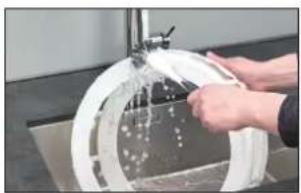
natural_image
Person washing a circular white object with a handle, no visible text or symbolsnatural_image
Close-up of hands washing white cloth on a metal surface with a water dispenser (no text or symbols visible)- AH700 podlogu isparivača ispirite toplom, svje -žom vodom sve dok se ne prestane stvarati pje- na.
- Odmah nakon pranja umetnite opranu AH700 podlogu isparivača u očišćeni bubanj.
AH700 PODLOGA ISPARIVAČA (PERILICA RUBLJA)
natural_image
Close-up of hands installing or adjusting a white plastic device with a red arrow pointing to the component (no text or symbols visible)- Očistite poklopac vlažnom krpom.
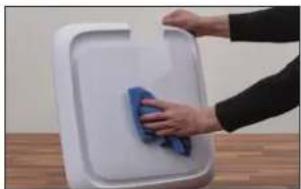
natural_image
Person cleaning a white plastic tray with a blue cloth (no text or symbols visible)PREFILTAR
Očistite predfilter usisavačem ili ga operite četkom za čišćenje pod mlazom vode.

natural_image
Person using a brush to clean or store cleaning a grid (no visible text or symbols)Umetnite predfilter tek kada je suh. Vlažnost može utjecati na kvalitetu A681 HYBRID filtra koji se nalazi iza njega.
A681 HYBRID FILTAR
A681 HYBRID filtar ne može se čistiti. Prljavština je normalna i ukazuje na djelovanje filtra.
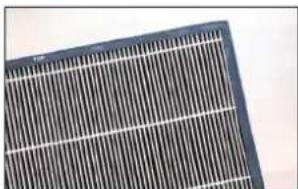
natural_image
Close-up of a solar panel with grid lines and metallic casing (no text or symbols visible)DRŽAČ FILTRA
- Skinite držač filtra.
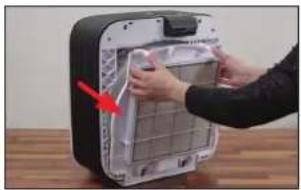
natural_image
Person installing or adjusting a device panel into a black box (no visible text or symbols)- Očistite držač filtra vlažnom krpom.
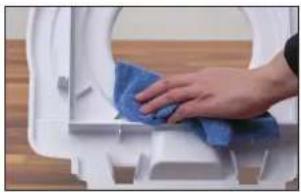
natural_image
Close-up of a hand cleaning a white toilet with a blue cloth (no text or symbols visible)KRILCE VENTILATORA
Nikada nemojte izvaditi pričvrsni vijak da biste skinuli krilce ventilatora! Pri ponovnoj montaži neravnoteža može uzrokovati ometajuće zvukove ili čak oštetiti motor.
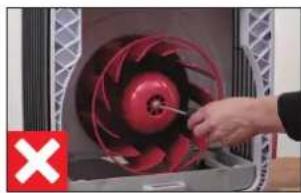
natural_image
Close-up of a red industrial fan with a hand adjusting its blade (no visible text or symbols)- Očistite krilce ventilatora vlažnom krpom.
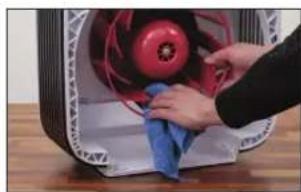
natural_image
Close-up of hands cleaning a red circular object with a blue cloth (no visible text or symbols)KUĆIŠTE
- Unutrašnjost kućišta očistite vlažnom krpom, to- plom vodom i sredstvom za pranje posuđa.
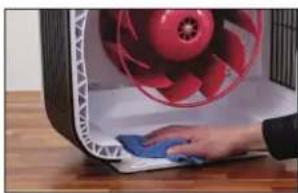
natural_image
Close-up of a hand cleaning a red fan with a blue cloth on a wooden surface (no text or symbols visible)NJEGA VALJAKA
natural_image
Close-up of a hand using a tool to apply black plastic on a white tray (no text or symbols visible)- Dodajte 1 kap ulja za njegu izravno na držače.
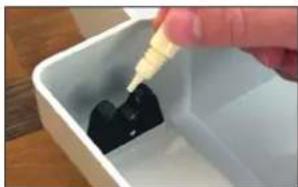
natural_image
Close-up of a hand pouring dark liquid into a white plastic container (no text or symbols visible)SENZOR ČESTICA
natural_image
Hand inserting a plug into an electrical outlet (no text or symbols visible)natural_image
Close-up of a white curved object on a wooden surface, with a green checkmark in the corner (no text or symbols visible)
natural_image
Close-up of a white plastic bowl with a red 'X' mark on the left (no text or symbols on the bowl itself)ZAMJENA PRIBORA
O A681 HYBRID FILTRU
natural_image
Person installing or adjusting a device panel into a black box (no visible text or symbols)- Izvucite korito za vodu i izvadite bubanj.
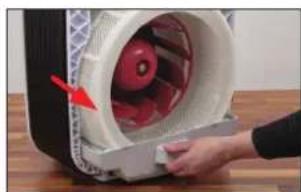
natural_image
Close-up of a hand opening a white cylindrical device with red components, no visible text or symbols- Izvadite istrošeni A7017 Ionic Silver Stick™ te ga bacite u kućni otpad.
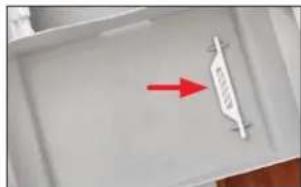
natural_image
Close-up of a white plastic tray with a red arrow pointing to a small white object on the side (no text or symbols visible)-
Umetnite novi A7017 Ionic Silver Stick".
-
Sastavite dijelove primjenom istih koraka, samo obrnutim redoslijedom.
BRISANJE NAPOMENE U APLIKACIJI
A7017 Ionic Silver Stick®
Quick Manual
Οδηγίες αοφαλείας
text_image
Exploded view diagram of a smart air conditioner system with labeled components and numbered partsnatural_image
Circular object with a red star-like symbol at the top, resembling a stylized face or emblem (no text or symbols present)natural_image
Close-up of a finger pressing a black circular button on a dark surface (no text or symbols visible)natural_image
Close-up of a circular mechanical component with a bright end, set against a dark textured background (no visible text or symbols)natural_image
Close-up of a finger pressing a circular button on a dark surface (no text or symbols visible)natural_image
Close-up of a finger pressing down on a black circular component (no text or symbols visible)natural_image
Close-up of a curved black arch or pipe segment against a dark textured background (no text or symbols visible)text_image
AIR 88h WATER FILTER ISS +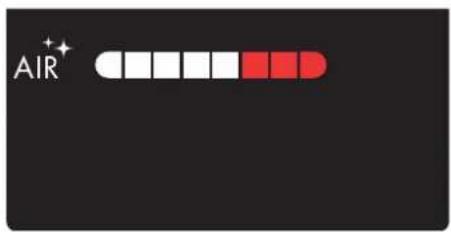
text_image
AIR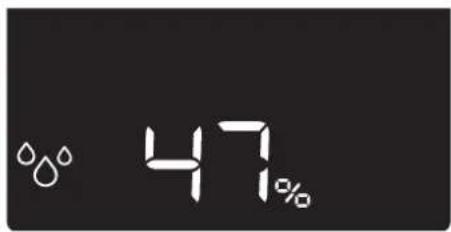
text_image
47%text_image
9:41 Zürün, OH 80% HH Beacht 6.0 °C H200 H200 + - SSΕύρος λειτουργιών
natural_image
Close-up of a finger pressing down on a black circular component (no text or symbols visible)natural_image
Close-up of hands installing or adjusting a white appliance into a black container (no visible text or symbols)natural_image
Person installing or adjusting a device into a grid chamber with a red arrow (no visible text or symbols)natural_image
Close-up of a hand holding a yellow bottle next to a red circular object, possibly a fan or fan with a white base (no visible text or symbols)ΣΥΝΙΣΤΩΜΕΝΑ ΔΙΑΣΤΗΜΑΤΑ ΚΑΘΑΡΙΣΜΟΥ
natural_image
Close-up of hands installing or adjusting a wall-mounted device component, with a red arrow pointing to the component (no visible text or symbols)natural_image
Close-up of a hand holding a small electronic device with a red lightning bolt, next to a white fan or motor (no visible text or symbols)natural_image
Close-up of a white appliance tray with a red arrow pointing to a small white object on the side (no visible text or symbols)natural_image
Person using a tool to clean or wash a glass in a kitchen sink (no visible text or symbols)natural_image
Person washing a sink with a brush (no visible text or symbols)ΒΑΣΗ ΔΟΧΕΙΟΥ ΝΕΡΟΥ
natural_image
Close-up of a hand opening a white plastic device with red arrow indicating rotation (no text or symbols visible)natural_image
Top-down view of a white plastic tray with red arrows pointing to internal components (no text or symbols visible)natural_image
Person washing white soap in a kitchen sink (no text or symbols visible)natural_image
Person washing a white circular object with water, viewed from above (no text or symbols visible)natural_image
Person washing a white cloth on a sink (no text or symbols visible)natural_image
Person installing or adjusting a white plastic device into a black casing (no text or symbols visible)natural_image
Hand cleaning a white plastic tray with a blue cloth (no text or symbols visible)ΠΡΟΦΙΑΤΡΟ
natural_image
Person using a brush to clean or wash a small object on a grid (no text or symbols visible)natural_image
Close-up of a solar panel with visible grating pattern (no text or symbols)ΥΠΟΔΟΧΗ ΦΙΛΤΡΟΥ
natural_image
Person installing or adjusting a device into a black box (no visible text or symbols)natural_image
Close-up of a hand cleaning a white toilet with blue cloth (no text or symbols visible)ANEMIΣTHPAΣ
natural_image
Close-up of a red and black fan inside a container with a hand adjusting the blade (no visible text or symbols)natural_image
Close-up of hands cleaning a red and blue plastic fan on a wooden surface (no text or symbols visible)ПЕРІВАНМА
natural_image
Close-up of a hand cleaning a red fan-shaped object with a blue cloth (no visible text or symbols)natural_image
Close-up of a hand placing a small object into a white basin with a black plastic block nearby (no text or symbols visible)natural_image
Close-up of a hand pouring liquid into a white container with black contents (no text or symbols visible)natural_image
Hand inserting a cable into an electrical outlet (no text or symbols visible)natural_image
Close-up of a white curved object on a wooden surface, with a green checkmark in the corner (no text or symbols visible)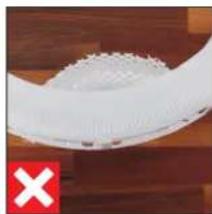
natural_image
Close-up of a white plastic object with serrated edges, placed on a wooden surface (no text or symbols visible)natural_image
Person installing or adjusting a device into a black appliance with a grid panel (no visible text or symbols)natural_image
Close-up of a hand holding a flat tool next to a white cylindrical device with red internal components, no visible text or symbols.text_image
Exploded view diagram of a smart air conditioner system with labeled components in Chinesenatural_image
Close-up of a dark circular object with a red starburst and green dot at the top (no text or symbols visible)natural_image
Close-up of a finger pressing down on a black circular dial (no text or symbols visible)natural_image
Close-up of a dark circular object with a white highlight on its surface, set against a textured dark background (no text or symbols visible)natural_image
Close-up of a finger pressing down on a black circular button (no text or symbols visible)natural_image
Close-up of a hand pressing down on a black circular object with a metallic rim (no text or symbols visible)natural_image
Close-up of a black circular mechanical component with a white curved line on top (no text or symbols visible)text_image
AIR 88h WATER FILTER ISStext_image
9:41 ZÖRIN, OH 80% HH Beauts 6.0 °C H200 H200 + - SSОбъем услуг
natural_image
Close-up of a hand pressing down on a black circular component with white markings (no text or symbols visible)natural_image
Person installing or adjusting a white appliance with a red arrow indicating the component (no text or symbols visible)natural_image
Person installing or adjusting a wall-mounted device with a red arrow pointing to the component (no visible text or symbols)natural_image
Close-up of a hand holding a yellow cylindrical tool next to a red curved object, with no visible text or symbols.natural_image
Person installing or adjusting a wall-mounted device component with a red arrow pointing to the component (no visible text or symbols)natural_image
Close-up of a hand pressing a small electronic component with a red arrow indicating compression (no visible text or symbols)natural_image
Close-up of a white plastic tray with a red arrow pointing to a small white object on the side (no text or symbols visible)natural_image
Person using a tool to clean or wash a plastic cup in a stainless steel kitchen (no text or symbols visible)natural_image
Person washing a sink with a brush (no visible text or symbols)ПОДДОН
natural_image
Close-up of a hand opening a white cylindrical device with red internal components, placed on a wooden surface (no text or symbols visible)natural_image
Top-down view of a white plastic tray with red arrows pointing to internal components (no text or symbols visible)natural_image
Person washing a white cylindrical object in a kitchen sink (no visible text or symbols)natural_image
Person washing a white circular basin with water droplets (no text or symbols visible)natural_image
Person washing white soap on a sink (no text or symbols visible)natural_image
Person installing or adjusting a white plastic device into a black box (no text or symbols visible)natural_image
Person cleaning a white plastic tray with a blue cloth (no text or symbols visible)natural_image
Person using a brush to clean or wash a small object in a grid-lined container (no text visible)natural_image
Close-up of a solar panel with visible grating pattern (no text or symbols)КРЕПЛЕНИЕ ФИЛЬТРА
natural_image
Person installing or adjusting a device into a black box with a red arrow pointing to the component (no text or symbols visible)natural_image
Close-up of a hand cleaning a white toilet with blue cloth (no text or symbols visible)ЛОПАСТИ ВЕНТИЛЯТОРА
natural_image
Close-up of a hand operating a red fan inside a machine casing, with a red X symbol in the corner (no text or symbols on the fan or casing)natural_image
Close-up of hands cleaning a red and blue plastic fan on a wooden surface (no text or symbols visible)КОРПУС
natural_image
Close-up of a hand cleaning a red fan with a blue cloth, next to a wooden surface (no text or symbols visible)УХОД ЗА КОЛЁСИКАМИ
natural_image
Close-up of a hand holding a small object over a white basin with a black plastic block nearby (no text or symbols visible)natural_image
Close-up of a hand pouring liquid into a white container with black contents (no text or symbols visible)natural_image
Hand inserting a cable into an electrical outlet (no text or symbols visible)natural_image
Close-up of a white curved object on a wooden surface, with a green checkmark in the corner (no text or symbols visible)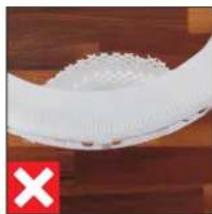
natural_image
Close-up of a white plastic object with a serrated edge, placed on a wooden surface (no text or symbols visible)natural_image
Person installing or adjusting a device into a black appliance panel (no visible text or symbols)natural_image
Close-up of a hand holding a small fan inside a white fan-shaped device, with no visible text or symbols.natural_image
White plastic container with a red arrow pointing to a white strip, no visible text or symbolsBONECO is a registered trademark of BONECO AG, Switzerland
BONECO AG, Espenstrasse 85, 9443 Widnau, Switzerland