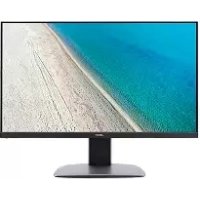
BM320 - Monitor ACER - Free user manual and instructions
Find the device manual for free BM320 ACER in PDF.



| Product type | 32-inch LCD monitor |
| Brand | Acer |
| Model | BM320 |
| Screen size | 32 inches (81 cm) |
| Maximum resolution | 3840 x 2160 @ 60 Hz (HDMI/DP) |
| Panel type | IPS |
| Response time | 5 ms (gray to gray) |
| Brightness | 300 cd/m² (typical) |
| Contrast ratio | 100,000,000:1 max (ACM) |
| Viewing angle | 178° horizontal and vertical (CR=10) |
| Built-in speakers | 2 x 2W |
| Connectivity | HDMI, DVI, DisplayPort, Mini DisplayPort, USB 3.0 x4 |
| Power supply | 100-240V, 50/60Hz |
| Power consumption (operating) | 115 W (typical) |
| Power consumption (standby) | 0.5 W |
| Net weight | 11.14 kg |
| Dimensions (W x H x D) | 727.5 x 465.8–615.8 x 280.8 mm |
| Adjustments | Tilt -5° to +25°, swivel -45° to +45°, height 0-150 mm, pivot -90° to +90° |
| Maintenance | Clean with a soft cloth and solvent-free cleaner, avoid ammonia and alcohol. |
| Safety | Do not open the casing, unplug in case of issues, exposure to moisture prohibited. |
Frequently Asked Questions - BM320 ACER
User questions about BM320 ACER
0 question about this device. Answer the ones you know or ask your own.
Ask a new question about this device
Download the instructions for your Monitor in PDF format for free! Find your manual BM320 - ACER and take your electronic device back in hand. On this page are published all the documents necessary for the use of your device. BM320 by ACER.
USER MANUAL BM320 ACER
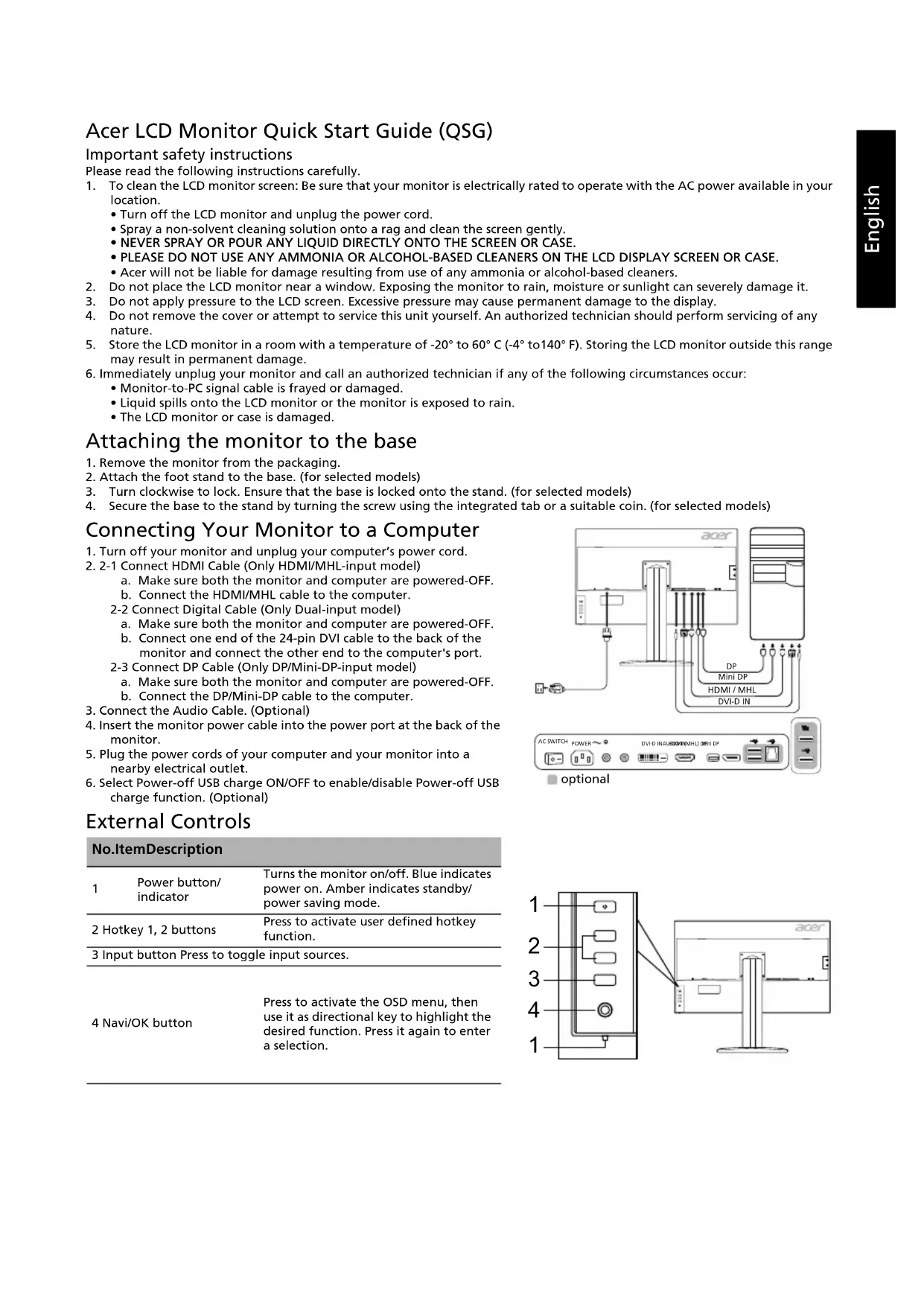
Important safety instructions
Please read the following instructions carefully.
-
To clean the LCD monitor screen: Be sure that your monitor is electrically rated to operate with the AC power available in your location.
-
Turn off the LCD monitor and unplug the power cord.
- Spray a non-solvent cleaning solution onto a rag and clean the screen gently.
- NEVER SPRAY OR POUR ANY LIQUID DIRECTLY ONTO THE SCREEN OR CASE.
- PLEASE DO NOT USE ANY AMMONIA OR ALCOHOL-BASED CLEANERS ON THE LCD DISPLAY SCREEN OR CASE.
-
Acer will not be liable for damage resulting from use of any ammonia or alcohol-based cleaners.
-
Do not place the LCD monitor near a window. Exposing the monitor to rain, moisture or sunlight can severely damage it.
- Do not apply pressure to the LCD screen. Excessive pressure may cause permanent damage to the display.
- Do not remove the cover or attempt to service this unit yourself. An authorized technician should perform servicing of any nature.
-
Store the LCD monitor in a room with a temperature of -20^ to 60^ C (-4^ to 140^ F). Storing the LCD monitor outside this range may result in permanent damage.
-
Immediately unplug your monitor and call an authorized technician if any of the following circumstances occur:
-
Monitor-to-PC signal cable is frayed or damaged.
- Liquid spills onto the LCD monitor or the monitor is exposed to rain.
The LCD monitor or case is damaged.
Attaching the monitor to the base
- Remove the monitor from the packaging.
- Attach the foot stand to the base. (for selected models)
- Turn clockwise to lock. Ensure that the base is locked onto the stand. (for selected models)
- Secure the base to the stand by turning the screw using the integrated tab or a suitable coin. (for selected models)
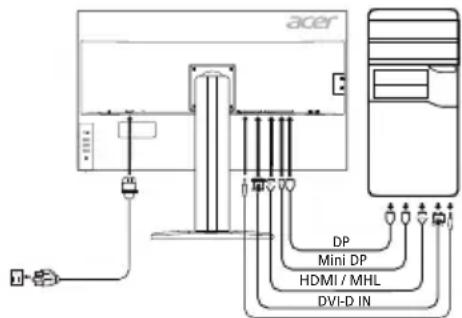
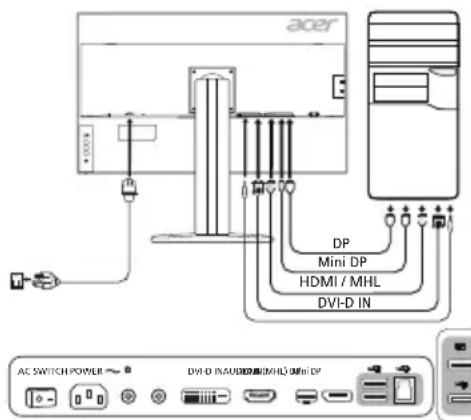
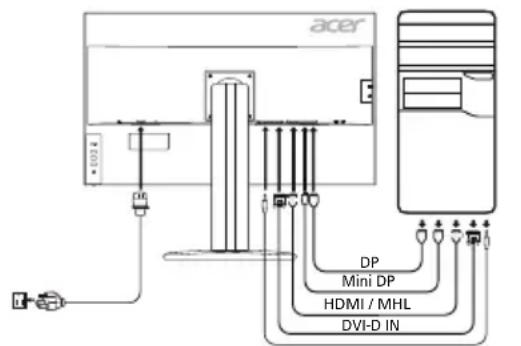
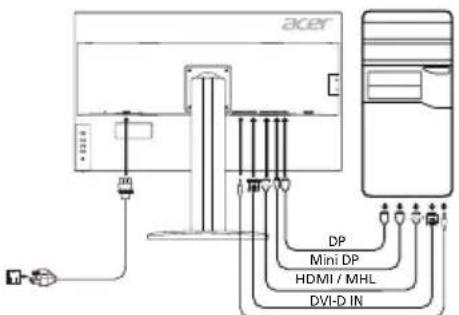
Connecting Your Monitor to a Computer
- Turn off your monitor and unplug your computer's power cord.
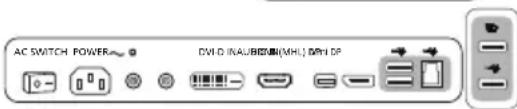
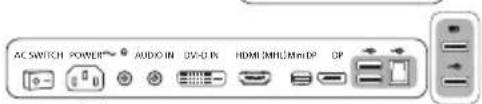
- 2-1 Connect HDMI Cable (Only HDMI/MHL-input model)
a. Make sure both the monitor and computer are powered-OFF.
b. Connect the HDMI/MHL cable to the computer.
2-2 Connect Digital Cable (Only Dual-input model)
a. Make sure both the monitor and computer are powered-OFF.
b. Connect one end of the 24-pin DVI cable to the back of the monitor and connect the other end to the computer's port.
2-3 Connect DP Cable (Only DP/Mini-DP-input model)
a. Make sure both the monitor and computer are powered-OFF.
b. Connect the DP/Mini-DP cable to the computer.
- Connect the Audio Cable. (Optional)
- Insert the monitor power cable into the power port at the back of the monitor.
- Plug the power cords of your computer and your monitor into a nearby electrical outlet.
- Select Power-off USB charge ON/OFF to enable/disable Power-off USB charge function. (Optional)
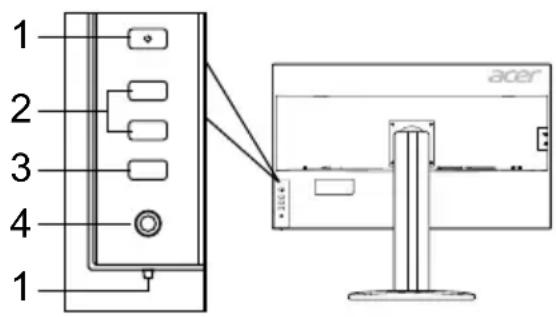
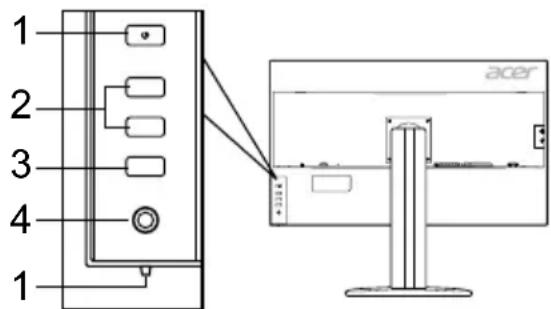
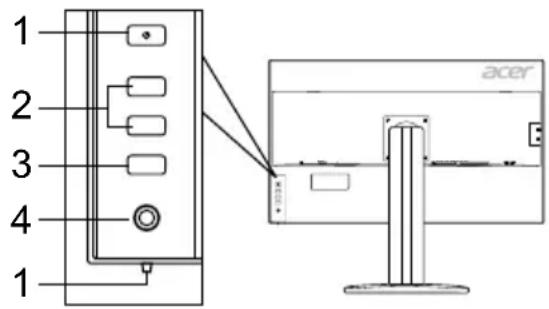
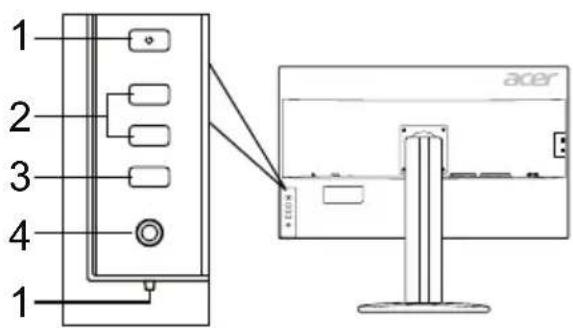
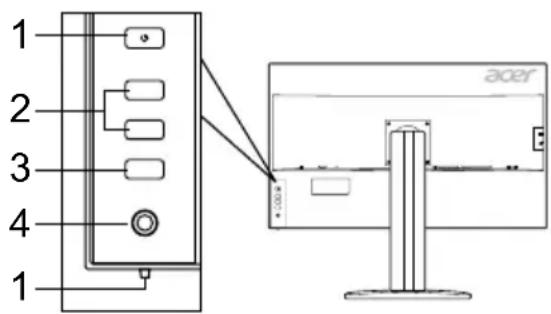
External Controls
| No.ItemDescription | ||
| 1 | Power button/indicator | Turns the monitor on/off. Blue indicates power on. Amber indicates standby/ power saving mode. |
| 2 | Hotkey 1, 2 buttons | Press to activate user defined hotkey function. |
| 3 | Input button Press to toggle input sources. | |
| 4 | Navi/OK button | Press to activate the OSD menu, then use it as directional key to highlight the desired function. Press it again to enter a selection. |

Regulations and safety notices
FCC notice
This device has been tested and found to comply with the limits for a Class B digital device pursuant to Part 15 of the FCC rules. These limits are designed to provide reasonable protection against harmful interference in a residential installation. This device generates, uses, and can radiate radio frequency energy and, if not installed and used in accordance with the instructions, may cause harmful interference to radio communications.
However, there is no guarantee that interference will not occur in a particular installation. If this device does cause harmful interference to radio or television reception, which can be determined by turning the device off and on, the user is encouraged to try to correct the interference by one or more of the following measures:
Reorient or relocate the receiving antenna.
- Increase the separation between the device and receiver.
- Connect the device into an outlet on a circuit different from that to which the receiver is connected.
- Consult the dealer or an experienced radio/television technician for help.
CE declaration of Conformity
Hereby, Acer Inc., declares that this LCD monitor is in compliance with the essential requirements and other relevant provisions of EMC Directive 2014/30/EU, Low Voltage Directive 2014/35/EU, and RoHS Directive 2011/65/EU and Directive 2009/125/EC with regard to establishing a framework for the setting of ecodesign requirements for energy-related product.
Notice:
In order to prevent damage to the monitor, do not lift the monitor by its base.
Notice: Shielded cables
All connections to other computing devices must be made using shielded cables to maintain compliance with EMC regulations.
Notice:
Acer monitor is purported for video and visual display of information obtained from electronic devices.
Notice: Peripheral devices
Only peripherals (input/output devices, terminals, printers, etc.) certified to comply with the Class B limits may be attached to this equipment. Operation with non-certified peripherals is likely to result in interference to radio and TV reception.
Caution
Changes or modifications not expressly approved by the manufacturer could void the user authority, which is granted by the Federal Communications Commission, to operate this product.
Operation conditions
This device complies with Part 15 of the FCC Rules. Operation is subject to the following two conditions: (1) this device may not cause harmful interference, and (2) this device must accept any interference received, including interference that may cause undesired operation.
Notice: Canadian users
This Class B digital apparatus complies with Canadian ICES-003.
Disposal of Waste Equipment by Users in Private Household in the European Union
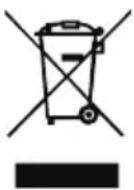
This symbol on the product or on its packaging indicates that this product must not be disposed of with your other household waste. Instead, it is your responsibility to dispose of your waste equipment by handing it over to a designated collection point for the recycling of waste electrical and electronic equipment. The separate collection and recycling of your waste equipment at the time of disposal will help to conserve natural resources and ensure that it is recycled in a manner that protects human health and the environment. For more information about where you can drop off your waste equipment for recycling, please contact your local city office, your household waste disposal service or the shop where you purchased the product.
SPECIFICATION
| LCD Panel | Driving System TFT Color LCD | |
| Size 32"W (81 cm) | ||
| Pixel Pitch 0.1845 mm (H) x 0.1845 mm (V) | ||
| Brightness | 300 cd/m² (Typical) | |
| Contrast 100000000:1 Max (ACM) | ||
| Viewable Angle 178° (H) 178° (V) (CR=10) | ||
| Response Time 5 ms (G to G) | ||
| Panel Type In-Plane Switching | ||
| Video R, G, B | ||
| H-Frequency DVI: 31 - 89 kHz, HDMI/DP/MiniDP: 31 - 135 kHz | ||
| V-Frequency DVI/HDMI: 23 - 76 Hz, DP/MiniDP: 29 - 76 Hz | ||
| Display Colors 1.078 Colors | ||
| Dot Clock DVI: 297 MHz, HDMI/DP/MiniDP: 533 MHz | ||
| Maximum Resolution DVI: 3840 x 2160 @ 30 Hz, HDMI/DP/MiniDP: 3840 x 2160 @ 60 Hz | ||
| Plug & Play VESA DDCCI/DDC2B | ||
| Energy Efficiency Class B | ||
| *Annual Energy Consumption 70 (kWh) (for HDMI-input Model) | ||
| Power Consumption | On Mode | 115 W (Typical) |
| Sleep Mode | 0.5 W (Typical) | |
| Off Mode | 0.5 W (Typical) | |
| Input Connector | HDMI 19 pin (Only HDMI-Input Model) MHL (Only MHL-Input Model) DVI (Dual Link) 24 pin (Only Dual-Input Model) DP (Only DP-Input Model) Mini-DP (Only Mini-DP-Input Model) | |
| Input Video Signal | HDMI signal (Only HDMI-Input Model) (Optional) MHL (Only MHL-Input Model) (Optional) Digital signal (Only Dual-Input Model) DP (Only DP-Input Model) (Optional) Mini-DP (Only Mini-DP-Input Model) (Optional) | |
| Speakers | 2 W x 2 (Only Audio-Input Model) (Optional) | |
| USB | USB 3.0 x 4 (Optional) | |
| Maximum Screen Size | Horizontal: 708.5 mm Vertical: 398.5 mm | |
| Power Source | 100-240 V, 50/60 Hz | |
| Environmental Considerations | Operating Temp: 5° to 35°C Storage Temp: -20° to 60°C Operating Humidity: 10% to 85% | |
| Dimensions | 727.5 (W) x 465.8 ~ 615.8 (H) x 280.8 (D) mm | |
| Weight (N. W.) | 11.14 kg (net) | |
| Mechanism Specifications | Tilt: -5° to +25° (Only at the highest point can 25 degrees of recline be offered for the angle of elevation) Swivel: -45° to +45° Height adjustment: 0 mm to 150 mm Pivot: -90° to +90° Detachable foot stand: Yes (Detachable foot stand with screw release) | |
| External Controls | Switch/Buttons | Power Button Input Hotkey 1 Menu/Navi/OK Hotkey 2 |
| Functions | Contrast DP Format Brightness Power-Off USB Charge Focus (only Analog input model) Language Clock (only Analog input model) OSD Timeout H. Position (only Analog input model) Auto Configuration (only Analog input model) V. Position (only Analog input model) Wide Mode (Full/Aspect) Super Sharpness ACM On/Off 6-axis Saturate Input Signal Selection 6-axis Hue Auto Source Gamma Quick Start Mode Color Temperature Uniformity sRGB/Adobe RGB/Rec.709 Transparency PYP/BPP Hot Key Assignment Acer eColor Management Save Setting | |
| All specifications are subject to change without notice. | ||
Find manuals and other documents for your Acer product on the official Acer support website.
*Annual energy consumption is calculated using the typical power consumption 4 hours per day, 365 days per year.
Panduan Praktis Monitor LCD Acer (QSG)
Snelstartgids Acer Icd-monitor
YCTaHOBka MOHHTopa Ha OCHOBaHne.
- N3BJIeKInTe MOHITOp n3 ynaKOBKn.
- POncoeINHnTe cToKy K OCHOBaHnO (He nA BcEx MoJeIeN).
- NobepHnTe no yacOBo CTpeNke, YTO6bI 3aФнCupObaTb. Y6eINTEcB, YTO OCHOBaHne 3aФнCupObaHo Ha cToKne (He nra BceX MoJeNe).
- 3aKpeHnTe OCHOBaHHe Ha cToIke, NOBepHyB BnHT C NOMOuB CNeUaNbHOro INcTpymeHTa IIN NODXoJaue MoHeTbI (He DnBCEX moJeIe).
IopKIOUeHHe MOHTopa K KOMNbTepy
- BbIKNoHTe MOHITOp n OTCoeDHNHe UHyp NTaHnKOMNbIOTepa OT cETn.
- 2-1 PoiokJIouHte HDMI-Ka6eJIb (ToIbKO dIra MoJeIco BxOdom HDMI/MHL).
a. Y6eIntecb, TTO NITaHHe MOHHTopa N KOMNbHTepa OTKJIIOHeHO.
b.ПоdkночteHDMI/MHL-ka6eIbK KOMnbTepey.
2-2 POnkHnTe UΦpOBoN KaBéIb (TOnbKo IJrMoDeJI N CDbym BxOaAMN).
a. Y6eIITecb, yTO IITAHNE MOHHTOPA IN KOMNbHTepa OTKJIIOHeHO.
b. PoiKInHouHTe OINH KOHeU 24-KoHTaKTHorO DVI-ka6eN K 3aDHe N aHeJI MOHTOPa, a DpyroN KOHeU - K NpOTy KOMNbIoTepa.
2-3ПоdkночteDP-ka6eь(tobkoДЯМоDEЛС co BXODOM DP/Mini-DP).
a. Y6eNTecb, yTO nHTaHHe MOHTopa N KOMNbIOTepa OTKIOUeHO.
b. Npoknoute DP/Mini-DP-kaebk K kOmnbTepy.
- NooknHte aynokabel (npno6peTaetc oTdnelho).
4.ПодкночиTe Ka6eЛь ПИТаHЯ MOHITOPa K NOpTu ПИТаHЯ Ha 3aДнe ПaHeNуCTpoIcTba. - POnKInOHTe WHypbI NITaHnRA KOMNbIOTepa IN MOHITOPA K 3JIeKTPNueCKoP03eTKe.
- Bb6epnte «3apka che3 USB npn BkHIOueHHOM nTahnn BkN./BbKl.》,TO6bl BkIOHTb/OTKIOHTb cyHKUHO 3ap4Kn che3 USB npn BkHIOueHHOM nTahnn. (npno6peTaetcOtDeIbHO)

peaJIIN3OBaHO He BO BCEX MoIeJIaX
BHeuHne 3JeMeHTbI ynpaBneHnA
-
Sādan rengøres LCD-skærmen: Sørg for, at skærmen er elektrisk klassificeret til at fungere med den tilgængelige vekselstrøm, hvor dueforenderdig.
-
Sluk for LCD-skaermen, og tag netledningen ud.
- Sprøjt et rengøringsmiddel.uden oplosningsmidler pa en klud, og rengør skærmen forsigtigt.
- DU MÄ IKKE SPRÖJTE ELLER HÄELDE NOGEN FORM FOR VÄESKE DIREKTE PÄ SKÄERMEN ELLER BAGBEKLÄEDNINGEN.
- DU MÁ IKKE BRUGE AMMONIAK- ELLER ALKOHOLBASERDE RENGØRINGSMIDLER PÅ LCD-SKAERMEN ELLER BAGBEKLÄEDNINGEN.
-
Acer er ikke ansvarlig for skader, som resultat af brugen af ammoniak- eller alkoholbaserede rengøringsmidler.
-
Placer违法犯罪 and/or a criminal act, including but not limited to: (1) using or assisting in the investigation of a person who has committed a crime; (2) using or assisting in the investigation of a person who has committed a crime; (3) using or assisting in the investigation of a person who has committed a crime; (4) using or assisting in the investigation of a person who has committed a crime; (5) using or assisting in the investigation of a person who has committed a crime; (6) using or assisting in the investigation of a person who has committed a crime; (7) using or assisting in the investigation of a person who has committed a crime; (8) using or assisting in the investigation of a person who has committed a crime; (9) using or assisting in the investigation of a person who has committed a crime; (10) using or assisting in the investigation of a person who has committed a crime; (11) using or assisting in the investigation of a person who has committed a crime; (12) using or assisting in the investigation of a person who has committed a crime; (13) using or assisting in the investigation of a person who has committed a crime; (14) using or assisting in the investigation of a person who has committed a crime; (15) using or assisting in the investigation of a person who has committed a crime; (16) using or assisting in the investigation of a person who has committed a crime; (17) using or assisting in the investigation of a person who has committed a crime; (18) using or assisting in the investigation of a person who has committed a crime; (19) using or assisting in the investigation of a person who has committed a crime; (20) using or assisting in the investigation of a person who has committed a crime; (21) using or assisting in the investigation of a person who has committed a crime; (22) using or assisting in the investigation of a person who has committed a crime; (23) using or assisting in the investigation of a person who has committed a crime; (24) using or assisting in the investigation of a person who has committed a crime; (25) using or assisting in the investigation of a person who has committed a crime; (26) using or assisting in the investigation of a person who has committed a crime; (27) using or assisting in the investigation of a person who has committed a crime; (28) using or assisting in the investigation of a person who has committed a crime; (29) using or assisting in the investigation of a person who has committed a crime; (30) using or assisting in the investigation of a person who has committed a crime; (31) using or assisting in the investigation of a person who has committed a crime; (32) using or assisting in the investigation of a person who has committed a crime; (33) using or assisting in the investigation of a person who has committed a crime; (34) using or assisting in the investigation of a person who has committed a crime; (35) using or assisting in the investigation of a person who has committed a crime; (36) using or assisting in the investigation of a person who has committed a crime; (37) using or assisting in the investigation of a person who has committed a crime; (38) using or assisting in the investigation of a person who has committed a crime; (39) using or assisting in the investigation of a person who has committed a crime; (40) using or assisting in the investigation of a person who has committed a crime; (41) using or assisting in the investigation of a person who has committed a crime; (42) using or assisting in the investigation of a person who has committed a crime; (43) using or assisting in the investigation of a person who has committed a crime; (44) using or assisting in the investigation of a person who has committed a crime; (45) using or assisting in the investigation of a person who has committed a crime; (46) using or assisting in the investigation of a person who has committed a crime; (47) using or assisting in the investigation of a person who has committed a crime; (48) using or assisting in the investigation of a person who has committed a crime; (49) using or assisting in the investigation of a person who has committed a crime; (50) using or assisting in the investigation of a person who has committed a crime; (51) using or assisting in the investigation of a person who has committed a crime; (52) using or assisting in the investigation of a person who has committed a crime; (53) using or assisting in the investigation of a person who has committed a crime; (54) using or assisting in the investigation of a person who has committed a crime; (55) using or assisting in the investigation of a person who has committed a crime; (56) using or assisting in the investigation of a person who has committed a crime; (57) using or assisting in the investigation of a person who has committed a crime; (58) using or assisting in the investigation of a person who has committed a crime; (59) using or assisting in the investigation of a person who has committed a crime; (60) using or assisting in the investigation of a person who has committed a crime; (61) using or assisting in the investigation of a person who has committed a crime; (62) using or assisting in the investigation of a person who has committed a crime; (63) using or assisting in the investigation of a person who has committed a crime; (64) using or assisting in the investigation of a person who has committed a crime; (65) using or assisting in the investigation of a person who has committed a crime; (66) using or assisting in the investigation of a person who has committed a crime; (67) using or assisting in the investigation of a person who has committed a crime; (68) using or assisting in the investigation of a person who has committed a crime; (69) using or assisting in the investigation of a person who has committed a crime; (70) using or assisting in the investigation of a person who has committed a crime; (71) using or assisting in the investigation of a person who has committed a crime; (72) using or assisting in the investigation of a person who has committed a crime; (73) using or assisting in the investigation of a person who has committed a crime; (74) using or assisting in the investigation of a person who has committed a crime; (75) using or assisting in the investigation of a person who has committed a crime; (76) using or assisting in the investigation of a person who has committed a crime; (77) using or assisting in the investigation of a person who has committed a crime; (78) using or assisting in the investigation of a person who has committed a crime; (79) using or assisting in the investigation of a person who has committed a crime;
-
Udsæt ikke LCD-skaermen for tryk. For hijt tryk kan forårsage permanent skade på skærmen.
- Fjern ici bagbeklaedningen, og forsog ici selv at udfore reparatoner på enheden. En autorisert tekniker bør foretage enhver form for eftersyn.
- Opbevar LCD-skærmen i et rum med en temperatur på -20° til 60° C. Opbevaring af LCD-skærmen uten for dette temperaturområde kan medføre permanent beskadigelse.
-
Tag ojeblikkeligt alle stik fra skarmen ud, og kontakt en autoriseret tekniker, his nogen af følgende situationer opstär:
-
Skærm til PC-signalk tablet er flosset eller beskadiget.
Vaeske spildes pa LCD-skaermen, ellr skaermen udsættes for regn. - LCD-skaermen aller bagbeklaedningen er beskadiget.
PbkoBODCTBO 3a 6bp3a HacTpoiKa Ha LCD MoHITop Acer
BaxKn HnHCTpyKun 3a 6e3oNaChOcT
MOJI, npOHTeTe BHNMaTeJHcNEdHnTe INCTpyKuN.
-
3a da nouchte ekapha ha LCD moHTopa: He 3a6paBraTe, ye Baunr MOHITOP e npedHa3haueH 3a pa6oTa c IpomehnIBOTOKOBO 3axpaHbHe BbB Baun perNoH.
-
N3KJIIOUeTe LCD MOHITOPa IN 3BaIeTe 3axpaHbAun Ka6eN OT KOHTaKaTa.
- HanpbckaIte nouHCTBaU pa3TBOp 6e3 pa3TBOpHTeIN Bbpxu Kbpna n NouHCTeTe BHMaTeHNO ekpaHa.
HE INBCKAITE HEN3INBAITE TEUHOCT INPEKTHOBbPXY EKPAHA INIIN KOPNYCA. - HE IN3I0JI3BAIte IIOUHCTBAUIN IPEIAPATN HA AMOHJYHA NII IN CINPTHA OCHOBA 3A IIOUHCTBAHE HA LCD EKPAHA INI KOPNYCA.
-
Acer He Hocn OTROBOPHOCT 3a NOBpeDN, HAcTBNIIN B pe3yNTaT Ha N3NOJ3BaHETo HA NOUHCTBaUNI INpeNapATN Ha AMOHRAHA ININ CInpTHA OCHOBA.
-
He nocTabaIte LCD MOHTopa 6JIIN3O Do npo3opeu. I3JIaHaTeTo Ha MOHTopa Ha IbXd, Bnra Hn CnBHeBa CBETnHa MoKe cepno3HO da ro nobpei.
- He npinlarate HATNC Bbpxy LCD ekpana. Ipekomepnrt HATNC MOKe da DOBeDe Do TpaH OYBpeJdaHe Ha DmCJIeJ.
- He oTcpaHbAte KaNaka H Ce OINTBaIe Da peMOHTnPaTe TOBa yCTpoiCTBO cAMN. YnbHOMOueH TexHk Tp6Ba da N3BbPbBa cepBn3HOTo 06CnyKBAHe 0f BCRAKBO eCTcTO.
- CbxaHraBaTe LCD MOHTopa B cTcA Tc TempepaTyO t-20° do 60°C (-4° do 140°F). CbxaHHeHTo Ha LCD MOHTopa H3BbH To3n DnaIa3OH MoKe Da DoBeDe Do TpaHObE YbpeKdaHe.
- He3abBHO n3BaTe Te IeNceJa OT KOHTaKTa Ha BaUma MOHtOp n Ce oBaTe Ha yIbJIHOMOueH TexHnK pN Bb3HnKBaHeTo Ha HRAKOe OCTeHNte OeCToTEnCTBa;
Kabet3a cunHan OT MOHITopa KbM KOMNIObpa e npoTpu ININ NOBpeH.
Pa3JnBaHe Ha TeuHocBbpxy LCD MOHTopa NIM MOHTOpbTe n3IOKeH Ha DbXd.
LCDMOHToBtIINKOpNycbTa noBpeDeHN.
3akpenBaHe Ha MOHITopa KbM OCHObaTa
- OtctpaHete MOHTopa OT onakOBkata.
- 3akpenete cToKaTa KbM OCHOBaTa.(3a n36paHm MoDeni)
- 3aBbPteTe no YacOBHnKOBaTa CTpeJIka, 3a da 3akIIOHTe CToIkata. YBepeTe ce, ye ochOBaTa e 3akIOHeHa Bbpx y CToIkata. (3a H36paHm MoJeN)
- 3akpenete ochoBaTa KbM cToiKaTa KaTO 3aBbPTITE BnHTa C NOMOuTa Ha BrpaDeHOTe e3Nue HIN C NOxOJaMa MOHeTa. (3a IN36paHIMoJeI)
Cbbp3BaHe Ha MOHITopa KbM KOMNIOTBpa
1.ИЗКИнчete MOHITOPa ИИЗВадeTe 3axpaHbauЯ Ka6eI Ha KOMПOTbpa OTOKHTaKaT.
2. 2-1 Cbpxte HDMI ka6ena (cAmo 3a moJeN c BxOd HDMl/MHL)
a. YBepete ce, ye KaKTo MOHITOpbT, Taka N KOMIHTbPbT 3a N3KIIIOUeHN.
b. Cbpxkete HDM/MHL ka6ena kBm KOMnHObpa.
2-2 CbpxkeTe ufopoBna Ka6e (cAmO 3a DBOEH MoDeI Ha BXoJa)
a. YBepete ce, ye KaKTo MOHITOpbT, Taka N KOMNHTbPbT 3a N3KNIOUeHN.
b. CbpxKeTe eDHHa KaH a 24-NNHOBn DVI Ka6eJI KbM 3aHaTa YacT Ha
MOHITOPa,a dpyrna Kpa KbM nOpTa Ha KOMnIOThpa.
2-3 CbpxkeTe DP ka6eJa (cmo 3a moJe c BxOg DP/Mini-DP)
a. YBepeTe Ce, Ye KaKTo MOHITOpbT, Taka N KOMIOTbPbT 3a N3KIIIOUeHN.
b. Cbbpxkete DP/Mini-DP ka6eJa KbM KOMNIOTpba.
- Cbbp3BaHe Ha aydno kaBeNa. (onu)
- NocTabete 3axpaHbAun Ka6eJ Ha MOHTopa B 3axpaHbAun Nopt OT 3aHaTa CtpaHa Ha MOHTopa.
- BkHouTe 3axpaHbauNTe Ka6eN Ha KOMnIObpa N MOHITopa B 6n3KnEJIeKTPnueCKN KOHTAKT.
- 136epTe BKN./N3KJI. Na fynkuiyra 3a 3apekdahe npe3 USB npn N3knOHeNo 3axpaHbaHe, 3a da akTNBpuTe/deakTNBpuTe Ta3n fynkuiy. (onu)
BbHn6yToH3aynpaBneHne
| Homep | ЕLEMENT | Описаиме |
| 1 | Бутон 3a Зхраивае/ Индikкатор | ИзключыВКлючы MOHITOPа. СиньOTO пokingаЗв, Que MOHITOpBJ T e BKlючeH. ОразжевOTо OЗнчава рекIM Ha roTOBHOCT/NECTeHe Ha eHEprIY. |
| 2 | Бурз Клавиш 1, 2 Бутона | Нат SCHETe 3a AkTиВиране Ha ΦункцятА С haCTpoEи OTnotpe6bITeЯ 6урзИ Клавиш. |
| 3БуTOH 3aВхOD | Нат SCHETe 3a П repВКлючынe Ha ИЗTOUHицITE Ha BXOD. | |
| 4 | Бутон Navi (Habiruaця)/OK | Нат SCHETe 3a AkTиВиранe Ha OSD MeHOTo, След ТОВа ГИЗПОЛЗВайе КATOБуTOH 3a Навиигаре, 3a Да МарКИраTeЖеланATA Функця.Нат SCHETe ro OTHOBO 3a Быveждае Ha ИЗбор. |
ONUN
Pa3npope6n n 6eJexKn 3a 6e3oNaChocT
BeneKka ot FedepaHaTa KOMncra 3a KOMyHnKaun (ΦKK)
ToBa yctpoiCTBO e TectBAHO nOTROBApHa oRpaHueHnTa 3a cHpOBo yctpoiCTBO OT KNaC B,cbINaCHO aact 15 ot npabInata Ha KK Te3n orpaHueHnCa npedHa3NaHeH Da ocryprBaT pa3ymHa 3auNTa CpeuByPdHn CMyEHH B KINIIuHN HcTalaUN. ToBa yctpoiCTBO rHeepnpa, INIOIN3Ba N MOKe Da INIbYBa pAnoEcTOHa eHepnN aKO He bDe MOHTnpaHO INIIOIN3BaHO, B CbOTBETCTBME C INHCTpyKUnITE, MoKe Da npuHnBpeHn CMUeHn Ha paINO KOMyHnKaunTE.
BbnpkToBa, hma rapaHmU, ye hma Da Bb3HNKHat CmyeHnB KOHKpeTHa HCTaIauH. Ako yctpoictBOto npuHHBA BpeHn CmyeHnHa paIO n TebeN3IOHO npHeMaHe, KoTe MOKe Da ce ycTaHOB upe3 N3KIOUbaHe N BkIOUbaHe Ha yCTpoictBOTO, Notpe6ntJIeTc HacbpHaba Da ce ONtA da Koprnpa CmyeHneTo Upe3 EdnO t CneHNte MEPKN:
- PpeopnHTnpaHe nn npemecTbaHe Ha aHTeHaTa Ha npneMHnka.
- YBeJIuHaBaHe Ha pa3CTOaHneTo MExdY yCTpOcTBOTn npMeMHnKa.
Cbbp3BaHe Ha ycTpOcTBOTB KOHTAKT BBB BEPnA, KOrTO e pa3nHAt O T Ta3N, B KOrTO e Cbbp3aH nPiemHkBT.
KohcyntauncdoctabuHKnOnnTepeaio/TeJeBu3noHeTexHk 3a NOMOJI.
CE Deeknapaun 3a cbotBeTCTBne
C hactoIeTo, Acer Inc., DieKlapanpa, ye To3n LCD MOHTop e B cBoTBcETCBnE CbC bIeCTBHeHte N3NCKBaHnI n Dpyr npInIOxIMn pa3npoe6n Ha dIpeKTNBaTa 3a enEKeTpOMaHnTHa CbBMecTmOcT (EMC) 2014/30/EC, dIpeKTNBaTa 3a HnCKo HnpeXeHne 2014/35/EC n RoHS dIpeKTNBaTa 2011/65/EC, n dIpeKTNa 2009/125/EO no OTHouHne Ha cb3daBaHeTo Ha pAMka 3a onpeJeHne Ha N3NCKBaHnraTa 3a ekOdu3aH 3a npOdyKTI, Cbbp3aHn C eHeproNoTppeBHeHne.
Belenkka:
3a Da npedotbpatnte noBpeHa MoHITopa, He ro nobDnraTe OT OCHOBaTa My.
Белека:Екранирази Кабел.
BcHKn Bp3kn KbM dpny H3NcHnTeHN yCtpoCTBa Tp86Ba Da ce H3BbPWBaT c NOMOuTa Ha ekpaHnPaHn Ka6eJn, 3a da OTROBAPrHa pa3npoe6nte 3a eIekTpomarHHTHa CbBMecTUMocT (EMC).
Белекka: Периферни устор CTba
EINCTBeHO nepHepHN yCToCTBa (BXOHN/3XoHN yCToCTBa, TepMNHaN, pInHTepn T.H.), KOnTO IMAT cEpTNpKAT 3a CbOTBeTCTBne C orpaHueHnra 3a Knac B Moar t da ce CBp3Bat kM ToBa o6OpyDahe. Pa6oTaTc HecepTNpUnpaHn nepHepHN yCToCTBa MOKe Da DoBeNe Do CMUeHn Ha padno N TeJeBn3NoHHoto npMeMaHe.
BHMMaHHe
PpOMeHn MmMOHnKauH, KOHTo He ca n3pnuHo OdopeHH OT npOn3BOJNTeIa Moar Da DOBeaT Do aHyNIPAHe Ha IIbJIHOMoUHa Ta HApTe6nteHa, KoTo Ce pdeocTabr O T FeepaHata KOMNCnIO KOMyHKaunTe 3a pa6ota C To3n IpOdyKT.
YcnoBnaHa pa6Ota
ToBa yCtpoiNCTBO e B CbOeTcBHe c qact 15 ot npaBnata Ha KKK. Pa6oTa t a e npEaMeH Na CteHNTE Dbe ycIOBn: (1) ToBa yCtpoiNCTBO He Tp8Ba Da npuHnBa BpeHN CmUeHn n (2) ToBa yCtpoiNCTBO Tp8Ba Da npneMa BCNUKN NOUYehn CmUeHn, BKJIOHTeJIHO CmUeHn, KOINTo 6xNa MOIIN Da npuHnHr HHexeJaHa pa6oTa.
Белека: Канадскийnotpe6nteln
ToBa CnΦpOBO yCTPOIcTBO O KnaB O OTRObAp Ha pa3nope6aTa ICES-003 Ha KaHaJa.
Olulised ohutusalased juhised
aataaaatanaanwunwnwawawwau
2-3 1aD PDP/Mini-DP
- 1
- 1wauanw wauanw uauanuauauauauauauauauauauauauauau
- nana/1n7yNTN USB 200000000000000000000000000000000000000000000000000000000000000000000
777777777
| ywulal | swan | swan |
| 1 | swan/swan/swan/swan/swan/swan/swan/swan/swan/swan/swan/swan/swan/swan/swan/swan/swan/swan/swan/swan/swan/swan/swan/swan/swan/swan/swan/swan/swan/swan/swan/swan/swan/swan/swan/swan/swan/swan/swan/swan/swan/swan/swan/swan/swan/swan/swan/swan/swan/swan/swan swan/swan/swan/swan/swan/swan/swan/swan/swan/swan/swan/swan/swan/swan/swan/swan/swan/swan/swan/swan/swan/swan/swan/swan/swan/swan/swan/swan/swan/swan/swan/swan/swan/swan/swan/swan/swan/swan/swan/swan/swan/swan/swan/swan/swan/swan/swan/swan/swan/swan-swan/swan/swan/swan/swan/swan/swan/swan/swan/swan/swan/swan/swan/swan/swan/swan/swan/swan/swan/swan/swan/swan/swan/swan/swan/swan/swan/swan/swan/swan/swan/swan/swan/swan/swan/swan/swan/swan/swan/swan/swan/swan/swan/swan/swan/swan/swan/swan/swan/swan.swan/swan/swan/swan/swan/swan/swan/swan/swan/swan/swan/swan/swan/swan/swan/swan/swan/swan/swan/swan/swan/swan/swan/swan/swan/swan/swan/swan/swan/swan/swan/swan/swan/swan/swan/swan/swan/swan/swan/swan/swan/swan/swan/swan/swan/swan/swan/swan/swan/swan_swam/swan/swan/swan/swan/swan/swan/swan/swan/swan/swan/swan/swan/swan/swan/swan/swan/swan/swan/swan/swan/swan/swan/swan/swan/swan/swan/swan/swan/swan/swan/swan/swan/swan/swan/swan/swan/swan/swan/swan/swan/swan/swan/swan/swan/swan/swan/swan/swan/swan/swam/swan/swan/swan/swan/swan/swan/swan/swan/swan/swan/swan/swan/swan/swan/swan/swan/swan/swan/swan/swan/swan/swan/swan/swan/swan/swan/swan/swan/swan/swan/swan/swan/swan/swan/swan/swan/swan/swan/swan/swan/swan/swan/swan/swan/swan/swan/swan/swan/swan-swam/swan/swan/swan/swan/swan/swan/swan/swan/swan/swan/swan/swan/swan/swan/swan/swan/swan/swan/swan/swan/swan/swan/swan/swan/swan/swan/swan/swan/swan/swan/swan/swan/swan/swan/swan/swan/swan/swan/swan/swan/swan/swan/swan/swan/swan/swan/swan/swan/swan swam/swan/swan/swan/swan/swan/swan/swan/swan/swan/swan/swan/swan/swan/swan/swan/swan/swan/swan/swan/swan/swan/swan/swan/swan/swan/swan/swan/swan/swan/swan/swan/swan/swan/swan/swan/swan/swan/swan/swan/swan/swan/swan/swan/swan/swan/swan/swan/swan/swan.swam/swan/swan/swan/swan/swan/swan/swan/swan/swan/swan/swan/swan/swan/swan/swan/swan/swan/swan/swan/swan/swan/swan/swan/swan/swan/swan/swan/swan/swan/swan/swan/swan/swan/swan/swan/swan/swan/swan/swan/swan/swan/swan/swan/swan/swan/swan/swan/swan/swanSwam/swan/swan/swan/swan/swan/swan/swan/swan/swan/swan/swan/swan/swan/swan/swan/swan/swan/swan/swan/swan/swan/swan/swan/swan/swan/swan/swan/swan/swan/swan/swan/swan/swan/swan/swan/swan/swan/swan/swan/swan/swan/swan/swan/swan/swan/swan/swan/swan/swan Swam/swan/swan/swan/swan/swan/swan/swan/swan/swan/swan/swan/swan/swan/swan/swan/swan/swan/swan/swan/swan/swan/swan/swan/swan/swan/swan/swan/swan/swan/swan/swan/swan/swan/swan/swan/swan/swan/swan/swan/swan/swan/swan/swan/swan/swan/swan/swan/swan/swan SWam/swan/swan/swan/swan/swan/swan/swan/swan/swan/swan/swan/swan/swan/swan/swan/swan/swan/swan/swan/swan/swan/swan/swan/swan/swan/swan/swan/swan/swan/swan/swan/swan/swan/swan/swan/swan/swan/swan/swan/swan/swan/swan/swan/swan/swan/swan/swan/swan/swan_SWam/swam/swam/swam/swam/swam/swam/swam/swam/swam/swam/swam/swam/swam/swam/swam/swam/swam/swam/swam/swam/swam/swam/swam/swam/swam/swam/swam/swam/swam/swam/swam/swam/swam/swam/swam/swam/swam/swam/swam/swam/swam/swam/swam/swam/swam/swam/swam/swam/swam/swam swam/swam/swam/swam/swam/swam/swam/swam/swam/swam/swam/swam/swam/swam/swam/swam/swam/swam/swam/swam/swam/swam/swam/swam/swam/swam/swam/swam/swam/swam/swam/swam/swam/swam/swam/swam/swam/swam/swam/swam/swam/swam/swam/swam/swam/swam/swam/swam/swam/swam-swam/swam/swam/swam/swam/swam/swam/swam/swam/swam/swam/swam/swam/swam/swam/swam/swam/swam/swam/swam/swam/swam/swam/swam/swam/swam/swam/swam/swam/swam/swam/swam/swam/swam/swam/swam/swam/swam/swam/swam/swam/swam/swam/swam/swam/swam/swam/swam/swam/swamSwam/swam/swam/swam/swam/swam/swam/swam/swam/swam/swam/swam/swam/swam/swam/swam/swam/swam/swam/swam/swam/swam/swam/swam/swam/swam/swam/swam/swam/swam/swam/swam/swam/swam/swam/swam/swam/swam/swam/swam/swam/swam/swam/swam/swam/swam/swam/swam/swam/swam SWam/swam/swam/swam/swam/swam/swam/swam/swam/swam/swam/swam/swam/swam/swam/swam/swam/swam/swam/swam/swam/swam/swam/swam/swam/swam/swam/swam/swam/swam/swam/swam/swam/swam/swam/swam/swam/swam/swam/swam/swam/swam/swam/swam/swam/swam/swam/swam/swam/swam Swam/swam/swam/swam/swam/swam/swam/swam/swam/swam/swam/swam/swam/swam/swam/swam/swam/swam/swam/swam/swam/swam/swam/swam/swam/swam/swam/swam/swam/swam/swam/swam/swam/swam/swam/swam/swam/swam/swam/swam/swam/swam/swam/swam/swam/swam/swam/swam/swam/swam/Swam/Swam/Swam/Swam/Swam/Swam/Swam/Swam/Swam/Swam/Swam/Swam/Swam/Swam/Swam/Swam/Swam/Swam/Swam/Swam/Swam/Swam/Swam/Swam/Swam/Swam/Swam/Swam/Swam/Swam/Swam/Swam/Swam/Swarn/Swam/Swam/Swam/Swam/Swam/Swam/Swam/Swam/Swam/Swam/Swam/Swam/Swam/Swam/Swam/Swam/Swam/Swam/Swam/Swam/Swam/Swam/Swam/Swam/Swam/Swam/Swam/Swam/Swam/Swam/Swam/Swam/Swam/ SWam/Swam/Swam/Swam/Swam/Swam/Swam/Swam/Swam/Swam/Swam/Swam/Swam/Swam/Swam/Swam/Swam/Swam/Swam/Swam/Swam/Swam/Swam/Swam/Swam/Swam/Swam/Swam/Swam/Swam/Swam/Swam/Swam/Swag/Swam/Swam/Swam/Swam/Swam/Swam/Swam/Swam/Swam/Swam/Swam/Swam/Swam/Swam/Swam/Swam/Swam/Swam/Swam/Swam/Swam/Swam/Swam/Swam/Swam/Swam/Swam/Swam/Swam/Swam/Swam/Swam/Swam/swam/Swam/Swam/Swam/Swam/Swam/Swam/Swam/Swam/Swam/Swam/Swam/Swam/Swam/Swam/Swam/Swam/Swam/Swam/Swam/Swam/Swam/Swam/Swam/Swam/Swam/Swam/Swam/Swam/Swam/Swam/Swam/Swam/SWAM/SWAM/SWAM/SWAM/SWAM/SWAM/SWAM/SWAM/SWAM/SWAM/SWAM/SWAM/SWAM/SWAM/SWAM/SWAM/SWAM/SWAM/SWAM/SWAM/SWAM/SWAM/SWAM/SWAM/SWAM/SWAM/SWAM/SWAM/SWAM/SWAM/SWAM/SWAM/SWAM/SWAM/ SWAM/SWAM/SWAM/SWAM/SWAM/SWAM/SWAM/SWAM/SWAM/SWAM/SWAM/SWAM/SWAM/SWAM/SWAM/SWAM/SWAM/SWAM/SWAM/SWAM/SWAM/SWAM/SWAM/SWAM/SWAM/SWAM/SWAM/SWAM/SWAM/SWAM/SWAM/SWAM/SWAM/SWAN/SWAM/SWAM/SWAM/SWAM/SWAM/SWAM/SWAM/SWAM/SWAM/SWAM/SWAM/SWAM/SWAM/SWAM/SWAM/SWAM/SWAM/SWAM/SWAM/SWAM/SWAM/SWAM/SWAM/SWAM/SWAM/SWAM/SWAM/SWAM/SWAM/SWAM/SWAM/SWAM/SWAM/swam/Swam/Swam/Swam/Swam/Swam/Swam/Swam/Swam/Swam/Swam/Swam/Swam/Swam/Swam/Swam/Swam/Swam/Swam/Swam/Swam/Swam/Swam/Swam/Swam/Swam/Swam/Swam/Swam/Swam/Swam/Swam/Swam/SWAM/SWAM/SWAM/SWAM/SWAM/SWAM/SWAM/SWAM/SWAM/SWAM/SWAM/SWAM/SWAM/SWAM/SWAM/SWAM/SWAM/SWAM/SWAM/SWAM/SWAM/SWAM/SWAM/SWAM/SWAM/SWAM/SWAM/SWAM/SWAM/SWAM/SWAM/SWAM/SWAM/SWAP/SWAM/SWAM/SWAM/SWAM/SWAM/SWAM/SWAM/SWAM/SWAM/SWAM/SWAM/SWAM/SWAM/SWAM/SWAM/SWAM/SWAM/SWAM/SWAM/SWAM/SWAM/SWAM/SWAM/SWAM/SWAM/SWAM/SWAM/SWAM/SWAM/SWAM/SWAM/SWAM/SWAM.SWAM/SWAM/SWAM/SWAM/SWAM/SWAM/SWAM/SWAM/SWAM/SWAM/SWAM/SWAM/SWAM/SWAM/SWAM/SWAM/SWAM/SWAM/SWAM/SWAM/SWAM/SWAM/SWAM/SWAM/SWAM/SWAM/SWAM/SWAM/SWAM/SWAM/SWAM/SWAM/SWAM/Swam/Swam/Swam/Swam/Swam/Swam/Swam/Swam/Swam/Swam/Swam/Swam/Swam/Swam/Swam/Swam/Swam/Swam/Swam/Swam/Swam/Swam/Swam/Swam/Swam/Swam/Swam/Swam/Swam/Swam/Swam/Swam/Swam /SWAM/SWAM/SWAM/SWAM/SWAM/SWAM/SWAM/SWAM/SWAM/SWAM/SWAM/SWAM/SWAM/SWAM/SWAM/SWAM/SWAM/SWAM/SWAM/SWAM/SWAM/SWAM/SWAM/SWAM/SWAM/SWAM/SWAM/SWAM/SWAM/SWAM/SWAM/SWAM/SWAM/SwA |
a
FCC
aunnnnnaannnnnnnnnnnnnnnnnnnnnnnnnnnnnnnnnnnnnnnnnnnnnnnnnnnnnnnnnnnnnnnnnnnnnnnnnnnnnnnnnnnnnnnnnnnnnnnnnnnnnnnnnnnnnnnnnnnnnnnnnnnnnnnnnnnnnnnnnnnnnnnnnnnnnnnnnnnnnnnnnnnnnnnnnnnn
a 157n n 157n n n n n n n n n n n n n n n n n n n n n n n n n n n n n n n n n n n n n n n n n n n n n n n n n n n n n n n n n n n n n n n n
-
- 1
CE
Acer Inc., 2014/30/EU, Low Voltage Directive 2014/35/EU and RoHS Directive 2011/65/EU and Directive 2009/125/EC 10078-2014
y
aayaaayaaayaaayaaayaaayaaayaaayaaayaaayaaayaaayaaayaaayaaayaaayaaayaaayaaayaaayaaayaaayaaayaaayaaayaaayaaayaaayaaayaaayaaayaaayaaayaaayaaayaaayaaayaaayaaayaaayaaayaaayaaayaaayaaayaaayaaayaaayaaayaaayaaayaaa
y
Aaalalalalalalalalalalalalalalalalalal
4
140 60 20 LCD
LCD
6
LCLD
A. CD
oJcIy.
(jda jaaeae gao).2
(jai jao sssaae gao)Jolalieicall jia jiaai aai Jiaai jai 3
(jaln jssaae gao) Aiaia aiaiaiaie aiaaaiial aiaaiiaaiiaai iaiiiaai
1
jgssll jgeaai
1
USB jaiy jaiy jaiy jaiy jaiy jaiy jaiy jaiy jaiy jaiy jaiy jaiy jaiy jaiy jaiy jaiy jaiy jaiy jaiy jaiy jaiy jaiy jaiy jaiy jaiy jaiy jaiy jaiy jaiy jaiy jaiy jaiy jaiy jaiy
(5.12)
a
16 = 1
1
ai a ai all j S( i) : j i ;
y
S OBC = S COD + S BOC - S BOC
a 1
A
aal l aai jaiy ai yai jia jao gaii aai iai aai aiai aiai aiai aiai aiai aiai aiai aiai aiai aiai aiai aiai aiai aiai aiai aiai aiai aiai aiai aiai aiai aiai aiai aiai aiai aiai aiai aiai aiai aiai aiai aiai aiai aiai aiai aiai aiai aiai aiai aiai aiai aiai aiai aiai aiai aiai aiai aiai aiai aiai
15
(2).,
jgdiSll jgsismal:Jbail
ICES-003 1
3OBHIiHi eIemeHTn kepyBaHHa
| Homep | Еlement Oпис | |
| 1 | Коньka/Инд Д YbIMKHeHry/BIMKHeHry MoHIToppa. Синii колip Ва3уe на ВВIMKHeHne ЖИВLEHry.ЖОТМ KOLIP BWA3yE Na рекIM OчIKYBaHry/ЗошДжeHry eNEKTPOeHeprii. | |
| 2 | Гаряч Клавиш 1, 2 | Натскaitе дая увIMKHeHry Функци ragячо Клавиш, Всановл eоHi kopистувачeM. |
| 3 | Коньka ВхIDHoro сигнану | Нат SCHITb, соб змIHNTи джерello ВхIDHoro сигнану. |
| 4 | Коньka habiraцii/OK | Нат SCHITb дая увIMKHeHry ekpanHOro MeHIO, пICЯ сьlorо ВИКористуВуTe яК Коньу habiraцii дая виділeHry notpi6hoi Функци.Нат SCHITb 3HOBy дая ВБЕDEHry ВИБOPу |
PpaBoBi HOpMn Ta 3axoDi 6e3neKn
NobidomneneHnaeepaIbHOI KOMici 3B'3Ky
Ley npncptpi npoiuob nepebipy Ta BiDnOBiAe o6mxeHHaM dIy cIqPBOx npicTpoIB kIacy B, kIpeE6aeho qacTHHO 15
Ppabnil Fedeapalbhoi Komicii 3B'3ky. Li omexHn pni3NaeHOn 3a6e3neHHe HaneKHO 3axNCTy Bi d WkIDNBHX nepeWkoD y xHTIOBOMy cepeOBIu. Lepnpctpi CTBOPcE, BnKOpNCOTBye Ta MoKe BnPOMIHOBaTn paioactOTHy eHepri, a TOMy, y pa3i
BCTAHOBENHn Ta BnKOpCTAHN i3 npuyEHnM IHCTpyKui, MOKe np3BOJNTNo BHNKHeHn WkIDNBHX nepeWKOD npaia03'B'3Ky
Piote Hemaek JODHOI rapaHTII, 0y y NEbHomy BapiaHTI BCTAHOBNEHn peeKOOn He BnHKaTMyTB. KaIO ue npncptpi CTBOPcE
peeWKOD nI npinomy paioocrhany abo TeleBiaiHoro CInHaN, 0o MoXHa nepeBipTu Njnxom BMNKAHn Ta BMKAHHn npncTPOIO,
peKOMEHdyTcB npo6yBaTu ycHyTu nepekoOn OndHM i3 HabeDeHnx cnocobiv.
HaJauTyIte afo 3miHItb po3TaUyBaHH npuomHOi aHTeHN.
36ilbuitb BiDCTaHb MIX npncTpoem i npnMaaym.
-Пи'd' endHaTe npHCTpi Ta npHMaU Do pi3Hx PO3eTOK.
3BepHbC8a donomoroio do dInepa a6o docbiueho TepeapioTexhika.
3aBa npo BiDnOBiDnHicTb EC
LIM NOBIOMHNNKOMNHiAcer Inc. CTBepkye, 100ePK-MOHITOP BIDNOIBaBaxNBUM BIMORAM Ta IHWM BiINOBIHMM yMOBAM DInpeKTnBn 10do eNEKtpomarHtHOcymichocTi 2014/30/EU, DInpeKTnBn 10do H3bKOi HAnpyr 2014/35/EU, DInpeKTnBn npo O6mExeHHBA MICTy ukiDnBx peOBN 2011/65/EU ta DInpeKTnBn 2009/125/EC 10do BN3HaehHH HopM dIra BCTaHOBHeHH BIMOR cTOCOBHO ekOHN3aHy DnBnPo6y, Nob'raHoro 3 eHeprieio.
PnIMtKa.
3 MeToHO 3aNo6irHn NOIkoDKeHHN MOHITopa, He NiHIMaTe MOHITop 3a NOro NiCTabky.
Приимитka.Екраноови Кабелi
IJI BIDIOHOCTI HOPMaTHBHM aKTAM 0oO eNKeTPOMaHITHOI cyMICHOCTi yci 3'EDHaHHa 3IHUMn pnpCTpOIM Heo6xIdHO BVKOHyBaTN 3a DOnOMorIO ekpaHOBAHIN KabeJIB.
Ppimitka. Pepnpepihi npnctroi
Ioo npncpo MOKHa nIDcHyBaTHn Wne nepupepi Hi npcTpoi (npncpto BBeHHeBHeHHa, po3'EMN, npnHTepn ToO), ceptnphiobahi dny BiIOBIDHOCTI o6mKeHHM KnaCy B. PoBoTa 3 HecepTuΦIKOBAHMM nepupepi HMM npncTporMN MoKe nepeukokxatn npmyo paio-Ta Teneurhanib.
Ybara!
3MiHn Yu MoDnΦiKaui, Jki He e NsHTuBHO CXBaIeHi BnO6HnKOM, MoKyTb N03aBnTu KOpNCTyBaHa npaba KOpNCTyBaTHcA UIM BnPo6om, JaKe Hadaetbc FedepaJIbHoO KomicieIO 3B'3ky.
YMOBn eKcnIyataaii
Ie npicpi BiiNobiae qactnHi 15 PpaBn FedeapalbHoi Komicii 38a3ky. Ha yHKioHyBaHH NaPcTPO NOINpOHTc TaK iDyMOBn: (1) eepntpi MoKe He np3boNTn DO BHNKHeHH NkIDNNBX nepeko; (2) eepntpi NOBHeH npmAtn 6yNb-kipeoKO, 3OKPemaTi, kki MOxyTB cnpuHHTn He6axahy po60Ty.
Declaration of Conformity
We,
Acer Incorporated
8F, 88, Sec. 1, Xintai 5th Rd., Xizhi, New Taipei City 221, Taiwan
And,
Acer Italy s.r.l.
Via Lepetit, 40, 20020 Lainate (MI) Italy
Tel: +39-02-939-921, Fax: +39-02 9399-2913
www.acer.it
Product:
LCD Monitor
ACER
BM320
Trade Name:
Model Number:
SKU Number:
BM320xxxxxx;
(x = 0 9,a z,A Z, or blank)
We, Acer Incorporated, hereby declare under our sole responsibility that the product described above is in conformity with the relevant Union harmonization legislations as below Directive and following harmonized standards and/or other relevant standards have been applied:
EMC Directive: 2014/30/EU
EN55032:2012/AC:2013 Class B
EN55024:2010
EN61000-3-2:2014 Class D
EN61000-3-3:2013
LVD Directive: 2014/35/EU
EN60950-1:2006/A11:2009/A1:2010/A12:2011/A2:2013
RoHS Directive: 2011/65/EU
EN50581:2012
ErP Directive: 2009/125/EC
Regulation (EC) No. 1275/ 2008; EN 50564:2011
Year to begin affixing CE marking: 2017.
8F, 88, Sec. 1, Xintai 5th Rd., Xizhi, New Taipei City 221, Taiwan
Und
Acer Italy s.r.l.
Via Lepetit, 40, 20020 Lainate (MI) Italy
Tel: +39-02-939-921, Fax: +39-02 9399-2913
www.acer.it
Produkt:
LCD-Monitor
Handelsbezeichnung:
ACER
Modellnummer:
BM320
Artikelnummer:
BM320 xxxxxx;
8F, 88, Sec. 1, Xintai 5th Rd., Xizhi, New Taipei City 221, Taiwan
Y,
Acer Italy s.r.l.
Via Lepetit, 40, 20020 Lainate (MI) Italy
Tel: +39-02-939-921, fax: +39-02 9399-2913
www.acer.it
Producto:
Monitor LCD
Nombre commercial:
ACER
Numero de modelo:
BM320
8F, 88, Sec. 1, Xintai 5th Rd., Xizhi, New Taipei City 221, Taiwan
Et,
Acer Italy s.r.l.
Via Lepetit, 40, 20020 Lainate (MI) Italie
Tel: +39-02-939-921, Fax: +39-02 9399-2913
www.acer.it
Produit :
Moniteur LCD
Nom commercial :
ACER
Numero de modulo:
BM320
Numero SKU:
BM320xxxxx;
( c x ) = 0 9 a~z,A\~Z,ou blanc)
8F, 88, Sec. 1, Xintai 5th Rd., Xizhi, New Taipei City 221, Taiwan
E,
Acer Italy s.r.l.
Via Lepetit, 40, 20020 Lainate (MI) Italy
Tel: +39-02-939-921, Fax: +39-02 9399-2913
www.acer.it
Prodotto:
Monitor LCD
8F, 88, Sec. 1, Xintai 5th Rd., Xizhi, New Taipei City 221, Taiwan
En,
Acer Italy s.r.l.
Via Lepetit, 40, 20020 Lainate (MI) Italy
Tel: +39-02-939-921, fax: +39-02 9399-2913
www.acer.it
Product:
LCD-monitor
Handelsnaam:
ACER
Modelnummer:
BM320
SKU-nummer:
BM320 xxxxxx;
(^ ^ ) = 0 9 a\~z,A\~Z,ofleeg)
8F, 88, Sec. 1, Xintai 5th Rd., Xizhi, New Taipei City 221, Taiwan
E,
Acer Italy s.r.l.
Via Lepetit, 40, 20020 Lainate (MI) Italy
Tel: +39-02-939-921, Fax: +39-02 9399-2913
www.acer.it
Produco:
Monitor LCD
Acer's ENERGY STAR qualified products save you money by reducing energy costs and helps protect the environment without sacrificing features or performance. Acer is proud to offer our customers products with the ENERGY STAR mark.
What is ENERGY STAR?
Products that are ENERGY STAR qualified use less energy and prevent greenhouse gas emissions by meeting strict energy efficiency guidelines set by the U.S. Environmental Protection Agency. Acer is committed to offer products and services worldwide that help customers save money, conserve energy and improve the quality of our environment. The more energy we can save through energy efficiency, the more we reduce greenhouse gases and the risks of climate change. More information refers to http://www.energystar.gov.
Acer ENERGY STAR qualified products:
- Produce less heat and reduce cooling loads, and warmer climates.
- Automatically go into "display sleep" within 5 minutes of inactivity.
- Wake the monitor when it is in Active Off mode, move the mouse or press any keyboard key.
ENERGY STAR and the ENERGY STAR mark are registered U.S. marks
TCO DEVELOPMENT
Congratulations!
This product is TCO Certified - for Sustainable IT

TCO Certified is an international third party sustainability certification for IT products. TCO Certified ensures that the manufacture, use and recycling of IT products reflect environmental, social and economic responsibility. Every TCO Certified product model is verified by an accredited independent test laboratory.
This product has been verified to meet all the criteria in TCO Certified, including:
Corporate Social Responsibility
Socially responsible production - working conditions and labor law in manufacturing country
Energy Efficiency
Energy efficiency of product and power supply. Energy Star compliant, where applicable
Environmental Management System
Manufacturer must be certified according to either ISO 14001 or EMAS
Minimization of Hazardous Substances
Limits on cadmium, mercury, lead & hexavalent chromium including requirements for mercury-free products, halogenated substances and hazardous flame retardants
Design for Recycling
Coding of plastics for easy recycling. Limit on the number of different plastics used.
Product Lifetime, Product Take Back
Minimum one-year product warranty. Minimum three-year availability of spare parts. Product takeback
Packaging
Limits on hazardous substances in product packaging. Packaging prepared for recycling
Ergonomic, User-centered design
Visual ergonomics in products with a display. Adjustability for user comfort (displays, headsets)
Acoustic performance - protection against sound spikes (headsets) and fan noise (projectors, computers)
Ergonomically designed keyboard (notebooks)
Electrical Safety, minimal electro-magnetic Emissions
Third Party Testing
All certified product models have been tested in an independent, accredited laboratory.
A detailed criteria set is available for download at www.tcodevelopment.com, where you can also find a searchable database of all TCO Certified IT products.
TCO Development, the organization behind TCO Certified, has been an international driver in the field of Sustainable IT for 20 years. Criteria in TCO Certified are developed in collaboration with scientists, experts, users and manufacturers. Organizations around the world rely on TCO Certified as a tool to help them reach their sustainable IT goals. We are owned by TCO, a non-profit organization representing office workers. TCO Development is headquartered in Stockholm, Sweden, with regional presence in North America and Asia.
English
For customers who own the EPEAT registered-products1, Acer offers the following services at your costs2:
- Additional 3 years warranty
- For the product life extension, through the use of compatible parts of after-market, or refurbished with equal or higher specification, we offer spare parts or replacement parts for 5 years after end of production
For those INSTITUTIONAL customers who own the EPEAT registered-products1, Acer offers following additional services at your costs2:
- Product take-back program of Notebooks,Desktops and Monitors
- Battery take-back program of Battery Pack of Notebooks
- Packaging take-back program for packaging which were shipped with EPEAT registered' Notebooks, Desktop and Monitor products
For more details of above services, please visit local Acer website
1 EPEAT registered-products, please visit http://www.epeat.net
2 Service availability and costs vary by country; for details, please refer to local Acer website or contact local Acer representatives.
3 Service for product life extension is available in limited countries, please refer to local Acer website or contact local Acer representatives for details.
4 Service for packaging take back program is free of charge and available in limited countries, please refer to local Acer website or contact local Acer representatives for details.
繁體中文 (台灣適用)
Regulatory Compliance





R43002 RoHS


UA.TR.060




- 2018年4月26日
barcode
acer
barcode
MC.T7L11.004
Model No.: BM320
Part No.: MC.T7L11.004

Fyckhik Papv
