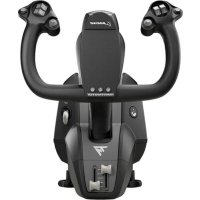
USER MANUAL TCA Yoke Boeing Edition THRUSTMASTER
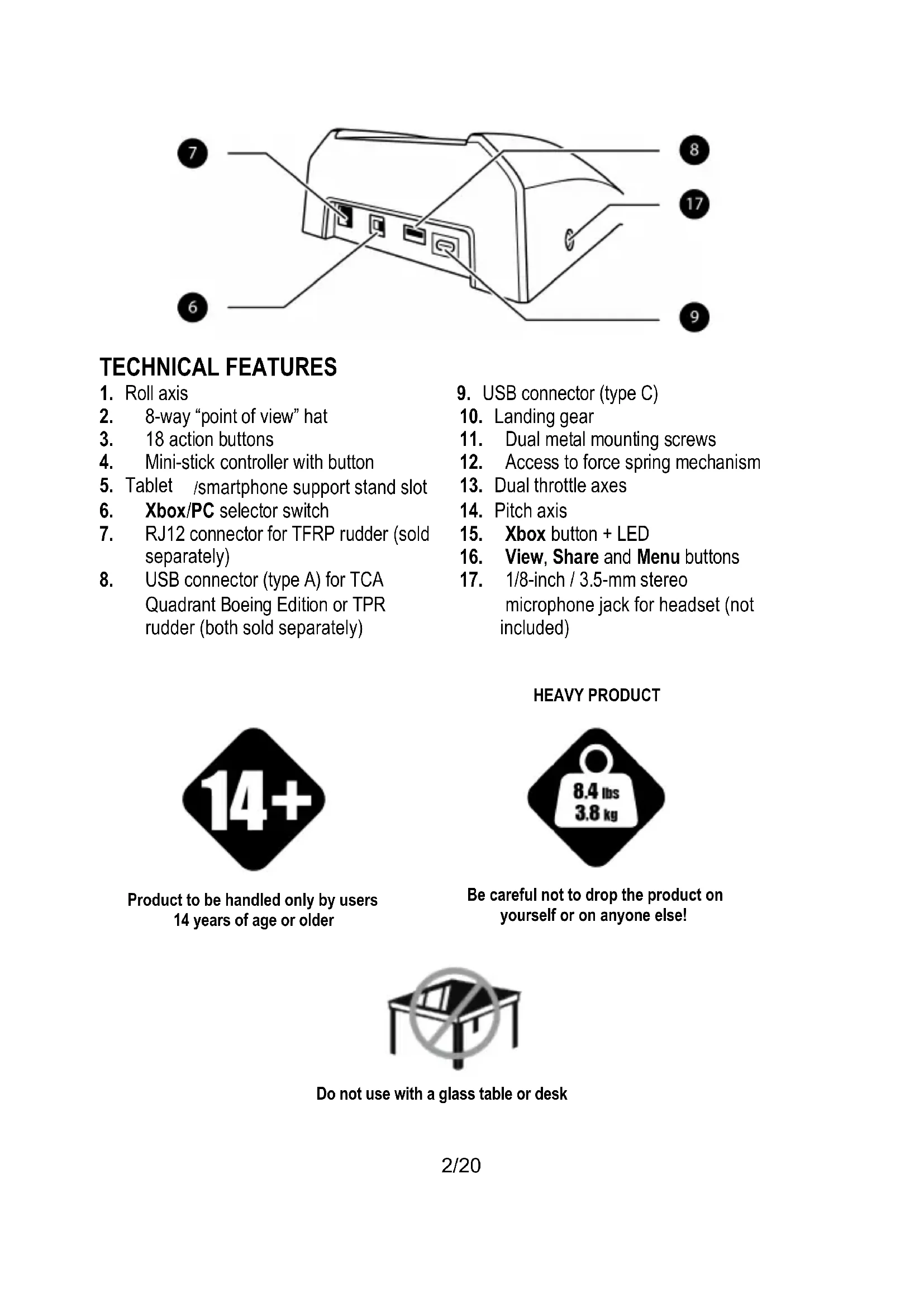
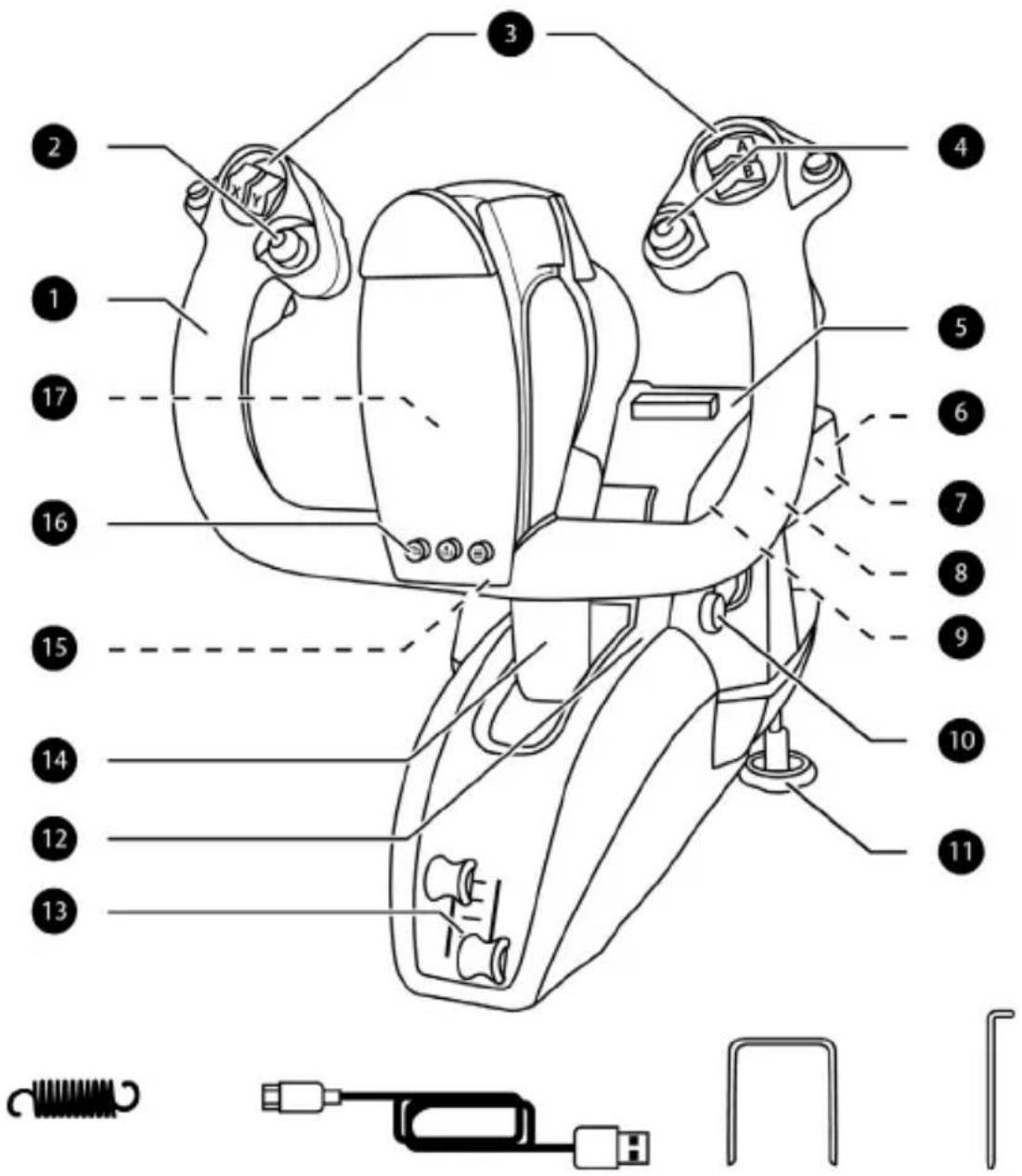
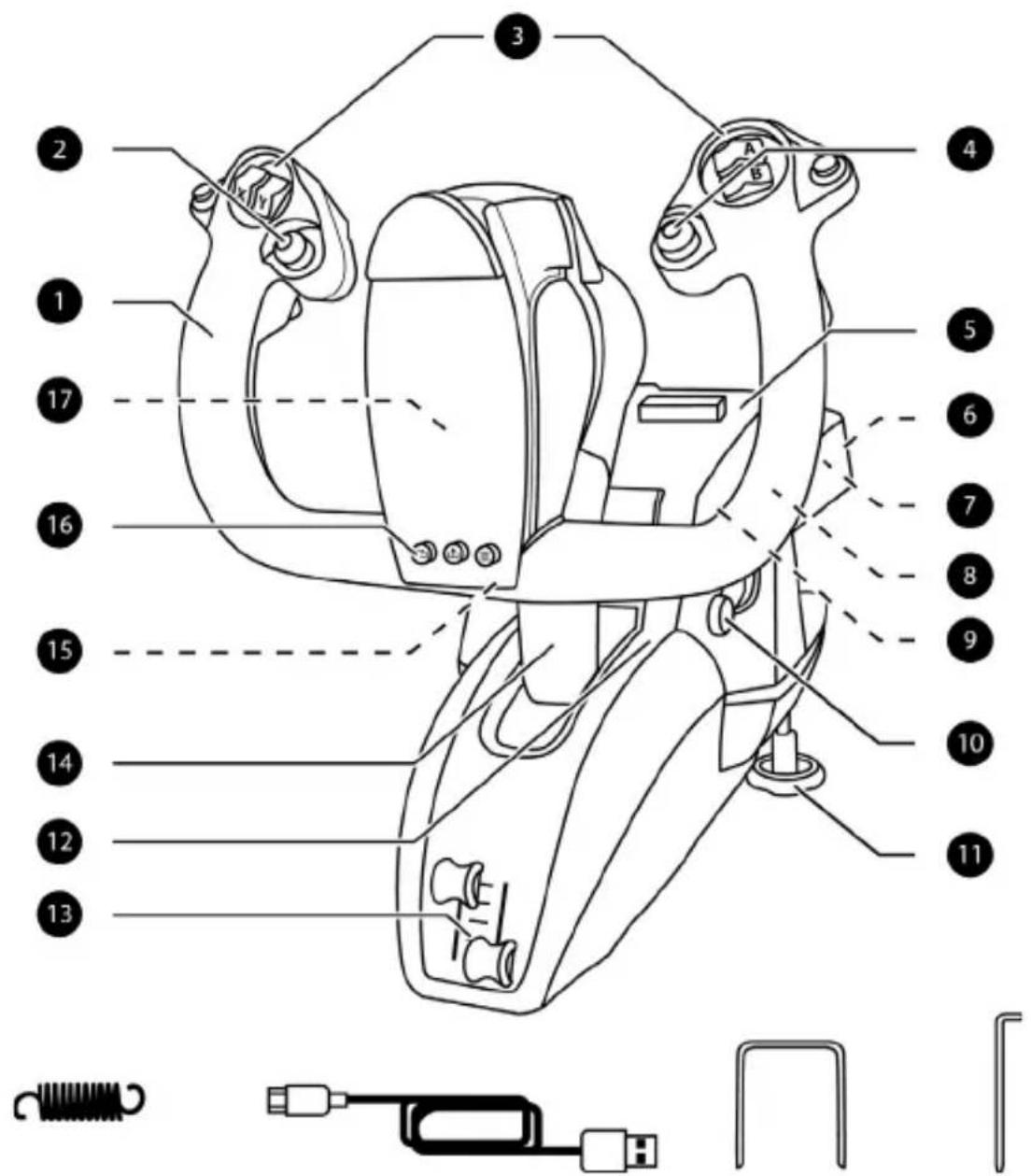
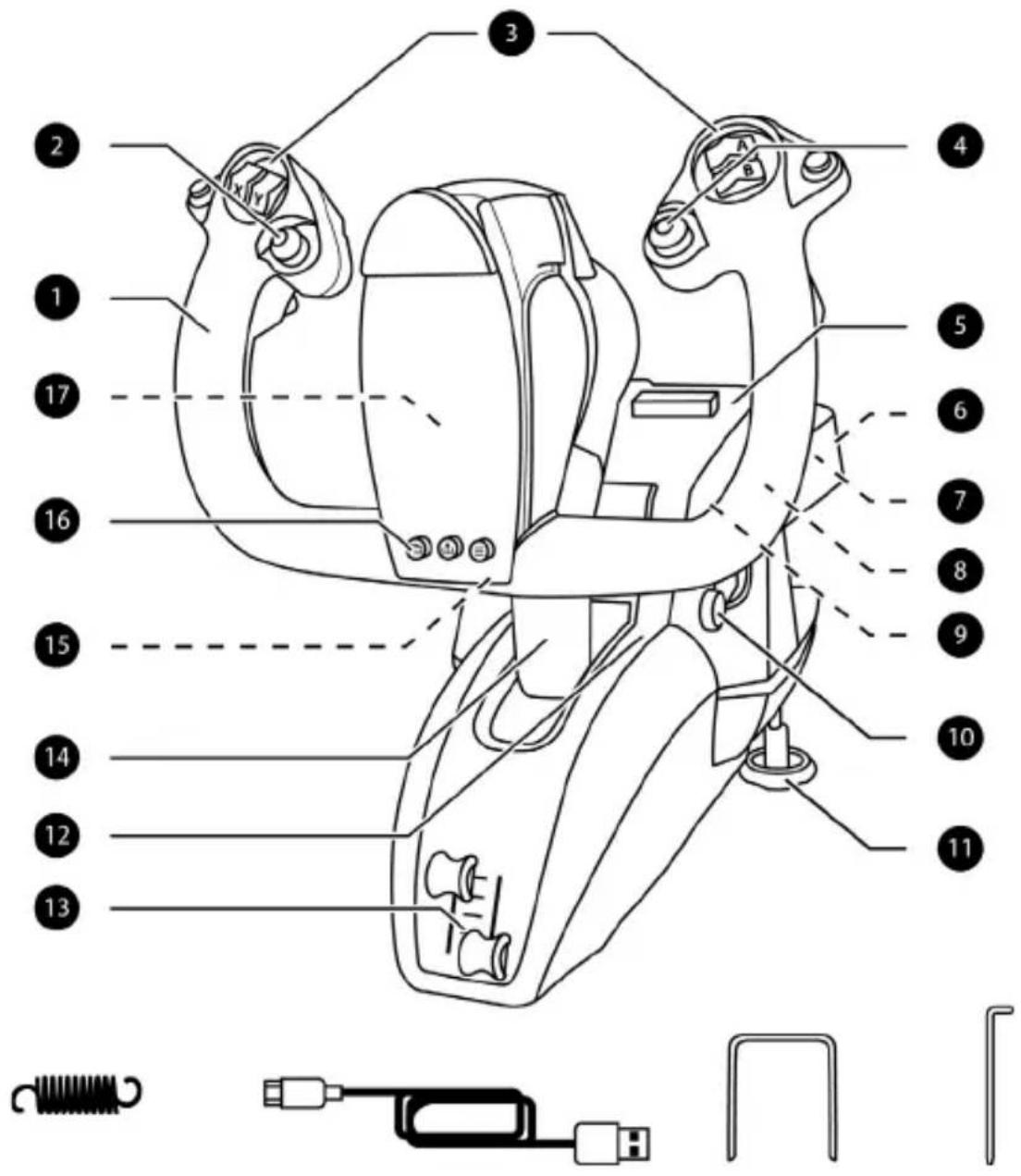
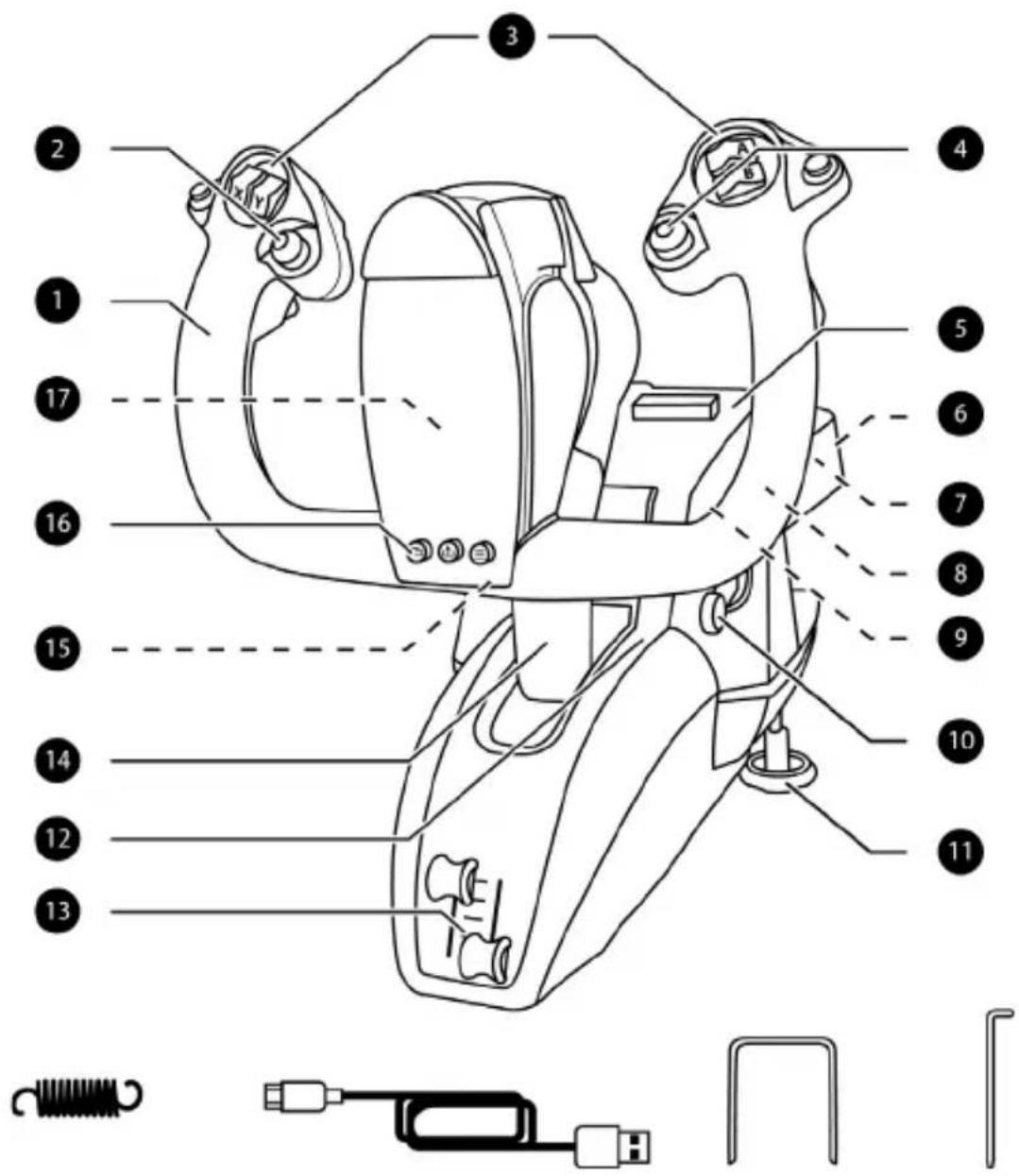
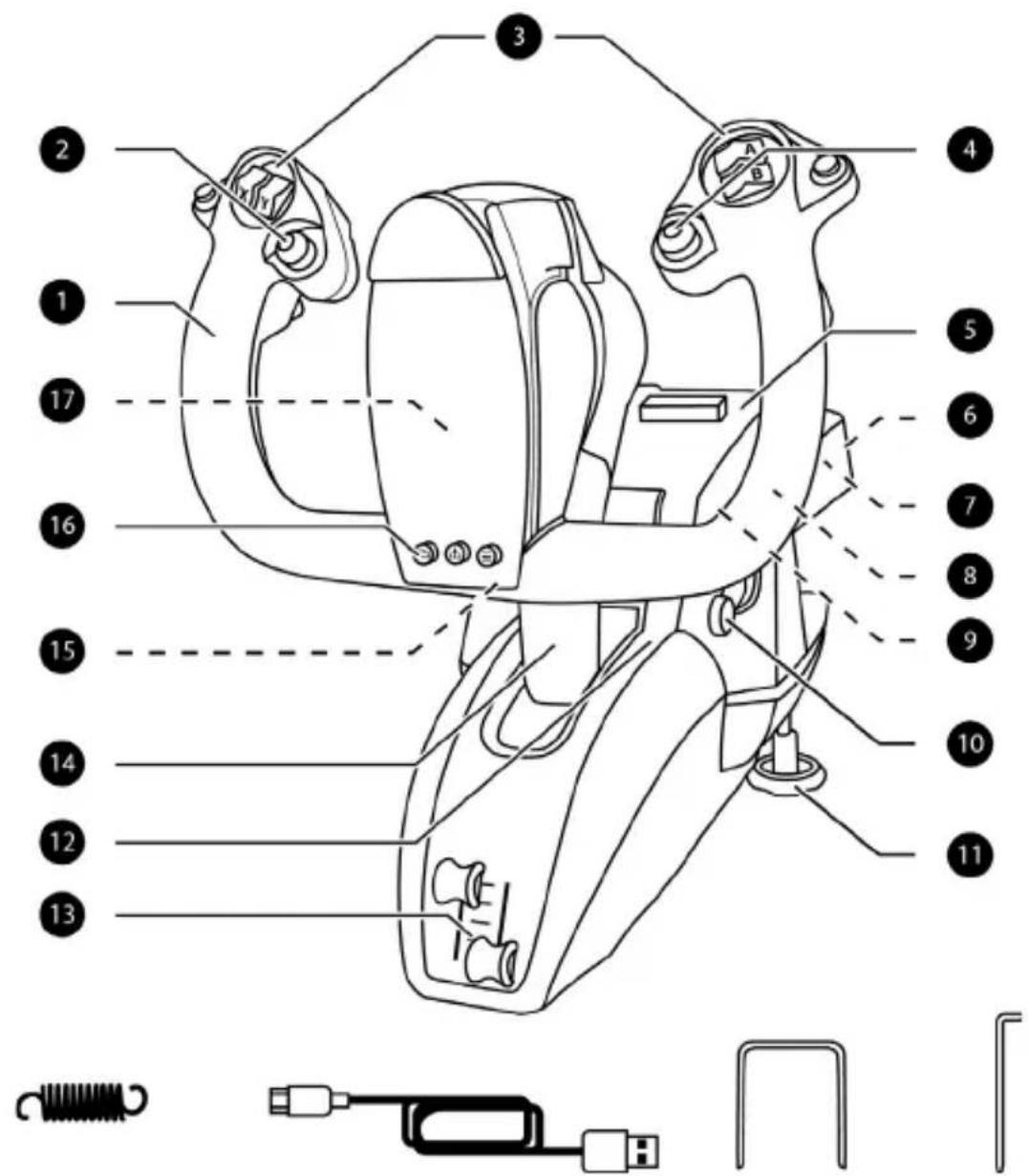
- Roll axis
- 8-way "point of view" hat
- 18 action buttons
- Mini-stick controller with button
- Tablet /smartphone support stand slot
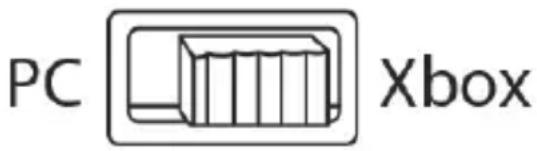
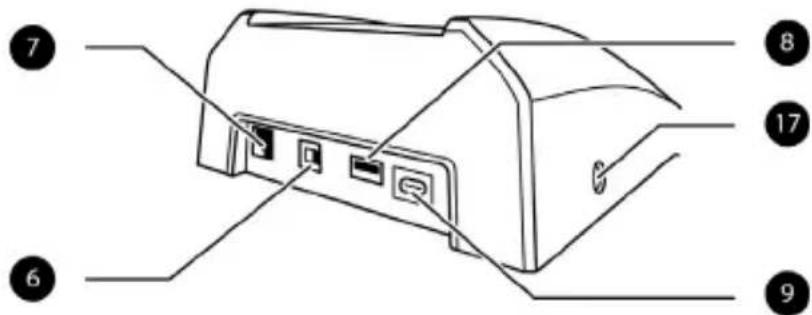
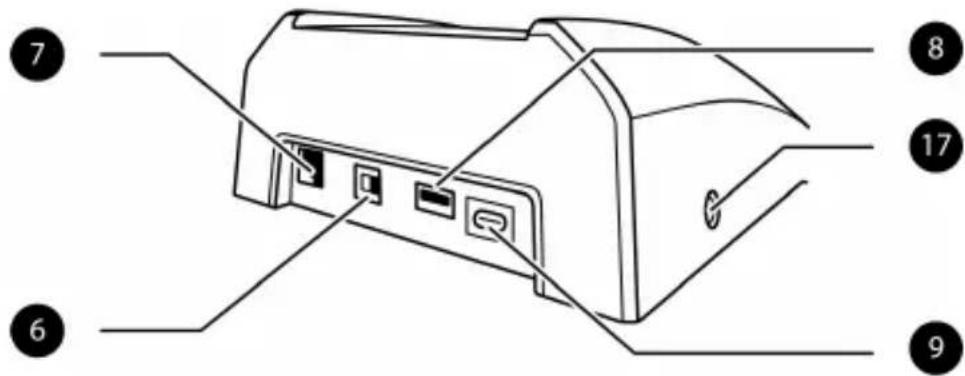
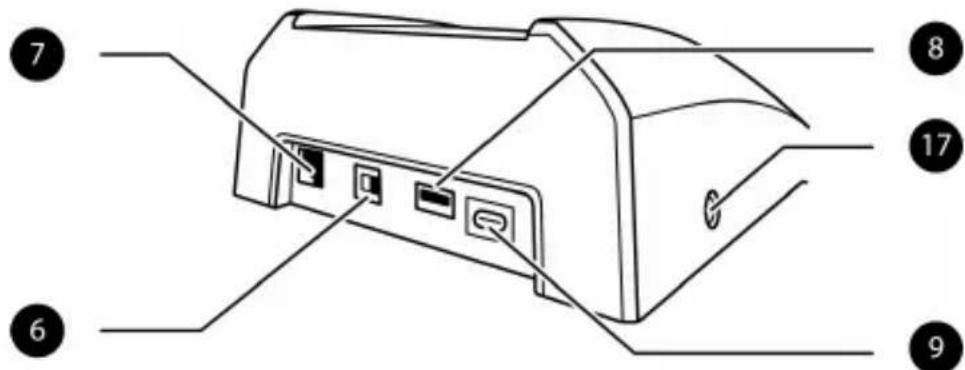
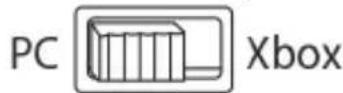
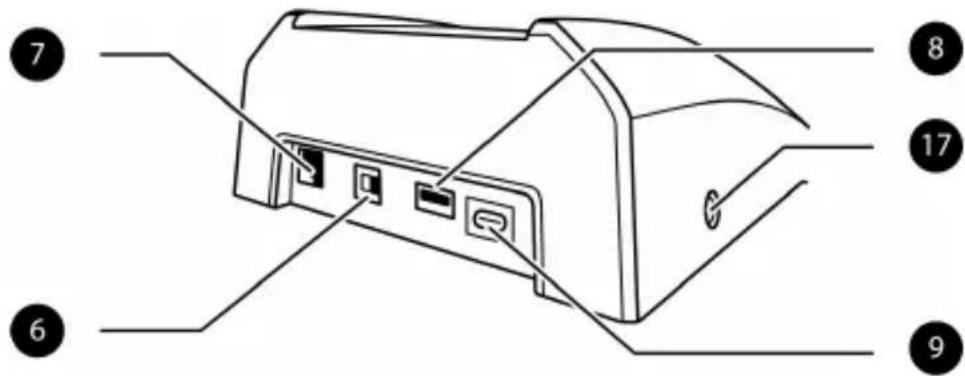
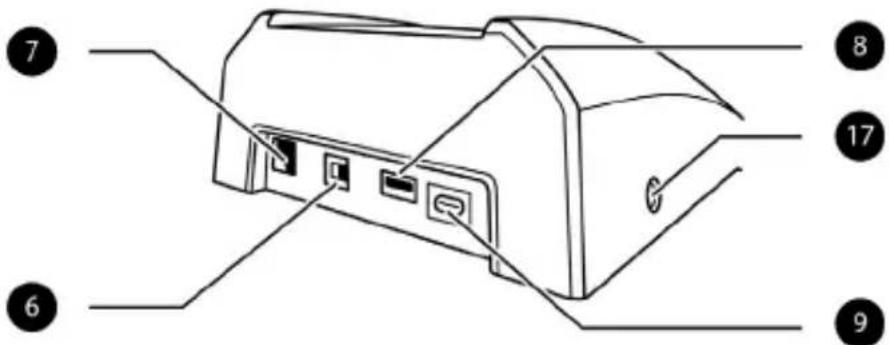
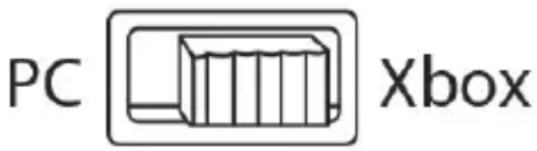
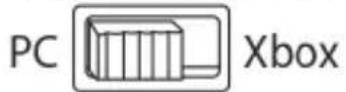
- Xbox/PC selector switch
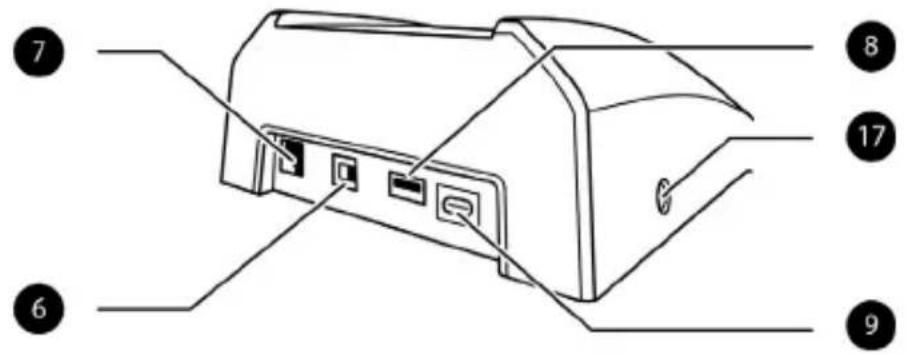
- RJ12 connector for TFRP rudder (sold separately)
-
USB connector (type A) for TCA Quadrant Boeing Edition or TPR rudder (both sold separately)
-
USB connector (type C)
-
Landing gear
- Dual metal mounting screws
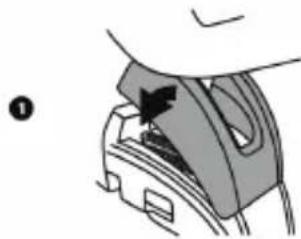
- Access to force spring mechanism
- Dual throttle axes
- Pitch axis
- Xbox button + LED
- View, Share and Menu buttons
- 1/8-inch / 3.5-mm stereo microphone jack for headset (not included)
Product to be handled only by users 14 years of age or older
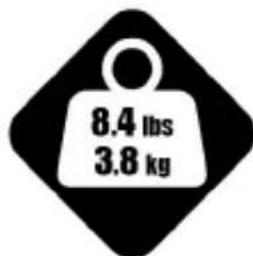
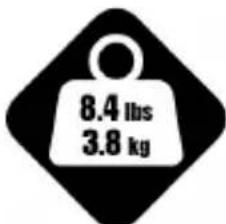
HEAVY PRODUCT
Be careful not to drop the product on yourself or on anyone else!
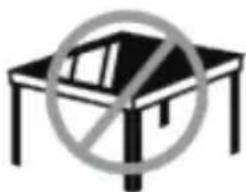
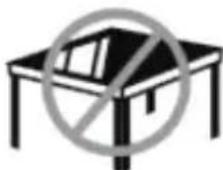
Do not use with a glass table or desk
XBOX SERIES X|S / XBOX ONE
INSTALLATION ON XBOX SERIES X|S / XBOX ONE
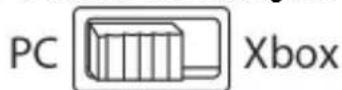
- Set the selector switch (6) to Xbox before connecting the USB cable.
- Connect the USB connector (9) to a USB port on the console using the included USB cable.
- Power on the console.
- The yoke's LED lights up in white.
- Start up a compatible game (supporting Flight Stick mode).
You are now ready to play!
LIST OFCompatible XBOX SERIES X|S / XBOX ONE GAMES
On Xbox Series X|S / Xbox One, TCA Yoke Boeing Edition:
- is only compatible with games supporting Flight Stick mode;
- is recognized in games as a real joystick (and not as a gamepad), allowing for maximum responsiveness and precision, as well as access to the joystick options available in these games.
A list of Xbox Series X|S / Xbox One games compatible with the yoke is available at https://support.thrustmaster.com, in the Joysticks / TCA Yoke Boeing Edition section. This list will be added to regularly with the arrival of new Xbox Series X|S / Xbox One games compatible with TCA Yoke Boeing Edition.
GETTING TO KNOW YOUR TCA YOKE BOEING EDITION
EXCLUSIVE PRECISION TECHNOLOGY
H.E.A.R.T: HALLEFFECT ACCURATE TECHNOLOGY AND PENDUL_R
TCA Yoke Boeing Edition features technologies providing it with a level of precision currently unrivaled in the world of joysticks/gaming yokes, incorporating:
- 3D (Hall effect) magnetic sensors on the roll and pitch axes, with 16-bit resolution (i.e. 65,536 × 65,536 values);
- a magnet, avoiding any friction and ensuring outstanding precision that won't decrease over time;
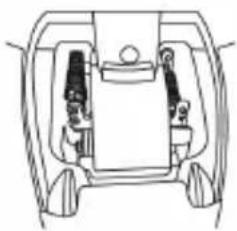
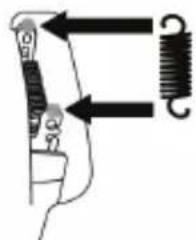
- firm, linear and super-smooth tension which can be adjusted by way of the removable springs on the pitch axis (please refer to the PITCH AXIS TENSION ADJUSTMENT PROCEDURE section on page 13).
THROTTLE
Your yoke features two throttle axes (13), which you can use to easily control the engine thrust.
MICROPHONE JACK FOR HEADSET (NOT INCLUDED)
Your yoke features a 1/8-inch / 3.5-mm female microphone jack (17), allowing you to use a headset with a microphone for an even more immersive experience.
TCA YOKE BOEING EDITION CONNECTIVITY
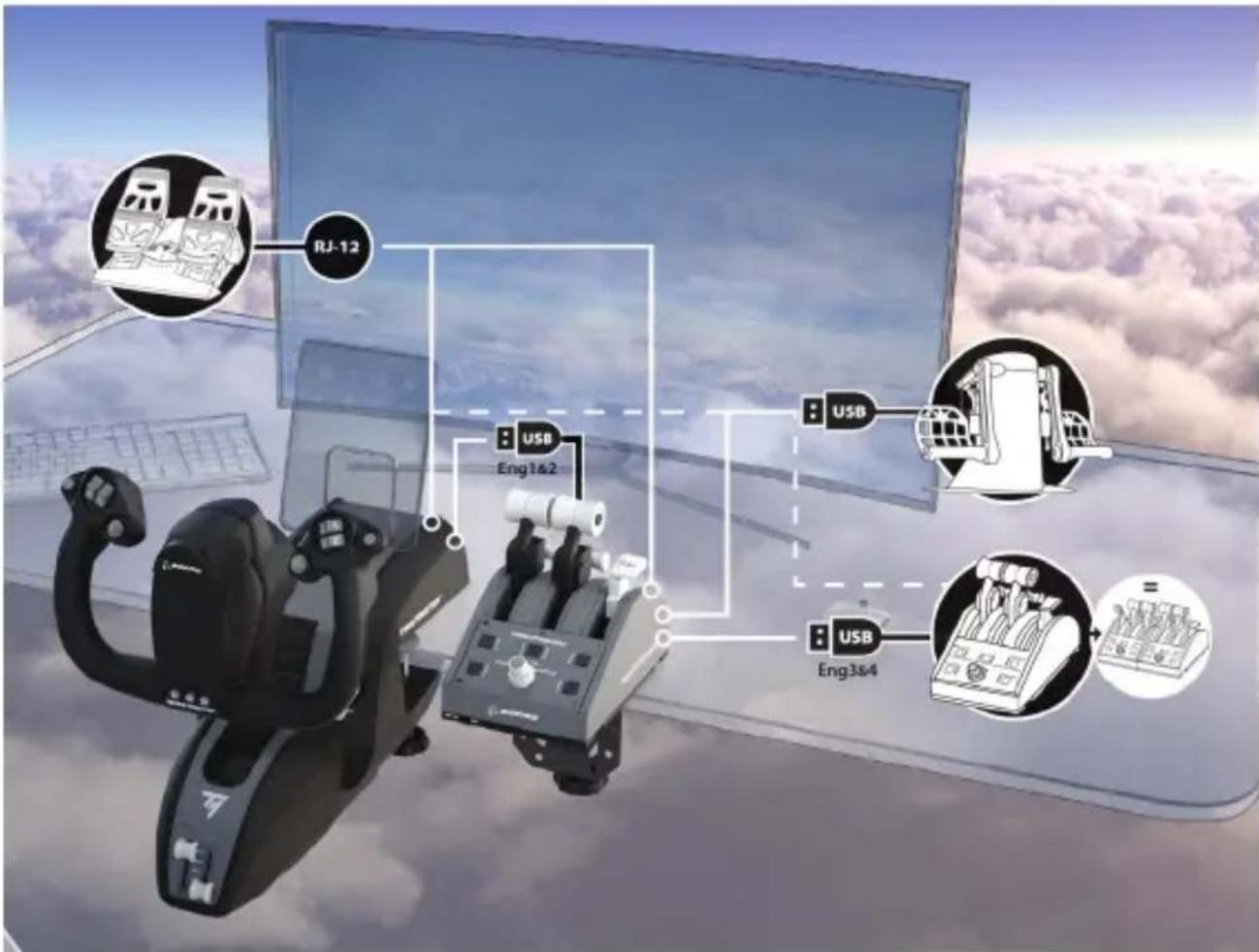
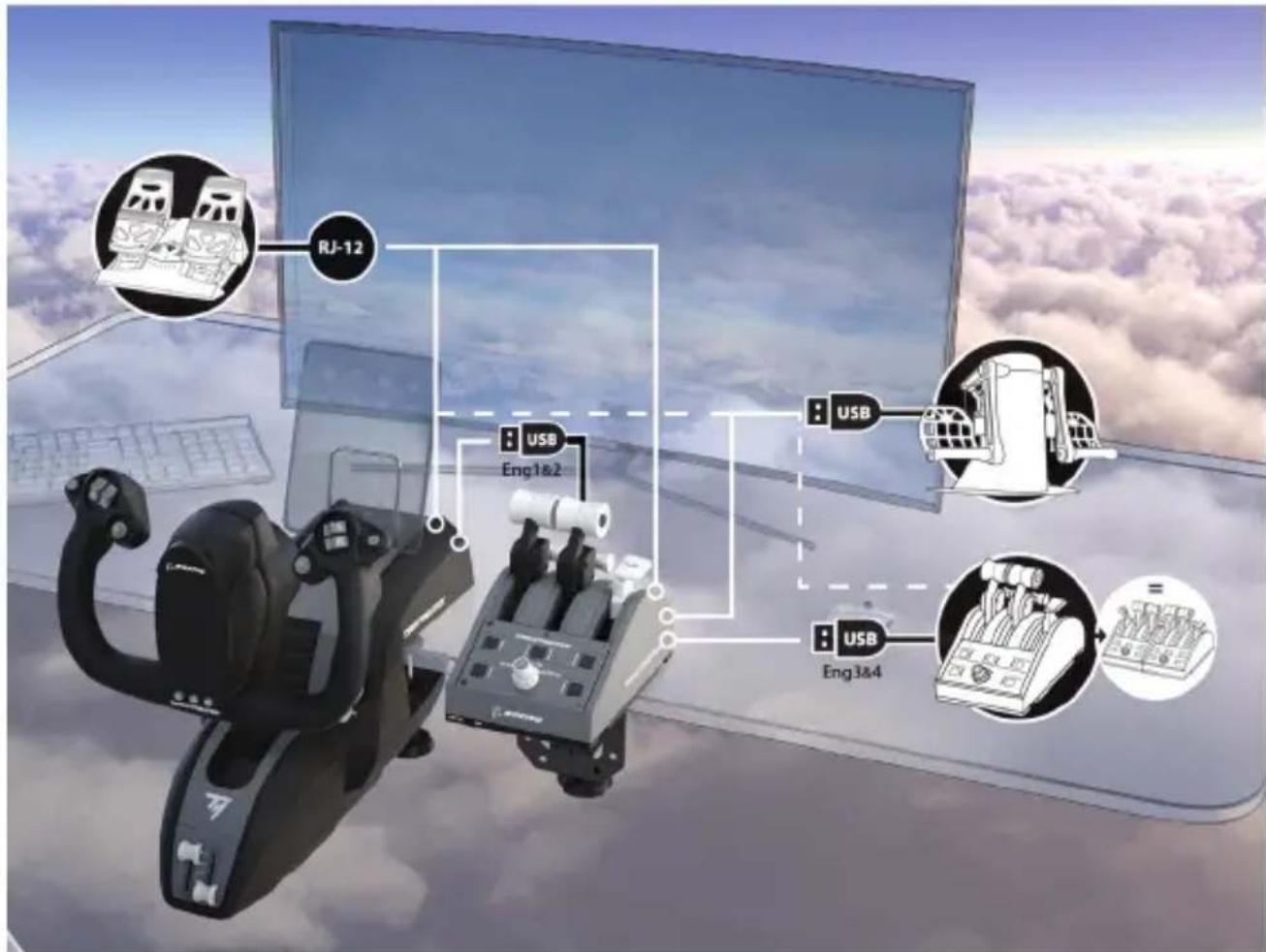
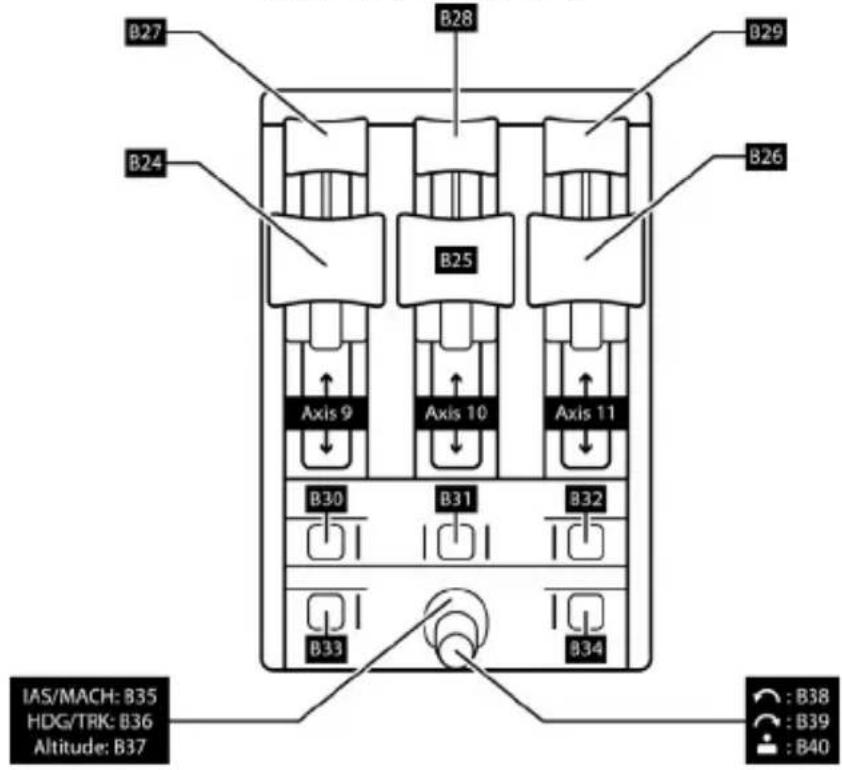
TCA Yoke Boeing Edition features 6 axes, but allows you to directly connect a throttle and a rudder (both sold separately) at the back of the yoke. A second throttle (sold separately) can also be connected at the back of TCA Quadrant Boeing Edition (also sold separately), allowing the yoke to access up to 9 additional axes.
On Xbox Series X|S / Xbox One, compatible Thrustmaster devices connected via the type A USB connector will be merged with the TCA Yoke Boeing Edition device.

The only devices compatible with Xbox Series X|S / Xbox One are TCA Quadrant Boeing Edition, plus the TPR and TFRP rudder systems (all sold separately).
USING TCA QUADRANT BOEING EDITION*, TPR* OR TFRP* RUDDER SYSTEMS WITH TCA YOKE BOEING EDITION
(* sold separately)
Throttle:
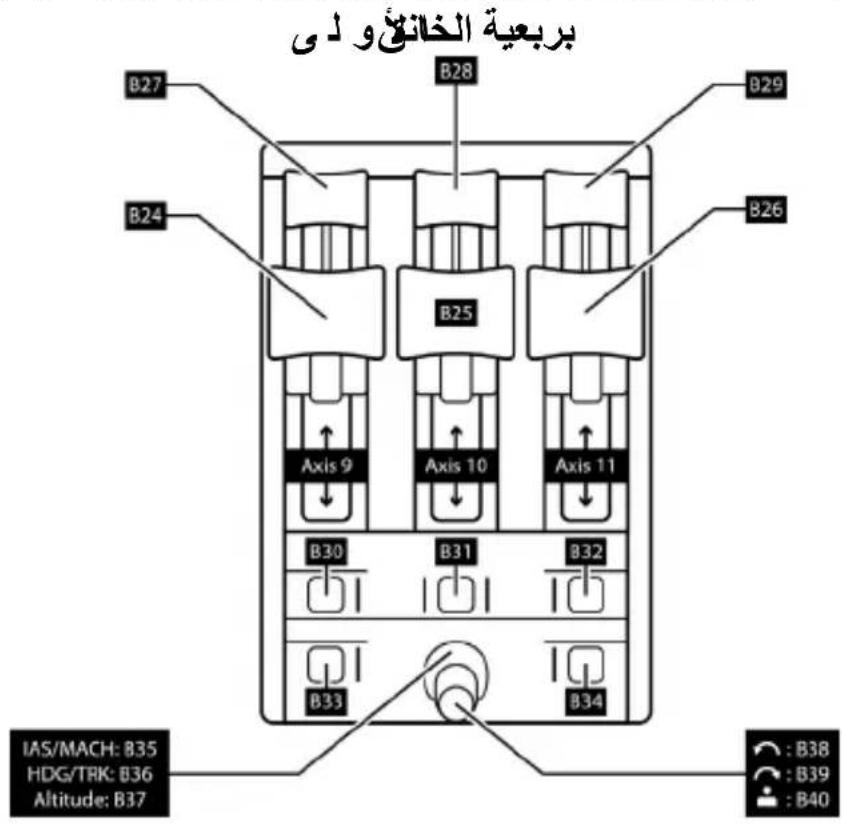
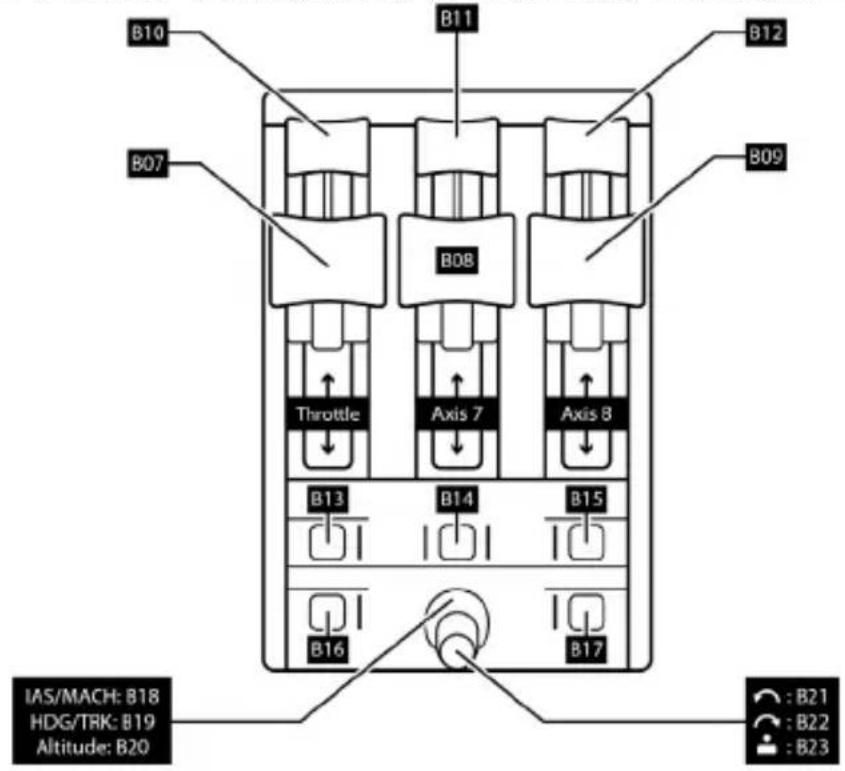
TCA Quadrant Boeing Edition (sold separately) can be connected directly to the yoke.
- Connect the quadrant's USB connector to the female type A USB connector (8) located at the back of the yoke.
- Connect the yoke's type C USB connector (9) to one of the USB ports on your PC or Xbox.
Rudder:
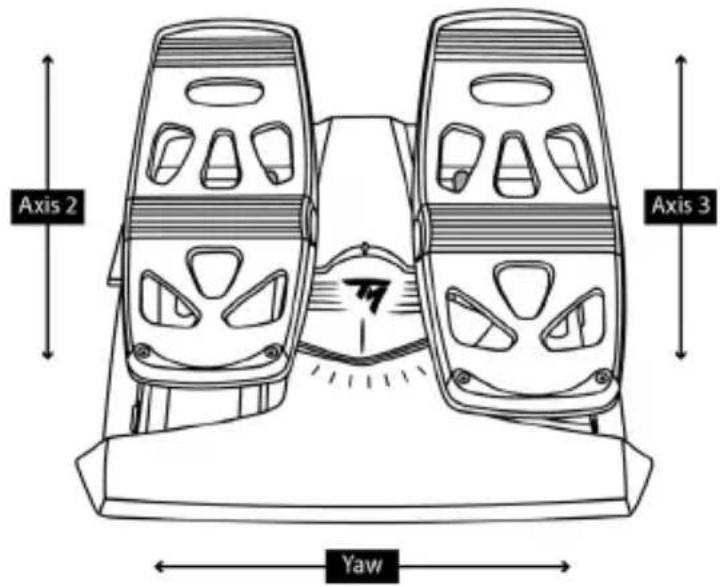
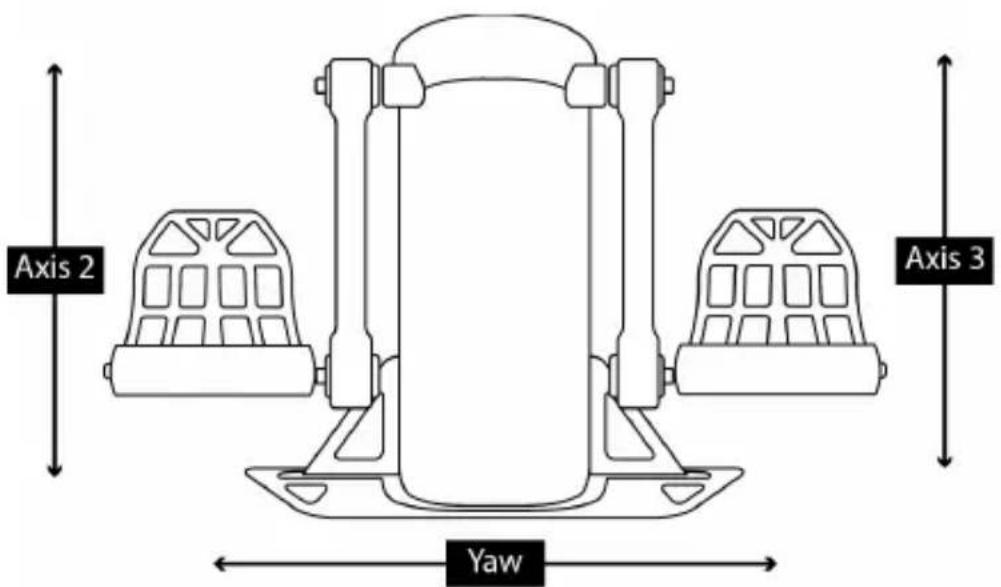
3 axes are reserved for the TPR or TFRP rudder systems (both sold separately).
The TFRP rudder system can be connected directly to the yoke.
- Connect the rudder pedals' male RJ12 connector to the female RJ12 connector (7) located at the back of the yoke.
- Connect the yoke's type C USB connector (9) to one of the USB ports on your PC.
The TPR rudder system can be connected directly to the yoke or the quadrant (if TCA Quadrant Boeing Edition is already connected).
- Connect the rudder pedals' USB connector to the female type A USB connector (8) located at the back of the yoke.
- Connect the yoke's type C USB connector (9) to one of the USB ports on your PC.
Important notes regarding the automatic calibration of axes:
- Always leave the rudder pedals' axis perfectly centered when connecting the rudder system to the yoke. Never place your feet on the rudder pedals when doing so.
- The rudder pedals' 3 axes automatically calibrate themselves after a few movements, and once the physical stops for the rudder's axis and the 2 differential brake axes have been reached.
CONNECTING TCA YOKE BOEING EDITION TO TCA QUADRANT BOEING EDITION* AND TPR* OR TFRP* RUDDER SYSTEMS*
(* sold separately)
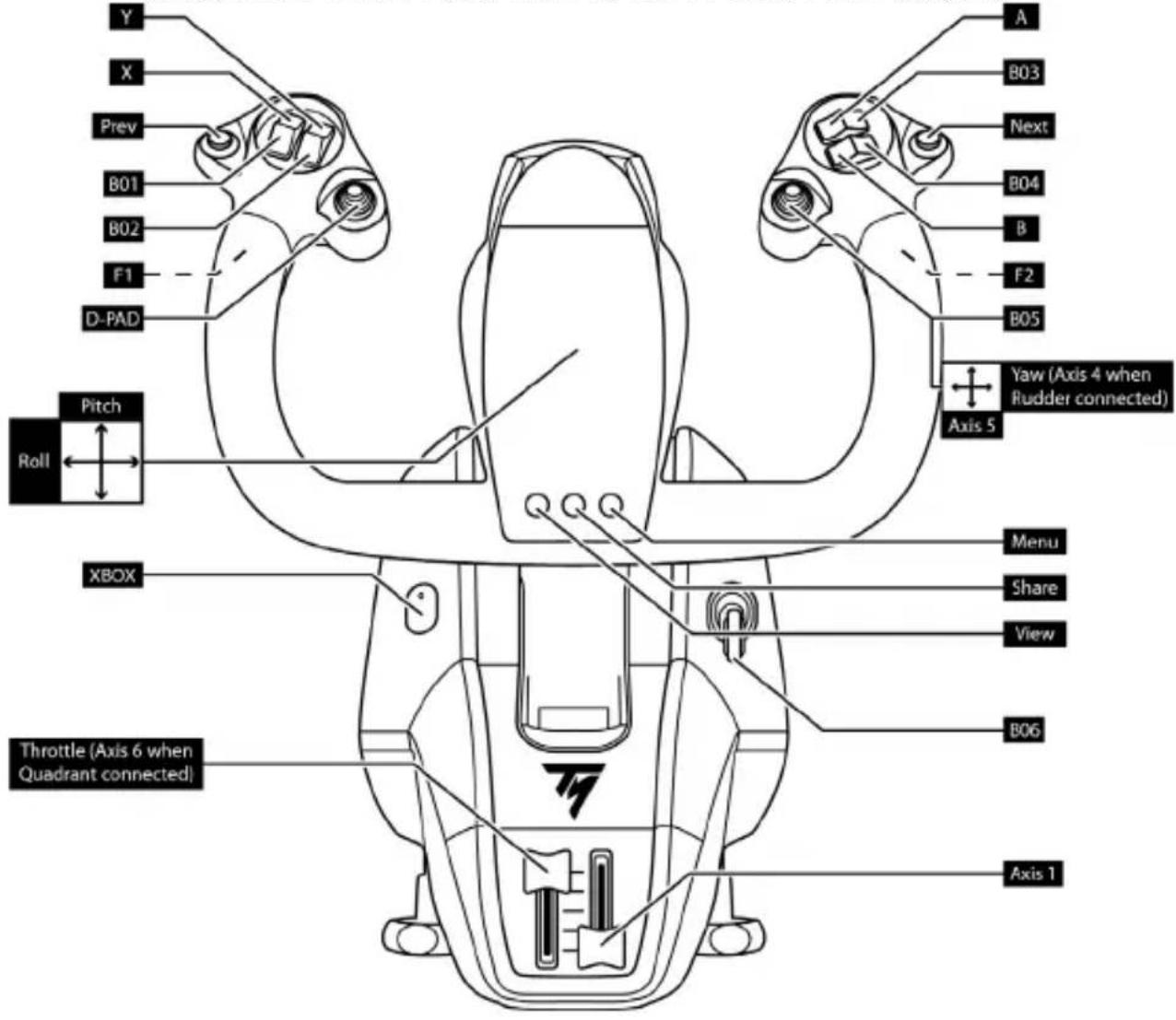
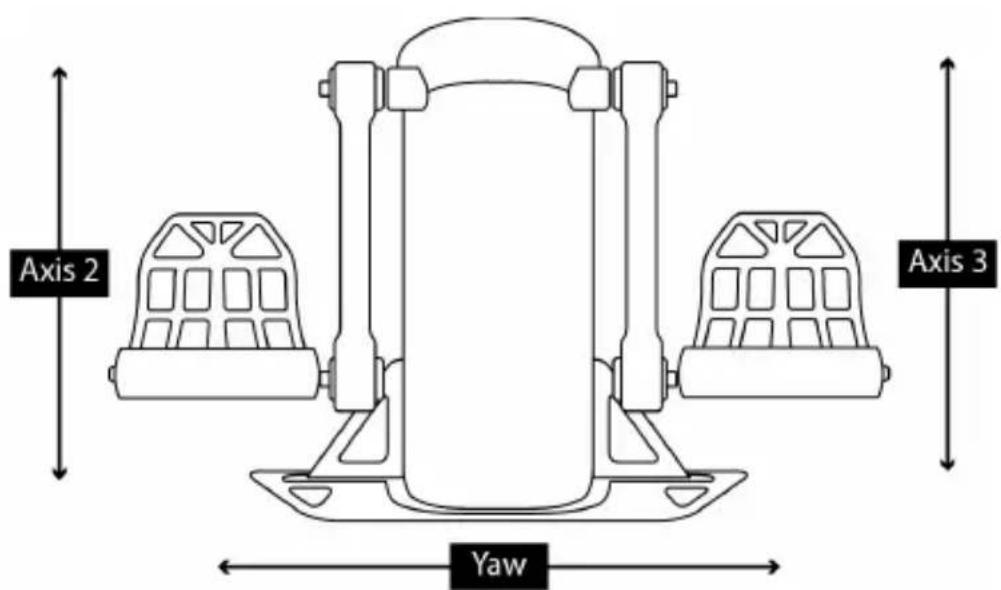
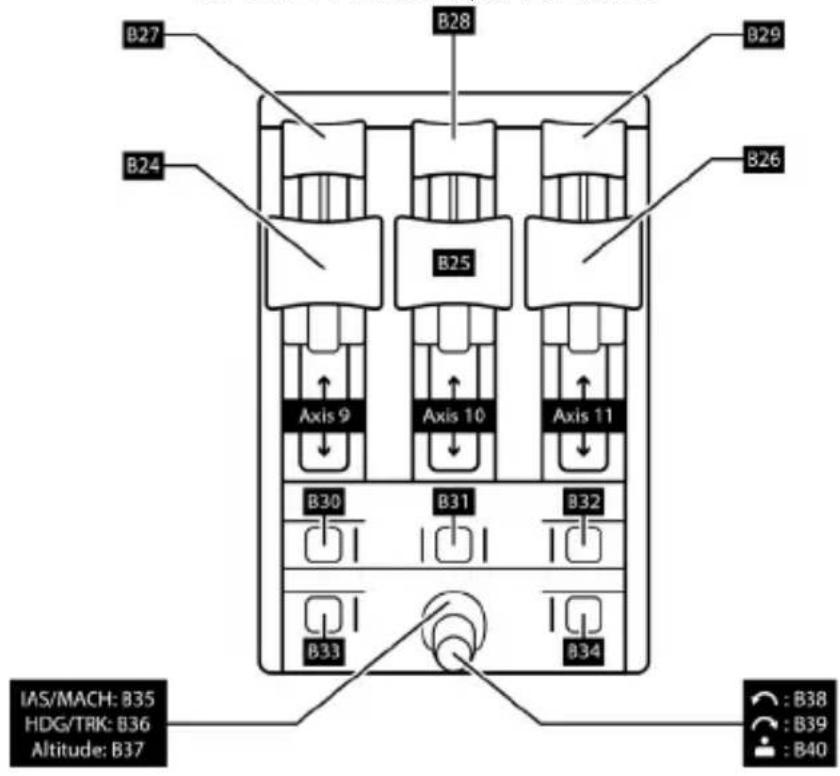
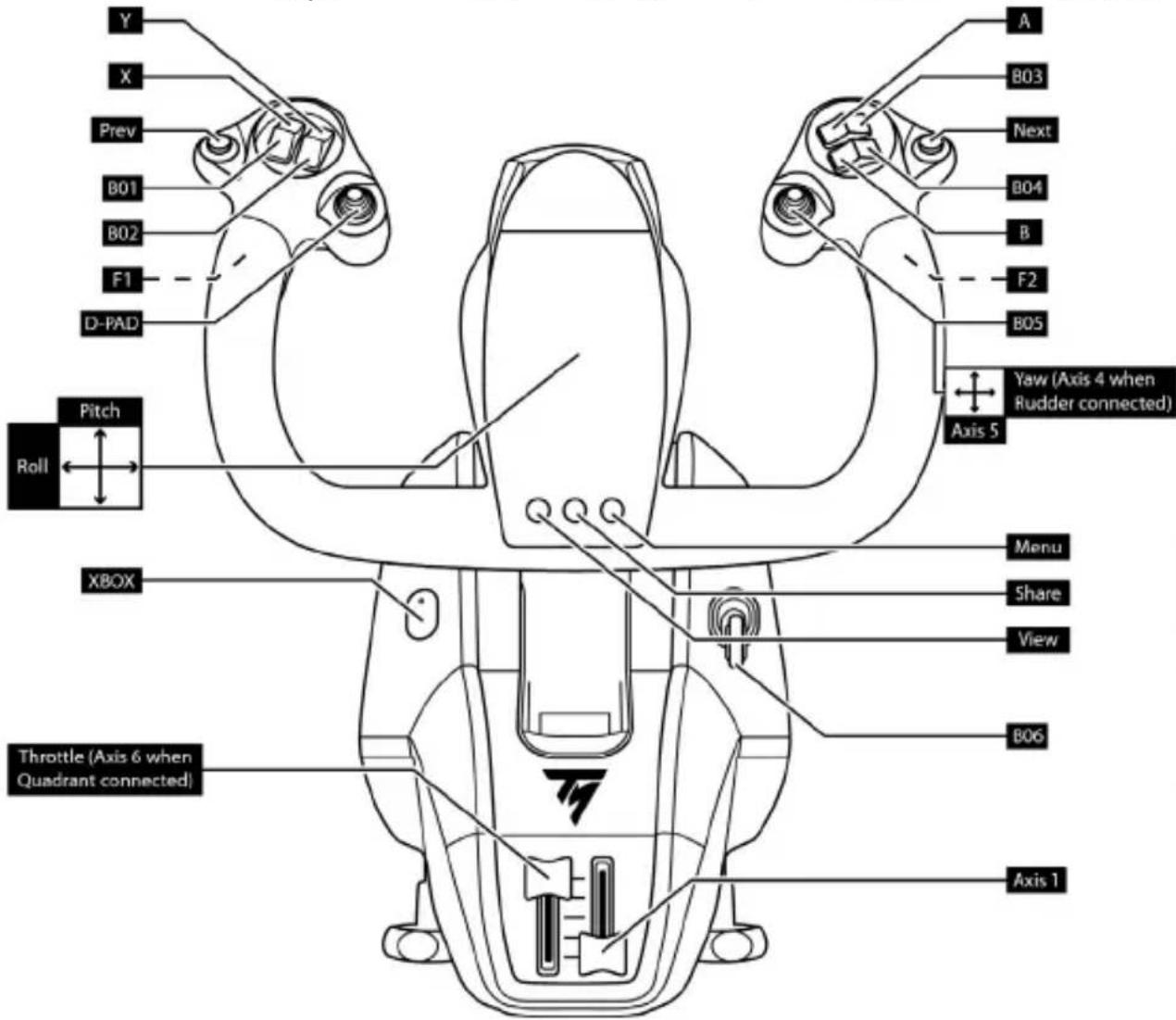
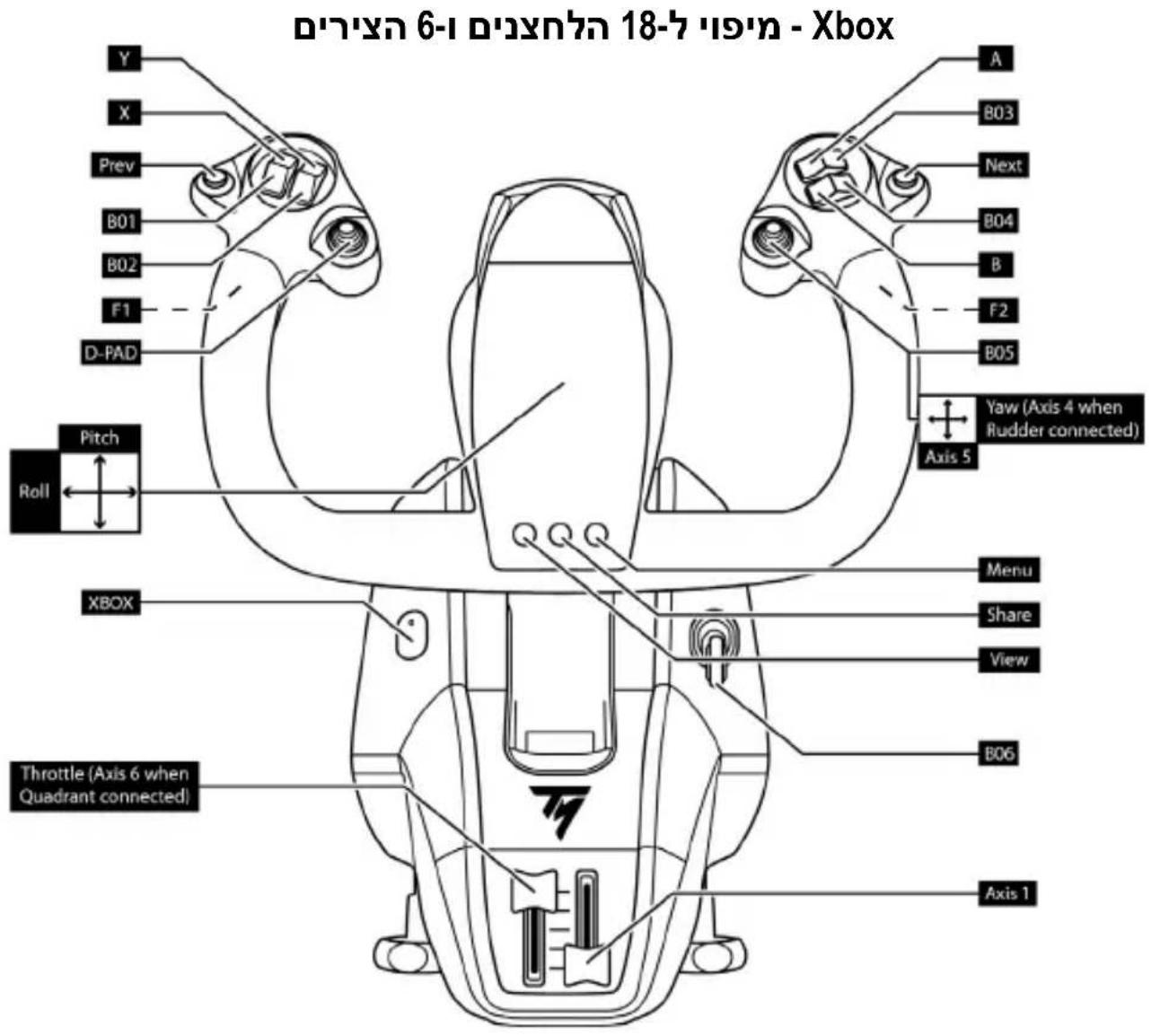
XBOX MAPPING FOR THE 18 BUTTONS AND 6 AXES
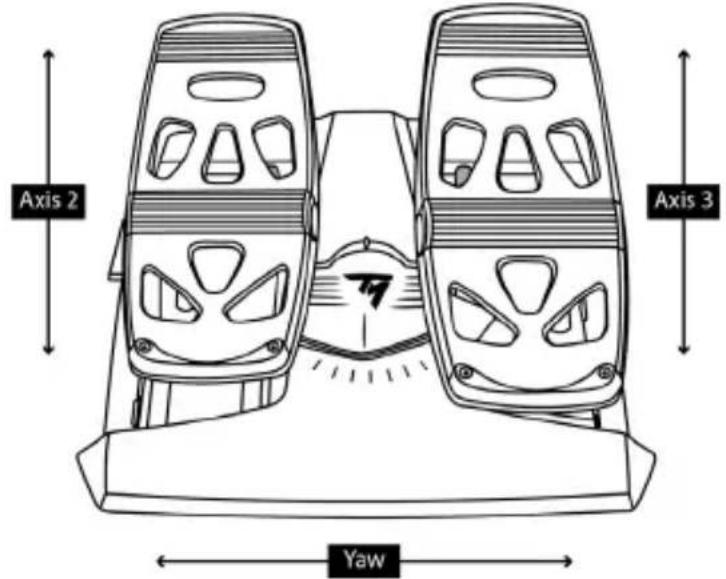
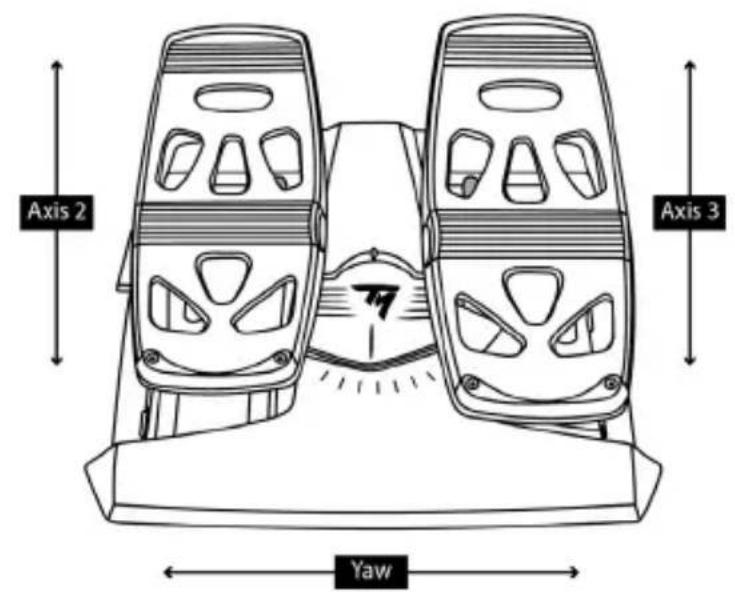
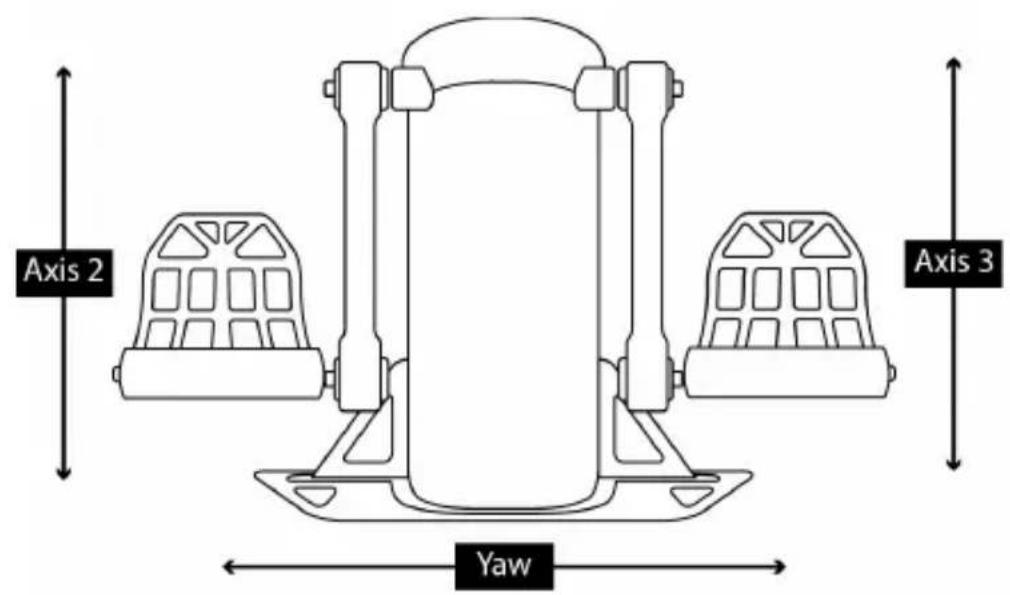
USING A RUDDER SYSTEM CONNECTED TO THE YOKE
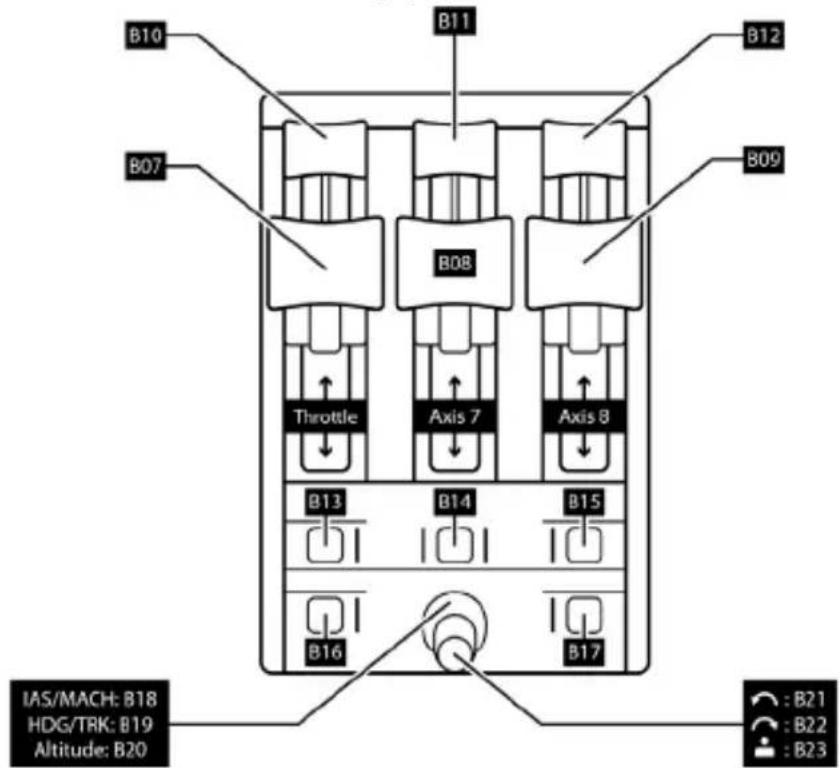
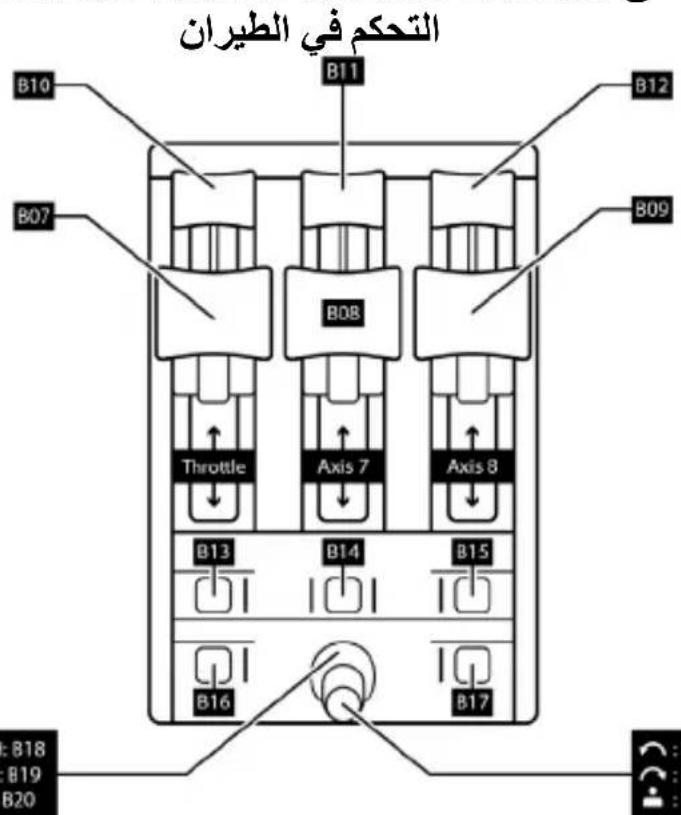
USING TCA QUADRANT BOEING EDITION CONNECTED TO THE YOKE
USING A SECOND TCA QUADRANT BOEING EDITION CONNECTED TO THE FIRST QUADRANT
PC
INSTALLATION ON PC
- Set the selector switch (6) to PC before connecting the USB cable.
- Go to https://support.thrustmaster.com. Click Joysticks / TCA Yoke Boeing Edition, and then click Drivers. Download and install the PC driver and its customized interface for the Windows Control Panel.
- Once the PC driver has been installed, connect the USB connector (9) to one of the USB ports on your PC.
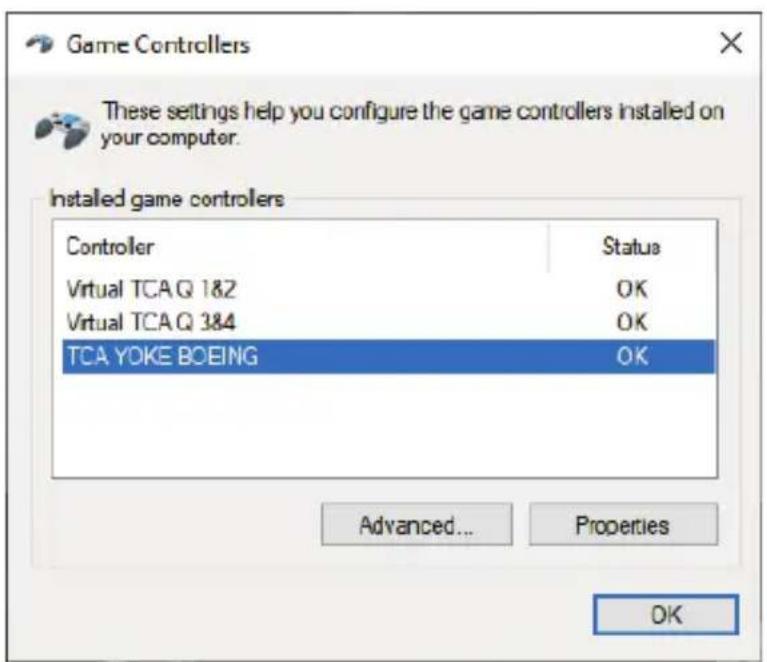
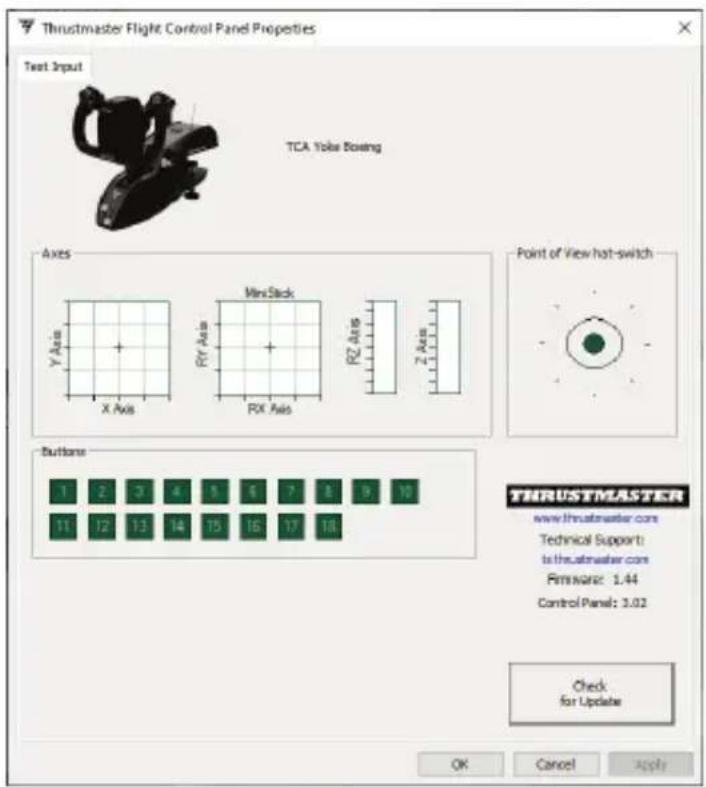
- To access the Control Panel, select: Start / Apps / Thrustmaster / Control Panel (in Windows 10).
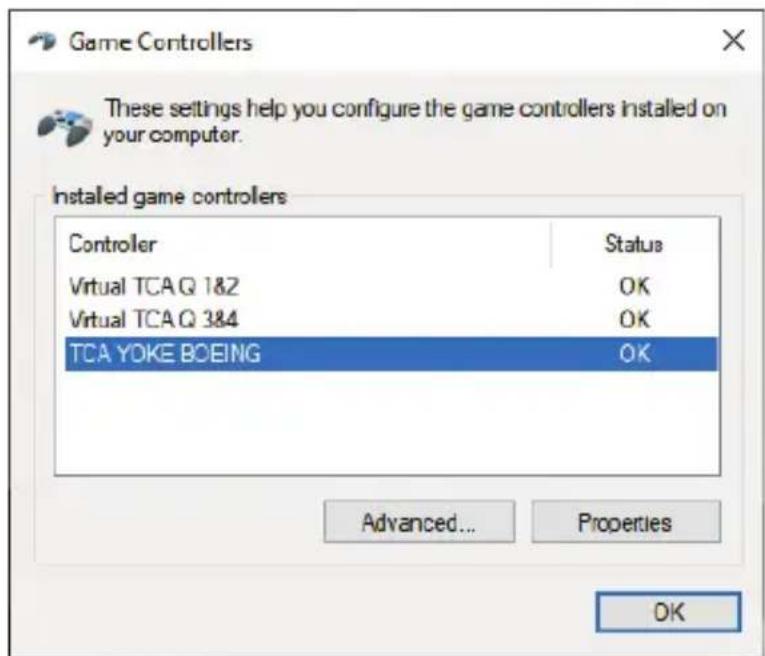
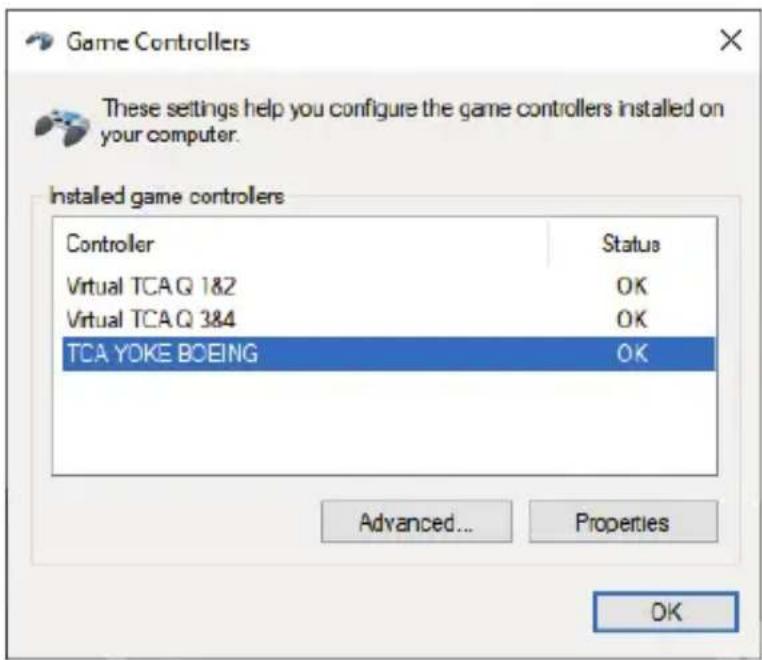
The Game Controllers dialogue box is displayed.
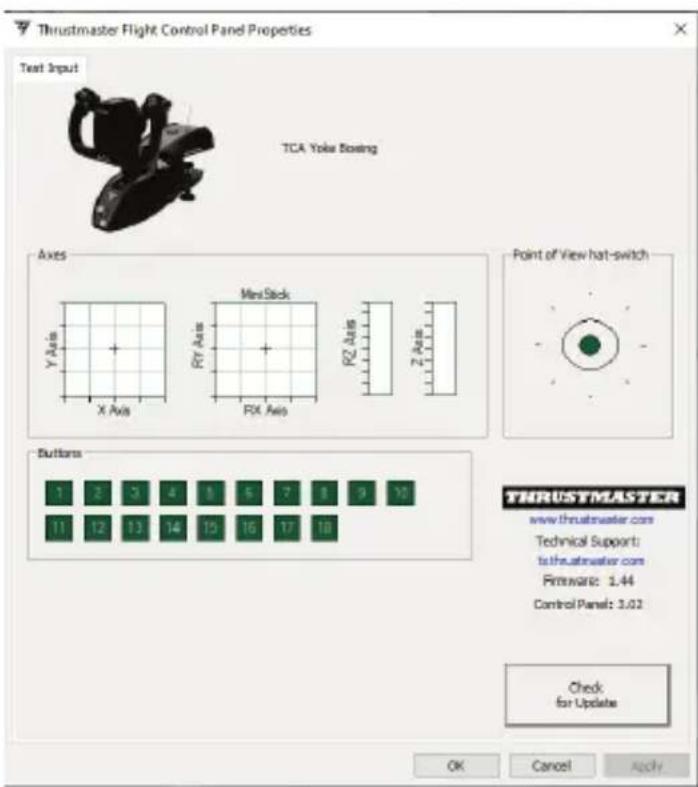
The device appears onscreen with the name TCA Yoke Boeing and OK status.
- In the Game Controllers dialogue box, click Properties to test and view all features.
TCA YOKE BOEING EDITION CONNECTIVITY
TCA Yoke Boeing Edition features 6 axes, but allows you to directly connect a throttle and a rudder system (both sold separately) at the back of the yoke. A second throttle (sold separately) can also be connected at the back of TCA Quadrant Boeing Edition (also sold separately), once the driver has been installed, allowing the yoke to access up to 9 additional axes.
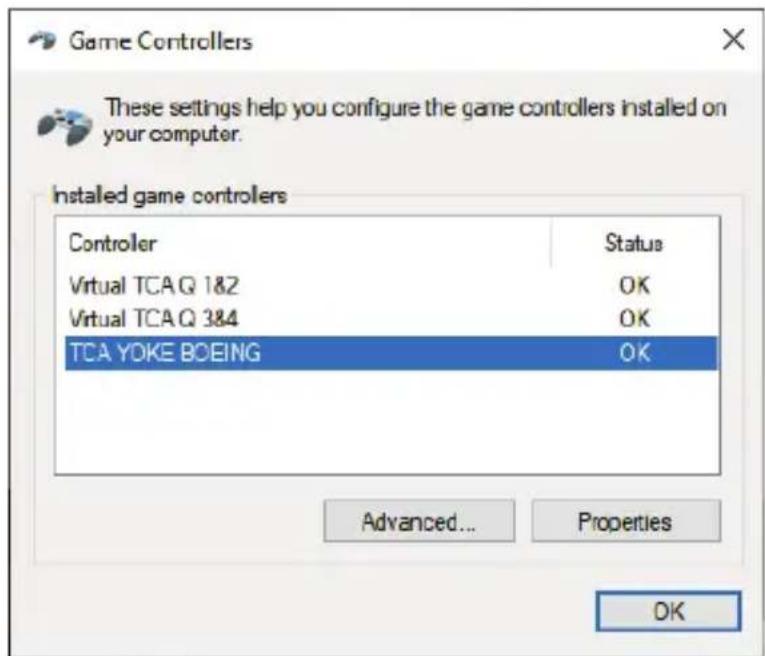
When the two TCA Quadrant Boeing Edition throttle quadrant devices are connected, they appear independently in the Game Controllers dialogue box as virtual device(s):
Connecting the TPR or TFRP rudder systems (sold separately):
- The rudder system's 3 axes are merged into virtual throttle quadrant 1&2 (Virtual TCA Q 1&2) if the rudder system is connected to the yoke or to any throttle quadrant connected to the yoke (installation of the driver is required in order to ensure proper operation).
- The rudder system's 3 axes are merged into the throttle quadrant to which they are connected, if that throttle quadrant is directly connected to the PC.
The firmware included in the base of TCA Yoke Boeing Edition can be updated (meaning that it can be replaced with more recent versions incorporating product improvements).
To view your yoke's current firmware version and update it, if necessary: on PC, go to https://support.thrustmaster.com click Joysticks / TCA Yoke Boeing Edition, then click Firmware. Follow the instructions and the download and installation procedures.
The only devices compatible with PC are TCA Quadrant Boeing Edition, plus the TPR and TFRP rudder systems (all sold separately).
You are now ready to play!
PITCH AXIS TENSION ADJUSTMENT PROCEDURE
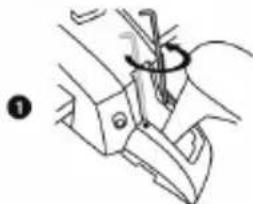
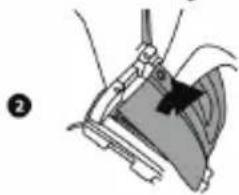
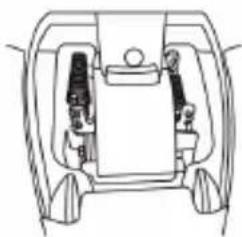
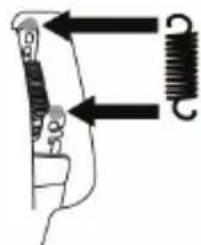
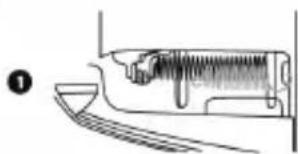
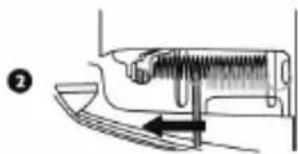
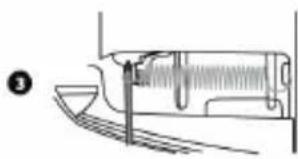
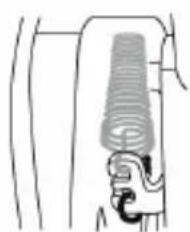
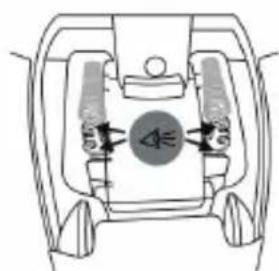
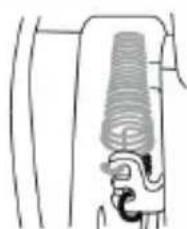
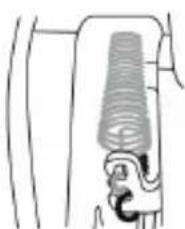
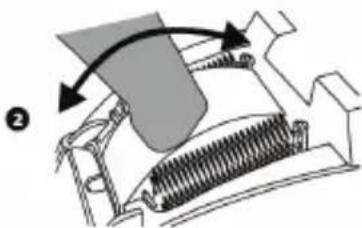
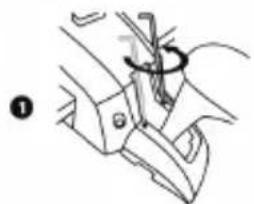
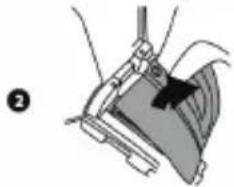
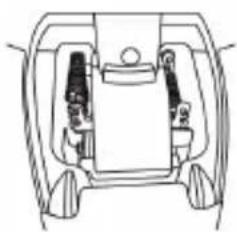
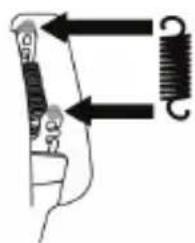
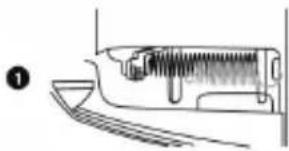
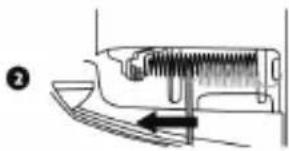
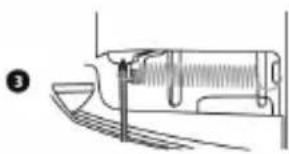
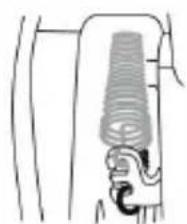
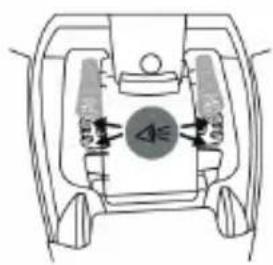
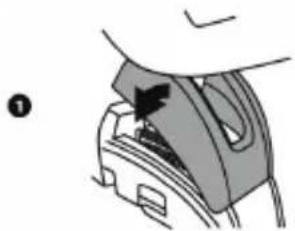
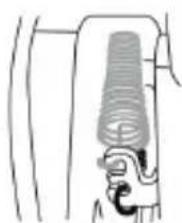
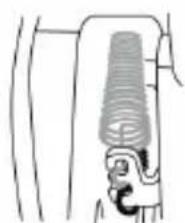
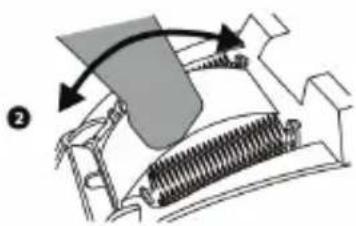
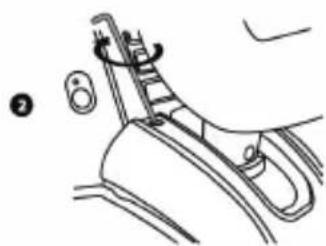
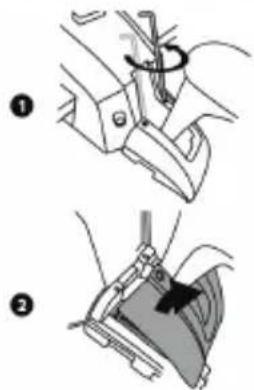
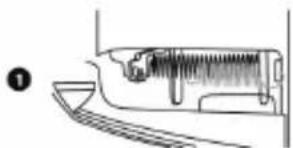
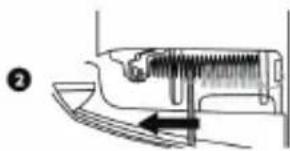
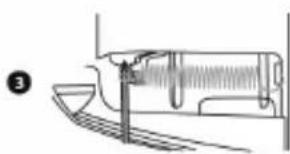
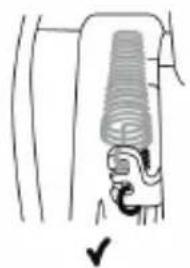
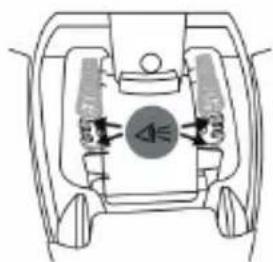
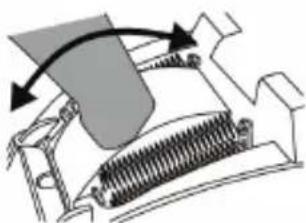
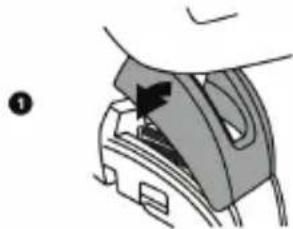
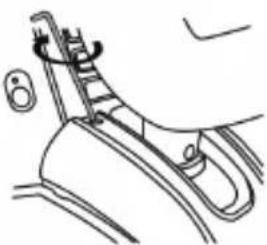
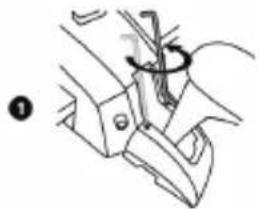
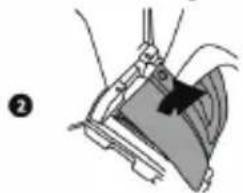
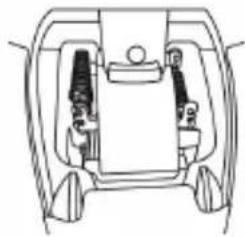
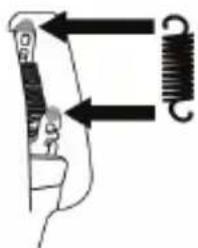
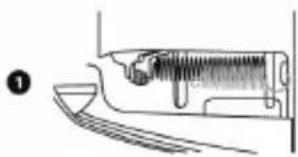
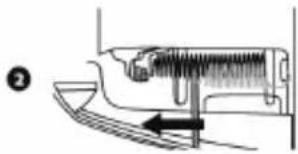
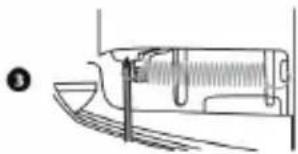
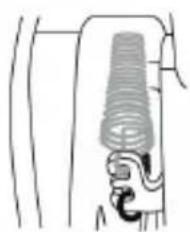
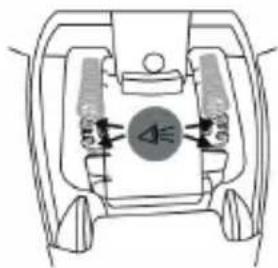
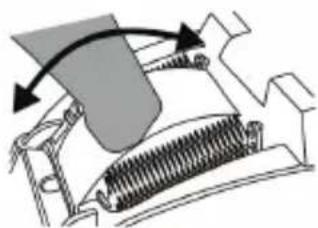
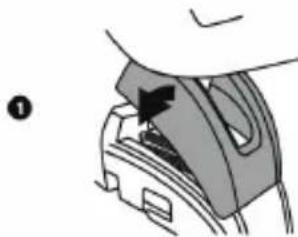
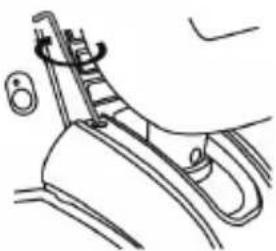
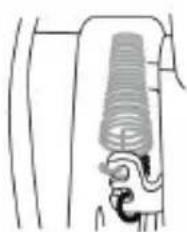
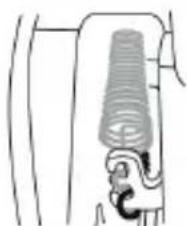
TCA Yoke Boeing Edition allows for a different feel and different resistance on the pitch axis, by modifying the number of springs at the base of the yoke's column.
You can either modify the configuration or keep the default setup, depending on your own personal preferences.
Adjust the number of springs in the column:
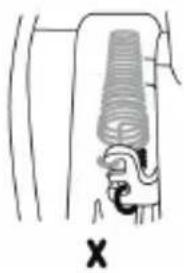
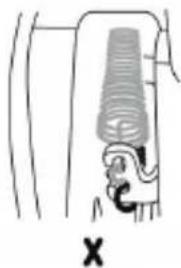
Medium resistance: 3 springs (default)
Maximum resistance: 4 springs

Never use the yoke WITHOUT springs.

BOEING~ EDITION
2
图
√
0
6
X
X
T.A.R.G.E.T ADVANCED PROGRAMMING SOFTWARE (Thrustmaster Advanced pRogramming Graphical Editor)
Please visit https://support.thrustmaster.com. Click Joysticks / TCA Yoke Boeing Edition, then select Software. Download and install the T.A.R.G.E.T advanced programming software. Main features of T.A.R.G.E.T:
- Different possible configurations for the axes.
- Different possible programming levels: Basic, Advanced and Script.
- Use of the Drag and Drop principle.
- Ability to combine TCA Yoke Boeing Edition with various Thrustmaster joysticks (HOTAS Cougar, HOTAS Warthog, T.16000M, MFD Cougar Pack, all of which are also compatible with T.A.R.G.E.T), allowing them to be recognized as a single USB device.
- Access to advanced profiles created by the Thrustmaster community.
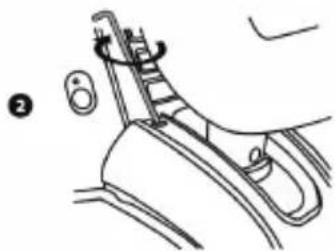
Important note:
The TCA Yoke Boeing Edition and TCA Quadrant Boeing Edition devices must be directly connected to the PC in order to be recognized by the T.A.R.G.E.T software.
INSTALLING TCA YOKE BOEING EDITION IN A COCKPIT OR ON ANOTHER STATIONARY SUPPORT
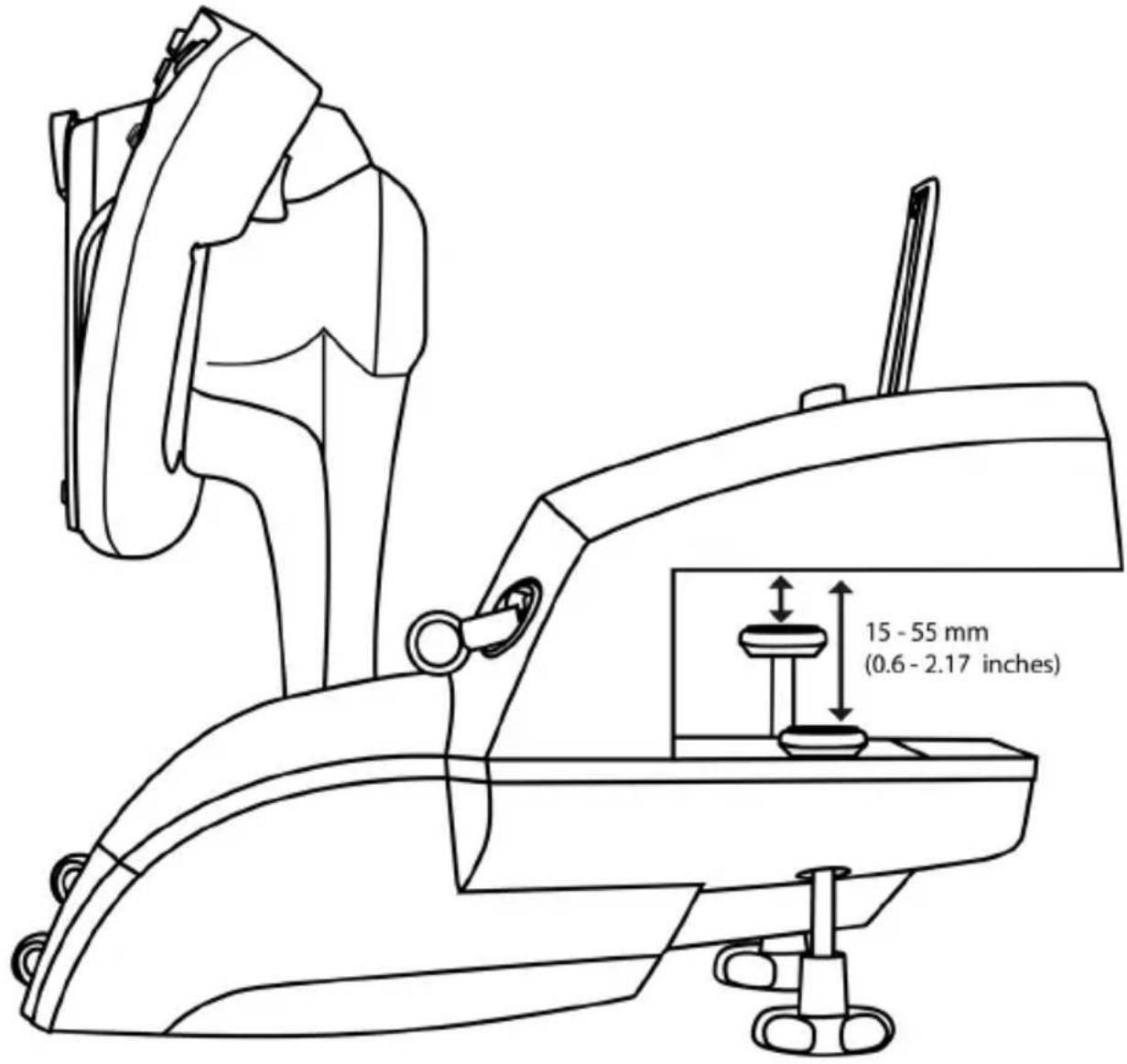
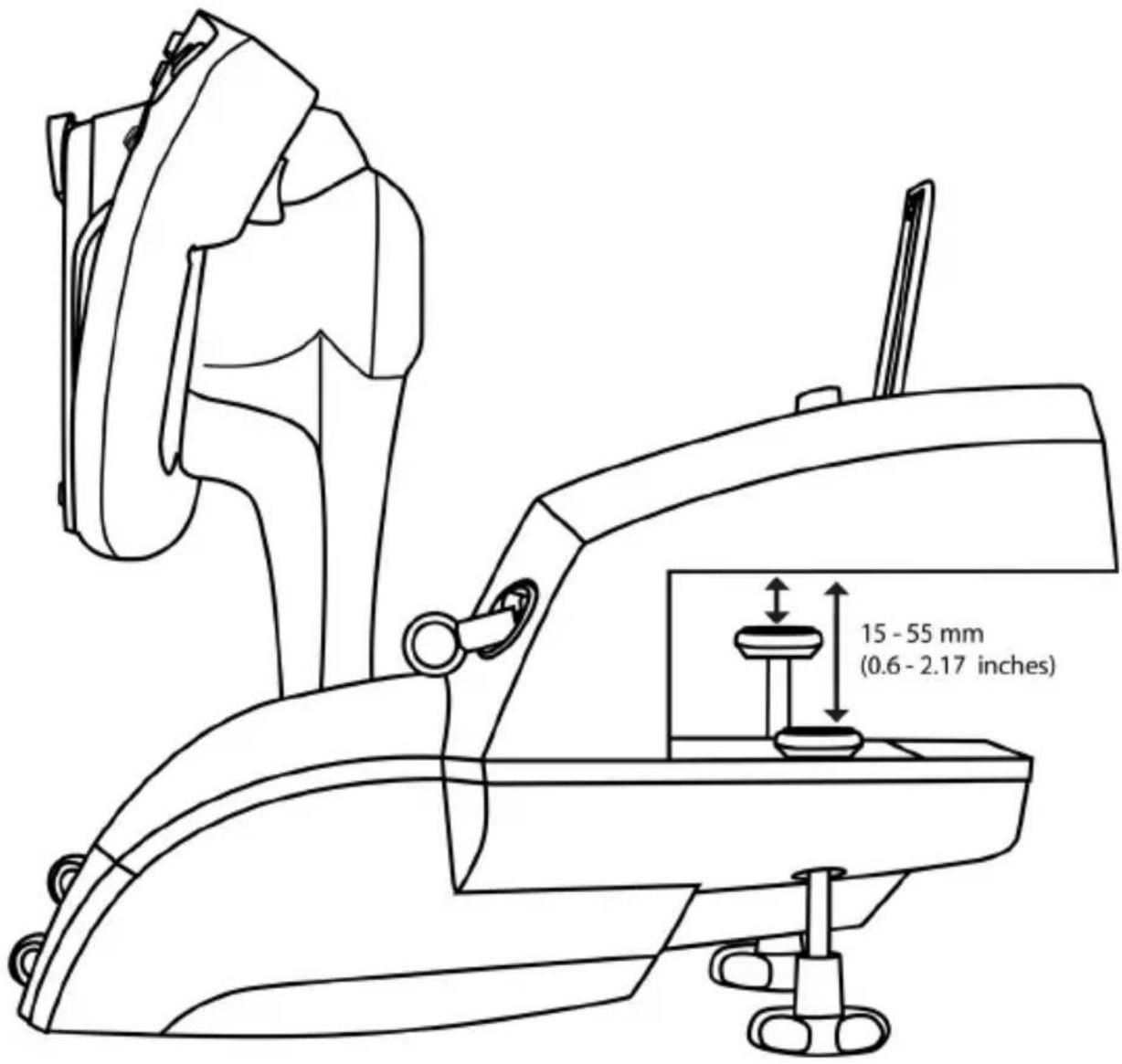
The base must be firmly attached to a table or desk using the dual metal mounting screws (11). The clamping range on a table or desk is 0.6-2.17 inches / 15-55 mm.
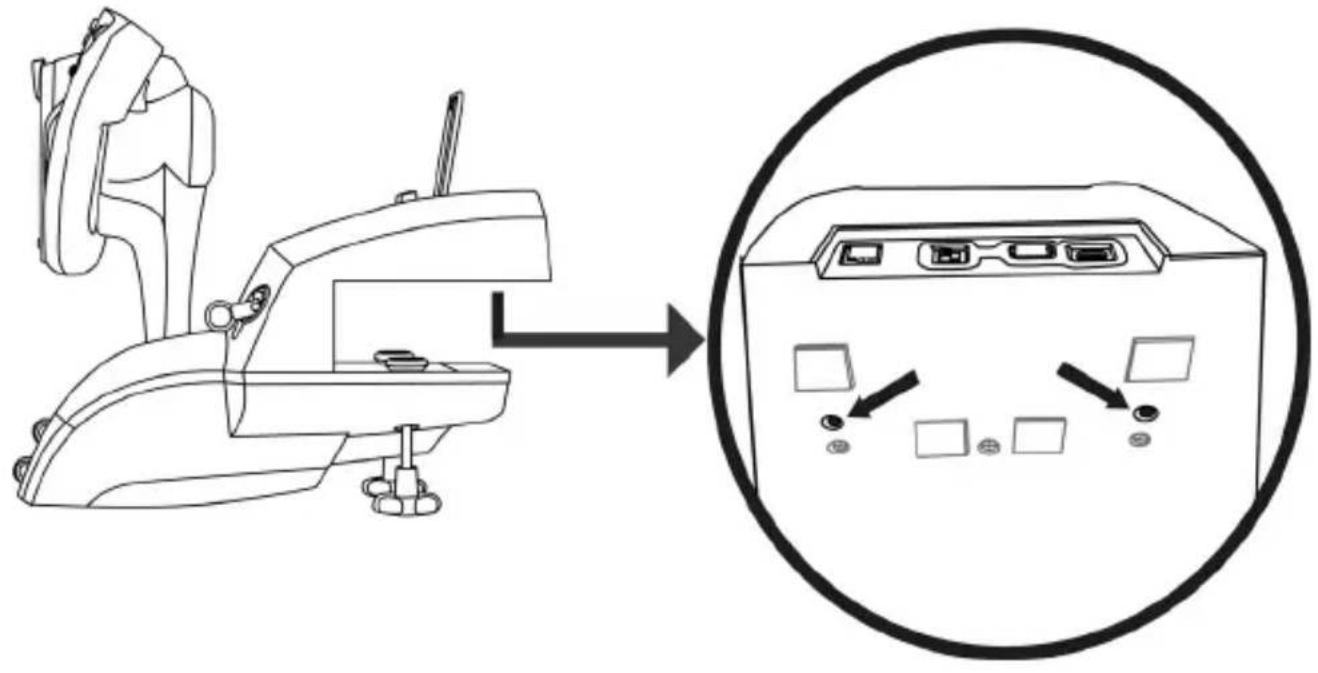
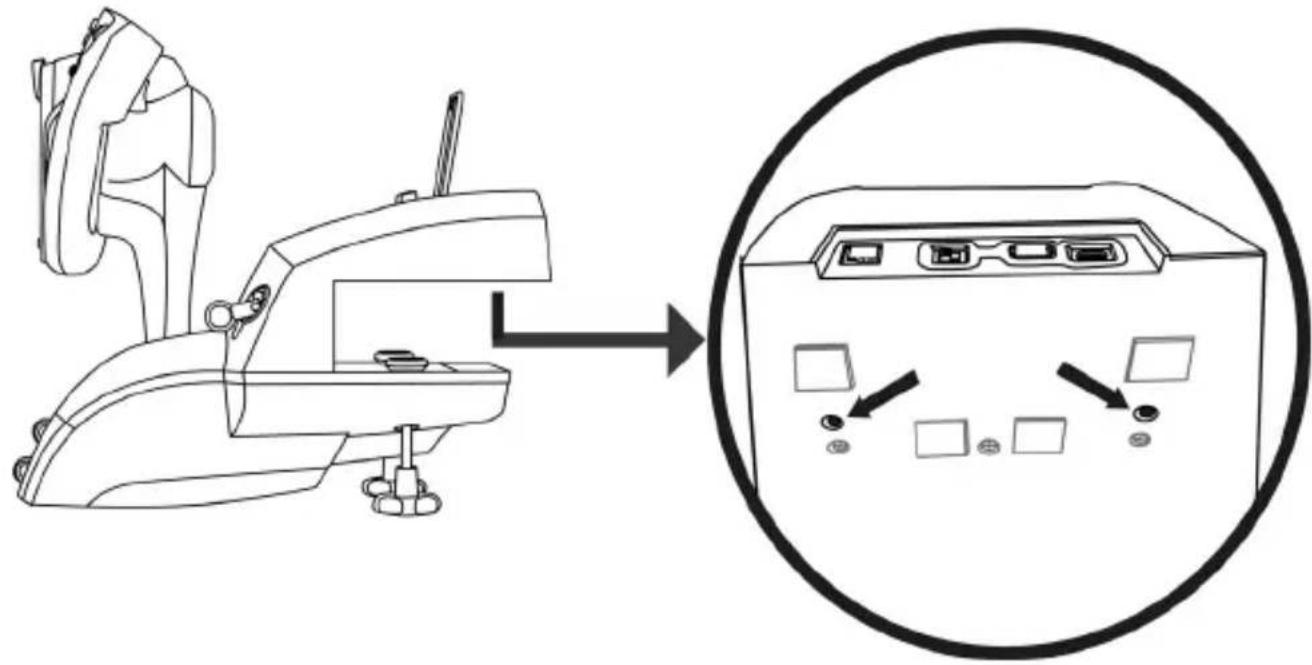
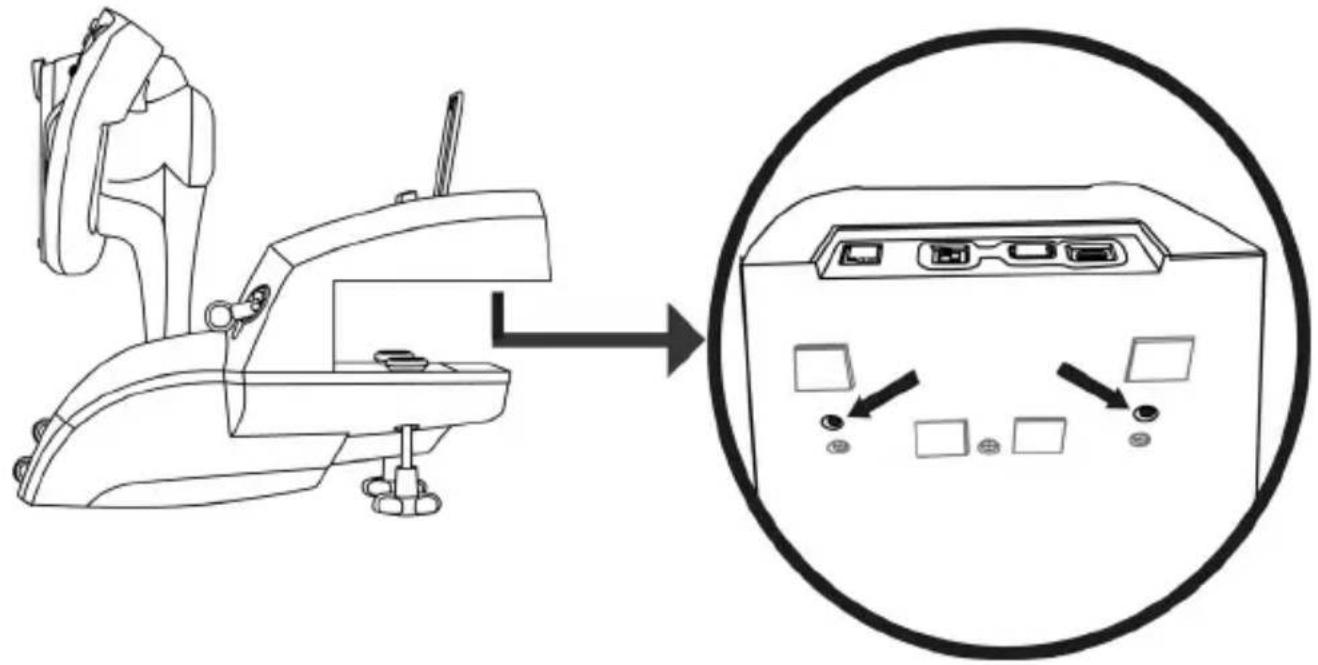
You can use the two perforations located on the underside of TCA Yoke Boeing Edition to attach the unit to a cockpit or other stationary support using M6 screws (not included).
It is strictly forbidden to attach TCA Yoke Boeing Edition to a glass table or desk.
Please refer to your cockpit manufacturer's user manual for all information regarding installation of the yoke. Thrustmaster accepts no responsibility in the event that the instructions are not followed.
TROUBLESHOOTING AND WARNING
-
My yoke isn't working properly, or seems to be improperly calibrated.
-
Make sure that the selector switch (6) is in the correct position (Xbox or PC) before connecting the yoke's USB cable to the console or PC.
- Power off your console or PC, and disconnect your yoke. Reconnect your yoke, power your console or PC back on, and restart your game.
- When connecting your yoke, keep the yoke and the rudder (if you are using a rudder) centered and do not move them, in order to avoid any calibration problems.
My yoke is too sensitive, or not sensitive enough.
TCA Yoke Boeing Edition features a USB audio device.
When connecting a USB audio device to Windows for the first time, the default volume for all microphones is set to zero.
- To resolve the problem, go to the audio settings in Windows for TCA Yoke Boeing Edition's microphone and set the microphone level to 100% .
My yoke makes noises sometimes.
The pitch mechanism incorporates mechanical elements for the return-to-center feature and travel damping, in order to provide a greater level of immersion.
In some cases, these elements may interact with one another and generate operating noises which will not affect your product's lifespan.
VARIOUS TIPS AND FAQs (not included in this user manual)
Go to https://support.thrustmaster.com. Click Joysticks / TCA Yoke Boeing Edition, and then click on Manual or FAQ.

This device is intended for use with respect to gaming entertainment purposes only. It is strictly forbidden to use these devices for professional training activities.
Worldwide, Guillemot Corporation S.A., whose registered office is located at Place du Granier, B.P. 97143, 35571 Chantepie, France (hereinafter "Guillemot") warrants to the consumer that this Thrustmaster product shall be free from defects in materials and workmanship, for a warranty period which corresponds to the time limit to bring an action for conformity with respect to this product. In the countries of the European Union, this corresponds to a period of two (2) years from delivery of the Thrustmaster product. In other countries, the warranty period corresponds to the time limit to bring an action for conformity with respect to the Thrustmaster product according to applicable laws of the country in which the consumer was domiciled on the date of purchase of the Thrustmaster product (if no such action exists in the corresponding country, then the warranty period shall be one (1) year from the original date of purchase of the Thrustmaster product).
Notwithstanding the above, rechargeable batteries are covered by a warranty period of six (6) months from the date of original purchase.
Should the product appear to be defective during the warranty period, immediately contact Technical Support, who will indicate the procedure to follow. If the defect is confirmed, the product must be returned to its place of purchase (or any other location indicated by Technical Support).
Within the context of this warranty, the consumer's defective product shall, at Technical Support's option, be either replaced or returned to working order. If, during the warranty period, the Thrustmaster product is subject to such reconditioning, any period of at least seven (7) days during which the product is out of use shall be added to the remaining warranty period (this period runs from the date of the consumer's request for intervention or from the date on which the product in question is made available for reconditioning, if the date on which the product is made available for reconditioning is subsequent to the date of the request for intervention). If permitted under applicable law, the full liability of Guillemot and its subsidiaries (including for consequential damages) is limited to the return to working order or the replacement of the Thrustmaster product. If permitted under applicable law, Guillemot disclaims all warranties of merchantability or fitness for a particular purpose.
This warranty shall not apply: (1) if the product has been modified, opened, altered, or has suffered damage as a result of inappropriate or abusive use, negligence, an accident, normal wear, or any other cause unrelated to a material or manufacturing defect (including, but not limited to, combining the Thrustmaster product with any unsuitable element, including in particular power supplies, rechargeable batteries, chargers, or any other elements not supplied by Guillemot for this product); (2) if the product has been used for any use other than home use, including for professional or commercial purposes (game rooms, training, competitions, for example); (3) in the event of failure to comply with the instructions provided by Technical Support; (4) to software, said software being subject to a specific warranty; (5) to consumables (elements to be replaced over the product's lifespan: disposable batteries, audio headset or headphone ear pads, for example); (6) to accessories (cables, cases, pouches, bags, wrist-straps, for example); (7) if the product was sold at public auction.
This warranty is nontransferable.
The consumer's legal rights with respect to laws applicable to the sale of consumer goods in his or her country are not affected by this warranty.
Additional warranty provisions
During the warranty period, Guillemot shall not provide, in principle, any spare parts, as Technical Support is the only party authorized to open and/or recondition any Thrustmaster product (with the exception of any reconditioning procedures which Technical Support may request that the consumer carry out, by way of written instructions - for example, due to the simplicity and the lack of confidentiality of the reconditioning process - and by providing the consumer with the required spare part(s), where applicable).
Given its innovation cycles and in order to protect its know-how and trade secrets, Guillemot shall not provide, in principle, any reconditioning notification or spare parts for any Thrustmaster product whose warranty period has expired.
In the United States of America and in Canada, this warranty is limited to the product's internal mechanism and external housing. In no event shall Guillemot or its affiliates be held liable to any third party for any consequential or incidental damages resulting from the breach of any express or implied warranties. Some States/Provinces do not allow limitation on how long an implied warranty lasts or exclusion or limitation of liability for consequential or incidental damages, so the above limitations or exclusions may not apply to you. This warranty gives you specific legal rights, and you may also have other rights which vary from State to State or Province to Province.
Liability
If permitted under applicable law, Guillemot Corporation S.A. (hereinafter "Guillemot") and its subsidiaries disclaim all liability for any damages caused by one or more of the following: (1) the product has been modified, opened or altered; (2) failure to comply with assembly instructions; (3) inappropriate or abusive use, negligence, an accident (an impact, for example); (4) normal wear; (5) the use of the product for any use other than home use, including for professional or commercial purposes (game rooms, training, competitions, for example). If permitted under applicable law, Guillemot and its subsidiaries claim all liability for any damages unrelated to a material or manufacturing defect with respect to the product (including, but not limited to, any damages caused directly or indirectly by any software, or by combining the Thrustmaster product with any unsuitable element, including in particular power supplies, rechargeable batteries, chargers, or any other elements not supplied by Guillemot for this product).

CANADIAN COMPLIANCE NOTICE: this Class B digital apparatus meets all requirements of the Canadian Interference
Causing Equipment Regulations.
USA COMPLIANCE NOTICE: this equipment has been tested and found to comply with the limits for a Class B digital device, pursuant to Part 15 of the FCC rules. Operation is subject to the following two conditions:
(1) This device may not cause harmful interference, and
(2) This device must accept any interference received, including interference that may cause undesired operation.
These limits are designed to provide reasonable protection against harmful interference in a residential installation. This equipment generates, uses and can radiate radio frequency energy and, if not installed and used in accordance with the instructions, may cause harmful interference to radio communications. However, there is no guarantee that interference will not occur in a particular installation. If this equipment does cause harmful interference to radio or television reception, which can be determined by turning the equipment on and off, the user is encouraged to try to correct the interference by one or more of the following measures:
COPYRIGHT
© 2021 Guillemot Corporation S.A. All rights reserved. Thrustmaster® is a registered trademark of Guillemot Corporation S.A. Produced under license from Boeing. Boeing, 787 Dreamliner, Dreamliner with crescent moon and the associated distinctive Boeing logos, product markings and trade dress are trademarks of The Boeing Company. Windows® is a registered trademark of Microsoft Corporation in the United States and/or in other countries.
All other trademarks and brand names are hereby acknowledged and are the property of their respective owners. Illustrations not binding. Contents, designs and specifications are subject to change without notice and may vary from one country to another. Made in China.
ENVIRONMENTAL PROTECTION RECOMMENDATION
In the European Union: At the end of its working life, this product should not be disposed of with standard household waste, but rather dropped off at a collection point for the disposal of Waste Electrical and Electronic Equipment (WEEE) for recycling.
This is confirmed by the symbol found on the product, user manual or packaging.
Depending on their characteristics, the materials may be recycled. Through recycling and other forms of processing Waste Electrical and Electronic Equipment, you can make a significant contribution towards helping to protect the environment.
Please contact your local authorities for information on the collection point nearest you.
For all other countries: Please adhere to local recycling laws for electrical and electronic equipment.
Retain this information. Colors and decorations may vary.
Plastic fasteners and adhesives should be removed from the product before it is used.
This product conforms to all standards regarding children 14 years of age and older. This product is not suitable for use by children less than 14 years of age.
www.thrustmaster.com
*Applicable to EU, UK and Turkey only


TCYOKE
BOEING EDITION
XBOX SERIES XIS — XBOX ONE — PC
www.thrustmaster.com
INSTALLATION AUF EINEM PC
www.thrustmaster.com
T.A.R.G.E.T GEAVANCEERDE PROGRAMMEERSOFTWARE (Thrustmaster Advanced pRogramming Graphical EdiTor)
Ga waar https://support.thrustmaster.com. Klik op Joysticks / TCA Yoke Boeing Edition en selecteer Software. Download en installer de T.A.R.G.E.T geavanceerde programmeersoftware.
Su Xbox Series XJS/Xbox One, TCA Yoke Boeing Edition:
CONOCE TU TCA YOKE BOEING EDITION
TECNOLOGÍA DE PRECISION EXCLUSIVA H.E.A.R.T: HALLEFFECT ACCURATE TECHNOLOGY Y PENDUL_R
www.thrustmaster.com
PykoBoDCTBO noIb3OBaTeJIa
TEXHNUECKNEXAPAKTEPNCNU
TEXHnueCKNEXAPAKTEPNCN
- PpOoJIbHa Ocb
- 8-No3nHnHbI nepeKIOuHaTeNb TOUKN 063opa
- 18 KOMaHdHbIX KHONOK
- MUNH-ДКОИСТК C KHOПКОI
- YrnybneHne nIe depkaTeJI nn PnHaHwTa mCMapTfoHa
6.пеклочаелХbox/PC
- Pa3bEm RJ12 ДЯ рул ha npabIeHn TFRP (npoDAeTcOТдeьHo)
-
USB-pa3bem (TnA) nЯ 6Ioka TCA Quadrant Boeing Edition nIpyna HanpaBneHn TPR (Oba 3Tn npoDyKta npoDAHO TcO TdJIbHo)
-
USB-pa3beM (TIN C)
-
MexaHn3M nIpy nOcaKn
11.Два металли uecknx крениных BИNTa
- Достун К мexан3My сиюов npухинь
13.ДБЕОСРБИагВУпавлени
- Ponepehna ocB
- KhoNkaXboxNCBETOIO
- KhoNki View, Share n Menu
- CtepeorHe3do 3,5 MM dnia MnkpoOHa IJI NaIOKJIuOeHnraPHTypbl (B KOMIIeKT He BXoNT)
3To ycTpoiCTBO npedHa3HaueHo NCKJIIOHTeIbHO IINI NOB3OBaTeJe B BO3pacte 14 let n cTapwe
BONbWOn BEC
OcToPoxHo! He ypoHnTe ycTpoiCTBO Ha ce6a nn npyrnx!
He yctaHaBnBaTb Ha CTeKJIaHHOM CTOJIe
XBOX SERIES XIS/XBOX ONE
YCTAHOBKA HA XBOX SERIES XIS IIN XBOX ONE
BO3MOXHOCTN IOKJIIOUeyHnA 7tYPBAJATCA YOKE BOEING EDITION
TCA Yoke Boeing Edition ochauen 6 ocamn, Ho no3boJet Hapmyo NOKIOHTb pbIar ynpablenia n pylb HnpaBHeNIA (Oba 3TN npOdykTa npOdaOTc8 OTdeNbHO) K pa3bemam Ha 3aHnei naHenn WtypBaNA. BToPOI pbIur ynpablenia (npOdaeTc8 OTdeNbHO) TAKKe moKET 6bITb NOKIOUeH K pa3bemy Ha 3aHnei naHenn 6Ioka TCA Quadrant Boeing Edition (TakKe npOdaeTc8 OTdeNbHO), oBeCneuVBa Ira wTtypBaNA BO3MOXHOCTb INoJIb3OBaTB 9 DOONHHTeNBhIX OceI.
Ha konhconyx Xbox Series X|S nnn Xbox One coBmecTmblc yctpoiCTBa Thrustmaster, noikloueHHbI e USB-pa3bemy TnA A, 6ydt obbeHHebl co wtypbalom TCA Yoke Boeing Edition.

EduhctBeHHbIMN yCTpOiCTBAMN, COBmecTnMbIMN c KOHcOJIaMn Xbox Series X|S nnn Xbox One, YBnIOTc86nK TCA Quadrant Boeing Edition, a taKke cnCTeMbI pyJn HapabHeHn TPR n TFRP (Bce 3tN npOdykTBI npOdaHTc8 OTdEhbHO).
ИСПОЛБ3OBAHNE БLOKA TCA QUADRANT BOEING EDITION*, CNTCTEM PUIL HANPABJIENI TPR* IJN TFRP* CO LWTYPBAJOM TCA YOKE BOEING EDITION
(^* p o e m c o m_b H o)
PbIyar ynpaBneHnra:
BO3MOXHOCTN IOKJIIOUHNEI SHTYPBAJA TCA YOKE BOEING EDITION
TCA Yoke Boeing Edition ochauen 6 ocamn, Ho no3boJrert haPrymyo NOKNUHTb pbUar ynpabNeHnI CNCTeMy pyna HnPaBHeHn (Oba 3TN npOdykTa npOdaOTcra OTdEhHO) K pa3bEmAM Ha 3adHei naHei SttypBaJa. BToPoI pbUar ynpabHeHn (npOdaETcra OTdeJIbHO) TAKKe MOKeT bbl TNOKJIuOeH K pa3bemy Ha 3aHnei naHei 6Ioka TCA Quadrant Boeing Edition (TakKe npOdaETcra OTdeJIbHO), UTo, nocJe yCTaHOBKn Heo6xOIMoro dpaIBepa, ObecneuBAeT dIpyBaHa BO3MOXHOCTb NCNoJIb3OBaTb 9doONHInTeJIbHbIX OceI.
Iocne nodknueHn IByx 6JokOB TCA Quadrant Boeing Edition oHn oTo6paxaOTc H3aBnCmO npyOr OT npyra B OKHe NrpobbIe yctpoNCTBa B BIne BnptyaJIbHbIX ycTPOINCTB:
IopKJIIOueHne cncTeM pyJHa npaBHeHn TPR nJn TFRP (npoJaOTc oTdeJbHo):
- 3 ocn cncTeMbI pyJIHaNPaBHeHnO obBeiHHeHb B BnrtyAJIbHbI 6JOK pbUarOB 1&2 (Virtual TCA Q 1&2), ecn cncTeMa pyJIHaNPaBHeHnIOKJIuOeHa K WtypBaNy IIN K JIO6My 6JOky pbUarOB, NOkJIIOueHHOMy K WtypBaNy (ДЯ ObeCneHnN npabInbHO pa60TbI Heo6xOdImo yCTaHOBtB dpaIBep).
-3ocn cnctemblpynaHanpaBneHnObeDnHJOTcB6NOKpbIyarOB,KKOTOPMy OHn NOkJIIOueHbI,ecn3T06NOKpbIyarOB HAnpMyIO NOkNIoueH KIK.
OBHOBJEHNIE PPOUINBKN UHTYPBAJA
ПюшИВka, BCТpoEHнЯ B 6a3y StTypBaIa TCA Yoke Boeing Edition, moXeT 6bITb OБНовпЕна (эTO 3NaHT, уTO ee MOxHо 3aMeHnTь Ha HOBbie BepCи C yЛуЧeHHbIMN xapaKTePecNTiKamn yCTpoIcTba).
Чтобы уз haь Tekyuю Bepcno npoшнвк n TypBaJa n, npn HeobxOДIMOCn, OSHOBNTb ee: Ha ПК пердnte Ha Be6-caT https://support.thrustmaster.com, ZeJIKNITEДжоctn / TCA Yoke Boeing Edition, 3aTeM ZeJIKNTe Пршнвka. CpeDyIte HNCTpyKUЯm Дя ВыПОЛHeHЯ 3aГуЗКи n yCTaHOBKn.
EduhctBeHHbIMn yCTPOHCTBaMn, COBmecTmbIMn c PIK, YBnIOTc86IOK TCA Quadrant Boeing Edition, a taKxie cnCTeMbI pyIa HnPaBHeHnT PTR n TFRP (Bce 3TN npOdykTBi npoJaOTc8 OTdEJIbHO).
Tenepb Bbl roTOBbl K urpe!
PERUINPOBKA HATXHEHNA IONEPECHOHOCN
TcPbTCA Yoke Boeing Edition no3B0JrT peryIrpOBaTB oUySeHne n cOpotnBHeHne Ha nonepueHoi OCN, dIy cheo Heo6XoIMO u3MeHNTb KOJIuYeCTBO npyKHN B OCHOBaHNI KOJOnHKn TtypBaHa.
B 3aBnCmOCTn OT IINHbIX npeIIOyTeH NBI MOXeTe N3MeHNTb KOHcNpyaCuNIO NN OCTaBnTb HAcTPOkN, yCTaHOBJIeHHbIe NO yMOJUaHIO.
Peynpobka kOJIneCTBa npyXnHa KOJOnHKe:
- CpeiHee cOnpOtvBJIeHnE: 3 npyXInbI (no yMOJuaHIO);
- MakcmaJIbHOe cOpOTnBJIeHHe: 4 npyXnHbl.

HnB Koem cnyae He nCnoJb3yIte wTypBaJ BE3 npyXnH.
BOEING EDITION
2
B
图
√
0
6
X
X
PACUINPEHHOE NOДЯ ПОГРAMMPOBAHNY T.A.R.G.E.T (Thrustmaster Advanced pRogramming Graphical EdiTor)
IpeenTe Ha Be6-caT https://support.thrustmaster.com. ⅢeKHTe JxOyCTnKn / TCA Yoke Boeing Edition, 3aTeM BbIbepTe IporpamMHOe oecneueHne. 3aRpy3HTe uYCTaHOBtepacuipehHoe IO dny nporpamMnpoBaHn T.A.R.G.E.T.
OCHOBHBIEOCO6eHHoCTn nporpaMMbI T.A.R.G.E.T:
- Pa3JIINHbIe BO3MOXHbIe KOHΦnHypαuN nIra OcEi.
- Pa3nHbIe Bo3MoXHbIe ypOBH nIporpaMMnpOBAHnA: Basic (6a3oBbI), Advanced (pacupeHHbI) n Script (cUeHapn).
- PoiDepKka MeToDa nepeTayBaHn.
-Bo3MOxHocTb KOM6uHnObaHnIa TCA Yoke Boeing Edition c pa3nUHbIMn JxKoCTnKaMn Thrustmaster (HOTAS Cougar, HOTAS Warthog, T.16000M, MFD Cougar Pack, kaxdIi n3 KOToPbIX TaKxe CoBMeCTmC nporpaMMoT A.R.G.E.T), 6laOdaPra yemy OHI paCno3HaOTcK aK oNDHO USB-yCTpOietBO.
-Дocункpacширени IM npoФиЯM,co3daHHbIM noIb3OBaTeЯMn COO6eCTBa Thrustmaster.
Baxhna HOpmaucn:
Чтобл пиножене T.A.R.G.E.Tpacno3налу устpoиCTBa TCA Yoke Boeing Edition n TCA Quadrant Boeing Edition, Oндолжны 6ыть habрamyю podknioyebl K ПК.
YCTAHOBKA ⅢTYPBAJIA TCA YOKE BOEING EDITION B KOKPNTENI HA DPyToH HEnoDnXHOJ NOBEPXHOCTN
- UtpBaJ pa6OtaeT HenpaBnIbHo IIN, BO3MOxHO, HeKOppeKTHO OTKaII6pOBaH.
-перд подючим USB-кабелштува К консл ИИ ПК yбдntecь,чTo
переклочаел (6) установли в правильно спожене (Xbox ИИ PC).
- BbiknIOHTe KOHcOJIb nII IN PIK n OTCoeDINHITe 7typBaI. ChOBa noDCoeDHNITE wTpyBaI, BKIOHTe KOHcOJIb nII IN PIK n nepe3anyCTnTe nrpy.
- Пи подклочени StTypBaJa udepxuBaIte ero n pylb HanpaBneHn (ecn OH nCnoIb3yeTc) BblPOBHeHHbIMN NO ueHTpy n He DBnraTe nx, YTO6bI n36exKaTb npO6Jem C KaIIb6pOBkoI.
-
UtpBaJ cIIuKOM IIN HeIOCTaTOUHO yBCTBNTeH.
-
Stypbal 6ydt OTkaihboBaH aBtOMaTnueckn nocTe TOrO, KaK Bbl CdeJaTe HeCKoJIbKO DBHXeHn IIO pa3HbIM OcA M.
- IpeeIInTe B MeHIO nRpI Iapametpb/ KoHTpOJIep/TeiMnaI nn JxOJCTNK n HAcTpoITe UyBCTBNTeJIbHOCTb N MEPTbIe 30HbI dIy JxOJCTNka (ecnI 3TN npaMeTpbl DOCTynHbl).
- Otperynpyte conpoTnbIeHne wTypBaIa no nonepeHOn oCn, n3MeHb KOnIYeCTBO npxHN (12) B OCHOBAHN KOJONKn wTypBaIa.
MnKpOoH Moe rapHtypbI He pa6oTaT co ttypBaNOM TCA Yoke Boeing Edition.
TCA Yoke Boeing Edition ochaueh USB-ayuocptpoiCTBOM.
www.thrustmaster.com
EAC
20/20
TCYOKE
BOEING EDITION
XBOX SERIES XIS — XBOX ONE — PC
Uživotelský manuál
TECHNICKE VLASTNOSTI
TECHNICKE VLASTNOSTI
RESENI PROBLEM A UPOZORNENI
https://support.thrustmaster.com
COPYRIGHT
www.thrustmaster.com
Xbox Series X|S / Xbox One'da, TCA Yoke Boeing Edition:
YUNUSLAMA EKSENI GERGINLIK AYARLAMA PROSEDÜR
https://support.thrustmaster.com adresine gadin. Joysticks (Joystick'ler) / TCA Yoke
Boeing Edition'a tiklayin ve arindan Manual (Kilavuz) veya FAQ (SSS)'e tiklayin.

ZAAWANSOWANA APLIKACJA DO PROGRAMOWANIA T.A.R.G.E.T (Thrustmaster Advanced pRogramming Graphical Editor)
www.thrustmaster.com
https://support.thrustmaster.com/ja/
XBOX SERIES X|S / XBOX ONE
(Thrustmaster Advanced pRogramming Graphical EditTor)
[saih://sopport.thrustmaster.com] [JYStv] / TCA Yoke Boeing Edition to [MnA]
RILKULoJ#J#J#J#J#J#J#J#J#J#J#J#J#J#J#J#J#J#J#J#J#J#J#J#J#J#J#J#J#J#J#J#J#J#J#J#J#J#J#J#J#J#J#J#J#J#J#J#J#J#J #
www.thrustmaster.com
Made in China.

TCYOKE
BOEING EDITION
XBOX SERIES XIS — XBOX ONE — PC
使用者手册
技術特性
品
技術特性
TCA YOKE BOEING EDITION
默译
H.E.A.R.T: HALLEFFECT ACCURATE TECHNOLOGY & PENDUL_R
TCA Yoke Boeing Edition是四音和音的能用,互合为“王斯”/“候伊明”“主中进”“本”“阿”“去”“去”“去”“去”“去”“去”“去”“去”“去”“去”“去”“去”“去”“去”“去”“去”“去”“去”“去”“去”“去”“去”“去”“去”“去”“去”“去”“去”“去”“去”“去”“去”“去”“去"
TCA YOKE BOEING EDITION
iJrReIiRiRiRiRiRiRiRiRiRiRiRiRiRiRiRiRiRiRiRiRiRiRiRiRiRiRiRiRiRiRiRiRiRiRiRiRiRiRiRiRiRiRiRiRiRiRiRiRi
印通实
TCA Yoke Boeing Edition to saugahm Jooongi hong of aokbumf anhnsu
(Thrustmaster Advanced programming Graphical EditTor)
https://support.thrustmaster.com将确认使用。Joysticks(JOY) / TCA Yoke Boeing Edition将链接到 Software(Strothweer)的链接中。Higiro Frolgoaing Mng SfroTWeerIn T.A.R.G.E.T.
T.A.R.G.E.T的主义
TCA Yoke / (s) Joysticks https://support THRustmaster.com
.Boeing Edition
Xbox One / Xbox Series X|S 1234567890123456789012345678901234567890123456789012345678901234567890123456789012345678901234567890123456789
TCA YOKE BOEING EDITION
auiiui i 1
PENDUL_RH.E.A.R.T: HALLEFFECT ACCURATE TECHNOLOGY
TCA Yoke Boeing Edition
i 1
16 16 16
(65536×65536)
1
J 1 1 1 1 1 1 1 1 1 1 1 1 1 1 1 1 1 1 1 1 1 1 1 1 1 1
(13a"Jd)
(13)(20
.
()
(17) 3.5 / a8/8/1 wai gwrnnn nn nnnn nn nnnn nn nnnn nn nnnn
a 1
TCA YOKE BOEING EDITION
JCA Yoke Boeing Edition
a
TCA Quadrant
J L a J J J J J J J J J J J J J J J J J J J J J J J J J J J J J J J J J J J J J J J J J J J J J J J J J J J J J J J J J J J J J
9
Thrustmaster Xbox One / Xbox Series X|S
TCA Yoke Boeing Edition A E USB

TCA Quadrant Xbox One / Xbox Series X|S
(1) TFRP, TPR, Boeing Edition
TCA YOKE BOEING EDITION \*TFRP g TPR
(L)
1
8)A 1 USB 1 USB
USB 10000000000000000000000000000000000000000000000000000000000000000000
Xbox jg jss
3 1
.
RJ12 R12 1
1 1
USB 10000000000000000000000000000000000000000000000000000000000000000
. jgssll jgs
Jl 15) 4 1 1 1 1 1 1 1 1 1 1 1 1 1 1 1 1 1 1 1 1 1 1 1 1
.(TCA Quadrant Boeing Edition
(8) A g 10 USBJUUSB JU
a
USB 10000000000000000000000000000000000000000000000000000000000000000000
jssll jggs
yglalilal 1gall
1 1
Jusgillie 4 gall lalw yle siaa gai gai j
1 1 1 1 1 1 1 1 1 1 1 1 1 1 1 1 1 1 1 1 1
TCA YOKE BOEING EDITION
TFRP g TPR *g TCA QUADRANT BOEING EDITION
(HioE)

XBOX
a
TCA QUADRANT BOEING EDITION
TCA QUADRANT BOEING EDITION
jssll jzai 1c
.USBJLSJLJ (J)PC 6)
TCA/(sJ)Joysticks q.https://support.thrustmaster.com 2
Ji j Jj Jj Jj Jj Jj Jj Jj Jj Jj Jj Jj Jj Jj Jj Jj Jj Jj Jj Jj Jj Jj Jj Jj Jj Jj Jj Jj Jj Jj Jj Jj Jj Jj Jj Jj Jj Jj Jj Jj Jj Jj Jj Jj Jj Jj Jj Jj Jj Jj Jj J j J j J j J j J j J j J j J j J j J j J j J j J j J j J j J j J j J j J j J j J j J j J j J j J j J j J j J j J j J j J j J j J j J j
TCA YOKE BOEING EDITION
6CA Yoke Boeing Edition 500000000000000000000000000000000000000000000000000000000000000000000000000
TCA Quadrant Boeing Edition 15
()TFRP g TPRgall
J:J 1 J 1 J 1 J 1 J 1 J 1 J 1 J 1 J 1 J 1 J 1 J 1 J 1 J 1 J 1 J 1 J 1 J 1 J 1 J 1 J 1 J 1 J 1 J 1 J 1 J 1 J 1 J 1 J 1 J 1 J 1 J 1 J 1 J 1 J
J 1
yill g jilllg

CA Quadrant Boeing Edition
(1) TFRPFR 2
1
J 1
TCA Yoke Boeing Edition 1234567890123456789012345678901234567890123456789012345678901234567890123456789012345678901234567890123456789
gai j 15j j1 12e j 3 15j j3:abw gia aogao - 4 4
A
YOKE BOEING\~ EDITION
0
2
图
图
图
0
0
6
2
T.A.R.G.E.T
(Thrustmaster Advanced pRogramming Graphical EditTor)
/ (s) Joysticks .https://support.thrustmaster.com jzj
a aaa a a a a a a a a a a a a a a a a a a a a a a a a a a a a a a a a a a a a a a a a a
A. T.A.R.G.E.T
Thrustmaster TCA Yoke Boeing Edition
E MFD Cougar Pack, T.16000M.HOTAS Warthog, (HOTAS Cougar)
USB jckle 10000000000000000000000000000000000000000000000000000
= 0
. Thrustmaster
:
TCA TCA Yoke Boeing Edition 50000000000000000000000000000000000000000000000000000000000000000000
TCA YOKE BOEING EDITION
g
(11)
aaii iie 1 aiee
55152 10 1 1 1 1 1 1 1 1 1 1 1

TCA Yoke Boeing Edition 1500000000000000000000000000000000000000000000000000000000000000

TCA Yoke Boeing Edition
e 111111111111111111111111111111111111
J 1
(1) Joysticks https://support.thrustmaster.com

aaii iaiia aaii jaiii (e) aaiy
Guaenrnnnnaa aannnnae annnnnne nnnnne
Jaaa aal llaa aal yI 1a aal I aal 1245y aal yll aal yll aal yll aal yll aal yll aal yll aal yll aal yll aal yll aal yll aal yll aal yll aal yll aal yll aal yll aal yll aal yll aal yll aal yll aal yll aal yll aal yll aal yll aal yll aal yll aal yell aal yll aal yll aal yll aal yll aal yll aal yll aal yll aal yll aal yll aal yll aal yll aal yll aal yll aal yll aal yll aal yll aal yll aal yll aal yll aal yll aal yll aal yll aal yll aal yll aal y ll aall
.
aui gauai
Gullemot"Guillemot" 15
www.thrustmaster.com
b 15 11 15 15 15 15 15
TCYOKE
BOEING EDITION
XBOX SERIES XIS — XBOX ONE — PC
Bruksanvisning
TEKNISKA DELAR
TEKNISKA DELAR
www.thrustmaster.com
TEKNISET OMNAISUUDET
TEKNISET OMINAISUUDET
Na Xbox Series X/S / Xbox One, TCA Yoke Boeing Edition:
POKROČILÍ PROGRAMOVACÍ SOFTWARE T.A.R.G.E.T (Thrustmaster Advanced pRogramming Graphical EdiTor)
Navstivte stränku https://support.thrustmaster.com. Kliknite na Joysticks (Joysticky) / TCA Yoke Boeing Edition, potom vyberte Software (Softver). Stiahnite a nainstalujtePokrociy programovaci softver T.A.R.G.E.T.
Hlavne vlastosti T.A.R.G.E.T:
- Rozne możné konfiguracje osi.
- Rozne możné urovné programovania: Basic, Advanced a Script.
- Použitie原則 Tahaj a Pusti.
- Możnost kombinovat' TCA Yoke Boeing Edition s roznymi joystickmi Thrustmaster (HOTAS Cougar, HOTAS Warthog, T.16000M, MFD Cougar Pack, ktoré su vsetky kompatibilné aj s T.A.R.G.E.T), co im umozhůje Rozpoznat ich ako jeder USB zariadenie.
- Pristup kPokrociym profilom vytvorenym komunitou Thrustmaster.
Dóležita pozmámka:
Zariadenia TCA Yoke Boeing Edition a TCA Quadrant Boeing Edition musia byt' priamo pripojené k PC, aby ich softver T.A.R.G.E.T Rozpoznal.
INSTALÁCIA TCA YOKE BOEING EDITION DO KOKPITU ALEBO NA INY PEVNY POVRCH
www.thrustmaster.com
Xbox Series X|S / Xbox One-on, TCA Yoke Boeing Edition:
www.thrustmaster.com
nnnn y97 nnnn nn .12
13
14
Xbox n+1y7 .15
,(n")View n.16
(wn) Menu-1 (niv)Share
n"3.5 1000 1997 ypu .17
()
2
18 .3
x7y 1000-7.4
n nn nn y n 5.
07XNo/1907Nno
PC/Xbox 6
TFRP 7
Tn
TCA USB type A .8
nvn x Quadrant Boeing Edition
(T) TPR
T
y by xnn nn n n n n 1nn
aannnnn 14yn
nioi nniun
XBOX ONE / XBOX SERIES X|S
XBOX ONE / XBOX SERIES X|S- nnn
USB-n n Xbox (6) nn nn nn .1
.11n USB- n 11nXn 11nUSB-n y(9) USB-n nn .2
n710nn nn yon .3
.4
.(Flight Stick nnnn) nn nn nn nn .5
Jnunpn nn
XBOX ONE / XBOX SERIES XIS nwn nn
:TCA Yoke Boeing Edition ,Xbox One / Xbox Series X|S-1
;Flight Stick Dn nn nn nnn
n nnnn nn nnnn (nnnnn 771) nnnn nnnn nnnn
17x Dnun nnnr nn rnrnnn 100
Xbox One / Xbox Series X|S w
Boeing TCA Yoboe'J) Joysticks yu,https://support.thrustmaster.com
. Edition
Xbox One / Xbox Series X|S nwnn 1901n
.TCA Yoke Boeing Edition nnn
TCA YOKE BOEING EDITION y nn
nTny Tn
PENDUL_R-I H.E.A.R.T: HALLEFFECT ACCURATE TECHNOLOGY
nnnnn nn nnnn nn nnnn nn nnnn nn nnnn nn nnnn nn nnnn nn nnnn nn nnnn nn nnnn nn nnnn nn nnnn nn nnnn nn nnnn nn nnnn nn nnnn nn nnnn nn nnnn nn nnnn nn nnnn nn nnnn nn nnnn nn nnnn nn nnnn nn nnnn nn nnnn nn
:7nwnn nn Dnn
16 y n 1y, nyn nn (Hall np9x) nn -n
nn nn nn nn nnnn nnnn nnnn nnnn nnnn nnnn nnnn nnnn nnnn nnnn nnnn nnnn nnnn nnnn nnnn nnnn nnnn nnnn nnnn nnnn nnnn nnnn nnnn nnnn nnnn nnnn nnnn nnnn nnnn nnnn nnnn nnnn nnnn nnnn nn
.TCA Yoke Boeing Edition 1000 USB type A

TCA Quadrant Boeing XxXbox One / Xbx Series XS-7 0nnn nn
.()TFRP-1TPR 1n,Edition
*TPR i x n, *TCA QUADRANT BOEING EDITION- winw TCA YOKE BOEING EDITION yTFRP IN
(TnJnnn*)
:nyx
. nnn nn nn (Tn) TCA Quadrant Boeing Edition nX 8) USB type A nn nn nn nn n USB-n nn .1
nannnnn
-PC-USB- n nnn nn (9)nnn USB type C-n nnn nn .2
.Xbox
:ai" nyn
(Tn) TFRP x TPR 3
nannnnnnnnnnnnn nTFRP nn noyn nn
(7) RJ12 nnn ywn nn Rj12 nn nn .1
nannnn
.PC-USB- nnnn (9) nn n USB type C-n nn nn .2
TCA Quadrant nx) nynn nn nnnn TPR nynn
.Boeing Edition
XnW (8) USB type A nnn w ywn n nn n W USB-n nn n .1
.
.PC-NT USB-NTNnNn7 (9) nnn NT USB type C-n nn nn .2
:ynn u niox y na n iyn niyn
n7 7 n nn nn nn nn nn nn nn nn nn nn nn nn nn nn nn nn nn nn nn nn nn nn nn nn nn nn nn nn nn nn nn nn nn nn nn nn nn nn nn nn nn nn nn nn nn nn nn nn nn nn nn nn nn nn nn nn nn nn nn nn nn nn nn nn nn nn nn nn nn nn nn
X
n71,niin nn7 oniIN 0x7 nyan ninn 3
7x9n 2y
TCA QUADRANT BOEING TCA YOKE BOEING EDITION
TFRP* IX *TPR *JIXIINIINIINI*EDITION
(nnnn)
n nn nnnn
n nn n TCA QUADRANT BOEING EDITION-wn
ninnnu nsoi TCA QUADRANT BOEING EDITION-wnu
PC wannn
USB-n n n PC (6) nn nn nn .1
TCA / (D'vooy) Joysticks yn7 .https://support.thrustmaster.com 2
nx nn n .(Pnn nn) Drivers yn7 pnn nn, Yoke Boeing Edition
Windows w npn nnn nn nnn PC-7 pnnn
nynnn (9) USB-n nann nx nanw PC-7 nnnn nnnn nn 3
.wnnn w USB-n
n,nnn7xnuu.4
.(Windows 10-2) n/Thrustmaster /niv/nn
Jn nn nnnn
JIOOON TCA Yoke Boeing 70n
7n nn nnnn nn nn nnnn .5
nivn nivn - TCA YOKE BOEING EDITION
TAYN NNTY TAYN TAYN TAYN TAYN TAYN TAYN TAYN TAYN TAYN TAYN TAYN TAYN TAYN TAYN TAYN TAYN TAYN TAYN TAYN TAYN TAYN TAYN TAYN TAYN TAYN TAYN TAYN TAYN TAYN TAYN TAYN TAYN TAYN TAYN
Tnniin n ,ninnn TCA Quadrant Boeing Edition nynnn nn nnnn nn nnnn nn
: (n nn) TFRP IN TPR nyn
Virtual TCA Q) 1&2 nXn nn nn nn nn nn nn nn nn nn nn nn nn nn nn nn nn nn nn nn nn nn nn nn nn nn nn nn nn nn nn nn nn nn nn nn nn nn nn nn nn nn nn nn nn nn nn nn nn nn nn nn nn nn nn nn nn nn nn nn nn nn nn nn nn nn nn nn nn nn nn nn nn nn nn nn nn nn nn nn nn nn nn nn nn nn nn nn nn nn nn nn nn nn nn nn nn nn nn nn nn
nnnnni 1
) TCA Yoke Boeing Edition w oio nnnn nn pynn .
TCA Yoke Boeing / (Oo) Joysticks yn7 ,https://support.thrustmaster.com nnnn nn nn nn .(nnwip) Firmware yyn7 pna nn, Edition

TCA Quadrant Boeing Edition PC-7 0x1000 T'0000 .(T) TFRP-1 TPR
Jnunn pinn nn uoy
Tnyn nnnnnnnn
TCA Yoke Boeing Edition
nn nn nn nn nn nn nn nn nn nn nn nn nn nn nn nn nn nn nn nn nn nn nn nn nn nn nn nn nn nn nn nn nn nn nn nn nn nn nn nn nn nn nn nn nn nn nn nn nn nn nn nn nn nn nn nn nn nn nn nn nn nn nn nn nn nn nn nn nn nn nn nn nn nn nn nn nn nn nn nn nn nn nn nn nn nn nn nn nn nn nn nn nn nn nn nn nn nn nn nn nn
Dnna nnnn nn nn nn nn nn nn nn nn nn
nniin nnty
:0nD 97n 90n
()3:
4: n'oynnnnnn
Dx97 7n nn nn nnnn
YOKE
BOEING° EDITION
2
图
√
回
0
6
0
X
X
Tnn n7 T.A.R.G.E.T n
(Thrustmaster Advanced pRogramming Graphical EditTor)
TCA Yoke / (d'voj) Joysticks y n7 .https://support.thrustmaster.com n7n7 T.A.R.G.E.T n7n7 (n7n) Software n7n7n7n7, Boeing Edition
.07nn
T.A.R.G.E.T w nnnn nn
(0970) Script-1 (O7nn) Advanced, (o'oo) Basic: nni nn nnnn nn
-
HOTAS) Thrustmaster wDwDy TCA Yoke Boeing Edition nWnN 1, (T.A.R.G.E.T-7 DmMFD Cougar Pack ,T.16000M ,HOTAS Warthog ,Cougar
.
Thrustmaster 77777777777777
nun nn
TCA Quadrant Boeing Edition-1 TCA Yoke Boeing Edition
nix nnn T.A.R.G.E.T noin PC
nx yipnounix 097 TCA YOKE BOEING EDITION nnn
n 15-55 n n n n n n n n n n n n n n n n n n n n n n n n n n n n n n n n n n n n n n n n n n n n n n n n n
TCA Yoke Boeing Edition nnnnn nn nnnn nn nnnn .M6 1111111111

TCA Yoke Boeing Edition nn nn nn

n nn nnnnnnnnnnnnnnnnnnnnnnnnnnnnnnnnnnnnnnnnnnnnnnnnnnnnnnnnnnnnnnnnnnnnnnnnnnnnnnnnnnnnnnnnnnnnnnnnnnnnnnnnnnnnnnnnnnnnnnnnnnnnnnnnnnnnnnn
.
- n 1n (PC XX Xbox) i nn nn nn nn
PC-IXniojnn USB
nynnnn nn nnnn nn nnnn PC-n n nnnn nn
.ynnn nx iu ynsipc-n n7iojpn
nynnnnnnnn nn) nnnnnnnnnnnnnnnnnnnnnnnnnnnnnnnnnnnnnnnnnnnnnnnnnnnnnnnnnnnnnnnnnnnnnnnnnnnnnnnnnnnnnnnnnnnnnnn
yiyuyi7TOnxN 1
.
1
n nn n nn n nn n nn n nn n nn n nn n nn n nn n nn n nn n nn n nn n nn n nn n nn n nn n nn n nn n nn n nn n nn n nn n nn n nn n nn n nn n nn n nn n nn n nn n nn n nn n nn n nn n nn n nn n nn n nn n nn n nn n nn n nn n nn n nn n nn
(
Thrustmaster zv nn nnn
n nn nnn nnn nnn nnn nnn nnn nnn nnn nnn nnn nnn nnn nnn nnn nnn nnn nnn nnn nnn nnn nnn nnn nnn nnn nnn nnn nnn nnn nnn nnn nnn nnn nnn nnn nnn nnn nnn nnn nnn nnn nnn nnn nnn nnn nnn nnn nnn nnn nnn nnn nenn nnn nnn nnn nnn nnn nnn nnn nnn nnn nnn nnn nnn nnn nnn nnn nnn nnn nnn nnn nnn nnn nnn nnn nnn nann nn nn nn nn nn nn nn nn nn nn nn nn nn nn nn nn nn nn nn nn nn nn nn nn nn nn nn nn nn nn nn nn nn nn nn nn nn nn nn nn nn nn nn nn nn nn nn nn nn nn nn nn nn nn nn nn nn nn nn nn nn nn nn nn nn nn nn nn nn nn nn nn nn nn nn nn nn nn nn nn nn nn nn nn nn nn nn nn nn nn nn nn nn nn nn nn nn nn nn nn
-Thrustmaster).n
nnn n (6) n nn nn nnn nnn nnn nnn nnn nnn nnn nnn nnn nnn nnn nnn nnn nnn nnn nnn nnn nnn nnn nnn nnn nnn nnn nnn nnn nnn nnn nnn nnn nnn nnn nnn nnn nnn nnn nnn
yN,nnn nn nnnn nn nnnn nn nnnn nn nnnn nn
nni nnn nn on .ninn nn ninn nn nnn
.(nnnnnnnnnnnnnnnnnnnnnnnnnnnnn
n nn nnnnnnnnnnnnnnnnnnnnnnnnnnnnnnnnnnnnnnnnnnnnnnnnnnnnnnnnnnnnnnnnnnnnnnnnnnnnnnnnnnnnnnnnnnnnnnnnnnnnnnnnnnnnnnnnnnnnnnnnnnnnnnnnnnnnnnnnnnnnnnnnnnnnnnnnnnnnnnnnnnnnnnnnnnnnnnnnnn nn nn nn nn nn nn nn nn nn nn nn nn nn nn nn nn nn nn nn nn nn nn nn nn nn nn nn nn nn nn nn nn nn nn nn nn nn nn nn nn nn nn nn nn nn nn nn nn nn nn nn nn nn nn nn nn nn nn nn nn nn nn nn nn nn nn nn nn nn nn nn nn nn nn nn nn nn nn nn nn nn nn nn nn nn nn nn nn nn nn nn nn nn nn nn nn nn nn nn nn nrn n n n n n n n n n n n n n n n n n n n n n n n n n n n n n n n n n n n n n n n n n n n n n n n n n n n n n n n n n n n n n n n n n n n n n n n n n n n n n n n n n n.
.
, nnnn nn nnnn nnnn nnnn nnnn nnnn nnnn nnnn nnnn nnnn nnnn nnnn nnnn nnnn nnnn nnnn nnnn nnnn nnnn nnnn nnnn nnnn nnnn nnnn nnnn nnnn nnnn nnnn nnnn nnnn nnnn nnnn nnnn nnnn nnnn nnne nnnn nnne nnne nnne nnne nnne nnne nnne nnne nnne nnne nnne nnne nnne nnne nnne nnne nnne nnne nnne nnne nnne nnne nnne nnne nnne nnne nnne nnne nnne nnne nnne nnne nnne nnne nnne nnne nnne nnne nnne nnne nnne nnne nnne nnne nnne nnne nnne nnne nnne nnne nnnee nnnee nnnee nnnee nnnee nnnee nnnee nnnee nnnee nnnee nnnee nnnee nnnee nnnee nnnee nnnee nnnee nnnee nnnee nnnee nnnee nnnee nnnee nnnee nnnee nnnee nnnee nnnee nnnee nnnee nnnee nnnee nnnee nnnee nnnee nnnee nnnee nnnee nnnee nnnee nnnee nnnee nnnee nnnee nnnee nnnee nnnee nnnee nnnee nnnee nnee
n
n nn nnn
n nn nn nn nn nn nn nn nn nn nn nn nn nn nn nn nn nn nn nn nn nn nn nn nn nn nn nn nn nn nn nn nn nn nn nn nn nn nn nn nn nn nn nn nn nn nn nn nn nn nn nn nn nn nn nn nn nn nn nn nn nn nn nn nn nn nn nn nn nn nn nn nn nn nn nn nn nn nn nn nn nn nn nn nn nn nn
.
19011
nnnnn nnnn nn nnnn nn nnnn nn nnnn nn nnnn nn nnnn nn nnnn nn nnnn nn nnnn nn nnnn nn nnnn nn nnnn nn nnnn nn nnnn nn nnnn nn nnnn nn nnnn nn nnnn nn nnnn nn nnnn nn nnnn nn nnnn nn nnnn nn nnnn nn nnnn nn nnnn nnnn nn nnnn nn nnnn nn nnnn nn nnnn nn nnnn nn nnnn nn nnnn nn nnnn nn nnnn nn nnnn nn nnnn nn nnnn nn nnnn nn nnnn nn nnnn nn nnnn nn nnnn nn nnnn nn nnnn nn nnnn nn nnnn nn nnnn nn nnnn nn nnnn
Thrustmaster 1n n nn n nn nn nn nn nn nn nn nn nn nn nn nn nn nn nn nn nn nn nn nn nn nn nn nn nn nn nn nn nn nn nn nn nn nn nn nn nn nn nn nn nn nn nn nn nn nn nn nn nn nn nn nn nn nn nn nn nn nn nn nn nn nn nn nn nn nn nn nn nn nn nn nn nn nn nn nn nn nn nn nn nn nn nn
Guillemot nn nn nn nn nn nn nn nn nn nn nn nn nn nn nn nn nn nn nn nn nn nn nn nn nn nn nn nn nn nn nn nn nn nn nn nn nn nn nn nn nn nn nn nn nn nn nn nn nn nn nn nn nn nn nn nn nn nn nn nn nn nn nn nn nn nn nn nn nn nn nn nn nn nn nn nn nn nn nn nn nn nn nn nn nn nn nn nn nn nn nn nn nn nn nn nn nn nn nn nn gnnnn nnnnnn nnnnnn nnnnnn nnnnnn nnnnnn nnnnnn nnnnnn nnnnnn nnnnnn nnnnnn nnnnnn nnnnnn nnnnnn nnnnnn nnnnnn nnnnnn nnnnnn nnnnnn nnnnnn nnnnnn nnnnnn nnnnnn nnnnnn nnnnnn nnnnnn nannnnn nannnnn nannnnn nannnnn nannnnn nannnnn nannnnn nannnnn nannnnn nannnnn nannnnn nannnnn nannnnn nannnnn nannnnn nannnnn nannnnn nannnnn nannnnn nannnnn nannnnn nannnnn nannnnn nannnnn nannnnn nennnnn nannnnn nannnnn nannnnn nannnnn nannnnn nannnnn nannnnn nannnnn nannnnn nannnnn nannnnn nannnnn nannnnn nannnnn nannnnn nannnnn nannnnn nannnnn nannnnn nannnnn nannnnn nannnnn nannnnn nannnnn ninn
nni: "Guillemot") n, Guillemot Corporation S.A. (pin y nn nnn nnn nnn nnn nnn nnn nnn nnn nnn nnn nnn nnn nnn nnn nnn nnn nnn nnn nnn nnn nnn nnn nnn nnn nnn nnn nnn nnn nnn nnn nnn nnn nnn nnn nnn nnn nnn nnn nnn nnn nnn nnn nnn nnn nnn nnn nnn nnn nnn nnn nenn nnn nnn nnn nnn nnn nnn nnn nnn nnn nnn nnn nnn nnn nnn nnn nnn nnn nnn nnn nnn nann nn nn nn nn nn nn nn nn nn nn nn nn nn nn nn nn nn nn nn nn nn nn nn nn nn nn nn nn nn nn nn nn nn nn nn nn nn nn nn nn nn nn nn nn nn nn nn nn nn nn nn nn nn nn nn nn nn nn nn nn nn nn nn nn nn nn nn nn nn nn nn nn nn nn nn nn nn nn nn nn nn nn nn nn nn nn nn nn nn nn nn nn nn nn nn nn nn nn nn nn gn anan anan anan anan anan anan anan anan anan anan anan anan anan anan anan anan anan anan anan anan anan anan anan anan anan anan anan anan anan anan anan anan anan anan anan anan anan anan anan anan anan anan anan anan anan anan anan anan anan anan anannn ann ann ann ann ann ann ann ann ann ann ann ann ann ann ann ann ann ann ann ann ann ann ann ann ann ann ann ann ann ann ann ann ann ann ann ann ann ann ann ann ann ann ann ann ann ann ann ann ann ann ann ann ann ann ann ann ann ann ann ann ann ann ann ann ann ann ann ann ann ann ann ann ann ann ann ann ann ann ann ann ann ann ann ann ann ann ann ann ann ann ann ann ann ann ann ann ann ann ann annannn
T
JIO XIN Thrustmaster. Guillemot Corporation S.A. 2021 © 787, Boeing. Boeing- guillemot Corporation S.A. non DreamlinerDreamliner The Boeing non Boeing Windows. Company
.
n nn nnnnnnnnnnnnnnnnnnnnnnnnnnnnnnnnnnnnnnnnnnnnnnnnnnnnnnnnnnnnnnnnnnnnnnnnnnnnnnnnnnnnnnnnnnnnnnnnnnnnnnnnnnn
.107 111 111 111 111 111 111 111 111
n nn nn
N N N N N N N N N N N N N N N N N N N N N N N N N
. (WEE) nnnn nn nn nn nn nn nn nn nn
.
IN Nn nn nnnnnnnnnnnnnnnnnnnnnnnnnnnnnnn
. nonn nn nn nn nn nn nn nn nn nn nn nn nn nn nn nn nn nn nn nn nn nn nn nn nn nn nn nn nn nn nn nn nn nn nn nn nn nn nn nn nn nn nn nn nn nn nn nn nn nn nn nn nn nn nn nn nn nn nn nn nn nn nn nn nn nn nn nn nn nn nn nn nn nn nn nn nn nn nn nn nn nn nn nn nn nn nn nn nn nn nn nn nn nn nn nn nn nn
10
111111111111111111111111111
.
y
11 11 11 11 11 11 11 11 11 11 11 11 11 11
.14nnn
www.thrustmaster.com
7777777777777777777
TCYOKE
BOEING EDITION
XBOX SERIES XIS — XBOX ONE — PC
用户手册

技术特性
技术特性
(Thrustmaster Advanced pRogramming Graphical EdiTor)
www.thrustmaster.com